
Amzchef SK 20cb16t Single Induction Cooker
Ask AI
— answers from the official manualAnswers from the official manual.
Common questions
Common Questions
10 totalWhat should I do if the cooktop shows error code E1?
Ensure that there is no power outage and check your home's voltage. If the voltage exceeds 145V, switch off the electric ceramic hob temporarily until the voltage returns to normal. (Page 17)
How can I lock or unlock the control panel?
To lock: hold the key lock control for 3 seconds, and the timer indicator will show 'Lo'. To unlock: simply repeat this action and ensure the cooking zones are not in use. (Page 12)
What should I do if a pan is accidentally left on without being monitored?
The auto shut-down feature will activate after a period based on power level settings. For P9, it turns off automatically after 2 hours as a default safety measure. (Page 13)
What kinds of pans are suitable for this cooktop?
The hob is compatible with magnetic materials like cast iron, enameled iron, stainless steel, and steel. Use pots that have flat bottoms to ensure good heat transfer and avoid scratching the glass surface. (Page 11)
How do I clean up a boilover on the induction cooktop?
Turn off the cooktop at the wall switch, clear spill with a fish slice or palette knife under a 30-degree angle, then follow cleaning steps described for everyday soiling on glass. (Page 16)
What types of voltage problems may cause issues?
Error codes E1 and E2 indicate either a voltage too high (>145V) or too low (<90V). Switch off the cooktop to resolve, wait for normal electrical supply, then power back on. (Page 17)
Full Manual
18 pages
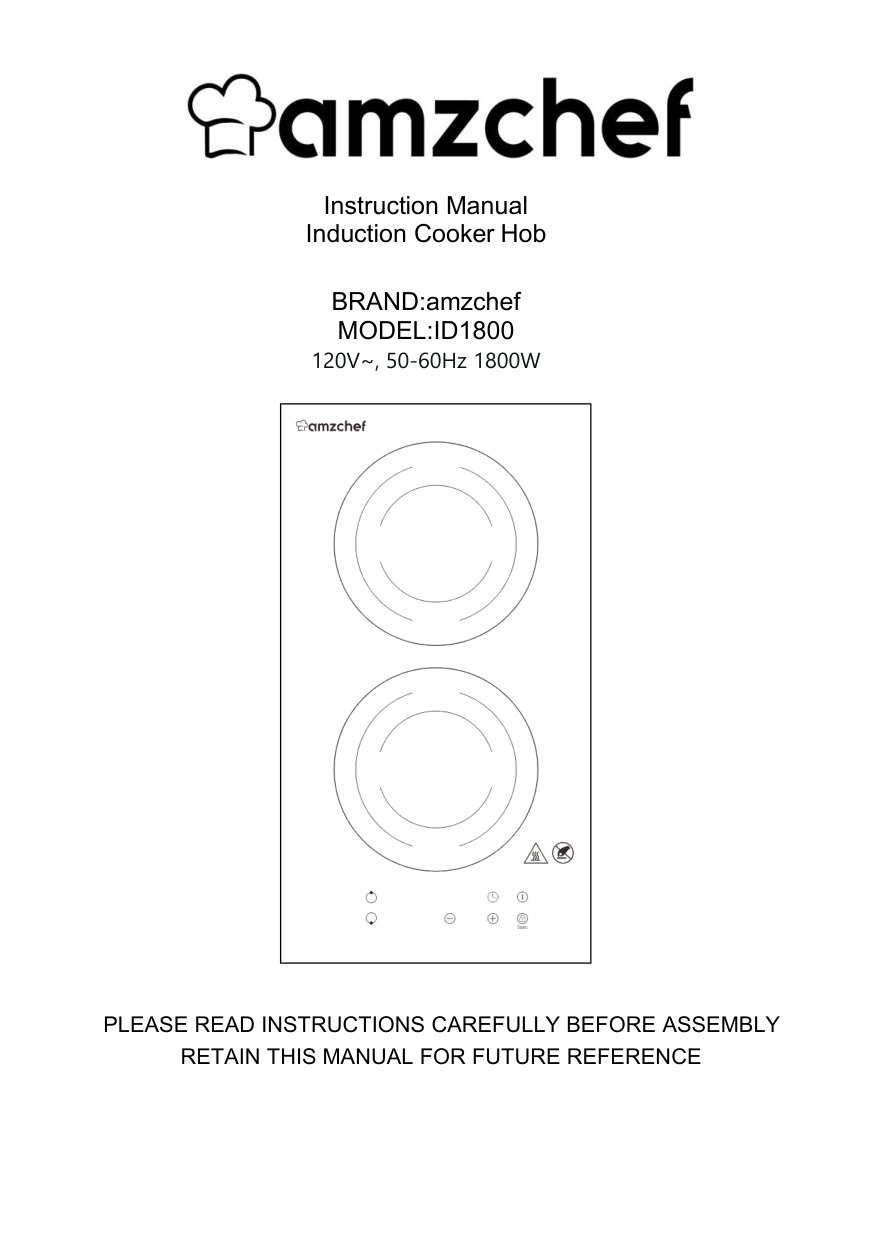

Instruction Manual Induction Cooker Hob
BRAND:amzchef MODEL:ID1800 120V~, 50-60Hz 1800W

PLEASE READ INSTRUCTIONS CAREFULLY BEFORE ASSEMBLY RETAIN THIS MANUAL FOR FUTURE REFERENCE
Contents
Safety Warnings Product Overview Product Information Choosing the right Cookware Using your Induction Hob Cooking Guidelines Heat Settings Care and Cleaning Troubleshooting Technical Specification Installation Warranty
1
Safety Warnings
Your safety is important to us. Please read this information before using your cooktop.
Installation Electrical Shock Hazard
maintenance on it.
Cut Hazard
Important safety instructions
appliance as it could reduce your installation costs.
for installation.
providing full disconnection from the power supply.
Operation and maintenance Electrical Shock Hazard
switch the appliance off immediately at the mains power supply (wall switch) and contact a qualified technician.
Health Hazard
##### Hot Surface Hazard
Induction glass until the surface is cool.
surface since they can get hot
other cooking zones that are on. Keep handles out of reach of children.
Cut Hazard
Use with extreme care and always store safely and out of reach of children.
Important safety instructions
spillovers that may ignite.
(i.e. by using the touch controls).
on the cooktop could be seriously injured.
have a responsible and competent person to instruct them in its use. The instructor should be satisfied that they can use the appliance without danger to themselves or their surroundings.
manual. All other servicing should be done by a qualified technician.
can scratch the glass.
these can scratch the Induction glass.
similarly qualified persons in order to avoid a hazard.
kitchen areas in shops, offices and other working environments;
-farm houses; -by clients in hotels, motels and other residential type environments ; -bed and breakfast type environments.
Care should be taken to avoid touching heating elements. Children less than 8 years of age shall be kept away unless continuously supervised.
reduced physical, sensory or mental capabilities or lack of experience and knowledge if they have been given supervision or instruction concerning use of the appliance in a safe way and understand the hazards involved.
made by children without supervision.
in fire. NEVER try to extinguish a fire with water, but switch off the appliance and then cover flame e.g. with a lid or a fire blanket.
electric shock, for hob surfaces of glass-ceramic or similar material which protect live parts
remote-control system. Congratulations on the purchase of your new Ceramic Hob. We recommend that you spend some time to read this Instruction / Installation Manual in order to fully understand how to install correctly and operate it. For installation, please read the installation section. Read all the safety instructions carefully before use and keep this Instruction / Installation Manual for future reference.
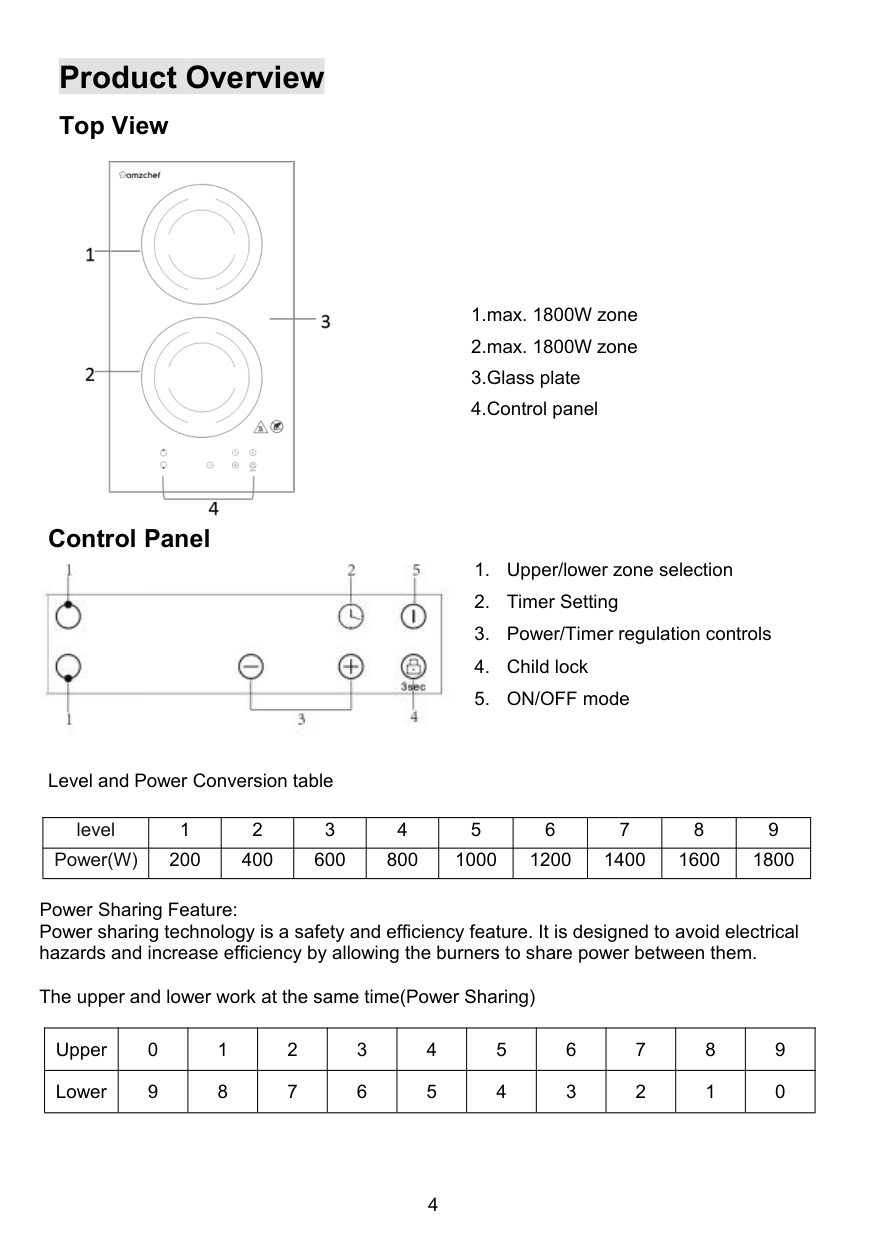
Product Overview Top View

Control Panel

Level and Power Conversion table
|level|1|2|3|4|5|6|7|8|9| |---|---|---|---|---|---|---|---|---|---| |Power(W)|200|400|600|800|1000|1200|1400|1600|1800|
Power Sharing Feature: Power sharing technology is a safety and efficiency feature. It is designed to avoid electrical hazards and increase efficiency by allowing the burners to share power between them.
The upper and lower work at the same time(Power Sharing)
|Upper|0|1|2|3|4|5|6|7|8|9| |---|---|---|---|---|---|---|---|---|---|---| |Lower|9|8|7|6|5|4|3|2|1|0|
Product Information
The microcomputer induction cooker hob can meet different kinds of cuisine demands because of electromagnetic induction technology, micro-computerized control and multipower selection, really the optimal choice for modern families. The induction cooker focus on customer needs and is use-friendly. The hob has safe and reliable performances, making your life comfortable and enabling to fully enjoy the pleasure from life.
Before using your New Induction Hob
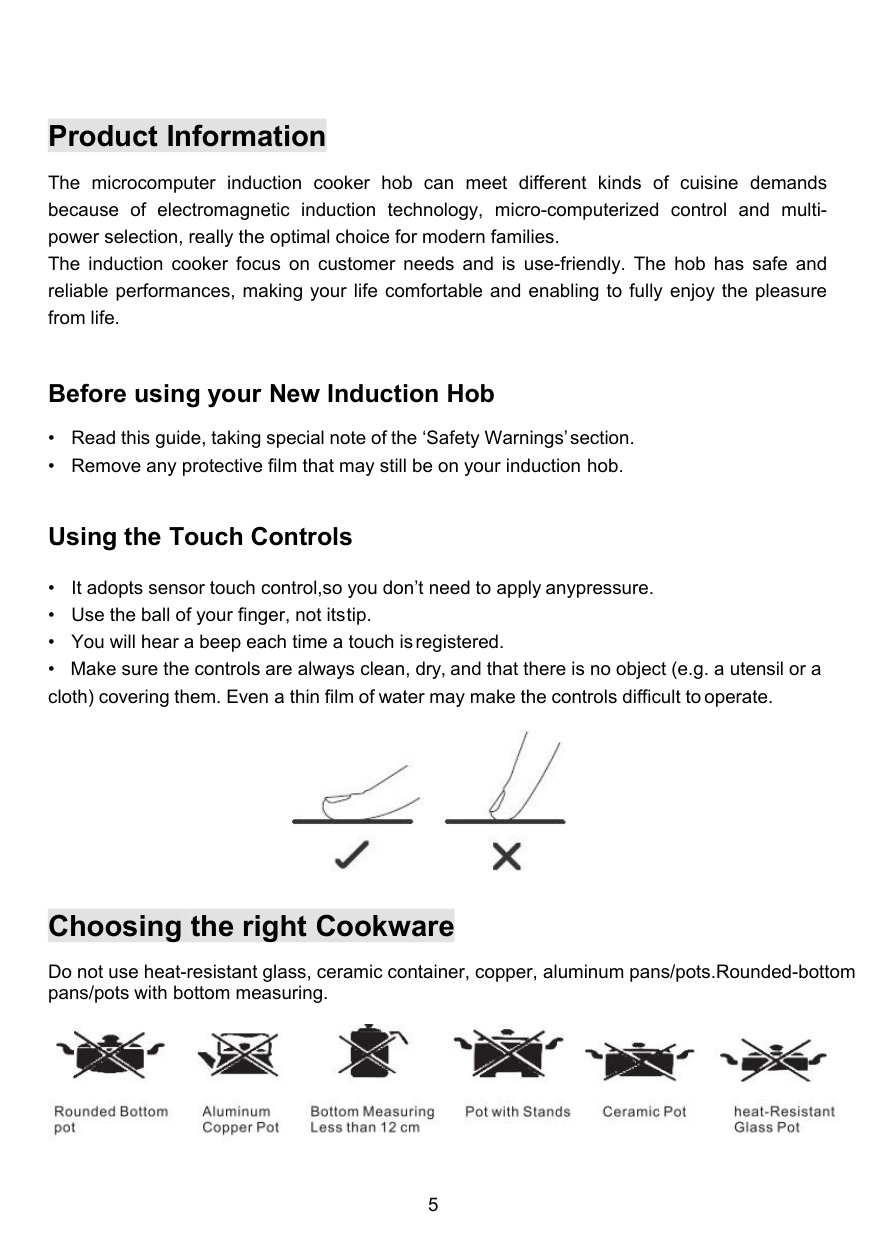
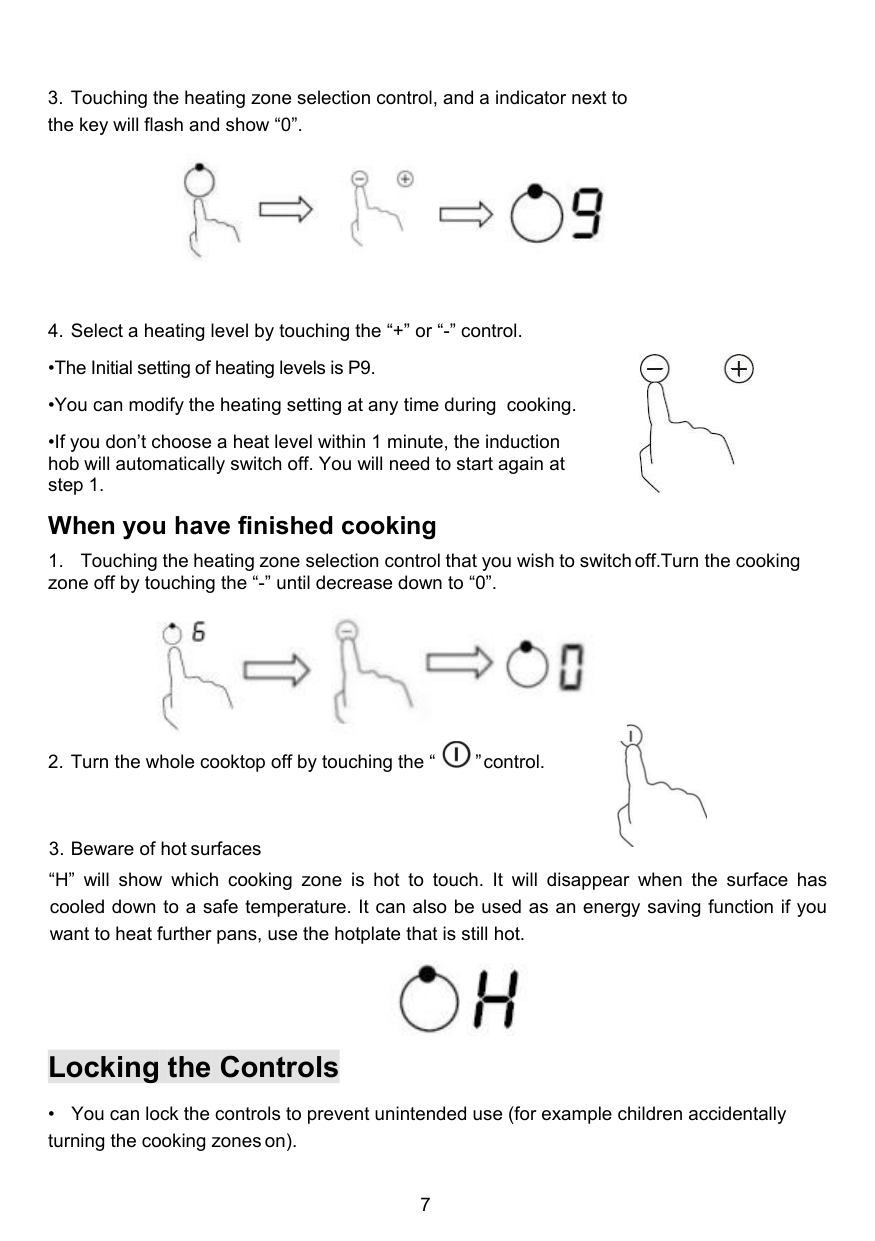
Using the Touch Controls

Choosing the right Cookware
Do not use heat-resistant glass, ceramic container, copper, aluminum pans/pots.Rounded-bottom pans/pots with bottom measuring.

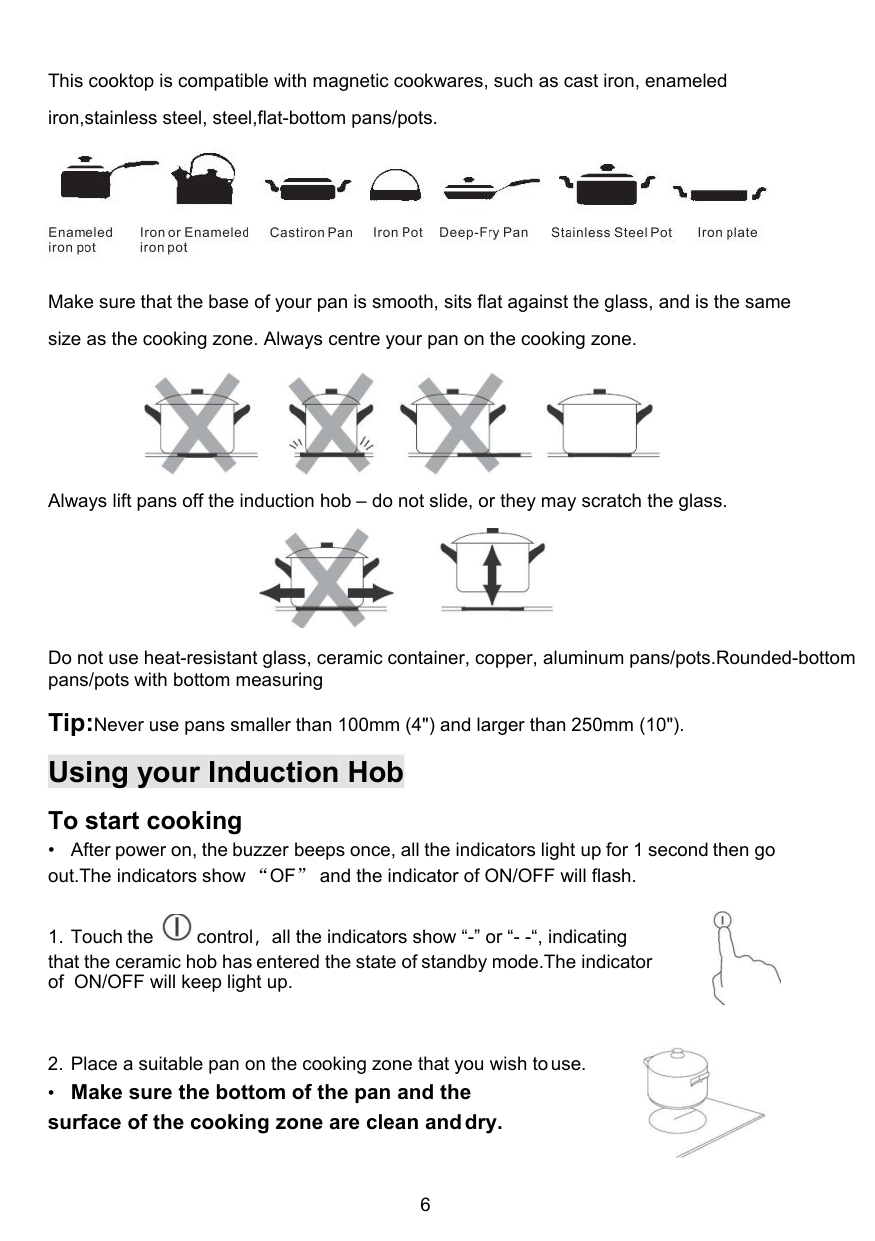
This cooktop is compatible with magnetic cookwares, such as cast iron, enameled iron,stainless steel, steel,flat-bottom pans/pots.

Make sure that the base of your pan is smooth, sits flat against the glass, and is the same size as the cooking zone. Always centre your pan on the cooking zone.

Always lift pans off the induction hob – do not slide, or they may scratch the glass.

Do not use heat-resistant glass, ceramic container, copper, aluminum pans/pots.Rounded-bottom pans/pots with bottom measuring
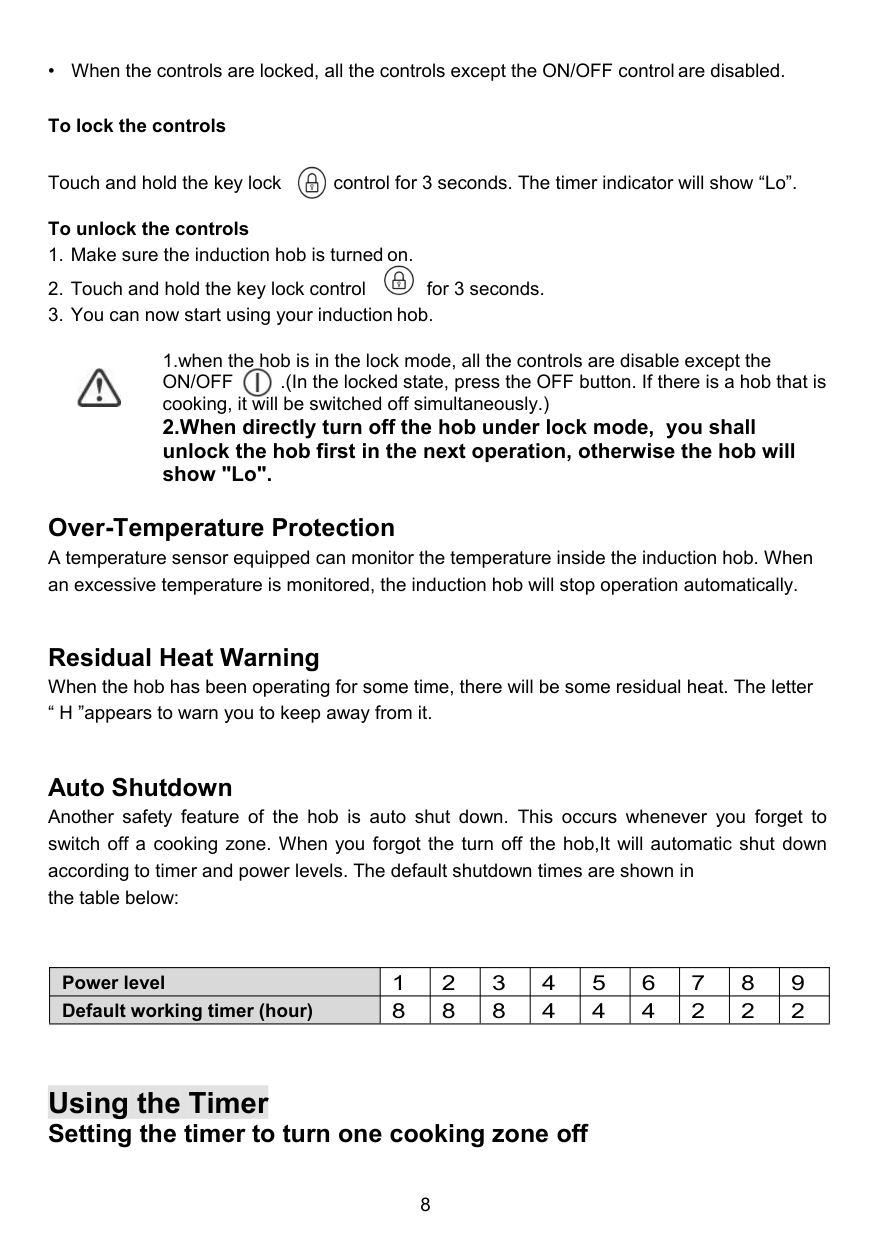
Tip:Never use pans smaller than 100mm (4") and larger than 250mm (10"). Using your Induction Hob To start cooking

that the ceramic hob has entered the state of standby mode.The indicator of ON/OFF will keep light up.
#### • Make sure the bottom of the pan and the surface of the cooking zone are clean anddry.


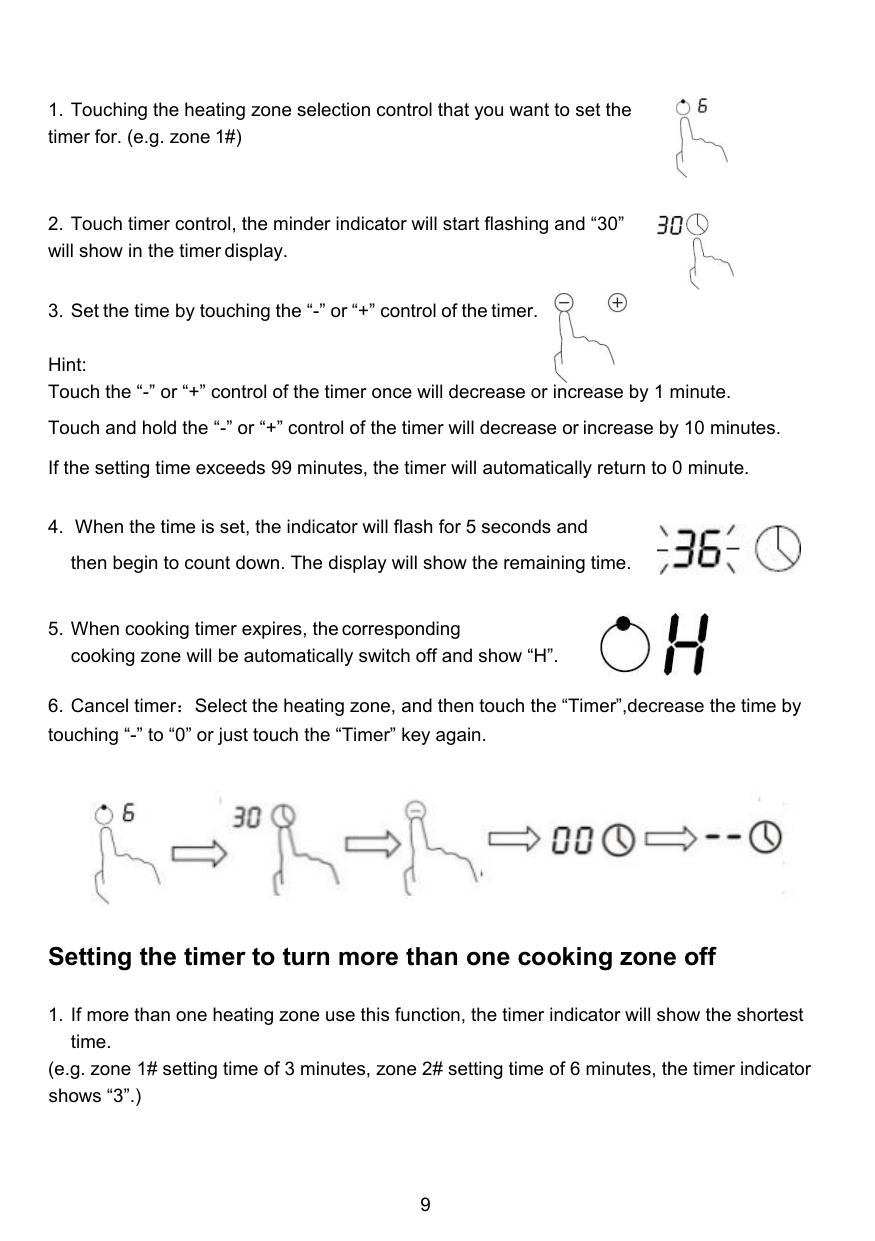


Locking the Controls
To lock the controls Touch and hold the key lock control for 3 seconds. The timer indicator will show “Lo”. To unlock the controls


Over-Temperature Protection A temperature sensor equipped can monitor the temperature inside the induction hob. When an excessive temperature is monitored, the induction hob will stop operation automatically.
Residual Heat Warning When the hob has been operating for some time, there will be some residual heat. The letter “ H ”appears to warn you to keep away from it.
Auto Shutdown Another safety feature of the hob is auto shut down. This occurs whenever you forget to switch off a cooking zone. When you forgot the turn off the hob,It will automatic shut down according to timer and power levels. The default shutdown times are shown in the table below:
|Power level|1|2|3|4|5|6|7|8|9| |---|---|---|---|---|---|---|---|---|---| |Default working timer (hour)|8|8|8|4|4|4|2|2|2|
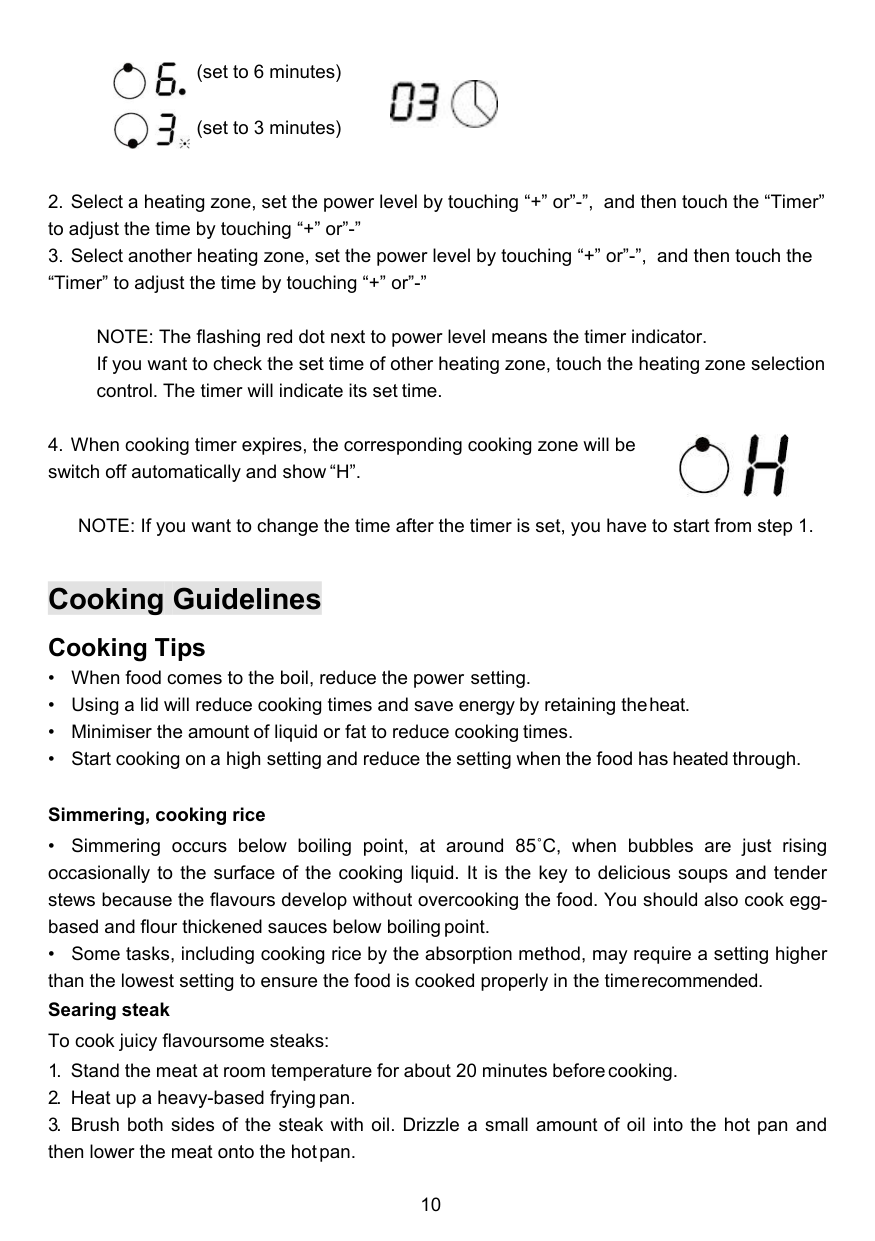
Using the Timer Setting the timer to turn one cooking zone off

Hint: Touch the “-” or “+” control of the timer once will decrease or increase by 1 minute.
Touch and hold the “-” or “+” control of the timer will decrease or increase by 10 minutes. If the setting time exceeds 99 minutes, the timer will automatically return to 0 minute.


Setting the timer to turn more than one cooking zone off
(e.g. zone 1# setting time of 3 minutes, zone 2# setting time of 6 minutes, the timer indicator shows “3”.)
(set to 6 minutes)

(set to 3 minutes)

NOTE: The flashing red dot next to power level means the timer indicator. If you want to check the set time of other heating zone, touch the heating zone selection control. The timer will indicate its set time.

NOTE: If you want to change the time after the timer is set, you have to start from step 1.
Cooking Guidelines Cooking Tips
Simmering, cooking rice
##### For stir-frying
Heat Settings
|Heat setting|Suitability| |---|---| |1 - 2|• delicate warming for small amounts offood
• melting chocolate, butter, and foods that burnquickly
• gentle simmering
• slow warming
| |3 - 4|• reheating
• rapid simmering
• cooking rice
| |5 - 6|• pancakes| |7 - 8|• sauteing
• cooking pasta
| |9|• stir-frying
• searing
• bringing soup to the boil
• boiling water
|
Care and Cleaning
|What?|How?|Important!| |---|---|---| |Everyday soiling on glass (fingerprints, marks, stains left by food or non-sugary spillovers on the glass)|1. Switch the power to the cooktop off.
2. Apply a cooktop cleaner while the glass is still warm (but not hot!)
3. Rinse and wipe dry with a clean cloth or paper towel.
4. Switch the power to the cooktop back on.
|• When the power to the cooktop is switched off, there will be no ‘hot surface’ indication but the cooking zone may still be hot! Take extreme care.
• Heavy-duty scourers, some nylon scourers and harsh/abrasive cleaning agents may scratch the glass. Always read the label to check if your cleaner or scourer is suitable.
• Never leave cleaning residue on the cooktop: the glass may become stained.
| |Boilovers, melts, and hot sugary spills on the glass|Remove these immediately with a fish slice, palette knife or razor blade scraper suitable for ceramic glass cooktops, but beware of hot cooking zone surfaces:
1. Switch the power to the cooktop off at the wall.
2. Hold the blade or utensil at a 30° angle and scrape the soiling or spill to a cool area of the cooktop.
3. Clean the soiling or spill up with a dish cloth or paper towel.
4. Follow steps 2 to 4 for ‘Everyday soiling on glass’ above.
|• Remove stains left by melts and
sugary food or spillovers as soon
as possible. If left to cool on the
glass, they may be difficult to remove or even permanently damage the glass surface.
• Cut hazard: when the safety cover
is retracted, the blade in a scraper
is razor-sharp. Use with extreme
care and always store safely and
out of reach of children.| |Spillovers on the touch controls|1. Switch the power to the cooktop off.
2. Soak up thespill
3. Wipe the touch control area with a clean damp sponge or cloth.
4. Wipe the area completely dry
with a paper towel.
5. Switch the power to the cooktop back on.
|• The cooktop may beep and turn itself off, and the touch controls may not function while there is liquid on them. Make sure you wipe the touch control area dry before turning the cooktop back on.|
Troubleshooting
|Problem|Possible causes|What to do| |---|---|---| |The cooktop cannot Be turned on.|No power.|Make sure the cooktop is connected to the power supply and that it is switched on. Check whether there is a power outage in your home or area. If you’ve checked everything and the problem persists, call a qualified technician.| |The touch controls are unresponsive.|The controls are locked.|Unlock the controls. See section ‘Using your ceramic cooktop’ for instructions.| |The touch controls are difficult to operate.|There may be a slight film of water over the controls or you may be using the tip of your finger when touching the controls.|Make sure the touch control area is dry and use the ball of your finger when touching the controls.| |The glass is being scratched.|Rough-edged cookware. Unsuitable, abrasive scourer or cleaning products being used.|Use cookware with flat and smooth bases. See ‘Choosing the right cookware’.
See ‘Care and cleaning’.|
|Some pans make crackling or clicking noises.|This may be caused by the construction of your cookware (layers of different metals vibrating differently).|This is normal for cookware and does not indicate a fault.|
Problem code and solution
|Problem|Possible causes|What to do| |---|---|---| |U
|There is no pot/pan or unsuitable pot/pan on induction hob.|Put a pot/pan on the hob or change a suitable pot/pan.| |E1|The voltage is too high (>145V)|You can switch off the electric ceramic hob first. Wait for the voltage to return to normal before switching on.| |E2|The voltage is too low (<90V)|You can switch off the electric ceramic hob first. Wait for the voltage to return to normal before switching on.| |F3 / F4|Temperature sensor of the induction coil short circuit or open circuit.|Please contact with qualified service center.| |F9 / FA|Temperature sensor of the IGBT short circuit or open circuit.|Please contact with qualified service center.|
Technical Specification
|Cooking Hob|ID1800| |---|---| |Cooking Zones|2 Zones| |Supply Voltage|120V~,50-60Hz| |Installed Electric Power|shared 1800W| |Product Size L×W×H(mm)|288X520X62| |Building-in Dimensions A×B (mm)|270X500|
Weight and Dimensions are approximate. Because we continually strive to improve our products we may change specifications and designs without prior notice.
Manufacturer: Zhongshan Daofey Electrical Co.,Ltd Add: No.16 Jingtian Street, Donghe Road, Xiaoli Community, Dongfeng Town,Zhongshan City, Guangdong, China. Contact:Emily Tel: +1(838)910 8317 E-Mail:[email protected]

Installation Selection of installation equipment
Cut out the work surface according to the sizes shown in the drawing. For the purpose of installation and use, a minimum of 5 cm space shall be preserved around the hole. Be sure the thickness of the work surface is at least 30mm. Please select heat- resistant work surface material to avoid larger deformation caused by the heat radiation from the hotplate. As shown below:

|L(mm)|W(mm)|H(mm)|D(mm)|A(mm)|B(mm)|X(mm)| |---|---|---|---|---|---|---| |288|520|62|57|268-270|498-500|50 mini|
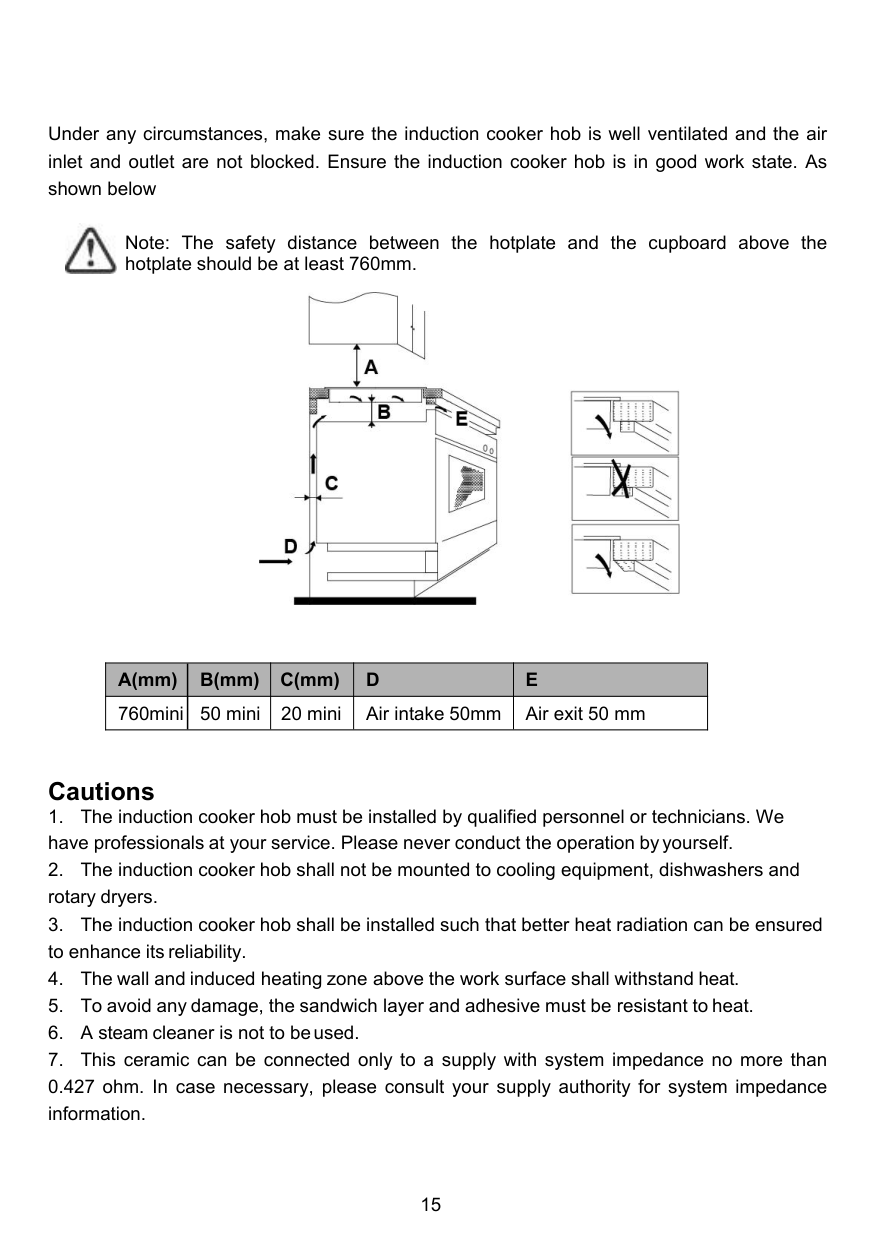
Under any circumstances, make sure the induction cooker hob is well ventilated and the air inlet and outlet are not blocked. Ensure the induction cooker hob is in good work state. As shown below

Note: The safety distance between the hotplate and the cupboard above the hotplate should be at least 760mm.

|A(mm)|B(mm)|C(mm)|D|E| |---|---|---|---|---| |760mini|50 mini|20 mini|Air intake 50mm|Air exit 50 mm|
Cautions
