
Ask AI
— answers from the official manualAnswers from the official manual.
Common questions
Common Questions
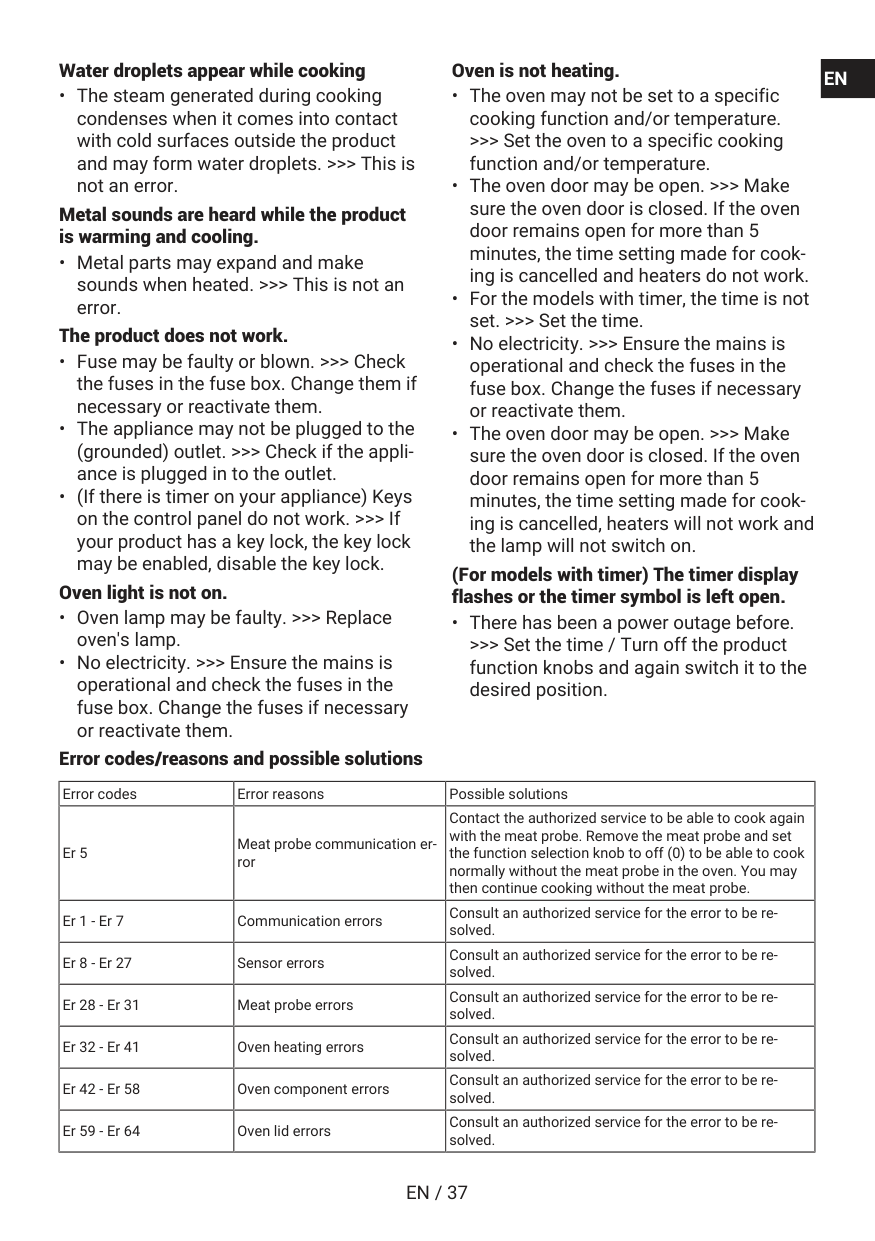
10 totalIs it normal to see steam coming from the oven while it's operating?
Yes, it is normal to see vapor during operation. This is not an error and does not indicate a problem with the oven. (Page 36)
What is the maximum baking time that can be set?
The maximum time that can be set for the baking process is 5 hours and 59 minutes. In case of a power failure, the program is canceled and you will need to re-program it. (Page 20)
How do I use the key lock feature on the timer?
Touch the key lock key until the key lock symbol appears on the display. A 3-2-1 countdown will start, and the key lock activates when the countdown ends. Once activated, timer keys cannot be used and the timer sounds a signal if any key is touched. (Page 22)
How do I set the time of day when first using the oven?
When the oven is first started, '12:00' and a clock symbol will flash on the display. Set the time using the increase/decrease keys, then touch the settings key to activate the minutes field and adjust them. Confirm by touching the settings key. If you don't set the time, some oven models will not start cooking. (Page 19)
What should I do during the initial cleaning of the oven?
Remove all packaging materials and accessories, then operate the oven for 30 minutes at the highest temperature using a function where all heaters operate. This burns off residues and layers from production. After cooling, wipe surfaces with a wet cloth and dry them. (Page 19)
What does the 'Er 5' error code mean?
Er 5 indicates a meat probe communication error. You should contact the authorized service to cook again with the meat probe. Alternatively, you can remove the meat probe and set the function selection knob to off (0) to cook normally without it. (Page 36)
Full Manual
78 pages
Built-in Oven User Manual Four Encastrable Manuel d’utilisation
Bbie12300Xmp
385443029_1/ En/ Fr/ R.Ab/ 04.01.25 10:26
7757787664En
Fr
En / 2
Welcome! Dear Customer, Thank you for choosing the Beko product. We want your product, manufactured with high quality and technology, to offer you the best efficiency. Therefore, carefully read this manual and any other documentation provided before using the product. Keep in mind all the information and warnings stated in the user’s manual. This way, you will protect yourself and your product against the dangers that may occur. Keep the user’s manual. If you give the product to someone else, give the manual with it. The warranty conditions, usage and troubleshooting methods for your product are provided in this manual. The symbols and their descriptions in the user’s manual: Hazard that may result in death or injury. Important information or useful usage tips. Read the user’s manual. Hot surface warning.Notice
Hazard that may result in material damage to the product or its environment.
En / 3
Table of Contents 1 Safety Instructions......................... 4 1.1 Intended Use.................................. 4 1.2 Child, Vulnerable Person and Pet Safety ............................................. 4 1.3 Electrical Safety............................. 5 1.4 Transportation Safety ................... 7 1.5 Installation Safety.......................... 7 1.6 Safety of Use ................................. 8 1.7 Temperature Warnings ................. 8 1.8 Accessory Use............................... 9 1.9 Cooking Safety .............................. 9 1.10 Maintenance and Cleaning Safety 10 1.11 High temperature self-cleaning (Pyrolysis) ...................................... 11 2 Environmental Instructions ............ 11 2.1 Waste Directive.............................. 11 2.1.1 Compliance with the WEEE Dir- ective and Disposing of the Waste Product ........................... 11 2.2 Package Information..................... 11 2.3 Recommendations for Energy Saving............................................. 12 3 Your product.................................. 13 3.1 Product Introduction ..................... 13 3.2 Product Control Panel Introduc- tion and Usage............................... 13 3.2.1 Control Panel.............................. 14 3.2.2 Introduction of the oven control panel ........................................... 14 3.3 Oven operating functions.............. 14 3.4 Product Accessories..................... 15 3.5 Use of Product Accessories ......... 16 3.6 Technical Specifications............... 18 4 First Use ........................................ 19 4.1 First Timer Setting......................... 19 4.2 Initial Cleaning............................... 19 5 Using the Oven............................... 20 5.1 General Information on Using the Oven ............................................... 20 5.2 Operation of the Oven Control Unit ................................................. 20 5.3 Settings.......................................... 22 6 General Information About Baking . 24 6.1 General Warnings About Baking in the Oven...................................... 24 6.1.1 Pastries and oven food.............. 24 6.1.2 Meat, Fish and Poultry ............... 26 6.1.3 Grill .............................................. 27 6.1.4 Test foods................................... 28 7 Maintenance and Cleaning............. 29 7.1 General Cleaning Information....... 29 7.2 Cleaning Accessories.................... 31 7.3 Cleaning the Control Panel............ 31 7.4 Cleaning the inside of the oven (cooking area)................................ 31 7.5 Easy Steam Cleaning..................... 31 7.6 High temperature self-cleaning .... 32 7.7 Cleaning the Oven Door................. 34 7.8 Removing the Inner Glass of The Oven Door....................................... 34 7.9 Cleaning the Oven Lamp ............... 35 8 Troubleshooting ............................ 36En
Fr
En / 4
1 Safety InstructionsEn
Fr
En / 5
En
Fr
En / 6
En
Fr
En / 7
En
Fr
En / 8
En
Fr
En / 9
En
Fr
En / 10
greaseproof paper that hang from accessories or contain- ers. Do not use greaseproof paper at oven temperatures higher than the maximum us- age temperature specified by the manufacturer. Never place greaseproof paper on the oven base.En
Fr
En / 11
1.11 High temperature self-cleaning (Pyro- lysis)En
Fr
En / 12
2.3 Recommendations for Energy Saving According to EU 66/2014, information on energy efficiency can be found on the product receipt supplied with the product. The following suggestions will help you use your product in an ecological and energy-ef- ficient way:En
Fr
En / 13
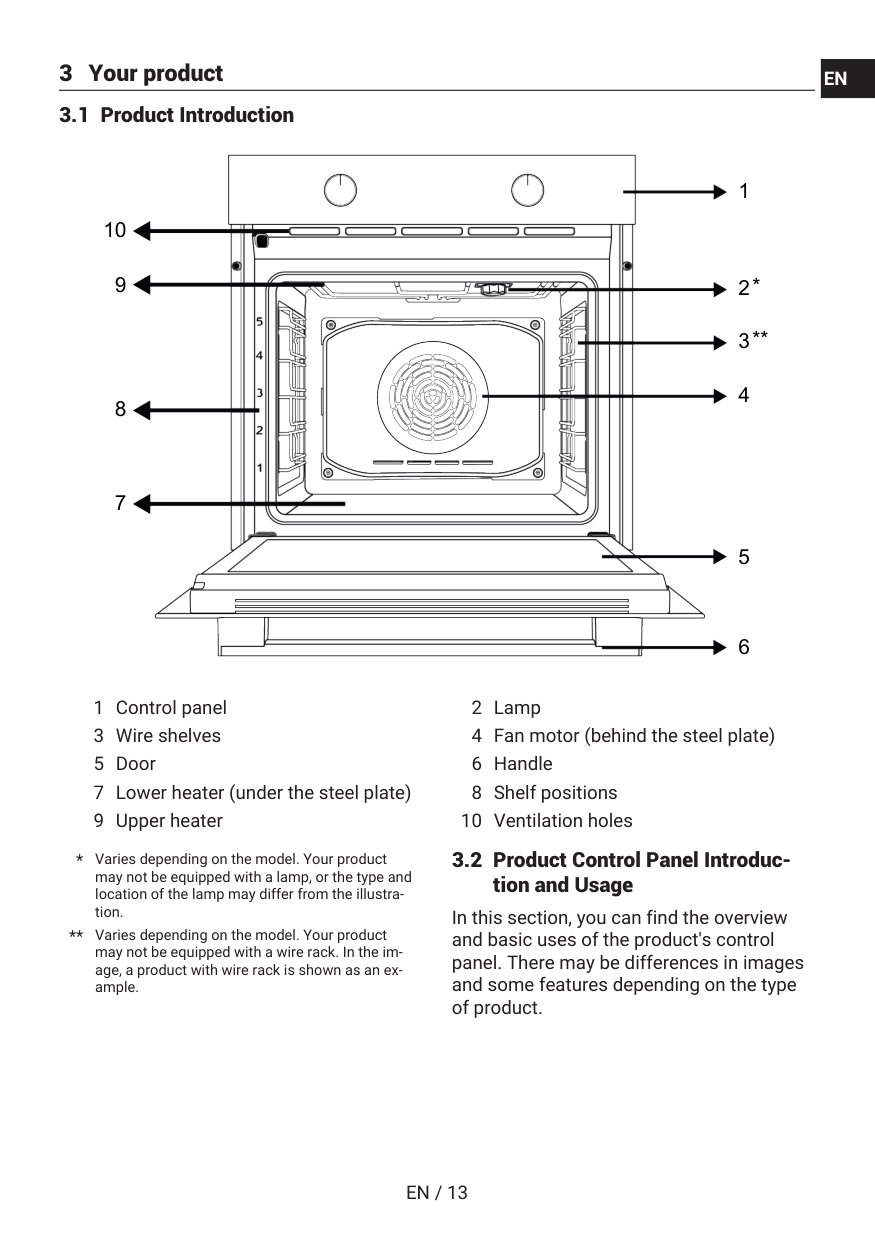
3 Your product 3.1 Product Introduction 1 2 3 4 5 6 7 8 9 10En
Fr
En / 14
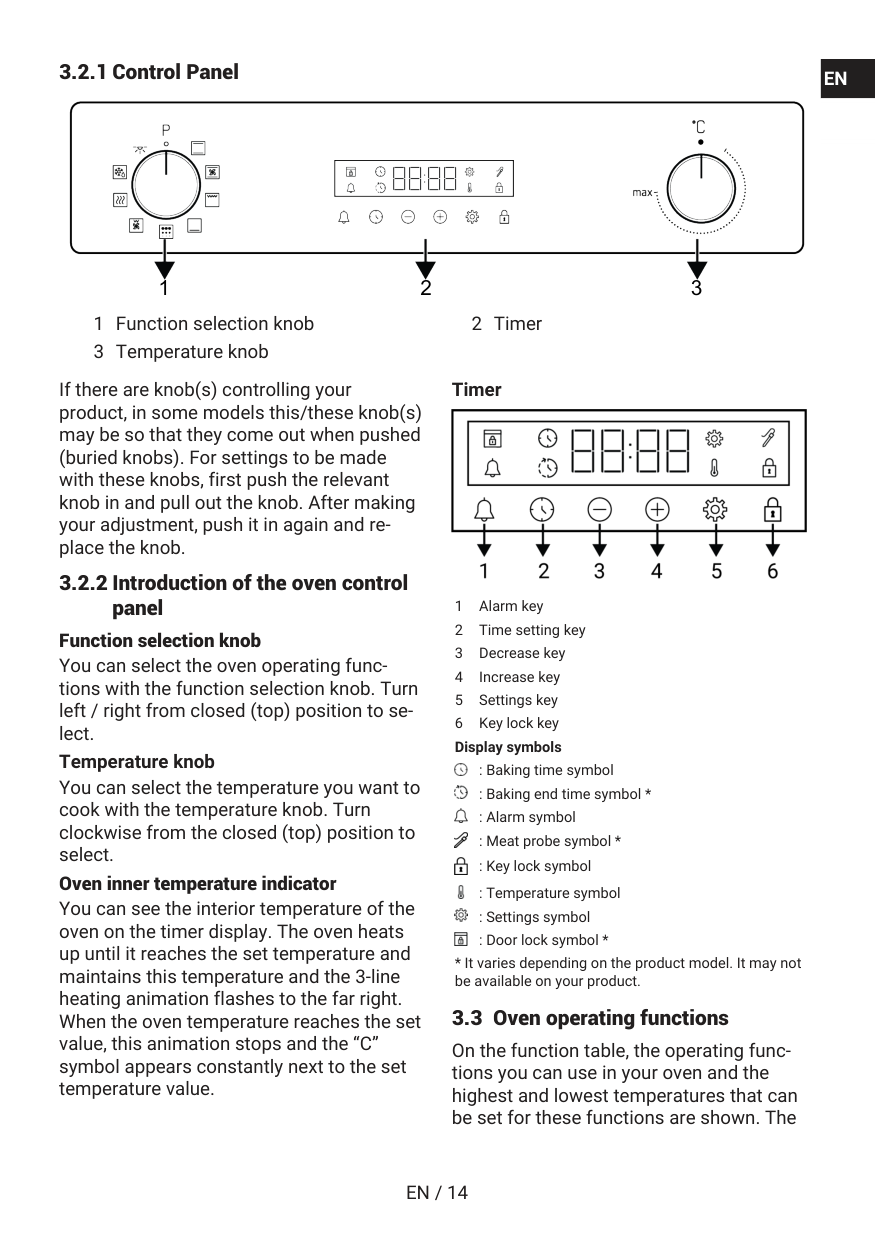
3.2.1 Control Panel 1 2 3 1 Function selection knob 2 Timer 3 Temperature knob If there are knob(s) controlling your product, in some models this/these knob(s) may be so that they come out when pushed (buried knobs). For settings to be made with these knobs, first push the relevant knob in and pull out the knob. After making your adjustment, push it in again and re- place the knob. 3.2.2 Introduction of the oven control panel Function selection knob You can select the oven operating func- tions with the function selection knob. Turn left / right from closed (top) position to se- lect. Temperature knob You can select the temperature you want to cook with the temperature knob. Turn clockwise from the closed (top) position to select. Oven inner temperature indicator You can see the interior temperature of the oven on the timer display. The oven heats up until it reaches the set temperature and maintains this temperature and the 3-line heating animation flashes to the far right. When the oven temperature reaches the set value, this animation stops and the “C” symbol appears constantly next to the set temperature value. Timer 1 Alarm key 2 Time setting key 3 Decrease key 4 Increase key 5 Settings key 6 Key lock key Display symbols : Baking time symbol : Baking end time symbol * : Alarm symbol : Meat probe symbol * : Key lock symbol : Temperature symbol : Settings symbol : Door lock symbol *En
Fr
En / 15
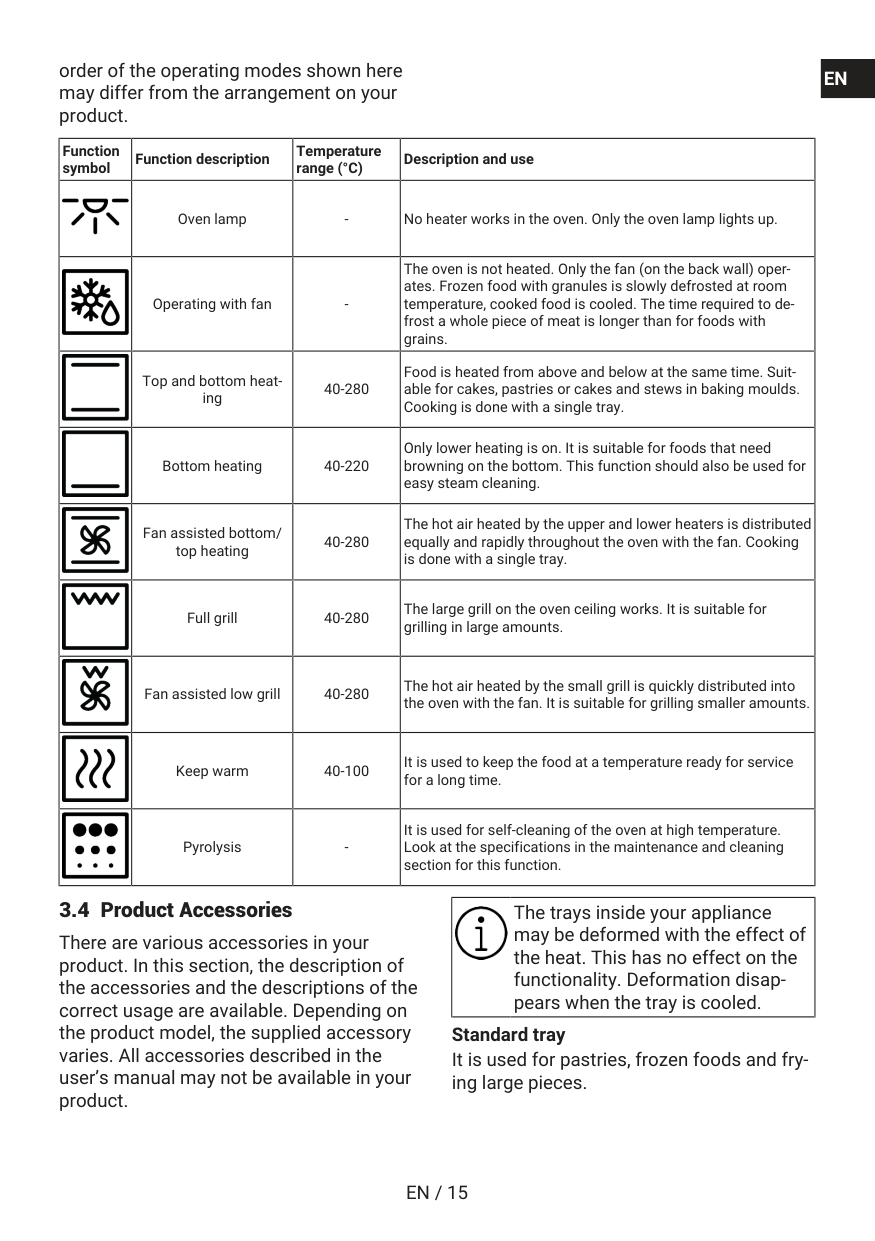
order of the operating modes shown here may differ from the arrangement on your product. Function symbol Function description Temperature range (°C) Description and use Oven lampEn
Fr
En / 16
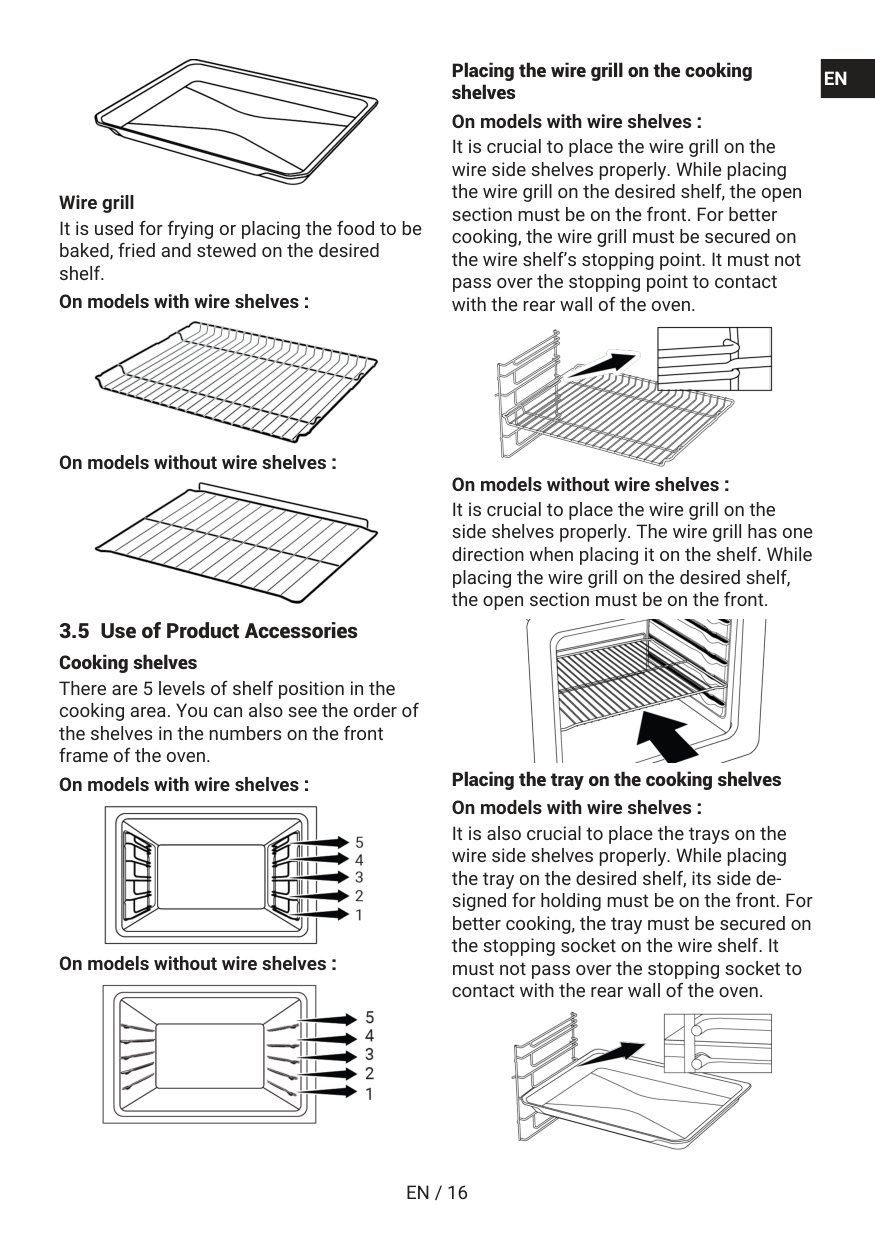
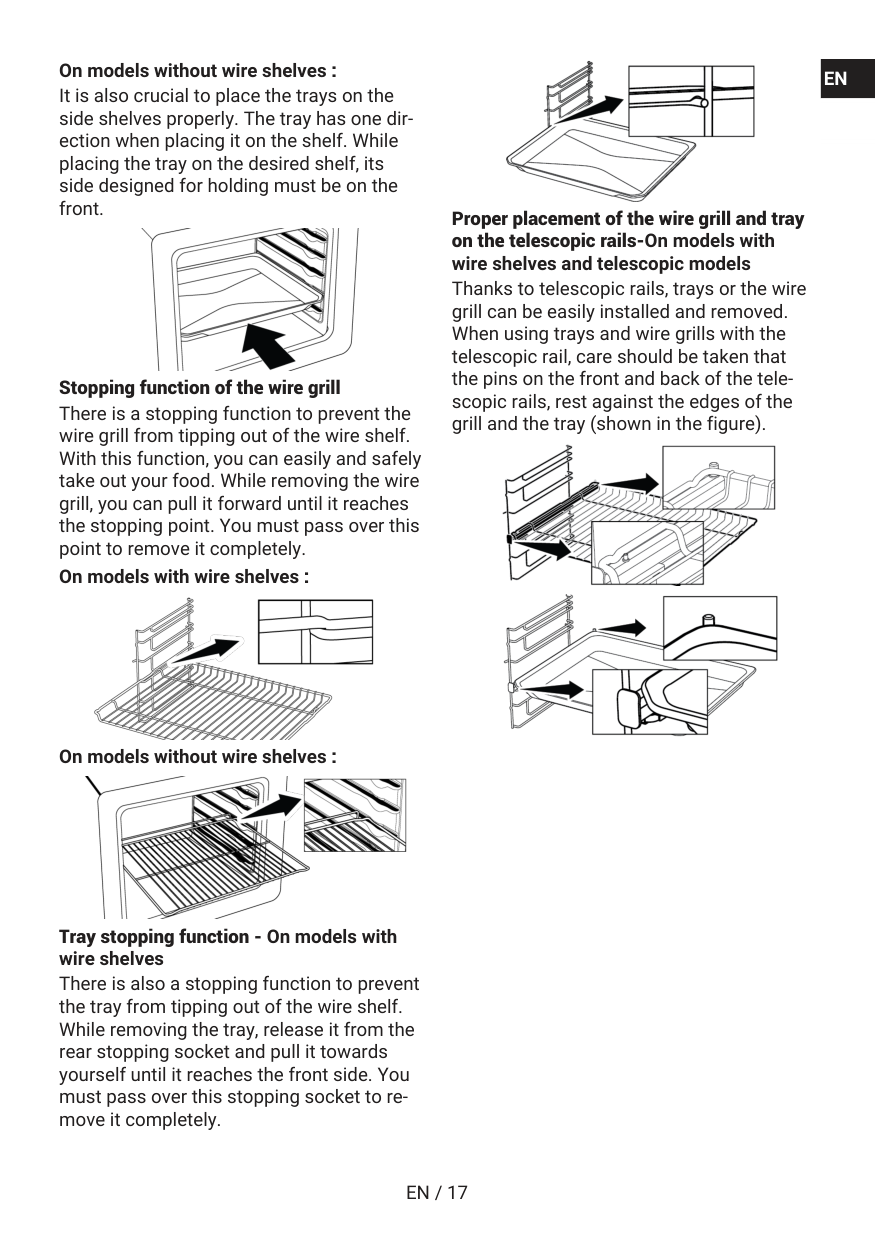
Wire grill It is used for frying or placing the food to be baked, fried and stewed on the desired shelf. On models with wire shelves : On models without wire shelves : 3.5 Use of Product Accessories Cooking shelves There are 5 levels of shelf position in the cooking area. You can also see the order of the shelves in the numbers on the front frame of the oven. On models with wire shelves : On models without wire shelves : Placing the wire grill on the cooking shelves On models with wire shelves : It is crucial to place the wire grill on the wire side shelves properly. While placing the wire grill on the desired shelf, the open section must be on the front. For better cooking, the wire grill must be secured on the wire shelf’s stopping point. It must not pass over the stopping point to contact with the rear wall of the oven. On models without wire shelves : It is crucial to place the wire grill on the side shelves properly. The wire grill has one direction when placing it on the shelf. While placing the wire grill on the desired shelf, the open section must be on the front. Placing the tray on the cooking shelves On models with wire shelves : It is also crucial to place the trays on the wire side shelves properly. While placing the tray on the desired shelf, its side de- signed for holding must be on the front. For better cooking, the tray must be secured on the stopping socket on the wire shelf. It must not pass over the stopping socket to contact with the rear wall of the oven.En
Fr
En / 17
On models without wire shelves : It is also crucial to place the trays on the side shelves properly. The tray has one dir- ection when placing it on the shelf. While placing the tray on the desired shelf, its side designed for holding must be on the front. Stopping function of the wire grill There is a stopping function to prevent the wire grill from tipping out of the wire shelf. With this function, you can easily and safely take out your food. While removing the wire grill, you can pull it forward until it reaches the stopping point. You must pass over this point to remove it completely. On models with wire shelves : On models without wire shelves : Tray stopping function - On models with wire shelves There is also a stopping function to prevent the tray from tipping out of the wire shelf. While removing the tray, release it from the rear stopping socket and pull it towards yourself until it reaches the front side. You must pass over this stopping socket to re- move it completely. Proper placement of the wire grill and tray on the telescopic rails-On models with wire shelves and telescopic models Thanks to telescopic rails, trays or the wire grill can be easily installed and removed. When using trays and wire grills with the telescopic rail, care should be taken that the pins on the front and back of the tele- scopic rails, rest against the edges of the grill and the tray (shown in the figure).En
Fr
En / 18
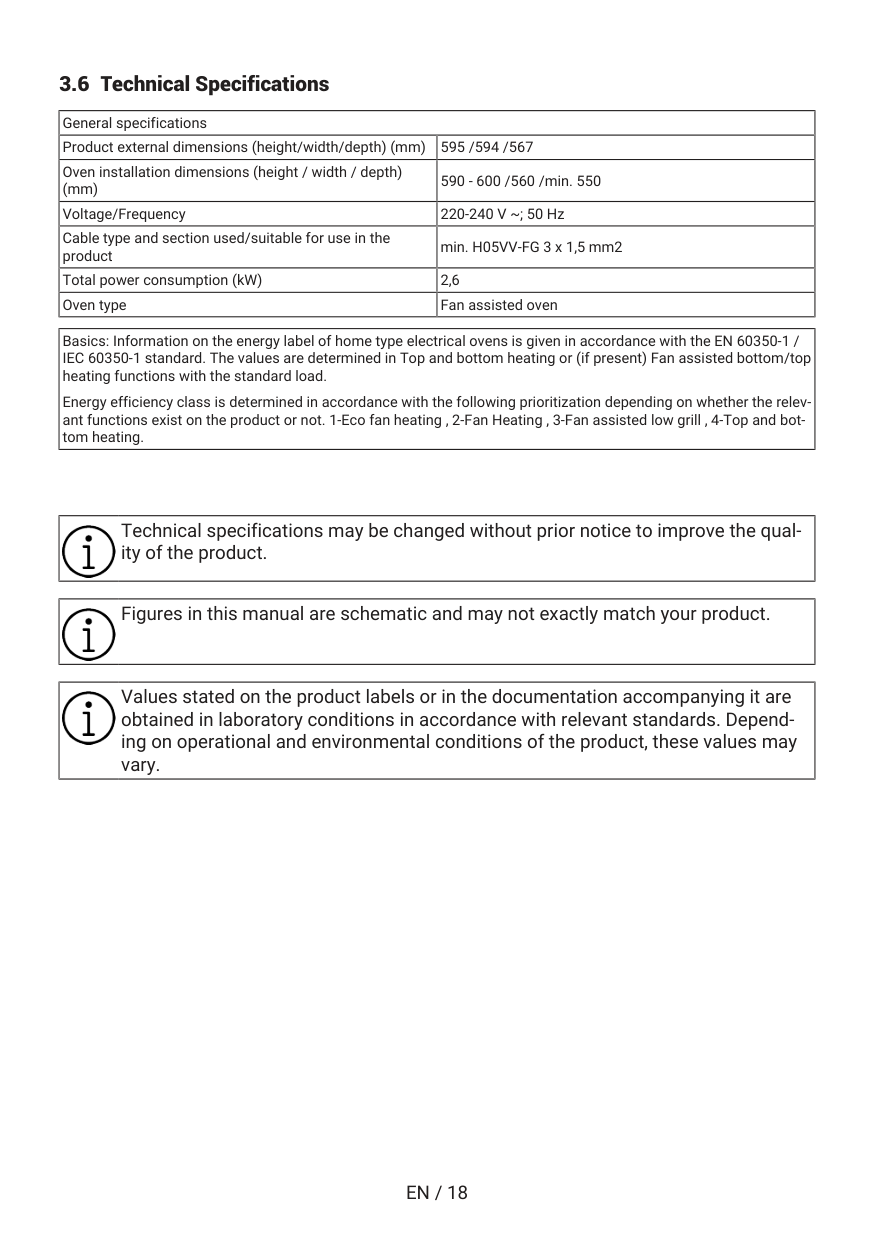
3.6 Technical Specifications General specifications Product external dimensions (height/width/depth) (mm) 595 /594 /567 Oven installation dimensions (height / width / depth) (mm) 590 - 600 /560 /min. 550 Voltage/Frequency 220-240 V ~; 50 Hz Cable type and section used/suitable for use in the product min. H05VV-FG 3 x 1,5 mm2 Total power consumption (kW) 2,6 Oven type Fan assisted oven Basics: Information on the energy label of home type electrical ovens is given in accordance with the EN 60350-1 / IEC 60350-1 standard. The values are determined in Top and bottom heating or (if present) Fan assisted bottom/top heating functions with the standard load. Energy efficiency class is determined in accordance with the following prioritization depending on whether the relev- ant functions exist on the product or not. 1-Eco fan heating , 2-Fan Heating , 3-Fan assisted low grill , 4-Top and bot- tom heating. Technical specifications may be changed without prior notice to improve the qual- ity of the product. Figures in this manual are schematic and may not exactly match your product. Values stated on the product labels or in the documentation accompanying it are obtained in laboratory conditions in accordance with relevant standards. Depend- ing on operational and environmental conditions of the product, these values may vary.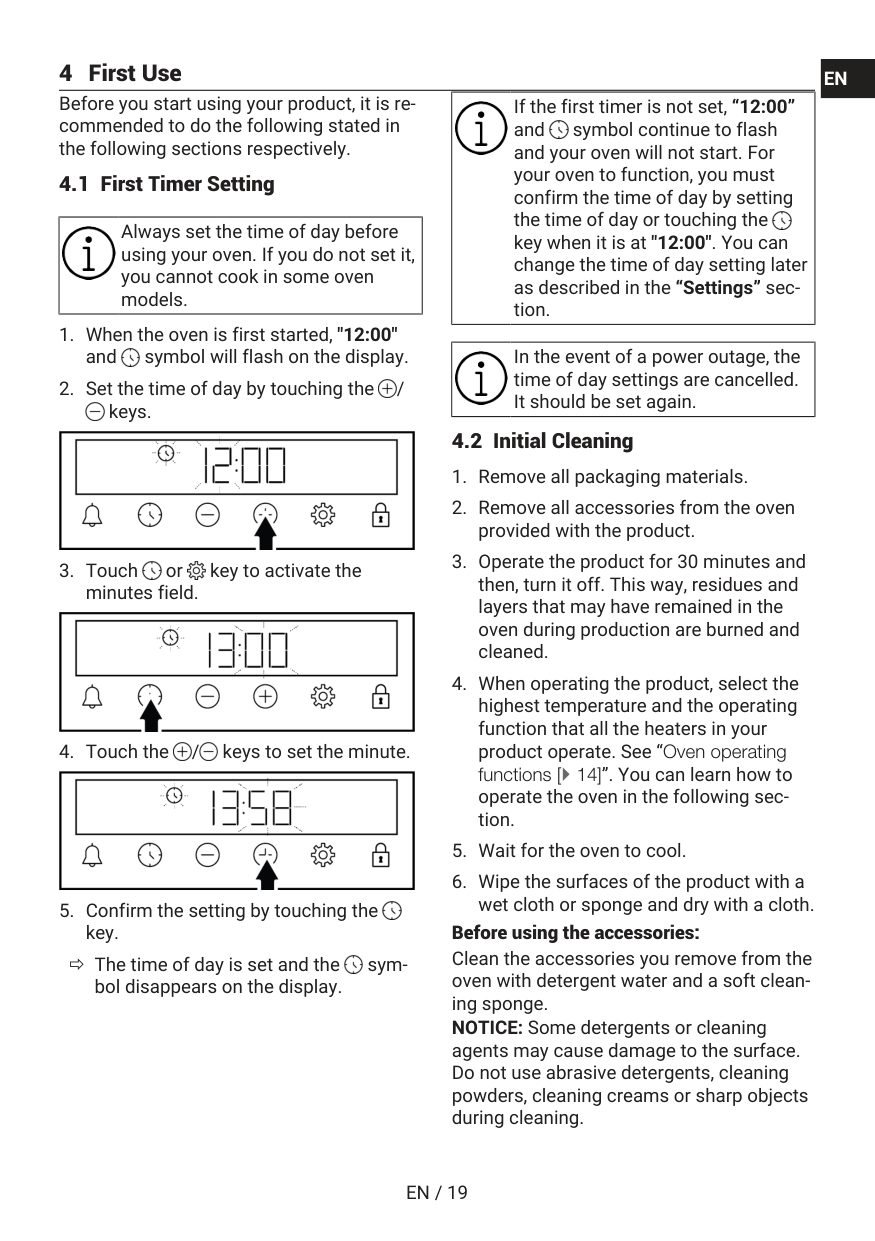
En / 19
4 First Use Before you start using your product, it is re- commended to do the following stated in the following sections respectively. 4.1 First Timer Setting Always set the time of day before using your oven. If you do not set it, you cannot cook in some oven models.En
Fr
En / 20
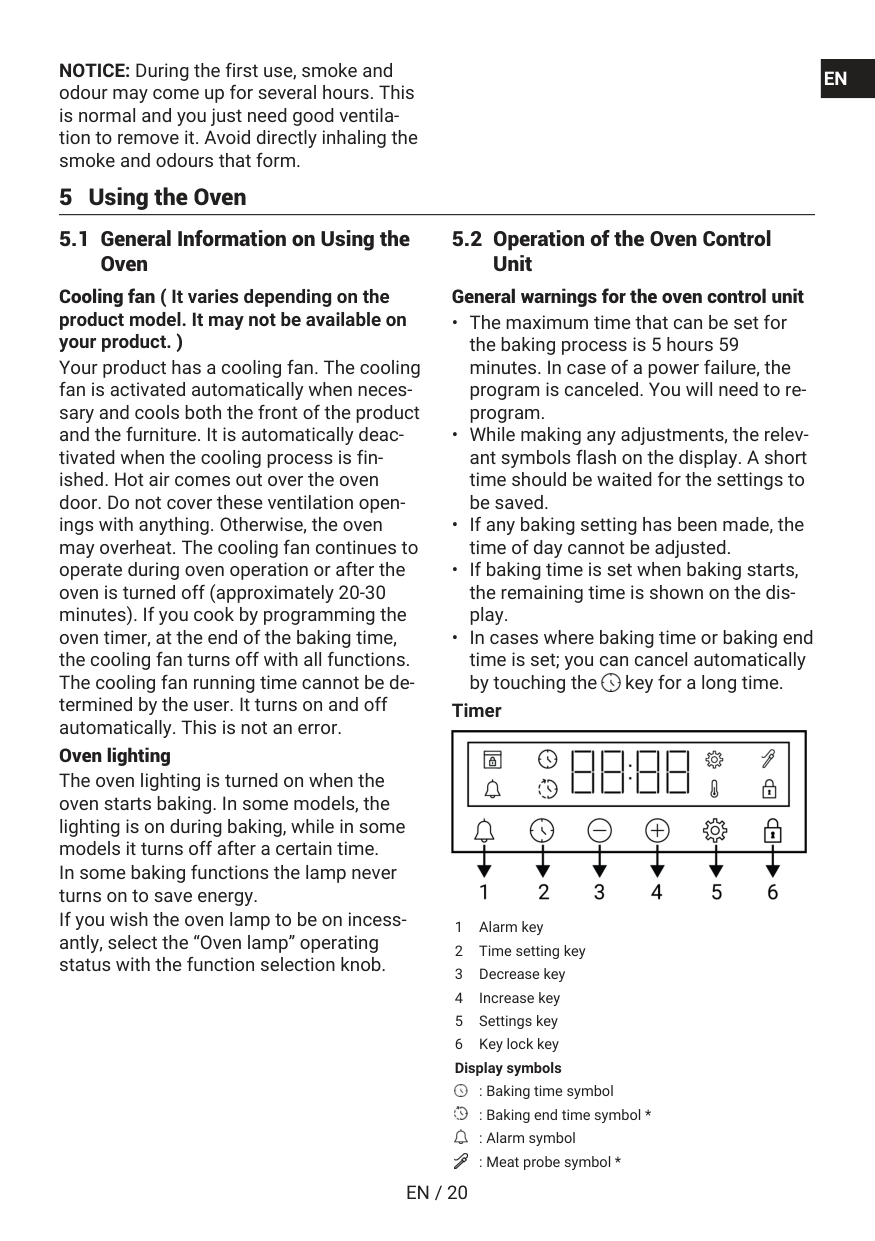
NOTICE: During the first use, smoke and odour may come up for several hours. This is normal and you just need good ventila- tion to remove it. Avoid directly inhaling the smoke and odours that form. 5 Using the Oven 5.1 General Information on Using the Oven Cooling fan ( It varies depending on the product model. It may not be available on your product. ) Your product has a cooling fan. The cooling fan is activated automatically when neces- sary and cools both the front of the product and the furniture. It is automatically deac- tivated when the cooling process is fin- ished. Hot air comes out over the oven door. Do not cover these ventilation open- ings with anything. Otherwise, the oven may overheat. The cooling fan continues to operate during oven operation or after the oven is turned off (approximately 20-30 minutes). If you cook by programming the oven timer, at the end of the baking time, the cooling fan turns off with all functions. The cooling fan running time cannot be de- termined by the user. It turns on and off automatically. This is not an error. Oven lighting The oven lighting is turned on when the oven starts baking. In some models, the lighting is on during baking, while in some models it turns off after a certain time. In some baking functions the lamp never turns on to save energy. If you wish the oven lamp to be on incess- antly, select the “Oven lamp” operating status with the function selection knob. 5.2 Operation of the Oven Control Unit General warnings for the oven control unitEn
Fr
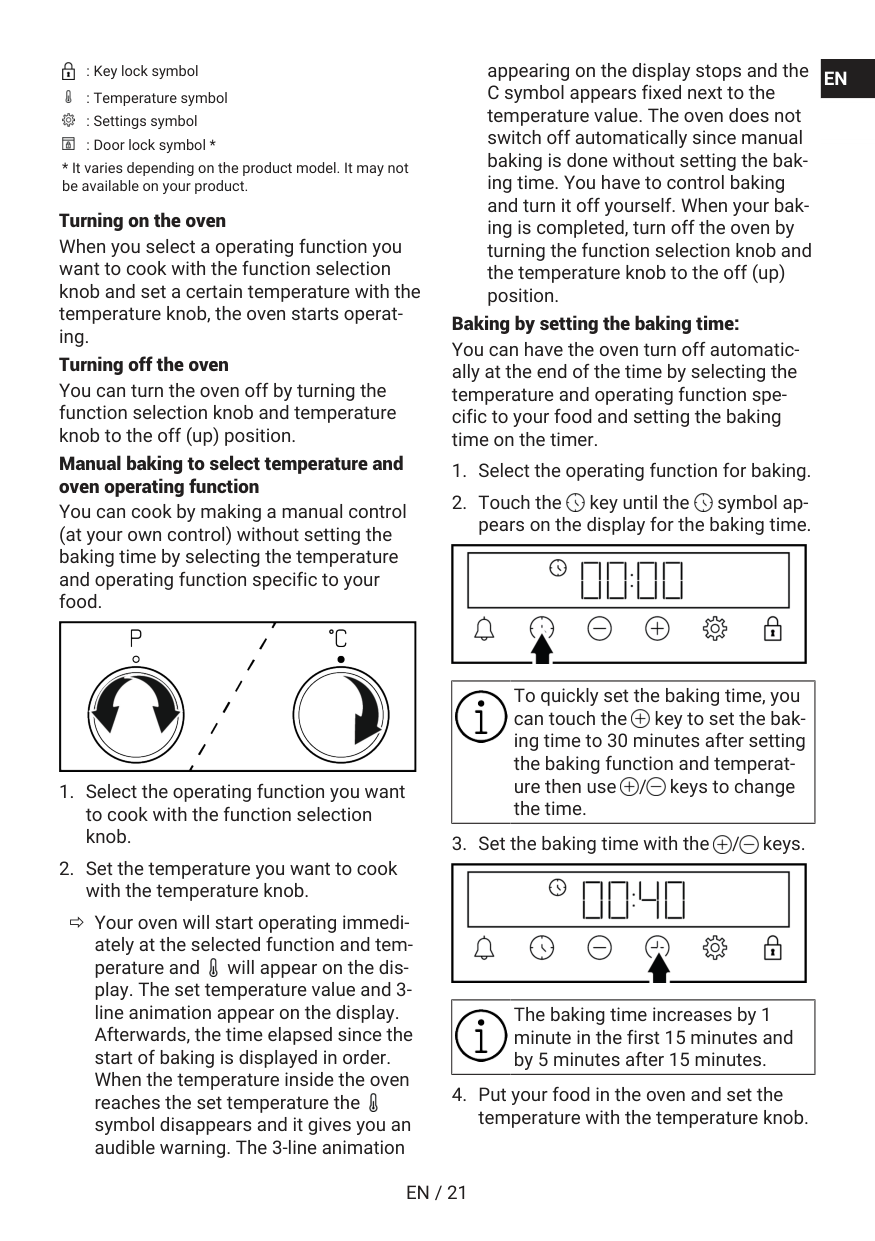
En / 21
: Key lock symbol : Temperature symbol : Settings symbol : Door lock symbol *En
Fr
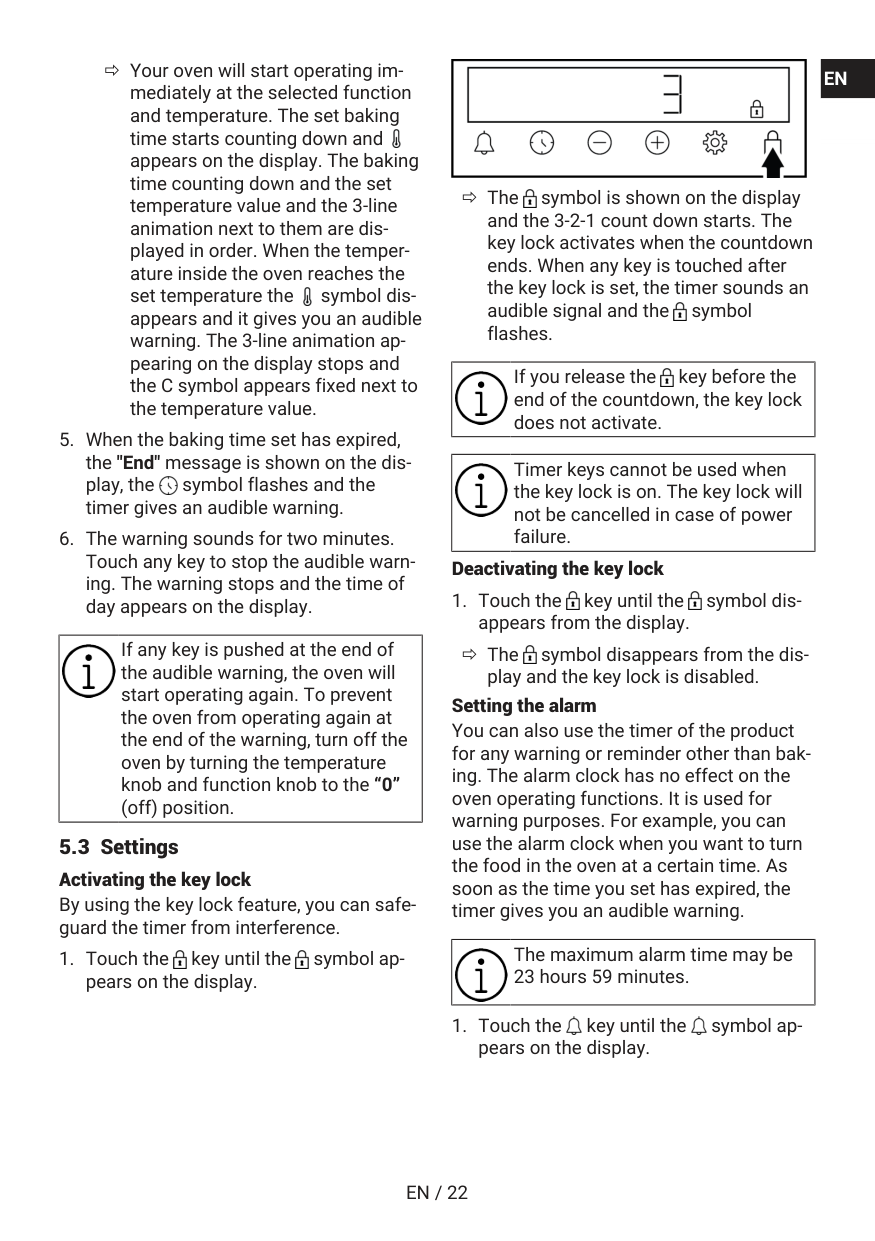
En / 22
ð Your oven will start operating im- mediately at the selected function and temperature. The set baking time starts counting down and appears on the display. The baking time counting down and the set temperature value and the 3-line animation next to them are dis- played in order. When the temper- ature inside the oven reaches the set temperature the symbol dis- appears and it gives you an audible warning. The 3-line animation ap- pearing on the display stops and the C symbol appears fixed next to the temperature value.En
Fr
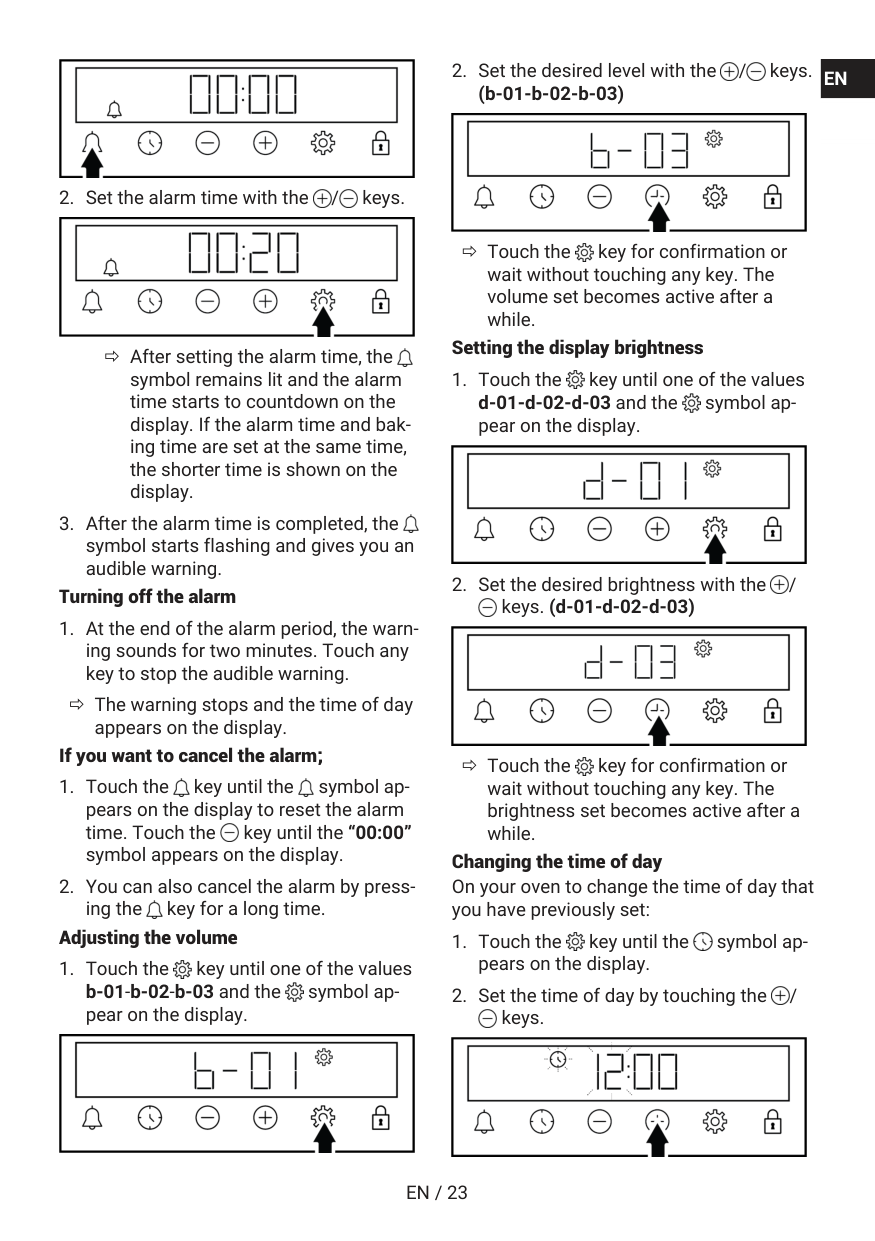
En / 23
En
Fr
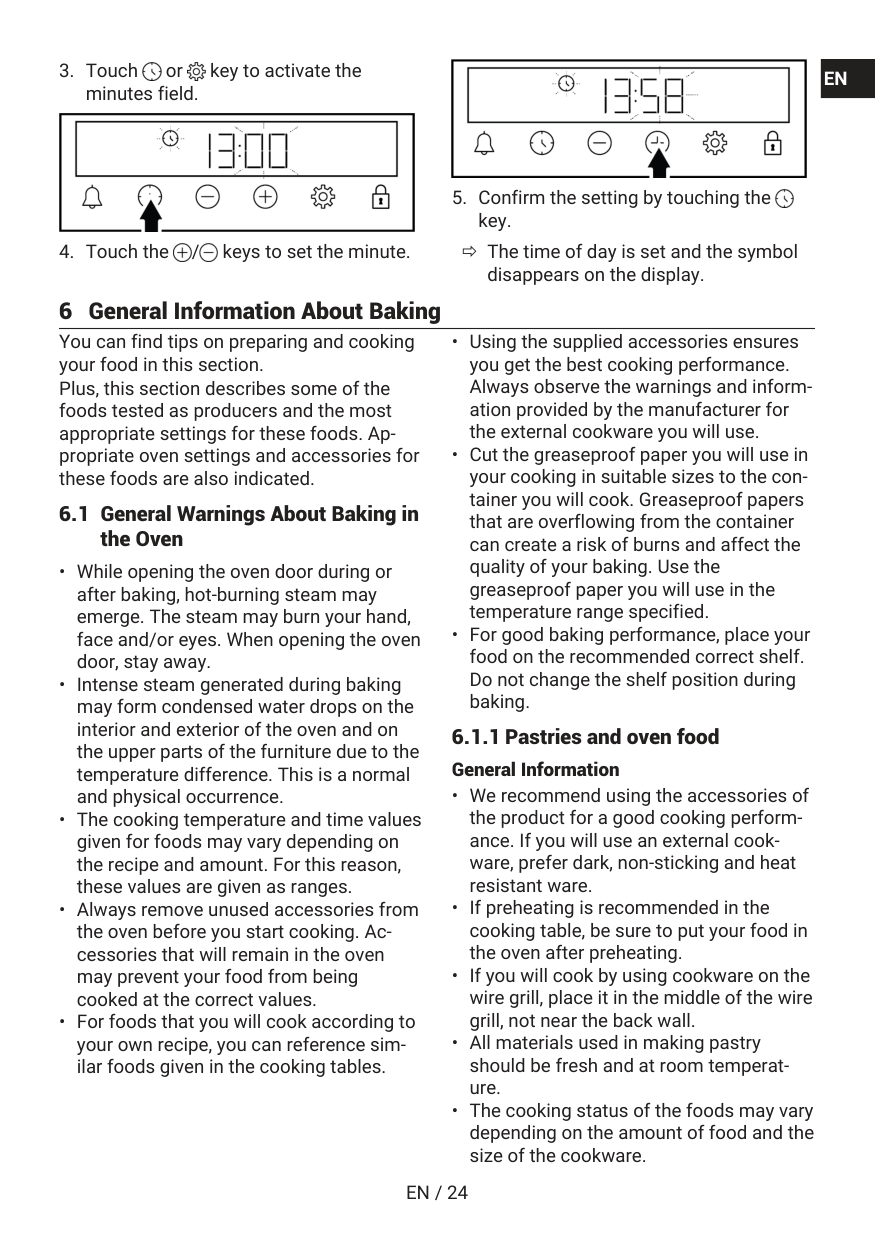
En / 24
En
Fr
En / 25
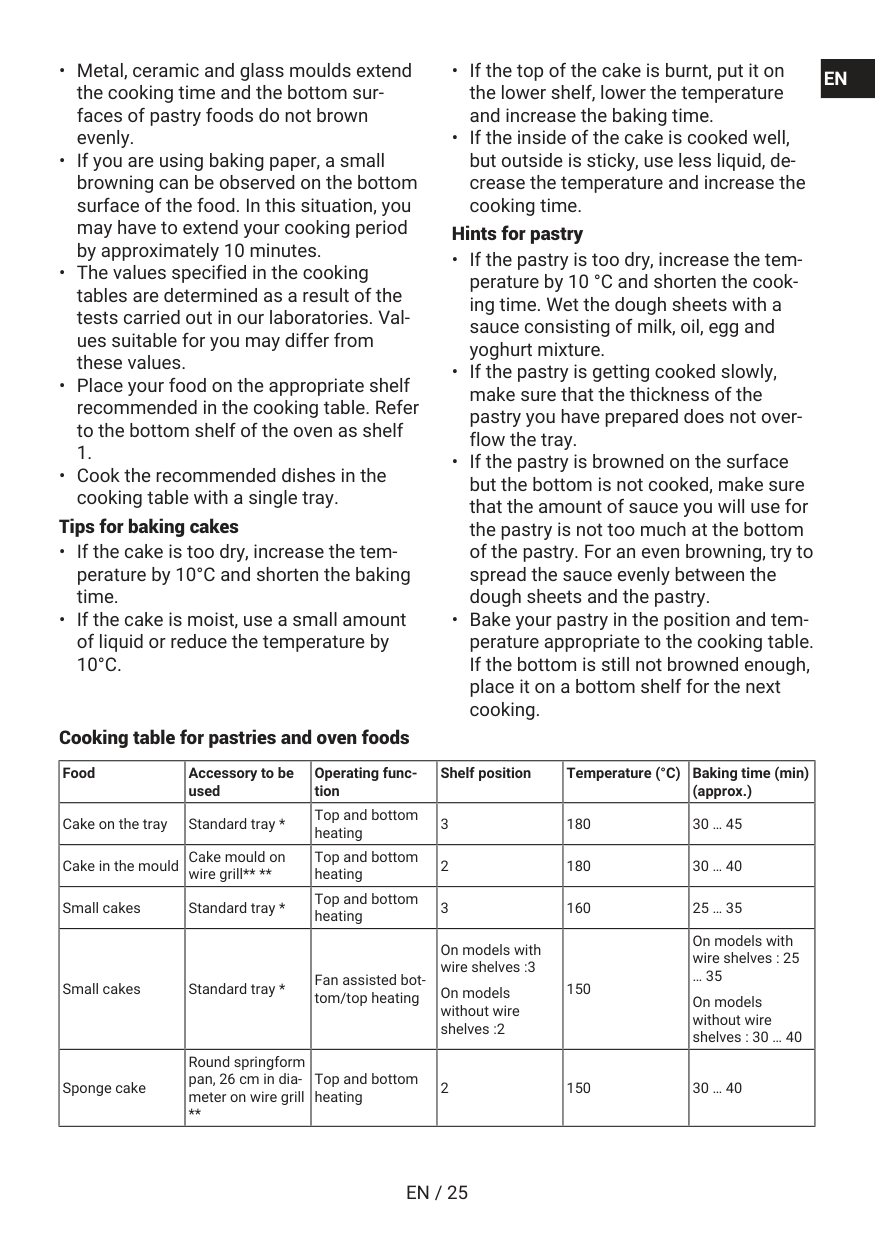
10°C.
En
Fr
En / 26
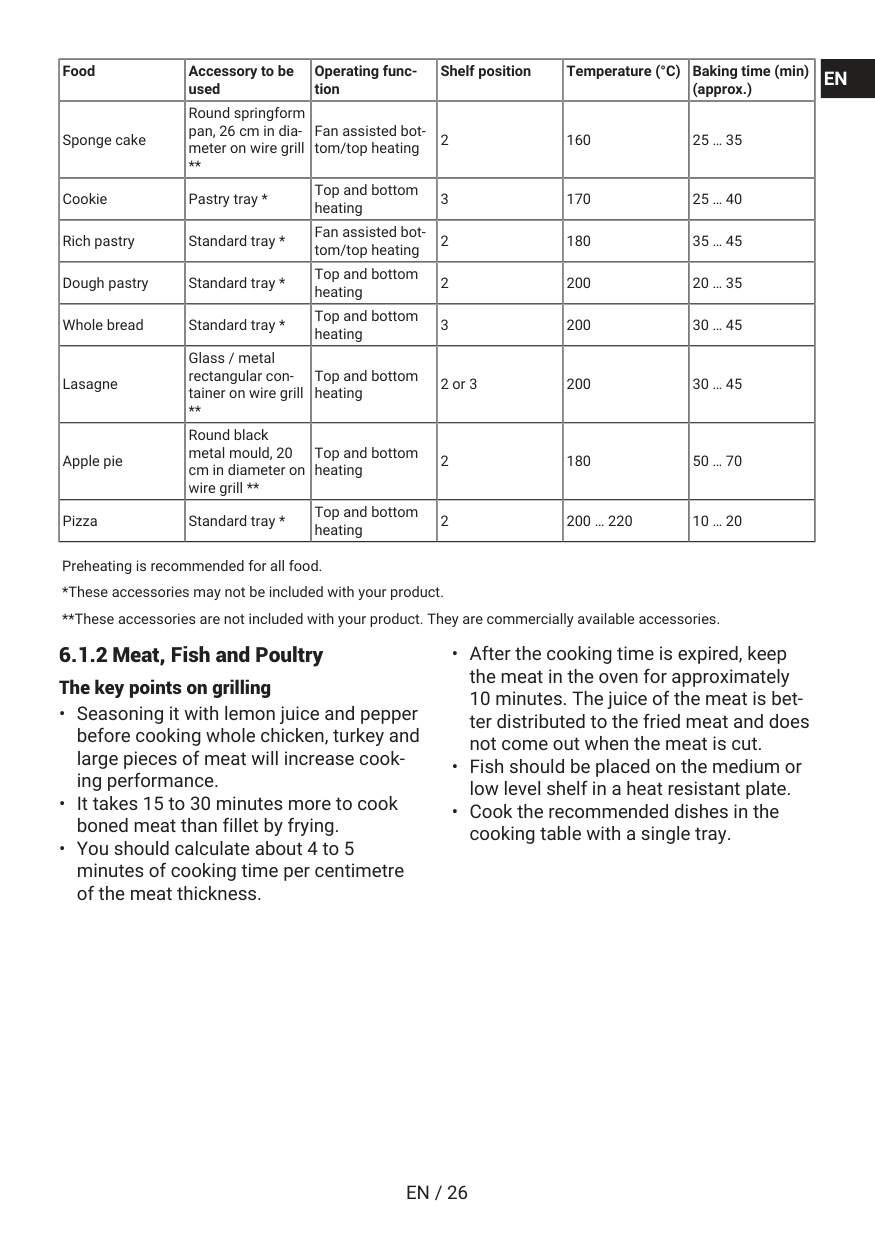
Food Accessory to be used Operating func- tion Shelf position Temperature (°C) Baking time (min) (approx.) Sponge cake Round springform pan, 26 cm in dia- meter on wire grill ** Fan assisted bot- tom/top heating 2 160 25 … 35 Cookie Pastry tray * Top and bottom heating 3 170 25 … 40 Rich pastry Standard tray * Fan assisted bot- tom/top heating 2 180 35 … 45 Dough pastry Standard tray * Top and bottom heating 2 200 20 … 35 Whole bread Standard tray * Top and bottom heating 3 200 30 … 45 Lasagne Glass / metal rectangular con- tainer on wire grill ** Top and bottom heating 2 or 3 200 30 … 45 Apple pie Round black metal mould, 20 cm in diameter on wire grill ** Top and bottom heating 2 180 50 … 70 Pizza Standard tray * Top and bottom heating 2 200 … 220 10 … 20 Preheating is recommended for all food. *These accessories may not be included with your product. **These accessories are not included with your product. They are commercially available accessories. 6.1.2 Meat, Fish and Poultry The key points on grillingEn
Fr
En / 27
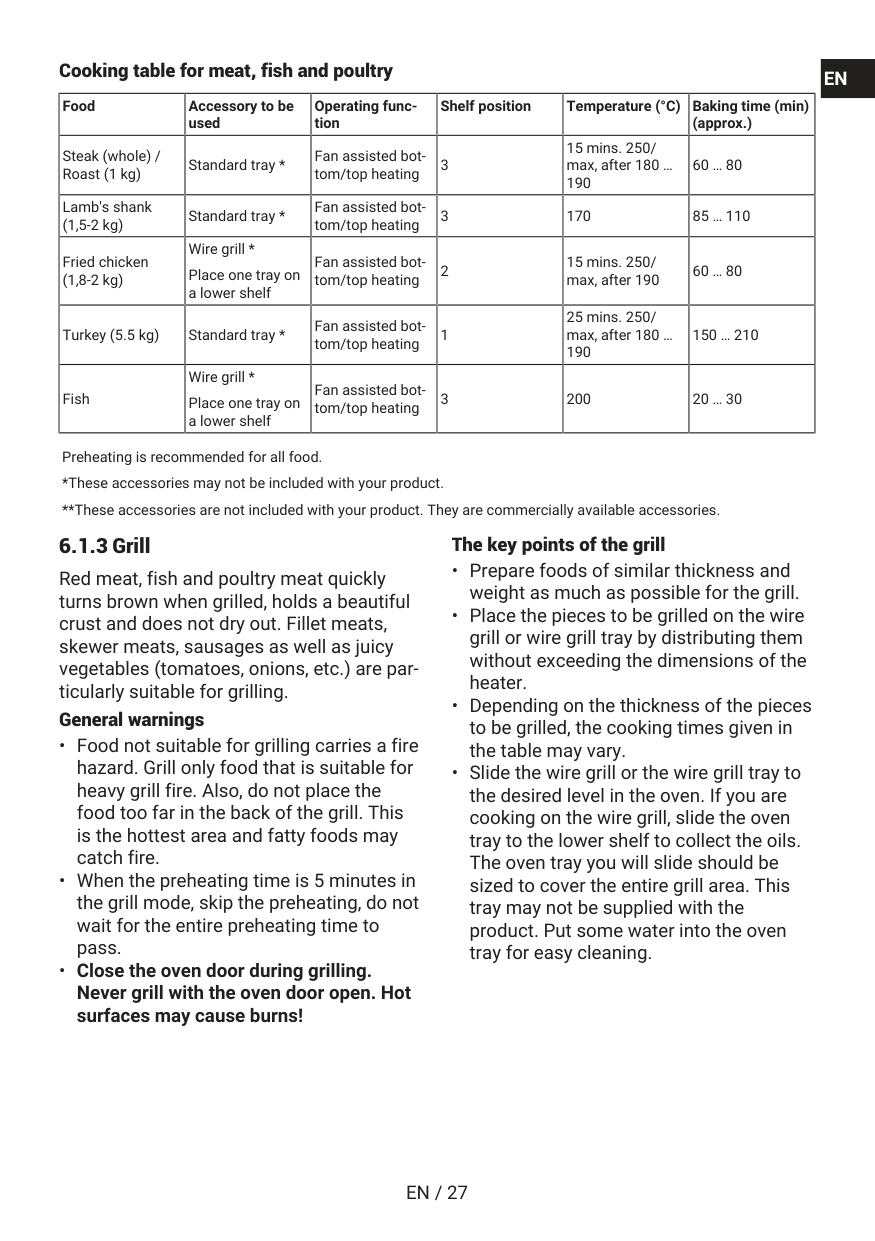
Cooking table for meat, fish and poultry Food Accessory to be used Operating func- tion Shelf position Temperature (°C) Baking time (min) (approx.) Steak (whole) / Roast (1 kg) Standard tray * Fan assisted bot- tom/top heating 3 15 mins. 250/ max, after 180 … 190 60 … 80 Lamb's shank (1,5-2 kg) Standard tray * Fan assisted bot- tom/top heating 3 170 85 … 110 Fried chicken (1,8-2 kg) Wire grill * Place one tray on a lower shelf Fan assisted bot- tom/top heating 2 15 mins. 250/ max, after 190 60 … 80 Turkey (5.5 kg) Standard tray * Fan assisted bot- tom/top heating 1 25 mins. 250/ max, after 180 … 190 150 … 210 Fish Wire grill * Place one tray on a lower shelf Fan assisted bot- tom/top heating 3 200 20 … 30 Preheating is recommended for all food. *These accessories may not be included with your product. **These accessories are not included with your product. They are commercially available accessories. 6.1.3 Grill Red meat, fish and poultry meat quickly turns brown when grilled, holds a beautiful crust and does not dry out. Fillet meats, skewer meats, sausages as well as juicy vegetables (tomatoes, onions, etc.) are par- ticularly suitable for grilling. General warningsEn
Fr
En / 28
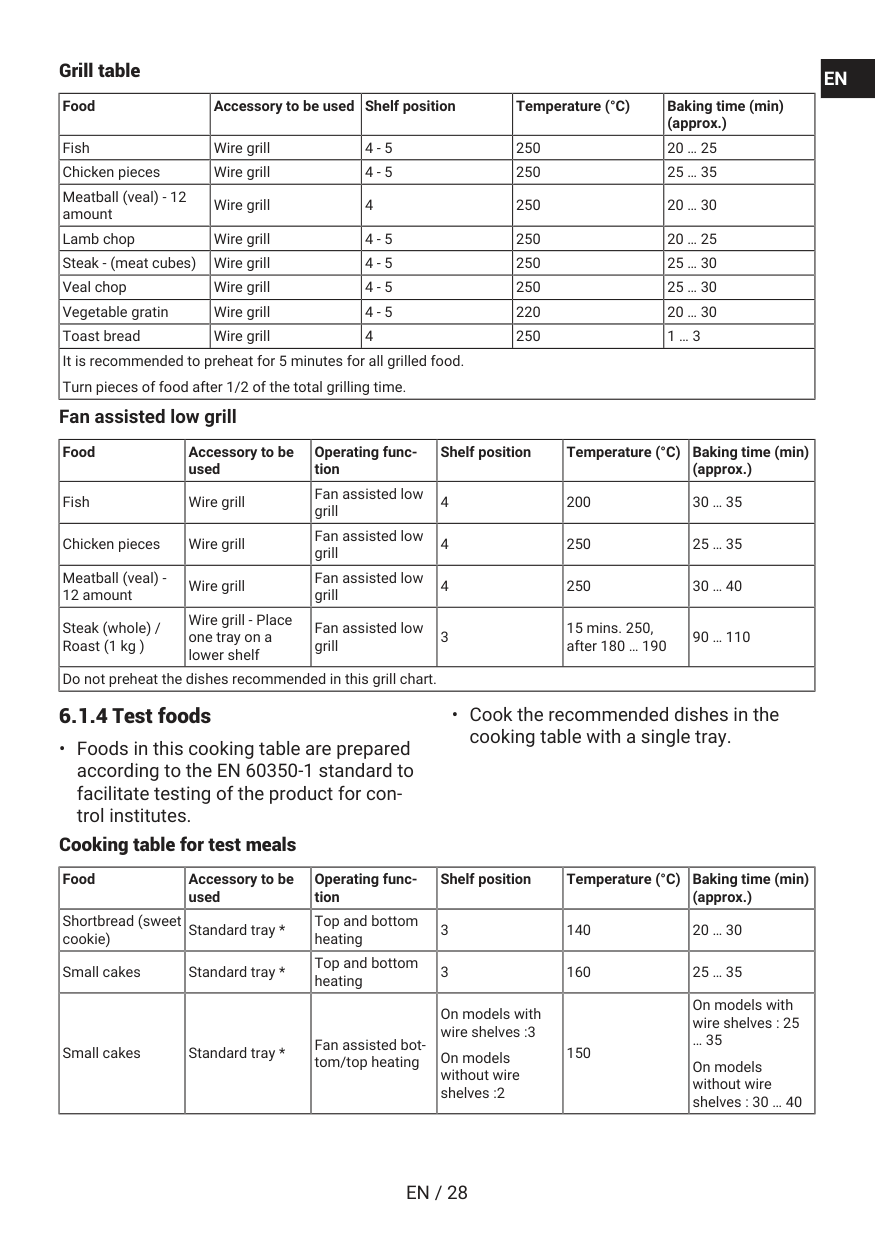
Grill table Food Accessory to be used Shelf position Temperature (°C) Baking time (min) (approx.) Fish Wire grill 4 - 5 250 20 … 25 Chicken pieces Wire grill 4 - 5 250 25 … 35 Meatball (veal) - 12 amount Wire grill 4 250 20 … 30 Lamb chop Wire grill 4 - 5 250 20 … 25 Steak - (meat cubes) Wire grill 4 - 5 250 25 … 30 Veal chop Wire grill 4 - 5 250 25 … 30 Vegetable gratin Wire grill 4 - 5 220 20 … 30 Toast bread Wire grill 4 250 1 … 3 It is recommended to preheat for 5 minutes for all grilled food. Turn pieces of food after 1/2 of the total grilling time. Fan assisted low grill Food Accessory to be used Operating func- tion Shelf position Temperature (°C) Baking time (min) (approx.) Fish Wire grill Fan assisted low grill 4 200 30 … 35 Chicken pieces Wire grill Fan assisted low grill 4 250 25 … 35 Meatball (veal) - 12 amount Wire grill Fan assisted low grill 4 250 30 … 40 Steak (whole) / Roast (1 kg ) Wire grill - Place one tray on a lower shelf Fan assisted low grill 3 15 mins. 250, after 180 … 190 90 … 110 Do not preheat the dishes recommended in this grill chart. 6.1.4 Test foodsEn
Fr
En / 29
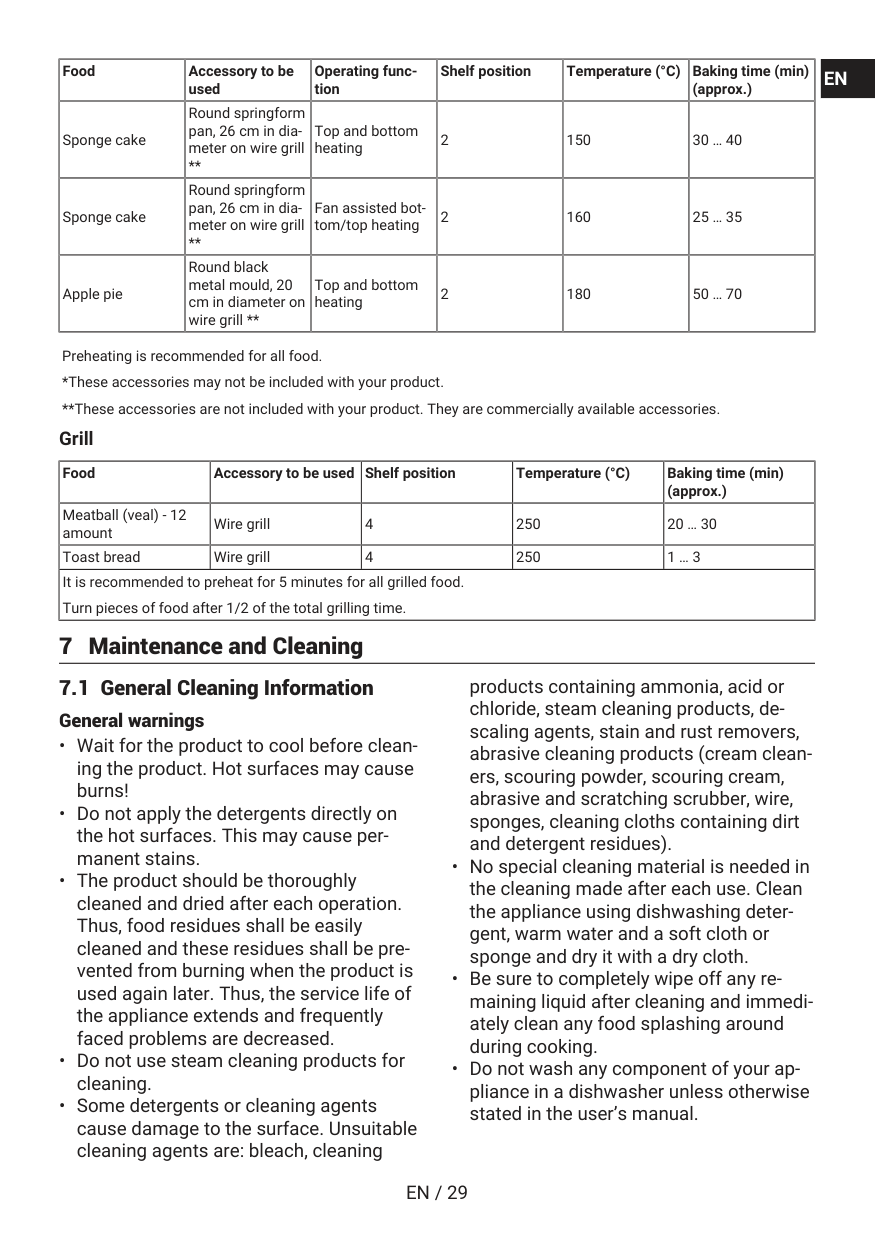
Food Accessory to be used Operating func- tion Shelf position Temperature (°C) Baking time (min) (approx.) Sponge cake Round springform pan, 26 cm in dia- meter on wire grill ** Top and bottom heating 2 150 30 … 40 Sponge cake Round springform pan, 26 cm in dia- meter on wire grill ** Fan assisted bot- tom/top heating 2 160 25 … 35 Apple pie Round black metal mould, 20 cm in diameter on wire grill ** Top and bottom heating 2 180 50 … 70 Preheating is recommended for all food. *These accessories may not be included with your product. **These accessories are not included with your product. They are commercially available accessories. Grill Food Accessory to be used Shelf position Temperature (°C) Baking time (min) (approx.) Meatball (veal) - 12 amount Wire grill 4 250 20 … 30 Toast bread Wire grill 4 250 1 … 3 It is recommended to preheat for 5 minutes for all grilled food. Turn pieces of food after 1/2 of the total grilling time. 7 Maintenance and Cleaning 7.1 General Cleaning Information General warningsEn
Fr
En / 30
Inox - stainless surfacesEn
Fr
En / 31
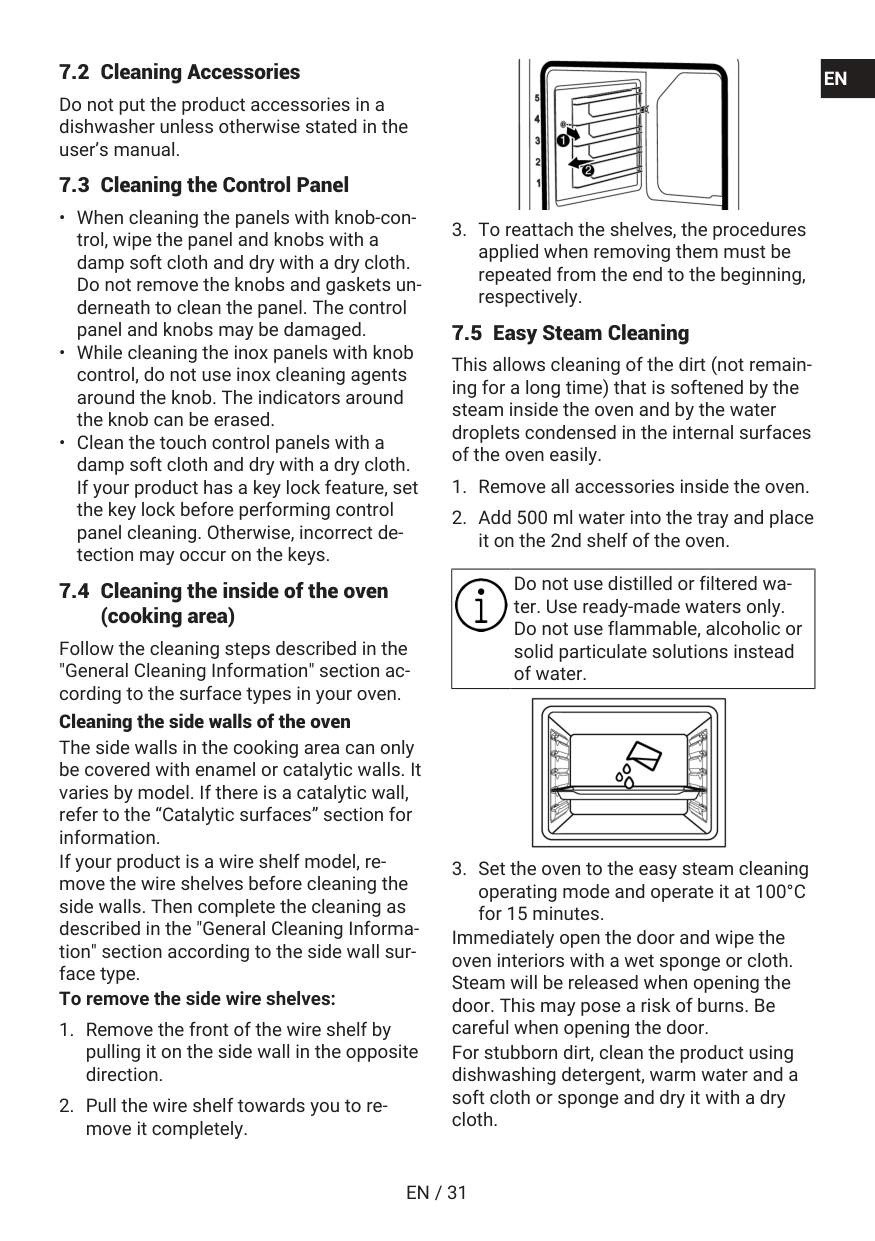
7.2 Cleaning Accessories Do not put the product accessories in a dishwasher unless otherwise stated in the user’s manual. 7.3 Cleaning the Control PanelEn
Fr
En / 32
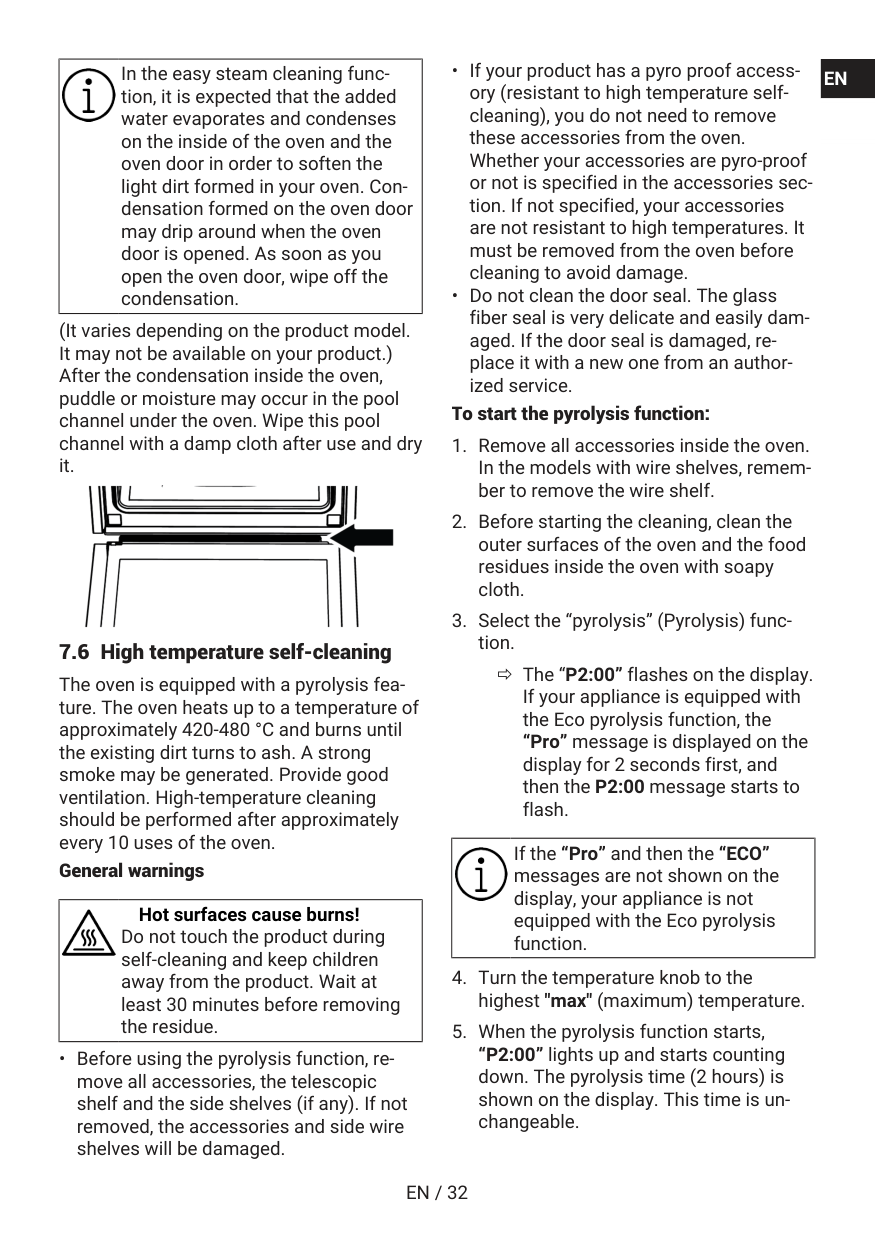
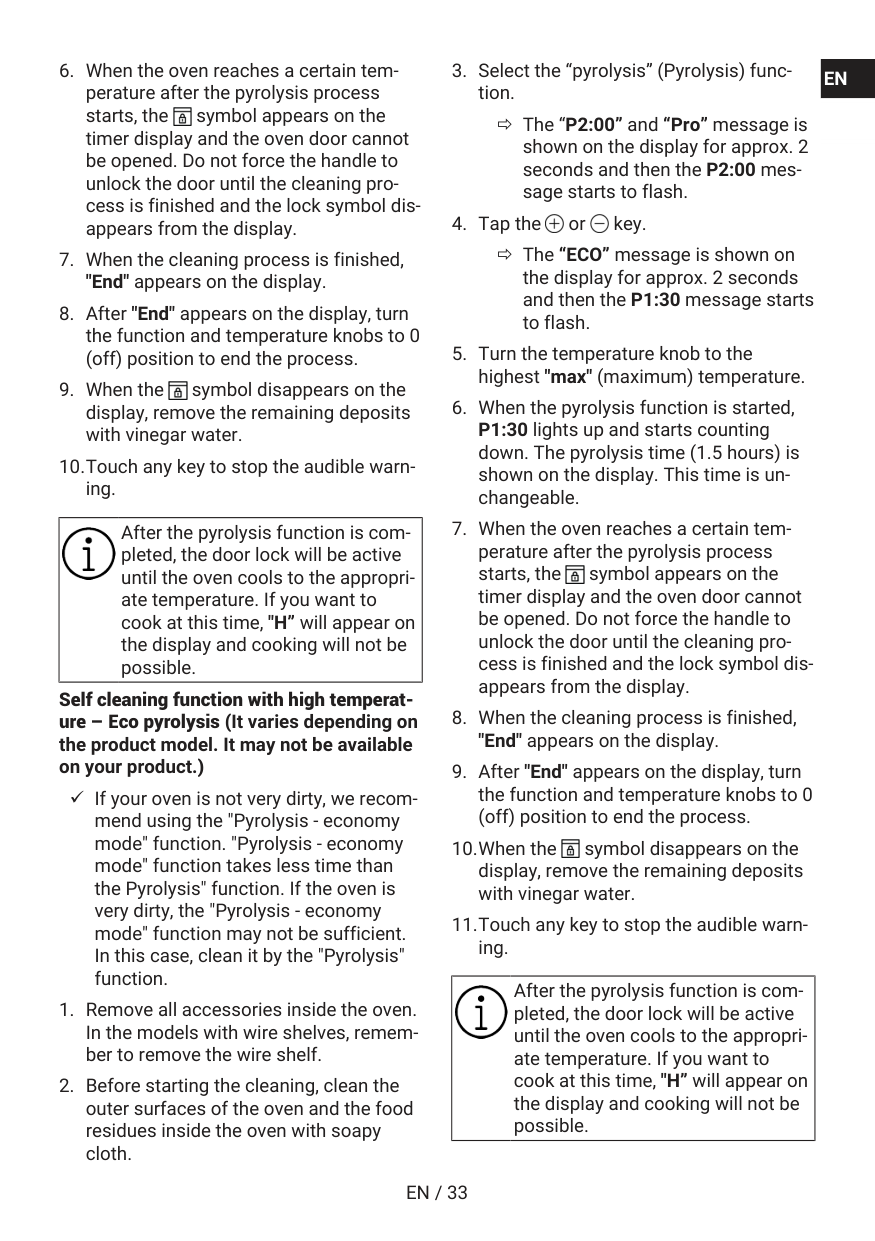
In the easy steam cleaning func- tion, it is expected that the added water evaporates and condenses on the inside of the oven and the oven door in order to soften the light dirt formed in your oven. Con- densation formed on the oven door may drip around when the oven door is opened. As soon as you open the oven door, wipe off the condensation. (It varies depending on the product model. It may not be available on your product.) After the condensation inside the oven, puddle or moisture may occur in the pool channel under the oven. Wipe this pool channel with a damp cloth after use and dry it. 7.6 High temperature self-cleaning The oven is equipped with a pyrolysis fea- ture. The oven heats up to a temperature of approximately 420-480 °C and burns until the existing dirt turns to ash. A strong smoke may be generated. Provide good ventilation. High-temperature cleaning should be performed after approximately every 10 uses of the oven. General warnings Hot surfaces cause burns! Do not touch the product during self-cleaning and keep children away from the product. Wait at least 30 minutes before removing the residue.En
Fr
En / 33
En
Fr
En / 34
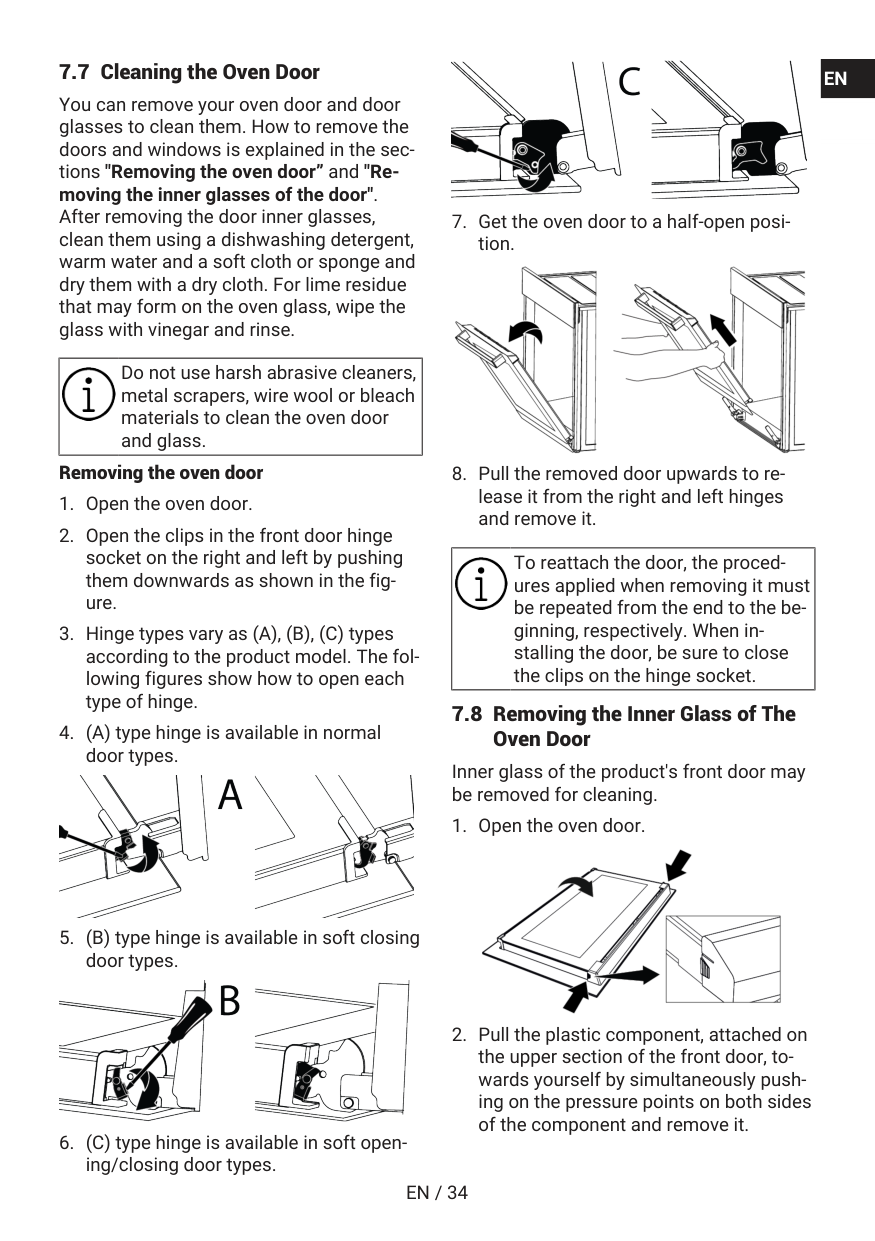
7.7 Cleaning the Oven Door You can remove your oven door and door glasses to clean them. How to remove the doors and windows is explained in the sec- tions "Removing the oven door” and "Re- moving the inner glasses of the door". After removing the door inner glasses, clean them using a dishwashing detergent, warm water and a soft cloth or sponge and dry them with a dry cloth. For lime residue that may form on the oven glass, wipe the glass with vinegar and rinse. Do not use harsh abrasive cleaners, metal scrapers, wire wool or bleach materials to clean the oven door and glass. Removing the oven doorEn
Fr
En / 35
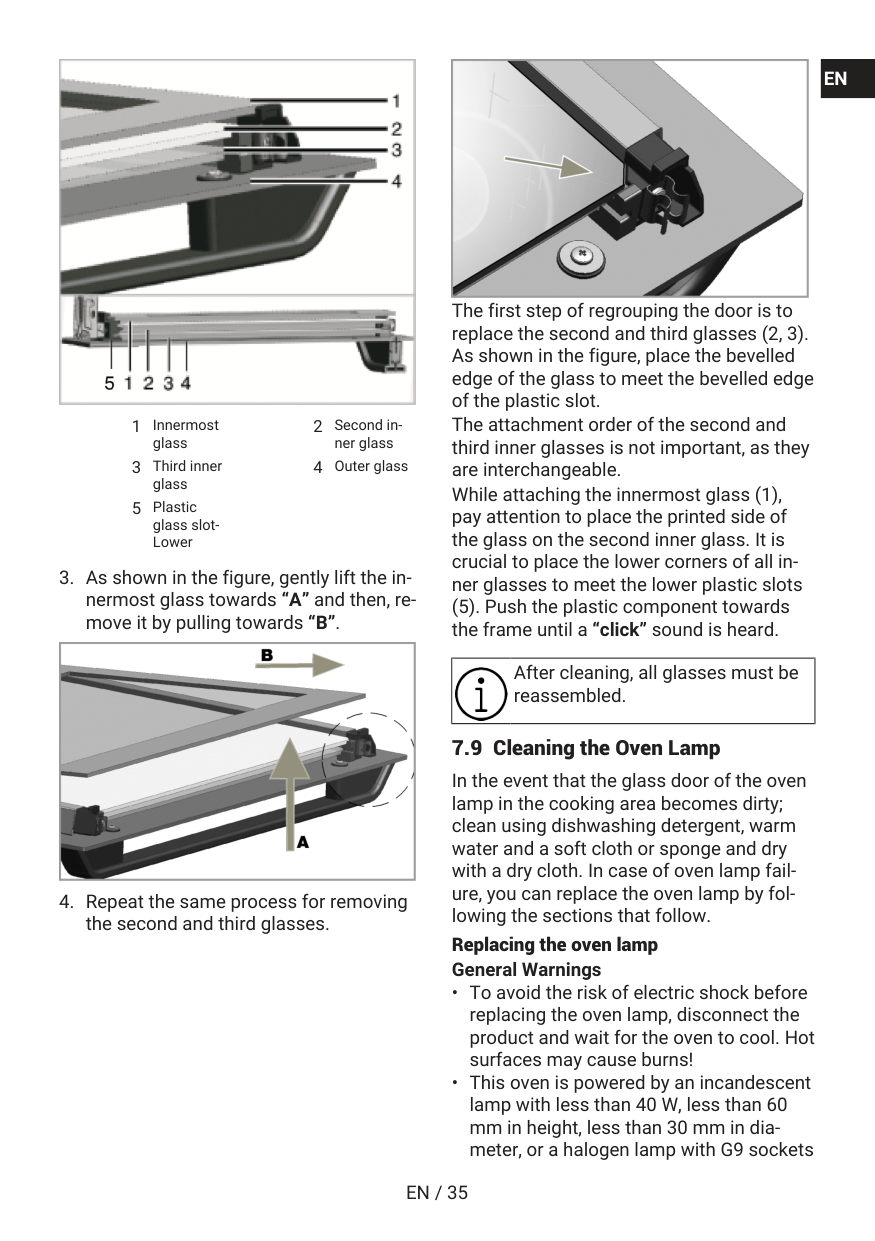
1 Innermost glass 2 Second in- ner glass 3 Third inner glass 4 Outer glass 5 Plastic glass slot- LowerEn
Fr
En / 36
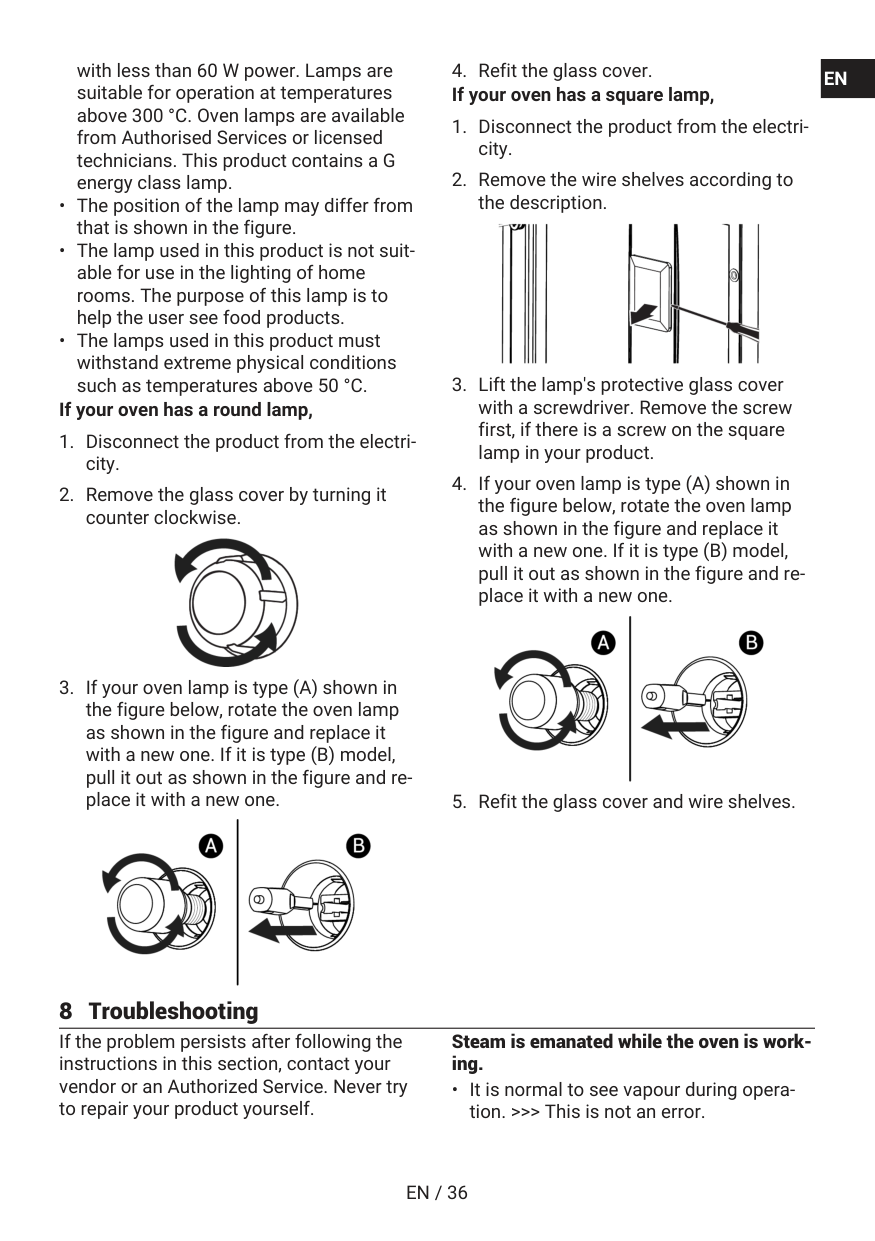
with less than 60 W power. Lamps are suitable for operation at temperatures above 300 °C. Oven lamps are available from Authorised Services or licensed technicians. This product contains a G energy class lamp.En
Fr
En / 37
Water droplets appear while cookingEn
Fr

En / 38
Error codes Error reasons Possible solutions Er 65 - Er 71 Errors related to the steam (in ovens with steam feature) Consult an authorized service for the error to be re- solved. Er 72 - Er 80 Hardware related errors Consult an authorized service for the error to be re- solved. Er 81 - Er 85 Oven security errors Consult an authorized service for the error to be re- solved. Er 86 - Er 88 Internet connection errors (in ovens with Homewhiz feature) Consult an authorized service for the error to be re- solved. Er 89 - Er 92 Microwave errors (in ovens with microwave feature) Consult an authorized service for the error to be re- solved. Er 93 - Er 99 Card and timer errors Consult an authorized service for the error to be re- solved. Arcelik A.S. Karaağaç Caddesi No:2-6 Sütlüce, 34445, Turkey Made in TURKEY Importer in Russia: «BEKO LLC» Address: Selskaya street, 49, Fedorovskoe village, Pershinskoe rural settlement, Kirzhach district, Vladimir region, Russian Federation 601021 The manufacture date is included in the serial number of a product specified on rating label, which is located on a product, namely: first two figures of serial number indicate the year of manufacture, and last two – the month. For example, ”10- 100001-05» indicates that the product was produced in May, 2010. You can ask for certification number from our Call Center 8-800-200-23-56 The manufacturer reserves the right for making changes in modification, design and specification of an electric device.En
Fr

Fr / 40
Bienvenue ! Cher client, chère cliente Nous vous remercions d’avoir choisi l’appareil Beko . Nous voulons que votre appareil de haute qualité et doté d’une technologie de pointe vous offre une efficacité optimale. Pour ce faire, lisez attentivement ce manuel et tout autre document fourni avant d’utiliser l’appa- reil. Tenez compte de toutes les informations et avertissements figurant dans le manuel d’utili- sation. Ainsi, vous vous protégerez, vous et votre produit, contre d’éventuels dangers. Conservez le manuel d’utilisation. Si vous donnez l’appareil à quelqu’un d’autre, donnez également le manuel. Les conditions de garantie, les méthodes d'utilisation et de dépan- nage de votre appareil sont indiquées dans ce manuel. Les symboles et leurs descriptions dans le manuel de l'utilisateur : Danger pouvant entraîner la mort ou des blessures. Informations importantes et conseils d’utilisation utiles. Lisez le manuel d’utilisation. Attention aux surfaces chaudes. REMARQUE Danger pouvant entraîner des dommages matériels à l’appareil ou à son environnement.
Fr / 41
Table des matières 1 Consignes de sécurité.................... 42 1.1 Utilisation prévue........................... 42 1.2 Sécurité des enfants, des per- sonnes vulnérables et des ani- maux domestiques........................ 43 1.3 Sécurité électrique......................... 44 1.4 Sécurité des transports................. 45 1.5 Sûreté des installations ................ 46 1.6 Sécurité d’utilisation...................... 46 1.7 Alertes de température ................. 47 1.8 Utilisation des accessoires........... 48 1.9 Consignes de sécurité relatives à la cuisson....................................... 48 1.10 Sécurité relative à l’entretien et au nettoyage.................................. 49 1.11 Auto-nettoyage à haute tempéra- ture (pyrolyse)................................ 50 2 Instructions relatives à l’environne- ment .............................................. 50 2.1 Directive sur les déchets............... 50 2.1.1 Conformité avec la directive DEEE et élimination des dé- chets........................................... 50 2.2 Informations sur l'emballage........ 51 2.3 Recommandations pour écono- miser l’énergie ............................... 51 3 Votre appareil ................................ 52 3.1 Présentation de l’appareil ............. 52 3.2 Présentation et utilisation du pan- neau de commande de l’appareil . 52 3.2.1 Panneau de commande ............ 53 3.2.2 Introduction au panneau de commande de l’appareil............ 53 3.3 Fonctions d’utilisation du four...... 54 3.4 Accessoires de l’appareil.............. 54 3.5 Utilisation des accessoires de l’appareil......................................... 55 3.6 Spécifications techniques ............ 58 4 Première utilisation........................ 59 4.1 Réglage de l’heure pour la pre- mière fois....................................... 59 4.2 Premier nettoyage......................... 59 5 Utilisation du four .......................... 60 5.1 Informations générales sur l’utili- sation du four................................. 60 5.2 Fonctionnement de l’unité de commande du four ........................ 60 5.3 Réglages......................................... 62 6 Informations générales sur la cui- sine................................................ 64 6.1 Avertissements généraux concer- nant la cuisson au four.................. 64 6.1.1 Pâtisseries et aliments cuits au four.............................................. 65 6.1.2 Viande, poisson et volaille ......... 67 6.1.3 Grille ............................................ 68 6.1.4 Aliments test .............................. 69 7 Entretien et nettoyage.................... 70 7.1 Consignes de nettoyage géné- rales ................................................ 70 7.2 Accessoires de nettoyage............. 72 7.3 Nettoyage du bandeau de com- mande............................................. 72 7.4 Nettoyage de l’intérieur du four (zone de cuisson) .......................... 72 7.5 Nettoyage facile à la vapeur ......... 72 7.6 Auto-nettoyage à haute tempéra- ture.................................................. 73 7.7 Nettoyage de la porte du four ....... 75 7.8 Retrait de la vitre intérieure de la porte du four................................... 76 7.9 Nettoyage de la lampe du four...... 77 8 Dépannage..................................... 78En
Fr

Fr / 42
1 Consignes de sécuritéEn
Fr

Fr / 43
1.2 Sécurité des en- fants, des personnes vulnérables et des ani- maux domestiquesEn
Fr

Fr / 44
1.3 Sécurité électriqueEn
Fr

Fr / 45
En
Fr
Fr / 46
bulles ou du carton épais et at- tachez-le avec du ruban adhé- sif. Maintenez les parties mo- biles de l'appareil bien fermes afin d’éviter tout dommage.En
Fr
Fr / 47
En
Fr

Fr / 48
En
Fr

Fr / 49
retirez les parties excéden- taires de papier sulfurisé qui pendent des accessoires ou des récipients. N'utilisez pas de papier sulfurisé à des tem- pératures de four supérieures à la température maximale d'utilisation spécifiée par le fa- bricant. Ne mettez jamais le papier sulfurisé en contact avec le four.En
Fr

Fr / 50
En
Fr

Fr / 51
correcte de l'appareil permet d'éviter les conséquences négatives pour l'environne- ment et la santé humaine. Conformité avec la directive RoHS : Votre appareil est conforme à la directive RoHS de l'Union européenne (2011/65/UE). Il ne comporte pas de matériaux dangereux et interdits mentionnés dans la directive. 2.2 Informations sur l'emballage Les matériaux d'emballage de cet appareil sont fabriqués à partir de matériaux recy- clables, conformément à nos réglementa- tions nationales en matière d'environne- ment. Ne jetez pas les déchets d’emballage avec les déchets ménagers ou autres, ap- portez-les aux points de collecte des maté- riaux d’emballage désignés par les autori- tés locales. 2.3 Recommandations pour économi- ser l’énergie Conformément à l'UE 66/2014, les informa- tions sur l'efficacité énergétique figurent sur le reçu fourni avec le produit. Les recommandations ci-après vous aide- ront à utiliser votre appareil de façon écolo- gique tout en économisant de l’énergie.En
Fr
Fr / 52
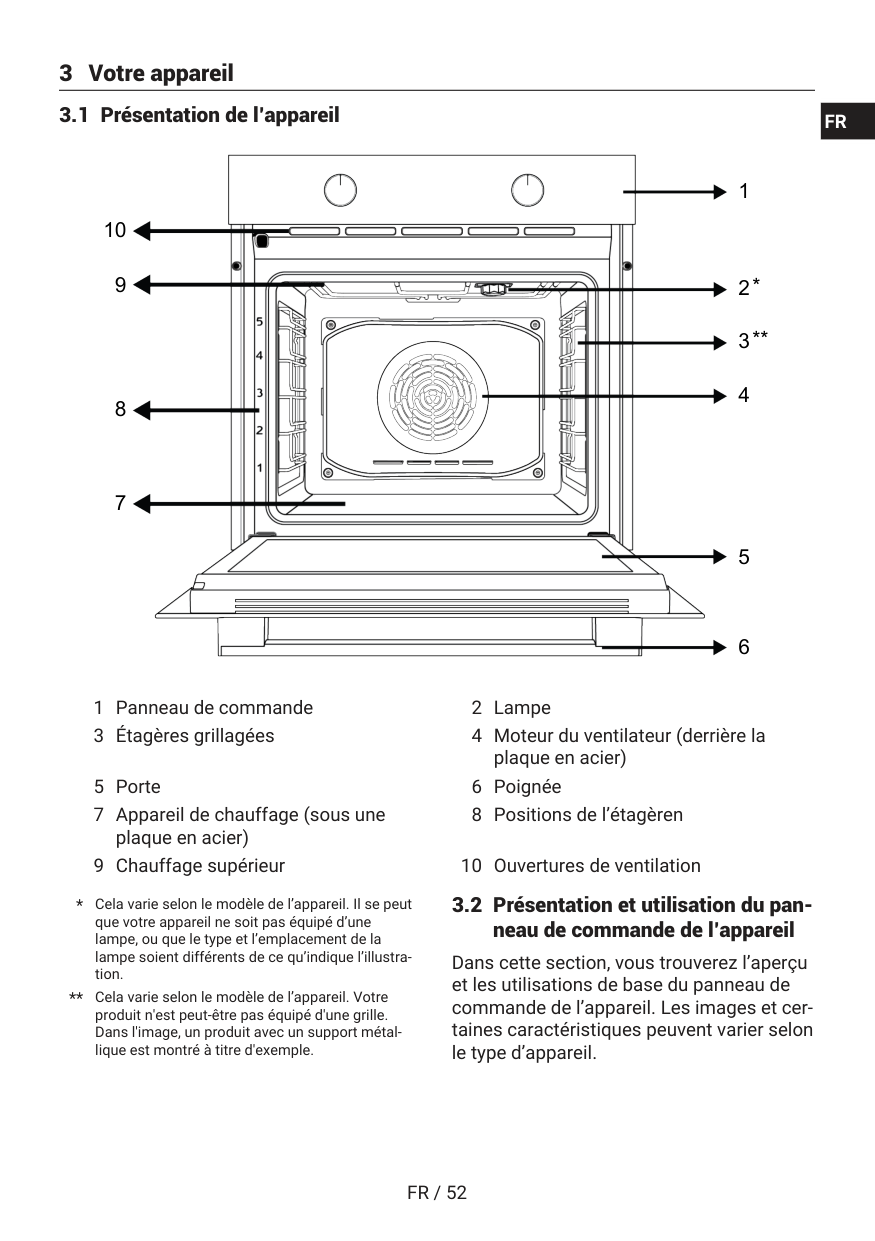
3 Votre appareil 3.1 Présentation de l’appareil 1 2 3 4 5 6 7 8 9 10En
Fr
Fr / 53
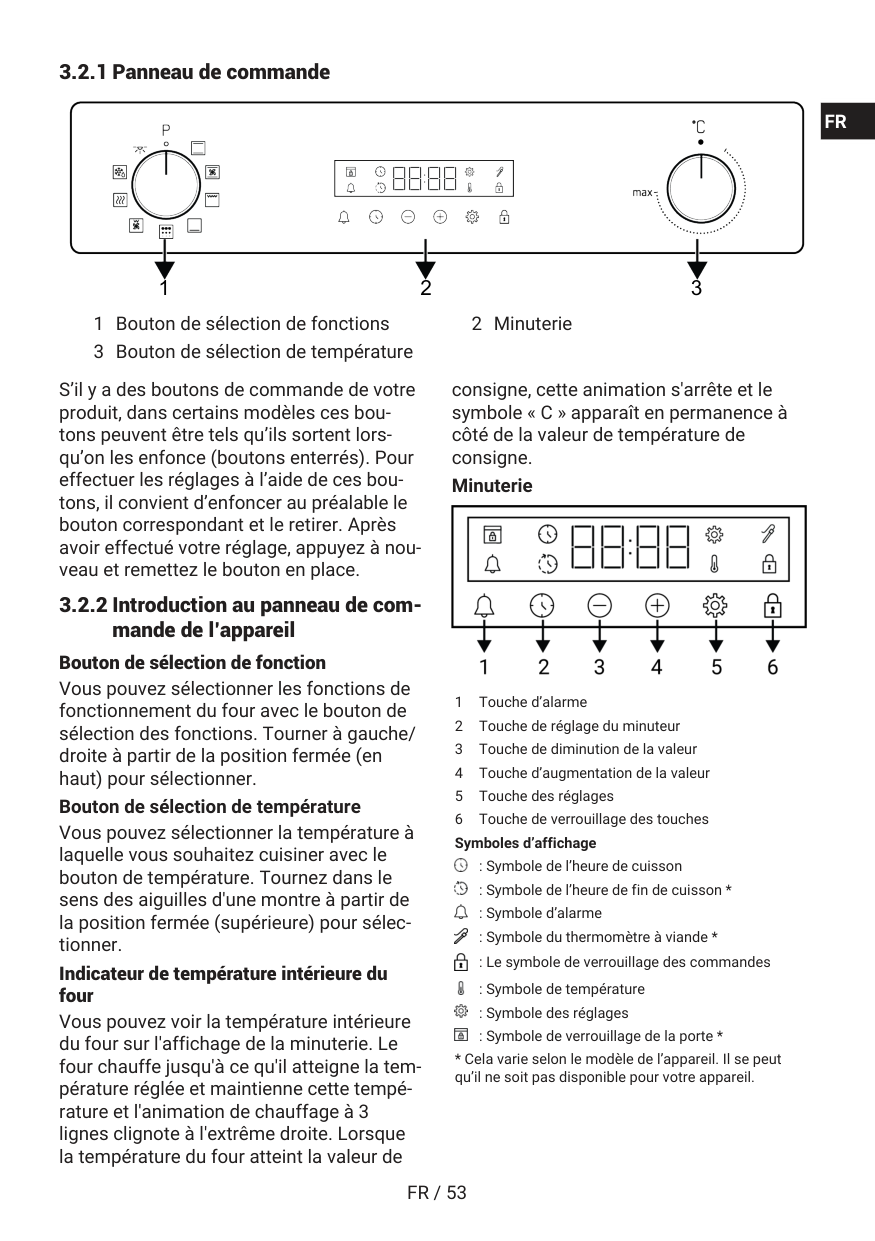
3.2.1 Panneau de commande 1 2 3 1 Bouton de sélection de fonctions 2 Minuterie 3 Bouton de sélection de température S’il y a des boutons de commande de votre produit, dans certains modèles ces bou- tons peuvent être tels qu’ils sortent lors- qu’on les enfonce (boutons enterrés). Pour effectuer les réglages à l’aide de ces bou- tons, il convient d’enfoncer au préalable le bouton correspondant et le retirer. Après avoir effectué votre réglage, appuyez à nou- veau et remettez le bouton en place. 3.2.2 Introduction au panneau de com- mande de l’appareil Bouton de sélection de fonction Vous pouvez sélectionner les fonctions de fonctionnement du four avec le bouton de sélection des fonctions. Tourner à gauche/ droite à partir de la position fermée (en haut) pour sélectionner. Bouton de sélection de température Vous pouvez sélectionner la température à laquelle vous souhaitez cuisiner avec le bouton de température. Tournez dans le sens des aiguilles d'une montre à partir de la position fermée (supérieure) pour sélec- tionner. Indicateur de température intérieure du four Vous pouvez voir la température intérieure du four sur l'affichage de la minuterie. Le four chauffe jusqu'à ce qu'il atteigne la tem- pérature réglée et maintienne cette tempé- rature et l'animation de chauffage à 3 lignes clignote à l'extrême droite. Lorsque la température du four atteint la valeur de consigne, cette animation s'arrête et le symbole « C » apparaît en permanence à côté de la valeur de température de consigne. Minuterie 1 Touche d’alarme 2 Touche de réglage du minuteur 3 Touche de diminution de la valeur 4 Touche d’augmentation de la valeur 5 Touche des réglages 6 Touche de verrouillage des touches Symboles d’affichage : Symbole de l’heure de cuisson : Symbole de l’heure de fin de cuisson * : Symbole d’alarme : Symbole du thermomètre à viande * : Le symbole de verrouillage des commandes : Symbole de température : Symbole des réglages : Symbole de verrouillage de la porte *En
Fr

Fr / 54
3.3 Fonctions d’utilisation du four Sur le tableau de fonctions, vous trouverez les fonctions de cuisson que vous pouvez utiliser dans votre four et les températures les plus élevées et les plus basses qui peuvent être réglées pour ces fonctions. L’ordre des modes de fonctionnement indi- qués ici peut être différent de la disposition sur votre l’appareil. Symboles des fonc- tions Description des fonc- tions Plage de tem- pérature (°C) Description et utilisation Lampe du fourEn
Fr

Fr / 55
Les plateaux à l'intérieur de votre appareil peuvent être déformés sous l'effet de la chaleur. Cela n'a aucun effet sur la fonctionnalité. La déformation disparaît lorsque le plateau est refroidi. Plateau standard Il est utilisé pour les pâtisseries, les ali- ments surgelés et la friture de gros mor- ceaux. Grille métallique Il est utilisé pour frire ou placer les aliments à cuire, frire et mijoter sur la grille désirée. Sur les modèles avec étagères en fil mé- tallique : Sur les modèles sans étagères en fil mé- tallique : : 3.5 Utilisation des accessoires de l’appareil Étagères de cuisson Il existe 5 niveaux de position des étagères dans la zone de cuisson. Vous pouvez éga- lement voir l’ordre des étagères en regar- dant les numéros figurant sur le cadre fron- tal du four. Sur les modèles avec étagères en fil mé- tallique : Sur les modèles sans étagères en fil mé- tallique : : Mise en place de la grille métallique et du plateau métallique sur les étagères de cui- sine Sur les modèles avec étagères en fil mé- tallique : Il est essentiel de bien placer la grille métal- lique sur les étagères métalliques latérales. En plaçant la grille métallique sur l’étagère souhaitée, la partie ouverte doit être orien- tée vers l’avant. Pour une meilleure cuis- son, la grille métallique doit être fixée sur le point d'arrêt de l'étagère métallique. Elle ne doit pas traverser la butée et entrer contact avec la paroi arrière du four. Sur les modèles sans étagères en fil mé- tallique : : Il est essentiel de bien placer la grille métal- lique sur les étagères latérales. La grille métallique n’est orientée que vers une seule direction lorsqu’elle est placée sur l’étagère. En plaçant la grille métallique sur l’étagère souhaitée, la partie ouverte doit être orientée vers l’avant.En
Fr

Fr / 56
Mise en place du plateau sur les étagères de cuisine Sur les modèles avec étagères en fil mé- tallique : Il est également important de bien placer les plateaux sur les étagères métalliques la- térales. Lorsque vous placez le plateau sur l’étagère souhaitée, son côté conçu pour être tenu doit se trouver vers l’avant. Pour une meilleure cuisson, le plateau doit être fixé avec la butée sur l’étagère métallique. Elle ne doit pas traverser la butée et entrer contact avec la paroi arrière du four. Sur les modèles sans étagères en fil mé- tallique : : Il est également important de bien placer les plateaux sur les étagères latérales. Le plateau n’est orienté que vers une seule di- rection lorsqu’il est placé sur l’étagère. Lorsque vous placez le plateau sur l’éta- gère souhaitée, son côté conçu pour être tenu doit se trouver vers l’avant. Fonction de butée du grillage Il existe une fonction de butée qui empêche la grille métallique de basculer de l’étagère métallique. Grâce à cette fonction, vous pouvez sortir votre nourriture facilement et en toute sécurité. Tout en retirant la grille métallique, vous pouvez la tirer vers l’avant jusqu’à ce qu’elle atteigne la butée. Vous devez passer sur ce point pour le supprimer complètement. Sur les modèles avec étagères en fil mé- tallique : Sur les modèles sans étagères en fil mé- tallique : : Fonction d’arrêt de plateau-- Sur les mo- dèles avec étagères en fil métallique Il existe également une fonction de butée qui empêche le plateau de basculer de l’étagère métallique. Tout en retirant le pla- teau, libérez-le de la prise d'arrêt arrière et tirez-le vers vous jusqu'à ce qu'il atteigne le côté avant. Vous devez passer sur cette douille d'arrêt pour la supprimer complète- ment. Mise en place appropriée de la grille métal- lique et du plateau sur les rails télescopi- quesModèles à étagères grillagées et rails télescopiques Grâce aux rails télescopiques, les plateaux ou la grille métallique peuvent être facile- ment installés et retirés. Lors de l’utilisation de plateaux et de grilles métalliques avec le rail télescopique, il faut s’assurer que les broches, à l’avant et à l’arrière des rails té-En
Fr

Fr / 57
lescopiques, reposent sur les bords de la grille et du plateau (comme indiqué sur la figure).En
Fr

Fr / 58
3.6 Spécifications techniques Spécifications générales Dimension externe de l’appareil (hauteur/largeur/profon- deur)(mm) 595 /594 /567 Dimension d’installation du four (hauteur/largeur/profon- deur) 590 - 600 /560 /min. 550 Tension/fréquence 220-240 V ~; 50 Hz Type et section du câble utilisé / adapté à l’utilisation dans l’appareil min. H05VV-FG 3 x 1,5 mm2 Consommation totale d’énergie (kW) 2,6 Type de fours Four assisté par ventilateur Classique : Les informations figurant sur l’étiquette énergétique des fours électriques domestiques sont données conformément à la norme EN 60350-1 / IEC 60350-1. Les valeurs sont déterminées en fonctions Chauffage de haut / bas assisté par ventilateur ou (si elles sont présentes) Convection naturelle avec la charge standard. La classe d’efficacité énergétique est déterminée selon l’ordre de priorité suivant, selon que les fonctions perti- nentes existent ou non sur l’appareil. 1-Chaleur tournante éco , 2-Chaleur tournante , 3-Gril inférieur assisté par venti- lateur , 4-Convection naturelle. Les spécifications techniques peuvent être modifiées sans préavis afin d’améliorer la qualité de l’appareil. Les illustrations présentées dans ce manuel sont schématiques et peuvent ne pas correspondre exactement à votre appareil. Les valeurs indiquées sur les étiquettes de l’appareil ou dans la documentation ac- compagnant l’appareil sont obtenues dans des conditions de laboratoire, en conformité avec les normes applicables. Ces valeurs peuvent varier en fonction des conditions d’utilisation et l’environnement de l’appareil.
Fr / 59
4 Première utilisation Avant de commencer à utiliser votre appa- reil, il est recommandé de suivre les étapes décrites dans les sections suivantes : 4.1 Réglage de l’heure pour la pre- mière fois Réglez toujours l'heure de la jour- née avant d'utiliser votre four. Si vous ne la réglez pas, vous ne pour- rez pas cuisiner dans certains mo- dèles de four.En
Fr

Fr / 60
REMARQUE : Certains détergents ou agents de nettoyage peuvent endommager la surface. N’utilisez pas de détergents abrasifs, de poudres de nettoyage, de crèmes de nettoyage ou d’objets pointus pendant le nettoyage. REMARQUE : Lors de la première utilisa- tion, de la fumée et des odeurs peuvent se dégager pendant plusieurs heures. C'est normal et vous avez juste besoin d'une bonne ventilation pour l'éliminer. Évitez d'in- haler directement la fumée et les odeurs qui se forment. 5 Utilisation du four 5.1 Informations générales sur l’utili- sation du four Ventilateur de refroidissement( Cela varie selon le modèle de l’appareil. Il se peut qu’il ne soit pas disponible pour votre ap- pareil. ) Votre produit est équipé d’un ventilateur de refroidissement. Le ventilateur de refroidis- sement est activé automatiquement en cas de besoin et refroidit à la fois la face avant de l’appareil et le four. Il est automatique- ment désactivé lorsque le processus de re- froidissement est terminé. L’air chaud sort par la porte du four. Évitez de couvrir ces ouvertures de ventilation. Sinon, le four risque de surchauffer. Le ventilateur de re- froidissement continue à fonctionner pen- dant le fonctionnement du four ou après l’arrêt du four (pendant environ 20 à 30 mi- nutes). Si vous cuisinez en programmant la minuterie du four, à la fin du temps de cuis- son, le ventilateur de refroidissement s’éteint au même moment que toutes les fonctions. L’utilisateur ne peut pas détermi- ner la durée de fonctionnement du ventila- teur de refroidissement. Il s’allume et s’éteint automatiquement. Ce n'est pas une erreur. Éclairage du four L’éclairage du four est en marche lorsque le four commence la cuisson. Dans certains modèles, l’éclairage est en marche pendant la cuisson, tandis que dans d’autres, il s’éteint après un certain temps. Dans certaines fonctions de cuisson, la lampe ne s'allume jamais pour économiser de l'énergie. Si vous souhaitez que la lampe du four reste allumée en permanence, sélectionnez l’état de fonctionnement “Lampe du four” à l’aide du bouton de sélection de la fonction. 5.2 Fonctionnement de l’unité de commande du four Avertissements généraux sur l’unité de commande du fourEn
Fr

Fr / 61
2 Touche de réglage du minuteur 3 Touche de diminution de la valeur 4 Touche d’augmentation de la valeur 5 Touche des réglages 6 Touche de verrouillage des touches Symboles d’affichage : Symbole de l’heure de cuisson : Symbole de l’heure de fin de cuisson * : Symbole d’alarme : Symbole du thermomètre à viande * : Le symbole de verrouillage des commandes : Symbole de température : Symbole des réglages : Symbole de verrouillage de la porte *En
Fr

Fr / 62
Pour régler rapidement le temps de cuisson, vous pouvez directement toucher la pour régler le temps de cuisson à 30 minutes après avoir réglé la fonction de fonctionnement et la température puis utiliser les touches / pour modifier l'heure.En
Fr

Fr / 63
Désactivation du verrouillage de touchesEn
Fr

Fr / 64
Réglage de la luminosité de l’écranEn
Fr

Fr / 65
En
Fr

Fr / 66
En
Fr

Fr / 67
Aliment Accessoire à utili- ser Fonction d’utilisa- tion Position de l’éta- gère Température (°C) Durée de cuisson (en min) (environ) Lasagne Récipient rectan- gulaire en verre / métal sur grille métallique ** Convection natu- relle 2 ou 3 200 30 … 45 Tarte aux pommes Moule rond en métal noir, 20 cm de diamètre sur grille métallique ** Convection natu- relle 2 180 50 … 70 Pizza Plateau standardEn
Fr

Fr / 68
Il est recommandé de préchauffer tous les aliments. *Ces accessoires peuvent ne pas être inclus dans votre appareil. **Ces accessoires ne sont pas inclus dans votre appareil. Ce sont des accessoires disponibles dans le commerce. 6.1.3 Grille La viande rouge, le poisson et la volaille brunissent rapidement lorsqu’ils sont grillés, ils gardent une belle croûte et ne se dessèchent pas. Les filets de viande, les brochettes, les saucisses ainsi que les lé- gumes juteux (tomates, oignons, etc.) sont particulièrement adaptés aux grillades. Avertissements générauxEn
Fr

Fr / 69
Gril inférieur assisté par ventilateur Aliment Accessoire à utili- ser Fonction d’utilisa- tion Position de l’éta- gère Température (°C) Durée de cuisson (en min) (environ) Poisson Grille métallique Gril inférieur as- sisté par ventila- teur 4 200 30 … 35 Morceaux de vo- laille Grille métallique Gril inférieur as- sisté par ventila- teur 4 250 25 … 35 Boulettes de viande (veau) - 12 Quantité Grille métallique Gril inférieur as- sisté par ventila- teur 4 250 30 … 40 Steak (entier) / Rôti (1 kg ) Grille métallique - Placez un plateau sur une étagère inférieure. Gril inférieur as- sisté par ventila- teur 3 15 mn 250, après 180 … 190 90 … 110 Ne préchauffez pas les plats recommandés dans ce tableau des grillades. 6.1.4 Aliments testEn
Fr

Fr / 70
Il est recommandé de préchauffer tous les aliments. *Ces accessoires peuvent ne pas être inclus dans votre appareil. **Ces accessoires ne sont pas inclus dans votre appareil. Ce sont des accessoires disponibles dans le commerce. Grille Aliment Accessoire à utiliser Position de l’étagère Température (°C) Durée de cuisson (en min) (environ) Boulettes de viande (veau) - 12 Quantité Grille métallique 4 250 20 … 30 Pain grillé Grille métallique 4 250 1 … 3 Il est recommandé de préchauffer tous les aliments grillés pendant 5 minutes. Retournez les morceaux d’aliments après la moitié du temps total de grillage. 7 Entretien et nettoyage 7.1 Consignes de nettoyage générales Avertissements générauxEn
Fr

Fr / 71
En
Fr

Fr / 72
7.2 Accessoires de nettoyage N’introduisez pas les accessoires de l’appa- reil dans un lave-vaisselle sauf indication contraire dans le manuel d’utilisation. 7.3 Nettoyage du bandeau de com- mandeEn
Fr

Fr / 73
En
Fr

Fr / 74
En
Fr

Fr / 75
En
Fr

Fr / 76
En
Fr

Fr / 77
La première étape du montage de la porte consiste à remplacer les deuxième et troi- sième vitres (2, 3). Placez le bord biseauté de la vitre de manière à ce qu’elle rejoigne le bord biseauté de la fente en plastique comme l’indique la figure. L’ordre de fixation des deuxième et troi- sième vitres intérieures n’est pas important, car elles sont interchangeables. Lorsque vous fixez la vitre intérieure (1), veillez à placer le côté imprimé de la vitre sur la deuxième vitre intérieure. Il est es- sentiel de placer les coins inférieurs de toutes les vitres intérieures pour atteindre les fentes inférieures en plastique (5). Poussez le composant en plastique vers le cadre jusqu’à ce que vous entendiez un « clic ». Après le nettoyage, les vitres doivent être remontées. 7.9 Nettoyage de la lampe du four Au cas où la porte en verre de la lampe du four de la zone de cuisson est sale, net- toyez-la à l’aide d’un détergent à vaisselle, d’eau chaude et d’un chiffon doux ou d’une éponge et séchez-la à l’aide d’un chiffon sec. En cas de panne de la lampe du four, vous pouvez la remplacer en suivant les étapes suivantes. Remplacement de la lampe du four Avertissements générauxEn
Fr

Fr / 78
En
Fr
