Braun 7 Series manual
Unknown · 9 Q&As

Braun 7 Series

Ask AI

— answers from the official manual

Answers from the official manual.

Common questions

Common Questions

9 total
1

What is the recommended ambient temperature range for charging?

It is advised that the ambient charging temperature should be between 5 °C and 35 °C to ensure proper battery conditions. Below this range, charging might not work or could be delayed; above this range, the shaver may turn off unexpectedly. (Page 21)

2

How do I adjust sensitivity?

Press and hold either the – button for sensitive settings or the + button for intensive settings before turning on your shaver to match individual needs. The last used setting will activate automatically upon next use. (Page 22)

3

What do I do when my battery life decreases significantly?

Check if the cassette is worn and requires replacement; apply weekly machine oil lubrication if regularly cleaned with water only to improve performance. (Page 23)

4

Why does the shaver automatically turn off during use?

Worn out Foil & Cutter cassettes can drain battery power more quickly than usual, causing the device to shut off prematurely. Replace it and regularly lubricate with light machine oil for ongoing performance, especially after cleaning with water. (Page 23)

5

What happens when I start noticing skipped battery segments on my display?

This usually indicates worn out shaver components needing replacement. After replacing the Foil & Cutter cassette, push the reset button (8) for at least three seconds to eliminate skipped segments and optimize battery performance. (Page 23)

6

How do I charge my Braun Series 7 shaver?

To charge, use the special cord set provided and plug it into an electrical outlet while the motor is off for at least one hour. A full charge will last up to 50 minutes of operation when used cordlessly. (Page 21)

Show 3 more questions

Full Manual

12 pages
Page 1

Series 7 Type 5697 www.braun.com/jp 7893s w&d 7855s w&d 7842s w&d 7840s w&d un.com/jp 78 78 78 78

90796258/Iii-16
Page 7

7 trimmer trimmer trimmer on off on off trimmer trimmer trimmer wet&dry Series 7 Series 7 Series 7 trimmer trimmer trimmer on off on off wet&dry Series 7 Series 7 Series 7
Page 9

9 release 90° lock lock tr lock 1 2 trimmer + lock
Page 11

11 Series trimmer release Series trimmer mmer release Series rimmer release Series 7 Series 7
Page 12

12 release Series 7 release Series 7 Series 7 Series 7 Series 7 mmer release Series
Page 13

13

70S/70B

Page 18

18 trimmer trimmer trimmer on off on off trimmer trimmer trimmer wet&dry 1 2 3 7 4 5 8 10 12 11 9 9b 9a 9c 6 Series 7 Series 7 Series 7 trimmer trimmer trimmer on off on off wet&dry Series 7 Series 7 Series 7
Page 19

19 lock release 90° release Series 7 release Series 7 Series 7 Series 7 Series 7 Series trimmer release Series trimmer mmer release Series mmer release Series rimmer tr + lock trimmer lock lock 1 2

C

B

A

release Series 7 Series 7
Page 20

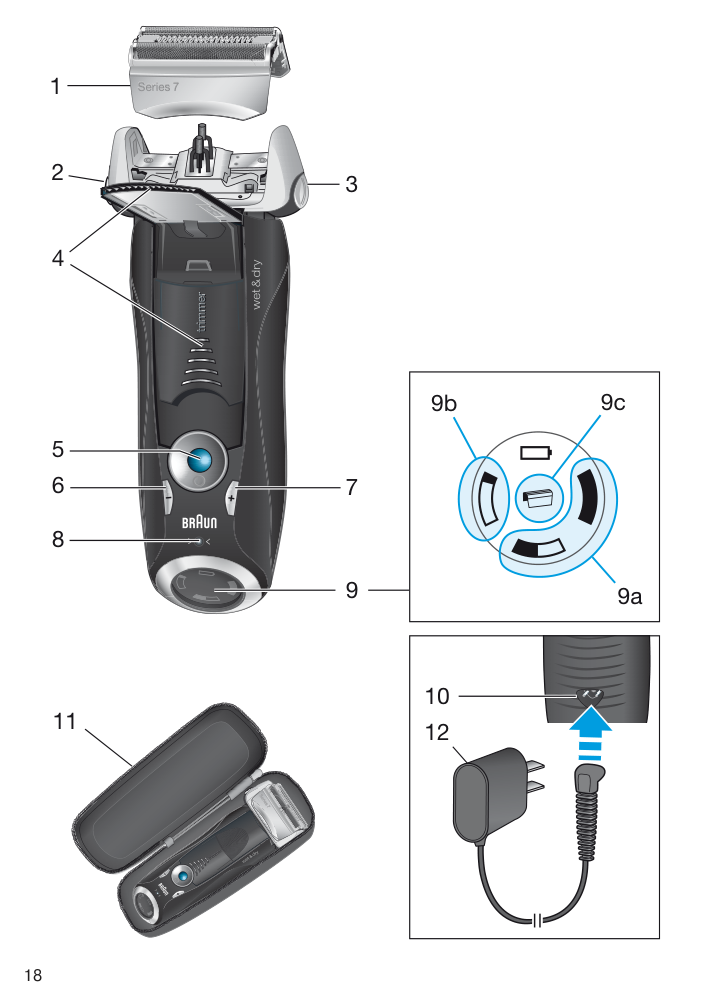
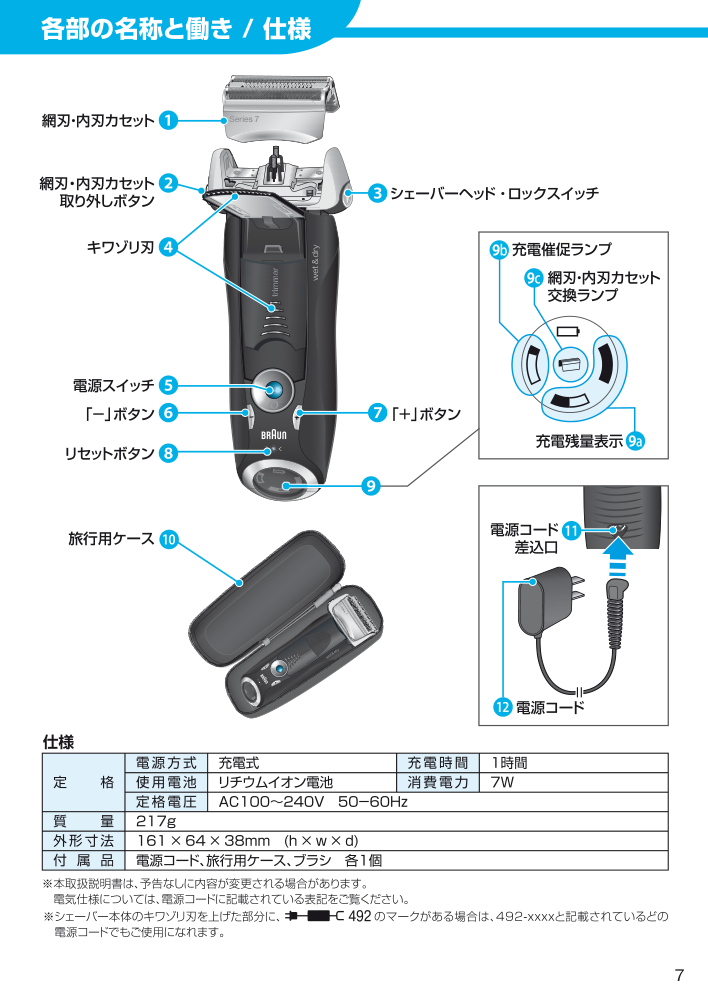
20 English Our products are engineered to meet the highest standards of quality, functionality and design. We hope you thoroughly enjoy using your Braun product. Read these instructions completely, they contain safety information. Keep them for future reference. Warning Your shaver is provided with a special cord set, which has an inte- grated Safety Extra Low Voltage power supply. Do not exchange or tamper with any part of it, otherwise there is risk of an electric shock. Only use the special cord set provided with your appliance. If the appliance is marked 492, you can use it with any Braun power supply coded 492-XXXX. Do not shave with a damaged foil or cord. This appliance is suitable for cleaning under running water and use in a bath or shower. For safety reasons it can only be operated cordless. This appliance can be used by children aged from 8 years and above and persons with reduced physical, sensory or mental capabilities or lack of experience and knowledge if they have been given super- vision or instruction concerning the safe use of the appliance and understand the hazards involved. Children should not play with the appliance. Cleaning and user maintenance should not be made by children unless they are older than 8 years and supervised. Description 1 Foil & Cutter cassette 2 Cassette release button 3 Shaver head lock switch 4 Pop-out long hair trimmer 5 On/off switch 6 – setting button (sensitive) 7 + setting button (intensive) 8 Reset button 9 Shaver display 9a Charging lights (green) 9b Low-charge light (red) 9c Replacement indicator 10 Shaver power socket 11 Travel case 12 Special cord set (design can differ)
Page 21

21 Charging Recommended ambient temperature for charging is 5 °C to 35 °C. The battery may not charge properly or at all under extreme low or high temperatures. Recommended ambient temperature for shaving is 15 °C to 35 °C. Do not expose the shaver to temperatures higher than 50 °C for extended periods of time.
  • Using the special cord set (12), connect the shaver to an electrical outlet with the
  • motor switched off and charge it for at least one hour.
  • A full charge provides up to 50 minutes of cordless shaving time. This may vary
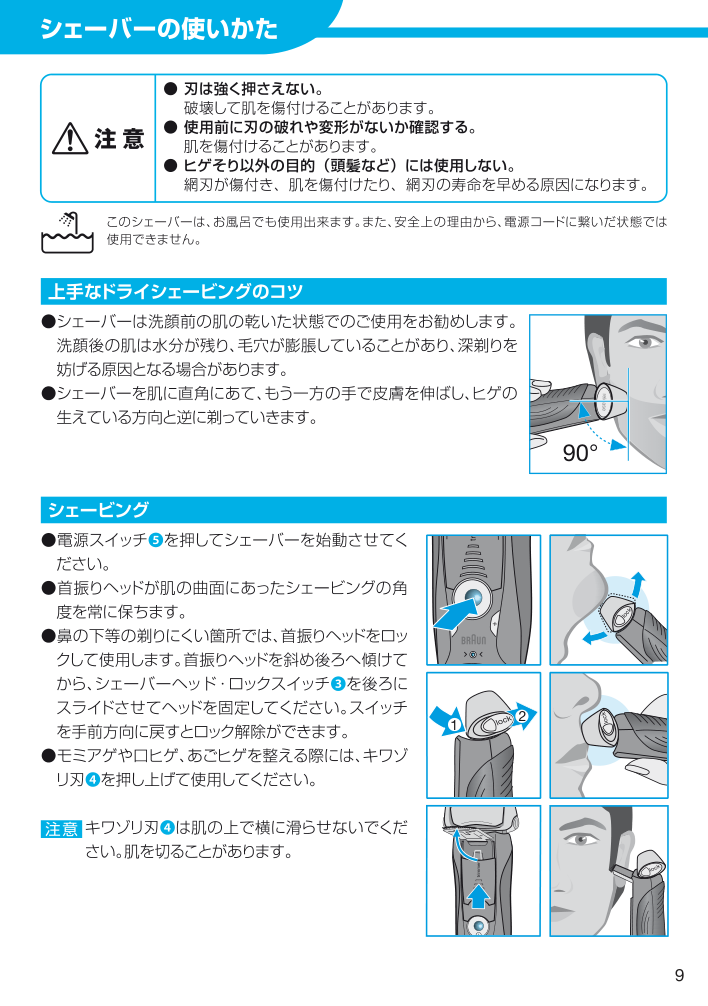
  • according to your beard growth. Charging lights (9a) The green charging lights show the charge status of the batteries. The green charging light blinks when the shaver is being charged or switched on. When the battery is fully charged, all green charging lights shine permanently, provided the shaver is connected to an electrical outlet. Some minutes after completing the charging, the shaver switches to the stand-by-mode: The display turns off. Low-charge light (9b) The red low-charge light flashes when the battery is running low. The remaining battery capacity is sufficient for 2 to 3 shaves. Using the shaver How to use Press the on/off switch (5) to operate the shaver:
  • The pivoting shaver head and floating foils automatically adjust to every contour of
  • your face.
  • To shave hard to reach areas (e.g. under the nose), first slide the shaver head to the
  • back position, afterwards move the head lock switch to the back. The pivoting head is locked at this angle.
  • To trim sideburns, moustache or beard, slide the pop-out long hair trimmer (4)
  • upwards. Tips for the perfect dry shave For best shaving results, Braun recommends you to follow 3 simple steps:
  • Always shave before washing your face.
  • At all times, hold the shaver at right angles (90°) to your skin.
  • Stretch your skin and shave against the direction of your beard growth.
  • Personalizing your shaver By holding down the accelerator button –/+ (6) or (7) you can adjust the shaving power to your individual needs in the different areas of your face from sensitive to intensive. The pilot light in the on/off switch (5) changes within the following range: (–) sensitive shave

  • light blue
  • dark blue
  • green
  • (+) intensive shave

    Page 22

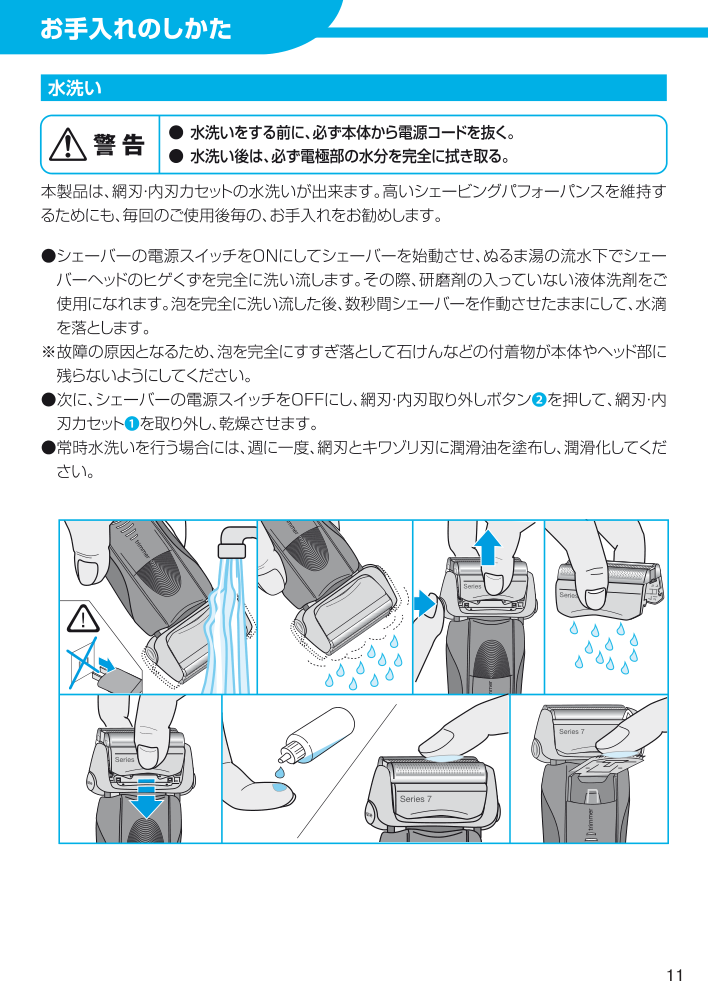
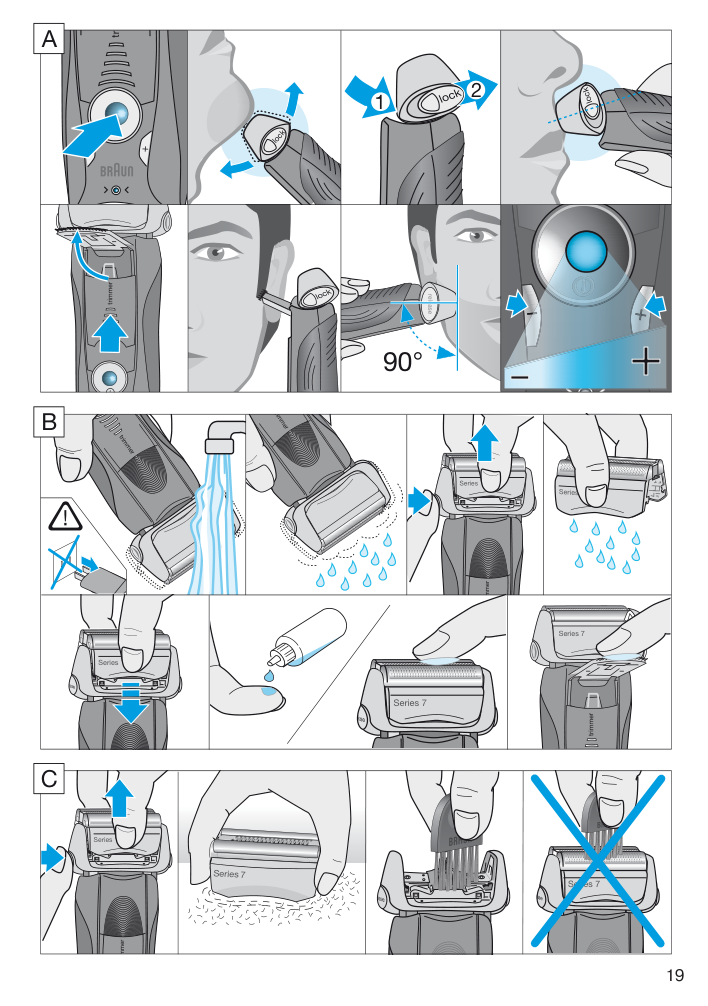
    22 For a thorough and fast shave we recommend the green (intensive) setting. When switching on next time, the last used setting will be activated. Cleaning Regular cleaning ensures better shaving performance. Rinsing the shaver head under running water after each shave is an easy and fast way to keep it clean: Cleaning under running water:
  • Switch the shaver on (cordless) and rinse the shaver head under hot running
  • water until all residues have been removed. You may use liquid soap without abrasive substances. Rinse off all foam and let the shaver run for a few more seconds.
  • Next, switch off the shaver, press the release button (2) to remove the Foil & Cutter
  • cassette (1) and let it dry.
  • If you regularly clean the shaver under water, then once a week apply a drop of light
  • machine oil (not included) on top of the Foil & Cutter cassette and the long hair trimmer. The shaver should be cleaned after each foam usage. Cleaning with a brush:
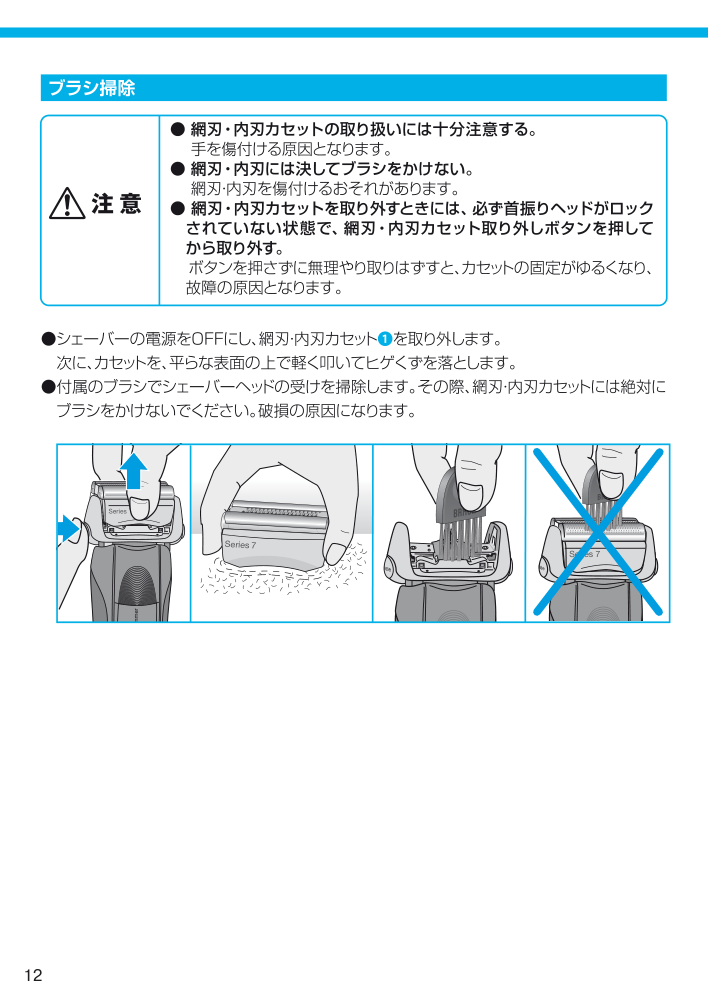
  • Switch off the shaver. Remove the Foil & Cutter cassette (1) and tap it out on a flat
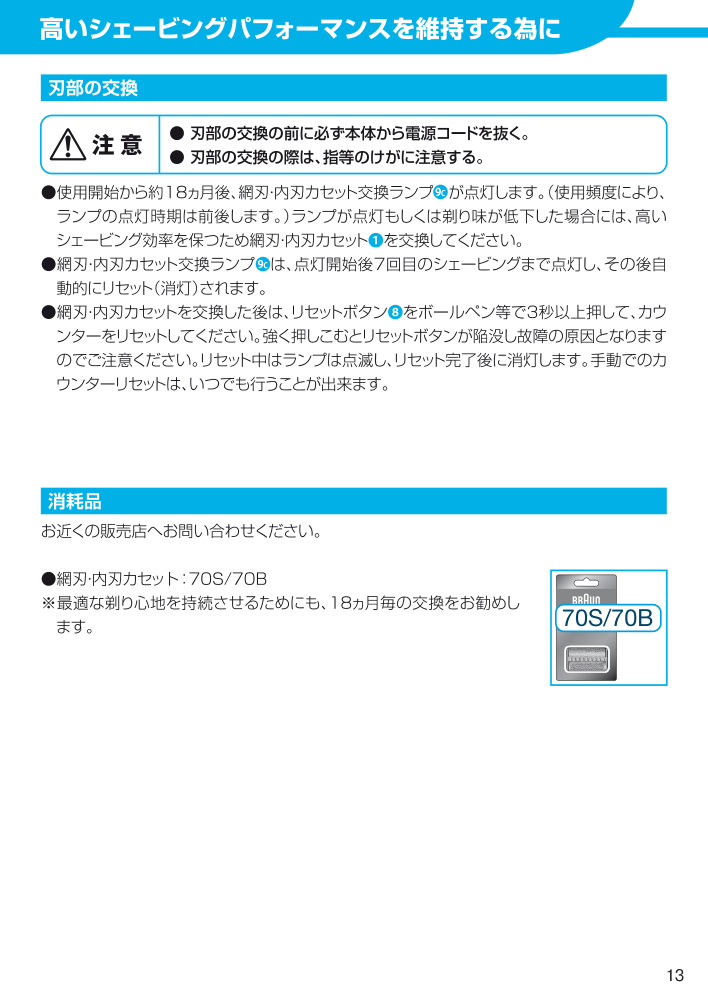
  • surface. Using a brush, clean the inner area of the pivoting head. However, do not clean the foil and cutter cassette with the brush as this may damage it. Keeping your shaver in top shape Replacing the Foil & Cutter cassette / reset To maintain 100% shaving performance, replace the Foil & Cutter cassette (1), when the replacement indicator lights up on the shaver display (9) (after about 18 months) or when cassette is worn. The replacement indicator will remind you during the next 7 shaves to replace the Foil & Cutter cassette. Then the shaver will automatically reset the display. After you have replaced the Foil & Cutter cassette, use a ball-pen to push the reset button (8) for at least 3 seconds to reset the counter. While doing so, the replacement indicator blinks and goes off when the reset is complete. The manual reset can be done at any time. Accessories Available at your dealer or Braun Service Centres:
  • Foil & Cutter cassette 70S/70B
  • Environmental notice Product contains batteries and/or recyclable electric waste. For environment protection do not dispose of in household waste, but for recycling take to electric waste collection points provided in your country.

    Page 23

    23 Subject to change without notice. For electric specifications, see printing on the special cord set. Trouble-Shooting Problem: Possible reason: Remedy: Unpleasant smell from the shaver head. Shaver head is cleaned with water. When cleaning the shaver head with water only use hot water and from time to time some liquid soap (without abrasive substances). Remove Foil & Cutter cassette to let it dry. Battery performance dropped significantly.

  • Foil and cutter are worn
  • which requires more power for each shave.
  • Shaver head is regularly
  • cleaned with water but not lubricated.
  • Renew Foil & Cutter cassette.
  • If the shaver is regularly cleaned
  • with water, apply a drop of light machine oil on top of the foil once a week for lubrication. Shaving performance dropped significantly.
  • Foil and cutter are worn.
  • Personal setting of shaving
  • performance has been changed.
  • Shaving system is
  • clogged.
  • Renew Foil & Cutter cassette.
  • For a thorough and fast shave we
  • recommend the green (intensive) setting.
  • Soak the Foil & Cutter cassette into
  • hot water with a drop of dish liquid. Afterwards rinse it properly and tap it out. Once dry apply a drop of light machine oil on the foil. Shaver turns off with fully charged battery. Foil and cutter are worn which requires more power than the motor can deliver. The appliance turns off. – Renew Foil & Cutter cassette. – Regularly oil the shaving system, especially when cleaning with water only. Battery segments in the display are skipped with decreasing battery capacity. Foil and cutter are worn which requires more power for each shave. – Renew Foil & Cutter cassette. – Regularly oil the shaving system, especially when cleaning with water only. Shaving parts have been changed recently but replacement symbol lights up. Reset button has not been pushed. – Push the reset button for at least 3 seconds to reset the counter.

    More from Braun

    Similar Unknown