Btootos A90 Pro Wireless Earbud Bluetooth Earbuds
Ask AI
— answers from the official manualAnswers from the official manual.
Common questions
Common Questions
32 totalHow long is the battery life of the A90 Pro earbuds?
The A90 Pro earbuds provide 6 to 8 hours of battery life on a single charge. The charging case has a 300mAh battery that can fully charge both earbuds five times, providing over 30 hours of total battery life, for a combined total of up to 40 hours of listening. (Page 16)
How do I pair the A90 Pro earbuds with my phone for the first time?
Take both earbuds out of the charging case and they will power on and start pairing automatically. Then enable Bluetooth on your phone, search for 'A90 Pro', and select it to connect — you should hear a voice prompt saying 'Connected' when wearing the earbuds. Make sure both the earbuds and charging case are fully charged before first use. (Page 6)
How do I charge the A90 Pro earbuds and charging case?
Place the earbuds correctly into the charging slots and close the lid to begin charging — the LED bar on the case will blink while charging and stop automatically when fully charged. To charge the case, use the included Type-C USB cable; the digital display will flash and show the battery level in real time, displaying '100' when fully charged. You can charge the case and earbuds at the same time or separately. (Page 12)
What should I do if my music keeps cutting in and out?
First, make sure the earbuds are no more than 15 meters away from your phone with no obstacles in between. If the issue persists, put the earbuds back in the case, close the lid, manually select 'Forget A90 Pro' on your phone, wait 10 seconds, then open the case and reconnect. (Page 16)
Is the A90 Pro water-resistant, and can I use it while working out?
Yes, the A90 Pro earbuds feature an IPX7 sweat- and water-resistant design, making them suitable for intense gym workouts. This rating allows you to stay focused on your music or calls without worrying about sweat or dirt damaging the earbuds. (Page 3)
Can I charge the A90 Pro charging case without the earbuds inside?
Yes, the charging case has its own battery and can be charged separately from the earbuds. The case can be charged on its own and its stored battery can later be used to charge the earbuds. (Page 17)
Show 26 more questions
What Bluetooth version and profiles does the A90 Pro support?
How do I manually turn on the A90 Pro earbuds if they have powered off automatically?
How do I answer, hang up, or reject a call on the A90 Pro earbuds?
How do I reset the A90 Pro earbuds when I can't find or connect them?
What is the total battery life of the A90 Pro earbuds and charging case?
What should I do if the music keeps cutting in and out?
How do I activate Siri using the A90 Pro earbuds?
Are the A90 Pro earbuds waterproof or sweat-resistant?
Can I charge the A90 Pro case without the earbuds inside?
How do I initially pair my A90 Pro earbuds with my phone?
How do I reset my A90 Pro earbuds if they won't connect?
How do I answer and end calls with the A90 Pro?
How do I control music playback with touch controls?
What is the proper way to charge the earbuds?
Can I charge the charging case without the earbuds inside?
What is the water resistance rating of the A90 Pro earbuds?
How do I activate Siri on the A90 Pro earbuds?
How long does the battery last on the A90 Pro earbuds?
How do I charge the wireless earbuds?
What should I do if my phone is not connecting to A90 Pro?
How do I clean magnet connectors when they don’t charge?
Is there a battery level indicator available for A90 Pro?
Is it safe to use these earbuds during storms or expose them to extreme temperatures?
My earbuds automatically turn off after some time if unpaired, how can I fix this?
What touch controls are available on the A90 Pro earbuds?
How do I control music playback and volume using touch controls on the A90 Pro?
Full Manual
42 pages
User Guide for A90 Pro
English Deutsch Français Italiano Español
- - - - -
Table of Product Contents
| | | | |---|---|---| | | | |
| | | | |---|---|---| | | | |

Charging Case* Type-C Charging Cable* Wireless Earbud*
| | |---| | |
Instruction Book
Earbud Tip*
Product Specification
. HFP/A DP/HSP/AVRCP
Bluetooth Version: Support: Charging Port:
Type-C

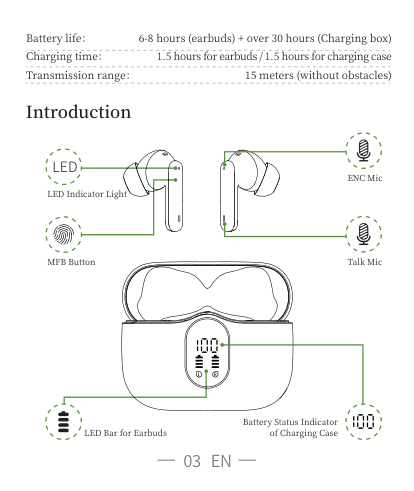
Battery life: Charging time: Transmission range:
- hours (earbuds) + over hours (Charging box) . hours for earbuds / . hours for charging case meters (without obstacles)
Introduction
LED
ENC Mic
LED Indicator Light
Talk MicMFB Button
Battery Status Indicator of Charging Case
LED Bar for Earbuds

How do I pair two headphones with my phone?
· Please make sure both the earbuds and the charging case are fully charged before first use. · Step
Take both earbuds out of the charging case and both earbuds will power on and start pairing automatically
(If the earbuds are not connected to your device for more than minutes,the earbuds will automatically turn off. Press the MFB button for about seconds to manually turn on the earbuds when prompted "Power on".)
The indicator light of one earbud will flash white alternately, and the other earbud will slowly flash white when earbuds paired successfully
· Step
Enable the Bluetooth pairing mode on your phone device, search and select "A Pro" to connect. (You should hear a voice prompt "Connected" when wearing earbuds).
· If indicator light of earbud is off,it means the phone is connected
Bluetooth 00:00 5G Settings
Bluetooth
Now discoverable as “IPhone”.
MY DEVICES
iConnectedA90 Pro
OTHER DEVICES
To pair an Apple Watch with your iPhone, go to the Apple Watch app
· Automatic connection
By default, the earbuds will connect the last paired phone automatically when power on. · Prompt
. If you have any problem pairing the two earbuds with your phone, put the earbuds back in the charging case and repeat the above steps. Or refer to the reset steps of Frequently Asked Questions in the manual.

. These earbuds can be used not only together, but also individually
If you want to use single earbud, just take one earbud out of the case and connect it to your phone. or when using two earbuds, manually turn off one earbud or put one back in the charging case and you'll be able to use the other one earbud alone.
Functions
###### Telephone Communication
Answer call: Hang up: Refuse incoming call:
tap once press and hold the key for s press and hold the key for s
###### For Music
Play/pause Previous track Next track Activate Siri Turn down volume Turn up volume
tap twice press and hold "L" for s press and hold "R" for s

quickly tap for three times single tap on left earbud single tap on right earbud
Charging
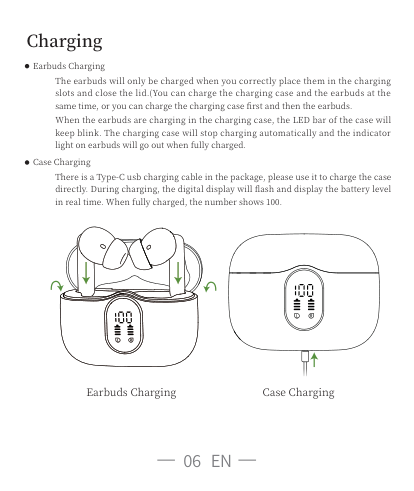
· Earbuds Charging
The earbuds will only be charged when you correctly place them in the charging slots and close the lid.(You can charge the charging case and the earbuds at the same time, or you can charge the charging case first and then the earbuds.
When the earbuds are charging in the charging case, the LED bar of the case will keep blink. The charging case will stop charging automatically and the indicator light on earbuds will go out when fully charged.
· Case Charging
There is a Type-C usb charging cable in the package, please use it to charge the case directly. During charging, the digital display will flash and display the battery level in real time. When fully charged, the number shows .
Earbuds Charging Case Charging
Charging Alerts
After using it for a long period of time, due to the oxidation of the magnet connector, the earbuds might not be charged or even turned on. You can fix this problem by cleaning the magnet connectors on the earbuds and charging case with an alcohol wipe
Storage and Maintenance
If the earbuds have not been used for more than months, we recommend that you charge it. Please use an charger approved by FCC (Federal Communications Commission). Children aged and under require adult supervision. Do not expose the earbuds to high or low temperatures, and do not use the earbuds during a thunderstorm. Avoid free fall or violent shock to the device. Keep the device away from sources of fire and do not place the device in water.
Frequently Asked Questions
Q : Why don't these earbuds pair with my phone? A : Make sure the earbuds are fully charged and powered on.
Make sure your phone's Bluetooth is enabled If there is no problem with the two points stated above, turn off the powered-on earbuds after continuous and quick clicks. Put them back into the charging case and close the lip, wait for minute, then open the charging case and reconnect the earbuds to the phone.
Q : Why does the music cut in or out? A : First, keep the earbuds no more than m away from your phone (no obstacles).
If the distance is less than m, follow these steps: . Put the earbuds back into the case and close the lid, manually click "forget the A Pro" on your phone
. After seconds, open the charging case and reconnect these earbuds with your phone Q : Why the earbuds still won't be charged or disconnect from the phone after I put them

in the case and close the lid?
A : Make sure the charging case is not in a low battery state. If the charging case is in a low battery state, the earbuds will neither be charged nor disconnected. In this case, please use a type-c charging cable to fully charge the case.
Q : Are these earbuds sweat- and water-resistant? A : These earbuds are sweatproof and slightly waterproof.
For electronic devices, we do not recommend that you submerge the earbuds in water. For more detailed product FAQs, please contact our customer service.
Activation & Warranty
Permanent replacement of damaged, defective item or missing components. Please activate via email below within days. earbudsvip @gmail.com
DE
Verpackungsliste
| | | |

|---|---|---| | | | |
| | | | |---|---|---| | | | |
Ladebehälter* Typ-C-Ladekabel* Kabellose Ohrstöpsel *
| | |---| | |
Benutzerhandbuch

Ohrenkappen *
Kopfhörer-Parameter
. HFP/A DP/HSP/AVRCP
Bluetooth-Version: Unterstützung: Ladeanschluss:
Typ-C
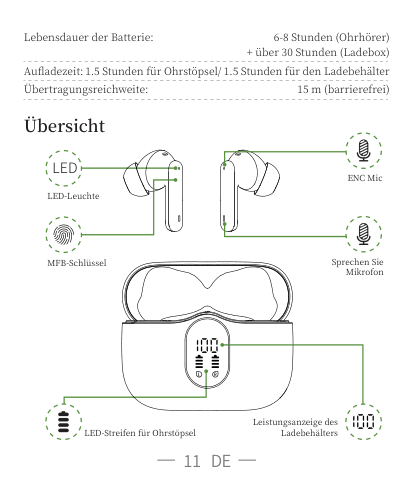
Lebensdauer der Batterie:
- Stunden (Ohrhörer)
+ über Stunden (Ladebox) . Stunden für Ohrstöpsel/ . Stunden für den Ladebehälter
Aufladezeit: Übertragungsreichweite:

m (barrierefrei)
Übersicht
##### LED
ENC Mic
LED-Leuchte
Sprechen Sie Mikrofon
MFB-Schlüssel
LED-Streifen für Ohrstöpsel
Leistungsanzeige des Ladebehälters
Wie kopple ich die Doppel-Ohrstöpsel mit meinem Mobiltelefon?
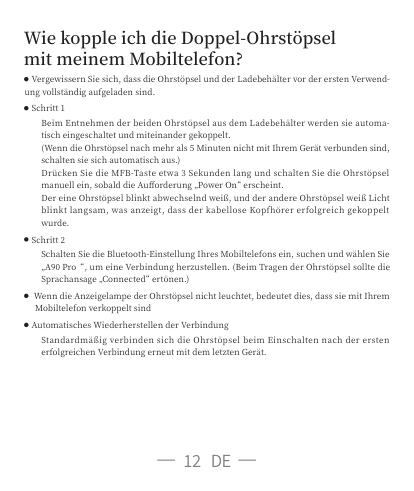
· Vergewissern Sie sich, dass die Ohrstöpsel und der Ladebehälter vor der ersten Verwendung vollständig aufgeladen sind.
· Schritt Beim Entnehmen der beiden Ohrstöpsel aus dem Ladebehälter werden sie automatisch eingeschaltet und miteinander gekoppelt. (Wenn die Ohrstöpsel nach mehr als Minuten nicht mit Ihrem Gerät verbunden sind, schalten sie sich automatisch aus.) Drücken Sie die MFB-Taste etwa Sekunden lang und schalten Sie die Ohrstöpsel manuell ein, sobald die Aufforderung „Power On“ erscheint. Der eine Ohrstöpsel blinkt abwechselnd weiß, und der andere Ohrstöpsel weiß Licht blinkt langsam, was anzeigt, dass der kabellose Kopfhörer erfolgreich gekoppelt wurde.
· Schritt
Schalten Sie die Bluetooth-Einstellung Ihres Mobiltelefons ein, suchen und wählen Sie „A Pro“, um eine Verbindung herzustellen. (Beim Tragen der Ohrstöpsel sollte die Sprachansage „Connected“ ertönen.)
· Wenn die Anzeigelampe der Ohrstöpsel nicht leuchtet, bedeutet dies, dass sie mit Ihrem Mobiltelefon verkoppelt sind
· Automatisches Wiederherstellen der Verbindung Standardmäßig verbinden sich die Ohrstöpsel beim Einschalten nach der ersten erfolgreichen Verbindung erneut mit dem letzten Gerät.
· Tipps
. Falls Probleme bei der Kopplung der beiden Ohrstöpsel mit Ihrem Mobiltelefon auftreten, legen Sie die Ohrstöpsel bitte wieder in den Ladebehälter und wiederholen Sie die obengenannten Schritte. Oder beziehen Sie sich auf das Reset-Verfahren in den FAQ im Handbuch.
. Diese Ohrstöpsel können nicht nur zusammen, sondern auch einzeln verwendet werden. Wenn Sie Sie im Einzelmodus verwenden möchten, nehmen Sie einfach einen Ohrstöpsel aus dem Ladebehälter und schließen ihn an Ihr Mobiltelefon an. Wenn Sie den Doppelmodus verwenden, schalten Sie einen Ohrstöpsel manuell aus oder legen Sie einen Ohrstöpsel zurück in den Ladebehälter, und Sie können den anderen Ohrstöpsel im Einzelmodus verwenden.
Funktion
###### Gespräch
Klicken Sie einmal Sek langdrücken Sek langdrücken
Das Mobiltelefon beantworten: Auflegen des Anrufs: Ablehnen des Anrufs:
###### Musik hören
Doppelklicken „L“ für Sek langdrücken „R“ für Sek langdrücken
Wiedergabe/Pause: Vorheriger Titel: Nächster Titel: Siri aktivieren: Die Lautstärke verringern: Die Lautstärke erhöhen:
Klicken Sie dreimal schnell Klicken Sie einmal auf das linke Ohrun Klicken Sie einmal auf das rechte Ohr

Aufladen
· Ohrstöpsel aufladen
Der Ladevorgang beginnt erst, wenn Sie die Ohrstöpsel ordnungsgemäß in den Ladebehälter einsetzen und den Deckel schließen. (Sie können den Ladebehälter und die Ohrstöpsel gleichzeitig aufladen, oder Sie können zuerst den Ladebehälter und dann die Ohrstöpsel aufladen.
Wenn die Ohrhörer im Ladeetui aufgeladen werden, blinkt die LED-Lichtleiste des Ladeetuis weiter. Wenn das Headset vollständig aufgeladen ist, wird der Ladevorgang automatisch beendet und die Headset-LED erlischt.
· Ladebehälter aufladen
In der Verpackung befindet sich ein Typ-C-USB-Ladekabel. Bitte verwenden Sie es, um den Ladebehälter direkt aufzuladen. Während des Ladevorgangs blinkt die Digitalanzeige und zeigt die Batterieleistung in Echtzeit an. Wenn der Ladebehälter vollgeladen ist, wird die Zahl angezeigt.
Ohrstöpsel aufladen Ladebehälter aufladen
Aufladehinweis
Nach längerem Gebrauch können die Ohrstöpsel aufgrund der Oxidation des Magnetkontakts nicht länger aufgeladen werden, selbst wenn sie eingeschaltet sind. Sie können einen mit Alkohol getränkten Lappen verwenden, um den Magnetkontakt an den Ohrstöpseln und am Ladebehälter zu reinigen, um das Problem zu lösen

Lagerung und Wartung
Wenn Sie die Ohrstöpsel länger als Monate nicht benutzt haben, empfehlen wir Ihnen, sie aufzuladen. Bitte verwenden Sie ein von der FCC zugelassenes Ladegerät.
FFC :Federal Communications Commission Sie dürfen von Kindern von Jahren und darunter nur unter der Aufsicht von Erwachsenen verwendet werden. Setzen Sie die Ohrstöpsel nicht hohen oder niedrigen Temperaturen aus, und verwenden Sie sie nicht bei Gewitter oder Sturm. Schützen Sie das Gerät vor Stürzen oder heftigen Stößen. Bitte halten Sie das Gerät von Feuerquellen fern und legen Sie es nicht ins Wasser.
Allgemeine Fragen
Q : Warum lassen sich die Ohrstöpsel nicht an mein Mobiltelefon koppeln? A : Vergewissern Sie sich, dass die Ohrstöpsel vollständig aufgeladen sind und das Gerät
eingeschaltet ist. Vergewissern Sie sich, dass die Bluetooth-Funktion Ihres Mobiltelefons eingeschaltet ist. Falls keine Probleme mit den beiden vorgenannten Elementen auftreten, schalten Sie die Ohrstöpsel nach fünf kurzen Klicks im Einschaltzustand aus, legen Sie die Ohrstöpsel wieder in den Ladebehälter und schließen Sie den Ladebehälter, warten Sie eine Minute, öffnen Sie dann den Ladebehälter und koppeln Sie die.
Q : Warum schaltet sich die Musik ein oder aus? A : Bitte achten Sie zunächst darauf, dass der Abstand zwischen den Ohrstöpseln und
Ihrem Mobiltelefon m Fuß nicht überschreitet (ohne Hindernisse). Wenn der Abstand m nicht überschreitet, gehen Sie bitte wie folgt vor:
. Setzen Sie die Ohrstöpsel wieder in die Ladebehälter ein, schließen Sie die Abdeckung, sodass sich das Mobiltelefon vom „A Pro“ entkoppelt . Öffnen Sie nach Sekunden den Ladebehälter und koppeln Sie die Ohrstöpsel wieder an Ihr Mobiltelefon

Q : Warum können die Ohrstöpsel nicht aufgeladen und die Kopplung mit meinem Mobiltelefon unterbrochen werden, nachdem ich die Ohrstöpsel in den Ladebehälter gelegt und den Mobiltelefonbehälter geschlossen habe?
A : Vergewissern Sie sich, dass sich der Ladebehälter nicht im Energiesparmodus befindet. Wenn sich der Ladebehälter im Energiesparmodus befindet, können die Ohrstöpsel auch im Notfall nicht aufgeladen und entkoppelt werden. Verwenden Sie deshalb bitte das Typ-C-Kabel, um den Ladebehälter vollständig aufzuladen.
Q : Sind die Ohrstöpsel schweiß- und wasserfest? A : Die Ohrstöpsel sind schweißfest und leicht wasserdicht. Bei elektronischen Produkten
empfehlen wir nicht, die Ohrstöpsel in Wasser einzutauchen. Für detailliertere Produkt-FAQs wenden Sie sich bitte an unseren Kundendienst.
Aktivierung und Garantie
Dauerhafter Ersatz beschädigter, defekter Artikel oder fehlende Komponenten. Bitte aktivieren Sie Ihre Ohrstöpsel innerhalb von Tagen über die folgende E-Mail-Adresse. earbudsvip @gmail.com
FR
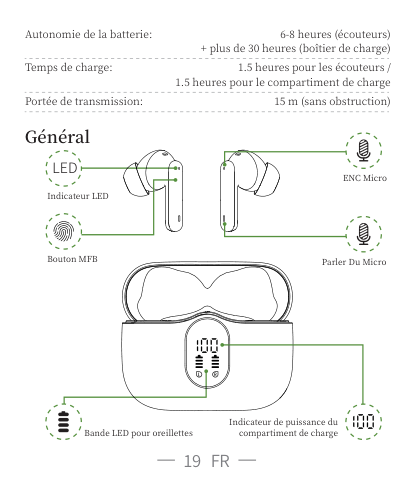
Contenu de l'emballage du produit
| | | | |---|---|---|

| | | |
| | | | |---|---|---| | | | |
Compartiment de charge * Câble de chargement Type-C * Ecouteurs sans fil *
| | |---| | |
Manuel d'utilisations
Bouchons d'oreille *

Paramètres
. HFP/A DP/HSP/AVRCP
Version Bluetooth Support: Port de charge:
Type-C
Autonomie de la batterie:
Temps de charge:
Portée de transmission:
Général
##### LED
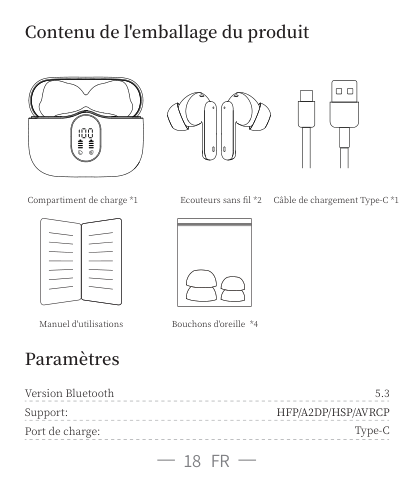
Indicateur LED
Bouton MFB
- heures (écouteurs) + plus de heures (boîtier de charge)
. heures pour les écouteurs / . heures pour le compartiment de charge
m (sans obstruction)
ENC Micro
Parler Du Micro
Indicateur de puissance du compartiment de charge
Bande LED pour oreillettes
Comment coupler les deux écouteurs avec mon téléphone ?
· Assurez-vous que les écouteurs et le compartiment de charge sont entièrement chargés avant de les utiliser pour la première fois.
· Etape Retirez les deux écouteurs du compartiment de charge. Les deux écouteurs s'allument et s'appairent automatiquement. (Si les écouteurs ne sont pas connectés à votre appareil pendant plus de minutes, ils s'éteignent automatiquement. ) Appuyez sur le MFB pendant environ secondes et les allumez manuellement lorsque le son "Power on" est entendu. Le voyant de l'un écouteur clignote alternativement en blanc et le voyant de l'autre écouteur la lumière blanc clignote lentement pour indiquer que le couplage des écouteurs sans fil est terminé.
· Etape
Activez les paramètres Bluetooth de votre téléphone, recherchez et sélectionnez "A Pro" pour vous connecter. (Il devrait y avoir un message vocal "Connected" lorsque vous portez les écouteurs.)
· Le voyant de l'écouteur n'est pas allumé pour indiquer que le téléphone est connecté. · Reconnexion automatique
Par défaut, le dernier appareil apparié se reconnectera aux écouteurs après la première connexion réussie.
· Conseils
. Si vous rencontrez des problèmes pour jumeler les deux écouteurs avec votre téléphone, veuillez remettre les écouteurs dans le compartiment de charge et répéter les étapes ci-dessus. Ou reportez-vous à la procédure de réinitialisation dans la FAQ du manuel.
. Ces écouteurs peuvent être utilisés non seulement ensemble, mais aussi séparément. Si vous souhaitez utiliser le mode unique, il suffit de retirer un écouteur du compartiment et de le connecter à votre téléphone. Ou lorsque vous utilisez le mode double, éteignez manuellement un écouteur ou remettez-le dans le compartiment de charge et vous pourrez vous connecter à l'autre écouteur en mode unique.
Functions
###### Parler
Répondre à un appel: Terminer un appel: Rejeter un appel entrant:
un coup pression longue S pression longue S
###### Pour la musique
Lecture/pause: Piste précédente: Piste suivante: Activer Siri: Baisser le volume: Augmenter le volume:
deux coups pression longue "L" S pression longue "R" S
Rapide - coups un coup sur l'écouteur gauche
un coup sur l'écouteur droite
Chargement
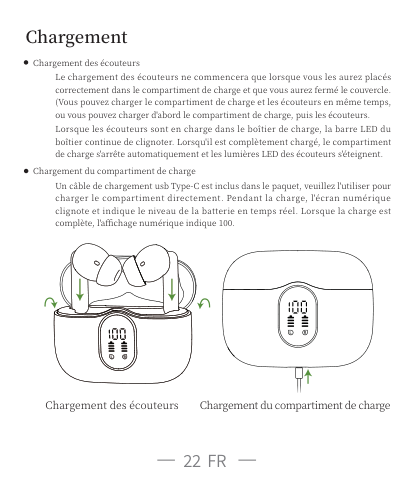
· Chargement des écouteurs
Le chargement des écouteurs ne commencera que lorsque vous les aurez placés correctement dans le compartiment de charge et que vous aurez fermé le couvercle. (Vous pouvez charger le compartiment de charge et les écouteurs en même temps, ou vous pouvez charger d'abord le compartiment de charge, puis les écouteurs.
Lorsque les écouteurs sont en charge dans le boîtier de charge, la barre LED du boîtier continue de clignoter. Lorsqu'il est complètement chargé, le compartiment de charge s'arrête automatiquement et les lumières LED des écouteurs s'éteignent.
· Chargement du compartiment de charge
Un câble de chargement usb Type-C est inclus dans le paquet, veuillez l'utiliser pour charger le compartiment directement. Pendant la charge, l'écran numérique clignote et indique le niveau de la batterie en temps réel. Lorsque la charge est complète, l'affichage numérique indique .
Chargement des écouteurs Chargement du compartiment de charge
Avertissements de charge
Après une période d'utilisation, les écouteurs ne se chargent pas ou ne s'allument même pas en raison de l'oxydation du connecteur magnétique. Vous pouvez résoudre ce problème en nettoyant les connecteurs magnétiques des écouteurs et du compartiment de charge avec une lingette alcoolisée.
Stockage et entretien
Si les écouteurs n'ont pas été utilisés pendant plus de mois, nous vous recommandons de les recharger. Veuillez utiliser un chargeur approuvé par la FCC
FCC (Federal Communications Commission). Les enfants âgés de ans et moins doivent les utiliser en étant surveillés par un adulte. N'exposez pas les écouteurs à des températures élevées ou basses et n'utilisez pas les écouteurs pendant les orages. Evitez de faire tomber l'appareil ou de lui faire subir un choc violent. Gardez l'appareil à l'abri du feu et ne le mettez pas dans l'eau.
Questions fréquemment posées
Q : Pourquoi ces écouteurs ne s'associent-ils pas à mon téléphone ? A : Veuillez vous assurer que les écouteurs sont entièrement chargés et sous tension.
Assurez-vous que la fonction Bluetooth de votre téléphone est activée.
Si les points ci-dessus ne posent aucun problème, éteignez les écouteurs après avoir donné coups rapides avec la mise sous tension, remettez les écouteurs dans le compartiment de charge et fermez-le, attendez minute, puis ouvrez le compartiment de charge et reconnectez les écouteurs à votre téléphone.
Q : Pourquoi la musique s'arrête-t-elle ou se coupe-t-elle ? A : Tout d'abord, veuillez ne pas laisser plus de m (sans obstacles) entre ces écouteurs et

votre téléphone. Si la distance est inférieure à m, veuillez suivre les étapes suivantes.:
. Remettez les écouteurs dans le compartiment et le fermez, et oubliez "A Pro" sur les paramètres Bluetooth. . Après secondes, ouvrez le compartiment et rebranchez ces écouteurs.
Q : Pourquoi les écouteurs ne peuvent-ils pas se charger ou se déconnecter du téléphone alors que je les ai mis dans le compartiment et que je l'ai fermé ?
A : Veuillez vous assurer que la puissance du compartiment n'est pas basse. Si non, les écouteurs ne se chargeront pas et ne pourront pas être déconnectés. Veuillez donc utiliser un câble Type-C pour charger complètement le compartiment.
Q : Ces écouteurs sont-ils étanches à la sueur et à l'eau ? A : Ces écouteurs sont résistants à la sueur et légèrement étanches. Pour les appareils
électroniques, nous ne recommandons pas d'immerger les écouteurs dans l'eau. Pour une FAQ plus détaillée sur les produits, veuillez contacter notre service clientèle.
Activation & Garantie
Remplacement permanent de l'article endommagé ou défectueux ou des composants manquants. Veuillez l'activer dans les jours via l'e-mail suivant : earbudsvip @gmail.com
IT
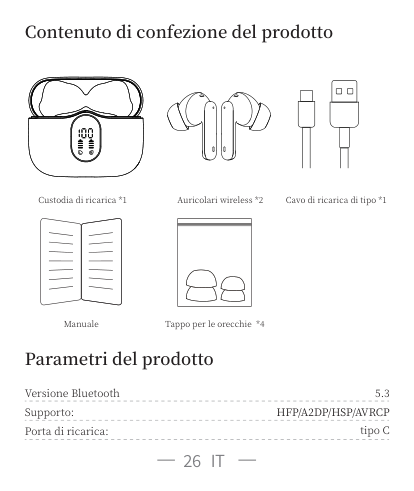
Contenuto di confezione del prodotto
| | | | |---|---|---| | | | |
| | | | |---|---|---| | | | |
Custodia di ricarica * Cavo di ricarica di tipo * Auricolari wireless *
| | |---| | |

Manuale
Tappo per le orecchie *
Parametri del prodotto
. HFP/A DP/HSP/AVRCP
Versione Bluetooth Supporto: Porta di ricarica:
tipo C
Durata della batteria:
Durata di ricarica:
Raggio di trasmissione:
Introduzione
##### LED
Indicatore LED
Pulsante MFB
- ore (auricolari) + oltre ore (scatola di ricarica) . ore per gli auricolari / . ore per la custodia di ricarica charge m (senza ostacoli)
ENC Microfono
Parla Microfono
Striscia LED per auricolari
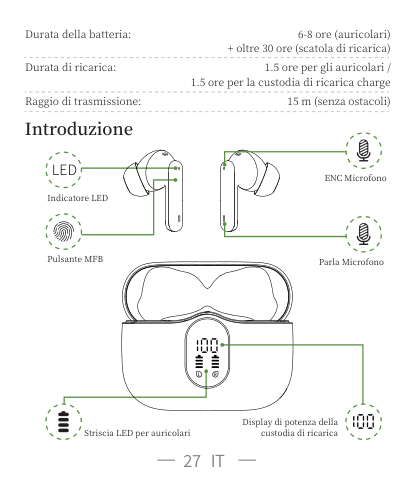
Display di potenza della custodia di ricarica
Come faccio ad accoppiare le due cuffie con il mio cellulare?
· Assicurati che sia gli auricolari che la custodia di ricarica siano completamente carichi prima del primo utilizzo.
· Passo estrai entrambi gli auricolari dalla custodia di ricarica ed entrambi gli auricolari si accenderanno e si accoppieranno automaticamente. (Se gli auricolari non sono connessi al dispositivo per più di minuti, gli auricolari si spegneranno automaticamente.) Premi l'MFB per circa secondi per accendere manualmente gli auricolari quando viene richiesto "Power on (Accesso)". Uno auricolare lampeggia in bianco alternativamente e la spia dell'altro auricolare la luce bianco lampeggia lentamente, indicando che l'accoppiamento degli auricolari wireless è completo.
· Passo
attiva le impostazioni Bluetooth del cellulare, cerca e seleziona "A Pro" per connettersi. (Ci dovrebbe essere un messaggio vocale "Connected" quando sono indossati i tappi per le orecchie.)
· Se l'indicatore dell'auricolare è spento, significa che è connesso al cellulare
00:00 Settings
Bluetooth
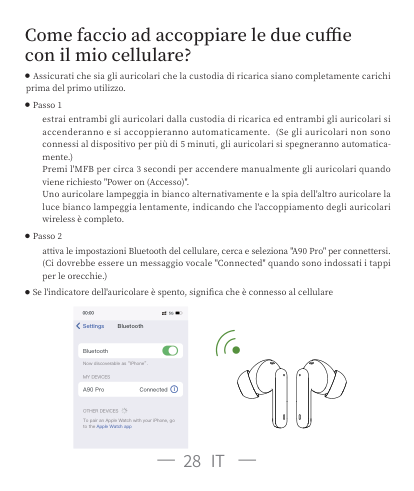
Bluetooth
Now discoverable as “IPhone”.
MY DEVICES
iConnectedA90 Pro
OTHER DEVICES
To pair an Apple Watch with your iPhone, go to the Apple Watch app
· Riconnessione automatica Per impostazione predefinita, l'ultimo dispositivo accoppiato ricollegherà gli auricolari dopo che la prima connessione è andata con successo.
· Avvisi
. In caso di problemi nell'associazione dei due auricolari al cellulare, rimetti gli auricolari nella custodia di ricarica e ripeti i passi precedenti. Oppure fare riferimento alla procedura di ripristino nelle FAQ del manuale.
. Questi auricolari possono essere utilizzati non solo insieme, ma anche singolarmente. Se desideri utilizzare la modalità singola, estrai un auricolare dalla custodia e collegalo al cellulare. Oppure, quando utilizzi la modalità doppia, spegni manualmente un auricolare o rimetti uno nella custodia di ricarica e sarai in grado di collegare l'altro auricolare in modalità singola.
Funzione
###### Chiamata
Rispondi alla chiamata: Termina la chiamata: Rifiuti la chiamata:
clicca una volta premi a lungo per secondi premi a lungo per secondi
###### Riguarda la musica
Riproduci/Pausa: Traccia precedente: Traccia successiva: Attiva Siri: Abbassa il volume: Alza il volume:
clicca due volte Premi a lungo "L" per secondi Premi a lungo "R" per secondi
clicca veloce per tre volte clicca sull'orecchio sinistro clicca sull'orecchio destro
Tariffa
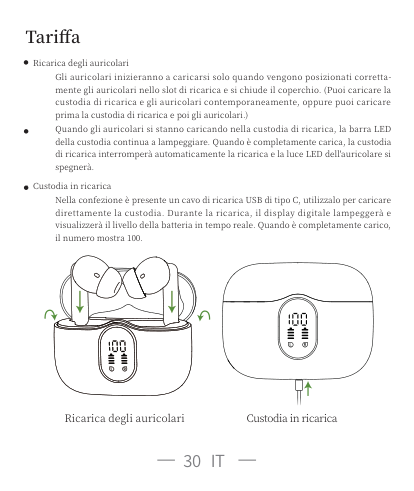
· Ricarica degli auricolari
Gli auricolari inizieranno a caricarsi solo quando vengono posizionati correttamente gli auricolari nello slot di ricarica e si chiude il coperchio. (Puoi caricare la custodia di ricarica e gli auricolari contemporaneamente, oppure puoi caricare prima la custodia di ricarica e poi gli auricolari.)
Quando gli auricolari si stanno caricando nella custodia di ricarica, la barra LED della custodia continua a lampeggiare. Quando è completamente carica, la custodia di ricarica interromperà automaticamente la ricarica e la luce LED dell'auricolare si spegnerà.
· Custodia in ricarica
Nella confezione è presente un cavo di ricarica USB di tipo C, utilizzalo per caricare direttamente la custodia. Durante la ricarica, il display digitale lampeggerà e visualizzerà il livello della batteria in tempo reale. Quando è completamente carico, il numero mostra .
Ricarica degli auricolari Custodia in ricarica
Avvisi di carica
Dopo l'utilizzo per un periodo di tempo, a causa dell'ossidazione del connettore magnetico, gli auricolari non possono essere caricati o addirittura accesi. Puoi risolvere il problema pulendo i connettori magnetici sugli auricolari e la custodia di ricarica con un panno imbevuto di alcol

Conservazione e manutenzione
Se gli auricolari non è stato utilizzato per più di mesi, si consiglia di caricarlo. Utilizza un caricabatterie approvato dalla FCC (Federal Communications Commission). I bambini fino a anni richiedono la supervisione di un adulto. Non esporre gli auricolari a temperature alte o basse e non utilizzare gli auricolari durante un temporale. Evitare le cadute o gli urti violenti sul dispositivo. Tieni il dispositivo lontano dalle fonti di accensione e non immergere il dispositivo in acqua.
Questions fréquemment posées
Q : Perché gli auricolari non si accoppiano con il mio cellulare? A : Assicurati che gli auricolari siano completamente carichi e accesi.
Assicurati che il bluetooth del tuo cellulare sia acceso
Se non ci sono problemi con i punti precedenti, spegni gli auricolari dopo clic rapidi quando acceso, rimetti gli auricolari nella custodia di ricarica e chiudi la custodia, attendi minuto, in seguito apri la custodia di ricarica e ricollega gli auricolari al cellulare.
Q : Perché la musica si interrompe? A : Innanzitutto, tieni questi auricolari a non più di m di distanza dal cellulare (senza
ostacoli). Se la distanza è inferiore a m, attieniti alla seguente procedura:
. Rimetti gli auricolari nella custodia e chiudi la custodia, dimentica il "A Pro" sul cellulare . Dopo secondi, apri la custodia e ricollega gli auricolari al cellulare
Q : Ho messo gli auricolari nella custodia e ho chiuso la custodia, perché gli auricolari non si caricano ancora o si disconnettono dal cellulare?
A : Assicurati che la custodia di ricarica non sia in uno stato di batteria scarica. Se la custodia di ricarica è in uno stato di batteria scarica, gli auricolari non si caricheranno e non potranno essere scollegati, anche per ogni evenienza. Pertanto, utilizza un cavo di tipo c per caricare completamente la custodia.
Q : Questi auricolari sono resistenti al sudore e all'acqua? A : Questi auricolari sono resistenti al sudore e leggermente impermeabili. Per l'elettronica,
non consigliamo di immergere gli auricolari in acqua. Per domande più dettagliate sui prodotti, contatta il nostro servizio clienti.
Attiva la garanzia
Sostituzione permanente dell'articolo danneggiato e difettoso o componenti mancanti. Si prega di attivare la garanzia tramite e-mail di seguito entro giorni.
earbudsvip @gmail.com
ES
Contenuto di confezione del prodotto

| | | | |---|---|---| | | | |
| | | | |---|---|---| | | | |
Estuche de carga * Cable de carga Tipo-C * Auriculares inalámbricos *
| | |---| | |
Manual de Usuario*
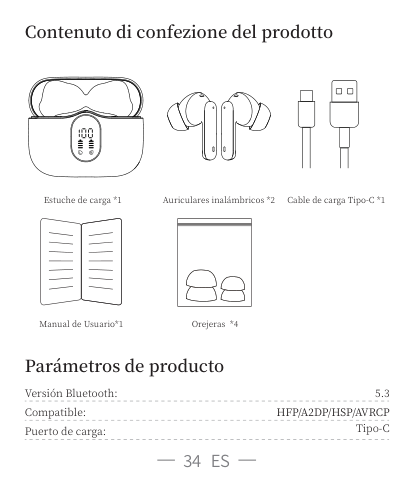
Orejeras *
Parámetros de producto
. HFP/A DP/HSP/AVRCP
Versión Bluetooth: Compatible: Puerto de carga:
Tipo-C
Duración de batería:
- horas (auriculares)
+ más de horas (Caja de carga) . horas para auriculares/ . horas para estuche de carga
Tiempo de carga: Rango de transmisión:
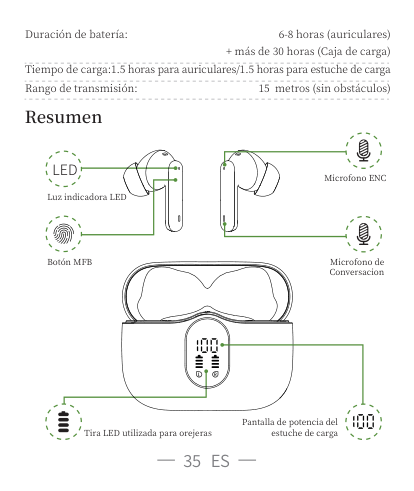
metros (sin obstáculos)
Resumen
##### LED
Microfono ENC
Luz indicadora LED
Botón MFB
Microfono de Conversacion
Tira LED utilizada para orejeras
Pantalla de potencia del estuche de carga
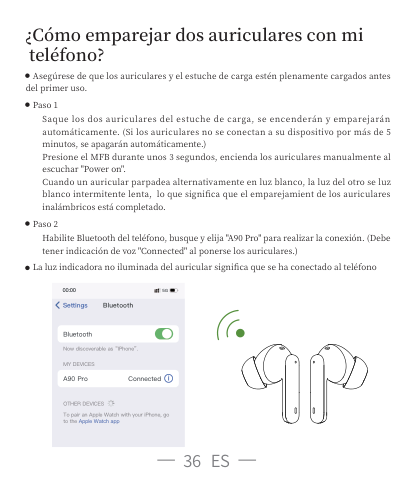
¿Cómo emparejar dos auriculares con mi teléfono?
· Asegúrese de que los auriculares y el estuche de carga estén plenamente cargados antes del primer uso.
· Paso Saque los dos auriculares del estuche de carga, se encenderán y emparejarán automáticamente. (Si los auriculares no se conectan a su dispositivo por más de minutos, se apagarán automáticamente.) Presione el MFB durante unos segundos, encienda los auriculares manualmente al escuchar "Power on". Cuando un auricular parpadea alternativamente en luz blanco, la luz del otro se luz blanco intermitente lenta, lo que significa que el emparejamient de los auriculares inalámbricos está completado.
· Paso Habilite Bluetooth del teléfono, busque y elija "A Pro" para realizar la conexión. (Debe tener indicación de voz "Connected" al ponerse los auriculares.)
· La luz indicadora no iluminada del auricular significa que se ha conectado al teléfono
Bluetooth 00:00 5G Settings
Bluetooth
Now discoverable as “IPhone”.
MY DEVICES
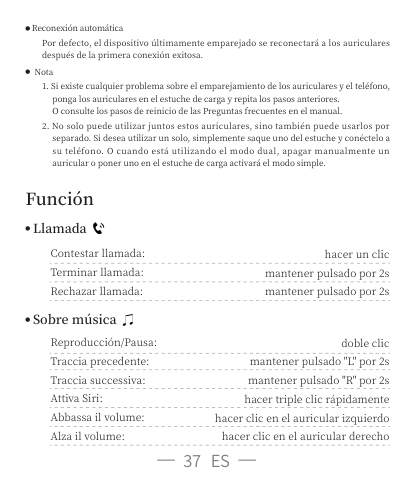
iConnectedA90 Pro
OTHER DEVICES
To pair an Apple Watch with your iPhone, go to the Apple Watch app
· Reconexión automática Por defecto, el dispositivo últimamente emparejado se reconectará a los auriculares después de la primera conexión exitosa.
· Nota
. Si existe cualquier problema sobre el emparejamiento de los auriculares y el teléfono, ponga los auriculares en el estuche de carga y repita los pasos anteriores. O consulte los pasos de reinicio de las Preguntas frecuentes en el manual.
. No solo puede utilizar juntos estos auriculares, sino también puede usarlos por separado. Si desea utilizar un solo, simplemente saque uno del estuche y conéctelo a su teléfono. O cuando está utilizando el modo dual, apagar manualmente un auricular o poner uno en el estuche de carga activará el modo simple.
Función
###### Llamada
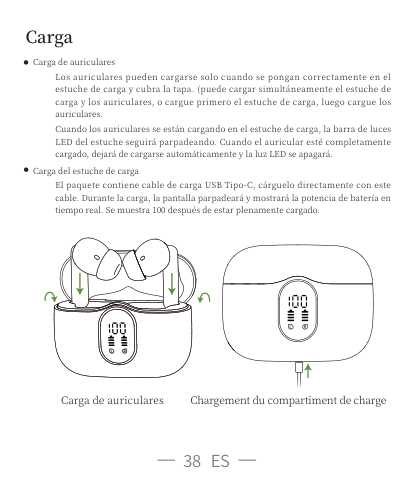
Contestar llamada: Terminar llamada: Rechazar llamada:
hacer un clic mantener pulsado por s mantener pulsado por s
###### Sobre música
Reproducción/Pausa: Traccia precedente: Traccia successiva: Attiva Siri: Abbassa il volume: Alza il volume:
doble clic mantener pulsado "L" por s mantener pulsado "R" por s
hacer triple clic rápidamente hacer clic en el auricular izquierdo
hacer clic en el auricular derecho
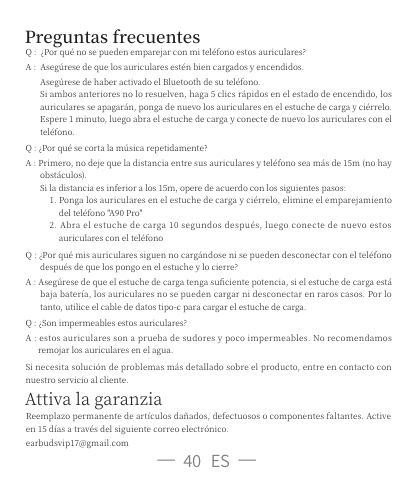
Carga
· Carga de auriculares

Los auriculares pueden cargarse solo cuando se pongan correctamente en el estuche de carga y cubra la tapa. (puede cargar simultáneamente el estuche de carga y los auriculares, o cargue primero el estuche de carga, luego cargue los auriculares.
Cuando los auriculares se están cargando en el estuche de carga, la barra de luces LED del estuche seguirá parpadeando. Cuando el auricular esté completamente cargado, dejará de cargarse automáticamente y la luz LED se apagará.
· Carga del estuche de carga
El paquete contiene cable de carga USB Tipo-C, cárguelo directamente con este cable. Durante la carga, la pantalla parpadeará y mostrará la potencia de batería en tiempo real. Se muestra después de estar plenamente cargado.
Carga de auriculares Chargement du compartiment de charge
Advertencia de carga
Después de usarse por un período de tiempo, los auriculares no se cargan ni se pueden encender debido a la oxidación de juntas magnéticas. Puede limpiar las orejeras y los imanes del estuche de carga con paño de alcohol, así se resolverá este problema.
Almacenamiento y mantenimiento
Si no usa los auriculares durante más de meses, le recomendamos cargarlos. Utilice el cargador aprobado por FCC (Comisión Federal de Comunicaciones). Los niños menores de años deben ser supervisados por adultos. No exponga los auriculares a altas o bajas temperaturas, no los utilice durante las tormentas. Evite la caída y la colisión fuerte del dispositivo. Manténgalos alejados de fuego, no los ponga en el agua.
Preguntas frecuentes
Q : ¿Por qué no se pueden emparejar con mi teléfono estos auriculares? A : Asegúrese de que los auriculares estén bien cargados y encendidos.
Asegúrese de haber activado el Bluetooth de su teléfono. Si ambos anteriores no lo resuelven, haga clics rápidos en el estado de encendido, los auriculares se apagarán, ponga de nuevo los auriculares en el estuche de carga y ciérrelo. Espere minuto, luego abra el estuche de carga y conecte de nuevo los auriculares con el teléfono.
Q : ¿Por qué se corta la música repetidamente? A : Primero, no deje que la distancia entre sus auriculares y teléfono sea más de m (no hay
obstáculos). Si la distancia es inferior a los m, opere de acuerdo con los siguientes pasos:
. Ponga los auriculares en el estuche de carga y ciérrelo, elimine el emparejamiento del teléfono "A Pro" . Abra el estuche de carga segundos después, luego conecte de nuevo estos auriculares con el teléfono
Q : ¿Por qué mis auriculares siguen no cargándose ni se pueden desconectar con el teléfono después de que los pongo en el estuche y lo cierre?
A : Asegúrese de que el estuche de carga tenga suficiente potencia, si el estuche de carga está baja batería, los auriculares no se pueden cargar ni desconectar en raros casos. Por lo tanto, utilice el cable de datos tipo-c para cargar el estuche de carga.
Q : ¿Son impermeables estos auriculares? A : estos auriculares son a prueba de sudores y poco impermeables. No recomendamos
remojar los auriculares en el agua.
Si necesita solución de problemas más detallado sobre el producto, entre en contacto con nuestro servicio al cliente.
Attiva la garanzia
Reemplazo permanente de artículos dañados, defectuosos o componentes faltantes. Active en días a través del siguiente correo electrónico. earbudsvip @gmail.com