
Ask AI
— answers from the official manualAnswers from the official manual.
Common questions
Common Questions
8 totalHow do I troubleshoot if the jump start button flashes red?
This indicates the jumper cables have not been properly connected to the vehicle battery terminals. Ensure red clamp connects to positive terminal (+) and black clamp connects to negative terminal (-).
How can I charge other devices using my HALO BOLT?
Connect your electronic device’s micro-USB end of the provided Micro USB cable to a USB output port on the HALO BOLT. Turn the charging feature on by pressing and releasing the Power ON/OFF Button.
How do I charge the HALO BOLT 57720?
Use the provided AC wall charging adapter and plug it into a wall outlet. The HALO BOLT will begin charging automatically, indicating progress with LED indicator lights. When fully charged, all four LED lights will be solid green (this can take up to 6 hours).
What are the power level indicators on my HALO BOLT?
The LEDs display power levels as follows: one solid light for 0-25%, two for 26-50%, three for 51-75%, and four lights for 76-100%. While charging, the first blinking indicates 0-25%, first light solid with second blinking shows 26-50%.
What should I do if the HALO BOLT shuts off unexpectedly during a jump start?
Recharge your HALO BOLT fully or consult a certified mechanic as it may indicate insufficient charge or that components are faulty. Page 9 offers troubleshooting steps.
How long can I leave my HALO BOLT plugged into a wall outlet for charging?
Plug the provided AC adapter into the charge input of the HALO BOLT and into a power outlet. It will charge automatically; once the LED battery indicator shows four solid green lights, it is fully charged and may be disconnected.
Full Manual
18 pages

OPERATING INSTRUCTIONS
HALO BOLT 57720
Powerful, compact and easy to use, the HALO BOLT can safely jump start your car. In addition, you can use it to charge your phone, tablet or other electronic devices! The HALO BOLT also features a convenient LED floodlight.
CONTENTS Package Contents 1 Operating Instructions 2-8 Storing/Handling/Cleaning 9 Safety Precautions 9-10 Contact Information 15
PACKAGE CONTENTS
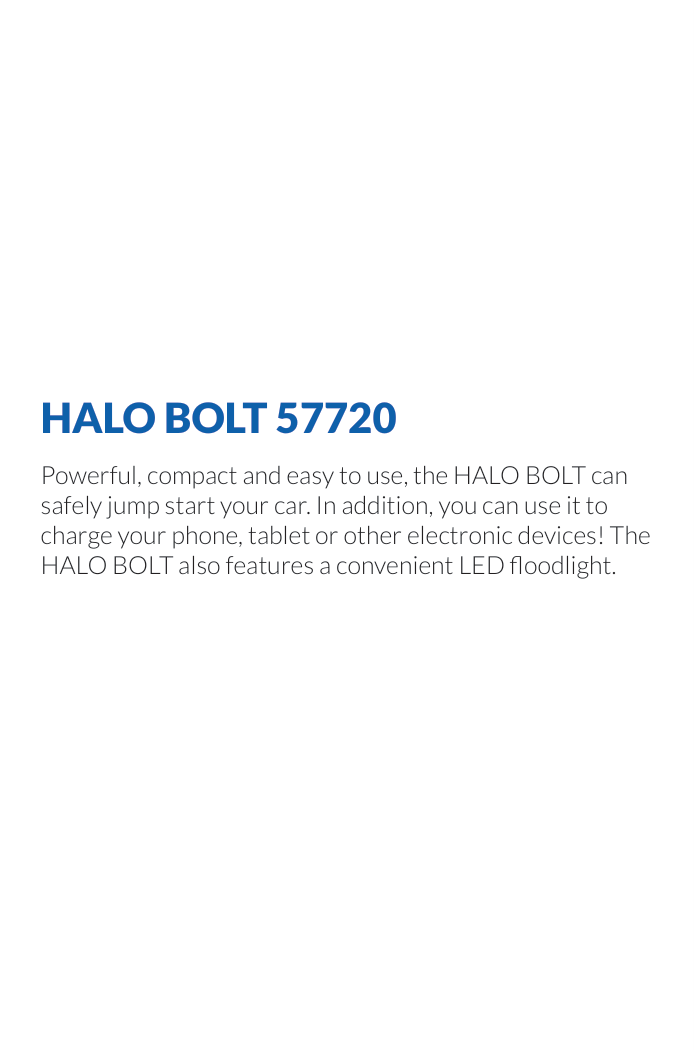
1
2
4
3 5
6

7
9
8
12
1 | POWER YOUR LIFE
OPERATING INSTRUCTIONS
#### GETTING STARTED
Prior to first use, it is recommended to fully charge the HALO BOLT 57720.
#### CHARGING THE HALO BOLT 57720
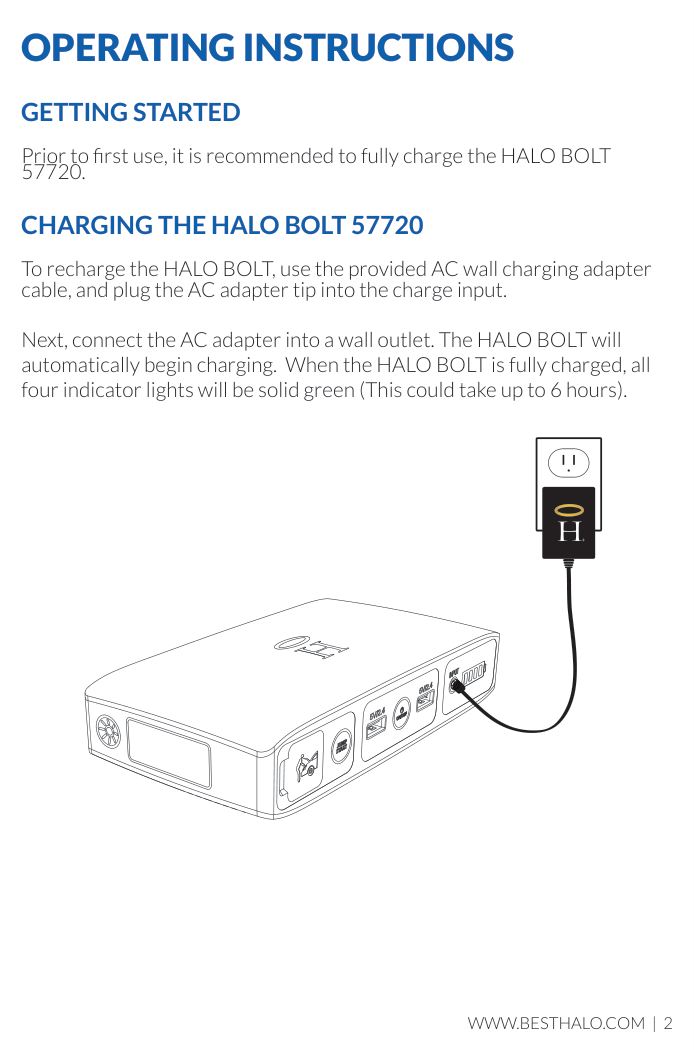
To recharge the HALO BOLT, use the provided AC wall charging adapter cable, and plug the AC adapter tip into the charge input.
Next, connect the AC adapter into a wall outlet. The HALO BOLT will automatically begin charging. When the HALO BOLT is fully charged, all four indicator lights will be solid green (This could take up to 6 hours).
######### R
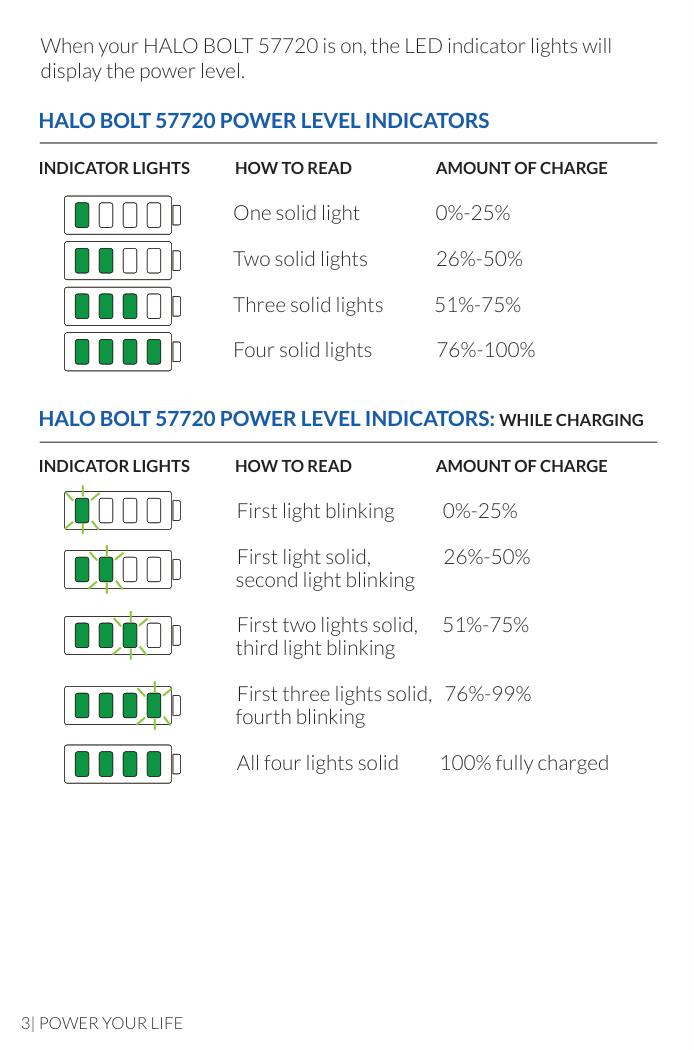
When your HALO BOLT 57720 is on, the LED indicator lights will display the power level.
###### HALO BOLT 57720 POWER LEVEL INDICATORS
INDICATOR LIGHTS HOW TO READ AMOUNT OF CHARGE One solid light 0%-25% Two solid lights 26%-50% Three solid lights 51%-75% Four solid lights 76%-100%
###### HALO BOLT 57720 POWER LEVEL INDICATORS: WHILE CHARGING
INDICATOR LIGHTS HOW TO READ AMOUNT OF CHARGE First light blinking 0%-25% First light solid, 26%-50% second light blinking First two lights solid, 51%-75% third light blinking First three lights solid, 76%-99% fourth blinking All four lights solid 100% fully charged
3| POWER YOUR LIFE
#### JUMP STARTING YOUR VEHICLE WITH THE HALO BOLT 57720
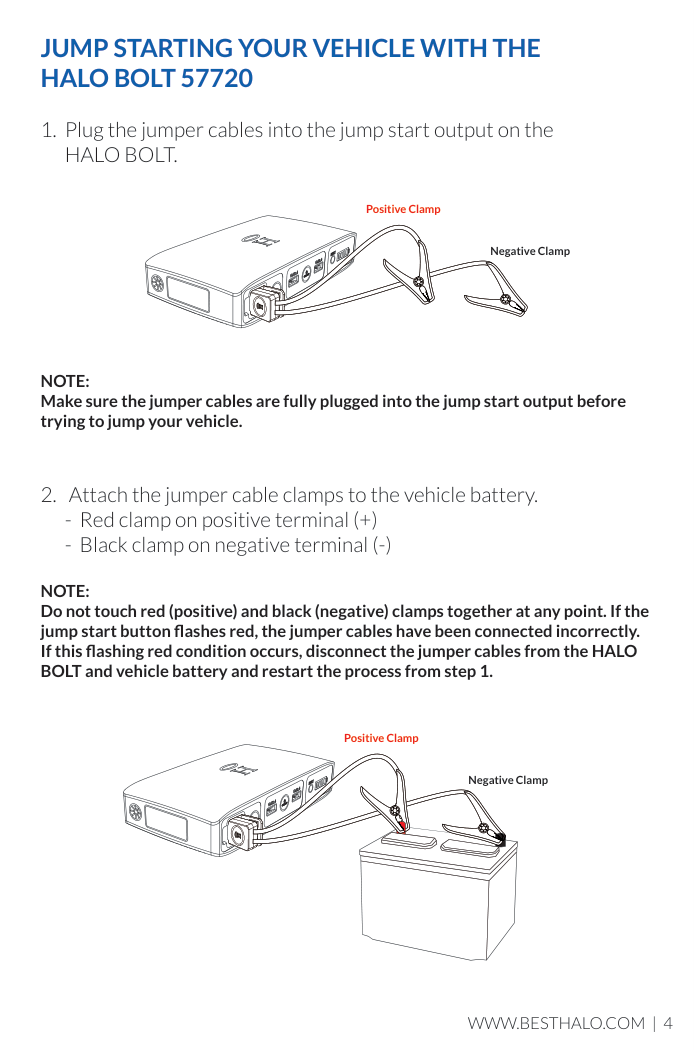
NOTE: Make sure the jumper cables are fully plugged into the jump start output before trying to jump your vehicle.
Positive Clamp
Negative Clamp
NOTE: Do not touch red (positive) and black (negative) clamps together at any point. If the jump start button flashes red, the jumper cables have been connected incorrectly. If this flashing red condition occurs, disconnect the jumper cables from the HALO BOLT and vehicle battery and restart the process from step 1.
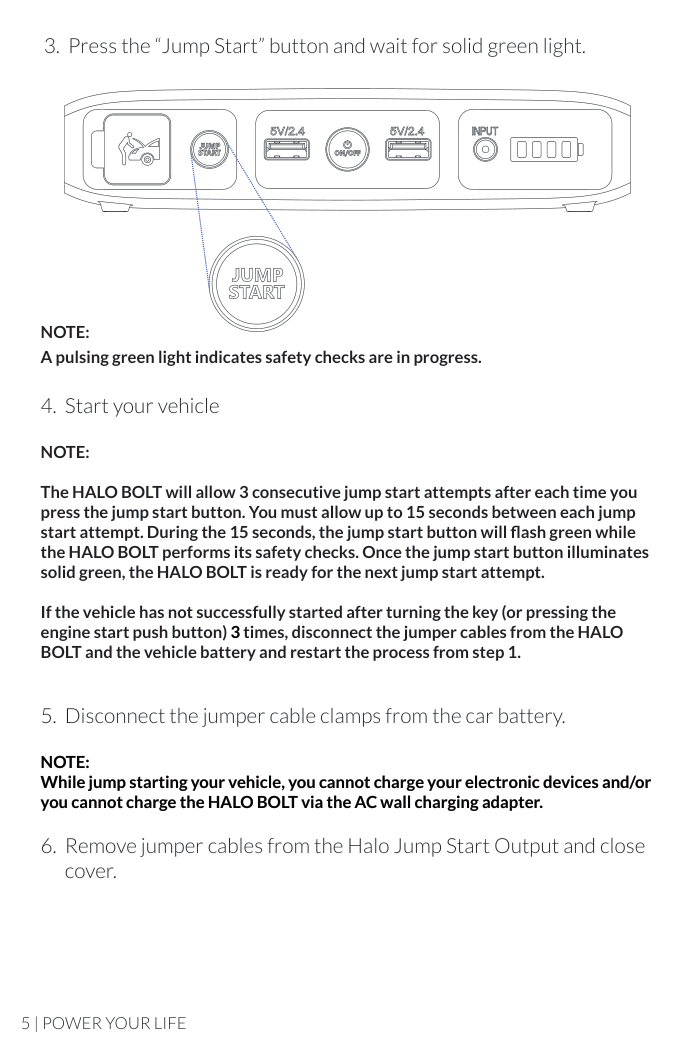
Positive Clamp
Negative Clamp
####### 3. Press the “Jump Start” button and wait for solid green light.
NOTE: A pulsing green light indicates safety checks are in progress.
####### 4. Start your vehicle
NOTE:
The HALO BOLT will allow 3 consecutive jump start attempts after each time you press the jump start button. You must allow up to 15 seconds between each jump start attempt. During the 15 seconds, the jump start button will flash green while the HALO BOLT performs its safety checks. Once the jump start button illuminates solid green, the HALO BOLT is ready for the next jump start attempt.
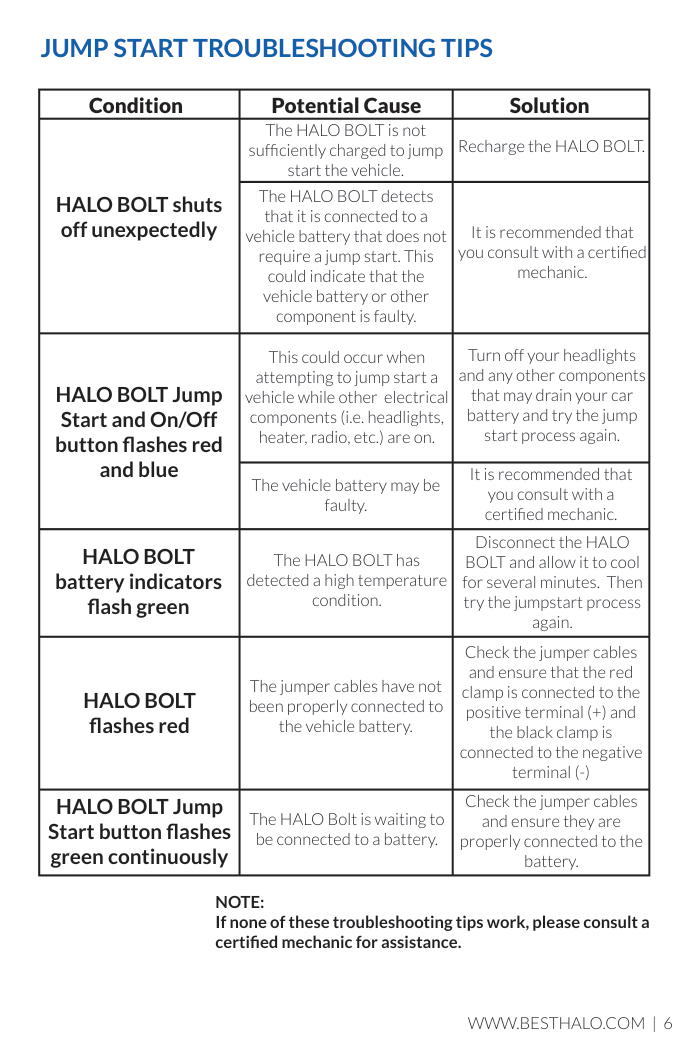
If the vehicle has not successfully started after turning the key (or pressing the engine start push button) 3 times, disconnect the jumper cables from the HALO BOLT and the vehicle battery and restart the process from step 1.
####### 5. Disconnect the jumper cable clamps from the car battery.
NOTE: While jump starting your vehicle, you cannot charge your electronic devices and/or you cannot charge the HALO BOLT via the AC wall charging adapter.
####### 6. Remove jumper cables from the Halo Jump Start Output and closecover.
#### JUMP START TROUBLESHOOTING TIPS
|Condition|Potential Cause|Solution| |---|---|---| |HALO BOLT shuts off unexpectedly|The HALO BOLT is not sufficiently charged to jump start the vehicle.|Recharge the HALO BOLT.| |HALO BOLT shuts off unexpectedly|The HALO BOLT detects that it is connected to a vehicle battery that does not require a jump start. This could indicate that the vehicle battery or other component is faulty.|It is recommended that you consult with a certified mechanic.| |HALO BOLT Jump Start and On/Off button flashes red and blue|This could occur when attempting to jump start a vehicle while other electrical components (i.e. headlights, heater, radio, etc.) are on.|Turn off your headlights and any other components that may drain your car battery and try the jump start process again.|
|HALO BOLT Jump Start and On/Off button flashes red and blue|The vehicle battery may be faulty.|It is recommended that you consult with a certified mechanic.| |HALO BOLT battery indicators flash green|The HALO BOLT has detected a high temperature condition.|Disconnect the HALO BOLT and allow it to cool for several minutes. Then try the jumpstart process again.| |HALO BOLT flashes red|The jumper cables have not been properly connected to the vehicle battery.|Check the jumper cables and ensure that the red clamp is connected to the positive terminal (+) and the black clamp is connected to the negative terminal (-)| |HALO BOLT Jump Start button flashes green continuously|The HALO Bolt is waiting to be connected to a battery.|Check the jumper cables and ensure they are properly connected to the battery.|
NOTE: If none of these troubleshooting tips work, please consult a certified mechanic for assistance.
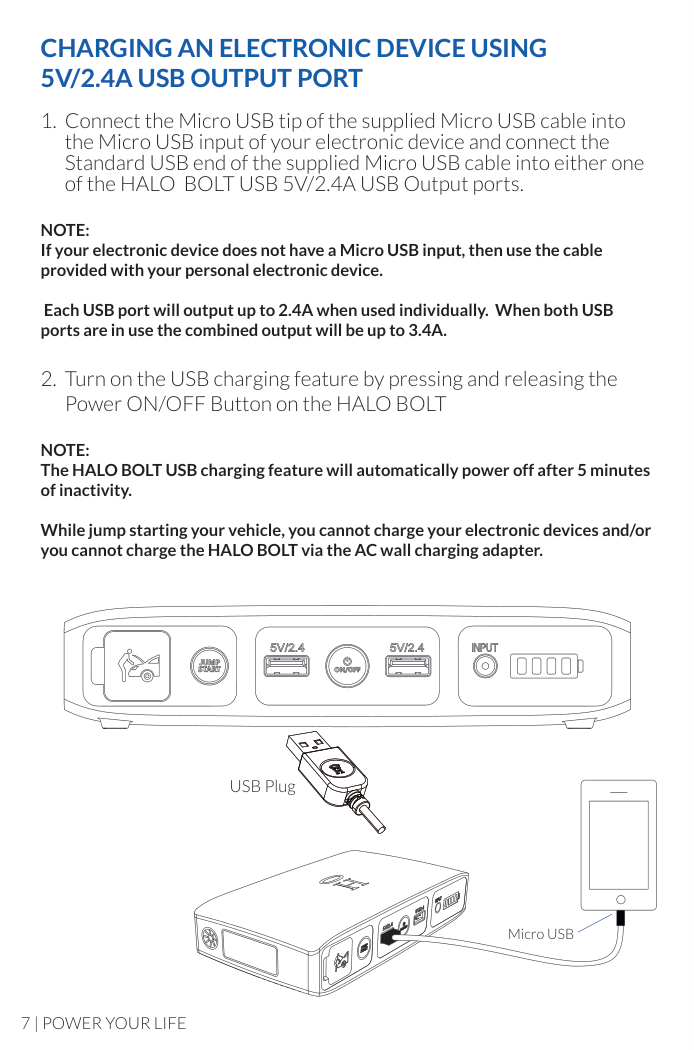
#### CHARGING AN ELECTRONIC DEVICE USING 5V/2.4A USB OUTPUT PORT
NOTE: If your electronic device does not have a Micro USB input, then use the cable provided with your personal electronic device.
Each USB port will output up to 2.4A when used individually. When both USB ports are in use the combined output will be up to 3.4A.
NOTE: The HALO BOLT USB charging feature will automatically power off after 5 minutes of inactivity.
While jump starting your vehicle, you cannot charge your electronic devices and/or you cannot charge the HALO BOLT via the AC wall charging adapter.
USB Plug
Micro USB
#### HALO SMART CHARGE TECHNOLOGY
Your HALO BOLT contains the HALO SMART CHARGE TECHNOLOGY to achieve higher compatibility for charging standard 5V USB electronic devices. The HALO SMART CHARGE TECHNOLOGY will determine the make and model of your electronic device and provide the fastest and safest charge for that device.
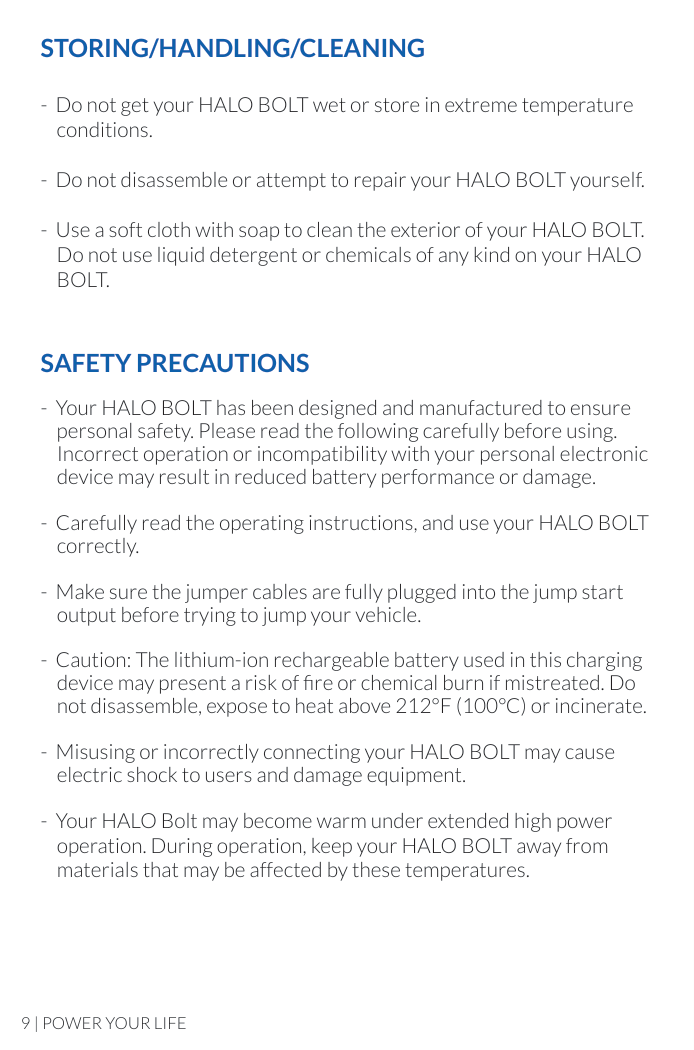
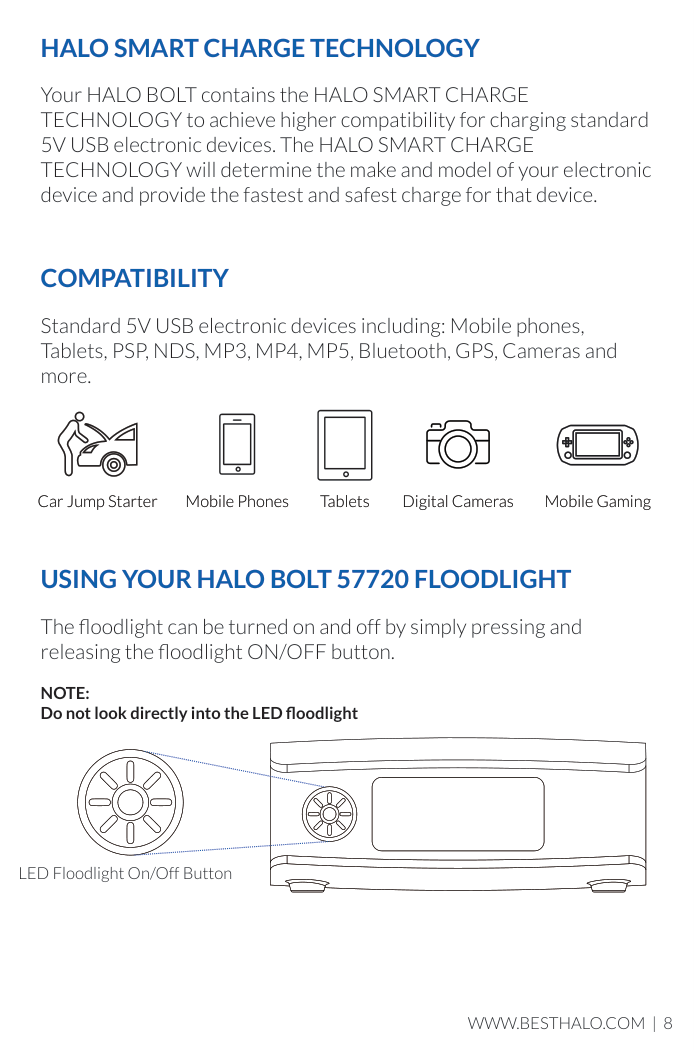
#### COMPATIBILITY
Standard 5V USB electronic devices including: Mobile phones, Tablets, PSP, NDS, MP3, MP4, MP5, Bluetooth, GPS, Cameras and more.
| | |---|
Mobile Phones Tablets Digital CamerasCar Jump Starter Mobile Gaming
#### USING YOUR HALO BOLT 57720 FLOODLIGHT
The floodlight can be turned on and off by simply pressing and releasing the floodlight ON/OFF button.
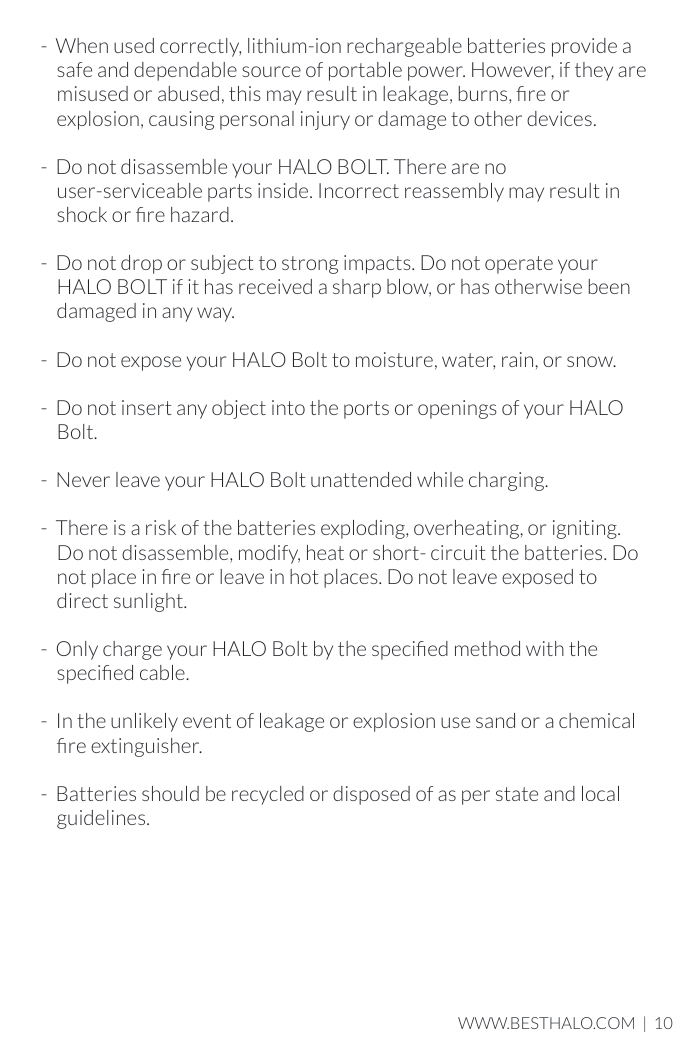
NOTE: Do not look directly into the LED floodlight
######## LED Floodlight On/Off Button
#### STORING/HANDLING/CLEANING
#### SAFETY PRECAUTIONS
#### SPECIFICATIONS
Battery Cell: 3 x Li-Polymer 5200mAh(1 Battery Pack 57720 mWh) Capacity: 57720 mWh Input: DC 14V/0.85A Output: 2 x USB 5V/2.4A Dimensions: 6.97”x 3.68”x 1.5” (177 x 93.5 x 38mm)
#### FCC COMPLIANCE STATEMENT
This device complies with Part 15 of the FCC Rules. Operation is subject to the following two conditions:
15.21 You are cautioned that changes or modifications not expressly approved by the party responsible for compliance could void the user’s authority to operate the equipment.
15.105(b) This equipment has been tested and found to comply with the limits for Class B digital devices, pursuant to Part 15 of the FCC rules. These limits are designed to provide reasonable protection against harmful interference in a residential installation. This equipment generates, uses, and can radiate radio frequency energy and, if not installed and used in accordance with the instructions, may cause harmful interference to radio communications.
However, there is no guarantee that interference will not occur in a
particular installation. If this equipment does cause harmful interference to radio or television reception, which can be determined by turning the equipment off and on, the user is encouraged to try to correct the interference by one or more of the following measures:
#### LIMITED WARRANTY
##### What does this limited warranty cover and how long is the coverage?
Halo International (“HALO”) warrants its products to be free from defects in materials and workmanship under normal use and service for a period of ninety (90) days beginning on the date you purchase the product.
The HALO BOLT 57720 is backed by the Good Housekeeping Seal. In addition to the Halo International standard warranty, a 2 year extended warranty is available through Good Housekeeping for any HALO BOLT 57720 purchased in the USA. If the product proves to be defective within two years from the date it was first sold, Good Housekeeping, will repair or replace the product or refund the purchase price at Good Housekeeping's sole discretion.
##### What is not covered by this limited warranty?
This Limited Warranty does not cover defects or damage due to: (1) accidents, acts of God, misuse, abuse, abnormal use, abnormal conditions, improper storage, or expo- sure to liquid or moisture, (2) unusual or abnormal physical force or impact, including dropping of the product, (3) connection of the product to improper voltage supply, or (4) attempted repair or modification by anyone other than HALO or a facility authorized by HALO.
##### What are HALO’s obligations under this limited warranty?
Provided that you comply with the conditions of this Limited Warranty, during the duration of this Limited Warranty HALO will repair or replace the product, at its sole option, without charge. When repairing or replacing a product, HALO may, at its sole option, repair or replace the product with new, used, rebuilt or reconditioned parts or products. HALO will warrant any product that is repaired or replaced under this Limited Warranty for a period equal to the remaining time period under the original Limited Warranty or ninety (90) days, whichever is longer.

##### What are the limits of HALO’s Liability?
This Limited Warranty sets forth the full scope of HALO’s obligations and liabilities with respect to the product. All implied warranties, including, without limitation, implied warranties of merchantability and fitness for a particular purpose, are limited to the duration of this Limited Warranty. In no event shall HALO be liable for any incidental, special, consequential or punitive damages or any damages or loses of or to electronic equipment or products that are used with any of HALO’s products.
##### How does state law relate to this limited warranty?
Some states do not allow limitation on how long an implied warranty lasts or the disclaimer or limitation of incidental or consequential damages. Therefore, some or all of the declaimers and limitations above may not apply to you.

To contact us, email us at [email protected] or call 888-907-6274
Halo International SEZC Ltd. 68 West Bay Road Georgetown, Grand Cayman, KY1-1003 Cayman Islands
The HALO logo is a registered trademark of HALO2CLOUD, LLC
www.BESTHALO.com
#### Designed by HALO International SEZC Ltd.
Patent Pending Made in China