
Ask AI
— answers from the official manualAnswers from the official manual.
Common questions
Common Questions
20 totalWhat should I do if the indicator lights on the console are flashing rapidly?
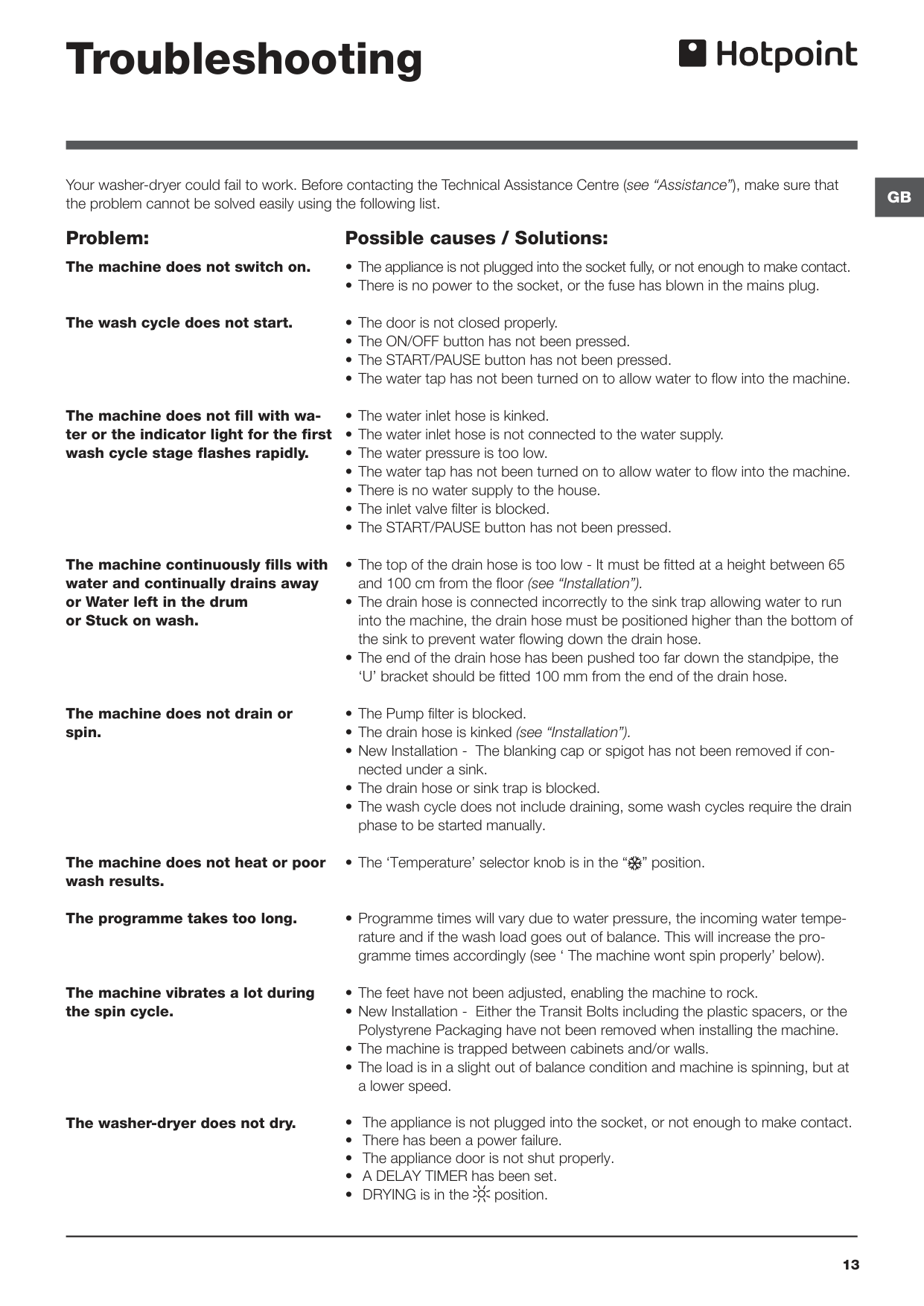
Switch off the machine and unplug it, then wait approximately 1 minute before switching it back on again. If the problem persists, contact the Technical Assistance Service. Additionally, if the START/PAUSE indicator light flashes rapidly at the same time as a function indicator light, this also indicates a problem has occurred. (Page 13, Page 9)
Why does the Wdal 8640 vibrate excessively during the spin cycle?
Excessive vibration is most commonly caused by the feet not being adjusted correctly to level the machine. It may also be caused by transit bolts and polystyrene packaging not being removed during installation, the machine being trapped between cabinets or walls, or an unbalanced load causing the machine to spin at a reduced speed. (Page 13)
How do I set a drying cycle on the Wdal 8640?
Turn the DRYING knob to select either a time-based drying option (40 to 180 minutes) or a dryness-level option: Iron (slightly damp, easy to iron), Hanger (dry clothes to put away), or Cupboard (very dry, recommended for towelling and bathrobes). Note that when drying is complete there is always a cooling period, even when the DRYING knob is in the Cupboard position. (Page 11)
What items should NOT be dried in the Wdal 8640?
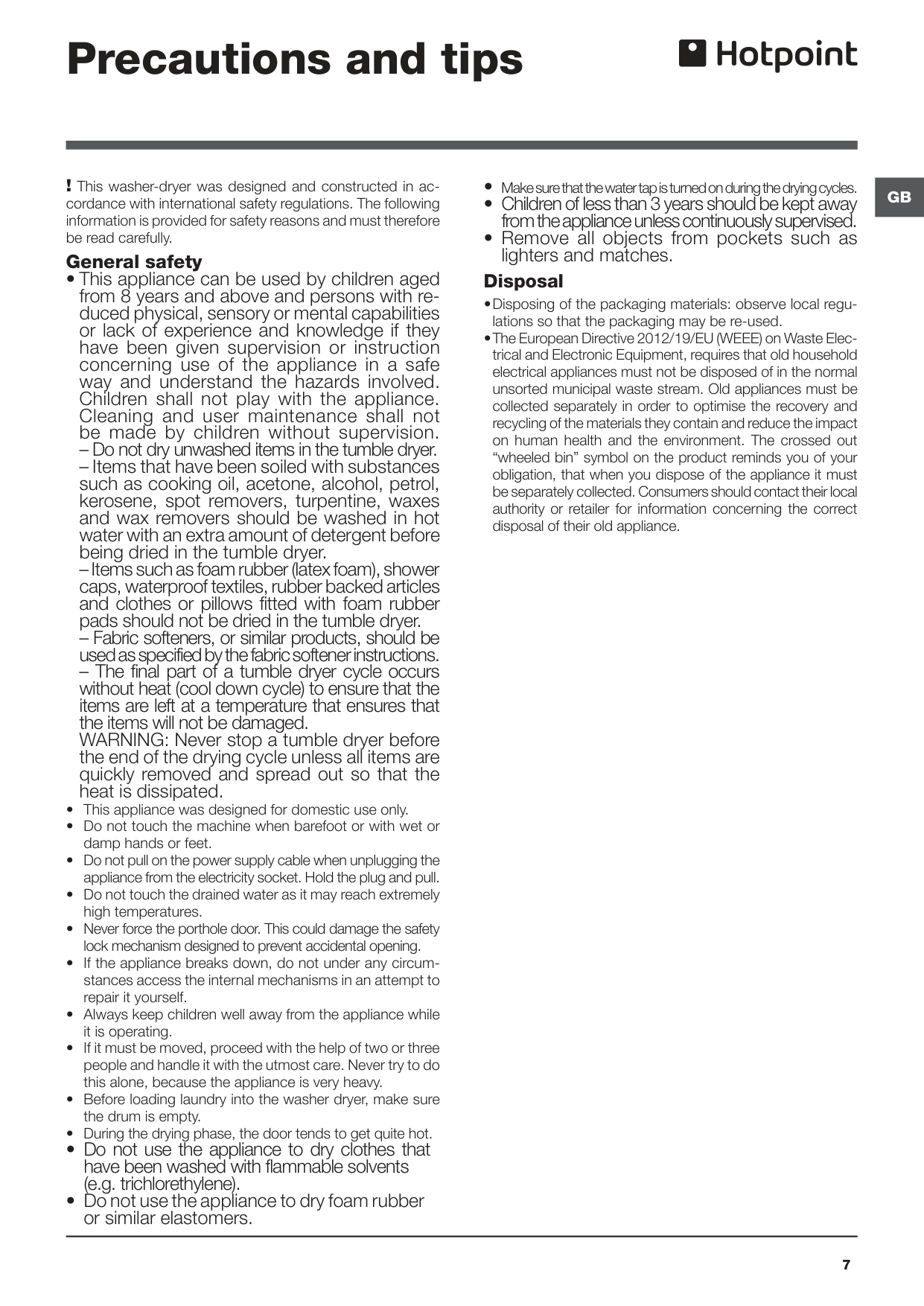
Items such as foam rubber (latex foam), shower caps, waterproof textiles, rubber-backed articles, and clothes or pillows fitted with foam rubber pads should not be dried in the tumble dryer. You should also never dry unwashed items, and should not dry clothes that have been washed with flammable solvents such as trichlorethylene. (Page 7)
How do I run the Auto Clean programme to clean the inside of the Wdal 8640?
Press buttons A and B simultaneously for 5 seconds to start the Auto Clean programme, which must be run with no load in the drum. The programme starts automatically and lasts approximately 70 minutes; it can be stopped by pressing the START/PAUSE button. Hotpoint recommends running a cleaning programme every 40 wash cycles for maximum performance. (Page 6)
How often should I check the inlet hose, and what do I need to do?
Check the inlet hose at least once a year for cracks or wear. Replace immediately if any damage is found to prevent water leakage.
Show 14 more questions
What steps should be taken when my washer-dryer does not heat up properly?
How do I run an Auto Clean program on my Hotpoint Wdal 8640?
How do I stop a tumbling dryer cycle prematurely without damaging clothes?
What should I do before using the Wdal 8640 for the first time?
How do I remove the transit bolts before installing the Wdal 8640?
What is the maximum load capacity for washing and drying on the Wdal 8640?
Why is my Wdal 8640 continuously filling with water and draining away?
How do I clean the pump on the Wdal 8640?
How do I level my Hotpoint Wdal 8640?
What should I do if my washer-dryer does not fill with water?
How do I clean the detergent dispenser drawer of my Hotpoint Wdal 8640?
How can I fix noise during spin cycle issues?
What do flashing indicator lights mean when troubleshooting my Hotpoint Wdal 8640?
What are the dimensions of a Hotpoint Wdal 8640?
Full Manual
16 pages
Gb
1 ! This symbol reminds you to read this booklet. Contents Installation, 2-3-4-5 Unpacking and levelling Connecting the electricity and water supplies The first wash cycle Technical data Care and maintenance, 6 Cutting off the water or electricity supply Cleaning the washer-dryer Cleaning the detergent dispenser drawer Caring for the door and drum of your appliance Cleaning the pump Checking the water inlet hose Precautions and tips, 7 General safety Disposal Description of the washer-dryer and starting a wash cycle, 8-9 Control panel Indicator lights Starting a wash cycle Wash cycles, 10 Table of wash cycles Personalisation, 11 Setting the temperature Setting the drying cycle Functions Detergents and laundry, 12 Detergent dispenser drawer Preparing the laundry Garments requiring special care Load balancing system Troubleshooting, 13-14 Assistance, 15-16Wdal 8640
Instructions for useWasher-Dryer
English,1Gb
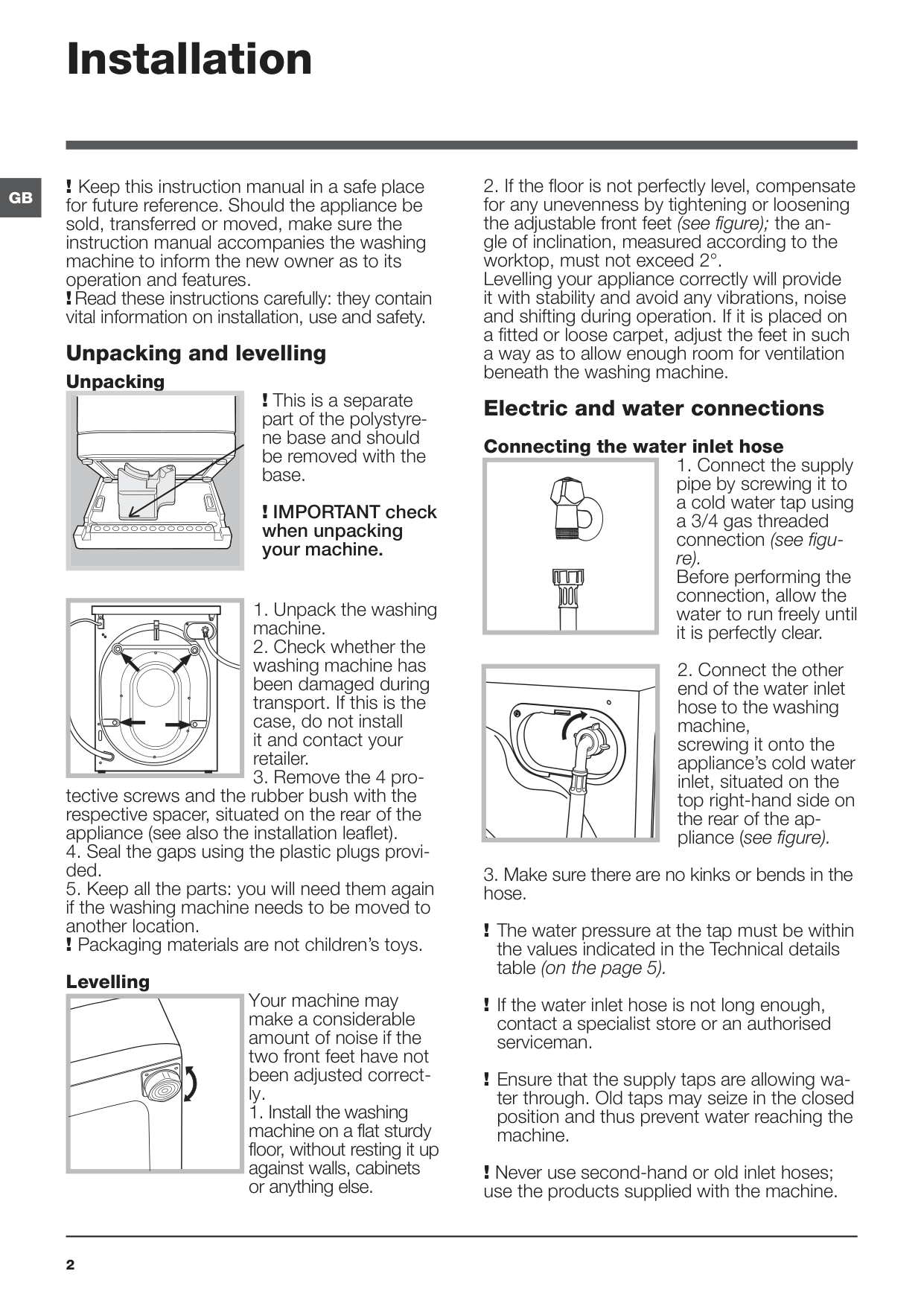
2
Gb
Installation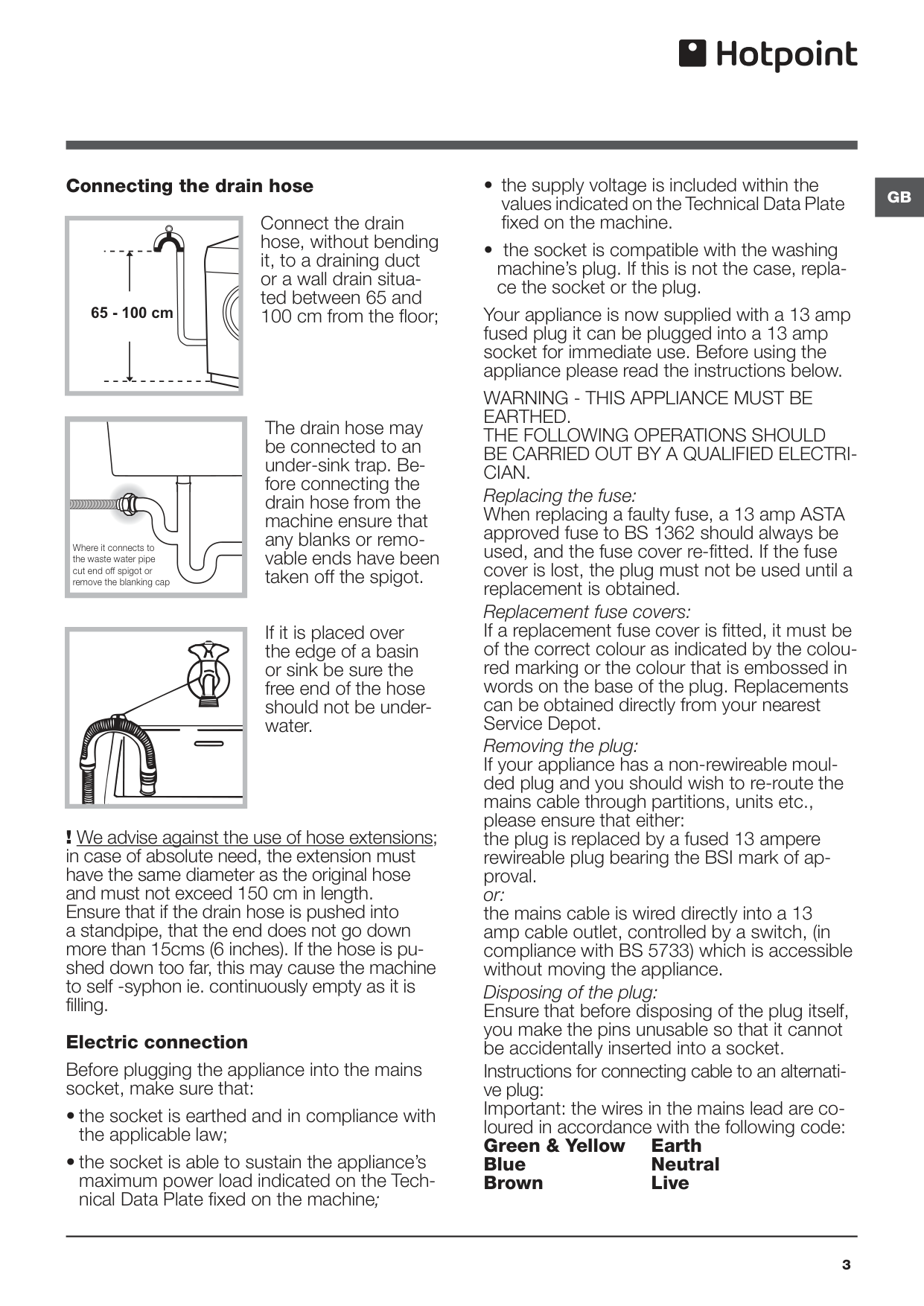
Gb
3 Connecting the drain hoseConnect the drain hose, without bending it, to a draining duct or a wall drain situa- ted between 65 and 100 cm from the floor; The drain hose may be connected to an under-sink trap. Be- fore connecting the drain hose from the machine ensure that any blanks or remo- vable ends have been taken off the spigot. If it is placed over the edge of a basin or sink be sure the free end of the hose should not be under- water.
! We advise against the use of hose extensions; in case of absolute need, the extension must have the same diameter as the original hose and must not exceed 150 cm in length. Ensure that if the drain hose is pushed into a standpipe, that the end does not go down more than 15cms (6 inches). If the hose is pu- shed down too far, this may cause the machine to self -syphon ie. continuously empty as it is filling. Electric connection Before plugging the appliance into the mains socket, make sure that:
Warning - This Appliance Must Be
Earthed.
The Following Operations Should
Be Carried Out By A Qualified Electri-
Cian.
Replacing the fuse: When replacing a faulty fuse, a 13 amp ASTA approved fuse to BS 1362 should always be used, and the fuse cover re-fitted. If the fuse cover is lost, the plug must not be used until a replacement is obtained. Replacement fuse covers: If a replacement fuse cover is fitted, it must be of the correct colour as indicated by the colou- red marking or the colour that is embossed in words on the base of the plug. Replacements can be obtained directly from your nearest Service Depot. Removing the plug: If your appliance has a non-rewireable moul- ded plug and you should wish to re-route the mains cable through partitions, units etc., please ensure that either: the plug is replaced by a fused 13 ampere rewireable plug bearing the BSI mark of ap- proval. or: the mains cable is wired directly into a 13 amp cable outlet, controlled by a switch, (in compliance with BS 5733) which is accessible without moving the appliance. Disposing of the plug: Ensure that before disposing of the plug itself, you make the pins unusable so that it cannot be accidentally inserted into a socket. Instructions for connecting cable to an alternati- ve plug: Important: the wires in the mains lead are co- loured in accordance with the following code: Green & Yellow Earth BlueNeutral Brown
Live 65 - 100 cm Where it connects to the waste water pipe cut end off spigot or remove the blanking cap
4
Gb
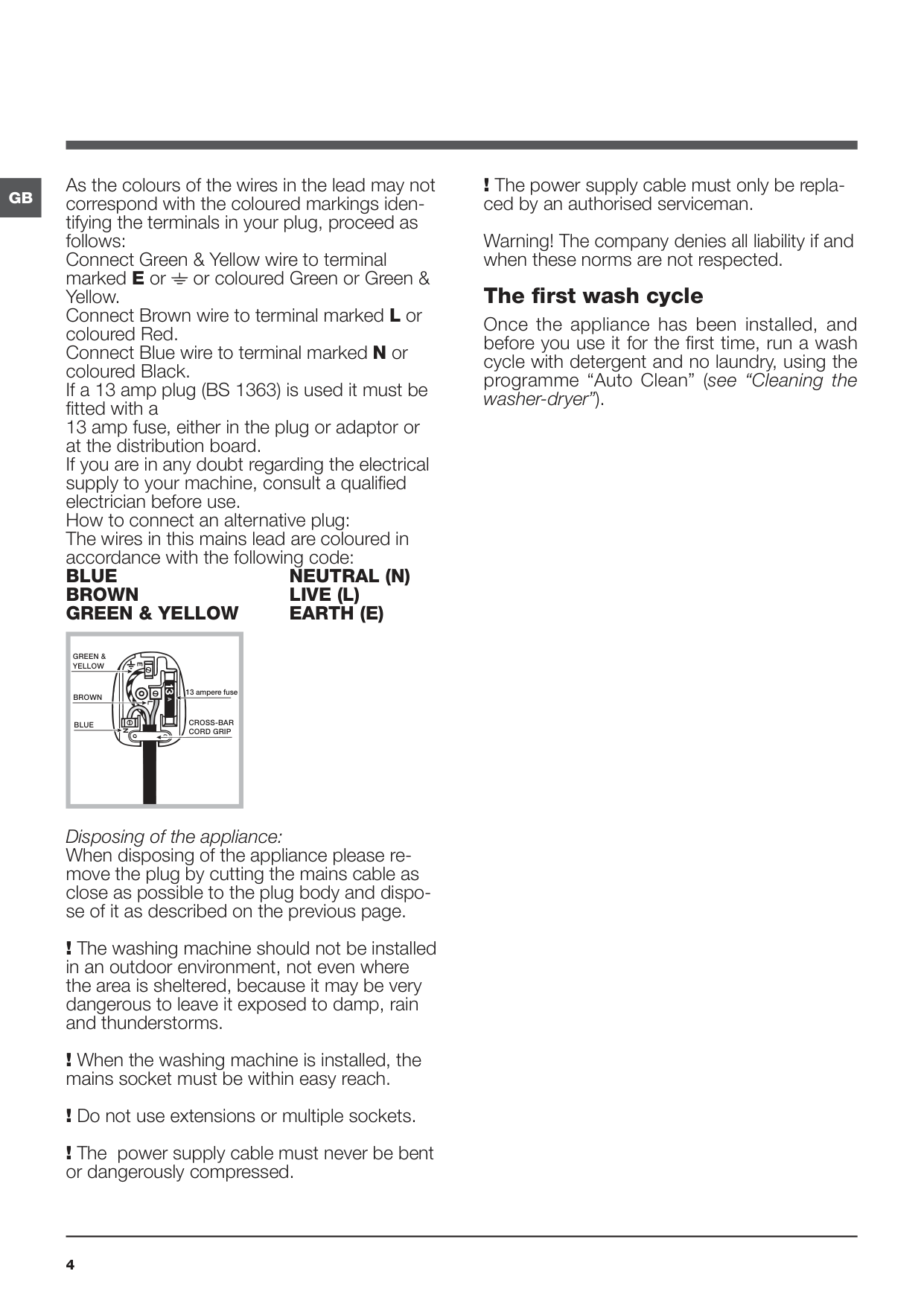
! The power supply cable must only be repla- ced by an authorised serviceman. Warning! The company denies all liability if and when these norms are not respected. The first wash cycle Once the appliance has been installed, and before you use it for the first time, run a wash cycle with detergent and no laundry, using the programme “Auto Clean” (see “Cleaning the washer-dryer”). As the colours of the wires in the lead may not correspond with the coloured markings iden- tifying the terminals in your plug, proceed as follows: Connect Green & Yellow wire to terminal marked E or or coloured Green or Green & Yellow. Connect Brown wire to terminal marked L or coloured Red. Connect Blue wire to terminal marked N or coloured Black. If a 13 amp plug (BS 1363) is used it must be fitted with a 13 amp fuse, either in the plug or adaptor or at the distribution board. If you are in any doubt regarding the electrical supply to your machine, consult a qualified electrician before use. How to connect an alternative plug: The wires in this mains lead are coloured in accordance with the following code:Blue
Neutral (N)
Brown
Live (L)
Green & Yellow
Earth (E)
Disposing of the appliance: When disposing of the appliance please re- move the plug by cutting the mains cable as close as possible to the plug body and dispo- se of it as described on the previous page. ! The washing machine should not be installed in an outdoor environment, not even where the area is sheltered, because it may be very dangerous to leave it exposed to damp, rain and thunderstorms. ! When the washing machine is installed, the mains socket must be within easy reach. ! Do not use extensions or multiple sockets. ! The power supply cable must never be bent or dangerously compressed.Green &
Yellow
Brown
Blue
13 ampere fuseCross-Bar
Cord Grip
Gb
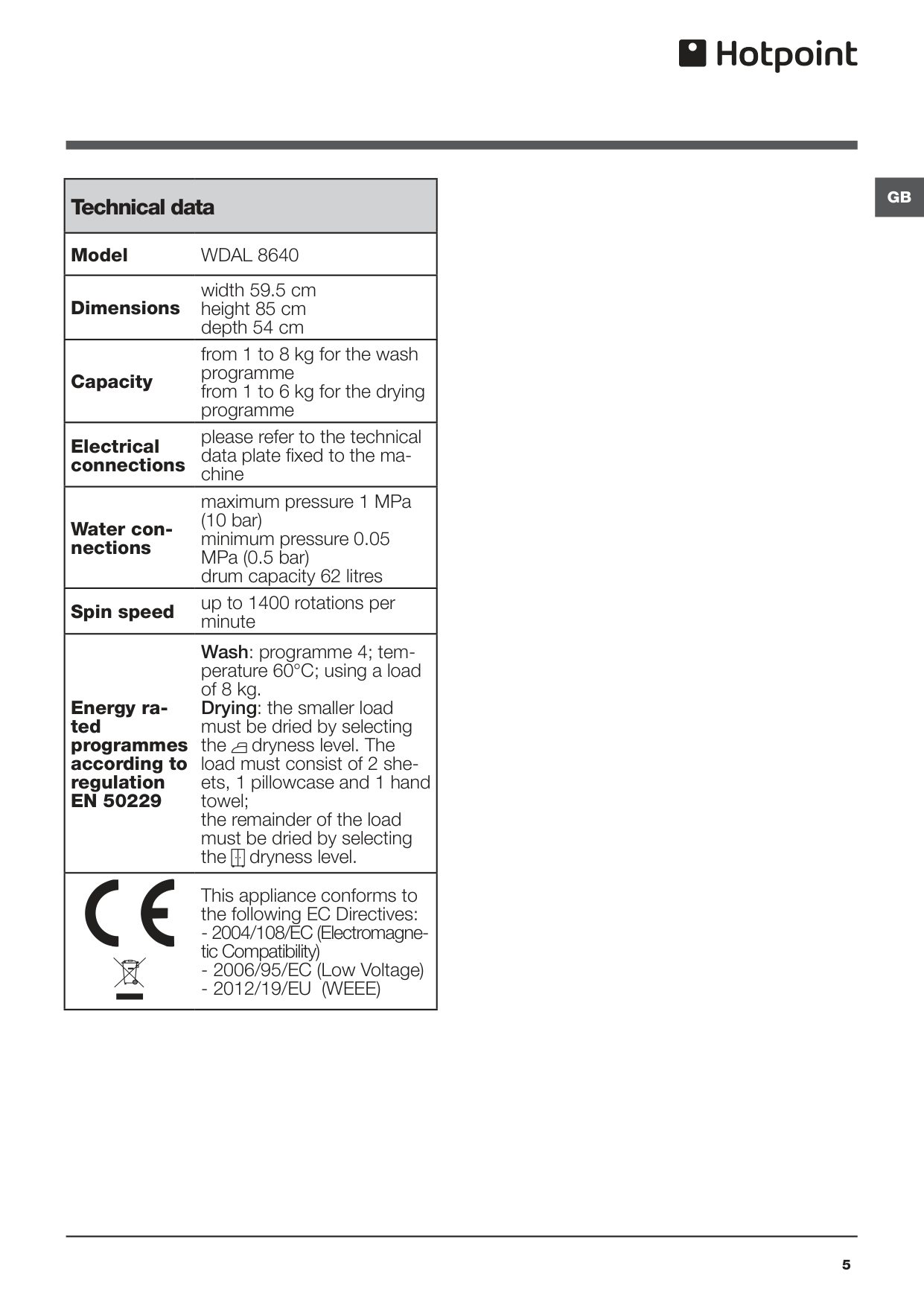
5 Technical data ModelWdal 8640
Dimensions width 59.5 cm height 85 cm depth 54 cm Capacity from 1 to 8 kg for the wash programme from 1 to 6 kg for the drying programme Electrical connections please refer to the technical data plate fixed to the ma- chine Water con- nections maximum pressure 1 MPa (10 bar) minimum pressure 0.05 MPa (0.5 bar) drum capacity 62 litres Spin speed up to 1400 rotations per minute Energy ra- ted programmes according to regulationEn 50229
Wash: programme 4; tem- perature 60°C; using a load of 8 kg. Drying: the smaller load must be dried by selecting the dryness level. The load must consist of 2 she- ets, 1 pillowcase and 1 hand towel; the remainder of the load must be dried by selecting the dryness level. This appliance conforms to the following EC Directives:- 2012/19/Eu (Weee)
6
Gb
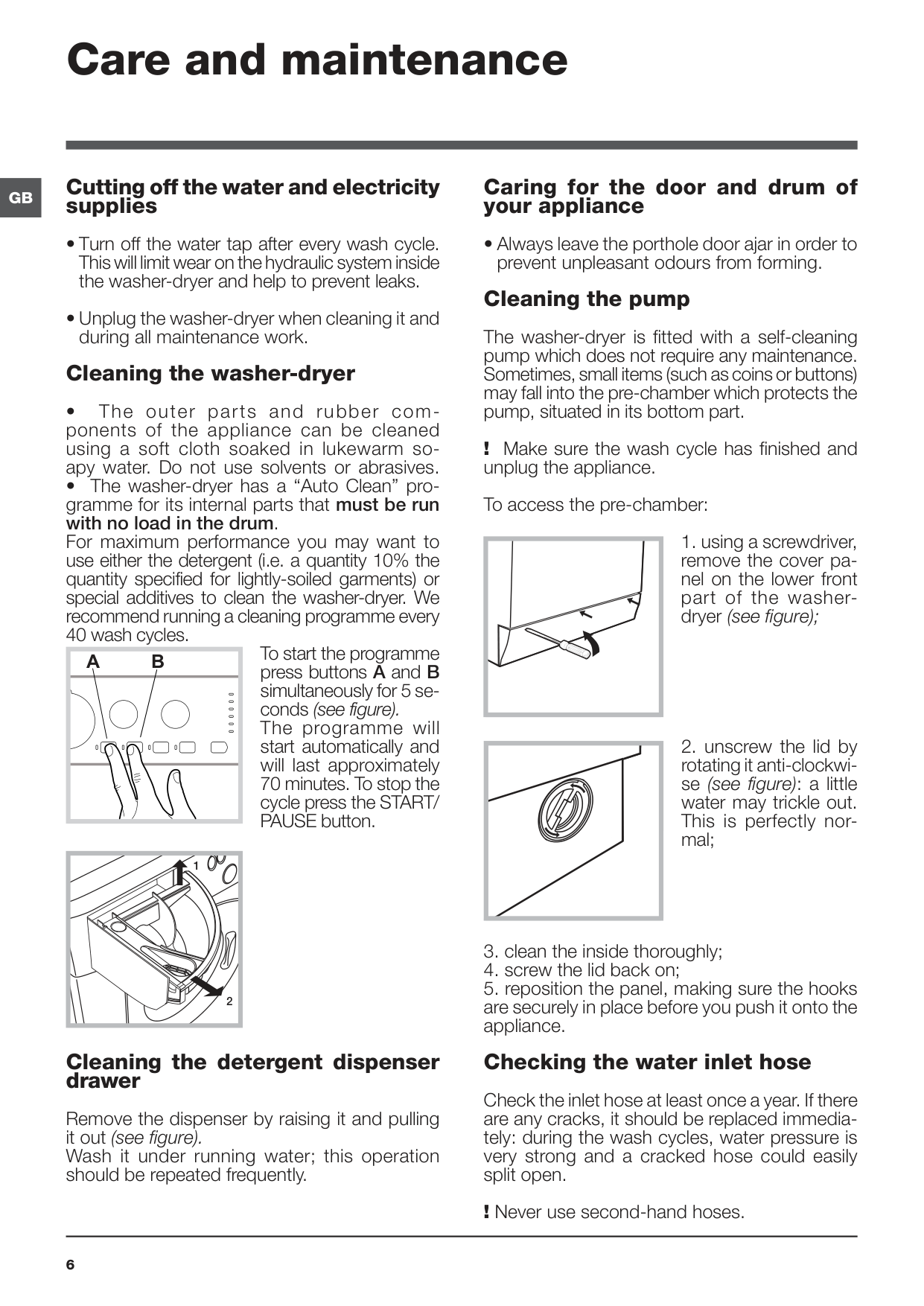
Care and maintenance Cutting off the water and electricity supplies! Make sure the wash cycle has finished and unplug the appliance. To access the pre-chamber:
A
B
Gb
7 Precautions and tips ! This washer-dryer was designed and constructed in ac- cordance with international safety regulations. The following information is provided for safety reasons and must therefore be read carefully. General safety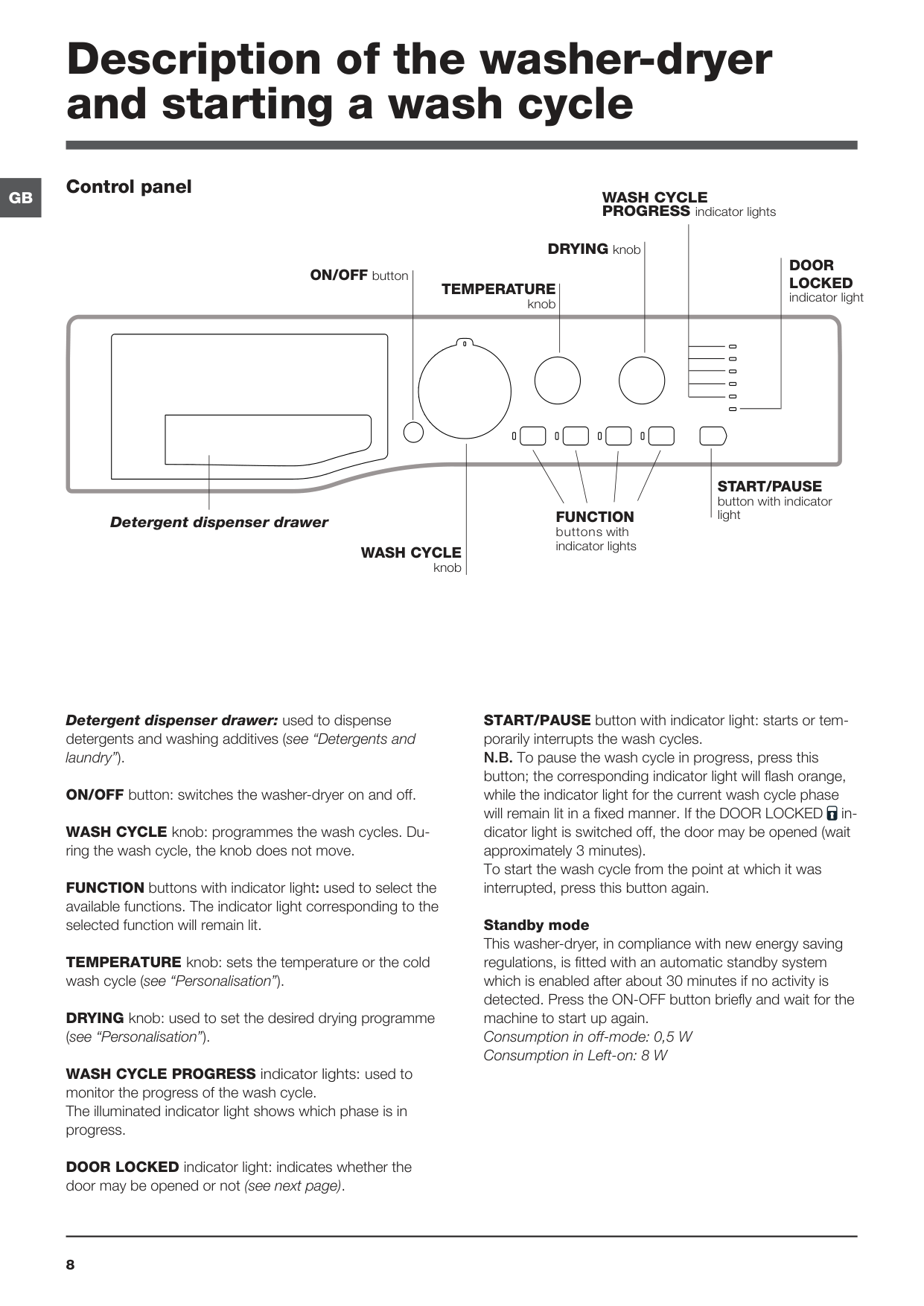
8
Gb
Detergent dispenser drawer: used to dispense detergents and washing additives (see “Detergents and laundry”). ON/OFF button: switches the washer-dryer on and off. WASH CYCLE knob: programmes the wash cycles. Du- ring the wash cycle, the knob does not move. FUNCTION buttons with indicator light: used to select the available functions. The indicator light corresponding to the selected function will remain lit. TEMPERATURE knob: sets the temperature or the cold wash cycle (see “Personalisation”). DRYING knob: used to set the desired drying programme (see “Personalisation”). WASH CYCLE PROGRESS indicator lights: used to monitor the progress of the wash cycle. The illuminated indicator light shows which phase is in progress. DOOR LOCKED indicator light: indicates whether the door may be opened or not (see next page). START/PAUSE button with indicator light: starts or tem- porarily interrupts the wash cycles. N.B. To pause the wash cycle in progress, press this button; the corresponding indicator light will flash orange, while the indicator light for the current wash cycle phase will remain lit in a fixed manner. If the DOOR LOCKED in- dicator light is switched off, the door may be opened (wait approximately 3 minutes). To start the wash cycle from the point at which it was interrupted, press this button again. Standby mode This washer-dryer, in compliance with new energy saving regulations, is fitted with an automatic standby system which is enabled after about 30 minutes if no activity is detected. Press the ON-OFF button briefly and wait for the machine to start up again. Consumption in off-mode: 0,5 W Consumption in Left-on: 8 W Description of the washer-dryer and starting a wash cycleTemperature
knob Detergent dispenser drawerWash Cycle
PROGRESS indicator lightsFunction
buttons with indicator lights ON/OFF button DRYING knobDoor
Locked
indicator lightStart/Pause
button with indicator light Control panelWash Cycle
knob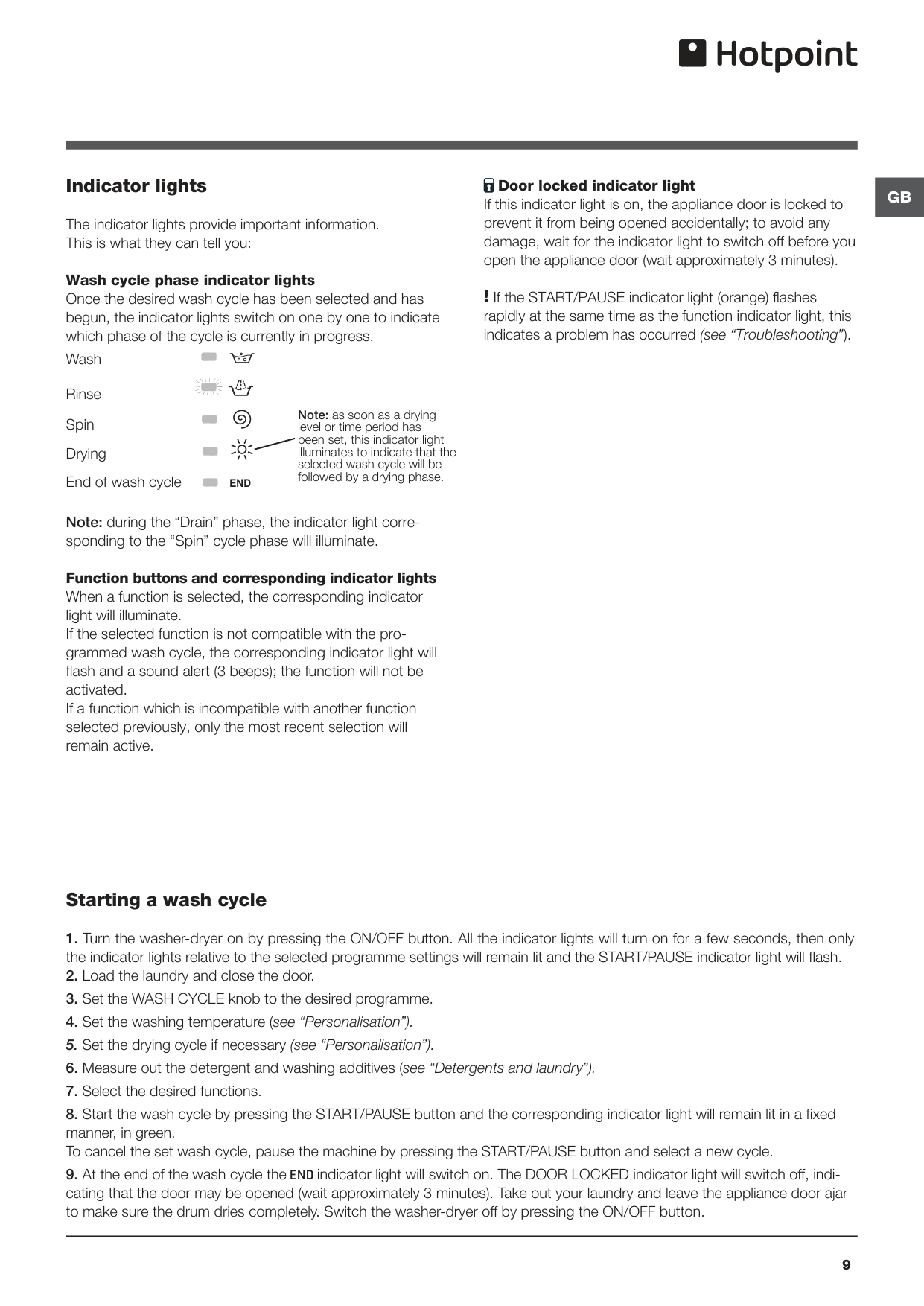
Gb
9 Indicator lights The indicator lights provide important information. This is what they can tell you: Wash cycle phase indicator lights Once the desired wash cycle has been selected and has begun, the indicator lights switch on one by one to indicate which phase of the cycle is currently in progress. Note: during the “Drain” phase, the indicator light corre- sponding to the “Spin” cycle phase will illuminate. Function buttons and corresponding indicator lights When a function is selected, the corresponding indicator light will illuminate. If the selected function is not compatible with the pro- grammed wash cycle, the corresponding indicator light will flash and a sound alert (3 beeps); the function will not be activated. If a function which is incompatible with another function selected previously, only the most recent selection will remain active. Door locked indicator light If this indicator light is on, the appliance door is locked to prevent it from being opened accidentally; to avoid any damage, wait for the indicator light to switch off before you open the appliance door (wait approximately 3 minutes). ! If the START/PAUSE indicator light (orange) flashes rapidly at the same time as the function indicator light, this indicates a problem has occurred (see “Troubleshooting”). Starting a wash cycleEnd
Note: as soon as a drying level or time period has been set, this indicator light illuminates to indicate that the selected wash cycle will be followed by a drying phase.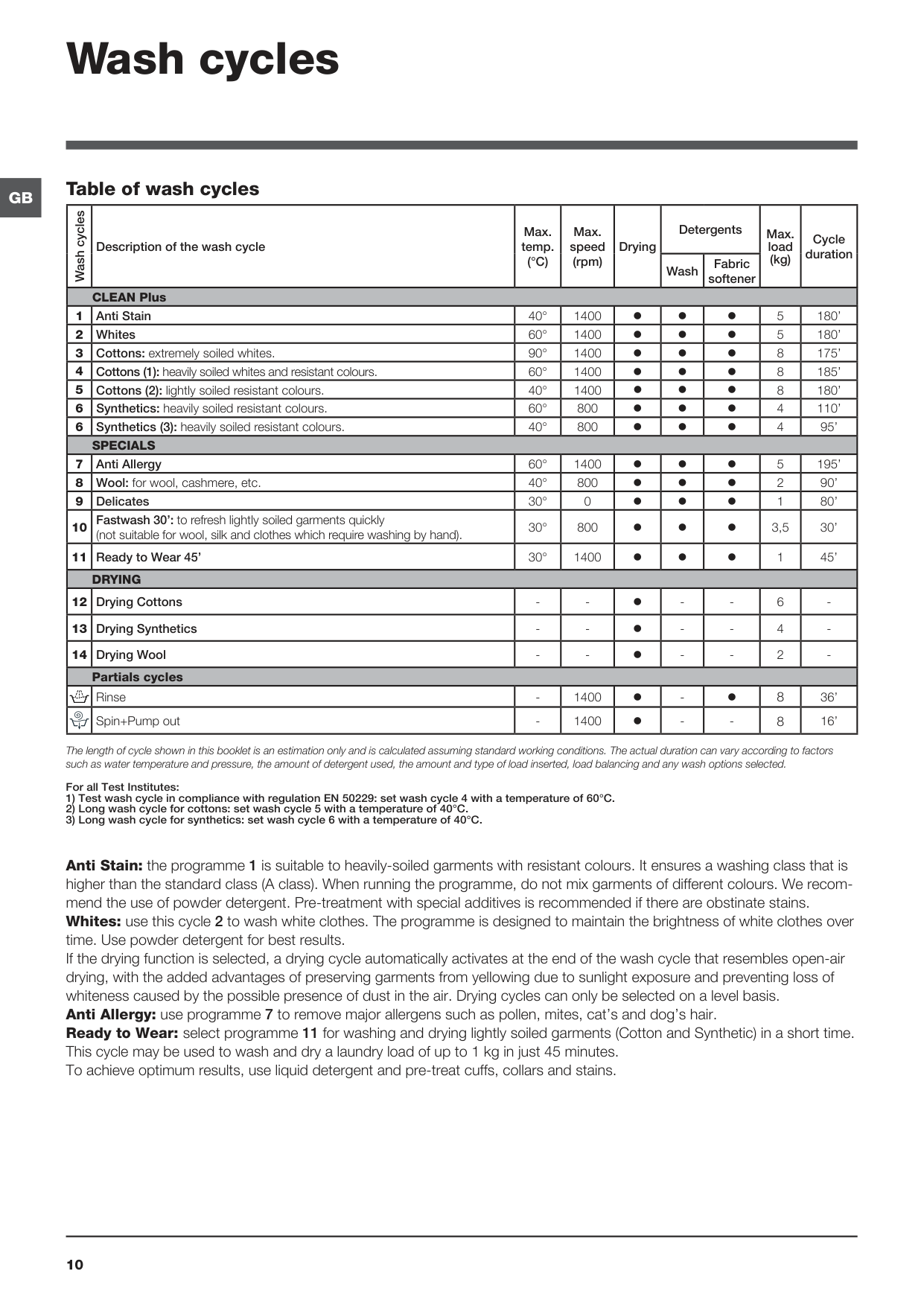
10
Gb
Wash cycles Table of wash cycles Anti Stain: the programme 1 is suitable to heavily-soiled garments with resistant colours. It ensures a washing class that is higher than the standard class (A class). When running the programme, do not mix garments of different colours. We recom- mend the use of powder detergent. Pre-treatment with special additives is recommended if there are obstinate stains. Whites: use this cycle 2 to wash white clothes. The programme is designed to maintain the brightness of white clothes over time. Use powder detergent for best results. If the drying function is selected, a drying cycle automatically activates at the end of the wash cycle that resembles open-air drying, with the added advantages of preserving garments from yellowing due to sunlight exposure and preventing loss of whiteness caused by the possible presence of dust in the air. Drying cycles can only be selected on a level basis. Anti Allergy: use programme 7 to remove major allergens such as pollen, mites, cat’s and dog’s hair. Ready to Wear: select programme 11 for washing and drying lightly soiled garments (Cotton and Synthetic) in a short time. This cycle may be used to wash and dry a laundry load of up to 1 kg in just 45 minutes. To achieve optimum results, use liquid detergent and pre-treat cuffs, collars and stains. The length of cycle shown in this booklet is an estimation only and is calculated assuming standard working conditions. The actual duration can vary according to factors such as water temperature and pressure, the amount of detergent used, the amount and type of load inserted, load balancing and any wash options selected. Wash cycles Description of the wash cycle Max. temp.(°C)
Max. speed (rpm) Drying Detergents Max. load (kg) Cycle duration Wash Fabric softener CLEAN Plus 1 Anti Stain 40° 1400 5 180’ 2 Whites 60° 1400 5 180’ 3 Cottons: extremely soiled whites. 90° 1400 8 175’ 4 Cottons (1): heavily soiled whites and resistant colours. 60° 1400 8 185’ 5 Cottons (2): lightly soiled resistant colours. 40° 1400 8 180’ 6 Synthetics: heavily soiled resistant colours. 60° 800 4 110’ 6 Synthetics (3): heavily soiled resistant colours. 40° 800 4 95’Specials
7 Anti Allergy 60° 1400 5 195’ 8 Wool: for wool, cashmere, etc. 40° 800 2 90’ 9 Delicates 30° 0 1 80’ 10 Fastwash 30’: to refresh lightly soiled garments quickly (not suitable for wool, silk and clothes which require washing by hand). 30° 800 3,5 30’ 11 Ready to Wear 45’ 30° 1400 1 45’Drying
12 Drying Cottons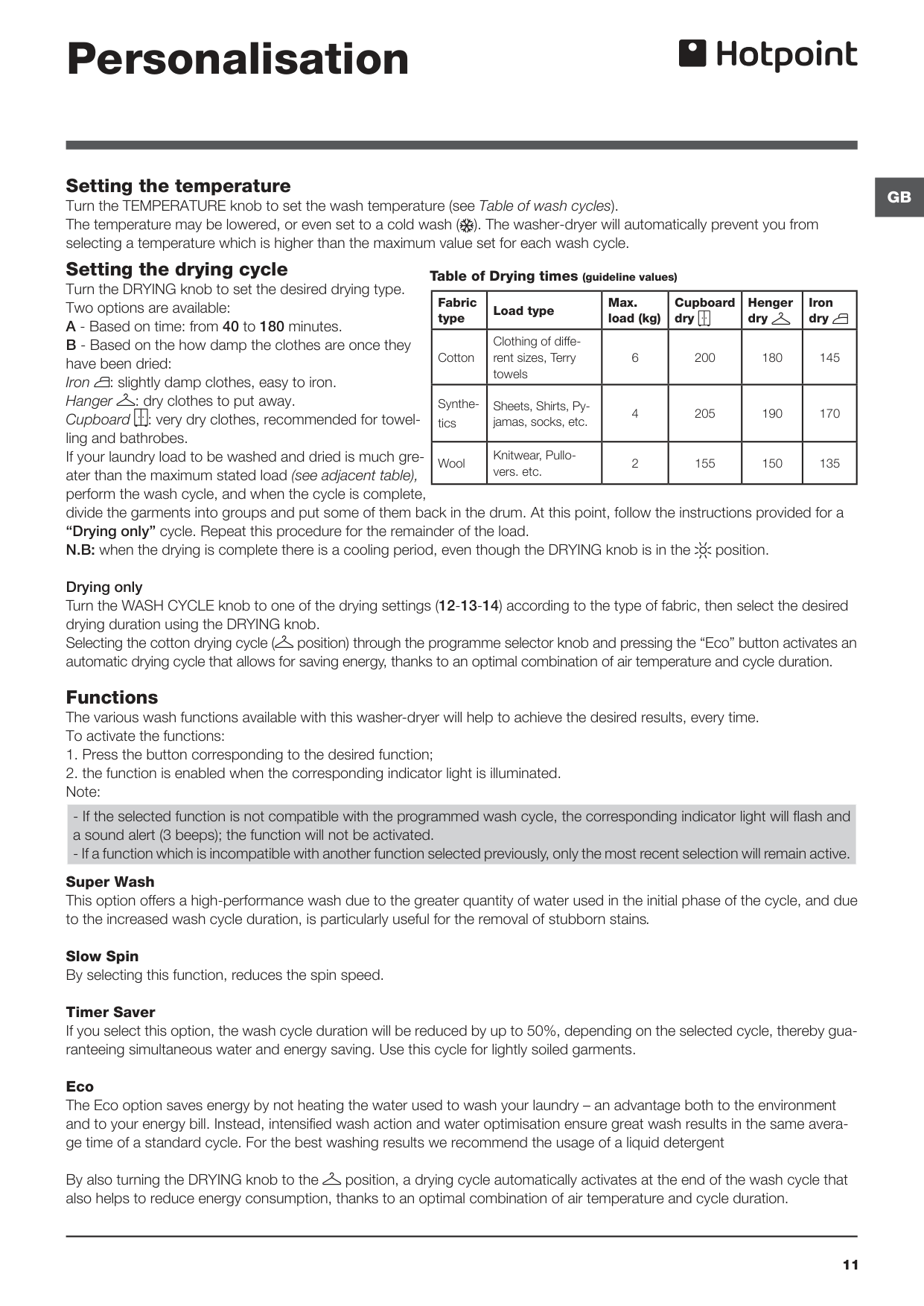
Gb
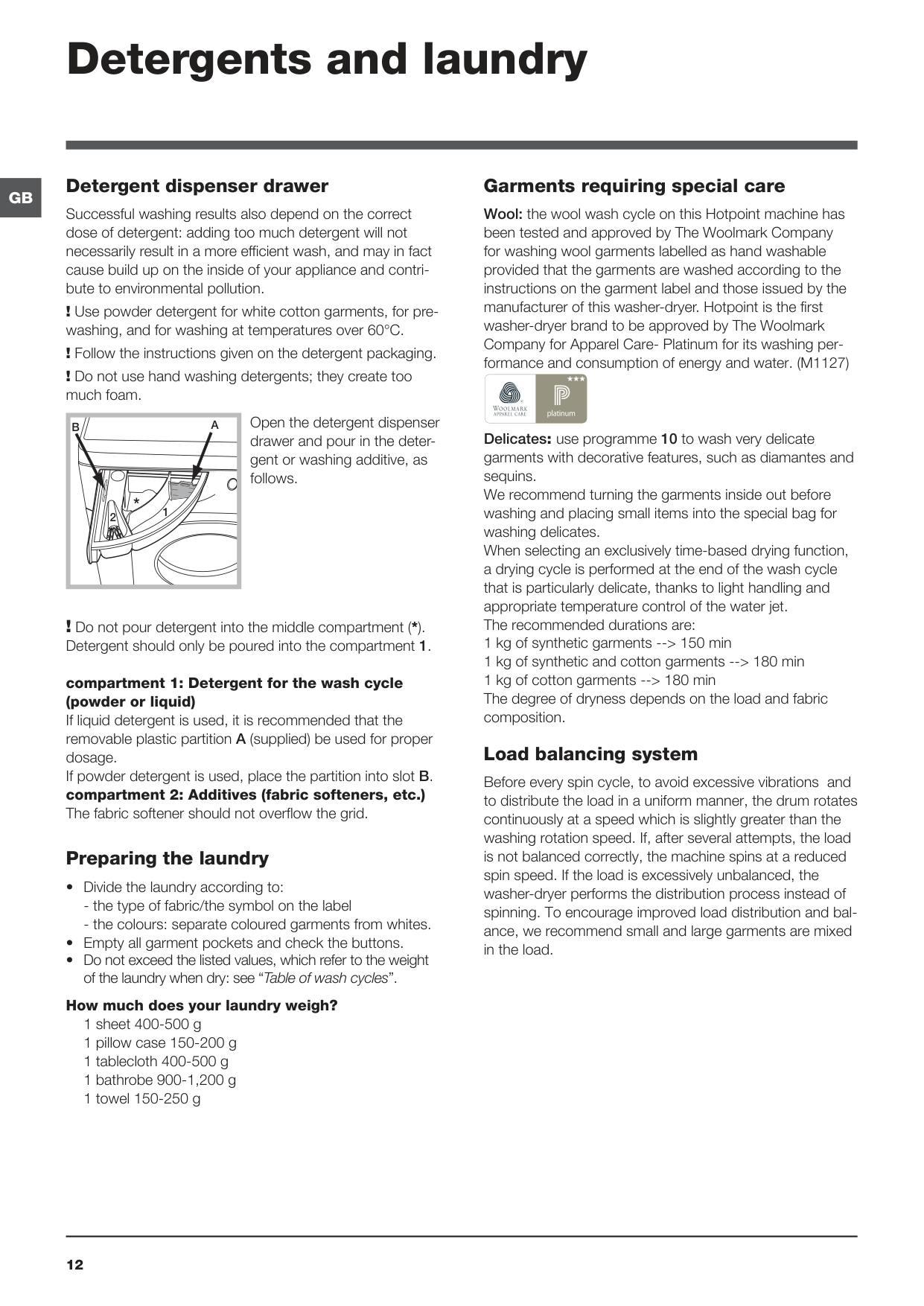
11 Setting the temperature Turn the TEMPERATURE knob to set the wash temperature (see Table of wash cycles). The temperature may be lowered, or even set to a cold wash ( ). The washer-dryer will automatically prevent you from selecting a temperature which is higher than the maximum value set for each wash cycle. Setting the drying cycle Turn the DRYING knob to set the desired drying type. Two options are available: A - Based on time: from 40 to 180 minutes. B - Based on the how damp the clothes are once they have been dried: Iron : slightly damp clothes, easy to iron. Hanger : dry clothes to put away. Cupboard : very dry clothes, recommended for towel- ling and bathrobes. If your laundry load to be washed and dried is much gre- ater than the maximum stated load (see adjacent table), perform the wash cycle, and when the cycle is complete, divide the garments into groups and put some of them back in the drum. At this point, follow the instructions provided for a “Drying only” cycle. Repeat this procedure for the remainder of the load. N.B: when the drying is complete there is a cooling period, even though the DRYING knob is in the position.Drying only Turn the WASH CYCLE knob to one of the drying settings (12-13-14) according to the type of fabric, then select the desired drying duration using the DRYING knob. Selecting the cotton drying cycle ( position) through the programme selector knob and pressing the “Eco” button activates an automatic drying cycle that allows for saving energy, thanks to an optimal combination of air temperature and cycle duration. Functions The various wash functions available with this washer-dryer will help to achieve the desired results, every time. To activate the functions:
12
Gb
Detergents and laundry Detergent dispenser drawer Successful washing results also depend on the correct dose of detergent: adding too much detergent will not necessarily result in a more efficient wash, and may in fact cause build up on the inside of your appliance and contri- bute to environmental pollution. ! Use powder detergent for white cotton garments, for pre- washing, and for washing at temperatures over 60°C. ! Follow the instructions given on the detergent packaging. ! Do not use hand washing detergents; they create too much foam. Open the detergent dispenser drawer and pour in the deter- gent or washing additive, as follows. ! Do not pour detergent into the middle compartment (*). Detergent should only be poured into the compartment 1. compartment 1: Detergent for the wash cycle (powder or liquid) If liquid detergent is used, it is recommended that the removable plastic partition A (supplied) be used for proper dosage. If powder detergent is used, place the partition into slot B. compartment 2: Additives (fabric softeners, etc.) The fabric softener should not overflow the grid. Preparing the laundry1 sheet 400-500 g
1 pillow case 150-200 g
1 tablecloth 400-500 g
1 bathrobe 900-1,200 g
1 towel 150-250 g 1 2
A
B
Gb
13 Troubleshooting Your washer-dryer could fail to work. Before contacting the Technical Assistance Centre (see “Assistance”), make sure that the problem cannot be solved easily using the following list. Problem: The machine does not switch on. The wash cycle does not start. The machine does not fill with wa- ter or the indicator light for the first wash cycle stage flashes rapidly. The machine continuously fills with water and continually drains away or Water left in the drum or Stuck on wash. The machine does not drain or spin. The machine does not heat or poor wash results. The programme takes too long. The machine vibrates a lot during the spin cycle. The washer-dryer does not dry. Possible causes / Solutions: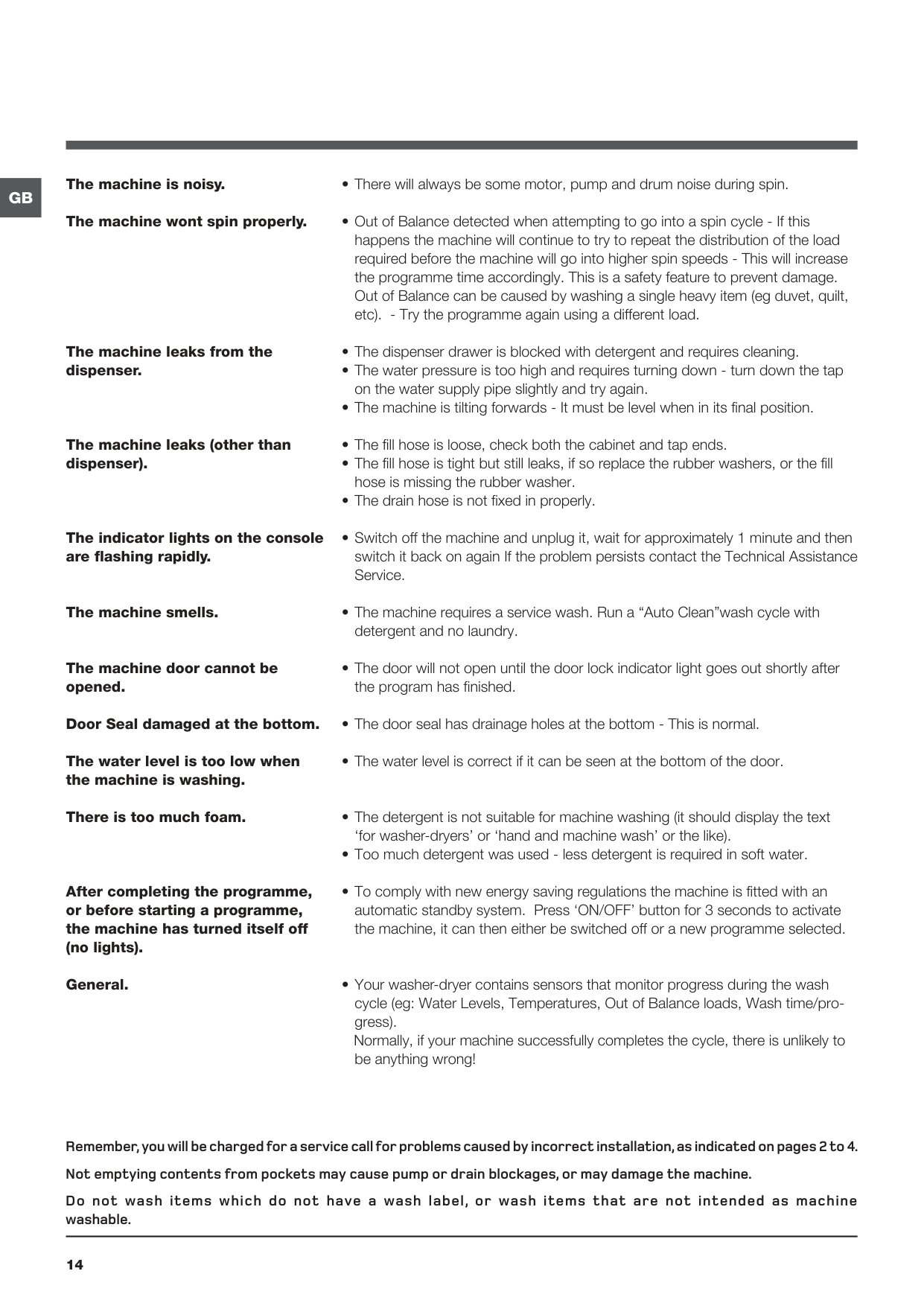
14
Gb
The machine is noisy. The machine wont spin properly. The machine leaks from the dispenser. The machine leaks (other than dispenser). The indicator lights on the console are flashing rapidly. The machine smells. The machine door cannot be opened. Door Seal damaged at the bottom. The water level is too low when the machine is washing. There is too much foam. After completing the programme, or before starting a programme, the machine has turned itself off (no lights). General.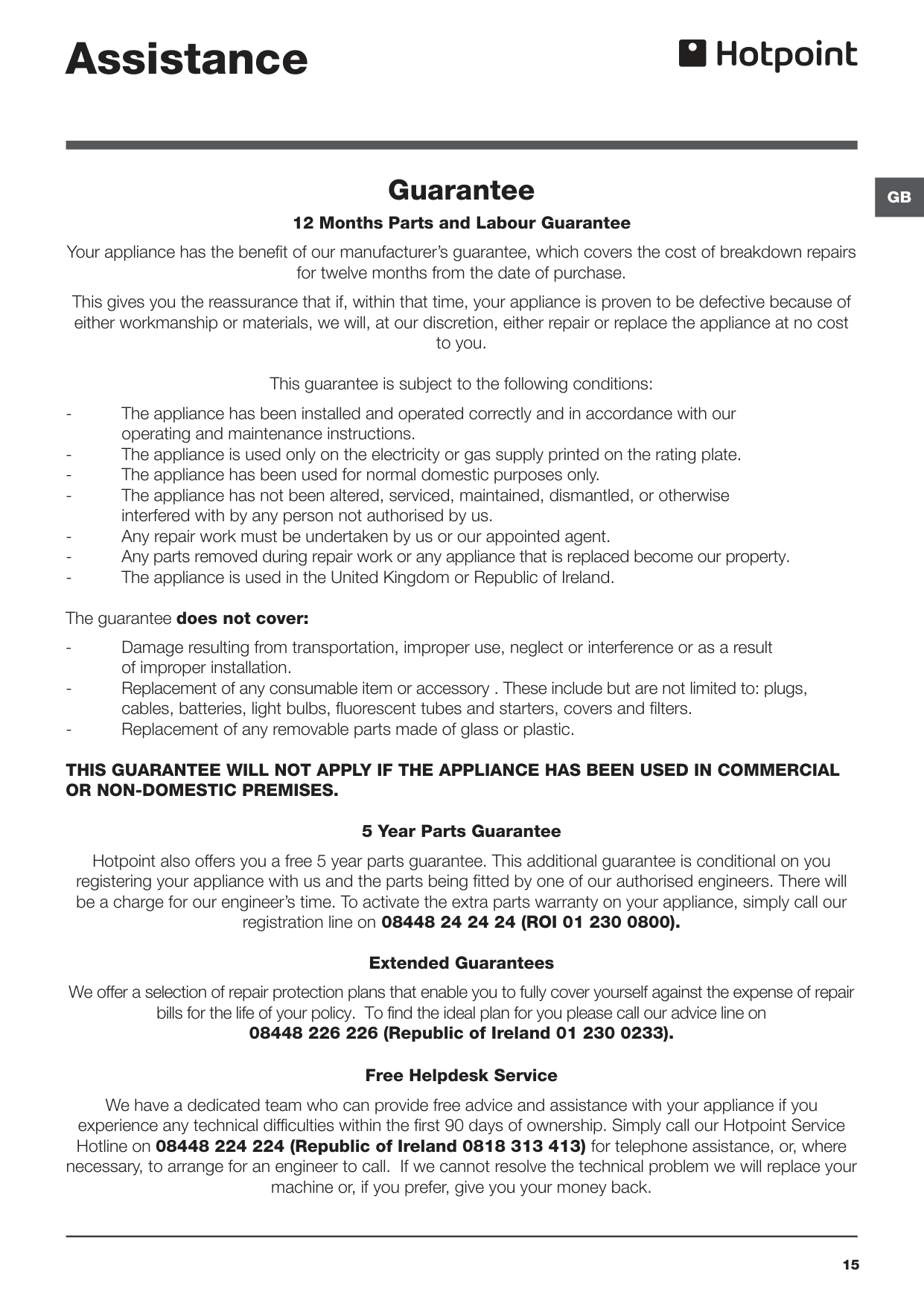
Gb
15 Assistance Guarantee 12 Months Parts and Labour Guarantee Your appliance has the benefit of our manufacturer’s guarantee, which covers the cost of breakdown repairs for twelve months from the date of purchase. This gives you the reassurance that if, within that time, your appliance is proven to be defective because of either workmanship or materials, we will, at our discretion, either repair or replace the appliance at no cost to you. This guarantee is subject to the following conditions:operating and maintenance instructions.
interfered with by any person not authorised by us.
of improper installation.
cables, batteries, light bulbs, fluorescent tubes and starters, covers and filters.
This Guarantee Will Not Apply If The Appliance Has Been Used In Commercial
Or Non-Domestic Premises.
5 Year Parts Guarantee Hotpoint also offers you a free 5 year parts guarantee. This additional guarantee is conditional on you registering your appliance with us and the parts being fitted by one of our authorised engineers. There will be a charge for our engineer’s time. To activate the extra parts warranty on your appliance, simply call our registration line on 08448 24 24 24 (ROI 01 230 0800). Extended Guarantees We offer a selection of repair protection plans that enable you to fully cover yourself against the expense of repair bills for the life of your policy. To find the ideal plan for you please call our advice line on 08448 226 226 (Republic of Ireland 01 230 0233). Free Helpdesk Service We have a dedicated team who can provide free advice and assistance with your appliance if you experience any technical difficulties within the first 90 days of ownership. Simply call our Hotpoint Service Hotline on 08448 224 224 (Republic of Ireland 0818 313 413) for telephone assistance, or, where necessary, to arrange for an engineer to call. If we cannot resolve the technical problem we will replace your machine or, if you prefer, give you your money back.
16