
Ask AI
— answers from the official manualAnswers from the official manual.
Common questions
Common Questions
5 totalWhere can I download the Logitech Options software?
Visit logitech.com/options to download and install the Logitech Options software, which is necessary for configuring your Craft's settings. (Page 1)
What should I do if my keyboard doesn't connect in Bluetooth mode?
Make sure both the keyboard and your computer are turned on and within range, then press and hold the Connect button on the Craft to put it into pairing mode. Use Logitech Options software to pair via Bluetooth. (Page 1)
Is there a troubleshooting guide available if I encounter connection issues with my Logi Craft?
Refer to the online support page at logitech.com/support/craft for detailed troubleshooting steps and guides related to connecting your Logi Craft keyboard. (Page 2)
Where can I find product documentation for my Logi Craft?
Visit logitech.com/support/craft or the support section of logitech.com to access detailed user guides, technical notes, and FAQs. (Page 2)
How do I connect more than one Logi Craft device?
Install the latest version of Logi Options software and use it for pairing multiple Craft devices with your computer. Additional instructions can be found on logitech.com/options. (Page 1)
Full Manual
2 pages
CRAFT
© 2017 Logitech. All rights reserved. Logitech, Logi and other Logitech marks are owned by Logitech and may be registered. The Bluetooth® word mark and logos are registered trademarks owned by Bluetooth SIG, Inc. All other trademarks are the property of their respective owners.
© 2017 Logitech. All rights reserved. Logitech, Logi and other Logitech marks are owned by Logitech and may be registered. The Bluetooth® word mark and logos are registered trademarks owned by Bluetooth SIG, Inc. All other trademarks are the property of their respective owners.
620-007945.002
Download and install Logitech Options software Download and install Logitech Options software Download and install Logitech Options software Download and install Logitech Options software
logitech.com/options
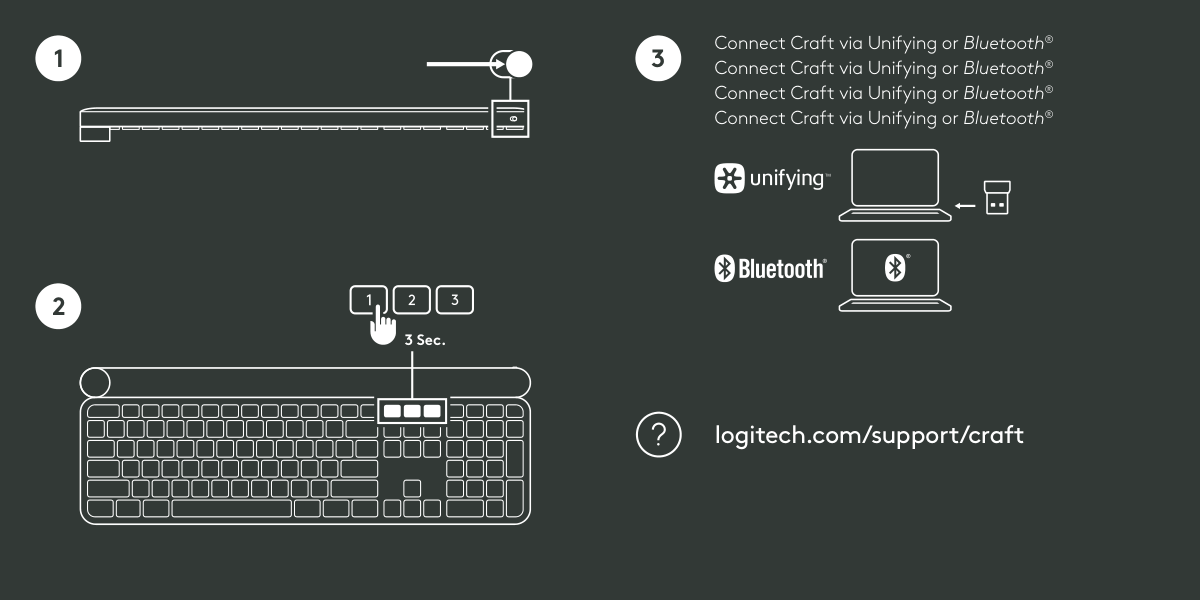
3 Sec.
| | | |---|---| | | | | | |
3 Connect Craft via Unifying or Bluetooth
® Connect Craft via Unifying or Bluetooth® Connect Craft via Unifying or Bluetooth® Connect Craft via Unifying or Bluetooth®