
Marshall Stanmore II Bluetooth Speaker
Ask AI
— answers from the official manualAnswers from the official manual.
Common questions
Common Questions
10 totalHow do I factory reset the Stanmore II Bluetooth Speaker?
Press and hold the Power button for 10 seconds until the LED flashes red. This clears all settings and returns the device to factory defaults. You will need to re-pair all connected devices after the reset.
What should I do if my Stanmore II Bluetooth Speaker does not turn on?
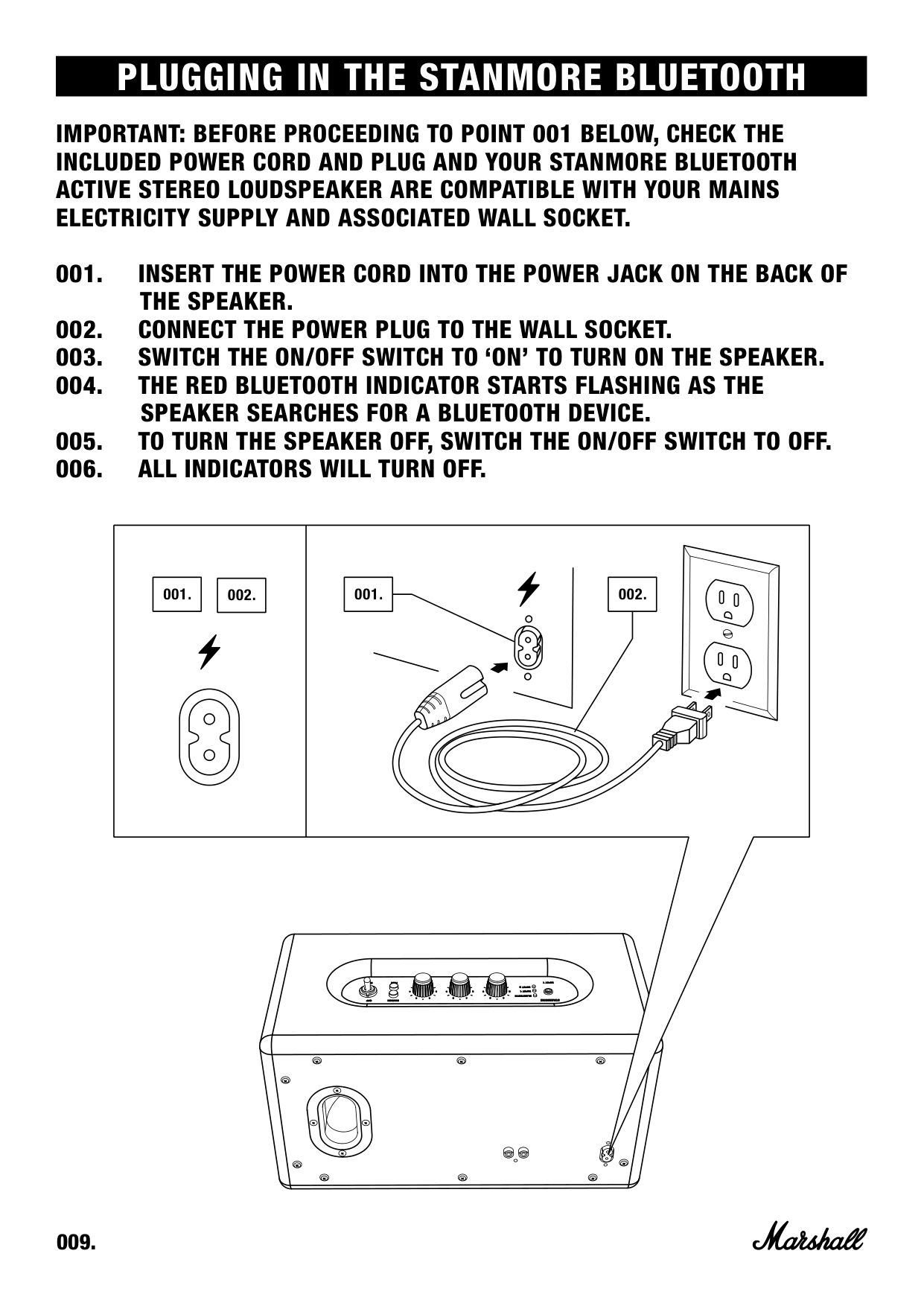
Ensure that the speaker is plugged into a working AC wall socket. If it’s still not turning on, consider the electrical supply as described on page 009.
How can I choose between connected Bluetooth devices when my Stanmore II is turned on?
When you power on your device within range, it will attempt to auto-connect to the last used device among up to six stored connections. If needed, manually select a different device from the pairing list.
How do I connect my phone to the Stanmore II Bluetooth Speaker via cable?
Firstly ensure that your speaker is turned off, then plug one end of the 3.5mm coiled cord with RCA plugs into the ‘Input 1’ on the speaker and connect the other end to your music player's headphone jack before switching the speaker back on.
How do I pair my device with the Stanmore II Bluetooth Speaker?
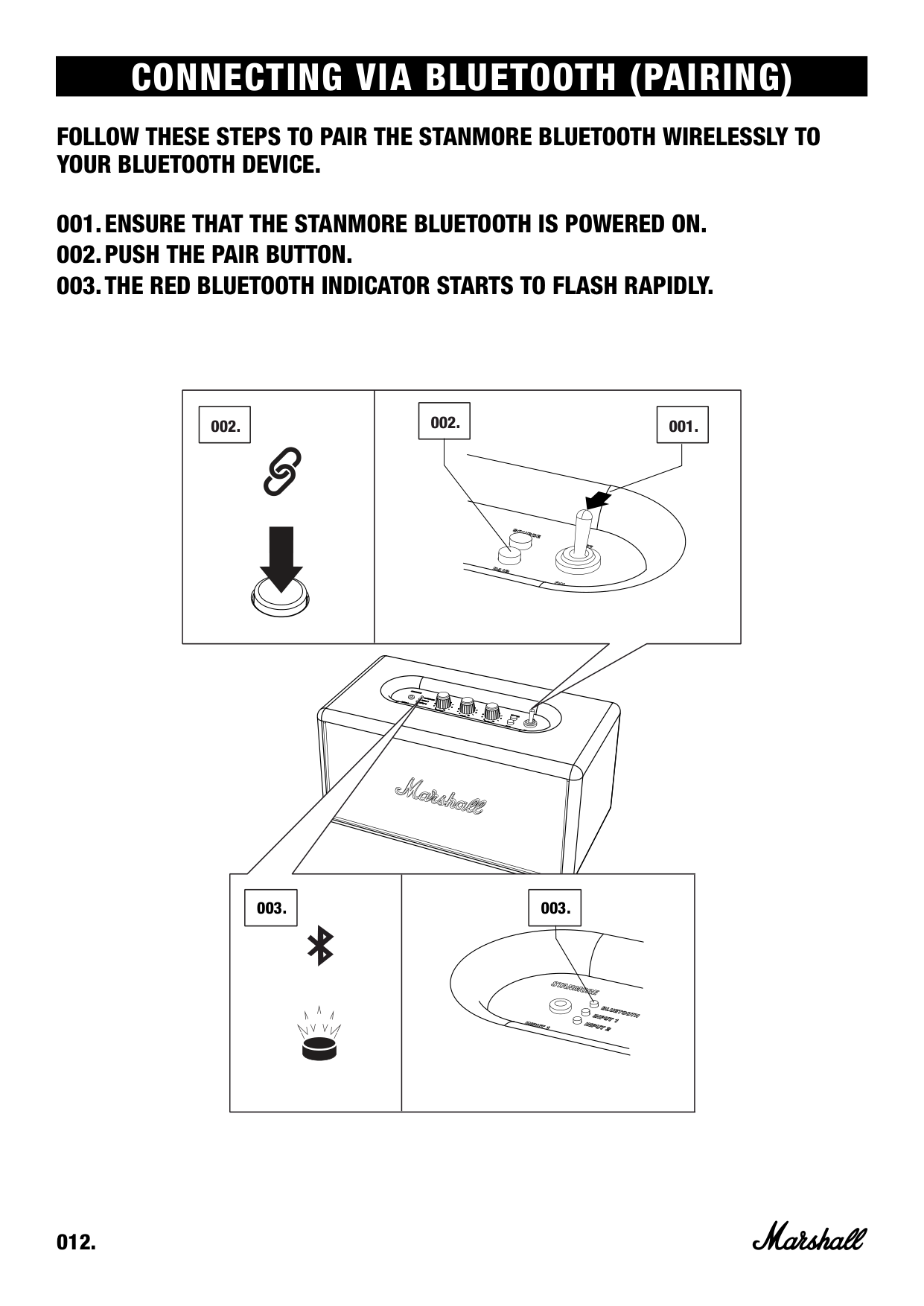
Ensure the speaker is powered on, then press the Pair button which lights up the quick-connect mode. On your phone, enable Bluetooth and select Stanmore II from the list to initiate pairing.
What should I do if there’s no sound coming from my speaker?
Check that a correct input is selected via the Source button. Ensure your device and speakers are connected, possibly reviewing Bluetooth or cable connection processes detailed on pages 012 and 015.
Full Manual
24 pages
STANMORE BLUETOOTH - STEREO LOUDSPEAKER
USER MANUAL
IMPORTANT SAFETY INSTRUCTIONS
COMPLIANCE MARKS
FCC Statement This equipment has been tested and found to comply with the limits for a Class B digital device, pursuant to Part 15 of the FCC Rules.
These limits are designed to provide reasonable protection against harmful interference in a residential installation. This equipment generates uses and can radiate radio frequency energy and, if not installed and used in accordance with the instructions, may cause harmful interference to radio communications. However, there is no guarantee that interference will not occur in a particular installation. If this equipment does cause harmful interference to radio or television reception, which can be determined by turning the equipment off and on, the user is encouraged to try to correct the interference by one or more of the following measures:
This device complies with part 15 of the FCC Rules. Operation is subject to the following two conditions:
(1) This device may not cause harmful interference, and (2) this device must accept any interference received, including interference that may cause undesired operation. Changes or modifications not expressly approved by the party responsible for compliance could void the user’s authority to operate the equipment.
IC Statement This device complies with Industry Canada’s licence-exempt RSSs. Operation is subject to the following two conditions:
Le présent appareil est conforme aux CNR d’Industrie Canada applicables aux appareils radio exempts de licence. L’exploitation est autorisée aux deux conditions suivantes : (1) l’appareil ne doit pas produire de brouillage, et (2) l’utilisateur de l’appareil doit accepter tout brouillage radioélectrique subi, même si le brouillage est susceptible d’en compromettre le fonctionnement.
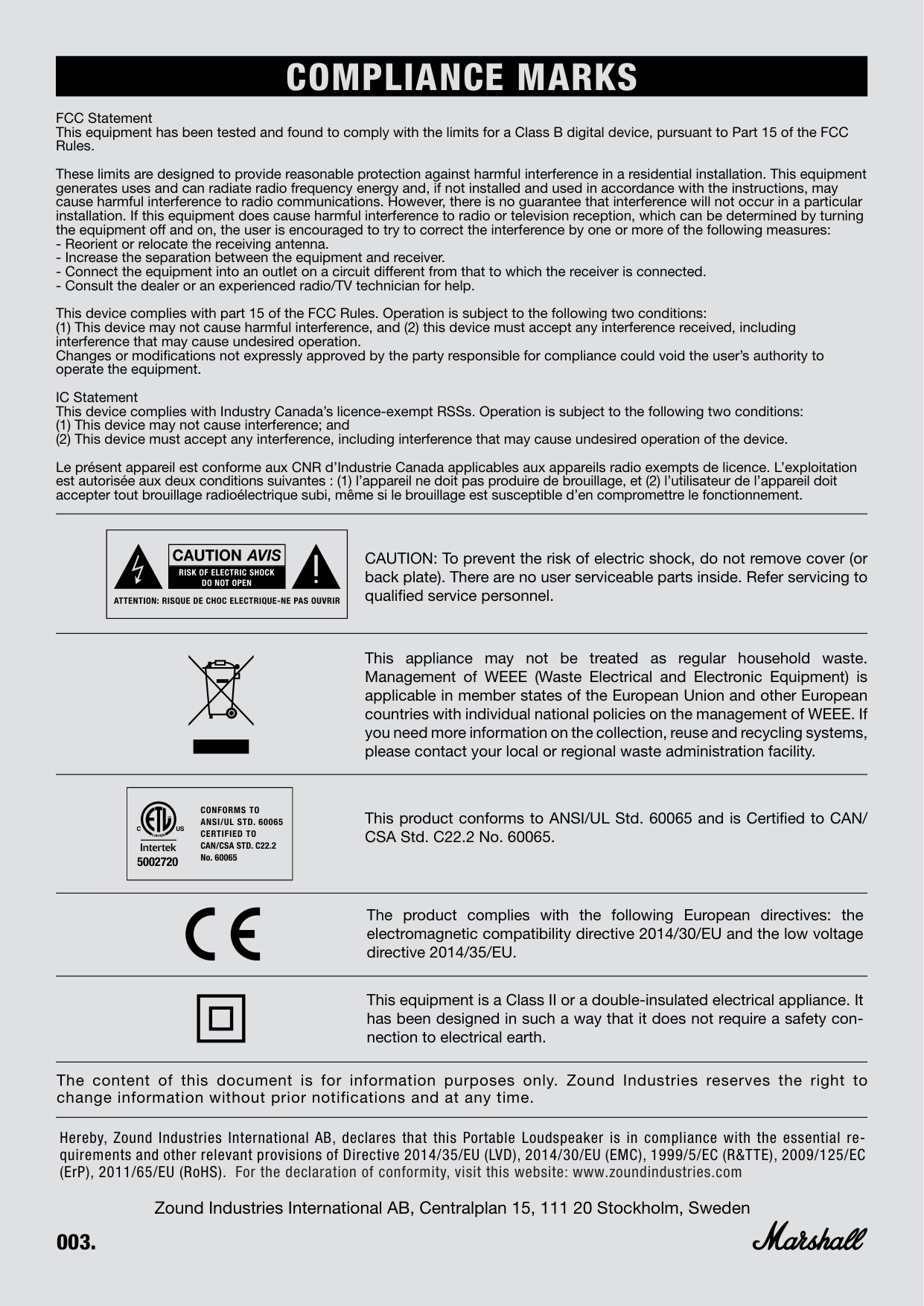
CAUTION: To prevent the risk of electric shock, do not remove cover (or back plate). There are no user serviceable parts inside. Refer servicing to qualified service personnel.
5002720
This appliance may not be treated as regular household waste. Management of WEEE (Waste Electrical and Electronic Equipment) is applicable in member states of the European Union and other European countries with individual national policies on the management of WEEE. If you need more information on the collection, reuse and recycling systems, please contact your local or regional waste administration facility.
This product conforms to ANSI/UL Std. 60065 and is Certified to CAN/ CSA Std. C22.2 No. 60065.
The product complies with the following European directives: the electromagnetic compatibility directive 2014/30/EU and the low voltage directive 2014/35/EU.
This equipment is a Class II or a double-insulated electrical appliance. It has been designed in such a way that it does not require a safety connection to electrical earth.
The content of this document is for information purposes only. Zound Industries reserves the right to change information without prior notifications and at any time.
Hereby, Zound Industries International AB, declares that this Portable Loudspeaker is in compliance with the essential requirements and other relevant provisions of Directive 2014/35/EU (LVD), 2014/30/EU (EMC), 1999/5/EC (R&TTE), 2009/125/EC (ErP), 2011/65/EU (RoHS). For the declaration of conformity, visit this website: www.zoundindustries.com
######## Zound Industries International AB, Centralplan 15, 111 20 Stockholm, Sweden
INDEX
ENGLISH
##### SECTIONS
PAGE
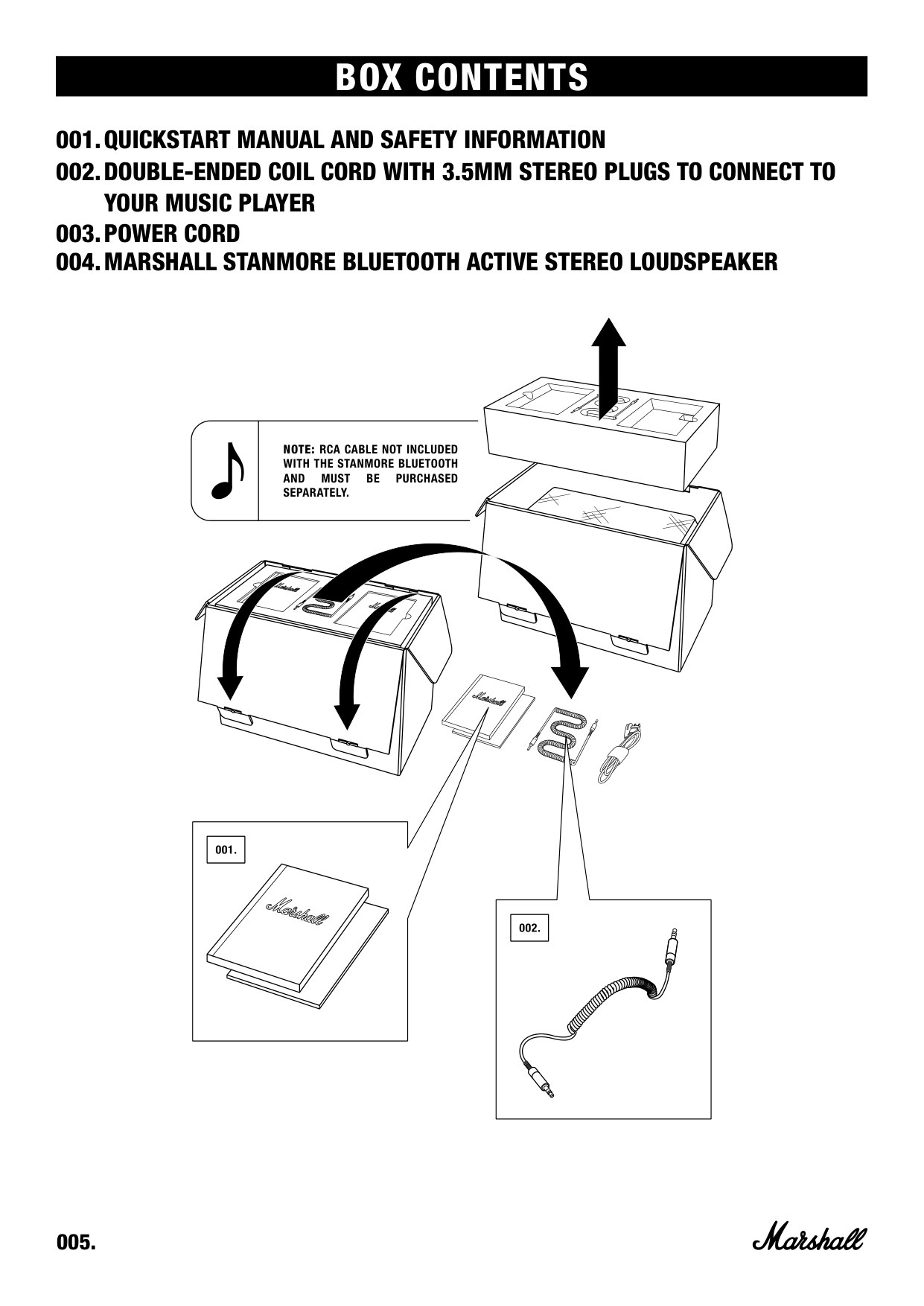
BOX CONTENTS
NOTE: RCA CABLE NOT INCLUDED WITH THE STANMORE BLUETOOTH AND MUST BE PURCHASED SEPARATELY.
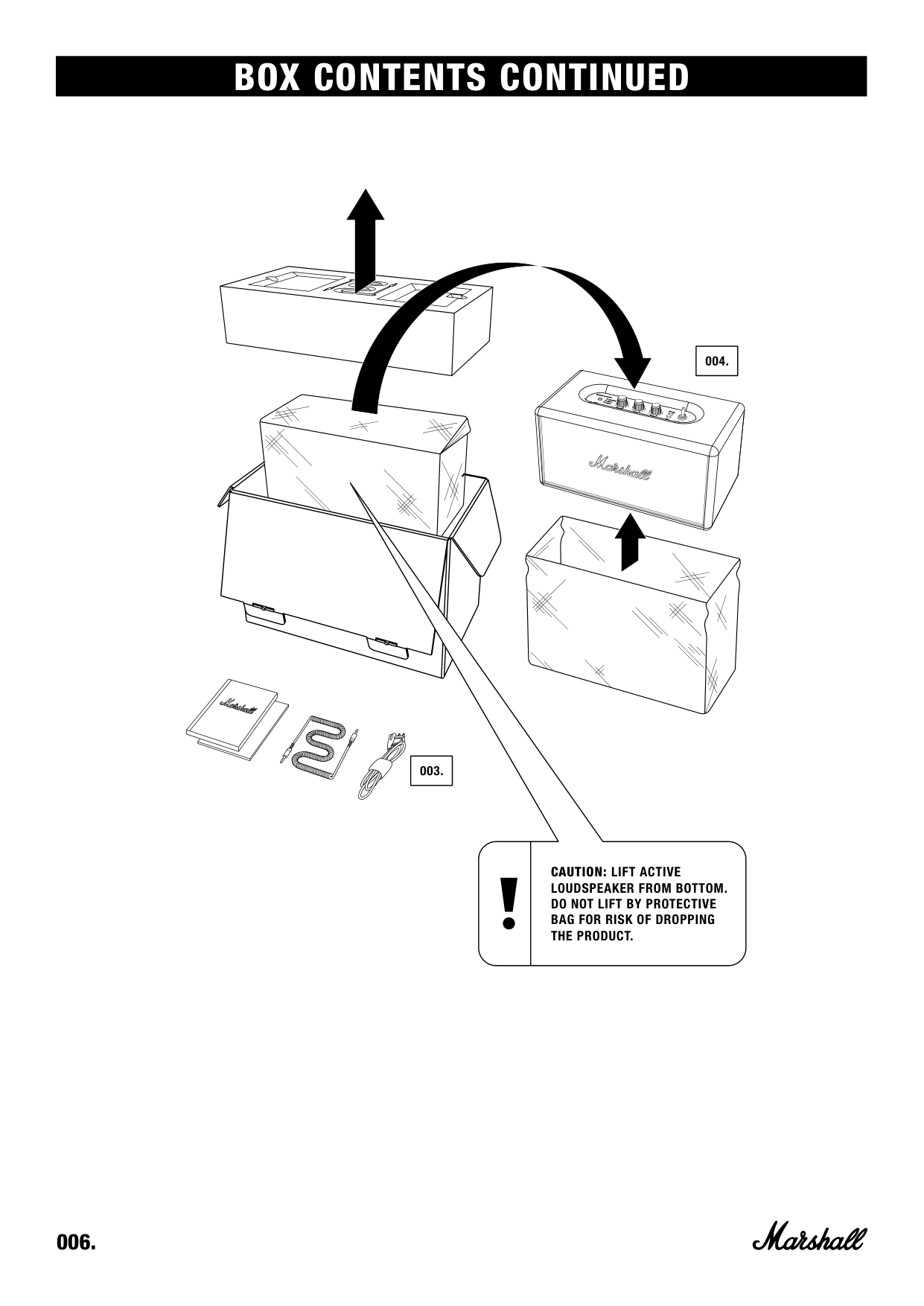
BOX CONTENTS CONTINUED
CAUTION: LIFT ACTIVE LOUDSPEAKER FROM BOTTOM. DO NOT LIFT BY PROTECTIVE BAG FOR RISK OF DROPPING THE PRODUCT.
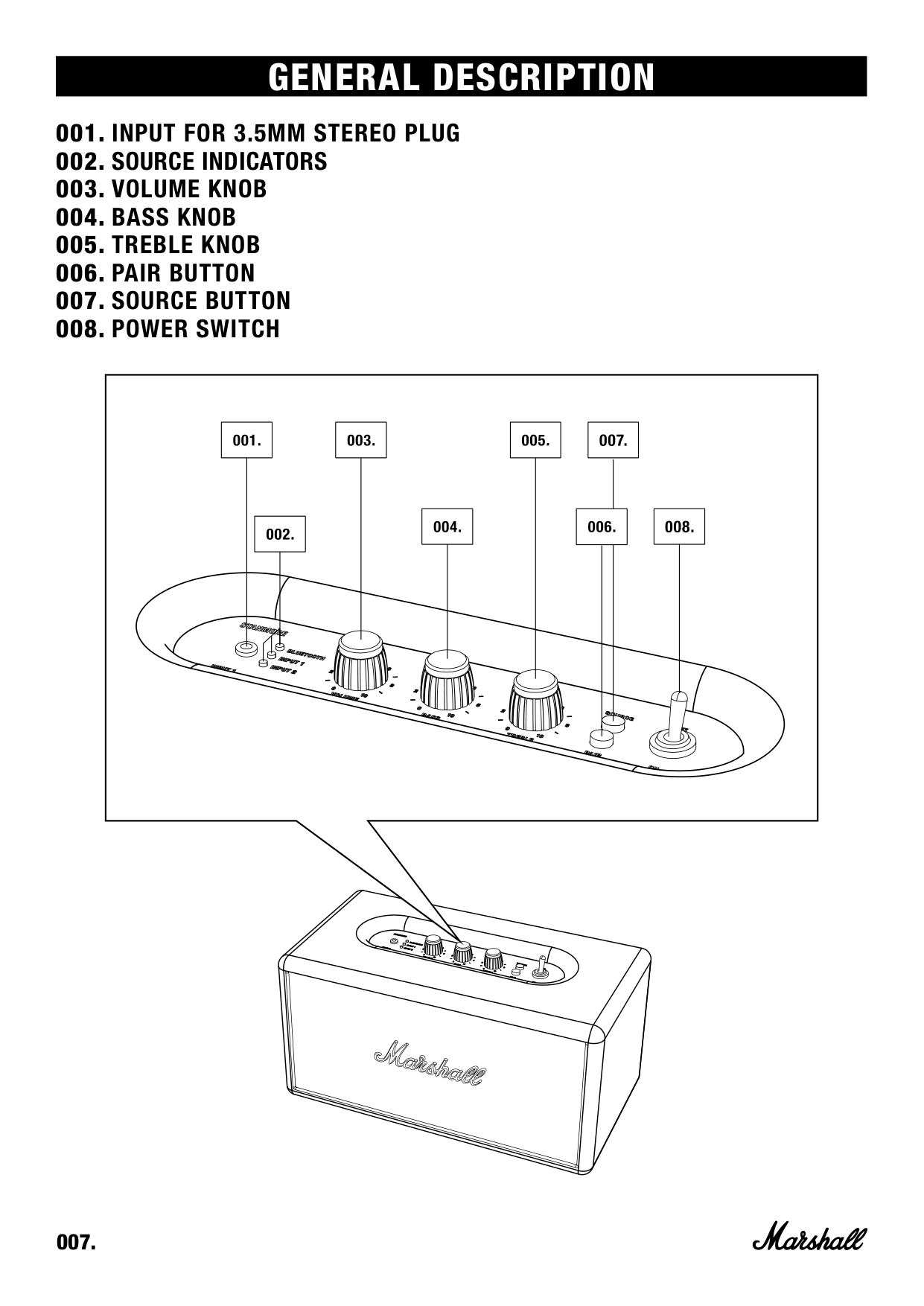
GENERAL DESCRIPTION
| | | |---|---| | | |
| | | |---|---| | | |
| | | |---|---| | | |
| | | |---|---| | | |
| | | |---|---| | | |
| | | |---|---| | | | | | |
| | | |---|---| | | |
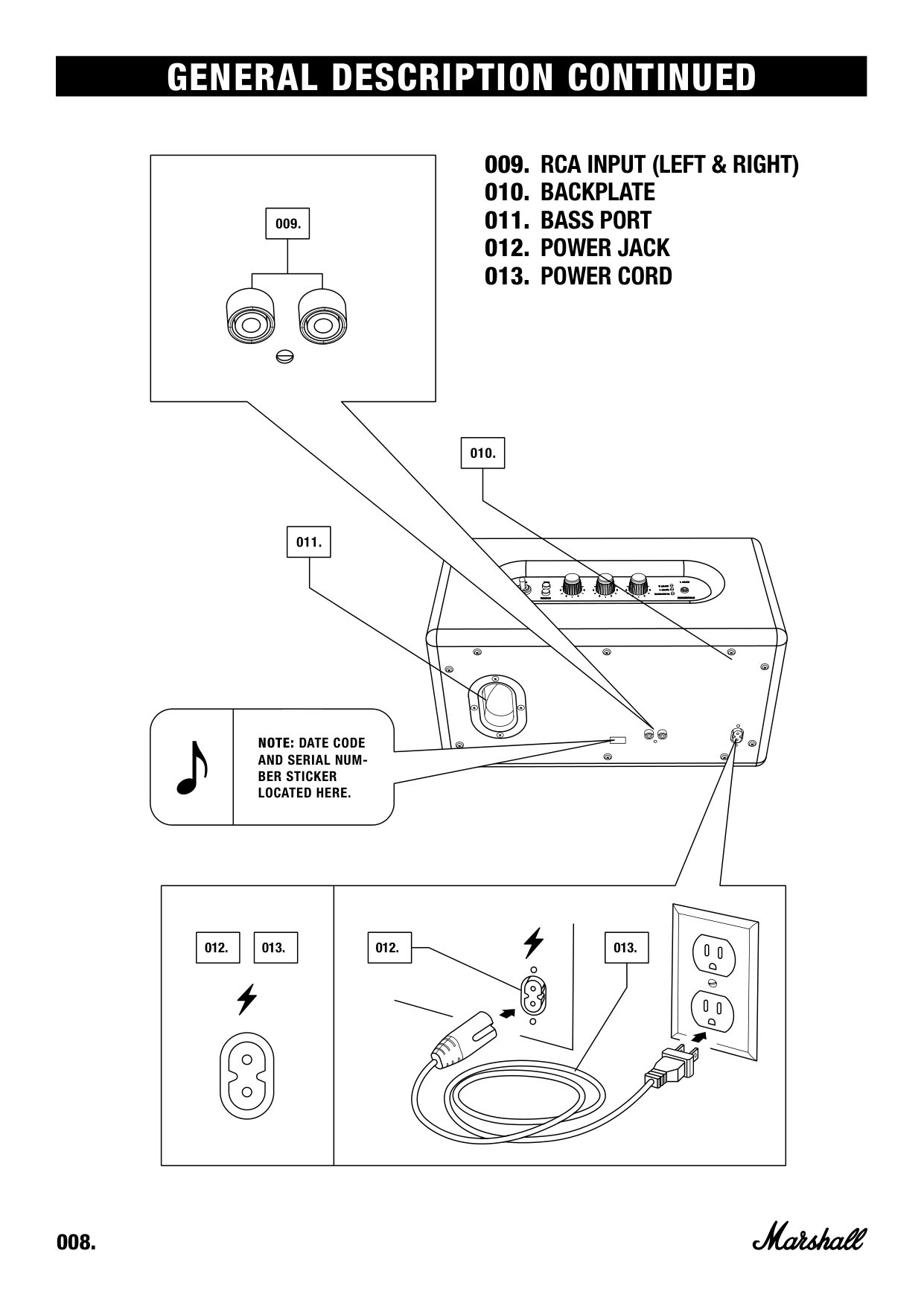
GENERAL DESCRIPTION CONTINUED
| | | |---|---| | | |
| | | |---|---| | | |
NOTE: DATE CODE AND SERIAL NUMBER STICKER LOCATED HERE.
|012.| |---|
|013.| |---|
|012.| | |---|---| |012.| |
|013.|013.| |---|---| | | |
###### IMPORTANT: BEFORE PROCEEDING TO POINT 001 BELOW, CHECK THE INCLUDED POWER CORD AND PLUG AND YOUR STANMORE BLUETOOTH ACTIVE STEREO LOUDSPEAKER ARE COMPATIBLE WITH YOUR MAINS ELECTRICITY SUPPLY AND ASSOCIATED WALL SOCKET.
|001.| |---|
|002.| |---|
|001.| | |---|---| |001.| |
|002.|002.| |---|---| | | |
||003.| |---|
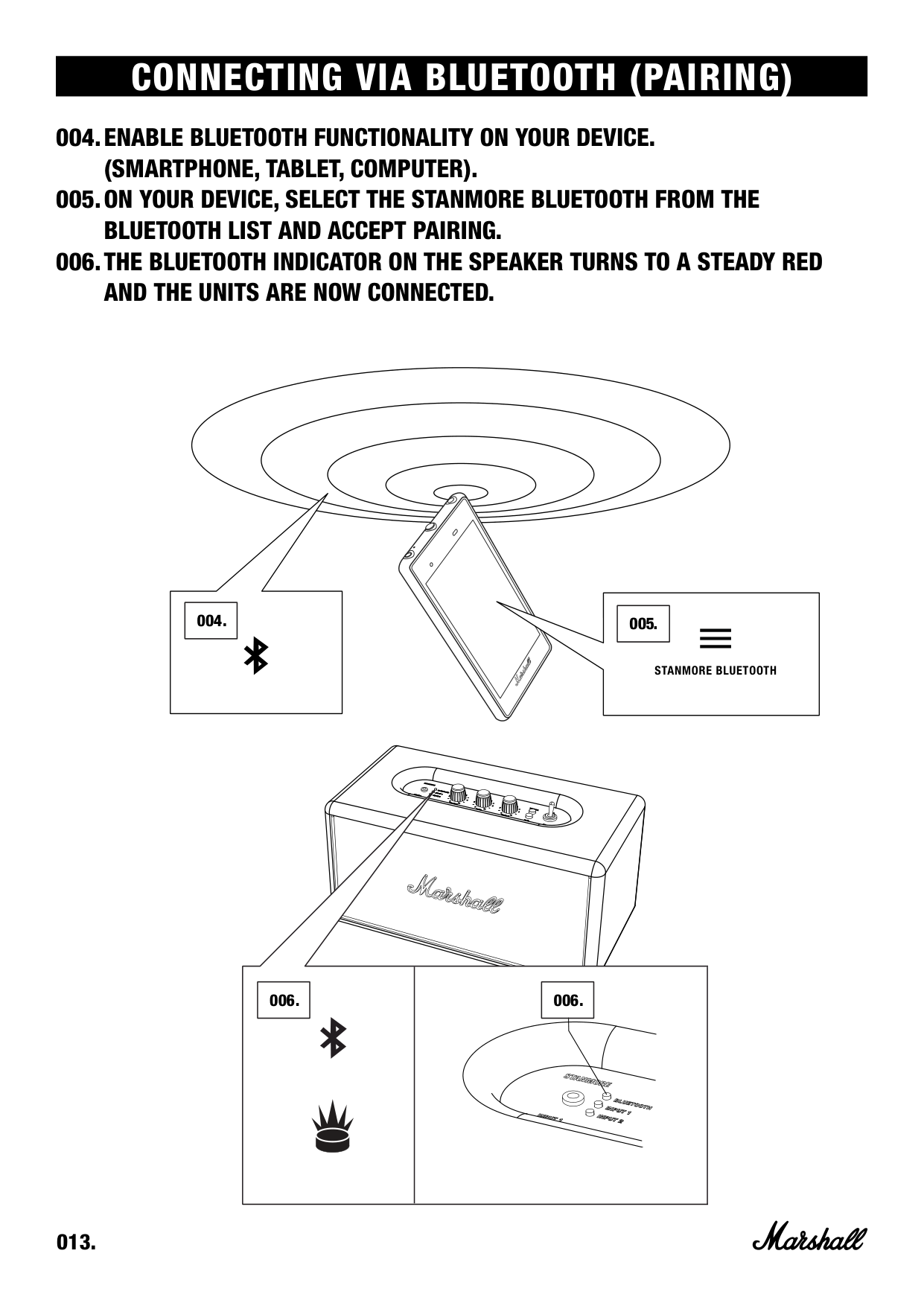
|005.| |---| ||004.|004.| |---|---| | | | | |---|---| | ||006.|006.| |---|---| | | | |
USING THE STANMORE BLUETOOTH WITH YOUR DEVICES
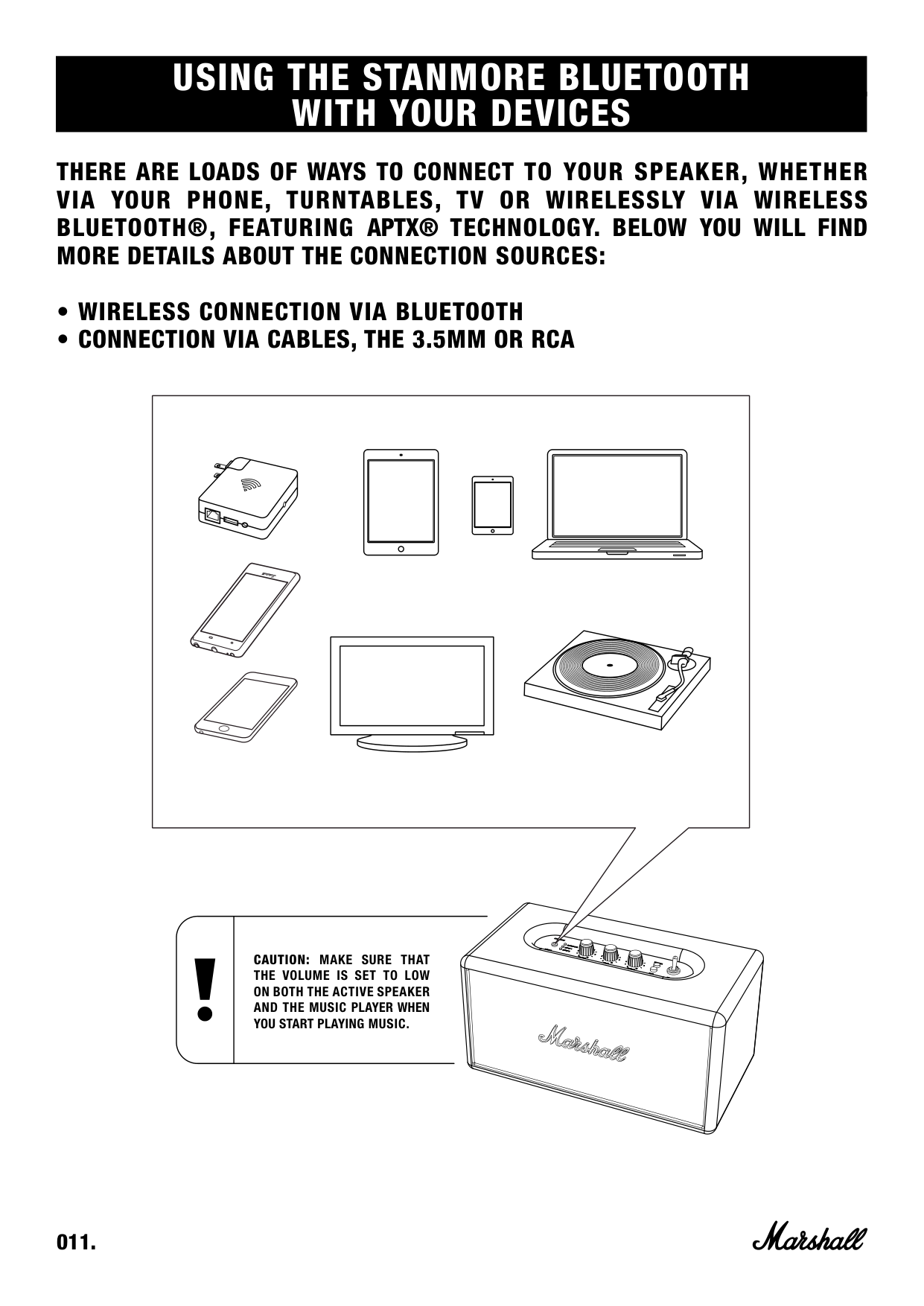
THERE ARE LOADS OF WAYS TO CONNECT TO YOUR SPEAKER, WHETHER VIA YOUR PHONE, TURNTABLES, TV OR WIRELESSLY VIA WIRELESS BLUETOOTH®, FEATURING APTX® TECHNOLOGY. BELOW YOU WILL FIND MORE DETAILS ABOUT THE CONNECTION SOURCES:
CAUTION: MAKE SURE THAT THE VOLUME IS SET TO LOW ON BOTH THE ACTIVE SPEAKER AND THE MUSIC PLAYER WHEN YOU START PLAYING MUSIC.
###### FOLLOW THESE STEPS TO PAIR THE STANMORE BLUETOOTH WIRELESSLY TO YOUR BLUETOOTH DEVICE.
|002.|002.| |---|---| | | |
|002.| |---|
|001.|
|---|
|0 03 .| |---|
|0 03 .| |---|
|0 04 .| |---|
|0 05 .| |---|
STANMORE BLUETOOTH
|0 06 .| |---|
|0 06 .| |---|
BLUETOOTH AUTO CONNECTION
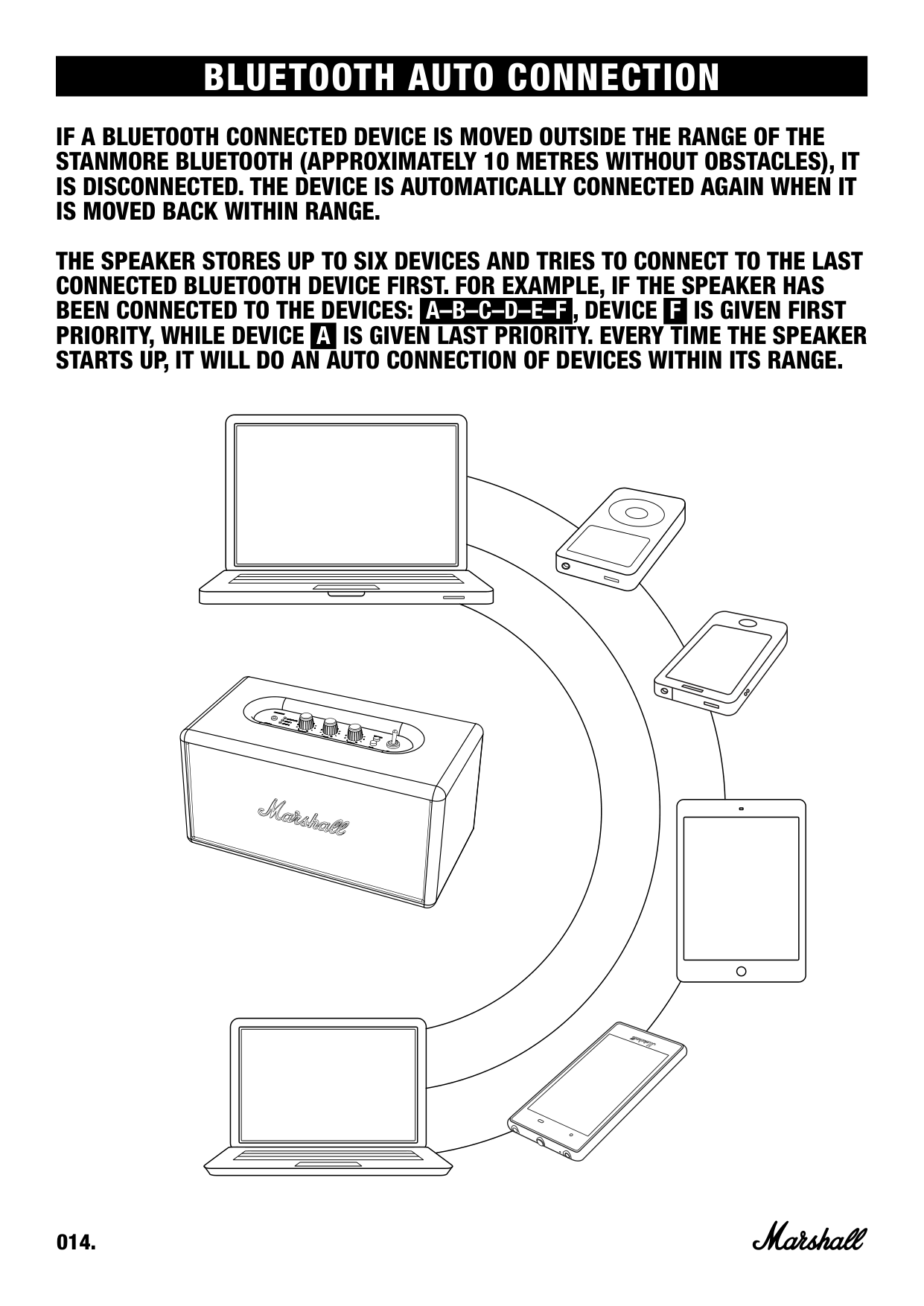
IF A BLUETOOTH CONNECTED DEVICE IS MOVED OUTSIDE THE RANGE OF THE STANMORE BLUETOOTH (APPROXIMATELY 10 METRES WITHOUT OBSTACLES), IT IS DISCONNECTED. THE DEVICE IS AUTOMATICALLY CONNECTED AGAIN WHEN IT IS MOVED BACK WITHIN RANGE.
THE SPEAKER STORES UP TO SIX DEVICES AND TRIES TO CONNECT TO THE LAST CONNECTED BLUETOOTH DEVICE FIRST. FOR EXAMPLE, IF THE SPEAKER HAS BEEN CONNECTED TO THE DEVICES: A–B–C–D–E–F , DEVICE F IS GIVEN FIRST PRIORITY, WHILE DEVICE A IS GIVEN LAST PRIORITY. EVERY TIME THE SPEAKER STARTS UP, IT WILL DO AN AUTO CONNECTION OF DEVICES WITHIN ITS RANGE.
CONNECTING SOUND SOURCE VIA CABLE
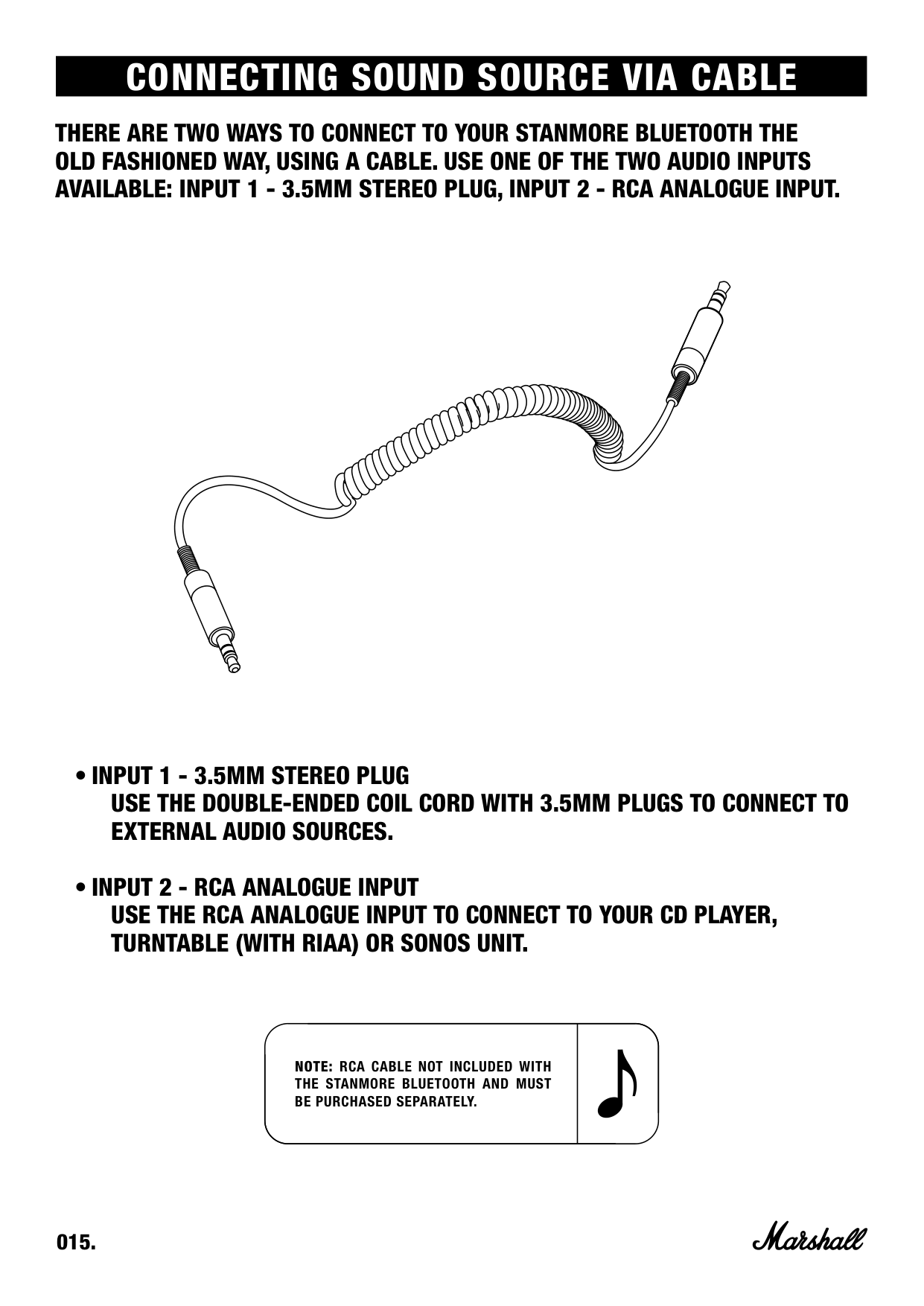
THERE ARE TWO WAYS TO CONNECT TO YOUR STANMORE BLUETOOTH THE OLD FASHIONED WAY, USING A CABLE. USE ONE OF THE TWO AUDIO INPUTS AVAILABLE: INPUT 1 - 3.5MM STEREO PLUG, INPUT 2 - RCA ANALOGUE INPUT.
NOTE: RCA CABLE NOT INCLUDED WITH THE STANMORE BLUETOOTH AND MUST BE PURCHASED SEPARATELY.
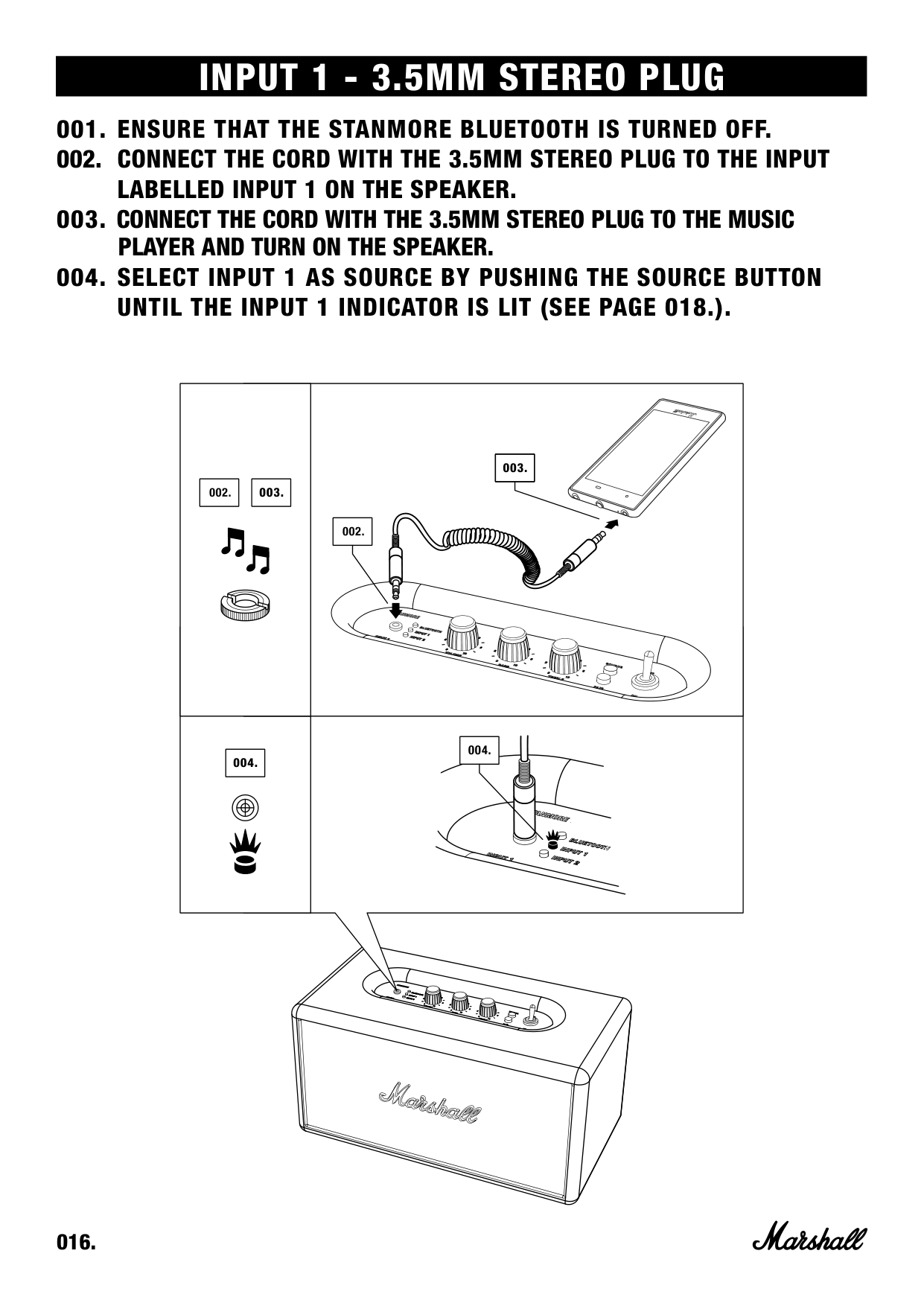
INPUT 1 - 3.5MM STEREO PLUG
|003.| |---|
| | | |---|---| | | |
|003.|003.| |---|---| | | |
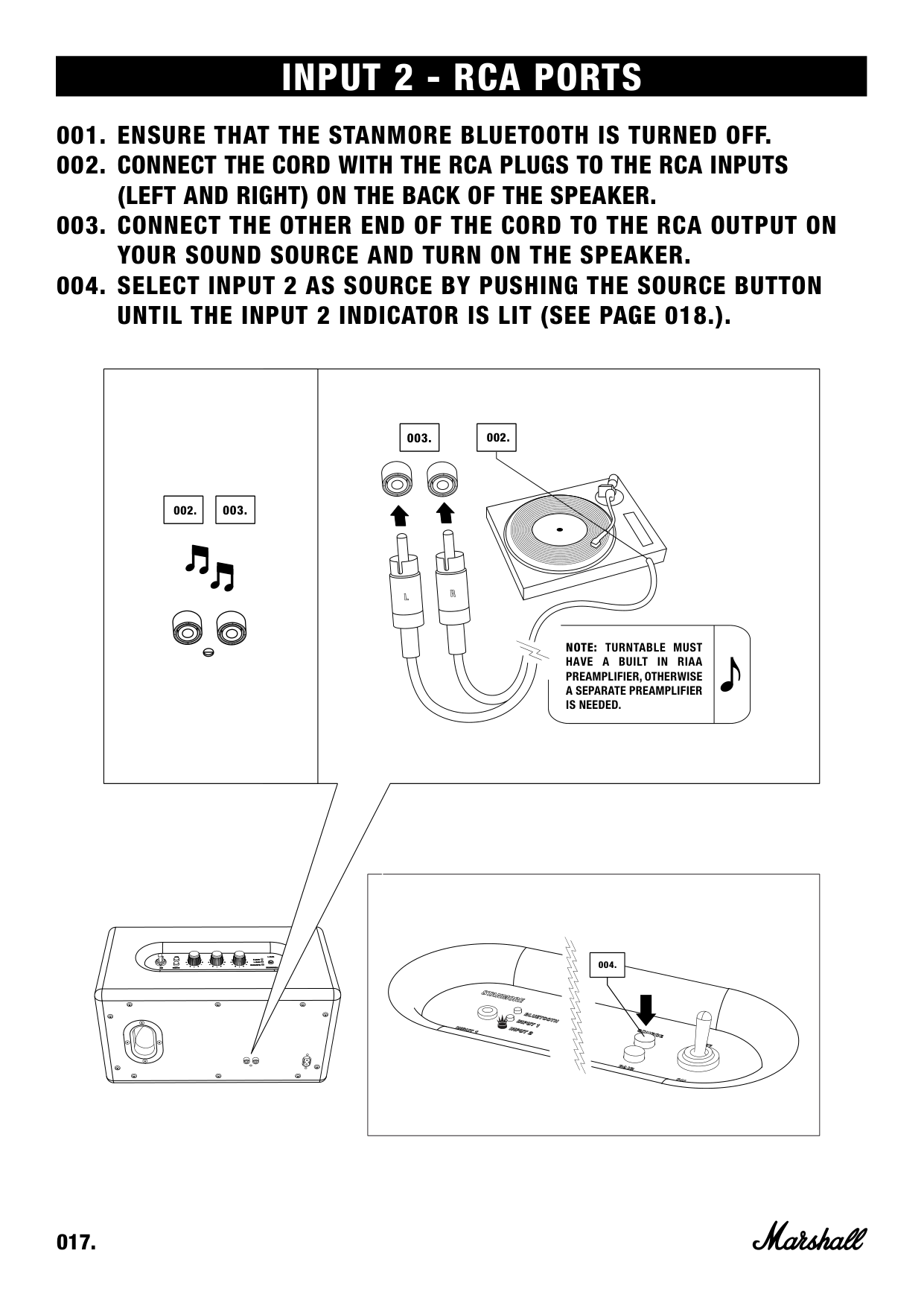
INPUT 2 - RCA PORTS
|002.| |---|
|003.| |---|
|003.| |---|
|002.|002.|
|---|---| | | |
NOTE: TURNTABLE MUST HAVE A BUILT IN RIAA PREAMPLIFIER, OTHERWISE A SEPARATE PREAMPLIFIER IS NEEDED.
||004.|004.| |---|---| | | | | |---|
CHOOSING YOUR SOURCE
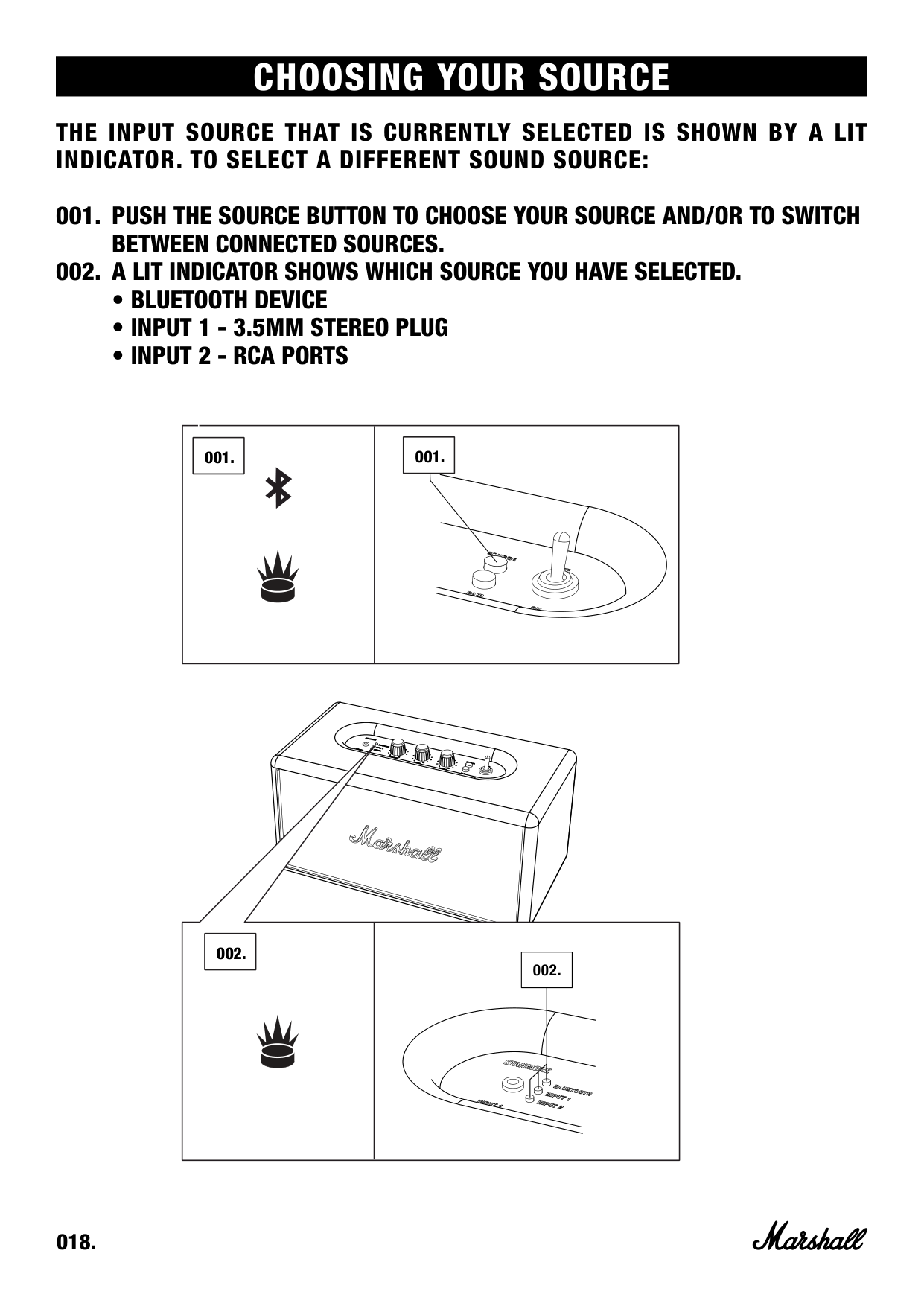
THE INPUT SOURCE THAT IS CURRENTLY SELECTED IS SHOWN BY A LIT INDICATOR. TO SELECT A DIFFERENT SOUND SOURCE:
||0 01 .| |---| ||0 01 .| |---| | |---|---|
|0 02 .| |---|
| | | |---|---|
| | |
ADJUSTING THE VOLUME/BASS/TREBLE SOUND
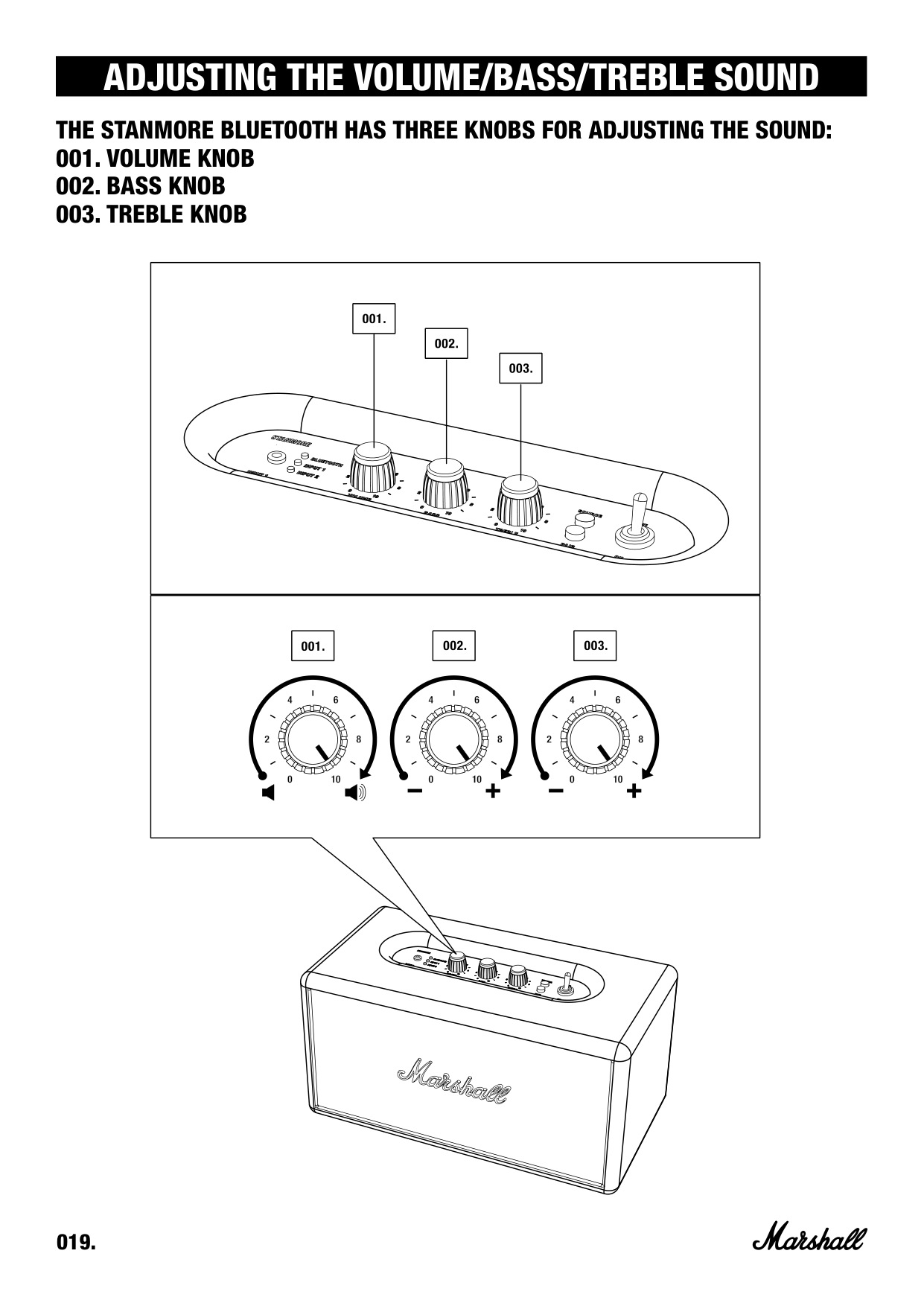
THE STANMORE BLUETOOTH HAS THREE KNOBS FOR ADJUSTING THE SOUND:
| | | |---|---| | | |
TECHNICAL INFORMATION
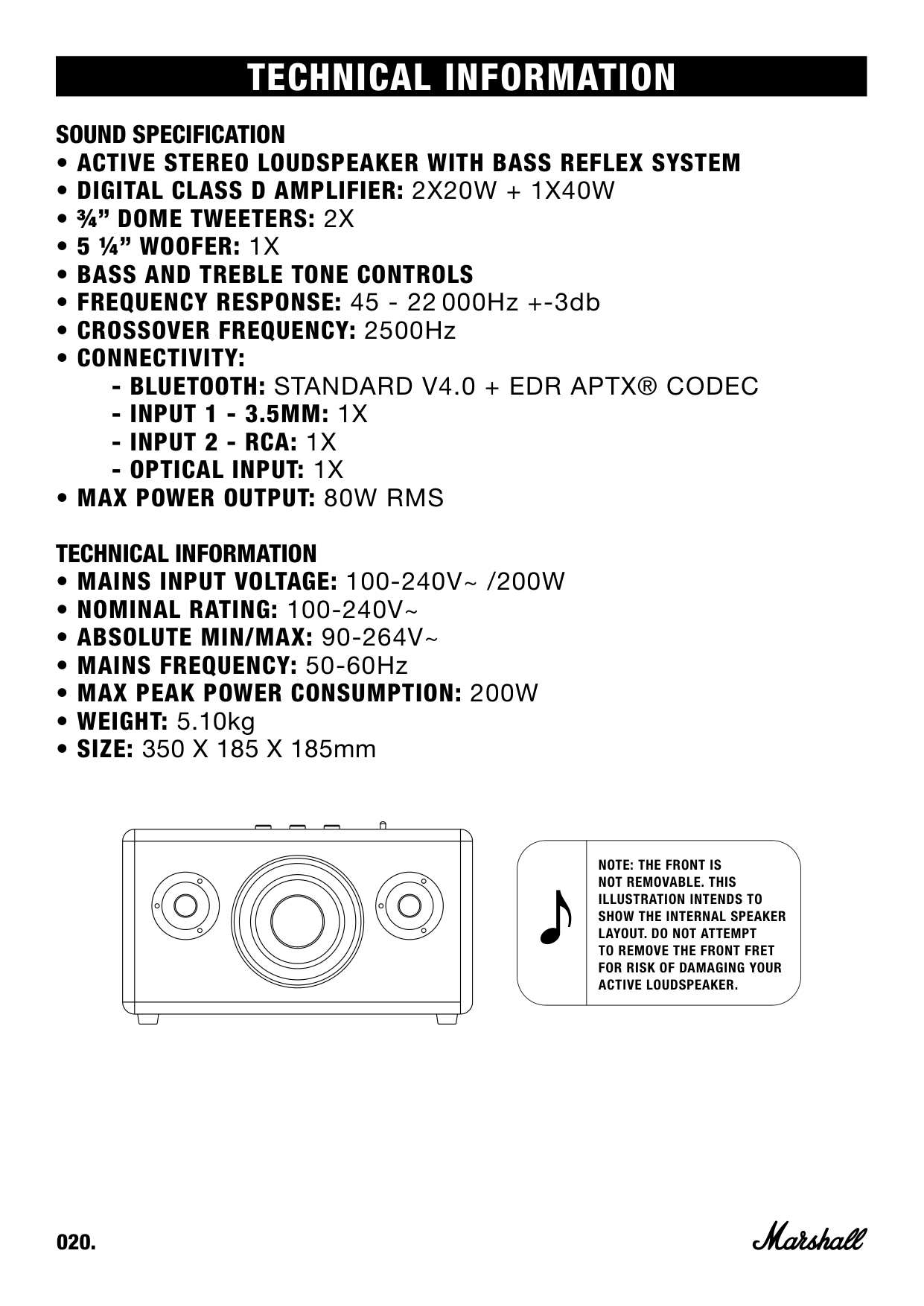
SOUND SPECIFICATION

NOTE: THE FRONT IS NOT REMOVABLE. THIS ILLUSTRATION INTENDS TO SHOW THE INTERNAL SPEAKER LAYOUT. DO NOT ATTEMPT TO REMOVE THE FRONT FRET FOR RISK OF DAMAGING YOUR ACTIVE LOUDSPEAKER.
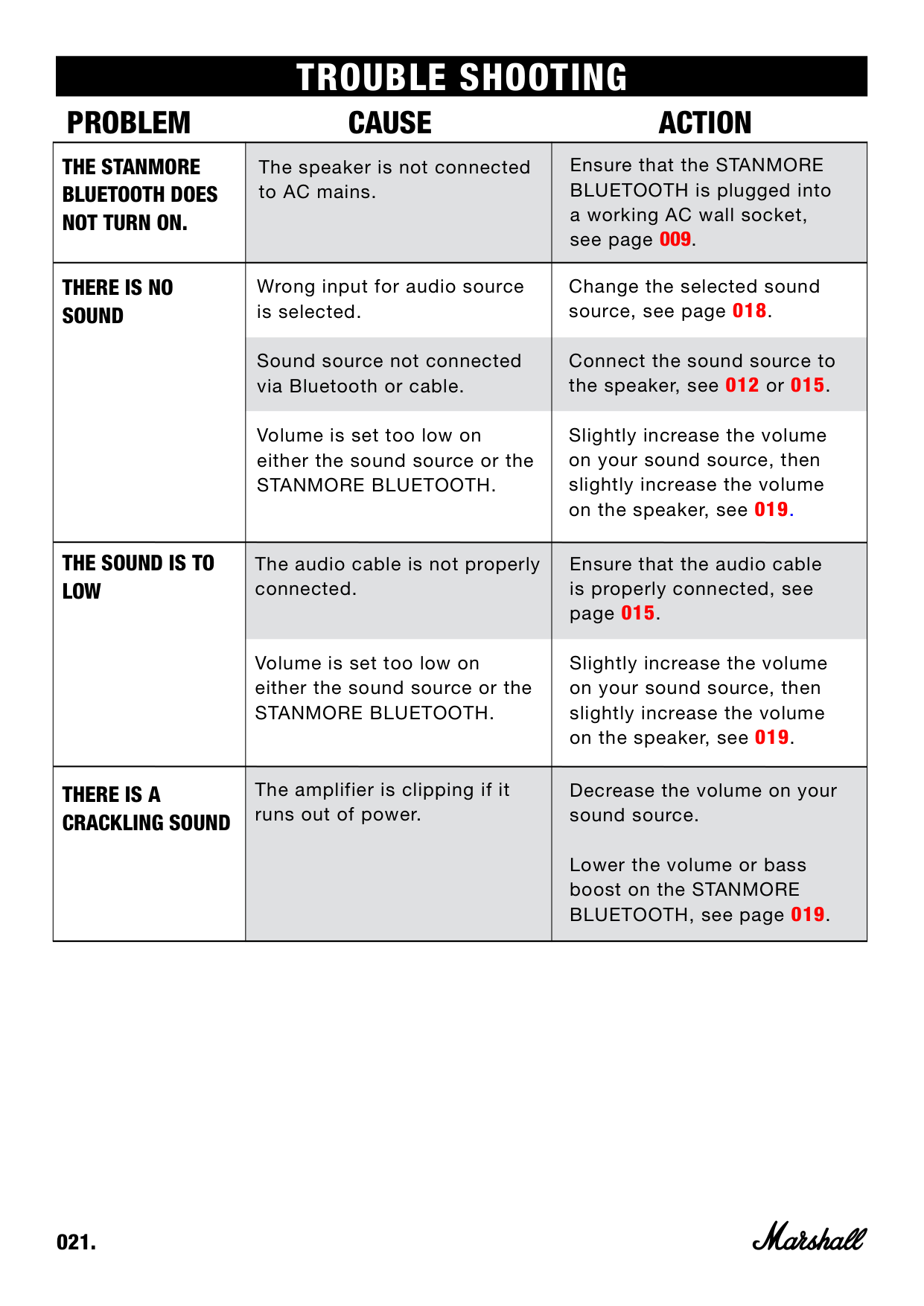
|THE STANMORE BLUETOOTH DOES NOT TURN ON.|The speaker is not connected to AC mains.|Ensure that the STANMORE BLUETOOTH is plugged into a working AC wall socket, see page 009.| |---|---|---| |THERE IS NO SOUND|Wrong input for audio source is selected.
Sound source not connected via Bluetooth or cable.
Volume is set too low on either the sound source or the STANMORE BLUETOOTH.|Change the selected sound source, see page 018.
Connect the sound source to the speaker, see 012 or 015.
Slightly increase the volume on your sound source, then slightly increase the volume on the speaker, see 019.| |THE SOUND IS TO LOW|The audio cable is not properly connected.
Volume is set too low on either the sound source or the STANMORE BLUETOOTH.|Ensure that the audio cable is properly connected, see page 015.
Slightly increase the volume on your sound source, then slightly increase the volume on the speaker, see 019.| |THERE IS A CRACKLING SOUND|The amplifier is clipping if it runs out of power.|Decrease the volume on your sound source.
Lower the volume or bass boost on the STANMORE BLUETOOTH, see page 019.|
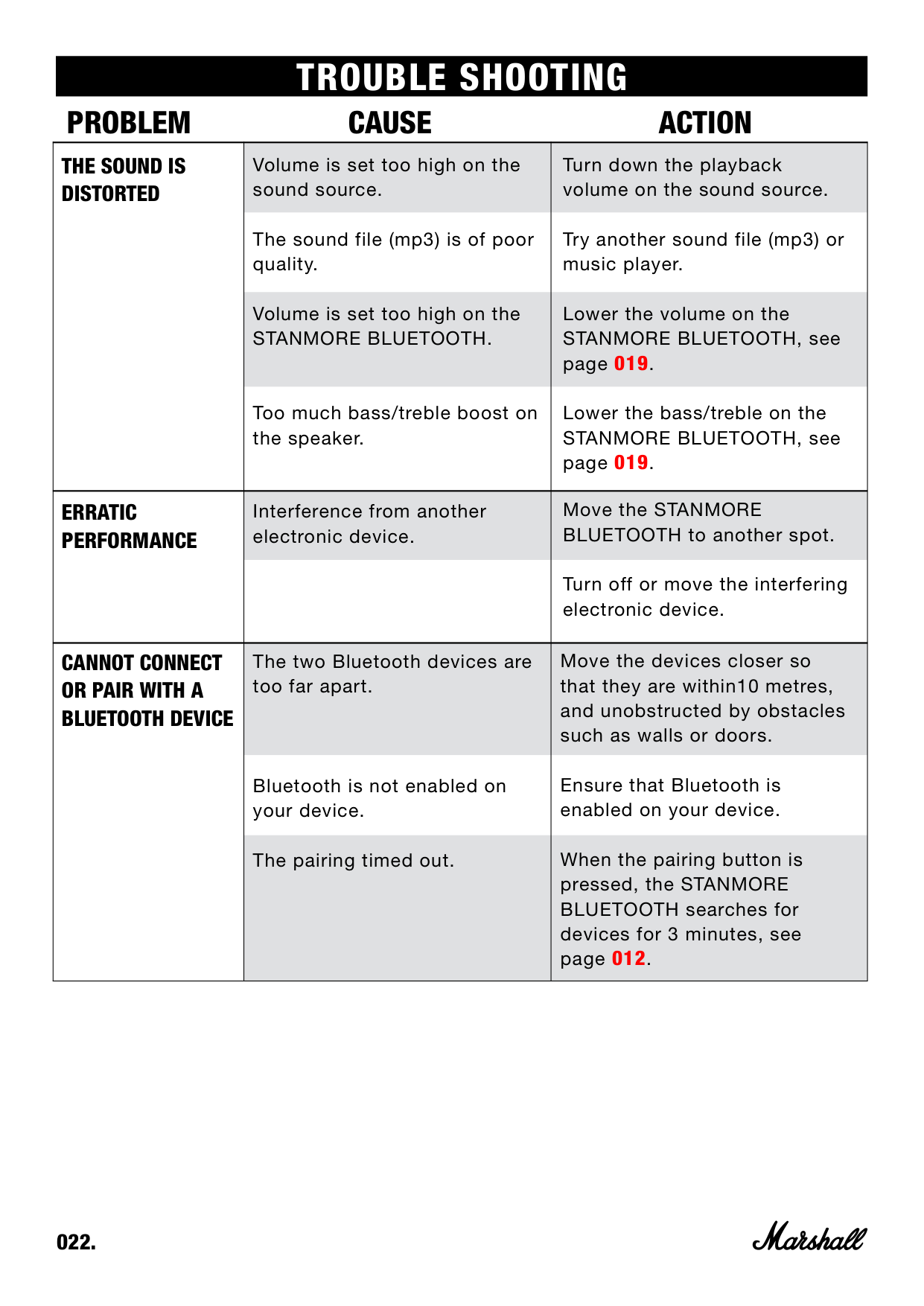
|THE SOUND IS DISTORTED|Volume is set too high on the sound source.
The sound file (mp3) is of poor quality.
Volume is set too high on the STANMORE BLUETOOTH.
Too much bass/treble boost on the speaker.|Turn down the playback volume on the sound source.
Try another sound file (mp3) or music player.
Lower the volume on the STANMORE BLUETOOTH, see page 019.
Lower the bass/treble on the STANMORE BLUETOOTH, see page 019.| |---|---|---| |ERRATIC PERFORMANCE|Interference from another electronic device.|Move the STANMORE BLUETOOTH to another spot.
Turn off or move the interfering electronic device.| |CANNOT CONNECT OR PAIR WITH A BLUETOOTH DEVICE|The two Bluetooth devices are too far apart.
Bluetooth is not enabled on your device.
The pairing timed out.|Move the devices closer so that they are within10 metres, and unobstructed by obstacles such as walls or doors.
Ensure that Bluetooth is enabled on your device.
When the pairing button is pressed, the STANMORE BLUETOOTH searches for devices for 3 minutes, see page 012.|
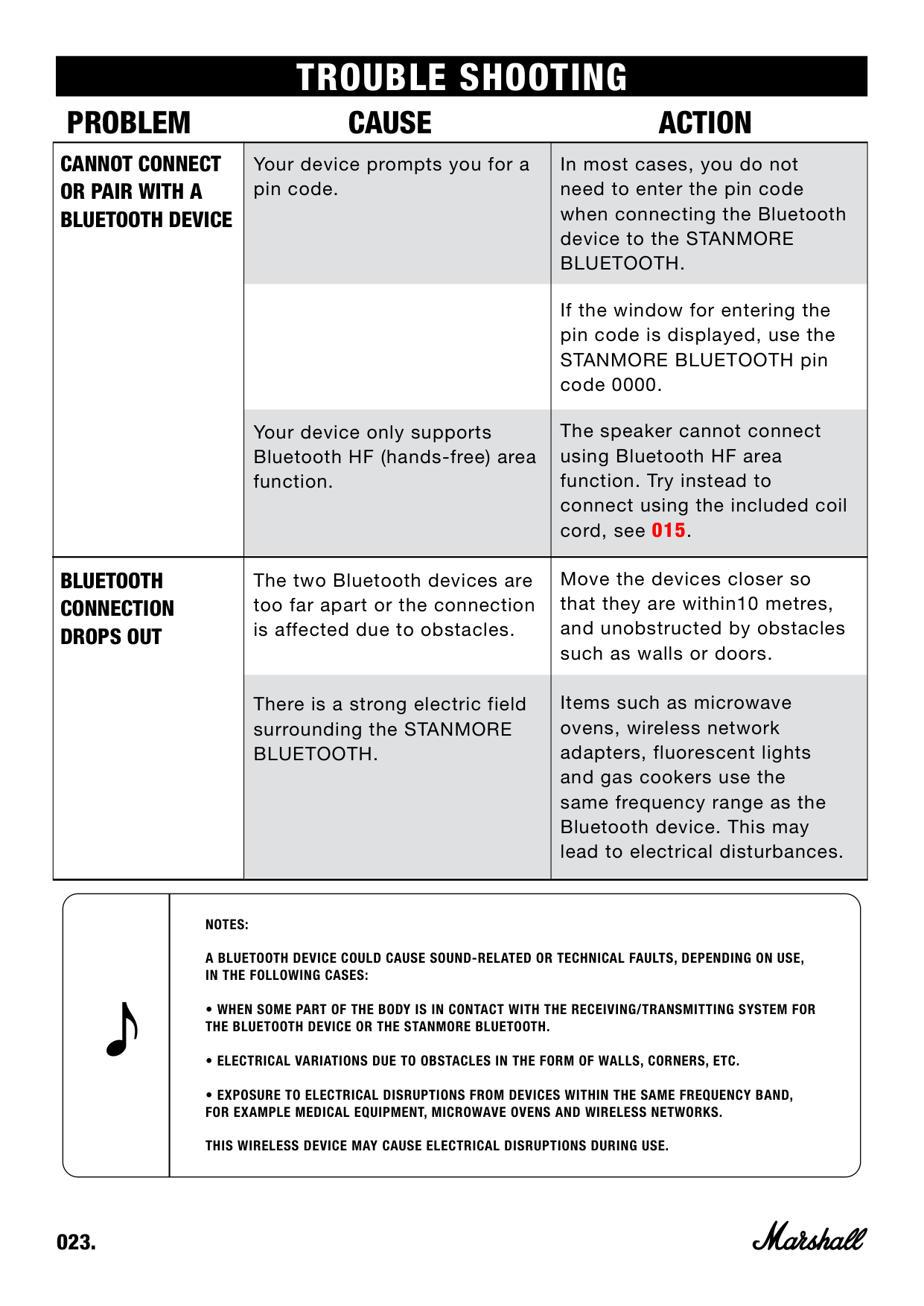
|CANNOT CONNECT OR PAIR WITH A BLUETOOTH DEVICE|Your device prompts you for a pin code.
Your device only supports Bluetooth HF (hands-free) area function.|In most cases, you do not need to enter the pin code when connecting the Bluetooth device to the STANMORE BLUETOOTH.
If the window for entering the pin code is displayed, use the STANMORE BLUETOOTH pin code 0000.
The speaker cannot connect using Bluetooth HF area function. Try instead to connect using the included coil cord, see 015.| |---|---|---| |BLUETOOTH CONNECTION DROPS OUT|The two Bluetooth devices are too far apart or the connection is affected due to obstacles.
There is a strong electric field surrounding the STANMORE BLUETOOTH.|Move the devices closer so that they are within10 metres, and unobstructed by obstacles such as walls or doors.
Items such as microwave ovens, wireless network adapters, fluorescent lights and gas cookers use the same frequency range as the Bluetooth device. This may lead to electrical disturbances.|
NOTES: A BLUETOOTH DEVICE COULD CAUSE SOUND-RELATED OR TECHNICAL FAULTS, DEPENDING ON USE, IN THE FOLLOWING CASES:
|WWW.MARSHALLHEADPHONES.COM| |---|