
Ask AI
— answers from the official manualAnswers from the official manual.
Common questions
Common Questions
20 totalWhat safety measures should I take if my water heater is subjected to overheating or physical damage?
Turn off power and water supply immediately. The unit must be checked by a qualified service technician before it can be used again (Page 8).
What should I do if I get a leak detection alert?
If the LeakSense™ system detects a leak, you will receive an alert via the EcoNet App. Inspect the area around the water heater for signs of leakage, and if a leak is confirmed, shut off the water supply immediately and contact a licensed plumber.
How do I reset the Rheem Gladiator water heater?
Press and hold the reset button located on the thermostat for 10 seconds to reset the water heater. This will restore it to its default operating state.
What does error code E1 mean on my Gladiator?
Error code E1 indicates a Thermistor Error. Check the thermistor connections and wiring, and replace the thermistor if necessary to resolve the issue.
What does error code E2 mean on my Gladiator?
Error code E2 indicates that the High Temperature Limit has been exceeded. Ensure the thermostat is set correctly and reset the high-temperature limit switch to resolve this error.
Why is there no hot water from my Rheem Gladiator?
Check if the water heater is receiving power and verify that the circuit breaker is in the 'on' position. Also ensure the thermostat is set to the desired temperature. If the issue persists after checking these items, contact Rheem customer service.
Show 14 more questions
How do I adjust the water temperature on my Gladiator?
What is the LeakSense™ feature and how fast does it detect leaks?
What are the available capacities for the Rheem Gladiator water heater?
How do I connect my Rheem Gladiator to Wi-Fi?
What warranty coverage does the Rheem Gladiator include?
How do I clear a leak alarm on my Rheem Gladiator water heater?
What does it mean if my water heater displays a four-blink error code?
How do I increase the water temperature on my Rheem Gladiator?
How do I set up Wi-Fi for my Rheem Gladiator water heater?
What should I check if my water heater is not producing hot water?
How do I drain my water heater?
How often should I check and service my Rheem Gladiator water heater?
What should I do if my water heater produces a popping sound from the relief valve?
How do I factory reset my Rheem Gladiator water heater?
Full Manual
28 pages
##### Use & Care Manual
With Installation Instructions for the Installer
Electric Residential
Water Heaters
With Electronic Control
| | | | |---|---|---| | | | | | | | |
The purpose of this manual is twofold: one, to provide the installer with the basic directions and recommendations for the proper installation and adjustment of the water heater; and two, for the owner–operator, to explain the features, operation, safety precautions, maintenance and troubleshooting of the water heater. This manual also includes a parts list.
It is imperative that all persons who are expected to install, operate or adjust this water heater read the instructions carefully so they may understand how to perform these operations. If you do not understand these instructions or any terms within it, seek professional advice.
Any questions regarding the operation, maintenance, service or warranty of this water heater should be directed to the seller from whom it was purchased. If additional information is required, refer to the section on “If you need service.”
Do not destroy this manual. Please read carefully and keep in a safe place for future reference.
Recognize this symbol as an indication of Important Safety Information!
!
® LISTED
786H AP20070 Rev 1
Safety Information Safety Precautions ....... 3, 4
############### Installation Instructions
Location ................. 5 Water Connections ........ 6 Electrical Connections. . . . . . 8
Operating Instructions Safety Controls .......... 12 Water Temperature ........13 Electronic Control Operation . . . . . . . . . . 14 - 17 Setup Wi-Fi ..............18 Error Codes for Electronic Control .........19
############### Care and Cleaning
Draining ................ 20 Maintenance ............. 20 Extended Shut-Down ..... 21
Troubleshooting Tips Before You Call For Service .............. 22 Local Mode ............. 23
Customer Service Parts List ................ 24 Wiring Diagram ......... 26 If You Need Service ................. 28
########### FOR YOUR RECORDS
Write the model and serial numbers here:
# You can find them on a label on the appliance.
Staple sales slip or cancelled check here.
Proof of the original purchase date is needed to obtain service under the warranty.
########### READ THIS MANUAL
Inside you will find many helpful hints on how to use and maintain your water heater properly. Just a little preventive care on your part can save you a great deal of time and money over the life of your water heater.
You’ll find many answers to common problems in the Before You Call For Service section. If you review our chart of Troubleshooting Tips first, you may not need to call for service at all.
########### READ THE SAFETY INFORMATION
Your safety and the safety of others are very important. There are many important safety messages in this manual and on your appliance. Always read and obey all safety messages.
This is the safety alert symbol. Recognize this symbol as an indication of Important Safety Information! This symbol alerts you to potential hazards that can kill or hurt you and others.
!
All safety messages will follow the safety alert symbol and either the word “DANGER”, “WARNING”, “CAUTION” or “NOTICE”. These words mean:
! DANGER An imminently hazardous situationthat will result in death or serious
injury.
! WARNING A potentially hazardous situation that could result in death or serious injury and/or damage to property.
! CAUTION A potentially hazardous situation that may result in minor or moderate injury.
NOTICE: Attention is called to observe a specified procedure or maintain a specific condition.
DANGER!
########## WATER TEMPERATURE SETTING
############# Safety and energy conservation are factors to be considered when selecting the water temperature setting of water heater’s thermostat. Water temperatures above 125°F can cause severe burns or death from scalding. Be sure to read and follow the warnings outlined on the label pictured below. This label is also located on the water heater near the thermostat access panel.
DANGER!
######### HOT
BURN
Water temperature over 125°F can cause severe burns instantly or death from scalds.
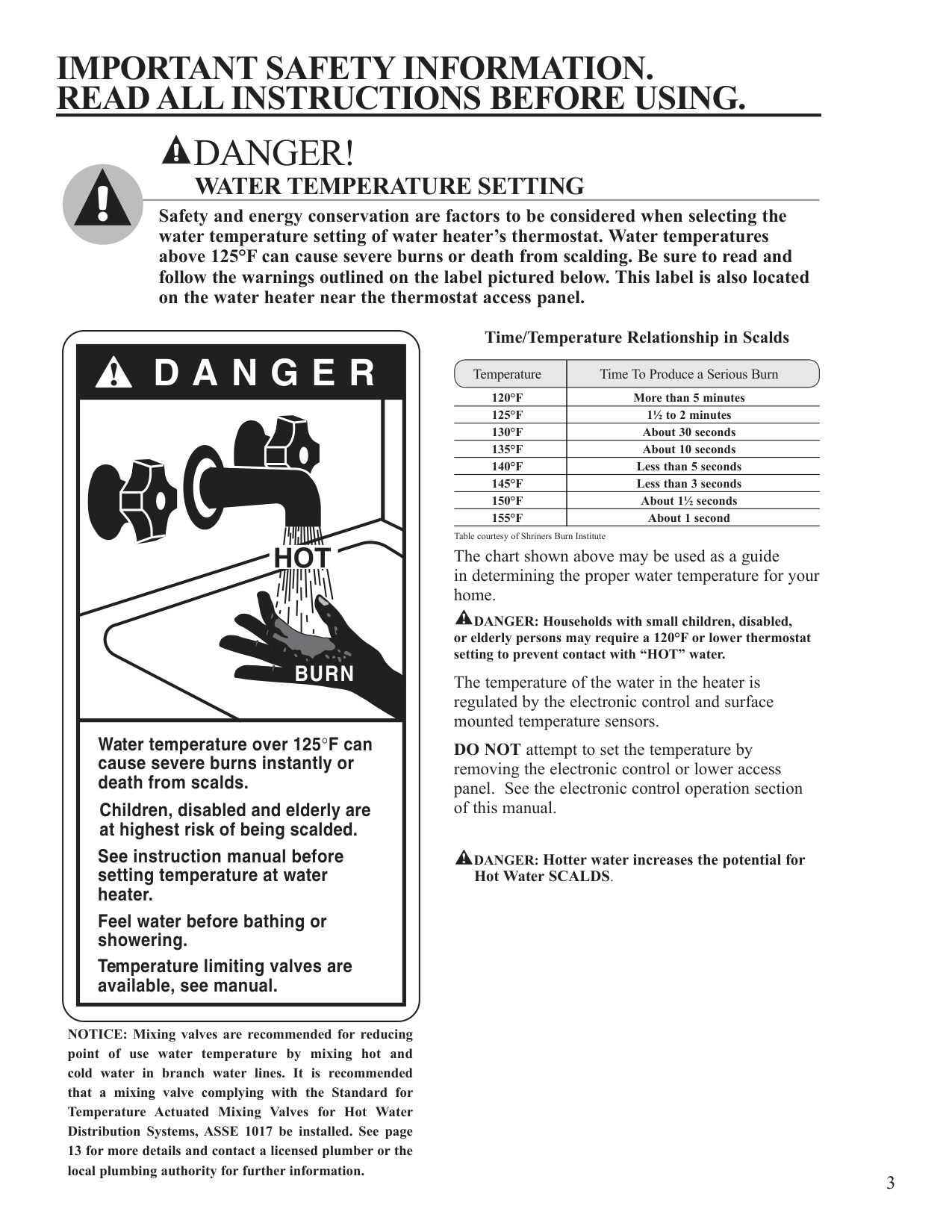
Children, disabled and elderly are at highest risk of being scalded.
See instruction manual before setting temperature at water heater.
Feel water before bathing or showering.
Temperature limiting valves are available, see manual.
############### Time/Temperature Relationship in Scalds
Temperature Time To Produce a Serious Burn
120°F More than 5 minutes 125°F 1½ to 2 minutes 130°F About 30 seconds 135°F About 10 seconds 140°F Less than 5 seconds 145°F Less than 3 seconds 150°F About 1½ seconds 155°F About 1 second
Table courtesy of Shriners Burn Institute The chart shown above may be used as a guide in determining the proper water temperature for your home.
! DANGER: Households with small children, disabled, or elderly persons may require a 120°F or lower thermostat setting to prevent contact with “HOT” water.
The temperature of the water in the heater is regulated by the electronic control and surface mounted temperature sensors.
DO NOT attempt to set the temperature by removing the electronic control or lower access panel. See the electronic control operation section of this manual.
! DANGER: Hotter water increases the potential for Hot Water SCALDS.
NOTICE: Mixing valves are recommended for reducing point of use water temperature by mixing hot and cold water in branch water lines. It is recommended that a mixing valve complying with the Standard for Temperature Actuated Mixing Valves for Hot Water Distribution Systems, ASSE 1017 be installed. See page 13 for more details and contact a licensed plumber or the local plumbing authority for further information.
WARNING! For your safety, the information in this manual must be followed to minimize the risk of fire or explosion, electric shock, or to prevent property damage, personal injury, or loss of life.
Be sure to read and understand the entire Use and Care Manual before attempting to install or operate this water heater. It may save you time and cost. Pay particular attention to the Safety Instructions. Failure to follow these warnings could result in serious bodily injury or death. Should you have problems understanding the instructions in this manual, or have any questions, STOP, and get help from a qualified service technician, or the local electric utility.
########### FOR INSTALLATIONS IN THE STATE OF CALIFORNIA
California Law requires that residential water heaters must be braced, anchored or strapped to resist falling or horizontal displacement due to earthquake motions. For residential water heaters up to 52 gallon capacity, a brochure with generic earthquake bracing instructions can be obtained from: Office of the State Architect, 400 P Street, Sacramento, CA 95814 or you may call 916-324-5315 or ask a water heater dealer.
However, applicable local codes shall govern installation. For residential water heaters of a capacity greater than 52 gallons, consult the local building jurisdiction for acceptable bracing procedures.
########### SAFETY PRECAUTIONS
Have the installer show you the location of the circuit breaker and how to shut it off if necessary. Turn off the circuit breaker if the water heater has been subjected to overheating, fire, flood, physical damage or if the ECO fails to shut off.
● DO NOT attempt to repair or replace any part of your water heater unless it is specifically recommended in this manual. All other servicing should be referred to a qualified technician.
READ AND FOLLOW THIS SAFETY INFORMATION CAREFULLY.
SAVE THESE INSTRUCTIONS
####### Installing the water heater.
The location chosen for the water heater must take into consideration the following:
############ Local Installation Regulations
This water heater must be installed in accordance with these instructions, local codes, utility codes, utility company requirements or, in the absence of local codes, the latest edition of the National
Electrical Code. It is available from some local libraries or can be purchased from the National Fire Protection Association, Batterymarch Park, Quincy, MA 02269 as booklet ANSI/NFPA 70.
NOTICE: DO NOT install the water heater in attics where the temperature may exceed 150°F.
Location Locate the water heater in a clean dry area as near as practical to the area of greatest heated water demand. Long uninsulated hot water lines can waste energy and water. Place the water heater in such a manner that the upper electronic control and the lower access panels can be removed to permit inspection and servicing such as removal of elements or checking controls. The water heater and water lines should be protected from freezing temperatures. DO NOT install the water heater in outdoor, unprotected areas. Make certain the floor underneath the water heater is strong enough to sufficiently support the weight of the water heater once it is filled with water.
!
CAUTION: The water heater should not be located in an area where leakage of the tank or connections will result in damage to the area adjacent to it or to lower floors of the structure. Where such areas cannot be avoided, it is recommended that a suitable catch pan, adequately drained, be installed under the water heater.
This water heater is supplied with a water detection system. It is recommended that the water heater be placed in a suitable catch pan. See water sensor section for further information.
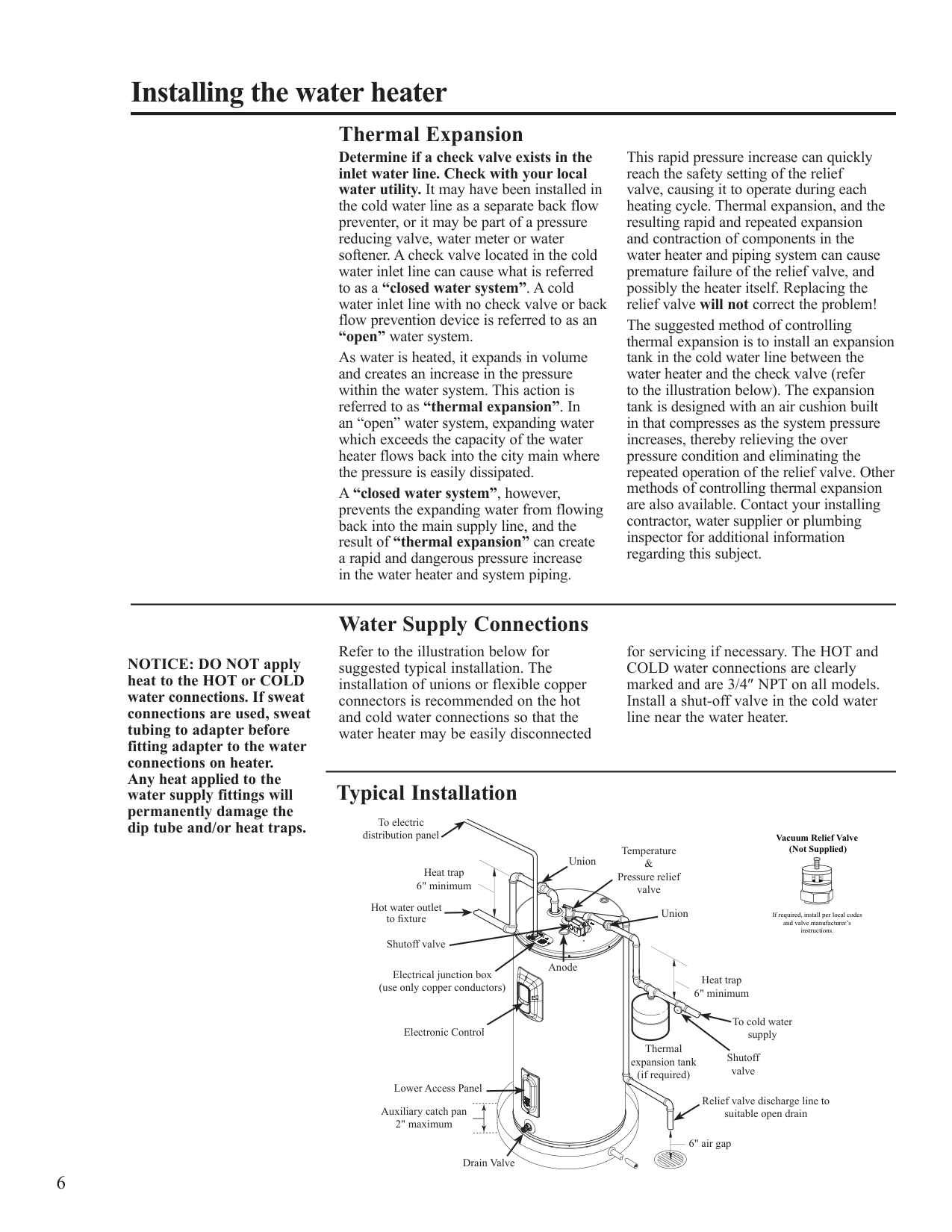
B
A To open drain, line
should be at least 3/4″ ID and pitched for proper drainage.
################# NOTICE: Auxiliary catch pan MUST conform to local codes.
Catch Pan Kits are available from the store where the water heater was purchased, or any water heater distributor.
############ Inspect Shipment
Inspect the water heater for possible damage. Check the markings on the rating plate of the water heater to be certain the
power supply corresponds to the water heater requirements.
Thermal Expansion Determine if a check valve exists in the inlet water line. Check with your local water utility. It may have been installed in the cold water line as a separate back flow preventer, or it may be part of a pressure reducing valve, water meter or water softener. A check valve located in the cold water inlet line can cause what is referred to as a “closed water system”. A cold water inlet line with no check valve or back flow prevention device is referred to as an “open” water system. As water is heated, it expands in volume and creates an increase in the pressure within the water system. This action is referred to as “thermal expansion”. In an “open” water system, expanding water which exceeds the capacity of the water heater flows back into the city main where the pressure is easily dissipated. A “closed water system”, however, prevents the expanding water from flowing back into the main supply line, and the result of “thermal expansion” can create a rapid and dangerous pressure increase in the water heater and system piping.
This rapid pressure increase can quickly reach the safety setting of the relief valve, causing it to operate during each heating cycle. Thermal expansion, and the resulting rapid and repeated expansion and contraction of components in the water heater and piping system can cause premature failure of the relief valve, and possibly the heater itself. Replacing the relief valve will not correct the problem! The suggested method of controlling thermal expansion is to install an expansion tank in the cold water line between the water heater and the check valve (refer to the illustration below). The expansion tank is designed with an air cushion built in that compresses as the system pressure increases, thereby relieving the over pressure condition and eliminating the repeated operation of the relief valve. Other methods of controlling thermal expansion are also available. Contact your installing contractor, water supplier or plumbing inspector for additional information regarding this subject.
############ Water Supply Connections
Refer to the illustration below for suggested typical installation. The installation of unions or flexible copper connectors is recommended on the hot and cold water connections so that the water heater may be easily disconnected
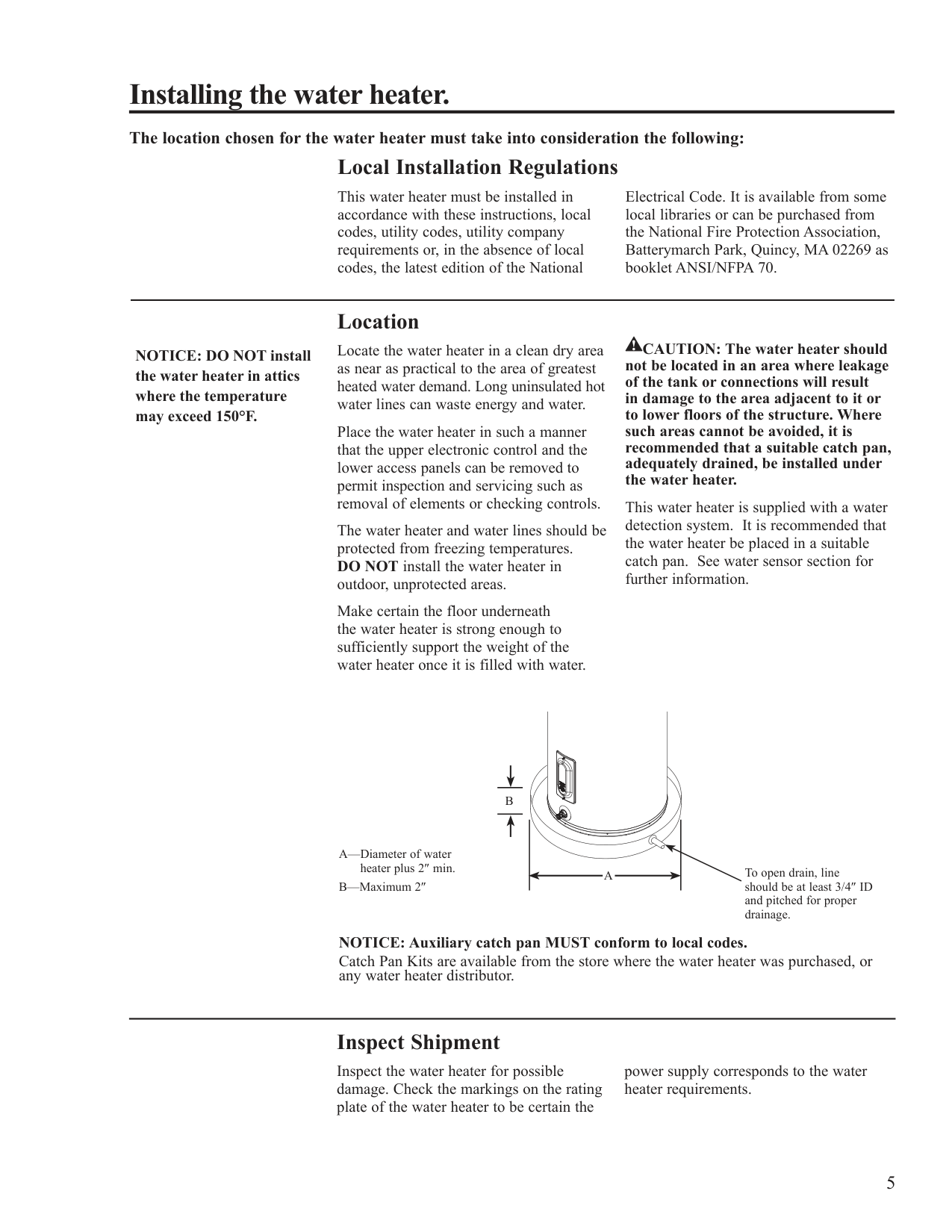
for servicing if necessary. The HOT and COLD water connections are clearly marked and are 3/4″ NPT on all models. Install a shut-off valve in the cold water line near the water heater.
NOTICE: DO NOT apply heat to the HOT or COLD water connections. If sweat connections are used, sweat tubing to adapter before fitting adapter to the water connections on heater. Any heat applied to the water supply fittings will permanently damage the dip tube and/or heat traps.
############ Typical Installation
To electric distribution panel
################## Vacuum Relief Valve (Not Supplied)
Temperature & Pressure relief valve
Union
Heat trap 6" minimum
Hot water outlet to fixture Shutoff valve
Union
If required, install per local codes and valve manufacturer’s instructions.
Anode
Electrical junction box (use only copper conductors)
Heat trap 6" minimum
To cold water supply
Electronic Control
Thermal expansion tank (if required)
Shutoff valve
Lower Access Panel
Relief valve discharge line to suitable open drain
Auxiliary catch pan 2" maximum
6" air gap
Drain Valve
A new combination temperature and pressure relief valve, complying with the Standard for Relief Valves and Automatic Gas Shut-Off Devices for Hot Water Supply Systems, ANSI Z21.22, is supplied and must be installed in the opening provided and marked for the purpose on the water heater. No valve of any type should be installed between the relief valve and the tank. Local codes shall govern the installation of relief valves.
! WARNING: The pressure rating of the relief valve must not exceed 150 PSI, the maximum working pressure of the water heater as marked on the rating plate.
############ Relief Valve
The BTUH rating of the relief valve must not be less than the input rating of the water heater as indicated on the rating label located on the front of the heater (1 watt=3.412 BTUH).
Connect the outlet of the relief valve to a suitable open drain so that the discharge water cannot contact live electrical parts or persons and to eliminate potential water damage.
Piping used should be of a type approved for hot water distribution. The discharge line must be no smaller than the outlet of the valve and must pitch downward from the valve to allow complete drainage (by gravity) of the relief valve and discharge line. The end of the discharge line should not be threaded or concealed and should be protected from freezing. No valve of any type, restriction or reducer coupling should be installed in the discharge line.
! WARNING: The tank must be full of water before heater is turned on. The water heater warranty does not cover damage or failure resulting from operation with an empty or partially empty tank.
############ To Fill the Water Heater
Make certain the drain valve is completely closed.
Open the shut-off valve in the cold water supply line.
Open each hot water faucet slowly to allow the air to vent from the water heater and piping.
A steady flow of water from the hot water faucet(s) indicates a full water heater.
############ Condensation
Condensation can form on the tank when it is first filled with water. Condensation might also occur with a heavy water draw and very cold inlet water temperature.
This condition is not unusual, and will disappear after the water becomes heated. If, however, the condensation continues, examine the piping and fittings for possible leaks.
############ Electrical Connections
Ground screw
The branch circuit wiring should include either:
A separate branch circuit with copper conductors, overcurrent protective device and suitable disconnecting means must be provided by a qualified electrician.
Metallic conduit or metallic sheathed cable approved for use as a grounding conductor and installed with fittings approved for the purpose.
ARNING
W
All wiring must conform to local codes or latest edition of National Electrical Code ANSI/NFPA 70.
Junction box cover
Conduit connector
Non-metallic sheathed cable, metallic conduit or metallic sheathed cable not approved for use as a ground conductor shall include a separate conductor for grounding. It should be attached to the ground terminals of the water heater and the electrical distribution box.
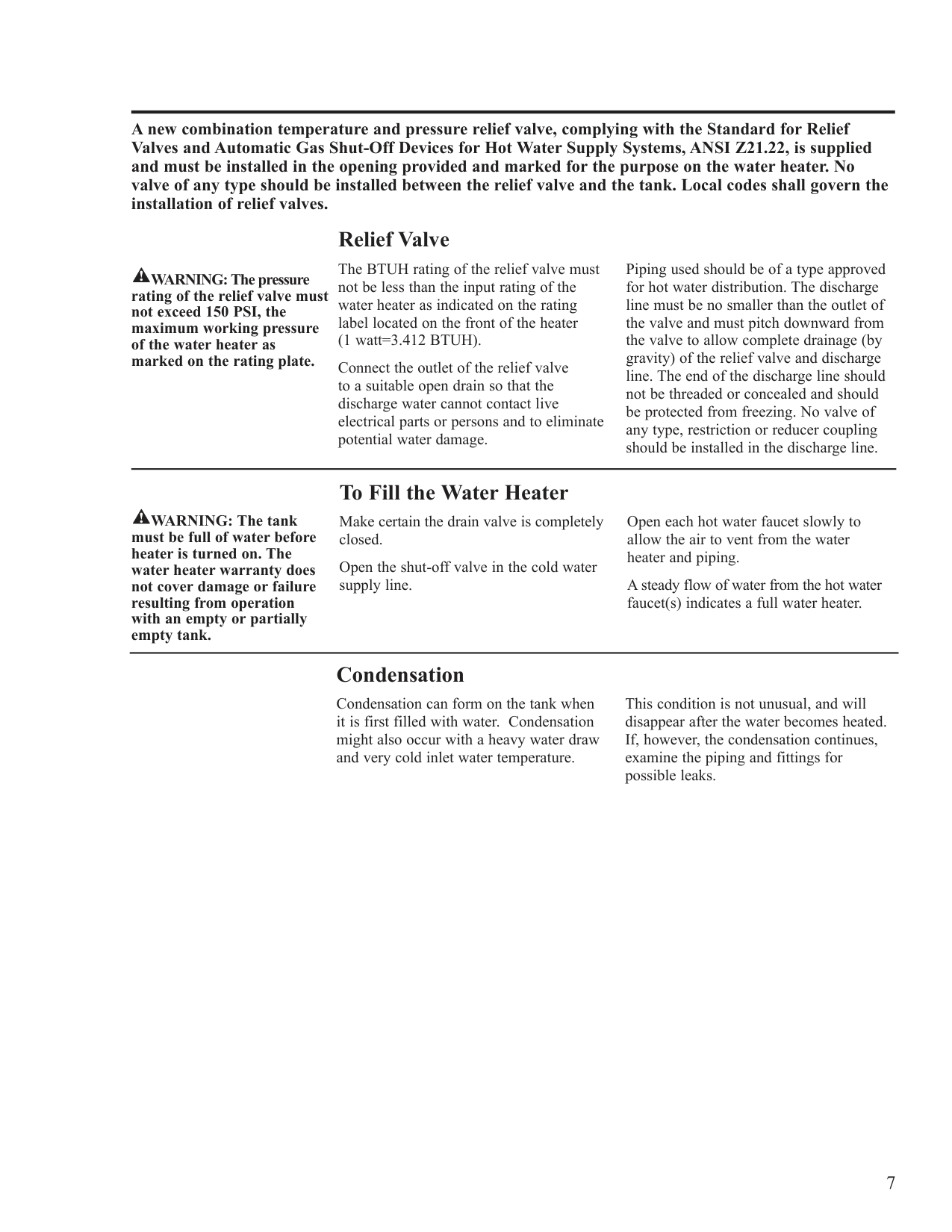
The water heater is completely wired to the junction box inside jacket at the top front of the water heater. An opening for 1/2″ or 3/4″ electrical fitting is provided for field wiring connections.
Wire connections
Water heater junction box.
################ !
CAUTION: The presence of water in the piping and water heater does not provide sufficient conduction for a ground. Non-metallic piping, dielectric unions, flexible connectors etc. can cause the water heater to be electrically isolated.
The voltage requirements and wattage load for the water heater are specified on the rating plate on the front of the water heater.
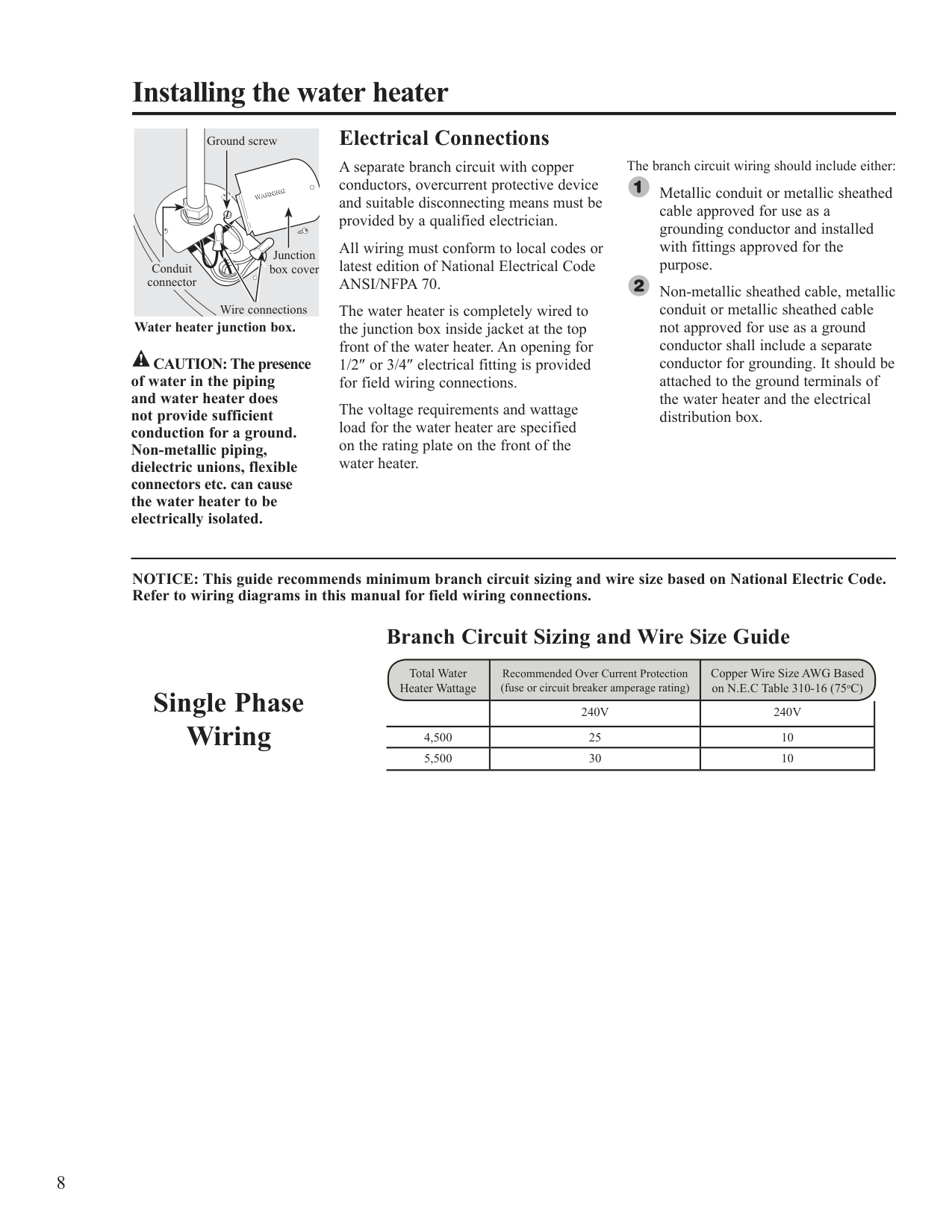
NOTICE: This guide recommends minimum branch circuit sizing and wire size based on National Electric Code. Refer to wiring diagrams in this manual for field wiring connections.
######## Single Phase Wiring
Branch Circuit Sizing and Wire Size Guide
Total Water Heater Wattage
Copper Wire Size AWG Based on N.E.C Table 310-16 (75oC)
Recommended Over Current Protection (fuse or circuit breaker amperage rating)
240V 240V
! WARNING: If local codes require external application of insulation blanket kits the manufacturer’s instructions included with the kit must be carefully followed.
############ Insulation Blankets
Insulation blankets, available to the general public, for external use on electric water heaters are not necessary. The purpose of an insulation blanket is to reduce the standby heat loss encountered with storage tank heaters. This water heater meets or exceeds the National Appliance Energy Conservation Act standards with respect to insulation and standby loss requirements making an insulation blanket unnecessary.
The manufacturer’s warranty does not cover any damage or defect caused by installation, attachment or use of any type of energy saving or other unapproved devices (other than those authorized by the manufacturer) into, onto or in conjunction with the water heater. The use of unauthorized energy saving devices may shorten the life of the water heater and may endanger life and property.
The manufacturer disclaims any responsibility for such loss or injury resulting from the use of such unauthorized devices.
! CAUTION: If local codes require the application of an external insulation blanket to this water heater, pay careful attention to the following so as not to restrict the proper function and operation of the water heater:
DO NOT cover the operating or warning labels attached to the water heater or attempt to relocate them on the exterior of insulation blanket.
DO NOT apply insulation to the top of the water heater. This could interfere with the safe operation of the electrical junction box.
DO NOT cover the jacket access panel(s) to the thermostat(s) and heating element(s), or pressure and temperature relief valve.
Inspect the insulation blanket frequently.
############ Hot and Cold Pipe Insulation Installation
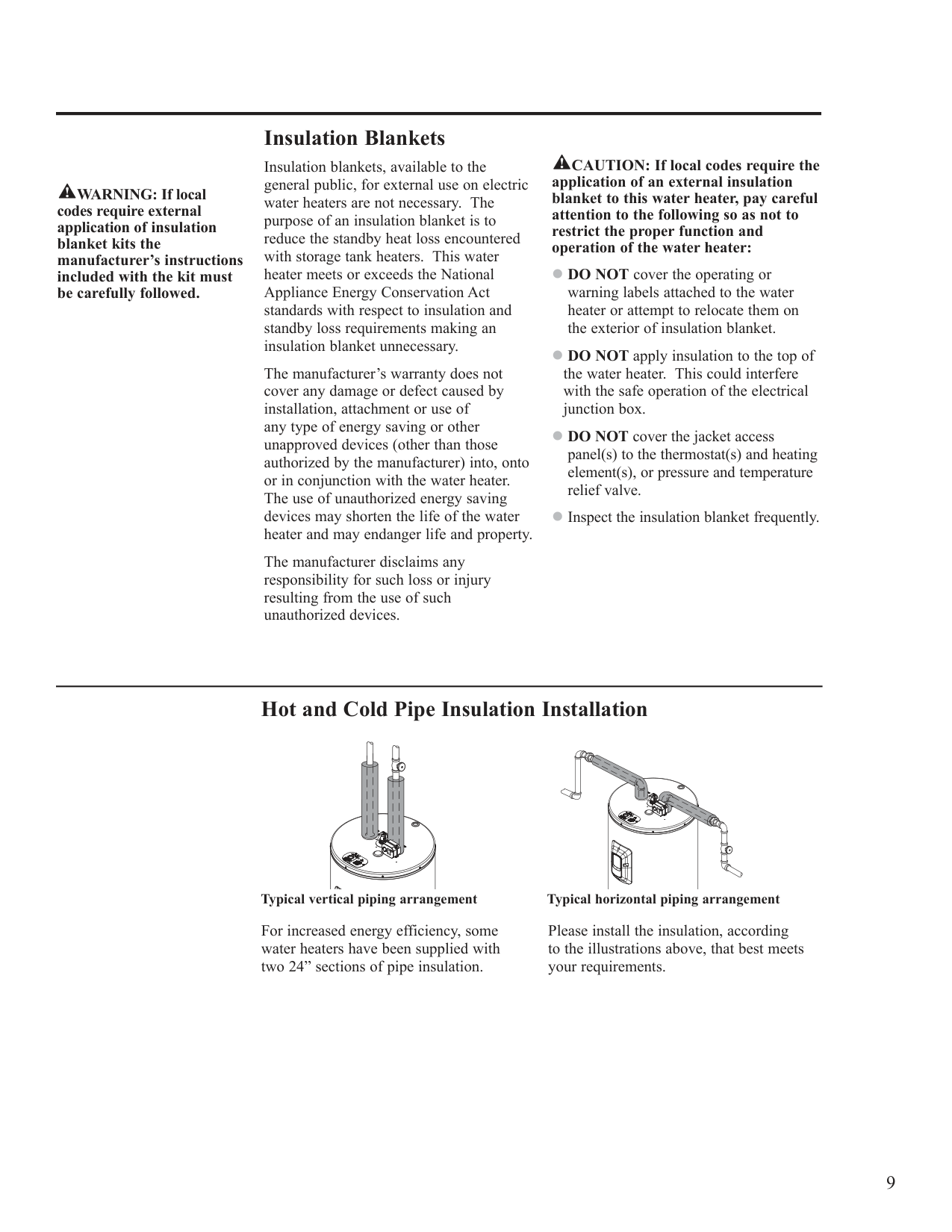
Typical vertical piping arrangement Typical horizontal piping arrangement
For increased energy efficiency, some water heaters have been supplied with two 24” sections of pipe insulation.
Please install the insulation, according to the illustrations above, that best meets your requirements.
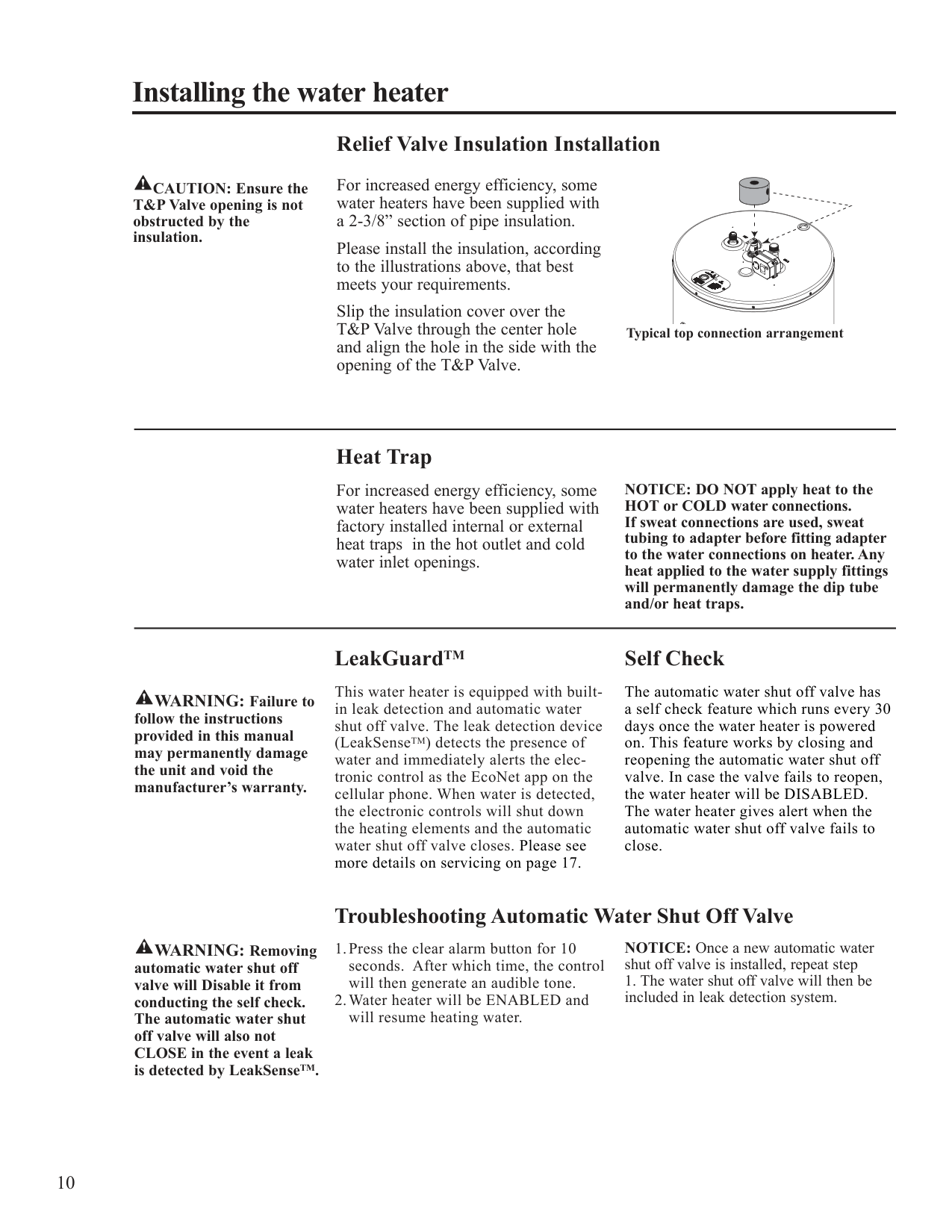
############ Relief Valve Insulation Installation
For increased energy efficiency, some water heaters have been supplied with a 2-3/8” section of pipe insulation.
! CAUTION: Ensure the T&P Valve opening is not obstructed by the insulation.
Please install the insulation, according to the illustrations above, that best
|meets your requirements. Slip the insulation cover over the T&P Valve through the center hole and align the hole in the side with the opening of the T&P Valve.
Typical|top connection arrangeme
|t| |---|---|---| |Heat Trap
For increased energy efficiency, some water heaters have been supplied with factory installed internal or external
NOTI HOT o If swea|E: DO NOT apply heat COLD water connectio connections are used, s|to the s. eat|
tubing to adapter before fitting adapter to the water connections on heater. Any heat applied to the water supply fittings will permanently damage the dip tube and/or heat traps.
heat traps in the hot outlet and cold water inlet openings.
! WARNING: Failure to follow the instructions provided in this manual may permanently damage the unit and void the manufacturer’s warranty.
############ LeakGuardTM
This water heater is equipped with builtin leak detection and automatic water shut off valve. The leak detection device (LeakSenseTM) detects the presence of water and immediately alerts the electronic control as the EcoNet app on the cellular phone. When water is detected, the electronic controls will shut down the heating elements and the automatic water shut off valve closes. Please see more details on servicing on page 17.
############ Self Check
The automatic water shut off valve has a self check feature which runs every 30 days once the water heater is powered on. This feature works by closing and reopening the automatic water shut off valve. In case the valve fails to reopen, the water heater will be DISABLED. The water heater gives alert when the automatic water shut off valve fails to close.
! WARNING: Removing automatic water shut off valve will Disable it from conducting the self check. The automatic water shut off valve will also not CLOSE in the event a leak is detected by LeakSenseTM.
############ Troubleshooting Automatic Water Shut Off Valve
NOTICE: Once a new automatic water shut off valve is installed, repeat step
####### Installation Checklist
❑Close to area of heated water demand.
❑ Indoors and protected from freezing
temperatures.
❑ Area free of flammable vapors.
❑ Provisions made to protect area from water
damage.
❑ Sufficient room to service heater.
❑ Water heater completely filled with water.
❑ Air purged from water heater and piping. ❑ Water connections tight and free of leaks.
❑ Temperature and Pressure Relief Valve properly installed and discharge line run to open drain.
❑ Discharge line protected from freezing.
❑ Power Supply voltage agrees with water
heater rating plate.
❑ Branch circuit wire and fusing or circuit
breaker of proper size.
❑ Electrical connections tight and unit properly
grounded.
####### Operating the water heater
CAUTION: Hydrogen gas can be produced in a hot water system served by this water heater that has not been used for a long period of time (generally two weeks or more). HYDROGEN GAS IS EXTREMELY FLAMMABLE!! To dissipate such gas and to reduce risk of injury, it is recommended that the hot water faucet be opened for several minutes at the kitchen sink before using any electrical appliance connected to the hot water system. If hydrogen is present, there will be an unusual sound such as air escaping through the pipe as the water begins to flow. DO NOT smoke or use an open flame near the faucet at the time it is open.
############ Safety Precautions
Do turn off power to water heater if it has been subjected to over heating, fire, flood, physical damage.
If there is any difficulty in understanding or following the Operating Instructions or the Care and Cleaning section, it is recommended that a qualified person or serviceman perform the work.
DO NOT turn on water heater unless it is filled with water.
DO NOT turn on water heater if cold water supply shut-off valve is closed.
WARNING: If the water heater has been subjected to flood, fire, or physical damage, turn off power and water to the water heater.
DO NOT operate the water heater again until it has been thoroughly checked by qualified service personnel.
############ Safety Controls
The water heater is equipped with a temperature sensor and temperature limiting control (ECO) that is located above the upper heating element in contact with the tank surface. If for any reason the water temperature becomes excessively high, the temperature limiting control (ECO) breaks the power circuit to the heating element. Once the control opens, it must be reset manually.
CAUTION: The cause of the high temperature condition must be investigated by qualified service technician and corrective action must be taken before placing the water heater in service again.
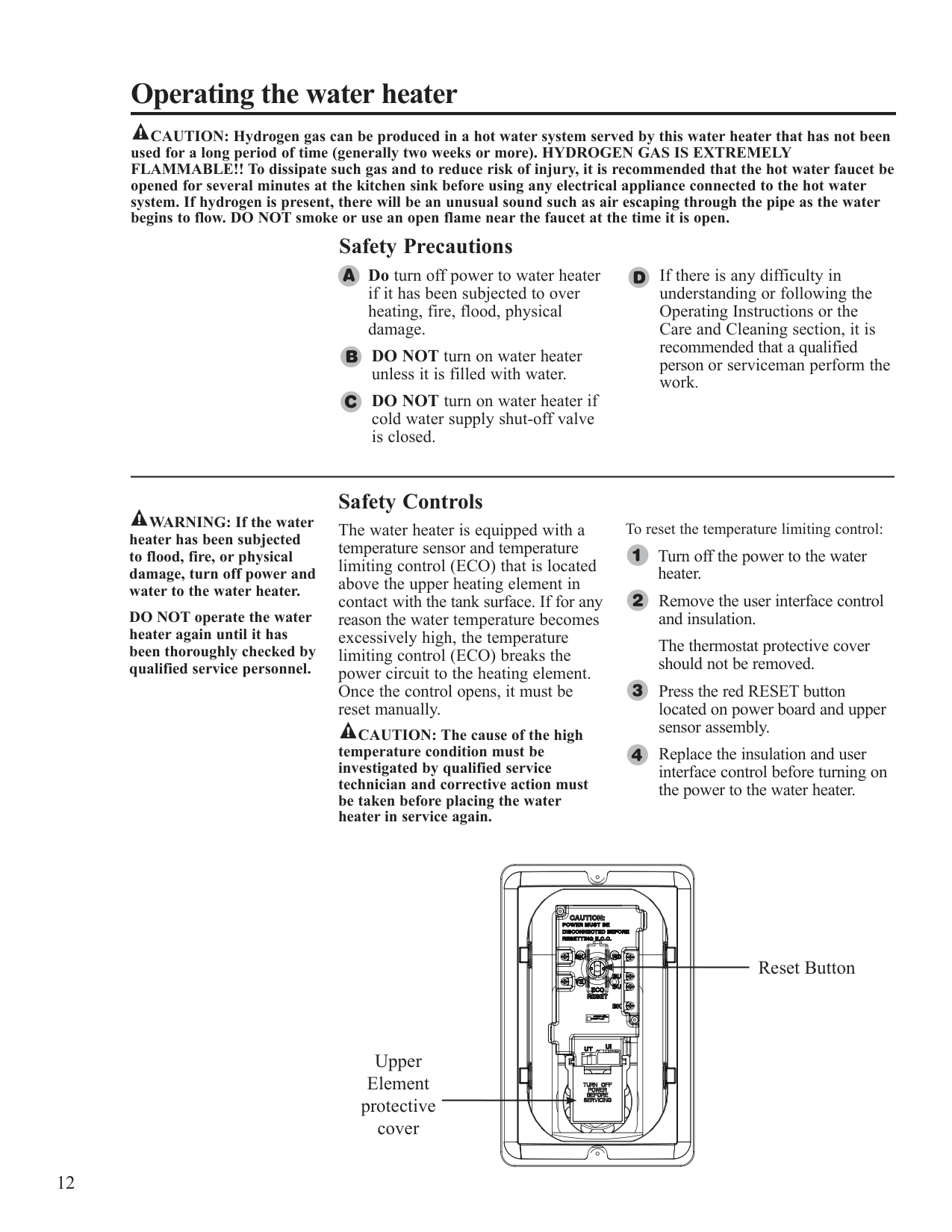
To reset the temperature limiting control:
Turn off the power to the water heater.
Remove the user interface control and insulation.
The thermostat protective cover should not be removed.
Press the red RESET button located on power board and upper sensor assembly.
Replace the insulation and user interface control before turning on the power to the water heater.
Reset Button
Upper Element protective cover
| | | | |---|---|---|
####### Water Temperature
! DANGER: There is a hot water scald potential if the thermostat is set too high. Households with small children, disabled, or elderly persons may require a 120°F or lower thermostat setting to prevent contact with HOT water.
############ Water Temperature Set Point
Safety and energy conservation are factors to be considered when selecting the water temperature setting of the water heater’s thermostat(s). The lower the temperature setting, the greater the savings in energy and operating costs.
Water temperatures above 125°F can cause severe burns or death from scalding. Be sure to read and follow the warnings outlined in this manual and on the label on the water heater. This label is located on the water heater above the lower access panel.
Mixing valves are recommended for reducing point of use water temperature by mixing hot and cold water in branch water lines. It is recommended that a mixing valve complying with the Standard for Temperature Actuated Mixing Valves for Hot Water Distribution Systems, ASSE 1017 be installed. See page 3 for more details and contact a licensed plumber or the local plumbing authority for further information.
The electronic control allows the water temperature to be set from 110°F to 150°F.
The Performance Platinum residential electric water heater incorporates a VACATION mode. This sets the temperature setting to a predetermined lower thermostat setting.
The chart below may be used as a guide in determining the proper water temperature for your home.
Refer to "Programming the Electronic Control Instructions" on page 14.
############ Time/Temperature Relationship in Scalds
Temperature Time To Produce a Serious Burn
120°F More than 5 minutes 125°F 11/2 to 2 minutes 130°F About 30 seconds 135°F About 10 seconds 140°F Less than 5 seconds 145°F Less than 3 seconds 150°F About 11/2 seconds 155°F About 1 second
Table courtesy of Shriners Burn Institute
############ Setting the Water Temperature
SERVICE NEEDED
SERVICE NEEDED
CLEAR ALARM
WiFi SETUP
CLEAR ALARM
WiFi SETUP
SET POINT (°F)
SET POINT (°F)
VACATION 110
120
130 140 150
VACATION 110
120
130 140 150
UNLOCK/LOCK
UNLOCK/LOCK
(3 SEC)
(3 SEC)
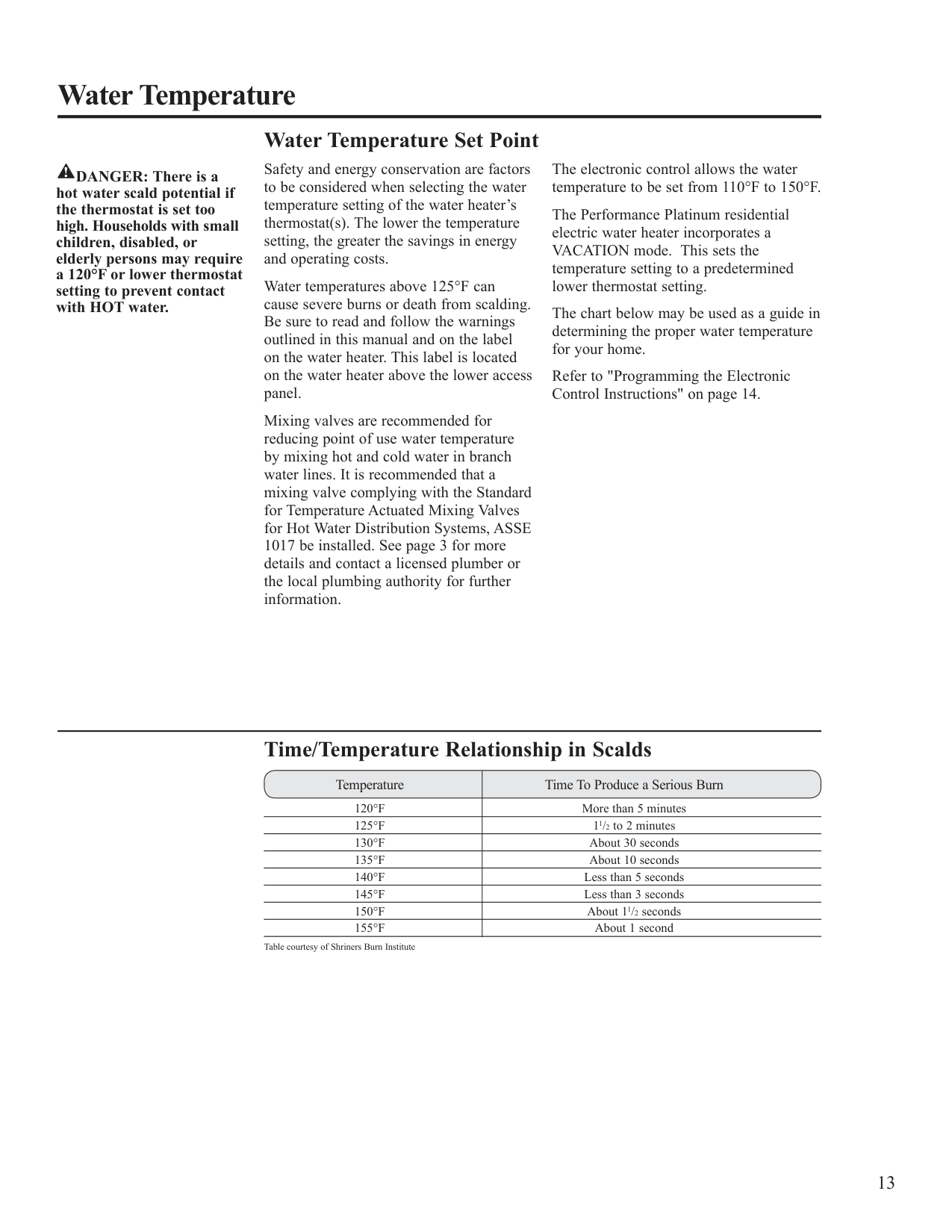
When power is applied, the water heater will be in a Disabled mode. This means that the water heater is not heating the water and only the power LED is illuminated. Press the RIGHT arrow until the desired temperature is shown.
DANGER: Hotter water increases the potential for Hot Water SCALDS.
############ Changing The Water Temperature
SERVICE NEEDED
################# Reduce Water Temperature:
CLEAR ALARM
WiFi SETUP
Press LEFT arrow until the desired temperature is shown.
SET POINT (°F)
VACATION 110
120
130 140 150
################# Increase Water Temperature:
Press RIGHT arrow until the desired temperature is shown.
UNLOCK/LOCK
(3 SEC)
NOTE: A change in temperature is in increments of 5°F unless the Rheem EcoNet® app is used.
or
SERVICE NEEDED
SERVICE NEEDED
CLEAR ALARM
WiFi SETUP
CLEAR ALARM
WiFi SETUP
SET POINT (°F)
SET POINT (°F)
VACATION 110
120
130 140 150
VACATION 110
120
130 140 150
UNLOCK/LOCK
UNLOCK/LOCK
(3 SEC)
(3 SEC)
115°F 125°F
############ Locking The Keypad
SERVICE NEEDED
SERVICE NEEDED
CLEAR ALARM
WiFi SETUP
CLEAR ALARM
WiFi SETUP
SET POINT (°F)
SET POINT (°F)
VACATION 110
120
130 140 150
VACATION 110
120
130 140 150
UNLOCK/LOCK
UNLOCK/LOCK
(3 SEC)
(3 SEC)
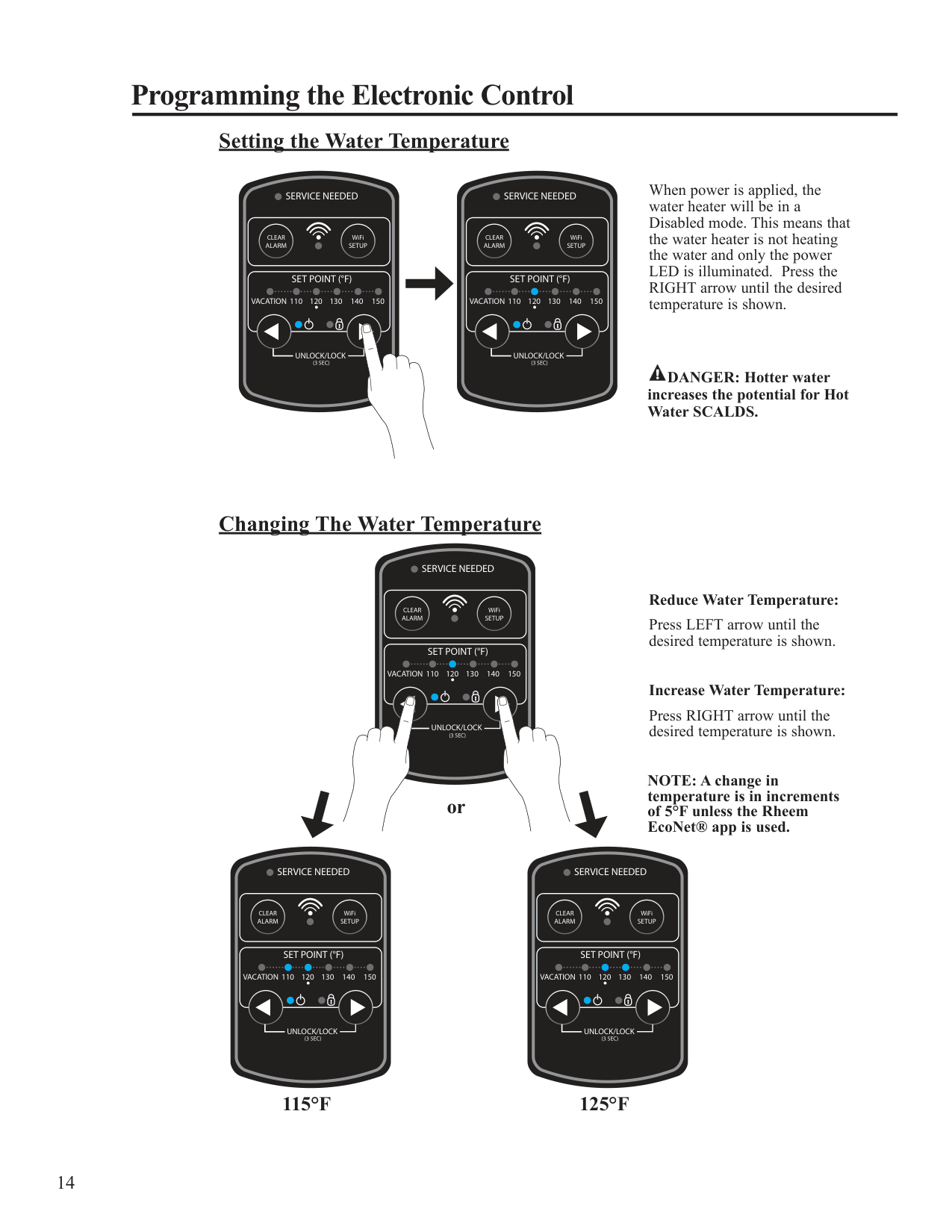
Press and hold both arrow buttons for 3 seconds to LOCK the control. Locking will reduce chance of unintentional changes in water temperature.
############ Unlocking The Keypad
SERVICE NEEDED
SERVICE NEEDED
CLEAR ALARM
WiFi SETUP
CLEAR ALARM
WiFi SETUP
SET POINT (°F)
SET POINT (°F)
VACATION 110
120
130 140 150
VACATION 110
120
130 140 150
UNLOCK/LOCK
UNLOCK/LOCK
(3 SEC)
(3 SEC)
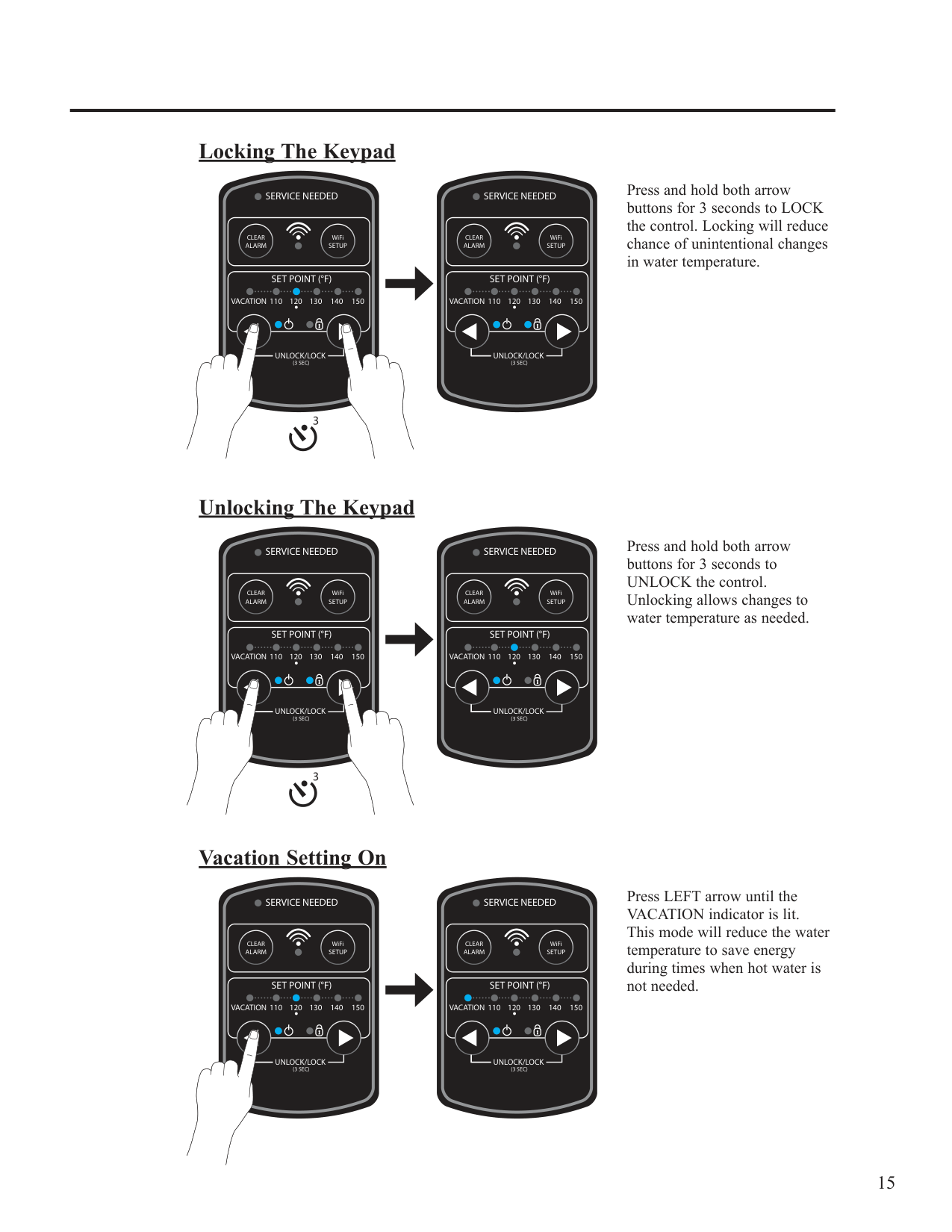
Press and hold both arrow buttons for 3 seconds to UNLOCK the control. Unlocking allows changes to water temperature as needed.
############ Vacation Setting On
SERVICE NEEDED
SERVICE NEEDED
CLEAR ALARM
WiFi SETUP
CLEAR ALARM
WiFi SETUP
SET POINT (°F)
SET POINT (°F)
VACATION 110
120
130 140 150
VACATION 110
120
130 140 150
UNLOCK/LOCK
UNLOCK/LOCK
(3 SEC)
(3 SEC)
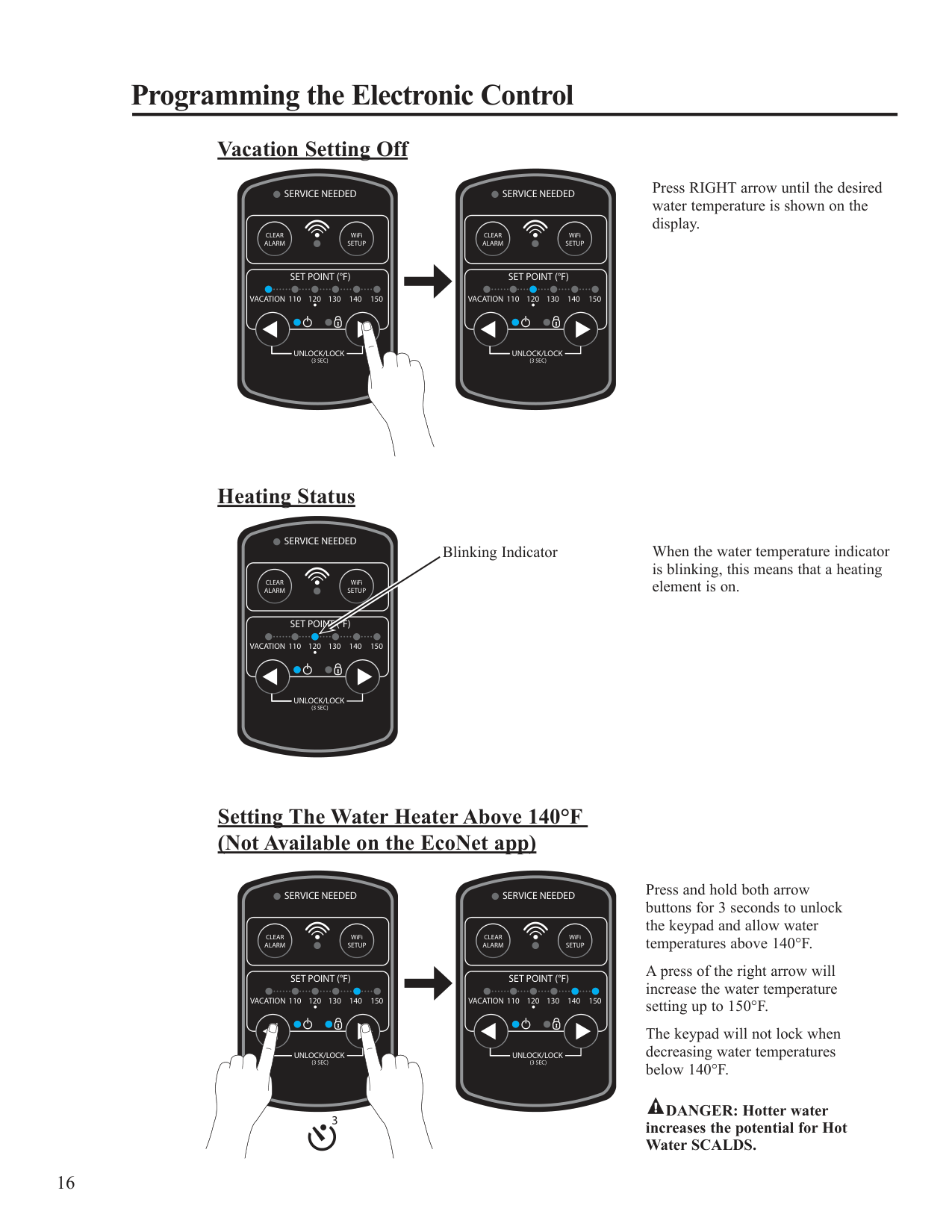
Press LEFT arrow until the VACATION indicator is lit. This mode will reduce the water temperature to save energy during times when hot water is not needed.
############ Vacation Setting Off
Press RIGHT arrow until the desired water temperature is shown on the display.
SERVICE NEEDED
SERVICE NEEDED
CLEAR ALARM
WiFi SETUP
CLEAR ALARM
WiFi SETUP
SET POINT (°F)
SET POINT (°F)
VACATION 110
120
130 140 150
VACATION 110
120
130 140 150
UNLOCK/LOCK
UNLOCK/LOCK
(3 SEC)
(3 SEC)
############ Heating Status
SERVICE NEEDED
Blinking Indicator
CLEAR ALARM
WiFi SETUP
SET POINT (°F)
VACATION 110
120
130 140 150
UNLOCK/LOCK
(3 SEC)
When the water temperature indicator is blinking, this means that a heating element is on.
############ Setting The Water Heater Above 140°F (Not Available on the EcoNet app)
SERVICE NEEDED
SERVICE NEEDED
CLEAR ALARM
WiFi SETUP
CLEAR ALARM
WiFi SETUP
SET POINT (°F)
SET POINT (°F)
VACATION 110
120
130 140 150
VACATION 110
120
130 140 150
UNLOCK/LOCK
UNLOCK/LOCK
(3 SEC)
(3 SEC)
Press and hold both arrow buttons for 3 seconds to unlock the keypad and allow water temperatures above 140°F.
A press of the right arrow will increase the water temperature setting up to 150°F.
The keypad will not lock when decreasing water temperatures below 140°F.
################# DANGER: Hotter water increases the potential for Hot Water SCALDS.
WARNING: The use of heat to dry the residual moisture from a spill or leak is NOT PERMITTED.
############ 24-Hour Leak Detection Override
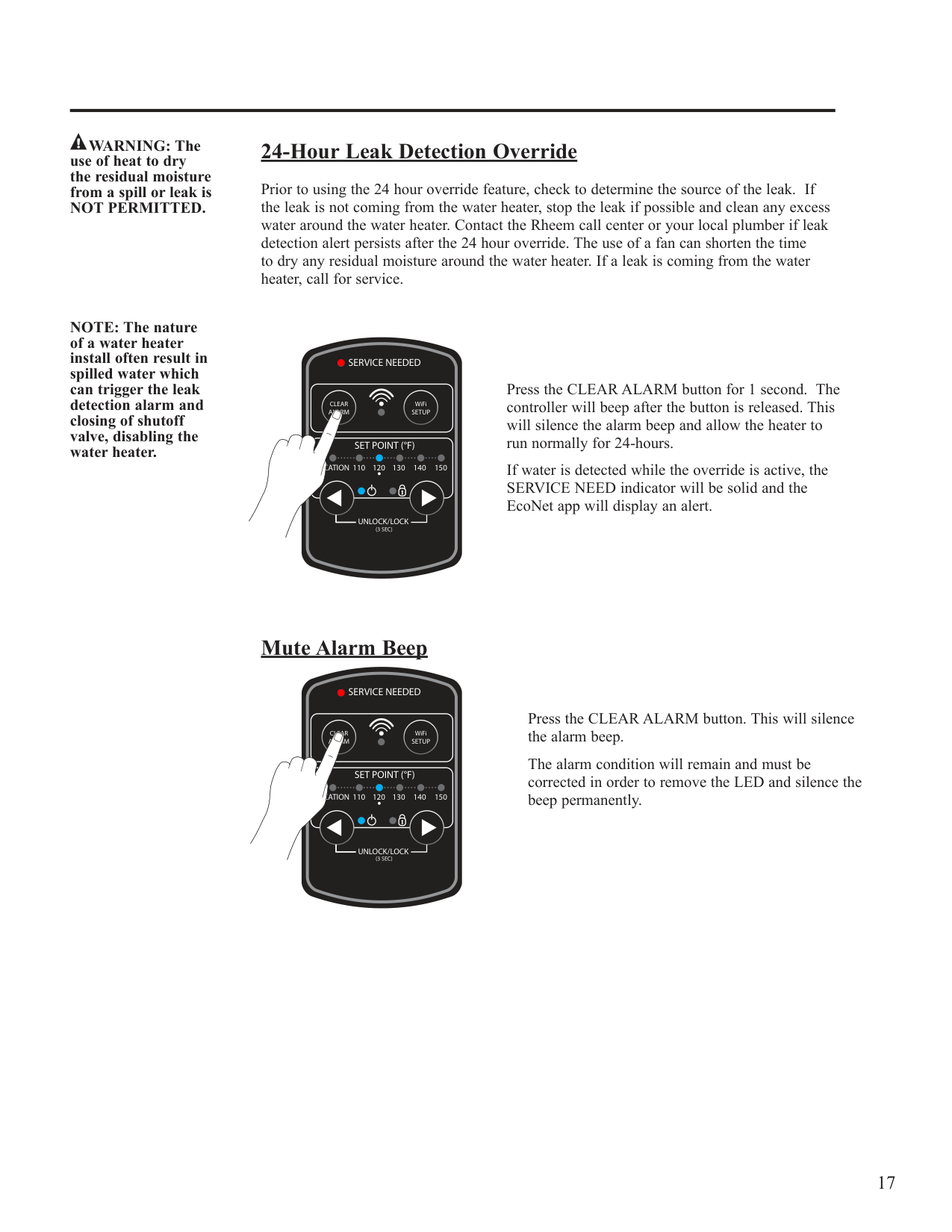
Prior to using the 24 hour override feature, check to determine the source of the leak. If the leak is not coming from the water heater, stop the leak if possible and clean any excess water around the water heater. Contact the Rheem call center or your local plumber if leak detection alert persists after the 24 hour override. The use of a fan can shorten the time to dry any residual moisture around the water heater. If a leak is coming from the water heater, call for service.
NOTE: The nature of a water heater install often result in spilled water which can trigger the leak detection alarm and closing of shutoff valve, disabling the water heater.
SERVICE NEEDED
CLEAR ALARM
WiFi SETUP
SET POINT (°F)
VACATION 110
120
130 140 150
UNLOCK/LOCK
(3 SEC)
Press the CLEAR ALARM button for 1 second. The controller will beep after the button is released. This will silence the alarm beep and allow the heater to run normally for 24-hours.
If water is detected while the override is active, the SERVICE NEED indicator will be solid and the EcoNet app will display an alert.
############ Mute Alarm Beep
SERVICE NEEDED
CLEAR ALARM
WiFi SETUP
SET POINT (°F)
VACATION 110
120
130 140 150
UNLOCK/LOCK
(3 SEC)
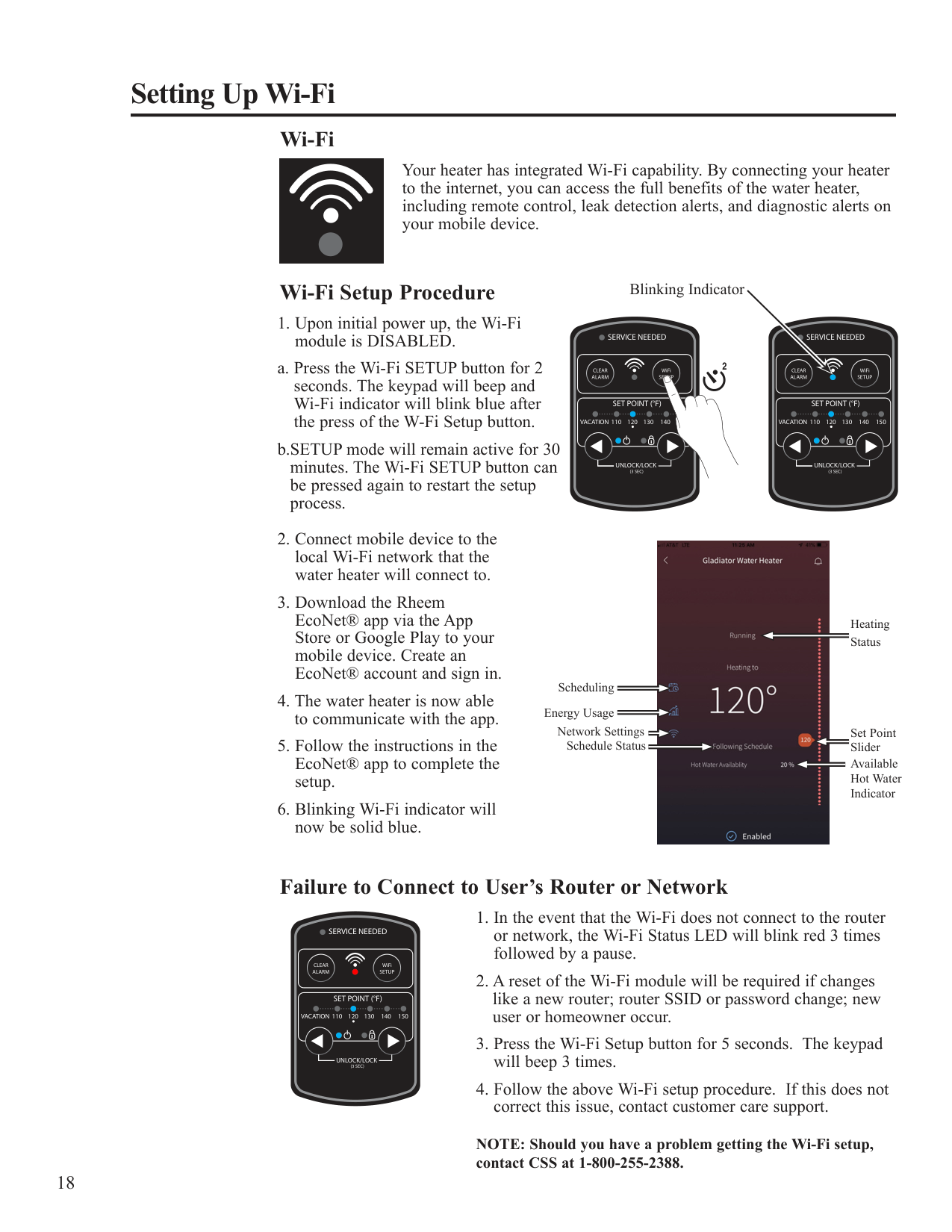
Press the CLEAR ALARM button. This will silence the alarm beep.
The alarm condition will remain and must be corrected in order to remove the LED and silence the beep permanently.
SERVICE NEEDED
####### Setting Up Wi-Fi
Wi-Fi
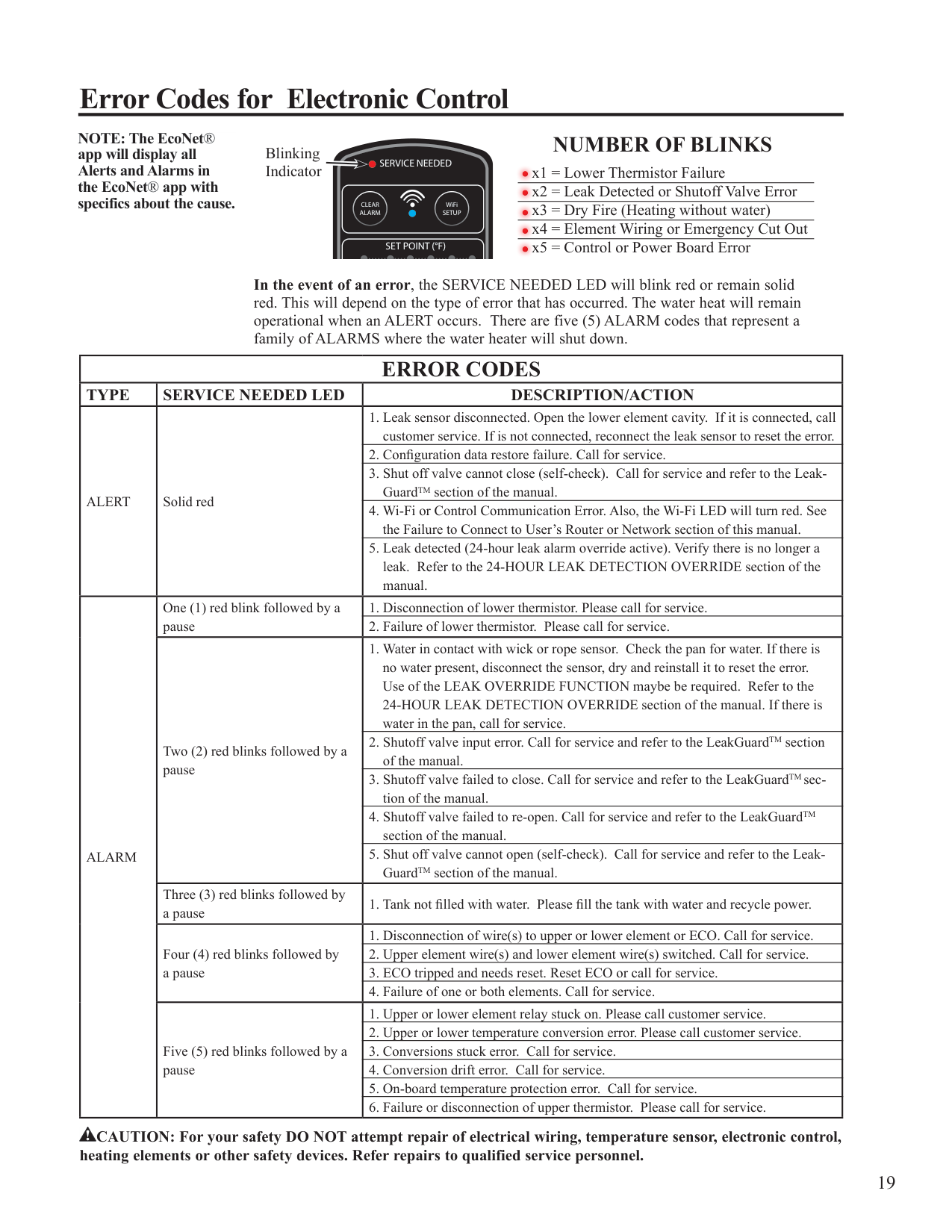
Your heater has integrated Wi-Fi capability. By connecting your heater to the internet, you can access the full benefits of the water heater, including remote control, leak detection alerts, and diagnostic alerts on your mobile device.
WiFi
Wi-Fi Setup Procedure
Blinking Indicator
SERVICE NEEDED
SERVICE NEEDED
SET POINT (°F)
2
CLEAR ALARM
WiFi SETUP
CLEAR ALARM
WiFi SETUP
SET POINT (°F)
SET POINT (°F)
120
130 140 150
VACATION 110
120
130 140 150
VACATION 110
120
130 140 150
UNLOCK/LOCK
UNLOCK/LOCK
(3 SEC)
(3 SEC)

UNLOCK/LOCK
Heating Status
(3 SEC)
Scheduling
Energy Usage
Network Settings Schedule Status
Set Point Slider Available Hot Water Indicator
Failure to Connect to User’s Router or Network
SERVICE NEEDED
CLEAR ALARM
WiFi SETUP
SET POINT (°F)
VACATION 110
120
130 140 150
UNLOCK/LOCK
(3 SEC)
################# NOTE: Should you have a problem getting the Wi-Fi setup, contact CSS at 1-800-255-2388.
####### Error Codes for Electronic Control
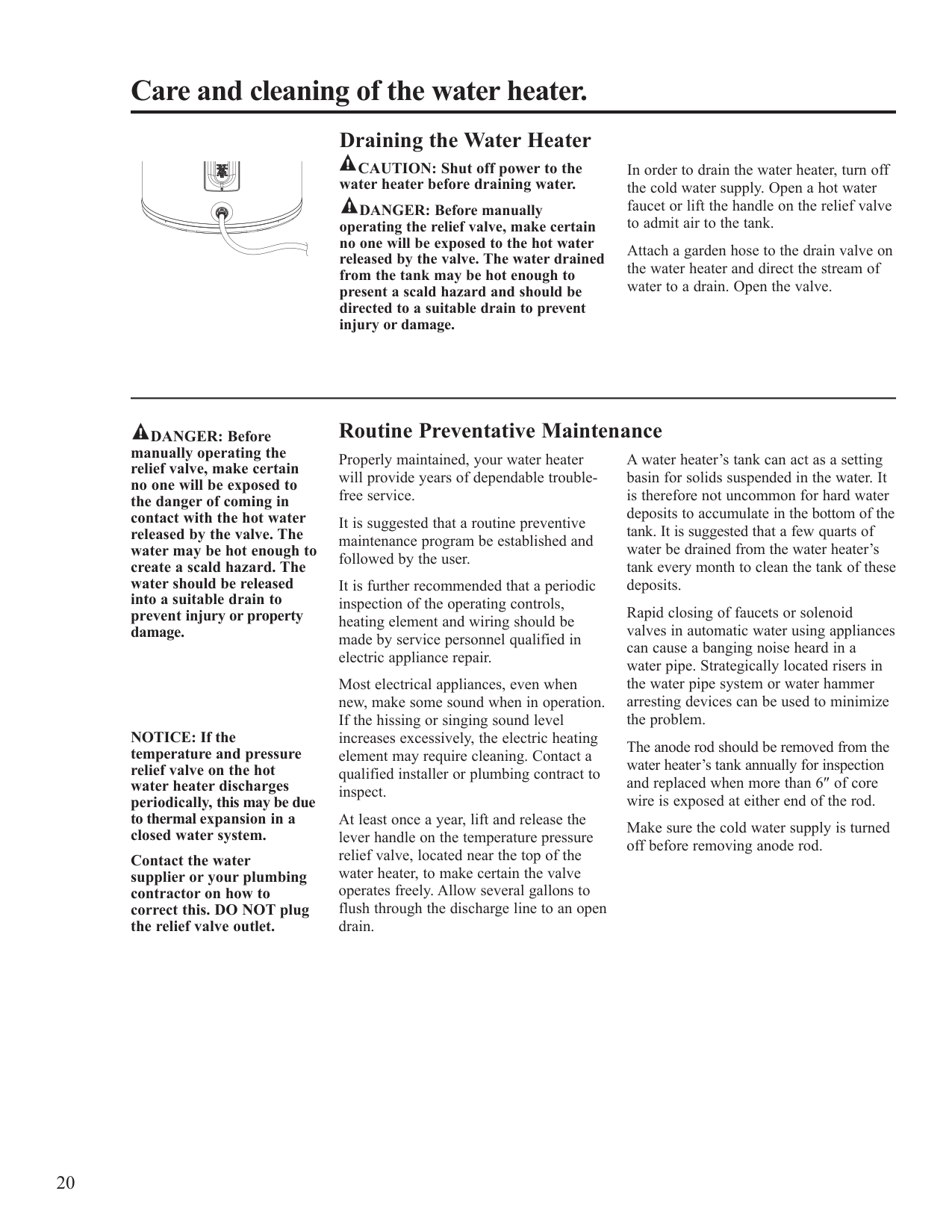
NOTE: The EcoNet® app will display all Alerts and Alarms in the EcoNet® app with specifics about the cause.
############ NUMBER OF BLINKS
Blinking Indicator x1 = Lower Thermistor Failure
SERVICE NEEDED
x2 = Leak Detected or Shutoff Valve Error x3 = Dry Fire (Heating without water) x4 = Element Wiring or Emergency Cut Out x5 = Control or Power Board Error
CLEAR ALARM
WiFi SETUP
SET POINT (°F)
In the event of an error, the SERVICE NEEDED LED will blink red or remain solid
red. This will depend on the type of error that has occurred. The water heat will remain operational when an ALERT occurs. There are five (5) ALARM codes that represent a family of ALARMS where the water heater will shut down.
UNLOCK/LOCK
|ERROR CODES|ERROR CODES|ERROR CODES| |---|---|---| |TYPE|SERVICE NEEDED LED|DESCRIPTION/ACTION| |ALERT|Solid red|1. Leak sensor disconnected. Open the lower element cavity. If it is connected, call customer service. If is not connected, reconnect the leak sensor to reset the error.| |ALERT|Solid red|2. Configuration data restore failure. Call for service.| |ALERT|Solid red|3. Shut off valve cannot close (self-check). Call for service and refer to the LeakGuardTM section of the manual.| |ALERT|Solid red|4. Wi-Fi or Control Communication Error. Also, the Wi-Fi LED will turn red. See the Failure to Connect to User’s Router or Network section of this manual.| |ALERT|Solid red|5. Leak detected (24-hour leak alarm override active). Verify there is no longer a leak. Refer to the 24-HOUR LEAK DETECTION OVERRIDE section of the manual.| |ALARM|One (1) red blink followed by a pause|1. Disconnection of lower thermistor. Please call for service.| |ALARM|One (1) red blink followed by a pause|2. Failure of lower thermistor. Please call for service.| |ALARM|Two (2) red blinks followed by a pause|1. Water in contact with wick or rope sensor. Check the pan for water. If there is no water present, disconnect the sensor, dry and reinstall it to reset the error. Use of the LEAK OVERRIDE FUNCTION maybe be required. Refer to the 24-HOUR LEAK DETECTION OVERRIDE section of the manual. If there is water in the pan, call for service.| |ALARM|Two (2) red blinks followed by a pause|2. Shutoff valve input error. Call for service and refer to the LeakGuardTM section of the manual.| |ALARM|Two (2) red blinks followed by a pause|3. Shutoff valve failed to close. Call for service and refer to the LeakGuardTMsection of the manual.| |ALARM|Two (2) red blinks followed by a pause|4. Shutoff valve failed to re-open. Call for service and refer to the LeakGuardTM section of the manual.| |ALARM|Two (2) red blinks followed by a pause|5. Shut off valve cannot open (self-check). Call for service and refer to the LeakGuardTM section of the manual.| |ALARM|Three (3) red blinks followed by a pause|1. Tank not filled with water. Please fill the tank with water and recycle power.| |ALARM|Four (4) red blinks followed by a pause|1. Disconnection of wire(s) to upper or lower element or ECO. Call for service.| |ALARM|Four (4) red blinks followed by a pause|2. Upper element wire(s) and lower element wire(s) switched. Call for service.| |ALARM|Four (4) red blinks followed by a pause|3. ECO tripped and needs reset. Reset ECO or call for service.| |ALARM|Four (4) red blinks followed by a pause|4. Failure of one or both elements. Call for service.| |ALARM|Five (5) red blinks followed by a pause|1. Upper or lower element relay stuck on. Please call customer service.| |ALARM|Five (5) red blinks followed by a pause|2. Upper or lower temperature conversion error. Please call customer service.| |ALARM|Five (5) red blinks followed by a pause|3. Conversions stuck error. Call for service.| |ALARM|Five (5) red blinks followed by a pause|4. Conversion drift error. Call for service.| |ALARM|Five (5) red blinks followed by a pause|5. On-board temperature protection error. Call for service.| |ALARM|Five (5) red blinks followed by a pause|6. Failure or disconnection of upper thermistor. Please call for service.|
!
CAUTION: For your safety DO NOT attempt repair of electrical wiring, temperature sensor, electronic control, heating elements or other safety devices. Refer repairs to qualified service personnel.
############ Draining the Water Heater
################# CAUTION: Shut off power to the water heater before draining water.
In order to drain the water heater, turn off the cold water supply. Open a hot water faucet or lift the handle on the relief valve to admit air to the tank.
DANGER: Before manually operating the relief valve, make certain no one will be exposed to the hot water released by the valve. The water drained from the tank may be hot enough to present a scald hazard and should be directed to a suitable drain to prevent injury or damage.
Attach a garden hose to the drain valve on the water heater and direct the stream of water to a drain. Open the valve.
DANGER: Before manually operating the relief valve, make certain no one will be exposed to the danger of coming in contact with the hot water released by the valve. The water may be hot enough to create a scald hazard. The water should be released into a suitable drain to prevent injury or property damage.
NOTICE: If the temperature and pressure relief valve on the hot water heater discharges periodically, this may be due to thermal expansion in a closed water system.
Contact the water supplier or your plumbing contractor on how to correct this. DO NOT plug the relief valve outlet.
############ Routine Preventative Maintenance
Properly maintained, your water heater will provide years of dependable troublefree service.
It is suggested that a routine preventive maintenance program be established and followed by the user.
It is further recommended that a periodic inspection of the operating controls, heating element and wiring should be made by service personnel qualified in electric appliance repair.
Most electrical appliances, even when new, make some sound when in operation. If the hissing or singing sound level increases excessively, the electric heating element may require cleaning. Contact a qualified installer or plumbing contract to inspect.
At least once a year, lift and release the lever handle on the temperature pressure relief valve, located near the top of the water heater, to make certain the valve operates freely. Allow several gallons to flush through the discharge line to an open drain.
A water heater’s tank can act as a setting basin for solids suspended in the water. It is therefore not uncommon for hard water deposits to accumulate in the bottom of the tank. It is suggested that a few quarts of water be drained from the water heater’s tank every month to clean the tank of these deposits.
Rapid closing of faucets or solenoid valves in automatic water using appliances can cause a banging noise heard in a water pipe. Strategically located risers in the water pipe system or water hammer arresting devices can be used to minimize the problem.
The anode rod should be removed from the water heater’s tank annually for inspection and replaced when more than 6″ of core wire is exposed at either end of the rod.
Make sure the cold water supply is turned off before removing anode rod.
NOTICE: Refer to the Hydrogen Gas Caution in the Operating Instructions.
############ Extended Shut-Down
If the water heater is to remain idle for an extended period of time, the power and water to the appliance should be turned off to conserve energy and prevent a build-up of dangerous hydrogen gas.
The water heater and piping should be drained if they might be subjected to freezing temperatures.
After a long shut-down period, the water heater’s operation and controls should be checked by qualified service personnel. Make certain the water heater is completely filled again before placing it in operation.
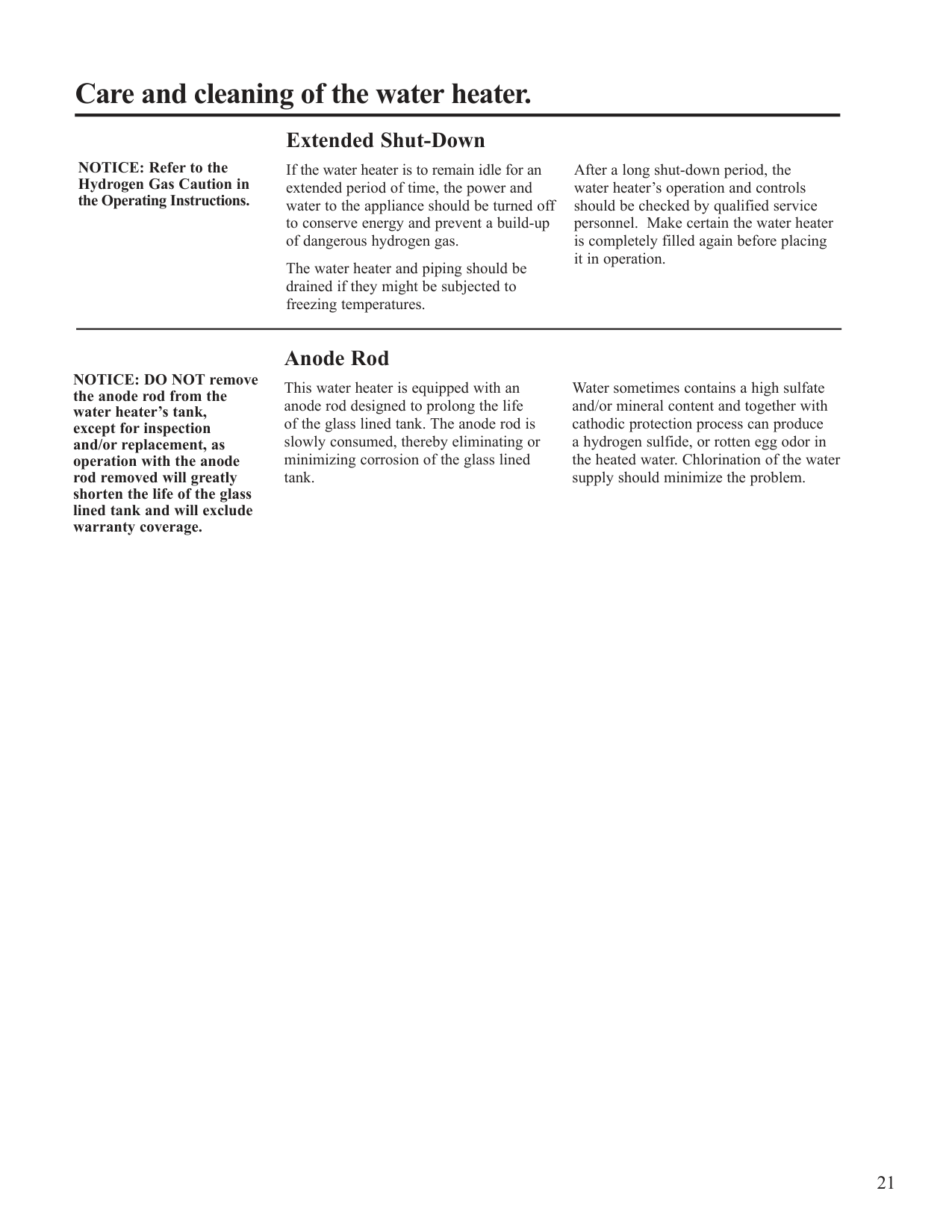
NOTICE: DO NOT remove the anode rod from the water heater’s tank, except for inspection and/or replacement, as operation with the anode rod removed will greatly shorten the life of the glass lined tank and will exclude warranty coverage.
############ Anode Rod
This water heater is equipped with an anode rod designed to prolong the life of the glass lined tank. The anode rod is slowly consumed, thereby eliminating or minimizing corrosion of the glass lined tank.
Water sometimes contains a high sulfate and/or mineral content and together with cathodic protection process can produce a hydrogen sulfide, or rotten egg odor in the heated water. Chlorination of the water supply should minimize the problem.
####### Before You Call For Service…
Troubleshooting Tips Save time and money! Review the chart on this page first and you may not need to call for service.
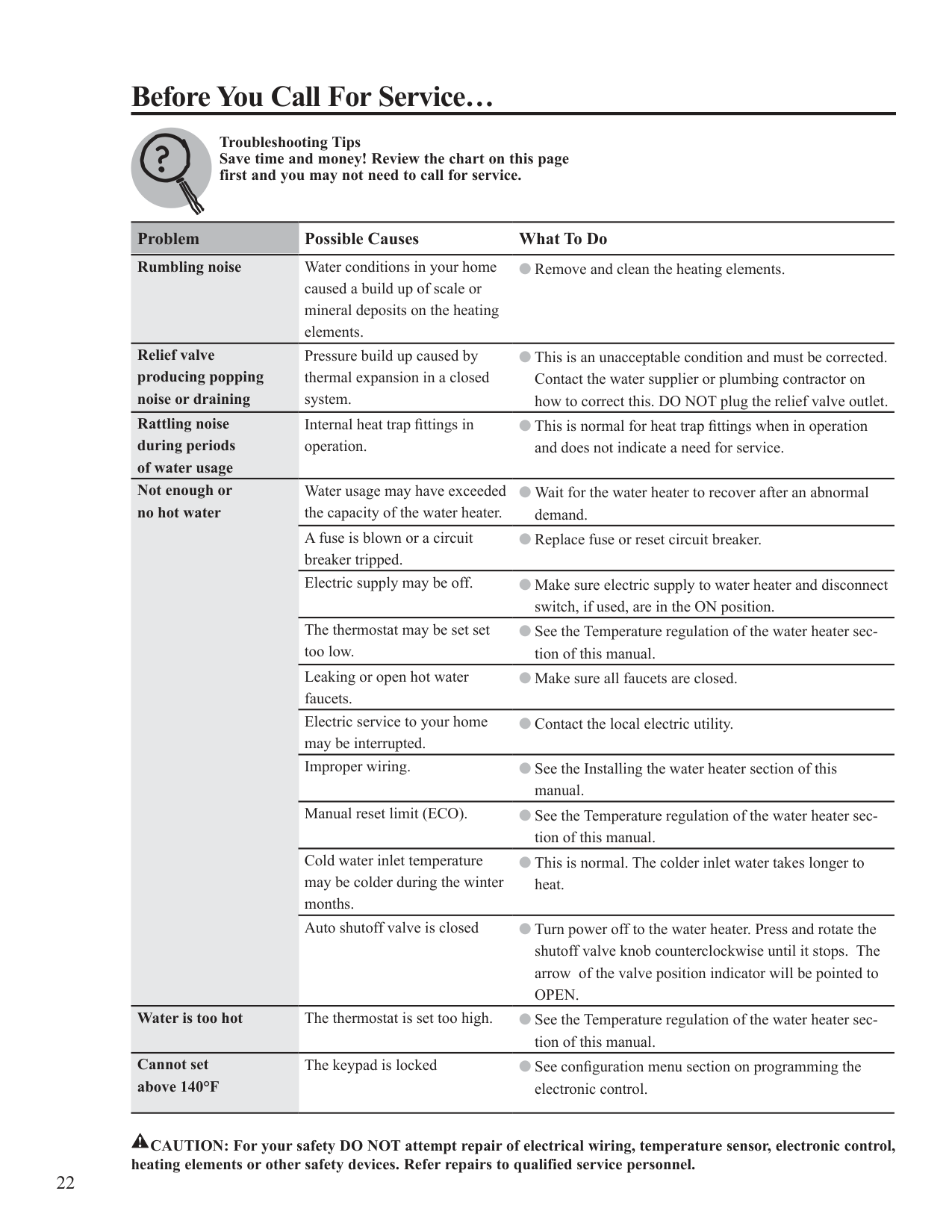
Problem Possible Causes What To Do Rumbling noise Water conditions in your home
● Remove and clean the heating elements.
caused a build up of scale or mineral deposits on the heating elements.
Relief valve producing popping noise or draining
Pressure build up caused by thermal expansion in a closed system.
● This is an unacceptable condition and must be corrected. Contact the water supplier or plumbing contractor on how to correct this. DO NOT plug the relief valve outlet.
Rattling noise during periods of water usage
Internal heat trap fittings in operation.
● This is normal for heat trap fittings when in operation and does not indicate a need for service.
Not enough or no hot water
Water usage may have exceeded the capacity of the water heater.
● Wait for the water heater to recover after an abnormal demand.
A fuse is blown or a circuit breaker tripped.
● Replace fuse or reset circuit breaker.
Electric supply may be off. ● Make sure electric supply to water heater and disconnect switch, if used, are in the ON position.
The thermostat may be set set too low.
● See the Temperature regulation of the water heater section of this manual.
Leaking or open hot water faucets.
● Make sure all faucets are closed.
Electric service to your home may be interrupted.
● Contact the local electric utility.
Improper wiring. ● See the Installing the water heater section of this manual. Manual reset limit (ECO). ● See the Temperature regulation of the water heater section of this manual.
Cold water inlet temperature may be colder during the winter months.
● This is normal. The colder inlet water takes longer to heat.
Auto shutoff valve is closed ● Turn power off to the water heater. Press and rotate the
shutoff valve knob counterclockwise until it stops. The arrow of the valve position indicator will be pointed to OPEN.
Water is too hot The thermostat is set too high. ● See the Temperature regulation of the water heater sec-
tion of this manual.
Cannot set above 140°F
The keypad is locked ● See configuration menu section on programming the electronic control.
!
CAUTION: For your safety DO NOT attempt repair of electrical wiring, temperature sensor, electronic control, heating elements or other safety devices. Refer repairs to qualified service personnel.
####### Diagnostic Mode
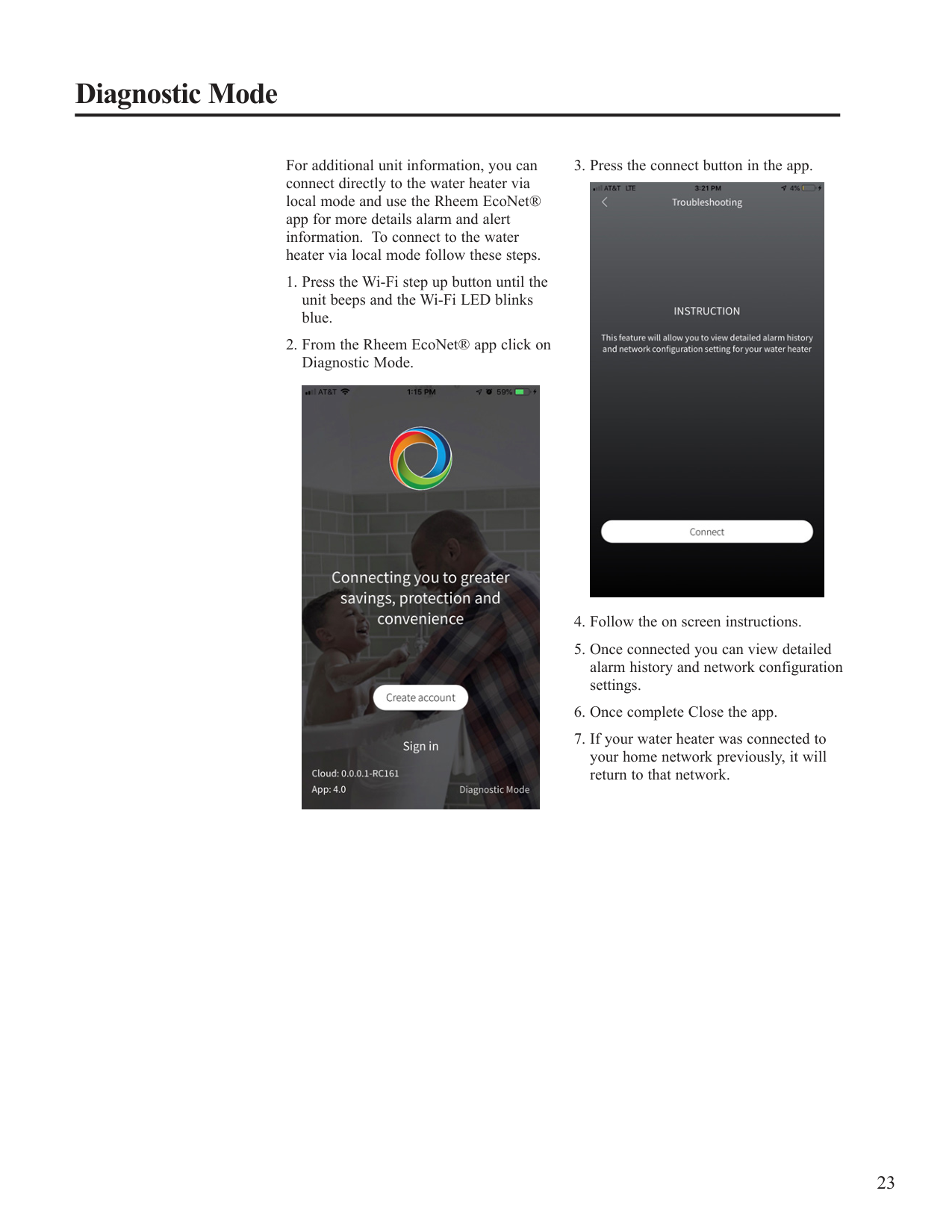
For additional unit information, you can connect directly to the water heater via local mode and use the Rheem EcoNet® app for more details alarm and alert information. To connect to the water heater via local mode follow these steps.


####### Replacement Parts.
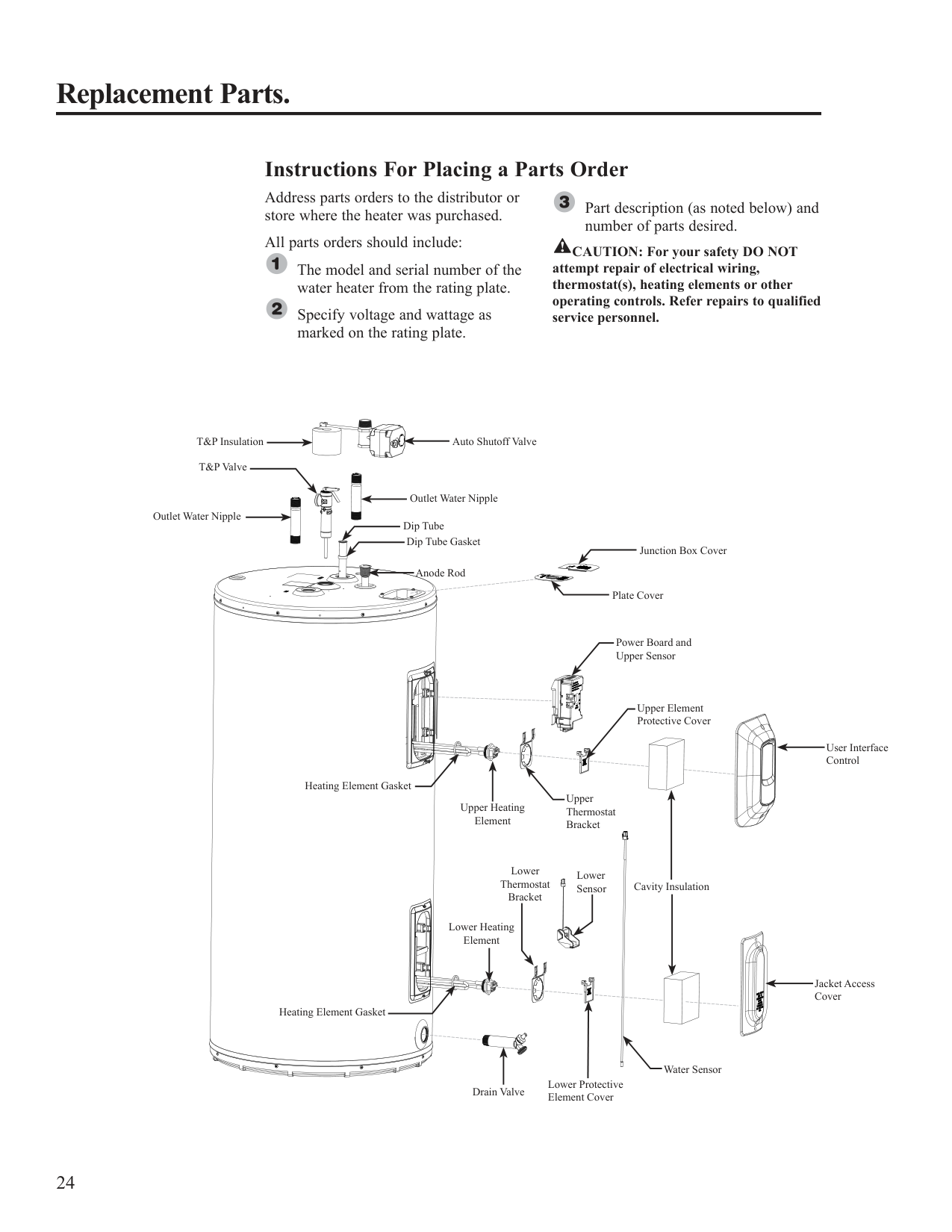
############ Instructions For Placing a Parts Order
Address parts orders to the distributor or store where the heater was purchased.
Part description (as noted below) and number of parts desired.
All parts orders should include:
! CAUTION: For your safety DO NOT attempt repair of electrical wiring, thermostat(s), heating elements or other operating controls. Refer repairs to qualified service personnel.
The model and serial number of the water heater from the rating plate.
Specify voltage and wattage as marked on the rating plate.
T&P Insulation Auto Shutoff Valve T&P Valve
Outlet Water Nipple Outlet Water Nipple
Dip Tube
Dip Tube Gasket
Junction Box Cover Anode Rod
Plate Cover
Power Board and Upper Sensor
Upper Element Protective Cover
Heating Element Gasket
Upper Thermostat Bracket
Upper Heating Element
Lower Thermostat Bracket
Lower Sensor
Cavity Insulation
Lower Heating Element
Heating Element Gasket
Water Sensor
Lower Protective Element Cover
Drain Valve
User Interface Control
Jacket Access Cover

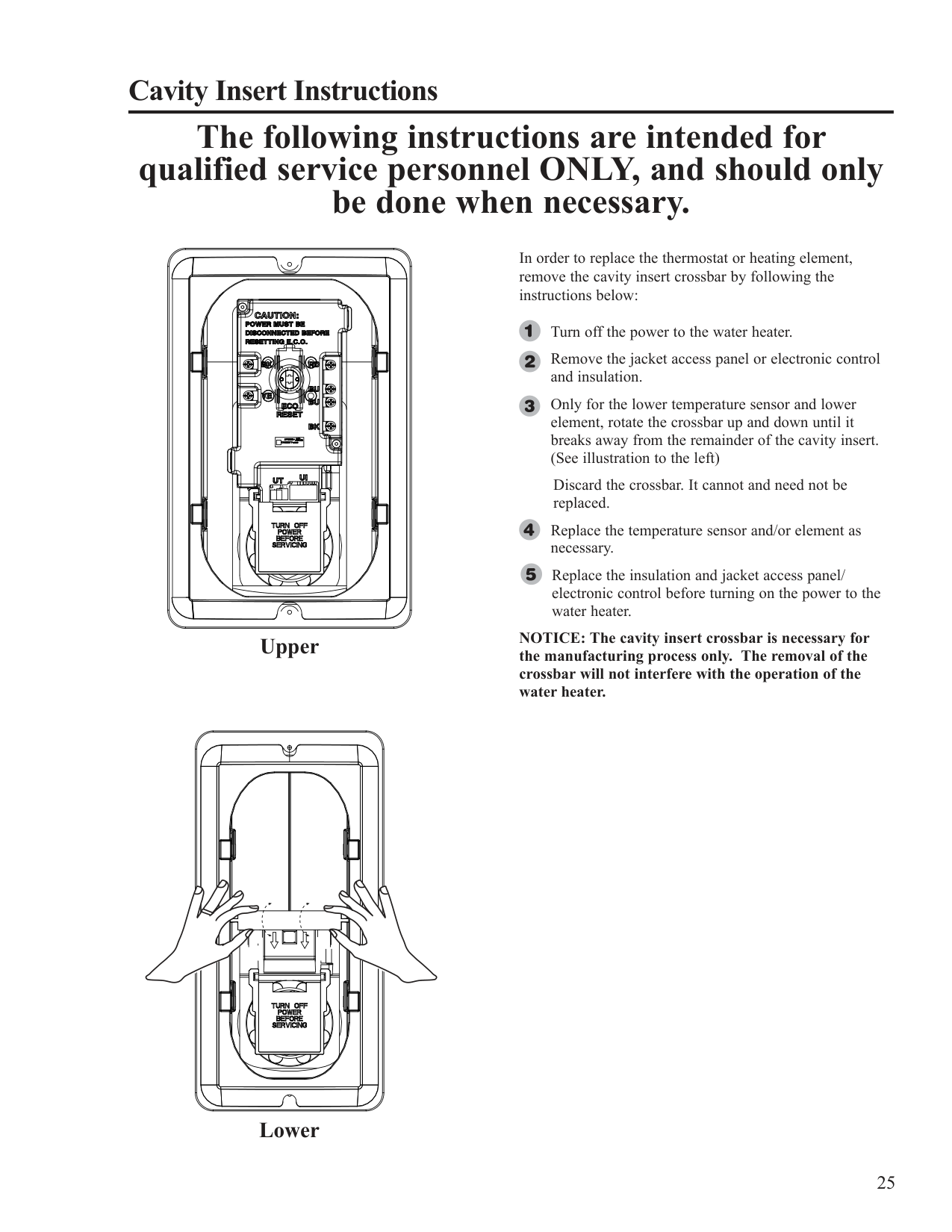
Cavity Insert Instructions
#### The following instructions are intended for qualified service personnel ONLY, and should only be done when necessary.
| | | |---|---| | | | | | | | | | | | | | | | | | | | | |
| | | | |---|---|---|
Upper
| | | | |---|---|---| | | | | | | | | | | | | | | | |
| | | | |---|---|---| | | | | | | | | | | | | | | | |
| | | |---|---| | | |
In order to replace the thermostat or heating element, remove the cavity insert crossbar by following the instructions below:
Turn off the power to the water heater. Remove the jacket access panel or electronic control and insulation.
Only for the lower temperature sensor and lower element, rotate the crossbar up and down until it breaks away from the remainder of the cavity insert. (See illustration to the left)
Discard the crossbar. It cannot and need not be replaced.
Replace the temperature sensor and/or element as necessary.
Replace the insulation and jacket access panel/ electronic control before turning on the power to the water heater.
NOTICE: The cavity insert crossbar is necessary for the manufacturing process only. The removal of the crossbar will not interfere with the operation of the water heater.
Lower
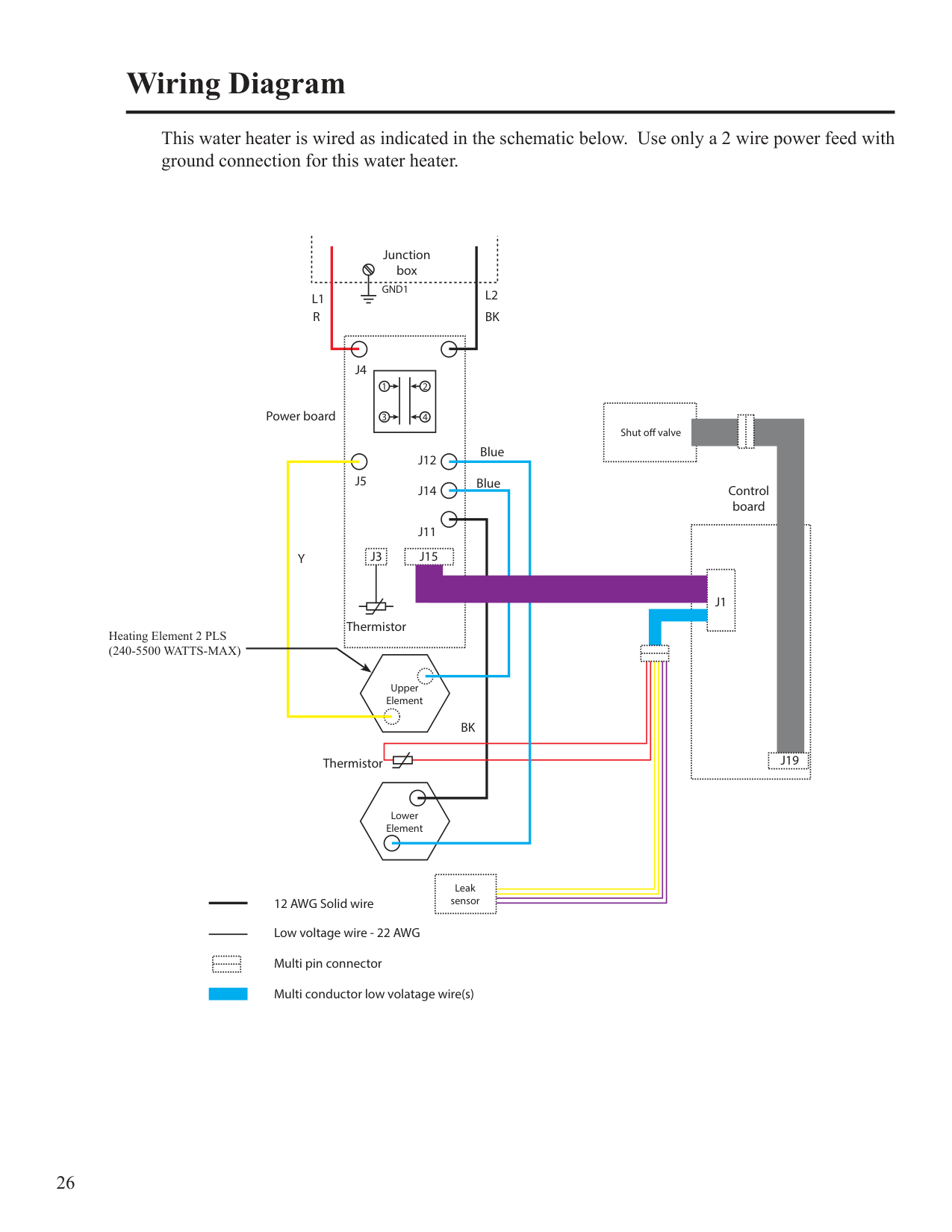
###### Wiring Diagram
This water heater is wired as indicated in the schematic below. Use only a 2 wire power feed with ground connection for this water heater.
| | |---|
| | |---|
Heating Element 2 PLS (240-5500 WATTS-MAX)
| | |---|
| | | |---|---|
|| | |---|
| | |---| | |---|
| | |---| | |
(s)
######## Notes:
IF YOU NEED SERVICE
800 Interstate Park Drive Montgomery, Alabama 36109 Phone: 1-800-432-8373.
When contacting the manufacturer, the following information will be requested: