
Ask AI
— answers from the official manualAnswers from the official manual.
Common questions
Common Questions
10 totalHow do I safely assemble the Serta Motion Essentials bed frame?
To safely assemble the bed frame, ensure two people lift and handle the unit while it is lying flat on the ground. Follow steps 1 through 9 in the manual to install legs, extend power cord, plug into a grounded outlet, and set up mattress retainer brackets as detailed.
What should I do if my remote control is not powering on?
Replace the batteries in your wireless remote. Ensure correct battery installation to fix issues where the remote will power on but won't activate the bed.
How can I reset the control unit if it malfunctions due to a power overload?
If there is an excess weight condition on any part of your foundation, wait 30 seconds after removing the extra weight for normal operation to resume automatically. (Page 17)
How do I program a replacement remote control?
Press and hold the learn button on your new remote for three seconds until it powers up, then press any key for the green LED to light. Ensure your bed is plugged into an operational outlet.
What safety guidelines should I follow during assembly?
Ensure proper handling of the base while assembling; do not lean it against the legs or other supports. Keep children and pets away from the bed frame at all times.
How do I use the battery backup system during a power outage?
Install two (2) alkaline 9V batteries to activate the emergency lowering feature. Press 'Flat' or individual lower buttons to safely bring your bed to its flat position.
Full Manual
20 pages
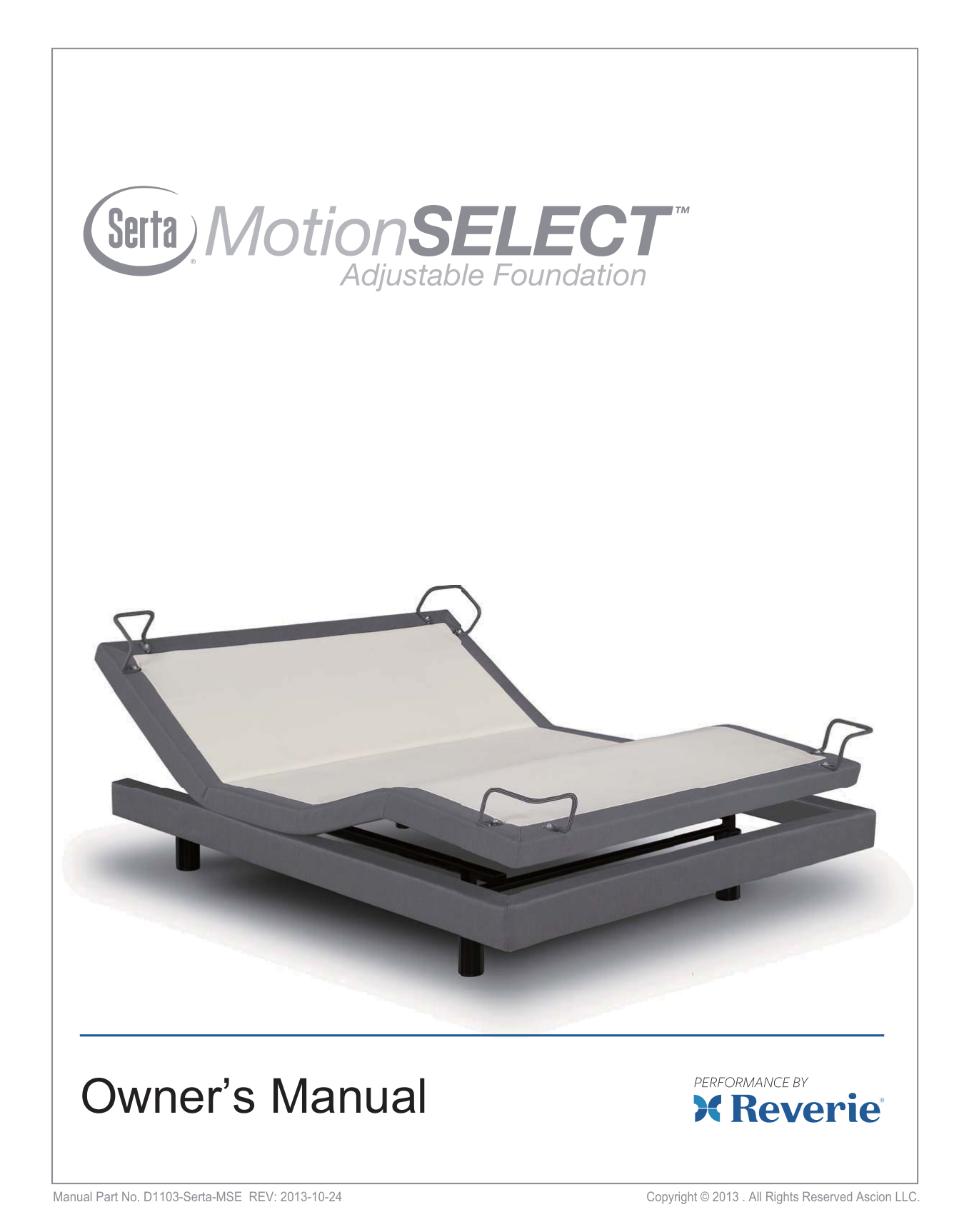


Owner’s Manual
Manual Part No. D1103-Serta-MSE REV: 2013-10-24 Copyright © 2013 . All Rights Reserved Ascion LLC.
|Table Of Contents
Warranty Information: Please see the warranty that came with your product. Serta Motion SELECT Adjustable Foundation
2
Safety Precautions........................................................................................................................3 Parts List...........................................................................................................................................8 Adjustable Bed Frame Assembly............................................................................................9 Wireless Remote Control...........................................................................................................12 Remote Control Operation Guide..........................................................................................13 Replacement Remote Control Programming....................................................................15 Remote Control Emergency Power Down Feature..........................................................16 Troubleshooting...........................................................................................................................17 Warranty..........................................................................................................................................18
CUSTOMER SERVICE: 800-695-2540
| |---|
|CUSTOMER SERVICE: 800-695-2540
3
WARNING! IMPORTANT SAFETY INSTRUCTIONS. PLEASE READ THESE INSTRUCTIONS THOROUGHLY BEFORE USING THIS PRODUCT. SAVE THESE INSTRUCTIONS!
When using an electrical furnishing basic precautions should always be followed, including the following:
READ ALL INSTRUCTIONS BEFORE USING (THIS FURNISHING)
WARNING:
To reduce the risk of burns, fire, electric shock, or injury to persons:
DANGER: To reduce the risk of electric shock:
Always unplug this furnishing from the electrical outlet before cleaning.
• Unplug from outlet before putting on or taking off parts.
• Close supervision is necessary when this furnishing is used by or near children, invalids or diabled persons.
• Use this furnishing only for its intended use as described in these instructions. Do not use attachments not recommended by the manufacturer.
• Never operate this furnishing if it has a damaged cord or plug, or if it is not working properly, dropped or damaged, or dropped into the water. Return the furnishing to a service center for examination and repair.
• Keep the cord away from heated surfaces.
• Never operate the furnishing with the air openings blocked. Keep the air openings free of lint, hair and the like.
• Never drop or insert any object into any opening.
• Do not use outdoors.
• Do not operate where aerosol (spray) products are being used or where oxygen is being administered.
• To disconnect, turn all controls to the off position, then remove plug from outlet.
SAFETY PRECAUTIONS| |---|
|CUSTOMER SERVICE: 800-695-2540
4
WARNING: Risk of Injury:
Keep children away from extended foot support (or other similar parts).
DANGER:
Improper connection of the equipment-grounding conductor can result in a risk of electric shock. Check with a qualified electrician or serviceman if you are in doubt as to whether the product is properly grounded. Do not modify the plug provided with the product. If it will not fit the outlet, have a proper outlet installed by a qualified electrician.
SAVE THESE INSTRUCTIONS!
WARNING: Risk of electric shock:
Connect this furnishing to a properly grounded outlet only. See Grounding instructions.
GROUNDING INSTRUCTIONS: This product must be grounded. If it should malfunction or breakdown, grounding provides a path of least resistance for electric current to reduce the risk of electric shock. This product is equipped with a cord having an equipment-grounding conductor and a grounding plug. The plug must be plugged into an appropriate outlet that is properly installed and grounded in accordance with all local codes and ordinances.
SAFETY PRECAUTIONS
L'AVERTISSEMENT:
LE RISQUE DE CHOC ÉLECTRIQUE
POUR L’UTILISATION DU MÉNAGE/RÉSIDENTIELLE SEULEMENT N’UTILISEZ PAS DEHORS
L'AVERTISSEMENT:
N’UTILISE PAS PRÉS DE L’UTILISATION DE GENS OU DU PORTAGE DES ARTIFICES MÉDICAUX
| |---|
|CUSTOMER SERVICE: 800-695-2540
5
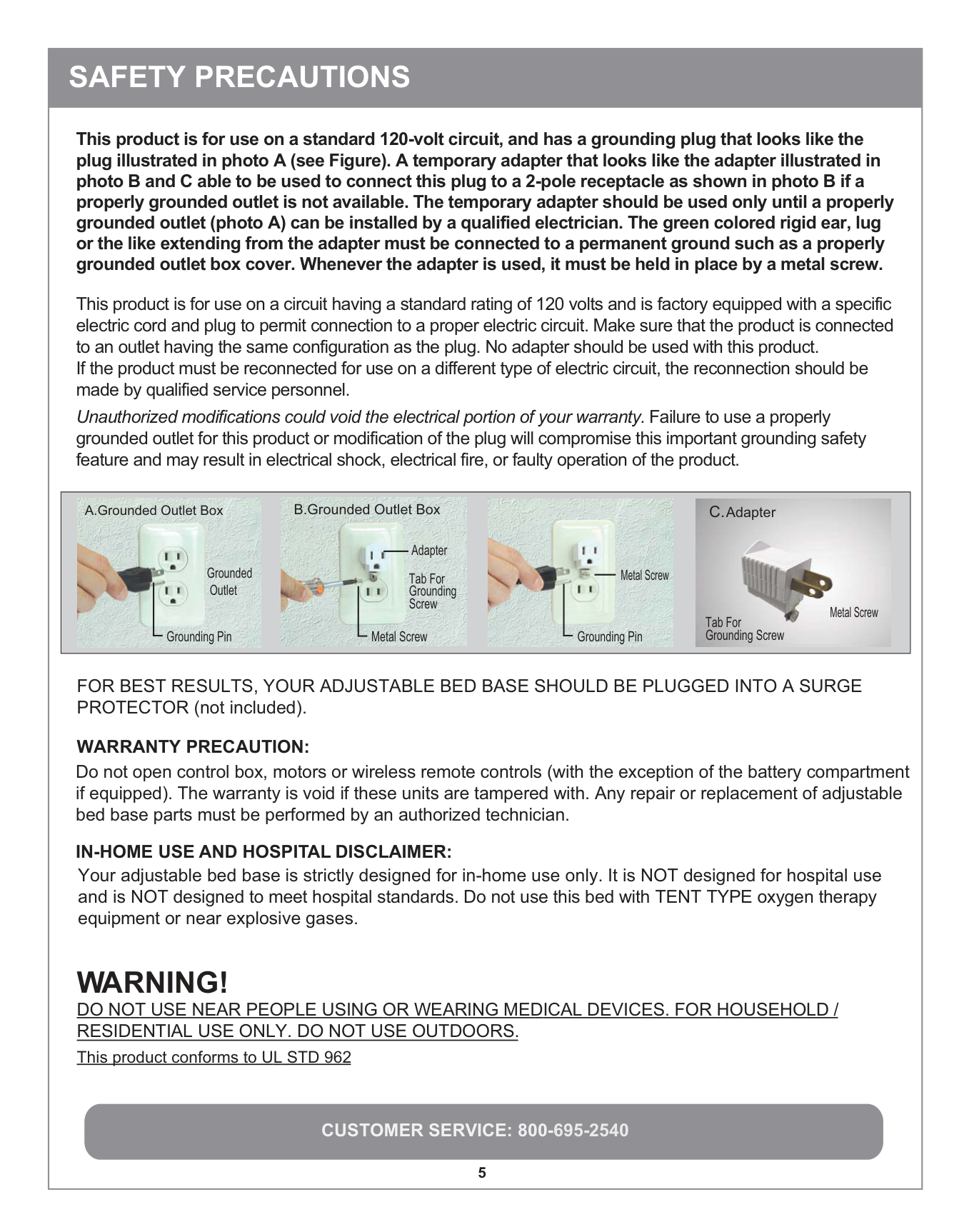
This product is for use on a circuit having a standard rating of 120 volts and is factory equipped with a specific electric cord and plug to permit connection to a proper electric circuit. Make sure that the product is connected to an outlet having the same configuration as the plug. No adapter should be used with this product. If the product must be reconnected for use on a different type of electric circuit, the reconnection should be made by qualified service personnel. Unauthorized modifications could void the electrical portion of your warranty. Failure to use a properly grounded outlet for this product or modification of the plug will compromise this important grounding safety feature and may result in electrical shock, electrical fire, or faulty operation of the product.
|
A.Grounded Outlet Box
Grounding Pin
Grounded Outlet


Metal Screw
B.Grounded Outlet Box
Tab For Grounding Screw
Adapter

Grounding Pin
Metal Screw


C.Adapter
Tab For Grounding Screw
Metal Screw| |---|
WARRANTY PRECAUTION:
IN-HOME USE AND HOSPITAL DISCLAIMER:
WARNING!
Do not open control box, motors or wireless remote controls (with the exception of the battery compartment if equipped). The warranty is void if these units are tampered with. Any repair or replacement of adjustable bed base parts must be performed by an authorized technician.
Your adjustable bed base is strictly designed for in-home use only. It is NOT designed for hospital use and is NOT designed to meet hospital standards. Do not use this bed with TENT TYPE oxygen therapy equipment or near explosive gases.
DO NOT USE NEAR PEOPLE USING OR WEARING MEDICAL DEVICES. FOR HOUSEHOLD / RESIDENTIAL USE ONLY. DO NOT USE OUTDOORS. This product conforms to UL STD 962
This product is for use on a standard 120-volt circuit, and has a grounding plug that looks like the plug illustrated in photo A (see Figure). A temporary adapter that looks like the adapter illustrated in photo B and C able to be used to connect this plug to a 2-pole receptacle as shown in photo B if a properly grounded outlet is not available. The temporary adapter should be used only until a properly grounded outlet (photo A) can be installed by a qualified electrician. The green colored rigid ear, lug or the like extending from the adapter must be connected to a permanent ground such as a properly grounded outlet box cover. Whenever the adapter is used, it must be held in place by a metal screw.
FOR BEST RESULTS, YOUR ADJUSTABLE BED BASE SHOULD BE PLUGGED INTO A SURGE PROTECTOR (not included).
SAFETY PRECAUTIONS| |---|
|CUSTOMER SERVICE: 800-695-2540
6
IMPORTANT SAFETY FEATURES:
Use this furnishing only for its intended use as described in these instructions. Do not use attachments not recommended by the manufacturer.
USER-SERVICEABLE PARTS:
This product is specifically designed to have no maintenance by you, the user. Therefore, you are encouraged not to open any motors, alter the wiring, adjust, modify or change the structure of the product, as it will void the warranty.
POWER RATINGS: INPUT: AC 120V - 60Hz, 1.5 Amp OUTPUT: DC 24V-3A FUSE: 1.5A 250V
If there is an overload weight condition on the head or foot mechanism, the control unit will automatically stop all functions. Once the excess weight is removed the control unit will automatically allow all functions to resume operation after 30 seconds.
As with any product that produces a vibrating motion, it is possible that some pacemakers may interpret this motion as a false sense of movement and/or exercise. This may or may not affect your pacemaker. If you have any concerns, please consult your physician. For more information please contact customer service by calling 800-695-2540.
The input transformer voltage is AC120V (1.5 Amp) 60HZ, and the output voltage is DC24V (3Amp). When there is a short-circuit, a fuse on the transformer will be blown in order to protect the electrical equipment (Fuse: 1.5A). Should the above situation occur, the customer should seek professional assistance by calling a licensed electrician or by contacting customer service at 800-695-2540.
SAFETY PRECAUTIONS
After your Motion SELECT Adjustable Foundation has been unboxed, immediately dispose of packaging as it can smother small children and pets. To avoid injury, children and pets should not be allowed to play on or under the bed. Children should not operate this product without adult supervision. Close supervision is necessary when this furnishing is used by, or near children, invalids, or disabled persons.
SMALL CHILDREN AND PETS WARNING:| |---|
|CUSTOMER SERVICE: 800-695-2540
7
SAFETY PRECAUTIONS SAVE THESE INSTRUCTIONS:
Your Motion SELECT Adjustable Foundation has been designed to provide you with the reliable operation and durability you expect. This product has been inspected and tested prior to shipment.
RADIO FREQUENCY IS 433.92 MHZ FCC COMPLIANCE This device complies with part 15 of the FCC Rules. Operation is subject to the following two conditions: (1) This device may not cause harmful interference, and (2) this device must accept any interference received, including interference that may cause undesired operation. To comply with the FCC RF exposure compliance requirements, no change to the antenna or the device is permitted. Any change to the antenna or the device could result in the device exceeding the RF exposure requirements and void the user’s authority to operate the device.
Note: Exceeding the recommended weight restrictions could damage your adjustable foundation and void your warranty and using a mattress on top of your adjustable foundation that is not designed for adjustability may also void your warranty.
PRODUCT RATINGS:
The lift motor in your Motion SELECT Adjustable Foundation is NOT designed for continuous use. Reliable operation and full life expectancy will be attained as long as the lift motor does not operate more than two (2) minutes over an eighteen (18) minute period, or approximately 10% duty cycle. Any attempt to circumvent or exceed this rating will shorten the life expectancy of this product and may void the warranty. The recommended weight restrictions for your Motion SELECT Adjustable Foundation is up to 850 lbs. total weight, including people and the mattress for all sizes of adjustable foundations. Lift speed will vary due to weight and mattress configuration, as well as the mattress type. The weight must be evenly distributed across the bed. This Product is not designed to support or lift 850 lbs of total weight in the head or foot sections of your Motion Select Foundation alone, or in any unevenly distributed fashion. Some mattresses are not designed for Adjustable Foundations because they do not bend or flex well when adjusted. When using such a mattress with your Motion SELECT Adjustable Foundation the weight limits set forth herein do not apply, as the bending of the mattress requires significant force and puts significant strain on the motors and the Adjustable Foundation itself.
For best performance, you should enter and exit the adjustable bed while it is in the flat or fully lowered position. DO NOT SIT ON THE HEAD OR FOOT SECTIONS WHILE IN THE RAISED POSITION.
INTENDED USAGE: The electric adjustable foundation should be installed with the head board brackets and/or the head of the frame positioned close to a wall.| |---|


##### Parts Listarts List

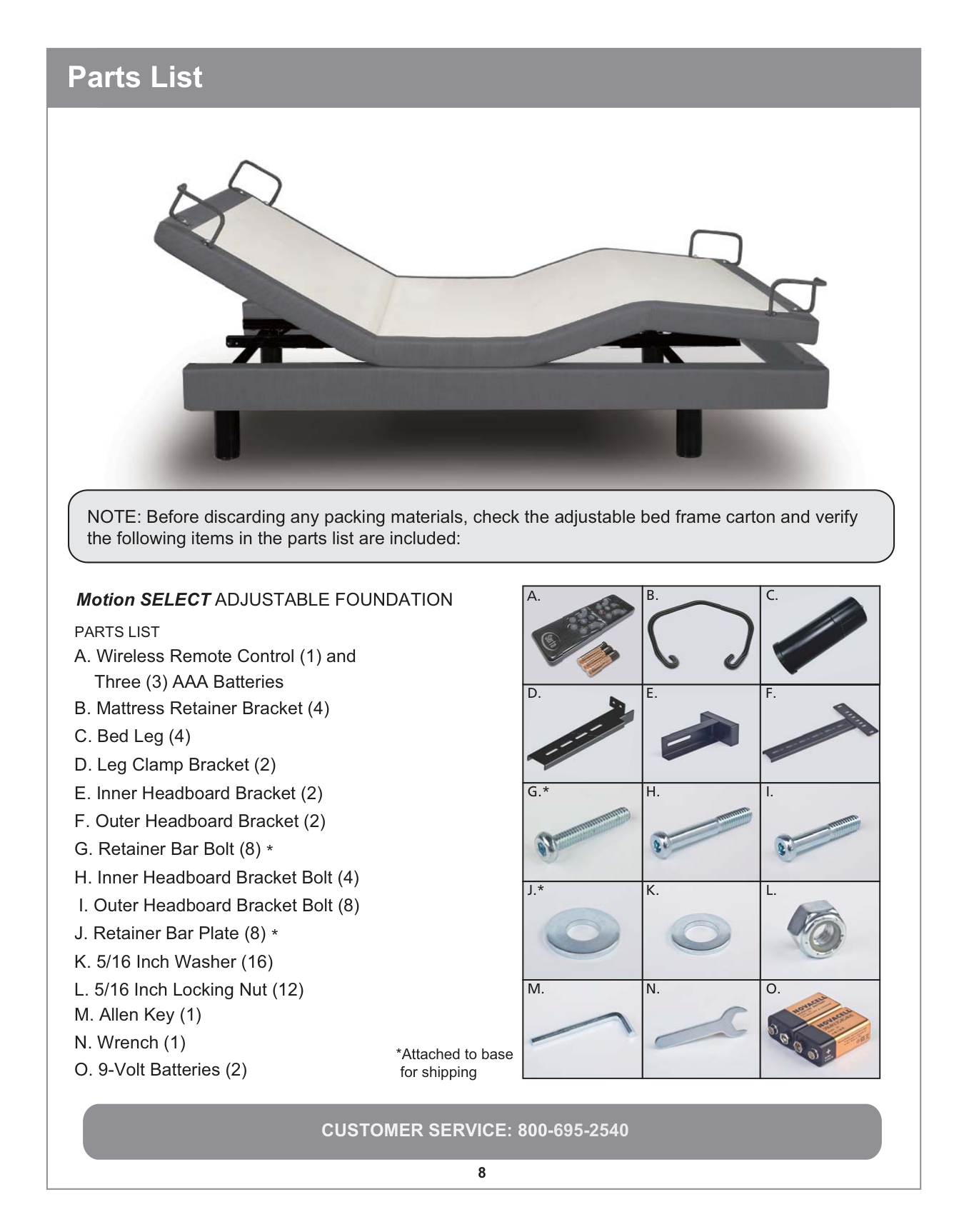
NOTE: Before discarding any packing materials, check the adjustable bed frame carton and verify the following items in the parts list are included:



A. B. PARTS LIST
C.


Motion SELECT ADJUSTABLE FOUNDATION




E.
D.
F.


H.

G .*
I.


K.
J.*


L.



N.
M.
O.
*Attached to base for shipping
IMPORTANT UNPACKING INSTRUCTIONS
To avoid damage to the adjustable bed, always open the carton while the bed is laying in the FLAT position on the floor.
######## OPEN FLAT
.


############### STEP 1
Carefully lift the bed frame unit out of the shipping carton, keeping the unit top side down. For safety reasons, this should be performed by 2 people.


########## Base overview
############### STEP 2
Remove and extend the power cord from the frame.
WARNING:
POWER CORDS MUST NOT INTERFERE WITH ANY ADJUSTABLE BED MECHANISMS.
Remove the plastic packaging from the bed base frame.
Assembling Bed Legs: Open the accessories box, take out the 4 legs, and thread them in a clockwise direction into the threaded holes in the frame.
NOTE: Tighten the legs securely to the frame. Leave no space between leg and frame.


############### STEP 5
Carefully rotate the base frame over to the upside up position.
###### ATTENTION ! Improper handling
DO NOT lean the bed against the installed legs to flip it over.
STEP 6
Plug the power cord into a grounded electrical outlet.
NOTE: An Electrical surge protection unit is recommended (not included).
############### STEP 7
Install the batteries in your wireless remote control. Briefly activate all functions on the wireless remote control to verify that all of the features are operational. If your Motion SELECT foundation does NOT operate, please refer to the Troubleshooting section beginning on page 17 of this manual.


############### STEP 9
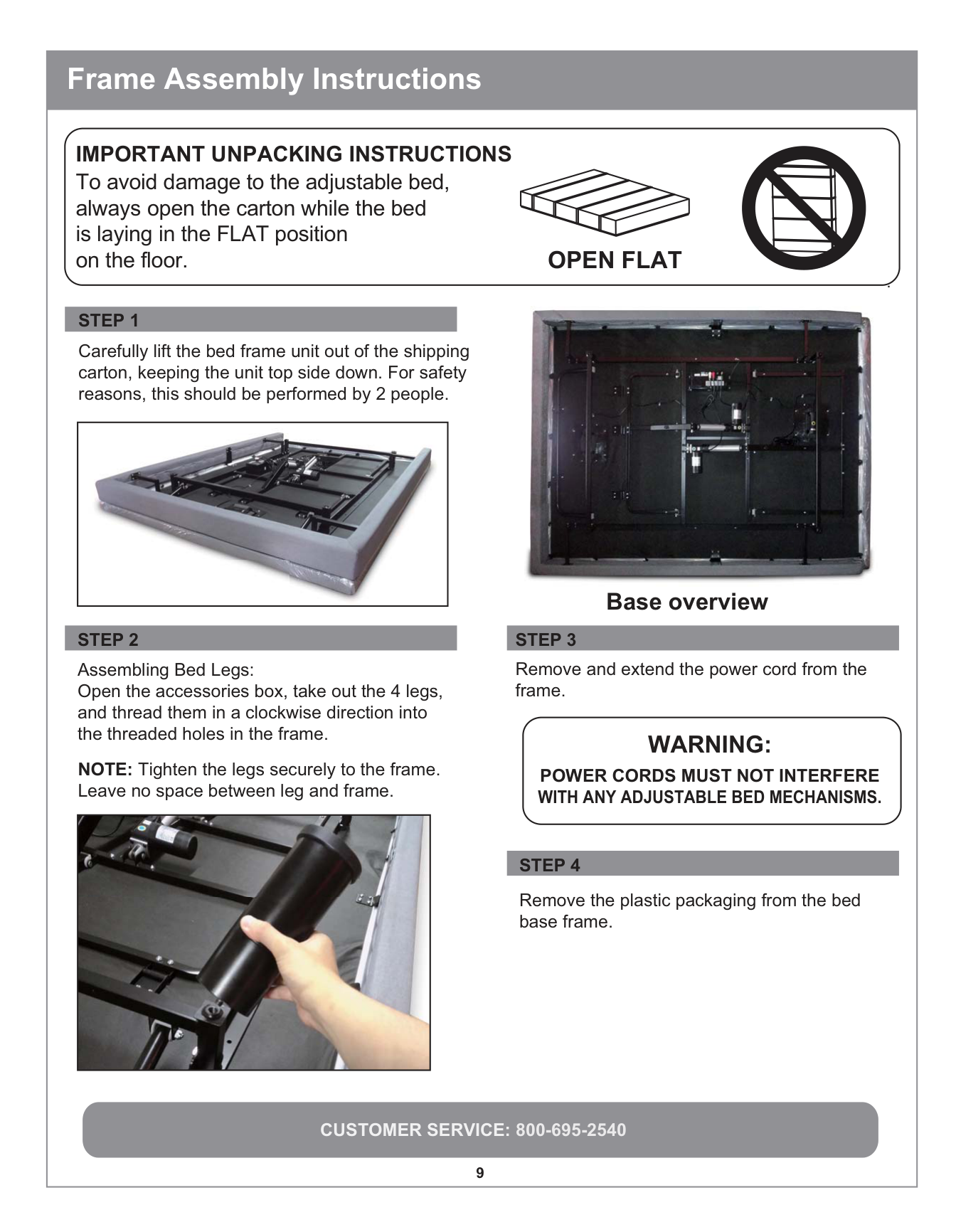
NOTE: Use only a manual screwdriver to install the retainer bolts. DO NOT use a power screwdriver to tighten the bolts. DO NOT over tighten the mattress retainer hardware.
Use the Retainer Bolts (F) and Retainer Bar Plate (I) to fasten the Mattress Retainer Brackets (B) to the front of the bed Frame. (As shown in the diagram).


NOTE: If the adjustable frame is to be set up without a headboard, simply install a mattress on the frame. Installation is now complete. If a headboard is to be installed, proceed to step 10.
ATTENTION: Failure to follow the proper installation instructions may result in damage to your adjustable bed frame.
NOTE: It is important to position the bottom of the headboard cross member a maximum distance of 3 inches (76.2 mm) between the headboard and the top of the mattress. Do not exceed 3 inches (76.2 mm).
############### STEP 8
Return the bed to the flat position and proceed to assemble the Mattress Retainer Brackets.
############### STEP 10
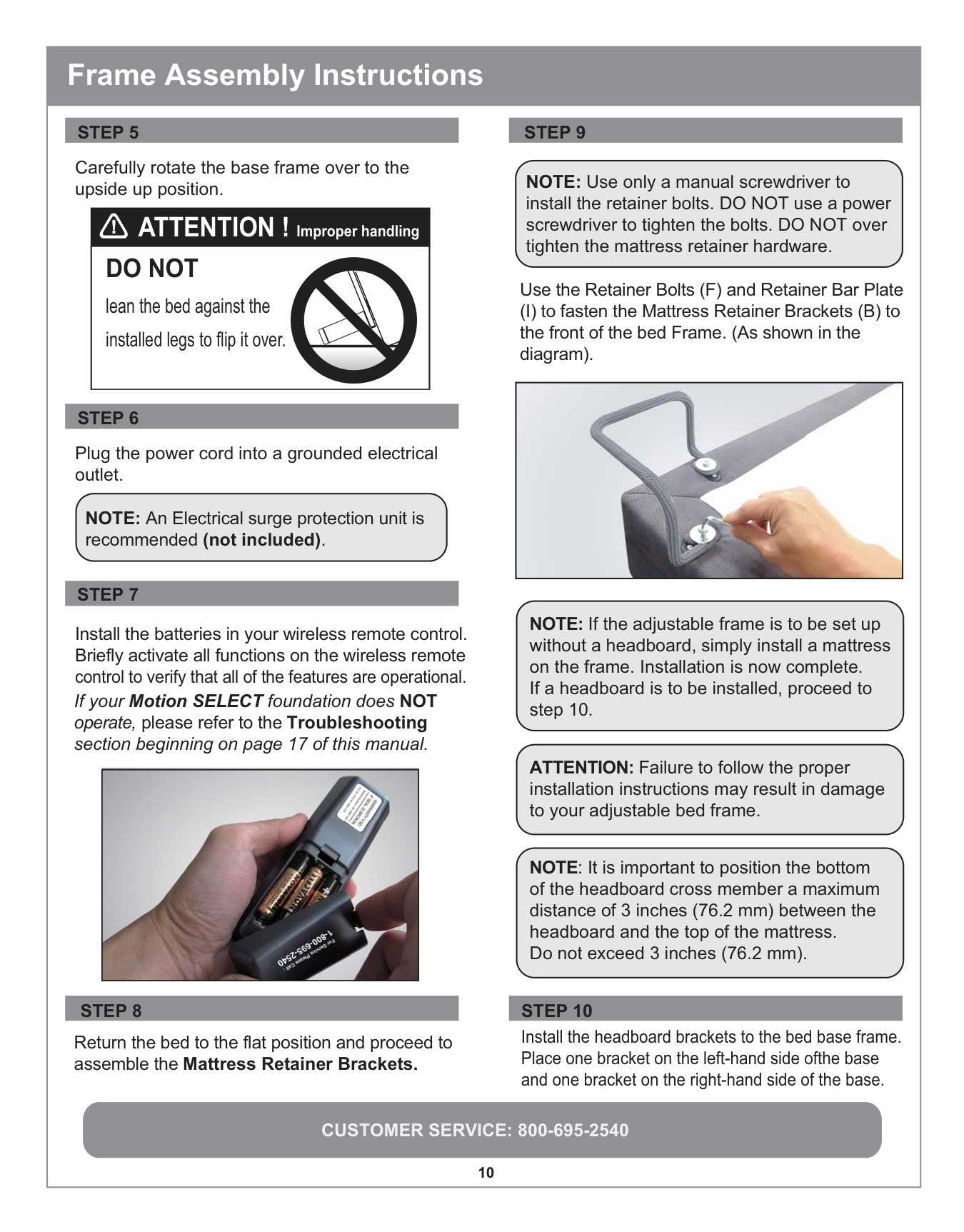
Install the headboard brackets to the bed base frame. Place one bracket on the left-hand side ofthe base and one bracket on the right-hand side of the base.
##### Headboard Installation
Install the headboard brackets to the bed base frame. Place one bracket on the left-hand side of the base and one bracket on the right-hand side of the base.
L
D
H
K I
L
K
ED
N
M
E
D
F K
I
N
M
H
D L
E F
I
STEP 11
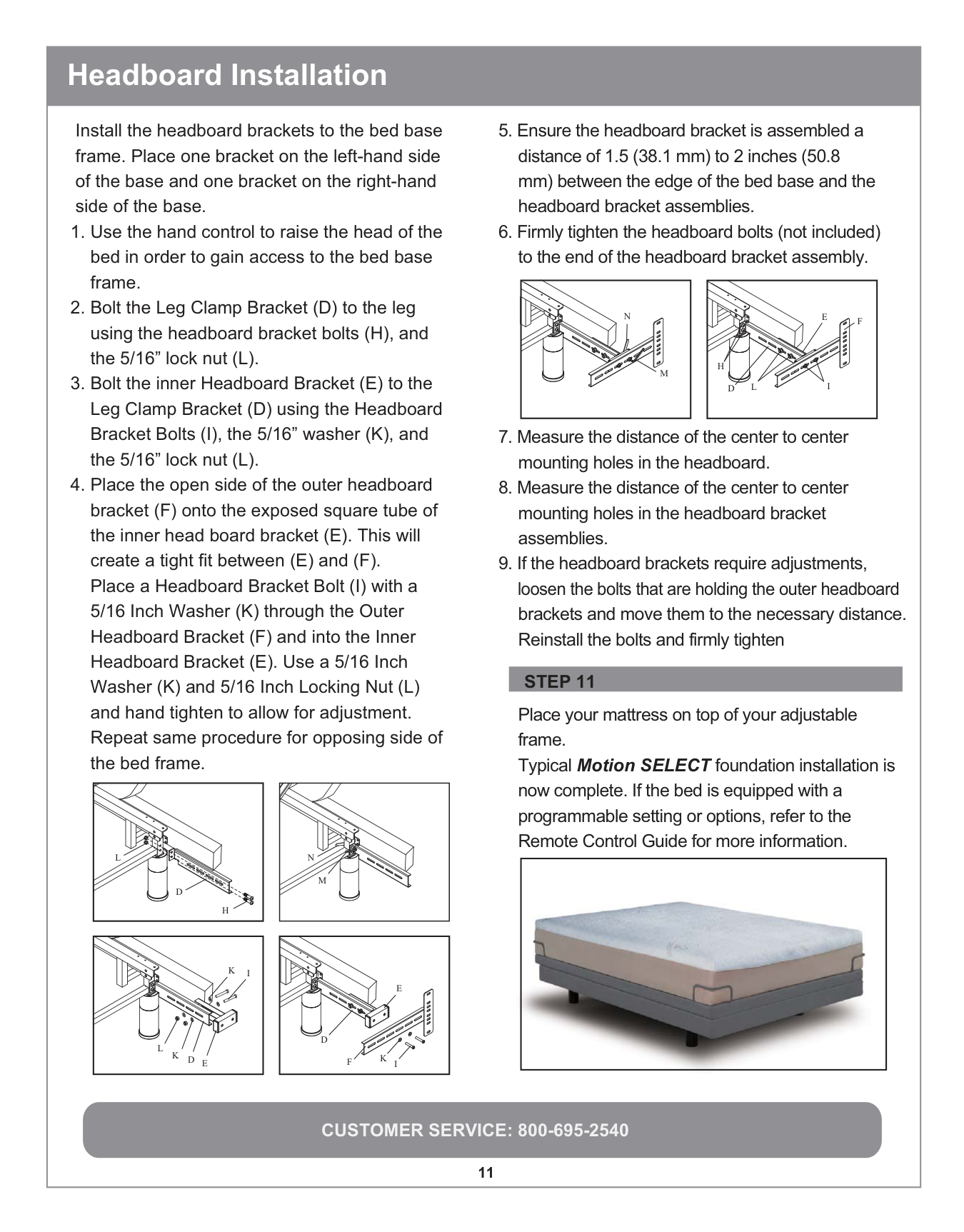
Place your mattress on top of your adjustable frame. Typical Motion SELECT foundation installation is now complete. If the bed is equipped with a programmable setting or options, refer to the Remote Control Guide for more information. programmable setting or options, re erf tro the Remote Control Guide orf more in ormaftion.






##### Wireless Remote Control
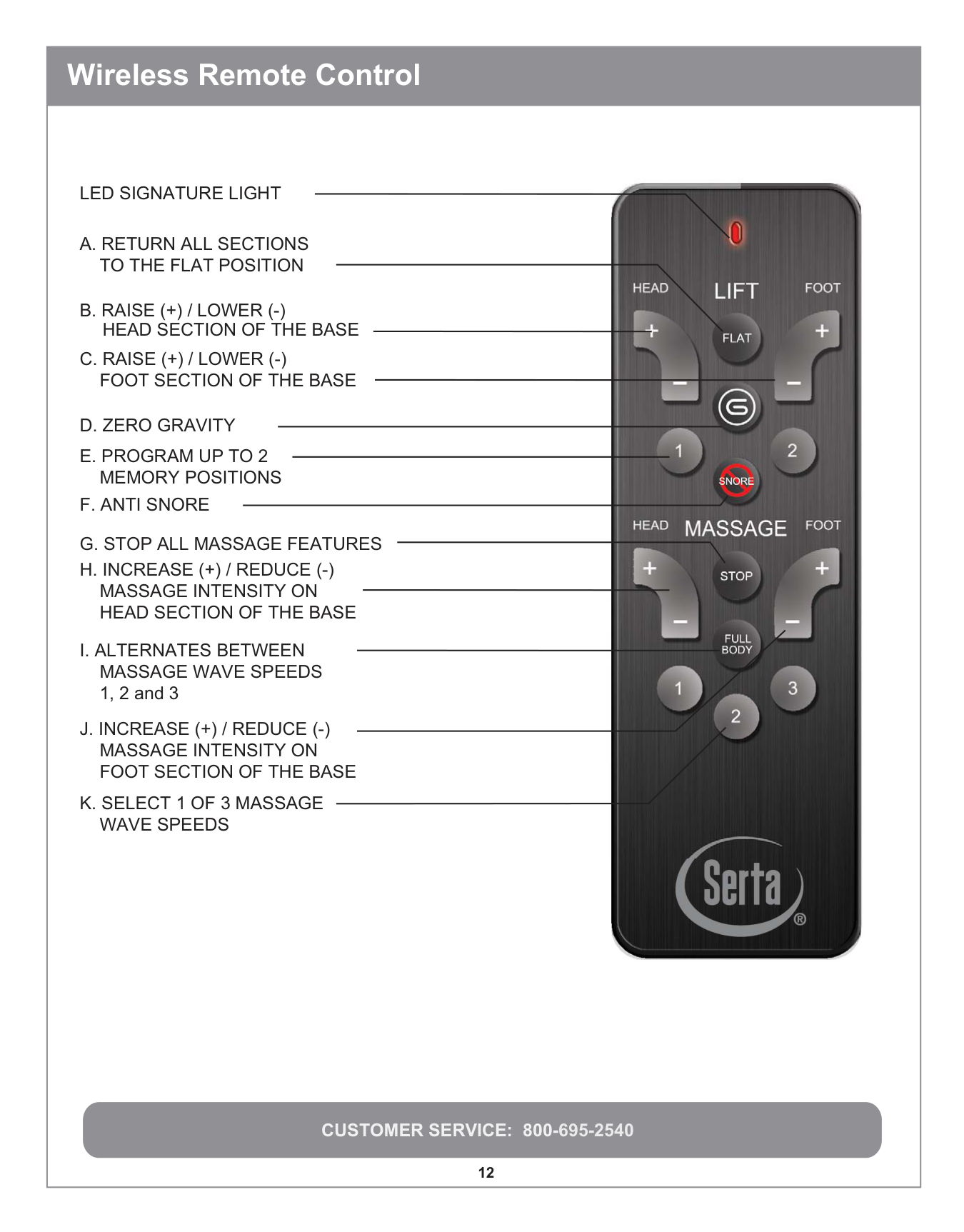
LED SIGNATURE LIGHT
A. RETURN ALL SECTIONS TO THE FLAT POSITION
E. PROGRAM UP TO 2 MEMORY POSITIONS
G. STOP ALL MASSAGE FEATURES
HEAD SECTION OF THE BASE


|CUSTOMER SERVICE: 800-695-2540
13
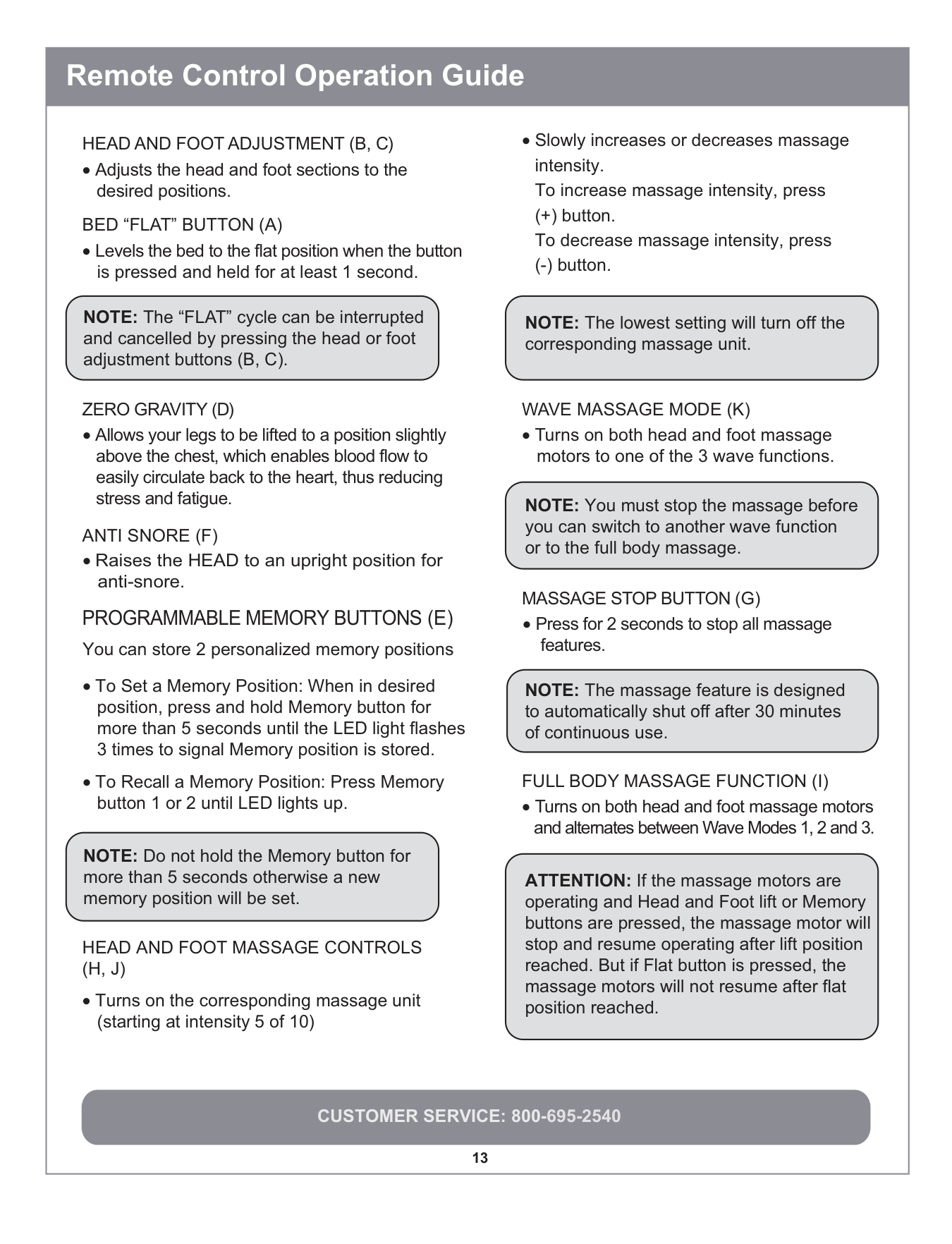
HEAD AND FOOT ADJUSTMENT (B, C)
• Adjusts the head and foot sections to the
desired positions.
PROGRAMMABLE MEMORY BUTTONS (E)
BED “FLAT” BUTTON (A)
• Levels the bed to the flat position when the button
is pressed and held for at least 1 second.
NOTE: The “FLAT” cycle can be interrupted and cancelled by pressing the head or foot adjustment buttons (B, C).
ZERO GRAVITY (D)
• Allows your legs to be lifted to a position slightly above the chest, which enables blood flow to easily circulate back to the heart, thus reducing stress and fatigue.
ANTI SNORE (F)
• Raises the HEAD to an upright position for
anti-snore.
NOTE: The lowest setting will turn off the corresponding massage unit.
WAVE MASSAGE MODE (K)
• Turns on both head and foot massage motors to one of the 3 wave functions.
NOTE: You must stop the massage before you can switch to another wave function or to the full body massage.
MASSAGE STOP BUTTON (G)
• Press for 2 seconds to stop all massage
features.
NOTE: The massage feature is designed to automatically shut off after 30 minutes of continuous use.
FULL BODY MASSAGE FUNCTION (I)
• Turns on both head and foot massage motors and alternates between Wave Modes 1, 2 and 3.
You can store 2 personalized memory positions
• To Set a Memory Position: When in desired position, press and hold Memory button for more than 5 seconds until the LED light flashes 3 times to signal Memory position is stored.
• To Recall a Memory Position: Press Memory button 1 or 2 until LED lights up.
ATTENTION: If the massage motors are operating and Head and Foot lift or Memory buttons are pressed, the massage motor will stop and resume operating after lift position reached. But if Flat button is pressed, the massage motors will not resume after flat position reached.
HEAD AND FOOT MASSAGE CONTROLS (H, J)
• Turns on the corresponding massage unit
(starting at intensity 5 of 10)
• Slowly increases or decreases massage intensity. To increase massage intensity, press (+) button. To decrease massage intensity, press (-) button.
NOTE: Do not hold the Memory button for more than 5 seconds otherwise a new memory position will be set.
Remote Control Operation Guide| |---|
|Remote Control Operation Guide
CUSTOMER SERVICE:800-695-2540
14
Safety:
Notice:
• If there is an overload weight condition on the head or foot mechanism, the control unit will automatically stop all functions.
NOTE: Once the excess weight is removed, the control unit will automatically start all functions after 30 seconds.
• If the massage motors are continuously used for a 30 minute period, the motors will automatically shut down.
• The input transformer voltage is AC 120V 60 HZ, the output voltage is DC 24V 3A. When there is a short circuit, a fuse on the transformer will be blown in order to protect the electrical equipment (Fuse: 1.5A).
The changes or modifications not expressly approved by the party responsible for compliance could void the user’s authority to operate the equipment.
Important Note
• To comply with the FCC RF exposure compliance requirements, no change to the antenna or the device is permitted. Any change to the antenna or the device could result in the device exceeding the RF exposure requirements and void user’s authority to operate the device.
THIS DEVICE COMPLIES WITH PART 15 OF THE FCC RULES. OPERATION IS SUBJECT TO THE FOLLOWING TWO CONDITIONS:
(1) THIS DEVICE MAY NOT CAUSE HARMFUL INTERFERENCE
(2) THIS DEVICE MUST ACCEPT ANY INTERFERENCE RECEIVED, INCLUDING INTERFERENCE THAT MAY CAUSE UNDESIRED OPERATION.
• The buttons are backlit, when a button is pressed,to aid in the visibility of the remote in low light environments.
NOTE: This bed may have minor intermittent performance due to RF Interference. This is a normal operation of the bed and is not a defect.
• The Motion SELECT foundation uses a RF (Radio Frequency) remote control system.
Additional Remote Features:
• Customers can control the remote without facing the receiver (best transmission range is within 9 feet or 3 meters).
ATTENTION: When the above situation occurs, the customer MUST seek professional assistance.| |---|
##### Replacement Remote Control Programming
####### Note: The remote that comes with the bed is already paired with your bed. No further action is required. Only replacement remote controls require user programming.
STEP 4
When the Green LED signature light illuminates, the RF frequency code setting function will be activated.
STEP 5
STEP 5STEP 1
Place batteries into the remote control (3 x AAA batteries).
Press any button on the remote control.
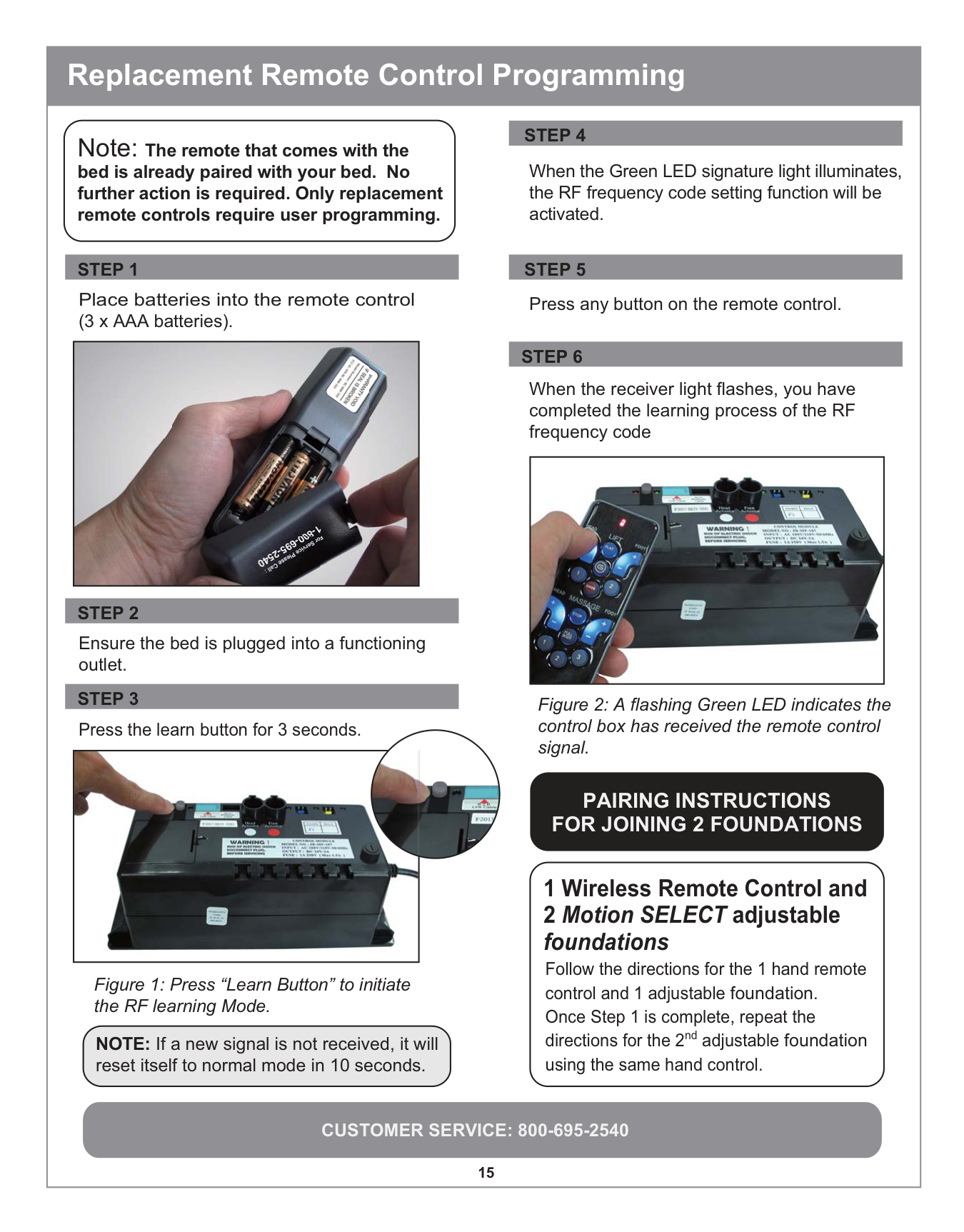


Ensure the bed is plugged into a functioning outlet.
Press the learn button for 3 seconds.


Figure 1: Press “Learn Button” to initiate the RF learning Mode.
NOTE: If a new signal is not received, it will reset itself to normal mode in 10 seconds.
STEP 6
When the receiver light flashes, you have completed the learning process of the RF frequency code

Figure 2: A flashing Green LED indicates the control box has received the remote control signal.
############# PAIRING INSTRUCTIONS FOR JOINING 2 FOUNDATIONS
Follow the directions for the 1 hand remote control and 1 adjustable foundation. Once Step 1 is complete, repeat the directions for the 2nd adjustable foundation using the same hand control.
##### Remote Control Emergency Power Down Feature
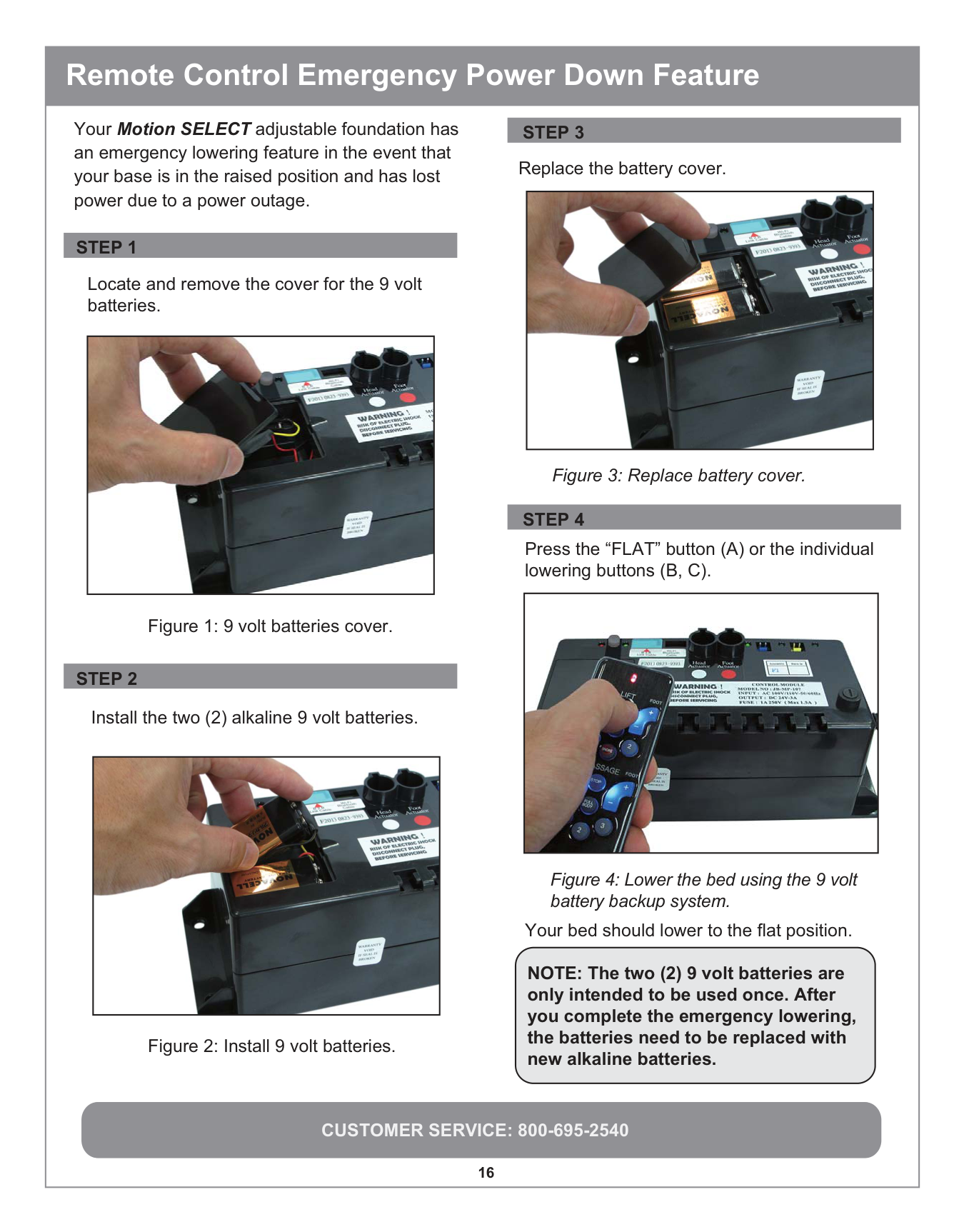
Your Motion SELECT adjustable foundation has an emergency lowering feature in the event that your base is in the raised position and has lost power due to a power outage.
Locate and remove the cover for the 9 volt batteries.

Figure 1: 9 volt batteries cover.
Install the two (2) alkaline 9 volt batteries.
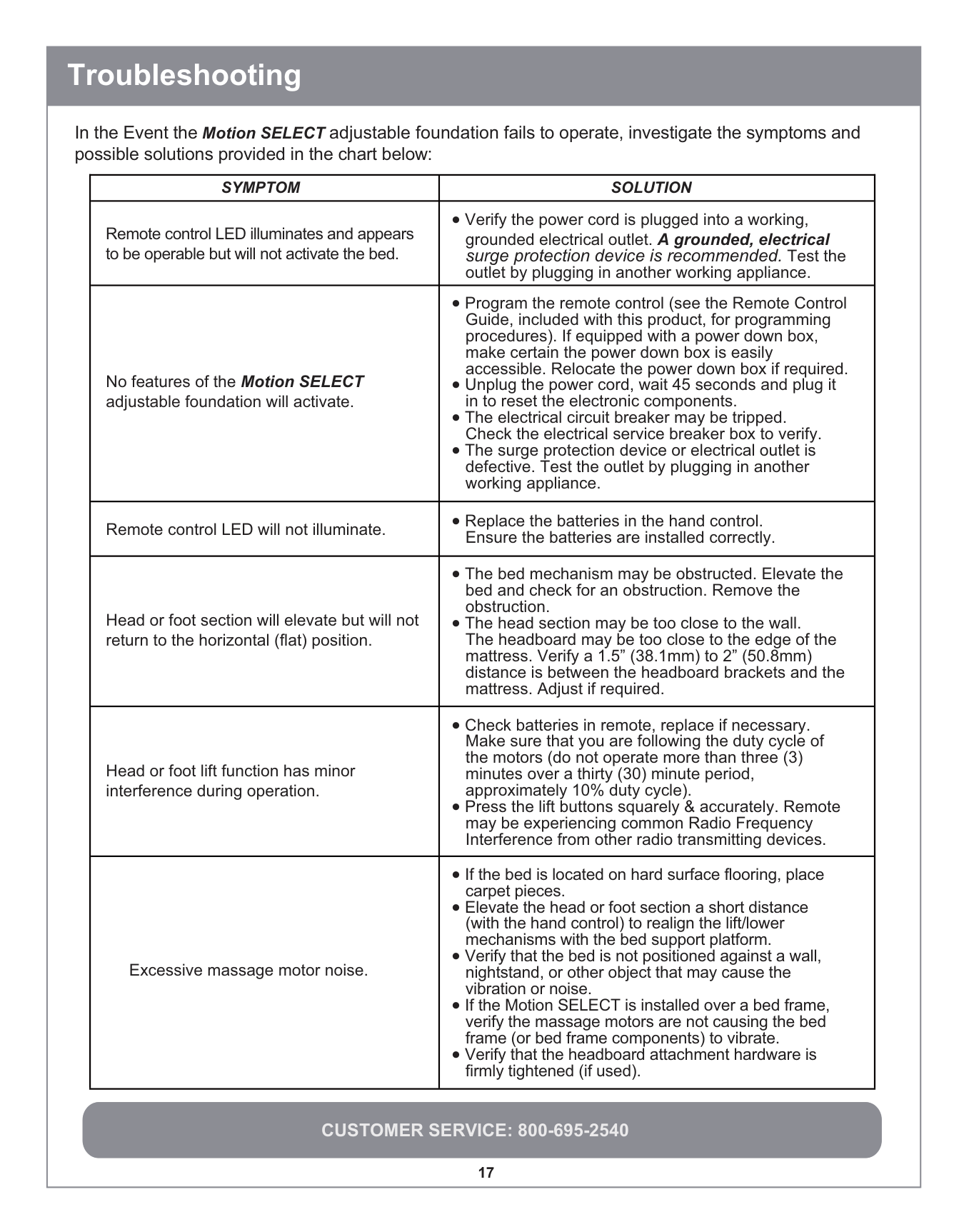

Figure 2: Install 9 volt batteries.
Replace the battery cover.

Figure 3: Replace battery cover.
Press the “FLAT” button (A) or the individual lowering buttons (B, C).

Figure 4: Lower the bed using the 9 volt battery backup system.
Your bed should lower to the flat position.
NOTE: The two (2) 9 volt batteries are only intended to be used once. After you complete the emergency lowering, the batteries need to be replaced with new alkaline batteries.
|CUSTOMER SERVICE: 800-695-2540
17
In the Event the Motion SELECT adjustable foundation fails to operate, investigate the symptoms and possible solutions provided in the chart below:
Troubleshooting
|MOTPMYS|NOITULOS| |---|---| |Remote control LED illuminates and appears to be operable but will not activate the bed.|• Verify the power cord is plugged into a working, grounded electrical outlet. A grounded, electrical surge protection device is recommended. Test the outlet by plugging in another working appliance.| |No features of the Motion SELECT adjustable foundation will activate.|• Program the remote control (see the Remote Control Guide, included with this product, for programming procedures). If equipped with a power down box, make certain the power down box is easily accessible. Relocate the power down box if required.
• Unplug the power cord, wait 45 seconds and plug it in to reset the electronic components.
• The electrical circuit breaker may be tripped. Check the electrical service breaker box to verify.
• The surge protection device or electrical outlet is defective. Test the outlet by plugging in another working appliance.
| |Remote control LED will not illuminate.|• Replace the batteries in the hand control.
Ensure the batteries are installed correctly.| |Head or foot section will elevate but will not return to the horizontal (flat) position.|• The bed mechanism may be obstructed. Elevate the bed and check for an obstruction. Remove the obstruction.
• The head section may be too close to the wall. The headboard may be too close to the edge of the mattress. Verify a 1.5” (38.1mm) to 2” (50.8mm) distance is between the headboard brackets and the mattress. Adjust if required.
| |Head or foot lift function has minor interference during operation.|• Check batteries in remote, replace if necessary. Make sure that you are following the duty cycle of the motors (do not operate more than three (3) minutes over a thirty (30) minute period, approximately 10% duty cycle).
• Press the lift buttons squarely & accurately. Remote may be experiencing common Radio Frequency Interference from other radio transmitting devices.
| |Excessive massage motor noise.|• If the bed is located on hard surface flooring, place carpet pieces.
• Elevate the head or foot section a short distance (with the hand control) to realign the lift/lower mechanisms with the bed support platform.
• Verify that the bed is not positioned against a wall, nightstand, or other object that may cause the vibration or noise.
• If the Motion SELECT is installed over a bed frame, verify the massage motors are not causing the bed frame (or bed frame components) to vibrate.
• Verify that the headboard attachment hardware is firmly tightened (if used).
| | |---|
25 YEAR LIMITED
WARRANTY
Register Online. For easy registration of your warranty visit www.reverie.com
Please prepare a digital copy of your proof of purchase (invoice or sales receipt) when registering online.
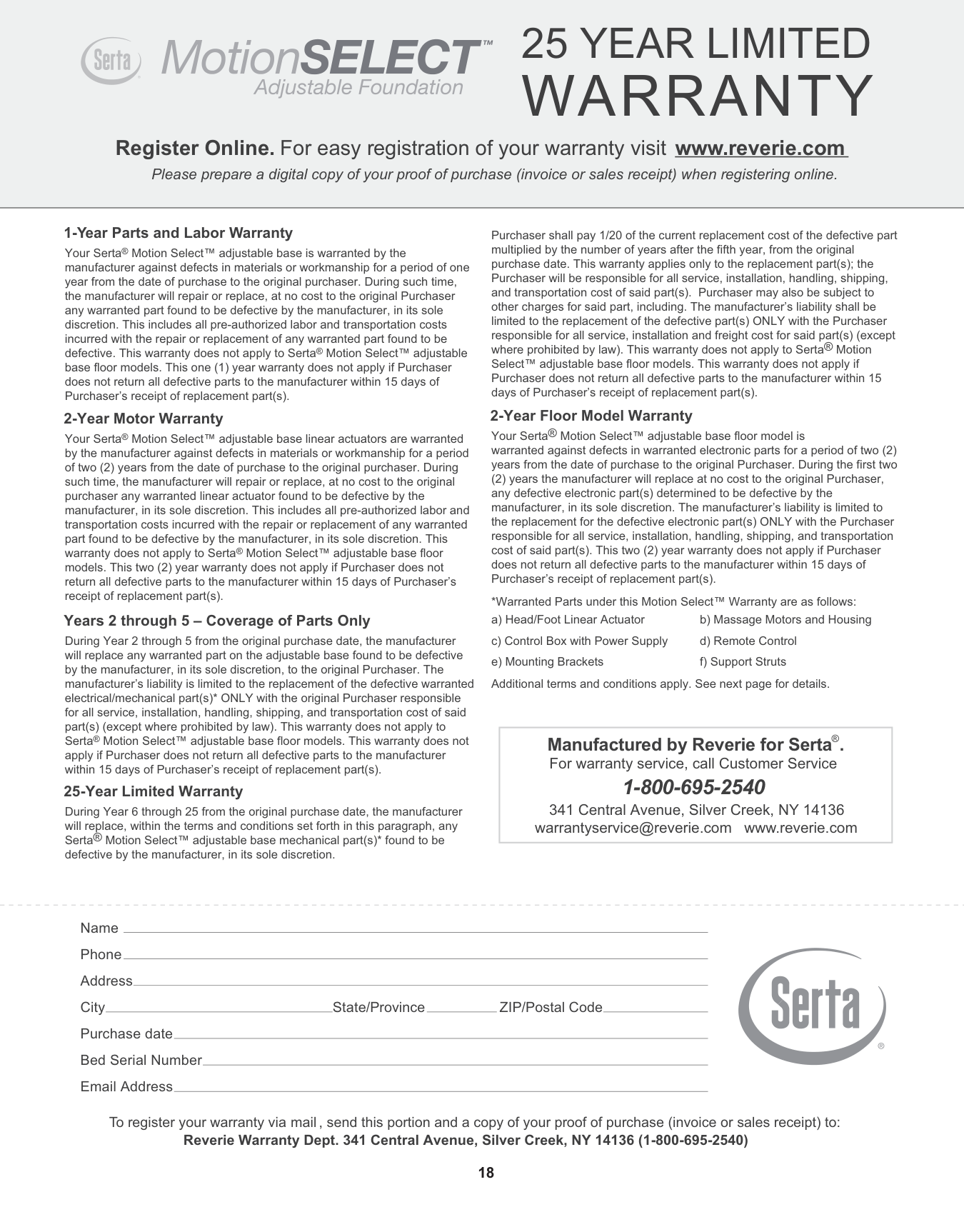
################ 1-Year Parts and Labor Warranty
Your Serta® Motion Select™ adjustable base is warranted by the manufacturer against defects in materials or workmanship for a period of one year from the date of purchase to the original purchaser. During such time, the manufacturer will repair or replace, at no cost to the original Purchaser any warranted part found to be defective by the manufacturer, in its sole discretion. This includes all pre-authorized labor and transportation costs incurred with the repair or replacement of any warranted part found to be defective. This warranty does not apply to Serta® Motion Select™ adjustable base floor models. This one (1) year warranty does not apply if Purchaser does not return all defective parts to the manufacturer within 15 days of Purchaser’s receipt of replacement part(s).
################ 2-Year Motor Warranty
Your Serta® Motion Select™ adjustable base linear actuators are warranted by the manufacturer against defects in materials or workmanship for a period of two (2) years from the date of purchase to the original purchaser. During such time, the manufacturer will repair or replace, at no cost to the original purchaser any warranted linear actuator found to be defective by the manufacturer, in its sole discretion. This includes all pre-authorized labor and transportation costs incurred with the repair or replacement of any warranted part found to be defective by the manufacturer, in its sole discretion. This warranty does not apply to Serta® Motion Select™ adjustable base floor models. This two (2) year warranty does not apply if Purchaser does not return all defective parts to the manufacturer within 15 days of Purchaser’s receipt of replacement part(s).
################ Years 2 through 5 – Coverage of Parts Only
During Year 2 through 5 from the original purchase date, the manufacturer will replace any warranted part on the adjustable base found to be defective by the manufacturer, in its sole discretion, to the original Purchaser. The manufacturer’s liability is limited to the replacement of the defective warranted electrical/mechanical part(s)* ONLY with the original Purchaser responsible for all service, installation, handling, shipping, and transportation cost of said part(s) (except where prohibited by law). This warranty does not apply to Serta® Motion Select™ adjustable base floor models. This warranty does not apply if Purchaser does not return all defective parts to the manufacturer within 15 days of Purchaser’s receipt of replacement part(s).
################ 25-Year Limited Warranty
During Year 6 through 25 from the original purchase date, the manufacturer will replace, within the terms and conditions set forth in this paragraph, any Serta® Motion Select™ adjustable base mechanical part(s)* found to be defective by the manufacturer, in its sole discretion.
Purchaser shall pay 1/20 of the current replacement cost of the defective part multiplied by the number of years after the fifth year, from the original purchase date. This warranty applies only to the replacement part(s); the Purchaser will be responsible for all service, installation, handling, shipping, and transportation cost of said part(s). Purchaser may also be subject to other charges for said part, including. The manufacturer’s liability shall be limited to the replacement of the defective part(s) ONLY with the Purchaser responsible for all service, installation and freight cost for said part(s) (except where prohibited by law). This warranty does not apply to Serta® Motion Select™ adjustable base floor models. This warranty does not apply if Purchaser does not return all defective parts to the manufacturer within 15 days of Purchaser’s receipt of replacement part(s).
################ 2-Year Floor Model Warranty
Your Serta® Motion Select™ adjustable base floor model is warranted against defects in warranted electronic parts for a period of two (2) years from the date of purchase to the original Purchaser. During the first two (2) years the manufacturer will replace at no cost to the original Purchaser, any defective electronic part(s) determined to be defective by the manufacturer, in its sole discretion. The manufacturer’s liability is limited to the replacement for the defective electronic part(s) ONLY with the Purchaser responsible for all service, installation, handling, shipping, and transportation cost of said part(s). This two (2) year warranty does not apply if Purchaser does not return all defective parts to the manufacturer within 15 days of Purchaser’s receipt of replacement part(s).
*Warranted Parts under this Motion Select™ Warranty are as follows:
a) Head/Foot Linear Actuator c) Control Box with Power Supply e) Mounting Brackets
b) Massage Motors and Housing d) Remote Control f) Support Struts
Additional terms and conditions apply. See next page for details.
|Manufactured by Reverie for Serta®. For warranty service, call Customer Service
1-800-695-2540
341 Central Avenue, Silver Creek, NY 14136 [email protected] www.reverie.com| |---|
Name Phone Address City State/Province ZIP/Postal Code Purchase date Bed Serial Number Email Address
To register your warranty via mail, send this portion and a copy of your proof of purchase (invoice or sales receipt) to:
Reverie Warranty Dept. 341 Central Avenue, Silver Creek, NY 14136 (1-800-695-2540)
########### ADDITIONAL TERMS & CONDITIONS
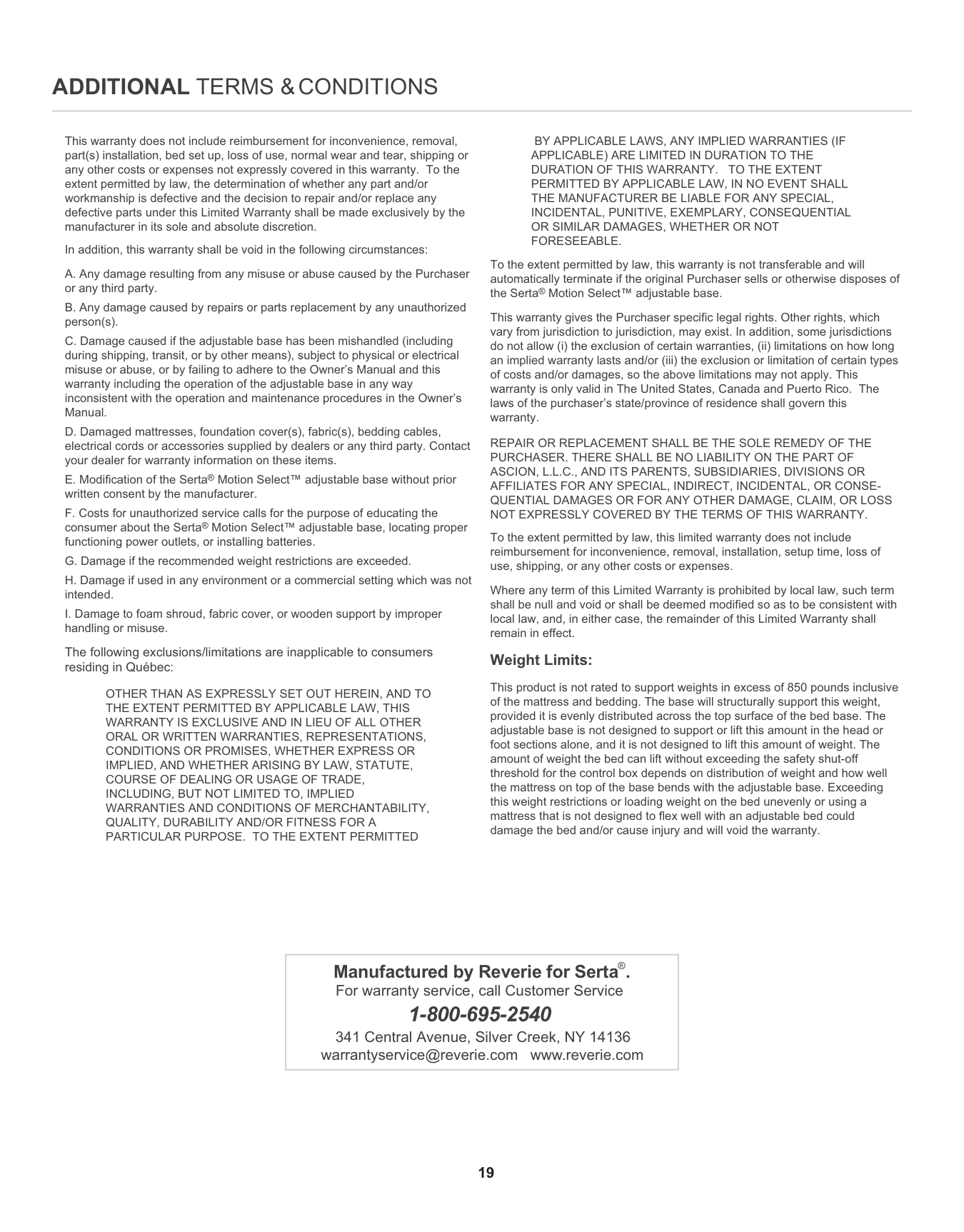
This warranty does not include reimbursement for inconvenience, removal, part(s) installation, bed set up, loss of use, normal wear and tear, shipping or any other costs or expenses not expressly covered in this warranty. To the extent permitted by law, the determination of whether any part and/or workmanship is defective and the decision to repair and/or replace any defective parts under this Limited Warranty shall be made exclusively by the manufacturer in its sole and absolute discretion.
In addition, this warranty shall be void in the following circumstances:
The following exclusions/limitations are inapplicable to consumers residing in Québec:
OTHER THAN AS EXPRESSLY SET OUT HEREIN, AND TO THE EXTENT PERMITTED BY APPLICABLE LAW, THIS WARRANTY IS EXCLUSIVE AND IN LIEU OF ALL OTHER ORAL OR WRITTEN WARRANTIES, REPRESENTATIONS, CONDITIONS OR PROMISES, WHETHER EXPRESS OR IMPLIED, AND WHETHER ARISING BY LAW, STATUTE, COURSE OF DEALING OR USAGE OF TRADE, INCLUDING, BUT NOT LIMITED TO, IMPLIED WARRANTIES AND CONDITIONS OF MERCHANTABILITY, QUALITY, DURABILITY AND/OR FITNESS FOR A PARTICULAR PURPOSE. TO THE EXTENT PERMITTED
BY APPLICABLE LAWS, ANY IMPLIED WARRANTIES (IF APPLICABLE) ARE LIMITED IN DURATION TO THE DURATION OF THIS WARRANTY. TO THE EXTENT PERMITTED BY APPLICABLE LAW, IN NO EVENT SHALL THE MANUFACTURER BE LIABLE FOR ANY SPECIAL, INCIDENTAL, PUNITIVE, EXEMPLARY, CONSEQUENTIAL OR SIMILAR DAMAGES, WHETHER OR NOT FORESEEABLE.
To the extent permitted by law, this warranty is not transferable and will automatically terminate if the original Purchaser sells or otherwise disposes of the Serta® Motion Select™ adjustable base.
This warranty gives the Purchaser specific legal rights. Other rights, which vary from jurisdiction to jurisdiction, may exist. In addition, some jurisdictions do not allow (i) the exclusion of certain warranties, (ii) limitations on how long an implied warranty lasts and/or (iii) the exclusion or limitation of certain types of costs and/or damages, so the above limitations may not apply. This warranty is only valid in The United States, Canada and Puerto Rico. The laws of the purchaser’s state/province of residence shall govern this warranty.
REPAIR OR REPLACEMENT SHALL BE THE SOLE REMEDY OF THE PURCHASER. THERE SHALL BE NO LIABILITY ON THE PART OF ASCION, L.L.C., AND ITS PARENTS, SUBSIDIARIES, DIVISIONS OR AFFILIATES FOR ANY SPECIAL, INDIRECT, INCIDENTAL, OR CONSEQUENTIAL DAMAGES OR FOR ANY OTHER DAMAGE, CLAIM, OR LOSS NOT EXPRESSLY COVERED BY THE TERMS OF THIS WARRANTY.
To the extent permitted by law, this limited warranty does not include reimbursement for inconvenience, removal, installation, setup time, loss of use, shipping, or any other costs or expenses.
Where any term of this Limited Warranty is prohibited by local law, such term shall be null and void or shall be deemed modified so as to be consistent with local law, and, in either case, the remainder of this Limited Warranty shall remain in effect.
Weight Limits:
This product is not rated to support weights in excess of 850 pounds inclusive of the mattress and bedding. The base will structurally support this weight, provided it is evenly distributed across the top surface of the bed base. The adjustable base is not designed to support or lift this amount in the head or foot sections alone, and it is not designed to lift this amount of weight. The amount of weight the bed can lift without exceeding the safety shut-off threshold for the control box depends on distribution of weight and how well the mattress on top of the base bends with the adjustable base. Exceeding this weight restrictions or loading weight on the bed unevenly or using a mattress that is not designed to flex well with an adjustable bed could damage the bed and/or cause injury and will void the warranty.
|Manufactured by Reverie for Serta®. For warranty service, call Customer Service
1-800-695-2540
341 Central Avenue, Silver Creek, NY 14136 [email protected] www.reverie.com| |---|
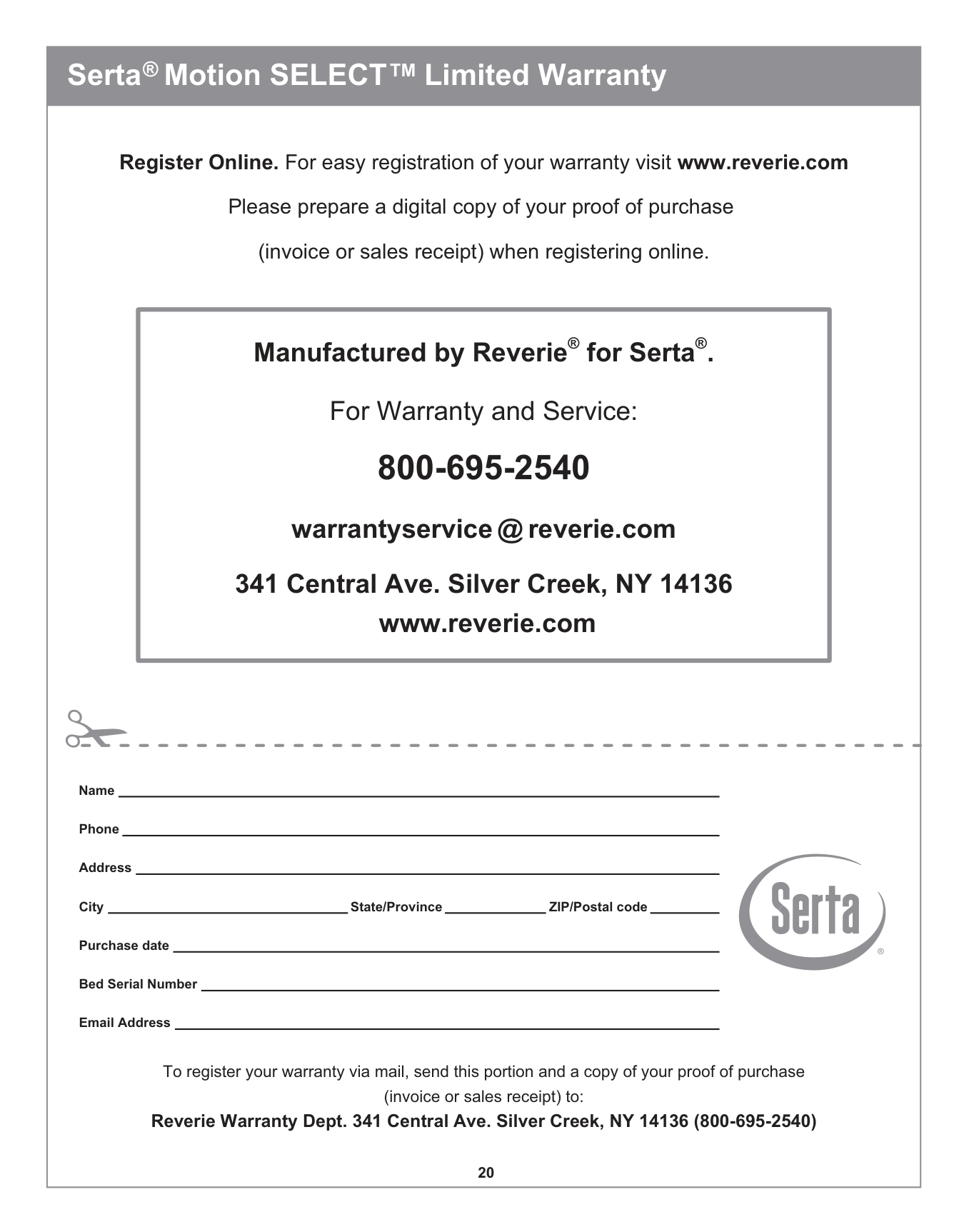
##### Serta® Motion SELECTTM Limited Warranty
Register Online. For easy registration of your warranty visit www.reverie.com Please prepare a digital copy of your proof of purchase (invoice or sales receipt) when registering online.
|Manufactured by Reverie® for Serta®. For Warranty and Service: 800-695-2540 warrantyservice @ reverie.com 341 Central Ave. Silver Creek, NY 14136 www.reverie.com| |---|
Name
Phone
Address
City State/Province ZIP/Postal code
Purchase date
Bed Serial Number
Email Address
To register your warranty via mail, send this portion and a copy of your proof of purchase (invoice or sales receipt) to: Reverie Warranty Dept. 341 Central Ave. Silver Creek, NY 14136 (800-695-2540)