
Ask AI
— answers from the official manualAnswers from the official manual.
Common questions
Common Questions
3 totalHow do I clean the remote control properly?
Use the included VIZIO soft cloth for cleaning. If the remote is seriously contaminated, use a soft cloth moistened with diluted neutral cleaner, wringing water out of the cloth before cleaning to prevent water from penetrating into the housing. Wipe the remote with a dry cloth after cleaning.
How do I teach the remote control new functions?
Press and hold the SET key until the LED blinks twice, then input code 975 (LED blinks twice to confirm). Press the Mode key (DVD, Audio, Cable, or TV), then press the key to be learned (LED will blink rapidly). Press and hold the key to be taught on the teaching remote control, and the LED will stop blinking rapidly and blink twice to confirm programming. Repeat until all desired keys are taught, then exit by pressing SET or waiting 10 seconds.
How do I clear the remote control memory and reset it?
Press and hold the SET button until the LED blinks twice, then input code 981 (LED blinks twice to signal acceptance). Alternatively, you can use code 977 instead. The remote control will then be ready to be programmed with original codes.
Full Manual
19 pages
VIZIO VUR8 Universal Remote User Manual Version 8/8/2008 2
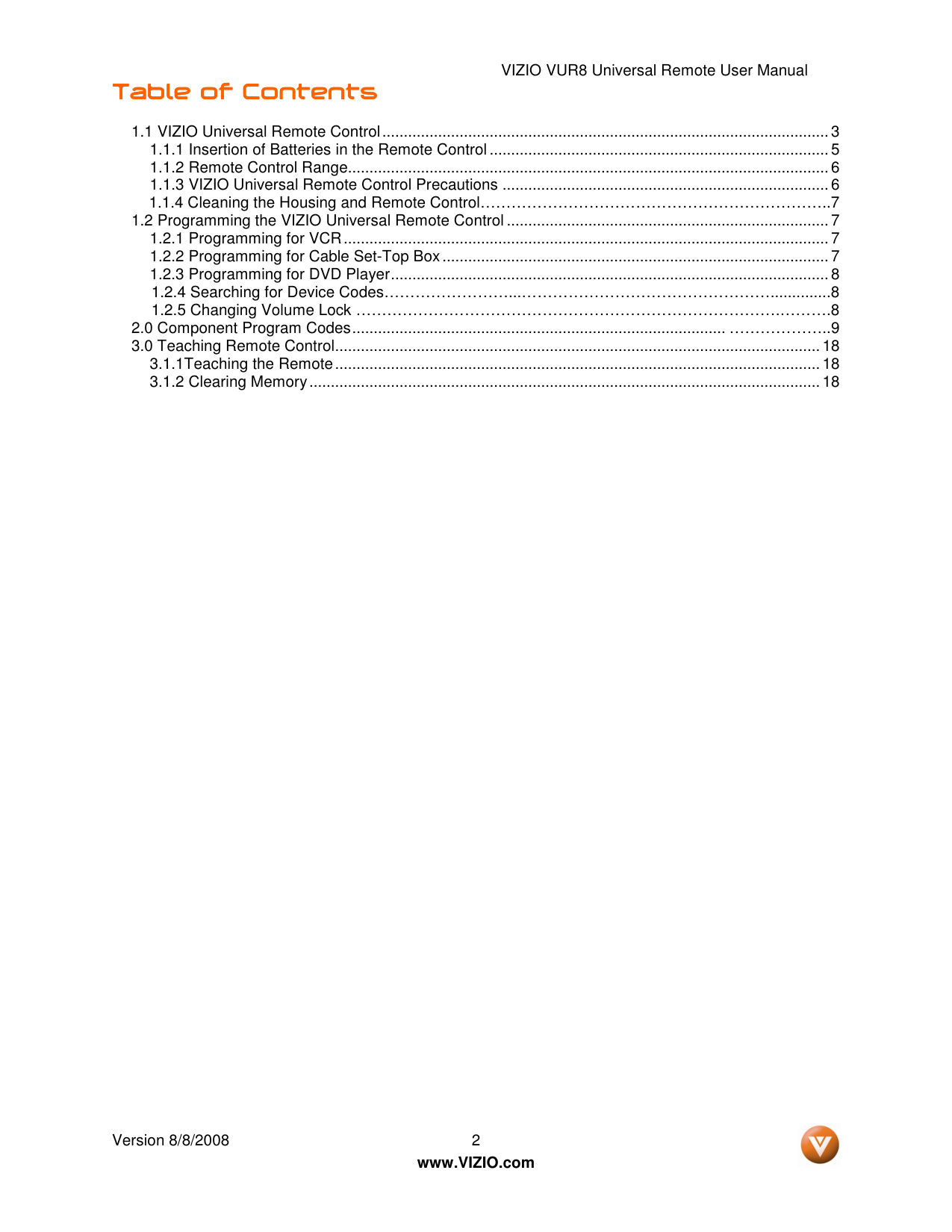
www.VIZIO.com Table of Contents Table of Contents Table of Contents Table of Contents 1.1 VIZIO Universal Remote Control........................................................................................................ 3 1.1.1 Insertion of Batteries in the Remote Control ............................................................................... 5 1.1.2 Remote Control Range................................................................................................................ 6 1.1.3 VIZIO Universal Remote Control Precautions ............................................................................ 6 1.1.4 Cleaning the Housing and Remote Control…………………………………………………………..7 1.2 Programming the VIZIO Universal Remote Control ........................................................................... 7 1.2.1 Programming for VCR................................................................................................................. 7 1.2.2 Programming for Cable Set-Top Box.......................................................................................... 7 1.2.3 Programming for DVD Player...................................................................................................... 8 1.2.4 Searching for Device Codes……………………...…………………………………………..............8 1.2.5 Changing Volume Lock ……………………………………………………………………….……….8 2.0 Component Program Codes....................................................................................... ………………..9 3.0 Teaching Remote Control................................................................................................................. 18 3.1.1Teaching the Remote................................................................................................................. 18 3.1.2 Clearing Memory....................................................................................................................... 18
VIZIO VUR8 Universal Remote User Manual Version 8/8/2008 3
www.VIZIO.com
1.1 1.1 1.1
1.1 Vizio Universal Remote Contol *
Vizio Universal Remote Contol *
Vizio Universal Remote Contol *
Vizio Universal Remote Contol *
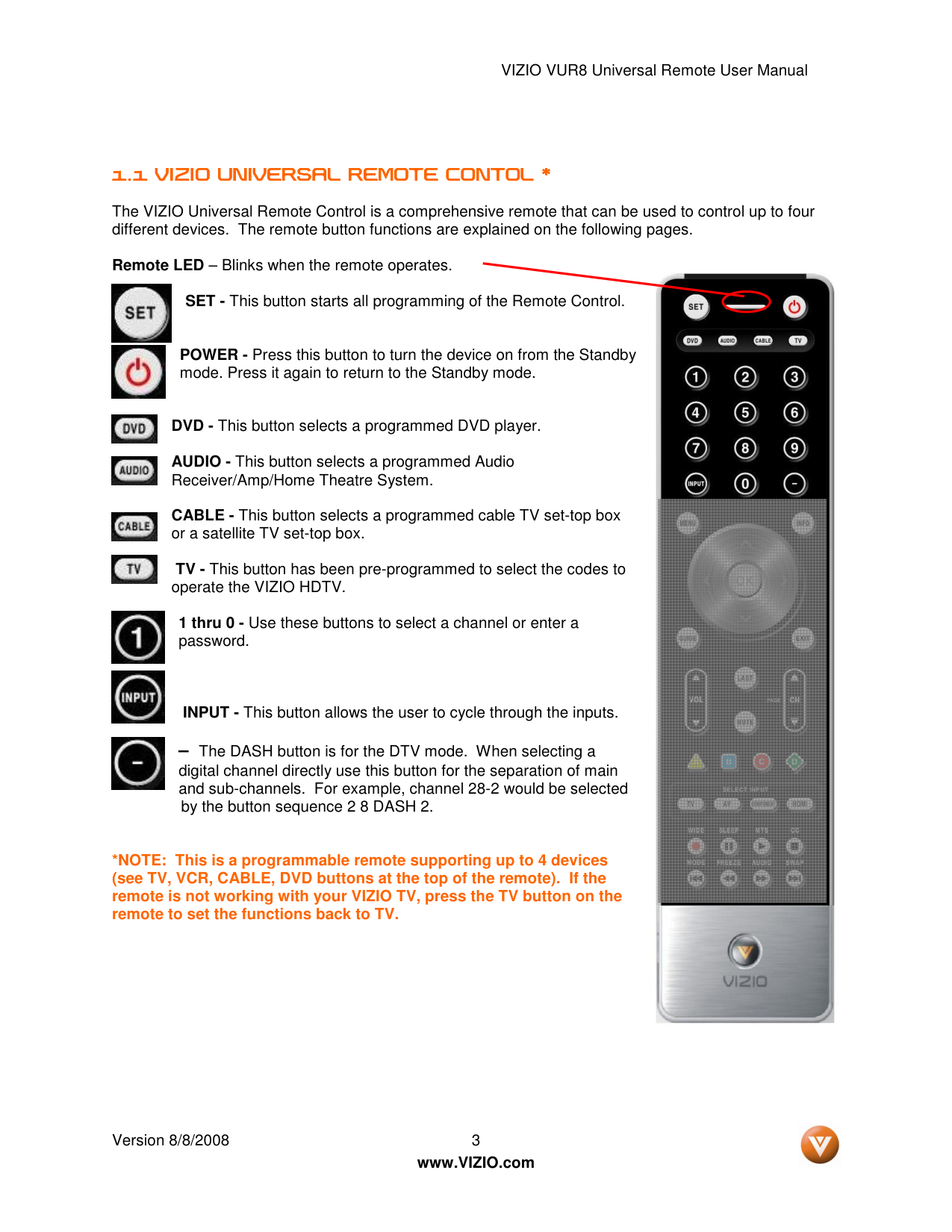
The VIZIO Universal Remote Control is a comprehensive remote that can be used to control up to four different devices. The remote button functions are explained on the following pages.
Remote LED – Blinks when the remote operates.
SET - This button starts all programming of the Remote Control.
POWER - Press this button to turn the device on from the Standby mode. Press it again to return to the Standby mode.
DVD - This button selects a programmed DVD player.
AUDIO - This button selects a programmed Audio Receiver/Amp/Home Theatre System.
CABLE - This button selects a programmed cable TV set-top box or a satellite TV set-top box.
TV - This button has been pre-programmed to select the codes to operate the VIZIO HDTV.
1 thru 0 - Use these buttons to select a channel or enter a password.
INPUT - This button allows the user to cycle through the inputs.
– The DASH button is for the DTV mode. When selecting a digital channel directly use this button for the separation of main and sub-channels. For example, channel 28-2 would be selected by the button sequence 2 8 DASH 2.
*NOTE: This is a programmable remote supporting up to 4 devices (see TV, VCR, CABLE, DVD buttons at the top of the remote). If the remote is not working with your VIZIO TV, press the TV button on the remote to set the functions back to TV.
VIZIO VUR8 Universal Remote User Manual Version 8/8/2008 4
www.VIZIO.com
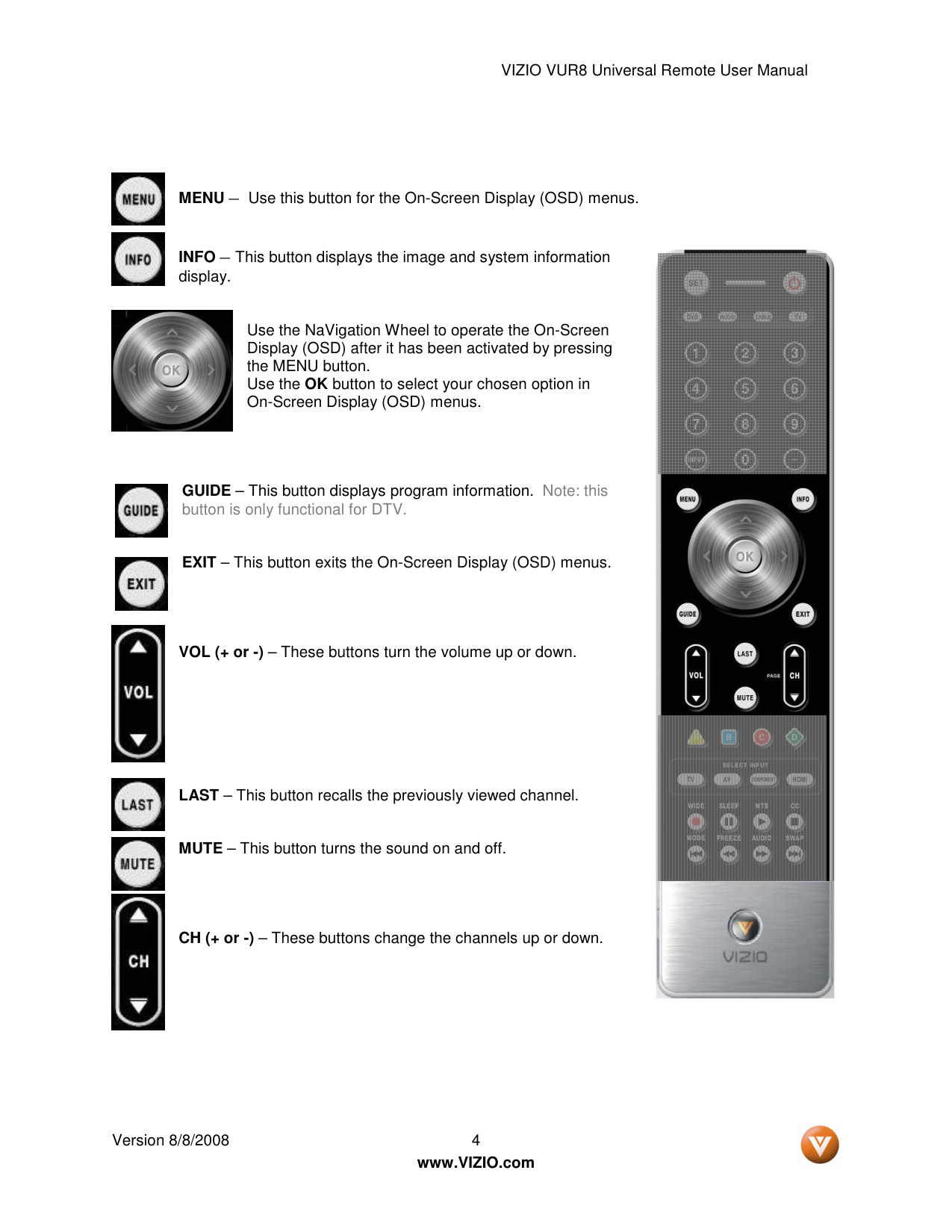
MENU – Use this button for the On-Screen Display (OSD) menus.
INFO – This button displays the image and system information display.
Use the NaVigation Wheel to operate the On-Screen Display (OSD) after it has been activated by pressing the MENU button. Use the OK button to select your chosen option in On-Screen Display (OSD) menus.
GUIDE – This button displays program information. Note: this button is only functional for DTV.
EXIT – This button exits the On-Screen Display (OSD) menus.
VOL (+ or -) – These buttons turn the volume up or down.
LAST – This button recalls the previously viewed channel.
MUTE – This button turns the sound on and off.
CH (+ or -) – These buttons change the channels up or down.
VIZIO VUR8 Universal Remote User Manual Version 8/8/2008 5
www.VIZIO.com
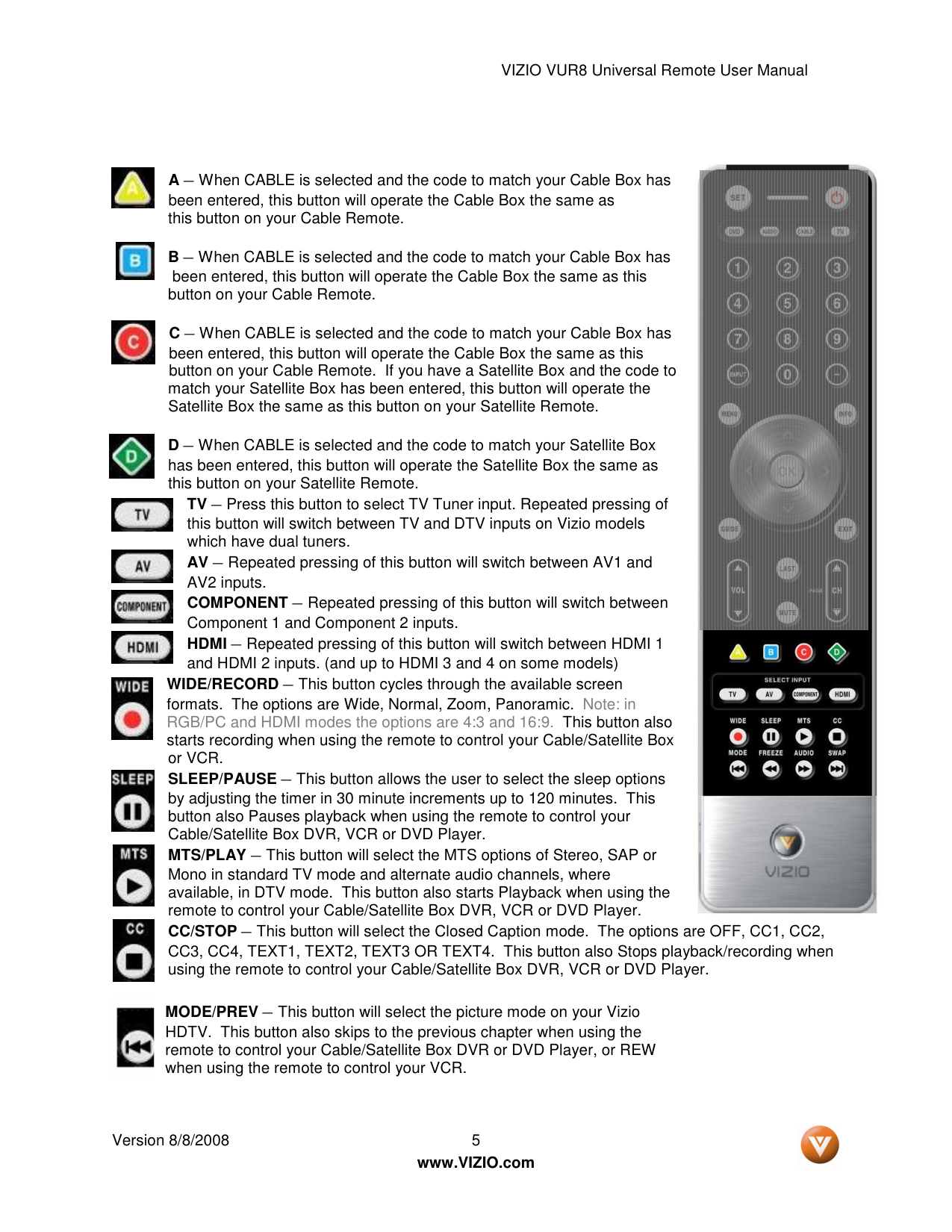
A – When CABLE is selected and the code to match your Cable Box has been entered, this button will operate the Cable Box the same as this button on your Cable Remote.
B – When CABLE is selected and the code to match your Cable Box has been entered, this button will operate the Cable Box the same as this button on your Cable Remote.
C – When CABLE is selected and the code to match your Cable Box has been entered, this button will operate the Cable Box the same as this button on your Cable Remote. If you have a Satellite Box and the code to match your Satellite Box has been entered, this button will operate the Satellite Box the same as this button on your Satellite Remote.
D – When CABLE is selected and the code to match your Satellite Box has been entered, this button will operate the Satellite Box the same as this button on your Satellite Remote. TV – Press this button to select TV Tuner input. Repeated pressing of this button will switch between TV and DTV inputs on Vizio models which have dual tuners. AV – Repeated pressing of this button will switch between AV1 and AV2 inputs. COMPONENT – Repeated pressing of this button will switch between Component 1 and Component 2 inputs. HDMI – Repeated pressing of this button will switch between HDMI 1 and HDMI 2 inputs. (and up to HDMI 3 and 4 on some models) WIDE/RECORD – This button cycles through the available screen formats. The options are Wide, Normal, Zoom, Panoramic. Note: in RGB/PC and HDMI modes the options are 4:3 and 16:9. This button also starts recording when using the remote to control your Cable/Satellite Box or VCR. SLEEP/PAUSE – This button allows the user to select the sleep options by adjusting the timer in 30 minute increments up to 120 minutes. This button also Pauses playback when using the remote to control your Cable/Satellite Box DVR, VCR or DVD Player. MTS/PLAY – This button will select the MTS options of Stereo, SAP or Mono in standard TV mode and alternate audio channels, where available, in DTV mode. This button also starts Playback when using the remote to control your Cable/Satellite Box DVR, VCR or DVD Player. CC/STOP – This button will select the Closed Caption mode. The options are OFF, CC1, CC2, CC3, CC4, TEXT1, TEXT2, TEXT3 OR TEXT4. This button also Stops playback/recording when using the remote to control your Cable/Satellite Box DVR, VCR or DVD Player.
MODE/PREV – This button will select the picture mode on your Vizio HDTV. This button also skips to the previous chapter when using the remote to control your Cable/Satellite Box DVR or DVD Player, or REW when using the remote to control your VCR.
VIZIO VUR8 Universal Remote User Manual Version 8/8/2008 6
www.VIZIO.com
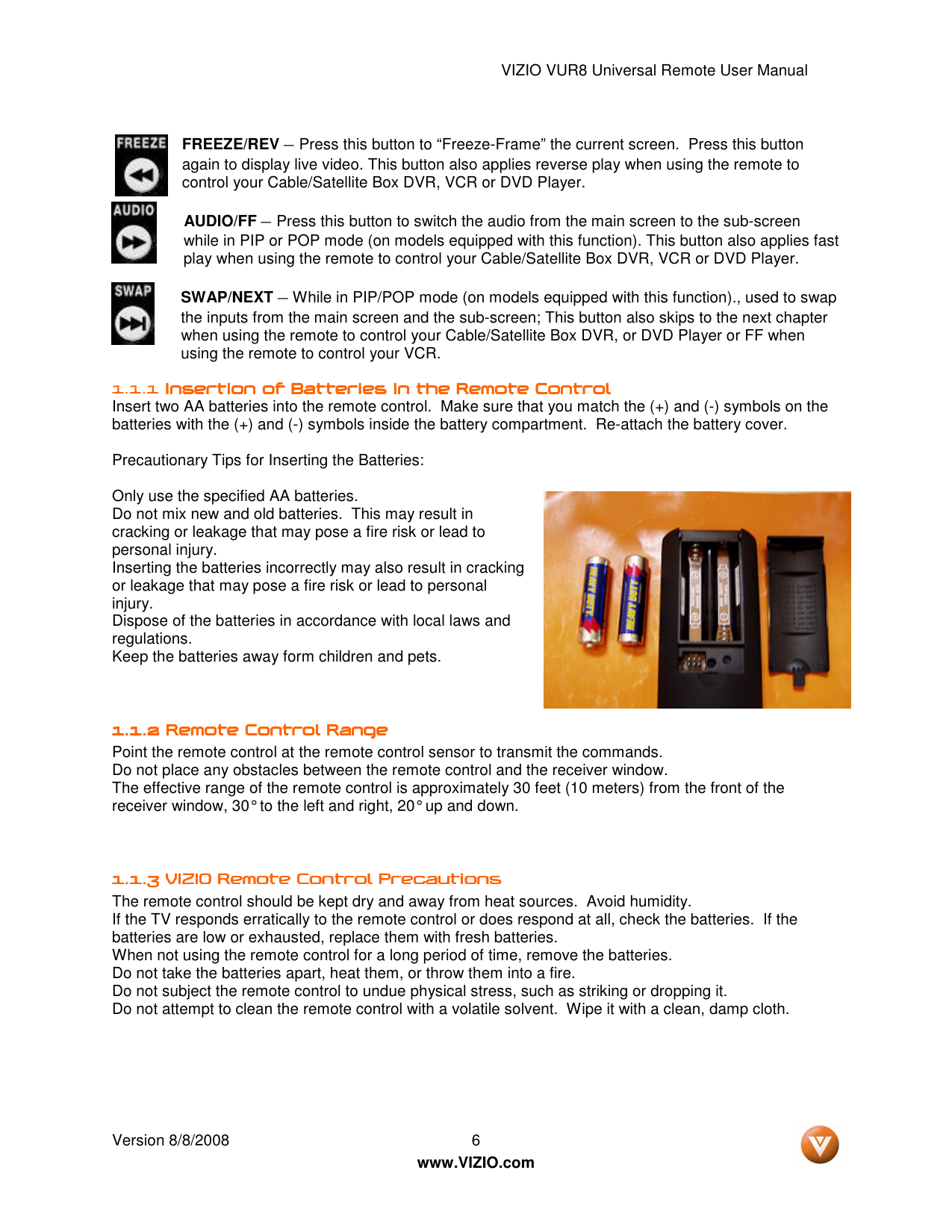
FREEZE/REV – Press this button to “Freeze-Frame” the current screen. Press this button again to display live video. This button also applies reverse play when using the remote to control your Cable/Satellite Box DVR, VCR or DVD Player.
AUDIO/FF – Press this button to switch the audio from the main screen to the sub-screen while in PIP or POP mode (on models equipped with this function). This button also applies fast play when using the remote to control your Cable/Satellite Box DVR, VCR or DVD Player.
SWAP/NEXT – While in PIP/POP mode (on models equipped with this function)., used to swap the inputs from the main screen and the sub-screen; This button also skips to the next chapter when using the remote to control your Cable/Satellite Box DVR, or DVD Player or FF when using the remote to control your VCR.
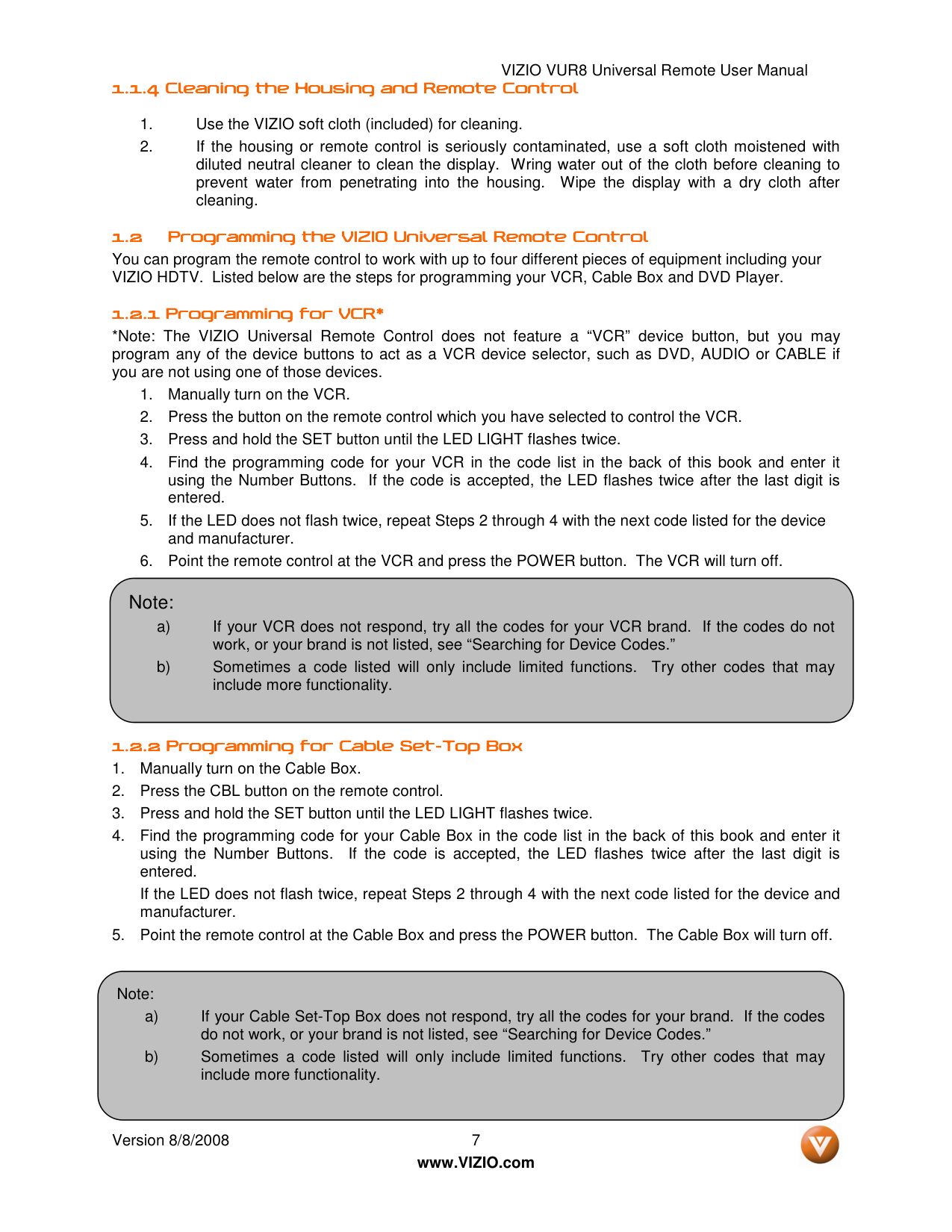
1.1.1 Insertion of Batteries in the Remote Control Insertion of Batteries in the Remote Control Insertion of Batteries in the Remote Control Insertion of Batteries in the Remote Control Insert two AA batteries into the remote control. Make sure that you match the (+) and (-) symbols on the batteries with the (+) and (-) symbols inside the battery compartment. Re-attach the battery cover.
Precautionary Tips for Inserting the Batteries:
Only use the specified AA batteries. Do not mix new and old batteries. This may result in cracking or leakage that may pose a fire risk or lead to personal injury. Inserting the batteries incorrectly may also result in cracking or leakage that may pose a fire risk or lead to personal injury. Dispose of the batteries in accordance with local laws and regulations. Keep the batteries away form children and pets.
1.1.2 1.1.2 1.1.2 1.1.2 Remote Control Range Remote Control Range Remote Control Range Remote Control Range Point the remote control at the remote control sensor to transmit the commands. Do not place any obstacles between the remote control and the receiver window. The effective range of the remote control is approximately 30 feet (10 meters) from the front of the receiver window, 30° to the left and right, 20° up and down.
1.1.3 1.1.3 1.1.3 1.1.3 VIZIO Remote Control VIZIO Remote Control VIZIO Remote Control VIZIO Remote Control Precautions Precautions Precautions Precautions The remote control should be kept dry and away from heat sources. Avoid humidity. If the TV responds erratically to the remote control or does respond at all, check the batteries. If the batteries are low or exhausted, replace them with fresh batteries. When not using the remote control for a long period of time, remove the batteries. Do not take the batteries apart, heat them, or throw them into a fire. Do not subject the remote control to undue physical stress, such as striking or dropping it. Do not attempt to clean the remote control with a volatile solvent. Wipe it with a clean, damp cloth.
VIZIO VUR8 Universal Remote User Manual Version 8/8/2008 7
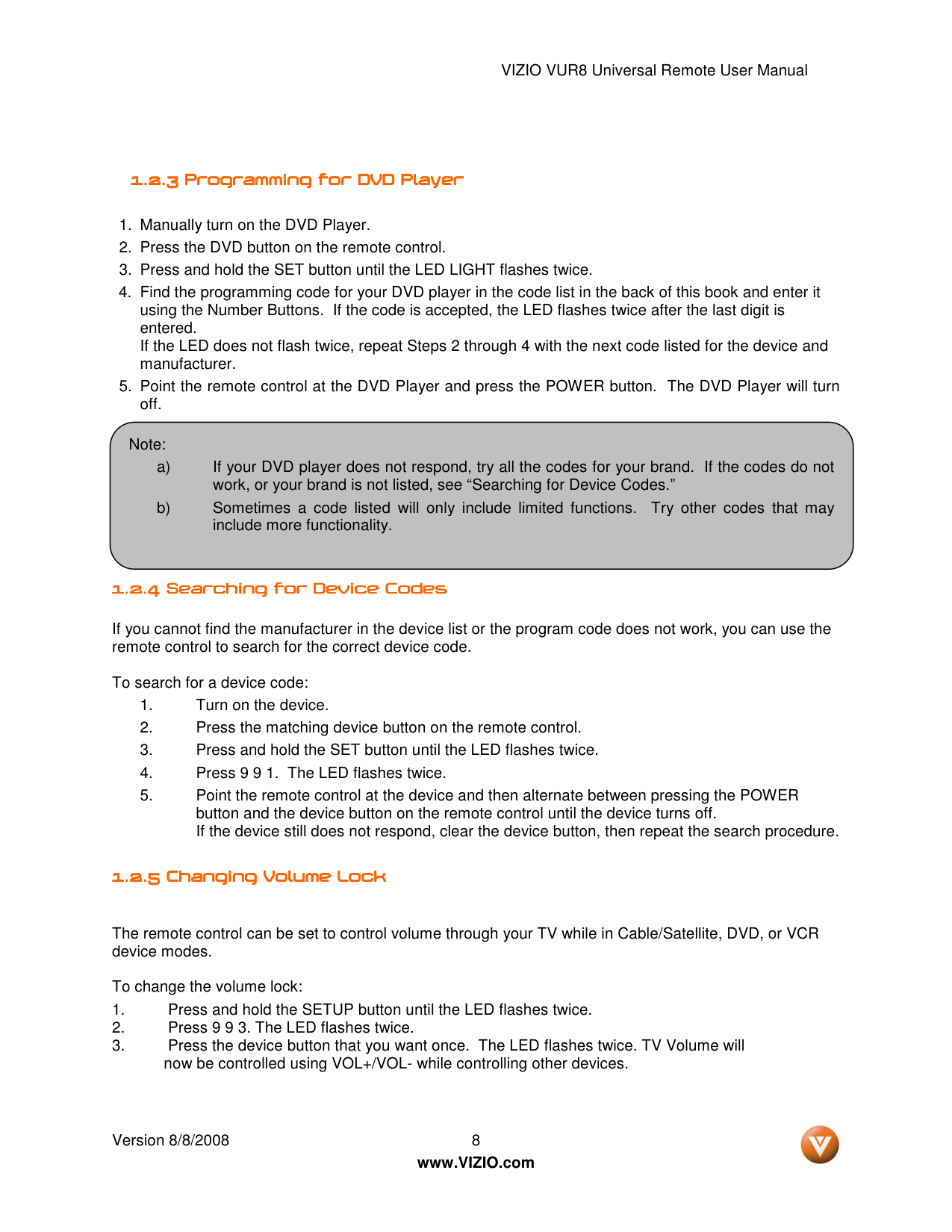
www.VIZIO.com 1.1.4 1.1.4 1.1.4 1.1.4 Cleaning the Housing and Remote Control Cleaning the Housing and Remote Control Cleaning the Housing and Remote Control Cleaning the Housing and Remote Control
1.2.2 1.2.2 1.2.2 1.2.2 Programming for Cable Set Programming for Cable Set Programming for Cable Set Programming for Cable Set----Top Box Top Box Top Box Top Box
Note: a) If your VCR does not respond, try all the codes for your VCR brand. If the codes do not work, or your brand is not listed, see “Searching for Device Codes.” b) Sometimes a code listed will only include limited functions. Try other codes that may include more functionality. Note: a) If your Cable Set-Top Box does not respond, try all the codes for your brand. If the codes do not work, or your brand is not listed, see “Searching for Device Codes.” b) Sometimes a code listed will only include limited functions. Try other codes that may include more functionality.
VIZIO VUR8 Universal Remote User Manual Version 8/8/2008 8
www.VIZIO.com
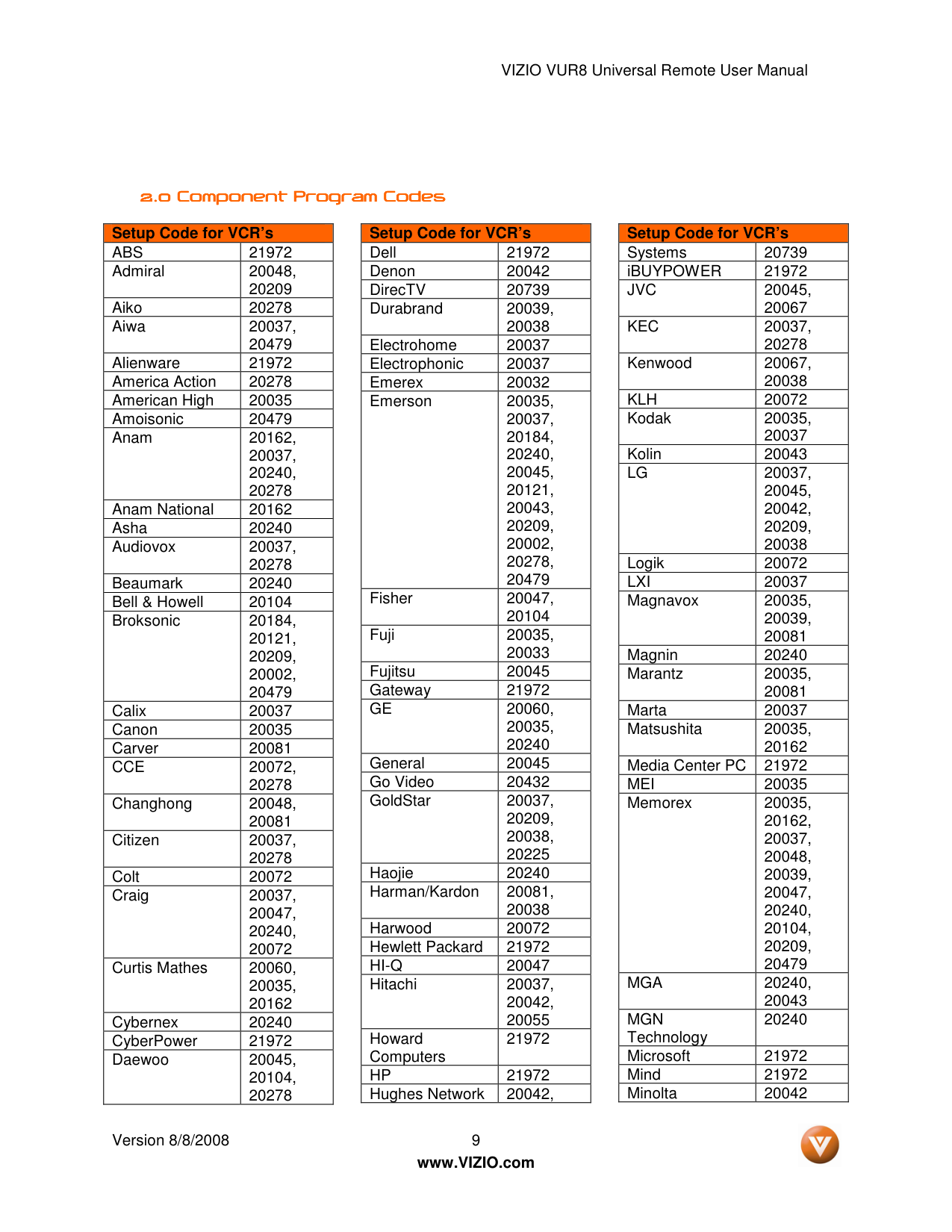
1.2.3 1.2.3 1.2.3 1.2.3 Programming for DVD Player Programming for DVD Player Programming for DVD Player Programming for DVD Player
1.2.4 1.2.4 1.2.4 1.2.4 Searching for Searching for Searching for Searching for Device Device Device Device Codes Codes Codes Codes
If you cannot find the manufacturer in the device list or the program code does not work, you can use the remote control to search for the correct device code.
To search for a device code:
1.2.5 1.2.5 1.2.5 1.2.5 Changing Volume Lock Changing Volume Lock Changing Volume Lock Changing Volume Lock
The remote control can be set to control volume through your TV while in Cable/Satellite, DVD, or VCR device modes. To change the volume lock:
Note: a) If your DVD player does not respond, try all the codes for your brand. If the codes do not work, or your brand is not listed, see “Searching for Device Codes.” b) Sometimes a code listed will only include limited functions. Try other codes that may include more functionality.
VIZIO VUR8 Universal Remote User Manual Version 8/8/2008 9
www.VIZIO.com
2.0 Component 2.0 Component 2.0 Component 2.0 Component Program Codes Program Codes Program Codes Program Codes Setup Code for VCR’s
Abs
21972 Admiral 20048, 20209 Aiko 20278 Aiwa 20037, 20479 Alienware 21972 America Action 20278 American High 20035 Amoisonic 20479 Anam 20162, 20037, 20240, 20278 Anam National 20162 Asha 20240 Audiovox 20037, 20278 Beaumark 20240 Bell & Howell 20104 Broksonic 20184, 20121, 20209, 20002, 20479 Calix 20037 Canon 20035 Carver 20081Cce
20072, 20278 Changhong 20048, 20081 Citizen 20037, 20278 Colt 20072 Craig 20037, 20047, 20240, 20072 Curtis Mathes 20060, 20035, 20162 Cybernex 20240 CyberPower 21972 Daewoo 20045, 20104, 20278 Setup Code for VCR’s Dell 21972 Denon 20042 DirecTV 20739 Durabrand 20039, 20038 Electrohome 20037 Electrophonic 20037 Emerex 20032 Emerson 20035, 20037, 20184, 20240, 20045, 20121, 20043, 20209, 20002, 20278, 20479 Fisher 20047, 20104 Fuji 20035, 20033 Fujitsu 20045 Gateway 21972Ge
20060, 20035, 20240 General 20045 Go Video 20432 GoldStar 20037, 20209, 20038, 20225 Haojie 20240 Harman/Kardon 20081, 20038 Harwood 20072 Hewlett Packard 21972Hi-Q
20047 Hitachi 20037, 20042, 20055 Howard Computers 21972Hp
21972 Hughes Network 20042, Setup Code for VCR’s Systems 20739 iBUYPOWER 21972Jvc
20045, 20067Kec
20037, 20278 Kenwood 20067, 20038Klh
20072 Kodak 20035, 20037 Kolin 20043Lg
20037, 20045, 20042, 20209, 20038 Logik 20072Lxi
20037 Magnavox 20035, 20039, 20081 Magnin 20240 Marantz 20035, 20081 Marta 20037 Matsushita 20035, 20162 Media Center PC 21972Mei
20035 Memorex 20035, 20162, 20037, 20048, 20039, 20047, 20240, 20104, 20209, 20479Mga
20240, 20043Mgn
Technology 20240 Microsoft 21972 Mind 21972 Minolta 20042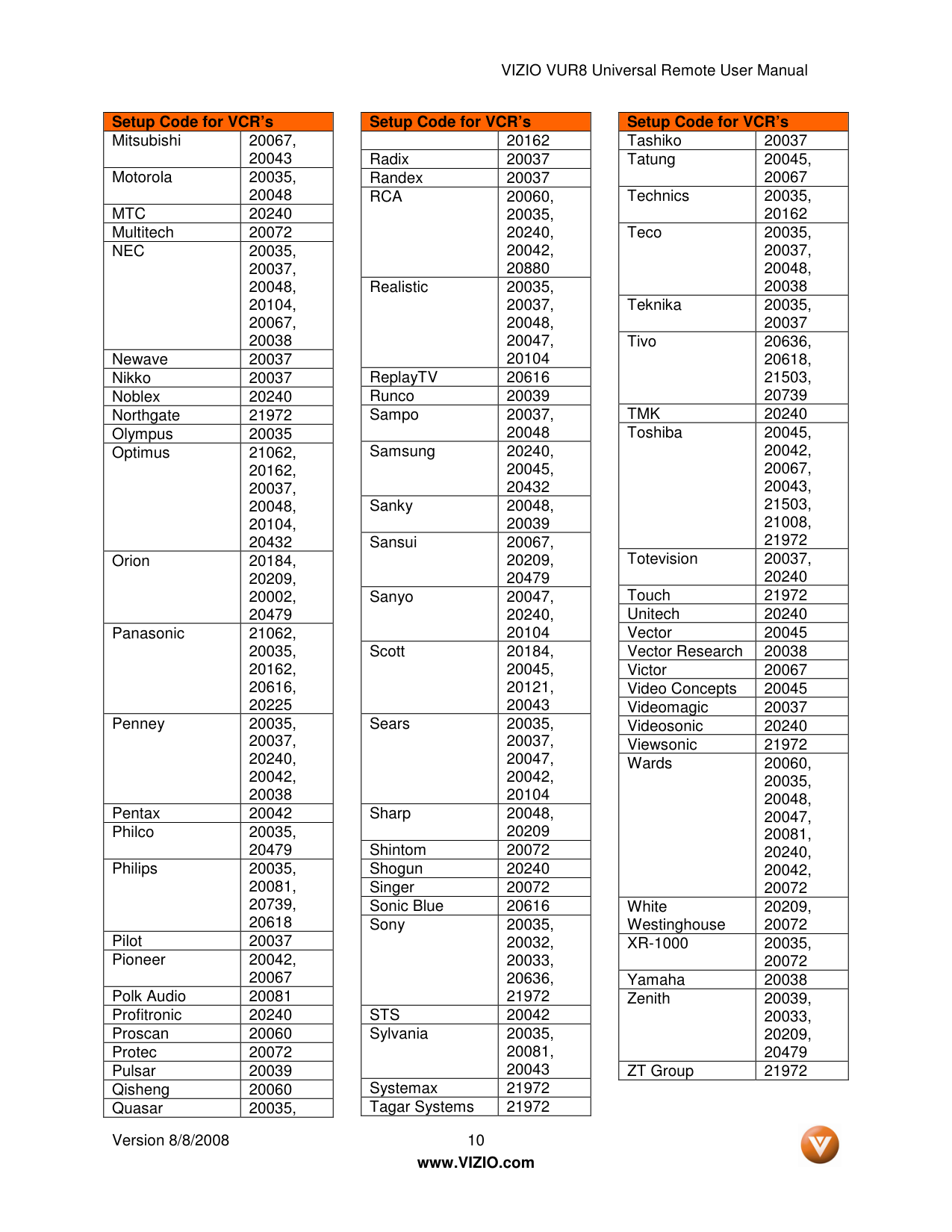
VIZIO VUR8 Universal Remote User Manual Version 8/8/2008 10
www.VIZIO.com Setup Code for VCR’s Mitsubishi 20067, 20043 Motorola 20035, 20048
Mtc
20240 Multitech 20072Nec
20035, 20037, 20048, 20104, 20067, 20038 Newave 20037 Nikko 20037 Noblex 20240 Northgate 21972 Olympus 20035 Optimus 21062, 20162, 20037, 20048, 20104, 20432 Orion 20184, 20209, 20002, 20479 Panasonic 21062, 20035, 20162, 20616, 20225 Penney 20035, 20037, 20240, 20042, 20038 Pentax 20042 Philco 20035, 20479 Philips 20035, 20081, 20739, 20618 Pilot 20037 Pioneer 20042, 20067 Polk Audio 20081 Profitronic 20240 Proscan 20060 Protec 20072 Pulsar 20039 Qisheng 20060 Quasar 20035, Setup Code for VCR’s 20162 Radix 20037 Randex 20037Rca
20060, 20035, 20240, 20042, 20880 Realistic 20035, 20037, 20048, 20047, 20104 ReplayTV 20616 Runco 20039 Sampo 20037, 20048 Samsung 20240, 20045, 20432 Sanky 20048, 20039 Sansui 20067, 20209, 20479 Sanyo 20047, 20240, 20104 Scott 20184, 20045, 20121, 20043 Sears 20035, 20037, 20047, 20042, 20104 Sharp 20048, 20209 Shintom 20072 Shogun 20240 Singer 20072 Sonic Blue 20616 Sony 20035, 20032, 20033, 20636, 21972Sts
20042 Sylvania 20035, 20081, 20043 Systemax 21972 Tagar Systems 21972 Setup Code for VCR’s Tashiko 20037 Tatung 20045, 20067 Technics 20035, 20162 Teco 20035, 20037, 20048, 20038 Teknika 20035, 20037 Tivo 20636, 20618, 21503, 20739Tmk
20240 Toshiba 20045, 20042, 20067, 20043, 21503, 21008, 21972 Totevision 20037, 20240 Touch 21972 Unitech 20240 Vector 20045 Vector Research 20038 Victor 20067 Video Concepts 20045 Videomagic 20037 Videosonic 20240 Viewsonic 21972 Wards 20060, 20035, 20048, 20047, 20081, 20240, 20042, 20072 White Westinghouse 20209, 20072Xr-1000
20035, 20072 Yamaha 20038 Zenith 20039, 20033, 20209, 20479 ZT Group 21972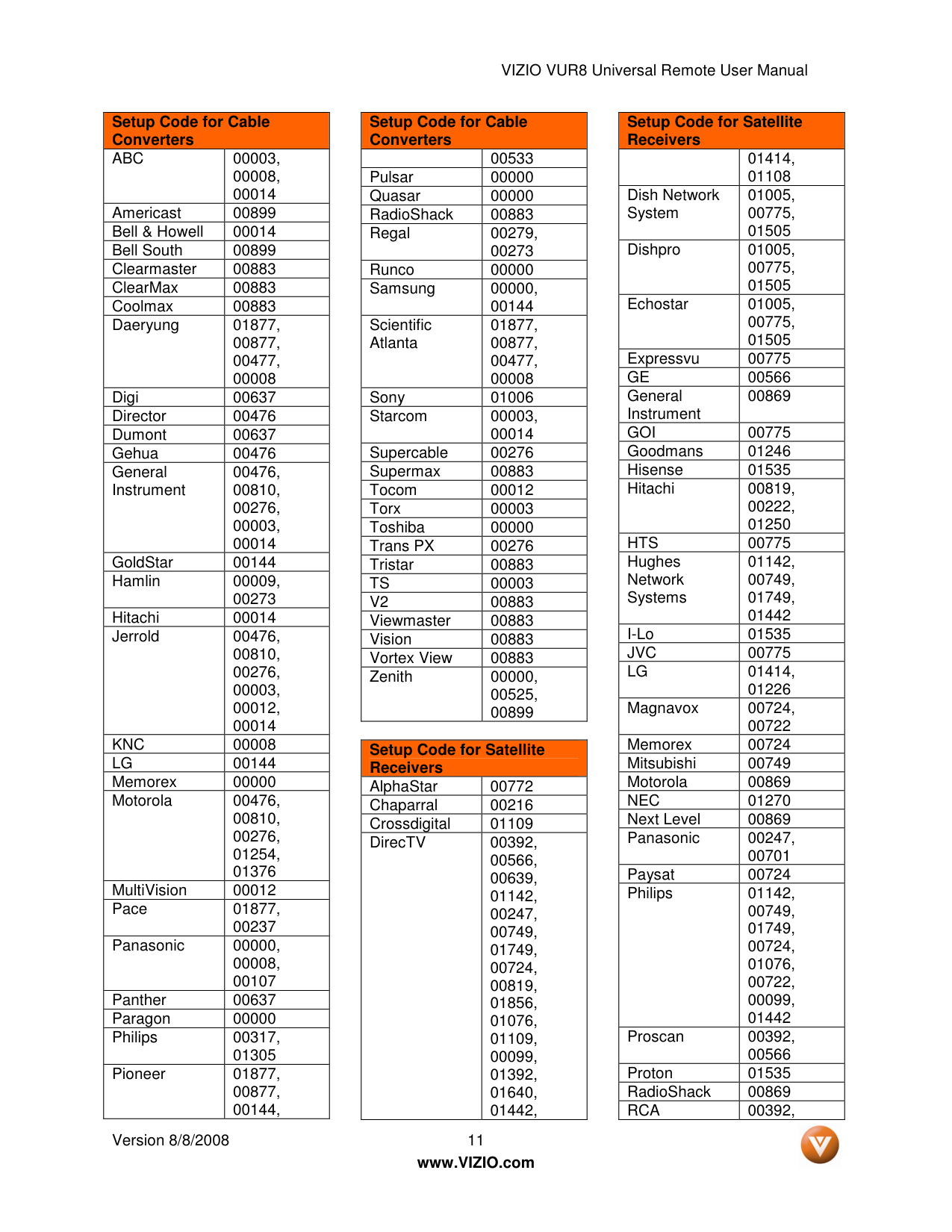
VIZIO VUR8 Universal Remote User Manual Version 8/8/2008 11
www.VIZIO.com Setup Code for Cable Converters
Abc
00003, 00008, 00014 Americast 00899 Bell & Howell 00014 Bell South 00899 Clearmaster 00883 ClearMax 00883 Coolmax 00883 Daeryung 01877, 00877, 00477, 00008 Digi 00637 Director 00476 Dumont 00637 Gehua 00476 General Instrument 00476, 00810, 00276, 00003, 00014 GoldStar 00144 Hamlin 00009, 00273 Hitachi 00014 Jerrold 00476, 00810, 00276, 00003, 00012, 00014Knc
00008Lg
00144 Memorex 00000 Motorola 00476, 00810, 00276, 01254, 01376 MultiVision 00012 Pace 01877, 00237 Panasonic 00000, 00008, 00107 Panther 00637 Paragon 00000 Philips 00317, 01305 Pioneer 01877, 00877, 00144, Setup Code for Cable Converters 00533 Pulsar 00000 Quasar 00000 RadioShack 00883 Regal 00279, 00273 Runco 00000 Samsung 00000, 00144 Scientific Atlanta 01877, 00877, 00477, 00008 Sony 01006 Starcom 00003, 00014 Supercable 00276 Supermax 00883 Tocom 00012 Torx 00003 Toshiba 00000 Trans PX 00276 Tristar 00883Ts
00003V2
00883 Viewmaster 00883 Vision 00883 Vortex View 00883 Zenith 00000, 00525, 00899Setup Code for Satellite Receivers AlphaStar 00772 Chaparral 00216 Crossdigital 01109 DirecTV 00392, 00566, 00639, 01142, 00247, 00749, 01749, 00724, 00819, 01856, 01076, 01109, 00099, 01392, 01640, 01442, Setup Code for Satellite Receivers 01414, 01108 Dish Network System 01005, 00775, 01505 Dishpro 01005, 00775, 01505 Echostar 01005, 00775, 01505 Expressvu 00775
Ge
00566 General Instrument 00869Goi
00775 Goodmans 01246 Hisense 01535 Hitachi 00819, 00222, 01250Hts
00775 Hughes Network Systems 01142, 00749, 01749, 01442 I-Lo 01535Jvc
00775Lg
01414, 01226 Magnavox 00724, 00722 Memorex 00724 Mitsubishi 00749 Motorola 00869Nec
01270 Next Level 00869 Panasonic 00247, 00701 Paysat 00724 Philips 01142, 00749, 01749, 00724, 01076, 00722, 00099, 01442 Proscan 00392, 00566 Proton 01535 RadioShack 00869Rca
00392,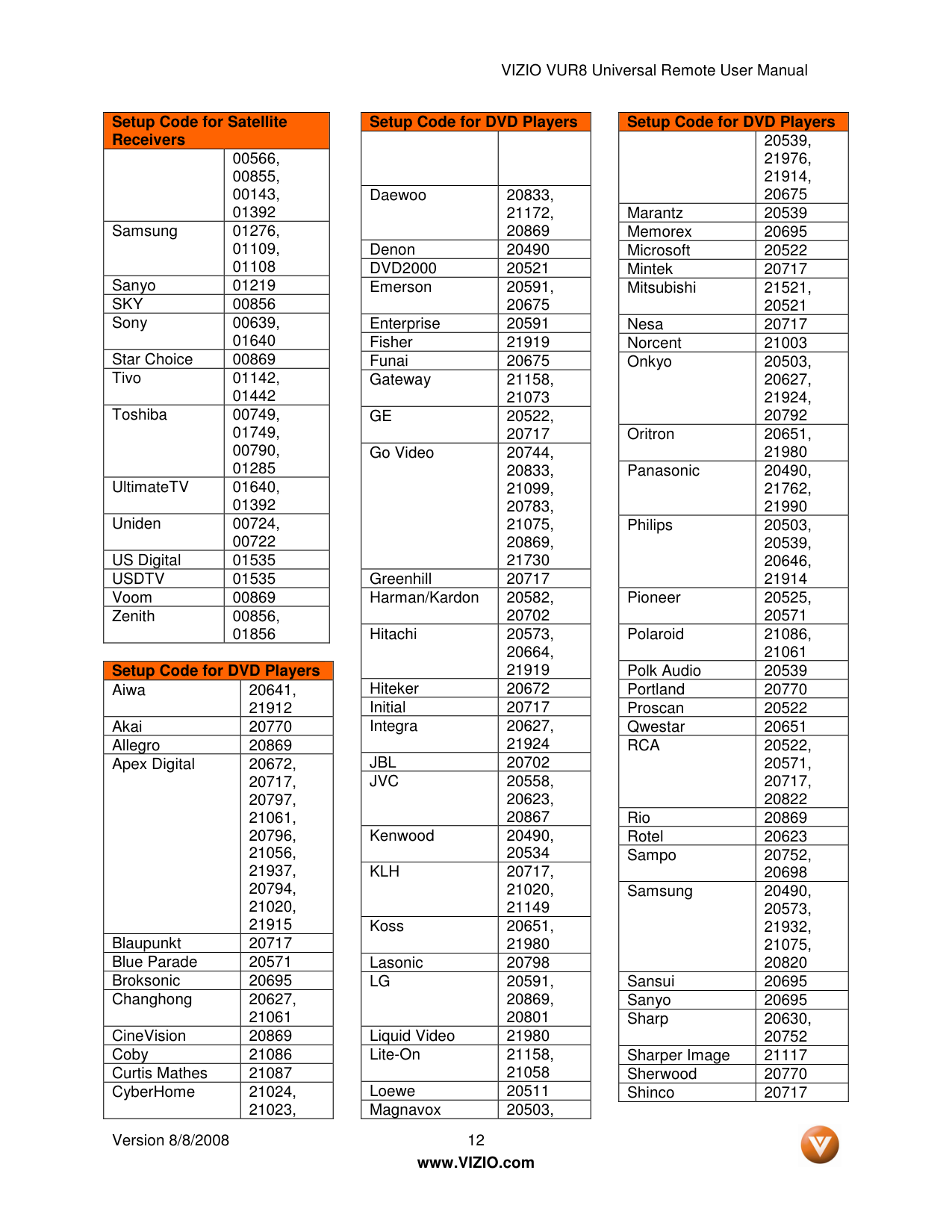
VIZIO VUR8 Universal Remote User Manual Version 8/8/2008 12
www.VIZIO.com Setup Code for Satellite Receivers 00566, 00855, 00143, 01392 Samsung 01276, 01109, 01108 Sanyo 01219
Sky
00856 Sony 00639, 01640 Star Choice 00869 Tivo 01142, 01442 Toshiba 00749, 01749, 00790, 01285 UltimateTV 01640, 01392 Uniden 00724, 00722 US Digital 01535Usdtv
01535 Voom 00869 Zenith 00856, 01856Setup Code for DVD Players Aiwa 20641, 21912 Akai 20770 Allegro 20869 Apex Digital 20672, 20717, 20797, 21061, 20796, 21056, 21937, 20794, 21020, 21915 Blaupunkt 20717 Blue Parade 20571 Broksonic 20695 Changhong 20627, 21061 CineVision 20869 Coby 21086 Curtis Mathes 21087 CyberHome 21024, 21023, Setup Code for DVD Players Daewoo 20833, 21172, 20869 Denon 20490
Dvd2000
20521 Emerson 20591, 20675 Enterprise 20591 Fisher 21919 Funai 20675 Gateway 21158, 21073Ge
20522, 20717 Go Video 20744, 20833, 21099, 20783, 21075, 20869, 21730 Greenhill 20717 Harman/Kardon 20582, 20702 Hitachi 20573, 20664, 21919 Hiteker 20672 Initial 20717 Integra 20627, 21924Jbl
20702Jvc
20558, 20623, 20867 Kenwood 20490, 20534Klh
20717, 21020, 21149 Koss 20651, 21980 Lasonic 20798Lg
20591, 20869, 20801 Liquid Video 21980 Lite-On 21158, 21058 Loewe 20511 Magnavox 20503, Setup Code for DVD Players 20539, 21976, 21914, 20675 Marantz 20539 Memorex 20695 Microsoft 20522 Mintek 20717 Mitsubishi 21521, 20521 Nesa 20717 Norcent 21003 Onkyo 20503, 20627, 21924, 20792 Oritron 20651, 21980 Panasonic 20490, 21762, 21990 Philips 20503, 20539, 20646, 21914 Pioneer 20525, 20571 Polaroid 21086, 21061 Polk Audio 20539 Portland 20770 Proscan 20522 Qwestar 20651Rca
20522, 20571, 20717, 20822 Rio 20869 Rotel 20623 Sampo 20752, 20698 Samsung 20490, 20573, 21932, 21075, 20820 Sansui 20695 Sanyo 20695 Sharp 20630, 20752 Sharper Image 21117 Sherwood 20770 Shinco 20717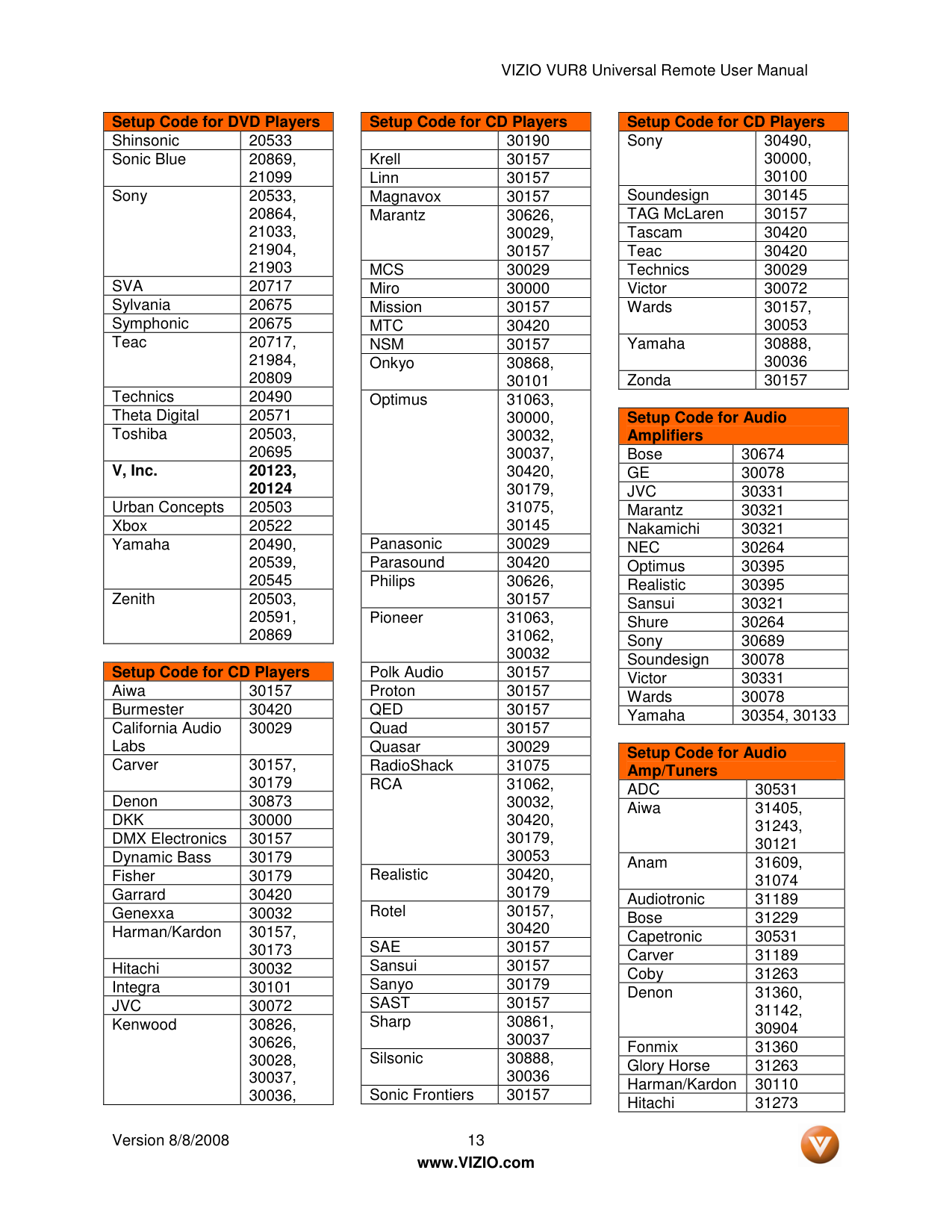
VIZIO VUR8 Universal Remote User Manual Version 8/8/2008 13
www.VIZIO.com Setup Code for DVD Players Shinsonic 20533 Sonic Blue 20869, 21099 Sony 20533, 20864, 21033, 21904, 21903
Sva
20717 Sylvania 20675 Symphonic 20675 Teac 20717, 21984, 20809 Technics 20490 Theta Digital 20571 Toshiba 20503, 20695 V, Inc. 20123, 20124 Urban Concepts 20503 Xbox 20522 Yamaha 20490, 20539, 20545 Zenith 20503, 20591, 20869Setup Code for CD Players Aiwa 30157 Burmester 30420 California Audio Labs 30029 Carver 30157, 30179 Denon 30873
Dkk
30000 DMX Electronics 30157 Dynamic Bass 30179 Fisher 30179 Garrard 30420 Genexxa 30032 Harman/Kardon 30157, 30173 Hitachi 30032 Integra 30101Jvc
30072 Kenwood 30826, 30626, 30028, 30037, 30036, Setup Code for CD Players 30190 Krell 30157 Linn 30157 Magnavox 30157 Marantz 30626, 30029, 30157Mcs
30029 Miro 30000 Mission 30157Mtc
30420Nsm
30157 Onkyo 30868, 30101 Optimus 31063, 30000, 30032, 30037, 30420, 30179, 31075, 30145 Panasonic 30029 Parasound 30420 Philips 30626, 30157 Pioneer 31063, 31062, 30032 Polk Audio 30157 Proton 30157Qed
30157 Quad 30157 Quasar 30029 RadioShack 31075Rca
31062, 30032, 30420, 30179, 30053 Realistic 30420, 30179 Rotel 30157, 30420Sae
30157 Sansui 30157 Sanyo 30179Sast
30157 Sharp 30861, 30037 Silsonic 30888, 30036 Sonic Frontiers 30157 Setup Code for CD Players Sony 30490, 30000, 30100 Soundesign 30145 TAG McLaren 30157 Tascam 30420 Teac 30420 Technics 30029 Victor 30072 Wards 30157, 30053 Yamaha 30888, 30036 Zonda 30157Setup Code for Audio Amplifiers Bose 30674
Ge
30078Jvc
30331 Marantz 30321 Nakamichi 30321Nec
30264 Optimus 30395 Realistic 30395 Sansui 30321 Shure 30264 Sony 30689 Soundesign 30078 Victor 30331 Wards 30078 Yamaha 30354, 30133Setup Code for Audio Amp/Tuners
Adc
30531 Aiwa 31405, 31243, 30121 Anam 31609, 31074 Audiotronic 31189 Bose 31229 Capetronic 30531 Carver 31189 Coby 31263 Denon 31360, 31142, 30904 Fonmix 31360 Glory Horse 31263 Harman/Kardon 30110 Hitachi 31273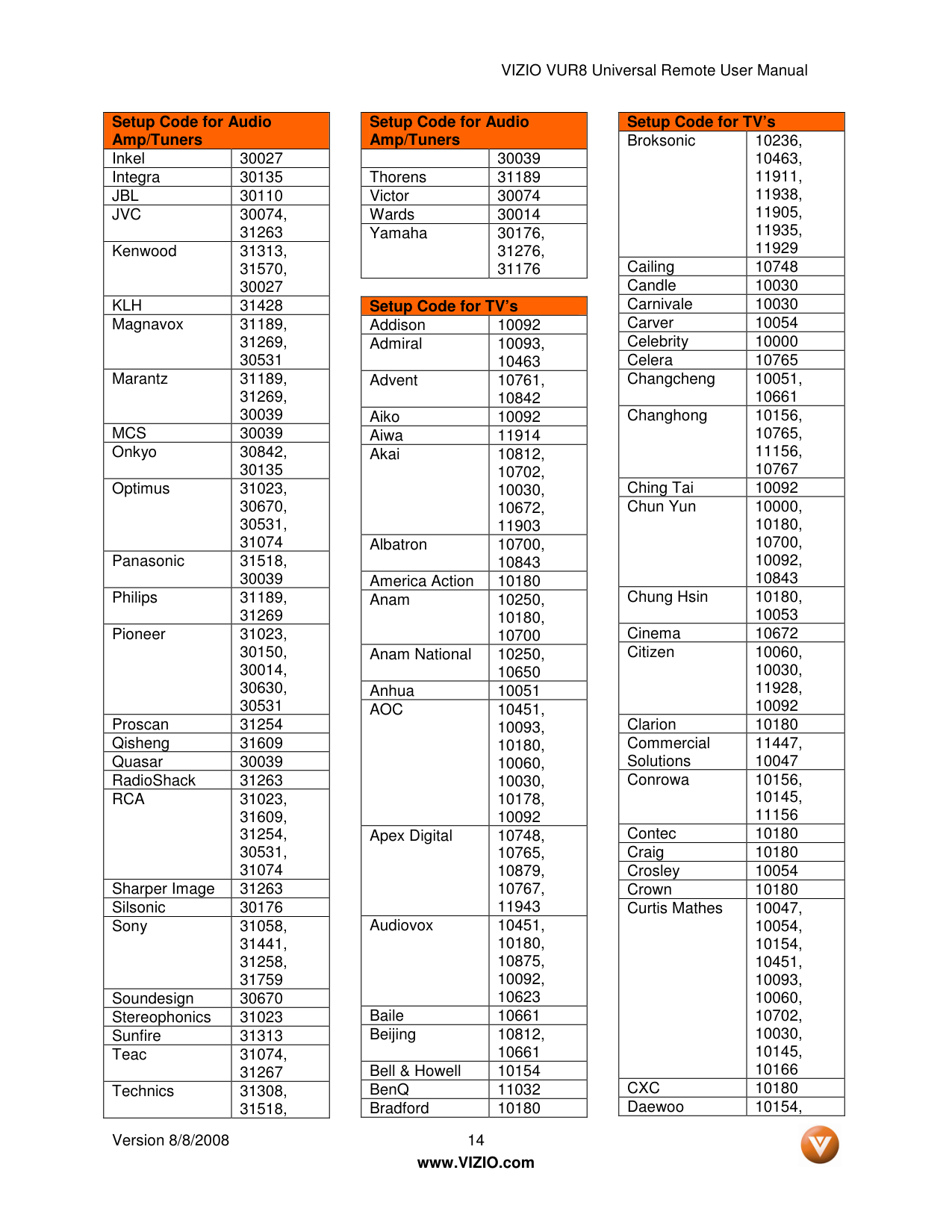
VIZIO VUR8 Universal Remote User Manual Version 8/8/2008 14
www.VIZIO.com Setup Code for Audio Amp/Tuners Inkel 30027 Integra 30135
Jbl
30110Jvc
30074, 31263 Kenwood 31313, 31570, 30027Klh
31428 Magnavox 31189, 31269, 30531 Marantz 31189, 31269, 30039Mcs
30039 Onkyo 30842, 30135 Optimus 31023, 30670, 30531, 31074 Panasonic 31518, 30039 Philips 31189, 31269 Pioneer 31023, 30150, 30014, 30630, 30531 Proscan 31254 Qisheng 31609 Quasar 30039 RadioShack 31263Rca
31023, 31609, 31254, 30531, 31074 Sharper Image 31263 Silsonic 30176 Sony 31058, 31441, 31258, 31759 Soundesign 30670 Stereophonics 31023 Sunfire 31313 Teac 31074, 31267 Technics 31308, 31518, Setup Code for Audio Amp/Tuners 30039 Thorens 31189 Victor 30074 Wards 30014 Yamaha 30176, 31276, 31176Setup Code for TV’s Addison 10092 Admiral 10093, 10463 Advent 10761, 10842 Aiko 10092 Aiwa 11914 Akai 10812, 10702, 10030, 10672, 11903 Albatron 10700, 10843 America Action 10180 Anam 10250, 10180, 10700 Anam National 10250, 10650 Anhua 10051
Aoc
10451, 10093, 10180, 10060, 10030, 10178, 10092 Apex Digital 10748, 10765, 10879, 10767, 11943 Audiovox 10451, 10180, 10875, 10092, 10623 Baile 10661 Beijing 10812, 10661 Bell & Howell 10154 BenQ 11032 Bradford 10180 Setup Code for TV’s Broksonic 10236, 10463, 11911, 11938, 11905, 11935, 11929 Cailing 10748 Candle 10030 Carnivale 10030 Carver 10054 Celebrity 10000 Celera 10765 Changcheng 10051, 10661 Changhong 10156, 10765, 11156, 10767 Ching Tai 10092 Chun Yun 10000, 10180, 10700, 10092, 10843 Chung Hsin 10180, 10053 Cinema 10672 Citizen 10060, 10030, 11928, 10092 Clarion 10180 Commercial Solutions 11447, 10047 Conrowa 10156, 10145, 11156 Contec 10180 Craig 10180 Crosley 10054 Crown 10180 Curtis Mathes 10047, 10054, 10154, 10451, 10093, 10060, 10702, 10030, 10145, 10166Cxc
10180 Daewoo 10154,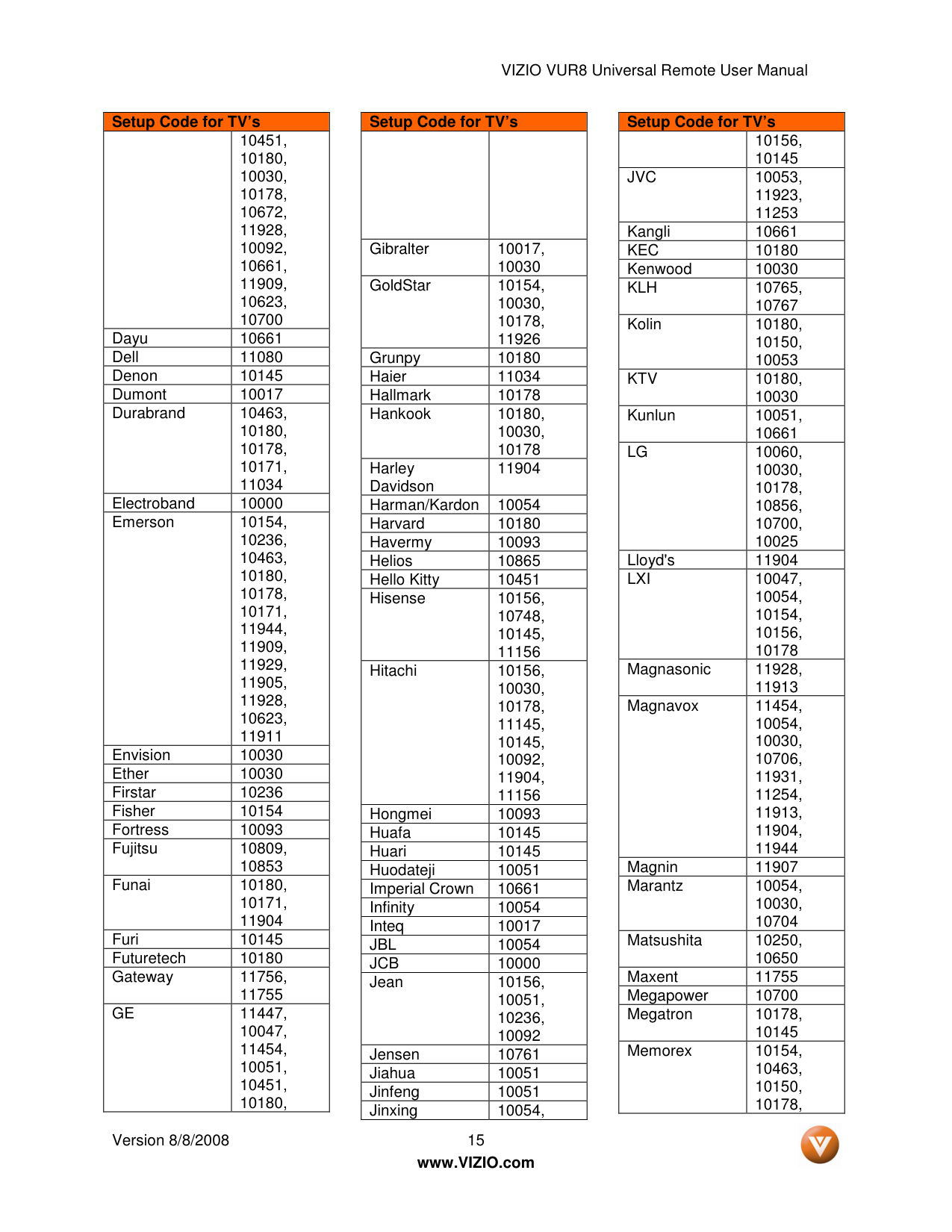
VIZIO VUR8 Universal Remote User Manual Version 8/8/2008 15
www.VIZIO.com Setup Code for TV’s 10451, 10180, 10030, 10178, 10672, 11928, 10092, 10661, 11909, 10623, 10700 Dayu 10661 Dell 11080 Denon 10145 Dumont 10017 Durabrand 10463, 10180, 10178, 10171, 11034 Electroband 10000 Emerson 10154, 10236, 10463, 10180, 10178, 10171, 11944, 11909, 11929, 11905, 11928, 10623, 11911 Envision 10030 Ether 10030 Firstar 10236 Fisher 10154 Fortress 10093 Fujitsu 10809, 10853 Funai 10180, 10171, 11904 Furi 10145 Futuretech 10180 Gateway 11756, 11755
Ge
11447, 10047, 11454, 10051, 10451, 10180, Setup Code for TV’s Gibralter 10017, 10030 GoldStar 10154, 10030, 10178, 11926 Grunpy 10180 Haier 11034 Hallmark 10178 Hankook 10180, 10030, 10178 Harley Davidson 11904 Harman/Kardon 10054 Harvard 10180 Havermy 10093 Helios 10865 Hello Kitty 10451 Hisense 10156, 10748, 10145, 11156 Hitachi 10156, 10030, 10178, 11145, 10145, 10092, 11904, 11156 Hongmei 10093 Huafa 10145 Huari 10145 Huodateji 10051 Imperial Crown 10661 Infinity 10054 Inteq 10017Jbl
10054Jcb
10000 Jean 10156, 10051, 10236, 10092 Jensen 10761 Jiahua 10051 Jinfeng 10051 Jinxing 10054, Setup Code for TV’s 10156, 10145Jvc
10053, 11923, 11253 Kangli 10661Kec
10180 Kenwood 10030Klh
10765, 10767 Kolin 10180, 10150, 10053Ktv
10180, 10030 Kunlun 10051, 10661Lg
10060, 10030, 10178, 10856, 10700, 10025 Lloyd's 11904Lxi
10047, 10054, 10154, 10156, 10178 Magnasonic 11928, 11913 Magnavox 11454, 10054, 10030, 10706, 11931, 11254, 11913, 11904, 11944 Magnin 11907 Marantz 10054, 10030, 10704 Matsushita 10250, 10650 Maxent 11755 Megapower 10700 Megatron 10178, 10145 Memorex 10154, 10463, 10150, 10178,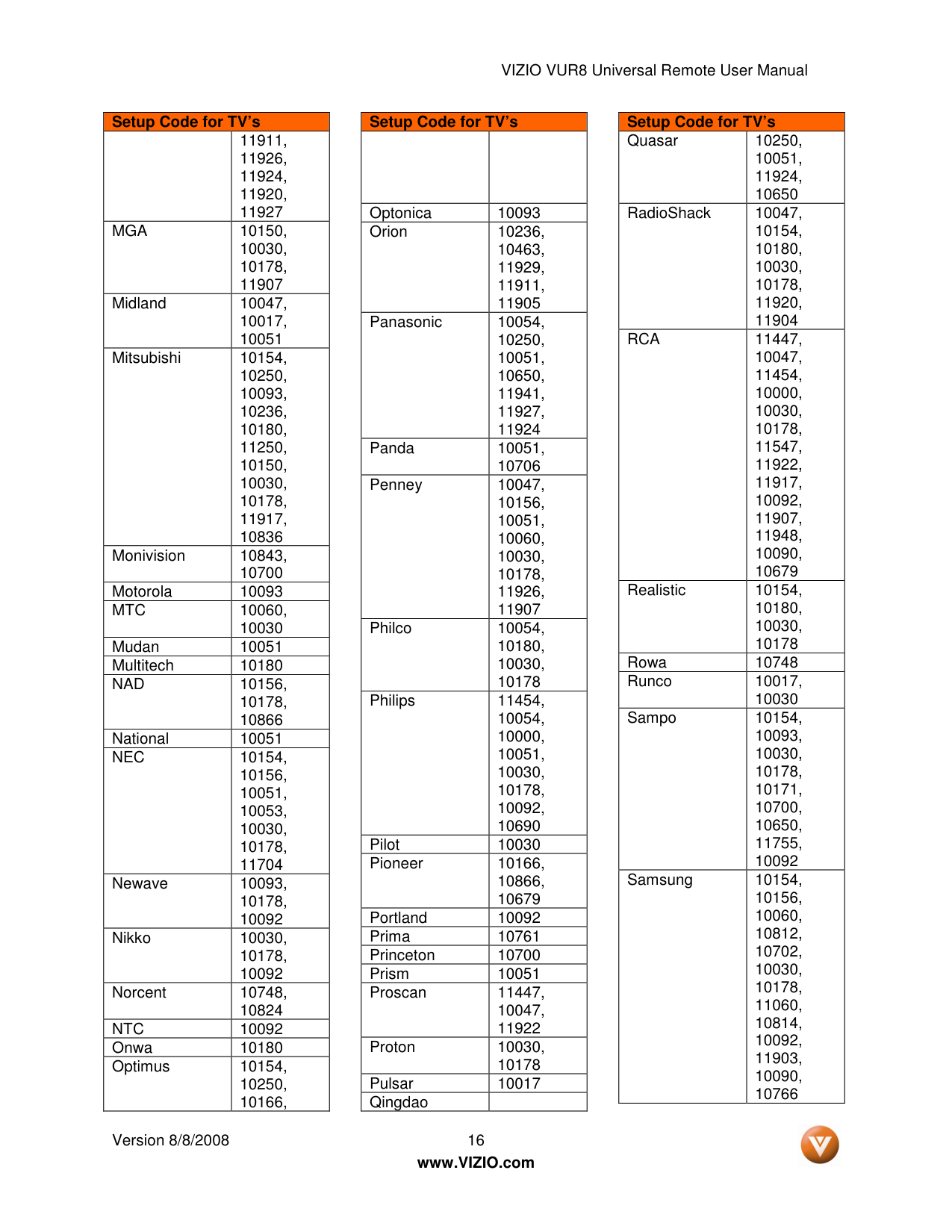
VIZIO VUR8 Universal Remote User Manual Version 8/8/2008 16
www.VIZIO.com Setup Code for TV’s 11911, 11926, 11924, 11920, 11927
Mga
10150, 10030, 10178, 11907 Midland 10047, 10017, 10051 Mitsubishi 10154, 10250, 10093, 10236, 10180, 11250, 10150, 10030, 10178, 11917, 10836 Monivision 10843, 10700 Motorola 10093Mtc
10060, 10030 Mudan 10051 Multitech 10180Nad
10156, 10178, 10866 National 10051Nec
10154, 10156, 10051, 10053, 10030, 10178, 11704 Newave 10093, 10178, 10092 Nikko 10030, 10178, 10092 Norcent 10748, 10824Ntc
10092 Onwa 10180 Optimus 10154, 10250, 10166, Setup Code for TV’s Optonica 10093 Orion 10236, 10463, 11929, 11911, 11905 Panasonic 10054, 10250, 10051, 10650, 11941, 11927, 11924 Panda 10051, 10706 Penney 10047, 10156, 10051, 10060, 10030, 10178, 11926, 11907 Philco 10054, 10180, 10030, 10178 Philips 11454, 10054, 10000, 10051, 10030, 10178, 10092, 10690 Pilot 10030 Pioneer 10166, 10866, 10679 Portland 10092 Prima 10761 Princeton 10700 Prism 10051 Proscan 11447, 10047, 11922 Proton 10030, 10178 Pulsar 10017 QingdaoSetup Code for TV’s Quasar 10250, 10051, 11924, 10650 RadioShack 10047, 10154, 10180, 10030, 10178, 11920, 11904
Rca
11447, 10047, 11454, 10000, 10030, 10178, 11547, 11922, 11917, 10092, 11907, 11948, 10090, 10679 Realistic 10154, 10180, 10030, 10178 Rowa 10748 Runco 10017, 10030 Sampo 10154, 10093, 10030, 10178, 10171, 10700, 10650, 11755, 10092 Samsung 10154, 10156, 10060, 10812, 10702, 10030, 10178, 11060, 10814, 10092, 11903, 10090, 10766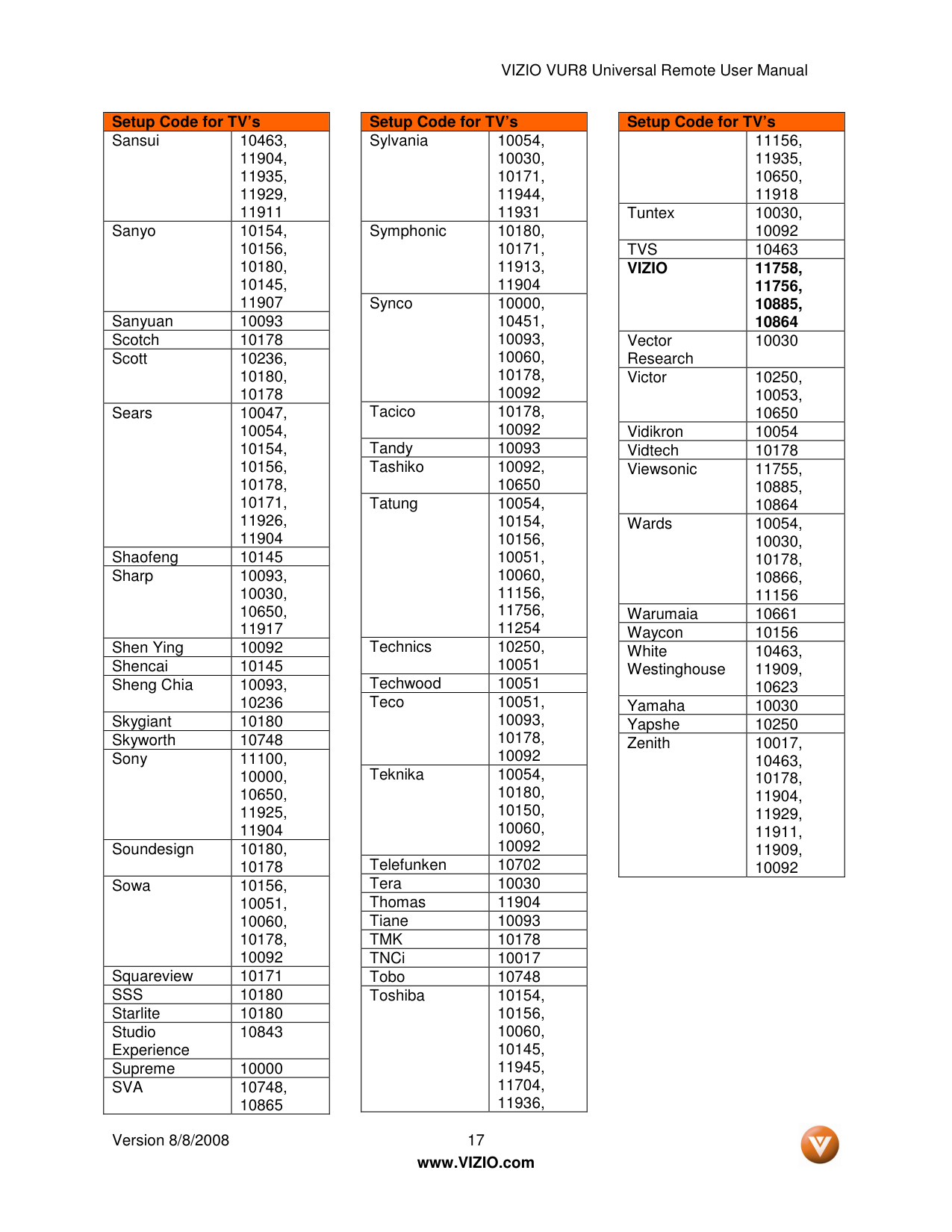
VIZIO VUR8 Universal Remote User Manual Version 8/8/2008 17
www.VIZIO.com Setup Code for TV’s Sansui 10463, 11904, 11935, 11929, 11911 Sanyo 10154, 10156, 10180, 10145, 11907 Sanyuan 10093 Scotch 10178 Scott 10236, 10180, 10178 Sears 10047, 10054, 10154, 10156, 10178, 10171, 11926, 11904 Shaofeng 10145 Sharp 10093, 10030, 10650, 11917 Shen Ying 10092 Shencai 10145 Sheng Chia 10093, 10236 Skygiant 10180 Skyworth 10748 Sony 11100, 10000, 10650, 11925, 11904 Soundesign 10180, 10178 Sowa 10156, 10051, 10060, 10178, 10092 Squareview 10171
Sss
10180 Starlite 10180 Studio Experience 10843 Supreme 10000Sva
10748, 10865 Setup Code for TV’s Sylvania 10054, 10030, 10171, 11944, 11931 Symphonic 10180, 10171, 11913, 11904 Synco 10000, 10451, 10093, 10060, 10178, 10092 Tacico 10178, 10092 Tandy 10093 Tashiko 10092, 10650 Tatung 10054, 10154, 10156, 10051, 10060, 11156, 11756, 11254 Technics 10250, 10051 Techwood 10051 Teco 10051, 10093, 10178, 10092 Teknika 10054, 10180, 10150, 10060, 10092 Telefunken 10702 Tera 10030 Thomas 11904 Tiane 10093Tmk
10178 TNCi 10017 Tobo 10748 Toshiba 10154, 10156, 10060, 10145, 11945, 11704, 11936, Setup Code for TV’s 11156, 11935, 10650, 11918 Tuntex 10030, 10092Tvs
10463Vizio
11758, 11756, 10885, 10864 Vector Research 10030 Victor 10250, 10053, 10650 Vidikron 10054 Vidtech 10178 Viewsonic 11755, 10885, 10864 Wards 10054, 10030, 10178, 10866, 11156 Warumaia 10661 Waycon 10156 White Westinghouse 10463, 11909, 10623 Yamaha 10030 Yapshe 10250 Zenith 10017, 10463, 10178, 11904, 11929, 11911, 11909, 10092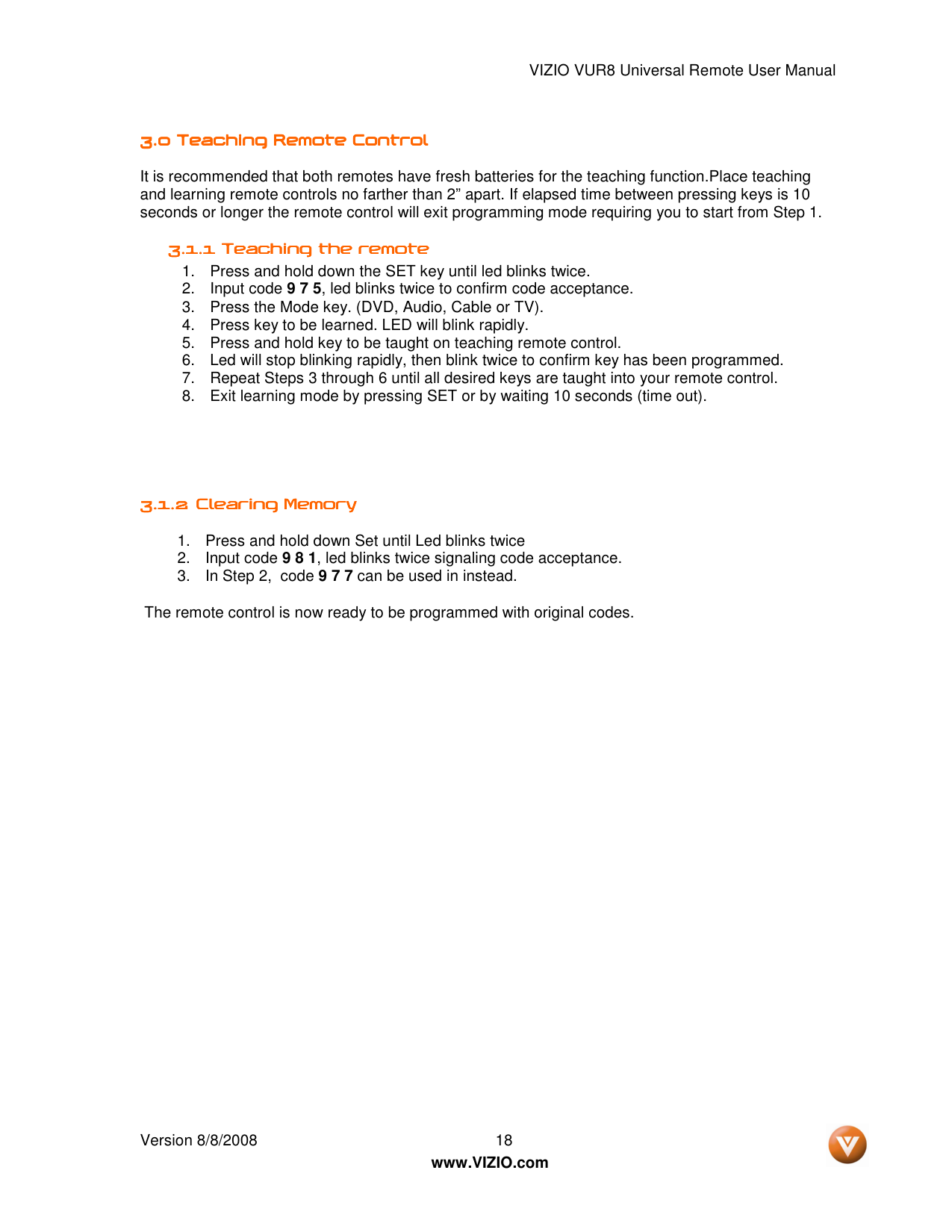
VIZIO VUR8 Universal Remote User Manual Version 8/8/2008 18
www.VIZIO.com 3.0 3.0 3.0 3.0 Teachin Teachin Teachin Teaching Remote Control g Remote Control g Remote Control g Remote Control It is recommended that both remotes have fresh batteries for the teaching function.Place teaching and learning remote controls no farther than 2” apart. If elapsed time between pressing keys is 10 seconds or longer the remote control will exit programming mode requiring you to start from Step 1. 3.1.1 3.1.1 3.1.1 3.1.1 Teaching the remote Teaching the remote Teaching the remote Teaching the remote
3.1.2 3.1.2 3.1.2 3.1.2 Clearing Memory Clearing Memory Clearing Memory Clearing Memory
The remote control is now ready to be programmed with original codes.
VIZIO VUR8 Universal Remote User Manual Version 8/8/2008 19
www.VIZIO.com

VIZIO VUR8 Universal Remote User Manual Version 8/8/2008 20
www.VIZIO.com