
Ask AI
— answers from the official manualAnswers from the official manual.
Common questions
Common Questions
19 totalHow do I drain my humidifier safely before servicing?
To safely perform service, turn off the unit which will trigger a four-minute drain cycle. Disconnect main power at the circuit breaker; wait for cooling to occur thoroughly. Begin maintenance once water has drained properly.
What's the absorption distance required for installation?
Refer to Table 3 in your manual to determine appropriate absorption distances based on humidifier output, duct airflow velocity, temperature and humidity. Ensure space from dispersion tube to potential obstructions meets minimum requirement.
How often should I maintain my steam humidification system?
Inspect your unit periodically for loose connections, check plumbing, piping integrity and inspect condensate lines. Refer to maintenance section of the manual (page 23) for specific instructions on cleaning components.
Why won't my humidifier turn off?
General operating problems may be due to improper terminal connections, missing control wiring or faulty membrane switch. Ensure all connections are correct and verify power supply at breaker is appropriate for the amperage demanded by your unit.
Why does my steam humidifier display a yellow Steam light?
A yellow Steam light indicates that your humidifier is operating below rated capacity, typically due to low water conductivity or short cycle operation. Adjust settings as needed: use blower activation on ADHC, increase voltage setting, or run constant HVAC fan to allow longer cycles that concentrate minerals and increase conductivity.
What should I do if there is excess condensation in the steam hose?
Install a Tee and Trap model number 4028 as shown in Figure 6. Ensure the steam hose has a constant downward slope, avoid kinks or blockages, or use insulated hard pipe for dispersion.
Show 13 more questions
How often should I replace the canister in my steam humidifier?
What should I do if my humidifier makes gurgling sounds?
How do I troubleshoot if my humidifier will not fill with water?
How do I troubleshoot a humidifier that won't turn on or off?
Why does my humidifier show a yellow steam light?
What should I do if water is leaking from the humidifier?
How do I clean the canister of my Aprilaire steam humidifier?
How often should I replace the steam canister in my Aprilaire humidifier?
What is causing excess condensation and gurgling in my steam humidifier?
How do I increase humidifier capacity when necessary?
What is the purpose of the dispersion tube and where should it be mounted?
What maintenance is required for a properly operating Aprilaire steam humidifier?
How can I prevent freezing in my humidifier's dispersion tube?
Full Manual
30 pages
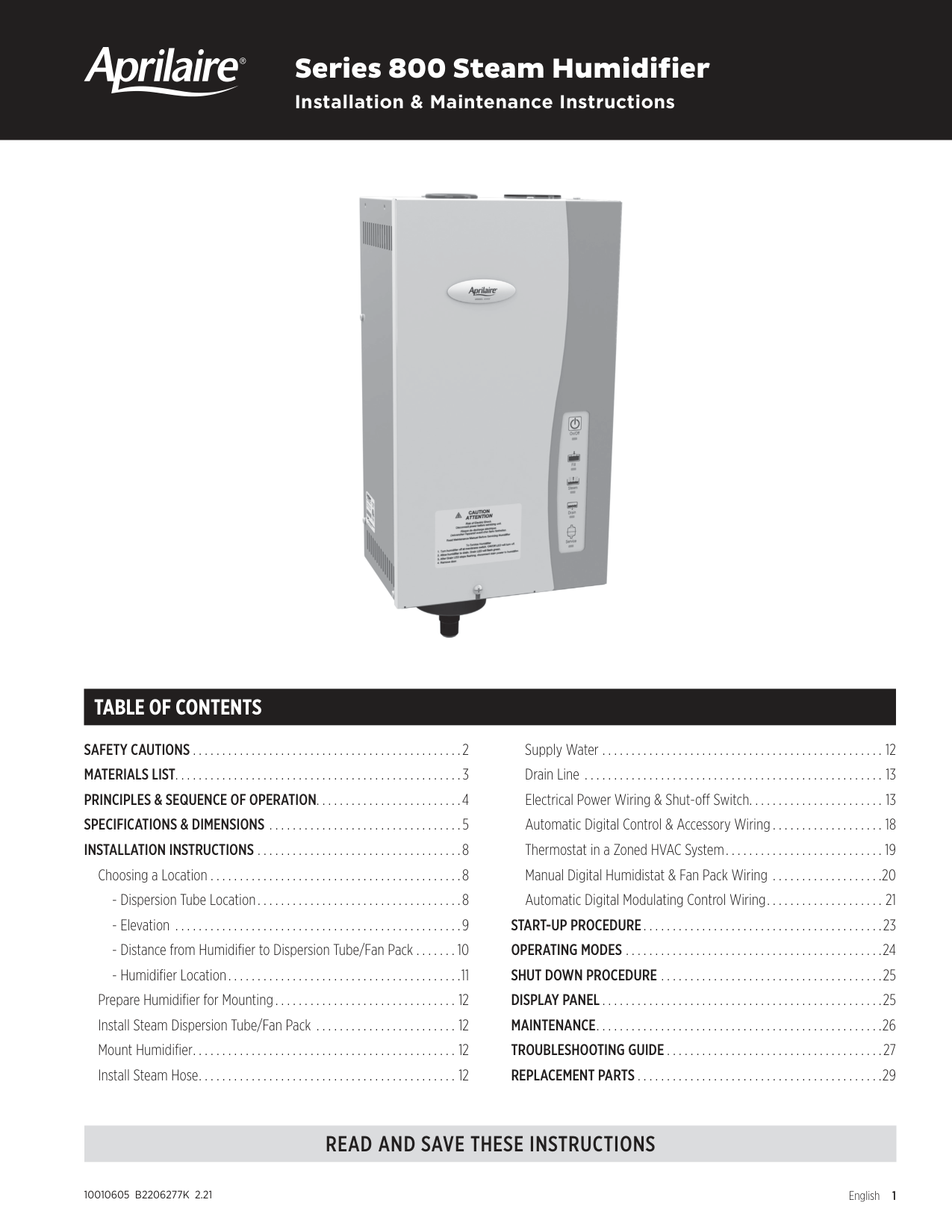
Series 800 Steam Humidifier
#### Installation & Maintenance Instructions

TABLE OF CONTENTS
SAFETY CAUTIONS . . . . . . . . . . . . . . . . . . . . . . . . . . . . . . . . . . . . . . . . . . . . . .2 MATERIALS LIST . . . . . . . . . . . . . . . . . . . . . . . . . . . . . . . . . . . . . . . . . . . . . . . . .3 PRINCIPLES & SEQUENCE OF OPERATION . . . . . . . . . . . . . . . . . . . . . . . . .4 SPECIFICATIONS & DIMENSIONS . . . . . . . . . . . . . . . . . . . . . . . . . . . . . . . . .5 INSTALLATION INSTRUCTIONS . . . . . . . . . . . . . . . . . . . . . . . . . . . . . . . . . . .8
Choosing a Location . . . . . . . . . . . . . . . . . . . . . . . . . . . . . . . . . . . . . . . . . . .8
Prepare Humidifier for Mounting . . . . . . . . . . . . . . . . . . . . . . . . . . . . . . .12 Install Steam Dispersion Tube/Fan Pack . . . . . . . . . . . . . . . . . . . . . . . .12 Mount Humidifier . . . . . . . . . . . . . . . . . . . . . . . . . . . . . . . . . . . . . . . . . . . . .12 Install Steam Hose . . . . . . . . . . . . . . . . . . . . . . . . . . . . . . . . . . . . . . . . . . . .12
Supply Water . . . . . . . . . . . . . . . . . . . . . . . . . . . . . . . . . . . . . . . . . . . . . . . .12 Drain Line . . . . . . . . . . . . . . . . . . . . . . . . . . . . . . . . . . . . . . . . . . . . . . . . . . .13 Electrical Power Wiring & Shut-off Switch . . . . . . . . . . . . . . . . . . . . . . .13 Automatic Digital Control & Accessory Wiring . . . . . . . . . . . . . . . . . . .18 Thermostat in a Zoned HVAC System . . . . . . . . . . . . . . . . . . . . . . . . . . .19 Manual Digital Humidistat & Fan Pack Wiring . . . . . . . . . . . . . . . . . . .20 Automatic Digital Modulating Control Wiring . . . . . . . . . . . . . . . . . . . .21
START-UP PROCEDURE . . . . . . . . . . . . . . . . . . . . . . . . . . . . . . . . . . . . . . . . .23 OPERATING MODES . . . . . . . . . . . . . . . . . . . . . . . . . . . . . . . . . . . . . . . . . . . .24 SHUT DOWN PROCEDURE . . . . . . . . . . . . . . . . . . . . . . . . . . . . . . . . . . . . . .25 DISPLAY PANEL . . . . . . . . . . . . . . . . . . . . . . . . . . . . . . . . . . . . . . . . . . . . . . . .25 MAINTENANCE . . . . . . . . . . . . . . . . . . . . . . . . . . . . . . . . . . . . . . . . . . . . . . . . .26 TROUBLESHOOTING GUIDE . . . . . . . . . . . . . . . . . . . . . . . . . . . . . . . . . . . . .27 REPLACEMENT PARTS . . . . . . . . . . . . . . . . . . . . . . . . . . . . . . . . . . . . . . . . . .29
READ AND SAVE THESE INSTRUCTIONS
10010605 B2206277K 2.21
English 1
SAFETY CAUTIONS
CAUTION
##### ATTENTION INSTALLER
Read this manual before installing. This product must be installed by qualified HVAC and electrical contractors and in compliance with local, state, federal, and governing codes. Improper installation can cause property damage, severe personal injury, or death as a result of electric shock, burns, or fire.
READ ALL CAUTIONS AND INSTRUCTIONS Read this manual before performing service or maintenance procedures on any part of the system. Failure to follow all cautions and instructions could produce the hazardous situations described, resulting in property damage, personal injury, or death. Failure to follow the instructions in this manual can cause moisture to accumulate, which can cause damage to structure and furnishings.
HOT SURFACES AND HOT WATER This steam humidification system has extremely hot surfaces. Water in steam canister, steam pipes, and dispersion tube can be as hot as 212°F (100°C). Discharged steam is not visible. Contact with hot surfaces, discharged hot water, or air into which steam has been discharged can cause severe personal injury. To avoid severe burns, follow procedures in this manual when performing service or maintenance procedures on any part of the system.
##### DISCONNECT ELECTRICAL POWER
Disconnect electrical power before installing supply wiring or performing service or maintenance procedures on any part of the humidification system. Failure to disconnect electrical power could result in fire, electrical shock, and other hazardous conditions. These hazardous conditions could cause property damage, personal injury, or death.
Contact with energized circuits can cause property damage, severe personal injury, or death as a result of electrical shock or fire. Do not remove access panels unless electrical power is disconnected. Follow the shutdown procedure in this manual before performing service or maintenance procedures on any part of the system.
ELECTRICAL SHOCK HAZARD If the humidifier starts up responding to a call for humidity during maintenance, severe injury or death from electrical shock could occur. Follow the procedures in this manual before performing service or maintenance procedures on this humidifier.
EXCESSIVE SUPPLY WATER PRESSURE Supply water pressure greater than 120 psi may cause the humidifier to overflow.
SHARP EDGES Sharp edges may cause serious injury from cuts. Use care when cutting plenum openings and handling ductwork.
EXCESS HUMIDITY Do not set humidity higher than recommended. Condensation may cause damage to structure and furnishings.
MATERIALS LIST
MODEL 800/800LC MATERIALS FURNISHED Humidifier Model 62 Automatic Digital Humidifier Control Dispersion tube Steam hose (6 feet) 7/8" I .D . drain tubing (10 feet) Hose clamps Saddle valve Mounting screws NOT FURNISHED
Main power disconnect switch Wiring 1/4" O .D . supply water tubing Boards for mounting (if required)
MODEL 801 MATERIALS FURNISHED Humidifier Dispersion tube Steam hose (6 feet) 7/8" I .D . drain tubing (10 feet) Hose clamps Saddle Valve Mounting Screws NOT FURNISHED Model 63 Automatic Digital Modulating Control Main power disconnect switch Wiring 1/4" O .D . supply water tubing Boards for mounting (if required)
PRINCIPLES & SEQUENCE OF OPERATION
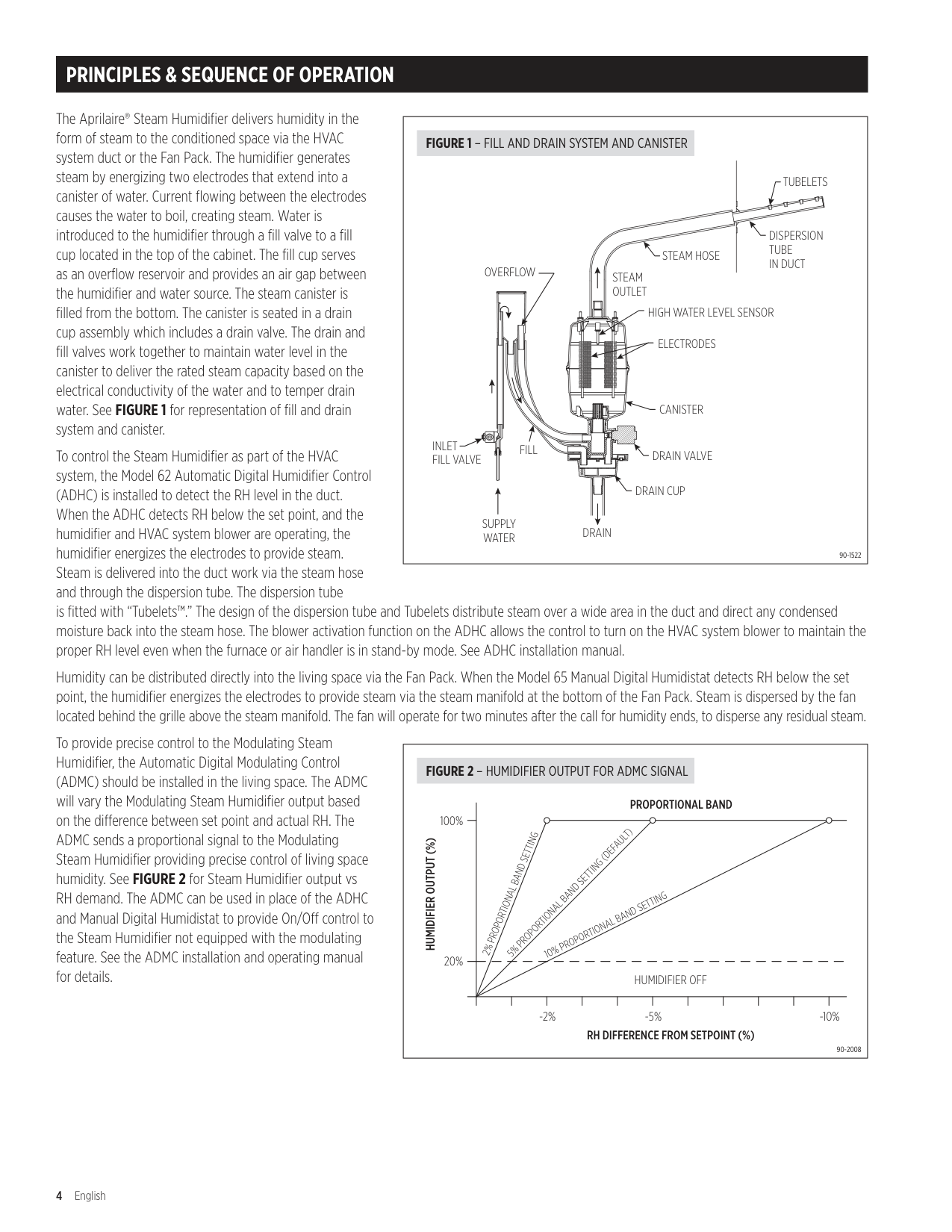
The Aprilaire® Steam Humidifier delivers humidity in the form of steam to the conditioned space via the HVAC system duct or the Fan Pack . The humidifier generates steam by energizing two electrodes that extend into a canister of water . Current flowing between the electrodes causes the water to boil, creating steam . Water is introduced to the humidifier through a fill valve to a fill cup located in the top of the cabinet . The fill cup serves as an overflow reservoir and provides an air gap between the humidifier and water source . The steam canister is filled from the bottom . The canister is seated in a drain cup assembly which includes a drain valve . The drain and fill valves work together to maintain water level in the canister to deliver the rated steam capacity based on the electrical conductivity of the water and to temper drain water . See FIGURE 1 for representation of fill and drain system and canister .
|STEAM HOSE
DISPERSION TUBE IN DUCT
TUBELETS
STEAM OUTLET
DRAIN
SUPPLY WATER
DRAIN CUP
DRAIN VALVE
CANISTER
ELECTRODES
HIGH WATER LEVEL SENSOR
INLET FILL VALVE
OVERFLOW
FILL
90-1522
FIGURE 1 – FILL AND DRAIN SYSTEM AND CANISTER| |---|
To control the Steam Humidifier as part of the HVAC system, the Model 62 Automatic Digital Humidifier Control (ADHC) is installed to detect the RH level in the duct . When the ADHC detects RH below the set point, and the humidifier and HVAC system blower are operating, the humidifier energizes the electrodes to provide steam . Steam is delivered into the duct work via the steam hose and through the dispersion tube . The dispersion tube is fitted with “Tubelets™ .” The design of the dispersion tube and Tubelets distribute steam over a wide area in the duct and direct any condensed moisture back into the steam hose . The blower activation function on the ADHC allows the control to turn on the HVAC system blower to maintain the proper RH level even when the furnace or air handler is in stand-by mode . See ADHC installation manual .
Humidity can be distributed directly into the living space via the Fan Pack . When the Model 65 Manual Digital Humidistat detects RH below the set point, the humidifier energizes the electrodes to provide steam via the steam manifold at the bottom of the Fan Pack . Steam is dispersed by the fan located behind the grille above the steam manifold . The fan will operate for two minutes after the call for humidity ends, to disperse any residual steam .
To provide precise control to the Modulating Steam Humidifier, the Automatic Digital Modulating Control (ADMC) should be installed in the living space . The ADMC will vary the Modulating Steam Humidifier output based on the difference between set point and actual RH . The ADMC sends a proportional signal to the Modulating Steam Humidifier providing precise control of living space humidity . See FIGURE 2 for Steam Humidifier output vs RH demand . The ADMC can be used in place of the ADHC and Manual Digital Humidistat to provide On/Off control to the Steam Humidifier not equipped with the modulating feature . See the ADMC installation and operating manual for details .
|| |PROPORTIONAL BAND 2% PROPORTIONAL BAND SETTING
5% PROPORTIONAL BAND SETTING (DEFAULT)
10% PROPORTIONAL BAND SETTING|PROPORTIONAL BAND 2% PROPORTIONAL BAND SETTING
5% PROPORTIONAL BAND SETTING (DEFAULT)
10% PROPORTIONAL BAND SETTING|PROPORTIONAL BAND 2% PROPORTIONAL BAND SETTING
5% PROPORTIONAL BAND SETTING (DEFAULT)
10% PROPORTIONAL BAND SETTING|PROPORTIONAL BAND 2% PROPORTIONAL BAND SETTING
5% PROPORTIONAL BAND SETTING (DEFAULT)
10% PROPORTIONAL BAND SETTING|PROPORTIONAL BAND 2% PROPORTIONAL BAND SETTING
5% PROPORTIONAL BAND SETTING (DEFAULT)
10% PROPORTIONAL BAND SETTING|PROPORTIONAL BAND 2% PROPORTIONAL BAND SETTING
5% PROPORTIONAL BAND SETTING (DEFAULT)
10% PROPORTIONAL BAND SETTING|PROPORTIONAL BAND 2% PROPORTIONAL BAND SETTING
5% PROPORTIONAL BAND SETTING (DEFAULT)
10% PROPORTIONAL BAND SETTING|PROPORTIONAL BAND 2% PROPORTIONAL BAND SETTING
5% PROPORTIONAL BAND SETTING (DEFAULT)
10% PROPORTIONAL BAND SETTING|PROPORTIONAL BAND 2% PROPORTIONAL BAND SETTING
5% PROPORTIONAL BAND SETTING (DEFAULT)
10% PROPORTIONAL BAND SETTING|PROPORTIONAL BAND 2% PROPORTIONAL BAND SETTING
5% PROPORTIONAL BAND SETTING (DEFAULT)
10% PROPORTIONAL BAND SETTING|PROPORTIONAL BAND 2% PROPORTIONAL BAND SETTING
5% PROPORTIONAL BAND SETTING (DEFAULT)
10% PROPORTIONAL BAND SETTING| |---|---|---|---|---|---|---|---|---|---|---|---| | |PROPORTIONAL BAND 2% PROPORTIONAL BAND SETTING
5% PROPORTIONAL BAND SETTING (DEFAULT)
10% PROPORTIONAL BAND SETTING|PROPORTIONAL BAND 2% PROPORTIONAL BAND SETTING
5% PROPORTIONAL BAND SETTING (DEFAULT)
10% PROPORTIONAL BAND SETTING|PROPORTIONAL BAND 2% PROPORTIONAL BAND SETTING
5% PROPORTIONAL BAND SETTING (DEFAULT)
10% PROPORTIONAL BAND SETTING|PROPORTIONAL BAND 2% PROPORTIONAL BAND SETTING
5% PROPORTIONAL BAND SETTING (DEFAULT)
10% PROPORTIONAL BAND SETTING|PROPORTIONAL BAND 2% PROPORTIONAL BAND SETTING
5% PROPORTIONAL BAND SETTING (DEFAULT)
10% PROPORTIONAL BAND SETTING|PROPORTIONAL BAND 2% PROPORTIONAL BAND SETTING
5% PROPORTIONAL BAND SETTING (DEFAULT)
10% PROPORTIONAL BAND SETTING|PROPORTIONAL BAND 2% PROPORTIONAL BAND SETTING
5% PROPORTIONAL BAND SETTING (DEFAULT)
10% PROPORTIONAL BAND SETTING|PROPORTIONAL BAND 2% PROPORTIONAL BAND SETTING
5% PROPORTIONAL BAND SETTING (DEFAULT)
10% PROPORTIONAL BAND SETTING|PROPORTIONAL BAND 2% PROPORTIONAL BAND SETTING
5% PROPORTIONAL BAND SETTING (DEFAULT)
10% PROPORTIONAL BAND SETTING|PROPORTIONAL BAND 2% PROPORTIONAL BAND SETTING
5% PROPORTIONAL BAND SETTING (DEFAULT)
10% PROPORTIONAL BAND SETTING|PROPORTIONAL BAND 2% PROPORTIONAL BAND SETTING
5% PROPORTIONAL BAND SETTING (DEFAULT)
10% PROPORTIONAL BAND SETTING| | |HUMIDIFIER OFF|HUMIDIFIER OFF|HUMIDIFIER OFF|HUMIDIFIER OFF|HUMIDIFIER OFF|HUMIDIFIER OFF|HUMIDIFIER OFF|HUMIDIFIER OFF|HUMIDIFIER OFF|HUMIDIFIER OFF|HUMIDIFIER OFF| | | | | | | | | | | | | |
-2% -5% -10%
20%
100%
RH DIFFERENCE FROM SETPOINT (%)
HUMIDIFIER OUTPUT (%)
90-2008
FIGURE 2 – HUMIDIFIER OUTPUT FOR ADMC SIGNAL|
|---|
SPECIFICATIONS & DIMENSIONS
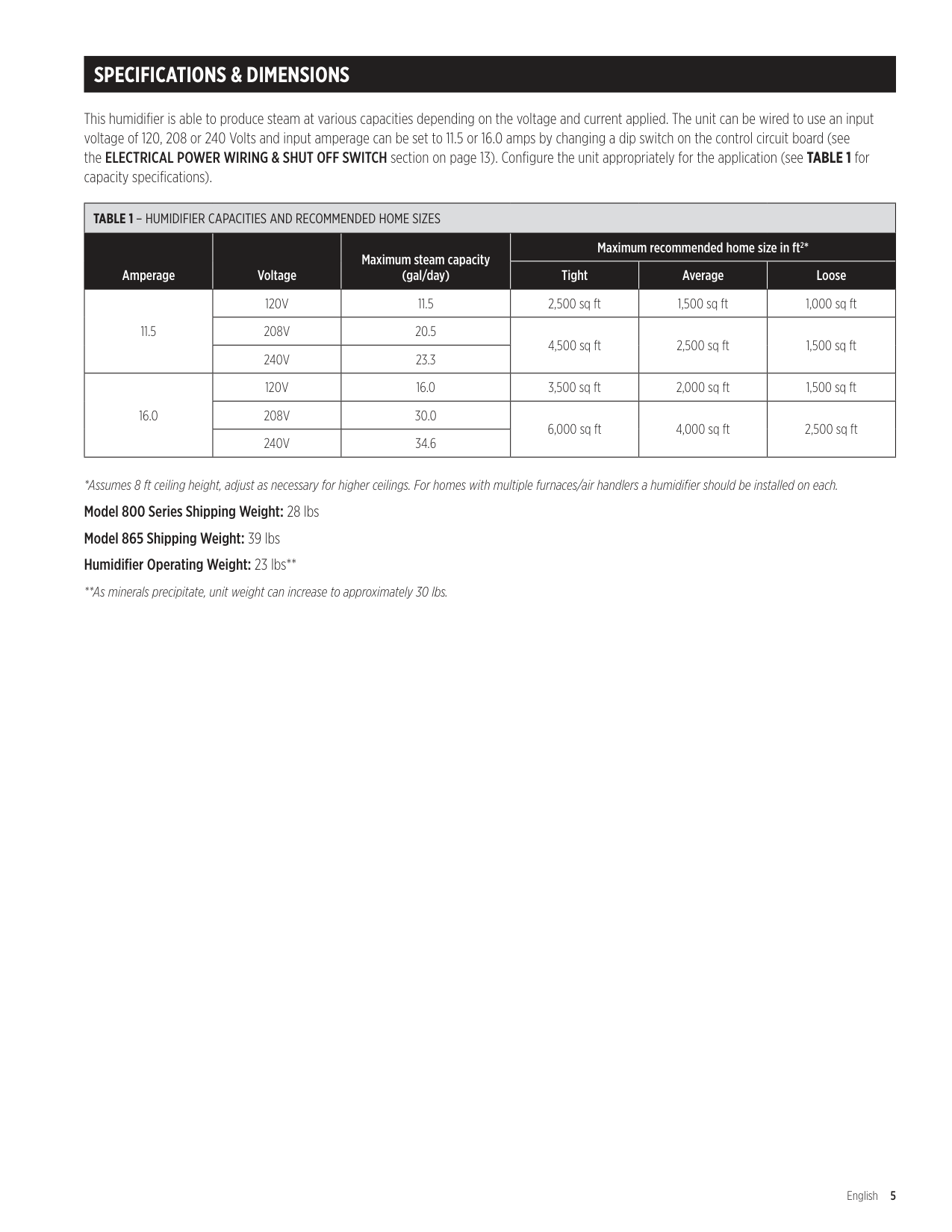
This humidifier is able to produce steam at various capacities depending on the voltage and current applied . The unit can be wired to use an input voltage of 120, 208 or 240 Volts and input amperage can be set to 11 .5 or 16 .0 amps by changing a dip switch on the control circuit board (see the ELECTRICAL POWER WIRING & SHUT OFF SWITCH section on page 13) . Configure the unit appropriately for the application (see TABLE 1 for capacity specifications) .
|TABLE 1 – HUMIDIFIER CAPACITIES AND RECOMMENDED HOME SIZES|TABLE 1 – HUMIDIFIER CAPACITIES AND RECOMMENDED HOME SIZES|TABLE 1 – HUMIDIFIER CAPACITIES AND RECOMMENDED HOME SIZES|TABLE 1 – HUMIDIFIER CAPACITIES AND RECOMMENDED HOME SIZES|TABLE 1 – HUMIDIFIER CAPACITIES AND RECOMMENDED HOME SIZES|TABLE 1 – HUMIDIFIER CAPACITIES AND RECOMMENDED HOME SIZES| |---|---|---|---|---|---| |Amperage|Voltage|Maximum steam capacity (gal/day)|Maximum recommended home size in ft2*|Maximum recommended home size in ft2*|Maximum recommended home size in ft2*| |Amperage|Voltage|Maximum steam capacity (gal/day)|Tight|Average|Loose| |11 .5|120V|11 .5|2,500 sq ft|1,500 sq ft|1,000 sq ft| |11 .5|208V|20 .5|4,500 sq ft|2,500 sq ft|1,500 sq ft| |11 .5|240V|23 .3|4,500 sq ft|2,500 sq ft|1,500 sq ft| |16 .0|120V|16 .0|3,500 sq ft|2,000 sq ft|1,500 sq ft| |16 .0|208V|30 .0|6,000 sq ft|4,000 sq ft|2,500 sq ft| |16 .0|240V|34 .6|6,000 sq ft|4,000 sq ft|2,500 sq ft|
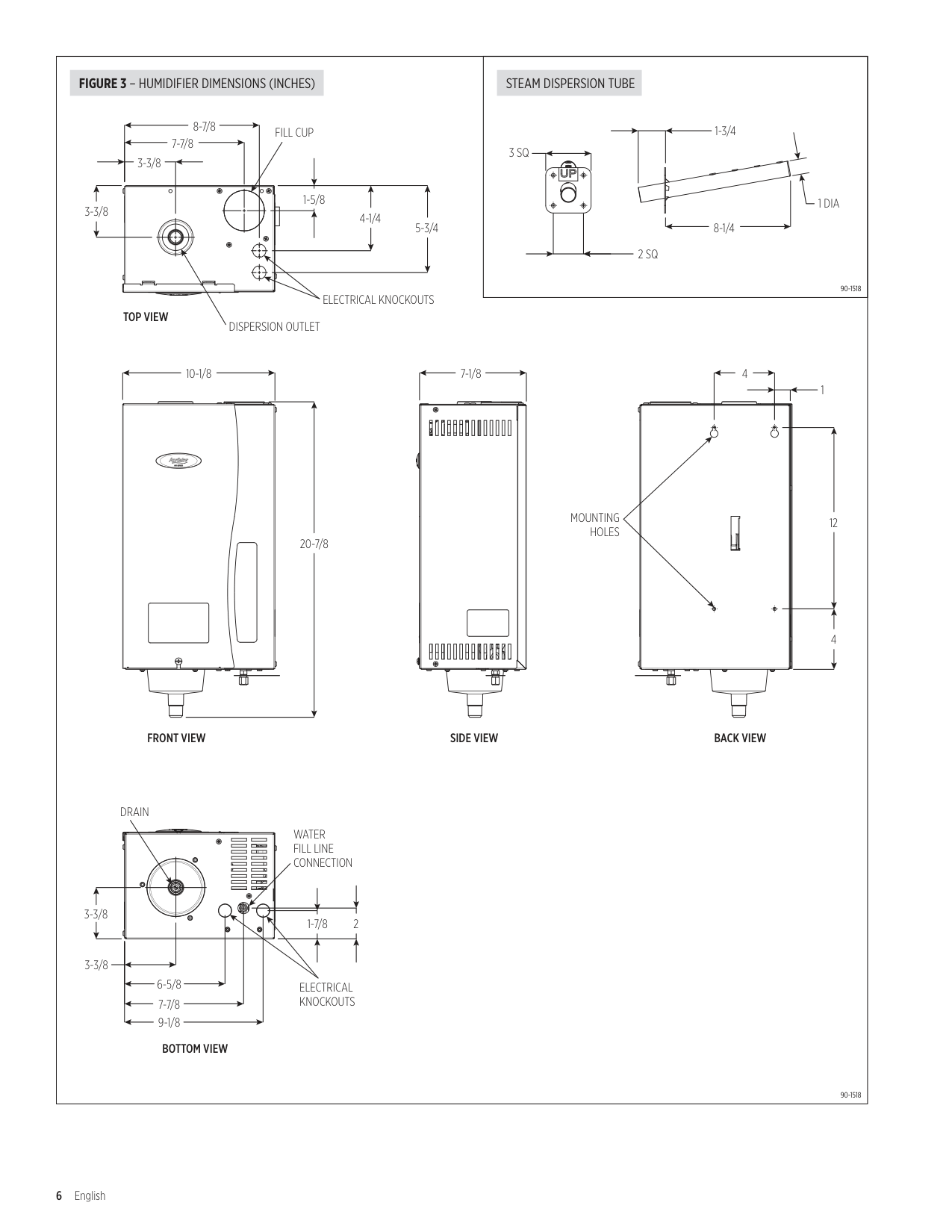
######## FIGURE 3 – HUMIDIFIER DIMENSIONS (INCHES) STEAM DISPERSION TUBE
3-3/8
8-7/8
7-7/8
3-3/8
FILL CUP
1-5/8
4-1/4
5-3/4
3 SQ
2 SQ
######### TOP VIEW
ELECTRICAL KNOCKOUTS
DISPERSION OUTLET
10-1/8
7-1/8
| |
|---| | | | |
| | |---| | | | |
| | |---| | | | |
1-3/4
8-1/4
4
1 DIA
90-1518
1
20-7/8
MOUNTING HOLES
| | |---| | |
12
FRONT VIEW
DRAIN
3-3/8
| | | | |---|---|---|
| | | |---|---|
| | | |---|---|
| | | |---|---|
| | | |---|---|
| | | |---|---|
WATER FILL LINE CONNECTION
1-7/8
2
3-3/8
6-5/8
7-7/8
9-1/8
BOTTOM VIEW
ELECTRICAL KNOCKOUTS
| | |---| | |
| | |---| | |
| | |---| | |
| | |---| | |
| | |---| | |
SIDE VIEW
4
BACK VIEW
90-1518
##### WATER QUALITY
Minerals that are naturally found in water contribute to water’s electrical conductivity; water conductivity is measured in microsiemens per centimeter (uS/cm) . Mineral content, also described as “water hardness” is usually measured in grains per gallon . Variation is found among water samples but generally the higher the mineral content, the higher the conductivity .
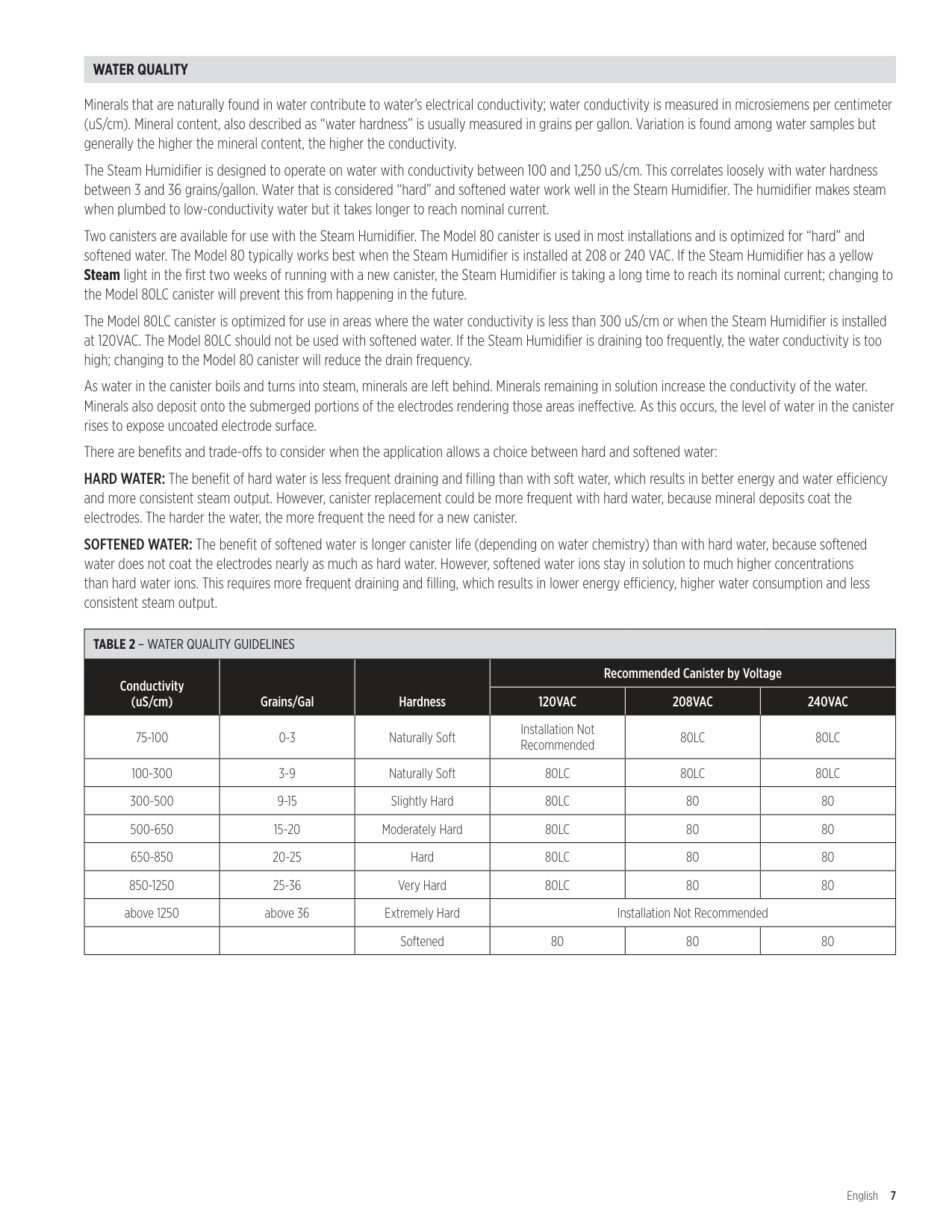
The Steam Humidifier is designed to operate on water with conductivity between 100 and 1,250 uS/cm . This correlates loosely with water hardness between 3 and 36 grains/gallon . Water that is considered “hard” and softened water work well in the Steam Humidifier . The humidifier makes steam when plumbed to low-conductivity water but it takes longer to reach nominal current .
Two canisters are available for use with the Steam Humidifier . The Model 80 canister is used in most installations and is optimized for “hard” and softened water . The Model 80 typically works best when the Steam Humidifier is installed at 208 or 240 VAC . If the Steam Humidifier has a yellow Steam light in the first two weeks of running with a new canister, the Steam Humidifier is taking a long time to reach its nominal current; changing to the Model 80LC canister will prevent this from happening in the future . The Model 80LC canister is optimized for use in areas where the water conductivity is less than 300 uS/cm or when the Steam Humidifier is installed at 120VAC . The Model 80LC should not be used with softened water . If the Steam Humidifier is draining too frequently, the water conductivity is too high; changing to the Model 80 canister will reduce the drain frequency . As water in the canister boils and turns into steam, minerals are left behind . Minerals remaining in solution increase the conductivity of the water . Minerals also deposit onto the submerged portions of the electrodes rendering those areas ineffective . As this occurs, the level of water in the canister rises to expose uncoated electrode surface . There are benefits and trade-offs to consider when the application allows a choice between hard and softened water: HARD WATER: The benefit of hard water is less frequent draining and filling than with soft water, which results in better energy and water efficiency and more consistent steam output . However, canister replacement could be more frequent with hard water, because mineral deposits coat the electrodes . The harder the water, the more frequent the need for a new canister . SOFTENED WATER: The benefit of softened water is longer canister life (depending on water chemistry) than with hard water, because softened water does not coat the electrodes nearly as much as hard water . However, softened water ions stay in solution to much higher concentrations than hard water ions . This requires more frequent draining and filling, which results in lower energy efficiency, higher water consumption and less consistent steam output .
|TABLE 2 – WATER QUALITY GUIDELINES|TABLE 2 – WATER QUALITY GUIDELINES|TABLE 2 – WATER QUALITY GUIDELINES|TABLE 2 – WATER QUALITY GUIDELINES|TABLE 2 – WATER QUALITY GUIDELINES|TABLE 2 – WATER QUALITY GUIDELINES| |---|---|---|---|---|---| |Conductivity (uS/cm)|Grains/Gal|Hardness|Recommended Canister by Voltage|Recommended Canister by Voltage|Recommended Canister by Voltage| |Conductivity (uS/cm)|Grains/Gal|Hardness|120VAC|208VAC|240VAC| |75-100|0-3|Naturally Soft|Installation Not Recommended|80LC|80LC| |100-300|3-9|Naturally Soft|80LC|80LC|80LC| |300-500|9-15|Slightly Hard|80LC|80|80| |500-650|15-20|Moderately Hard|80LC|80|80| |650-850|20-25|Hard|80LC|80|80| |850-1250|25-36|Very Hard|80LC|80|80| |above 1250|above 36|Extremely Hard|Installation Not Recommended|Installation Not Recommended|Installation Not Recommended|
| | |Softened|80|80|80|
INSTALLATION INSTRUCTIONS
CAUTION
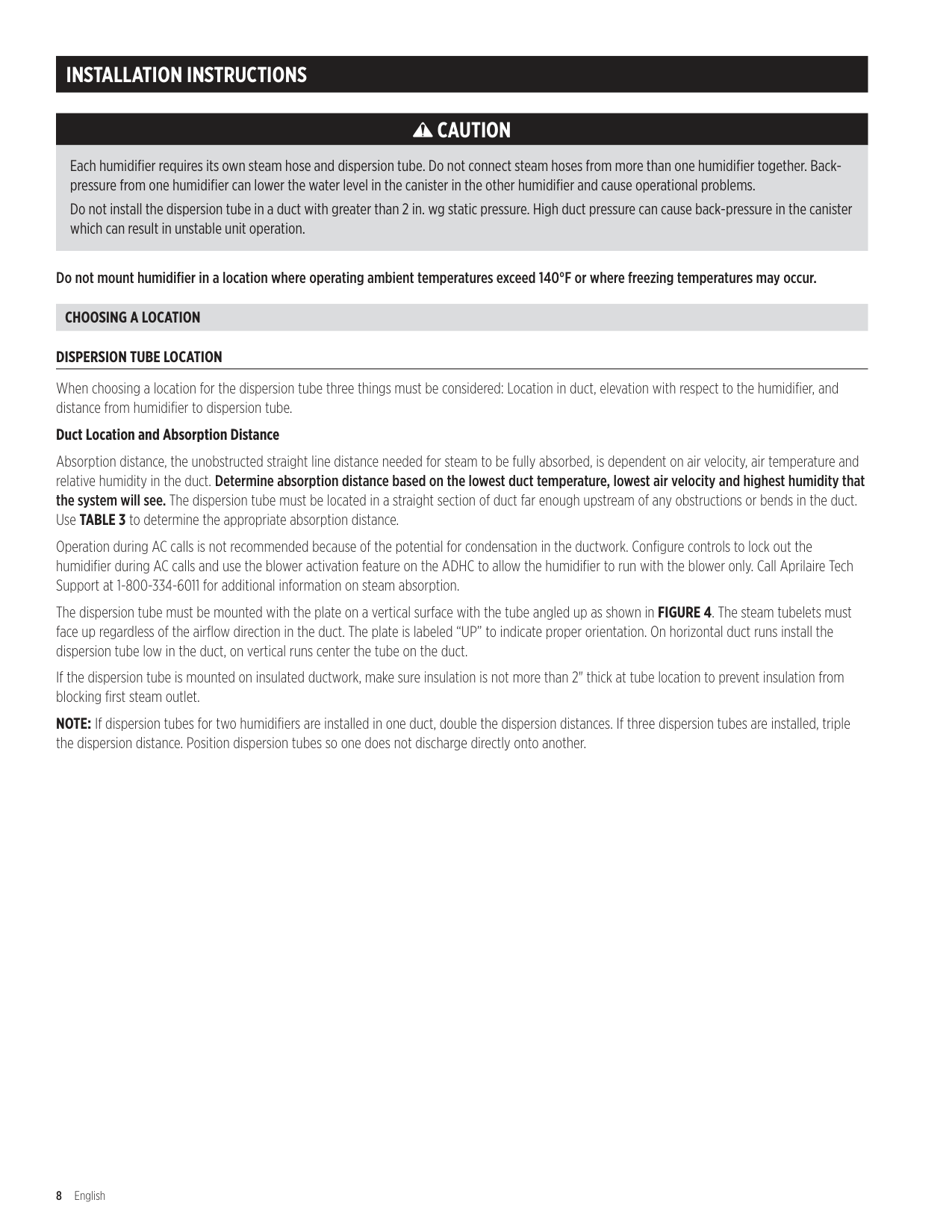
Each humidifier requires its own steam hose and dispersion tube. Do not connect steam hoses from more than one humidifier together. Backpressure from one humidifier can lower the water level in the canister in the other humidifier and cause operational problems. Do not install the dispersion tube in a duct with greater than 2 in. wg static pressure. High duct pressure can cause back-pressure in the canister which can result in unstable unit operation.
Do not mount humidifier in a location where operating ambient temperatures exceed 140°F or where freezing temperatures may occur.
CHOOSING A LOCATION
DISPERSION TUBE LOCATION
When choosing a location for the dispersion tube three things must be considered: Location in duct, elevation with respect to the humidifier, and distance from humidifier to dispersion tube .
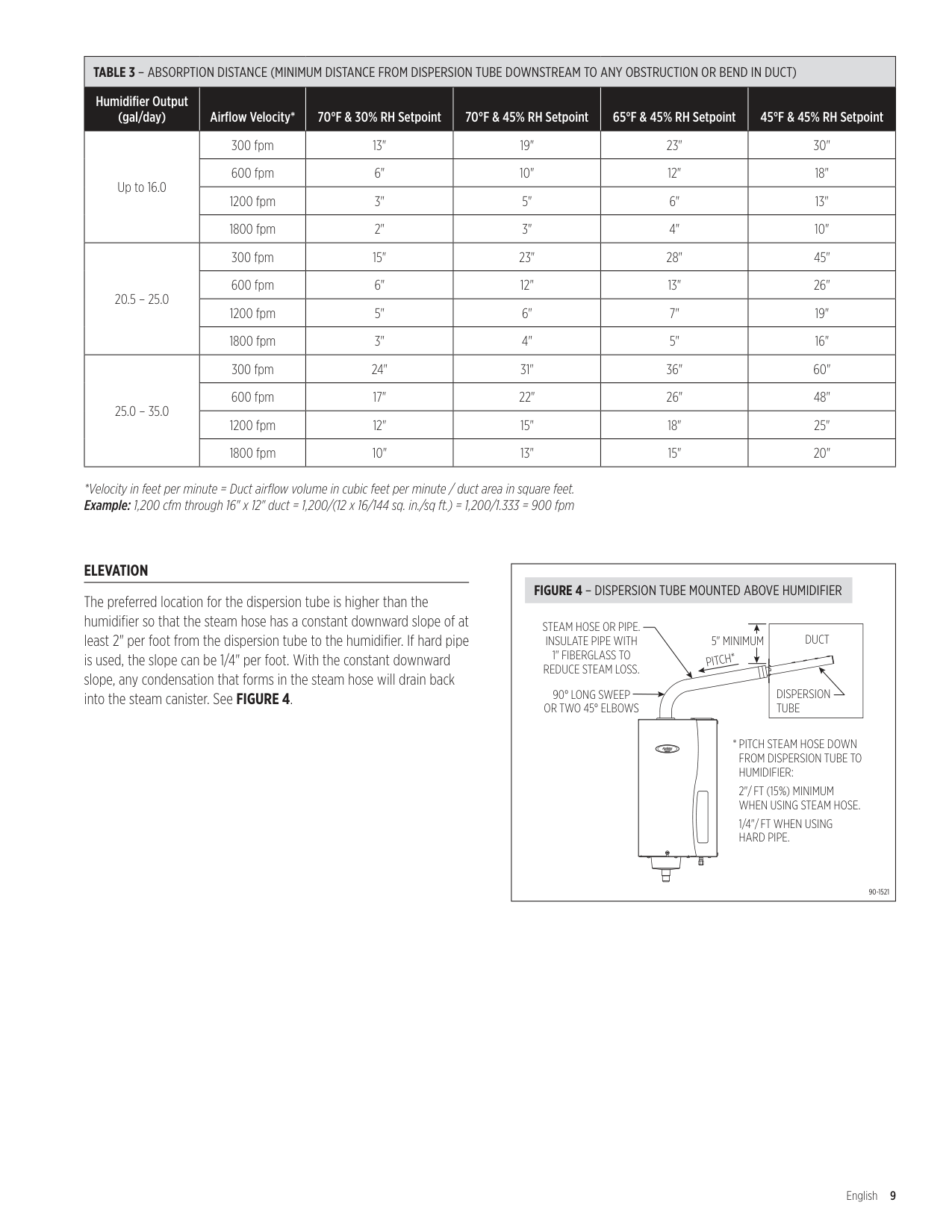
Duct Location and Absorption Distance Absorption distance, the unobstructed straight line distance needed for steam to be fully absorbed, is dependent on air velocity, air temperature and relative humidity in the duct . Determine absorption distance based on the lowest duct temperature, lowest air velocity and highest humidity that the system will see. The dispersion tube must be located in a straight section of duct far enough upstream of any obstructions or bends in the duct . Use TABLE 3 to determine the appropriate absorption distance . Operation during AC calls is not recommended because of the potential for condensation in the ductwork . Configure controls to lock out the humidifier during AC calls and use the blower activation feature on the ADHC to allow the humidifier to run with the blower only . Call Aprilaire Tech Support at 1-800-334-6011 for additional information on steam absorption . The dispersion tube must be mounted with the plate on a vertical surface with the tube angled up as shown in FIGURE 4. The steam tubelets must face up regardless of the airflow direction in the duct . The plate is labeled “UP” to indicate proper orientation . On horizontal duct runs install the dispersion tube low in the duct, on vertical runs center the tube on the duct . If the dispersion tube is mounted on insulated ductwork, make sure insulation is not more than 2" thick at tube location to prevent insulation from blocking first steam outlet . NOTE: If dispersion tubes for two humidifiers are installed in one duct, double the dispersion distances . If three dispersion tubes are installed, triple the dispersion distance . Position dispersion tubes so one does not discharge directly onto another .
|TABLE 3 – ABSORPTION DISTANCE (MINIMUM DISTANCE FROM DISPERSION TUBE DOWNSTREAM TO ANY OBSTRUCTION OR BEND IN DUCT)|TABLE 3 – ABSORPTION DISTANCE (MINIMUM DISTANCE FROM DISPERSION TUBE DOWNSTREAM TO ANY OBSTRUCTION OR BEND IN DUCT)|TABLE 3 – ABSORPTION DISTANCE (MINIMUM DISTANCE FROM DISPERSION TUBE DOWNSTREAM TO ANY OBSTRUCTION OR BEND IN DUCT)|TABLE 3 – ABSORPTION DISTANCE (MINIMUM DISTANCE FROM DISPERSION TUBE DOWNSTREAM TO ANY OBSTRUCTION OR BEND IN DUCT)|TABLE 3 – ABSORPTION DISTANCE (MINIMUM DISTANCE FROM DISPERSION TUBE DOWNSTREAM TO ANY OBSTRUCTION OR BEND IN DUCT)|TABLE 3 – ABSORPTION DISTANCE (MINIMUM DISTANCE FROM DISPERSION TUBE DOWNSTREAM TO ANY OBSTRUCTION OR BEND IN DUCT)| |---|---|---|---|---|---| |Humidifier Output (gal/day)|Airflow Velocity*|70°F & 30% RH Setpoint|70°F & 45% RH Setpoint|65°F & 45% RH Setpoint|45°F & 45% RH Setpoint| |Up to 16 .0|300 fpm|13"|19"|23"|30"| |Up to 16 .0|600 fpm|6"|10"|12"|18"| |Up to 16 .0|1200 fpm|3"|5"|6"|13"| |Up to 16 .0|1800 fpm|2"|3"|4"|10"| |20 .5 – 25 .0|300 fpm|15"|23"|28"|45"| |20 .5 – 25 .0|600 fpm|6"|12"|13"|26"|
|20 .5 – 25 .0|1200 fpm|5"|6"|7"|19"| |20 .5 – 25 .0|1800 fpm|3"|4"|5"|16"| |25 .0 – 35 .0|300 fpm|24"|31"|36"|60"| |25 .0 – 35 .0|600 fpm|17"|22"|26"|48"| |25 .0 – 35 .0|1200 fpm|12"|15"|18"|25"| |25 .0 – 35 .0|1800 fpm|10"|13"|15"|20"|
*Velocity in feet per minute = Duct airflow volume in cubic feet per minute / duct area in square feet. Example: 1,200 cfm through 16" x 12" duct = 1,200/(12 x 16/144 sq. in./sq ft.) = 1,200/1.333 = 900 fpm
##### ELEVATION
The preferred location for the dispersion tube is higher than the humidifier so that the steam hose has a constant downward slope of at least 2" per foot from the dispersion tube to the humidifier . If hard pipe is used, the slope can be 1/4" per foot . With the constant downward slope, any condensation that forms in the steam hose will drain back into the steam canister . See FIGURE 4.
|90° LONG SWEEP OR TWO 45° ELBOWS
PITCH*
|DUCT
DISPERSION TUBE| |---|
5" MINIMUM
STEAM HOSE OR PIPE. INSULATE PIPE WITH 1" FIBERGLASS TO REDUCE STEAM LOSS.
* PITCH STEAM HOSE DOWN FROM DISPERSION TUBE TO HUMIDIFIER:
2"/FT (15%) MINIMUM WHEN USING STEAM HOSE.
1/4"/FT WHEN USING HARD PIPE.
90-1521
FIGURE 4 – DISPERSION TUBE MOUNTED ABOVE HUMIDIFIER| |---|
NOTICE
CONTROL CONDENSATE FLOW AND COLLECTION. Failure to follow steam hose recommendations in this manual can result in reduced or erratic performance, increased noise and condensate in the duct.
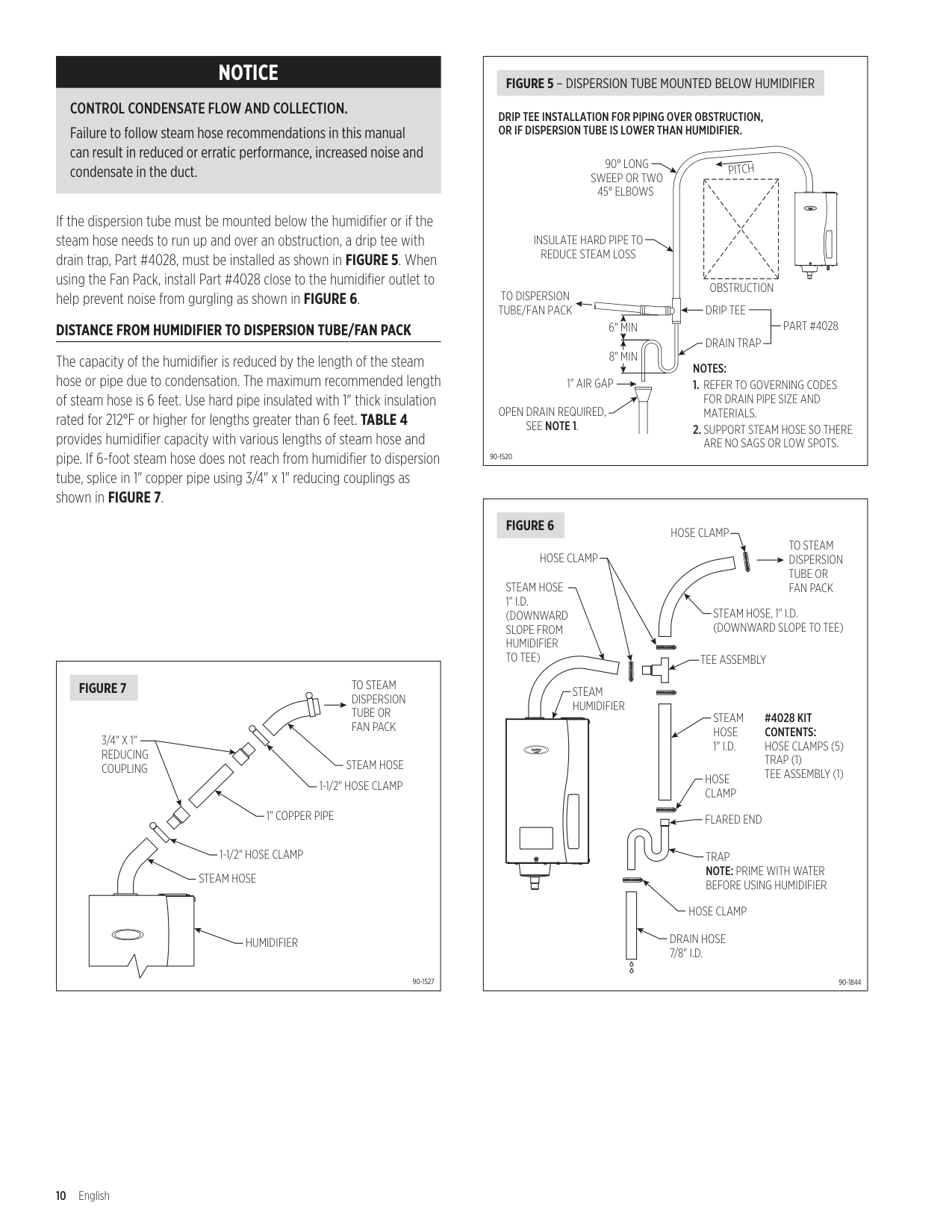
If the dispersion tube must be mounted below the humidifier or if the steam hose needs to run up and over an obstruction, a drip tee with drain trap, Part #4028, must be installed as shown in FIGURE 5. When using the Fan Pack, install Part #4028 close to the humidifier outlet to help prevent noise from gurgling as shown in FIGURE 6.
##### DISTANCE FROM HUMIDIFIER TO DISPERSION TUBE/FAN PACK
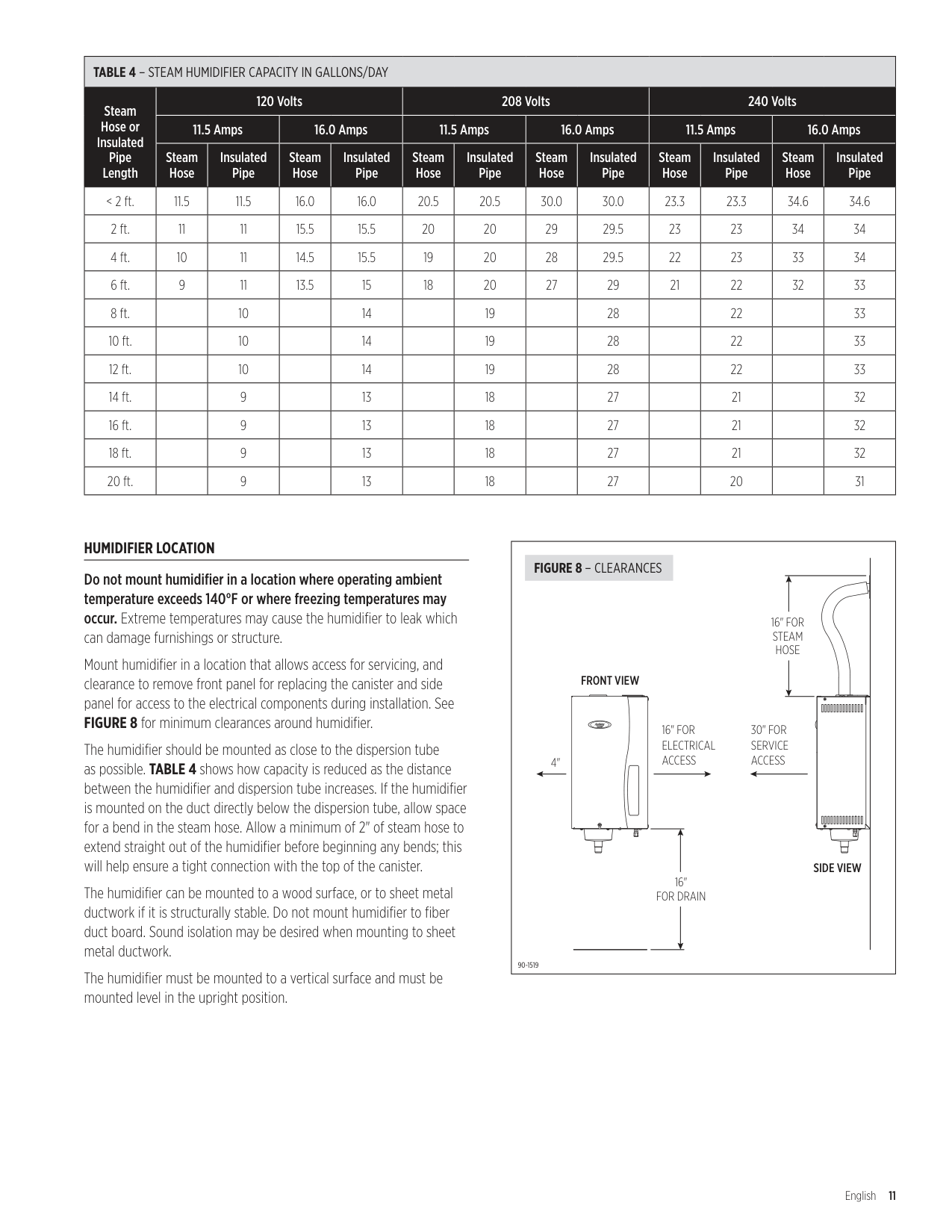
The capacity of the humidifier is reduced by the length of the steam hose or pipe due to condensation . The maximum recommended length of steam hose is 6 feet . Use hard pipe insulated with 1" thick insulation rated for 212°F or higher for lengths greater than 6 feet . TABLE 4 provides humidifier capacity with various lengths of steam hose and pipe . If 6-foot steam hose does not reach from humidifier to dispersion tube, splice in 1" copper pipe using 3/4" x 1" reducing couplings as shown in FIGURE 7.
|STEAM HOSE
STEAM HOSE 1-1/2" HOSE CLAMP
1-1/2" HOSE CLAMP
1" COPPER PIPE
3/4" X 1" REDUCING COUPLING
HUMIDIFIER
TO STEAM DISPERSION TUBE OR FAN PACK
90-1527
FIGURE 7| |---|
|PITCH
OBSTRUCTION
90° LONG SWEEP OR TWO 45° ELBOWS
6" MIN 8" MIN
INSULATE HARD PIPE TO REDUCE STEAM LOSS
1" AIR GAP OPEN DRAIN REQUIRED, SEE NOTE 1.
NOTES:
1. REFER TO GOVERNING CODES FOR DRAIN PIPE SIZE AND MATERIALS.
2. SUPPORT STEAM HOSE SO THERE ARE NO SAGS OR LOW SPOTS.
DRIP TEE
DRAIN TRAP
PART #4028
TO DISPERSION TUBE/FAN PACK
DRIP TEE INSTALLATION FOR PIPING OVER OBSTRUCTION, OR IF DISPERSION TUBE IS LOWER THAN HUMIDIFIER.
90-1520
FIGURE 5 – DISPERSION TUBE MOUNTED BELOW HUMIDIFIER| |---|
|#4028 KIT CONTENTS: HOSE CLAMPS (5) TRAP (1) TEE ASSEMBLY (1)
TEE ASSEMBLY
FLARED END
TRAP
NOTE: PRIME WITH WATER BEFORE USING HUMIDIFIER
HOSE CLAMP
HOSE CLAMP
HOSE CLAMP
TO STEAM DISPERSION TUBE OR FAN PACK
STEAM HOSE 1" I.D.
STEAM HOSE, 1" I.D. (DOWNWARD SLOPE TO TEE)
DRAIN HOSE 7/8" I.D.
STEAM HOSE 1" I.D. (DOWNWARD SLOPE FROM HUMIDIFIER TO TEE)
HOSE CLAMP
STEAM HUMIDIFIER
90-1844
FIGURE 6| |---|
|TABLE 4 – STEAM HUMIDIFIER CAPACITY IN GALLONS/DAY|TABLE 4 – STEAM HUMIDIFIER CAPACITY IN GALLONS/DAY|TABLE 4 – STEAM HUMIDIFIER CAPACITY IN GALLONS/DAY|TABLE 4 – STEAM HUMIDIFIER CAPACITY IN GALLONS/DAY|TABLE 4 – STEAM HUMIDIFIER CAPACITY IN GALLONS/DAY|TABLE 4 – STEAM HUMIDIFIER CAPACITY IN GALLONS/DAY|TABLE 4 – STEAM HUMIDIFIER CAPACITY IN GALLONS/DAY|TABLE 4 – STEAM HUMIDIFIER CAPACITY IN GALLONS/DAY|TABLE 4 – STEAM HUMIDIFIER CAPACITY IN GALLONS/DAY|TABLE 4 – STEAM HUMIDIFIER CAPACITY IN GALLONS/DAY|TABLE 4 – STEAM HUMIDIFIER CAPACITY IN GALLONS/DAY|TABLE 4 – STEAM HUMIDIFIER CAPACITY IN GALLONS/DAY|TABLE 4 – STEAM HUMIDIFIER CAPACITY IN GALLONS/DAY| |---|---|---|---|---|---|---|---|---|---|---|---|---| |Steam Hose or Insulated Pipe Length|120 Volts|120 Volts|120 Volts|120 Volts|208 Volts|208 Volts|208 Volts|208 Volts|240 Volts|240 Volts|240 Volts|240 Volts| |Steam Hose or Insulated Pipe Length|11.5 Amps|11.5 Amps|16.0 Amps|16.0 Amps|11.5 Amps|11.5 Amps|16.0 Amps|16.0 Amps|11.5 Amps|11.5 Amps|16.0 Amps|16.0 Amps| |Steam Hose or Insulated Pipe Length|Steam Hose|Insulated Pipe|Steam Hose|Insulated Pipe|Steam Hose|Insulated Pipe|Steam Hose|Insulated Pipe|Steam Hose|Insulated Pipe|Steam Hose|Insulated Pipe| |< 2 ft .|11 .5|11 .5|16 .0|16 .0|20 .5|20 .5|30 .0|30 .0|23 .3|23 .3|34 .6|34 .6| |2 ft .|11|11|15 .5|15 .5|20|20|29|29 .5|23|23|34|34| |4 ft .|10|11|14 .5|15 .5|19|20|28|29 .5|22|23|33|34| |6 ft .|9|11|13 .5|15|18|20|27|29|21|22|32|33| |8 ft .| |10| |14| |19| |28| |22| |33| |10 ft .| |10| |14| |19| |28| |22| |33| |12 ft .| |10| |14| |19| |28| |22| |33| |14 ft .| |9| |13| |18| |27| |21| |32| |16 ft .| |9| |13| |18| |27| |21| |32|
|18 ft .| |9| |13| |18| |27| |21| |32| |20 ft .| |9| |13| |18| |27| |20| |31|
##### HUMIDIFIER LOCATION
Do not mount humidifier in a location where operating ambient temperature exceeds 140°F or where freezing temperatures may occur. Extreme temperatures may cause the humidifier to leak which can damage furnishings or structure .
Mount humidifier in a location that allows access for servicing, and clearance to remove front panel for replacing the canister and side panel for access to the electrical components during installation . See
FIGURE 8 for minimum clearances around humidifier .
The humidifier should be mounted as close to the dispersion tube as possible . TABLE 4 shows how capacity is reduced as the distance between the humidifier and dispersion tube increases . If the humidifier is mounted on the duct directly below the dispersion tube, allow space for a bend in the steam hose . Allow a minimum of 2" of steam hose to extend straight out of the humidifier before beginning any bends; this will help ensure a tight connection with the top of the canister .
The humidifier can be mounted to a wood surface, or to sheet metal ductwork if it is structurally stable . Do not mount humidifier to fiber duct board . Sound isolation may be desired when mounting to sheet metal ductwork .
The humidifier must be mounted to a vertical surface and must be mounted level in the upright position .
|16" FOR STEAM HOSE
30" FOR SERVICE ACCESS
16" FOR ELECTRICAL
ACCESS4"
16" FOR DRAIN
FRONT VIEW
SIDE VIEW
90-1519
FIGURE 8 – CLEARANCES| |---|
##### PREPARE HUMIDIFIER FOR MOUNTING
Unpack carton . Open front panel by removing screw and lifting panel up and away from humidifier . Disconnect three wires from top of canister by pulling straight up . The two large wires are the electrode conductors . The smaller wire is connected to the high water level sensor . Remove canister by pulling it up and out of drain assembly . Remove two screws on right side of humidifier and lift side panel off housing to expose electrical compartment .
##### INSTALL STEAM DISPERSION TUBE
Make sure steam dispersion tube is mounted higher than the humidifier so that condensation that forms in the steam hose runs back into the canister . If the dispersion tube cannot be mounted higher than the humidifier or if the steam hose must extend up from the humidifier then down to the dispersion tube due to an obstruction, a drip tee and drain trap system (Part #4028) must be installed as shown in FIGURE 5.
Drill a 1-1/4" diameter hole in a vertical surface of the duct at the location chosen for the dispersion tube . Position the dispersion tube so it is angled up, regardless of airflow direction . UP is stamped on the mounting bracket to aid in proper installation . Secure with four sheet metal screws provided .
##### MOUNT HUMIDIFIER
Secure humidifier to a sturdy wall using screws provided, or to sheet metal duct . Humidifier initially weighs 23 lbs with a full canister, but will increase in weight over time due to the precipitation of minerals inside the canister . Make sure mounting system will support weight . If mounting to stud frame wall, install two spanner boards to studs and fasten humidifier to spanner boards . Make sure humidifier is mounted plumb .
##### INSTALL STEAM HOSE
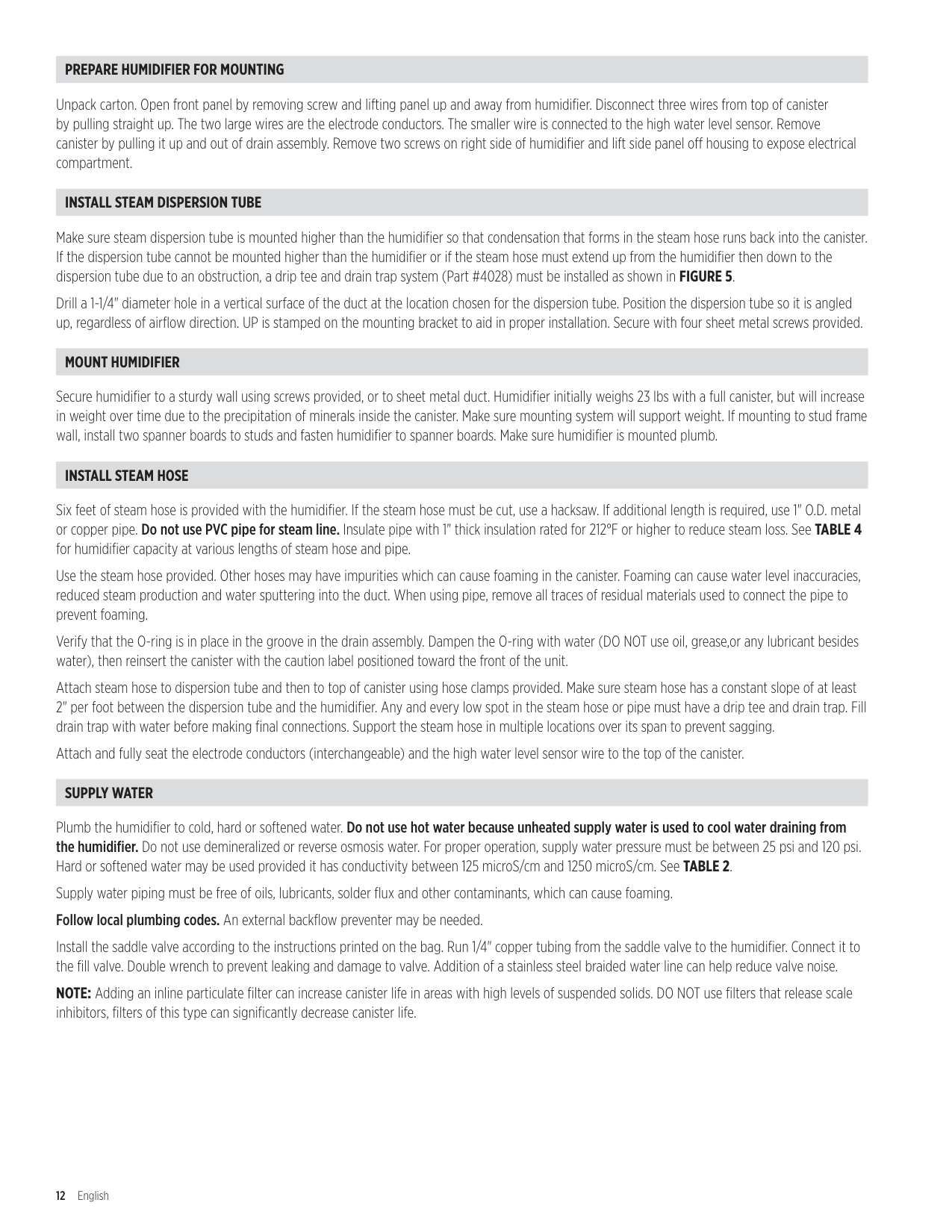
Six feet of steam hose is provided with the humidifier . If the steam hose must be cut, use a hacksaw . If additional length is required, use 1" O .D . metal or copper pipe . Do not use PVC pipe for steam line. Insulate pipe with 1" thick insulation rated for 212°F or higher to reduce steam loss . See TABLE 4 for humidifier capacity at various lengths of steam hose and pipe .
Use the steam hose provided . Other hoses may have impurities which can cause foaming in the canister . Foaming can cause water level inaccuracies, reduced steam production and water sputtering into the duct . When using pipe, remove all traces of residual materials used to connect the pipe to prevent foaming .
Verify that the O-ring is in place in the groove in the drain assembly . Dampen the O-ring with water (DO NOT use oil, grease,or any lubricant besides water), then reinsert the canister with the caution label positioned toward the front of the unit .
Attach steam hose to dispersion tube and then to top of canister using hose clamps provided . Make sure steam hose has a constant slope of at least 2" per foot between the dispersion tube and the humidifier . Any and every low spot in the steam hose or pipe must have a drip tee and drain trap . Fill drain trap with water before making final connections . Support the steam hose in multiple locations over its span to prevent sagging .
Attach and fully seat the electrode conductors (interchangeable) and the high water level sensor wire to the top of the canister .
##### SUPPLY WATER
Plumb the humidifier to cold, hard or softened water . Do not use hot water because unheated supply water is used to cool water draining from the humidifier. Do not use demineralized or reverse osmosis water . For proper operation, supply water pressure must be between 25 psi and 120 psi . Hard or softened water may be used provided it has conductivity between 125 microS/cm and 1250 microS/cm . See TABLE 2 Supply water piping must be free of oils, lubricants, solder flux and other contaminants, which can cause foaming . Follow local plumbing codes. An external backflow preventer may be needed .
Install the saddle valve according to the instructions printed on the bag . Run 1/4" copper tubing from the saddle valve to the humidifier . Connect it to the fill valve . Double wrench to prevent leaking and damage to valve . Addition of a stainless steel braided water line can help reduce valve noise .
NOTE: Adding an inline particulate filter can increase canister life in areas with high levels of suspended solids . DO NOT use filters that release scale inhibitors, filters of this type can significantly decrease canister life .
##### DRAIN LINE
Attach the 7/8" I .D . drain tubing provided to the drain assembly at the bottom of the humidifier . Secure with the hose clamp provided . Do not over tighten .
Make sure the drain line has a constant downward slope from the humidifier to the drain and is not kinked or blocked . If floor drain is not available, use condensate pump (Part #4856) to route water to a suitable drain . Provide at least 16 inches for of drain line between the Steam Humidifier and the condensate pump . NOTE: The humidifier uses cold water to temper drain water to less than 140°F .
ELECTRICAL POWER WIRING & SHUT-OFF SWITCH
CAUTION
Only qualified electrical personnel should perform field wiring procedures. Improper wiring or contact with energized circuits can cause property damage or severe personal injury.
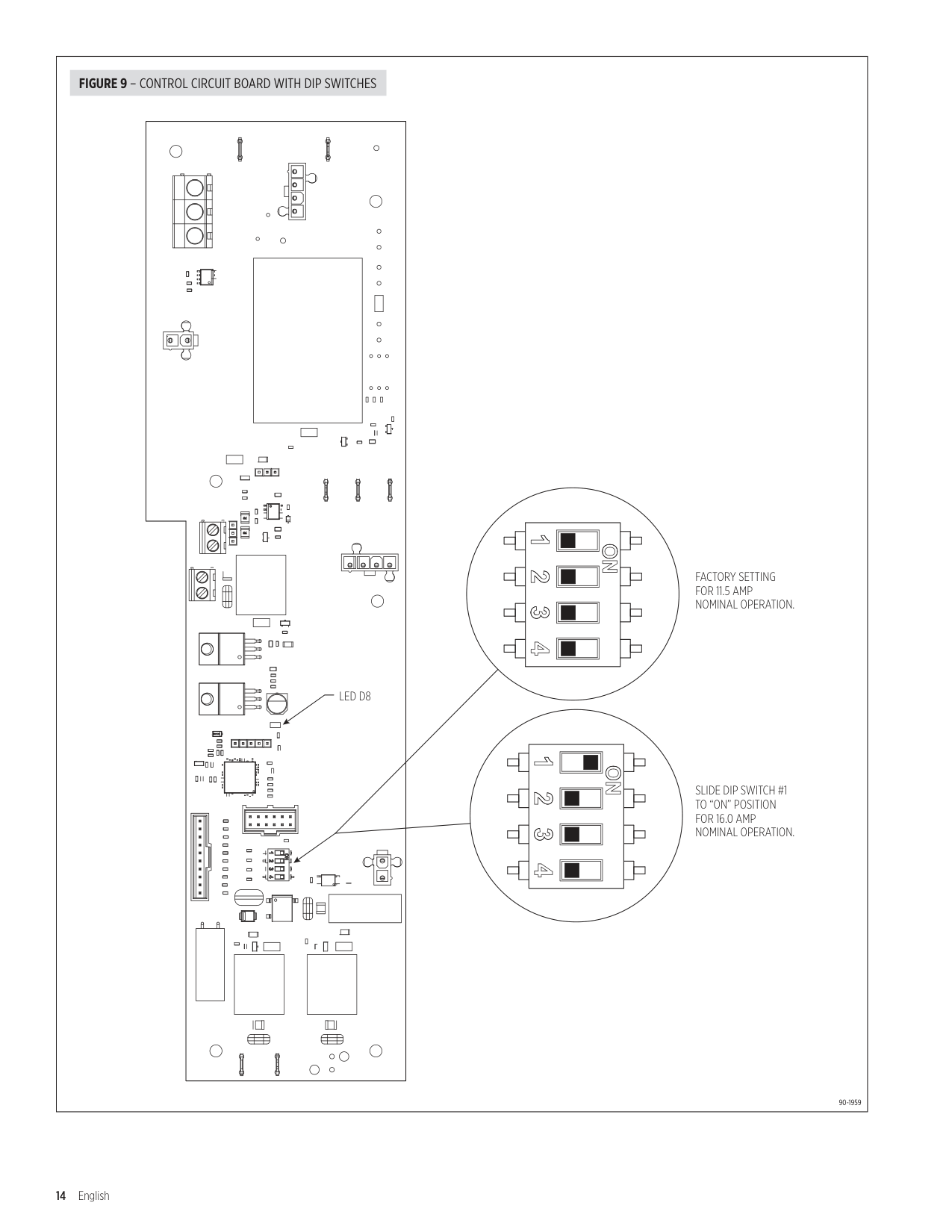
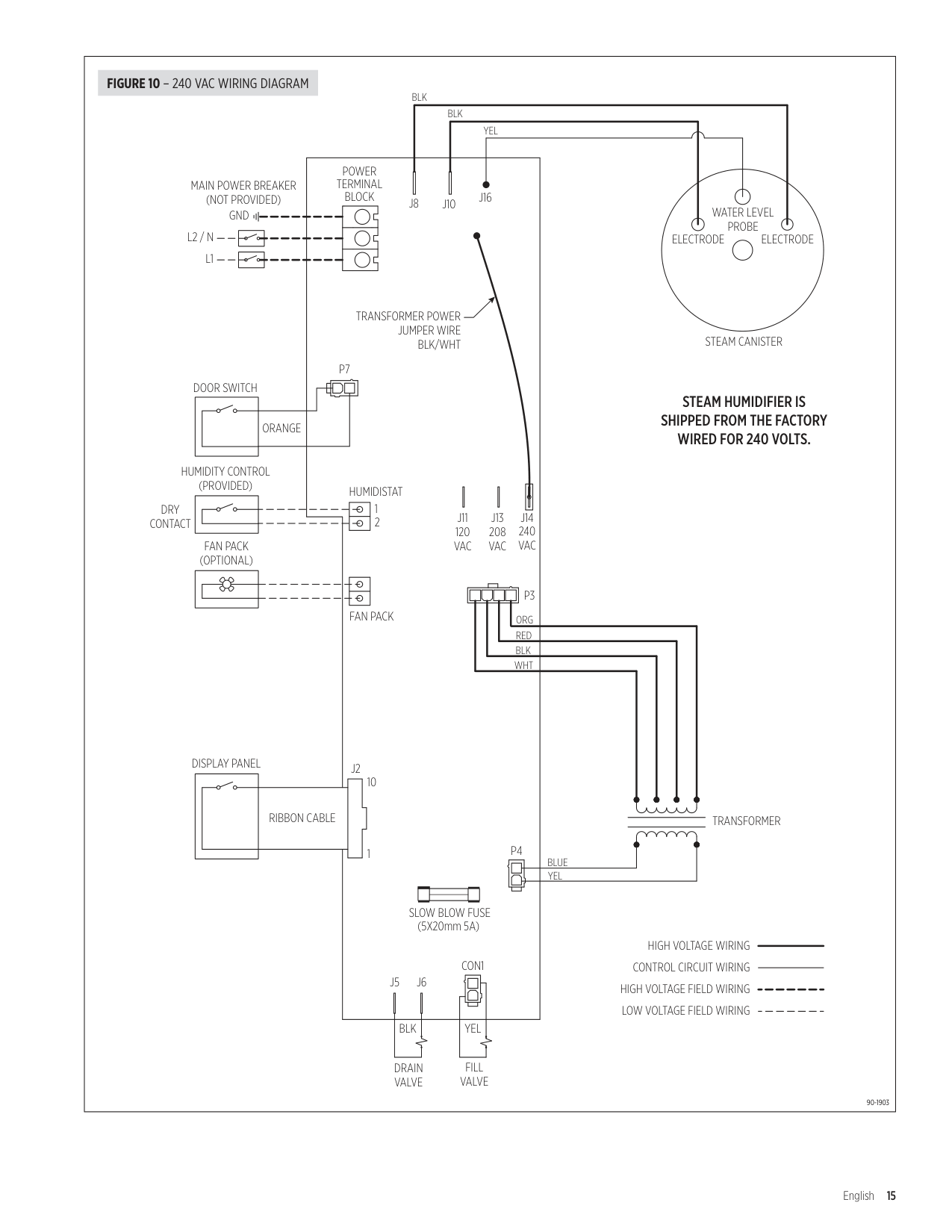
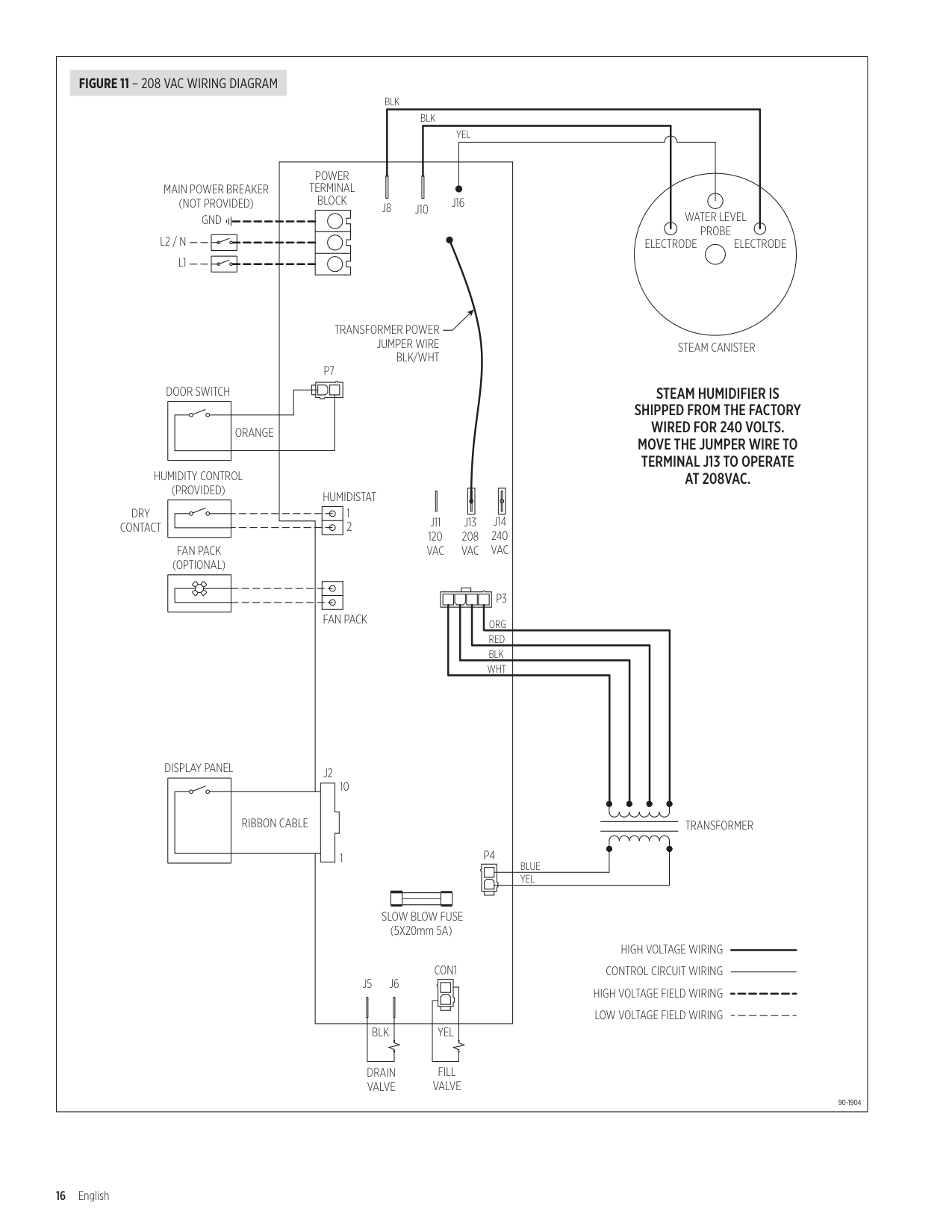
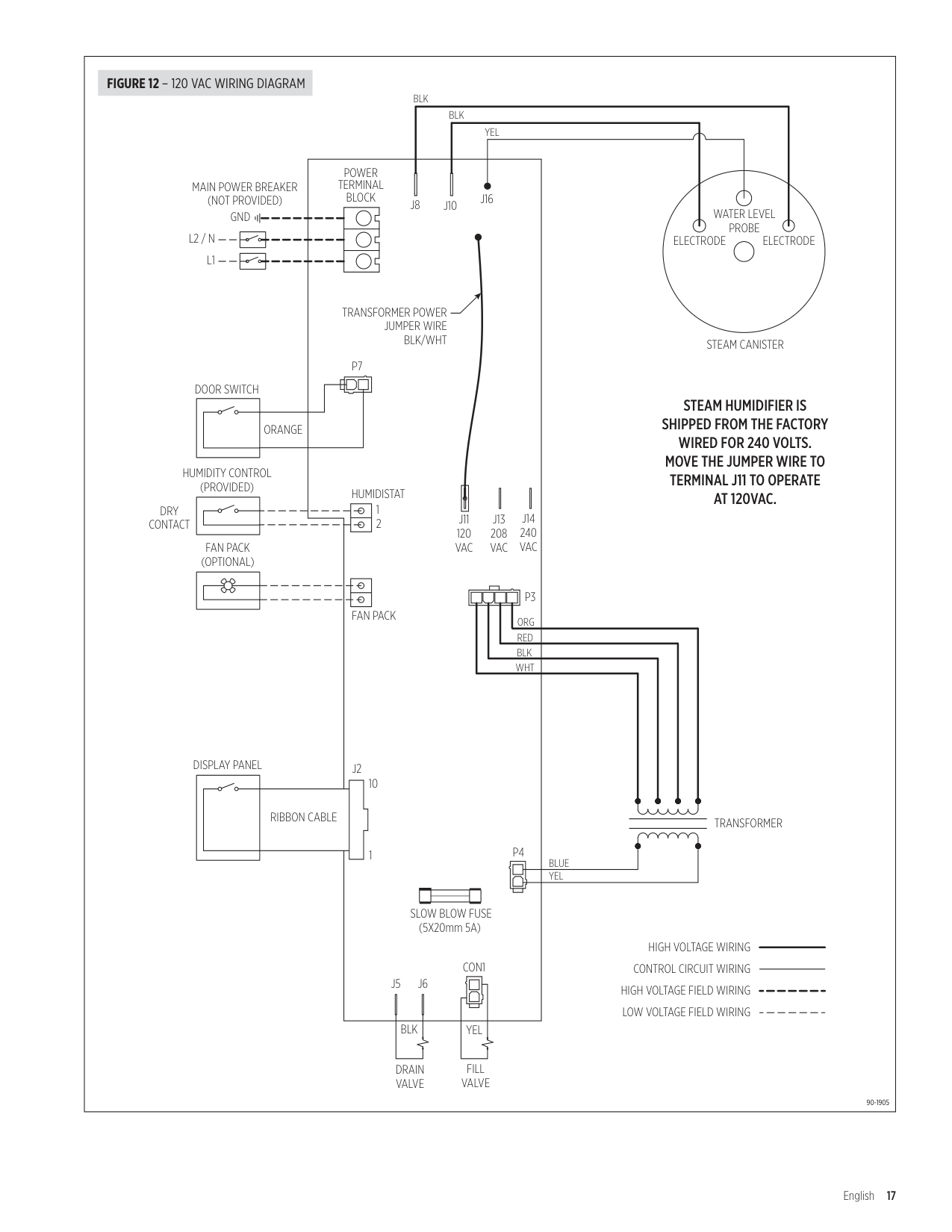
All wiring must be installed in accordance with all governing electrical codes and with the wiring diagram provided inside the front panel . Do not loop power wiring . Do not use aluminum wire . A safety grounding system that meets all governing electrical codes is required . The ground connection must be made with solid metal to metal connections . Ground wire must be the same size as the power wiring . With factory settings, the Steam Humidifier draws 11 .5 amps +/- 10% . Use a minimum 20 amp dedicated circuit when installing to operate at 11 .5 amps . The Steam Humidifier can be set to draw 16 .0 amps +/- 10% by repositioning dip switch #1 on the control circuit board (see FIGURE 9) . When set to 16 amps, use a minimum 25 amp dedicated circuit . For both applications, size wire according to local codes . The Steam Humidifier is shipped from the factory wired for 240 VAC operation, but it can operate on 120, 208 or 240 VAC . If using 120V or 208V, move the black/white jumper wire to the proper tab on the control circuit board. See FIGURES 10, 11, 12. WIRING INSTRUCTIONS
Install disconnect switch (not provided) between line power source and humidifier . Knock-outs for power wiring and low voltage control circuit wiring are provided . Connect power and ground wiring as shown in appropriate wiring diagram .
|FACTORY SETTING FOR 11.5 AMP NOMINAL OPERATION.
SLIDE DIP SWITCH #1 TO “ON” POSITION FOR 16.0 AMP NOMINAL OPERATION.
LED D8
90-1959
FIGURE 9 – CONTROL CIRCUIT BOARD WITH DIP SWITCHES| |---|
|L2 / N L1
GND
J8 J10
J16
J2
10
1
J5 J6
P4
P3
CONTROL CIRCUIT WIRING
HIGH VOLTAGE WIRING
HIGH VOLTAGE FIELD WIRING
DRAIN VALVE
FILL VALVE
DISPLAY PANEL
RIBBON CABLE
BLK
BLK
YEL
BLK YEL
TRANSFORMER POWER JUMPER WIRE BLK/WHT
WHT
RED BLK
ORG
YEL
BLUE
MAIN POWER BREAKER (NOT PROVIDED)
TRANSFORMER
J11 120 VAC
J13 208 VAC
J14 240 VAC
LOW VOLTAGE FIELD WIRING
SLOW BLOW FUSE (5X20mm 5A)
ELECTRODE
WATER LEVEL PROBE ELECTRODE
STEAM CANISTER P7
HUMIDISTAT
1
2
FAN PACK
CON1
STEAM HUMIDIFIER IS SHIPPED FROM THE FACTORY WIRED FOR 240 VOLTS.
HUMIDITY CONTROL (PROVIDED)
FAN PACK (OPTIONAL)
DOOR SWITCH
ORANGE
DRY CONTACT
POWER TERMINAL BLOCK
90-1903
FIGURE 10 – 240 VAC WIRING DIAGRAM| |---|
|J8 J10
J16
J2
10
1
J5 J6
P4
CONTROL CIRCUIT WIRING
HIGH VOLTAGE WIRING
HIGH VOLTAGE FIELD WIRING
BLK
BLK
YEL
YEL
TRANSFORMER POWER JUMPER WIRE BLK/WHT
HUMIDITY CONTROL (PROVIDED)
FAN PACK (OPTIONAL)
DOOR SWITCH
ORANGE
DRY CONTACT
YEL
BLUE
TRANSFORMER
J11 120 VAC
J13 208 VAC
J14 240 VAC
ELECTRODE
WATER LEVEL PROBE ELECTRODE
STEAM CANISTER
LOW VOLTAGE FIELD WIRING
P7
P3
WHT
RED BLK
ORGFAN PACK
HUMIDISTAT
1
2
STEAM HUMIDIFIER IS SHIPPED FROM THE FACTORY WIRED FOR 240 VOLTS. MOVE THE JUMPER WIRE TO TERMINAL J13 TO OPERATE AT 208VAC.
MAIN POWER BREAKER (NOT PROVIDED)
L2 / N L1
GND
DRAIN VALVE
FILL VALVE
DISPLAY PANEL
RIBBON CABLE
BLK
SLOW BLOW FUSE (5X20mm 5A)
CON1
POWER TERMINAL BLOCK
90-1904
FIGURE 11 – 208 VAC WIRING DIAGRAM| |---|
|HUMIDITY CONTROL (PROVIDED)
FAN PACK (OPTIONAL)
DOOR SWITCH
POWER TERMINAL BLOCK
J8 J10
J16
J2
10
1
J5 J6
P4
J11 120 VAC
J13 208 VAC
J14 240 VAC
CONTROL CIRCUIT WIRING
HIGH VOLTAGE WIRING
HIGH VOLTAGE FIELD WIRING
ORANGE
BLK
BLK
YEL
TRANSFORMER POWER JUMPER WIRE BLK/WHT
YEL
BLUE
TRANSFORMER
LOW VOLTAGE FIELD WIRING
DRY CONTACT
P7
P3
WHT
RED BLK
ORGFAN PACK
HUMIDISTAT
1
2
STEAM HUMIDIFIER IS SHIPPED FROM THE FACTORY WIRED FOR 240 VOLTS. MOVE THE JUMPER WIRE TO TERMINAL J11 TO OPERATE AT 120VAC.
MAIN POWER BREAKER (NOT PROVIDED)
L2 / N L1
GND
DRAIN VALVE
FILL VALVE
DISPLAY PANEL
RIBBON CABLE
BLK YEL
SLOW BLOW FUSE (5X20mm 5A)
CON1
ELECTRODE
WATER LEVEL PROBE ELECTRODE
STEAM CANISTER
90-1905
FIGURE 12 – 120 VAC WIRING DIAGRAM| |---|
##### AUTOMATIC DIGITAL CONTROL & ACCESSORY WIRING (MODEL 800)
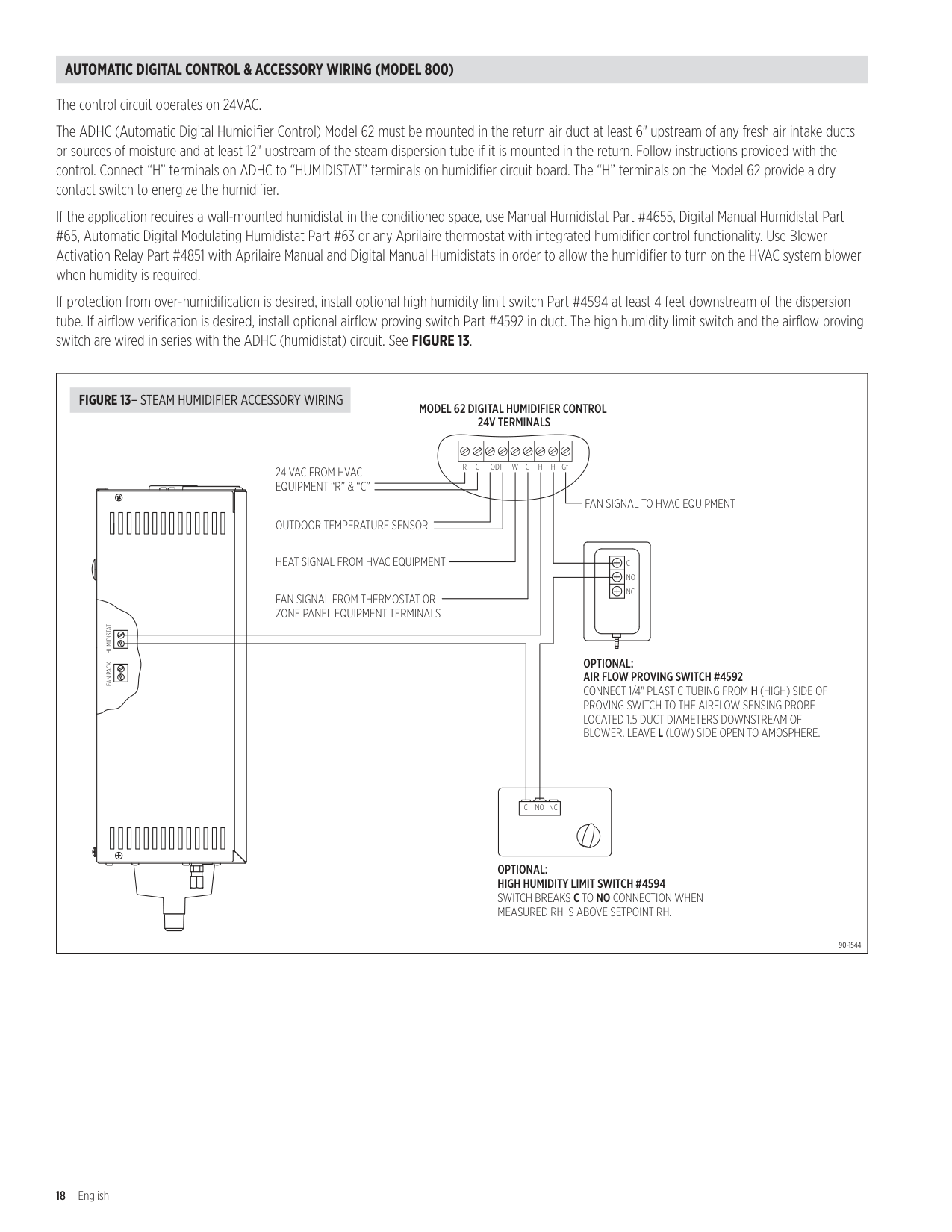
The control circuit operates on 24VAC . The ADHC (Automatic Digital Humidifier Control) Model 62 must be mounted in the return air duct at least 6" upstream of any fresh air intake ducts or sources of moisture and at least 12" upstream of the steam dispersion tube if it is mounted in the return . Follow instructions provided with the control . Connect “H” terminals on ADHC to “HUMIDISTAT” terminals on humidifier circuit board . The “H” terminals on the Model 62 provide a dry contact switch to energize the humidifier . If the application requires a wall-mounted humidistat in the conditioned space, use Manual Humidistat Part #4655, Digital Manual Humidistat Part #65, Automatic Digital Modulating Humidistat Part #63 or any Aprilaire thermostat with integrated humidifier control functionality . Use Blower Activation Relay Part #4851 with Aprilaire Manual and Digital Manual Humidistats in order to allow the humidifier to turn on the HVAC system blower when humidity is required . If protection from over-humidification is desired, install optional high humidity limit switch Part #4594 at least 4 feet downstream of the dispersion tube . If airflow verification is desired, install optional airflow proving switch Part #4592 in duct . The high humidity limit switch and the airflow proving switch are wired in series with the ADHC (humidistat) circuit . See FIGURE 13.
|24 VAC FROM HVAC EQUIPMENT “R” & “C”
OUTDOOR TEMPERATURE SENSOR
HEAT SIGNAL FROM HVAC EQUIPMENT
FAN SIGNAL FROM THERMOSTAT OR ZONE PANEL EQUIPMENT TERMINALS
FAN SIGNAL TO HVAC EQUIPMENT
MODEL 62 DIGITAL HUMIDIFIER CONTROL 24V TERMINALS
OPTIONAL: AIR FLOW PROVING SWITCH #4592 CONNECT 1/4" PLASTIC TUBING FROM H (HIGH) SIDE OF PROVING SWITCH TO THE AIRFLOW SENSING PROBE LOCATED 1.5 DUCT DIAMETERS DOWNSTREAM OF BLOWER. LEAVE L (LOW) SIDE OPEN TO AMOSPHERE.
OPTIONAL: HIGH HUMIDITY LIMIT SWITCH #4594 SWITCH BREAKS C TO NO CONNECTION WHEN MEASURED RH IS ABOVE SETPOINT RH.
H GfRCODTGWH
FAN PACKHUMIDISTAT
C NO NC
C NO NC
90-1544
FIGURE 13– STEAM HUMIDIFIER ACCESSORY WIRING| |---|
##### THERMOSTAT IN A ZONED HVAC SYSTEM
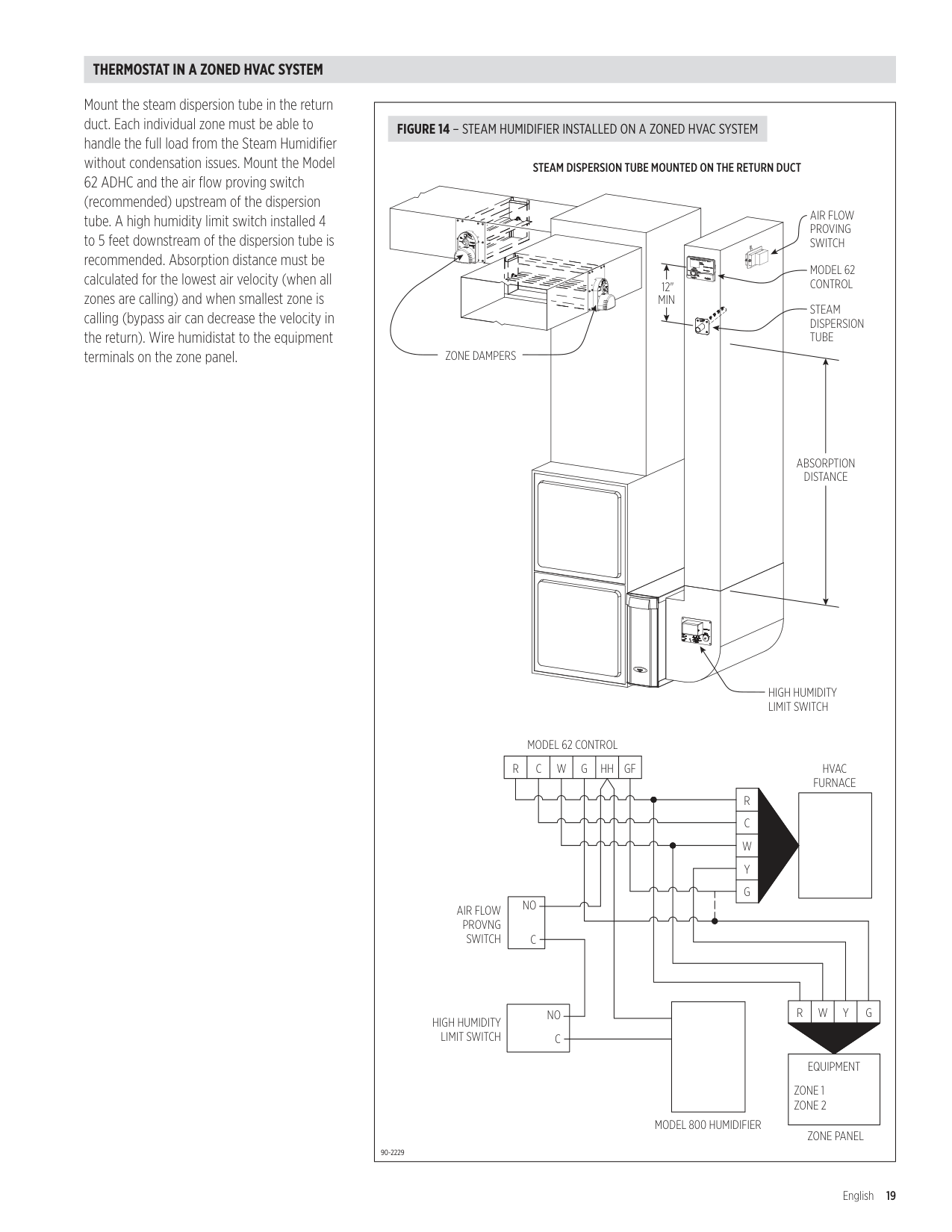
Mount the steam dispersion tube in the return duct . Each individual zone must be able to handle the full load from the Steam Humidifier without condensation issues . Mount the Model 62 ADHC and the air flow proving switch (recommended) upstream of the dispersion tube . A high humidity limit switch installed 4 to 5 feet downstream of the dispersion tube is recommended . Absorption distance must be calculated for the lowest air velocity (when all zones are calling) and when smallest zone is calling (bypass air can decrease the velocity in the return) . Wire humidistat to the equipment terminals on the zone panel .
|R W Y G
NO
C
NO C
|EQUIPMENT
ZONE 1
ZONE 2
| |---|
12" MIN
R C W Y G
R C W G HH GF
ZONE DAMPERS
STEAM DISPERSION TUBE MOUNTED ON THE RETURN DUCT
HIGH HUMIDITY LIMIT SWITCH
STEAM DISPERSION TUBE
MODEL 62 CONTROL
ABSORPTION DISTANCE
HVAC FURNACE
MODEL 62 CONTROL
AIR FLOW PROVNG SWITCH
HIGH HUMIDITY LIMIT SWITCH
MODEL 800 HUMIDIFIER
ZONE PANEL
AIR FLOW PROVING SWITCH
90-2229
FIGURE 14 – STEAM HUMIDIFIER INSTALLED ON A ZONED HVAC SYSTEM| |---|
##### MANUAL DIGITAL HUMIDISTAT & FAN PACK WIRING (MODEL 865)
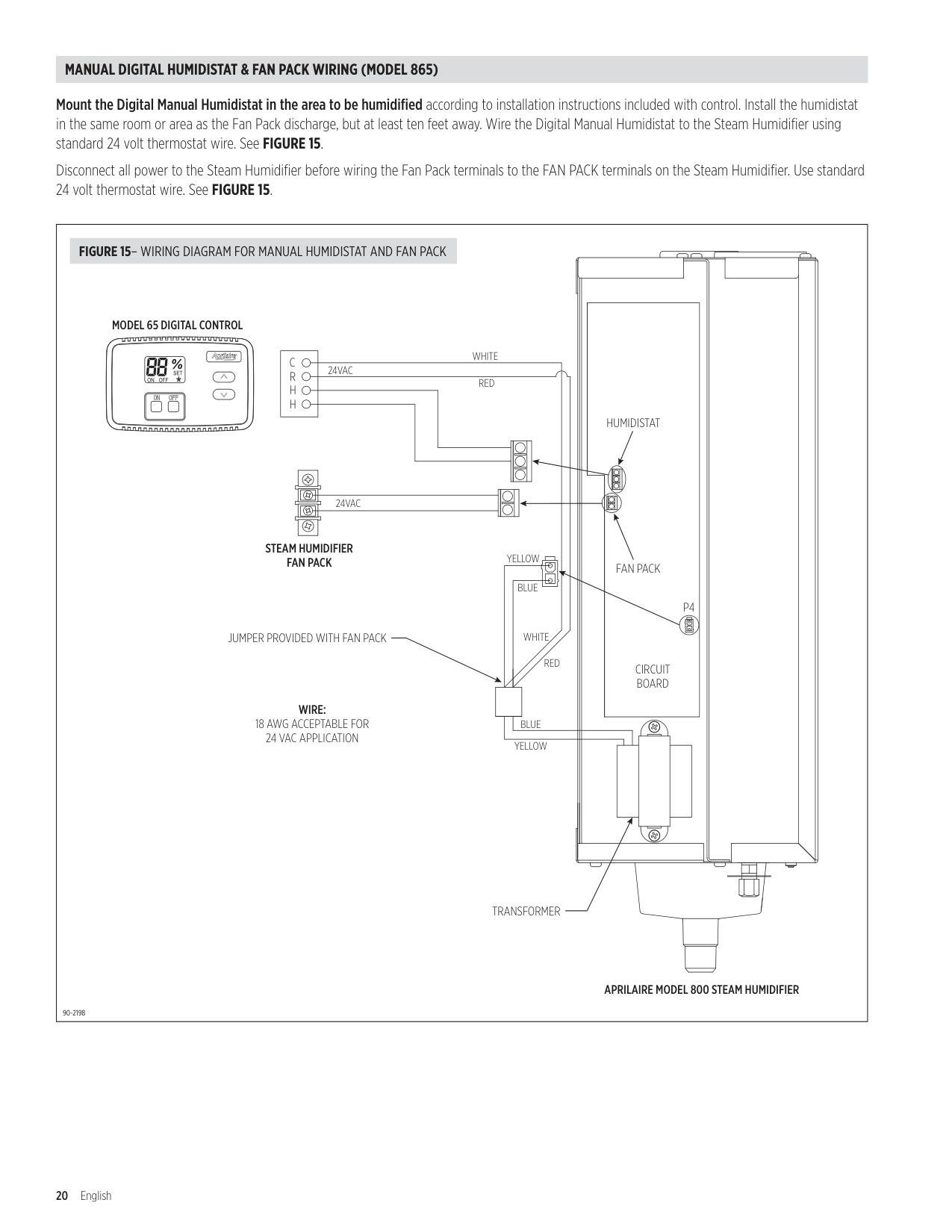
Mount the Digital Manual Humidistat in the area to be humidified according to installation instructions included with control . Install the humidistat in the same room or area as the Fan Pack discharge, but at least ten feet away . Wire the Digital Manual Humidistat to the Steam Humidifier using standard 24 volt thermostat wire . See FIGURE 15.
Disconnect all power to the Steam Humidifier before wiring the Fan Pack terminals to the FAN PACK terminals on the Steam Humidifier . Use standard 24 volt thermostat wire . See FIGURE 15
|H
H
R
C
FAN PACK
HUMIDISTAT
STEAM HUMIDIFIER FAN PACK
APRILAIRE MODEL 800 STEAM HUMIDIFIER
TRANSFORMER
JUMPER PROVIDED WITH FAN PACK
CIRCUIT BOARD
WIRE: 18 AWG ACCEPTABLE FOR 24 VAC APPLICATION
MODEL 65 DIGITAL CONTROL
P4
24VAC
24VAC
YELLOW
BLUE
BLUE
YELLOW
WHITE RED
WHITE
RED
90-2198
FIGURE 15– WIRING DIAGRAM FOR MANUAL HUMIDISTAT AND FAN PACK| |---|
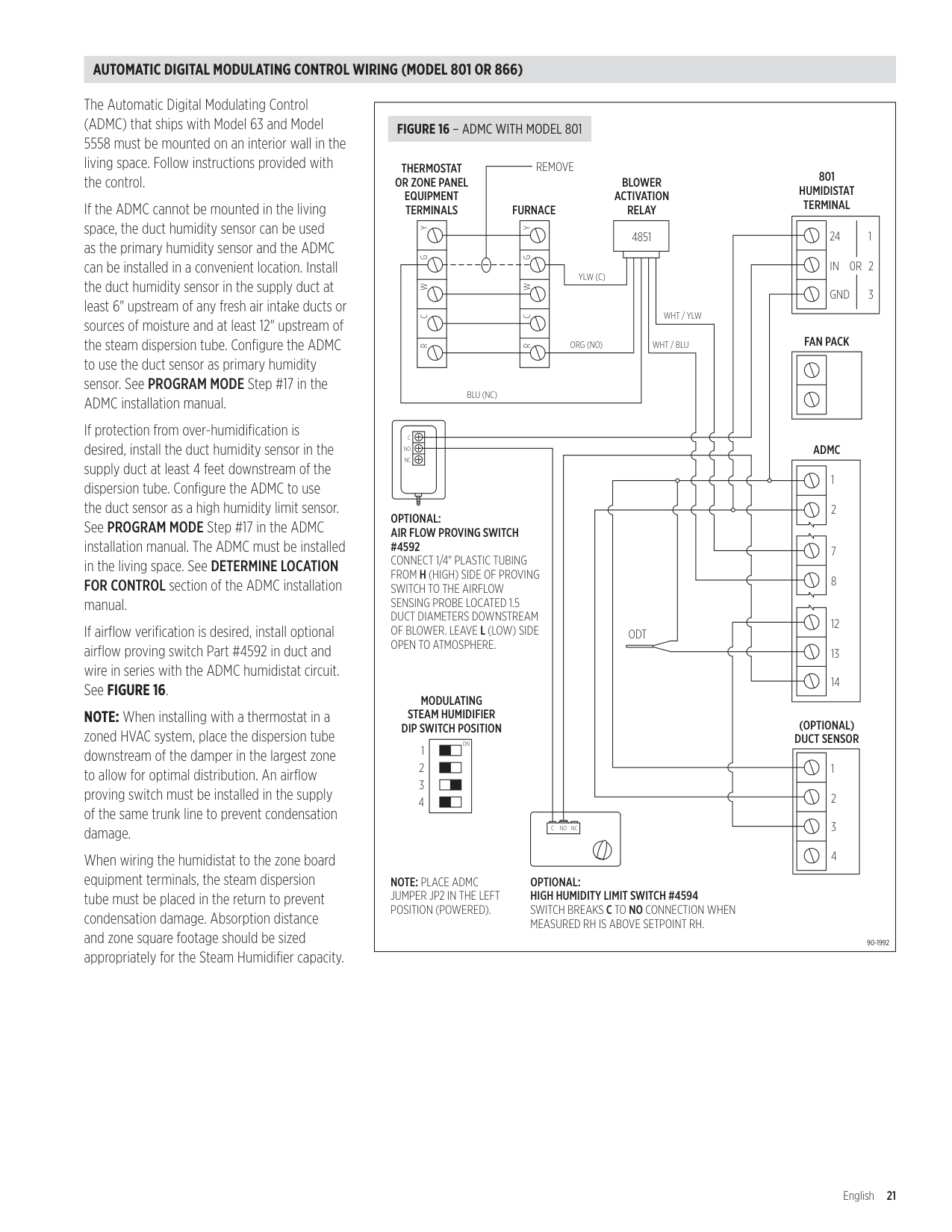
##### AUTOMATIC DIGITAL MODULATING CONTROL WIRING (MODEL 801 OR 866)
The Automatic Digital Modulating Control (ADMC) that ships with Model 63 and Model 5558 must be mounted on an interior wall in the living space . Follow instructions provided with the control .
If the ADMC cannot be mounted in the living space, the duct humidity sensor can be used as the primary humidity sensor and the ADMC can be installed in a convenient location . Install the duct humidity sensor in the supply duct at least 6" upstream of any fresh air intake ducts or sources of moisture and at least 12" upstream of the steam dispersion tube . Configure the ADMC to use the duct sensor as primary humidity sensor . See PROGRAM MODE Step #17 in the ADMC installation manual .
If protection from over-humidification is desired, install the duct humidity sensor in the supply duct at least 4 feet downstream of the dispersion tube . Configure the ADMC to use the duct sensor as a high humidity limit sensor . See PROGRAM MODE Step #17 in the ADMC installation manual . The ADMC must be installed in the living space . See DETERMINE LOCATION FOR CONTROL section of the ADMC installation manual .
If airflow verification is desired, install optional airflow proving switch Part #4592 in duct and wire in series with the ADMC humidistat circuit . See FIGURE 16.
NOTE: When installing with a thermostat in a zoned HVAC system, place the dispersion tube downstream of the damper in the largest zone to allow for optimal distribution . An airflow proving switch must be installed in the supply of the same trunk line to prevent condensation damage .
When wiring the humidistat to the zone board equipment terminals, the steam dispersion tube must be placed in the return to prevent condensation damage . Absorption distance and zone square footage should be sized appropriately for the Steam Humidifier capacity .
||ON| |---|
NC
NO
C
NCNOC
WHT / YLW
WHT / BLU
YLW (C)
ORG (NO)
BLU (NC)
RCWGY
YGWCR
24 IN GND
1 20R 3
1
2
7
8
12
13
14
1
2
3
4
1
2
3
4
801 HUMIDISTAT TERMINAL
THERMOSTAT OR ZONE PANEL EQUIPMENT TERMINALS FURNACE
REMOVE
ADMC
(OPTIONAL) DUCT SENSOR
ODT
MODULATING STEAM HUMIDIFIER DIP SWITCH POSITION
BLOWER ACTIVATION RELAY
FAN PACK
4851
OPTIONAL: AIR FLOW PROVING SWITCH #4592 CONNECT 1/4" PLASTIC TUBING FROM H (HIGH) SIDE OF PROVING SWITCH TO THE AIRFLOW SENSING PROBE LOCATED 1.5 DUCT DIAMETERS DOWNSTREAM OF BLOWER. LEAVE L (LOW) SIDE OPEN TO ATMOSPHERE.
OPTIONAL: HIGH HUMIDITY LIMIT SWITCH #4594 SWITCH BREAKS C TO NO CONNECTION WHEN MEASURED RH IS ABOVE SETPOINT RH.
NOTE: PLACE ADMC JUMPER JP2 IN THE LEFT POSITION (POWERED).
90-1992
FIGURE 16 – ADMC WITH MODEL 801| |---|
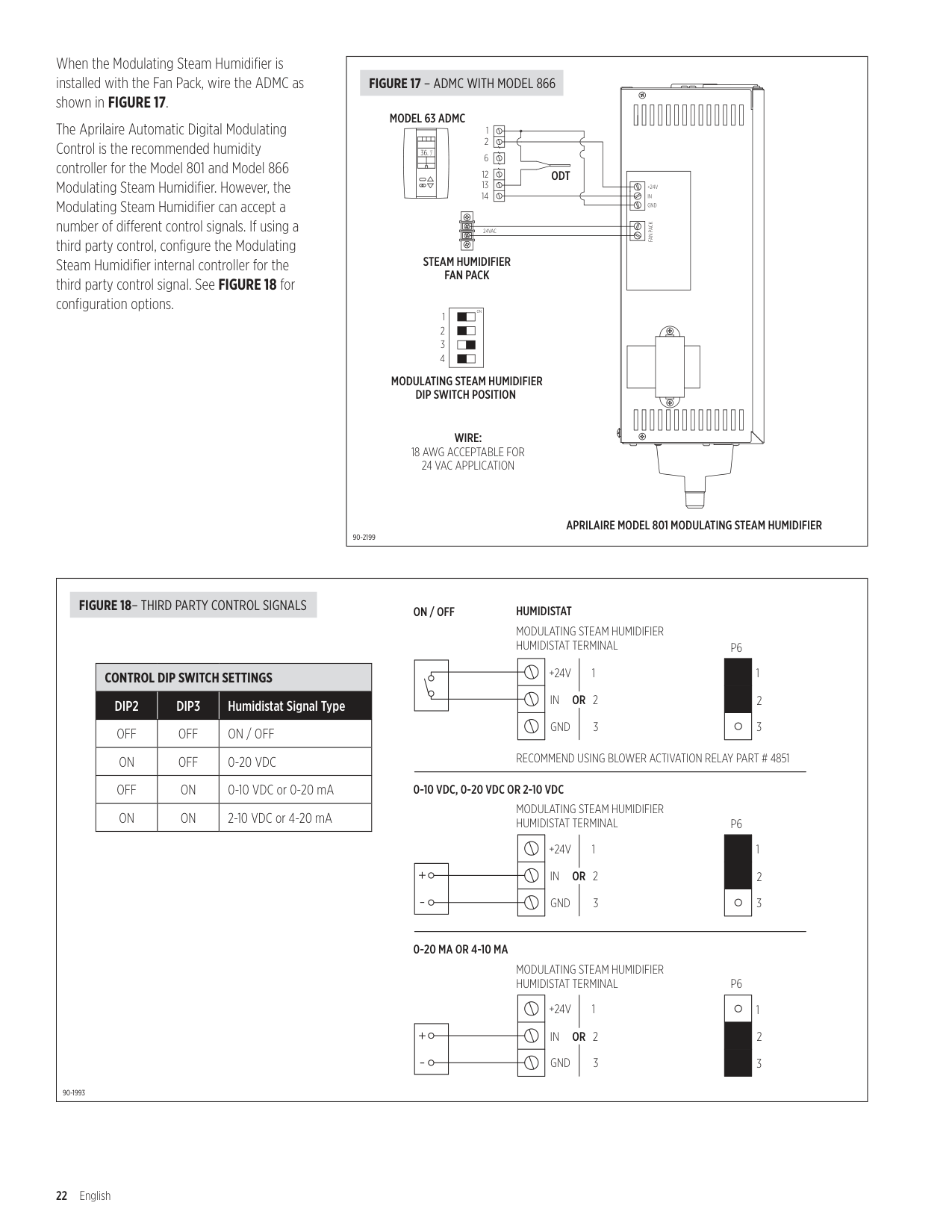
When the Modulating Steam Humidifier is installed with the Fan Pack, wire the ADMC as shown in FIGURE 17
The Aprilaire Automatic Digital Modulating Control is the recommended humidity controller for the Model 801 and Model 866 Modulating Steam Humidifier . However, the Modulating Steam Humidifier can accept a number of different control signals . If using a third party control, configure the Modulating Steam Humidifier internal controller for the third party control signal . See FIGURE 18 for configuration options .
|FAN PACK
24VAC
+24V IN GND
1
2 6
12
13
14
|| | | | | |---|---|---|---| | | | | | |36. 7
%RH|36. 7
%RH|36. 7
%RH|36. 7
%RH| | | | | | | | | | | | |---|
|ON| |---|
1
2
3
4
STEAM HUMIDIFIER FAN PACK
APRILAIRE MODEL 801 MODULATING STEAM HUMIDIFIER
MODEL 63 ADMC
ODT
MODULATING STEAM HUMIDIFIER DIP SWITCH POSITION
WIRE: 18 AWG ACCEPTABLE FOR 24 VAC APPLICATION
90-2199
FIGURE 17 – ADMC WITH MODEL 866| |---|
|MODULATING STEAM HUMIDIFIER HUMIDISTAT TERMINAL
MODULATING STEAM HUMIDIFIER HUMIDISTAT TERMINAL
MODULATING STEAM HUMIDIFIER HUMIDISTAT TERMINAL
+24V IN GND
+24V IN GND
+24V IN GND
1
2
3
1
2
3
1
2
OR
OR
OR
3
+ -
+ -
| | |---| | | | |
P6
1
2
3
| | |---| | | | |
P6
3
2
1
| |
|---| | | | |
P6
3
2
1
RECOMMEND USING BLOWER ACTIVATION RELAY PART # 4851
HUMIDISTATON / OFF
0-10 VDC, 0-20 VDC OR 2-10 VDC
0-20 MA OR 4-10 MA
90-1993
FIGURE 18– THIRD PARTY CONTROL SIGNALS
|CONTROL DIP SWITCH SETTINGS|CONTROL DIP SWITCH SETTINGS|CONTROL DIP SWITCH SETTINGS| |---|---|---| |DIP2|DIP3|Humidistat Signal Type| |OFF|OFF|ON / OFF| |ON|OFF|0-20 VDC| |OFF|ON|0-10 VDC or 0-20 mA| |ON|ON|2-10 VDC or 4-20 mA| | |---|
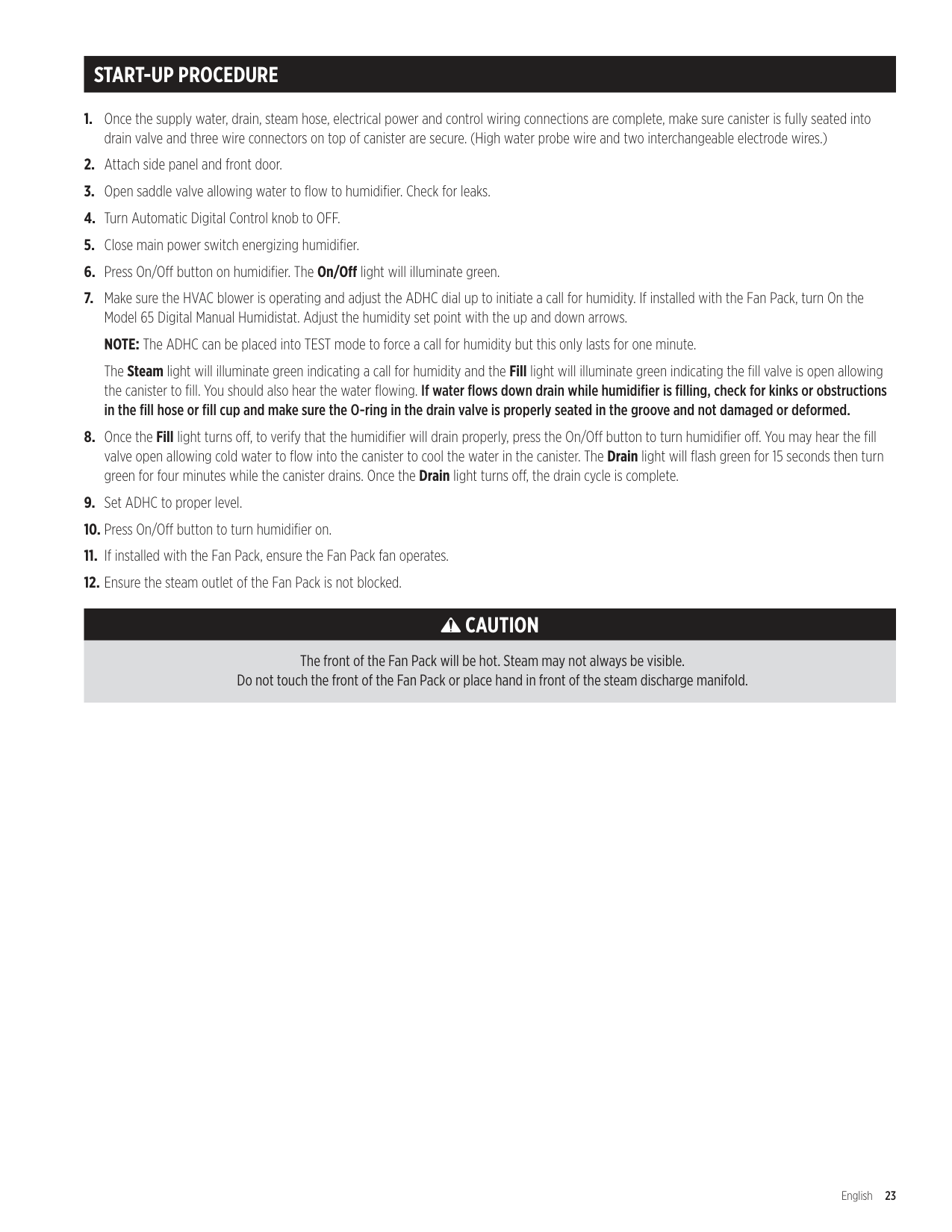
START-UP PROCEDURE
The Steam light will illuminate green indicating a call for humidity and the Fill light will illuminate green indicating the fill valve is open allowing the canister to fill . You should also hear the water flowing . If water flows down drain while humidifier is filling, check for kinks or obstructions in the fill hose or fill cup and make sure the O-ring in the drain valve is properly seated in the groove and not damaged or deformed.
CAUTION
The front of the Fan Pack will be hot. Steam may not always be visible. Do not touch the front of the Fan Pack or place hand in front of the steam discharge manifold.
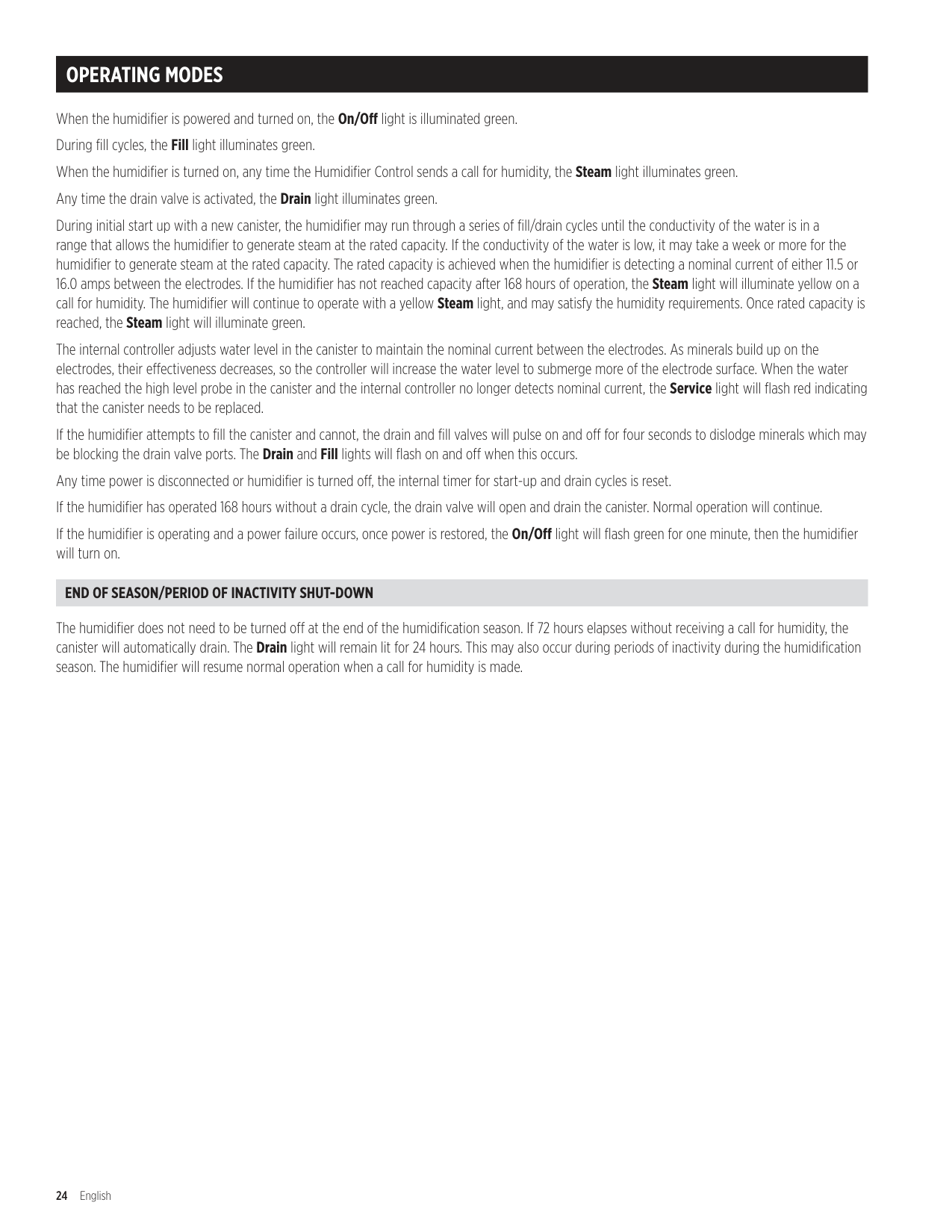
OPERATING MODES
When the humidifier is powered and turned on, the On/Off light is illuminated green . During fill cycles, the Fill light illuminates green . When the humidifier is turned on, any time the Humidifier Control sends a call for humidity, the Steam light illuminates green . Any time the drain valve is activated, the Drain light illuminates green . During initial start up with a new canister, the humidifier may run through a series of fill/drain cycles until the conductivity of the water is in a range that allows the humidifier to generate steam at the rated capacity . If the conductivity of the water is low, it may take a week or more for the humidifier to generate steam at the rated capacity . The rated capacity is achieved when the humidifier is detecting a nominal current of either 11 .5 or 16 .0 amps between the electrodes . If the humidifier has not reached capacity after 168 hours of operation, the Steam light will illuminate yellow on a call for humidity . The humidifier will continue to operate with a yellow Steam light, and may satisfy the humidity requirements . Once rated capacity is reached, the Steam light will illuminate green . The internal controller adjusts water level in the canister to maintain the nominal current between the electrodes . As minerals build up on the electrodes, their effectiveness decreases, so the controller will increase the water level to submerge more of the electrode surface . When the water has reached the high level probe in the canister and the internal controller no longer detects nominal current, the Service light will flash red indicating that the canister needs to be replaced . If the humidifier attempts to fill the canister and cannot, the drain and fill valves will pulse on and off for four seconds to dislodge minerals which may be blocking the drain valve ports . The Drain and Fill lights will flash on and off when this occurs . Any time power is disconnected or humidifier is turned off, the internal timer for start-up and drain cycles is reset . If the humidifier has operated 168 hours without a drain cycle, the drain valve will open and drain the canister . Normal operation will continue . If the humidifier is operating and a power failure occurs, once power is restored, the On/Off light will flash green for one minute, then the humidifier will turn on .
##### END OF SEASON/PERIOD OF INACTIVITY SHUT-DOWN
The humidifier does not need to be turned off at the end of the humidification season . If 72 hours elapses without receiving a call for humidity, the canister will automatically drain . The Drain light will remain lit for 24 hours . This may also occur during periods of inactivity during the humidification season . The humidifier will resume normal operation when a call for humidity is made .
SHUT DOWN PROCEDURE
To turn humidifier off, push On/Off button once . Humidifier will begin its four-minute drain cycle . Fill valve will open to temper drain water . The Drain light will flash green for 15 seconds then turn green for four minutes while the canister drains . Once the Drain light turns off, the drain cycle is complete and the humidifier is off .
DISPLAY PANEL
Green lights indicate normal operation . Yellow Steam light indicates humidifier is operating at less than rated capacity . Flashing red Service light indicates canister is near the end of its life and should be replaced if the humidity in the space cannot be maintained . Solid red lights indicate humidifier has shut down and requires service . Disconnecting power to humidifier resets internal timers .
|TABLE 5 – DISPLAY PANEL|TABLE 5 – DISPLAY PANEL|TABLE 5 – DISPLAY PANEL| |---|---|---| |Indicator|Light|Function|
| |Off|Humidifier is turned off or power is disconnected .| | |Solid green|Humidifier is turned on .| | |Flashing Green|Humidifier is preparing to turn on . Occurs if power to humidifier was turned off when humidifier was on . Humidifier turns on after light flashes for one minute .| | |Off|Fill valve not energized .| | |Solid Green|Fill valve is energized, filling or replenishing canister with water . (During drain cycle when fill valve is open allowing cold water into canister to temper drain water, the Fill light does not illuminate .)| | |Flashing Green|Fill and drain valves are pulsing to dislodge mineral deposits from drain . Flashes 10 times in 4 seconds . Occurs if high water probe detects water during drain cycle .| | |Solid Red|Humidifier cannot fill canister . Humidifier stops operating . Occurs after fill valve has been energized for 40 minutes and high water probe does not detect water .| | |Off|Humidifier is not producing steam| | |Solid Green|Humidifier is turned on and receiving a call for humidity from the control .| | |Solid Yellow|Humidifier is producing steam but at less than the rated capacity . Occurs if humidifier has operated for 168 hours and has not reached nominal current .| | |Off|Drain valve not energized .| | |Solid Green|Drain valve is energized, allowing water to drain from canister .| | |Flashing Green|Humidifier is preparing to drain . Flashes for 15 seconds indicating fill valve is open allowing cold water into canister .| | |Flashing Red|Canister has reached end of life . Humidifier continues to operate but at reduced capacity . Occurs after humidifier has operated for 168 hours plus another 24 hours at less than 75% of the maximum operating current level between electrodes .| | |Solid Red|Humidifier is not operating and requires service .|
MAINTENANCE
NOTICE
INSPECT HUMIDIFIER WHEN SERVICING
##### TO REPLACE THE CANISTER
##### TO CLEAN THE DRAIN VALVE
If water flow from the valve is restricted, disconnect the inlet fitting and remove in line strainer from the inlet port using a small screw . Clean or replace strainer (Part #4004) .
TROUBLESHOOTING GUIDE
CAUTION
Contact with electrical circuits can cause property damage, personal injury or death. Service and Troubleshooting must be performed by qualified electrician.
The following troubleshooting guide is intended to help diagnose and resolve general operational problems with the Steam Humidifier and optional Fan Pack . If a problem persists, call Aprilaire Tech Support toll-free at 1-800-334-6011 . Please be prepared to describe the exact nature of the problem . For general operational problems, check to make sure humidifier is installed correctly .
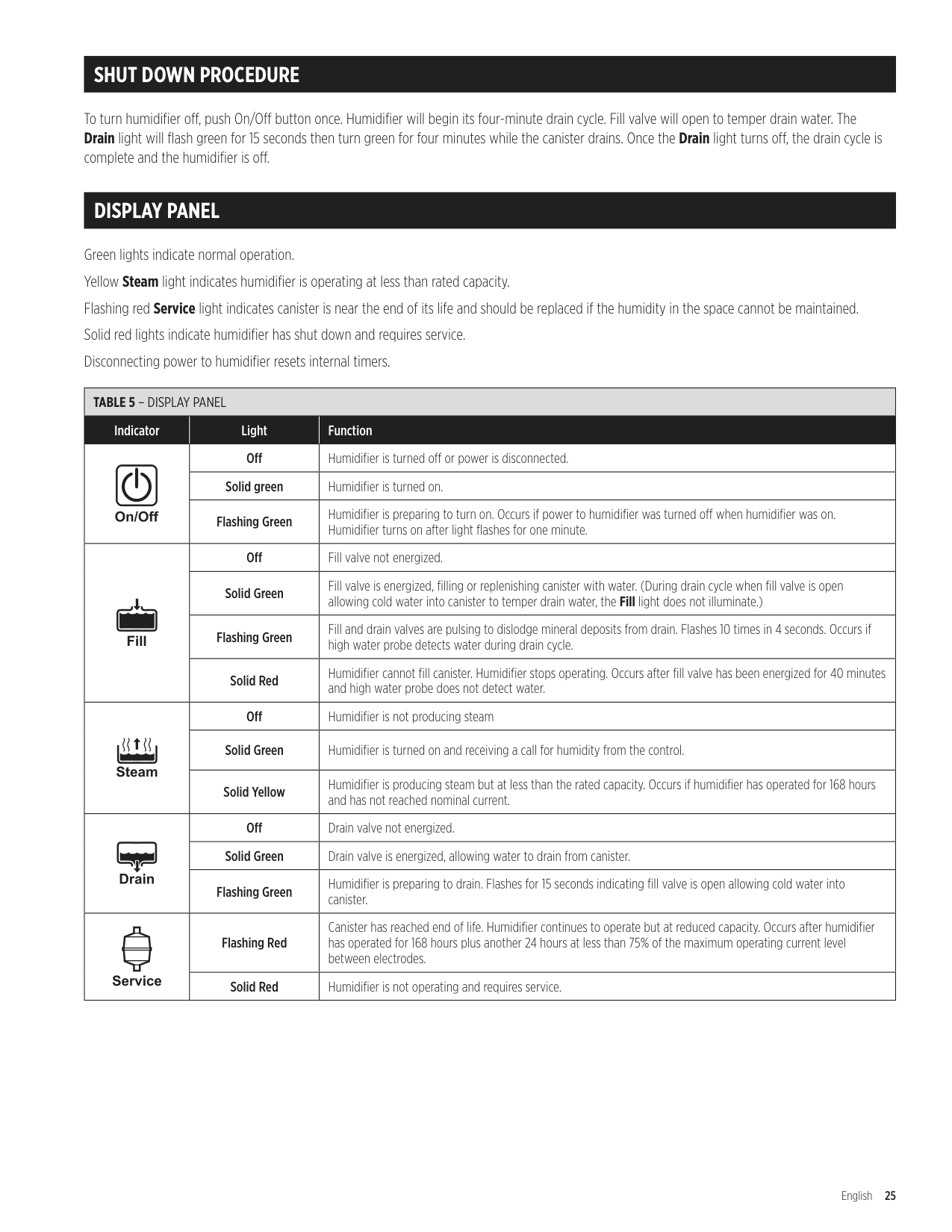
|TABLE 6 – HUMIDIFIER TROUBLESHOOTING GUIDE|TABLE 6 – HUMIDIFIER TROUBLESHOOTING GUIDE|TABLE 6 – HUMIDIFIER TROUBLESHOOTING GUIDE| |---|---|---| |Problem|Possible Cause|Action| |General operating problems . Humidifier will not turn on or turn off .|Field-wired terminal connections .|Verify L1, N/L2 and ground connections are properly wired and appropriate voltage is present .| |General operating problems . Humidifier will not turn on or turn off .|Field-wired terminal connections .|Check HUMIDISTAT and (if used) FAN PACK terminal connections are tight and properly wired .| |General operating problems . Humidifier will not turn on or turn off .|Field-wired terminal connections .|HUMIDISTAT terminals must be connected to an on/off device .| |General operating problems . Humidifier will not turn on or turn off .|Field-wired terminal connections .|Check wiring connections and settings on Accessory items such as high limit switch and airflow proving switch .| |General operating problems . Humidifier will not turn on or turn off .|Internal connections .|Check electrode and high water probe connections on the top of the canister .| |General operating problems . Humidifier will not turn on or turn off .|Internal connections .|Make sure ribbon cable from membrane switch is securely plugged into control circuit board .| |General operating problems . Humidifier will not turn on or turn off .|Internal connections .|Make sure black/white wire is attached to terminal that matches input voltage .| |General operating problems . Humidifier will not turn on or turn off .|No power to humidifier .|Check main power supply and switch .| |General operating problems . Humidifier will not turn on or turn off .|No power to humidifier .|Ensure breaker is sized appropriately for the amperage draw .| |General operating problems . Humidifier will not turn on or turn off .|No power to humidifier .|Check for proper voltage across L1 and N/L2 terminals .| |General operating problems . Humidifier will not turn on or turn off .|Humidifier not turned on .|Make sure front cover is attached to engage safety interlock switch . Press On/Off button .| |General operating problems . Humidifier will not turn on or turn off .|Humidifier not turned on .|Make sure ribbon cable from membrane switch is not damaged and is securely plugged into the control circuit board .| |General operating problems . Humidifier will not turn on or turn off .|No power to 24 volt control circuit .|Check fuse on PCB (replace with 5 amp slow burn fuse if necessary) .| |General operating problems . Humidifier will not turn on or turn off .|No power to 24 volt control circuit .|With humidifier energized, check that LED light D8 is energized on the circuit board . If the LED is lit, replace the membrane switch, if not, replace the circuit board .| |Steam light does not turn on .|Call for humidity not being received .|Check humidistat wiring and setting . (Do not leave ADHC in TEST mode .)| |Steam light does not turn on .|Call for humidity not being received .|Check wiring and settings of high RH limit switch and airflow proving switch .| |Water is leaking from humidifier .|Loose plumbing connections .|Check water supply connection at fill valve inlet . Tighten as needed .| |Water is leaking from humidifier .|Loose plumbing connections .|Check internal hose clamp connections . Reposition clamps and tighten as needed .| |Water is leaking from humidifier .|Loose plumbing connections .|Check steam hose connection on top of canister . Tighten clamp as needed .| |Water is leaking from humidifier .|Hoses are blocked .|Check internal hoses and eliminate kinks or blockage .| |Water is leaking from humidifier .|Drain hose is blocked .|Make sure drain hose has constant downward slope and is not blocked .| |Water constantly runs down drain .|Debris in drain valve preventing it from closing .|Remove canister and clean debris from drain valve .| |Water constantly runs down drain .|O-ring in drain valve is not properly seated in groove .|Remove canister and check O-ring for damage . Replace O-ring as necessary . Ensure O-ring is properly seated in its groove .| |Water constantly runs down drain .|Water is flowing from fill cup overflow port .|Check internal hoses and eliminate kinks or blockage .| |Water constantly runs down drain .|High static pressure in duct is causing back pressure in canister .|Make sure dispersion tube is not discharging into duct with greater than 2 .0 in .wg static pressure .|
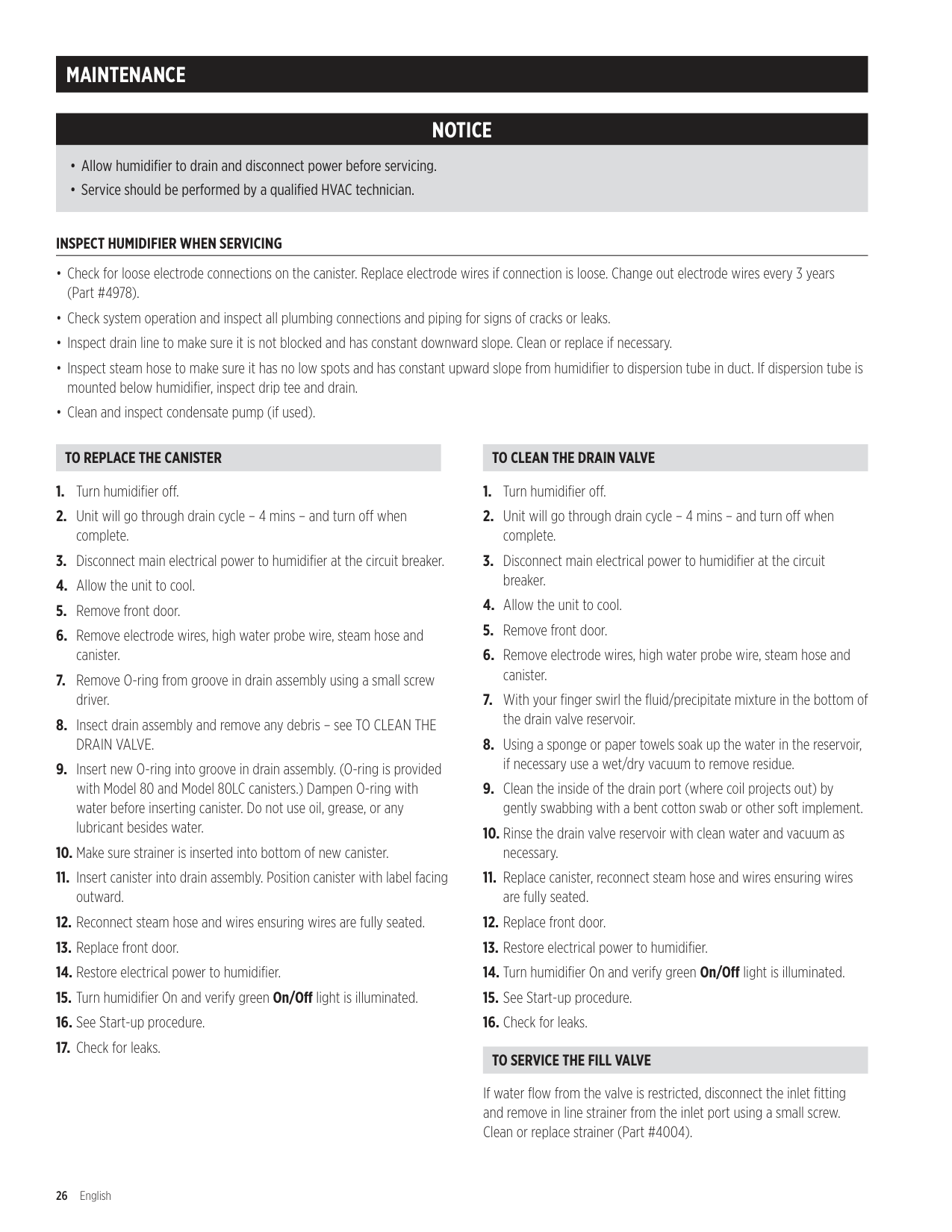
|Water constantly runs down drain .|High static pressure in duct is causing back pressure in canister .|Make sure dispersion tube tubelets are pointed up .| |Humidifier is filling and water is flowing down drain but Drain light is not on .|High static pressure in steam line is causing back pressure in canister .|Install a tee and drain trap in any low points in the steam line . See FIGURE 5.| |Humidifier drains frequently .|Model 80LC canister used on water that is too conductive .|Change to a Model 80 canister .|
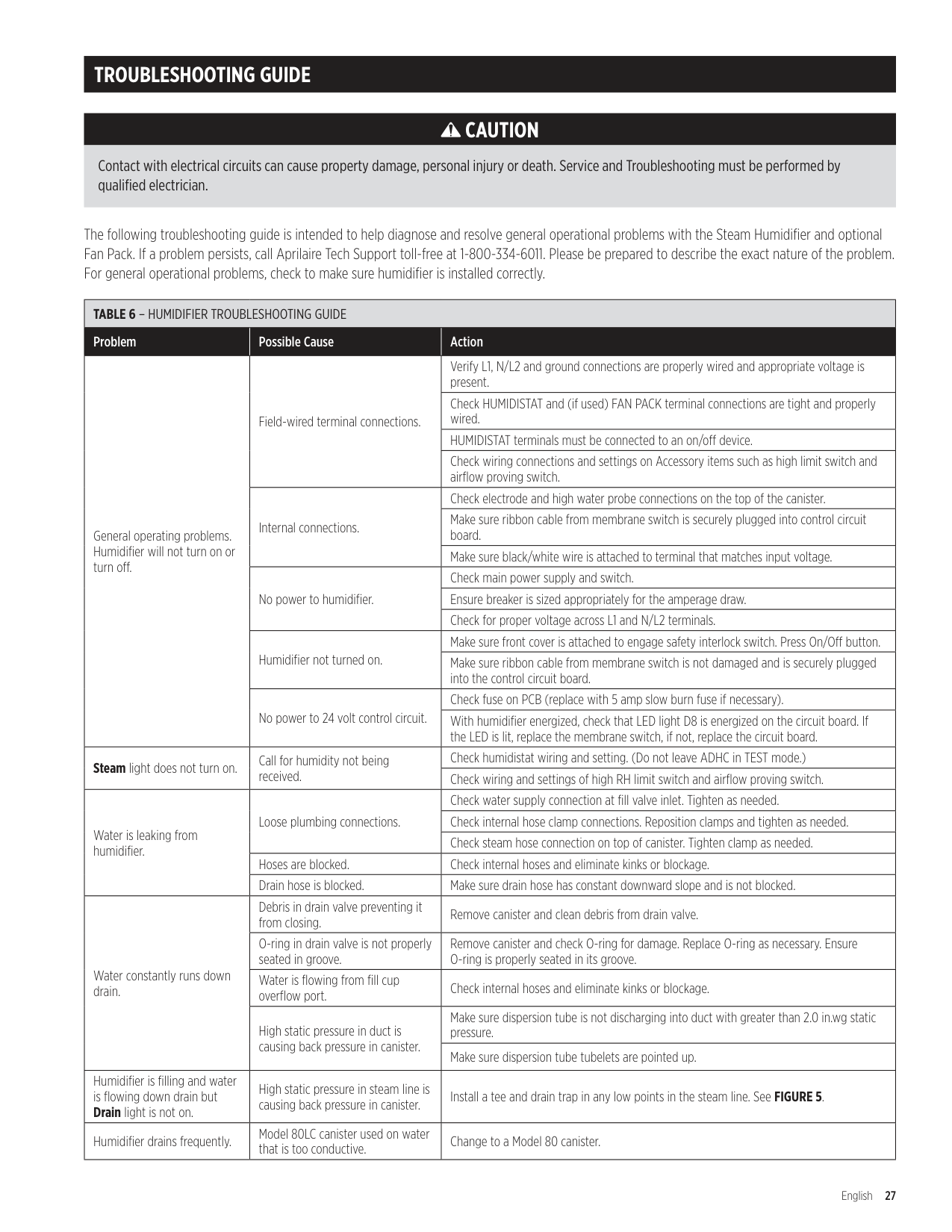
|TABLE 6 – HUMIDIFIER TROUBLESHOOTING GUIDE|TABLE 6 – HUMIDIFIER TROUBLESHOOTING GUIDE|TABLE 6 – HUMIDIFIER TROUBLESHOOTING GUIDE| |---|---|---| |Problem|Possible Cause|Action| |Humidifier makes gurgling sound .|Excess condensation in steam hose .|Install Tee and Trap Model 4028 as shown in FIGURE 6.| |Humidifier makes gurgling sound .|Excess condensation in steam hose .|Make sure steam hose has constant downward slope to humidifier or to tees and traps in low spots of hose .| |Humidifier makes gurgling sound .|Excess condensation in steam hose .|If hard pipe is used for dispersion system, make sure it is insulated .| |Fill valve makes banging sound .|Water hammer from line pressure .|Make sure water supply line does not contact ductwork .| |Fill valve makes banging sound .|Water hammer from line pressure .|Install shock arrestor .| |Fill valve makes banging sound .|Water hammer from line pressure .|Install section of 1/4" braided fill line . Conform to local codes .| |Fill valve makes banging sound .|Water hammer from line pressure .|If water supply pressure is greater than 120 psi, install pressure reducer .| |Humidifier will not fill .|Saddle valve not open or pipe not pierced .|Make sure saddle valve is properly installed and the valve is open .| |Humidifier will not fill .|Hoses are blocked .|Check internal hoses and eliminate kinks or blockage .| |Humidifier will not drain .|Debris in drain valve blocking outlet port .|Remove canister and clean debris from drain valve .| |Water in duct .|Dispersion tube installed incorrectly .|Install dispersion tube with tublets facing straight up .| |Water in duct .|Impurities in steam hose or pipe causing foaming .|Rinse canister, fill hose and fill cup with clean water .| |Water in duct .|Insufficient absorption distance .|Determine absorption distance per TABLE 3.| |Service light flashing red before end of humidification season .|Canister full of mineral deposits .|Remove canister and rinse with clean water .| |Service light flashing red before end of humidification season .|Canister full of mineral deposits .|Plumb humidifier to filtered water .| |Service light flashing red before end of humidification season .|Canister full of mineral deposits .|Plumb humidifier to softened water .| |Service light flashing red before end of humidification season .|Humidifier runs in short cycles (does not reach capacity) .|Use blower activation feature on ADHC or run constant HVAC fan . Allowing the humidifier to run for longer cycles to concentrate minerals and increase water conductivity .| |Yellow Steam light .|Humidifier operating below rated capacity . (Normal operation for systems plumbed to low conductivity water and systems that operate for short cycles .)|Plumb humidifier to softened water .| |Yellow Steam light .|Humidifier operating below rated capacity . (Normal operation for systems plumbed to low conductivity water and systems that operate for short cycles .)|Use blower activation feature on ADHC or run constant HVAC fan .| |Yellow Steam light .|Humidifier operating below rated capacity . (Normal operation for systems plumbed to low conductivity water and systems that operate for short cycles .)|Operate humidifier on 208/240 volts .|
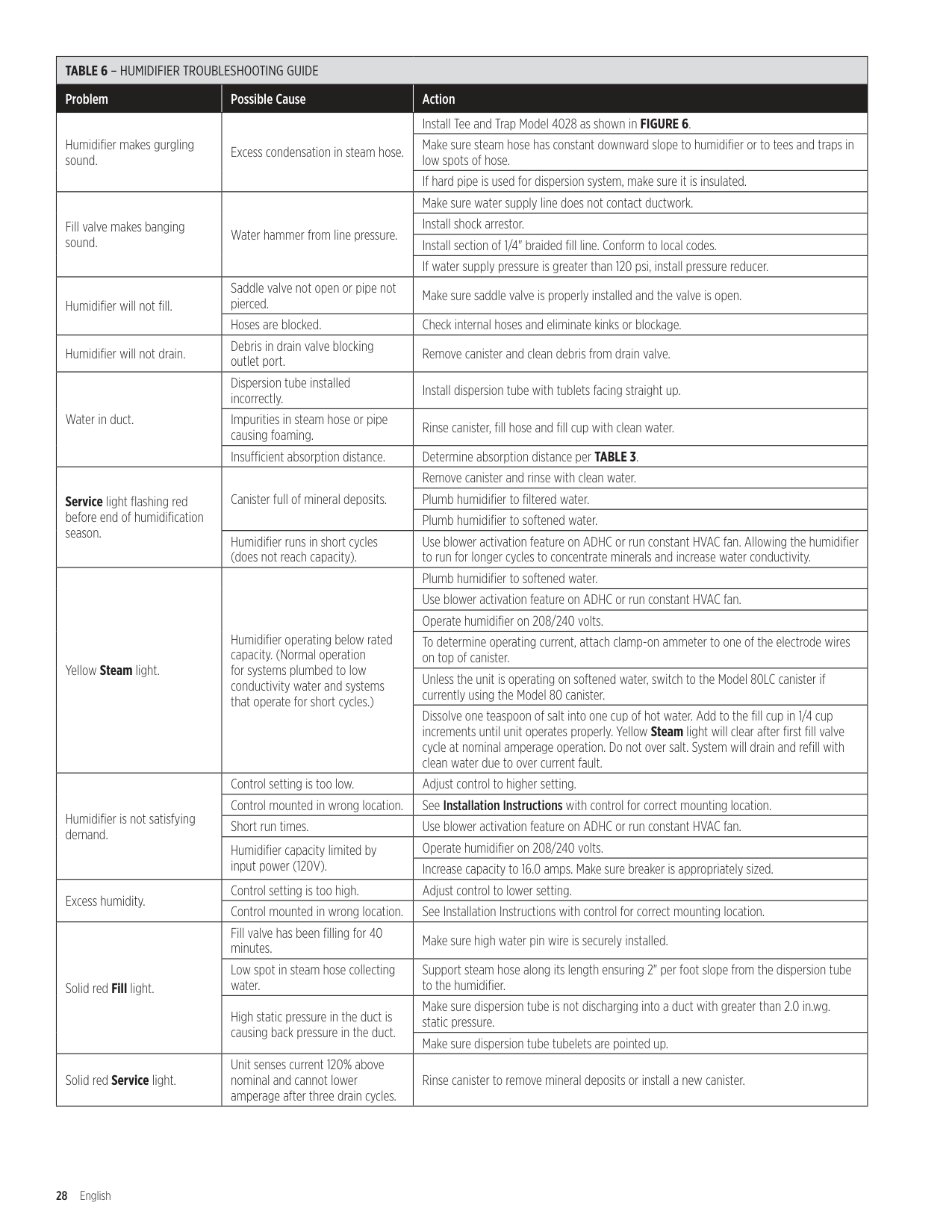
|Yellow Steam light .|Humidifier operating below rated capacity . (Normal operation for systems plumbed to low conductivity water and systems that operate for short cycles .)|To determine operating current, attach clamp-on ammeter to one of the electrode wires on top of canister .| |Yellow Steam light .|Humidifier operating below rated capacity . (Normal operation for systems plumbed to low conductivity water and systems that operate for short cycles .)|Unless the unit is operating on softened water, switch to the Model 80LC canister if currently using the Model 80 canister .| |Yellow Steam light .|Humidifier operating below rated capacity . (Normal operation for systems plumbed to low conductivity water and systems that operate for short cycles .)|Dissolve one teaspoon of salt into one cup of hot water . Add to the fill cup in 1/4 cup increments until unit operates properly . Yellow Steam light will clear after first fill valve cycle at nominal amperage operation . Do not over salt . System will drain and refill with clean water due to over current fault .| |Humidifier is not satisfying demand .|Control setting is too low .|Adjust control to higher setting .| |Humidifier is not satisfying demand .|Control mounted in wrong location .|See Installation Instructions with control for correct mounting location .| |Humidifier is not satisfying demand .|Short run times .|Use blower activation feature on ADHC or run constant HVAC fan .| |Humidifier is not satisfying demand .|Humidifier capacity limited by input power (120V) .|Operate humidifier on 208/240 volts .| |Humidifier is not satisfying demand .|Humidifier capacity limited by input power (120V) .|Increase capacity to 16 .0 amps . Make sure breaker is appropriately sized .| |Excess humidity .|Control setting is too high .|Adjust control to lower setting .| |Excess humidity .|Control mounted in wrong location .|See Installation Instructions with control for correct mounting location .| |Solid red Fill light .|Fill valve has been filling for 40 minutes .|Make sure high water pin wire is securely installed .| |Solid red Fill light .|Low spot in steam hose collecting water .|Support steam hose along its length ensuring 2" per foot slope from the dispersion tube to the humidifier .| |Solid red Fill light .|High static pressure in the duct is causing back pressure in the duct .|Make sure dispersion tube is not discharging into a duct with greater than 2 .0 in .wg . static pressure .| |Solid red Fill light .|High static pressure in the duct is causing back pressure in the duct .|Make sure dispersion tube tubelets are pointed up .| |Solid red Service light .|Unit senses current 120% above nominal and cannot lower amperage after three drain cycles .|Rinse canister to remove mineral deposits or install a new canister .|
REPLACEMENT PARTS
Parts are shown for Model 800/865 humidifiers manufactured after September 2016 .
For parts for Steam Humidifiers manufactured prior to September 2016, refer to Aprilaire Humidifier Replacement Parts & Price List .
Refer to the following page for part descriptions.
6
16A
16B
4
1
10
2
12
8
11 14A
14B
19
5
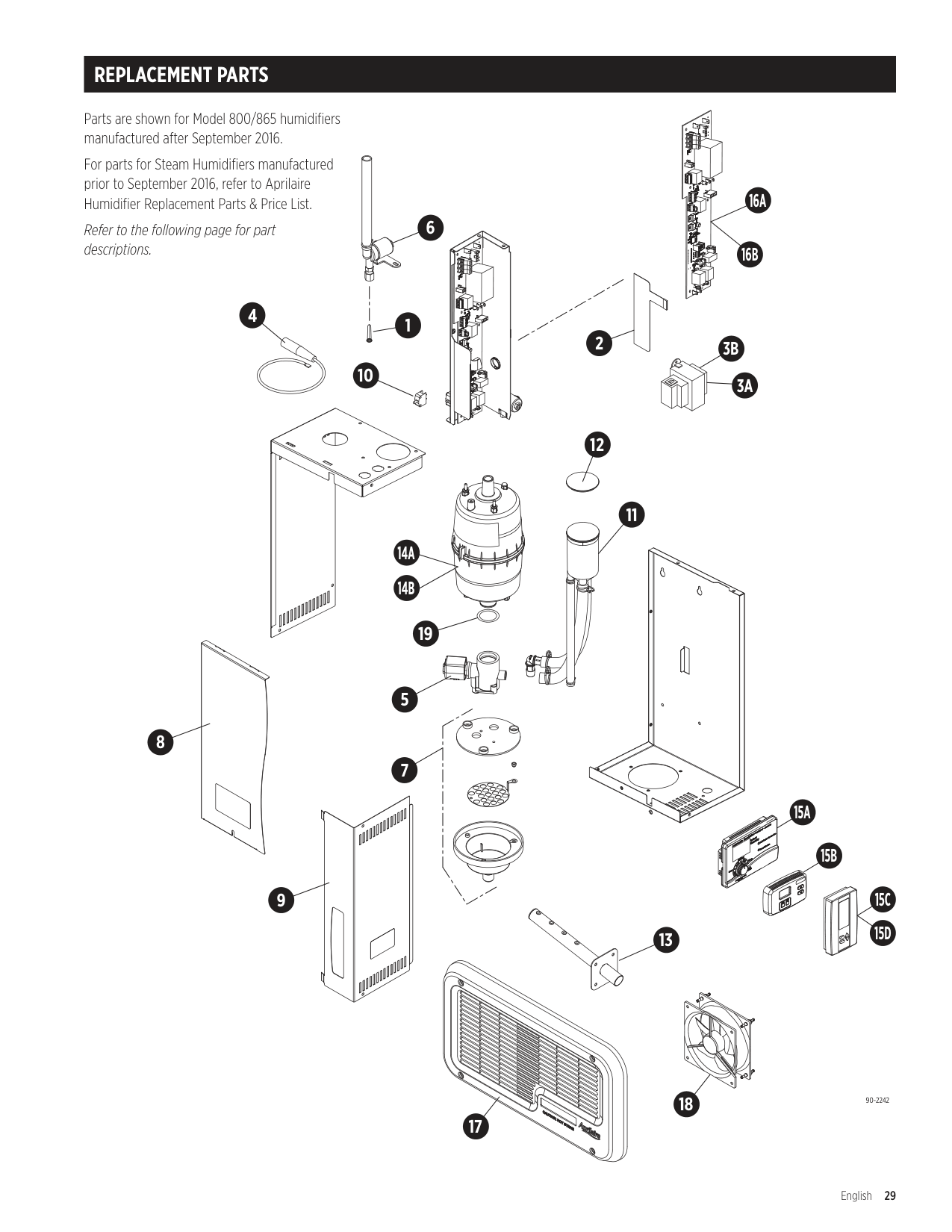
7
9
13
15A
15B
15C 15D
18 17
90-2242
|Item No.|Description|Part No.| |---|---|---| |1|Fill Valve In-line Strainer|4004| |2|Membrane Switch|5532| |3A|Universal Transformer, Model 865, 866 (75 VA)|5306| |3B|Universal Transformer, Model 800, 801 (40 VA)|5529| |4|Electrode Wires (2)|4978| |5|Drain Valve|4983| |6|Fill Valve|5531| |7|Drain Cup Assembly|4985| |8|Front Panel & Screw|4986| |9|Electrical Access Panel & Screws|4987|
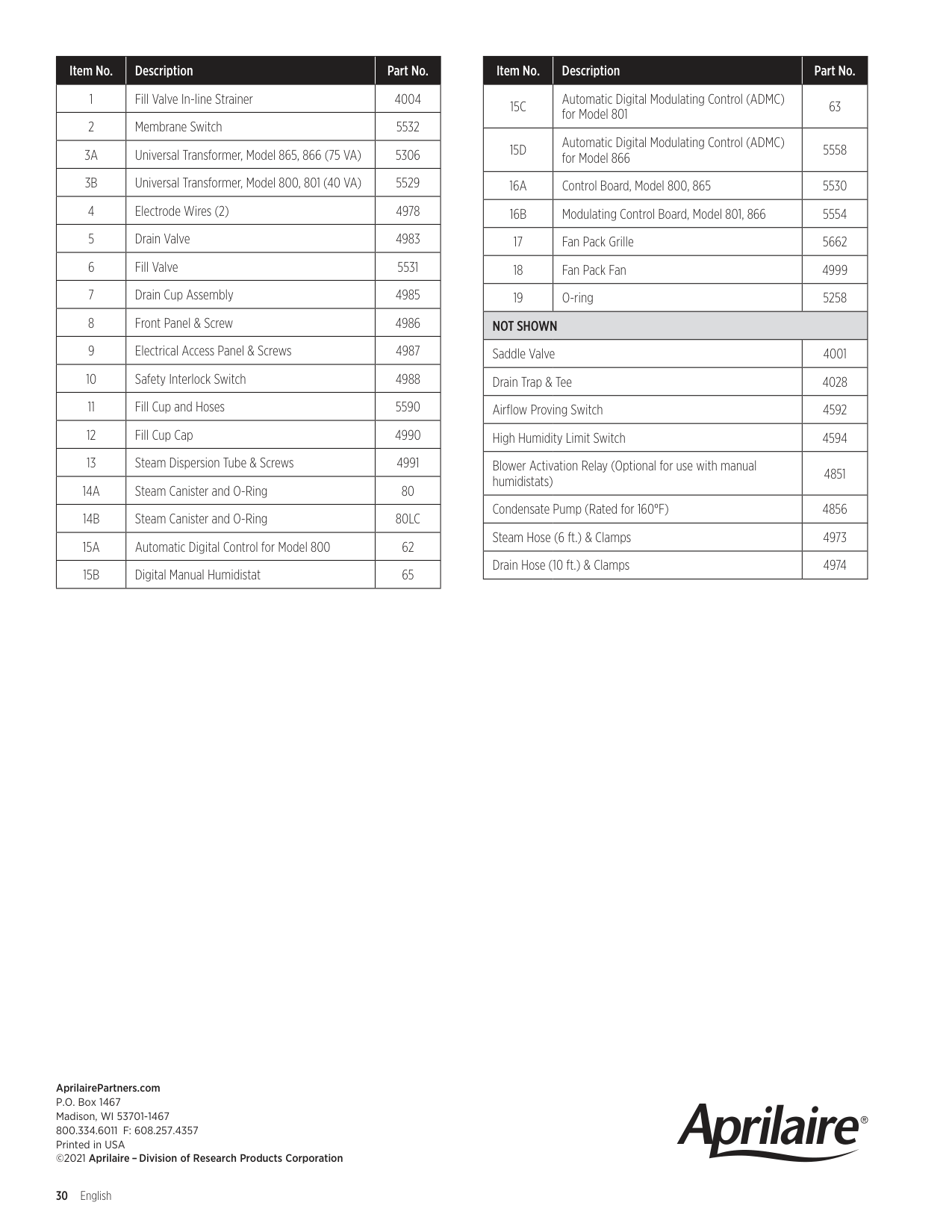
|10|Safety Interlock Switch|4988| |11|Fill Cup and Hoses|5590| |12|Fill Cup Cap|4990| |13|Steam Dispersion Tube & Screws|4991| |14A|Steam Canister and O-Ring|80| |14B|Steam Canister and O-Ring|80LC| |15A|Automatic Digital Control for Model 800|62| |15B|Digital Manual Humidistat|65|
|Item No.|Description|Part No.| |---|---|---| |15C|Automatic Digital Modulating Control (ADMC) for Model 801|63| |15D|Automatic Digital Modulating Control (ADMC) for Model 866|5558| |16A|Control Board, Model 800, 865|5530| |16B|Modulating Control Board, Model 801, 866|5554| |17|Fan Pack Grille|5662| |18|Fan Pack Fan|4999| |19|O-ring|5258| |NOT SHOWN|NOT SHOWN|NOT SHOWN| |Saddle Valve|Saddle Valve|4001| |Drain Trap & Tee|Drain Trap & Tee|4028| |Airflow Proving Switch|Airflow Proving Switch|4592| |High Humidity Limit Switch|High Humidity Limit Switch|4594| |Blower Activation Relay (Optional for use with manual humidistats)|Blower Activation Relay (Optional for use with manual humidistats)|4851| |Condensate Pump (Rated for 160°F)|Condensate Pump (Rated for 160°F)|4856| |Steam Hose (6 ft .) & Clamps|Steam Hose (6 ft .) & Clamps|4973| |Drain Hose (10 ft .) & Clamps|Drain Hose (10 ft .) & Clamps|4974|
AprilairePartners.com P.O. Box 1467 Madison, WI 53701-1467 800.334.6011 F: 608.257.4357 Printed in USA ©2021 Aprilaire –Division of Research Products Corporation