De'Longhi Dedica EC 685 W manual
Unknown · 10 Q&As

De'Longhi Dedica EC 685 W

Ask AI

— answers from the official manual

Answers from the official manual.

Common questions

Common Questions

10 total
Show 4 more questions

Full Manual

17 pages
Page 1

![image 1](eng_delonghi_manu_ec685_images/imageFile1.png)

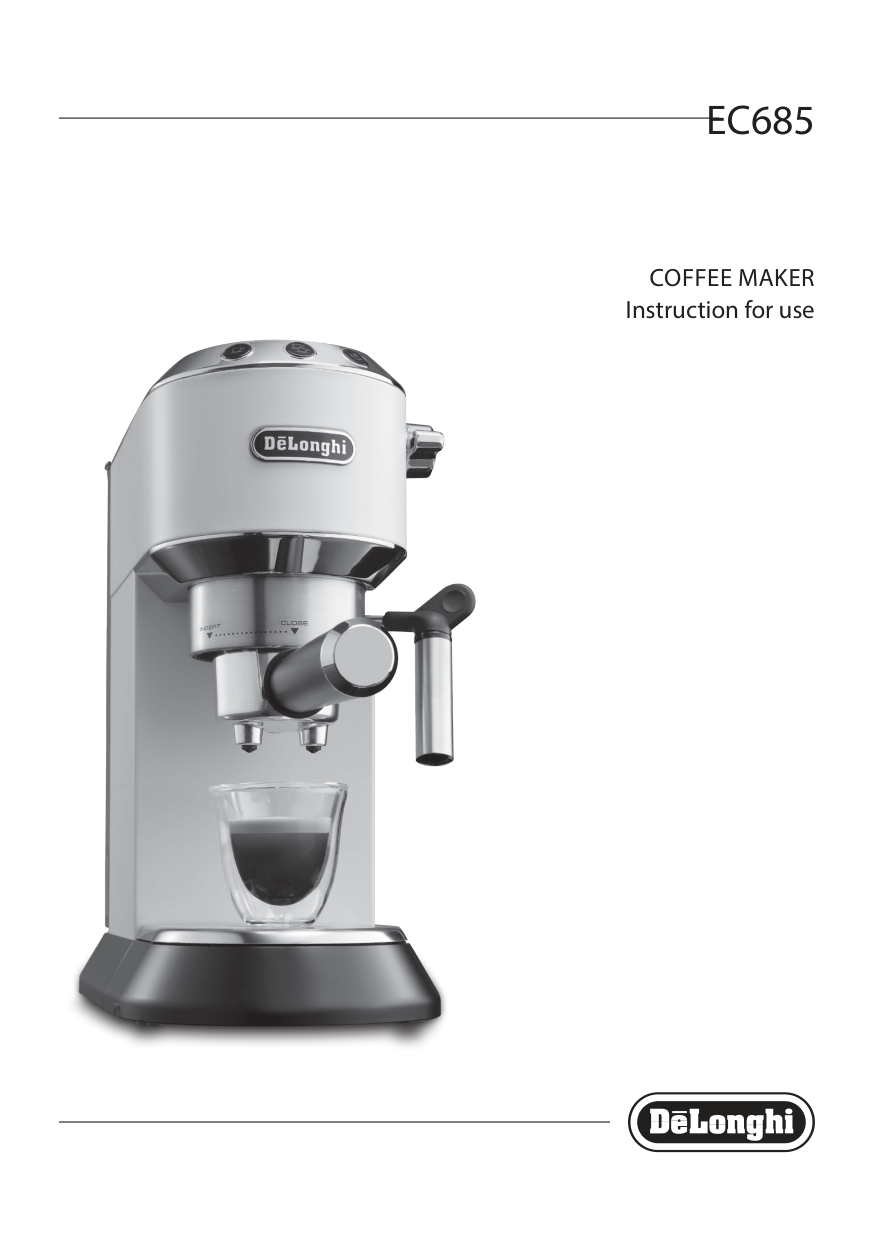
EC685

COFFEE MAKER Instruction for use

|EN| |---|

6

B1

B2

  • A1
  • A2
  • A3
  • A5

    A6

  • A4
  • B4 B6

  • A7
  • A8
  • A9
  • A10
  • C1

  • A11
  • B3 B5 B7

    | | |

    Page 2

    |---|---|

    C6*

    A15

  • A13
  • A14
  • A12
  • | |C2| |---|---| | | |

    | |C3| |---|---| | | |

    | |C4| |---|---| | | |

    C5

    | | | | |---|---|---| | | | |

    1

    |2| |---|

    3

    4
    Page 3

    |5| |---|

    |6| |---|

    |7| |---|

    |8| |---|

    |9

    2

    1| |---|

    |10| |---|

    |11| |---|

    12

    12

    5°C

    max 1/3

    13

    HOT MILK

    14

    15

    16

    17 18
    Page 4

    19

    2120

    22

    ![image 2](eng_delonghi_manu_ec685_images/imageFile2.png)

    ![image 3](eng_delonghi_manu_ec685_images/imageFile3.png)

    ![image 4](eng_delonghi_manu_ec685_images/imageFile4.png)

    ![image 5](eng_delonghi_manu_ec685_images/imageFile5.png)

    ![image 6](eng_delonghi_manu_ec685_images/imageFile6.png)

    ![image 7](eng_delonghi_manu_ec685_images/imageFile7.png)

    ![image 8](eng_delonghi_manu_ec685_images/imageFile8.png)

    ![image 9](eng_delonghi_manu_ec685_images/imageFile9.png)

    ![image 10](eng_delonghi_manu_ec685_images/imageFile10.png)

    ![image 11](eng_delonghi_manu_ec685_images/imageFile11.png)

    ![image 12](eng_delonghi_manu_ec685_images/imageFile12.png)

    ![image 13](eng_delonghi_manu_ec685_images/imageFile13.png)

    ![image 14](eng_delonghi_manu_ec685_images/imageFile14.png)

    ![image 15](eng_delonghi_manu_ec685_images/imageFile15.png)

    ![image 16](eng_delonghi_manu_ec685_images/imageFile16.png)

    ![image 17](eng_delonghi_manu_ec685_images/imageFile17.png)

    ![image 18](eng_delonghi_manu_ec685_images/imageFile18.png)

    ![image 19](eng_delonghi_manu_ec685_images/imageFile19.png)

    ![image 20](eng_delonghi_manu_ec685_images/imageFile20.png)

    ![image 21](eng_delonghi_manu_ec685_images/imageFile21.png)

    Page 5

    ![image 22](eng_delonghi_manu_ec685_images/imageFile22.png)

    ![image 23](eng_delonghi_manu_ec685_images/imageFile23.png)

    ![image 24](eng_delonghi_manu_ec685_images/imageFile24.png)

    ![image 25](eng_delonghi_manu_ec685_images/imageFile25.png)

    ![image 26](eng_delonghi_manu_ec685_images/imageFile26.png)

    ![image 27](eng_delonghi_manu_ec685_images/imageFile27.png)

    ![image 28](eng_delonghi_manu_ec685_images/imageFile28.png)

    ![image 29](eng_delonghi_manu_ec685_images/imageFile29.png)

    ![image 30](eng_delonghi_manu_ec685_images/imageFile30.png)

    ![image 31](eng_delonghi_manu_ec685_images/imageFile31.png)

    ![image 32](eng_delonghi_manu_ec685_images/imageFile32.png)

    ![image 33](eng_delonghi_manu_ec685_images/imageFile33.png)

    ![image 34](eng_delonghi_manu_ec685_images/imageFile34.png)

    ![image 35](eng_delonghi_manu_ec685_images/imageFile35.png)

    ![image 36](eng_delonghi_manu_ec685_images/imageFile36.png)

    ###### 23 24

    ![image 37](eng_delonghi_manu_ec685_images/imageFile37.png)

    1. FUNDAMENTAL SAFETY WARNINGS

  • • The appliance is not intended for use by persons (including children) with reduced physical, sensory or mental capabilities, or lack of experience and knowledge, unless they have been given supervision or instruction concerning use of the appliance by a person responsible for their safety.
  • • Children should be supervised to ensure that they do not play with the appliance.
  • • Cleaning and user maintenance shall not be made by children without supervision.
  • • Never clean by immersing the appliance in water.
  • • This is an household appliance only. It is not intended to be used in: staff kitchen areas in shops, offices and other working environments; farm houses; by clients in hotels, motels and other residential type environments; bed and breakfast type environments.
  • • If the plug or cord is damaged, it must be replaced by Customer Services only to avoid all risk.
  • #### FOR EUROPEAN MARKETS ONLY:

  • • This appliance can be used by children aged from 8 years and above if they have been given supervision or instruction concerning use of the appliance in a safe way and understand the hazards involved. Cleaning and user maintenance shall not be made by children unless they are older than 8 and supervised. Keep the appliance and power cord away from children under eight years of age.
  • Page 6

  • • The appliance can be used by persons with reduced physical, sensory or mental capabilities or lack of experience and knowledge if they are supervised or have been given instruction concerning use of the appliance in a safe way and if they understand the hazards involved.
  • • Children shall not play with the appliance.
  • • Always unplug the appliance when left unattended and before assembly, taking apart or cleaning.
  • Surfaces marked with this symbol become hot during use (the symbol is present in certain models only).

    ####### 2. SAFETY WARNINGS

    Danger!Failure to observe the warning may result in life threatening injury by electric shock. This is an electrical appliance and may cause electrical shocks. You should therefore follow these safety warnings:

  • • Never touch the appliance with damp hands or feet.
  • • Never touch the plug with damp hands.
  • • Make sure the socket used is freely accessible at all times, enabling the appliance to be unplugged when necessary.
  • • Unplug directly from the plug only. Never pull the cord as you could damage it.
  • • To disconnect the appliance completely you must unplug it from the mains socket.
  • • If the appliance is faulty, do not attempt to repair. Turn it off, unplug from the mains socket and contact Customer Services.
  • • Before cleaning the appliance, turn it off, unplug from the mains socket and allow to cool.
  • Important:Failure to observe the warning could result in injury or damage to the appliance. Keep all packaging (plastic bags, polystyrene foam) away from children.

    Danger of burns! Failure to observe the warning could result in scalds or burns. This appliance produces hot water and steam may form while it is in operation. Avoid contact with splashes of water or hot steam.

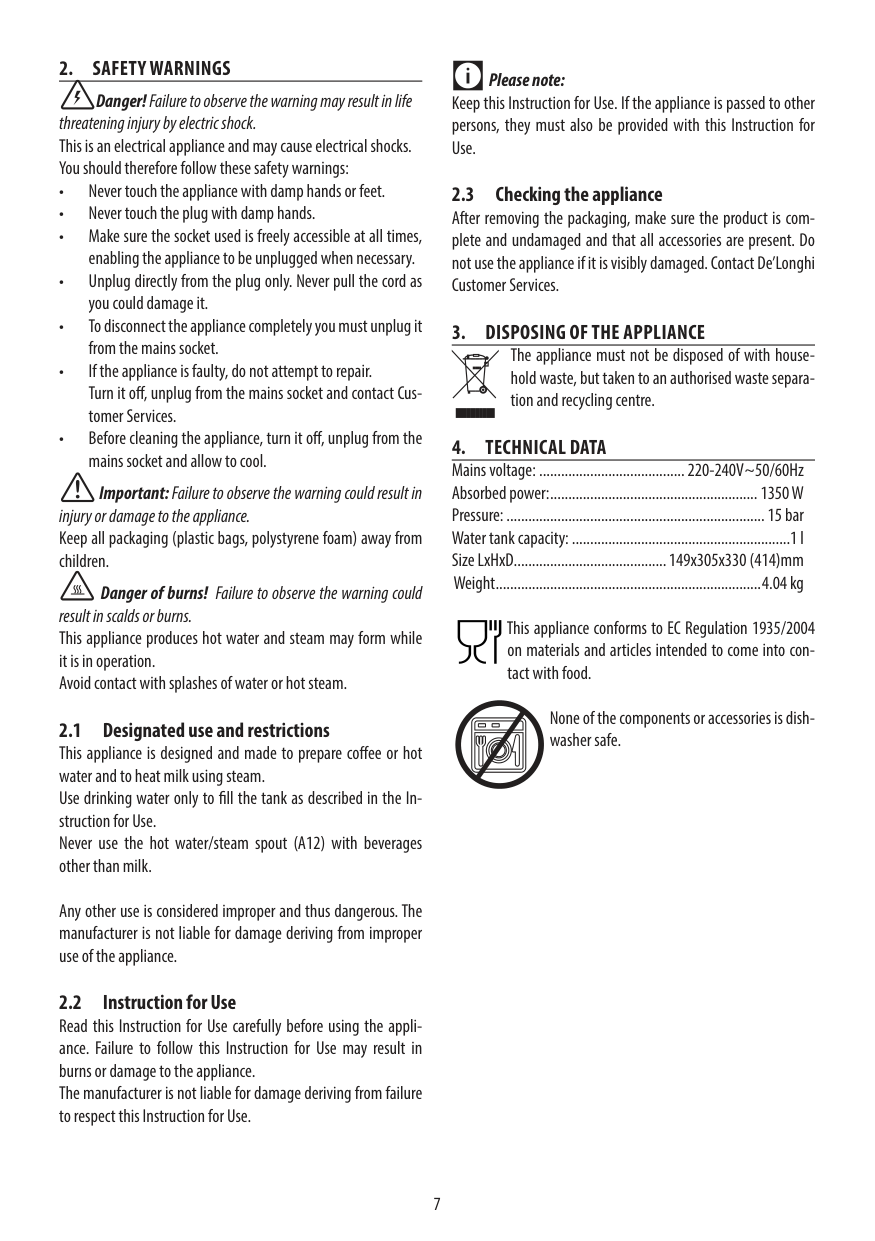
  • 2.1 Designated use and restrictions This appliance is designed and made to prepare coffee or hot water and to heat milk using steam. Use drinking water only to fill the tank as described in the Instruction for Use. Never use the hot water/steam spout (A12) with beverages other than milk.
  • Any other use is considered improper and thus dangerous. The manufacturer is not liable for damage deriving from improper use of the appliance.

  • 2.2 Instruction for Use Read this Instruction for Use carefully before using the appliance. Failure to follow this Instruction for Use may result in burns or damage to the appliance. The manufacturer is not liable for damage deriving from failure to respect this Instruction for Use.
  • ######### Please note:

    Keep this Instruction for Use. If the appliance is passed to other persons, they must also be provided with this Instruction for Use.

  • 2.3 Checking the appliance After removing the packaging, make sure the product is complete and undamaged and that all accessories are present. Do not use the appliance if it is visibly damaged. Contact De’Longhi Customer Services.
  • 3. DISPOSING OF THE APPLIANCE The appliance must not be disposed of with household waste, but taken to an authorised waste separation and recycling centre.
  • 4. TECHNICAL DATA Mains voltage: ........................................220-240V~50/60Hz Absorbed power: .........................................................1350 W Pressure: .......................................................................15 bar Water tank capacity: ............................................................1 l Size LxHxD..........................................149x305x330 (414)mm Weight .........................................................................4.04 kg
  • This appliance conforms to EC Regulation 1935/2004 on materials and articles intended to come into contact with food.

    None of the components or accessories is dishwasher safe.
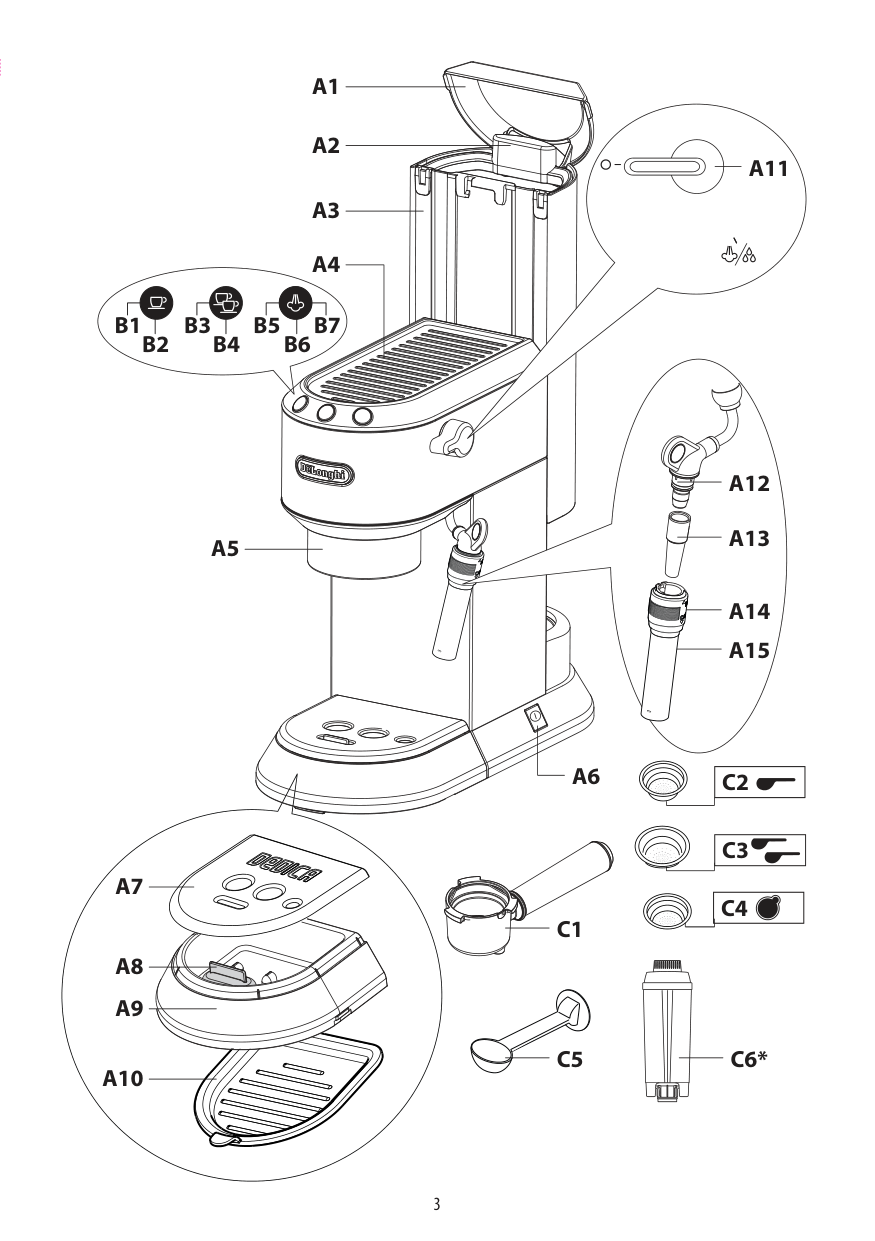
  • 5. DESCRIPTION(page 3) The terminology below will be used repeatedly on the following pages.
  • Page 7

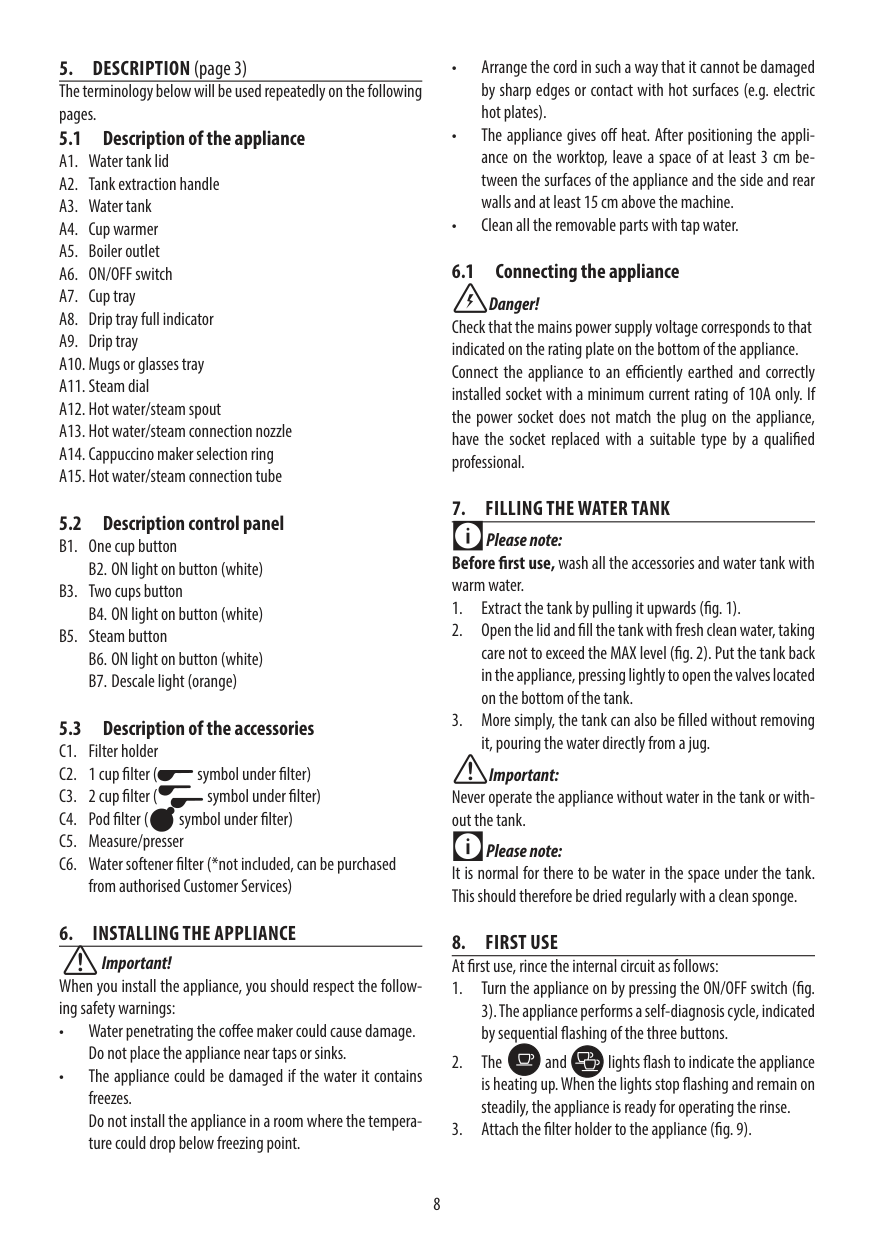
  • 5.1 Description of the appliance
  • A1. Water tank lid
  • A2. Tank extraction handle
  • A3. Water tank
  • A4. Cup warmer
  • A5. Boiler outlet
  • A6. ON/OFF switch
  • A7. Cup tray
  • A8. Drip tray full indicator
  • A9. Drip tray
  • A10. Mugs or glasses tray
  • A11. Steam dial
  • A12. Hot water/steam spout
  • A13. Hot water/steam connection nozzle
  • A14. Cappuccino maker selection ring
  • A15. Hot water/steam connection tube
  • 5.2 Description control panel
  • B1. One cup button B2. ON light on button (white)
  • B3. Two cups button B4. ON light on button (white)
  • B5. Steam button
  • B6. ON light on button (white)
  • B7. Descale light (orange)
  • 5.3 Description of the accessories C1. Filter holder C2. 1 cup filter ( symbol under filter) C3. 2 cup filter ( symbol under filter) C4. Pod filter ( symbol under filter)

  • C5. Measure/presser C6. Water softener filter (*not included, can be purchased
  • from authorised Customer Services)

  • 6. INSTALLING THE APPLIANCE
  • Page 8

  • • Arrange the cord in such a way that it cannot be damaged by sharp edges or contact with hot surfaces (e.g. electric hot plates).
  • • The appliance gives off heat. After positioning the appliance on the worktop, leave a space of at least 3 cm between the surfaces of the appliance and the side and rear walls and at least 15 cm above the machine.
  • • Clean all the removable parts with tap water.
  • ####### 6.1 Connecting the appliance

    Danger! Check that the mains power supply voltage corresponds to that indicated on the rating plate on the bottom of the appliance. Connect the appliance to an efficiently earthed and correctly installed socket with a minimum current rating of 10A only. If the power socket does not match the plug on the appliance, have the socket replaced with a suitable type by a qualified professional.

    ####### 7. FILLING THE WATER TANK

    Please note: Before first use, wash all the accessories and water tank with warm water.

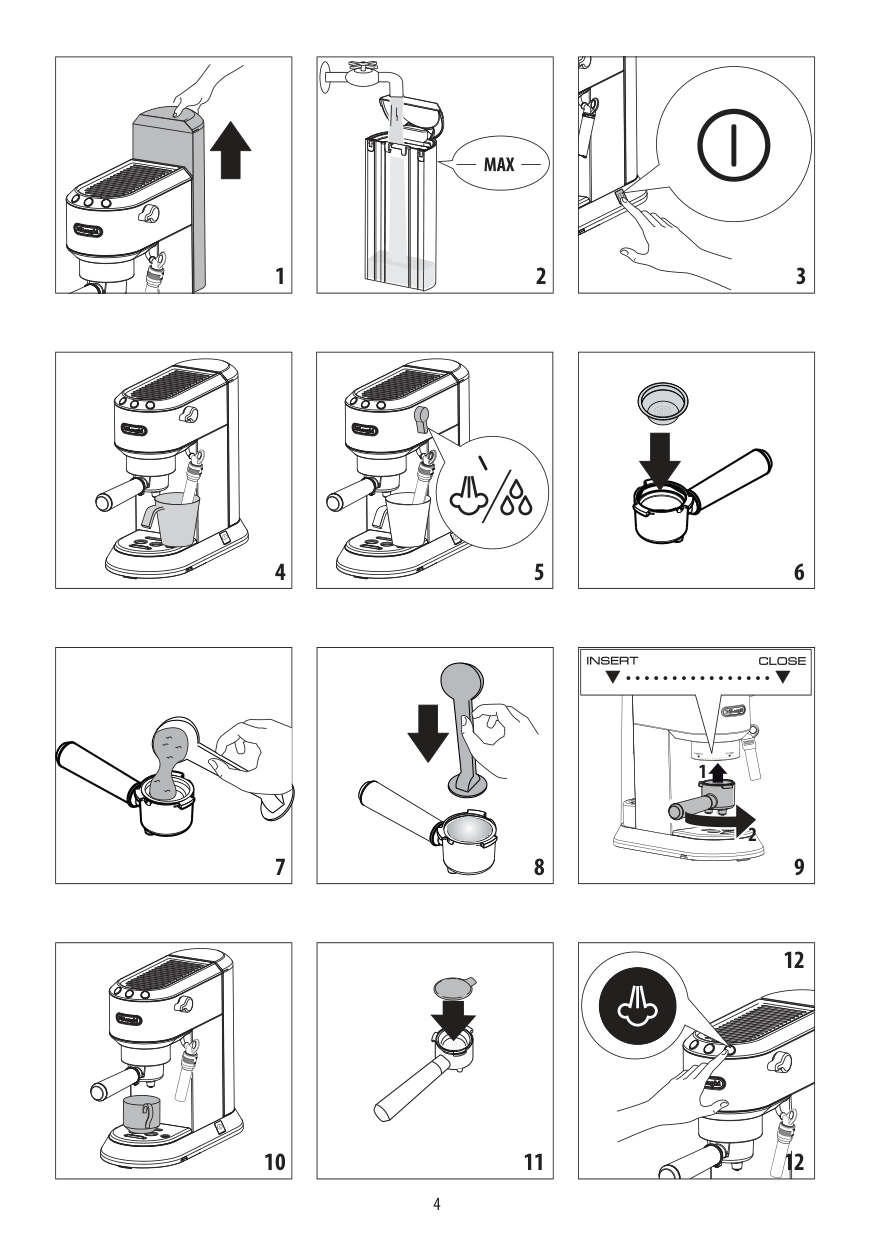
  • 1. Extract the tank by pulling it upwards (fig. 1).
  • 2. Open the lid and fill the tank with fresh clean water, taking care not to exceed the MAX level (fig. 2). Put the tank back in the appliance, pressing lightly to open the valves located on the bottom of the tank.
  • 3. More simply, the tank can also be filled without removing it, pouring the water directly from a jug.
  • Important: Never operate the appliance without water in the tank or without the tank.

    Please note: It is normal for there to be water in the space under the tank. This should therefore be dried regularly with a clean sponge.

    ######## 8. FIRST USEAt first use, rince the internal circuit as follows:

    Important! When you install the appliance, you should respect the following safety warnings:

  • 1. Turn the appliance on by pressing the ON/OFF switch (fig. 3). The appliance performs a self-diagnosis cycle, indicated by sequential flashing of the three buttons.
  • 2. The and lights flash to indicate the appliance is heating up. When the lights stop flashing and remain on steadily, the appliance is ready for operating the rinse.
  • 3. Attach the filter holder to the appliance (fig. 9).
  • • Water penetrating the coffee maker could cause damage. Do not place the appliance near taps or sinks.
  • • The appliance could be damaged if the water it contains freezes. Do not install the appliance in a room where the temperature could drop below freezing point.
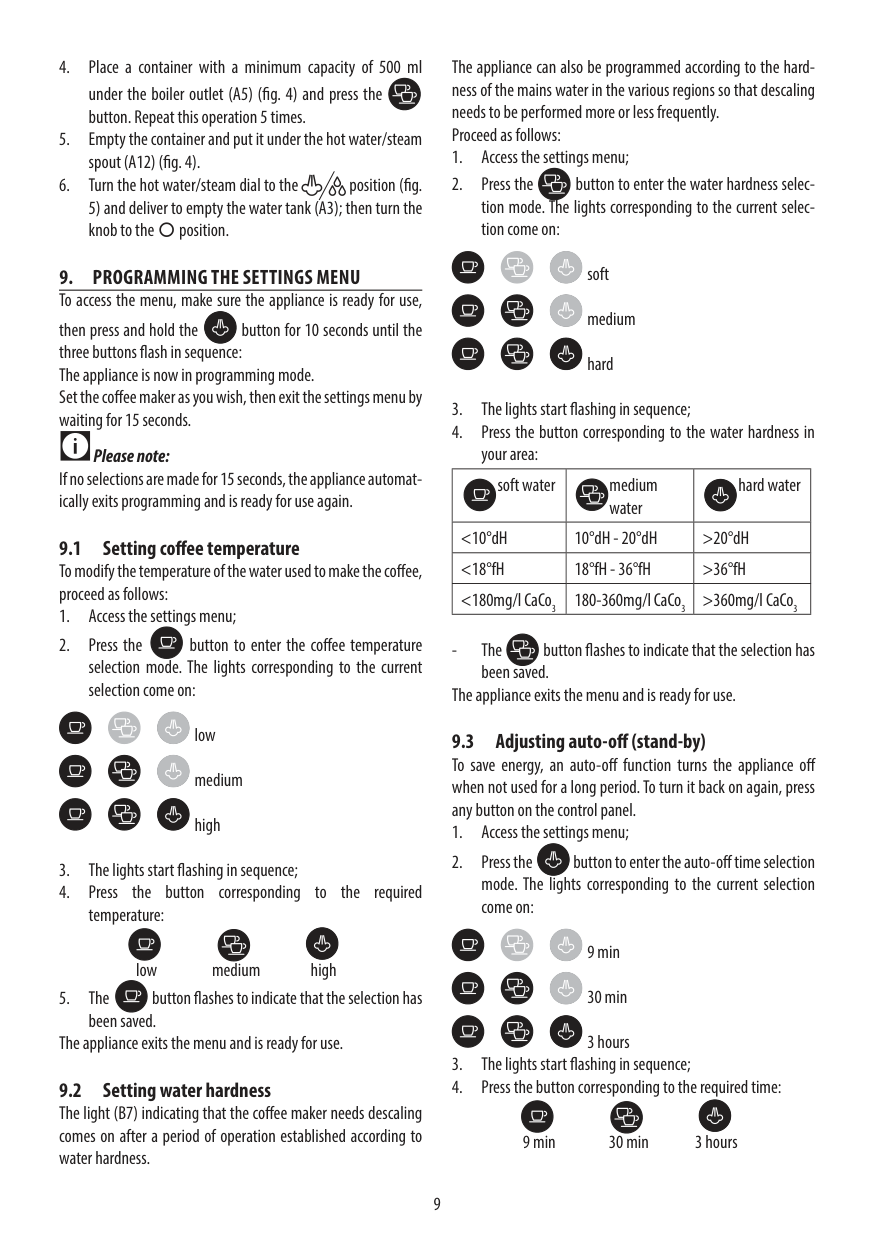
  • 4. Place a container with a minimum capacity of 500 ml under the boiler outlet (A5) (fig. 4) and press the button. Repeat this operation 5 times.
  • 5. Empty the container and put it under the hot water/steam spout (A12) (fig. 4).
  • 6. Turn the hot water/steam dial to the position (fig.
  • The appliance can also be programmed according to the hardness of the mains water in the various regions so that descaling needs to be performed more or less frequently. Proceed as follows:
  • 1. Access the settings menu;
  • 2. Press the button to enter the water hardness selection mode. The lights corresponding to the current selection come on:
  • Page 9

    soft medium hard

  • 3. The lights start flashing in sequence;
  • 4. Press the button corresponding to the water hardness in your area:
  • 5) and deliver to empty the water tank (A3); then turn the knob to the○position.

  • 9. PROGRAMMING THE SETTINGS MENU To access the menu, make sure the appliance is ready for use,
  • then press and hold the button for 10 seconds until the three buttons flash in sequence: The appliance is now in programming mode. Set the coffee maker as you wish, then exit the settings menu by waiting for 15 seconds.

    Please note: If no selections are made for 15 seconds, the appliance automatically exits programming and is ready for use again.

    |soft water|medium water|hard water| |---|---|---| |<10°dH|10°dH - 20°dH|>20°dH| |<18°fH|18°fH - 36°fH|>36°fH| |<180mg/l CaCo3|180-360mg/l CaCo3|>360mg/l CaCo3|

  • 9.1 Setting coffee temperature To modify the temperature of the water used to make the coffee, proceed as follows:
  • 1. Access the settings menu;
  • 2. Press the button to enter the coffee temperature selection mode. The lights corresponding to the current selection come on:
  • low medium high

  • 3. The lights start flashing in sequence;
  • 4. Press the button corresponding to the required temperature:
  • low medium high

  • 5. The button flashes to indicate that the selection has been saved.
  • The appliance exits the menu and is ready for use.

  • 9.2 Setting water hardness The light (B7) indicating that the coffee maker needs descaling comes on after a period of operation established according to water hardness.
  • The button flashes to indicate that the selection has
  • been saved. The appliance exits the menu and is ready for use. 9.3 Adjusting auto-off (stand-by)

    To save energy, an auto-off function turns the appliance off when not used for a long period. To turn it back on again, press any button on the control panel.
    Page 10

  • 1. Access the settings menu;
  • 2. Press the button to enter the auto-off time selection mode. The lights corresponding to the current selection come on:
  • 9 min 30 min 3 hours

  • 3. The lights start flashing in sequence;
  • 4. Press the button corresponding to the required time:
  • 9 min 30 min 3 hours

  • 3. Distribute the pre-ground coffee evenly and press lightly with the presser (fig. 8). Correct pressing of the pre-ground coffee is essential to obtain a good espresso. If you press too firmly, the coffee will be delivered slowly and will be strong. If you press too lightly, the coffee will be delivered quickly and will be weak.
  • 4. Remove any excess coffee from the rim of the filter holder and attach the filter holder to the appliance. To attach correctly, align the filter holder handle with the INSERT symbol (fig. 9), attach the filter holder and rotate the handle towards the right until aligned with the CLOSE symbol.
  • 5. Place the cup or cups under the filter holder spouts (fig. 10).
  • 6. Make sure the lights corresponding to the coffee buttons are on, then press the or coffee button. The appliance proceeds to make the coffee and delivery is interrupted automatically.
  • 7. To remove the filter holder, turn the handle from right to left.
  • The button flashes to indicate that the selection has been saved. The appliance exits the menu and is ready for use.
  • 9.4 Default values (reset) This resets all menu settings and programmed quantities back to the default values. To reset the default values, proceed as follows:
  • 1. Position the steam spout over the drip tray;
  • 2. Access the settings menu;
  • 3. Turn the steam dial to the position;
  • 4. Press the button. The three lights flash simultaneously to confirm that the original settings have been restored.
  • 5. The and lights flash to indicate that the steam dial must be closed again (○symbol).
  • When the steam dial has been closed, the appliance is ready for use.

  • 10. HOW TO MAKE ESPRESSO COFFEE
  • ######### Danger of burns!

  • 10.1 Tips for a hotter coffee For hotter espresso coffee, you should:
  • To avoid splashes, never remove the filter holder while the appliance is delivering coffee. Always wait for a few seconds after delivery.
  • • You are recommended to warm the cups before making coffee by rinsing them with a little hot water.
  • • Attach the filter holder to the appliance with the filter in place but without adding coffee. Using the same cup as will later be used to make the coffee, press the 1 cup button and deliver hot water into the cup to heat it.
  • Page 11

  • • Raise the coffee temperature in the settings menu.
  • • Rest the cups you will be using on the cup warmer (A4) which becomes hot during operation.
  • ####### 10.3 How to make espresso coffee using pods

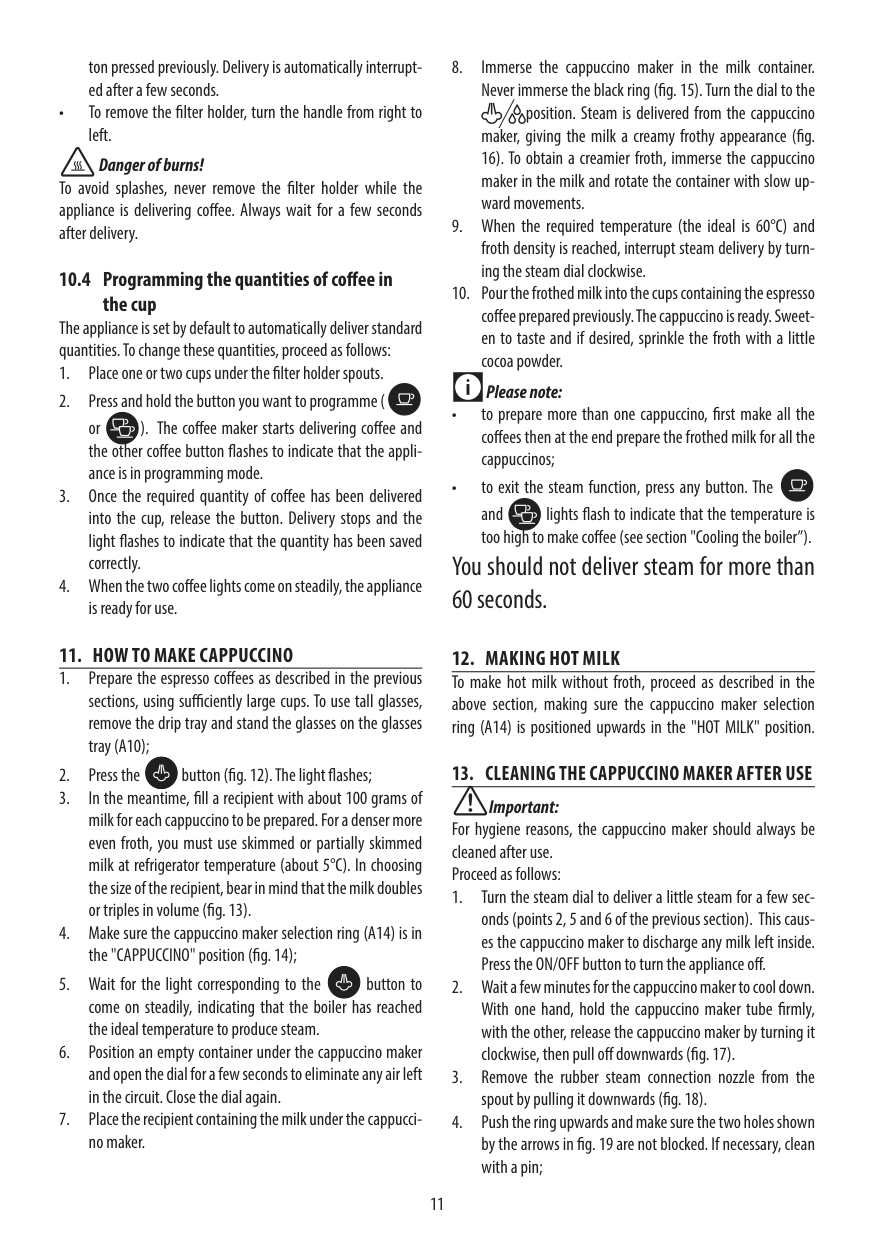
    Please note: Use pods conforming to the ESE standard, indicated on the pack by the following symbol.

    The ESE standard is a system accepted by leading pod producers and enables espresso coffee to be prepared simply and cleanly.

    ####### 10.2 How to prepare espresso coffee using preground coffee

  • 1. Place the filter for coffee pods (with the symbol on the bottom) in the filter holder.
  • 2. Insert the pod, centring it as far as possible on the filter (fig. 11). Always follow the instructions on the pod pack to position the pod on the filter correctly.
  • 1. Place the ground coffee filter (C2orC3) in the filter holder (fig. 6). To make one coffee, use the filter with the symbol on the bottom, to make two coffees, use the filter with the symbol on the bottom.
  • 2. To make just one coffee, place one level measure of preground coffee (about 7 g) in the filter (fig. 7). To make two coffees, place two loosely filled measures (about 7+7 g) of pre-ground coffee in the filter. Fill the filter a little at a time to prevent the pre-ground coffee from overflowing.
  • Proceed as described in points 4 to 6 in the previous section.

    ######### Please note:

  • • While the appliance is making coffee, delivery can be interrupted at any moment by pressing the coffee button pressed previously.
  • • At the end of delivery (within 3 seconds), to increase the amount of coffee in the cup, press and hold the coffee but-
  • ######### Important:

    For correct operation, before filling with pre-ground coffee, make sure there are no coffee residues left in the filter from the last time you made coffee.

    ton pressed previously. Delivery is automatically interrupted after a few seconds.

    • To remove the filter holder, turn the handle from right to left.

    ######### Danger of burns!

    To avoid splashes, never remove the filter holder while the appliance is delivering coffee. Always wait for a few seconds after delivery.

    ####### 10.4 Programming the quantities of coffee inthe cup

    The appliance is set by default to automatically deliver standard quantities. To change these quantities, proceed as follows:
  • 1. Place one or two cups under the filter holder spouts.
  • Page 12

  • 2. Press and hold the button you want to programme ( or ). The coffee maker starts delivering coffee and the other coffee button flashes to indicate that the appliance is in programming mode.
  • 3. Once the required quantity of coffee has been delivered into the cup, release the button. Delivery stops and the light flashes to indicate that the quantity has been saved correctly.
  • 4. When the two coffee lights come on steadily, the appliance is ready for use.
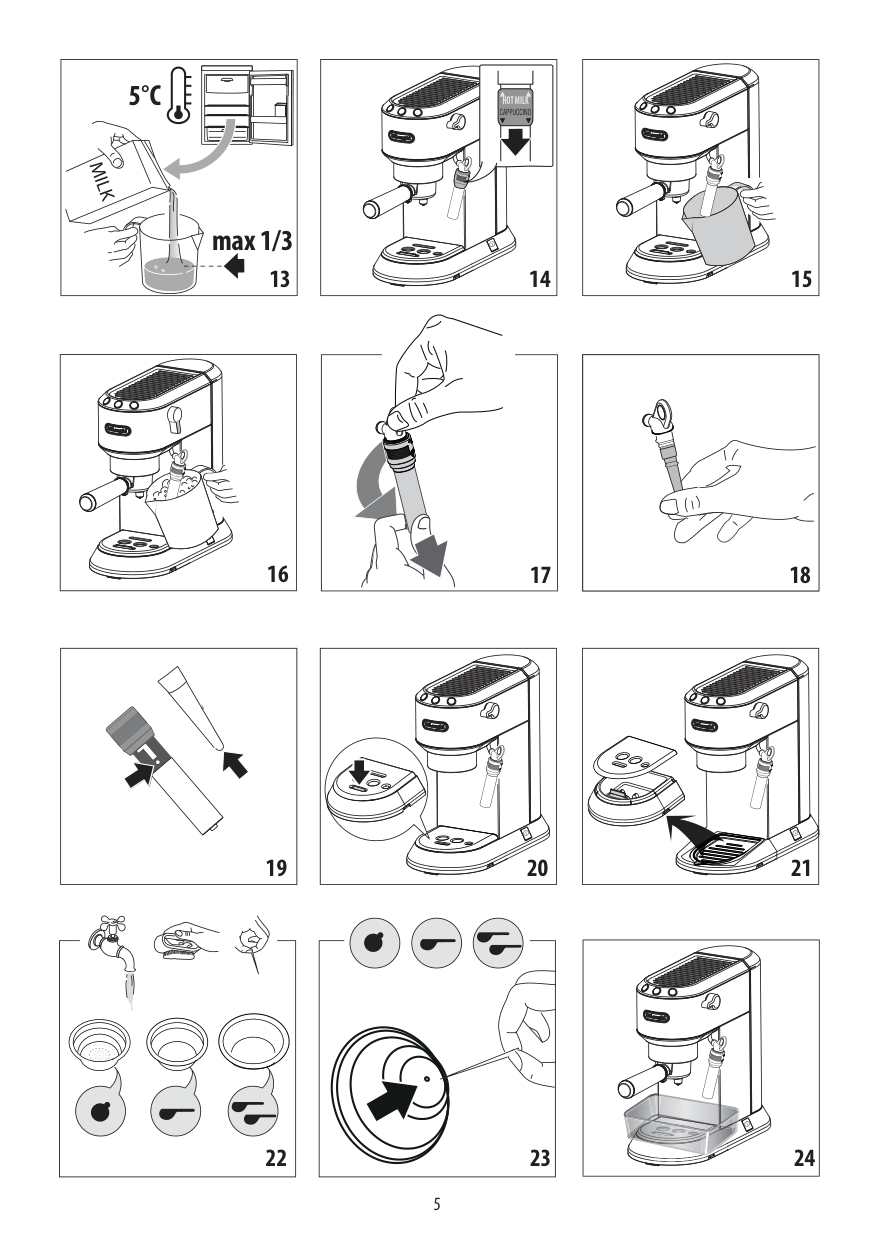
  • 8. Immerse the cappuccino maker in the milk container. Never immerse the black ring (fig. 15). Turn the dial to the
  • position. Steam is delivered from the cappuccino maker, giving the milk a creamy frothy appearance (fig. 16). To obtain a creamier froth, immerse the cappuccino maker in the milk and rotate the container with slow upward movements.

  • 9. When the required temperature (the ideal is 60°C) and froth density is reached, interrupt steam delivery by turning the steam dial clockwise.
  • 10. Pour the frothed milk into the cups containing the espresso coffee prepared previously. The cappuccino is ready. Sweeten to taste and if desired, sprinkle the froth with a little cocoa powder.
  • ######### Please note:

  • • to prepare more than one cappuccino, first make all the coffees then at the end prepare the frothed milk for all the cappuccinos;
  • • to exit the steam function, press any button. The and lights flash to indicate that the temperature is too high to make coffee (see section "Cooling the boiler”).
  • ##### You should not deliver steam for more than 60 seconds.

    ####### 11. HOW TO MAKE CAPPUCCINO

  • 12. MAKING HOT MILK To make hot milk without froth, proceed as described in the above section, making sure the cappuccino maker selection ring (A14) is positioned upwards in the "HOT MILK" position.
  • 13. CLEANING THE CAPPUCCINO MAKER AFTER USE
  • 1. Prepare the espresso coffees as described in the previous sections, using sufficiently large cups. To use tall glasses, remove the drip tray and stand the glasses on the glasses tray (A10);
  • 2. Press the button (fig. 12). The light flashes;
  • 3. In the meantime, fill a recipient with about 100 grams of milk for each cappuccino to be prepared. For a denser more even froth, you must use skimmed or partially skimmed milk at refrigerator temperature (about 5°C). In choosing the size of the recipient, bear in mind that the milk doubles or triples in volume (fig. 13).
  • 4. Make sure the cappuccino maker selection ring (A14) is in the "CAPPUCCINO" position (fig. 14);
  • 5. Wait for the light corresponding to the button to come on steadily, indicating that the boiler has reached the ideal temperature to produce steam.
  • 6. Position an empty container under the cappuccino maker and open the dial for a few seconds to eliminate any air left in the circuit. Close the dial again.
  • 7. Place the recipient containing the milk under the cappuccino maker.
  • Important: For hygiene reasons, the cappuccino maker should always be cleaned after use. Proceed as follows:
  • 1. Turn the steam dial to deliver a little steam for a few seconds (points 2, 5 and 6 of the previous section). This causes the cappuccino maker to discharge any milk left inside. Press the ON/OFF button to turn the appliance off.
  • 2. Wait a few minutes for the cappuccino maker to cool down. With one hand, hold the cappuccino maker tube firmly, with the other, release the cappuccino maker by turning it clockwise, then pull off downwards (fig. 17).
  • 3. Remove the rubber steam connection nozzle from the spout by pulling it downwards (fig. 18).
  • 4. Push the ring upwards and make sure the two holes shown by the arrows in fig. 19 are not blocked. If necessary, clean with a pin;
  • Page 13

  • 5. Replace the nozzle, move the ring downwards and put the cappuccino maker back on the connection nozzle, turning it and pushing it upwards until it is attached.
  • • Before cleaning the outside of the appliance, turn it off, unplug from the mains socket and allow to cool.

  • 16.2 Cleaning the drip tray
  • Important!

    The drip tray is fitted with a level indicator (red) showing the level of water it contains (fig. 20). Before the indicator protrudes from the cup tray, the drip tray must be emptied and cleaned otherwise the water may overflow the edge and damage the appliance, the surface it rests on or the surrounding area.

  • 1. Remove the drip tray (fig. 21).
  • 2. Remove the cup tray (A7), empty the water and clean the drip tray with a cloth, then reassemble the drip tray. Extract the mugs or glasses tray (A10), clean with water, dry and put back in the machine;
  • 3. Put the drip tray back in place.
  • 16.3 Cleaning the coffee filters Clean the coffee filters regularly:
  • 1. Rinse the filters under running water (fig. 22);
  • 2. Make sure the holes are not blocked. If necessary, clean with a pin (figs. 22 and 23).
  • 16.4 Cleaning the boiler outlet After every 200 coffees, rinse the boiler outlet by delivering about 0.5 l of water from the boiler outlet (press the coffee button without using ground coffee).
  • 16.5 Other cleaning operations
  • 1. Do not use solvents or abrasive detergents to clean the coffee maker. Use a soft damp cloth only.
  • 2. Clean the filter holder cup.
  • 16.6 Cleaning the water tank
  • 14. COOLING THE BOILER To make coffee again immediately after frothing milk, the boiler must first be cooled or the coffee will be burnt. Proceed as follows:
  • • place a container under the cappuccino maker;
  • • open the steam dial to deliver hot water and cool the boiler;
  • • hot water delivery is interrupted automatically when the boiler is cool. When the pump stops operating and no more water is delivered, close the steam dial.
  • The coffee maker is now ready for use.
  • 15. HOT WATER
  • 1. Press the ON/OFF button (fig. 3) to turn the appliance on. Wait for the coffee lights to come on steadily.
  • 2. Place a recipient under the cappuccino maker.
  • 3. Turn the dial to the position. Hot water is delivered from the cappuccino maker.
  • Page 14

  • 4. To stop hot water delivery, close the dial and press any button.
  • You should not deliver hot water for more than 60 seconds.

  • 16. CLEANING
  • 16.1 Cleaning the machine The following parts of the machine must be cleaned regularly:
  • - drip tray (A9)
  • - the coffee filters (C2, C3 and C4);
  • - the boiler outlet (A5);
  • - water tank (A3);
  • - the cappuccino maker (A15) as described in section "”13. Cleaning the cappuccino maker after use”;
  • 1. Clean the water tank regularly (about once a month) and whenever you replace the water softener filter (C6, *if provided) with a damp cloth and a little mild washing up liquid;
  • 2. Remove the filter (*if present) and rinse with running water;
  • 3. Put the filter (*if provided) back in the appliance, fill the tank with fresh water and replace the tank;
  • 4. (Models with water softener filter only) Deliver about 100 ml of water.
  • ######### Important!

  • • Do not use solvents, abrasive detergents or alcohol to clean the coffee machine.
  • • Do not use metal objects to remove encrustations or coffee deposits as they could scratch metal or plastic surfaces.
  • • If the appliance is not used for more than one week, before using it again, we strongly recommend you perform a rinse cycle as described in section ”8. first use”.
  • Danger!

  • • While cleaning, never immerse the coffee maker in water. It is an electrical appliance.
  • Danger! While cleaning, never immerse the coffee maker in water. It is an electrical appliance.

    ####### 16.7 Descale

    Descale the appliance when the orange light on the button comes on.

    ######### Important!
  • • Before use, read the instructions and the labelling on the descaler pack.
  • • You should use De'Longhi descaler only. Using unsuitable descaler and/or performing descaling incorrectly may result in faults not covered by the manufacturer's guarantee.
  • Page 15

    Proceed as follows:

  • 1. (IF PRESENT, REMOVE THE WATER SOFTENER FILTER). Fill the tank with the descaler solution, obtained by diluting the descaler provided with water (fill the water tank up to the MAX level).
  • 2. Press the ON/OFF button.
  • 3. Make sure the filter holder is not attached and position a recipient under the hot water spout and boiler outlet (A5) (fig. 24).
  • 4. Wait for the and lights to come on steadily, indicating that the appliance is ready for use.
  • 5. Press and hold the button for 10 seconds until the three buttons flash in sequence.
  • 6. Turn the steam dial to the position.
  • 7. Press the button to start descaling.
  • 8. The descale programme starts and the descaler liquid comes out of the water spout. The descale programme removes limescale deposits from inside the appliance by automatically performing a series of rinses and pausesuntil the tank is completely empty.
  • Please note:

    During descaling, to clean the boiler outlet, close the steam dial from time to time to deliver small quantities of descaler from the boiler outlet.

  • 9. The appliance stops operation and the orange light continues to flash, indicating that descaling is still underway.
  • 10. The appliance is now ready for rinsing through with clean water. Extract the water tank, empty, rinse under running water, fill with fresh water up to the MAX level and put back in the appliance (If used, insert the water softener filter).
  • 11. Empty the container used to collect the descaler solution and replace it empty under the hot water spout.
  • 12. Make sure the steam dial is in the position, then press the button to start rinsing.
  • ######### Please note:

    During rinsing, to clean the boiler outlet, close the steam dial from time to time to deliver small quantities of water from the boiler outlet.

  • 13. When the water tank is empty, the orange light goes out and descaling is complete.
  • 14. Make sure the steam dial is in the closed position (○ symbol).
  • The appliance is ready for use.

    ######### Please note!

  • • If the descaling cycle is not completed correctly (e.g. no electricity) we recommend repeating the cycle;
  • • If the water tank has not been filled to the MAX level, at the end of descaling, the appliance requests a further rinse to guarantee that the descaler solution has been completely eliminated from the machine's internal circuits.
  • Repair of damage to the coffee maker caused by limescale is not covered by the guarantee unless descaling is performed regularly as described above.

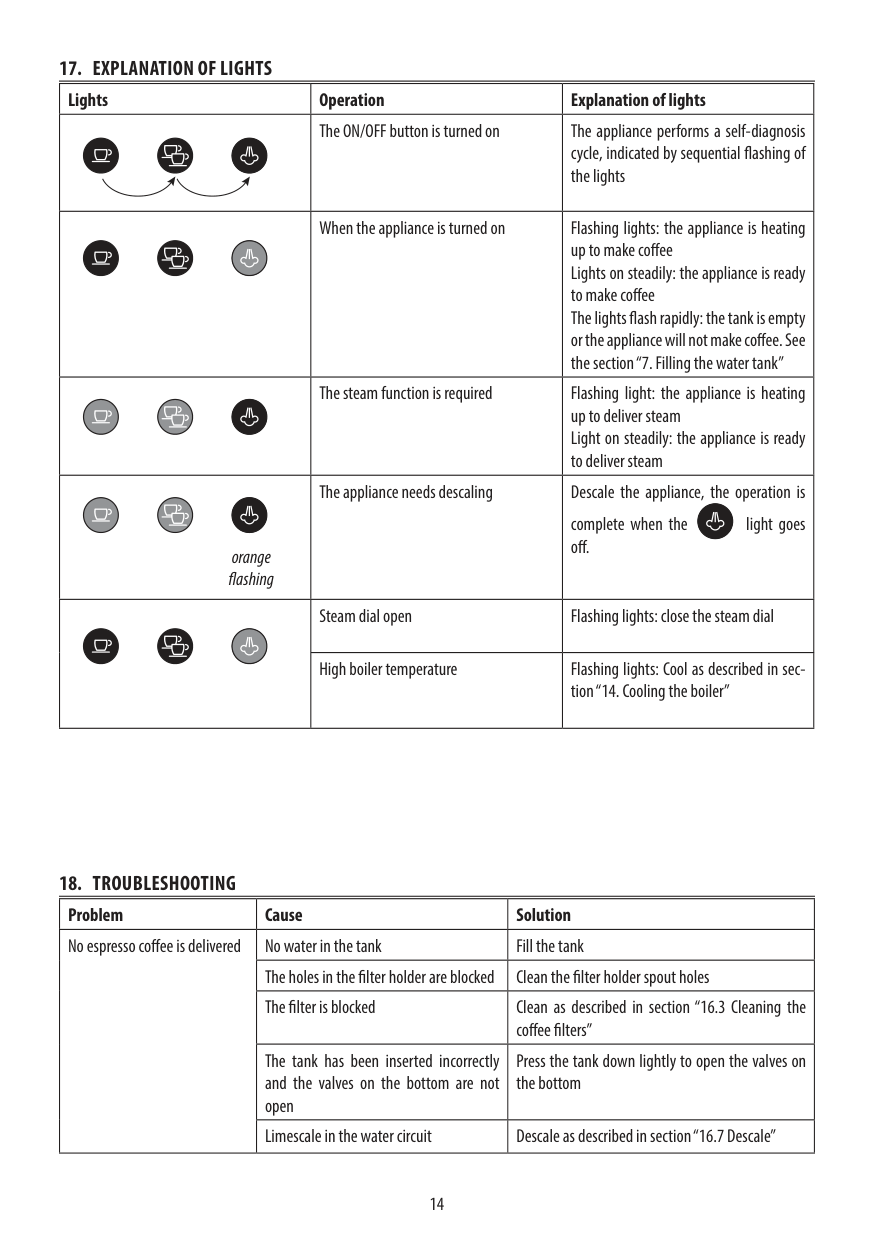
    ####### 17. EXPLANATION OF LIGHTS

    |Lights|Operation|Explanation of lights|
    Page 16

    |---|---|---| | |The ON/OFF button is turned on|The appliance performs a self-diagnosis cycle, indicated by sequential flashing of the lights| | |When the appliance is turned on|Flashing lights: the appliance is heating up to make coffee Lights on steadily: the appliance is ready to make coffee The lights flash rapidly: the tank is empty or the appliance will not make coffee. See the section “7. Filling the water tank”| | |The steam function is required|Flashing light: the appliance is heating up to deliver steam Light on steadily: the appliance is ready to deliver steam| |orange flashing|The appliance needs descaling|Descale the appliance, the operation is complete when the light goes off.

    | | |Steam dial open|Flashing lights: close the steam dial| | |High boiler temperature|Flashing lights: Cool as described in section “14. Cooling the boiler”|

    ####### 18. TROUBLESHOOTING

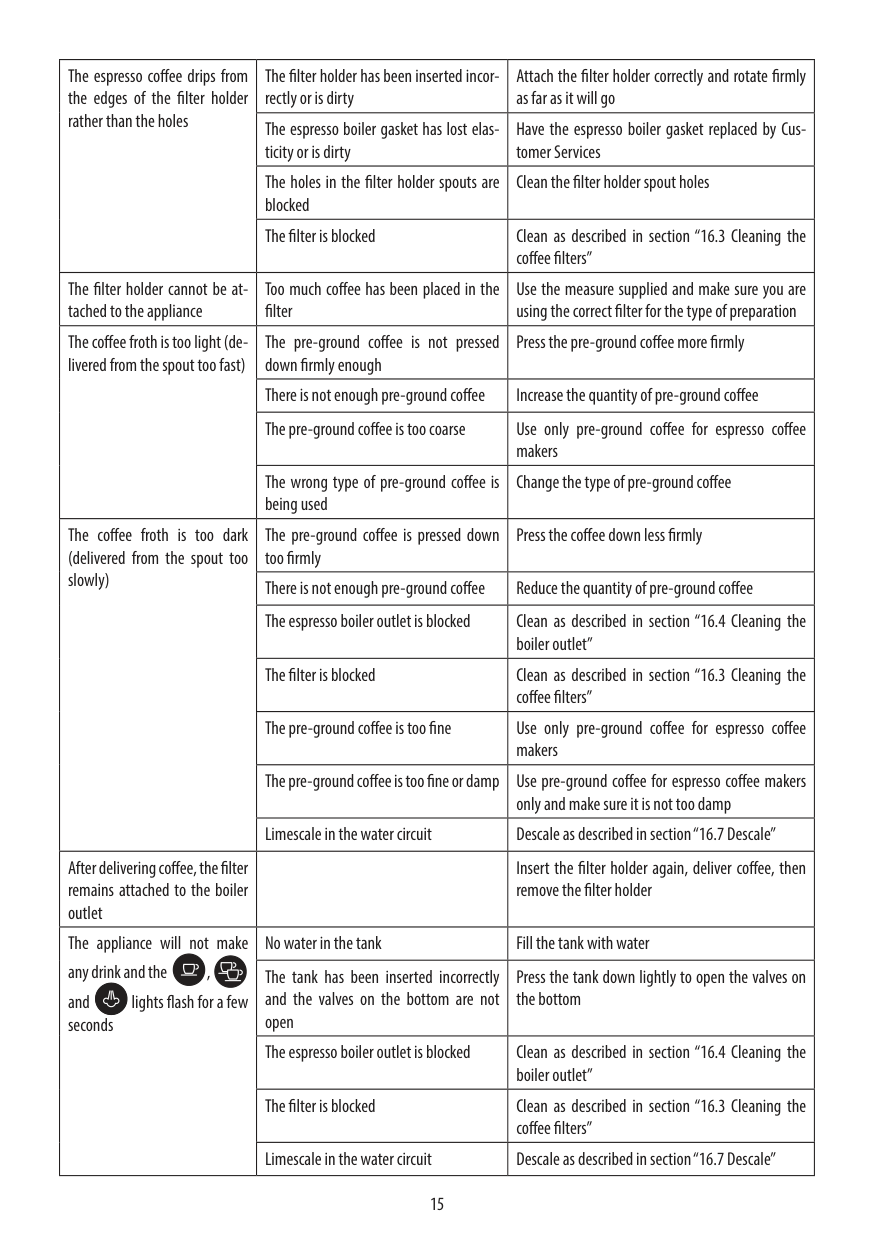
    |Problem|Cause|Solution| |---|---|---| |No espresso coffee is delivered|No water in the tank|Fill the tank| |No espresso coffee is delivered|The holes in the filter holder are blocked|Clean the filter holder spout holes| |No espresso coffee is delivered|The filter is blocked|Clean as described in section “16.3 Cleaning the coffee filters”| |No espresso coffee is delivered|The tank has been inserted incorrectly and the valves on the bottom are not open|Press the tank down lightly to open the valves on the bottom| |No espresso coffee is delivered|Limescale in the water circuit|Descale as described in section “16.7 Descale”|

    |The espresso coffee drips from the edges of the filter holder rather than the holes|The filter holder has been inserted incorrectly or is dirty|Attach the filter holder correctly and rotate firmly as far as it will go| |---|---|---| |The espresso coffee drips from the edges of the filter holder rather than the holes|The espresso boiler gasket has lost elasticity or is dirty|Have the espresso boiler gasket replaced by Customer Services| |The espresso coffee drips from the edges of the filter holder rather than the holes|The holes in the filter holder spouts are blocked|Clean the filter holder spout holes| |The espresso coffee drips from the edges of the filter holder rather than the holes|The filter is blocked|Clean as described in section “16.3 Cleaning the coffee filters”| |The filter holder cannot be attached to the appliance|Too much coffee has been placed in the filter|Use the measure supplied and make sure you are using the correct filter for the type of preparation| |The coffee froth is too light (delivered from the spout too fast)|The pre-ground coffee is not pressed down firmly enough|Press the pre-ground coffee more firmly| |The coffee froth is too light (delivered from the spout too fast)|There is not enough pre-ground coffee|Increase the quantity of pre-ground coffee| |The coffee froth is too light (delivered from the spout too fast)|The pre-ground coffee is too coarse|Use only pre-ground coffee for espresso coffee makers| |The coffee froth is too light (delivered from the spout too fast)|The wrong type of pre-ground coffee is being used|Change the type of pre-ground coffee| |The coffee froth is too dark (delivered from the spout too slowly)|The pre-ground coffee is pressed down too firmly|Press the coffee down less firmly| |The coffee froth is too dark (delivered from the spout too slowly)|There is not enough pre-ground coffee|Reduce the quantity of pre-ground coffee| |The coffee froth is too dark (delivered from the spout too slowly)|The espresso boiler outlet is blocked|Clean as described in section “16.4 Cleaning the boiler outlet”| |The coffee froth is too dark (delivered from the spout too slowly)|The filter is blocked|Clean as described in section “16.3 Cleaning the coffee filters”| |The coffee froth is too dark (delivered from the spout too slowly)|The pre-ground coffee is too fine|Use only pre-ground coffee for espresso coffee makers| |The coffee froth is too dark (delivered from the spout too slowly)|The pre-ground coffee is too fine or damp|Use pre-ground coffee for espresso coffee makers only and make sure it is not too damp| |The coffee froth is too dark (delivered from the spout too slowly)|Limescale in the water circuit|Descale as described in section “16.7 Descale”| |After delivering coffee, the filter remains attached to the boiler outlet| |Insert the filter holder again, deliver coffee, then remove the filter holder| |The appliance will not make any drink and the , and lights flash for a few seconds

    |No water in the tank|Fill the tank with water| |The appliance will not make any drink and the , and lights flash for a few seconds

    |The tank has been inserted incorrectly and the valves on the bottom are not open|Press the tank down lightly to open the valves on the bottom| |The appliance will not make any drink and the , and lights flash for a few seconds

    |The espresso boiler outlet is blocked|Clean as described in section “16.4 Cleaning the boiler outlet”| |The appliance will not make any drink and the , and lights flash for a few seconds

    |The filter is blocked|Clean as described in section “16.3 Cleaning the coffee filters”| |The appliance will not make any drink and the , and lights flash for a few seconds

    |Limescale in the water circuit|Descale as described in section “16.7 Descale”|

    |The appliance does not function and all the lights flash| |Disconnect the appliance immediately and contact authorised Customer Services.| |---|---|---|

    Page 17

    |No milk froth is formed when making cappuccino|The ring is in the “HOT MILK” position|Push the ring into the “CAPPUCCINO” position.| |No milk froth is formed when making cappuccino|Milk not cold enough|Always use milk at refrigerator temperature| |No milk froth is formed when making cappuccino|Cappuccino maker dirty|Clean as described in section “13. Cleaning the cappuccino maker after use”| |No milk froth is formed when making cappuccino|Limescale in the water circuit|Descale as described in section “16.7 Descale”| |At the end of descaling, the appliance requests a further rinse|During the rinse cycle, the water tank has not been filled to the MAX level|Repeat the rinse cycle from point 10 of the section "Explanation of lights" “16.7 Descale”|

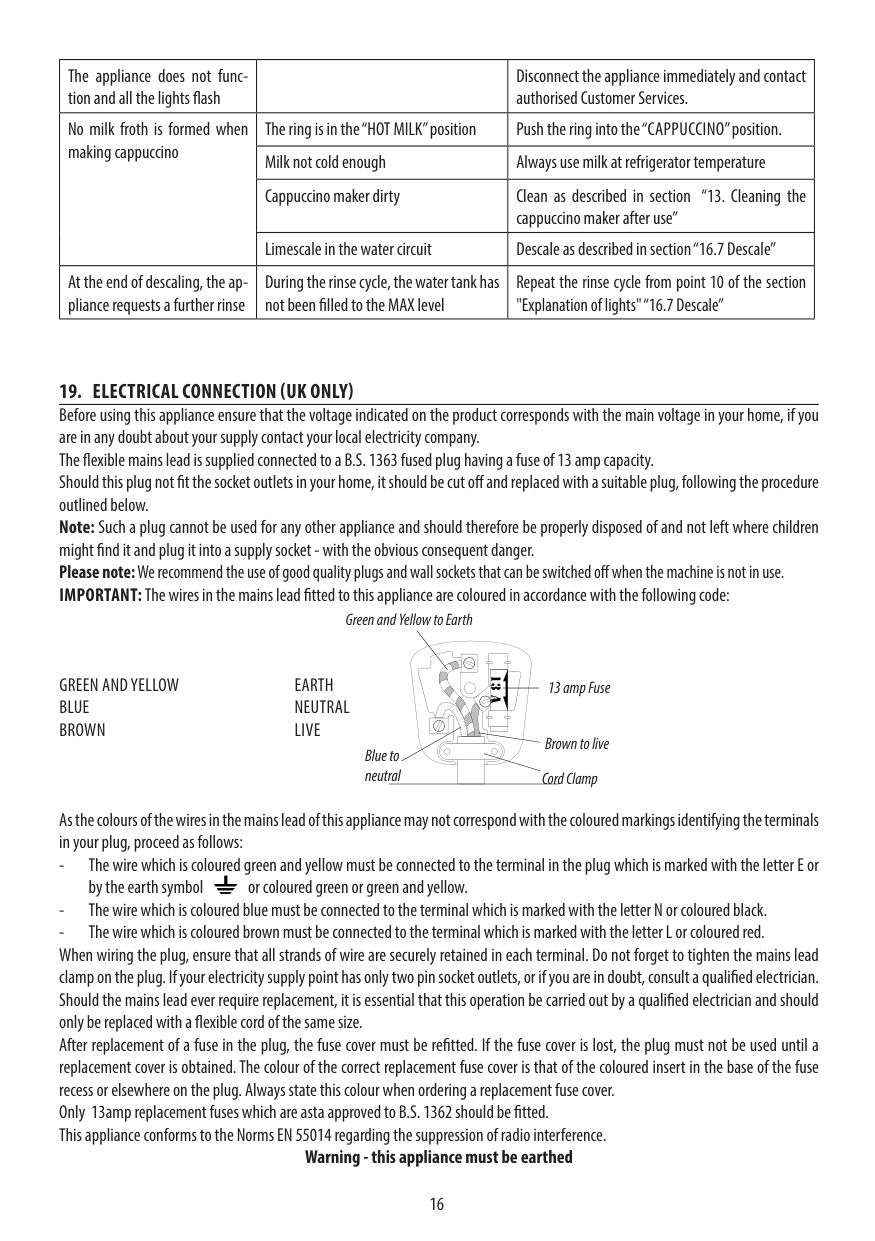
  • 19. ELECTRICAL CONNECTION (UK ONLY) Before using this appliance ensure that the voltage indicated on the product corresponds with the main voltage in your home, if you are in any doubt about your supply contact your local electricity company. The flexible mains lead is supplied connected to a B.S. 1363 fused plug having a fuse of 13 amp capacity. Should this plug not fit the socket outlets in your home, it should be cut off and replaced with a suitable plug, following the procedure outlined below. Note: Such a plug cannot be used for any other appliance and should therefore be properly disposed of and not left where children might find it and plug it into a supply socket - with the obvious consequent danger. Please note:We recommend the use of good quality plugs and wall sockets that can be switched off when the machine is not in use. IMPORTANT:The wires in the mains lead fitted to this appliance are coloured in accordance with the following code:
  • Green and Yellow to Earth

    | | | |---|---| | | |

    GREEN AND YELLOW EARTH BLUE NEUTRAL BROWN LIVE

    13 amp Fuse

    | | | |---|---| | | |

    Brown to live Cord Clamp

    Blue to neutral

    As the colours of the wires in the mains lead of this appliance may not correspond with the coloured markings identifying the terminals in your plug, proceed as follows:

  • - The wire which is coloured green and yellow must be connected to the terminal in the plug which is marked with the letter E or by the earth symbol or coloured green or green and yellow.
  • - The wire which is coloured blue must be connected to the terminal which is marked with the letter N or coloured black.
  • - The wire which is coloured brown must be connected to the terminal which is marked with the letter L or coloured red. When wiring the plug, ensure that all strands of wire are securely retained in each terminal. Do not forget to tighten the mains lead clamp on the plug. If your electricity supply point has only two pin socket outlets, or if you are in doubt, consult a qualified electrician. Should the mains lead ever require replacement, it is essential that this operation be carried out by a qualified electrician and should only be replaced with a flexible cord of the same size. After replacement of a fuse in the plug, the fuse cover must be refitted. If the fuse cover is lost, the plug must not be used until a replacement cover is obtained. The colour of the correct replacement fuse cover is that of the coloured insert in the base of the fuse recess or elsewhere on the plug. Always state this colour when ordering a replacement fuse cover. Only 13amp replacement fuses which are asta approved to B.S. 1362 should be fitted. This appliance conforms to the Norms EN 55014 regarding the suppression of radio interference.
  • Warning - this appliance must be earthed

    | | |---|

    De’Longhi Appliances via Seitz, 47 31100 Treviso Italia www.delonghi.com

    5713233481/12.16

    More from De'Longhi

    Similar Unknown