
Ask AI
— answers from the official manualAnswers from the official manual.
Common questions
Common Questions
29 totalWhat is the warranty coverage for the Model 2128?
The Model 2128 is backed by a 10-Year Limited Warranty for the motor and a 15-Year Limited Warranty for the belt drive rail. If you have the chain drive rail version, it carries a 5-Year Limited Warranty. Note that the warranty is limited and non-transferable. (Page 1)
What is the Soft Start and Stop feature on the Model 2128?
Soft Start and Stop Control is a DC technology feature that allows the garage door to begin and end its movement smoothly rather than abruptly. This results in less noise during operation and reduced wear and tear on the garage door over time. (Pages 1–2)
How does the Safe-T-Beam reversing system work?
The Safe-T-Beam Non-Contact Reversing System uses an infrared beam that, when interrupted by an object, causes the garage door to automatically stop closing and reverse to the open position. Importantly, the door does not need to make physical contact with the object to trigger the reversal. (Page 2)
What is the Intellicode Access Security System and how does it protect my garage?
The Intellicode Access Security System prevents unauthorized remotes from opening your garage door by selecting a new code from billions of combinations each time the opener is operated. This means thieves cannot capture and reuse your opener's signal to gain access. (Page 2)
Can I control the Model 2128 remotely with my smartphone?
Yes, the Model 2128 has integrated Aladdin Connect Wi-Fi connectivity that allows you to remotely monitor and control your garage door from almost anywhere using a smart device. The Aladdin Connect app also supports time-based features, scheduling, and multiple individual user accounts for shared access. (Page 2)
What is the Sure-Lock feature and how do I use it?
Sure-Lock is a security feature that allows you to lock out remote controls and wireless keypads at any time, making it useful when you are away from home, such as on vacation. It is also referred to as a vacation lock. (Page 2)
Show 23 more questions
Can I use regular LED bulbs with the Model 2128?
Is the Model 2128 available for sale in California?
What is the opening speed of the Model 2128?
What type of doors can the Model 2128 operate?
What is the procedure for factory resetting my Model 2128?
How do I change the remote access code using Intellicode?
What should I do if my Model 2128 displays error code E01?
How do I set the DOWN travel limit for my Genie 2128 opener?
What are the error codes for my Genie 2128 garage door opener?
What are the steps to program the Aladdin Connect® system with my Genie 2128 opener?
How do I perform maintenance on my Genie 2128 opener regularly?
What should I do if my opener doesn’t operate from the wall control?
How do I reset my Genie 2128 opener if it has lost its programming?
How can I increase security with my Model 2128?
What maintenance is required for my Model 2128?
How do I troubleshoot issues related to noise or unwanted movement during use?
How do I program a new wall console to my Model 2128?
What are the safety regulations if installing a Model 2128?
How do I adjust the limit settings of my Model 2128 for door movement?
What do I need to know about installing a battery backup with my Genie 2128 opener?
How do I replace the light bulbs in my Genie 2128 opener?
Where can I find instructions to troubleshoot lighting issues on my Genie 2128?
What maintenance should I do yearly with my Genie 2128 opener?
Full Manual
32 pages

BELT/CHAIN DRIVE GARAGE DOOR OPENERS
###### PROGRAMMING, OPERATION, & MAINTENANCE MANUAL
Images are for illustration purposes only, Your model may have different covers, lenses, or accessories.
| | |---|
| | |---|
| | |---|
| | |---|
DO NOT use photocells from other manufacturers or openers with this opener.
INSTALLER: LEAVE THIS MANUAL WITH HOMEOWNER HOMEOWNER: SAVE THIS MANUAL FOR FUTURE REFERENCE
|To reduce the risk of injury to persons or damage to property, use this opener only with a sectional residential door.
WARNING!
| |---|
|Por reduire le risque de blessures ou de dommages materials, utillsez cet ouvre-porte uniquement pour une porte a section residentiel.
AVERTISSEMENT!
| |---|
|STOP
DO NOT return product to store, visit www.geniecompany.com or call Customer Service at: 1-800-35-GENIE| |---|
SERIAL NUMBER DECAL
iDCM SERIAL NUMBER DECAL
42598.02135 10/2024
|INDEX| |---|
################# Safety & General Information

|FCC Part 15.21 Statement: Changes or modifications not expressly approved by the party responsible for compliance could void the user’s authority to operate the equipment.
FCC / IC Statement: This device complies with FCC Part 15 and Industry Canada licence-exempt RSS standard(s). Operation is subject to the following two conditions: (1) this device may not cause harmful interference, and (2) this device must accept any interference received, including interference that may cause undesired operation of the device.
Le présent appareil est conforme aux CNR d’Industrie Canada applicables aux appareils radio exempts de licence. L’exploitation est autorisée aux deux conditions suivantes : (1) l’appareil ne doit pas produire de brouillage, et (2) l’utilisateur de l’appareil doit accepter tout brouillage radioélectrique subi, même si le brouillage est susceptible d’en compromettre le fonctionnement.| |---|
Introduction .............................................................. 1 Safety Notifications ................................................. 2 Important Installation Instructions ................... 3 Coin-Cell Battery Safety Warnings ..................... 4
Basic Wiring .................................................5 Programming Information
Introduction to opener programming ............ 6 Setting the DOWN Limit ....................................... 7 Setting the UP Limit ............................................... 8 Setting the Force Control ..................................... 9 Contact Reverse Test .............................................. 9 Contact Reverse Adjustment .............................. 9 Remote Control Programming .........................10 Wireless Wall Console Install & Prog* .............11 Keypad Programming* ........................................12 Homelink & Car2U Programming* ..................13 Aladdin Connect® Set up ............................. 14-15
################# Special Installation Information
Force Adjustment Guide .....................................16 Clearing Remote Memory ..................................17 Tube Rail Adjustments .........................................17 Location of Safe-T-Beam® Pairs .........................18 Safe-T-Beam Troubleshooting ..........................18 Installing Battery Backup (BBU) ........................19
################# Maintenance


Important Safety Instructions ...........................20 Regular Maintenance Schedule .......................21 Door Inspection & Maintenance ......................21 Carriage Adjustment

(Release/Engagement ......................................21 Remote Battery Replacement ...........................22 Light Bulb Replacement .....................................22
The Genie Company One Door Drive Mt. Hope, OH 44660, USA
1-800-35-GENIE (354-3643) www.geniecompany.com
Troubleshooting & LED Signals............. 23-24 Replacement Parts & Assemblies......... 25-28 DASMA Safety Guidelines........................ 29-30 * Abbreviated versions. See instructions that accompany the accessory or vehicle owners manual for full details and instructions.
Patent listing at www.geniecompany.com/patents
|SAVE THESE INSTRUCTIONS| |---|
|READ AND FOLLOW ALL INSTRUCTIONS| |---|
|INTRODUCTION1| |---|
#### Thank you for purchasing a Genie® brand garage door opener. Genie® is the leader in garage door opener technology.
Please note that this manual covers several different models of Genie® brand garage door openers. Illustrations contained in this manual may not reflect the exact model purchased. Skip steps or pages that do not apply to your specific model. Programming and installation of the opener and accessories are identical even though they may appear differently. All external accessories shown in this manual are available for purchase separately from your local Genie® retailer.
###### Read and understand all SAFETY WARNINGS and CAUTIONS contained in this manual before proceeding.
|
DO NOT RETURN PRODUCT TO STORE If you require assistance or have any questions, a knowledgeable Genie Service Technician is just a phone call away at: 1-800-35-GENIE (1-800-354-3643) Or visit our website at:
www.geniecompany.com| |---|
Before setting up your new garage door opener, please note the model plate on the opener and serial number(s) located on the front of this manual. This information will be necessary should you seek technical support via our website, customer support department or local servicing Genie dealer.
Idioma alternativo manuales disponibles en: www.geniecompany.com}
Spanish language manuals available at:
©2024 GMI Holdings, Inc d/b/a The Genie Company, the Genie logo, Intellicode, Safe-T-Reverse, SmartSet, Sure-Lock, Door Detect, and Safe-T-Beam, Aladdin Connect, iDCM, are trademarks of The Genie Company. All other trademarks are property of their rightful owners. Consistent with our policy of continuing product improvements, we reserve the right to change product specifications without prior notice or obligations. HomeLink is a registered trademark of Gentex Corporation. Car2U is a registered trademark of Lear Corporation.
|SAFETY NOTIFICATIONS & INSTRUCTIONS|
|---|
OVERVIEW OF POTENTIAL HAZARDS READ THIS SAFETY INFORMATION Garage doors are large, heavy objects that move with the help of springs under high tension and electric motors. Since moving objects, springs under tension, and electric motors can cause injuries, your safety and the safety of others depend on you reading the information in this manual. If you have questions or do not understand the information presented, call your nearest trained door system technician or visit our website at www.geniecompany.com. CONVENTIONS USED IN THESE INSTRUCTIONS The following safety alert symbol and signal words are used throughout this manual to call attention to and identify different levels of hazards and special instructions.
This is the safety alert symbol. This symbol alerts you to potential hazards that can kill or hurt you and others. All safety messages will follow the safety alert symbol and the word “DANGER”, “WARNING”,or “CAUTION”.
Tous les messages concernant la sécurité seront indiqués après un symbole d’alerte de la sécurité et l’une des mentions suivantes “DANGER”, ”AVERTISSEMENT” ou “MISE EN GARDE”.
IMPORTANT SAFETY INSTRUCTIONS
|POTENTIAL HAZARD|EFFECT|PREVENTION| |---|---|---| |MOVING DOOR
| | |---|
|WARNING Could result in Serious Injury of Death
!
|DO NOT operate unless the doorway is in sight and free of obstructions. Keep people clear of opening while door is moving. DO NOT allow children to play with the door opener. DO NOT change opener control to momentary contact unless an external reversing means is installed. DO NOT operate a door that jams or one that has a broken spring.| |ELECTRICAL SHOCK
|WARNING Could cause Serious Injury or Death
!
|Turn off electrical power before removing opener cover. When replacing the cover, make sure wires are not pinched or near moving parts. Opener must be electrically grounded.| |HIGH SPRING TENSION
|WARNING Could cause Serious Injury or Death
!
|DO NOT try to remove, repair or adjust springs or anything to which door spring parts are fastened such as wood block, steel brackets, cables or any other structure or like item. Repairs and adjustments must be made by a trained service representative using proper tools and instructions.|
IMPORTANTES CONSIGNES DE SÉCURITÉ
|DANGER POTENTIEL|EFFET|PRÉVENTION| |---|---|---| |PORTE EN MOUVEMENT
| | |---|
|AVERTISSEMENT Pourrait entraîner des blessures graves voire la mort
!
|Utiliser uniquement si la porte est en vue et libre de tout obstacle. Ne laisser personne se tenir dans l’ouverture de la porte pendant qu’elle est en mouvement. NE PAS permettre aux enfants de jouer avec l’opérateur de la porte. NE PAS modifier la commande de l’opérateur à contact momentané à moins qu’un moyen d’inversion externe soit installé. NE PAS faire fonctionner une porte qui bloque ou dont le ressort est cassé.| |CHOC ÉLECTRIQUE
|AVERTISSEMENT Pourrait entraîner des blessures graves voire la mort
!
|Couper le courant avant d’enlever le couvercle de l’opérateur. Lorsque le couvercle doit être remplacé, s’assurer que les fils ne sont ni coincés ni près des pièces mobiles. L’opérateur doit être correctement mis à la terre.| |TENSION ÉLEVÉE RESSORT
|AVERTISSEMENT Pourrait entraîner des blessures graves voire la mort
!
|NE PAS essayer d’enlever, réparer ni ajuster les ressorts ou toute autre pièce à laquelle le ressort de la porte est attaché, y compris blocs de bois, supports en acier, câbles ou autres articles semblables. Les réparations et les réglages doivent être effectués par technicien qualifié qui se sert d’outils appropriés et qui respecte les instructions.|
IMPORTANT INSTALLATION INSTRUCTIONS
|WARNING!| |---| |TO REDUCE THE RISK OF SEVERE INJURY OR DEATH
READ AND FOLLOW ALL SAFETY, INSTALLATION AND OPERATION INSTRUCTIONS. If you have any questions or do not understand an instruction, call The Genie Company.
• DO NOT install opener on an improperly balanced door. An improperly balanced door could cause severe injury. Repairs and adjustments to cables, spring assembly and other hardware must be made by a trained service person using proper tools and instructions.
• Remove all ropes, and disable all locks connected to the door before installing opener.
• Where possible, install the door opener 7 feet or more above the floor. For products having an emergency release, mount the emergency release within reach, but at least 6 feet above the floor and avoiding contact with vehicles to avoid accidental release. DO NOT use emergency release cord to pull door.
• DO NOT connect the opener to the source of power until instructed to do so.
• Locate the wall control button: A) Within sight of door. B) At a minimum height of 5 feet, so small children cannot reach it. C) Away from all moving parts of the door.
• Install the entrapment WARNING label next to the wall button or console, in a prominent location. Install the emergency release handle on the emergency release cord.
• The opener must reverse when the door contacts a 1-1/2 inch high object on the floor at the center of the doorway. This is about the size of a 2” x 4” board laid flat.
|
IMPORTANTES INSTRUCTIONS D’INSTALLATION
|AVERTISSEMENT!| |---| |POUR RÉDUIRE LES RISQUES DE BLESSURES GRAVES
VOIRE MORTELLES LIRE ET SUIVRE ATTENTIVEMENT TOUTES LES INSTRUCTIONS D’INSTALLATION ET DE FONCTIONNEMENT AINSI QUE TOUTES LES CONSIGNES DE SÉCURITÉ. Si vous avez des questions ou si vous ne comprenez pas une instruction, veuillez contacter directement The Genie Company.
• NE PAS installer l’opérateur sur une porte mal équilibrée. Celle-ci pourrait entraîner de graves blessures. Les réparations et les réglages des câbles, ensembles de ressort ou tout autre article de quincaillerie doivent être effectués par un professionnel qui se sert d’outils appropriés et qui respecte les instructions.
• Enlever toutes les cordes et désactiver toutes les verrous de la porte avant l’installer l’opérateur.
• Dans la mesure du possible, installer l’ouvre-porte à 2,1 m ou plus au-dessus du sol. Pour les produits dotés d’un cordon de déclenchement d’urgence, installer le déclenchement d’urgence mais au moins à 1,8 m au-dessus du sol en évitant tout contact avec les véhicules pour éviter qu’ils ne soient déclenchés accidentellement. NE PAS utiliser d’urgence cordon de libération pour ouvrir ou fermer la porte.
• NE PAS connecter l’opérateur à la source d’alimentation tant que l’instruction n’est pas donnée.
• Repérer la console murale: A) En vue de la porte. B) À une hauteur minimale de 1,5 m afin que les jeunes enfants ne puissent pas l’atteindre. C) Loin de toutes pièces mobiles de la porte du garage.
• Placer l’étiquette d’AVERTISSEMENT en cas de coinçage à proximité du bouton mural ou de la console de manière à ce qu’elle soit bien en évidence. Installer la poignée du cordon de déclenchement d’urgence.
• L’opérateur doit s’inverser lorsque la porte entre en contact avec un objet d’une hauteur de 3,8 cm placé sur le sol, au centre de l’ouverture de la porte. Ceci équivaut environ à une planche de 5 x 10 cm posée à plat sur le sol.
|
|WARNING!| |---| |Opener is equipped with grounded electrical plug for your protection, and only fits grounded electrical outlets. DO NOT alter plug in any way! If your have no grounded outlets, have one installed by a licensed electrician. Opener must be properly grounded to prevent personal injury and equipment damage. NEVER USE AN EXTENSION CORD! Check local building codes for any requirement that you must have a permanent hard-wired connection. Permanent hard-wired connections must be performed by a licensed electrician using proper tools and instructions.|
|AVERTISSEMENT!| |---| |L’opérateur, qui est équipé d’une prise électrique mise à la terre pour votre protection est compatible uniquement avec des prises électriques mises à la terre. NE PAS modifier la fiche dune quelconque manière. Si vous n’avez pas de prises mises à la terre, faites-en installer par un électricien agréé. L’opérateur doit être correctement mis à la terre pour éviter les blessures corporelles et des dommages matériels. NE JAMAIS UTILISER DE RALLONGE! Vérifiez les codes locaux des bâtiments pour connexions câblées permanente. Les connexions câblées permanentes doivent être effectuées par un électricien agréé qui se servira d’outils appropriés et respectera les consignes.|
|COIN-CELL BATTERY SAFETY WARNINGS| |---|
|WARNING!|WARNING!| |---|---| |• INGESTION HAZARD: this product contains a button cell or coin battery.
• DEATH or serious injury can occur if ingested.
• A swallowed button cell or coin battery can cause Internal Chemical Burns in as little as 2 hours.
• KEEP new and used batteries OUT OF REACH OF CHILDREN
• Seek immediate medical attention if a battery is suspected to be swallowed or inserted inside any part of the body.
| |
|AVERTISSEMENT!|AVERTISSEMENT!| |---|---| |• DANGER D’INGESTION : Ce produit contient une pile bouton ou une pile bouton.
• La MORT ou des blessures graves peuvent survenir en cas d’ingestion.
• Une pile bouton ou une pile bouton avalée peut provoquer des dommages chimiques internes brûle en seulement 2 heures.
• GARDER les piles neuves et usagées HORS DE LA PORTÉE DES ENFANTS
• Consultez immédiatement un médecin si vous soupçonnez qu’une batterie est avalé ou inséré dans n’importe quelle partie du corps.
| |
|BASIC WIRING2| |---|
|CAUTION
When using insulated staples, make only snug enough to hold electrical wire in place. Staples too tight can cause damage to wire and cause Safe-T-Beam®System to malfunction.
!| |---|
|Lors de l’utilisation des agrafes isolées, serrez suffisamment pour tenir le fil en place mais sans plus. Si vous serrez trop, vous risquez d’endommager les fils et de provoquer le dysfonctionnement du système Safe-T-Beam®.
CAUTION!
| |---|
WARNING
|AVERTISSEMENT! L’utilisation d’une autre commande murale pourrait produire des résultats inattendus de la porte ainsi que le dysfonctionnement de l’éclairage. Localisez la console murale en vue de la porte et suffisamment loin de la porte pour éviter tout contact pendant l’utilisation de la console. La commande doit être à une hauteur minimale de 1,5 m au-dessus du sol afin que les jeunes enfants ne puissent pas l’atteindre.
| |---|
!
Use of any other wall control can cause unexpected operation of the door and loss of lighting feature. Locate wall console within sight of door and far enough from door to prevent contacting it while operating the console. Control must be at least 5 feet above floor to prevent small children from operating it.
Use the following as a basic wiring guide. If you require professional assistance with the physical assembly or installation of a complete opener, please contact your local Genie dealer or call us at 1-800-35-GENIE for guidance.
Safe-T-Beam Sensors For each sensor, remove ¼” insulation from the white and striped wires and secure the wire under each screw terminal. See the graphic at right for connection to powerhead.
|
SAFE-T-BEAM WIRES: Striped Wires to Terminal 1 White Wires to Terminal 2
WALL CONSOLE WIRES: White Wire to Terminal 3 Striped Wire to Terminal 4
Push in on Tabs to Insert Wire| |---|
To powerhead
| | | |---|---| | | |
| | | |---|---| | | |
Transmitter/Receiver
Mount sensor 5-6” above floor
Wall Console Remove ¼” insulation from the white and striped wires and secure white to the “W” (-) terminal and striped to the “B” or “B/W” (+) terminal as shown. Post an ENTRAPMENT WARNING LABEL (varies by model) next to the console. See above for connection to powerhead. (If you have a wireless console, review its section of the manual). One wired lighted wall console per opener, and additional wired, non-lighted push buttons can be used.
|B/W W
Striped Wire to B/W Terminal White Wire to W Terminal
| |---|

|OPENER PROGRAMMING & ACCESSORY INSTALLATIONS3| |---|
NOTE: Before programming the opener, check to make sure there are no objects in the garage door opening. DO NOT allow persons to enter the area of the door while programming and operating.
Please note that this manual covers several different models of Genie® brand garage door openers. Illustrations contained in this manual may not reflect the exact model purchased. Skip steps or pages that do not apply to your specific model. Programming and installation of the opener and accessories are identical even though they may appear differently.
The following steps list the order of programming the opener’s functional settings and install any accessories that were included with the opener or purchased separately. These steps should be performed in order.
• Remote control(s) included with this opener are programmed at the factory.
|Term Definitions: Travel Limits Programmable setting to adjust how far door travels up or down.
Force Control refers to how much power is needed to move (open/close) a particular door and will initially be set with the first full cycle of the door.
Remote & Accessory Programming synchronizes remote devices with the powerhead. (Remote Controls, Aladdin Connect®, Wireless Keypad, Vehicle Remote Systems)| |---|
Programming Button Layouts (Vary by Models)
Program/Set
Open Travel Button
Close Travel Button
Round LED Indicator
Long LED Indicator
Program/Set
Open Travel Button
Close Travel Button
Round LED Indicator
Long LED Indicator
| | | | |---|---|---| | | | | | | | | | | | |
| | | | |---|---|---| | | | | | | | | | | | | | | | |
NOTE: Each programming step has a 30 second time limit for completion after the function is initiated. After 30 seconds, both LED’s will illuminate RED indicating time has expired and the step must be restarted. Restart the step as many times as necessary to complete the programming.
|SETTING DOWN TRAVEL LIMIT| |---|
|WARNING!| |---| |• Make sure doorway is in full view and clear of obstacles and people to avoid injury or property damage.
• DO NOT operate this unit from the wall control before LIMITS are set. Severe damage to the opener could occur.
• The carriage MUST be engaged to turnbuckle BEFORE setting limits. See installation poster or call Customer Service at 1-800-35-GENIE or visit www.geniecompany.com.
• DO NOT set limits with Battery Backup attached. AC power MUST be connected to the opener while setting limits for proper operation.
|
|Lever must be UP
CHANNEL MODELS
TO ENGAGE DOOR TO CARRIAGE: Lift door by hand until carriage engages the bullet on the chain/belt systems.
Lever must be UP
TUBE RAIL MODELS| |---|
|AVERTISSEMENT!| |---| |• S’assurer que le passage de la porte est visible et dégagé, à savoir sans obstacles ni personne afin d’éviter toute blessure potentielle ou dommage matériel.
• NE PAS utiliser cette unité avec la console murale avant d’avoir réglé les LIMITES. L’ouvre-porte pourrait subir de sérieux dommages.
• La tendeur DOIT être engagée dans le chariot AVANT de régler les limites. Voir le poster d’installation (si fourni) ou appelez le service clientèle au 1-800-35-GENIE ou visitez le site www. geniecompany.com.
• NE PAS fixer de limites en mode batterie de secours. L’alimentation CA DOIT être branchée sur l’ouvre-porte, pendant le réglage des limites, pour assurer un bon fonctionnement.
|
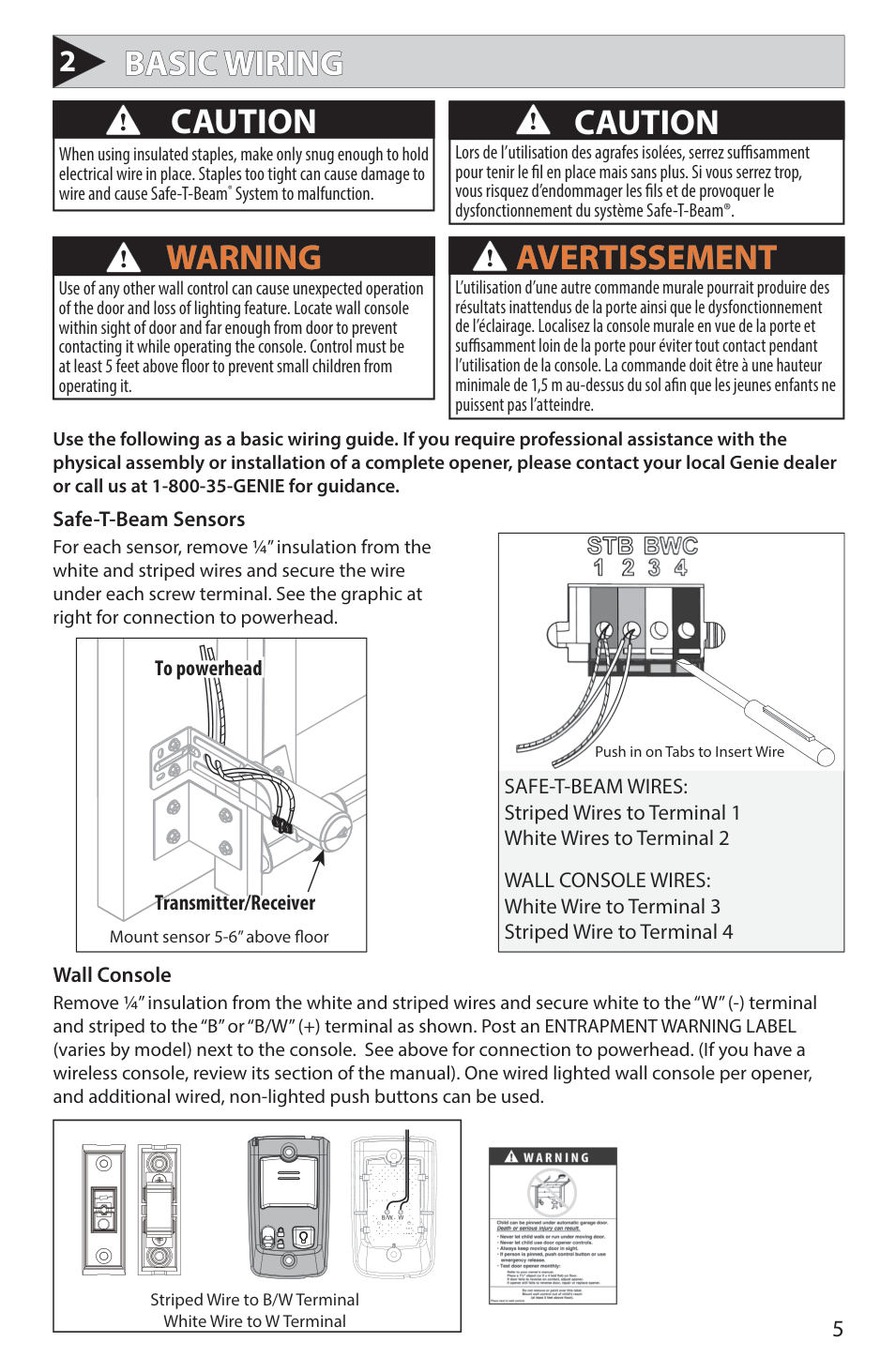
1-2. Enter Programming Mode
HOLD UNTIL LED Lights
Steady Blue
| | | | |---|---|---| | | | | | | | | | | | | | | | |
| | | | |---|---|---|
| | | | | | | | | | | | | | | |
NOTE: Carriage should be locked to
!
opener. Door should rest somewhere between full open and closed. Do not start with door fully open or closed.
RELEASE
Flashing Blue
| | | | |---|---|---| | | | | | | | | | | | | | | | |
| | | | |---|---|---| | | | | | | | | | | | | | | | |
Programming DOWN Limit:
• Long LED will light BLUE.
• Long LED will flash BLUE.
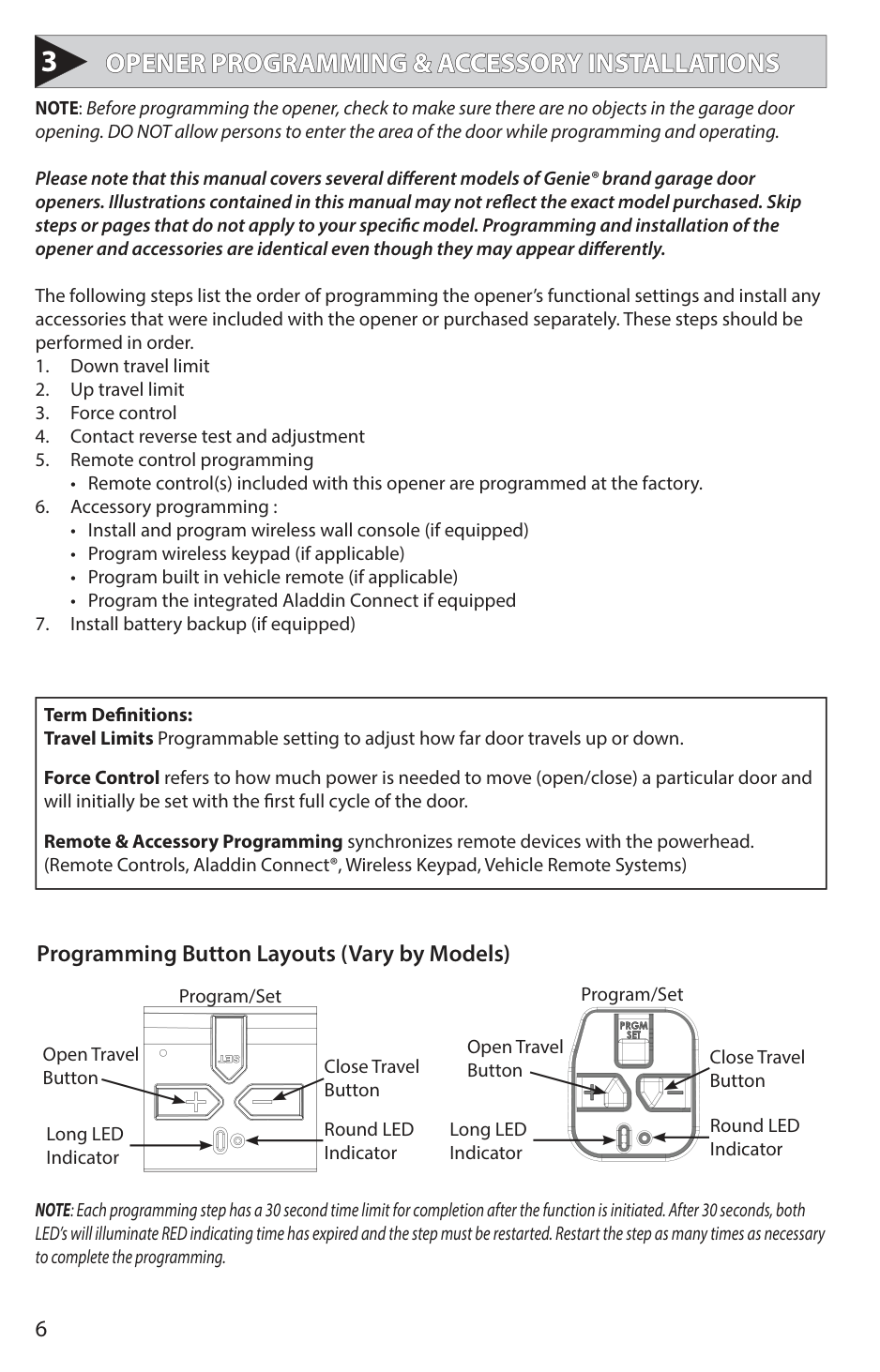
• Use the UP arrow button if door closes too far. Use both UP and DOWN buttons to adjust close travel as necessary.
Door should rest on the floor until the weather strip is compressed enough to seal along the width of the door. Damaged doors or uneven floors may not seal properly. Repair these conditions to achieve a proper seal. DO NOT compress seal so much that the door will bend or buckle.
| | | | |---|---|---| | | | | | | | | | | | | | | | |
| | | | |---|---|---| | | | | | | | | | | | |
| | | |
######################## 4. Lock Programming
PRESS & RELEASE
| | | | |---|---|---| | | | | | | | | | | | | | | | |
| | | | |---|---|---| | | | | | | | | | | | | | | | |
| | | | |---|---|---| | | | | | | | | | | | | | | | |
| | | | |---|---|---| | | | | | | | | | | | | | | | |
Flashing Blue
• Both LEDs will flash BLUE then go out. The DOWN limit is now programmed.
|SETTING UP TRAVEL LIMIT| |---|
############# Programming UP Limit:
1-2. Enter Programming Mode
• Long LED will light BLUE.
• Round LED will flash BLUE.
• Use the DOWN arrow button if door opens too far. Use both UP and DOWN buttons to adjust open travel as necessary.
Door should fully open so that door seal is even with door header. Do Not adjust so much that the door will bend or buckle or stretch door spring cables backward.
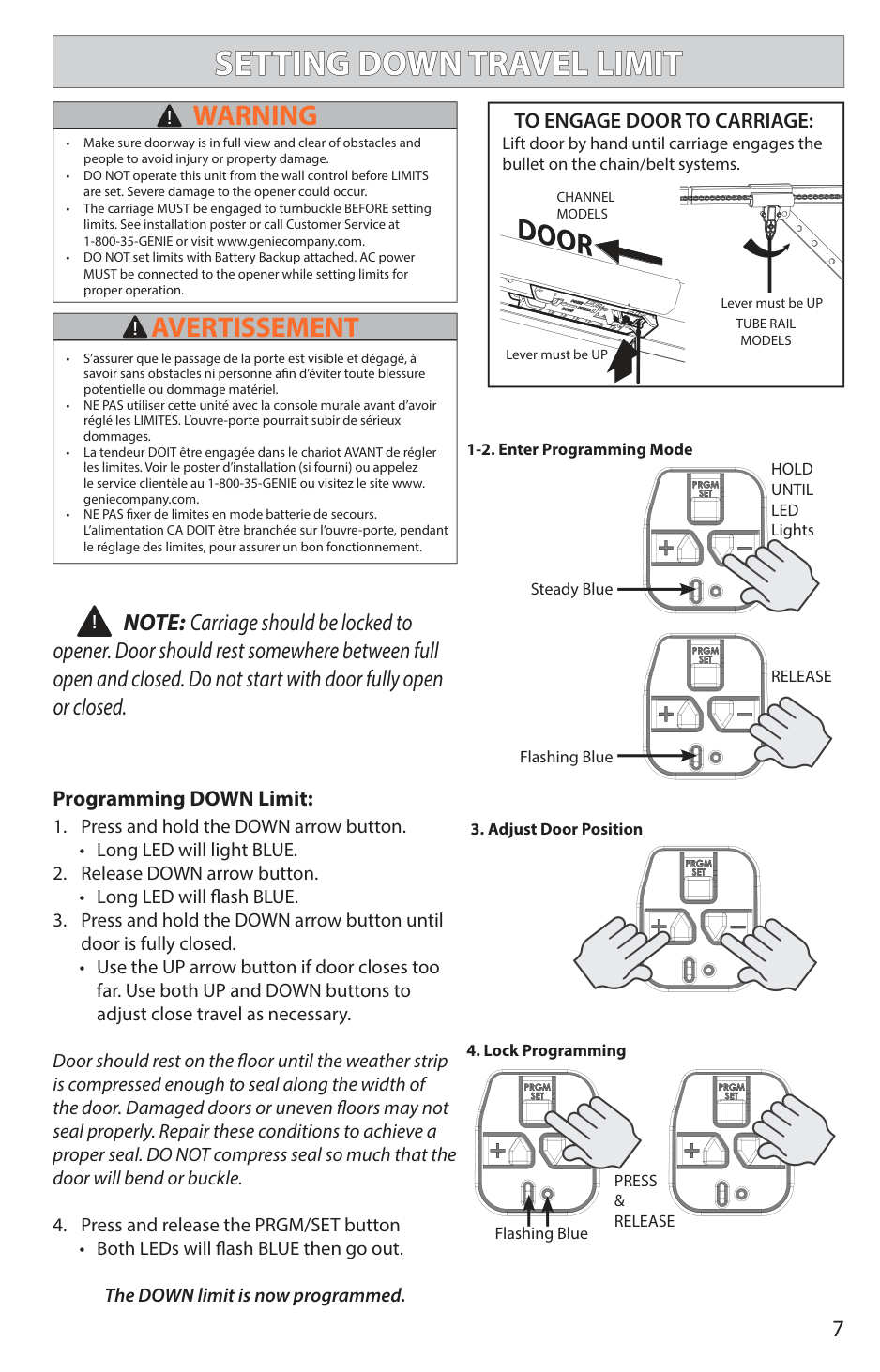
HOLD UNTIL LED Lights
Steady Blue
| | | | |---|---|---| | | | | | | | | | | | | | | | |
| | | | |---|---|---| | | | | | | | | | | | | | | | |
RELEASE
Flashing Blue
| | | | |---|---|---| | | | | | | | | | | | | | | | |
| | | | |---|---|---| | | | | | | | | | | | | | | | |
• Both LEDs will flash BLUE then go out.
The UP limit is now programmed.
| | | | |---|---|---| | | | | | | | | | | | | | | | |
| | | | |---|---|---| | | | | | | | | | | | | | | | |
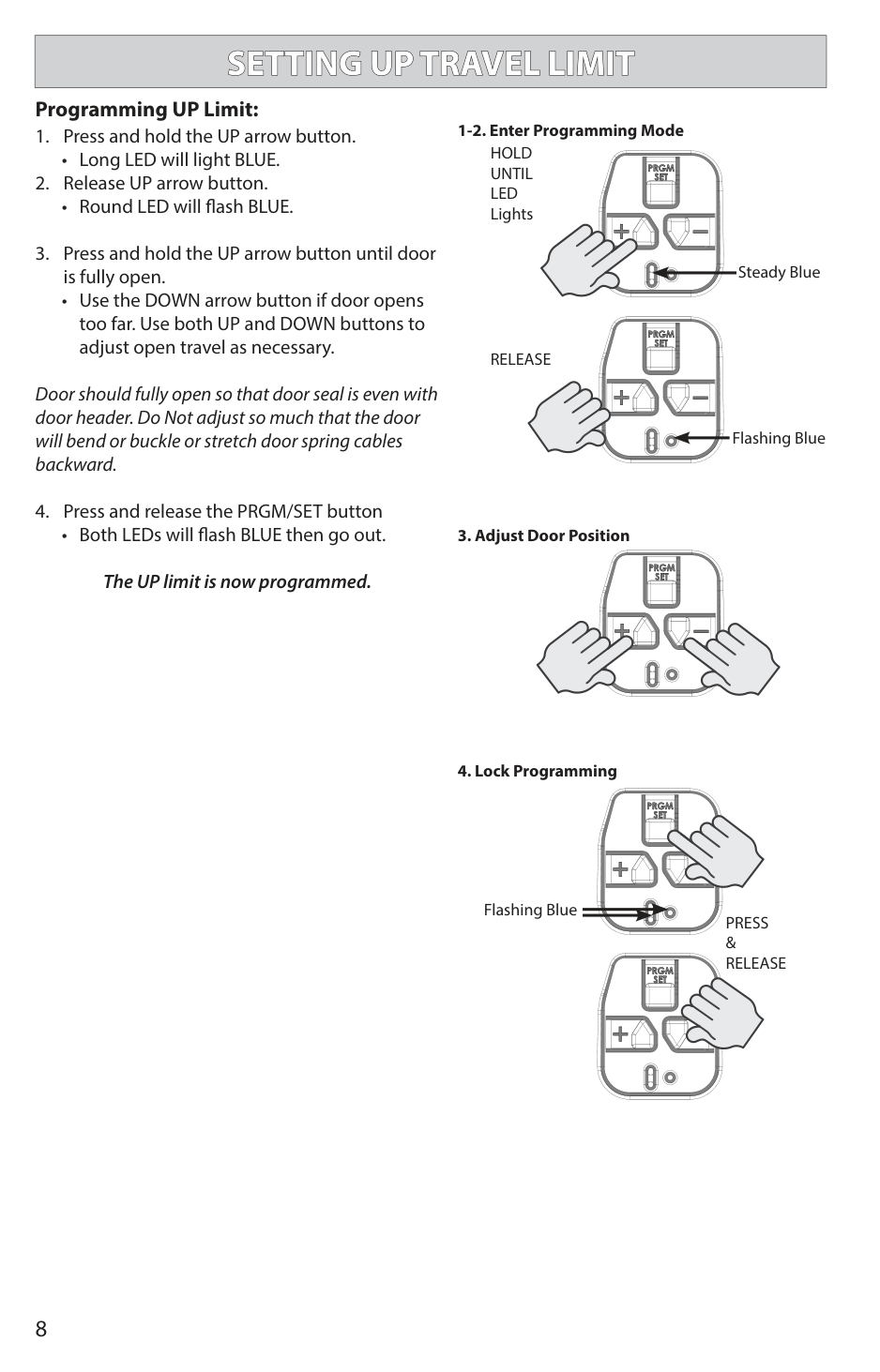
Flashing Blue
PRESS & RELEASE
| | | | |---|---|---| | | | | | | | | | | | | | | | |
| | | | |---|---|---| | | | | | | | | | | | | | | | |
############# Force Control
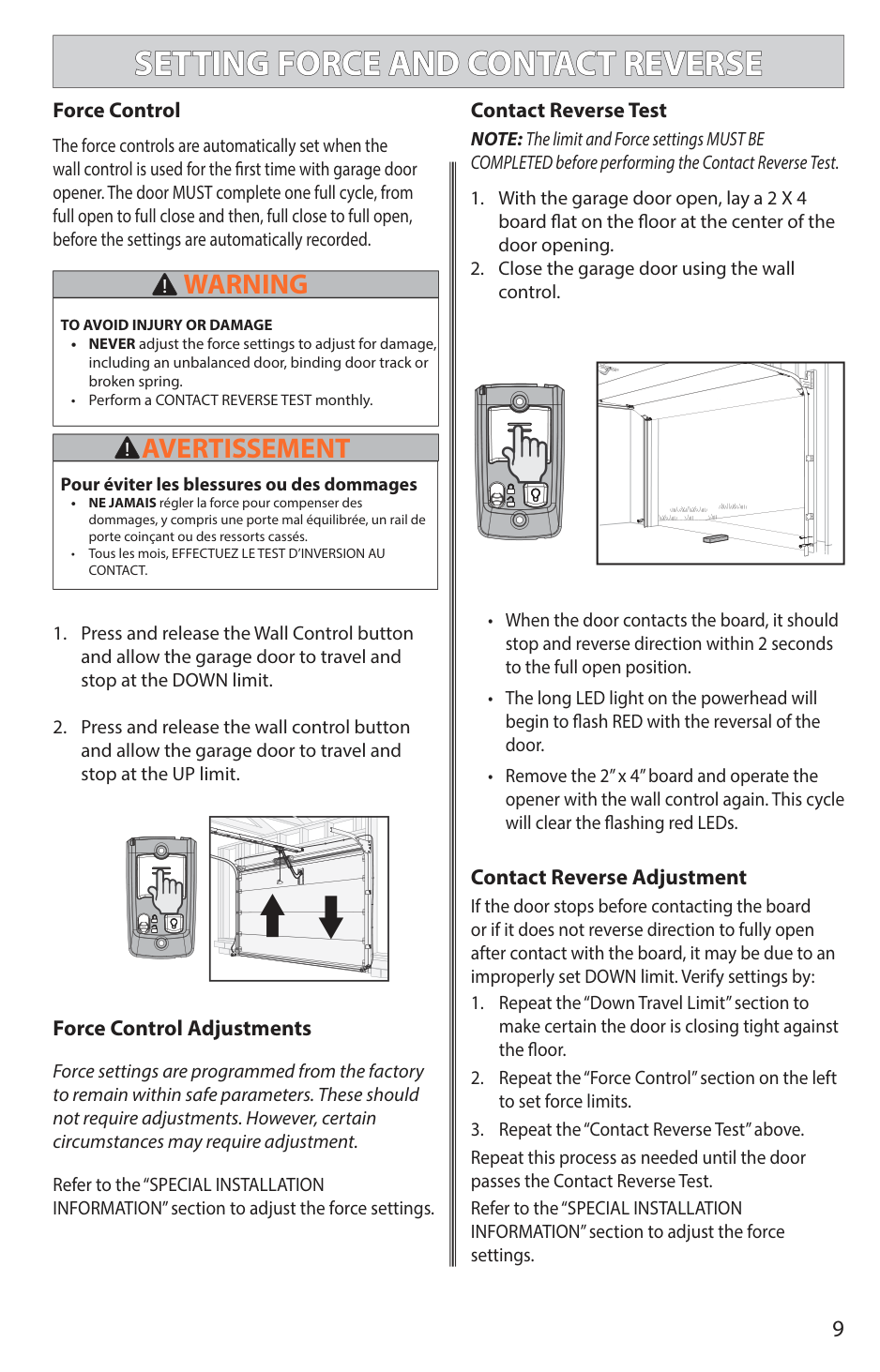
Contact Reverse Test NOTE: The limit and Force settings MUST BE COMPLETED before performing the Contact Reverse Test.
The force controls are automatically set when the wall control is used for the first time with garage door opener. The door MUST complete one full cycle, from full open to full close and then, full close to full open, before the settings are automatically recorded.
|WARNING!| |---| |TO AVOID INJURY OR DAMAGE
• NEVER adjust the force settings to adjust for damage, including an unbalanced door, binding door track or broken spring.
• Perform a CONTACT REVERSE TEST monthly.
|

|AVERTISSEMENT!| |---| |Pour éviter les blessures ou des dommages
• NE JAMAIS régler la force pour compenser des dommages, y compris une porte mal équilibrée, un rail de porte coinçant ou des ressorts cassés.
• Tous les mois, EFFECTUEZ LE TEST D’INVERSION AU CONTACT.
|
Contact Reverse Adjustment If the door stops before contacting the board or if it does not reverse direction to fully open after contact with the board, it may be due to an improperly set DOWN limit. Verify settings by:
############ Force Control Adjustments
Force settings are programmed from the factory to remain within safe parameters. These should not require adjustments. However, certain circumstances may require adjustment.
Repeat this process as needed until the door passes the Contact Reverse Test. Refer to the “SPECIAL INSTALLATION INFORMATION” section to adjust the force settings.
Refer to the “SPECIAL INSTALLATION INFORMATION” section to adjust the force settings.
|PROGRAM ADDITIONAL REMOTE CONTROLS| |---|
|THE REMOTE CONTROLS INCLUDED WITH THIS OPENER MAY HAVE BEEN PROGRAMMED AT THE FACTORY FOR YOUR CONVENIENCE.| |---|
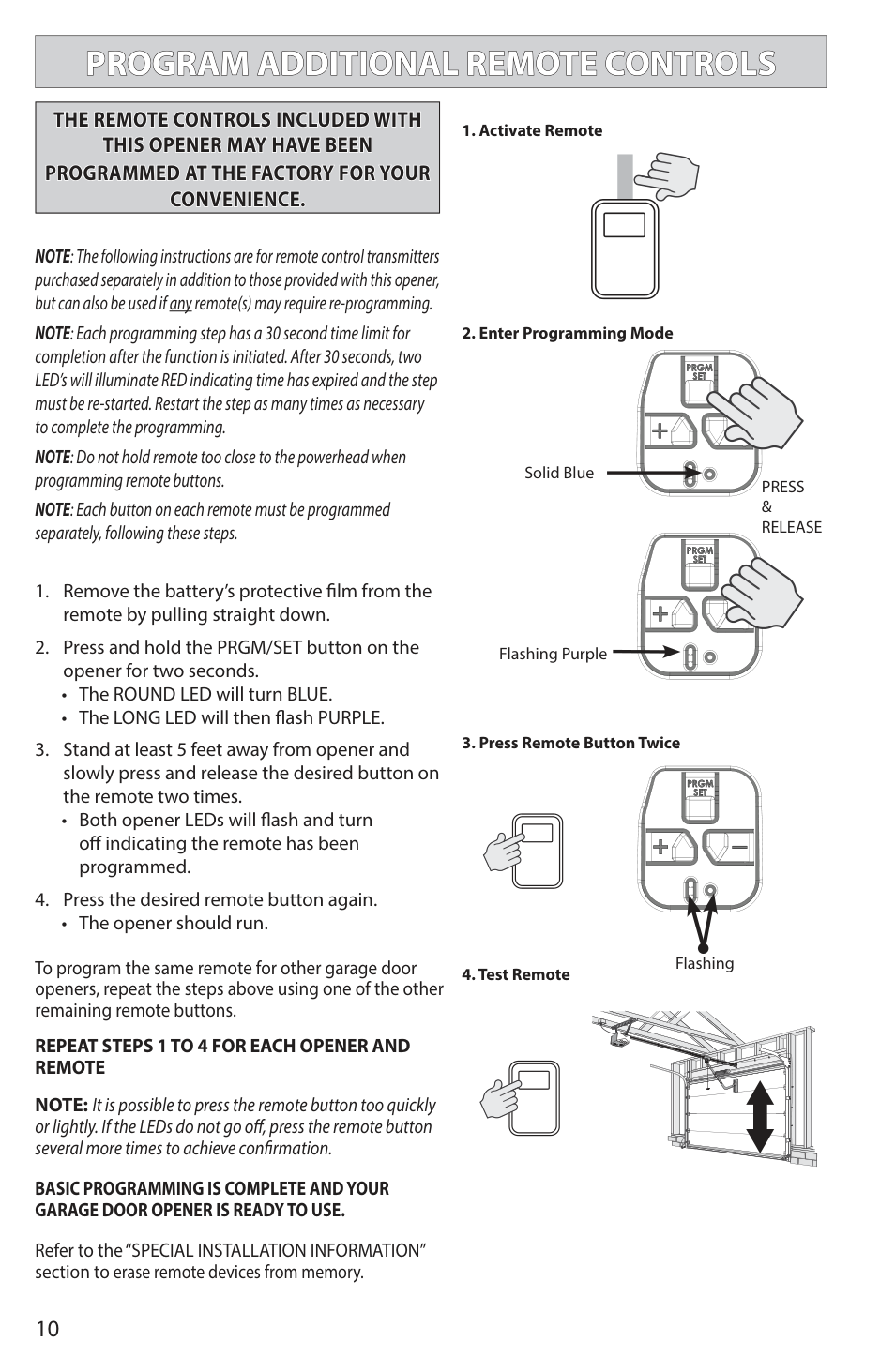
NOTE: The following instructions are for remote control transmitters purchased separately in addition to those provided with this opener, but can also be used if any remote(s) may require re-programming.
NOTE: Each programming step has a 30 second time limit for completion after the function is initiated. After 30 seconds, two LED’s will illuminate RED indicating time has expired and the step must be re-started. Restart the step as many times as necessary to complete the programming. NOTE: Do not hold remote too close to the powerhead when programming remote buttons. NOTE: Each button on each remote must be programmed separately, following these steps.
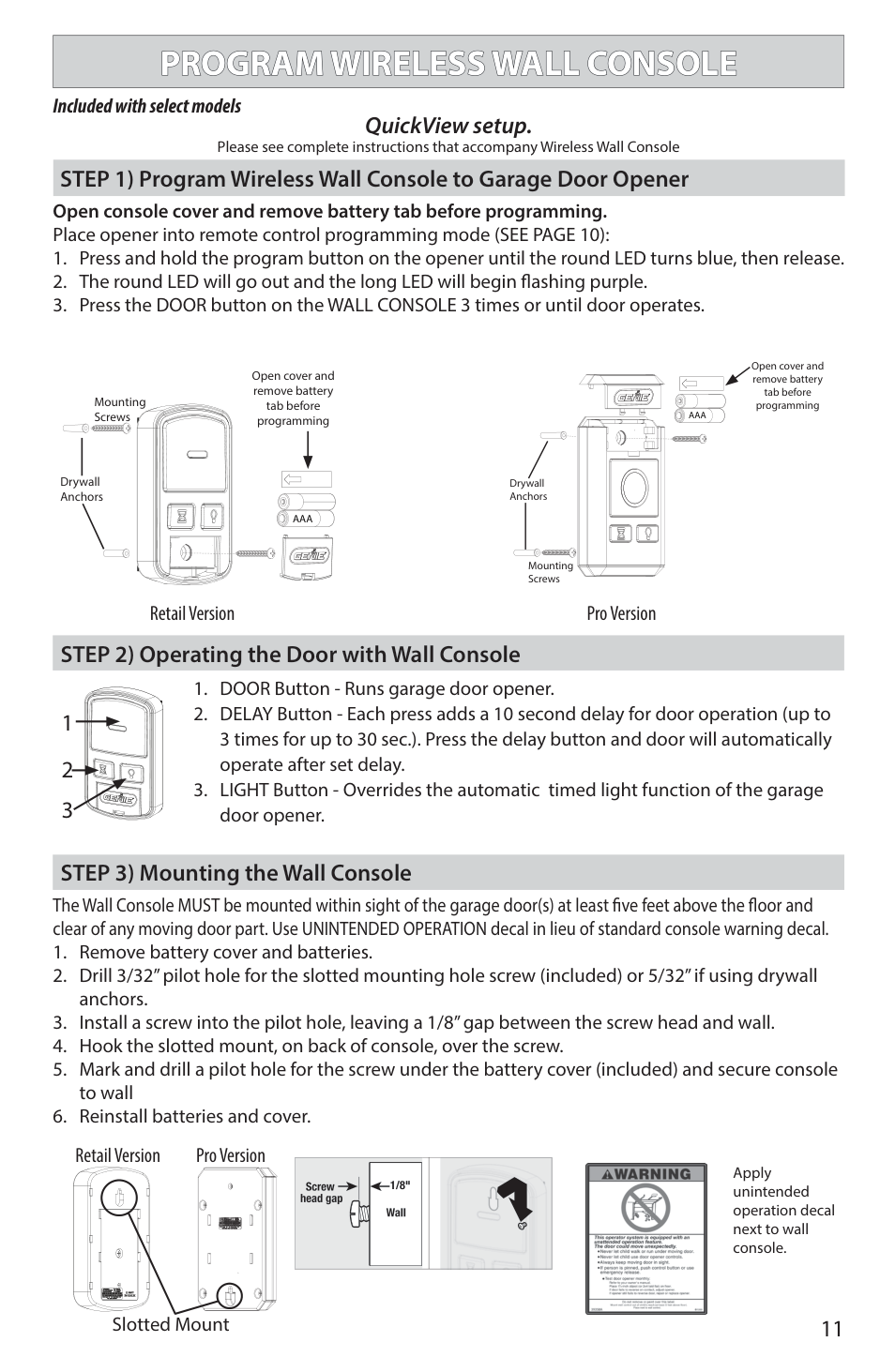
• Both opener LEDs will flash and turn off indicating the remote has been programmed.
• The opener should run.
To program the same remote for other garage door openers, repeat the steps above using one of the other remaining remote buttons.
################# REPEAT STEPS 1 TO 4 FOR EACH OPENER AND REMOTE
NOTE: It is possible to press the remote button too quickly or lightly. If the LEDs do not go off, press the remote button several more times to achieve confirmation.
################# BASIC PROGRAMMING IS COMPLETE AND YOUR GARAGE DOOR OPENER IS READY TO USE.
Solid Blue
PRESS & RELEASE
| | | | |---|---|---| | | | | | | | | | | | | | | | |
| | | | |---|---|---| | | | | | | | | | | | | | | | |
Flashing Purple
| | | | |---|---|---| | | | | | | | | | | | | | | | |
| | | | |---|---|---| | | | | | | | | | | | | | | | |
Flashing
| | | |---|---| | | |
| | | |---|---| | | |
| | | |---|---| | | | | | |
| | | |---|---| | | |
| | | |---|---| | | |
| | | |---|---| | | | | | |
| | | |---|---| | | | | | |
| | | |---|---| | | |
| | | |---|---| | | |
| | | | |---|---|---| | | | |
| | | |---|---| | | | | | |
| | | |---|---| | | |
| | | |---|---| | | |
| | | |---|---| | | |
| | | | | | |---|---|---|---|---| | | | | | | | | | | | | | | | | | |
Refer to the “SPECIAL INSTALLATION INFORMATION” section to erase remote devices from memory.
############### Included with select models
QuickView setup.
Please see complete instructions that accompany Wireless Wall Console
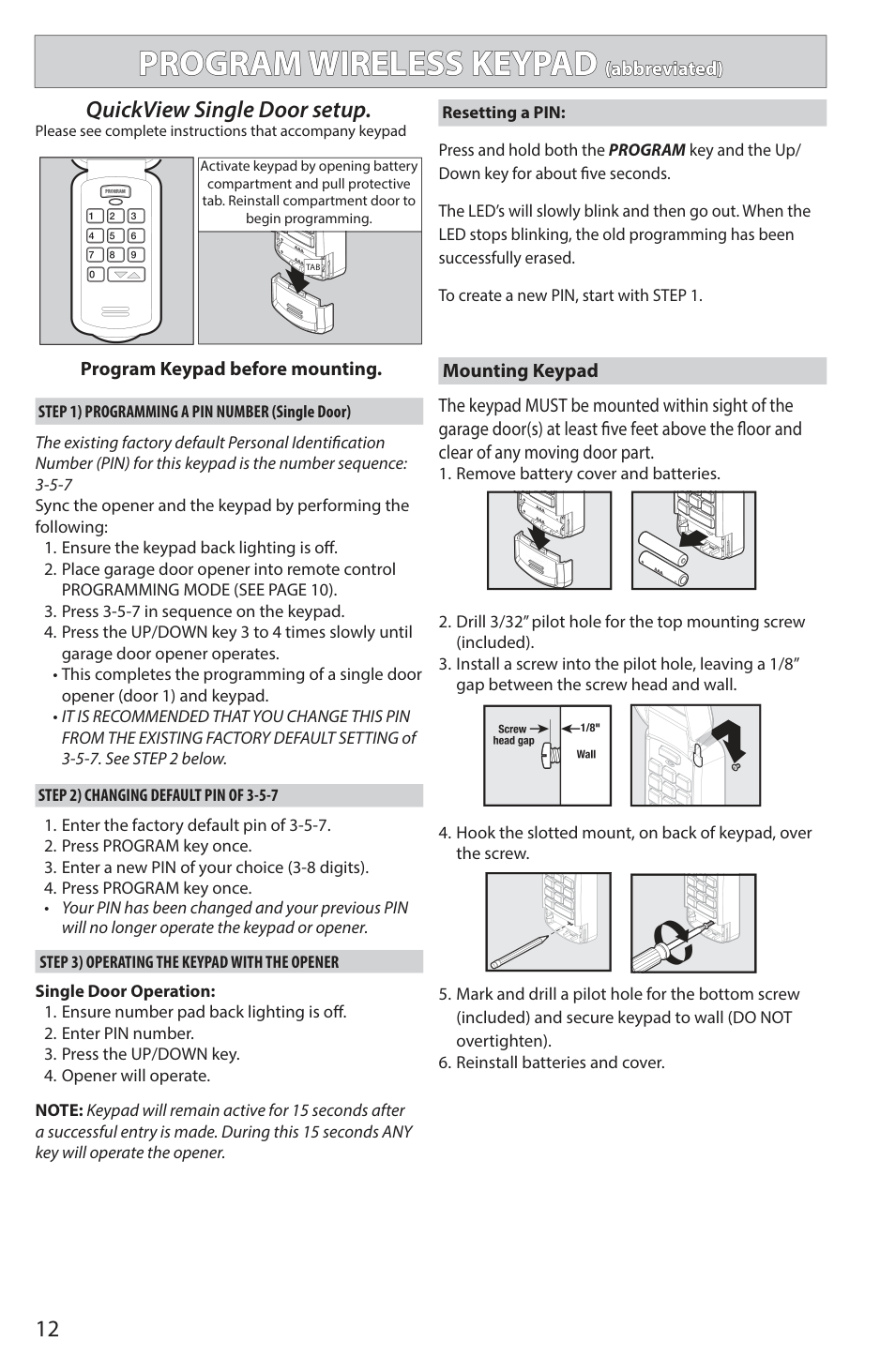
########## STEP 1) Program Wireless Wall Console to Garage Door Opener
Open console cover and remove battery tab before programming. Place opener into remote control programming mode (SEE PAGE 10):
Mounting Screws
| | | | |---|---|---|
Drywall Anchors
Open cover and remove battery tab before programming
AAA
Drywall Anchors
Mounting Screws
AAA
Open cover and remove battery tab before programming
Retail Version Pro Version
########## STEP 2) Operating the Door with Wall Console
| | | |---|---| | | | | | |
########## STEP 3) Mounting the Wall Console
The Wall Console MUST be mounted within sight of the garage door(s) at least five feet above the floor and clear of any moving door part. Use UNINTENDED OPERATION decal in lieu of standard console warning decal.
Retail Version Pro Version
| | | | |---|---|---| | | | |
| | | |---|---|
| | | |---|---|
| | | | |---|---|---| | | | | | | | |
Slotted Mount

Apply unintended operation decal next to wall console.
|PROGRAM WIRELESS KEYPAD (abbreviated)| |---|
########## QuickView Single Door setup.
####################### Resetting a PIN:
Please see complete instructions that accompany keypad
Press and hold both the PROGRAM key and the Up/ Down key for about five seconds.
Activate keypad by opening battery compartment and pull protective tab. Reinstall compartment door to begin programming.
| | |---|
The LED’s will slowly blink and then go out. When the LED stops blinking, the old programming has been successfully erased.
TAB
To create a new PIN, start with STEP 1.
Program Keypad before mounting.
################# Mounting Keypad
Single Door Operation:
The existing factory default Personal Identification Number (PIN) for this keypad is the number sequence: 3-5-7 Sync the opener and the keypad by performing the following:
• Your PIN has been changed and your previous PIN will no longer operate the keypad or opener.
The keypad MUST be mounted within sight of the garage door(s) at least five feet above the floor and clear of any moving door part.
| | | |---|---| | | | | | |
| | | |---|---| | | | | | |
| | | |---|---| | | | | | |
| | | |---|---| | | | | | |
| | | |---|---| | | |
| | | |---|---| | | |
| | | | |---|---|---| | | | |
NOTE: Keypad will remain active for 15 seconds after a successful entry is made. During this 15 seconds ANY key will operate the opener.
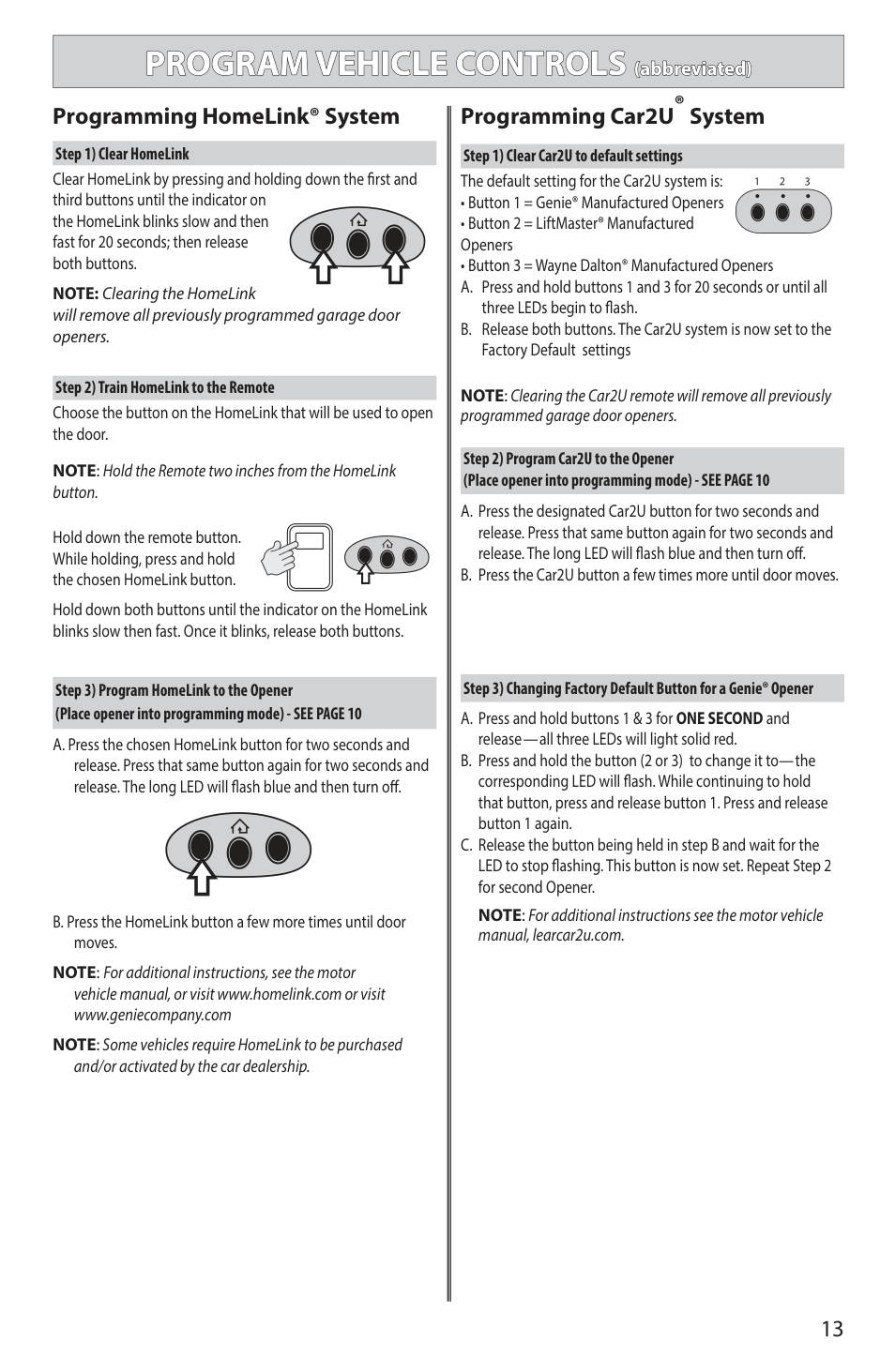
Clear HomeLink by pressing and holding down the first and third buttons until the indicator on the HomeLink blinks slow and then fast for 20 seconds; then release both buttons.
NOTE: Clearing the HomeLink will remove all previously programmed garage door openers.
Choose the button on the HomeLink that will be used to open the door.
NOTE: Hold the Remote two inches from the HomeLink button.
Hold down the remote button. While holding, press and hold the chosen HomeLink button.
Hold down both buttons until the indicator on the HomeLink blinks slow then fast. Once it blinks, release both buttons.
NOTE: For additional instructions, see the motor vehicle manual, or visit www.homelink.com or visit www.geniecompany.com
NOTE:Some vehicles require HomeLink to be purchased
and/or activated by the car dealership.
Programming HomeLink® System Programming Car2U® System
NOTE:Clearing the Car2U remote will remove all previously programmed garage door openers.
Step 3) Changing Factory Default Button for a Genie® Opener
NOTE: For additional instructions see the motor vehicle manual, learcar2u.com.
|SETTING UP ALADDIN CONNECT®| |---|
########## Perform these steps only after opener is fully installed, programmed and tested.
|CONSIGNES DE SÉCURITÉ IMPORTANTES| |---| |AVERTISSEMENT| |POUR RÉDUIRE LE RISQUE DE BLESSURES GRAVES VOIRE MORTELLES, LIRE ET COMPRENDRE TOUTES LES INSTRUCTIONS.
1. NE JAMAIS laisser les enfants utiliser ou jouer avec les commandes de l’ouvre-porte.
2. Placer l’étiquette d’AVERTISSEMENT en cas de coinçage à proximité du bouton mural ou de la console murale de manière à ce qu’elle soit bien en évidence.
3. NE JAMAIS PASSER SOUS LA PORTE EN MOUVEMENT.
4. NE JAMAIS PASSER SOUS UNE PORTE À L’ARRÊT PARTIELLEMENT OUVERTE.
5. Le système d’exploitation Aladdin Connect ™ a été conçu pour fonctionner sans surveillance. La porte peut se déplacer de façon inattendue.
CONSERVER CES INSTRUCTIONS|
|IMPORTANT SAFETY INSTRUCTIONS| |---| |WARNING| |TO REDUCE THE RISK OF SEVERE INJURY OR DEATH, READ AND FOLLOW ALL INSTRUCTIONS.
1. Never allow children to operate or play with door controls.
2. Install the entrapment WARNING placard next to the wall control in a prominent location.
3. NO PERSONS SHOULD CROSS THE PATH OF A MOVING DOOR.
4. NEVER GO UNDER A STOPPED/PARTIALLY OPEN DOOR.
5. The Aladdin Connect® operating system is designed for unattended operation. The door could move unexpectedly.
SAVE THESE INSTRUCTIONS|
####### Genie® Integrated Aladdin Connect® Models
The Aladdin Connect® system is a convenient mobile device app to operate garage door openers/ controllers from anywhere. The Aladdin Connect® app has the following features:
Check Wi-Fi Signal1
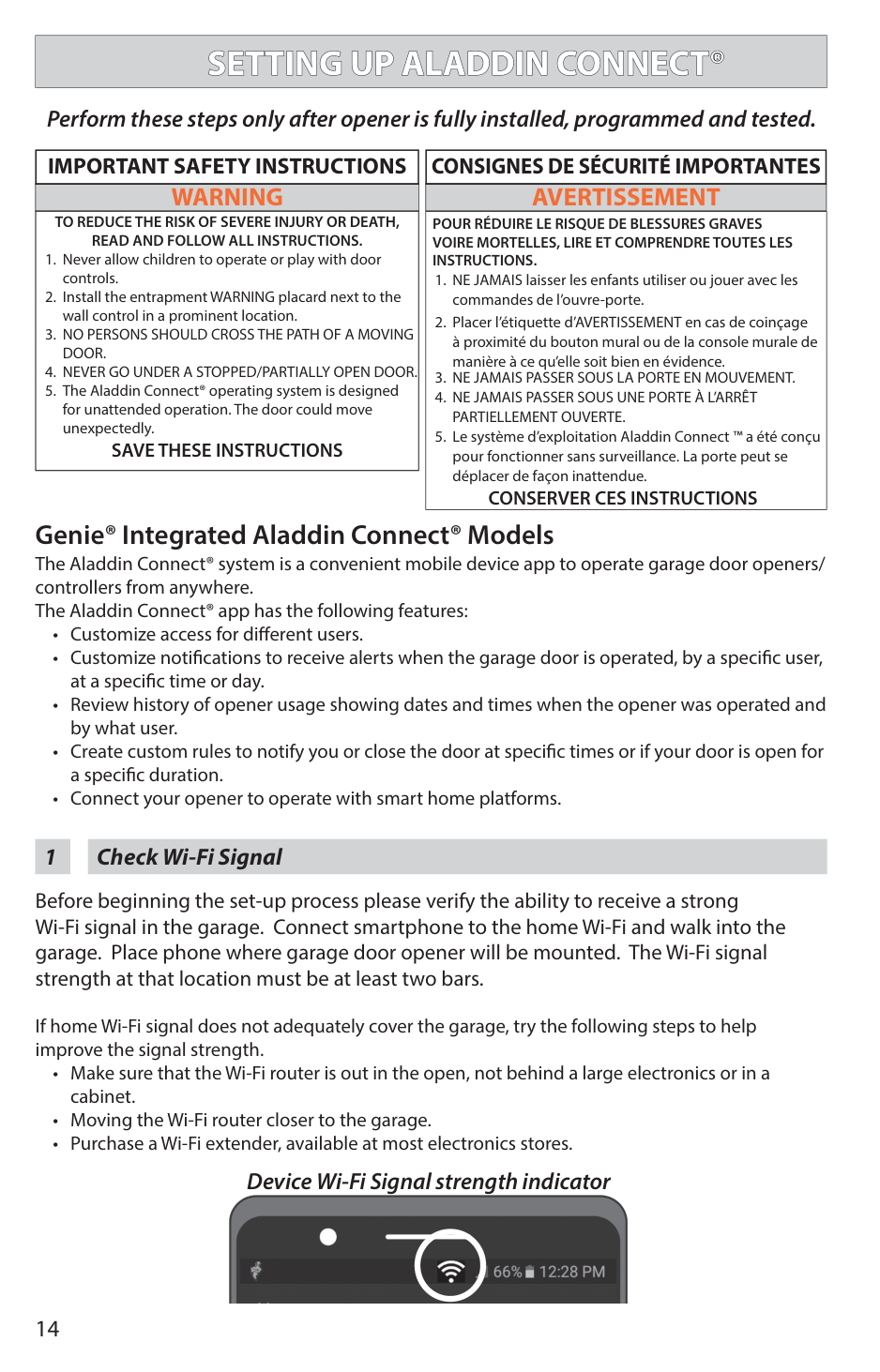
Before beginning the set-up process please verify the ability to receive a strong Wi-Fi signal in the garage. Connect smartphone to the home Wi-Fi and walk into the garage. Place phone where garage door opener will be mounted. The Wi-Fi signal strength at that location must be at least two bars.
If home Wi-Fi signal does not adequately cover the garage, try the following steps to help improve the signal strength.
Device Wi-Fi Signal strength indicator

Download the Aladdin Connect® app (Unless using 3rd party app)2
######### Scan for iOS app
Scan for Android app

Apple and the Apple logo are trademarks of Apple Inc., registered in the U.S. and other countries. App Store is a service mark of Apple Inc.

Follow the Aladdin Connect® app instructions3
Follow steps per the app instructions.
For help at any time contact The Genie Company at 1-866-599-4995 or visit our website. www.geniecompany.com/aladdinconnect
|INSTALLER: LEAVE THIS MANUAL WITH HOMEOWNER HOMEOWNER: SAVE THIS MANUAL FOR FUTURE REFERENCE
BELT/CHAIN DRIVE GARAGE DOOR OPENERS PROGRAMMING, OPERATION, & MAINTENANCE MANUAL
SERIAL NUMBER DECAL
|STOP
DO NOT return product to store, visit www.geniecompany.com or call Customer Service at: 1-800-35-GENIE| |---|
iDCM SERIAL NUMBER DECAL
To reduce the risk of injury to persons or damage to property, use this opener only with a sectional residential door.
WARNING
Por reduire le risque de blessures ou de dommages materials, utillsez cet ouvre-porte uniquement pour une porte a section re sidentielie.
AVERTISSEMENT!
!
DO NOT use photocells from other manufacturers or openers with this opener.
lenses, or accessories.
| |---|
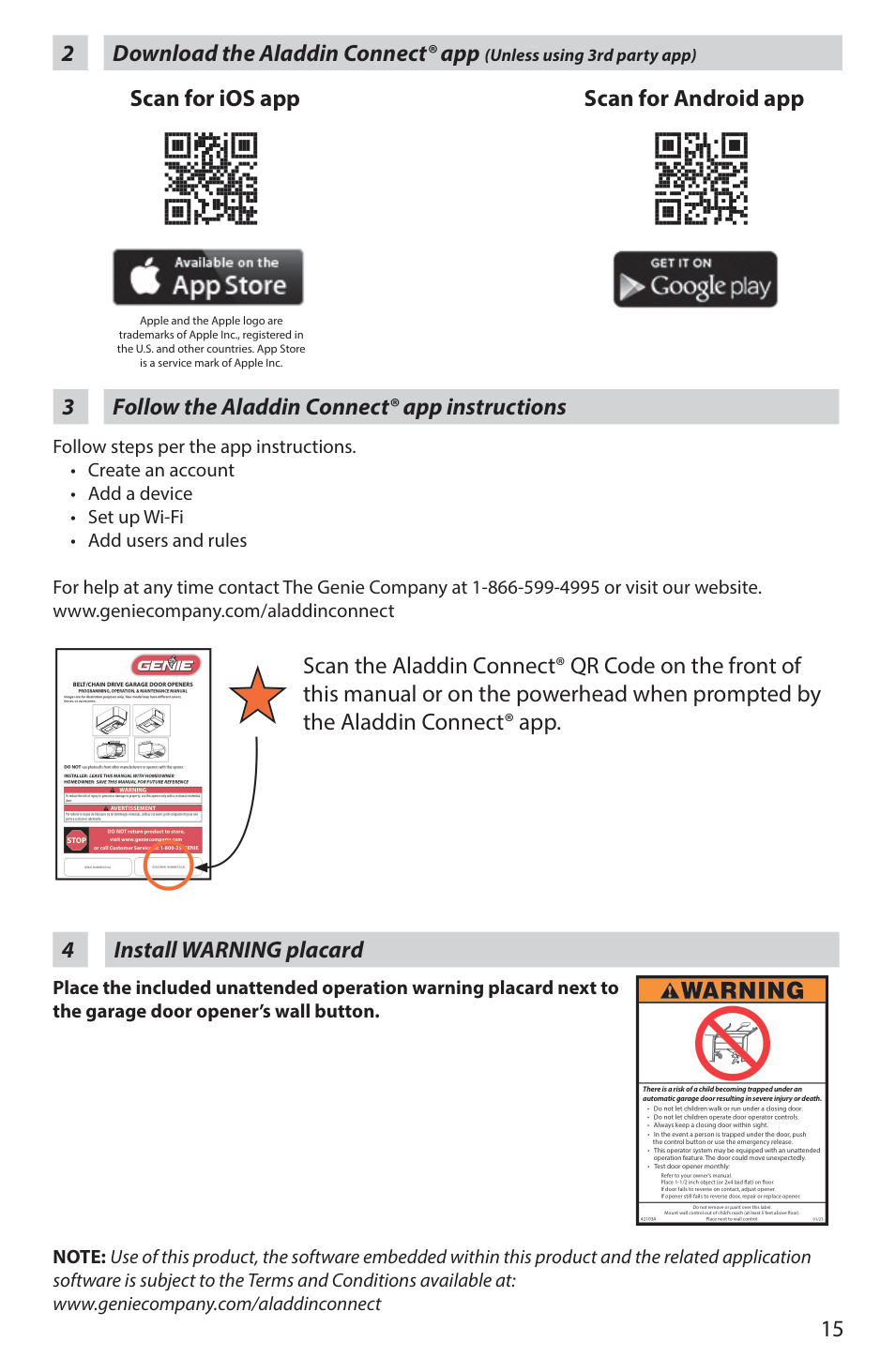
Scan the Aladdin Connect® QR Code on the front of this manual or on the powerhead when prompted by the Aladdin Connect® app.
Install WARNING placard4
################# Place the included unattended operation warning placard next to the garage door opener’s wall button.
| | |---| | | |• Test door opener monthly:
• Do not let children walk or run under a closing door.
• Do not let children operate door operator controls.
• Always keep a closing door within sight.
There is a risk of a child becoming trapped under an automatic garage door resulting in severe injury or death.
• In the event a person is trapped under the door, push the control button or use the emergency release. This operator system may be equipped with an unattended operation feature. The door could move unexpectedly.
Refer to your owner’s manual. Place 1-1/2 inch object (or 2x4 laid at) on oor. If door fails to reverse on contact, adjust opener. If opener still fails to reverse door, repair or replace opener.| |01/23
Do not remove or paint over this label. Mount wall control out of child’s reach (at least 5 feet above oor). Place next to wall control.42103A|
NOTE: Use of this product, the software embedded within this product and the related application software is subject to the Terms and Conditions available at: www.geniecompany.com/aladdinconnect
|SPECIAL INSTALLATION INFORMATION4| |---|
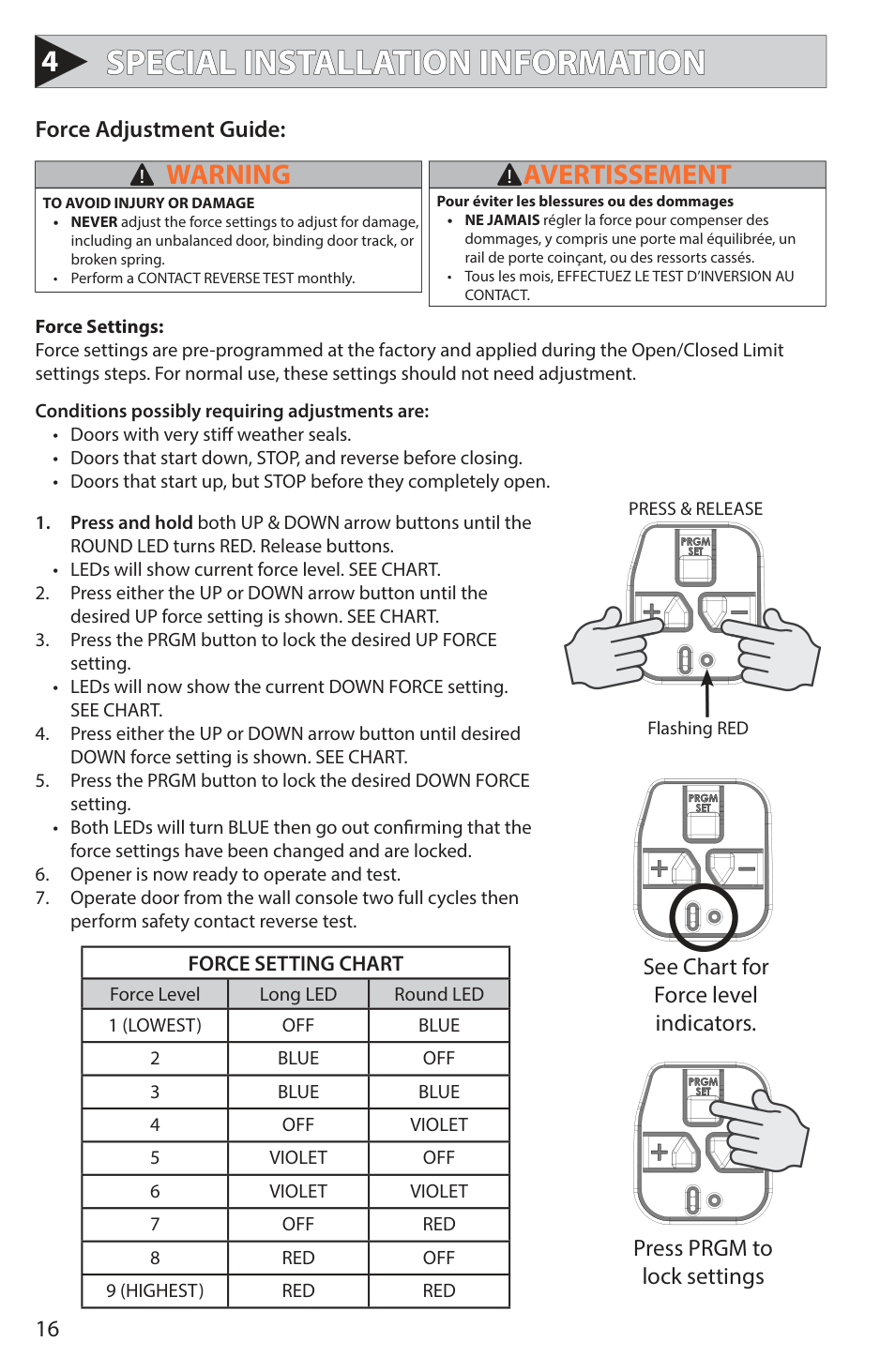
Force Adjustment Guide:
|WARNING!| |---| |TO AVOID INJURY OR DAMAGE
• NEVER adjust the force settings to adjust for damage, including an unbalanced door, binding door track, or broken spring.
• Perform a CONTACT REVERSE TEST monthly.
|
|AVERTISSEMENT!| |---| |Pour éviter les blessures ou des dommages
• NE JAMAIS régler la force pour compenser des dommages, y compris une porte mal équilibrée, un rail de porte coinçant, ou des ressorts cassés.
• Tous les mois, EFFECTUEZ LE TEST D’INVERSION AU CONTACT.
|
Force Settings: Force settings are pre-programmed at the factory and applied during the Open/Closed Limit settings steps. For normal use, these settings should not need adjustment.
Conditions possibly requiring adjustments are:
• LEDs will show current force level. SEE CHART.
• LEDs will now show the current DOWN FORCE setting. SEE CHART.
• Both LEDs will turn BLUE then go out confirming that the force settings have been changed and are locked.
|FORCE SETTING CHART|FORCE SETTING CHART|FORCE SETTING CHART| |---|---|---| |Force Level|Long LED|Round LED| |1 (LOWEST)|OFF|BLUE| |2|BLUE|OFF| |3|BLUE|BLUE| |4|OFF|VIOLET| |5|VIOLET|OFF| |6|VIOLET|VIOLET| |7|OFF|RED| |8|RED|OFF| |9 (HIGHEST)|RED|RED|
PRESS & RELEASE
| | | | |---|---|---| | | | | | | | | | | | |
| | | | |---|---|---| | | | |
| | | | | | | | | | | |
Flashing RED
| | | | |---|---|---| | | | | | | | | | | | |
| | | | |---|---|---| | | | | | | | | | | | | | | | |
See Chart for Force level indicators.
| | | | |---|---|---| | | | | | | | | | | | |
| | | | |---|---|---| | | | | | | | | | | | | | | | |
Press PRGM to lock settings
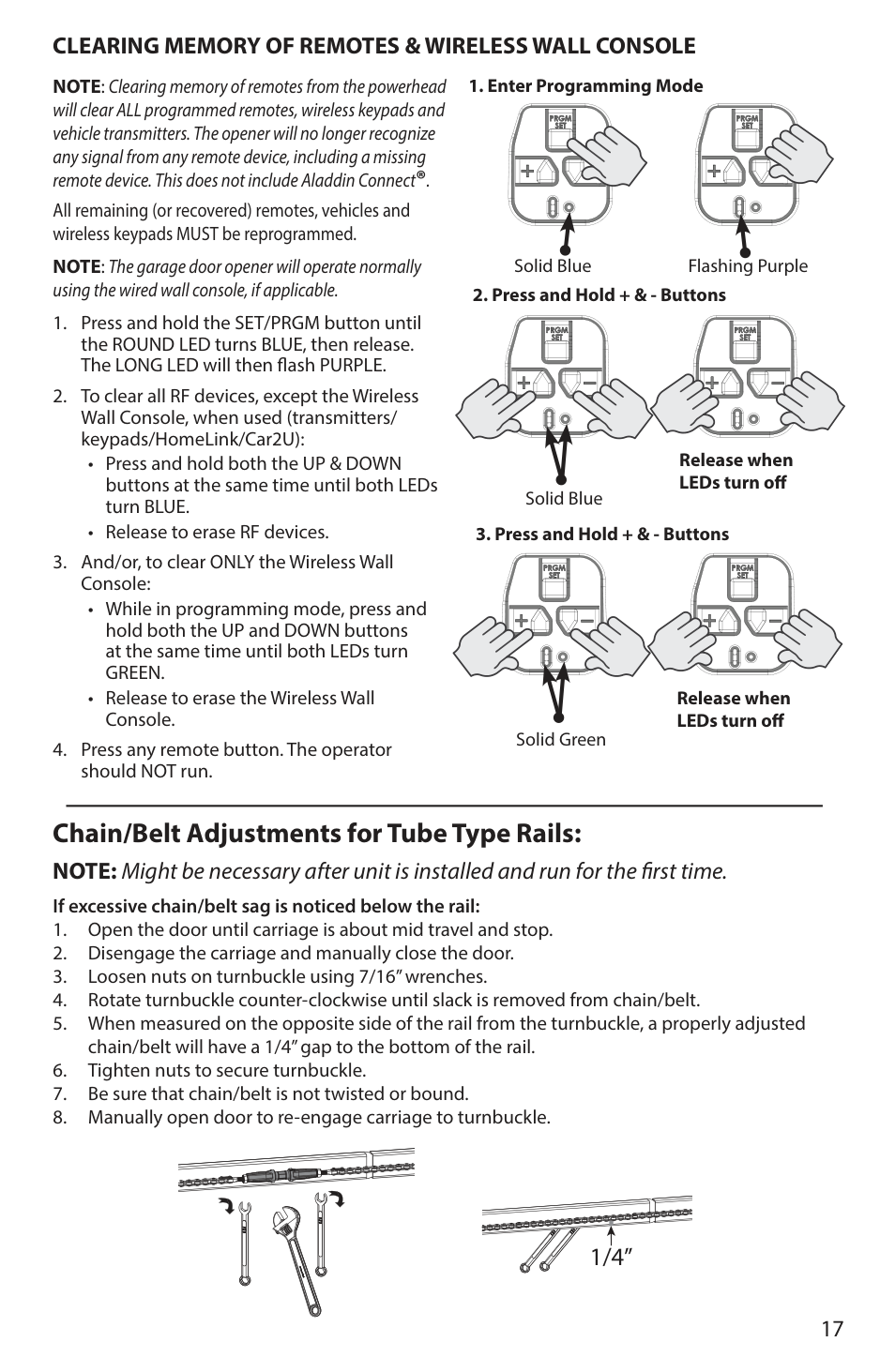
######### CLEARING MEMORY OF REMOTES & WIRELESS WALL CONSOLE
NOTE: Clearing memory of remotes from the powerhead will clear ALL programmed remotes, wireless keypads and vehicle transmitters. The opener will no longer recognize any signal from any remote device, including a missing remote device. This does not include Aladdin Connect®.
| | | | |---|---|---| | | | | | | | |
| | | | |---|---|---| | | | | | | | | | | | |
Solid Blue
| | | | |---|---|---| | | | | | | | |
| | | | |---|---|---| | | | | | | | | | | | |
Flashing Purple
| | | | |---|---|---| | | | | | | | |
| | | | |---|---|---| | | | | | | | | | | | |
Solid Blue
All remaining (or recovered) remotes, vehicles and wireless keypads MUST be reprogrammed.
NOTE: The garage door opener will operate normally using the wired wall console, if applicable.
| | | | |---|---|---| | | | | | | | |
| | | | |---|---|---| | | | | | | | | | | | |
Release when LEDs turn off
| | | | |---|---|---| | | | | | | | |
| | | | |---|---|---| | | | | | | | | | | | |
| | | | |---|---|---| | | | | | | | |
| | | | |---|---|---| | | | | | | | | | | | |
Release when LEDs turn off
Solid Green
Chain/Belt Adjustments for Tube Type Rails: NOTE: Might be necessary after unit is installed and run for the first time.
If excessive chain/belt sag is noticed below the rail:
| | | |---|---| | | |
| | | |---|---| | | |
| | | |---|---| | | | | | |
| | | |---|---| | | | | | |
| | | |---|---| | | |
| | | |---|---| | | |
1/4”
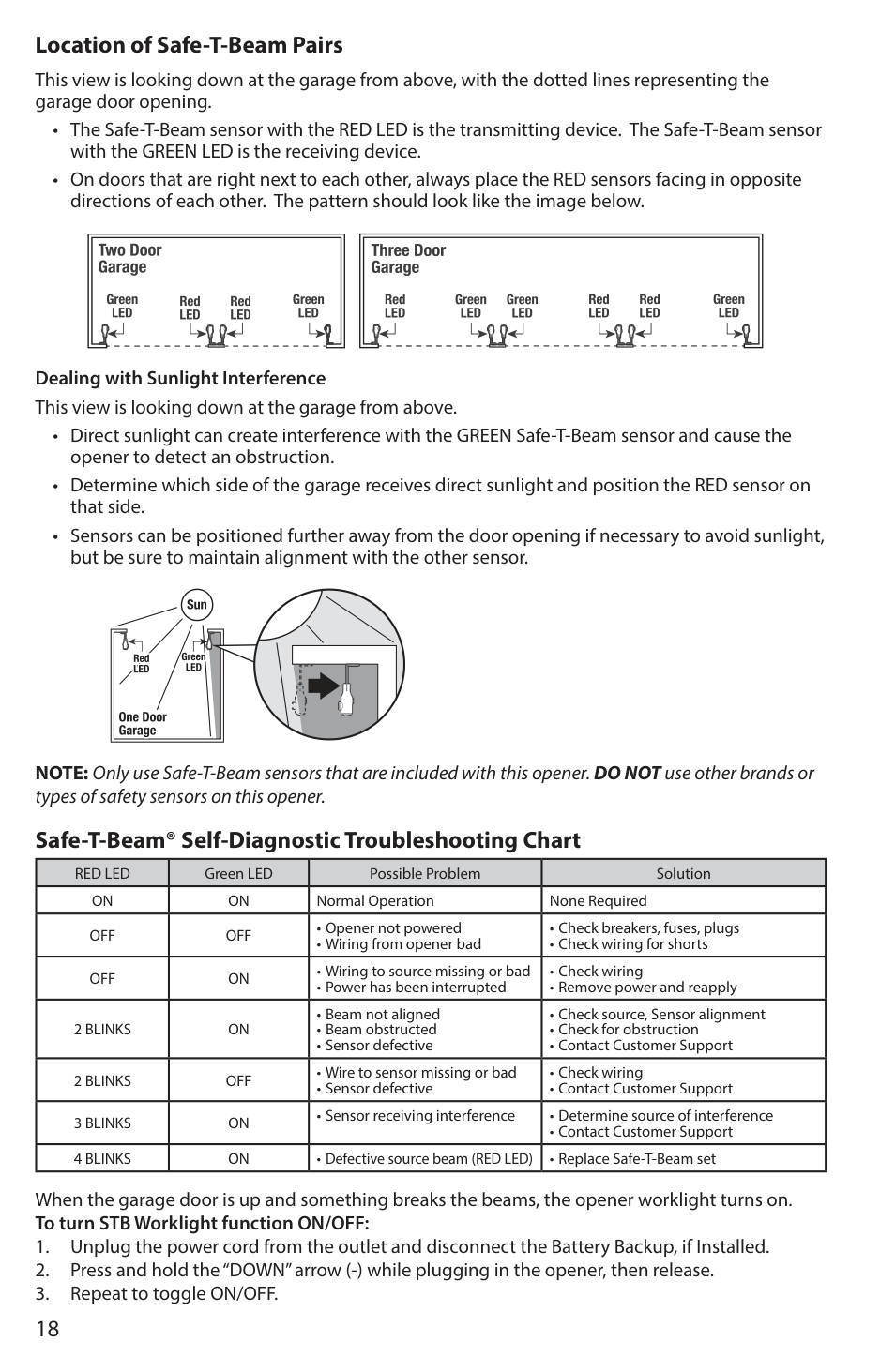
######### Location of Safe-T-Beam Pairs
This view is looking down at the garage from above, with the dotted lines representing the garage door opening.
Dealing with Sunlight Interference This view is looking down at the garage from above.
NOTE: Only use Safe-T-Beam sensors that are included with this opener. DO NOT use other brands or types of safety sensors on this opener.
######### Safe-T-Beam® Self-Diagnostic Troubleshooting Chart
|RED LED|Green LED|Possible Problem|Solution| |---|---|---|---| |ON|ON|Normal Operation|None Required| |OFF|OFF|• Opener not powered
• Wiring from opener bad
|• Check breakers, fuses, plugs
• Check wiring for shorts
| |OFF|ON|• Wiring to source missing or bad
• Power has been interrupted
|• Check wiring
• Remove power and reapply
| |2 BLINKS|ON|• Beam not aligned
• Beam obstructed
• Sensor defective
|• Check source, Sensor alignment
• Check for obstruction
• Contact Customer Support
| |2 BLINKS|OFF|• Wire to sensor missing or bad
• Sensor defective
|• Check wiring
• Contact Customer Support
| |3 BLINKS|ON|• Sensor receiving interference|• Determine source of interference
• Contact Customer Support
| |4 BLINKS|ON|• Defective source beam (RED LED)|• Replace Safe-T-Beam set|
When the garage door is up and something breaks the beams, the opener worklight turns on. To turn STB Worklight function ON/OFF:
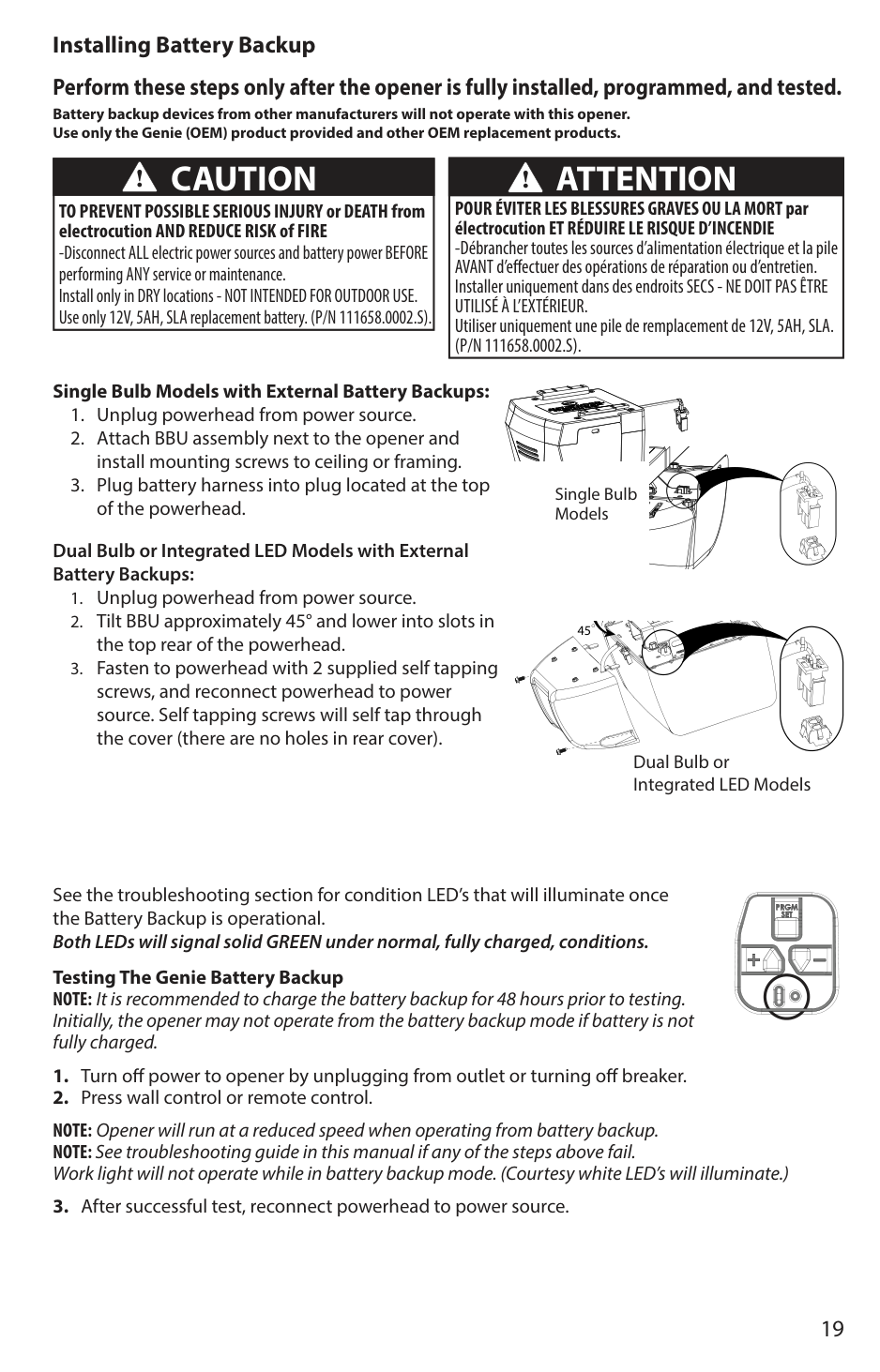
######### Installing Battery Backup
######### Perform these steps only after the opener is fully installed, programmed, and tested.
Battery backup devices from other manufacturers will not operate with this opener. Use only the Genie (OEM) product provided and other OEM replacement products.
|POUR ÉVITER LES BLESSURES GRAVES OU LA MORT par électrocution ET RÉDUIRE LE RISQUE D’INCENDIE
-Débrancher toutes les sources d’alimentation électrique et la pile AVANT d’effectuer des opérations de réparation ou d’entretien. Installer uniquement dans des endroits SECS - NE DOIT PAS ÊTRE UTILISÉ À L’EXTÉRIEUR. Utiliser uniquement une pile de remplacement de 12V, 5AH, SLA. (P/N 111658.0002.S).
ATTENTION!
| |---|
|CAUTION
TO PREVENT POSSIBLE SERIOUS INJURY or DEATH from electrocution AND REDUCE RISK of FIRE
-Disconnect ALL electric power sources and battery power BEFORE performing ANY service or maintenance. Install only in DRY locations - NOT INTENDED FOR OUTDOOR USE. Use only 12V, 5AH, SLA replacement battery. (P/N 111658.0002.S).
!| |---|
################# Single Bulb Models with External Battery Backups:
Single Bulb Models
Dual Bulb or Integrated LED Models with External Battery Backups:
45
Dual Bulb or Integrated LED Models
See the troubleshooting section for condition LED’s that will illuminate once the Battery Backup is operational. Both LEDs will signal solid GREEN under normal, fully charged, conditions.
Testing The Genie Battery Backup NOTE: It is recommended to charge the battery backup for 48 hours prior to testing. Initially, the opener may not operate from the battery backup mode if battery is not fully charged.
NOTE: Opener will run at a reduced speed when operating from battery backup. NOTE:See troubleshooting guide in this manual if any of the steps above fail. Work light will not operate while in battery backup mode. (Courtesy white LED’s will illuminate.)
| | | | |---|---|---| | | | | | | | |
| | | | |---|---|---| | | | | | | | | | | | |
|MAINTENANCE5| |---|
|IMPORTANT SAFETY INSTRUCTIONS| |---| |WARNING!| |To reduce the risk of severe injury or death, read and follow all instructions.
1. NEVERlet children operate or play with the door controls.
2. Keep remote away from children.
3. ALWAYS keep the moving door in sight and away from people and objects until door is completely closed. NO ONE SHOULD CROSS THE PATH OF THE MOVING DOOR.
4. NEVERGO UNDER A STOPPED, PARTIALLY OPEN DOOR.
5. Test opener monthly. The door MUST reverse on contact with a 1-1/2” high object (or 2” x 4” board laid flat) at the center of the doorway on the floor. After adjusting either the force or limit of travel, retest door opener. Failure to adjust the opener properly may cause severe injury or death.
6. When possible, use emergency release only when door is closed. Use caution when using this release with the door open. Weak or broken springs are capable of increasing the rate of door closing and increasing the risk of severe injury or death.
7. KEEP DOORS PROPERLY BALANCED. See your garage door Owner’s Manual. An improperly balanced door increases the risk of severe injury or death. Have a trained door system technician make repairs to cables, spring assemblies, and other hardware.
SAVE THESE INSTRUCTIONS|
|IMPORTANTES CONSIGNES DE SÉCURITÉ| |---| |AVERTISSEMENT!| |Pour réduire le risque de blessures graves voire mortelles, lire et comprendre toutes les instructions.
1. NE JAMAIS permettre aux enfants d’actionner ou de jouer avec les commandes de la porte.
2. Tenir les télécommandes hors de la portée des enfants.
3. TOUJOURS garder en vue la porte en mouvement et tenir à l’écart toute personne ou objet jusqu’à ce que la porte soit totalement fermée. PERSONNE NE DOIT TRAVERSER LA TRAJECTOIRE D’UNE PORTE EN MOUVEMENT.
4. NE JAMAIS PASSER SOUS UNE PORTE À L’ARRÊT PARTIELLEMENT OUVERTE.
5. Tester l’ouvre-porte une fois par mois. La porte de garage DOIT inverser sa course au contact d’un objet de 4 cm (planche de 5 sur 10 cm) posé à plat sur le sol au centre de l’ouverture de la porte. Après avoir réglé la force ou la limite de la course, retenter l’ouvre-porte de garage. Un mauvais réglage de l’ouvre-porte peut entraîner des blessures graves voire mortelles
6. Utiliser, dans la mesure du possible le déclenchement d’urgence uniquement lorsque la porte est fermée. Utiliser le déclenchement d’urgence avec prudence lorsque la porte est ouverte. Des ressorts faibles ou brisés peuvent faire descendre la porte rapidement ce qui peut entraîner des blessures graves voire mortelles.
7. VEILLER À CE QUE LA PORTE SOIT CORRECTEMENT ÉQUILIBRÉE. Consulter le manuel du propriétaire de la porte de garage. Une porte déséquilibrée pourrait entraîner de graves blessures voire mortelles. Demander à un technicien spécialisé en système de portes de se charger des réparations des câbles, des ressorts et de toute autre quincaillerie.
CONSERVER CES INSTRUCTIONS|
|AVERTISSEMENT!
| |---| |L’utilisation d’une autre commande murale pourrait produire des résultats inattendus de la porte ainsi que le dysfonctionnement de l’éclairage. Localisez la console murale en vue de la porte et suffisamment loin de la porte pour éviter tout contact pendant l’utilisation de la console. La commande doit être à une hauteur minimale de 1,5 m au-dessus du sol afin que les jeunes enfants ne puissent pas l’atteindre.|
|WARNING!| |---| |Use of any other wall control can cause unexpected operation of the door and loss of lighting feature. Locate wall console within sight of the door but far enough from door to prevent contacting it while operating the console. Control must be at least 5 feet above the floor to prevent small children from operating it.|
####### Regular Maintenance Schedule
Regular inspection/maintenance for the door and opener should be performed at regular intervals to ensure the system runs at peak safety, performance, and efficiency.
|MAINTENANCE ITEM|INTERVALS|DETAILS| |---|---|---| |Contact Reverse Test|Monthly|See Page 9 to run system test.| |Lubricate Door Hardware|Monthly|Lubricate Rollers & Hinges with a light weight general purpose grease.| |Safe-T-Beam® system check|Monthly|Check wiring for loose connections, cracks or worn insulation. Clean lenses of dirt & debris.| |Door Balance|Monthly|See Maintenance Detail below| |Battery Backup System|Monthly|Unplug opener from outlet. Test opener with remote or wall console. Replace battery if needed. See page 19.| |Chain/Belt Adjustments|Yearly|Inspect chain/belt for excessive slack, adjust as necessary.| |Remote Battery Replacement|As Needed|See Maintenance Detail next page| |Light Bulb Replacement|As Needed|See Maintenance Detail next page|
Door Inspection and Maintenance
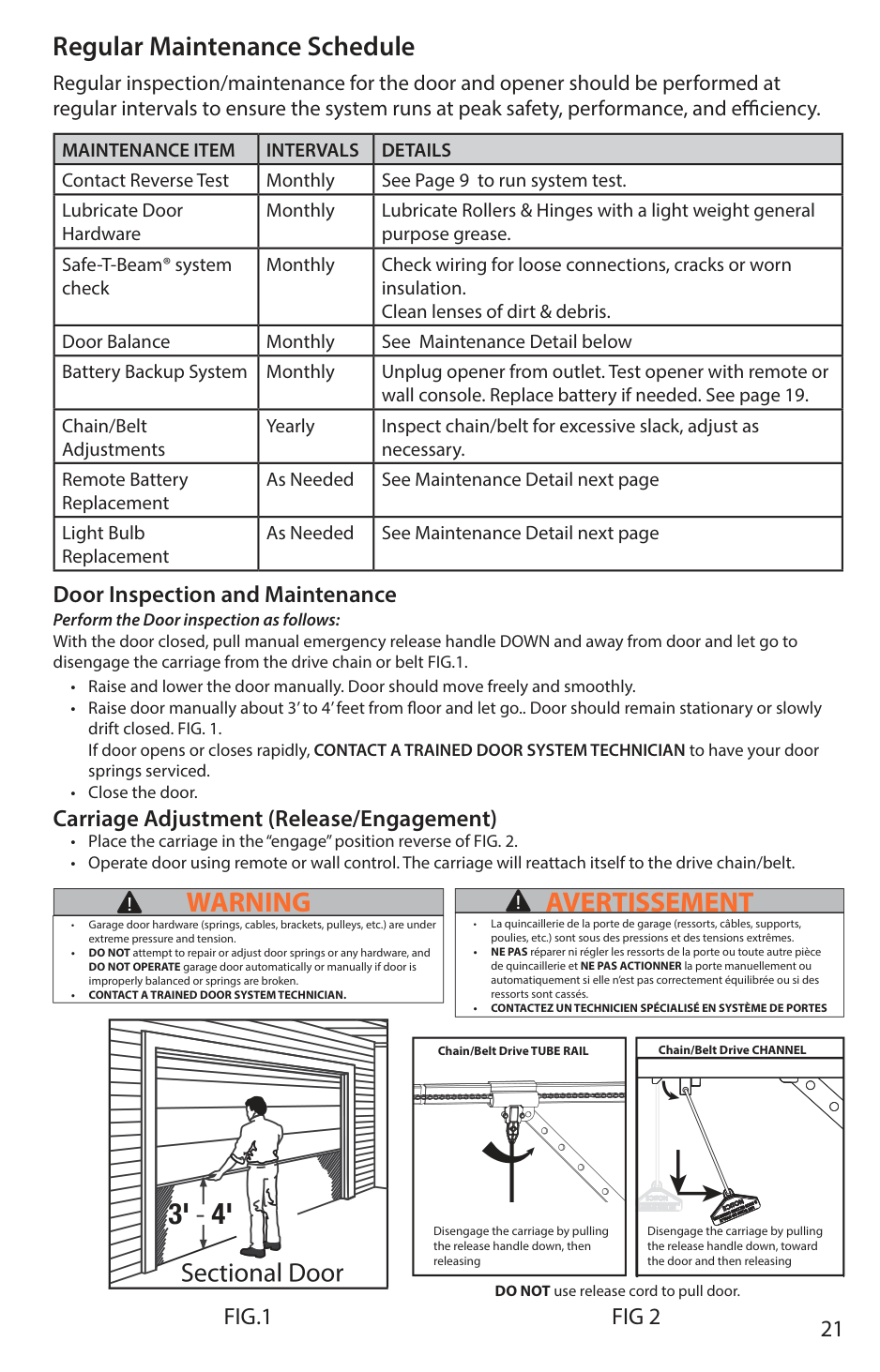
Perform the Door inspection as follows: With the door closed, pull manual emergency release handle DOWN and away from door and let go to disengage the carriage from the drive chain or belt FIG.1.
########## Carriage Adjustment (Release/Engagement)
|AVERTISSEMENT!| |---| |• La quincaillerie de la porte de garage (ressorts, câbles, supports, poulies, etc.) sont sous des pressions et des tensions extrêmes.
• NE PAS réparer ni régler les ressorts de la porte ou toute autre pièce de quincaillerie et NE PAS ACTIONNER la porte manuellement ou automatiquement si elle n’est pas correctement équilibrée ou si des ressorts sont cassés.
• CONTACTEZ UN TECHNICIEN SPÉCIALISÉ EN SYSTÈME DE PORTES
|
|WARNING!| |---| |• Garage door hardware (springs, cables, brackets, pulleys, etc.) are under extreme pressure and tension.
• DO NOT attempt to repair or adjust door springs or any hardware, and DO NOT OPERATE garage door automatically or manually if door is improperly balanced or springs are broken.
• CONTACT A TRAINED DOOR SYSTEM TECHNICIAN.
|
|Chain/Belt Drive TUBE RAIL
Disengage the carriage by pulling the release handle down, then releasing| |---|
| | | |---|---| | | |
Chain/Belt Drive CHANNEL
Disengage the carriage by pulling the release handle down, toward the door and then releasing
DO NOT use release cord to pull door.
FIG.1 FIG 2
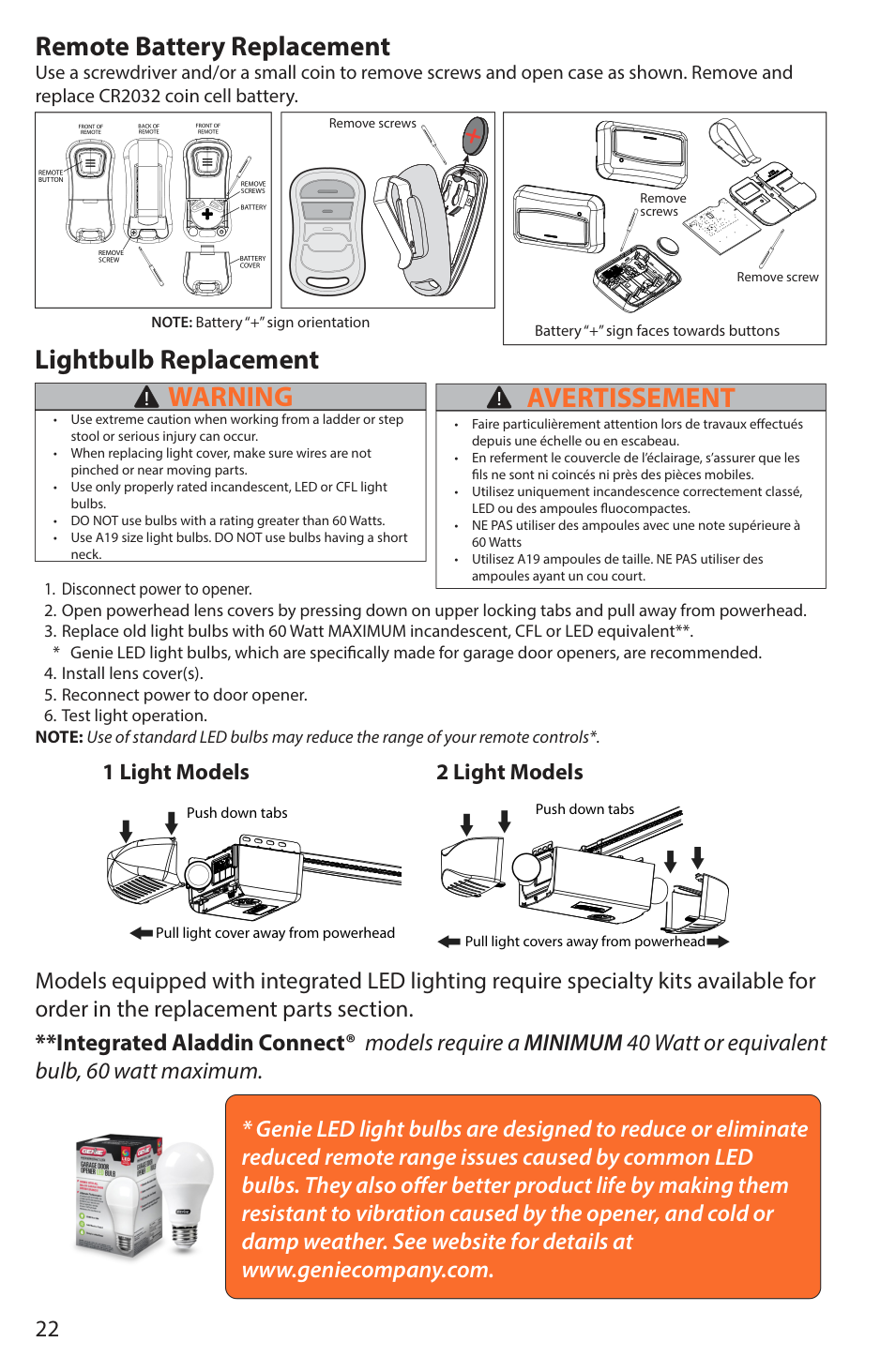
Remote Battery Replacement Use a screwdriver and/or a small coin to remove screws and open case as shown. Remove and replace CR2032 coin cell battery.
|BATTERY
BATTERY COVER
REMOTE BUTTON
REMOVE SCREW
FRONT OF REMOTE
FRONT OF REMOTE
BACK OF REMOTE
REMOVE SCREWS
| |---|
|Remove screws| |---|
|Battery “+” sign faces towards buttons
Remove screw
Remove screws
| |---|
NOTE: Battery “+” sign orientation
###### Lightbulb Replacement
|WARNING!| |---| |• Use extreme caution when working from a ladder or step stool or serious injury can occur.
• When replacing light cover, make sure wires are not pinched or near moving parts.
• Use only properly rated incandescent, LED or CFL light bulbs.
• DO NOT use bulbs with a rating greater than 60 Watts.
• Use A19 size light bulbs. DO NOT use bulbs having a short neck.
|
|AVERTISSEMENT!| |---| |• Faire particulièrement attention lors de travaux effectués depuis une échelle ou en escabeau.
• En referment le couvercle de l’éclairage, s’assurer que les fils ne sont ni coincés ni près des pièces mobiles.
• Utilisez uniquement incandescence correctement classé, LED ou des ampoules fluocompactes.
• NE PAS utiliser des ampoules avec une note supérieure à 60 Watts
• Utilisez A19 ampoules de taille. NE PAS utiliser des ampoules ayant un cou court.
|
NOTE: Use of standard LED bulbs may reduce the range of your remote controls*.
1 Light Models 2 Light Models
Push down tabs
Pull light cover away from powerhead
Push down tabs
| | | |---|---| | | |
Pull light covers away from powerhead
Models equipped with integrated LED lighting require specialty kits available for order in the replacement parts section.
**Integrated Aladdin Connect® models require a MINIMUM 40 Watt or equivalent bulb, 60 watt maximum.

|TROUBLESHOOTING6| |---|
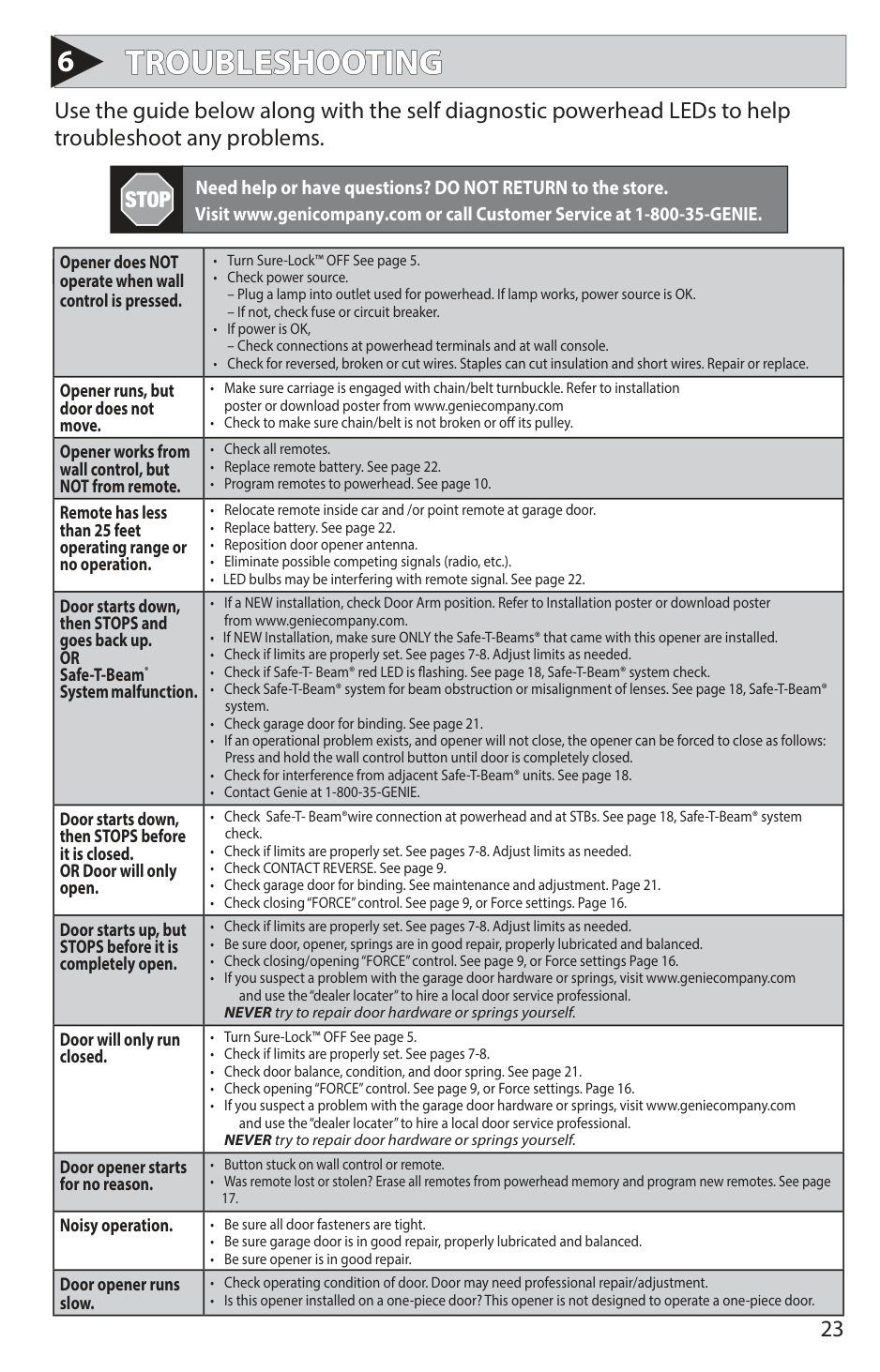
Use the guide below along with the self diagnostic powerhead LEDs to help troubleshoot any problems.
Need help or have questions? DO NOT RETURN to the store.
Visit www.genicompany.com or call Customer Service at 1-800-35-GENIE.
| |• Turn Sure-Lock™ OFF See page 5.| |---|---| |PROBLEM: Opener does NOT operate when wall|WHAT TO DO:•Check power source.| |control is pressed.|– Plug a lamp into outlet used for powerhead. If lamp works, power source is OK.
– If not, check fuse or circuit breaker.
• If power is OK,
– Check connections at powerhead terminals and at wall console.
• Check for reversed, broken or cut wires. Staples can cut insulation and short wires. Repair or replace.
| |Opener runs, but door does not move.|• Make sure carriage is engaged with chain/belt turnbuckle. Refer to installation poster or download poster from www.geniecompany.com
• Check to make sure chain/belt is not broken or off its pulley.
| |Opener works from wall control, but NOT from remote.|• Check all remotes.
• Replace remote battery. See page 22.
• Program remotes to powerhead. See page 10.
| |Remote has less than 25 feet operating range or no operation.|• Relocate remote inside car and /or point remote at garage door.
• Replace battery. See page 22.
• Reposition door opener antenna.
• Eliminate possible competing signals (radio, etc.).
• LED bulbs may be interfering with remote signal. See page 22.
| |Door starts down, then STOPS and goes back up. OR Safe-T-Beam® System malfunction.|• If a NEW installation, check Door Arm position. Refer to Installation poster or download poster from www.geniecompany.com.
• If NEW Installation, make sure ONLY the Safe-T-Beams® that came with this opener are installed.
• Check if limits are properly set. See pages 7-8. Adjust limits as needed.
• Check if Safe-T- Beam® red LED is flashing. See page 18, Safe-T-Beam® system check.
• Check Safe-T-Beam® system for beam obstruction or misalignment of lenses. See page 18, Safe-T-Beam® system.
• Check garage door for binding. See page 21.
• If an operational problem exists, and opener will not close, the opener can be forced to close as follows: Press and hold the wall control button until door is completely closed.
• Check for interference from adjacent Safe-T-Beam® units. See page 18.
• Contact Genie at 1-800-35-GENIE.
| |Door starts down, then STOPS before it is closed. OR Door will only open.|• Check Safe-T- Beam®wire connection at powerhead and at STBs. See page 18, Safe-T-Beam® system check.
• Check if limits are properly set. See pages 7-8. Adjust limits as needed.
• Check CONTACT REVERSE. See page 9.
• Check garage door for binding. See maintenance and adjustment. Page 21.
• Check closing “FORCE” control. See page 9, or Force settings. Page 16.
| |Door starts up, but STOPS before it is completely open.|• Check if limits are properly set. See pages 7-8. Adjust limits as needed.
• Be sure door, opener, springs are in good repair, properly lubricated and balanced.
• Check closing/opening “FORCE” control. See page 9, or Force settings Page 16.
• If you suspect a problem with the garage door hardware or springs, visit www.geniecompany.com and use the “dealer locater” to hire a local door service professional.
NEVER try to repair door hardware or springs yourself.| |Door will only run closed.|• Turn Sure-Lock™ OFF See page 5.
• Check if limits are properly set. See pages 7-8.
• Check door balance, condition, and door spring. See page 21.
• Check opening “FORCE” control. See page 9, or Force settings. Page 16.
• If you suspect a problem with the garage door hardware or springs, visit www.geniecompany.com and use the “dealer locater” to hire a local door service professional.
NEVER try to repair door hardware or springs yourself.| |Door opener starts for no reason.|• Button stuck on wall control or remote.
• Was remote lost or stolen? Erase all remotes from powerhead memory and program new remotes. See page 17.
| |Noisy operation.|• Be sure all door fasteners are tight.
• Be sure garage door is in good repair, properly lubricated and balanced.
• Be sure opener is in good repair.
| |Door opener runs slow.|• Check operating condition of door. Door may need professional repair/adjustment.
• Is this opener installed on a one-piece door? This opener is not designed to operate a one-piece door.
|
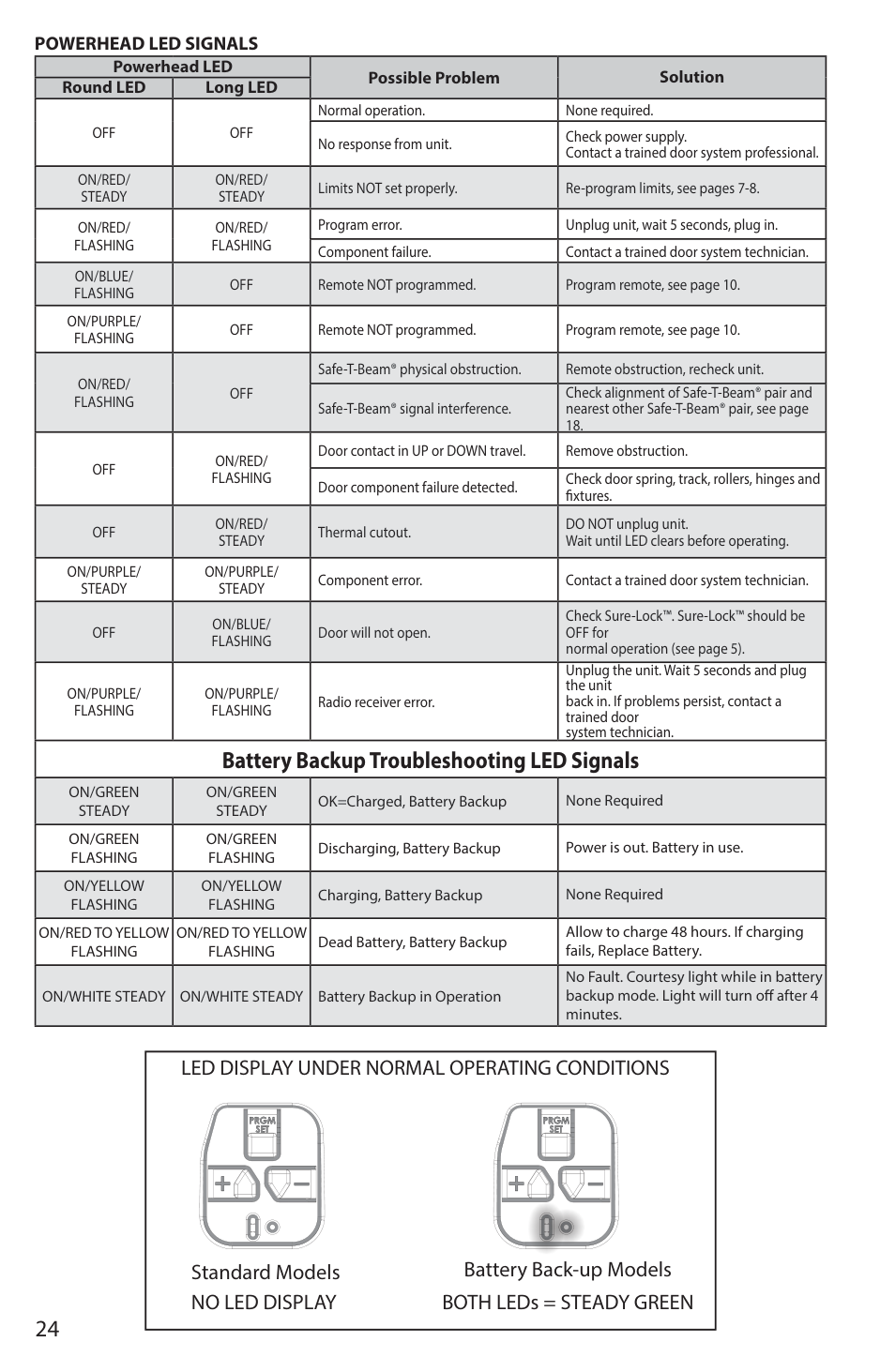
#################### POWERHEAD LED SIGNALS
|Powerhead LED|Powerhead LED|Possible Problem|Solution| |---|---|---|---| |Round LED|Long LED|Possible Problem|Solution| |OFF|OFF|Normal operation.|None required.| |OFF|OFF|No response from unit.|Check power supply. Contact a trained door system professional.| |ON/RED/ STEADY|ON/RED/ STEADY|Limits NOT set properly.|Re-program limits, see pages 7-8.| |ON/RED/ FLASHING|ON/RED/ FLASHING|Program error.|Unplug unit, wait 5 seconds, plug in.| |ON/RED/ FLASHING|ON/RED/ FLASHING|Component failure.|Contact a trained door system technician.| |ON/BLUE/ FLASHING|OFF|Remote NOT programmed.|Program remote, see page 10.| |ON/PURPLE/ FLASHING|OFF|Remote NOT programmed.|Program remote, see page 10.| |ON/RED/ FLASHING|OFF|Safe-T-Beam® physical obstruction.|Remote obstruction, recheck unit.| |ON/RED/ FLASHING|OFF|Safe-T-Beam® signal interference.|Check alignment of Safe-T-Beam® pair and nearest other Safe-T-Beam® pair, see page 18.| |OFF|ON/RED/ FLASHING|Door contact in UP or DOWN travel.|Remove obstruction.| |OFF|ON/RED/ FLASHING|Door component failure detected.|Check door spring, track, rollers, hinges and fixtures.| |OFF|ON/RED/ STEADY|Thermal cutout.|DO NOT unplug unit. Wait until LED clears before operating.| |ON/PURPLE/ STEADY|ON/PURPLE/ STEADY|Component error.|Contact a trained door system technician.| |OFF|ON/BLUE/ FLASHING|Door will not open.|Check Sure-Lock™. Sure-Lock™ should be OFF for normal operation (see page 5).| |ON/PURPLE/ FLASHING|ON/PURPLE/ FLASHING|Radio receiver error.|Unplug the unit. Wait 5 seconds and plug the unit back in. If problems persist, contact a trained door system technician.| |Battery Backup Troubleshooting LED Signals|Battery Backup Troubleshooting LED Signals|Battery Backup Troubleshooting LED Signals|Battery Backup Troubleshooting LED Signals| |ON/GREEN STEADY|ON/GREEN STEADY|OK=Charged, Battery Backup|None Required| |ON/GREEN FLASHING|ON/GREEN FLASHING|Discharging, Battery Backup|Power is out. Battery in use.| |ON/YELLOW FLASHING|ON/YELLOW FLASHING|Charging, Battery Backup|None Required| |ON/RED TO YELLOW FLASHING|ON/RED TO YELLOW FLASHING|Dead Battery, Battery Backup|Allow to charge 48 hours. If charging fails, Replace Battery.| |ON/WHITE STEADY|ON/WHITE STEADY|Battery Backup in Operation|No Fault. Courtesy light while in battery backup mode. Light will turn off after 4 minutes.|
|LED DISPLAY UNDER NORMAL OPERATING CONDITIONS
NO LED DISPLAY BOTH LEDs = STEADY GREEN
Standard Models Battery Back-up Models
| |---|
|REPLACEMENT ASSEMBLY PARTS7| |---|
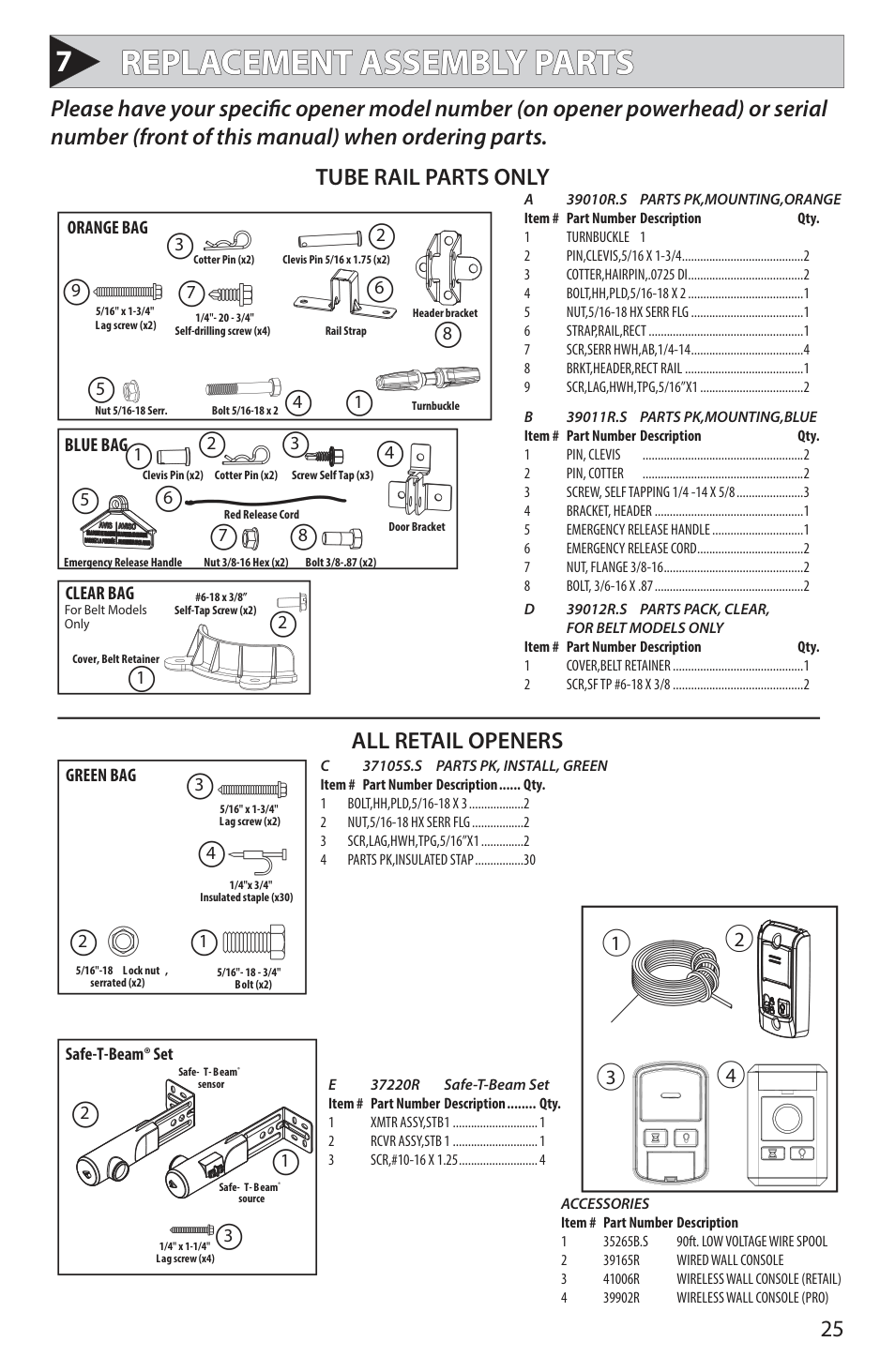
Please have your specific opener model number (on opener powerhead) or serial number (front of this manual) when ordering parts.
TUBE RAIL PARTS ONLY
A 39010R.S PARTS PK,MOUNTING,ORANGE Item # Part Number Description Qty.
|14
5
2 3
679
8
ORANGE BAG
5/16" x 1-3/4" Lag screw (x2)
1/4"- 20 - 3/4" Self-drilling screw (x4)
Header bracket Rail Strap
TurnbuckleBolt 5/16-18 x 2Nut 5/16-18 Serr.
Cotter Pin (x2) Clevis Pin 5/16 x 1.75 (x2)| |---|
B 39011R.S PARTS PK,MOUNTING,BLUE Item # Part Number Description Qty.
|1
2 3 4
5 6
7 8
BLUE BAG
Cotter Pin (x2)Clevis Pin (x2) Screw Self Tap (x3)
Door Bracket
Bolt 3/8-.87 (x2)Nut 3/8-16 Hex (x2)Emergency Release Handle
Red Release Cord| |---|
|1
CLEAR BAG #6-18 x 3/8”
Self-Tap Screw (x2)
Cover, Belt Retainer
2For Belt ModelsOnly
| |---|
D 39012R.S PARTS PACK, CLEAR, FOR BELT MODELS ONLY
Item # Part Number Description Qty.
ALL RETAIL OPENERS
C 37105S.S PARTS PK, INSTALL, GREEN Item # Part Number Description ...... Qty.
|12
3
4
GREEN BAG
1/4"x 3/4" Insulated staple (x30)
5/16" x 1-3/4" Lag screw (x2)
5/16"- 18 - 3/4" Bolt (x2)
5/16"-18 Lock nut , serrated (x2)| |---|
|1 2
3 4
| |---|
|1
3
2
Safe-T-Beam® Set
Safe- T-Beam® sensor
Safe- T-Beam® source
1/4" x 1-1/4" Lag screw (x4)| |---|
E 37220R Safe-T-Beam Set Item # Part Number Description ........ Qty.
1 XMTR ASSY,STB 1 ............................1 2 RCVR ASSY,STB 1 ............................1 3 SCR,#10-16 X 1.25 ..........................4
ACCESSORIES Item # Part Number Description
|REPLACEMENT POWERHEAD PARTS| |---|
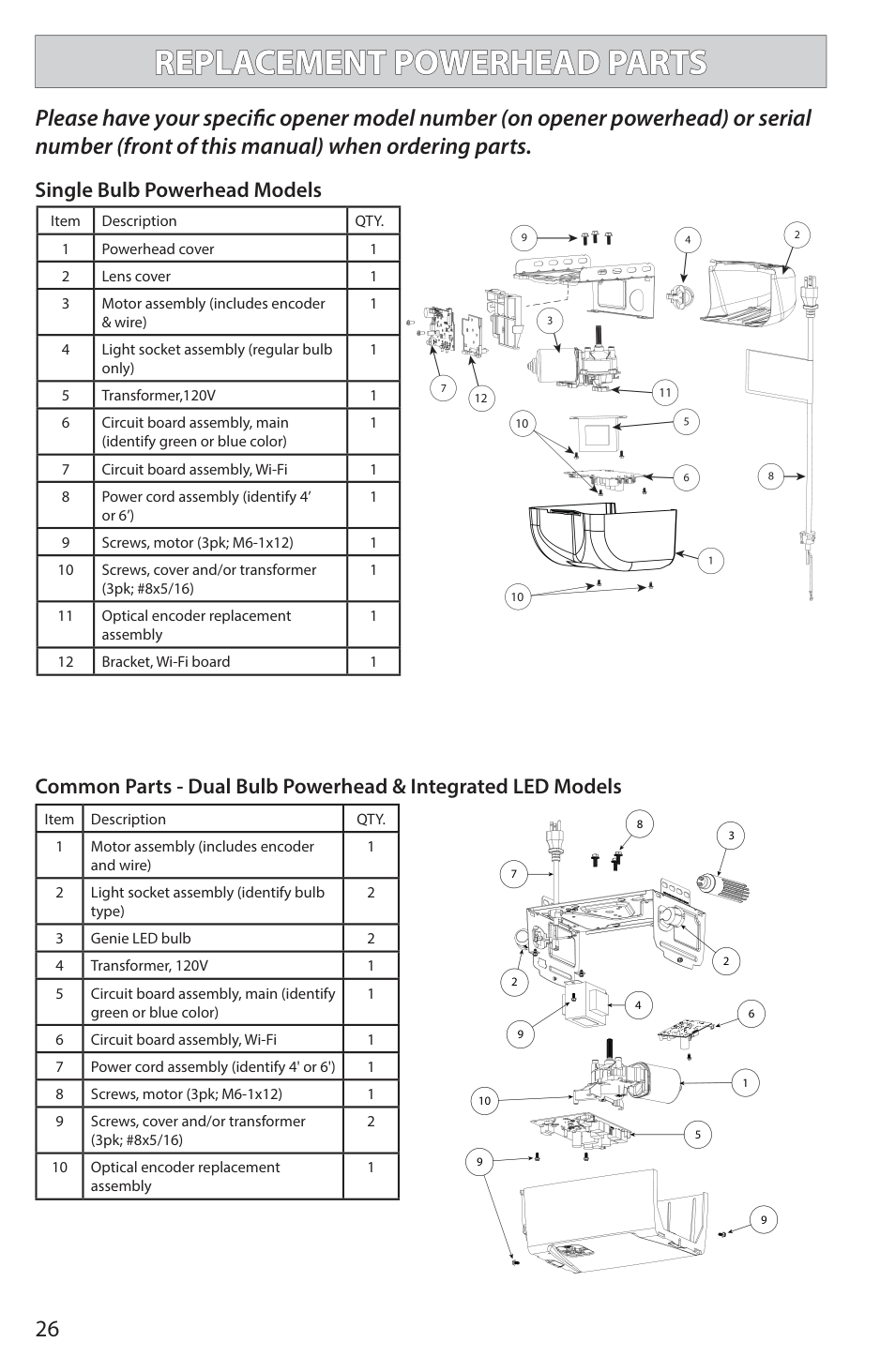
########## Please have your specific opener model number (on opener powerhead) or serial number (front of this manual) when ordering parts.
Single Bulb Powerhead Models
|Item|Description|QTY.| |---|---|---| |1|Powerhead cover|1| |2|Lens cover|1| |3|Motor assembly (includes encoder & wire)|1| |4|Light socket assembly (regular bulb only)|1| |5|Transformer,120V|1| |6|Circuit board assembly, main (identify green or blue color)|1| |7|Circuit board assembly, Wi-Fi|1| |8|Power cord assembly (identify 4’ or 6’)|1| |9|Screws, motor (3pk; M6-1x12)|1| |10|Screws, cover and/or transformer (3pk; #8x5/16)|1| |11|Optical encoder replacement assembly|1| |12|Bracket, Wi-Fi board|1|
| | | | | |---|---|---|---| | | | | | | | | | |
| | | |---|---| | | |
12 11 10
10
############## Common Parts - Dual Bulb Powerhead & Integrated LED Models
|Item|Description|QTY.| |---|---|---| |1|Motor assembly (includes encoder and wire)|1| |2|Light socket assembly (identify bulb type)|2| |3|Genie LED bulb|2| |4|Transformer, 120V|1| |5|Circuit board assembly, main (identify green or blue color)|1| |6|Circuit board assembly, Wi-Fi|1| |7|Power cord assembly (identify 4' or 6')|1| |8|Screws, motor (3pk; M6-1x12)|1| |9|Screws, cover and/or transformer (3pk; #8x5/16)|2| |10|Optical encoder replacement assembly|1|
8
10
7
2
4
6
9
1
5
9
9
|REPLACEMENT POWERHEAD PARTS| |---|
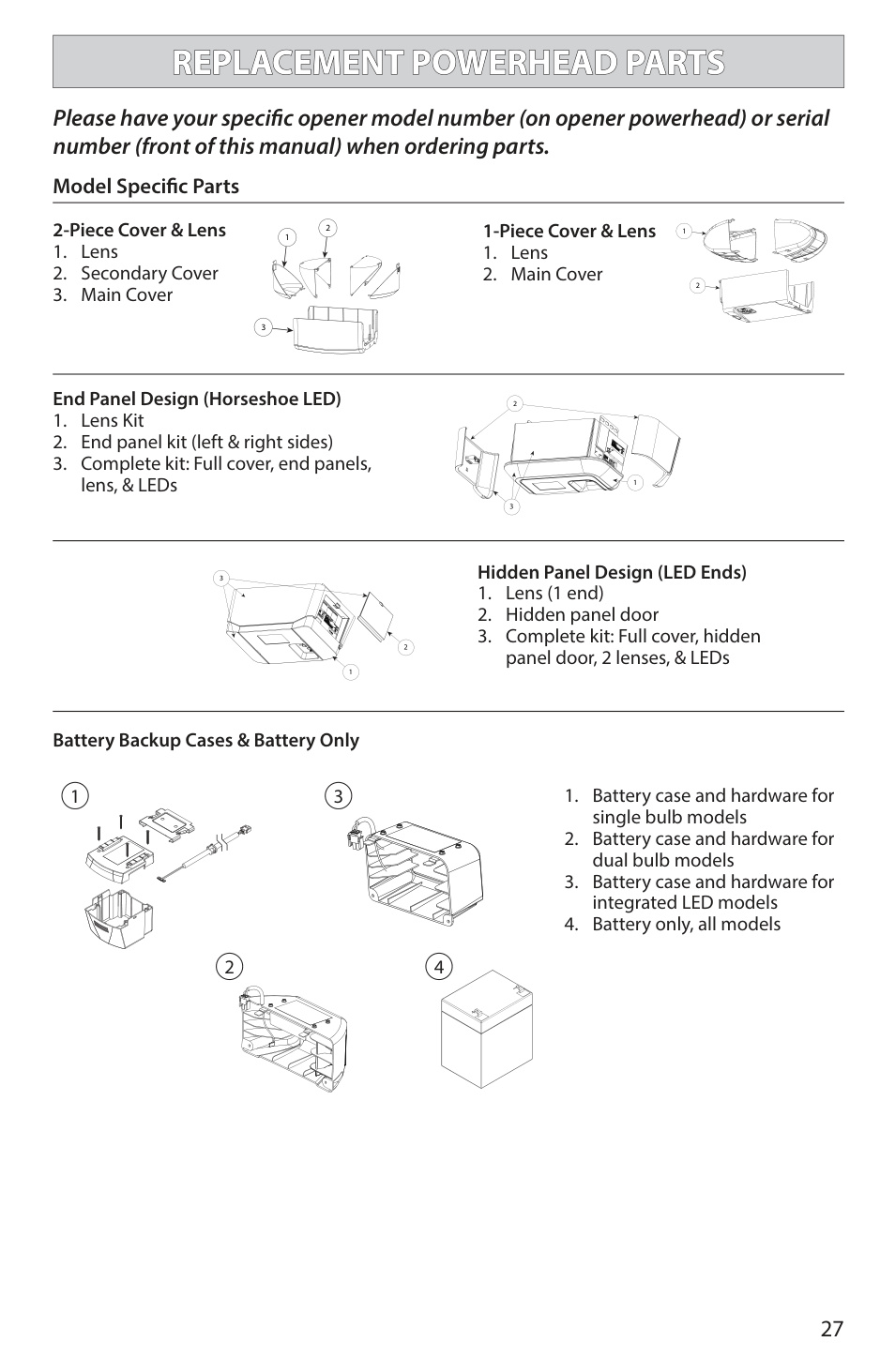
########## Please have your specific opener model number (on opener powerhead) or serial number (front of this manual) when ordering parts.
############## Model Specific Parts
2-Piece Cover & Lens
2
1
3
1-Piece Cover & Lens
2
End Panel Design (Horseshoe LED)
1
Hidden Panel Design (LED Ends)
3
1
2
1
Battery Backup Cases & Battery Only
1 3
2
2
2 4
|CHANNEL & TUBE RAIL PARTS| |---|
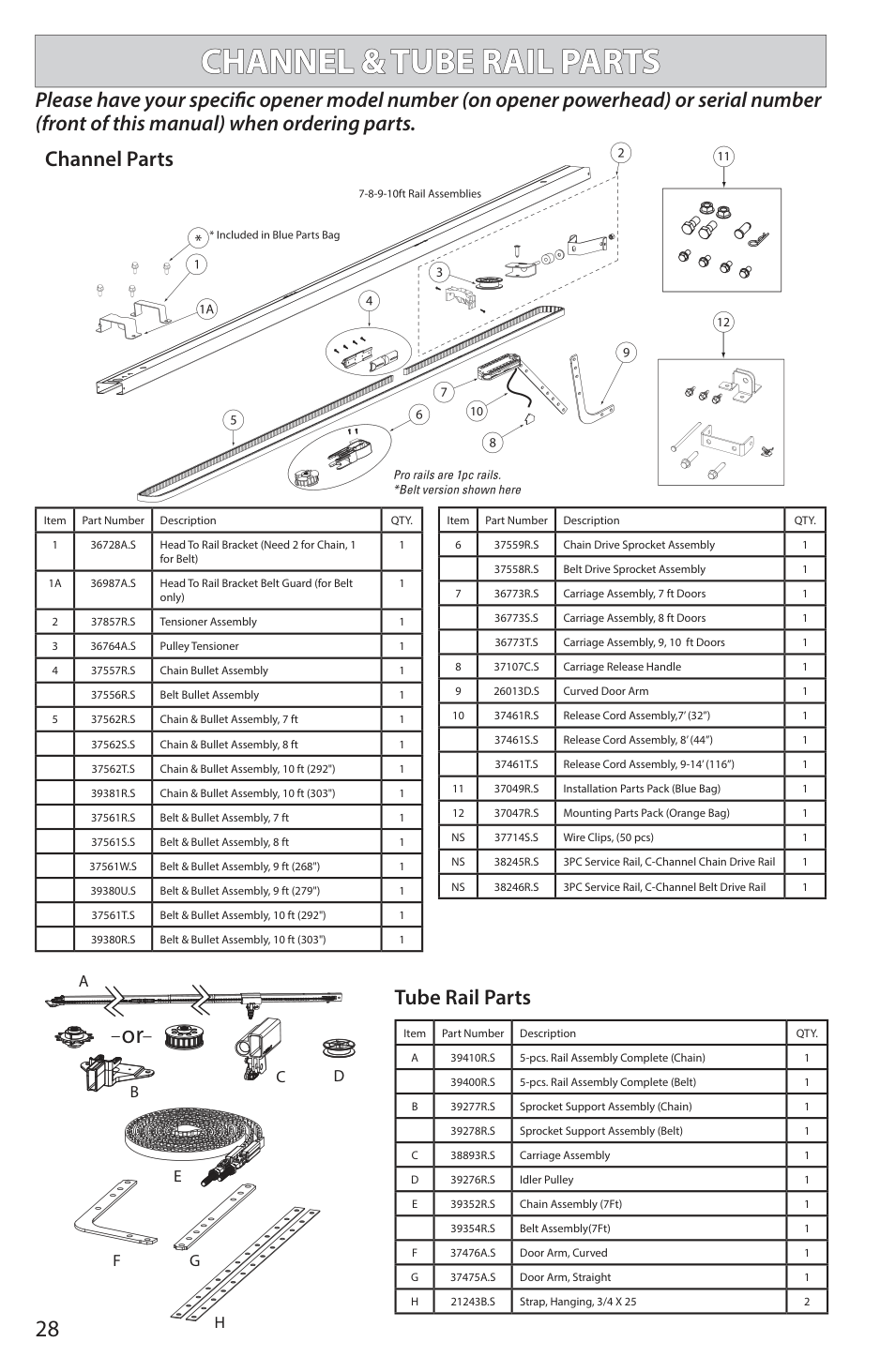
Please have your specific opener model number (on opener powerhead) or serial number (front of this manual) when ordering parts.
Channel Parts
10
|Item|Part Number|Description|QTY.| |---|---|---|---| |1|36728A.S|Head To Rail Bracket (Need 2 for Chain, 1 for Belt)|1| |1A|36987A.S|Head To Rail Bracket Belt Guard (for Belt only)|1| |2|37857R.S|Tensioner Assembly|1| |3|36764A.S|Pulley Tensioner|1| |4|37557R.S|Chain Bullet Assembly|1| | |37556R.S|Belt Bullet Assembly|1| |5|37562R.S|Chain & Bullet Assembly, 7 ft|1| | |37562S.S|Chain & Bullet Assembly, 8 ft|1| | |37562T.S|Chain & Bullet Assembly, 10 ft (292")|1| | |39381R.S|Chain & Bullet Assembly, 10 ft (303")|1| | |37561R.S|Belt & Bullet Assembly, 7 ft|1| | |37561S.S|Belt & Bullet Assembly, 8 ft|1| | |37561W.S|Belt & Bullet Assembly, 9 ft (268")|1| | |39380U.S|Belt & Bullet Assembly, 9 ft (279")|1| | |37561T.S|Belt & Bullet Assembly, 10 ft (292")|1| | |39380R.S|Belt & Bullet Assembly, 10 ft (303")|1|
|Item|Part Number|Description|QTY.| |---|---|---|---|
|6|37559R.S|Chain Drive Sprocket Assembly|1| | |37558R.S|Belt Drive Sprocket Assembly|1| |7|36773R.S|Carriage Assembly, 7 ft Doors|1| | |36773S.S|Carriage Assembly, 8 ft Doors|1| | |36773T.S|Carriage Assembly, 9, 10 ft Doors|1| |8|37107C.S|Carriage Release Handle|1| |9|26013D.S|Curved Door Arm|1| |10|37461R.S|Release Cord Assembly,7’ (32”)|1| | |37461S.S|Release Cord Assembly, 8’ (44”)|1| | |37461T.S|Release Cord Assembly, 9-14’ (116”)|1| |11|37049R.S|Installation Parts Pack (Blue Bag)|1| |12|37047R.S|Mounting Parts Pack (Orange Bag)|1| |NS|37714S.S|Wire Clips, (50 pcs)|1| |NS|38245R.S|3PC Service Rail, C-Channel Chain Drive Rail|1| |NS|38246R.S|3PC Service Rail, C-Channel Belt Drive Rail|1|
A
or
C D
B
E
F G
H
Tube Rail Parts
|Item|Part Number|Description|QTY.| |---|---|---|---| |A|39410R.S|5-pcs. Rail Assembly Complete (Chain)|1| | |39400R.S|5-pcs. Rail Assembly Complete (Belt)|1| |B|39277R.S|Sprocket Support Assembly (Chain)|1| | |39278R.S|Sprocket Support Assembly (Belt)|1| |C|38893R.S|Carriage Assembly|1| |D|39276R.S|Idler Pulley|1| |E|39352R.S|Chain Assembly (7Ft)|1| | |39354R.S|Belt Assembly(7Ft)|1| |F|37476A.S|Door Arm, Curved|1| |G|37475A.S|Door Arm, Straight|1| |H|21243B.S|Strap, Hanging, 3/4 X 25|2|
|DASMA SAFETY GUIDELINES8| |---|
####### Automatic Garage Door Opener Safety & Maintenance Guide Garage Door Opener Safety - An Automatic Decision
|WARNING!| |---| |A garage door is the largest moving object in the home. An improperly adjusted garage door and opener can exert deadly force when the door closes – which could lead to entrapment of children or adults and subsequent injury or death.|
Proper installation, operation, maintenance, and testing of the garage door and automatic opener are necessary to provide a safe, trouble-free system. Careless operation or allowing children to play with or use garage door opener controls are also dangerous situations that can lead to tragic results. A few simple precautions can protect your family and friends from potential harm. Please review the safety and maintenance tips in this guide carefully and keep it for reference. Check the operation of your garage door and opener to ensure they function in a safe and trouble-free manner. Be sure to read all Important Safety Information found in your garage door opener’s manual as it provides more details and safety considerations than can be supplied with this guide.
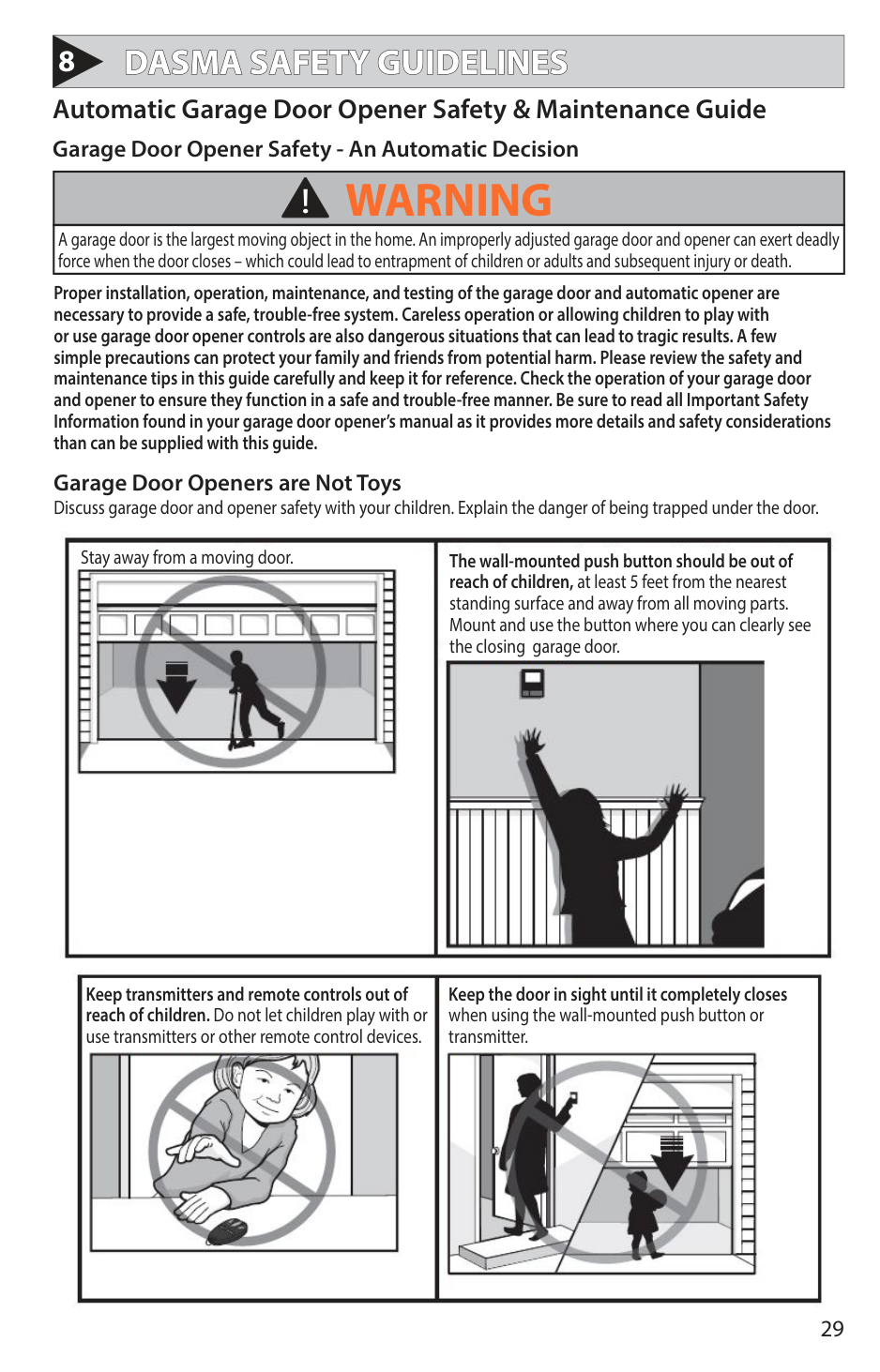
Garage Door Openers are Not Toys Discuss garage door and opener safety with your children. Explain the danger of being trapped under the door.

Stay away from a moving door. The wall-mounted push button should be out of reach of children, at least 5 feet from the nearest standing surface and away from all moving parts. Mount and use the button where you can clearly see the closing garage door.

Keep transmitters and remote controls out of reach of children. Do not let children play with or use transmitters or other remote control devices.
Keep the door in sight until it completely closes when using the wall-mounted push button or transmitter.
|DASMA SAFETY GUIDELINES cont’d| |---|
####### Routine Maintenance Can Prevent Tragedies
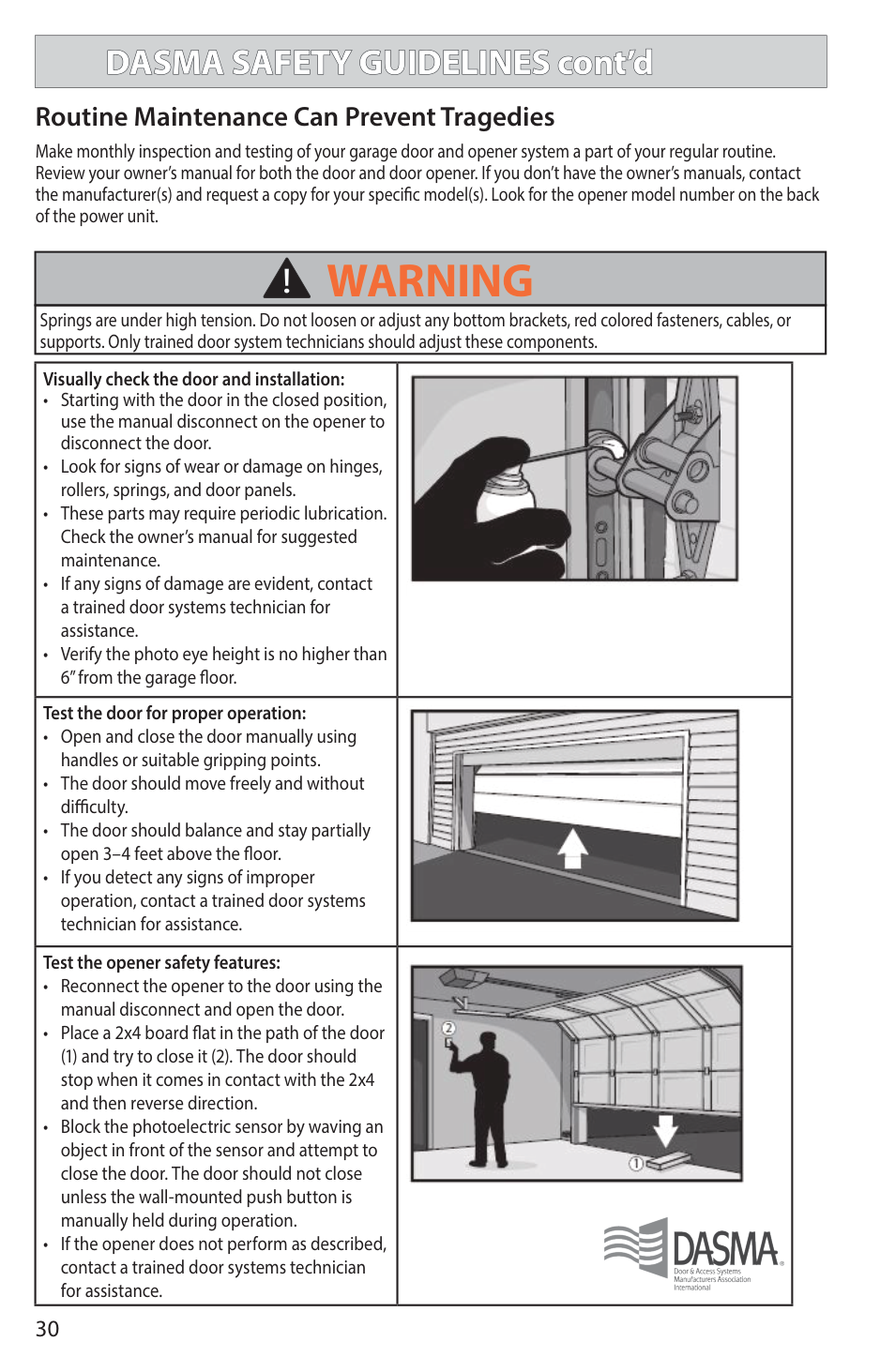
Make monthly inspection and testing of your garage door and opener system a part of your regular routine. Review your owner’s manual for both the door and door opener. If you don’t have the owner’s manuals, contact the manufacturer(s) and request a copy for your specific model(s). Look for the opener model number on the back of the power unit.
|WARNING!| |---| |Springs are under high tension. Do not loosen or adjust any bottom brackets, red colored fasteners, cables, or supports. Only trained door system technicians should adjust these components.|
|Visually check the door and installation:
• Starting with the door in the closed position, use the manual disconnect on the opener to disconnect the door.
• Look for signs of wear or damage on hinges, rollers, springs, and door panels.
• These parts may require periodic lubrication. Check the owner’s manual for suggested maintenance.
• If any signs of damage are evident, contact a trained door systems technician for assistance.
• Verify the photo eye height is no higher than 6” from the garage floor.
|| |---|---| |Test the door for proper operation:
• Open and close the door manually using handles or suitable gripping points.
• The door should move freely and without difficulty.
• The door should balance and stay partially open 3–4 feet above the floor.
• If you detect any signs of improper operation, contact a trained door systems technician for assistance.
|| |Test the opener safety features:
• Reconnect the opener to the door using the manual disconnect and open the door.
• Place a 2x4 board flat in the path of the door
(1) and try to close it (2). The door should stop when it comes in contact with the 2x4 and then reverse direction.
• Block the photoelectric sensor by waving an object in front of the sensor and attempt to close the door. The door should not close unless the wall-mounted push button is manually held during operation.
• If the opener does not perform as described, contact a trained door systems technician for assistance.
|
|