
Ask AI
— answers from the official manualAnswers from the official manual.
Common questions
Common Questions
10 totalHow do I power on the Honor Cma LX3 Smartphone?
Press and hold the power button until the screen turns on. This is the standard method to start up your device.
How do I force restart my device if it's frozen?
Press and hold the power button for 10 or more seconds to force restart your device. This will restart the device even if it appears unresponsive.
What should I do before inserting a SIM card?
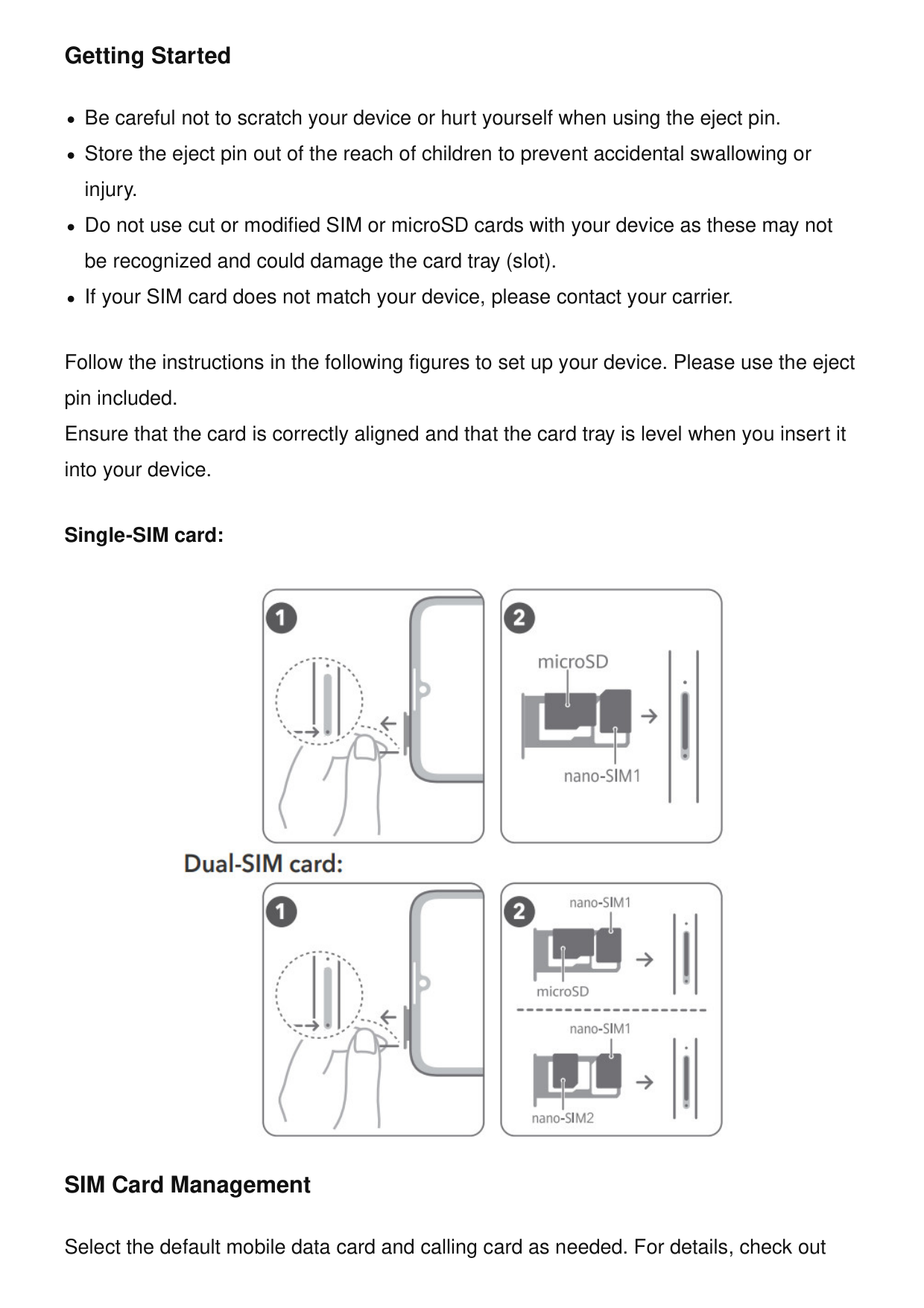
Use the included eject pin to access the SIM card tray. Ensure that the card is correctly aligned and that the card tray is level when you insert it into your device. Be careful not to scratch your device or hurt yourself when using the eject pin.
Can I use a third-party power adapter with my device?
No, using an unapproved or incompatible power adapter, charger, or battery may damage your device, shorten its lifespan, or cause a fire, explosion, or other hazards. Always use approved charging accessories.
What are the ideal operating and storage temperatures for the Cma LX3?
Ideal operating temperatures are 0°C to 35°C, while ideal storage temperatures are -20°C to +45°C. Keeping your device within these temperature ranges ensures proper operation and longevity.
What is the minimum safe distance to maintain between my device and a pacemaker?
Pacemaker manufacturers recommend maintaining a minimum distance of 15 cm between the device and a pacemaker to prevent potential interference. If using a pacemaker, hold the device on the side opposite the pacemaker and do not carry it in your front pocket.
Full Manual
16 pages
Guía de inicio rápido Quick Start Guide
Cma-Lx3
Contenido / Contents Español (Latinoamérica)........................................................1 English..................................................................................... 8 i
Español (Latinoamérica) Conozca el dispositivo Antes de usar el dispositivo, deberá familiarizarse con las operaciones básicas.

Pasos iniciales

información detallada, consulte la aplicación preinstalada Sugerencias.
Operación y seguridad • Para evitar daños al oído, no escuche música a un volumen muy elevado por períodos prolongados.
+45 °C.
aceite o plantas químicas). El uso del dispositivo en este tipo de entornos aumenta el riesgo de explosión o incendio.
simplemente usando un kit de manos libres para mantener el dispositivo lejos de la cabeza y del cuerpo. Asegúrese de que los accesorios del dispositivo, como la funda o el soporte, no tengan componentes de metal. Mantenga el dispositivo alejado de su cuerpo para cumplir con el requisito de distancia. Para los países que adoptaron el límite SAR de 1,6 W/kg en 1 gramo de tejido. El dispositivo cumple con las especificaciones de radiofrecuencia cuando se lo usa cerca del oído o a una distancia de 1,50 cm del cuerpo. Valor SAR más alto informado: SAR en la cabeza: 1,09 W/kg; SAR en el cuerpo: 0,86 W/kg; SAR de zonas Wi-Fi: 1,08 W/kg. Declaración sobre cumplimiento de las normas de la FCC Este dispositivo ha sido sometido a prueba y se ha comprobado que cumple con los límites establecidos para equipos digitales de clase B, de conformidad con la sección 15 de las normas de la FCC. Dichos límites se han establecido para garantizar una protección razonable contra las interferencias nocivas en instalaciones residenciales. Este dispositivo genera, utiliza y puede irradiar energía de radiofrecuencia. De no ser instalado o utilizado de acuerdo con las instrucciones pertinentes, puede causar interferencias nocivas para las radiocomunicaciones. Sin embargo, no hay garantías de que no se producirán interferencias en una instalación en particular. Si este equipo causa interferencias nocivas para la recepción de señales de televisión o radio, lo cual puede detectarse al apagar y encender el equipo, se recomienda al usuario tratar de corregir las interferencias por medio de una o más de las siguientes medidas: --Reoriente o reubique la antena receptora. --Aumente la distancia entre el equipo y el receptor. --Conecte el dispositivo al tomacorriente de un circuito que no sea aquel donde está conectado el receptor. --Consulte al distribuidor o solicite la asistencia de un técnico con experiencia en el funcionamiento de equipos de radio y televisión. Este dispositivo cumple con la sección 15 de las normas de la FCC. El funcionamiento se encuentra sujeto a las siguientes dos condiciones: (1) este dispositivo no debe ocasionar interferencias nocivas y (2) debe aceptar todas las interferencias recibidas, incluso aquellas que puedan ocasionar un funcionamiento no deseado. 6

Precaución: Las modificaciones o los cambios realizados en el dispositivo que no hayan sido aprobados expresamente por Honor Device Co., Ltd. en cuanto al cumplimiento de normas podrían invalidar el permiso del usuario para utilizar el dispositivo. Cumplimiento México:(Esta sección solo aplica para México.) La operación de este equipo está sujeta a las siguientes dos condiciones: (1) es posible que este equipo o dispositivo no cause interferencia perjudicial y (2) este equipo o dispositivo debe aceptar cualquier interferencia, incluyendo la que pueda causar su operación no deseada. Se puede obtener el IMEI del equipo a través de la marcación electrónica *#06#. Para usar la función de radio FM, es necesario el uso de los audífonos alámbricos. Para información de la certificación de IFT, visite https:// www.hihonor.com/global/legal/certification/. Aviso legal Marcas comerciales y permisos Android es una marca comercial de Google LLC. LTE es una marca comercial de ETSI. La marca y el logotipo Bluetooth® son marcas registradas propiedad de Bluetooth SIG, Inc., y el uso de dichas marcas por parte de Honor Device Co., Ltd. está regido por la licencia correspondiente. Wi-Fi®, los logotipos de Wi-Fi CERTIFIED y Wi-Fi son marcas comerciales Wi-Fi Alliance. Copyright © Honor Device Co., Ltd. 2022. Todos los derechos reservados.
Todas Las Imágenes E Ilustraciones De Esta
Guía, Lo Que Incluye, A Título Meramente
Enunciativo, El Color Y El Tamaño Del
Dispositivo, Así Como El Contenido Que
Aparece En La Pantalla, Son Solo Para
Referencia. Es Posible Que El Dispositivo Real
Sea Distinto. El Contenido De Esta Guía No
Constituye Garantía De Ningún Tipo, Ni Expresa
Ni Implícita.
7
Política de privacidad Para comprender cómo protegemos su información personal, consulte la política de privacidad en https:// www.hihonor.com/privacy-policy/worldwide/. English Know Your Device Before using the device, familiarize yourself with its basic operations.

Getting Started


battery use may lead to fire, explosion, or other hazards.

and can radiate radio frequency energy and, if not installed and used in accordance with the instructions, may cause harmful interference to radio communications. However, there is no guarantee that interference will not occur in a particular installation. If this equipment does cause harmful interference to radio or television reception, which can be determined by turning the equipment off and on, the user is encouraged to try to correct the interference by one or more of the following measures: --Reorient or relocate the receiving antenna. --Increase the separation between the equipment and receiver. --Connect the equipment into an outlet on a circuit different from that to which the receiver is connected. --Consult the dealer or an experienced radio/TV technician for help. This device complies with Part 15 of the FCC Rules. Operation is subject to the following two conditions: (1) this device may not cause harmful interference, and (2) this device must accept any interference received, including interference that may cause undesired operation. Caution: Any changes or modifications to this device not expressly approved by Honor Device Co., Ltd. for compliance could void the user's authority to operate the equipment. Mexico Compliance:(This section is only applicable for Mexico.) The operation of this device is subjected to the following two conditions: (1) This device may not cause harmful interferences; and (2) this device must accept any interferences, including those that may cause an undesired operation. The device IMEI can be obtained by dialing *#06#. To use the FM radio function, please connect wired earphones firstly. For information about the IFT certification, visit https:// www.hihonor.com/global/legal/certification/. Legal Notice Trademarks and Permissions Android is a trademark of Google LLC. LTE is a trademark of ETSI. 13

The Bluetooth® word mark and logos are registered trademarks owned by Bluetooth SIG, Inc. and any use of such marks by Honor Device Co., Ltd. is under license. Wi-Fi®, the Wi-Fi CERTIFIED logo, and the Wi-Fi logo are trademarks of Wi-Fi Alliance. Copyright © Honor Device Co., Ltd. 2022. All rights reserved.