
Ask AI
— answers from the official manualAnswers from the official manual.
Common questions
Common Questions
10 totalHow do I use Request-to-Enter Input?
In Programming Mode, configure Request-to-Enter output by pressing 16#. Choose an Output option from 0 to 4 and press # to confirm. This will activate at least for the length of time specified by On-times (Page 8).
How do I factory reset the AK-11?
To perform a master reset, disconnect power from the keypad. Press and hold down the *and #keys. Apply power to the keypad while holding the keys until the red LED starts flashing. Release the keys; both LEDs will remain lit until the process completes, then the yellow LED will turn off (Page 10).
How do I change my entry code length?
To set the entry code length in Programming Mode, press: #9#. Enter the current Master Code. Press 03#, enter a new Length (digits between 1 and 6), then press # to save it. The green LED will light when the setting is stored (Page 6).
How do I add an entry code?
To add a new entry code, enter Programming Mode using your current Master Code. Press 01#, followed by the Entry Code and Action. The green LED will light when the new entry is stored (Page 6).
How do I reset my master programming code?
Reset the Master Code by opening the AK-11 case, locating jumper JP2, removing this jumper while power is applied. The keypad will then signal that the code has been reset via a beep (Page 10).
How do I set the lockout duration?
In Programming Mode, select Keypad Lockout Option by pressing 50#. Enter the number of incorrect entry attempts before a lockout occurs (2-7) and press #. The green LED will light when stored (Page 10).
Full Manual
12 pages
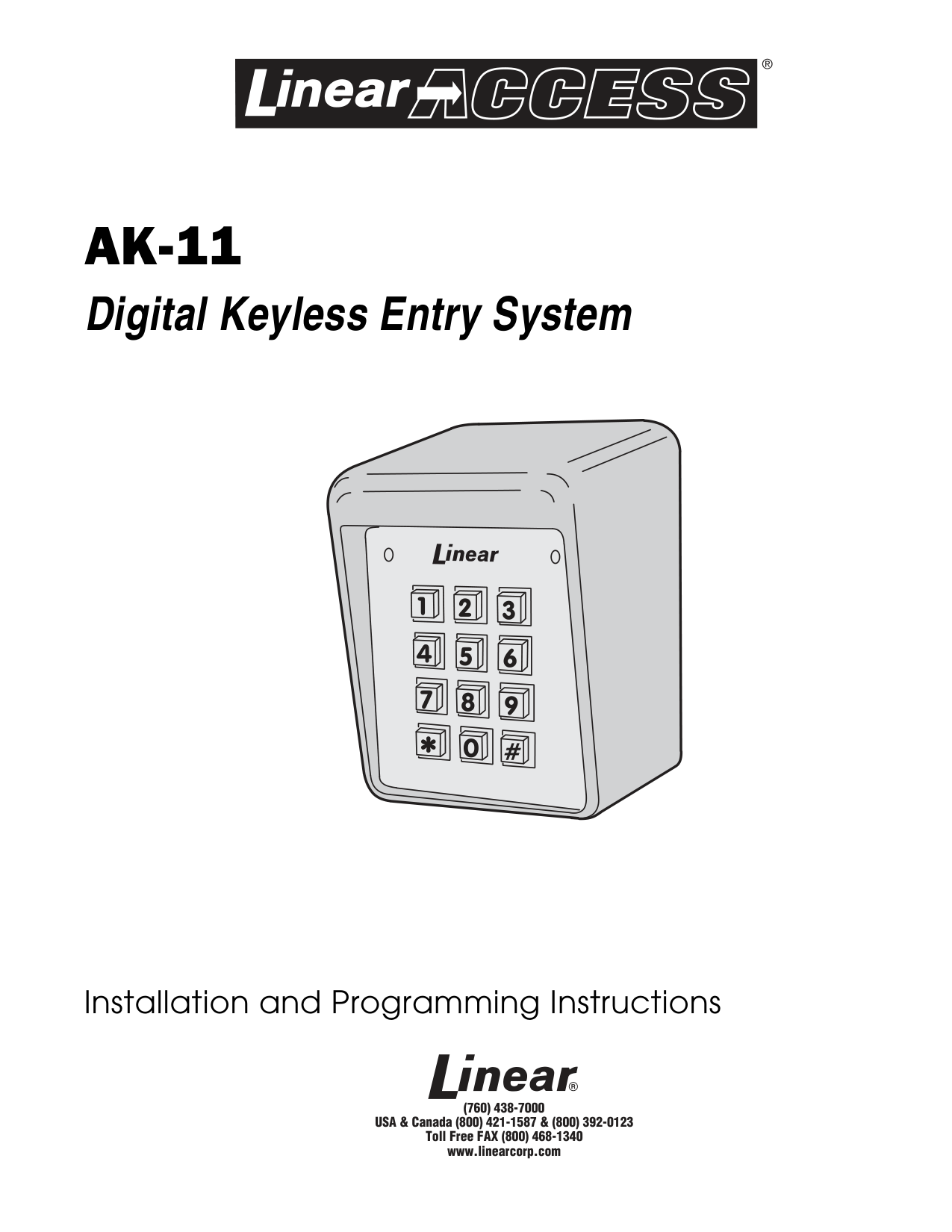
AK-11
Digital Keyless Entry System
Installation and Programming Instructions
(760) 438-7000 USA & Canada (800) 421-1587 & (800) 392-0123 Toll Free FAX (800) 468-1340 www.linearcorp.com
CONTENTS
INTRODUCTION . . . . . . . . . . . . . . . . . . . . . . . . . . . 2 SPECIFICATIONS . . . . . . . . . . . . . . . . . . . . . . . . . . 2 FEATURES . . . . . . . . . . . . . . . . . . . . . . . . . . . . . . 2 COMPONENT LOCATIONS . . . . . . . . . . . . . . . . . . . . . . 3 WIRING DIAGRAM . . . . . . . . . . . . . . . . . . . . . . . . . 3 INSTALLATION . . . . . . . . . . . . . . . . . . . . . . . . . . . 4 FACTORY DEFAULTS . . . . . . . . . . . . . . . . . . . . . . . . . 6 BASIC PROGRAMMING . . . . . . . . . . . . . . . . . . . . . . . 6 PROGRAMMING OPTIONS . . . . . . . . . . . . . . . . . . . . . 7 AK-11 OPERATION . . . . . . . . . . . . . . . . . . . . . . . . 10 MANAGER’S ENTRY CODE LOG . . . . . . . . . . . . . . . . . . 11 LINEAR LIMITED WARRANTY . . . . . . . . . . . . . . . . . . . 12 FCC NOTICE . . . . . . . . . . . . . . . . . . . . . . . . . . . . 12
INTRODUCTION
Linear’s AK-11 is a digital keyless entry system designed for access control applications. The keypad is housed in a rugged cast aluminum enclosure that can be mounted to a pedestal or bolted directly to a wall. The die-cast keys have bright, easy-to-read yellow graphics.
Up to 480 entry codes, from 1 to 6 digits in length, can be programmed. They can activate either, or both, of the relay outputs. Relay #1 has a 5 Amp capacity. Relay #2 has a 1 Amp capacity.
Two LED indicators show the status of the entry system. The left LED lights red to indicate power, then turns green when access is granted. The right LED lights yellow when the keypad is in “lockout” condition (from too many incorrect code entries). The keypad’s courtesy light can be always off, always on or be programmed to illuminate from 1-4 minutes after any keypress (default 2 minutes). An internal sounder beeps when each key is pressed.
The DOOR SENSE/INHIBIT input can be used two ways. If programmed for “door sense”, a switch on the door detects forced entry or door ajar situations. If programmed for “inhibit”, the input can be wired to a “service” switch or automatic timer that will disable the Relay #1 when required.
The REQUEST-TO-ENTER input can be wired to a pushbutton or fire access keyswitch to provide codeless entry for authorized personnel. The “anti-passback” feature prevents using the same code twice before the programmed time elapses.
The ALARM SHUNT output activates when access is granted. This output can be wired to shunt alarm contacts on the access door/gate to prevent triggering of an alarm when authorized access occurs.
Two solid state outputs, capable of switching 100 mA to common, are programmable to signal forced entry, door ajar, lockout, alarm circuit shunting, request-to-enter, and keypad active conditions.
The AK-11 is powered from a 12-24 Volt AC or DC source. Power can be obtained from the access device or a separate power supply. The EEPROM memory retains all entry codes and programming, even without power.
###### SPECIFICATIONS
########### MECHANICAL
Case dimensions: 4.00" W x 5.50" H x 3.00" D
ELECTRICAL Voltage: 12-24 Volts AC or DC Current: 10 mA typical, 150 mA maximum Outputs: Relay #1
Form “C” 5 Amps @ 24 Volts maximum Relay #2 Form “C” 1 Amp @ 24 Volts maximum Solid state outputs (Outputs #3 & #4) Short-to-common 100 mA @ 24 VDC maximum
########### ENVIRONMENTAL
Temperature: -22°F to 149°F (-30°C to 65°C) Humidity: 5% to 95% non-condensing
FEATURES KEYPAD PROGRAMMABLE 480 ENTRY CODE CAPACITY 1-6 DIGIT ENTRY CODE LENGTH 4 INDEPENDENT OUTPUTS (TIMED/TOGGLED) 4 INDEPENDENT TIMERS EACH ENTRY CODE CAN BE PROGRAMMED TO ACTIVATE EITHER OR BOTH RELAYS RELAY CONTACTS ARE FORM “C” (N.O. & N.C) SOLID STATE OUTPUTS ARE OPEN COLLECTOR (SWITCH-TO-COMMON) TWO LED INDICATORS COURTESY LAMP PIEZO SOUNDER TIMED ANTI-PASSBACK (LAST 3 VALID ENTRIES) KEYPAD LOCKOUT TACTILE KEY FEEL DOOR SENSE INPUT INHIBIT INPUT REQUEST-TO-ENTER INPUT
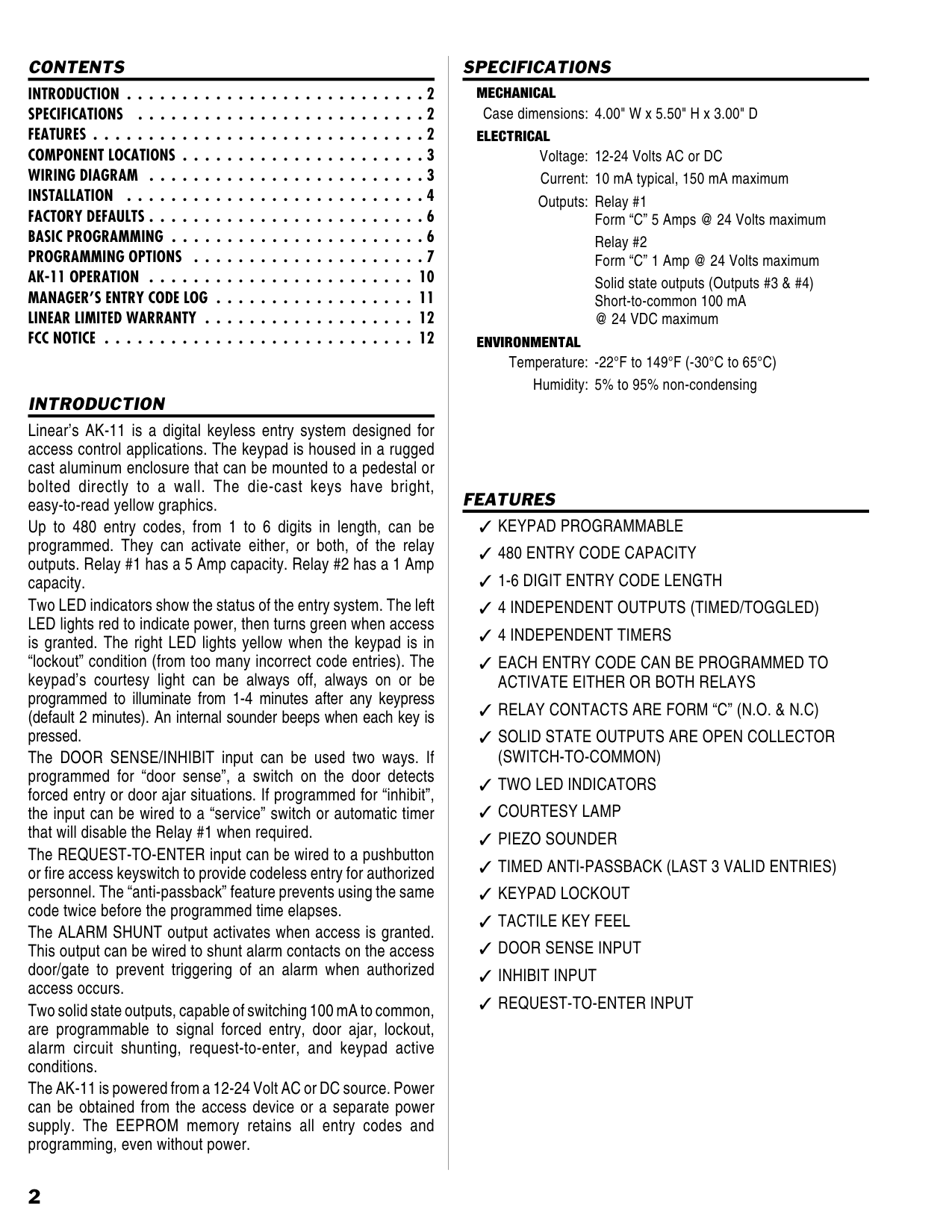
COMPONENT LOCATIONS
|TACTILE KEYPAD
YELLOW "LOCKOUT" INDICATOR
RED/GREEN POWER/ACCESS INDICATOR
NIGHT LIGHT
TERMINAL BLOCK J4 POWER AND INPUTS
KEYLOCK
TERMINAL BLOCK J3 OUTPUTS
JUMPER JP1 REMOVE TO REDUCE BEEPER SOUND
JUMPER JP2 RESETS MASTER CODE
| |---|
Figure 1. Component Locations
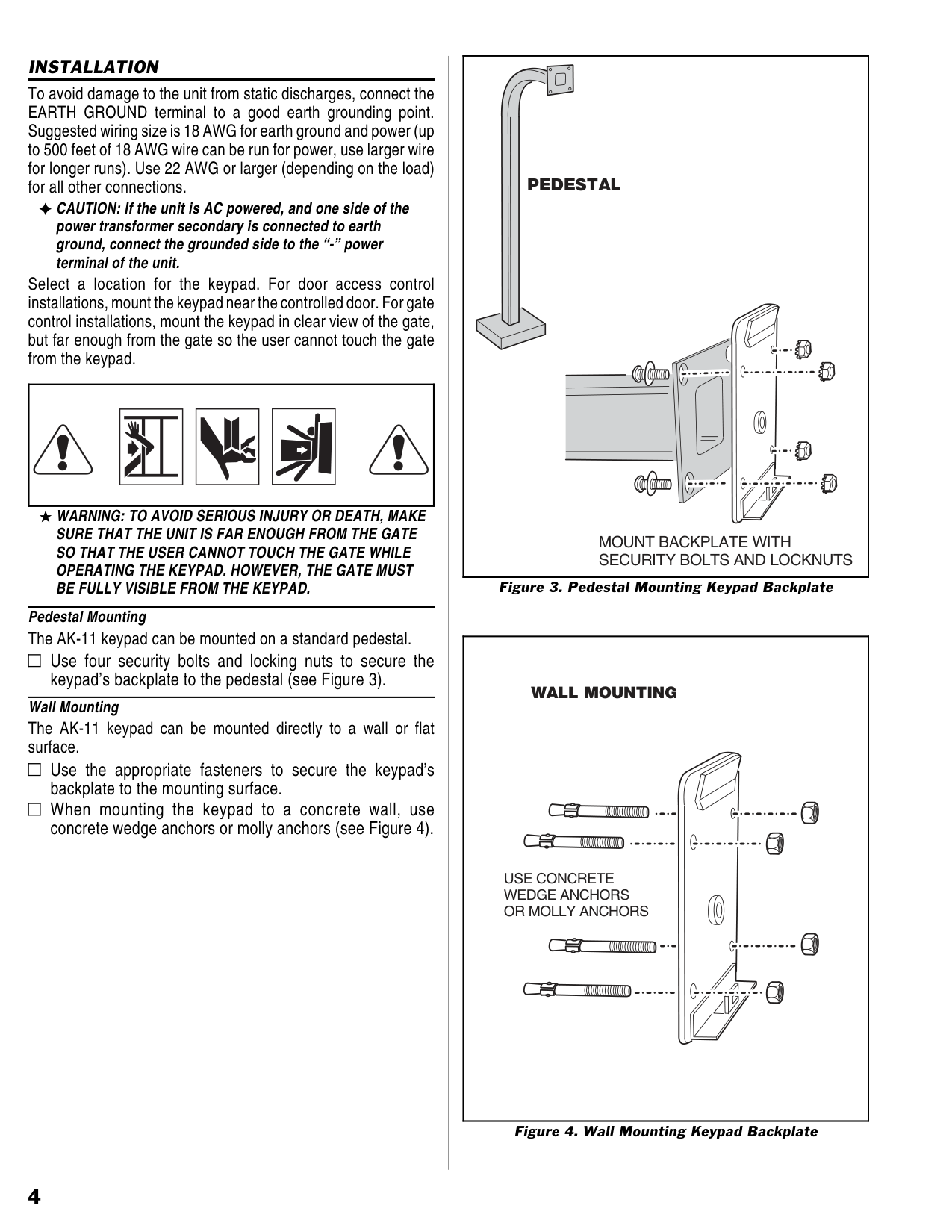
WIRING DIAGRAM
|J4
1
2
3
4
5
6
J3
1
2
3
4
5
6
7
8
9
POWER
INHIBIT COMMON REQUEST-TO-ENTER EARTH GROUND
N.O. COMMON N.C.
OUTPUT #3
OUTPUT #4 N.O.
COMMON N.C.
COMMON GROUND
AK-11
GATE OPERATOR
INHIBIT TIMER
AUXILIARY POWER
OPEN
J4
1
2
3
4
5
6
J3
1
2
3
4
5
6
7
8
9
DOOR SENSE COMMON REQUEST-TO-ENTER EARTH GROUND
N.O. COMMON N.C.
OUTPUT #3
OUTPUT #4 N.O.
COMMON N.C.
COMMON GROUND
AK-11
FIRE ACCESS
ELECTRIC DOOR STRIKE
OPEN
DOOR SWITCH
ALARM CONTACT
OPTIONAL WIRING
REQUIRED WIRING
POWER SUPPLY
RELAY #1
TO ALARM SYSTEM
TO ALARM SYSTEM
POWER
RELAY #2
RELAY #1
RELAY #2
TYPICAL DOOR INSTALLATION WIRINGTYPICAL GATE INSTALLATION WIRING| |---|
Figure 2. Wiring Diagram
###### INSTALLATION
To avoid damage to the unit from static discharges, connect the EARTH GROUND terminal to a good earth grounding point. Suggested wiring size is 18 AWG for earth ground and power (up to 500 feet of 18 AWG wire can be run for power, use larger wire for longer runs). Use 22 AWG or larger (depending on the load) for all other connections.
CAUTION: If the unit is AC powered, and one side of the power transformer secondary is connected to earth ground, connect the grounded side to the “-” power terminal of the unit.
Select a location for the keypad. For door access control installations, mount the keypad near the controlled door. For gate control installations, mount the keypad in clear view of the gate, but far enough from the gate so the user cannot touch the gate from the keypad.
| | |---|
WARNING: TO AVOID SERIOUS INJURY OR DEATH, MAKE SURE THAT THE UNIT IS FAR ENOUGH FROM THE GATE SO THAT THE USER CANNOT TOUCH THE GATE WHILE OPERATING THE KEYPAD. HOWEVER, THE GATE MUST BE FULLY VISIBLE FROM THE KEYPAD.
Pedestal Mounting The AK-11 keypad can be mounted on a standard pedestal.
######## Use four security bolts and locking nuts to secure the keypad’s backplate to the pedestal (see Figure 3).
| | |---|
Wall Mounting The AK-11 keypad can be mounted directly to a wall or flat surface.
Use the appropriate fasteners to secure the keypad’s backplate to the mounting surface.
| | |---|
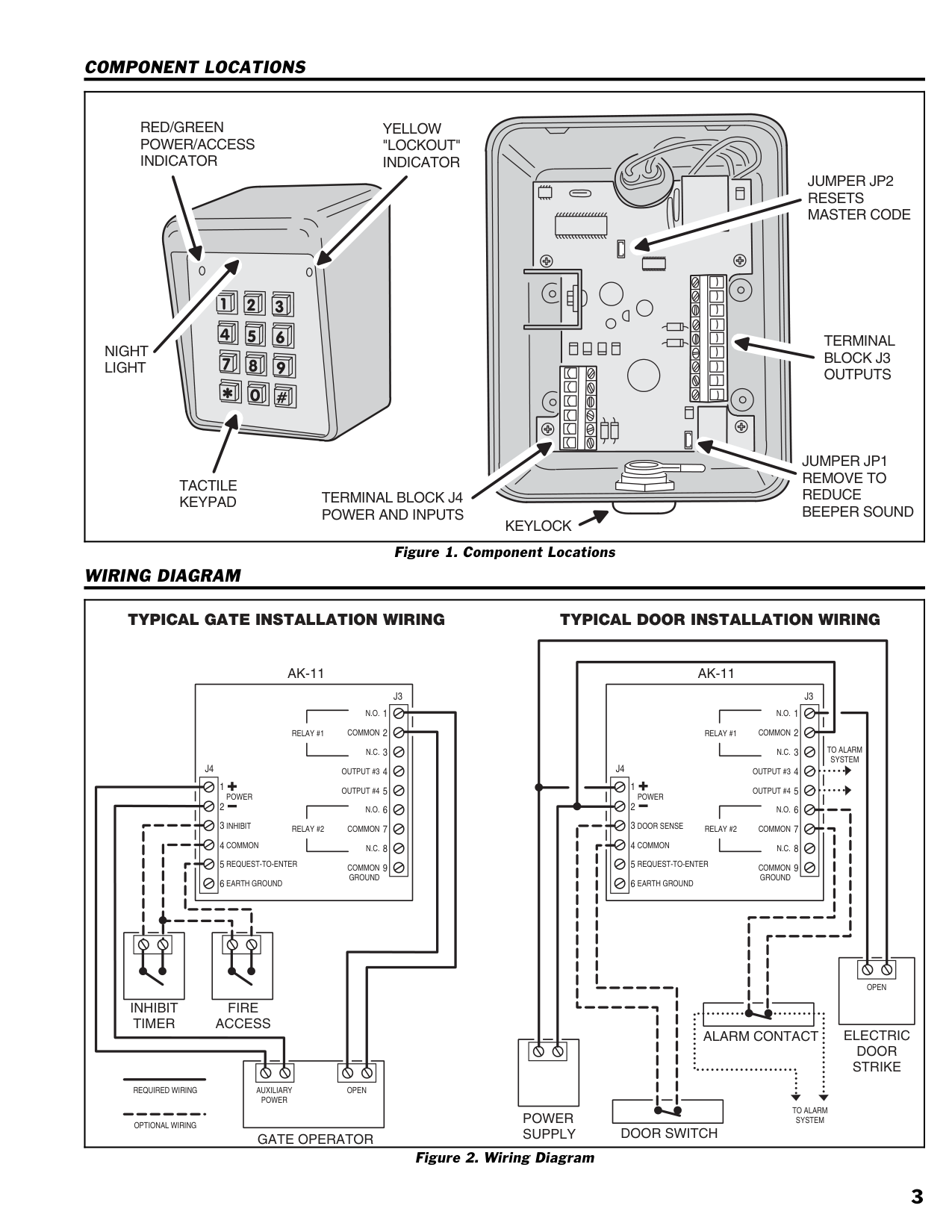
When mounting the keypad to a concrete wall, use concrete wedge anchors or molly anchors (see Figure 4).
| | |---|
|PEDESTAL
MOUNT BACKPLATE WITH SECURITY BOLTS AND LOCKNUTS| |---|
|USE CONCRETE WEDGE ANCHORS OR MOLLY ANCHORS
WALL MOUNTING| |---|
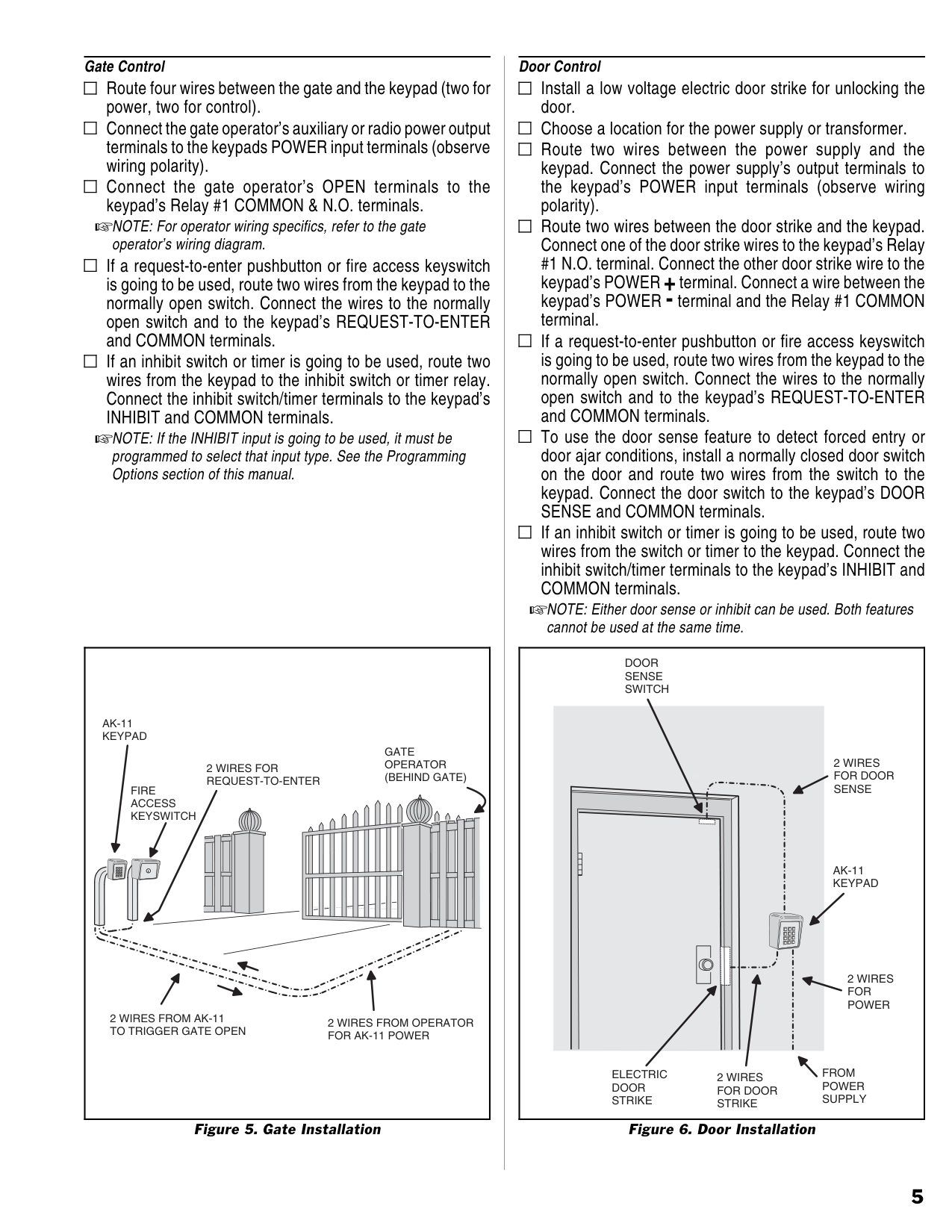
Gate Control Route four wires between the gate and the keypad (two for power, two for control).
| | |---|
Connect the gate operator’s auxiliary or radio power output terminals to the keypads POWER input terminals (observe wiring polarity).
| | |---|
Connect the gate operator’s OPEN terminals to the keypad’s Relay #1 COMMON & N.O. terminals.
| | |---|
NOTE: For operator wiring specifics, refer to the gate operator’s wiring diagram.
If a request-to-enter pushbutton or fire access keyswitch is going to be used, route two wires from the keypad to the normally open switch. Connect the wires to the normally open switch and to the keypad’s REQUEST-TO-ENTER and COMMON terminals.
| | |---|
If an inhibit switch or timer is going to be used, route two wires from the keypad to the inhibit switch or timer relay. Connect the inhibit switch/timer terminals to the keypad’s INHIBIT and COMMON terminals.
| | |---|
NOTE: If the INHIBIT input is going to be used, it must be programmed to select that input type. See the Programming Options section of this manual.
|AK-11 KEYPAD
FIRE ACCESS KEYSWITCH
2 WIRES FROM OPERATOR FOR AK-11 POWER
GATE OPERATOR (BEHIND GATE)
2 WIRES FROM AK-11 TO TRIGGER GATE OPEN
2 WIRES FOR REQUEST-TO-ENTER
| |---|
Figure 5. Gate Installation
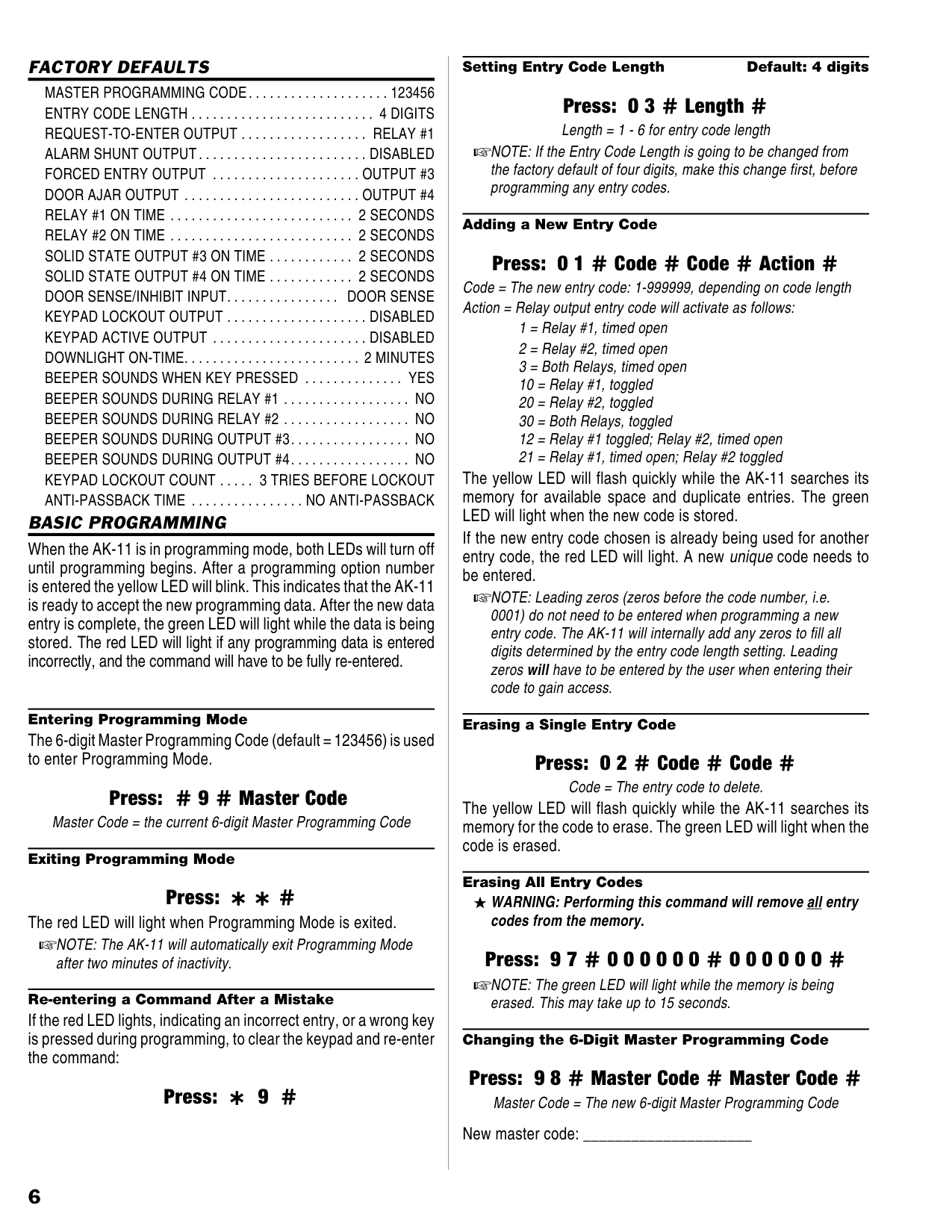
Door Control Install a low voltage electric door strike for unlocking the door. Choose a location for the power supply or transformer.
| | |---|
| | |---|
Route two wires between the power supply and the keypad. Connect the power supply’s output terminals to the keypad’s POWER input terminals (observe wiring polarity).
| | |---|
Route two wires between the door strike and the keypad. Connect one of the door strike wires to the keypad’s Relay #1 N.O. terminal. Connect the other door strike wire to the keypad’s POWER +terminal. Connect a wire between the keypad’s POWER - terminal and the Relay #1 COMMON terminal.
| | |---|
If a request-to-enter pushbutton or fire access keyswitch is going to be used, route two wires from the keypad to the normally open switch. Connect the wires to the normally open switch and to the keypad’s REQUEST-TO-ENTER and COMMON terminals.
| | |---|
To use the door sense feature to detect forced entry or door ajar conditions, install a normally closed door switch on the door and route two wires from the switch to the keypad. Connect the door switch to the keypad’s DOOR SENSE and COMMON terminals.
| | |---|
If an inhibit switch or timer is going to be used, route two wires from the switch or timer to the keypad. Connect the inhibit switch/timer terminals to the keypad’s INHIBIT and COMMON terminals.
| | |---|
NOTE: Either door sense or inhibit can be used. Both features cannot be used at the same time.
|FROM POWER SUPPLY
DOOR SENSE SWITCH
ELECTRIC DOOR STRIKE
AK-11 KEYPAD
2 WIRES FOR DOOR STRIKE
2 WIRES FOR DOOR SENSE
2 WIRES FOR POWER
| |---|
Figure 6. Door Installation
FACTORY DEFAULTS
MASTER PROGRAMMING CODE. . . . . . . . . . . . . . . . . . . . 123456 ENTRY CODE LENGTH . . . . . . . . . . . . . . . . . . . . . . . . . . 4 DIGITS REQUEST-TO-ENTER OUTPUT . . . . . . . . . . . . . . . . . . RELAY #1 ALARM SHUNT OUTPUT. . . . . . . . . . . . . . . . . . . . . . . . DISABLED FORCED ENTRY OUTPUT . . . . . . . . . . . . . . . . . . . . . OUTPUT #3 DOOR AJAR OUTPUT . . . . . . . . . . . . . . . . . . . . . . . . . OUTPUT #4
###### BASIC PROGRAMMING
When the AK-11 is in programming mode, both LEDs will turn off until programming begins. After a programming option number is entered the yellow LED will blink. This indicates that the AK-11 is ready to accept the new programming data. After the new data entry is complete, the green LED will light while the data is being stored. The red LED will light if any programming data is entered incorrectly, and the command will have to be fully re-entered.
Entering Programming Mode The 6-digit Master Programming Code (default = 123456) is used to enter Programming Mode.
Press: # 9 # Master Code Master Code = the current 6-digit Master Programming Code Exiting Programming Mode
Press: * * #
The red LED will light when Programming Mode is exited. NOTE: The AK-11 will automatically exit Programming Mode after two minutes of inactivity.
Re-entering a Command After a Mistake
If the red LED lights, indicating an incorrect entry, or a wrong key is pressed during programming, to clear the keypad and re-enter the command:
Press: * 9 #
Setting Entry Code Length Default: 4 digits
#### Press: 0 3 # Length #
Length = 1 - 6 for entry code length NOTE: If the Entry Code Length is going to be changed from the factory default of four digits, make this change first, before programming any entry codes.
########### Adding a New Entry Code
Press: 0 1 # Code # Code # Action # Code = The new entry code: 1-999999, depending on code length Action = Relay output entry code will activate as follows:
The yellow LED will flash quickly while the AK-11 searches its memory for available space and duplicate entries. The green LED will light when the new code is stored.
If the new entry code chosen is already being used for another entry code, the red LED will light. A new unique code needs to be entered.
NOTE: Leading zeros (zeros before the code number, i.e.
0001) do not need to be entered when programming a new entry code. The AK-11 will internally add any zeros to fill all digits determined by the entry code length setting. Leading zeros will have to be entered by the user when entering their code to gain access.
Erasing a Single Entry Code
#### Press: 0 2 # Code # Code #
Code = The entry code to delete. The yellow LED will flash quickly while the AK-11 searches its memory for the code to erase. The green LED will light when the code is erased.
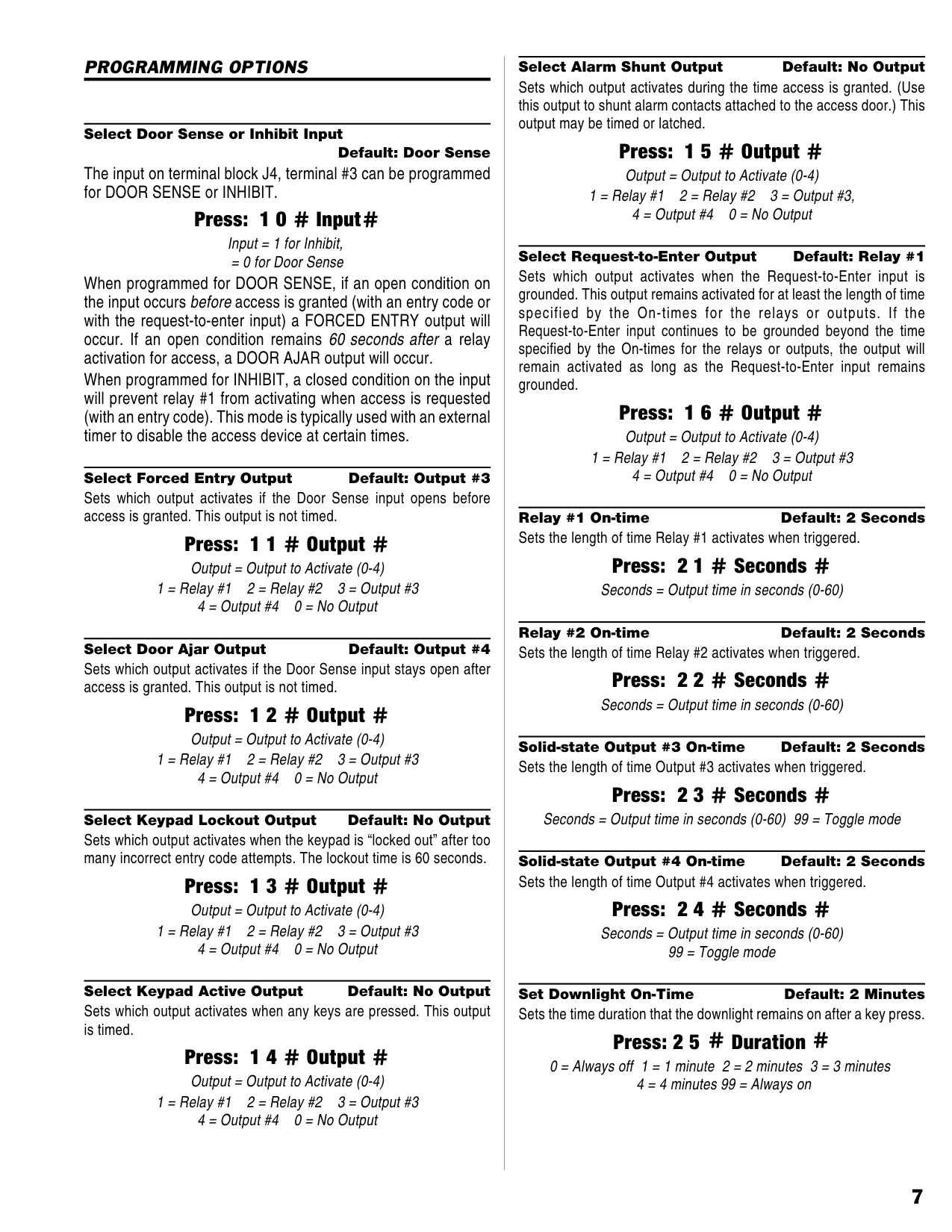
Erasing All Entry Codes WARNING: Performing this command will remove all entry codes from the memory.
#### Press: 9 7 # 0 0 0 0 0 0 # 0 0 0 0 0 0 #
NOTE: The green LED will light while the memory is being erased. This may take up to 15 seconds.
Changing the 6-Digit Master Programming Code
#### Press: 9 8 # Master Code # Master Code #
Master Code = The new 6-digit Master Programming Code New master code: _____________________
###### PROGRAMMING OPTIONS
Select Door Sense or Inhibit Input
Default: Door Sense The input on terminal block J4, terminal #3 can be programmed for DOOR SENSE or INHIBIT.
#### Press: 1 0 # Input#
Input = 1 for Inhibit,
= 0 for Door Sense When programmed for DOOR SENSE, if an open condition on the input occurs before access is granted (with an entry code or with the request-to-enter input) a FORCED ENTRY output will occur. If an open condition remains 60 seconds after a relay activation for access, a DOOR AJAR output will occur.
When programmed for INHIBIT, a closed condition on the input will prevent relay #1 from activating when access is requested (with an entry code). This mode is typically used with an external timer to disable the access device at certain times.
Select Forced Entry Output Default: Output #3 Sets which output activates if the Door Sense input opens before access is granted. This output is not timed.
#### Press: 1 1 # Output #
Output = Output to Activate (0-4) 1 = Relay #1 2 = Relay #2 3 = Output #3 4 = Output #4 0 = No Output
Select Door Ajar Output Default: Output #4 Sets which output activates if the Door Sense input stays open after access is granted. This output is not timed.
#### Press: 1 2 # Output #
Output = Output to Activate (0-4) 1 = Relay #1 2 = Relay #2 3 = Output #3 4 = Output #4 0 = No Output
Select Keypad Lockout Output Default: No Output Sets which output activates when the keypad is “locked out” after too many incorrect entry code attempts. The lockout time is 60 seconds.
#### Press: 1 3 # Output #
Output = Output to Activate (0-4) 1 = Relay #1 2 = Relay #2 3 = Output #3 4 = Output #4 0 = No Output
Select Keypad Active Output Default: No Output Sets which output activates when any keys are pressed. This output is timed.
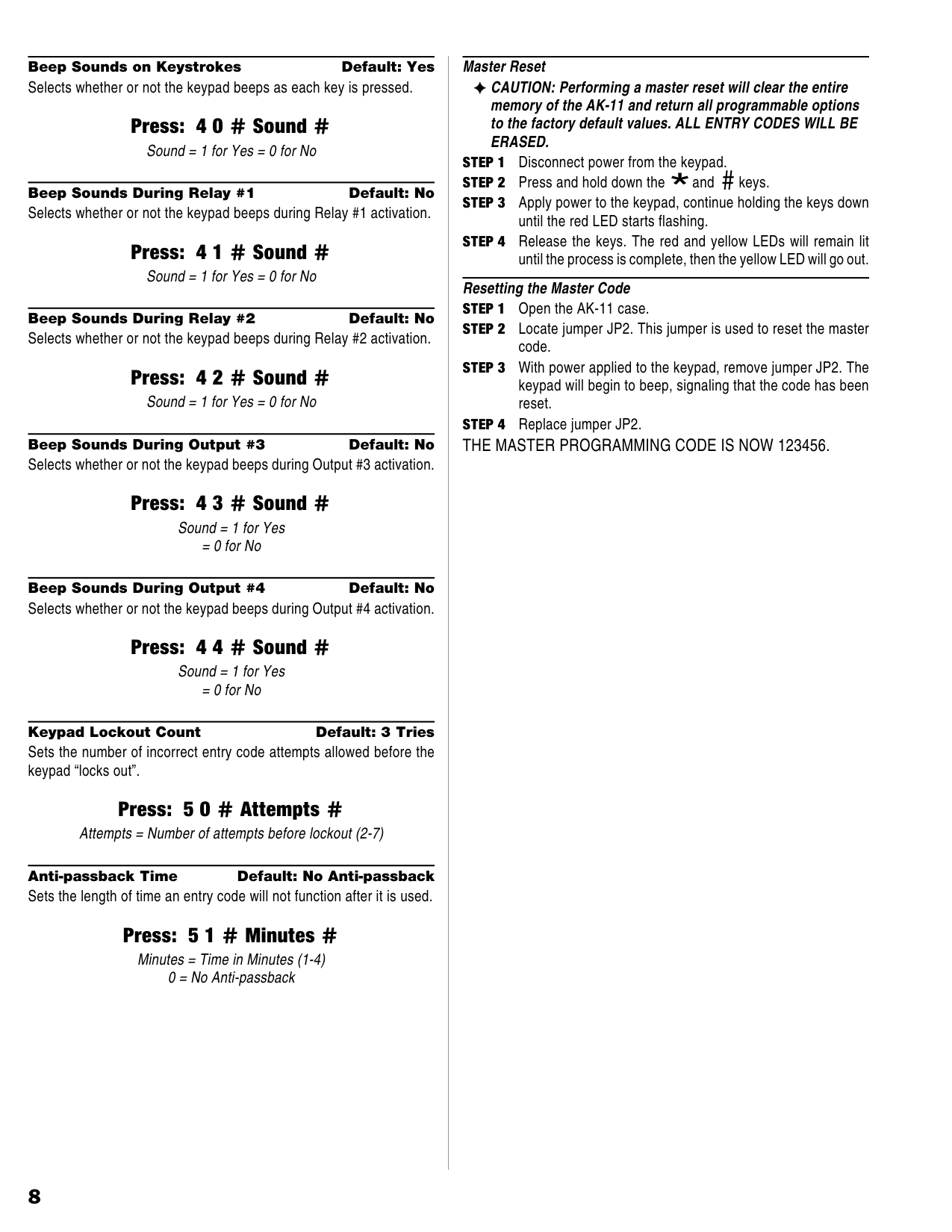
#### Press: 1 4 # Output #
Output = Output to Activate (0-4) 1 = Relay #1 2 = Relay #2 3 = Output #3 4 = Output #4 0 = No Output
Select Alarm Shunt Output Default: No Output Sets which output activates during the time access is granted. (Use this output to shunt alarm contacts attached to the access door.) This output may be timed or latched.
#### Press: 1 5 # Output #
Output = Output to Activate (0-4) 1 = Relay #1 2 = Relay #2 3 = Output #3, 4 = Output #4 0 = No Output
Select Request-to-Enter Output Default: Relay #1 Sets which output activates when the Request-to-Enter input is grounded. This output remains activated for at least the length of time specified by the On-times for the relays or outputs. If the Request-to-Enter input continues to be grounded beyond the time specified by the On-times for the relays or outputs, the output will remain activated as long as the Request-to-Enter input remains grounded.
#### Press: 1 6 # Output #
Output = Output to Activate (0-4) 1 = Relay #1 2 = Relay #2 3 = Output #3 4 = Output #4 0 = No Output
Press: 2 1 # Seconds #
Seconds = Output time in seconds (0-60)
Relay #2 On-time Default: 2 Seconds
#### Press: 2 2 # Seconds #
Seconds = Output time in seconds (0-60)
Press: 2 3 # Seconds #
Seconds = Output time in seconds (0-60) 99 = Toggle mode
Solid-state Output #4 On-time Default: 2 Seconds
#### Press: 2 4 # Seconds #
Seconds = Output time in seconds (0-60) 99 = Toggle mode
Set Downlight On-Time Default: 2 Minutes Sets the time duration that the downlight remains on after a key press.
#### Press: 2 5 # Duration #
0 = Always off 1 = 1 minute 2 = 2 minutes 3 = 3 minutes 4 = 4 minutes 99 = Always on
Beep Sounds on Keystrokes Default: Yes Selects whether or not the keypad beeps as each key is pressed.
#### Press: 4 0 # Sound #
Sound = 1 for Yes = 0 for No
Press: 4 1 # Sound #
Sound = 1 for Yes = 0 for No
Beep Sounds During Relay #2 Default: No
#### Press: 4 2 # Sound #
Sound = 1 for Yes = 0 for No
Press: 4 3 # Sound #
Sound = 1 for Yes = 0 for No
Beep Sounds During Output #4 Default: No
#### Press: 4 4 # Sound #
Sound = 1 for Yes = 0 for No
Keypad Lockout Count Default: 3 Tries Sets the number of incorrect entry code attempts allowed before the keypad “locks out”.
#### Press: 5 0 # Attempts #
Attempts = Number of attempts before lockout (2-7)
Anti-passback Time Default: No Anti-passback Sets the length of time an entry code will not function after it is used.
#### Press: 5 1 # Minutes #
Minutes = Time in Minutes (1-4) 0 = No Anti-passback
Master Reset CAUTION: Performing a master reset will clear the entire memory of the AK-11 and return all programmable options to the factory default values. ALL ENTRY CODES WILL BE ERASED.
Resetting the Master Code
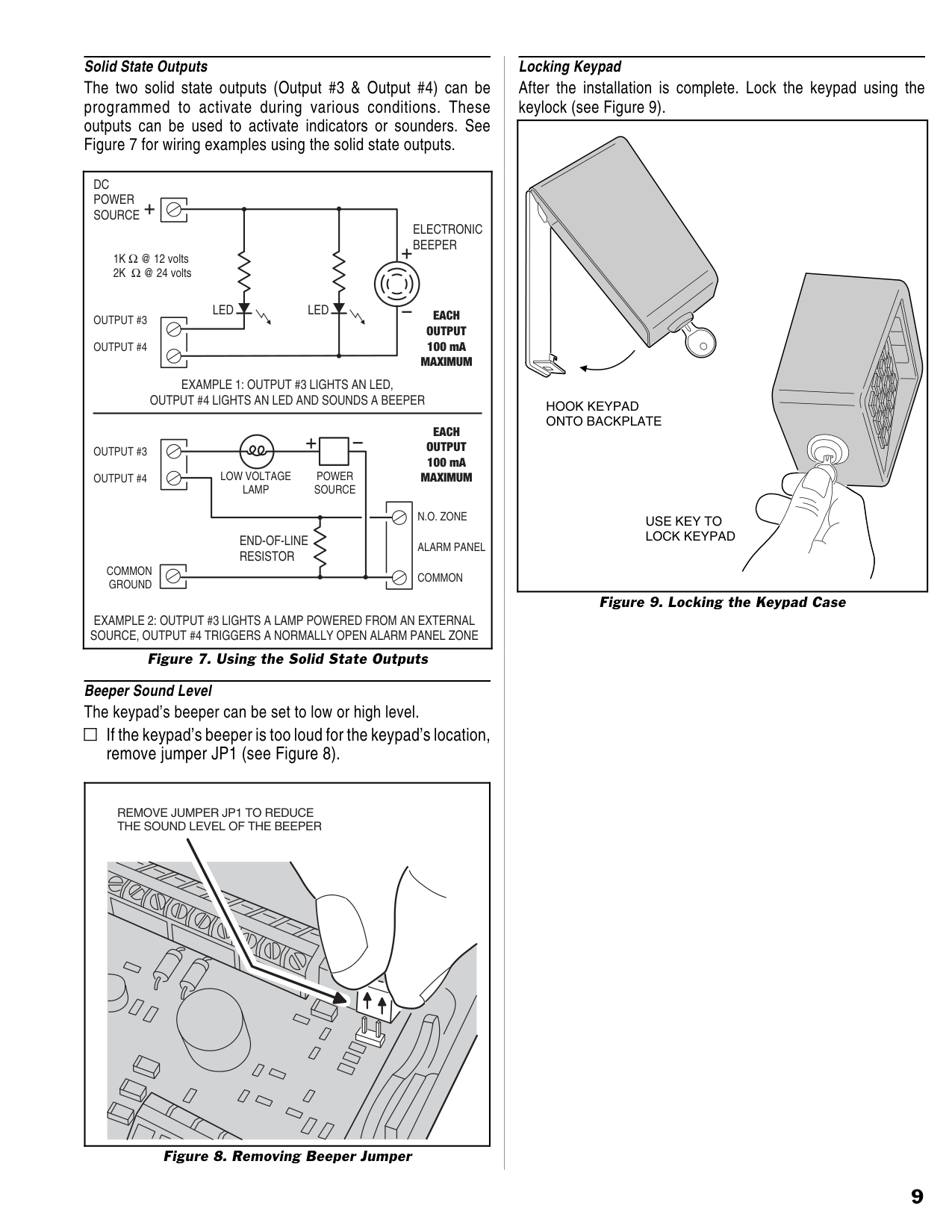
Solid State Outputs
The two solid state outputs (Output #3 & Output #4) can be programmed to activate during various conditions. These outputs can be used to activate indicators or sounders. See Figure 7 for wiring examples using the solid state outputs.
|OUTPUT #3
OUTPUT #4
COMMON GROUND
DC POWER SOURCE
LED LED
ELECTRONIC BEEPER
EXAMPLE 1: OUTPUT #3 LIGHTS AN LED, OUTPUT #4 LIGHTS AN LED AND SOUNDS A BEEPER
EXAMPLE 2: OUTPUT #3 LIGHTS A LAMP POWERED FROM AN EXTERNAL SOURCE, OUTPUT #4 TRIGGERS A NORMALLY OPEN ALARM PANEL ZONE
OUTPUT #3
OUTPUT #4
EACH OUTPUT 100 mA MAXIMUM
ALARM PANEL
N.O. ZONE
COMMON
END-OF-LINE RESISTOR
POWER SOURCE
LOW VOLTAGE LAMP
EACH OUTPUT 100 mA MAXIMUM
1K Ω @ 12 volts
2K Ω @ 24 volts
| |---|
Figure 7. Using the Solid State Outputs
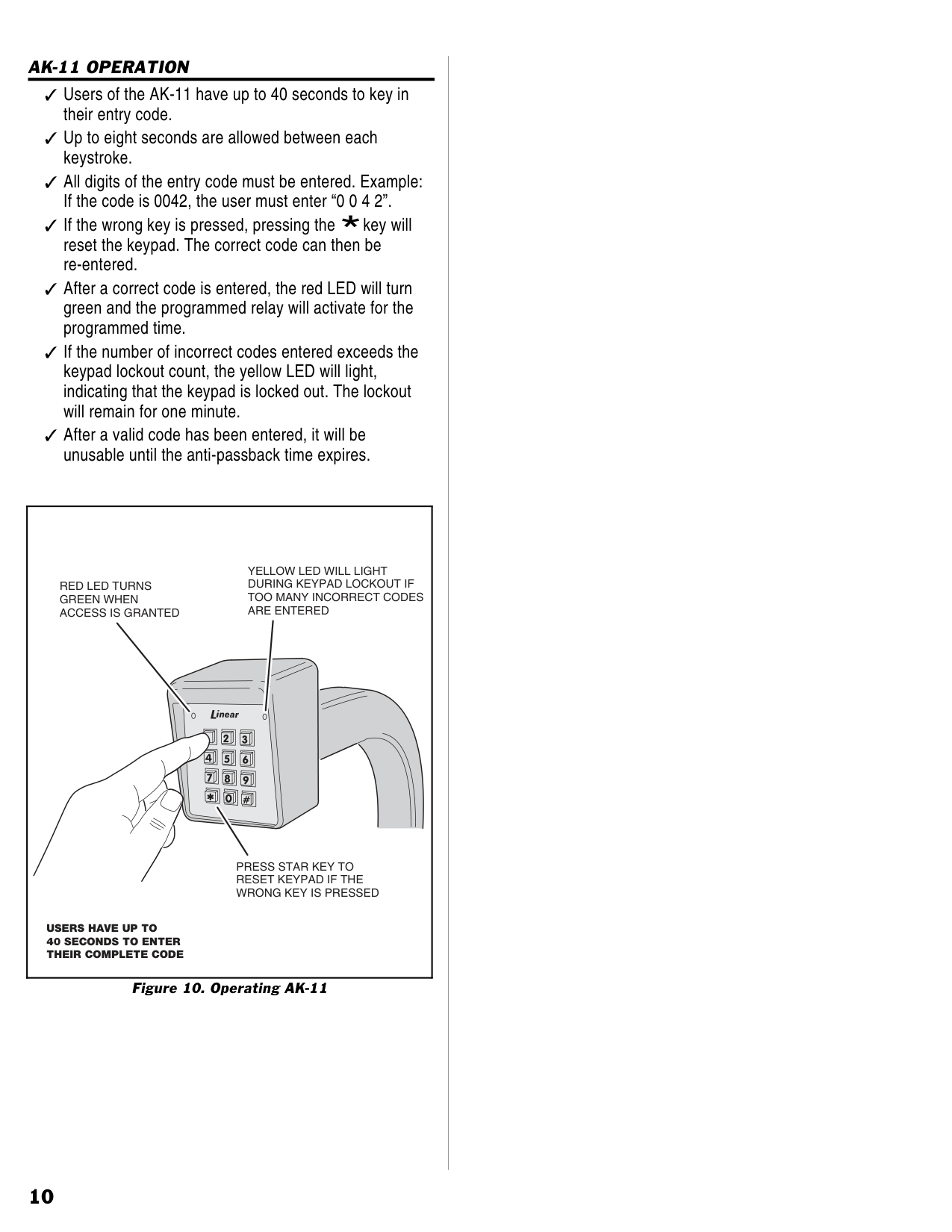
Beeper Sound Level The keypad’s beeper can be set to low or high level.
If the keypad’s beeper is too loud for the keypad’s location, remove jumper JP1 (see Figure 8).
| | |---|
|REMOVE JUMPER JP1 TO REDUCE THE SOUND LEVEL OF THE BEEPER
| |---|
Figure 8. Removing Beeper Jumper
Locking Keypad After the installation is complete. Lock the keypad using the keylock (see Figure 9).
|HOOK KEYPAD ONTO BACKPLATE
USE KEY TO LOCK KEYPAD| |---|
Figure 9. Locking the Keypad Case
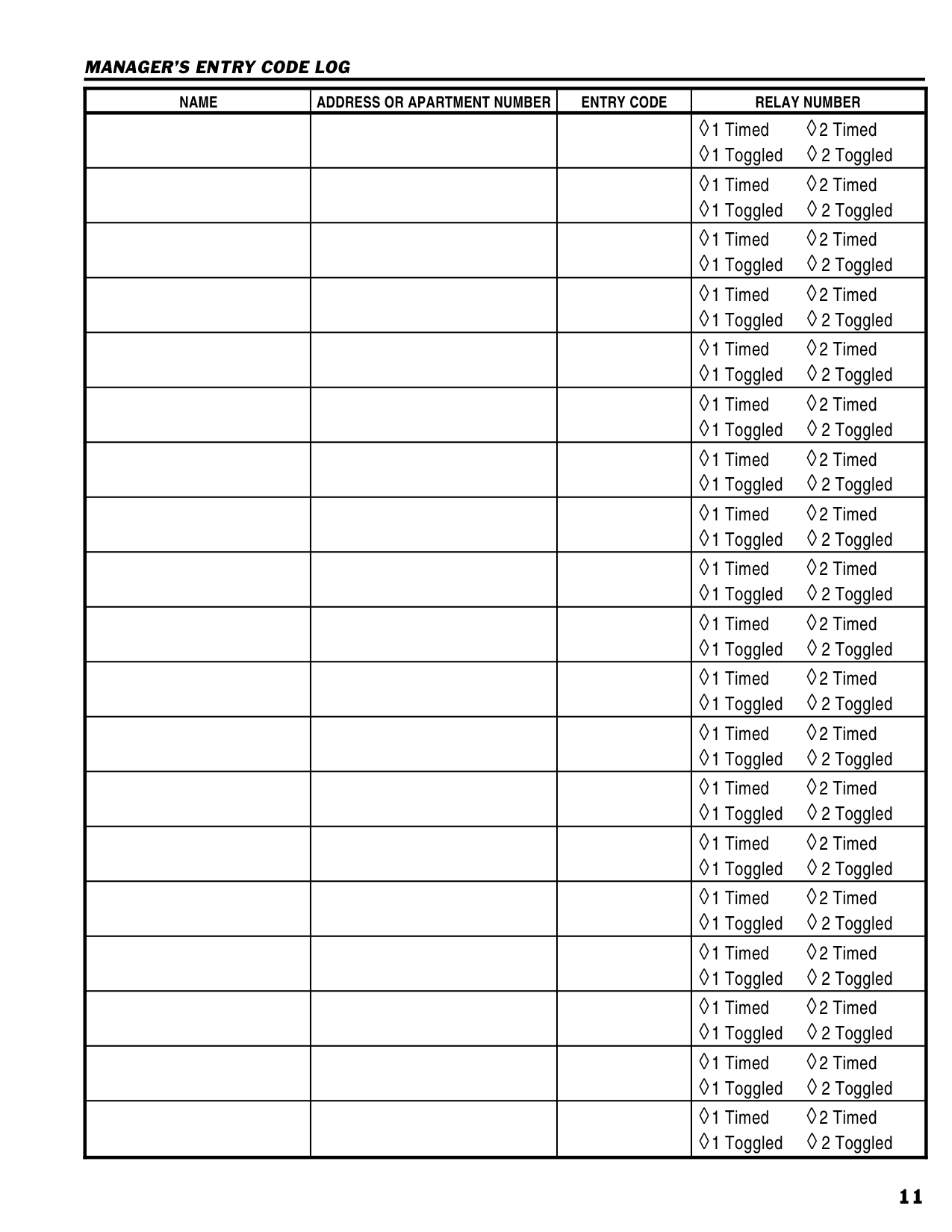
AK-11 OPERATION Users of the AK-11 have up to 40 seconds to key in their entry code. Up to eight seconds are allowed between each keystroke. All digits of the entry code must be entered. Example: If the code is 0042, the user must enter “0 0 4 2”.
If the wrong key is pressed, pressing the *key will reset the keypad. The correct code can then be re-entered.
After a correct code is entered, the red LED will turn green and the programmed relay will activate for the programmed time.
If the number of incorrect codes entered exceeds the keypad lockout count, the yellow LED will light, indicating that the keypad is locked out. The lockout will remain for one minute. After a valid code has been entered, it will be unusable until the anti-passback time expires.
|USERS HAVE UP TO 40 SECONDS TO ENTER THEIR COMPLETE CODE
PRESS STAR KEY TO RESET KEYPAD IF THE WRONG KEY IS PRESSED
RED LED TURNS GREEN WHEN ACCESS IS GRANTED
YELLOW LED WILL LIGHT DURING KEYPAD LOCKOUT IF TOO MANY INCORRECT CODES ARE ENTERED
| |---|
Figure 10. Operating AK-11
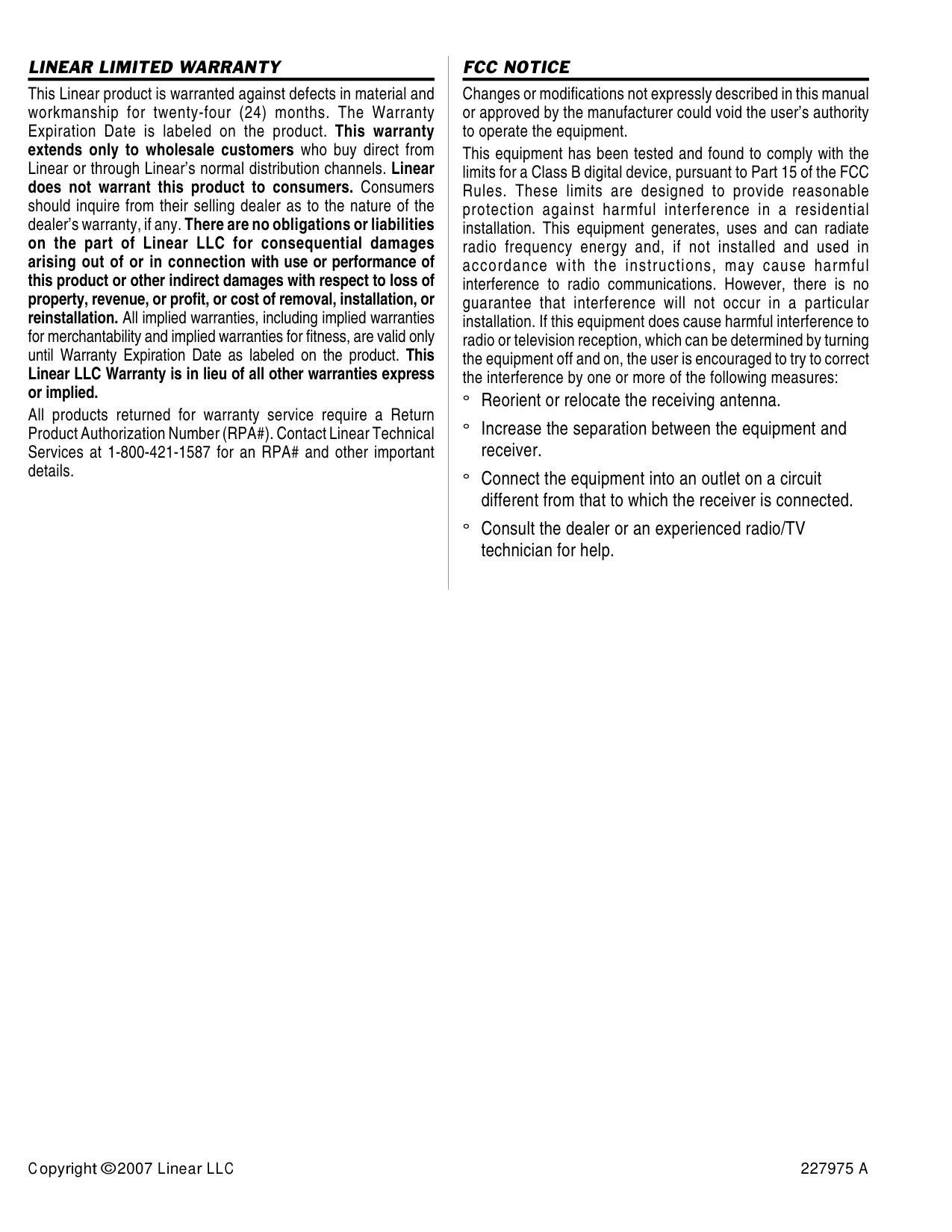
###### MANAGER’S ENTRY CODE LOG
|NAME|ADDRESS OR APARTMENT NUMBER|ENTRY CODE|RELAY NUMBER| |---|---|---|---| | | | |◊1 Timed ◊2 Timed
◊1 Toggled ◊ 2 Toggled| | | | |◊1 Timed ◊2 Timed
◊1 Toggled ◊ 2 Toggled| | | | |◊1 Timed ◊2 Timed
◊1 Toggled ◊ 2 Toggled| | | | |◊1 Timed ◊2 Timed
◊1 Toggled ◊ 2 Toggled| | | | |◊1 Timed ◊2 Timed
◊1 Toggled ◊ 2 Toggled| | | | |◊1 Timed ◊2 Timed
◊1 Toggled ◊ 2 Toggled| | | | |◊1 Timed ◊2 Timed
◊1 Toggled ◊ 2 Toggled| | | | |◊1 Timed ◊2 Timed
◊1 Toggled ◊ 2 Toggled| | | | |◊1 Timed ◊2 Timed
◊1 Toggled ◊ 2 Toggled| | | | |◊1 Timed ◊2 Timed
◊1 Toggled ◊ 2 Toggled| | | | |◊1 Timed ◊2 Timed
◊1 Toggled ◊ 2 Toggled| | | | |◊1 Timed ◊2 Timed
◊1 Toggled ◊ 2 Toggled| | | | |◊1 Timed ◊2 Timed
◊1 Toggled ◊ 2 Toggled| | | | |◊1 Timed ◊2 Timed
◊1 Toggled ◊ 2 Toggled| | | | |◊1 Timed ◊2 Timed
◊1 Toggled ◊ 2 Toggled| | | | |◊1 Timed ◊2 Timed
◊1 Toggled ◊ 2 Toggled| | | | |◊1 Timed ◊2 Timed
◊1 Toggled ◊ 2 Toggled| | | | |◊1 Timed ◊2 Timed
◊1 Toggled ◊ 2 Toggled| | | | |◊1 Timed ◊2 Timed
◊1 Toggled ◊ 2 Toggled|
LINEAR LIMITED WARRANTY
This Linear product is warranted against defects in material and workmanship for twenty-four (24) months. The Warranty Expiration Date is labeled on the product. This warranty extends only to wholesale customers who buy direct from Linear or through Linear’s normal distribution channels. Linear does not warrant this product to consumers. Consumers should inquire from their selling dealer as to the nature of the dealer’s warranty, if any.There are no obligations or liabilities on the part of Linear LLC for consequential damages arising out of or in connection with use or performance of this product or other indirect damages with respect to loss of property, revenue, or profit, or cost of removal, installation, or reinstallation. All implied warranties, including implied warranties for merchantability and implied warranties for fitness, are valid only until Warranty Expiration Date as labeled on the product. This Linear LLC Warranty is in lieu of all other warranties express or implied.
All products returned for warranty service require a Return Product Authorization Number (RPA#). Contact Linear Technical Services at 1-800-421-1587 for an RPA# and other important details.
FCC NOTICE
Changes or modifications not expressly described in this manual or approved by the manufacturer could void the user’s authority to operate the equipment.
This equipment has been tested and found to comply with the limits for a Class B digital device, pursuant to Part 15 of the FCC Rules. These limits are designed to provide reasonable protection against harmful interference in a residential installation. This equipment generates, uses and can radiate radio frequency energy and, if not installed and used in accordance with the instructions, may cause harmful interference to radio communications. However, there is no guarantee that interference will not occur in a particular installation. If this equipment does cause harmful interference to radio or television reception, which can be determined by turning the equipment off and on, the user is encouraged to try to correct the interference by one or more of the following measures:
° Reorient or relocate the receiving antenna. ° Increase the separation between the equipment and
receiver.
° Connect the equipment into an outlet on a circuit
different from that to which the receiver is connected. ° Consult the dealer or an experienced radio/TV
technician for help.
Copyright © 2007 Linear LLC 227975 A