Ask AI
— answers from the official manualAnswers from the official manual.
Common questions
Common Questions
20 totalHow do I reset the X Talker T50 Series radio to its original factory settings?
Turn on the radio while pressing and holding the UP (s) button to reset it to original default settings. The LCD display will reset to standby mode on channel 1 with no Privacy Code selected.
How do I turn the X Talker T50 Series on and off?
Press the POWER/MENU button for at least 3 seconds to turn the radio on or off. During power on, the radio will beep 2 times with different tones, the LCD will display several icons for 1 second, and then show the last channel selected.
How do I charge the NiMH battery pack on the T50 Series?
Insert one end of the USB Cable into a USB power source and the other end into the radio's USB charging jack. While charging, the Battery Meter will flash from 1 to 3 bars, and the LCD display will show FULL when charging is complete. For maximum battery life, Midland recommends charging when the low battery icon comes on, and it is recommended to charge with the radio turned OFF.
What does it mean when 'bt Lo' flashes on the display?
When the battery level is low, the Battery icon and 'bt Lo' will flash on the display, indicating your batteries should be replaced or recharged if using a rechargeable battery pack. You should recharge or replace the batteries promptly to maintain proper operation.
How do I lock the keypad to prevent accidentally changing settings?
Press and hold the CALL/LOCK button for 3 seconds to activate the Keypad Lock, and the lock icon will appear on the display. While the keypad is locked, the PTT and CALL buttons will still remain active. Repeat the same procedure to unlock the keypad.
How do I activate NOAA Weather Radio on the T50 Series?
Press and hold the UP/WX button for 5 seconds while in FRS mode to activate the NOAA Weather Radio function, and the radio will switch to WX Band mode. You can then press the MENU button and use the UP/DOWN buttons to select one of the 10 available NOAA Weather channels.
Show 14 more questions
How do I set Privacy Codes on the T50 Series?
Why is my T50 Series radio not responding to button presses?
How should I clean and care for my T50 Series radio?
How do I factory reset the Midland X Talker T50 Series?
How do I install batteries in my T50 Series?
How do I turn on voice activation mode?
How do I send an emergency alert using the T50 Series?
How do I lock the keypad for safety?
How do I set up monitoring or scanning functions?
How do I set the privacy code for my radio?
How do I turn off the NOAA Weather Alert function?
What do I do if my radio isn't powering on?
What is the warranty on the Midland X Talker T50 Series?
How do I charge the rechargeable battery in my T50 Series?
Full Manual
19 pages

This Page Is
Intentionally
Left Blank
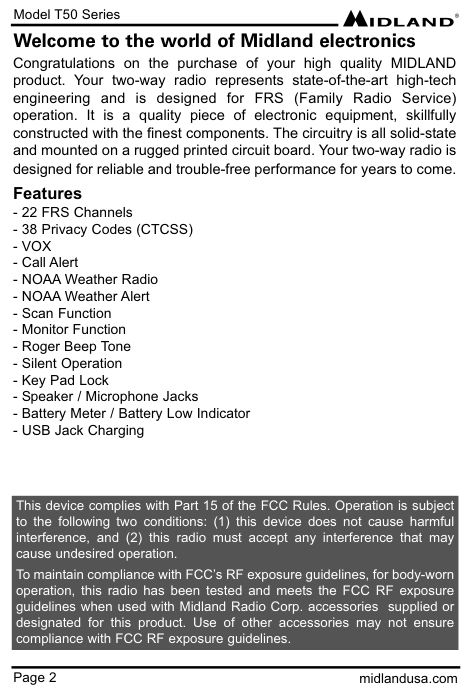
Model T50 Series Page 2 midlandusa.com Welcome to the world of Midland electronics Congratulations on the purchase of your high quality MIDLAND product. Your two-way radio represents state-of-the-art high-tech engineering and is designed for FRS (Family Radio Service) operation. It is a quality piece of electronic equipment, skillfully constructed with the finest components. The circuitry is all solid-state and mounted on a rugged printed circuit board. Your two-way radio is designed for reliable and trouble-free performance for years to come. Features
- Vox
Model T50 Series Page 3 midlandusa.com
Important Notice
Exposure To Radio Frequency Energy Your Midland radio is designed to comply with the following national and international standards and guidelines regarding exposure of human beings to radio frequency electromagnetic energy:(Icnirp) 1998
To control your exposure and ensure compliance with the general population or uncontrolled environment exposure limits, transmit no more than 50% of the time. The radio generates measurable RF energy exposure only when transmitting. Body-Worn Operation If you wear the radio on your body when transmitting always use Midland- supplied or approved belt clip, holster, case, or body harness for this product. Use of any accessories not supplied or approved by Midland may exceed FCC/Health Canada RF exposure guidelines. If you do not use any accessories supplied or approved by Midland, ensure the radio and its antenna are at least 1 inch (2.5cm) from your body when transmitting.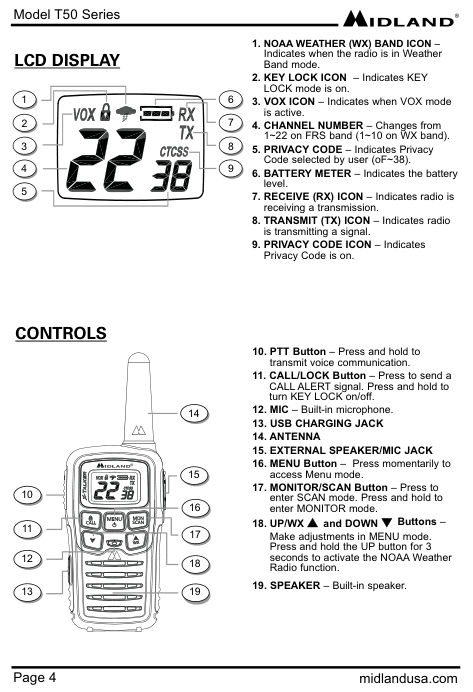
Model T50 Series Page 4 midlandusa.com
Lcd Display
1. Noaa Weather (Wx) Band Icon –
Indicates when the radio is in Weather Band mode.Controls
13. Usb Charging Jack
14. Antenna
15. External Speaker/Mic Jack
Model T50 Series Page 5 midlandusa.com
Battery Installation
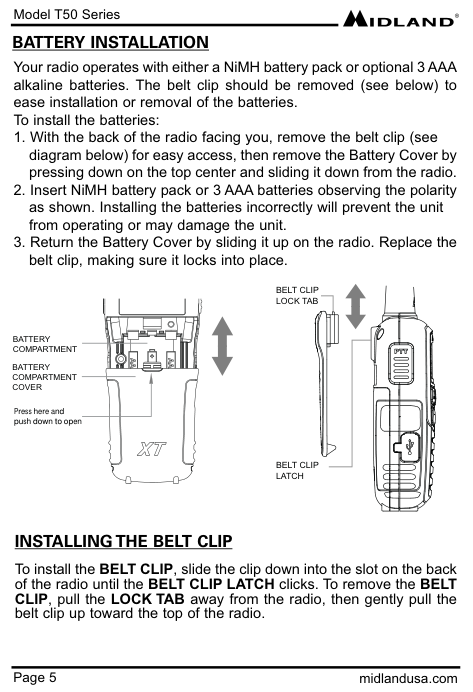
Your radio operates with either a NiMH battery pack or optional 3 AAA alkaline batteries. The belt clip should be removed (see below) to ease installation or removal of the batteries. To install the batteries:Battery
Compartment
Battery
Compartment
Cover
Press here and push down to openBelt Clip
Lock Tab
Belt Clip
Latch
Installing The Belt Clip
To install the BELT CLIP, slide the clip down into the slot on the back of the radio until the BELT CLIP LATCH clicks. To remove the BELT CLIP, pull the LOCK TAB away from the radio, then gently pull the belt clip up toward the top of the radio.
Model T50 Series Page 6 midlandusa.com Your radios are equipped for using a rechargeable NiMH battery pack (BATT3R) which can be recharged by inserting one end of the USB Cable into a USB power source, and the other end into the radio USB charging jack, or with the optional desktop charger (as described below). While charging, the Battery Meter will flash from 1 to 3 bars. The LCD display will show FULL when charging is complete. For maximum battery life, Midland recommends charging the battery pack when the low battery icon comes on. Remove the radios from the charger when the charging is finished. To charge using the Desktop Charger:
Battery Level Indicator
Your radio has a BATTERY LEVEL METER that shows the battery power level. The greater the number of bars visible, the stronger the battery level. When the battery level is low, the Battery Shell icon and “bt Lo” will flash in the display indicating your batteries should be replaced or recharged if using a rechargeable battery pack.Charging The Batteries
!
Model T50 Series Page 7 midlandusa.com
Power On/Off And Volume
Press the POWER/MENU button for at least 3 seconds to turn the radio on/off. During Power On, the radio will beep 2 times with different tones, the LCD will display several icons for 1 second and then the LCD display will indicate the last channel selected. To increase/decrease the volume level, press the s\t buttons during RX or STANDBY modeRestoring Your Radio To The Original Setting
To reset your radio to the original (default) setting, turn on the radio while pressing and holding the s button. The LCD display will reset to standby mode on channel 1 with no Privacy Code.Transmitting And Receiving A Call
To communicate, all radios in your group must be set to the same channel and/or Privacy Code.About Range
Your radios are designed to give you maximum range under optimum conditions.Operating Your Radio
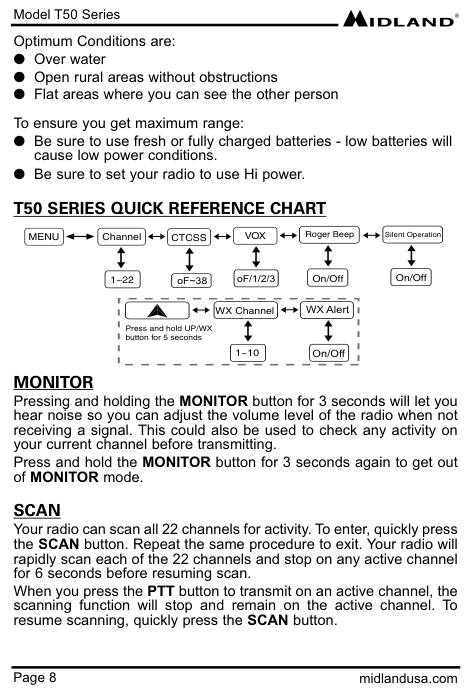
Model T50 Series Page 8 midlandusa.com Optimum Conditions are: l Over water l Open rural areas without obstructions l Flat areas where you can see the other person To ensure you get maximum range: l Be sure to use fresh or fully charged batteries - low batteries will cause low power conditions. l Be sure to set your radio to use Hi power.
T50 Series Quick Reference Chart
Monitor
Pressing and holding the MONITOR button for 3 seconds will let you hear noise so you can adjust the volume level of the radio when not receiving a signal. This could also be used to check any activity on your current channel before transmitting. Press and hold the MONITOR button for 3 seconds again to get out of MONITOR mode.Scan
Your radio can scan all 22 channels for activity. To enter, quickly press the SCAN button. Repeat the same procedure to exit. Your radio will rapidly scan each of the 22 channels and stop on any active channel for 6 seconds before resuming scan. When you press the PTT button to transmit on an active channel, the scanning function will stop and remain on the active channel. To resume scanning, quickly press the SCAN button.Menu
ChannelVox
1~22Ctcss
Roger Beep On/Off Silent Operation On/Off oF/1/2/3 WX Channel 1~10 WX Alert On/Off Press and hold UP/WX button for 5 seconds oF~38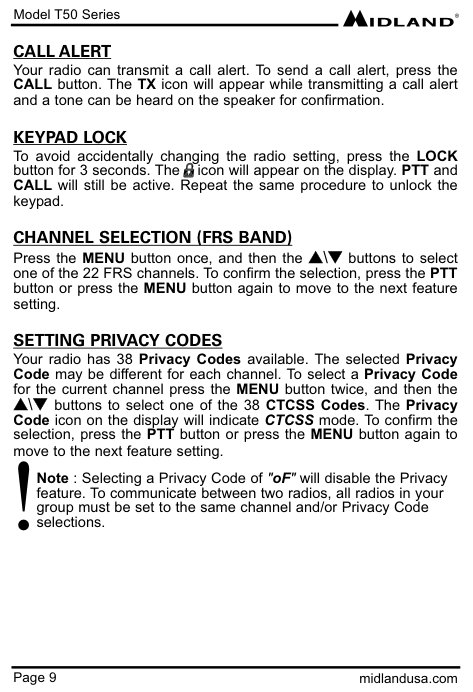
Model T50 Series Page 9 midlandusa.com
Call Alert
Your radio can transmit a call alert. To send a call alert, press the CALL button. The TX icon will appear while transmitting a call alert and a tone can be heard on the speaker for confirmation.Keypad Lock
To avoid accidentally changing the radio setting, press the LOCK button for 3 seconds. The icon will appear on the display. PTT and CALL will still be active. Repeat the same procedure to unlock the keypad.Channel Selection (Frs Band)
Press the MENU button once, and then the s\t buttons to select one of the 22 FRS channels. To confirm the selection, press the PTT button or press the MENU button again to move to the next feature setting.Setting Privacy Codes
Your radio has 38 Privacy Codes available. The selected Privacy Code may be different for each channel. To select a Privacy Code for the current channel press the MENU button twice, and then the s\t buttons to select one of the 38 CTCSS Codes. The Privacy Code icon on the display will indicate CTCSS mode. To confirm the selection, press the PTT button or press the MENU button again to move to the next feature setting. Note : Selecting a Privacy Code of "oF" will disable the Privacy feature. To communicate between two radios, all radios in your group must be set to the same channel and/or Privacy Code selections. !
Model T50 Series Page 10 midlandusa.com
Vox
Your radio has 3 VOX level settings: (oF/1~3). To set VOX, press the MENU button until the display shows “VOX”. On the right of the CHANNEL NUMBER display, an “oF” icon appears. Select “1” ~ “3” by pressing the s\t buttons and push the PTT key, or press the MENU button again to move to the next feature setting. VOX will be more sensitive on the lower setting than on the higher setting. To turn VOX off, press the MENU button until the display shows “VOX”. On the right of the CHANNEL NUMBER display, a “1” ~ “3” icon appears. Select “oF” by pressing the s\t buttons and push the PTT key, or press the MENU button again to move to the next feature setting. ROGER BEEP (end of transmission) TONE When the PTT button is released, the radio will beep to confirm to other users that your transmission has finished. To set the ROGER BEEP tone, press the MENU button until the display shows an “rb” icon. Select “on” or “oF” by pressing the s\t buttons and push the PTT key, or press the MENU button to move to the next feature setting.Silent Operation
Your radio has a SILENT OPERATION mode. In this mode, all “beeps” and “tones” are disabled. To set SILENT OPERATION, press the MENU button until the display shows a “bP” icon. Select “on” or "oF" by pressing the s\t buttons and push the PTT key or MENU button.Noaa Weather Radio
Your radio has a NOAA WEATHER RADIO function to enable the user to receive weather reports from designated NOAA stations. To turn the NOAA WEATHER RADIO on, press and hold the WX/s button for 5 seconds while in FRS mode. The radio will go to WX Band mode.
Model T50 Series Page 11 midlandusa.com To set the channel on the WX Band, press the MENU button and the display will show the current WX Band channel setting. While on WX Band mode press the s\t buttons to select one of the 10 NOAA WEATHER (WX) BAND channels. To confirm, press the PTT button or press the MENU button to move to the next feature setting. To turn the NOAA WEATHER RADIO off, press the PTT button. The current FRS radio setting will be displayed and the icon will go off.
Noaa Weather Alert
Your radio has a NOAA WEATHER ALERT function, to enable you to automatically receive weather alerts from designated NOAA stations. To turn the NOAA WEATHER (WX) ALERT on during normal NOAA WEATHER RADIO mode, press the MENU button twice while in NOAA WEATHER RADIO mode. The display shows "AL," while on the right an "oF" icon appears. Select "on" by pressing the s\t buttons. To confirm, press the PTT button or press MENU. The radio will return to WX BAND and the icon will continue blinking. If the radio receives a WX ALERT signal from a designated NOAA station while on FRS Radio mode, the radio will beep for 20 seconds while the display will automatically go to WX BAND. To turn the NOAA WEATHER (WX) ALERT off, press the MENU button twice while in WX Band. The display shows "AL," while on the right an "on" icon appears. Select "oF" by pressing the s\t buttons. To confirm, press the PTT button or press MENU.External Speaker/Microphone Jack
Your radio can be used with an optional external speaker/ microphone or headset, freeing your hands for other tasks. To use an optional speaker/microphone or headset: l Insert the plug(s) into the SPK/MIC jacks. l Place the earbud into your ear, and adjust the mic into your desired position.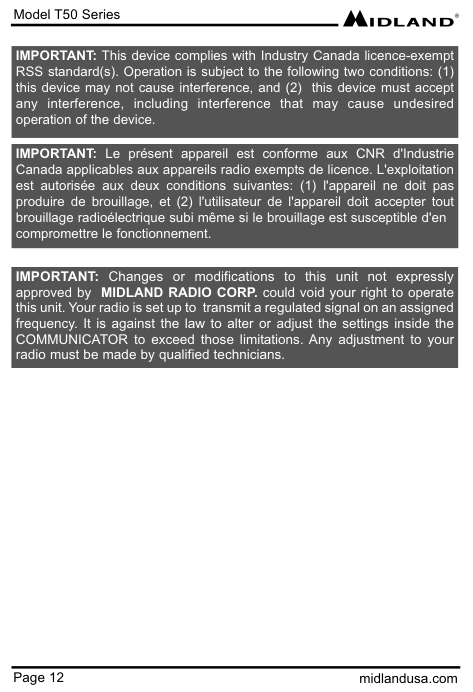
Model T50 Series Page 12 midlandusa.com IMPORTANT: This device complies with Industry Canada licence-exempt RSS standard(s). Operation is subject to the following two conditions: (1) this device may not cause interference, and (2) this device must accept any interference, including interference that may cause undesired operation of the device. IMPORTANT: Le présent appareil est conforme aux CNR d'Industrie Canada applicables aux appareils radio exempts de licence. L'exploitation est autorisée aux deux conditions suivantes: (1) l'appareil ne doit pas produire de brouillage, et (2) l'utilisateur de l'appareil doit accepter tout brouillage radioélectrique subi même si le brouillage est susceptible d'en compromettre le fonctionnement. IMPORTANT: Changes or modifications to this unit not expressly approved by MIDLAND RADIO CORP. could void your right to operate this unit. Your radio is set up to transmit a regulated signal on an assigned frequency. It is against the law to alter or adjust the settings inside the COMMUNICATOR to exceed those limitations. Any adjustment to your radio must be made by qualified technicians.
Model T50 Series Page 13 midlandusa.com
Problem Solution
No PowerUse And Care
Troubleshooting Guide
Model T50 Series Page 14 midlandusa.com
Specifications
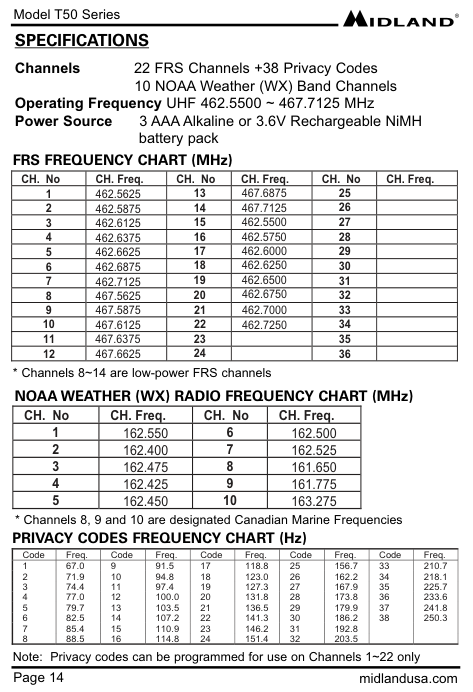
Channels 22 FRS Channels +38 Privacy Codes 10 NOAA Weather (WX) Band Channels Operating Frequency UHF 462.5500 ~ 467.7125 MHz Power Source 3 AAA Alkaline or 3.6V Rechargeable NiMH battery pack FRS FREQUENCY CHART (MHz) CH. No CH. Freq. CH. No CH. Freq. CH. No CH. Freq. 1 462.5625 2 462.5875 3 462.6125 11 467.6375 4 462.6375 12 467.6625 5 462.6625 13 467.6875 21 462.7000 6 462.6875 14 467.7125 22 462.7250 7 462.7125 15 462.5500 8 467.5625 16 462.5750 9 467.5875 10 467.6125 17 462.6000 18 462.6250 23 24 25 26 27 28 19 462.6500 20 462.6750 29 30 31 32 33 34 35 36 NOAA WEATHER (WX) RADIO FREQUENCY CHART (MHz) CH. No CH. Freq. CH. No CH. Freq. 1 162.550 6 162.500 2 162.400 7 162.525 3 162.475 8 161.650 4 162.425 9 161.775 5 162.450 10 163.275 PRIVACY CODES FREQUENCY CHART (Hz) Code Freq. Code Freq. Code Freq. Code Freq. Code Freq. 1 67.0 9 91.5 17 118.8 25 156.7 33 210.7 2 71.9 10 94.8 18 123.0 26 162.2 34 218.1 3 74.4 11 97.4 19 127.3 27 167.9 35 225.7 4 77.0 12 100.0 20 131.8 28 173.8 36 233.6 5 79.7 13 103.5 21 136.5 29 179.9 37 241.8 6 82.5 14 107.2 22 141.3 30 186.2 38 250.3 7 85.4 15 110.9 23 146.2 31 192.88 88.5 16 114.8 24 151.4 32 203.5
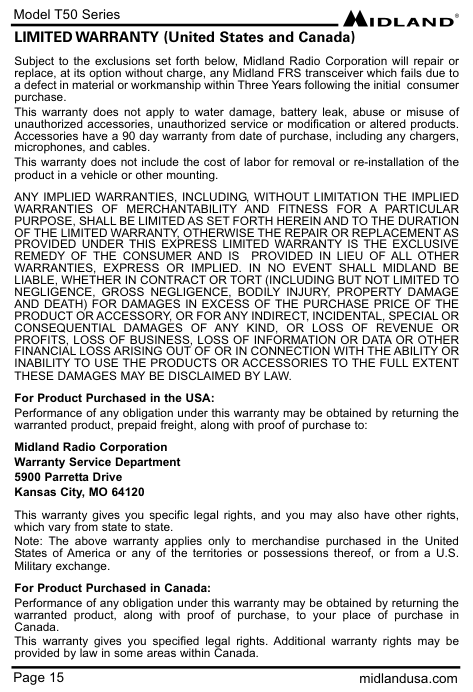
Model T50 Series Page 15 midlandusa.com LIMITED WARRANTY (United States and Canada) Subject to the exclusions set forth below, Midland Radio Corporation will repair or replace, at its option without charge, any Midland FRS transceiver which fails due to a defect in material or workmanship within Three Years following the initial consumer purchase. This warranty does not apply to water damage, battery leak, abuse or misuse of unauthorized accessories, unauthorized service or modification or altered products. Accessories have a 90 day warranty from date of purchase, including any chargers, microphones, and cables. This warranty does not include the cost of labor for removal or re-installation of the product in a vehicle or other mounting.
Any Implied Warranties, Including, Without Limitation The Implied
Warranties Of Merchantability And Fitness For A Particular
Purpose, Shall Be Limited As Set Forth Herein And To The Duration
Of The Limited Warranty, Otherwise The Repair Or Replacement As
Provided Under This Express Limited Warranty Is The Exclusive
Remedy Of The Consumer And Is Provided In Lieu Of All Other
Warranties, Express Or Implied. In No Event Shall Midland Be
Liable, Whether In Contract Or Tort (Including But Not Limited To
Negligence, Gross Negligence, Bodily Injury, Property Damage
And Death) For Damages In Excess Of The Purchase Price Of The
Product Or Accessory, Or For Any Indirect, Incidental, Special Or
Consequential Damages Of Any Kind, Or Loss Of Revenue Or
Profits, Loss Of Business, Loss Of Information Or Data Or Other
Financial Loss Arising Out Of Or In Connection With The Ability Or
Inability To Use The Products Or Accessories To The Full Extent
These Damages May Be Disclaimed By Law.
For Product Purchased in the USA: Performance of any obligation under this warranty may be obtained by returning the warranted product, prepaid freight, along with proof of purchase to: Midland Radio Corporation Warranty Service Department 5900 Parretta Drive Kansas City, MO 64120 This warranty gives you specific legal rights, and you may also have other rights, which vary from state to state. Note: The above warranty applies only to merchandise purchased in the United States of America or any of the territories or possessions thereof, or from a U.S. Military exchange. For Product Purchased in Canada: Performance of any obligation under this warranty may be obtained by returning the warranted product, along with proof of purchase, to your place of purchase in Canada. This warranty gives you specified legal rights. Additional warranty rights may be provided by law in some areas within Canada.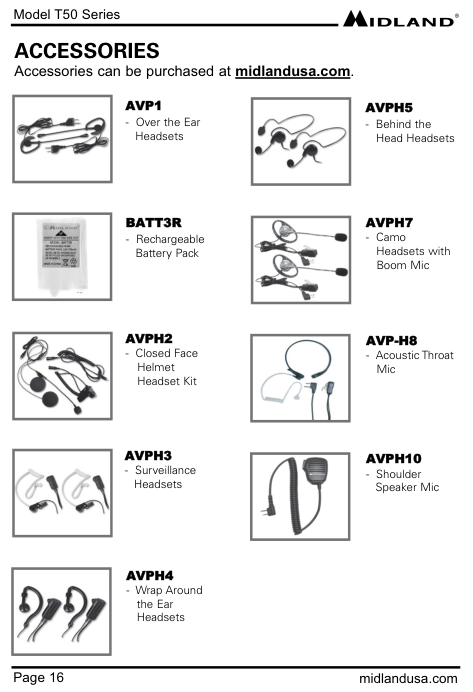
Page 16 midlandusa.com Model T50 Series
Accessories
Accessories can be purchased at midlandusa.com.Avph2
Avp1
Avph3
Avph5
Avph4
Avph7
Avp-H8
Batt3R
Avph10
Model T50 Series Page 17 midlandusa.com

This Page Is
Intentionally
Left Blank