Ask AI

— answers from the official manual

Answers from the official manual.

Common questions

Common Questions

9 total
Show 3 more questions

Full Manual

46 pages
Page 1

![image 3](Singer-5050c-Sewing-Machine-Manual_compressed-1_images/imageFile3.png)

Instruction Manual

Contents For European territories Important safety instructions Getting to know your machine Principal parts Accessories Connecting the machine Running the machine Choosing and changing needles Changing the needle plate Changing screw-on presser feet Attaching the feed cover Changing snap-on presser feet Fabric, thread and needle table Inserting a bobbin Winding a bobbin Threading the machine Adjusting thread tension Sewing a seam Starting a seam Straight stitching Stitch width selector Needle position selector Stitch length selector Reverse stitch button and sewing in reverse Darning

Inserting a zipper Zig-zag stitching Needle position selector Stitch width selector Adjusting stitch length Pattern groups selection Flexi-stitch patterns Balancing flexi-stitches Pattern stitching Removing and replacing pattern module Decorative stitch patterns Flexi-stitch patterns Attaching a button Free arm sewing

Four step buttonhole

Additional accessories / Accessory storage Caring for your machine

Removing and replacing bobbin case Cleaning the machine Lubricating the machine Changing the light bulb Performance checklist

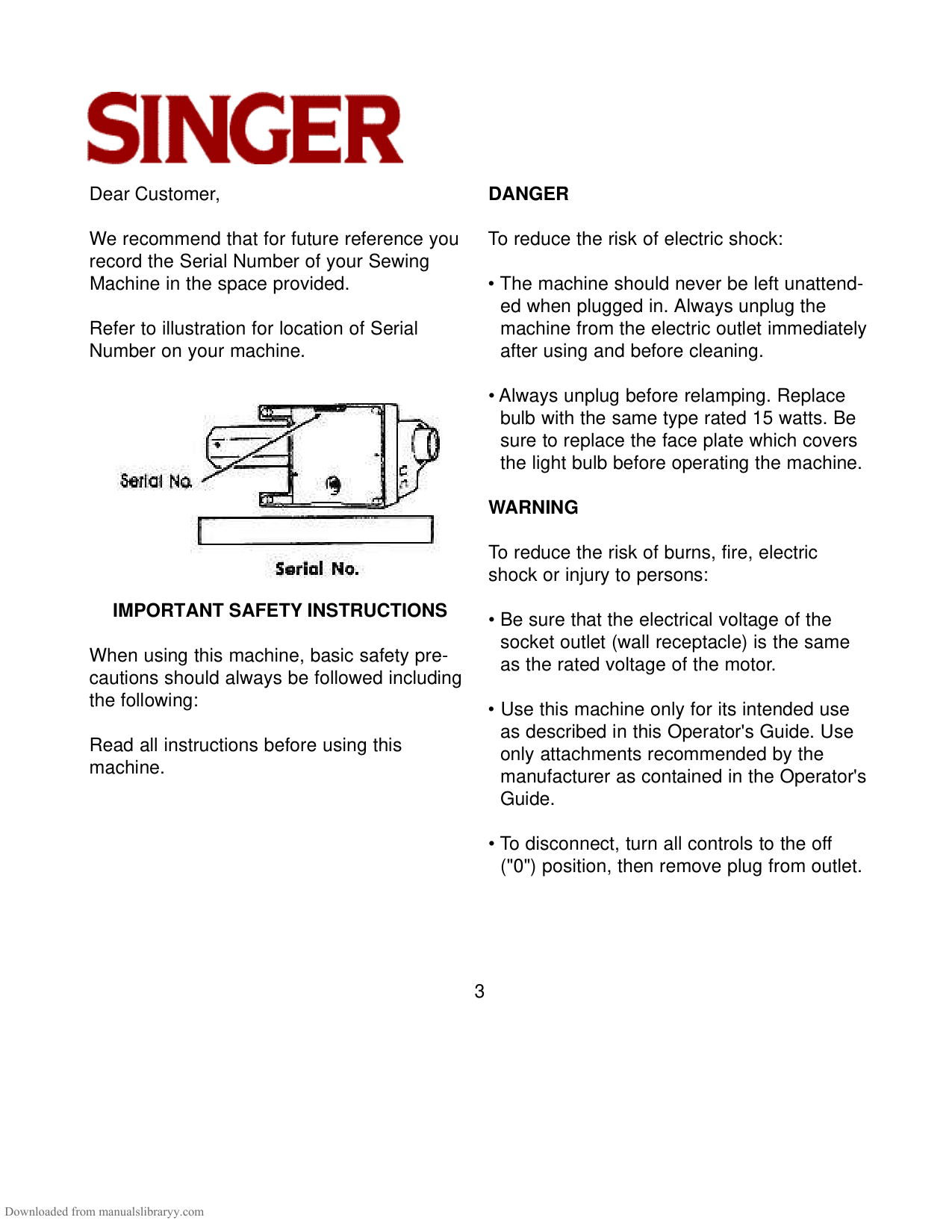
,D W e recommend that for future reference you record the Serial Number of your Sewing Machine in the space provided.

Refer to illustration for location of Serial Number on your machine.

![image 8](Singer-5050c-Sewing-Machine-Manual_compressed-1_images/imageFile8.png)

I I

W u t m b s pcautions should always be followed including the following:

Read all instructions before using this machine.

DANGER T o reduce the risk of electric shock:
Page 2

  • • T m s n b l ued when plugged in. Always unplug the machine from the electric outlet immediately after using and before cleaning.
  • • A u b r R bulb with the same type rated 15 watts. Be sure to replace the face plate which covers the light bulb before operating the machine.
  • W ARNING T o reduce the risk of burns, fire, electric shock or injury to persons:

  • • B s t t e v o t socket outlet (wall receptacle) is the same a t r v .o t m
  • • U t m o f i i u as described in this Operator's Guide. Use only attachments recommended by the manufacturer as contained in the Operator's Guide.
  • • T o d t a c t t fo ("0") position, then remove plug from outlet.
  • 3

    A Wc

  • • Disconnect the power-line plug from the socket outlet or switch the machine off when making any adjustments in the needle area, such as threading needle, changing needle, changing throat plate or changing presser foot, etc.
  • • A u t m f t ecal outlet when removing covers, lubricating, or when making any other user servicing adjustments mentioned in the Operator's Guide.
  • • Do not attempt to adjust the motor belt. Contact your nearest Service Center should any adjustment be required.
  • • D n u b p o Tc o unplug, grasp the plug, not the cord.
  • • H t f c w c a avoid dropping it on the floor. Be sure not to place anything on top of it.
  • • Always use the proper throat plate. The wrong plate can cause the needle to break.
  • • D n u b n
  • • W s k f a f a moving parts. Special care is required around the sewing machine needle.
  • • D n p o p f w s I may deflect the needle causing it to break.
  • Page 3

  • • B r t b c r plug from the socket outlet.
  • • F d i m w sicing use only identical replacement parts.
  • • N o t m i i h a da c o p i i i n w -p ly, if It has been dropped or damaged, or dropped into the water. Return the machine to the nearest authorized dealer or Service Center for examination, repair, electrical, or mechanical adjustment.
  • • Never operate the machine with any air o b K v oings of the machine and foot controller free from the accumulation of lint, dust, and loose cloth.
  • • Never drop or insert any object into any opening.
  • 4

    For European Territories:

    T p i s f r a tvision interference with the International Electrotechnical Commission requirements of the CISPR.

    Machines for Great Britain and some other countries having similar wiring standards are shipped from the factory without a plug for connection to the mains. The wires in this mains lead are coloured in accordance with the following code:

    Blue: neutral ( NL)

    As the colours of the wires in the mains lead of this appliance may not correspond with the coloured markings identifying the terminals in your plug, proceed as follows:

    The wire, which is coloured blue must be connected to the terminal which is marked with the letter N or coloured black. The wire, which is coloured brown must be connected to the terminal which is marked with letter L or coloured red. If a 13 Amp. (BS 1363) plug is used, a 3 Amp. fuse must be fitted, or if any other type of plug is used, a 5 Amp. fuse must be fitted either in the plug or adapter or at the distribution board.

    Neither core is to be connected to the earth terminal of a three-pin plug.
  • • D n u o
  • • D n o w a ( -p ucts are being used or where oxygen is being administered.
  • • Do not allow to be used as a toy. Close attention is necessary when the machine is used by or near children.
  • Page 4

    SAVE THESE INSTRUCTIONS

    This product is intended for household use.

    Servicing should be performed by an authorized service representative.

    5

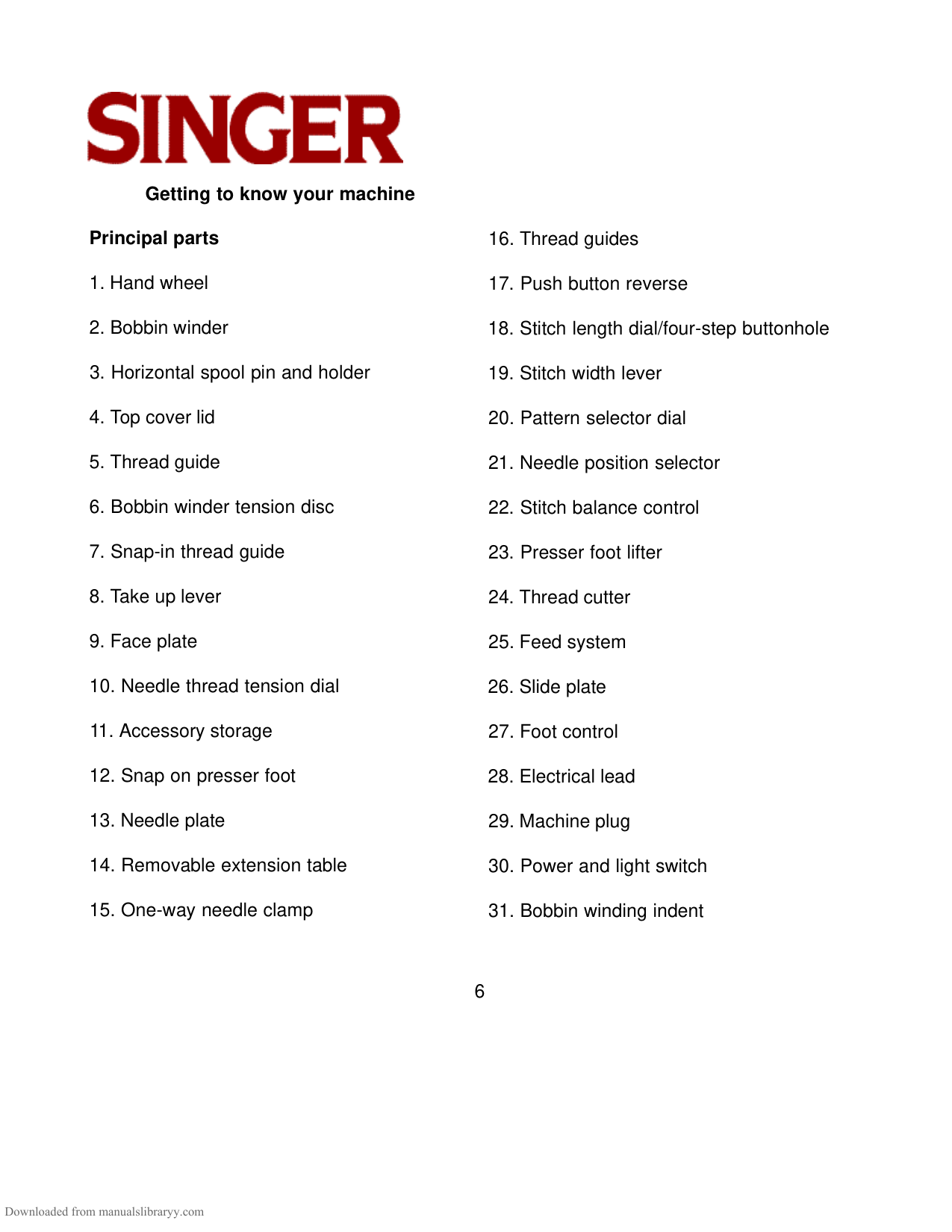
    Getting to know your machine

    Principal parts
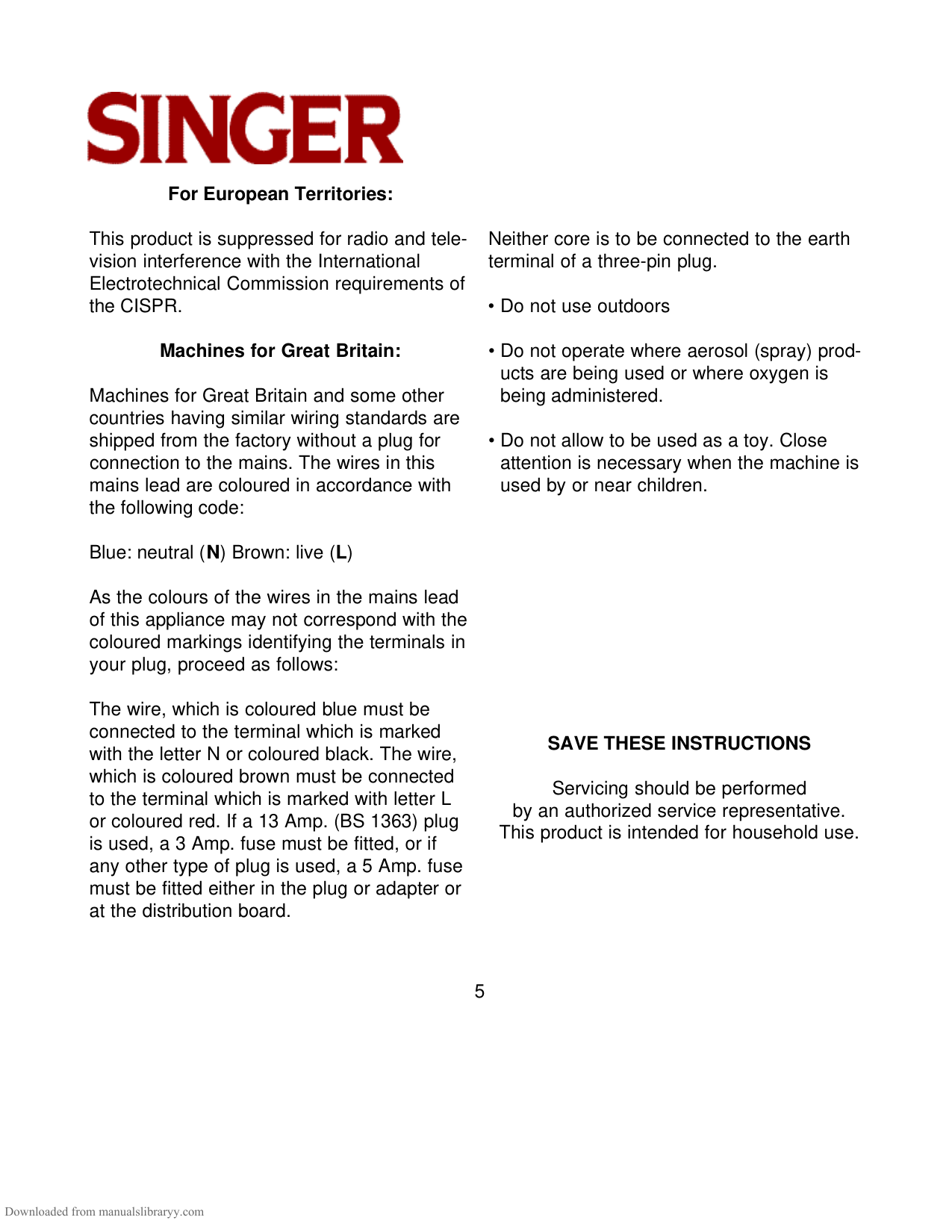
  • 1 H
  • 2 B
  • 3 H s p a h
  • 4 oT
  • 5 T
  • 6 B w t d
  • 7 S t g
  • 8 aT
  • 9 F 1 N t t d 1 1 A 1 S o p f
  • 1 N
  • 1 R e t
  • Page 5

  • 1 O n c
  • 1 T
  • 1 P b r
  • 1 S l d b
  • 1 S w l
  • 2 P s d
  • 2 N p s
  • 2 S b c
  • 2 P f l 2 T 2 F 2 S 2 F
  • 2 E
  • 2 M
  • Page 6

  • 3 P a l s
  • 3 B w i
  • 6

    ![image 17](Singer-5050c-Sewing-Machine-Manual_compressed-1_images/imageFile17.png)

    7

    Accessories

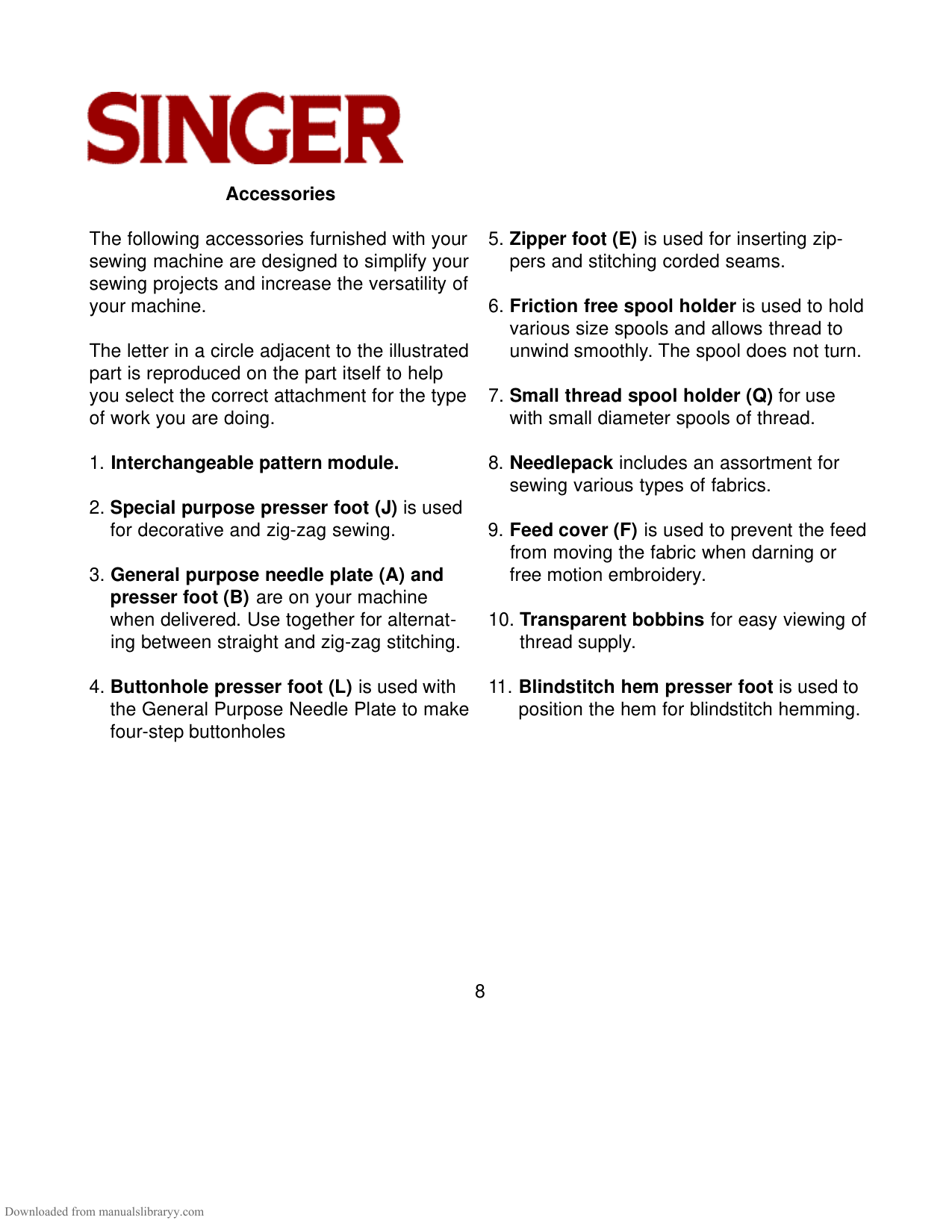
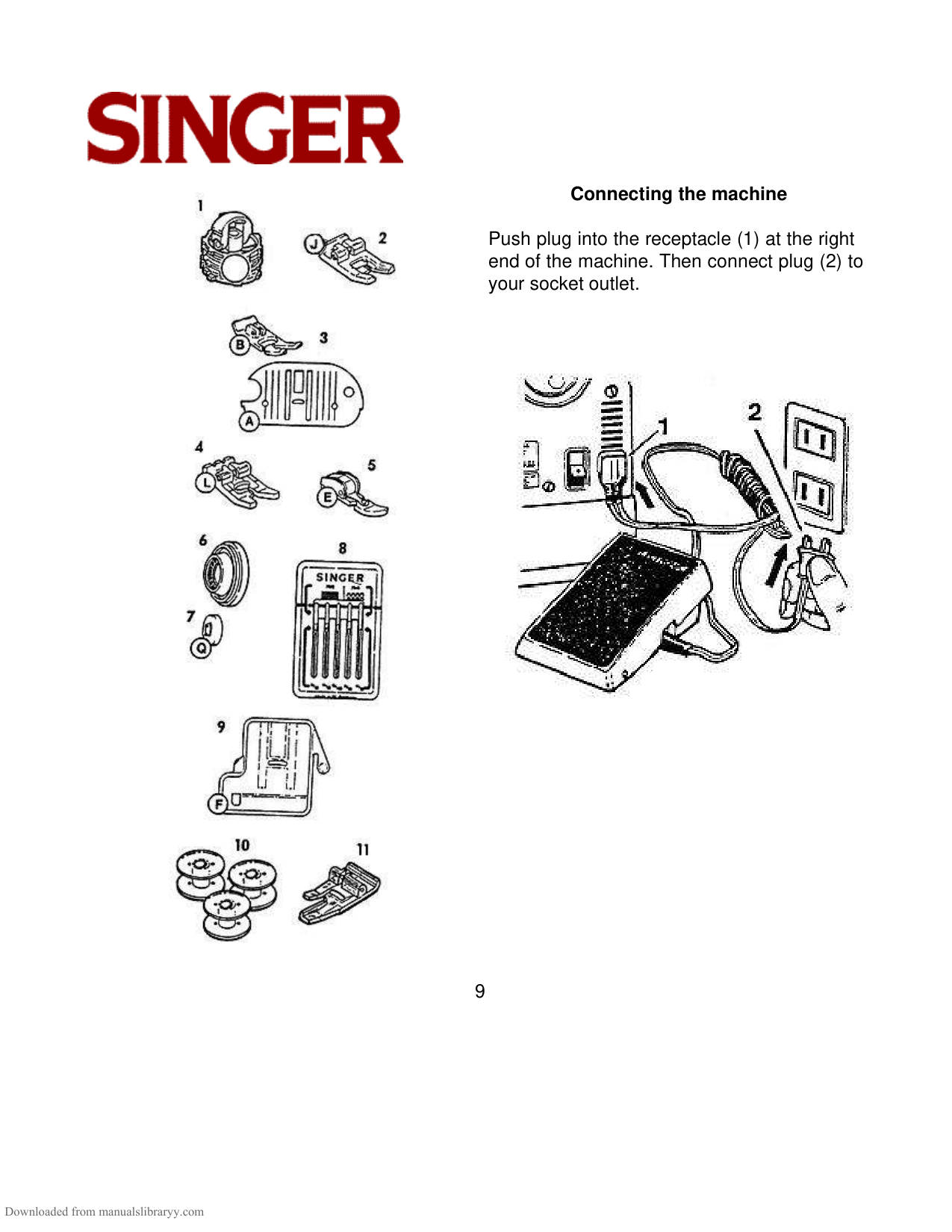
    The following accessories furnished with your sewing machine are designed to simplify your sewing projects and increase the versatility of your machine.

    The letter in a circle adjacent to the illustrated part is reproduced on the part itself to help you select the correct attachment for the type of work you are doing.
  • 1. Interchangeable pattern module.
  • 2. Special purpose presser foot (J)is used for decorative and zig-zag sewing.
  • 3. General purpose needle plate (A) and presser foot (B) are on your machine w d U t f aing between straight and zig-zag stitching.
  • 4. Buttonhole presser foot (L) is used with the General Purpose Needle Plate to make four-step buttonholes
  • 5. Zipper foot (E) i u f i zpers and stitching corded seams.
  • 6. is used to hold various size spools and allows thread to
  • Page 7

    .u The spool does not turn.

  • 7. Small thread spool holder (Q) for use with small diameter spools of thread.
  • 8. Needlepack includes an assortment for sewing various types of fabrics.
  • 9. Feed cover (F) is used to prevent the feed from moving the fabric when darning or
  • .f

  • 10. rT for easy viewing of
  • .t

    is used to position the hem for blindstitch hemming.

  • 8
  • ![image 22](Singer-5050c-Sewing-Machine-Manual_compressed-1_images/imageFile22.png)

    Push plug into the receptacle (1) at the right end of the machine. Then connect plug (2) to your socket outlet.

    Connecting the machine

    ![image 23](Singer-5050c-Sewing-Machine-Manual_compressed-1_images/imageFile23.png)

    9

    Page 8

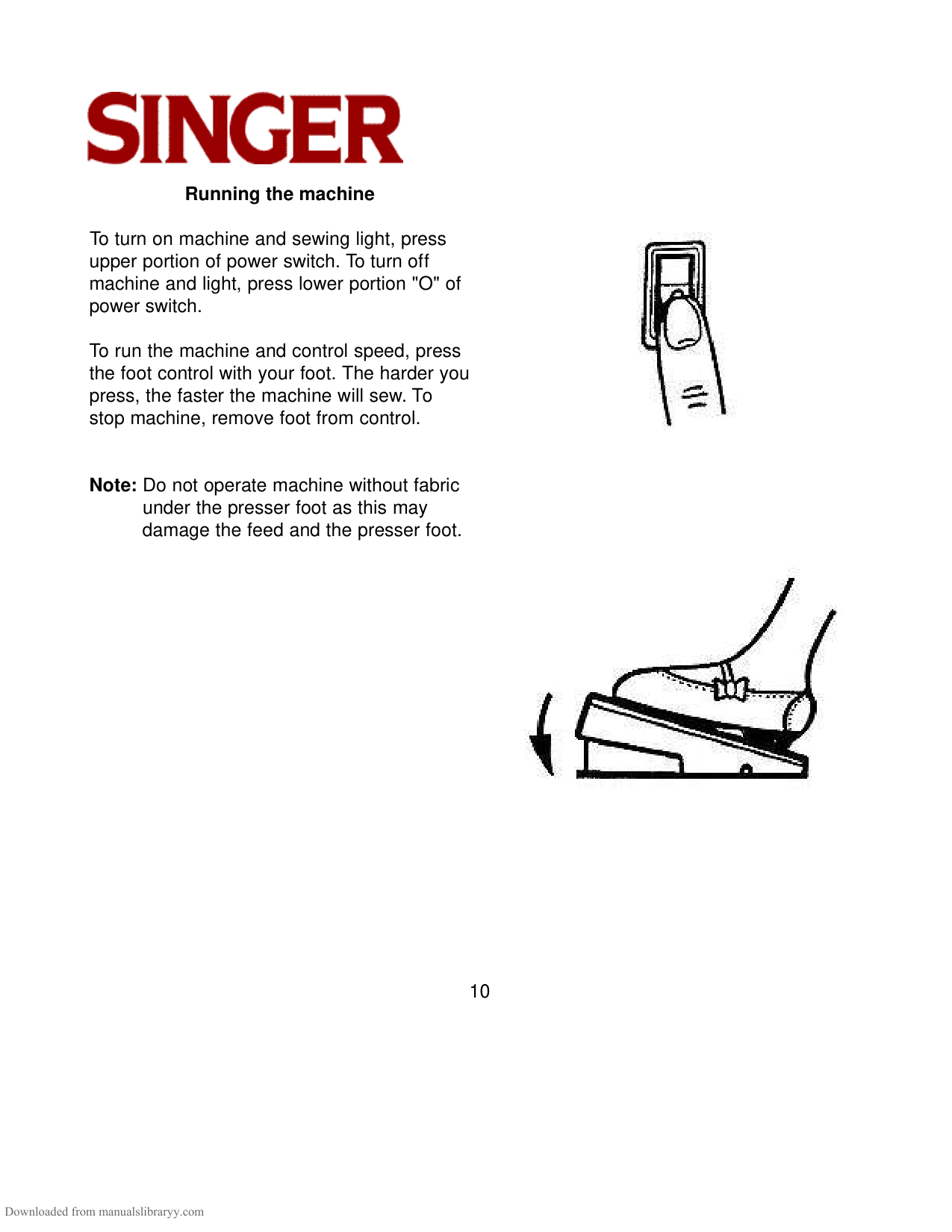
    Running the machine

    T o turn on machine and sewing light, press u p o p s T of machine and light, press lower portion "O" of power switch.

    T o run the machine and control speed, press the foot control with your foot. The harder you p t f t m .w s stop machine, remove foot from control.

    Note: Do not operate machine without fabric under the presser foot as this may damage the feed and the presser foot.

    ![image 26](Singer-5050c-Sewing-Machine-Manual_compressed-1_images/imageFile26.png)

    10

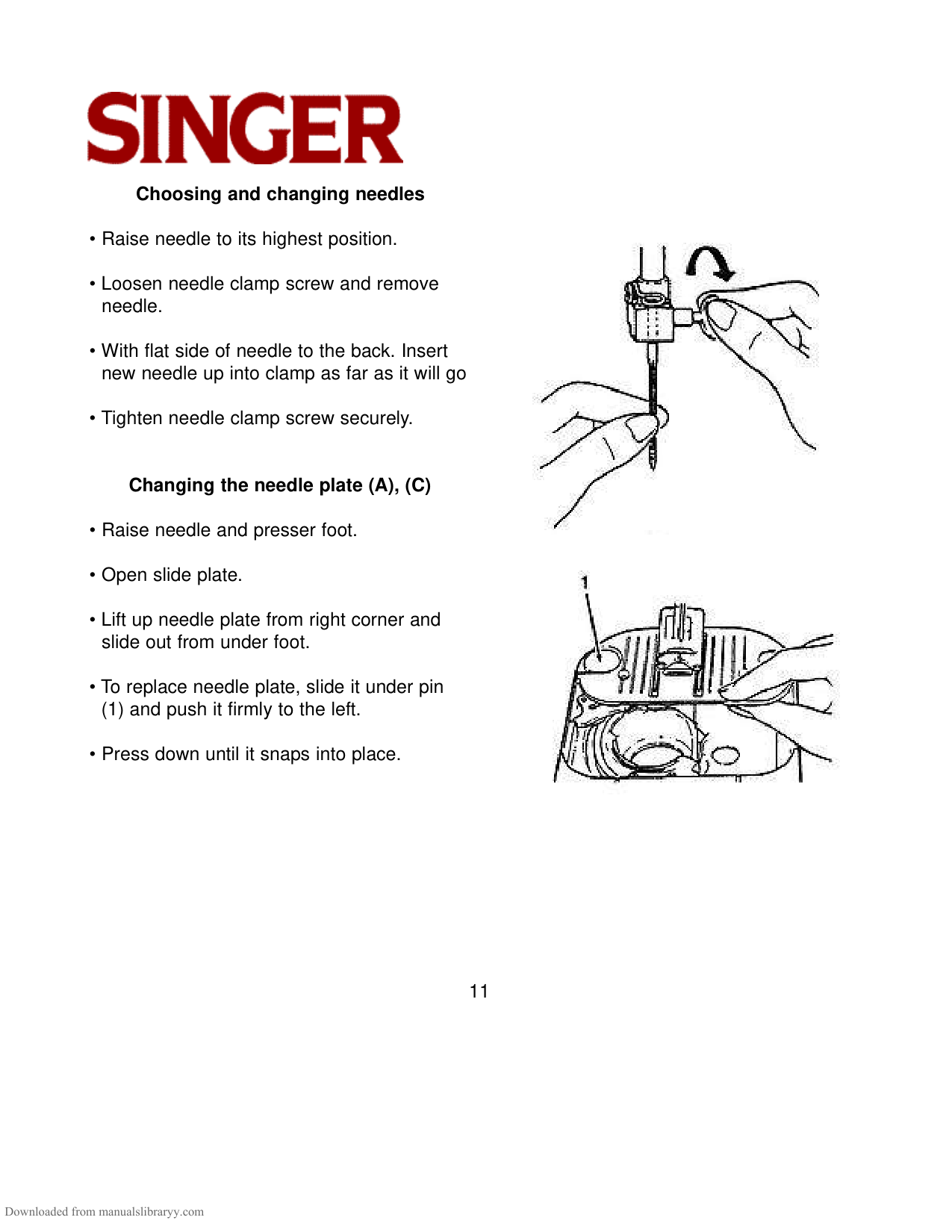
    Choosing and changing needles

  • • R n t i h p
  • • L n c s a r needle.
  • • With flat side of needle to the back. Insert new needle up into clamp as far as it will go
  • • i n .Tc s s
  • Changing the needle plate (A), (C)

  • • R n a p f
  • • O s p
  • • L u n p f r c a slide out from under foot.
  • • o r n p Ts i u p ( a p i f t t l
  • • P d u i s i p
  • Page 9

    ![image 29](Singer-5050c-Sewing-Machine-Manual_compressed-1_images/imageFile29.png)

    ![image 30](Singer-5050c-Sewing-Machine-Manual_compressed-1_images/imageFile30.png)

    11

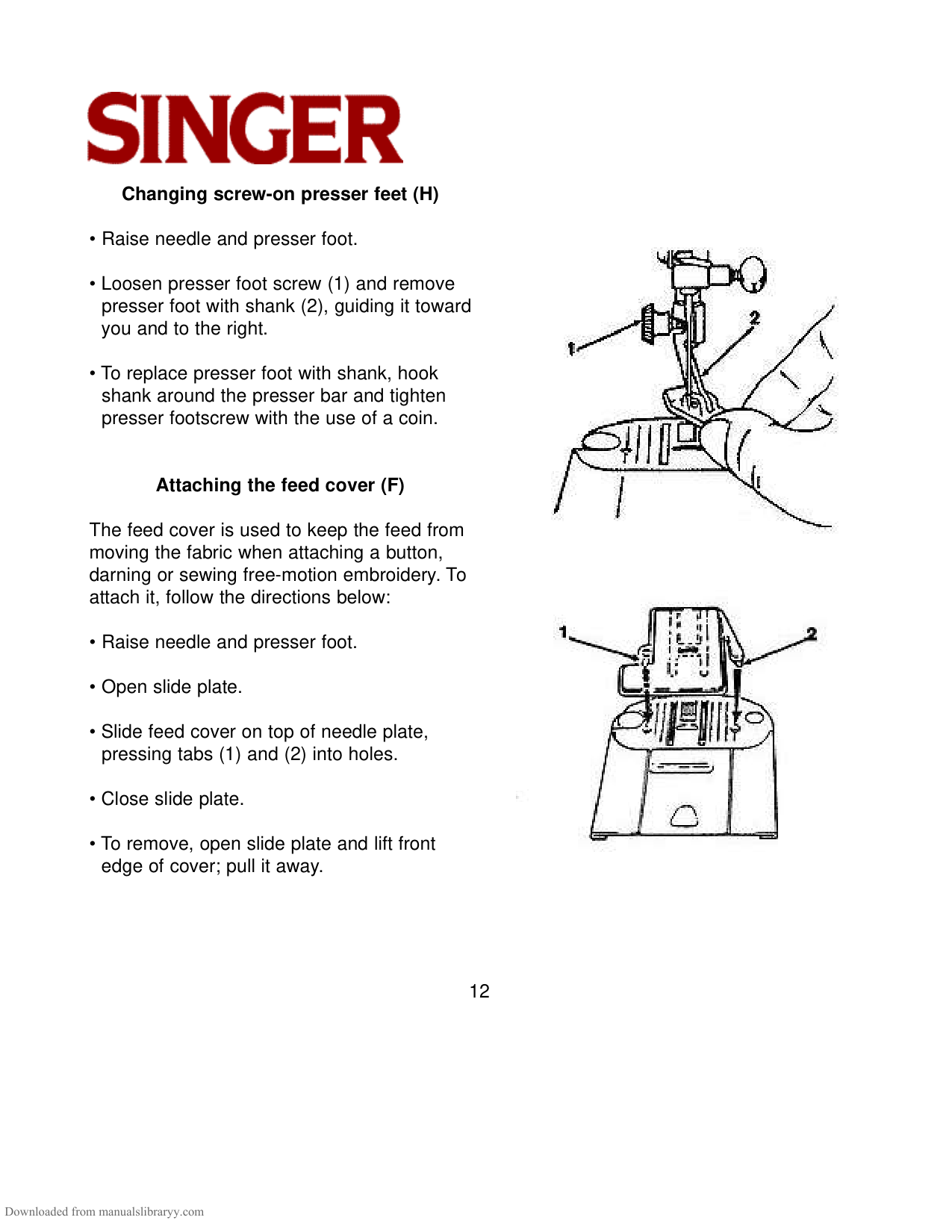
    Changing screw-on presser feet (H)

  • • R n a p f
  • • L p f s ( a r presser foot with shank (2), guiding it toward you and to the right.
  • • o r p f Tw s h shank around the presser bar and tighten presser footscrew with the use of a coin.
  • Attaching the feed cover (F)

    The feed cover is used to keep the feed from moving the fabric when attaching a button, d o .s f e To attach it, follow the directions below:

  • • R n a p f
  • • O s p
  • • S f c o t o n p pressing tabs (1) and (2) into holes.
  • • C s p
  • • o r o s Tp a l f e o c .p i a
  • ![image 33](Singer-5050c-Sewing-Machine-Manual_compressed-1_images/imageFile33.png)

    Page 10

    ![image 34](Singer-5050c-Sewing-Machine-Manual_compressed-1_images/imageFile34.png)

    12

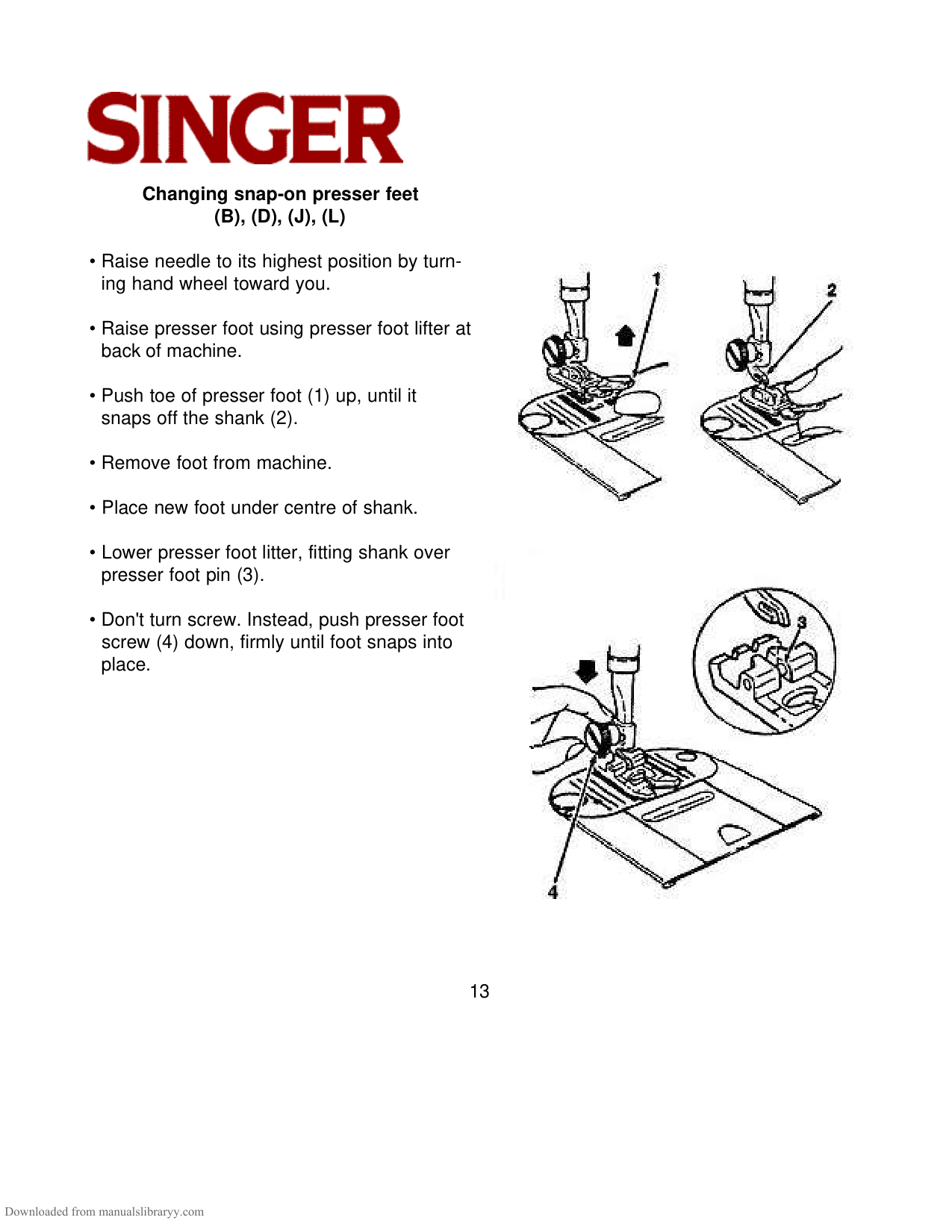
    Changing snap-on presser feet

    (B), (D), (J), (L)

  • • R n t i h p b ting hand wheel toward you.
  • • R p f u p f l a back of machine.
  • • Push toe of presser foot (1) up, until it snaps off the shank (2).
  • • P n f u c o s
  • presser foot pin (3).

  • • Don't turn screw. Instead, push presser foot screw (4) down, firmly until foot snaps into place.
  • ![image 37](Singer-5050c-Sewing-Machine-Manual_compressed-1_images/imageFile37.png)

    Page 11

    13

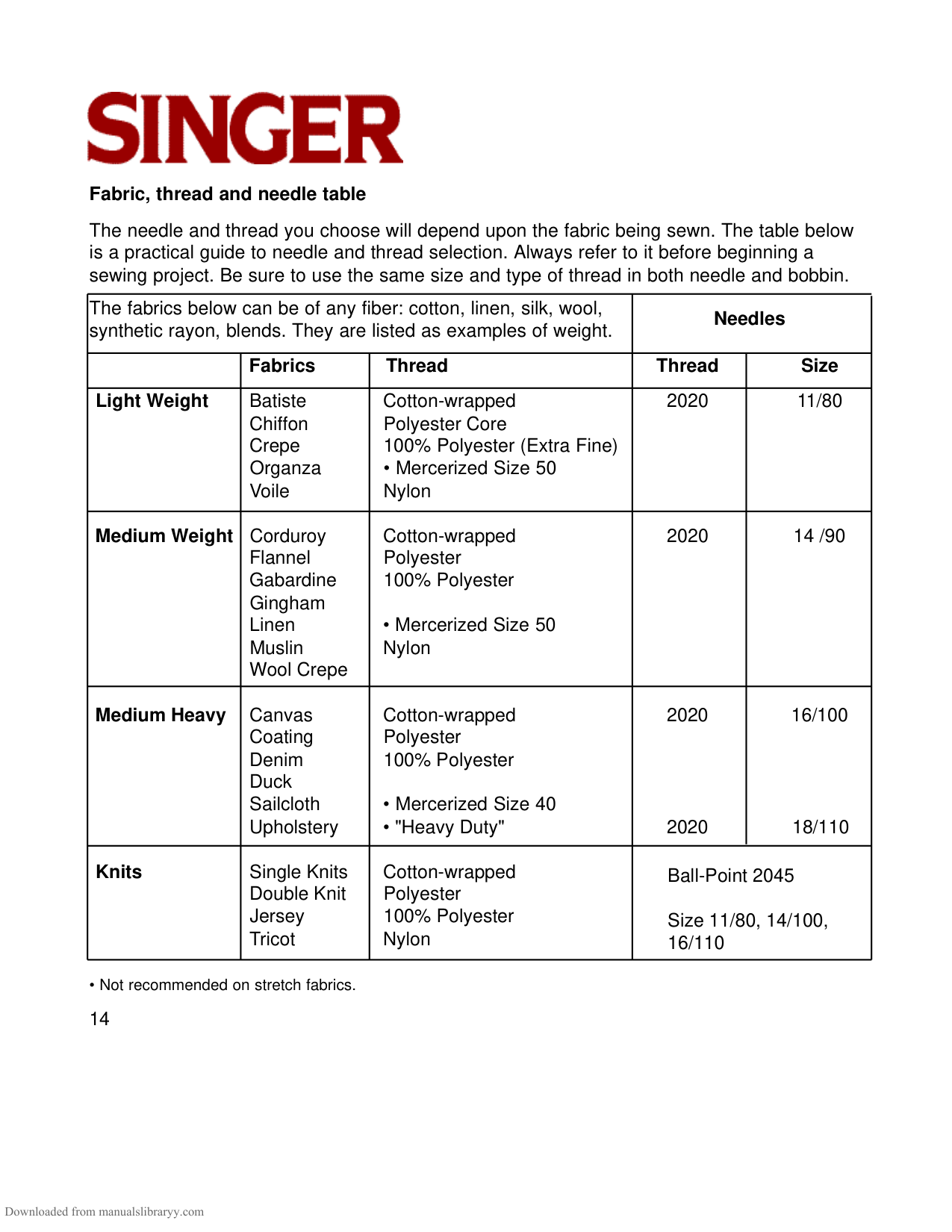
    Fabric, thread and needle table

    The needle and thread you choose will depend upon the fabric being sewn. The table below is a practical guide to needle and thread selection. Always refer to it before beginning a sewing project. Be sure to use the same size and type of thread in both needle and bobbin.

    |The fabrics below can be of any fiber: cotton, linen, silk, wool, synthetic rayon, blends. They are listed as examples of weight.|The fabrics below can be of any fiber: cotton, linen, silk, wool, synthetic rayon, blends. They are listed as examples of weight.|The fabrics below can be of any fiber: cotton, linen, silk, wool, synthetic rayon, blends. They are listed as examples of weight.| | | |---|---|---|---|---| | | | |T S| | | | |• M S 5| |11| | |oW|Mercerized Size 50| | | | | |• M S 4
    • "
    | | | | |rT| | | |

    Needles

    Fabrics Batiste Chiffon Crepe Organza

    Thread Cotton-wrapped Polyester Core

    Light Weight

    2020

    Nylon Cotton-wrapped Polyester 100% Polyester • Nylon
    Page 12

    Medium Weight

    Corduroy Flannel Gabardine Gingham Linen Muslin

    2020

    14 /90

    Medium Heavy

    Canvas Coating Denim Duck Sailcloth Upholstery

    Cotton-wrapped Polyester 100% Polyester

    2020

    16/100

    2020

    18/110

    Knits

    Single Knits Double Knit Jersey

    Cotton-wrapped Polyester 100% Polyester Nylon
    Page 13

    Ball-Point 2045 Size 11/80, 14/100, 16/110

  • • N r o s f
  • 14

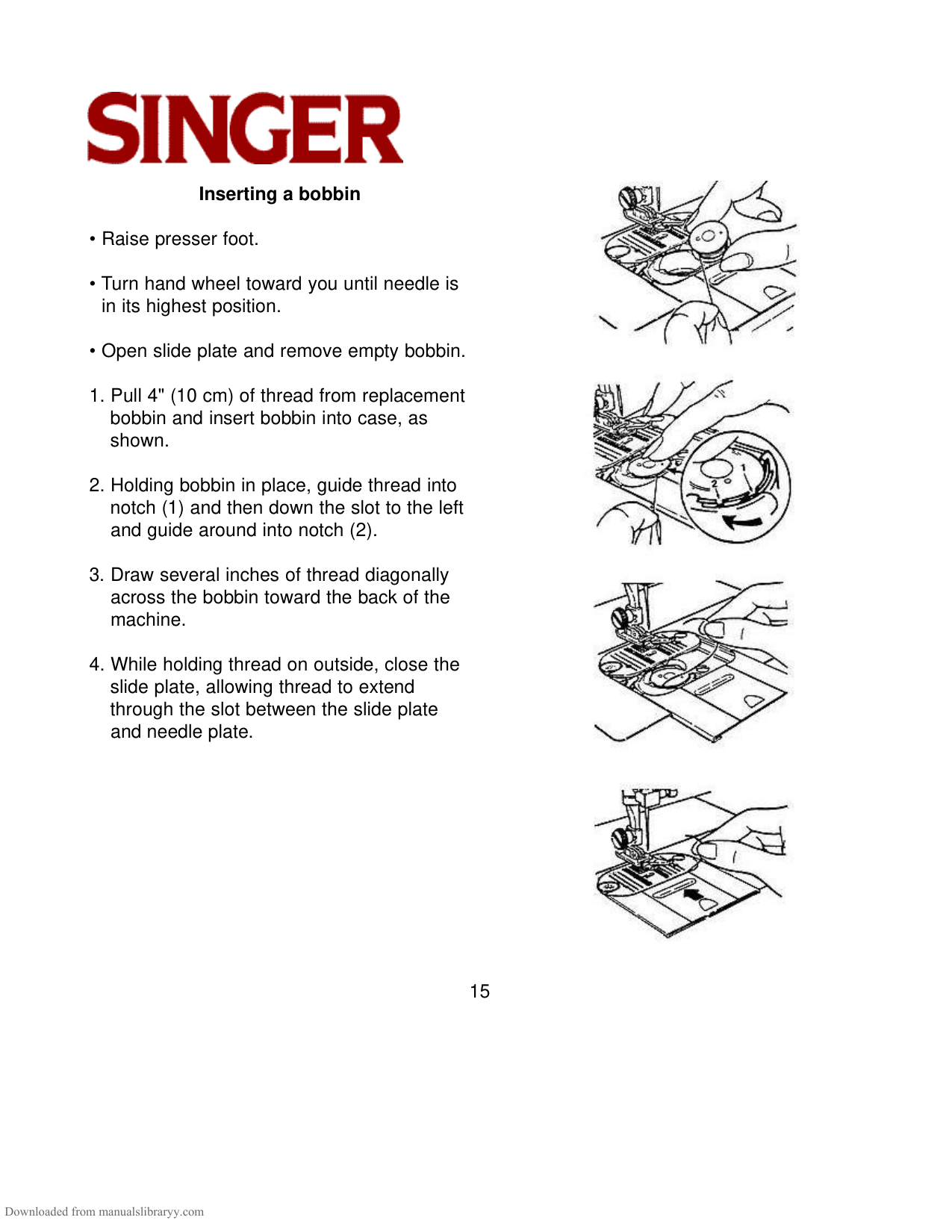
    Inserting a bobbin

  • • R p f
  • • u h Tw t y u n i
  • • O s p a r e b
  • 1 P 4 ( c o t f r bobbin and insert bobbin into case, as shown.
  • 2 H b i p g t i notch (1) and then down the slot to the left and guide around into notch (2).
  • 3 D s i o t d across the bobbin toward the back of the machine.
  • 4 W h t o o c t slide plate, allowing thread to extend through the slot between the slide plate and needle plate.
  • 15

    ![image 42](Singer-5050c-Sewing-Machine-Manual_compressed-1_images/imageFile42.png)

    Page 14

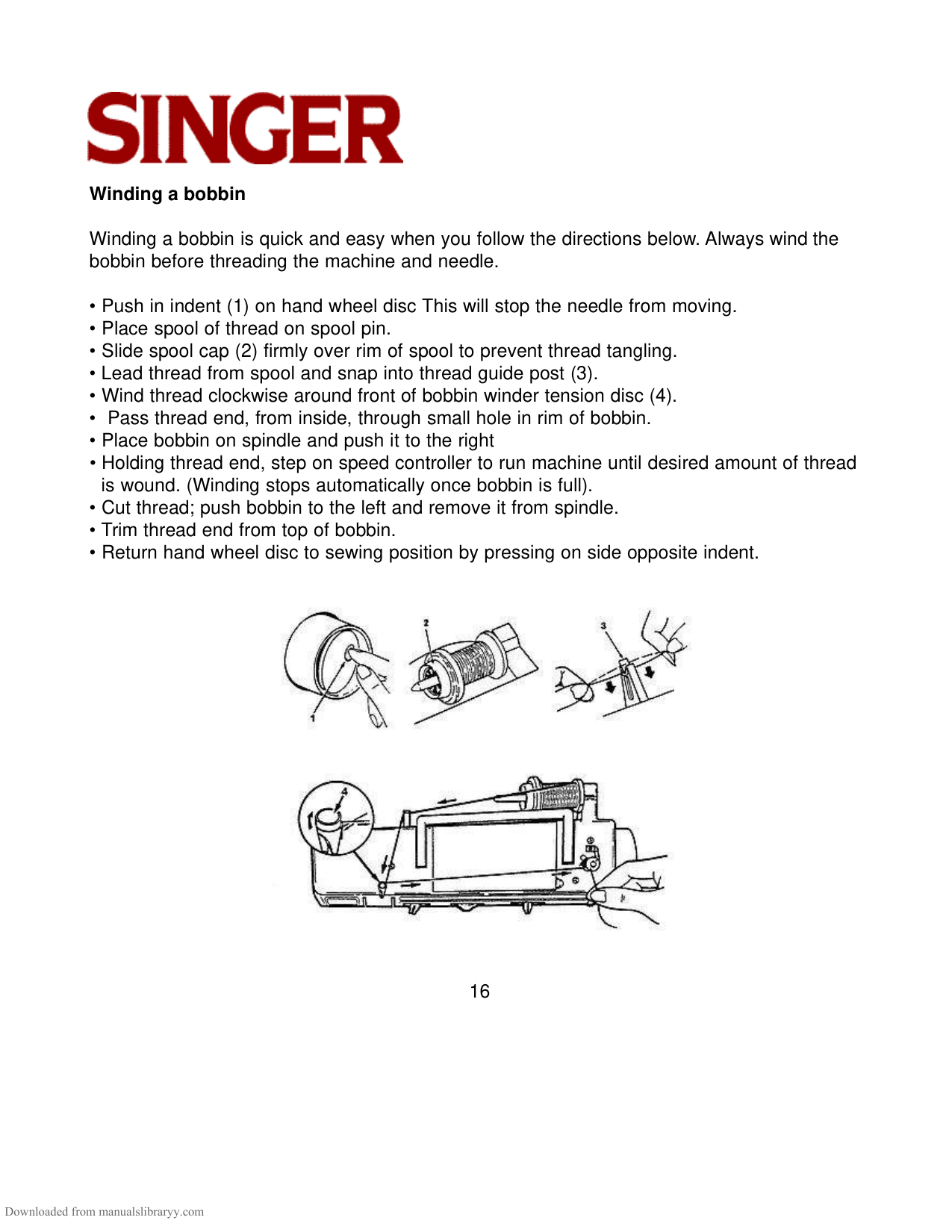
    Winding a bobbin

    Wi a b i q a e w y f .t d b Always wind the bobbin before threading the machine and needle.

  • • P i i ( o h w d T w s t n f m
  • • P s o t o s p
  • • S s c ( f o r o s t p t t
  • • L t f s a s i t g p (
  • • W t c a f o b w t d (
  • • P t e f i t s h i r o b
  • • P b o s a p i t t r
  • • H t e s o s c t r m u d a o t is wound. (Winding stops automatically once bobbin is full).
  • • C t p b t t l a r i f s
  • • r t Te f t o b
  • • R h w d t s p b p o s o i
  • ![image 45](Singer-5050c-Sewing-Machine-Manual_compressed-1_images/imageFile45.png)

    16

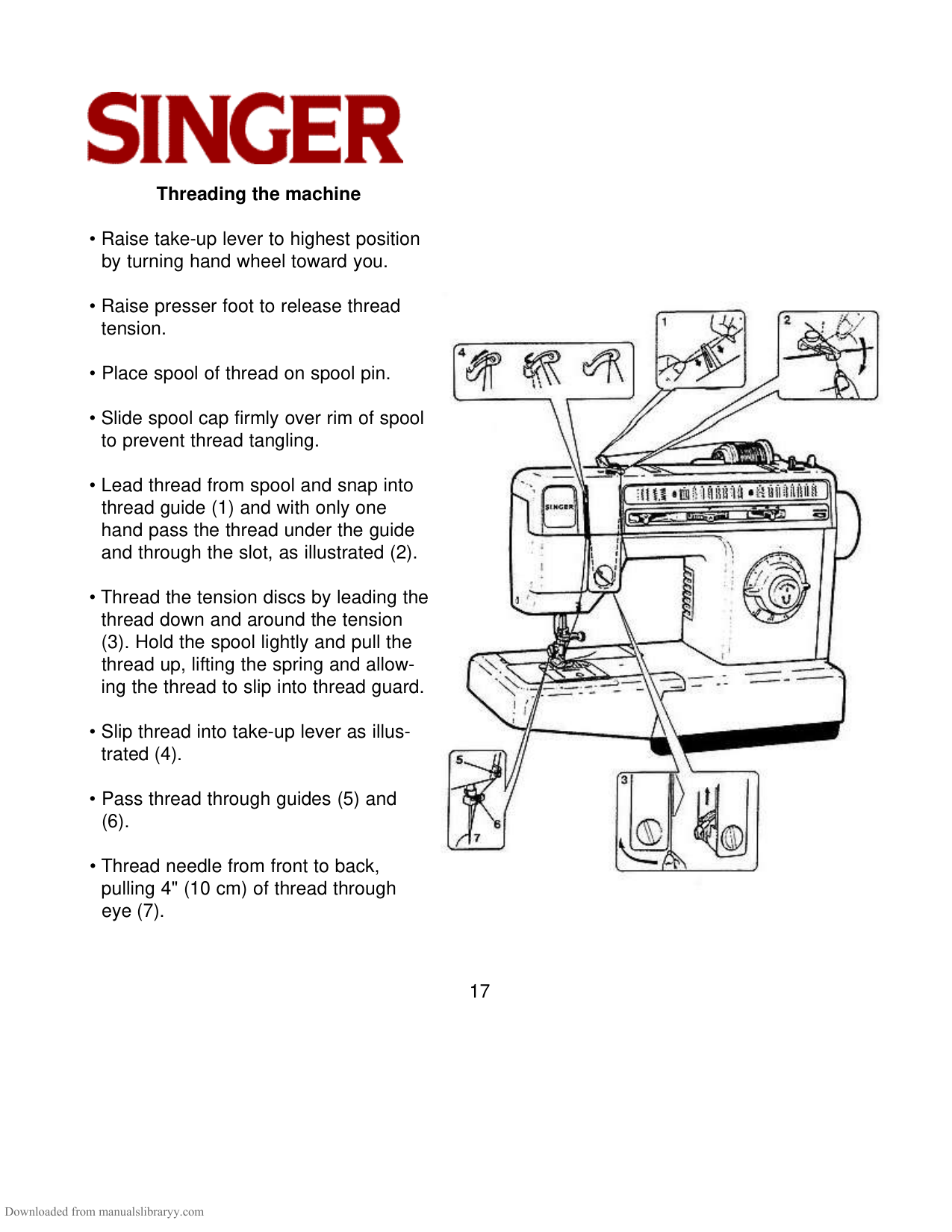
    Threading the machine

  • • Raise take-up lever to highest position by turning hand wheel toward you.
  • • R p f t r t tension.
  • • P s o t o s p
  • • S s c f o r o s to prevent thread tangling.
  • Page 15

  • • L t f s a s i thread guide (1) and with only one hand pass the thread under the guide and through the slot, as illustrated (2).
  • • T t t d b l t thread down and around the tension
  • (3). Hold the spool lightly and pull the t u l t s a aing the thread to slip into thread guard.

  • • S t i t l a itrated (4).
  • • Pass thread through guides (5) and
  • (6).

  • • Thread needle from front to back, pulling 4" (10 cm) of thread through eye (7).
  • ![image 48](Singer-5050c-Sewing-Machine-Manual_compressed-1_images/imageFile48.png)

    17

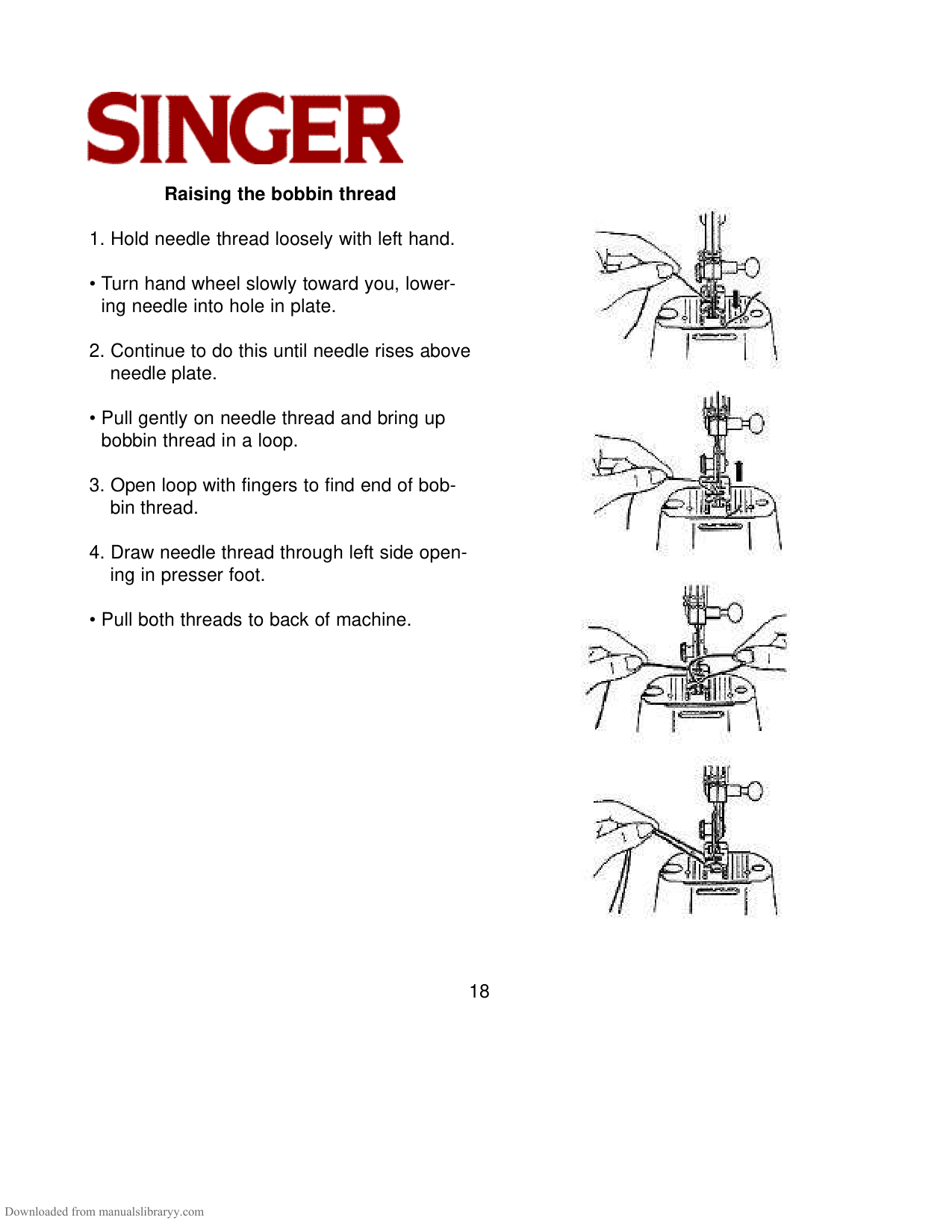
  • 1 H n t l w l h
  • • u h Tw s t y -l

    ing needle into hole in plate.

  • 2 C t d t u n r a needle plate.
  • • Pull gently on needle thread and bring up bobbin thread in a loop.
    Page 16

  • 3 O l w f t f e o bbin thread.
  • 4 D n t t l s oing in presser foot.
  • • P b t t b o m

    18

    ![image 51](Singer-5050c-Sewing-Machine-Manual_compressed-1_images/imageFile51.png)

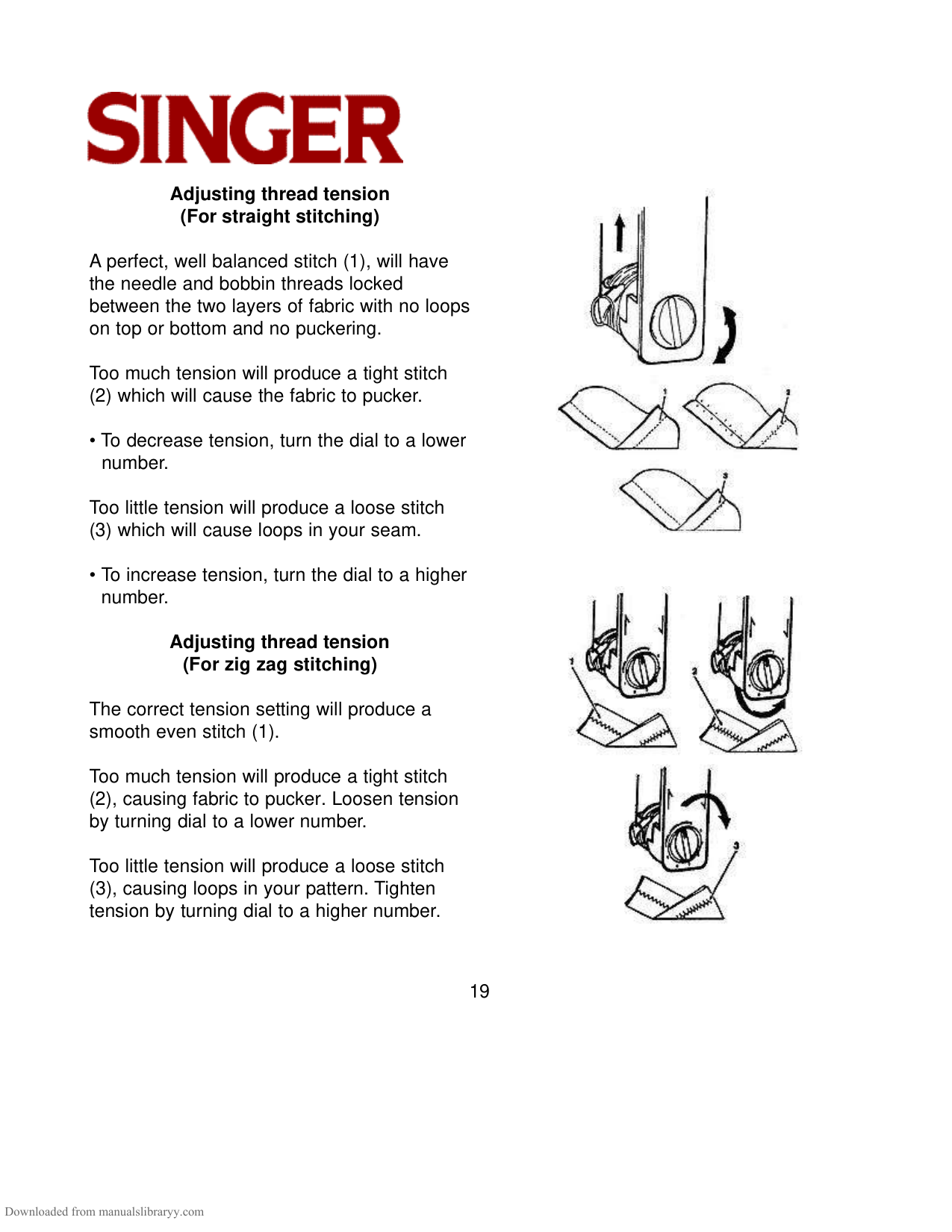
    Adjusting thread tension

    (For straight stitching)

  • A perfect, well balanced stitch (1), will have the needle and bobbin threads locked between the two layers of fabric with no loops on top or bottom and no puckering.
  • o m t w Tp a t s ( w w c t .f t p
  • • o d t t Tt d t a l

    .n

    T oo little tension will produce a loose stitch ( w w c l i y s • o i t t t Td t a h

    .n
    Page 17

    Adjusting thread tension

    (For zig zag stitching)

    The correct tension setting will produce a smooth even stitch (1).

  • o m t w Tp a t s (2), causing fabric to pucker. Loosen tension b t d t .a l n
  • o l t w Tp a l s ( c l i y p T ighten t b t d t a .h n
  • 19

    ![image 54](Singer-5050c-Sewing-Machine-Manual_compressed-1_images/imageFile54.png)

    ![image 55](Singer-5050c-Sewing-Machine-Manual_compressed-1_images/imageFile55.png)

    Sewing a seam

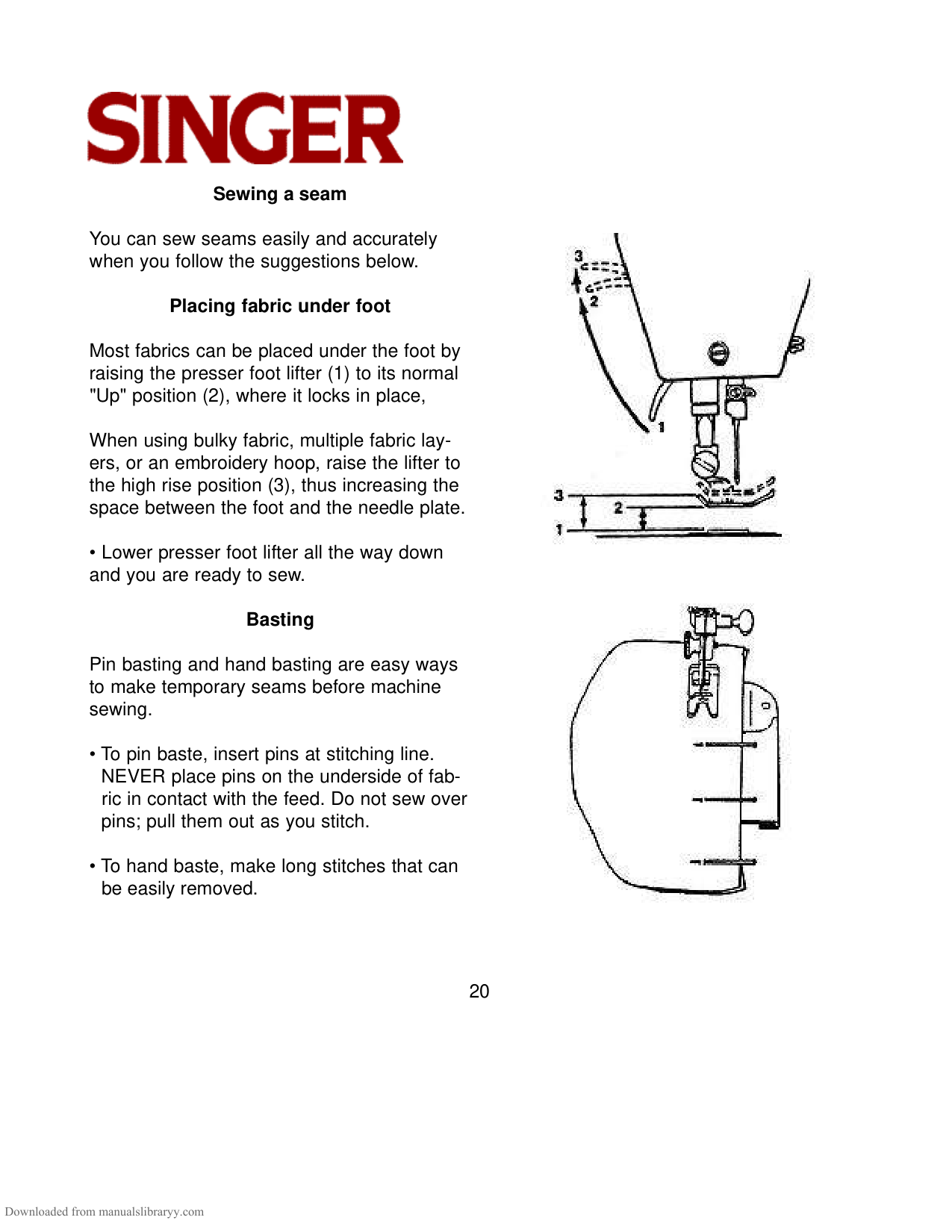
    Y ou can sew seams easily and accurately w y f .t s b

    Most fabrics can be placed under the foot by raising the presser foot lifter (1) to its normal "Up" position (2), where it locks in place,

    W u b f m f lers, or an embroidery hoop, raise the lifter to the high rise position (3), thus increasing the space between the foot and the needle plate.

    • L p f l a t w d
    Page 18

  • a y a .r t s Basting
  • Pin basting and hand basting are easy ways to make temporary seams before machine sewing.

  • • T o pin baste, insert pins at stitching line. N p p o t u o -f ric in contact with the feed. Do not sew over pins; pull them out as you stitch.
  • • o h b m Tl s t c be easily removed.
  • ![image 58](Singer-5050c-Sewing-Machine-Manual_compressed-1_images/imageFile58.png)

    ![image 59](Singer-5050c-Sewing-Machine-Manual_compressed-1_images/imageFile59.png)

    20

    Keeping seams straight

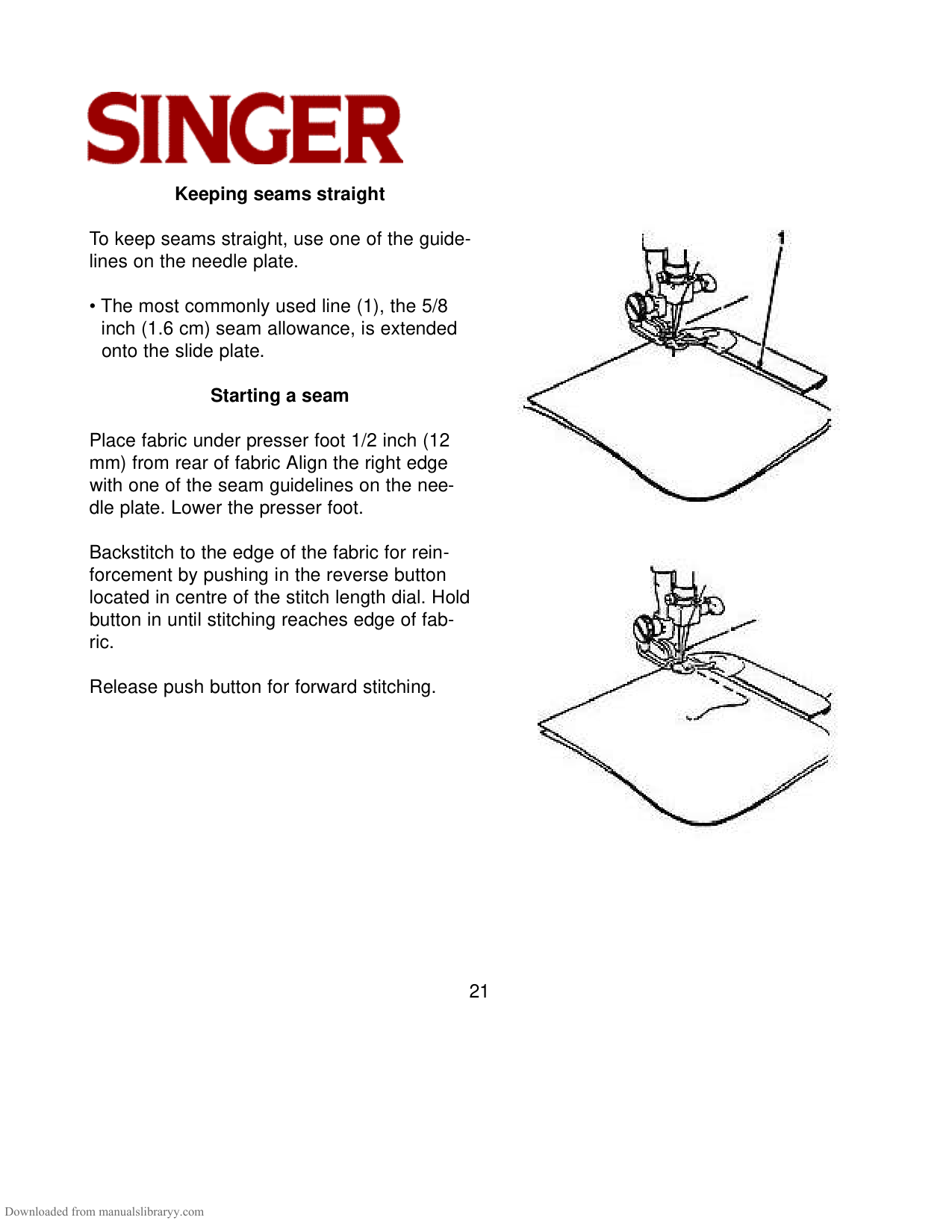
    T o k s s u o o t glines on the needle plate.

    • T m c u l ( t 5

    inch (1.6 cm) seam allowance, is extended onto the slide plate.

    Place fabric under presser foot 1/2 inch (12 m f r o f A t r e w o o t s g o t -n dle plate. Lower the presser foot.
  • B t t e o t f f rforcement by pushing in the reverse button located in centre of the stitch length dial. Hold
  • Page 19

  • b i u s r e o fric. Release push button for forward stitching.
  • Starting a seam

    ![image 62](Singer-5050c-Sewing-Machine-Manual_compressed-1_images/imageFile62.png)

    ![image 63](Singer-5050c-Sewing-Machine-Manual_compressed-1_images/imageFile63.png)

    21

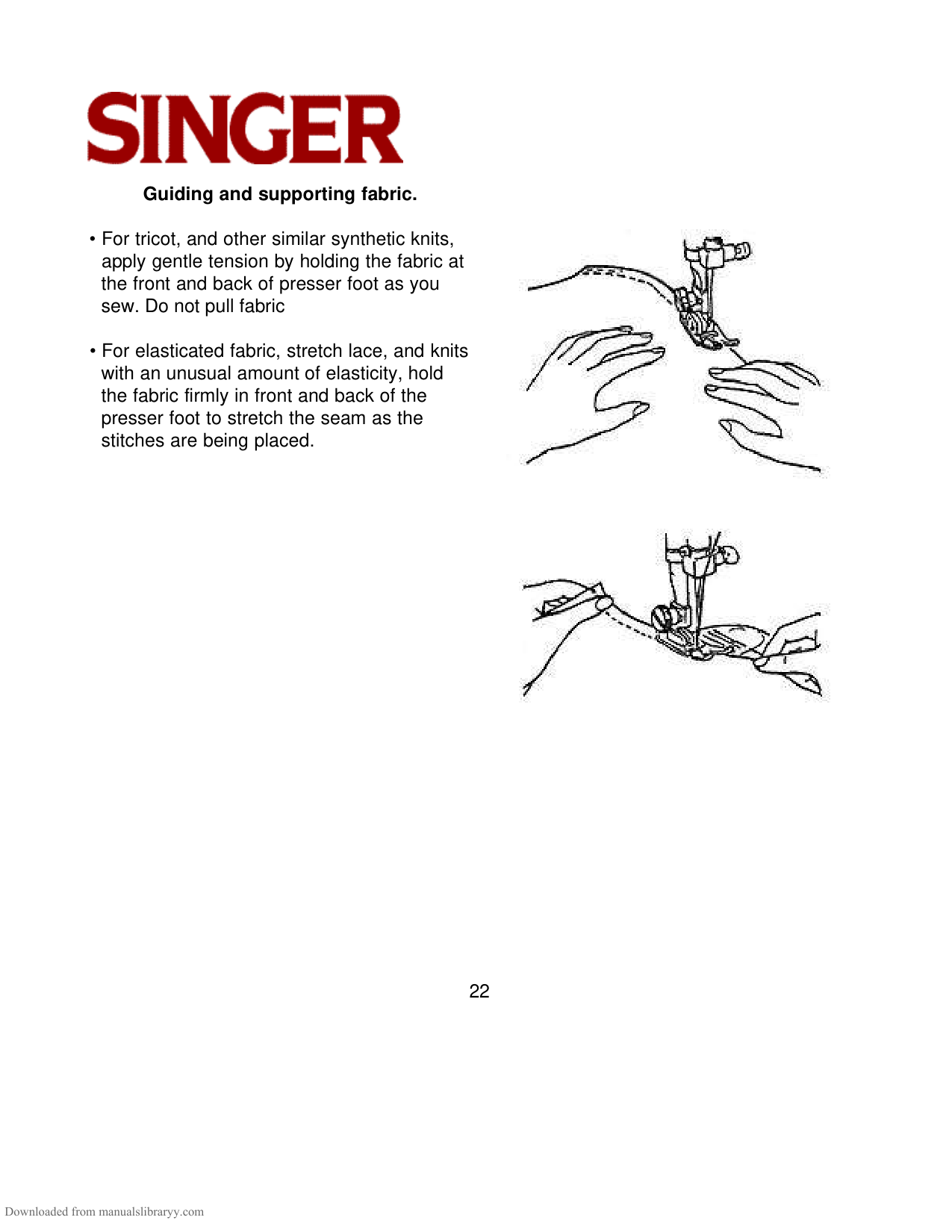
    Guiding and supporting fabric.

  • • F t a o s s k apply gentle tension by holding the fabric at the front and back of presser foot as you sew. Do not pull fabric
  • • For elasticated fabric, stretch lace, and knits with an unusual amount of elasticity, hold the fabric firmly in front and back of the presser foot to stretch the seam as the stitches are being placed.
  • ![image 66](Singer-5050c-Sewing-Machine-Manual_compressed-1_images/imageFile66.png)

    22

    Straight stitching

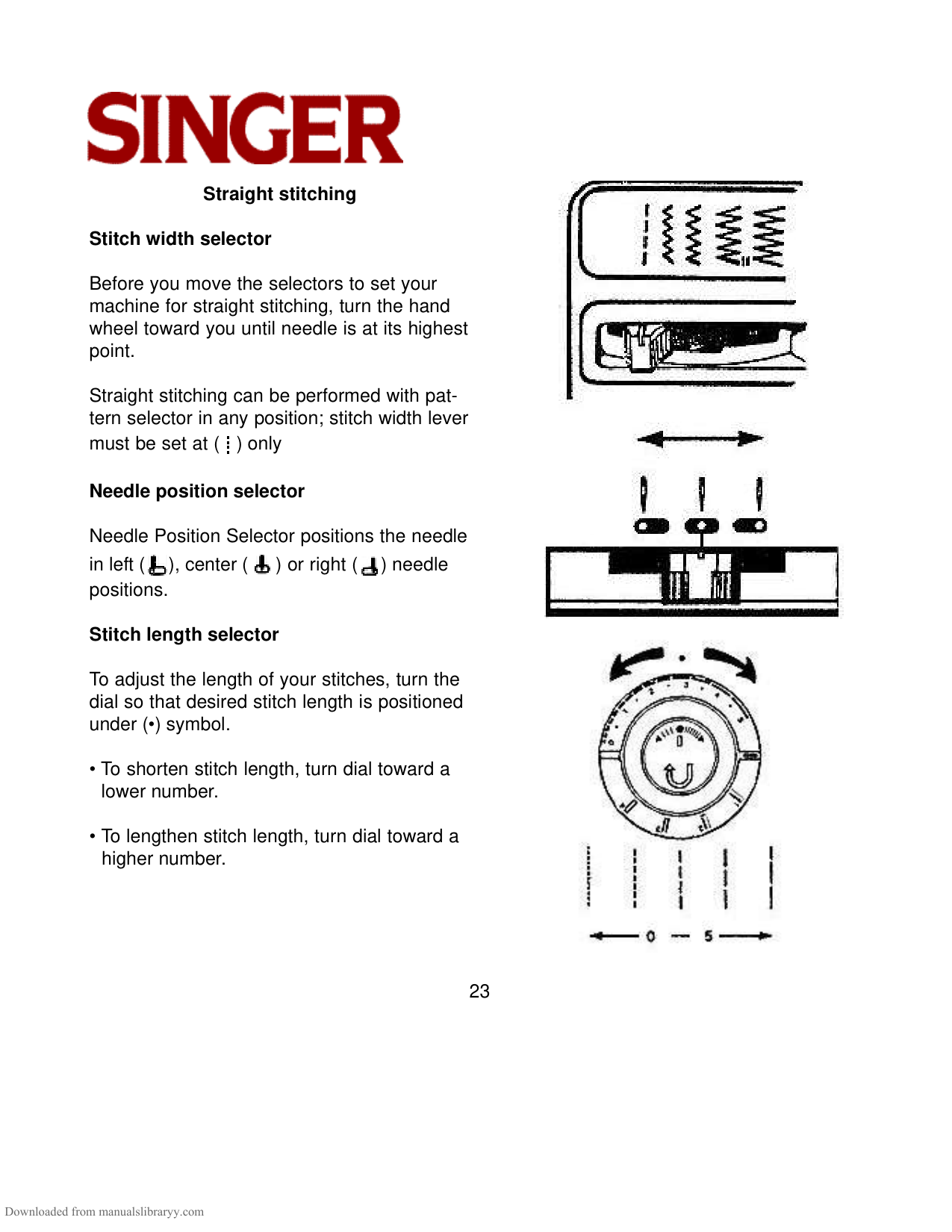
    Stitch width selector Before you move the selectors to set your machine for straight stitching, turn the hand wheel toward you until needle is at its highest point.
  • S s c b p w ptern selector in any position; stitch width lever must be set at ( ) only
  • Page 20

    Needle position selector Needle Position Selector positions the needle i ) ) or right ( ) needle positions. Stitch length selector

  • T o adjust the length of your stitches, turn the dial so that desired stitch length is positioned under (•) symbol.
  • ![image 69](Singer-5050c-Sewing-Machine-Manual_compressed-1_images/imageFile69.png)

    ![image 70](Singer-5050c-Sewing-Machine-Manual_compressed-1_images/imageFile70.png)

    ![image 71](Singer-5050c-Sewing-Machine-Manual_compressed-1_images/imageFile71.png)

  • • T o shorten stitch length, turn dial toward a
  • .l

  • • T o lengthen stitch length, turn dial toward a
  • .h

    ![image 72](Singer-5050c-Sewing-Machine-Manual_compressed-1_images/imageFile72.png)

    23

    ![image 73](Singer-5050c-Sewing-Machine-Manual_compressed-1_images/imageFile73.png)

    Page 21

    ![image 74](Singer-5050c-Sewing-Machine-Manual_compressed-1_images/imageFile74.png)

    ![image 75](Singer-5050c-Sewing-Machine-Manual_compressed-1_images/imageFile75.png)

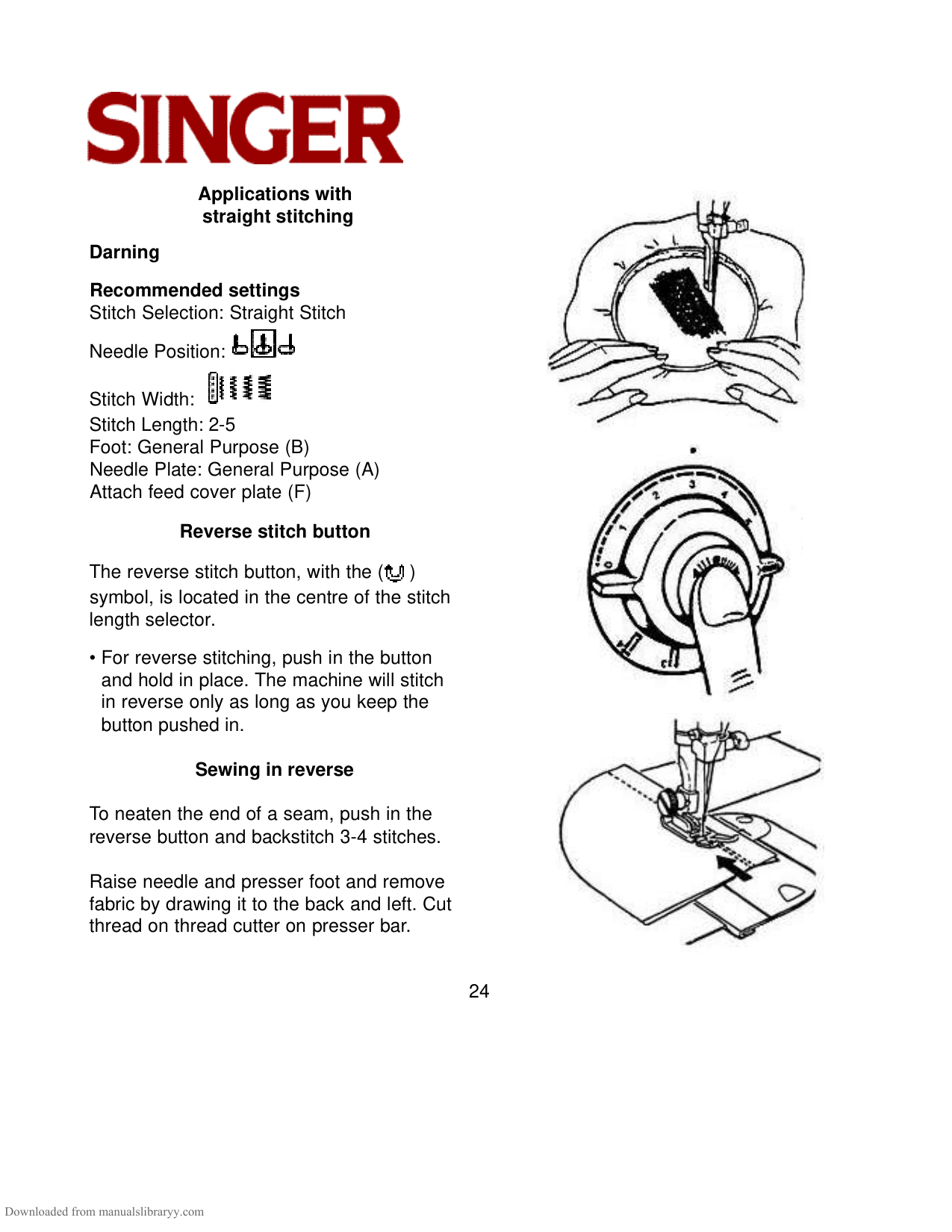
    Darning Recommended settings Stitch Selection: Straight Stitch Needle Position: Stitch Width: Stitch Length: 2-5 Foot: General Purpose (B) Needle Plate: General Purpose (A) Attach feed cover plate (F)

    Applications with

    straight stitching

    ![image 78](Singer-5050c-Sewing-Machine-Manual_compressed-1_images/imageFile78.png)

    ![image 79](Singer-5050c-Sewing-Machine-Manual_compressed-1_images/imageFile79.png)

    Reverse stitch button

    T r s b w t ( ) symbol, is located in the centre of the stitch

    .l

    • For reverse stitching, push in the button and hold in place. The machine will stitch in reverse only as long as you keep the button pushed in.

    ![image 80](Singer-5050c-Sewing-Machine-Manual_compressed-1_images/imageFile80.png)

    T o neaten the end of a seam, push in the reverse button and backstitch 3-4 stitches. Raise needle and presser foot and remove fabric by drawing it to the back and left. Cut t o t c .o p b

    Sewing in reverse
    Page 22

    24

    ![image 81](Singer-5050c-Sewing-Machine-Manual_compressed-1_images/imageFile81.png)

    ![image 82](Singer-5050c-Sewing-Machine-Manual_compressed-1_images/imageFile82.png)

    ![image 83](Singer-5050c-Sewing-Machine-Manual_compressed-1_images/imageFile83.png)

    Inserting a zipper Preparation

    Pattern: Neeale position: Stitch width: Stitch length: 2-5 Foot: Zipper (E) Needle plate: General Purpose (A)

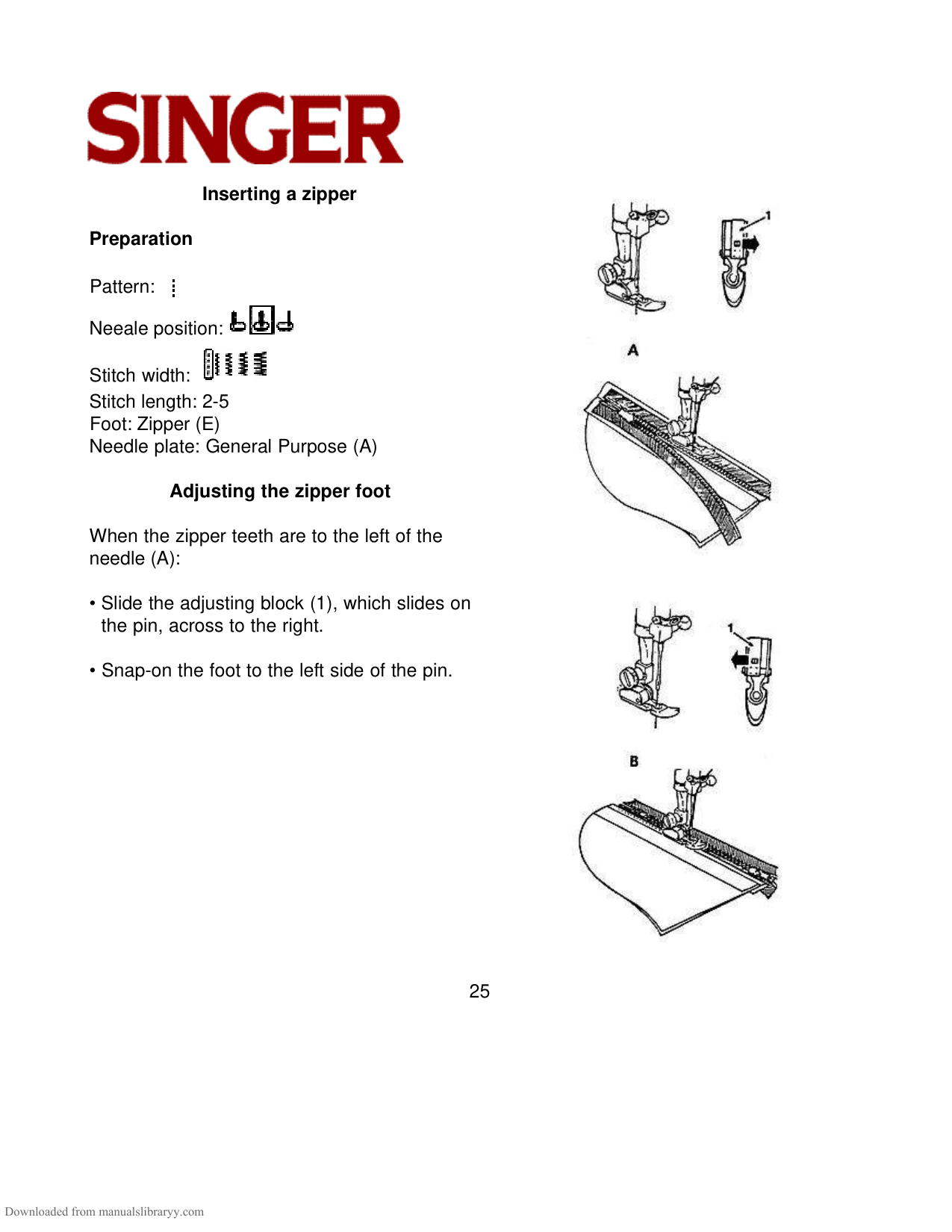
    When the zipper teeth are to the left of the needle (A):

  • • Slide the adjusting block (1), which slides on the pin, across to the right.
  • • S t f t t l s o t p
  • ![image 86](Singer-5050c-Sewing-Machine-Manual_compressed-1_images/imageFile86.png)

    ![image 87](Singer-5050c-Sewing-Machine-Manual_compressed-1_images/imageFile87.png)

    ![image 88](Singer-5050c-Sewing-Machine-Manual_compressed-1_images/imageFile88.png)

    Adjusting the zipper foot

    Page 23

    25

    ![image 89](Singer-5050c-Sewing-Machine-Manual_compressed-1_images/imageFile89.png)

    ![image 90](Singer-5050c-Sewing-Machine-Manual_compressed-1_images/imageFile90.png)

    ![image 91](Singer-5050c-Sewing-Machine-Manual_compressed-1_images/imageFile91.png)

    Zig zag stitching

    Before moving selector, make sure needle is fully raised.

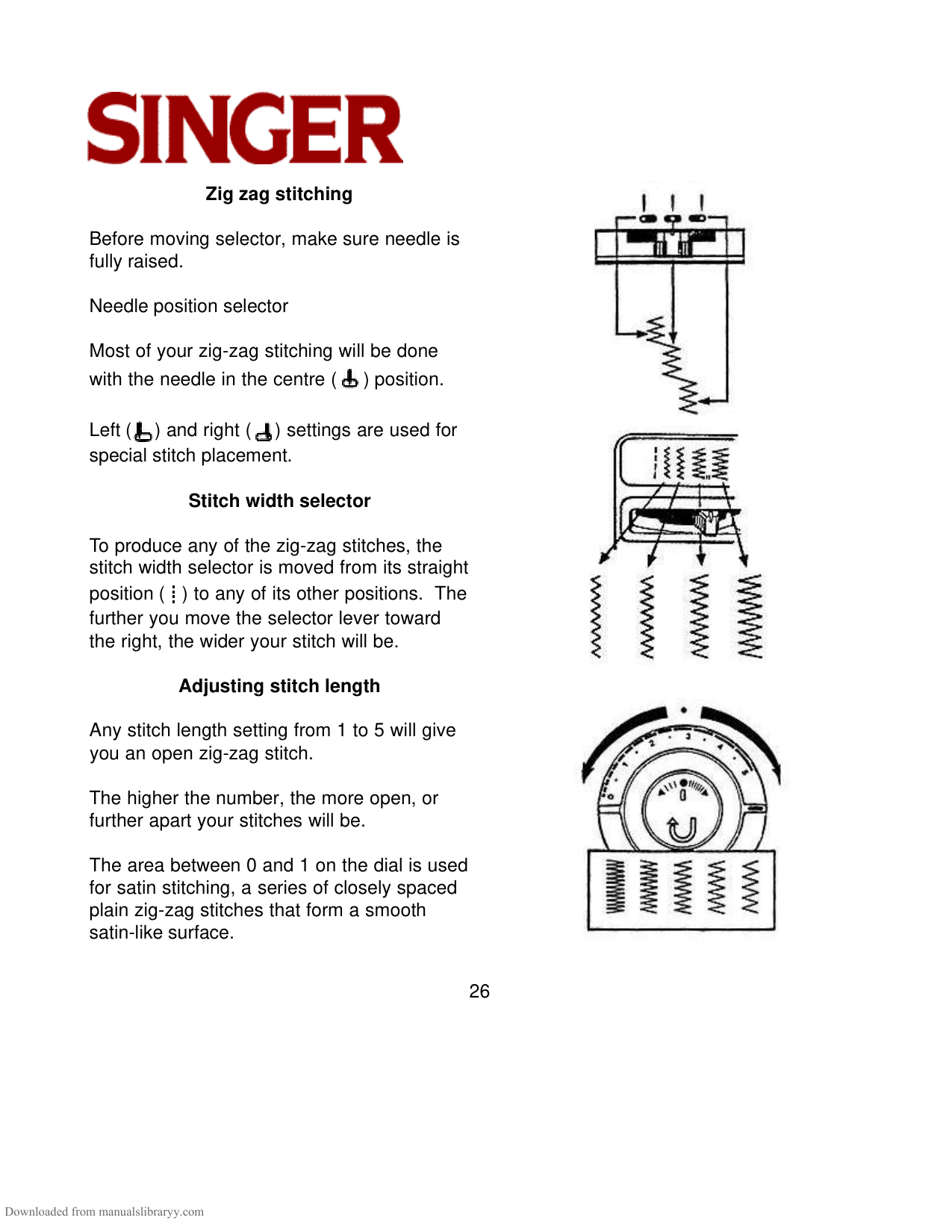
    Needle position selector Most of your zig-zag stitching will be done with the needle in the centre ( ) position.

    ![image 94](Singer-5050c-Sewing-Machine-Manual_compressed-1_images/imageFile94.png)

    Left ( ) a r ( ) s a u f special stitch placement.

    ![image 95](Singer-5050c-Sewing-Machine-Manual_compressed-1_images/imageFile95.png)

    Stitch width selector

    T o produce any of the zig-zag stitches, the stitch width selector is moved from its straight position ( ) to any of its other positions. The

    ![image 96](Singer-5050c-Sewing-Machine-Manual_compressed-1_images/imageFile96.png)

    further you move the selector lever toward the right, the wider your stitch will be.
    Page 24

    Any stitch length setting from 1 to 5 will give you an open zig-zag stitch.

    The higher the number, the more open, or further apart your stitches will be.

    The area between 0 and 1 on the dial is used for satin stitching, a series of closely spaced plain zig-zag stitches that form a smooth satin-like surface.

    Adjusting stitch length

    ![image 97](Singer-5050c-Sewing-Machine-Manual_compressed-1_images/imageFile97.png)

    26

    ![image 98](Singer-5050c-Sewing-Machine-Manual_compressed-1_images/imageFile98.png)

    ![image 99](Singer-5050c-Sewing-Machine-Manual_compressed-1_images/imageFile99.png)

    ![image 100](Singer-5050c-Sewing-Machine-Manual_compressed-1_images/imageFile100.png)

    Pattern groups selection

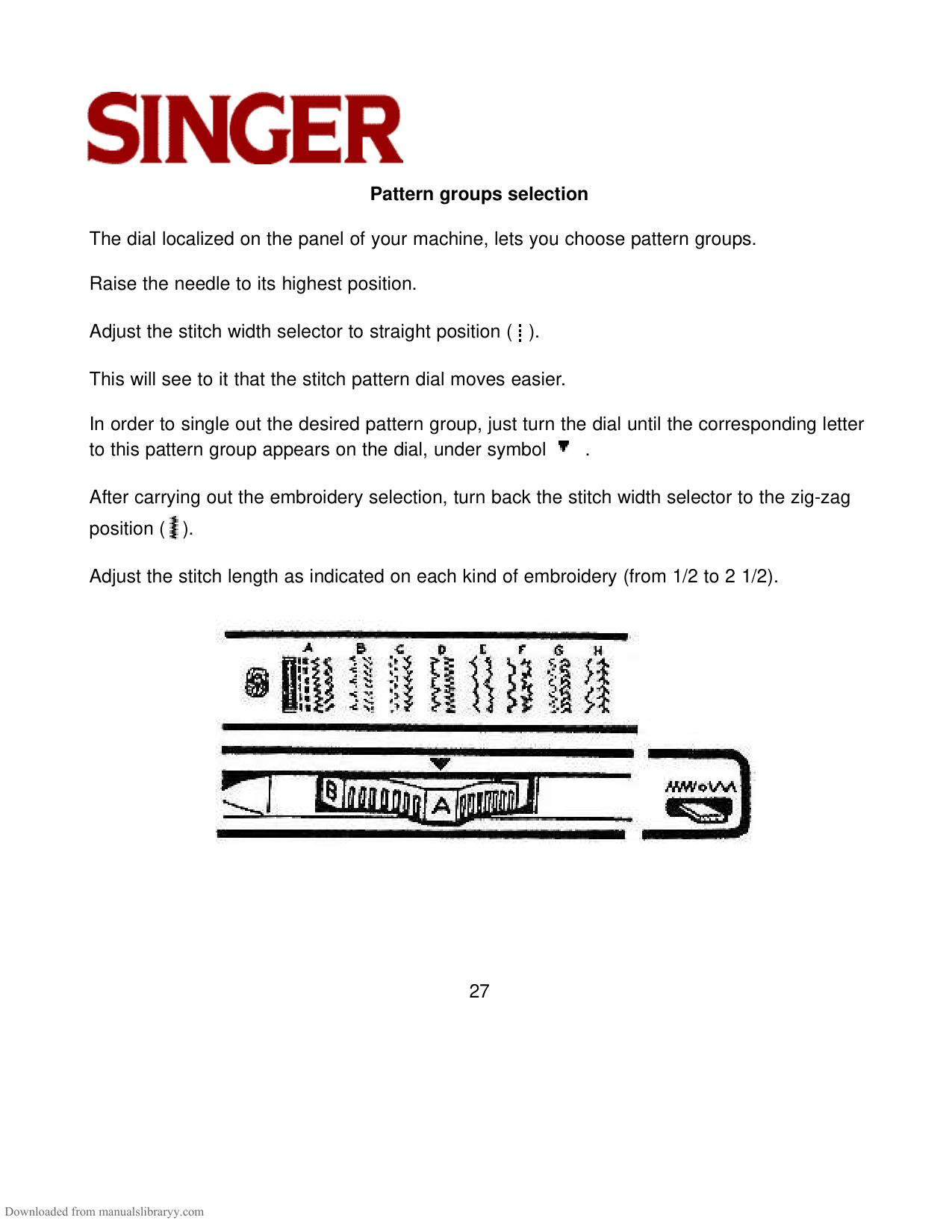
    The dial localized on the panel of your machine, lets you choose pattern groups. Raise the needle to its highest position. Adjust the stitch width selector to straight position ( ).

    ![image 103](Singer-5050c-Sewing-Machine-Manual_compressed-1_images/imageFile103.png)

    T w s t i t t s p .d m e In order to single out the desired pattern group, just turn the dial until the corresponding letter t t p g a o t d u s .
    Page 25

    After carrying out the embroidery selection, turn back the stitch width selector to the zig-zag

  • p )
  • Adjust the stitch length as indicated on each kind of embroidery (from 1/2 to 2 1/2).

    ![image 104](Singer-5050c-Sewing-Machine-Manual_compressed-1_images/imageFile104.png)

    ![image 105](Singer-5050c-Sewing-Machine-Manual_compressed-1_images/imageFile105.png)

    ![image 106](Singer-5050c-Sewing-Machine-Manual_compressed-1_images/imageFile106.png)

    27

    Flexi stitch patterns Note: The pattern groups selection, needle position selection and stitch width selection are

    similar to zig-zag stitching.

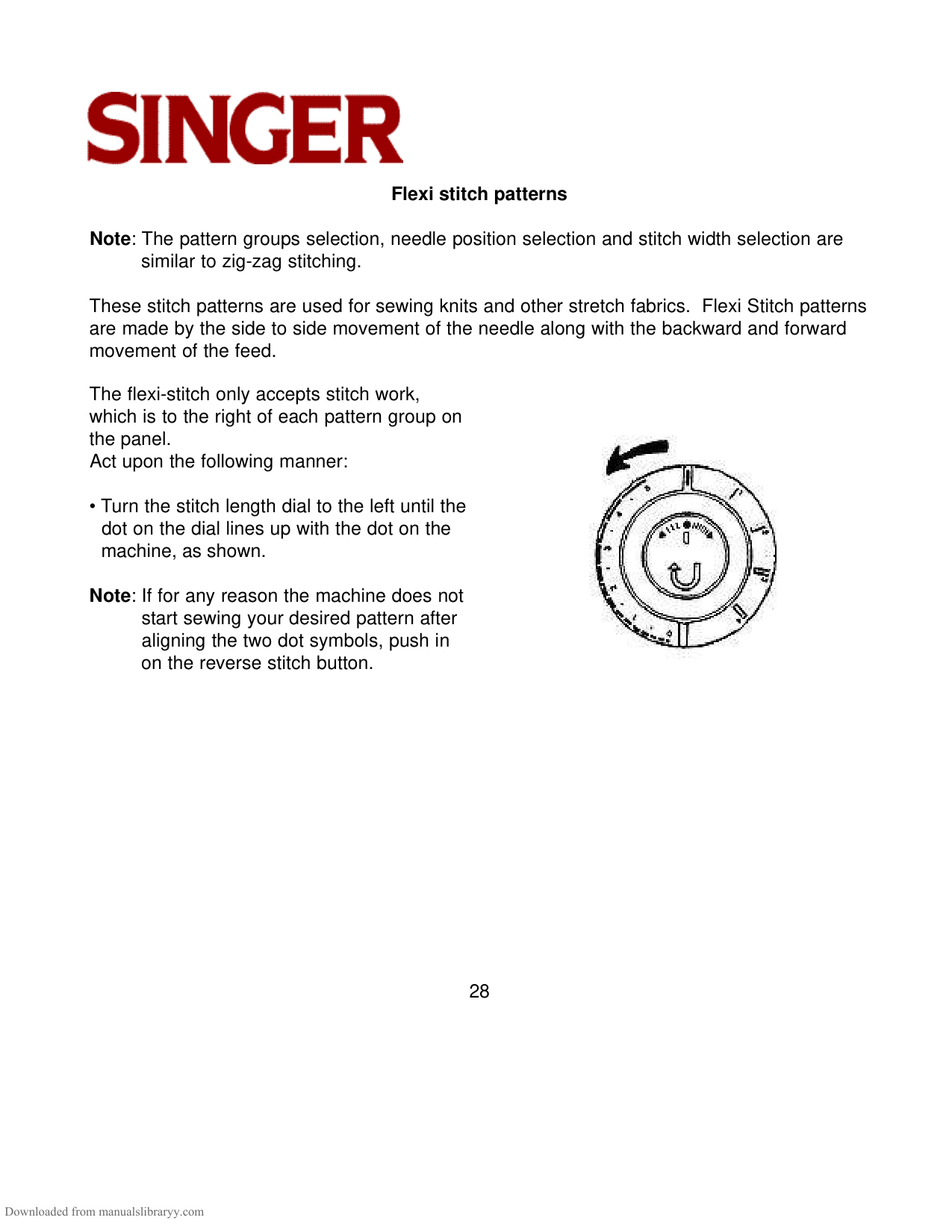
    These stitch patterns are used for sewing knits and other stretch fabrics. Flexi Stitch patterns are made by the side to side movement of the needle along with the backward and forward movement of the feed. The flexi-stitch only accepts stitch work, which is to the right of each pattern group on the panel. Act upon the following manner:

    • u Tt s l d t t l u t

    dot on the dial lines up with the dot on the machine, as shown.

    Note: If for any reason the machine does not start sewing your desired pattern after aligning the two dot symbols, push in on the reverse stitch button.
    Page 26

    ![image 109](Singer-5050c-Sewing-Machine-Manual_compressed-1_images/imageFile109.png)

    28

    Balancing Flexi-stitches

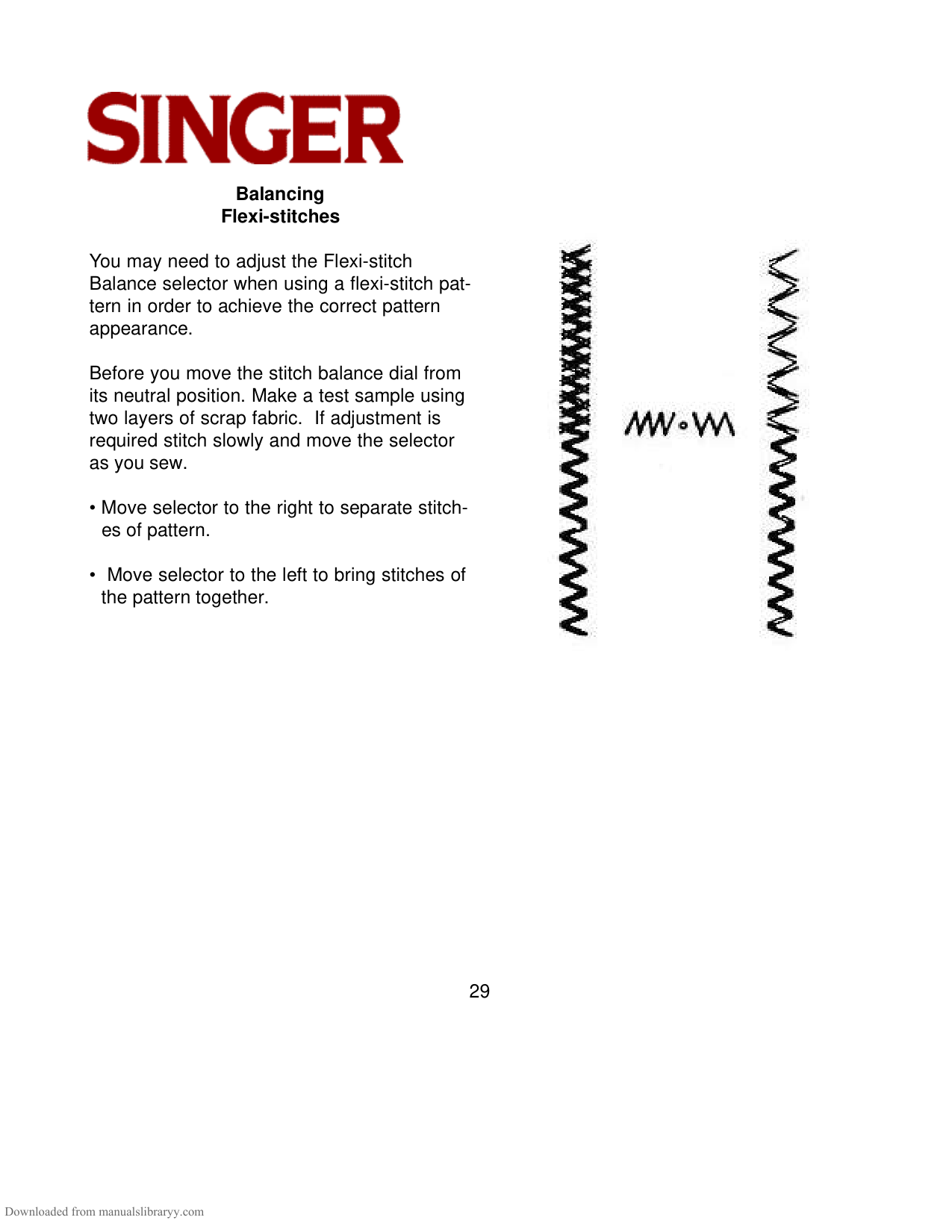
    Y ou may need to adjust the Flexi-stitch

  • B s w u a f ptern in order to achieve the correct pattern appearance.
  • Before you move the stitch balance dial from its neutral position. Make a test sample using two layers of scrap fabric. If adjustment is required stitch slowly and move the selector .a

    • M s t t r t s s-

    es of pattern. • Move selector to the left to bring stitches of .t

    ![image 112](Singer-5050c-Sewing-Machine-Manual_compressed-1_images/imageFile112.png)

    29

    Pattern stitching

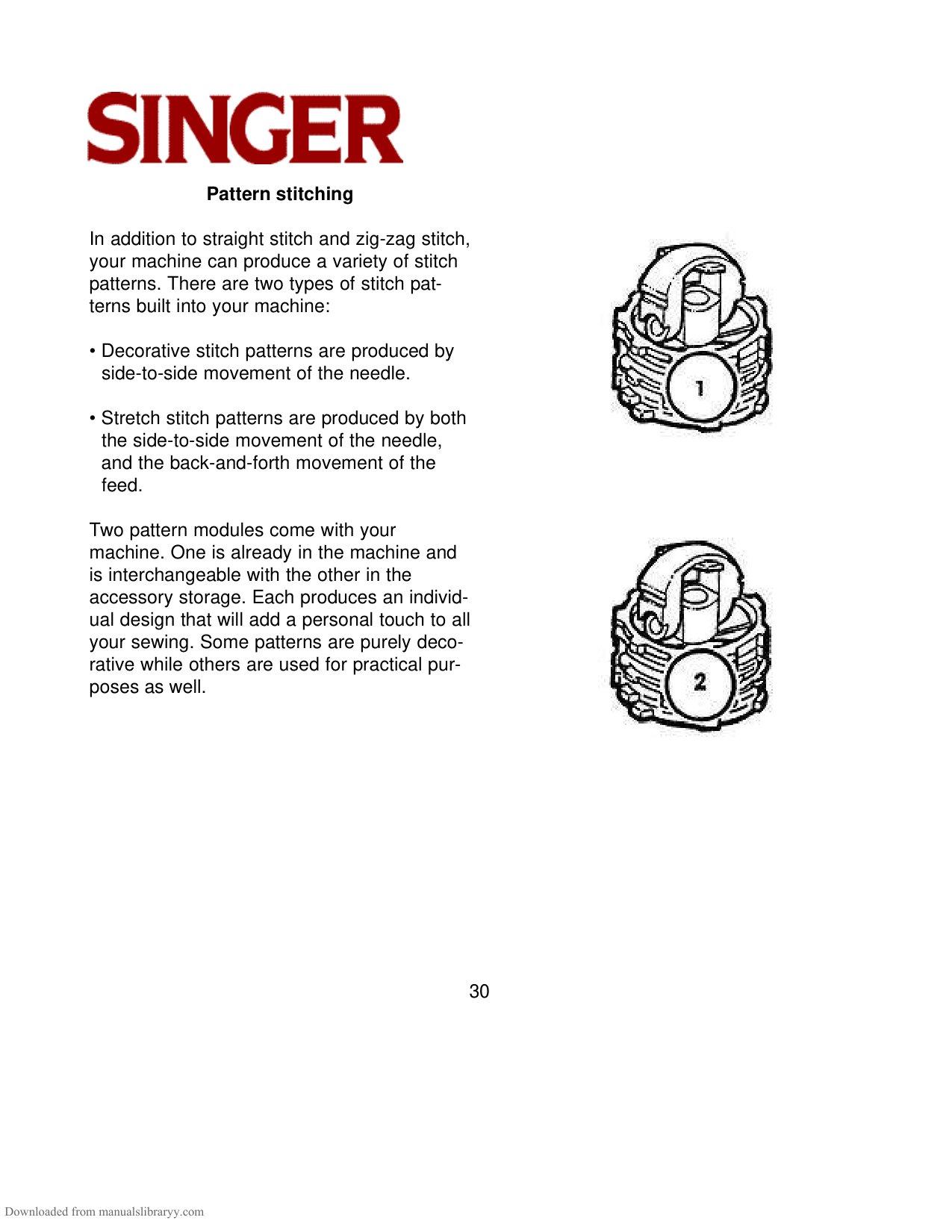
    In addition to straight stitch and zig-zag stitch, your machine can produce a variety of stitch p T a t t o s -p terns built into your machine:
  • • D s p a p b side-to-side movement of the needle.
  • • S s p a p b b the side-to-side movement of the needle, and the back-and-forth movement of the feed.
  • Page 27

    T wo pattern modules come with your machine. One is already in the machine and is interchangeable with the other in the a s E p a iual design that will add a personal touch to all y s S p a p dr w o a u f p pposes as well.

    ![image 115](Singer-5050c-Sewing-Machine-Manual_compressed-1_images/imageFile115.png)

    30

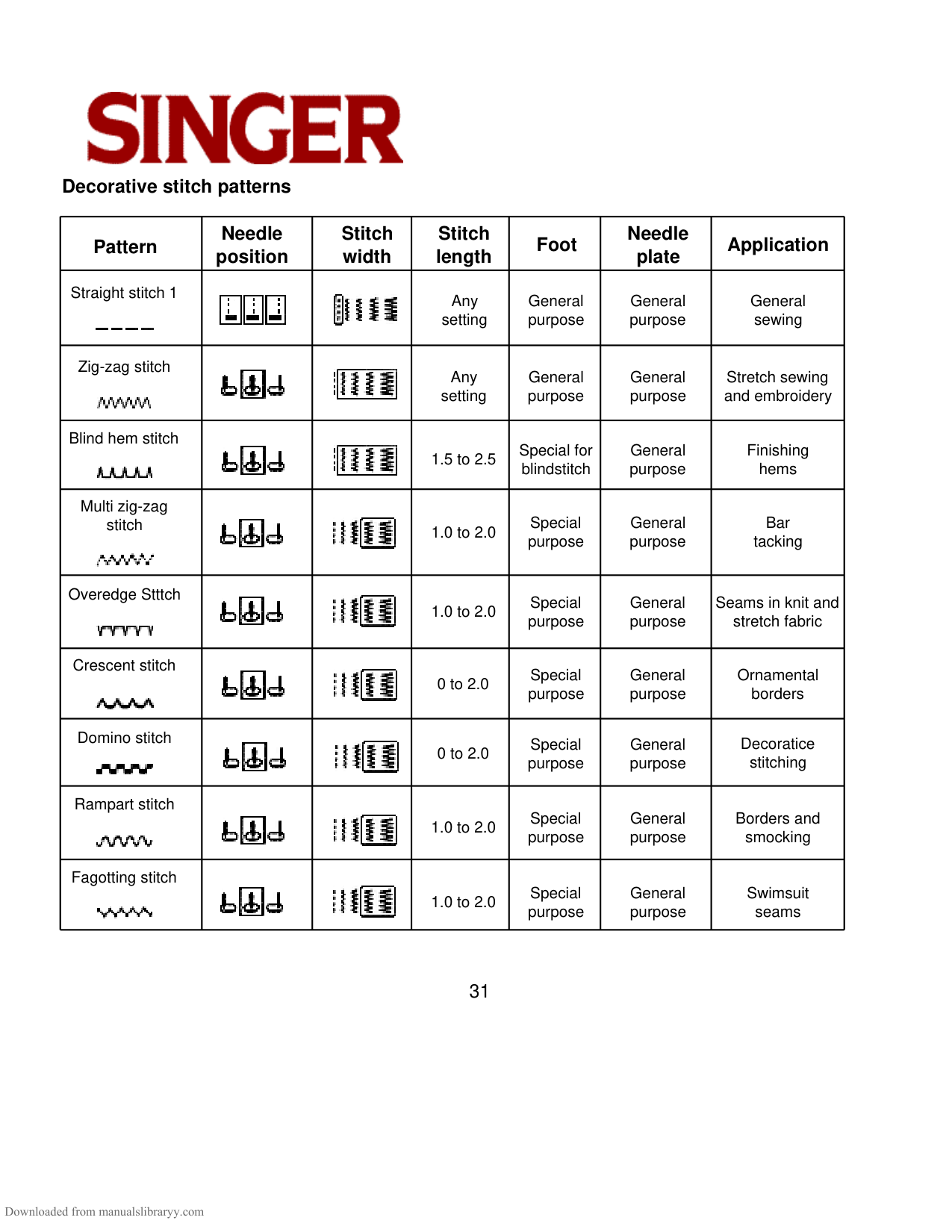
    Decorative stitch patterns

    | | | | | | | | |---|---|---|---|---|---|---| |![image 118](Singer-5050c-Sewing-Machine-Manual_compressed-1_images/imageFile118.png)|![image 119](Singer-5050c-Sewing-Machine-Manual_compressed-1_images/imageFile119.png)|![image 120](Singer-5050c-Sewing-Machine-Manual_compressed-1_images/imageFile120.png)| | | | | |![image 121](Singer-5050c-Sewing-Machine-Manual_compressed-1_images/imageFile121.png)|![image 122](Singer-5050c-Sewing-Machine-Manual_compressed-1_images/imageFile122.png)|![image 123](Singer-5050c-Sewing-Machine-Manual_compressed-1_images/imageFile123.png)| | | | | |![image 124](Singer-5050c-Sewing-Machine-Manual_compressed-1_images/imageFile124.png)|![image 125](Singer-5050c-Sewing-Machine-Manual_compressed-1_images/imageFile125.png)|![image 126](Singer-5050c-Sewing-Machine-Manual_compressed-1_images/imageFile126.png)| | | | | |![image 127](Singer-5050c-Sewing-Machine-Manual_compressed-1_images/imageFile127.png)|![image 128](Singer-5050c-Sewing-Machine-Manual_compressed-1_images/imageFile128.png)|![image 129](Singer-5050c-Sewing-Machine-Manual_compressed-1_images/imageFile129.png)| | | | | |![image 130](Singer-5050c-Sewing-Machine-Manual_compressed-1_images/imageFile130.png)|![image 131](Singer-5050c-Sewing-Machine-Manual_compressed-1_images/imageFile131.png)|![image 132](Singer-5050c-Sewing-Machine-Manual_compressed-1_images/imageFile132.png)| | | | | |![image 133](Singer-5050c-Sewing-Machine-Manual_compressed-1_images/imageFile133.png)|![image 134](Singer-5050c-Sewing-Machine-Manual_compressed-1_images/imageFile134.png)|![image 135](Singer-5050c-Sewing-Machine-Manual_compressed-1_images/imageFile135.png)| | | | | |![image 136](Singer-5050c-Sewing-Machine-Manual_compressed-1_images/imageFile136.png)|![image 137](Singer-5050c-Sewing-Machine-Manual_compressed-1_images/imageFile137.png)|![image 138](Singer-5050c-Sewing-Machine-Manual_compressed-1_images/imageFile138.png)| | | | | |![image 139](Singer-5050c-Sewing-Machine-Manual_compressed-1_images/imageFile139.png)|![image 140](Singer-5050c-Sewing-Machine-Manual_compressed-1_images/imageFile140.png)|![image 141](Singer-5050c-Sewing-Machine-Manual_compressed-1_images/imageFile141.png)| | | | | |![image 142](Singer-5050c-Sewing-Machine-Manual_compressed-1_images/imageFile142.png)|![image 143](Singer-5050c-Sewing-Machine-Manual_compressed-1_images/imageFile143.png)|![image 144](Singer-5050c-Sewing-Machine-Manual_compressed-1_images/imageFile144.png)| | | | |

    Needle position

    Stitch width

    Page 28

    Stitch length

    Needle

    Pattern Application

    Foot

    plate

    Straight stitch 1

    Any setting

    General purpose

    General purpose

    General

    sewing

    Zig-zag stitch

    Any setting

    General purpose
    Page 29

    General purpose

    Stretch sewing and embroidery

    Blind hem stitch

    Special for blindstitch

    General purpose

    Finishing

    1.5 to 2.5

    hems

    Multi zig-zag

    Special purpose

    General purpose

    Bar tacking

    stitch
    Page 30

    1.0 to 2.0

    Overedge Stttch

    Special purpose

    General purpose

    Seams in knit and

    1.0 to 2.0

    stretch fabric

    Crescent stitch

    Special purpose

    General purpose

    Ornamental

    0 to 2.0

    borders

    Domino stitch
    Page 31

    Decoratice

    Special purpose

    General purpose

    0 to 2.0

    stitching

    Rampart stitch

    Special purpose

    General purpose

    Borders and

    1.0 to 2.0

    smocking

    Fagotting stitch

    Special purpose
    Page 32

    General purpose

    Swimsuit

    1.0 to 2.0

    seams

    31

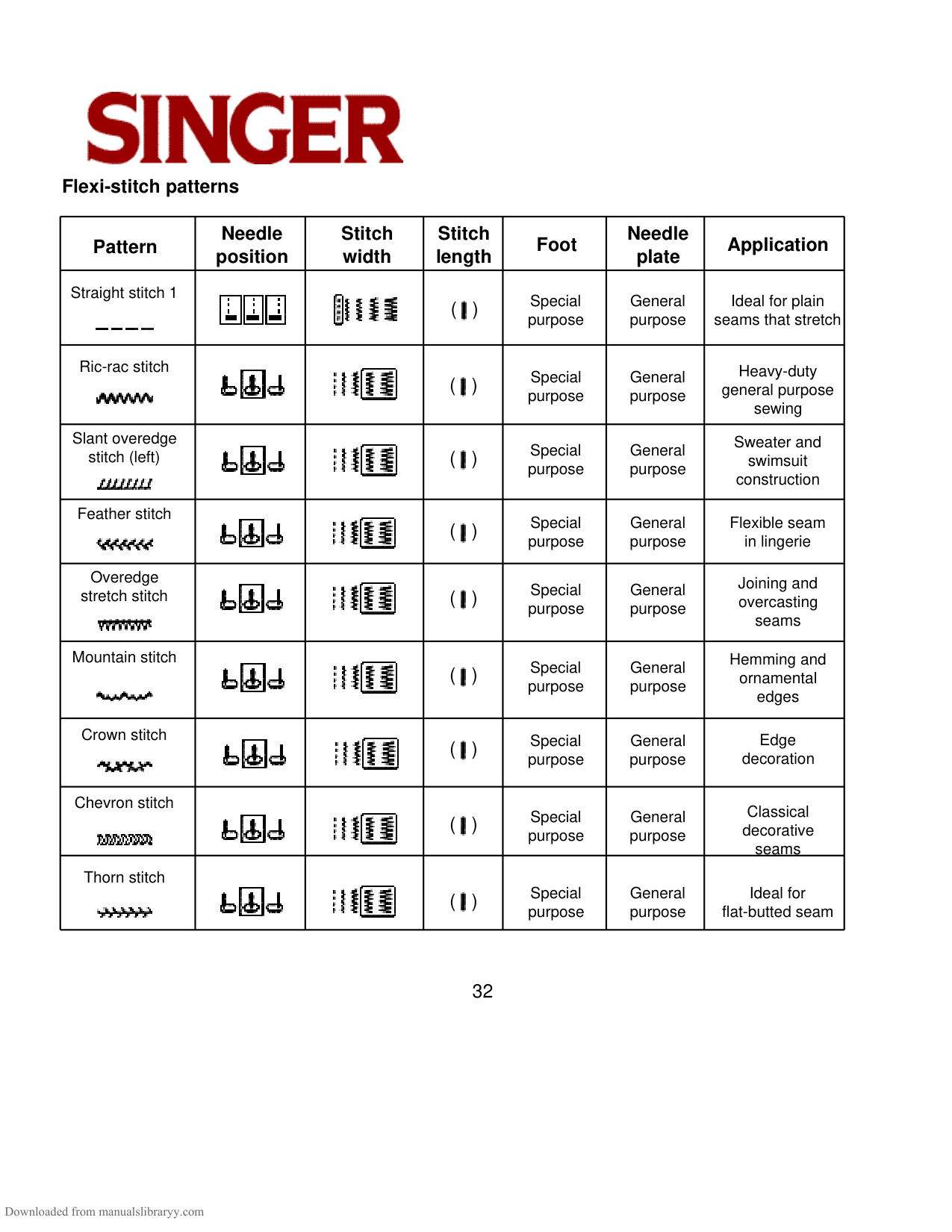
    Flexi-stitch patterns

    | | | | | | | | |---|---|---|---|---|---|---| |![image 147](Singer-5050c-Sewing-Machine-Manual_compressed-1_images/imageFile147.png)|![image 148](Singer-5050c-Sewing-Machine-Manual_compressed-1_images/imageFile148.png)|![image 149](Singer-5050c-Sewing-Machine-Manual_compressed-1_images/imageFile149.png)|( )

    ![image 150](Singer-5050c-Sewing-Machine-Manual_compressed-1_images/imageFile150.png)| | | | |![image 151](Singer-5050c-Sewing-Machine-Manual_compressed-1_images/imageFile151.png)|![image 152](Singer-5050c-Sewing-Machine-Manual_compressed-1_images/imageFile152.png)|![image 153](Singer-5050c-Sewing-Machine-Manual_compressed-1_images/imageFile153.png)|( )

    ![image 154](Singer-5050c-Sewing-Machine-Manual_compressed-1_images/imageFile154.png)| | | | |![image 155](Singer-5050c-Sewing-Machine-Manual_compressed-1_images/imageFile155.png)|![image 156](Singer-5050c-Sewing-Machine-Manual_compressed-1_images/imageFile156.png)|![image 157](Singer-5050c-Sewing-Machine-Manual_compressed-1_images/imageFile157.png)|( )

    ![image 158](Singer-5050c-Sewing-Machine-Manual_compressed-1_images/imageFile158.png)| | | | |![image 159](Singer-5050c-Sewing-Machine-Manual_compressed-1_images/imageFile159.png)|![image 160](Singer-5050c-Sewing-Machine-Manual_compressed-1_images/imageFile160.png)|![image 161](Singer-5050c-Sewing-Machine-Manual_compressed-1_images/imageFile161.png)|( )

    ![image 162](Singer-5050c-Sewing-Machine-Manual_compressed-1_images/imageFile162.png)| | | | |![image 163](Singer-5050c-Sewing-Machine-Manual_compressed-1_images/imageFile163.png)|![image 164](Singer-5050c-Sewing-Machine-Manual_compressed-1_images/imageFile164.png)|![image 165](Singer-5050c-Sewing-Machine-Manual_compressed-1_images/imageFile165.png)|( )

    ![image 166](Singer-5050c-Sewing-Machine-Manual_compressed-1_images/imageFile166.png)| | | | |![image 167](Singer-5050c-Sewing-Machine-Manual_compressed-1_images/imageFile167.png)|![image 168](Singer-5050c-Sewing-Machine-Manual_compressed-1_images/imageFile168.png)|![image 169](Singer-5050c-Sewing-Machine-Manual_compressed-1_images/imageFile169.png)|( )

    ![image 170](Singer-5050c-Sewing-Machine-Manual_compressed-1_images/imageFile170.png)| | | | |![image 171](Singer-5050c-Sewing-Machine-Manual_compressed-1_images/imageFile171.png)|![image 172](Singer-5050c-Sewing-Machine-Manual_compressed-1_images/imageFile172.png)|![image 173](Singer-5050c-Sewing-Machine-Manual_compressed-1_images/imageFile173.png)|( )

    ![image 174](Singer-5050c-Sewing-Machine-Manual_compressed-1_images/imageFile174.png)| | | | |![image 175](Singer-5050c-Sewing-Machine-Manual_compressed-1_images/imageFile175.png)|![image 176](Singer-5050c-Sewing-Machine-Manual_compressed-1_images/imageFile176.png)|![image 177](Singer-5050c-Sewing-Machine-Manual_compressed-1_images/imageFile177.png)|( )

    ![image 178](Singer-5050c-Sewing-Machine-Manual_compressed-1_images/imageFile178.png)| | | | |![image 179](Singer-5050c-Sewing-Machine-Manual_compressed-1_images/imageFile179.png)|![image 180](Singer-5050c-Sewing-Machine-Manual_compressed-1_images/imageFile180.png)|![image 181](Singer-5050c-Sewing-Machine-Manual_compressed-1_images/imageFile181.png)|( )

    ![image 182](Singer-5050c-Sewing-Machine-Manual_compressed-1_images/imageFile182.png)| | | |

    Needle position

    Page 33

    Stitch width

    Stitch length

    Needle

    Pattern Application

    Foot

    plate

    Straight stitch 1

    Special purpose

    General purpose

    Ideal for plain seams that stretch

    Ric-rac stitch

    Heavy-duty general purpose

    Special purpose

    General purpose
    Page 34

    sewing

    Slant overedge

    Sweater and

    Special purpose

    General purpose

    stitch (left)

    swimsuit construction

    Feather stitch

    Special purpose

    General purpose

    Flexible seam

    in lingerie

    Overedge stretch stitch
    Page 35

    Joining and overcasting

    Special purpose

    General purpose

    seams

    Mountain stitch

    Hemming and

    Special purpose

    General purpose

    ornamental

    edges

    Crown stitch

    Edge decoration

    Special purpose

    General purpose
    Page 36

    Chevron stitch

    Classical decorative

    Special purpose

    General purpose

    seams

    Thorn stitch

    Special purpose

    General purpose

    Ideal for flat-butted seam

    32

    Attaching a button

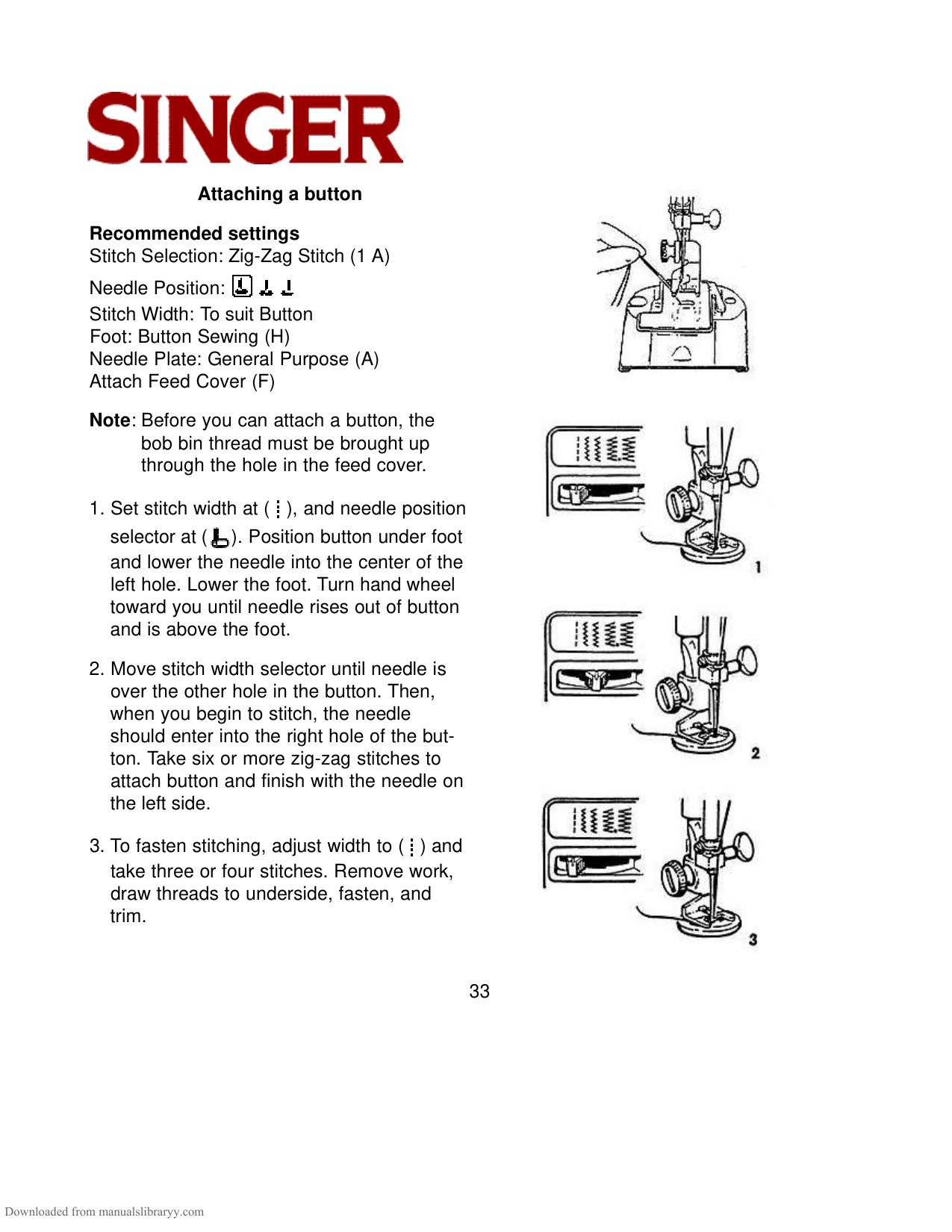
    Recommended settings Stitch Selection: Zig-Zag Stitch (1 A)

    Needle Position:
    Page 37

    ![image 185](Singer-5050c-Sewing-Machine-Manual_compressed-1_images/imageFile185.png)

    Needle Plate: General Purpose (A) Attach Feed Cover (F)

    Note : Before you can attach a button, the bob bin thread must be brought up t t h i t .f c

  • 1 S s w a ( ), and needle position selector at ( ). Position button under foot and lower the needle into the center of the l h L t f T urn hand wheel toward you until needle rises out of button and is above the foot.
  • 2 M s w s u n i over the other hole in the button. Then, when you begin to stitch, the needle s e i t r h o t btT ake six or more zig-zag stitches to attach button and finish with the needle on the left side.
  • 3 T o fasten stitching, adjust width to ( ) and take three or four stitches. Remove work, draw threads to underside, fasten, and trim.
  • ![image 186](Singer-5050c-Sewing-Machine-Manual_compressed-1_images/imageFile186.png)

    ![image 187](Singer-5050c-Sewing-Machine-Manual_compressed-1_images/imageFile187.png)

    ![image 188](Singer-5050c-Sewing-Machine-Manual_compressed-1_images/imageFile188.png)

    33

    ![image 189](Singer-5050c-Sewing-Machine-Manual_compressed-1_images/imageFile189.png)

    ![image 190](Singer-5050c-Sewing-Machine-Manual_compressed-1_images/imageFile190.png)

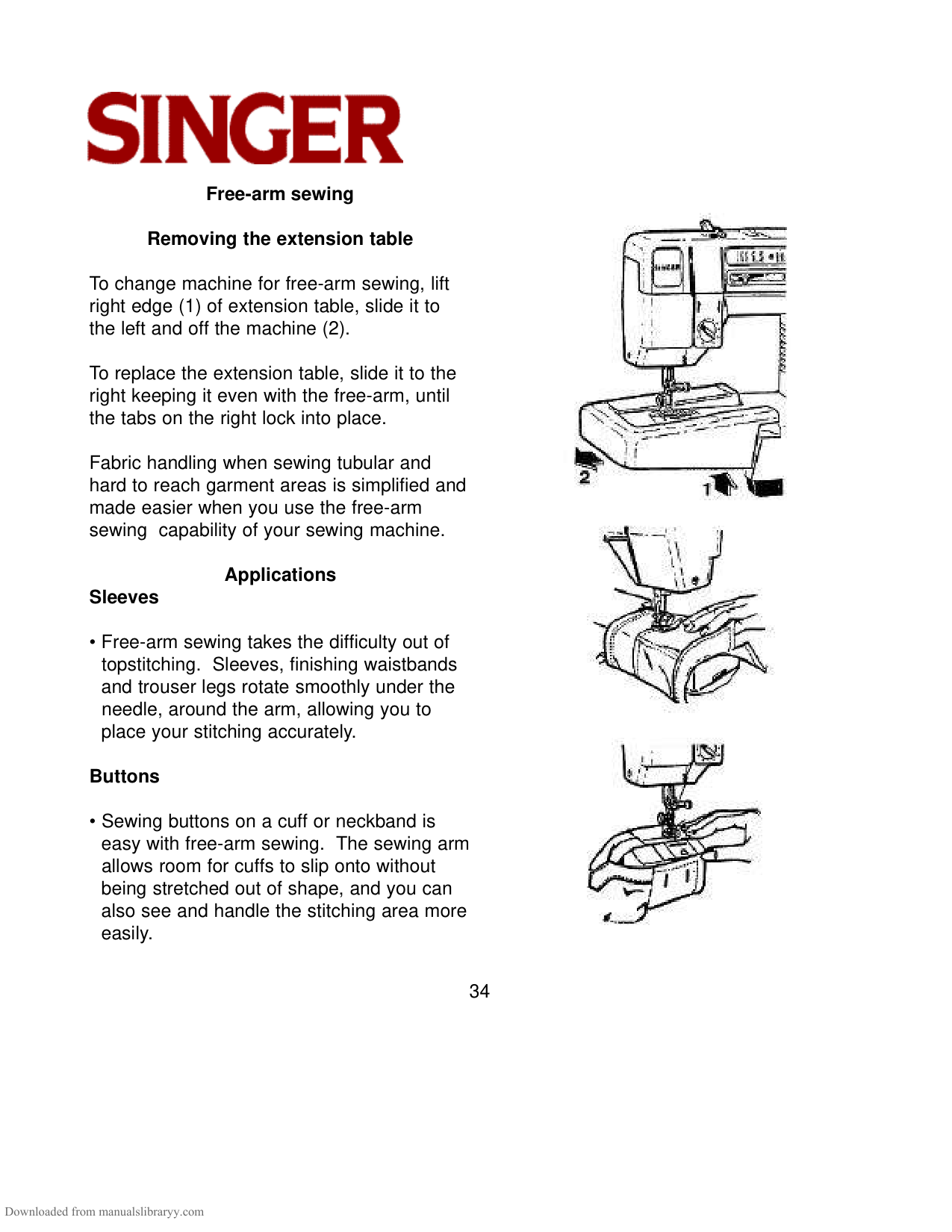
    Free-arm sewing

    o c m f Tf s l right edge (1) of extension table, slide it to the left and off the machine (2).
    Page 38

    T o replace the extension table, slide it to the right keeping it even with the free-arm, until the tabs on the right lock into place.

    Fabric handling when sewing tubular and hard to reach garment areas is simplified and made easier when you use the free-arm sewing capability of your sewing machine.

    Applications Sleeves

    • Free-arm sewing takes the difficulty out of topstitching. Sleeves, finishing waistbands and trouser legs rotate smoothly under the needle, around the arm, allowing you to p .y s a

    Buttons

    • Sewing buttons on a cuff or neckband is easy with free-arm sewing. The sewing arm allows room for cuffs to slip onto without being stretched out of shape, and you can also see and handle the stitching area more

  • .e
  • 34

    ![image 193](Singer-5050c-Sewing-Machine-Manual_compressed-1_images/imageFile193.png)

    Bar tacks

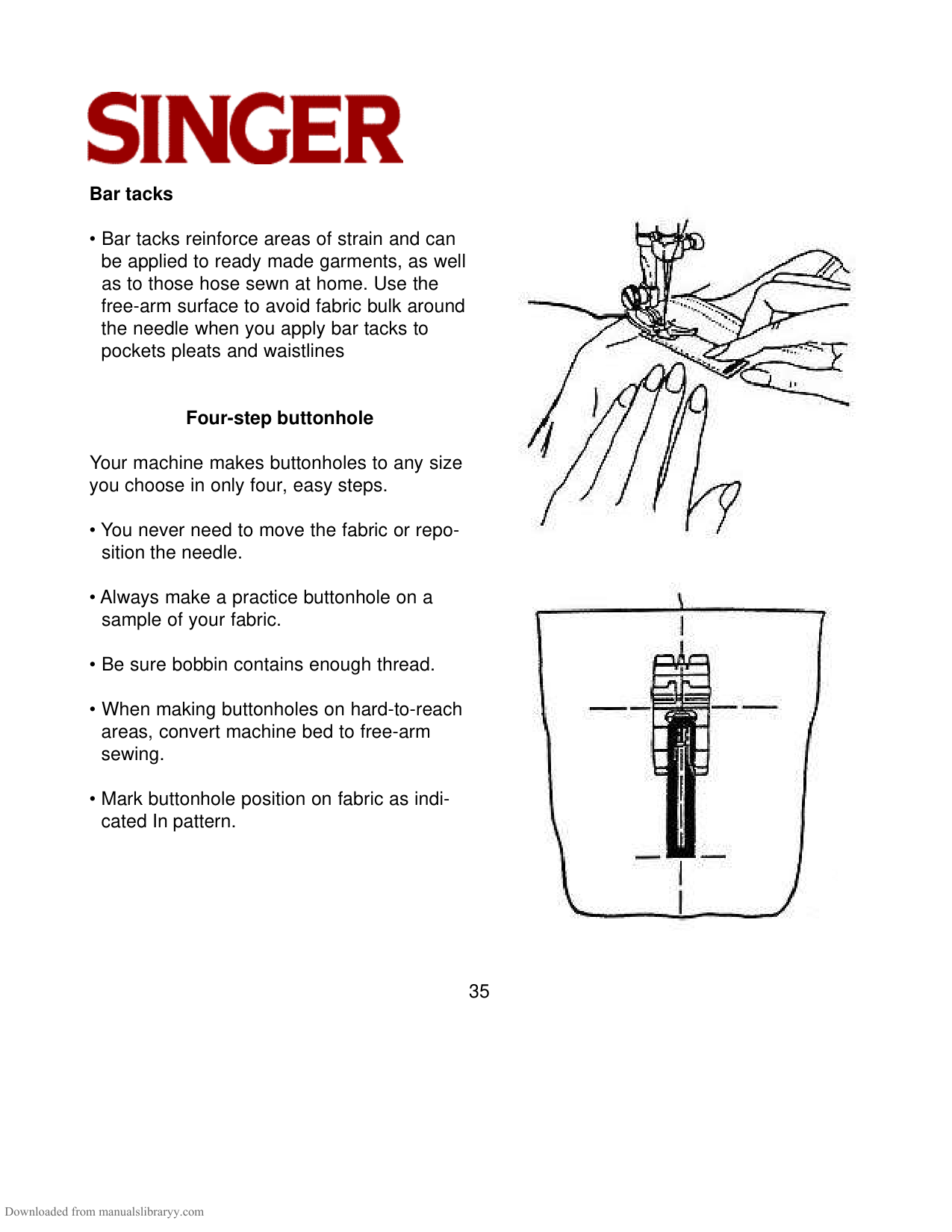
    • Bar tacks reinforce areas of strain and can be applied to ready made garments, as well as to those hose sewn at home. Use the free-arm surface to avoid fabric bulk around the needle when you apply bar tacks to pockets pleats and waistlines

    Y our machine makes buttonholes to any size you choose in only four, easy steps.
  • • Y o n n t m t f o rsition the needle.
  • • Always make a practice buttonhole on a sample of your fabric.
  • Page 39

  • • B s b c e t
  • • W m b o h areas, convert machine bed to free-arm sewing.
  • • M b p o f a icated In pattern.
  • Four-step buttonhole

    ![image 196](Singer-5050c-Sewing-Machine-Manual_compressed-1_images/imageFile196.png)

    35

    ![image 197](Singer-5050c-Sewing-Machine-Manual_compressed-1_images/imageFile197.png)

    Buttonholes

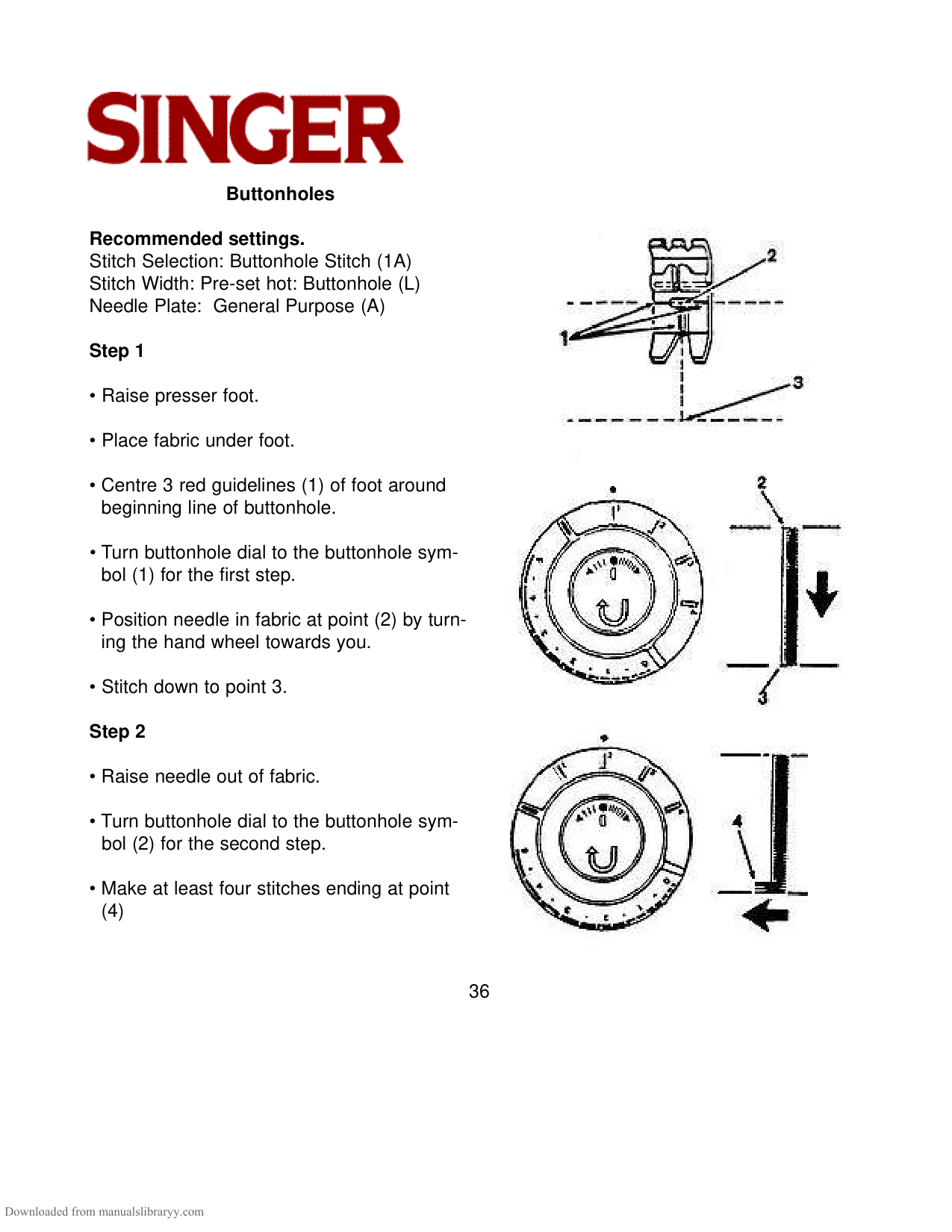
    Recommended settings. Stitch Selection: Buttonhole Stitch (1A) Stitch Width: Pre-set hot: Buttonhole (L) Needle Plate: General Purpose (A)

    Step 1
  • • R p f
  • • P f u f
  • • C 3 r g ( o f a beginning line of buttonhole.
  • • u b Td t t b sbol (1) for the first step.
  • • P n i f a p ( b ting the hand wheel towards you.
  • • S d t p 3
  • Page 40

    Step 2

  • • R n o o f
  • • u Tb d t t b sbol (2) for the second step.
  • • M a l f s e a p
  • (4)

    ![image 200](Singer-5050c-Sewing-Machine-Manual_compressed-1_images/imageFile200.png)

    ![image 201](Singer-5050c-Sewing-Machine-Manual_compressed-1_images/imageFile201.png)

    ![image 202](Singer-5050c-Sewing-Machine-Manual_compressed-1_images/imageFile202.png)

    36

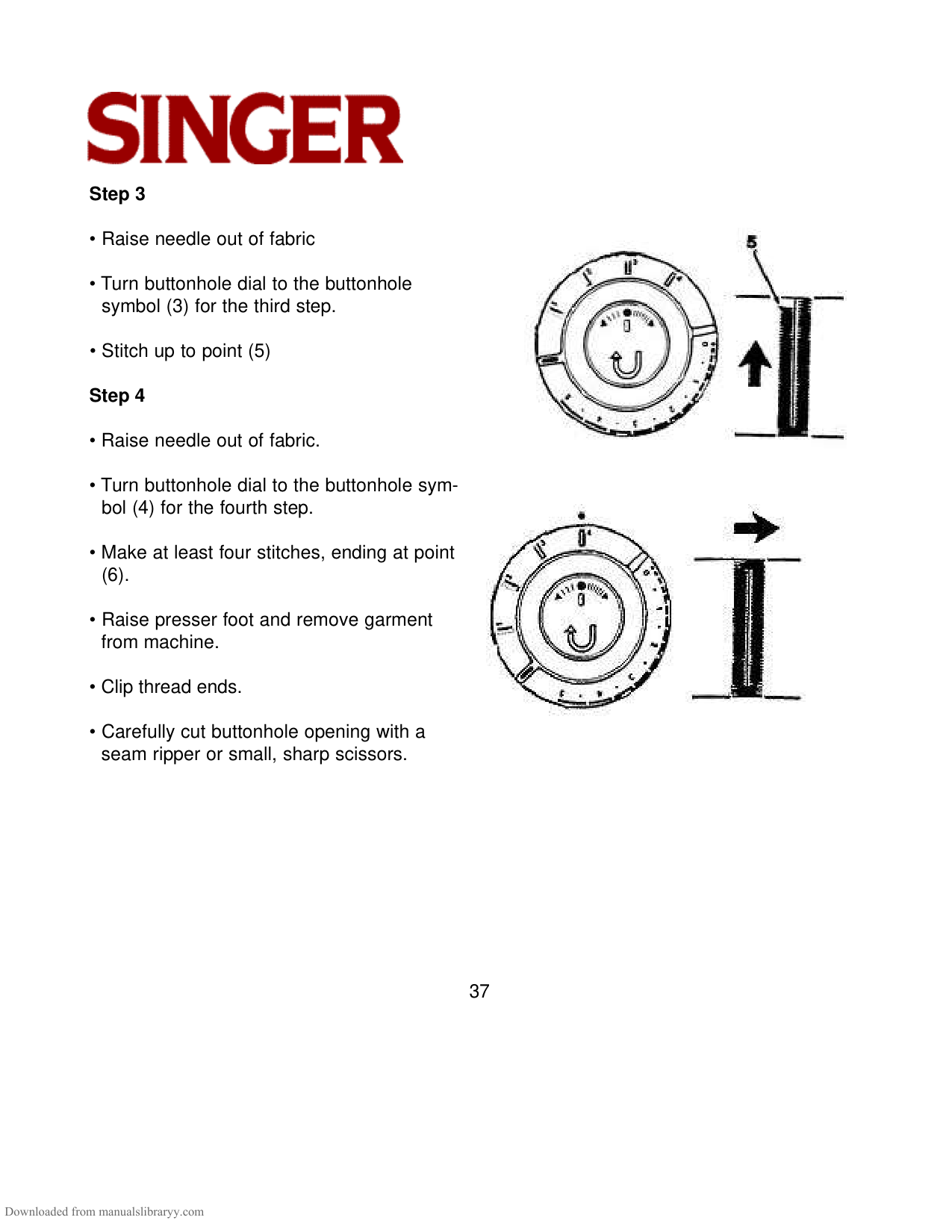
    Step 3

  • • R n o o f
  • • u Tb d t t b symbol (3) for the third step.
  • • S u t p (
  • Step 4

  • • Raise needle out of fabric.
  • Page 41

  • • u Tb d t t b sbol (4) for the fourth step.
  • • M a l f s e a p
  • (6).

  • • Raise presser foot and remove garment from machine.
  • • C
  • • Carefully cut buttonhole opening with a seam ripper or small, sharp scissors.
  • ![image 205](Singer-5050c-Sewing-Machine-Manual_compressed-1_images/imageFile205.png)

    ![image 206](Singer-5050c-Sewing-Machine-Manual_compressed-1_images/imageFile206.png)

    37

    Balancing the buttonhole

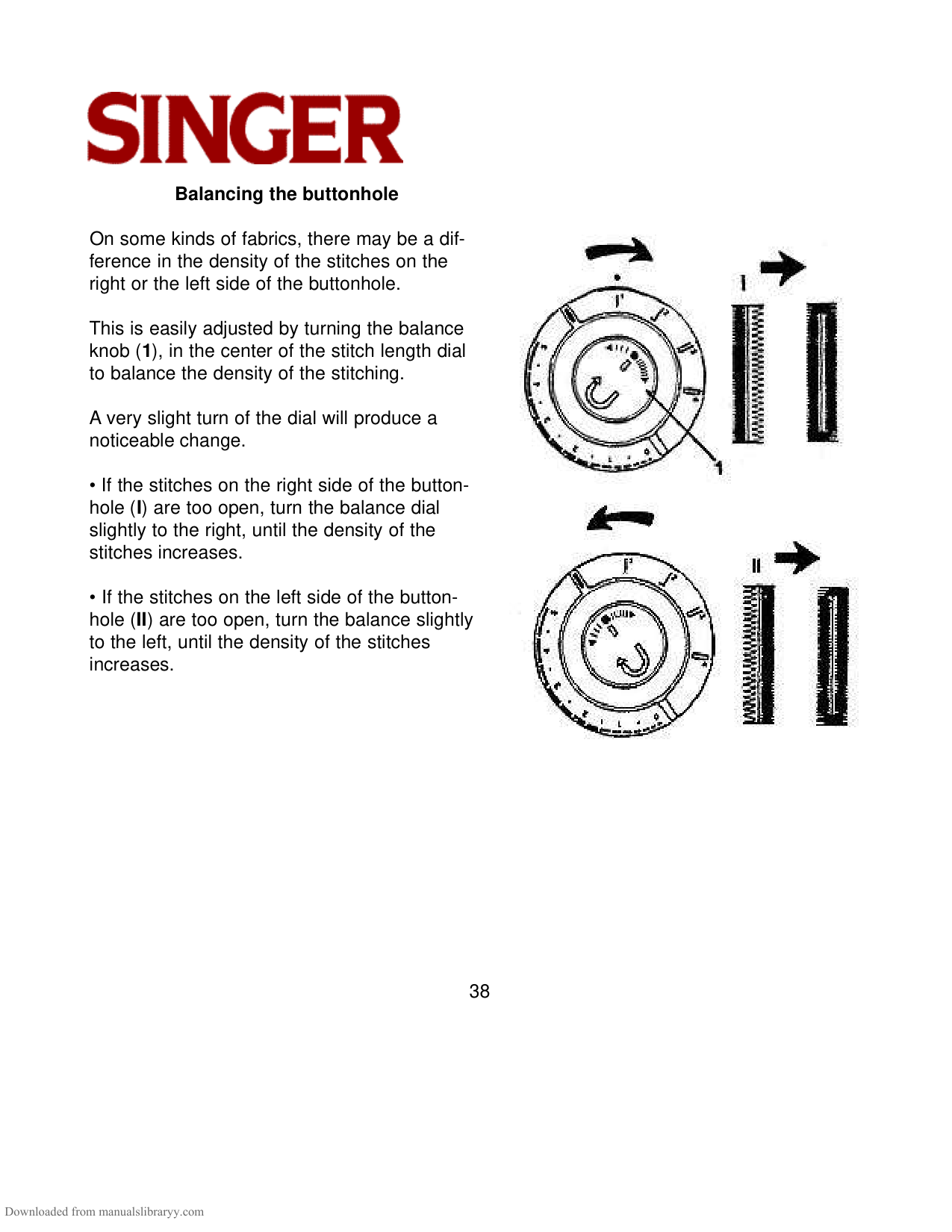
    O s k o f t m b a -d ference in the density of the stitches on the right or the left side of the buttonhole.

    This is easily adjusted by turning the balance knob ( 1 ), in the center of the stitch length dial to balance the density of the stitching.

    A v s t o t d w p a noticeable change.
  • • I t s o t r s o t b
  • hole ( I) are too open, turn the balance dial slightly to the right, until the density of the stitches increases.
  • Page 42

    • I t s o t l s o t b

  • hole ( II ) are too open, turn the balance slightly to the left, until the density of the stitches increases.
  • ![image 209](Singer-5050c-Sewing-Machine-Manual_compressed-1_images/imageFile209.png)

    ![image 210](Singer-5050c-Sewing-Machine-Manual_compressed-1_images/imageFile210.png)

    38

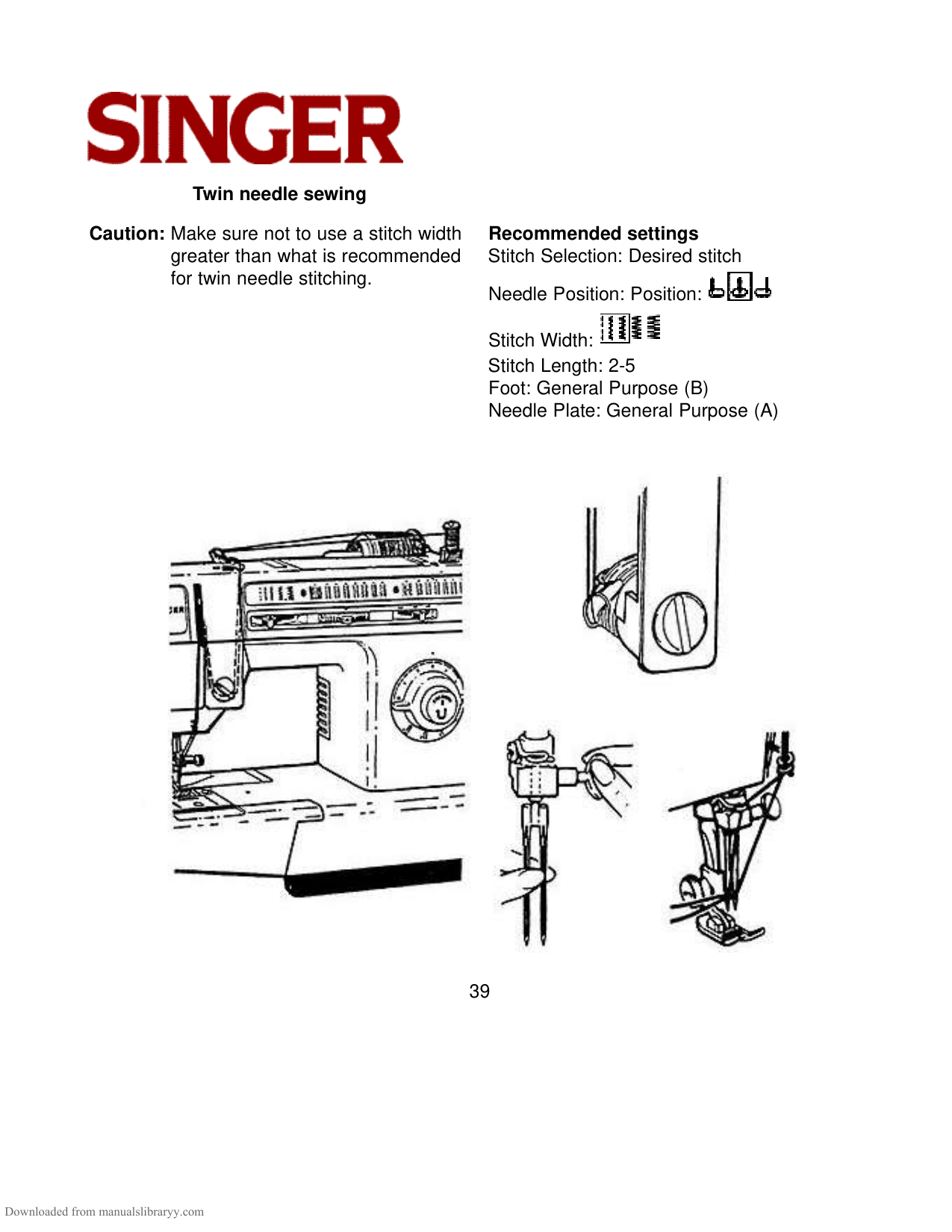
    Caution: Make sure not to use a stitch width greater than what is recommended for twin needle stitching.

    Recommended settings Stitch Selection: Desired stitch

    Needle Position: Position:

    Stitch Width: Stitch Length: 2-5

    Needle Plate: General Purpose (A)

    ![image 213](Singer-5050c-Sewing-Machine-Manual_compressed-1_images/imageFile213.png)

    ![image 214](Singer-5050c-Sewing-Machine-Manual_compressed-1_images/imageFile214.png)

    Page 43

    ![image 215](Singer-5050c-Sewing-Machine-Manual_compressed-1_images/imageFile215.png)

    39

    T win Needle Sewing continued... Procedure

  • • uT
  • • Insert the twin needle with the flat side of shank toward the rear of the machine.
  • • T t m a y n w for single needle stitching, and pass thread through the left eye of the twin needle.
  • • I a s s p i t h o the top cover of the machine, as illustrated.
  • • T t m .i t u w
  • • P t t t t r points making certain to omit the thread guide above the needle and pass thread through the right eye of needle.
  • • D b t u t f a a with the bobbin thread.
  • • S l t n i t h i t needle plate by turning the hand wheel toward you to make sure the needle clears the plate.
  • 40

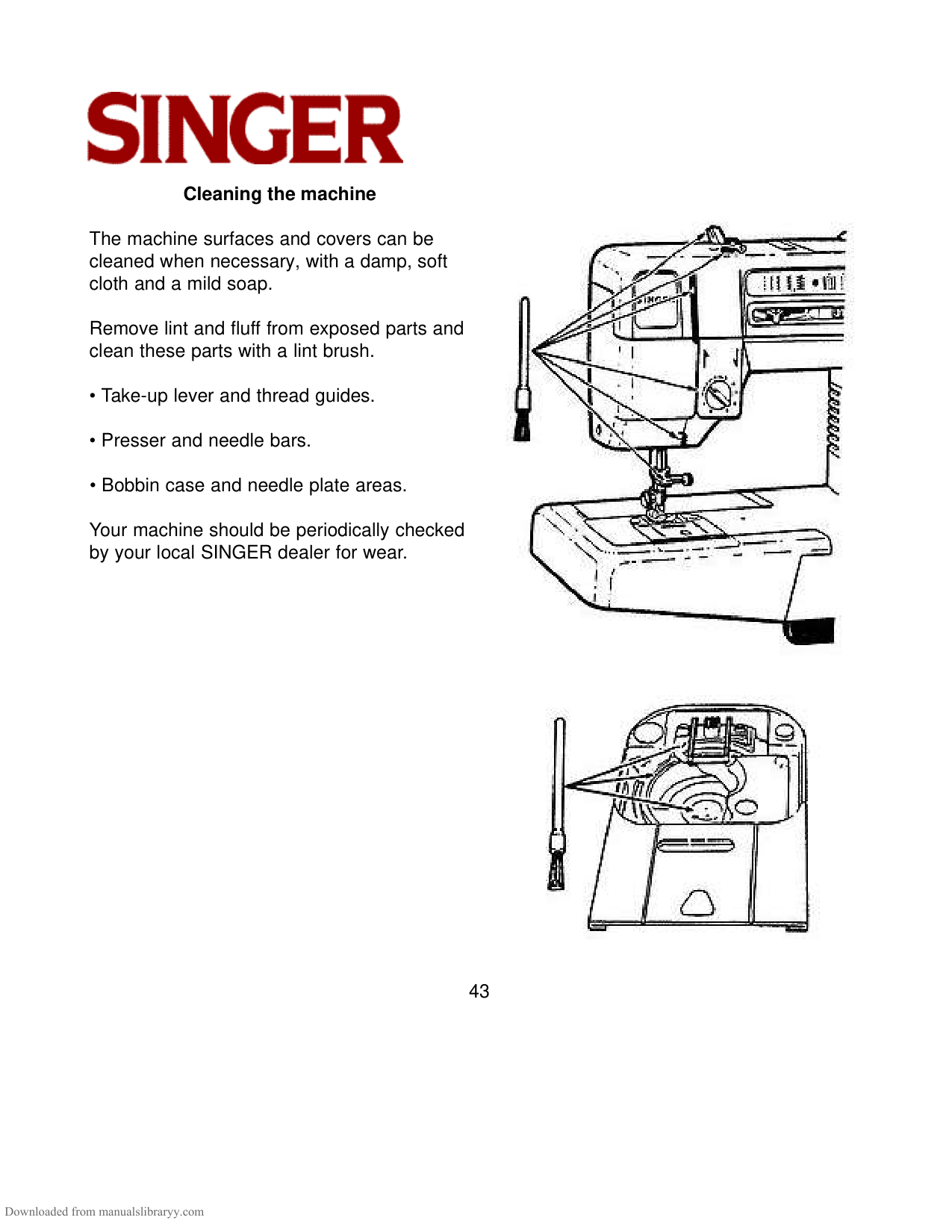
    Additional Accessories

    Additional accessories for your sewing machine are available for purchase at your SINGER stockist.
  • 1. S s p f ( a -n dle plate (C) are used together when straight stitching light weight fabrics or when your fabric or sewing procedure requires close control.
  • 2. Button sewing foot (H) is used to hold any two-hole or four-hole button securely for stitching.
  • 3. Lint brush is used for cleaning hard to reach areas on your sewing machine.
  • 4. Oil container for machine lubrication.
  • Page 44

  • 5. T win needle and spool pin are used to s t p r o d sidle for decorative stitching, set stitch width selector no greater than midrange of zigzag graphics.
  • 6. Felt for twin needle spool pin. Accessory storage
  • Y ou can use this area to store some accessories. The accessories leave from factory in this area.

    41

    ![image 220](Singer-5050c-Sewing-Machine-Manual_compressed-1_images/imageFile220.png)

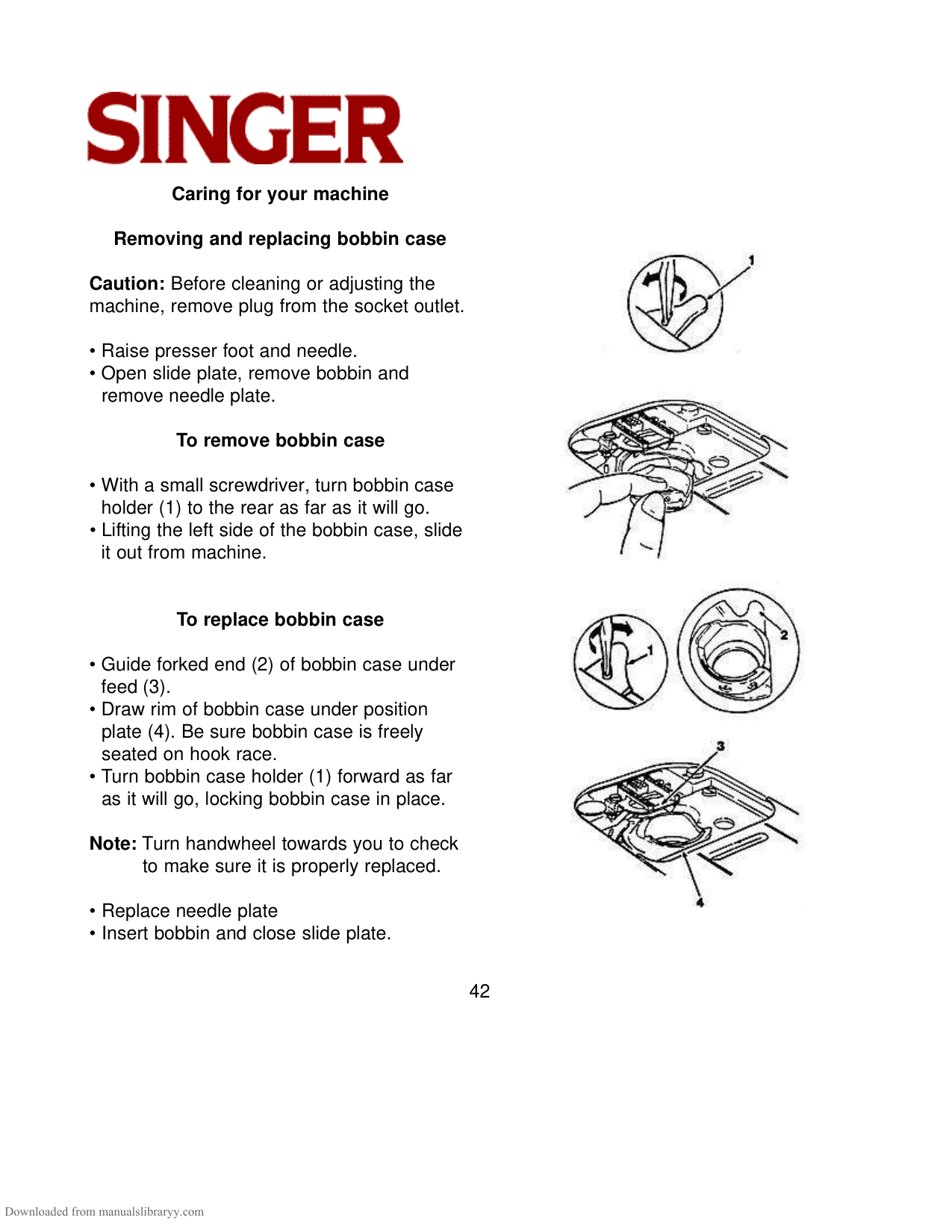
    Caring for your machine Removing and replacing bobbin case

    Caution: Before cleaning or adjusting the machine, remove plug from the socket outlet.

  • • R p f a n
  • • O s p r b a remove needle plate.
  • T o remove bobbin case

  • • With a small screwdriver, turn bobbin case holder (1) to the rear as far as it will go.
  • • L t l s o t b c s it out from machine.
  • • G f e ( o b c u feed (3).
  • • Draw rim of bobbin case under position plate (4). Be sure bobbin case is freely seated on hook race.
  • • u b Tc h ( f a f as it will go, locking bobbin case in place.
  • Note: T urn handwheel towards you to check
    Page 45

    to make sure it is properly replaced.

  • • R n p
  • • I b a c s p
  • 42

    ![image 223](Singer-5050c-Sewing-Machine-Manual_compressed-1_images/imageFile223.png)

    ![image 224](Singer-5050c-Sewing-Machine-Manual_compressed-1_images/imageFile224.png)

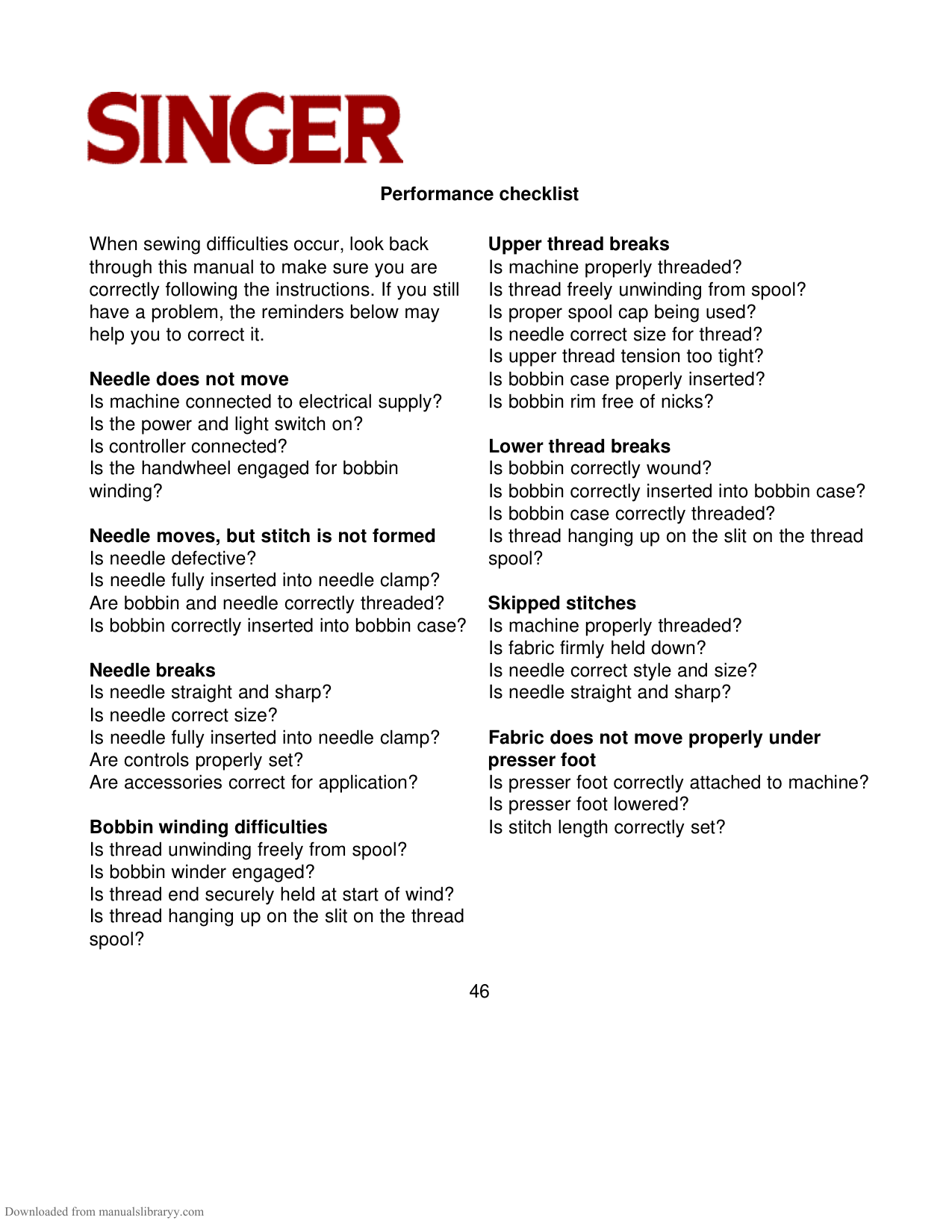
    Cleaning the machine

    The machine surfaces and covers can be cleaned when necessary, with a damp, soft cloth and a mild soap.

    Remove lint and fluff from exposed parts and clean these parts with a lint brush.

  • • a l a t Tg
  • • P a n b
  • • B c a n p a
  • o m s b Yp c b y l S .d f w

    ![image 227](Singer-5050c-Sewing-Machine-Manual_compressed-1_images/imageFile227.png)

    Page 46

    ![image 228](Singer-5050c-Sewing-Machine-Manual_compressed-1_images/imageFile228.png)

    43

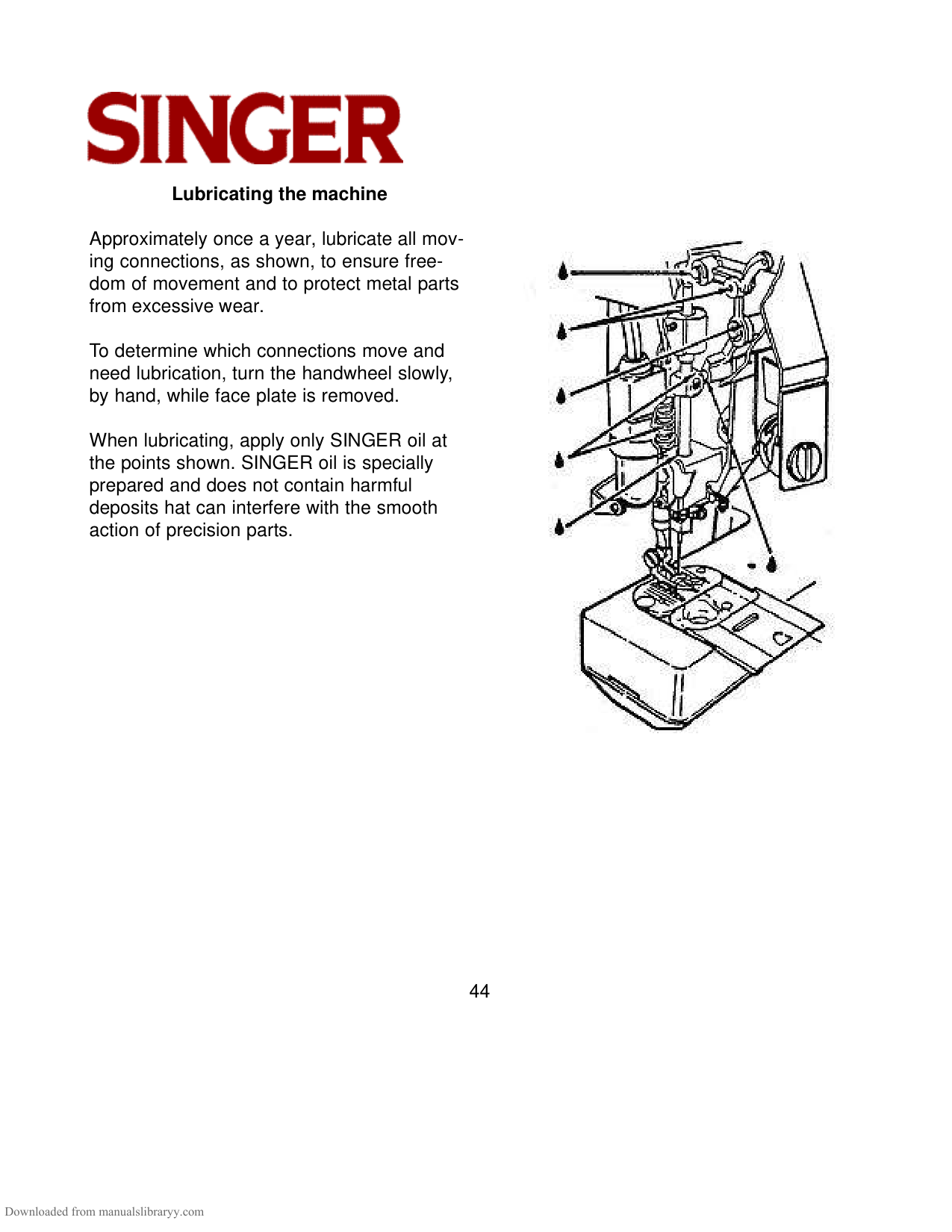
    Lubricating the machine

    A o a y l a mi c a s t e fdom of movement and to protect metal parts

  • .f
  • T o determine which connections move and n l t ,t h s by hand, while face plate is removed.

    When lubricating, apply only SINGER oil at the points shown. SINGER oil is specially prepared and does not contain harmful deposits hat can interfere with the smooth action of precision parts.

    ![image 231](Singer-5050c-Sewing-Machine-Manual_compressed-1_images/imageFile231.png)

    44

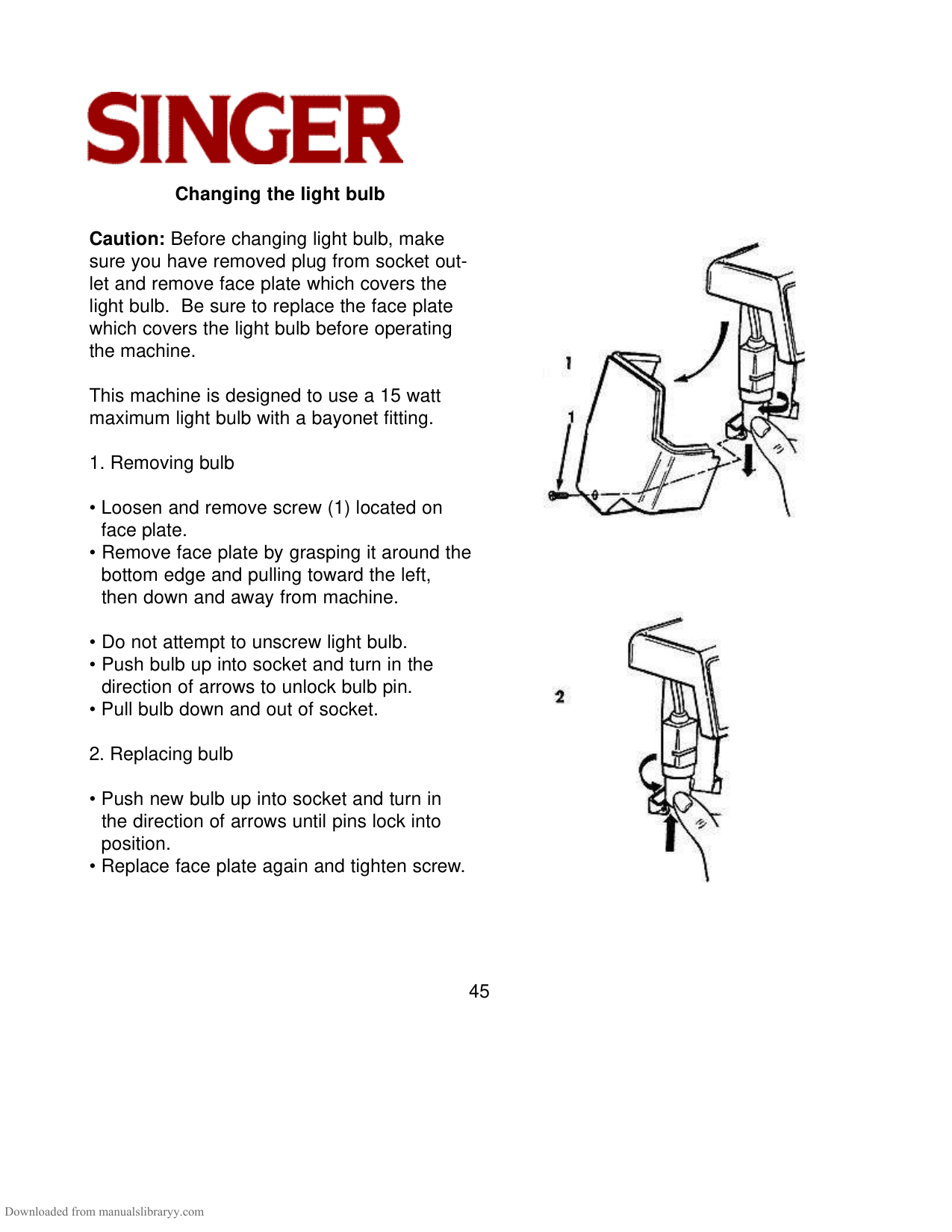
    Changing the light bulb Caution: Before changing light bulb, make

    s y h r p f s olet and remove face plate which covers the light bulb. Be sure to replace the face plate which covers the light bulb before operating the machine.

    This machine is designed to use a 15 watt maximum light bulb with a bayonet fitting.

  • 1 R
  • • Loosen and remove screw (1) located on face plate.
  • • Remove face plate by grasping it around the bottom edge and pulling toward the left, then down and away from machine.
  • • D n a t u l b
  • • P b u i s a t i t direction of arrows to unlock bulb pin.
  • • P b d a o o s
  • 2 R
  • • Push new bulb up into socket and turn in the direction of arrows until pins lock into position.
  • • R f p a a .t s
  • ![image 234](Singer-5050c-Sewing-Machine-Manual_compressed-1_images/imageFile234.png)

    45

    Performance checklist

    When sewing difficulties occur, look back through this manual to make sure you are correctly following the instructions. If you still have a problem, the reminders below may help you to correct it.

    Needle does not move Is machine connected to electrical supply? Is the power and light switch on? Is controller connected? Is the handwheel engaged for bobbin winding?

    Needle moves, but stitch is not formed Is needle defective? Is needle fully inserted into needle clamp? Are bobbin and needle correctly threaded? Is bobbin correctly inserted into bobbin case?

    Needle breaks Is needle straight and sharp?

    Is needle fully inserted into needle clamp? Are controls properly set? Are accessories correct for application?

    Bobbin winding difficulties Is thread unwinding freely from spool?

    Is thread end securely held at start of wind? Is thread hanging up on the slit on the thread spool?

    Upper thread breaks Is thread freely unwinding from spool? Is proper spool cap being used? Is needle correct size for thread? Is upper thread tension too tight? Is bobbin case properly inserted? Is bobbin rim free of nicks? Lower thread breaks Is bobbin correctly inserted into bobbin case? Is bobbin case correctly threaded? Is thread hanging up on the slit on the thread spool? Skipped stitches Is fabric firmly held down? Is needle correct style and size? Is needle straight and sharp? Fabric does not move properly under presser foot Is presser foot correctly attached to machine? Is stitch length correctly set?

    46

    More from Singer

    Similar Unknown