
Ask AI
— answers from the official manualAnswers from the official manual.
Common questions
Common Questions
13 totalWhen will the device automatically shut off during use?
If you inhale continuously for 10 seconds, the vape will automatically turn off and the LED will flash 2 times. This is a safety feature to prevent overheating.
At what temperature and humidity conditions should I store this device?
Store the device inside at room temperature between 18-28°C in a cool, dry place away from direct sunlight or UV light, with relative humidity between 35-70%. Do not expose it to water or store it with toxic, harmful, or corrosive substances.
Can I refill this device with more oil?
No, the DAFR8BOGLXM is a disposable vape device and should not be refilled. When the device is empty, you should return it to a participating retailer for recycling.
What should I do if my Skope S is not turning on when pressing the power button?
Ensure the atomizer head is properly fitted and make sure you press the power button five times quickly to turn it on; the indicator light will flash three times upon successful startup.
How do I prime a new atomizer head?
Prime a new atomizer head by dripping a few drops of e-liquid onto the cotton visible through the sides and leaving it to sit with the tank full for five minutes before use.
What should I do if no atomizer is detected when pressing the power button?
Ensure the atomizer head is properly fitted. The indicator light will flash continuously until the power button is released and then normal operation can resume once refitted.
Show 7 more questions
How long does it take to fully charge my Skope S?
What causes short circuit protection and how do I fix it?
How often should I replace my atomizer heads?
What are the environmental conditions under which I can safely use the Skope S?
How do I store my Skope S safely?
What is the warranty period for the Tot Wick Skope S?
How do I factory reset the Skope S?
Full Manual
2 pages
USER MANUAL
CONGRATULATIONS ON PURCHASING YOUR TOTALLY WICKED SKOPE S ELECTRONIC CIGARETTE KIT
QUICK START GUIDE
For those familiar with e-cigarettes, the steps below can be followed to allow the device to be used in the shortest possible time:
Skope S Tank
Power Button
Charging Port
Skope S Battery
USING YOUR SKOPE S Priming the Atomizer Head Note: It is important to “prime” a new atomizer head before first use. Failure to do so can cause the atomizer coil to overheat, leading to an unpleasant taste and sometimes irreversible damage to the atomizer head requiring early replacement.
To prime the atomizer head, remove the mouthpiece from the tank by unscrewing, then remove the glass section of the tank by pulling upwards. Unscrew the atomizer head and prime by dripping a few drops of e-liquid onto the cotton visible through the sides of the atomizer. After priming, screw the atomizer head back into place, replace the glass section and screw the mouthpiece back on.
Note: Leave a new atomizer head to sit with the tank full of e-liquid for five minutes before vaping. This ensures the atomizer head is fully saturated with e-liquid before use.
Filling the Tank Remove the mouthpiece from the tank by unscrewing. Fill the tank with e-liquid, being careful not to overfill and avoid filling down the central airflow hole. Once filled, refit the mouthpiece.
Powering On and Off: To switch on, quickly press the power button five times; the indicator light will flash three times. Quickly press the power button five times to turn the battery off; the indicator light will flash three times.
Vaping: Press and hold the power button as you inhale the vapour.
E-liquid Level: To prevent the atomizer head from becoming dry and burning prematurely, ensure the fluid level does not drop below the fluid feed holes on the atomizer, these can be recognised by the visible parts of cotton on the atomizer.
Charging the Battery: The Skope S is charged by inserting the USB cable into the charging port. The indicator light will illuminate red while charging. Once fully charged, the red indicator light will switch off.
Replacing the Atomizer Head: To replace the atomizer head, follow the steps outlined in Priming the Atomizer Head to remove and separate the tank. Prime your new atomizer head and reassemble.
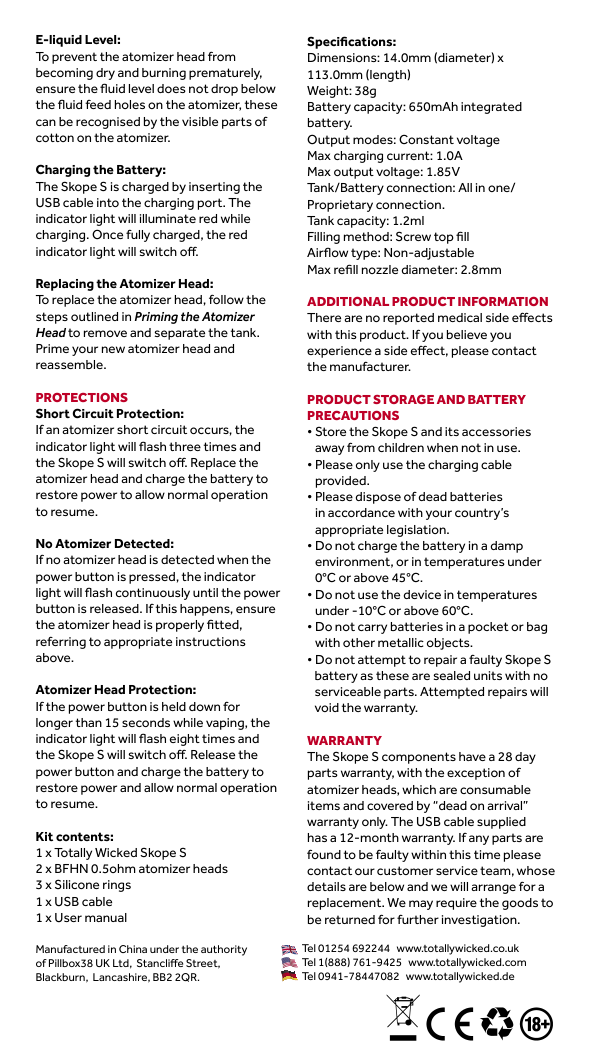
Specifications: Dimensions: 14.0mm (diameter) x 113.0mm (length) Weight: 38g Battery capacity: 650mAh integrated battery. Output modes: Constant voltage Max charging current: 1.0A Max output voltage: 1.85V Tank/Battery connection: All in one/ Proprietary connection. Tank capacity: 1.2ml Filling method: Screw top fill Airflow type: Non-adjustable Max refill nozzle diameter: 2.8mm
ADDITIONAL PRODUCT INFORMATION There are no reported medical side effects with this product. If you believe you experience a side effect, please contact the manufacturer.
PROTECTIONS Short Circuit Protection: If an atomizer short circuit occurs, the indicator light will flash three times and the Skope S will switch off. Replace the atomizer head and charge the battery to restore power to allow normal operation to resume.
No Atomizer Detected: If no atomizer head is detected when the power button is pressed, the indicator light will flash continuously until the power button is released. If this happens, ensure the atomizer head is properly fitted, referring to appropriate instructions above.
Atomizer Head Protection: If the power button is held down for longer than 15 seconds while vaping, the indicator light will flash eight times and the Skope S will switch off. Release the power button and charge the battery to restore power and allow normal operation to resume.
Kit contents:
PRODUCT STORAGE AND BATTERY PRECAUTIONS
WARRANTY The Skope S components have a 28 day parts warranty, with the exception of atomizer heads, which are consumable items and covered by “dead on arrival” warranty only. The USB cable supplied has a 12-month warranty. If any parts are found to be faulty within this time please contact our customer service team, whose details are below and we will arrange for a replacement. We may require the goods to be returned for further investigation.
Manufactured in China under the authority of Pillbox38 UK Ltd, Stancliffe Street, Blackburn, Lancashire, BB2 2QR.
Tel 01254 692244 www.totallywicked.co.uk Tel 1(888) 761-9425 www.totallywicked.com Tel 0941-78447082 www.totallywicked.de