
Ask AI
— answers from the official manualAnswers from the official manual.
Common questions
Common Questions
10 totalHow do I fill the e-liquid in the Argus P1 Pod System?
First, remove the lid off the filling port, then fill in the e-liquid. It is recommended to keep the pod two-thirds full to ensure optimal performance.
What is the battery capacity and power range of the Argus P1?
The Argus P1 has a built-in 800mAh battery with a power range of 5-25W. The input voltage is 3.2-4.2V with a charging voltage of 5V/2A.
How long should I wait before using the device after filling it?
You should let the coil saturate for about five minutes after installing the atomizer before you start using the device.
What should I do about liquid condensation on the atomizer?
Occasional liquid condensation on the outside of the atomizer is inevitable due to the atomization and condensation process. You can wipe the connection between the device and atomizer with wet paper to avoid poor connection and prevent internal condensate buildup.
How do I handle condensate found inside the device during use?
Pull out the atomizer, reverse the device, and shake it for a few seconds to remove internal condensate.
What should I do to prevent accidental firing when carrying the device?
You should turn off or lock the device to avoid accidental firing when carrying it out.
Full Manual
8 pages
☰ Home » VOOPOO » Voopoo ARGUS P1S Pod System User Manual Contents [ hide ] 1 Voopoo ARGUS P1S Pod System
2 Overview
3 Parameters 4 Indicator Light Instructions 5 Safety Protection 6 Maintenance and Cleaning 7 Warranty Terms 8 Purchase Information 9 Documents / Resources 9.1 References 10 Related Posts Voopoo ARGUS P1S Pod SystemOverview
Thanks for your purchase of a VOOPOO product. For the better use of all the functions of this product, please carefully read the operation notes and detailed functional instructions before your first use of this product. If you have any problem with using this product, please contact our local agent or visit our official website at www.voopoo.com. Parameters Manuals+ Voopoo-ARGUS-P1S-Pod-System-FIG-1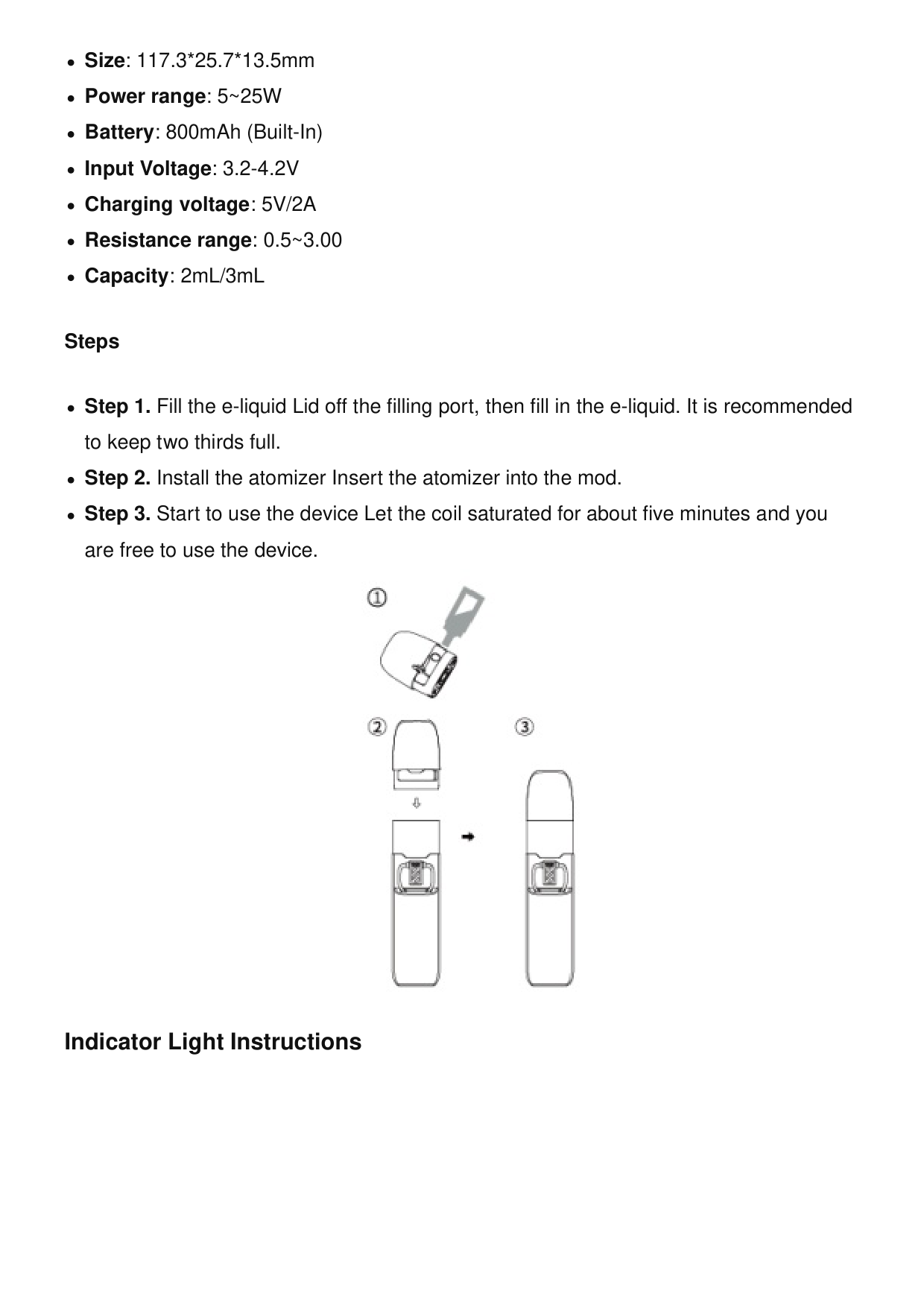
Size: 117.3*25.7*13.5mm Power range: 5~25W Battery: 800mAh (Built-In) Input Voltage: 3.2-4.2V Charging voltage: 5V/2A Resistance range: 0.5~3.00 Capacity: 2mL/3mL Steps Step 1. Fill the e-liquid Lid off the filling port, then fill in the e-liquid. It is recommended to keep two thirds full. Step 2. Install the atomizer Insert the atomizer into the mod. Step 3. Start to use the device Let the coil saturated for about five minutes and you are free to use the device. Indicator Light Instructions
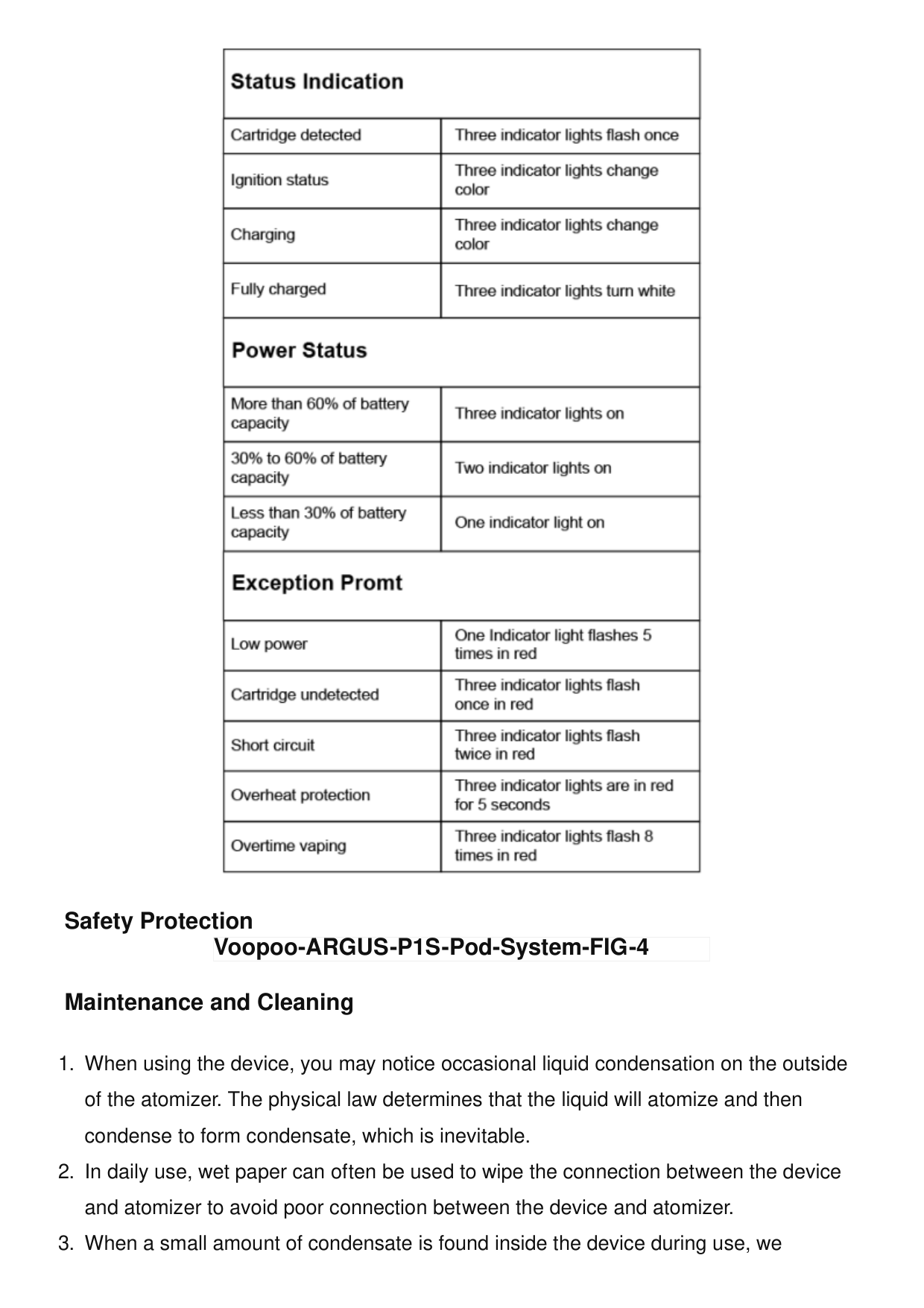
Safety Protection Maintenance and Cleaning
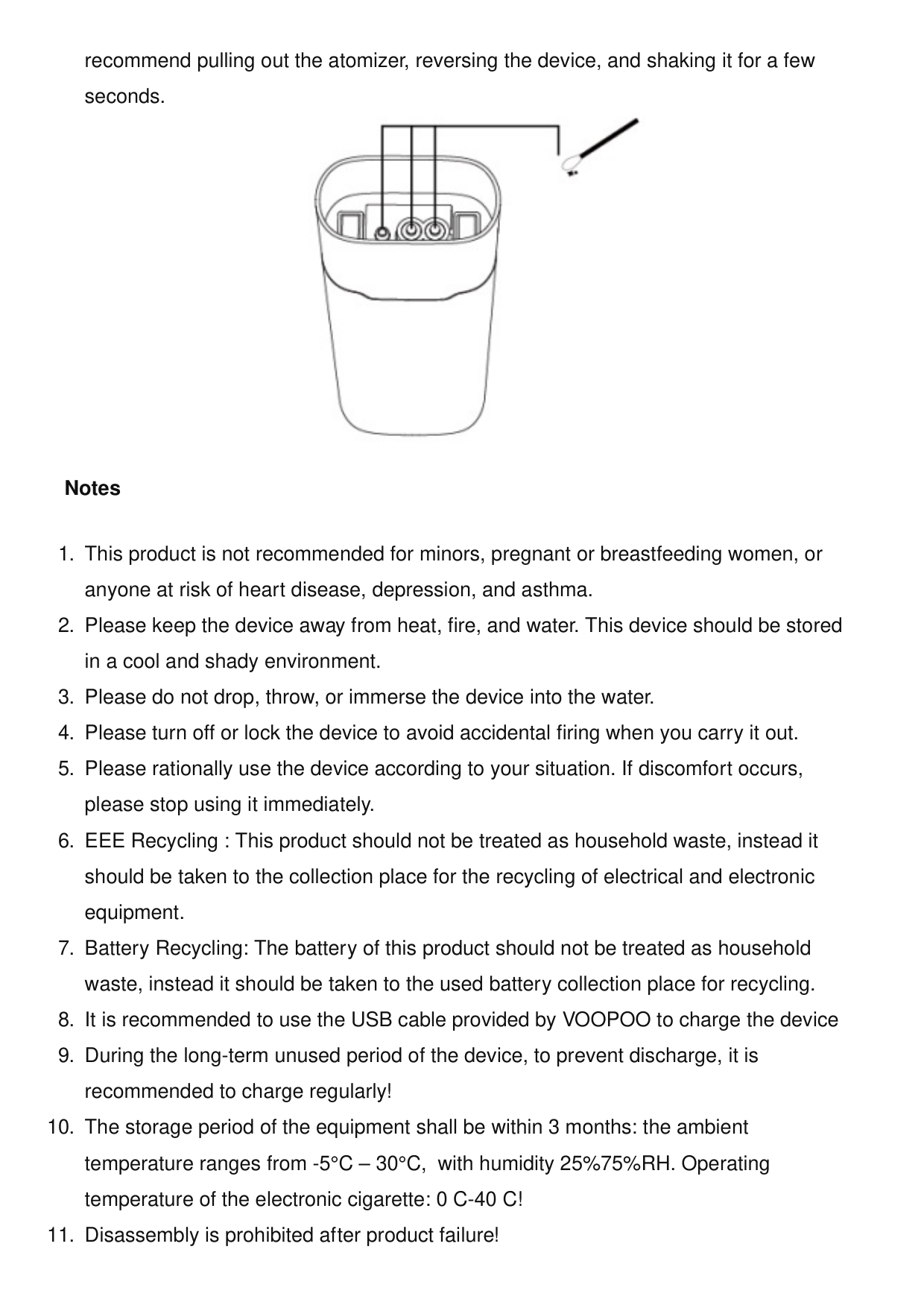
recommend pulling out the atomizer, reversing the device, and shaking it for a few seconds. Notes
VOOPOO Argus Air 25W Pod System User Manual VOOPOO Argus Air 25W Pod System Over view Thanks for your purchase of a VOOPOO product. For the… their direct involvement. VOOPOO reserves the right of final decision in all warranty cases.VOOPOO may interpret and revise the content of this warranty card. For more information please visit our website at www.voopoo.com or email us at [email protected] Purchase Information Manufacturer: Shenzhen Woody Vapes Technology Co., Ltd. (VOOPOO) Address: Block 1, Shapuyangyong Industry Park, Songgang, Bao’an District, Shenzhen, Guangdong, China. Email: [email protected] Website: www.voopoo.com Prolinx GmbH Brehmstr.56,40239 Duesseldorf Germany Tel: +49 21131054698 ACMEFOG COMMERCE LTD Ivy Business Centre Crown Street, Failsworth, Manchester, England, M35 9BG Tel: +44 7742767933 Documents / Resources Voopoo ARGUS P1S Pod System [pdf] User Manual ARGUS P1S Pod System, ARGUS P1S, Pod System, System References User Manual Related Posts
Sumsung E-MANUAL User Manual Sumsung E-MANUAL User Manual
Ameyo User Manual
AMEYO USER MANUAL - Download [optimized] AMEYO USER MANUAL - Download Seatrack user Manual Seatrack Manual - Download [optimized] Seatrack Manual - DownloadVoopoo
ARGUS P1S, ARGUS P1S Pod System, Pod System, System,Voopoo
Leave a commentAmeyo
Your email address will not be published. Required fields are marked * Comment * Name Email Website
Search: e.g. whirlpool wrf535swhz
Search This website is an independent publication and is neither affiliated with nor endorsed by any of the trademark owners. The "Bluetooth®" word mark and logos are registered trademarks owned by Bluetooth SIG, Inc. The "Wi-Fi®" word mark and logos are registered trademarks owned by the Wi-Fi Alliance. Any use of these marks on this website does not imply any affiliation with or endorsement. Save my name, email, and website in this browser for the next time I comment. Post Comment