
Ask AI
— answers from the official manualAnswers from the official manual.
Common questions
Common Questions
9 totalHow do I safely unplug the Duraflame Dfi 550 22?
Always turn the controls to the off position before removing the plug from the outlet. (Page 3)
What should I do if the flames are not moving in my Duraflame Dfi 550 22?
Check to see if the spinner motor is defective or if it has detached from the motor. If so, replace the spinner motor or remove the back panel and verify correct mounting of the spinner on the motor. (Page 4)
How do I clean my Duraflame Dfi 550 22?
Clean the trim using a soft cloth, slightly dampened with citrus oil-based product and buff dry with a clean soft cloth. Do not use brass polish or household cleaners as they can damage the metal trim. (Page 4)
Why does my Duraflame Dfi 550 22 power cord get warm?
This could be normal operation, but also check your heater cord and plug connections; faulty wall outlet or loose plugs can cause overheating. Ensure the plug fits tight in the outlet to prevent overheating issues. (Page 4)
How do I change the timer settings on my Duraflame Dfi 550 22?
Pressing the timer button will cycle through various timer settings: 30 minutes, 1 Hour, 2H, 3H, 4H, 5H, 6H, 7H, 8H, 9H and off (00). Press it to select your desired setting. (Page 3)
Why is my heater not producing enough heat in my Duraflame Dfi 550 22?
Either you are using a power strip, surge protector or extension cord, or the unit's location might be affecting its performance. Ensure it’s plugged directly into an outlet and placed against an interior wall for optimal heating. (Page 4)
Full Manual
4 pages
###### MODELS: DFI-550-41, DFI-550-42, DFI-550-43,DFI-550-44,DFI-550-45,DFI-550-47
Go to tsicustomerservice.com for product warranty registration
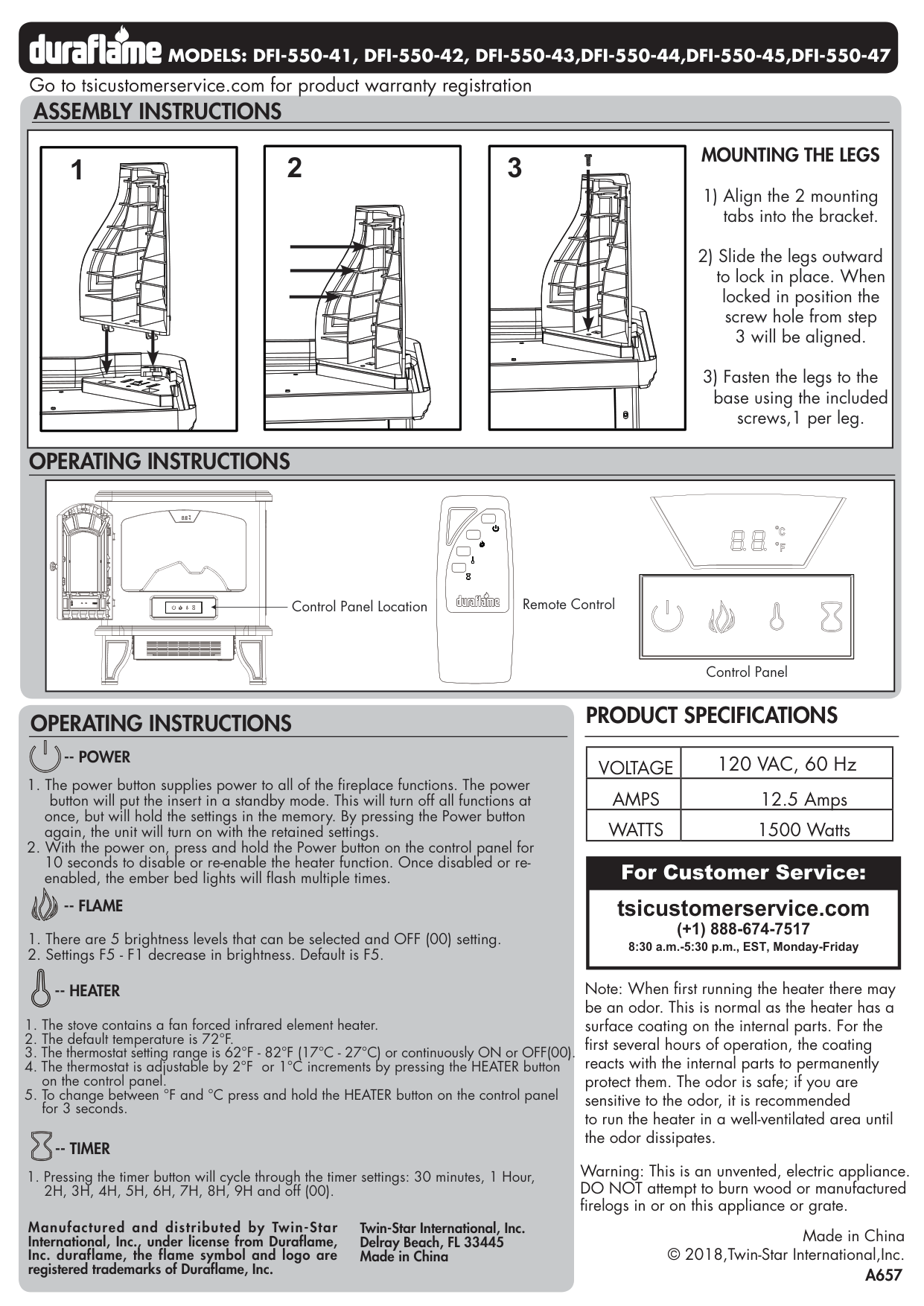
ASSEMBLY INSTRUCTIONS
||1| |---|
2 3 MOUNTING THE LEGS
1) Align the 2 mounting tabs into the bracket.
2) Slide the legs outward to lock in place. When
locked in position the screw hole from step 3 will be aligned.
3) Fasten the legs to the base using the included
screws,1 per leg.| |---|
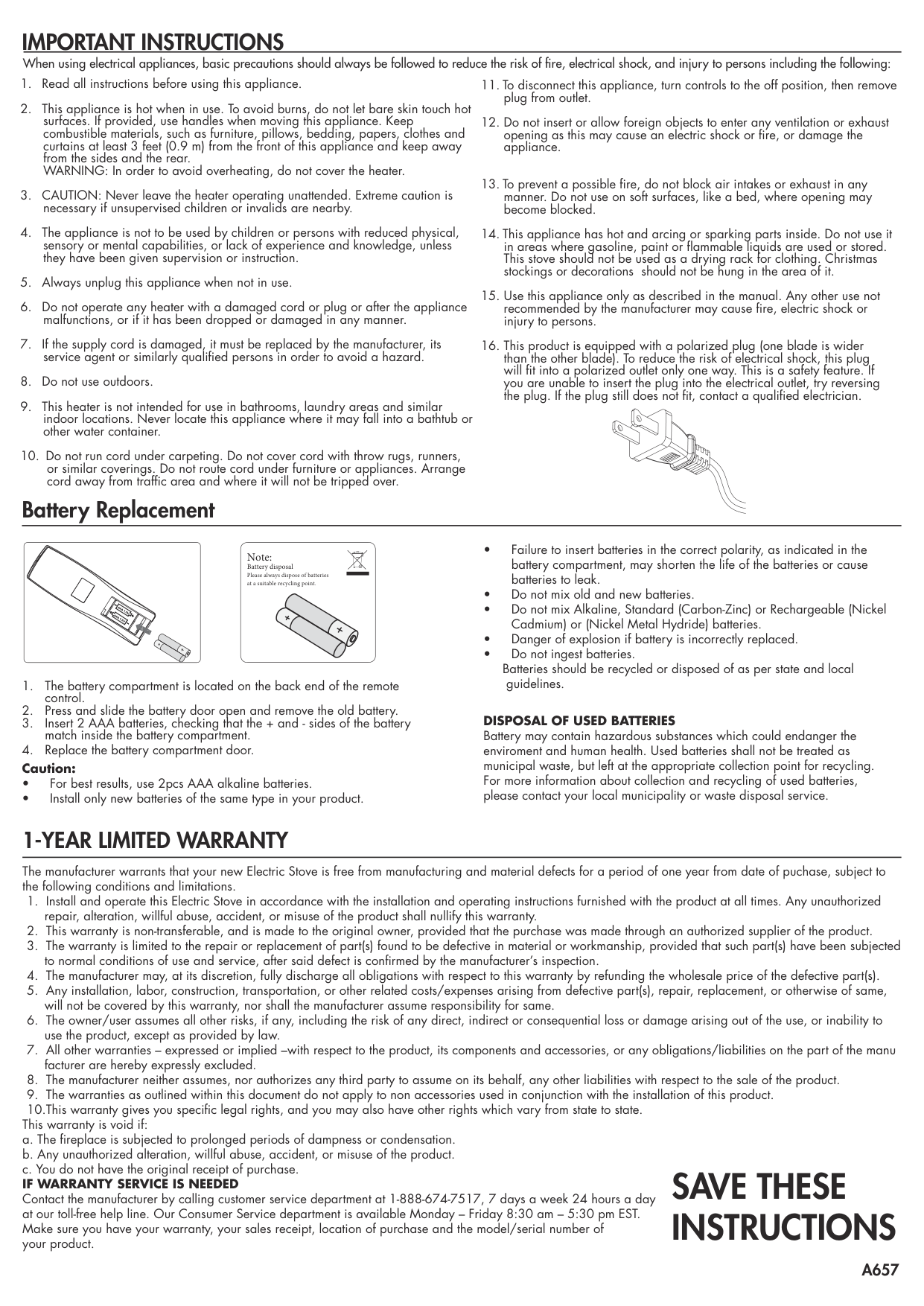
OPERATING INSTRUCTIONS
|Remote ControlControl Panel Location
Control Panel| |---|
##### PRODUCT SPECIFICATIONS
##### OPERATING INSTRUCTIONS
|VOLTAGE|120 VAC, 60 Hz| |---|---| |AMPS|12.5 Amps| |WATTS|1500 Watts|
-- POWER
once, but will hold the settings in the memory. By pressing the Power button again, the unit will turn on with the retained settings.
|For Customer Service: tsicustomerservice.com (+1) 888-674-7517 8:30 a.m.-5:30 p.m., EST, Monday-Friday| |---|
-- FLAME
Note: When first running the heater there may be an odor. This is normal as the heater has a surface coating on the internal parts. For the first several hours of operation, the coating reacts with the internal parts to permanently protect them. The odor is safe; if you are sensitive to the odor, it is recommended to run the heater in a well-ventilated area until the odor dissipates.
-- HEATER
-- TIMER
Warning: This is an unvented, electric appliance. DO NOT attempt to burn wood or manufactured firelogs in or on this appliance or grate.
Manufactured and distributed by Twin-Star International, Inc., under license from Duraflame, Inc. duraflame, the flame symbol and logo are registered trademarks of Duraflame, Inc.
Twin-Star International, Inc. Delray Beach, FL 33445 Made in China
Made in China © 2018,Twin-Star International,Inc.
##### IMPORTANT INSTRUCTIONS
When using electrical appliances, basic precautions should always be followed to reduce the risk of fire, electrical shock, and injury to persons including the following:
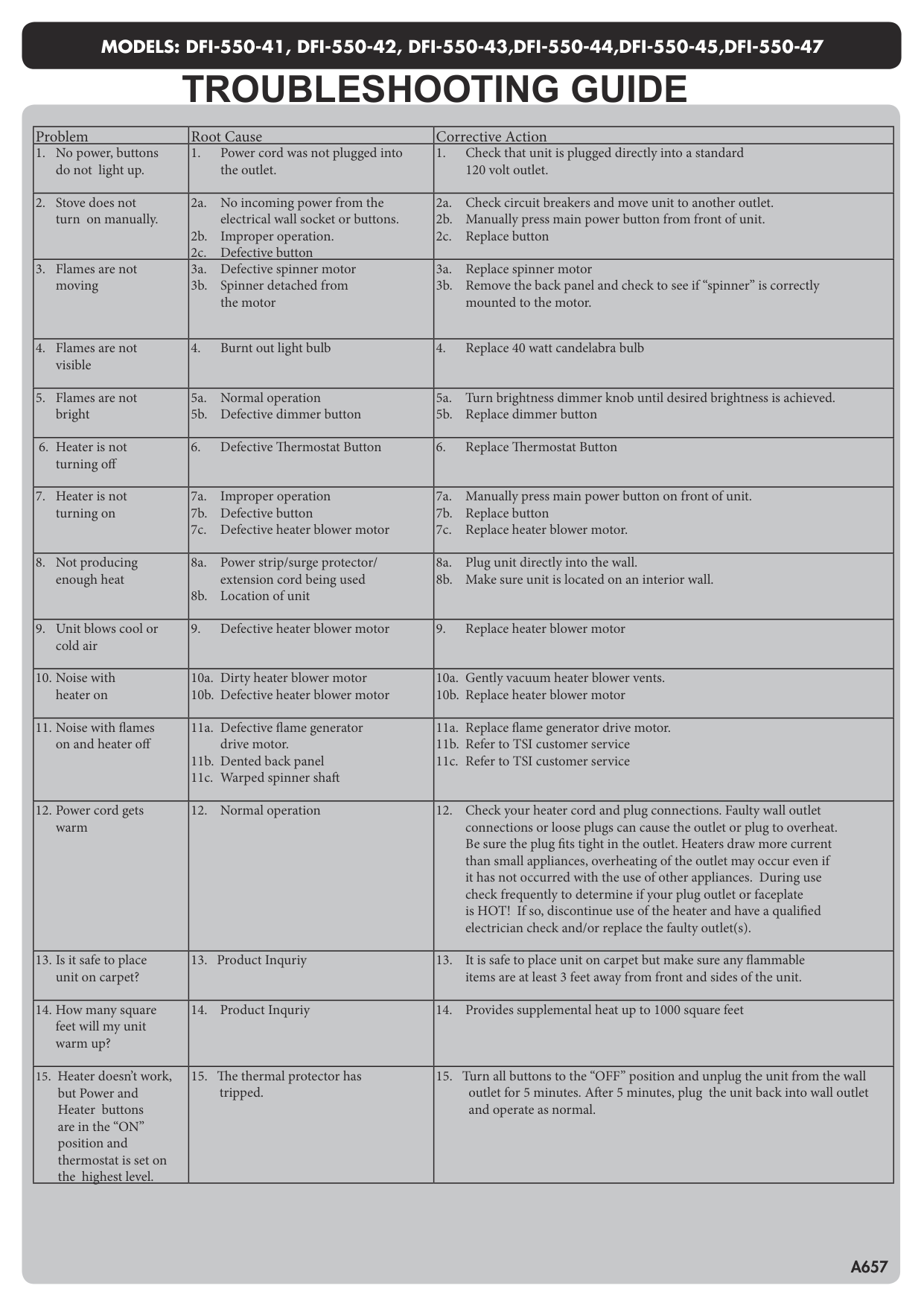
Battery Replacement
Note: Battery disposal Please always dispose of batteries at a suitable recycling point.
AAA 1.5V
AAA 1.5V
guidelines.
DISPOSAL OF USED BATTERIES Battery may contain hazardous substances which could endanger the enviroment and human health. Used batteries shall not be treated as municipal waste, but left at the appropriate collection point for recycling. For more information about collection and recycling of used batteries, please contact your local municipality or waste disposal service.
##### 1-YEAR LIMITED WARRANTY
The manufacturer warrants that your new Electric Stove is free from manufacturing and material defects for a period of one year from date of puchase, subject to the following conditions and limitations.
This warranty is void if:
SAVE THESE INSTRUCTIONS
MODELS: DFI-550-41, DFI-550-42, DFI-550-43,DFI-550-44,DFI-550-45,DFI-550-47
TROUBLESHOOTING GUIDE
|Problem|Root Cause|Corrective Action| |---|---|---| |1. No power, buttons do not light up.|1. Power cord was not plugged into the outlet.|1. Check that unit is plugged directly into a standard 120 volt outlet.| |2. Stove does not turn on manually.|2a. No incoming power from the electrical wall socket or buttons.
2b. Improper operation.
2c. Defective button
|2a. Check circuit breakers and move unit to another outlet.
2b. Manually press main power button from front of unit.
2c. Replace button
| |3. Flames are not moving|3a. Defective spinner motor
3b. Spinner detached from the motor
|3a. Replace spinner motor
3b. Remove the back panel and check to see if “spinner” is correctly mounted to the motor.
| |4. Flames are not visible|4. Burnt out light bulb|4. Replace 40 watt candelabra bulb| |5. Flames are not bright|5a. Normal operation
5b. Defective dimmer button
|5a. Turn brightness dimmer knob until desired brightness is achieved.
5b. Replace dimmer button
|
|6. Heater is not turning off|6. Defective Thermostat Button|6. Replace Thermostat Button| |7. Heater is not turning on|7a. Improper operation
7b. Defective button
7c. Defective heater blower motor
|7a. Manually press main power button on front of unit.
7b. Replace button
7c. Replace heater blower motor.
| |8. Not producing enough heat|8a. Power strip/surge protector/ extension cord being used
8b. Location of unit
|8a. Plug unit directly into the wall.
8b. Make sure unit is located on an interior wall.
| |9. Unit blows cool or cold air|9. Defective heater blower motor|9. Replace heater blower motor| |10. Noise with heater on|10a. Dirty heater blower motor
10b. Defective heater blower motor
|10a. Gently vacuum heater blower vents.
10b. Replace heater blower motor
| |11. Noise with flames on and heater off|11a. Defective flame generator drive motor.
11b. Dented back panel
11c. Warped spinner shaft
|11a. Replace flame generator drive motor.
11b. Refer to TSI customer service
11c. Refer to TSI customer service
| |12. Power cord gets warm|12. Normal operation|12. Check your heater cord and plug connections. Faulty wall outlet connections or loose plugs can cause the outlet or plug to overheat. Be sure the plug fits tight in the outlet. Heaters draw more current than small appliances, overheating of the outlet may occur even if it has not occurred with the use of other appliances. During use check frequently to determine if your plug outlet or faceplate is HOT! If so, discontinue use of the heater and have a qualified electrician check and/or replace the faulty outlet(s).| |13. Is it safe to place unit on carpet?|13. Product Inquriy|13. It is safe to place unit on carpet but make sure any flammable items are at least 3 feet away from front and sides of the unit.| |14. How many square feet will my unit warm up?|14. Product Inquriy|14. Provides supplemental heat up to 1000 square feet| |15. Heater doesn’t work, but Power and Heater buttons are in the “ON” position and thermostat is set on the highest level.|15. The thermal protector has tripped.|15. Turn all buttons to the “OFF” position and unplug the unit from the wall outlet for 5 minutes. After 5 minutes, plug the unit back into wall outlet and operate as normal.|
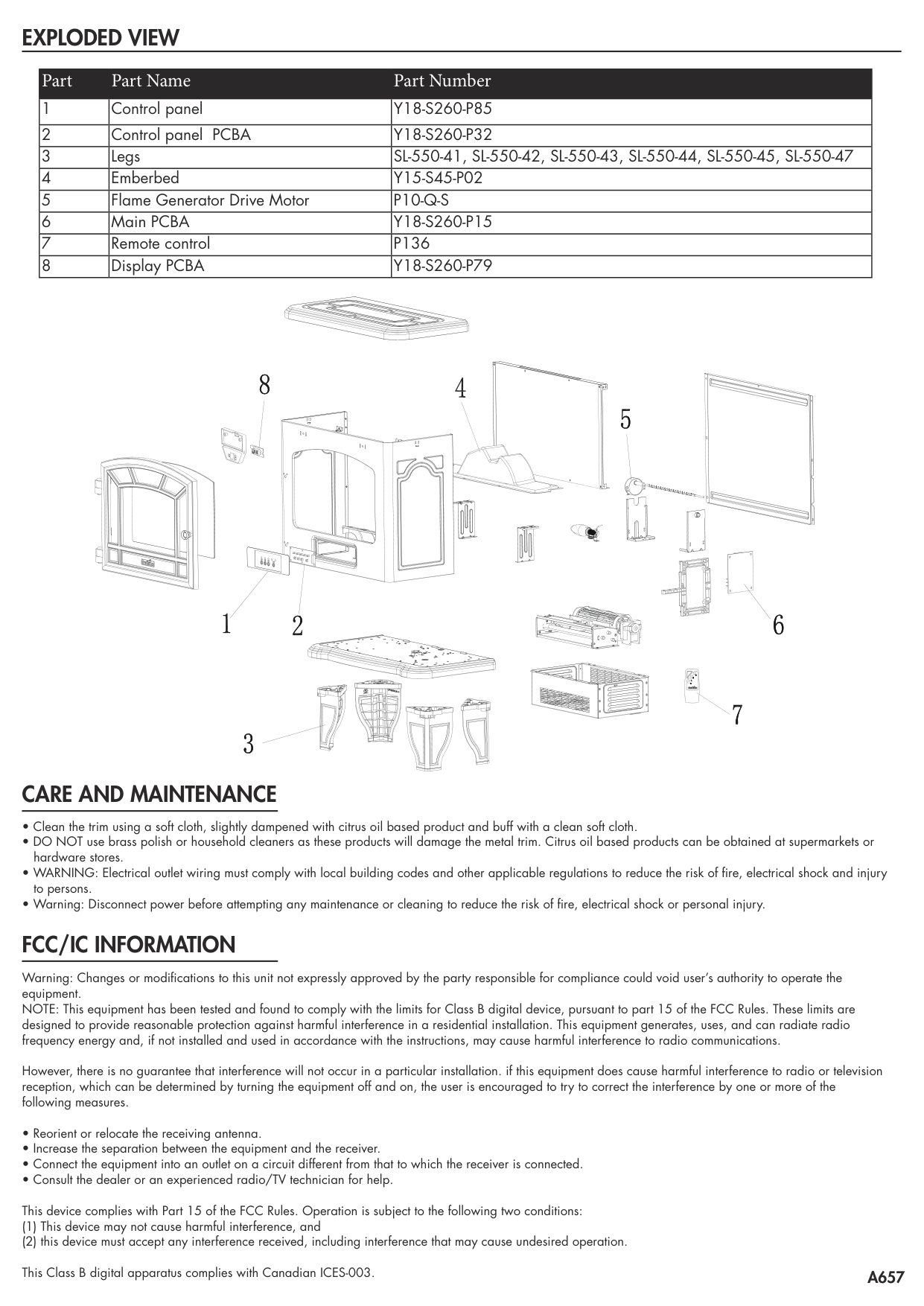
##### EXPLODED VIEW
|Part|Part Name|Part Number| |---|---|---| |1|Control panel|Y18-S260-P85| |2|Control panel PCBA|Y18-S260-P32| |3|Legs|SL-550-41, SL-550-42, SL-550-43, SL-550-44, SL-550-45, SL-550-47| |4|Emberbed|Y15-S45-P02| |5|Flame Generator Drive Motor|P10-Q-S| |6|Main PCBA|Y18-S260-P15| |7|Remote control|P136| |8|Display PCBA|Y18-S260-P79|
| | | |---|---| | | |
##### CARE AND MAINTENANCE
##### FCC/IC INFORMATION
Warning: Changes or modifications to this unit not expressly approved by the party responsible for compliance could void user’s authority to operate the equipment. NOTE: This equipment has been tested and found to comply with the limits for Class B digital device, pursuant to part 15 of the FCC Rules. These limits are designed to provide reasonable protection against harmful interference in a residential installation. This equipment generates, uses, and can radiate radio frequency energy and, if not installed and used in accordance with the instructions, may cause harmful interference to radio communications.
However, there is no guarantee that interference will not occur in a particular installation. if this equipment does cause harmful interference to radio or television reception, which can be determined by turning the equipment off and on, the user is encouraged to try to correct the interference by one or more of the following measures.