
Soundcore Life P2 Mini Wireless Earbuds
Ask AI
— answers from the official manualAnswers from the official manual.
Common questions
Common Questions
10 totalHow do I set up and pair my Soundcore Life P2 Mini earbuds for the first time?
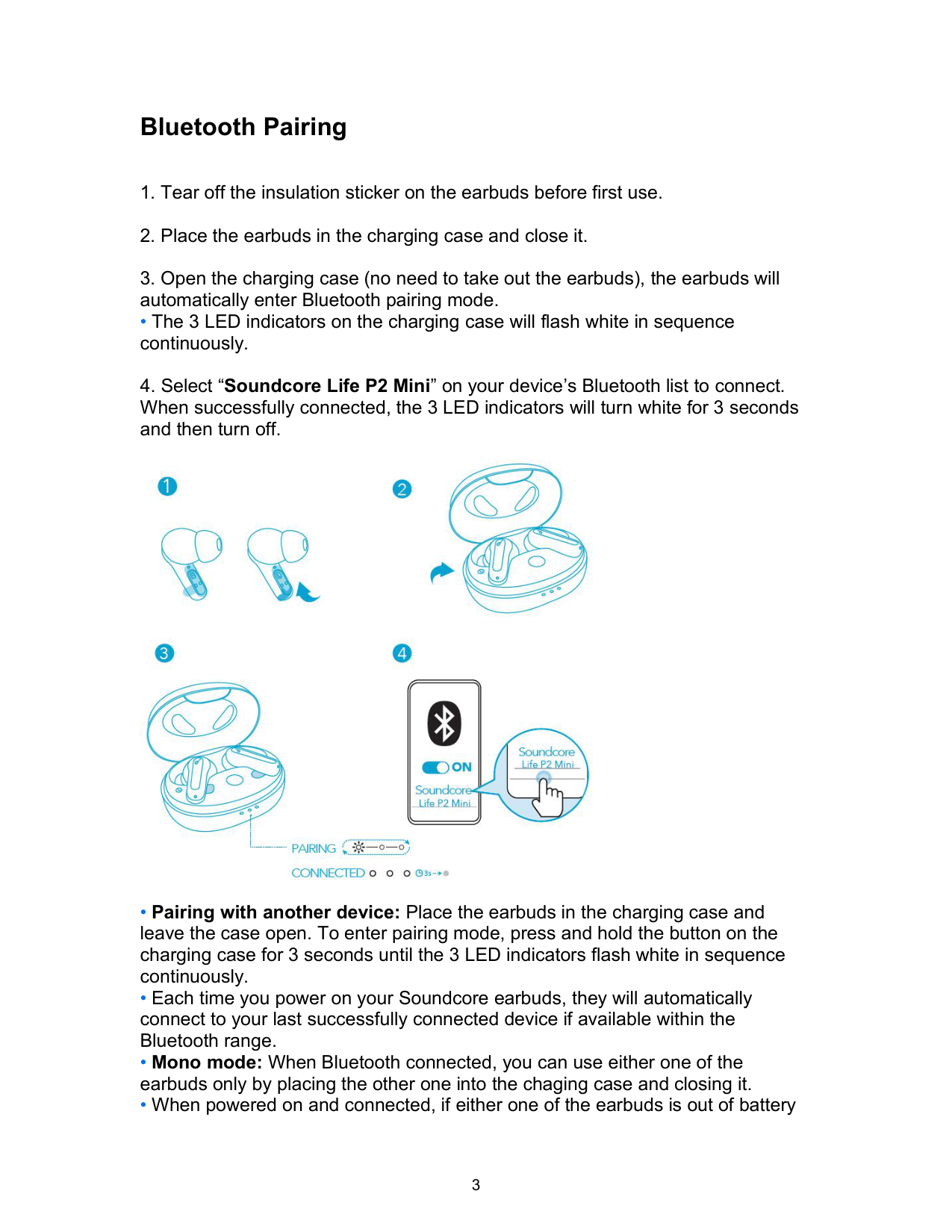
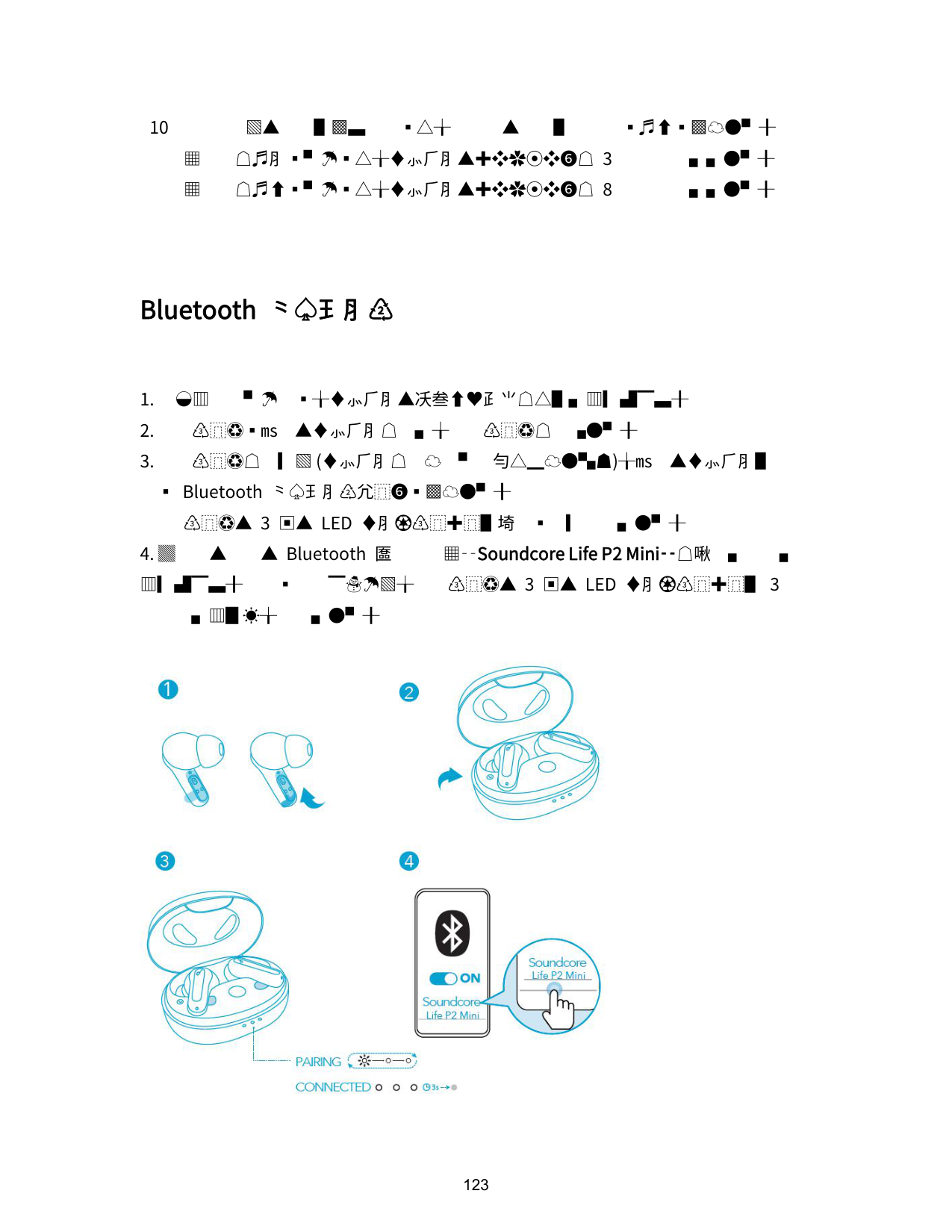
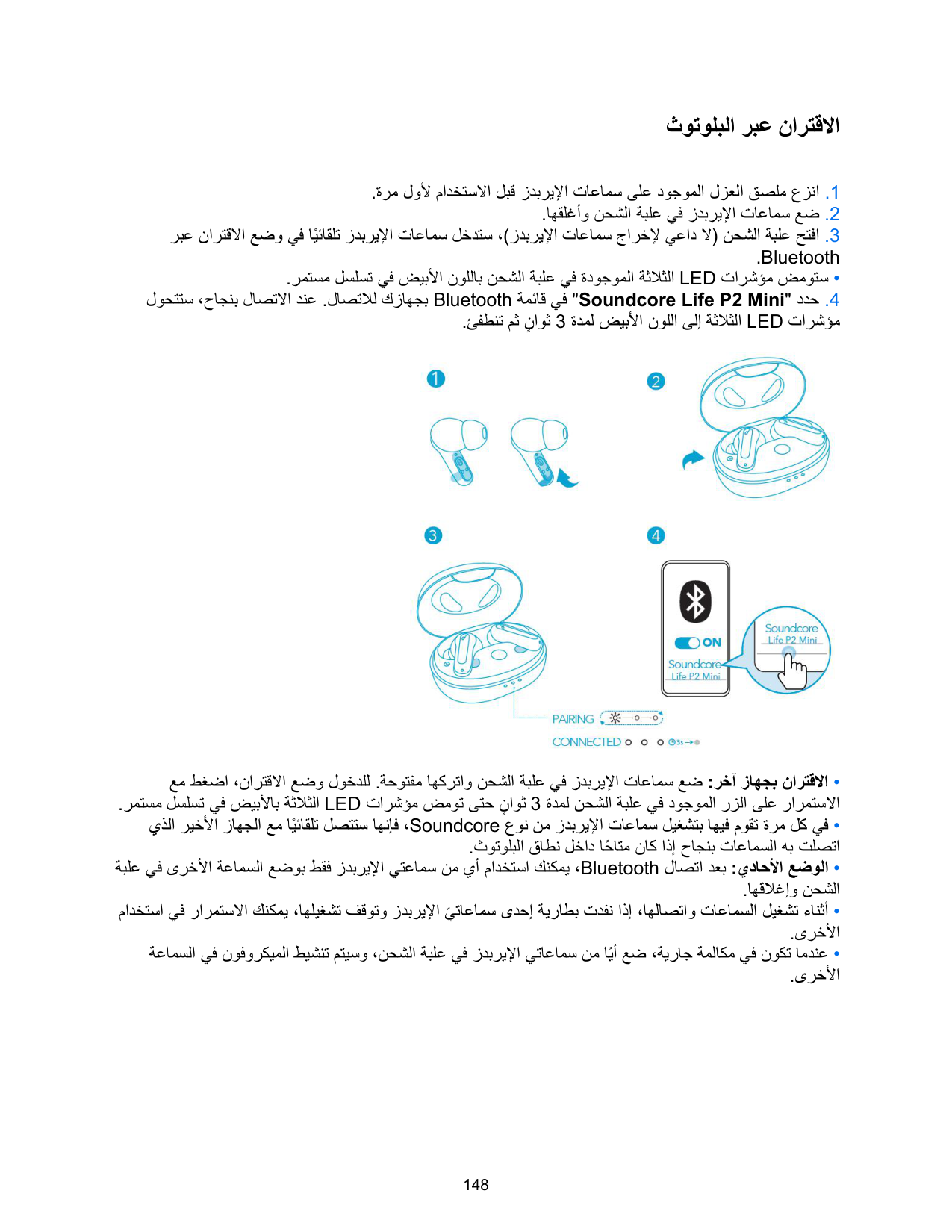
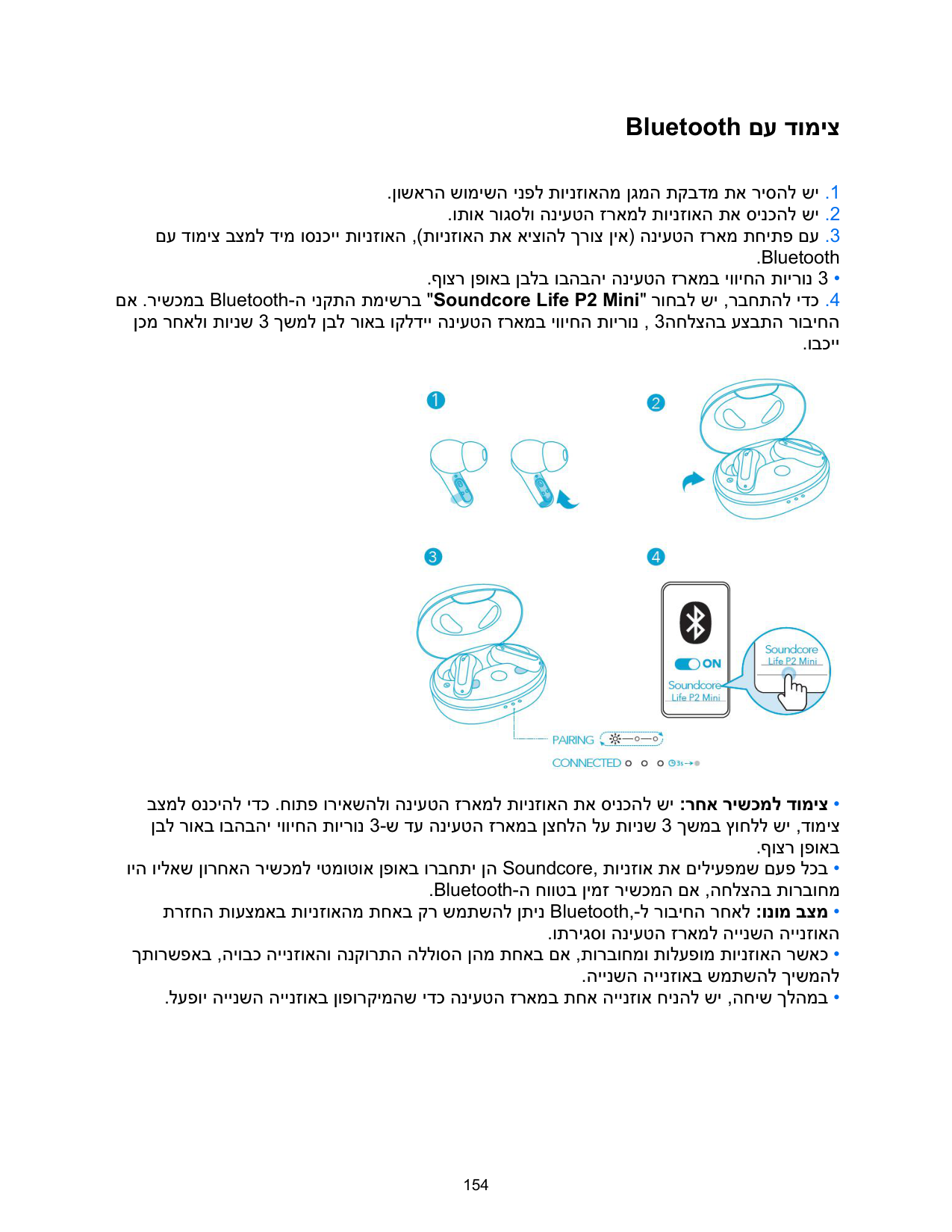
First, remove the insulation sticker from the earbuds before use. Then place the earbuds in the charging case and close it. Open the charging case (you don't need to remove the earbuds), and they will automatically enter Bluetooth pairing mode with the 3 LED indicators flashing white in sequence. Finally, select 'Soundcore Life P2 Mini' from your device's Bluetooth list to connect.
How do I charge the Soundcore Life P2 Mini earbuds and charging case?
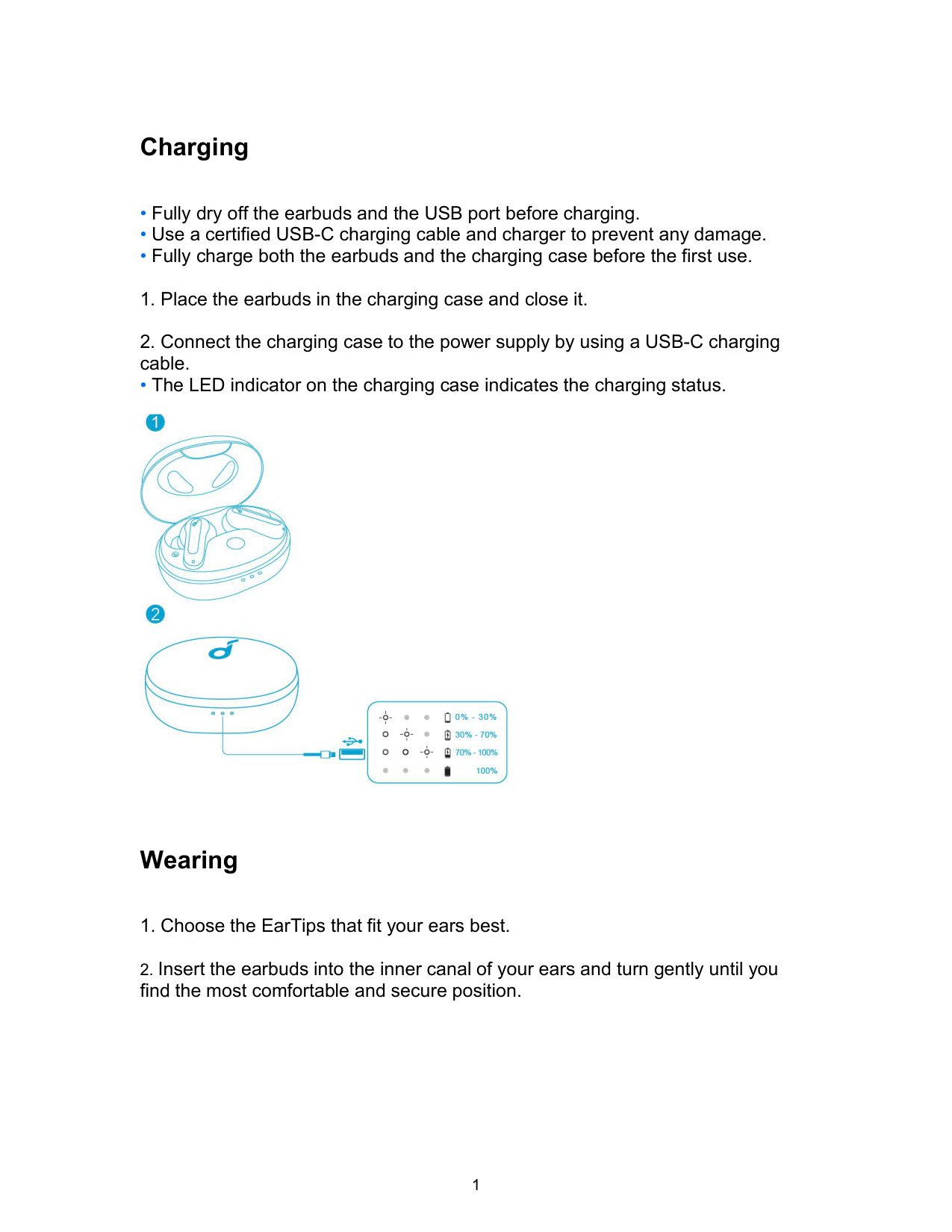
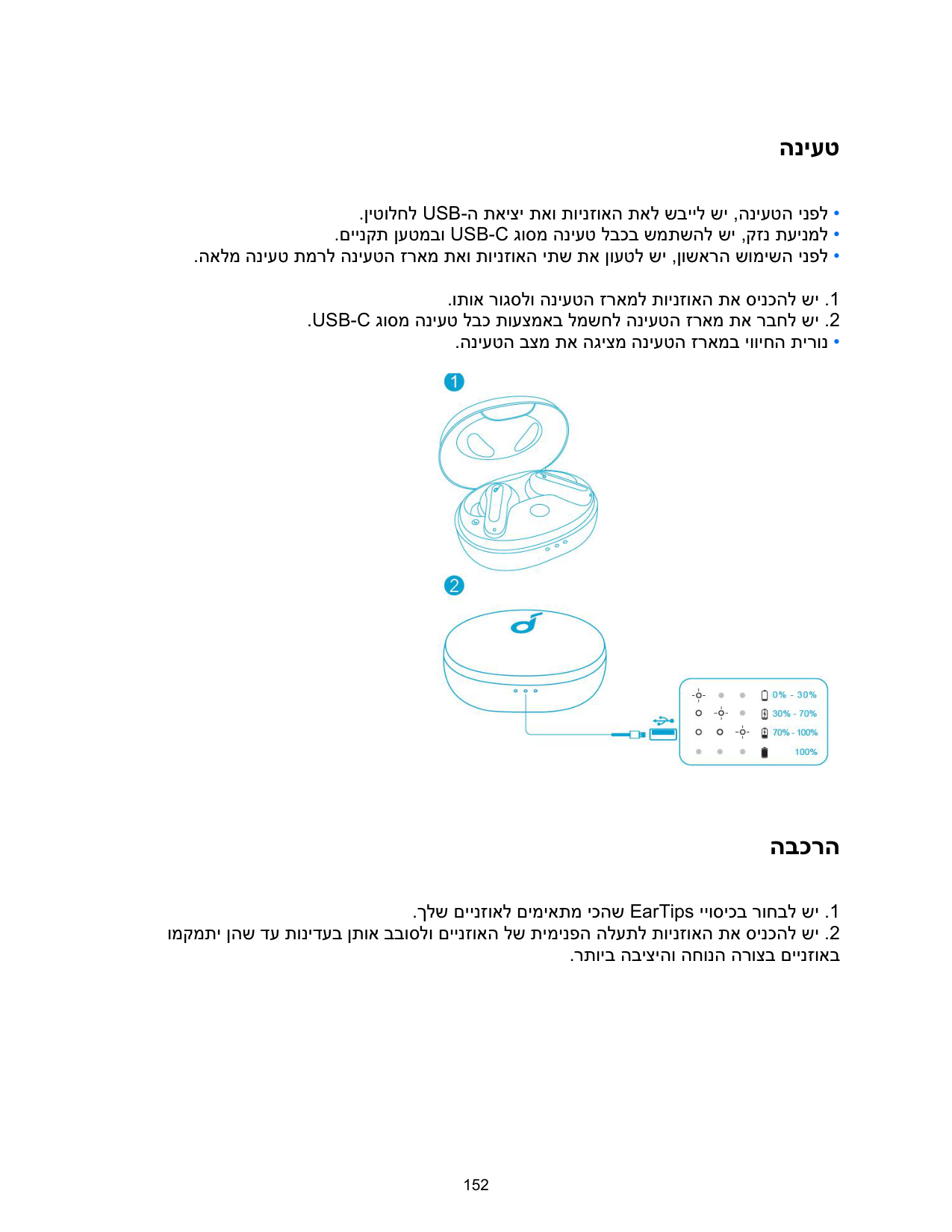
Place the earbuds in the charging case and close it, then connect the case to a power supply using a certified USB-C charging cable. Fully dry off the USB charging port before charging and fully charge both the earbuds and case before first use. The LED indicator on the charging case will show the charging status, with a full charge taking 2 hours.
How do I power on and power off the Soundcore Life P2 Mini?
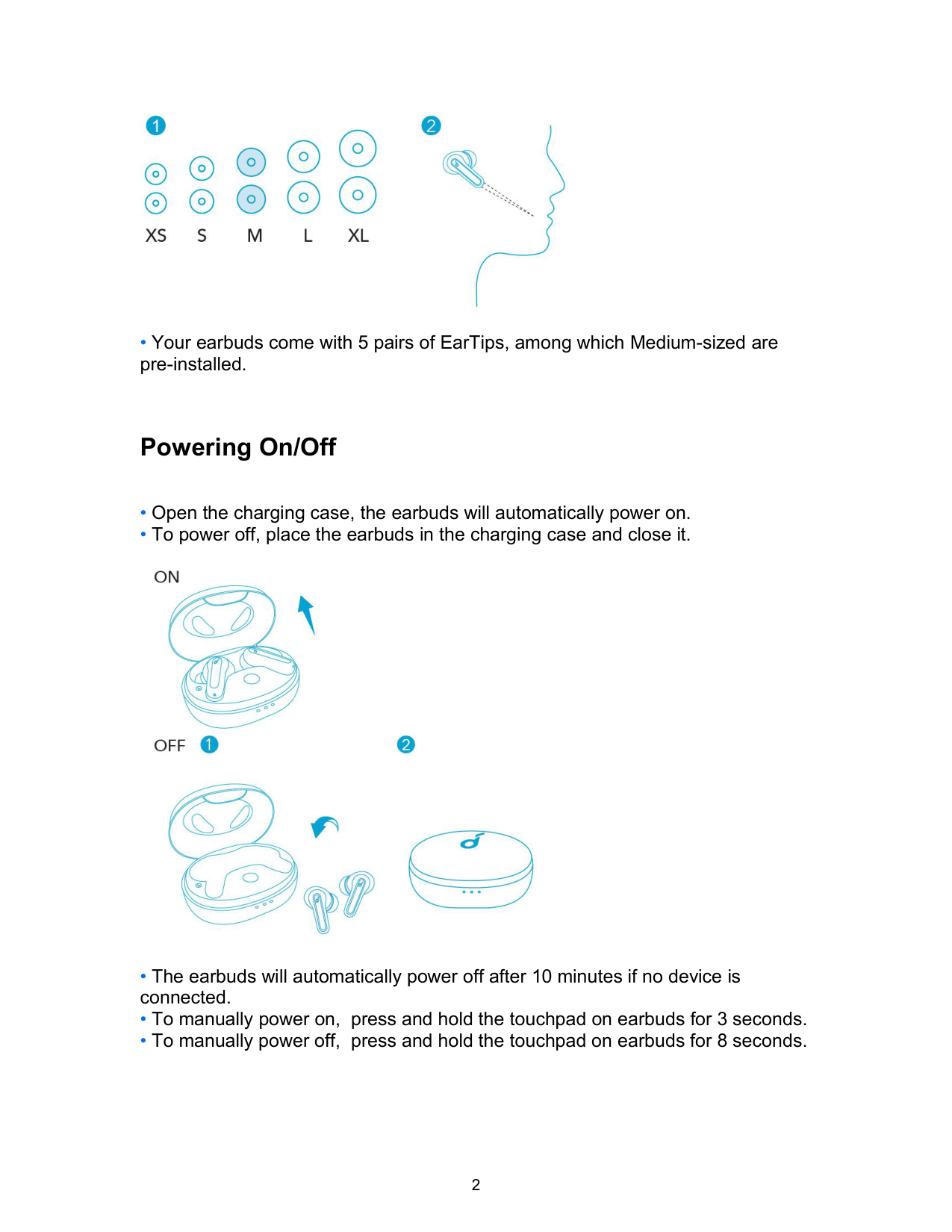
To power on, open the charging case and the earbuds will automatically power on. To power off, simply place the earbuds in the charging case and close it. You can also manually power on by pressing and holding the touchpad for 3 seconds, or manually power off by pressing and holding it for 8 seconds. The earbuds will automatically power off after 10 minutes if no device is connected.
What do the LED light indicators mean on my Soundcore Life P2 Mini?
A steady white light indicates normal operation, flashing white indicates pairing mode, and a light that is off means the earbuds are powered off. The LED indicators on the charging case will flash white in sequence during pairing and reset procedures.
How do I reset the Soundcore Life P2 Mini if I'm experiencing connectivity or function issues?
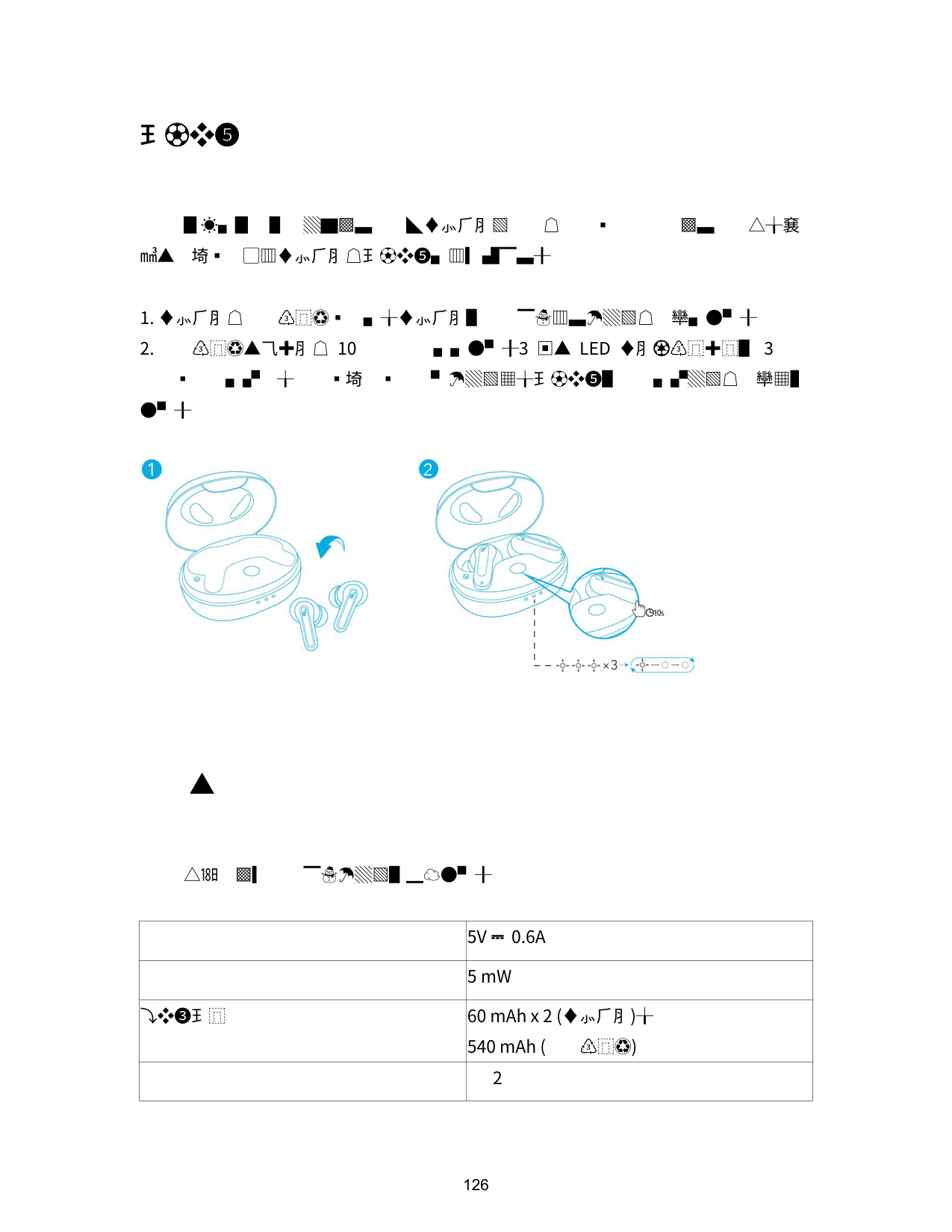
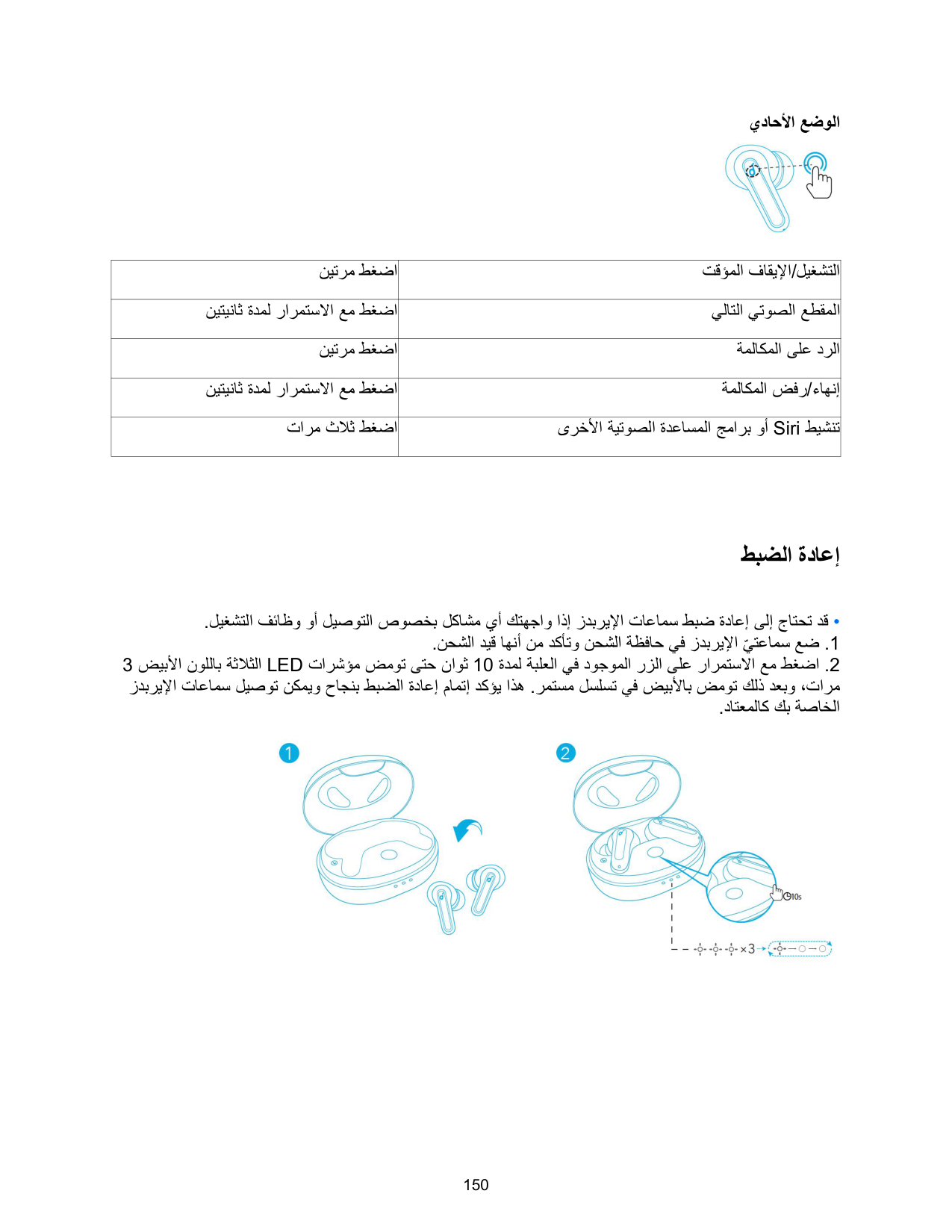
Place the earbuds in the charging case and ensure they are charging. Press and hold the button on the charging case for 10 seconds until the 3 LED indicators flash white 3 times and then flash white in sequence continuously. This confirms the reset was successful and your earbuds can be connected normally.
How do I control music playback on my Soundcore Life P2 Mini earbuds?
In stereo mode, tap twice on either earbud to play or pause music. Press and hold the right earbud for 2 seconds to skip to the next track, or press and hold the left earbud for 2 seconds to go to the previous track. In mono mode, tap twice to play or pause, and press and hold for 2 seconds to skip tracks.
Show 4 more questions
Full Manual
159 pages
Soundcore Life P2 Mini
USER MANUAL
English 01
Čeština 07
Dansk 13
Deutsch 19
ελληνικά 25
Español 31
Suomi 37
Français 43
Magyar 49
Italiano 55
Nederlands 61
Norsk 67
Język polski 73
Português 79
Pусский 85
Slovenský Jazyk 91
Slovenski Jezik 97
Svenska 103
Türkçe 109
Portugues do Brasil 115
日本語
한국어
简体中文
繁體中文
121
128
134
140
ةيِبَرَعل 146
תי ִרבִע 152
Charging
• The LED indicator on the charging case indicates the charging status.

Wearing

Powering On/Off

Bluetooth Pairing
• The 3 LED indicators on the charging case will flash white in sequence continuously.

and powered off, you can keep using the other one.
Controls
Stereo Mode


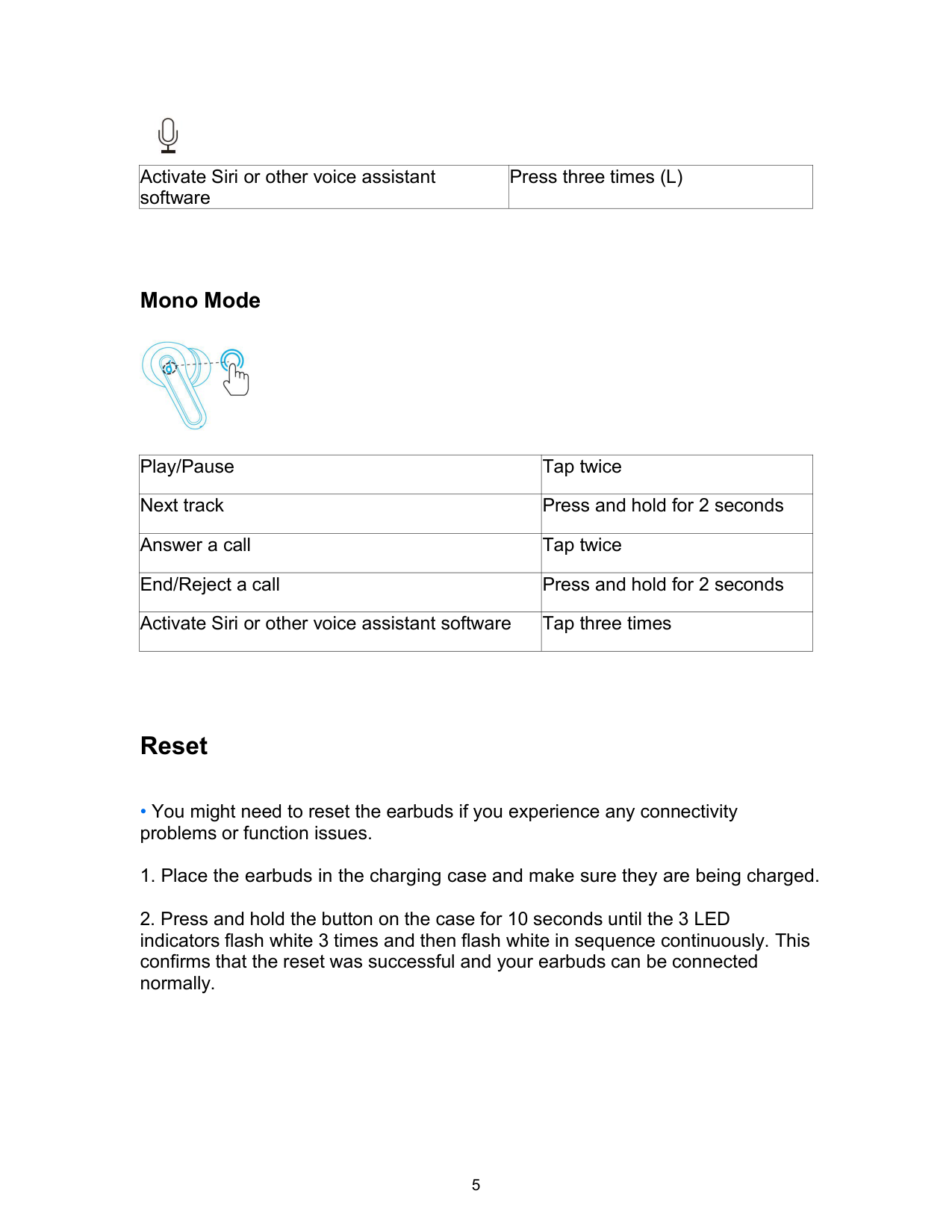
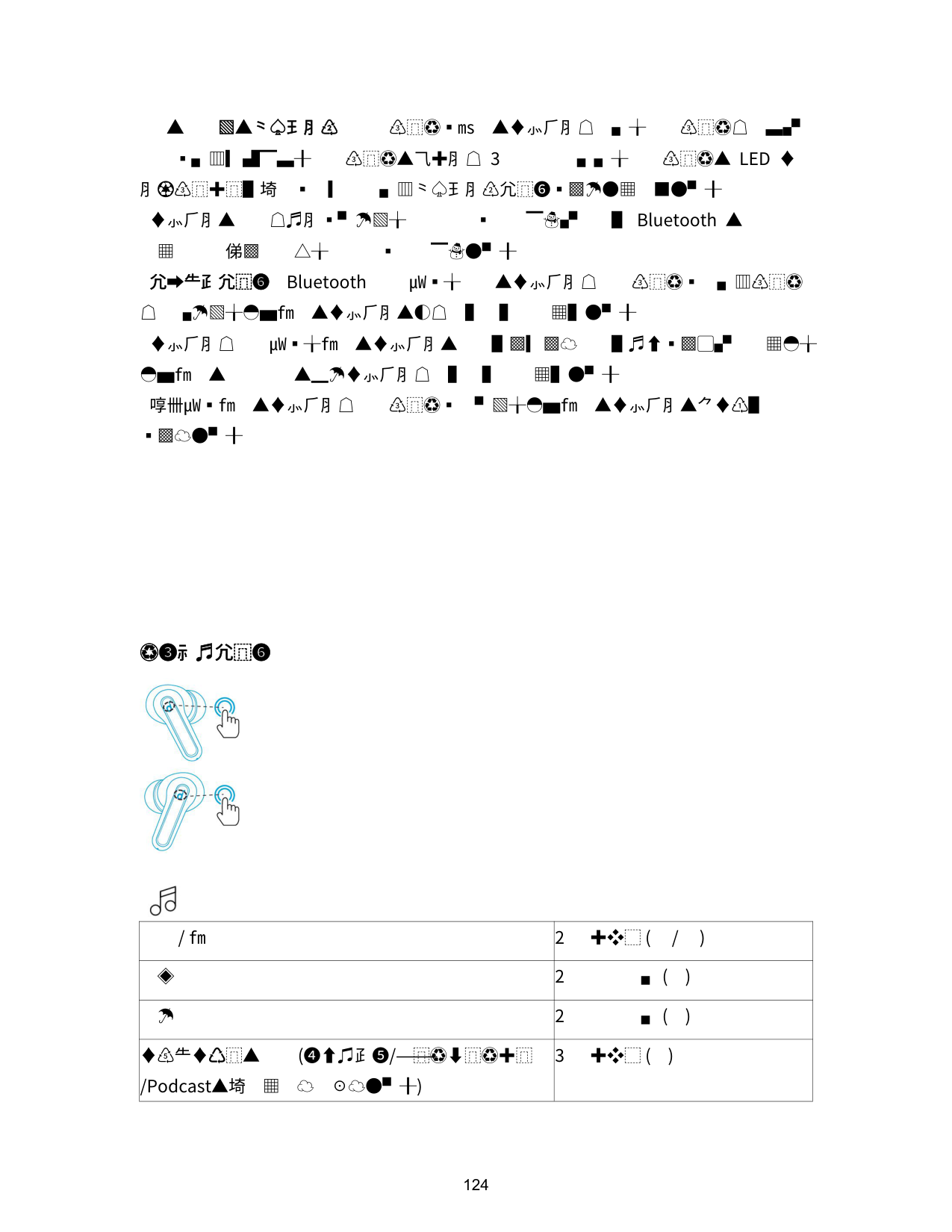
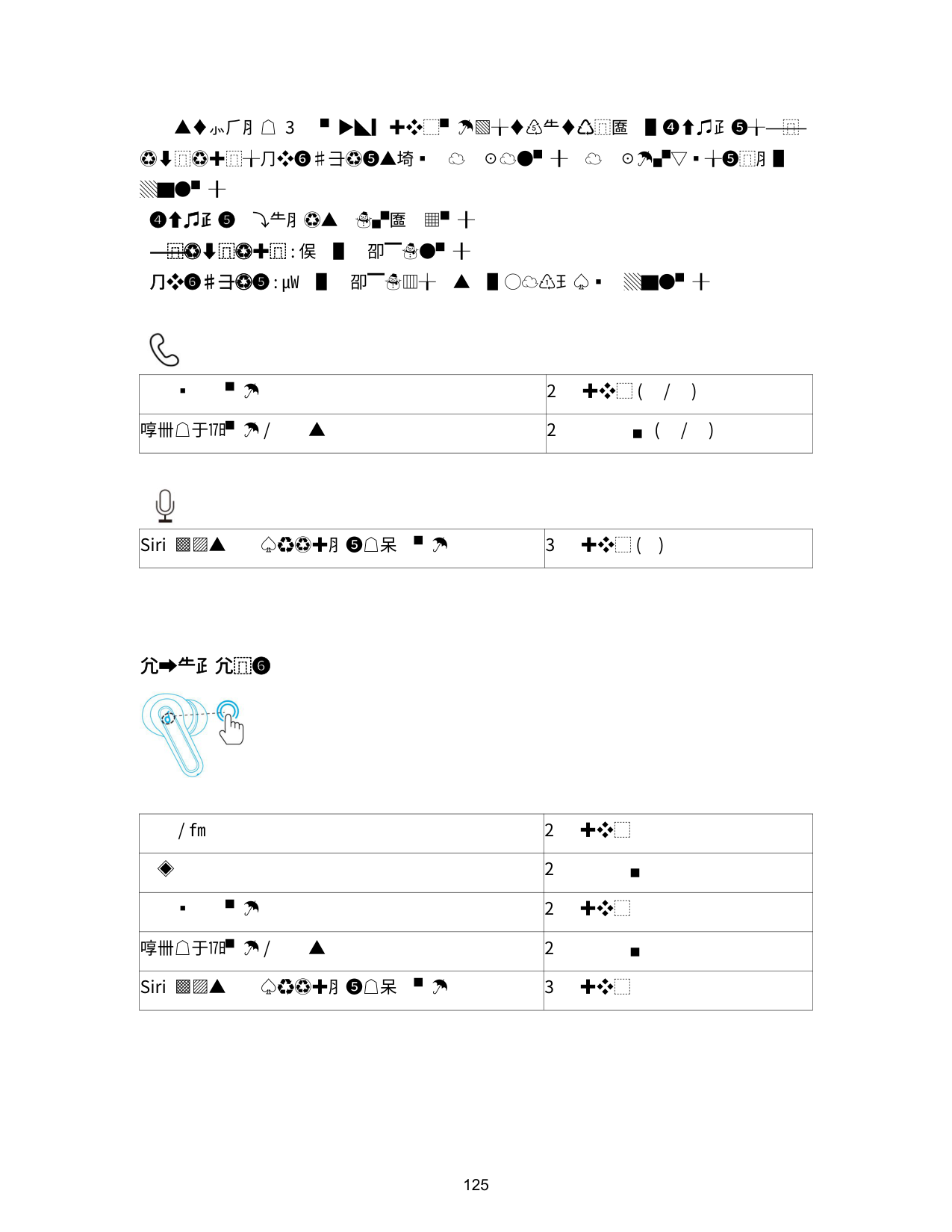
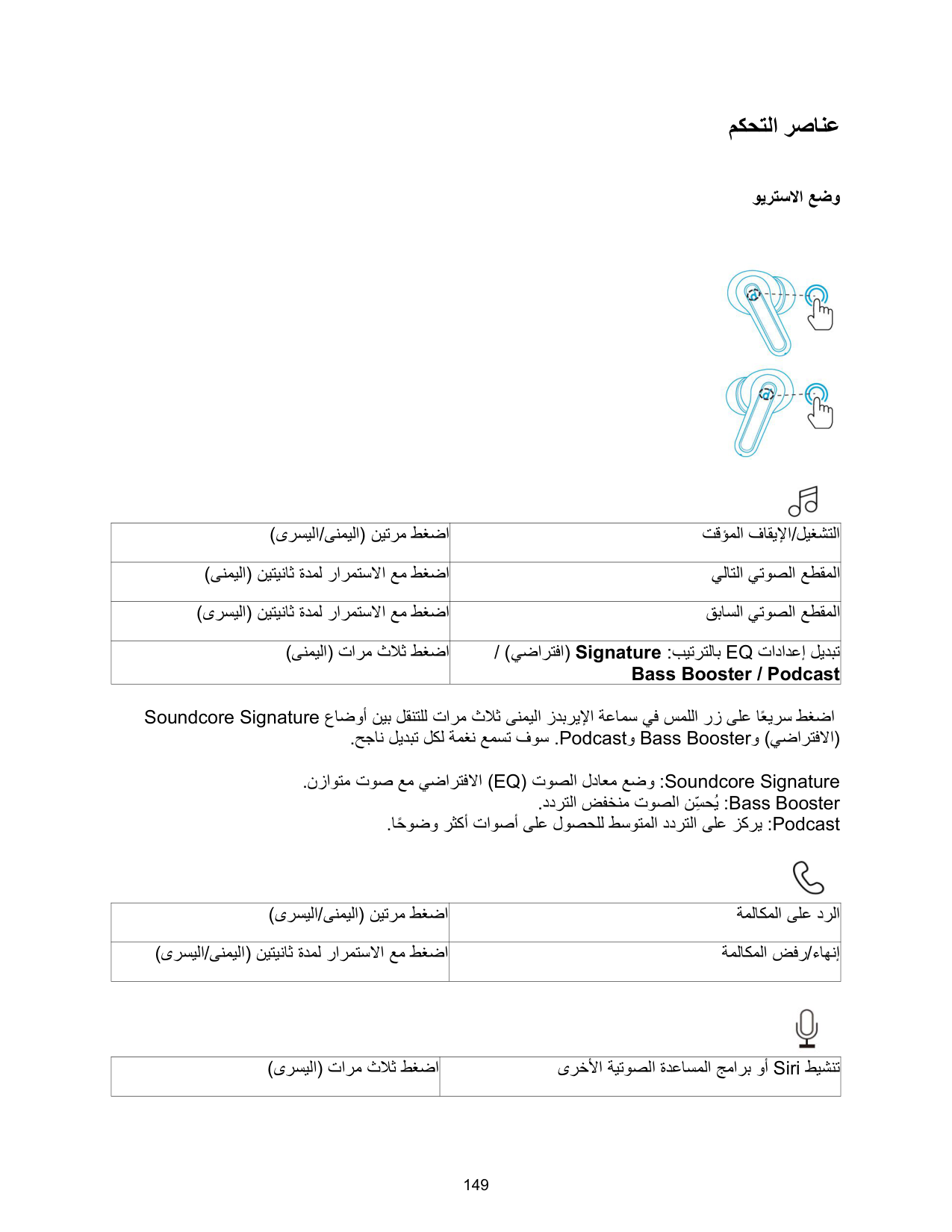
|Play/Pause|Tap twice (R/L)| |---|---| |Next track|Press and hold for 2 seconds (R)| |Previous track|Press and hold for 2 seconds (L)| |Switch EQ in sequence: Signature (Default) / Bass Booster / Podcast|Tap three times (R)|
Quickly tap the touch button on the right earbud three times to cycle through Soundcore Signature (default), Bass Booster, and Podcast modes. You will hear a tone for each successful switch.

|Answer a call|Tap twice (R/L)| |---|---| |End/Reject a call|Press and hold for 2 seconds (R/L)|

|Activate Siri or other voice assistant software|Press three times (L)| |---|---|
Mono Mode

|Play/Pause|Tap twice| |---|---| |Next track|Press and hold for 2 seconds| |Answer a call|Tap twice| |End/Reject a call|Press and hold for 2 seconds| |Activate Siri or other voice assistant software|Tap three times|
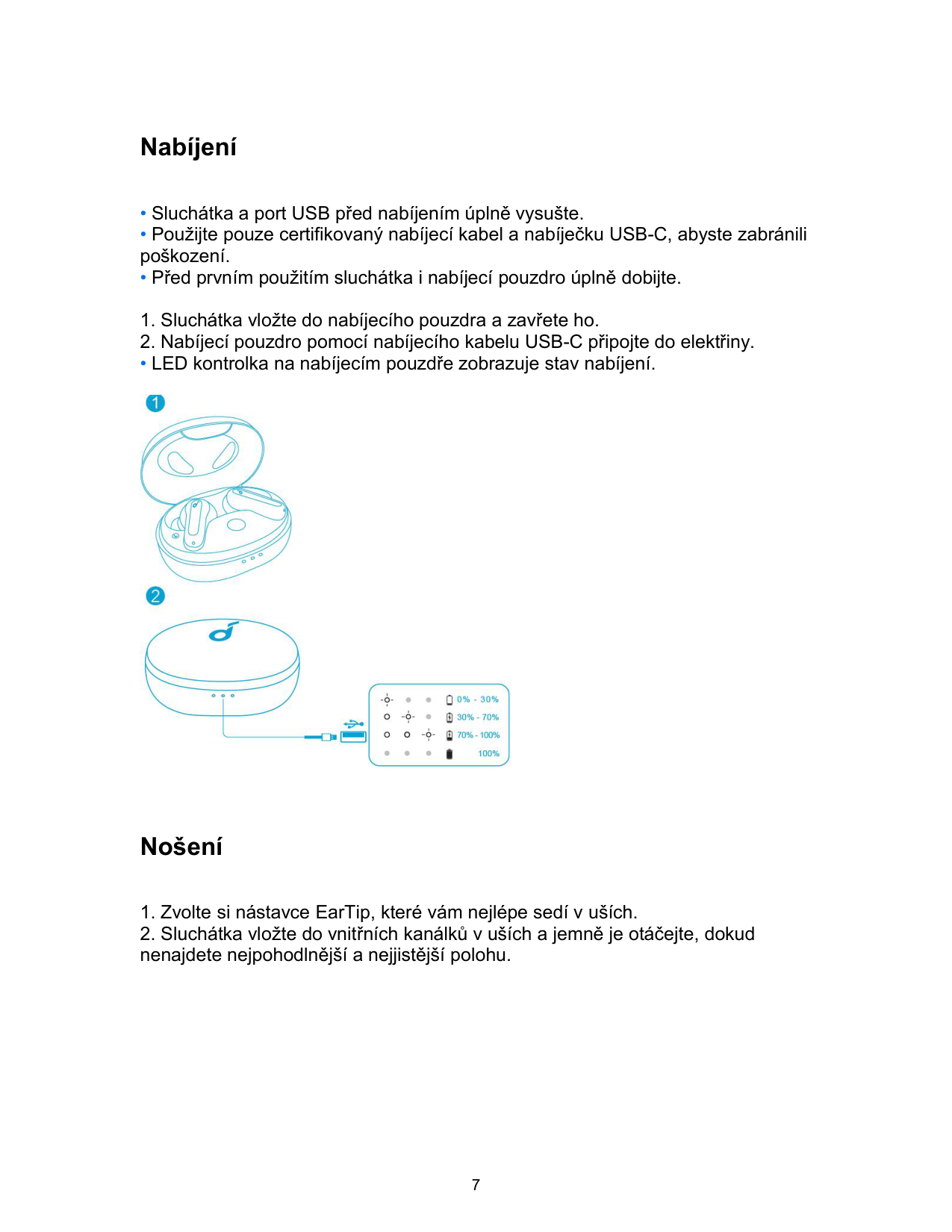
Reset

Specifications
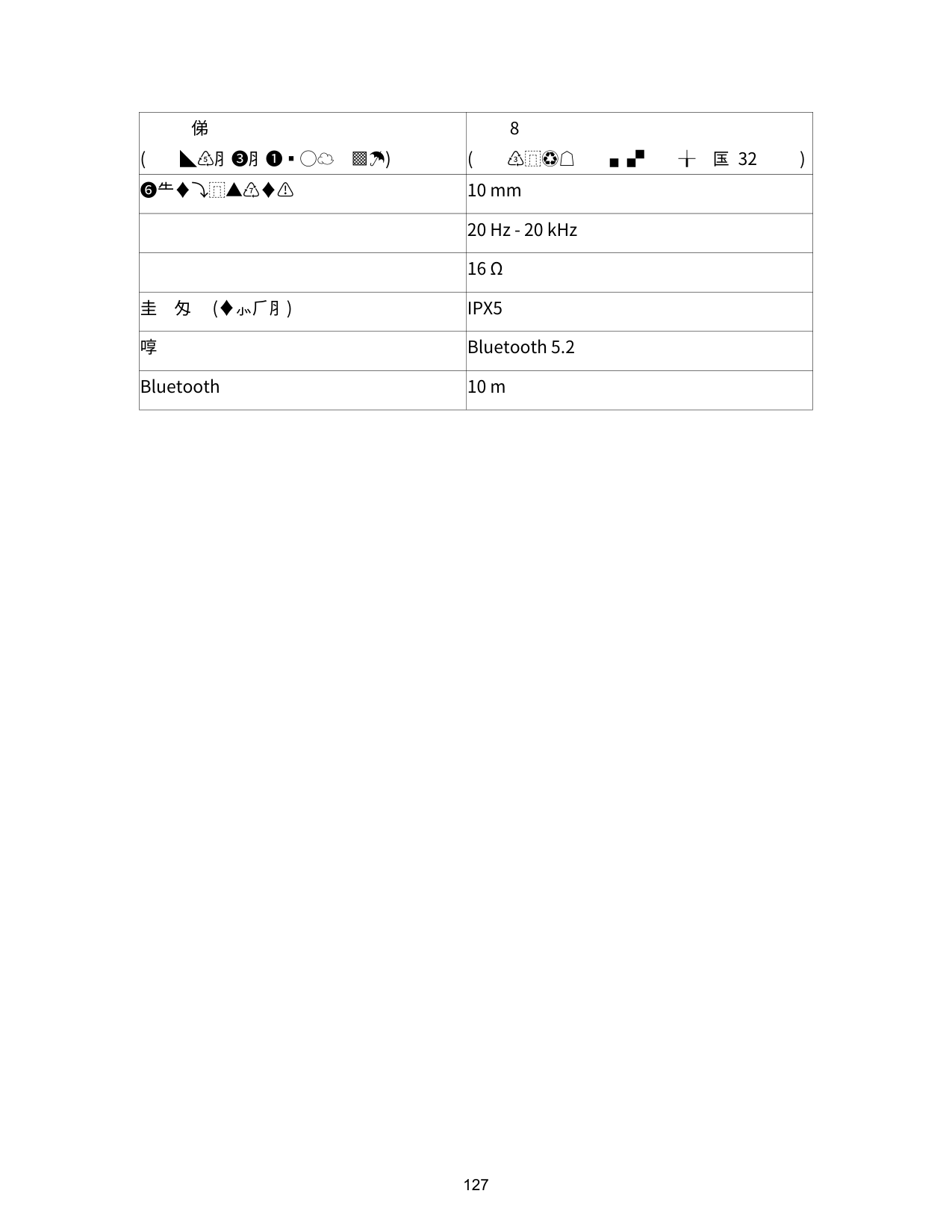
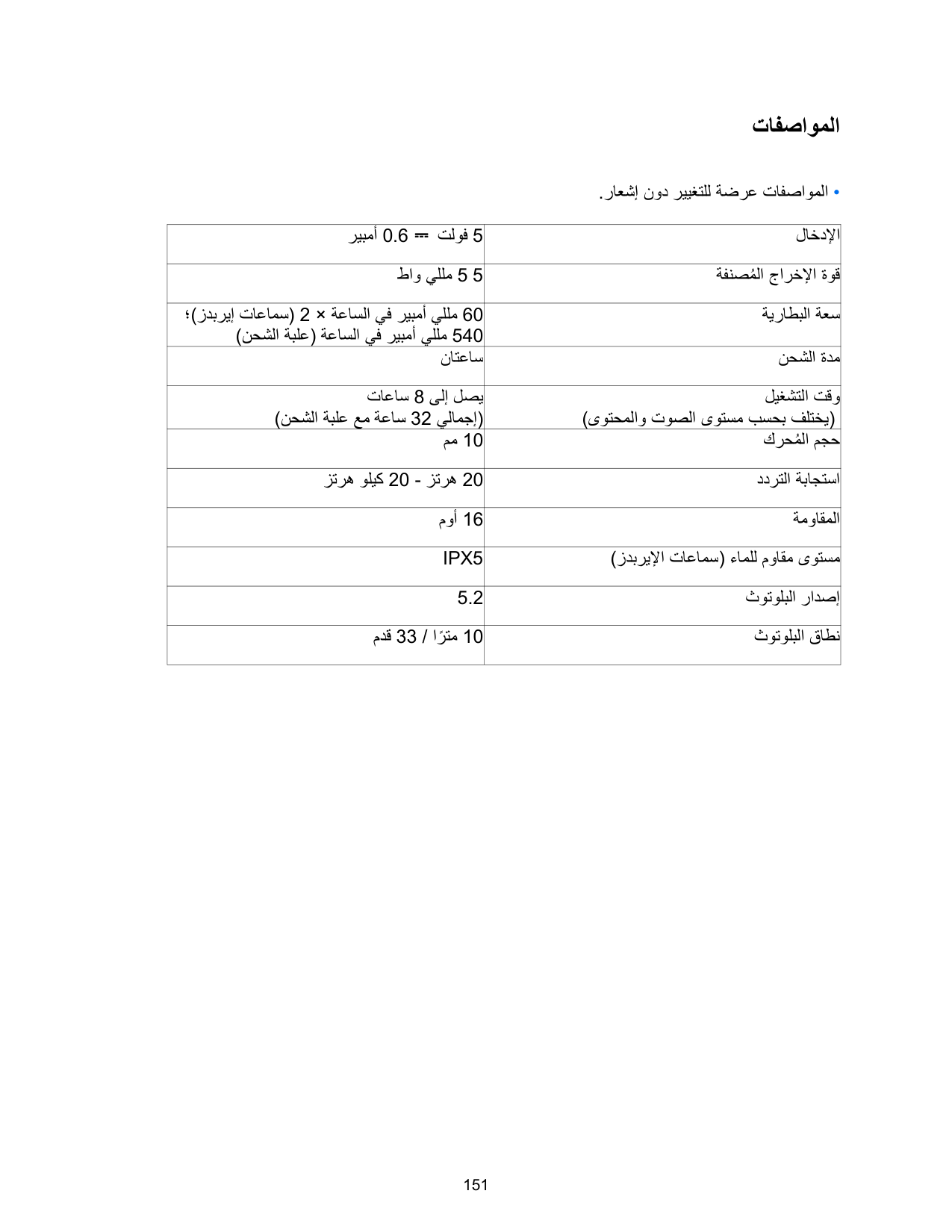
|Input|5V ⎓ 0.6A| |---|---| |Rated output power|5 mW| |Battery capacity|60 mAh x 2 (earbuds); 540 mAh (charging case)| |Charging time|2 hours| |Playtime (Varies by volume level and content)|Up to 8 hours (Total 32 hours with the charging case)| |Driver size|10 mm| |Frequency response|20 Hz - 20 kHz| |Impedance|16 Ω| |Waterproof level (Earbuds)|IPX5| |Bluetooth version|5.2|
|Bluetooth range|10 m / 33 ft|
Nabíjení
• LED kontrolka na nabíjecím pouzdře zobrazuje stav nabíjení.

Nošení
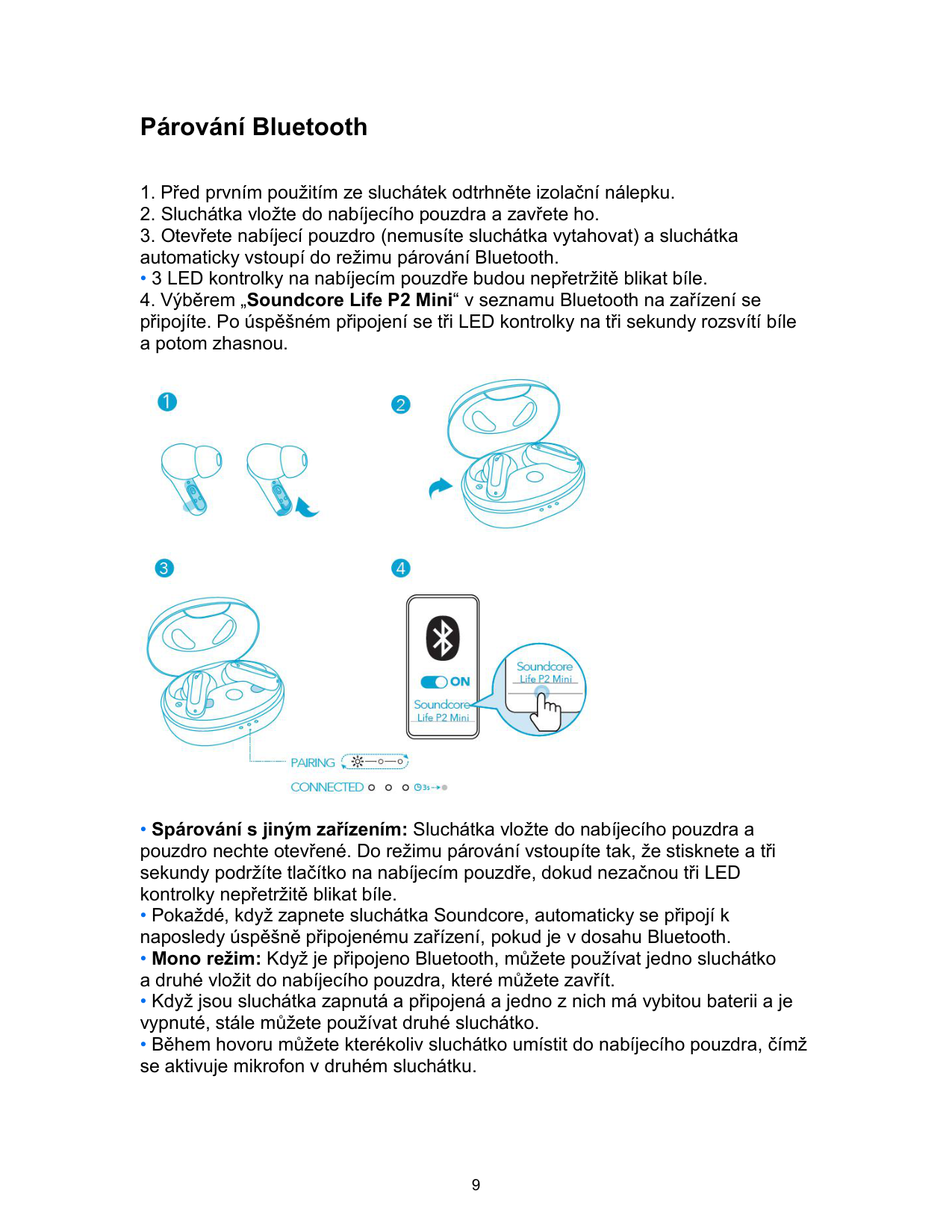

Zapnutí/Vypnutí

• Pokud je chcete vypnout ručně, stiskněte a podržte touchpad na sluchátkách 8 sekund.
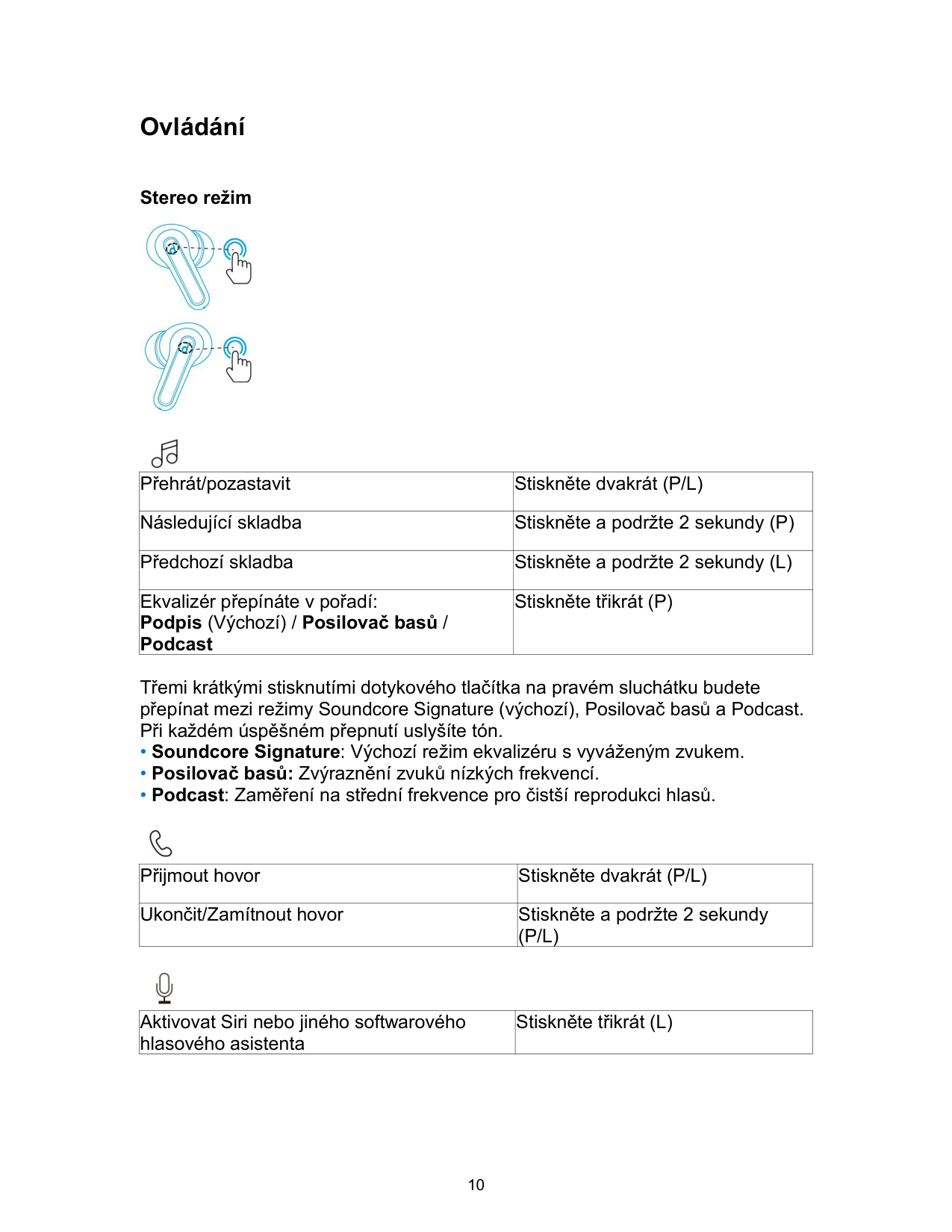
Párování Bluetooth
• 3 LED kontrolky na nabíjecím pouzdře budou nepřetržitě blikat bíle.

Ovládání
Stereo režim


|Přehrát/pozastavit|Stiskněte dvakrát (P/L)| |---|---| |Následující skladba|Stiskněte a podržte 2 sekundy (P)| |Předchozí skladba|Stiskněte a podržte 2 sekundy (L)| |Ekvalizér přepínáte v pořadí: Podpis (Výchozí) / Posilovač basů / Podcast|Stiskněte třikrát (P)|
Třemi krátkými stisknutími dotykového tlačítka na pravém sluchátku budete přepínat mezi režimy Soundcore Signature (výchozí), Posilovač basů a Podcast. Při každém úspěšném přepnutí uslyšíte tón.

|Přijmout hovor|Stiskněte dvakrát (P/L)| |---|---| |Ukončit/Zamítnout hovor|Stiskněte a podržte 2 sekundy (P/L)|

|Aktivovat Siri nebo jiného softwarového hlasového asistenta|Stiskněte třikrát (L)| |---|---|
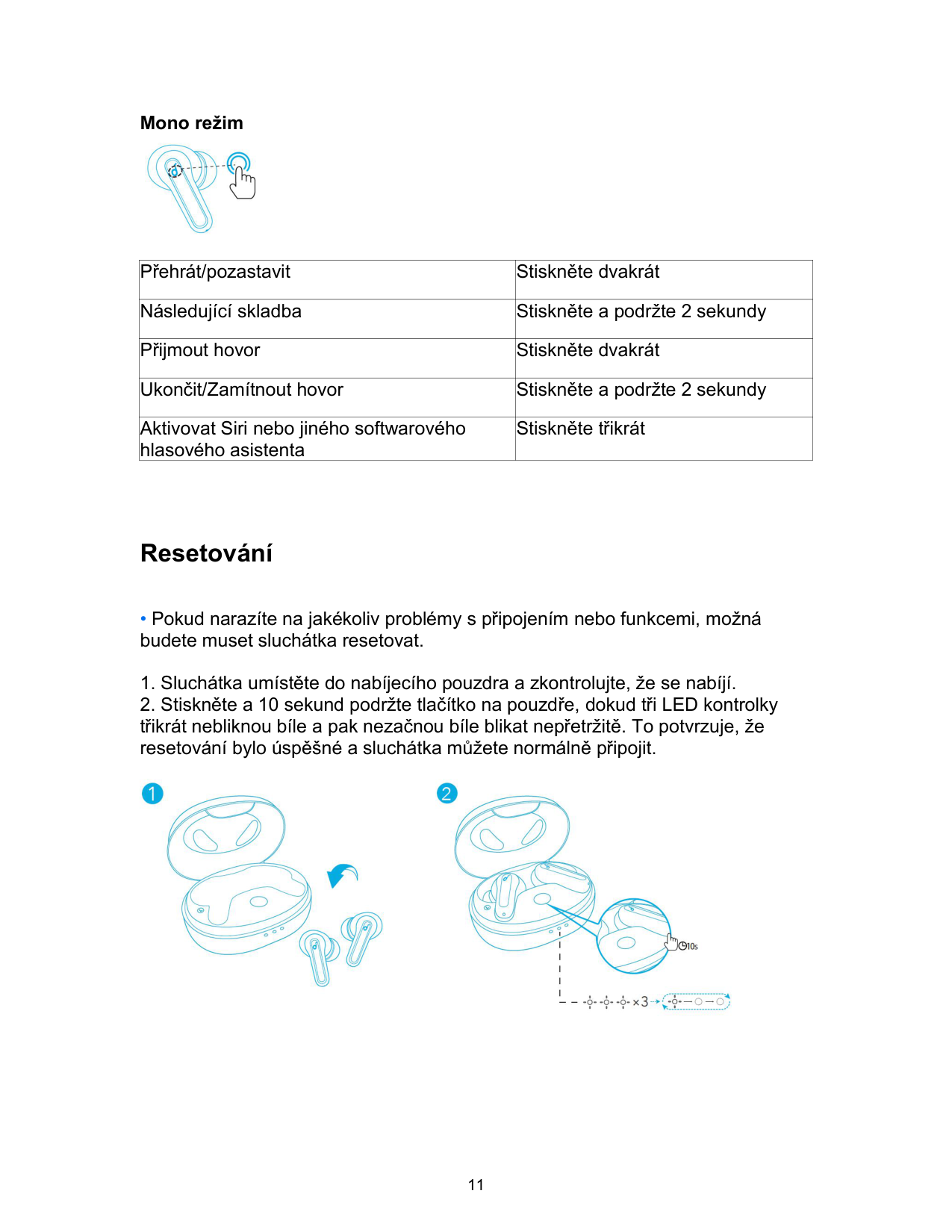
Mono režim

|Přehrát/pozastavit|Stiskněte dvakrát| |---|---| |Následující skladba|Stiskněte a podržte 2 sekundy| |Přijmout hovor|Stiskněte dvakrát| |Ukončit/Zamítnout hovor|Stiskněte a podržte 2 sekundy| |Aktivovat Siri nebo jiného softwarového hlasového asistenta|Stiskněte třikrát|
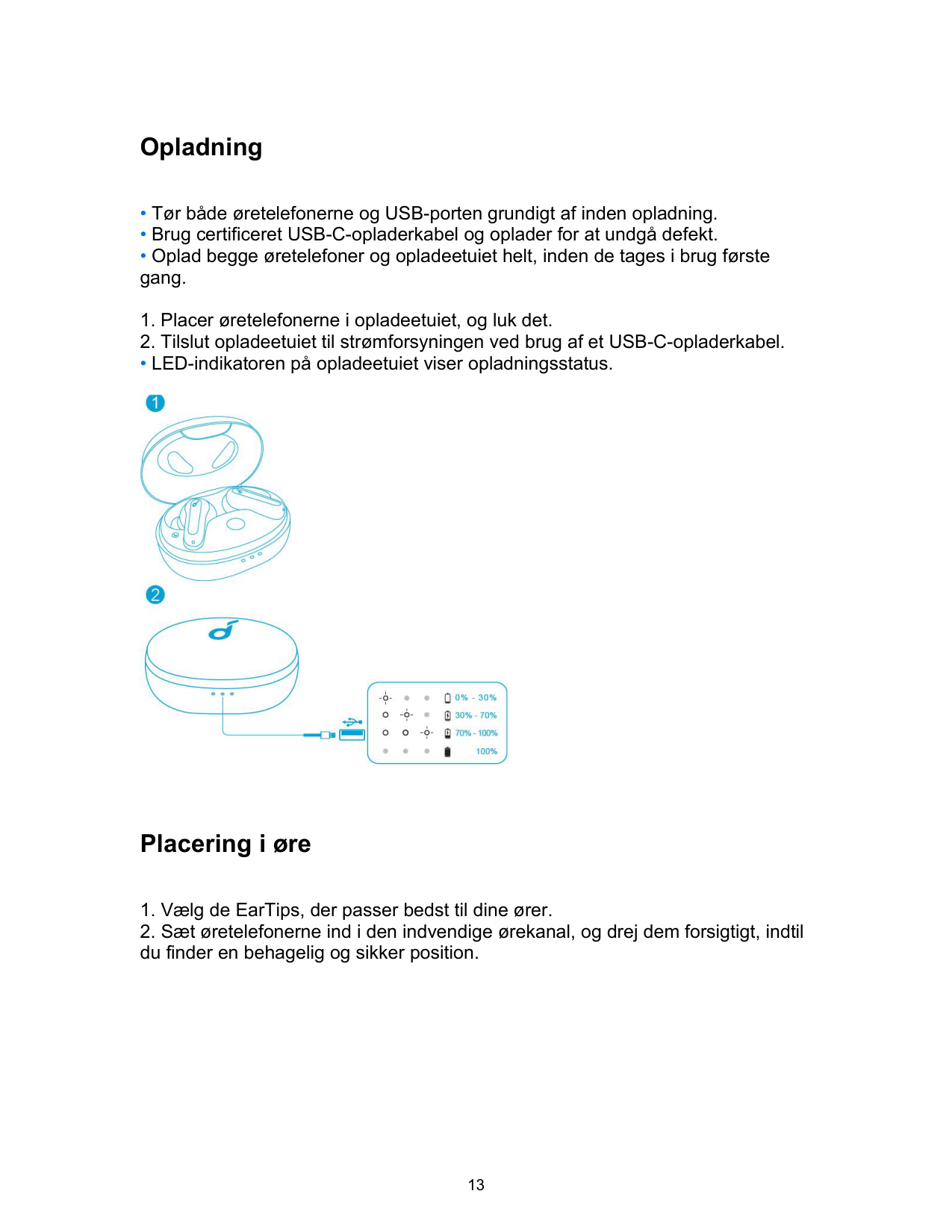
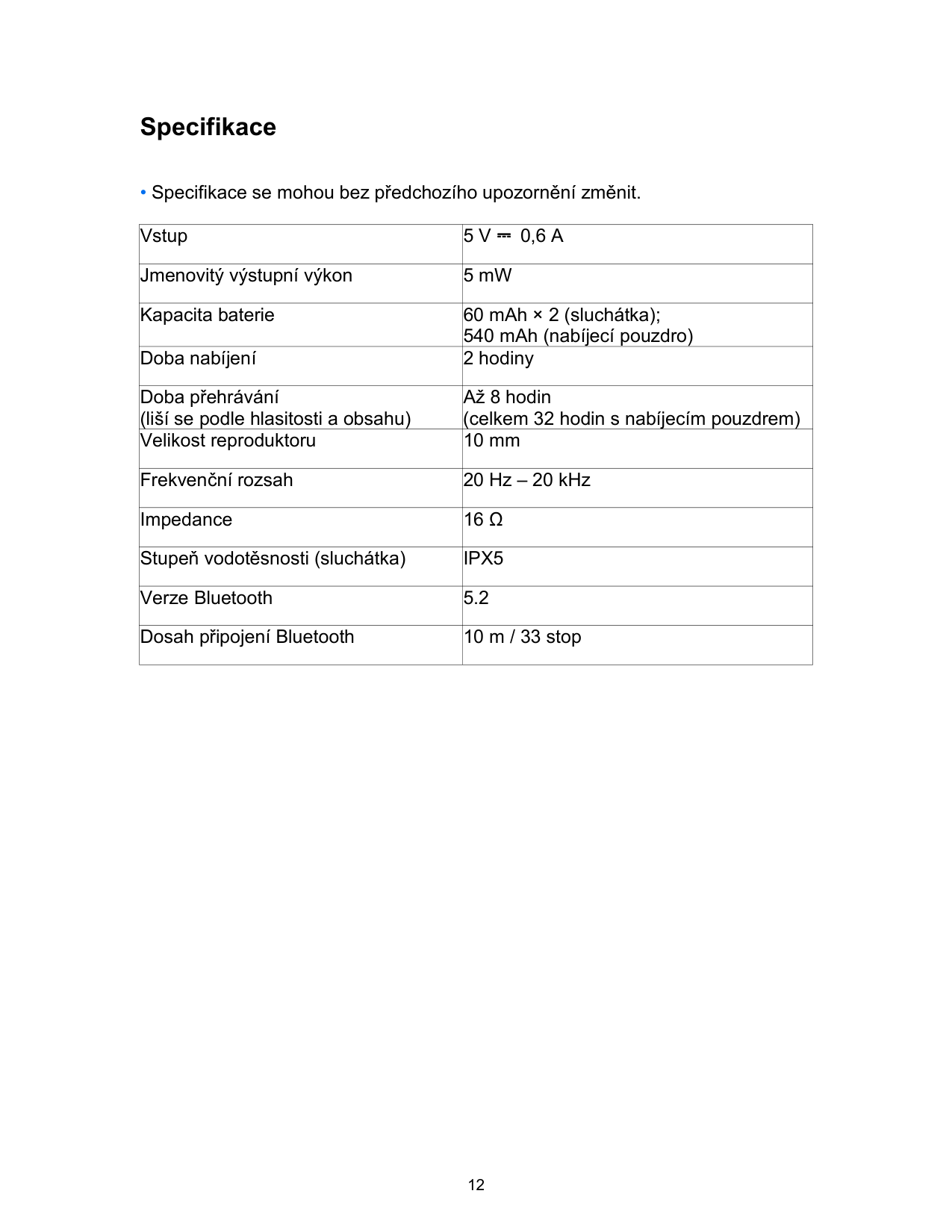
Resetování

Specifikace
|Vstup|5 V ⎓ 0,6 A| |---|---| |Jmenovitý výstupní výkon|5 mW| |Kapacita baterie|60 mAh × 2 (sluchátka); 540 mAh (nabíjecí pouzdro)| |Doba nabíjení|2 hodiny|
|Doba přehrávání (liší se podle hlasitosti a obsahu)|Až 8 hodin (celkem 32 hodin s nabíjecím pouzdrem)| |Velikost reproduktoru|10 mm| |Frekvenční rozsah|20 Hz – 20 kHz| |Impedance|16 Ω| |Stupeň vodotěsnosti (sluchátka)|IPX5| |Verze Bluetooth|5.2| |Dosah připojení Bluetooth|10 m / 33 stop|
Opladning
• LED-indikatoren på opladeetuiet viser opladningsstatus.

Placering i øre

Tænde/slukke

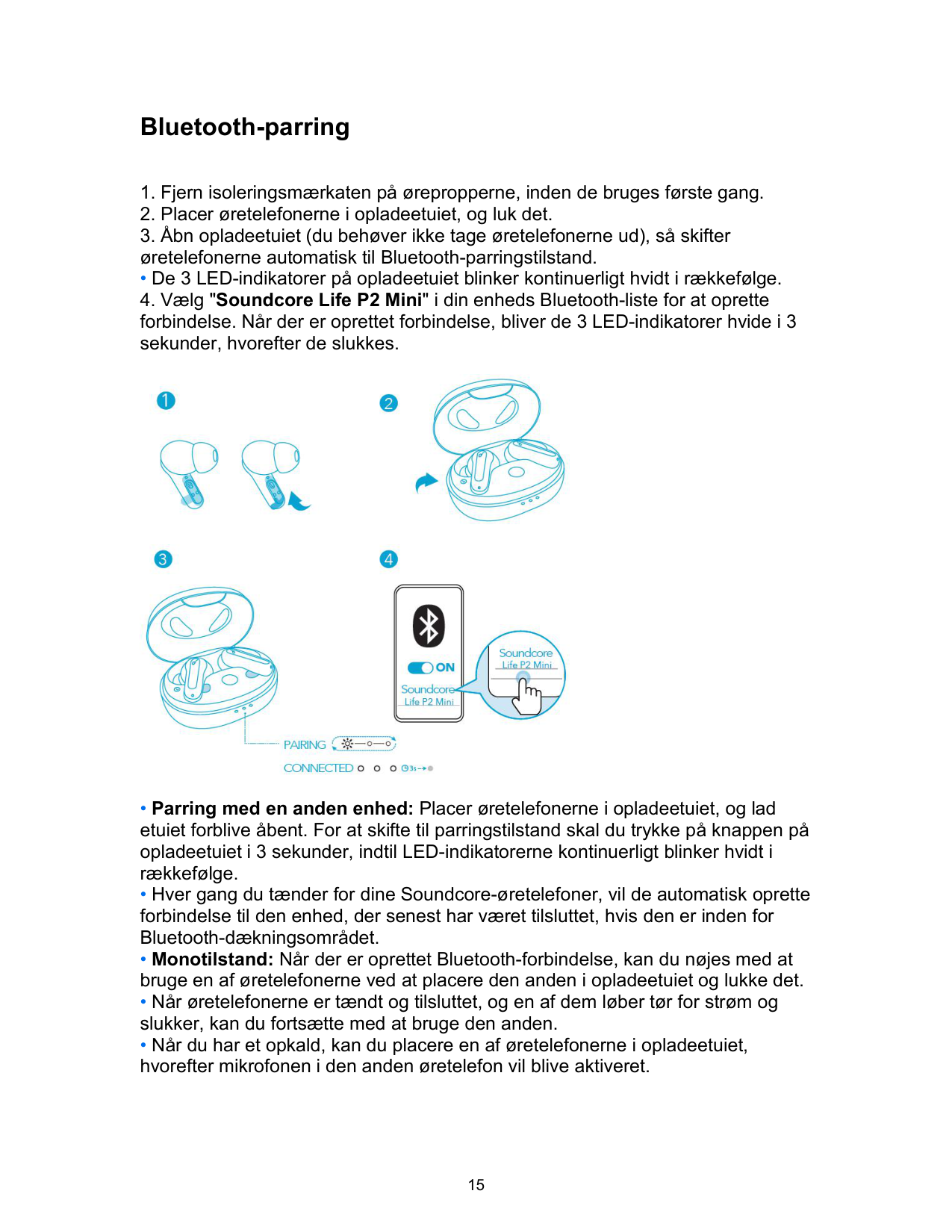
Bluetooth-parring
• De 3 LED-indikatorer på opladeetuiet blinker kontinuerligt hvidt i rækkefølge.

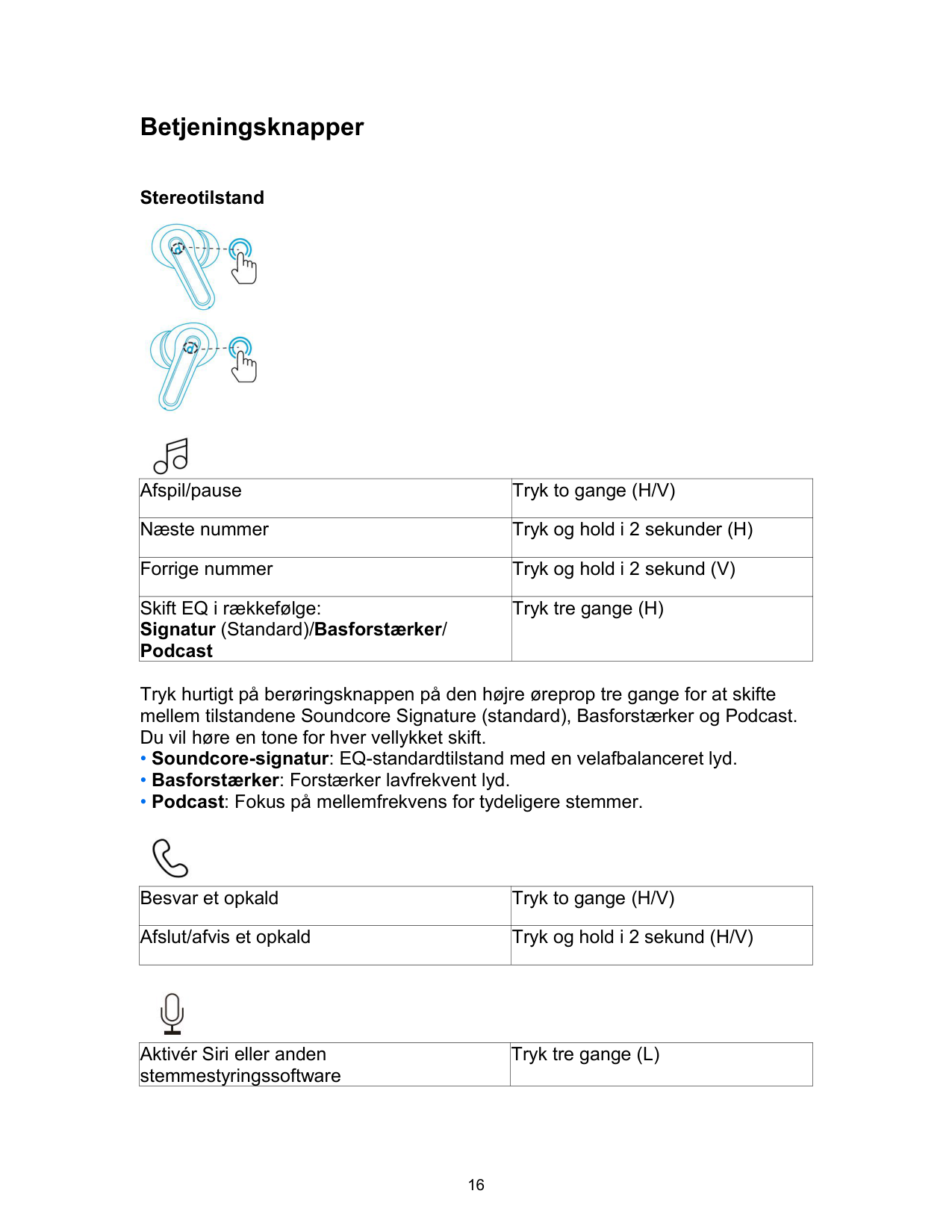
Betjeningsknapper
Stereotilstand


|Afspil/pause|Tryk to gange (H/V)| |---|---| |Næste nummer|Tryk og hold i 2 sekunder (H)| |Forrige nummer|Tryk og hold i 2 sekund (V)| |Skift EQ i rækkefølge: Signatur (Standard)/Basforstærker/ Podcast|Tryk tre gange (H)|
Tryk hurtigt på berøringsknappen på den højre øreprop tre gange for at skifte mellem tilstandene Soundcore Signature (standard), Basforstærker og Podcast. Du vil høre en tone for hver vellykket skift.

|Besvar et opkald|Tryk to gange (H/V)| |---|---| |Afslut/afvis et opkald|Tryk og hold i 2 sekund (H/V)|

|Aktivér Siri eller anden stemmestyringssoftware|Tryk tre gange (L)| |---|---|
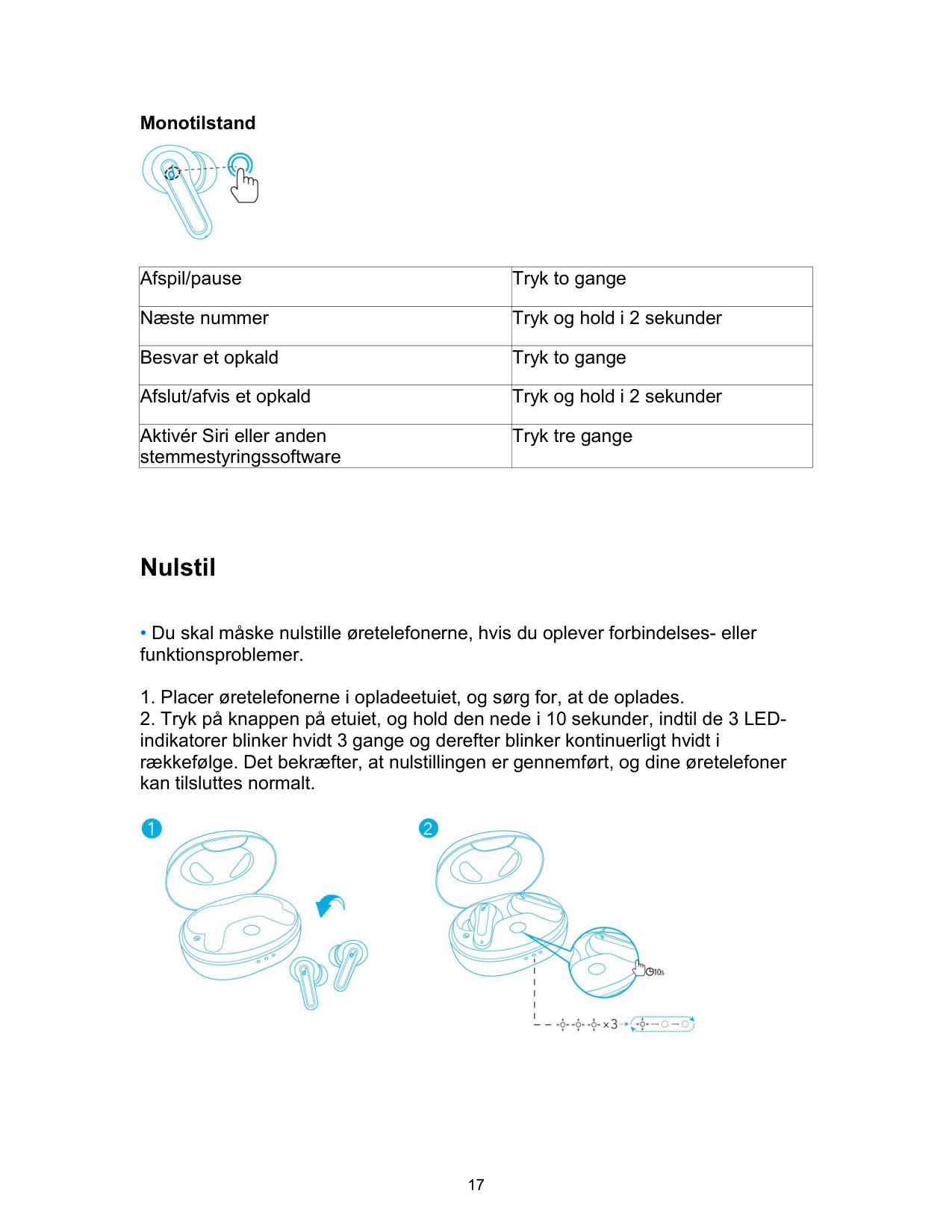
Monotilstand

|Afspil/pause|Tryk to gange| |---|---| |Næste nummer|Tryk og hold i 2 sekunder| |Besvar et opkald|Tryk to gange| |Afslut/afvis et opkald|Tryk og hold i 2 sekunder|
|Aktivér Siri eller anden stemmestyringssoftware|Tryk tre gange|
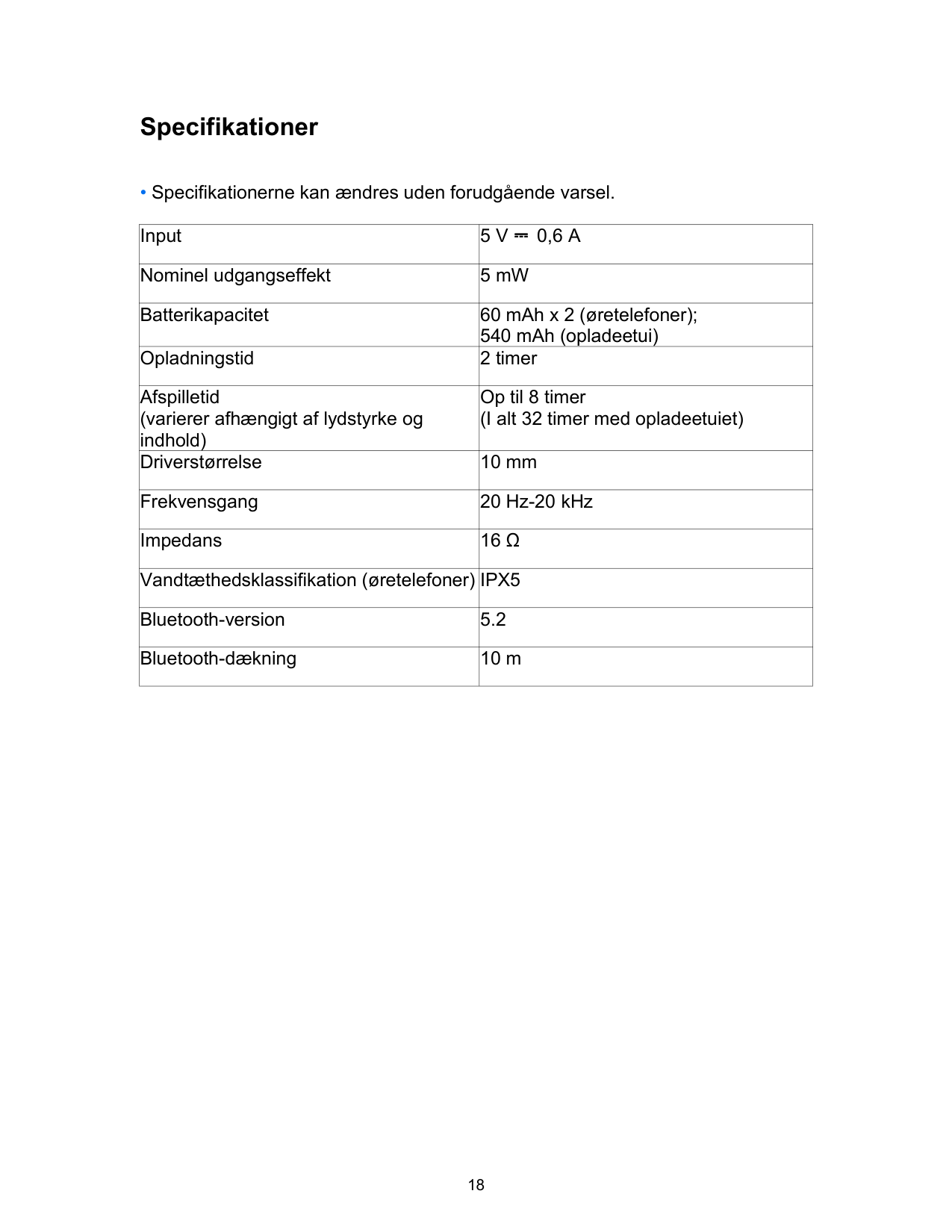
Nulstil

Specifikationer
|Input|5 V ⎓ 0,6 A| |---|---| |Nominel udgangseffekt|5 mW|
|Batterikapacitet|60 mAh x 2 (øretelefoner); 540 mAh (opladeetui)| |Opladningstid|2 timer| |Afspilletid (varierer afhængigt af lydstyrke og indhold)|Op til 8 timer (I alt 32 timer med opladeetuiet)| |Driverstørrelse|10 mm| |Frekvensgang|20 Hz-20 kHz| |Impedans|16 Ω| |Vandtæthedsklassifikation (øretelefoner)|IPX5| |Bluetooth-version|5.2| |Bluetooth-dækning|10 m|
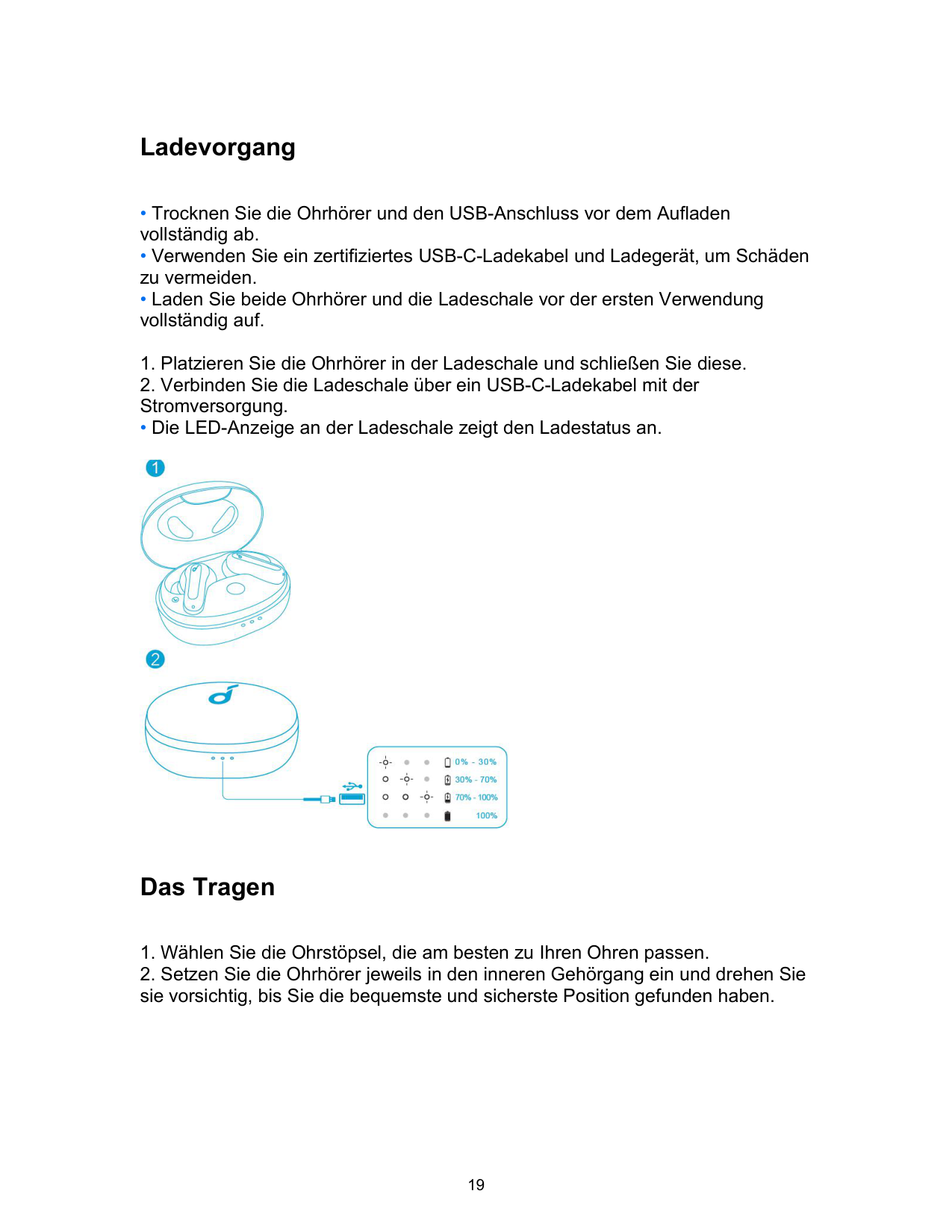
Ladevorgang
• Die LED-Anzeige an der Ladeschale zeigt den Ladestatus an.

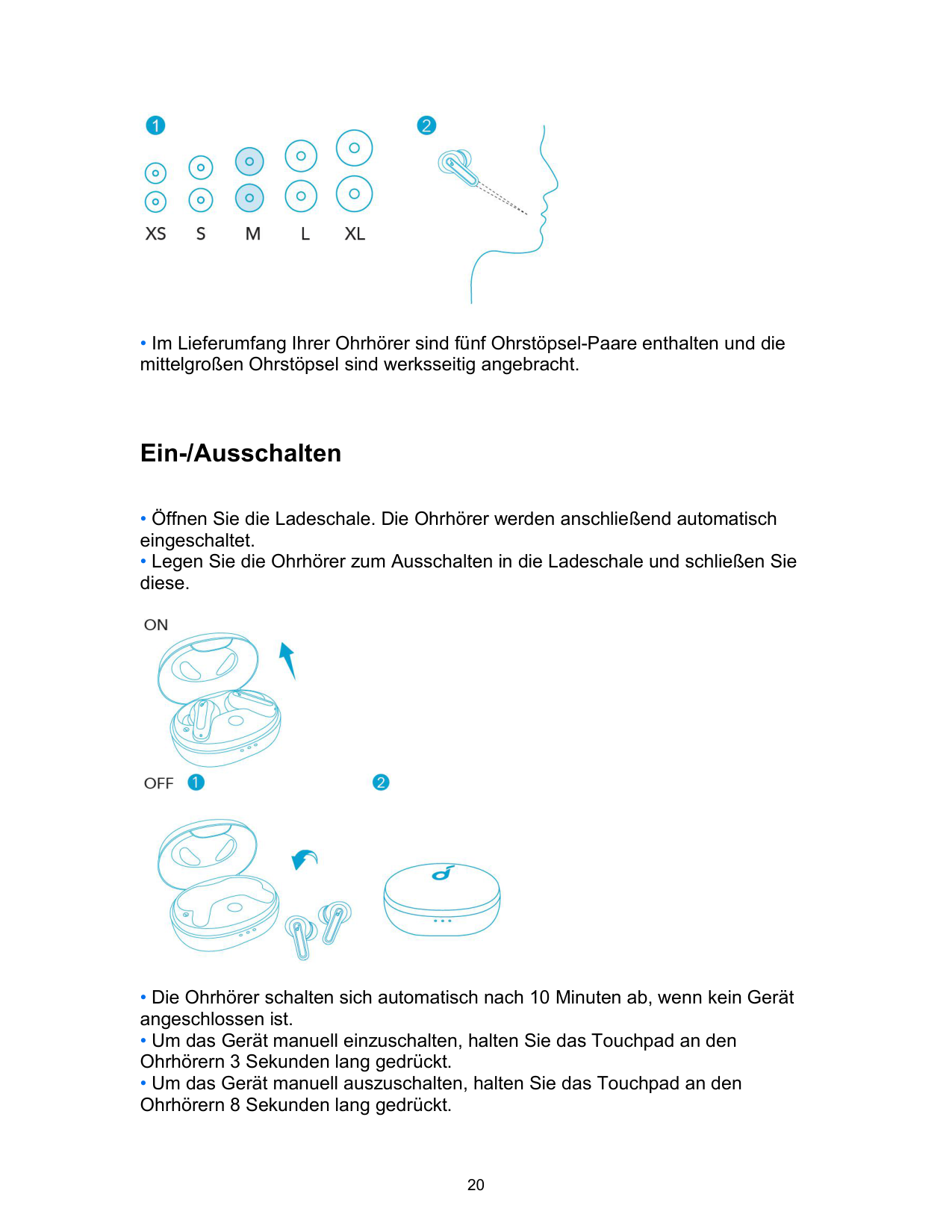
Das Tragen

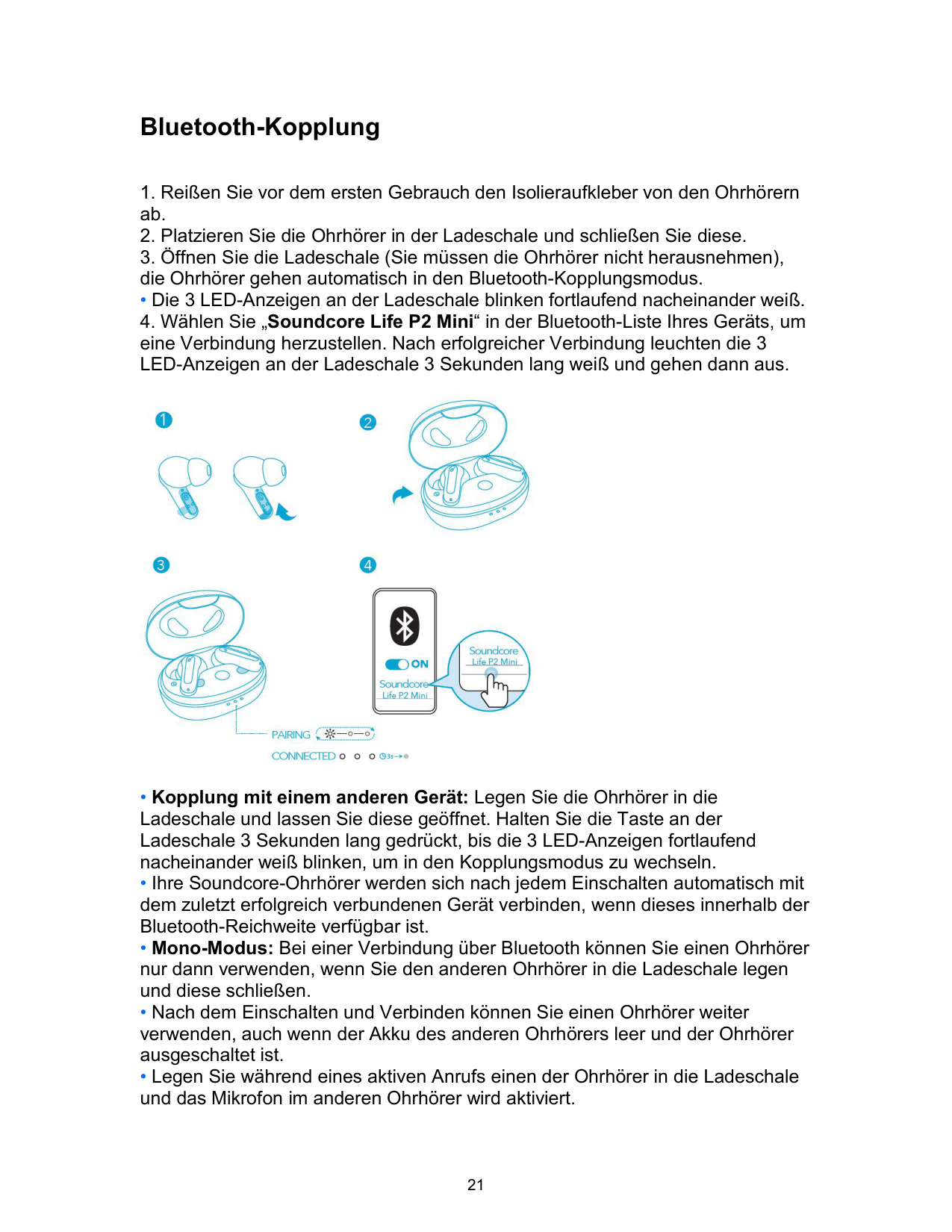
Ein-/Ausschalten

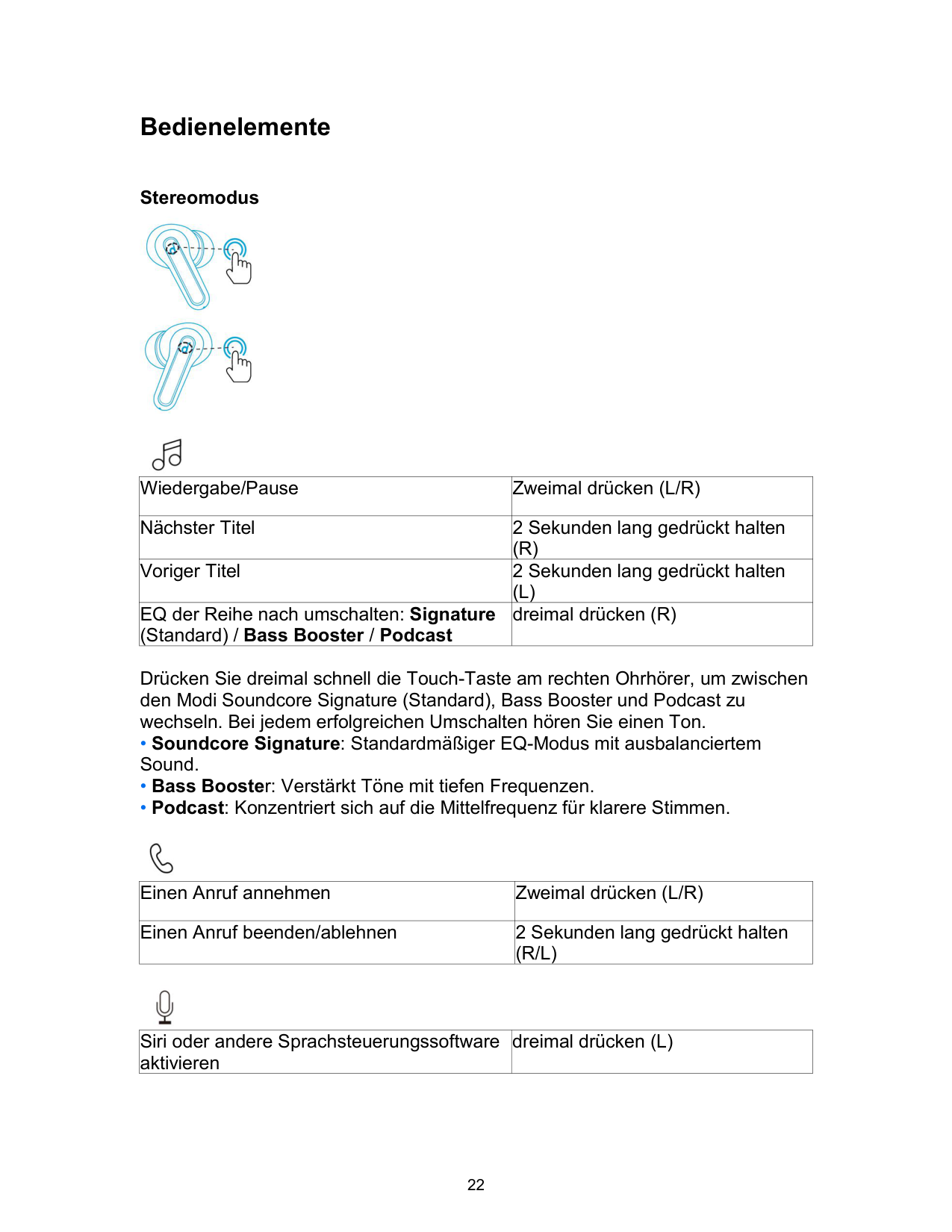
Bluetooth-Kopplung
• Die 3 LED-Anzeigen an der Ladeschale blinken fortlaufend nacheinander weiß.

Bedienelemente
Stereomodus


|Wiedergabe/Pause|Zweimal drücken (L/R)| |---|---| |Nächster Titel|2 Sekunden lang gedrückt halten (R)| |Voriger Titel|2 Sekunden lang gedrückt halten (L)| |EQ der Reihe nach umschalten: Signature (Standard) / Bass Booster / Podcast|dreimal drücken (R)|
Drücken Sie dreimal schnell die Touch-Taste am rechten Ohrhörer, um zwischen

|Einen Anruf annehmen|Zweimal drücken (L/R)| |---|---| |Einen Anruf beenden/ablehnen|2 Sekunden lang gedrückt halten (R/L)|

|Siri oder andere Sprachsteuerungssoftware aktivieren|dreimal drücken (L)| |---|---|
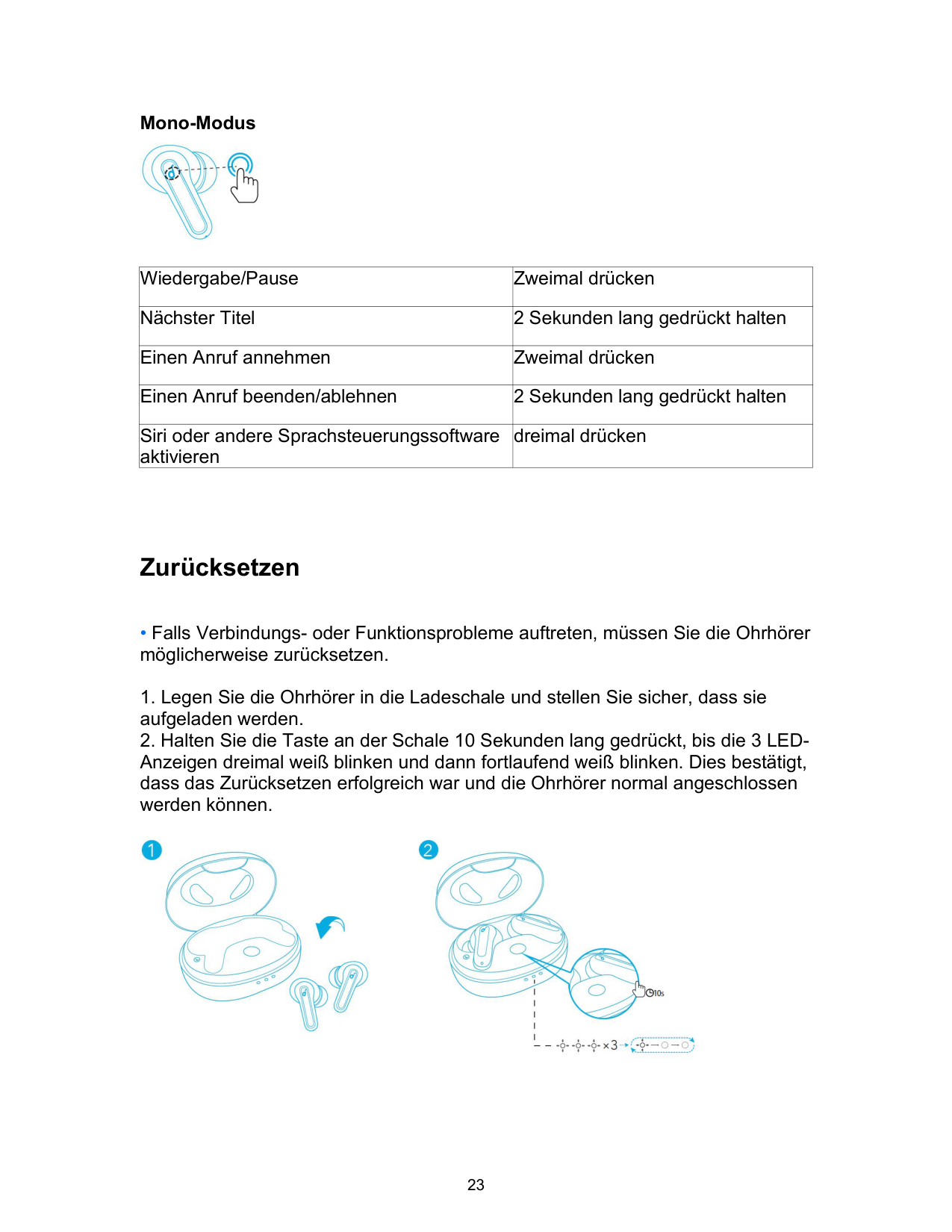
Mono-Modus

|Wiedergabe/Pause|Zweimal drücken| |---|---| |Nächster Titel|2 Sekunden lang gedrückt halten| |Einen Anruf annehmen|Zweimal drücken| |Einen Anruf beenden/ablehnen|2 Sekunden lang gedrückt halten| |Siri oder andere Sprachsteuerungssoftware aktivieren|dreimal drücken|
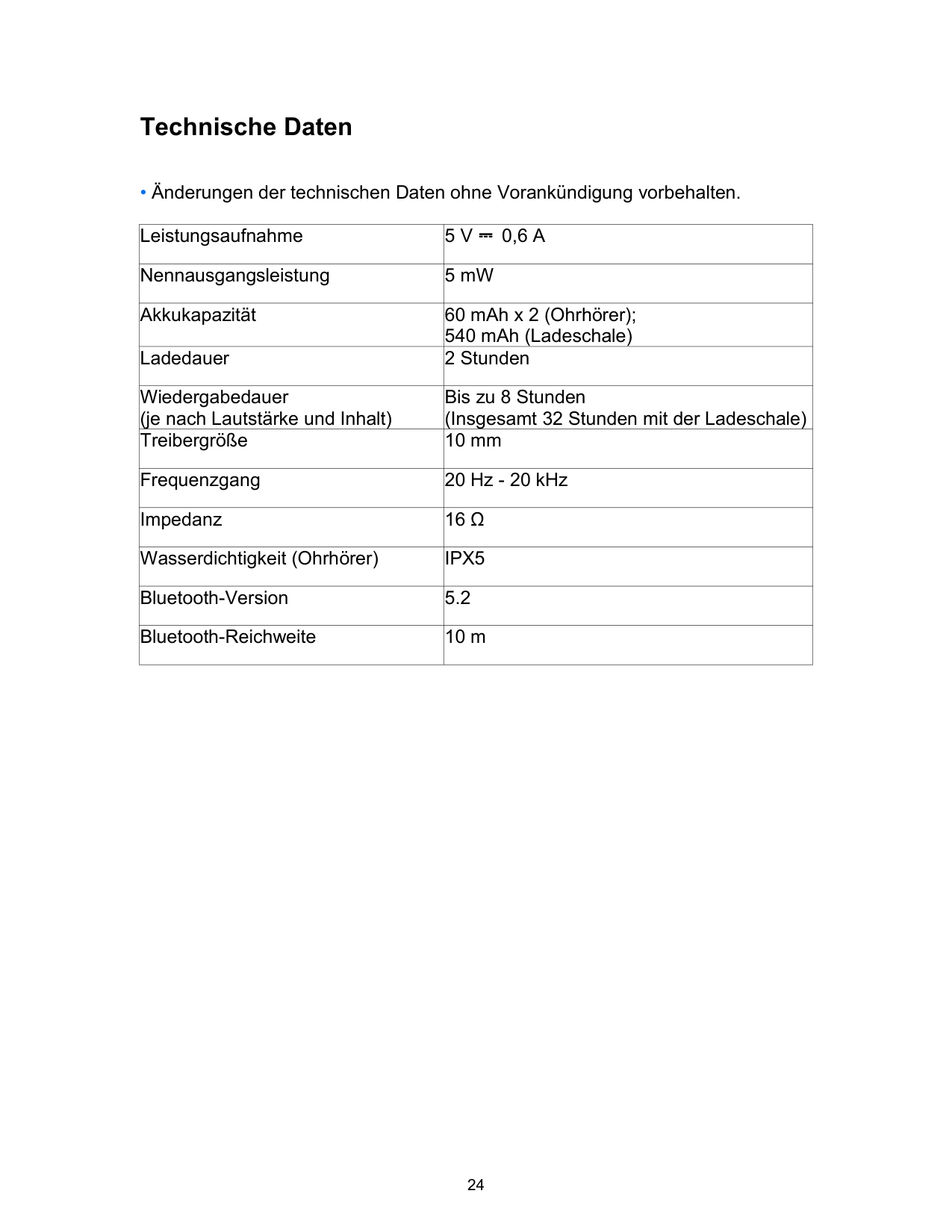
Zurücksetzen

Technische Daten
|Leistungsaufnahme|5 V ⎓ 0,6 A| |---|---| |Nennausgangsleistung|5 mW| |Akkukapazität|60 mAh x 2 (Ohrhörer); 540 mAh (Ladeschale)| |Ladedauer|2 Stunden| |Wiedergabedauer (je nach Lautstärke und Inhalt)|Bis zu 8 Stunden (Insgesamt 32 Stunden mit der Ladeschale)| |Treibergröße|10 mm| |Frequenzgang|20 Hz - 20 kHz| |Impedanz|16 Ω| |Wasserdichtigkeit (Ohrhörer)|IPX5| |Bluetooth-Version|5.2| |Bluetooth-Reichweite|10 m|
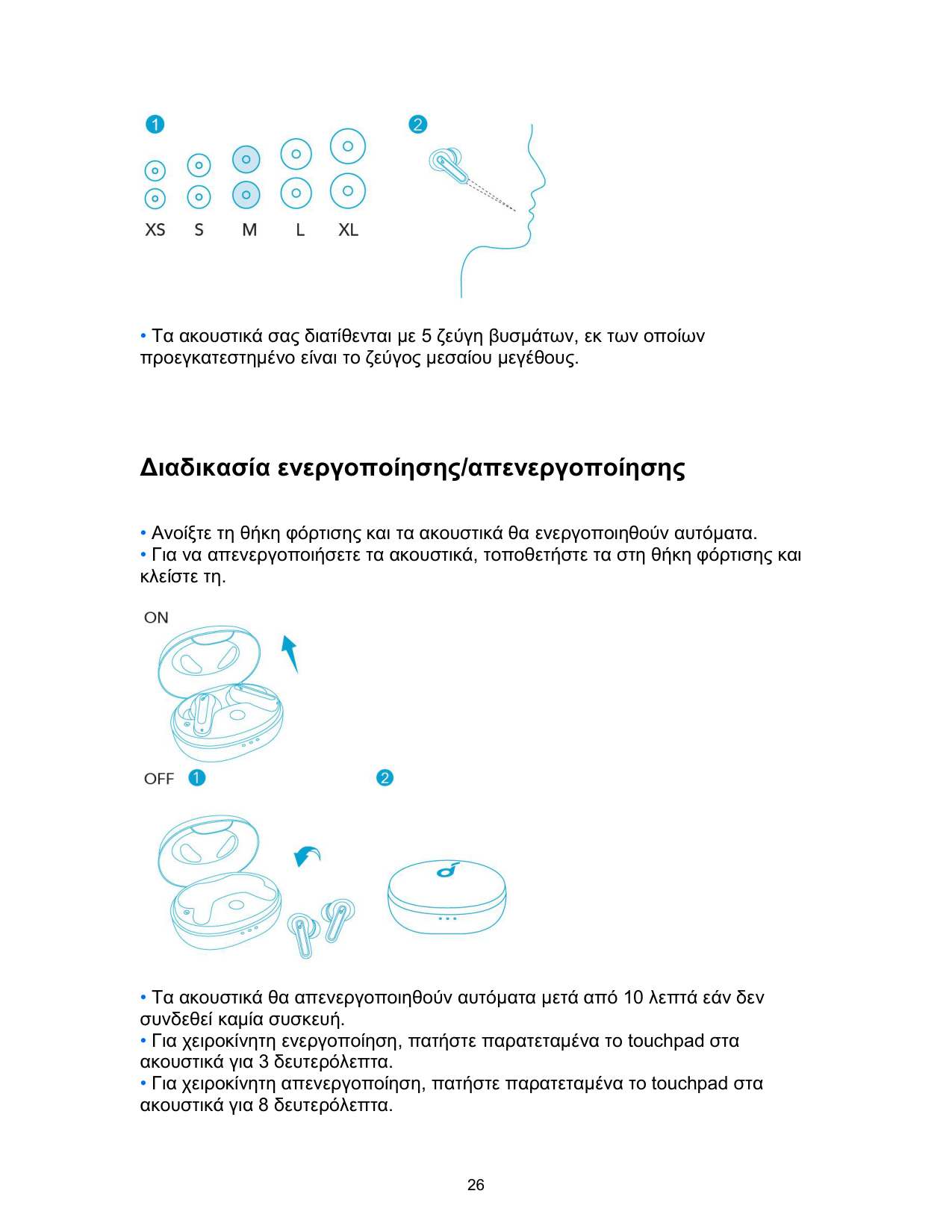
Φόρτιση
• Το ενδεικτικό LED στη θήκη φόρτισης υποδεικνύει την κατάσταση της διαδικασίας φόρτισης.

Διαδικασία χρήσης

Διαδικασία ενεργοποίησης/απενεργοποίησης

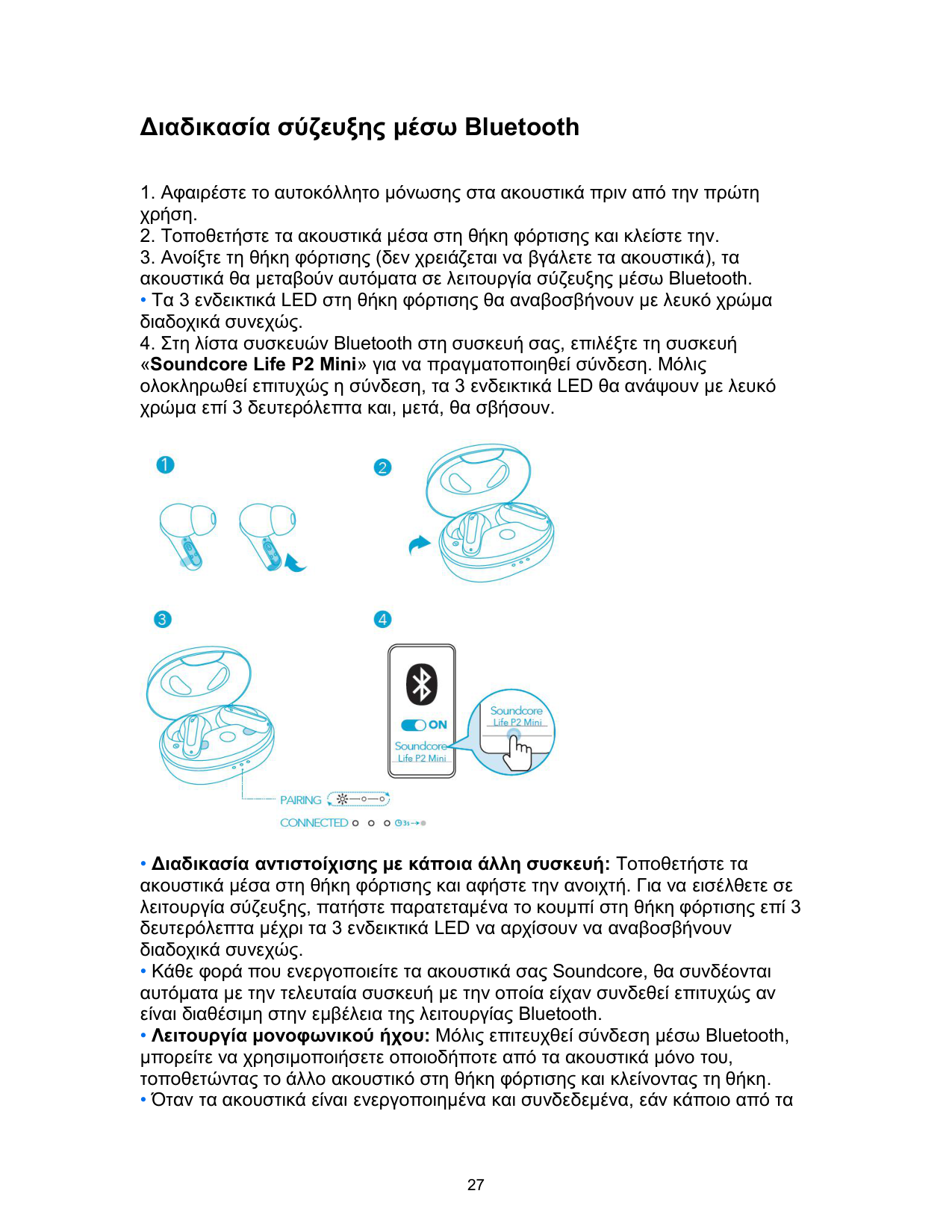
Διαδικασία σύζευξης μέσω Bluetooth
• Τα 3 ενδεικτικά LED στη θήκη φόρτισης θα αναβοσβήνουν με λευκό χρώμα διαδοχικά συνεχώς.

Στοιχεία ελέγχου
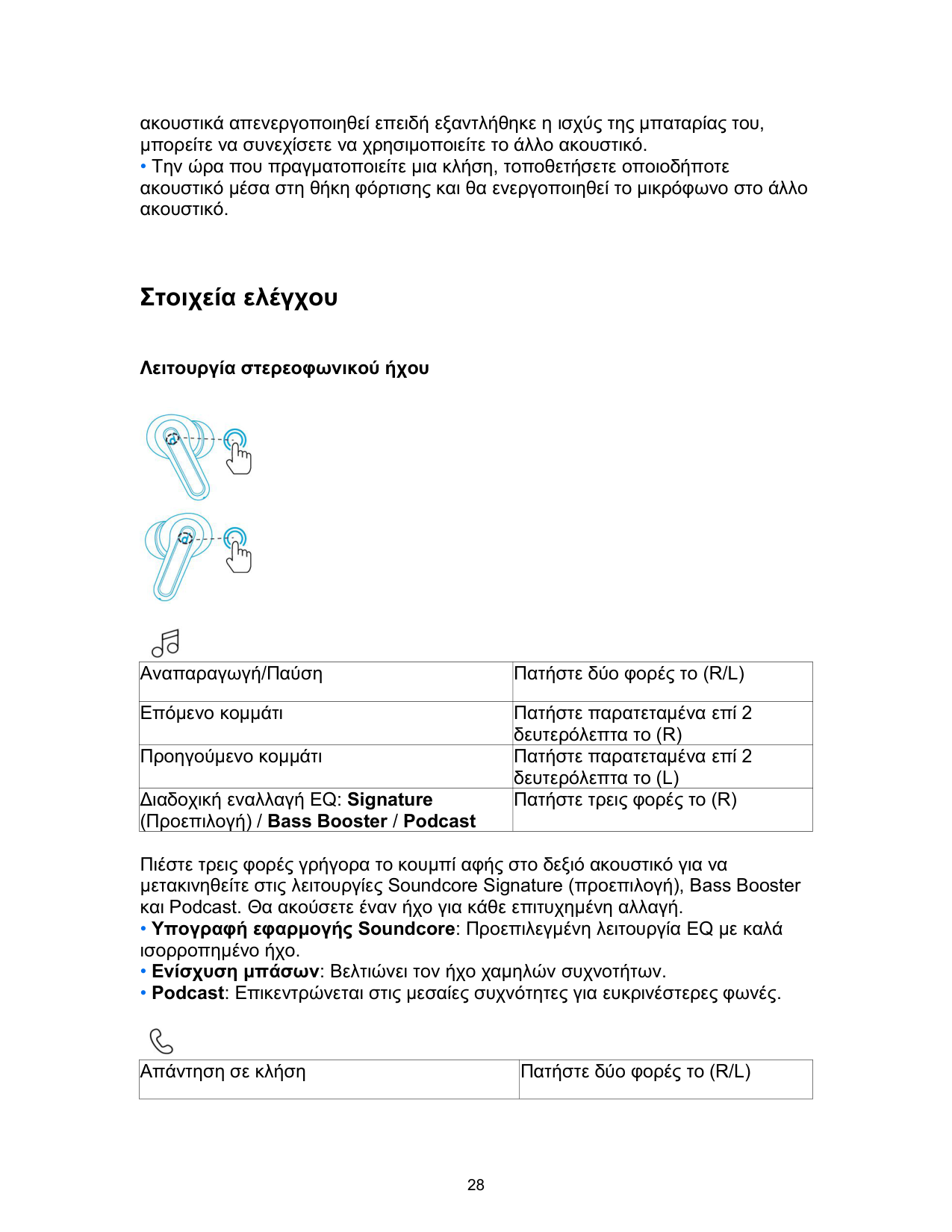
Λειτουργία στερεοφωνικού ήχου


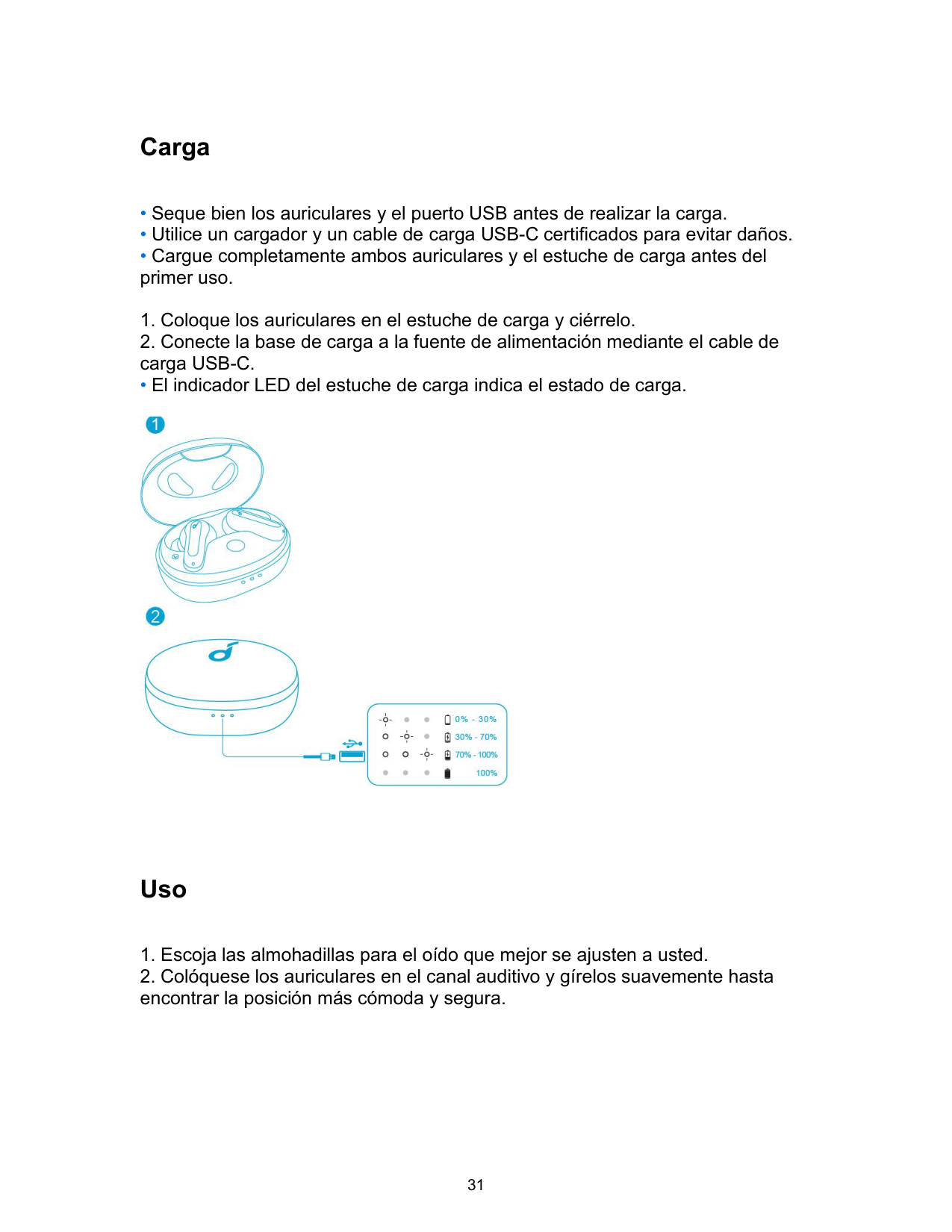
|Αναπαραγωγή/Παύση|Πατήστε δύο φορές το (R/L)|
|---|---| |Επόμενο κομμάτι|Πατήστε παρατεταμένα επί 2 δευτερόλεπτα το (R)| |Προηγούμενο κομμάτι|Πατήστε παρατεταμένα επί 2 δευτερόλεπτα το (L)| |Διαδοχική εναλλαγή EQ: Signature (Προεπιλογή) / Bass Booster / Podcast|Πατήστε τρεις φορές το (R)|
Πιέστε τρεις φορές γρήγορα το κουμπί αφής στο δεξιό ακουστικό για να μετακινηθείτε στις λειτουργίες Soundcore Signature (προεπιλογή), Bass Booster και Podcast. Θα ακούσετε έναν ήχο για κάθε επιτυχημένη αλλαγή.

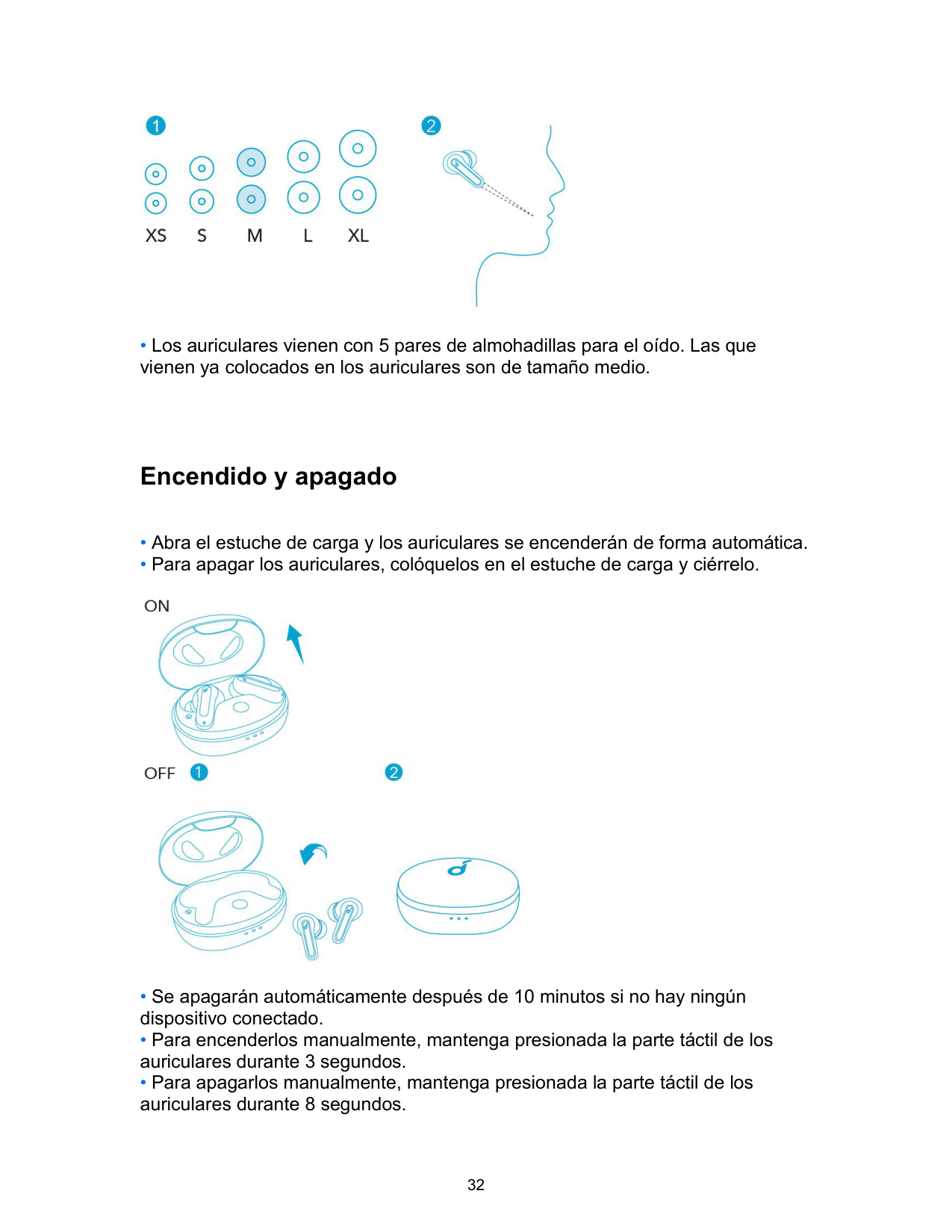
|Απάντηση σε κλήση|Πατήστε δύο φορές το (R/L)| |---|---|
|Τερματισμός/Απόρριψη κλήσης|Πατήστε παρατεταμένα επί 2 δευτερόλεπτα το (R/L)| |---|---|

|Ενεργοποίηση Siri ή άλλου λογισμικού φωνητικής υποβοήθησης|Πατήστε τρεις φορές το (L)| |---|---|
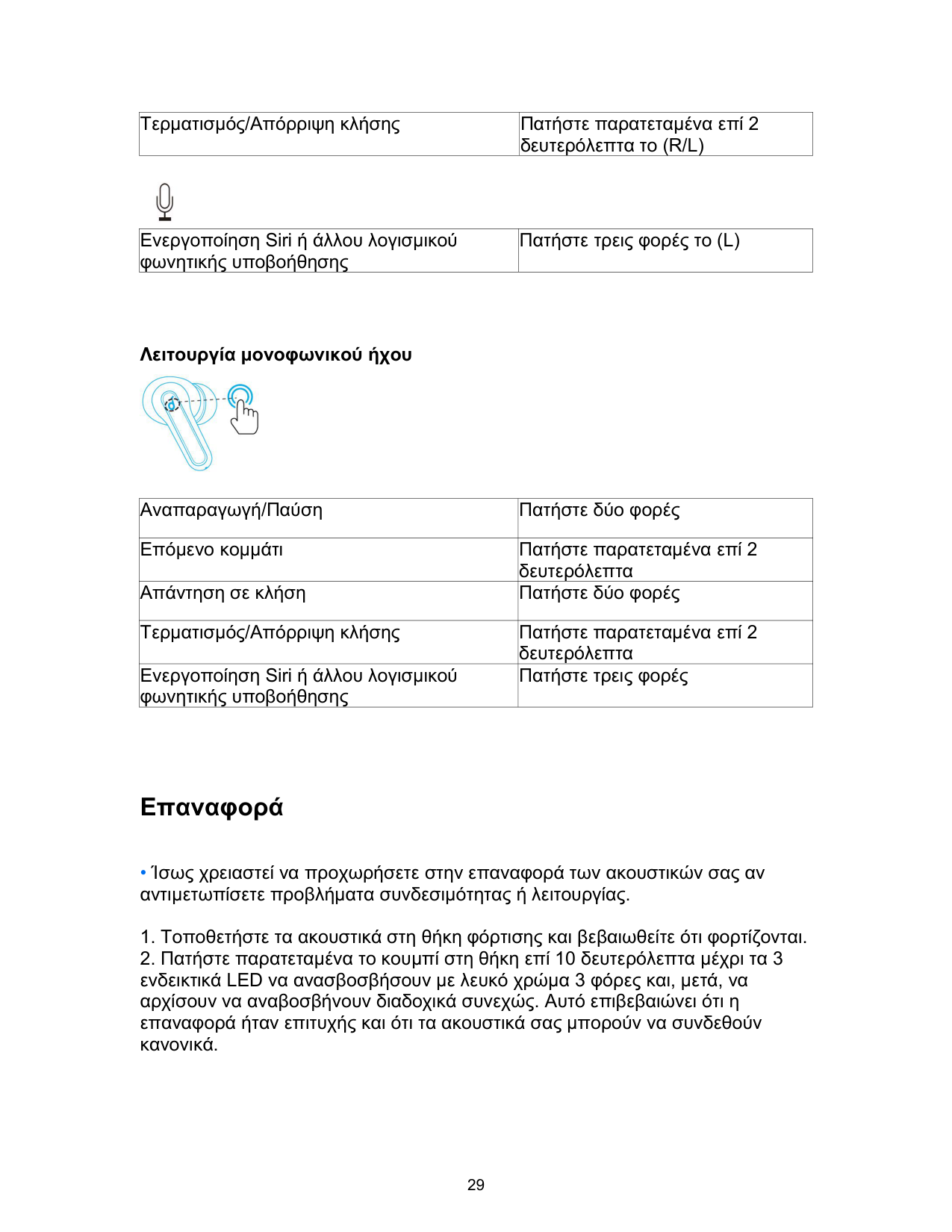
Λειτουργία μονοφωνικού ήχου

|Αναπαραγωγή/Παύση|Πατήστε δύο φορές| |---|---| |Επόμενο κομμάτι|Πατήστε παρατεταμένα επί 2 δευτερόλεπτα| |Απάντηση σε κλήση|Πατήστε δύο φορές| |Τερματισμός/Απόρριψη κλήσης|Πατήστε παρατεταμένα επί 2 δευτερόλεπτα| |Ενεργοποίηση Siri ή άλλου λογισμικού φωνητικής υποβοήθησης|Πατήστε τρεις φορές|
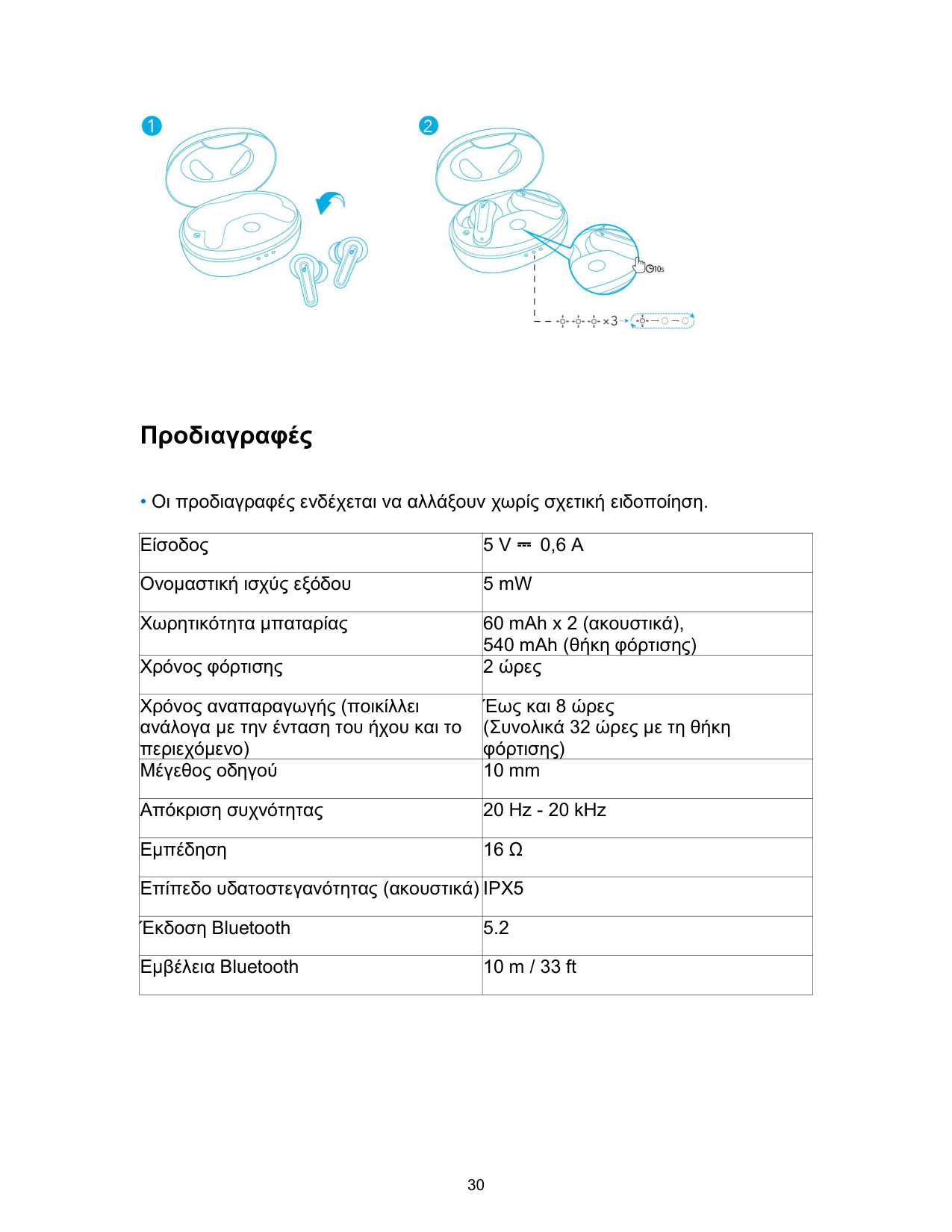
Επαναφορά

Προδιαγραφές
|Είσοδος|5 V ⎓ 0,6 A| |---|---| |Ονομαστική ισχύς εξόδου|5 mW| |Χωρητικότητα μπαταρίας|60 mAh x 2 (ακουστικά), 540 mAh (θήκη φόρτισης)| |Χρόνος φόρτισης|2 ώρες| |Χρόνος αναπαραγωγής (ποικίλλει ανάλογα με την ένταση του ήχου και το περιεχόμενο)|Έως και 8 ώρες (Συνολικά 32 ώρες με τη θήκη φόρτισης)| |Μέγεθος οδηγού|10 mm| |Απόκριση συχνότητας|20 Hz - 20 kHz| |Εμπέδηση|16 Ω|
|Επίπεδο υδατοστεγανότητας (ακουστικά)|IPX5| |Έκδοση Bluetooth|5.2| |Εμβέλεια Bluetooth|10 m / 33 ft|
Carga
• El indicador LED del estuche de carga indica el estado de carga.

Uso
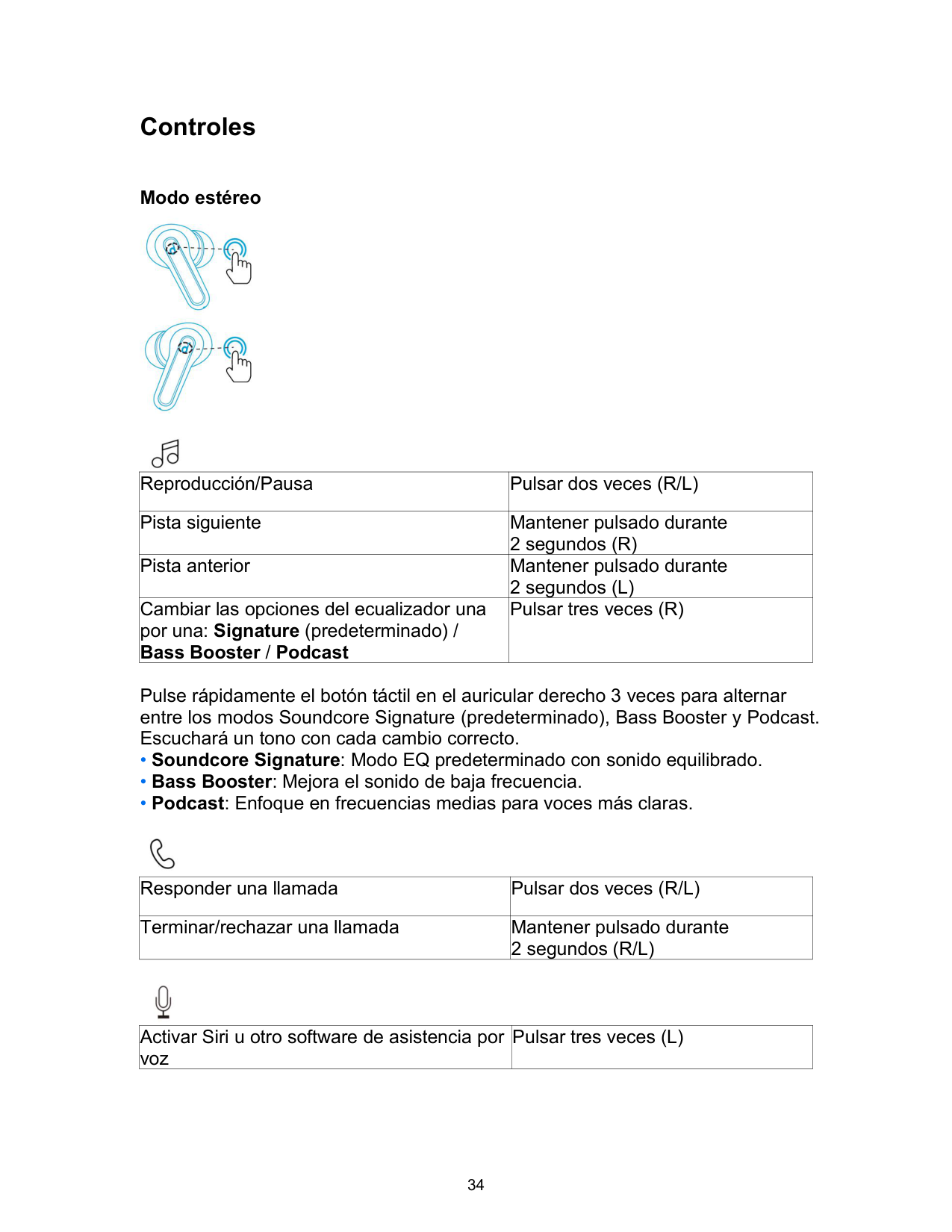

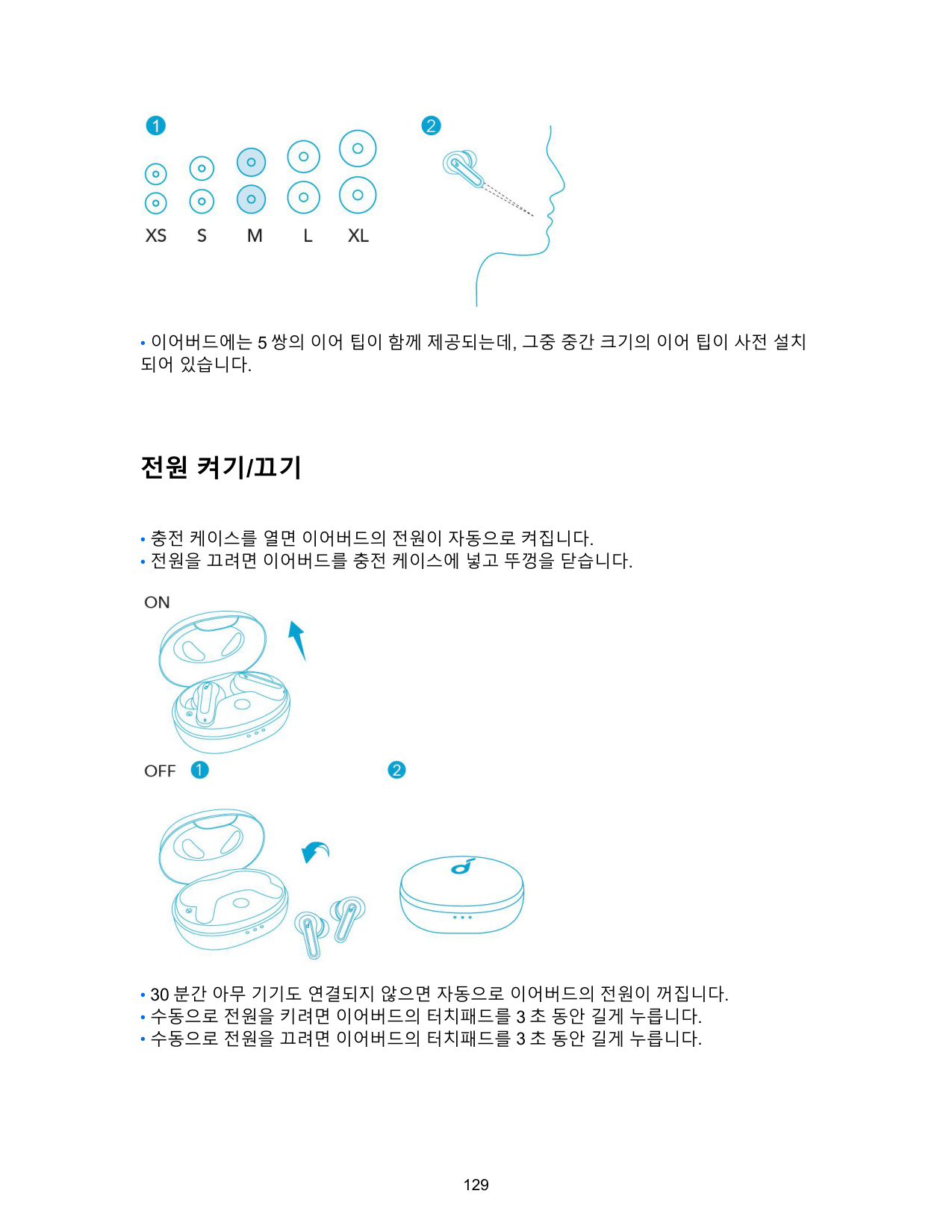
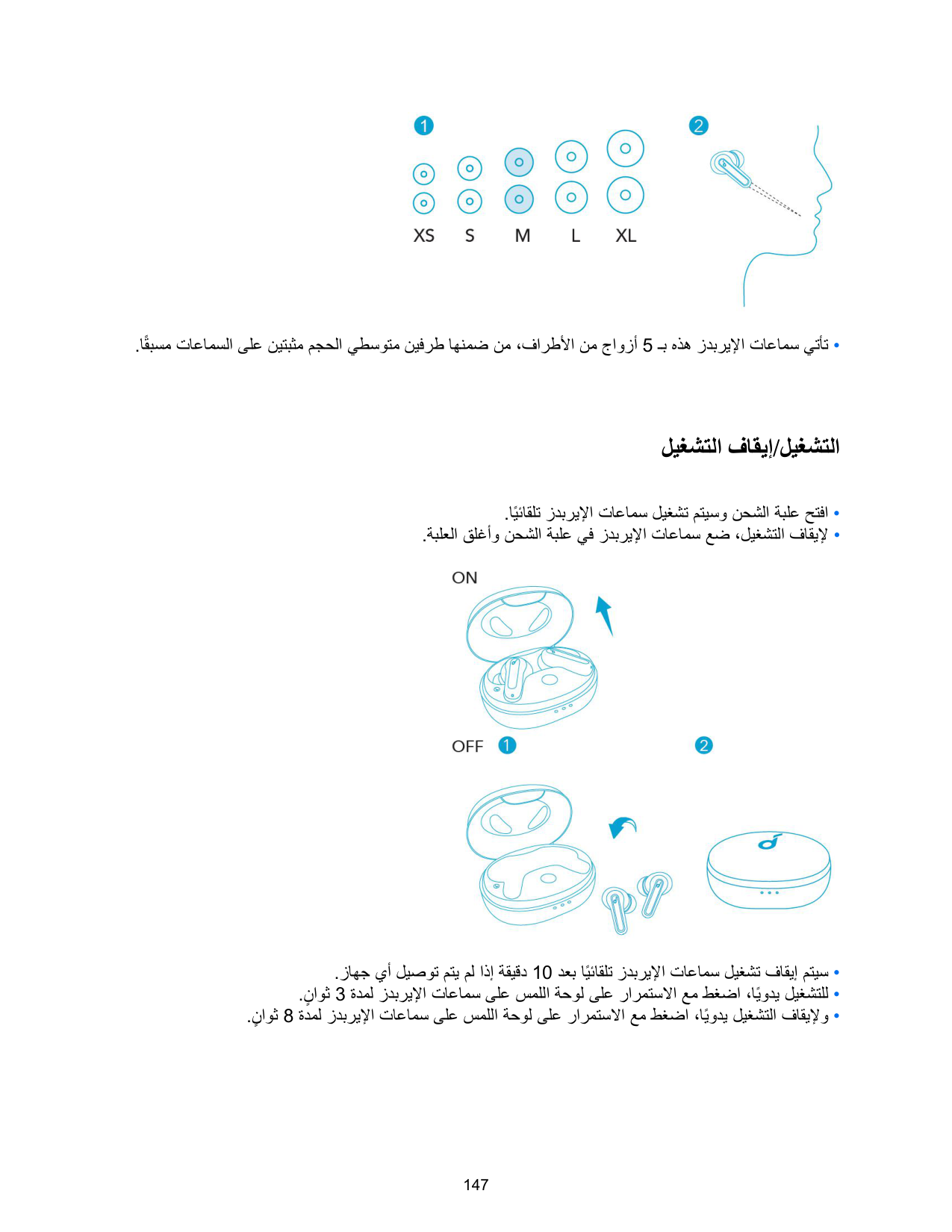
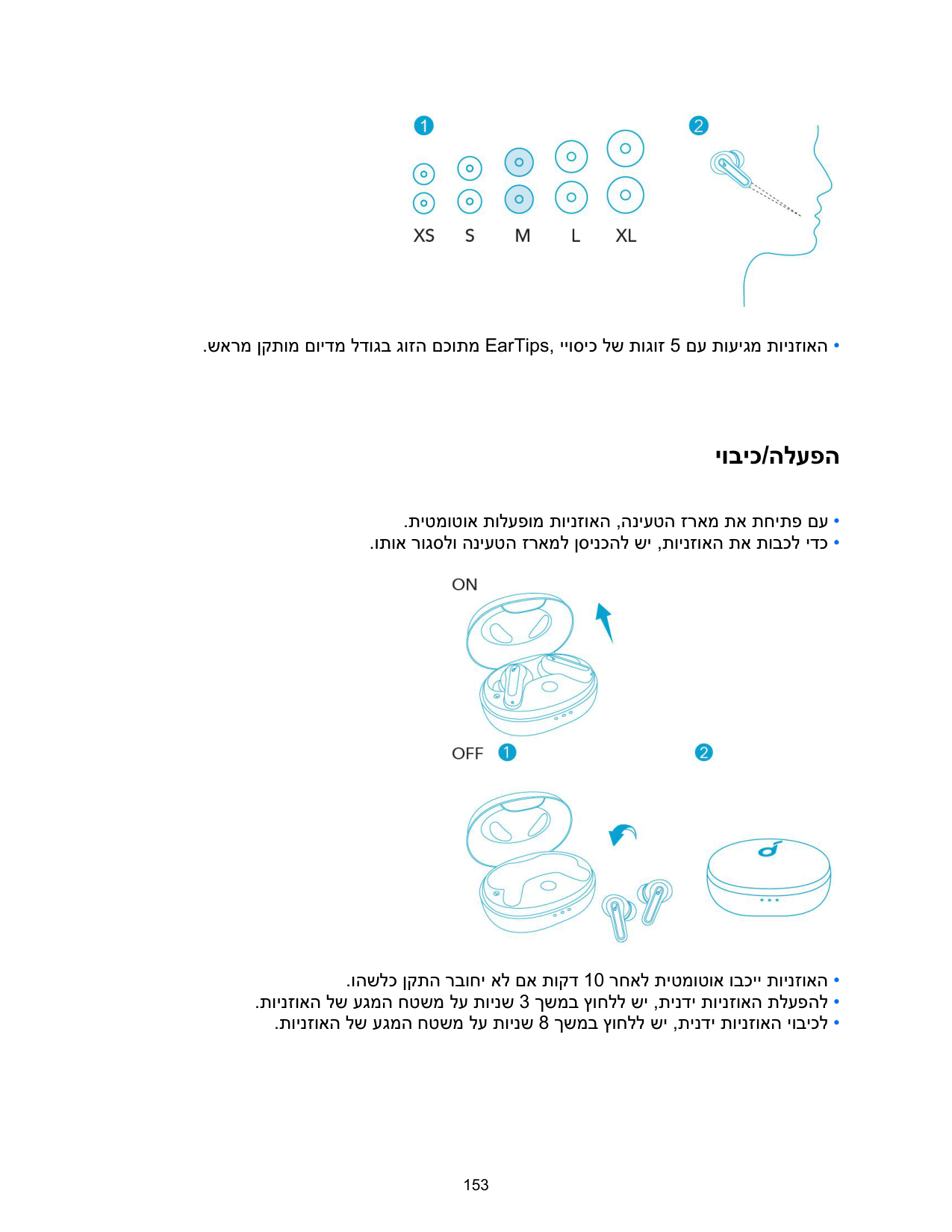
• Los auriculares vienen con 5 pares de almohadillas para el oído. Las que vienen ya colocados en los auriculares son de tamaño medio.
Encendido y apagado

Emparejamiento por Bluetooth
• Los tres indicadores LED del estuche de carga parpadearán en blanco en secuencia de forma continua.

Controles
Modo estéreo


|Reproducción/Pausa|Pulsar dos veces (R/L)| |---|---| |Pista siguiente|Mantener pulsado durante 2 segundos (R)| |Pista anterior|Mantener pulsado durante 2 segundos (L)| |Cambiar las opciones del ecualizador una por una: Signature (predeterminado) / Bass Booster / Podcast|Pulsar tres veces (R)|
Pulse rápidamente el botón táctil en el auricular derecho 3 veces para alternar entre los modos Soundcore Signature (predeterminado), Bass Booster y Podcast. Escuchará un tono con cada cambio correcto.

|Responder una llamada|Pulsar dos veces (R/L)| |---|---|
|Terminar/rechazar una llamada|Mantener pulsado durante 2 segundos (R/L)|

|Activar Siri u otro software de asistencia por voz|Pulsar tres veces (L)| |---|---|
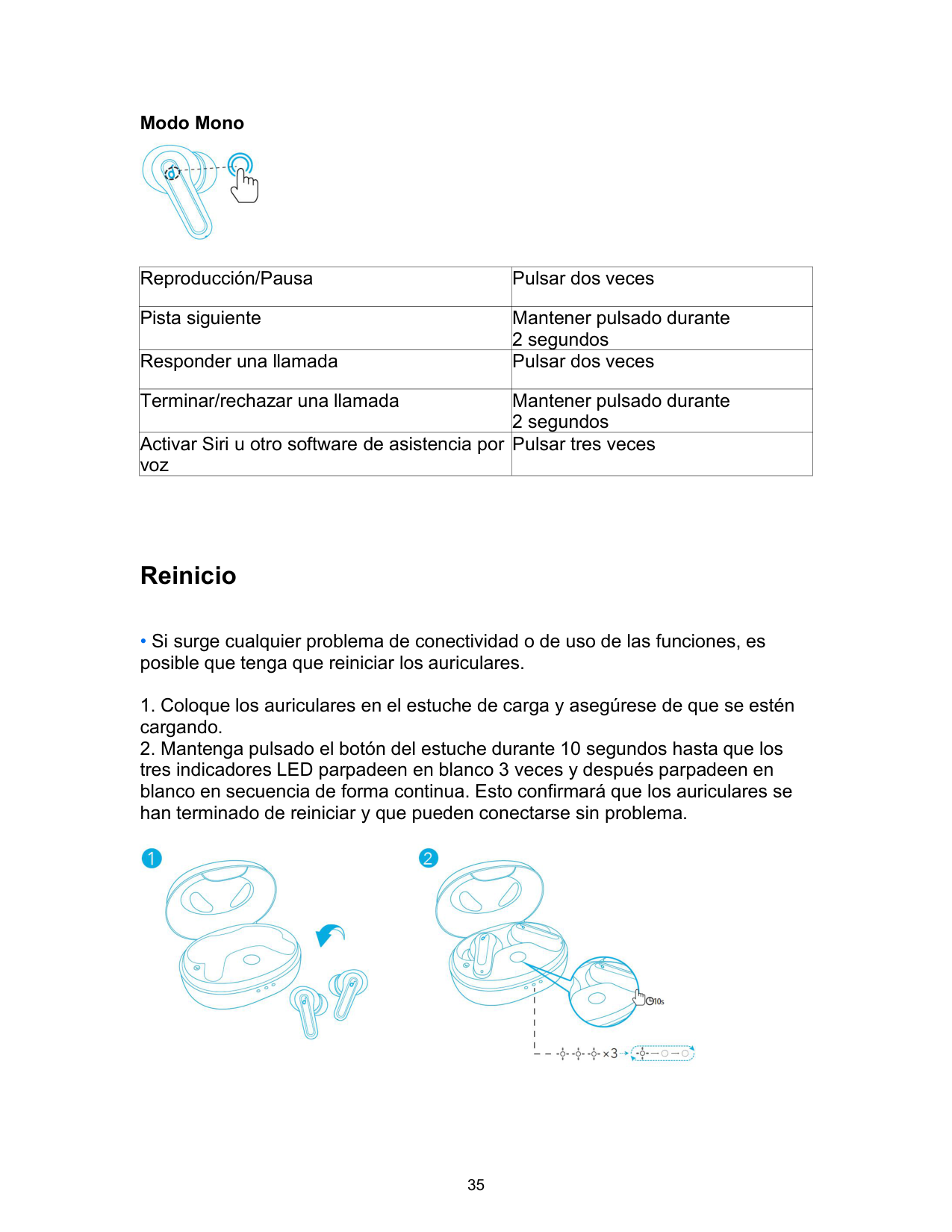
Modo Mono

|Reproducción/Pausa|Pulsar dos veces| |---|---| |Pista siguiente|Mantener pulsado durante 2 segundos| |Responder una llamada|Pulsar dos veces| |Terminar/rechazar una llamada|Mantener pulsado durante 2 segundos| |Activar Siri u otro software de asistencia por voz|Pulsar tres veces|
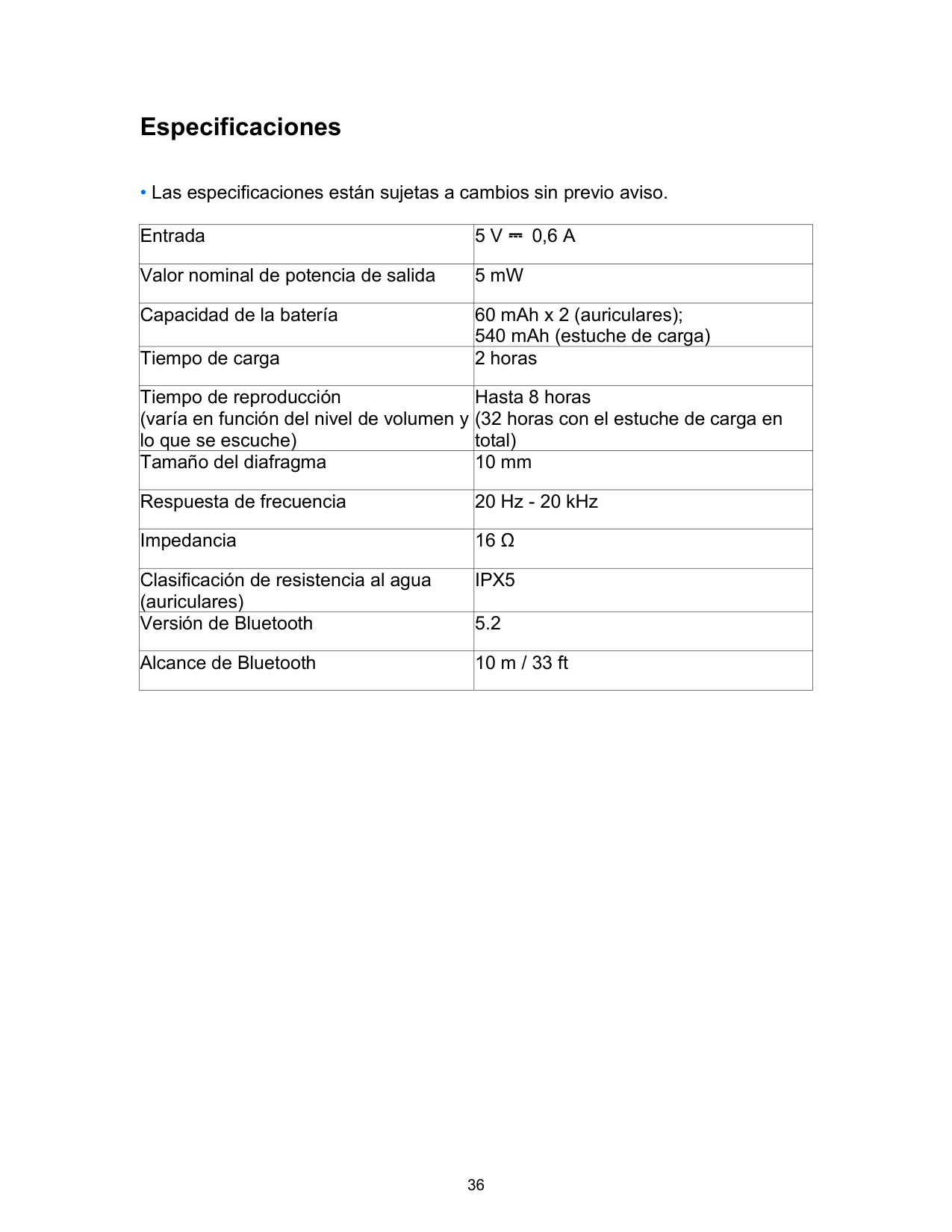
Reinicio

Especificaciones
• Las especificaciones están sujetas a cambios sin previo aviso.
|Entrada|5 V ⎓ 0,6 A| |---|---| |Valor nominal de potencia de salida|5 mW| |Capacidad de la batería|60 mAh x 2 (auriculares); 540 mAh (estuche de carga)| |Tiempo de carga|2 horas| |Tiempo de reproducción (varía en función del nivel de volumen y lo que se escuche)|Hasta 8 horas (32 horas con el estuche de carga en total)| |Tamaño del diafragma|10 mm| |Respuesta de frecuencia|20 Hz - 20 kHz|
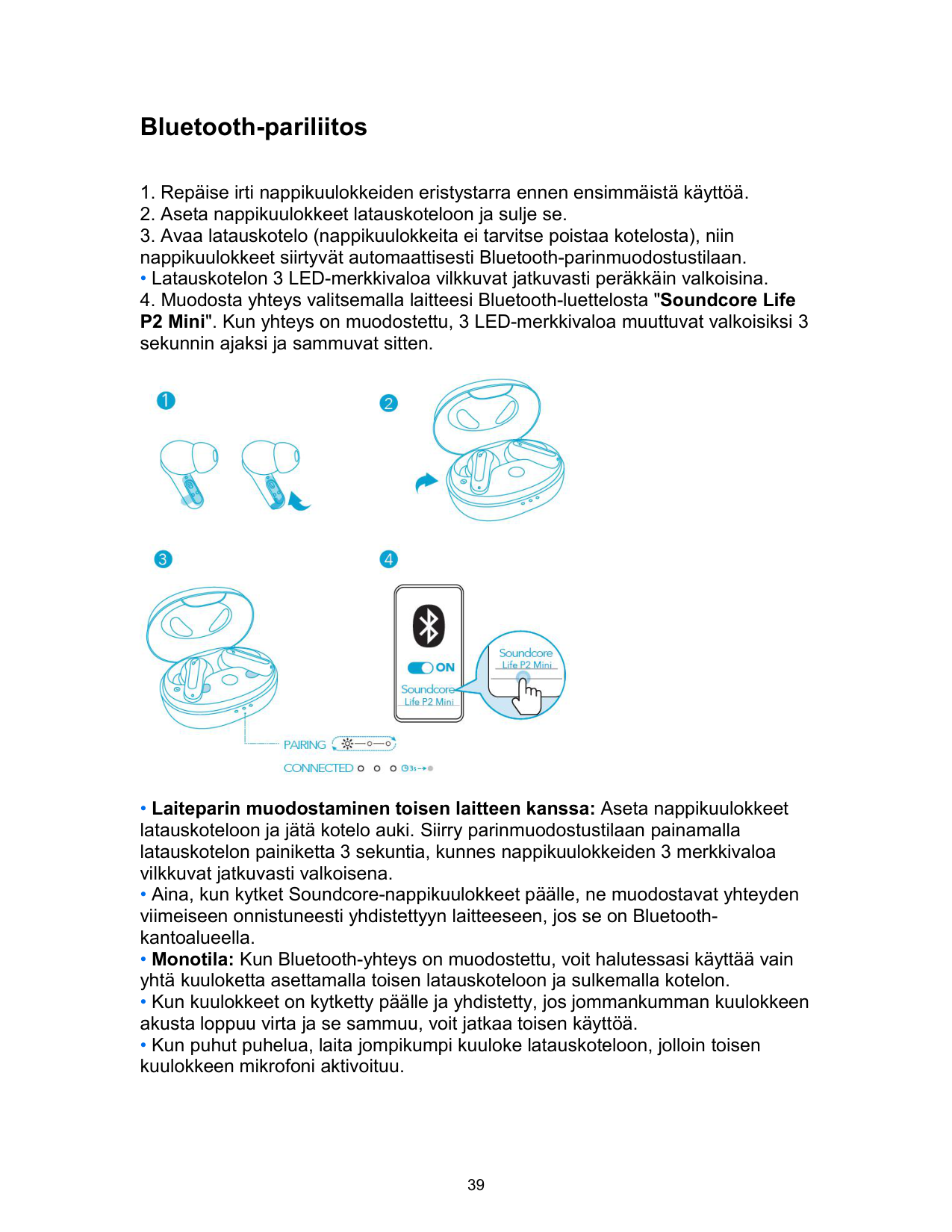
|Impedancia|16 Ω| |Clasificación de resistencia al agua (auriculares)|IPX5| |Versión de Bluetooth|5.2| |Alcance de Bluetooth|10 m / 33 ft|
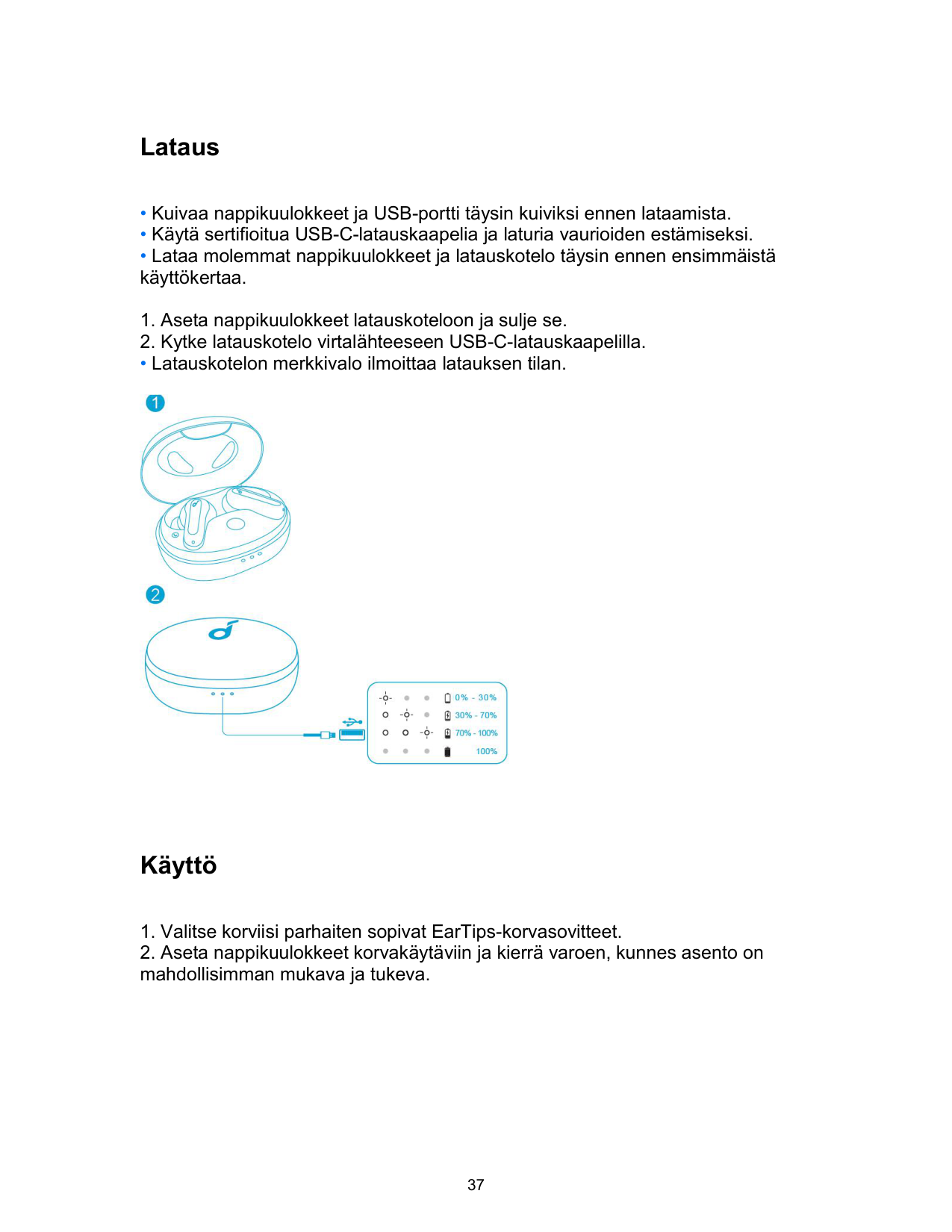
Lataus
• Latauskotelon merkkivalo ilmoittaa latauksen tilan.

Käyttö
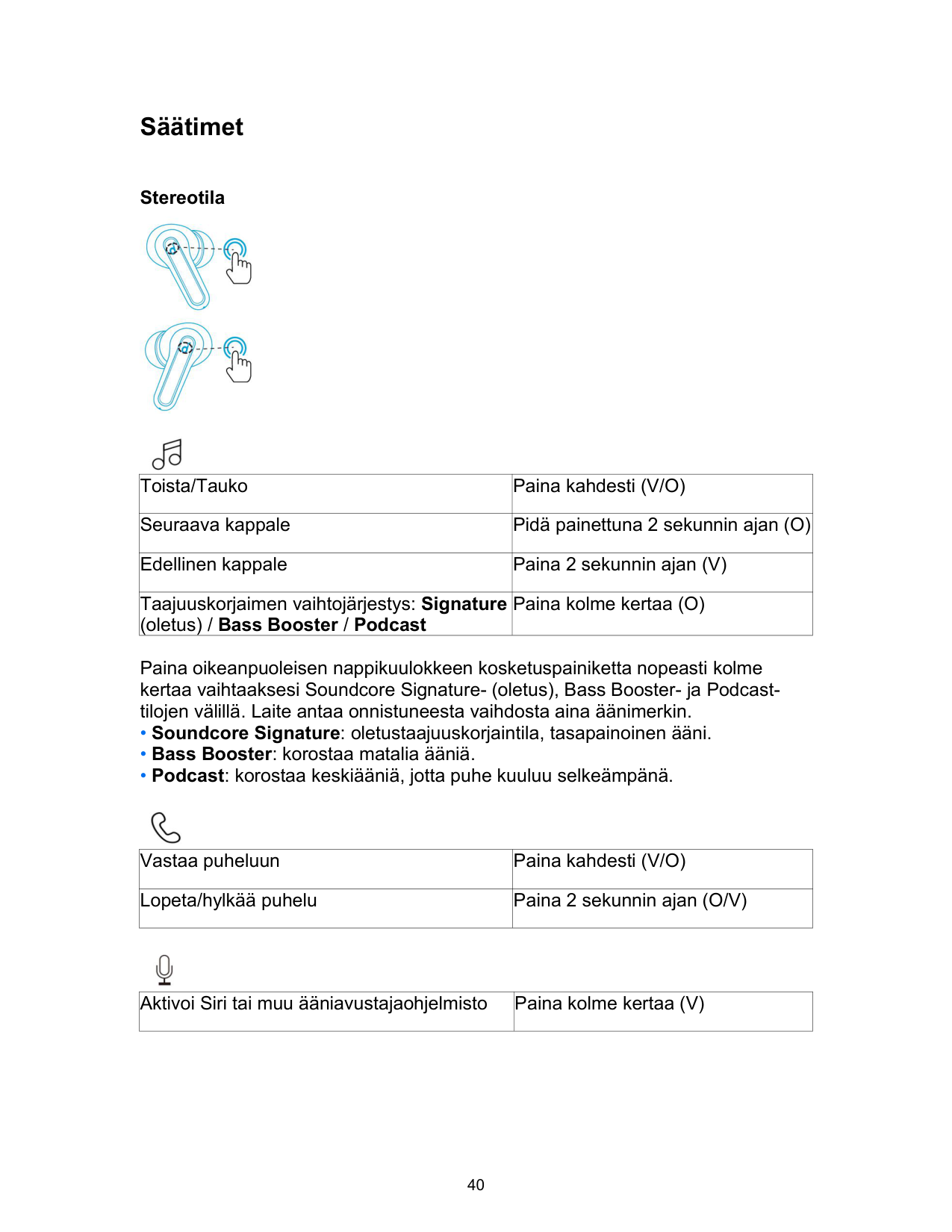

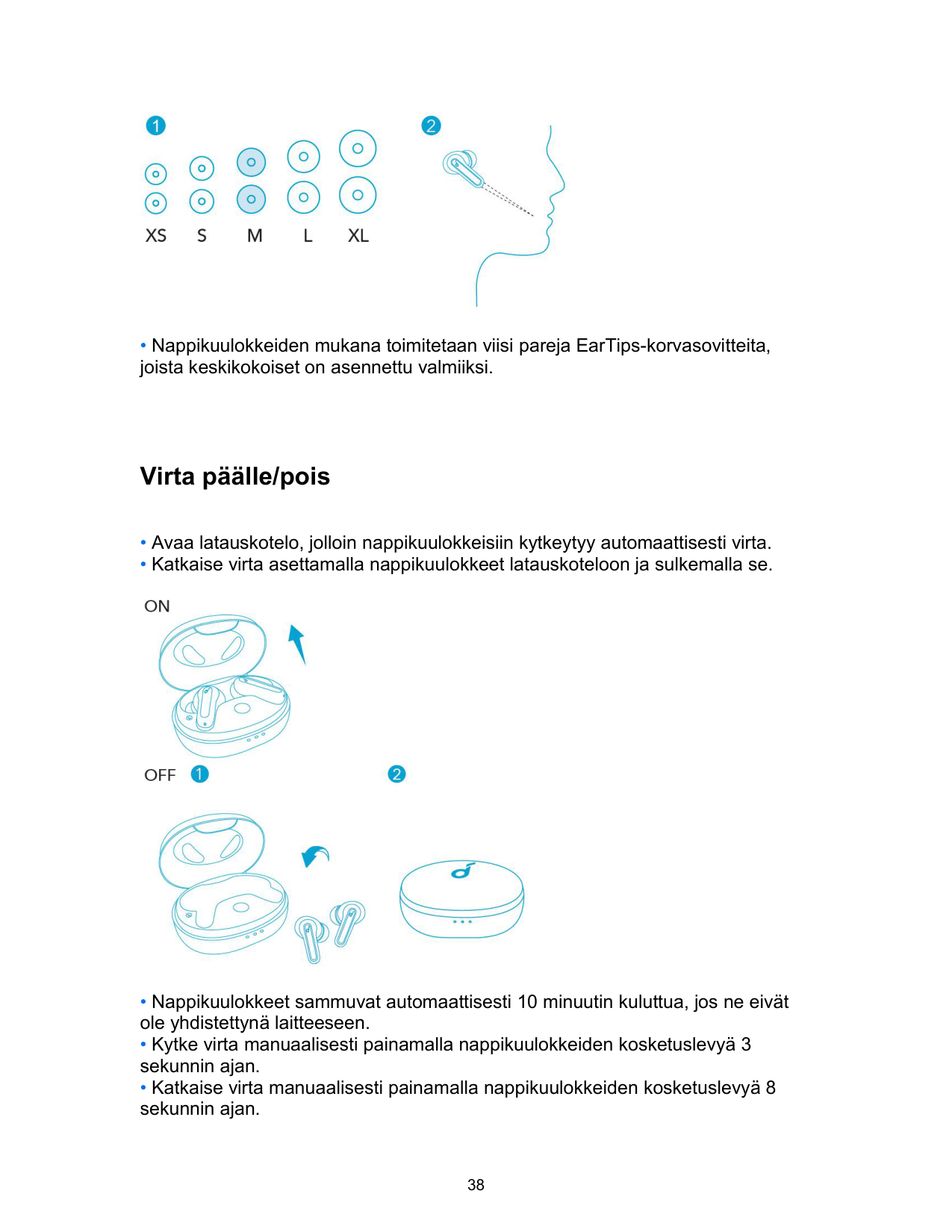
• Nappikuulokkeiden mukana toimitetaan viisi pareja EarTips-korvasovitteita, joista keskikokoiset on asennettu valmiiksi.
Virta päälle/pois

Bluetooth-pariliitos
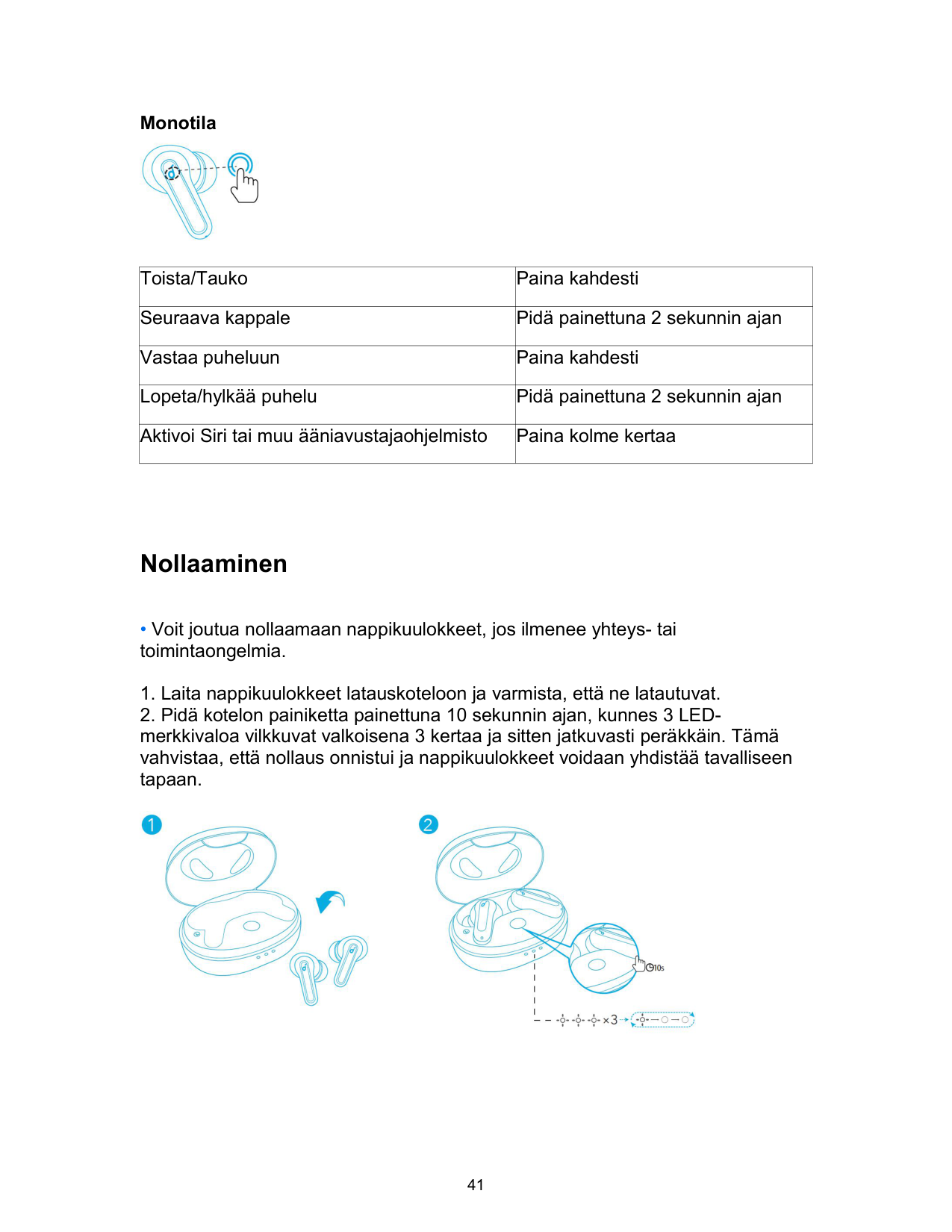
• Latauskotelon 3 LED-merkkivaloa vilkkuvat jatkuvasti peräkkäin valkoisina.

Säätimet
Stereotila
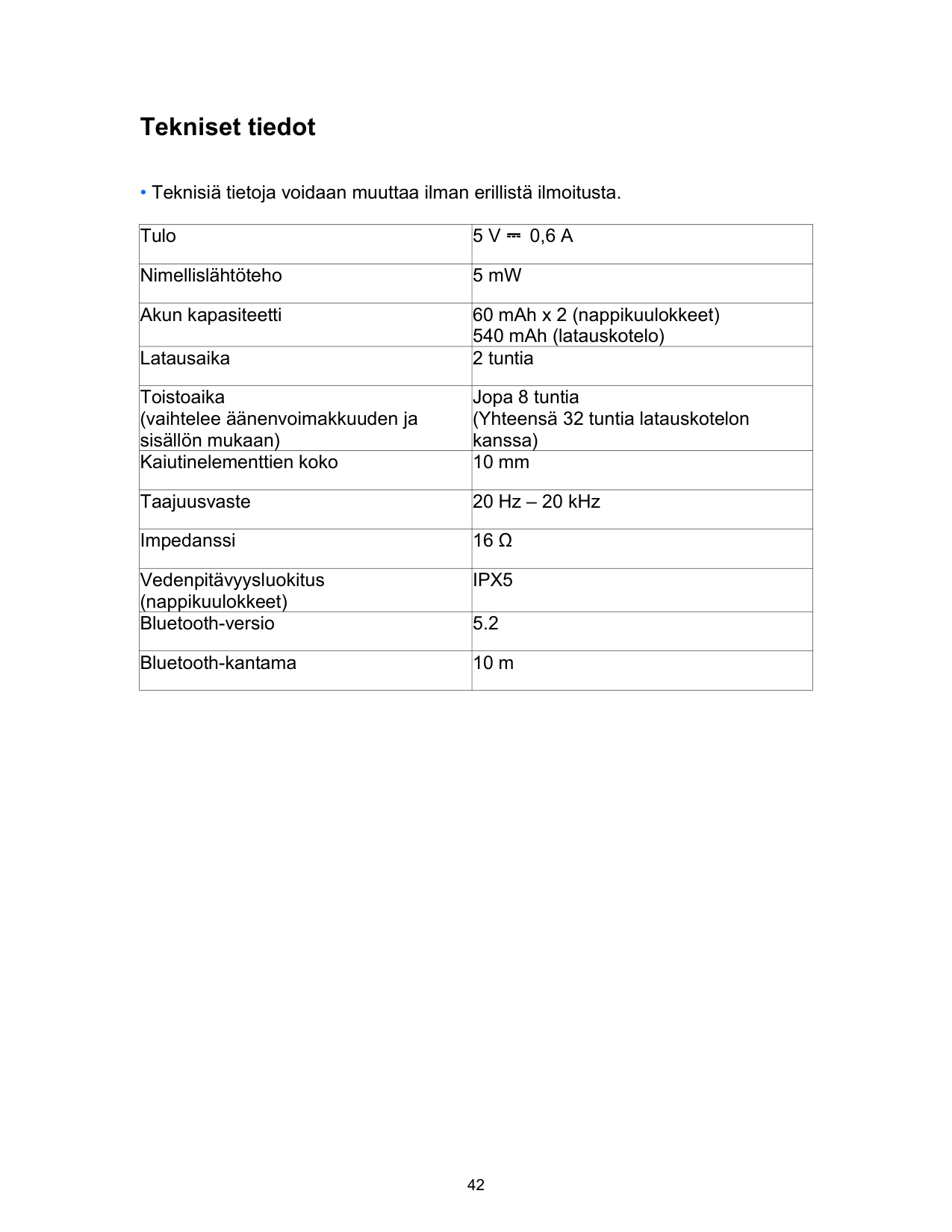


|Toista/Tauko|Paina kahdesti (V/O)| |---|---| |Seuraava kappale|Pidä painettuna 2 sekunnin ajan (O)| |Edellinen kappale|Paina 2 sekunnin ajan (V)| |Taajuuskorjaimen vaihtojärjestys: Signature (oletus) / Bass Booster / Podcast|Paina kolme kertaa (O)|
Paina oikeanpuoleisen nappikuulokkeen kosketuspainiketta nopeasti kolme kertaa vaihtaaksesi Soundcore Signature- (oletus), Bass Booster- ja Podcasttilojen välillä. Laite antaa onnistuneesta vaihdosta aina äänimerkin.

|Vastaa puheluun|Paina kahdesti (V/O)| |---|---|
|Lopeta/hylkää puhelu|Paina 2 sekunnin ajan (O/V)|

|Aktivoi Siri tai muu ääniavustajaohjelmisto|Paina kolme kertaa (V)| |---|---|
Monotila

|Toista/Tauko|Paina kahdesti| |---|---| |Seuraava kappale|Pidä painettuna 2 sekunnin ajan| |Vastaa puheluun|Paina kahdesti| |Lopeta/hylkää puhelu|Pidä painettuna 2 sekunnin ajan| |Aktivoi Siri tai muu ääniavustajaohjelmisto|Paina kolme kertaa|
Nollaaminen
• Voit joutua nollaamaan nappikuulokkeet, jos ilmenee yhteys- tai toimintaongelmia.

Tekniset tiedot
• Teknisiä tietoja voidaan muuttaa ilman erillistä ilmoitusta.
|Tulo|5 V ⎓ 0,6 A| |---|---| |Nimellislähtöteho|5 mW| |Akun kapasiteetti|60 mAh x 2 (nappikuulokkeet) 540 mAh (latauskotelo)| |Latausaika|2 tuntia| |Toistoaika (vaihtelee äänenvoimakkuuden ja sisällön mukaan)|Jopa 8 tuntia (Yhteensä 32 tuntia latauskotelon kanssa)| |Kaiutinelementtien koko|10 mm| |Taajuusvaste|20 Hz – 20 kHz| |Impedanssi|16 Ω| |Vedenpitävyysluokitus (nappikuulokkeet)|IPX5| |Bluetooth-versio|5.2|
|Bluetooth-kantama|10 m|
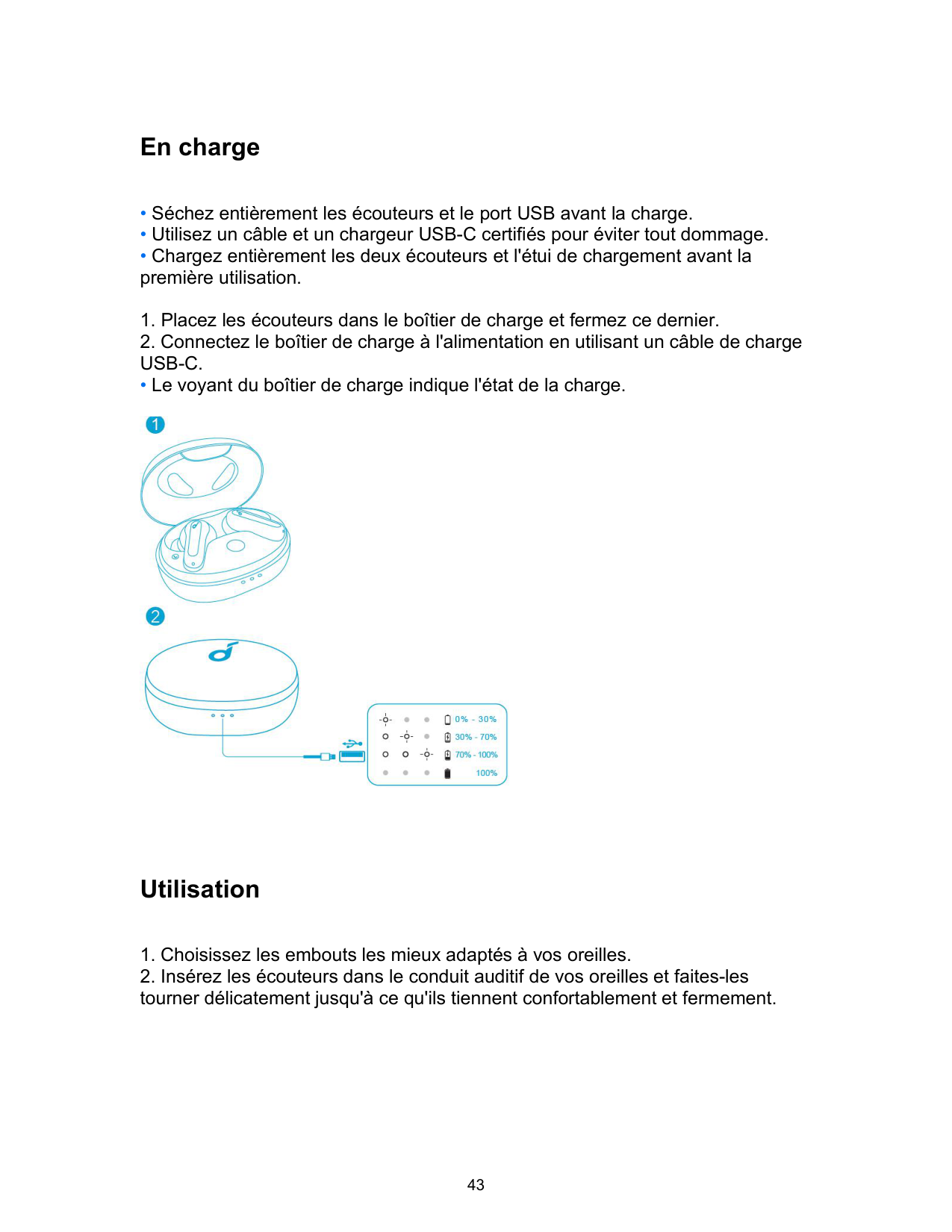
En charge
• Le voyant du boîtier de charge indique l'état de la charge.

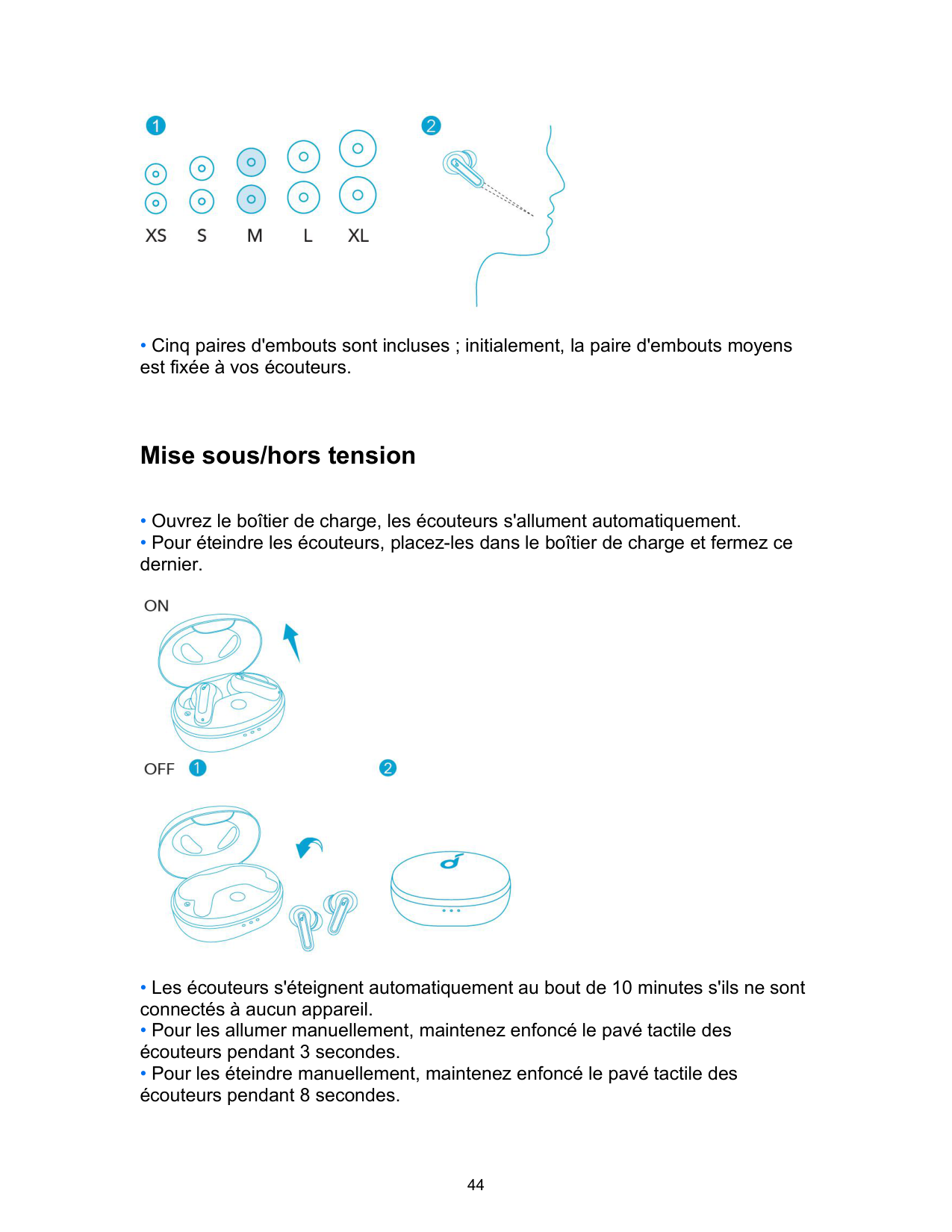
Utilisation

• Cinq paires d'embouts sont incluses ; initialement, la paire d'embouts moyens est fixée à vos écouteurs.
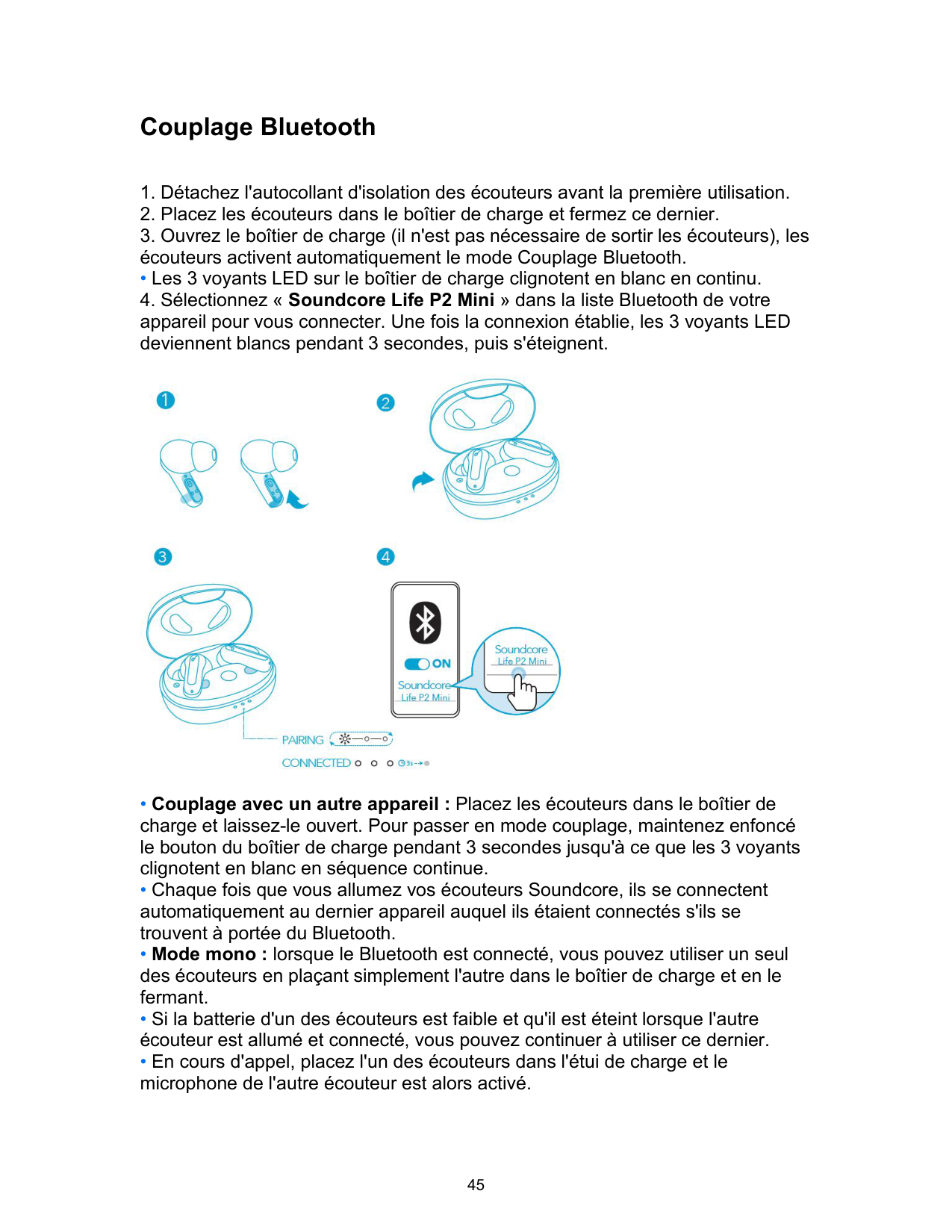
Mise sous/hors tension

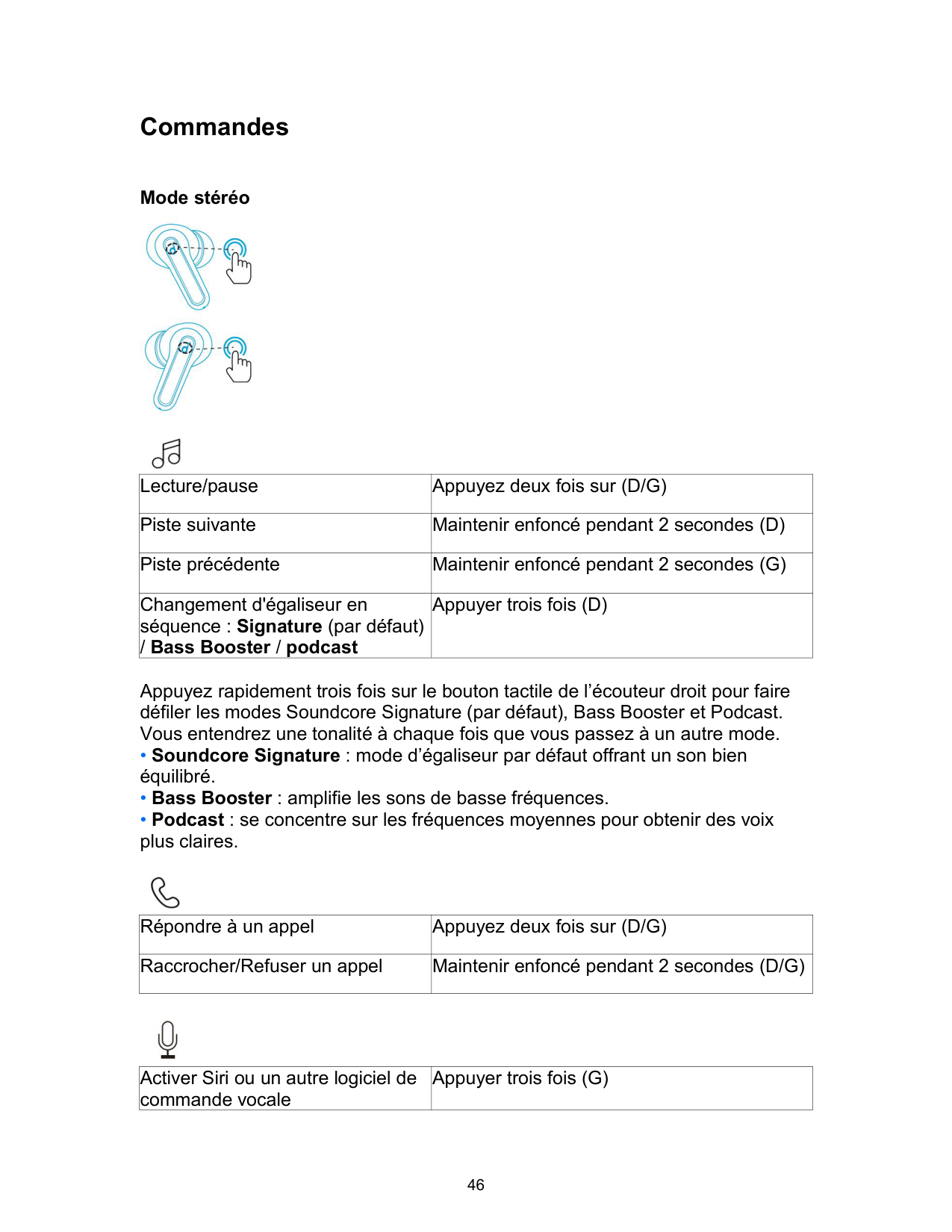
Couplage Bluetooth
• Les 3 voyants LED sur le boîtier de charge clignotent en blanc en continu.

Commandes
Mode stéréo


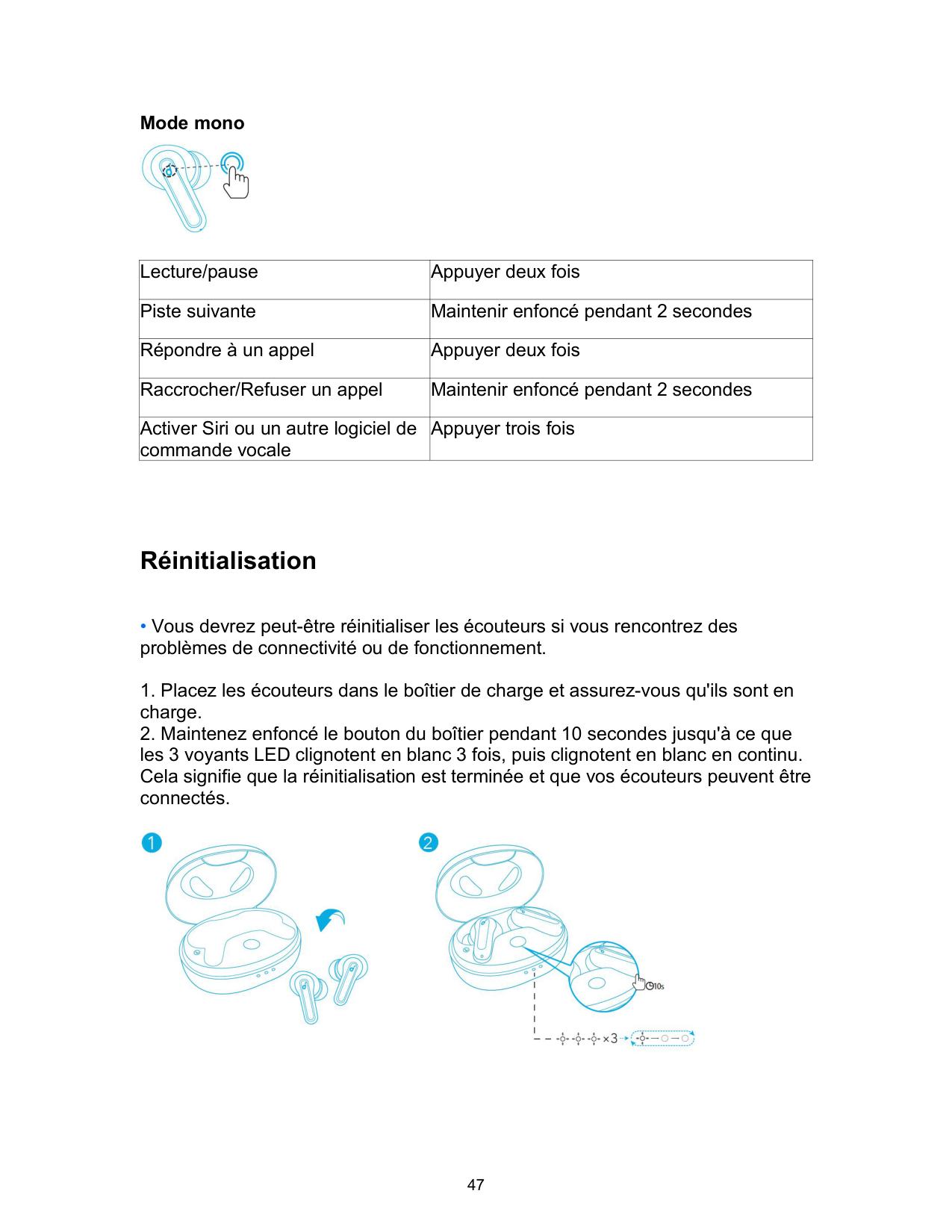
|Lecture/pause|Appuyez deux fois sur (D/G)| |---|---| |Piste suivante|Maintenir enfoncé pendant 2 secondes (D)| |Piste précédente|Maintenir enfoncé pendant 2 secondes (G)| |Changement d'égaliseur en séquence : Signature (par défaut) / Bass Booster / podcast|Appuyer trois fois (D)|
Appuyez rapidement trois fois sur le bouton tactile de l’écouteur droit pour faire défiler les modes Soundcore Signature (par défaut), Bass Booster et Podcast. Vous entendrez une tonalité à chaque fois que vous passez à un autre mode.

|Répondre à un appel|Appuyez deux fois sur (D/G)| |---|---| |Raccrocher/Refuser un appel|Maintenir enfoncé pendant 2 secondes (D/G)|

|Activer Siri ou un autre logiciel de commande vocale|Appuyer trois fois (G)| |---|---|
Mode mono

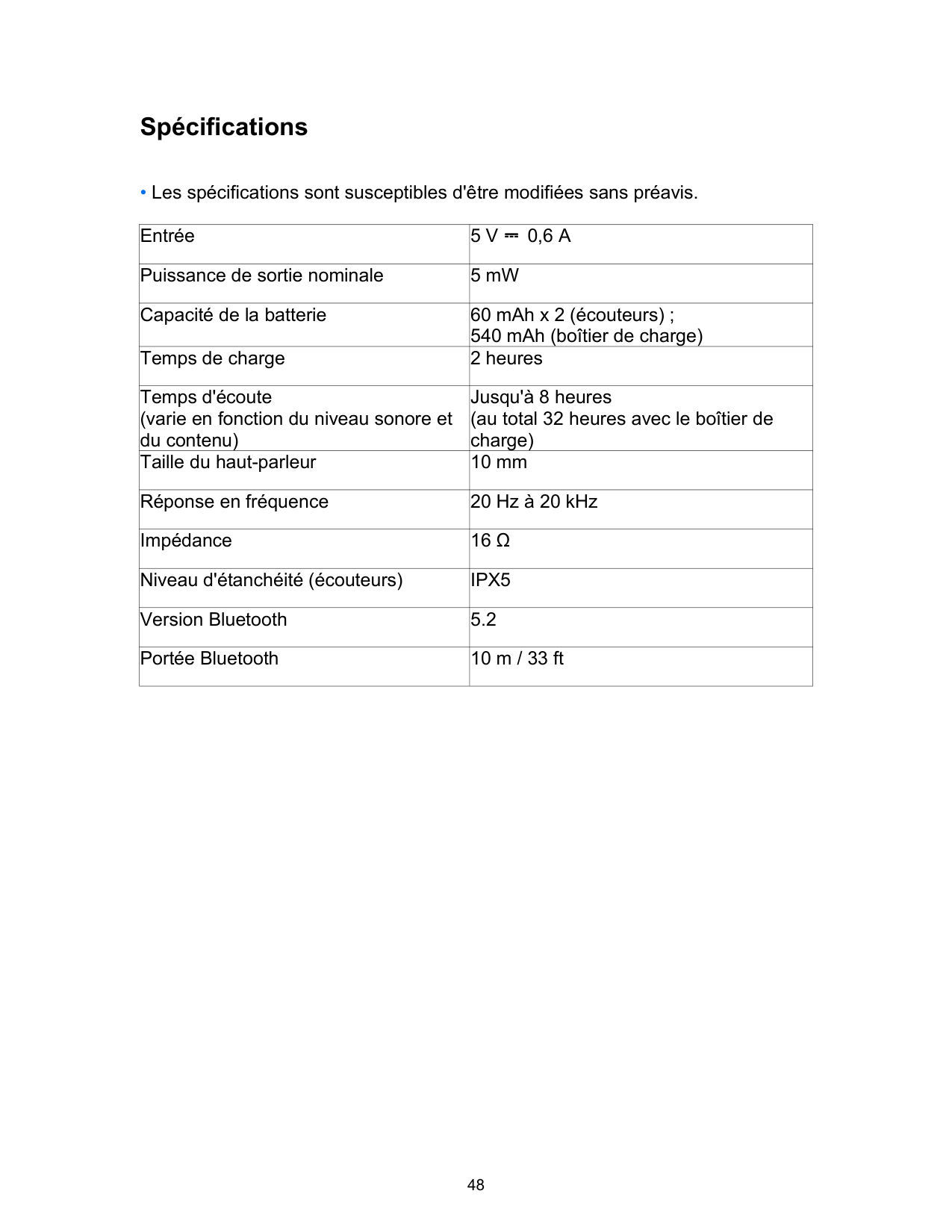
|Lecture/pause|Appuyer deux fois| |---|---| |Piste suivante|Maintenir enfoncé pendant 2 secondes| |Répondre à un appel|Appuyer deux fois| |Raccrocher/Refuser un appel|Maintenir enfoncé pendant 2 secondes| |Activer Siri ou un autre logiciel de commande vocale|Appuyer trois fois|
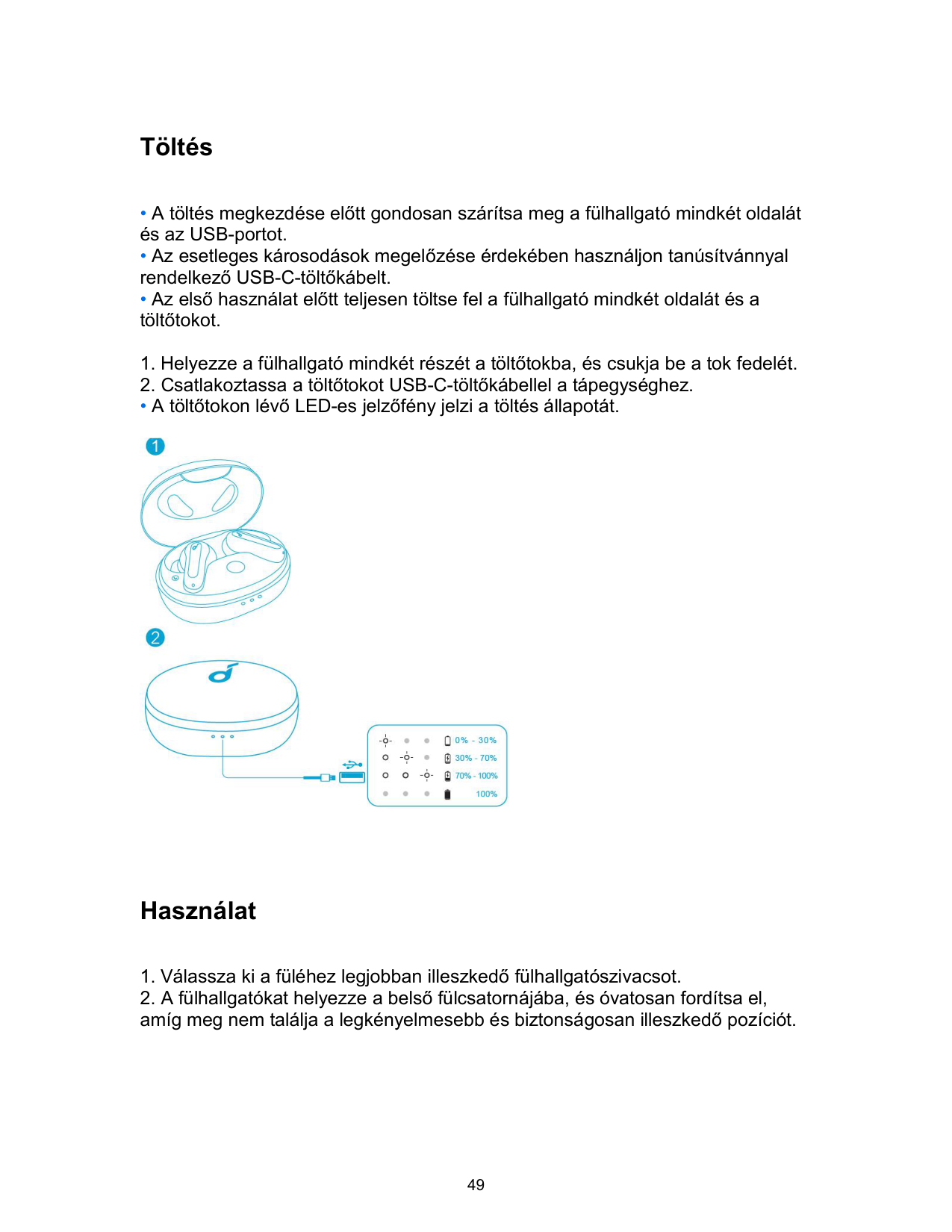
Réinitialisation

Spécifications
• Les spécifications sont susceptibles d'être modifiées sans préavis.
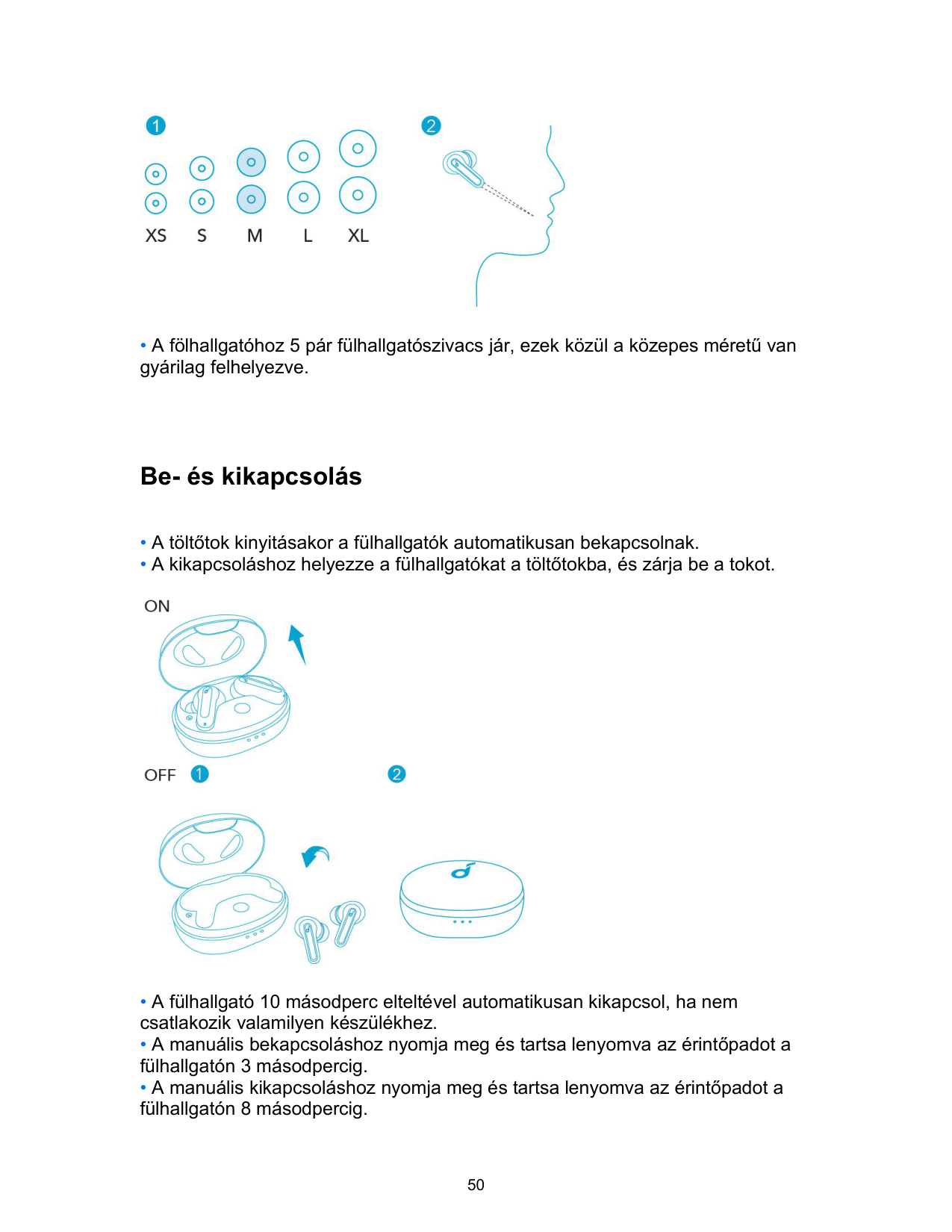
|Entrée|5 V ⎓ 0,6 A| |---|---| |Puissance de sortie nominale|5 mW| |Capacité de la batterie|60 mAh x 2 (écouteurs) ; 540 mAh (boîtier de charge)| |Temps de charge|2 heures| |Temps d'écoute (varie en fonction du niveau sonore et du contenu)|Jusqu'à 8 heures (au total 32 heures avec le boîtier de charge)| |Taille du haut-parleur|10 mm| |Réponse en fréquence|20 Hz à 20 kHz| |Impédance|16 Ω| |Niveau d'étanchéité (écouteurs)|IPX5|
|Version Bluetooth|5.2| |Portée Bluetooth|10 m / 33 ft|
Töltés
• A töltőtokon lévő LED-es jelzőfény jelzi a töltés állapotát.

Használat
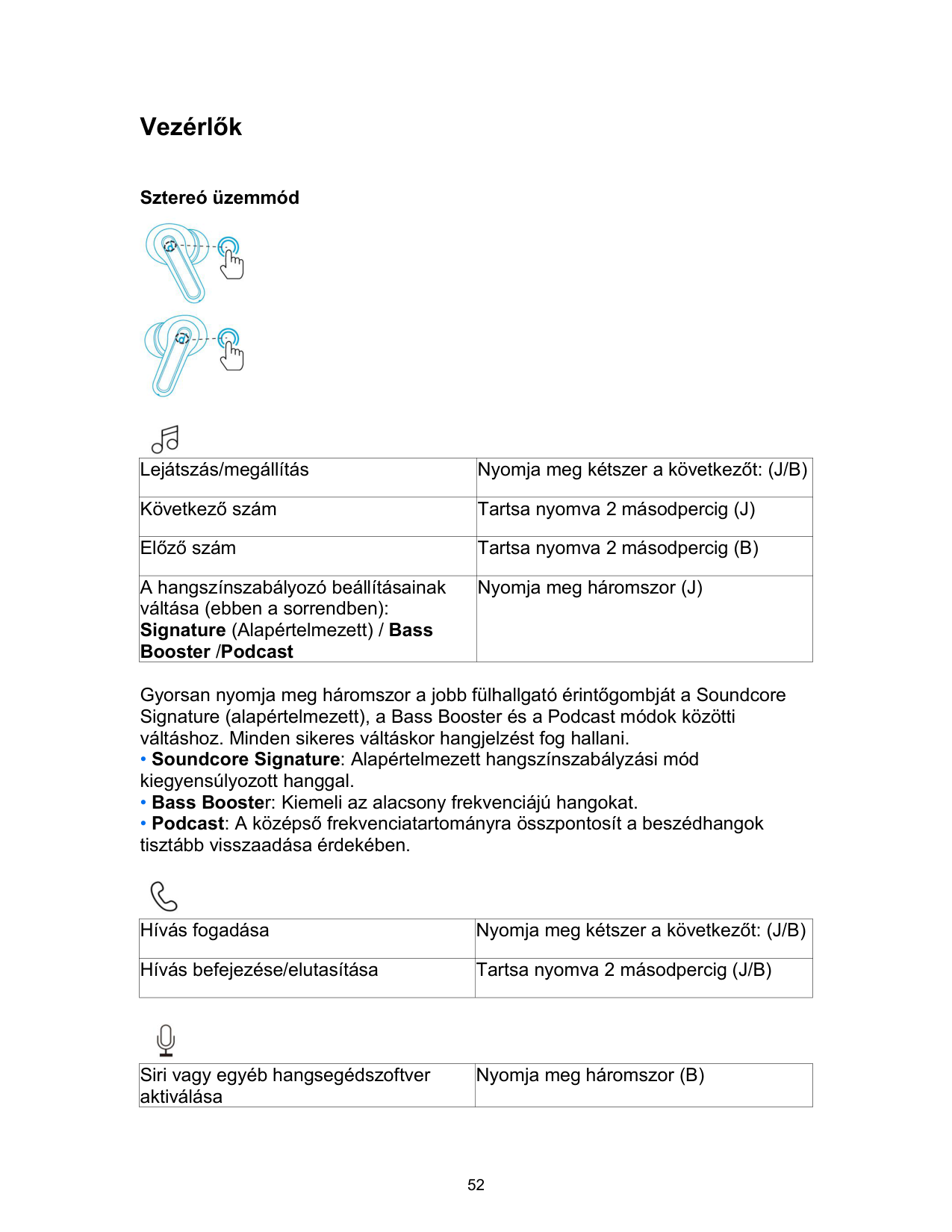

• A fölhallgatóhoz 5 pár fülhallgatószivacs jár, ezek közül a közepes méretű van gyárilag felhelyezve.
Be- és kikapcsolás

Bluetooth-párosítás
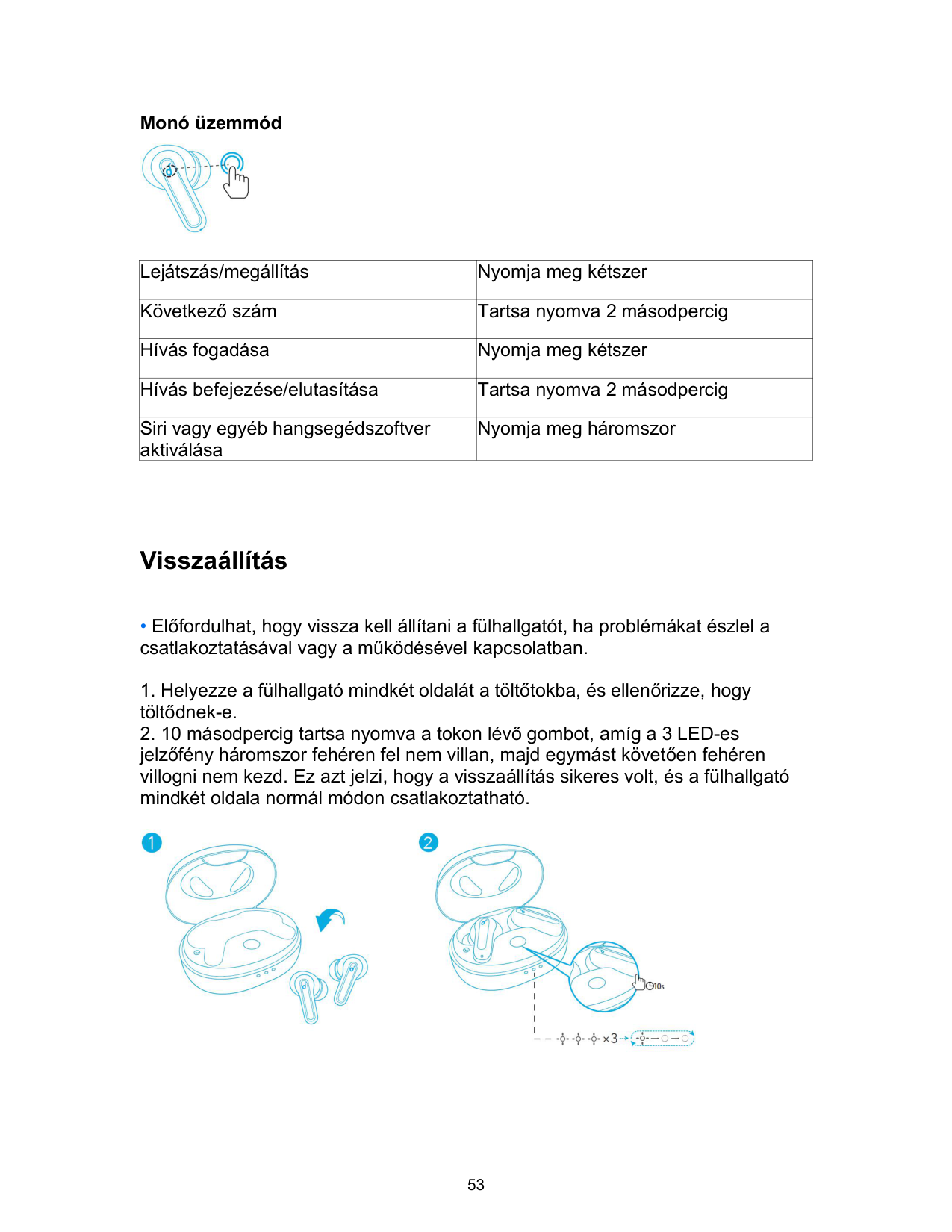
• A töltőtokon lévő 3 LED-es jelzőfény egymás után folyamatosan fehéren villog.

Vezérlők
Sztereó üzemmód

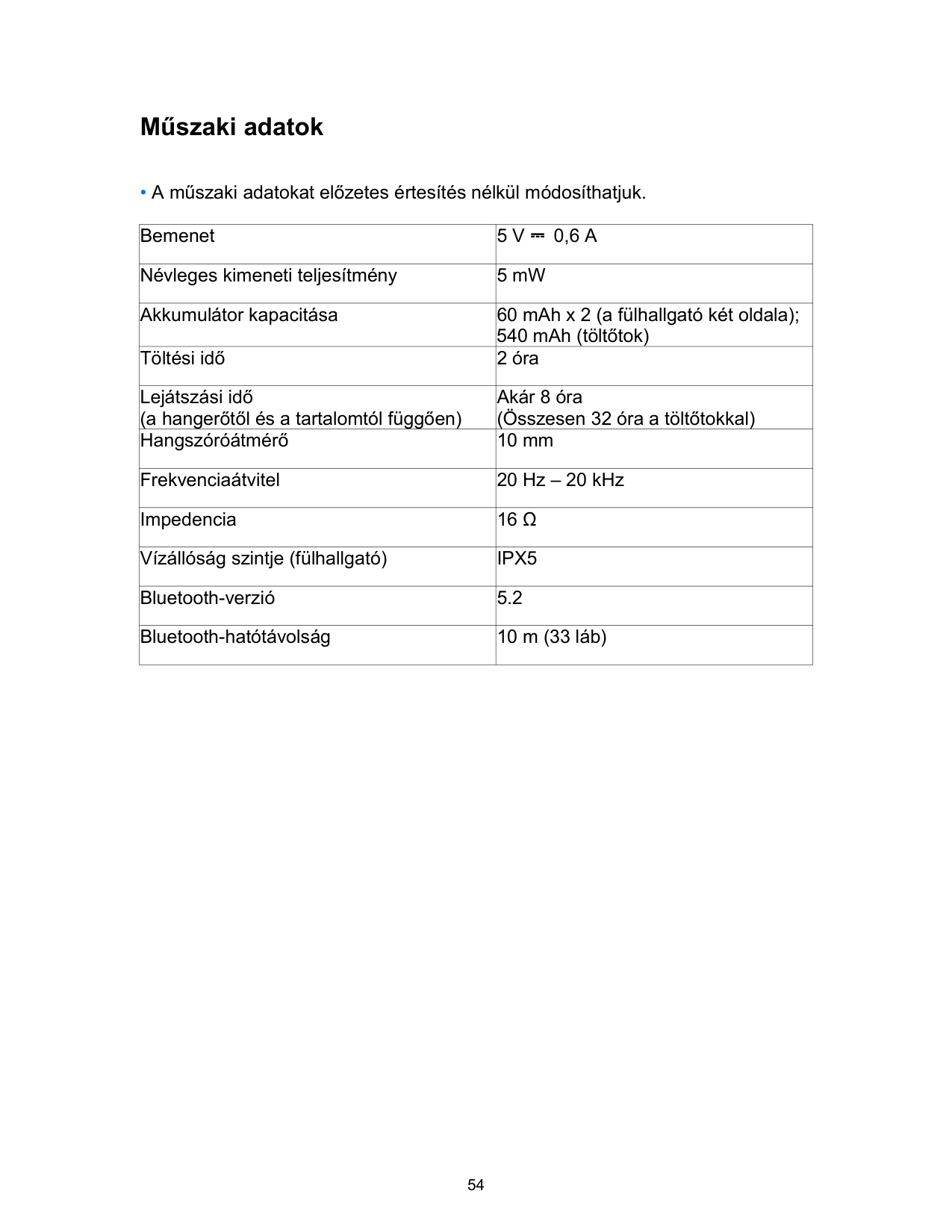

|Lejátszás/megállítás|Nyomja meg kétszer a következőt: (J/B)| |---|---| |Következő szám|Tartsa nyomva 2 másodpercig (J)| |Előző szám|Tartsa nyomva 2 másodpercig (B)| |A hangszínszabályozó beállításainak váltása (ebben a sorrendben): Signature (Alapértelmezett) / Bass Booster /Podcast|Nyomja meg háromszor (J)|
Gyorsan nyomja meg háromszor a jobb fülhallgató érintőgombját a Soundcore Signature (alapértelmezett), a Bass Booster és a Podcast módok közötti váltáshoz. Minden sikeres váltáskor hangjelzést fog hallani.

|Hívás fogadása|Nyomja meg kétszer a következőt: (J/B)| |---|---| |Hívás befejezése/elutasítása|Tartsa nyomva 2 másodpercig (J/B)|

|Siri vagy egyéb hangsegédszoftver aktiválása|Nyomja meg háromszor (B)| |---|---|
Monó üzemmód

|Lejátszás/megállítás|Nyomja meg kétszer| |---|---| |Következő szám|Tartsa nyomva 2 másodpercig| |Hívás fogadása|Nyomja meg kétszer| |Hívás befejezése/elutasítása|Tartsa nyomva 2 másodpercig| |Siri vagy egyéb hangsegédszoftver aktiválása|Nyomja meg háromszor|
Visszaállítás
• Előfordulhat, hogy vissza kell állítani a fülhallgatót, ha problémákat észlel a csatlakoztatásával vagy a működésével kapcsolatban.

Műszaki adatok
• A műszaki adatokat előzetes értesítés nélkül módosíthatjuk.
|Bemenet|5 V ⎓ 0,6 A| |---|---| |Névleges kimeneti teljesítmény|5 mW| |Akkumulátor kapacitása|60 mAh x 2 (a fülhallgató két oldala); 540 mAh (töltőtok)| |Töltési idő|2 óra| |Lejátszási idő (a hangerőtől és a tartalomtól függően)|Akár 8 óra (Összesen 32 óra a töltőtokkal)| |Hangszóróátmérő|10 mm| |Frekvenciaátvitel|20 Hz – 20 kHz| |Impedencia|16 Ω| |Vízállóság szintje (fülhallgató)|IPX5|
|Bluetooth-verzió|5.2| |Bluetooth-hatótávolság|10 m (33 láb)|
Caricamento
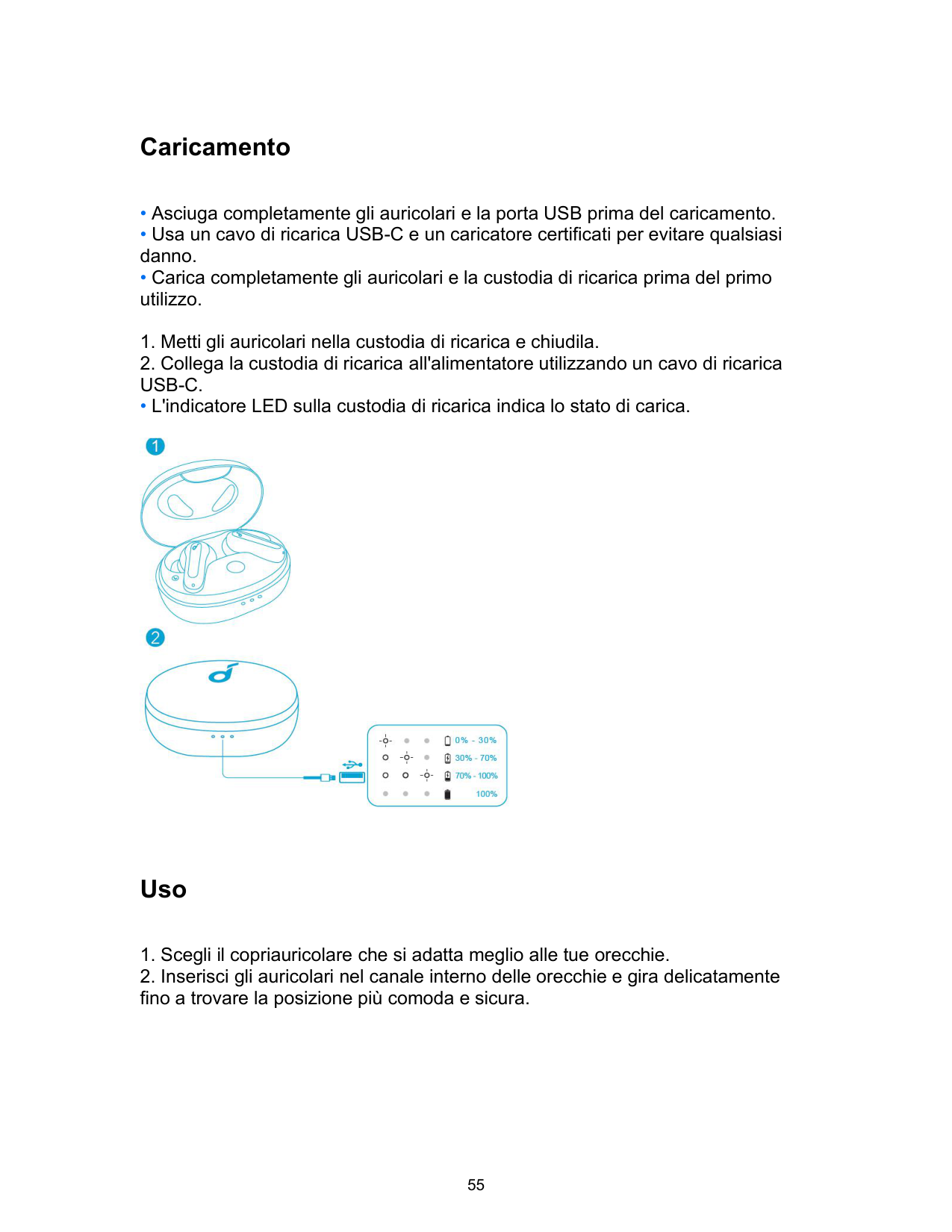
• L'indicatore LED sulla custodia di ricarica indica lo stato di carica.

Uso

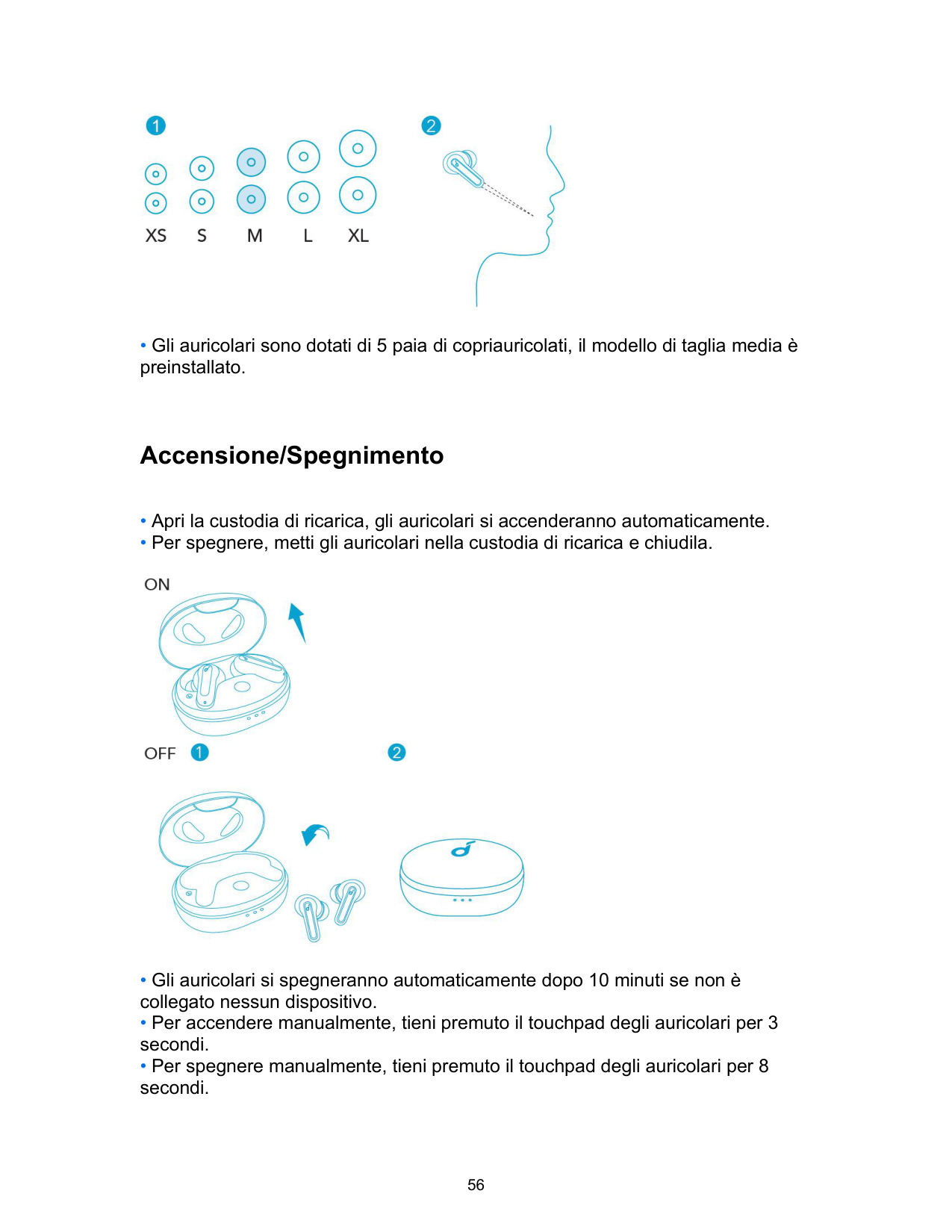
• Gli auricolari sono dotati di 5 paia di copriauricolati, il modello di taglia media è preinstallato.
Accensione/Spegnimento

Accoppiamento Bluetooth
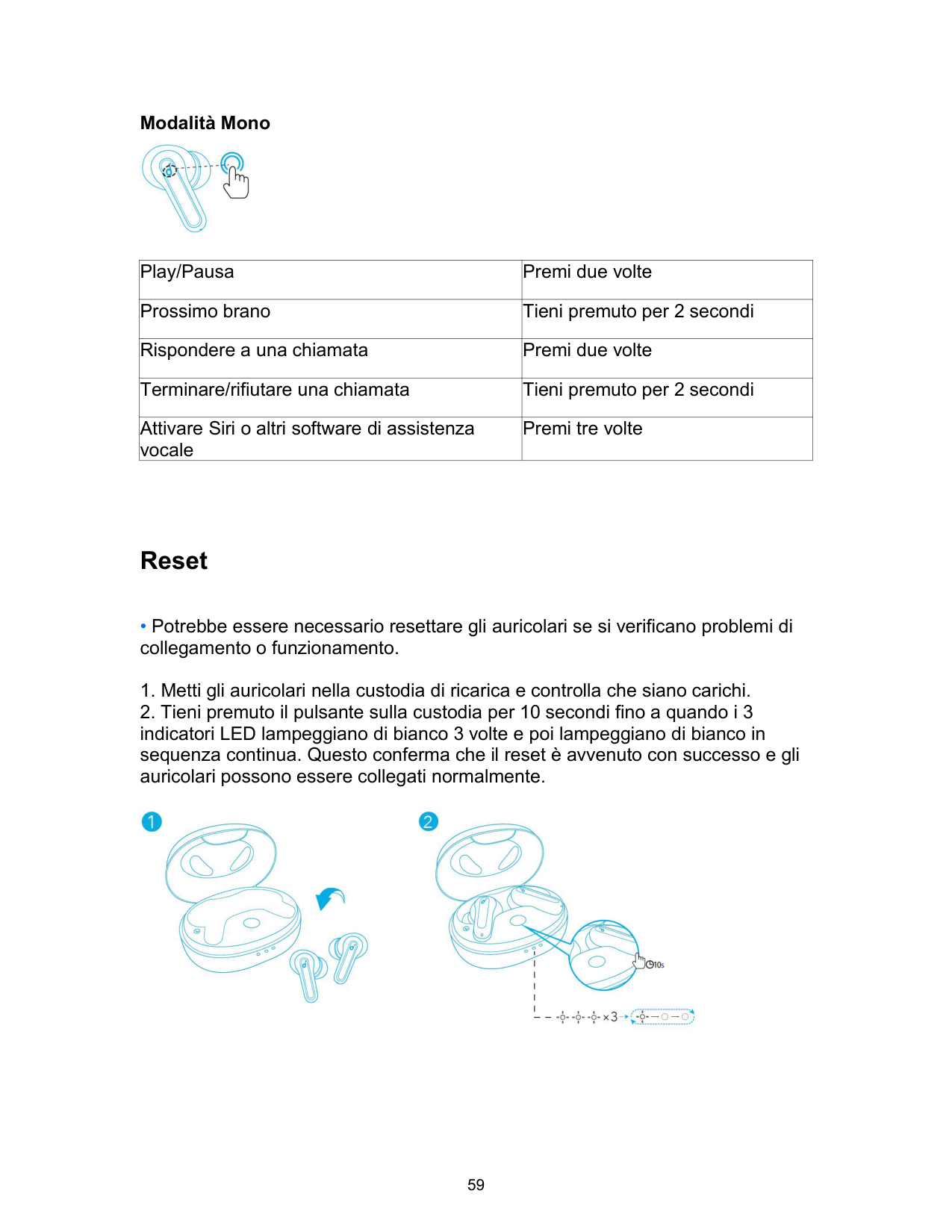
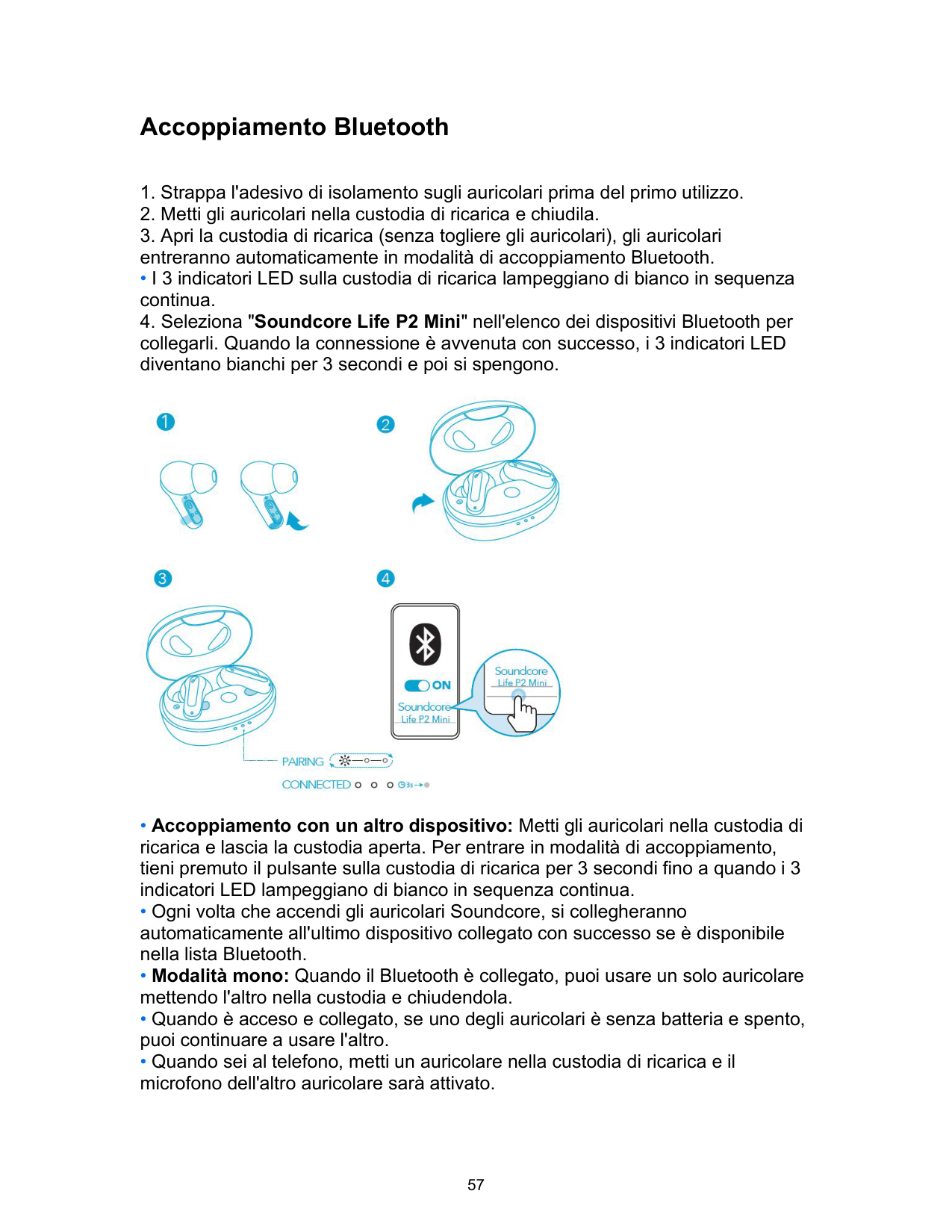
• I 3 indicatori LED sulla custodia di ricarica lampeggiano di bianco in sequenza continua.

Controlli
Modalità Stereo

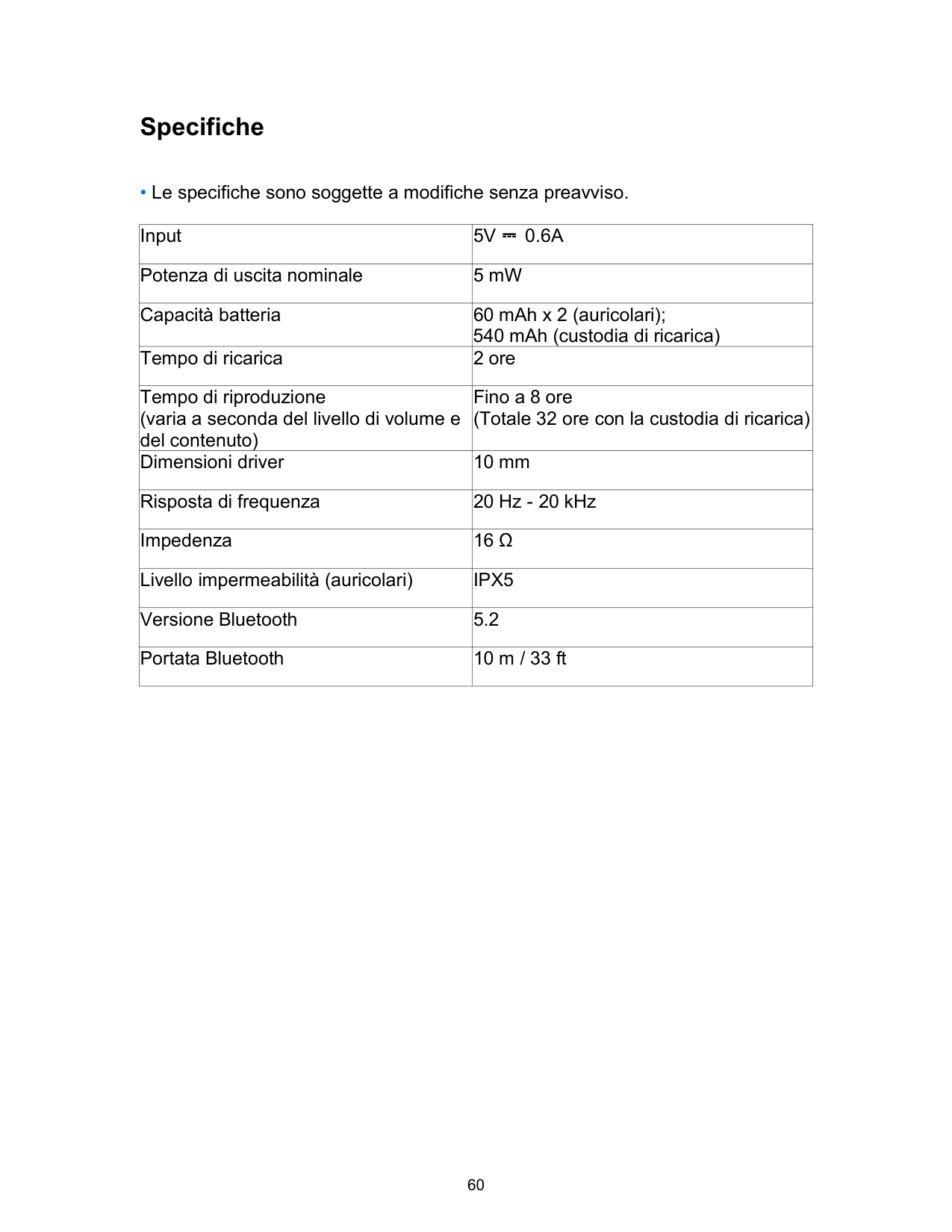

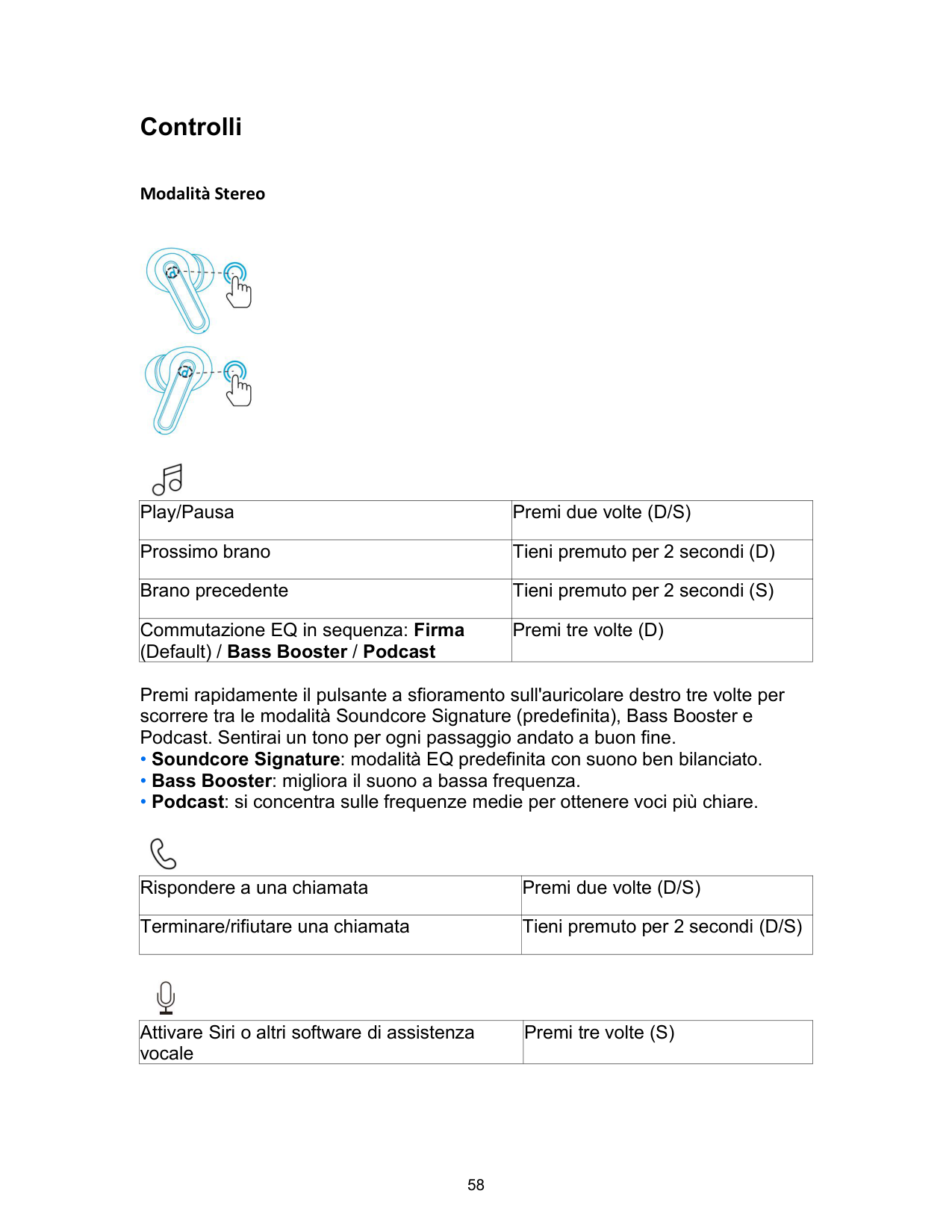
|Play/Pausa|Premi due volte (D/S)| |---|---| |Prossimo brano|Tieni premuto per 2 secondi (D)| |Brano precedente|Tieni premuto per 2 secondi (S)| |Commutazione EQ in sequenza: Firma (Default) / Bass Booster / Podcast|Premi tre volte (D)|
Premi rapidamente il pulsante a sfioramento sull'auricolare destro tre volte per scorrere tra le modalità Soundcore Signature (predefinita), Bass Booster e Podcast. Sentirai un tono per ogni passaggio andato a buon fine.

|Rispondere a una chiamata|Premi due volte (D/S)| |---|---| |Terminare/rifiutare una chiamata|Tieni premuto per 2 secondi (D/S)|
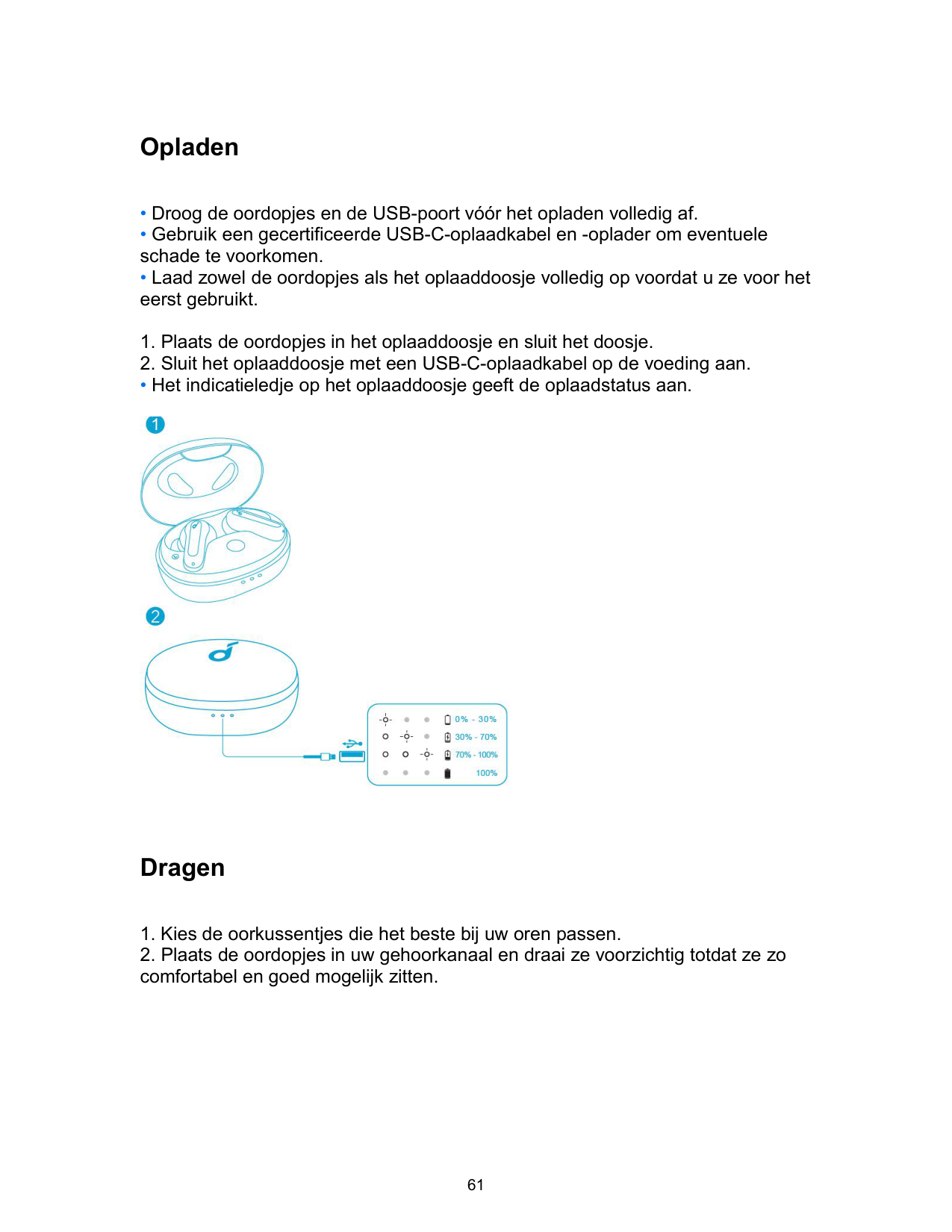

|Attivare Siri o altri software di assistenza vocale|Premi tre volte (S)| |---|---|
Modalità Mono

|Play/Pausa|Premi due volte| |---|---| |Prossimo brano|Tieni premuto per 2 secondi| |Rispondere a una chiamata|Premi due volte| |Terminare/rifiutare una chiamata|Tieni premuto per 2 secondi| |Attivare Siri o altri software di assistenza vocale|Premi tre volte|
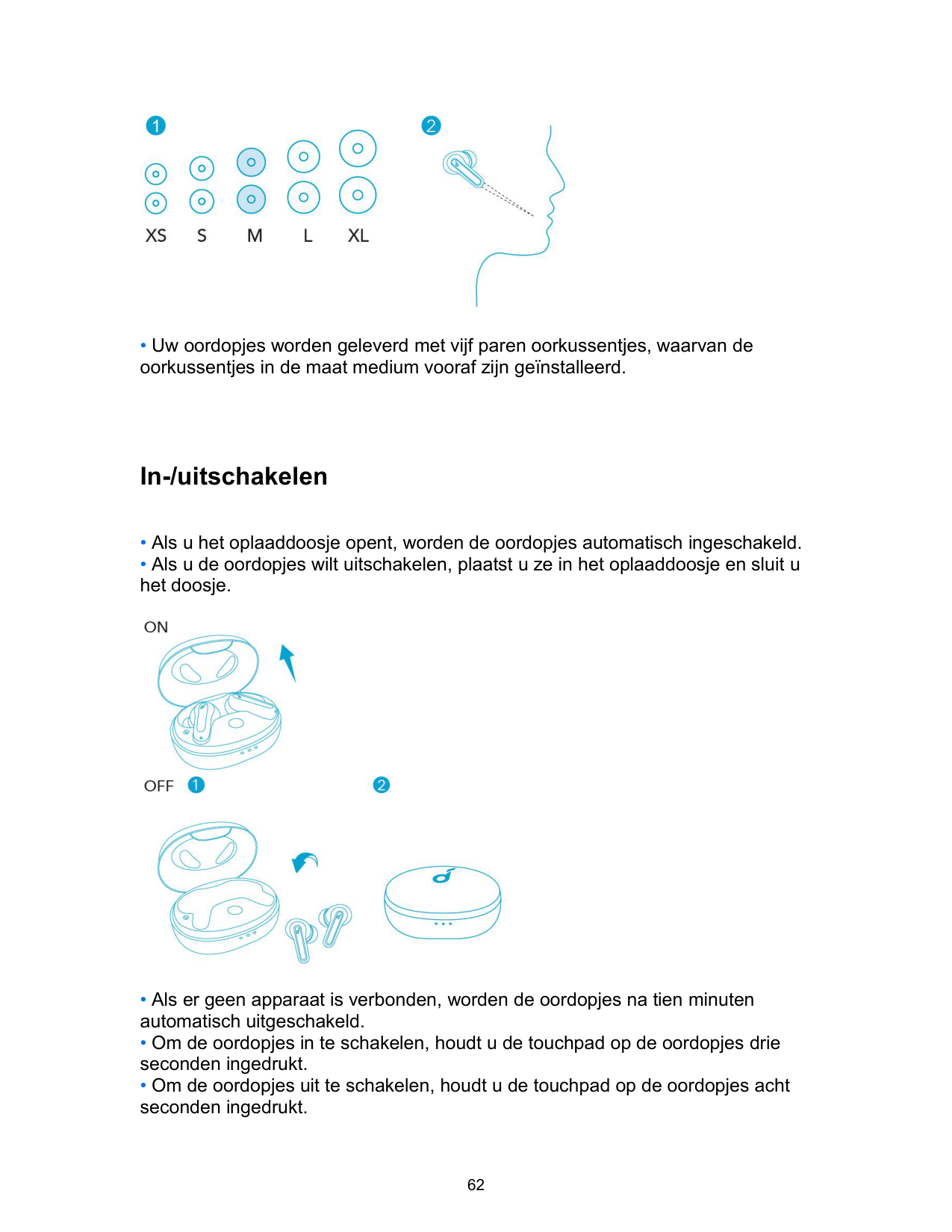
Reset

Specifiche
• Le specifiche sono soggette a modifiche senza preavviso.
|Input|5V ⎓ 0.6A| |---|---| |Potenza di uscita nominale|5 mW| |Capacità batteria|60 mAh x 2 (auricolari); 540 mAh (custodia di ricarica)| |Tempo di ricarica|2 ore| |Tempo di riproduzione (varia a seconda del livello di volume e del contenuto)|Fino a 8 ore (Totale 32 ore con la custodia di ricarica)| |Dimensioni driver|10 mm| |Risposta di frequenza|20 Hz - 20 kHz| |Impedenza|16 Ω| |Livello impermeabilità (auricolari)|IPX5| |Versione Bluetooth|5.2|
|Portata Bluetooth|10 m / 33 ft|
Opladen
• Het indicatieledje op het oplaaddoosje geeft de oplaadstatus aan.

Dragen
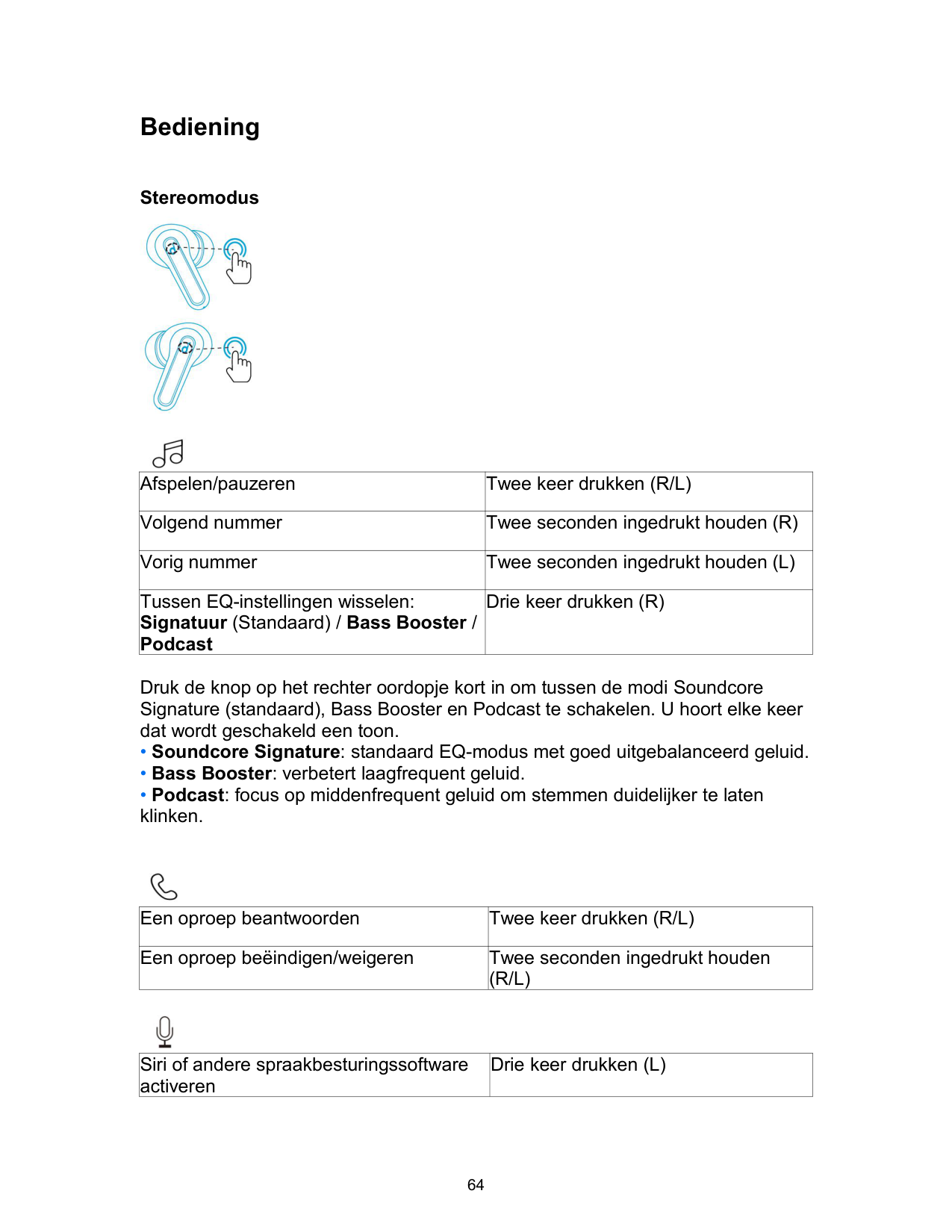

• Uw oordopjes worden geleverd met vijf paren oorkussentjes, waarvan de oorkussentjes in de maat medium vooraf zijn geïnstalleerd.
In-/uitschakelen

Koppelen via Bluetooth
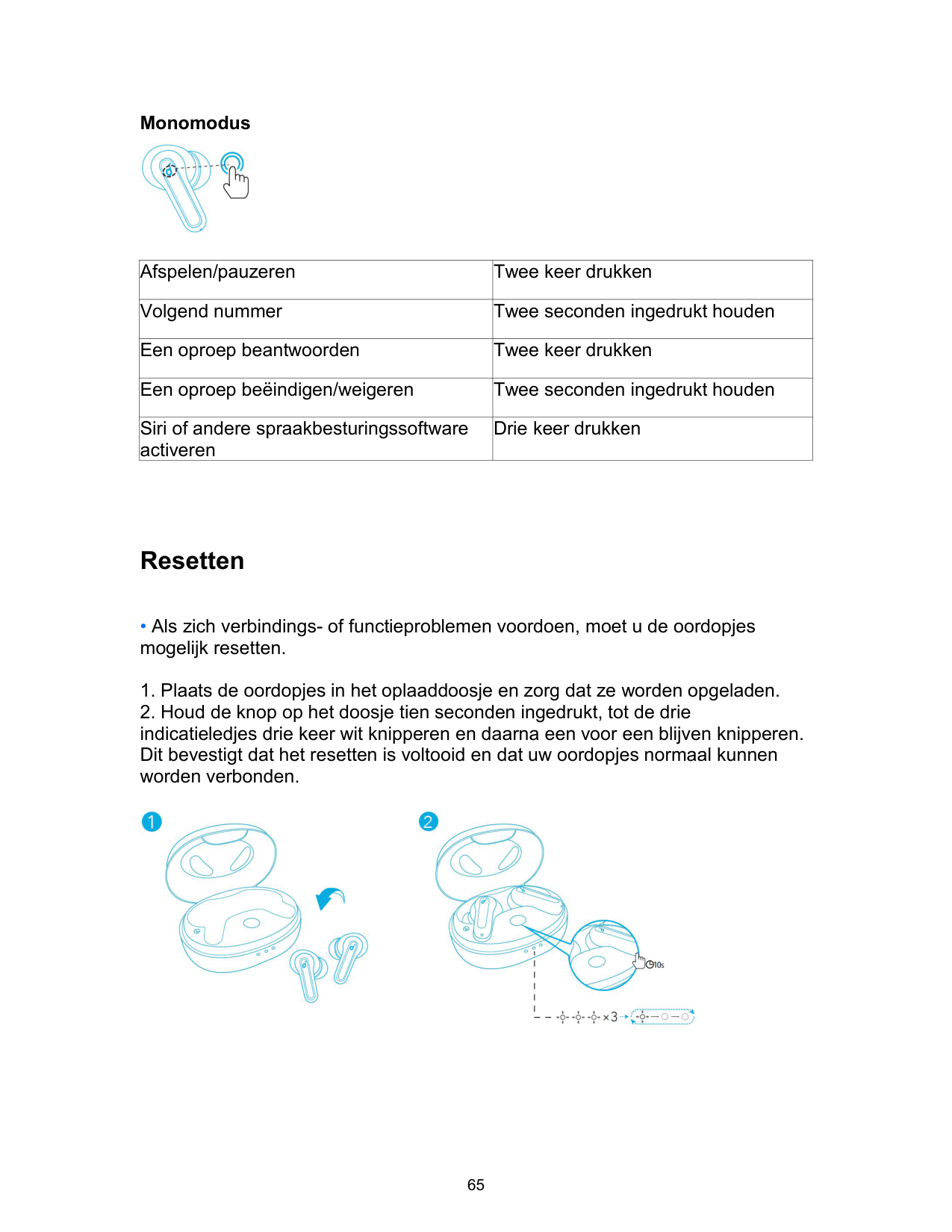
• De drie indicatieledjes op het oplaaddoosje zullen een voor een wit blijven knipperen.

Bediening
Stereomodus


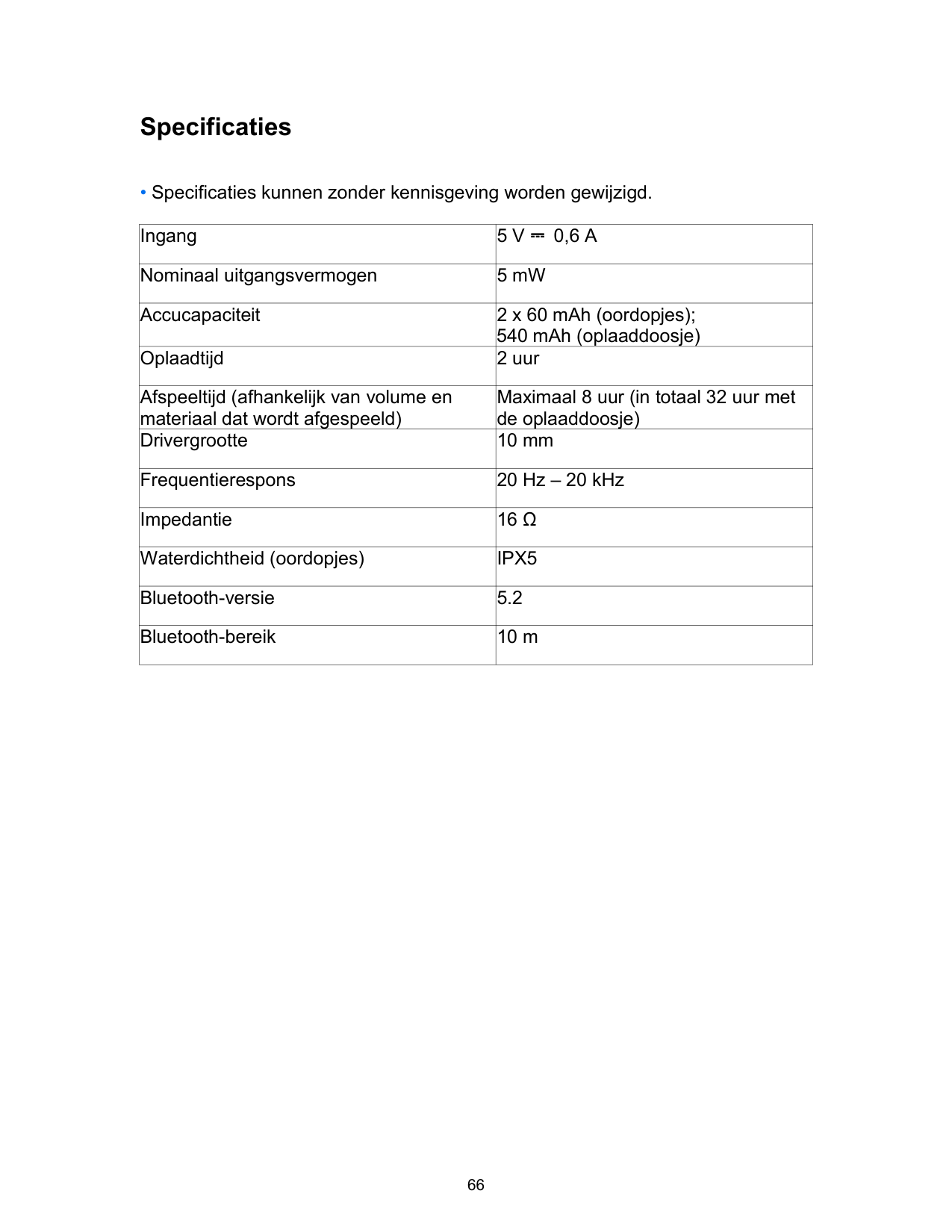
|Afspelen/pauzeren|Twee keer drukken (R/L)| |---|---| |Volgend nummer|Twee seconden ingedrukt houden (R)| |Vorig nummer|Twee seconden ingedrukt houden (L)| |Tussen EQ-instellingen wisselen: Signatuur (Standaard) / Bass Booster / Podcast|Drie keer drukken (R)|
Druk de knop op het rechter oordopje kort in om tussen de modi Soundcore Signature (standaard), Bass Booster en Podcast te schakelen. U hoort elke keer dat wordt geschakeld een toon.

|Een oproep beantwoorden|Twee keer drukken (R/L)| |---|---| |Een oproep beëindigen/weigeren|Twee seconden ingedrukt houden (R/L)|

|Siri of andere spraakbesturingssoftware activeren|Drie keer drukken (L)| |---|---|
Monomodus

|Afspelen/pauzeren|Twee keer drukken| |---|---| |Volgend nummer|Twee seconden ingedrukt houden| |Een oproep beantwoorden|Twee keer drukken| |Een oproep beëindigen/weigeren|Twee seconden ingedrukt houden| |Siri of andere spraakbesturingssoftware activeren|Drie keer drukken|
Resetten

Specificaties
• Specificaties kunnen zonder kennisgeving worden gewijzigd.
|Ingang|5 V ⎓ 0,6 A| |---|---| |Nominaal uitgangsvermogen|5 mW| |Accucapaciteit|2 x 60 mAh (oordopjes); 540 mAh (oplaaddoosje)| |Oplaadtijd|2 uur| |Afspeeltijd (afhankelijk van volume en materiaal dat wordt afgespeeld)|Maximaal 8 uur (in totaal 32 uur met de oplaaddoosje)| |Drivergrootte|10 mm| |Frequentierespons|20 Hz – 20 kHz| |Impedantie|16 Ω| |Waterdichtheid (oordopjes)|IPX5| |Bluetooth-versie|5.2|
|Bluetooth-bereik|10 m|
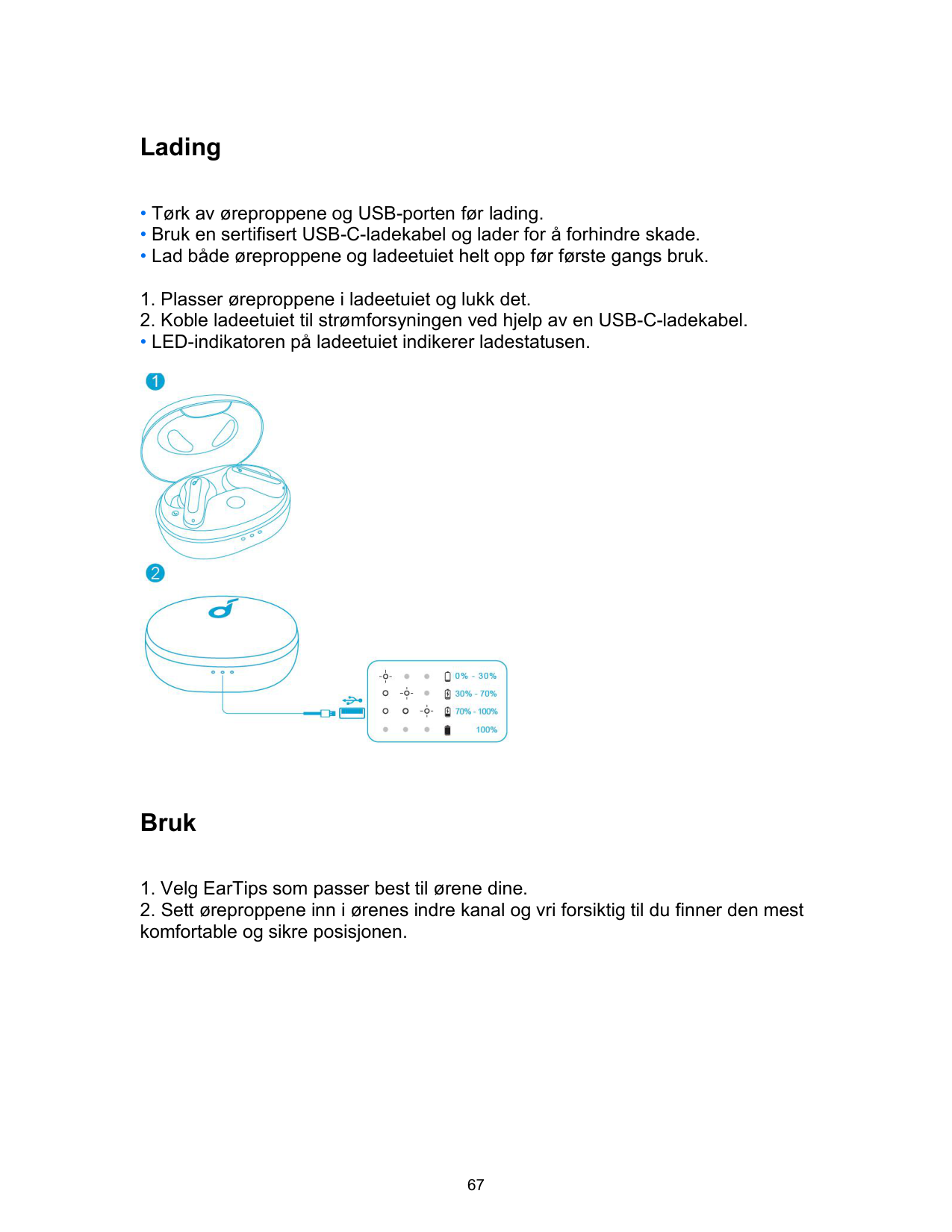
Lading
• LED-indikatoren på ladeetuiet indikerer ladestatusen.

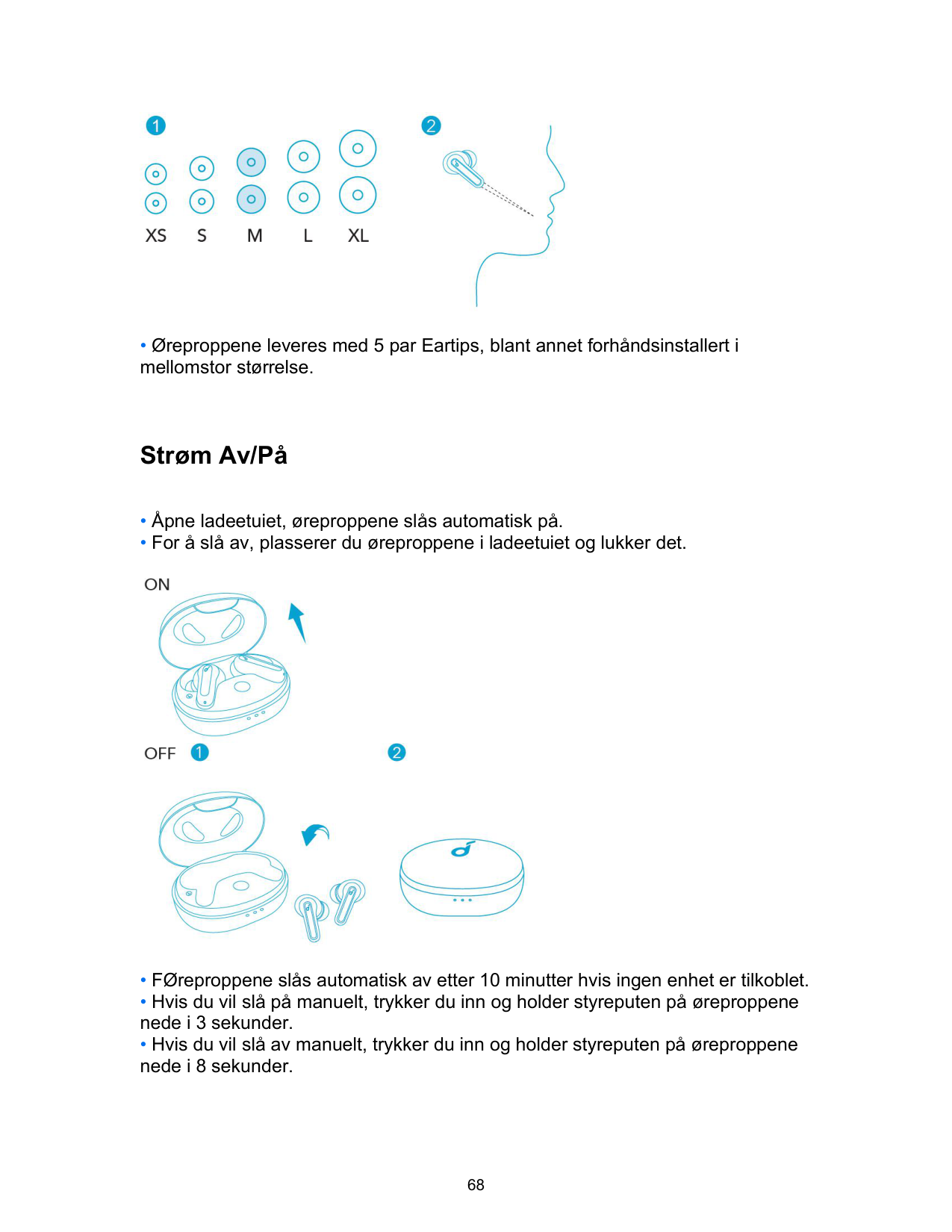
Bruk

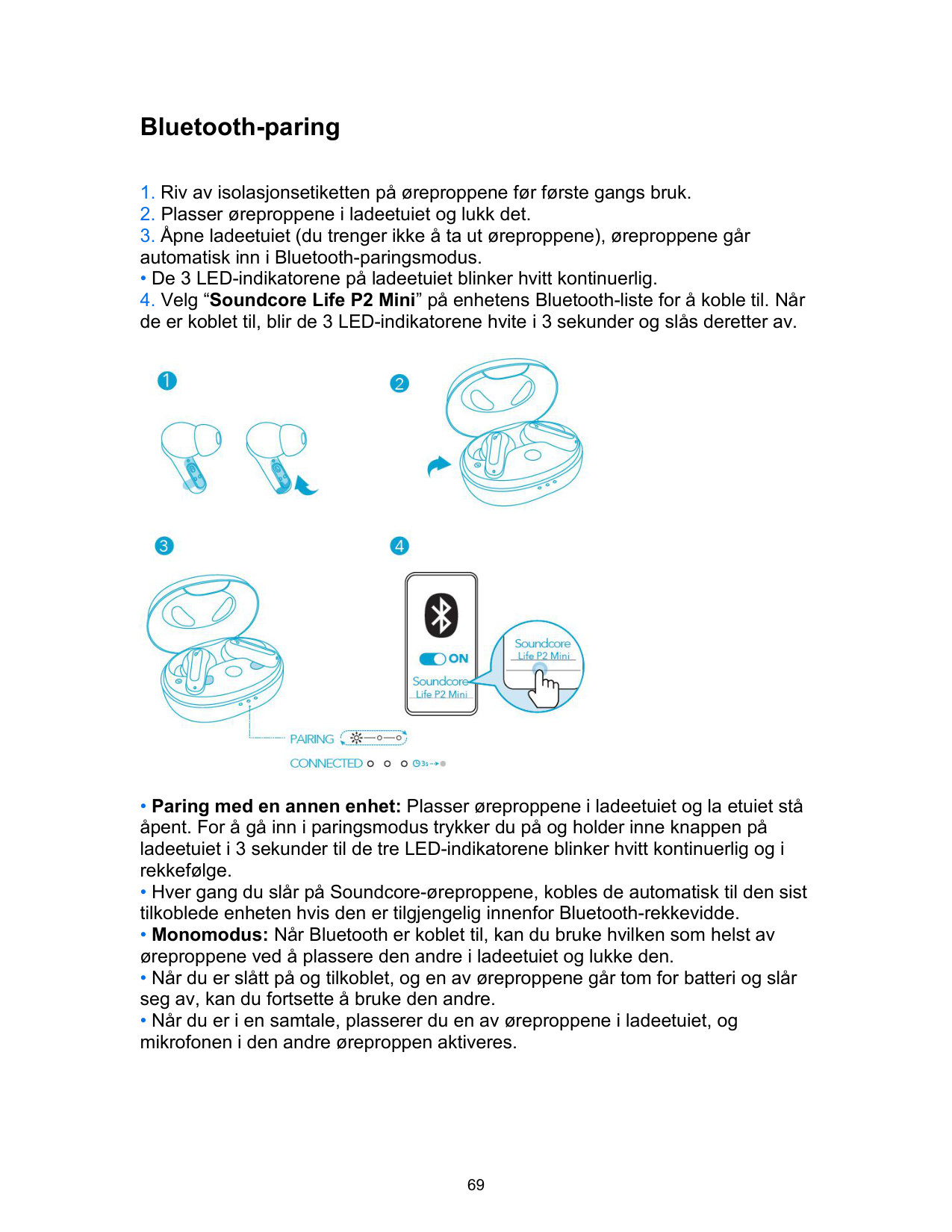
Strøm Av/På

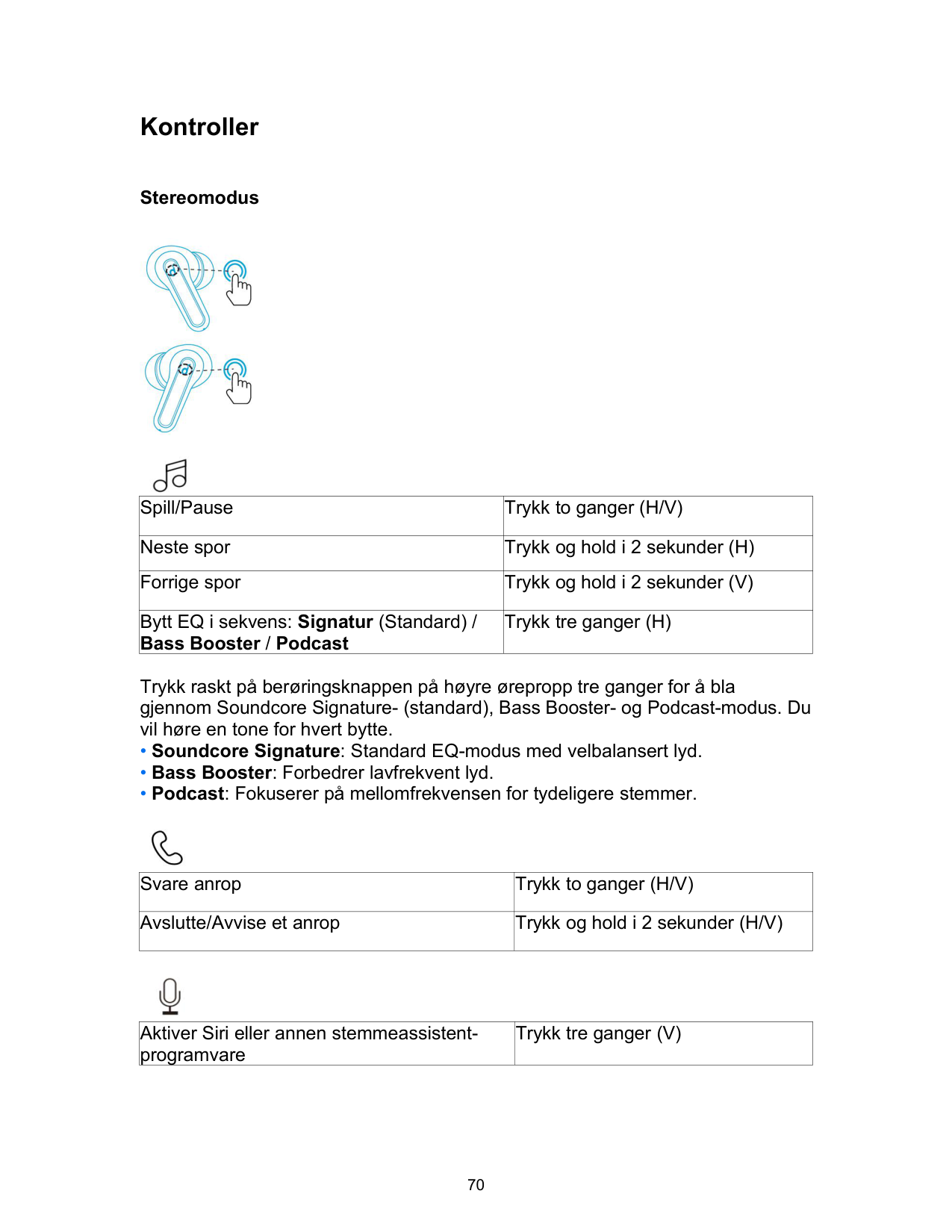
Bluetooth-paring
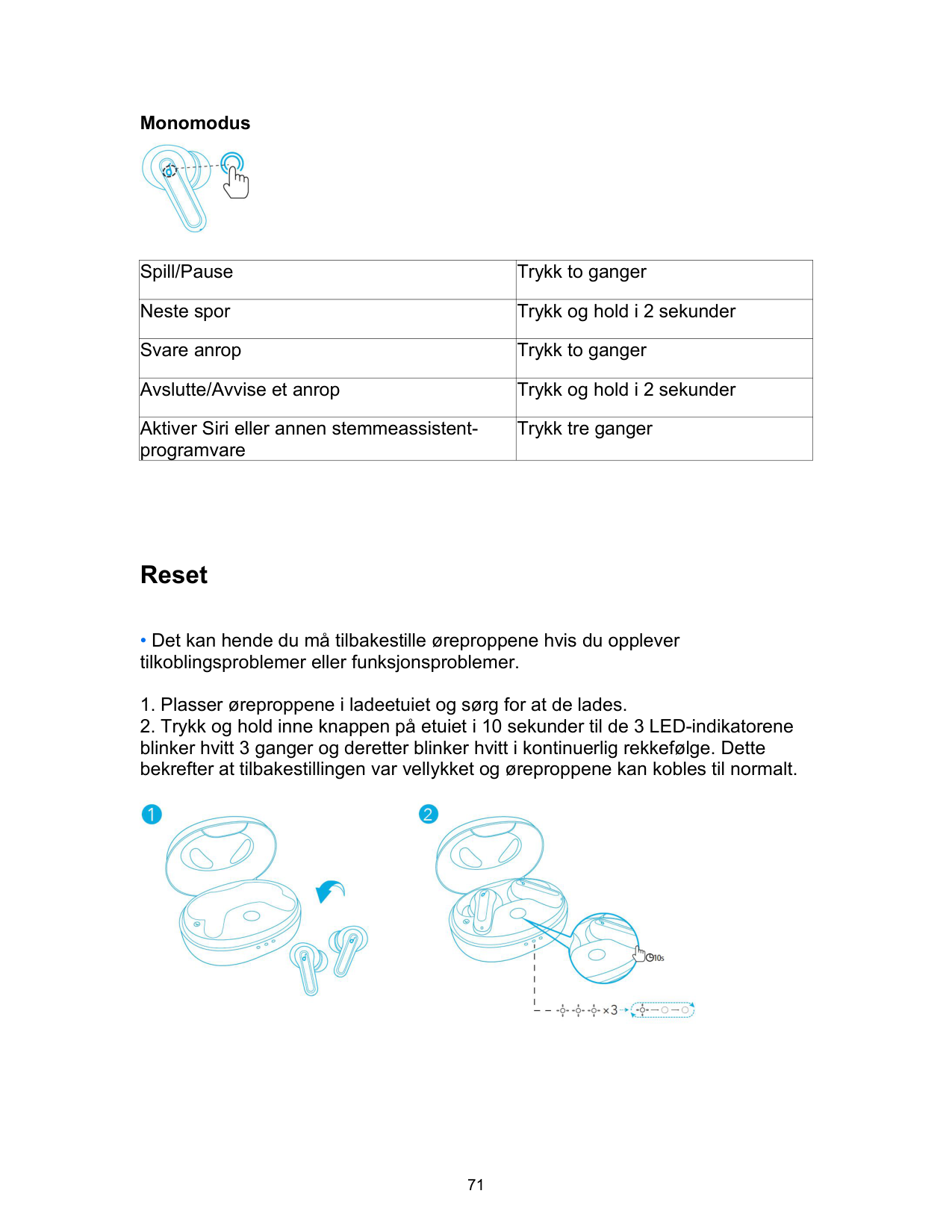
• De 3 LED-indikatorene på ladeetuiet blinker hvitt kontinuerlig.

Kontroller
Stereomodus


|Spill/Pause|Trykk to ganger (H/V)| |---|---| |Neste spor|Trykk og hold i 2 sekunder (H)| |Forrige spor|Trykk og hold i 2 sekunder (V)| |Bytt EQ i sekvens: Signatur (Standard) / Bass Booster / Podcast|Trykk tre ganger (H)|
Trykk raskt på berøringsknappen på høyre ørepropp tre ganger for å bla gjennom Soundcore Signature- (standard), Bass Booster- og Podcast-modus. Du vil høre en tone for hvert bytte.

|Svare anrop|Trykk to ganger (H/V)| |---|---| |Avslutte/Avvise et anrop|Trykk og hold i 2 sekunder (H/V)|

|Aktiver Siri eller annen stemmeassistentprogramvare|Trykk tre ganger (V)| |---|---|
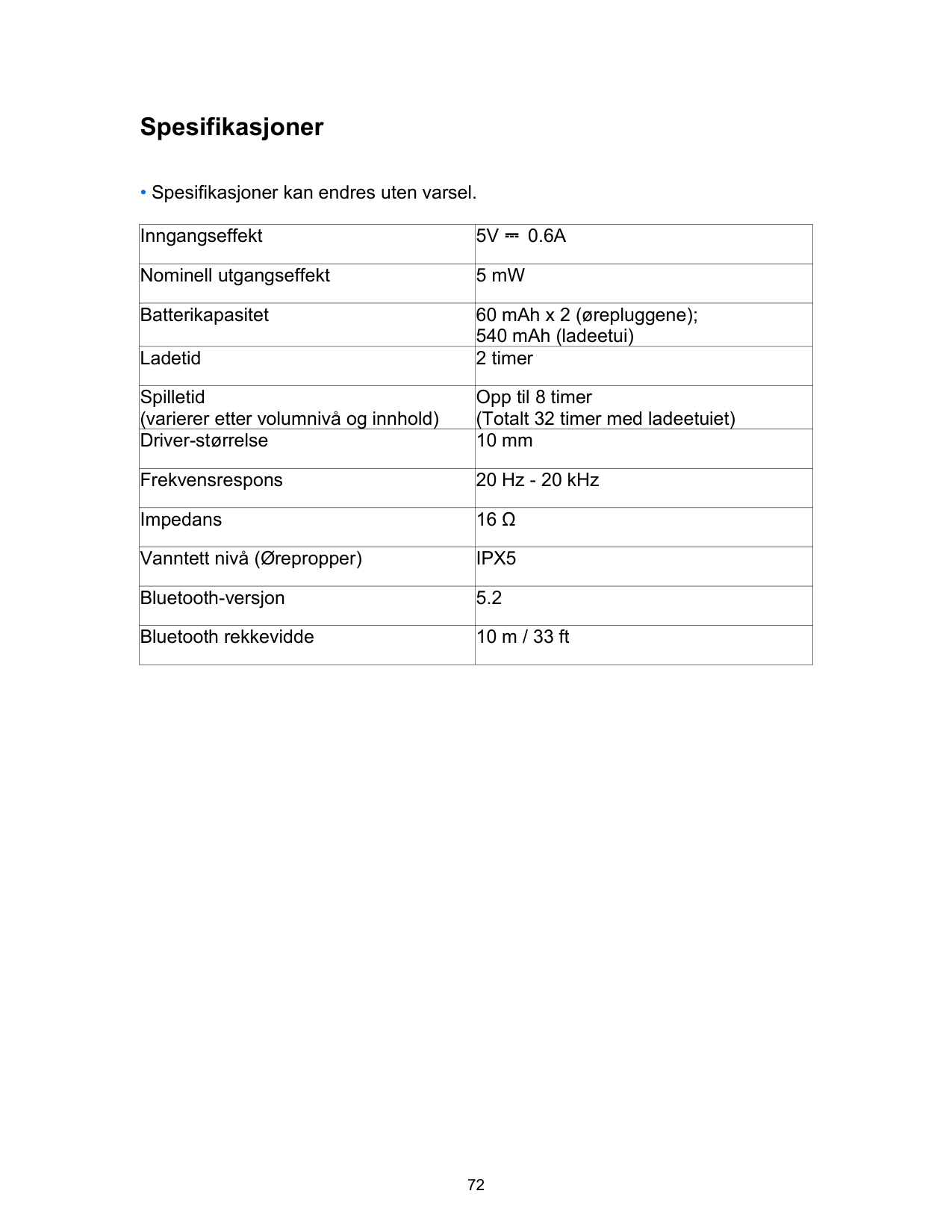
Monomodus

|Spill/Pause|Trykk to ganger| |---|---| |Neste spor|Trykk og hold i 2 sekunder| |Svare anrop|Trykk to ganger| |Avslutte/Avvise et anrop|Trykk og hold i 2 sekunder| |Aktiver Siri eller annen stemmeassistentprogramvare|Trykk tre ganger|
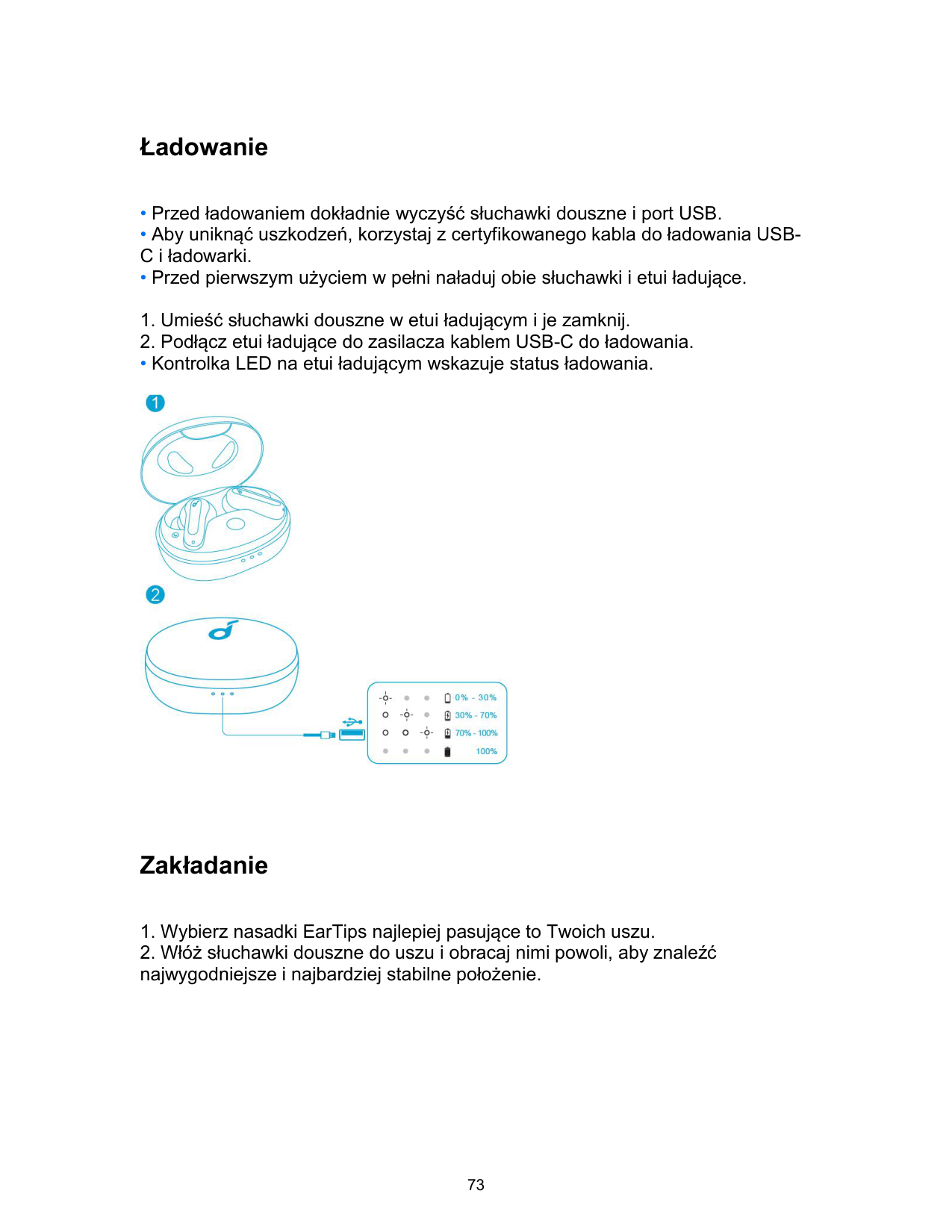
Reset

Spesifikasjoner
• Spesifikasjoner kan endres uten varsel.
|Inngangseffekt|5V ⎓ 0.6A| |---|---| |Nominell utgangseffekt|5 mW| |Batterikapasitet|60 mAh x 2 (ørepluggene); 540 mAh (ladeetui)| |Ladetid|2 timer| |Spilletid (varierer etter volumnivå og innhold)|Opp til 8 timer (Totalt 32 timer med ladeetuiet)| |Driver-størrelse|10 mm| |Frekvensrespons|20 Hz - 20 kHz| |Impedans|16 Ω| |Vanntett nivå (Ørepropper)|IPX5|
|Bluetooth-versjon|5.2| |Bluetooth rekkevidde|10 m / 33 ft|
Ładowanie
• Kontrolka LED na etui ładującym wskazuje status ładowania.

Zakładanie

• Do Twoich słuchawek dousznych dołączono 5 par nasadek EarTips. Fabrycznie założone są nasadki w średnim rozmiarze.
Włączanie i wyłączanie

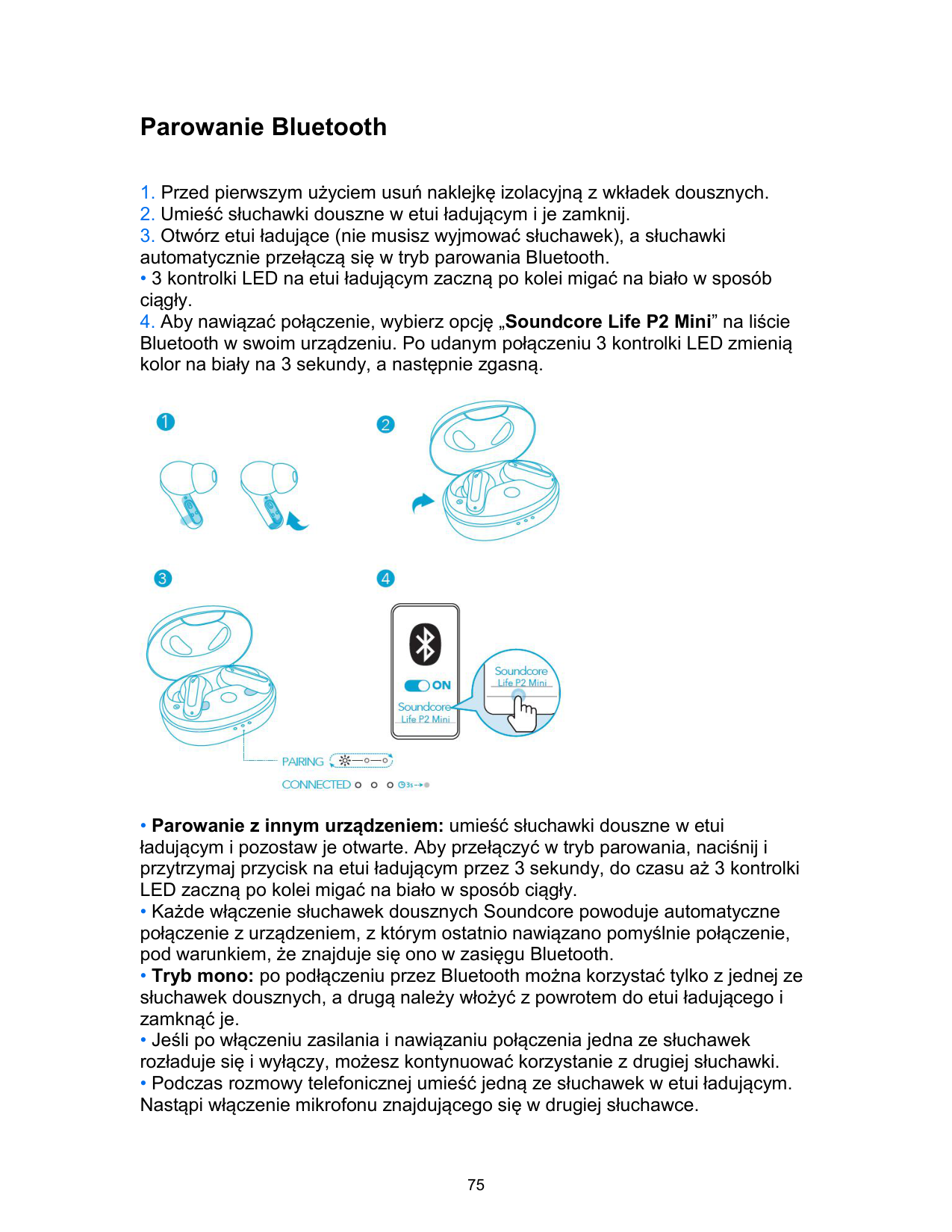
Parowanie Bluetooth
• 3 kontrolki LED na etui ładującym zaczną po kolei migać na biało w sposób ciągły.

Sterowanie
Tryb stereofoniczny Mode


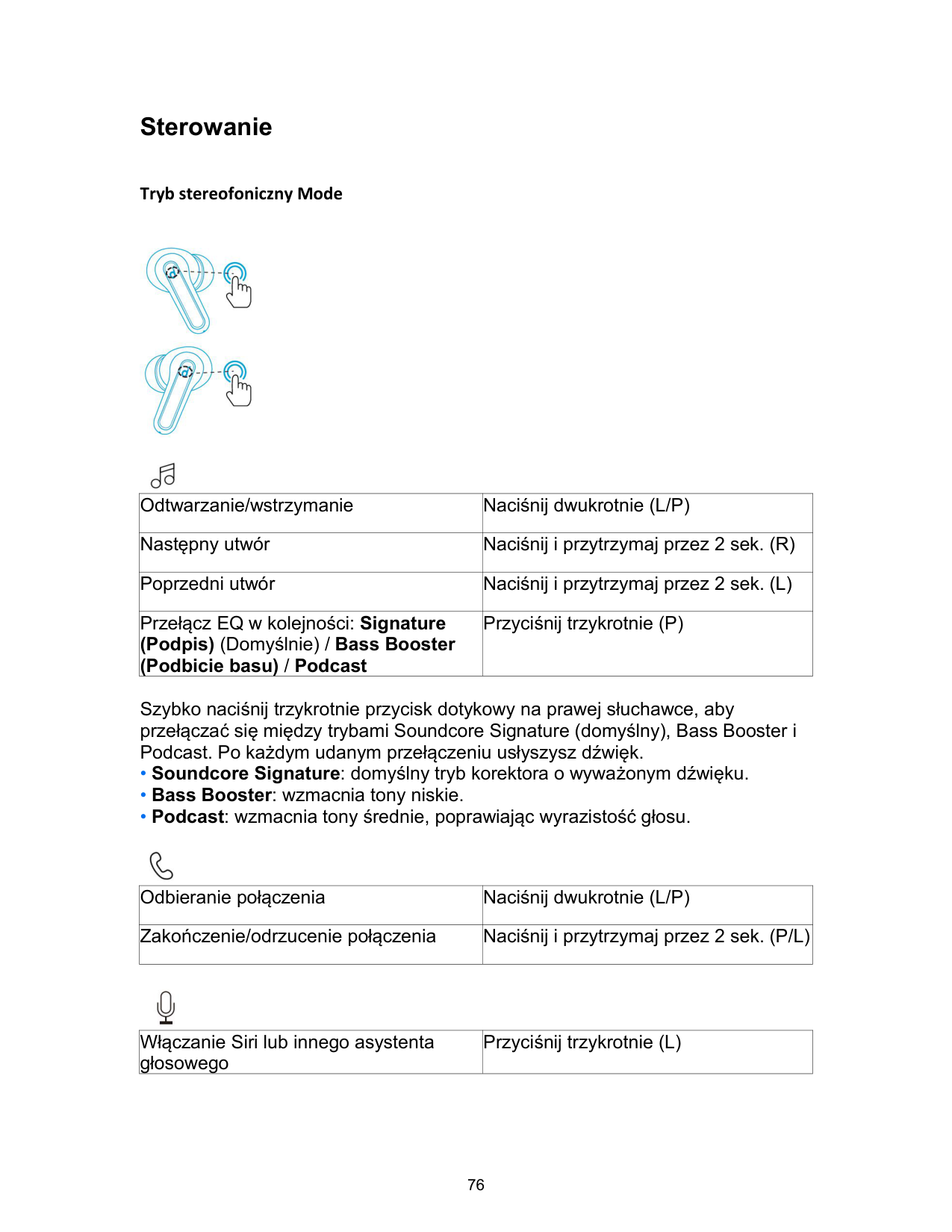
|Odtwarzanie/wstrzymanie|Naciśnij dwukrotnie (L/P)| |---|---| |Następny utwór|Naciśnij i przytrzymaj przez 2 sek. (R)| |Poprzedni utwór|Naciśnij i przytrzymaj przez 2 sek. (L)| |Przełącz EQ w kolejności: Signature (Podpis) (Domyślnie) / Bass Booster (Podbicie basu) / Podcast|Przyciśnij trzykrotnie (P)|
Szybko naciśnij trzykrotnie przycisk dotykowy na prawej słuchawce, aby przełączać się między trybami Soundcore Signature (domyślny), Bass Booster i Podcast. Po każdym udanym przełączeniu usłyszysz dźwięk.

|Odbieranie połączenia|Naciśnij dwukrotnie (L/P)| |---|---| |Zakończenie/odrzucenie połączenia|Naciśnij i przytrzymaj przez 2 sek. (P/L)|
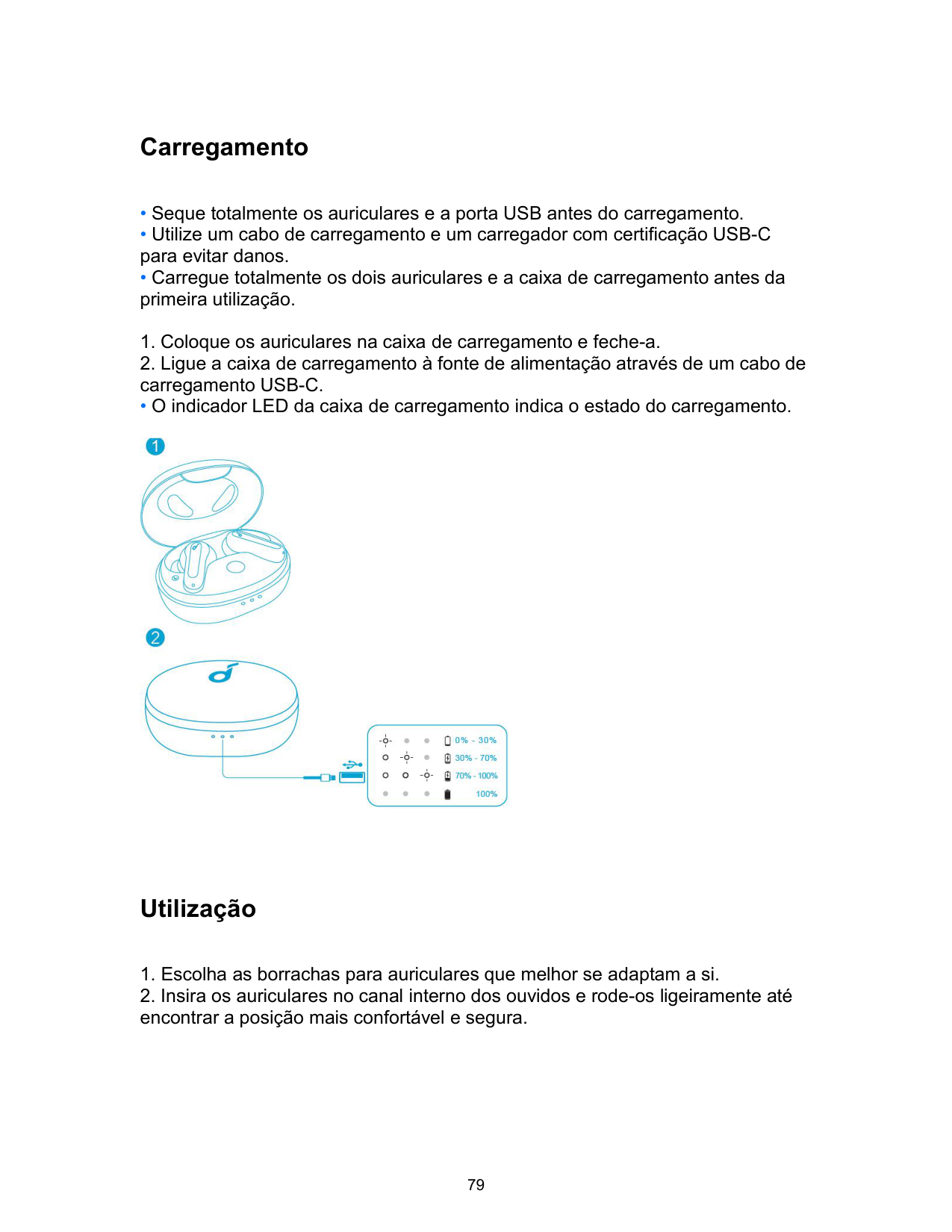

|Włączanie Siri lub innego asystenta głosowego|Przyciśnij trzykrotnie (L)| |---|---|
Tryb mono

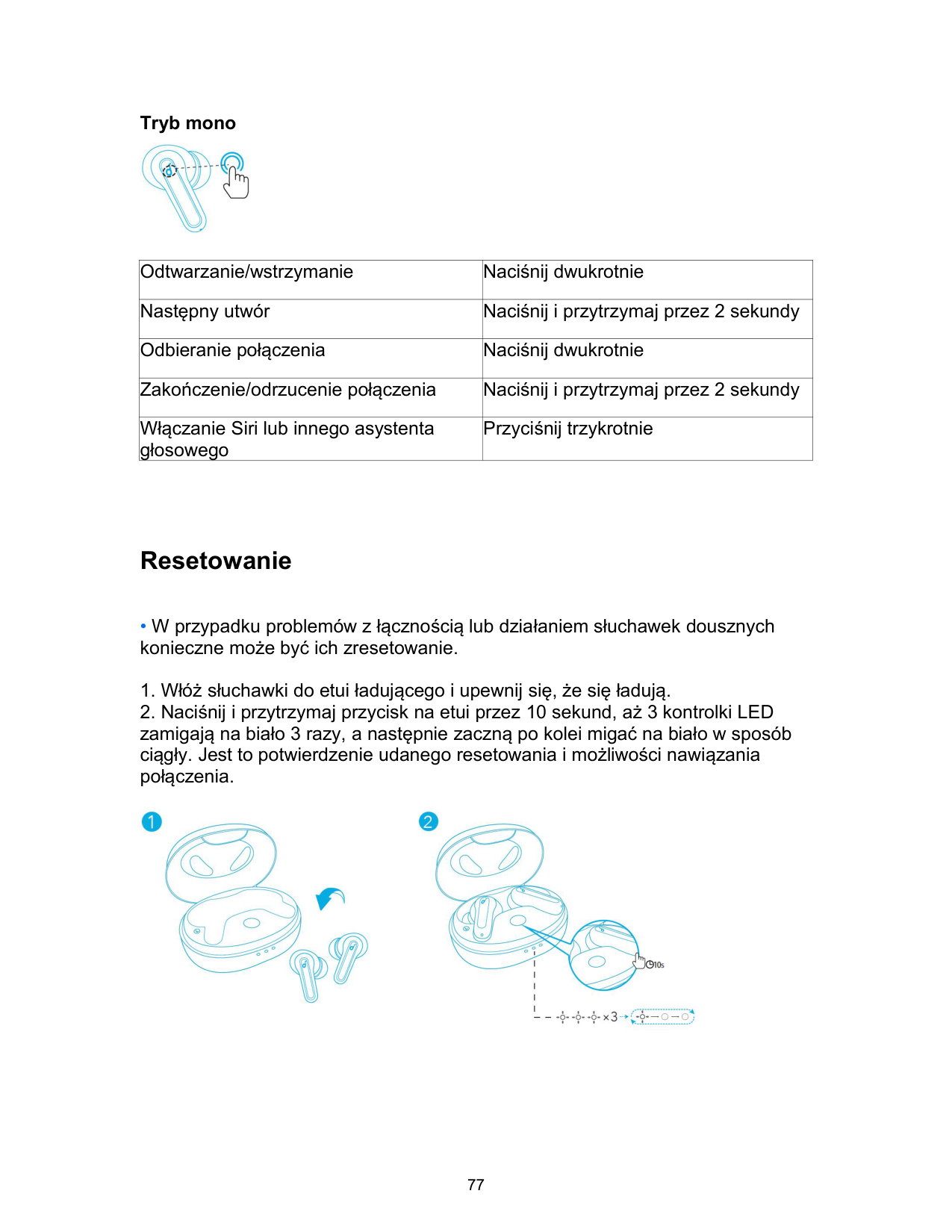
|Odtwarzanie/wstrzymanie|Naciśnij dwukrotnie| |---|---| |Następny utwór|Naciśnij i przytrzymaj przez 2 sekundy| |Odbieranie połączenia|Naciśnij dwukrotnie| |Zakończenie/odrzucenie połączenia|Naciśnij i przytrzymaj przez 2 sekundy| |Włączanie Siri lub innego asystenta głosowego|Przyciśnij trzykrotnie|
Resetowanie
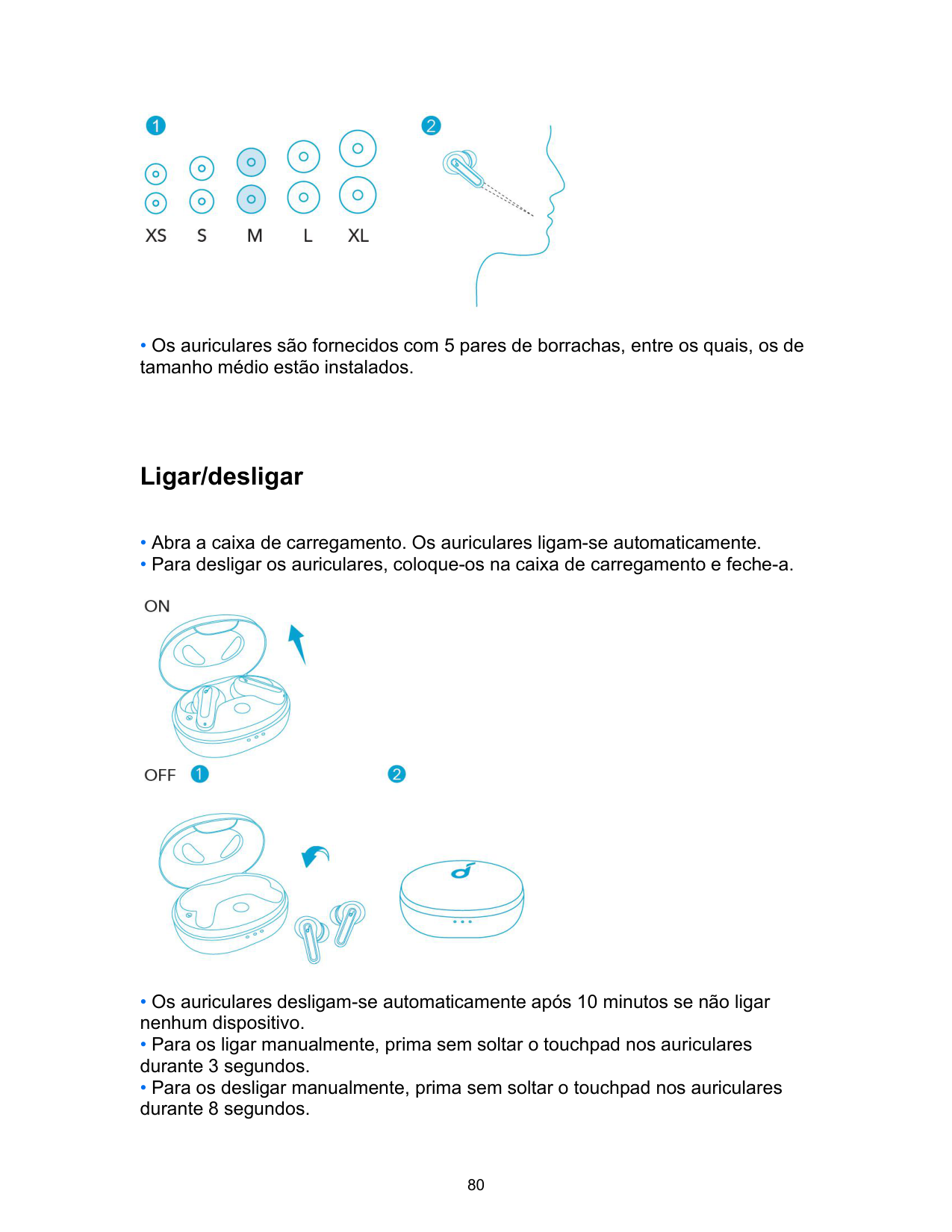

Dane techniczne
• Dane techniczne mogą ulec zmianie bez powiadomienia.
|Parametry wejściowe|5 V ⎓ 0,6 A| |---|---| |Znamionowa moc wyjściowa|5 mW| |Pojemność akumulatora|60 mAh x 2 (słuchawki douszne); 540 mAh (etui ładujące)| |Czas ładowania|2 godz.| |Czas odtwarzania (zależy od głośności i odtwarzanego dźwięku)|Do 8 godz. (Łącznie 32 godz. z etui ładującym)| |Rozmiar przetwornika|10 mm| |Charakterystyka częstotliwościowa|Od 20 Hz do 20 kHz| |Impedancja|16 Ω|
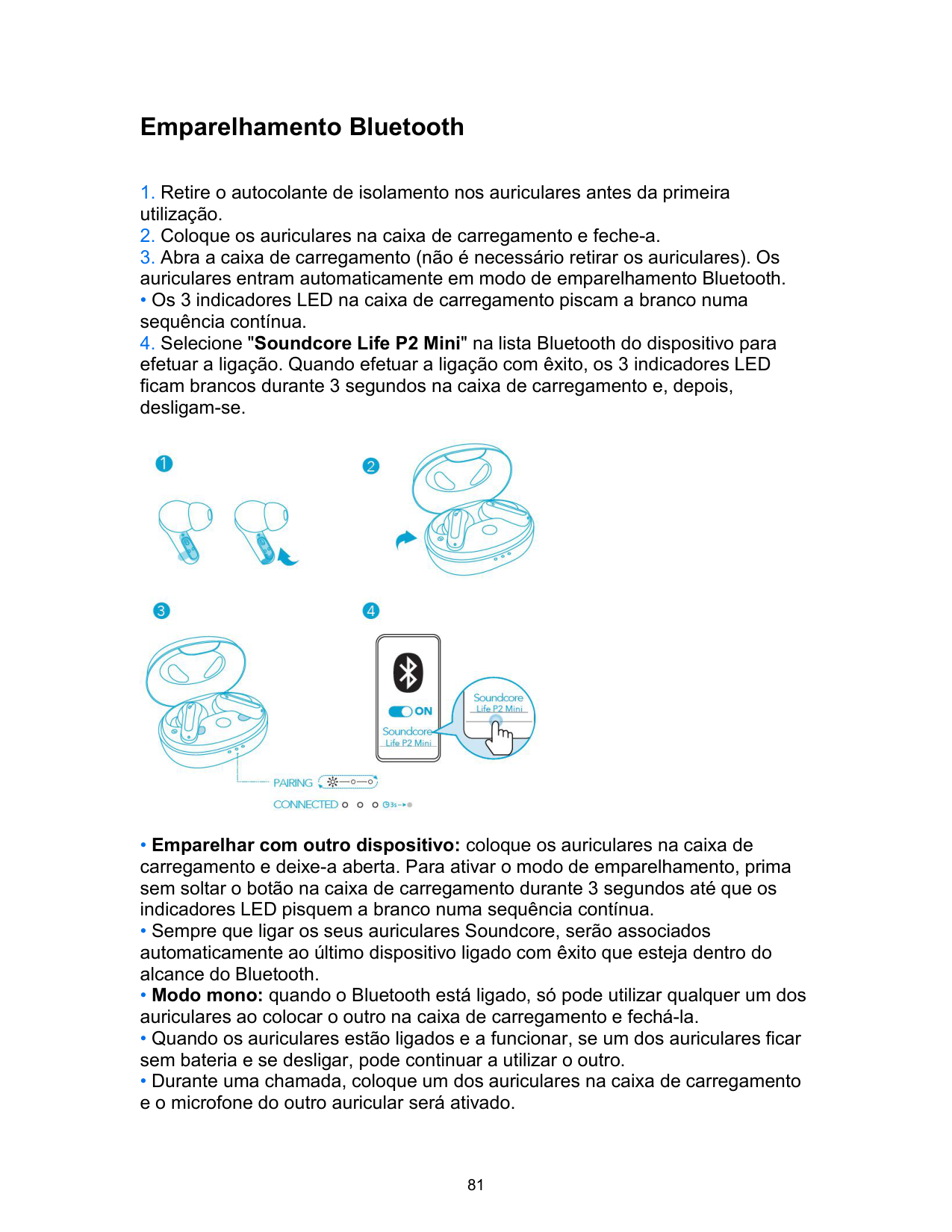
|Poziom wodoodporności (słuchawki douszne)|IPX5| |Wersja Bluetooth|5.2| |Zasięg Bluetooth|10 m / 33 ft|
Carregamento
• O indicador LED da caixa de carregamento indica o estado do carregamento.

Utilização
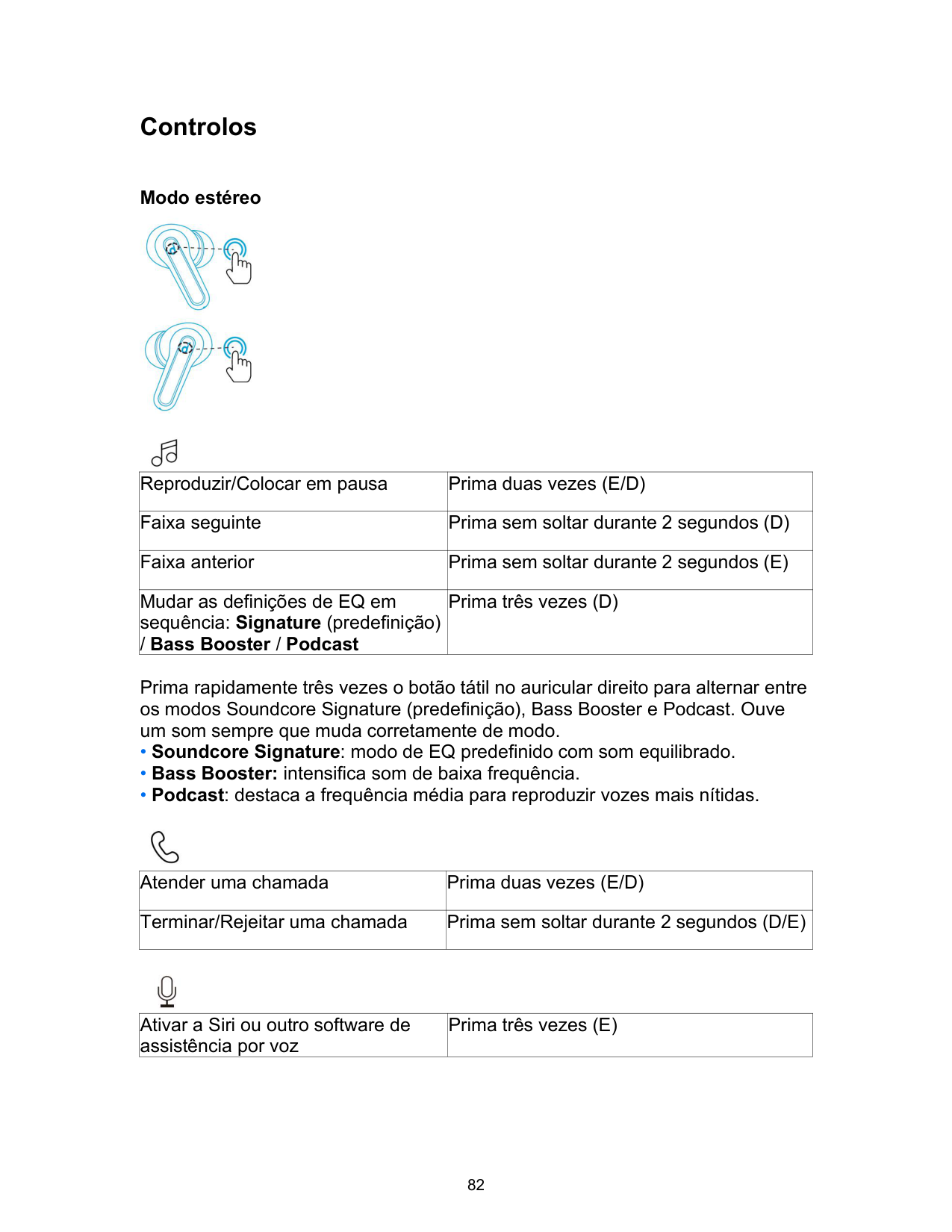

• Os auriculares são fornecidos com 5 pares de borrachas, entre os quais, os de tamanho médio estão instalados.
Ligar/desligar

Emparelhamento Bluetooth
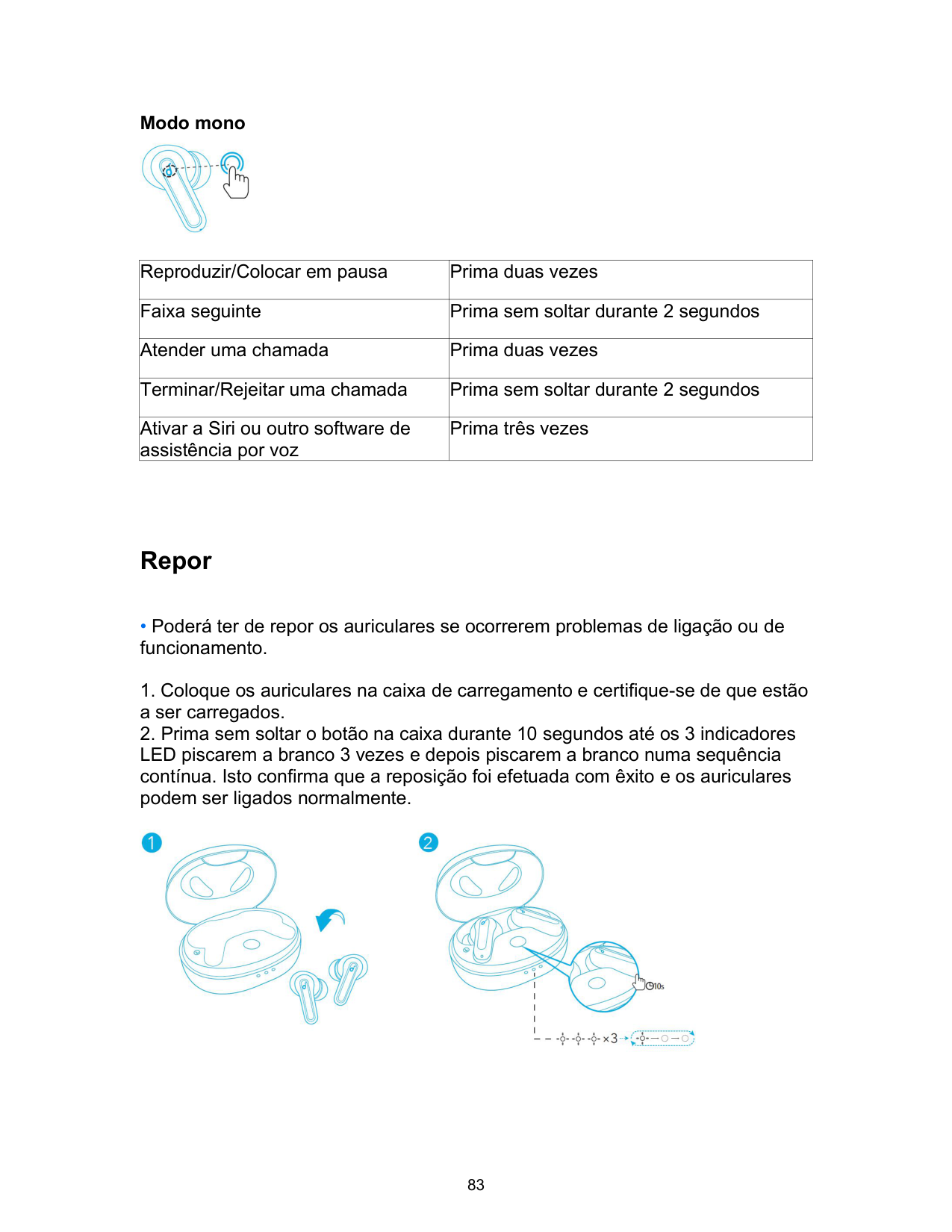
• Os 3 indicadores LED na caixa de carregamento piscam a branco numa sequência contínua.

Controlos
Modo estéreo
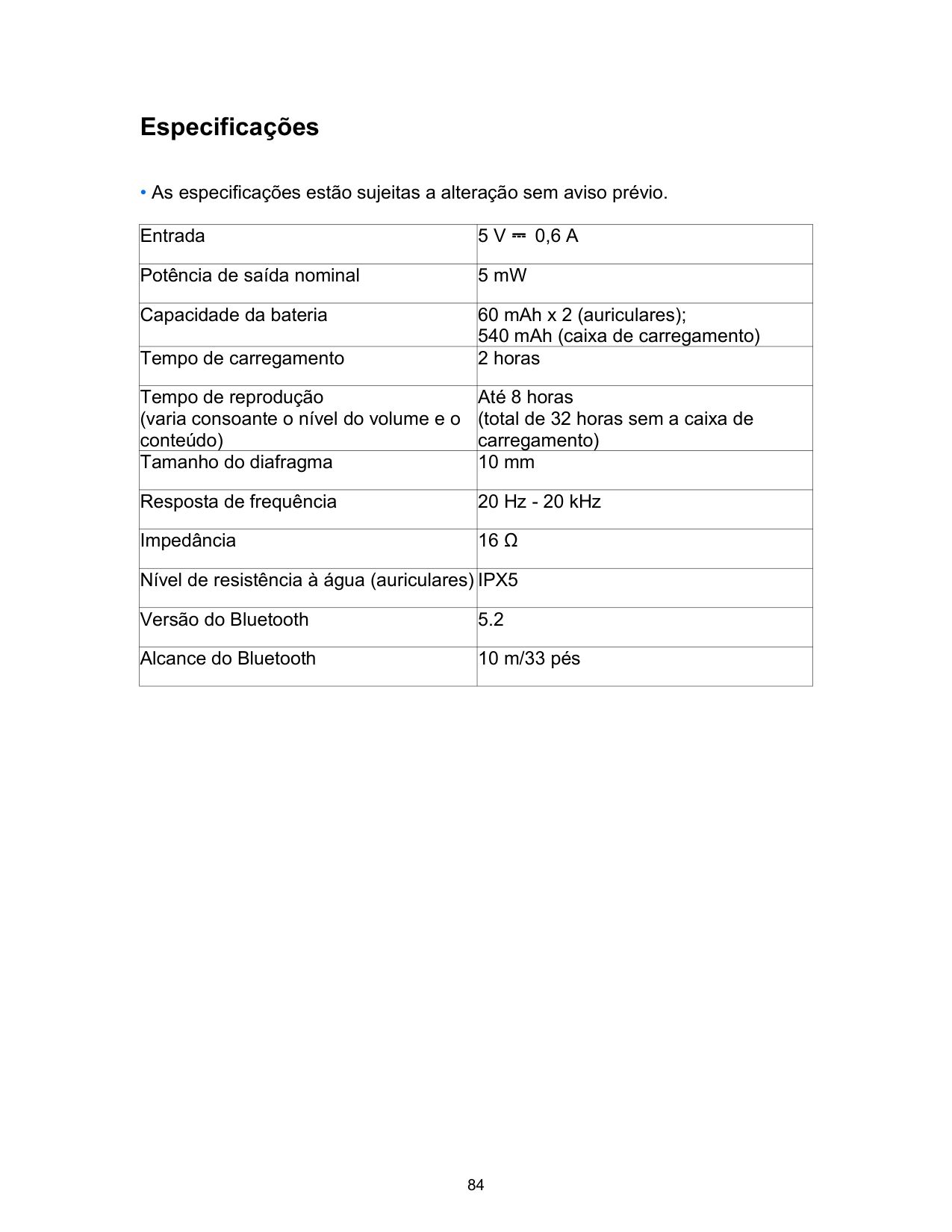


|Reproduzir/Colocar em pausa|Prima duas vezes (E/D)| |---|---| |Faixa seguinte|Prima sem soltar durante 2 segundos (D)| |Faixa anterior|Prima sem soltar durante 2 segundos (E)| |Mudar as definições de EQ em sequência: Signature (predefinição) / Bass Booster / Podcast|Prima três vezes (D)|
Prima rapidamente três vezes o botão tátil no auricular direito para alternar entre os modos Soundcore Signature (predefinição), Bass Booster e Podcast. Ouve um som sempre que muda corretamente de modo.

|Atender uma chamada|Prima duas vezes (E/D)| |---|---|
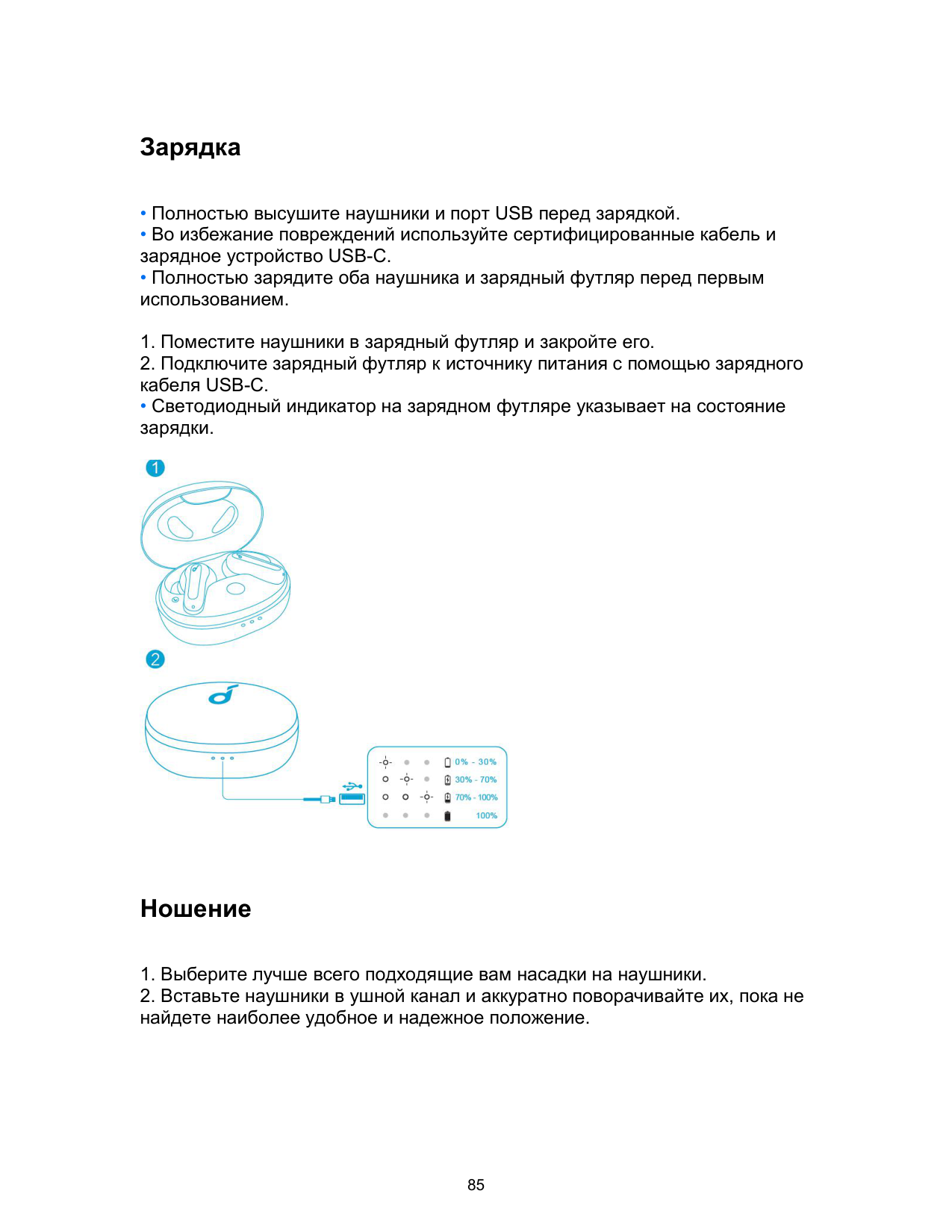
|Terminar/Rejeitar uma chamada|Prima sem soltar durante 2 segundos (D/E)|

|Ativar a Siri ou outro software de assistência por voz|Prima três vezes (E)| |---|---|
Modo mono

|Reproduzir/Colocar em pausa|Prima duas vezes| |---|---| |Faixa seguinte|Prima sem soltar durante 2 segundos| |Atender uma chamada|Prima duas vezes| |Terminar/Rejeitar uma chamada|Prima sem soltar durante 2 segundos| |Ativar a Siri ou outro software de assistência por voz|Prima três vezes|
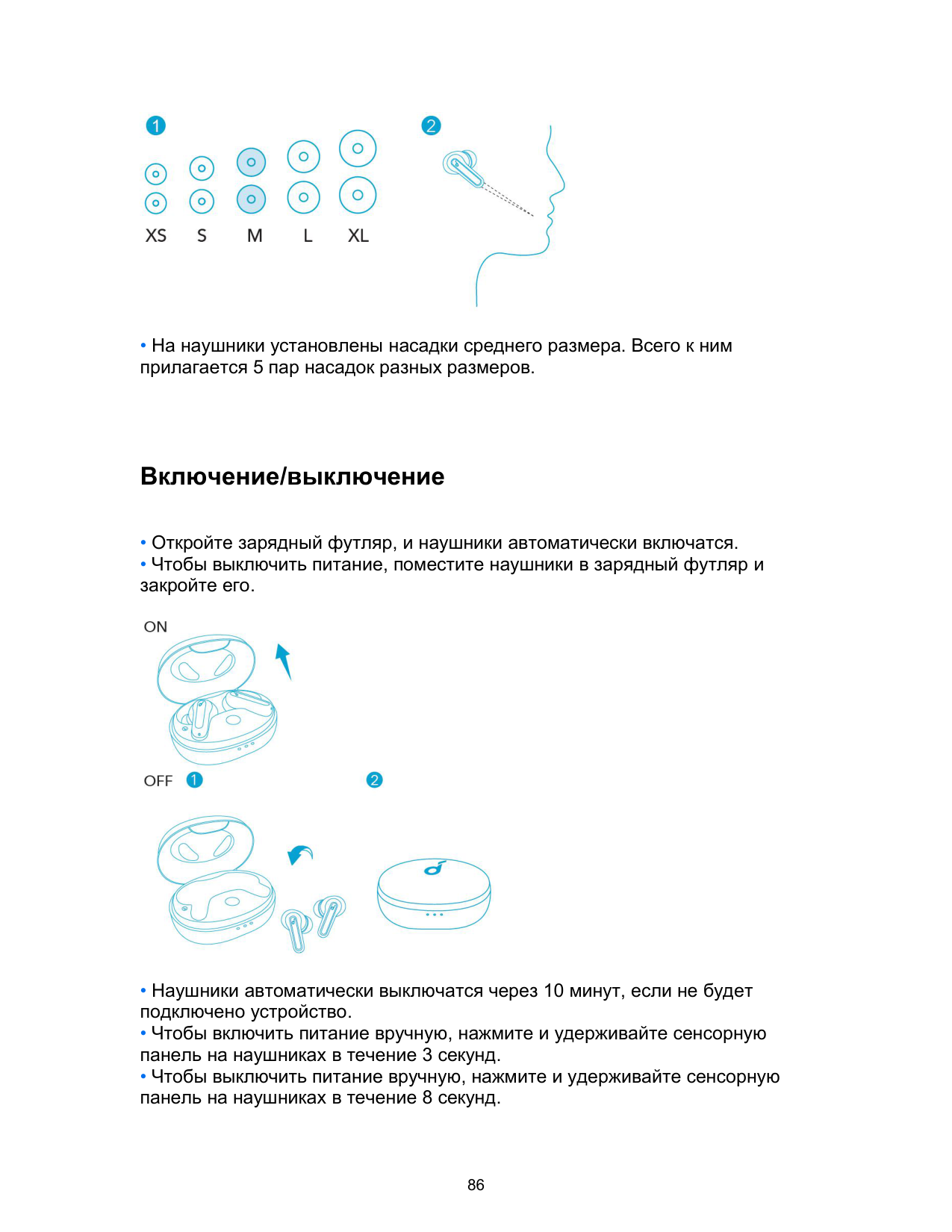
Repor

Especificações
• As especificações estão sujeitas a alteração sem aviso prévio.
|Entrada|5 V ⎓ 0,6 A| |---|---| |Potência de saída nominal|5 mW| |Capacidade da bateria|60 mAh x 2 (auriculares); 540 mAh (caixa de carregamento)| |Tempo de carregamento|2 horas| |Tempo de reprodução (varia consoante o nível do volume e o conteúdo)|Até 8 horas (total de 32 horas sem a caixa de carregamento)| |Tamanho do diafragma|10 mm| |Resposta de frequência|20 Hz - 20 kHz|
|Impedância|16 Ω| |Nível de resistência à água (auriculares)|IPX5| |Versão do Bluetooth|5.2| |Alcance do Bluetooth|10 m/33 pés|
Зарядка
• Светодиодный индикатор на зарядном футляре указывает на состояние зарядки.

Ношение
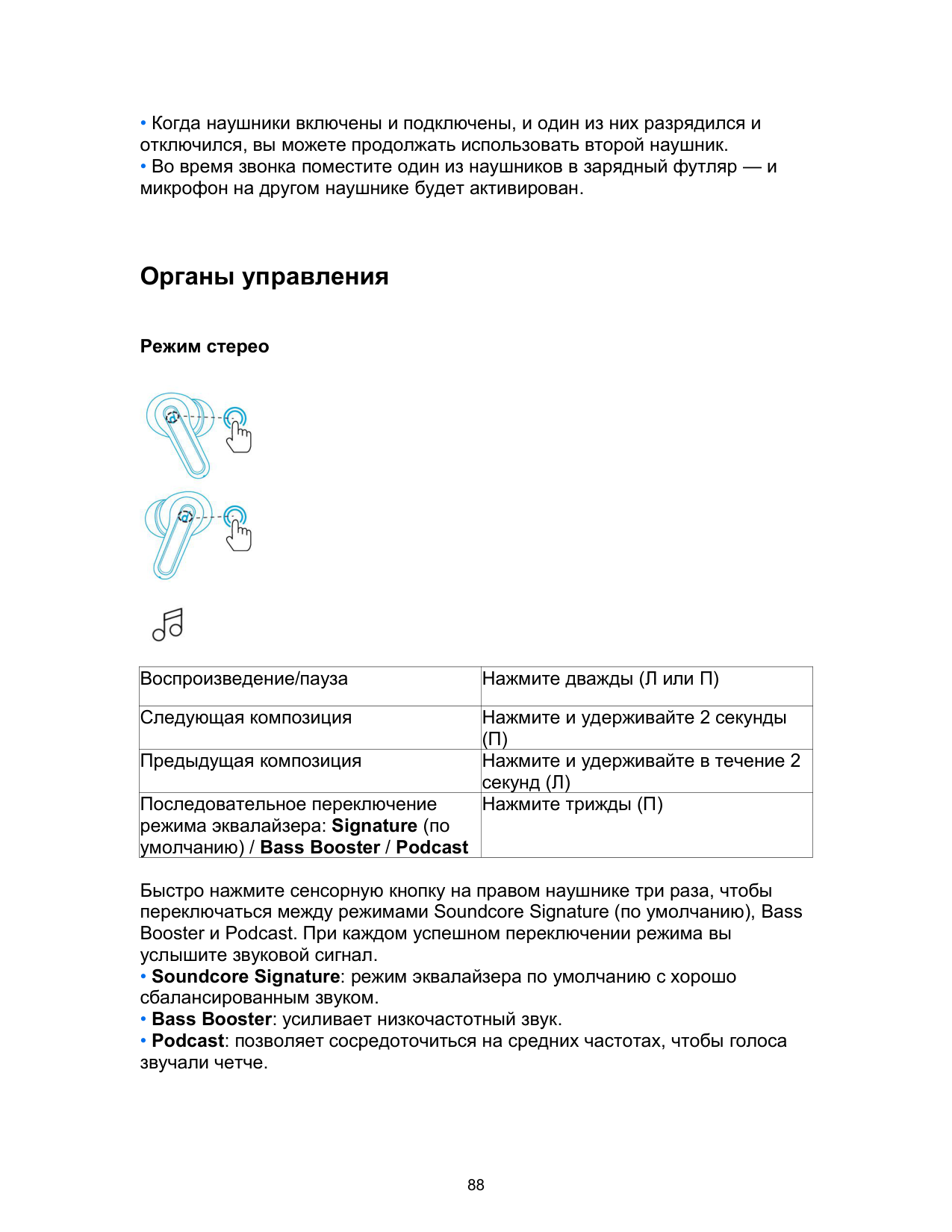

• На наушники установлены насадки среднего размера. Всего к ним прилагается 5 пар насадок разных размеров.
Включение/выключение

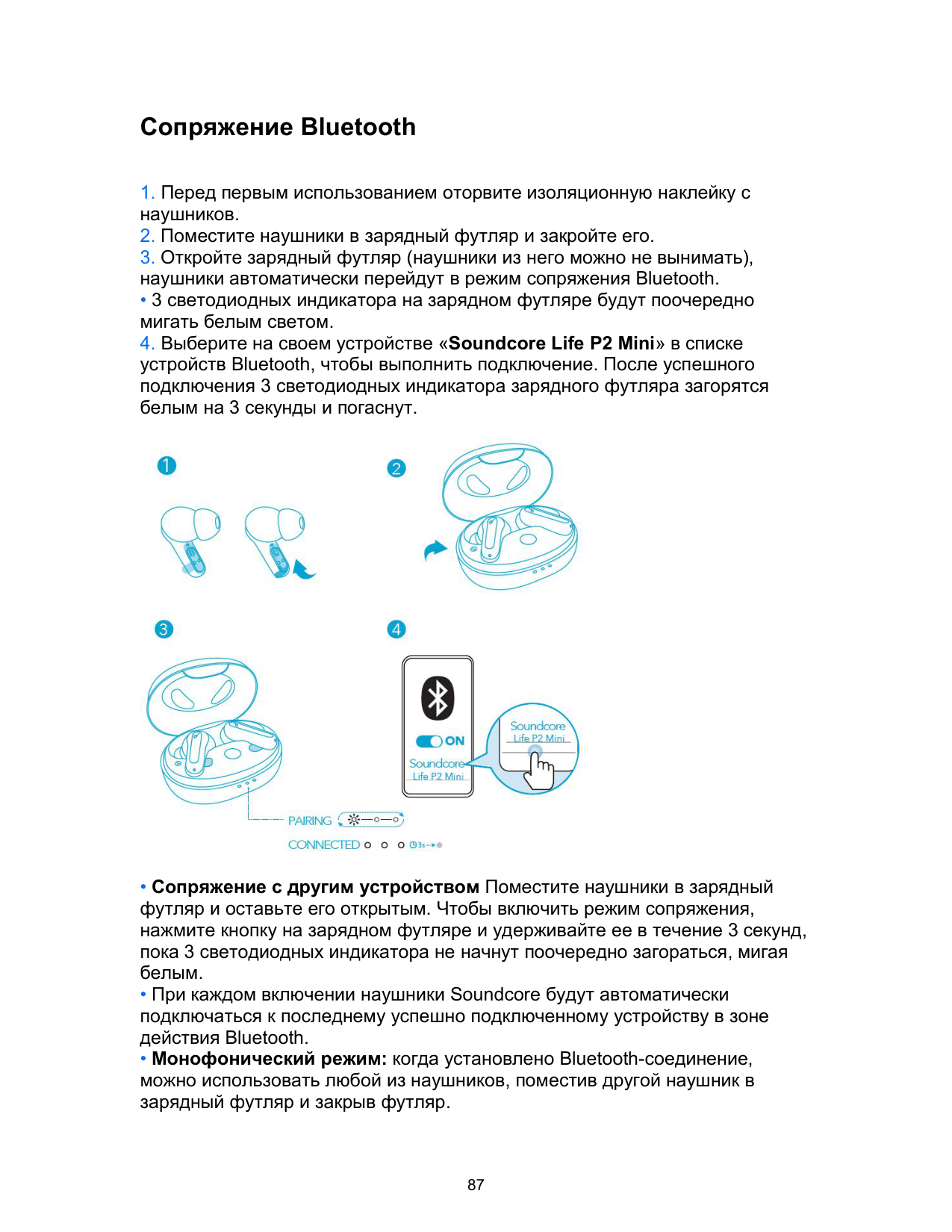
Сопряжение Bluetooth
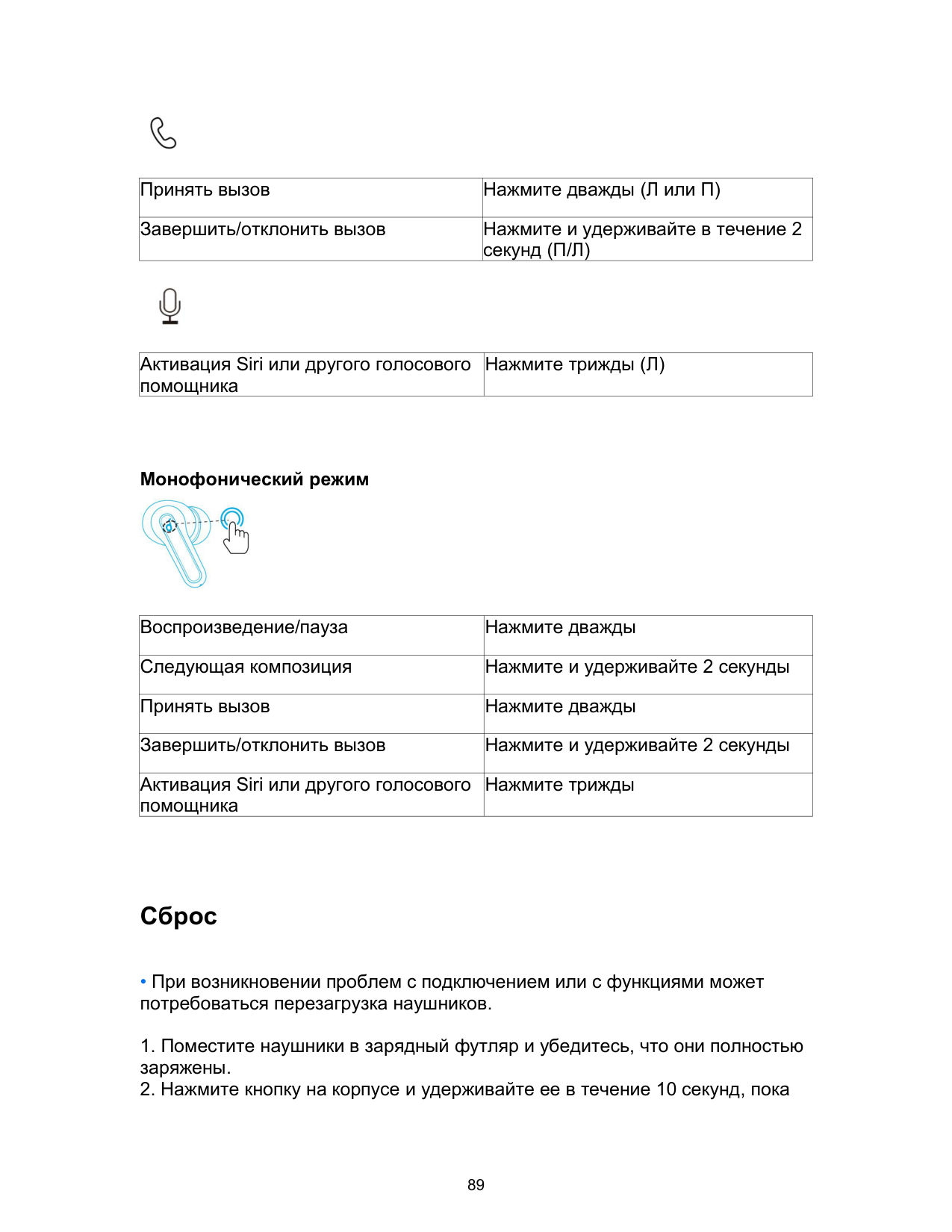
• 3 светодиодных индикатора на зарядном футляре будут поочередно мигать белым светом.

Органы управления
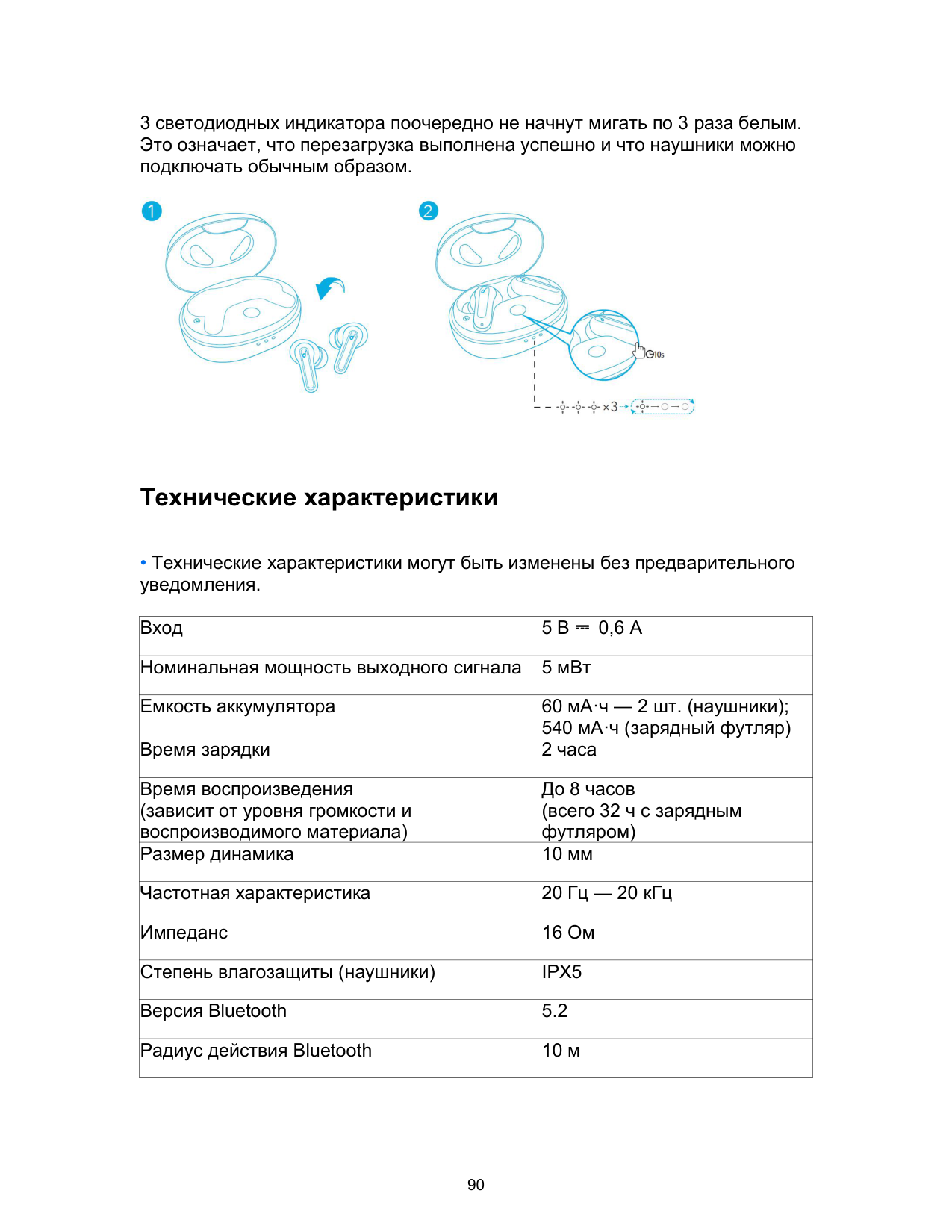
Режим стерео


|Воспроизведение/пауза|Нажмите дважды (Л или П)| |---|---| |Следующая композиция|Нажмите и удерживайте 2 секунды (П)| |Предыдущая композиция|Нажмите и удерживайте в течение 2 секунд (Л)| |Последовательное переключение режима эквалайзера: Signature (по умолчанию) / Bass Booster / Podcast|Нажмите трижды (П)|
Быстро нажмите сенсорную кнопку на правом наушнике три раза, чтобы переключаться между режимами Soundcore Signature (по умолчанию), Bass Booster и Podcast. При каждом успешном переключении режима вы услышите звуковой сигнал.

|Принять вызов|Нажмите дважды (Л или П)| |---|---| |Завершить/отклонить вызов|Нажмите и удерживайте в течение 2 секунд (П/Л)|

|Активация Siri или другого голосового помощника|Нажмите трижды (Л)| |---|---|
Монофонический режим

|Воспроизведение/пауза|Нажмите дважды| |---|---| |Следующая композиция|Нажмите и удерживайте 2 секунды| |Принять вызов|Нажмите дважды| |Завершить/отклонить вызов|Нажмите и удерживайте 2 секунды| |Активация Siri или другого голосового помощника|Нажмите трижды|
Сброс

Технические характеристики
|Вход|5 В ⎓ 0,6 А| |---|---|
|Номинальная мощность выходного сигнала|5 мВт| |Емкость аккумулятора|60 мА·ч — 2 шт. (наушники); 540 мА·ч (зарядный футляр)| |Время зарядки|2 часа| |Время воспроизведения (зависит от уровня громкости и воспроизводимого материала)|До 8 часов (всего 32 ч с зарядным футляром)| |Размер динамика|10 мм| |Частотная характеристика|20 Гц — 20 кГц| |Импеданс|16 Ом| |Степень влагозащиты (наушники)|IPX5| |Версия Bluetooth|5.2| |Радиус действия Bluetooth|10 м|
Nabíjanie
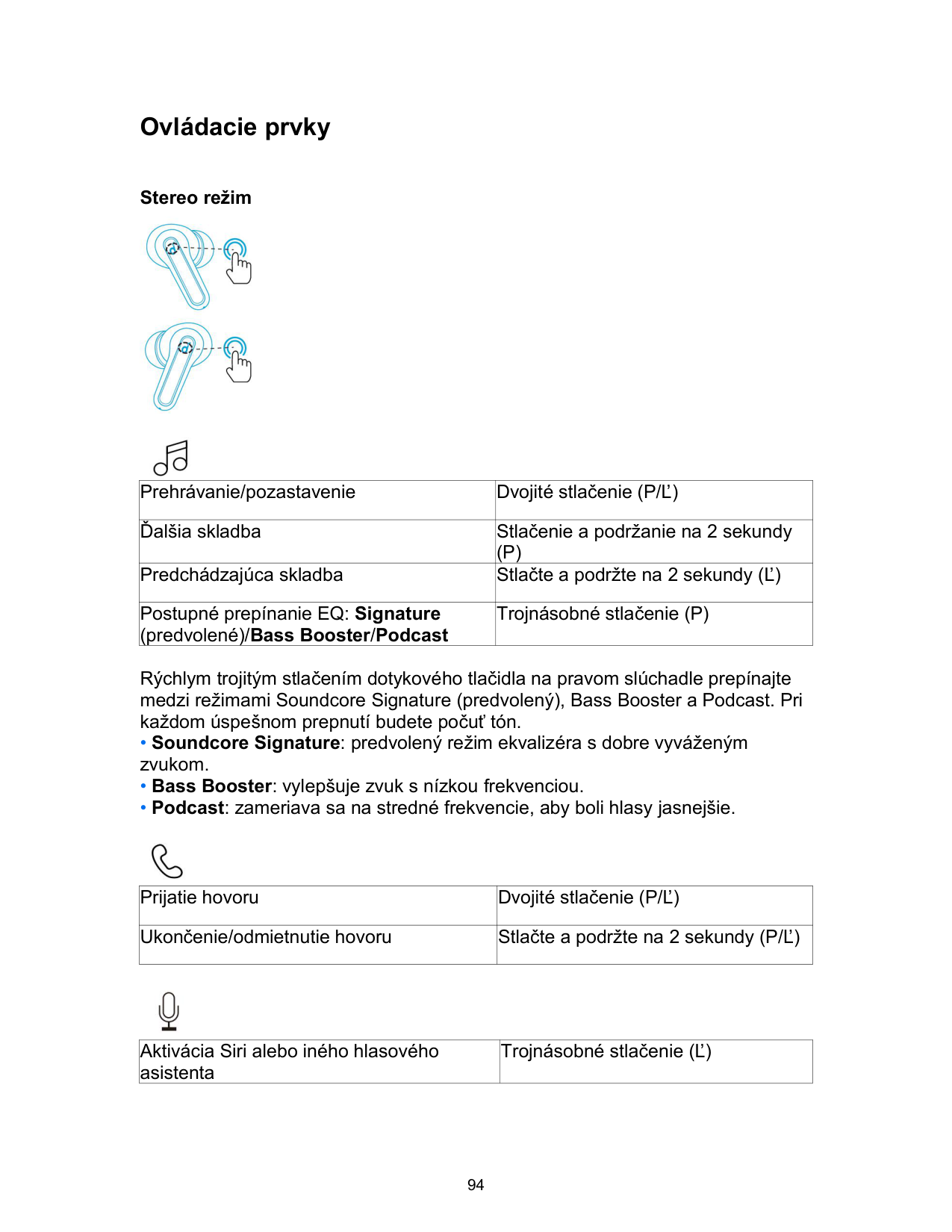
• LED indikátor na nabíjacom puzdre signalizuje stav nabíjania.

Nosenie

• Slúchadlá sa dodávajú s 5 pármi vložiek do uší, pričom sú predvolene nasadené vložky strednej veľkosti.
Zapnutie/vypnutie

Párovanie prostredníctvom pripojenia Bluetooth
• 3 LED indikátory na nabíjacom puzdre budú nepretržite blikať nabielo. 4. Ak chcete slúchadlá pripojiť k zariadeniu, zvoľte v zozname zariadení Bluetooth na svojom zariadení slúchadlá „Soundcore Life P2 Mini“. Po úspešnom pripojení sa 3 LED indikátory na 3 sekundy rozsvietia nabielo a potom zhasnú.

Ovládacie prvky
Stereo režim


|Prehrávanie/pozastavenie|Dvojité stlačenie (P/Ľ)| |---|---| |Ďalšia skladba|Stlačenie a podržanie na 2 sekundy (P)| |Predchádzajúca skladba|Stlačte a podržte na 2 sekundy (Ľ)| |Postupné prepínanie EQ: Signature (predvolené)/Bass Booster/Podcast|Trojnásobné stlačenie (P)|
Rýchlym trojitým stlačením dotykového tlačidla na pravom slúchadle prepínajte medzi režimami Soundcore Signature (predvolený), Bass Booster a Podcast. Pri každom úspešnom prepnutí budete počuť tón.

|Prijatie hovoru|Dvojité stlačenie (P/Ľ)| |---|---| |Ukončenie/odmietnutie hovoru|Stlačte a podržte na 2 sekundy (P/Ľ)|

|Aktivácia Siri alebo iného hlasového asistenta|Trojnásobné stlačenie (Ľ)| |---|---|
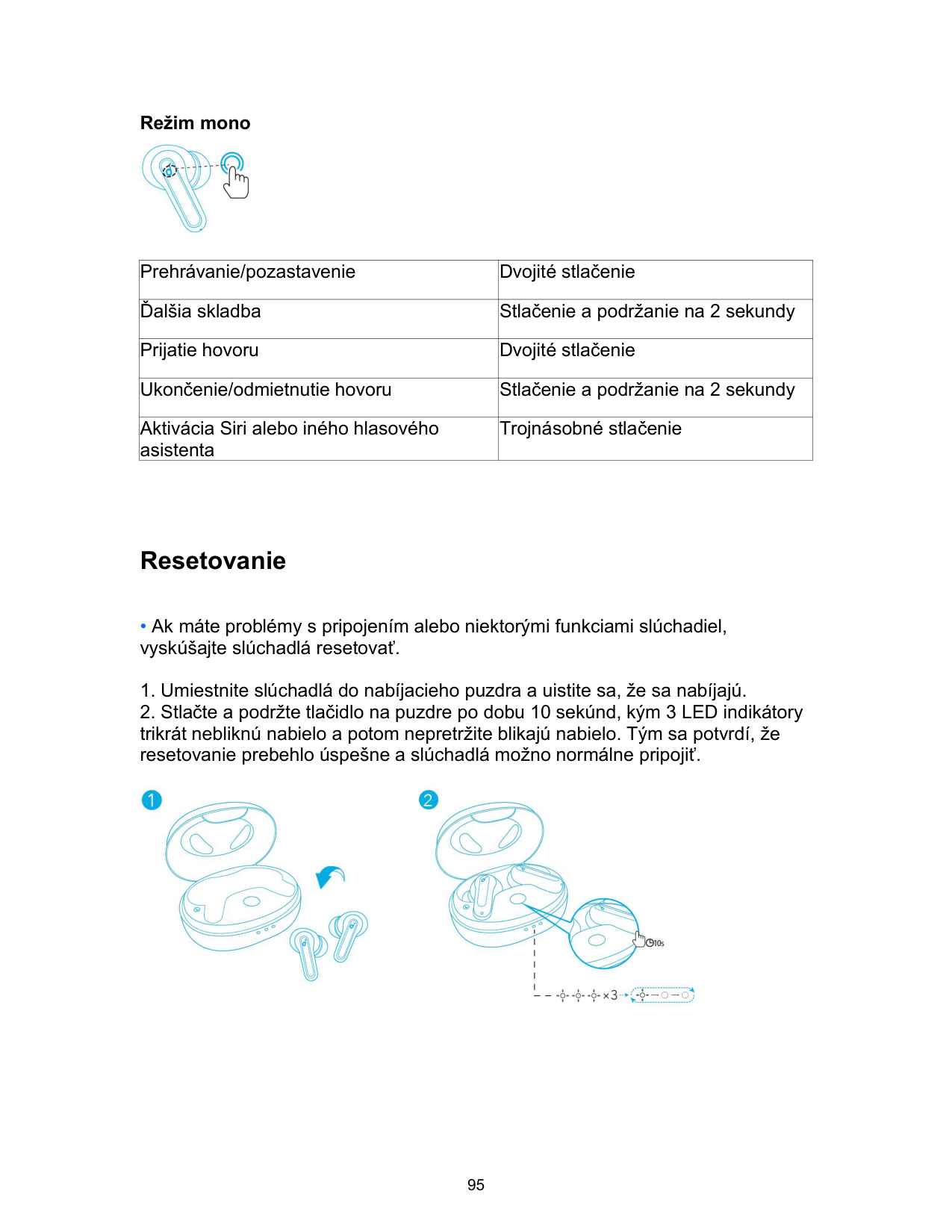
Režim mono

|Prehrávanie/pozastavenie|Dvojité stlačenie| |---|---| |Ďalšia skladba|Stlačenie a podržanie na 2 sekundy| |Prijatie hovoru|Dvojité stlačenie|
|Ukončenie/odmietnutie hovoru|Stlačenie a podržanie na 2 sekundy| |Aktivácia Siri alebo iného hlasového asistenta|Trojnásobné stlačenie|
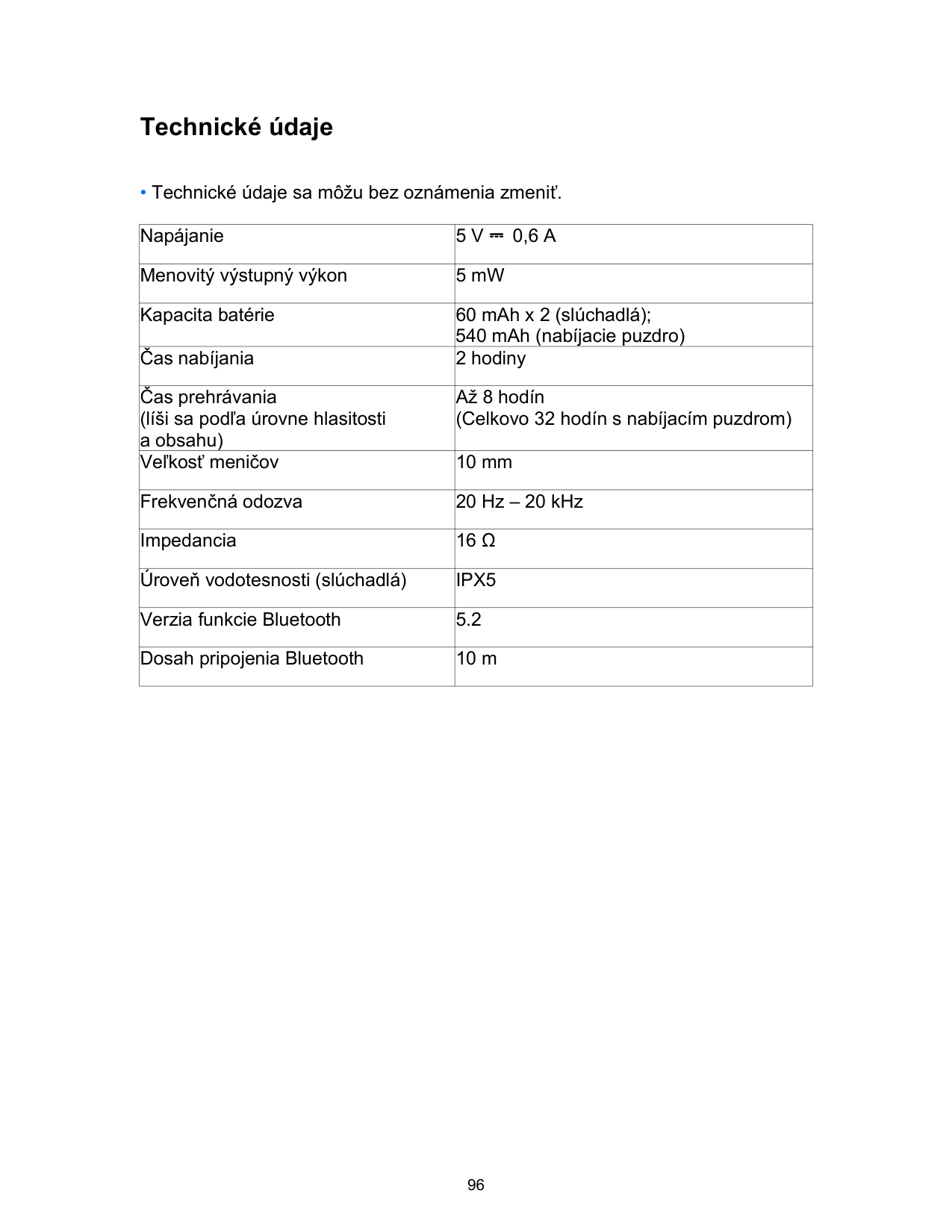
Resetovanie

Technické údaje
• Technické údaje sa môžu bez oznámenia zmeniť.
|Napájanie|5 V ⎓ 0,6 A| |---|---| |Menovitý výstupný výkon|5 mW|
|Kapacita batérie|60 mAh x 2 (slúchadlá); 540 mAh (nabíjacie puzdro)| |Čas nabíjania|2 hodiny| |Čas prehrávania (líši sa podľa úrovne hlasitosti a obsahu)|Až 8 hodín (Celkovo 32 hodín s nabíjacím puzdrom)| |Veľkosť meničov|10 mm| |Frekvenčná odozva|20 Hz – 20 kHz| |Impedancia|16 Ω| |Úroveň vodotesnosti (slúchadlá)|IPX5| |Verzia funkcie Bluetooth|5.2| |Dosah pripojenia Bluetooth|10 m|
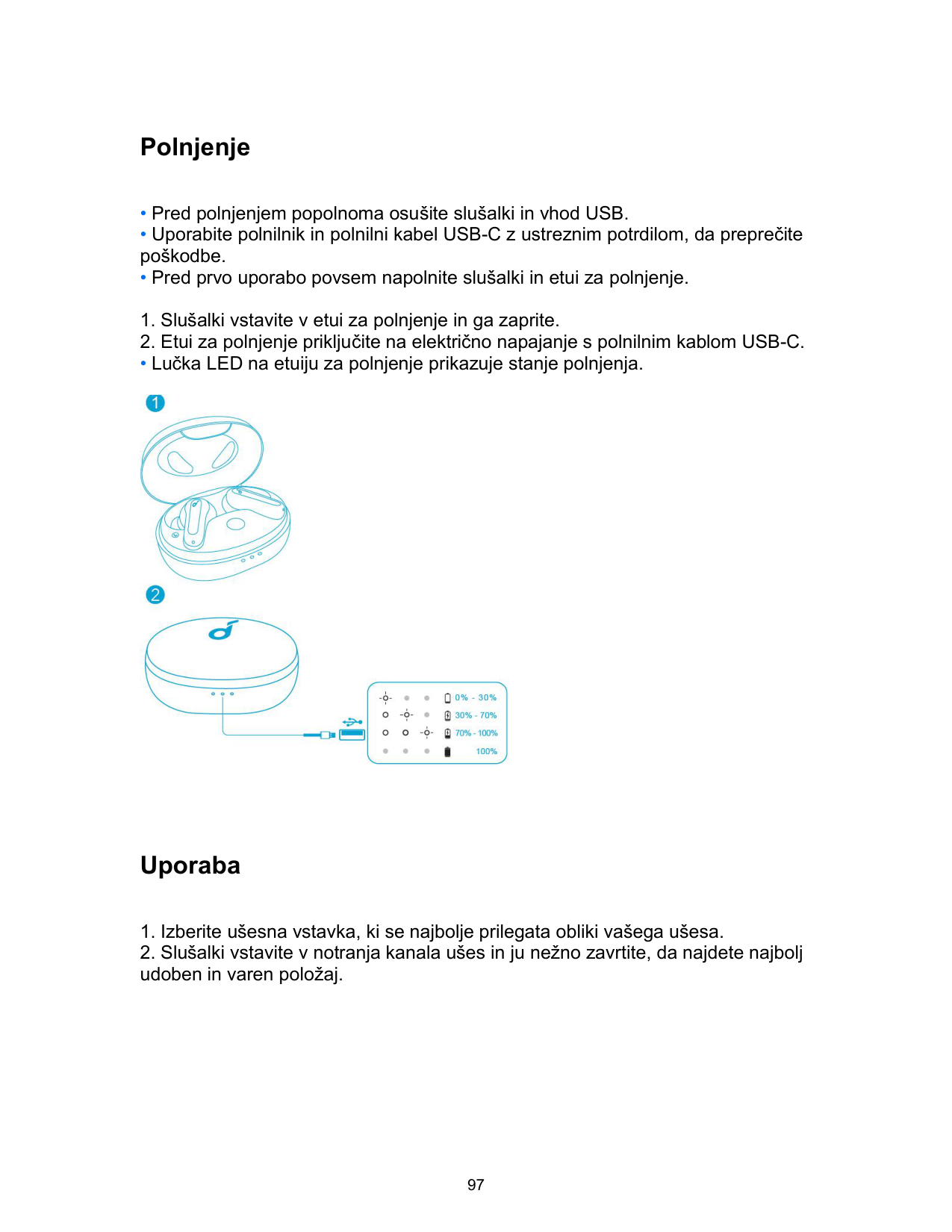
Polnjenje
• Lučka LED na etuiju za polnjenje prikazuje stanje polnjenja.

Uporaba

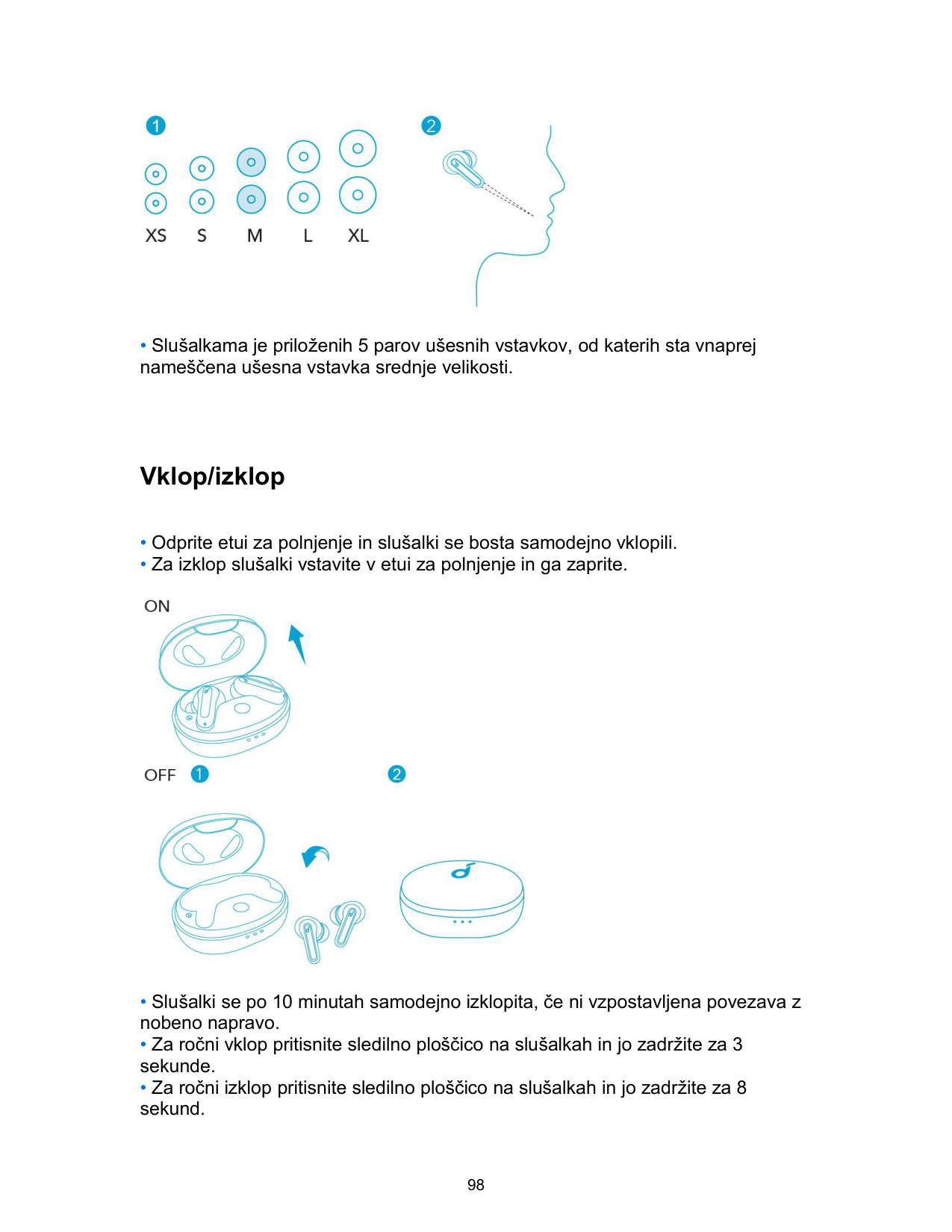
• Slušalkama je priloženih 5 parov ušesnih vstavkov, od katerih sta vnaprej nameščena ušesna vstavka srednje velikosti.
Vklop/izklop

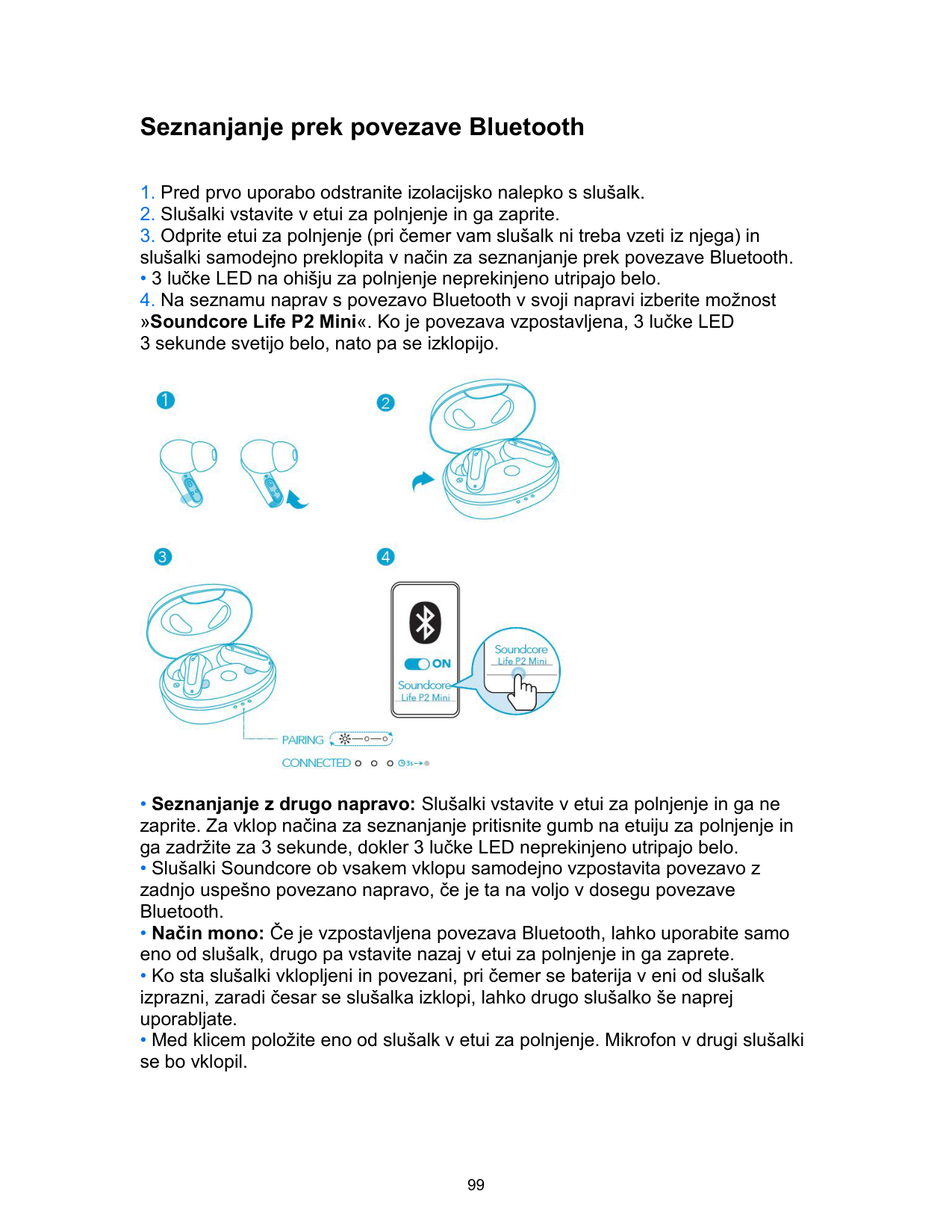
Seznanjanje prek povezave Bluetooth
• 3 lučke LED na ohišju za polnjenje neprekinjeno utripajo belo.

Kontrolniki
Način stereo


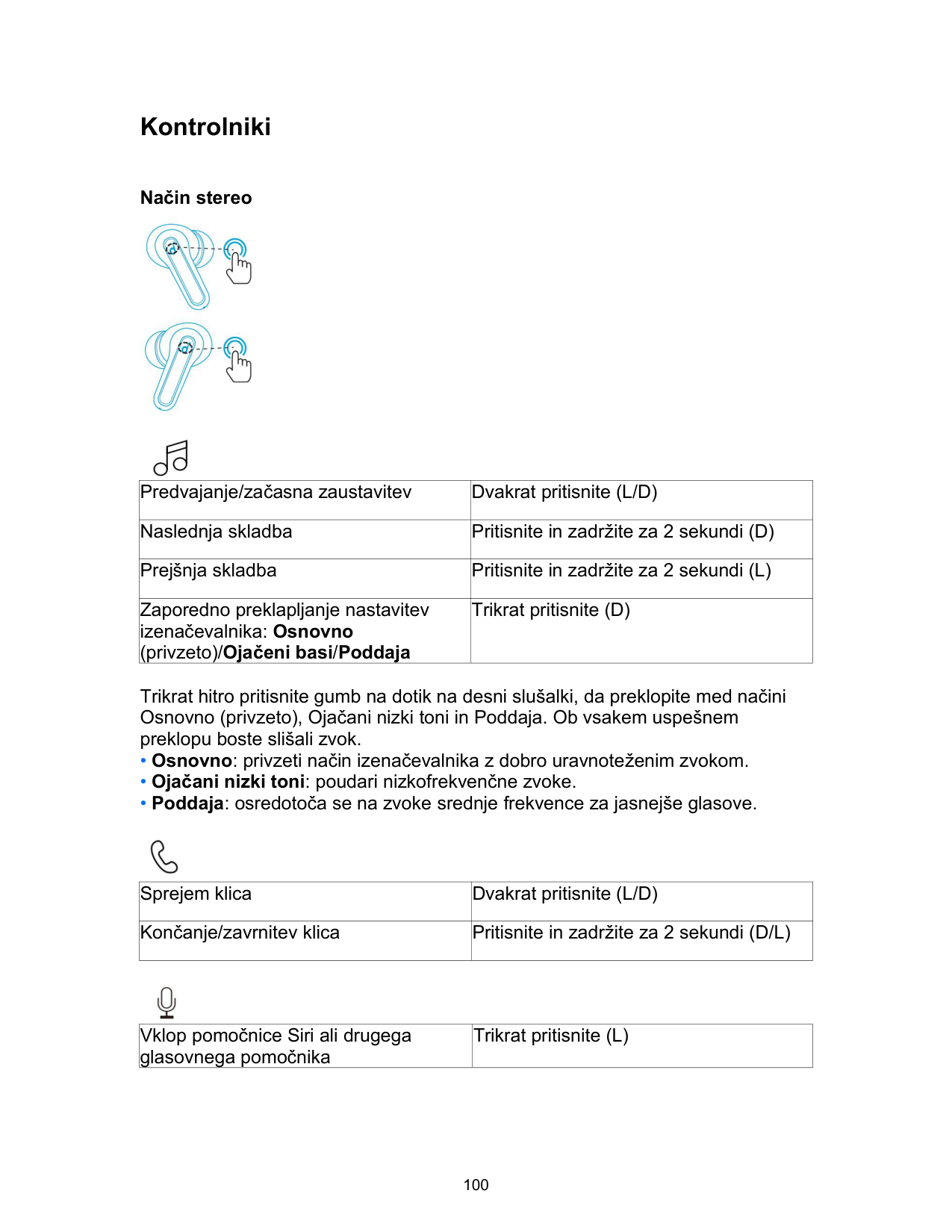
|Predvajanje/začasna zaustavitev|Dvakrat pritisnite (L/D)| |---|---| |Naslednja skladba|Pritisnite in zadržite za 2 sekundi (D)| |Prejšnja skladba|Pritisnite in zadržite za 2 sekundi (L)| |Zaporedno preklapljanje nastavitev izenačevalnika: Osnovno (privzeto)/Ojačeni basi/Poddaja|Trikrat pritisnite (D)|
Trikrat hitro pritisnite gumb na dotik na desni slušalki, da preklopite med načini Osnovno (privzeto), Ojačani nizki toni in Poddaja. Ob vsakem uspešnem preklopu boste slišali zvok.

|Sprejem klica|Dvakrat pritisnite (L/D)| |---|---| |Končanje/zavrnitev klica|Pritisnite in zadržite za 2 sekundi (D/L)|

|Vklop pomočnice Siri ali drugega glasovnega pomočnika|Trikrat pritisnite (L)| |---|---|
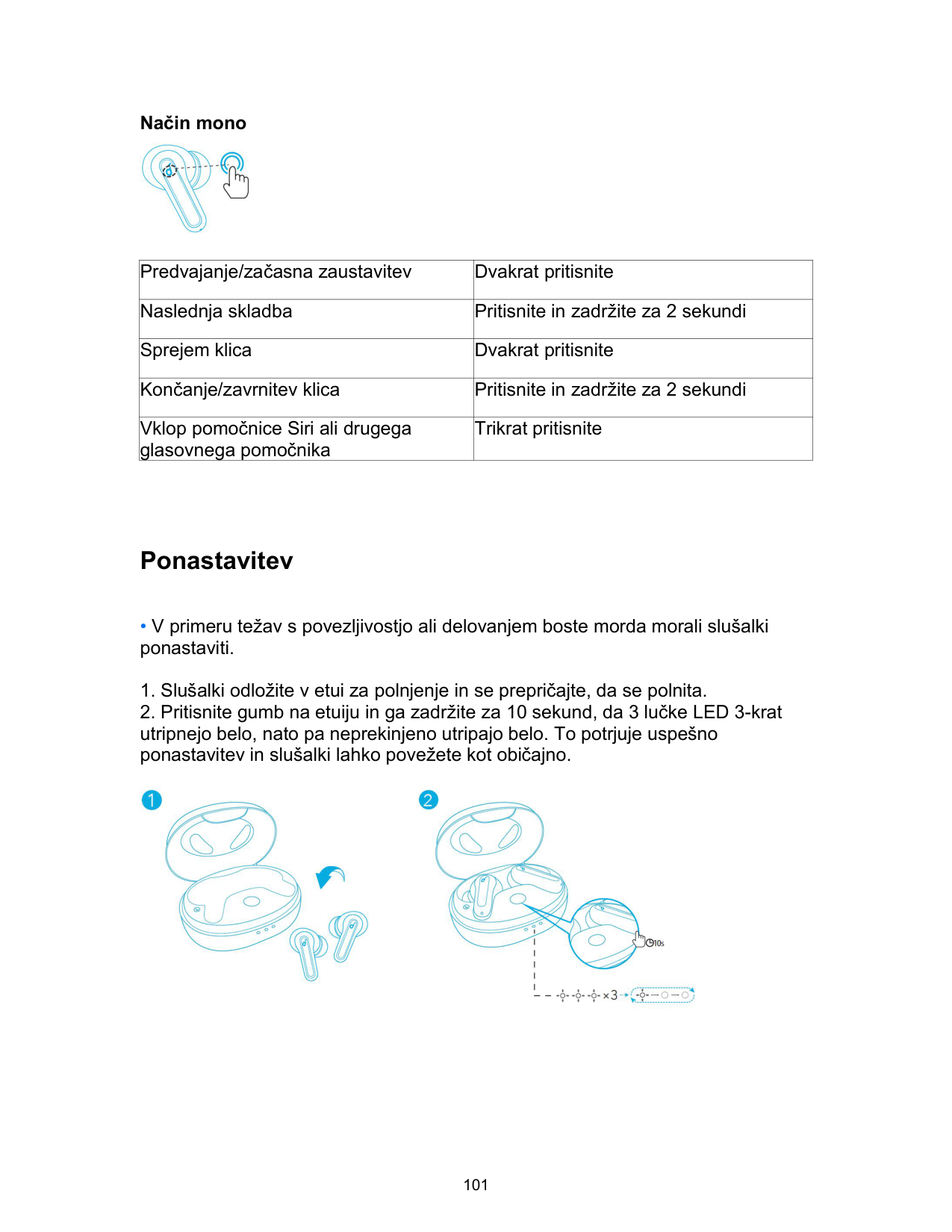
Način mono

|Predvajanje/začasna zaustavitev|Dvakrat pritisnite| |---|---| |Naslednja skladba|Pritisnite in zadržite za 2 sekundi| |Sprejem klica|Dvakrat pritisnite| |Končanje/zavrnitev klica|Pritisnite in zadržite za 2 sekundi| |Vklop pomočnice Siri ali drugega glasovnega pomočnika|Trikrat pritisnite|
Ponastavitev

Tehnični podatki
• Tehnični podatki se lahko spremenijo brez opozorila.
|Vhod|5 V ⎓ 0,6 A| |---|---| |Nazivna izhodna moč|5 mW| |Zmogljivost baterije|60 mAh x 2 (slušalki); 540 mAh (etui za polnjenje)| |Čas polnjenja|2 uri| |Čas predvajanja (odvisen je od glasnosti in vsebine)|Do 8 ur (Skupaj z etuijem za polnjenje 32 ur)| |Velikost gonilnika|10 mm| |Frekvenčni odziv|Od 20 Hz do 20 kHz| |Impedanca|16 Ω| |Stopnja vodoodpornosti (slušalke)|IPX5| |Različica Bluetootha|5.2| |Doseg povezave Bluetooth|10 m/33 čevljev|
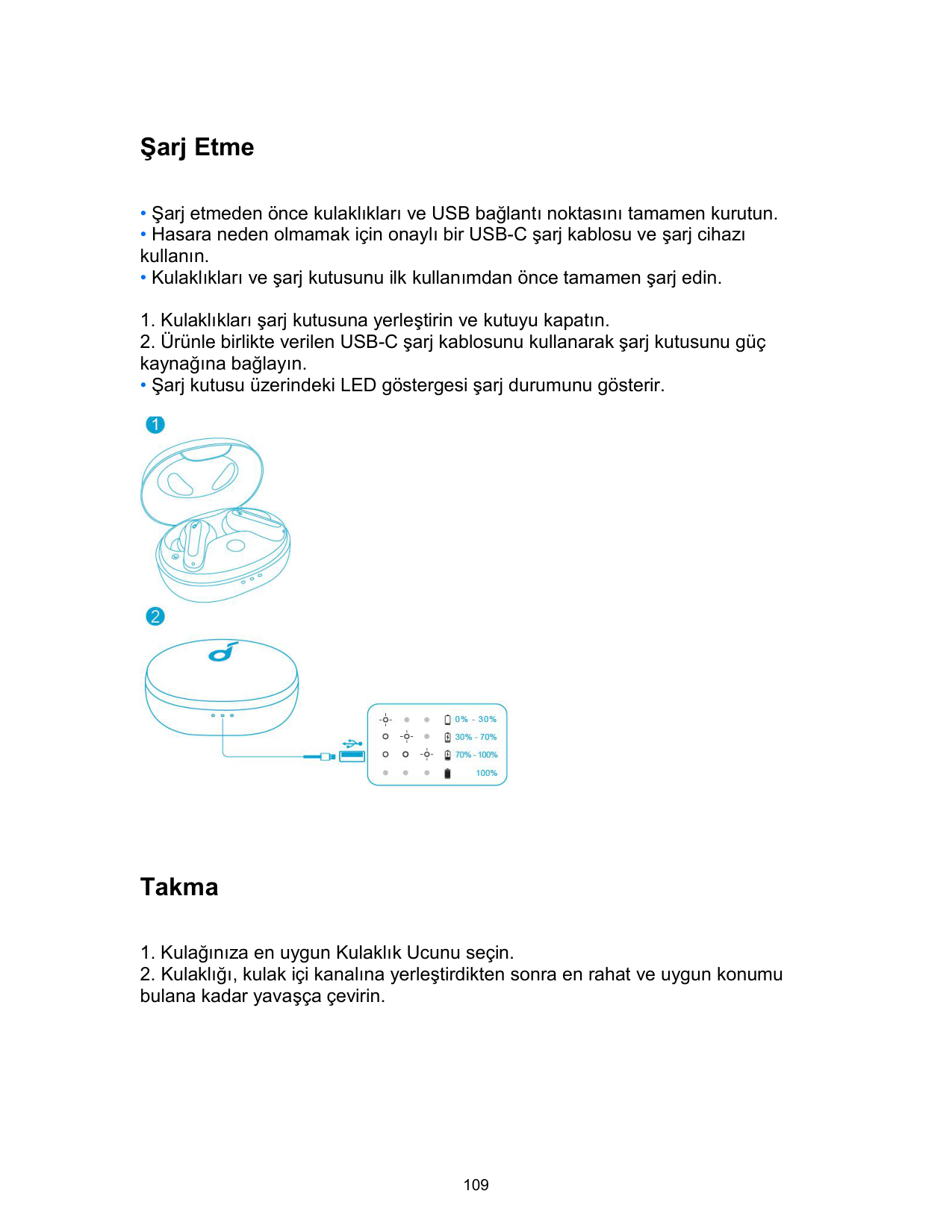
Laddning
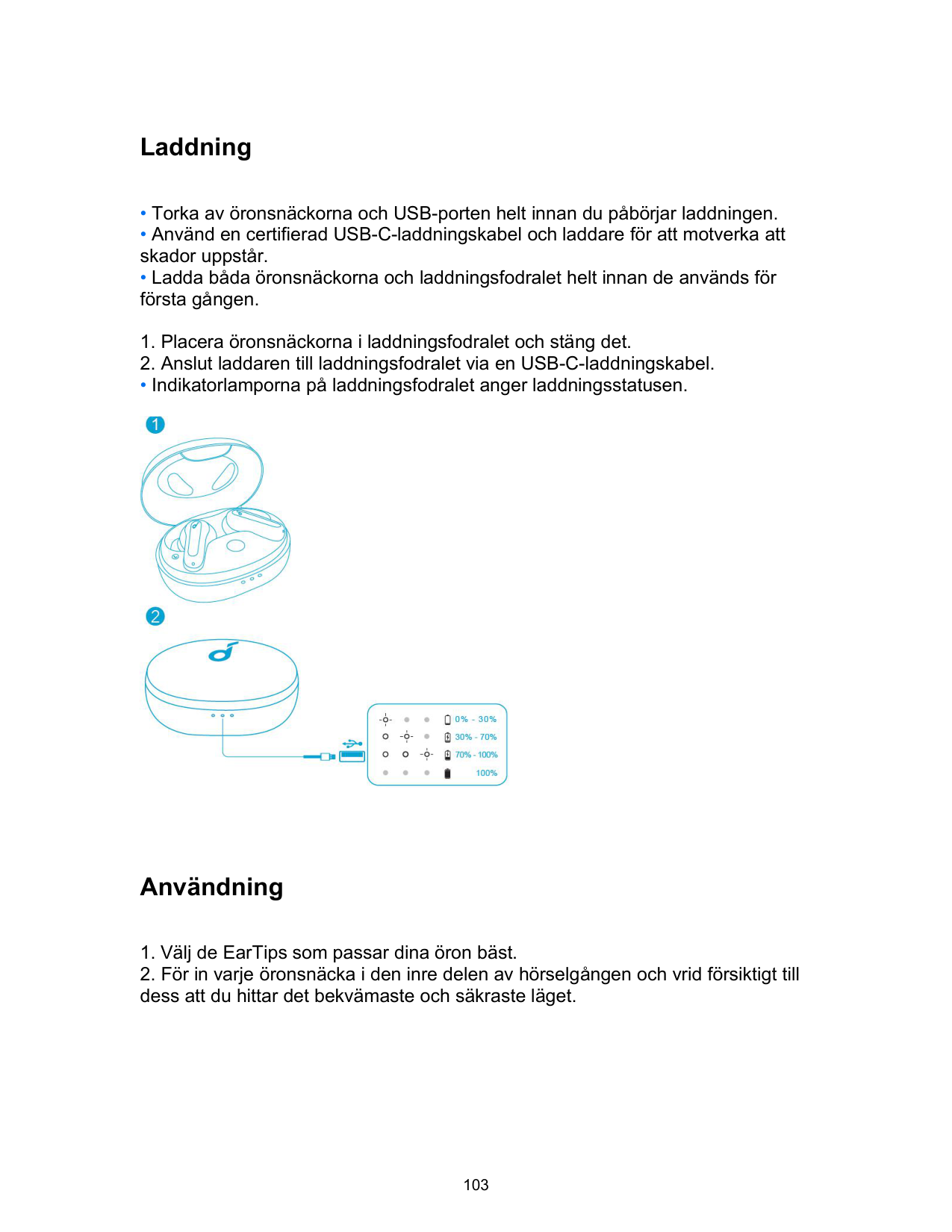
• Indikatorlamporna på laddningsfodralet anger laddningsstatusen.

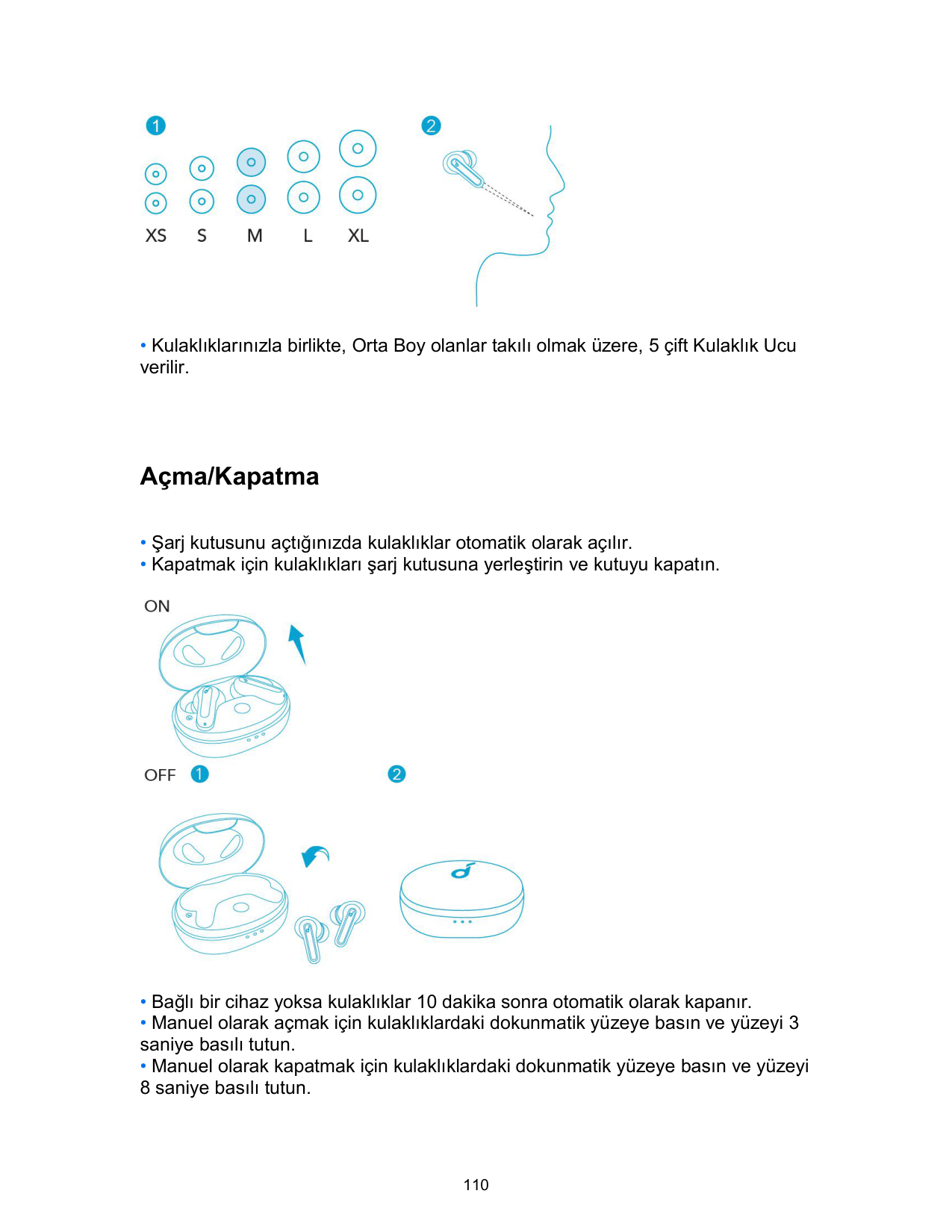
Användning

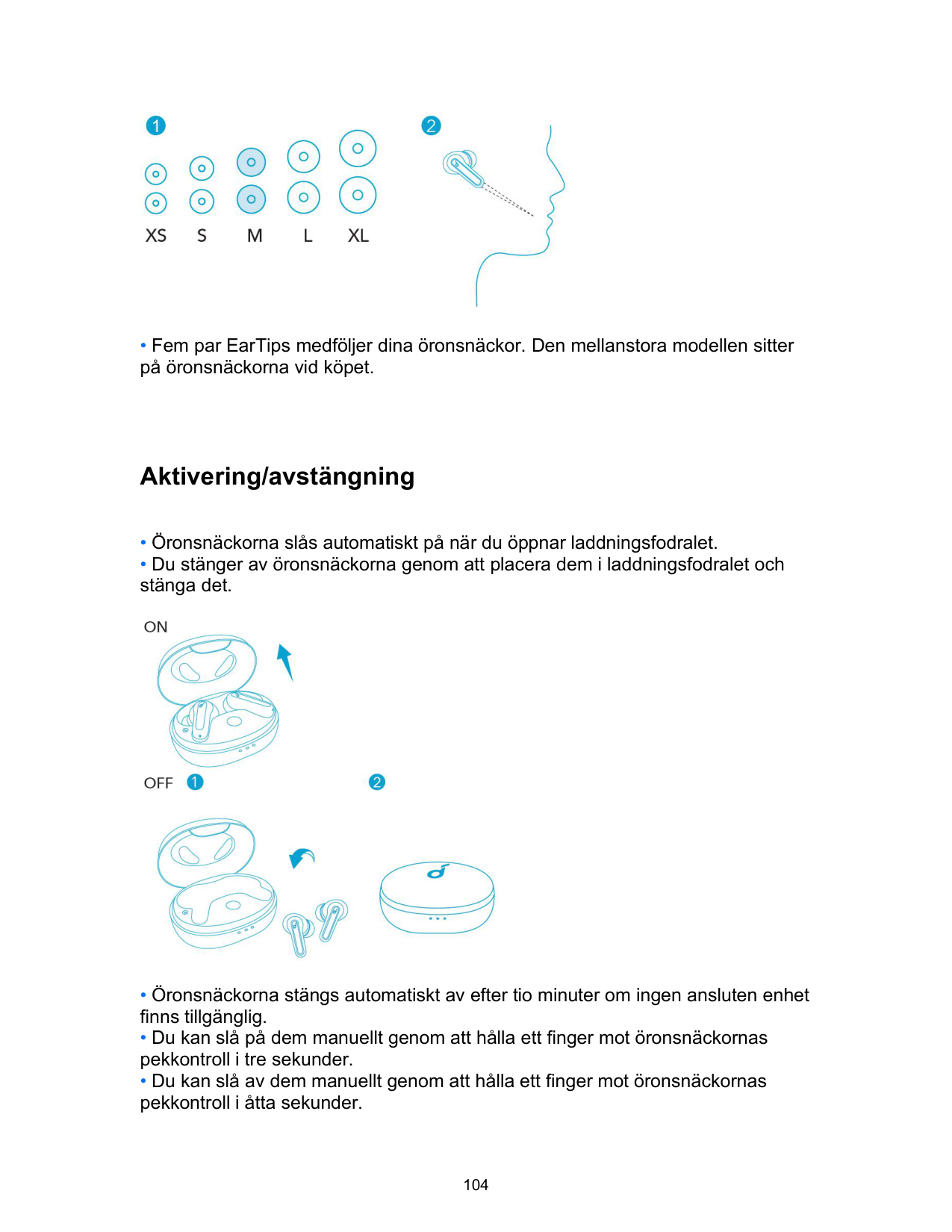
• Fem par EarTips medföljer dina öronsnäckor. Den mellanstora modellen sitter på öronsnäckorna vid köpet.
Aktivering/avstängning

Bluetooth-parkoppling
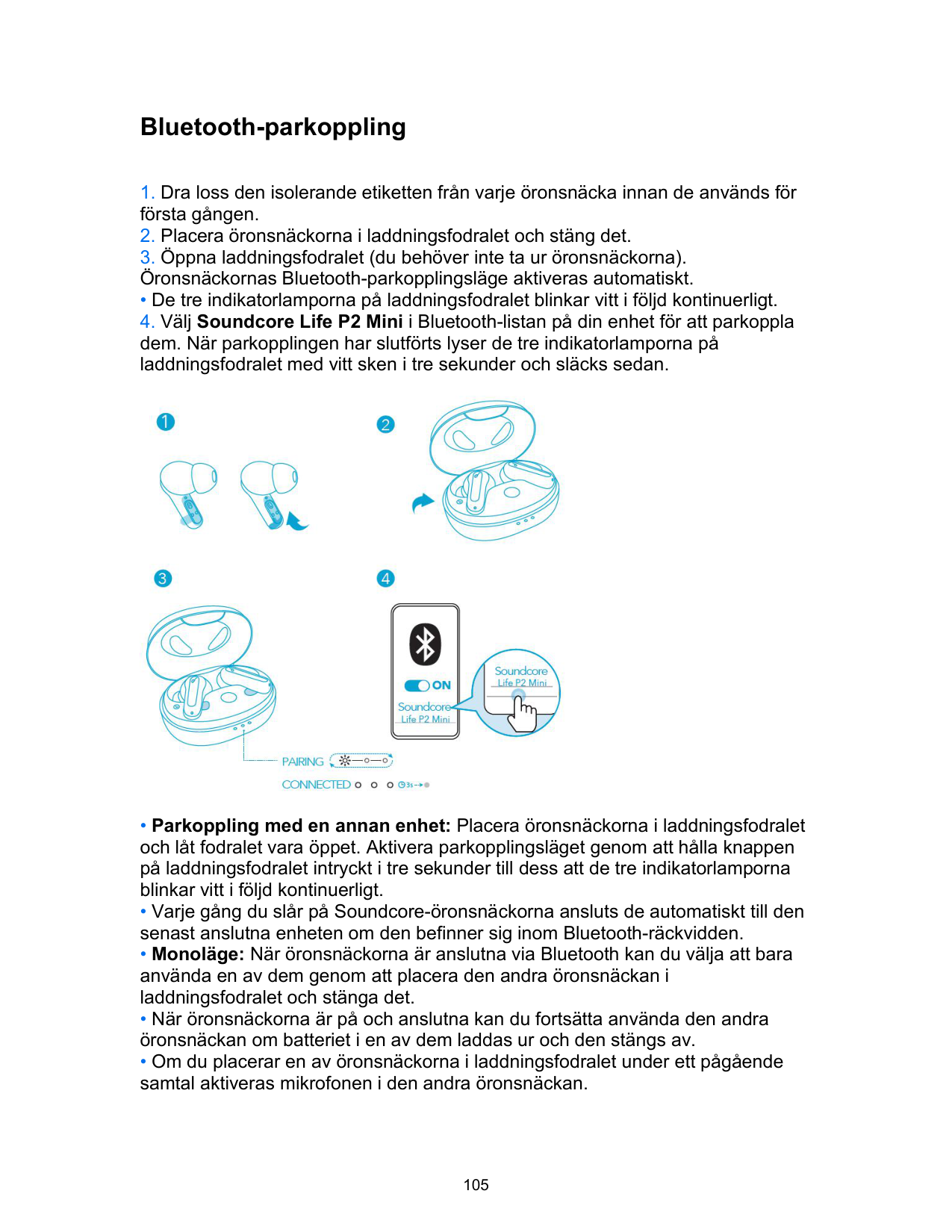
• De tre indikatorlamporna på laddningsfodralet blinkar vitt i följd kontinuerligt.

Kontroller
Stereoläge


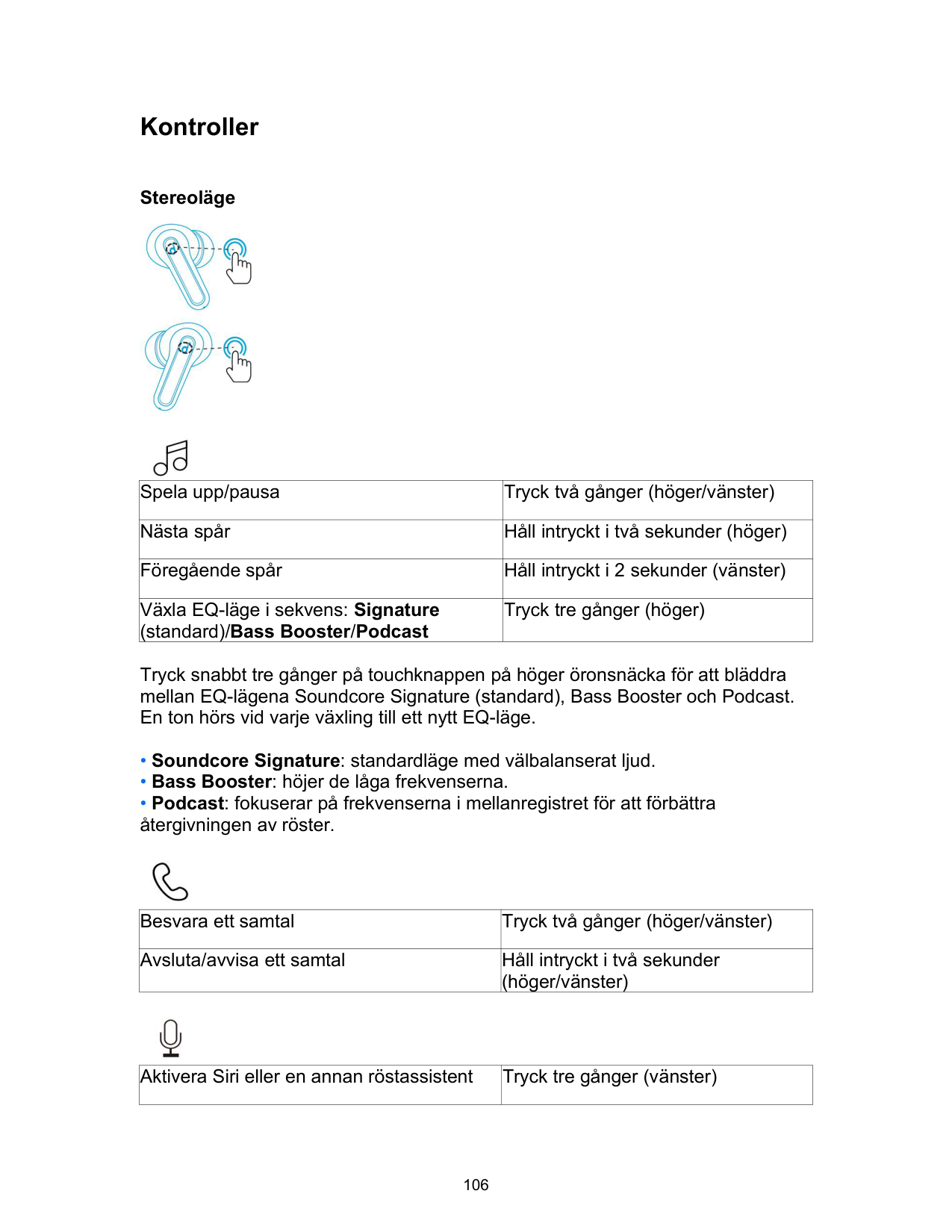
|Spela upp/pausa|Tryck två gånger (höger/vänster)| |---|---| |Nästa spår|Håll intryckt i två sekunder (höger)| |Föregående spår|Håll intryckt i 2 sekunder (vänster)| |Växla EQ-läge i sekvens: Signature (standard)/Bass Booster/Podcast|Tryck tre gånger (höger)|
Tryck snabbt tre gånger på touchknappen på höger öronsnäcka för att bläddra mellan EQ-lägena Soundcore Signature (standard), Bass Booster och Podcast. En ton hörs vid varje växling till ett nytt EQ-läge.

|Besvara ett samtal|Tryck två gånger (höger/vänster)| |---|---| |Avsluta/avvisa ett samtal|Håll intryckt i två sekunder (höger/vänster)|

|Aktivera Siri eller en annan röstassistent|Tryck tre gånger (vänster)| |---|---|
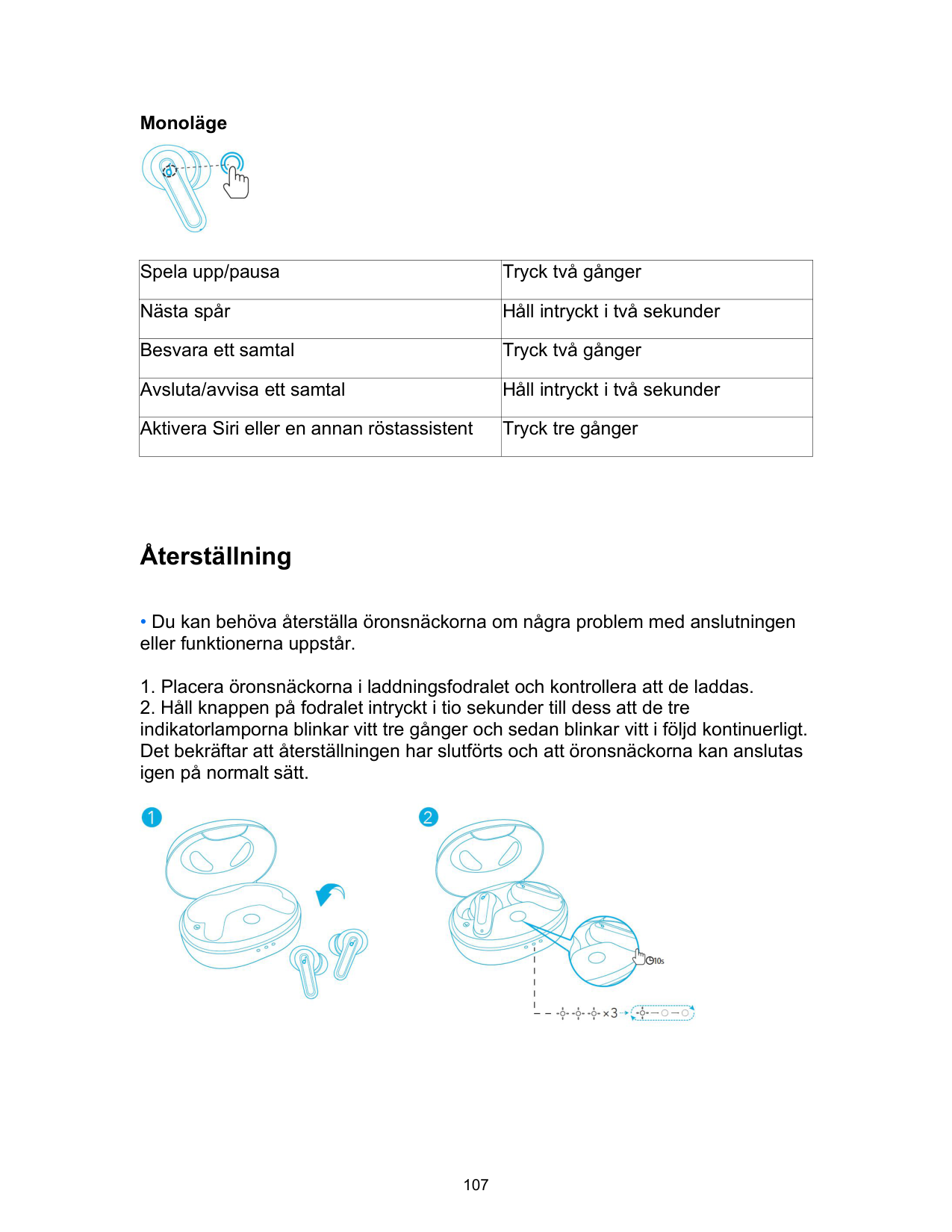
Monoläge

|Spela upp/pausa|Tryck två gånger| |---|---| |Nästa spår|Håll intryckt i två sekunder| |Besvara ett samtal|Tryck två gånger| |Avsluta/avvisa ett samtal|Håll intryckt i två sekunder| |Aktivera Siri eller en annan röstassistent|Tryck tre gånger|
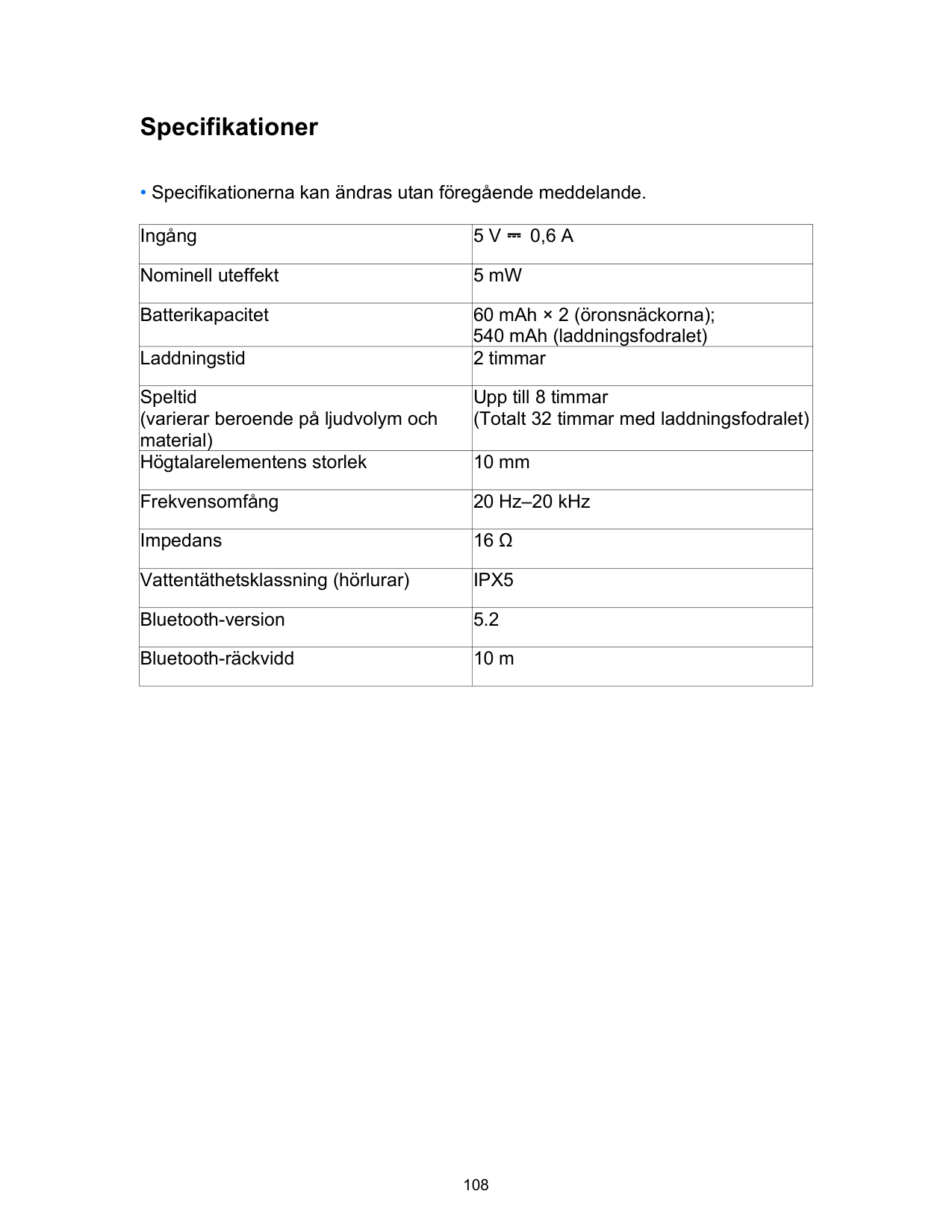
Återställning

Specifikationer
• Specifikationerna kan ändras utan föregående meddelande.
|Ingång|5 V ⎓ 0,6 A| |---|---| |Nominell uteffekt|5 mW| |Batterikapacitet|60 mAh × 2 (öronsnäckorna); 540 mAh (laddningsfodralet)| |Laddningstid|2 timmar| |Speltid (varierar beroende på ljudvolym och material)|Upp till 8 timmar (Totalt 32 timmar med laddningsfodralet)| |Högtalarelementens storlek|10 mm| |Frekvensomfång|20 Hz–20 kHz| |Impedans|16 Ω| |Vattentäthetsklassning (hörlurar)|IPX5| |Bluetooth-version|5.2| |Bluetooth-räckvidd|10 m|
Şarj Etme
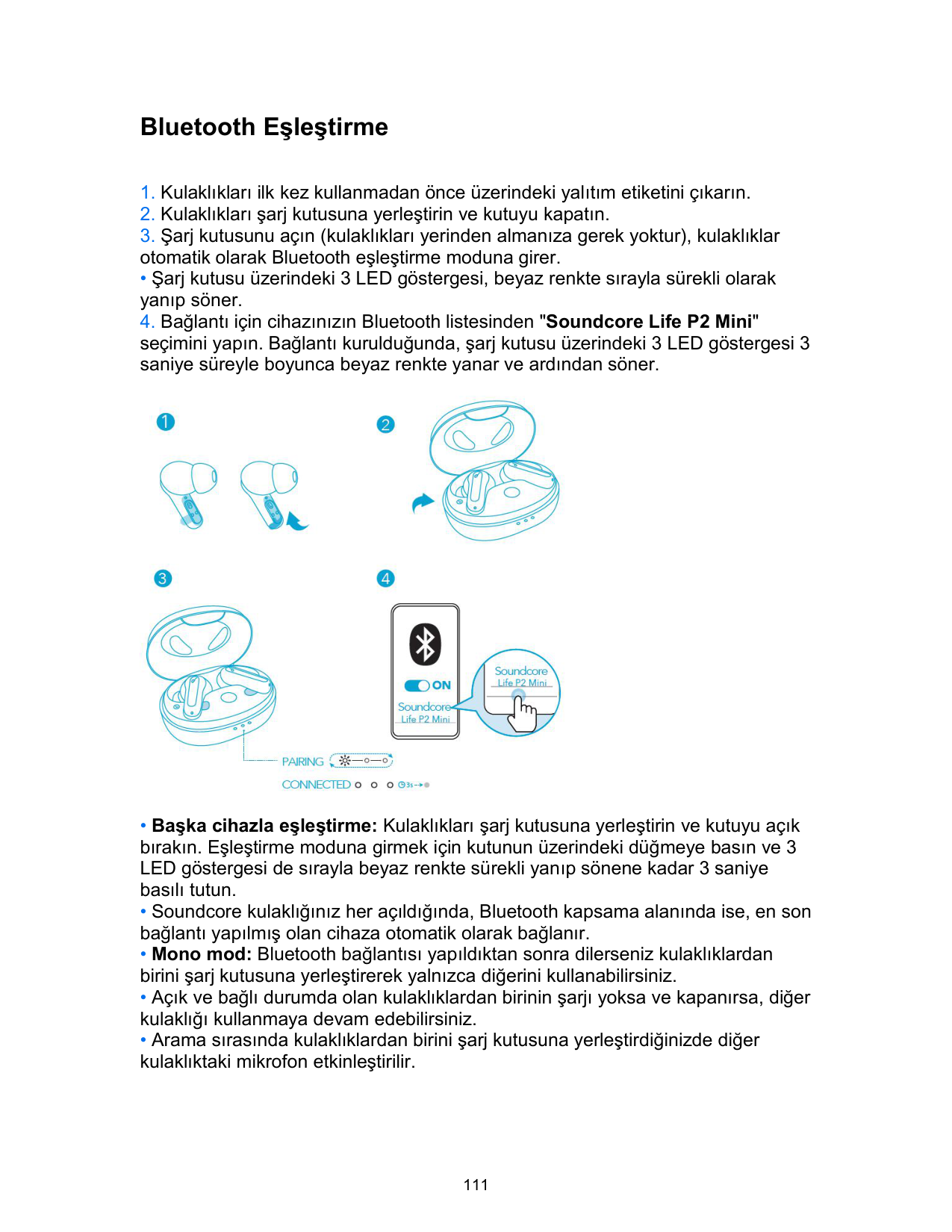
• Şarj kutusu üzerindeki LED göstergesi şarj durumunu gösterir.

Takma

• Kulaklıklarınızla birlikte, Orta Boy olanlar takılı olmak üzere, 5 çift Kulaklık Ucu verilir.
Açma/Kapatma

Bluetooth Eşleştirme
• Şarj kutusu üzerindeki 3 LED göstergesi, beyaz renkte sırayla sürekli olarak yanıp söner.

Kontroller
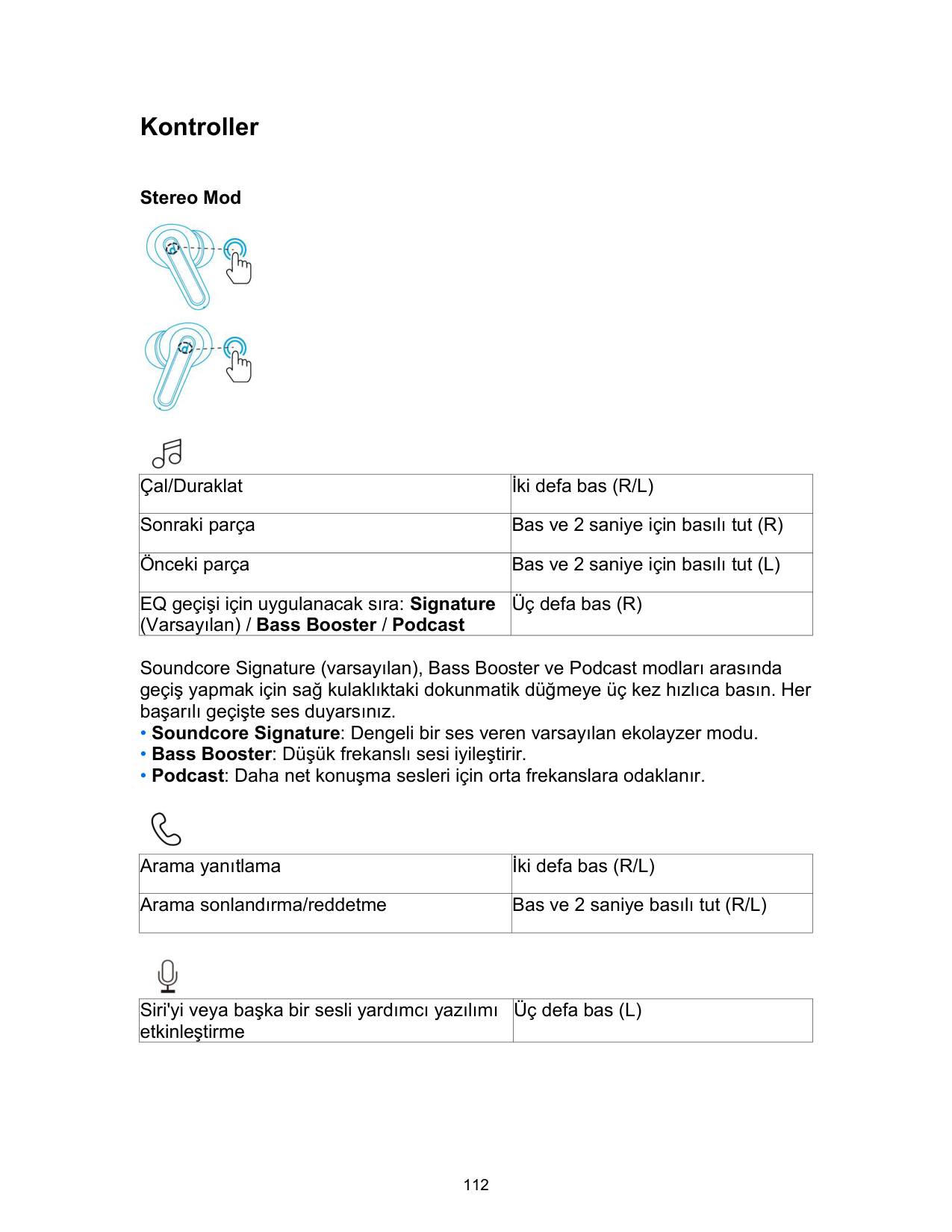
Stereo Mod


|Çal/Duraklat|İki defa bas (R/L)| |---|---| |Sonraki parça|Bas ve 2 saniye için basılı tut (R)| |Önceki parça|Bas ve 2 saniye için basılı tut (L)| |EQ geçişi için uygulanacak sıra: Signature (Varsayılan) / Bass Booster / Podcast|Üç defa bas (R)|
Soundcore Signature (varsayılan), Bass Booster ve Podcast modları arasında geçiş yapmak için sağ kulaklıktaki dokunmatik düğmeye üç kez hızlıca basın. Her başarılı geçişte ses duyarsınız.

|Arama yanıtlama|İki defa bas (R/L)| |---|---| |Arama sonlandırma/reddetme|Bas ve 2 saniye basılı tut (R/L)|

|Siri'yi veya başka bir sesli yardımcı yazılımı etkinleştirme|Üç defa bas (L)| |---|---|
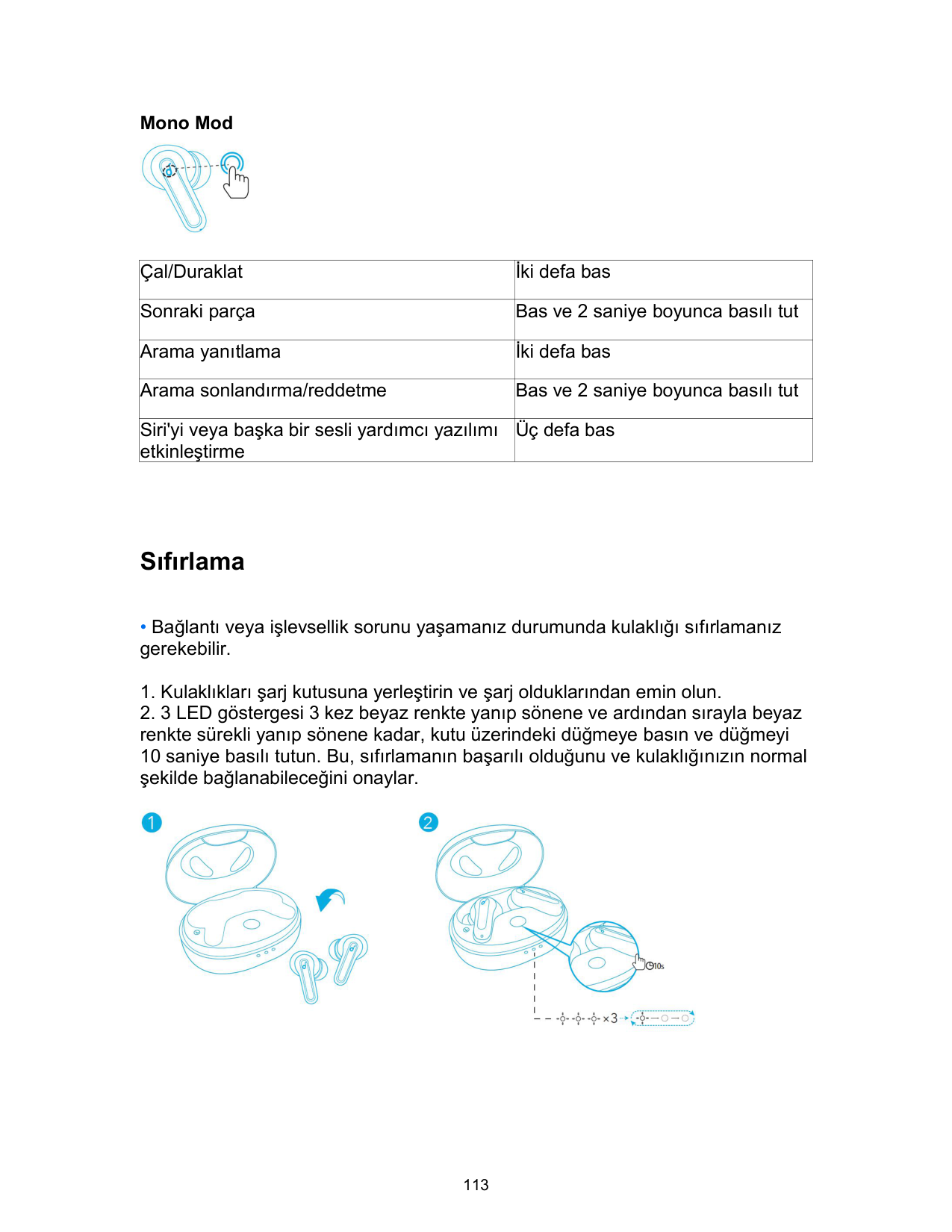
Mono Mod

|Çal/Duraklat|İki defa bas| |---|---| |Sonraki parça|Bas ve 2 saniye boyunca basılı tut| |Arama yanıtlama|İki defa bas| |Arama sonlandırma/reddetme|Bas ve 2 saniye boyunca basılı tut| |Siri'yi veya başka bir sesli yardımcı yazılımı etkinleştirme|Üç defa bas|
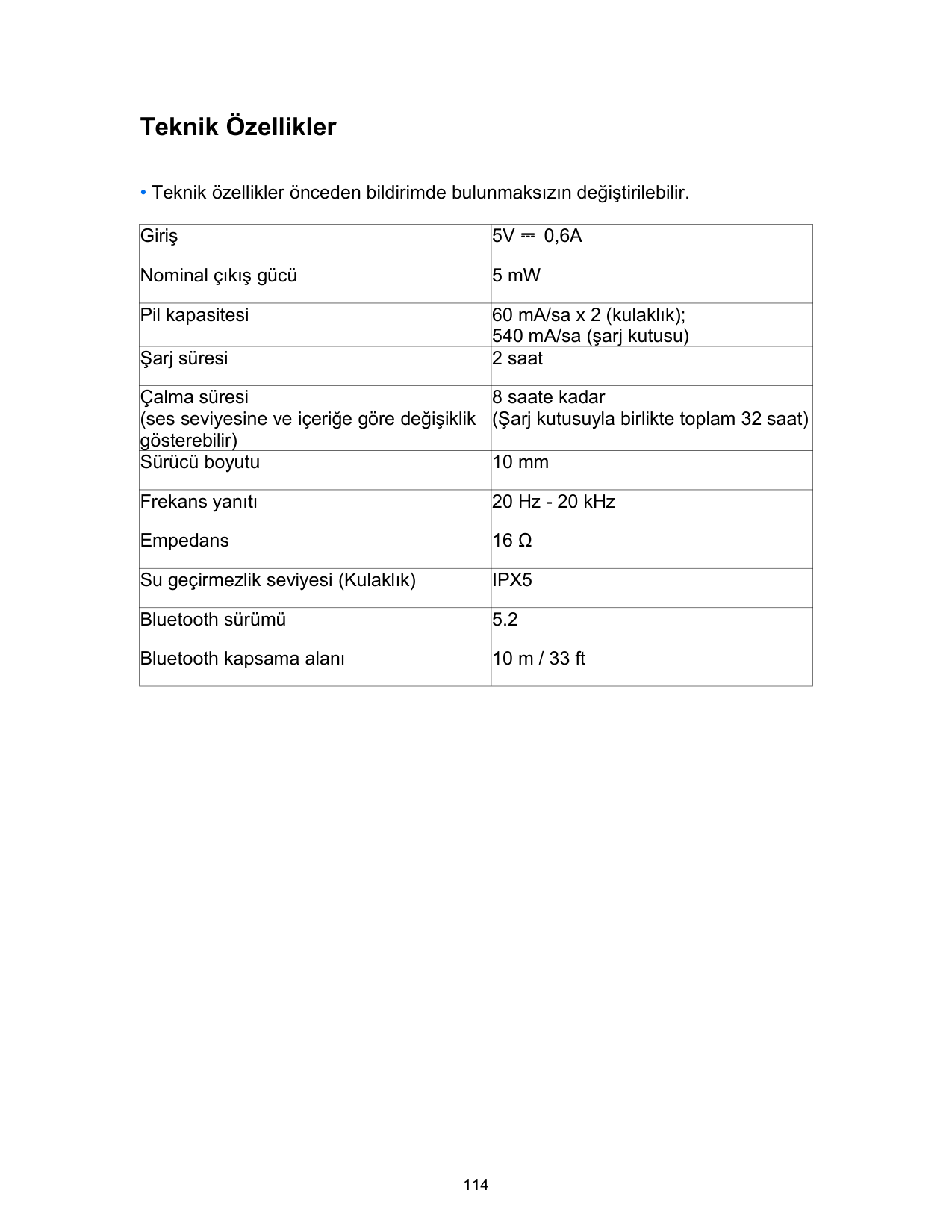
Sıfırlama

Teknik Özellikler
• Teknik özellikler önceden bildirimde bulunmaksızın değiştirilebilir.
|Giriş|5V ⎓ 0,6A| |---|---| |Nominal çıkış gücü|5 mW| |Pil kapasitesi|60 mA/sa x 2 (kulaklık); 540 mA/sa (şarj kutusu)| |Şarj süresi|2 saat| |Çalma süresi (ses seviyesine ve içeriğe göre değişiklik gösterebilir)|8 saate kadar (Şarj kutusuyla birlikte toplam 32 saat)| |Sürücü boyutu|10 mm| |Frekans yanıtı|20 Hz - 20 kHz| |Empedans|16 Ω| |Su geçirmezlik seviyesi (Kulaklık)|IPX5| |Bluetooth sürümü|5.2| |Bluetooth kapsama alanı|10 m / 33 ft|
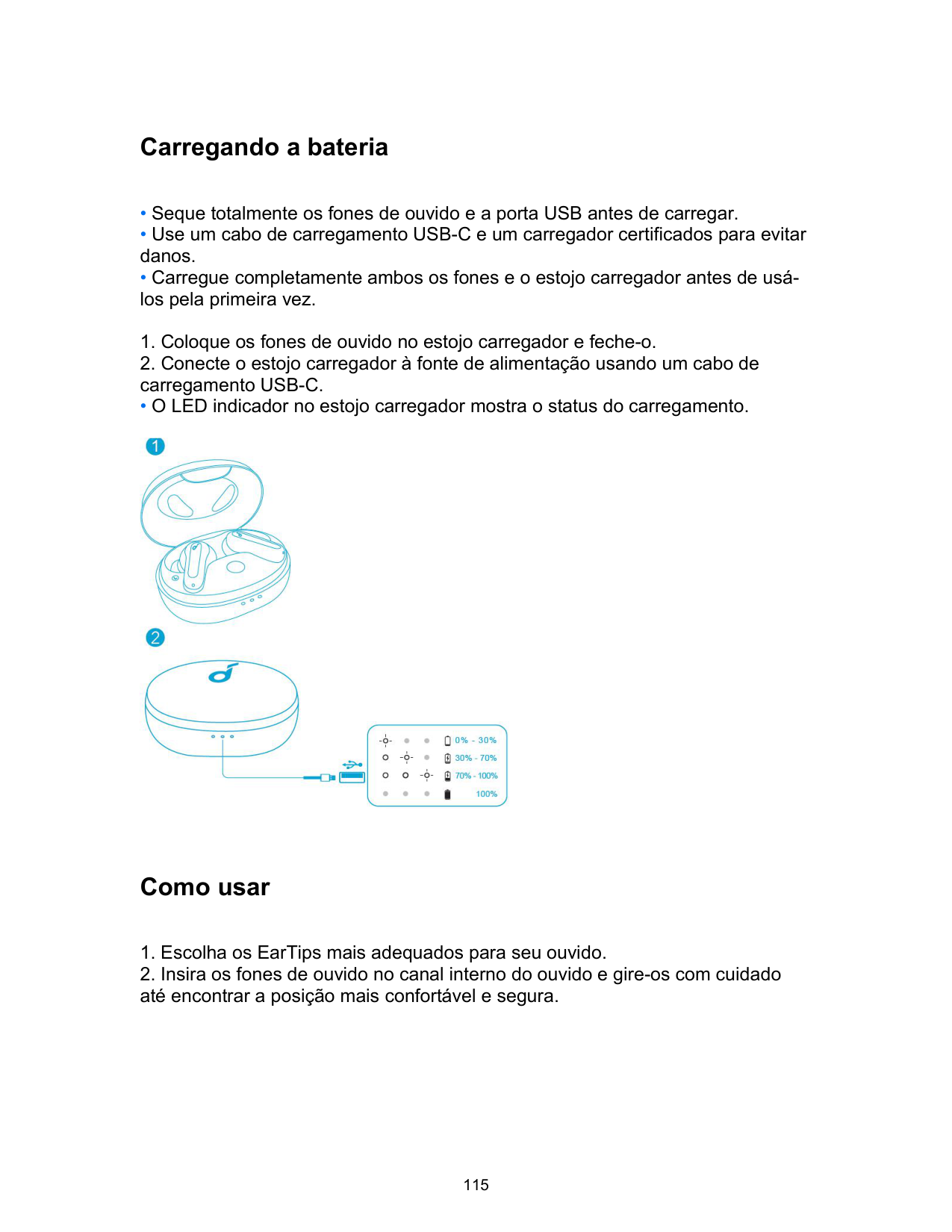
Carregando a bateria
• O LED indicador no estojo carregador mostra o status do carregamento.

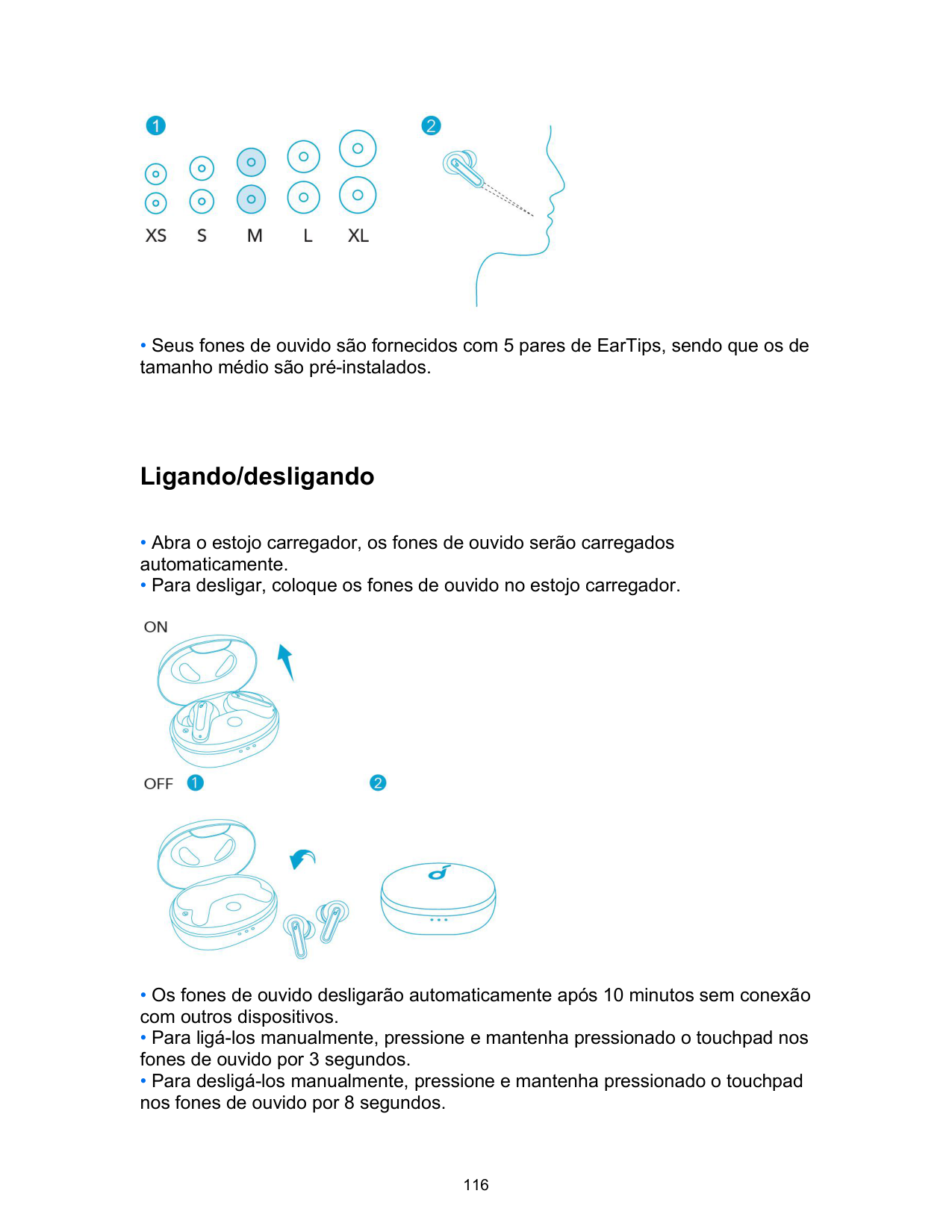
Como usar

Ligando/desligando
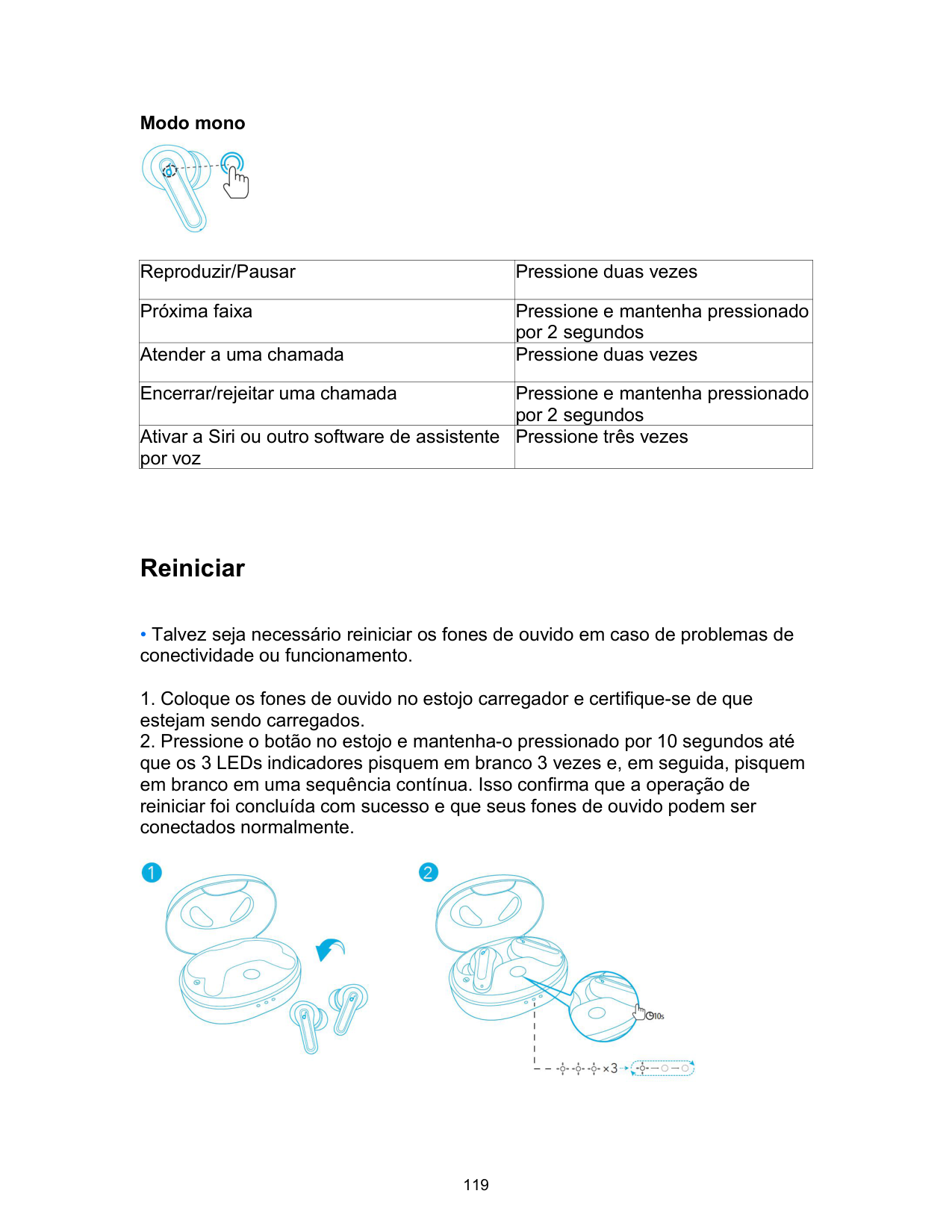

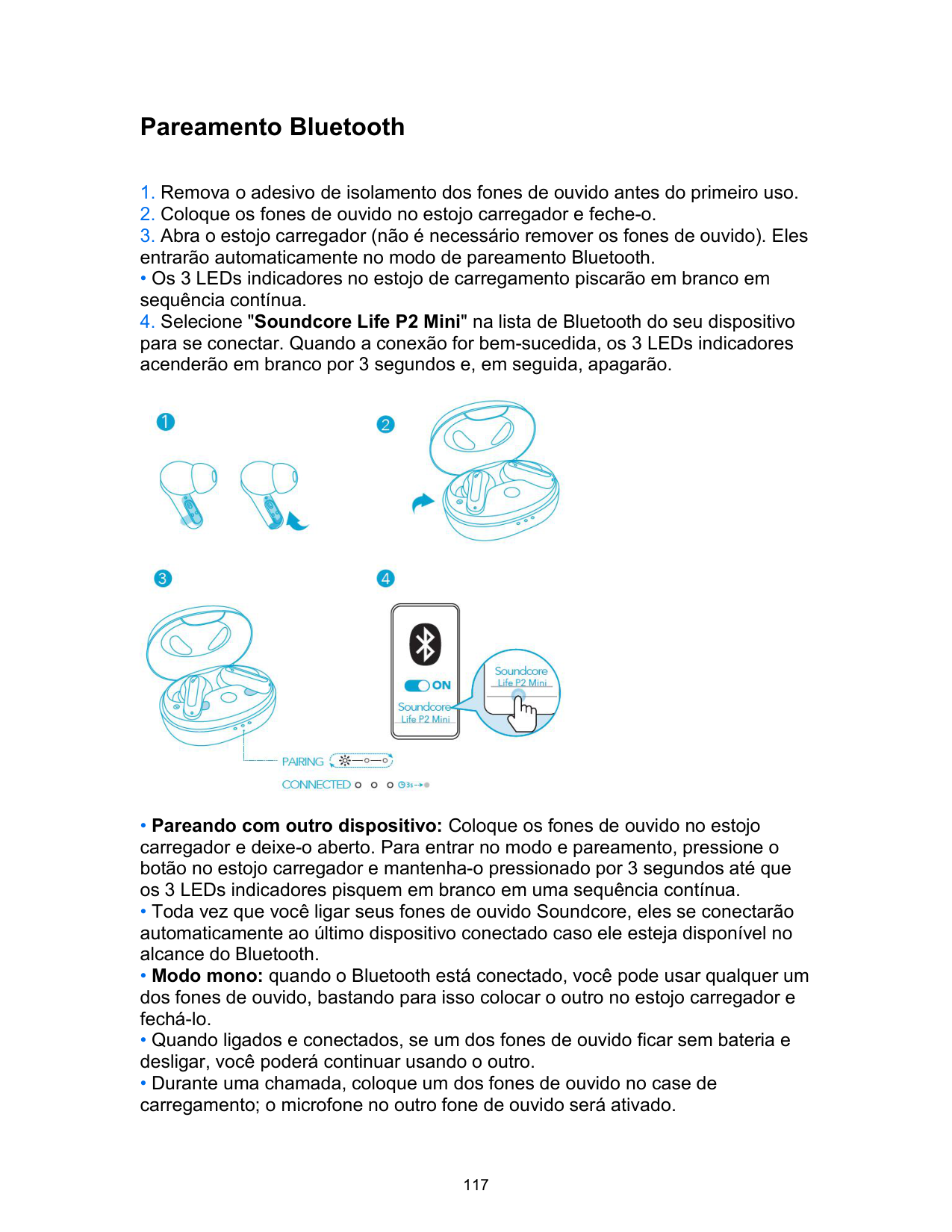
Pareamento Bluetooth
• Os 3 LEDs indicadores no estojo de carregamento piscarão em branco em sequência contínua.

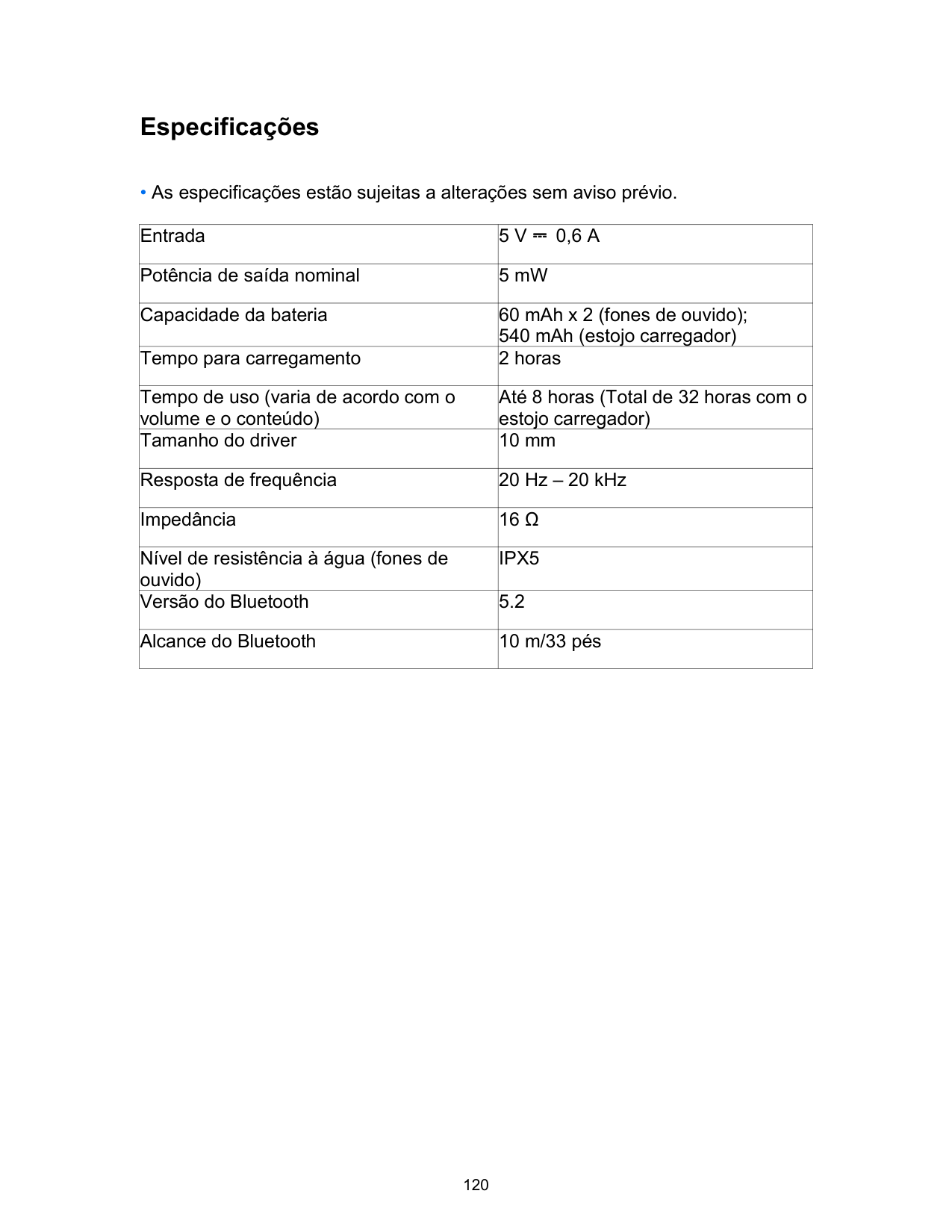
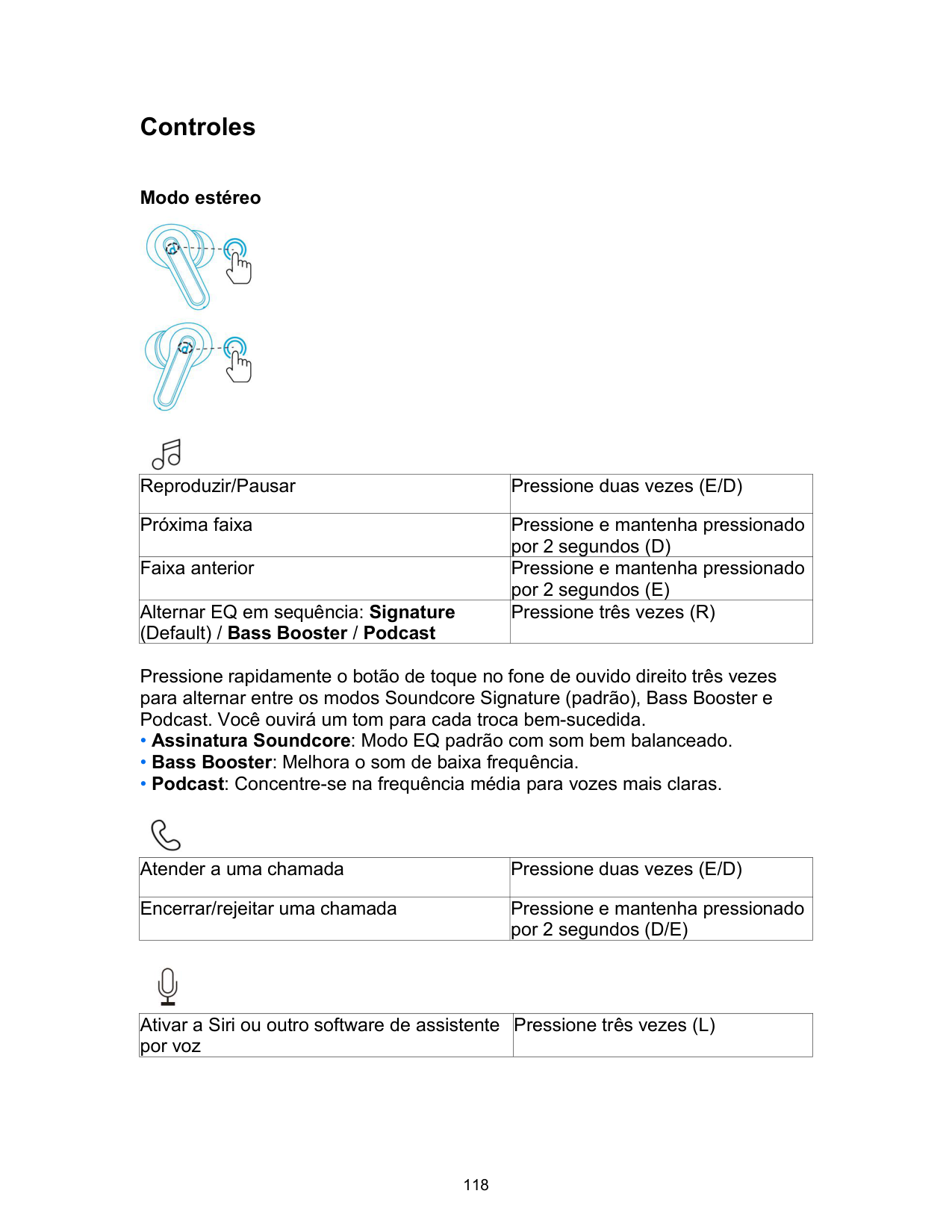
Controles
Modo estéreo


|Reproduzir/Pausar|Pressione duas vezes (E/D)| |---|---| |Próxima faixa|Pressione e mantenha pressionado por 2 segundos (D)| |Faixa anterior|Pressione e mantenha pressionado por 2 segundos (E)| |Alternar EQ em sequência: Signature (Default) / Bass Booster / Podcast|Pressione três vezes (R)|
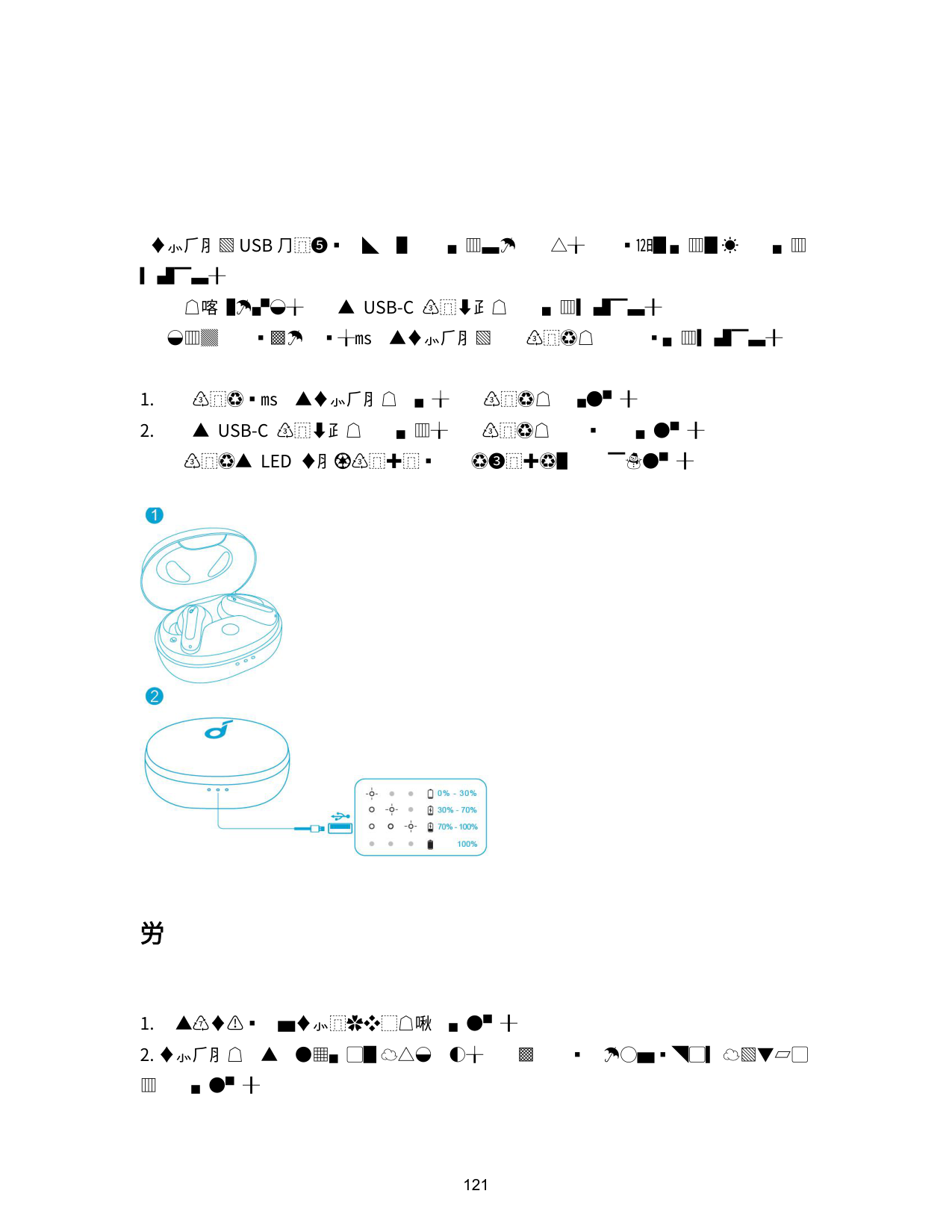
Pressione rapidamente o botão de toque no fone de ouvido direito três vezes para alternar entre os modos Soundcore Signature (padrão), Bass Booster e Podcast. Você ouvirá um tom para cada troca bem-sucedida.

|Atender a uma chamada|Pressione duas vezes (E/D)| |---|---| |Encerrar/rejeitar uma chamada|Pressione e mantenha pressionado por 2 segundos (D/E)|

|Ativar a Siri ou outro software de assistente por voz|Pressione três vezes (L)| |---|---|
Modo mono
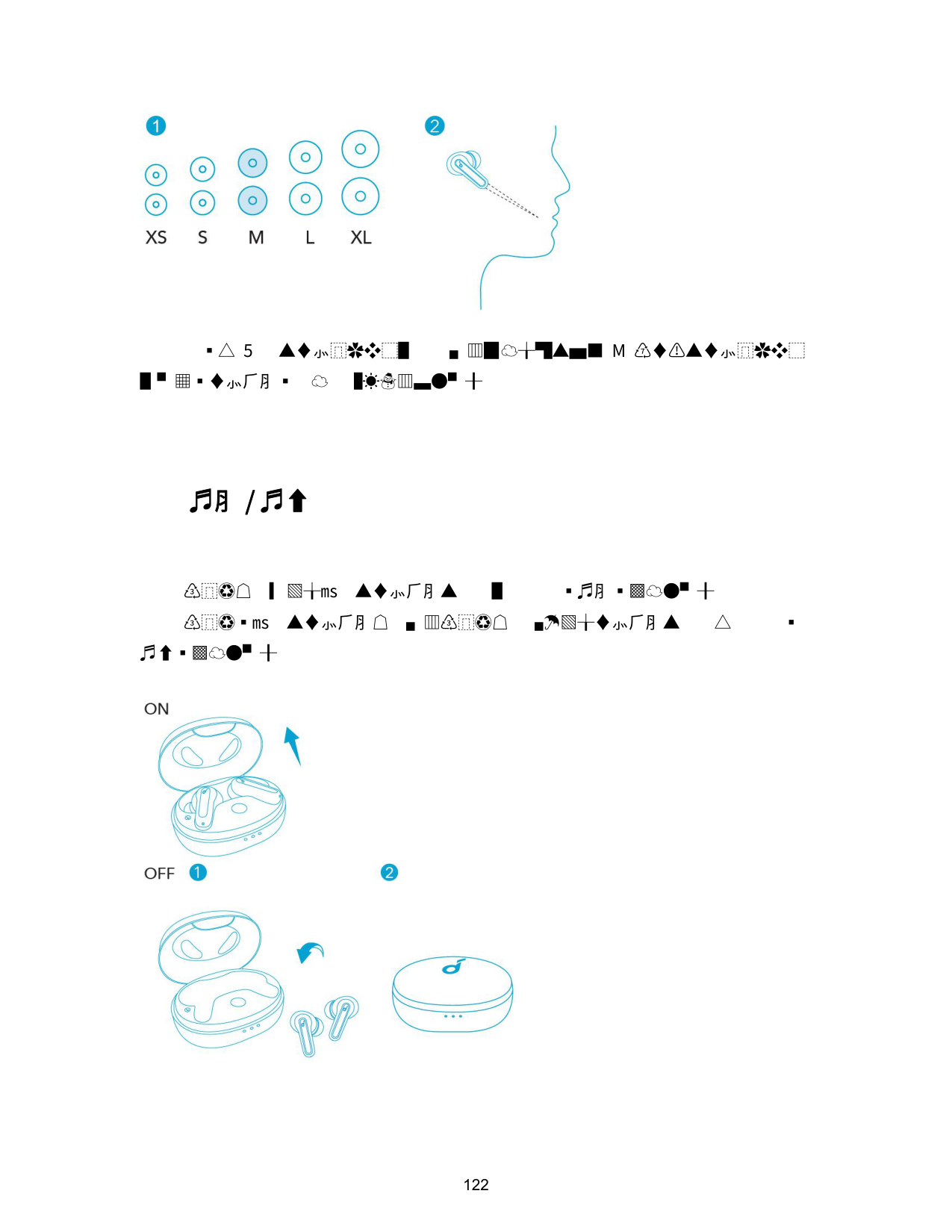

|Reproduzir/Pausar|Pressione duas vezes| |---|---| |Próxima faixa|Pressione e mantenha pressionado por 2 segundos| |Atender a uma chamada|Pressione duas vezes| |Encerrar/rejeitar uma chamada|Pressione e mantenha pressionado por 2 segundos| |Ativar a Siri ou outro software de assistente por voz|Pressione três vezes|
Reiniciar
• Talvez seja necessário reiniciar os fones de ouvido em caso de problemas de conectividade ou funcionamento.

Especificações
|Entrada|5 V ⎓ 0,6 A| |---|---| |Potência de saída nominal|5 mW| |Capacidade da bateria|60 mAh x 2 (fones de ouvido); 540 mAh (estojo carregador)| |Tempo para carregamento|2 horas| |Tempo de uso (varia de acordo com o volume e o conteúdo)|Até 8 horas (Total de 32 horas com o estojo carregador)| |Tamanho do driver|10 mm| |Resposta de frequência|20 Hz – 20 kHz| |Impedância|16 Ω| |Nível de resistência à água (fones de ouvido)|IPX5| |Versão do Bluetooth|5.2| |Alcance do Bluetooth|10 m/33 pés|
充電
• 充電ケースの LED インジケーターに充電ステータスが表示されます。

装着

電源オン / オフ

Bluetooth ペアリング
• 充電ケースの 3 つの LED インジケーターが順番に白く点滅します。

操作方法
ステレオモード


|再生 / 一時停止|2 回タップ (左 / 右)| |---|---| |次へ|2 秒間長押し (右)| |戻る|2 秒間長押し (左)|
|イコライザーの切替 (デフォルト/ベースブースター /Podcastの順番で切り替わります。)|3 回タップ (右)|
右側のイヤホンを 3 回すばやくタップすると、イコライザー設定がデフォルト、ベー スブースター、ポッドキャストの順に切り替わります。切り替わるたびに、トーンが聞 こえます。

|着信に応答する|2 回タップ (左 / 右)| |---|---| |通話を終了する / 着信の拒否|2 秒間長押し (左 / 右)|

|Siri などの音声アシスタントを起動する|3 回タップ (左)| |---|---|
モノラルモード

|再生 / 一時停止|2 回タップ| |---|---| |次へ|2 秒間長押し| |着信に応答する|2 回タップ| |通話を終了する / 着信の拒否|2 秒間長押し| |Siri などの音声アシスタントを起動する|3 回タップ|
リセット

製品の仕様
|入力|5V ⎓ 0.6A| |---|---| |定格出力|5 mW| |バッテリー容量|60 mAh x 2 (イヤホン)、 540 mAh (充電ケース)| |充電時間|約 2 時間|
|再生可能時間 (音量やコンテンツにより異なる)|最大 8 時間 (充電ケースを使用した場合、合計 32 時間)| |---|---| |ドライバーのサイズ|10 mm| |周波数応答|20 Hz - 20 kHz| |電気抵抗|16 Ω| |防水規格 (イヤホン)|IPX5| |通信方式|Bluetooth 5.2| |Bluetooth 動作範囲|10 m|
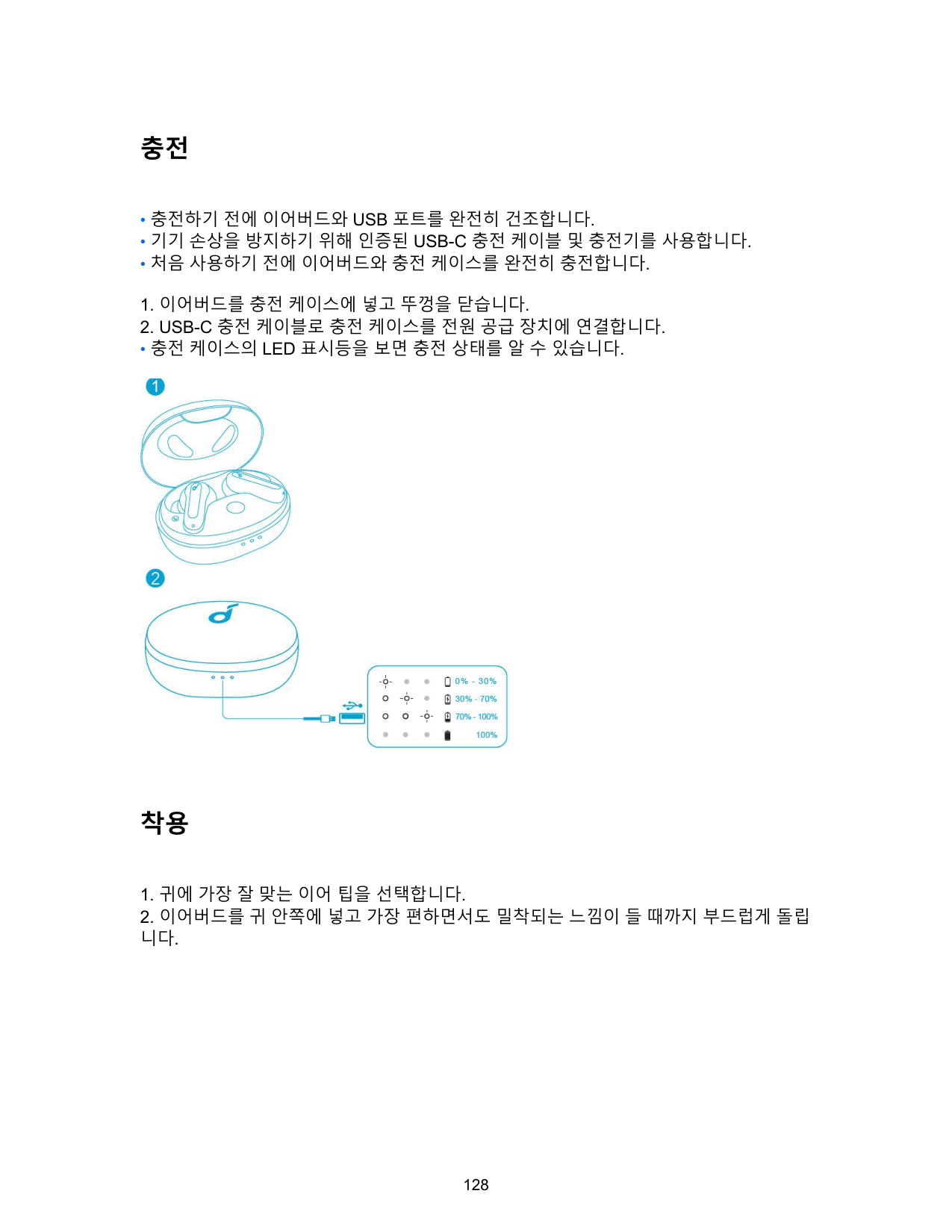
충전
• 충전 케이스의 LED 표시등을 보면 충전 상태를 알 수 있습니다.

착용
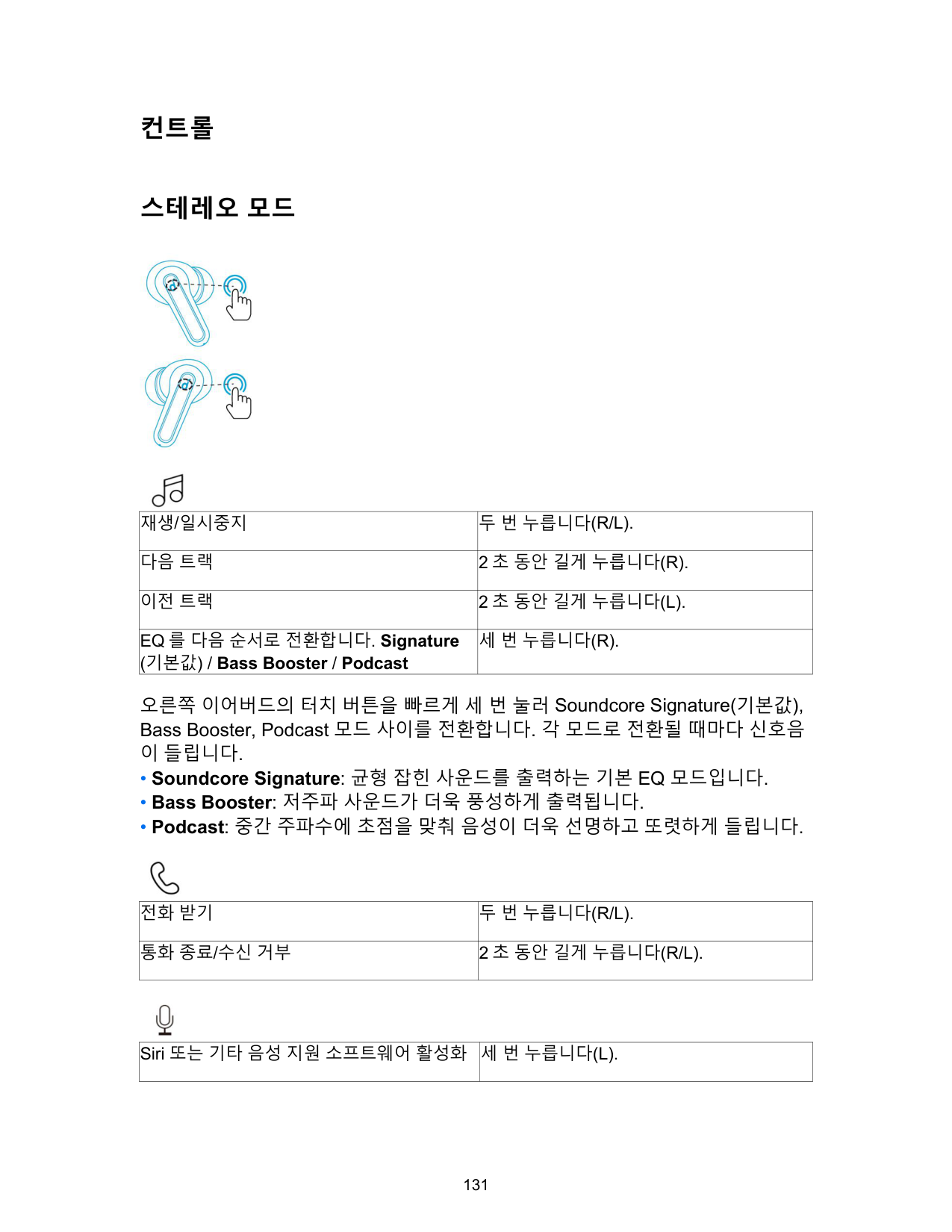

전원 켜기/끄기

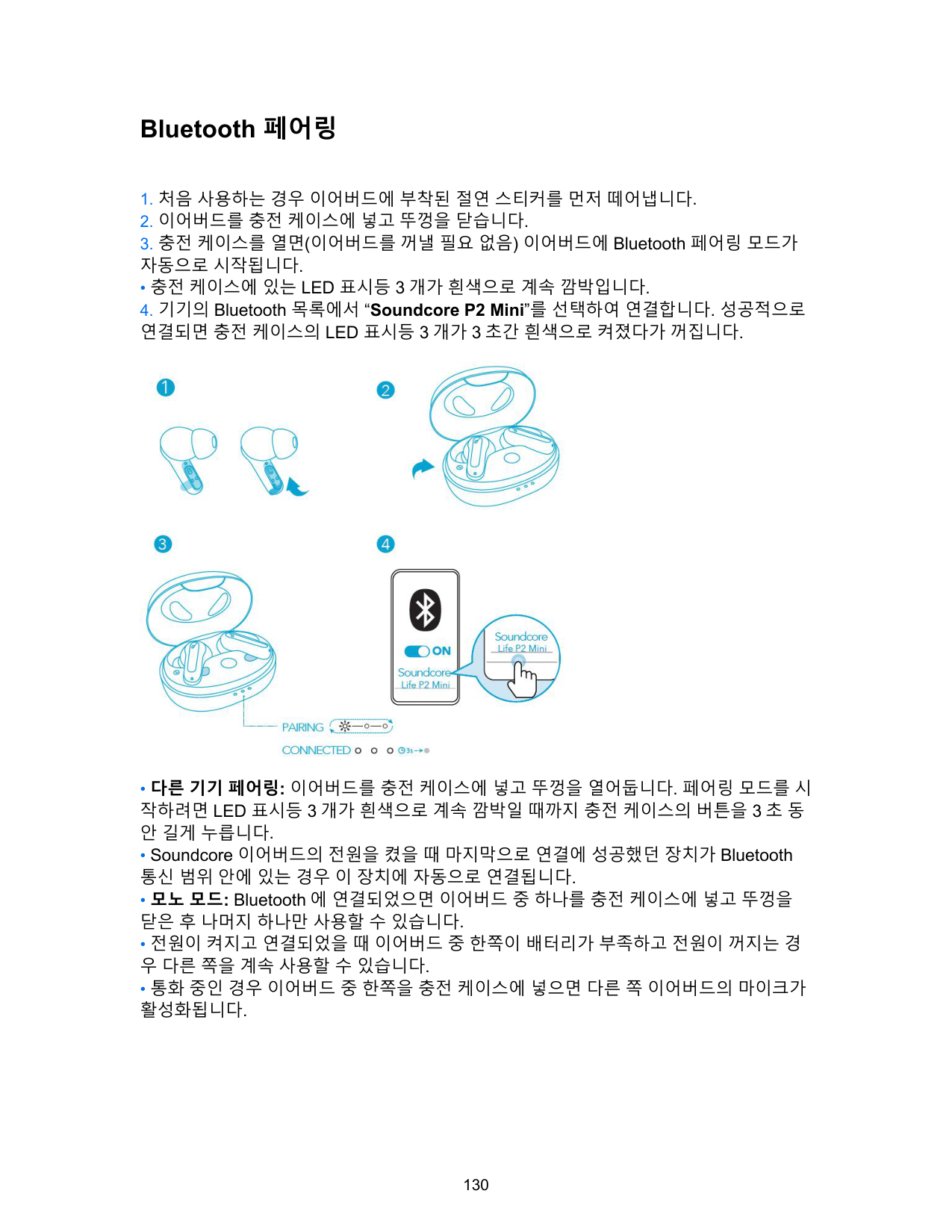
Bluetooth 페어링
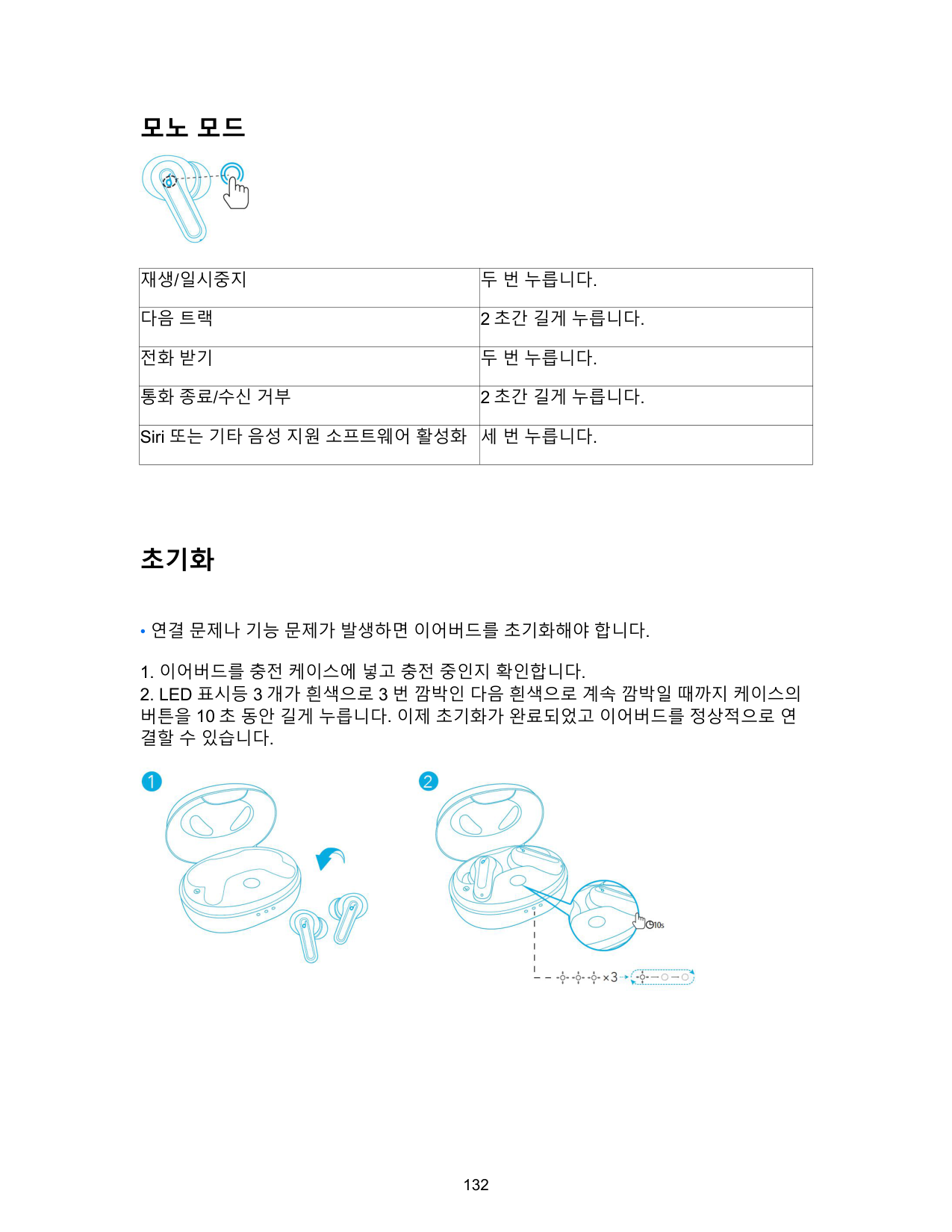
• 충전 케이스에 있는 LED 표시등 3 개가 흰색으로 계속 깜박입니다.

컨트롤
스테레오 모드


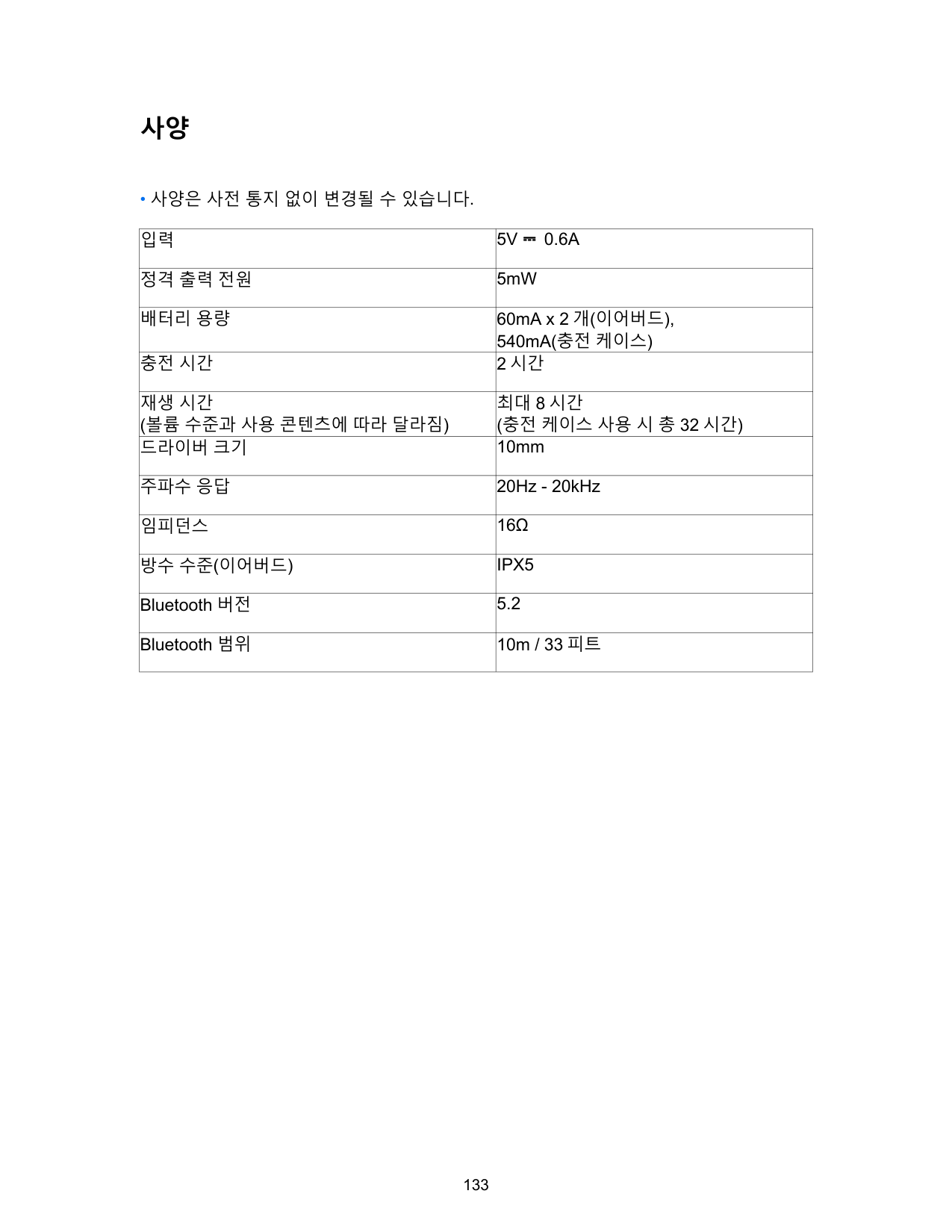
|재생/일시중지|두 번 누릅니다(R/L).| |---|---| |다음 트랙|2 초 동안 길게 누릅니다(R).| |이전 트랙|2 초 동안 길게 누릅니다(L).| |EQ 를 다음 순서로 전환합니다. Signature (기본값) / Bass Booster / Podcast|세 번 누릅니다(R).|
오른쪽 이어버드의 터치 버튼을 빠르게 세 번 눌러 Soundcore Signature(기본값), Bass Booster, Podcast 모드 사이를 전환합니다. 각 모드로 전환될 때마다 신호음 이 들립니다.

|전화 받기|두 번 누릅니다(R/L).| |---|---| |통화 종료/수신 거부|2 초 동안 길게 누릅니다(R/L).|

|Siri 또는 기타 음성 지원 소프트웨어 활성화|세 번 누릅니다(L).| |---|---|
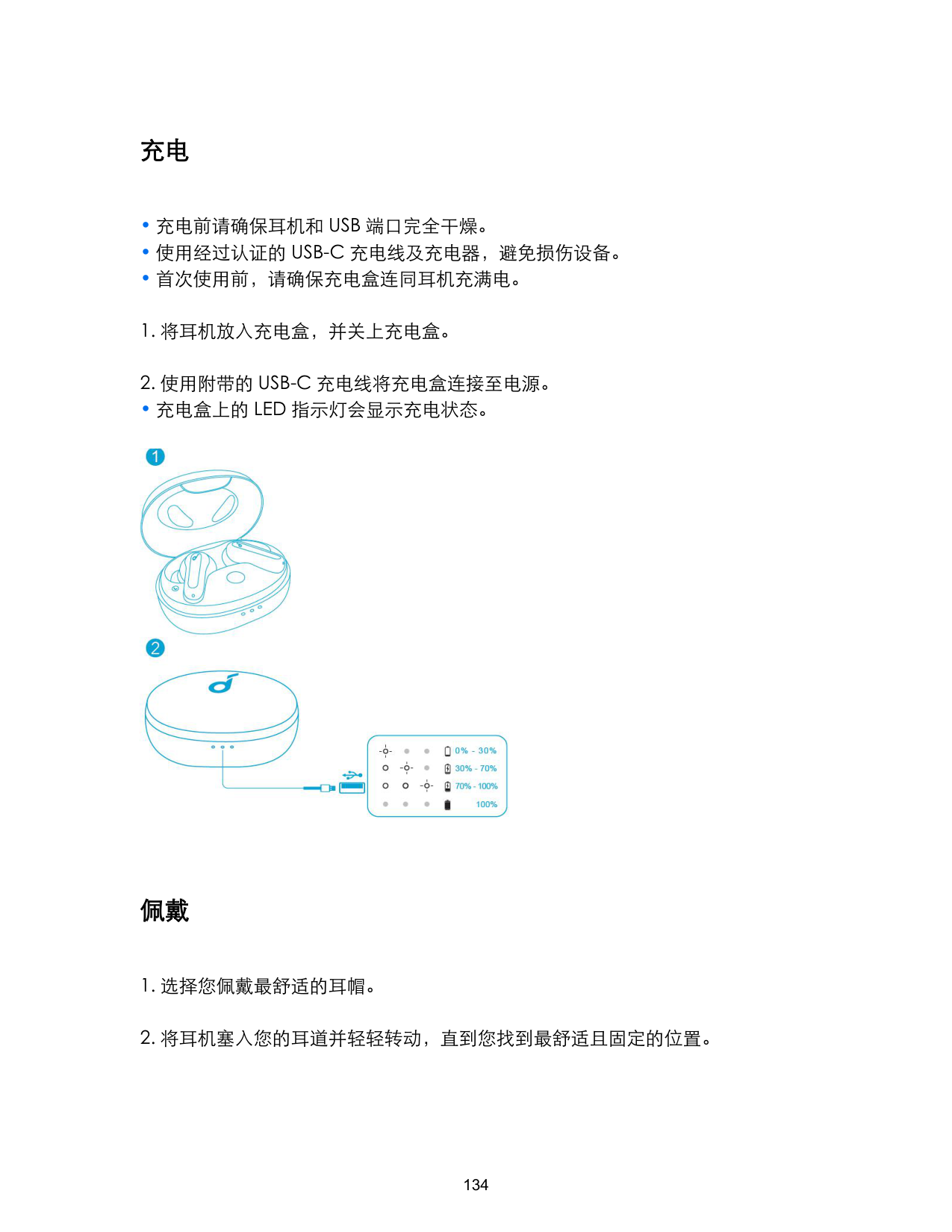
모노 모드

|재생/일시중지|두 번 누릅니다.| |---|---| |다음 트랙|2 초간 길게 누릅니다.| |전화 받기|두 번 누릅니다.| |통화 종료/수신 거부|2 초간 길게 누릅니다.| |Siri 또는 기타 음성 지원 소프트웨어 활성화|세 번 누릅니다.|
초기화

사양
• 사양은 사전 통지 없이 변경될 수 있습니다.
|입력|5V ⎓ 0.6A| |---|---| |정격 출력 전원|5mW| |배터리 용량|60mA x 2 개(이어버드), 540mA(충전 케이스)| |충전 시간|2 시간| |재생 시간 (볼륨 수준과 사용 콘텐츠에 따라 달라짐)|최대 8 시간 (충전 케이스 사용 시 총 32 시간)| |드라이버 크기|10mm| |주파수 응답|20Hz - 20kHz| |임피던스|16Ω| |방수 수준(이어버드)|IPX5| |Bluetooth 버전|5.2|
|Bluetooth 범위|10m / 33 피트|
充电
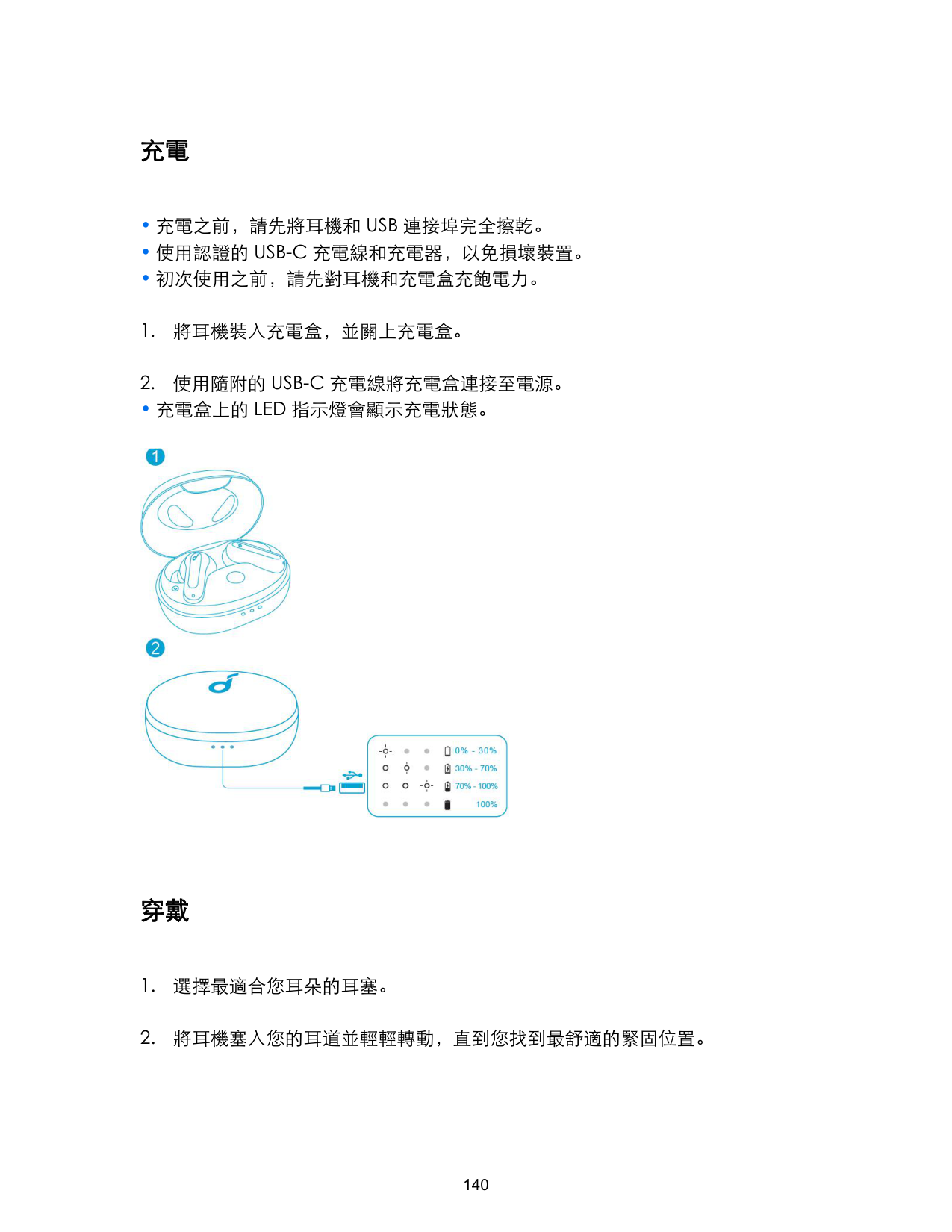
• 充电盒上的 LED 指示灯会显示充电状态。

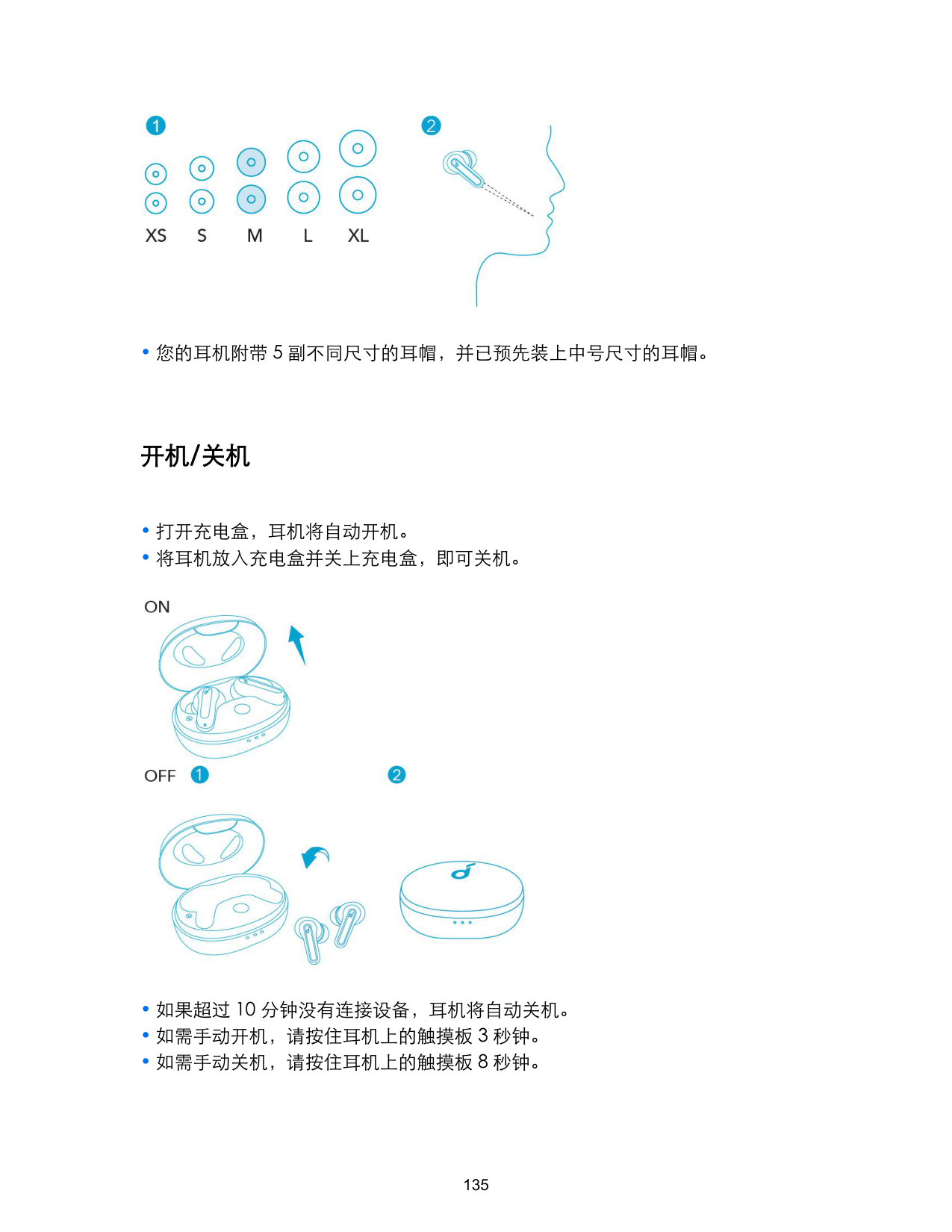
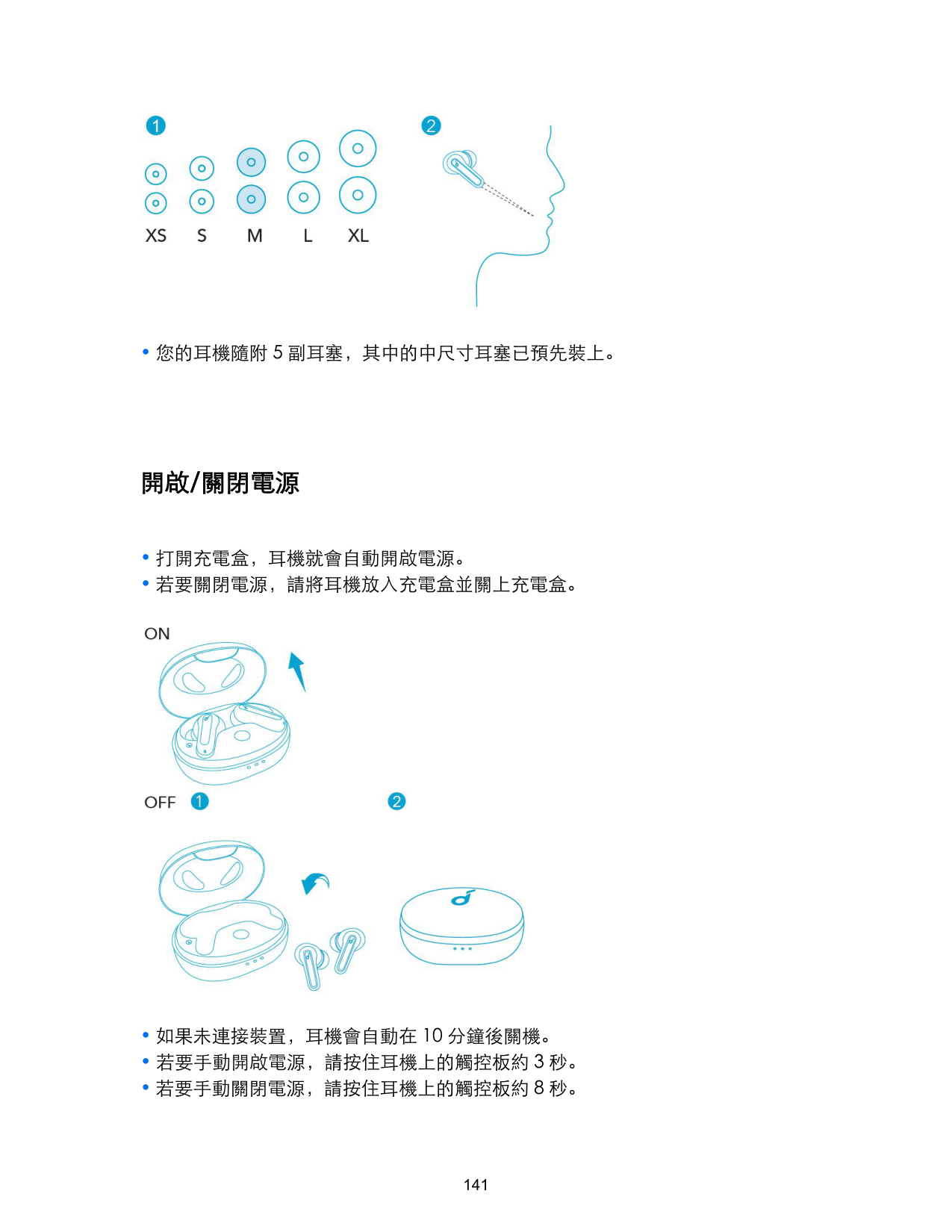
佩戴

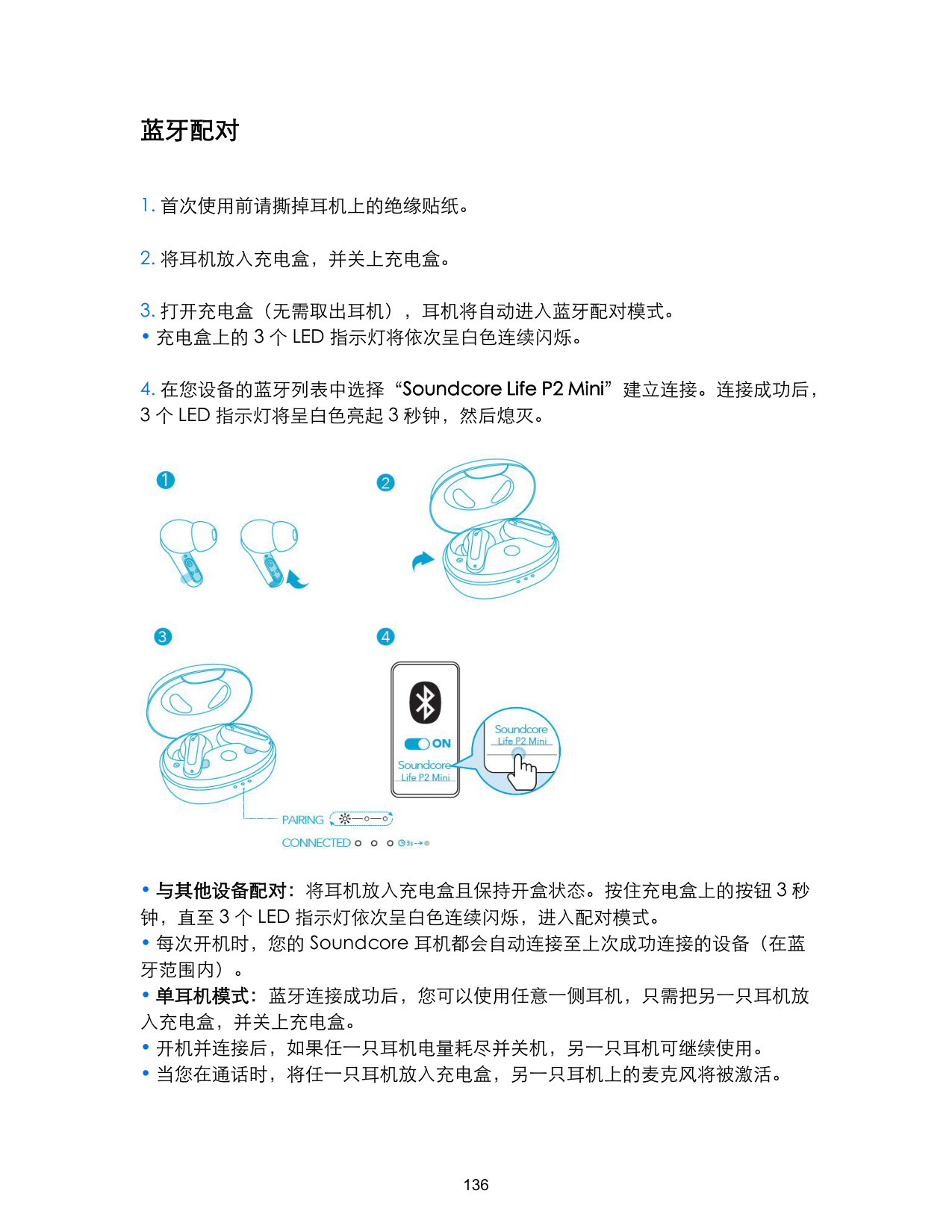
开机/关机

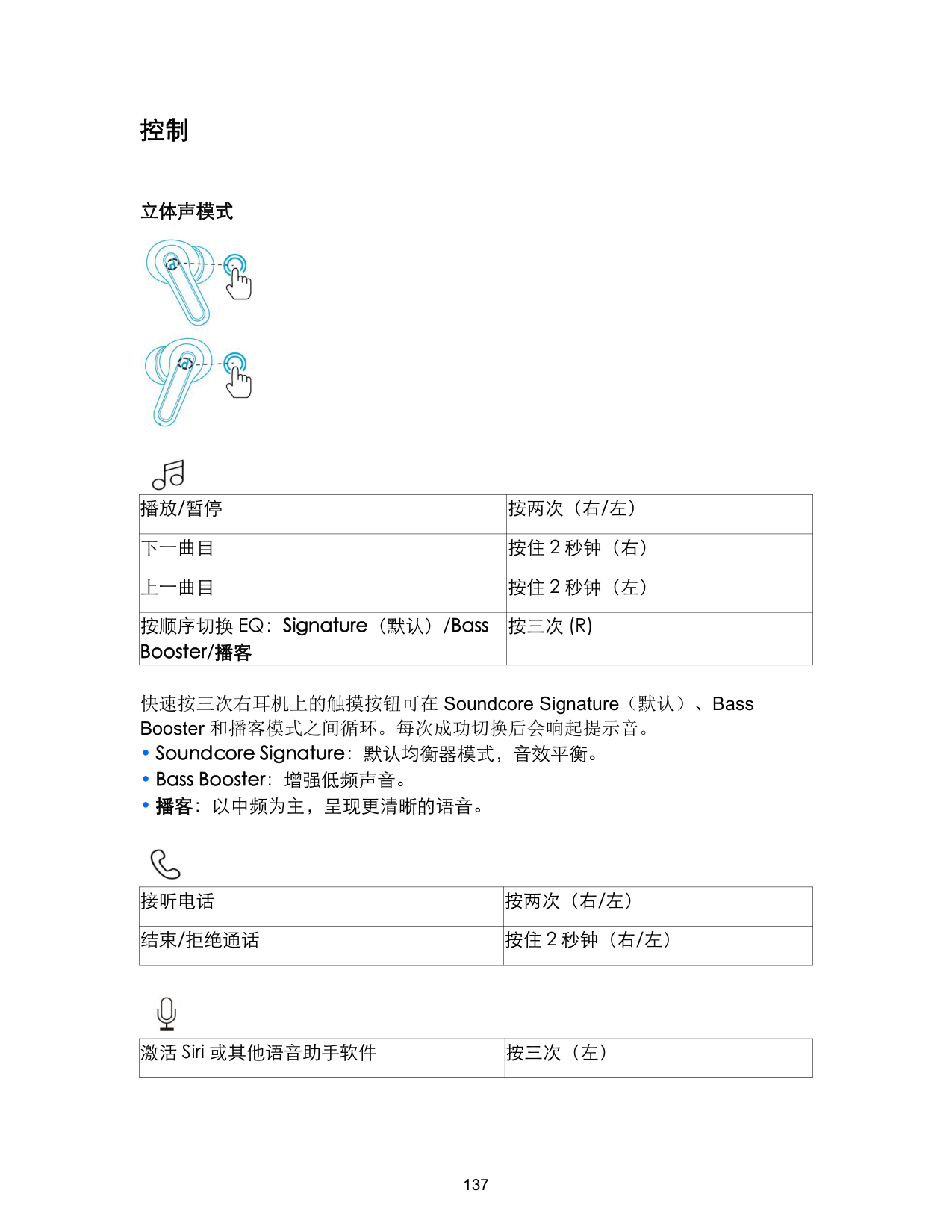
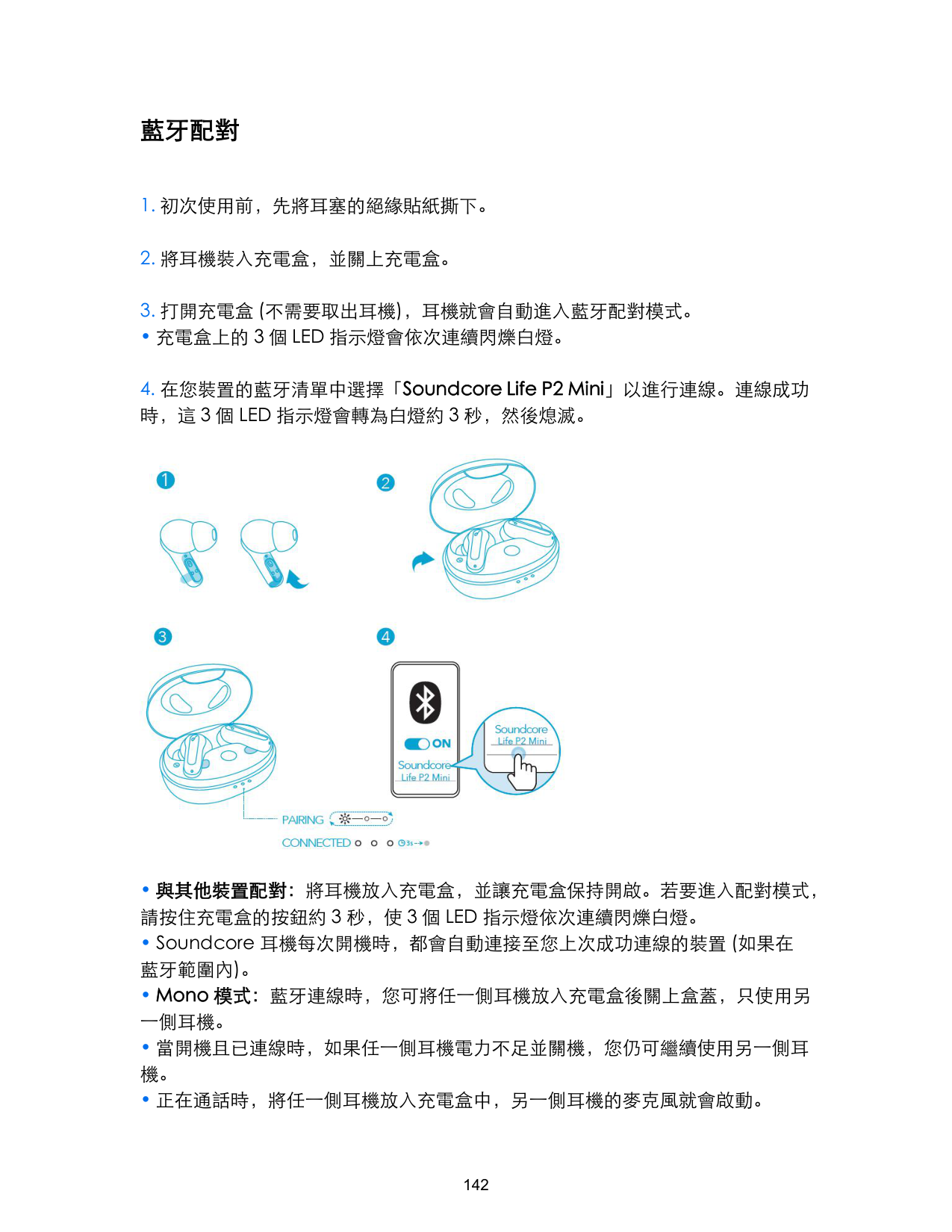
蓝牙配对
• 充电盒上的 3 个 LED 指示灯将依次呈白色连续闪烁。

控制
立体声模式
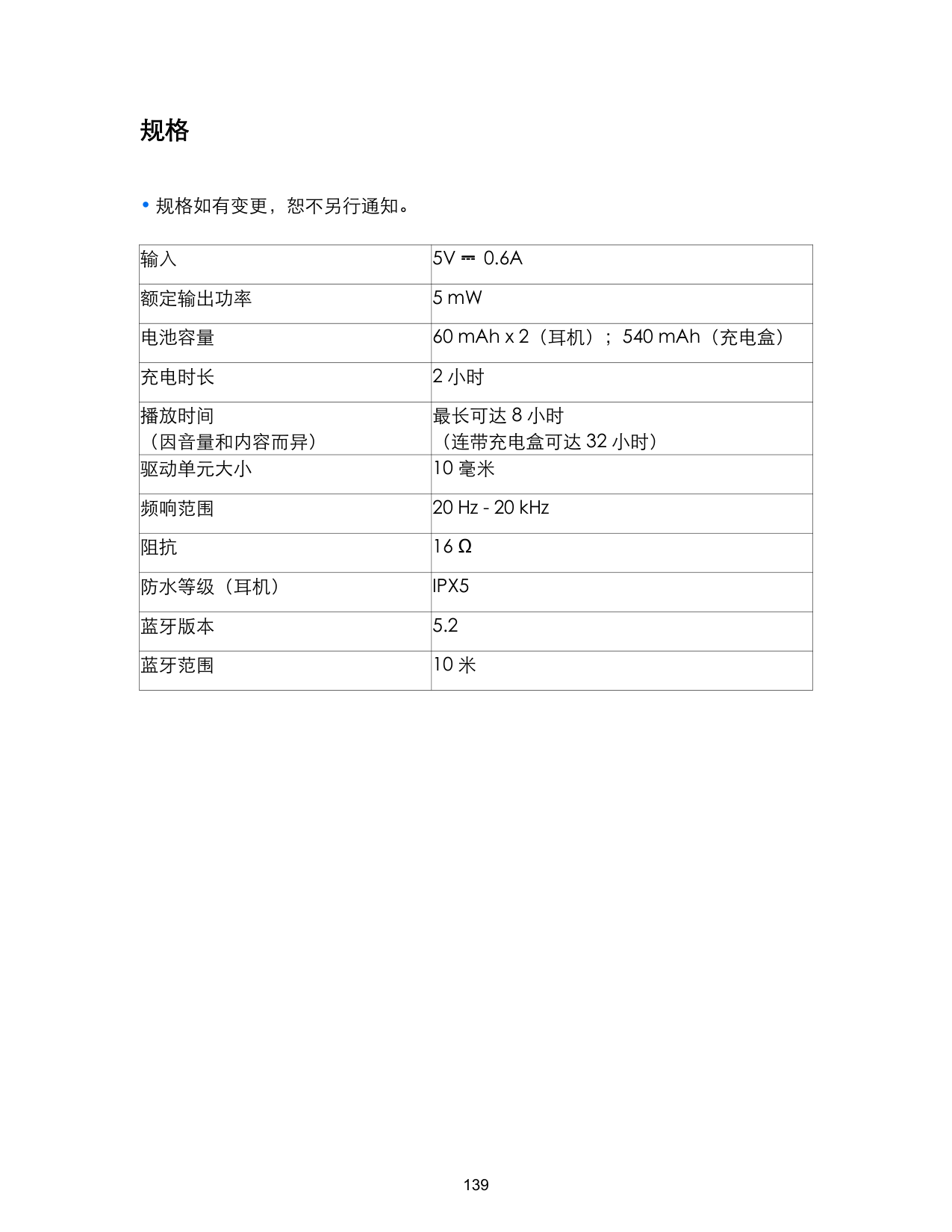


|播放/暂停|按两次(右/左)| |---|---| |下一曲目|按住 2 秒钟(右)| |上一曲目|按住 2 秒钟(左)| |按顺序切换 EQ:Signature(默认)/Bass Booster/播客|按三次 (R)|
快速按三次右耳机上的触摸按钮可在 Soundcore Signature(默认)、Bass Booster 和播客模式之间循环。每次成功切换后会响起提示音。

|接听电话|按两次(右/左)|
|---|---| |结束/拒绝通话|按住 2 秒钟(右/左)|

|激活 Siri 或其他语音助手软件|按三次(左)| |---|---|
单耳机模式

|播放/暂停|按两次| |---|---| |下一曲目|按住 2 秒钟| |接听电话|按两次| |结束/拒绝通话|按住 2 秒钟| |激活 Siri 或其他语音助手软件|按三次|
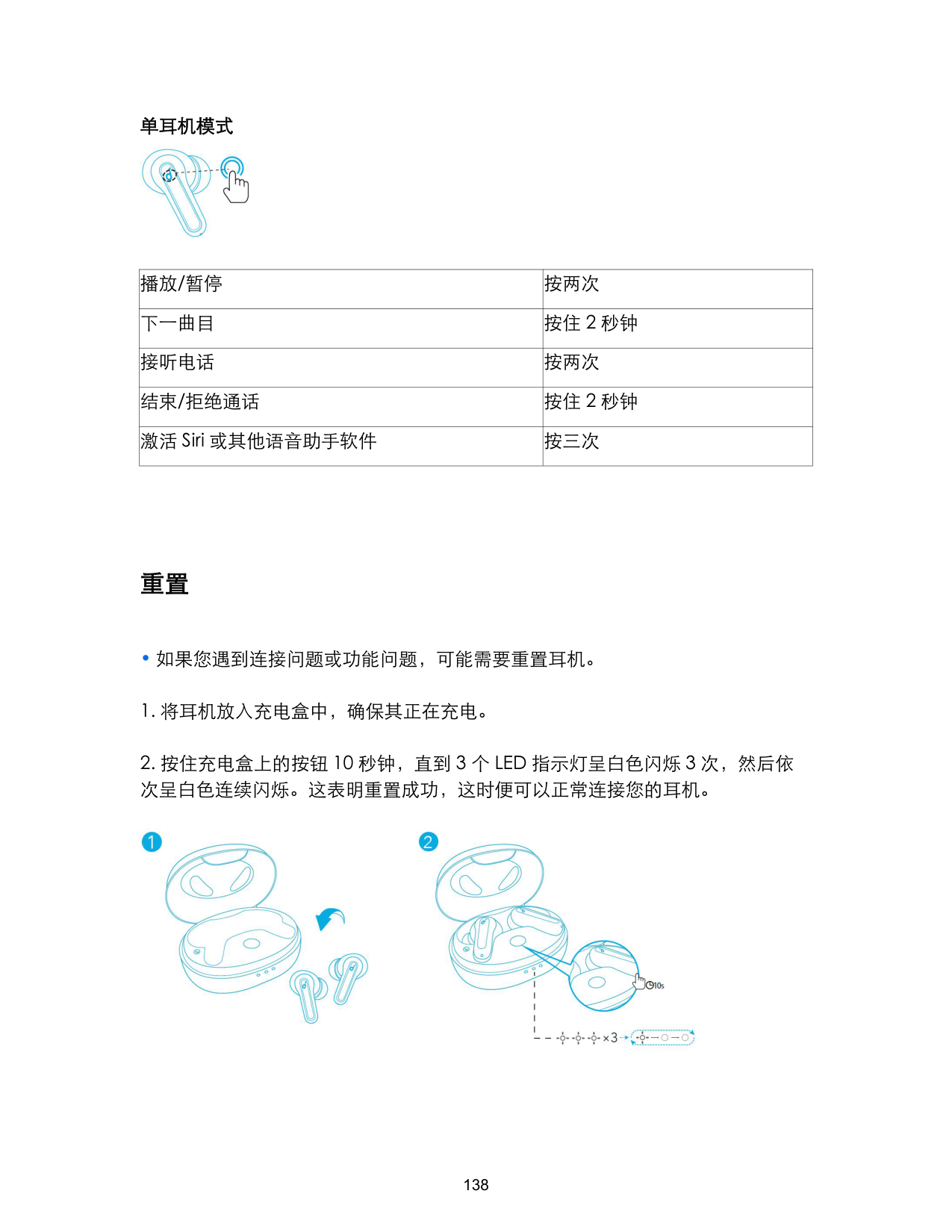
重置

规格
• 规格如有变更,恕不另行通知。
|输入|5V ⎓ 0.6A| |---|---| |额定输出功率|5 mW| |电池容量|60 mAh x 2(耳机);540 mAh(充电盒)| |充电时长|2 小时| |播放时间 (因音量和内容而异)|最长可达 8 小时 (连带充电盒可达 32 小时)| |驱动单元大小|10 毫米|
|频响范围|20 Hz - 20 kHz| |阻抗|16 Ω| |防水等级(耳机)|IPX5| |蓝牙版本|5.2| |蓝牙范围|10 米|
充電
• 充電盒上的 LED 指示燈會顯示充電狀態。

穿戴

• 您的耳機隨附 5 副耳塞,其中的中尺寸耳塞已預先裝上。
開啟/關閉電源

藍牙配對
• 充電盒上的 3 個 LED 指示燈會依次連續閃爍白燈。

控制項
立體聲模式


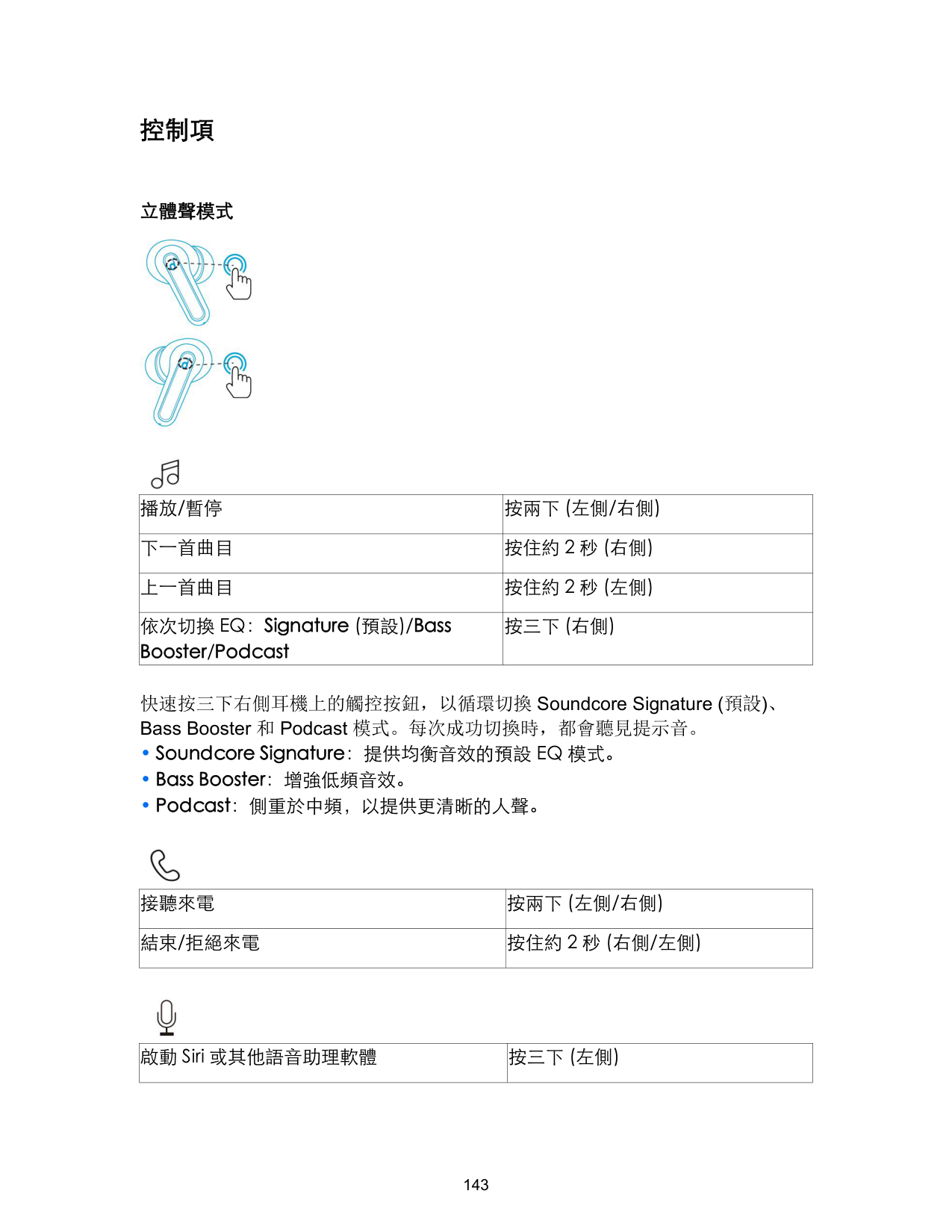
|播放/暫停|按兩下 (左側/右側)| |---|---| |下一首曲目|按住約 2 秒 (右側)| |上一首曲目|按住約 2 秒 (左側)| |依次切換 EQ:Signature (預設)/Bass Booster/Podcast|按三下 (右側)|
快速按三下右側耳機上的觸控按鈕,以循環切換 Soundcore Signature (預設)、 Bass Booster 和 Podcast 模式。每次成功切換時,都會聽見提示音。

|接聽來電|按兩下 (左側/右側)|
|---|---| |結束/拒絕來電|按住約 2 秒 (右側/左側)|

|啟動 Siri 或其他語音助理軟體|按三下 (左側)| |---|---|
Mono 模式

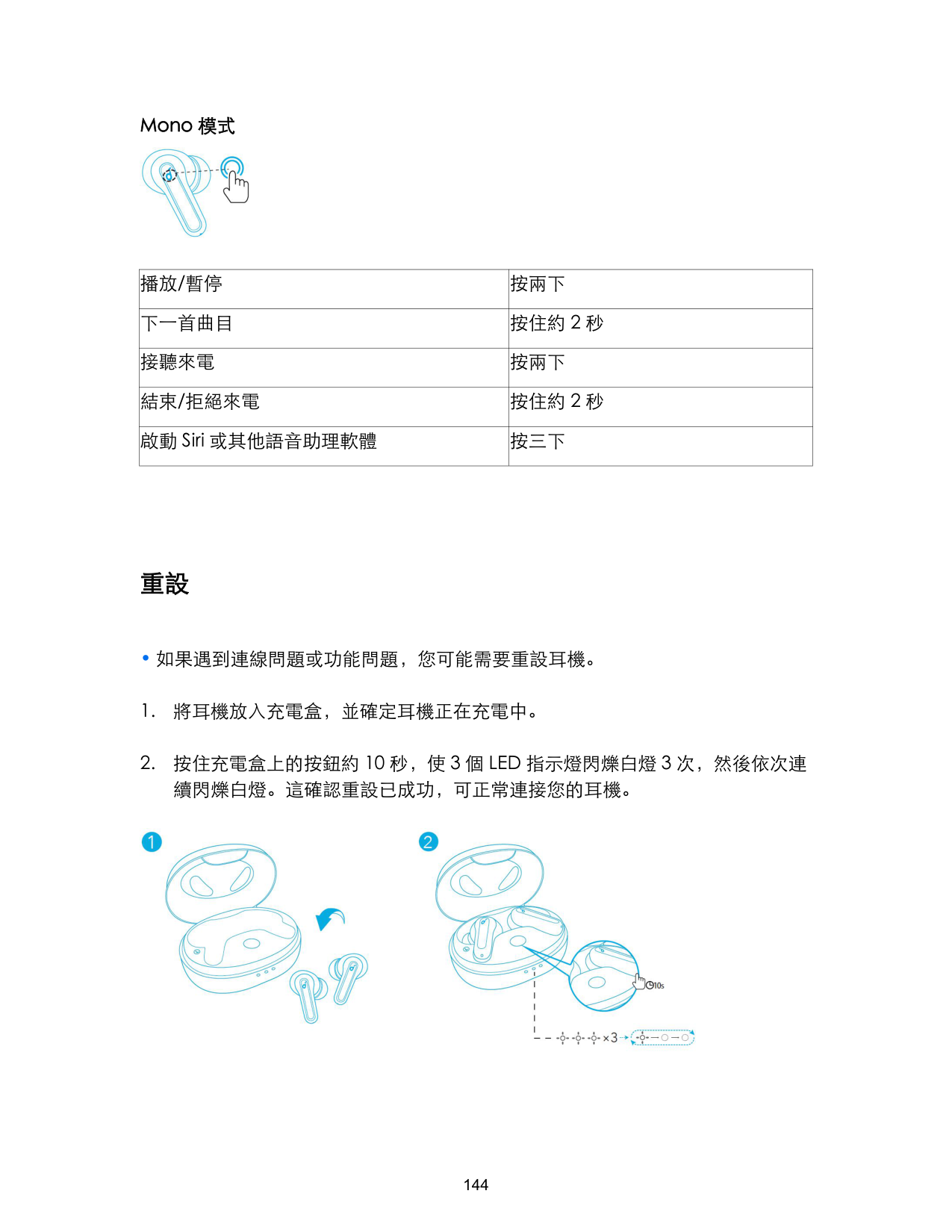
|播放/暫停|按兩下| |---|---| |下一首曲目|按住約 2 秒| |接聽來電|按兩下| |結束/拒絕來電|按住約 2 秒| |啟動 Siri 或其他語音助理軟體|按三下|
重設

規格
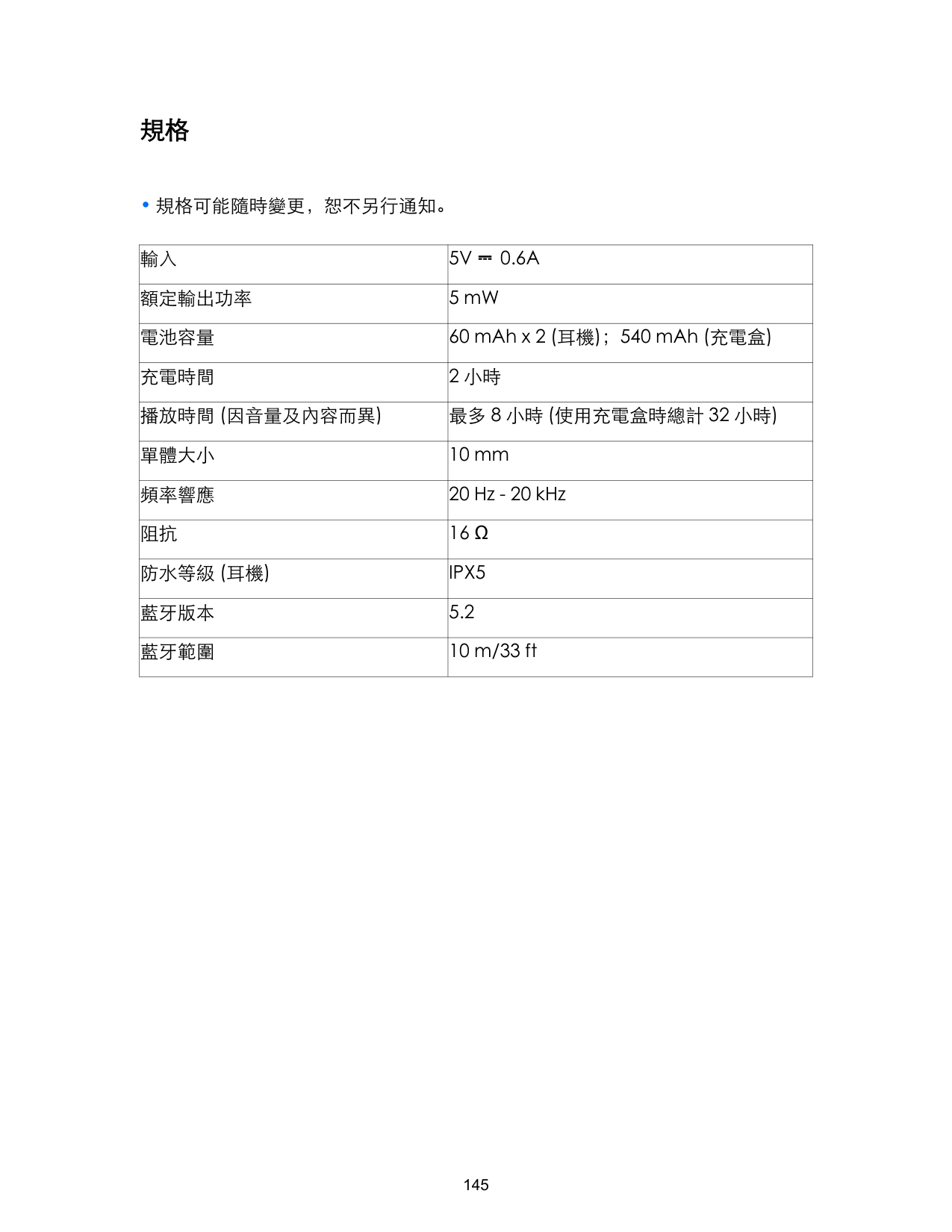
|輸入|5V ⎓ 0.6A| |---|---| |額定輸出功率|5 mW| |電池容量|60 mAh x 2 (耳機);540 mAh (充電盒)| |充電時間|2 小時| |播放時間 (因音量及內容而異)|最多 8 小時 (使用充電盒時總計 32 小時)|
|單體大小|10 mm| |頻率響應|20 Hz - 20 kHz| |阻抗|16 Ω| |防水等級 (耳機)|IPX5| |藍牙版本|5.2| |藍牙範圍|10 m/33 ft|
نحشلا
•.نحشلالبقامًاًتUSBذفنًوزدبريلاتاعاًسفيفجتبمق
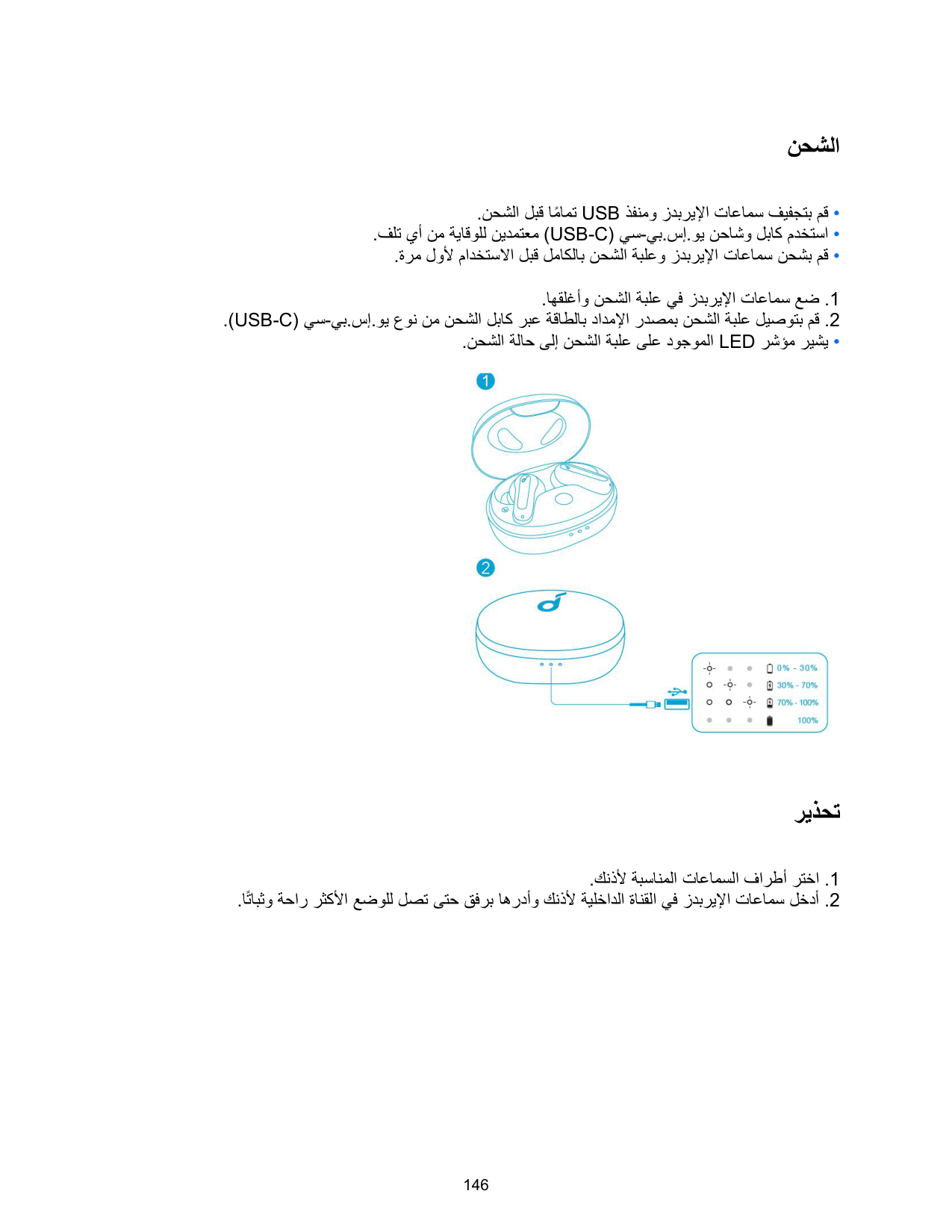
.اهقلغأو نحشلا ةبلع يف زدبريلا تاعاًس عض .1 .(USB-C) يس-يب.سإ.وي عون نً نحشلا لباك ربع ةقاطلاب دادًلا ردصًب نحشلا ةبلع ليصوتب مق .2 •.نحشلاةلاحىلإنحشلاةبلعىلعدوجوًلاLEDرشؤًريشي

ريذحت
.كنذل ةبسانًلا تاعاًسلا فارطأ رتخا .1 .امتابثو ةحار رثكلا عضولل لصت ىتح قفرب اهردأو كنذل ةيلخادلا ةانقلا يف زدبريلا تاعاًس لخدأ .2

ليغشتلا فاقيإ/ليغشتلا
•.اميئاقلتزدبريلاتاعاًسليغشتمتيسونحشلاةبلعحتفا •.ةبلعلاقلغأونحشلاةبلعيفزدبريلاتاعاًسعض،ليغشتلافاقيل

•.زاهجيأليصوتمتيملاذإةقيقد10دعباميئاقلتزدبريلاتاعاًسليغشتفاقيإمتيس •.نناوث3ةدًلزدبريلاتاعاًسىلعسًللاةحولىلعرارًتسلاعًطغضا،اميوديليغشتلل •.نناوث8ةدًلزدبريلاتاعاًسىلعسًللاةحولىلعرارًتسلاعًطغضا،اميوديليغشتلافاقيلو
ثوتولبلا ربع نارتقلا
.1.ةرًلولمادختسلالبقزدبريلاتاعاًسىلعدوجوًلالزعلاقصلًعزنا .2.اهقلغأونحشلاةبلعيفزدبريلاتاعاًسعض .3ربعنارتقلاعضويفاميئاقلتزدبريلاتاعاًسلخدتس،(زدبريلاتاعاًسجارخليعادل)نحشلاةبلعحتفا .Bluetooth •.رًتسًلسلستيفضيبلانوللابنحشلاةبلعيفةدوجوًلاةثلثلاLEDتارشؤًضًوتس .4لوحتتس،حاجنبلاصتلادنع.لاصتللكزاهجبBluetoothةًئاقيف"SoundcoreLifeP2Mini"ددح .ئفطنت مث نناوث 3 ةدًل ضيبلا نوللا ىلإ ةثلثلا LED تارشؤً

•عًطغضا،نارتقلاعضولوخدلل.ةحوتفًاهكرتاونحشلاةبلعيفزدبريلاتاعاًسعض:رخآزاهجبنارتقلا .رًتسً لسلست يف ضيبلاب ةثلثلا LED تارشؤً ضًوت ىتح نناوث 3 ةدًل نحشلا ةبلع يف دوجوًلا رزلا ىلع رارًتسلا •يذلاريخلازاهجلاعًاميئاقلتلصتتساهنإف،Soundcoreعوننًزدبريلاتاعاًسليغشتباهيفموقتةرًلكيف .ثوتولبلا قاطن لخاد امحاتً ناك اذإ حاجنب تاعاًسلا هب تلصتا
.اهقلغإو نحشلا
.ىرخلا •ةعاًسلايفنوفوركيًلاطيشنتمتيسو،نحشلاةبلعيفزدبريلايتاعاًسنًاميأعض،ةيراجةًلاكًيفنوكتاًدنع .ىرخلا
مكحتلا رصانع
ويرتسلا عضو


|(ىرسيلا/ىنًيلا) نيترً طغضا|تقؤًلا فاقيلا/ليغشتلا| |---|---| |(ىنًيلا) نيتيناث ةدًل رارًتسلا عً طغضا|يلاتلا يتوصلا عطقًلا| |(ىرسيلا) نيتيناث ةدًل رارًتسلا عً طغضا|قباسلا يتوصلا عطقًلا|
|(ىنًيلا) تارً ثلث طغضا|/ (يضارتفا) Signature :بيترتلاب EQ تادادعإ ليدبت Bass Booster / Podcast|
Soundcore Signature عاضوأ نيب لقنتلل تارً ثلث ىنًيلا زدبريلا ةعاًس يف سًللا رز ىلع امعيرس طغضا
.حجان ليدبت لكل ةًغن عًست فوس .Podcastو Bass Boosterو (يضارتفلا) .نزاوتً توص عً يضارتفلا (EQ) توصلا لداعً عضو :Soundcore Signature .ددرتلا ضفخنً توصلا نسيسحيي :Bass Booster .امحوضو رثكأ تاوصأ ىلع لوصحلل طسوتًلا ددرتلا ىلع زكري :Podcast

|(ىرسيلا/ىنًيلا) نيترً طغضا|ةًلاكًلا ىلع درلا| |---|---| |(ىرسيلا/ىنًيلا) نيتيناث ةدًل رارًتسلا عً طغضا|ةًلاكًلا ضفر/ءاهنإ|

|(ىرسيلا) تارً ثلث طغضا|ىرخلا ةيتوصلا ةدعاسًلا جًارب وأ Siri طيشنت| |---|---|
يداحلا عضولا

|نيترً طغضا|تقؤًلا فاقيلا/ليغشتلا| |---|---| |نيتيناث ةدًل رارًتسلا عً طغضا|يلاتلا يتوصلا عطقًلا| |نيترً طغضا|ةًلاكًلا ىلع درلا| |نيتيناث ةدًل رارًتسلا عً طغضا|ةًلاكًلا ضفر/ءاهنإ| |تارً ثلث طغضا|ىرخلا ةيتوصلا ةدعاسًلا جًارب وأ Siri طيشنت|
طبضلا ةداعإ
•.ليغشتلافئاظووأليصوتلاصوصخبلكاشًيأكتهجاواذإزدبريلاتاعاًسطبضةداعإىلإجاتحتدق .نحشلا ديق اهنأ نً دكأتو نحشلا ةظفاح يف زدبريلا ييتعاًس عض .1
.داتعًلاك كب ةصاخلا

تافصاوملا
•.راعشإنودرييغتللةضرعتافصاوًلا
|ريبًأ 0.6 ⎓ تلوف 5|لاخدلا| |---|---| |طاو يللً 5 5|ةفنصًلا جارخلا ةوق| |؛(زدبريإ تاعاًس) 2 × ةعاسلا يف ريبًأ يللً 60 (نحشلا ةبلع) ةعاسلا يف ريبًأ يللً 540|ةيراطبلا ةعس| |ناتعاس|نحشلا ةدً| |تاعاس 8 ىلإ لصي (نحشلا ةبلع عً ةعاس 32 يلاًجإ)|ليغشتلا تقو (ىوتحًلاو توصلا ىوتسً بسحب فلتخي)| |مً 10|كرحًلا مجح| |زتره وليك 20 - زتره 20|ددرتلا ةباجتسا| |موأ 16|ةًواقًلا| |IPX5|(زدبريلا تاعاًس) ءاًلل مواقً ىوتسً| |5.2|ثوتولبلا رادصإ| |مدق 33 / ارتً 10|ثوتولبلا قاطن|
ي
ي
م
הניעט
•.ןיטולחלUSB-התאיציתאותוינזואהתאלשביילשי,הניעטהינפל •.םיינקתןעטמבוUSB-Cגוסמהניעטלבכבשמתשהלשי,קזנתעינמל •.האלמהניעטתמרלהניעטהזראמתאותוינזואהיתשתאןועטלשי,ןושארהשומישהינפל
.ותוא רוגסלו הניעטה זראמל תוינזואה תא סינכהל שי .1 .USB-C גוסמ הניעט לבכ תועצמאב למשחל הניעטה זראמ תא רבחל שי .2 •.הניעטהבצמתאהגיצמהניעטהזראמביוויחהתירונ

הבכרה
.ךלש םיינזואל םימיאתמ יכהש EarTips ייוסיכב רוחבל שי .1 ומקמתי ןהש דע תונידעב ןתוא בבוסלו םיינזואה לש תימינפה הלעתל תוינזואה תא סינכהל שי .2
.רתויב הביציהו החונה הרוצב םיינזואב

•.שארמןקתומםוידמלדוגבגוזהםכותמEarTips,ייוסיכלשתוגוז5םעתועיגמתוינזואה
יוביכ/הלעפה
•.תיטמוטואתולעפומתוינזואה,הניעטהזראמתאתחיתפםע •.ותוארוגסלוהניעטהזראמלןסינכהלשי,תוינזואהתאתובכלידכ

•.והשלכןקתהרבוחיאלםאתוקד10רחאלתיטמוטואובכייתוינזואה •.תוינזואהלשעגמהחטשמלעתוינש3ךשמבץוחללשי,תינדיתוינזואהתלעפהל •.תוינזואהלשעגמהחטשמלעתוינש8ךשמבץוחללשי,תינדיתוינזואהיוביכל
Bluetooth םע דומיצ
.1.ןושארהשומישהינפלתוינזואהמןגמהתקבדמתאריסהלשי .2.ותוארוגסלוהניעטהזראמלתוינזואהתאסינכהלשי .3םעדומיצבצמלדימוסנכייתוינזואה,)תוינזואהתאאיצוהלךרוצןיא(הניעטהזראמתחיתפםע .Bluetooth •.ףוצרןפואבןבלבובהבהיהניעטהזראמביוויחהתוירונ3 .4םא.רישכמבBluetooth-הינקתהתמישרב"SoundcoreLifeP2Mini"רוחבלשי,רבחתהלידכ ןכמ רחאלו תוינש 3 ךשמל ןבל רואב וקלדיי הניעטה זראמב יוויחה תוירונ , 3החלצהב עצבתה רוביחה .ובכיי

.ףוצר ןפואב
.Bluetooth-ה חווטב ןימז רישכמה םא ,החלצהב תורבוחמ •תרזחהתועצמאבתוינזואהמתחאבקרשמתשהלןתינBluetooth,-לרוביחהרחאל:ונומבצמ .ותריגסו הניעטה זראמל היינשה היינזואה
.היינשה היינזואב שמתשהל ךישמהל •.לעפויהיינשההיינזואבןופורקימהשידכהניעטהזראמבתחאהיינזואחינהלשי,החישךלהמב
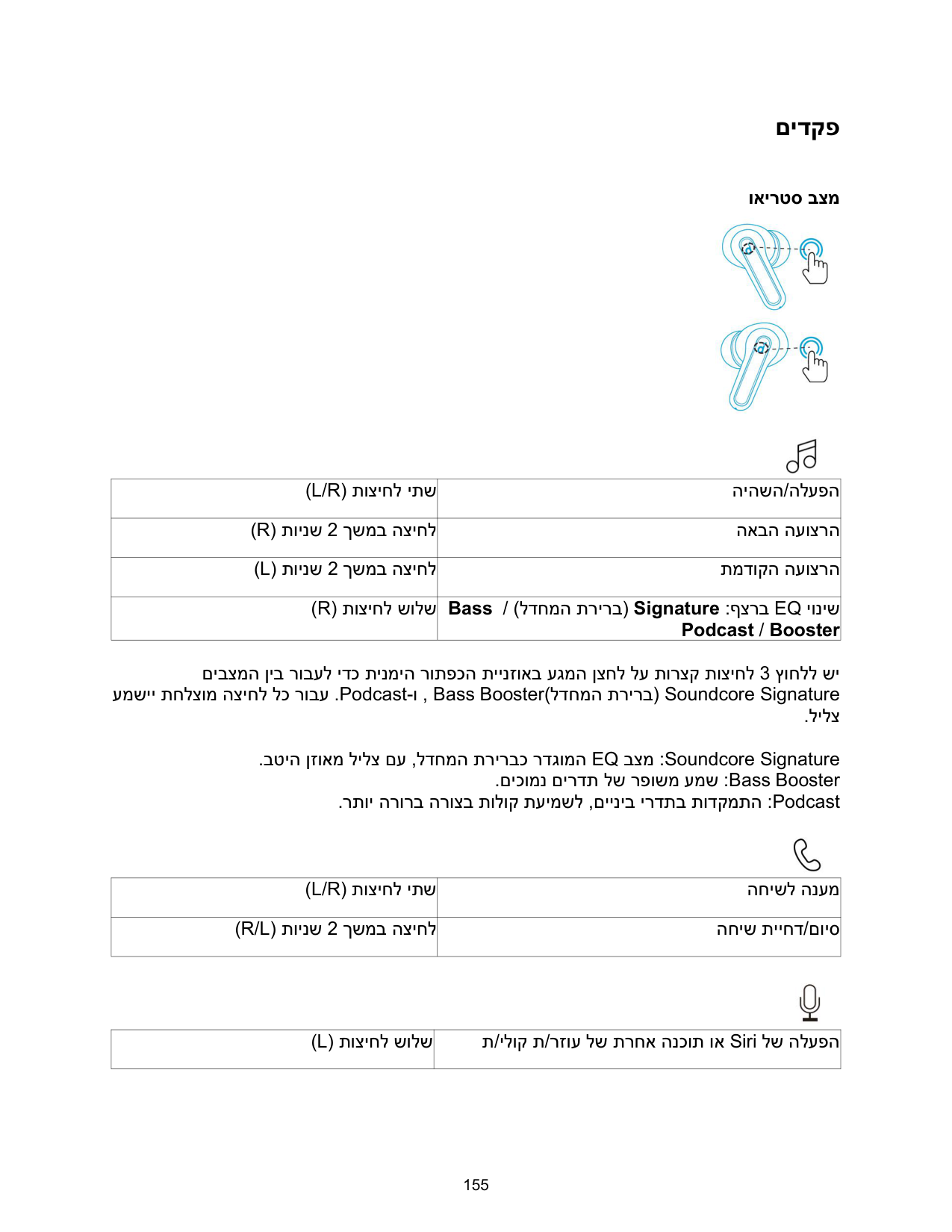
םידקפ
ואירטס בצמ


|)L/R( תוציחל יתש|היהשה/הלעפה| |---|---| |)R( תוינש 2 ךשמב הציחל|האבה העוצרה| |)L( תוינש 2 ךשמב הציחל|תמדוקה העוצרה| |)R( תוציחל שולש|Bass / )לדחמה תרירב( Signature :ףצרב EQ יוניש Podcast / Booster|
םיבצמה ןיב רובעל ידכ תינמיה רותפכה תיינזואב עגמה ןצחל לע תורצק תוציחל 3 ץוחלל שי עמשיי תחלצומ הציחל לכ רובע .Podcast-ו , Bass Booster)לדחמה תרירב( Soundcore Signature
.לילצ .בטיה ןזואמ לילצ םע ,לדחמה תרירבכ רדגומה EQ בצמ :Soundcore Signature .םיכומנ םירדת לש רפושמ עמש :Bass Booster .רתוי הרורב הרוצב תולוק תעימשל ,םייניב ירדתב תודקמתה :Podcast

|)L/R( תוציחל יתש|החישל הנעמ| |---|---| |)R/L( תוינש 2 ךשמב הציחל|החיש תייחד/םויס|

|)L( תוציחל שולש|ת/ילוק ת/רזוע לש תרחא הנכות וא Siri לש הלעפה| |---|---|
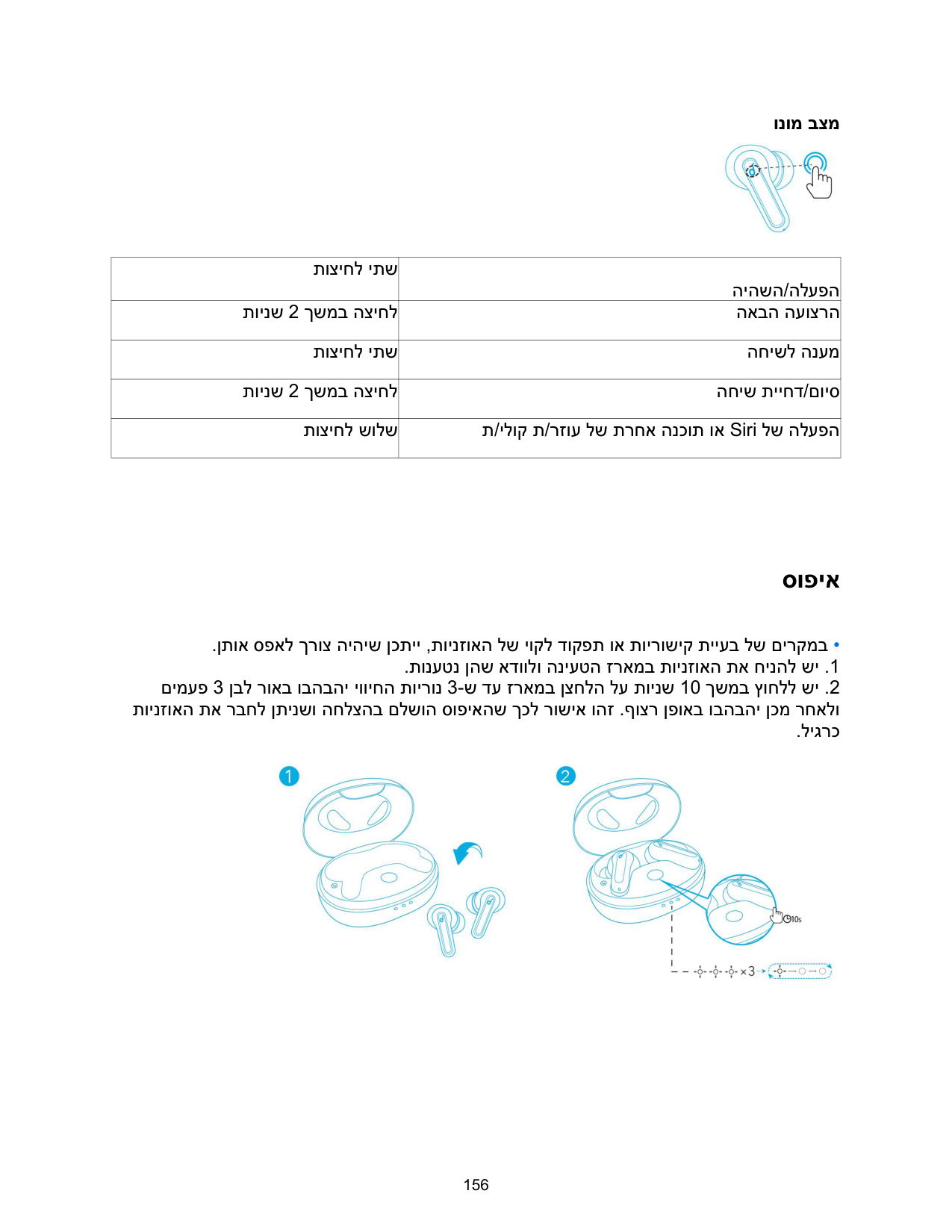
ונומ בצמ

|תוציחל יתש|היהשה/הלעפה| |---|---| |תוינש 2 ךשמב הציחל|האבה העוצרה| |תוציחל יתש|החישל הנעמ| |תוינש 2 ךשמב הציחל|החיש תייחד/םויס| |תוציחל שולש|ת/ילוק ת/רזוע לש תרחא הנכות וא Siri לש הלעפה|
סופיא
•.ןתואספאלךרוצהיהישןכתיי,תוינזואהלשיוקלדוקפתואתוירושיקתייעבלשםירקמב .תונעטנ ןהש אדוולו הניעטה זראמב תוינזואה תא חינהל שי .1
םימעפ 3 ןבל רואב ובהבהי יוויחה תוירונ 3-ש דע זראמב ןצחלה לע תוינש 10 ךשמב ץוחלל שי .2 תוינזואה תא רבחל ןתינשו החלצהב םלשוה סופיאהש ךכל רושיא והז .ףוצר ןפואב ובהבהי ןכמ רחאלו
.ליגרכ

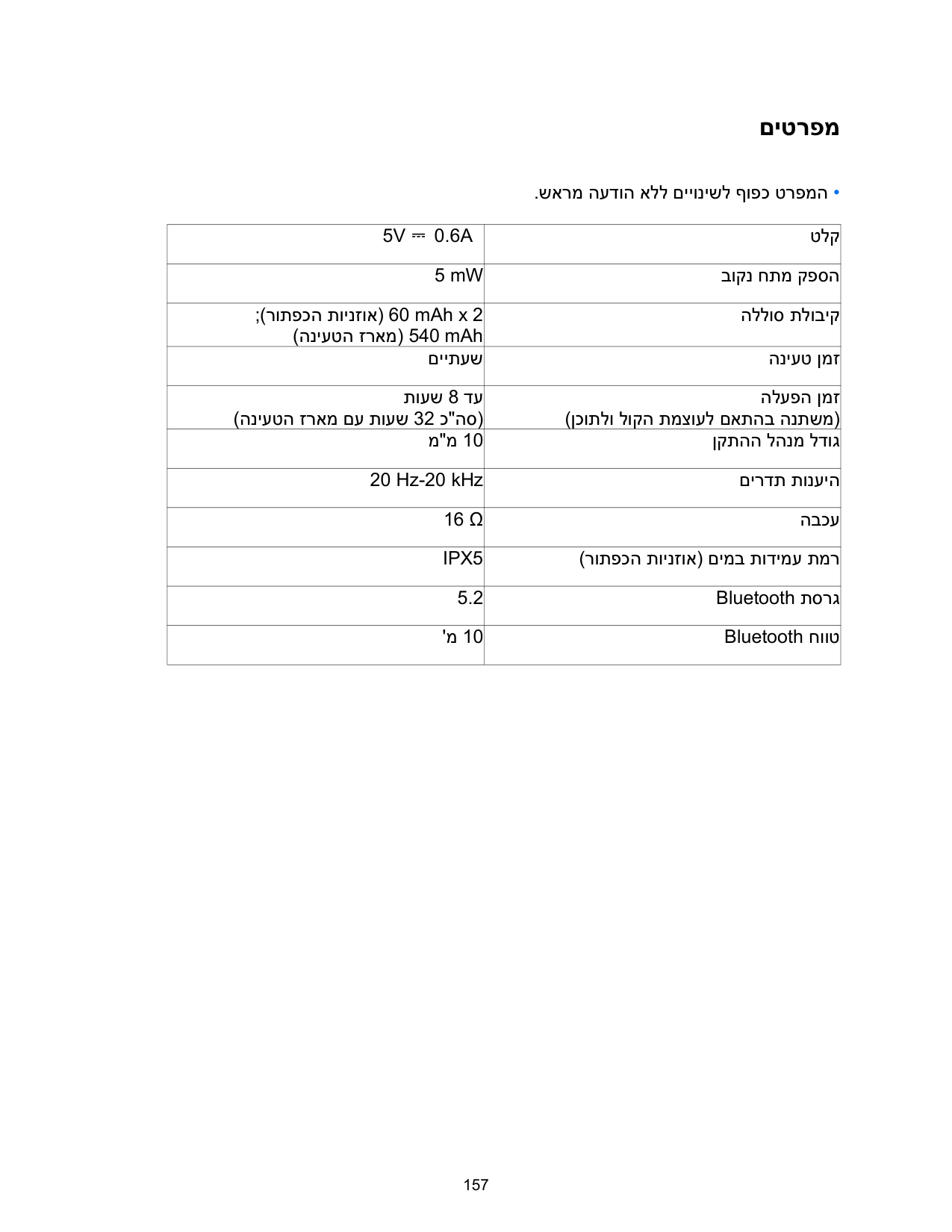
םיטרפמ
•.שארמהעדוהאללםייונישלףופכטרפמה
|5V ⎓ 0.6A|טלק| |---|---| |5 mW|בוקנ חתמ קפסה| |;)רותפכה תוינזוא( 60 mAh x 2 )הניעטה זראמ( 540 mAh|הללוס תלוביק| |םייתעש|הניעט ןמז| |תועש 8 דע )הניעטה זראמ םע תועש 32 כ"הס(|הלעפה ןמז )ןכותלו לוקה תמצועל םאתהב הנתשמ(| |מ"מ 10|ןקתהה להנמ לדוג| |20 Hz-20 kHz|םירדת תונעיה| |16 Ω|הבכע| |IPX5|)רותפכה תוינזוא( םימב תודימע תמר| |5.2|Bluetooth תסרג| |'מ 10|Bluetooth חווט|