Ask AI
— answers from the official manualAnswers from the official manual.
Common questions
Common Questions
38 totalHow do I set up the charging base for the P20 Robot Vacuum?
Assemble the charging base and plug the adapter into a wall socket. Place the charging base against a wall and keep the surrounding space of about 1 meter (3 feet) on either side and about 2 meters (6 feet) in front of the charging base clear of any obstructions. The power indicator will turn on to show good power connection. (Page 7)
How long should I charge the P20 before first use?
Keep charging the robot for 4-6 hours before first use. When fully charged, the indicator will stop blinking. This helps maintain optimal battery life. (Page 7)
What should I do if my Wi-Fi connection to the app fails?
If the connection fails, it's probably because you are using a 5 GHz network. Check your router settings and change it to 2.4GHz, as the robot only connects to 2.4GHz networks. If the device cannot be found or you get a configuration timeout, press and hold both the Clean button and Home button for 3 seconds to reset the Wi-Fi connection. (Pages 7-8)
How do I reset the Wi-Fi connection on the P20 Robot Vacuum Cleaner?
Press and hold both the Clean button and the Home button on the robot for 3 seconds until you hear a voice prompt. The Clean button will flash rapidly, indicating the Wi-Fi has been successfully reset. You can also press and hold the Reset Wi-Fi button on the remote control for 3 seconds to achieve the same result. After resetting, return to the main interface in the App and click Add to reconnect the robot. (Page 10)
How do I set up scheduled cleaning on the P20?
Tap the Settings button in the AIRROBO app and set your desired cleaning time. The robot will automatically start cleaning at the specified time. When cleaning is complete, it will return to the charging base to charge. (Page 10)
What cleaning modes are available on the P20 Robot Vacuum Cleaner?
The P20 offers five cleaning modes: Auto Cleaning (zigzag pattern followed by edge cleaning), Spot Cleaning (zigzag route in a specific area), Spiral Cleaning (spiral route from the center of an area), Edge Cleaning (follows and cleans along walls), and Scheduled Cleaning (starts automatically at a set time). All modes except Scheduled Cleaning can be activated via the remote control or the AIRROBO app. (Page 9-10)
Show 32 more questions
How do I install the AIRROBO app and connect my P20 to it?
How do I adjust the suction power on the P20?
How should I store the P20 if I'm not going to use it for a long time?
What should I do before using the P20 for the first time?
How do I operate the P20 using the remote control?
How do I adjust the suction level on the P20?
How long should I charge the P20 before using it for the first time?
How do I set up the charging base for the P20?
How do I connect the Airrobo P20 to Wi-Fi?
How do I reset the Wi-Fi connection on the P20?
What should I do if the robot fails to connect to Wi-Fi after several attempts?
What cleaning modes are available on the Airrobo P20?
How do I use the remote control with the P20?
How should I maintain the battery if I'm not using the P20 for a long time?
What safety precautions should I follow when using the Airrobo P20?
How do I set up the Wi-Fi connection for my AiRROBO P20?
What should I do if my AiRROBO P20 does not connect to the APP?
How do I perform spot cleaning with my AiRROBO P20?
How do I stop my AiRROBO P20 vacuum cleaner?
How do I factory reset my AiRROBO P20 vacuum cleaner?
How do I set a cleaning schedule for my AiRROBO P20?
How do I charge my AiRROBO P20 vacuum cleaner?
How often should I empty and clean the dust bin?
What safety precautions do I need to follow with my AiRROBO P20?
Can I use my AiRROBO P20 outdoors?
Why won't the P20 connect to my Wi-Fi network?
What safety precautions should I follow when using the P20 Robot Vacuum Cleaner?
How do I empty the dustbin on the P20?
What is the proper way to reset the Wi-Fi on the P20?
What temperature range is safe for using the P20?
What should I do if the P20 will not be used for a long time?
What are the different cleaning modes available on the P20?
Full Manual
13 pages

Manuals+ — User Manuals Simplified.

AiRROBO P20 Robot Vacuum Cleaner User Manual

Home » AiRROBO » AiRROBO P20 Robot Vacuum Cleaner User Manual
Contents


AiRROBO P20 Robot Vacuum Cleaner

AIRROBO is a smart home appliance brand with a focus on Al-enabled technologies. Supported by a worldleading enterprise in humanoid robotics field, AIRROBO is aiming to bring the most cutting-edge technology to more and more households around the globe, making smart home a new norm of life.
Tips: Scan the QR code to check and download the up-to-date E-manual and get discount on accessories


Thank you for purchasing AIRROBO ROBOT VACUUM CLEANER (Hereinafter referred to as robot).
It is strongly recommended to read the user manual comprehensively, including proper use, safety information and maintenance instructions for AlRROBO robot before using.
The user manual offers instructions only. If any other situations that you encounter are not addressed in this user manual, please contact our customer service [email protected] for product technical support.
This user manual will be updated upon new software or hardware updates, content and images will be updated without further notice.

Part 1 Important information
Before first use
Unbox it and remove all protective packaging and wrappings. Check if all parts are included.
Before first use, please make sure that the power switch is switched on and you have removed all obstacles from the surroundings. It will pass Over each section of the floor several times to build up the map through cleaning
The side brushes may occasionally flick small particles around, but the robot will pick them up eventually. Please ermpty the dustbin after each use to guarantee the optimal performance afterwards.
The robot may not be able to clean up dirt and dust if its dustbin is full. It is recommended to clean the dustbin regularly.
Please make sure that the packaging and wrappings are properly discarded or safely stored. For safety purpose, please keep the packaging and wrappings away from intants and children.
Before cleaning, please make sure to install the two side brushes in the corresponding positions of the robot and fasten them.
WARNING
Only authorized technicians are allowed to dismantle the robot. Users must not dismantle or repair it.
Please use the original adapter provided by the manufacturer only. Incompatible adapters may cause electric shock, fire, or damage to the robot.
Do not touch the plug or the adapter with wet hands.

Please clear the floor before using the robot by removing all fragile and lightweight items, such as cables, clothes, tissues and curtains, as they might get tangled in it.
Do not use the robot to pick up cigarettes, lighters, matches or other flammable materials.
Do not use force to bend the power cable and do not let it bear with pressure from heavy or sharp objects.
Do not use the robot outdoors. It is only for using indoors.
Do not sit on the robot or place any objects on top of it.
Do not use the robot in a wet or damp environment.
Only use the robot in the temperature range between 0°C and 45°C (degrees Celsius).
Do not use the robot in a suspended environment. Ifyou must use it in a suspended environment, prevent it from accidentally talling with firm protective fences, as it may cause personal injury or property damage.
Turn off the power if the robot left unused for an extended period.
Inform everyone at home or in the office when the robot is working in the same place so that no one trips over it
Disconnect the robot from the power supply before removing the battery.
This appliance can be used by children aged from 8 years and above and persons with reduced physical, sensory or mental capabilities or lack of experience and knowledge if they have been given supervision or instruction concening use of the appliance in a sate way and understand the hazards involved. Children shall not play with the appliance. Cleaning and user maintenance shall not be made by children without supervision.

Children should be supervised to ensure that they do not play with the appliance.
To maintain the robot and charging base, please turn off the robot ftirst, unplug it from the socket, and disconnect the power supply.
Battery and Charging
It is forbidden to incinerate the product. Even if it is severely damaged, the battery may explode.
Do not use any third-party batteries, or charging bases.
Do not dismantle, repair, or modify the battery and charging base.
Do not place the charging base near a heat source, such as heater
Do not wipe or clean the charging base with wet cloth or wet hands.
Do not throw away old batteries. The disposal of old batteries should be handled by a professional recycling agency.
If the power cord is damaged, it must be replaced by a professional technician authorized by the manufacturer, for personal safety.
Please make sure the robot is turned off and it’s recommended to use the original packaging during transportation.
If unused for an extended period, please turn the robot off after having fully charged it and store it in a cool and dry place.

Charge the robot at least once every three months to avoid damage to the battery due to excessive discharge
Use the right tool to take out the battery when needed. The power supply must be disconnected when
removing the battery. First, remove the bottom cover screw, then open the bottom cover. Unplug the battery connector, and finally, remove the battery from the battery compartment.
Before discarding the robot, the battery must be removed from it.
This appliance contains batteries that are non-replaceable. When the battery is at end of life, the appliance shall be properly disposed of.
Part 2 Product overview
Packing list

Main unit

Charging base
Dustbin


Notes: Press the dustbin release buckle and use the other hand to open the dustbin by opening the dustbin cover.
Remote control


Installation and Use:
Install two AAA batteries in the remote control battery compartment, making sure the positive and negative ends are pointing in the correct direction. Turn on the power Switch on the side of the robot.
When the robot is not connected to Wi-Fi network, you can still operate it with the remote control.
If you press any direction button to start the robot when it is on the charging base, the robot will pull out of the base and turn 180, then you can control it remotely through the remote control.
Remove the batteries if you will not use the remote control for a long time.
Part 3 Installation and operation
Connect the charging base Assemble the charging base and plug the adapter into a wall socket. Place the charging base againsta wall and keep the surrounding space of about l meter (3 teet) on either side and about 2 meters (6 teet) in front of the charging base clear of any obstructions. The power indicator will be on to show good power connection.

Charging the robot for the first time Place the robot on the charging base to charge, making sure that the contact points are aligned with the charging base.
To better maintain the battery life:
Notes:
Before using, remove the protective strip and bumper stopper on the bumper to guarantee normal product use.
The power switch is on the side of the robot, press / to turn it on, and press O to turn it off.
The robot will automatically return to the charging base when the battery runs low.

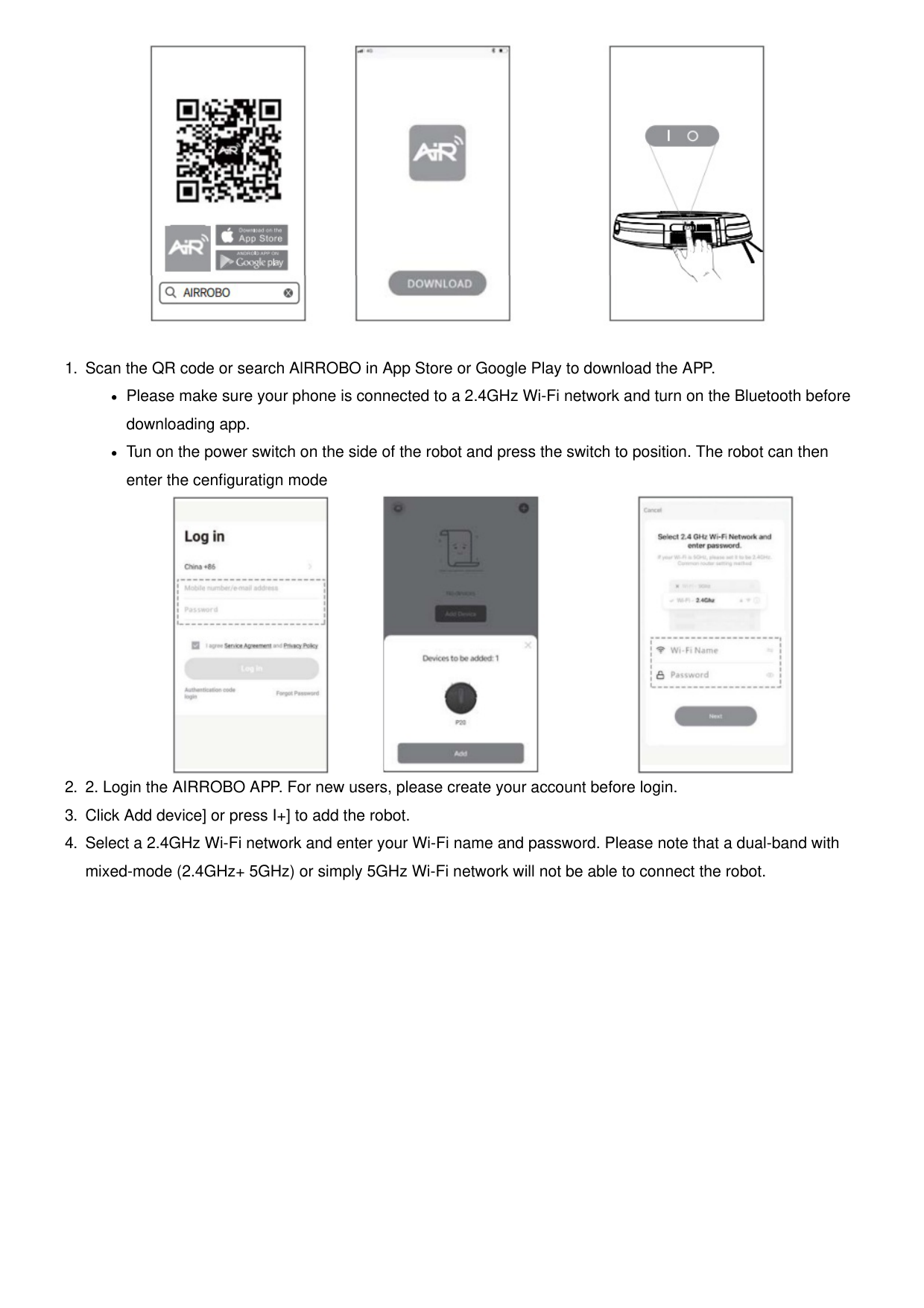
App Download and Wi-Fi Connection Notes: Please make sure the robot and mobile phone are both in the effective coverage area of the same Wi-Fi router while connecting the robot to W-FI. Please follow the below instructions or the prompts in the app to connect. If the connection fails, it’s probably because you are using a 5 GHs network. Please check out Common router setting method and change it to 2.4GHz.

Please make sure your phone is connected to a 2.4GHz Wi-Fi network and turn on the Bluetooth before downloading app.
Tun on the power switch on the side of the robot and press the switch to position. The robot can then enter the cenfiguratign mode


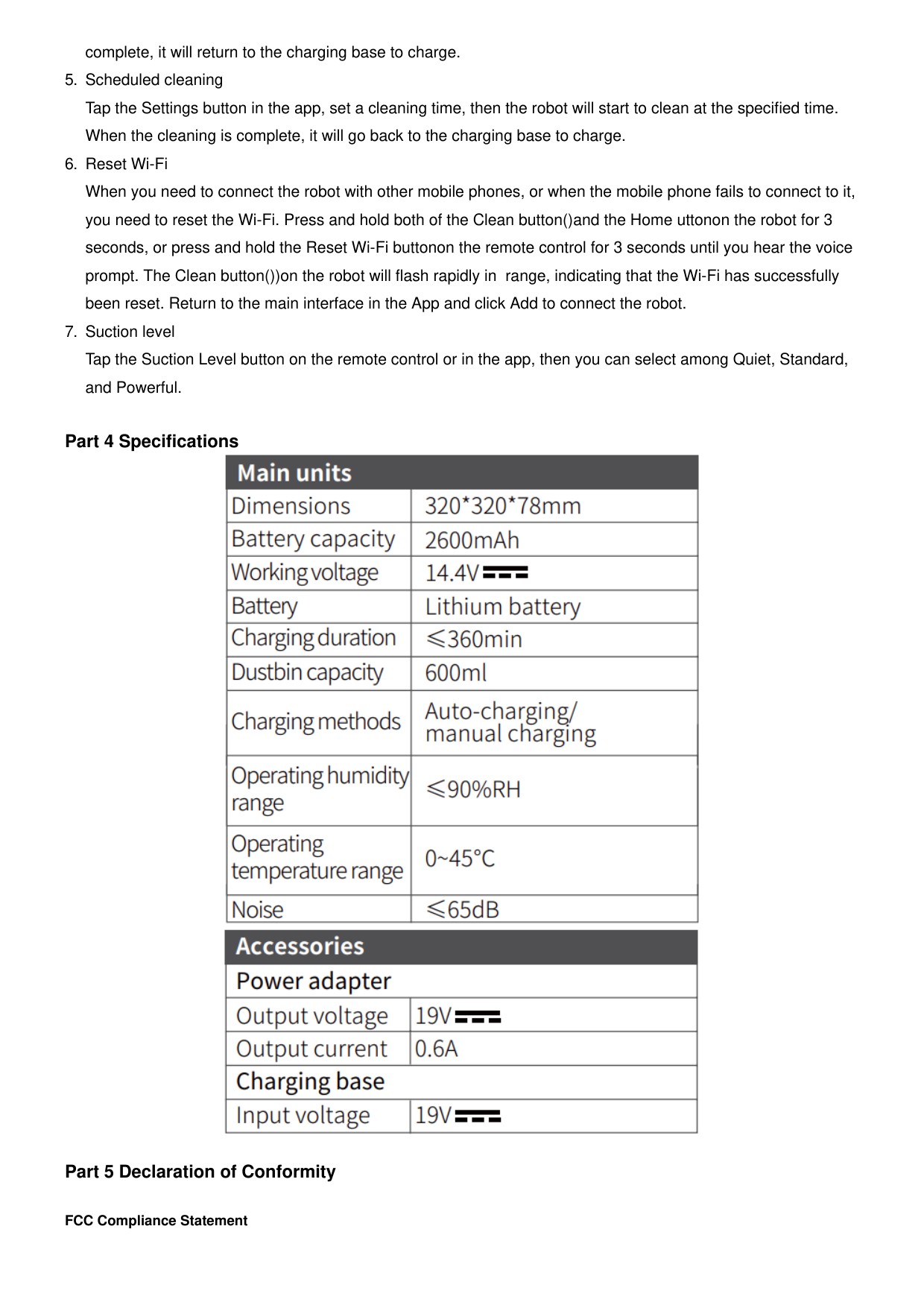
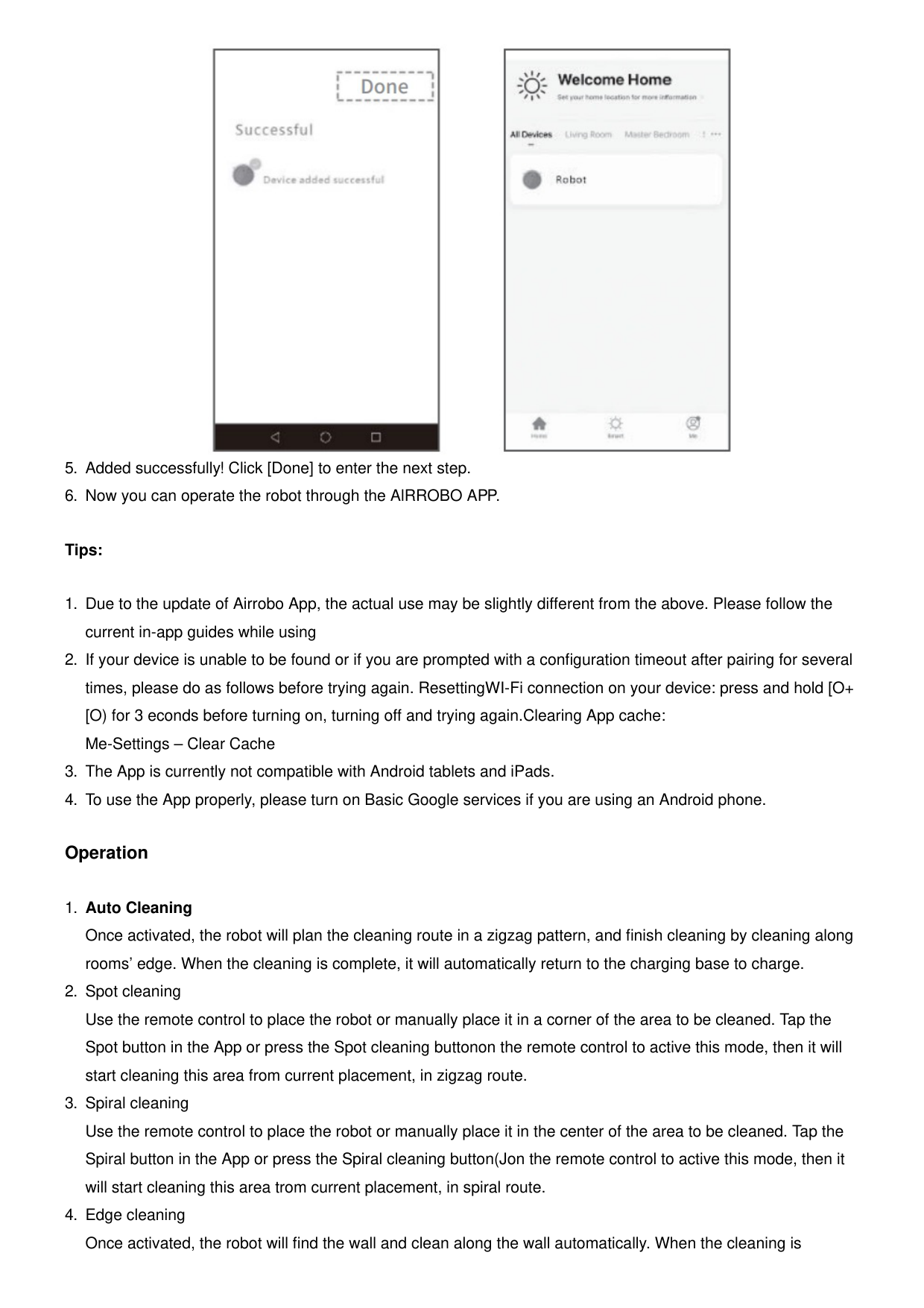
Tips:
Operation
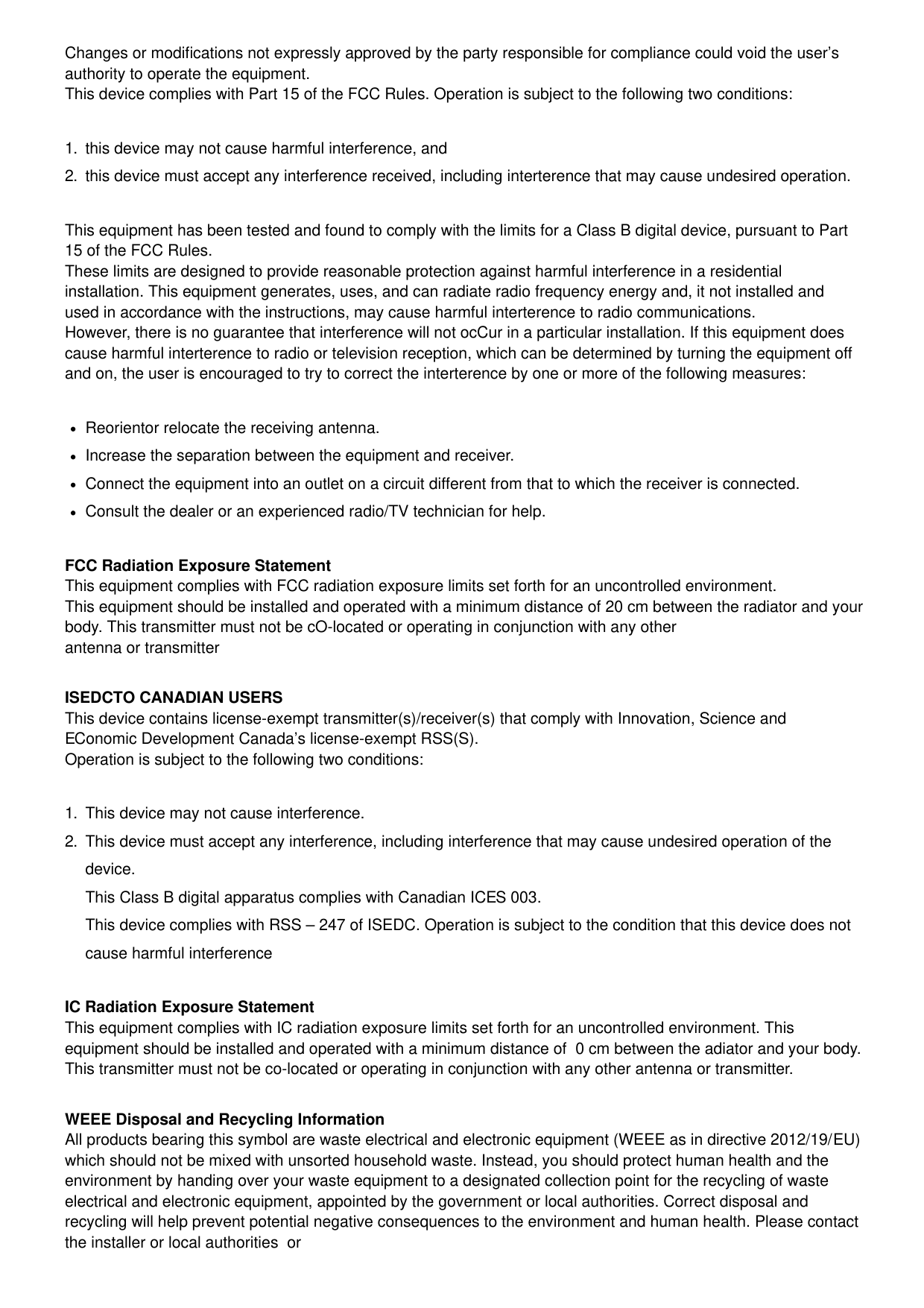


FCC Compliance Statement
Changes or modifications not expressly approved by the party responsible for compliance could void the user’s authority to operate the equipment. This device complies with Part 15 of the FCC Rules. Operation is subject to the following two conditions:
This equipment has been tested and found to comply with the limits for a Class B digital device, pursuant to Part 15 of the FCC Rules. These limits are designed to provide reasonable protection against harmful interference in a residential installation. This equipment generates, uses, and can radiate radio frequency energy and, it not installed and used in accordance with the instructions, may cause harmful interterence to radio communications. However, there is no guarantee that interference will not ocCur in a particular installation. If this equipment does cause harmful interterence to radio or television reception, which can be determined by turning the equipment off and on, the user is encouraged to try to correct the interterence by one or more of the following measures:
Reorientor relocate the receiving antenna.
Increase the separation between the equipment and receiver.
Connect the equipment into an outlet on a circuit different from that to which the receiver is connected.
Consult the dealer or an experienced radio/TV technician for help.
FCC Radiation Exposure Statement This equipment complies with FCC radiation exposure limits set forth for an uncontrolled environment. This equipment should be installed and operated with a minimum distance of 20 cm between the radiator and your body. This transmitter must not be cO-located or operating in conjunction with any other antenna or transmitter
ISEDCTO CANADIAN USERS This device contains license-exempt transmitter(s)/receiver(s) that comply with Innovation, Science and EConomic Development Canada’s license-exempt RSS(S). Operation is subject to the following two conditions:
IC Radiation Exposure Statement This equipment complies with IC radiation exposure limits set forth for an uncontrolled environment. This equipment should be installed and operated with a minimum distance of 0 cm between the adiator and your body. This transmitter must not be co-located or operating in conjunction with any other antenna or transmitter.
WEEE Disposal and Recycling Information All products bearing this symbol are waste electrical and electronic equipment (WEEE as in directive 2012/19/EU) which should not be mixed with unsorted household waste. Instead, you should protect human health and the environment by handing over your waste equipment to a designated collection point for the recycling of waste electrical and electronic equipment, appointed by the government or local authorities. Correct disposal and recycling will help prevent potential negative consequences to the environment and human health. Please contact the installer or local authorities or
more information about the location as well as terms and conditions of such collection points.
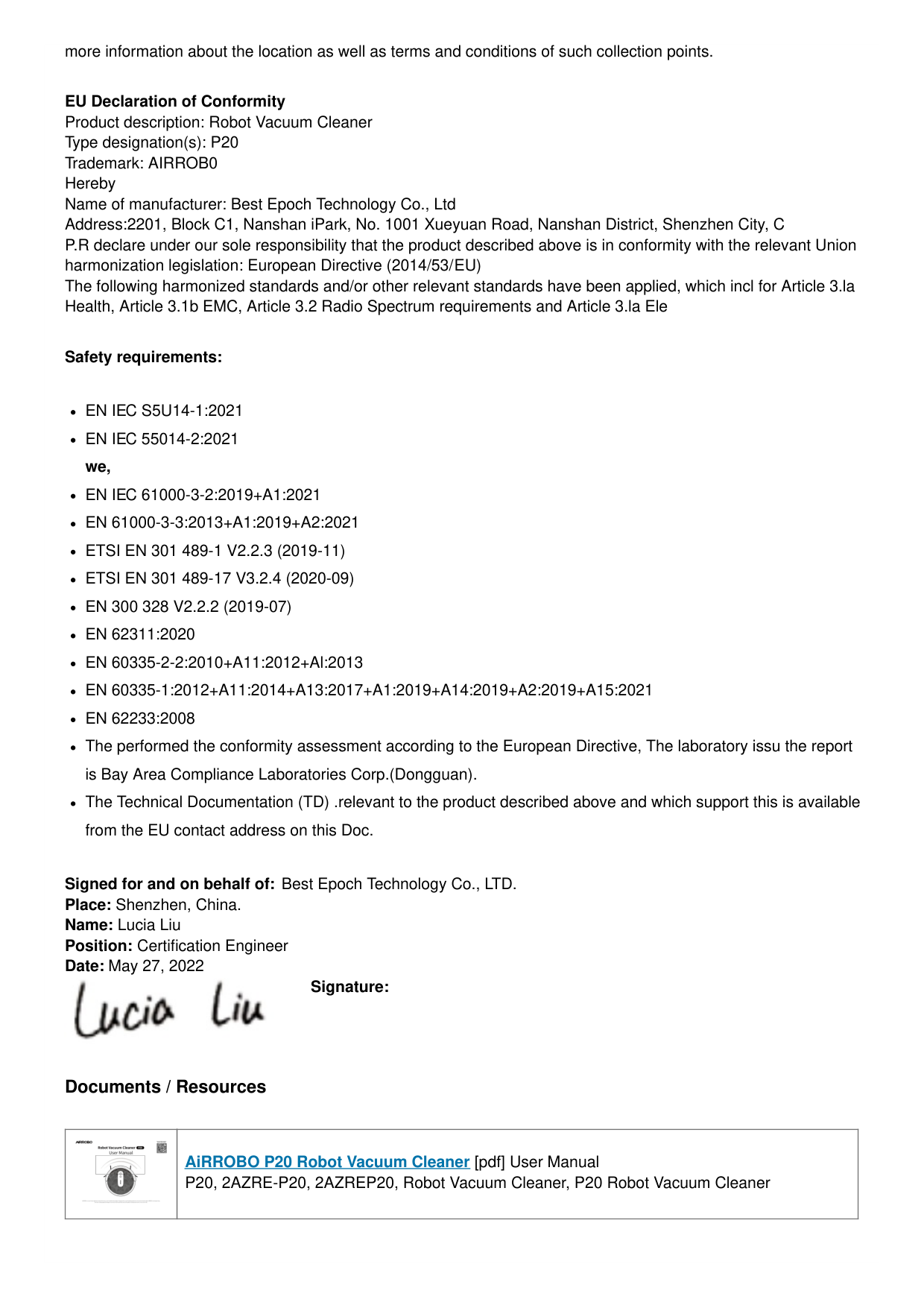
EU Declaration of Conformity Product description: Robot Vacuum Cleaner Type designation(s): P20 Trademark: AIRROB0 Hereby Name of manufacturer: Best Epoch Technology Co., Ltd Address:2201, Block C1, Nanshan iPark, No. 1001 Xueyuan Road, Nanshan District, Shenzhen City, C P.R declare under our sole responsibility that the product described above is in conformity with the relevant Union harmonization legislation: European Directive (2014/53/EU) The following harmonized standards and/or other relevant standards have been applied, which incl for Article 3.la Health, Article 3.1b EMC, Article 3.2 Radio Spectrum requirements and Article 3.la Ele
Safety requirements:
EN IEC S5U14-1:2021
EN IEC 55014-2:2021 we,
EN IEC 61000-3-2:2019+A1:2021

EN 61000-3-3:2013+A1:2019+A2:2021
ETSI EN 301 489-1 V2.2.3 (2019-11)
ETSI EN 301 489-17 V3.2.4 (2020-09)
EN 300 328 V2.2.2 (2019-07)
EN 62311:2020
EN 60335-2-2:2010+A11:2012+Al:2013
EN 60335-1:2012+A11:2014+A13:2017+A1:2019+A14:2019+A2:2019+A15:2021
EN 62233:2008
The performed the conformity assessment according to the European Directive, The laboratory issu the report is Bay Area Compliance Laboratories Corp.(Dongguan).
The Technical Documentation (TD) .relevant to the product described above and which support this is available from the EU contact address on this Doc.
Signed for and on behalf of: Best Epoch Technology Co., LTD. Place: Shenzhen, China. Name: Lucia Liu Position: Certification Engineer Date: May 27, 2022

Signature:
Documents / Resources
||AiRROBO P20 Robot Vacuum Cleaner [pdf] User Manual P20, 2AZRE-P20, 2AZREP20, Robot Vacuum Cleaner, P20 Robot Vacuum Cleaner
| |---|---|
#### Manuals+, home privacy