
Ask AI
— answers from the official manualAnswers from the official manual.
Common questions
Common Questions
19 totalHow do I clean the filter on my Dyson Airstrait?
Unplug the straightener and let it cool down, then pull down on the filter unit to release it from the machine and slide it off the cable. Soak the filter in warm, soapy water — using clarifying shampoo or dish soap — for at least 30 minutes, then gently rub both inside and outside surfaces. Shake off excess water and leave it to dry for 24 hours in a well-ventilated place before refitting. (Page 9)
What should I do when the 'Filter blocked' alert appears?
When the Filter blocked alert appears, your straightener will not operate until the filter is cleaned. You should follow the filter cleaning instructions by removing, soaking, washing, and fully drying the filter before refitting it. You can also scan the QR code shown on the screen for additional guidance. (Page 13)
What does the 'Too hot' alert mean and how do I fix it?
The 'Too hot' alert means your straightener has become too hot and needs to cool down before it can be used again. You should turn off the straightener, unplug it, and leave it to cool down. (Page 14)
What should I do if a 'Volt alert' appears on my straightener?
A Volt alert means your machine has either been plugged into a power source with the incorrect voltage or the voltage is fluctuating. You should plug the straightener into a stable, compatible power supply to resolve this issue. (Page 14)
How do I switch between Wet and Dry mode on the Airstrait?
Use the Mode select button to toggle between Wet and Dry mode. Wet mode is designed for straightening towel-dried hair from wet to dry, while Dry mode should only be used to refresh an existing style. Your hair should be towel-dried and detangled with a brush or comb before use — never use the straightener on dripping wet hair. (Page 4)
What temperature settings are available on the Dyson Airstrait?
The straightener offers five precise temperatures for wet or dry styling, plus an optional Boost mode. In Wet mode, available temperatures include 175°, 230°, and 285°, while Dry mode offers 250° and 285° along with a Boost option. Use lower temperatures for finer hair and higher temperatures for thicker hair. (Page 5)
Show 13 more questions
What is Auto pause and can I turn it off?
How do I clean the diffusers on my Dyson Airstrait?
How do I factory reset the Dyson Airstrait straightener?
How do I change the language setting on my Dyson Airstrait straightener?
How do I clean the filter of my Dyson Airstrait straightener?
What should I do if my Dyson Airstrait straightener shows a voltage alert?
How do I clean the tension bars of my Dyson Airstrait straightener?
What should I do if my Dyson Airstrait straightener gets too hot?
How do I switch between temperature units on my Dyson Airstrait straightener?
What is Auto pause on my Dyson Airstrait straightener?
How do I clean the diffusers on my Dyson Airstrait straightener?
How do I change the temperature setting on my Dyson Airstrait straightener?
What should I do if the 'Reset' alert appears on the screen?
Full Manual
14 pages
User manual
8588529 05.09.23 ©2023 Dyson
Contents In the box Getting started Using your straightener Settings Cleaning your machine Cleaning the filter Cleaning the tension bars Cleaning the diffusers Deep cleaning the filter Alerts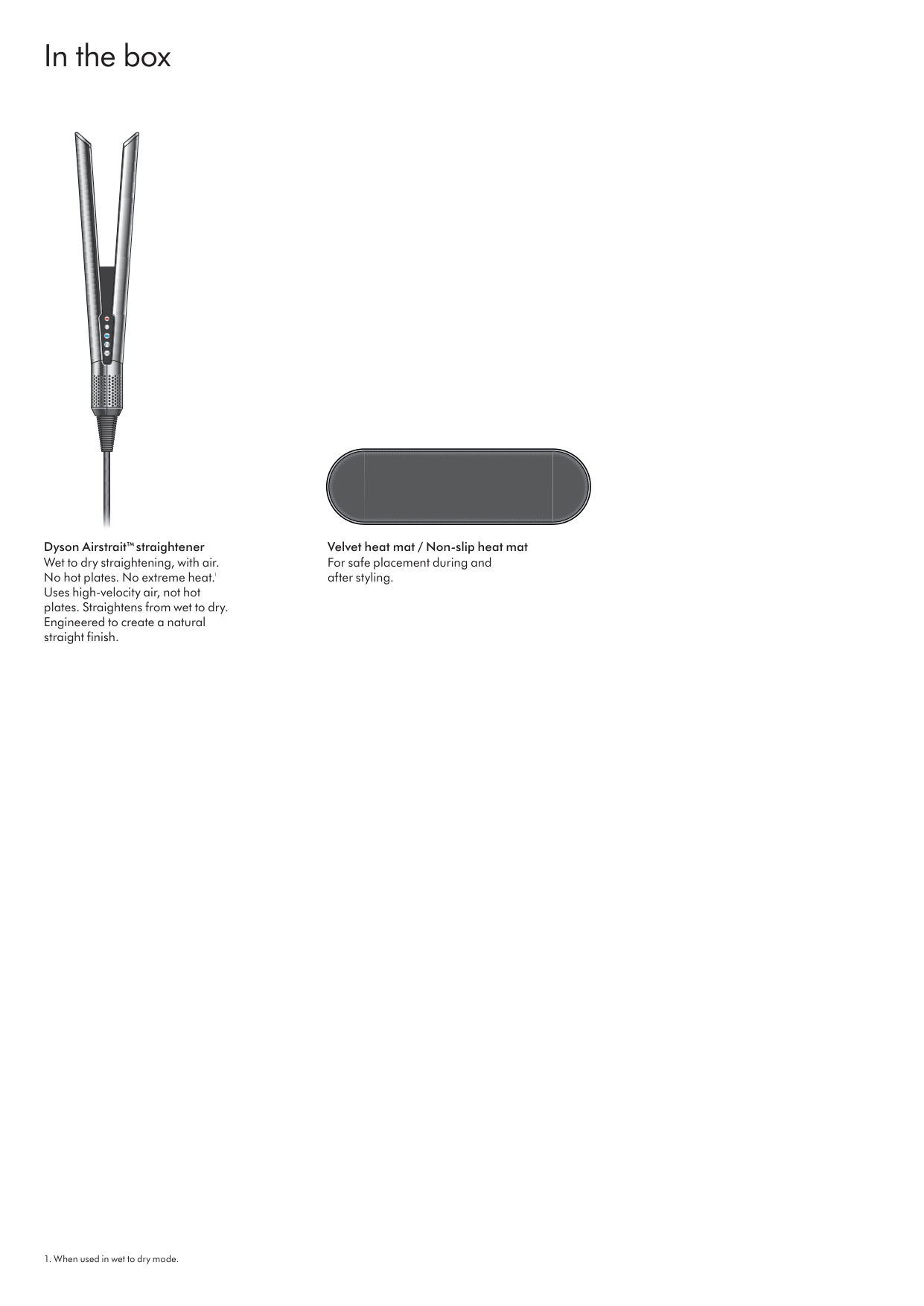
In the box Dyson Airstrait™ straightener Wet to dry straightening, with air. No hot plates. No extreme heat. 1 Uses high-velocity air, not hot plates. Straightens from wet to dry. Engineered to create a natural straight finish.
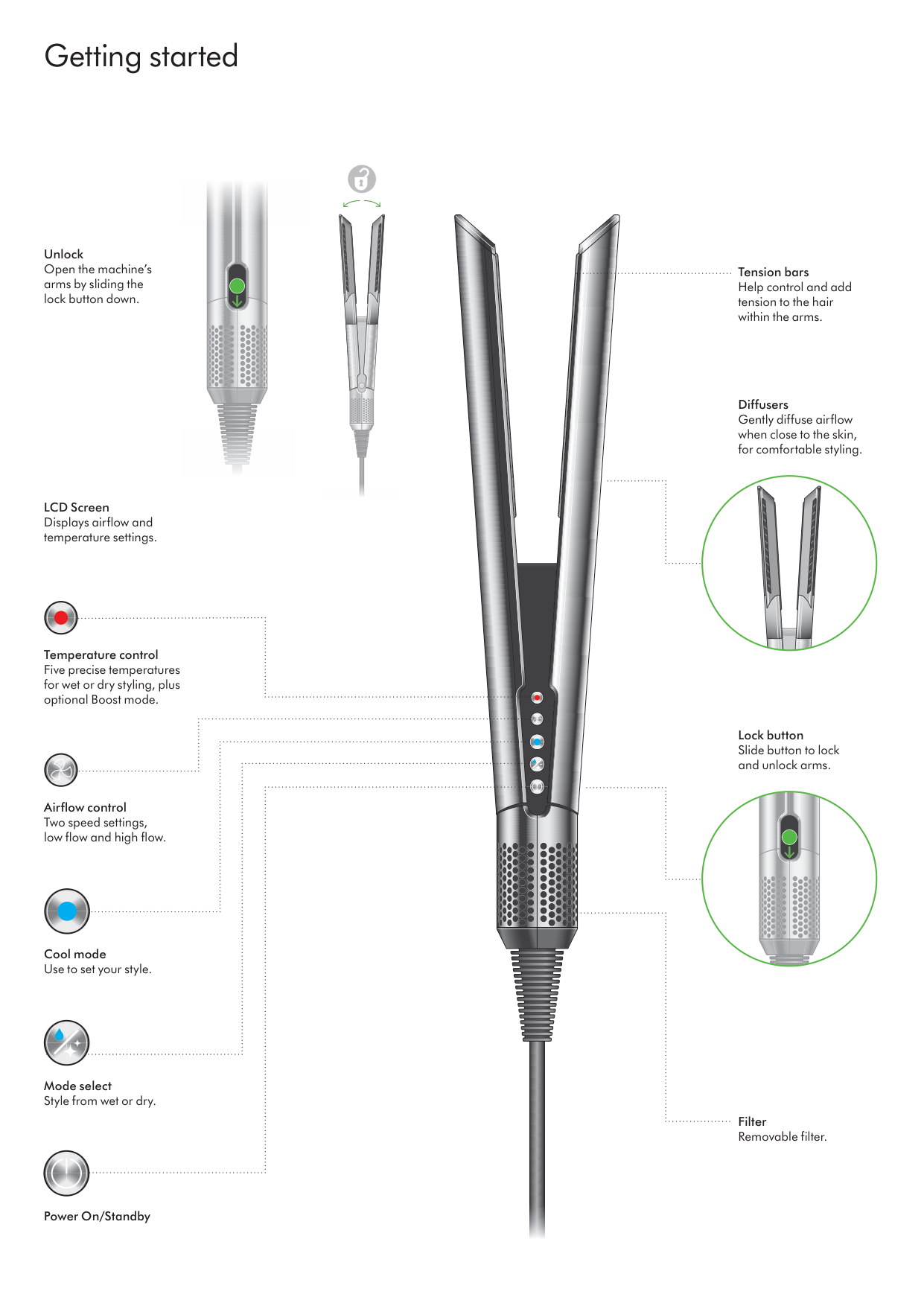
Getting started Tension bars Help control and add tension to the hair within the arms. Filter Removable filter. Unlock Open the machine’s arms by sliding the lock button down. LCD Screen Displays airflow and temperature settings. Diffusers Gently diffuse airflow when close to the skin, for comfortable styling. Lock button Slide button to lock and unlock arms. Temperature control Five precise temperatures for wet or dry styling, plus optional Boost mode. Airflow control Cool mode Use to set your style. Power On/Standby Mode select Style from wet or dry. Two speed settings, low flow and high flow.
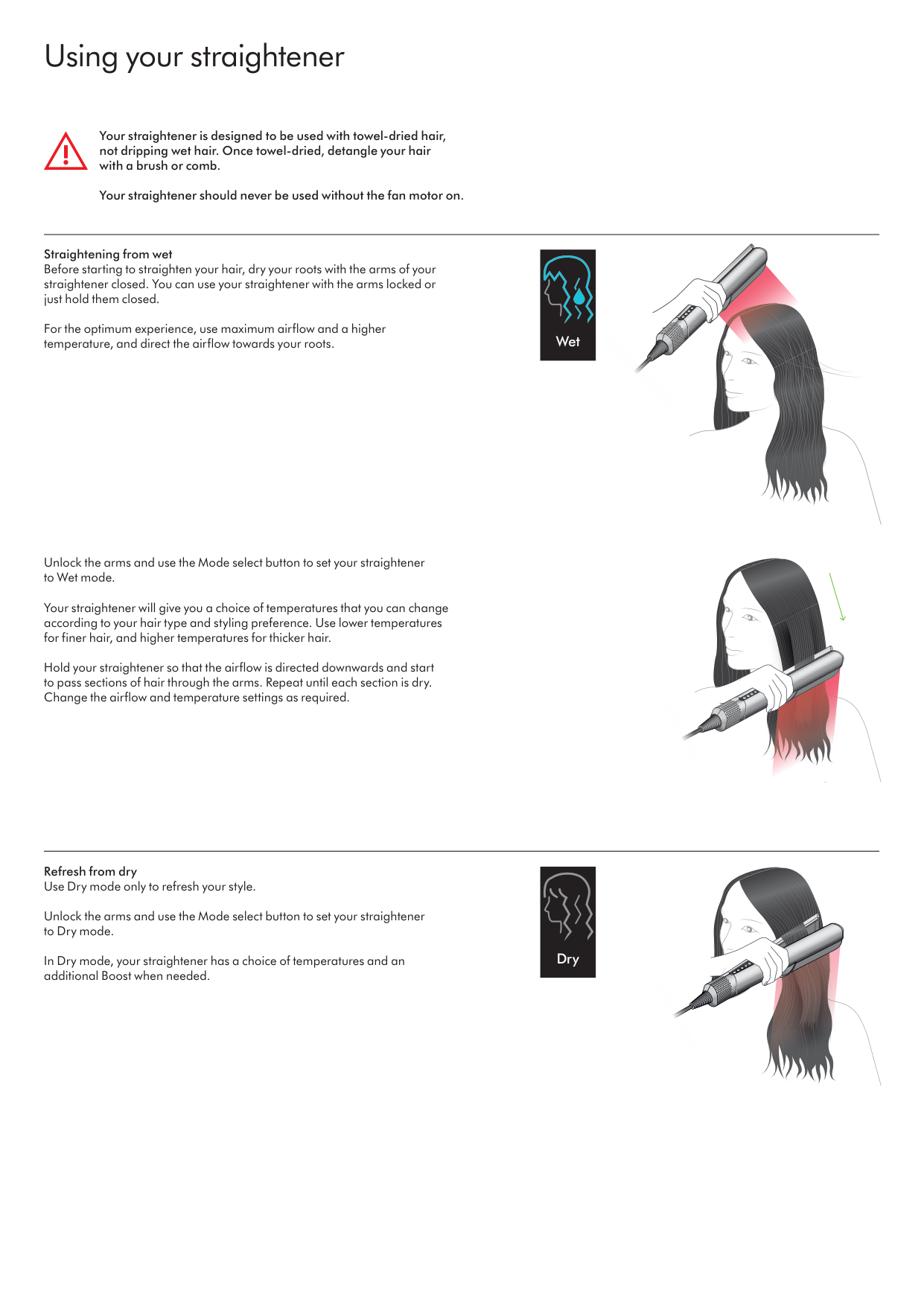
Using your straightener Straightening from wet Before starting to straighten your hair, dry your roots with the arms of your straightener closed. You can use your straightener with the arms locked or just hold them closed. For the optimum experience, use maximum airflow and a higher temperature, and direct the airflow towards your roots. Refresh from dry Use Dry mode only to refresh your style. Unlock the arms and use the Mode select button to set your straightener to Dry mode. In Dry mode, your straightener has a choice of temperatures and an additional Boost when needed. Your straightener is designed to be used with towel-dried hair, not dripping wet hair. Once towel-dried, detangle your hair with a brush or comb. Your straightener should never be used without the fan motor on. Unlock the arms and use the Mode select button to set your straightener to Wet mode. Your straightener will give you a choice of temperatures that you can change according to your hair type and styling preference. Use lower temperatures for finer hair, and higher temperatures for thicker hair. Hold your straightener so that the airflow is directed downwards and start to pass sections of hair through the arms. Repeat until each section is dry. Change the airflow and temperature settings as required. Wet Dry
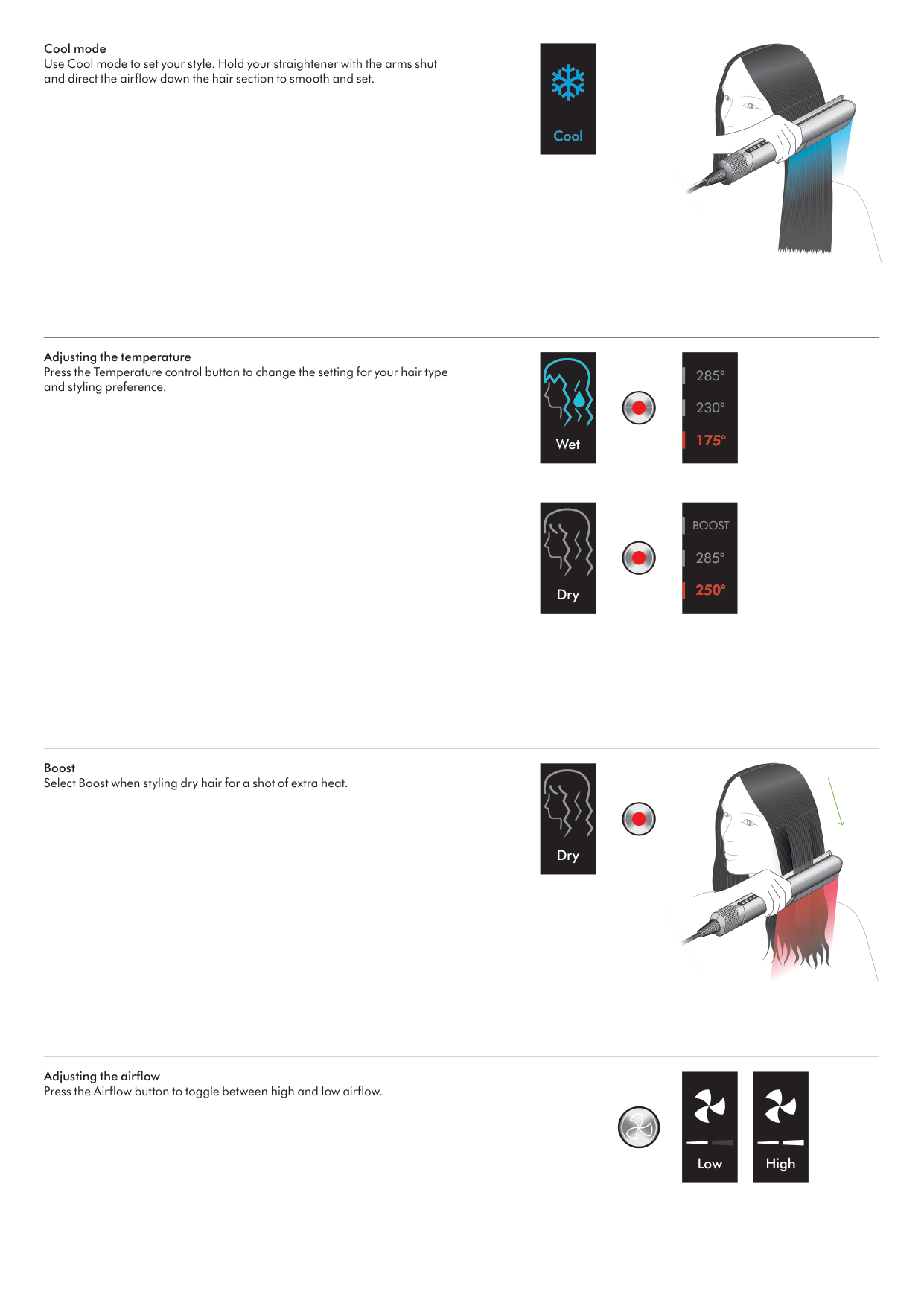
Adjusting the temperature Press the Temperature control button to change the setting for your hair type and styling preference. Boost Select Boost when styling dry hair for a shot of extra heat. Adjusting the airflow Press the Airflow button to toggle between high and low airflow. Low High Dry Dry Wet Cool mode Use Cool mode to set your style. Hold your straightener with the arms shut and direct the airflow down the hair section to smooth and set. Cool 175° 230° 285° 250° 285°
Boost
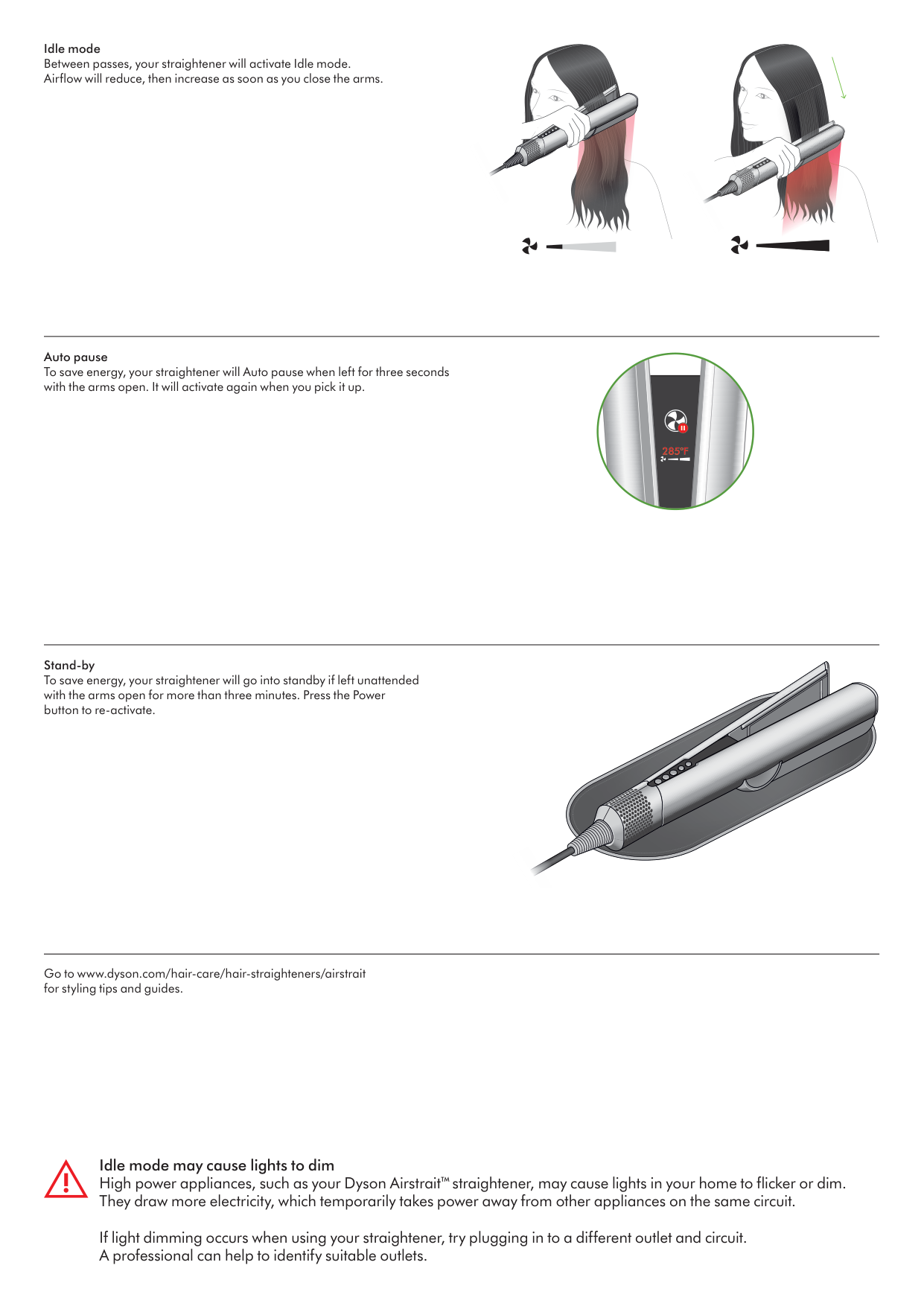
Auto pause To save energy, your straightener will Auto pause when left for three seconds with the arms open. It will activate again when you pick it up. Stand-by To save energy, your straightener will go into standby if left unattended with the arms open for more than three minutes. Press the Power button to re-activate. Go to www.dyson.com/hair-care/hair-straighteners/airstrait for styling tips and guides. Idle mode Between passes, your straightener will activate Idle mode. Airflow will reduce, then increase as soon as you close the arms.
140°C
Idle mode may cause lights to dim High power appliances, such as your Dyson Airstrait™ straightener, may cause lights in your home to flicker or dim. They draw more electricity, which temporarily takes power away from other appliances on the same circuit. If light dimming occurs when using your straightener, try plugging in to a different outlet and circuit. A professional can help to identify suitable outlets.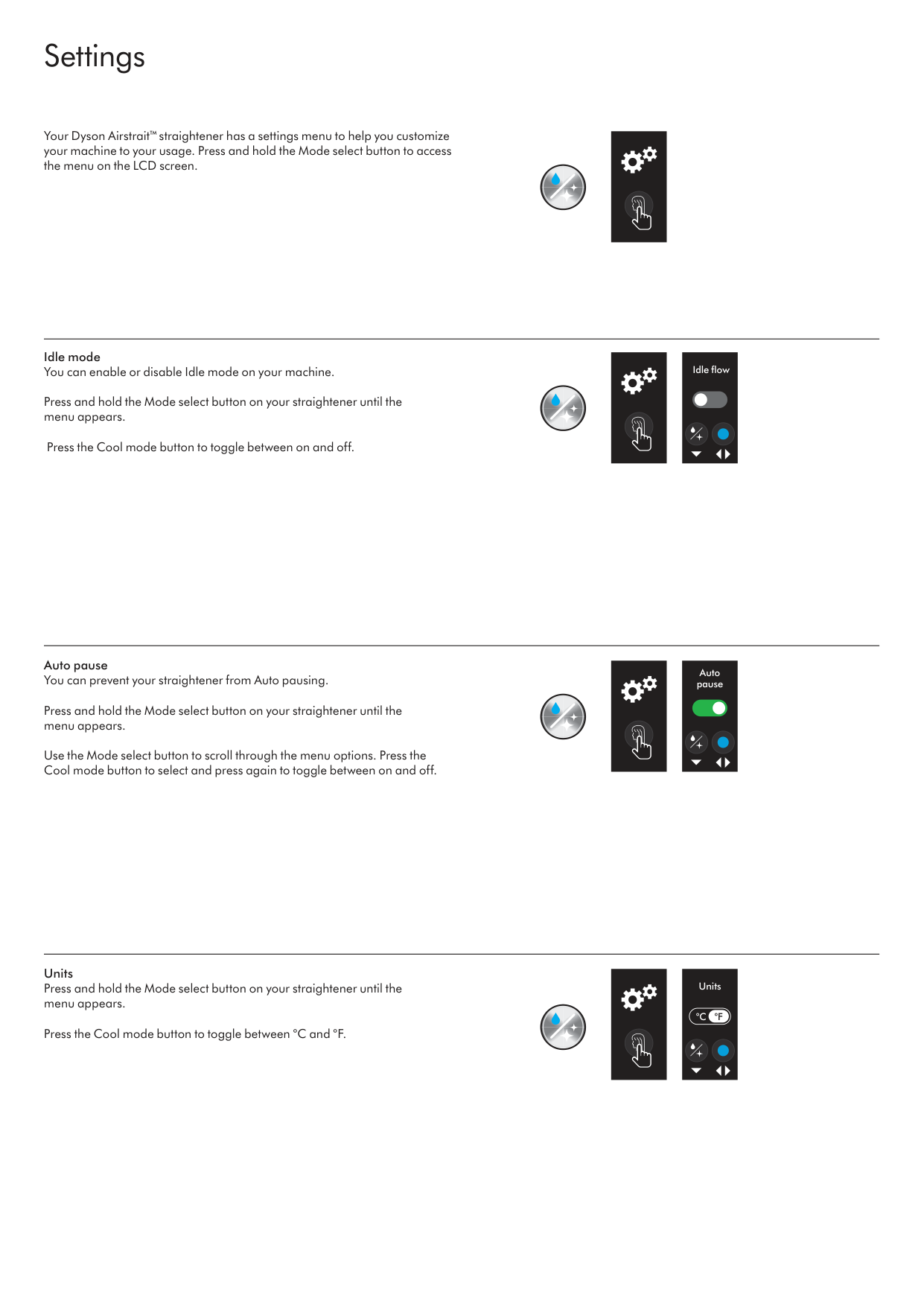
Settings Units Press and hold the Mode select button on your straightener until the menu appears. Press the Cool mode button to toggle between °C and °F. Auto pause You can prevent your straightener from Auto pausing. Press and hold the Mode select button on your straightener until the menu appears. Use the Mode select button to scroll through the menu options. Press the Cool mode button to select and press again to toggle between on and off. Your Dyson Airstrait™ straightener has a settings menu to help you customize your machine to your usage. Press and hold the Mode select button to access the menu on the LCD screen. Idle mode You can enable or disable Idle mode on your machine. Press and hold the Mode select button on your straightener until the menu appears. Press the Cool mode button to toggle between on and off. Idle flow Auto pause Units
°C
°F
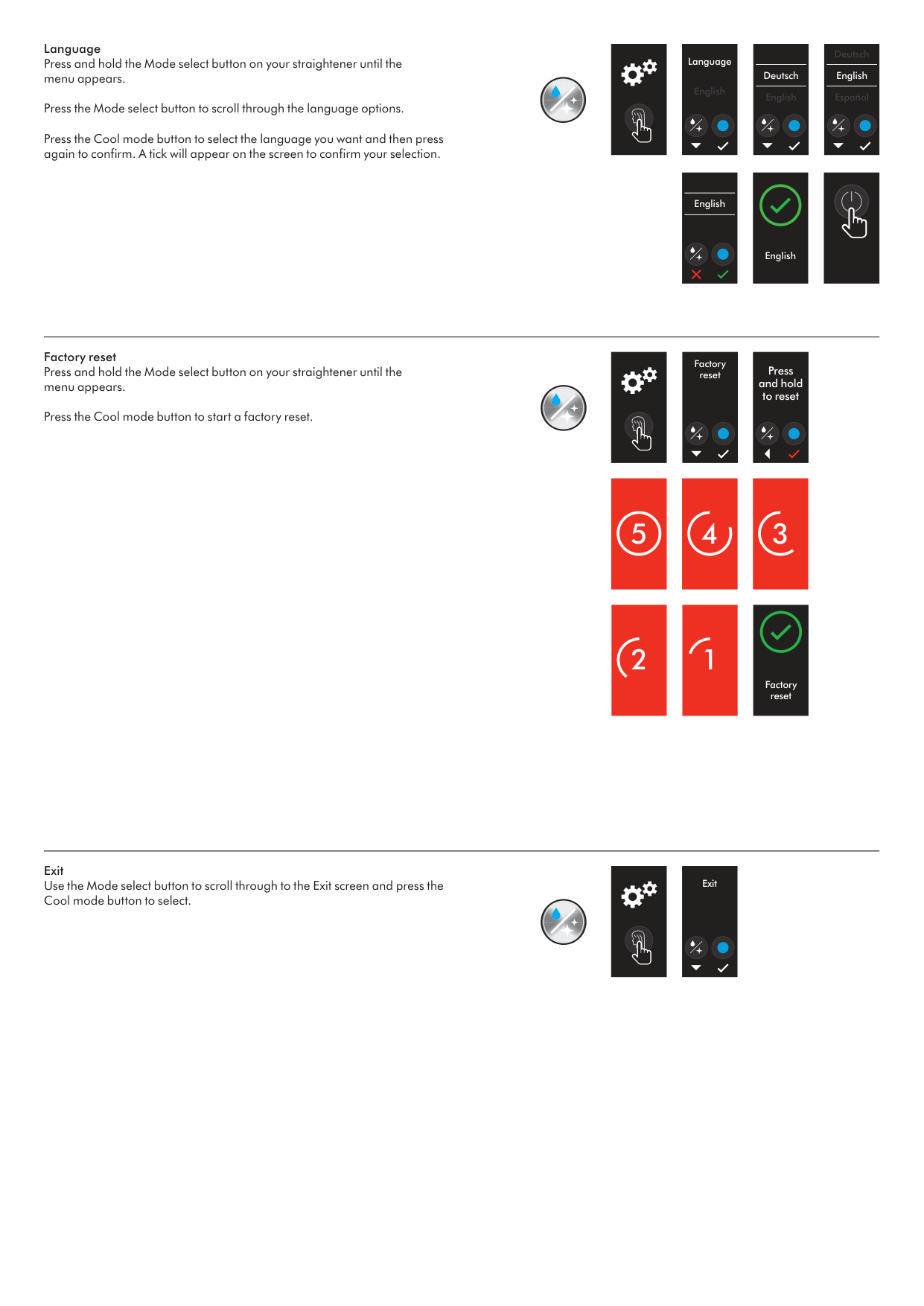
Factory reset Press and hold the Mode select button on your straightener until the menu appears. Press the Cool mode button to start a factory reset. Exit Use the Mode select button to scroll through to the Exit screen and press the Cool mode button to select. 3 2 1 Factory reset Press and hold to reset 5 4 Factory reset Exit Language Press and hold the Mode select button on your straightener until the menu appears. Press the Mode select button to scroll through the language options. Press the Cool mode button to select the language you want and then press again to confirm. A tick will appear on the screen to confirm your selection. English Deutsch Español English Deutsch English English Language English
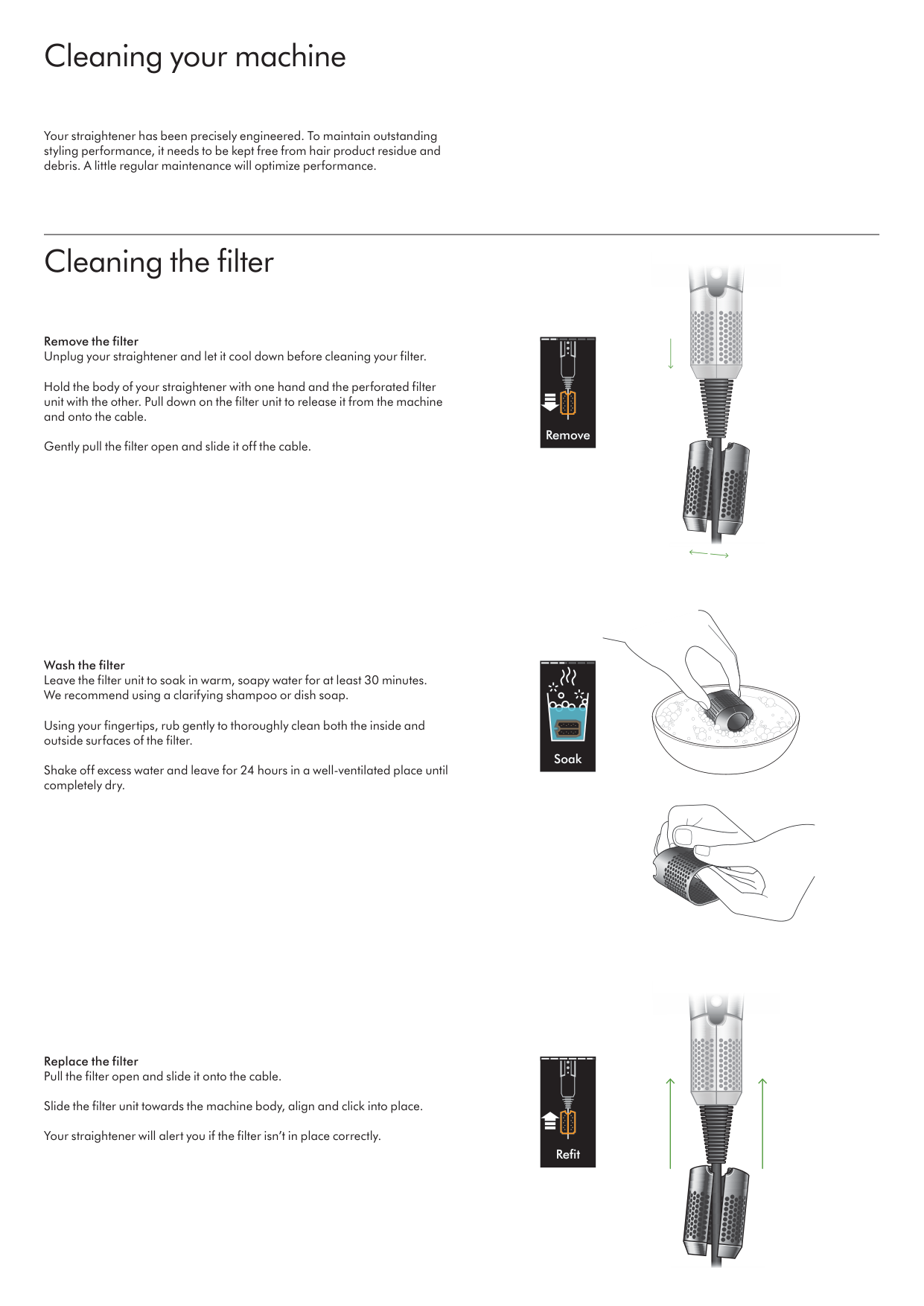
Cleaning your machine Cleaning the filter Your straightener has been precisely engineered. To maintain outstanding styling performance, it needs to be kept free from hair product residue and debris. A little regular maintenance will optimize performance. Remove the filter Unplug your straightener and let it cool down before cleaning your filter. Hold the body of your straightener with one hand and the perforated filter unit with the other. Pull down on the filter unit to release it from the machine and onto the cable. Gently pull the filter open and slide it off the cable. Wash the filter Leave the filter unit to soak in warm, soapy water for at least 30 minutes. We recommend using a clarifying shampoo or dish soap. Using your fingertips, rub gently to thoroughly clean both the inside and outside surfaces of the filter. Shake off excess water and leave for 24 hours in a well-ventilated place until completely dry. Replace the filter Pull the filter open and slide it onto the cable. Slide the filter unit towards the machine body, align and click into place. Your straightener will alert you if the filter isn’t in place correctly. Soak Refit Remove
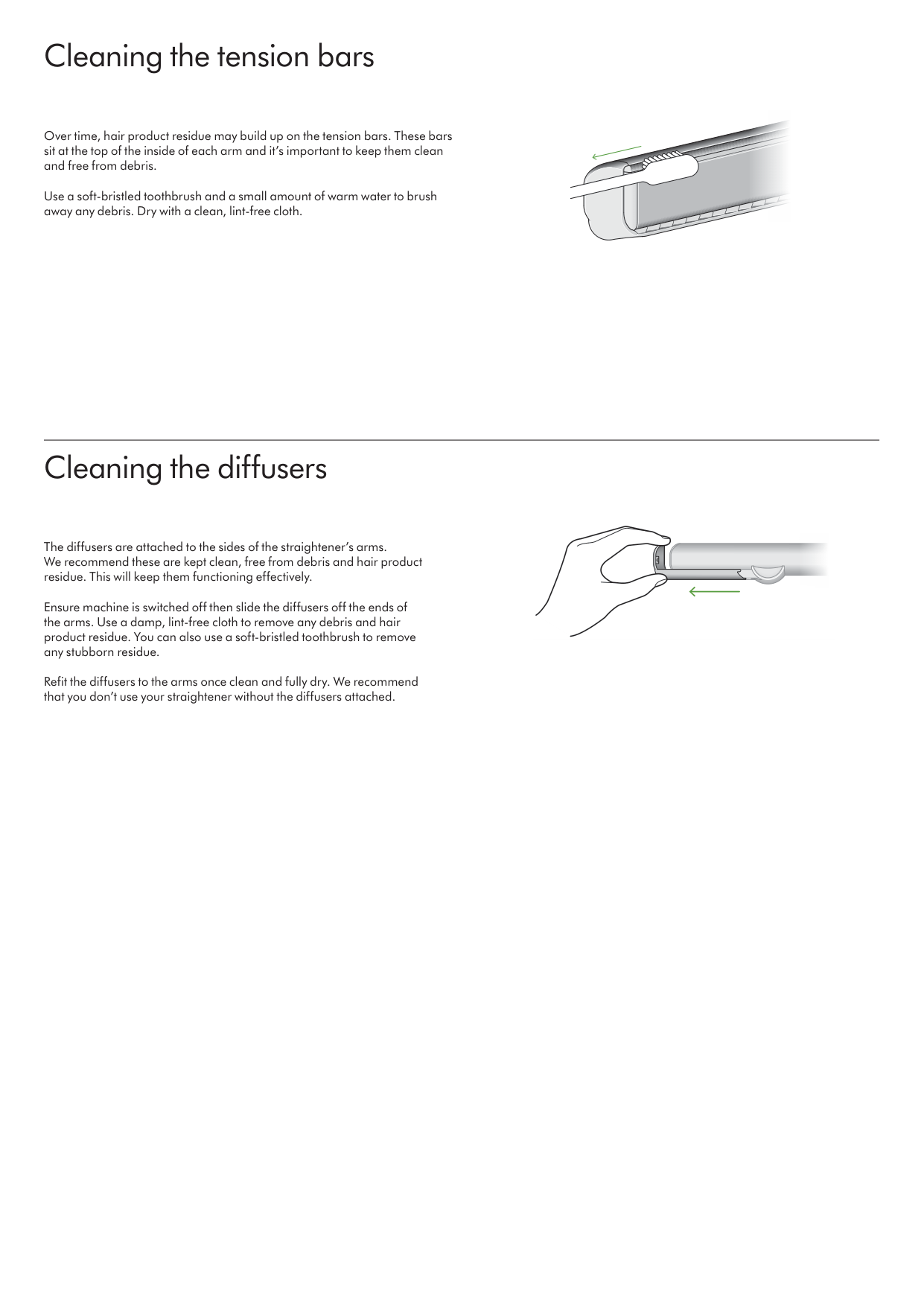
Cleaning the tension bars Cleaning the diffusers Over time, hair product residue may build up on the tension bars. These bars sit at the top of the inside of each arm and it’s important to keep them clean and free from debris. Use a soft-bristled toothbrush and a small amount of warm water to brush away any debris. Dry with a clean, lint-free cloth. The diffusers are attached to the sides of the straightener’s arms. We recommend these are kept clean, free from debris and hair product residue. This will keep them functioning effectively. Ensure machine is switched off then slide the diffusers off the ends of the arms. Use a damp, lint-free cloth to remove any debris and hair product residue. You can also use a soft-bristled toothbrush to remove any stubborn residue. Refit the diffusers to the arms once clean and fully dry. We recommend that you don’t use your straightener without the diffusers attached.
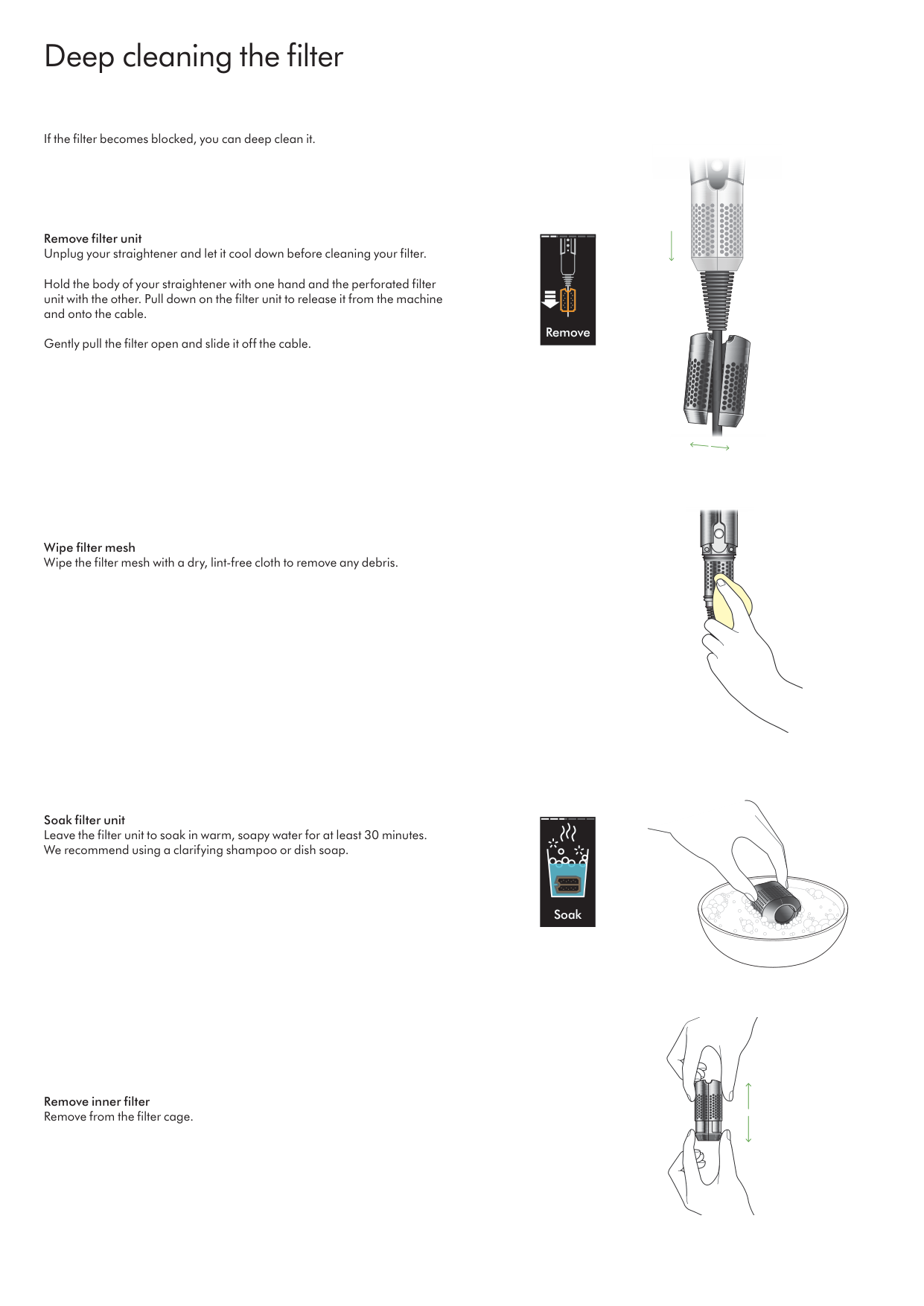
Deep cleaning the filter Remove filter unit Unplug your straightener and let it cool down before cleaning your filter. Hold the body of your straightener with one hand and the perforated filter unit with the other. Pull down on the filter unit to release it from the machine and onto the cable. Gently pull the filter open and slide it off the cable. Wipe filter mesh Wipe the filter mesh with a dry, lint-free cloth to remove any debris. Soak filter unit Leave the filter unit to soak in warm, soapy water for at least 30 minutes. We recommend using a clarifying shampoo or dish soap. Remove inner filter Remove from the filter cage. If the filter becomes blocked, you can deep clean it. Remove Soak
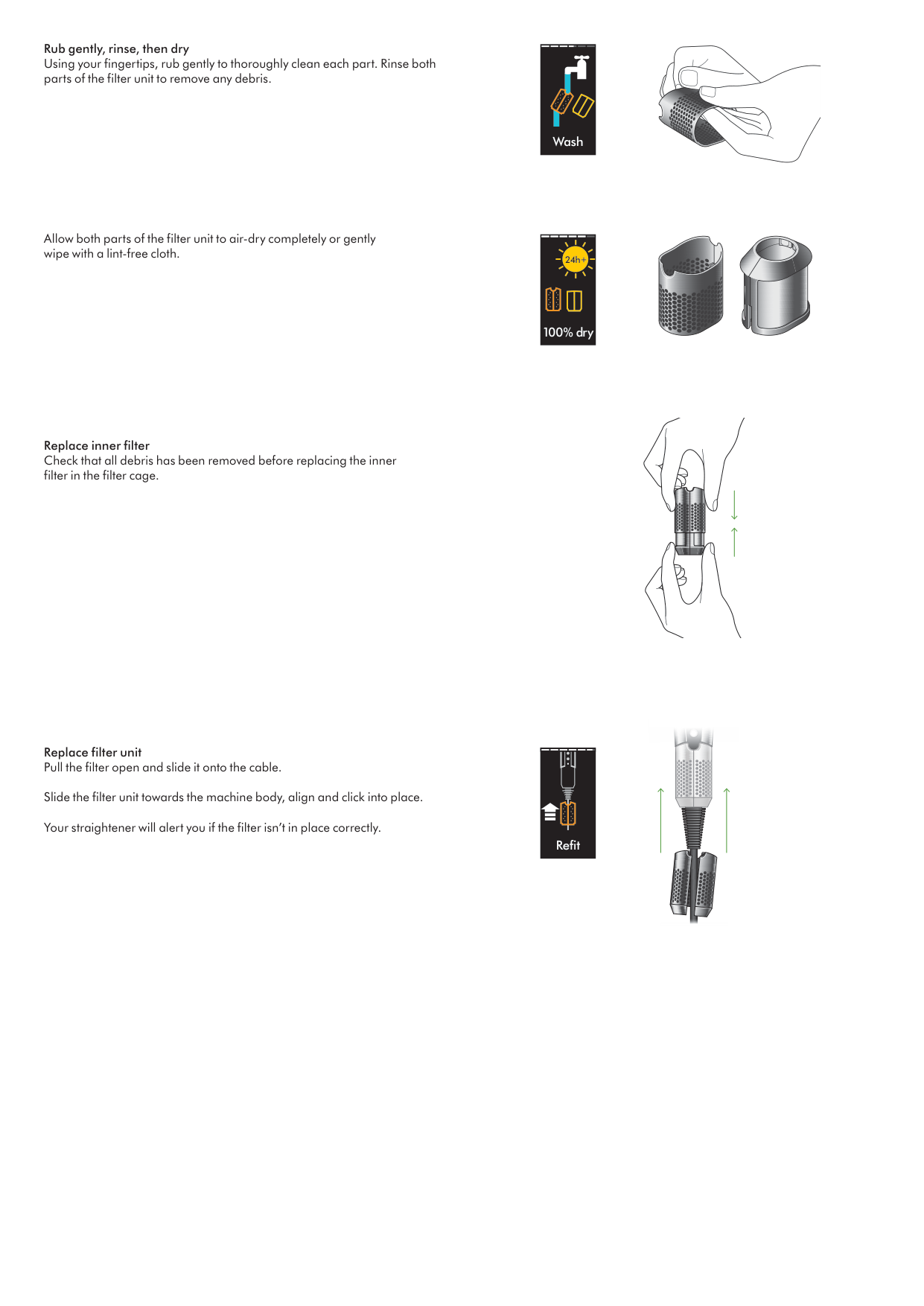
Replace inner filter Check that all debris has been removed before replacing the inner filter in the filter cage. Replace filter unit Pull the filter open and slide it onto the cable. Slide the filter unit towards the machine body, align and click into place. Your straightener will alert you if the filter isn’t in place correctly. Refit Wash 100% dry 24h Rub gently, rinse, then dry Using your fingertips, rub gently to thoroughly clean each part. Rinse both parts of the filter unit to remove any debris. Allow both parts of the filter unit to air-dry completely or gently wipe with a lint-free cloth.
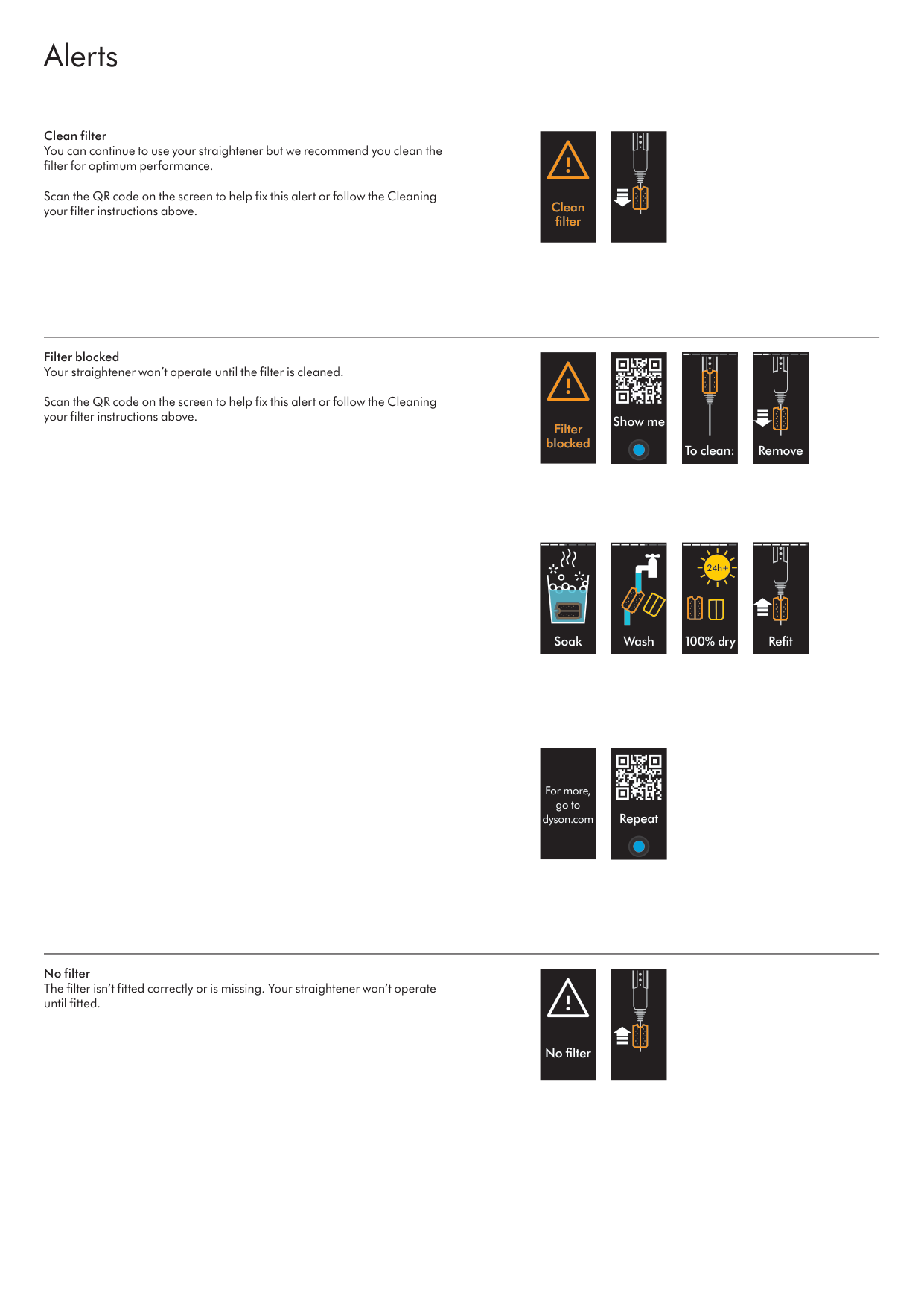
Clean filter You can continue to use your straightener but we recommend you clean the filter for optimum performance. Scan the QR code on the screen to help fix this alert or follow the Cleaning your filter instructions above. Filter blocked Your straightener won’t operate until the filter is cleaned. Scan the QR code on the screen to help fix this alert or follow the Cleaning your filter instructions above. No filter The filter isn’t fitted correctly or is missing. Your straightener won’t operate until fitted. Alerts Filter blocked Show me To clean: Remove No filter Clean filter Soak Wash For more, go to dyson.com Repeat 100% dry 24h Refit
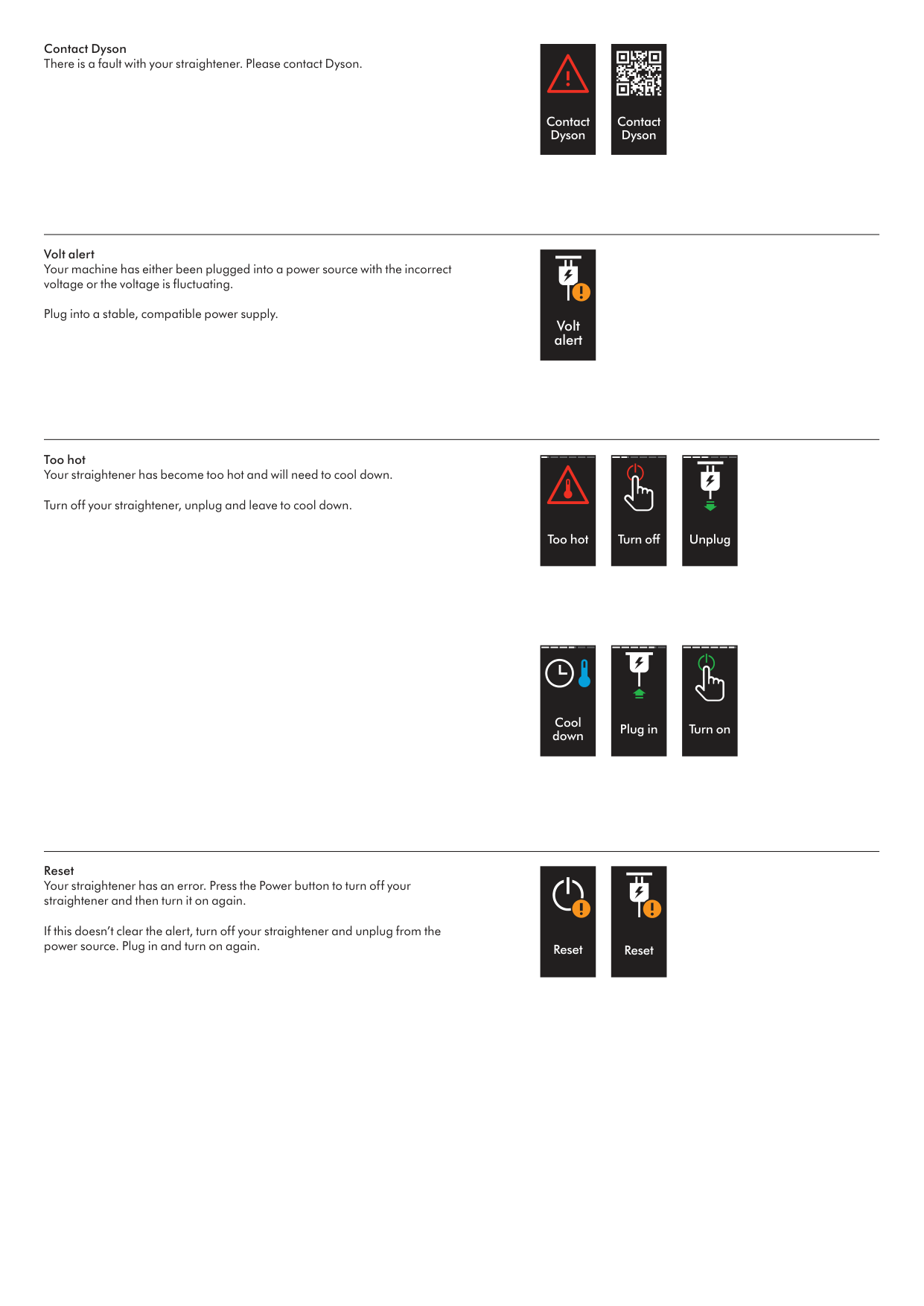
Contact Dyson There is a fault with your straightener. Please contact Dyson. Volt alert Your machine has either been plugged into a power source with the incorrect voltage or the voltage is fluctuating. Plug into a stable, compatible power supply. Too hot Your straightener has become too hot and will need to cool down. Turn off your straightener, unplug and leave to cool down. Reset Your straightener has an error. Press the Power button to turn off your straightener and then turn it on again. If this doesn’t clear the alert, turn off your straightener and unplug from the power source. Plug in and turn on again. Contact Dyson Volt alert Too hot Turn off Unplug Cool down Reset Reset Plug in Turn on Contact Dyson