
Ask AI
— answers from the official manualAnswers from the official manual.
Common questions
Common Questions
24 totalHow do I arm the system without entering my security code every time?
If Quick Arming was programmed by the installer, you can press the [#] key in place of your security code when arming the system in any arming mode except Night-Stay. Alternatively, if Single Button Arming is programmed, you can press and hold an assigned function key (A, B, C, or D) for 2 seconds to arm the system. However, your security code must always be used when manually disarming the system. (Page 18)
What should I do if I come home and the alarm is sounding or has been triggered during my absence?
If you return and the main burglary sounder is on, do NOT enter the premises — contact the police from a nearby safe location. If you return after an alarm has occurred and the main sounder has already shut itself off, the keypad will beep rapidly upon your entering to indicate an alarm occurred during your absence — leave at once and contact the police from a nearby safe location. (Page 21)
How do I bypass a specific protection zone so I can arm the system while leaving that zone unprotected?
The system must be disarmed first, then enter your security code followed by the [6] BYPASS key and the 2-digit zone number (single-digit zones must be preceded by a zero, e.g., 05). Repeat the command for each additional zone you wish to bypass, then arm the system as usual. Note that fire zones cannot be bypassed, and all bypassed zones are automatically unbypassed when the system is disarmed. (Page 22)
What does the 'BAT' indicator on the keypad display mean?
The 'BAT' indicator signals a low battery condition — if a zone number is also displayed alongside it, it indicates a low battery in a specific wireless sensor. If no zone number is displayed, it indicates a low system battery. (Page 10)
How do I add a new user security code to the system?
To add a user, enter the System or Partition Master code, press [8], enter the 2-digit user number, and then enter the new user's 4-digit security code. The keypad will beep once to confirm the new user was added. The VISTA-20P Series supports up to 47 additional user codes beyond the master code, while the VISTA-15P Series supports up to 31 additional codes. (Page 33)
What happens if I fail to exit the premises before the exit delay expires after arming the system?
If an entry/exit door or interior zone remains faulted when the exit delay expires, the system sounds an alarm and starts the entry delay timer. If you disarm the system before the entry delay ends, the alarm stops and 'ALARM CANCELED' is displayed, and no message is sent to the Central Monitoring Station. If you do not disarm in time, the alarm continues and an 'EXIT ALARM' message is sent to the Central Monitoring Station after the installer-programmed dial delay expires. (Page 15)
Show 18 more questions
How do I set or change the date and time on my VISTA-20P system?
How do I silence a fire alarm and clear the alarm memory from the keypad display?
How do I add or delete user security codes on the VISTA-20P?
What do the pager event codes mean when my system sends a page?
How does the Exit Alarm feature work if I accidentally leave a door open when arming?
What authority levels can be assigned to users, and what are the differences between them?
How do I find out which doors or windows are open before arming the system?
What should I do if I hear rapid beeping when I enter my home?
How long do I have to disarm the system after entering through an entry/exit door?
What is the difference between STAY mode and AWAY mode?
What happens if I open an entry/exit door after arming in INSTANT or MAXIMUM mode?
Can I bypass individual zones without disarming the entire system?
How do I record and play back a message on the voice keypad?
What does the 'NOT READY' message mean on my keypad display?
How do I change my security code?
What should I do if an 'EXIT ALARM' message appears on my keypad?
What are the different arming modes available on the VISTA-20P and what does each one do?
How do I enable Chime Mode so the keypad alerts me when doors or windows are opened while the system is disarmed?
Full Manual
64 pages
Ademco Vista Series
Vista-20P / Vista-20Psia
Vista-15P / Vista-15Psia
Security SystemsUser Guide
K5309-1V6 12/08 Rev. C National Security Systems (800) 457-1999

– 2 –
Important!
Proper Intrusion Protection
For proper intrusion coverage, sensors should be located at every possible point of entry to a home or commercial premises. This would include any skylights that may be present, and the upper windows in a multi-level building. In addition, we recommend that radio backup be used in a security system so that alarm signals can still be sent to the Central Monitoring Station in the event that the telephone lines are out of order (alarm signals are normally sent over the phone lines).Early Warning Fire Detection
Early warning fire detection is important in a home. Smoke and heat detectors have played a key role in reducing fire deaths in the United States. With regard to the number and placement of smoke/heat detectors, we subscribe to the recommendations contained in the National Fire Protection Association's National Fire Alarm Code (NFPA 72). These recommendations can be found on page 47 of this manual.System Compatibility Notice
Your Honeywell security system is designed for use with devices manufactured or approved by Honeywell for use with your security system. Your Honeywell security system is not designed for use with any device that may be attached to your security system's keypad or other communicating bus if Honeywell has not approved such device for use with your security system. Use of any such unauthorized device may cause damage or compromise the performance of your security system and affect the validity of your Honeywell limited warranty. When you purchase devices that have been manufactured or approved by Honeywell, you acquire the assurance that these devices have been thoroughly tested to ensure optimum performance when used with your Honeywell security system.About This Manual This manual is a step-by-step guide that will acquaint you with the system's features and benefits. It defines the components and their functions, describes their operation, and provides clear step-by-step instructions for normal and emergency procedures. Keep this manual in a convenient place so that you can refer to it as necessary. National Security Systems (800) 457-1999

– 3 – Table of Contents System Overview ....................................................................................................................................... 5 Introduction ........................................................................................................................................ 5 System Basics ..................................................................................................................................... 5 Using the Voice Message Center ....................................................................................................... 7 About The Keypads ................................................................................................................................... 8 General Information .......................................................................................................................... 8 Fixed-Word Display Keypad ............................................................................................................ 10 Functions of the Keypads ........................................................................................................................ 11 Entry/Exit Delays .................................................................................................................................... 14 Entry Delay ...................................................................................................................................... 14 Exit Delay ......................................................................................................................................... 14 Exit Alarms ...................................................................................................................................... 15 Checking For Open Zones ....................................................................................................................... 16 Using the [∗] Key to Display and Announce System Status .......................................................... 16 Arming the System ................................................................................................................................. 17 STAY Mode: Arms Perimeter Only, Entry Delay On ..................................................................... 17 NIGHT-STAY Mode: Arms Perimeter Only, Plus Selected Zones ................................................. 17 INSTANT Mode: Arms Perimeter Only, Entry Delay Off .............................................................. 17 AWAY Mode: Arms Entire System, Entry Delay On ..................................................................... 17 MAXIMUM Mode: Arms Entire System, Entry Delay Off ............................................................. 17 Arming Commands .......................................................................................................................... 18 Single Button Arming ...................................................................................................................... 19 Single Button “Step” Arming ........................................................................................................... 19 Keyswitch ................................................................................................................................................ 20 Using the Keyswitch ........................................................................................................................ 20 Disarming and Silencing Alarms ........................................................................................................... 21 Using the [OFF] key ......................................................................................................................... 21 Bypassing Protection Zones .................................................................................................................... 22 Using the BYPASS Key ................................................................................................................... 22 Quick Bypass .................................................................................................................................... 23 Chime Mode ............................................................................................................................................. 24 Using the Chime Mode .................................................................................................................... 24 Using the Voice Chime ..................................................................................................................... 24 Date and Time ......................................................................................................................................... 25 Viewing the Current Date and Time ............................................................................................... 25 Setting the Date and Time .............................................................................................................. 25 Panic Keys ............................................................................................................................................... 26 Using Panic Keys ............................................................................................................................. 26 National Security Systems (800) 457-1999

– 4 – Table of Contents (continued) Macro Key Programming & Usage ......................................................................................................... 27 About Macro Keys ............................................................................................................................ 27 Example of Macro Programming ..................................................................................................... 28 Using a Programmed Macro Key .................................................................................................... 28 Using Device Commands ........................................................................................................................ 29 Paging Feature ........................................................................................................................................ 30 About Automatic Paging .................................................................................................................. 30 About Manual Paging ...................................................................................................................... 31 Latch Key Paging ............................................................................................................................. 31 Security Codes & Authority Levels ........................................................................................................ 32 About Security Codes ....................................................................................................................... 32 Authority Level Definitions ............................................................................................................. 32 How to Assign Security Codes and Attributes ................................................................................ 33 Accessing Other Partitions (VISTA-20P Series) .................................................................................... 34 About Accessing Partitions .............................................................................................................. 34 Using the GoTo Command ............................................................................................................... 35 Multi-Partition Arming.................................................................................................................... 35 Common Zone Operation (VISTA-20P Series) ................................................................................ 36 Scheduling ............................................................................................................................................... 37 About Scheduling ............................................................................................................................. 37 Creating Schedules .......................................................................................................................... 37 Event Logging Procedures ...................................................................................................................... 39 About Event Logging ....................................................................................................................... 39 Viewing the Event Log ..................................................................................................................... 39 Testing the System .................................................................................................................................. 41 Trouble Conditions .................................................................................................................................. 42 Maintaining Your System ....................................................................................................................... 45 Fire Alarm System .................................................................................................................................. 46 Quick Guide to Basic System Functions ................................................................................................ 50 Summary of Audible/Visual Notifications .............................................................................................. 51 Regulatory Statements and Warnings ................................................................................................... 53 System Features ...................................................................................................................................... 55 User Setup ........................................................................................................................................ 56 Paging Setup .................................................................................................................................... 57 List of Output Devices ..................................................................................................................... 58 Owner’s Insurance Premium Credit Request ........................................................................................ 59 Limitations Of This System ........................................................................................................................ Warranty .....................................................................................................................................................
National Security Systems (800) 457-1999

– 5 – System Overview Introduction Congratulations on your ownership of a Honeywell Security System. You've made a wise decision in choosing it, for it represents the latest in security protection technology today. This system provides:
NOTE: Features and procedures described in this manual apply to the VISTA-20P/VISTA-20PSIA (VISTA-20P series) and VISTA-15P/VISTA-15PSIA (VISTA-15P series) security systems. Differences are noted where applicable. System Basics Burglary Protection
Fire Protection and Carbon Monoxide Protection
Security Codes
– 6 – System Overview (cont’d)
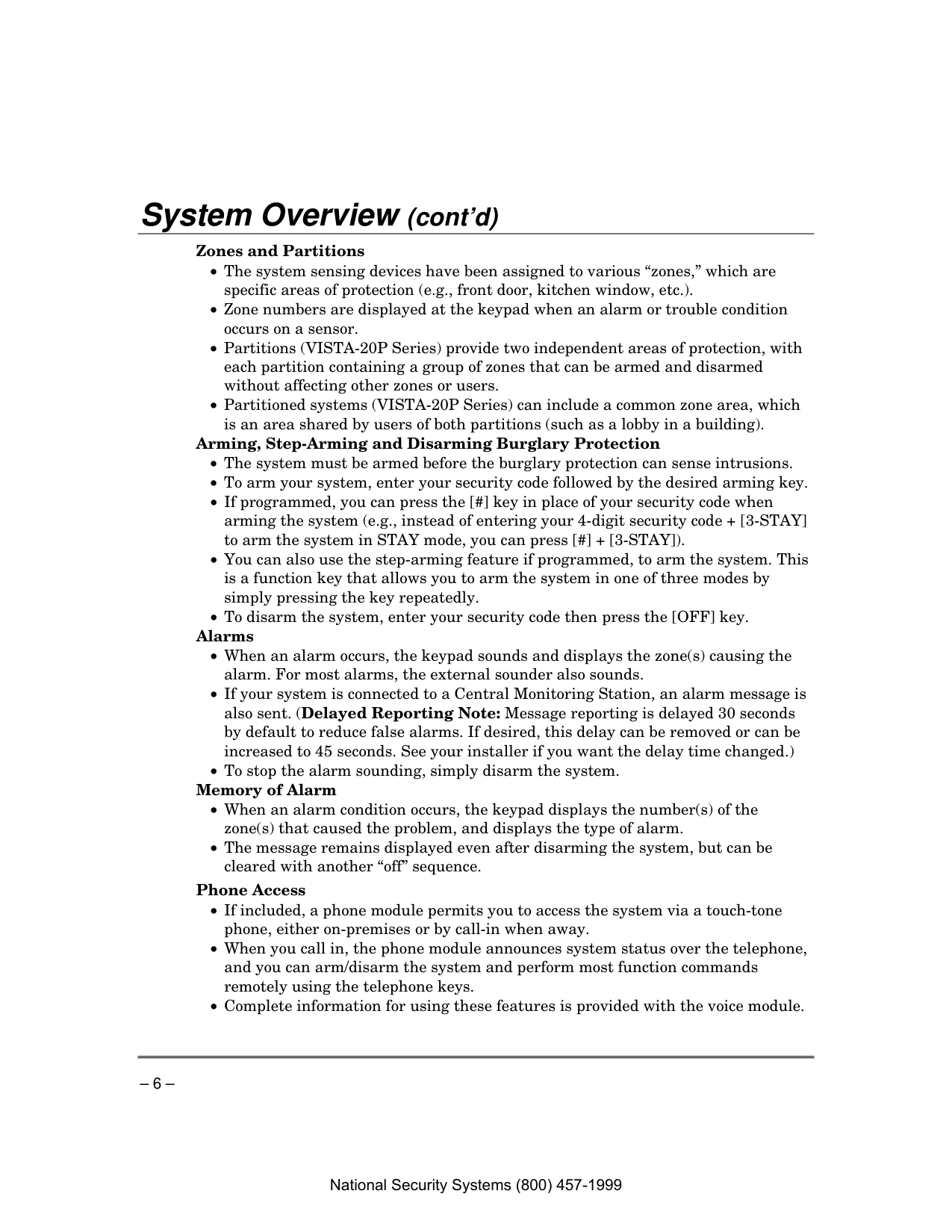
Zones and Partitions

– 7 – System Overview (cont’d)
Function Keys
Paging Feature
Scheduling
Using the Voice Message Center (if Voice Keypad is installed) Voice keypads feature a voice message center that lets you record and playback one message.
Off
4Max
7 Instant
Ready
2 Away
5Test
8 Code
0 3Stay
6 Bypass
9 Chime
#Armed
Ready
6160V-003-V0
Message
Mic
Speaker
Lcd
Display
Function
Keys
Microphone
LEDsRecord
Volume
Play
Status
Voice
Function
Message Center Functions To… Press these keys… Notes… record a message #
Function
+ 0Voice
+ 1 Off
Record
The red MESSAGE LED lights. Message remains in memory until a new message is recorded. end recording
1 Off
Record
The red MESSAGE LED flashes, indicating message waiting. play a message #
Function
+ 0Voice
+ 3 Stay
Play
The recorded message plays and the red MESSAGE LED turns off. adjust the volume #
Function
+ 0Voice
+ 2 Away
Volume
, then press volume key [3] ↑ (up) or [6] ↓ (down) Adjusting message volume also adjusts status volume. Volume cannot be adjusted while playing.National Security Systems (800) 457-1999

– 8 – About The Keypads
General Information Your keypads allow you to control all system functions and feature the following:
IMPORTANT: If the keypad beeps rapidly upon entering the premises, it indicates that an alarm has occurred during your absence and an intruder may still be on the premises. LEAVE IMMEDIATELY and CONTACT THE POLICE from a nearby safe location.
Your keypads are functionally the same, but may have different types of displays, depending on the type installed with your system.
Alpha Display 2-line alpha display keypads feature a 2-line, 32-character alphanumeric LCD that displays system messages in friendly English. These keypads can also be programmed with custom zone descriptors.
Fixed-Word Display Fixed-Word display keypads are functionally identical to Alpha display keypads, but the LCD display uses pre- designated words to identify the nature and location of occurrences.
Voice Keypads Voice Keypads (if installed), are functionally the same as other keypads, except that these keypads can provide the following:

– 9 – About The Keypads (cont’d)
1
Off
4Max
7 Instant
Ready
2 Away
5 Test
8 Code
0 3Stay
6Bypass
9 Chime
#Armed
Ready
6150-00-001-V0
Standard Fixed-Word Display Keypad
1
Off
4Max
7 Instant
Ready
2 Away
5Test
8 Code
0 3Stay
6 Bypass
9 Chime
#Armed
Ready
6160-00-001-V0
Standard Alpha Display Keypad
1
Off
4Max
7 Instant
Ready
2 Away
5Test
8 Code
0 3Stay
6 Bypass
9 Chime
#Armed
Ready
6160V-00-006-V0
Message
Mic
Record
Volume
Play
Status
Voice
Function
Voice-Capable Alpha Display Keypad
Wireless Key Fobs Your system may also include one or more wireless key fobs, which can perform various functions programmed by your installer.
Important Security Notice
Your key fob is similar to your keys or access card. If lost or stolen, another person can compromise your security system. Immediately notify your Dealer/Installer of a lost or stolen key fob. The Dealer/Installer will then remove the key fob programming from the security system.National Security Systems (800) 457-1999

– 10 – About The Keypads (Cont’d)
Fixed-Word Display Keypad
AWAY: All burglary zones, interior and perimeter, are armed.
STAY: Perimeter burglary zones, such as protected windows and doors, are armed.
Night-Stay:
NIGHT and STAY indicators both light when perimeter burglary zones plus pre-selected interior zones (set by the installer) are armed.INSTANT: Entry delay is turned off:
Lit with STAY = Instant mode Lit with AWAY = Maximum mode
Alarm
Fire
Away
Bypass
Stay
Check Instant Canceled
Night No Ac
Not Ready
Chime Bat
Phone Test
6150dispFixed-Word Display
Bypass:
This appears when one or more burglary protection zones have been bypassed.Not Ready:
Appears when burglary portion of the system is not ready for arming (due to open protection zones). The system is ready to arm when this message disappears and the READY indicator light comes on.No Ac:
Appears when AC power has been cut off. System is operating on backup battery power.Ac:
Appears when AC power is present.Chime:
Appears when the chime feature is activated.Bat:
Low battery condition in a wireless sensor (if zone number displayed) or low system battery (if no zone number displayed).Alarm:
Appears when an intrusion has been detected and the system is armed (also appears during a fire alarm or audible emergency alarm). Accompanied by the protection zone in alarm.Check:
Appears when a malfunction is discovered in the system at any time, or if an open is detected in a fire zone at any time, or a fault in a DAY/NIGHT burglary zone during a disarmed period. Accompanied by a display of zone number in trouble.Fire:
Appears when a fire alarm is generated. Accompanied by a display of the zone in alarm.A FIRE display also appears when a fire alarm is manually activated, accompanied by a display of the fire emergency key zone number.
Canceled:
Appears when an alarm has been silenced by the Code + OFF sequence and will remain on until another Code + OFF sequence is keyed. National Security Systems (800) 457-1999
– 11 – Functions of the Keypads
1
Off
4Max
7 Instant
Ready
2 Away
5Test
8 Code
0 3Stay
6 Bypass
9 Chime
#Armed
Ready
6160V-00-007-V0
Message
Mic
Record
Volume
Play
Status
Voice
Function
12 11 10 8 7 9 13 2 3 4 6 5 1 18 17 16 15 14 20 19Voice-capable 2-line Alpha keypad (shown with flip-down front door removed)
Important!
National Security Systems (800) 457-1999

– 12 – Functions of the Keypads (cont’d)
NOTE: The functions printed directly on the keys indicate their primary purpose; the functions printed under some of the keys (shown in brackets under the respective key), indicate their alternate or secondary purpose.
1. Display Window
Alpha Display Keypads: 2-line, 32- character Liquid Crystal Display (LCD) keypads that display protection point identification, system status, and messages.
Fixed-Word Display Keypads:
Display protection zone ID and system status messages using pre-designated words in the LCD display area.
Entering via an entry/exit door will cause an alarm.

– 13 –
Functions of the Keypads (cont’d)
15. Mic
On voice keypads, microphone for Message Center recordings.
16. Message Led Indicator: (Red)
On Voice keypads, flashes red when message waiting or lights red (steady) when in record mode.17. Ready Led Indicator: (Green)
Lit when the system is ready to be armed (no faults present). While the system is disarmed, this indicator will go on and off as protection zones are closed and opened.18. Armed Led Indicator: (Red)
Lit when the system has been armed.National Security Systems (800) 457-1999

– 14 – Entry/Exit Delays Entry Delay Entry Delays give you time to disarm the system when you re-enter through the designated entrance door. There are two entry delays (if programmed). The first is for your primary entrance and the second can be used for a secondary entrance, where a longer delay is required to walk to the keypad to disarm the system.
You must disarm the system before the entry delay period ends, or an alarm will occur. The keypad beeps during the entry delay period, reminding you to disarm the system. The beeps stop when a code is entered, but will restart after about 15 seconds if an invalid code is entered.
You can also arm the system with no entry delay at all by using the INSTANT or MAXIMUM arming modes. These modes provide greater security while on the premises or while away for extended periods of time.
See your installer for your delay times.
Partition 1 ___________________________________________________________________________ Exit Delay: seconds Entry Delay 1: seconds
Entry Delay 2: seconds NOTE: Entry/Exit times set for partition 1 also apply to the Common Zone of the VISTA-20P Series.
Partition 2 (on VISTA-20P Series only) ______________________________________________ Exit Delay: seconds Entry Delay 1: seconds
Entry Delay 2: seconds Exit Delay Exit delay gives you time to leave through the designated exit door(s) without setting off an alarm. Exit delay begins immediately after arming your system in any arming mode and Alpha Display keypads display the message “You May Exit Now.” When “You may exit now” disappears, the system is fully armed. If programmed, a slow beeping will sound during the exit delay period until the last 10 seconds, which then changes to fast beeping (alerting you to the end of exit delay). If you cannot leave within this delay time period, you should stop, disarm the system, and start over to avoid a false alarm. Exit Delay Restart (if programmed): If you wish to open the entry/exit door to let someone in after arming STAY, you can restart the exit time delay at any time – simply press the [✱] key, then let that person in (the perimeter zones remain armed). The system automatically rearms the entry/exit door when the exit delay expires, thereby avoiding having to disarm the system and then rearm it again. Additionally, when the system is armed AWAY, reopening and closing the entry/exit door before exit delay time expires (e.g., re-entering to get a forgotten item), will reset the exit delay time once. National Security Systems (800) 457-1999

– 15 – Entry/Exit Delays (cont’d)
Exit Alarms
Exit Error Conditions Whenever you arm the system, the exit delay begins. If an entry/exit door or interior zone is faulted before exit delay expires and remains faulted (e.g., exit door left open), the system sounds an alarm and starts the entry delay timer. If you disarm the system before the entry delay ends, the alarm sound stops and the message "ALARM CANCELED " or "CA" is displayed on the keypad, along with a zone number indicating the faulted zone. No message is sent to the Central Monitoring Station.
To clear the exit error condition, the open zone must be made intact; to clear the display, enter your code plus OFF.
If you do not disarm the system before the entry delay ends and the faulted zone remains open, the alarm sound continues and an "exit alarm" message is sent to the Central Monitoring Station (after the installer-programmed dial delay expires). The message "EXIT ALARM" or "EA" is displayed on the keypad, along with a zone number indicating the faulted zone. To stop the alarm, the system must be disarmed (your code plus OFF); to clear the display, enter your code plus OFF a second time.
An “exit alarm” also results if an entry/exit door or interior zone is faulted within two minutes after the end of the exit delay.
Your system may have been programmed for this feature to minimize false alarms sent to the Central Monitoring Station. Ask your installer if "Exit Alarm" is active in your system. If so, check this box.
VISTA-20PSIA/VISTA-15PSIA: The Exit Error condition works the same as described above, except that in addition to the “EXIT ALARM” message, a “zone alarm” message is also sent to the Central Monitoring Station. In addition, if an entry/exit door or interior zone is faulted within two minutes after the end of the exit delay, a “Recent Closing” condition occurs instead of the “exit alarm.” Refer to the next paragraph for details.
“Recent Closing” Condition (VISTA-20PSIA/VISTA-15PSIA only) A Recent Closing condition is similar to the Exit Error condition described above, but occurs if an entry/exit door or interior zone is faulted within two minutes after the initial exit delay expires. If you disarm the system within the two minutes, the alarm sound stops and the message "ALARM CANCELED " or "CA" is displayed on the keypad, along with a zone number indicating the faulted zone. No message is sent to the Central Monitoring Station.
If you do not disarm the system within two minutes and the faulted zone remains open, the alarm sound continues and a “recent closing” and a “zone alarm” message are sent to the Central Monitoring Station (after the installer-programmed dial delay expires). The alarm message along with a faulted zone number is displayed on the keypad. To stop the alarm, the system must be disarmed (your code plus OFF); to clear the display, enter your code plus OFF a second time.
National Security Systems (800) 457-1999

– 16 – Checking For Open Zones
Using the [∗∗∗∗] Key to Display and Announce System Status Before arming your system, all protected doors, windows and other protection zones must be closed or bypassed; otherwise the keypad will display a "Not Ready" message.
Use the READY key to display all faulted zones, making it easier for you to identify and secure any open zone.
The keypad’s READY indicator lights when all protection zones have been either closed or bypassed.
Disarmed
Hit ∗ For Faults
Fixed-Word Display: Zone no. and “NOT READY”
Voice Status: Voice keypads (if installed), can announce system status and faulted zones (up to 3 zone descriptors) if the Voice Status feature is turned on.
To turn the Voice Status feature on/off: # + 0 + 2 + 4 (also turns on Voice Chime mode; see Chime mode section)
To announce Status: Press [#] FUNCTION + [0] VOICE + [∗] STATUS key.
(Announces current system status; e.g., “Disarmed Ready to Arm.”)
To announce faults Press [#] FUNCTION + [0] VOICE + [∗] STATUS + [∗] again. and status: (Announces up to three faulted zones with their zone descriptors, if programmed.)
National Security Systems (800) 457-1999

– 17 – Arming the System
STAY Mode: Arms Perimeter Only, Entry Delay On
– 18 – Arming the System (cont’d)
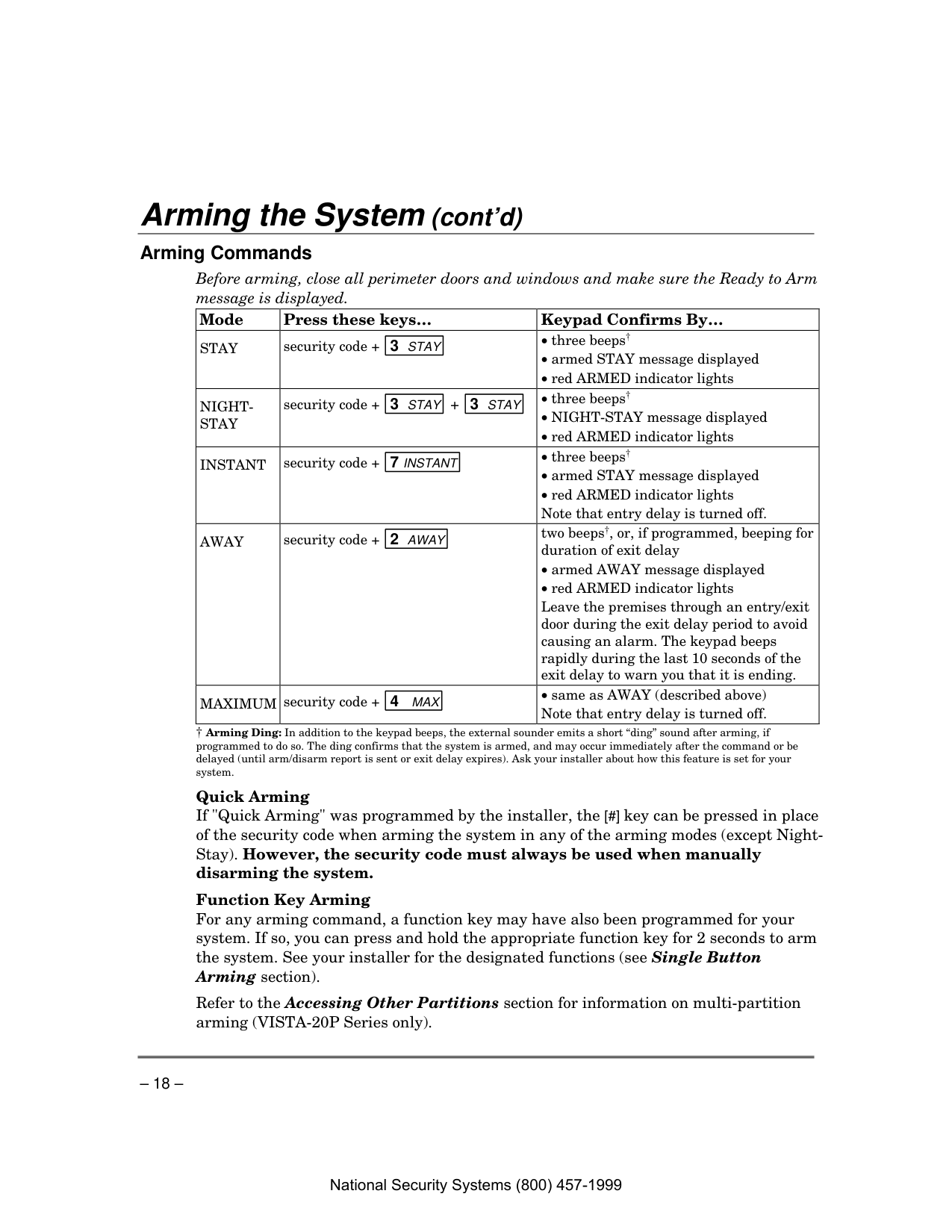
Arming Commands Before arming, close all perimeter doors and windows and make sure the Ready to Arm message is displayed. Mode Press these keys… Keypad Confirms By…
Stay
security code + 3 STAYNight-
Stay
security code + 3 STAY + 3 STAYInstant
security code + 7 INSTANTAway
security code + 2 AWAYtwo beeps†, or, if programmed, beeping for duration of exit delay
Quick Arming If "Quick Arming" was programmed by the installer, the [#] key can be pressed in place of the security code when arming the system in any of the arming modes (except Night- Stay). However, the security code must always be used when manually disarming the system.
Function Key Arming For any arming command, a function key may have also been programmed for your system. If so, you can press and hold the appropriate function key for 2 seconds to arm the system. See your installer for the designated functions (see Single Button Arming section).
Refer to the Accessing Other Partitions section for information on multi-partition arming (VISTA-20P Series only). National Security Systems (800) 457-1999
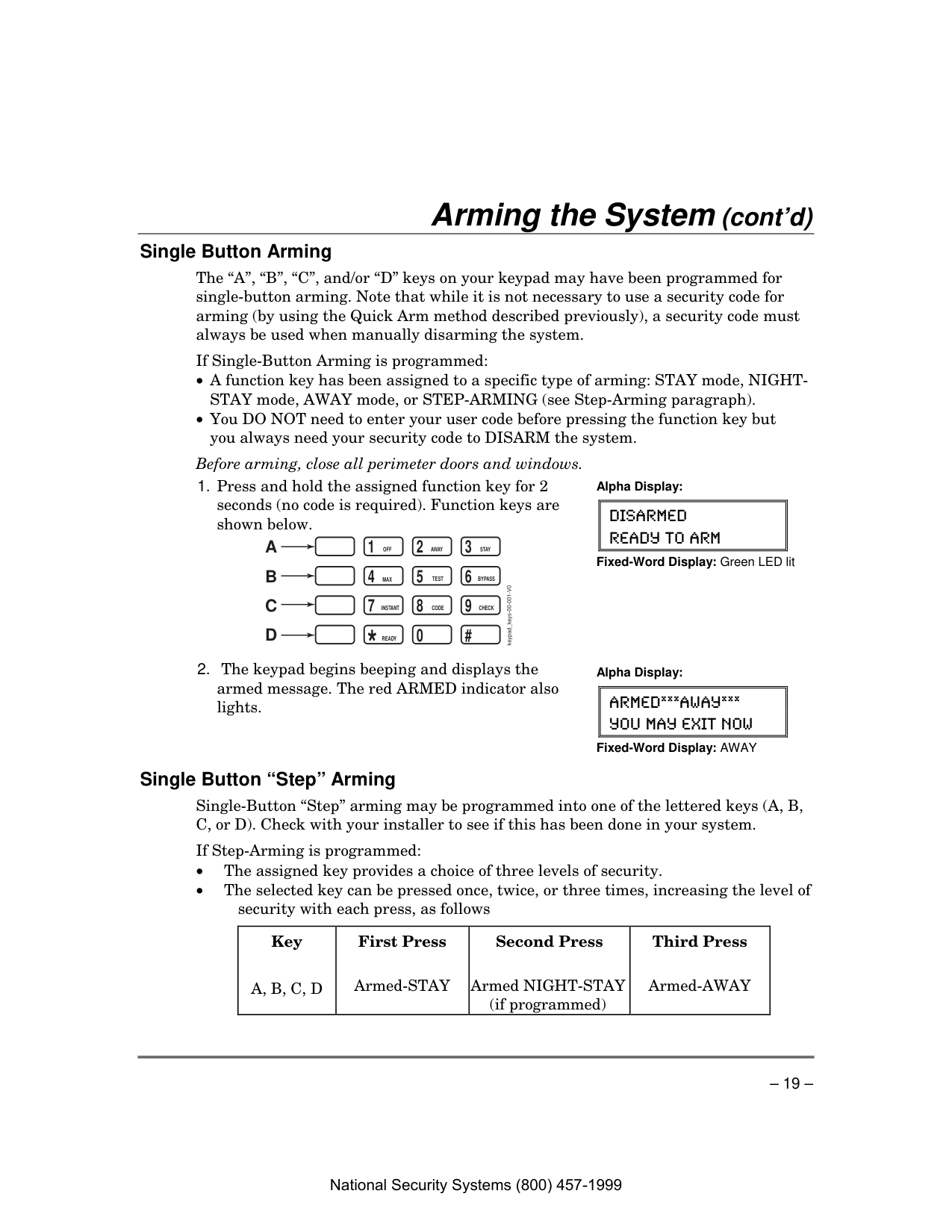
– 19 – Arming the System (cont’d) Single Button Arming The “A”, “B”, “C”, and/or “D” keys on your keypad may have been programmed for single-button arming. Note that while it is not necessary to use a security code for arming (by using the Quick Arm method described previously), a security code must always be used when manually disarming the system.
If Single-Button Arming is programmed:
Before arming, close all perimeter doors and windows.
Ready
Instant
Max
Off
Code
Away
Test
Check
Stay
Bypass
A
B
C
D
keypad_keys-00-001-V0 Alpha Display:Disarmed
Ready To Arm
Fixed-Word Display: Green LED lit
Armed*Away*
You May Exit Now
Fixed-Word Display: AWAY
Single Button “Step” Arming Single-Button “Step” arming may be programmed into one of the lettered keys (A, B, C, or D). Check with your installer to see if this has been done in your system.
If Step-Arming is programmed: • The assigned key provides a choice of three levels of security. • The selected key can be pressed once, twice, or three times, increasing the level of security with each press, as follows
Key First Press
Second Press
Third Press
A, B, C, D
Armed-STAY Armed NIGHT-STAY (if programmed) Armed-AWAYNational Security Systems (800) 457-1999
– 20 – Keyswitch
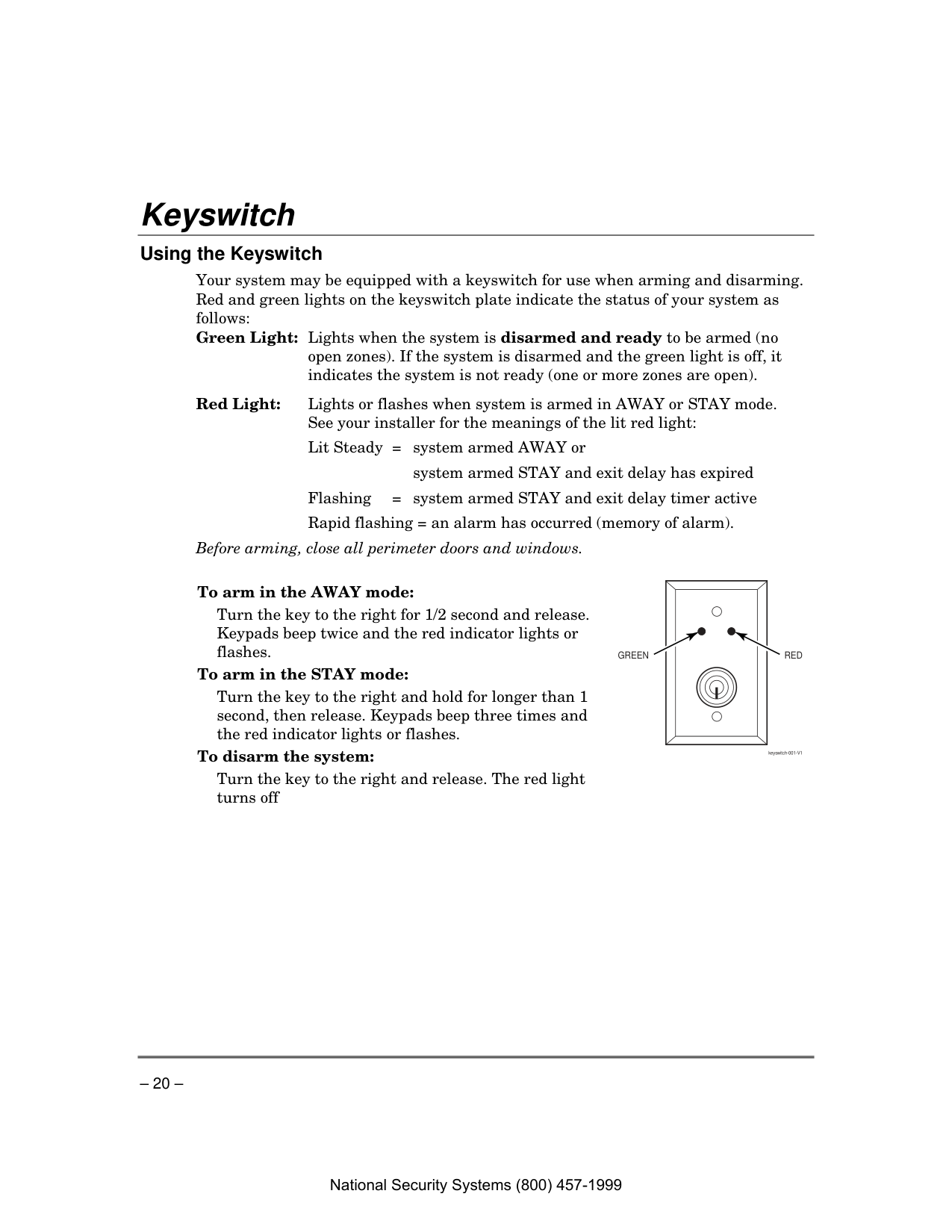
Using the Keyswitch Your system may be equipped with a keyswitch for use when arming and disarming. Red and green lights on the keyswitch plate indicate the status of your system as follows: Green Light: Lights when the system is disarmed and ready to be armed (no open zones). If the system is disarmed and the green light is off, it indicates the system is not ready (one or more zones are open). Red Light: Lights or flashes when system is armed in AWAY or STAY mode. See your installer for the meanings of the lit red light:
Lit Steady = system armed AWAY or
system armed STAY and exit delay has expired
Flashing = system armed STAY and exit delay timer active
Rapid flashing = an alarm has occurred (memory of alarm). Before arming, close all perimeter doors and windows.
To arm in the AWAY mode:
Turn the key to the right for 1/2 second and release. Keypads beep twice and the red indicator lights or flashes. To arm in the STAY mode:
Turn the key to the right and hold for longer than 1 second, then release. Keypads beep three times and the red indicator lights or flashes. To disarm the system:
Turn the key to the right and release. The red light turns off
Green
Red
keyswitch-001-V1National Security Systems (800) 457-1999
– 21 – Disarming and Silencing Alarms
Using the [OFF] key The OFF key is used to disarm the system, silence alarm and trouble sounds, and clear alarm memories.
IMPORTANT: If you return and the main burglary sounder is on, DO NOT ENTER, but CONTACT THE POLICE from a nearby safe location. If you return after an alarm has occurred and the main sounder has shut itself off, the keypad will beep rapidly upon your entering, indicating that an alarm has occurred during your absence. LEAVE AT ONCE, and CONTACT THE POLICE from a nearby safe location.
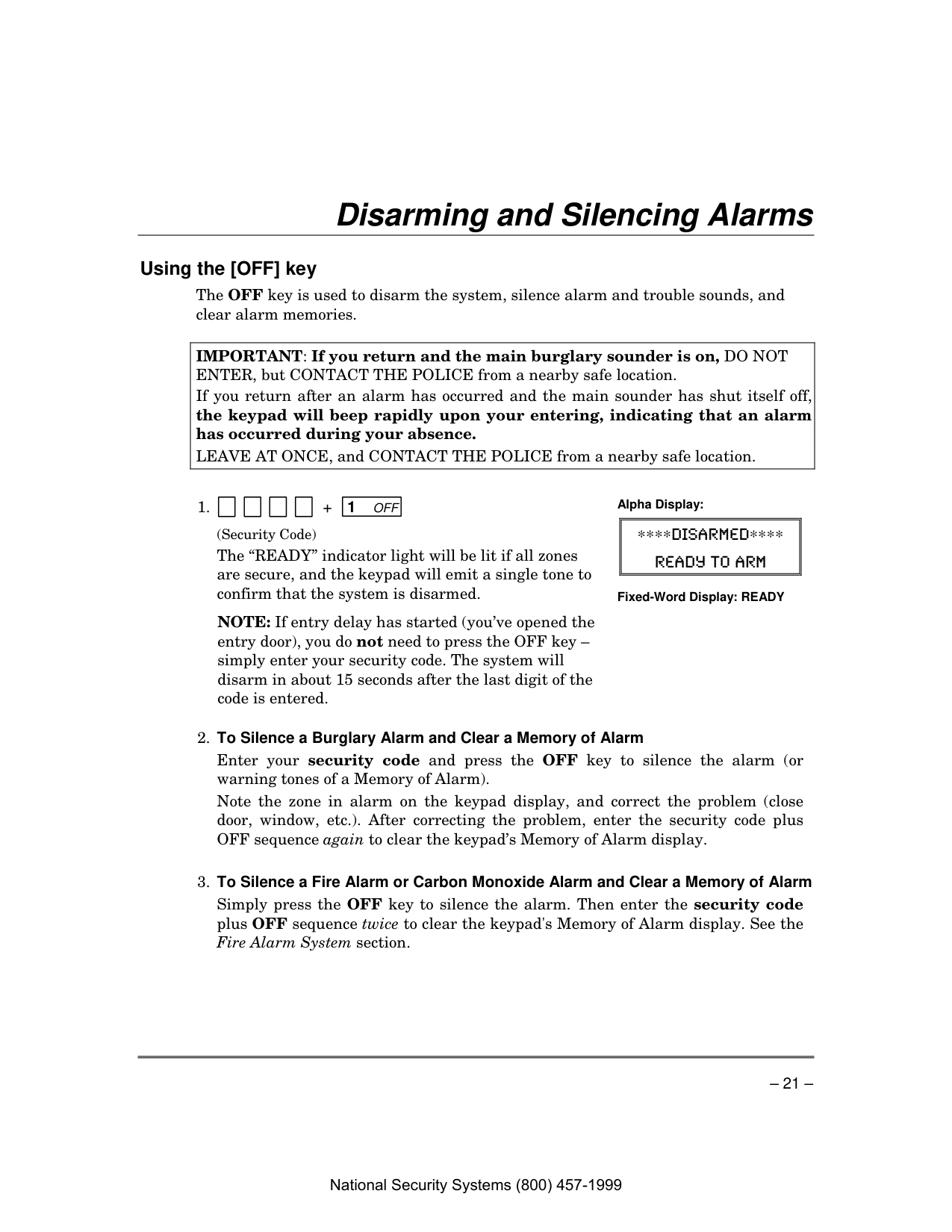
1. + 1 Off
(Security Code)
The “READY” indicator light will be lit if all zones are secure, and the keypad will emit a single tone to confirm that the system is disarmed.
NOTE: If entry delay has started (you’ve opened the entry door), you do not need to press the OFF key – simply enter your security code. The system will disarm in about 15 seconds after the last digit of the code is entered. Alpha Display:
∗∗∗∗Disarmed∗∗∗∗
Ready To Arm
Fixed-Word Display: READY
Enter your security code and press the OFF key to silence the alarm (or warning tones of a Memory of Alarm).
Note the zone in alarm on the keypad display, and correct the problem (close door, window, etc.). After correcting the problem, enter the security code plus OFF sequence again to clear the keypad’s Memory of Alarm display.
Simply press the OFF key to silence the alarm. Then enter the security code plus OFF sequence twice to clear the keypad's Memory of Alarm display. See the Fire Alarm System section.
National Security Systems (800) 457-1999
– 22 – Bypassing Protection Zones
Using the BYPASS Key Use this key when you want to arm your system with one or more zones intentionally unprotected. The system must be disarmed first.
Vent Zones: Your system may have certain windows set as “vent” zones, which are automatically bypassed if left open when arming the system (you do not need to manually bypass them). However, if a vent zone window is closed after arming, it becomes protected and will cause an alarm if opened again while the system is armed.
When bypassing zones: • The system must be disarmed before you can bypass zones. • Bypassed zones are unprotected and will not cause an alarm if violated. • The system will not allow fire zones to be bypassed. • Zones are automatically unbypassed when the system is disarmed.
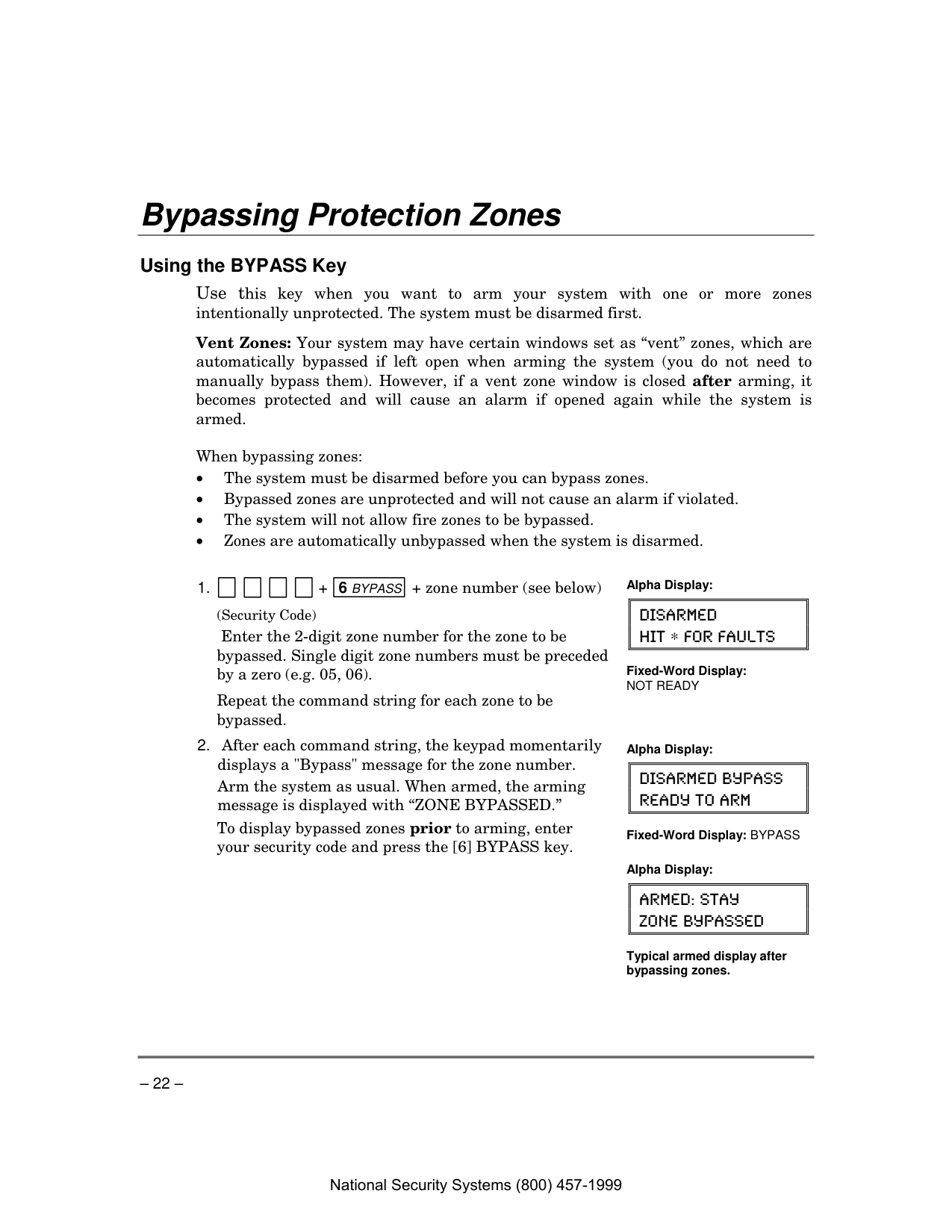
(Security Code)
Enter the 2-digit zone number for the zone to be bypassed. Single digit zone numbers must be preceded by a zero (e.g. 05, 06).
Repeat the command string for each zone to be bypassed. Alpha Display:
Disarmed
Hit ∗ For Faults
Fixed-Word Display:
Not Ready
Arm the system as usual. When armed, the arming message is displayed with “ZONE BYPASSED.”
To display bypassed zones prior to arming, enter your security code and press the [6] BYPASS key. Alpha Display:
Disarmed Bypass
Ready To Arm
Fixed-Word Display: BYPASS
Alpha Display:
Armed: Stay
Zone Bypassed
Typical armed display after bypassing zones.
National Security Systems (800) 457-1999
– 23 – Bypassing Protection Zones (cont’d)
Quick Bypass If programmed, "Quick Bypass" allows you to easily bypass all open (faulted) zones without having to enter zone numbers individually. This feature is useful if, for example, you routinely leave certain windows open when arming at night.
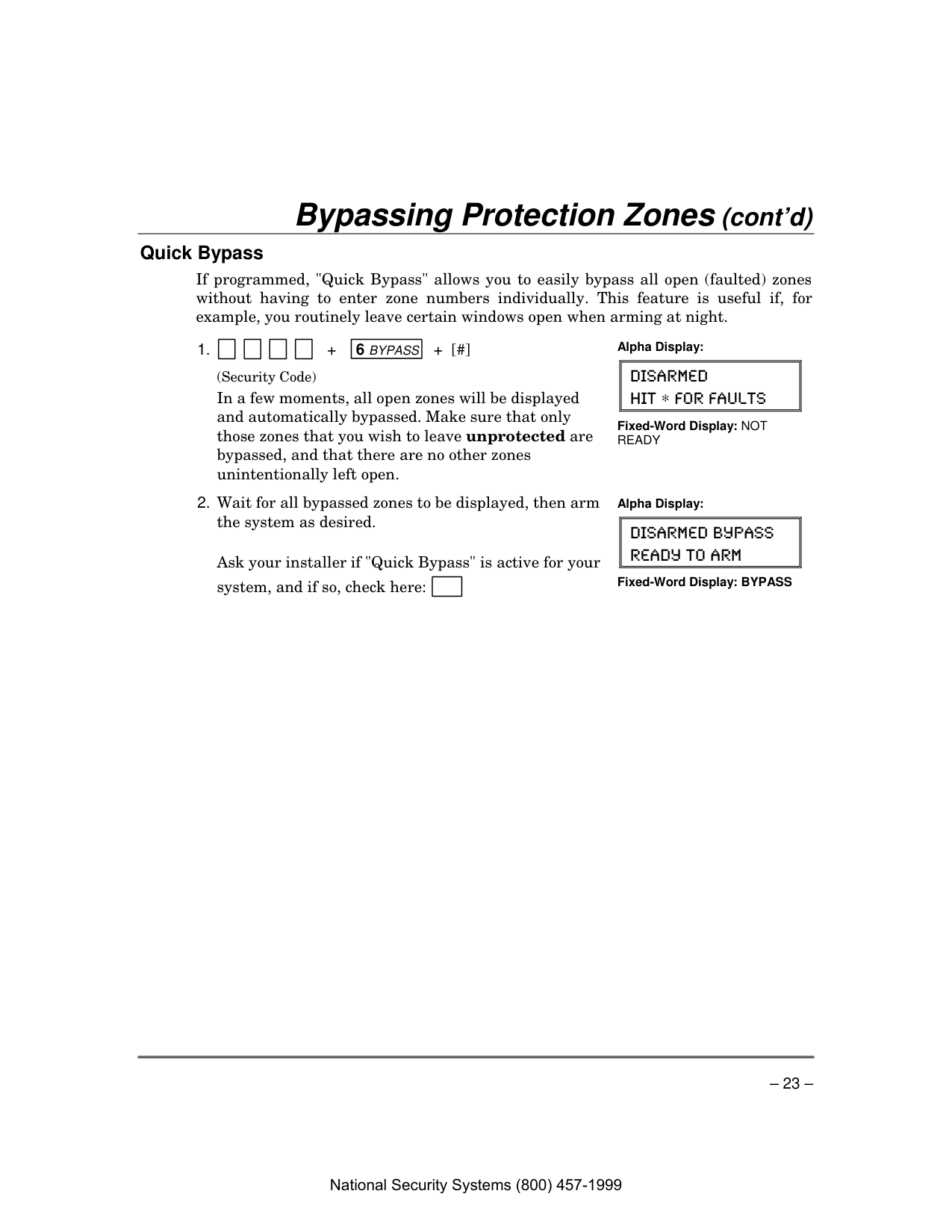
1. + 6 Bypass + [#]
(Security Code)
In a few moments, all open zones will be displayed and automatically bypassed. Make sure that only those zones that you wish to leave unprotected are bypassed, and that there are no other zones unintentionally left open. Alpha Display:
Disarmed
Hit ∗ For Faults
Fixed-Word Display: NOT
Ready
Ask your installer if "Quick Bypass" is active for your system, and if so, check here: Alpha Display:
Disarmed Bypass
Ready To Arm
Fixed-Word Display: BYPASS
National Security Systems (800) 457-1999
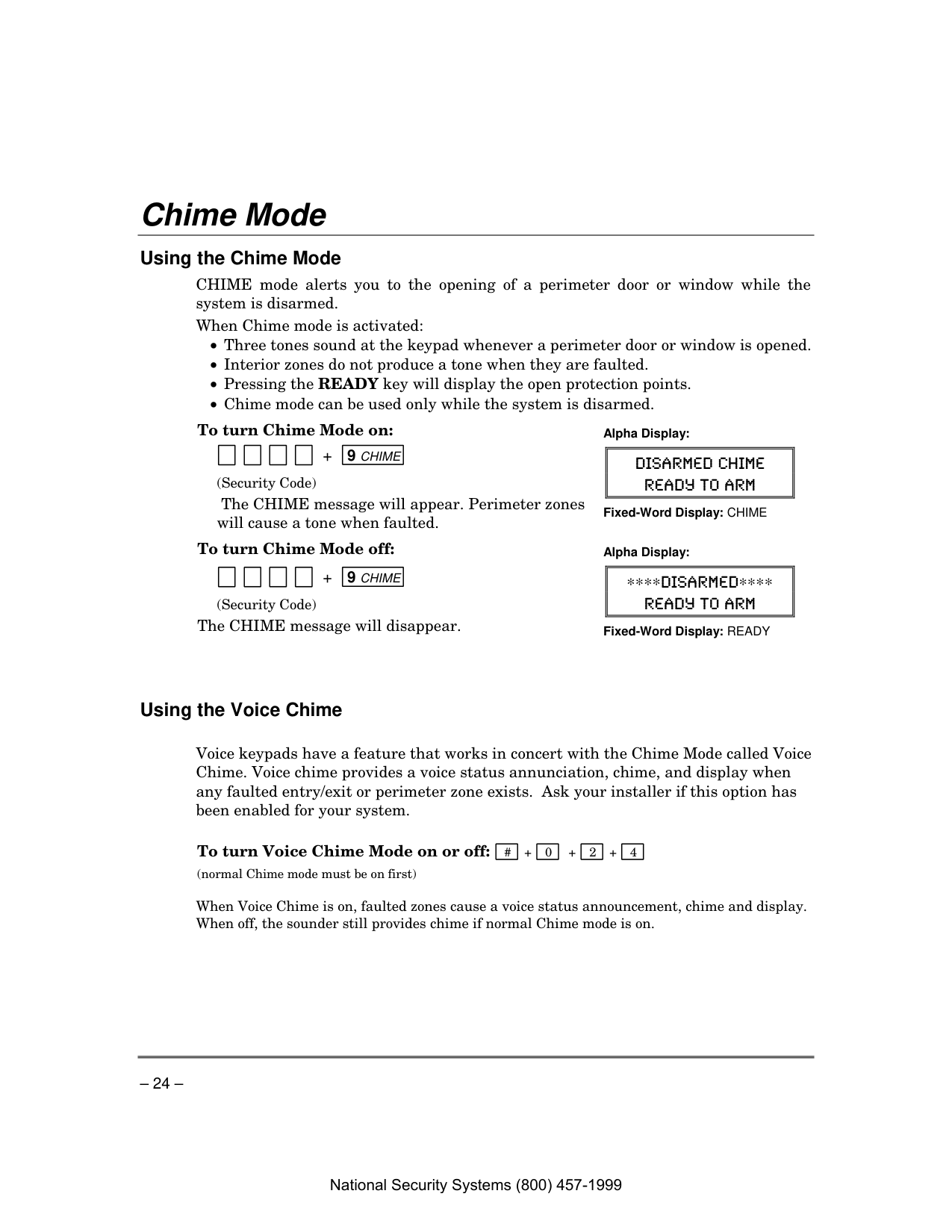
– 24 – Chime Mode
Using the Chime Mode CHIME mode alerts you to the opening of a perimeter door or window while the system is disarmed. When Chime mode is activated:
To turn Chime Mode on:
+ 9 Chime
(Security Code)
The CHIME message will appear. Perimeter zones will cause a tone when faulted. Alpha Display:
Disarmed Chime
Ready To Arm
Fixed-Word Display: CHIME
To turn Chime Mode off:
+ 9 Chime
(Security Code) The CHIME message will disappear. Alpha Display:
∗∗∗∗Disarmed∗∗∗∗
Ready To Arm
Fixed-Word Display: READY
Using the Voice Chime
Voice keypads have a feature that works in concert with the Chime Mode called Voice Chime. Voice chime provides a voice status annunciation, chime, and display when any faulted entry/exit or perimeter zone exists. Ask your installer if this option has been enabled for your system.
To turn Voice Chime Mode on or off: # + 0 + 2 + 4 (normal Chime mode must be on first)
When Voice Chime is on, faulted zones cause a voice status announcement, chime and display. When off, the sounder still provides chime if normal Chime mode is on.
National Security Systems (800) 457-1999
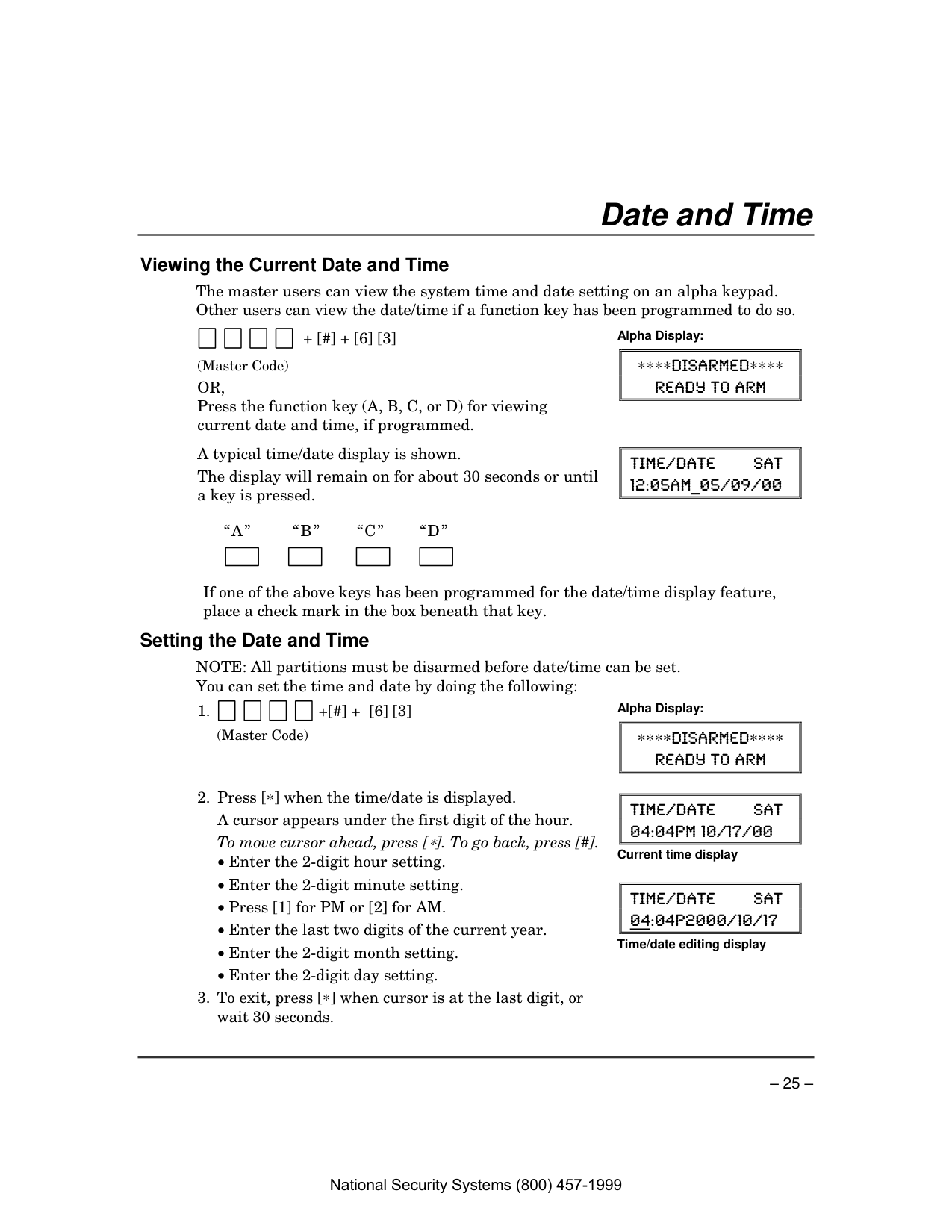
– 25 – Date and Time
Viewing the Current Date and Time The master users can view the system time and date setting on an alpha keypad. Other users can view the date/time if a function key has been programmed to do so.
+ [#] + [6] [3] (Master Code)
Or,
Press the function key (A, B, C, or D) for viewing current date and time, if programmed. Alpha Display:∗∗∗∗Disarmed∗∗∗∗
Ready To Arm
A typical time/date display is shown. The display will remain on for about 30 seconds or until a key is pressed.
Time/Date Sat
12:05Am_05/09/00
“A”
“B”
“C”
“D”
If one of the above keys has been programmed for the date/time display feature, place a check mark in the box beneath that key. Setting the Date and Time NOTE: All partitions must be disarmed before date/time can be set. You can set the time and date by doing the following:
(Master Code) Alpha Display:
∗∗∗∗Disarmed∗∗∗∗
Ready To Arm
A cursor appears under the first digit of the hour.
To move cursor ahead, press [∗]. To go back, press [#].
Time/Date Sat
04:04Pm 10/17/00
Current time displayTime/Date Sat
04:04P2000/10/17
Time/date editing displayNational Security Systems (800) 457-1999
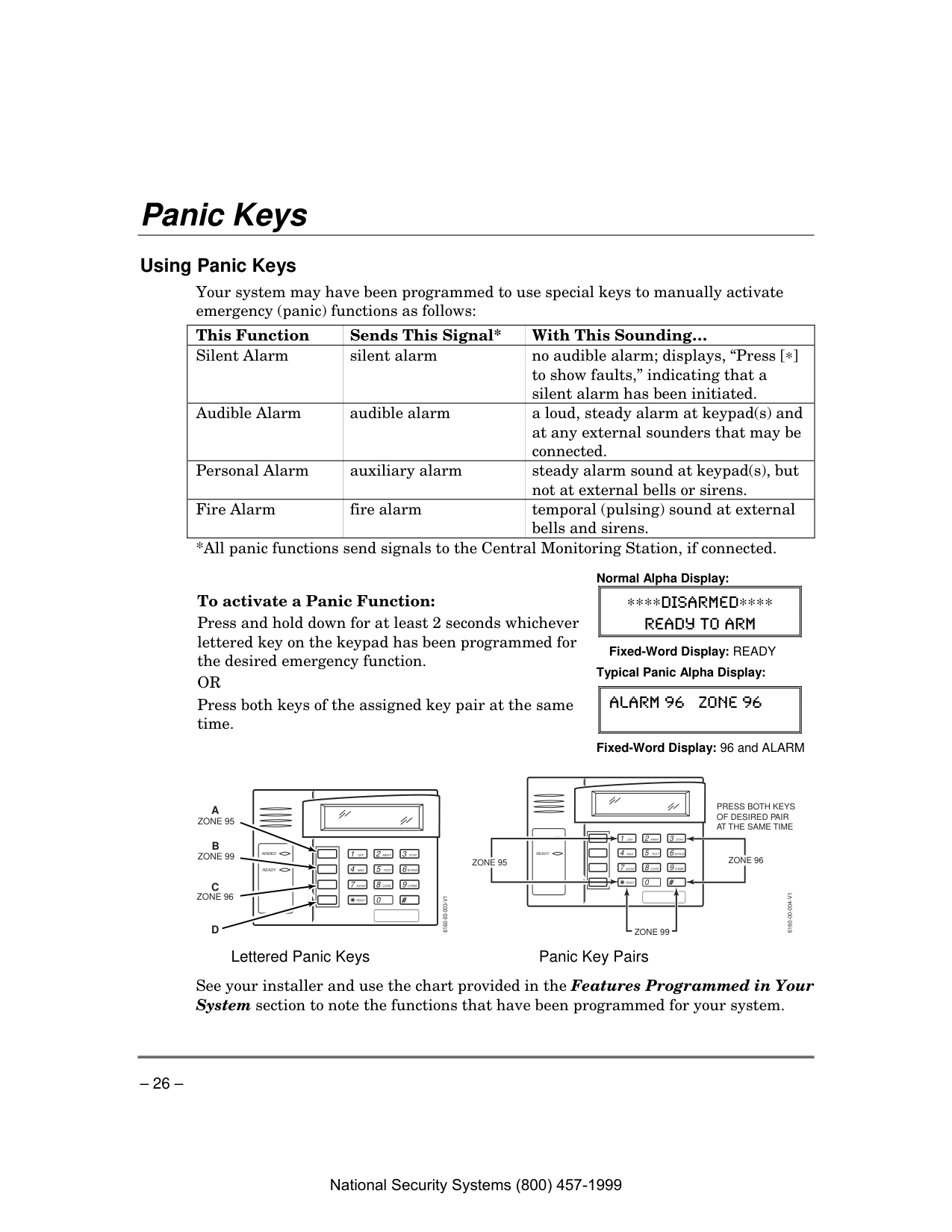
– 26 – Panic Keys
Using Panic Keys Your system may have been programmed to use special keys to manually activate emergency (panic) functions as follows: This Function Sends This Signal* With This Sounding… Silent Alarm silent alarm no audible alarm; displays, “Press [∗] to show faults,” indicating that a silent alarm has been initiated. Audible Alarm audible alarm a loud, steady alarm at keypad(s) and at any external sounders that may be connected. Personal Alarm auxiliary alarm steady alarm sound at keypad(s), but not at external bells or sirens. Fire Alarm fire alarm temporal (pulsing) sound at external bells and sirens. *All panic functions send signals to the Central Monitoring Station, if connected.
To activate a Panic Function: Press and hold down for at least 2 seconds whichever lettered key on the keypad has been programmed for the desired emergency function.
Or
Press both keys of the assigned key pair at the same time. Normal Alpha Display:∗∗∗∗Disarmed∗∗∗∗
Ready To Arm
Fixed-Word Display: READY
Typical Panic Alpha Display:
Alarm 96 Zone 96
Fixed-Word Display: 96 and ALARM
1
Off
4Max
7 Instant
Ready
2 Away
5Test
8 Code
0 3Stay
6 Bypass
9 Chime
#Armed
Ready
6160-00-003-V1
A
B
C
D
Zone 95
Zone 96
Zone 99
Press Both Keys
Of Desired Pair
At The Same Time
4Max
7 Instant
2 Away
5Test
8 Code
0 3Stay
6 Bypass
9 Chime
#Armed
Ready
6160-00-004-V1
Zone 95
Zone 99
Zone 96
1Off
Ready
Lettered Panic Keys Panic Key Pairs
See your installer and use the chart provided in the Features Programmed in Your System section to note the functions that have been programmed for your system. National Security Systems (800) 457-1999
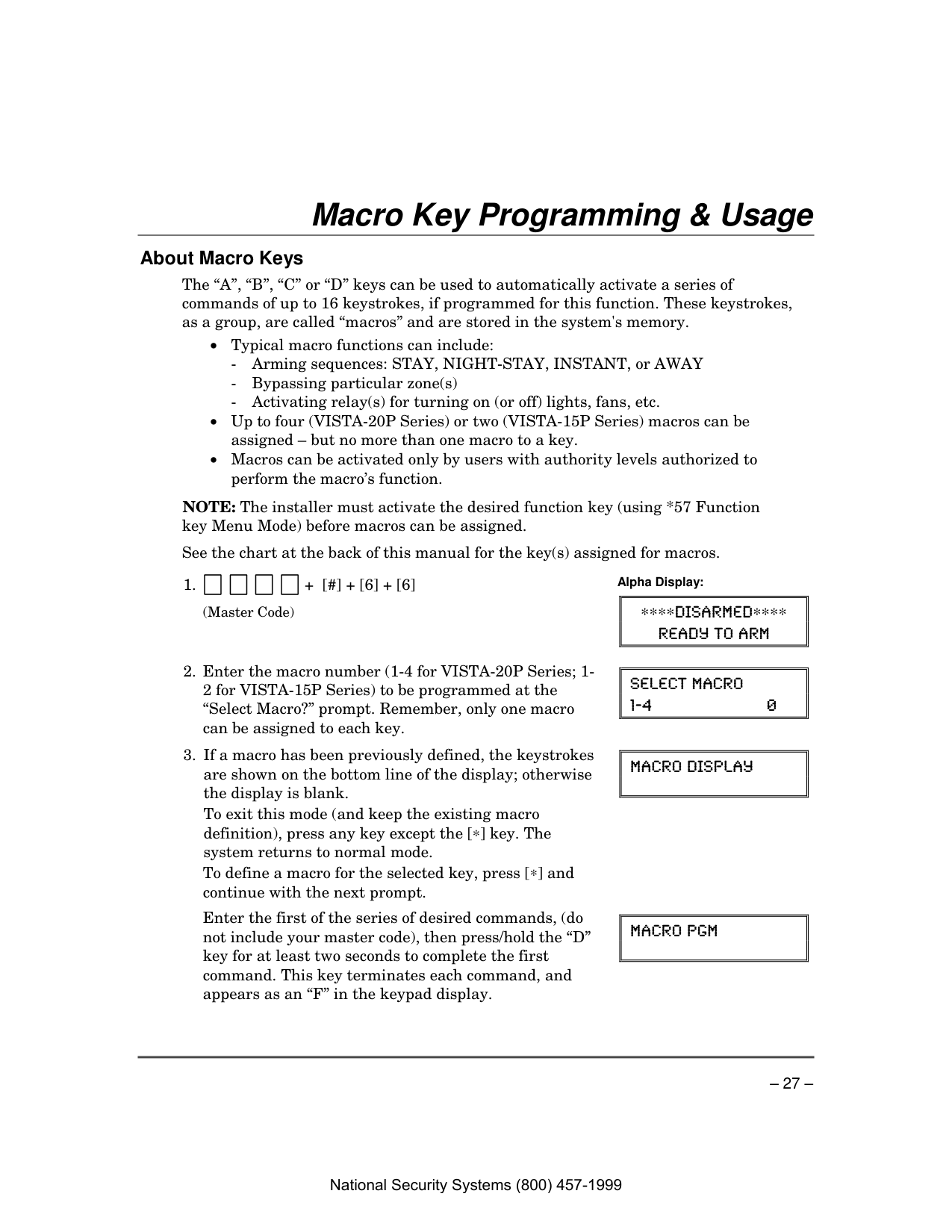
– 27 – Macro Key Programming & Usage
About Macro Keys The “A”, “B”, “C” or “D” keys can be used to automatically activate a series of commands of up to 16 keystrokes, if programmed for this function. These keystrokes, as a group, are called “macros” and are stored in the system's memory.
See the chart at the back of this manual for the key(s) assigned for macros.
(Master Code)
Alpha Display:
∗∗∗∗Disarmed∗∗∗∗
Ready To Arm
Select Macro
1-4 0To exit this mode (and keep the existing macro definition), press any key except the [∗] key. The system returns to normal mode.
To define a macro for the selected key, press [∗] and continue with the next prompt.
Macro Display
Enter the first of the series of desired commands, (do not include your master code), then press/hold the “D” key for at least two seconds to complete the first command. This key terminates each command, and appears as an “F” in the keypad display.
Macro Pgm
National Security Systems (800) 457-1999

– 28 – Macro Key Programming & Usage (cont’d)
The keypad beeps to acknowledge your input and displays the command you entered (followed by “F”).
Be sure to check your keystrokes before continuing. If you made a mistake, you must start over.
Example of Macro Programming Suppose you want to (1) bypass the two upstairs window zones, then (2) turn on an exterior light, and then (3) arm the security system in the AWAY mode. The procedures in the table that follows show you how you would program this macro: Typical Macro Alpha Display:
Macro Pgm
602F603F#701F2F
Function Keystrokes Required Keypad Display
6 0 2 F 6 0 3
6 0 2 F 6 0 3 F # 7 0 1
6 0 2 F 6 0 3 F # 7 0 1 F 2
Using a Programmed Macro Key
∗∗∗∗Disarmed∗∗∗∗
Ready To Arm
Enter User Code
∗ ∗ ∗ ∗The programmed macro sequence begins automatically after the user code is entered.
National Security Systems (800) 457-1999

– 29 – Using Device Commands
About Device Commands Your system may be set up so that it can control certain lights or other devices.
To Activate Devices: + [#] + [7] + 2-digit device number (Security Code) Devices associated with that device number activate.
To Deactivate Devices: + [#] + [8] + 2-digit device number (Security Code) Devices associated with that device number deactivate. Alpha Display:
∗∗∗∗Disarmed∗∗∗∗
Ready To Arm
Fixed-Word Display: READY
National Security Systems (800) 457-1999
– 30 –
Paging Feature
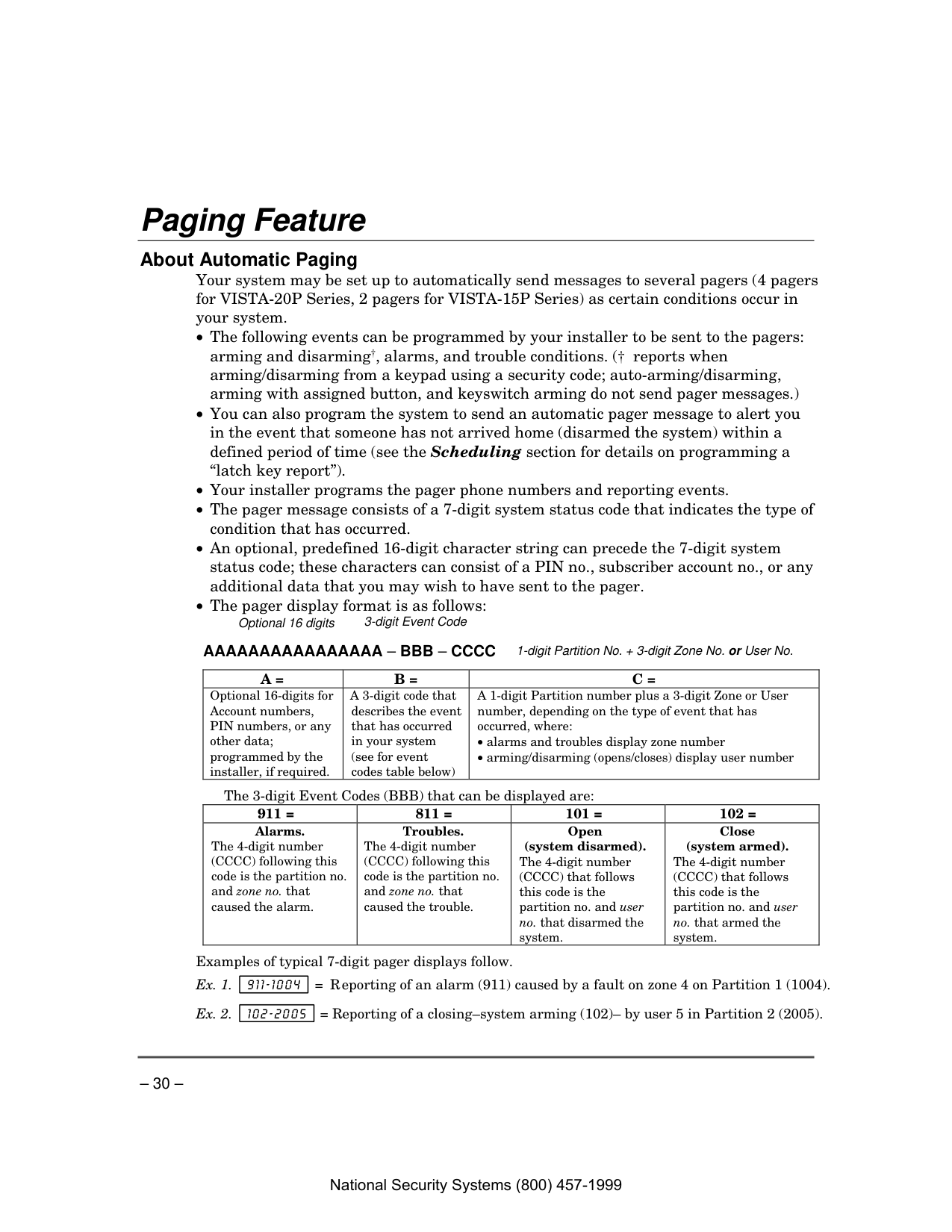
About Automatic Paging Your system may be set up to automatically send messages to several pagers (4 pagers for VISTA-20P Series, 2 pagers for VISTA-15P Series) as certain conditions occur in your system.
Optional 16 digits 3-digit Event Code
Aaaaaaaaaaaaaaaa – Bbb – Cccc
1-digit Partition No. + 3-digit Zone No. or User No.A =
B =
C =
Optional 16-digits for Account numbers, PIN numbers, or any other data; programmed by the installer, if required. A 3-digit code that describes the event that has occurred in your system (see for event codes table below) A 1-digit Partition number plus a 3-digit Zone or User number, depending on the type of event that has occurred, where:The 3-digit Event Codes (BBB) that can be displayed are: 911 = 811 = 101 = 102 = Alarms. The 4-digit number (CCCC) following this code is the partition no. and zone no. that caused the alarm. Troubles. The 4-digit number (CCCC) following this code is the partition no. and zone no. that caused the trouble. Open (system disarmed). The 4-digit number (CCCC) that follows this code is the partition no. and user no. that disarmed the system. Close (system armed). The 4-digit number (CCCC) that follows this code is the partition no. and user no. that armed the system.
Examples of typical 7-digit pager displays follow. Ex. 1. 911–1004 = Reporting of an alarm (911) caused by a fault on zone 4 on Partition 1 (1004). Ex. 2. 102–2005 = Reporting of a closing–system arming (102)– by user 5 in Partition 2 (2005). National Security Systems (800) 457-1999
– 31 – Paging Feature (cont’d)
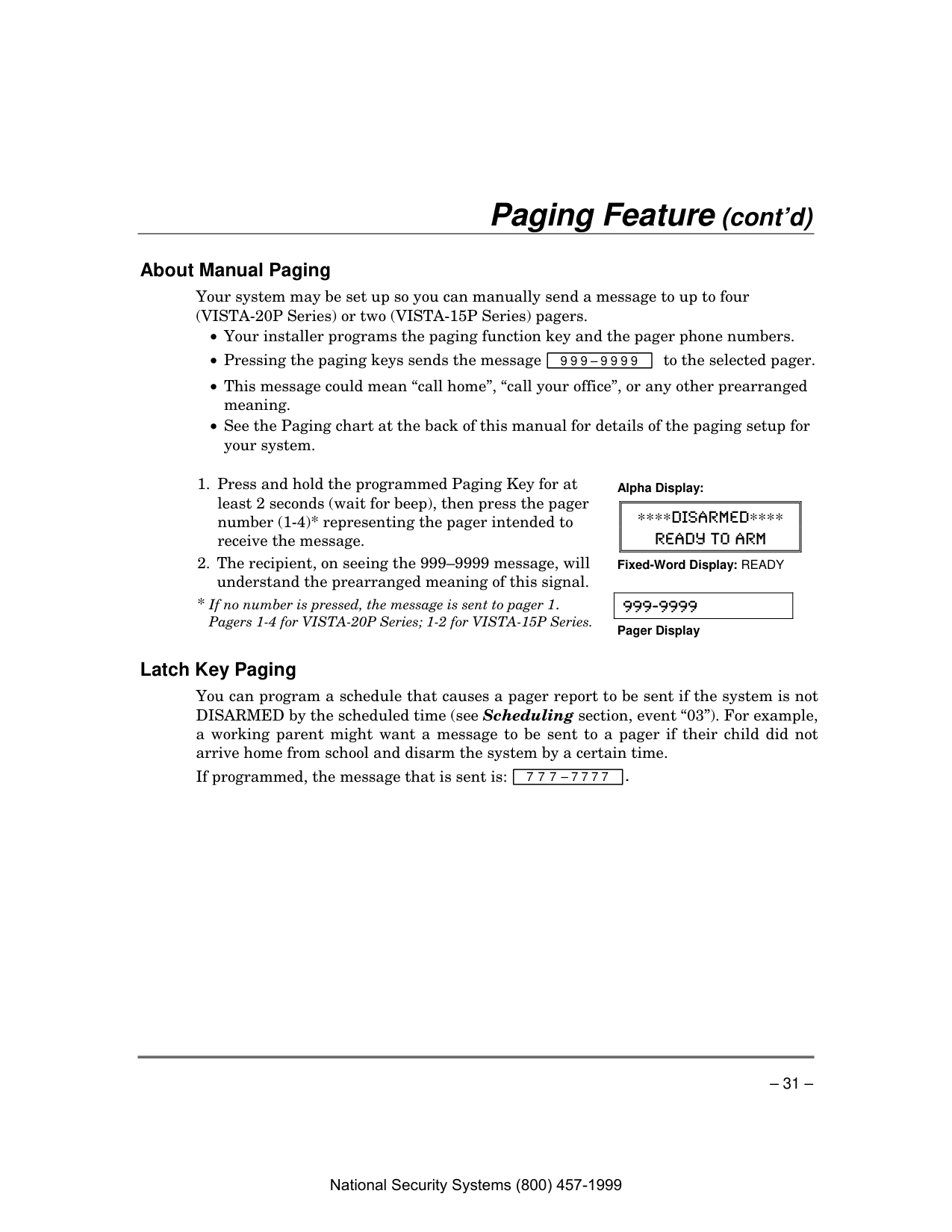
About Manual Paging Your system may be set up so you can manually send a message to up to four (VISTA-20P Series) or two (VISTA-15P Series) pagers.
∗∗∗∗Disarmed∗∗∗∗
Ready To Arm
Fixed-Word Display: READY
999-9999 Pager Display
Latch Key Paging You can program a schedule that causes a pager report to be sent if the system is not DISARMED by the scheduled time (see Scheduling section, event “03”). For example, a working parent might want a message to be sent to a pager if their child did not arrive home from school and disarm the system by a certain time. If programmed, the message that is sent is: 7 7 7 – 7 7 7 7 . National Security Systems (800) 457-1999
– 32 – Security Codes & Authority Levels
About Security Codes Your installer assigned a master code that is used to perform all system functions. In addition, other security codes can be assigned for use by other users (VISTA-20P Series provides 47 additional codes; VISTA-15P Series provides 31 additional codes).
NOTE: The factory settings are designed to meet most normal user situations. Therefore, the only step you usually need to do when adding users is assign a user number (from the partition’s pre-assigned user numbers) and a security code.
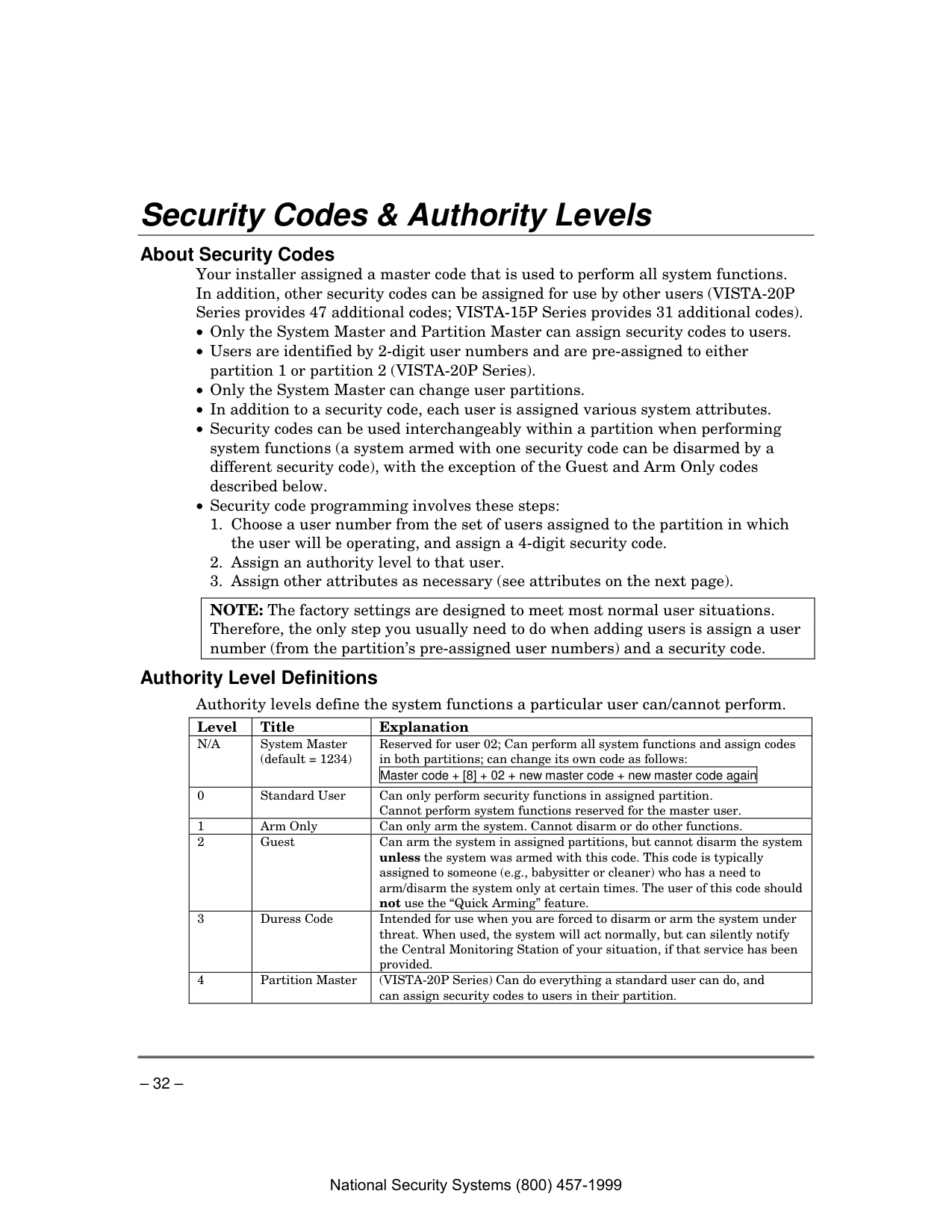
Authority Level Definitions Authority levels define the system functions a particular user can/cannot perform.
Level Title Explanation
N/A
System Master (default = 1234) Reserved for user 02; Can perform all system functions and assign codes in both partitions; can change its own code as follows: Master code + [8] + 02 + new master code + new master code again0 Standard User Can only perform security functions in assigned partition. Cannot perform system functions reserved for the master user. 1 Arm Only Can only arm the system. Cannot disarm or do other functions. 2 Guest Can arm the system in assigned partitions, but cannot disarm the system unless the system was armed with this code. This code is typically assigned to someone (e.g., babysitter or cleaner) who has a need to arm/disarm the system only at certain times. The user of this code should not use the “Quick Arming” feature. 3 Duress Code Intended for use when you are forced to disarm or arm the system under threat. When used, the system will act normally, but can silently notify the Central Monitoring Station of your situation, if that service has been provided. 4 Partition Master (VISTA-20P Series) Can do everything a standard user can do, and can assign security codes to users in their partition. National Security Systems (800) 457-1999
– 33 – Security Codes & Authority Levels (cont’d)
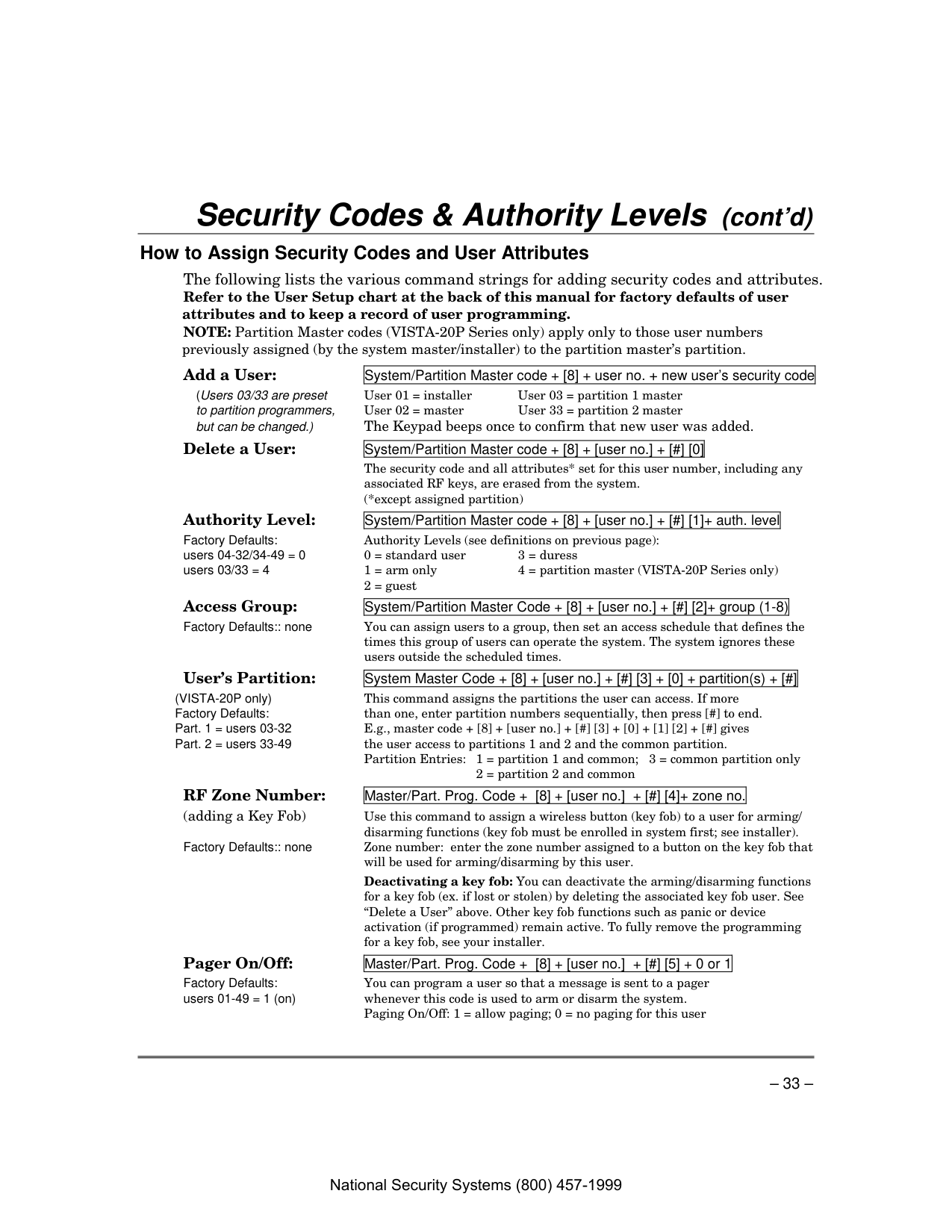
How to Assign Security Codes and User Attributes The following lists the various command strings for adding security codes and attributes. Refer to the User Setup chart at the back of this manual for factory defaults of user attributes and to keep a record of user programming. NOTE: Partition Master codes (VISTA-20P Series only) apply only to those user numbers previously assigned (by the system master/installer) to the partition master’s partition.
Add a User: System/Partition Master code + [8] + user no. + new user’s security code (Users 03/33 are preset User 01 = installer User 03 = partition 1 master to partition programmers, User 02 = master User 33 = partition 2 master but can be changed.) The Keypad beeps once to confirm that new user was added.
Delete a User: System/Partition Master code + [8] + [user no.] + [#] [0]
The security code and all attributes* set for this user number, including any associated RF keys, are erased from the system.
(*except assigned partition)
Authority Level: System/Partition Master code + [8] + [user no.] + [#] [1]+ auth. level Factory Defaults: Authority Levels (see definitions on previous page): users 04-32/34-49 = 0 0 = standard user 3 = duress users 03/33 = 4 1 = arm only 4 = partition master (VISTA-20P Series only)
2 = guest
Access Group: System/Partition Master Code + [8] + [user no.] + [#] [2]+ group (1-8) Factory Defaults:: none You can assign users to a group, then set an access schedule that defines the times this group of users can operate the system. The system ignores these users outside the scheduled times.
User’s Partition: System Master Code + [8] + [user no.] + [#] [3] + [0] + partition(s) + [#] (VISTA-20P only) This command assigns the partitions the user can access. If more Factory Defaults: than one, enter partition numbers sequentially, then press [#] to end. Part. 1 = users 03-32 E.g., master code + [8] + [user no.] + [#] [3] + [0] + [1] [2] + [#] gives Part. 2 = users 33-49 the user access to partitions 1 and 2 and the common partition. Partition Entries: 1 = partition 1 and common; 3 = common partition only
2 = partition 2 and common
RF Zone Number: Master/Part. Prog. Code + [8] + [user no.] + [#] [4]+ zone no. (adding a Key Fob) Use this command to assign a wireless button (key fob) to a user for arming/ disarming functions (key fob must be enrolled in system first; see installer). Factory Defaults:: none Zone number: enter the zone number assigned to a button on the key fob that will be used for arming/disarming by this user.
Deactivating a key fob: You can deactivate the arming/disarming functions for a key fob (ex. if lost or stolen) by deleting the associated key fob user. See “Delete a User” above. Other key fob functions such as panic or device activation (if programmed) remain active. To fully remove the programming for a key fob, see your installer.
Pager On/Off: Master/Part. Prog. Code + [8] + [user no.] + [#] [5] + 0 or 1 Factory Defaults: You can program a user so that a message is sent to a pager users 01-49 = 1 (on) whenever this code is used to arm or disarm the system.
Paging On/Off: 1 = allow paging; 0 = no paging for this user National Security Systems (800) 457-1999
– 34 – Accessing Other Partitions (VISTA-20P)
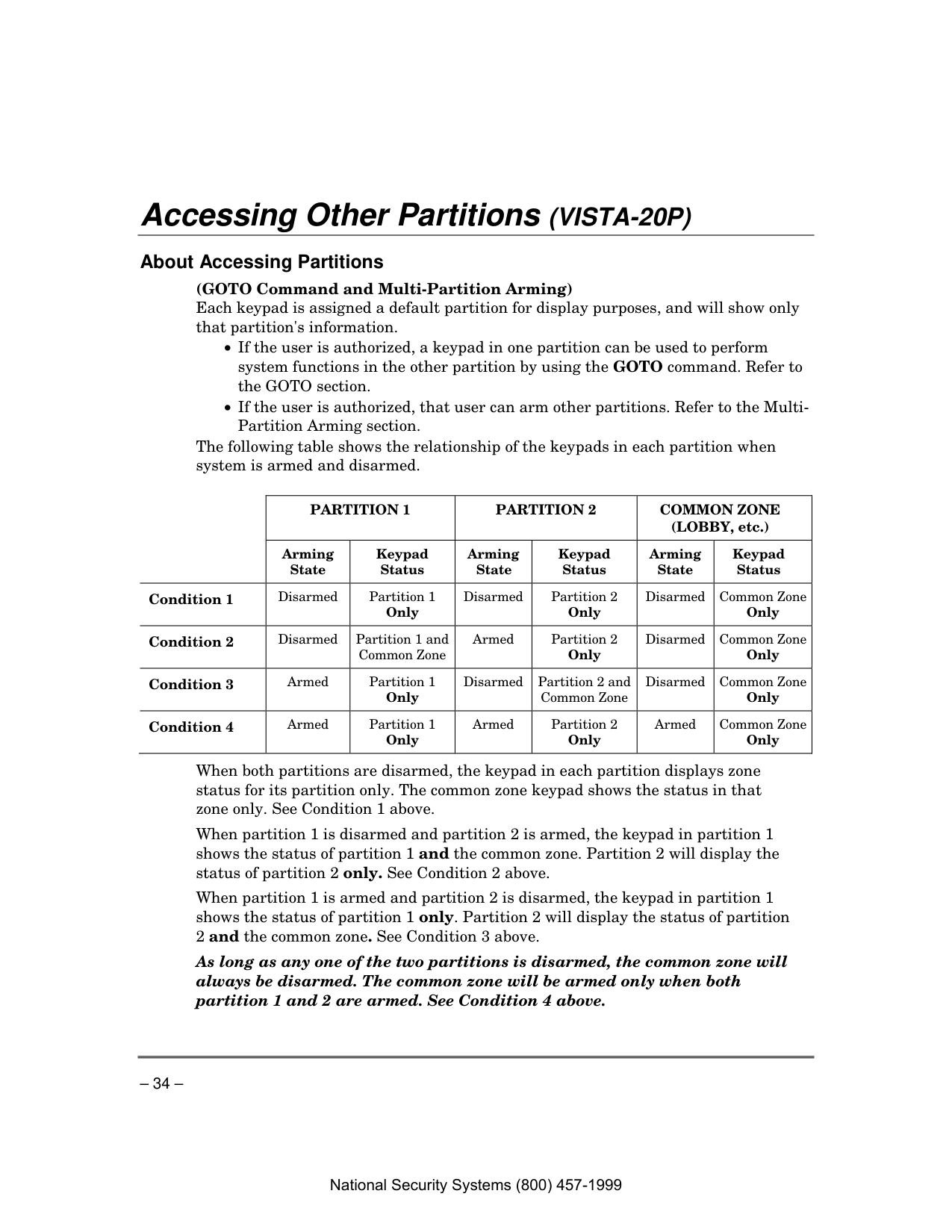
About Accessing Partitions (GOTO Command and Multi-Partition Arming) Each keypad is assigned a default partition for display purposes, and will show only that partition's information.
Partition 1
Partition 2
Common Zone
(LOBBY, etc.) Arming State Keypad Status Arming State Keypad Status Arming State Keypad Status Condition 1Disarmed Partition 1 Only Disarmed Partition 2 Only Disarmed Common Zone Only Condition 2
Disarmed Partition 1 and Common Zone Armed Partition 2 Only Disarmed Common Zone Only Condition 3
Armed Partition 1 Only Disarmed Partition 2 and Common Zone Disarmed Common Zone Only Condition 4
Armed Partition 1 Only Armed Partition 2 Only Armed Common Zone Only
When both partitions are disarmed, the keypad in each partition displays zone status for its partition only. The common zone keypad shows the status in that zone only. See Condition 1 above. When partition 1 is disarmed and partition 2 is armed, the keypad in partition 1 shows the status of partition 1 and the common zone. Partition 2 will display the status of partition 2 only. See Condition 2 above. When partition 1 is armed and partition 2 is disarmed, the keypad in partition 1 shows the status of partition 1 only. Partition 2 will display the status of partition 2 and the common zone. See Condition 3 above. As long as any one of the two partitions is disarmed, the common zone will always be disarmed. The common zone will be armed only when both partition 1 and 2 are armed. See Condition 4 above. National Security Systems (800) 457-1999
– 35 – Accessing Other Partitions (cont’d)
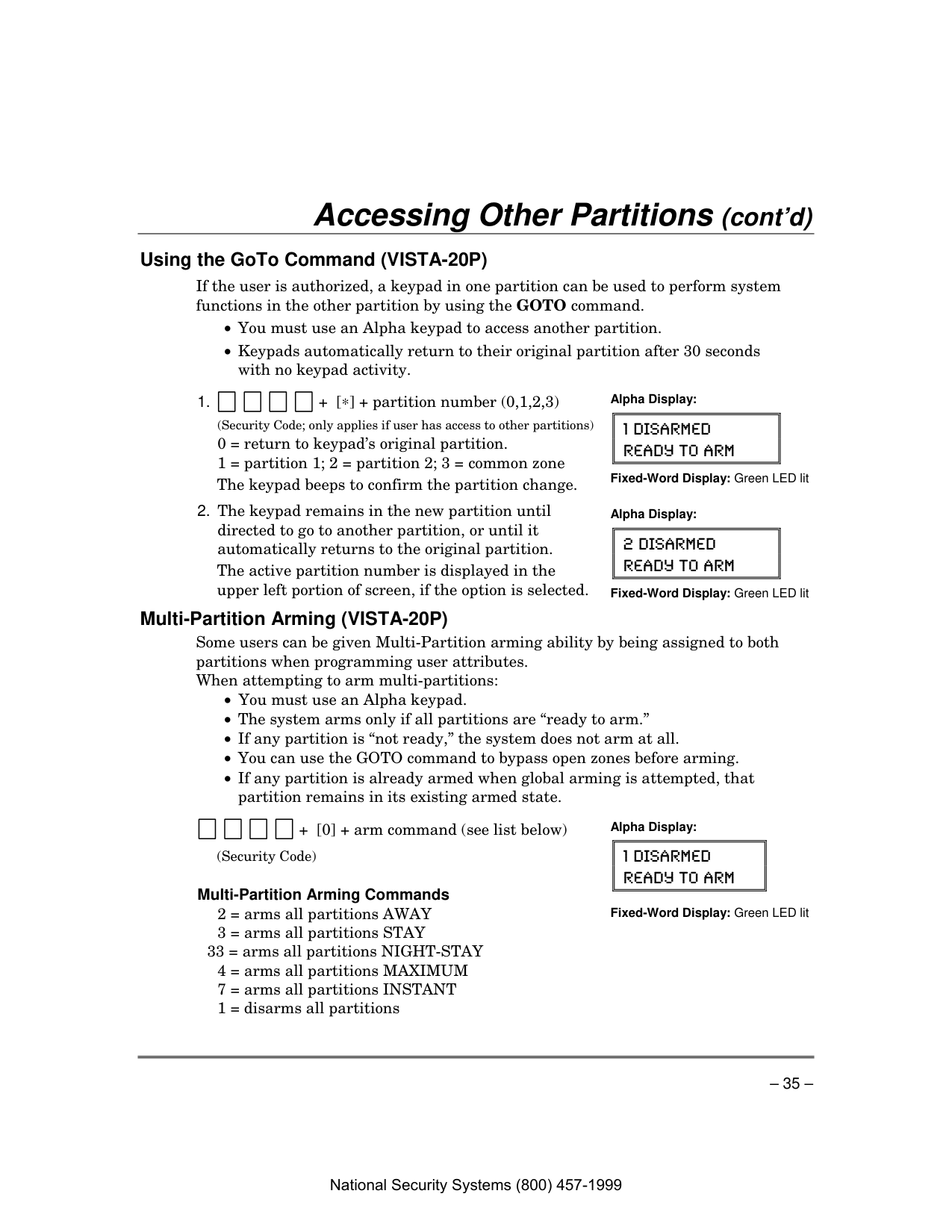
Using the GoTo Command (VISTA-20P) If the user is authorized, a keypad in one partition can be used to perform system functions in the other partition by using the GOTO command.
(Security Code; only applies if user has access to other partitions)
0 = return to keypad’s original partition.
1 = partition 1; 2 = partition 2; 3 = common zone
The keypad beeps to confirm the partition change. Alpha Display:
1 Disarmed
Ready To Arm
Fixed-Word Display: Green LED lit
The active partition number is displayed in the upper left portion of screen, if the option is selected. Alpha Display:
2 Disarmed
Ready To Arm
Fixed-Word Display: Green LED lit
Multi-Partition Arming (VISTA-20P) Some users can be given Multi-Partition arming ability by being assigned to both partitions when programming user attributes. When attempting to arm multi-partitions:
+ [0] + arm command (see list below)
(Security Code)
Multi-Partition Arming Commands
2 = arms all partitions AWAY
3 = arms all partitions STAY 33 = arms all partitions NIGHT-STAY
4 = arms all partitions MAXIMUM
7 = arms all partitions INSTANT
1 = disarms all partitions Alpha Display:
1 Disarmed
Ready To Arm
Fixed-Word Display: Green LED lit
National Security Systems (800) 457-1999
– 36 – Accessing Other Partitions (cont’d)
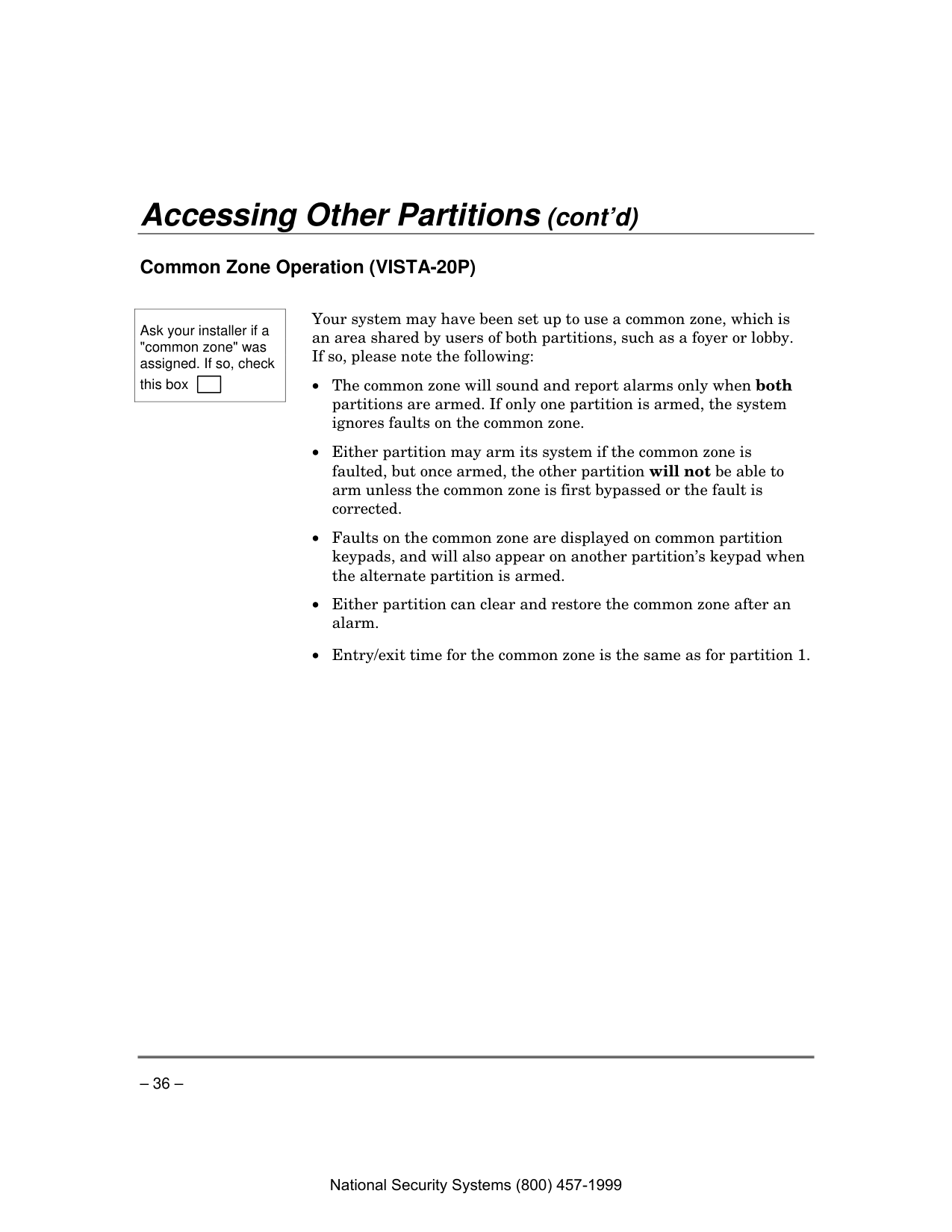
Common Zone Operation (VISTA-20P)
Ask your installer if a "common zone" was assigned. If so, check this box Your system may have been set up to use a common zone, which is an area shared by users of both partitions, such as a foyer or lobby. If so, please note the following:
National Security Systems (800) 457-1999
– 37 – Scheduling
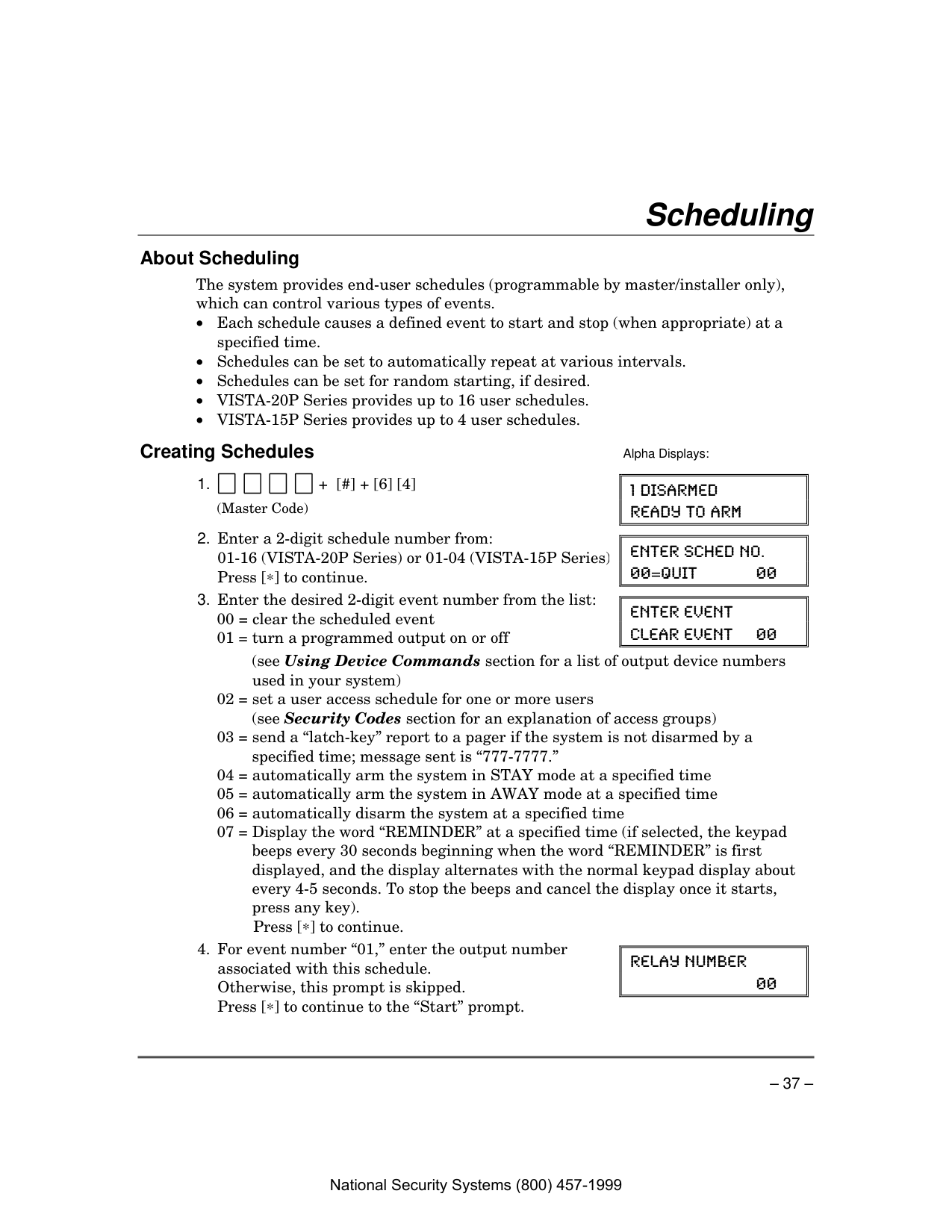
About Scheduling The system provides end-user schedules (programmable by master/installer only), which can control various types of events.
Creating Schedules Alpha Displays:
(Master Code)
1 Disarmed
Ready To Arm
Press [∗] to continue.
Enter Sched No.
00=Quit
0000 = clear the scheduled event
01 = turn a programmed output on or off
Enter Event
Clear Event
00(see Using Device Commands section for a list of output device numbers used in your system)
02 = set a user access schedule for one or more users (see Security Codes section for an explanation of access groups)
03 = send a “latch-key” report to a pager if the system is not disarmed by a specified time; message sent is “777-7777.”
04 = automatically arm the system in STAY mode at a specified time
05 = automatically arm the system in AWAY mode at a specified time
06 = automatically disarm the system at a specified time
07 = Display the word “REMINDER” at a specified time (if selected, the keypad beeps every 30 seconds beginning when the word “REMINDER” is first displayed, and the display alternates with the normal keypad display about every 4-5 seconds. To stop the beeps and cancel the display once it starts, press any key).
Press [∗] to continue.
Otherwise, this prompt is skipped.
Press [∗] to continue to the “Start” prompt.
Relay Number
00 National Security Systems (800) 457-1999

– 38 – Scheduling (cont’d)
Press [∗] to continue to the “Start” prompt below.
Group Number
X
0 = arm all; 1 = partition 1; 2 = partition 2;
3 = arm common
Otherwise, this prompt is skipped.
Press [∗] to continue to the “Start” prompt.
Partition
X
Hour = 00-12; minute = 00-59
Am = 0; Pm = 1
Days = Position the cursor under the desired days using the [∗] key to move forward, then press “1” to select the day.
Press [∗] to continue.
Start
Smtwtfs
Hh:Mmam 1000000
Refer to step 7 for available entries.
Press [∗] to continue.
Stop
Smtwtfs
Hh:Mmam 1000000
0 = no repeat
1 = repeat schedule weekly
2 = repeat schedule biweekly (every other week)
3 = repeat schedule every third week
4 = repeat schedule every fourth week
e.g., To make a schedule that happens everyday you would select all days with a repeat count of 1. To make a schedule that runs for one week then stops, select everyday with a repeat count of 0.
Repeat Option
0-4X
0 = no; 1 = yes
If selected, the schedule times will vary within 60 minutes of the “hour” time. For example, if a schedule is set to start at 6:15pm, it will do so the first time 6:15pm arrives, but on subsequent days it will start anytime between 6:00 and 6:59 p.m.
Press [∗] to continue.
Randomize
0=No 1=Yes
X
National Security Systems (800) 457-1999

– 39 – Event Logging Procedures
About Event Logging The system records various events in a history log, which can be viewed by the master user on an Alpha Display keypad.
Viewing the Event Log
(Master Code) Alpha Displays:
∗∗∗∗Disarmed∗∗∗∗
Ready To Arm
(refer to the code table that follows)
Pressing [#] displays events forward in time.
001 E441 U001 P1
12:34Am 01/02/00
Understanding the Type of Event Displayed If the event code is preceded by an E (as in the above display), it means that the event is new and ongoing; if preceded by an R, it means the event has been restored.
Code Definition 110 Fire Alarm 121 Duress 122 Alarm, 24-hour Silent 123 Alarm, 24-hour Audible
Code Definition 131 Alarm, Perimeter 132 Alarm, Interior 134 Alarm, Entry/Exit 135 Alarm, Day/Night
National Security Systems (800) 457-1999

– 40 – Event Logging Procedures (cont’d)
Code Definition 143 Alarm, Expansion Module 145 ECP Module cover tamper 146 Silent Burglary 150 Alarm, 24-Hour Auxiliary/Monitor zone 162 Carbon Monoxide 301 AC Power 302 Low System Battery/Battery Test Fail 305 System Reset (Log only) 321 Bell/Siren Trouble 333 Trouble, Expansion Mod. Supervision 341 Trouble, ECP Cover Tamper 344 RF Receiver Jam 351 Telco Line Fault 353 Long Range Radio Trouble 354 Failure to Communicate 373 Fire Loop Trouble 374 Exit Error Alarm 380 Global Trouble, Trouble Day/Night 381 RF Supervision Trouble 382 Supervision Auxiliary Wire Zone 383 RF Sensor Tamper 384 RF Sensor Low-battery 393 Clean Me
Code Definition 401 Disarmed, Armed AWAY, Armed MAXIMUM 403 Schedule Arm/Disarm AWAY 406 Cancel by User 407 Remote Arm/Disarm (Downloading) 408 Quick Arm AWAY 409 Keyswitch Arm/Disarm AWAY 441 Disarmed/Armed
Stay/Instant,
Quick-Arm STAY/INSTANT 442 Keyswitch Arm/Disarm STAY 455 Scheduled Arm Fail 459 Recent Closing (SIA panels only) 570 Bypass 601 Manually Triggered Dialer Test 602 Periodic Test 606 AAV to Follow 607 Walk Test Entered/Exited 623 Event Log 80% Full 625 Real-Time Clock was Changed (log only) 627 Program Mode Entry (log only) 628 Program Mode Exit (log only) 642 Latch Key (log only) 750 -789 Reserved for Configurable Zone Type report codes (check with central station when using these codes)NOTE: Ask your installer to explain the meaning of any code you do not understand. National Security Systems (800) 457-1999

– 41 – Testing the System About Testing the System Using the Test mode allows each protection point to be checked for proper operation. Testing should be conducted weekly to ensure proper operation.
∗∗∗∗Disarmed∗∗∗∗
Ready To Arm
(Master Code)
The Dial test (option “1”) is intended for the installer and should not be used unless directed to do so by your Security System Representative.
1 = Dial, 0 = Walk
Test In Progress
If a problem is experienced with any protection point (no confirming sounds, no display), call for service immediately.
When all protection points have been checked and are intact (closed), there should be no zone identification numbers displayed on the keypad.
+ 1 Off
(Security Code) If the test mode is inadvertently left active, it automatically turns off after 4 hours. During the final five minutes, the keypad will emit a double beep every 30 seconds. National Security Systems (800) 457-1999

– 42 – Trouble Conditions
"Check" and "Battery" Displays
The word CHECK on the keypad's display, accompanied by a "beeping" at the keypad, indicates a trouble condition in the system. To silence the beeping for these conditions, press any key.
Note: A display of CHECK 70 on Alpha Display keypads indicates that the wiring connection to the external sounder is at fault (opened or shorted), and you should CALL FOR SERVICE. See “BELL FAILURE” on next page. A display of CHECK 90 indicates that RF interference may be impeding the operation of wireless sensors* in the system. See “Rcvr Jam” on next page.
If You Cannot Correct A "Check" Display,
Call For Service.
Typical "Check" Displays
06
Check
Ac
Fixed-Word Display Keypad
C H E C K 0 6
B E D R O O M W I N D O W
Alpha Display Keypad
National Security Systems (800) 457-1999
– 43 – Trouble Conditions (cont’d)
Words or letters in parentheses ( ) are those that are displayed on Fixed-Word Display keypads.
Other Trouble Displays
Off)
** Not all systems use wireless sensors.
Comm. Failure
Indicates that a failure has occurred in (or FC) the telephone communication portion of your system. CALL FOR SERVICE.System Lo Bat
Indicates that a low system battery (or BAT with no condition exists. Display is zone No.) accompanied by "beeping"* at the keypad. If this condition persists for more than one day (with AC present),Call For Service.
Lo Bat
Indicates that there is a low battery + zone descriptor condition in the wireless transmitter** (or BAT with number displayed (00 is RF keypad). zone No.) Accompanied by a single "beep"* (about once every 30 seconds) at the keypad.Either replace the battery yourself, or CALL FOR SERVICE. If the battery is not replaced within 30 days, a CHECK display may occur.
Rcvr Jam Wireless part of the system is experiencing (or CHECK 90) RF interference which may impede reception from wireless sensors.**
ALARM 1xx FAULT 1xx CHECK 1xx (or 91) Indicates a communication problem between the control and a connected device (e.g., RF receiver, zone expander) where the “xx” indicates the device address. CALL FOR SERVICE.
Modem Comm
(or CC) Indicates that the control is on-line with the Central Monitoring Station's remote computer. The control will not report system activity while on-line. Wait a few minutes — the display should disappear.Bell Failure
Indicates that the wiring connection to (or CHECK 70) the external sounder is at fault (open or shorted). Accompanied by “beeping” at the keypad. CALL FOR SERVICE.National Security Systems (800) 457-1999
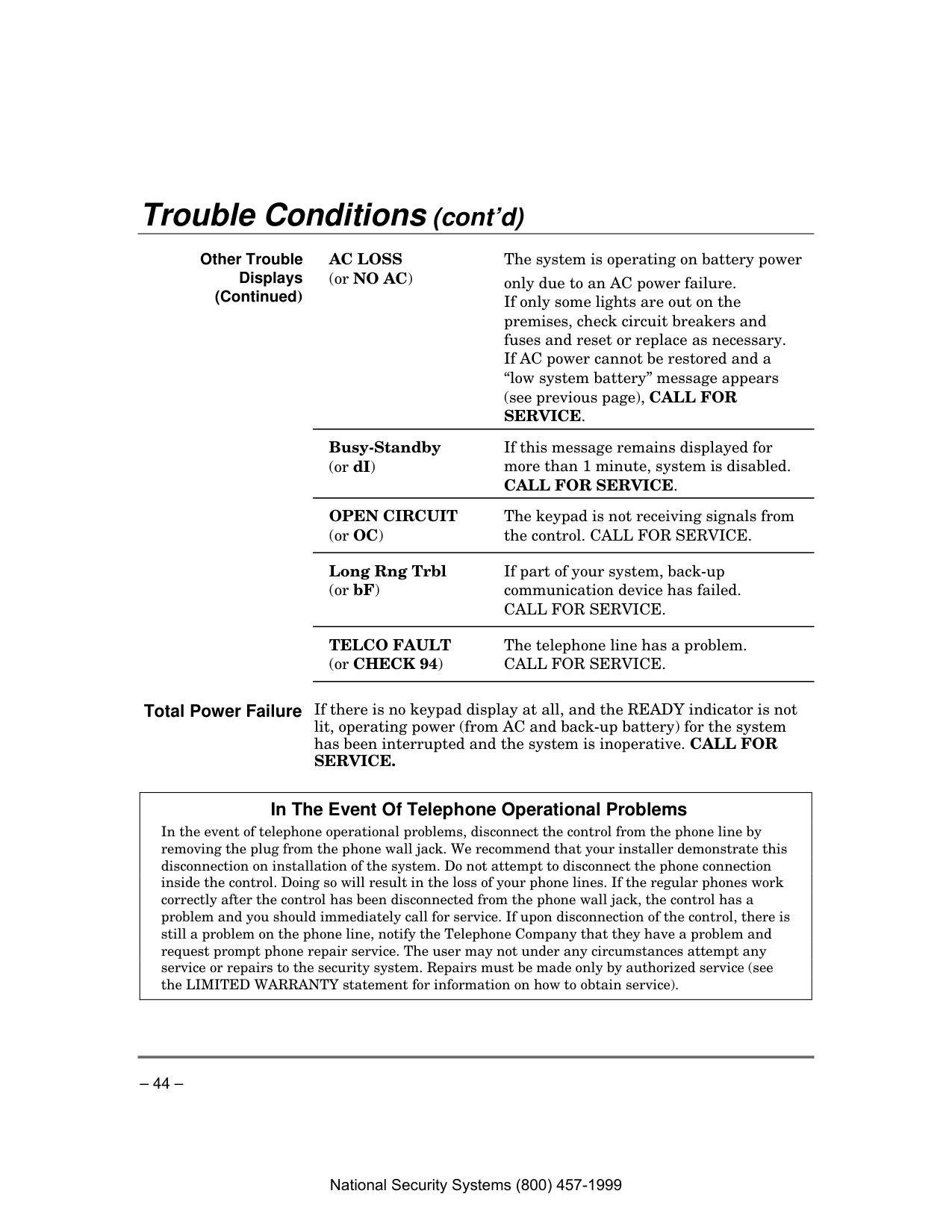
– 44 – Trouble Conditions (cont’d)
Other Trouble Displays (Continued)
Ac Loss
The system is operating on battery power (or NO AC) only due to an AC power failure.If only some lights are out on the premises, check circuit breakers and fuses and reset or replace as necessary.
If AC power cannot be restored and a “low system battery” message appears (see previous page), CALL FOR
Service.
Busy-Standby (or dI) If this message remains displayed for more than 1 minute, system is disabled.
Call For Service.
Open Circuit
The keypad is not receiving signals from (or OC) the control. CALL FOR SERVICE.Long Rng Trbl If part of your system, back-up (or bF) communication device has failed.
Call For Service.
Telco Fault
The telephone line has a problem. (or CHECK 94)Call For Service.
Total Power Failure If there is no keypad display at all, and the READY indicator is not lit, operating power (from AC and back-up battery) for the system has been interrupted and the system is inoperative. CALL FOR
Service.
In The Event Of Telephone Operational Problems In the event of telephone operational problems, disconnect the control from the phone line by removing the plug from the phone wall jack. We recommend that your installer demonstrate this disconnection on installation of the system. Do not attempt to disconnect the phone connection inside the control. Doing so will result in the loss of your phone lines. If the regular phones work correctly after the control has been disconnected from the phone wall jack, the control has a problem and you should immediately call for service. If upon disconnection of the control, there is still a problem on the phone line, notify the Telephone Company that they have a problem and request prompt phone repair service. The user may not under any circumstances attempt any service or repairs to the security system. Repairs must be made only by authorized service (see the LIMITED WARRANTY statement for information on how to obtain service).
National Security Systems (800) 457-1999
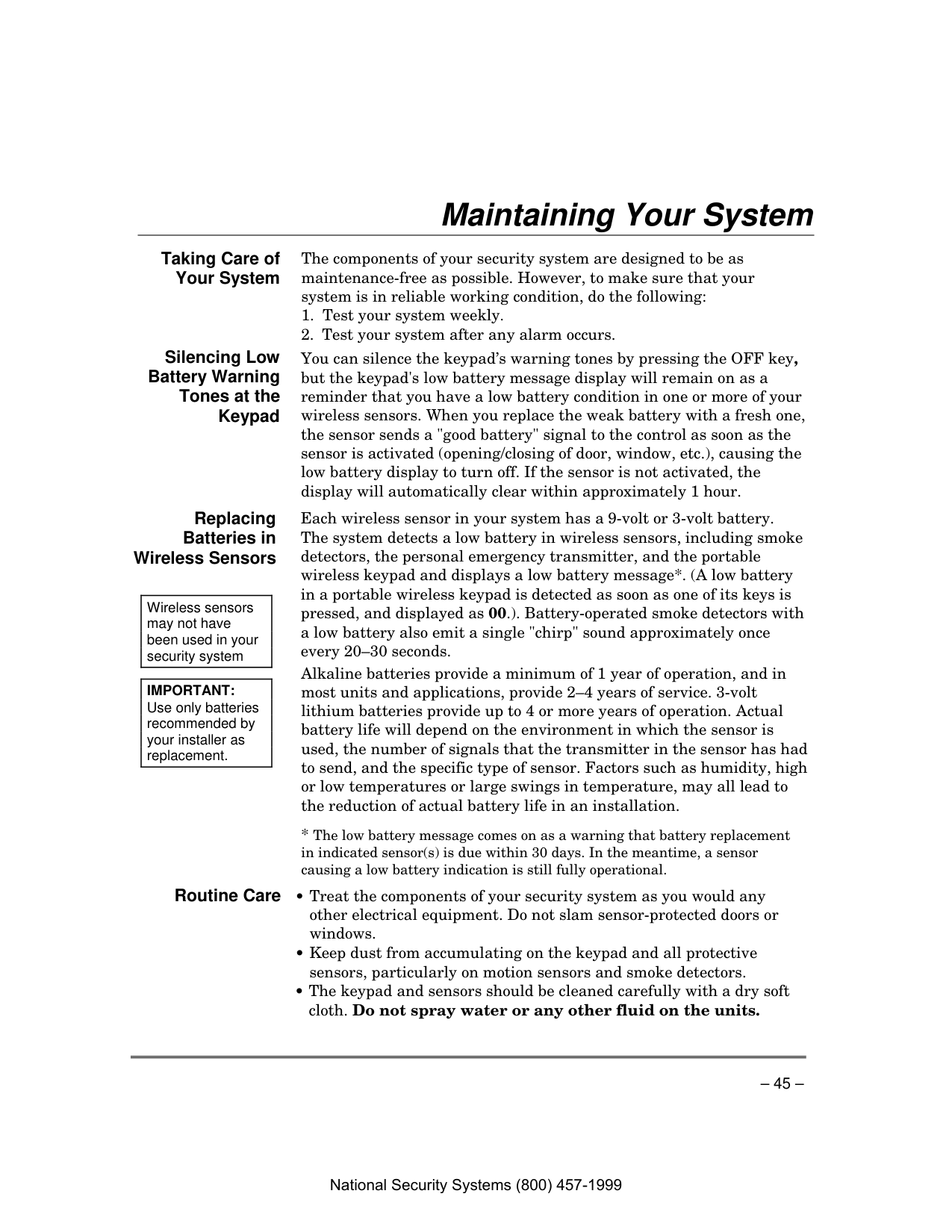
– 45 – Maintaining Your System
Taking Care of Your System The components of your security system are designed to be as maintenance-free as possible. However, to make sure that your system is in reliable working condition, do the following:
Silencing Low Battery Warning Tones at the Keypad You can silence the keypad’s warning tones by pressing the OFF key, but the keypad's low battery message display will remain on as a reminder that you have a low battery condition in one or more of your wireless sensors. When you replace the weak battery with a fresh one, the sensor sends a "good battery" signal to the control as soon as the sensor is activated (opening/closing of door, window, etc.), causing the low battery display to turn off. If the sensor is not activated, the display will automatically clear within approximately 1 hour.
Replacing Batteries in Wireless Sensors
Wireless sensors may not have been used in your security system
Important:
Use only batteries recommended by your installer as replacement. Each wireless sensor in your system has a 9-volt or 3-volt battery. The system detects a low battery in wireless sensors, including smoke detectors, the personal emergency transmitter, and the portable wireless keypad and displays a low battery message*. (A low battery in a portable wireless keypad is detected as soon as one of its keys is pressed, and displayed as 00.). Battery-operated smoke detectors with a low battery also emit a single "chirp" sound approximately once every 20–30 seconds. Alkaline batteries provide a minimum of 1 year of operation, and in most units and applications, provide 2–4 years of service. 3-volt lithium batteries provide up to 4 or more years of operation. Actual battery life will depend on the environment in which the sensor is used, the number of signals that the transmitter in the sensor has had to send, and the specific type of sensor. Factors such as humidity, high or low temperatures or large swings in temperature, may all lead to the reduction of actual battery life in an installation.Routine Care • Treat the components of your security system as you would any other electrical equipment. Do not slam sensor-protected doors or windows.

– 46 – Fire Alarm System
This Section Applies Only To Residential Systems
General Your fire alarm system (if installed) is on 24 hours a day, for continuous protection. In the event of an emergency, the strategically located smoke and heat detectors will sound their alarms and automatically send signals to your system, triggering a loud, interrupted pulsed sound* from the Keypad(s) and any external sounders. A FIRE message will appear at your Keypad and remain on until you silence the alarm (see below for silencing fire alarms).
Typical Fire Emergency Displays
F I R E 0 1 M A S T E R
B E D R O O M
01010101Alarm
Fire
Ac
Alpha Display Keypad
Fixed-Word Display Keypad
Silencing Fire Alarms and Clearing Memory of Alarm
Smoke Detector Reset Depending on the type of smoke detectors in your system, it may be necessary to "reset" the smoke detectors after a fire alarm has been turned off. Check with your installer. This "reset" is accomplished at a keypad, as follows: Enter security code ( except “arm only” user), then press the [1] key. NOTE: During smoke detector reset, “FAULT xx” appears (about six seconds) and should disappear if the detector is clear. National Security Systems (800) 457-1999

– 47 – Fire Alarm System (cont’d)
This Section Applies Only To Residential Systems
Manually Initiating a Fire Alarm
Using the Panic Key(s) Assigned for
Fire
Emergency A key or key pair may have been assigned for manually initiating a FIRE alarm. See the Panic Keys section for key assignments. For convenience, indicate the key or key pair assigned for fire below. Individual KeysA
B
C
Press the individual key assigned for fire for 2 seconds. OR Key Pairs1 OFF and ∗ READY (zone 95)
∗ READY and # (zone 99)
3 Stay
and # (zone 96)Displays Following Manual Initiation Of A Fire Alarm
F I R E 9 5
95 95 95 95
Alarm
Fire
Ac
Alpha Display Keypad
Fixed-Word Keypad
Carbon Monoxide Alarms If installed, carbon monoxide detectors provide continuous protection. If a high level of carbon monoxide is detected, an interrupted pulsed alarm sound occurs at the keypads and the detector(s). Immediately move to a spot where fresh air is available, preferably outdoors. From a safe area, call your security service provider for further instructions. To silence the keypad sounding, press the OFF key. To silence the detector, see its instructions.Press both keys of the key pair assigned for fire at the same time. National Security Systems (800) 457-1999

– 48 – Fire Alarm System (cont’d)
This Section Applies Only To Residential Systems
National Fire Protection Association Recommendations on Smoke Detectors
With regard to the number and placement of smoke/heat detectors, we subscribe to the recommendations contained in the National Fire Protection Association's National Fire Alarm Code (NFPA 72) noted below. Early warning fire detection is best achieved by the installation of fire detection equipment in all rooms and areas of the household as follows: A smoke detector installed outside of each separate sleeping area, in the immediate vicinity of the bedrooms and on each additional story of the family living unit, including basements and excluding crawl spaces and unfinished attics. In addition, the NFPA recommends that you install heat or smoke detectors in the living room, dining room, bedroom(s), kitchen, hallway(s), attic, furnace room, utility and storage rooms, basements and attached garages.
Dining
Kitchen
Bedroom
Bedroom
Bedroom
Bedroom
Living Room
Bedroom
Bdrm
Dining
Living Room
Tv Room
Kitchen
Bedroom
Bedroom
To
Br
Lvng Rm
Basement
Ktchn
.Closed
Door
Garage
Smoke Detectors for Minimum Protection Smoke Detectors for Additional Protection Heat-Activated DetectorsBdrm
floor_plan-001-V1 National Security Systems (800) 457-1999
– 49 – Fire Alarm System (cont’d)
This Section Applies Only To Residential Systems
Emergency Evacuation
•
Front
•Back
•Bath
Bedroom
Kitchen
Back Door
1 Floor
St
Bedroom
2 Floor
Nd
Bath
Bedroom
Porch
Closet
Bedroom
Bedroom
Establish and regularly practice a plan of escape in the event of fire. The following steps are recommended by the National Fire Protection Association:
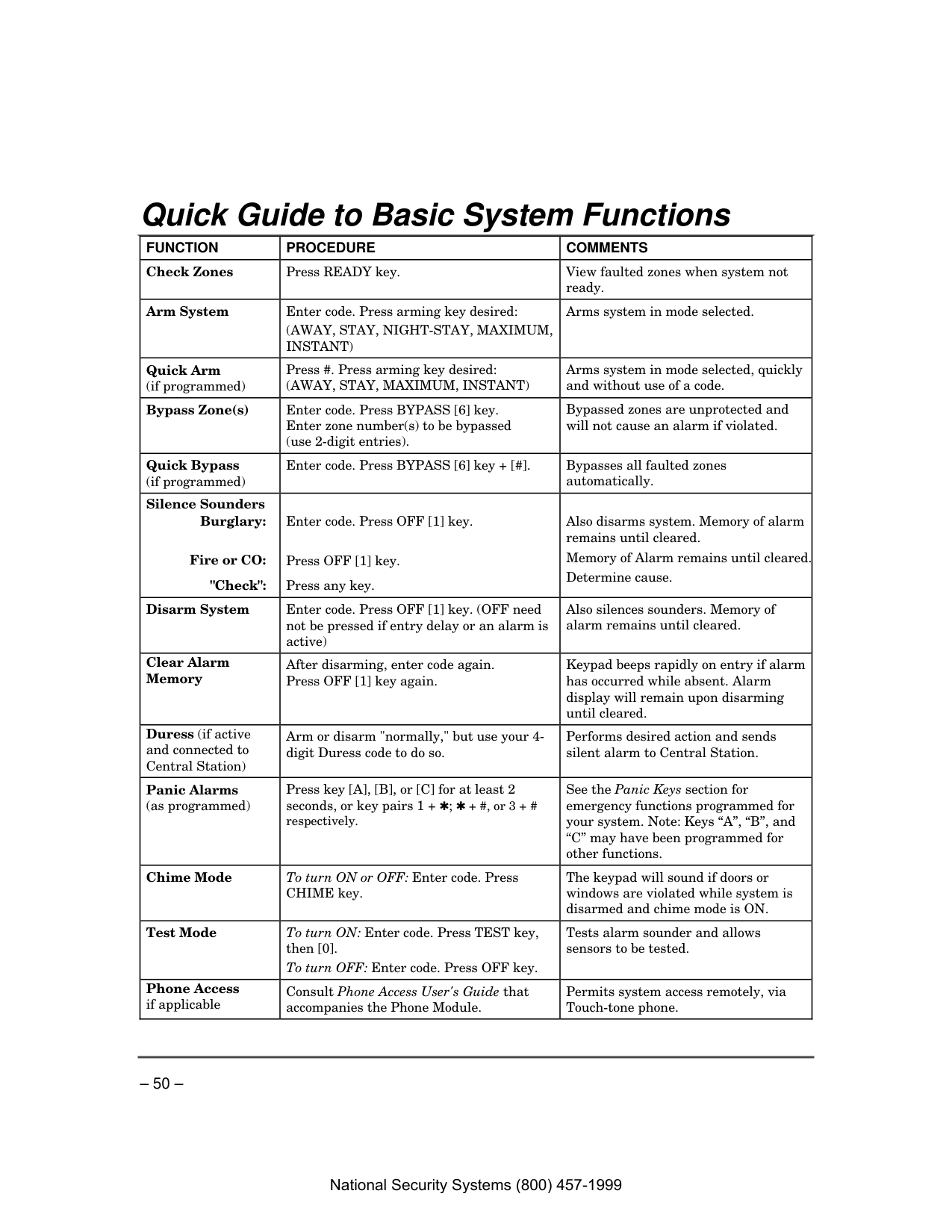
– 50 – Quick Guide to Basic System Functions
Function
Procedure
Comments
Check Zones Press READY key. View faulted zones when system not ready. Arm System Enter code. Press arming key desired:(Away, Stay, Night-Stay, Maximum,
Instant)
Arms system in mode selected. Quick Arm (if programmed) Press #. Press arming key desired:(Away, Stay, Maximum, Instant)
Arms system in mode selected, quickly and without use of a code. Bypass Zone(s) Enter code. Press BYPASS [6] key. Enter zone number(s) to be bypassed (use 2-digit entries). Bypassed zones are unprotected and will not cause an alarm if violated. Quick Bypass (if programmed) Enter code. Press BYPASS [6] key + [#]. Bypasses all faulted zones automatically. Silence SoundersBurglary:
Fire or CO:
"Check":
Enter code. Press OFF [1] key. Press OFF [1] key.
Press any key.
Also disarms system. Memory of alarm remains until cleared. Memory of Alarm remains until cleared. Determine cause. Disarm System Enter code. Press OFF [1] key. (OFF need not be pressed if entry delay or an alarm is active) Also silences sounders. Memory of alarm remains until cleared. Clear Alarm Memory After disarming, enter code again. Press OFF [1] key again. Keypad beeps rapidly on entry if alarm has occurred while absent. Alarm display will remain upon disarming until cleared. Duress (if active and connected to Central Station) Arm or disarm "normally," but use your 4- digit Duress code to do so. Performs desired action and sends silent alarm to Central Station. Panic Alarms (as programmed) Press key [A], [B], or [C] for at least 2 seconds, or key pairs 1 + ✱; ✱ + #, or 3 + # respectively. See the Panic Keys section for emergency functions programmed for your system. Note: Keys “A”, “B”, and “C” may have been programmed for other functions. Chime Mode To turn ON or OFF: Enter code. Press CHIME key. The keypad will sound if doors or windows are violated while system is disarmed and chime mode is ON. Test Mode To turn ON: Enter code. Press TEST key, then [0]. To turn OFF: Enter code. Press OFF key. Tests alarm sounder and allows sensors to be tested. Phone Access if applicable Consult Phone Access User's Guide that accompanies the Phone Module. Permits system access remotely, via Touch-tone phone. National Security Systems (800) 457-1999
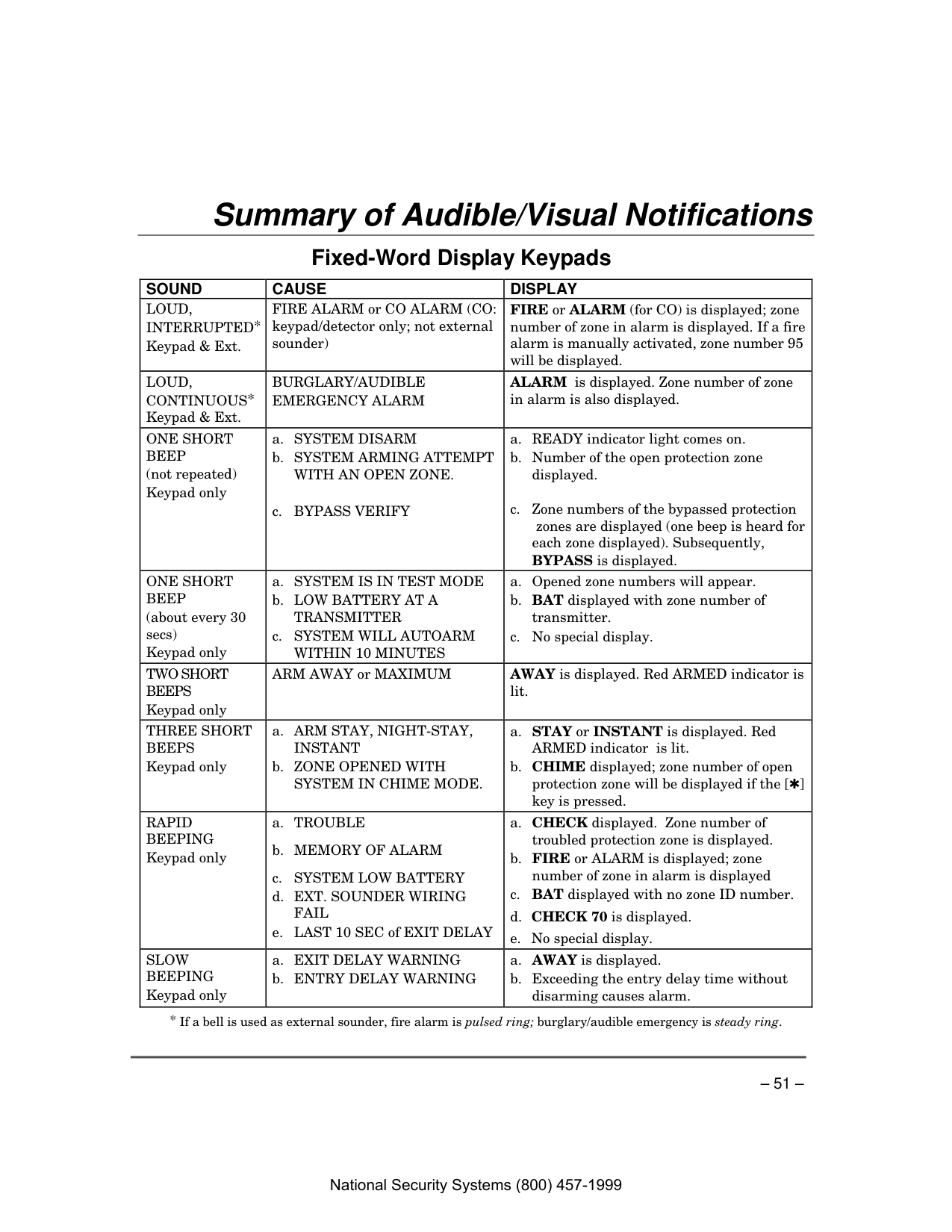
– 51 – Summary of Audible/Visual Notifications Fixed-Word Display Keypads
Sound
Cause
Display
Loud,
Interrupted*
Keypad & Ext. FIRE ALARM or CO ALARM (CO: keypad/detector only; not external sounder) FIRE or ALARM (for CO) is displayed; zone number of zone in alarm is displayed. If a fire alarm is manually activated, zone number 95 will be displayed.Loud,
Continuous*
Keypad & Ext.Burglary/Audible
Emergency Alarm
ALARM is displayed. Zone number of zone in alarm is also displayed.One Short
Beep
(not repeated) Keypad onlya. SYSTEM DISARM b. SYSTEM ARMING ATTEMPT
With An Open Zone.
c. BYPASS VERIFY
a. READY indicator light comes on. b. Number of the open protection zone displayed.
c. Zone numbers of the bypassed protection zones are displayed (one beep is heard for each zone displayed). Subsequently, BYPASS is displayed.
One Short
Beep
(about every 30 secs) Keypad only a. SYSTEM IS IN TEST MODE b. LOW BATTERY AT ATransmitter
c. SYSTEM WILL AUTOARMWithin 10 Minutes
a. Opened zone numbers will appear. b. BAT displayed with zone number of transmitter. c. No special display.Two Short
Beeps
Keypad only ARM AWAY or MAXIMUM AWAY is displayed. Red ARMED indicator is lit.Three Short
Beeps
Keypad only a. ARM STAY, NIGHT-STAY,Instant
b. ZONE OPENED WITHSystem In Chime Mode.
a. STAY or INSTANT is displayed. Red ARMED indicator is lit. b. CHIME displayed; zone number of open protection zone will be displayed if the [✱] key is pressed.Rapid
Beeping
Keypad only a. TROUBLEb. MEMORY OF ALARM
c. SYSTEM LOW BATTERY d. EXT. SOUNDER WIRING
Fail
e. LAST 10 SEC of EXIT DELAY a. CHECK displayed. Zone number of troubled protection zone is displayed. b. FIRE or ALARM is displayed; zone number of zone in alarm is displayed c. BAT displayed with no zone ID number. d. CHECK 70 is displayed. e. No special display.Slow
Beeping
Keypad only a. EXIT DELAY WARNING b. ENTRY DELAY WARNINGa. AWAY is displayed. b. Exceeding the entry delay time without disarming causes alarm.

– 52 – Summary of A/V Notifications (cont’d) Alpha Display Keypads
Sound
Cause
Display
Loud,
Interrupted*
Keypad & Ext. FIRE ALARM or CO ALARM (CO: keypad/detector only; not external sounder) FIRE or ALARM (for CO) is displayed; descriptor of zone in alarm is displayed. If a fire alarm is manually activated, zone number 95 will be displayed.Loud,
Continuous*
Keypad & Ext.Burglary/Audible
Emergency Alarm.
ALARM is displayed. If programmed, descriptor of zone in alarm is also displayedOne Short
Beep
(not repeated) Keypad onlya. SYSTEM DISARM. b. SYSTEM ARMING ATTEMPT
With An Open Zone.
c. BYPASS VERIFY. a. DISARMED/READY TO ARM is displayed. b. Number and descriptor of open protection zone is displayed. c. Numbers and descriptors of the bypassed zones are displayed (One beep occurs for each zone displayed). Then, the following displays: DISARMED BYPASS /Ready to Arm.One Short
Beep
(about every 30 seconds) Keypad only a. SYSTEM IS IN TEST MODE. b, LOW BATTERY AT ATransmitter.
c. SYSTEM WILL AUTOARMWithin 10 Minutes
a. Opened Zone identifications will appear.b. LO BAT displayed with description of transmitter. c. No special display.
Two Short
Beeps
Keypad only ARM AWAY or MAXIMUM. ARMED AWAY or MAXIMUM displayed. Red ARMED indicator lit.Three Short
Beeps
Keypad only a. ARM STAY, NIGHT-STAY,Or Instant.
b. ZONE OPENED WHILE
System Is Disarmed.
a. ARMED STAY or ARMED INSTANT displayed. Red ARMED indicator lit. b. CHIME displayed, descriptor of open protection zone will be displayed if the [✱] key is pressed.Rapid
Beeping
Keypad only a. TROUBLE.b. MEMORY OF ALARM.
c. SYSTEM LOW BATTERY.
d. EXT. SOUNDER WIRE FAIL.
e. LAST 10 SEC of EXIT DELAY a. CHECK displayed. Descriptor of troubled protection zone is displayed. b. FIRE or ALARM is displayed; descriptor of zone in alarm is displayed. c. SYSTEM LO BAT displayed. d. BELL FAILURE is displayed. e. No special display.
Slow
Beeping
Keypad only a. EXIT DELAY WARNING (if programmed). b. ENTRY DELAY WARNING. a. ARMED AWAY or MAXIMUM is displayed along with You May Exit Now. b. DISARM SYSTEM OR ALARM WILL OCCUR is displayed. Exceeding the delay time without disarming causes an alarm.
– 53 – Regulatory Statements and Warnings
Federal Communications Commission Statements
The user shall not make any changes or modifications to the equipment unless authorized by the Installation Instructions or User's Manual. Unauthorized changes or modifications could void the user's authority to operate the equipment.Class B Digital Device Statement
This equipment has been tested to FCC requirements and has been found acceptable for use. The FCC requires the following statement for your information:This equipment generates and uses radio frequency energy and if not installed and used properly, that is, in strict accordance with the manufacturer's instructions, may cause interference to radio and television reception. It has been type tested and found to comply with the limits for a Class B computing device in accordance with the specifications in Part 15 of FCC Rules, which are designed to provide reasonable protection against such interference in a residential installation. However, there is no guarantee that interference will not occur in a particular installation. If this equipment does cause interference to radio or television reception, which can be determined by turning the equipment off and on, the user is encouraged to try to correct the interference by one or more of the following measures:
Industry Canada Class B Statement
This Class B digital apparatus complies with Canadian ICES-003. Cet appareil numérique de la classe B est conforme à la norme NMB-003 du Canada.Fcc / Ic Statement
This device complies with Part 15 of the FCC Rules, and RSS210 of Industry Canada. Operation is subject to the following two conditions: (1) This device may not cause harmful interference, and (2) This device must accept any interference received, including interference that may cause undesired operation.Cet appareil est conforme à la partie 15 des règles de la FCC & de RSS 210 des Industries Canada. Son fonctionnement est soumis aux conditions suivantes: (1) Cet appareil ne doit pas causer d' interférences nuisibles. (2) Cet appareil doit accepter toute interférence reçue y compris les interférences causant une réception indésirable.
Telephone/Modem Interface
FCC Part 68 This equipment complies with Part 68 of the FCC rules. On the front cover of this equipment is a label that contains the FCC registration number and Ringer Equivalence Number (REN). You must provide this information to the telephone company when requested.This equipment uses the following USOC jack: RJ31X
This equipment may not be used on telephone-company-provided coin service. Connection to party lines is subject to state tariffs. This equipment is hearing-aid compatible.
Industry Canada NOTICE: The Industry Canada Label identifies certified equipment. This certification means that the equipment meets telecommunications network protective, operational and safety requirements as prescribed in the appropriate Terminal Equipment Technical Requirements document(s). The Department does not guarantee the equipment will operate to the user’s satisfaction
National Security Systems (800) 457-1999

– 54 – Regulatory Statements (cont’d)
Industry Canada (continued) Before installing this equipment, users should ensure that it is permissible to be connected to the facilities of the local telecommunications company. The equipment must also be installed using an acceptable method of connection. The customer should be aware that compliance with the above conditions may not prevent degradation of service in some situations.
Repairs to certified equipment should be coordinated by a representative designated by the supplier. Any repairs or alterations made by the user to this equipment, or equipment malfunctions, may give the telecommunications company to request the user to disconnect the equipment. Users should ensure for their own protection that the electrical ground connections of the power utility, telephone lines and internal metallic water pipe system, if present, are connected together, This precaution may be particularly important in rural areas.
Caution: Users should not attempt to make such connections themselves but should contact appropriate electric inspection authority, or electrician, as appropriate.
Ringer Equivalence Number Notice: The Ringer Equivalence Number (REN) assigned to each terminal device provides an indication of the maximum number of terminals allowed to be connected to a telephone interface. The termination on an interface may consist of any combination of devices subject only to the requirement that the sum of the Ringer Equivalence Numbers of all the devices does not exceed 5.
Industrie Canada AVIS: l’étiquette d’Industrie Canada identifie le matériel homologué. Cette étiquette certifie que le matériel est conforme aux normes de protection, d’exploitation et de sécurité des réseaux de télécommunications, comme le prescrivent les documents concernant les exigences techniques relatives au matériel terminal. Le Ministère n’assure toutefois pas que le matériel fonctionnera à la satisfaction de l’utilisateur.
Avant d’installer ce matériel, l’utilisateur doit s’assurer qu’il est permis de le raccorder aux installations de l’enterprise locale de télécommunication. Le matériel doit également être installé en suivant une méthode acceptée da raccordement. L’abonné ne doit pas oublier qu’il est possible que la conformité aux conditions énoncées ci-dessus n’empêche pas la dégradation du service dans certaines situations.
Les réparations de matériel nomologué doivent être coordonnées par un représentant désigné par le fournisseur. L’entreprise de télécommunications peut demander à l’utilisateur da débrancher un appareil à la suite de réparations ou de modifications effectuées par l’utilisateur ou à cause de mauvais fonctionnement.
Pour sa propre protection, l’utilisateur doit s’assurer que tous les fils de mise à la terre de la source d’energie électrique, de lignes téléphoniques et des canalisations d’eau métalliques, s’il y en a, sont raccordés ensemble. Cette précaution est particulièrement importante dans les régions rurales.
Avertissement : L’utilisateur ne doit pas tenter de faire ces raccordements lui-même; il doit avoir racours à un service d’inspection des installations électriques, ou à un électricien, selon le cas.
AVIS : L’indice d’équivalence de la sonnerie (IES) assigné à chaque dispositif terminal indique le nombre maximal de terminaux qui peuvent être raccordés à une interface. La terminaison d’une interface téléphonique peut consister en une combinaison de quelques dispositifs, à la seule condition que la somme d’indices d’équivalence de la sonnerie de tous les dispositifs n’excède pas 5.
National Security Systems (800) 457-1999

– 55 – System Features Log
Features Comments Exit Delay Part. 1: Part. 2*: Entry Delay 1 Part. 1: Part. 2*: Entry Delay 2 Part. 1: Part. 2*: NIGHT-STAY Zones Zones: Quick Arm yes no Quick Bypass yes no Automatic Paging yes no users: Keyswitch Arming (circle type of LED lighting) Arm AWAY: steady flash Arm STAY: steady flash
Function Keys
A
B
C
D
CommentsDevice:
** Emergency Keys:
A = [1] / [∗]
B = [∗] / [#]
C = [3] / [#]
National Security Systems (800) 457-1999

– 56 – System Features Log (cont’d) User Setup The following chart will help keep track of system users. Copies should be distributed to the partition† 1 and partition† 2 (if applicable) masters for their records.
To program a user attribute: Enter system/partition* master code + [8] + user no. + “#” command listed in column heading.
User No. User Name User’s Part(s).† (system master only) [#] [3] + part(s) + [#] Security Code enter new code Auth. Level [#] [1] + level Access Group [#] [2] + group RF Zone Number [#] [4] + zone no. Pager on/off [#] [5] + 0/1 01 installer (all)
installer
(1) 02 system master (all)
master
(1) 03 partition 1 master (1)
(4)
(1) 04
(1)
(0)
(1) 05
(1)
(0)
(1) 06
(1)
(0)
(1) 07
(1)
(0)
(1) 08
(1)
(0)
(1) 09
(1)
(0)
(1) 10
(1)
(0)
(1) 11
(1)
(0)
(1) 12
(1)
(0)
(1) 13
(1)
(0)
(1) 14
(1)
(0)
(1) 15
(1)
(0)
(1) 16
(1)
(0)
(1) 17
(1)
(0)
(1) 18
(1)
(0)
(1) 19
(1)
(0)
(1) 20
(1)
(0)
(1) 21
(1)
(0)
(1) 22
(1)
(0)
(1) 23
(1)
(0)
(1) 24
(1)
(0)
(1) 25
(1)
(0)
(1) 26
(1)
(0)
(1) 27
(1)
(0)
(1) 28
(1)
(0)
(1) 29
(1)
(0)
(1) 30
(1)
(0)
(1) 31
(1)
(0)
(1) 32
(1)
(0)
(1)

– 57 – System Features Log (cont’d) User Setup (cont’d)
Enter system/partition master code + [8] + user no. + “#” command listed in column heading. User No.* User Name User’s Part(s). (system master only) [#] [3] + part(s) + [#] Security Code enter new code Auth. Level [#] [1] + level Access Group [#] [2] + group RF Zone Number [#] [4] + zone no. Pager on/off [#] [5] + 0/1 33 partition 2 master (2)
(4)
(1) 34
(2)
(0)
(1) 35
(2)
(0)
(1) 36
(2)
(0)
(1) 37
(2)
(0)
(1) 38
(2)
(0)
(1) 39
(2)
(0)
(1) 40
(2)
(0)
(1) 41
(2)
(0)
(1) 42
(2)
(0)
(1) 43
(2)
(0)
(1) 44
(2)
(0)
(1) 45
(2)
(0)
(1) 46
(2)
(0)
(1) 47
(2)
(0)
(1) 48
(2)
(0)
(1) 49
(2)
(0)
(1)
Authority Levels: 0 = standard user
Partitions: 0 = clears partition 1 and partition 2 defaults
1 = arm only
1 = partition 1 and common
2 = guest
2 = partition 2 and common
3 = duress
3 = common partition only
4 = partition master
Paging: 0 = no paging; 1 = allow paging
Paging Setup
Pager
Pager Phone Number\ Prefix Characters Automatically Reports Upon… Sched. Func. Key open/close alarm/trouble zone list
p1 p2 p1 p2 p1 p2
1
2
3**
4**
** Pagers 3 and 4 and partitions apply to VISTA-20P Series only. National Security Systems (800) 457-1999

– 58 – System Features Log (cont’d) Schedules*: master code + [#] + [6] [4] No. Event Device No. Group No. Partition** Start Stop Repeat Random
(see list below) for “01” events: for “02” events: for “04-06” events: Time/ Time/ (1-4) (yes/no)
(see device list below) enter 1-8 enter 1, 2, or 3 Day Day 01 02 03 04 05* 06* 07* 08* 09* 10* 11* 12* 13* 14* 15* 16* Events: 00 = clear event 03 = latch key report 06 = auto disarm
01 = device on/off 04 = forced STAY arm 07 = display “reminder”
02 = user access 05 = forced AWAY arm
Repeat Options: 0 = none; 1 = repeat weekly; 2 = repeat every other week; 3 = repeat every third week; 4 = repeat every fourth week
List of Output Devices Device** Description Schedule No. Function Key 01
02
03
04
05
06
07
08
09
10
11
12
13
14
15
16
17
18
(** VISTA-20P Series can use devices 01-16; VISTA-15P Series can only use devices 01-08; both can use trigger devices 17/18.) National Security Systems (800) 457-1999

– 59 –
Owner’S Insurance Premium Credit Request
This form should be completed and forwarded to your homeowner’s insurance carrier for possible premium credit.
A. General Information:
Insured’s Name and Address:Insurance Company: Policy No.:
VISTA-20P / VISTA-15P Other ____________________________________________________ (circle the appropriate model number) Type of Alarm: Burglary Fire Both
Installed by: Serviced by:
Name Name
Address Address
B. NOTIFIES (Insert B = Burglary, F = Fire) Local Sounding Device Police Dept. Fire Dept.
Central Station Name:
Address:
Phone:
C. POWERED BY: A.C. With Rechargeable Power Supply
D. TESTING: Quarterly Monthly Weekly Other
continued on other side National Security Systems (800) 457-1999

– 60 –
Owner’S Insurance Premium Credit Request
(cont.)E. Smoke Detector Locations
Furnace Room Kitchen Bedrooms Attic Basement Living Room Dining Room HallF. Burglary Detecting Device Locations:
Front Door Basement Door Rear Door All Exterior Doors 1 st Floor Windows All windows Interior locations All Accessible Openings, Including Skylights, Air Conditioners and VentsG. Additional Pertinent Information:
Signature: Date:
National Security Systems (800) 457-1999

– 61 – –––– Notes Notes Notes Notes ––––
Servicing Information
Your local authorized service representative is the person best qualified to service your alarm system. Arranging some kind of regular service program with him is advisable. Your local service representative is: Name:Address:
Phone:
National Security Systems (800) 457-1999

– 62 – –––– Notes Notes Notes Notes ––––
National Security Systems (800) 457-1999

– 63 –
Limitations Of This System
Warning! The Limitations Of This Alarm System
While this system is an advanced design security system, it does not offer guaranteed protection against burglary or other emergency. Any alarm system, whether commercial or residential, is subject to compromise or failure to warn for a variety of reasons. For example: • Intruders may gain access through unprotected openings or have the technical sophistication to bypass an alarm sensor or disconnect an alarm warning device. • Intrusion detectors (e.g. passive infrared detectors), smoke detectors, and many other sensing devices will not work without power. Battery operated devices will not work without batteries, with dead batteries, or if the batteries are not put in properly. Devices powered solely by AC will not work if their AC power supply is cut off for any reason, however briefly. • Signals sent by wireless transmitters may be blocked or reflected by metal before they reach the alarm receiver. Even if the signal path has been recently checked during a weekly test, blockage can occur if a metal object is moved into the path. • A user may not be able to reach a panic or emergency button quickly enough. • While smoke detectors have played a key role in reducing residential fire deaths in the United States, they may not activate or provide early warning for a variety of reasons in as many as 35% of all fires, according to data published by the Federal Emergency Management Agency. Some of the reasons smoke detectors used in conjunction with this System may not work are as follows. Smoke detectors may have been improperly installed and positioned. Smoke detectors may not sense fires that start where smoke cannot reach the detectors, such as in chimneys, in walls, or roofs, or on the other side of closed doors. Smoke detectors also may not sense a fire on another level of a residence or building. A second floor detector, for example, may not sense a first floor or basement fire. Moreover, smoke detectors have sensing limitations. No smoke detector can sense every kind of fire every time. In general, detectors may not always warn about fires caused by carelessness and safety hazards like smoking in bed, violent explosions, escaping gas, improper storage of flammable materials, overloaded electrical circuits, children playing with matches, or arson. Depending upon the nature of the fire and/or the locations of the smoke detectors, the detector, even if it operates as anticipated, may not provide sufficient warning to allow all occupants to escape in time to prevent injury or death. • Passive Infrared Motion Detectors can only detect intrusion within the designed ranges as diagrammed in their installation manual. Passive Infrared Detectors do not provide volumetric area protection. They do create multiple beams of protection, and intrusion can only be detected in unobstructed areas covered by those beams. They cannot detect motion or intrusion that takes place behind walls, ceilings, floors, closed doors, glass partitions, glass doors, or windows.
Mechanical tampering, masking, painting or spraying of any material on the mirrors, windows or any part of the optical system can reduce their detection ability. Passive Infrared Detectors sense changes in temperature; however, as the ambient temperature of protected area approaches the temperature range of 90° to 105°F, the detection performance can decrease. • Alarm warning devices such as sirens, bells or horns may not alert people or wake up sleepers if they are located on the other side of closed or partly open doors. If warning devices sound on a different level of the residence from the bedrooms, then they are less likely to waken or alert people inside the bedrooms. Even persons who are awake may not hear the warning if the alarm is muffled from a stereo, radio, air conditioner or other appliance, or by passing traffic. Finally, alarm warning devices, however loud, may not warn hearing-impaired people or waken deep sleepers. • Telephone lines needed to transmit alarm signals from a premises to a central monitoring station may be out of service or temporarily out of service. Telephone lines are also subject to compromise by sophisticated intruders. • Even if the system responds to the emergency as intended, however, occupants may have insufficient time to protect themselves from the emergency situation. In the case of a monitored alarm system, authorities may not respond appropriately. • This equipment, like other electrical devices, is subject to component failure. Even though this equipment is designed to last as long as 10 years, the electronic components could fail at any time. The most common cause of an alarm system not functioning when an intrusion or fire occurs is inadequate maintenance. This alarm system should be tested weekly to make sure all sensors and transmitters are working properly. Installing an alarm system may make one eligible for lower insurance rates, but an alarm system is not a substitute for insurance. Homeowners, property owners and renters should continue to act prudently in protecting themselves and continue to insure their lives and property. We continue to develop new and improved protection devices. Users of alarm systems owe it to themselves and their loved ones to learn about these developments.
National Security Systems (800) 457-1999

Two Year Limited Warranty
Honeywell International Inc., acting through its Security & Communications business (“Seller”), 2 Corporate Center Drive, Melville, New York 11747 warrants its products to be free from defects in materials and workmanship under normal use and service, normal wear and tear excepted, for 24 months from the manufacture date code; provided, however, that in the event the Buyer presents a proper invoice relating to the purchased product and such invoice bears a date later than the manufacture date, then Seller may at its discretion, reflect the warranty period as commencing at invoice date. Except as required by law, this Limited Warranty is only made to Buyer and may not be transferred to any third party. During the applicable warranty period, Seller will repair or replace, at its sole option and as the exclusive remedy hereunder, free of charge, any defective products.Seller shall have no obligation under this Limited Warranty or otherwise if the product:
(i) is improperly installed, applied or maintained;
(ii) installed outside of stated operating parameters, altered or improperly serviced or repaired by anyone other than the Seller/Seller’s Authorized Service/Repair Center;
(iii) damage is caused by outside natural occurrences, such as lightning, power surges, fire, floods, acts of nature, or the like; or
(iv) defects result from unauthorized modification, misuse, vandalism, alterations of serial numbers, other causes unrelated to defective materials or workmanship, or failures related to batteries of any type used in connection with the products sold hereunder.
Exceptions to Warranty With Respect to Honeywell Products listed below: Hardwire Contacts and PIRs – Seller warrants parts for hardwire contacts and PIRs in accordance with the terms of the above limited warranty for a period of five (5) years from the manufacture date code.
Exclusion Of Warranties, Limitation Of Liability
THERE ARE NO WARRANTIES OR CONDITIONS, EXPRESS OR IMPLIED, OF MERCHANTABILITY, OR FITNESS FOR A PARTICULAR PURPOSE OR OTHERWISE, WHICH EXTEND BEYOND THE DESCRIPTION ON THE FACE HEREOF. TO THE FULLEST EXTENT PERMITTED BY LAW, IN NO CASE SHALL SELLER BE LIABLE TO ANYONE FOR ANY (i) CONSEQUENTIAL, INCIDENTAL, INDIRECT, SPECIAL, OR PUNITIVE DAMAGES ARISING OUT OF OR RELATING IN ANY WAY TO THE PRODUCT AND/OR FOR BREACH OF THIS OR ANY OTHER WARRANTY OR CONDITION, EXPRESS OR IMPLIED, OR UPON ANY OTHER BASIS OF LIABILITY WHATSOEVER, EVEN IF THE LOSS OR DAMAGE IS CAUSED BY SELLER’S OWN NEGLIGENCE OR FAULT AND EVEN IF SELLER HAS BEEN ADVISED OF THE POSSIBILITY OF SUCH LOSSES OR DAMAGES. Any product description (whether in writing or made orally by Seller or Seller’s agents), specifications, samples, models, bulletin, drawings, diagrams, engineering sheets or similar materials used in connection with the Buyer’s order are for the sole purpose of identifying the Seller’s products and shall not be construed as an express warranty or condition. Any suggestions by Seller or Seller’s agents regarding use, applications, or suitability of the products shall not be construed as an express warranty or condition unless confirmed to be such in writing by Seller. Seller does not represent that the products it sells may not be compromised or circumvented; that the products will prevent any personal injury or property loss by burglary, robbery, fire or otherwise, or that the products will in all cases provide adequate warning or protection. Buyer understands that a properly installed and maintained alarm may only reduce the risk of a burglary, robbery or fire without warning, but it is not insurance or a guarantee that such will not occur or will not cause or lead to personal injury or property loss. CONSEQUENTLY, SELLER SHALL HAVE NO LIABILITY FOR ANY PERSONAL INJURY, PROPERTY DAMAGE OR OTHER LOSS BASED ON ANY CLAIM AT ALL INCLUDING A CLAIM THE PRODUCT FAILED TO GIVE WARNING. However, if Seller is held liable whether directly or indirectly for any loss or damage with respect to the products it sells, regardless of cause or origin, its maximum liability shall not in any case exceed the purchase price of the product, which shall be fixed as liquidated damages and not as a penalty, and shall be the complete and exclusive remedy against the Seller. Should your product become defective during the warranty, please contact your installer to facilitate repair or replacement with Seller pursuant to the terms hereof. Seller reserves the right to replace any defective product under warranty with new, refurbished, or remanufactured product.
2 Corporate Center Drive, Suite 100 P.O. Box 9040, Melville, NY 11747 Copyright © 2004 Honeywell International Inc.
www.honeywell.com/security