Kwikset HomeConnect Smart Lock manual
Smart Locks · 10 Q&As

Kwikset HomeConnect Smart Lock

Ask AI

— answers from the official manual

AI-powered answers from the official manual. Verify critical info.

Common questions

Common Questions

10 total
1

How many user access codes does the HomeConnect lock support?

The HomeConnect lock supports 30 user access codes. It is recommended to add or change access codes directly from the Z-Wave or ZigBee control system.

2

What should I do if my first inclusion attempt was unsuccessful?

If the first inclusion attempt was unsuccessful, perform the exclusion process to reset the lock, then repeat the inclusion process. Refer to Figure 2 in the manual for the exclusion process.

3

How close does the lock need to be to the control system during inclusion?

Depending on the controller location and Z-Wave protocol version, it may be necessary to perform the inclusion process on the HomeConnect Lock within 12 inches from the control system. During the inclusion process, ensure that both the control system and HomeConnect lock remain stationary for a total of 60 seconds to complete the encryption exchange.

4

How can I delete access codes from the lock?

Deleting access codes can only be done directly from the Z-Wave or ZigBee control system. You cannot delete codes directly from the lock itself.

5

What is the wireless range of the Z-Wave lock?

Z-Wave has an estimated open air range of 65 feet, but results may vary based on building construction and communication path, with 35 feet+ installed distance being typical. You may need to install a repeatable or beaming Z-Wave device (such as a lamp module) to enhance the communication path for a more robust network.

6

Do I need a security-enabled controller to use this lock?

Yes, a security-enabled Z-Wave controller must be used in order to fully utilize the product. The lock is a security-enabled Z-Wave product and is fully interoperable with any Z-Wave secure controller.

Show 4 more questions

Full Manual

2 pages
Page 1

HomeConnect Lock Configuration Guide HomeConnect Lock Configuration Guide HomeConnect Lock Configuration Guide Home Connect 44571 / 04 English

  • Ensure you have followed all the steps in
  • the SmartCode Quick Installation Guide.
  • Locate and remove the interior cover from
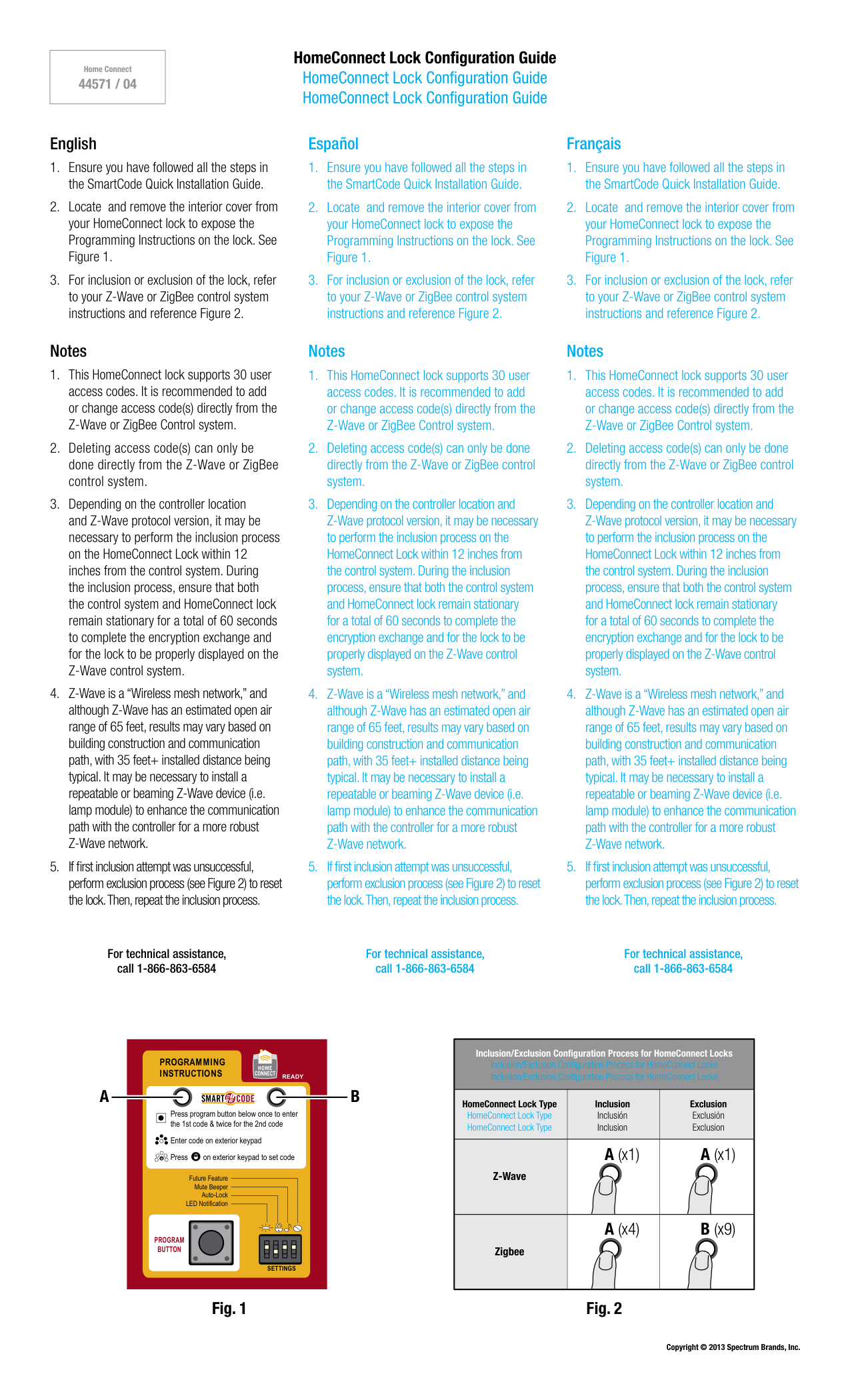
  • your HomeConnect lock to expose the Programming Instructions on the lock. See Figure 1.
  • For inclusion or exclusion of the lock, refer
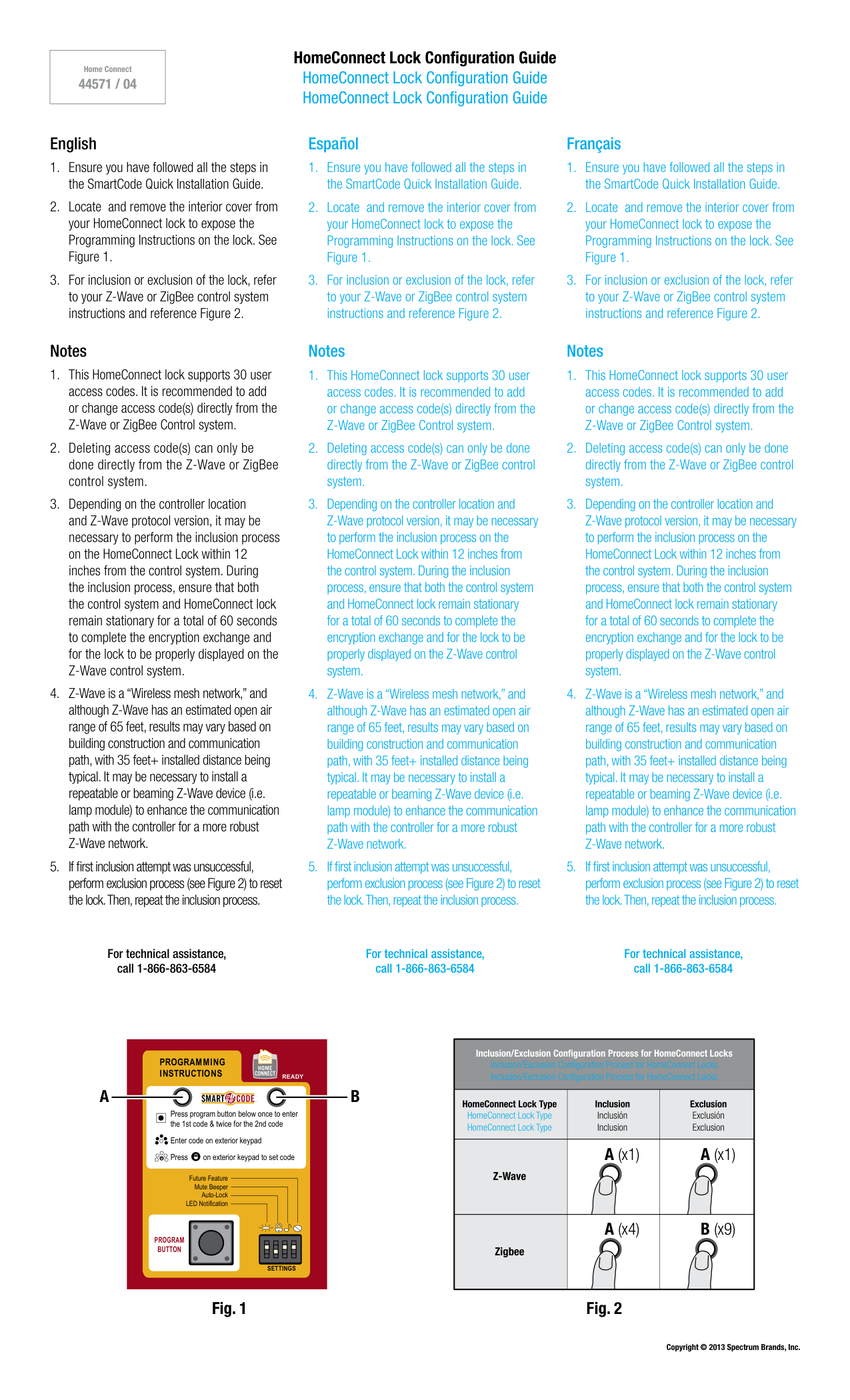
  • to your Z-Wave or ZigBee control system instructions and reference Figure 2. Notes
  • This HomeConnect lock supports 30 user
  • access codes. It is recommended to add or change access code(s) directly from the Z-Wave or ZigBee Control system.
  • Deleting access code(s) can only be
  • done directly from the Z-Wave or ZigBee control system.
  • Depending on the controller location
  • and Z-Wave protocol version, it may be necessary to perform the inclusion process on the HomeConnect Lock within 12 inches from the control system. During the inclusion process, ensure that both the control system and HomeConnect lock remain stationary for a total of 60 seconds to complete the encryption exchange and for the lock to be properly displayed on the Z-Wave control system.
  • Z-Wave is a “Wireless mesh network,” and
  • although Z-Wave has an estimated open air range of 65 feet, results may vary based on building construction and communication path, with 35 feet+ installed distance being typical. It may be necessary to install a repeatable or beaming Z-Wave device (i.e. lamp module) to enhance the communication path with the controller for a more robust Z-Wave network.
  • If first inclusion attempt was unsuccessful,
  • perform exclusion process (see Figure 2) to reset the lock. Then, repeat the inclusion process. Español
  • Ensure you have followed all the steps in
  • the SmartCode Quick Installation Guide.
  • Locate and remove the interior cover from
  • your HomeConnect lock to expose the Programming Instructions on the lock. See Figure 1.
  • For inclusion or exclusion of the lock, refer
  • to your Z-Wave or ZigBee control system instructions and reference Figure 2. Notes
  • This HomeConnect lock supports 30 user
  • access codes. It is recommended to add or change access code(s) directly from the Z-Wave or ZigBee Control system.
  • Deleting access code(s) can only be done
  • directly from the Z-Wave or ZigBee control system.
  • Depending on the controller location and
  • Z-Wave protocol version, it may be necessary to perform the inclusion process on the HomeConnect Lock within 12 inches from the control system. During the inclusion process, ensure that both the control system and HomeConnect lock remain stationary for a total of 60 seconds to complete the encryption exchange and for the lock to be properly displayed on the Z-Wave control system.
  • Z-Wave is a “Wireless mesh network,” and
  • although Z-Wave has an estimated open air range of 65 feet, results may vary based on building construction and communication path, with 35 feet+ installed distance being typical. It may be necessary to install a repeatable or beaming Z-Wave device (i.e. lamp module) to enhance the communication path with the controller for a more robust Z-Wave network.
  • If first inclusion attempt was unsuccessful,
  • perform exclusion process (see Figure 2) to reset the lock. Then, repeat the inclusion process. Français
  • Ensure you have followed all the steps in
  • the SmartCode Quick Installation Guide.
  • Locate and remove the interior cover from
  • your HomeConnect lock to expose the Programming Instructions on the lock. See Figure 1.
  • For inclusion or exclusion of the lock, refer
  • to your Z-Wave or ZigBee control system instructions and reference Figure 2. Notes
  • This HomeConnect lock supports 30 user
  • access codes. It is recommended to add or change access code(s) directly from the Z-Wave or ZigBee Control system.
  • Deleting access code(s) can only be done
  • directly from the Z-Wave or ZigBee control system.
  • Depending on the controller location and
  • Z-Wave protocol version, it may be necessary to perform the inclusion process on the HomeConnect Lock within 12 inches from the control system. During the inclusion process, ensure that both the control system and HomeConnect lock remain stationary for a total of 60 seconds to complete the encryption exchange and for the lock to be properly displayed on the Z-Wave control system.
  • Z-Wave is a “Wireless mesh network,” and
  • although Z-Wave has an estimated open air range of 65 feet, results may vary based on building construction and communication path, with 35 feet+ installed distance being typical. It may be necessary to install a repeatable or beaming Z-Wave device (i.e. lamp module) to enhance the communication path with the controller for a more robust Z-Wave network.
  • If first inclusion attempt was unsuccessful,
  • perform exclusion process (see Figure 2) to reset the lock. Then, repeat the inclusion process. Copyright © 2013 Spectrum Brands, Inc. For technical assistance, call 1-866-863-6584 For technical assistance, call 1-866-863-6584 For technical assistance, call 1-866-863-6584

    Program

    Button

    Settings

    Press program button below once to enter the 1st code & twice for the 2nd code Enter code on exterior keypad Press on exterior keypad to set code

    Programming

    Instructions

    Ready

    Future Feature Mute Beeper Auto-Lock LED Notification

    A

    B

    A (x1) A (x1) A (x4) B (x9) Inclusion Inclusión Inclusion HomeConnect Lock Type HomeConnect Lock Type HomeConnect Lock Type Z-Wave Zigbee Exclusion Exclusión Exclusion Inclusion/Exclusion Configuration Process for HomeConnect Locks Inclusion/Exclusion Configuration Process for HomeConnect Locks Inclusion/Exclusion Configuration Process for HomeConnect Locks Fig. 1 Fig. 2
    Page 2

    HomeConnect Lock Configuration Guide HomeConnect Lock Configuration Guide HomeConnect Lock Configuration Guide Home Connect 44571 / 04 English

    Regulatory Compliance

    This product complies with standards established by the following regulatory bodies:
  • Federal Communications Commission (FCC)
  • Industry Canada
  • Fcc

    This device complies with Part 15 of the FCC Rules. Operation is subject to the following two conditions: ( 1 ) this device may not cause harmful interference, and ( 2 ) this device must accept any interference received, including interference that may cause undesired operation. This equipment has been tested and found to comply with the limits for a Class B digital device, pursuant to Part 15 of the FCC Rules. These limits are designed to provide reasonable protection against harmful interference in a residential installation. This equipment generates, uses, and can radiate radio frequency energy and, if not installed and used in accordance with the instructions, may cause harmful interference to radio communi-cations. However, there is no guarantee that interference will not occur in a particular installation. If this equipment does cause harmful interference to radio or television reception, which can be determined by turning the equipment off and on, the user is encouraged to try to correct the interference by one or more of the following measures:
  • Reorient or relocate the receiving antenna.
  • Increase the separation between the equipment and
  • receiver.
  • Connect the equipment into an outlet on a circuit
  • different from that to which the receiver is connected.
  • Consult the dealer or an experienced radio/TV
  • technician for help. IMPORTANT! Changes or modifications not expressly approved by the manufacturer could void the user’s authority to operate the equipment.

    Industry Canada

    This Class B digital apparatus complies with Canada ICES-003. CAN/CSA-C22.2 NO. 14-05 (Industrial Control Equipment) Operation is subject to the following two conditions: ( 1 ) this device may not cause interference, and ( 2 ) this device must accept any interference, including interference that may cause undesired operation of the device.

    Z-Wave

  • Security enabled Z-Wave product
  • Security enabled Z-Wave controller must be used in
  • order to fully utilize product. This Z-Wave-enabled door lock can be included, operated, and is fully interoperable with any Z-Wave secure controller. Español

    Cumplimiento Normativo

    Este producto cumple con las normas establecidas por los siguientes organismos reguladores:
  • Comisión Federal de Comunicaciones (FCC)
  • Industry Canada
  • Fcc

    Este dispositivo cumple con la 15ª parte del reglamento de la FCC. Su funcionamiento está sujeto a las siguientes dos condiciones: ( 1 ) este dispositivo no deberá causar ninguna interferencia dañina, y ( 2 ) este dispositivo deberá aceptar cualquier interferencia recibida, incluyendo aquélla que podría causar un funcionamiento no deseado. Se realizaron pruebas a este equipo cuyos resultados revelaron que cumple con los límites establecidos para un dispositivo digital de la Clase B, conforme a la 15ª parte del reglamento de la FCC. Estos límites han sido impuestos para proporcionar protección razonable contra interferencias dañinas en una instalación residencial. Este equipo genera, utiliza y puede irradiar energía de radiofrecuencia y, si no se instala y utiliza según lo que indican las instrucciones, podría causar interferencia dañina en radiocomunicaciones. Sin embargo, no hay garantía de que la interferencia no ocurrirá en determinadas instalaciones. Si este equipo efectivamente causa interferencia en la recepción de radio o televisión, la cual puede determinarse encendiendo y apagando el equipo, sugerimos al usuario que intente corregir dicha interferencia tomando una o más de las siguientes medidas:
  • Volver a orientar o ubicar la antena receptora.
  • Incrementar la distancia entre el equipo y el recibidor.
  • Conectar el equipo a una toma de corriente en un
  • circuito distinto del circuito en el cual esté conectado el recibidor.
  • Consultar con el distribuidor o un técnico de radio y TV
  • con experiencia para obtener su ayuda. ¡IMPORTANTE! Todo cambio o modificación no aprobado expresamente por el fabricante podría desautorizar al usuario para operar el equipo.

    Industry Canada

    Este aparato digital de clase B cumple con la norma Canada ICES-003. CAN/CSA-C22.2 No. 14-05 (Equipo de Control Industrial) Su funcionamiento está sujeto a las siguientes dos condiciones: ( 1 ) este dispositivo no deberá causar ninguna interferencia dañina, y ( 2 ) este dispositivo deberá aceptar cualquier interferencia, incluyendo aquélla que podría causar el funcionamiento no deseado del dispositivo.

    Z-Wave

  • Producto Z-WAVE con seguridad permitida.
  • El regulador de la seguridad permitida del producto
  • Z-WAVE se debe usar para utilizar copletamente el producto. Esta cerradura de puerta Z-WAVE-permitida puede ser incluida, funcionada, y es completamente interoperable con cualquier Z-WAVE regulador seguro. Français

    Regulatory Compliance

    This product complies with standards established by the following regulatory bodies:
  • Federal Communications Commission (FCC)
  • Industrie Canada
  • Fcc

    Cet appareil est conforme aux limites prescrites dans la partie 15 des règlements de la Federal Communication Commission (FCC) des États-Unis. Son utilisation est subordonnée aux conditions suivantes : (1) l’appareil ne doit pas causer d’interférence, et (2) il doit accepter toute interférence, y compris celles qui peuvent causer son mauvais fonctionnement. Lors des tests effectués, cet appareil s’est révélé conforme aux limites prescrites dans la partie 15 des règlements de la Federal Communication Commission (FCC) des États-Unis pour un appareil numérique de Classe B. Ces limites ont été fixées pour protéger raisonnablement les installations résidentielles contre les interférences nuisibles. L’appareil produit, utilise et peut émettre des radiofréquences. S’il n’est pas installé et utilisé de la façon prescrite, il peut brouiller les communications radio. Il n’est pas garanti qu’aucune interférence ne se produira. Si l’appareil brouille la réception d’une radio ou d’un téléviseur (pour savoir s’il est à l’origine du brouillage, il suffit de l’éteindre et de le rallumer), l’utilisateur est invité à tenter de corriger la situation en prenant une ou plusieurs des mesures suivantes :
  • réorienter ou déplacer l’antenne réceptrice;
  • éloigner davantage l’appareil émetteur du récepteur;
  • brancher l’appareil dans une prise reliée à un circuit
  • différent de celui auquel le récepteur est relié;
  • consulter le détaillant ou un technicien de
  • radiotélévision expérimenté pour obtenir de l’aide. IMPORTANT! Les modifications qui n’ont pas été expressément approuvées par le fabricant de l’appareil peuvent annuler l’autorisation d’utiliser l’appareil.

    Industrie Canada

    Cet appareil numérique de la Classe B est conforme à la norme NMB-003 du Canada. CAN/CSA-C22.2 No. 14-05 (Appareil Industriel de Contrôle L’opération est sujette aux deux conditions: ( 1 ) ce dispositif peut ne pas causer l’interférence et ( 2 ) ce dispositif doit accepter n’importe quelle interférence, y compris l’interférence qui peut causer le fonctionnement peu désiré du dispositif.

    Z-Wave

  • La sécurité a permis le produit de Z-WAVE.
  • Le contrôleur de Z-WAVE permis par sécurité doit être
  • employé afin d’utiliser entièrement le produit. Ceci serrure de porte Z-WAVE-permise peut être inclus, fonctionné, et est entièrement interopérable avec le tout Z-WAVE contrôleur bloqué.

    More from Kwikset

    Similar Smart Locks