
HP LaserJet Pro M127FN Multifunction Printer
Ask AI
— answers from the official manualAnswers from the official manual.
Common questions
Common Questions
10 totalWhat is the maximum number of copies I can make in a single job?
The maximum number of copies is up to 99 copies in a single job. The copier also supports resize functionality from 25 to 400%.
What is the maximum duty cycle for this printer?
The duty cycle is up to 8,000 pages per month, which defines the maximum number of pages of imaged output the printer can handle. HP recommends that monthly page volume stay within 250 to 2,000 pages for optimum device performance.
What paper sizes and types does the M127FN support?
The printer supports standard media sizes including Letter, Legal, Executive, envelopes (Com #10, Monarch #7 3/4), and postcards. It also handles plain paper, laserjet paper, envelopes, transparencies, labels, postcards, and custom sizes from 3 x 5 to 8.5 x 14 inches.
What is included in the box with the printer?
The box includes the HP LaserJet Pro MFP M127fn, a preinstalled introductory HP LaserJet Black Cartridge (~700 pages), installation guide, Getting Started guide, User's Guide, support flyer, warranty guide, printer documentation and software on CD-ROM, power cord, and phone cord.
What is the print speed of the HP LaserJet Pro M127FN?
The print speed is up to 21 ppm (pages per minute) for black printing in normal mode on letter-sized paper. The exact speed varies depending on system configuration, software program, and document complexity.
What are the recommended operating temperature and humidity ranges for this printer?
The recommended operating temperature range is 63.5 to 77°F (17.5 to 25°C), and the recommended operating humidity range is 30 to 70% RH. Operating outside these ranges may affect printer performance.
Full Manual
2 pages
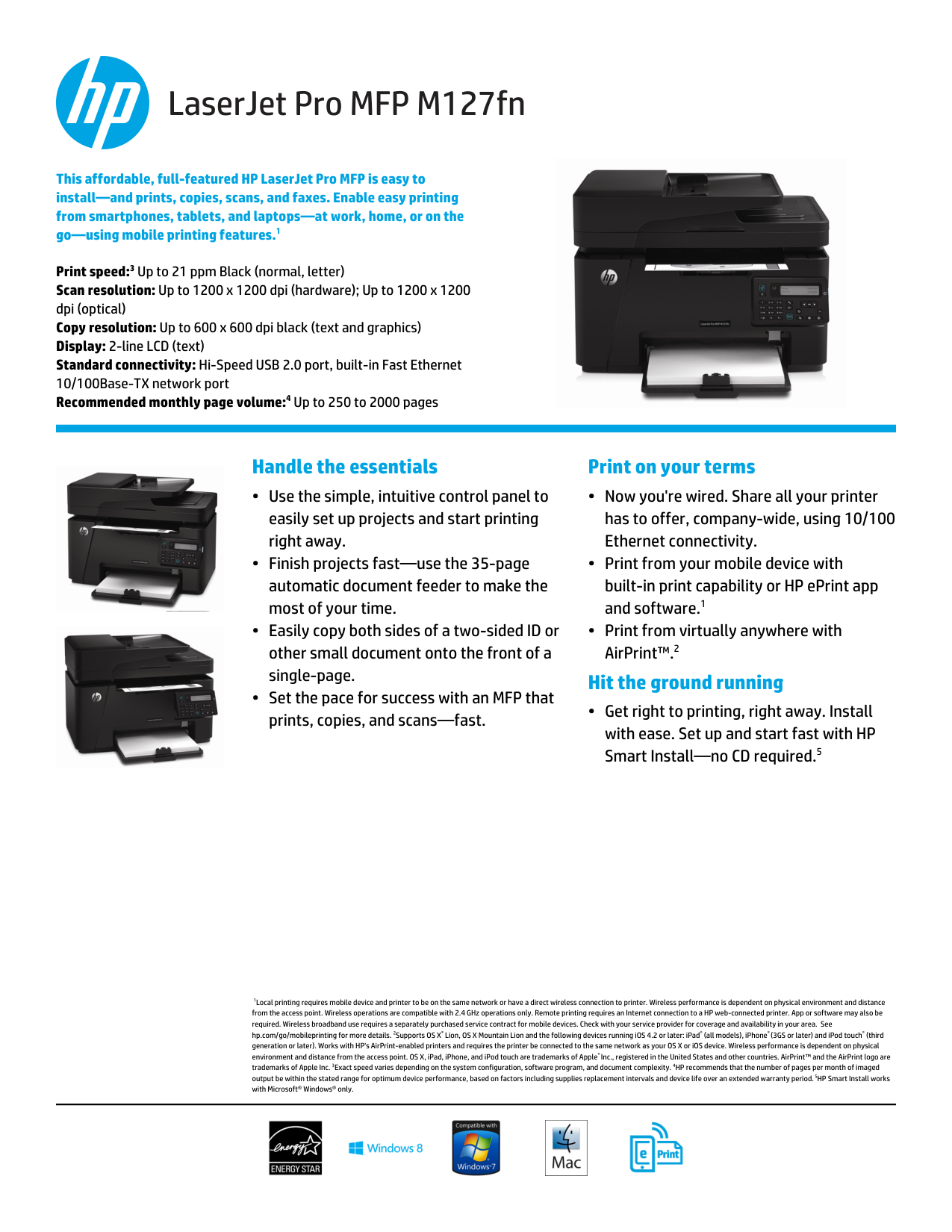
LaserJet Pro MFP M127fn This affordable, full-featured HP LaserJet Pro MFP is easy to install—and prints, copies, scans, and faxes. Enable easy printing from smartphones, tablets, and laptops—at work, home, or on the go—using mobile printing features.1
Print speed:3 Up to 21 ppm Black (normal, letter) Scan resolution: Up to 1200 x 1200 dpi (hardware); Up to 1200 x 1200 dpi (optical) Copy resolution: Up to 600 x 600 dpi black (text and graphics) Display: 2-line LCD (text) Standard connectivity: Hi-Speed USB 2.0 port, built-in Fast Ethernet 10/100Base-TX network port Recommended monthly page volume:4 Up to 250 to 2000 pages 1Local printing requires mobile device and printer to be on the same network or have a direct wireless connection to printer. Wireless performance is dependent on physical environment and distance from the access point. Wireless operations are compatible with 2.4 GHz operations only. Remote printing requires an Internet connection to a HP web-connected printer. App or software may also be required. Wireless broadband use requires a separately purchased service contract for mobile devices. Check with your service provider for coverage and availability in your area. See hp.com/go/mobileprinting for more details. 2Supports OS X® Lion, OS X Mountain Lion and the following devices running iOS 4.2 or later: iPad® (all models), iPhone® (3GS or later) and iPod touch® (third generation or later). Works with HP's AirPrint-enabled printers and requires the printer be connected to the same network as your OS X or iOS device. Wireless performance is dependent on physical environment and distance from the access point. OS X, iPad, iPhone, and iPod touch are trademarks of Apple® Inc., registered in the United States and other countries. AirPrint™ and the AirPrint logo are trademarks of Apple Inc. 3Exact speed varies depending on the system configuration, software program, and document complexity. 4HP recommends that the number of pages per month of imaged output be within the stated range for optimum device performance, based on factors including supplies replacement intervals and device life over an extended warranty period. 5HP Smart Install works with Microsoft® Windows® only. Handle the essentials
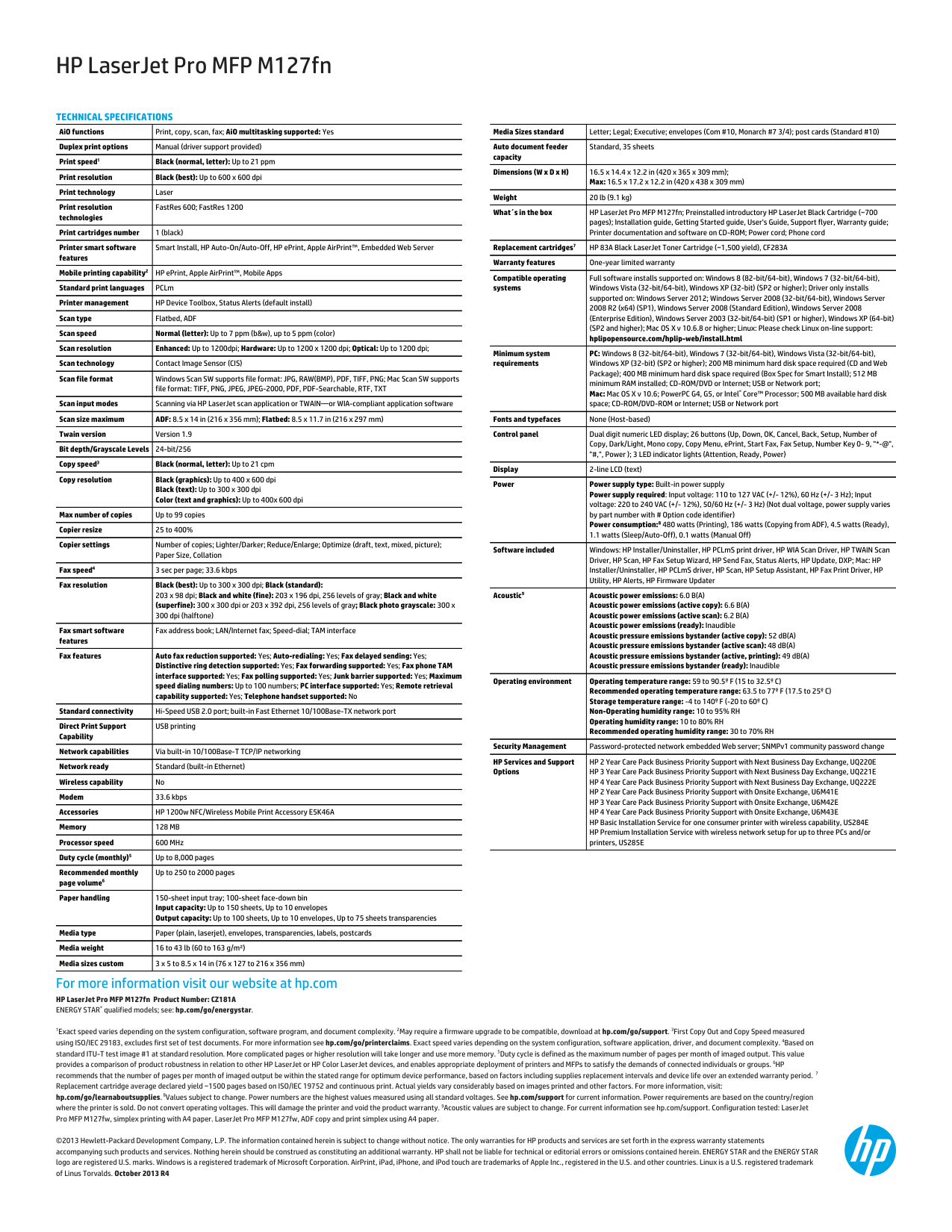
HP LaserJet Pro MFP M127fn HP LaserJet Pro MFP M127fn Product Number: CZ181A ENERGY STAR® qualified models; see: hp.com/go/energystar.
1Exact speed varies depending on the system configuration, software program, and document complexity. 2May require a firmware upgrade to be compatible, download at hp.com/go/support. 3First Copy Out and Copy Speed measured using ISO/IEC 29183, excludes first set of test documents. For more information see hp.com/go/printerclaims. Exact speed varies depending on the system configuration, software application, driver, and document complexity. 4Based on standard ITU-T test image #1 at standard resolution. More complicated pages or higher resolution will take longer and use more memory. 5Duty cycle is defined as the maximum number of pages per month of imaged output. This value provides a comparison of product robustness in relation to other HP LaserJet or HP Color LaserJet devices, and enables appropriate deployment of printers and MFPs to satisfy the demands of connected individuals or groups. 6HP recommends that the number of pages per month of imaged output be within the stated range for optimum device performance, based on factors including supplies replacement intervals and device life over an extended warranty period. 7 Replacement cartridge average declared yield ~1500 pages based on ISO/IEC 19752 and continuous print. Actual yields vary considerably based on images printed and other factors. For more information, visit: hp.com/go/learnaboutsupplies. 8Values subject to change. Power numbers are the highest values measured using all standard voltages. See hp.com/support for current information. Power requirements are based on the country/region where the printer is sold. Do not convert operating voltages. This will damage the printer and void the product warranty. 9Acoustic values are subject to change. For current information see hp.com/support. Configuration tested: LaserJet Pro MFP M127fw, simplex printing with A4 paper. LaserJet Pro MFP M127fw, ADF copy and print simplex using A4 paper. ©2013 Hewlett-Packard Development Company, L.P. The information contained herein is subject to change without notice. The only warranties for HP products and services are set forth in the express warranty statements accompanying such products and services. Nothing herein should be construed as constituting an additional warranty. HP shall not be liable for technical or editorial errors or omissions contained herein. ENERGY STAR and the ENERGY STAR logo are registered U.S. marks. Windows is a registered trademark of Microsoft Corporation. AirPrint, iPad, iPhone, and iPod touch are trademarks of Apple Inc., registered in the U.S. and other countries. Linux is a U.S. registered trademark of Linus Torvalds. October 2013 R4 For more information visit our website at hp.com