
HP Officejet Pro 9010 All-in-One Printer
Ask AI
— answers from the official manualAnswers from the official manual.
Common questions
Common Questions
56 totalWhat operating system was used to test the HP OfficeJet Pro 9010, and how was it connected?
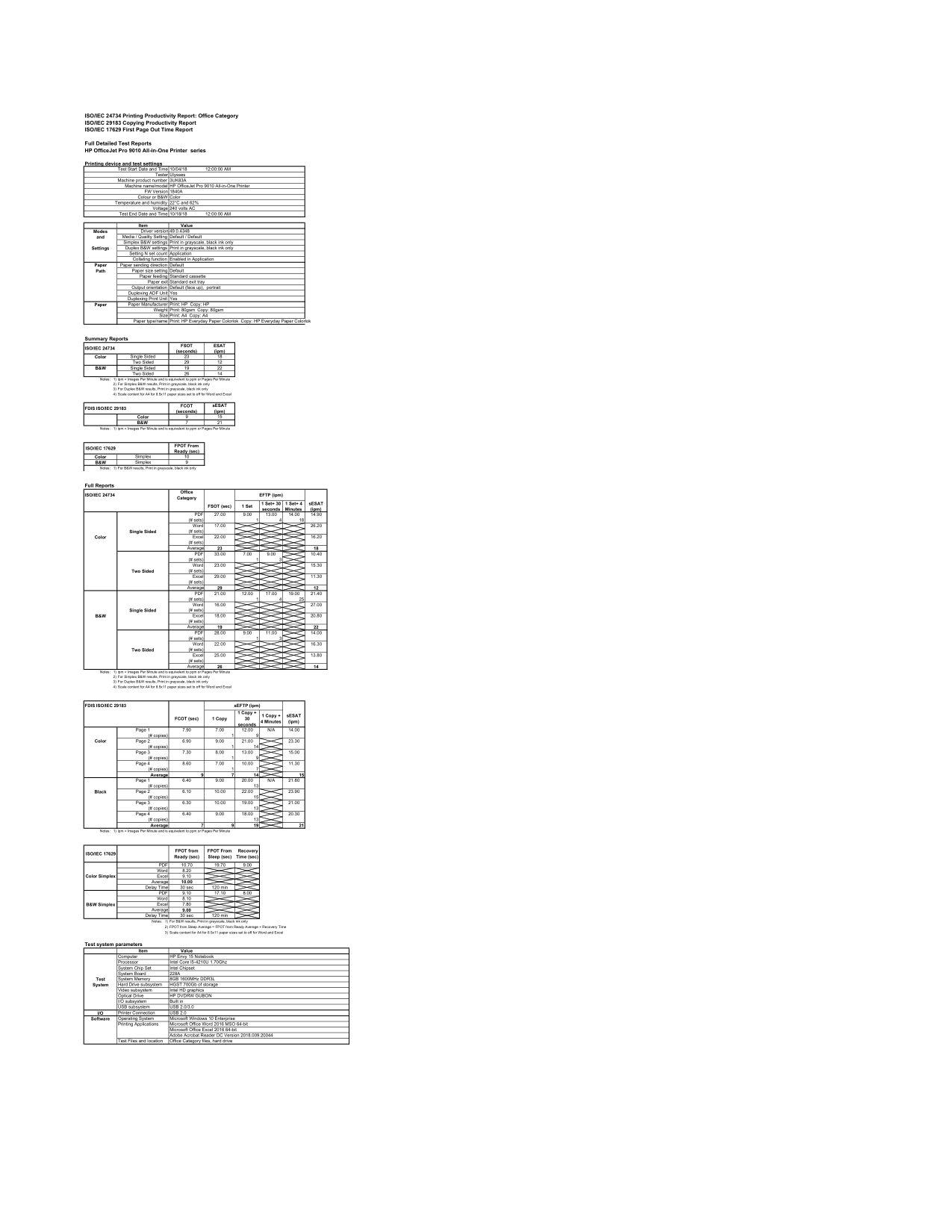
The printer was tested using Microsoft Windows 10 Enterprise on an HP Envy 15 Notebook. The printer was connected via USB 2.0. The driver version used during testing was 49.0.4348. (Page 1)
How fast does the HP OfficeJet Pro 9010 produce the first page when ready?
The first page out time from a ready state is 10 seconds for color simplex printing and 9 seconds for black and white simplex printing. When waking from sleep mode, color simplex printing takes approximately 19.70 seconds, which includes a recovery time of 9 seconds.
What paper type and size was used during the official performance testing of the HP OfficeJet Pro 9010?
Testing was conducted using HP Everyday Paper ColorLok in A4 size at 80gsm for both printing and copying. The paper was fed from the standard cassette and exited via the standard exit tray in default face-up portrait orientation.
Does the HP OfficeJet Pro 9010 support automatic two-sided (duplex) printing and copying?
Yes, the HP OfficeJet Pro 9010 supports both a Duplexing ADF Unit and a Duplexing Print Unit. This means the printer can automatically print and scan/copy on both sides of a page without manual intervention.
What connection type was used to connect the HP OfficeJet Pro 9010 to a computer during testing?
The printer was connected to the test computer via USB 2.0 during the official performance testing. The test system also supported USB 2.0/3.0 as its USB subsystem.
What operating system is compatible with the HP OfficeJet Pro 9010 based on the test environment?
The printer was tested using Microsoft Windows 10 Enterprise as the operating system. The driver version used during testing was 49.0.4348.
Show 50 more questions
What is the copy speed of the HP OfficeJet Pro 9010 for color and black & white?
What printing applications were used to test the HP OfficeJet Pro 9010's performance?
What were the environmental conditions during the HP OfficeJet Pro 9010 performance testing?
How does the HP OfficeJet Pro 9010 handle black and white print jobs in simplex and duplex modes?
How fast does the HP OfficeJet Pro 9010 print black and white single-sided documents?
What is the print speed of the HP OfficeJet Pro 9010 for single-sided color printing?
What paper type and size was used during the standard performance testing of the HP OfficeJet Pro 9010?
What is the copy speed of the HP OfficeJet Pro 9010 for color and black and white documents?
What are the print speeds for the HP OfficeJet Pro 9010 in color and black & white?
What applications were used to test printing performance on the HP OfficeJet Pro 9010?
What were the environmental and electrical conditions under which the HP OfficeJet Pro 9010 was tested?
How fast does the printer produce the first page out?
What are the copying speeds for this printer?
Does the HP OfficeJet Pro 9010 support automatic two-sided printing?
What driver version should I use with the HP OfficeJet Pro 9010?
What is the recovery time when the printer wakes from sleep mode?
Can the printer collate printed documents?
How long does it take to print the first page in color?
Does the HP OfficeJet Pro 9010 support double-sided printing?
What is the first page out time for black and white printing?
What are the printing speeds for the HP OfficeJet Pro 9010?
What paper sizes and types does the printer support?
What connection types does the HP OfficeJet Pro 9010 support?
How can I configure Sleep mode settings in my printer's control panel?
What are typical reasons for ink level alerts displayed by my printer?
How can I turn the Quiet Mode feature on and off using the printer software?
What type of safety measures should I follow while setting up or using my printer?
How do I replace ink cartridges correctly in my HP Officejet Pro 9010 printer?
What paper types are recommended for photo printing by HP Officejet Pro 9010 printer?
How do I schedule the printer to turn off at a specific time using its control panel?
What is the correct method to load legal-size paper into my HP Officejet Pro 9010 printer?
What steps should I follow to set up automatic update options for my printer?
What is the duplex (two-sided) printing speed for color documents?
How long does it take for the HP OfficeJet Pro 9010 to print the first page from a ready state?
What type of paper does the HP OfficeJet Pro 9010 use for printing and copying?
What is the printer's firmware version and machine product number?
What operating system is this printer compatible with?
What is the printing speed for black and white documents on the HP OfficeJet Pro 9010?
How fast can the HP OfficeJet Pro 9010 produce the first page in color?
Does the HP OfficeJet Pro 9010 support automatic duplex printing and copying?
What connection type does the HP OfficeJet Pro 9010 use?
What is the optimal operating temperature and humidity for the HP OfficeJet Pro 9010?
What copying speeds can I expect from this printer?
What connection options are available for this printer?
What is the printer model number and firmware version?
How long does it take for the first page to print?
Does this printer support double-sided printing?
How should I print in black and white mode to save ink?
What is the maximum copying speed for the HP OfficeJet Pro 9010?
How long does it take the HP OfficeJet Pro 9010 to recover from sleep mode?
Full Manual
216 pages
User Guide

HP OfficeJet Pro 9010 series
HP company notices THE INFORMATION CONTAINED HEREIN IS SUBJECT TO CHANGE WITHOUT NOTICE. ALL RIGHTS RESERVED. REPRODUCTION, ADAPTATION, OR TRANSLATION OF THIS MATERIAL IS PROHIBITED WITHOUT PRIOR WRITTEN PERMISSION OF HP, EXCEPT AS ALLOWED UNDER THE COPYRIGHT LAWS. THE ONLY WARRANTIES FOR HP PRODUCTS AND SERVICES ARE SET FORTH IN THE EXPRESS WARRANTY STATEMENTS ACCOMPANYING SUCH PRODUCTS AND SERVICES. NOTHING HEREIN SHOULD BE CONSTRUED AS CONSTITUTING AN ADDITIONAL WARRANTY. HP SHALL NOT BE LIABLE FOR TECHNICAL OR EDITORIAL ERRORS OR OMISSIONS CONTAINED HEREIN. © Copyright 2020 HP Development Company, L.P. Microsoft and Windows are either registered trademarks or trademarks of Microsoft Corporation in the United States and/or other countries. Mac, OS X, macOS, and AirPrint are trademarks of Apple Inc., registered in the U.S. and other countries. ENERGY STAR and the ENERGY STAR mark are registered trademarks owned by the U.S. Environmental Protection Agency. Android and Chromebook are trademarks of Google LLC. Amazon and Kindle are trademarks of Amazon.com, Inc. or its affiliates. iOS is a trademark or registered trademark of Cisco in the U.S. and other countries and is used under license. Safety information

Always follow basic safety precautions when using this product to reduce risk of injury from fire or electric shock.
Table of contents
ENWW iii
Fax and digital phone services ............................................................................................................................ 84 Fax on Voice over Internet Protocol .................................................................................................................... 85 Use reports .......................................................................................................................................................... 86 Additional fax setup ............................................................................................................................................ 90
###### Index ........................................................................................................................................................... 207
ENWW v
1 Get started
This guide provides details about how to use the printer and how to resolve problems.
ENWW 1
Accessibility
The printer provides a number of features that make it accessible for people with disabilities.
###### ● Visual
The HP software is accessible for users with visual impairments or low vision by using your operating system's accessibility options and features. The software also supports most assistive technology such as screen readers, Braille readers, and voice-to-text applications. For users who are color blind, colored buttons and tabs used in the HP software have simple text or icon labels that convey the appropriate action.
###### ● Mobility
For users with mobility impairments, the HP software functions can be executed through keyboard commands. The HP software also supports Windows accessibility options such as StickyKeys, ToggleKeys, FilterKeys, and MouseKeys. The printer doors, buttons, paper trays, and paper-width guides can be operated by users with limited strength and reach.
For more information about accessibility solutions for HP products, visit the HP Accessibility and Aging website (www.hp.com/accessibility).
HP EcoSolutions (HP and the Environment)
HP is committed to helping you optimize your environmental footprint and empowering you to print responsibly—at home or in the office.
For more detailed information about environmental guidelines that HP follows during the manufacturing process, see Environmental product stewardship program. For more information about HP's environmental initiatives, visit www.hp.com/ecosolutions.
#### Manage power
Use Sleep Mode, Auto-Off and Schedule On/Off to conserve electricity.
Sleep mode
Power usage is reduced while in Sleep mode. After initial setup of printer, the printer will enter Sleep mode after five minutes of inactivity.
Use the following instructions to change the period of inactivity before the printer sleeps.
###### Auto-Off
This feature turns the printer off after 8 hours of inactivity to help reduce energy use. Auto-Off turns the printer off completely, so you must use the Power button to turn on the printer again.
If your printer supports this energy saving feature, Auto-Off is automatically enabled or disabled depending on printer capabilities and connection options. Even when Auto-Off is disabled, the printer enters Sleep mode after 5 minutes of inactivity to help reduce energy use.
###### Schedule On and Off
Use this feature to automatically turn the printer on or off on selected days. For example, you can schedule the printer to turn on at 8 a.m. and turn off at 8 p.m. from Monday to Friday. In this way, you save energy during the night and weekends.

Use the following instructions to schedule the day and time for On and Off.

CAUTION: Always turn the printer off properly, using either Schedule Off or (the Power button) located on the front left side of the printer. If you improperly turn the printer off, the print carriage might not return to the correct position, causing problems with the cartridges and print quality issues. Never turn off the printer when cartridges are missing. HP recommends that you replace any missing cartridges as soon as possible to avoid print quality issues, possible extra ink usage from the remaining cartridges, or damage to the ink system.
#### Quiet Mode
Quiet Mode slows down printing to reduce overall noise without affecting print quality. It only works when printing on plain paper. Additionally, Quiet Mode is disabled if you are printing using the best or presentation print quality. To reduce printing noise, turn on Quiet Mode. To print at normal speed, turn Quiet Mode off. Quiet Mode is off by default.
| | |---|
NOTE: Quiet Mode does not work if you print photos or envelopes.
You can create a schedule by selecting the time when the printer prints in Quiet Mode. For example, you can schedule the printer to be in Quiet Mode from 10 p.m. to 8 a.m. everyday.
###### To turn on Quiet Mode from the printer control panel


###### To create a schedule for Quiet Mode from the printer control panel

###### To turn on Quiet Mode while the printer is printing
| | |---|
NOTE: Quiet Mode is turned on only after the current page is printed and is only used for the current print job.
###### To turn Quiet Mode on or off from the printer software (Windows)
###### To turn Quiet Mode on or off from the Embedded Web Server (EWS)
#### Optimize Printing Supplies
To optimize printing supplies such as ink and paper, try the following:
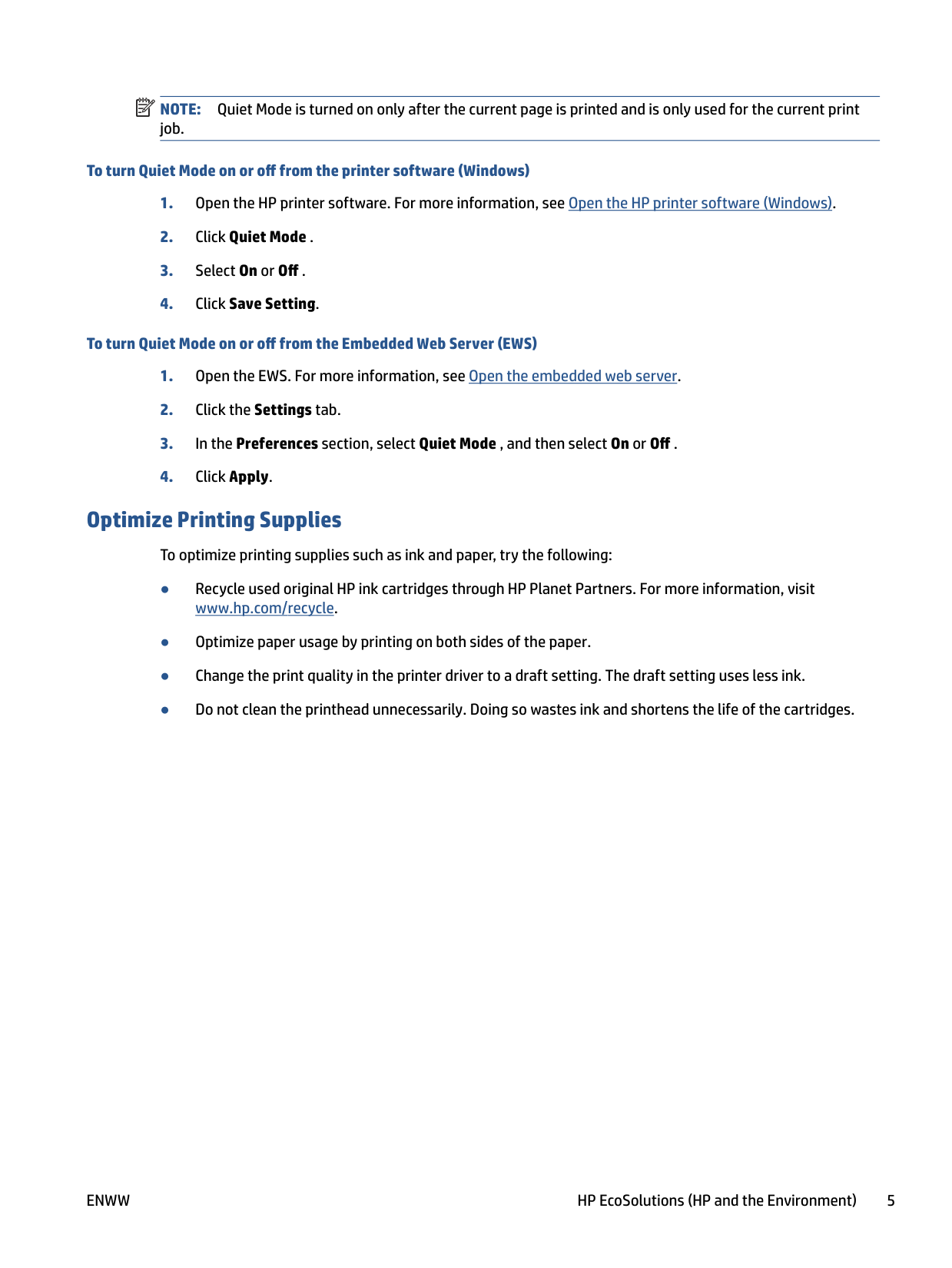
Understand the printer parts
This section contains the following topics:
#### Top and front view

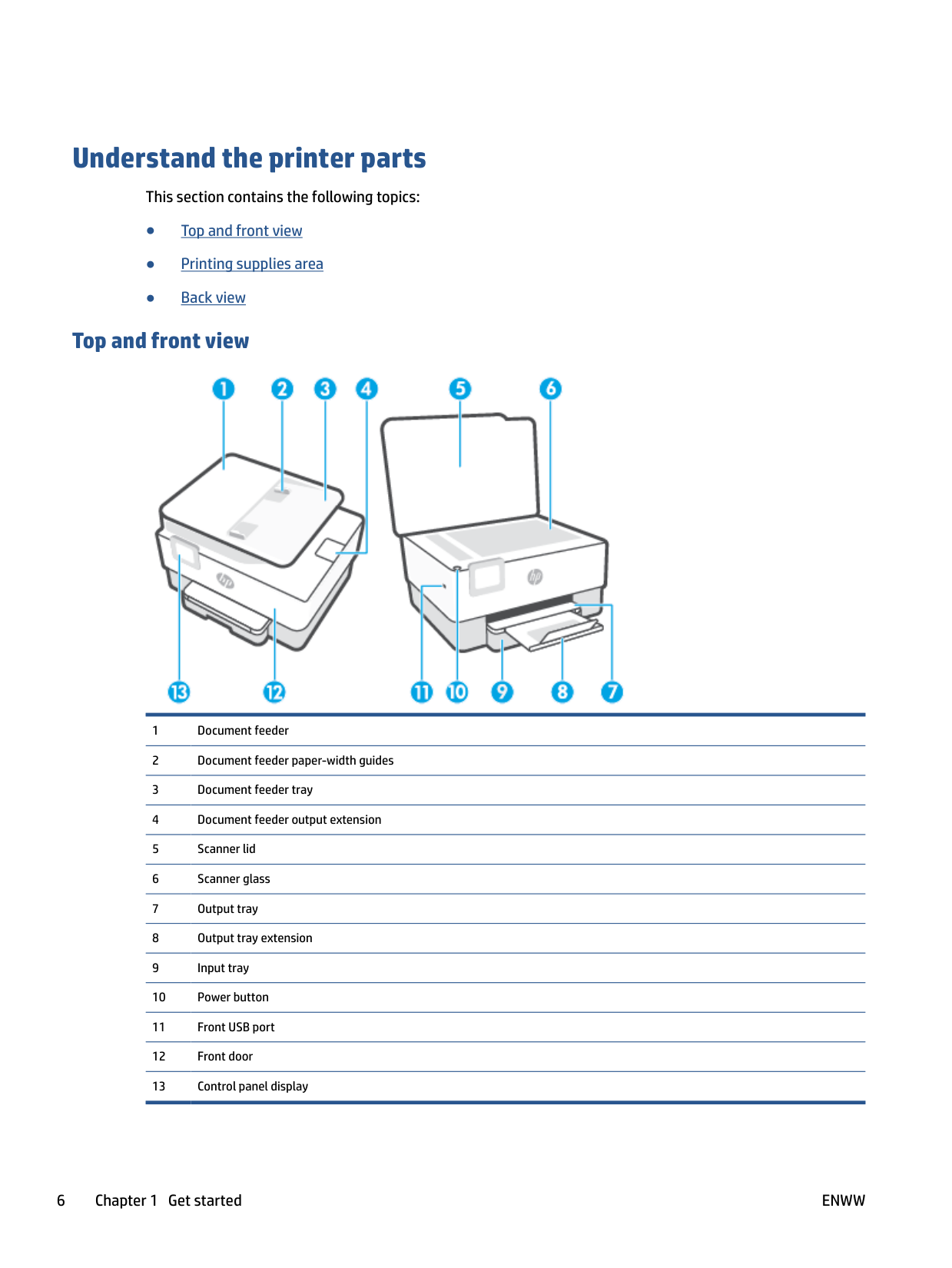
#### Printing supplies area

| | |---|
NOTE: Cartridges should be kept in the printer to prevent possible print quality issues or printhead damage. Avoid removing supplies for extended periods of time. Do not turn the printer off when a cartridge is missing.
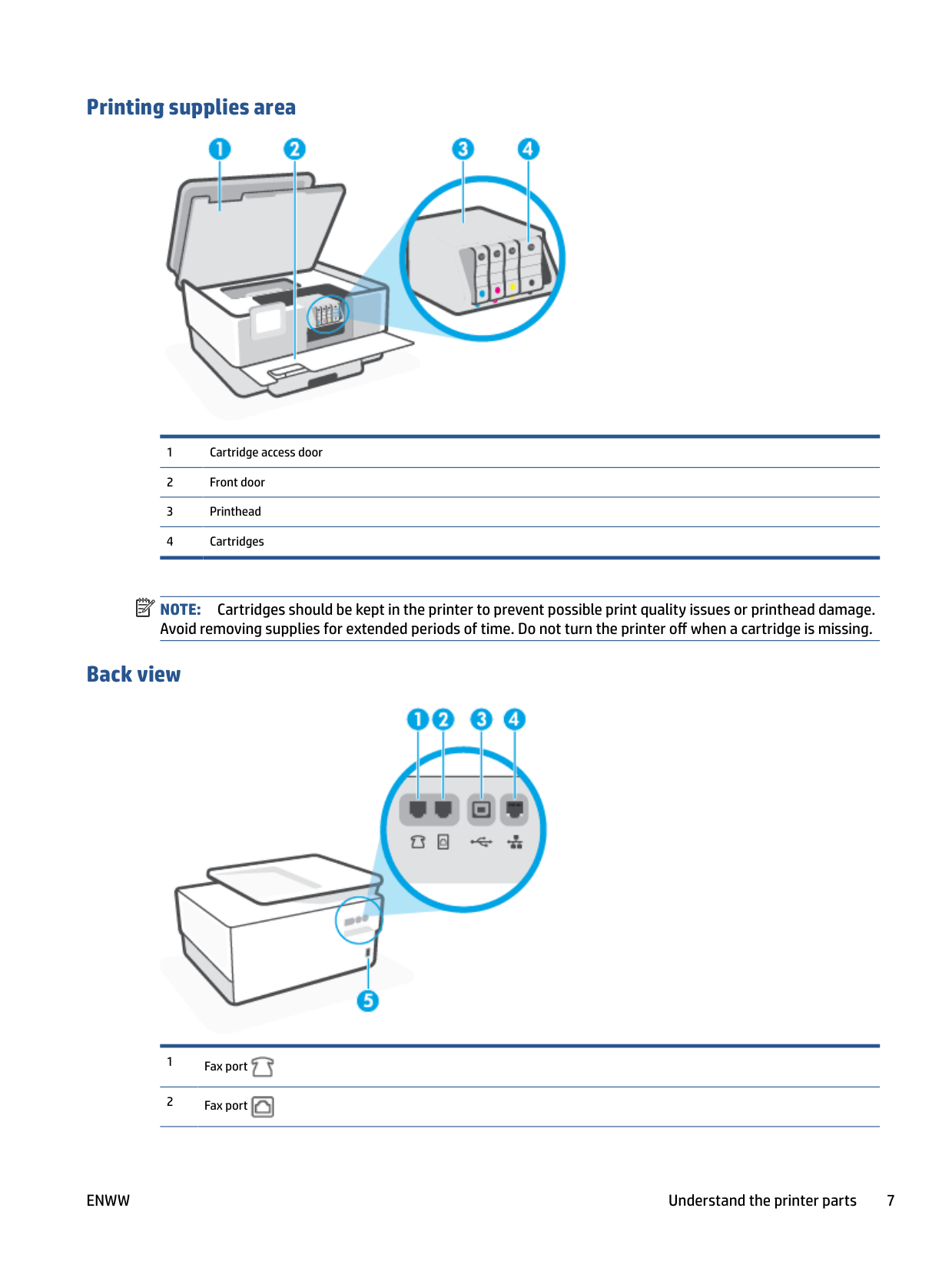
#### Back view


ENWW Understand the printer parts 7
Use the printer control panel
This section contains the following topics:
#### Lift the control panel
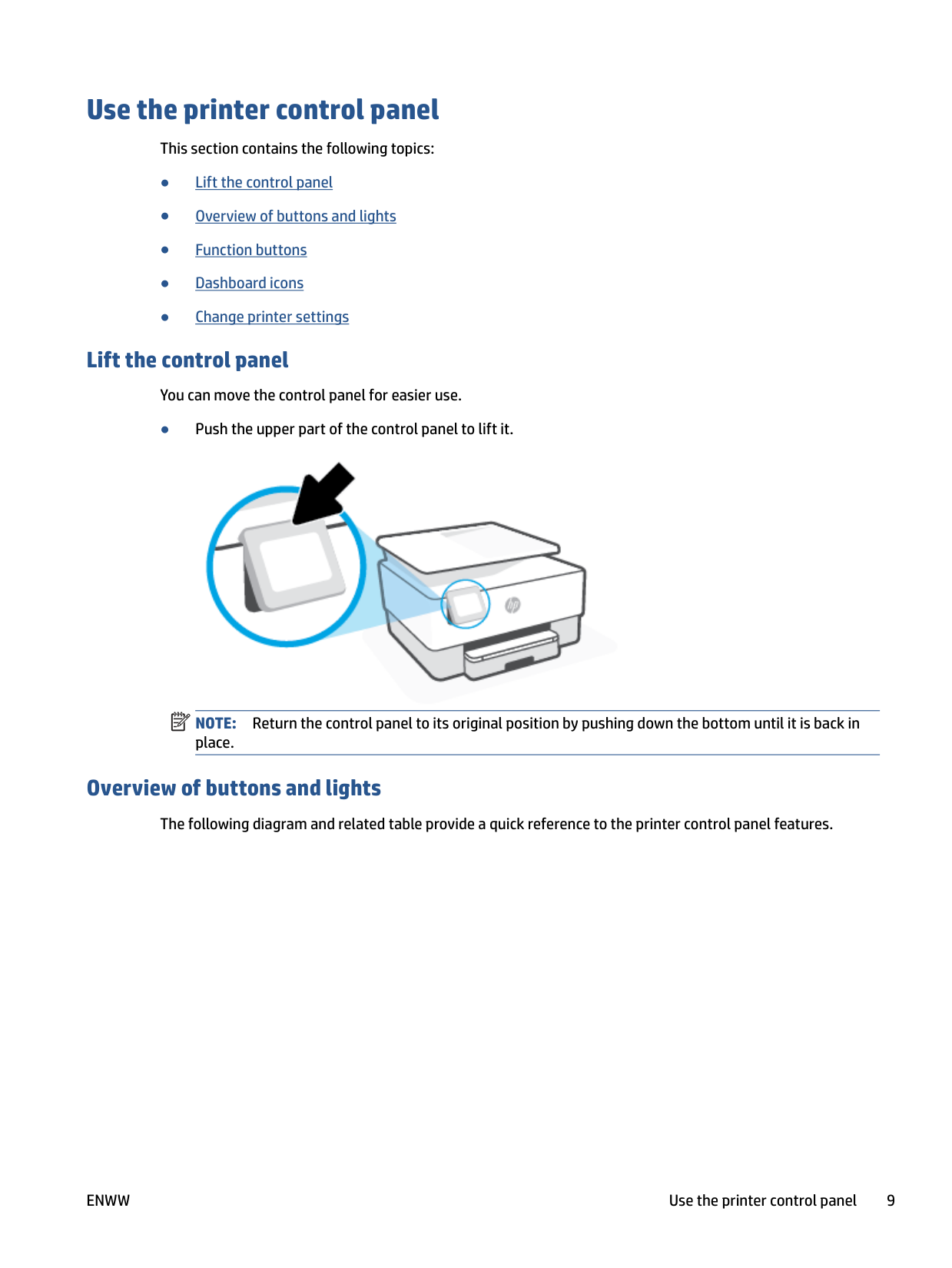
You can move the control panel for easier use.
● Push the upper part of the control panel to lift it.
| | |---|

NOTE: Return the control panel to its original position by pushing down the bottom until it is back in place.
#### Overview of buttons and lights
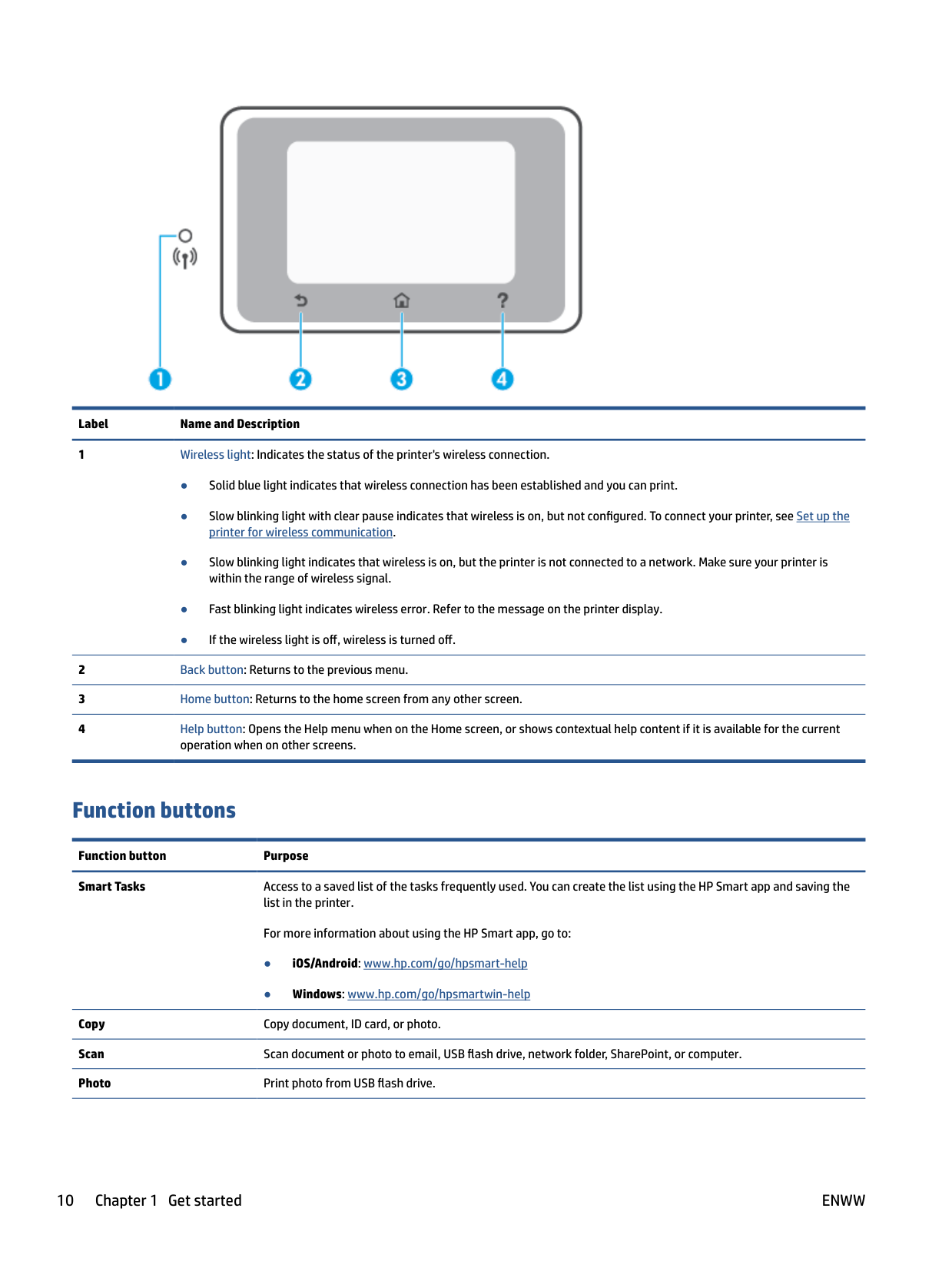
The following diagram and related table provide a quick reference to the printer control panel features.

######## Label Name and Description
#### Function buttons
Function button Purpose Smart Tasks Access to a saved list of the tasks frequently used. You can create the list using the HP Smart app and saving the
list in the printer. For more information about using the HP Smart app, go to:
Copy Copy document, ID card, or photo. Scan Scan document or photo to email, USB flash drive, network folder, SharePoint, or computer. Photo Print photo from USB flash drive.
Function button Purpose Fax Set up fax, send fax, or reprint received fax. Apps Access to the apps for your printer.
#### Dashboard icons
The Dashboard on the printer control panel lets you access the icons on the display, check the status of the printer, or monitor and manage current and scheduled printer tasks.
To open the Dashboard, touch or swipe down the tab at the top of a screen on the control panel.

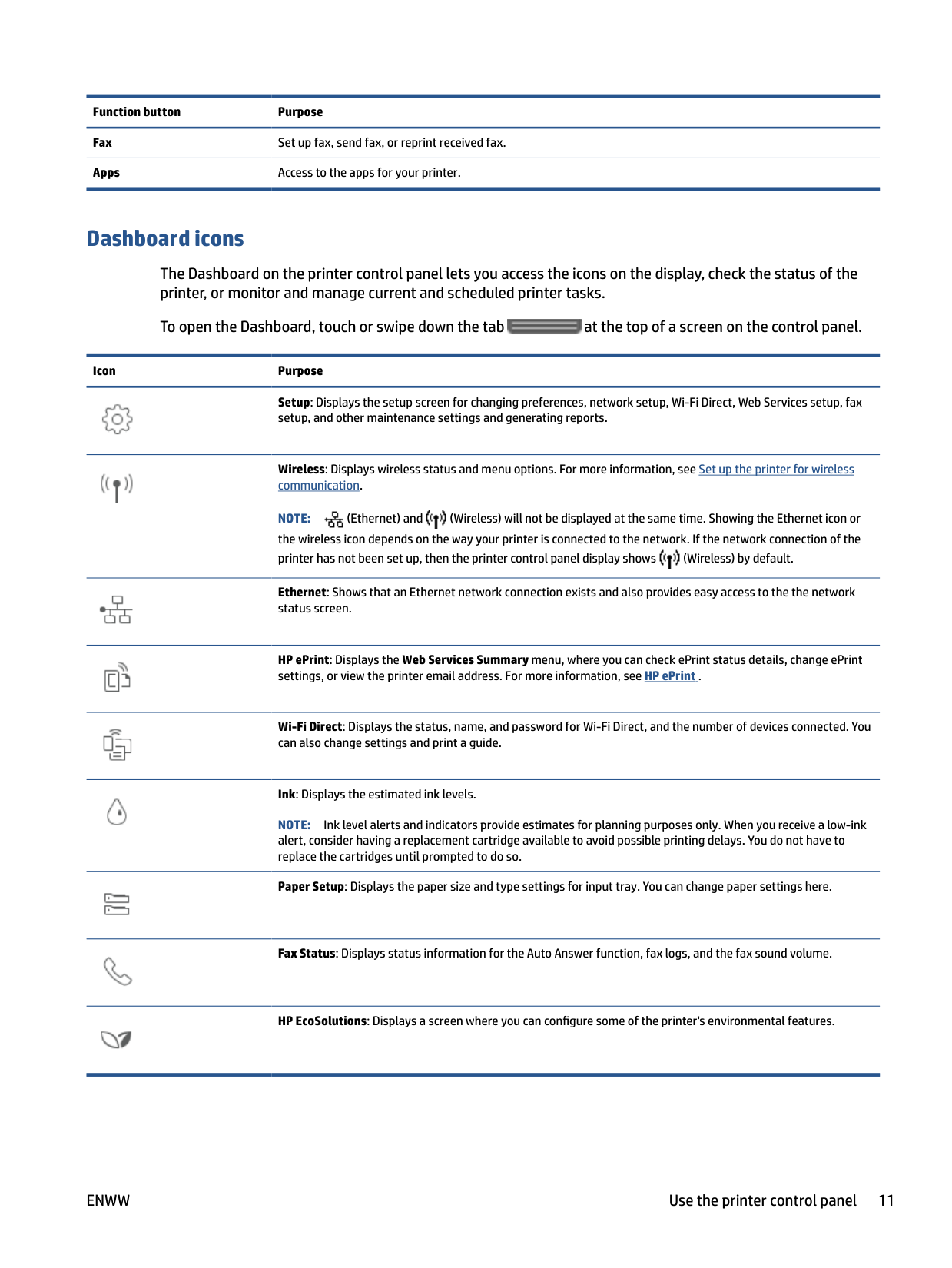
Icon Purpose
Setup: Displays the setup screen for changing preferences, network setup, Wi-Fi Direct, Web Services setup, fax setup, and other maintenance settings and generating reports.

Wireless: Displays wireless status and menu options. For more information, see Set up the printer for wireless communication.


NOTE: (Ethernet) and (Wireless) will not be displayed at the same time. Showing the Ethernet icon or the wireless icon depends on the way your printer is connected to the network. If the network connection of the printer has not been set up, then the printer control panel display shows (Wireless) by default.


Ethernet: Shows that an Ethernet network connection exists and also provides easy access to the the network status screen.

HP ePrint: Displays the Web Services Summary menu, where you can check ePrint status details, change ePrint settings, or view the printer email address. For more information, see HP ePrint .

Wi-Fi Direct: Displays the status, name, and password for Wi-Fi Direct, and the number of devices connected. You can also change settings and print a guide.

Ink: Displays the estimated ink levels. NOTE: Ink level alerts and indicators provide estimates for planning purposes only. When you receive a low-ink alert, consider having a replacement cartridge available to avoid possible printing delays. You do not have to replace the cartridges until prompted to do so. Paper Setup: Displays the paper size and type settings for input tray. You can change paper settings here.


Fax Status: Displays status information for the Auto Answer function, fax logs, and the fax sound volume.

HP EcoSolutions: Displays a screen where you can configure some of the printer's environmental features.

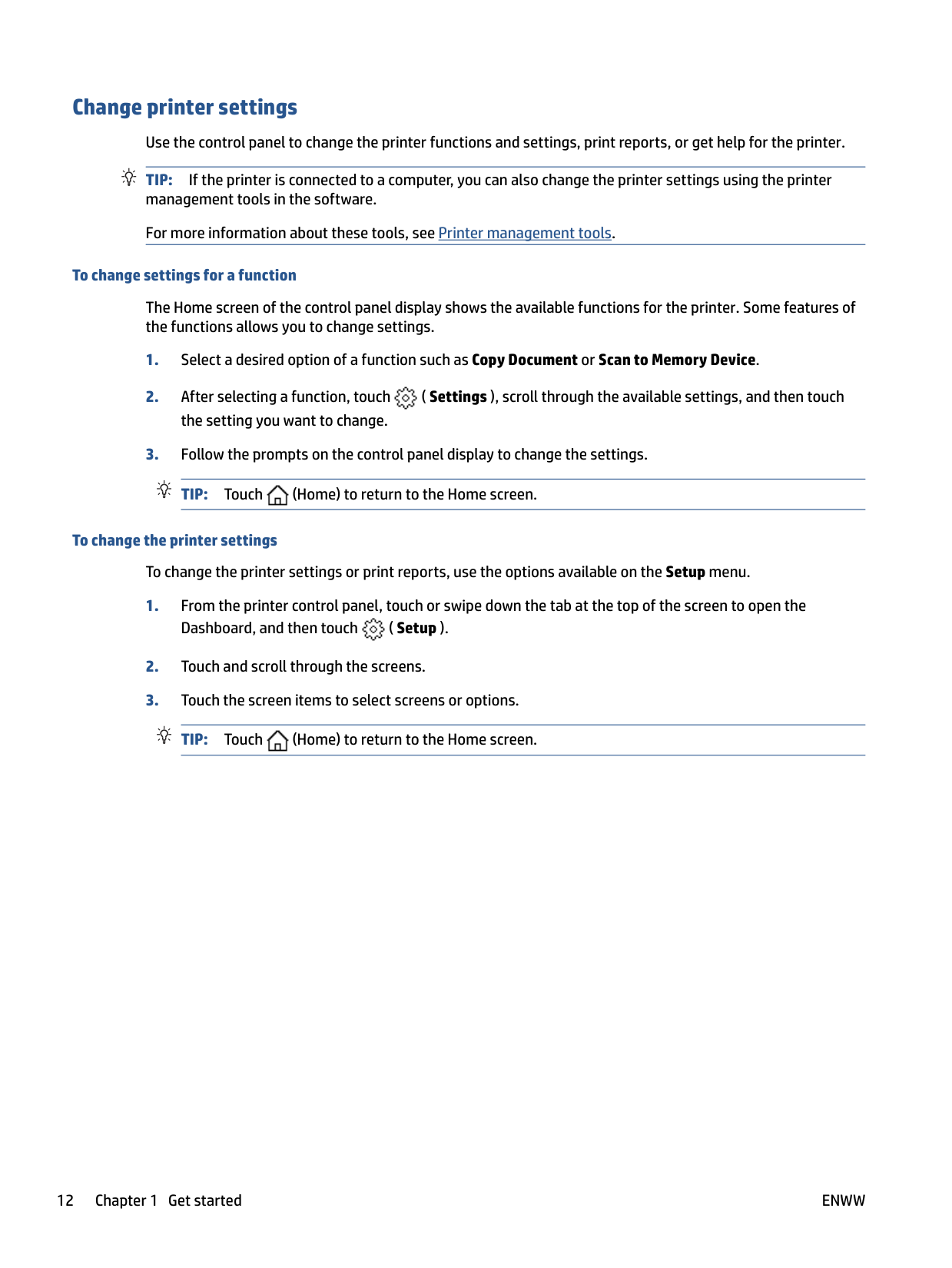
Change printer settings Use the control panel to change the printer functions and settings, print reports, or get help for the printer. TIP: If the printer is connected to a computer, you can also change the printer settings using the printer management tools in the software. For more information about these tools, see Printer management tools.
###### To change settings for a function
The Home screen of the control panel display shows the available functions for the printer. Some features of the functions allows you to change settings.

###### To change the printer settings
To change the printer settings or print reports, use the options available on the Setup menu.

HP Digital Solutions
The printer includes a collection of digital solutions that can help you simplify and streamline your work. These digital solutions include the following:

What are HP Digital Solutions? HP Digital Solutions are a set of tools provided with this printer that can help improve your office productivity. This section contains the following topics:
##### HP Digital Filing
HP Digital Filing provides robust, general-office scanning—as well as basic, versatile, documentmanagement capabilities—for multiple users over a network. With HP Digital Filing, you can simply walk up to the printer, select the options on the printer control panel, and either scan documents directly to computer folders on your network or quickly share them with business partners as email attachments—and all without using additional scanning software.
Scanned documents can be sent to a shared network folder for personal or group access or to one or more email addresses for quick sharing. In addition, you can configure specific scan settings for each scan destination, allowing you to make sure that the best settings are being used for each specific task.
##### HP Digital Fax
With HP Digital Fax, you can save incoming, black-and-white faxes to a computer folder on your network for easy sharing and storage, or you can forward faxes through email—allowing you to receive important faxes from anywhere while working away from the office.
In addition, you can turn off fax printing altogether — saving money on paper and ink, as well as helping to reduce paper consumption and waste.
#### Requirements
Before you set up the HP Digital Solutions, make sure you have the following:
###### For all HP Digital Solutions
NOTE: If the printer is connected using a USB cable, you scan documents to a computer or attach scans to an email message using the HP software. For more information, see Scan. You can receive faxes to your computer using HP Digital Fax. For more information, see Receive faxes using HP Digital Fax.
| | |---|
TIP: If you would like to set up HP Digital Solutions without installing the HP software, you can use the printer’s embedded web server.
###### For Scan to Network Folder, Fax to Network Folder
On computer running Windows, network addresses are usually written in this format: \\mypc \sharedfolder
| | |---|
NOTE: HP Digital Filing does not support Active Directory. For Scan to Email, Fax to Email
If you are setting up Scan to Email or Fax to Email on a computer running Windows, the setup wizard can automatically detect the email settings for the following email applications:
However, if your email application is not listed above, you can still set up and use Scan to Email and Fax to Email if your email application meets the requirements listed in this section.
#### Set up HP Digital Solutions
You can set up HP Digital Solutions using software wizards that you can open from the HP printer software (Windows).
TIP: You can also use the printer's embedded web server (EWS) to set up the HP Digital Solutions. For more information about using the EWS, see Embedded web server.
| | |---|
NOTE: If you are using the printer in an IPv6-only network environment, you must set up the digital solutions using the EWS. This section contains the following topics:
Set up HP Digital Filing To set up HP Digital Filing, follow the appropriate instructions. NOTE: You can also use these steps to change settings in the future. This section contains the following topics:
| | |---|
###### Set up Scan to Network Folder
You can configure up to 10 destination folders for each printer.
| | |---|
NOTE: To use Scan to Network Folder, you must have created and configured the folder you are using on a computer connected to the network. You cannot create a folder from the printer's control panel. Also, make sure the folder preferences are set to provide read and write access. For more information about creating folders on the network and setting folder preferences, see the documentation for your operating system.
After you finish setting up Scan to Network Folder, the HP software automatically saves the configurations to the printer.
###### To set up Scan to Network Folder from the printer software (Windows)
NOTE: If the Scan to Network Folder Wizard option is not available, use embedded web server (EWS) to set up Scan to Network Folder.
| | |---|
| | |---|
NOTE: After you have created destination folders, you can use the printer’s embedded web server (EWS) to customize the scan settings for these folders. On the last screen of the Scan to Network Folder Wizard, make sure the Launch embedded web server when finished check box is selected. When you click Finish, the EWS is displayed in your computer’s default web browser. For more information about EWS, see Embedded web
server.
###### To set up Scan to Network Folder from embedded web server (EWS)
NOTE: You can customize the scan settings for each destination folder.
| | |---|
###### Set up Scan to Email
You can use the printer to scan documents and send them to one or more email addresses as attachmentswithout additional scanning software. You do not need to scan files from your computer and attach them to email messages.
###### Set the Outgoing Email Profiles
Configure the email address that will appear in the FROM portion of the email message sent by the printer. You can add up to 10 Outgoing Email Profiles. You can use the HP software installed on your computer to create these profiles.
###### Add email addresses to the Address Book
Manage the list of people to whom you can send email messages from the printer. You can add up to 15 email addresses with their corresponding contact names. You can also create email groups. To add email addresses, you can use the printer’s embedded web server (EWS) or the printer’s control panel.
###### Configure other email options
You can configure default SUBJECT and body text that is included in all email messages sent from the printer. To configure these options, you can use the printer’s EWS or the printer’s control panel.
###### Step 1: Set up the outgoing email profiles
To set up the outgoing email profile used by the printer, complete the following steps for your operating system.
###### To set up the outgoing email profile from the printer software (Windows)
NOTE: If the Scan to E-mail Wizard option is not available, use embedded web server (EWS) to set up the outgoing email profiles.
| | |---|
| | |---|
NOTE: After you have set the Outgoing Email Profile, you can use the printer’s embedded web server (EWS) to add more Outgoing Email Profiles, add email addresses to the Address Book, and configure other email options. To open the EWS automatically, select the Launch embedded web server when finished checkbox on the last screen of the Scan to Email Wizard. When you click Finish, the EWS is displayed in your computer’s default web browser. For more information about EWS, see Embedded web server.
###### To set up the outgoing email profile from embedded web server (EWS)
###### Step 2: Add email addresses to the Address Book
-OrClick to create an email distribution list. NOTE: Before you can create an email distribution list, you must have already added at least one email address to the Address Book.
| | |---|
| | |---|
###### Step 3: Configure other email options
To configure other email options (such as configuring default SUBJECT and body text that is included in all email messages sent from the printer, as well as scan settings used when sending email from the printer), complete the following steps:
##### Set up HP Digital Fax
With HP Digital Fax, the printer automatically receives faxes and saves them directly to a network folder (Fax to Network Folder) or forwards them as email attachments (Fax to Email).
| | |---|
NOTE: You can configure HP Digital Fax to use either Fax to Network Folder or to use Fax to Email. You cannot use both at the same time.
| | |---|
Received faxes are saved as TIFF (Tagged Image File Format) or PDF files. NOTE: HP Digital Fax supports receiving black-and-white faxes only. Color faxes are printed instead of being saved.
###### To set up HP Digital Fax from the printer software (Windows)
| | |---|
NOTE: After you have set up HP Digital Fax, you can use the printer’s embedded web server (EWS) to edit HP Digital Fax settings. To open the EWS automatically, select the Launch embedded web server when finished checkbox on the last screen of the Digital Fax Setup Wizard. When you click Finish, the EWS is displayed in your computer’s default web browser. For more information about the EWS, see Embedded web server.
###### To set up HP Digital Fax from Embedded web server (EWS)
#### Use the HP Digital Solutions
To use the HP Digital Solutions available with the printer, follow the appropriate instructions. Use HP Scan to Network Folder
| | |---|
##### Use Scan to Email To scan a document or photo to email from the control panel
| | |---|



Touch to change settings.

##### Use HP Digital Fax
After you set up HP Digital Fax, any black-and-white faxes that you receive print, by default, and then are saved to the designated destination—either the network folder or email address that you have specified.
Paper basics
The printer is designed to work well with most types of office paper. It is best to test a variety of print paper types before buying large quantities. Use HP paper for optimum print quality. Visit the HP website at www.hp.com for more information about HP paper.
HP recommends plain papers with the ColorLok logo for printing everyday documents. All papers with the ColorLok logo are independently tested to meet high standards of reliability and print quality, and produce documents with crisp, vivid color, bolder blacks, and that dry faster than ordinary plain papers. Look for papers with the ColorLok logo in a variety of weights and sizes from major paper manufacturers.

This section contains the following topics:
#### Recommended papers for printing
If you want the best print quality, HP recommends using HP papers that are specifically designed for the type of project you are printing.
Depending on your country/region, some of these papers might not be available.
Photo printing
HP Premium Plus Photo Paper is HP’s highest-quality photo paper for your best photos. With HP Premium Plus Photo Paper, you can print beautiful photos that are instant-dry so you can share them right off the printer. The printer supports several sizes, including A4, 8.5 x 11 inches, 4 x 6 inches (10 x 15 cm), and 5 x 7 inches (13 x 18 cm) in two finishes - glossy or soft gloss (semi-gloss). Ideal for framing, displaying, or gifting your best photos and special photo projects. HP Premium Plus Photo Paper delivers exceptional results with professional quality and durability.
This glossy photo paper features an instant-dry finish for easy handling without smudging. It resists water, smears, fingerprints, and humidity. Your prints have a look and feel comparable to a storeprocessed photo. It is available in several sizes, including A4, 8.5 x 11 inches, 10 x 15 cm (4 x 6 inches), 13 x 18 cm (5 x 7 inches), 11 x 17 inches. It is acid-free for longer lasting documents.
Print colorful, everyday snapshots at a low cost, using paper designed for casual photo printing. This affordable photo paper dries quickly for easy handling. Get sharp, crisp images when you use this paper with any inkjet printer. It is available in glossy finish in several sizes, including A4, 8.5 x 11 inches, 5 x 7 inches and 4 x 6 inches 10 x 15 cm. It is acid-free for longer lasting documents.
Business documents
These paper are heavy two-sided matte paper perfect for presentation, proposals, reports, and newsletters. They are heavyweight for an impressive look and feel.
These papers are glossy-coated on both sides for two-sided use. They are the perfect choice for nearphotographic reproductions and business graphics for report covers, special presentations, brochures, mailers, and calendars.
These papers are matte-coated on both sides for two-sided use. They are the perfect choice for nearphotographic reproductions and business graphics for report covers, special presentations, brochures, mailers, and calendars.
###### Everyday printing
All the papers are listed below for everyday printing feature ColorLok Technology for less smearing, bolder blacks, and vivid colors.
###### ● HP Bright White Inkjet Paper
HP Bright White Inkjet Paper delivers high-contrast colors and sharp text. It is opaque enough for twosided color usage with no show-through, which makes it ideal for newsletters, reports, and flyers.
###### ● HP Printing Paper
HP Printing Paper is a high-quality multifunction paper. It produces documents that look and feel more substantial than documents printed on standard multipurpose or copy paper. It is acid-free for longer lasting documents.
###### ● HP Office Paper
HP Office Paper is a high-quality multifunction paper. It is suitable for copies, drafts, memos, and other everyday documents. It is acid-free for longer lasting documents.
###### ● HP Multipurpose Paper
HP Multipurpose Paper is a versatile, efficient, and smear-resistant paper for use in copiers, printers, and fax machines. It eliminates the need to keep specialty papers on hand, saving time and money.
Order HP paper supplies The printer is designed to work well with most types of office paper. Use HP paper for optimum print quality. To order HP papers and other supplies, go to www.hp.com . At this time, some portions of the HP website are available in English only. HP recommends plain papers with the ColorLok logo for printing and copying of everyday documents. All papers with the ColorLok logo are independently tested to meet high standards of reliability and print quality, and produce documents with crisp, vivid color, bolder blacks and shorter dry-time than ordinary plain papers. Look for papers with the ColorLok logo in a variety of weights and sizes from major paper manufacturers.
ENWW Paper basics 21
#### Tips for selecting and using paper
For the best results, observe the following guidelines.
Load paper
###### To load standard paper
NOTE: If there is other paper in the input tray, remove the paper before loading a different paper type or size.

| | |---|

####### 3. Insert the paper in portrait orientation and with the side to be printed facing down.

Make sure the stack of paper is aligned with the appropriate paper size lines on the front of the tray. Also, make sure the stack of paper does not exceed the stack height marking on the left edge of the tray.
| | |---|

NOTE: Do not load paper while the printer is printing.
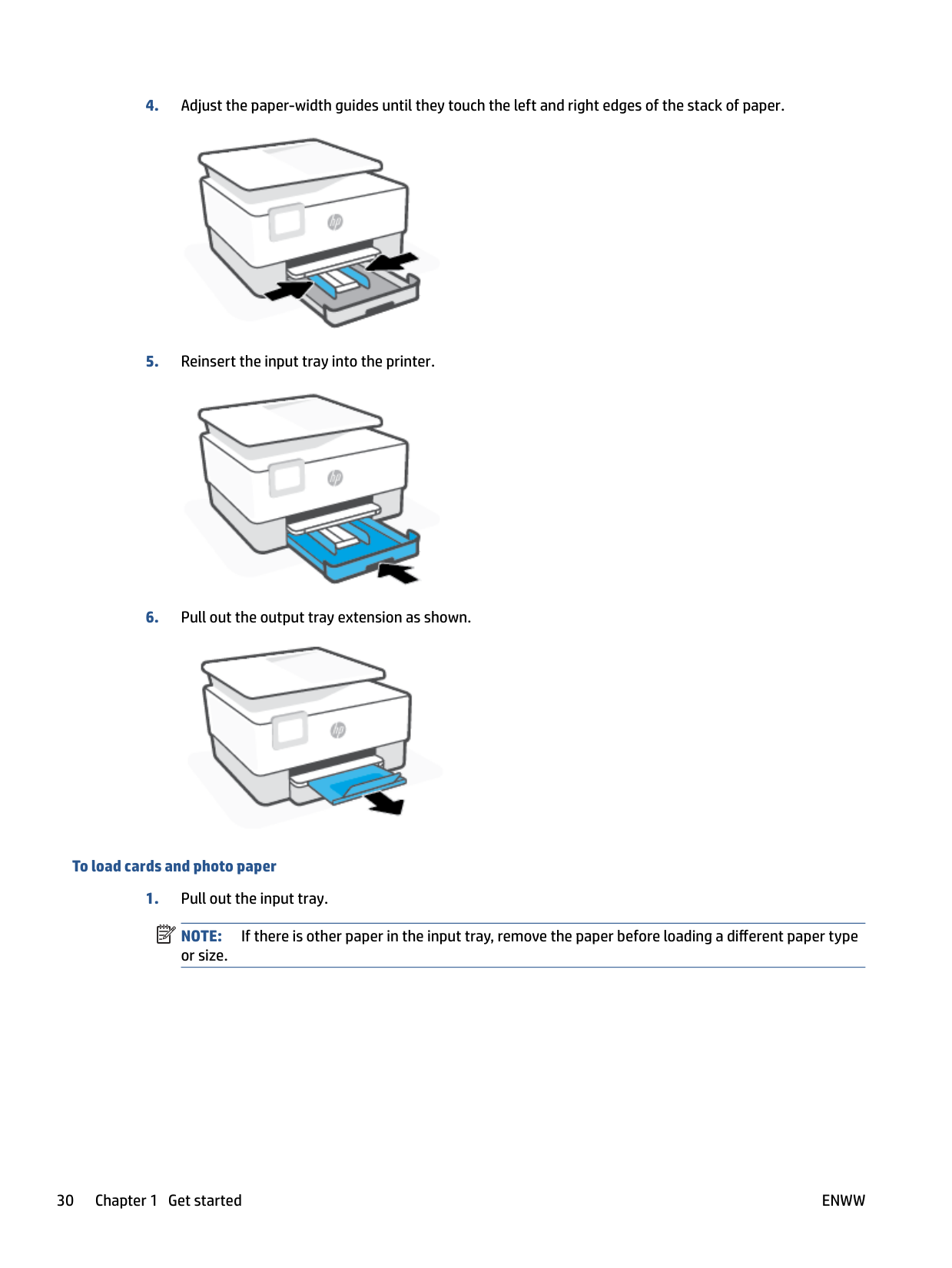
####### 4. Adjust the paper-width guides until they touch the left and right edges of the stack of paper.


###### To load legal paper
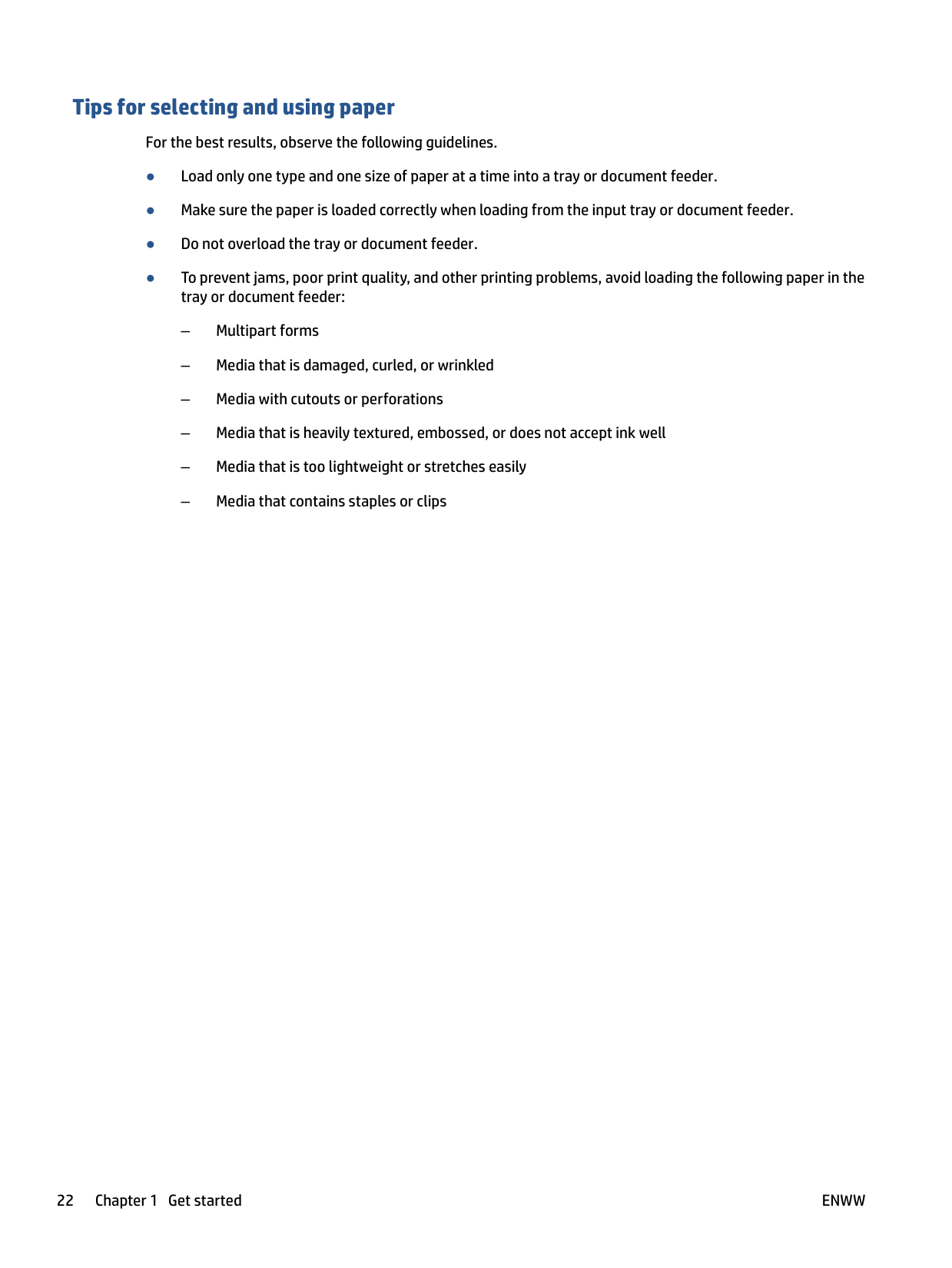
| | |---|
NOTE: If there is other paper in the input tray, remove the paper before loading a different paper type or size.

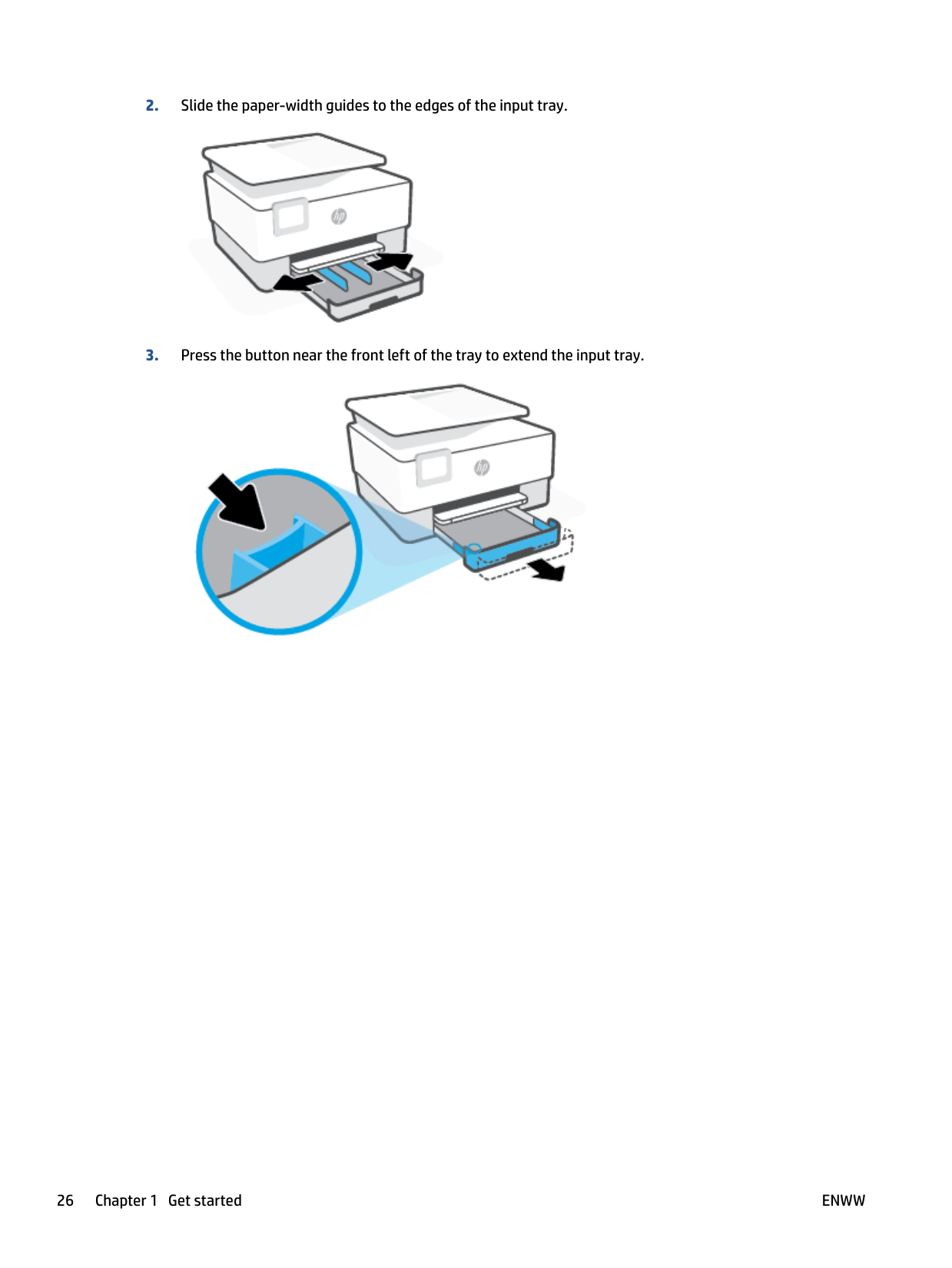
####### 2. Slide the paper-width guides to the edges of the input tray.

####### 3. Press the button near the front left of the tray to extend the input tray.

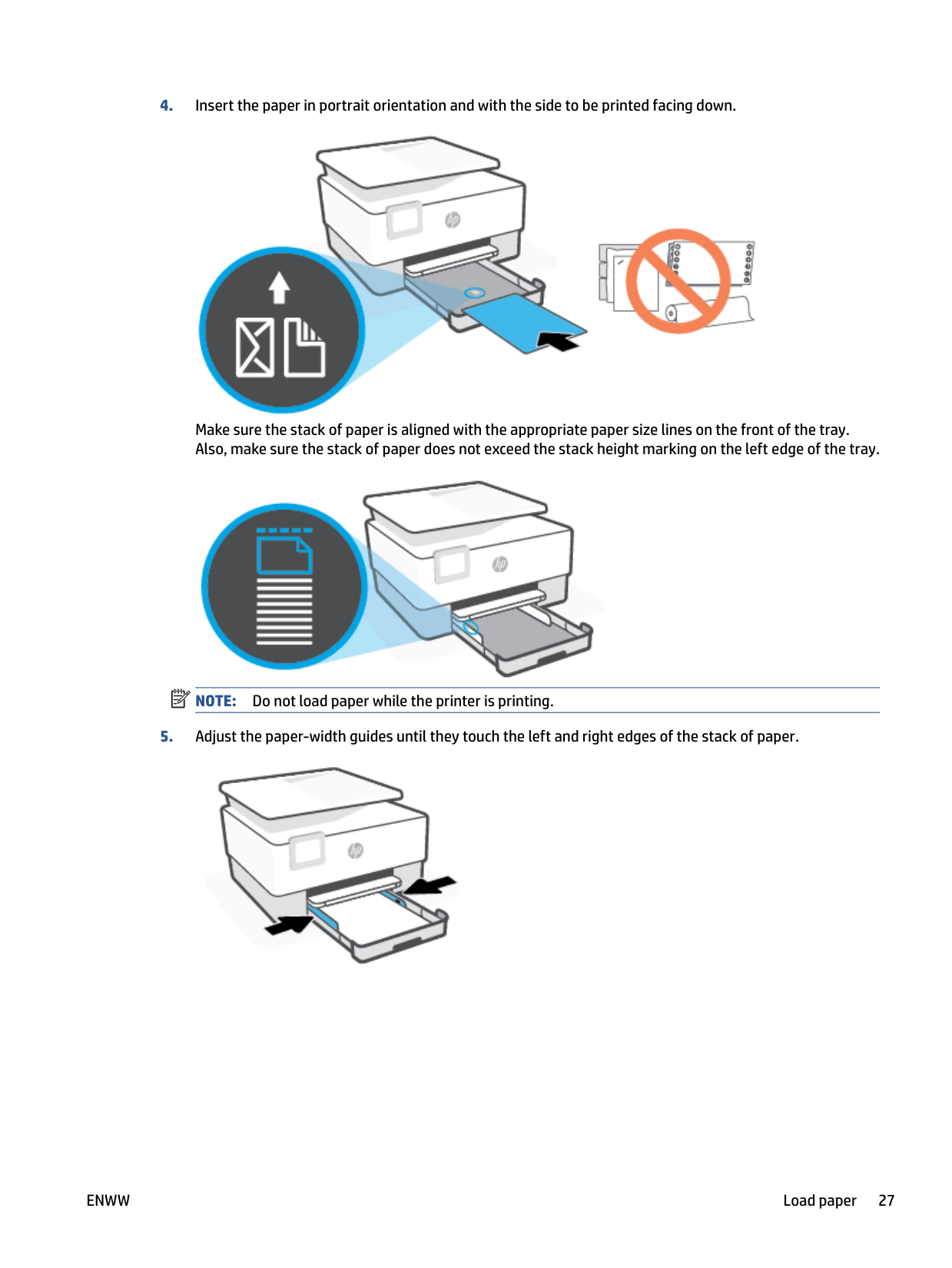
####### 4. Insert the paper in portrait orientation and with the side to be printed facing down.

Make sure the stack of paper is aligned with the appropriate paper size lines on the front of the tray. Also, make sure the stack of paper does not exceed the stack height marking on the left edge of the tray.
| | |---|

NOTE: Do not load paper while the printer is printing.
####### 5. Adjust the paper-width guides until they touch the left and right edges of the stack of paper.
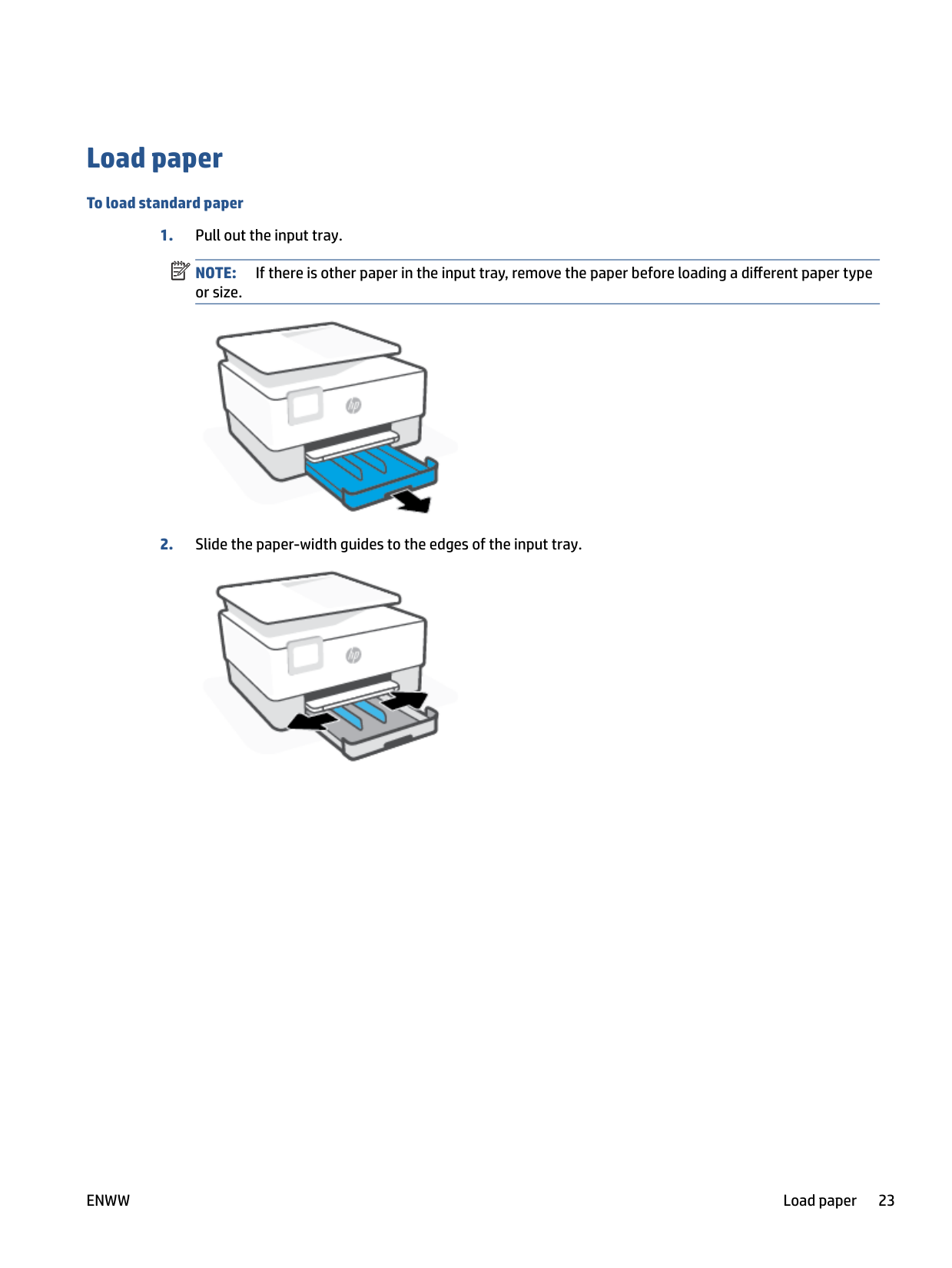


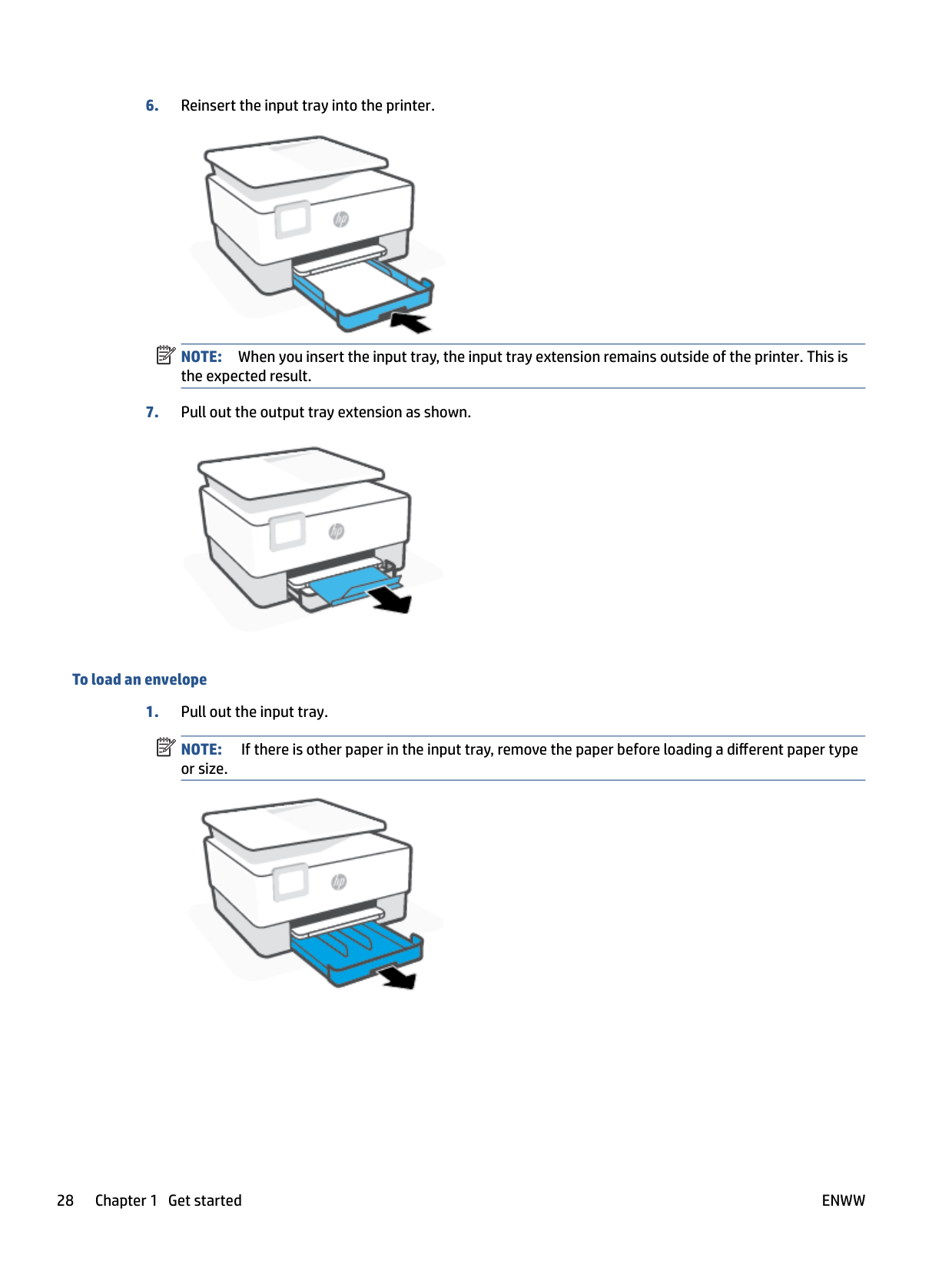
NOTE: When you insert the input tray, the input tray extension remains outside of the printer. This is the expected result.
| | |---|

###### To load an envelope
| | |---|
NOTE: If there is other paper in the input tray, remove the paper before loading a different paper type or size.


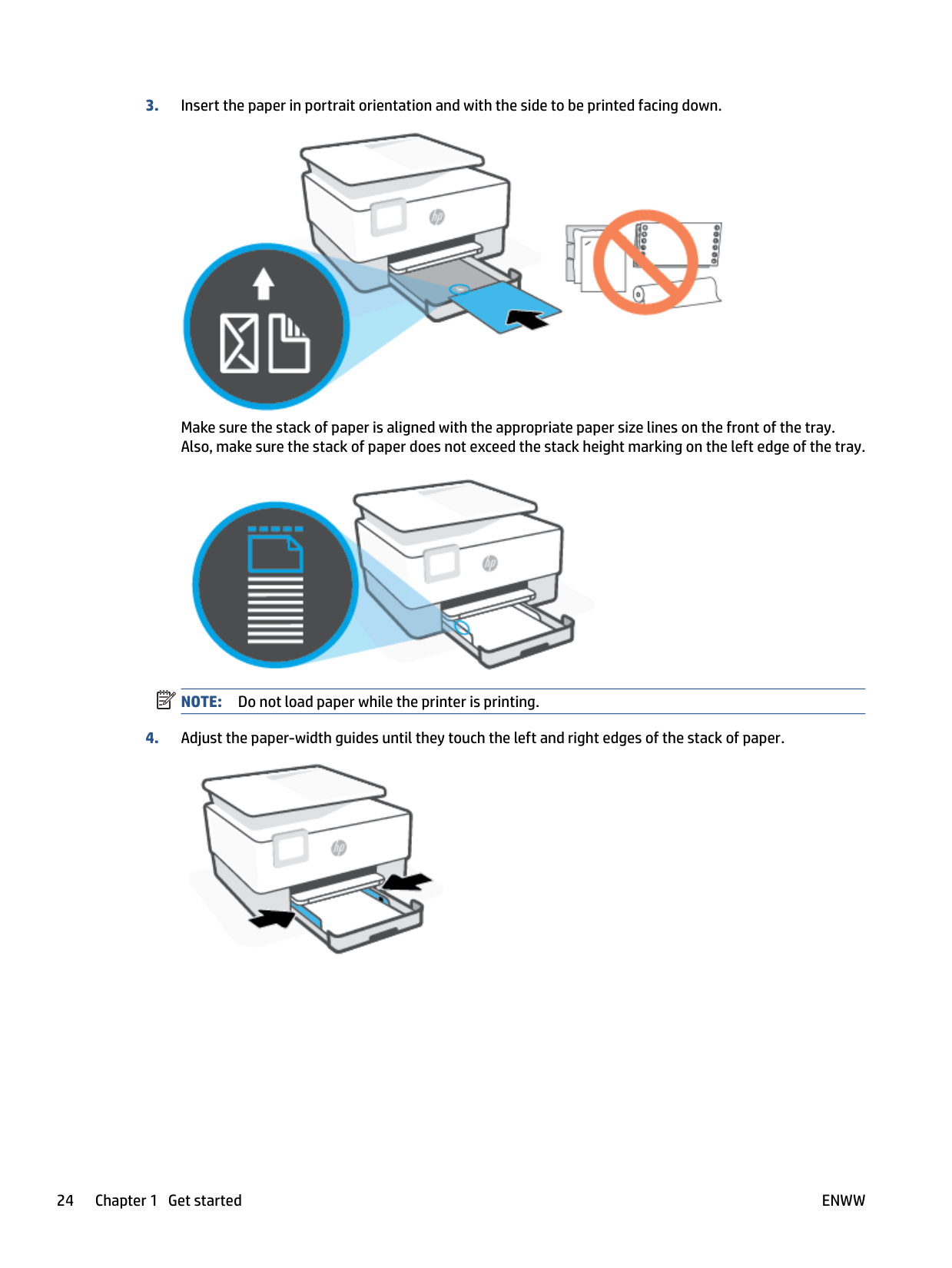

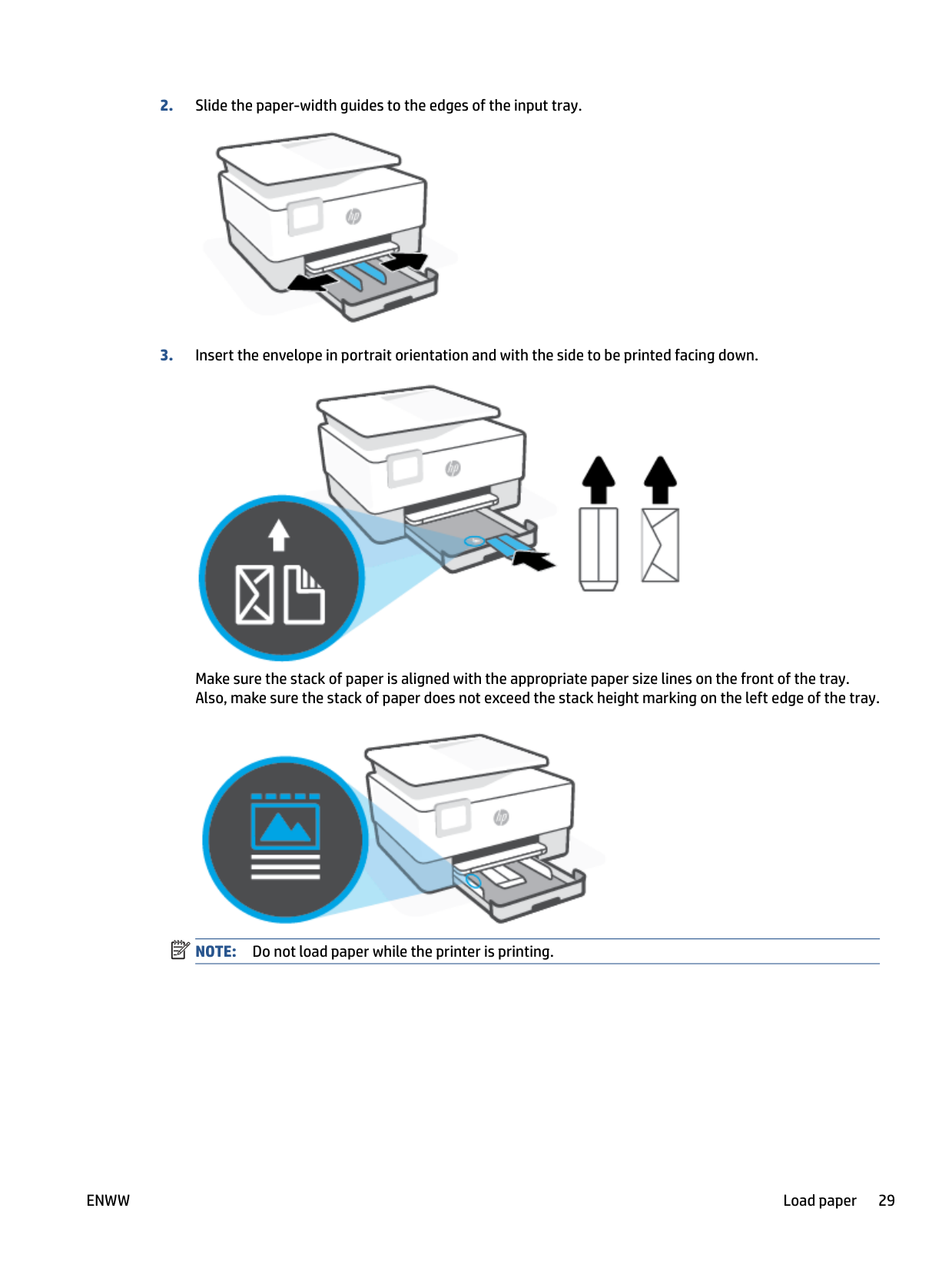
Make sure the stack of paper is aligned with the appropriate paper size lines on the front of the tray. Also, make sure the stack of paper does not exceed the stack height marking on the left edge of the tray.
| | |---|

NOTE: Do not load paper while the printer is printing.


###### To load cards and photo paper
| |
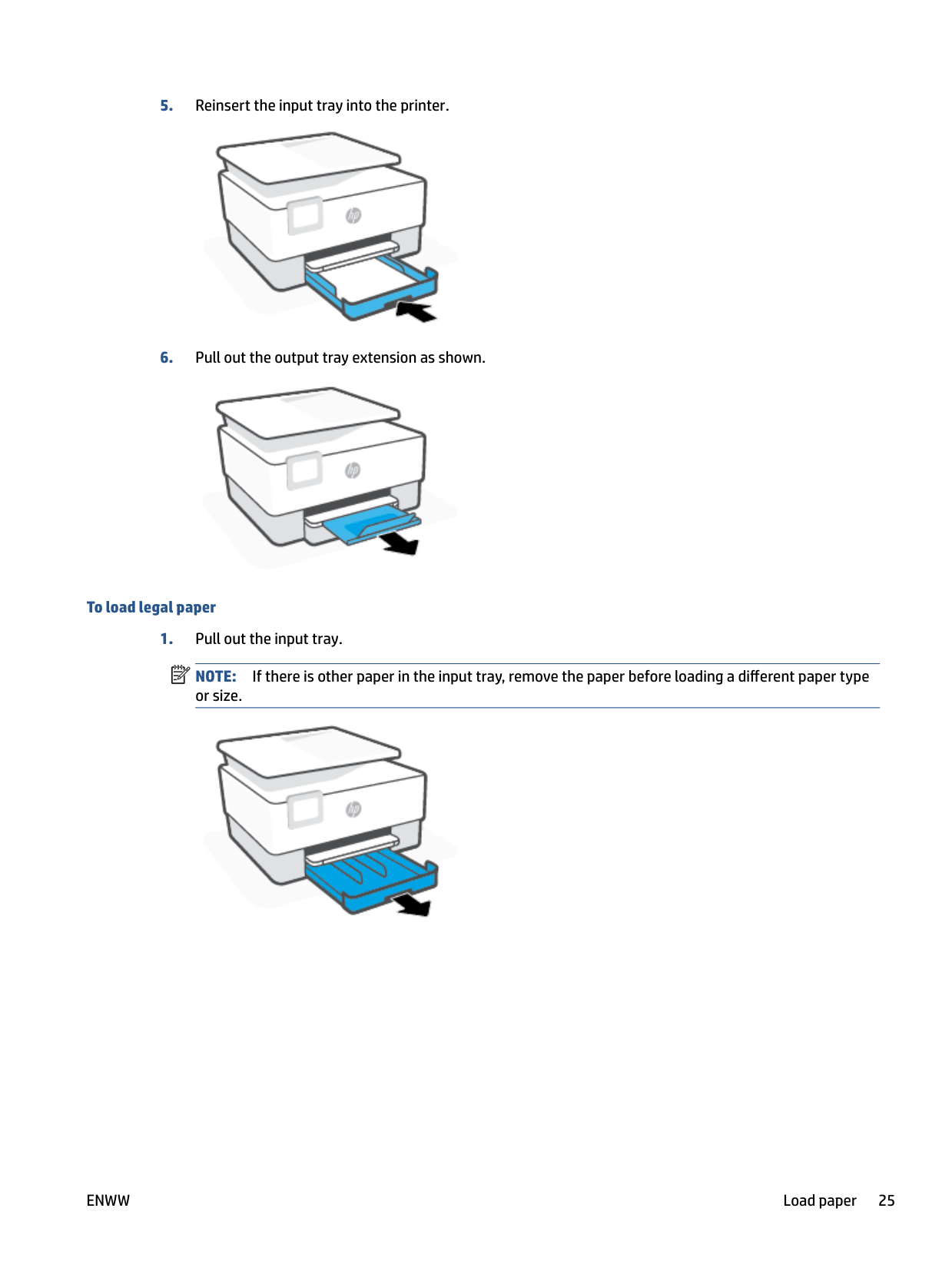
|---|
NOTE: If there is other paper in the input tray, remove the paper before loading a different paper type or size.

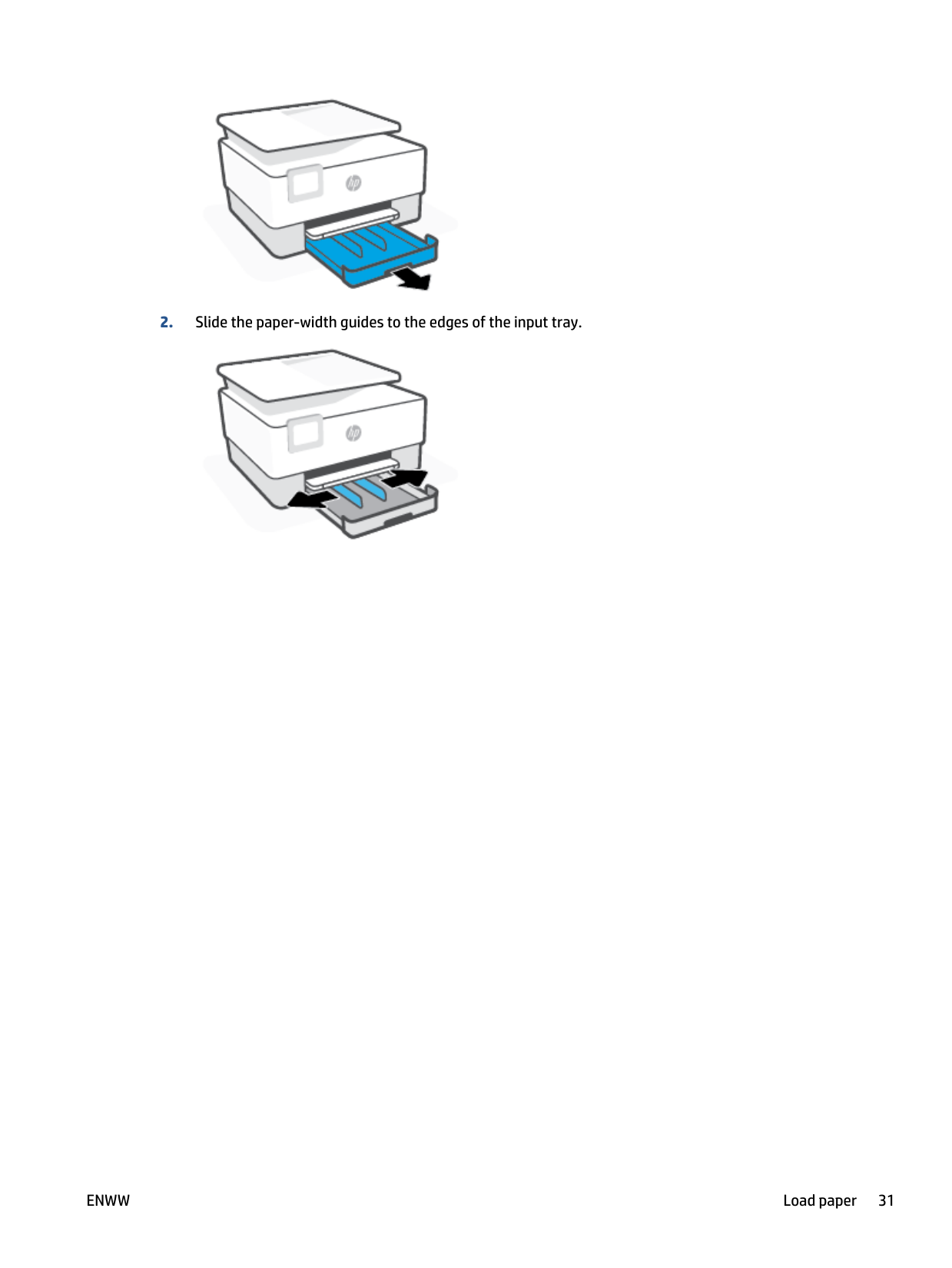
####### 2. Slide the paper-width guides to the edges of the input tray.

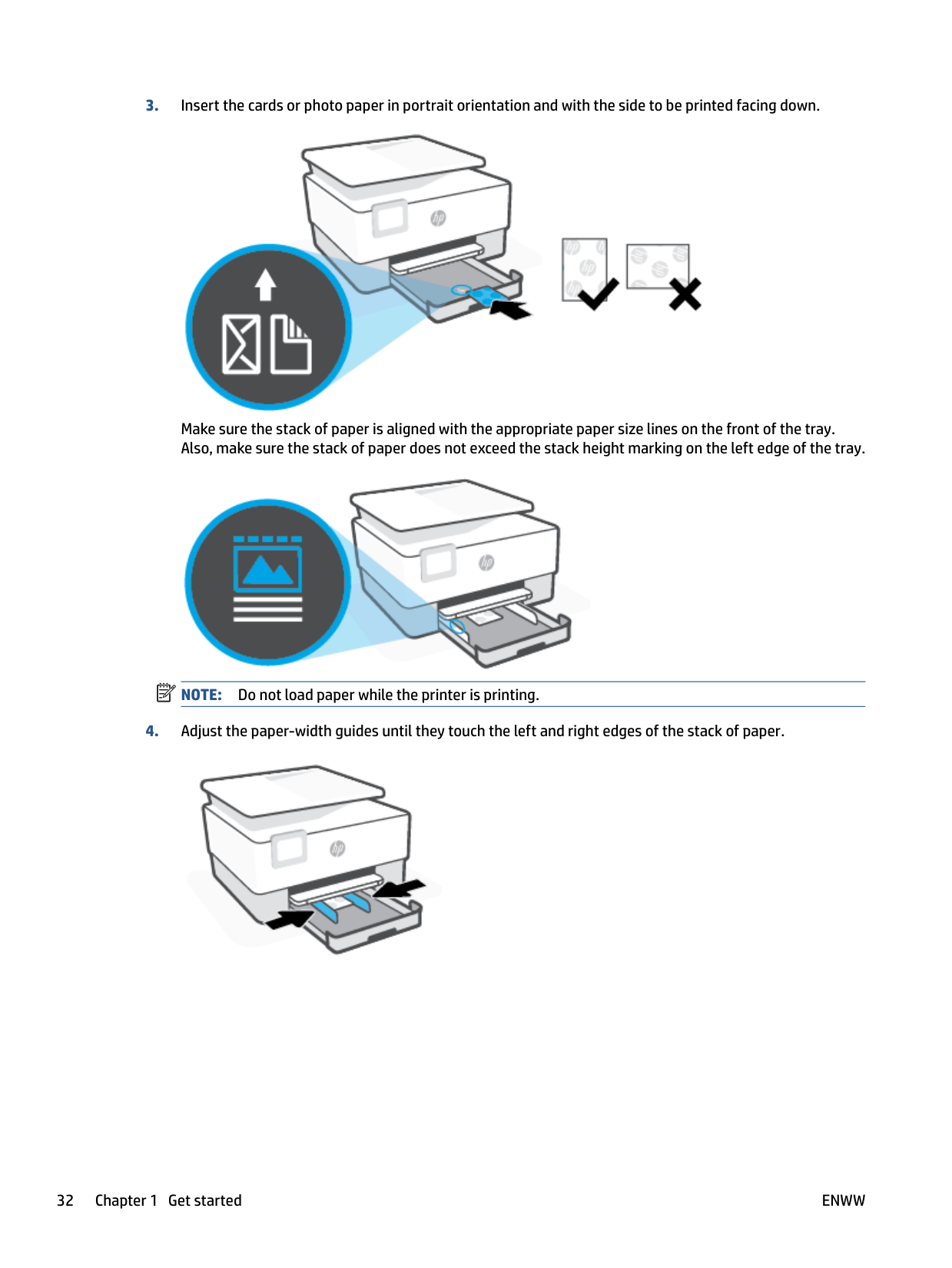
####### 3. Insert the cards or photo paper in portrait orientation and with the side to be printed facing down.

Make sure the stack of paper is aligned with the appropriate paper size lines on the front of the tray. Also, make sure the stack of paper does not exceed the stack height marking on the left edge of the tray.
| | |---|

NOTE: Do not load paper while the printer is printing.
####### 4. Adjust the paper-width guides until they touch the left and right edges of the stack of paper.

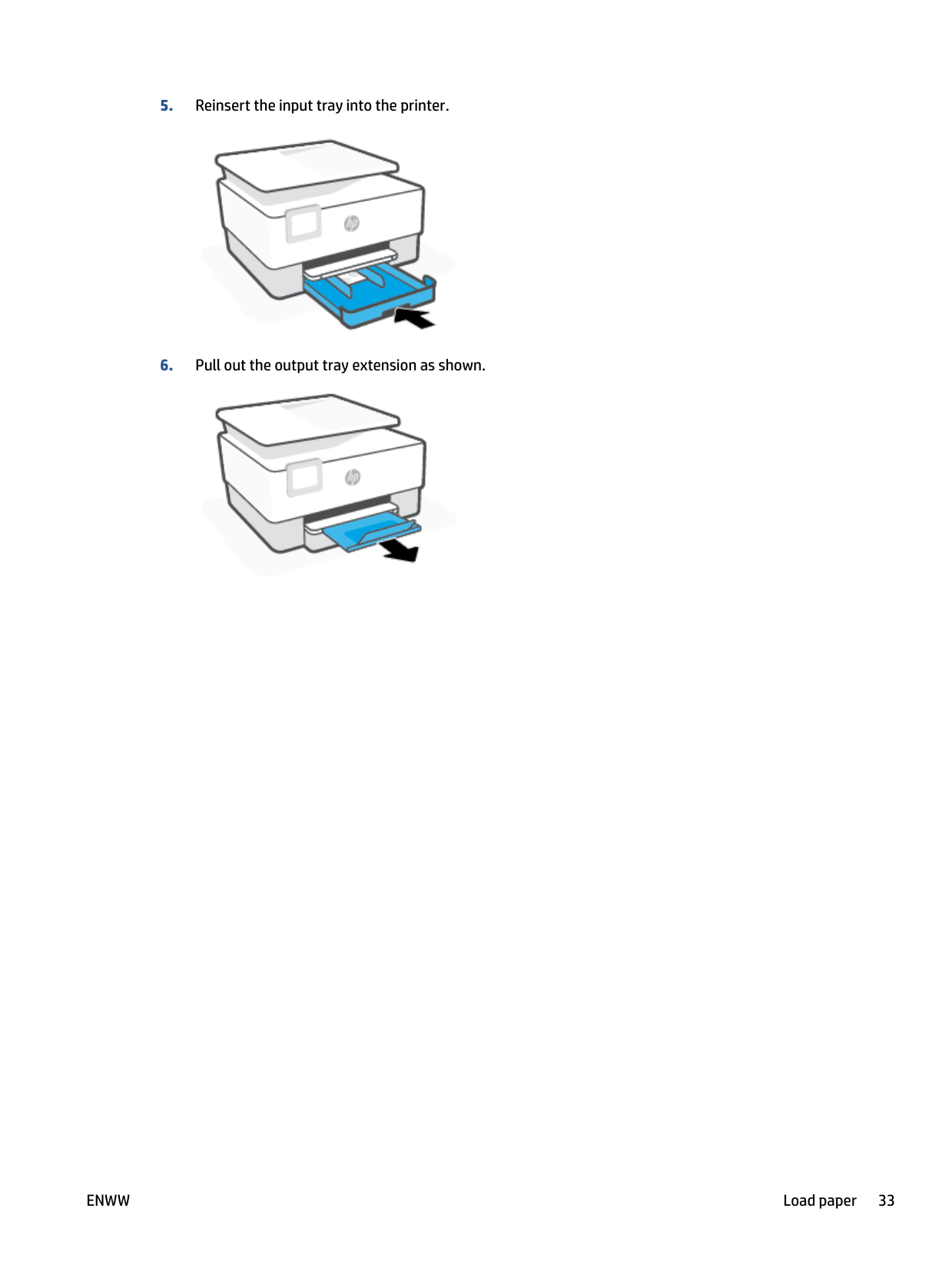
####### 5. Reinsert the input tray into the printer.

####### 6. Pull out the output tray extension as shown.

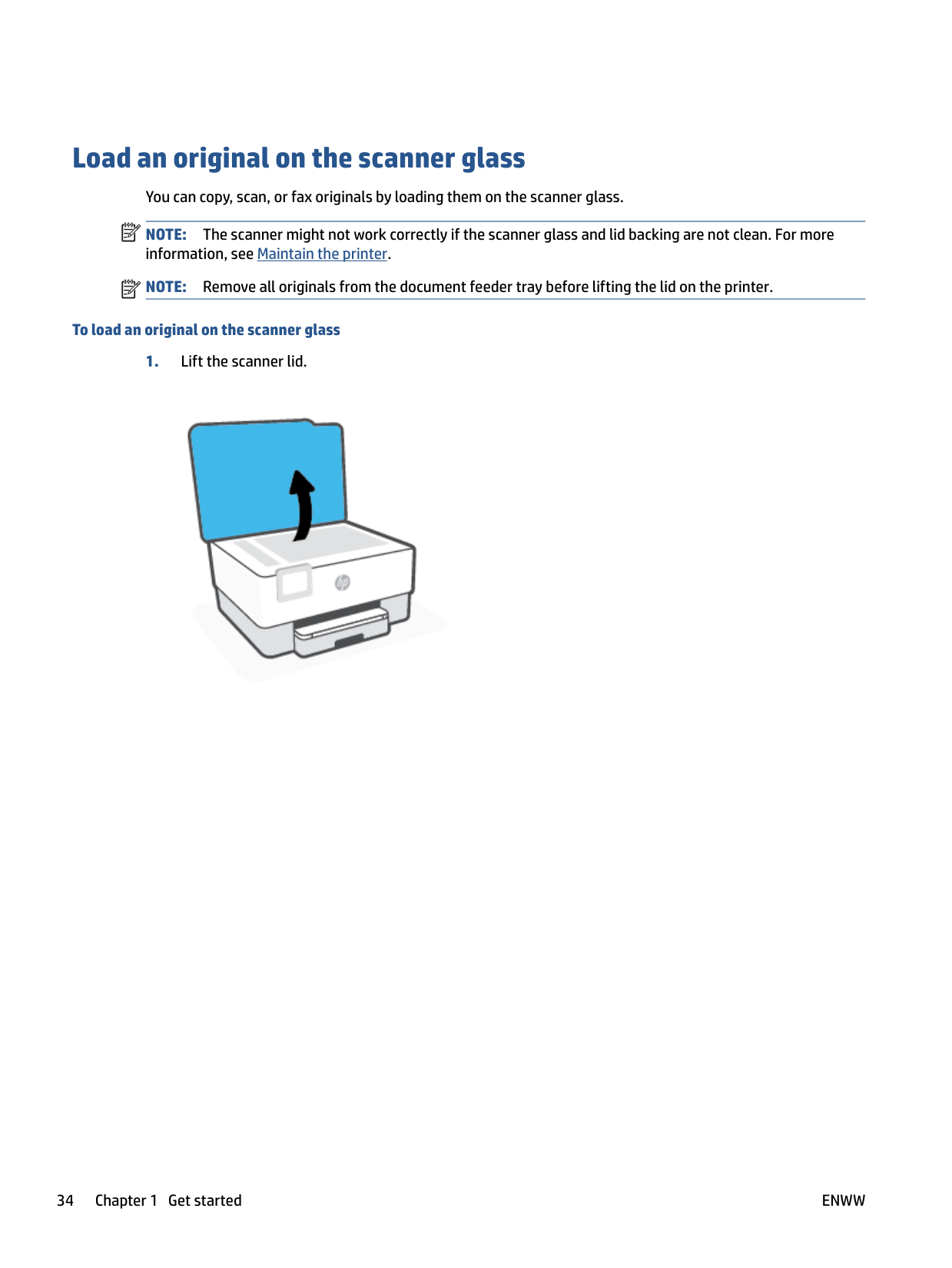
Load an original on the scanner glass You can copy, scan, or fax originals by loading them on the scanner glass. NOTE: The scanner might not work correctly if the scanner glass and lid backing are not clean. For more information, see Maintain the printer. NOTE: Remove all originals from the document feeder tray before lifting the lid on the printer.
| | |---|
| | |---|
###### To load an original on the scanner glass

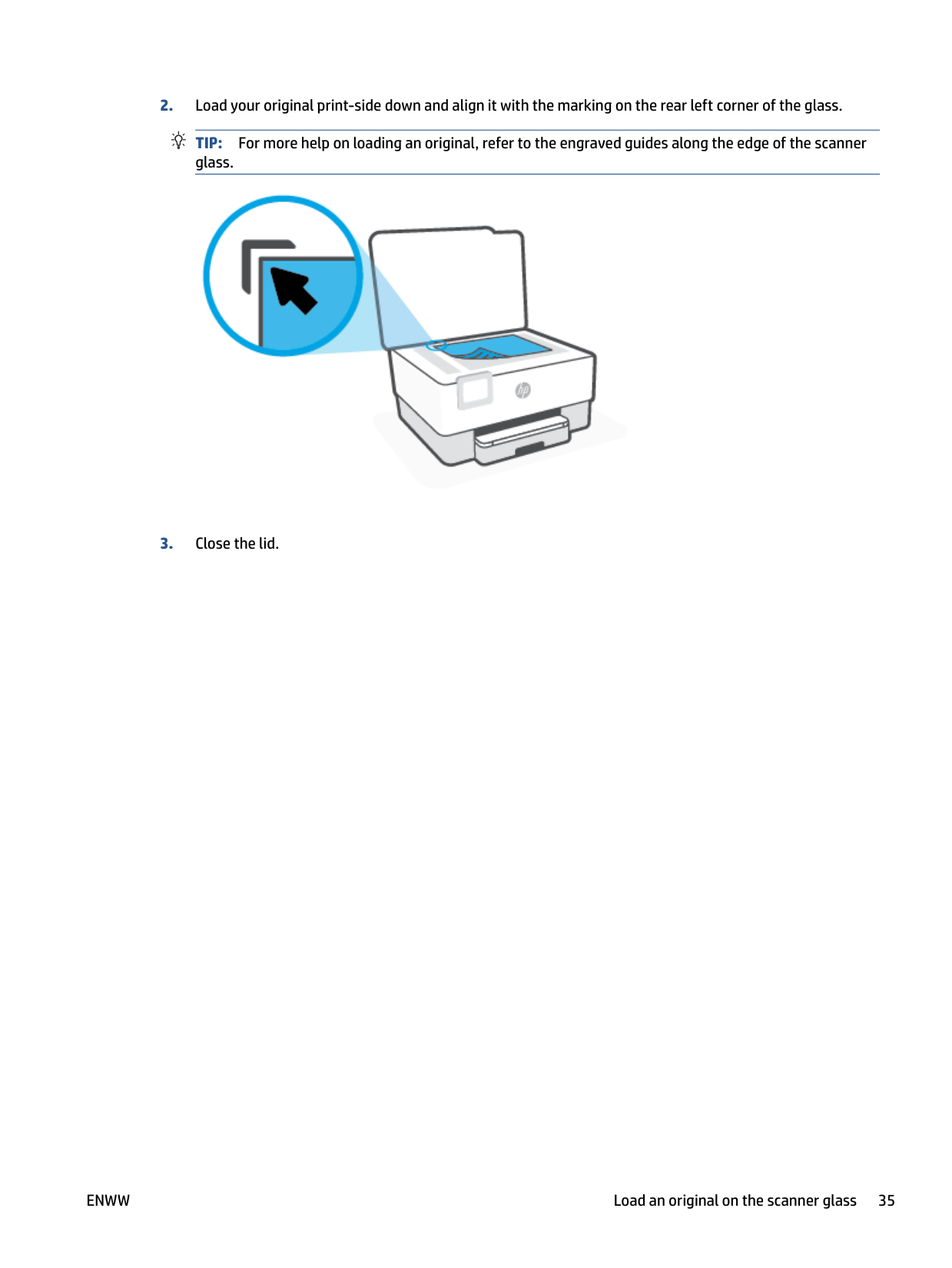
TIP: For more help on loading an original, refer to the engraved guides along the edge of the scanner glass.

ENWW Load an original on the scanner glass 35
Load an original in the document feeder You can copy, scan, or fax a document by placing it in the document feeder. CAUTION: Do not load photos in the document feeder, this might cause damage to your photos. Use only paper that is supported by the document feeder. NOTE: Some features, such as the Fit to Page copy feature, do not work when you load your originals in the document feeder. For those features to work, load your originals on the scanner glass.
| |
|---|
###### To load an original in the document feeder
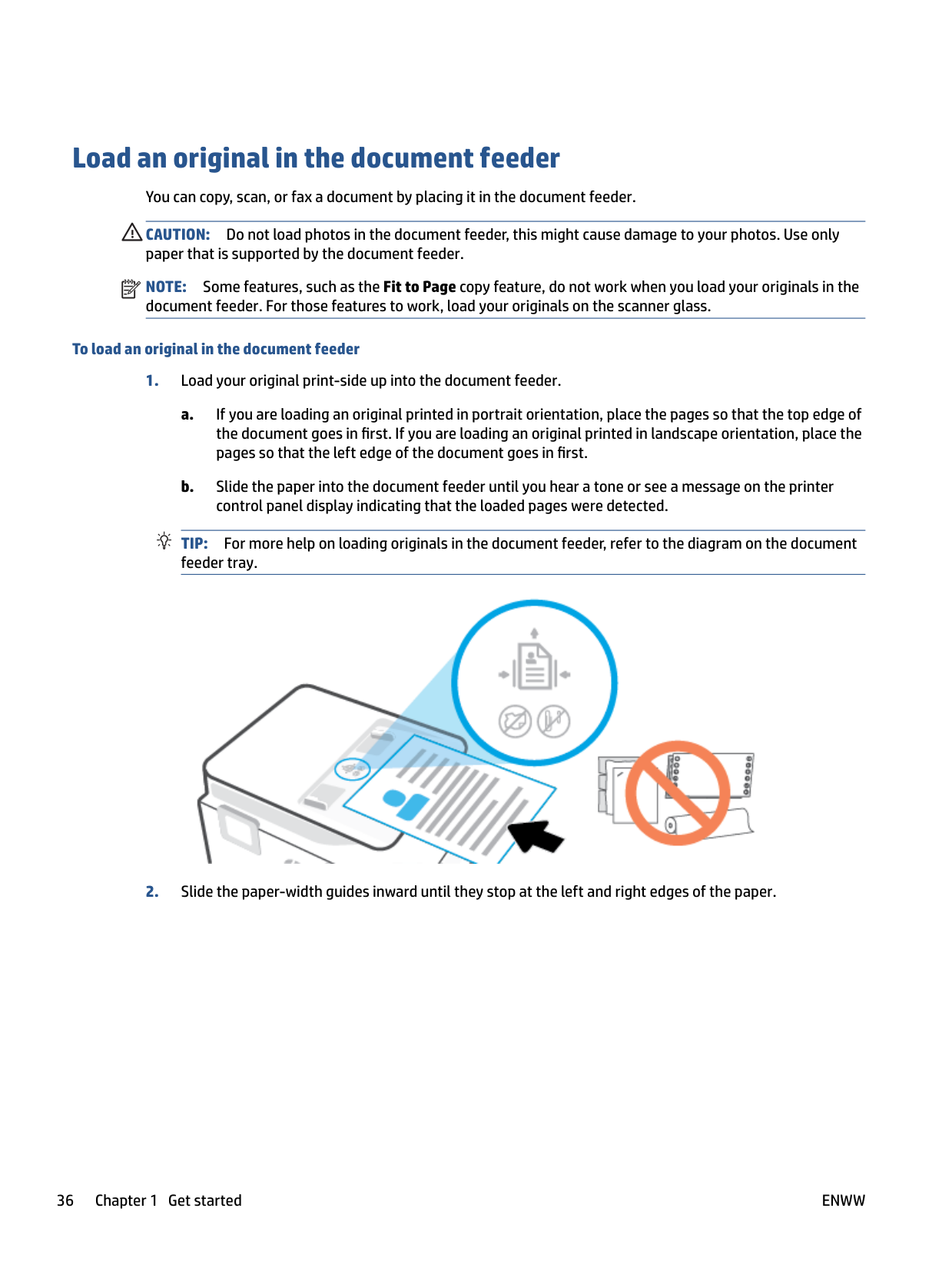
TIP: For more help on loading originals in the document feeder, refer to the diagram on the document feeder tray.

Update the printer
By default, if the printer is connected to a network and Web Services has been enabled, the printer automatically checks for updates.
###### To update the printer using the printer control panel

###### To enable the printer to automatically check for updates NOTE: The default setting of Auto Update is On .
| | |---|

###### To update the printer using the embedded web server
| | |---|
| | |---|
NOTE: If prompted for proxy settings and if your network uses proxy settings, follow the onscreen instructions to set up a proxy server. If you do not have the details, contact your network administrator or the person who set up the network.
ENWW Update the printer 37
Open the HP printer software (Windows)
After installing the HP printer software, depending on your operating system, do one of the following:
| | |---|
NOTE: If you have not installed the HP printer software, visit www.support.hp.com to download and install the necessary software.
Use the HP Smart app to print, scan, and troubleshoot from an iOS, Android, or Windows 10 device
HP Smart (formerly known as HP All-in-One Printer Remote) helps you to set up, scan, print, share, and manage your HP printer. You can share documents and images through email, text messages, and popular cloud and social media services (such as iCloud, Google Drive, Dropbox, and Facebook). You can also set up new HP printers, as well as monitor and order supplies.
| | |---|
NOTE: The HP Smart app might not be available in all languages. Some features might not be available with all printer models.
###### To install the HP Smart app
▲ The HP Smart app is supported on iOS, Android, and Windows 10 devices. To install the app on your
device, go to 123.hp.com and follow the onscreen instructions to access your device’s app store.
###### To open the HP Smart app on a Windows 10 computer
▲ After installing the HP Smart app, from the device desktop, click Start, and then select HP Smart from
the app list.
###### Connect to your printer
▲ Make sure that your device is connected to the same network as the printer. Then HP Smart will
automatically detect the printer.
###### Get more information about the HP Smart app
For basic instructions on how to print, scan, and troubleshoot using HP Smart, see Print using the HP Smart app, Scan using HP Smart and Get help from the HP Smart app .
For more information about using HP Smart for printing, scanning, accessing printer features, and troubleshooting issues, go to:
ENWW Use the HP Smart app to print, scan, and troubleshoot from an iOS, Android, or Windows 10 device 39
Turn the printer off

Press (the Power button) to turn off the printer. Wait until the power light turns off before unplugging the power cord or turning off a power strip.
CAUTION: If you incorrectly turn the printer off, the print carriage might not return to the correct position, causing problems with the cartridges and print quality issues.
2 Print
Most print settings are automatically handled by the software application. Change the settings manually only when you want to change print quality, print on specific types of paper, or use special features.
ENWW 41
Print using a computer
| | |---|
NOTE: You can also use the HP Smart app to print from mobile devices. For more information, see Print using the HP Smart app.
#### Print documents
###### To print documents (Windows)
Depending on your software application, this button might be called Properties, Options, Printer Setup, Printer Properties, Printer, or Preferences.
NOTE: To set print settings for all print jobs, make the changes in the HP software. For more information on the HP software, see Printer management tools.
NOTE: If you change the paper size, be sure to load the correct paper in the input tray and set the paper size on the printer control panel.
If you want to change other print settings, click the other tabs. For more printing tips, see Printer settings tips .
| | |---|
| | |---|
#### Print brochures
###### To print brochures (Windows)
Depending on your software application, this button might be called Properties , Options , Printer Setup , Printer , or Preferences .
NOTE: To set print settings for all print jobs, make the changes in the HP software. For more information on the HP software, see Printer management tools.
NOTE: If you change the paper size, be sure to load the correct paper in the input tray and set the paper size on the printer control panel.
If you want to change other print settings, click the other tabs. For more printing tips, see Printer settings tips .
| | |---|
| | |---|
#### Print on envelopes
Avoid envelopes with the following characteristics:
| | |---|
NOTE: For more information about printing on envelopes, see the documentation available with the software program you are using.
###### To print envelopes (Windows)
Depending on your software application, this button might be called Properties, Options, Printer Setup, Printer Properties, Printer, or Preferences.
NOTE: To set print settings for all print jobs, make the changes in the HP software. For more information on the HP software, see Printer management tools.
NOTE: If you change the paper size, be sure to load the correct paper in the input tray and set the paper size on the printer control panel.
If you want to change other print settings, click the other tabs. For more printing tips, see Printer settings tips .
| | |---|
| | |---|
Print photos You can print a photo from a computer. Do not leave unused photo paper in the input tray. The paper might start to curl, which could impair the quality of your printout. Photo paper should be flat before printing.
TIP: You can use this printer to print documents and photos on your mobile device (such as a smartphone or tablet). For more information, visit the HP Mobile Printing website ( www.hp.com/go/mobileprinting ). (At this time, this website might not be available in all languages.)
###### To print a photo from the computer (Windows)
Depending on your software application, this button might be called Properties, Options, Printer Setup, Printer Properties, Printer, or Preferences.
NOTE: If you change the paper size, be sure to load the correct paper in the input tray and set the paper size on the printer control panel.
If you want to change other print settings, click the other tabs. For more printing tips, see Printer settings tips .
| | |---|
| | |---|
NOTE: After the printing is finished, remove unused photo paper from the input tray. Store the photo paper so it does not start to curl, which could reduce the quality of your printout.
#### Print on special and custom-size paper
If your application supports custom-size paper, set the size in the application before printing the document. If not, set the size in the printer driver. You might need to reformat existing documents to print them correctly on custom-size paper.
###### To set up custom sizes (Windows)
###### To print on special or custom-size paper (Windows)
| | |---|
NOTE: Before you can print on custom-size paper, you must set up the custom size in the Print Server Properties.
Depending on your software application, this button might be called Properties, Options, Printer Setup, Printer Properties, Printer, or Preferences.
NOTE: To set print settings for all print jobs, make the changes in the HP software. For more information on the HP software, see Printer management tools.
NOTE: If you change the paper size, be sure to load the correct paper in the input tray and set the paper size on the printer control panel.
| | |---|
| | |---|
#### Print on both sides (duplexing)
###### To print on both sides of the page (Windows)
Depending on your software application, this button might be called Properties, Options, Printer Setup, Printer Properties, Printer, or Preferences.
NOTE: To set print settings for all print jobs, make the changes in the HP software. For more information on the HP software, see Printer management tools.
| | |---|
| | |---|
NOTE: If you change the paper size, be sure to load the correct paper in the input tray and set the paper size on the printer control panel.
If you want to change other print settings, click the other tabs. For more printing tips, see Printer settings tips .
| | |---|
NOTE: The printer supports automatic two-sided printing of A4, Letter, Executive, and JIS B5 paper sizes.
#### Print using a Mac desktop or laptop
Instructions for HP AirPrint-compatible printers and Mac computers with macOS and OS X 10.7 (Lion) and later.
###### Printer connected to network
If your printer is already set up and connected to your wireless network, you can enable printing from a Mac desktop or laptop using the System Preferences menu.

These instructions let you print from your Mac. Continue to use the HP Smart app to monitor ink levels and printer alerts.
###### Printer not connected to network
▲ If you have not set up or connected your printer to your network, go to 123.hp.com to install the necessary software. When you complete printer setup, use the HP Utility from the Applications folder to monitor ink levels and printer alerts.
Print using the HP Smart app
This section provides basic instructions for using the HP Smart app to print from your Android, iOS, or Windows 10 device. For more information about using the HP Smart app, go to:
###### To print from a Windows 10 device
TIP: If you want to select a different printer, click or tap the Printer icon on the toolbar at the left side of the screen, and then select Select a Different Printer to view all available printers.
-orClick or tap Print Documents, locate a PDF document you want to print, and then click or tap Print.
###### To print from an Android or iOS device
Print with mobile devices
#### Print from mobile devices
You can print documents and photos directly from your mobile devices, including iOS, Android, Windows Mobile, Chromebook and Amazon Kindle.
| | |---|
NOTE: You can also use the HP Smart app to print from mobile devices. For more information, see Print using the HP Smart app.

NOTE: Devices running iOS 4.2 or later have AirPrint preinstalled.
NOTE: Devices running Android 4.4 or later are supported by the HP Print Service Plugin. Devices running Android 4.3 or earlier can print using the HP ePrint app, available in the Google Play Store.
NOTE: If your printer is not listed, you might need to do a one-time setup of the printer using the Add Printer wizard.
NOTE: For detailed information about enabling printing from your mobile devices, visit the HP Mobile Printing website ( www.hp.com/go/mobileprinting ). If a local version of this website is not available in your country/region or language, you might be directed to the HP Mobile Printing website in another country/region or language.
| | |---|
| | |---|
| | |---|
| | |---|
ENWW Print with mobile devices 49
Tips for successful printing
To print successfully, the HP cartridges should be functioning properly with sufficient ink, the paper should be loaded correctly, and the printer should have the appropriate settings.
#### Ink tips
Following are the ink tips for successful printing:
Original HP cartridges are designed and tested with HP printers and papers to help you easily produce great results, time after time.
NOTE: HP cannot guarantee the quality or reliability of non-HP supplies. Product service or repairs required as a result of using a non-HP supply will not be covered under warranty. If you believe you purchased Original HP cartridges, go to www.hp.com/go/anticounterfeit.
NOTE: Ink level warnings and indicators provide estimates for planning purposes only. When an indicator shows low ink levels, consider having a replacement cartridge available to avoid possible printing delays. You do not need to replace cartridges until you are prompted to.
| | |---|
| | |---|

#### Paper loading tips
For more information, also see Load paper.
Printer settings tips Software settings selected in the print driver only apply to printing, they do not apply to copying or scanning. You can print your document on both sides of the paper. For more information, see Print on both sides (duplexing).
###### Printer settings tips (Windows)
The print quality is measured in print resolution dots per inch (dpi). Higher dpi produces clearer and more detailed prints, but slows print speed and might use more ink.
ENWW Tips for successful printing 51
3 Copy and scan
● Copy ● Scan ● Tips for copy and scan success
Copy
###### To copy document or ID card
TIP: To save your settings as defaults for future jobs, touch ( Copy Settings ), and then touch Save Current Settings.


TIP: By default, the printer is set to copy in color. If you want to copy in black-and-white, touch ( Copy Settings ) to change the default color.
ENWW Copy 53
Scan
You can scan documents, photos, and other paper types, and send them to a variety of destinations, such as a computer or an email recipient.
When scanning documents with the HP printer software, you can scan to a format that can be searched and edited.
| |
|---|
When scanning a borderless original, use the scanner glass and not the document feeder. NOTE: Some scan functions are only available after you have installed the HP printer software. TIP: If you have problems scanning documents, see Copy and scan issues.
#### Scan to a computer
Before scanning to a computer, make sure you have already installed the HP recommended printer software. The printer and computer must be connected and turned on.
In addition, on Windows computers, the printer software must be running prior to scanning. You can use the HP printer software to scan documents into editable text. For more information, see Scanning documents as editable text.
###### To scan an original to a computer from the printer control panel
Please make sure the printer has already connected to the computer before scanning.
###### To enable the scan to a computer feature (Windows)
If the printer is connected to the computer with a USB connection, the feature for scanning to computer is enabled by default and cannot be disabled.
If you are using network connection, follow these instructions if the feature has been disabled, and you wish to enable it again.
###### To scan a document or photo to a file (Windows)
| | |---|
NOTE: The initial screen allows you to review and modify basic settings. Click the More link at the top right corner of the Scan dialog box to review and modify detailed settings. For more information, see Change scan settings (Windows). If Show Viewer After Scan is selected, you can make adjustments to the scanned image in the preview screen.
#### Scan to a memory device
You can scan directly to a USB flash drive from the printer control panel without using a computer or the HP printer software.
CAUTION: Do not remove the flash drive from the printer USB port while it is being accessed by the printer. This can damage the files on the USB flash drive. You can safely remove a USB flash drive only when the USB port light is not blinking.
| | |---|
NOTE: The printer does not support encrypted USB flash drives. You can also use the HP printer software to scan documents into editable text. For more information, see Scanning documents as editable text.
###### To scan an original to a memory device from the printer control panel
#### Scan to email
##### Scan to email through Scan function
This section contains the following topics:
###### Set up Scan to Email To set up Scan to Email
| | |---|
You need to set up email addresses first, and then scan and email your documents. NOTE: You need a network-connected computer to set up Scan to Email.
###### Scan a document or photo to email To scan a document or photo to email from the control panel



Touch to change settings.

##### Scan to email through Scan-to-Email app
The Scan-to-Email App is an application that allows you to quickly scan and email photos or documents to the specified recipients directly from your printer. You can set up your email addresses, log in to your accounts with the given PIN codes, and then scan and email your documents.
This section contains the following topics:
###### Set up Scan to Email

###### Scan a document or photo to email
You can scan to email from either the control panel or HP printer software.
###### To scan a document or photo to email from the control panel
| | |---|
NOTE: Select My account is not listed if you do not have an account. You will be prompted to enter your email address and receive a PIN.
###### To scan a document or photo to email from HP printer software (Windows)
Choose Email as PDF or Email as JPEG to open your email software with the scanned file as an attachment.
| | |---|
NOTE: The initial screen allows you to review and modify basic settings. Click the More link at the top right corner of the Scan dialog box to review and modify detailed settings. For more information, see Change scan settings (Windows). If Show Viewer After Scan is selected, you can make adjustments to the scanned image in the preview screen.
###### Change account settings
#### Scan using HP Smart
You can use the HP Smart app to scan documents or photos from the printer's scanner, and you can also scan using your device camera. HP Smart includes editing tools that allow you to adjust the scanned image before saving or sharing. You can print, save your scans locally or in cloud storage, and share them via email, SMS, Facebook, Instagram, etc. To scan with HP Smart, follow the instructions provided in the appropriate section below, depending on the type of device you are using.
This section provides basic instructions for using the HP Smart app to scan from your Android, iOS, or Windows 10 device. For more information about using the HP Smart app, go to:
##### Scan from a Windows 10 device To scan a document or photo using the printer scanner
NOTE: Be sure to select the correct input source if your printer supports scan from both the document feeder and scanner glass.
| | |---|
###### To scan a document or photo using the device camera
If your device has a camera, you can use the HP Smart app to scan a printed document or photo with the device camera. You can then use HP Smart to edit, save, print or share the image.
###### To edit a previously scanned document or photo
HP Smart provides editing tools, such as crop or rotate, so that you can use to adjust a previously scanned document or photo on your device.
##### Scan from an Android or iOS device To scan from an Android or iOS device
NOTE: Be sure to select the correct input source if your printer supports scan from both the document feeder and scanner glass.
| | |---|
#### Scan using Webscan
Webscan is a feature of the embedded web server that lets you scan photos and documents from your printer to your computer using a web browser.
| | |---|
This feature is available even if you did not install the printer software on your computer. For more information, see Embedded web server. NOTE: By default, Webscan is off. You can enable this feature from the EWS.
If you are unable to open Webscan in the EWS, your network administrator might have turned it off. For more information, contact your network administrator or the person who set up your network.
###### To enable Webscan
###### To scan using Webscan
Scanning using Webscan offers basic scan options. For additional scan options or functionality, scan from the HP printer software.
TIP: To scan documents as editable text, you must install the HP printer software. For more information, see Scanning documents as editable text.
#### Scanning documents as editable text
When scanning documents, you can use the HP software to scan documents into a format that you can search, copy, paste, and edit. This allows you to edit letters, newspaper clippings, and many other documents.
Use the following guidelines for scanning documents as editable text.
###### To scan a document to editable text (Windows)
You can scan different types of printed documents into a format in which you can search and edit.
If Save as Editable Text (OCR) is not in the list of available scan options, you need to reinstall your software and choose that option.
| | |---|
NOTE: The initial screen allows you to review and modify basic settings. Click the More link at the top right corner of the Scan dialog box to review and modify detailed settings. For more information, see Change scan settings (Windows). If Show Viewer After Scan is selected, you can make adjustments to the scanned image in the preview screen.
##### Guidelines for scanning documents as editable text
Use the following guidelines to ensure the software successfully converts your documents:
Smudges or dust on the scanner glass or document feeder window can prevent the software from converting the document to editable text.
Be sure to select a shortcut or preset that allows scanning as editable text. These options use scan settings designed to maximize the quality of your OCR scan.
Windows: Use the Save as Editable Text (OCR) or Save as PDF shortcuts.
If you want to extract just the text from the document, without any of the formatting of the original, select a plain text format, such as Text (.txt) or TXT.
If you want to extract the text, as well as some of the formatting of the original, select Rich Text Format, such as Rich Text (.rtf) or RTF, or searchable PDF format, such as Searchable PDF (.pdf) or Searchable PDF .
#### Create a new scan shortcut (Windows)
You can create your own scan shortcut to make scanning easier. For example, you might want to regularly scan and save photos in PNG format, rather than JPEG.
For example, if you are creating a new shortcut for photos, choose either Save as JPEG or Email as JPEG . This makes available the options for working with graphics when scanning.
| | |---|
NOTE: The initial screen allows you to review and modify basic settings. Click the More link at the top right corner of the Scan dialog box to review and modify detailed settings. For more information, see Change scan settings (Windows).
#### Change scan settings (Windows)
You can modify any of the scan settings either for a singular use or save the changes to use permanently. These settings include options such as page size and orientation, scan resolution, contrast, and the folder location for saved scans.
The detailed settings pane appears on the right. The left column summarizes the current settings for each section. The right column allows you to change the settings in the highlighted section.
Some settings allow greater flexibility by displaying a new pane. These are indicated by a + (plus sign) at the right of the setting. You must either accept or cancel any changes on this pane to return to the detailed settings pane.
Tips for copy and scan success
Use the following tips to copy and scan successfully:
ENWW Tips for copy and scan success 65
4 Fax
You can use the printer to send and receive faxes, including color faxes. You can schedule faxes to be sent at a later time within 24 hours and set up phone book contacts to send faxes quickly and easily to frequently used numbers. From the printer control panel, you can also set a number of fax options, such as resolution and the contrast between lightness and darkness on the faxes you send.
| | |---|
NOTE: Before you begin faxing, make sure you have set up the printer correctly for faxing. You can verify the fax is set up correctly by running the fax setup test from the printer control panel.
Send a fax
You can send a fax in a variety of ways, depending on your situation or need.
#### Send a standard fax
You can send a single-page fax, multiple-page fax, black-and-white fax or color fax by using the printer control panel.
| | |---|
NOTE: Send single-page faxes by placing the original on the glass. Send multiple page faxes using the document feeder.
| | |---|
NOTE: If you need printed confirmation that your faxes were successfully sent, fax confirmation must be enabled.
###### To send a standard fax from the printer control panel
TIP: To add a pause in the fax number you are entering, touch * repeatedly, until a dash (-) appears on the display.

TIP: By default, the printer is set to send a black-and-white fax. If you want to send a color fax, touch

( Fax Settings ) to change the default color.
If the printer detects an original loaded in the document feeder, it sends the document to the number you entered.
TIP: If the recipient reports issues with the quality of the fax, try changing the resolution or contrast of your fax.
#### Send a standard fax from the computer
You can fax a document directly from your computer without printing it first.
To use this feature, make sure you have installed the HP printer software on your computer, the printer is connected to a working telephone line, and the fax function is set up and functioning correctly.
###### To send a standard fax from the computer (Windows)
#### Send a fax from a phone
You can send a fax using your telephone extension. This allows you to talk with the intended recipient before sending the fax.
###### To send a fax from an extension phone
If the recipient answers the telephone, inform the recipient that they should receive the fax on their fax machine after they hear fax tones. If a fax machine answers the call, you will hear fax tones from the receiving fax machine.

TIP: By default, the printer is set to send a black-and-white fax. If you want to send a color fax, touch

( Fax Settings ) to change the default color.
The telephone is silent while the fax is transmitting. If you want to speak to the recipient later, remain on the line until the transmission is complete. If you were finished talking to the recipient, you can hang up the telephone as soon as the fax begins transmitting.
#### Send a fax using monitor dialing
When you send a fax using monitor dialing, you can hear the dial tones, telephone prompts, or other sounds through the speakers on the printer. This enables you to respond to prompts while dialing, as well as control the pace of your dialing.
TIP: If you are using a calling card and do not enter your PIN fast enough, the printer might start sending fax tones too soon and cause your PIN not to be recognized by the calling card service. If this is the case, create a phone book contact to store the PIN for your calling card.
| | |---|
NOTE: Make sure the volume is turned on to hear a dial tone.
###### To send a fax using monitor dialing from the printer control panel

TIP: By default, the printer is set to send a black-and-white fax. If you want to send a color fax, touch

( Fax Settings ) to change the default color.
TIP: If you are using a calling card to send a fax and you have your calling card PIN stored as a phone book contact, when prompted to enter your PIN, touch ( Phone Book ), and then touch Local Phone Book to select the phone book contact where you have your PIN stored.

Your fax is sent when the receiving fax machine answers.
#### Send a fax using printer memory
You can scan a black-and-white fax into memory and then send the fax from memory. This feature is useful if the fax number you are trying to reach is busy or temporarily unavailable. The printer scans the originals into memory and sends them once it is able to connect to the receiving fax machine. After the printer scans the pages into memory, you can immediately remove the originals from the document feeder tray or scanner glass.
| | |---|
NOTE: You can only send a black-and-white fax from memory.
###### To send a fax using printer memory


The printer scans the originals into memory and sends the fax when the receiving fax machine is available.
#### Send a fax to multiple recipients
You can send a fax to multiple recipients by creating a group phone book contact made up of two or more individual recipients.
###### To send a fax to multiple recipients using group phone book


TIP: If the recipient reports issues with the quality of the fax, try changing the resolution or contrast of your fax.
#### Send a fax in Error Correction Mode
Error Correction Mode (ECM) prevents loss of data due to poor phone lines by detecting errors that occur during transmission and automatically requesting retransmission of the erroneous portion. Phone charges are unaffected, or might even be reduced, on good phone lines. On poor phone lines, ECM increases sending time and phone charges, but sends the data much more reliably. The default setting is On . Turn ECM off only if it increases phone charges substantially, and if you can accept poorer quality in exchange for reduced charges.
If you turn ECM off:
###### To change the ECM setting from the control panel
Receive a fax
You can receive faxes automatically or manually. If you turn off the Auto Answer option, you must receive faxes manually. If you turn on the Auto Answer option (the default setting), the printer automatically answers incoming calls and receives faxes after the number of rings that are specified by the Rings to Answer setting. (The default Rings to Answer setting is five rings.)
If you receive a Legal-size or larger fax and the printer is not currently set to use Legal-size paper, the printer reduces the fax so that it fits on the paper that is loaded. If you have disabled the Automatic Reduction feature, the printer prints the fax on two pages.
| | |---|
NOTE: If you are copying a document when a fax arrives, the fax is stored in the printer memory until the copying finishes.
#### Receive a fax manually
When you are on the phone, the person you are speaking with can send you a fax while you are still connected. You can pick up the handset to talk or listen for fax tones.
You can receive faxes manually from a phone that is directly connected to the port labeled on the back of the printer.

###### To receive a fax manually
#### Set up backup fax
Depending on your preference and security requirements, you can set up the printer to store all the faxes it receives, only the faxes it receives while the printer is in an error condition, or none of the faxes it receives.
###### To set backup fax from the printer control panel
On The default setting. When Backup fax is On , the printer stores all received faxes in memory. This enables you to reprint up to 30 of the most recently printed faxes if they are still saved in memory. NOTE: When printer memory is low, it overwrites the oldest, printed faxes as it receives new faxes. If the memory becomes full of unprinted faxes, the printer stops answering incoming fax calls. NOTE: If you receive a fax that is too large, such as a very detailed color photo, it might not be stored in memory due to memory limitations.
On Error Only Causes the printer to store faxes in memory only if an error condition exists that prevents the printer from printing the faxes (for example, if the printer runs out of paper). The printer continues to store incoming faxes as long as there is memory available. (If the memory becomes full, the printer stops answering incoming fax calls.) When the error condition is resolved, the faxes stored in memory print automatically, and then they are deleted from memory.
Off Faxes are never stored in memory. For example, you might want to turn off Backup fax for security purposes. If an error condition occurs that prevents the printer from printing (for example, the printer runs out of paper), the printer stops answering incoming fax calls.
Reprint received faxes from memory The received faxes that are not printed are stored in memory. NOTE: After the memory becomes full, the printer cannot receive the new fax until you print or delete the faxes from memory. You might also want to delete the faxes in memory for security or privacy purposes. You can reprint up to 30 of the most recently printed faxes, if they are still in memory. For example, you might need to reprint your faxes if you lost the copy of your last printout.
| | |---|
###### To reprint faxes in memory from the printer control panel

The faxes are printed in the reverse order from which they were received with the most recently received fax printed first, and so on.
#### Forward faxes to another number
You can set up the printer to forward your faxes to another fax number. All faxes are forwarded in black and white, regardless of how they were originally sent.
HP recommends that you verify the number you are forwarding to is a working fax line. Send a test fax to make sure the fax machine is able to receive your forwarded faxes.
###### To forward faxes from the printer control panel
NOTE: If the printer is not able to forward the fax to the designated fax machine (for example, if it is not turned on), the printer prints the fax. If you set up the printer to print error reports for received faxes, it also prints an error report.
| | |---|
If the printer loses power when fax forwarding is set up, it saves the fax forwarding setting and phone number. When the power is restored to the printer, the fax forwarding setting is still On .
| |
|---|
NOTE: You can cancel fax forwarding by selecting Off from the Fax Forwarding menu.
#### Set automatic reduction for incoming faxes
The Automatic Reduction setting determines what the printer does if it receives a fax that is too large for the loaded paper size. This setting is turned on by default, so the image of the incoming fax is reduced to fit on one page, if possible. If this feature is turned off, information that does not fit on the first page is printed on a second page. Automatic Reduction is useful when you receive a fax larger than A4/Letter-size fax and A4/ Letter-size paper is loaded in the input tray.
###### To set automatic reduction from the printer control panel
#### Block unwanted fax numbers
If you subscribe to a caller ID service through your phone provider, you can block specific fax numbers so the printer does not receive faxes received from those numbers. When an incoming fax call is received, the printer compares the number to the list of junk fax numbers to determine if the call should be blocked. If the number matches a number in the blocked fax numbers list, the fax is not received. (The maximum number of fax numbers you can block varies by model.)
| | |---|
NOTE: This feature is not supported in all countries/regions. If it is not supported in your country/region, Junk Fax Blocking does not appear in the Preferences menu.
| | |---|
NOTE: If no phone numbers are added in the Caller ID list, it is assumed that you are not subscribed to a Caller ID service. You can block specific fax numbers by adding them to the junk fax list, unblock these numbers by removing them from the junk fax list, and print a list of blocked junk fax numbers.
###### To add a number to the junk fax list
| | |---|
NOTE: Make sure you enter the fax number as it appears on the control panel display, and not the fax number that appears on the fax header of the received fax, as these numbers can be different.
###### To remove numbers from the junk fax list
###### To print a junk fax list
#### Receive faxes using HP Digital Fax
You can use HP Digitial Fax to automatically receive faxes and save them directly to your computer. This saves paper and ink.
Received faxes are saved as TIFF (Tagged Image File Format) or PDF (Portable Document Format). The files are named in the following method: XXXX_YYYYYYYY_ZZZZZZ.tif, where X is the sender's information, Y is the date, and Z is the time that the fax was received.
| | |---|
NOTE: Fax to Computer is available for receiving black-and-white faxes only. Color faxes will be printed.
###### HP Digital Fax requirements
###### To set up or modify HP Digital Fax (Windows)
###### To turn off HP Digital Fax
Set up phone book contacts
You can set up frequently used fax numbers as phone book contacts. This lets you quickly dial those numbers using the printer control panel.
TIP: In addition to creating and managing phone book contacts from the printer control panel, you can also use tools available on your computer, such as the HP printer software and the printer EWS. For more information, see Printer management tools.
#### Create and edit a phone book contact
You can store fax numbers as phone book contacts.
###### To set up phone book contacts
NOTE: Be sure to include any pauses or other required numbers, such as an area code, an access code for numbers outside a PBX system (usually a 9 or 0), or a long-distance prefix.
| | |---|
###### To change phone book contacts
NOTE: Be sure to include any pauses or other required numbers, such as an area code, an access code for numbers outside a PBX system (usually a 9 or 0), or a long-distance prefix.
| | |---|
#### Create and edit a group phone book contact
You can store groups of fax numbers as group phone book contacts.
###### To set up group phone book contacts
| | |---|
NOTE: Before you can create a group phone book contact, you must have already created at least one phone book contact.

###### To change group phone book contacts

| | |---|
#### Delete phone book contacts
You can delete phone book contacts or group phone book contacts.
###### To delete phone book contacts
###### To delete group phone book contacts

Change fax settings
After completing the steps in the Reference Guide that came with the printer, use the following steps to change the initial settings or to configure other options for faxing.

#### Configure the fax header
The fax header prints your name and fax number on the top of every fax you send. HP recommends that you set up the fax header by using the HP printer software. You can also set up the fax header from the printer control panel, as described here.
| | |---|
NOTE: In some countries/regions, the fax header information is a legal requirement.
###### To set or change the fax header
#### Set the answer mode (Auto answer)
The answer mode determines whether the printer answers incoming calls.
###### To set the answer mode
TIP: You may also access this feature by pressing (the Fax Status button) on the Dashboard.
#### Set the number of rings before answering
If you turn on the Auto Answer setting, you can specify how many rings occur before incoming calls are automatically answered.
The Rings to Answer setting is important if you have an answering machine on the same phone line as the printer, because you want the answering machine to answer the phone before the printer does. The number of rings to answer for the printer should be greater than the number of rings to answer for the answering machine.
For example, set your answering machine to a low number of rings and the printer to answer in the maximum number of rings. (The maximum number of rings varies by country/region.) In this setup, the answering machine answers the call and the printer monitors the line. If the printer detects fax tones, it receives the fax. If the call is a voice call, the answering machine records the incoming message.
###### To set the number of rings before answering
#### Change the answer ring pattern for distinctive ring
Many phone companies offer a distinctive ring feature that allows you to have several phone numbers on one phone line. When you subscribe to this service, each number is assigned a different ring pattern. You can set up the printer to answer incoming calls that have a specific ring pattern.
If you connect the printer to a line with distinctive ring, have your telephone company assign one ring pattern to voice calls and another ring pattern to fax calls. HP recommends that you request double or triple rings for a fax number. When the printer detects the specified ring pattern, it answers the call and receives the fax.
TIP: You can also use the Ring Pattern Detection feature in the printer control panel to set distinctive ring. With this feature, the printer recognizes and records the ring pattern of an incoming call and, based on this call, automatically determines the distinctive ring pattern assigned by your telephone company to fax calls.
| | |---|
If you do not have a distinctive ring service, use the default ring pattern, which is All Standard Rings . NOTE: The printer cannot receive faxes when the main phone number is off the hook.
###### To change the answer ring pattern for distinctive ring
| | |---|
NOTE: If you are using a PBX phone system that has different ring patterns for internal and external calls, you must call the fax number from an external number.
Set the dial type Use this procedure to set tone-dialing or pulse-dialing mode. The factory-set default is Tone. Do not change the setting unless you know that your phone line cannot use tone dialing. NOTE: The pulse-dialing option is not available in all countries/regions.
| | |---|
###### To set the dial type
#### Set the redial options
If the printer was unable to send a fax because the receiving fax machine did not answer or was busy, the printer attempts to redial based on the settings for the redial options. Use the following procedure to turn the options on or off:
###### To set the redial options
#### Set the fax speed
You can set the fax speed used to communicate between your printer and other fax machines when sending and receiving faxes.
If you use one of the following, setting the fax speed to a slower speed might be required:
If you experience problems sending and receiving faxes, try using a slower Speed . The following table provides the available fax speed settings.
Fax speed setting Fax speed Fast v.34 (33600 bps) Medium v.17 (14400 bps) Slow v.29 (9600 bps)
###### To set the fax speed
#### Set the fax sound volume
You can change the volume of fax sounds.
###### To set the fax sound volume
Fax and digital phone services
Many telephone companies provide their customers with digital phone services, such as the following:
HP printers are designed specifically for use with traditional analog phone services. If you are in a digital phone environment (such as DSL/ADSL, PBX, or ISDN), you might need to use digital-to-analog filters or converters when setting up the printer for faxing.
| | |---|
NOTE: HP does not guarantee that the printer will be compatible with all digital service lines or providers, in all digital environments, or with all digital-to-analog converters. It is always recommended that you discuss with the telephone company directly for the correct setup options based on their line services provided.
Fax on Voice over Internet Protocol
You might be able to subscribe to a low cost phone service that allows you to send and receive faxes with your printer by using the Internet. This method is called Fax on Voice over Internet Protocol (VoIP).
The following are indications you probably use a VoIP service:
| | |---|
NOTE: You can only send and receive faxes by connecting a phone cord to the port labeled on the back of the printer. This means that your connection to the Internet must be done either through a converter box (which supplies regular analog phone jacks for fax connections) or your telephone company.

TIP: Support for traditional fax transmission over any Internet protocol telephone systems are often limited. If you experience problems faxing, try using a slower fax speed or disabling the fax error-correction mode (ECM). However, if you turn off ECM, you cannot send and receive color faxes.
If you have questions about Internet faxing, contact your Internet faxing services support department or your local service provider for further assistance.
ENWW Fax on Voice over Internet Protocol 85
Use reports
You can set up the printer to print error reports and confirmation reports automatically for each fax you send and receive. You can also manually print system reports as required; these reports provide useful system information about the printer.
By default, the printer is set to print a report only if there is a problem sending or receiving a fax. A confirmation message that indicates whether a fax was successfully sent appears briefly on the control panel display after each transaction.
| | |---|
NOTE: If the reports are not legible, you can check the estimated ink levels from the control panel or the HP software. For more information, see Check the estimated ink levels.
| | |---|
NOTE: Ink level alerts and indicators provide estimates for planning purposes only. When you receive a lowink alert, consider having a replacement cartridge available to avoid possible printing delays. You do not need to replace the cartridges until the print quality becomes unacceptable.
| | |---|
NOTE: Ensure that the printheads and cartridges are in good conditions and installed properly. For more information, see Work with cartridges. This section contains the following topics:
#### Print fax confirmation reports
You can print a confirmation report either when a fax is sent, or when any fax is sent or received. The default setting is On (Fax Send). When turned off, a confirmation message appears briefly on the control panel after each fax is sent or received.
###### To enable fax confirmation
On (Fax Send) Prints a fax confirmation report for every fax you send. On (Fax Receive) Prints a fax confirmation report for every fax you receive.
Prints a fax confirmation report for every fax you send and receive.
On (Fax Send and Fax Receive)
Off Does not print a fax confirmation report when you send and receive faxes successfully. This is the
default setting.
###### To include an image of the fax on the report
#### Print fax error reports
You can configure the printer so that it automatically prints a report when there is an error during transmission or reception.
###### To set the printer to print fax error reports automatically
On (Fax Send) Prints whenever a transmission error occurs. This is the default setting. On (Fax Receive) Prints whenever a receiving error occurs. On (Fax Send and Fax Receive)
Prints whenever a fax error occurs.
Off Does not print any fax error reports.
#### Print and view the fax log
You can print a log of faxes that have been received and sent by the printer.
###### To print the fax log from the printer control panel
#### Clear the fax log
Clearing the fax log also deletes all faxes stored in memory.
###### To clear the fax log
#### Print the details of the last fax transaction
The Last Fax Transaction report prints the details of the last fax transaction to occur. Details include the fax number, number of pages, and the fax status.
###### To print the Last Fax Transaction report
#### Print a Caller ID Report
You can print a list of Caller ID fax numbers.
###### To print a Caller ID History Report

View the Call History You can view a list of all the calls placed from the printer. NOTE: You cannot print the call history.
| | |---|
###### To view the call history
###### 3. Touch ( Phone Book ).

###### 4. Touch Call History .
Additional fax setup
After completing all the steps in the Getting Started Guide, use the instructions in this section to complete your fax setup. Keep your Getting Started Guide for later use.
In this section, you learn how to set up the printer so that faxing works successfully with equipment and services you might already have on the same phone line.
TIP: You can also use the Fax Setup Wizard (Windows) to help you quickly set up some important fax settings such as the answer mode and fax header information. You can access these tools through the HP printer software. After you run these tools, follow the procedures in this section to complete your fax setup.
This section contains the following topics:
#### Set up faxing (parallel phone systems)
Before you begin setting up the printer for faxing, determine which kind of phone system your country/region uses. The instructions for fax setup differ depending on whether you have a serial- or parallel-type phone system:

| | |---|

| | |---|
NOTE: If you have a parallel-type phone system, HP recommends you connect a 2-wire phone cord to the telephone wall jack.
Countries/regions with a parallel-type phone system Argentina Australia Brazil Canada Chile China Colombia Greece India Indonesia Ireland Japan Korea Latin America Malaysia Mexico Philippines Poland Portugal Russia Saudi Arabia Singapore Spain Taiwan Thailand USA Venezuela Vietnam
If you are unsure which kind of telephone system you have (serial or parallel), check with your telephone company.
This section contains the following topics:
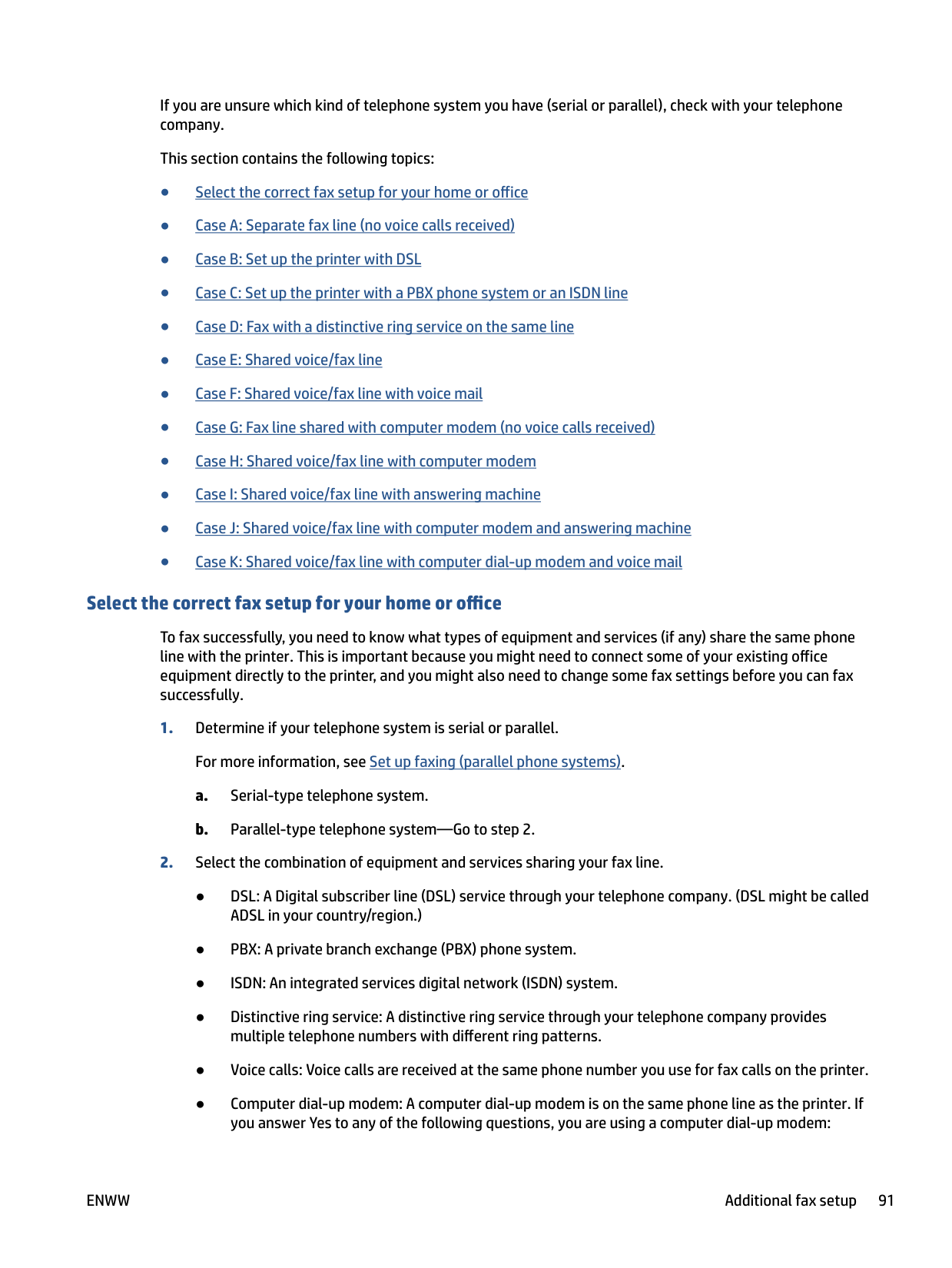
##### Select the correct fax setup for your home or office
To fax successfully, you need to know what types of equipment and services (if any) share the same phone line with the printer. This is important because you might need to connect some of your existing office equipment directly to the printer, and you might also need to change some fax settings before you can fax successfully.
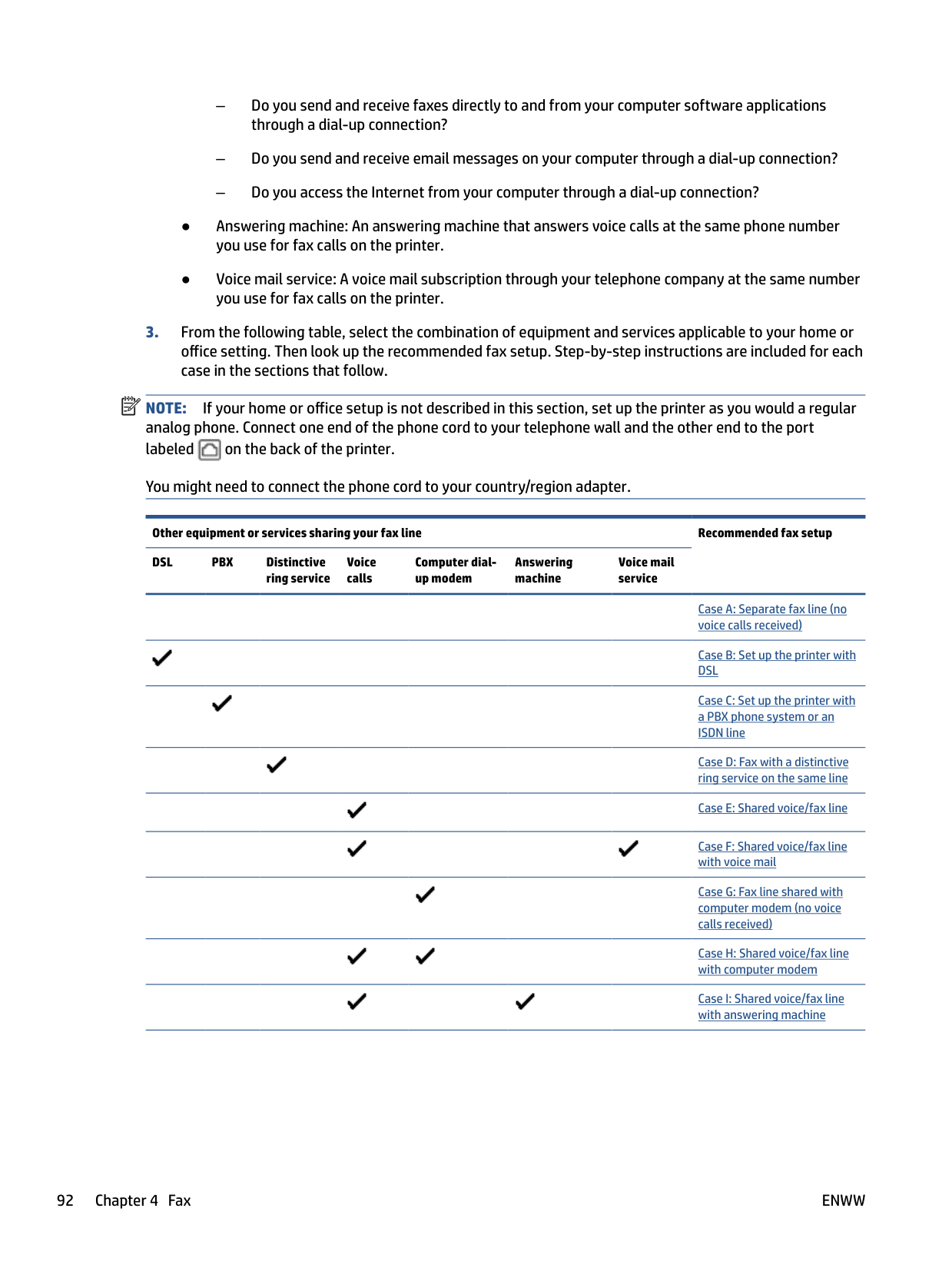
| | |---|
NOTE: If your home or office setup is not described in this section, set up the printer as you would a regular analog phone. Connect one end of the phone cord to your telephone wall and the other end to the port labeled on the back of the printer.

You might need to connect the phone cord to your country/region adapter.
Other equipment or services sharing your fax line Recommended fax setup DSL PBX Distinctive
Voice calls
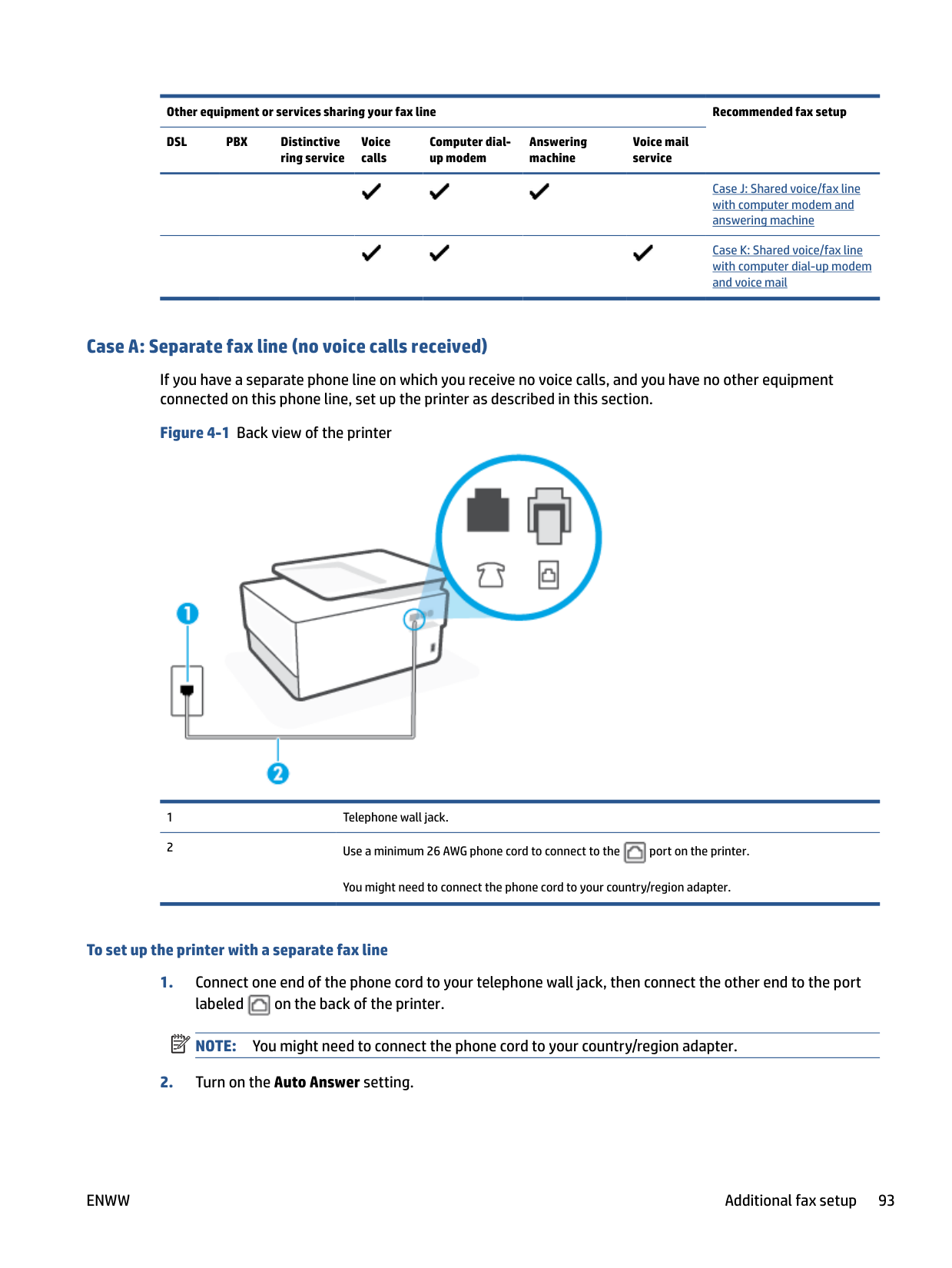
Computer dialup modem
Answering machine
Voice mail service
ring service


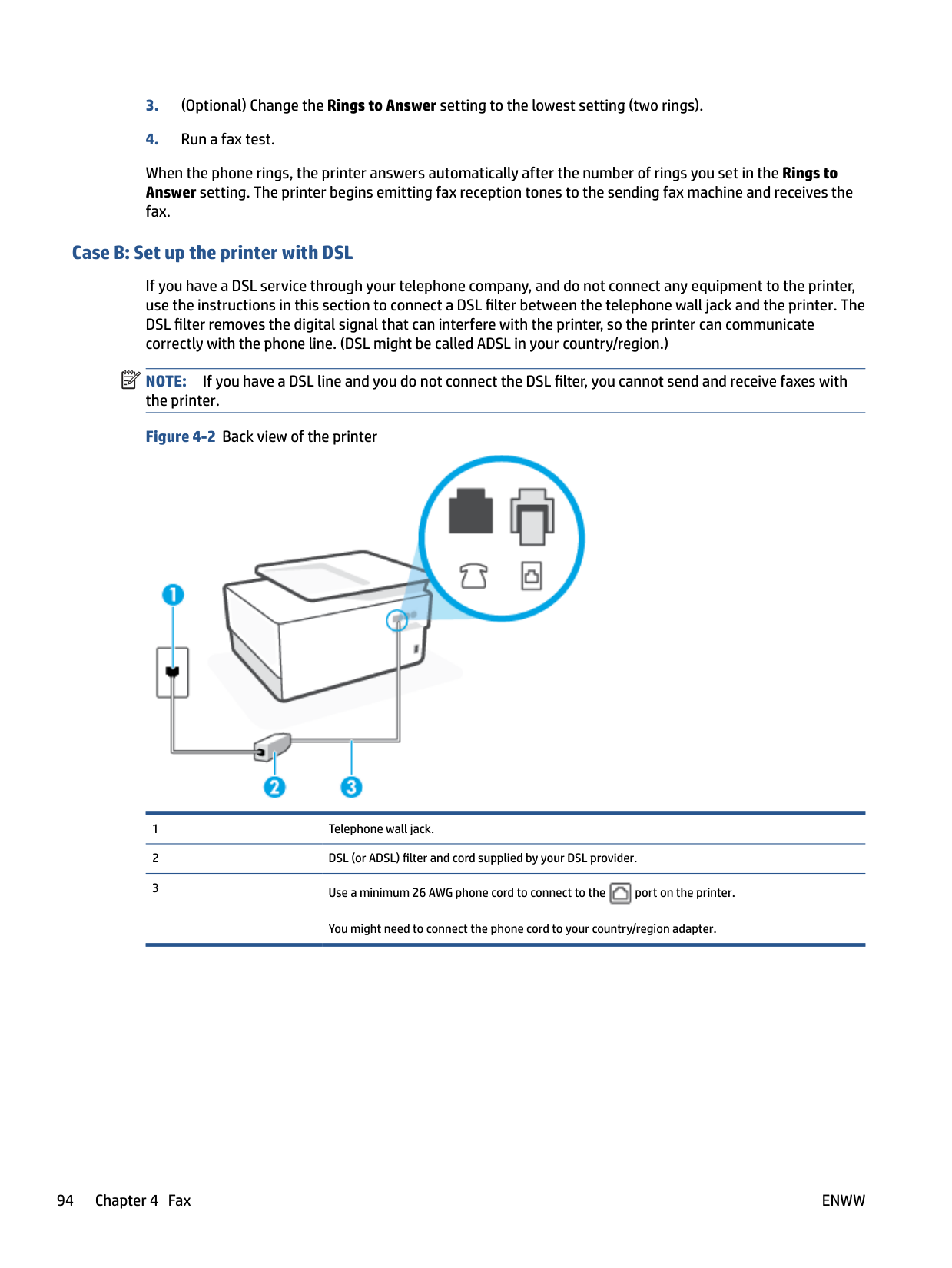


Other equipment or services sharing your fax line Recommended fax setup DSL PBX Distinctive
Voice calls
Computer dialup modem
Answering machine
Voice mail service
ring service




##### Case A: Separate fax line (no voice calls received)
If you have a separate phone line on which you receive no voice calls, and you have no other equipment connected on this phone line, set up the printer as described in this section.
Figure 4-1 Back view of the printer


You might need to connect the phone cord to your country/region adapter.
###### To set up the printer with a separate fax line

NOTE: You might need to connect the phone cord to your country/region adapter.
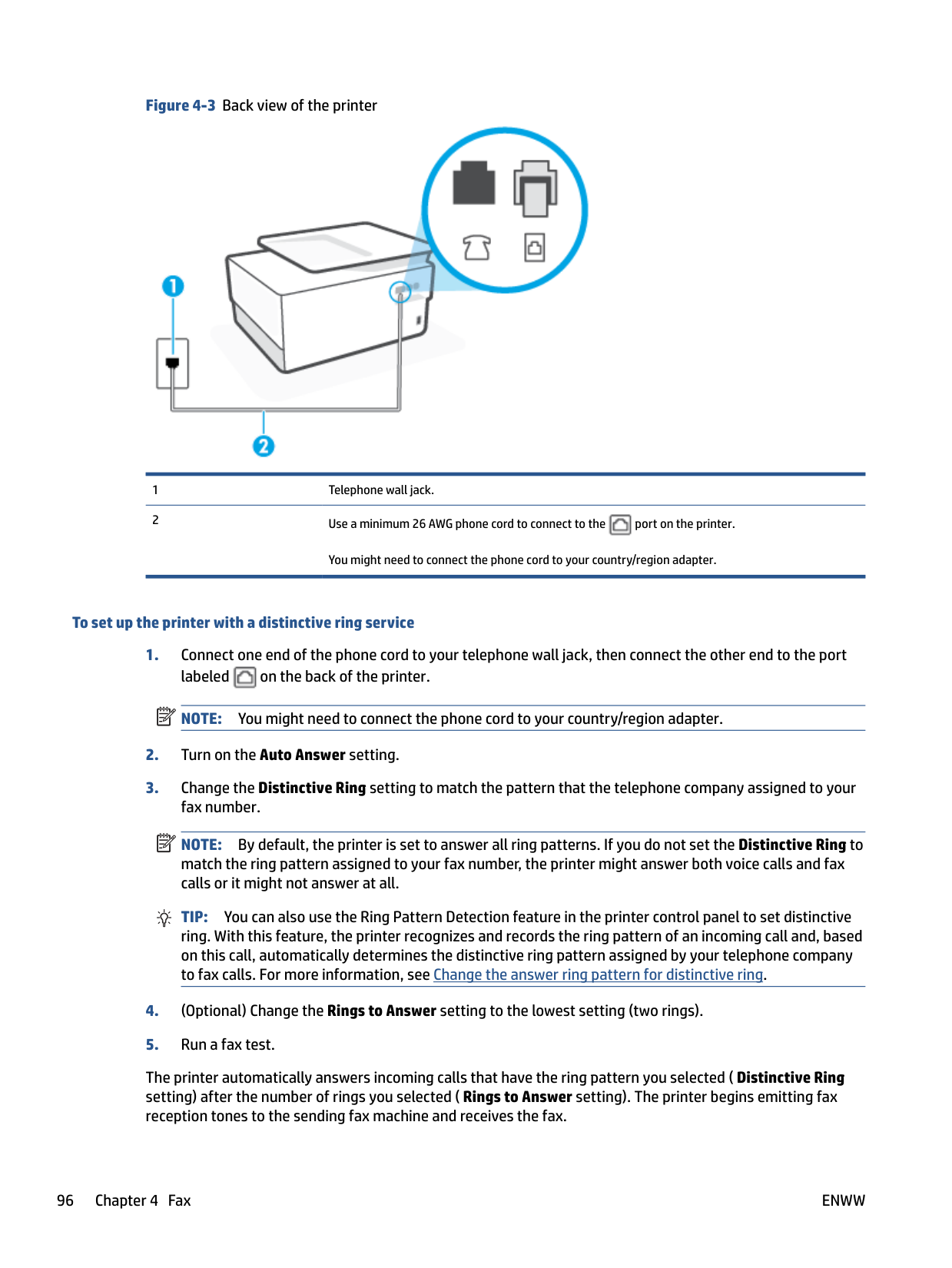
| | |---|
When the phone rings, the printer answers automatically after the number of rings you set in the Rings to Answer setting. The printer begins emitting fax reception tones to the sending fax machine and receives the fax.
##### Case B: Set up the printer with DSL
If you have a DSL service through your telephone company, and do not connect any equipment to the printer, use the instructions in this section to connect a DSL filter between the telephone wall jack and the printer. The DSL filter removes the digital signal that can interfere with the printer, so the printer can communicate correctly with the phone line. (DSL might be called ADSL in your country/region.)
| | |---|
NOTE: If you have a DSL line and you do not connect the DSL filter, you cannot send and receive faxes with the printer.
Figure 4-2 Back view of the printer


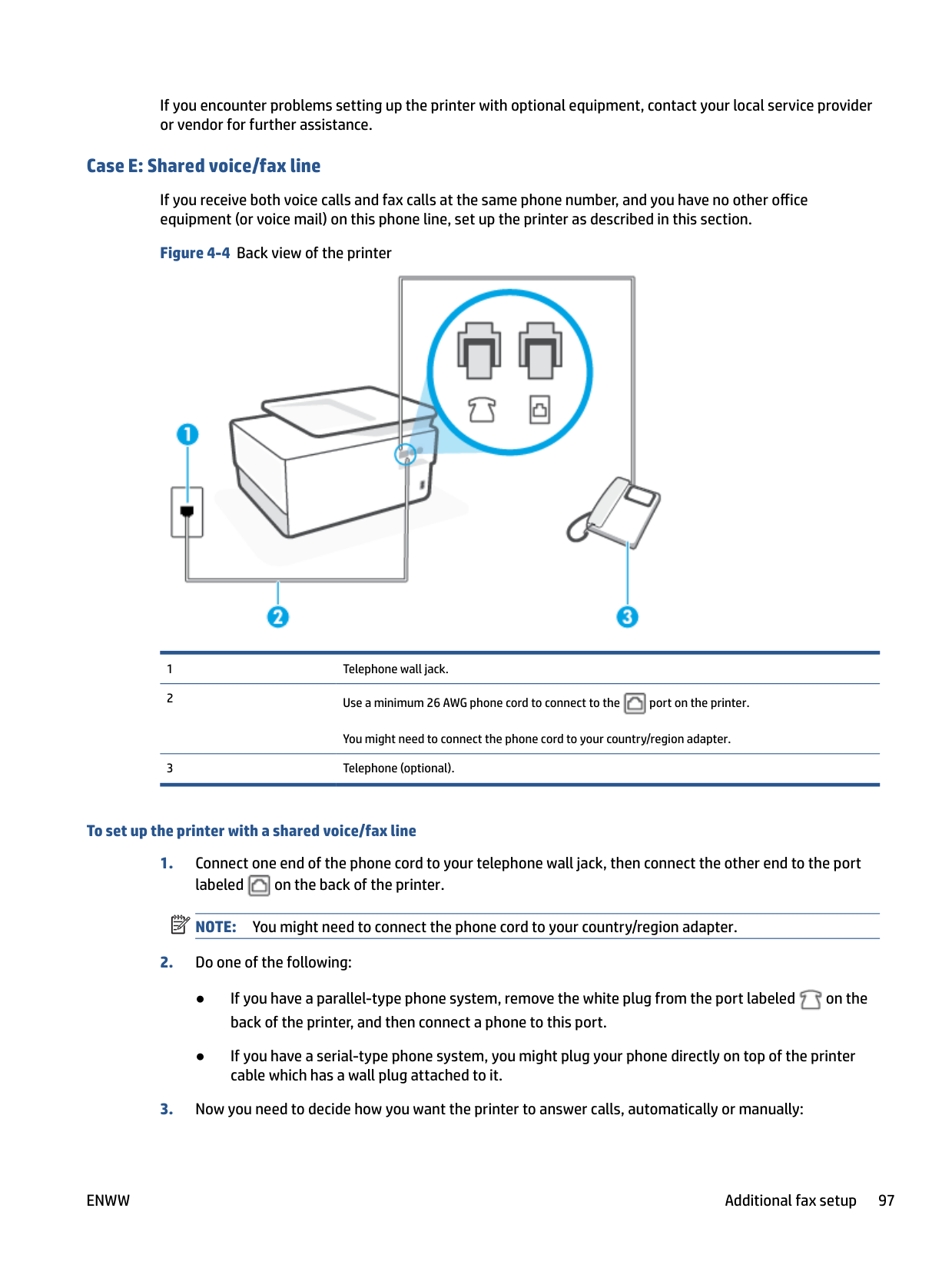
You might need to connect the phone cord to your country/region adapter.
###### To set up the printer with DSL

NOTE: You might need to connect the phone cord to your country/region adapter.
If you do not use the supplied cord to connect from the DSL filter to the printer, you might not be able to fax successfully. This special phone cord is different from the phone cords you might already have in your home or office.
You might need to obtain additional phone cords for this setup.
| | |---|
If you encounter problems setting up the printer with optional equipment, contact your local service provider or vendor for further assistance.
##### Case C: Set up the printer with a PBX phone system or an ISDN line
If you are using either a PBX phone system or an ISDN converter/terminal adapter, make sure you do the following:
NOTE: Some ISDN systems allow you to configure the ports for specific phone equipment. For example, you might have assigned one port for telephone and Group 3 fax and another port for multiple purposes. If you have problems when connected to the fax/phone port of your ISDN converter, try using the port designated for multiple purposes; it might be labeled "multi-combi" or something similar.
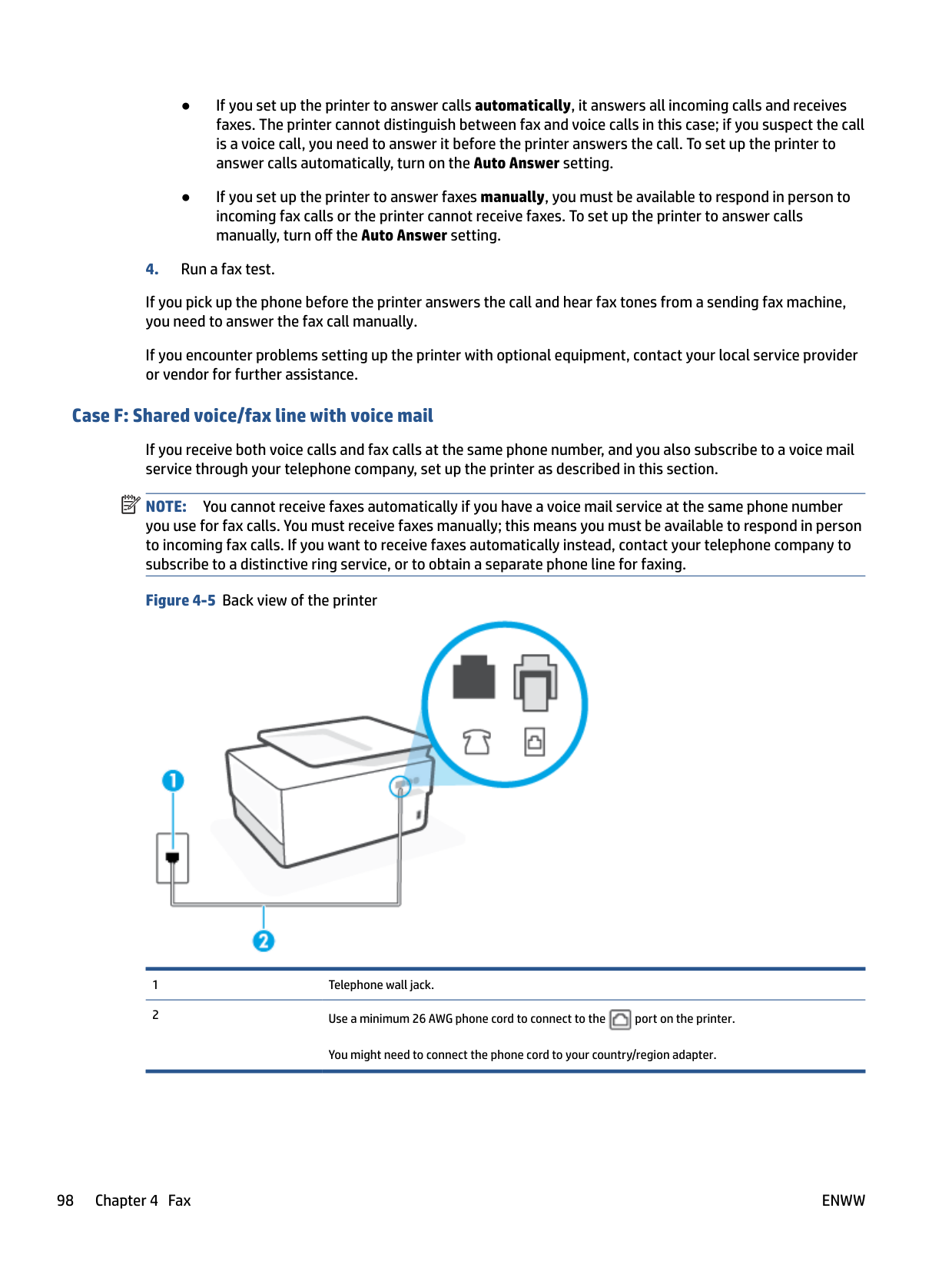
NOTE: Many digital PBX systems include a call-waiting tone that is set to "on" by default. The call waiting tone interferes with any fax transmission, and you cannot send or receive faxes with the printer. Refer to the documentation that came with your PBX phone system for instructions on how to turn off the call-waiting tone.
| | |---|
| | |---|
If you encounter problems setting up the printer with optional equipment, contact your local service provider or vendor for further assistance.
##### Case D: Fax with a distinctive ring service on the same line
If you subscribe to a distinctive ring service (through your telephone company) that allows you to have multiple phone numbers on one phone line, each with a different ring pattern, set up the printer as described in this section.
Figure 4-3 Back view of the printer


You might need to connect the phone cord to your country/region adapter.
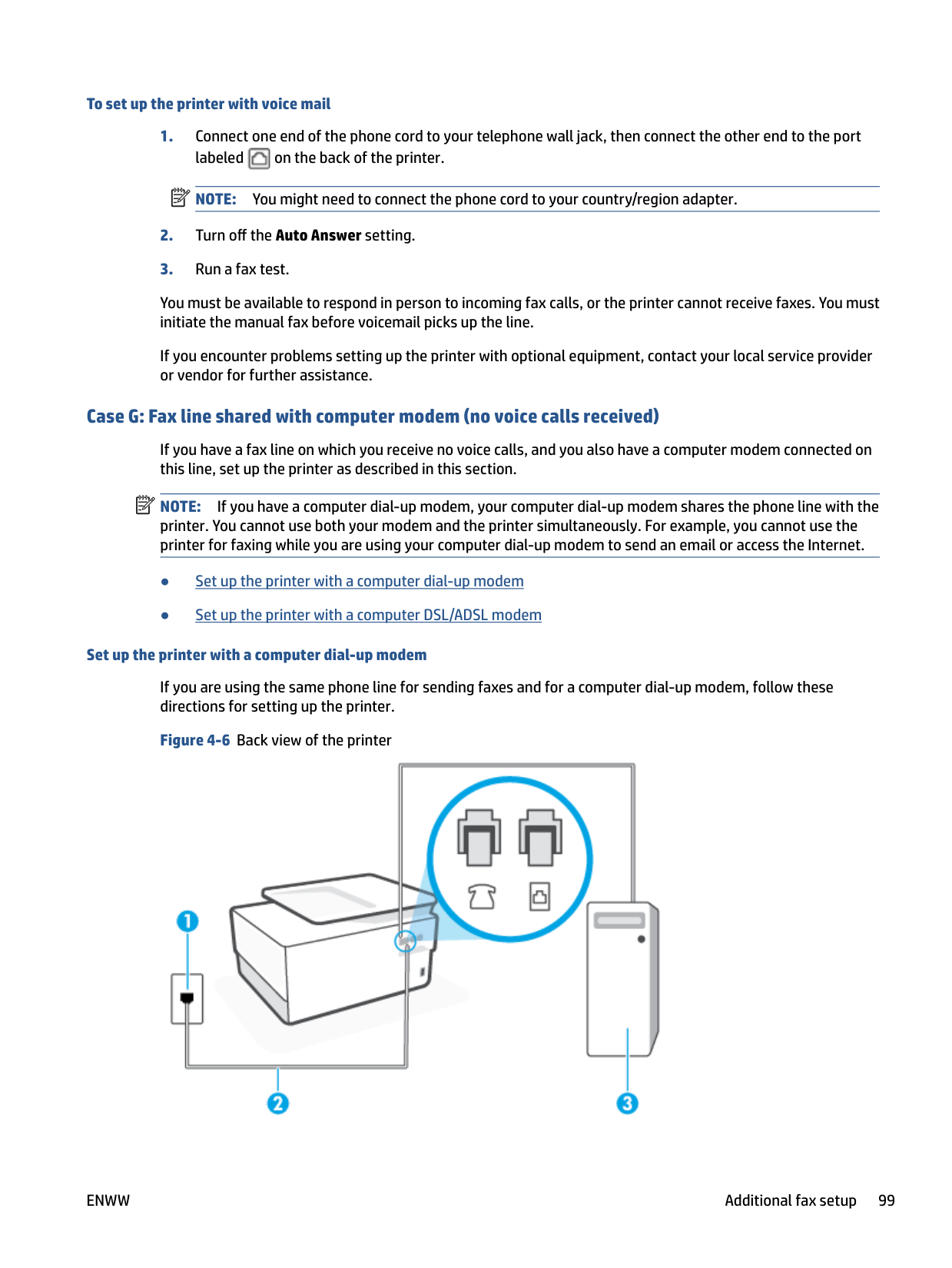
###### To set up the printer with a distinctive ring service

NOTE: You might need to connect the phone cord to your country/region adapter.
NOTE: By default, the printer is set to answer all ring patterns. If you do not set the Distinctive Ring to match the ring pattern assigned to your fax number, the printer might answer both voice calls and fax calls or it might not answer at all.
TIP: You can also use the Ring Pattern Detection feature in the printer control panel to set distinctive ring. With this feature, the printer recognizes and records the ring pattern of an incoming call and, based on this call, automatically determines the distinctive ring pattern assigned by your telephone company to fax calls. For more information, see Change the answer ring pattern for distinctive ring.
| | |---|
| | |---|
The printer automatically answers incoming calls that have the ring pattern you selected ( Distinctive Ring setting) after the number of rings you selected ( Rings to Answer setting). The printer begins emitting fax reception tones to the sending fax machine and receives the fax.
If you encounter problems setting up the printer with optional equipment, contact your local service provider or vendor for further assistance.
##### Case E: Shared voice/fax line
If you receive both voice calls and fax calls at the same phone number, and you have no other office equipment (or voice mail) on this phone line, set up the printer as described in this section.
Figure 4-4 Back view of the printer


You might need to connect the phone cord to your country/region adapter.
###### To set up the printer with a shared voice/fax line

NOTE: You might need to connect the phone cord to your country/region adapter.

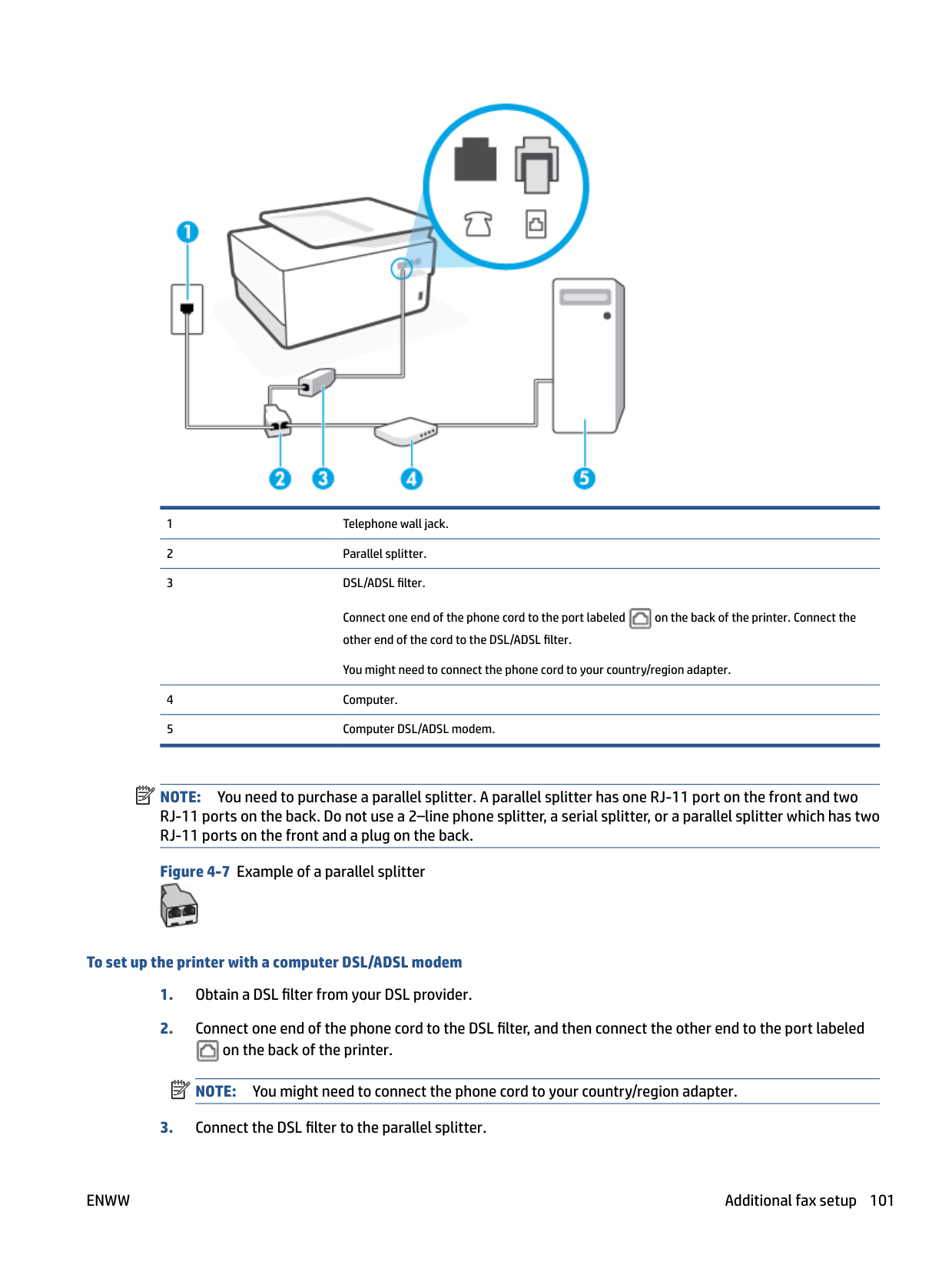
| | |---|
If you pick up the phone before the printer answers the call and hear fax tones from a sending fax machine, you need to answer the fax call manually.
If you encounter problems setting up the printer with optional equipment, contact your local service provider or vendor for further assistance.
##### Case F: Shared voice/fax line with voice mail
If you receive both voice calls and fax calls at the same phone number, and you also subscribe to a voice mail service through your telephone company, set up the printer as described in this section.
| | |---|
NOTE: You cannot receive faxes automatically if you have a voice mail service at the same phone number you use for fax calls. You must receive faxes manually; this means you must be available to respond in person to incoming fax calls. If you want to receive faxes automatically instead, contact your telephone company to subscribe to a distinctive ring service, or to obtain a separate phone line for faxing.
Figure 4-5 Back view of the printer

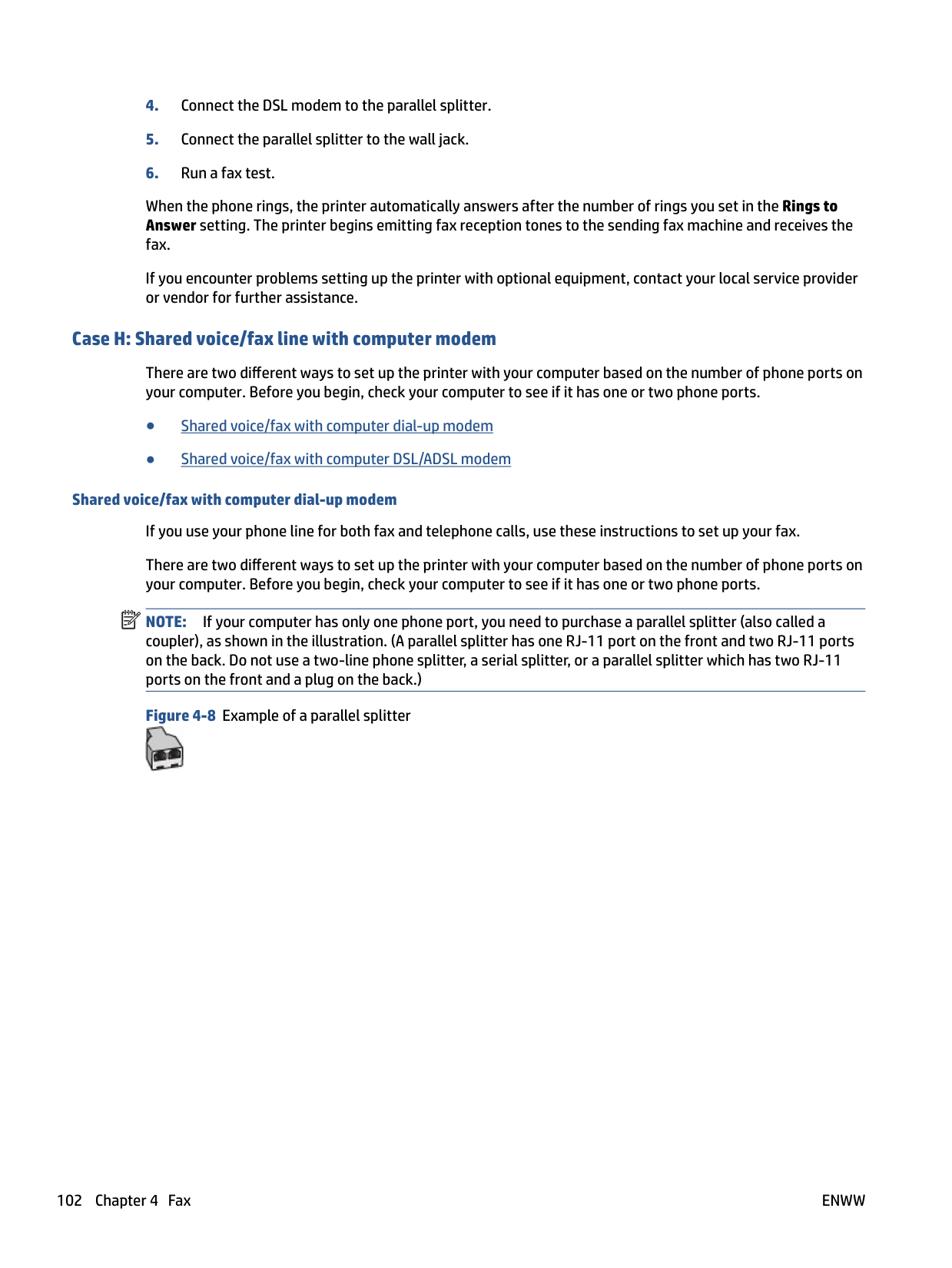

You might need to connect the phone cord to your country/region adapter.
###### To set up the printer with voice mail

NOTE: You might need to connect the phone cord to your country/region adapter.
| | |---|
You must be available to respond in person to incoming fax calls, or the printer cannot receive faxes. You must initiate the manual fax before voicemail picks up the line.
If you encounter problems setting up the printer with optional equipment, contact your local service provider or vendor for further assistance.
##### Case G: Fax line shared with computer modem (no voice calls received)
If you have a fax line on which you receive no voice calls, and you also have a computer modem connected on this line, set up the printer as described in this section.
| | |---|
NOTE: If you have a computer dial-up modem, your computer dial-up modem shares the phone line with the printer. You cannot use both your modem and the printer simultaneously. For example, you cannot use the printer for faxing while you are using your computer dial-up modem to send an email or access the Internet.
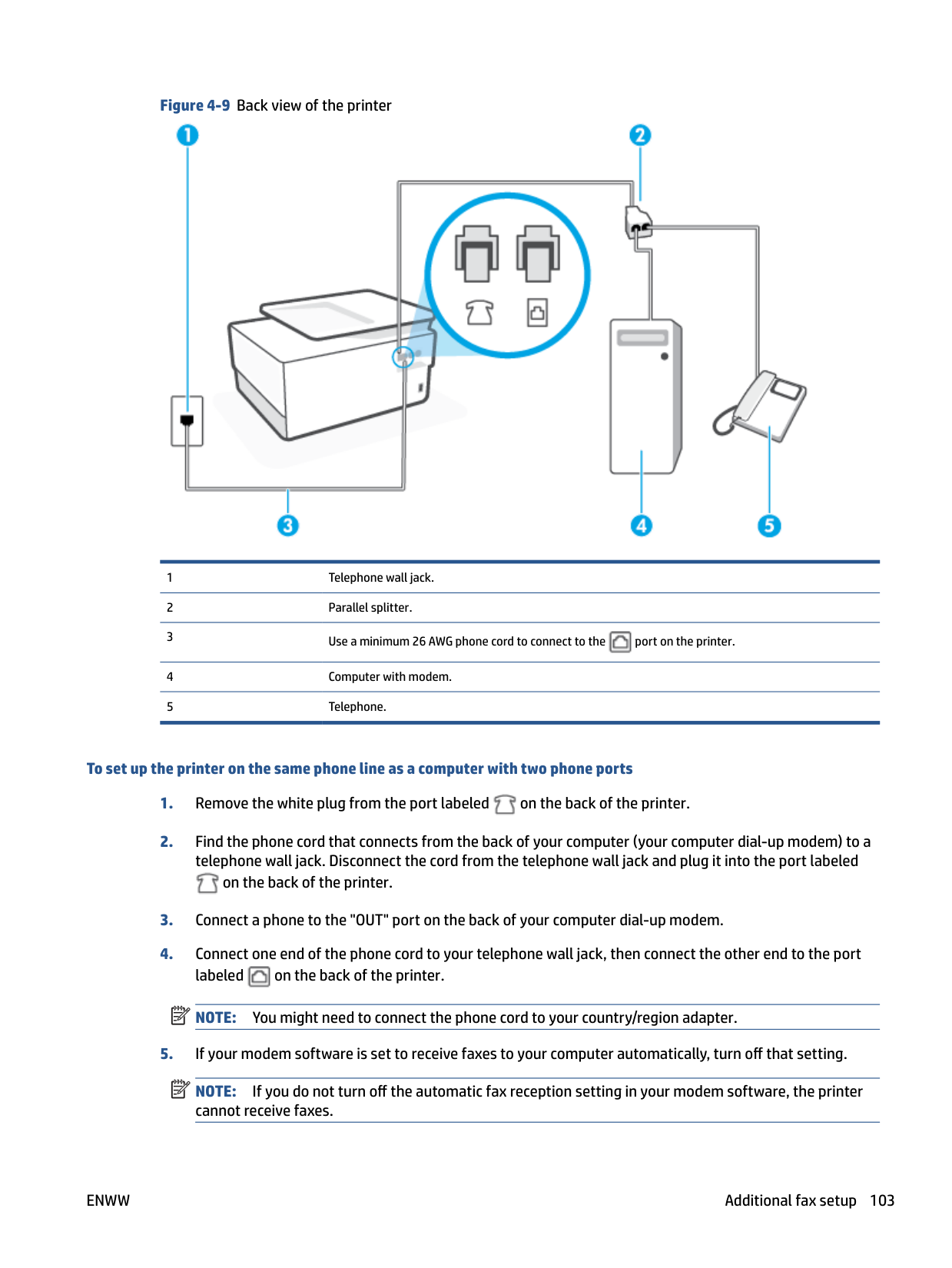
Set up the printer with a computer dial-up modem If you are using the same phone line for sending faxes and for a computer dial-up modem, follow these directions for setting up the printer. Figure 4-6 Back view of the printer


You might need to connect the phone cord to your country/region adapter.
###### To set up the printer with a computer dial-up modem


on the back of the printer.

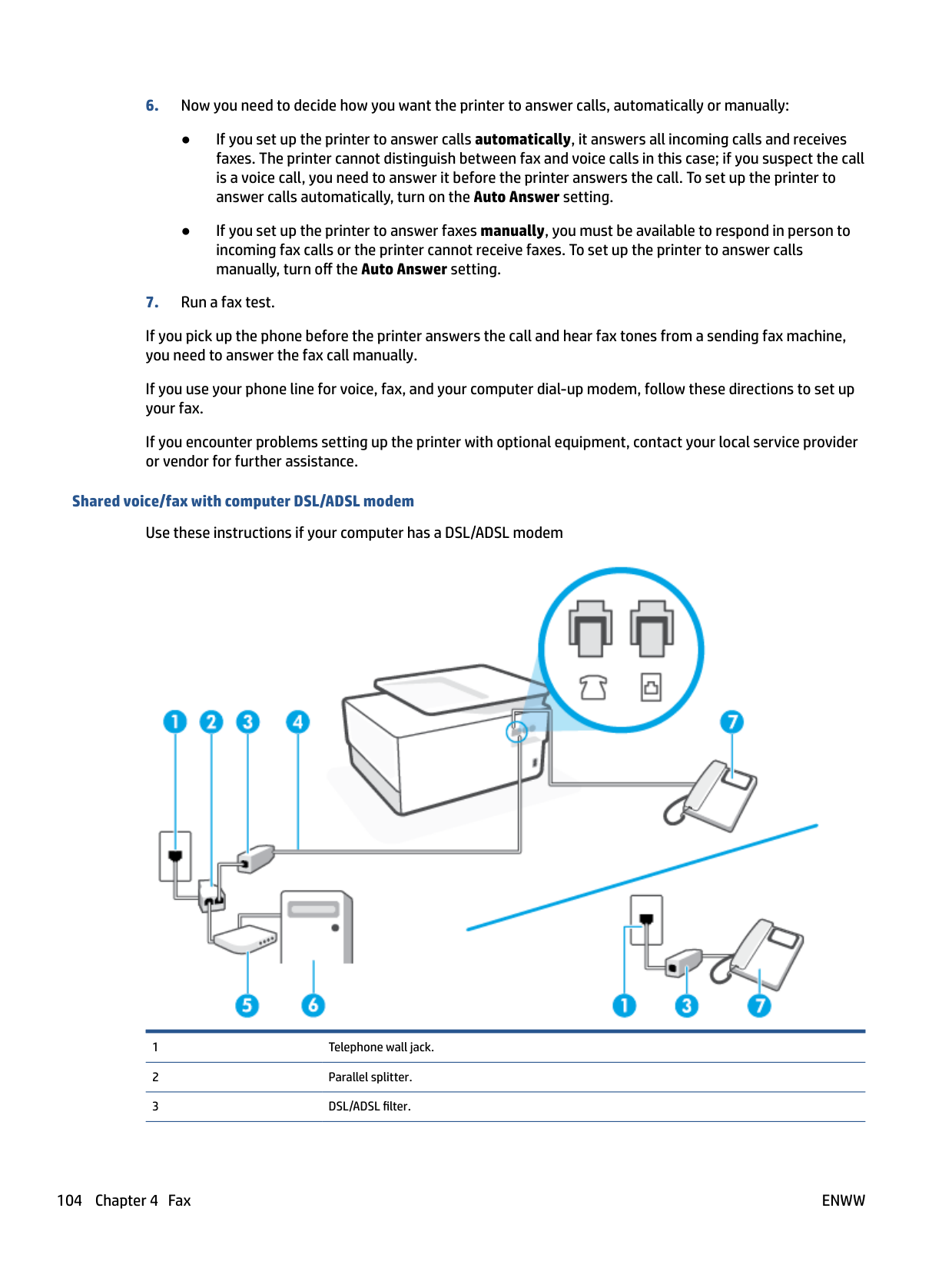
NOTE: You might need to connect the phone cord to your country/region adapter.
NOTE: If you do not turn off the automatic fax reception setting in your modem software, the printer cannot receive faxes.
| | |---|
| | |---|
When the phone rings, the printer automatically answers after the number of rings you set in the Rings to Answer setting. The printer begins emitting fax reception tones to the sending fax machine and receives the fax. If you encounter problems setting up the printer with optional equipment, contact your local service provider or vendor for further assistance. Set up the printer with a computer DSL/ADSL modem
If you have a DSL line and use that phone line to send faxes, follow these instructions to set up your fax.

Connect one end of the phone cord to the port labeled on the back of the printer. Connect the other end of the cord to the DSL/ADSL filter.

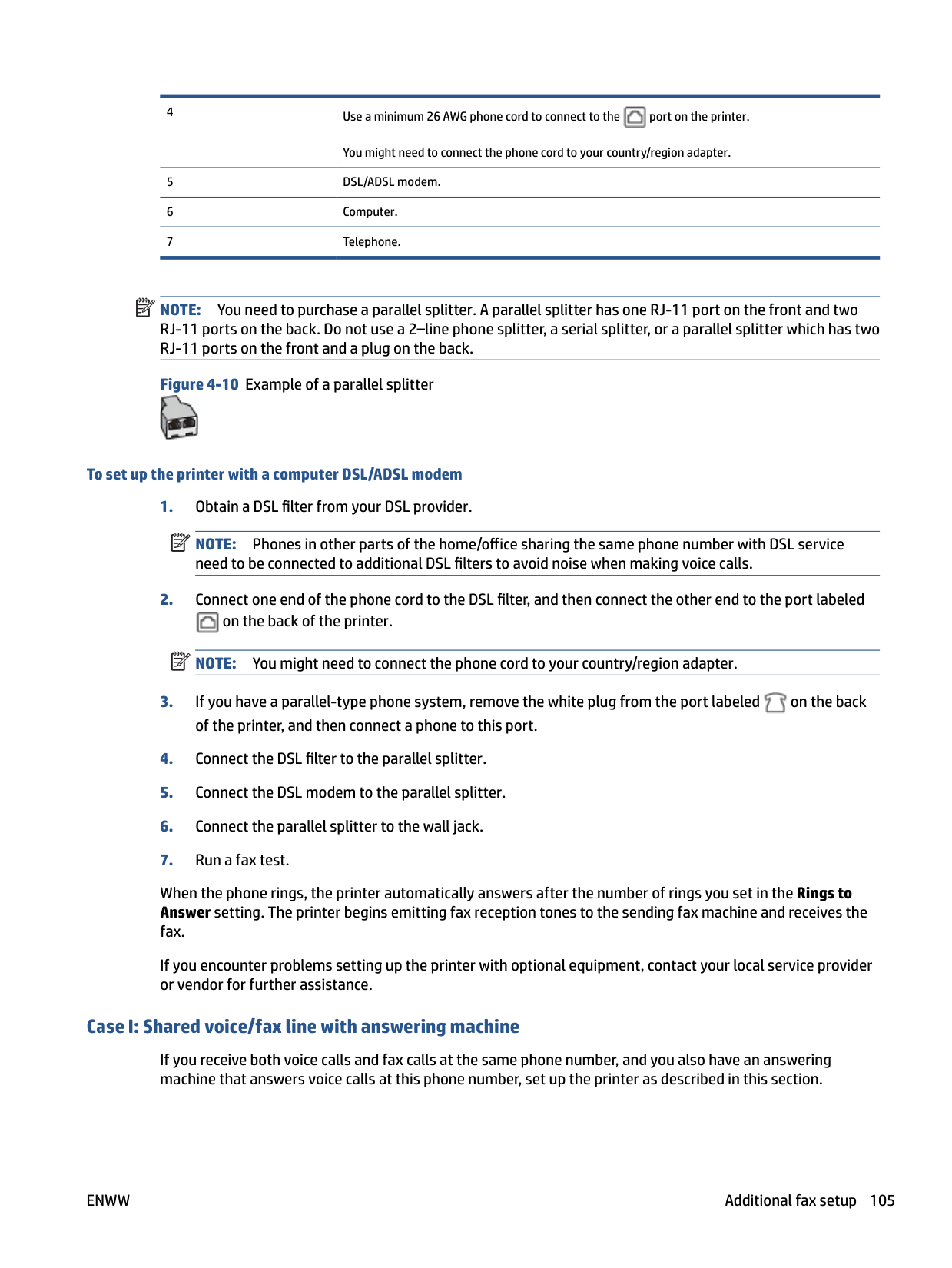
You might need to connect the phone cord to your country/region adapter.
| | |---|
NOTE: You need to purchase a parallel splitter. A parallel splitter has one RJ-11 port on the front and two RJ-11 ports on the back. Do not use a 2–line phone splitter, a serial splitter, or a parallel splitter which has two RJ-11 ports on the front and a plug on the back.
Figure 4-7 Example of a parallel splitter

###### To set up the printer with a computer DSL/ADSL modem

NOTE: You might need to connect the phone cord to your country/region adapter.
| | |---|
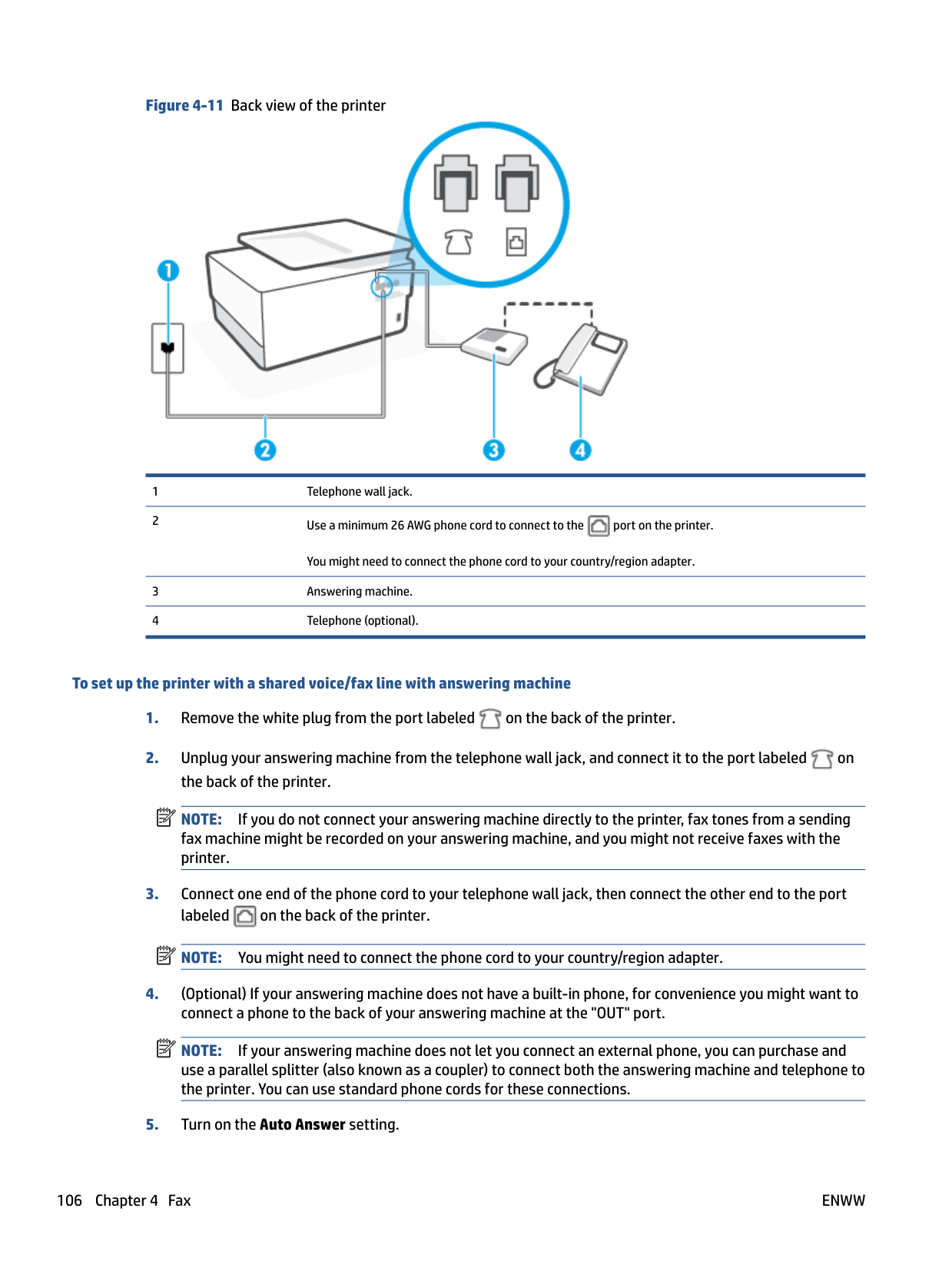
When the phone rings, the printer automatically answers after the number of rings you set in the Rings to Answer setting. The printer begins emitting fax reception tones to the sending fax machine and receives the fax. If you encounter problems setting up the printer with optional equipment, contact your local service provider or vendor for further assistance.
##### Case H: Shared voice/fax line with computer modem
There are two different ways to set up the printer with your computer based on the number of phone ports on your computer. Before you begin, check your computer to see if it has one or two phone ports.
Shared voice/fax with computer dial-up modem If you use your phone line for both fax and telephone calls, use these instructions to set up your fax. There are two different ways to set up the printer with your computer based on the number of phone ports on your computer. Before you begin, check your computer to see if it has one or two phone ports. NOTE: If your computer has only one phone port, you need to purchase a parallel splitter (also called a coupler), as shown in the illustration. (A parallel splitter has one RJ-11 port on the front and two RJ-11 ports on the back. Do not use a two-line phone splitter, a serial splitter, or a parallel splitter which has two RJ-11 ports on the front and a plug on the back.)
| | |---|



###### To set up the printer on the same phone line as a computer with two phone ports


on the back of the printer.

NOTE: You might need to connect the phone cord to your country/region adapter.
| | |---|
| | |---|
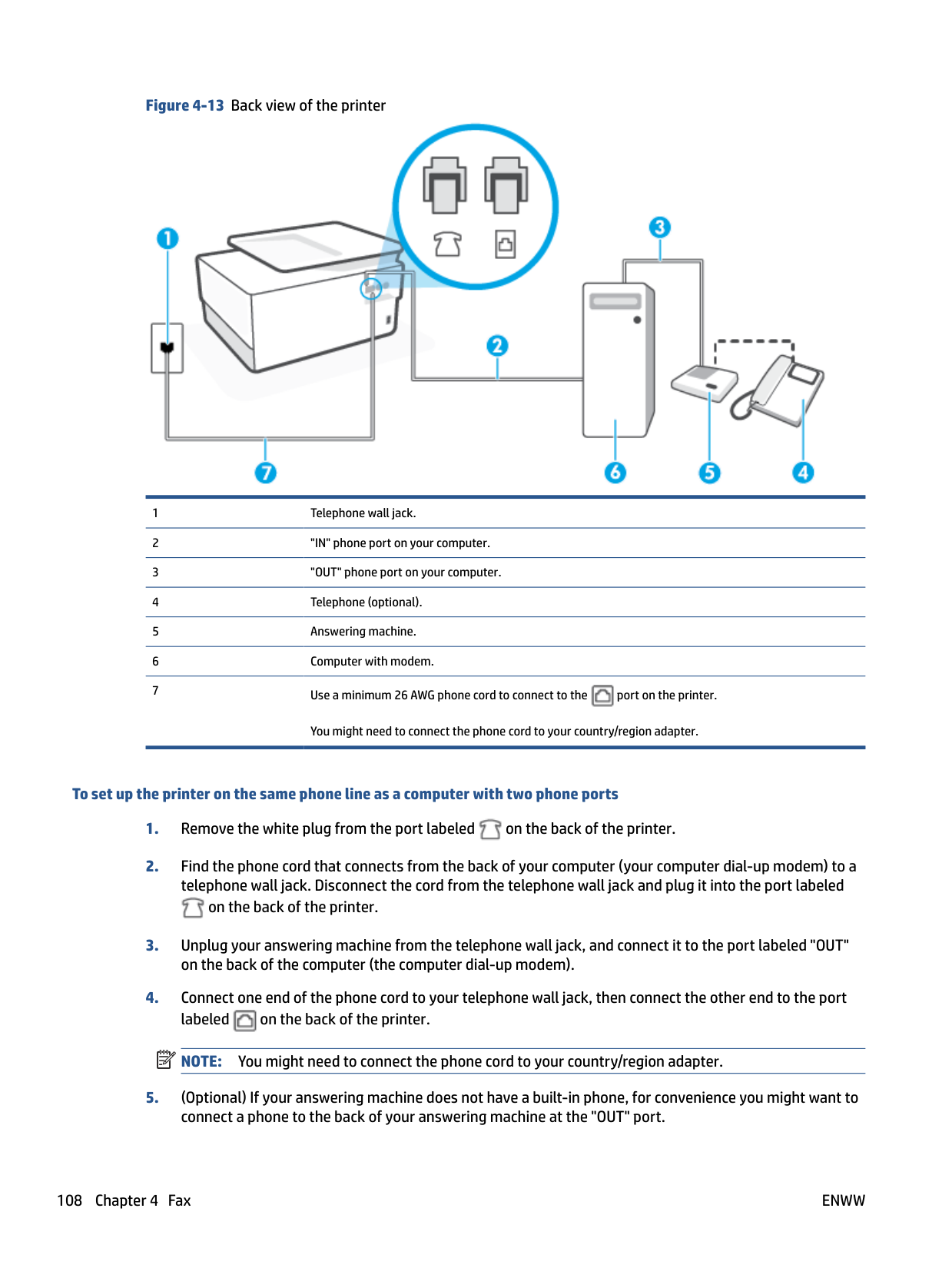
NOTE: If you do not turn off the automatic fax reception setting in your modem software, the printer cannot receive faxes.
If you pick up the phone before the printer answers the call and hear fax tones from a sending fax machine, you need to answer the fax call manually.
If you use your phone line for voice, fax, and your computer dial-up modem, follow these directions to set up your fax.
If you encounter problems setting up the printer with optional equipment, contact your local service provider or vendor for further assistance.
###### Shared voice/fax with computer DSL/ADSL modem
Use these instructions if your computer has a DSL/ADSL modem


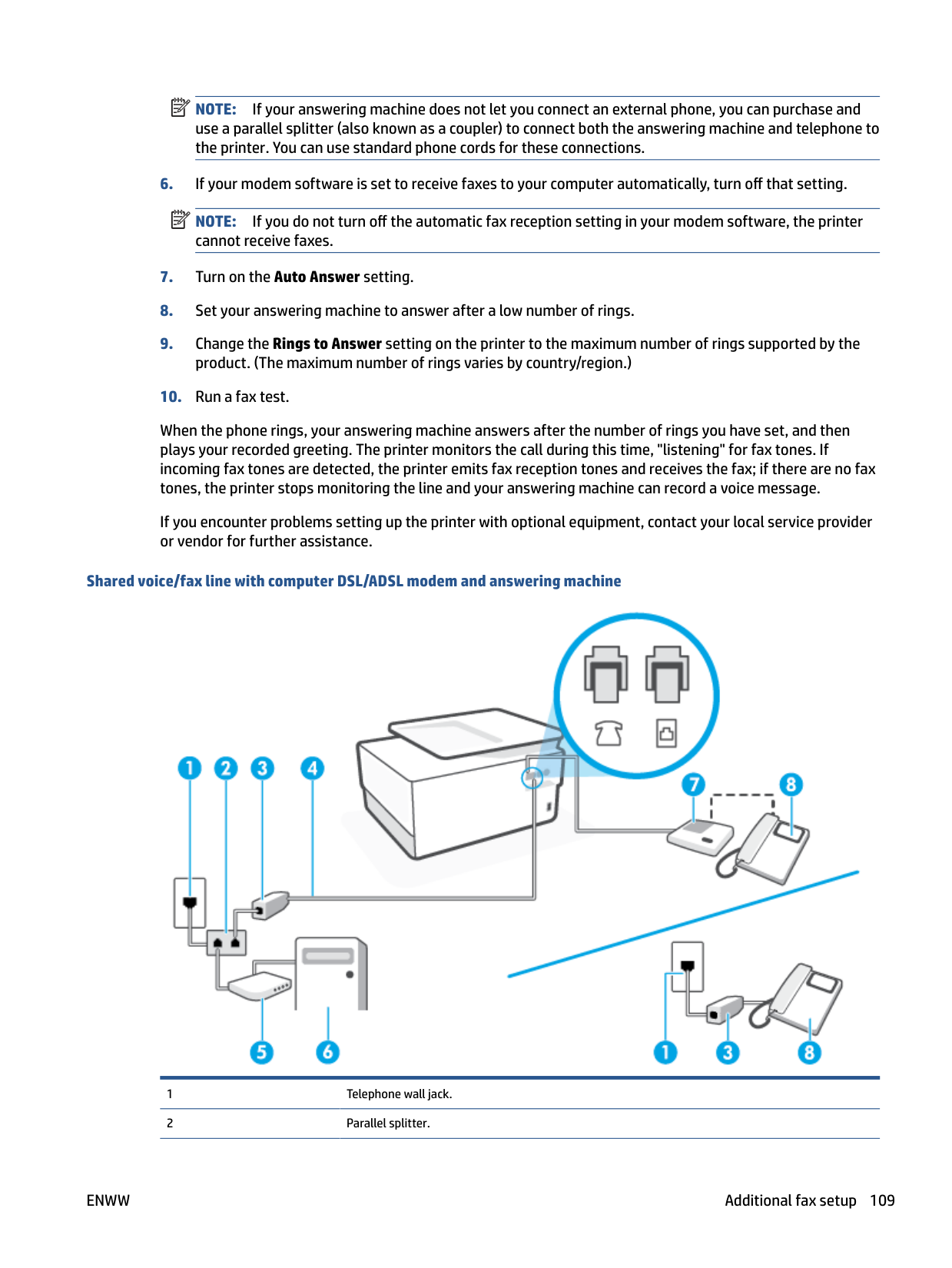
You might need to connect the phone cord to your country/region adapter.
| | |---|
NOTE: You need to purchase a parallel splitter. A parallel splitter has one RJ-11 port on the front and two RJ-11 ports on the back. Do not use a 2–line phone splitter, a serial splitter, or a parallel splitter which has two RJ-11 ports on the front and a plug on the back.
Figure 4-10 Example of a parallel splitter

###### To set up the printer with a computer DSL/ADSL modem
NOTE: Phones in other parts of the home/office sharing the same phone number with DSL service need to be connected to additional DSL filters to avoid noise when making voice calls.

NOTE: You might need to connect the phone cord to your country/region adapter.

| | |---|
| | |---|
When the phone rings, the printer automatically answers after the number of rings you set in the Rings to Answer setting. The printer begins emitting fax reception tones to the sending fax machine and receives the fax. If you encounter problems setting up the printer with optional equipment, contact your local service provider or vendor for further assistance.
##### Case I: Shared voice/fax line with answering machine
If you receive both voice calls and fax calls at the same phone number, and you also have an answering machine that answers voice calls at this phone number, set up the printer as described in this section.


You might need to connect the phone cord to your country/region adapter.
###### To set up the printer with a shared voice/fax line with answering machine
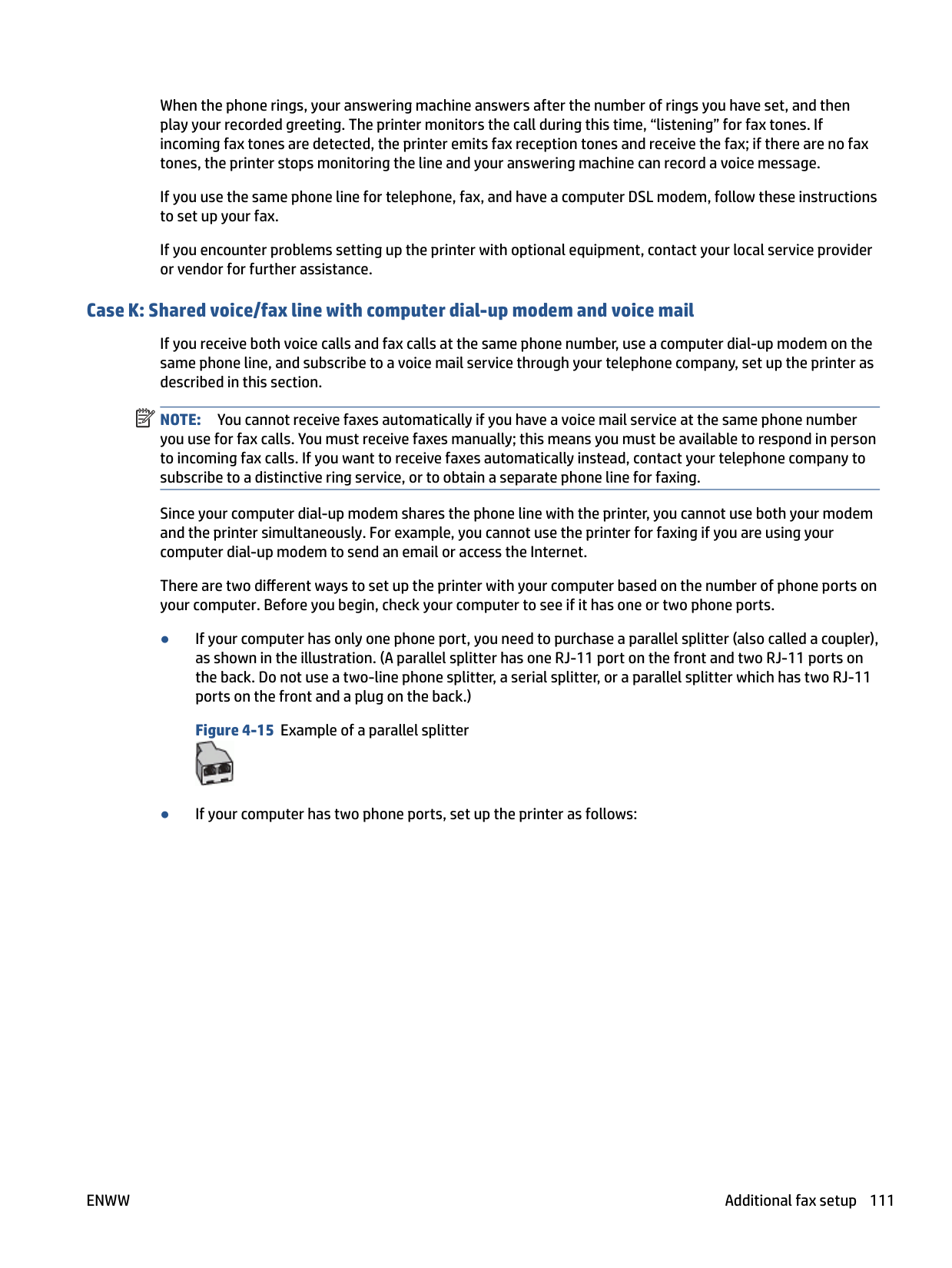


NOTE: If you do not connect your answering machine directly to the printer, fax tones from a sending fax machine might be recorded on your answering machine, and you might not receive faxes with the printer.

NOTE: You might need to connect the phone cord to your country/region adapter.
NOTE: If your answering machine does not let you connect an external phone, you can purchase and use a parallel splitter (also known as a coupler) to connect both the answering machine and telephone to the printer. You can use standard phone cords for these connections.
| | |---|
| | |---|
| | |---|
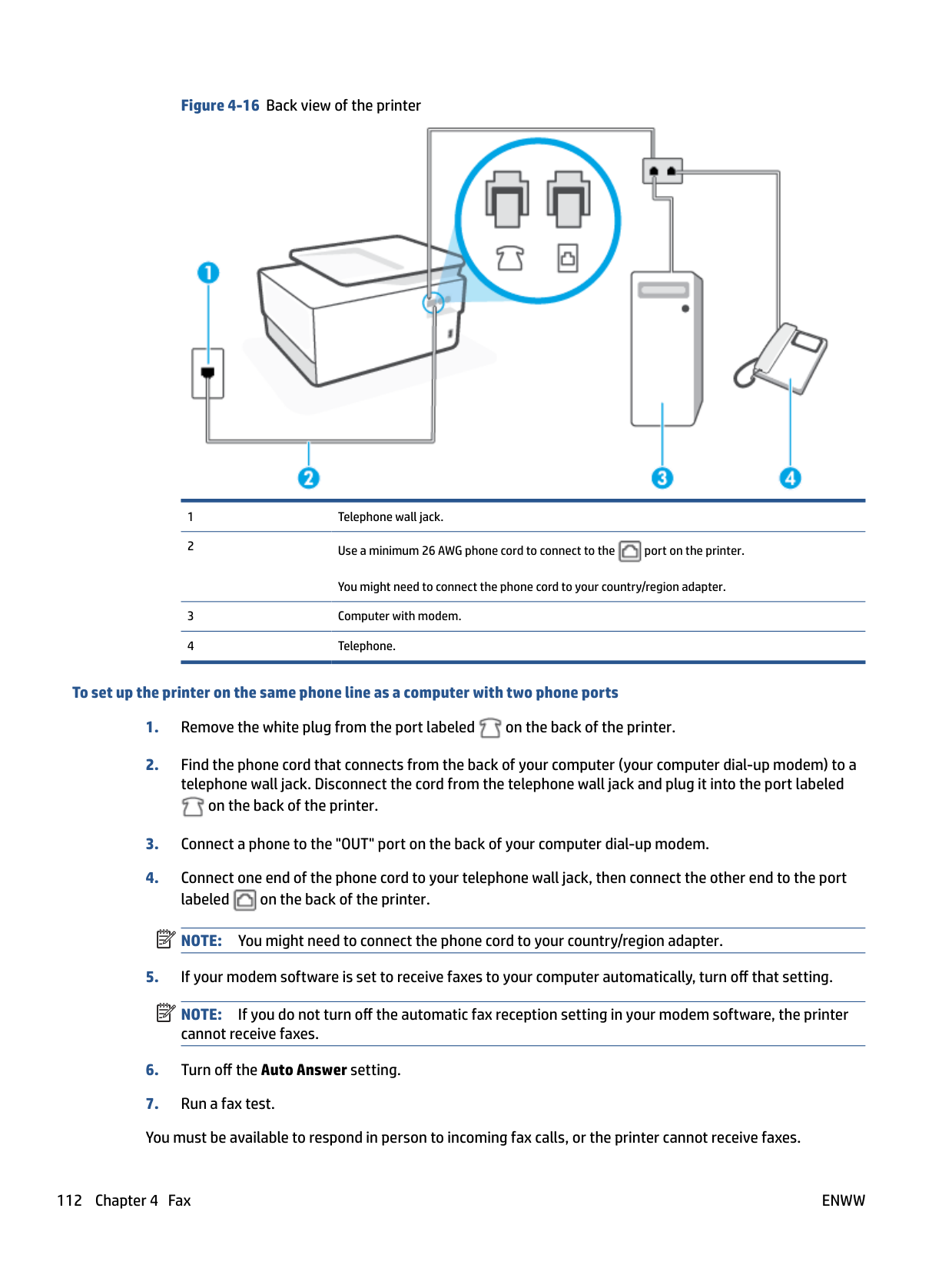
When the phone rings, your answering machine answers after the number of rings you have set, and then plays your recorded greeting. The printer monitors the call during this time, "listening" for fax tones. If incoming fax tones are detected, the printer emits fax reception tones and receives the fax; if there are no fax tones, the printer stops monitoring the line and your answering machine can record a voice message.
If you encounter problems setting up the printer with optional equipment, contact your local service provider or vendor for further assistance.
##### Case J: Shared voice/fax line with computer modem and answering machine
If you receive both voice calls and fax calls at the same phone number, and you also have a computer modem and answering machine connected on this phone line, set up the printer as described in this section.
| | |---|
NOTE: Since your computer dial-up modem shares the phone line with the printer, you cannot use both your modem and the printer simultaneously. For example, you cannot use the printer for faxing while you are using your computer dial-up modem to send an email or access the Internet.
###### Shared voice/fax line with computer dial-up modem and answering machine
There are two different ways to set up the printer with your computer based on the number of phone ports on your computer. Before you begin, check your computer to see if it has one or two phone ports.
| | |---|
NOTE: If your computer has only one phone port, you need to purchase a parallel splitter (also called a coupler), as shown in the illustration. (A parallel splitter has one RJ-11 port on the front and two RJ-11 ports on the back. Do not use a two-line phone splitter, a serial splitter, or a parallel splitter which has two RJ-11 ports on the front and a plug on the back.) Figure 4-12 Example of a parallel splitter


You might need to connect the phone cord to your country/region adapter.
###### To set up the printer on the same phone line as a computer with two phone ports


on the back of the printer.

NOTE: You might need to connect the phone cord to your country/region adapter.
| | |---|
| | |---|
NOTE: If your answering machine does not let you connect an external phone, you can purchase and use a parallel splitter (also known as a coupler) to connect both the answering machine and telephone to the printer. You can use standard phone cords for these connections.
NOTE: If you do not turn off the automatic fax reception setting in your modem software, the printer cannot receive faxes.
| | |---|
When the phone rings, your answering machine answers after the number of rings you have set, and then plays your recorded greeting. The printer monitors the call during this time, "listening" for fax tones. If incoming fax tones are detected, the printer emits fax reception tones and receives the fax; if there are no fax tones, the printer stops monitoring the line and your answering machine can record a voice message.
If you encounter problems setting up the printer with optional equipment, contact your local service provider or vendor for further assistance.
###### Shared voice/fax line with computer DSL/ADSL modem and answering machine


You might need to connect the phone cord to your country/region adapter.
| | |---|
NOTE: You need to purchase a parallel splitter. A parallel splitter has one RJ-11 port on the front and two RJ-11 ports on the back. Do not use a 2–line phone splitter, a serial splitter, or a parallel splitter which has two RJ-11 ports on the front and a plug on the back.
Figure 4-14 Example of a parallel splitter

###### To set up the printer with a computer DSL/ADSL modem
NOTE: Phones in other parts of the home/office sharing the same phone number with DSL/ADSL service need to be connected to additional DSL/ADSL filters, to avoid noise when making voice calls.

NOTE: You might need to connect the phone cord to your country/region adapter.

NOTE: If you do not connect your answering machine directly to the printer, fax tones from a sending fax machine might be recorded on your answering machine, and you might not receive faxes with the printer.
| | |---|
| | |---|
| | |---|
| | |---|
When the phone rings, your answering machine answers after the number of rings you have set, and then play your recorded greeting. The printer monitors the call during this time, “listening” for fax tones. If incoming fax tones are detected, the printer emits fax reception tones and receive the fax; if there are no fax tones, the printer stops monitoring the line and your answering machine can record a voice message.
If you use the same phone line for telephone, fax, and have a computer DSL modem, follow these instructions to set up your fax.
If you encounter problems setting up the printer with optional equipment, contact your local service provider or vendor for further assistance.
##### Case K: Shared voice/fax line with computer dial-up modem and voice mail
If you receive both voice calls and fax calls at the same phone number, use a computer dial-up modem on the same phone line, and subscribe to a voice mail service through your telephone company, set up the printer as described in this section.
| | |---|
NOTE: You cannot receive faxes automatically if you have a voice mail service at the same phone number you use for fax calls. You must receive faxes manually; this means you must be available to respond in person to incoming fax calls. If you want to receive faxes automatically instead, contact your telephone company to subscribe to a distinctive ring service, or to obtain a separate phone line for faxing.
Since your computer dial-up modem shares the phone line with the printer, you cannot use both your modem and the printer simultaneously. For example, you cannot use the printer for faxing if you are using your computer dial-up modem to send an email or access the Internet.
There are two different ways to set up the printer with your computer based on the number of phone ports on your computer. Before you begin, check your computer to see if it has one or two phone ports.



You might need to connect the phone cord to your country/region adapter. 3 Computer with modem. 4 Telephone.
###### To set up the printer on the same phone line as a computer with two phone ports


on the back of the printer.

NOTE: You might need to connect the phone cord to your country/region adapter.
NOTE: If you do not turn off the automatic fax reception setting in your modem software, the printer cannot receive faxes.
| | |---|
| | |---|
If you encounter problems setting up the printer with optional equipment, contact your local service provider or vendor for further assistance.
#### Test fax setup
You can test your fax setup to check the status of the printer and to make sure it is set up correctly for faxing. Perform this test after you have completed setting up the printer for faxing. The test does the following:
The printer prints a report with the results of the test. If the test fails, review the report for information on how to fix the problem and rerun the test.
###### To test fax setup via the printer control panel

5 Web Services
This section contains the following topics:
What are Web Services?
The printer offers innovative, web-enabled solutions that can help you quickly access the Internet, obtain documents, and print them faster and with less hassle—and all without using a computer.
| | |---|
NOTE: To use these web features, the printer must be connected to the Internet (either using an Ethernet cable or wireless connection). You cannot use these web features if the printer is connected using a USB cable.
###### HP ePrint
● HP ePrint is a free service from HP that allows you to print to your HP ePrint-enabled printer anytime, from any location. It's as simple as sending an email to the email address assigned to your printer when you enable Web Services on the printer. No special drivers or software are needed. If you can send an email, you can print from anywhere, using HP ePrint .
| | |---|
NOTE: You can sign up for an account on HP Connected (might not be available in all countries/ regions), and sign in to configure the ePrint settings. Once you have signed up for an account on HP Connected (might not be available in all countries/ regions), you can sign in to customize your HP ePrint address, control who can use your printer's HP ePrint email address to print, and get help for HP ePrint .
###### Print apps
● With print apps, you can scan and store your documents digitally on the Web, and also access and share the content, and do more.
ENWW What are Web Services? 115
Set up Web Services
Before you set up Web Services, make sure your printer is connected to the Internet using either an Ethernet or wireless connection.
To set up Web Services, use one of the following methods:
###### To set up Web Services using the printer control panel

NOTE: If prompted for proxy settings and if your network uses proxy settings, follow the onscreen instructions to set up a proxy server. If you do not have the proxy details, contact your network administrator or the person who set up the network.
| | |---|
###### To set up Web Services using the embedded web server
NOTE: When updates are available, they are automatically downloaded and installed, and then the printer restarts.
NOTE: If prompted for proxy settings and if your network uses proxy settings, follow the onscreen instructions to set up a proxy server. If you do not have the proxy details, contact your network administrator or the person who set up the network.
| | |---|
| | |---|

###### To set up Web Services using the HP printer software (Windows)
NOTE: When updates are available, they are automatically downloaded and installed, and then the printer restarts.
NOTE: If prompted for proxy settings and if your network uses proxy settings, follow the onscreen instructions to set up a proxy server. If you do not have the details, contact your network administrator or the person who set up the network.
| | |---|
| | |---|
ENWW Set up Web Services 117
Use Web Services
The following section describes how to use and configure Web Services.
#### HP ePrint
To use HP ePrint , do the following:
TIP: For more information about using and troubleshooting HP ePrint , visit www.hp.com/support/eprint . To access your printer’s HP ePrint settings, visit HP Connected (this site might not be available in all countries/regions).
###### To print documents using HP ePrint
###### To find the HP ePrint email address
Dashboard, and then touch ( HP ePrint ).
on how to customize the email address.
###### To turn off HP ePrint
| |
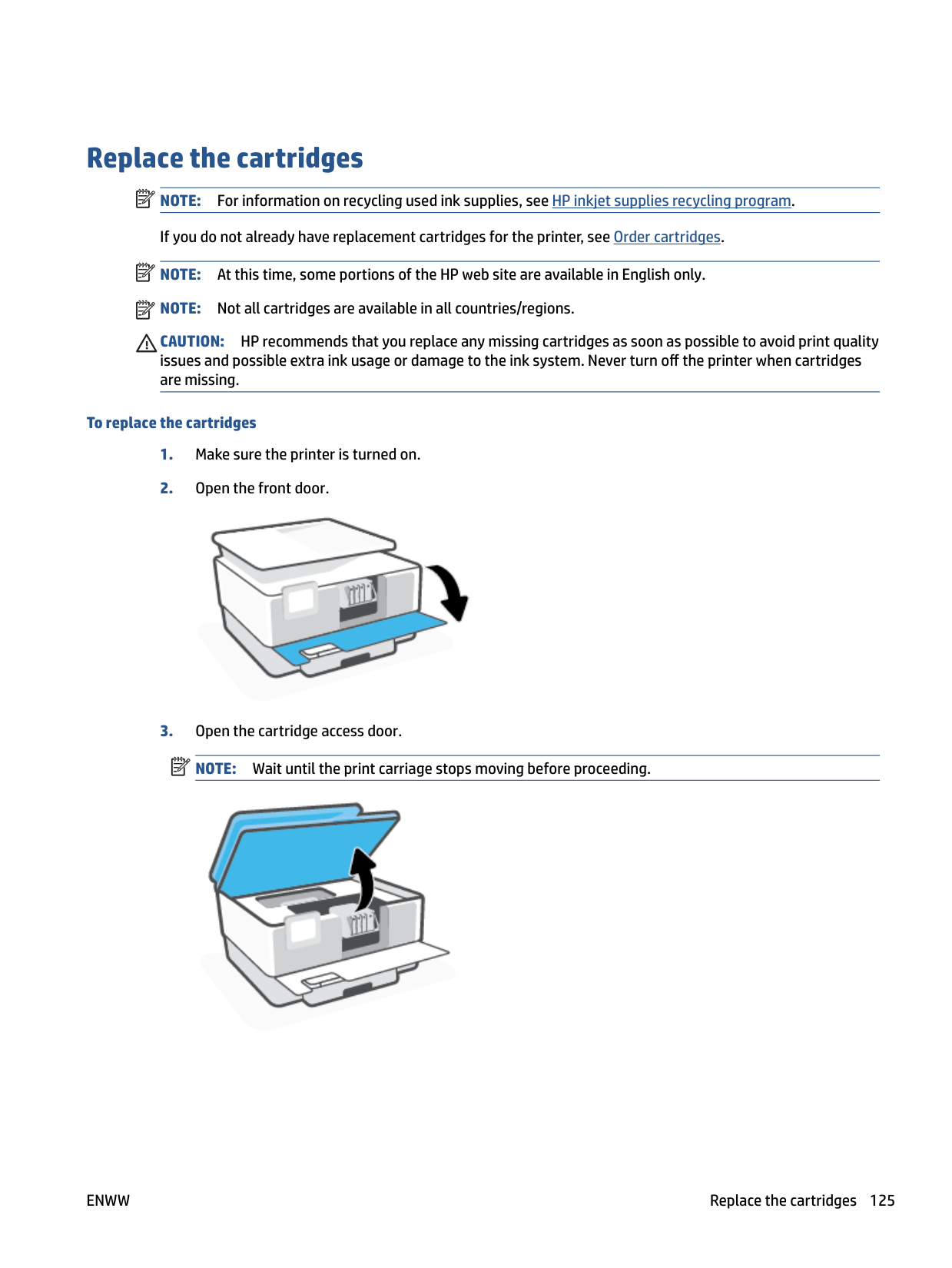
|---|

#### Print apps
With print apps, you can scan and store your documents digitally on the Web, and also access and share the content, and do more.
###### To use print apps
###### TIP:
ENWW Use Web Services 119
Remove Web Services
Use the following instructions to remove Web Services.
###### To remove Web Services using the printer control panel
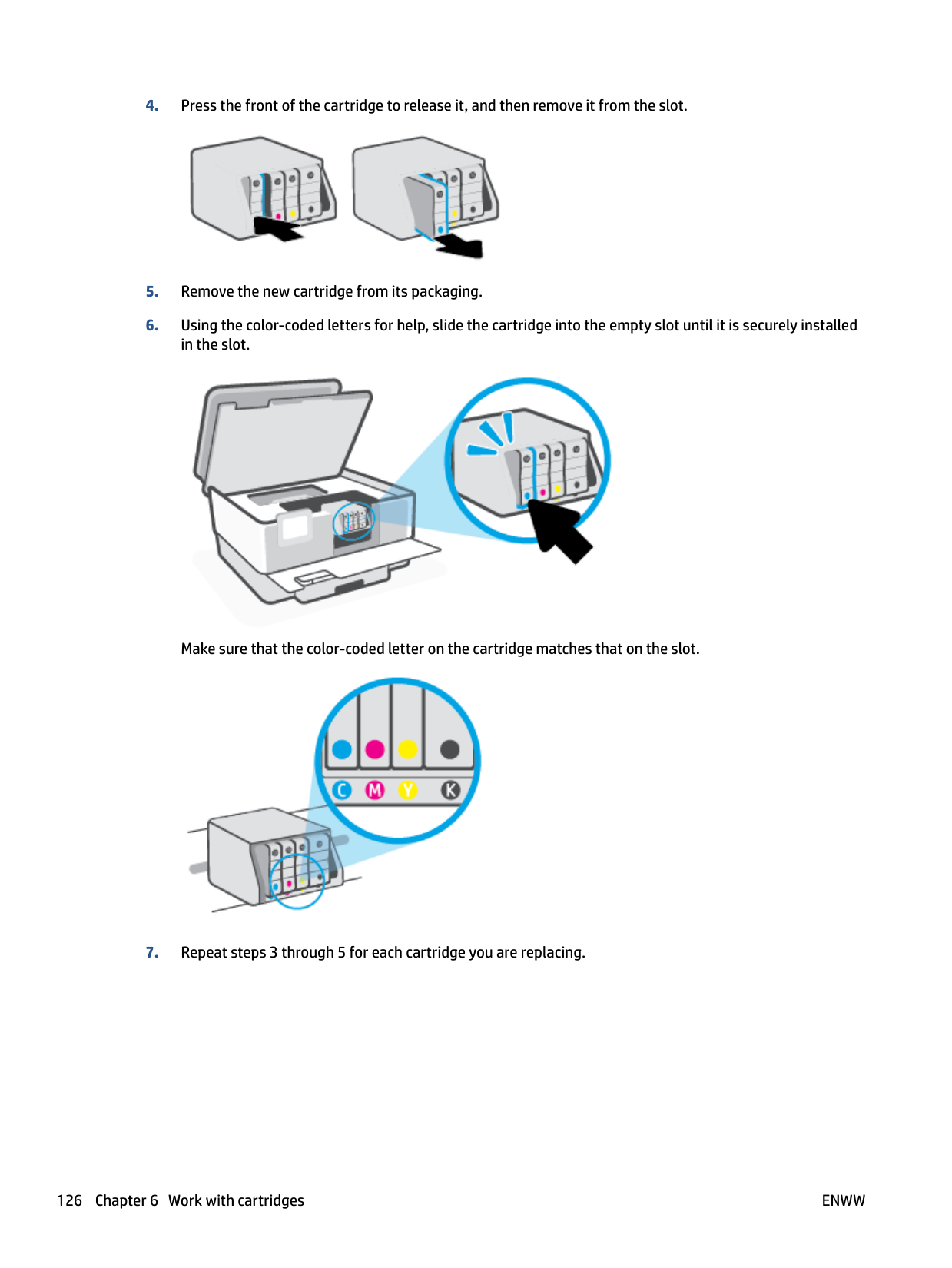

and then touch (Web Services Settings).
To remove Web Services using the embedded web server
6 Work with cartridges
To ensure the best print quality from the printer, you need to perform some simple maintenance procedures. TIP: If you have problems copying documents, see Printing issues. This section contains the following topics:
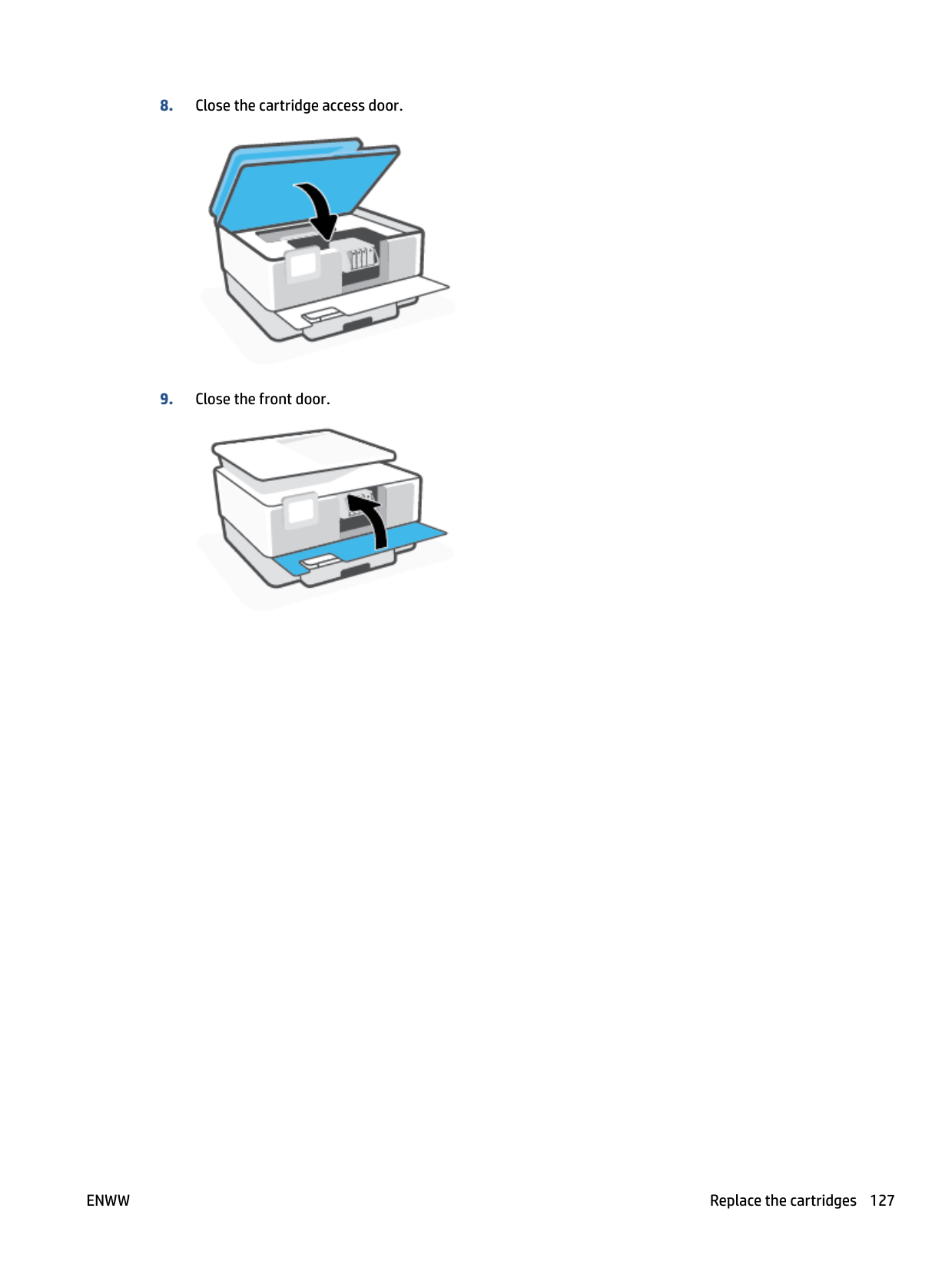
ENWW 121
Information on cartridges and the printhead
The following tips help maintain HP cartridges and ensure consistent print quality.

CAUTION: HP recommends that you replace any missing cartridges as soon as possible to avoid print quality issues and possible extra ink usage or damage to the ink system. Never turn off the printer when cartridges are missing.
| | |---|
NOTE: This printer is not designed to use continuous ink systems. To resume printing, remove continuous ink system and install original HP (or compatible) cartridges.
| | |---|
NOTE: This printer is designed for ink cartridges to be used until they are empty. Refilling cartridges prior to depletion might cause your printer to fail. If this happens, insert a new cartridge (either genuine HP or compatible) to continue printing.
Some color ink is used even when printing with black cartridge only
Ink is used in a number of ways throughout the inkjet printing process. In general, ink in a cartridge is used for printing documents, photographs and other such materials. Some ink, however, must be used to maintain the health of the printhead; some ink is residual; and some ink evaporates. For more information on ink usage, visit www.hp.com/go/learnaboutsupplies and click HP Ink. (You might need to select your country/region using the Select Country button on the page.)
ENWW Some color ink is used even when printing with black cartridge only 123
Check the estimated ink levels
You can check the estimated ink levels from the printer software or from the printer control panel.
###### To check the estimated ink levels from the printer control panel
▲ From the printer control panel, touch or swipe down the tab at the top of the screen to open the
Dashboard, and then touch (Ink) to check the estimated ink levels.
| | |---|
NOTE: Ink level alerts and indicators provide estimates for planning purposes only. When you receive a lowink alert, consider having a replacement cartridge available to avoid possible printing delays. You do not have to replace the cartridges until prompted to do so.
| | |---|

NOTE: If you have installed a refilled or remanufactured cartridge, or a cartridge that has been used in another printer, the ink level indicator might be inaccurate or unavailable.
| | |---|
NOTE: Ink from the cartridges is used in the printing process in a number of different ways, including in the initialization process, which prepares the printer and cartridges for printing, and in printhead servicing, which keeps print nozzles clear and ink flowing smoothly. In addition, some residual ink is left in the cartridge after it is used. For more information, see www.hp.com/go/inkusage .
Replace the cartridges NOTE: For information on recycling used ink supplies, see HP inkjet supplies recycling program. If you do not already have replacement cartridges for the printer, see Order cartridges.
| | |---|
NOTE: At this time, some portions of the HP web site are available in English only. NOTE: Not all cartridges are available in all countries/regions. CAUTION: HP recommends that you replace any missing cartridges as soon as possible to avoid print quality issues and possible extra ink usage or damage to the ink system. Never turn off the printer when cartridges are missing.
| | |---|
| | |---|
###### To replace the cartridges

| | |---|


Make sure that the color-coded letter on the cartridge matches that on the slot.

####### 8. Close the cartridge access door.

####### 9. Close the front door.

Order cartridges
To order cartridges, go to www.hp.com . (At this time, some portions of the HP website are available in English only.) Ordering cartridges online is not supported in all countries/regions. However, many countries have information on ordering by telephone, locating a local store and printing a shopping list. In addition, you can visit the www.hp.com/buy/supplies page to obtain information about purchasing HP products in your country.
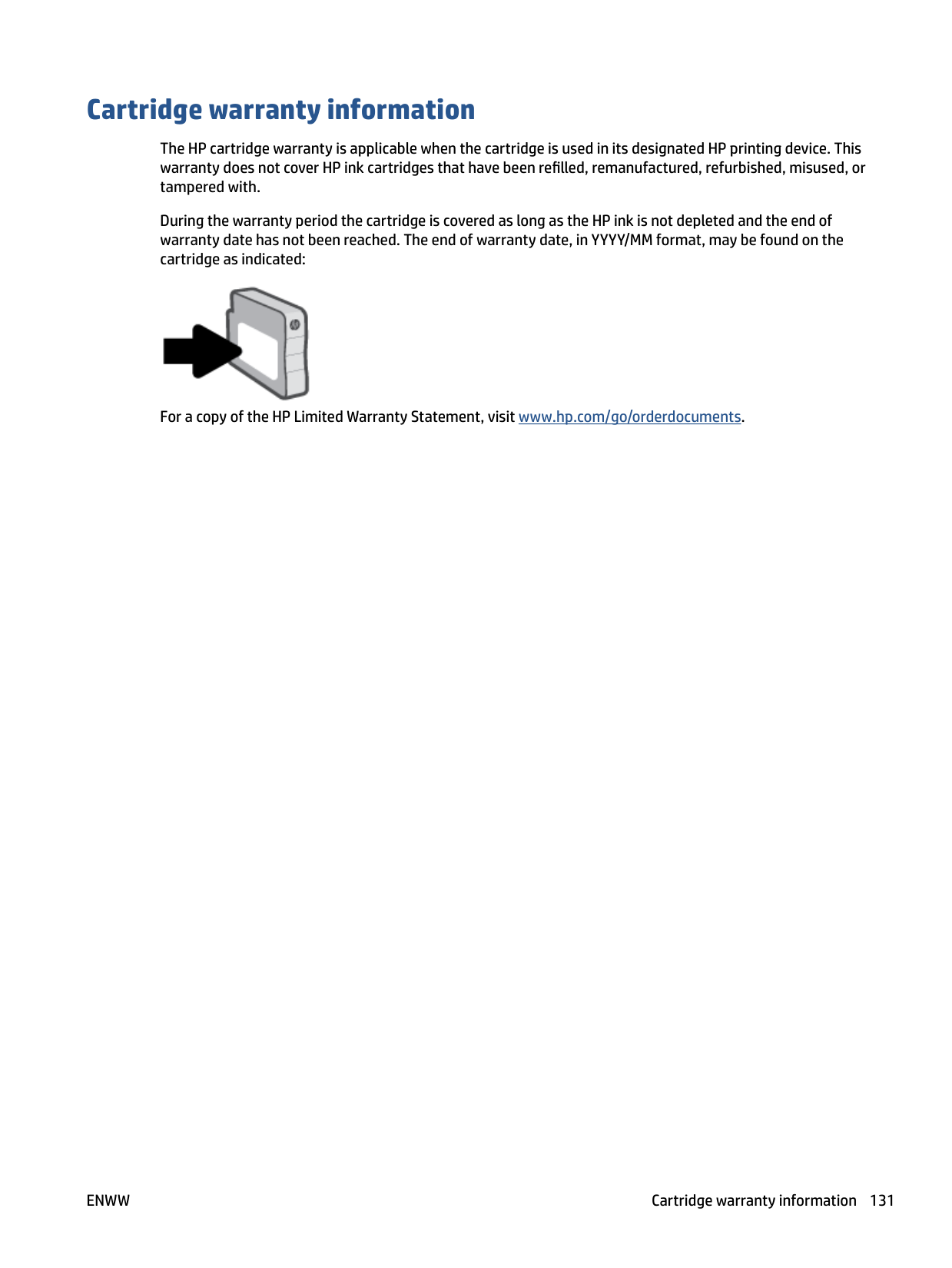
Use only the replacement cartridges that have the same cartridge number as the cartridge you are replacing. You can find the cartridge number in the following places:
| | |---|
Store printing supplies
Cartridges can be left in the printer for extended periods of time. However, to assure optimal cartridge health, be sure to turn off the printer properly when the printer is not in use.
For more information, see Turn the printer off .
ENWW Store printing supplies 129
Anonymous usage information storage
The HP cartridges used with this printer contain a memory chip that assists in the operation of the printer. In addition, this memory chip stores a limited set of anonymous information about the usage of the printer, which might include: the number of pages printed using the cartridge, the page coverage, frequency of printing, and the printing modes used.
This information helps HP design future printers to meet our customers' printing needs. The data collected from the cartridge memory chip does not contain information that can be used to identify a customer or user of the cartridge or their printer.
HP collects a sampling of the memory chips from cartridges returned to HP's free return and recycling program (HP Planet Partners: www.hp.com/recycle ). The memory chips from this sampling are read and studied in order to improve future HP printers. HP partners who assist in recycling this cartridge might have access to this data, as well.
Any third party possessing the cartridge might have access to the anonymous information on the memory chip. If you prefer to not allow access to this information, you can render the chip inoperable. However, after you render the memory chip inoperable, the cartridge cannot be used in an HP printer.
If you are concerned about providing this anonymous information, you can make this information inaccessible by turning off the memory chip's ability to collect the printer's usage information.
###### To disable the usage information function

| | |---|
NOTE: To turn the usage information function on, restore the factory defaults. For more information about how to restore the defaults, see Restore original factory defaults and settings.
| | |---|
NOTE: You can continue to use the cartridge in the HP printer if you turn off the memory chip's ability to collect the printer's usage information.
Cartridge warranty information
The HP cartridge warranty is applicable when the cartridge is used in its designated HP printing device. This warranty does not cover HP ink cartridges that have been refilled, remanufactured, refurbished, misused, or tampered with.
During the warranty period the cartridge is covered as long as the HP ink is not depleted and the end of warranty date has not been reached. The end of warranty date, in YYYY/MM format, may be found on the cartridge as indicated:

For a copy of the HP Limited Warranty Statement, visit www.hp.com/go/orderdocuments.
ENWW Cartridge warranty information 131
7 Network setup
Additional advanced settings are available from the printer's home page (embedded web server or EWS). For more information, see Embedded web server.
This section contains the following topics:
Set up the printer for wireless communication
This section contains the following topics:
| | |---|
NOTE: If you encounter problems connecting the printer, see Network and connection issues. TIP: For more information about setting up and using the printer wirelessly, visit the HP Wireless Printing Center ( www.hp.com/go/wirelessprinting ).
#### Before you begin
Ensure the following before you begin setting up the printer for wireless communication:
| | |---|
NOTE: While connecting the printer, you might be prompted to enter the wireless network name (SSID) and a wireless password.
If you have not changed the network name or the security passkey since setting up your wireless network, you can sometimes find them on the back or side of the wireless router.
If you cannot find the network name or the security password or cannot remember this information, see the documentation provided with your computer or with the wireless router. If you still cannot find this information, contact your network administrator or the person who set up the wireless network.
#### Set up the printer on your wireless network
Use the Wireless Setup Wizard or Wi-Fi Protected Setup from the printer control panel display to set up wireless communication.
| | |---|
NOTE: Before you proceed, go through the list at Before you begin.

If you are already using the printer with a different type of connection, such as a USB connection, follow the instructions in Change the connection type to set up the printer on your wireless network.
#### Connect your printer by using the HP Smart app
###### To set up using the HP Smart app
You can use the HP Smart to set up the printer on your wireless network. The HP Smart app is supported on iOS, Android, and Windows devices. For information about this app, see Use the HP Smart app to print, scan, and troubleshoot from an iOS, Android, or Windows 10 device.
| | |---|
-oriOS/Android: On the home screen, tap the Plus icon and then tap Add Printer. Follow the onscreen instructions to add a printer to your network.
#### Change the connection type
After you have installed the HP printer software and connected the printer to your computer or to a network, you can use the software to change the connection type (for example, from a USB connection to a wireless connection).
| | |---|
NOTE: Connecting an Ethernet cable turns off the wireless capability of the printer.
###### To change from an Ethernet connection to a wireless connection (Windows)
###### To change from a USB connection to a wireless network (Windows)
Before you proceed, go through the list at Before you begin.
###### To change from a USB connection to a wireless network using the HP Smart app on a Windows 10 computer (Windows)
TIP: If you want to select a different printer, click the Printer icon on the toolbar at the left side of the screen, and then select Select a Different Printer to view all available printers.

Learn more about how to change from a USB to wireless connection. Click here to go online for more information. At this time, this website might not be available in all languages.
###### To change from a wireless connection to a USB or Ethernet connection (Windows)
● Connect the USB or Ethernet cable to the printer.
#### Test the wireless connection
Print the wireless test report for information about the printer wireless connection. The wireless test report provides information about the printer status, hardware (MAC) address, and IP address. If there is a problem with the wireless connection or if a wireless connection attempt failed, the wireless test report also provides diagnostic information. If the printer is connected to a network, the test report displays details about the network settings.
To print the wireless test report

Turn on or off the wireless capability of the printer The blue Wireless light on the printer control panel is lit when the wireless capability of the printer is on. NOTE: Connecting an Ethernet cable to the printer automatically turns off the wireless capability and the Wireless light.
| | |---|

| | |---|
NOTE: If the printer has never been configured to connect to a wireless network before, turning on the wireless capability will automatically start the Wireless Setup Wizard.
Change network settings
From the printer control panel, you can set up and manage your printer's wireless connection and perform a variety of network management tasks. This includes viewing and changing network settings, restoring network defaults, and turning the wireless function on or off.
CAUTION: Network settings are provided for your convenience. However, unless you are an advanced user, you should not change some of these settings (such as the link speed, IP settings, default gateway, and firewall settings).
###### To print network settings
Do one of the following:

###### To set the link speed
You can change the speed at which data is transmitted over the network. The default is Automatic.

###### To change IP settings
The default IP setting for the IP settings is Automatic, which sets the IP settings automatically. If you are an advanced user and want to use different settings (such as the IP address, subnet mask, or the default gateway), you can change them manually.
TIP: Before setting a manual IP address, it is recommended to first connect the printer to the network using Automatic mode. This allows the router to configure the printer with other needed settings like subnet mask, default gateway and DNS address.
CAUTION: Be careful when manually assigning an IP address. If you enter an invalid IP address during the installation, your network components cannot connect with the printer.

ENWW Change network settings 137
Use Wi-Fi Direct
With Wi-Fi Direct, you can print wirelessly from a computer, smart phone, tablet, or other wireless-capable device—without connecting to an existing wireless network.
###### Guidelines for using Wi-Fi Direct
If you have not installed the HP printer software on the computer, connect to Wi-Fi Direct first and then install the printer software. Select Wireless when prompted by the printer software for a connection type.
###### To turn on Wi-Fi Direct

TIP: You can also turn on Wi-Fi Direct from the EWS. For more information about using the EWS, see Embedded web server.
###### To change connection method

To print from a wireless-capable mobile device that supports Wi-Fi Direct Make sure you have installed the latest version of HP Print Service Plugin on your mobile device. NOTE: If your mobile device does not support Wi-Fi, you are not able to use Wi-Fi Direct.
| | |---|
###### To print from a wireless-capable mobile device that does not support Wi-Fi Direct
Make sure you have installed a compatible printing app on your mobile device. For more information, visit www.hp.com/global/us/en/eprint/mobile_printing_apps.html.
| | |---|
###### To print from a wireless-capable computer (Windows)
| | |---|
NOTE: If you have previously installed the printer over USB and want to convert to Wi-Fi Direct, do not select the Convert a USB connected printer to wireless option.

| | |---|

Click here for online troubleshooting for Wi-Fi Direct, or for more help with setting up Wi-Fi Direct. At this time, this website might not be available in all languages.
8 Printer management tools
This section contains the following topics:
Toolbox (Windows)
The Toolbox provides maintenance information about the printer.
###### To open the Toolbox
ENWW Toolbox (Windows) 143
Embedded web server
When the printer is connected to a network, you can use the printer's embedded web server (EWS) to view status information, change settings, and manage it from your computer.
| | |---|
| | |---|
NOTE: To view or change some settings, you might need a password. NOTE: You can open and use the embedded web server without being connected to the Internet. However, some features are not available. This section contains the following topics:
#### About cookies
The embedded Web server (EWS) places very small text files (cookies) on your hard drive when you are browsing. These files let the EWS recognize your computer the next time you visit. For example, if you have configured the EWS language, a cookie helps remember which language you have selected so that the next time you access the EWS, the pages are displayed in that language. Some cookies (such as the cookie that stores customer-specific preferences) are stored on the computer until you clear them manually.
You can configure your browser to accept all cookies, or you can configure it to alert you every time a cookie is offered, which allows you to decide which cookies to accept or refuse. You can also use your browser to remove unwanted cookies.
Depending on your printer, if you disable cookies, you also disable one or more of the following features:
For information about how to change your privacy and cookie settings and how to view or delete cookies, see the documentation available with your Web browser.
#### Open the embedded web server
You can access the embedded web server through either a network or Wi-Fi Direct.
###### To open the embedded web server through a network
| | |---|
For example, if the IP address is 123.123.123.123, type the following address into the web browser: http://123.123.123.123.
###### To open the embedded web server through Wi-Fi Direct


#### Embedded web server cannot be opened
###### Check your network setup
###### Check the computer
● Make sure the computer that you are using is connected to the same network as the printer.
###### Check your web browser
###### Check the printer IP address
To find out the printer IP address, from the printer control panel, touch or swipe down the tab at the top of the screen to open the Dashboard, touch (Wireless) or (Ethernet).
To obtain the printer IP address by printing a network configuration page, from the printer control panel, touch or swipe down the tab at the top of the screen to open the Dashboard, touch ( Setup ), touch Reports , and then touch Network Configuration Page.

ENWW Embedded web server 145
####### TIP: If you are using a computer running Windows, you can visit the HP online support website at www.support.hp.com . This website provides information and utilities that can help you correct many common printer problems.
9 Solve a problem
The information in this section suggests solutions to common problems. If your printer is not operating correctly and these suggestions did not solve your problem, try using one of the support services listed in HP support to obtain assistance.
This section contains the following topics:
ENWW 147
Get help with HP online troubleshooting
You can use an HP online troubleshooting tool to solve your printer issues. Use the table below to identify your problem and click the appropriate link.
| | |---|
NOTE: The HP online troubleshooting tools may not be available in all languages.
Online troubleshooting tool Use this tool to learn how to: Troubleshoot paper jam issues Clear jammed paper from the printer and resolve paper or paper feed issues. Troubleshoot a print carriage jam Clear obstructions that are blocking the print carriage. Troubleshoot issues with print job not printing Resolve issues with printer responsiveness, pages not printing, or “Unable to print”
errors. Troubleshoot print quality issues Improve the quality of your prints. Troubleshoot copy and scan issues Determine why the printer will not copy or scan, or improve the quality of your copies
or scans. Troubleshoot fax issues Resolve problems with sending or receiving faxes, or faxing to your computer. Troubleshoot wireless network connection issues
Resolve wireless networking issues, including issues with setting up a wireless connection for the first time or fixing a connection that is no longer working.
Troubleshoot a firewall or antivirus issue Determine if a firewall or antivirus program is preventing your computer from
connecting to the printer and resolve the issue.
Find network settings for a wireless connection
Find your wireless network name (SSID) and password.
Troubleshoot Wi-Fi Direct issues Resolve Wi-Fi Direct problems or configure Wi-Fi Direct. Troubleshoot mobile network issues Resolve issues with connecting a mobile device to your printer. HP Print and Scan Doctor (For Windows operating systems only)
Automatically diagnose and resolve printer issues.
Get help from the printer control panel
You can use the printer’s help topics to learn more about the printer, and some help topics include animations that guide you through procedures, such as loading papers.
To access the Help menu from the Home screen or contextual help for a screen, touch on the printer control panel.
ENWW Get help from the printer control panel 149

Get help from the HP Smart app
The HP Smart app provides alerts for printer issues (jams and other problems), links to help content, and options to contact support for additional assistance.
Get help in this guide
This section contains the following topics:
#### Jams and paper-feed issues
What do you want to do?

Clear a paper jam Paper jams can occur in several locations inside the printer. CAUTION: To prevent possible damage to the printhead, clear paper jams as soon as possible.
###### To clear a paper jam from input tray

####### 2. Remove the input tray by pulling it all the way out of the printer.

####### 3. Check the input tray area underneath the printer. Removed the jammed paper.

####### 4. Insert the input tray back until it snaps into place.

####### 5. Insert the output tray back into the printer.

###### To clear a paper jam from print zone

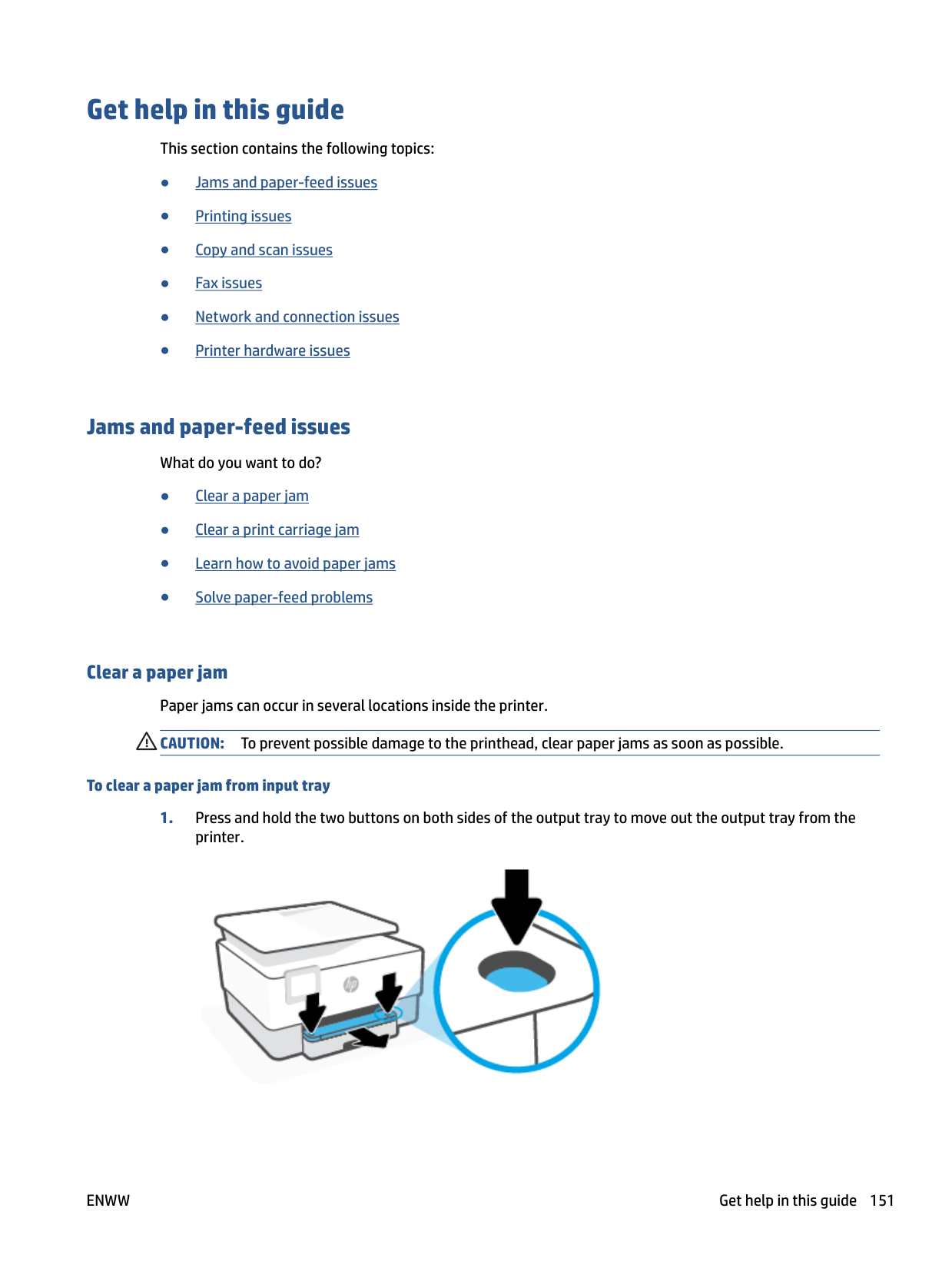


####### 5. Lift the handle of the paper path cover and remove the cover.

####### 6. Locate any jammed paper inside the printer, grasp it with both hands and pull it towards you.
CAUTION: If the paper tears when you are removing it from the rollers, check the rollers and wheels for torn pieces of paper that might be remaining inside the printer. If you do not remove all the pieces of paper from the printer, more paper jams are likely to occur.

####### 7. Reinsert the paper path cover until it snaps into place.


###### To clear a paper jam from the document feeder
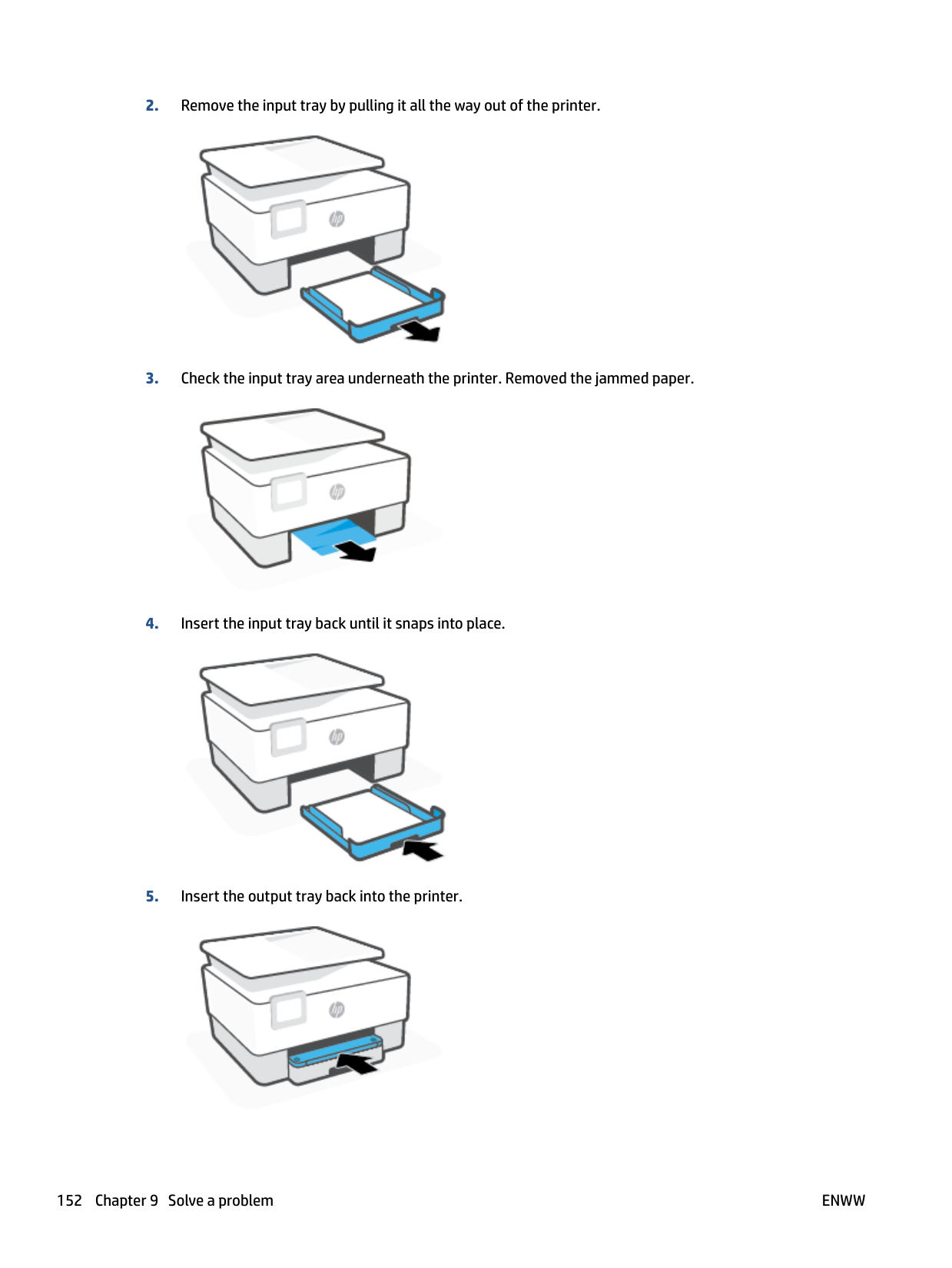

####### 2. Pull any jammed paper out of the rollers.

####### 3. Lift the document feeder tab from the side.

####### 4. Pull any jammed paper out under the rollers.

####### 5. Close the document feeder tab.

####### 6. Close the cover of the document feeder until it snaps into space.

####### 7. Lift up the document feeder tray.


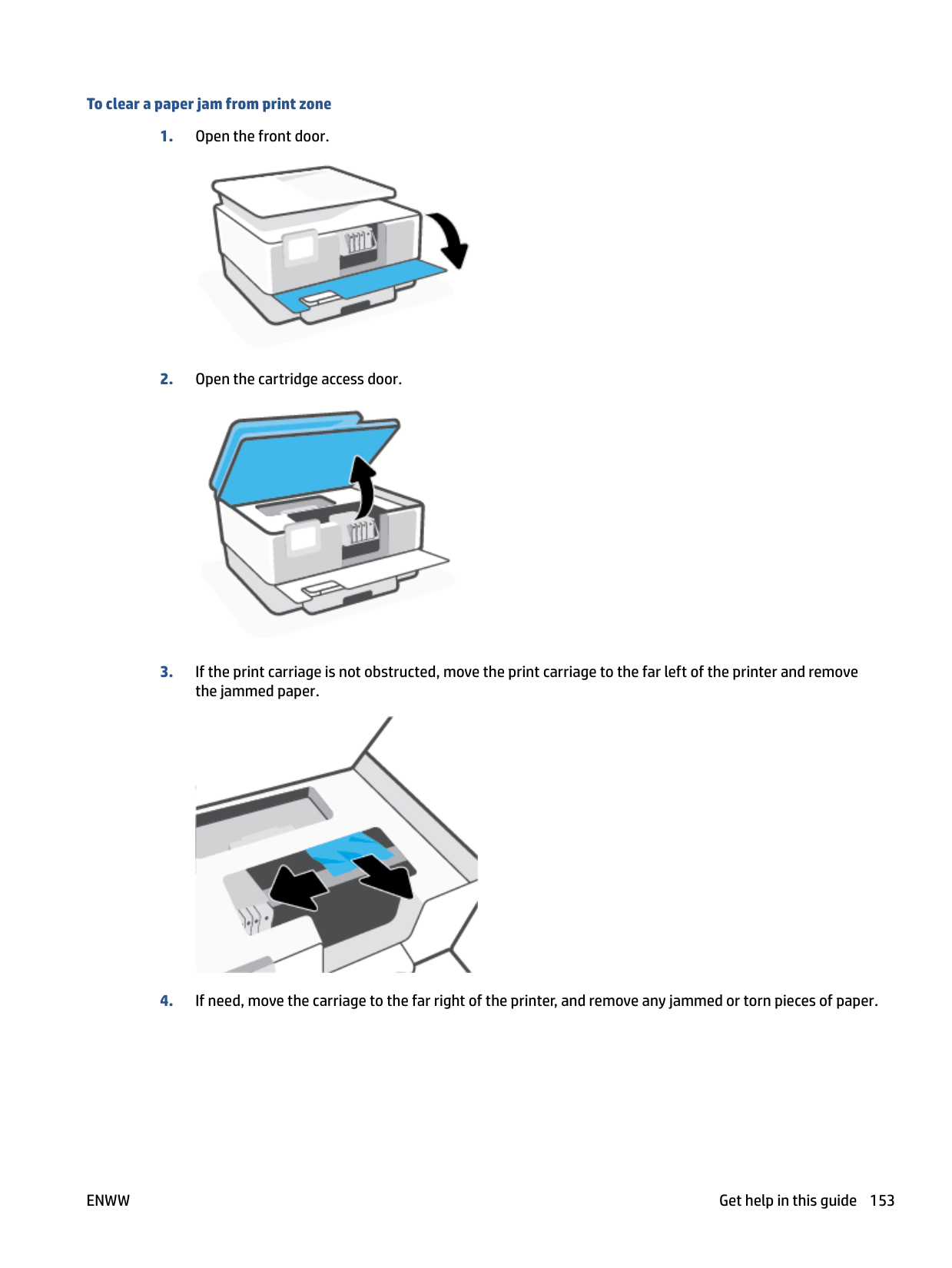

Clear a print carriage jam Remove any objects, such as paper, that are blocking the print carriage. NOTE: Do not use any tools or other devices to remove jammed paper. Always use caution when removing jammed paper from inside the printer.
| | |---|
##### Learn how to avoid paper jams
To help avoid paper jams, follow these guidelines.
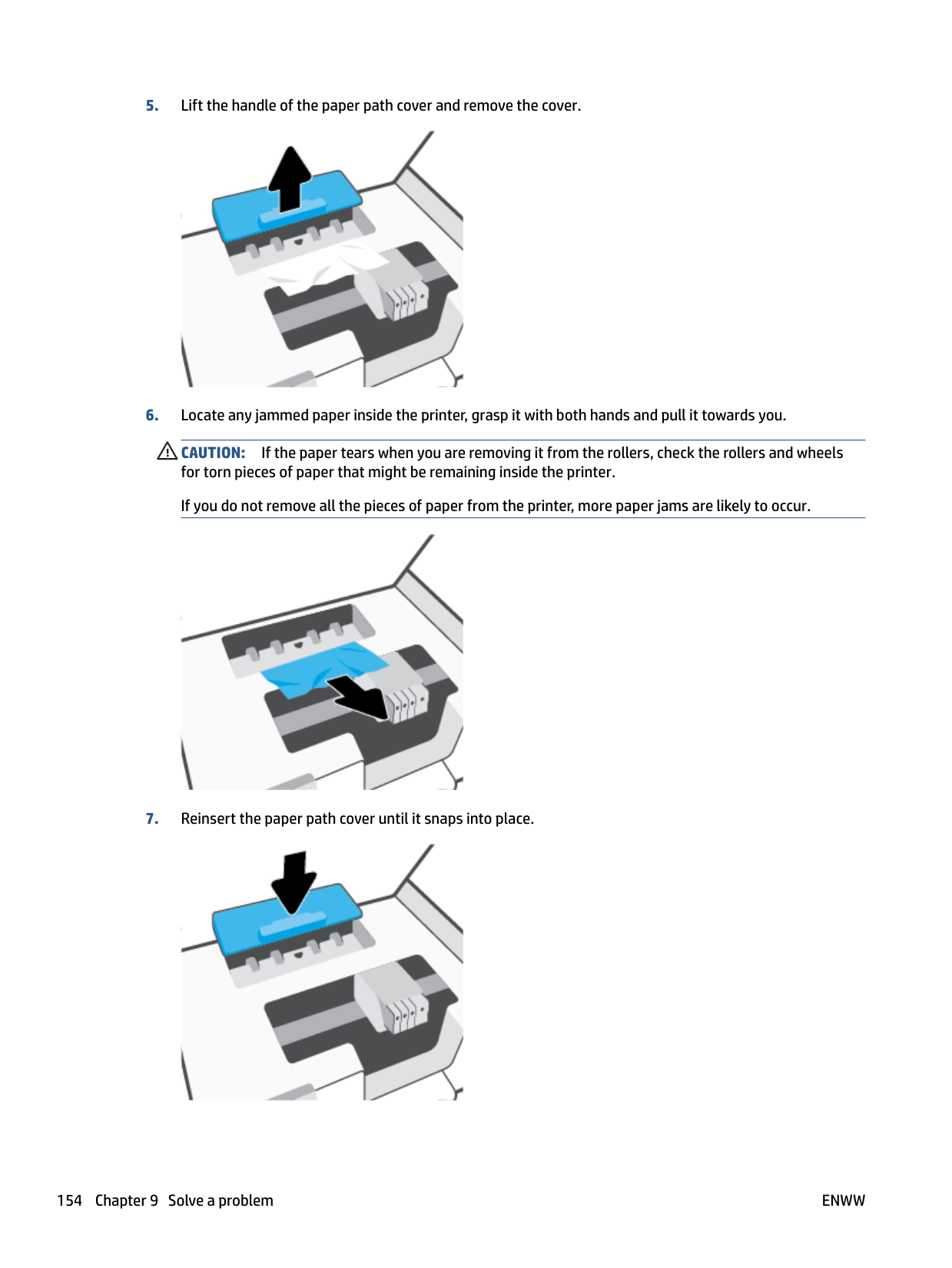
##### Solve paper-feed problems
What kind of problem are you having?
###### ● Paper is not picked up from a tray
###### ● Pages are skewing
###### ● Multiple pages are being picked up
#### Printing issues
What do you want to do?
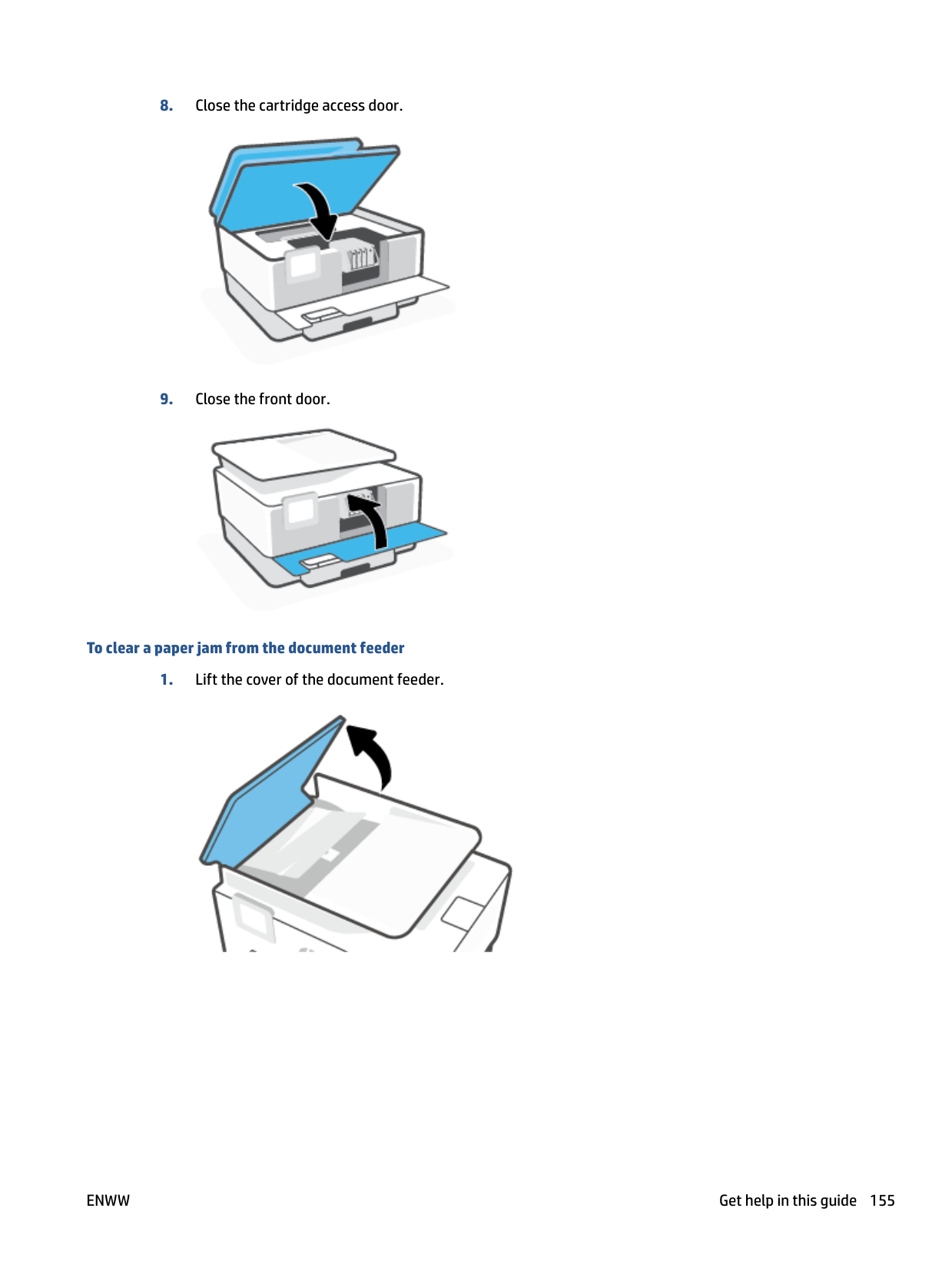
Make sure that the printer is turned on and that there is paper in the tray. If you are still unable to print, try the following in order:
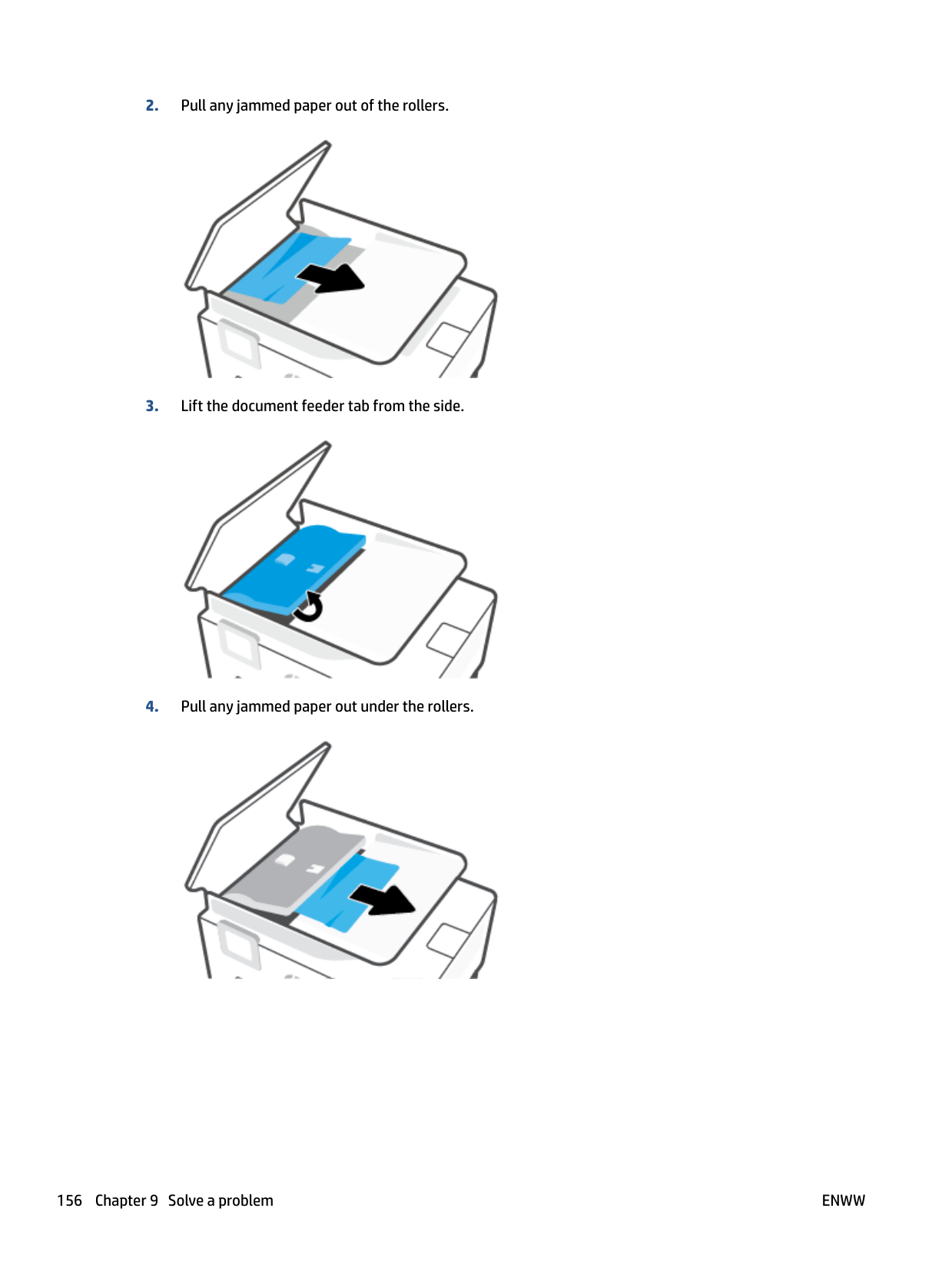
Windows 7
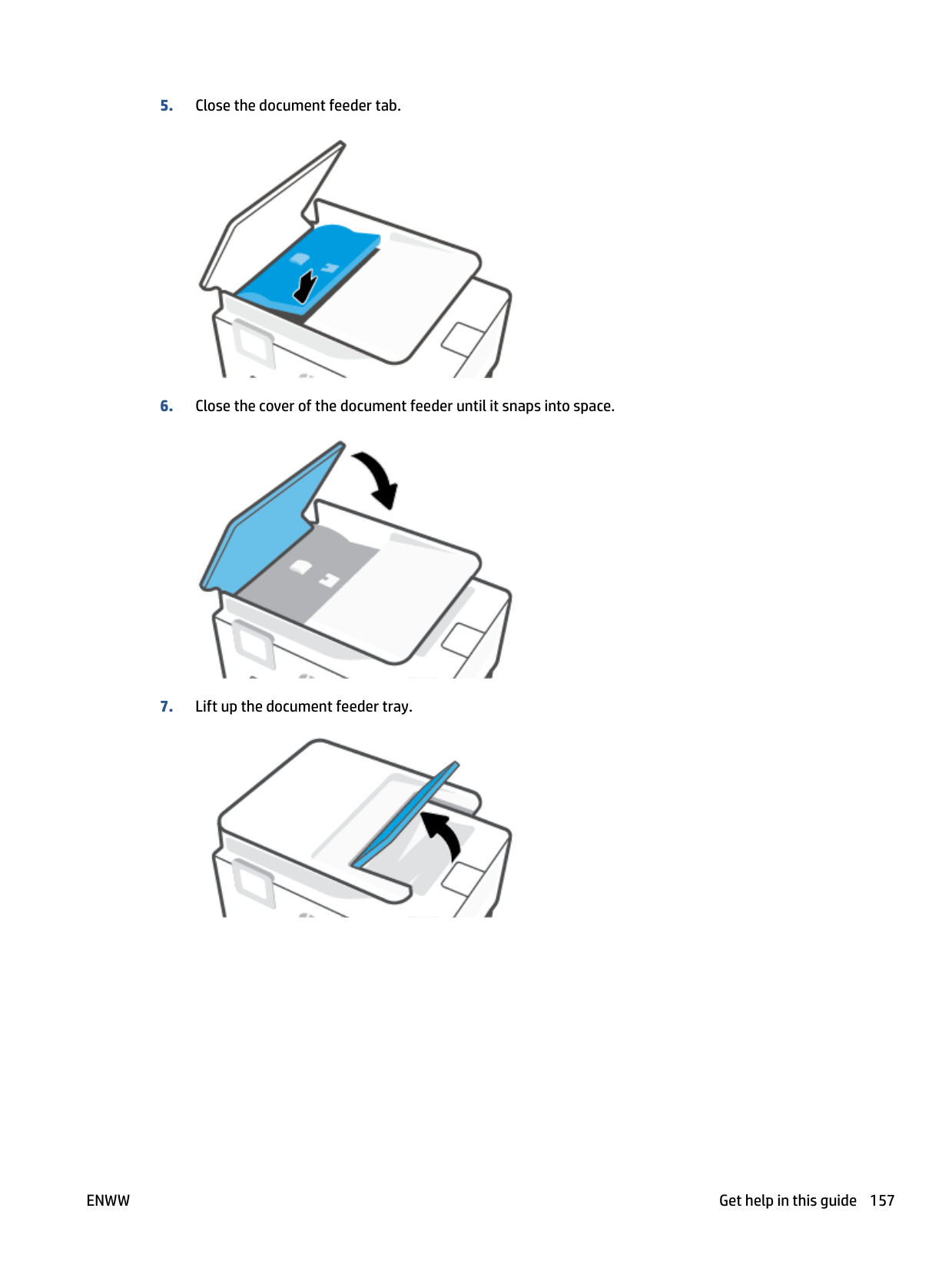
###### To check the power connection and reset the printer

1 Power connection to the printer 2 Connection to a power outlet
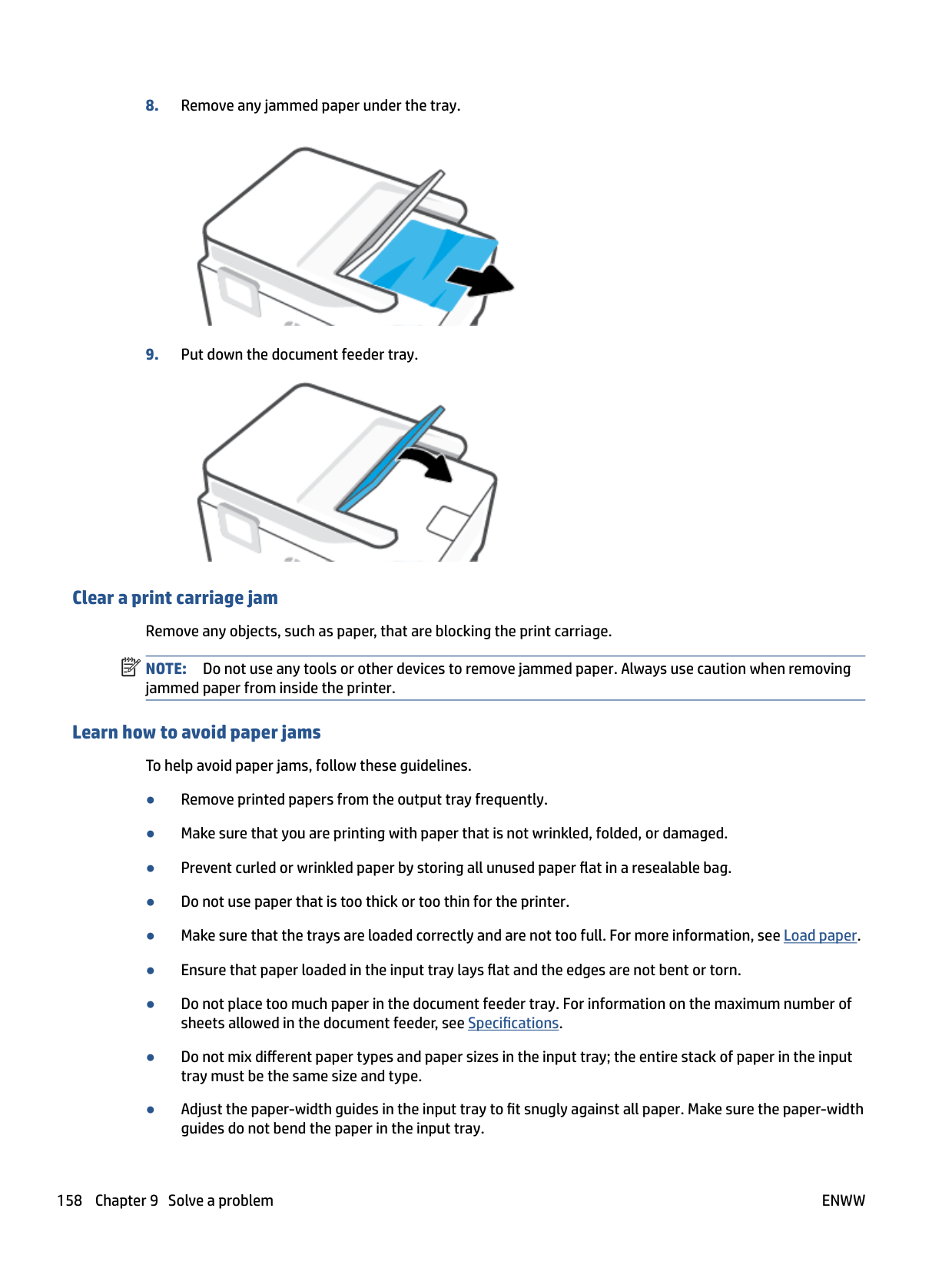
| | |---|
##### Fix print quality issues
| | |---|
NOTE: To avoid print quality problems, always turn the printer off using the Power button, and wait until the Power button light goes out before you pull the plug or turn off a power strip. This allows the printer to move the cartridges to a capped position, where they are protected from drying out.
###### To improve print quality (Windows)
● In the printer software, click Print, Scan, & Fax and then click Set Preferences to access the print properties.
| | |---|
To align the printhead from the printer software NOTE: Aligning the printhead ensures the high-quality output. The printhead does not have to be realigned when cartridges are replaced.
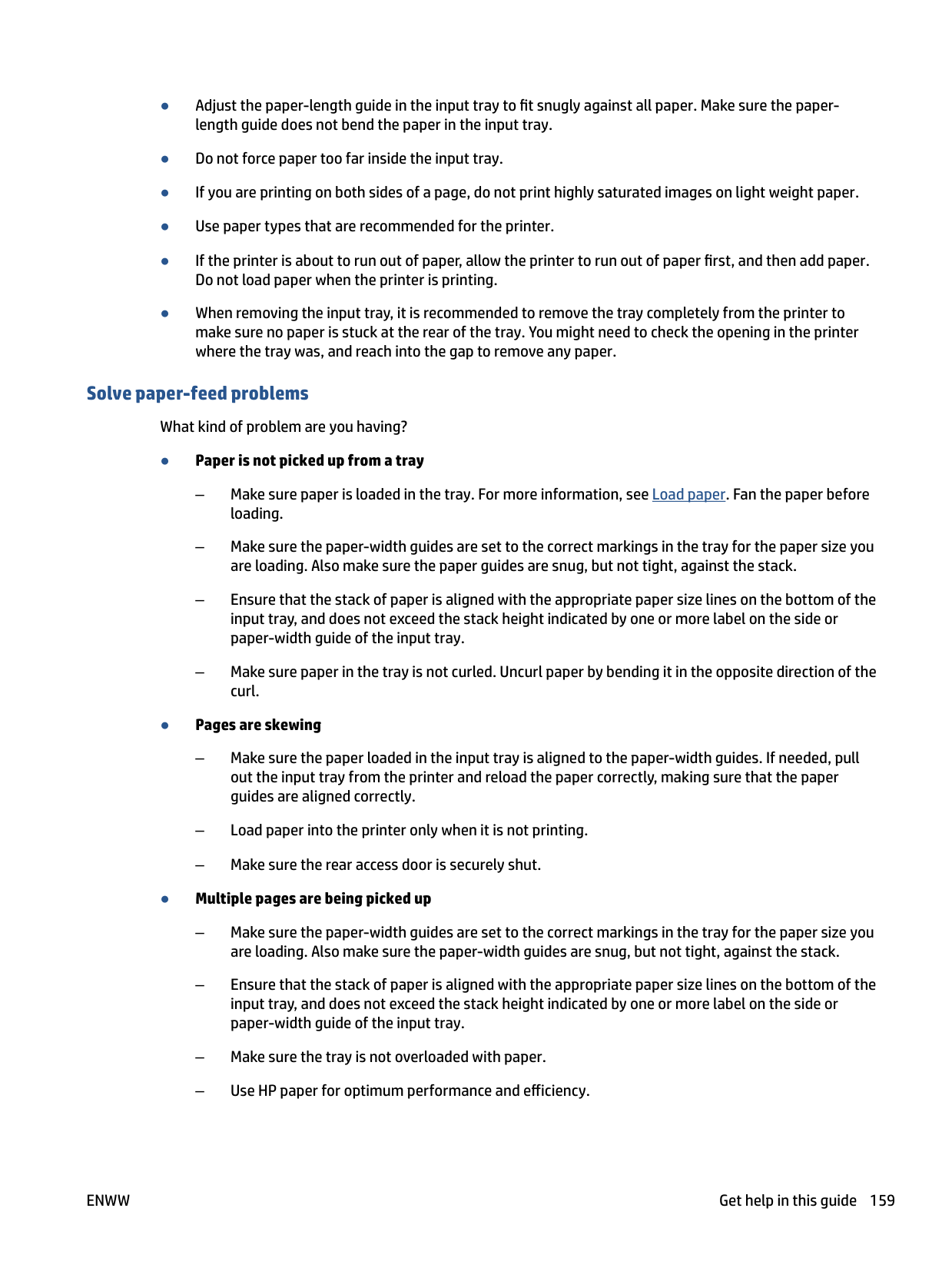
###### To improve print quality from the printer display
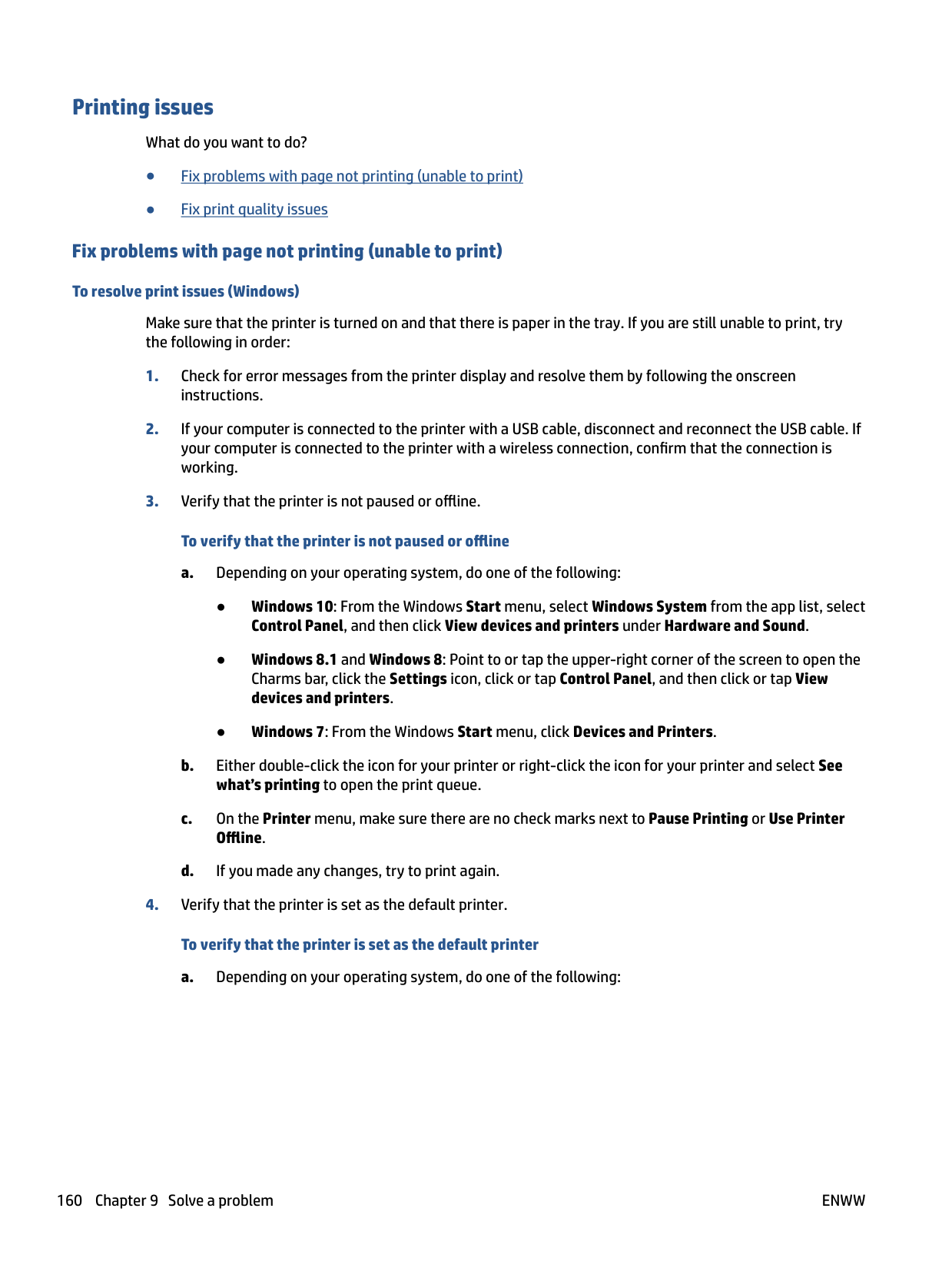
###### To align the printhead from the printer display


#### Copy and scan issues
Choose one of the following troubleshooting options.
| | |---|
NOTE: The HP Print and Scan Doctor and the HP online troubleshooting wizards may not be available in all languages. For more information, see Tips for copy and scan success.
#### Fax issues
Run the fax test report first to see if there is a problem with your fax setup. If the test passes and you are still having problems faxing, check the fax settings listed in the report to verify that the settings are correct.
##### Run the fax test
You can test your fax setup to check the status of the printer and to make sure it is set up correctly for faxing. Perform this test only after you have completed fax setup on the printer. The test does the following:
###### To test fax setup via the printer control panel
the report are correct. You can also use HP's online troubleshooting wizard. What to do if the fax test failed
If you ran a fax test and the test failed, review the report for basic information about the error. For more detailed information, check the report to see which part of the test failed, and then review the appropriate topic in this section for solutions to try.
###### The "Fax Hardware Test" failed

then unplug the power cord from the back of the printer. After a few seconds, plug the power cord in again, and then turn the power on. Run the test again. If the test fails again, continue reviewing the troubleshooting information in this section.
After you resolve any problems found, run the fax test again to make sure it passes and the printer is ready for faxing. If the Fax Hardware Test continues to fail and you experience problems faxing, contact HP support. Go to www.support.hp.com . This website provides information and utilities that can help you correct many common printer problems. If prompted, select your country/region, and then click All HP Contacts for information on calling for technical support.
###### The "Fax Connected to Active Telephone Wall Jack" test failed
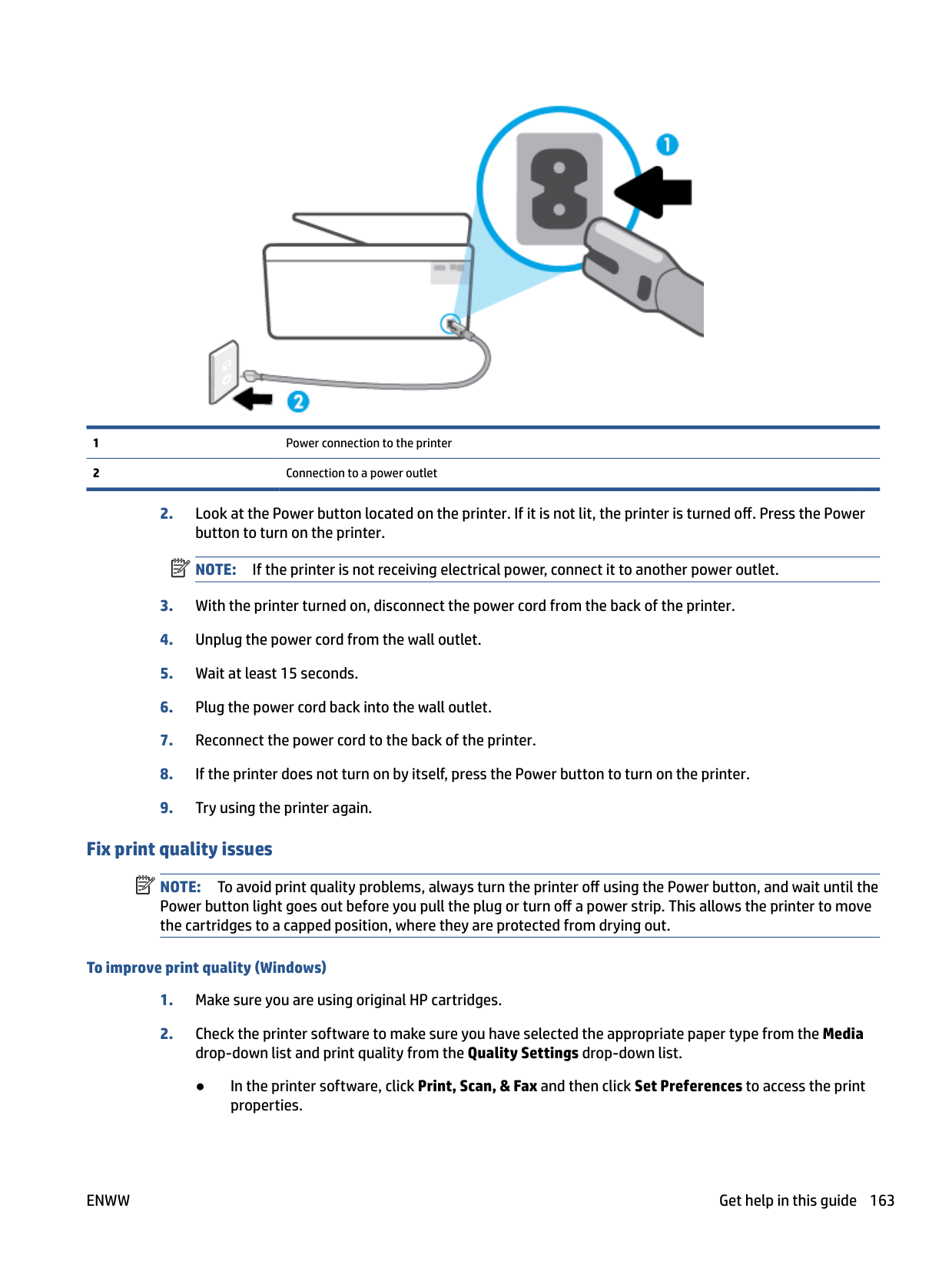

After you resolve any problems found, run the fax test again to make sure it passes and the printer is ready for faxing.
###### The "Phone Cord Connected to Correct Port on Fax" test failed
If you are using a phone splitter, this can cause faxing problems. (A splitter is a two-cord connector that plugs into a telephone wall jack.) Try removing the splitter and connecting the printer directly to the telephone wall jack.
###### Plug the phone cord into the correct port

| | |---|
NOTE: If you use the port labeled to connect to the telephone wall jack, you cannot send or receive faxes. The port labeled should only be used to connect other equipment, such as an answering machine.


Figure 9-1 Back view of the printer

|1|Telephone wall jack.| |---|---| |2|Use a minimum 26 AWG phone cord to connect to the port on the printer.
|

###### The "Using Correct Type of Phone Cord with Fax" test failed


|1|Telephone wall jack.| |---|---| |2|Use a minimum 26 AWG phone cord to connect to the port on the printer.
|
###### The "Dial Tone Detection" test failed

After you resolve any problems found, run the fax test again to make sure it passes and the printer is ready for faxing. If the Dial Tone Detection test continues to fail, contact your telephone company and have them check the phone line.
###### The "Fax Line Condition" test failed

After you resolve any problems found, run the fax test again to make sure it passes and the printer is ready for faxing. If the Fax Line Condition test continues to fail and you experience problems faxing, contact your telephone company and have them check the phone line.
##### Troubleshoot fax problems
What kind of fax problem are you having?
###### The display always shows Phone Off Hook
###### The printer is having problems sending and receiving faxes


After turning on the printer, HP recommends you wait five minutes before sending or receiving a fax. The printer cannot send or receive faxes while it is initializing after being turned on.


|1|Telephone wall jack.| |---|---| |2|Use a minimum 26 AWG phone cord to connect to the port on the printer.
|
NOTE: You might notice static on the phone line again in the future. If the printer stops sending and receiving faxes, repeat this process. If the phone line is still noisy, contact your telephone company. For information on turning your DSL modem off, contact your DSL provider for support.
| | |---|
###### The printer cannot receive faxes, but can send faxes
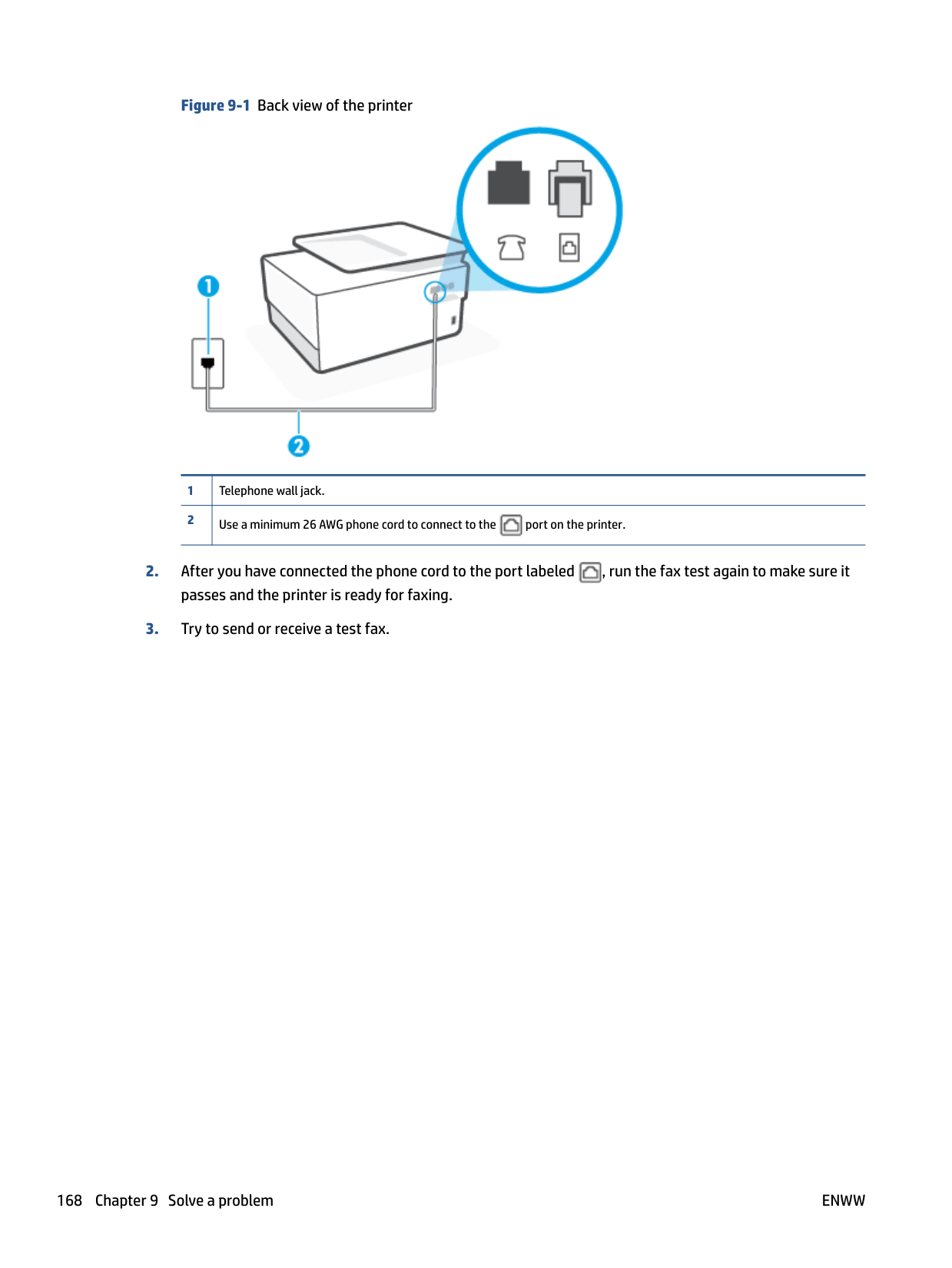
The following actions might help to solve these problems:
NOTE: Some digital answering machines might not retain the recorded silence at the end of your outgoing message. Play back your outgoing message to check.
To find out if other equipment is causing a problem, disconnect everything except the printer from the phone line, and then try to receive a fax. If you can receive faxes successfully without the other equipment, one or more pieces of the other equipment is causing problems; try adding them back one at a time and receiving a fax each time, until you identify which equipment is causing the problem.
| | |---|
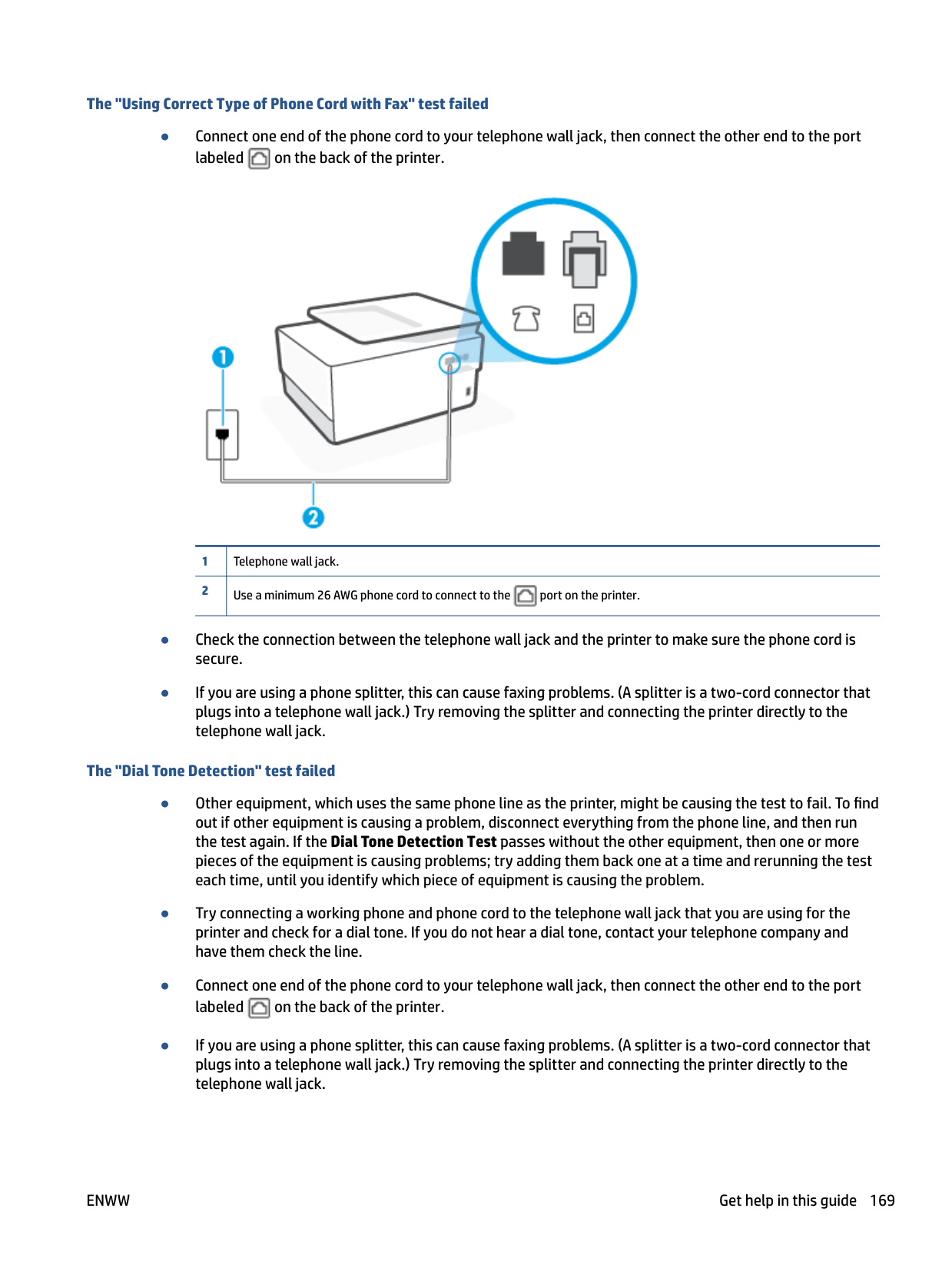
###### The printer cannot send faxes, but can receive faxes
You can also send the fax using monitor dialing. This enables you to listen to the phone line as you dial. You can set the pace of your dialing and respond to prompts as you dial.
###### Fax tones are recorded on my answering machine
###### The computer cannot receive faxes (HP Digital Fax)
#### Network and connection issues
What do you want to do?
Choose one of the following troubleshooting options.

##### Fix Wi-Fi Direct connection
▲ From the printer control panel, touch or swipe down the tab at the top of the screen to open the
Dashboard, and then touch (Wi-Fi Direct).
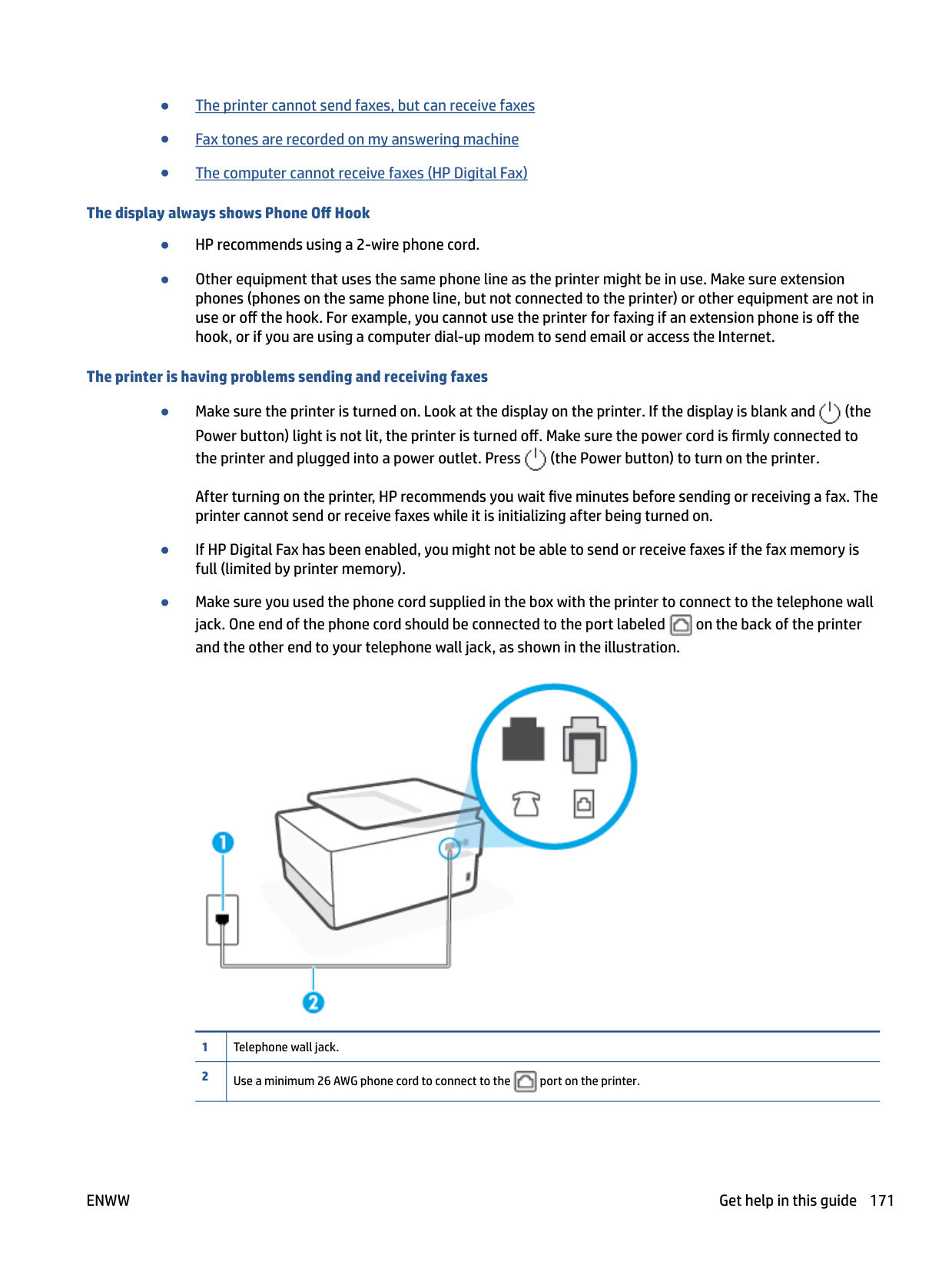
##### Fix Ethernet connection
Check the following:
Run the HP Print and Scan Doctor to troubleshoot the issue automatically. The utility will try to diagnose and fix the issue. The HP Print and Scan Doctor may not be available in all languages.
#### Printer hardware issues
###### The printer shuts down unexpectedly
###### Printhead alignment fails
###### Resolve printer failure
Complete the following steps to resolve printer failure problems:


If this problem persists, write down the error code provided in the message, and then contact HP support. For more information about contacting HP support, see HP support.
Understand printer reports
You can print the following reports to help troubleshoot problems with the printer.
###### To print a printer report

#### Printer status report
Use the printer status report to view current printer information and cartridge status. Also use the printer status report to help you troubleshoot problems with the printer.
The printer status report also contains a log of recent events. If you need to call HP, it is often useful to print the printer status report before calling.
#### Network configuration page
If the printer is connected to a network, you can print a network configuration page to view the network settings for the printer and a list of networks detected by your printer. The last page of the report includes a list of all detectable wireless networks in the area, along with signal strength and the channels being used. This might help you select a channel for your network which is not heavily used by other networks (which will improve network performance).
| | |---|
NOTE: In order to get the list of detected wireless networks in the area, the wireless radio on the printer should be turned on. If it is off or if the printer is connected using Ethernet, the list is not displayed. You can use the network configuration page to help troubleshoot network connectivity problems. If you need to call HP, it is often useful to print this page before calling.
#### Print quality report
Print quality problems can have many causes-software settings, a poor image file, or the printing system itself. If you are unhappy with the quality of your prints, a Print Quality Report page can help you determine if the printing system is working correctly.
ENWW Understand printer reports 177
#### Wireless test report
When you print the Wireless Test Report, a number of tests are run to check various conditions of the printer wireless connection. The report shows the results of the tests. If an issue is discovered, the issue along with a message how to fix it is provided on the report. Some key wireless configuration details are provided at the bottom section of the report.
#### Web access test report
Print the web access report to help identify internet connectivity issues which can affect Web Services.
Solve problems using Web Services
If you are having problems using Web Services, such as HP ePrint and print apps, check the following:
| | |---|
If the proxy settings used by your firewall have changed, you must update these settings in either the printer control panel or the embedded web server. If these settings are not updated, you will not be able to use Web Services.
For more information, see Set up Web Services.
TIP: For additional help on setting up and using Web Services, visit HP Connected (this site might not be available in all countries/regions).
ENWW Solve problems using Web Services 179
Maintain the printer
What do you want to do?
#### Clean the scanner glass
Dust or dirt on the scanner glass, scanner lid backing, or scanner frame can slow down performance, degrade the quality of scans, and affect the accuracy of special features such as fitting copies to a certain page size.
###### To clean the scanner glass

WARNING! Before cleaning the printer, turn the printer off by pressing (the Power button) and unplug the power cord from the electrical socket.


CAUTION: Use only glass cleaner to clean the scanner glass. Avoid cleaners that contain abrasives, acetone, benzene, and carbon tetrachloride, all of which can damage the scanner glass. Avoid isopropyl alcohol because it can leave streaks on the scanner glass.
CAUTION: Do not spray the glass cleaner directly on the scanner glass. If too much glass cleaner is applied, the cleaner could leak under the scanner glass and damage the scanner.
Clean the exterior WARNING! Before cleaning the printer, turn the printer off by pressing the power button and unplugging the power cord from the electrical socket. Use a soft, damp, lint-free cloth to wipe dust, smudges, and stains off of the case. Keep fluids away from the interior of the printer, as well as from the printer control panel.

#### Clean the document feeder
If the document feeder picks up multiple pages or if it does not pick up plain paper, you can clean the rollers and separator pad.
###### To clean the rollers or separator pad

WARNING! Before cleaning the printer, turn the printer off by pressing (the Power button) and unplug the power cord from the electrical socket.

This provides easy access to the rollers (1) and separator pad (2).

|1|Rollers| |---|---| |2|Separator pad|
| | |---|
#### Maintain the printhead and cartridges
If you are experiencing problems with printing, you might have a problem with the printhead. You should perform the procedures in the following sections only when directed to do so for resolving print quality issues.
Performing the aligning and cleaning procedures unnecessarily can waste ink and shorten the life of the cartridges.
There are three stages of cleaning. Each stage lasts about two minutes, uses one sheet of paper, and uses an increasing amount of ink. After each stage, review the quality of the printed page. You should only initiate the next phase of cleaning if the print quality is poor.
If print quality still seems poor after you complete all stages of cleaning, try aligning the printhead. If print quality problems persist after cleaning and aligning, contact HP support. For more information, see HP support.
NOTE: Cleaning uses ink, so clean the printhead only when necessary. The cleaning process takes a few minutes. Some noise might be generated in the process. Always use the Power button to turn off the printer. Turning the printer off improperly can cause print quality problems. To clean or align the printhead

| | |---|

| | |---|
NOTE: You can also do the same from the HP printer software or embedded web server (EWS). To access the software or EWS, see Open the HP printer software (Windows) or Open the embedded web server.
Restore original factory defaults and settings
If you disable some functions or change some settings and want to change them back, you can restore the printer to the original factory settings or network settings.
###### To restore the selected printer functions to the original factory settings

###### To restore the printer to the original factory defaults

###### To restore the printer to the original network settings

| |
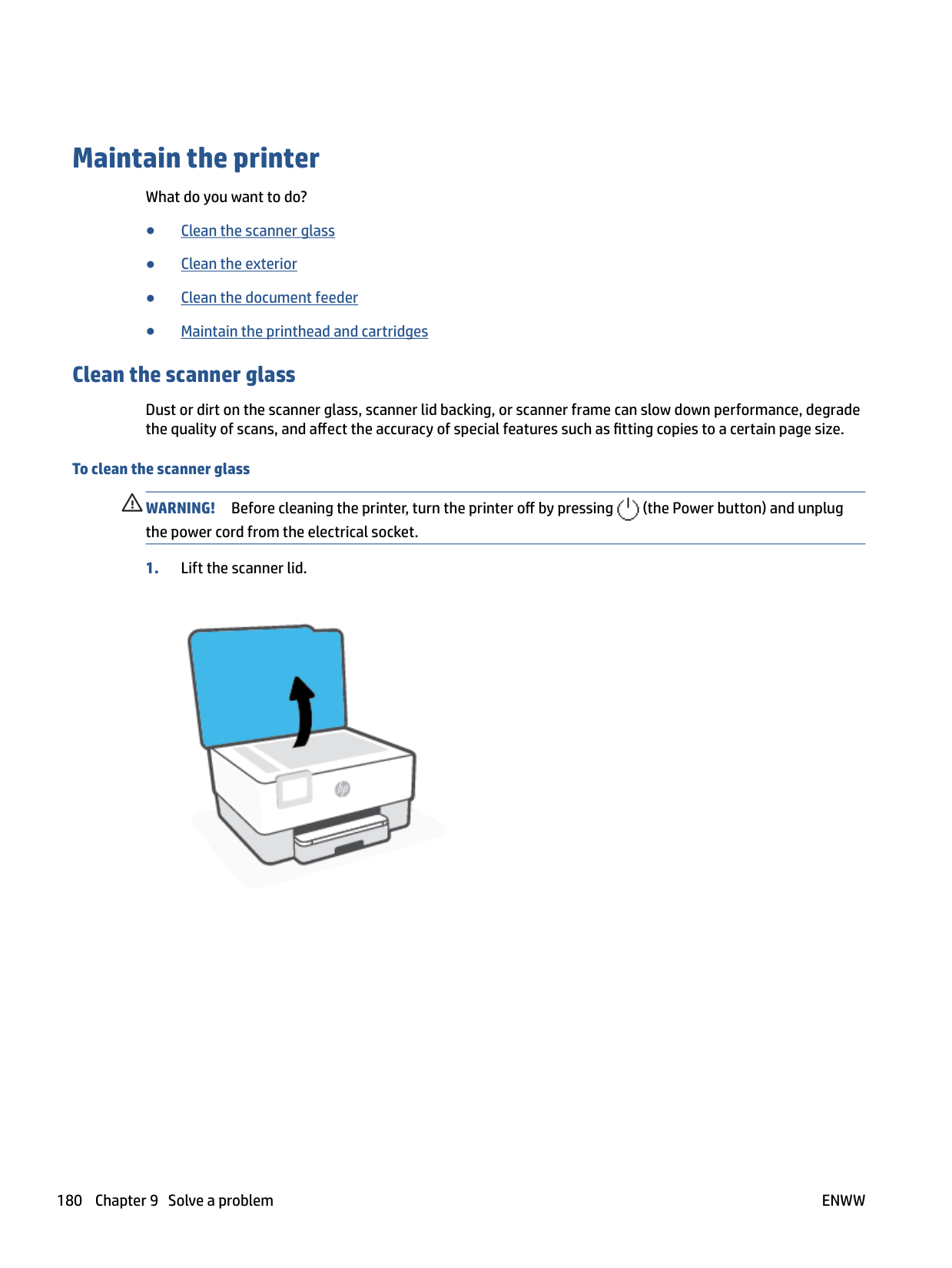
|---|
NOTE: When you reset the printer network settings, previously configured wireless and Ethernet settings (such as the link speed or IP address) are removed. The IP address is set back to the Automatic mode.
TIP: You can visit the HP online support website at www.support.hp.com for information and utilities that can help you correct many common printer problems. (Windows) Run the HP Print and Scan Doctor to diagnose and automatically fix printing issues. The application is only available in some languages.
###### To use Cold Reset to restore settings
Cold Reset removes all user configured settings, including saved administrator passwords, network configurations, stored jobs, selected country/region and language, Address Book entries, and Web Services account information.
You can use this feature if you are selling the printer or giving it to someone else and want to be sure that all personal information has been removed.

ENWW Restore original factory defaults and settings 185
HP support
For the latest product updates and support information, visit the printer support website at www.support.hp.com. HP online support provides a variety of options for help with your printer:
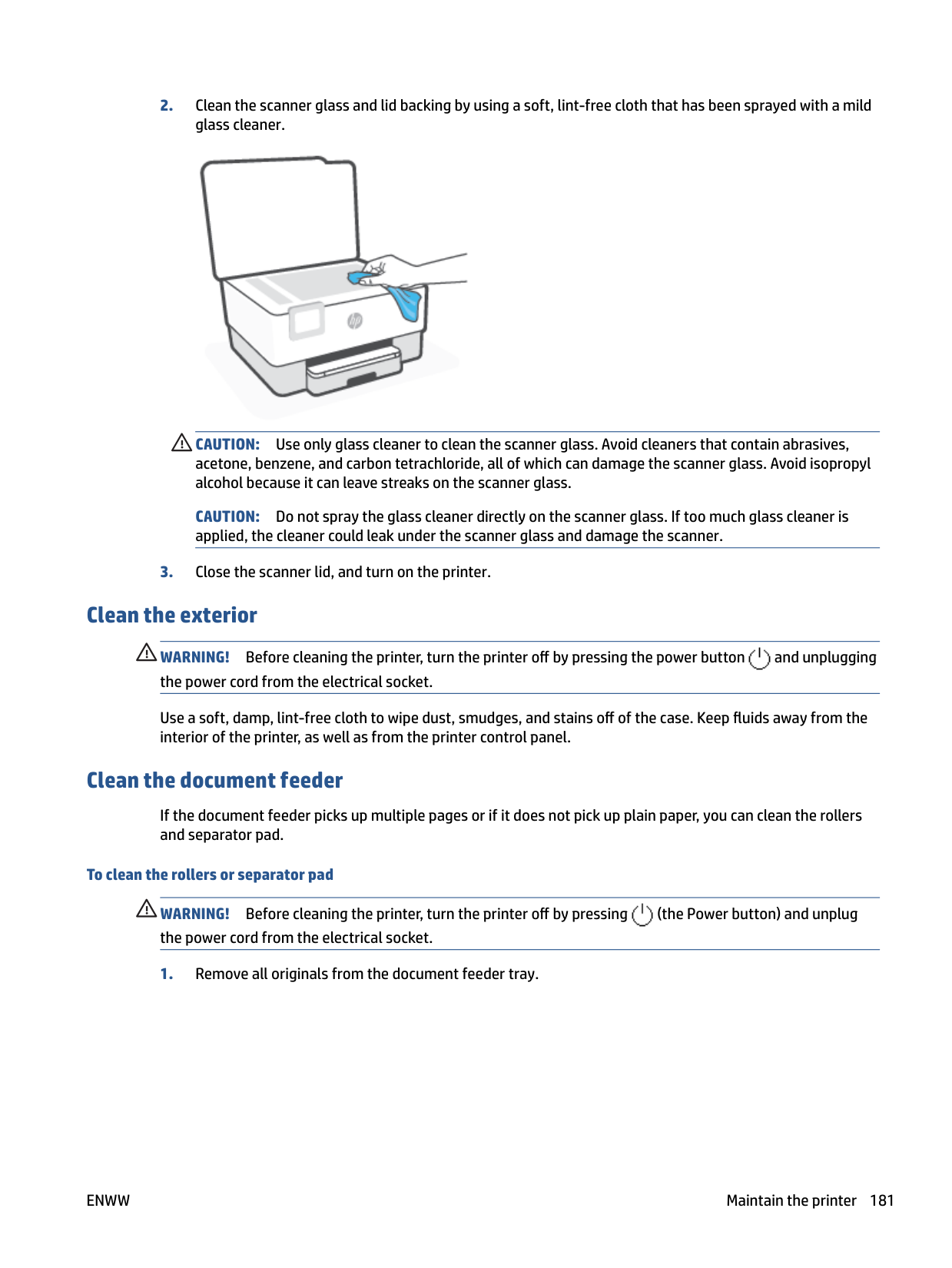
#### Contact HP
If you need help from an HP technical support representative to solve a problem, visit the Contact Support website. The following contact options are available at no cost for in-warranty customers (HP agent-assisted support for out-of-warranty customers may require a fee):

Chat with an HP support agent or the HP Virtual Agent online.

Call an HP support agent.
When contacting HP support, be prepared to provide the following information:

#### Register printer
By taking just a few quick minutes to register, you can enjoy quicker service, more efficient support, and product support alerts. If you did not register your printer while installing the software, you can register now at http://www.register.hp.com.
#### Additional warranty options
Extended service plans are available for the printer at additional costs. Go to www.support.hp.com , select your country/region and language, then explore the extended warranty options available for your printer.
10 Technical information
This section contains the following topics:
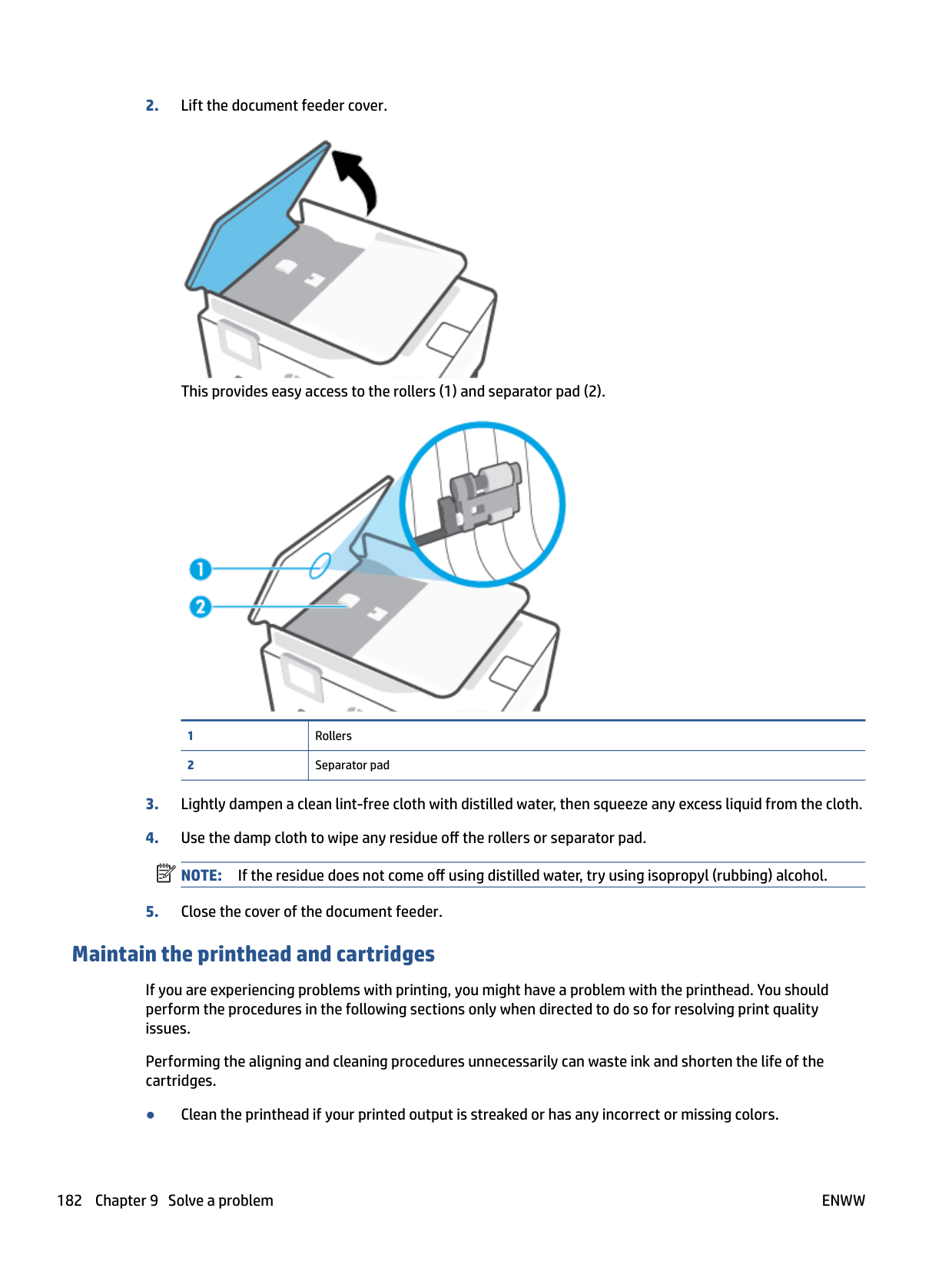
ENWW 187
Specifications
For more information, visit www.support.hp.com . Select your country or region. Click Product Support & Troubleshooting. Enter the name shown on the front of the printer, and then select Search. Click Product information, and then click Product specifications.
###### System requirements
● For information about software and system requirements or future operating system releases and support, visit the HP online support website at www.support.hp.com .
###### Environmental specifications
###### Input tray capacity
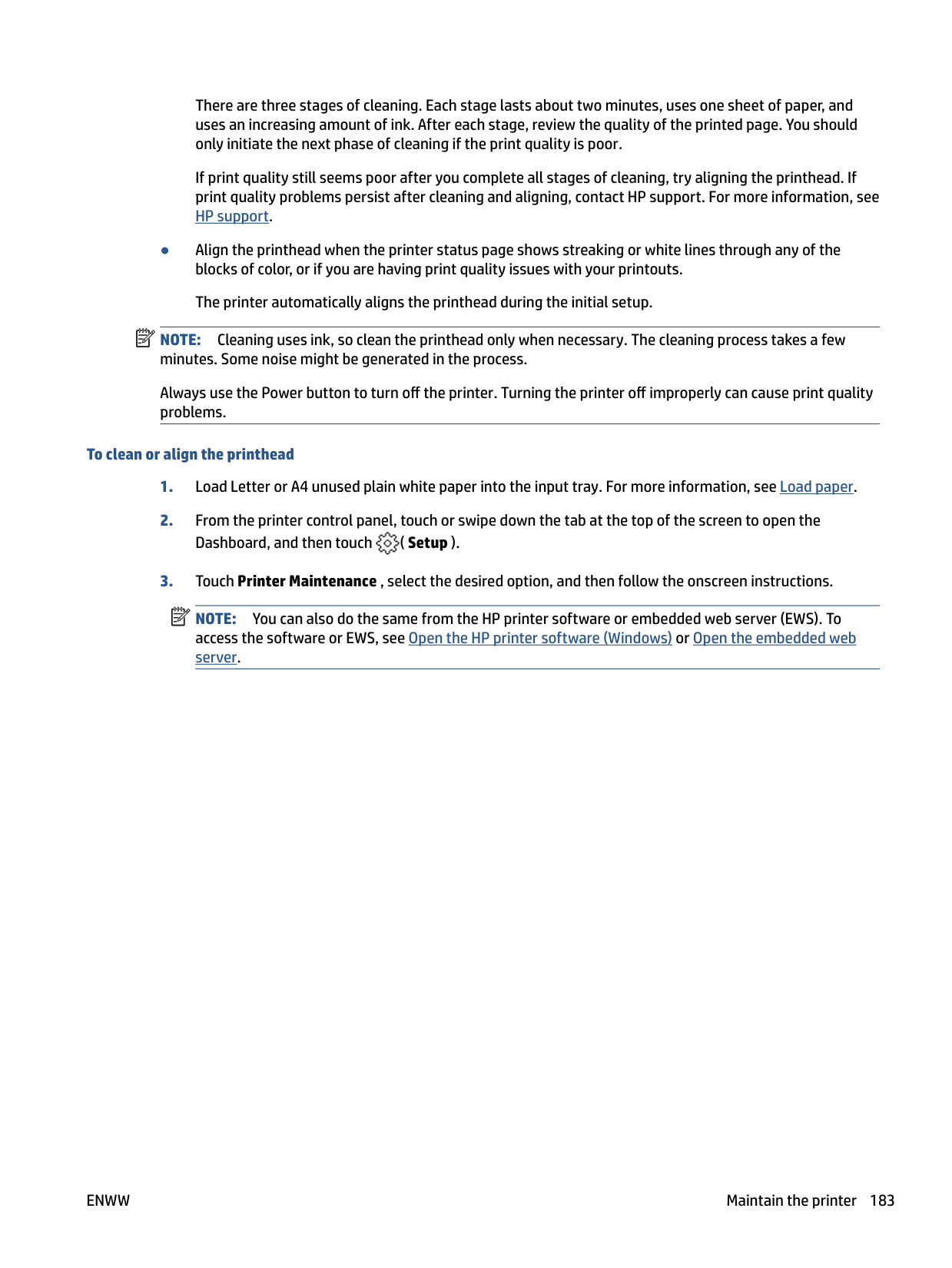
###### Output tray capacity
###### Document feeder capacity
● Plain paper sheets (60 to 90 g/m2 [16 to 24 lb]): Up to 35
###### Paper size and weights
For the list of supported paper sizes, see the HP printer software.
###### Print specifications
###### Copy specifications
###### Scan specifications
###### Fax specifications
ENWW Specifications 189
Photo (dpi) Very Fine (dpi) Fine (dpi) Standard (dpi) Black 205 x 196 (8-bit grayscale) 308 x 300 205 x 196 205 x 98 Color 205 x 200 205 x 200 205 x 200 205 x 200
###### Cartridge yield
● Visit www.hp.com/go/learnaboutsupplies for more information on estimated cartridge yields.
Regulatory notices The printer meets product requirements from regulatory agencies in your country/region. This section contains the following topics:
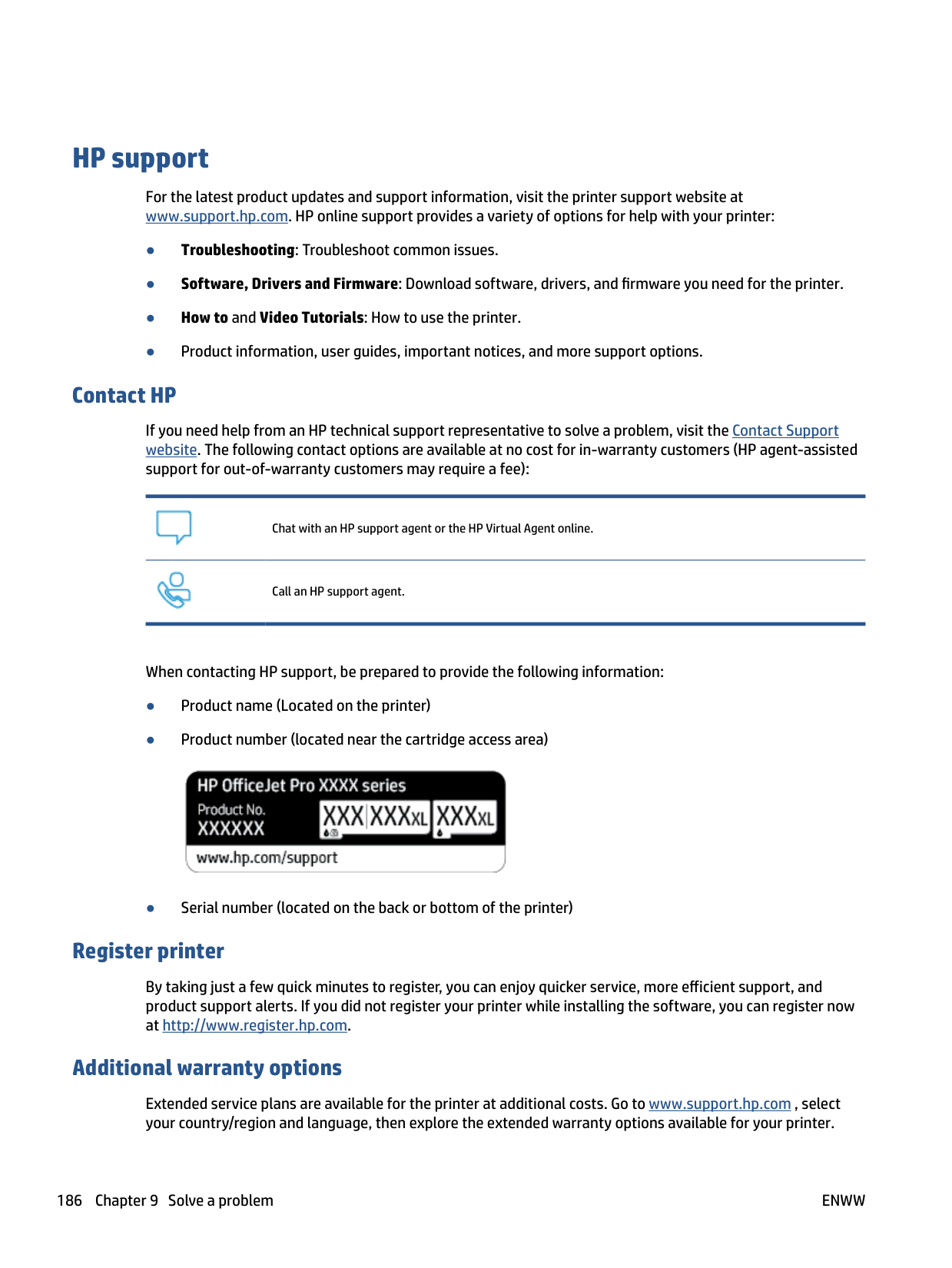
#### Regulatory Model Number
For regulatory identification purposes, your product is assigned with a Regulatory Model Number. The regulatory model number should not be confused with the marketing names or product numbers.
#### FCC statement
The United States Federal Communications Commission (in 47 CFR 15.105) has specified that the following notice be brought to the attention of users of this product.
This equipment has been tested and found to comply with the limits for a Class B digital device, pursuant to Part 15 of the FCC Rules. These limits are designed to provide reasonable protection against harmful interference in a residential installation. This equipment generates, uses and can radiate radio frequency energy and, if not installed and used in accordance with the instructions, may cause harmful interference to radio communications. However, there is no guarantee that interference will not occur in a particular installation. If this equipment does cause harmful interference to radio or television reception, which can be determined by turning the equipment off and on, the user is encouraged to try to correct the interference by one or more of the following measures:
NOTE: If the product has an Ethernet / LAN port with metallic casing then use of a shielded interface cable is required to comply with the Class B limits of Part 15 of FCC rules. Modifications (part 15.21) Any changes or modifications made to this device that are not expressly approved by HP may void the user’s authority to operate the equipment. For further information, contact: Manager of Corporate Product Regulations, HP Inc. 1501 Page Mill Road, Palo Alto, CA 94304, U.S.A. This device complies with Part 15 of the FCC Rules. Operation is subject to the following two conditions: (1) this device may not cause harmful interference, and (2) this device must accept any interference received, including interference that may cause undesired operation.

#### Notice to users in Korea
해당 무선설비는 운용 중 전파혼신 가능성이 있음으로 인명안전과 관련된 서비스는 할 수 없음.
B급 기기 (가정용 방송통신기자재)
이 기기는 가정용(B급) 전자파적합기기로서 주로 가정에서 사용하는 것을 목적으로 하며, 모든 지역에서 사용할 수 있습니다.
#### VCCI (Class B) compliance statement for users in Japan
この装置は、クラス B 機器です。この装置は、住宅環境で使用することを目的としていますが、この装置がラジオやテレビ ジョン受信機に近接して使用されると、受信障害を引き起こすことがあります。取扱説明書に従って正しい取り扱いをして 下さい。
VCCI-B
#### Power cord instructions
Make sure your power source is adequate for the product voltage rating. The voltage rating is on the product label. The product uses either 100-240 Vac or 200-240 Vac and 50/60 Hz.
CAUTION: To prevent damage to the product, use only the power cord that is provided with the product.
Notice to users in Japan about the power cord 製品には、同梱された電源コードをお使い下さい。 同梱された電源コードは、他の製品では使用出来ません。
Noise emission statement for Germany Geräuschemission LpA < 70 dB am Arbeitsplatz im Normalbetrieb nach DIN 45635 T. 19
#### European Union Regulatory Notice

Products bearing the CE marking comply to applicable EU Directives and related European Harmonised Standards. The full Declaration of Conformity can be found at the following website:
www.hp.eu/certificates (Search with the product model name or its Regulatory Model Number (RMN), which may be found on the regulatory label.) The point of contact for regulatory matters is HP Deutschland GmbH, HQ-TRE, 71025, Boeblingen, Germany.
##### Products with wireless functionality EMF
● This product meets international guidelines (ICNIRP) for exposure to radio frequency radiation.
If it incorporates a radio transmitting and receiving device that in normal use, a separation distance of 20 cm ensures that radio frequency exposure levels comply with EU requirements.
###### Wireless functionality in Europe
– This product operates on radio frequency between 2400 MHz and 2483.5 MHz, with a transmit power of 20 dBm (100 mW) or less.

#### Visual display workplaces statement for Germany
###### GS-Erklärung (Deutschland)
Das Gerät ist nicht für die Benutzung im unmittelbaren Gesichtsfeld am Bildschirmarbeitsplatz vorgesehen. Um störende Reflexionen am Bildschirmarbeitsplatz zu vermeiden, darf dieses Produkt nicht im unmittelbaren Gesichtsfeld platziert werden.
#### Notice to users of the U.S. telephone network: FCC requirements
This equipment complies with Part 68 of the FCC rules and the requirements adopted by the ACTA. On the rear (or bottom) of this equipment is a label that contains, among other information, a product identifier in the format US:AAAEQ##TXXXX. If requested, this number must be provided to the telephone company.
Applicable connector jack Universal Service Order Codes ("USOC") for the Equipment is: RJ-11C. A telephone cord, plug and jack used to connect this equipment to the premises wiring and telephone network must comply with the applicable FCC Part 68 rules and requirements adopted by the ACTA. HP recommends a compliant plug, jack and 2-wire telephone cord to connect this product to the premises wiring and telephone network. See installation instructions for details. The REN is used to determine the quantity of devices, which may be connected to the telephone line. Excessive RENs on the telephone line may result in the devices not ringing in response to an incoming call. In most, but not all, areas, the sum of the RENs should not exceed five (5.0). To be certain of the number of devices that may be connected to the line, as determined by the total RENs, contact the telephone company to determine the maximum REN for the calling area. For products approved after July 23, 2001, the REN for this product is part of the product identifier that has the format US-AAAEQ##TXXXX. The digits represented by ##are the REN without a decimal point (e.g., 01 is a REN of 0.1). If this equipment causes harm to the telephone network, the telephone company will notify you in advance that temporary discontinuance of service may be required. If advance notice is not practical, the telephone company will notify the customer as soon as possible. Also, you will be advised of your right to file a complaint with the FCC if you believe it is necessary. The telephone company may make changes in its facilities, equipment, operations, or procedures that could affect the operation of the equipment. If this happens, the telephone company will provide advance notice in order for you to make the necessary modifications in order to maintain uninterrupted service. If trouble is experienced with this equipment, please contact the manufacturer, or look elsewhere in this manual, for repair and (or) warranty information. If the equipment is causing harm to the telephone network, the telephone company may request that you disconnect the equipment from the network until the problem is resolved. Connection to Party Line Service is subject to state tariffs. Contact the state public utility commission, public service commission, or corporation commission for information. CAUTION: If your home has specially wired alarm equipment connected to the telephone line, ensure the installation of this equipment does not disable your alarm equipment. If you have questions about what will disable alarm equipment, consult your telephone company or a qualified installer. WHEN PROGRAMMING EMERGENCY NUMBERS AND (OR) MAKING TEST CALLS TO EMERGENCY NUMBERS:
| |
|---|
The Telephone Consumer Protection Act of 1991 makes it unlawful for any person to use a computer or other electronic devices, including FAX machines, to send any message unless such message clearly contains in a margin at the top or bottom of each transmitted page or on the first page of the transmission, the date and time it is sent and an identification of the business or other entity, or other individual sending the message and the telephone number of the sending machine or such business, other entity, or individual. (The telephone number provided may not be a 900 number or any other number for which charges exceed local or long-distance transmission charges.)
In order to program this information into your FAX machine, you should complete the steps described in the software.
#### Notice to users of the Canadian telephone network
Cet appareil est conforme aux spécifications techniques des équipements terminaux d’Innovation, Science et Développement Economique Canada. Le numéro d’enregistrement atteste de la conformité de l’appareil. L’abréviation ISED qui précède le numéro d’enregistrement indique que l’enregistrement a été effectué dans le cadre d’une Déclaration de conformité stipulant que les spécifications techniques d’Innovation, Science et Développement Economique Canada ont été respectées. Néanmoins, cette abréviation ne signifie en aucun cas que l’appareil a été validé par Innovation, Science et Développement Economique Canada.
Pour leur propre sécurité, les utilisateurs doivent s’assurer que les prises électriques reliées à la terre de la source d’alimentation, des lignes téléphoniques et du circuit métallique d’alimentation en eau sont, le cas échéant, branchées les unes aux autres. Cette précaution est particulièrement importante dans les zones rurales.
REMARQUE: Le numéro REN (Ringer Equivalence Number) attribué à chaque appareil terminal fournit une indication sur le nombre maximal de terminaux qui peuvent être connectés à une interface téléphonique. La terminaison d’une interface peut se composer de n’importe quelle combinaison d’appareils, à condition que le total des numéros REN ne dépasse pas 5.

Basé sur les résultats de tests FCC Partie 68, le numéro REN de ce produit est 0.1. This equipment meets the applicable Innovation, Science and Economic Development Canada Terminal Equipment Technical Specifications. This is confirmed by the registration number. The abbreviation ISED before the registration number signifies that registration was performed based on a Declaration of Conformity indicating that Innovation, Science and Economic Development Canada technical specifications were met. It does not imply that Innovation, Science and Economic Development Canada approved the equipment. Users should ensure for their own protection that the electrical ground connections of the power utility, telephone lines and internal metallic water pipe system, if present, are connected together. This precaution might be particularly important in rural areas.
NOTE: The Ringer Equivalence Number (REN) assigned to each terminal device provides an indication of the maximum number of terminals allowed to be connected to a telephone interface. The termination on an interface might consist of any combination of devices subject only to the requirement that the sum of the Ringer Equivalence Numbers of all the devices does not exceed 5. The REN for this product is 0.1, based on FCC Part 68 test results.

#### Notice to users of the German telephone network
###### Hinweis für Benutzer des deutschen Telefonnetzwerks
Dieses HP-Fax ist nur für den Anschluss eines analogen Public Switched Telephone Network (PSTN) gedacht. Schließen Sie den TAE N-Telefonstecker, der im Lieferumfang des HP All-in-One enthalten ist, an die Wandsteckdose (TAE 6) Code N an. Dieses HP-Fax kann als einzelnes Gerät und/oder in Verbindung (mit seriellem Anschluss) mit anderen zugelassenen Endgeräten verwendet werden.
#### Australia wired fax statement
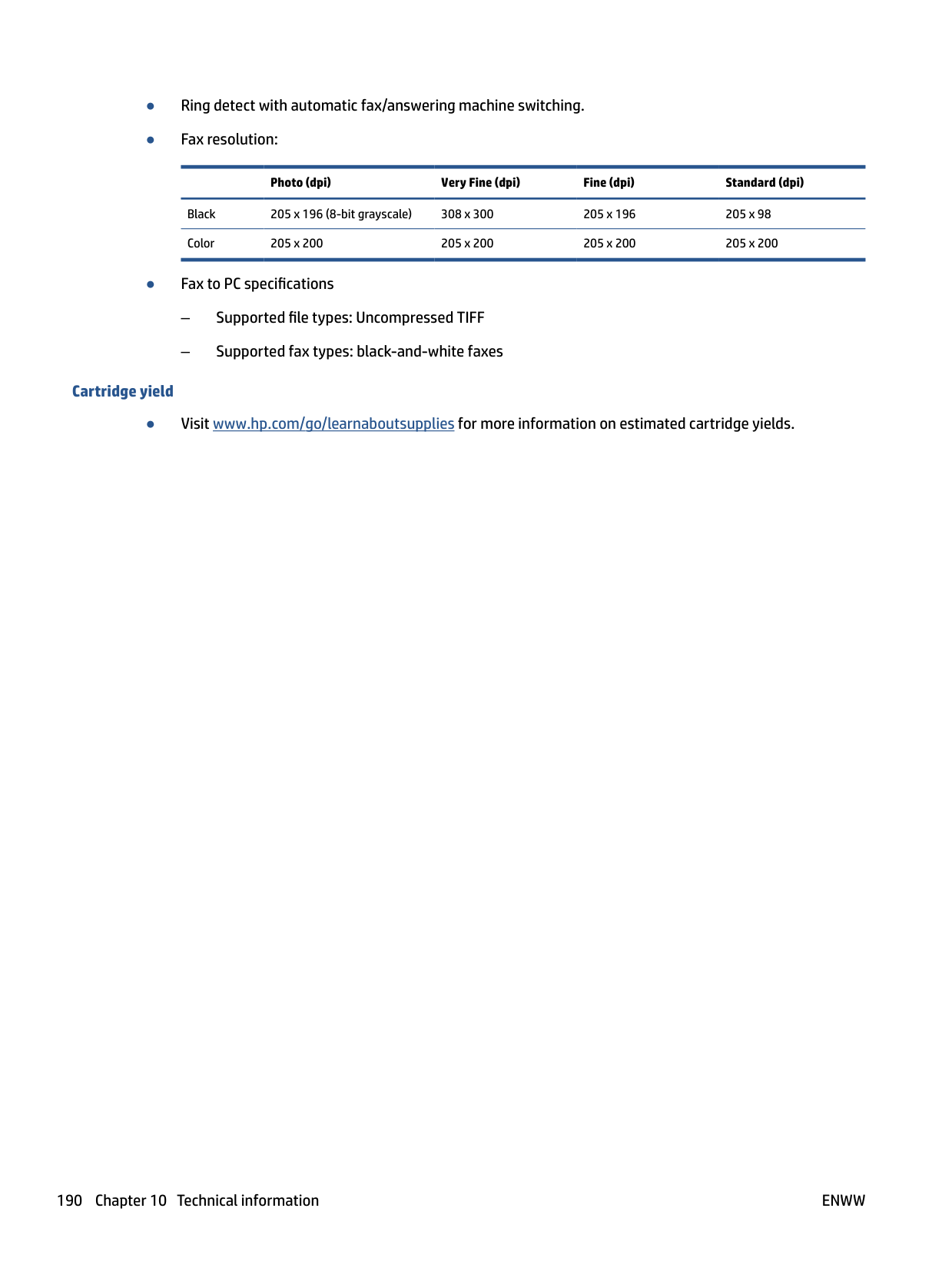
In Australia, the HP device must be connected to Telecommunication Network through a line cord which meets the requirements of the Technical Standard AS/ACIF S008.
#### Regulatory information for wireless products
This section contains the following regulatory information pertaining to wireless products:
##### Exposure to radio frequency radiation
CAUTION: The radiated output power of this device is far below the FCC radio frequency exposure limits. Nevertheless, the device shall be used in such a manner that the potential for human contact during normal operation is minimized. This product and any attached external antenna, if supported, shall be placed in such a manner to minimize the potential for human contact during normal operation. In order to avoid the possibility of exceeding the FCC radio frequency exposure limits, human proximity to the antenna shall not be less than 20 cm (8 inches) during normal operation.

##### Notice to users in Canada (5 GHz)
CAUTION: When using IEEE 802.11a wireless LAN, this product is restricted to indoor use, due to its operation in the 5.15- to 5.25-GHz frequency range. The Innovation, Science and Economic Development Canada requires this product to be used indoors for the frequency range of 5.15 GHz to 5.25 GHz to reduce the potential for harmful interference to co-channel mobile satellite systems. High-power radar is allocated as the primary user of the 5.25- to 5.35-GHz and 5.65- to 5.85-GHz bands. These radar stations can cause interference with and/or damage to this device.

ATTENTION: Lors de l'utilisation du réseau local sans fil IEEE 802.11a, ce produit se limite à une utilisation en intérieur à cause de son fonctionnement sur la plage de fréquences de 5,15 à 5,25 GHz. Innovation, Science et Développement Economique Canada stipule que ce produit doit être utilisé en intérieur dans la plage de fréquences de 5,15 à 5,25 GHz afin de réduire le risque d'interférences éventuellement dangereuses avec les systèmes mobiles par satellite via un canal adjacent. Le radar à haute puissance est alloué pour une utilisation principale dans une plage de fréquences de 5,25 à 5,35 GHz et de 5,65 à 5,85 GHz. Ces stations radar peuvent provoquer des interférences avec cet appareil et l'endommager.

Notice to users in Taiwan (5 GHz) 在 5.25-5.35 秭赫頻帶內操作之無線資訊傳輸設備,限於室內使用。 應避免影響附近雷達系統之操作。
##### Notice to users in Serbia (5 GHz)
Upotreba ovog uredjaja je ogranicna na zatvorene prostore u slucajevima koriscenja na frekvencijama od 5150-5350 MHz.
##### Notice to users in Thailand (5 GHz)
เครือ่งวทิยคุมนาคมนีมรีะดบัการแผค่ลืน่แมเ่หล็กไฟฟ้าสอดคลอ้งตามมาตรฐานความปลอดภยัตอ่สขุภาพของมนุษย์จากการ ใชเ้ครือ่งวทิยคุมนาคมทคี่ณะกรรมการกจิการโทรคมนาคมแหง่ชาตปิระกาศกาํหนด
This radio communication equipment has the electromagnetic field strength in compliance with the Safety Standard for the Use of Radio Communication Equipment on Human Health announced by the National Telecommunications Commission.
##### Notice to users in Brazil
Este equipamento opera em caráter secundário, isto é, não tem direito à proteção contra interferência prejudicial, mesmo de estações do mesmo tipo, e não pode causar interferência em sistemas operando em caráter primário.
##### Notice to users in Canada
Under Innovation, Science and Economic Development Canada regulations, this radio transmitter may only operate using an antenna of a type and maximum (or lesser) gain approved for the transmitter by Innovation, Science and Economic Development Canada. To reduce potential radio interference to other users, the antenna type and its gain should be so chosen that the equivalent isotropically radiated power (e.i.r.p.) is not more than that necessary for successful communication.
This device complies with Innovation, Science and Economic Development Canada licence-exempt RSS standard(s). Operation is subject to the following two conditions: (1) this device may not cause interference, and (2) this device must accept any interference, including interference that may cause undesired operation of the device.
WARNING! Exposure to Radio Frequency Radiation. The radiated output power of this device is below the Innovation, Science and Economic Development Canada radio frequency exposure limits. Nevertheless, the device should be used in such a manner that the potential for human contact is minimized during normal operation.
To avoid the possibility of exceeding the Innovation, Science and Economic Development Canada radio frequency exposure limits, human proximity to the antennas should not be less than 20 cm (8 inches).
Conformément au Règlement d'Innovation, Science et Développement Economique Canada, cet émetteur radioélectrique ne peut fonctionner qu'avec une antenne d'un type et d'un gain maximum (ou moindre) approuvé par Innovation, Science et Développement Economique Canada. Afin de réduire le brouillage radioélectrique potentiel pour d'autres utilisateurs, le type d'antenne et son gain doivent être choisis de manière à ce que la puissance isotrope rayonnée équivalente (p.i.r.e.) ne dépasse pas celle nécessaire à une communication réussie.
Cet appareil est conforme aux normes RSS exemptes de licence d'Innovation, Science et Développement Economique Canada. Son fonctionnement dépend des deux conditions suivantes : (1) cet appareil ne doit pas provoquer d'interférences nuisibles et (2) doit accepter toutes les interférences reçues, y compris des interférences pouvant provoquer un fonctionnement non souhaité de l'appareil.
AVERTISSEMENT relatif à l'exposition aux radiofréquences. La puissance de rayonnement de cet appareil se trouve sous les limites d'exposition de radiofréquences d'Innovation, Science et Développement Economique Canada. Néanmoins, cet appareil doit être utilisé de telle sorte qu'il doive être mis en contact le moins possible avec le corps humain.
Afin d'éviter le dépassement éventuel des limites d'exposition aux radiofréquences d'Innovation, Science et Développement Economique Canada, il est recommandé de maintenir une distance de plus de 20 cm entre les antennes et l'utilisateur.
Notice to users in China 中国无线电发射设备通告 型号核准代码显示在产品本体的铭牌上。
Notice to users in Taiwan 低功率電波輻射性電機管理辦法 第十二條 經型式認證合格之低功率射頻電機,非經許可,公司、商號或使用者均不得擅自變更頻率、加大功率 或變更設計之特性及功能。 第十四條 低功率射頻電機之使用不得影響飛航安全及干擾合法通信;經發現有干擾現象時,應立即停用,並改 善至無干擾時方得繼續使用。 前項合法通信,指依電信法規定作業之無線電通信。低功率射頻電機須忍受合法通信或工業、科學及 醫藥用電波輻射性電機設備之干擾。
##### Notice to users in Mexico
La operación de este equipo está sujeta a las siguientes dos condiciones: (1) es posible que este equipo o dispositivo no cause interferencia perjudicial y (2) este equipo o dispositivo debe aceptar cualquier interferencia, incluyendo la que pueda causar su operación no deseada.
Para saber el modelo de la tarjeta inalámbrica utilizada, revise la etiqueta regulatoria de la impresora. Notice to users in Japan
この機器は技術基準適合証明又は工事設計認証を受けた無線設備を搭載しています。
Environmental product stewardship program
HP is committed to providing quality products in an environmentally sound manner. Design for recycling has been incorporated into this product. The number of materials has been kept to a minimum while ensuring proper functionality and reliability. Dissimilar materials have been designed to separate easily. Fasteners and other connections are easy to locate, access, and remove using common tools. High priority parts have been designed to access quickly for efficient disassembly and repair. For more information, visit HP's Commitment to the Environment website at:
www.hp.com/sustainableimpact
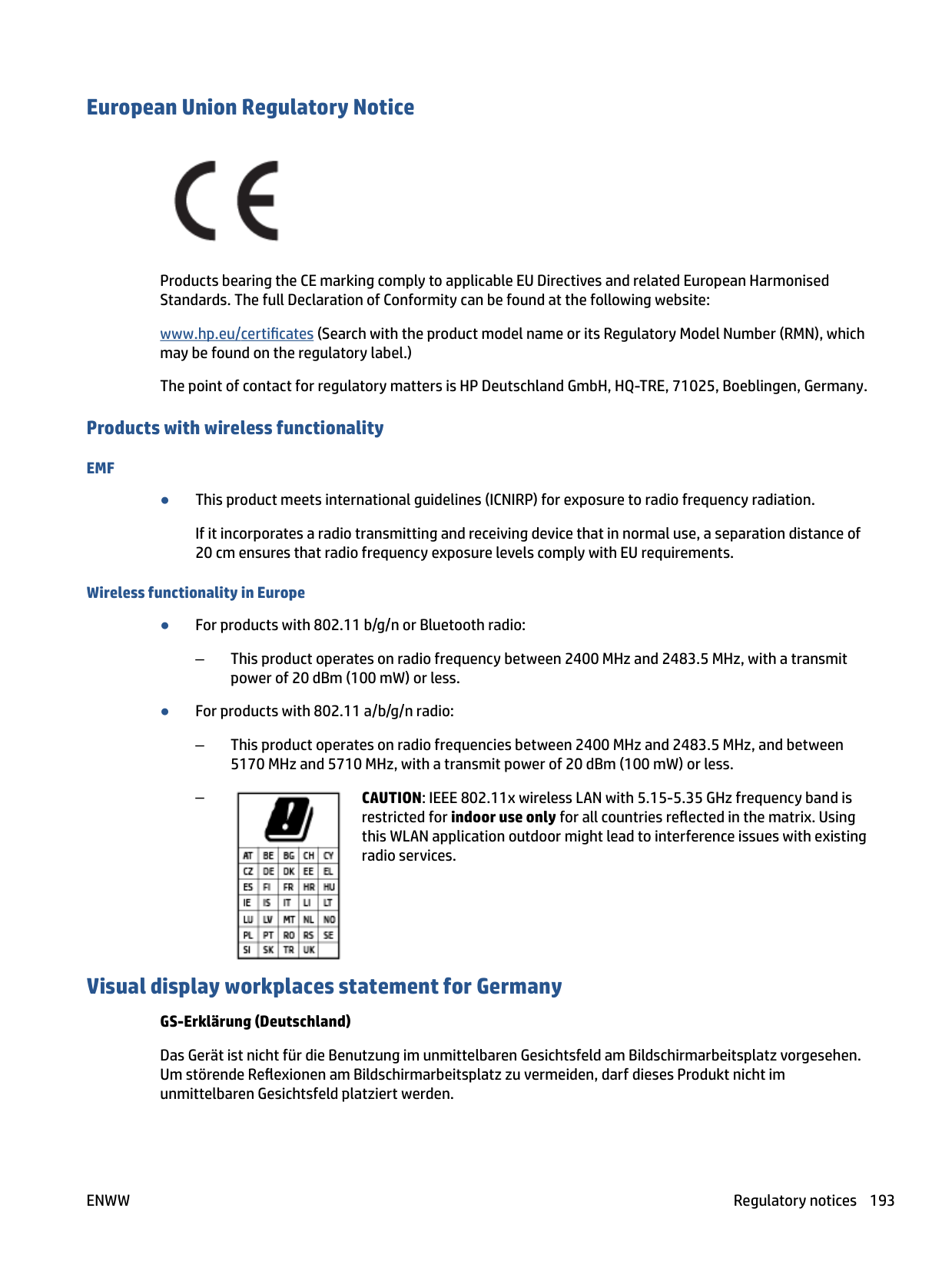
#### Eco-Tips
HP is committed to helping customers reduce their environmental footprint. Please visit the HP Eco Solutions website for more information on HP’s environmental initiatives.
www.hp.com/sustainableimpact
#### Paper
This product is suited for the use of recycled paper according to DIN 19309 and EN 12281:2002.
#### Plastics
Plastic parts over 25 grams are marked according to international standards that enhance the ability to identify plastics for recycling purposes at the end of product life.
#### European Union Commission Regulation 1275/2008
For product power data, including the power consumption of the product in networked standby if all wired network ports are connected and all wireless network ports are activated, please refer to section P15 ‘Additional Information’ of the product IT ECO Declaration at www.hp.com/hpinfo/globalcitizenship/ environment/productdata/itecodesktop-pc.html.
#### Safety data sheets
Safety Data Sheets, product safety and environmental information are available at www.hp.com/go/ecodata or on request.
#### Chemical substances
HP is committed to providing our customers with information about the chemical substances in our products as needed to comply with legal requirements such as REACH (Regulation EC No 1907/2006 of the European Parliament and the Council). A chemical information report for this product can be found at: www.hp.com/go/ reach.
#### EPEAT
Most HP products are designed to meet EPEAT. EPEAT is a comprehensive environmental rating that helps identify greener electronics equipment. For more information on EPEAT go to www.epeat.net. For information on HP's EPEAT registered products go to www.hp.com/hpinfo/globalcitizenship/environment/pdf/ epeat_printers.pdf.
SEPA Ecolabel User Information (China) 中国环境标识认证产品用户说明 噪声大于 63.0 dB(A) 的办公设备不宜放置于办公室内,请在独立的隔离区域使用。 如需长时间使用本产品或打印大量文件,请确保在通风良好的房间内使用。 如您需要确认本产品处于零能耗状态,请按下电源关闭按钮,并将插头从电源插座断开。 您可以使用再生纸,以减少资源耗费。
#### Recycling program
HP offers an increasing number of product return and recycling programs in many countries/regions, and partners with some of the largest electronic recycling centers throughout the world. HP conserves resources by reselling some of its most popular products. For more information regarding recycling of HP products, please visit:
www.hp.com/recycle
#### HP inkjet supplies recycling program
HP is committed to protecting the environment. The HP Inkjet Supplies Recycling Program is available in many countries/regions, and lets you recycle used print cartridges and ink cartridges free of charge. For more information, go to the following website:
www.hp.com/recycle
#### Battery disposal in Taiwan

California Perchlorate Material Notice Perchlorate material - special handling may apply. See: www.dtsc.ca.gov/hazardouswaste/perchlorate This product's real-time clock battery or coin cell battery may contain perchlorate and may require special handling when recycled or disposed of in California.
#### European Union Battery Directive

This product contains a battery that is used to maintain data integrity of real time clock or product settings and is designed to last the life of the product. Any attempt to service or replace this battery should be performed by a qualified service technician.
#### Battery notice for Brazil
A bateria deste equipamento nao foi projetada para ser removida pelo cliente.
#### Power consumption
HP printing and imaging equipment marked with the ENERGY STAR® logo is certified by the U.S. Environmental Protection Agency. The following mark will appear on ENERGY STAR certified imaging products:

Additional ENERGY STAR certified imaging product model information is listed at: www.hp.com/go/energystar
#### China Energy Label for Printer, Fax and Copier
###### 复印机、打印机和传真机能源效率标识实施规则
依据“复印机、打印机和传真机能源效率标识实施规则”,该打印机具有中国能效标识。标识上显示的能 效等级和操作模式值根据“复印机、打印机和传真机能效限定值及能效等级”标准(“GB 21521”)来确定 和计算。
产品能效等级分 3 级,其中 1 级能效最高。能效限定值根据产品类型和打印速度由标准确定。能 效等级则根据基本功耗水平以及网络接口和内存等附加组件和功能的功率因子之和来计算。
待机状态是产品连接到电网电源上功率最低的状态。该状态可以延续无限长时间,且使用者 无法改变此状态下产品的功率。对于“成像设备”产品,“待机”状态通常相当于“关闭”状态,但 也可能相当于“准备”状态或者“睡眠”状态。该数据以瓦特 (W) 表示。
出厂前由制造商设置的时间决定了该产品在完成主功能后进入低耗模式(例如睡眠、自动关 机)的时间。该数据以分钟表示。
标识上显示的能耗数据是根据典型配置测量得出的数据,此类配置包含登记备案的打印机依据复印 机、打印机和传真机能源效率标识实施规则所选的所有配置。因此,该特定产品型号的实际能耗可能 与标识上显示的数据有所不同。
要了解规范的更多详情,请参考最新版的 GB 21521 标准。
#### Disposal of waste equipment by users

This symbol means do not dispose of your product with your other household waste. Instead, you should protect human health and the environment by handing over your waste equipment to a designated collection point for the recycling of waste electrical and electronic equipment. For more information, please contact your household waste disposal service, or go to http://www.hp.com/recycle.
#### Waste disposal for Brazil

Não descarte o produto eletronico em lixo comum
Este produto eletrônico e seus componentes não devem ser descartados no lixo comum, pois embora estejam em conformidade com padrões mundiais de restrição a substâncias nocivas, podem conter, ainda que em quantidades mínimas, substâncias impactantes ao meio ambiente. Ao final da vida útil deste produto, o usuário deverá entregá-lo à HP. A não observância dessa orientação sujeitará o infrator às sanções previstas em lei. Após o uso, as pilhas e/ou baterias dos produtos HP deverão ser entregues ao estabelecimento comercial ou rede de assistência técnica autorizada pela HP. Para maiores informações, inclusive sobre os pontos de recebimento, acesse: www.hp.com.br/reciclar
#### The Table of Hazardous Substances/Elements and their Content (China)
###### 产品中有害物质或元素的名称及含量


根据中国《电器电子产品有害物质限制使用管理办法》
有害物质 铅 (Pb)
镉 (Cd)
六价铬 (Cr(VI))
多溴联苯 (PBB)
多溴二苯醚 (PBDE)
汞 (Hg)
部件名称
外壳和托盘 ◯ ◯ ◯ ◯ ◯ ◯ 电线 ◯ ◯ ◯ ◯ ◯ ◯ 印刷电路板 X ◯ ◯ ◯ ◯ ◯ 打印系统 X ◯ ◯ ◯ ◯ ◯ 显示器 X ◯ ◯ ◯ ◯ ◯ 喷墨打印机墨盒 ◯ ◯ ◯ ◯ ◯ ◯ 驱动光盘 X ◯ ◯ ◯ ◯ ◯ 扫描仪 X ◯ ◯ ◯ ◯ ◯ 网络配件 X ◯ ◯ ◯ ◯ ◯ 电池板 X ◯ ◯ ◯ ◯ ◯ 自动双面打印系统 ◯ ◯ ◯ ◯ ◯ ◯ 外部电源 X ◯ ◯ ◯ ◯ ◯ 本表格依据 SJ/T 11364 的规定编制。
◯:表示该有害物质在该部件所有均质材料中的含量均在 GB/T 26572 规定的限量要求以下。 X:表示该有害物质至少在该部件的某一均质材料中的含量超出 GB/T 26572 规定的限量要求。 此表中所有名称中含 “X” 的部件均符合中国 RoHS 达标管理目录限用物质应用例外清单的豁免。 此表中所有名称中含 “X” 的部件均符合欧盟 RoHS 立法。 注:环保使用期限的参考标识取决于产品正常工作的温度和湿度等条件。
#### Regulation on the Control of Waste Electrical and Electronic Equipment (Turkey)
Türkiye Cumhuriyeti: AEEE Yönetmeliğine uygundur
#### Restriction of hazardous substance (India)
This product, as well as its related consumables and spares, complies with the reduction in hazardous substances provisions of the "India E-waste (Management and Handling) Rule 2016." It does not contain lead, mercury, hexavalent chromium, polybrominated biphenyls or polybrominated diphenyl ethers in concentrations exceeding 0.1 weight % and 0.01 weight % for cadmium, except for where allowed pursuant to the exemptions set in Schedule 2 of the Rule.
#### Declaration of the Presence Condition of the Restricted Substances Marking (Taiwan)
###### 台灣 限用物質含有情況標示聲明書 Taiwan Declaration of the Presence Condition of the Restricted Substances Marking
限用物質及其化學符號 Restricted substances and its chemical symbols 鉛 (Pb)
單元 Unit
多溴二苯醚 (PBDE)
汞 (Hg)
鎘 (Cd)
六價鉻 (Cr+6)
多溴聯苯 (PBB)
列印引擎 Print engine
— ◯ ◯ ◯ ◯ ◯
外殼和紙匣 External casing and trays
◯ ◯ ◯ ◯ ◯ ◯
電源供應器 Power supply
— ◯ ◯ ◯ ◯ ◯
電線 Cables
◯ ◯ ◯ ◯ ◯ ◯
印刷電路板 Print printed circuit board
— ◯ ◯ ◯ ◯ ◯
控制面板 Control panel
— ◯ ◯ ◯ ◯ ◯
墨水匣 Cartridge
◯ ◯ ◯ ◯ ◯ ◯
掃描器組件 Scanner assembly
— ◯ ◯ ◯ ◯ ◯
備考 2.〝◯〞係指該項限用物質之百分比含量未超出百分比含量基準值。
備考 3.〝—〞係指該項限用物質為排除項目。
若要存取產品的最新使用指南或手冊,請前往 www.support.hp.com。選取搜尋您的產品,然後依照 畫 面上的指示繼續執行。
####### To access the latest user guides or manuals for your product, go to www.support.hp.com. Select Find your product, and then follow the onscreen instructions.
Index
parallel phone systems 94 align printhead 182 answer ring pattern change 81 parallel phone systems 95
answering machine fax tones recorded 174 set up with fax (parallel phone
systems) 105
set up with fax and modem 107 automatic fax reduction 74
fax 66 blocked fax numbers
set up 75 both sides, print on 46 broadcast faxing send 70
buttons, control panel 9
clear carriage jams 158 cartridge access door, locating 7 Cartridges 7 cartridges 128
check ink levels 124 locating 7 replace 125 tips 122
clean document feeder 181
exterior 181 printhead 182, 183 scanner glass 180
clear
fax logs 88 colored text, and OCR 61 computer modem
shared with fax (parallel phone systems) 99
shared with fax and answering machine (parallel phone systems) 107
shared with fax and voice line
(parallel phone systems) 102 shared with fax and voice mail
(parallel phone systems) 111 confirmation reports, fax 86 connectors, locating 7 control panel
buttons 9 lights 9
copy
specifications 189 correct port test, fax 167 customer support
warranty 186
D diagnostic page 177 dial tone test, failure 169 dial type, setting 82 dial-up modem
shared with fax (parallel phone systems) 99
shared with fax and answering machine (parallel phone systems) 107
shared with fax and voice line
(parallel phone systems) 102 shared with fax and voice mail
(parallel phone systems) 111
distinctive ringing change 81 parallel phone systems 95
document feeder clean 181 feeding problems, troubleshoot
181
load originals 36 double-sided printing 46 DSL, fax setup with
parallel phone systems 94
text in OCR program 61
embedded web server about 144 opening 144 troubleshoot, cannot be opened
145

Webscan 61 environment
Environmental product
stewardship program 199 environmental specifications 188 error correction mode 70 error reports, fax 87 EWS. See embedded web server
answer mode 80
answering machine and modem, shared with (parallel phone systems) 107 answering machine
troubleshoot 174 answering machine, set up
(parallel phone systems) 105 auto answer 80 backup fax 73 blocking numbers 75 confirmation reports 86 dial tone test, failed 169 dial type, setting 82 distinctive ringing setup (parallel
phone systems) 95 distinctive ringing, change pattern 81 DSL, set up (parallel phone
shared with (parallel phone systems) 107
modem and voice line, shared with (parallel phone systems) 102
modem and voice mail, shared with (parallel phone systems) 111
modem, shared with (parallel
phone systems) 99 monitor dialing 68, 70 parallel phone systems 90 PBX system, set up (parallel
phone systems) 95 phone cord connection test, failed 167
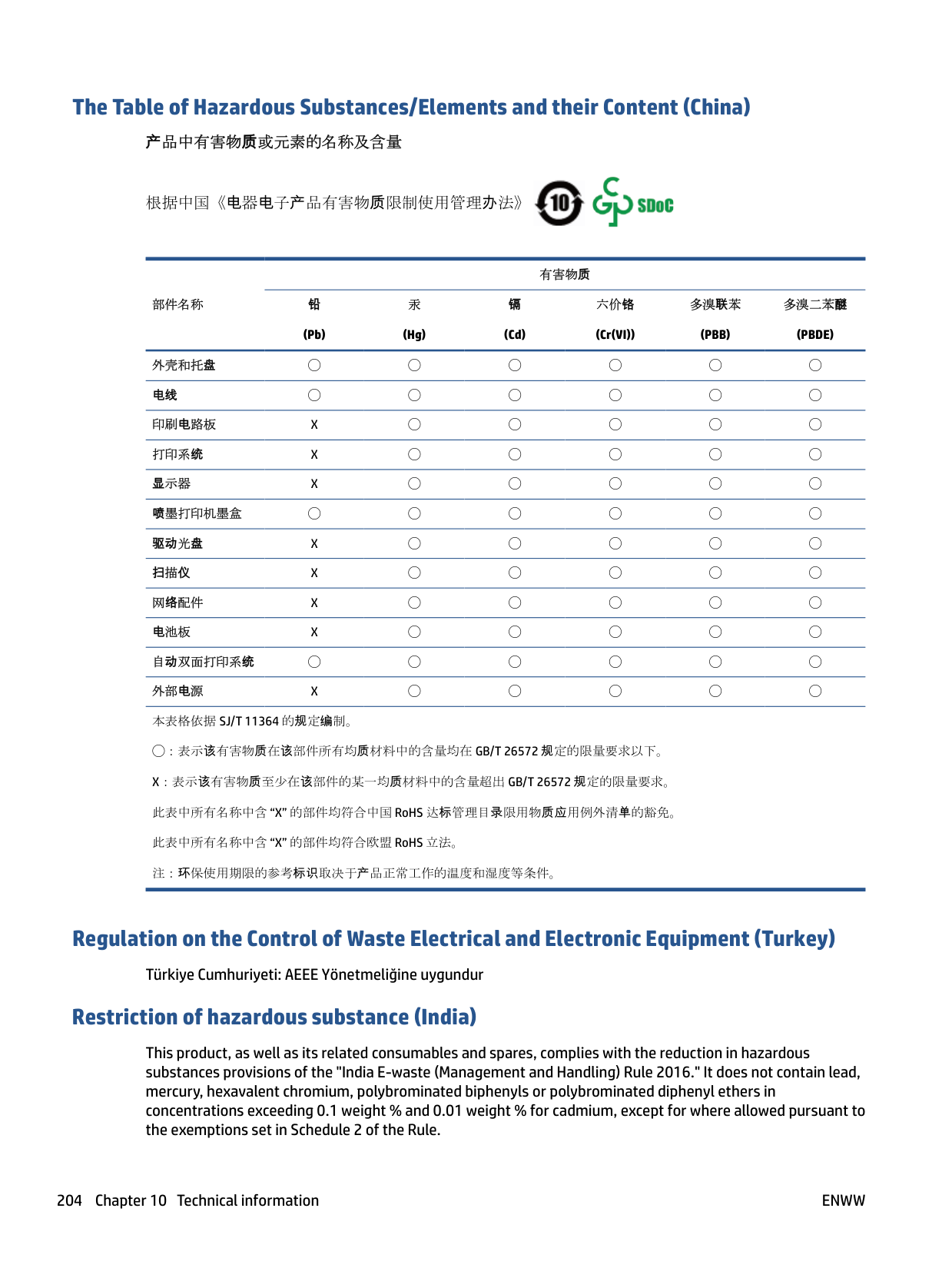
phone cord type test, failed 169 print last transaction details 88 receive 72
receive, troubleshoot 171, 172 redial options 82 reduction 74 reports 86 reprint 73 rings to answer 81 send 67 send, troubleshoot 171, 173 separate line setup (parallel
phone systems) 93 settings, change 80 setup types 91 shared phone line setup (parallel
phone systems) 97 sound volume 83 specifications 189 speed 82 test failed 166 test setup 113 troubleshoot 166 voice mail, set up (parallel phone
systems) 98
wall jack test, failed 167 FoIP 85 forwarding faxes 74
clean 180 load originals 34 locating 6
part numbers 128 ink level icons 11 ink levels, check 124 Internet Protocol
fax, using 85 IP address
checking for printer 145 IP settings 137 ISDN line, set up with fax
parallel phone systems 95
J jams
clear 151 paper to avoid 22
junk fax mode 75
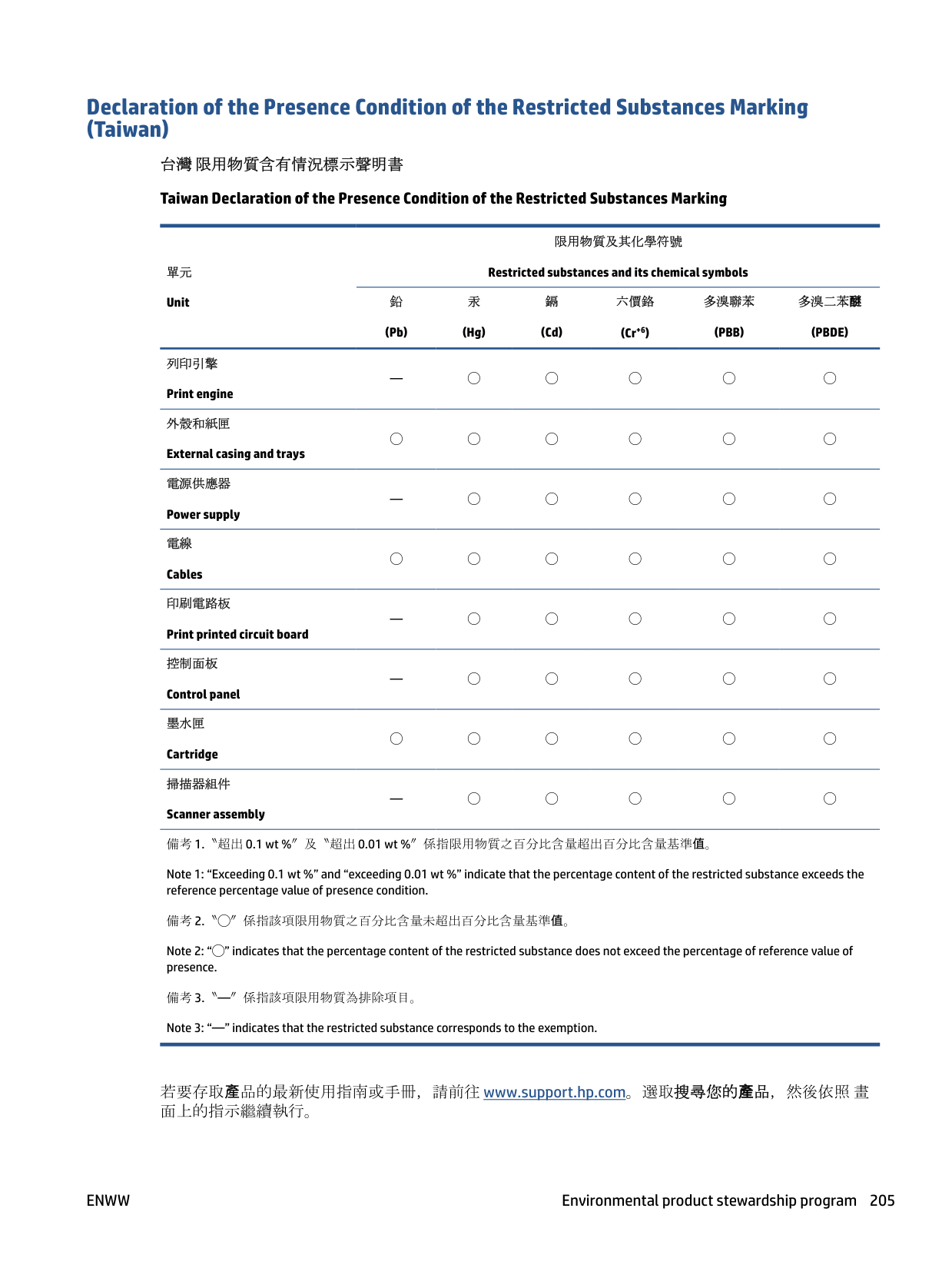
L lights, control panel 9 line condition test, fax 170 link speed, setting 137 log, fax
print 87
page smear 182 printhead 182
maintenance align printhead 182 check ink levels 124 clean 181 clean printhead 183 diagnostic page 177 printhead 182 replace cartridges 125
manual faxing receive 72 send 68
media duplexing 46
memory reprint faxes 73 save faxes 73
modem shared with fax (parallel phone systems) 99
shared with fax and answering machine (parallel phone systems) 107
shared with fax and voice line
(parallel phone systems) 102 shared with fax and voice mail
(parallel phone systems) 111 monitor dialing 68, 70 multi-feeds, troubleshoot 159
connector illustration 7 IP settings 137 link speed 137
settings, change 137 view and print settings 137 wireless communication setup

133 wireless settings 177
edit scanned documents 61 operating systems supported 188 output tray
locating 6
clear jams 151 HP, order 21 load tray 23 selecting 22 skewed pages 159 specifications 188 troubleshoot feeding 159 paper-feed problems, troubleshoot
159
parallel phone systems answering machine setup 105 countries/regions with 90 distinctive ringing setup 95 DSL setup 94 ISDN setup 95 modem and answering machine
setup 107 modem and voice mail setup
111 modem setup 99 modem shared with voice line
setup 102 PBX setup 95 separate line setup 93 setup types 91 shared line setup 97
PBX system, set up with fax parallel phone systems 95
phone book change contact 77 change group contacts 77 delete contacts 78 send fax 67 set up 77 set up group contacts 77
phone cord connected to correct port test failed 167
correct type test failed 169 phone line, answer ring pattern 81 phone, fax from
receive 72 send, 68
power
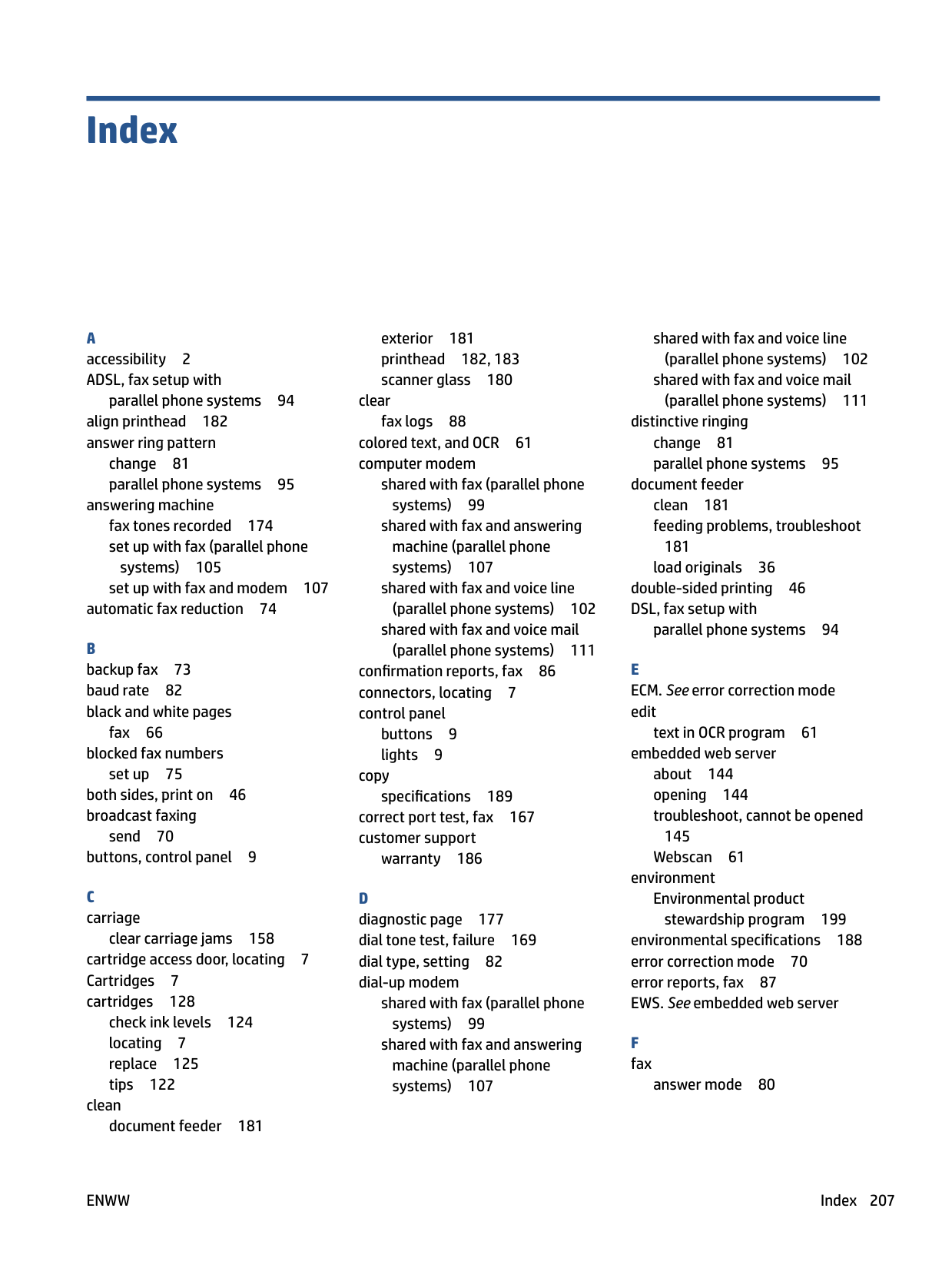
troubleshoot 175 power input, locating 7 print
diagnostic page 177 double-sided 46 fax logs 87 fax reports 86 faxes 73 last fax details 88 troubleshoot 175
print quality
clean page smear 182 print quality report 177 printer control panel
locating 6 network settings 137 send faxes 67
printer software (Windows) about 143 opening 38, 143
printer status report
information on 177 printhead 182
clean 183 printhead, align 182 pulse dialing 82
R radio interference
regulatory information 196 rear access panel
illustration 7
receive faxes auto answer mode 80 automatically 72 blocking numbers 75 forwarding 74 manually 72 rings to answer 81 troubleshoot 171, 172
recycle
ink cartridges 201 redial options, setting 82 reduce fax 74 regulatory information 196 regulatory model number 191 regulatory notices 191 replace cartridges 125 reports
confirmation, fax 86 diagnostic 177 error, fax 87 fax test failed 166 web access 178 wireless test 178
reprint
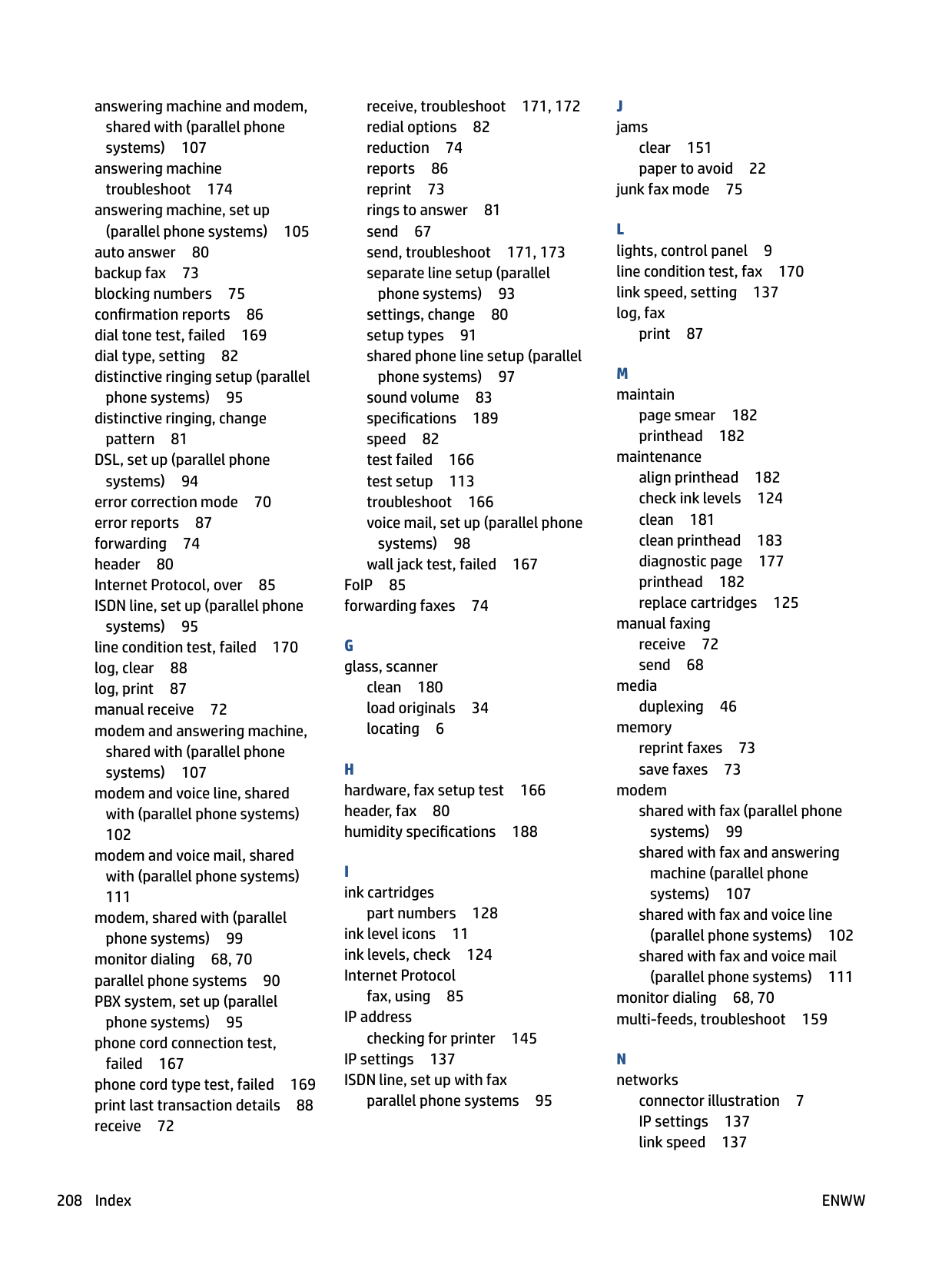
faxes from memory 73 rings to answer 81
S save
faxes in memory 73
scan from Webscan 61 OCR 61 scan specifications 189
scanner glass clean 180 load originals 34 locating 6
send faxes basic fax 67 from a phone 68 memory, from 69 monitor dialing 68, 70 troubleshoot 171, 173
send scans for OCR 61
serial phone systems countries/regions with 90 setup types 91
settings network 137 speed, fax 82 volume, fax 83
setup answering machine (parallel phone systems) 105 answering machine and modem (parallel phone systems) 107
computer modem (parallel phone systems) 99
computer modem and answering machine (parallel phone systems) 107
computer modem and voice line
(parallel phone systems) 102 computer modem and voice mail
(parallel phone systems) 111 distinctive ringing 81 distinctive ringing (parallel phone
systems) 95 DSL (parallel phone systems) 94 fax scenarios 91 fax, with parallel phone
systems 90 ISDN line (parallel phone systems) 95 PBX system (parallel phone systems) 95 separate fax line (parallel phone systems) 93 shared phone line (parallel phone
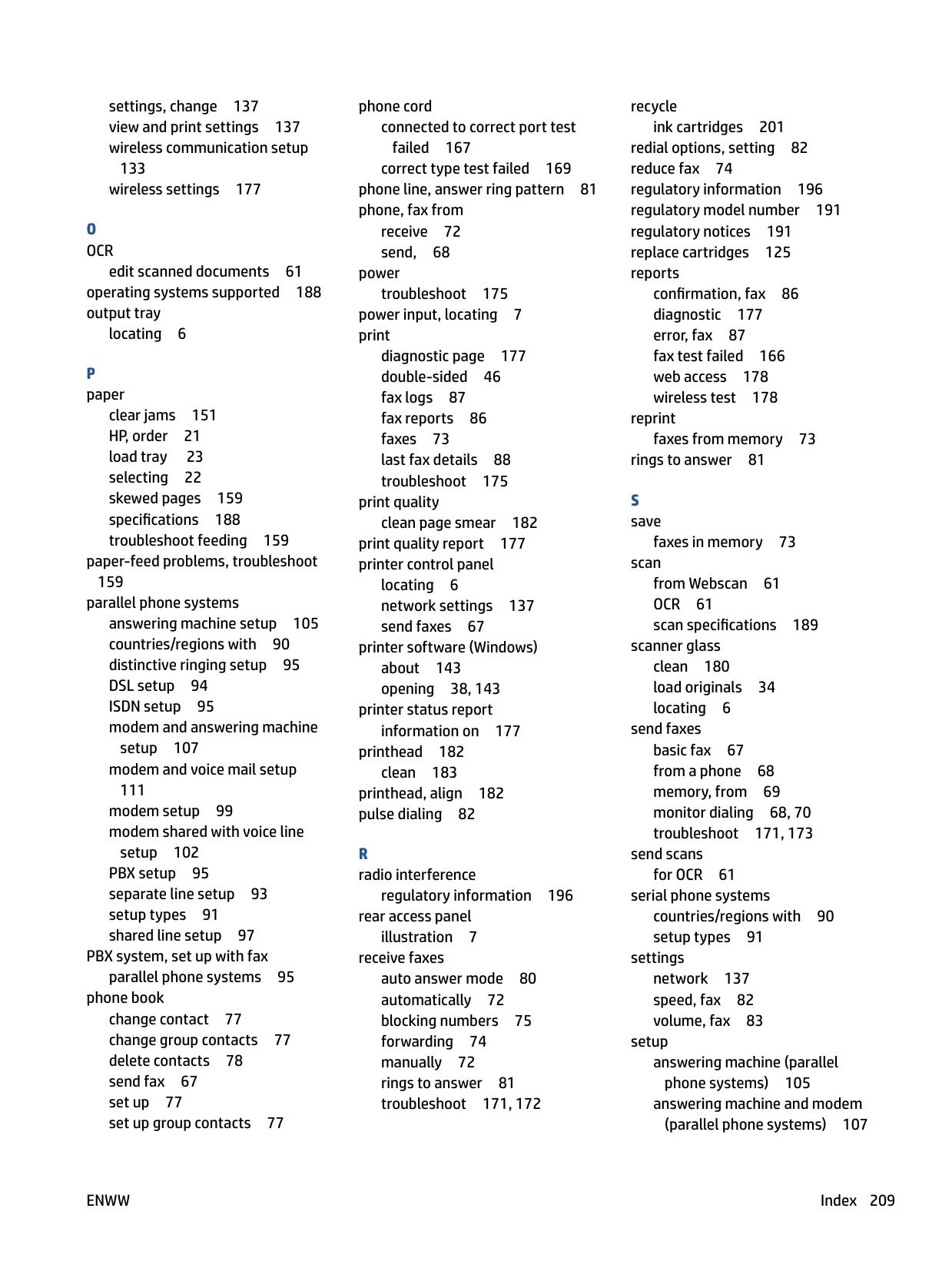
test fax 113 voice mail (parallel phone
voice mail and computer modem
(parallel phone systems) 111 Setup icon 11 skew, troubleshoot
print 159
software OCR 61 Webscan 61
specifications paper 188 physical 188 system requirements 188
status
network configuration page 177 subscriber identification code 80 system requirements 188
T technical information
copy specifications 189 fax specifications 189 scan specifications 189
telephone line, answer ring pattern
81 telephone wall jack, fax 167 telephone, fax from receive 72 send 68
temperature specifications 188 tests, fax
dial tone, failed 169 failed 166 fax line condition 170 fax phone cord type test failed
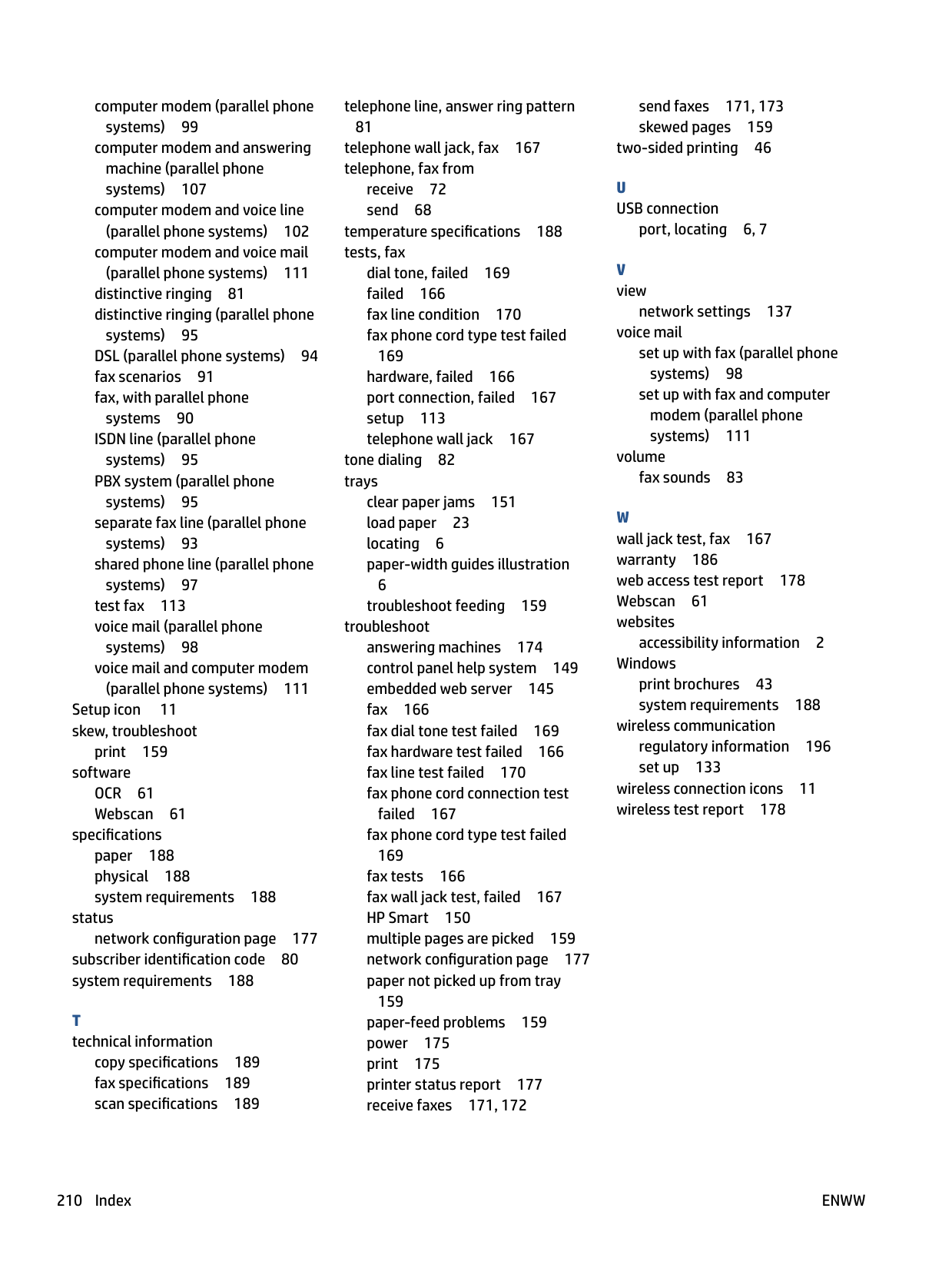
169 hardware, failed 166 port connection, failed 167 setup 113 telephone wall jack 167
tone dialing 82 trays
clear paper jams 151 load paper 23 locating 6 paper-width guides illustration
6 troubleshoot feeding 159
troubleshoot answering machines 174 control panel help system 149 embedded web server 145 fax 166 fax dial tone test failed 169 fax hardware test failed 166 fax line test failed 170 fax phone cord connection test
failed 167 fax phone cord type test failed
169 fax tests 166 fax wall jack test, failed 167 HP Smart 150 multiple pages are picked 159 network configuration page 177 paper not picked up from tray
159 paper-feed problems 159 power 175 print 175 printer status report 177 receive faxes 171, 172
send faxes 171, 173 skewed pages 159
two-sided printing 46
port, locating 6, 7
network settings 137 voice mail
set up with fax (parallel phone systems) 98
set up with fax and computer modem (parallel phone systems) 111
volume fax sounds 83
accessibility information 2
Windows print brochures 43 system requirements 188
wireless communication regulatory information 196 set up 133
wireless connection icons 11 wireless test report 178