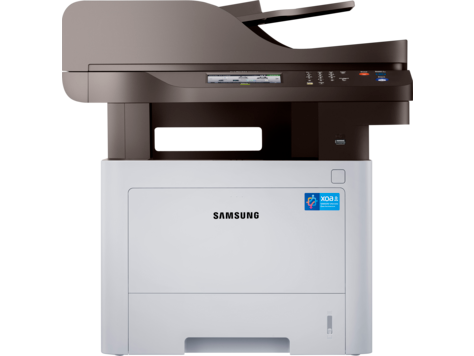
HP Samsung Proxpress SL M4070 Laser Multifunction Printer Series
Ask AI
— answers from the official manualAnswers from the official manual.
Common questions
Common Questions
10 totalHow do I load paper into the tray correctly?
To load paper in the tray: press the tray open button, pull out the tray, place your stack of loose media with print-side down, position it against both guides, and slide back into the machine (Page 22).
How do I reset the printer to its factory settings?
To perform a factory reset, press and hold the Stop/Clear button for about 4 seconds until the machine report is printed. This resets the device's configuration back to factory defaults (Page 23).
What should I do if there is a paper jam?
If a paper jam occurs, unplug the power cord and plug it back in. If this does not resolve the issue, clear the jam by following the steps provided in 'Clearing paper jams' on pages 7.1 to 7.5 (Page 36).
How do I change the paper size settings?
To adjust paper sizes, access printer properties from Windows: Click Start > Printers and Faxes > right-click ML-1630 Series and select Properties > click Paper tab > set your preferred paper options (Page 24).
What types of print media are supported?
The printer supports plain paper, labels, transparencies, card stock up to 105-146 g/m² (37-39 lb), and custom sizes from 216 x 297 mm (8.5 x 11.69 inches) with limitations based on weight and moisture conditions (Page 21).
What is the procedure for replacing a toner cartridge?
After turning off the printer, wait for cooling then open top cover to remove old cartridge; take out new package ensuring no damage from exposure or tools; shake it and reinstall properly, closing the cover safely (Page 29).
Full Manual
81 pages

####### Monochrome Laser Printer

User’s Guide
© 2007 Samsung Electronics Co., Ltd. All rights reserved. This user’s guide is provided for information purposes only. All information included herein is subject to change without notice. Samsung Electronics is not responsible for any changes, direct or indirect damages, arising from or related to use of this user’s guide.
contact samsung worldwide
If you have any comments or questions regarding Samsung products, contact the Samsung customer care center.
|COUNTRY/REG ION|CUSTOMER CARE CENTER|WEB SITE| |---|---|---| |ARGENTINE|0800-333-3733|www.samsung.com/ar| |AUSTRALIA|1300 362 603|www.samsung.com/au| |AUSTRIA|0810-SAMSUNG (7267864, € 0.07/min)|www.samsung.com/at| |BELARUS|810-800-500-55-500|www.samsung/ua www.samsung.com/ua_ru| |BELGIUM|02 201 2418|www.samsung.com/be (Dutch) www.samsung.com/be_fr (French)| |BRAZIL|0800-124-421 4004-0000|www.samsung.com/br| |CANADA|1-800-SAMSUNG (726-7864)|www.samsung.com/ca|

|CHILE|800-SAMSUNG (726-7864)|www.samsung.com/cl| |CHINA|400-810-5858 010-6475 1880|www.samsung.com/cn| |COLOMBIA|01-8000112112|www.samsung.com.co| |COSTA RICA|0-800-507-7267|www.samsung.com/latin| |CZECH REPUBLIC|800-SAMSUNG (800-726786)|www.samsung.com/cz| |CZECH REPUBLIC|Samsung Zrt., česká organizační složka, Oasis Florenc, Sokolovská394/17, 180 00, Praha 8|Samsung Zrt., česká organizační složka, Oasis Florenc, Sokolovská394/17, 180 00, Praha 8| |DENMARK|8-SAMSUNG (7267864)|www.samsung.com/dk| |ECUADOR|1-800-10-7267|www.samsung.com/latin| |EL SALVADOR|800-6225|www.samsung.com/latin| |ESTONIA|800-7267|www.samsung.com/ee| |KAZAKHSTAN|8-10-800-500-55-500|www.samsung.com/kz_ru| |KYRGYZSTAN|00-800-500-55-500| | |FINLAND|30-6227 515|www.samsung.com/fi| |FRANCE|01 4863 0000|www.samsung.com/fr| |GERMANY|01805 - SAMSUNG (726-7864 € 0,14/min)|www.samsung.de| |GUATEMALA|1-800-299-0013|www.samsung.com/latin| |HONDURAS|800-7919267|www.samsung.com/latin| |HONG KONG|3698-4698|www.samsung.com/hk www.samsung.com/hk_en/|
|COUNTRY/REG ION|CUSTOMER CARE CENTER|WEB SITE| |---|---|---| |HUNGARY|06-80-SAMSUNG (726-7864)|www.samsung.com/hu| |INDIA|3030 8282 1800 110011 1800 3000 8282|www.samsung.com/in| |INDONESIA|0800-112-8888|www.samsung.com/id| |ITALIA|800-SAMSUNG (726-7864)|www.samsung.com/it| |JAMAICA|1-800-234-7267|www.samsung.com/latin| |JAPAN|0120-327-527|www.samsung.com/jp| |LATVIA|8000-7267|www.samsung.com/lv| |LITHUANIA|8-800-77777|www.samsung.com/lt| |LUXEMBURG|02 261 03 710|www.samsung.com/lu| |MALAYSIA|1800-88-9999|www.samsung.com/my| |MEXICO|01-800-SAMSUNG (726-7864)|www.samsung.com/mx|
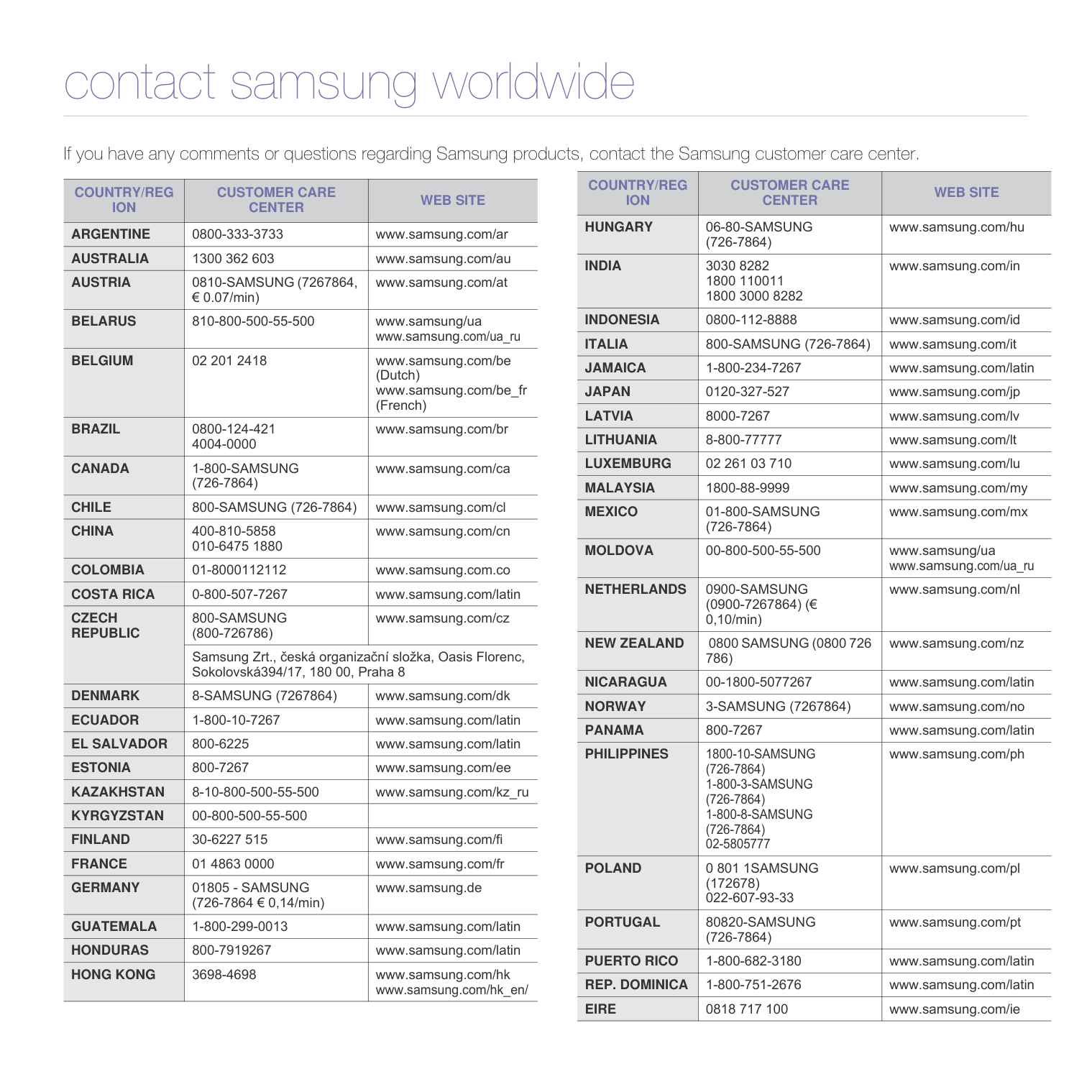
|MOLDOVA|00-800-500-55-500|www.samsung/ua www.samsung.com/ua_ru| |NETHERLANDS|0900-SAMSUNG (0900-7267864) (€ 0,10/min)|www.samsung.com/nl| |NEW ZEALAND|0800 SAMSUNG (0800 726 786)|www.samsung.com/nz| |NICARAGUA|00-1800-5077267|www.samsung.com/latin| |NORWAY|3-SAMSUNG (7267864)|www.samsung.com/no| |PANAMA|800-7267|www.samsung.com/latin| |PHILIPPINES|1800-10-SAMSUNG (726-7864) 1-800-3-SAMSUNG (726-7864)
1-800-8-SAMSUNG (726-7864)
02-5805777
|www.samsung.com/ph| |POLAND|0 801 1SAMSUNG
(172678) 022-607-93-33|www.samsung.com/pl| |PORTUGAL|80820-SAMSUNG (726-7864)|www.samsung.com/pt| |PUERTO RICO|1-800-682-3180|www.samsung.com/latin| |REP. DOMINICA|1-800-751-2676|www.samsung.com/latin| |EIRE|0818 717 100|www.samsung.com/ie|
|COUNTRY/REG ION|CUSTOMER CARE CENTER|WEB SITE| |---|---|---| |RUSSIA|8-800-555-55-55|www.samsung.ru| |SINGAPORE|1800-SAMSUNG (726-7864)|www.samsung.com/sg| |SLOVAKIA|0800-SAMSUNG (726-7864)|www.samsung.com/sk| |SOUTH AFRICA|0860 SAMSUNG (726-7864)|www.samsung.com/za| |SPAIN|902-1-SAMSUNG(902 172 678)|www.samsung.com/es| |SWEDEN|0771 726 7864 (SAMSUNG)|www.samsung.com/se| |SWITZERLAND|0848-SAMSUNG (7267864, CHF 0.08/min)|www.samsung.com/ch| |TADJIKISTAN|8-10-800-500-55-500| | |TAIWAN|0800-329-999|www.samsung.com/tw| |THAILAND|1800-29-3232 02-689-3232|www.samsung.com/th| |TRINIDAD & TOBAGO|1-800-SAMSUNG (726-7864)|www.samsung.com/latin| |TURKEY|444 77 11|www.samsung.com/tr| |U.A.E|800-SAMSUNG (726-7864) 8000-4726|www.samsung.com/ae| |U.K|0845 SAMSUNG (726-7864)|www.samsung.com/uk| |U.S.A|1-800-SAMSUNG
(7267864)|www.samsung.com/us| |UKRAINE|8-800-502-0000|www.samsung/ua www.samsung.com/ua_ru| |UZBEKISTAN|8-10-800-500-55-500|www.samsung.com/kz_ru|
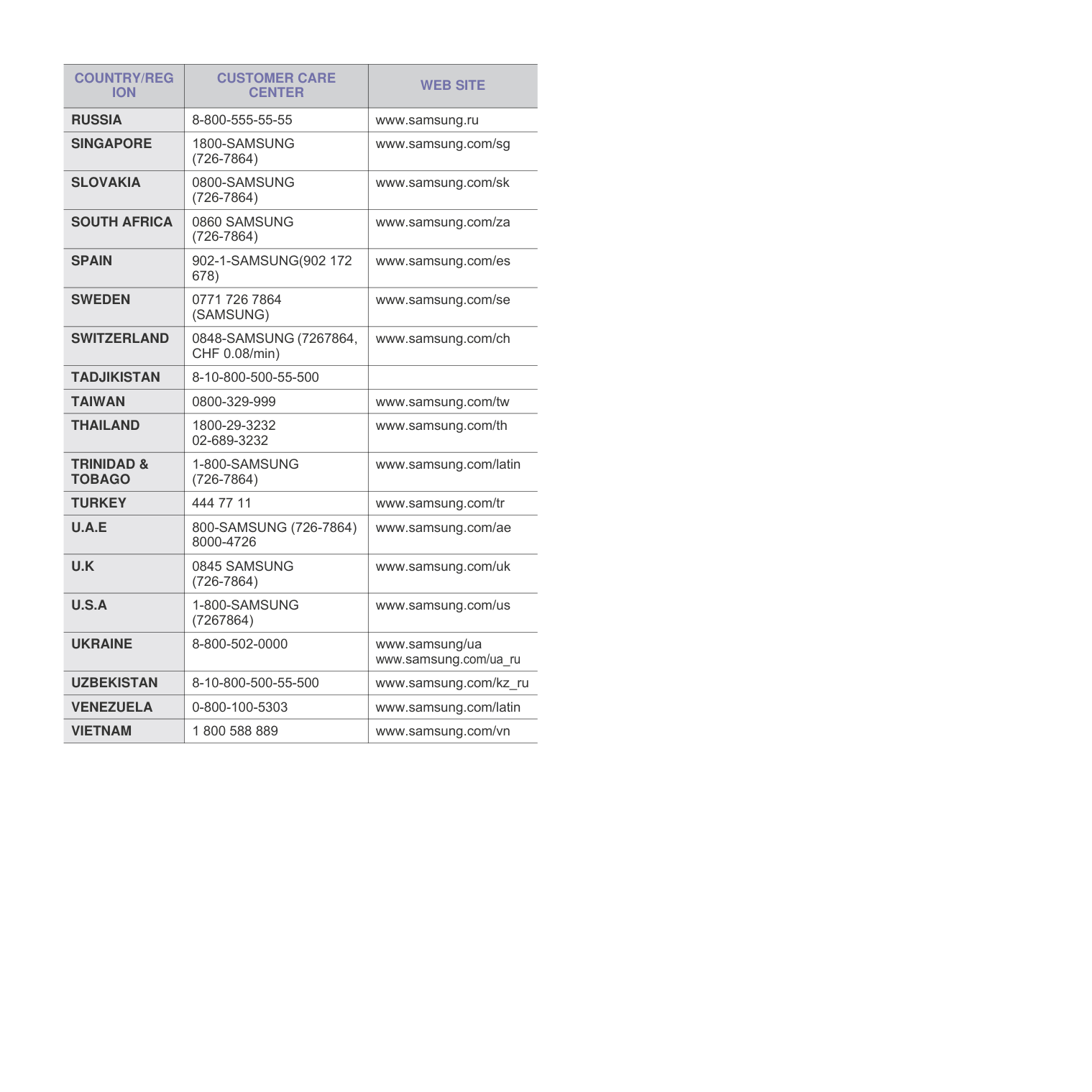
|VENEZUELA|0-800-100-5303|www.samsung.com/latin| |VIETNAM|1 800 588 889|www.samsung.com/vn|
###### CONTENTS
About this user’s guide .................................................................................................................................................i Finding more information .............................................................................................................................................i Safety and Regulatory Information ..............................................................................................................................ii
Front view ........................................................................................................................................................... 1.2 Rear view ............................................................................................................................................................ 1.3
Control panel overview ........................................................................................................................................... 1.4
Selecting print media ............................................................................................................................................... 4.1 Guidelines for selecting and storing print media ................................................................................................. 4.2 Specifications on print media .............................................................................................................................. 4.3 Guidelines for special print media ....................................................................................................................... 4.4
Loading paper in the tray ........................................................................................................................................ 4.5 Changing the paper size in the tray .................................................................................................................... 4.5 Setting the paper size and type ............................................................................................................................... 4.6
Cleaning the outside ........................................................................................................................................... 6.1 Cleaning the inside ............................................................................................................................................. 6.1
Maintaining the cartridge ......................................................................................................................................... 6.3 Toner cartridge storage ...................................................................................................................................... 6.3 Handling instructions .......................................................................................................................................... 6.3 Use of non-Samsung and refilled toner cartridge ............................................................................................... 6.3 Estimated cartridge life ....................................................................................................................................... 6.3
Redistributing toner ................................................................................................................................................. 6.3
Replacing the toner cartridge .................................................................................................................................. 6.5 Maintenance Parts .................................................................................................................................................. 6.6
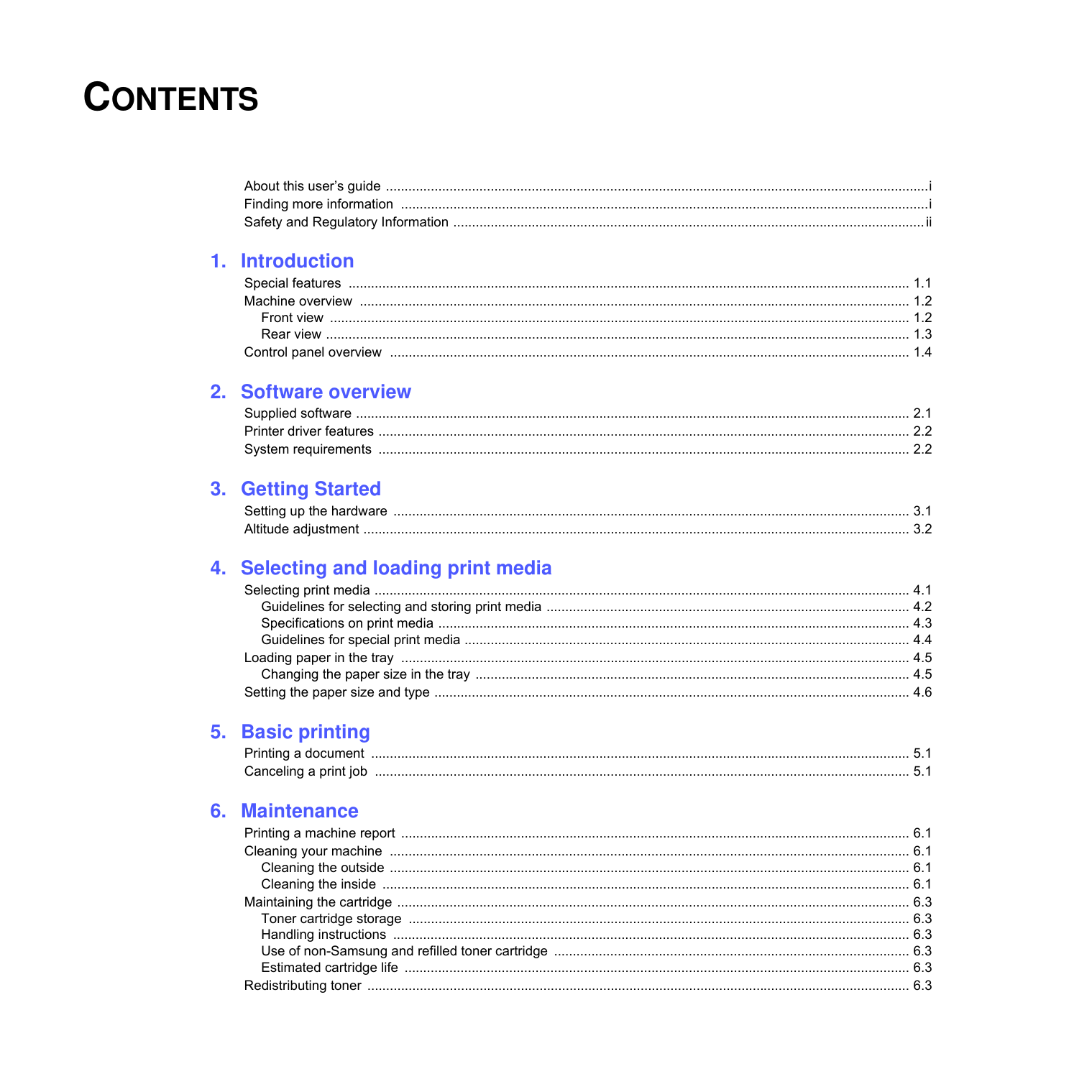
In the paper feed area and rear the machine ..................................................................................................... 7.1 Rear and inside the machine .............................................................................................................................. 7.3 In the exit area .................................................................................................................................................... 7.5
Understanding display messages ........................................................................................................................... 7.7 Solving other problems ........................................................................................................................................... 7.8
Paper feeding problems ...................................................................................................................................... 7.8 Printing problems ................................................................................................................................................ 7.8 Printing quality problems .................................................................................................................................. 7.10 Common Windows problems ............................................................................................................................ 7.12 Common Linux problems .................................................................................................................................. 7.13 Common Macintosh problems .......................................................................................................................... 7.13
############# About this user’s guide
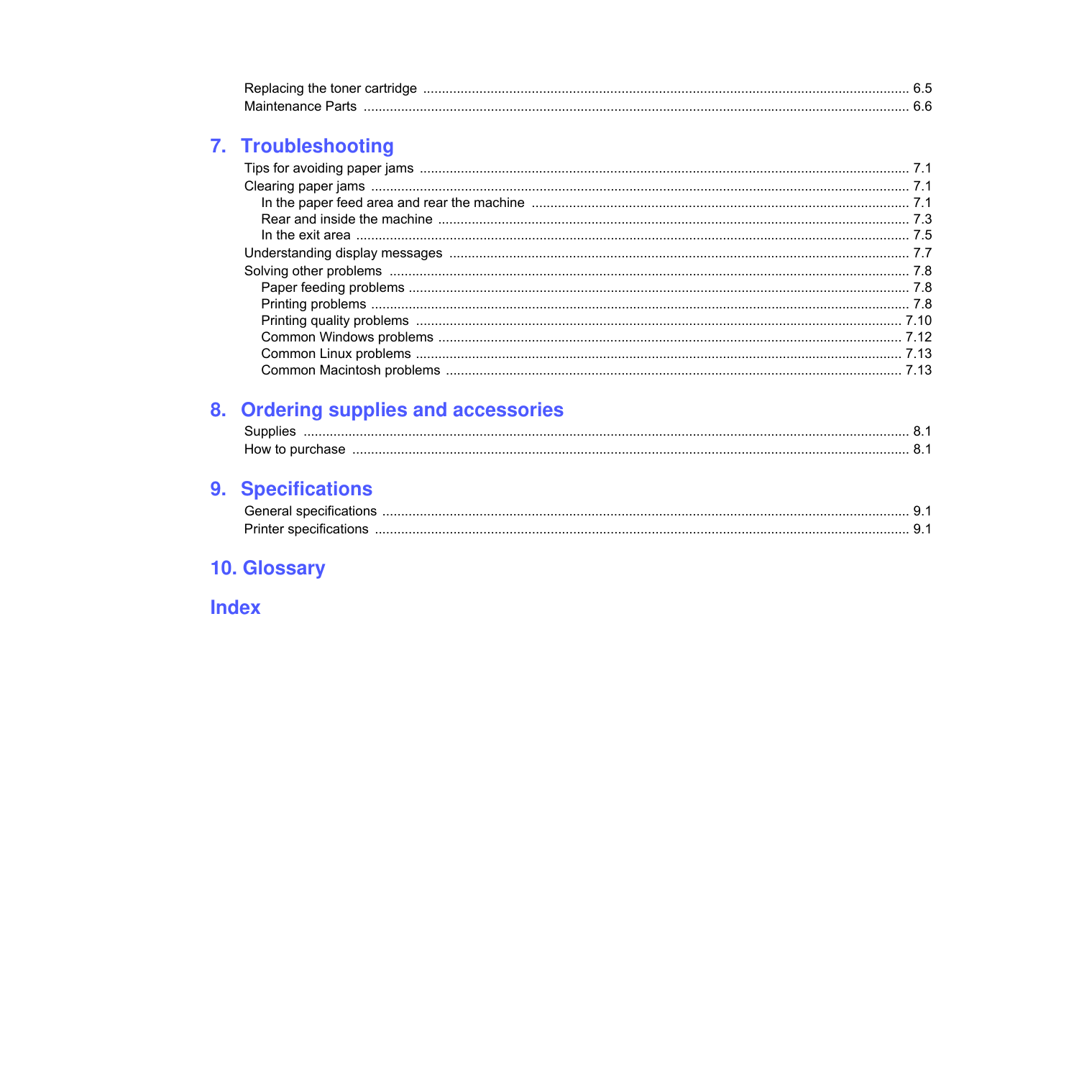
This user’s guide provides information about basic understanding of the machine as well as detailed explanation on each step during the actual usage. Both novice users and professional users can refer to this guide for installing and using the machine. This explanation is mainly based on the Microsoft Windows operating system. Some terms in this guide are used interchangeably, as below.
The following table offers the conventions of this guide.
|Convention|Description|Example| |---|---|---| |Bold|Used for texts on the display or actual prints on the machine.|Properties| |Note|Used to provide additional information or detailed specification of the machine function and feature.|Note The date format may differ from country to country.
| |Caution|Used to give users information to protect the machine from possible mechanical damage or malfunction.|Caution Do not touch the green underside of the toner cartridge.
| |Footnote|Used to provide more detailed information on certain words or a phrase.|a. pages per minute| |(See page 1.1 for more information)|Used to guide users to the reference page for the additional detailed information.|(See page 1.1 for more information)|
############# Finding more information
You can find information for setting up and using your machine from the following resources, either as a print-out or onscreen.
|Quick Install Guide|Provides information on setting up your machine and this requires that you follow the instructions in the guide to prepare the machine.| |---|---| |Online User’s Guide|Provides you with step-by-step instructions for using your machine’s full features, and contains information for maintaining your machine, troubleshooting, and installing accessories. This user’s guide also contains Software section to provide you with information on how to print documents with your machine in various operating systems, and how to use the included software utilities.
Note
You can access the user’s guide in other languages from the Manual folder on the printer software CD.| |Printer Driver Help

|Provides you with help information on printer driver properties and instructions for setting up the properties for printing. To access a printer driver help screen, click Help from the printer properties dialog box.| |Samsung website|If you have Internet access, you can get help, support, printer drivers, manuals, and order information from the Samsung website, www.samsungprinter.com.
|
############# Safety and Regulatory Information
############## Important Precautions and Safety Information
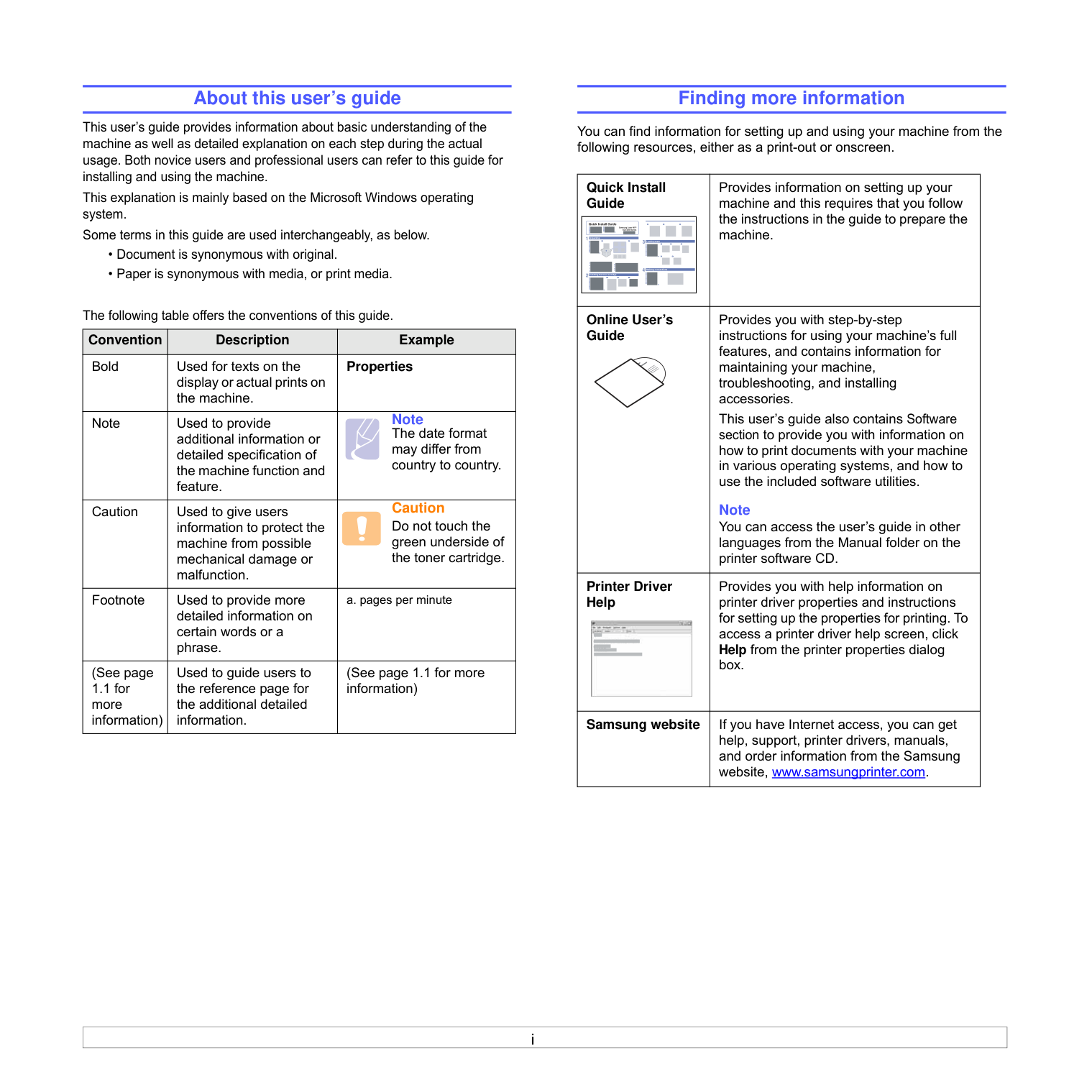
When using this machine, these basic safety precautions should always be followed to reduce risk of fire, electric shock, and injury to people:
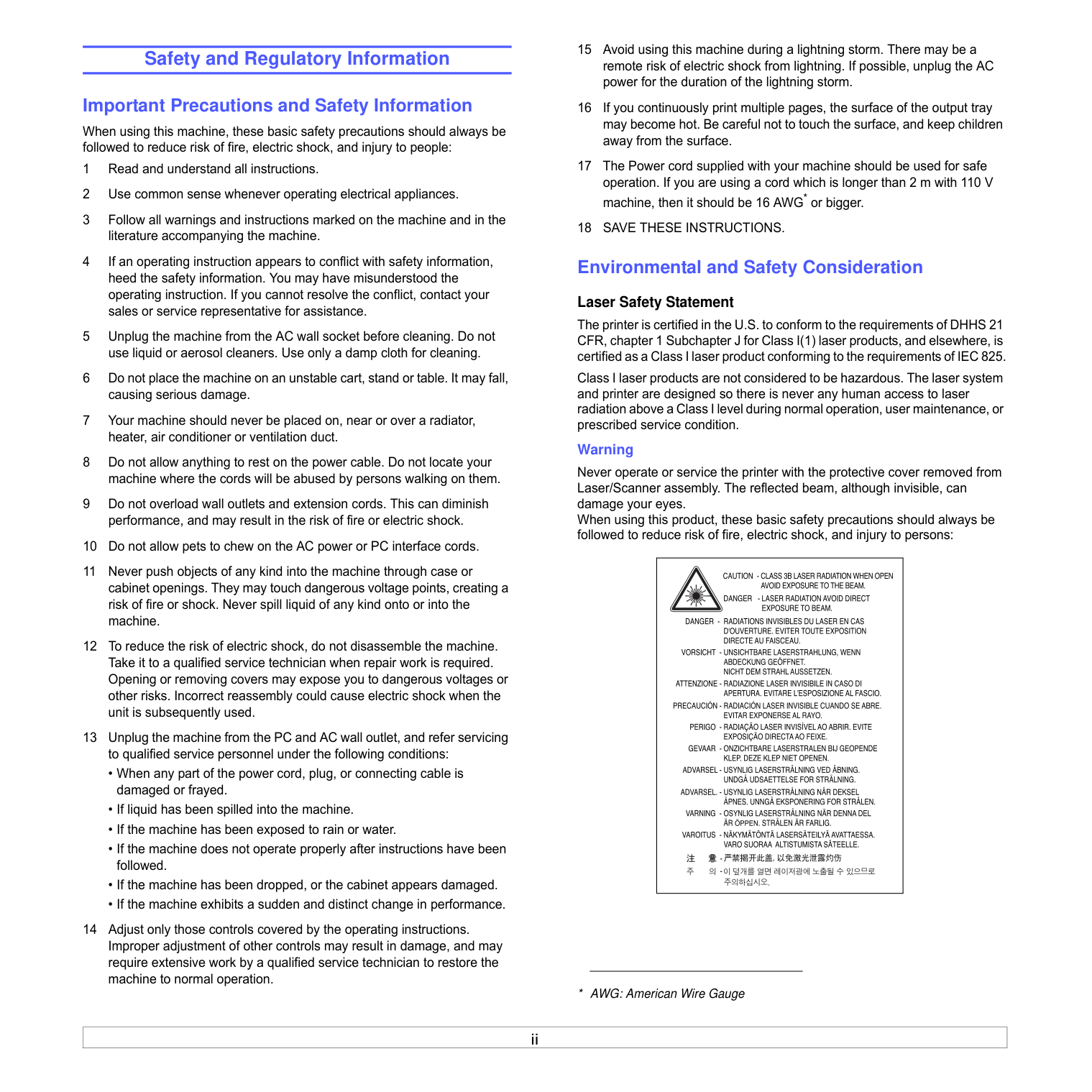
################# Laser Safety Statement
The printer is certified in the U.S. to conform to the requirements of DHHS 21 CFR, chapter 1 Subchapter J for Class I(1) laser products, and elsewhere, is certified as a Class I laser product conforming to the requirements of IEC 825.
Class I laser products are not considered to be hazardous. The laser system and printer are designed so there is never any human access to laser radiation above a Class I level during normal operation, user maintenance, or prescribed service condition.
#################### Warning
Never operate or service the printer with the protective cover removed from Laser/Scanner assembly. The reflected beam, although invisible, can damage your eyes. When using this product, these basic safety precautions should always be followed to reduce risk of fire, electric shock, and injury to persons:
| | |---|
############## Ozone Safety
During normal operation, this machine produces ozone. The ozone produced does not present a hazard to the operator. However, it is advisable that the machine be operated in a well ventilated area.
If you need additional information about ozone, please contact your nearest Samsung dealer.
############## California USA Only
This Perchlorate warning applies only to primary CR (Manganese Dioxide) Lithium coin cells in the product sold or distributed ONLY in California USA.
Perchlorate Material - special handling may apply. See www.dtsc.ca.gov/hazardouswaste/perchlorate.
############## Recycling
Please recycle or dispose of packaging materials for this product in an environmentally responsible manner.
############## Correct Disposal of This Product (Waste Electrical & Electronic Equipment)
################# (Applicable in the European Union and other European countries with separate collection systems)
This marking on the product, accessories or literature indicates that the product and its electronic accessories (e.g. charger, headset, USB cable) should not be disposed of with other household waste at the end of their working life. To prevent possible harm to the environment or human health from uncontrolled waste disposal, please separate these items from other types of waste and
recycle them responsibly to promote the sustainable reuse of material resources. Household users should contact either the retailer where they purchased this product, or their local government office, for details of where and how they can take these items for environmentally safe recycling. Business users should contact their supplier and check the terms and conditions of the purchase contract. This product and its electronic accessories should not be mixed with other commercial wastes for disposal.
############## Radio Frequency Emissions FCC Regulations
This device complies with Part 15 of the FCC Rules. Operation is subject to the following two conditions:
This device has been tested and found to comply with the limits for a Class B digital device, pursuant to Part 15 of the FCC rules. These limits are designed
to provide reasonable protection against harmful interference in a residential installation. This equipment generates, uses and can radiate radio frequency energy and, if not installed and used in accordance with the instructions, may cause harmful interference to radio communications. However, there is no guarantee that interference will not occur in a particular installation. If this equipment does cause harmful interference to radio or television reception, which can be determined by turning the equipment off and on, the user is encouraged to try to correct the interference by one or more of the following measures:
#################### Caution:
Changes or modifications not expressly approved by the manufacturer responsible for compliance could void the user’s authority to operate the equipment.
################# Canadian Radio Interference Regulations
This digital apparatus does not exceed the Class B limits for radio noise emissions from digital apparatus as set out in the interference-causing equipment standard entitled “Digital Apparatus”, ICES-003 of the Industry and Science Canada.
Cet appareil numérique respecte les limites de bruits radioélectriques applicables aux appareils numériques de Classe B prescrites dans la norme sur le matériel brouilleur: “Appareils Numériques”, ICES-003 édictée par l’Industrie et Sciences Canada.
############## Declaration of Conformity (European Countries) Approvals and Certifications
The CE marking applied to this product symbolises Samsung Electronics Co., Ltd. Declaration of Conformity with the following applicable 93/68/EEC Directives of the European Union as of the dates indicated:
The declaration of conformity may be consulted at www.samsung.com/ printer, go to Support > Download center and enter your printer name to browse the EuDoC.
March 9, 1999: Council Directive 1999/5/EC on radio equipment and telecommunications terminal equipment and the mutual recognition of their conformity.
A full declaration, defining the relevant Directives and referenced standards can be obtained from your Samsung Electronics Co., Ltd. representative.
############## Replacing the Fitted Plug (for UK Only) Important
The mains lead for this machine is fitted with a standard (BS 1363) 13 amp plug and has a 13 amp fuse. When you change or examine the fuse, you must re-fit the correct 13 amp fuse. You then need to replace the fuse cover. If you have lost the fuse cover, do not use the plug until you have another fuse cover.
Please contact the people from you purchased the machine. The 13 amp plug is the most widely used type in the UK and should be suitable. However, some buildings (mainly old ones) do not have normal 13 amp plug sockets. You need to buy a suitable plug adaptor. Do not remove the moulded plug.
Warning If you cut off the moulded plug, get rid of it straight away. You cannot rewire the plug and you may receive an electric shock if you plug it into a socket. Important warning: You must earth this machine. The wires in the mains lead have the following color code:
• Green and Yellow: Earth
If the wires in the mains lead do not match the colors marked in your plug, do the following:
You must connect the green and yellow wire to the pin marked by the letter “E” or by the safety ‘Earth symbol’ or colored green and yellow or green.
You must connect the blue wire to the pin which is marked with the letter “N” or colored black.
You must connect the brown wire to the pin which is marked with the letter “L” or colored red.
You must have a 13 amp fuse in the plug, adaptor, or at the distribution board.
##### 1Introduction
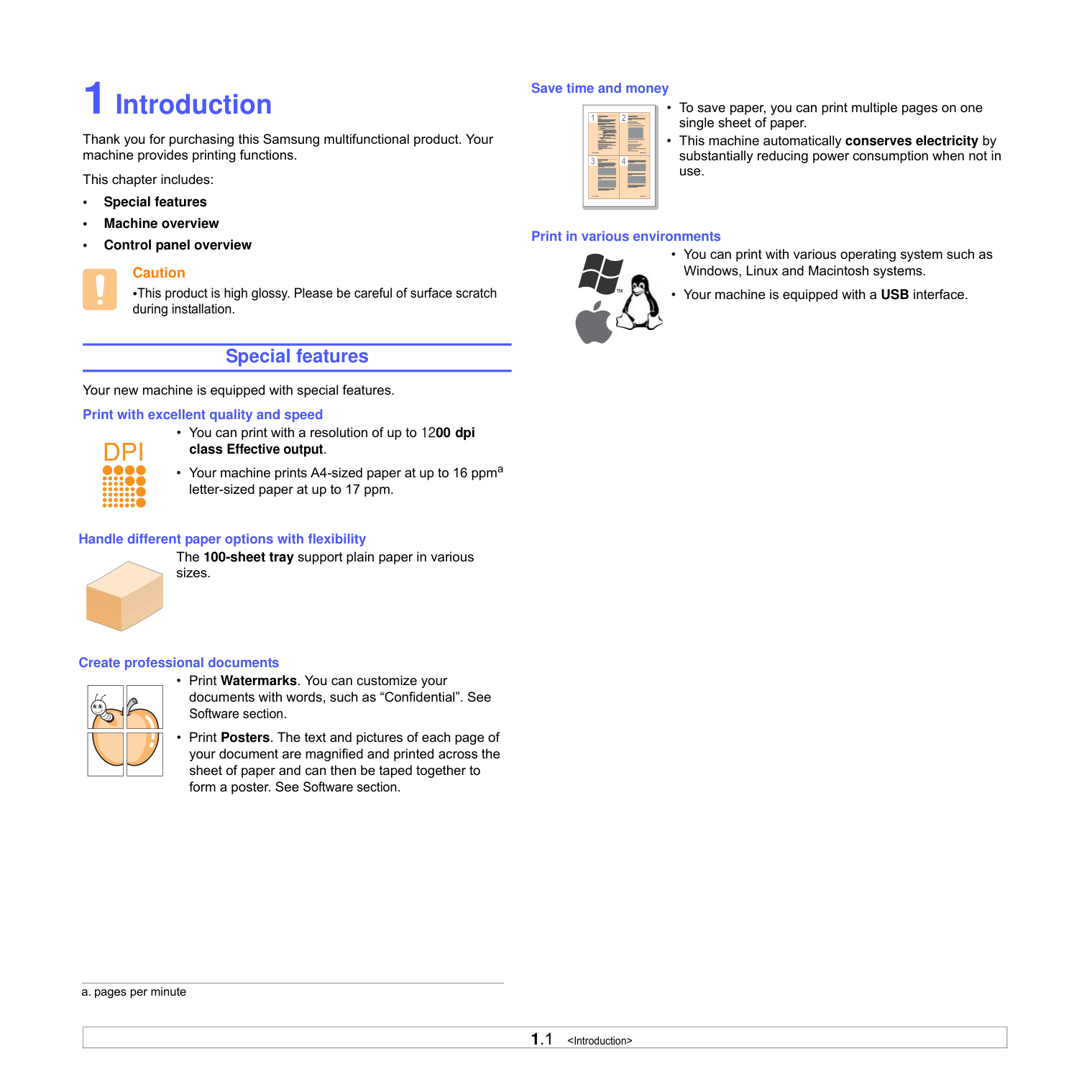
Thank you for purchasing this Samsung multifunctional product. Your machine provides printing functions.
This chapter includes:
#################### Caution
•This product is high glossy. Please be careful of surface scratch during installation.
############# Special features Your new machine is equipped with special features. Print with excellent quality and speed
Save time and money
Print in various environments

Handle different paper options with flexibility The 100-sheet tray support plain paper in various sizes.
Create professional documents
a. pages per minute
############# Machine overview
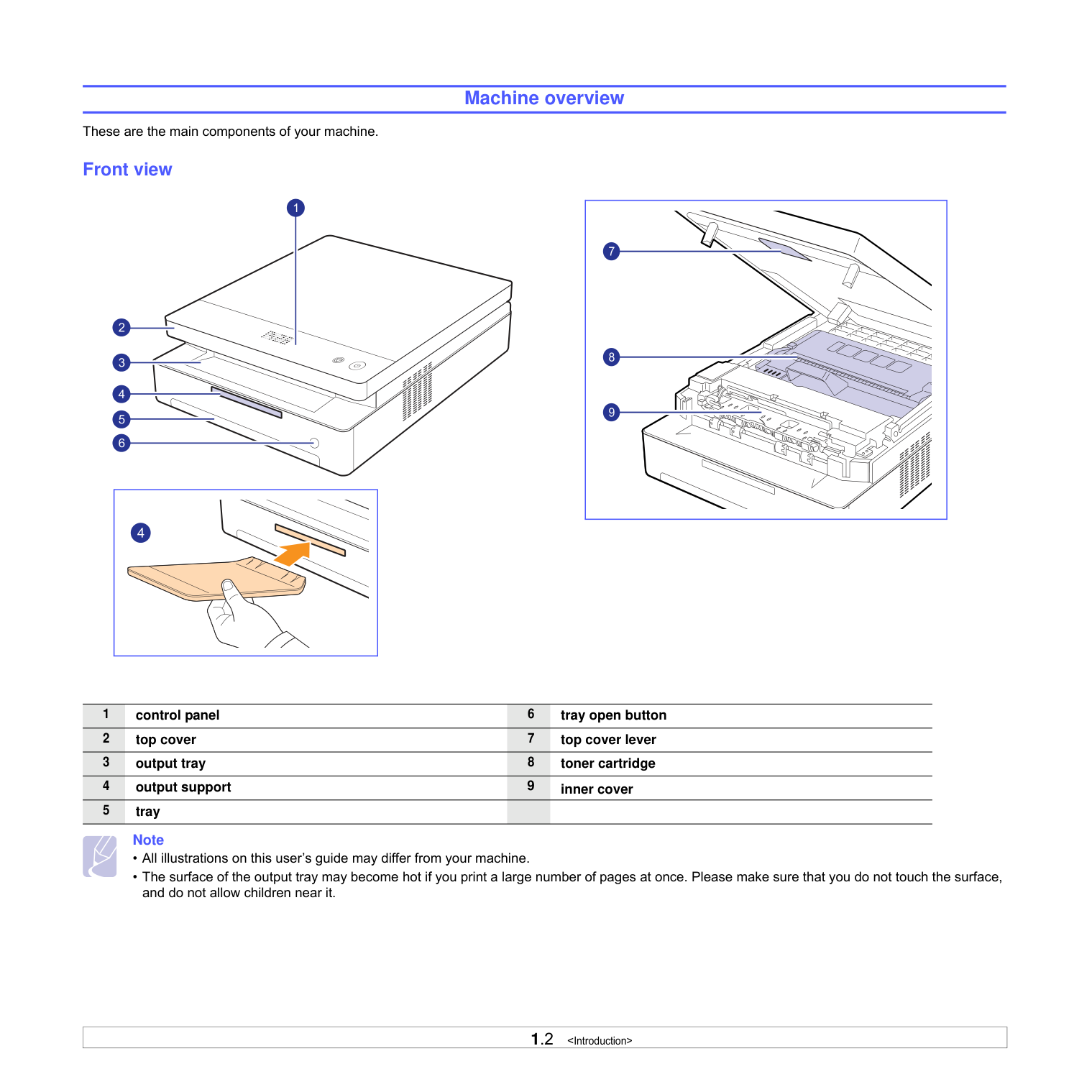
These are the main components of your machine. Front view
| | | |---|---| | | |
| | |---|
#################### Note
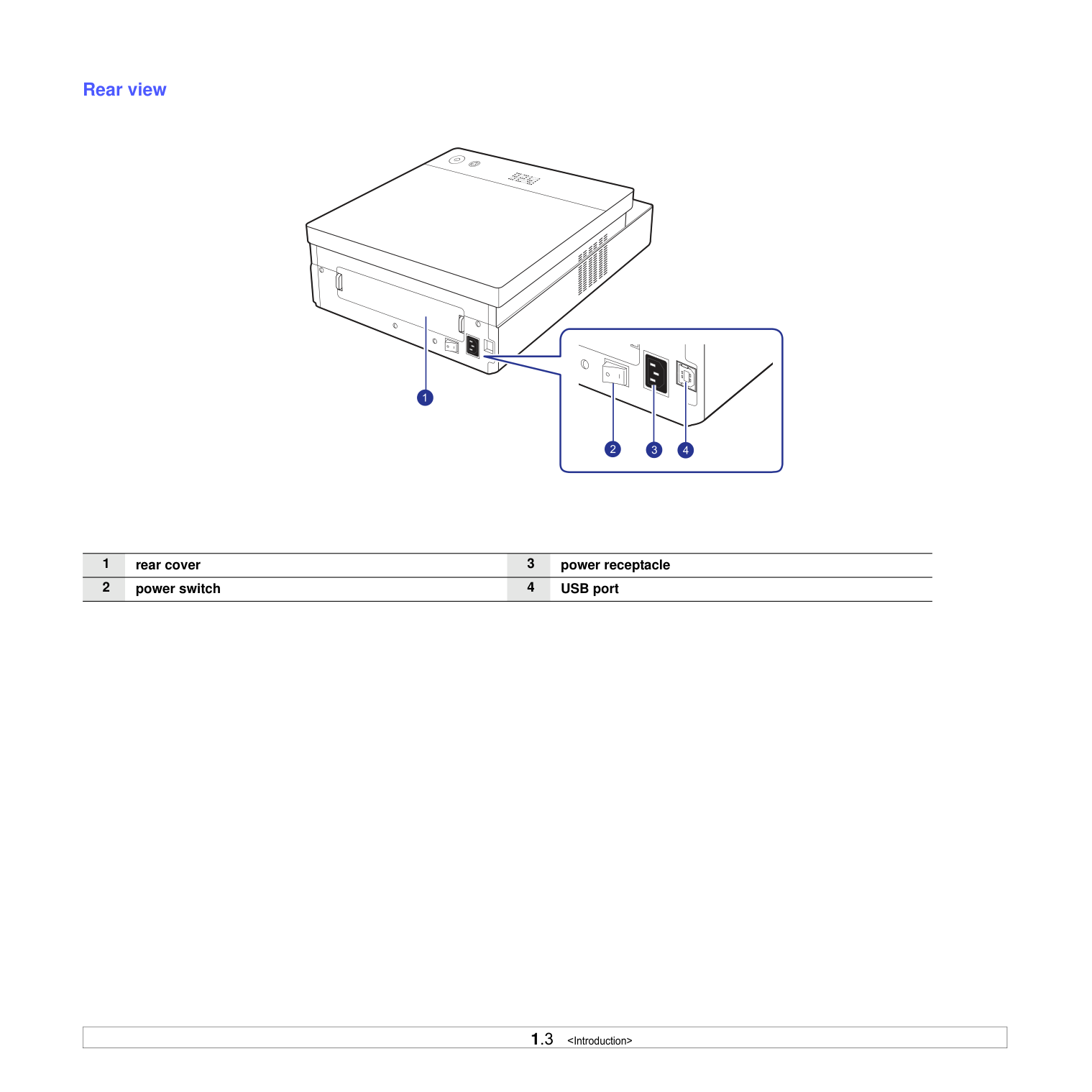
############## Rear view
############# Control panel overview
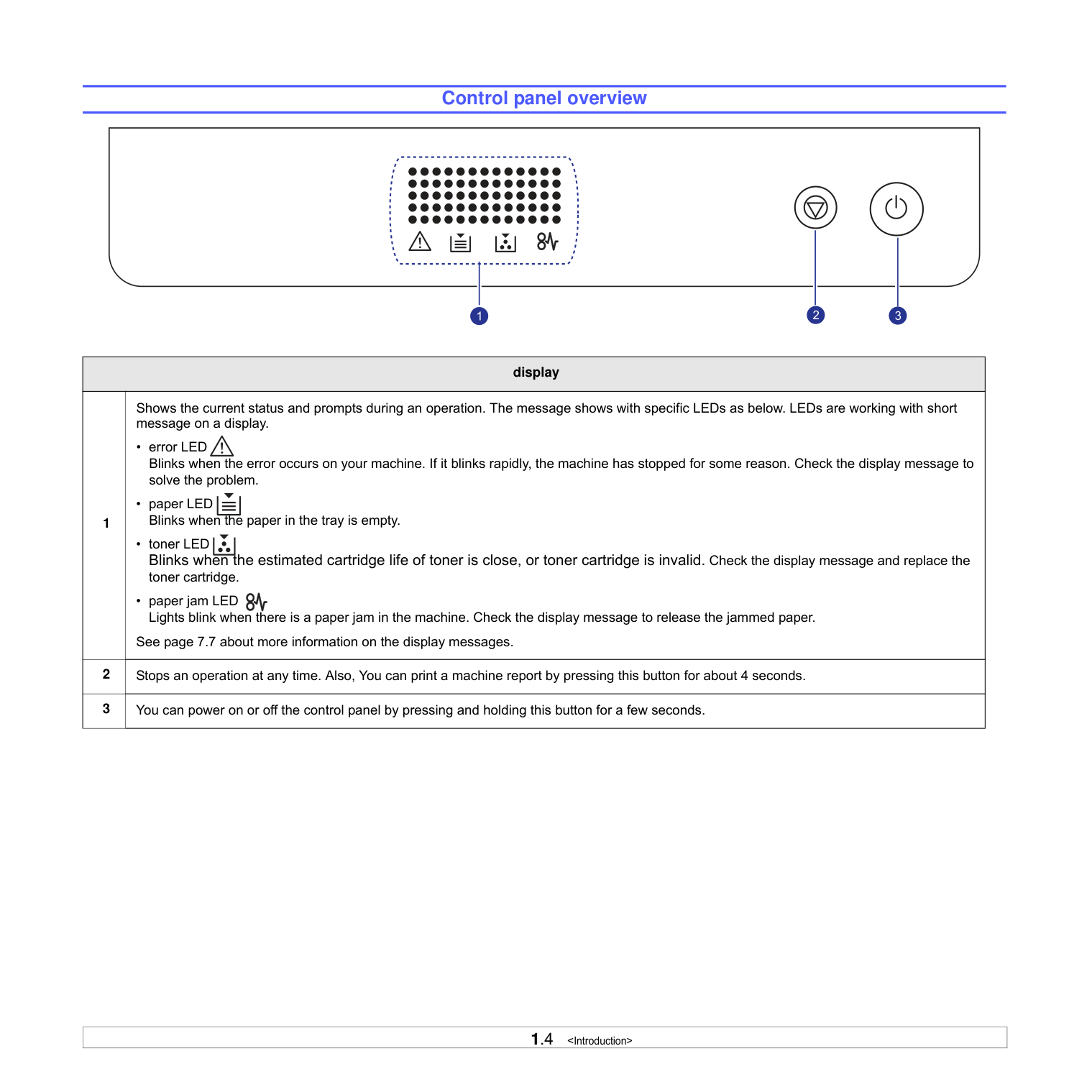
|display|display| |---|---| |1|Shows the current status and prompts during an operation. The message shows with specific LEDs as below. LEDs are working with short message on a display.
• error LED Blinks when the error occurs on your machine. If it blinks rapidly, the machine has stopped for some reason. Check the display message to solve the problem.
• paper LED Blinks when the paper in the tray is empty.
• toner LED Blinks when the estimated cartridge life of toner is close, or toner cartridge is invalid. Check the display message and replace the toner cartridge.
• paper jam LED Lights blink when there is a paper jam in the machine. Check the display message to release the jammed paper.
See page 7.7 about more information on the display messages.
| |2|Stops an operation at any time. Also, You can print a machine report by pressing this button for about 4 seconds.| |3|You can power on or off the control panel by pressing and holding this button for a few seconds.|
##### 2Software overview
This chapter gives you an overview of the software that comes with your machine. Further details on how to use the software are explained in the Software section.
This chapter includes:
############# Supplied software
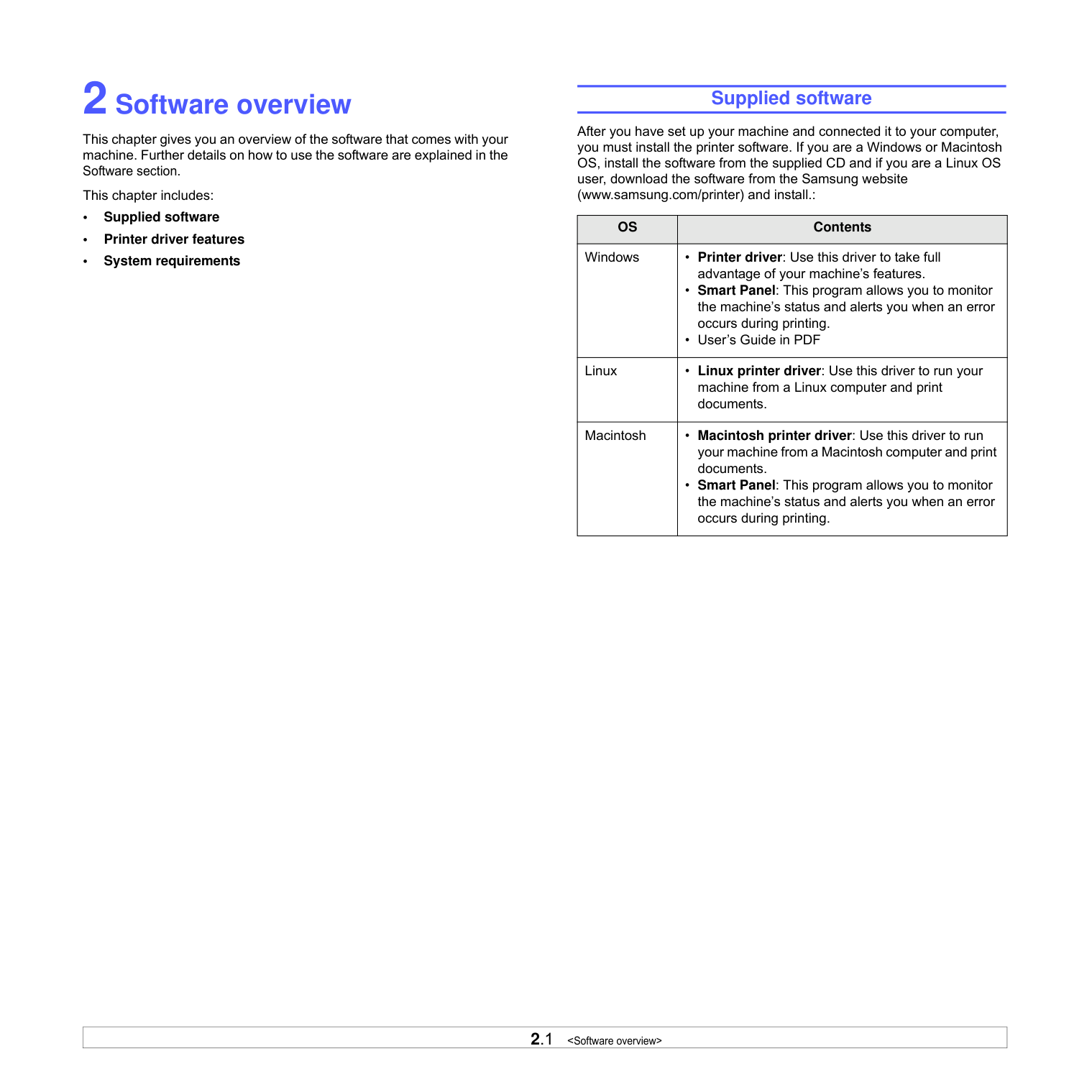
After you have set up your machine and connected it to your computer, you must install the printer software. If you are a Windows or Macintosh OS, install the software from the supplied CD and if you are a Linux OS user, download the software from the Samsung website (www.samsung.com/printer) and install.:
|OS|Contents| |---|---| |Windows|• Printer driver: Use this driver to take full advantage of your machine’s features.
• Smart Panel: This program allows you to monitor the machine’s status and alerts you when an error occurs during printing.
• User’s Guide in PDF
| |Linux|• Linux printer driver: Use this driver to run your machine from a Linux computer and print documents.| |Macintosh|• Macintosh printer driver: Use this driver to run your machine from a Macintosh computer and print documents.
• Smart Panel: This program allows you to monitor the machine’s status and alerts you when an error occurs during printing.
|
############# Printer driver features
Your printer drivers support the following standard features:
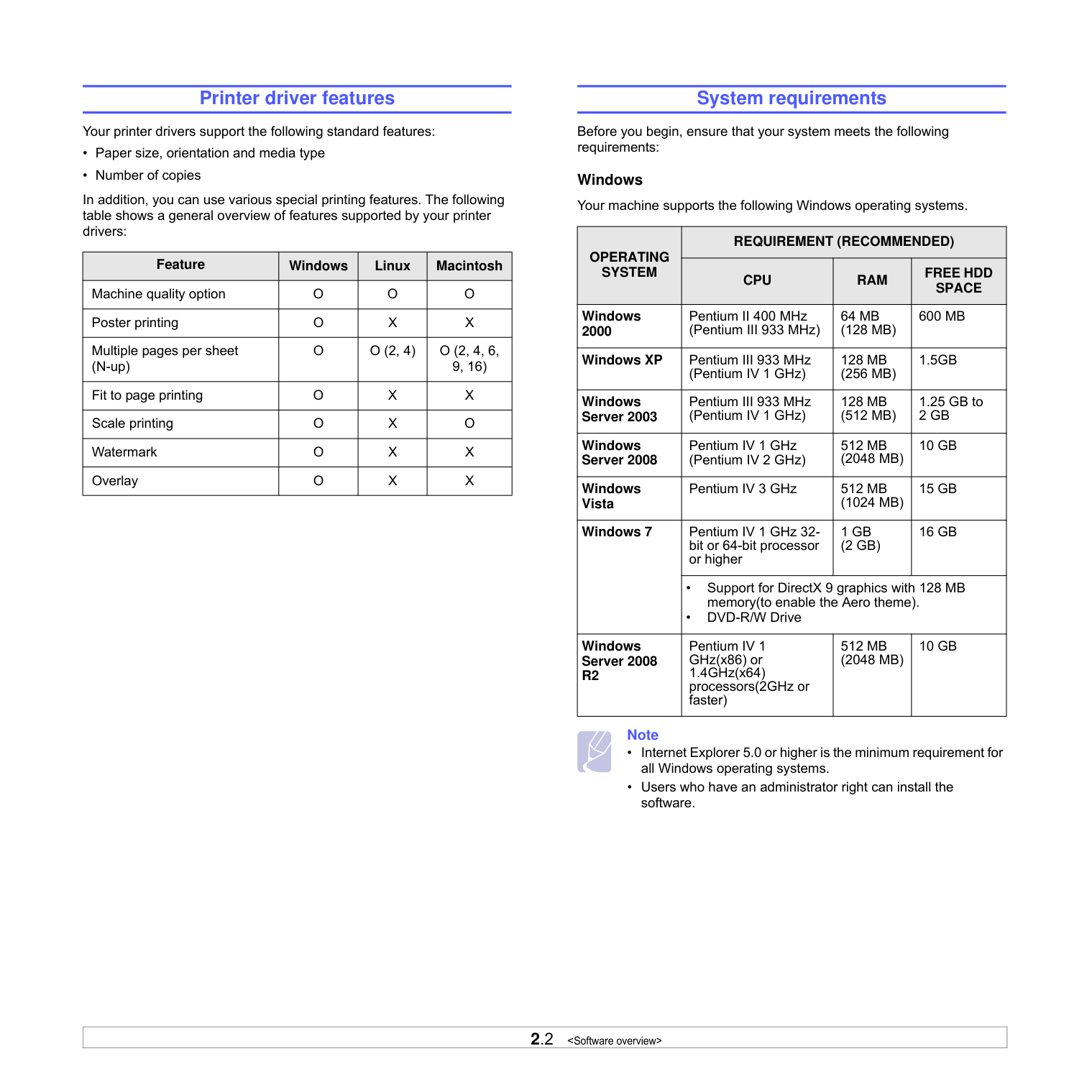
In addition, you can use various special printing features. The following table shows a general overview of features supported by your printer drivers:
|Feature|Windows|Linux|Macintosh| |---|---|---|---| |Machine quality option|O|O|O| |Poster printing|O|X|X| |Multiple pages per sheet (N-up)|O|O (2, 4)|O (2, 4, 6, 9, 16)| |Fit to page printing|O|X|X| |Scale printing|O|X|O| |Watermark|O|X|X| |Overlay|O|X|X|
############# System requirements
Before you begin, ensure that your system meets the following requirements:
Windows Your machine supports the following Windows operating systems.
|OPERATING SYSTEM|REQUIREMENT (RECOMMENDED)|REQUIREMENT (RECOMMENDED)|REQUIREMENT (RECOMMENDED)| |---|---|---|---| |OPERATING SYSTEM|CPU|RAM|FREE HDD SPACE| |Windows 2000|Pentium II 400 MHz (Pentium III 933 MHz)|64 MB (128 MB)|600 MB| |Windows XP|Pentium III 933 MHz (Pentium IV 1 GHz)|128 MB (256 MB)|1.5GB|
|Windows Server 2003|Pentium III 933 MHz (Pentium IV 1 GHz)|128 MB (512 MB)|1.25 GB to 2 GB| |Windows Server 2008|Pentium IV 1 GHz (Pentium IV 2 GHz)|512 MB (2048 MB)|10 GB| |Windows Vista|Pentium IV 3 GHz|512 MB (1024 MB)|15 GB| |Windows 7|Pentium IV 1 GHz 32bit or 64-bit processor or higher|1 GB (2 GB)|16 GB| |Windows 7|• Support for DirectX 9 graphics with 128 MB memory(to enable the Aero theme).
• DVD-R/W Drive
|• Support for DirectX 9 graphics with 128 MB memory(to enable the Aero theme).
• DVD-R/W Drive
|• Support for DirectX 9 graphics with 128 MB memory(to enable the Aero theme).
• DVD-R/W Drive
| |Windows Server 2008 R2|Pentium IV 1 GHz(x86) or 1.4GHz(x64) processors(2GHz or faster)|512 MB (2048 MB)|10 GB|
#################### Note
Linux
|Item|Requirements| |---|---| |Operating system|• Red Hat 8 ~ 9
• Fedora Core 1 ~ 4
• Mandrake 9.2 ~ 10.1
• SuSE 8.2 ~ 9.2
| |CPU|Pentium IV 1 GHz or higher| |RAM|256 MB or higher| |Free HDD space|1 GB or higher| |Software|• Linux Kernel 2.4 or higher
• Glibc 2.2 or higher
• CUPS
|
Macintosh
|Operating System|Requirements (recommended)|Requirements (recommended)|Requirements (recommended)| |---|---|---|---| |Operating System|CPU|RAM|free HDD space| |Mac OS X 10.3 ~ 10.4|• Intel Processor
•Power P G4 /G5
|• 128 MB for a Power-PC based Mac (512 MB).
• 512 MB for an Intelbased Mac (1 GB)
|1 GB| |Mac OS X 10.5|• Intel Processor
• 867 MHz or faster Power PC G4 /G5
|• 512 MB (1 GB)|1 GB| |Mac OS X 10.6|• Intel processor s|1 GB (2 GB)|1 GB|
##### 3Getting Started
This chapter gives you step-by-step instructions for setting up the machine.
This chapter includes:
############# Setting up the hardware
This section shows the steps to set up the hardware which is explained in the Quick Install Guide. Make sure you read Quick Install Guide and complete following steps.
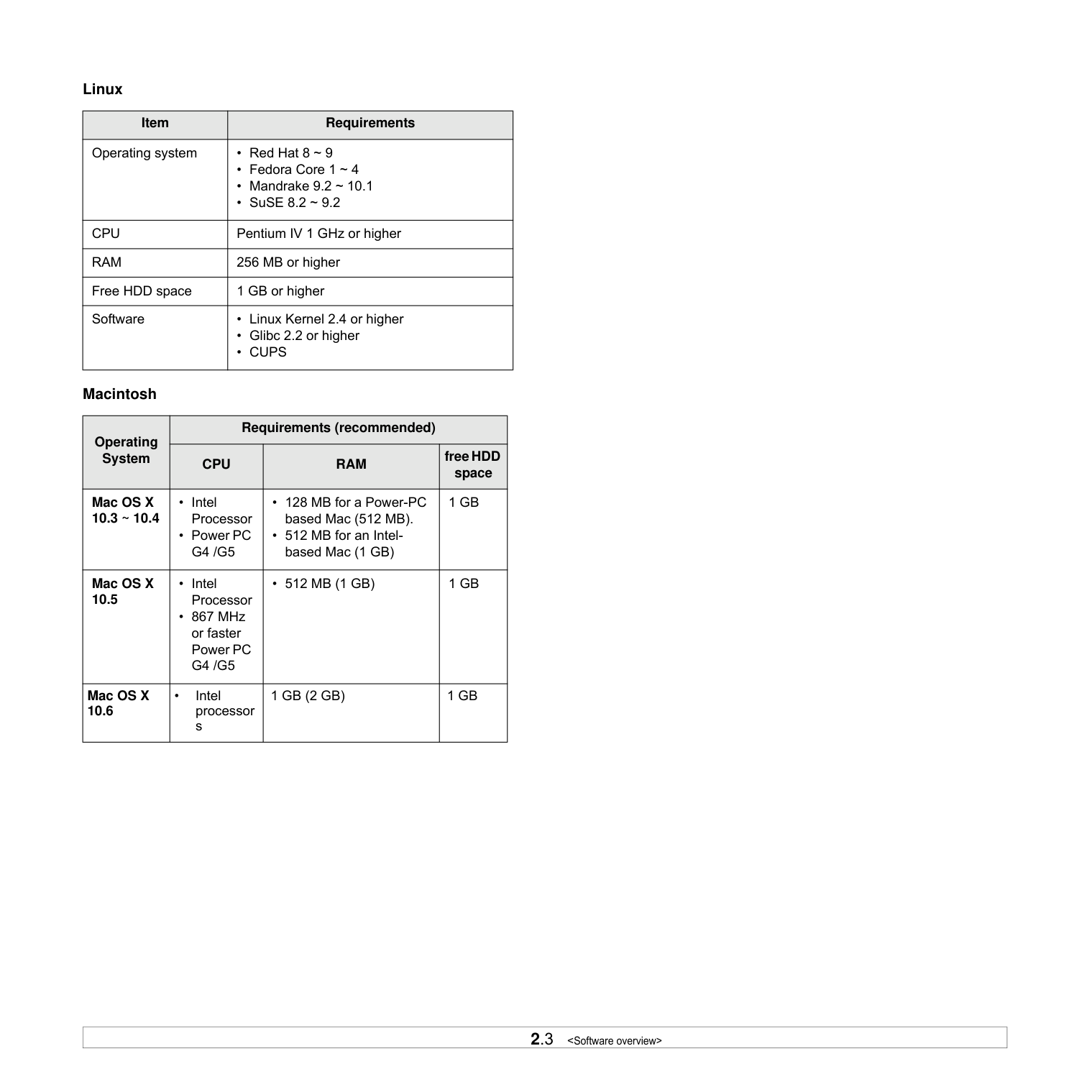
Select a level, stable place with adequate space for air circulation. Allow extra space to open covers and trays.
The area should be well-ventilated and away from direct sunlight or sources of heat, cold, and humidity. Do not set the machine close to the edge of your desk or table.
| | |---|
Printing is suitable for altitudes under 1,000 m (3,281 ft). Refer to the altitude setting to optimize your printing. See page 3.2 for more information.
Place the machine on a flat and stable surface for not letting it lean more than 2 mm (0.08 inches). Otherwise, it may affect the printing quality.
Caution This equipment will be inoperable when mains power fails.
#################### Note
When the printer driver is in installation process, the driver installer detects the locale information of your operating system, and sets the default paper size for your machine. If you use the different Windows locale, you must change the paper size of your machine for matching your commonly used paper size. Go to the printer properties to change the paper size after installation completes.
#################### Caution
When you move the machine, do not tilt or turn it upside down. Otherwise, the inside of the machine may be contaminated by toner, which can cause damage to the machine or bad printing quality.
################### 5 Kg (11 lbs)
############# Altitude adjustment
The print quality is affected by atmospheric pressure, which is determined by the height of the machine above sea level. The following information will guide you on how to set your machine to the best print quality or best quality of print.
The altitude above 1,000 m (3,281 ft), may affect the print quality such as loose toner or light imaging.
Before you set the altitude setting, find the altitude where you are using the machine.
To set the machine for high altitude, follow next step:
#################### Note
The following procedure is for Windows XP. For other Windows OS, refer to the corresponding Windows User's Guide or online help.
##### 4Selecting and loading print
######### media
This chapter introduces you how to load originals and print media into your machine.
This chapter includes:
############# Selecting print media
You can print on a variety of print media, such as plain paper, labels, and transparencies. Always use print media that meet the guidelines for use with your machine. Print media that does not meet the guidelines outlined in this user’s guide may cause the following problems:
Properties, such as weight, composition, grain, and moisture content, are important factors that affect the machine’s performance and the output quality. When you choose print materials, consider the following:
#################### Note
Caution Using print media that does not meet these specifications may cause problems, requiring repairs. Such repairs are not covered by Samsung’s warranty or service agreements.
Guidelines for selecting and storing print media When selecting or loading paper, or other print materials, keep these guidelines in mind:
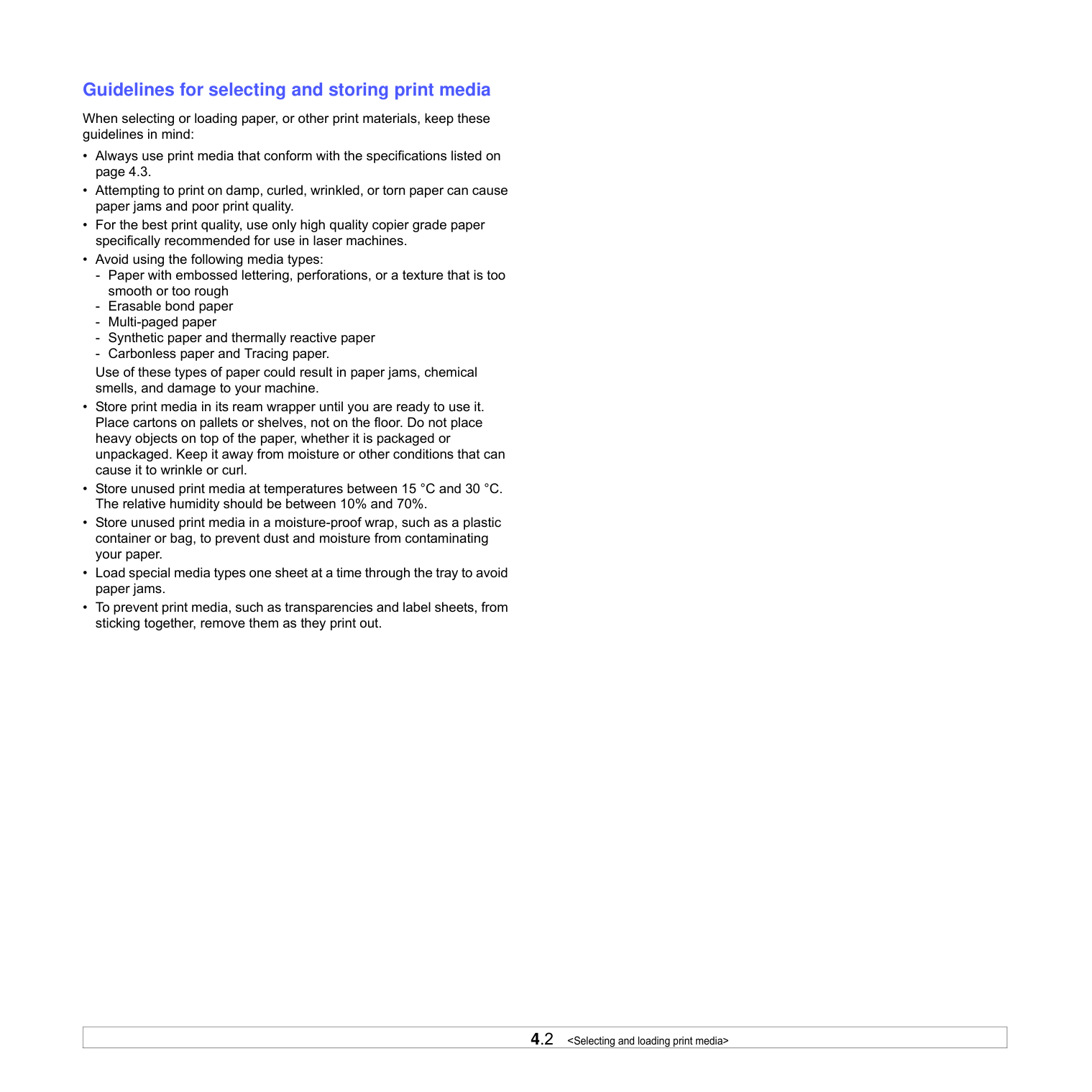
############## Specifications on print media
#################### Note
| | |---|
Note
|Type|Size|Dimensions|Weighta|Capacityb| |---|---|---|---|---| |Plain paper|Letter|216 x 279 mm (8.5 x 11 inches)|60 to 120 g/m2 (16 to 32 lb bond) for the tray|100 sheets of 75 g/m2 (20 lb bond) paper for the tray| |Plain paper|A4|210 x 297 mm (8.26 x 11.69 inches)|60 to 120 g/m2 (16 to 32 lb bond) for the tray|100 sheets of 75 g/m2 (20 lb bond) paper for the tray| |Plain paper|JIS B5|182 x 257 mm (7.16 x 10.11 inches)|60 to 120 g/m2 (16 to 32 lb bond) for the tray|100 sheets of 75 g/m2 (20 lb bond) paper for the tray| |Plain paper|ISO B5|176 x 250 mm (6.93 x 9.84 inches)|60 to 120 g/m2 (16 to 32 lb bond) for the tray|100 sheets of 75 g/m2 (20 lb bond) paper for the tray| |Plain paper|A5|148 x 210 mm (5.82 x 8.26 inches)|60 to 120 g/m2 (16 to 32 lb bond) for the tray|100 sheets of 75 g/m2 (20 lb bond) paper for the tray| |Plain paper|A6|105 x 148 mm (4.13 x 5.82 inches)|60 to 120 g/m2 (16 to 32 lb bond) for the tray|100 sheets of 75 g/m2 (20 lb bond) paper for the tray| |Plain paper|Executive|184 x 267 mm (7.25 x 10.5 inches)|60 to 120 g/m2 (16 to 32 lb bond) for the tray|100 sheets of 75 g/m2 (20 lb bond) paper for the tray| |Transparencyc|Letter, A4|Refer to the Plain paper section|138 to 146 g/m2 (37 to 39 lb bond)|1 sheet for the tray| |Labels|Letter, A4|Refer to the Plain paper section|120 to 150 g/m2 (32 to 40 lb bond)|1 sheet for the tray| |Card stock|Letter, A4|Refer to the Plain paper section|60 to 120 g/m2 (16 to 32 lb bond)|1 sheet for the tray| |Minimum size (custom)|Minimum size (custom)|105 x 148 mm (4.13 x 5.83 inches)|60 to 120 g/m2 (16 to 32 lb bond) for the tray|60 to 120 g/m2 (16 to 32 lb bond) for the tray| |Maximum size (custom)|Maximum size (custom)|216 x 297 mm (8.5 x 11.69 inches)|60 to 120 g/m2 (16 to 32 lb bond) for the tray|60 to 120 g/m2 (16 to 32 lb bond) for the tray|
############## Guidelines for special print media
|Media type|Guidelines| |---|---| |Transparencies|• To avoid damaging the machine, use only transparencies designed for use in laser machines.
• Transparencies used in the machine must be able to withstand the machine’s fusing temperature. Check your machine’s specification to view the fusing temperature, see page 9.1.
• Place them on a flat surface after removing them from the machine.
• Do not leave them in the paper tray for long periods of time. Dust and dirt may accumulate on them, resulting in spotty printing.
• To avoid smudging caused by fingerprints, handle them carefully.
• To avoid fading, do not expose printed transparencies to prolonged sunlight.
• Ensure that transparencies are not wrinkled, curled, or have any torn edges.
Caution Recommended media: Transparency for a Color Laser Printers produced by HP, Xerox and 3M. It is not recommended to use paperbacked transparencies such as Xerox 3R91334, which can cause a jam or be scratched.
Note If your machine does not feed the transparency print media properly, put a blank sheet of paper under the transparency, and try again.
|
|Media type|Guidelines| |---|---| |Labels|• To avoid damaging the machine, use only labels designed for use in laser machines.
• When selecting labels, consider the following factors:
- Adhesives: The adhesive material should be stable at your machine’s fusing temperature. Check your machine’s specification to view the fusing temperature, see page 9.1.
- Arrangement: Only use labels with no exposed backing between them. Labels can peel off sheets that have spaces between the labels, causing serious jams.
- Curl: Prior to printing, labels must lie flat with no more than 13 mm of curl in any direction.
- Condition: Do not use labels with wrinkles, bubbles, or other indications of separation.
• Make sure that there is no exposed adhesive material between labels. Exposed areas can cause labels to peel off during printing, which can cause paper jams. Exposed adhesive can also cause damage to machine components.
• Do not run a sheet of labels through the machine more than once. The adhesive backing is designed for only a single pass through the machine.
• Do not use labels that are separating from the backing sheet or are wrinkled, bubbled, or otherwise damaged.
| |Card stock or custom-sized materials|• Do not print on media smaller than 105 mm wide or 148 mm long.
• In the software application, set margins at least 6.4 mm away from the edges of the material.
Note
If you experience jams with card stock feeding, turn the paper around and try again.
| |Preprinted paper|• Letterhead must be printed with heat-resistant ink that will not melt, vaporize, or release hazardous emissions when subjected to the printer’s fusing temperature for 0.1 second. Check your machine’s specification to view the fusing temperature, see page 9.1.
• Letterhead ink must be non-flammable and should not adversely affect printer rollers.
• Forms and letterhead should be sealed in a moisture-proof wrapping to prevent changes during storage.
• Before you load preprinted paper, such as forms and letterhead, verify that the ink on the paper is dry. During the fusing process, wet ink can come off preprinted paper, reducing print quality.
|
############# Loading paper in the tray
Load the print media you use for the majority of your print jobs in the tray. The tray can hold a maximum of 100 sheets of 75 g/m2 (20 lb bond) plain paper.
Note When the tray does not close properly, pull the tray half way out and try again.
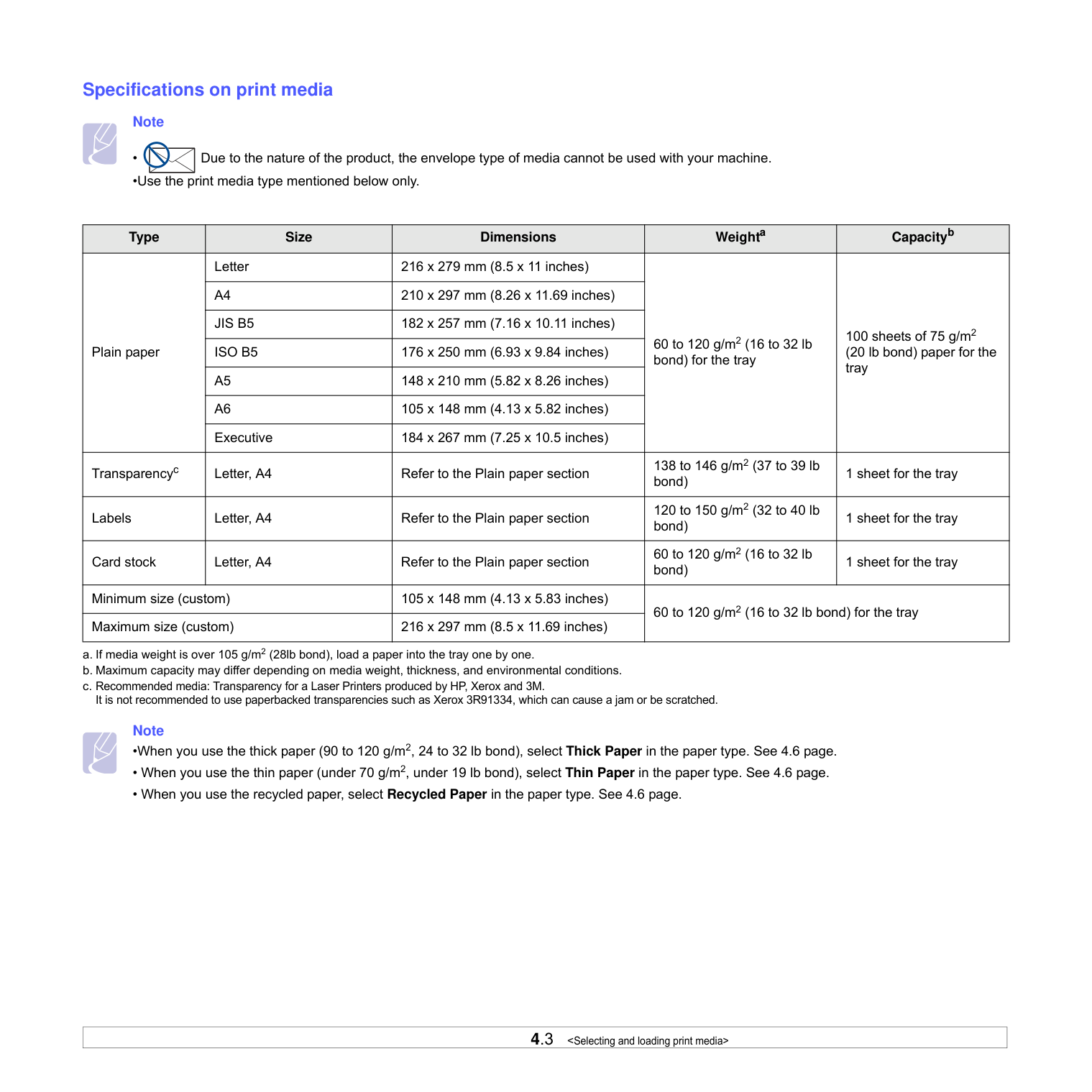
| | | |---|---| | | |
#################### Note
• You can load previously printed paper. The printed side should be facing up with an uncurled edge at the rear. If you experience problems with paper feed, turn the paper around. Note that print quality is not guaranteed.
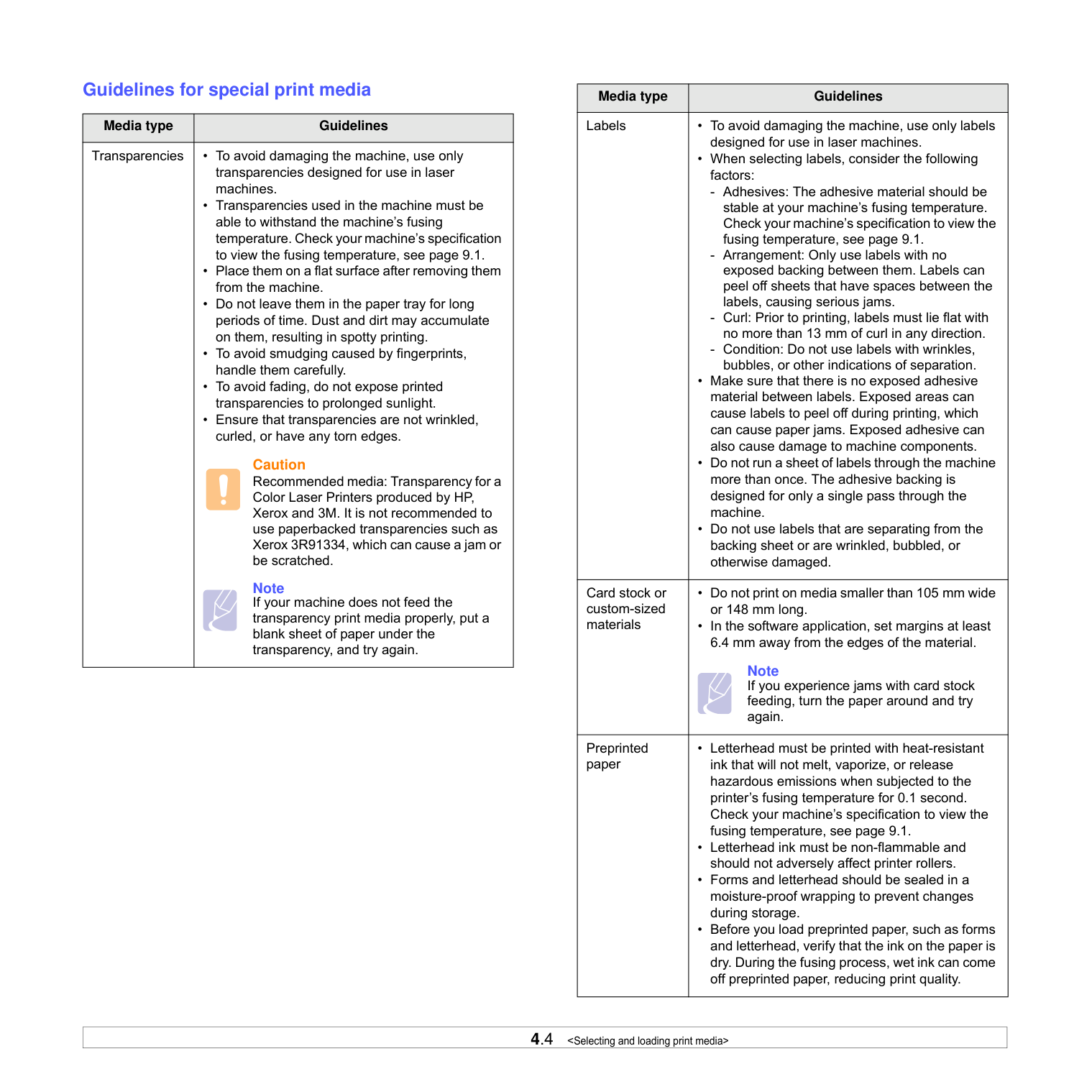
############## Changing the paper size in the tray
To load different sizes of paper, such as custom-sized paper, you need to adjust the paper guides.
1 Adjust the paper length guide to the desired paper length. It is
preset to Letter or A4 size depending on the country. To load another size, hold the lever and move the length guide to the corresponding position.
#################### Note
#################### Note
############# Setting the paper size and type
The settings you change remain in effect only while you are using the current program. To make your changes permanent, make them in the Printers folder.
#################### Note
The following procedure is for Windows XP. For other Windows OS, refer to the corresponding Windows User's Guide or online help.
##### 5Basic printing
This chapter explains common printing tasks. Your machine allows you to print from various Windows, Macintosh, or Linux applications.
Note The following procedure is for Windows operating system. For Linux and Macintosh, see Software section.
############# Printing a document
The exact steps for printing a document may vary depending on the application you use.
############# Canceling a print job
If the print job is waiting in a print queue or print spooler, such as the printer group in Windows, delete the job as follows:
For Windows Vista/2008, select Control Panel > Hardware and Sound > Printers.
For Windows 7, select Control Panel > Hardware and Sound > Devices and Printers.
For Windows Server 2008 R2, select Control Panel > Hardware > Devices and Printers.
For Windows 7 and Windows Server 2008 R2, right click your printer icon > context menus > See what’ s printing.
#################### Note
You can also access this window by simply double-clicking the printer icon at the bottom right corner of the Windows desktop.
You can also cancel the current job by pressing on the control panel.
##### 6Maintenance
This chapter provides information for maintaining your machine and the toner cartridge.
This chapter includes:
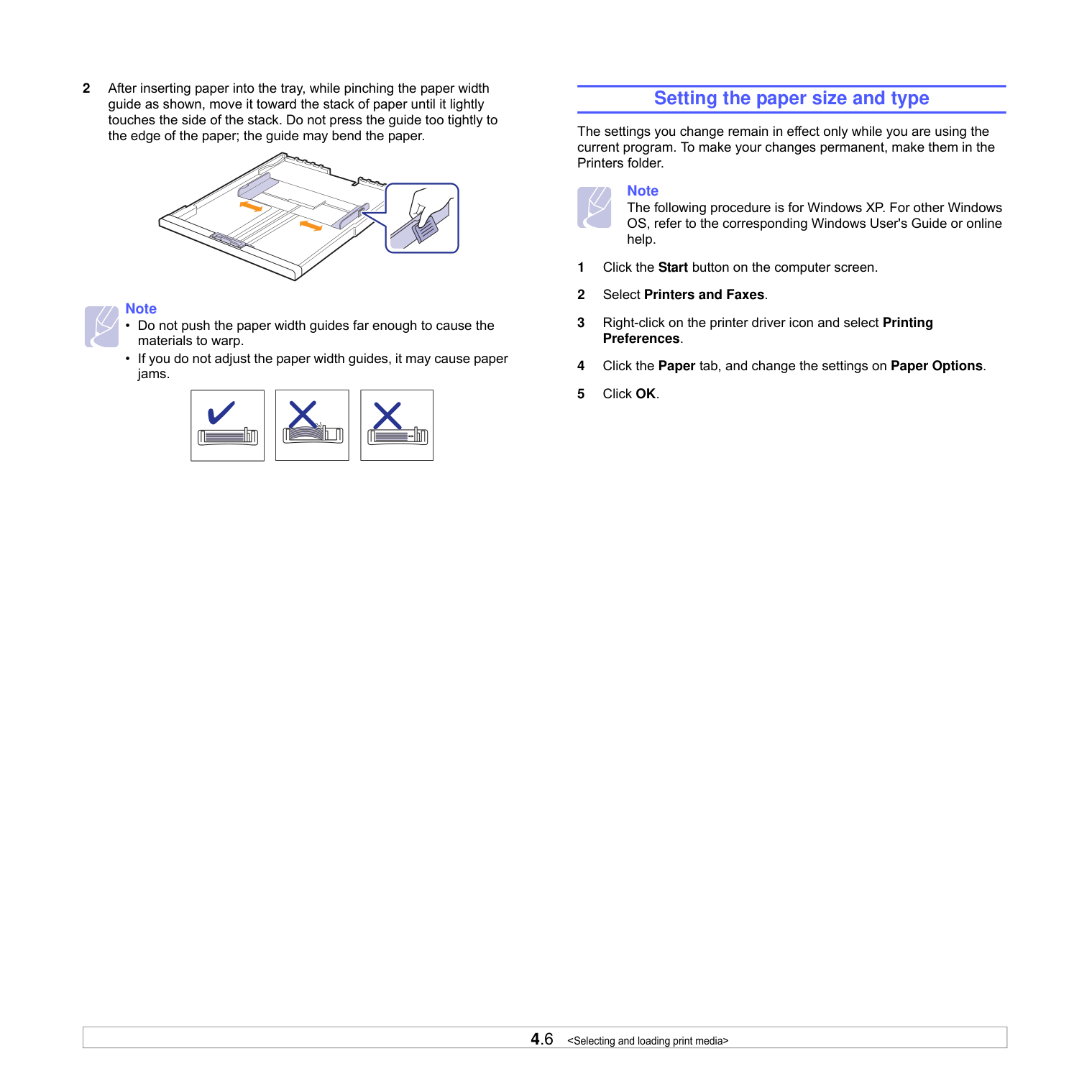
############# Printing a machine report
Press and hold Stop/Clear button for about 4 seconds to print a machine report.
############# Cleaning your machine
To maintain print quality, follow the cleaning procedures below each time the toner cartridge is replaced or if print and scan quality problems occur.
#################### Caution
############## Cleaning the outside
Make sure to brush off the dirt on the cloth provided before cleaning the cabinet. Make sure to spray water 4 to 6 times onto the cloth provided, or another cloth suitable for this purpose before cleaning the cabinet, wiping in on direction.
############## Cleaning the inside
During the printing process, paper, toner and dust particles can accumulate inside the machine. This buildup can cause print quality problems, such as toner specks or smearing. Cleaning the inside of the machine clears or reduces these problems. Contact a service representative to clean the parts inside the machine.
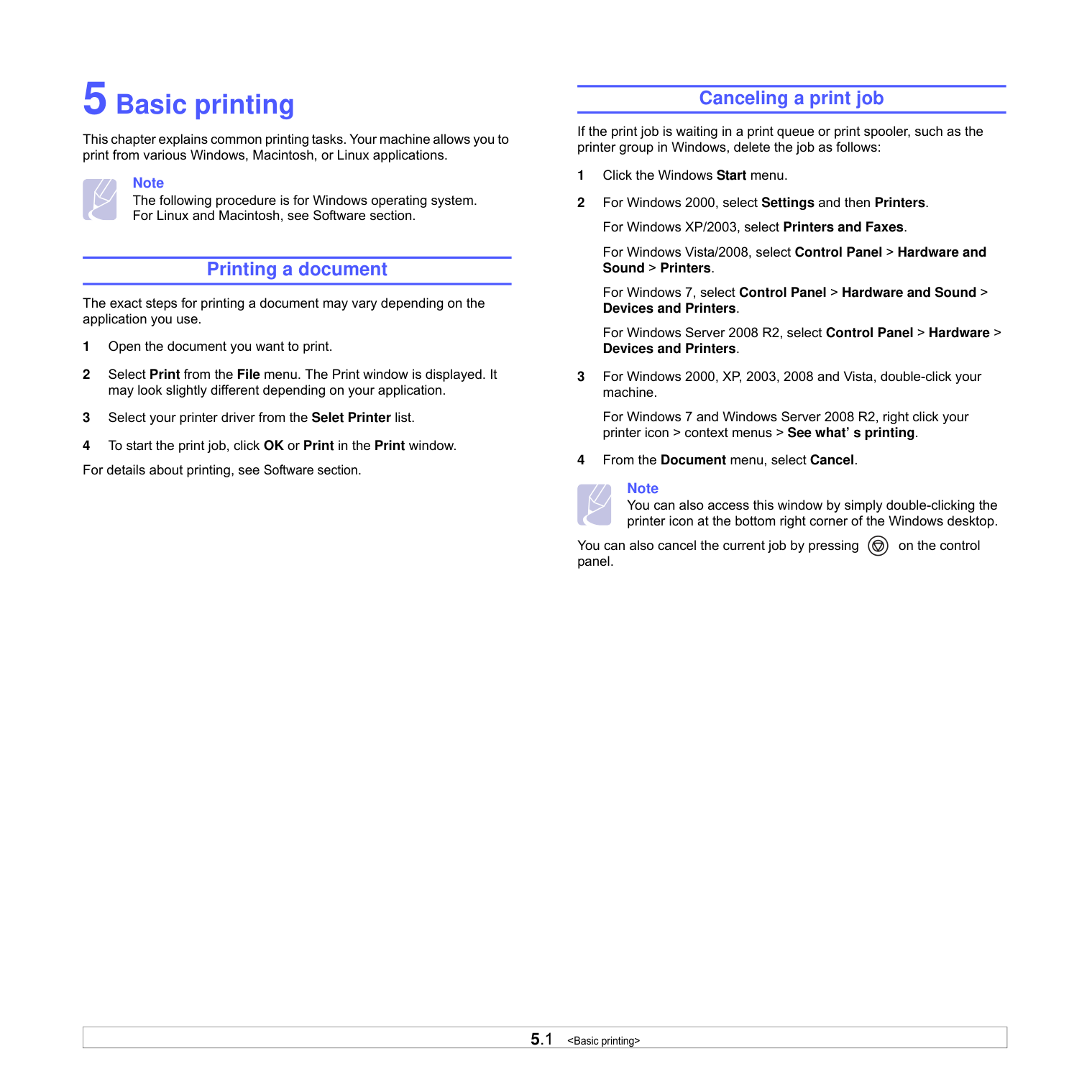
#################### Caution
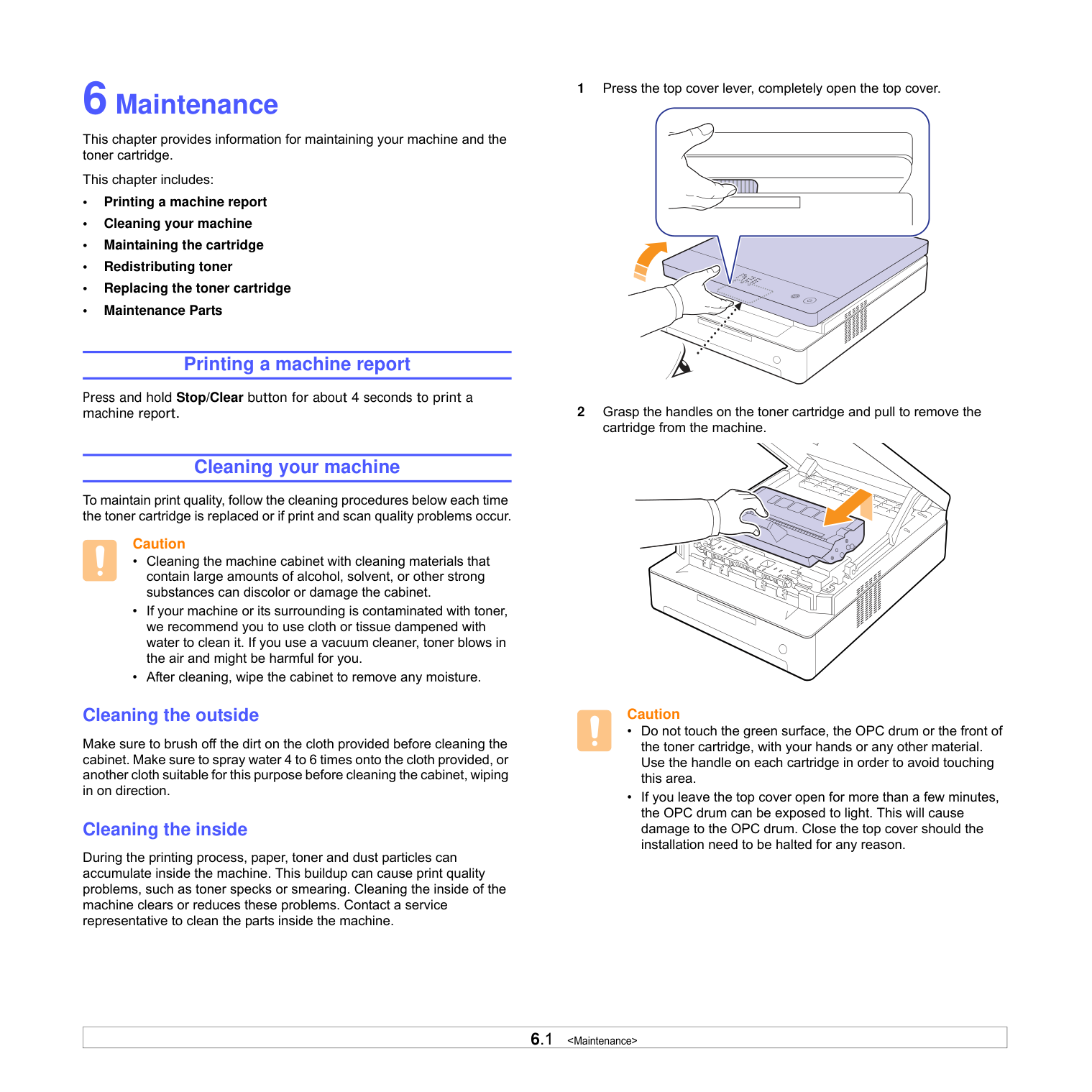
Note If toner gets on your clothing, wipe it off with a dry cloth and wash it in cold water. Hot water sets toner into fabric.
Note If the top cover is not completely closed, the machine will not operate.
Caution Be careful not to pinch your fingers, since the top cover is very heavy.
############# Maintaining the cartridge Toner cartridge storage
Toner cartridges contain components that are sensitive to light, temperature, and humidity. Samsung suggests users follow the recommendations to ensure the optimum performance, highest quality, and longest life from your new Samsung toner cartridge.
Store this cartridge in the same environment as the printer it will be used in; this should be in controlled office temperature and humidity conditions. The toner cartridge should remain in its original, unopened package until installation – If original packaging is not available, cover the top opening of the cartridge with paper and store in a dark cabinet.
Opening the cartridge package prior to use dramatically shortens its useful shelf and operating life. Do not store on the floor. If the toner cartridge is removed from the printer, always store the cartridge:
############## Use of non-Samsung and refilled toner cartridge
Samsung Electronics does not recommend or approve the use of nonSamsung brand toner cartridges in your printer including generic, store brand, refilled, or remanufactured toner cartridges.
#################### Caution
• Samsung’s printer warranty does not cover damage to the machine caused by the use of a refilled, remanufactured, or non-Samsung brand toner cartridge.
############## Estimated cartridge life
Estimated cartridge life (the life of the toner cartridge yield) depends on the amount of toner that print jobs require. The actual print-out number may vary depending on the print density of the pages you print on, operating environment, printing interval, media type, and/or media size. For example, if you print a lot of graphics, the consumption of the toner is high and you may need to change the cartridge more often.
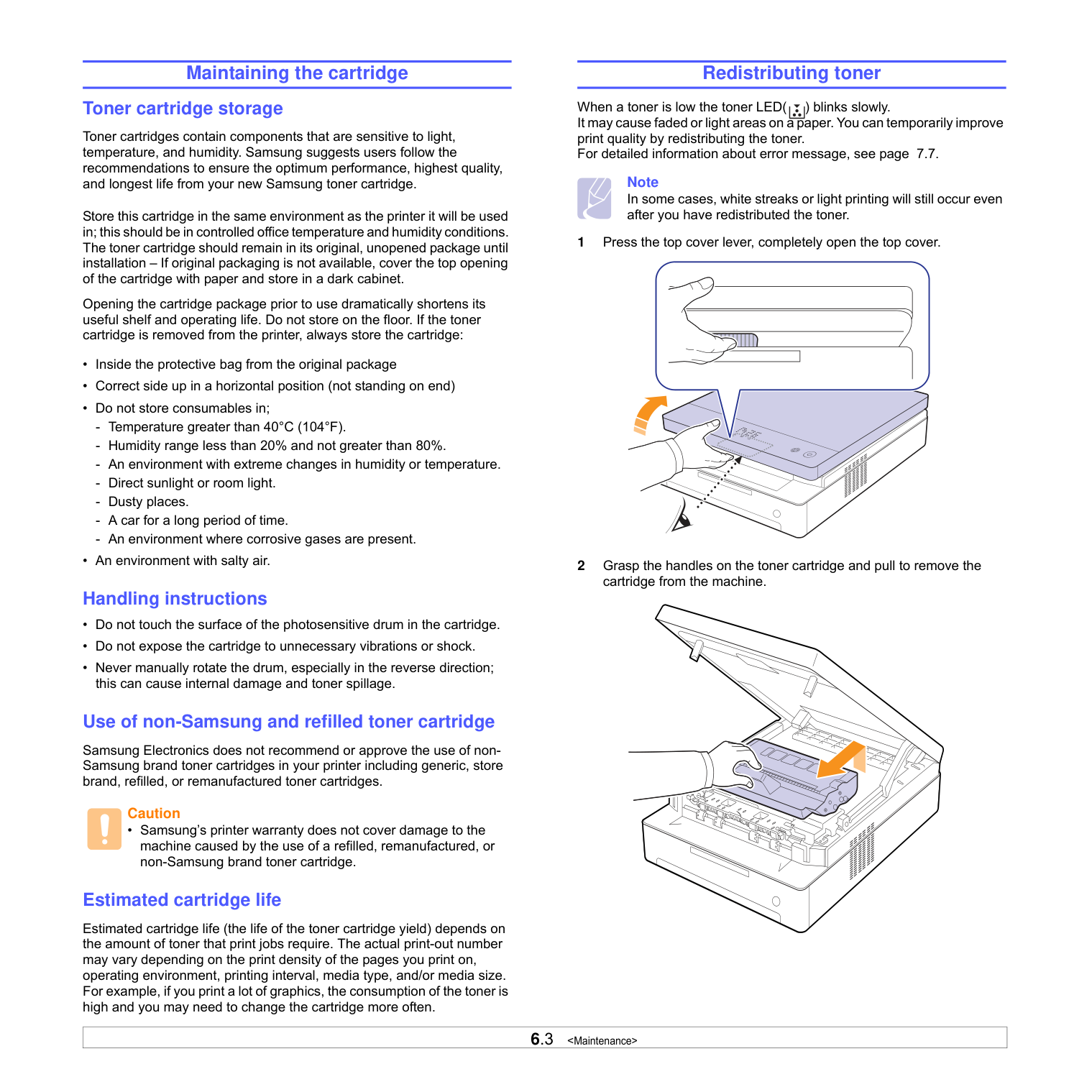
############# Redistributing toner
When a toner is low the toner LED( ) blinks slowly. It may cause faded or light areas on a paper. You can temporarily improve print quality by redistributing the toner. For detailed information about error message, see page 7.7.
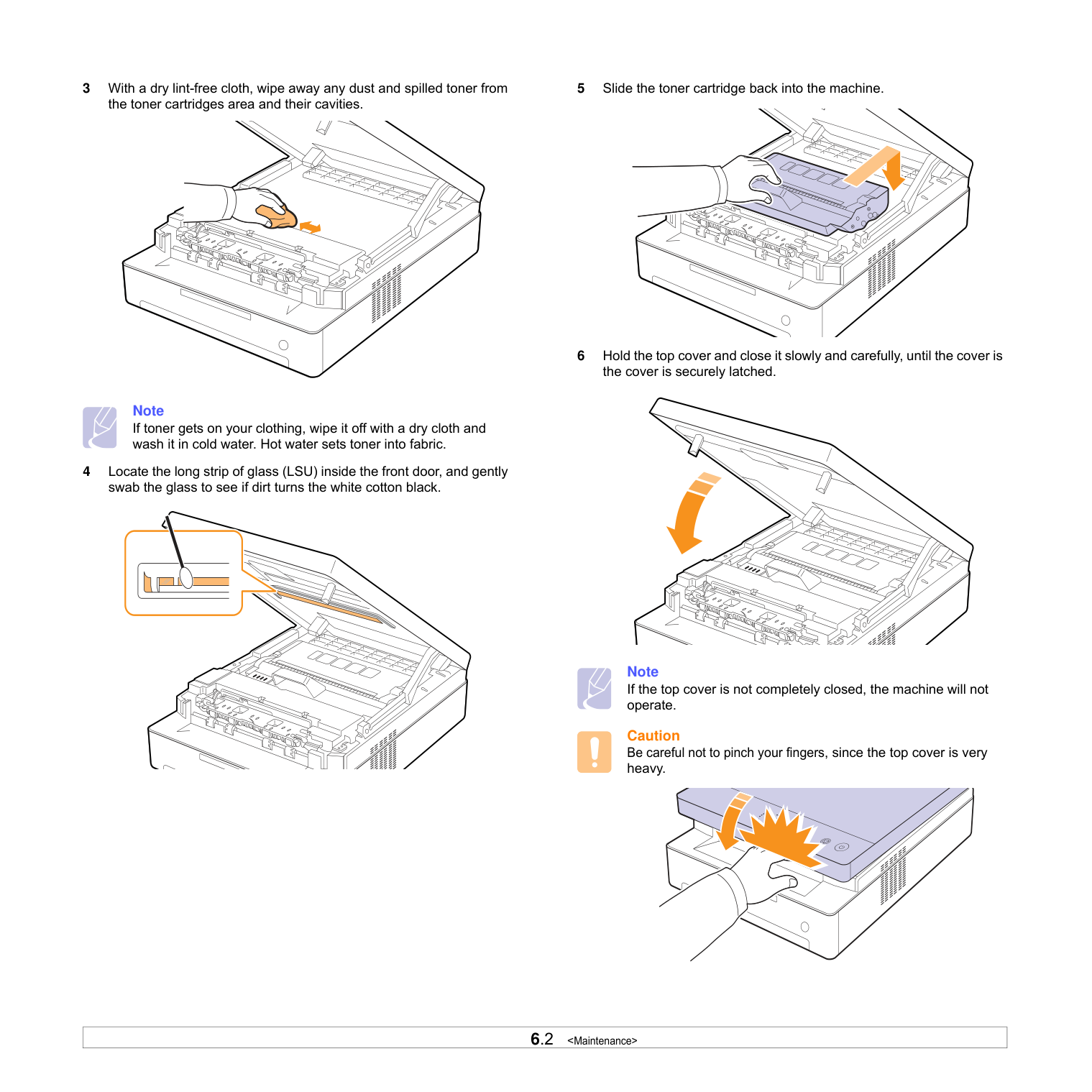
Note In some cases, white streaks or light printing will still occur even after you have redistributed the toner.
Caution
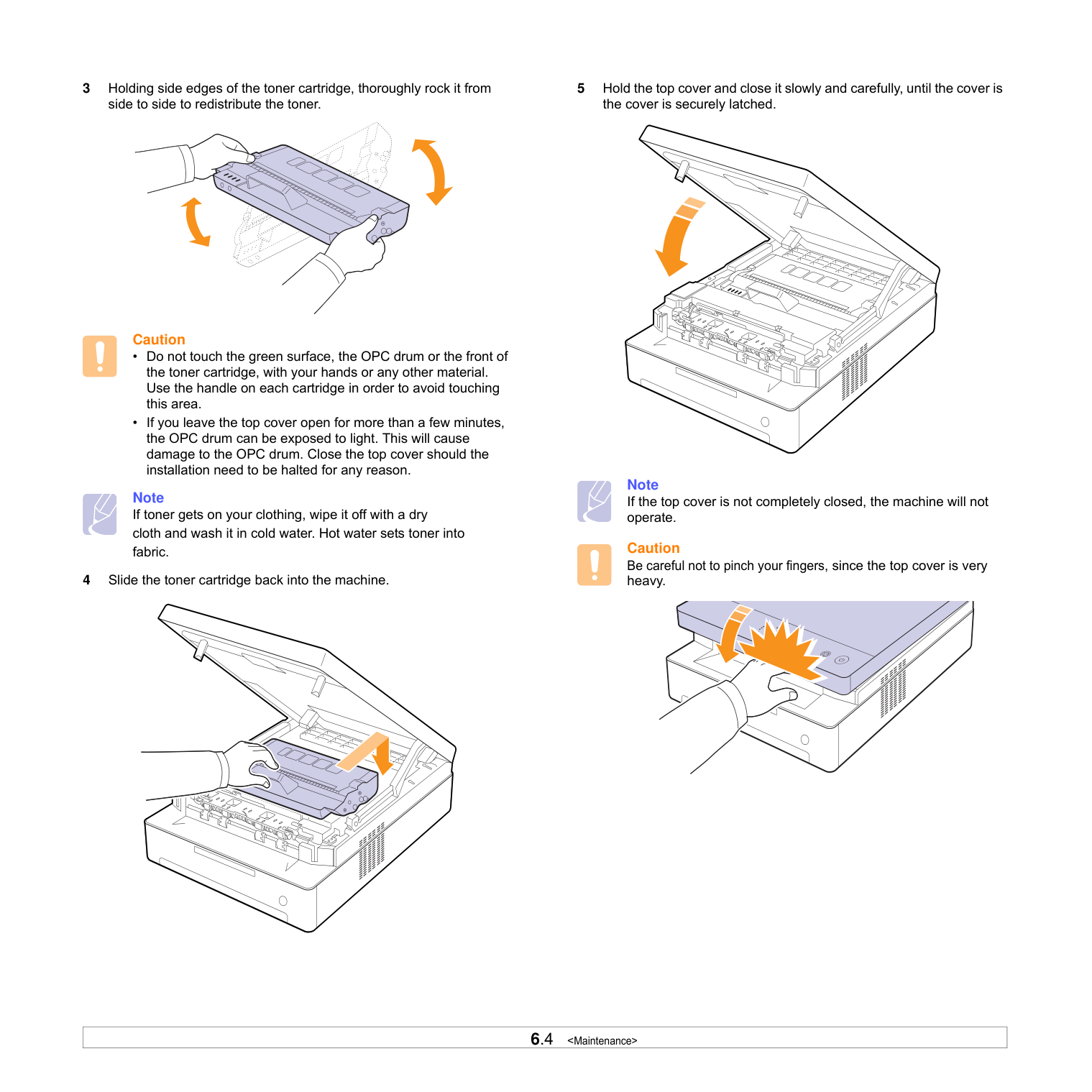
Note If toner gets on your clothing, wipe it off with a dry cloth and wash it in cold water. Hot water sets toner into fabric.
5 Hold the top cover and close it slowly and carefully, until the cover is
the cover is securely latched.
Note If the top cover is not completely closed, the machine will not operate.
Caution Be careful not to pinch your fingers, since the top cover is very heavy.
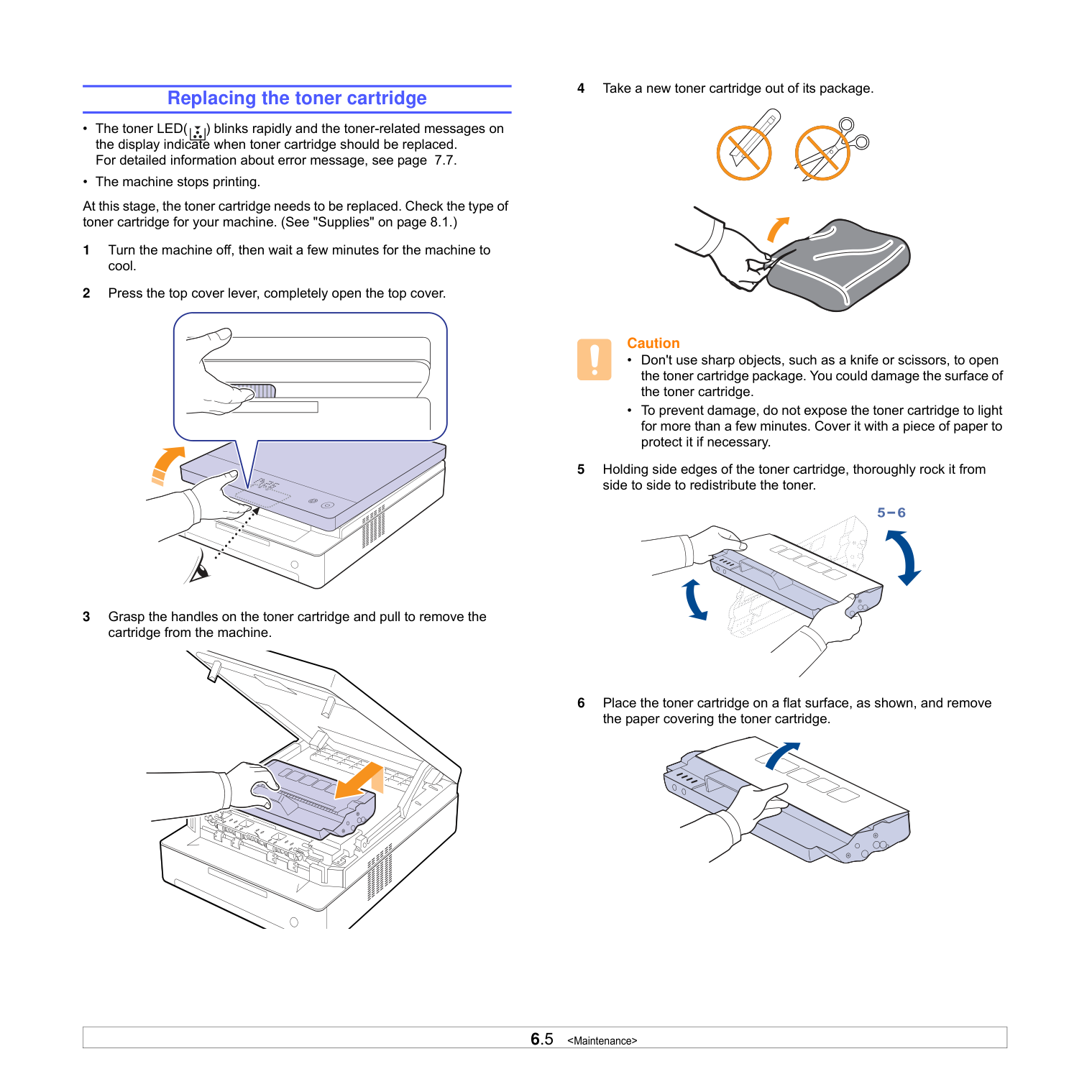
Replacing the toner cartridge • The toner LED( ) blinks rapidly and the toner-related messages on
the display indicate when toner cartridge should be replaced. For detailed information about error message, see page 7.7.
• The machine stops printing. At this stage, the toner cartridge needs to be replaced. Check the type of toner cartridge for your machine. (See "Supplies" on page 8.1.)
Caution
#################### Caution
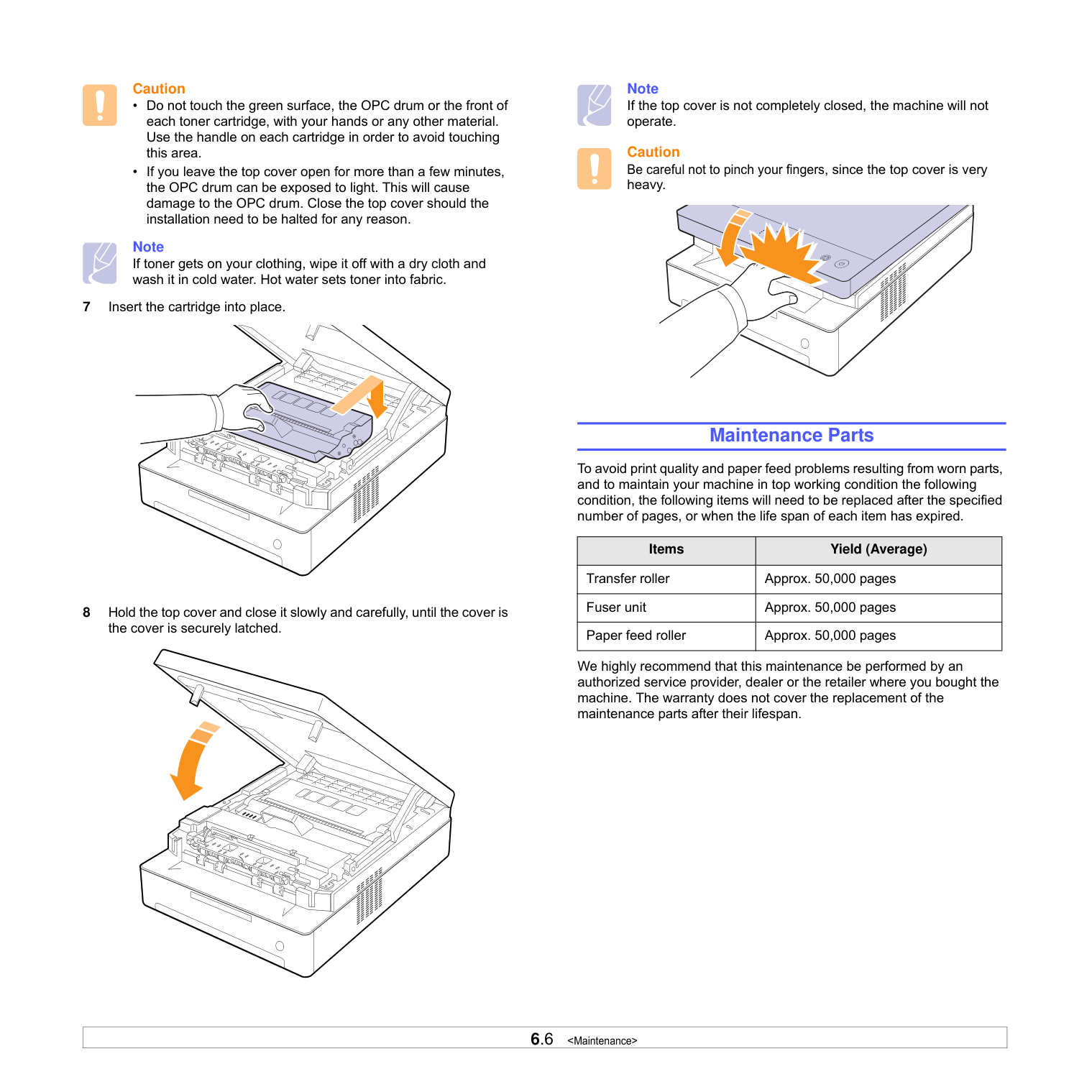
Note If toner gets on your clothing, wipe it off with a dry cloth and wash it in cold water. Hot water sets toner into fabric.
Note If the top cover is not completely closed, the machine will not operate.
Caution Be careful not to pinch your fingers, since the top cover is very heavy.
############# Maintenance Parts
To avoid print quality and paper feed problems resulting from worn parts, and to maintain your machine in top working condition the following condition, the following items will need to be replaced after the specified number of pages, or when the life span of each item has expired.
|Items|Yield (Average)| |---|---| |Transfer roller|Approx. 50,000 pages| |Fuser unit|Approx. 50,000 pages| |Paper feed roller|Approx. 50,000 pages|
We highly recommend that this maintenance be performed by an authorized service provider, dealer or the retailer where you bought the machine. The warranty does not cover the replacement of the maintenance parts after their lifespan.
##### 7Troubleshooting
This chapter gives helpful information on what to do if you encounter a problem.
This chapter includes:
############# Tips for avoiding paper jams
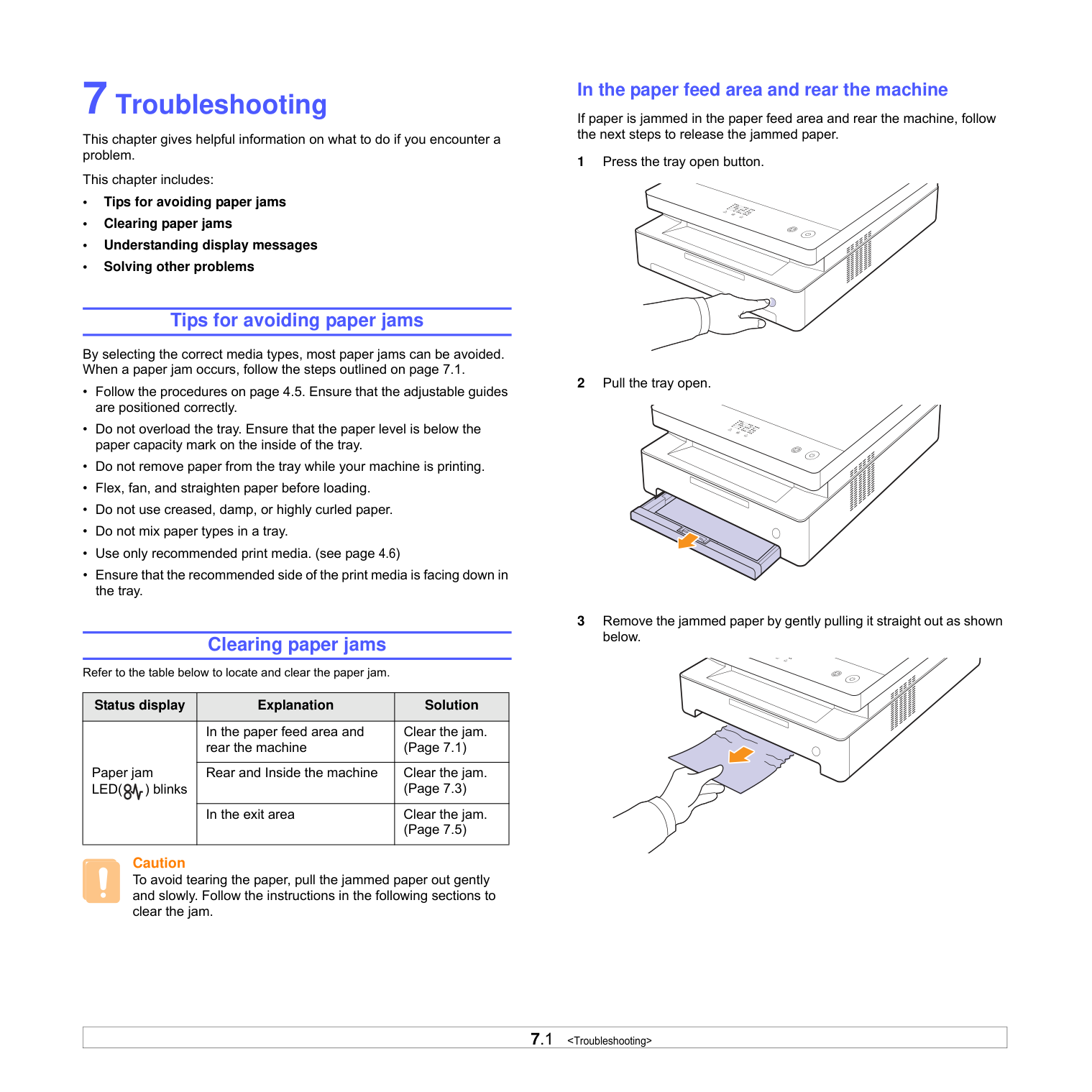
By selecting the correct media types, most paper jams can be avoided. When a paper jam occurs, follow the steps outlined on page 7.1.
############# Clearing paper jams
Refer to the table below to locate and clear the paper jam.
|Status display|Explanation|Solution| |---|---|---| |Paper jam LED( ) blinks
|In the paper feed area and rear the machine|Clear the jam. (Page 7.1)| |Paper jam LED( ) blinks
|Rear and Inside the machine|Clear the jam. (Page 7.3)| |Paper jam LED( ) blinks
|In the exit area|Clear the jam. (Page 7.5)|
Caution To avoid tearing the paper, pull the jammed paper out gently and slowly. Follow the instructions in the following sections to clear the jam.
############## In the paper feed area and rear the machine
If paper is jammed in the paper feed area and rear the machine, follow the next steps to release the jammed paper.
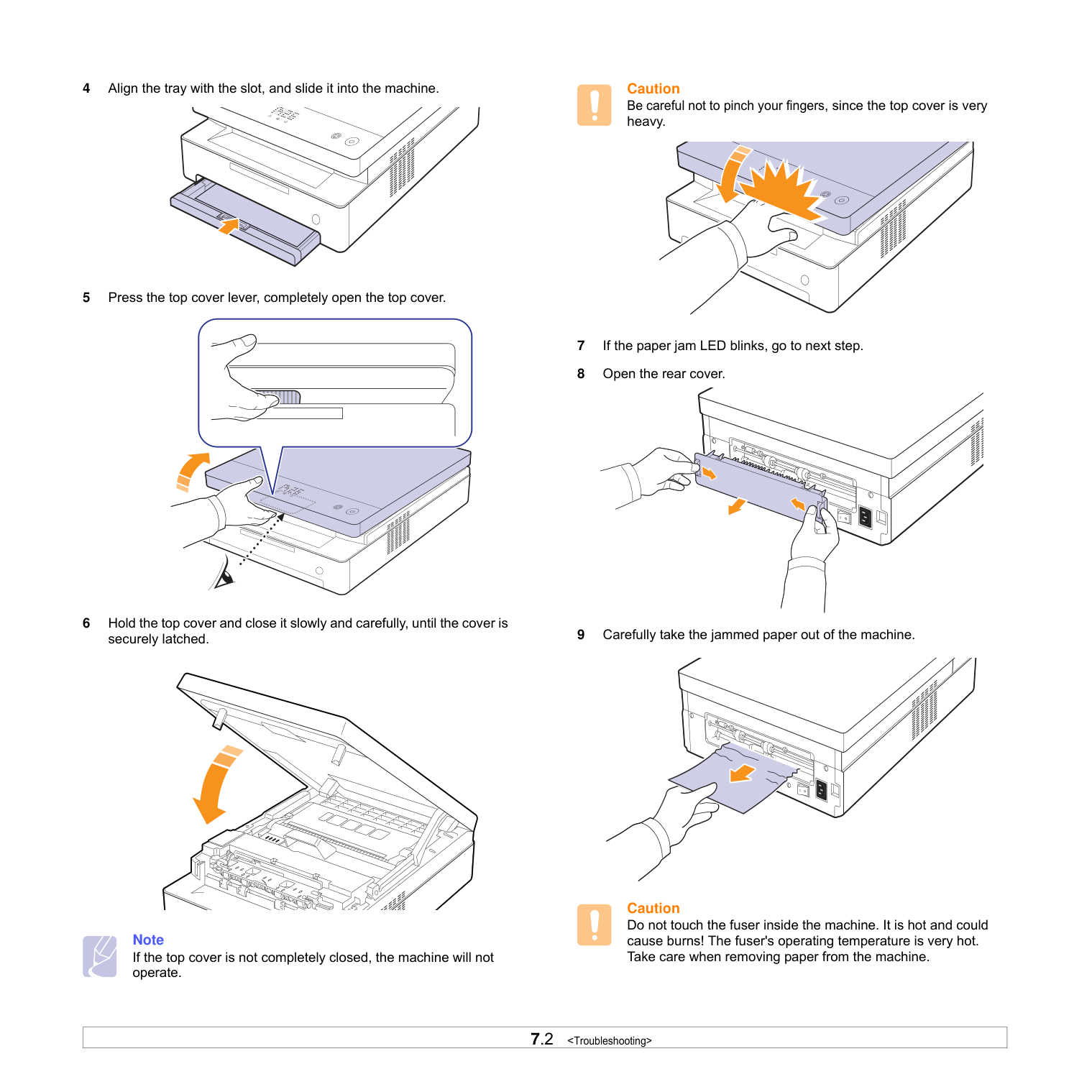
Note If the top cover is not completely closed, the machine will not operate.
Caution Be careful not to pinch your fingers, since the top cover is very heavy.
Caution Do not touch the fuser inside the machine. It is hot and could cause burns! The fuser's operating temperature is very hot. Take care when removing paper from the machine.
Note If the rear cover is not completely closed, the paper jam may occur.
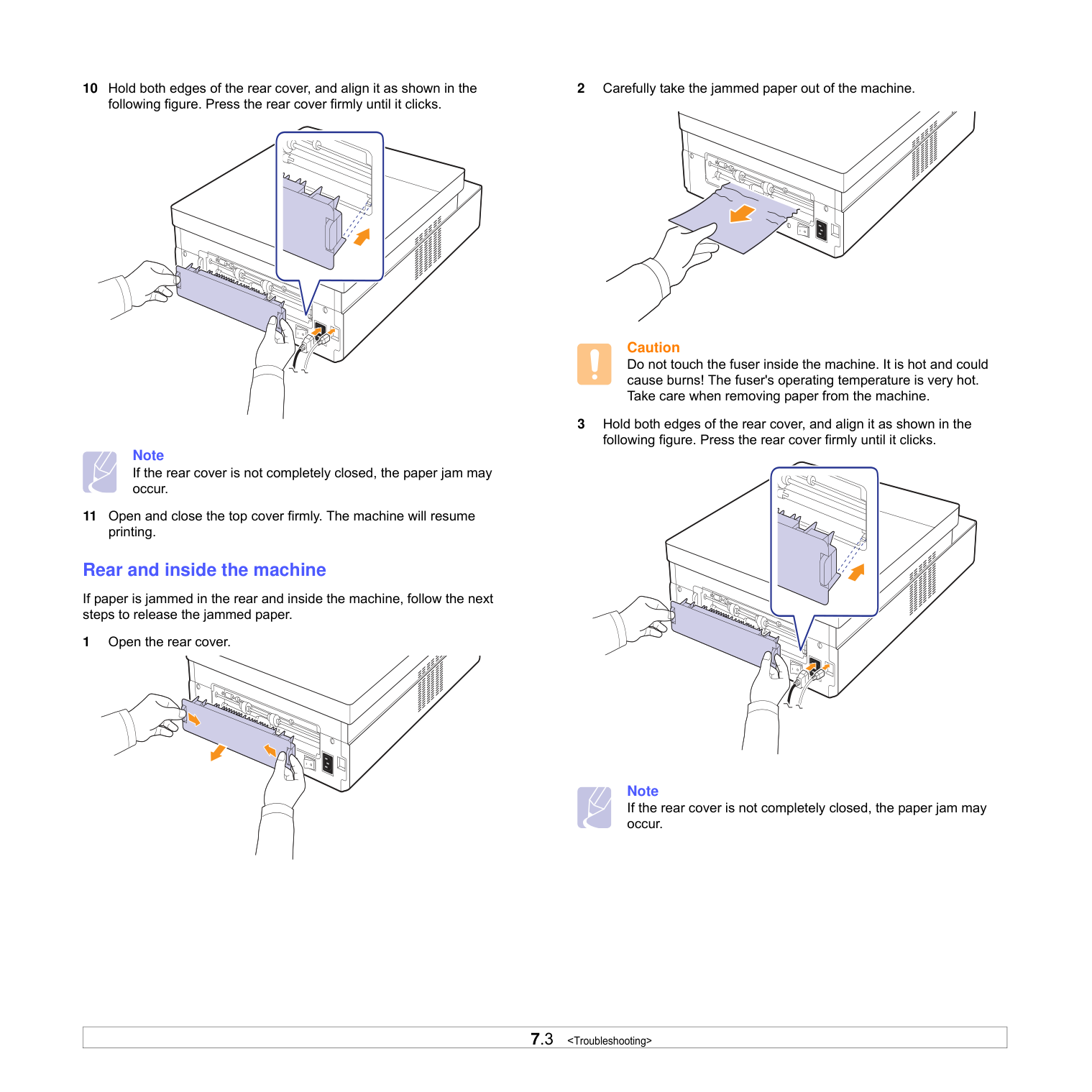
############## Rear and inside the machine
If paper is jammed in the rear and inside the machine, follow the next steps to release the jammed paper.
1 Open the rear cover.
Caution Do not touch the fuser inside the machine. It is hot and could cause burns! The fuser's operating temperature is very hot. Take care when removing paper from the machine.
Note If the rear cover is not completely closed, the paper jam may occur.
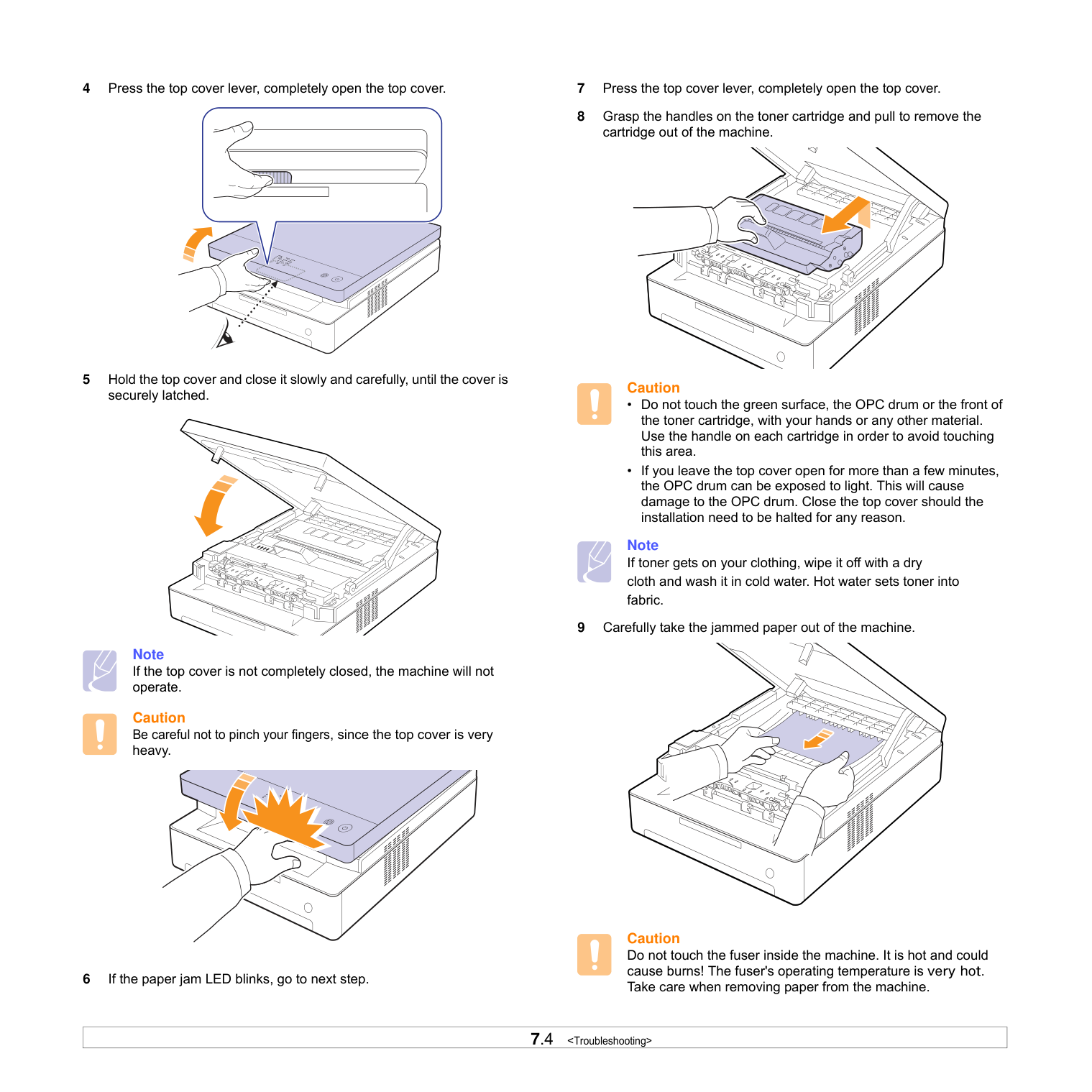
Note If the top cover is not completely closed, the machine will not operate.
Caution Be careful not to pinch your fingers, since the top cover is very heavy.
Caution
Note If toner gets on your clothing, wipe it off with a dry cloth and wash it in cold water. Hot water sets toner into fabric.
Caution Do not touch the fuser inside the machine. It is hot and could cause burns! The fuser's operating temperature is very hot. Take care when removing paper from the machine.
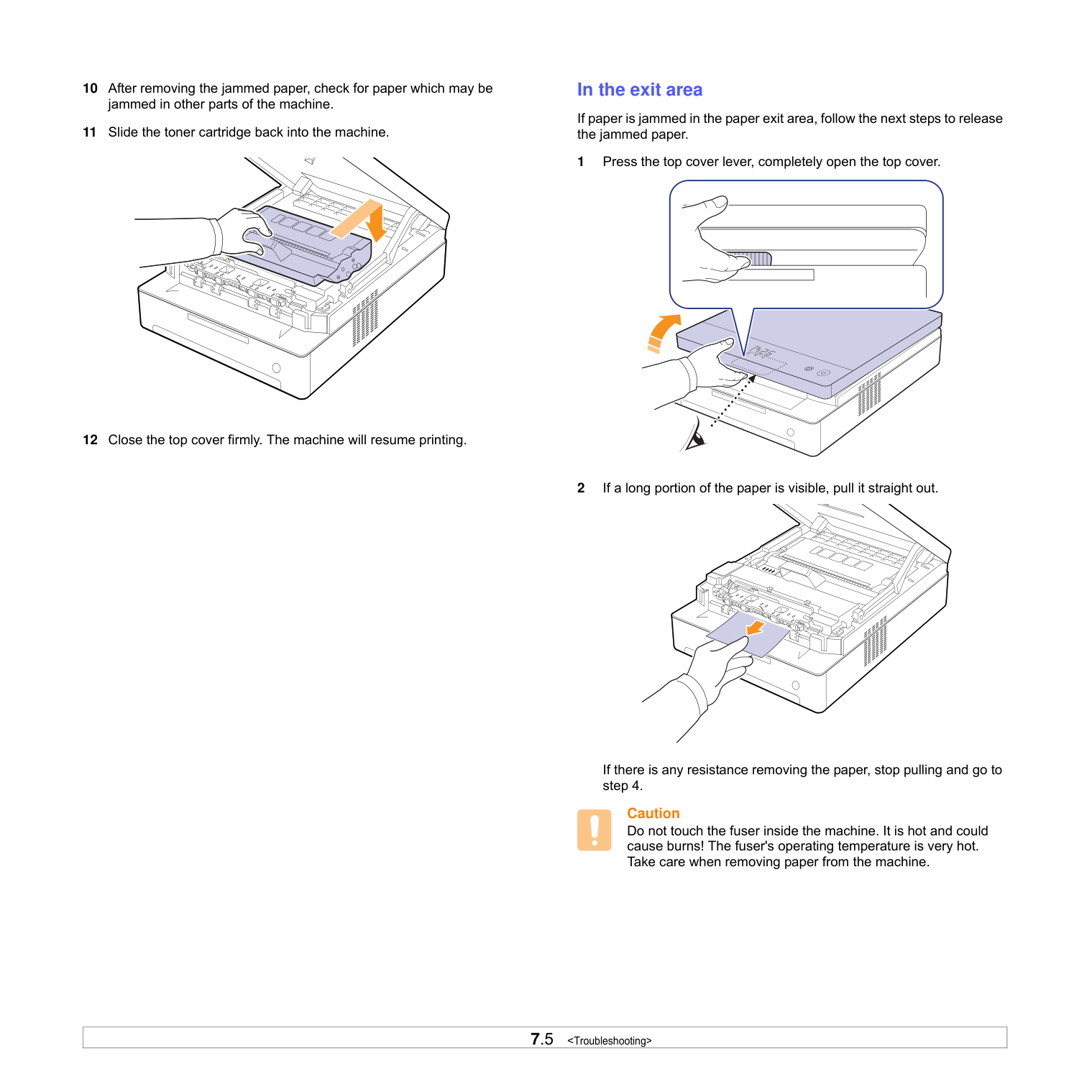
############## In the exit area
If paper is jammed in the paper exit area, follow the next steps to release the jammed paper.
If there is any resistance removing the paper, stop pulling and go to step 4.
Caution Do not touch the fuser inside the machine. It is hot and could cause burns! The fuser's operating temperature is very hot. Take care when removing paper from the machine.
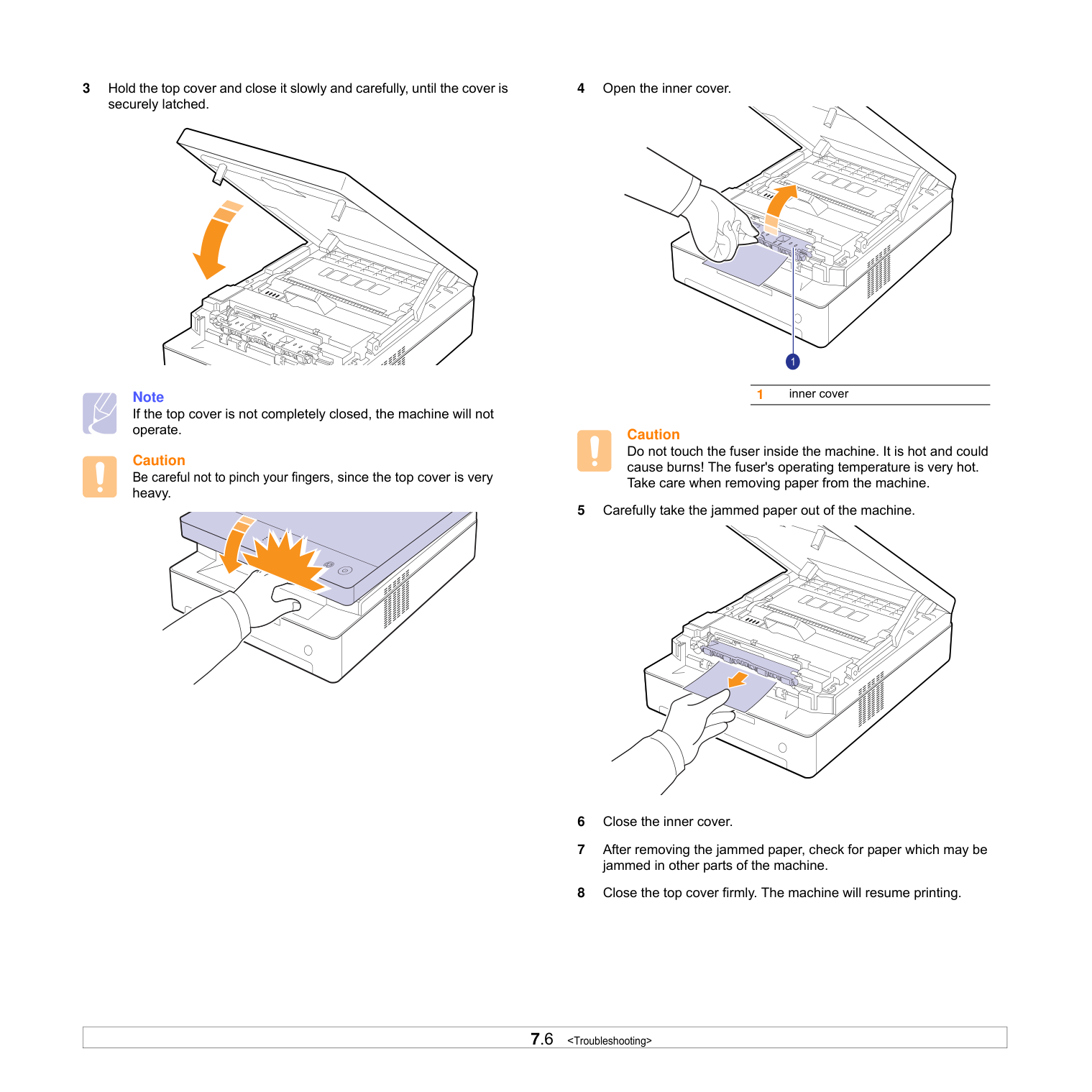
3 Hold the top cover and close it slowly and carefully, until the cover is
securely latched.
Note If the top cover is not completely closed, the machine will not operate.
Caution Be careful not to pinch your fingers, since the top cover is very heavy.
Caution Do not touch the fuser inside the machine. It is hot and could cause burns! The fuser's operating temperature is very hot. Take care when removing paper from the machine.
1 inner cover
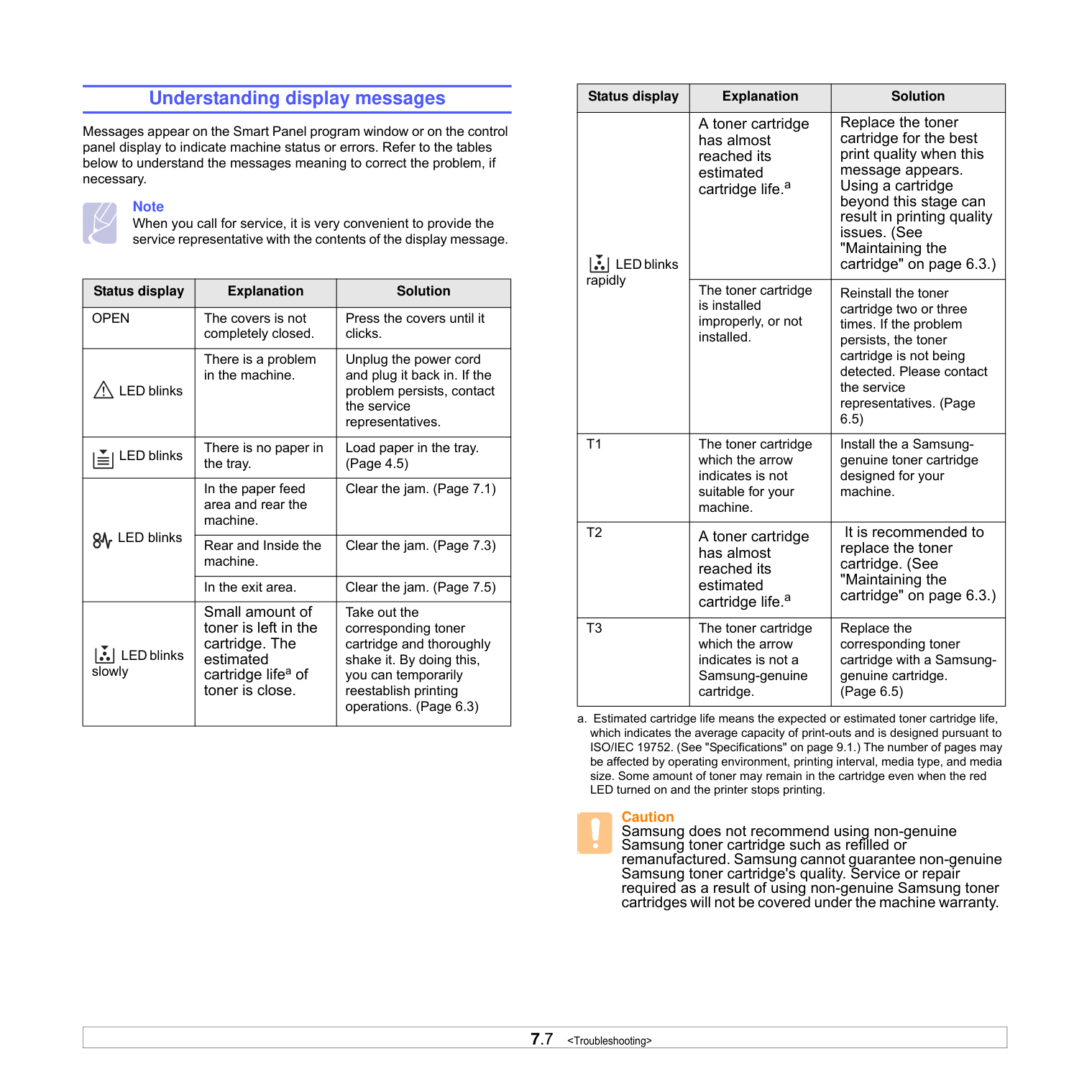
############# Understanding display messages
Messages appear on the Smart Panel program window or on the control panel display to indicate machine status or errors. Refer to the tables below to understand the messages meaning to correct the problem, if necessary.
Note When you call for service, it is very convenient to provide the service representative with the contents of the display message.
|Status display|Explanation|Solution| |---|---|---| |OPEN|The covers is not completely closed.|Press the covers until it clicks.| |LED blinks
|There is a problem in the machine.|Unplug the power cord and plug it back in. If the problem persists, contact the service representatives.| |LED blinks
|There is no paper in the tray.|Load paper in the tray. (Page 4.5)| |LED blinks
|In the paper feed area and rear the machine.|Clear the jam. (Page 7.1)| |LED blinks
|Rear and Inside the machine.|Clear the jam. (Page 7.3)| |LED blinks
|In the exit area.|Clear the jam. (Page 7.5)| |LED blinks slowly
|Small amount of toner is left in the cartridge. The estimated cartridge lifea of toner is close.|Take out the corresponding toner cartridge and thoroughly shake it. By doing this, you can temporarily reestablish printing operations. (Page 6.3)|
|Status display|Explanation|Solution| |---|---|---| |LED blinks rapidly
|A toner cartridge has almost reached its estimated cartridge life.a|Replace the toner cartridge for the best print quality when this message appears. Using a cartridge beyond this stage can result in printing quality issues. (See "Maintaining the cartridge" on page 6.3.)| |LED blinks rapidly
|The toner cartridge is installed improperly, or not installed.|Reinstall the toner cartridge two or three times. If the problem persists, the toner cartridge is not being detected. Please contact the service representatives. (Page 6.5)| |T1|The toner cartridge which the arrow indicates is not suitable for your machine.|Install the a Samsunggenuine toner cartridge designed for your machine.| |T2|A toner cartridge has almost reached its estimated cartridge life.a|It is recommended to replace the toner cartridge. (See "Maintaining the cartridge" on page 6.3.)| |T3|The toner cartridge which the arrow indicates is not a Samsung-genuine cartridge.|Replace the corresponding toner cartridge with a Samsunggenuine cartridge. (Page 6.5)|
a. Estimated cartridge life means the expected or estimated toner cartridge life, which indicates the average capacity of print-outs and is designed pursuant to ISO/IEC 19752. (See "Specifications" on page 9.1.) The number of pages may be affected by operating environment, printing interval, media type, and media size. Some amount of toner may remain in the cartridge even when the red LED turned on and the printer stops printing.
Caution Samsung does not recommend using non-genuine Samsung toner cartridge such as refilled or remanufactured. Samsung cannot guarantee non-genuine Samsung toner cartridge's quality. Service or repair required as a result of using non-genuine Samsung toner cartridges will not be covered under the machine warranty.
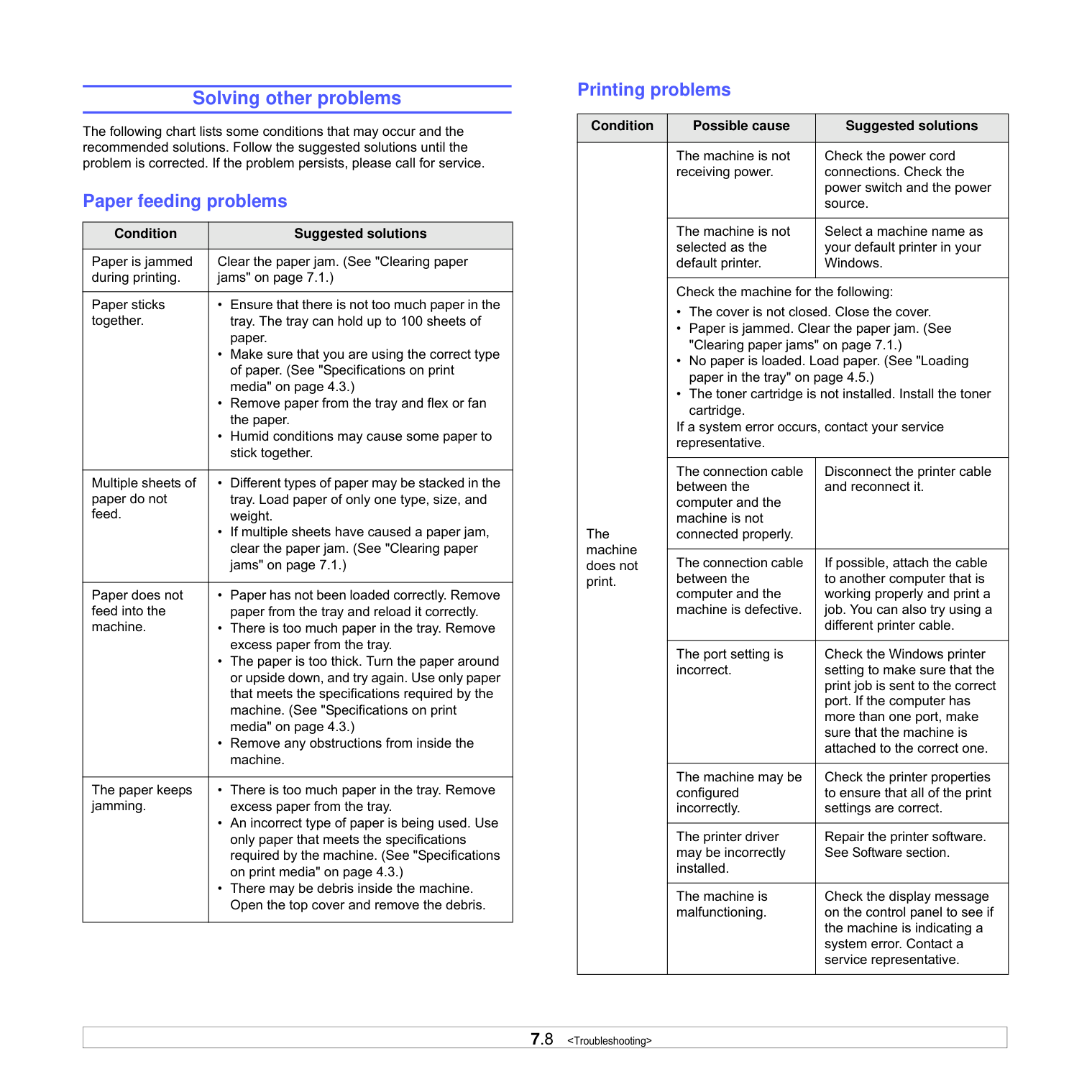
############# Solving other problems
The following chart lists some conditions that may occur and the recommended solutions. Follow the suggested solutions until the problem is corrected. If the problem persists, please call for service.
Paper feeding problems
|Condition|Suggested solutions| |---|---| |Paper is jammed during printing.|Clear the paper jam. (See "Clearing paper jams" on page 7.1.)| |Paper sticks together.|• Ensure that there is not too much paper in the tray. The tray can hold up to 100 sheets of paper.
• Make sure that you are using the correct type of paper. (See "Specifications on print media" on page 4.3.)
• Remove paper from the tray and flex or fan the paper.
• Humid conditions may cause some paper to stick together.
| |Multiple sheets of paper do not feed.|• Different types of paper may be stacked in the tray. Load paper of only one type, size, and weight.
• If multiple sheets have caused a paper jam, clear the paper jam. (See "Clearing paper jams" on page 7.1.)
| |Paper does not feed into the machine.|• Paper has not been loaded correctly. Remove paper from the tray and reload it correctly.
• There is too much paper in the tray. Remove excess paper from the tray.
• The paper is too thick. Turn the paper around or upside down, and try again. Use only paper that meets the specifications required by the machine. (See "Specifications on print media" on page 4.3.)
• Remove any obstructions from inside the machine.
| |The paper keeps jamming.|• There is too much paper in the tray. Remove excess paper from the tray.
• An incorrect type of paper is being used. Use only paper that meets the specifications required by the machine. (See "Specifications on print media" on page 4.3.)
• There may be debris inside the machine. Open the top cover and remove the debris.
|
Printing problems
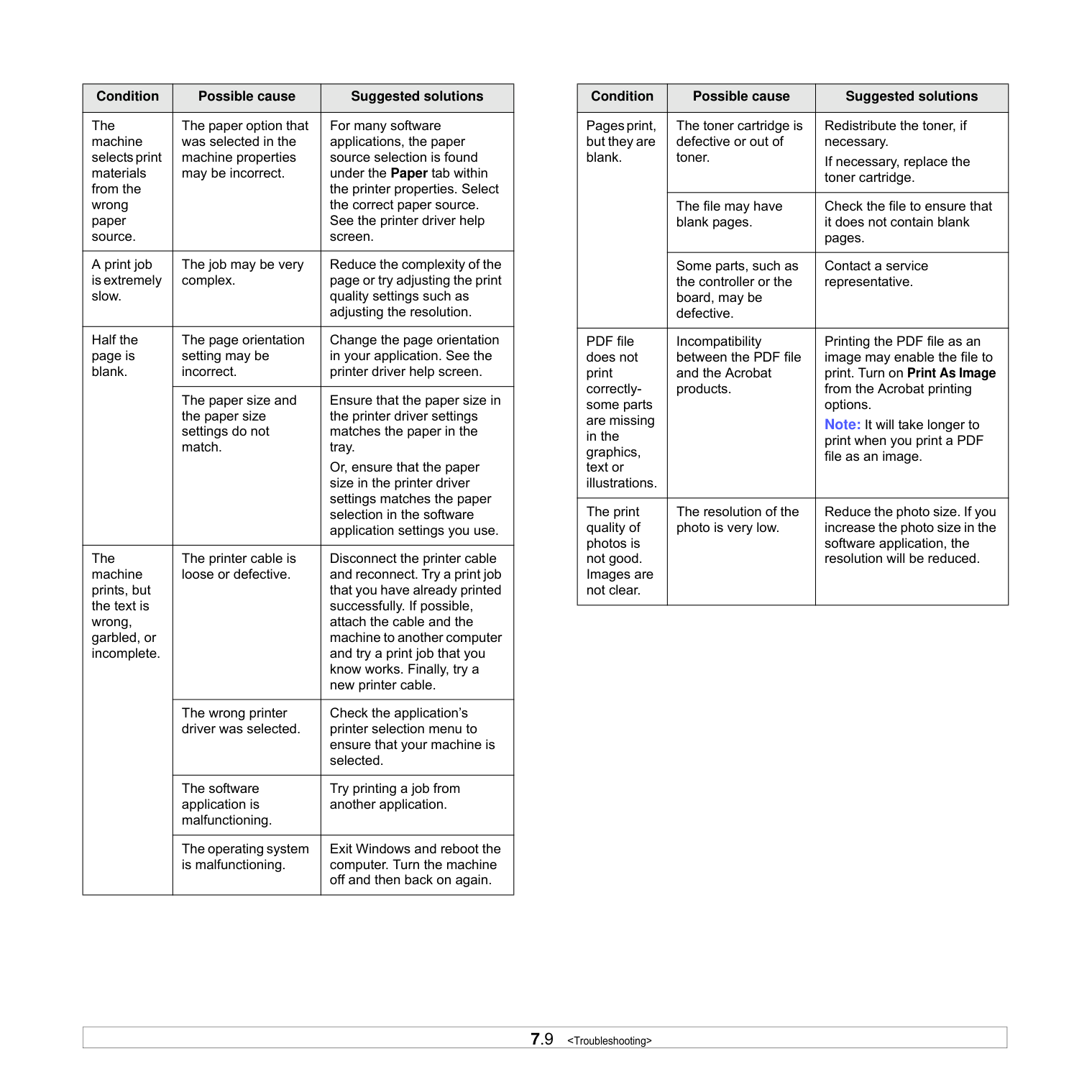
|Condition|Possible cause|Suggested solutions| |---|---|---| |The machine does not print.|The machine is not receiving power.|Check the power cord connections. Check the power switch and the power source.| |The machine does not print.|The machine is not selected as the default printer.|Select a machine name as your default printer in your Windows.| |The machine does not print.|Check the machine for the following:
• The cover is not closed. Close the cover.
• Paper is jammed. Clear the paper jam. (See "Clearing paper jams" on page 7.1.)
• No paper is loaded. Load paper. (See "Loading paper in the tray" on page 4.5.)
• The toner cartridge is not installed. Install the toner cartridge.
If a system error occurs, contact your service representative.|Check the machine for the following:
• The cover is not closed. Close the cover.
• Paper is jammed. Clear the paper jam. (See "Clearing paper jams" on page 7.1.)
• No paper is loaded. Load paper. (See "Loading paper in the tray" on page 4.5.)
• The toner cartridge is not installed. Install the toner cartridge.
If a system error occurs, contact your service representative.| |The machine does not print.|The connection cable between the computer and the machine is not connected properly.|Disconnect the printer cable and reconnect it.| |The machine does not print.|The connection cable between the computer and the machine is defective.|If possible, attach the cable to another computer that is working properly and print a job. You can also try using a different printer cable.| |The machine does not print.|The port setting is incorrect.|Check the Windows printer setting to make sure that the print job is sent to the correct port. If the computer has more than one port, make sure that the machine is attached to the correct one.| |The machine does not print.|The machine may be configured incorrectly.|Check the printer properties to ensure that all of the print settings are correct.| |The machine does not print.|The printer driver may be incorrectly installed.|Repair the printer software. See Software section.| |The machine does not print.|The machine is malfunctioning.|Check the display message on the control panel to see if the machine is indicating a system error. Contact a service representative.|
|Condition|Possible cause|Suggested solutions| |---|---|---| |The machine selects print materials from the wrong paper source.|The paper option that was selected in the machine properties may be incorrect.|For many software applications, the paper source selection is found under the Paper tab within the printer properties. Select the correct paper source. See the printer driver help screen.| |A print job is extremely slow.|The job may be very complex.|Reduce the complexity of the page or try adjusting the print quality settings such as adjusting the resolution.| |Half the page is blank.|The page orientation setting may be incorrect.|Change the page orientation in your application. See the printer driver help screen.| |Half the page is blank.|The paper size and the paper size settings do not match.|Ensure that the paper size in the printer driver settings matches the paper in the tray. Or, ensure that the paper size in the printer driver settings matches the paper selection in the software application settings you use.| |The machine prints, but the text is wrong, garbled, or incomplete.|The printer cable is loose or defective.|Disconnect the printer cable and reconnect. Try a print job that you have already printed successfully. If possible, attach the cable and the machine to another computer and try a print job that you know works. Finally, try a new printer cable.| |The machine prints, but the text is wrong, garbled, or incomplete.|The wrong printer driver was selected.|Check the application’s printer selection menu to ensure that your machine is selected.| |The machine prints, but the text is wrong, garbled, or incomplete.|The software application is malfunctioning.|Try printing a job from another application.|
|The machine prints, but the text is wrong, garbled, or incomplete.|The operating system is malfunctioning.|Exit Windows and reboot the computer. Turn the machine off and then back on again.|
|Condition|Possible cause|Suggested solutions| |---|---|---| |Pages print, but they are blank.|The toner cartridge is defective or out of toner.|Redistribute the toner, if necessary. If necessary, replace the toner cartridge.| |Pages print, but they are blank.|The file may have blank pages.|Check the file to ensure that it does not contain blank pages.| |Pages print, but they are blank.|Some parts, such as the controller or the board, may be defective.|Contact a service representative.| |PDF file does not print correctlysome parts are missing in the graphics, text or illustrations.|Incompatibility between the PDF file and the Acrobat products.|Printing the PDF file as an image may enable the file to print. Turn on Print As Image from the Acrobat printing options. Note: It will take longer to print when you print a PDF file as an image.| |The print quality of photos is not good. Images are not clear.|The resolution of the photo is very low.|Reduce the photo size. If you increase the photo size in the software application, the resolution will be reduced.|
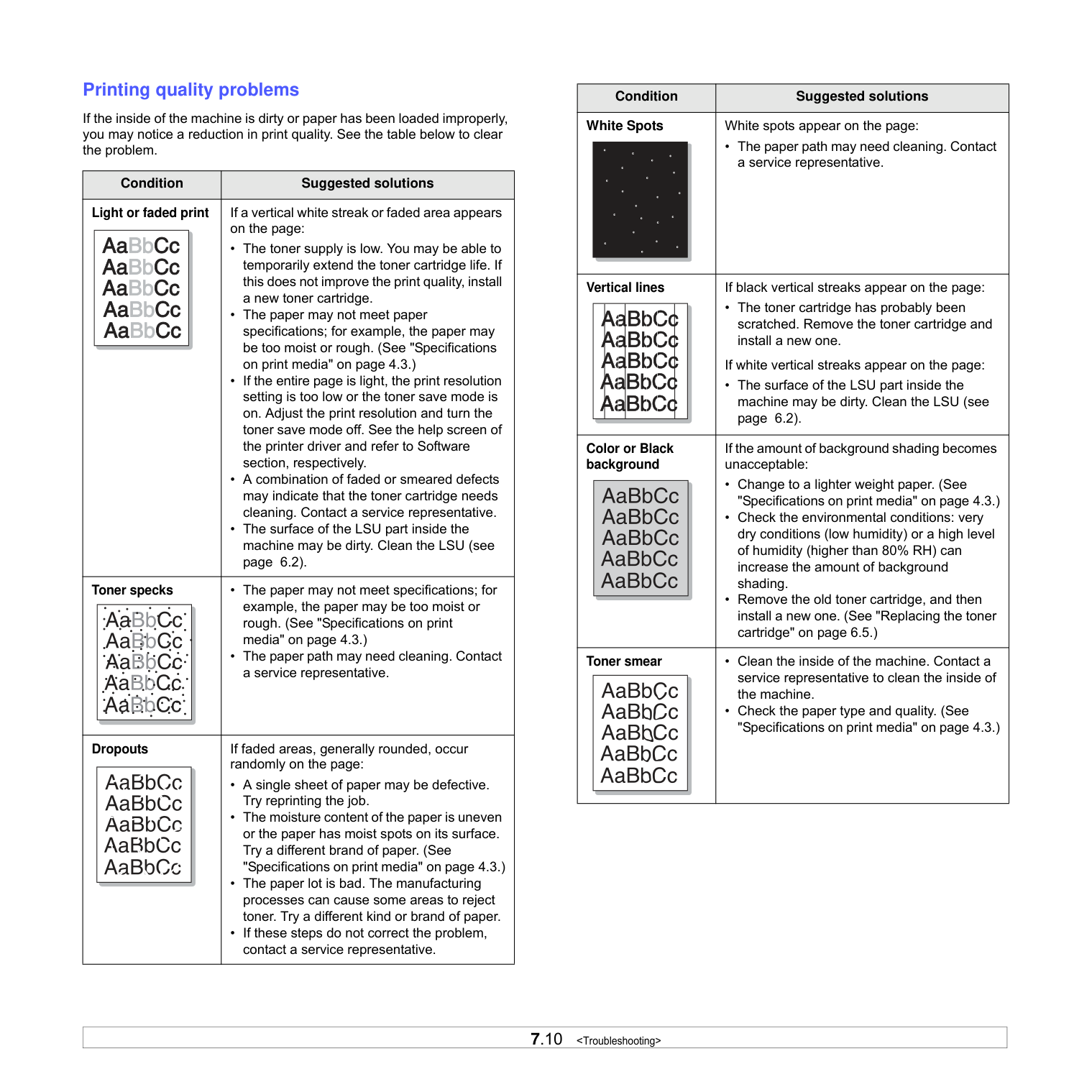
############## Printing quality problems
If the inside of the machine is dirty or paper has been loaded improperly, you may notice a reduction in print quality. See the table below to clear the problem.
|Condition|Suggested solutions| |---|---| |Light or faded print|If a vertical white streak or faded area appears on the page:
• The toner supply is low. You may be able to temporarily extend the toner cartridge life. If this does not improve the print quality, install a new toner cartridge.
• The paper may not meet paper specifications; for example, the paper may be too moist or rough. (See "Specifications on print media" on page 4.3.)
• If the entire page is light, the print resolution setting is too low or the toner save mode is on. Adjust the print resolution and turn the toner save mode off. See the help screen of the printer driver and refer to Software section, respectively.
• A combination of faded or smeared defects may indicate that the toner cartridge needs cleaning. Contact a service representative.
• The surface of the LSU part inside the machine may be dirty. Clean the LSU (see page 6.2).
| |Toner specks|• The paper may not meet specifications; for example, the paper may be too moist or rough. (See "Specifications on print media" on page 4.3.)
• The paper path may need cleaning. Contact a service representative.
| |Dropouts|If faded areas, generally rounded, occur randomly on the page:
• A single sheet of paper may be defective. Try reprinting the job.
• The moisture content of the paper is uneven or the paper has moist spots on its surface. Try a different brand of paper. (See "Specifications on print media" on page 4.3.)
• The paper lot is bad. The manufacturing processes can cause some areas to reject toner. Try a different kind or brand of paper.
• If these steps do not correct the problem, contact a service representative.
|
|Condition|Suggested solutions| |---|---| |White Spots|White spots appear on the page:
• The paper path may need cleaning. Contact a service representative.| |Vertical lines|If black vertical streaks appear on the page:
• The toner cartridge has probably been scratched. Remove the toner cartridge and install a new one.
If white vertical streaks appear on the page:
• The surface of the LSU part inside the machine may be dirty. Clean the LSU (see page 6.2).| |Color or Black background|If the amount of background shading becomes unacceptable:
• Change to a lighter weight paper. (See "Specifications on print media" on page 4.3.)
• Check the environmental conditions: very dry conditions (low humidity) or a high level of humidity (higher than 80% RH) can increase the amount of background shading.
• Remove the old toner cartridge, and then install a new one. (See "Replacing the toner cartridge" on page 6.5.)
| |Toner smear|• Clean the inside of the machine. Contact a service representative to clean the inside of the machine.
• Check the paper type and quality. (See "Specifications on print media" on page 4.3.)
|
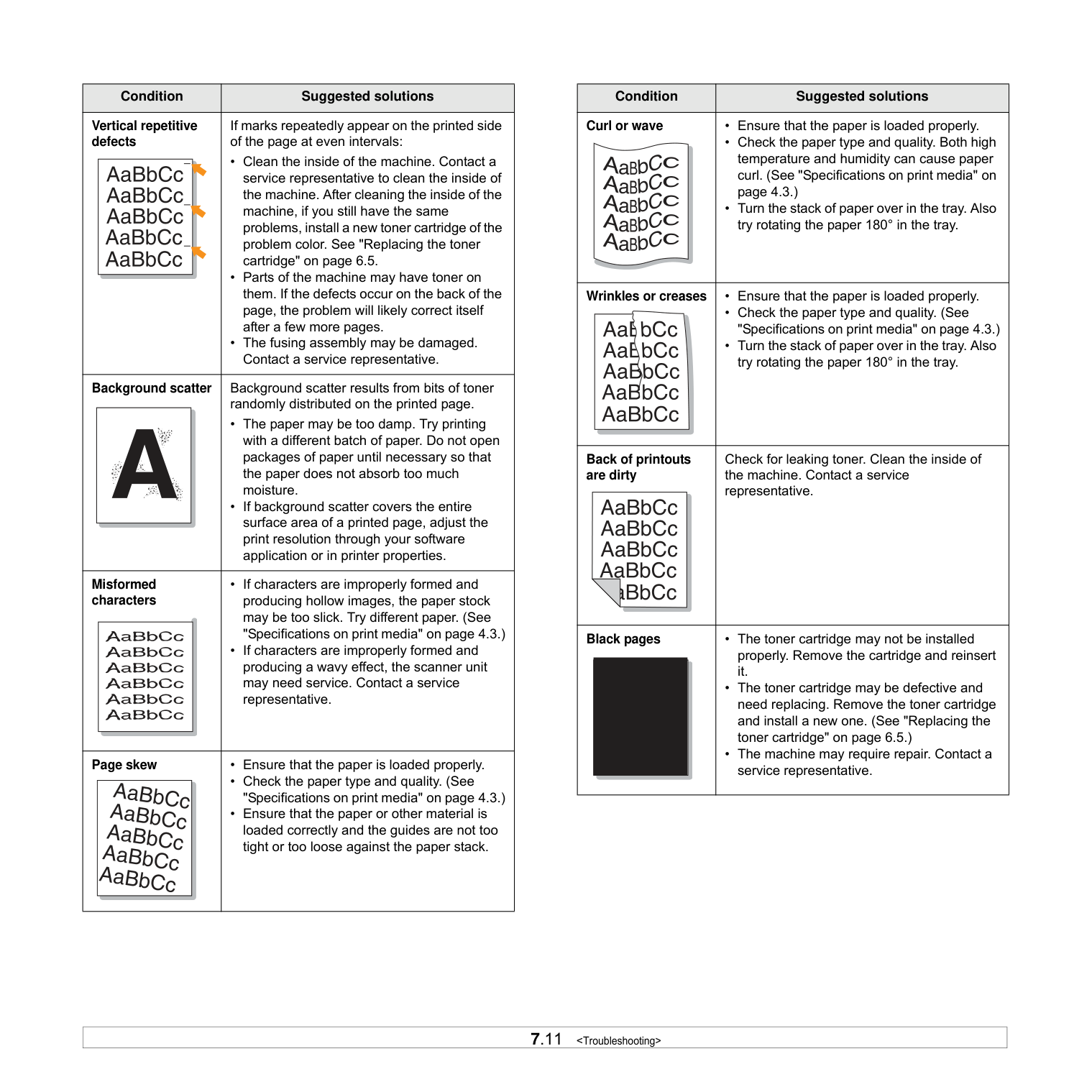
|Condition|Suggested solutions| |---|---|
|Vertical repetitive defects|If marks repeatedly appear on the printed side of the page at even intervals:
• Clean the inside of the machine. Contact a service representative to clean the inside of the machine. After cleaning the inside of the machine, if you still have the same problems, install a new toner cartridge of the problem color. See "Replacing the toner cartridge" on page 6.5.
• Parts of the machine may have toner on them. If the defects occur on the back of the page, the problem will likely correct itself after a few more pages.
• The fusing assembly may be damaged. Contact a service representative.
| |Background scatter|Background scatter results from bits of toner randomly distributed on the printed page.
• The paper may be too damp. Try printing with a different batch of paper. Do not open packages of paper until necessary so that the paper does not absorb too much moisture.
• If background scatter covers the entire surface area of a printed page, adjust the print resolution through your software application or in printer properties.
| |Misformed characters|• If characters are improperly formed and producing hollow images, the paper stock may be too slick. Try different paper. (See "Specifications on print media" on page 4.3.)
• If characters are improperly formed and producing a wavy effect, the scanner unit may need service. Contact a service representative.
| |Page skew|• Ensure that the paper is loaded properly.
• Check the paper type and quality. (See "Specifications on print media" on page 4.3.)
• Ensure that the paper or other material is loaded correctly and the guides are not too tight or too loose against the paper stack.
|
|Condition|Suggested solutions| |---|---| |Curl or wave|• Ensure that the paper is loaded properly.
• Check the paper type and quality. Both high temperature and humidity can cause paper curl. (See "Specifications on print media" on page 4.3.)
• Turn the stack of paper over in the tray. Also try rotating the paper 180° in the tray.
| |Wrinkles or creases|• Ensure that the paper is loaded properly.
• Check the paper type and quality. (See "Specifications on print media" on page 4.3.)
• Turn the stack of paper over in the tray. Also try rotating the paper 180° in the tray.
| |Back of printouts are dirty|Check for leaking toner. Clean the inside of the machine. Contact a service representative.| |Black pages|• The toner cartridge may not be installed properly. Remove the cartridge and reinsert it.
• The toner cartridge may be defective and need replacing. Remove the toner cartridge and install a new one. (See "Replacing the toner cartridge" on page 6.5.)
• The machine may require repair. Contact a service representative.
|
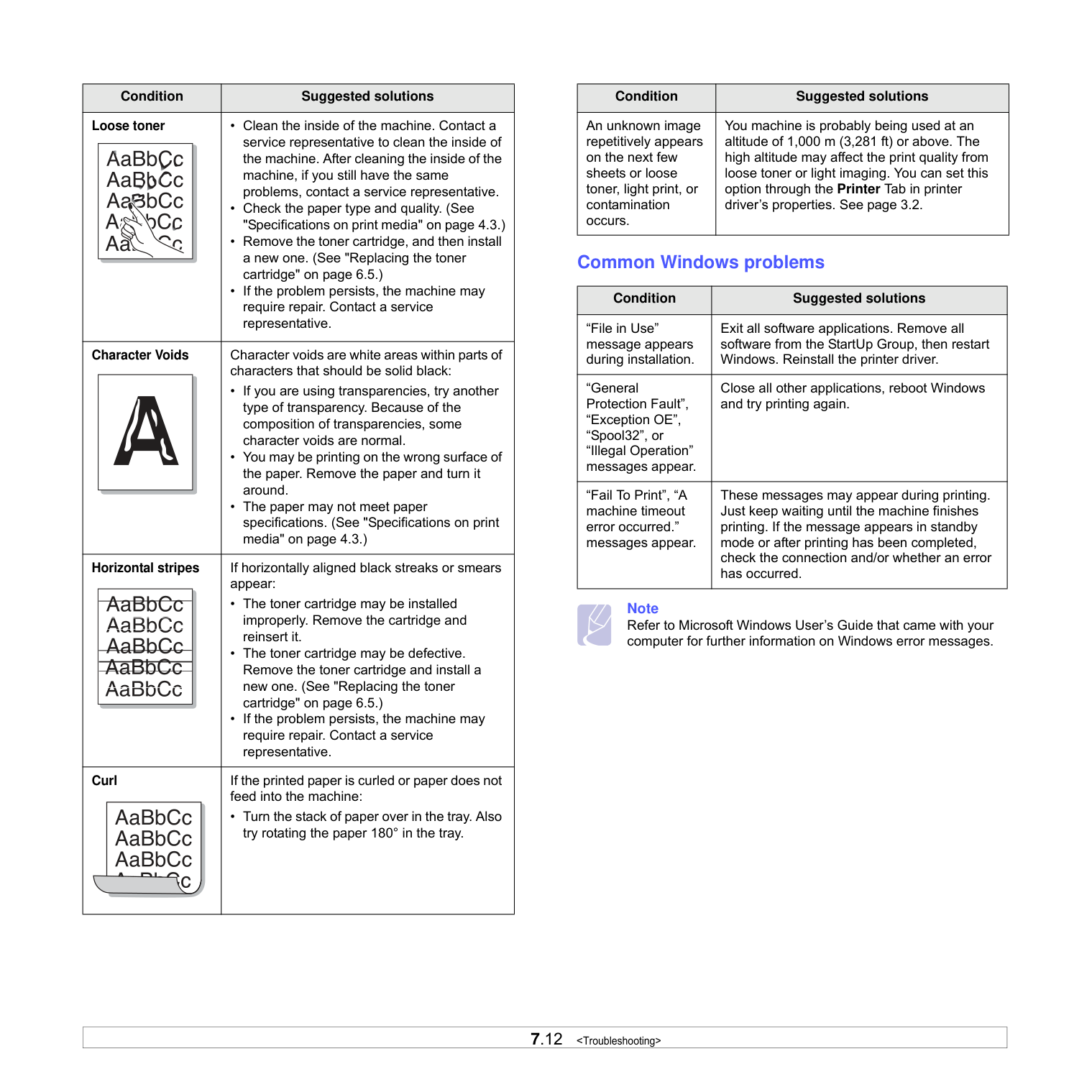
|Condition|Suggested solutions| |---|---| |Loose toner|• Clean the inside of the machine. Contact a service representative to clean the inside of the machine. After cleaning the inside of the machine, if you still have the same problems, contact a service representative.
• Check the paper type and quality. (See "Specifications on print media" on page 4.3.)
• Remove the toner cartridge, and then install a new one. (See "Replacing the toner cartridge" on page 6.5.)
• If the problem persists, the machine may require repair. Contact a service representative.
| |Character Voids|Character voids are white areas within parts of characters that should be solid black:
• If you are using transparencies, try another type of transparency. Because of the composition of transparencies, some character voids are normal.
• You may be printing on the wrong surface of the paper. Remove the paper and turn it around.
• The paper may not meet paper specifications. (See "Specifications on print media" on page 4.3.)
| |Horizontal stripes|If horizontally aligned black streaks or smears appear:
• The toner cartridge may be installed improperly. Remove the cartridge and reinsert it.
• The toner cartridge may be defective. Remove the toner cartridge and install a new one. (See "Replacing the toner cartridge" on page 6.5.)
• If the problem persists, the machine may require repair. Contact a service representative.
| |Curl|If the printed paper is curled or paper does not feed into the machine:
• Turn the stack of paper over in the tray. Also try rotating the paper 180° in the tray.|
|Condition|Suggested solutions| |---|---| |An unknown image repetitively appears on the next few sheets or loose toner, light print, or contamination occurs.|You machine is probably being used at an altitude of 1,000 m (3,281 ft) or above. The high altitude may affect the print quality from loose toner or light imaging. You can set this option through the Printer Tab in printer driver’s properties. See page 3.2.|
############## Common Windows problems
|Condition|Suggested solutions| |---|---| |“File in Use” message appears during installation.|Exit all software applications. Remove all software from the StartUp Group, then restart Windows. Reinstall the printer driver.| |“General Protection Fault”, “Exception OE”, “Spool32”, or “Illegal Operation” messages appear.|Close all other applications, reboot Windows and try printing again.|
|“Fail To Print”, “A machine timeout error occurred.” messages appear.|These messages may appear during printing. Just keep waiting until the machine finishes printing. If the message appears in standby mode or after printing has been completed, check the connection and/or whether an error has occurred.|
#################### Note
Refer to Microsoft Windows User’s Guide that came with your computer for further information on Windows error messages.
Common Linux problems
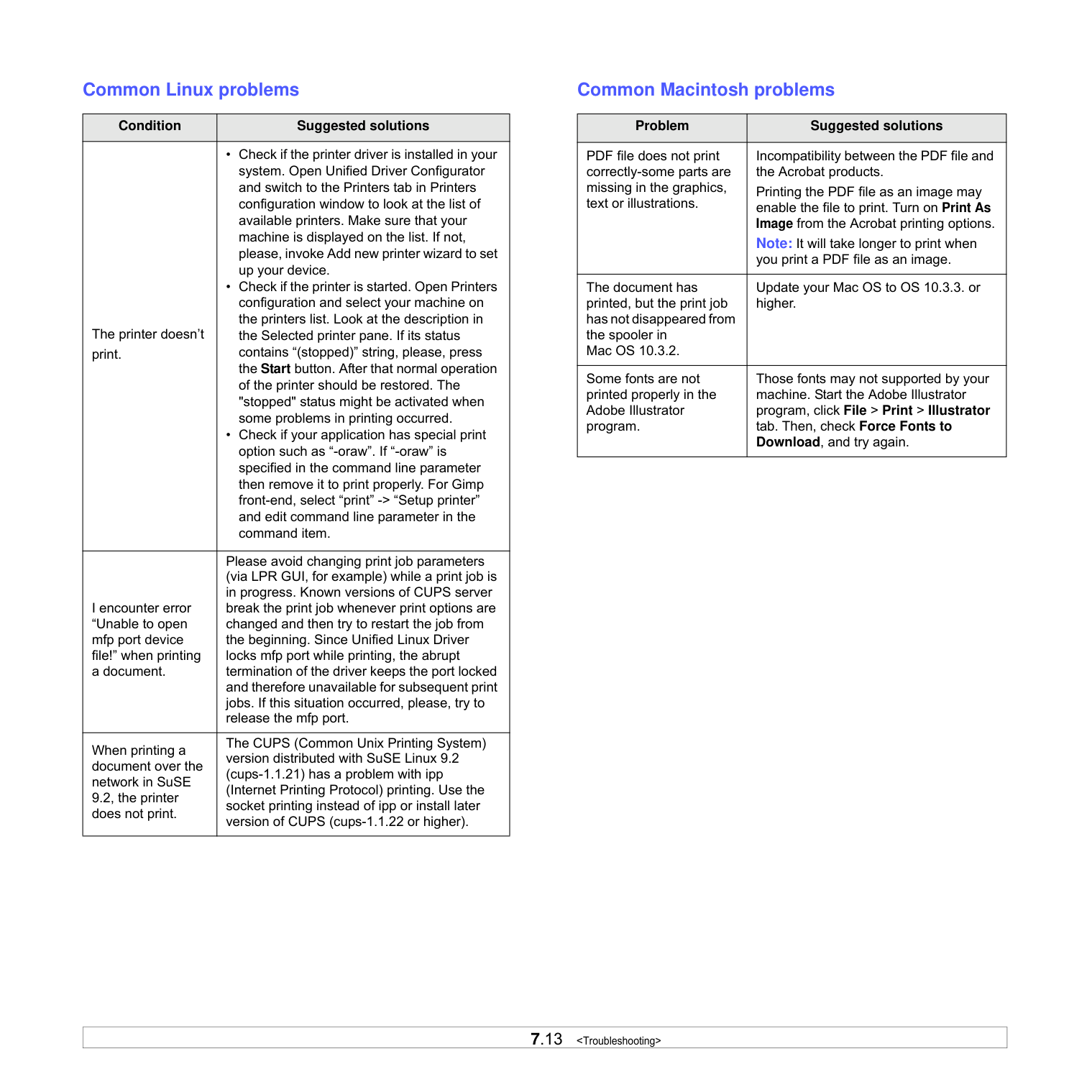
|Condition|Suggested solutions| |---|---| |The printer doesn’t print.|• Check if the printer driver is installed in your system. Open Unified Driver Configurator and switch to the Printers tab in Printers configuration window to look at the list of available printers. Make sure that your machine is displayed on the list. If not, please, invoke Add new printer wizard to set up your device.
• Check if the printer is started. Open Printers configuration and select your machine on the printers list. Look at the description in the Selected printer pane. If its status contains “(stopped)” string, please, press the Start button. After that normal operation of the printer should be restored. The "stopped" status might be activated when some problems in printing occurred.
• Check if your application has special print option such as “-oraw”. If “-oraw” is specified in the command line parameter then remove it to print properly. For Gimp front-end, select “print” -> “Setup printer” and edit command line parameter in the command item.
| |I encounter error “Unable to open mfp port device file!” when printing a document.|Please avoid changing print job parameters (via LPR GUI, for example) while a print job is in progress. Known versions of CUPS server break the print job whenever print options are changed and then try to restart the job from the beginning. Since Unified Linux Driver locks mfp port while printing, the abrupt termination of the driver keeps the port locked and therefore unavailable for subsequent print jobs. If this situation occurred, please, try to release the mfp port.| |When printing a document over the network in SuSE 9.2, the printer does not print.|The CUPS (Common Unix Printing System) version distributed with SuSE Linux 9.2 (cups-1.1.21) has a problem with ipp (Internet Printing Protocol) printing. Use the socket printing instead of ipp or install later version of CUPS (cups-1.1.22 or higher).|
Common Macintosh problems
|Problem|Suggested solutions| |---|---| |PDF file does not print correctly-some parts are missing in the graphics, text or illustrations.|Incompatibility between the PDF file and the Acrobat products. Printing the PDF file as an image may enable the file to print. Turn on Print As Image from the Acrobat printing options. Note: It will take longer to print when you print a PDF file as an image.| |The document has printed, but the print job has not disappeared from the spooler in Mac OS 10.3.2.|Update your Mac OS to OS 10.3.3. or higher.| |Some fonts are not printed properly in the Adobe Illustrator program.|Those fonts may not supported by your machine. Start the Adobe Illustrator program, click File > Print > Illustrator tab. Then, check Force Fonts to Download, and try again.|
##### 8Ordering supplies and
######### accessories
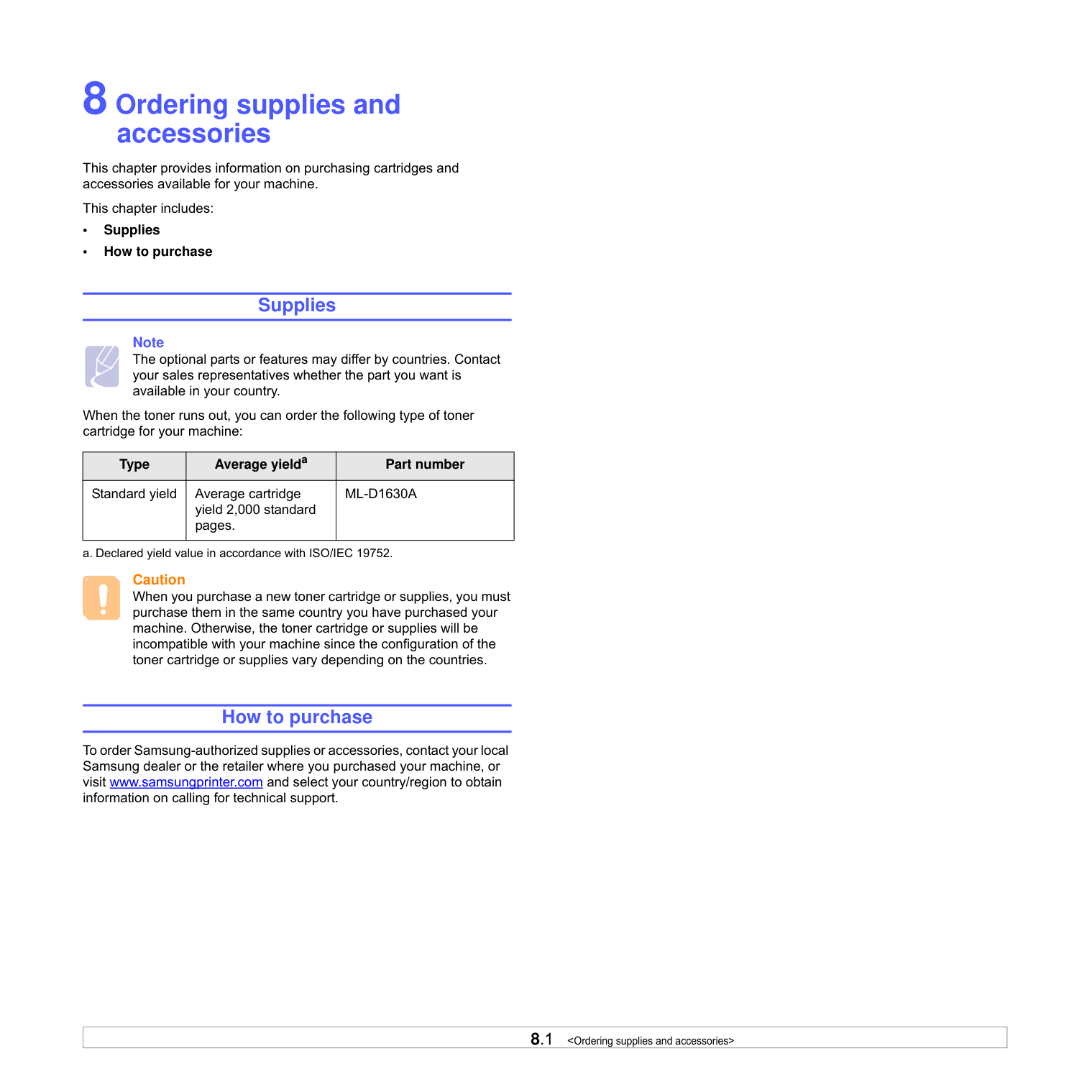
This chapter provides information on purchasing cartridges and accessories available for your machine.
This chapter includes:
############# Supplies
Note The optional parts or features may differ by countries. Contact your sales representatives whether the part you want is available in your country.
When the toner runs out, you can order the following type of toner cartridge for your machine:
|Type|Average yielda|Part number| |---|---|---| |Standard yield|Average cartridge yield 2,000 standard pages.|ML-D1630A|
a. Declared yield value in accordance with ISO/IEC 19752.
Caution When you purchase a new toner cartridge or supplies, you must purchase them in the same country you have purchased your machine. Otherwise, the toner cartridge or supplies will be incompatible with your machine since the configuration of the toner cartridge or supplies vary depending on the countries.
############# How to purchase
To order Samsung-authorized supplies or accessories, contact your local Samsung dealer or the retailer where you purchased your machine, or visit www.samsungprinter.com and select your country/region to obtain information on calling for technical support.
##### 9Specifications
This chapter includes:
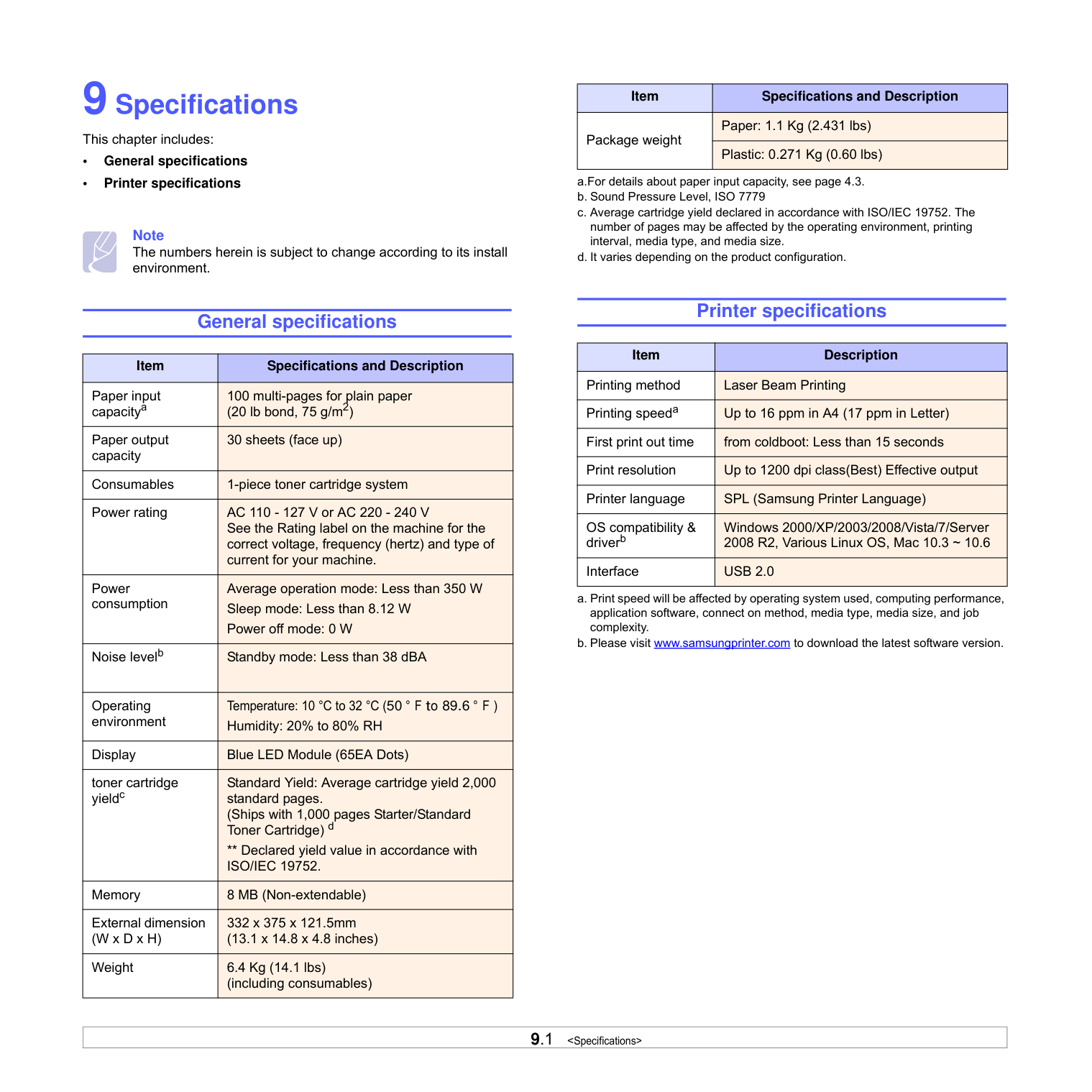
Note The numbers herein is subject to change according to its install environment.
General specifications
|Item|Specifications and Description| |---|---| |Paper input capacitya|100 multi-pages for plain paper (20 lb bond, 75 g/m2)| |Paper output capacity|30 sheets (face up)| |Consumables|1-piece toner cartridge system| |Power rating|AC 110 - 127 V or AC 220 - 240 V See the Rating label on the machine for the correct voltage, frequency (hertz) and type of current for your machine.| |Power consumption|Average operation mode: Less than 350 W Sleep mode: Less than 8.12 W Power off mode: 0 W| |Noise levelb|Standby mode: Less than 38 dBA| |Operating environment|Temperature: 10 °C to 32 °C (50 ° F to 89.6 ° F ) Humidity: 20% to 80% RH| |Display|Blue LED Module (65EA Dots)| |toner cartridge yieldc|Standard Yield: Average cartridge yield 2,000 standard pages. (Ships with 1,000 pages Starter/Standard Toner Cartridge) d
** Declared yield value in accordance with ISO/IEC 19752.| |Memory|8 MB (Non-extendable)| |External dimension (W x D x H)|332 x 375 x 121.5mm (13.1 x 14.8 x 4.8 inches)| |Weight|6.4 Kg (14.1 lbs) (including consumables)|
|Item|Specifications and Description| |---|---| |Package weight|Paper: 1.1 Kg (2.431 lbs)| |Package weight|Plastic: 0.271 Kg (0.60 lbs)|
Printer specifications
|Item|Description|
|---|---| |Printing method|Laser Beam Printing| |Printing speeda|Up to 16 ppm in A4 (17 ppm in Letter)| |First print out time|from coldboot: Less than 15 seconds| |Print resolution|Up to 1200 dpi class(Best) Effective output| |Printer language|SPL (Samsung Printer Language)| |OS compatibility & driverb|Windows 2000/XP/2003/2008/Vista/7/Server 2008 R2, Various Linux OS, Mac 10.3 ~ 10.6| |Interface|USB 2.0|
##### 10Glossary
################# Control Panel
A control panel is a flat area where control or monitoring instruments are displayed. They are typically found in top or front of the machine.
################# Coverage
This is the printing term used for toner usage measurement on printing and generally used as 5% coverage. 5% coverage means that an A4 sided paper has about 5% image or text on it. So, if the paper or original has complicated images or lots of text on it, the coverage will be over 5% and at the same time, toner usage will be as much as the coverage.
Default The first set values.
################# DPI
This is the measurement of resolution which is used for printing or scanning. Generally, more dots per inch result in a higher resolution, more visible detail in the image, and a larger file size.
################# Duty Cycle
Duty cycle is the page quantity which does not affect printer performance for a month. Generally the printer has the lifespan limitation such as pages per year. The lifespan means the average capacity of print-outs, usually within the warranty period. For example, if the duty cycle is 48,000 pages per month assuming 20 working days, a printer limits 2,400 pages a day, which is not small amount.
Fuser Unit This is the part of a laser printer that melts the toner onto the print media. It consists of two hot rollers. After toner is transferred onto the paper, the fuser unit applies heat and pressure to ensure that the toner stays on the paper permanently, which is why paper is warm when it comes out of a laser printer. Grayscale Shades of gray that represent light and dark portions of an image when color images are converted to grayscale; colors are represented by various shades of gray. Halftone
This is an image type that simulates grayscale by varying the number of dots. Highly colored areas consist of a large number of dots, while lighter areas consist of a smaller number of dots.
################# ISO
The International Organization for Standardization (ISO) is an international standard-setting body composed of representatives from national standards bodies. It produces world-wide industrial and commercial standards.
################# LED
A light-emitting diode (LED) is a semiconductor device that indicates the status of a machine.
################# Print Media
Media such as papers, labels, and transparencies which can be used on a printer, a scanner, a fax or, a copier.
################# OPC Drum
A mechanism that makes a virtual image for print using a laser beam emitted from a laser printer, and it is usually green or gray-colored and cylinder-shaped. An exposing unit of a drum is slowly worn away by its usage of the printer, and it should be replaced appropriately since it becomes scratched from grit in paper.
Portable Document Format (PDF) is a proprietary file format developed by Adobe Systems for representing two-dimensional documents in a device-independent and resolution-independent format.
################# PPM
Pages Per Minute. PPM shows the printer's speed, how many pages a printer can actually print per minute.
################# PRN file
An interface for a device driver, this allows software to interact with the device driver using standard input/output system calls, which simplifies many tasks.
################# Resolution
The sharpness of an image, measured in dots per inch (dpi). The higher the dpi, the greater the resolution.
################# Toner cartridge
It is a kind of bottle within a machine like a printer which contains toner. Toner is a powder used in laser printers and photocopiers which forms the text and images on the printed paper. Toner can be melted by the heat of the fuser, causing it to bind to the fibers in the paper.
################# URL
Uniform Resource Locator (URL) is the global address of documents and resources on the Internet. The first part of the address indicates what protocol to use, the second part specifies the IP address or the domain name where the resource is located.
################# USB
Universal serial bus (USB) is a standard that was developed by the USB Implementers Forum, Inc., to connect computers and peripherals. Unlike the parallel port, USB is designed to concurrently connect a single computer USB port to multiple peripherals.
##### INDEX
C cleaning
inside 6.1 outside 6.1
control panel 1.2, 1.4
########### D
driver feature 2.2
############ Eerror message 7.7
J jam
clearing paper from the tray 7.1 tips for avoiding paper jams 7.1
L Linux
requirements 2.3 Linux problems 7.13
M Macintosh
problems 7.13 requirements 2.3
Maintenance 6.1 maintenance parts 6.6 toner cartridge 6.3
message on the display screen 7.7
########### O
ordering supplies 8.1 output support 1.2 output tray 1.2
########### P
paper changing the size 4.5 clearing jam 7.1
paper feeding problems 7.8 setting the paper size of the tray 4.6
Power switch 1.3 print media
guidelines 4.2 selecting print media 4.1 specification 4.3
Printer software CD 2.1 printing 5.1
problem solving 7.8 printing report 6.1 problem, solve
Linux 7.13
problems display message 7.7 Macintosh 7.13 paper feeder 7.8 printing 7.8 printing quality 7.10 Windows 7.12
########### Q
quality solving the printing problem 7.10
########### R
replacing components toner cartridge 6.5
########### S
specifications 9.1, 10.1 supplied software 2.1 supplies
expected toner cartridge life 6.3 ordering supplies 8.1
########### T
toner cartridge 1.2 top cover 1.2 top cover lever 1.2 tray 1.2
adjusting the width and length 4.5 tray open button 1.2 troubleshooting 7.1
U USB
port 1.3
W Windows
problems 7.12 requirements 2.2
|Samsung Printer
Software section
| |---|
SOFTWARE SECTION
CONTENTS
########## Chapter 1: INSTALLING PRINTER SOFTWARE IN WINDOWS
Installing Printer Software ........................................................................................................ 4 Changing the Software Language .............................................................................................. 5 Reinstalling Printer Software ..................................................................................................... 6 Removing Printer Software ....................................................................................................... 6
########## Chapter 2: BASIC PRINTING
Printing a Document ................................................................................................................ 7 Printing to a file (PRN) ............................................................................................................ 8 Printer Settings ....................................................................................................................... 8
Layout Tab .................................................................................................................... 9 Paper Tab ...................................................................................................................... 9 Graphics Tab ............................................................................................................... 10 Extras Tab ................................................................................................................... 11 About Tab ................................................................................................................... 11 Printer Tab .................................................................................................................. 11 Using a Favorite Setting ................................................................................................ 12 Using Help ................................................................................................................... 12
########## Chapter 3: ADVANCED PRINTING
Printing Multiple Pages on One Sheet of Paper (N-Up Printing) ..................................................... 13 Printing Posters ..................................................................................................................... 14 Printing a Reduced or Enlarged Document ................................................................................ 14 Fitting Your Document to a Selected Paper Size ......................................................................... 14 Using Watermarks ................................................................................................................. 15
Using an Existing Watermark ......................................................................................... 15 Creating a Watermark ................................................................................................... 15 Editing a Watermark ..................................................................................................... 15 Deleting a Watermark ................................................................................................... 15
Using Overlays ...................................................................................................................... 16 What is an Overlay? ...................................................................................................... 16 Creating a New Page Overlay ......................................................................................... 16 Using a Page Overlay .................................................................................................... 16 Deleting a Page Overlay ................................................................................................ 16
########## Chapter 4: SHARING THE PRINTER LOCALLY
Setting Up a Host Computer ................................................................................................... 17 Setting Up a Client Computer .................................................................................................. 17
########## Chapter 5: USING SMART PANEL
Understanding Smart Panel .................................................................................................... 18 Opening the Troubleshooting Guide ......................................................................................... 19 Changing the Smart Panel Program Settings ............................................................................. 19
########## Chapter 6: USING YOUR PRINTER IN LINUX
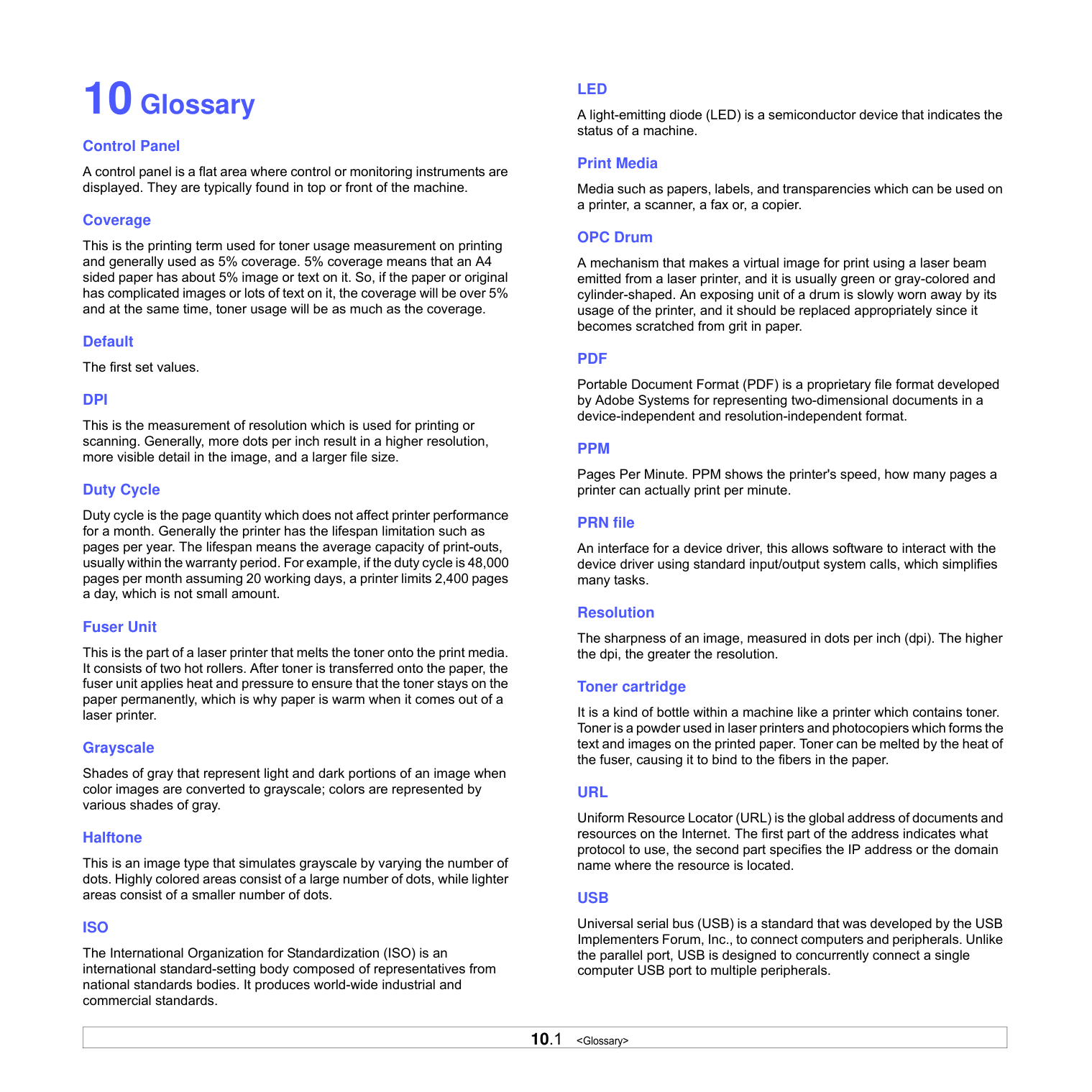
Getting Started ..................................................................................................................... 20 Installing the Unified Linux Driver ............................................................................................ 20
Installing the Unified Linux Driver ................................................................................... 20 Uninstalling the Unified Linux Driver ............................................................................... 21
Using the Unified Driver Configurator ....................................................................................... 22 Opening the Unified Driver Configurator .......................................................................... 22 Printers Configuration ................................................................................................... 22 Ports Configuration ....................................................................................................... 23
Configuring Printer Properties ................................................................................................. 23
Printing a Document .............................................................................................................. 24 Printing from Applications .............................................................................................. 24 Printing Files ................................................................................................................ 24
########## Chapter 7: USING YOUR PRINTER WITH A MACINTOSH
Installing Software ................................................................................................................ 25 Setting Up the Printer ............................................................................................................ 26
For a USB-connected .................................................................................................... 26
Printing ................................................................................................................................ 27 Printing a Document ..................................................................................................... 27 Changing Printer Settings .............................................................................................. 27 Printing Multiple Pages on One Sheet of Paper .................................................................. 28
1 Installing Printer
######## Software in Windows
This chapter includes:
########## Installing Printer Software
You can install the printer software for local printing. To install the printer software on the computer, perform the appropriate installation procedure depending on the printer in use.
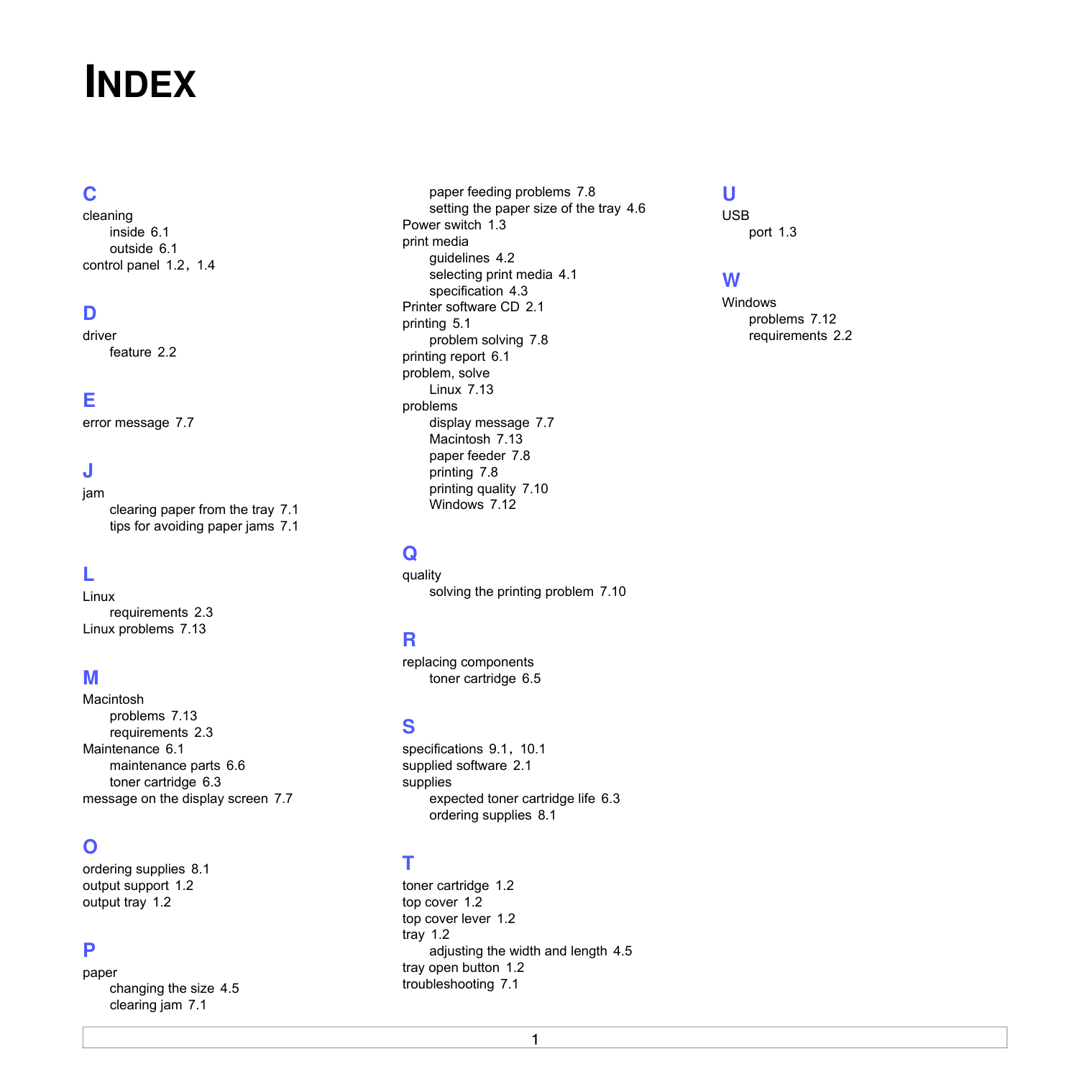
A printer driver is software that lets your computer communicate with your printer. The procedure to install drivers may differ depending on the operating system you are using. All applications should be closed on your PC before beginning installation. A local printer is a printer directly attached to your computer using the printer cable supplied with your printer, such as a USB or parallel cable. You can install the printer software using the typical or custom method.
NOTE: If the “New Hardware Wizard” window appears during the installation procedure, click in the upper right corner of the box to close the window, or click Cancel.

This is recommended for most users. All components necessary for printer operations will be installed.
The CD-ROM should automatically run, and an installation window appears. If the installation window does not appear, click Start and then Run. Type X:\Setup.exe, replacing “X” with the letter which represents your drive and click OK. If you use Windows Vista, Windows 7 and Windows Server 2008 R2, click Start → All programs → Accessories → Run, and type X:\Setup.exe.
If the AutoPlay window appears in Windows Vista, Windows 7 and Windows Server 2008 R2, click Run Setup.exe in Install or run program field, and click Continue in the User Account Control window.
|| |---|
NOTE: If your printer is not already connected to the computer, the following window will appear.


|| |---|
7 To register yourself as a user of Samsung Printers in order to receive information from Samsung, select the checkbox and click Finish. You are now sent to the Samsung web site.
Otherwise, just click Finish.
|| |---|
NOTE: After setup is complete, if your printer driver doesn’t work properly, reinstall the printer driver. See “Reinstalling Printer Software” on page 6.
########## Changing the Software Language
After installation of the software, you can change the display language.
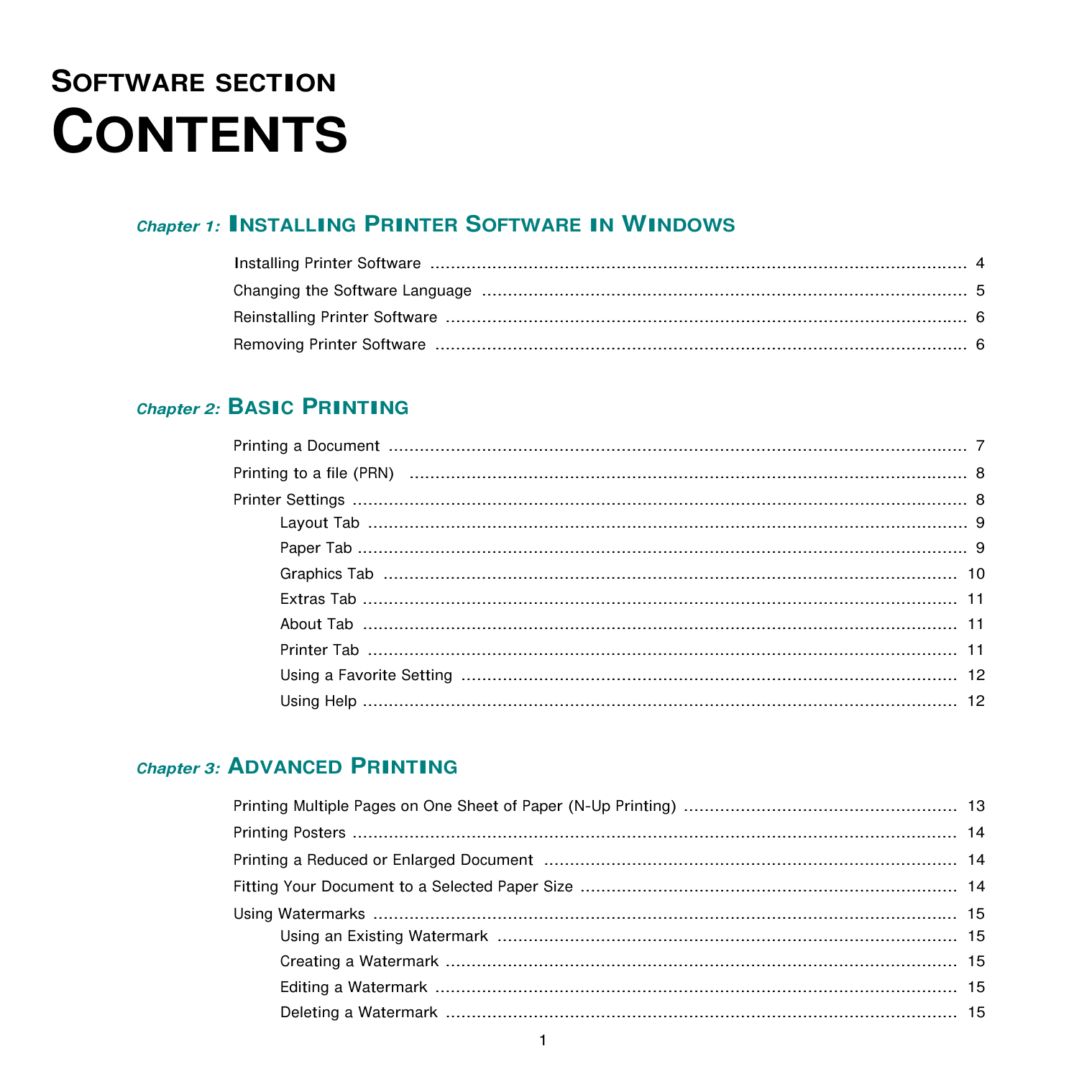
########## Reinstalling Printer Software
You can reinstall the software if installation fails.
→ your printer driver name → Maintenance.
You will see a component list so that you can reinstall any item individually.
NOTE: If your printer is not already connected to the computer, the following window will appear.
If you you select your printer driver name and reinstall the printer software for local printing, the window asking you to print a test page appears. Do as follows:
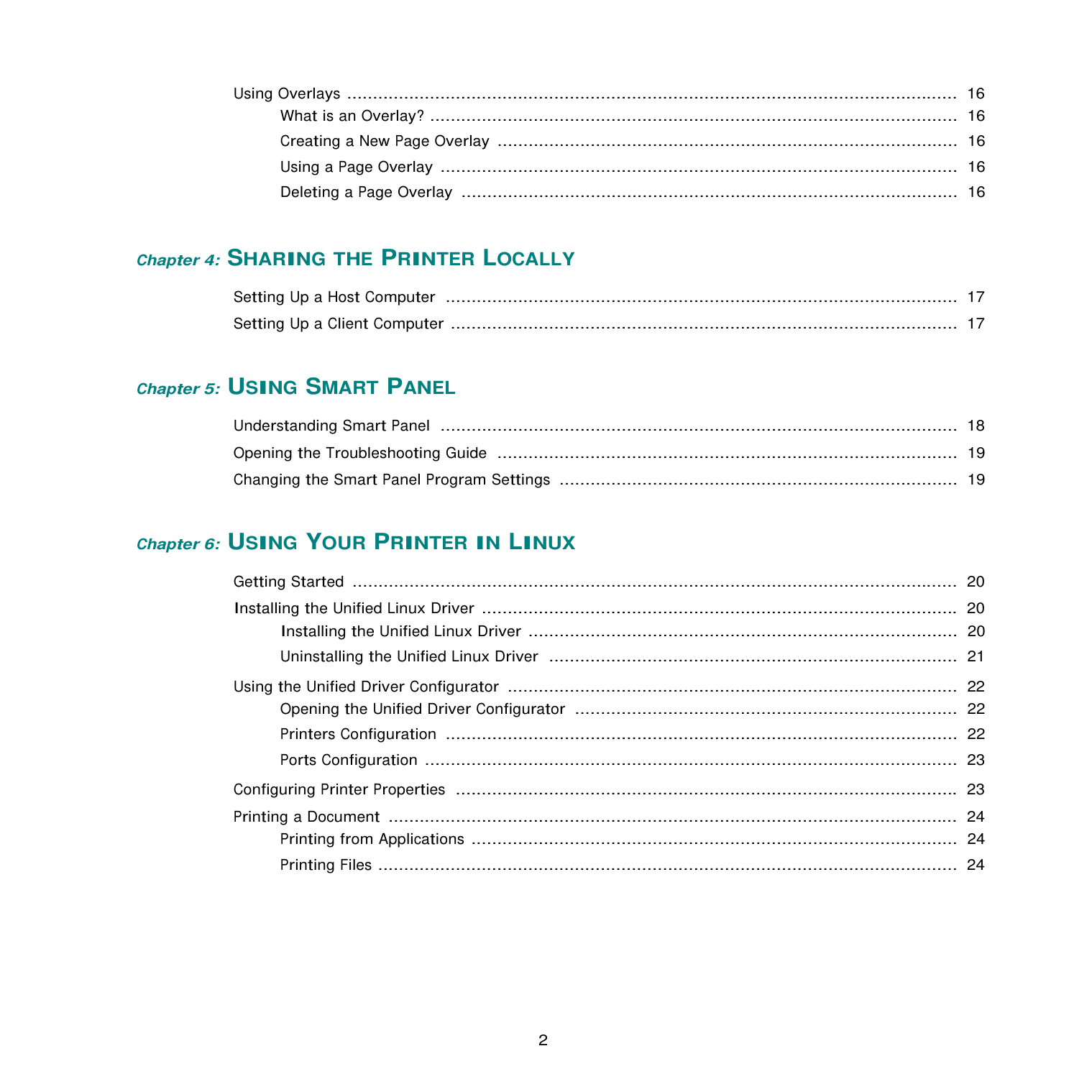
|| |---|
########## Removing Printer Software
→ your printer driver name → Maintenance.
You will see a component list so that you can remove any item individually.
The selected driver and all of its components are removed from your computer.
2 Basic Printing
This chapter explains the printing options and common printing tasks in Windows.
This chapter includes:
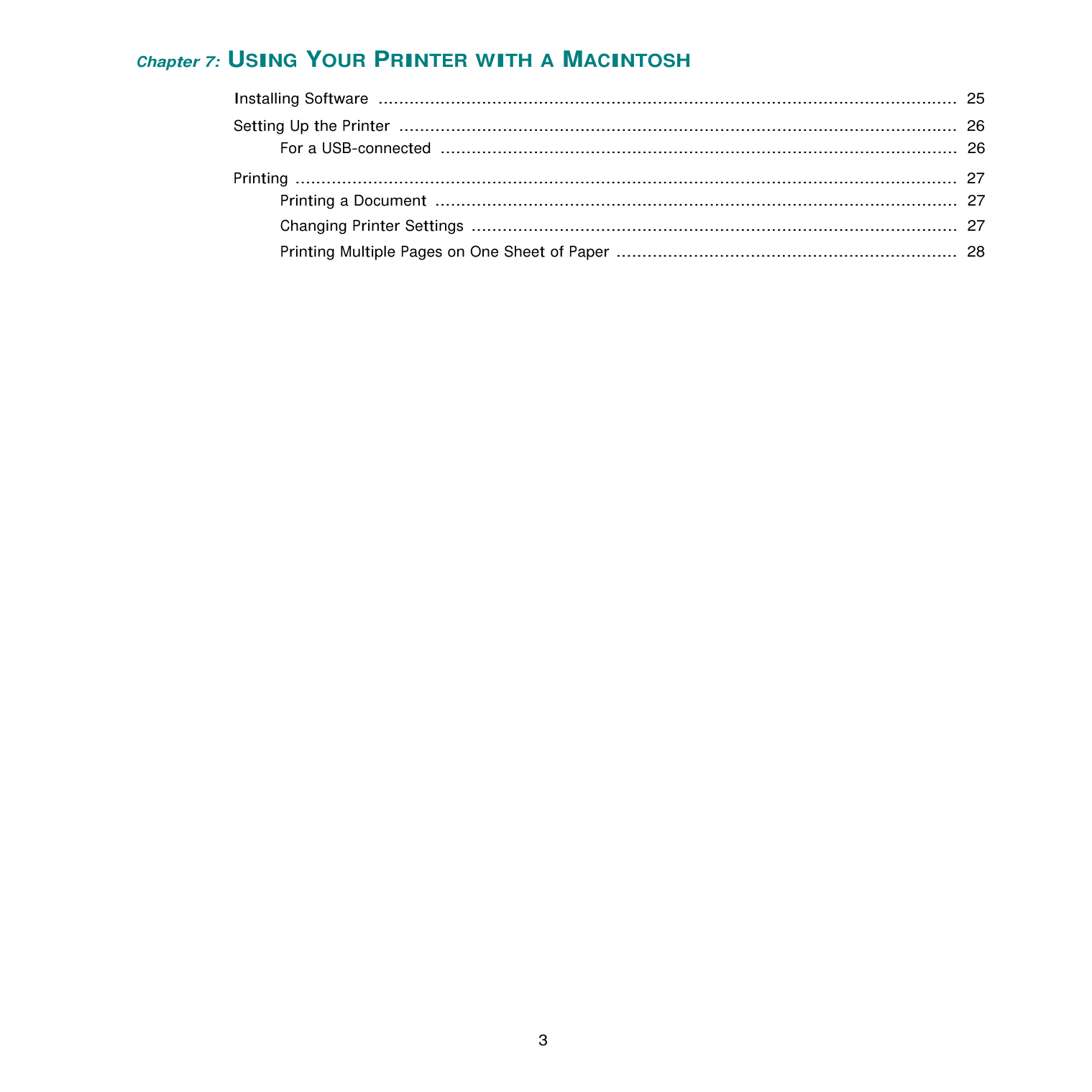
########## Printing a Document
#################### NOTES:
The following procedure describes the general steps required for printing from various Windows applications. The exact steps for printing a document may vary depending on the application program you are using. Refer to the User’s Guide of your software application for the exact printing procedure.
The basic print settings are selected within the Print window. These settings include the number of copies and print range.
To take advantage of the printer features provided by your printer driver, click Properties or Preferences in the application’s Print window. For details, see “Printer Settings” on page 8. If you see Setup, Printer, or Options in your Print window, click it instead. Then click Properties on the next screen. Click OK to close the printer properties window.
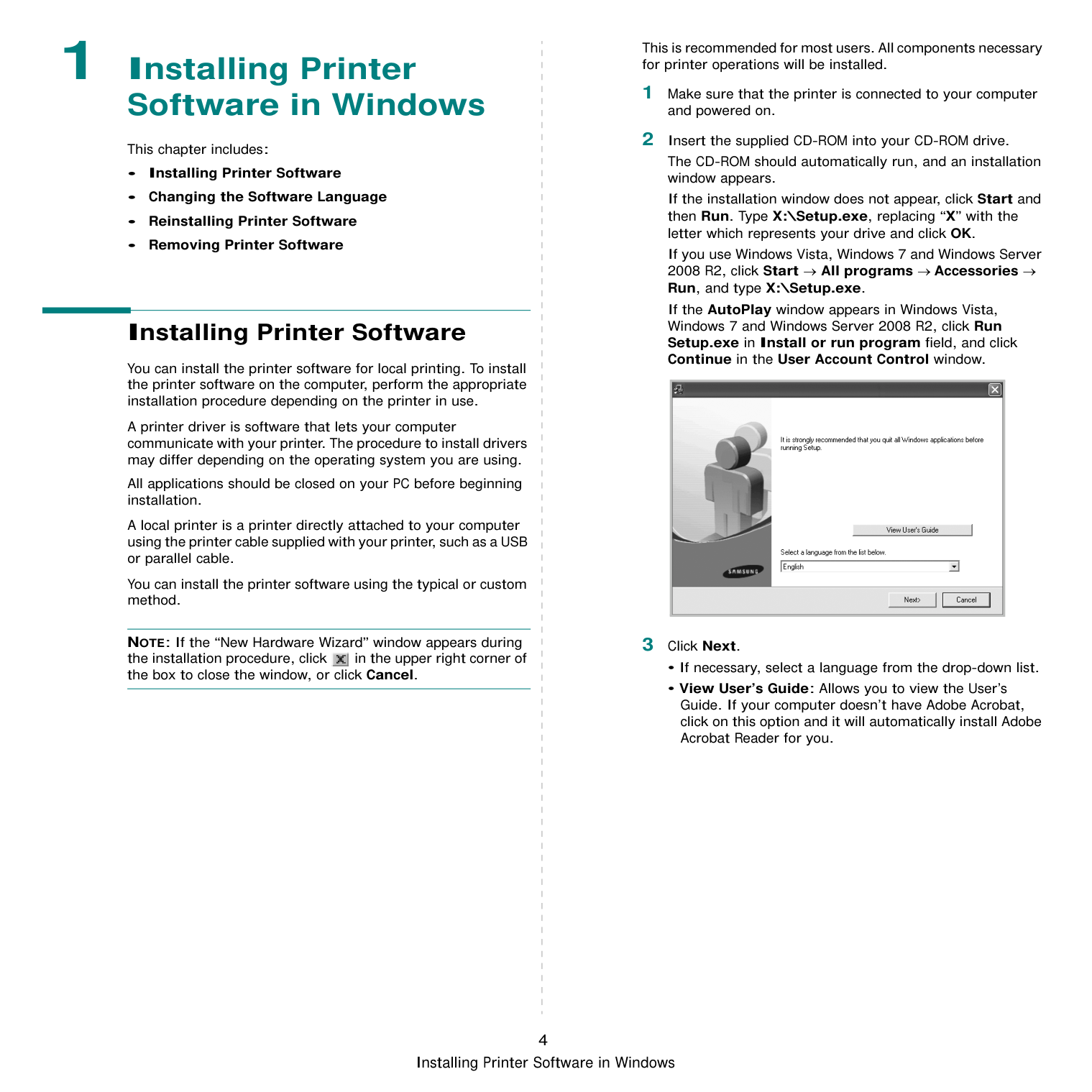
|
Make sure that your printer is selected.| |---|
########## Printing to a file (PRN)
You will sometimes need to save the print data as a file for your purpose. To create a file: 1 Check the Print to file box at the Print window.

2 Select the folder and assign a name of the file and then
click OK.
########## Printer Settings
You can use the printer properties window, which allows you to access all of the printer options you need when using your printer. When the printer properties are displayed, you can review and change the settings needed for your print job. Your printer properties window may differ, depending on your operating system. This Software User’s Guide shows the Properties window for Windows XP. Your printer driver Properties window that appears in this User’s Guide may differ depending on the printer in use. If you access printer properties through the Printers folder, you can view additional Windows-based tabs (refer to your Windows User’s Guide) and the Printer tab (see “Printer Tab” on page 11).
#################### NOTES:
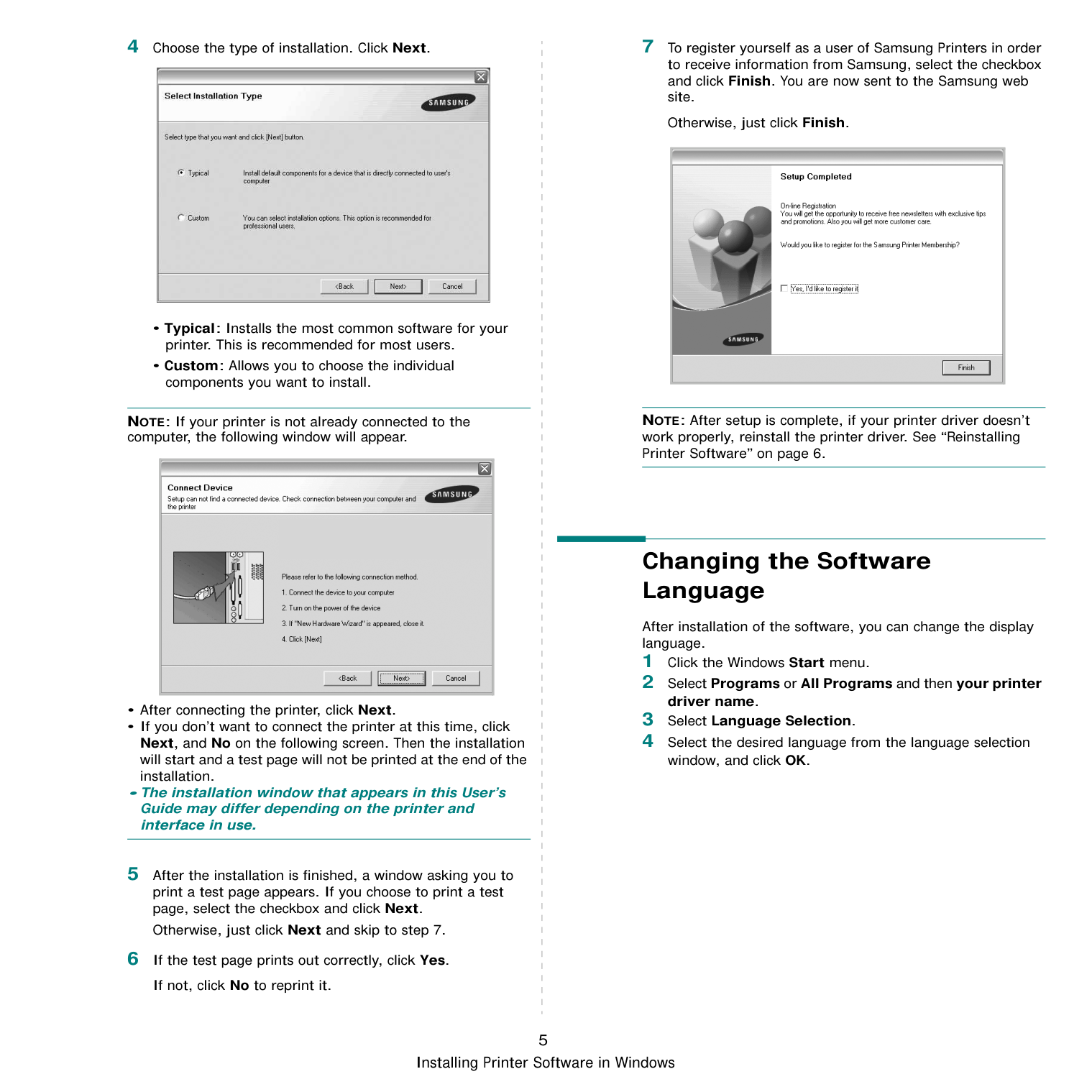
########### Layout Tab
The Layout tab provides options to adjust how the document appears on the printed page.
|| |---|
Paper Orientation Paper Orientation allows you to select the direction in which information is printed on a page.
Layout Options Layout Options allows you to select advanced printing options. You can choose Multiple Pages per Side and Poster Printing.
LandscapePortrait
Paper Tab Use the following options to set the basic paper handling specifications when you access the printer properties. See “Printing a Document” on page 7 for more information on accessing printer properties. Click the Paper tab to access various paper properties.
|| |---|
Copies Copies allows you to choose the number of copies to be printed. You can select 1 to 999 copies.
Paper Options Size Size allows you to set the size of paper you loaded in the tray. If the required size is not listed in the Size box, click Custom. When the Custom Paper Setting window appears, set the paper size and click OK. The setting appears in the list so that you can select it. Source Make sure that Source is set to the corresponding paper tray. Type
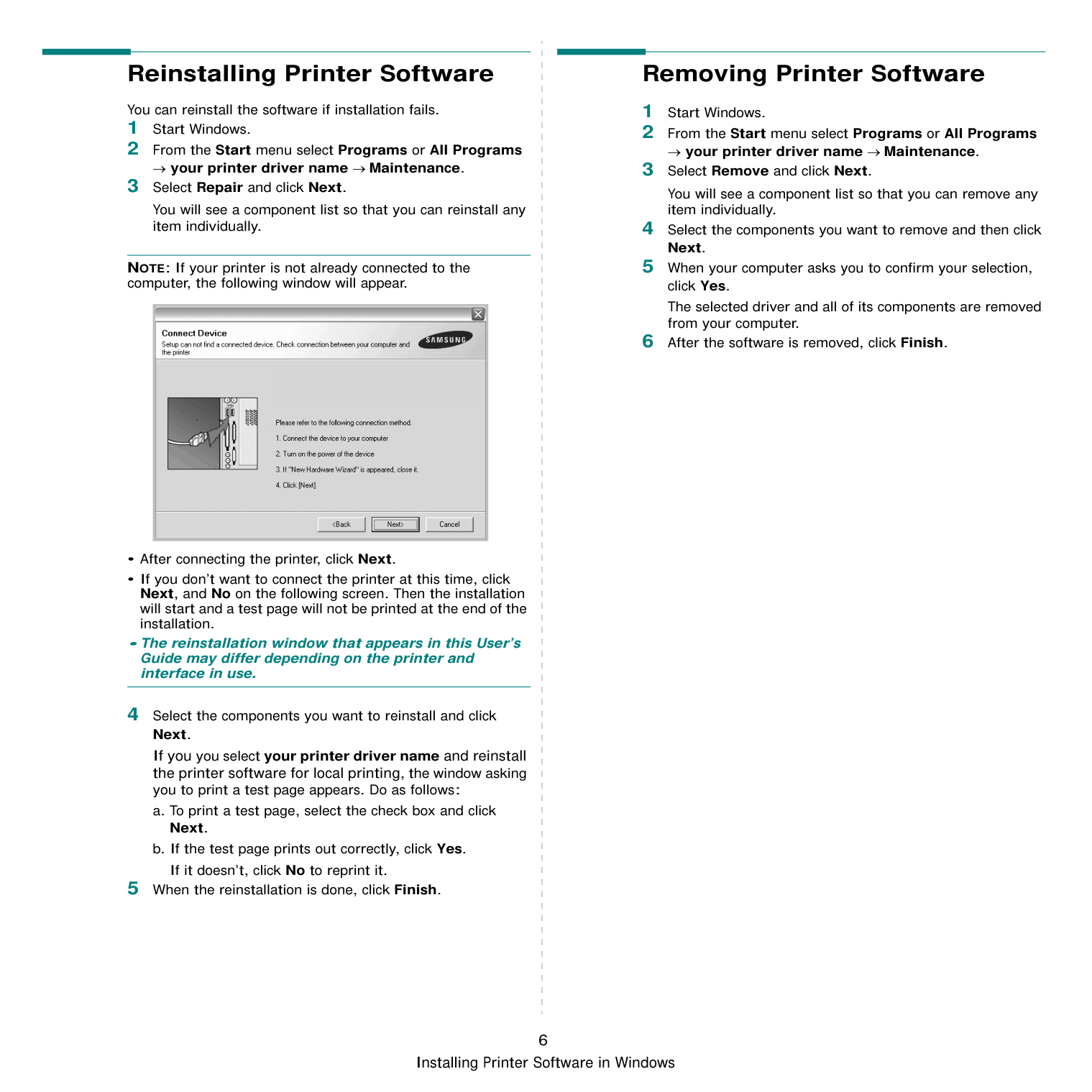
Set Type to correspond to the paper loaded in the tray from which you want to print. This will let you get the best quality printout. If not, print quality may not be acheived as you want.
################# Scaling Printing
Scaling Printing allows you to automatically or manually scale your print job on a page. You can choose from None, Reduce/ Enlarge, and Fit to Page.
Graphics Tab Use the following Graphic options to adjust the print quality for your specific printing needs. See “Printing a Document” on page 7 for more information on accessing printer properties. Click the Graphic tab to display the properties shown below.
|| |---|
Resolution The Resolution options you can select may vary depending on your printer model. The higher the setting, the sharper the clarity of printed characters and graphics. The higher setting also may increase the time it takes to print a document.
Toner Save Mode Selecting this option extends the life of your toner cartridge and reduces your cost per page without a significant reduction in print quality. Some printers do not support this feature.
##################### Darkness Use this option to lighten or darken your print job. Some printers do not support this feature.
Advanced Options You can set advanced settings by clicking the Advanced Options button.
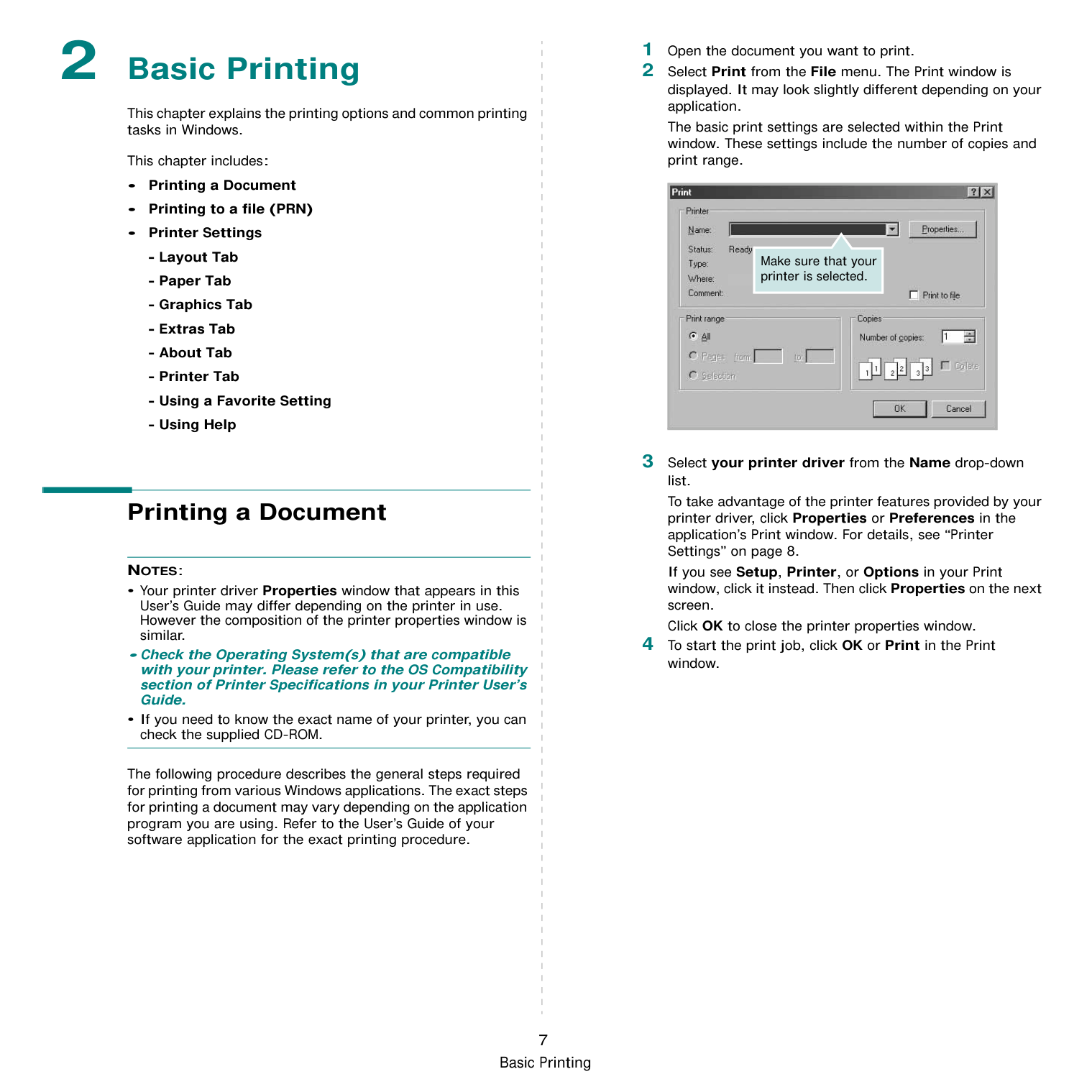
########### Extras Tab
You can select output options for your document. See “Printing a Document” on page 7 for more information about accessing the printer properties.
Click the Extras tab to access the following feature:

Watermark You can create a background text image to be printed on each page of your document. For details, see “Using Watermarks” on page 15. Overlay Overlays are often used to take the place of preprinted forms and letterhead paper. For details, see “Using Overlays” on page 16. Output Options
########### About Tab
Use the About tab to display the copyright notice and the version number of the driver. If you have an Internet browser, you can connect to the Internet by clicking on the web site icon. See “Printing a Document” on page 7 for more information about accessing printer properties.
########### Printer Tab
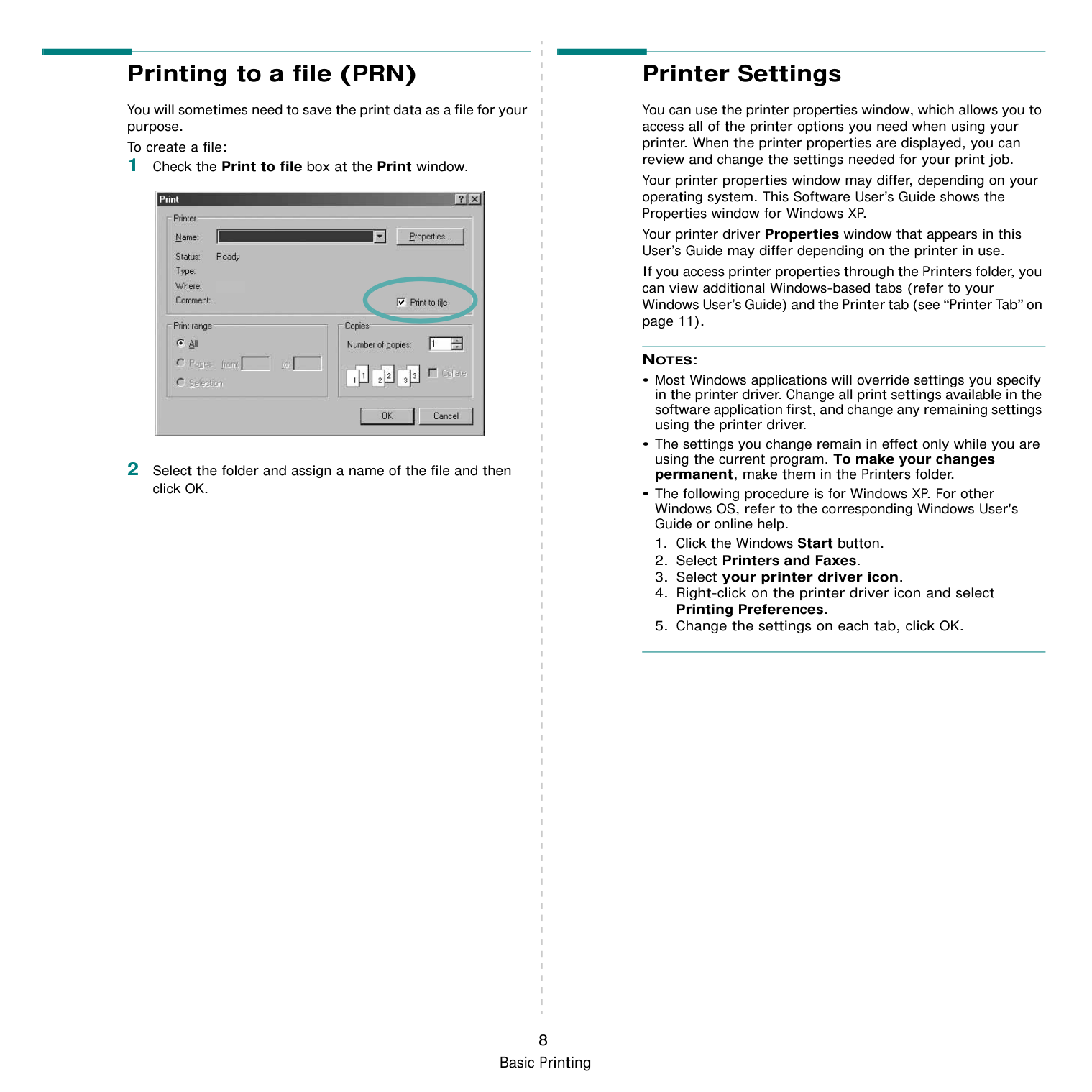
If you access printer properties through the Printers folder, you can view the Printer tab. You can set the printer configuration.
The following procedure is for Windows XP. For other Windows OS, refer to the corresponding Windows User's Guide or online help.
Using a Favorite Setting The Favorites option, which is visible on each properties tab, allows you to save the current properties settings for future use. To save a Favorites item:
|| |---|
When you save Favorites, all current driver settings are saved.
To use a saved setting, select the item from the Favorites drop down list. The printer is now set to print according to the Favorites setting you selected. To delete a Favorites item, select it from the list and click Delete.
You can also restore the printer driver’s default settings by selecting Printer Default from the list.
Using Help Your printer has a help screen that can be activated by clicking the Help button in the printer properties window. These help screens give detailed information about the printer features provided by the printer driver. You can also click from the upper right corner of the window, and then click on any setting.

3 Advanced Printing
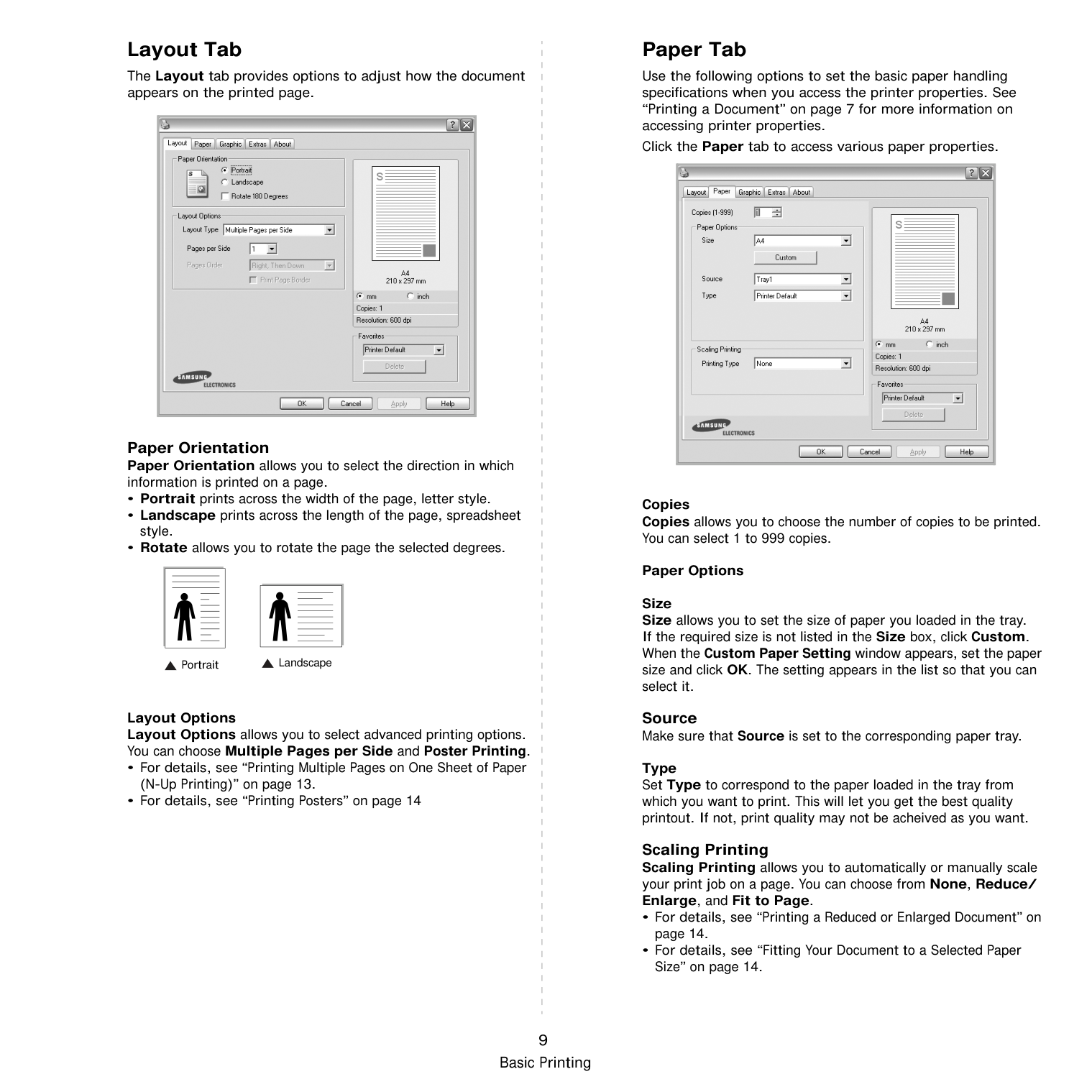
This chapter explains printing options and advanced printing tasks.
#################### NOTE:
This chapter includes:
Printing Multiple Pages on One Sheet of Paper (N-Up Printing) You can select the number of pages to print on a single sheet of paper. To print more than one page per sheet, the pages will be reduced in size and arranged in the order you specify. You can print up to 16 pages on one sheet.
||1|2| |---|---| |3|4| | |---|
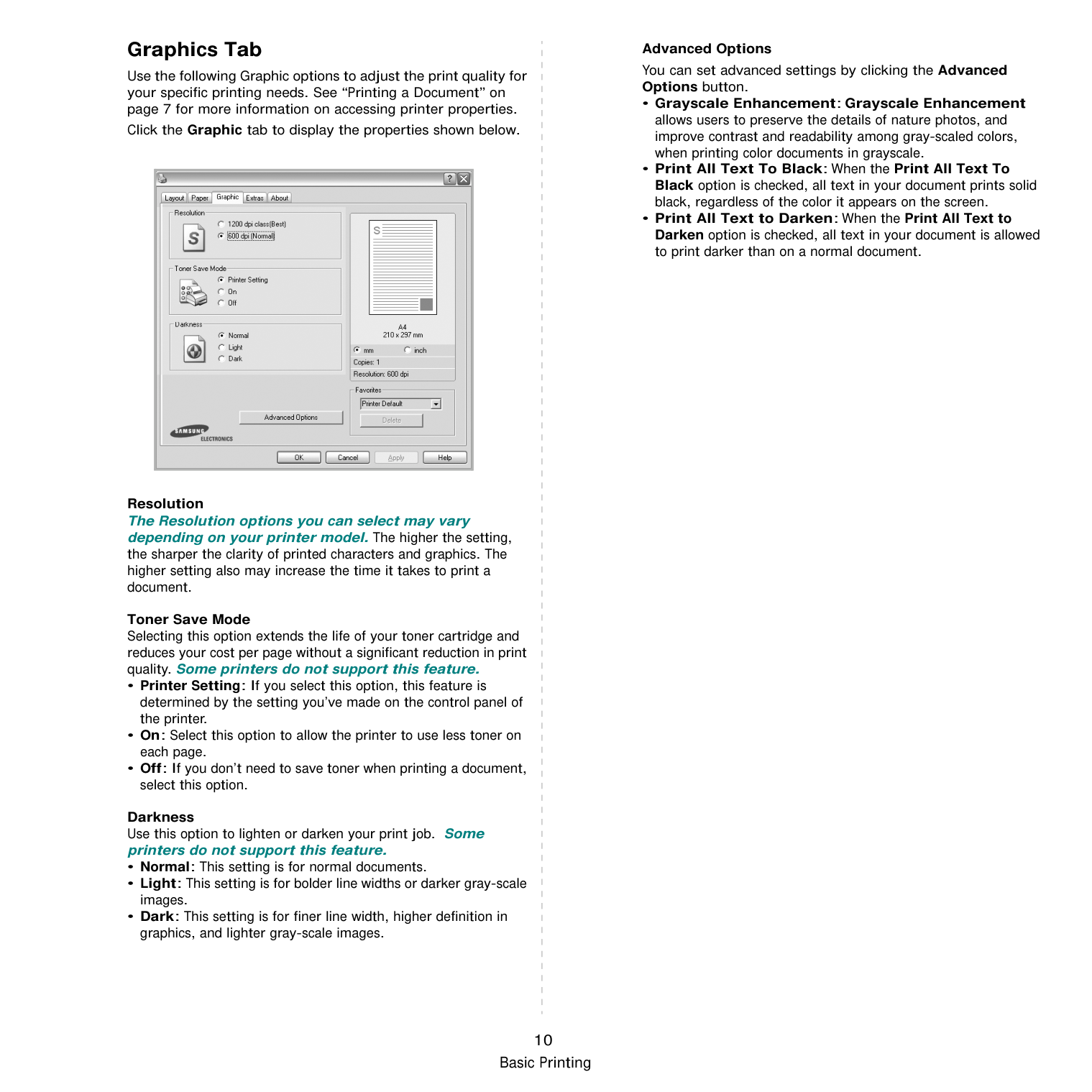
Check Print Page Border to print a border around each page on the sheet.
########## Printing Posters
This feature allows you to print a single-page document onto 4, 9, or 16 sheets of paper, for the purpose of pasting the sheets together to form one poster-size document.
You can select the page layout from Poster<2x2>, Poster<3x3> or Poster<4x4>. If you select Poster<2x2>, the output will be automatically stretched to cover 4 physical pages.
Specify an overlap in millimeters or inches to make it easier to pasting the sheets together.
0.15 inches
0.15 inches
########## Printing a Reduced or Enlarged Document
You can change the size of a page’s content to appear larger or smaller on the printed page.
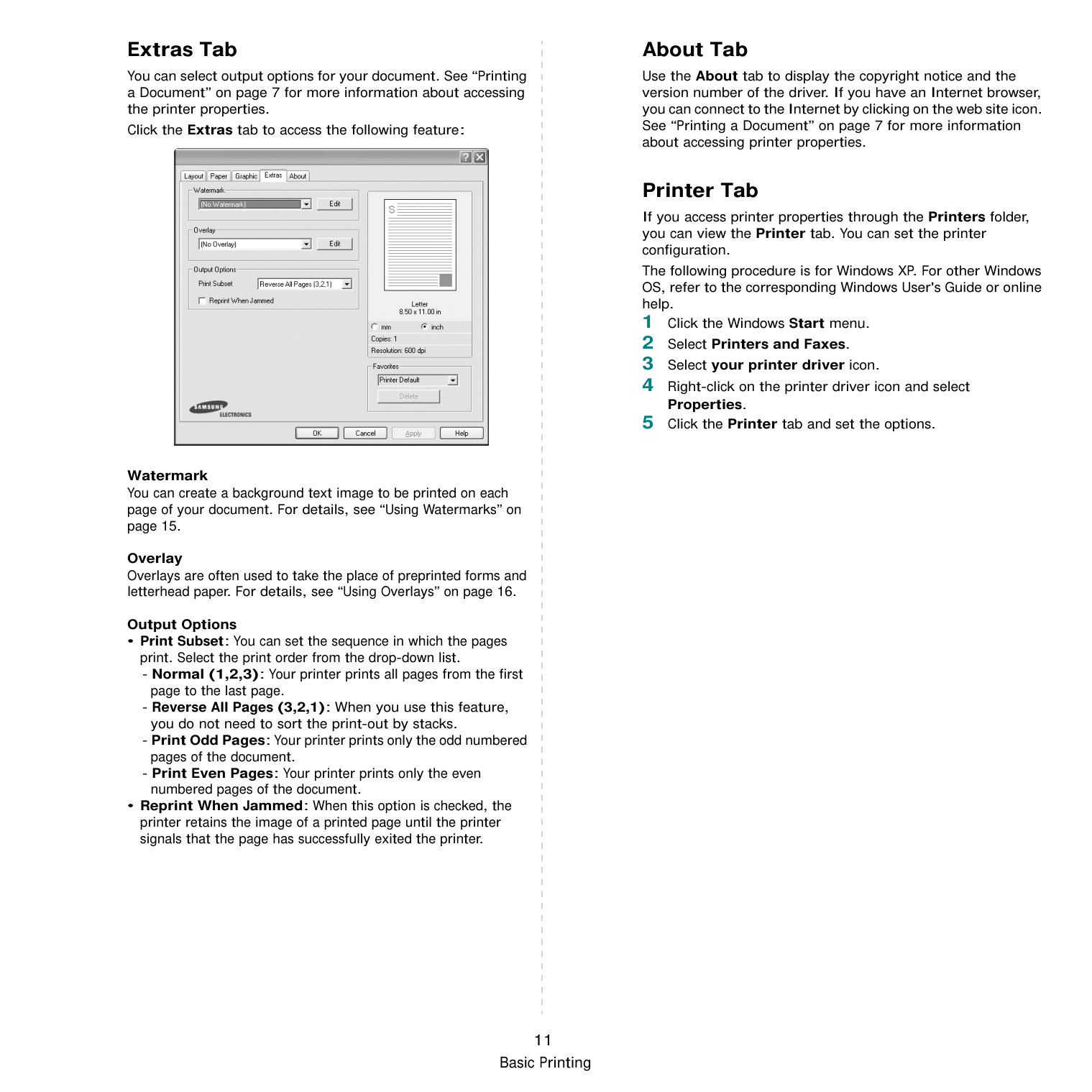
########## Fitting Your Document to a Selected Paper Size
This printer feature allows you to scale your print job to any selected paper size regardless of the digital document size. This can be useful when you want to check fine details on a small document.
|A
| |---|
########## Using Watermarks
The Watermark option allows you to print text over an existing document. For example, you may want to have large gray letters reading “DRAFT” or “CONFIDENTIAL” printed diagonally across the first page or all pages of a document. There are several predefined watermarks that come with the printer, and they can be modified, or you can add new ones to the list.
########### Using an Existing Watermark
NOTE: The preview image shows how the page will look when it is printed.
########### Creating a Watermark
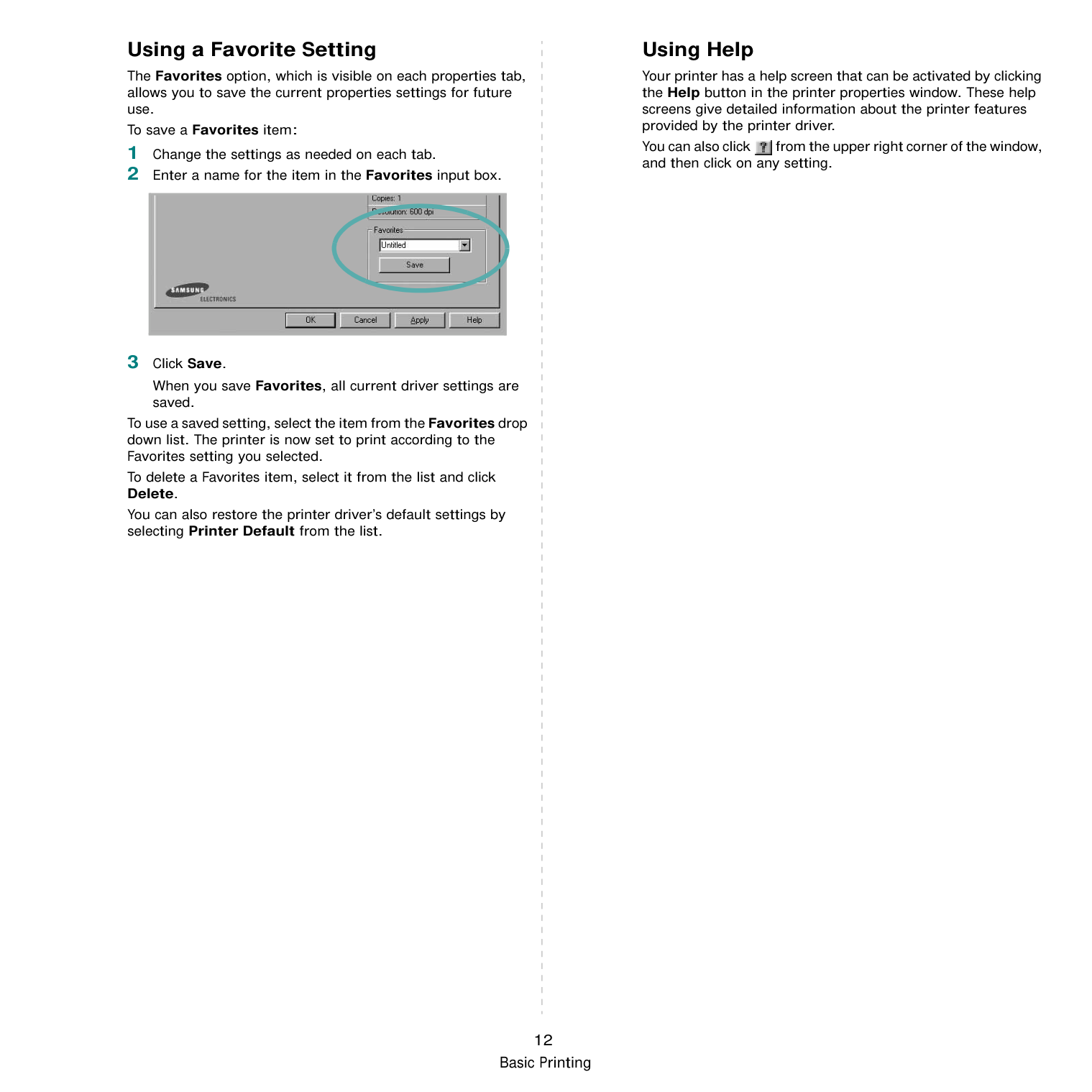
When the First Page Only box is checked, the watermark prints on the first page only.
You can select the font name, style, size, or grayscale level from the Font Attributes section and set the angle of the watermark from the Message Angle section.
To stop printing the watermark, select (No Watermark) from the Watermark drop-down list.
########### Editing a Watermark
########### Deleting a Watermark
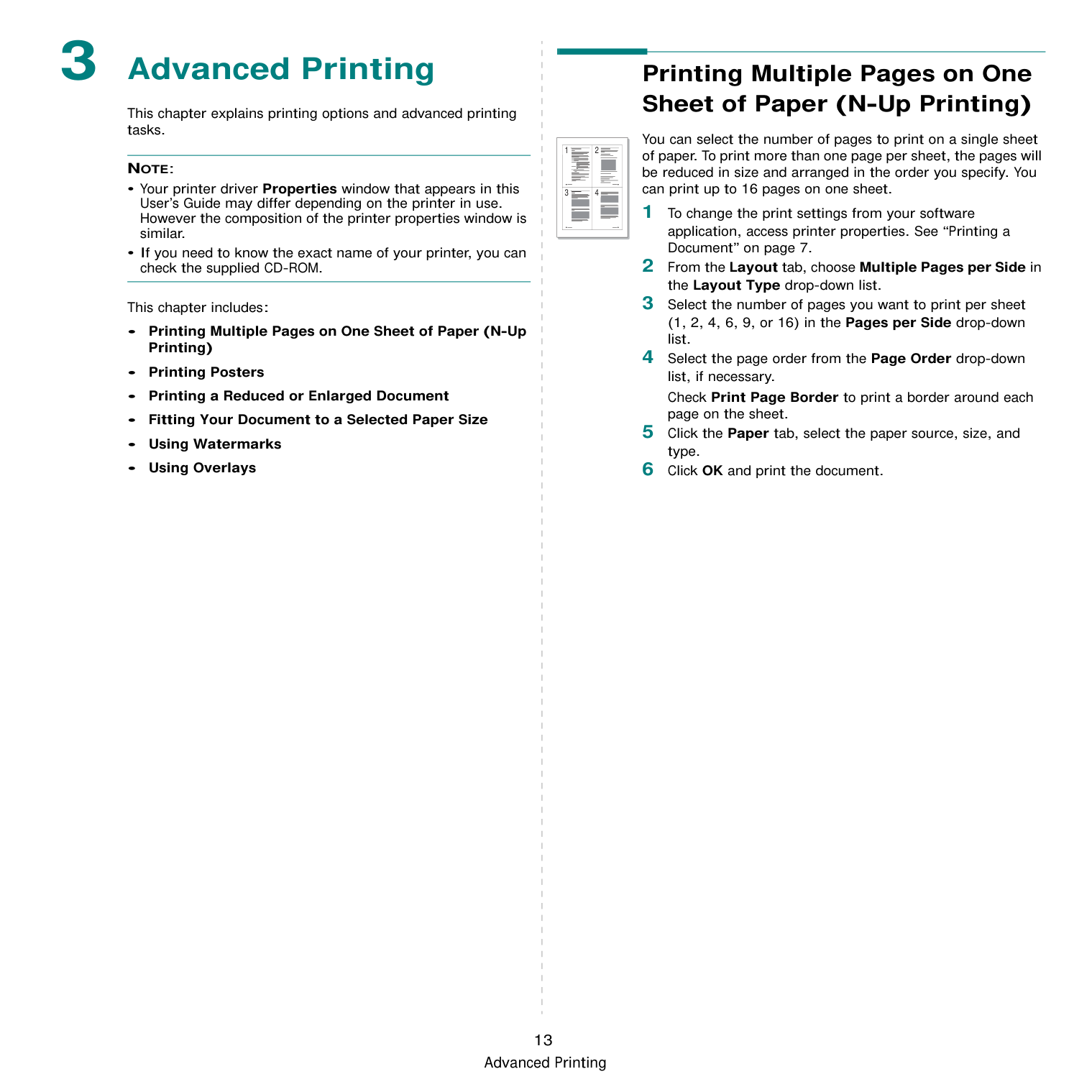
########## Using Overlays
|WORLD BEST
|Dear ABC
Regards| |---| | |---|
|WORLD BEST
| |---|
########### What is an Overlay?
An overlay is text and/or images stored in the computer hard disk drive (HDD) as a special file format that can be printed on any document. Overlays are often used to take the place of preprinted forms and letterhead paper. Rather than using preprinted letterhead, you can create an overlay containing the exact same information that is currently on your letterhead. To print a letter with your company’s letterhead, you do not need to load preprinted letterhead paper in the printer. You need only tell the printer to print the letterhead overlay on your document.
########### Creating a New Page Overlay
To use a page overlay, you must create a new page overlay containing your logo or image.
The file is not printed. Instead it is stored on your computer hard disk drive.
NOTE: The overlay document size must be the same as the documents you print with the overlay. Do not create an overlay with a watermark.
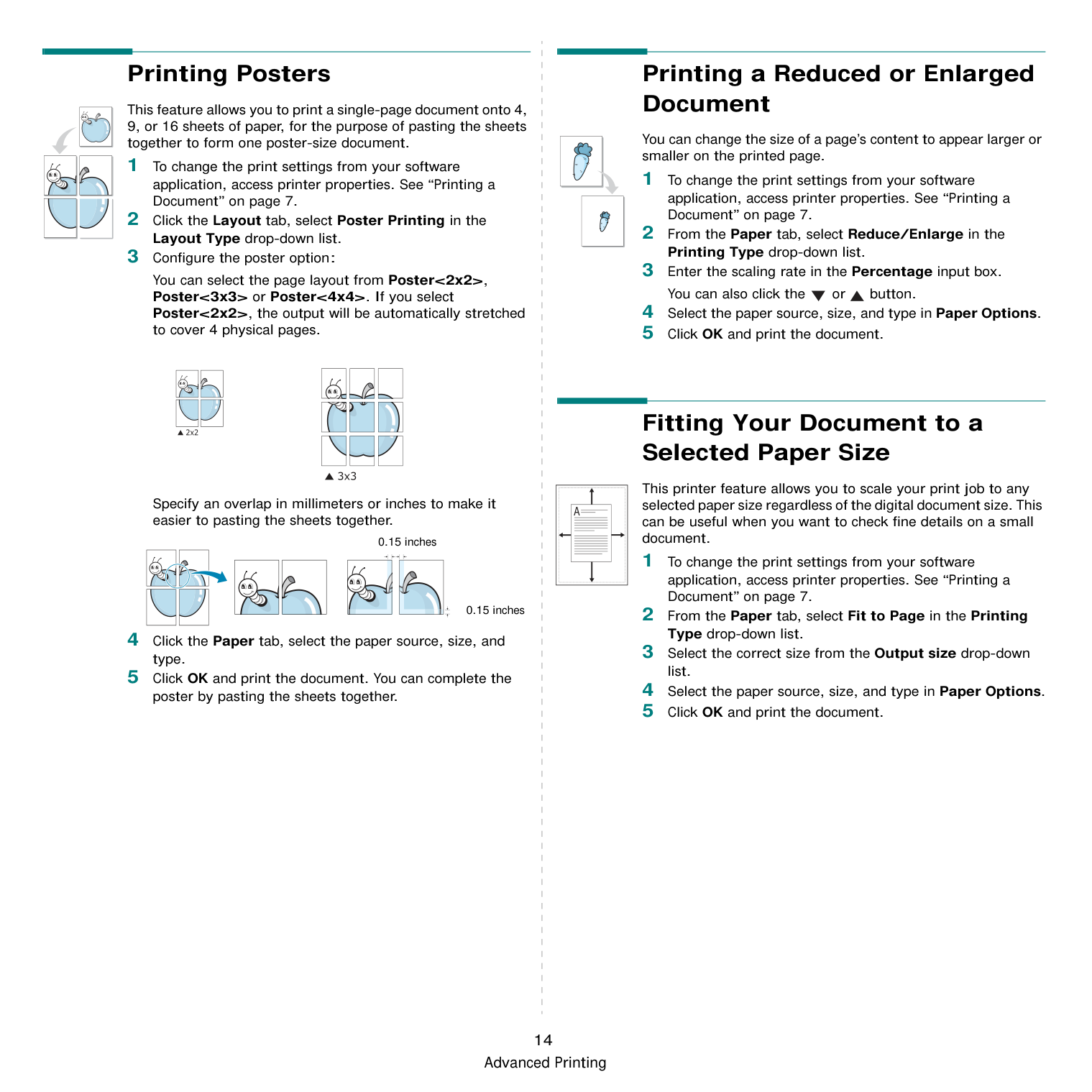
########### Using a Page Overlay
After an overlay has been created, it is ready to be printed with your document. To print an overlay with a document:
If you have stored the overlay file you want to use in an external source, you can also load the file when you access the Load Overlay window. After you select the file, click Open. The file appears in the Overlay List box and is available for printing. Select the overlay from the Overlay List box.
If this box is not checked and an overlay has been selected, the overlay automatically prints with your document.
The selected overlay downloads with your print job and prints on your document.
NOTE: The resolution of the overlay document must be the same as that of the document you will print with the overlay.
Deleting a Page Overlay You can delete page overlays that you no longer use.
4 Sharing the Printer
######## Locally
You can connect the printer directly to a selected computer, which is called “host computer,” on the network.
The following procedure is for Windows XP. For other Windows OS, refer to the corresponding Windows User's Guide or online help.
#################### NOTES:
########## Setting Up a Host Computer
########## Setting Up a Client Computer
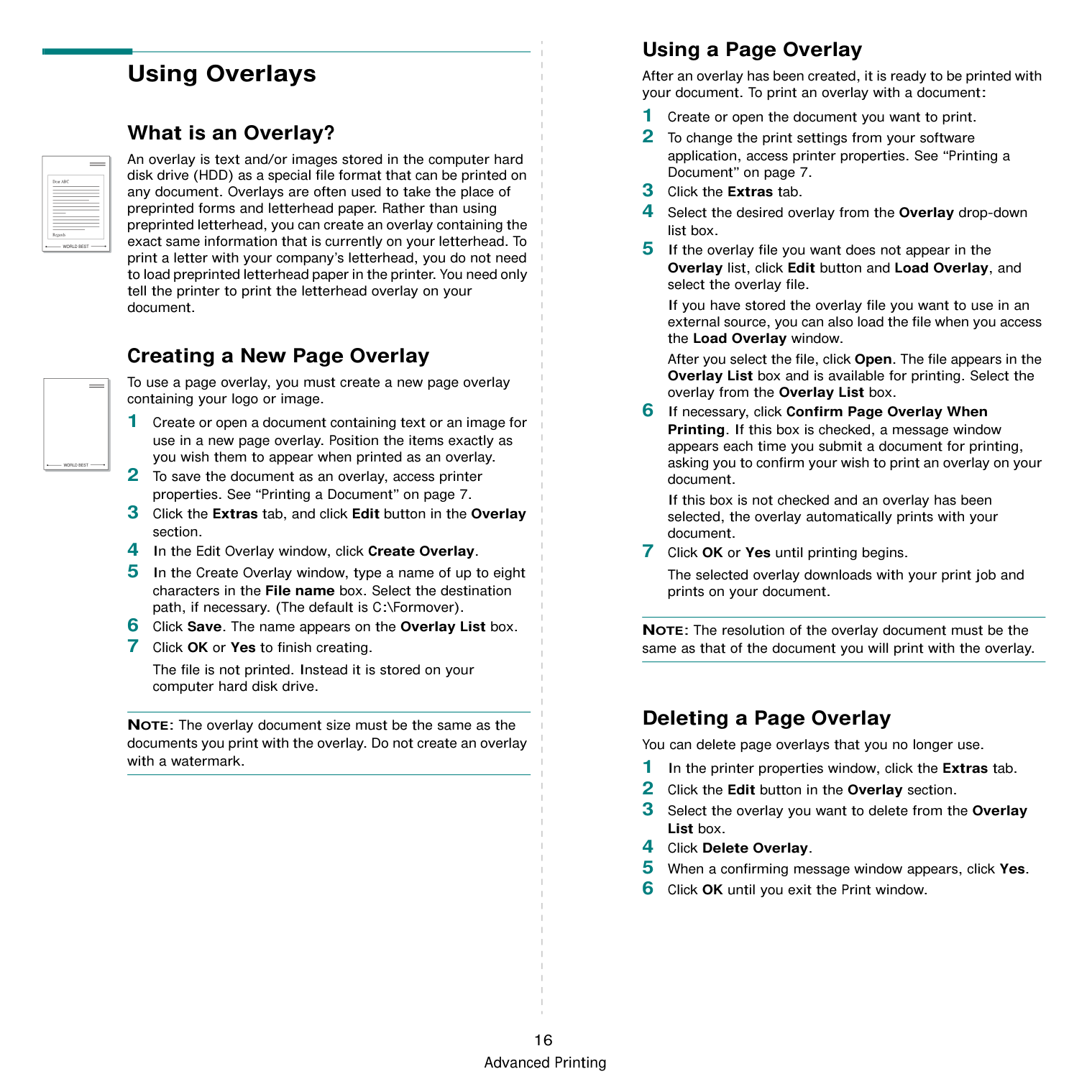
17
Sharing the Printer Locally
5 Using Smart Panel
Smart Panel is a program that monitors and informs you of the status of the printer, and allows you to customize the printer’s settings. If you are a Windows or Macintosh OS user, Smart Panel is installed automatically when you install the printer software. If you are a Linux OS user, download Smart Panel from the Samsung website (www.samsung.com/printer) and install.
#################### NOTES:
########## Understanding Smart Panel
If an error occurs while printing, Smart Panel appears automatically, showing the error.
You can also launch Smart Panel manually. Double-click the Smart Panel icon on the Windows task bar (in Windows), or Notification Area (in Linux). You can also click it on the status bar (in Mac OS X).
Double-click this icon in Windows.

Click this icon in Mac OS X.
|| |---|
Click this icon in Linux.
|| |---|
If you are a Windows user, from the Start menu, select Programs or All Programs → your printer driver name → Smart Panel.
NOTES:
The Smart Panel program displays the current status of the printer, the level of toner remaining in the toner cartridge(s) and various other information. You can also change settings.

|1| |---|
1
Toner Level You can view the level of toner remaining in the toner cartridge(s). The printer and the number of toner cartridge(s) shown in the above window may differ depending on the printer in use. Any printers do not have this feature.
Buy Now You can order replacement toner cartridge(s) online.
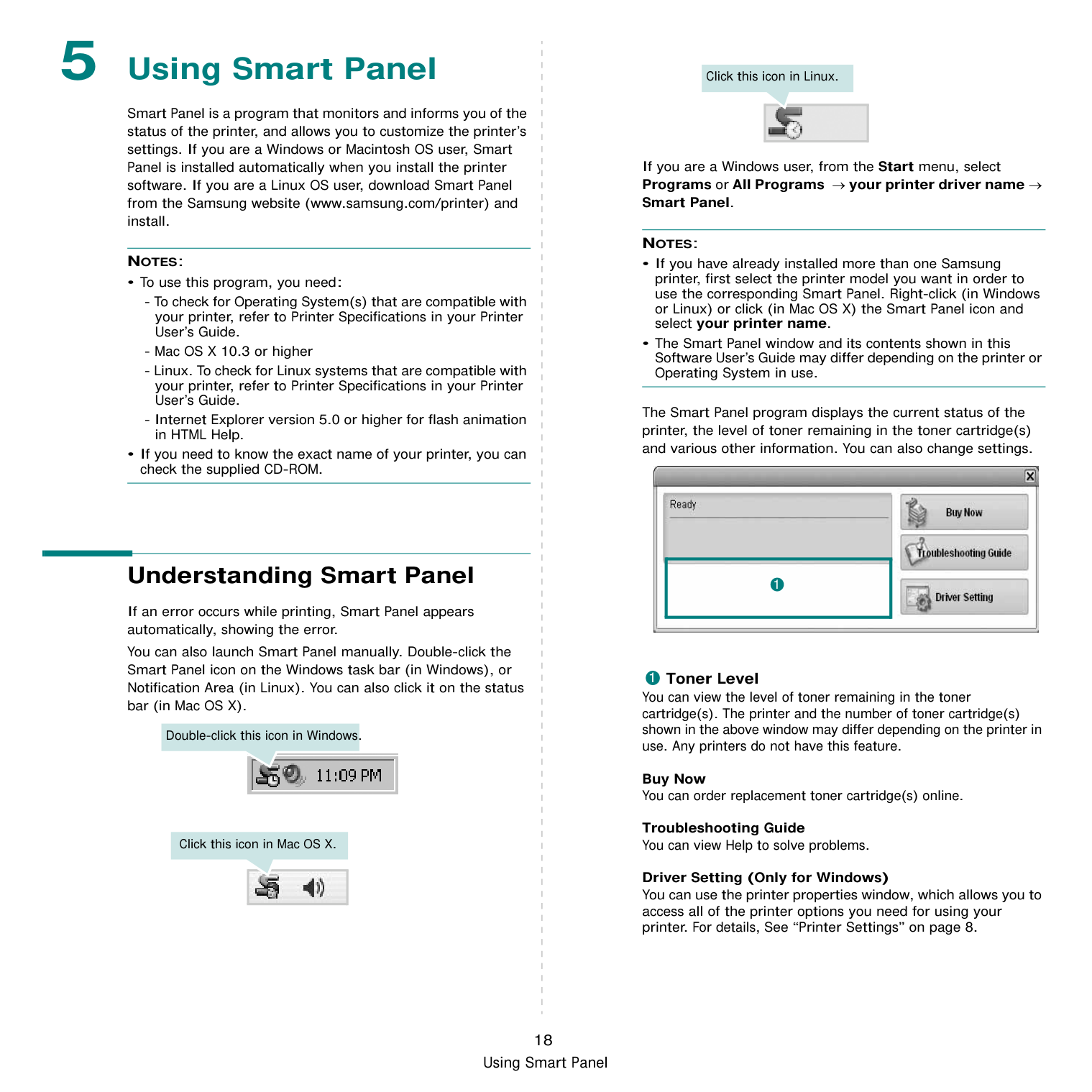
Troubleshooting Guide You can view Help to solve problems.
Driver Setting (Only for Windows) You can use the printer properties window, which allows you to access all of the printer options you need for using your printer. For details, See “Printer Settings” on page 8.
########## Opening the Troubleshooting Guide
Using the troubleshooting guide, you can view solutions for error status problems. Right-click (in Windows or Linux) or click (in Mac OS X) the Smart Panel icon and select Troubleshooting Guide.
########## Changing the Smart Panel Program Settings
Right-click (in Windows or Linux) or click (in Mac OS X) the Smart Panel icon and select Options. Select the settings you want from the Options window.
6 Using Your Printer in
######## Linux
You can use your machine in a Linux environment.
This chapter includes:
########## Getting Started
You need to download Linux software package from the Samsung website (www.samsung.com/printer) to install the printer softwares. After the driver is installed on your Linux system, the driver package allows you to monitor a number of machine devices via fast ECP parallel ports and USB simultaneously. The Unified Linux Driver package is supplied with a smart and flexible installation program. You don't need to search for additional components that might be necessary for the Unified Linux Driver software: all required packages will be carried onto your system and installed automatically; this is possible on a wide set of the most popular Linux clones.
########## Installing the Unified Linux Driver
########### Installing the Unified Linux Driver
NOTE: You must log in as a super user (root) to install the printer software. If you are not a super user, ask your system administrator.
[root@localhost root]#tar zxf [FilePath]/ UnifiedLinuxDriver.tar.gz[root@localhost root]#cd [FilePath]/cdroot/Linux[root@localhost Linux]#./ install.sh
NOTE: If you do not use the graphical interface and failed to install the software, you have to use the driver in the text mode. Follow the steps 3 to 4, and then follow the instructions on the terminal screen.

|| |---|
6 When the installation is complete, click Finish.
|| |---|
The installation program has added the Unified Driver Configurator desktop icon and Samsung Unified Driver group to the system menu for your convenience. If you have any difficulties, consult the onscreen help that is available through your system menu or can otherwise be called from the driver package windows applications, such as Unified Driver Configurator.
########### Uninstalling the Unified Linux Driver
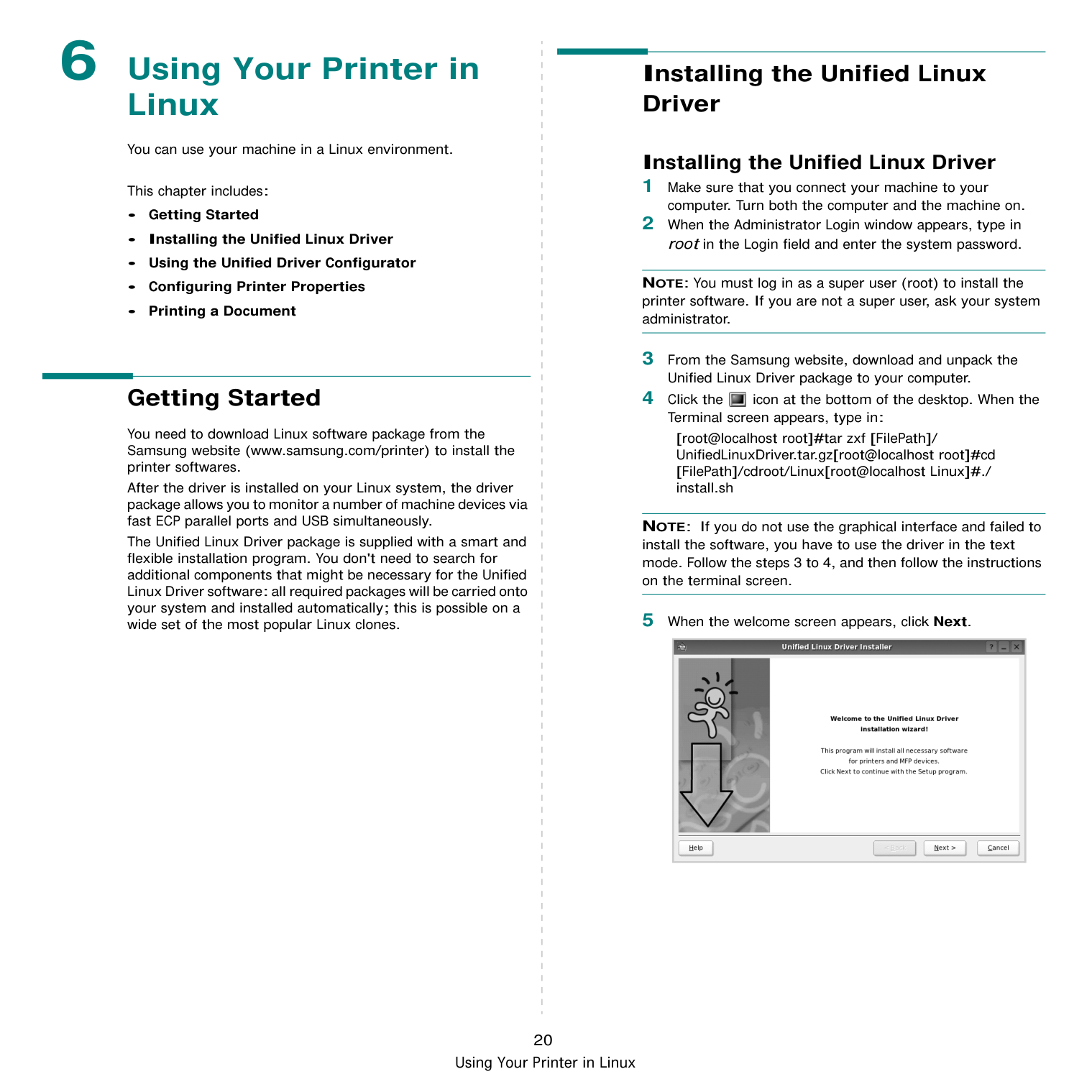
NOTE: You must log in as a super user (root) to install the printer software. If you are not a super user, ask your system administrator.
[root@localhost root]#cd /opt/Samsung/mfp/uninstall/ [root@localhost uninstall]#./uninstall.sh

|| |---|
########## Using the Unified Driver Configurator
Unified Linux Driver Configurator is a tool primarily intended for configuring Printer. After installing the Unified Linux driver, the Unified Linux Driver Configurator icon will automatically be created on your desktop.
########### Opening the Unified Driver Configurator
############## 1 Double-click Unified Driver Configurator on thedesktop.
You can also click the Startup Menu icon and select Samsung Unified Driver and then Unified Driver Configurator.
############### 2 Press each button on the Modules pane to switch to thecorresponding configuration window.
Printers Configuration button Ports Configuration button
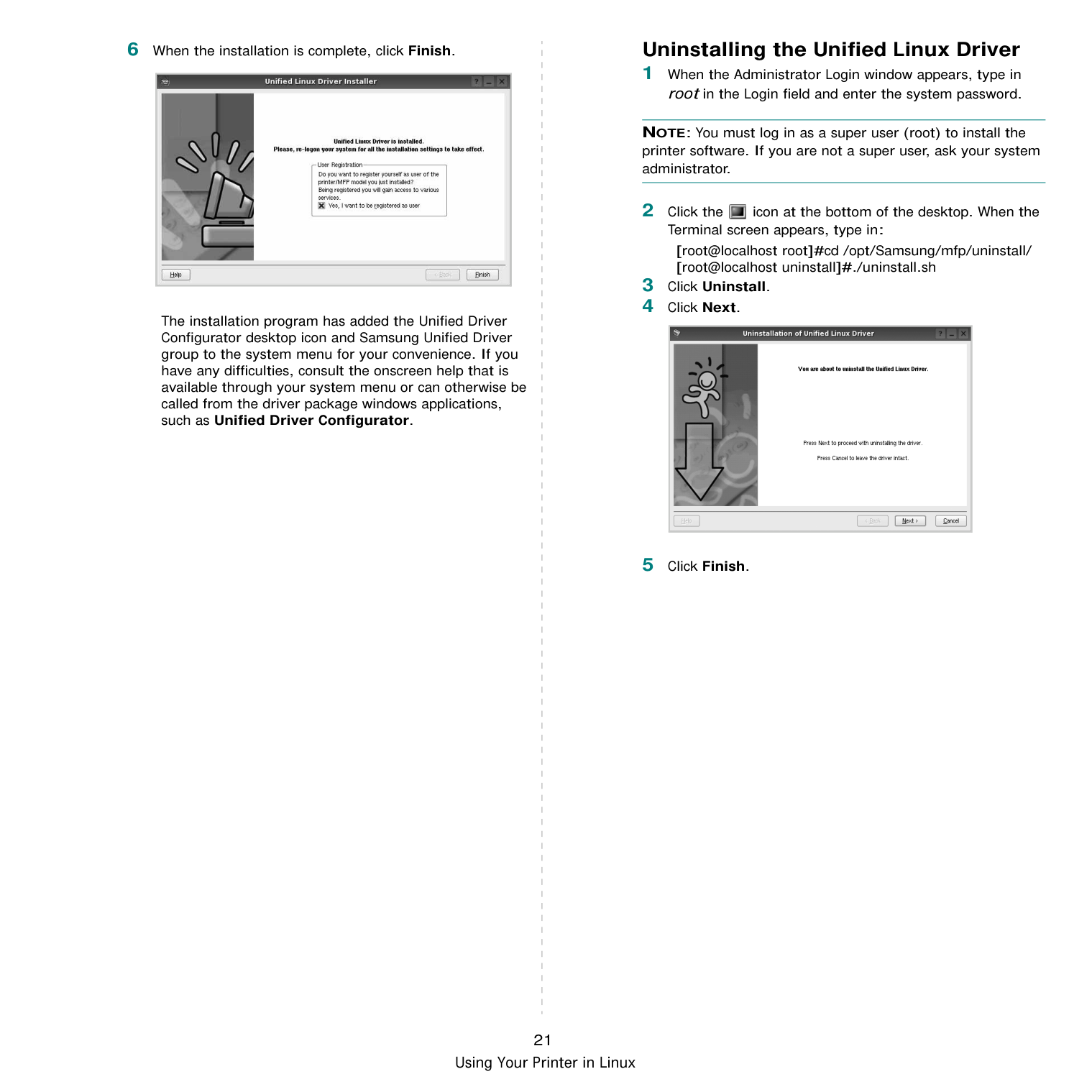

You can use the onscreen help by clicking Help.
############### 3 After changing the configurations, click Exit to close theUnified Driver Configurator.
Printers Configuration Printers configuration has the two tabs: Printers and Classes.
################# Printers Tab
You can see the current system’s printer configuration by clicking on the printer icon button on the left side of the Unified Driver Configurator window.

Switches to Printer configuration.
Shows all of the installed printer.
Shows the status, model name and URI of your printer.
You can use the following printer control buttons:
Classes Tab The Classes tab shows a list of available printer classes.
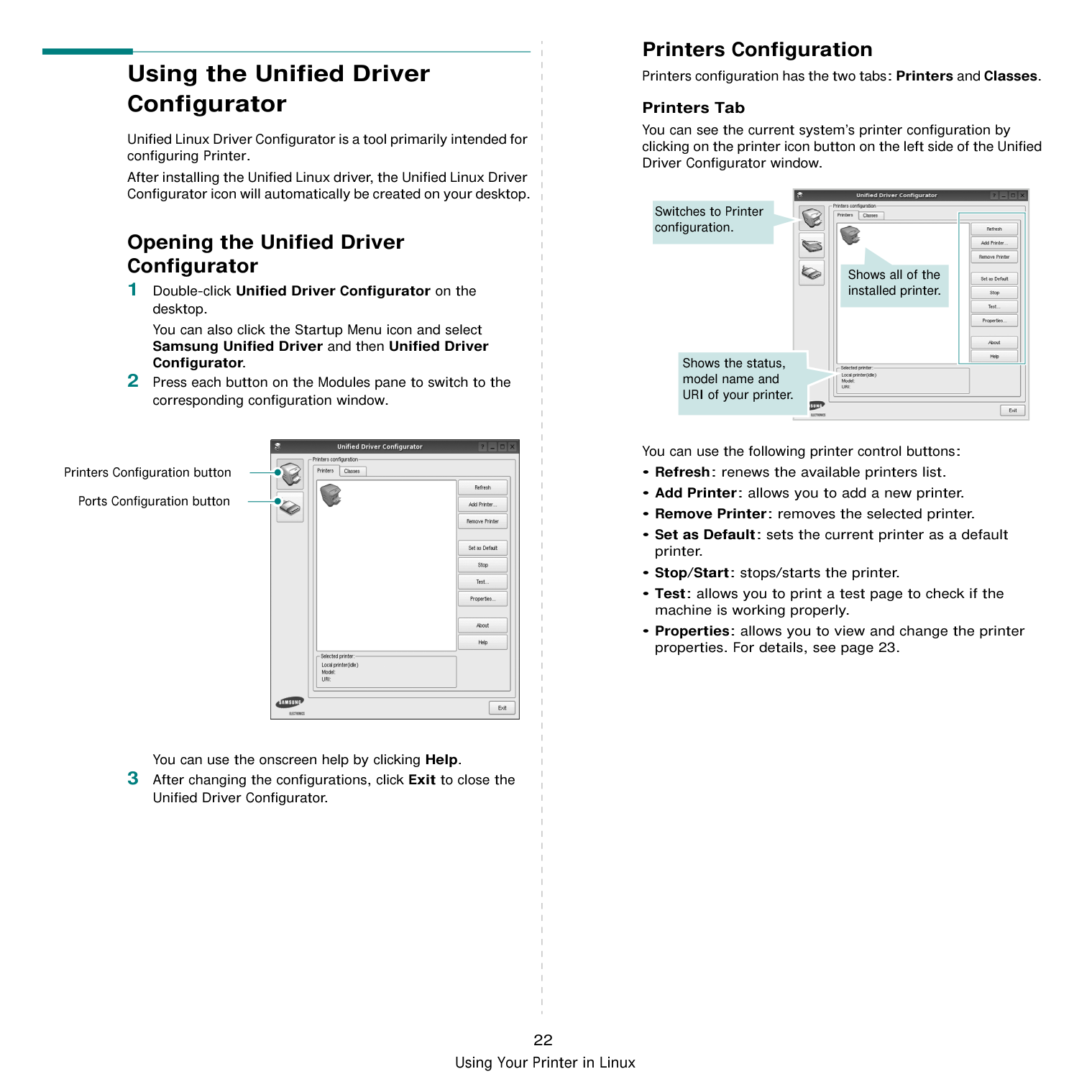

Shows all of the printer classes.
Shows the status of the class and the number of printers in the class.
Ports Configuration
In this window, you can view the list of available ports, check the status of each port and release a port that is stalled in busy state when its owner is terminated for any reason.

Switches to ports configuration.
Shows all of the available ports.
Shows the port type, device connected to the port and status
########## Configuring Printer Properties
Using the properties window provided by the Printers configuration, you can change the various properties for your machine as a printer.
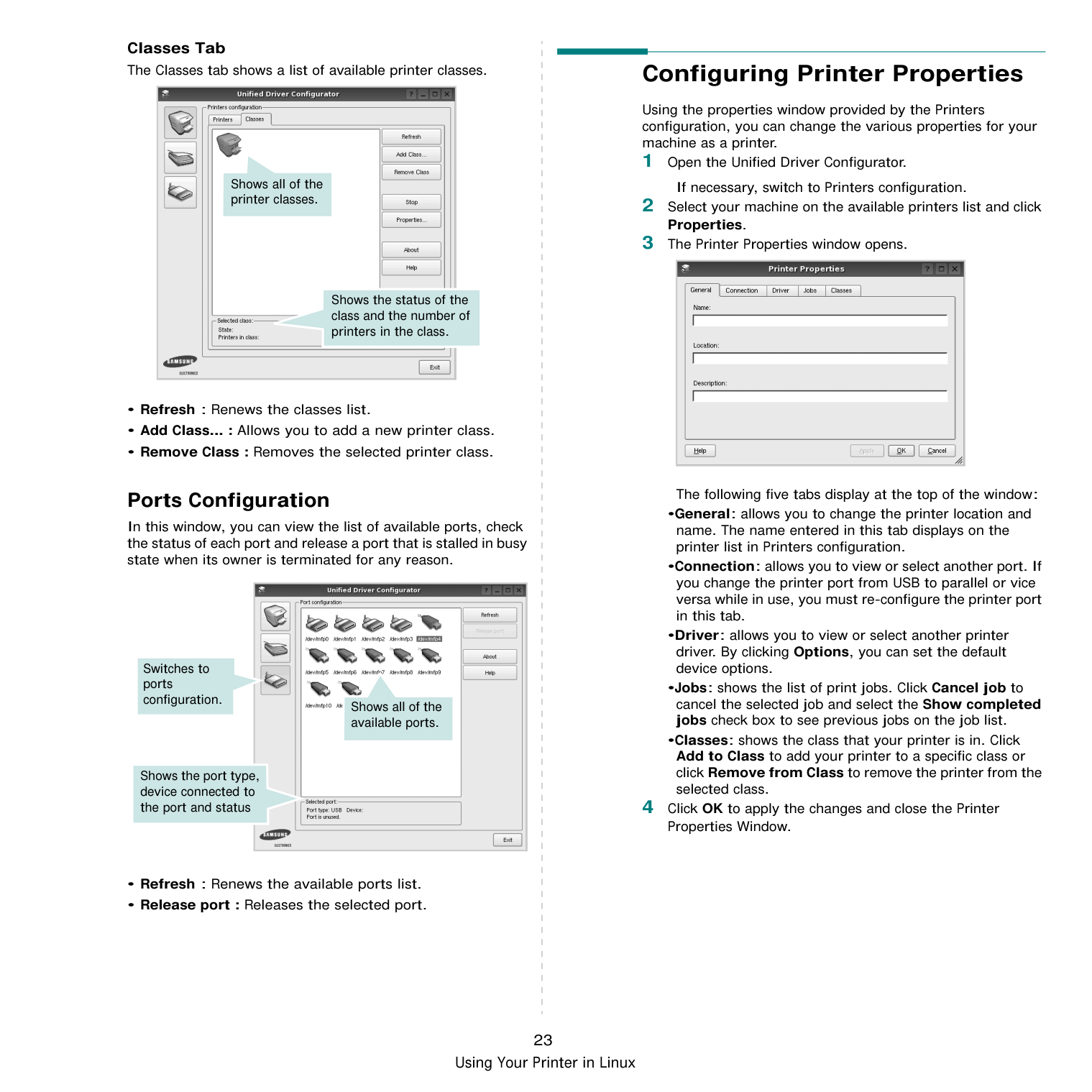
The following five tabs display at the top of the window:
|| |---|
########## Printing a Document
########### Printing from Applications
There are a lot of Linux applications that you are allowed to print from using Common UNIX Printing System (CUPS). You can print on your machine from any such application.
•Reverse All Pages(3,2,1): When you use this feature, you do not need to sort the print-out by stacks.
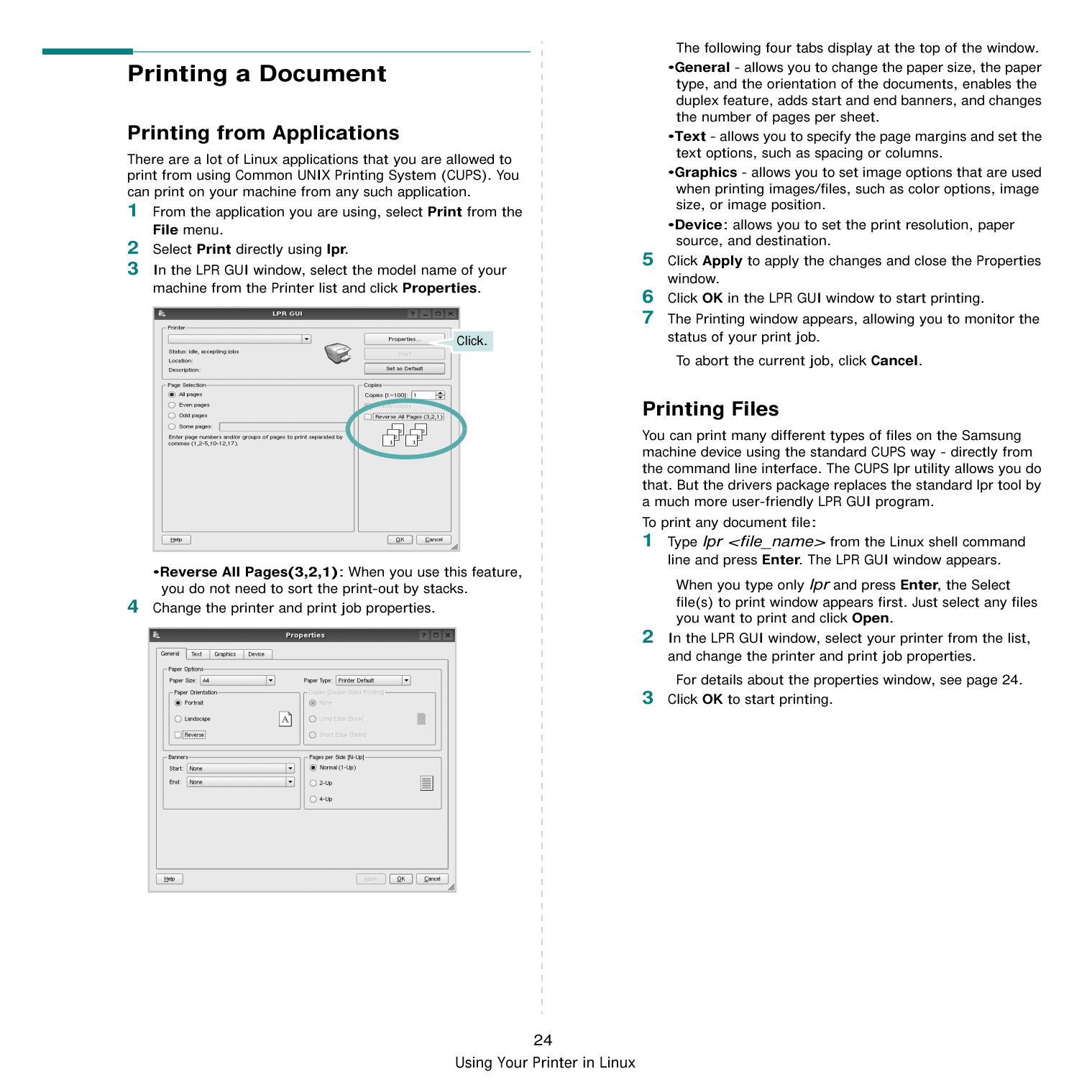

Click.
|| |---|
The following four tabs display at the top of the window.
To abort the current job, click Cancel.
Printing Files You can print many different types of files on the Samsung machine device using the standard CUPS way - directly from the command line interface. The CUPS lpr utility allows you do that. But the drivers package replaces the standard lpr tool by a much more user-friendly LPR GUI program. To print any document file:
When you type only lpr and press Enter, the Select file(s) to print window appears first. Just select any files you want to print and click Open.
For details about the properties window, see page 24.
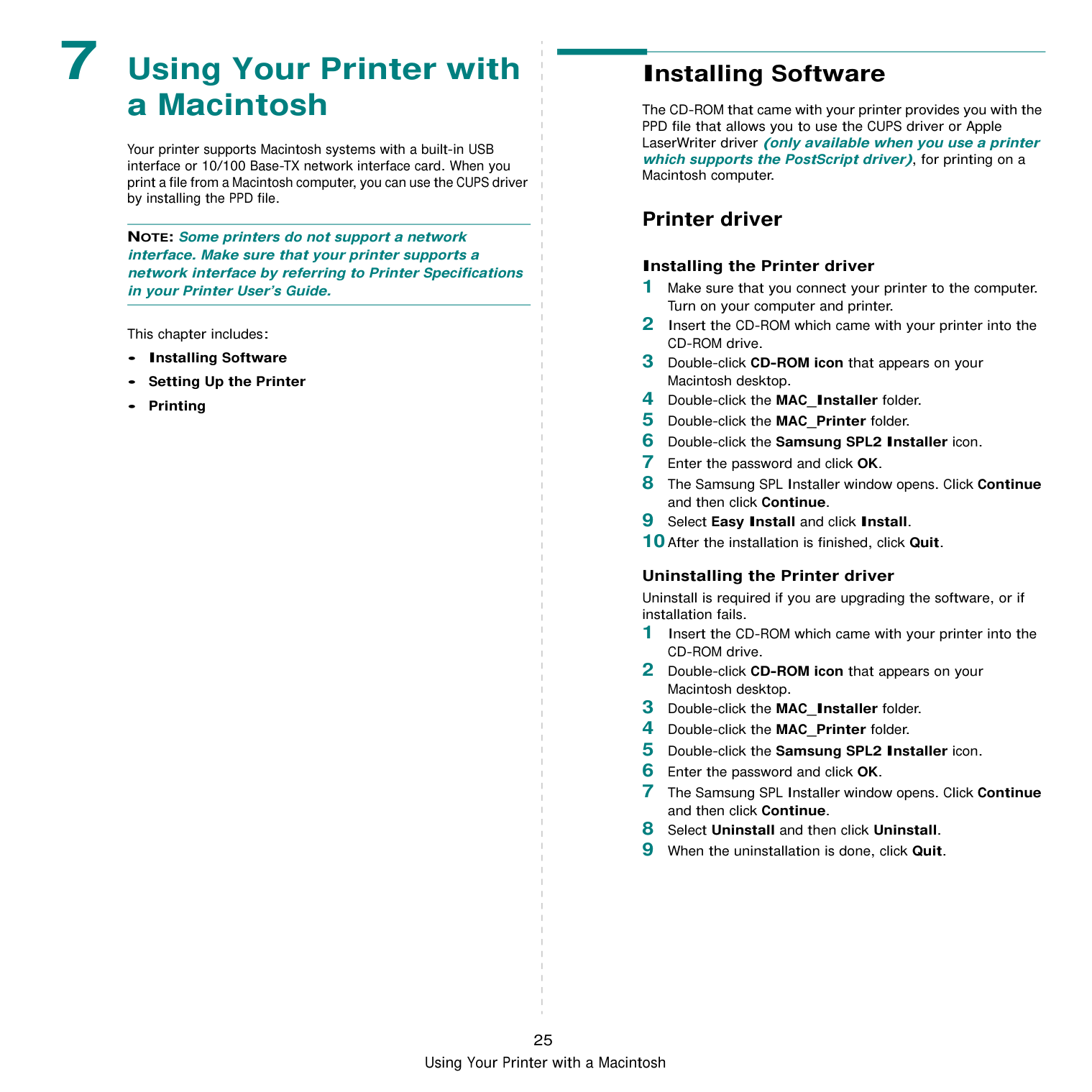
7 Using Your Printer with
######## a Macintosh
Your printer supports Macintosh systems with a built-in USB interface or 10/100 Base-TX network interface card. When you print a file from a Macintosh computer, you can use the CUPS driver by installing the PPD file.
NOTE: Some printers do not support a network interface. Make sure that your printer supports a network interface by referring to Printer Specifications in your Printer User’s Guide.
This chapter includes:
########## Installing Software
The CD-ROM that came with your printer provides you with the PPD file that allows you to use the CUPS driver or Apple LaserWriter driver (only available when you use a printer which supports the PostScript driver), for printing on a Macintosh computer.
########### Printer driver
################# Installing the Printer driver
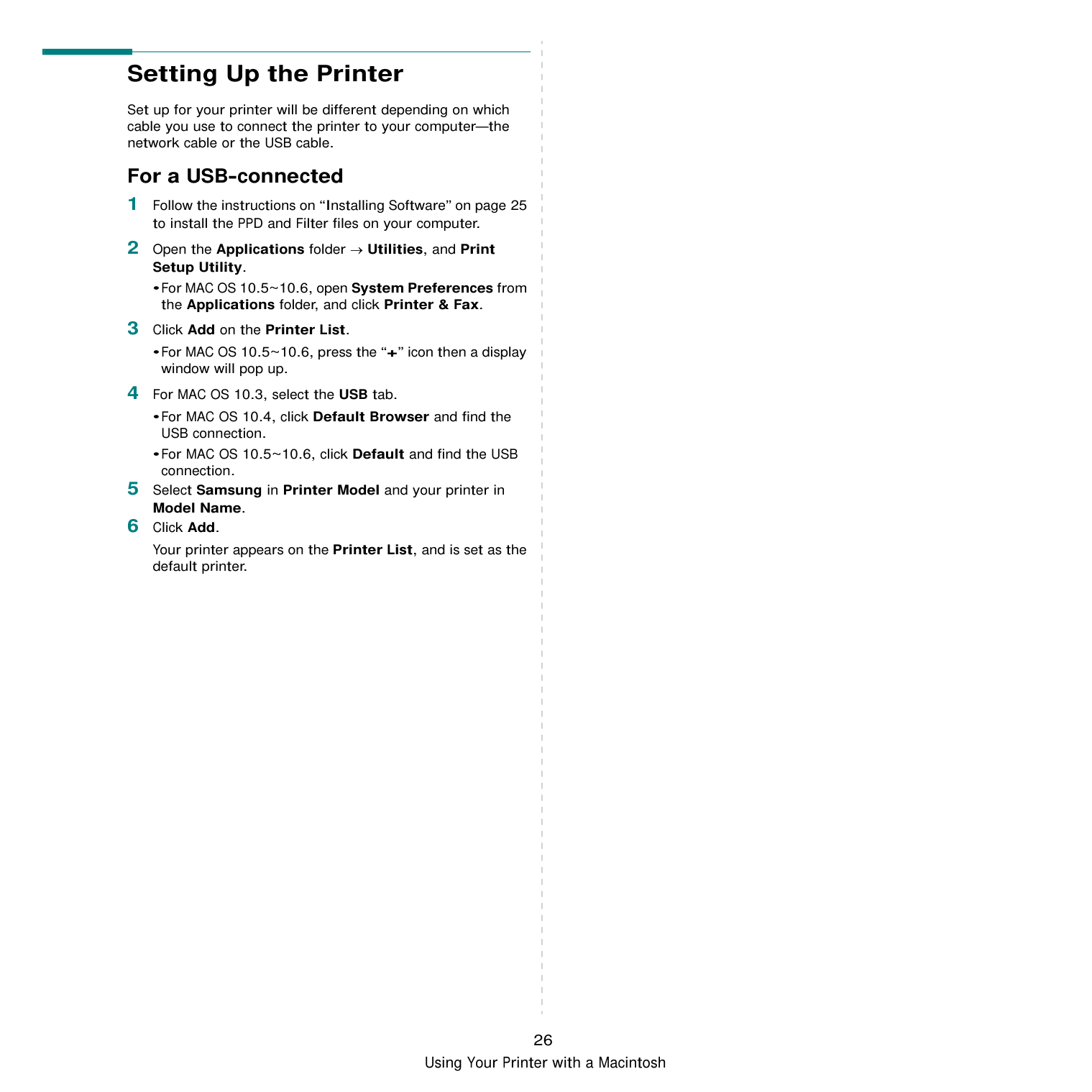
################# Uninstalling the Printer driver
Uninstall is required if you are upgrading the software, or if installation fails.
########## Setting Up the Printer
Set up for your printer will be different depending on which cable you use to connect the printer to your computer—the network cable or the USB cable.
########### For a USB-connected
•For MAC OS 10.5~10.6, open System Preferences from the Applications folder, and click Printer & Fax.
•For MAC OS 10.5~10.6, press the “+” icon then a display window will pop up.
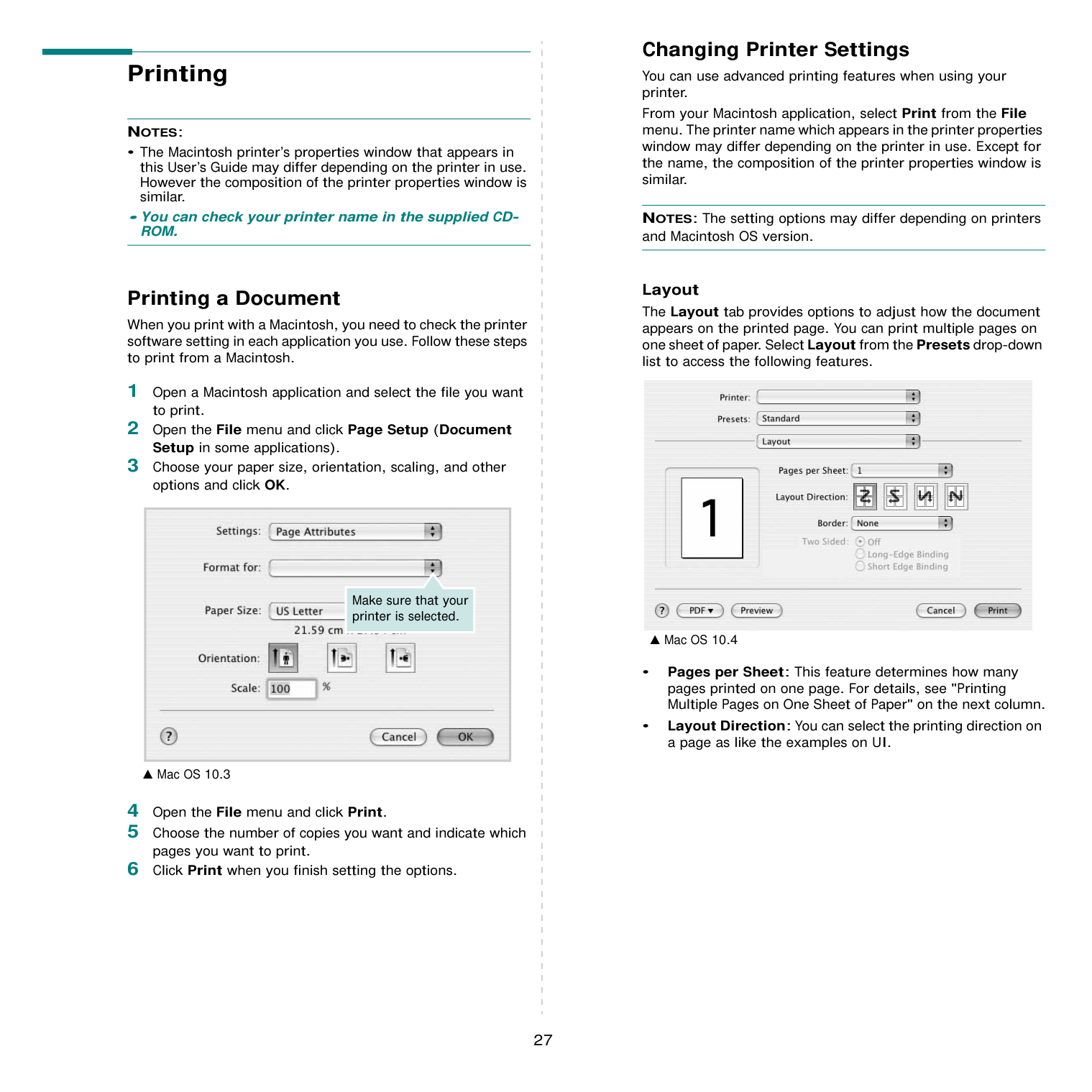
Your printer appears on the Printer List, and is set as the default printer.
########## Printing
#################### NOTES:
• The Macintosh printer’s properties window that appears in
this User’s Guide may differ depending on the printer in use. However the composition of the printer properties window is similar.
• You can check your printer name in the supplied CDROM.
########### Printing a Document
When you print with a Macintosh, you need to check the printer software setting in each application you use. Follow these steps to print from a Macintosh.
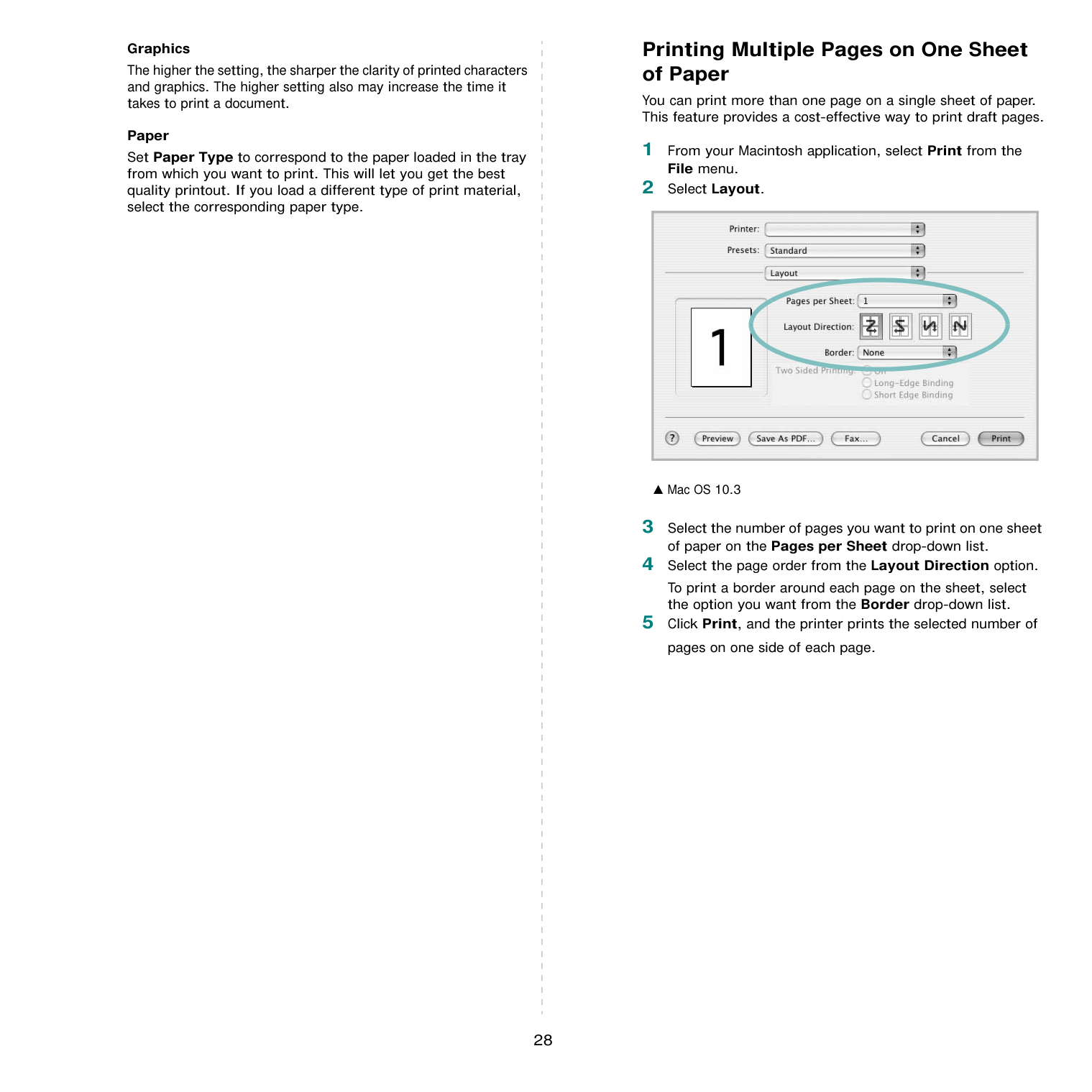
|
Make sure that your printer is selected.| |---|
▲ Mac OS 10.3
Changing Printer Settings You can use advanced printing features when using your printer. From your Macintosh application, select Print from the File menu. The printer name which appears in the printer properties window may differ depending on the printer in use. Except for the name, the composition of the printer properties window is similar.
NOTES: The setting options may differ depending on printers and Macintosh OS version.
Layout The Layout tab provides options to adjust how the document appears on the printed page. You can print multiple pages on one sheet of paper. Select Layout from the Presets drop-down list to access the following features.

▲ Mac OS 10.4
Graphics The higher the setting, the sharper the clarity of printed characters and graphics. The higher setting also may increase the time it takes to print a document.
Paper Set Paper Type to correspond to the paper loaded in the tray from which you want to print. This will let you get the best quality printout. If you load a different type of print material, select the corresponding paper type.
########### Printing Multiple Pages on One Sheet of Paper
You can print more than one page on a single sheet of paper. This feature provides a cost-effective way to print draft pages.
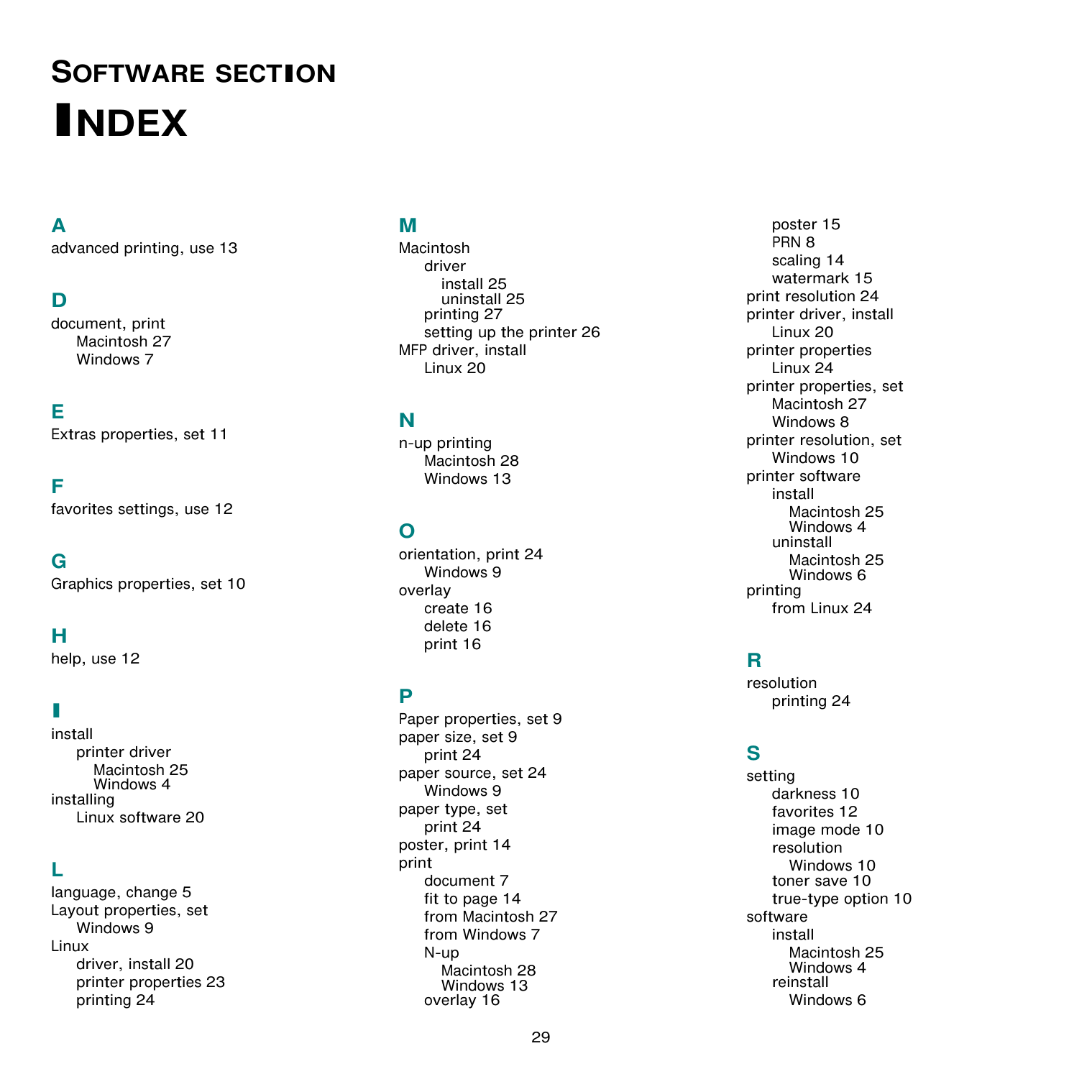
To print a border around each page on the sheet, select the option you want from the Border drop-down list.
|
| |---|
▲ Mac OS 10.3
SOFTWARE SECTION
##### INDEX
A advanced printing, use 13
Macintosh 27 Windows 7
printer driver Macintosh 25 Windows 4
installing Linux software 20
L language, change 5 Layout properties, set
Windows 9
Linux driver, install 20 printer properties 23 printing 24
driver install 25 uninstall 25
printing 27 setting up the printer 26
MFP driver, install Linux 20
Macintosh 28 Windows 13
Windows 9 overlay
create 16 delete 16 print 16
print 24 paper source, set 24 Windows 9
paper type, set print 24 poster, print 14 print
document 7 fit to page 14 from Macintosh 27 from Windows 7 N-up

Macintosh 28 Windows 13
overlay 16
poster 15 PRN 8 scaling 14 watermark 15
print resolution 24 printer driver, install
Linux 20 printer properties Linux 24
printer properties, set Macintosh 27 Windows 8
printer resolution, set
Windows 10 printer software
install Macintosh 25 Windows 4
uninstall Macintosh 25 Windows 6
printing from Linux 24
printing 24
darkness 10 favorites 12 image mode 10 resolution
Windows 10 toner save 10 true-type option 10
software
install Macintosh 25 Windows 4
reinstall Windows 6
system requirements Macintosh 25
uninstall Macintosh 25 Windows 6 status monitor, use 18
Macintosh 25 Windows 6
uninstalling MFP driver Linux 21
W watermark
create 15 delete 15 edit 15 print 15
###################### Rev.7.00