
Ask AI
— answers from the official manualAnswers from the official manual.
Common questions
Common Questions
10 totalWhat is the maximum amount of ground coffee I can use in the carafe?
The maximum capacity is 15 tablespoons for regular ground coffee and 12 tablespoons for decaf. Exceeding this amount may cause overflow. The recommended amount is 1 tablespoon of ground coffee per cup. (Page 3)
How do I set up Auto Brew on my Keurig K-Duo coffee maker?
Fill the water reservoir to MAX FILL, load a paper filter and ground coffee, then press the AUTO BREW button. Use the SET TIME button to set the desired start time and press the blinking BREW button to confirm the hour and minute. Choose your brew size and press the blinking BREW button again to confirm. A clock icon will appear on the screen indicating Auto Brew is enabled. (Page 3)
What parts of the Keurig K-Duo can I put in the dishwasher?
No parts are dishwasher safe. All removable parts including the carafe, carafe lid, water reservoir, reservoir lid, filter basket, and drip tray should be cleaned by hand with warm soapy water and rinsed thoroughly. Do not dry the inside of the water reservoir with a cloth, as lint may remain. (Page 4)
What should I do if my Keurig K-Duo is only brewing a partial cup or carafe?
First, ensure there is enough water in the reservoir for your selected brew size. Check if the exit needle is clogged and clean it if needed, or run a cleansing brew without a K-Cup pod to clear any blockage. If the problem persists after descaling, the drip stop may be clogged—remove the filter basket and rinse it thoroughly. If none of these solutions work, contact Customer Service. (Page 6)
How do I set up my Keurig K-Duo coffee maker for the first time?
Start by removing packing tape and plugging the brewer into an outlet. Run a cleansing brew on both the single cup side (6oz) and carafe side (6-cup) without any K-Cup pods or grounds, then set the clock using the SET TIME button. Finally, fill the water reservoir to the MAX FILL line with fresh water, and you're ready to brew. (Page 2)
What is the proper descaling procedure for my Keurig Duo coffee maker?
First, empty the water reservoir and pour the entire bottle of Keurig Descaling Solution into it, then fill the empty bottle with water and pour that in. Press and hold the CUPS and OZ buttons together for 3 seconds to enter Descale mode, press BREW to run the single serve descale cycle, then press BREW again for the carafe descale cycle. Finally, perform three fresh water rinse cycles (two single serve and one carafe) by pressing the flashing BREW button and discarding the liquid into the sink. (Page 6)
Full Manual
8 pages
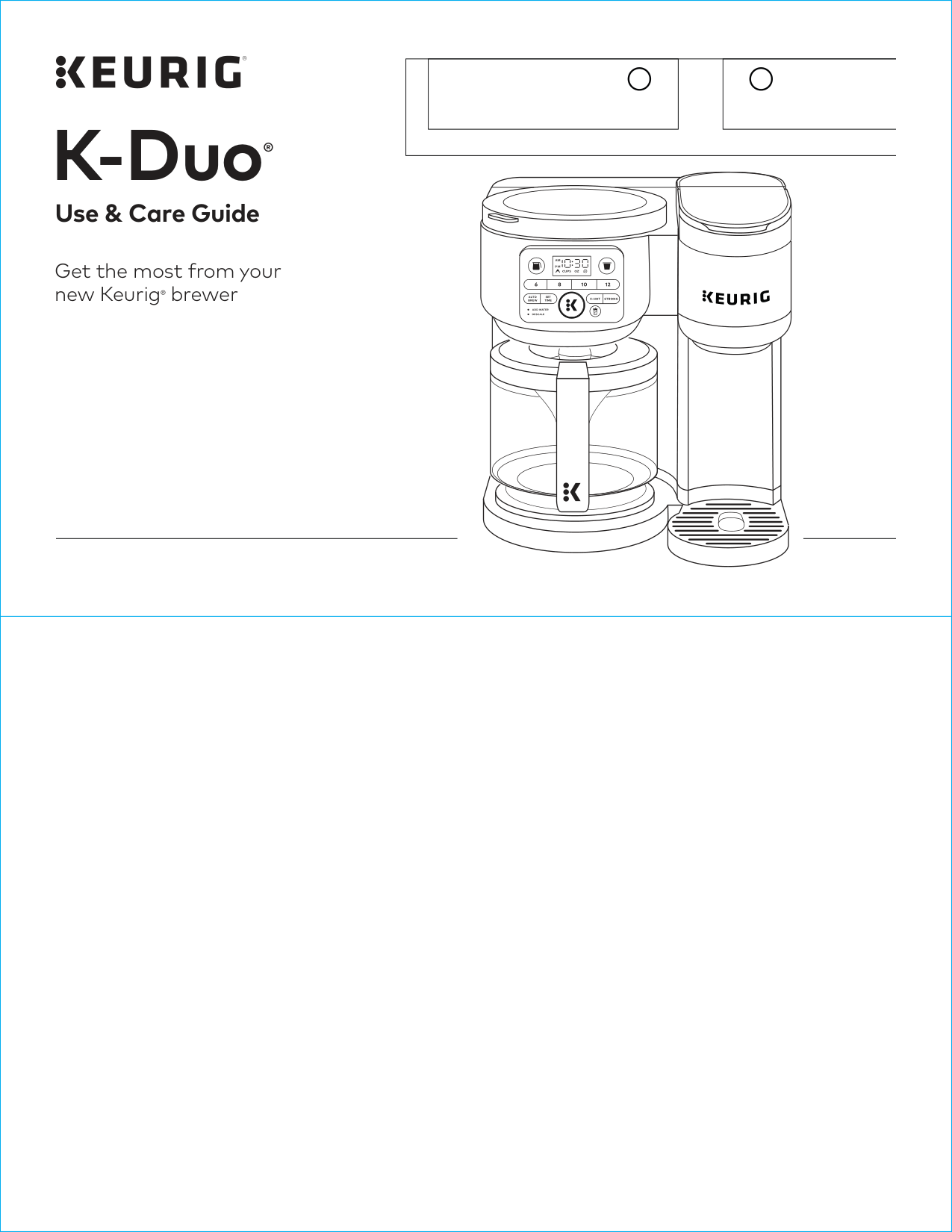
Get the most from your new Keurig® brewer Use & Care Guide K-Duo ®

Before You Brew Cleansing Brew: Carafe (cont’d) The CUPS button will remain illuminated red for 2 hours while the heating plate is on. Press and hold the CUPS button for 3 seconds to turn the heating plate off. Refill the water reservoir before the first brew. The one-time cleansing process is now complete and you are ready to brew! Plug & Place Remove packing tape from brewer and plug into an outlet. Single Cup: Place a large mug (12oz minimum) on the drip tray. Carafe: Rinse the carafe and place it on the heating plate. Cleansing Brew: Single Cup Do not insert a K-Cup® pod. Press the OZ button to power on. Select the 6oz brew size. Press the flashing BREW button to start a cleansing brew. The BREW button will remain solid while brewing. Brewing is complete when all lights are no longer illuminated. Pour the hot water into the sink. Cleansing Brew: Carafe Do not fill the filter basket with coffee grounds. Press the CUPS button to power on the carafe side. Select the 6-cup brew size. Press the flashing BREW button to start a cleansing brew. The BREW button will remain solid while brewing. Brewing is complete when the CUPS button illuminates red. Pour the hot water into the sink. Set Clock Press the SET TIME button to toggle through the hours. Press the blinking BREW button to confirm hour. Press the SET TIME button to toggle to the correct minute. Press the blinking BREW button to confirm minute. The time-setting process is complete. NOTE: The clock must be set in order to use the Auto Brew functionality. Rinse & Fill Lift the reservoir straight up to remove it. If you have a Keurig® Water Filter (sold separately), install it now. Refer to your Water Filter Starter Kit for instructions. Rinse water reservoir before filling with fresh water to the MAX FILL line. Replace water reservoir, making sure it is secure on the brewer. 1 2 3 4 6 5
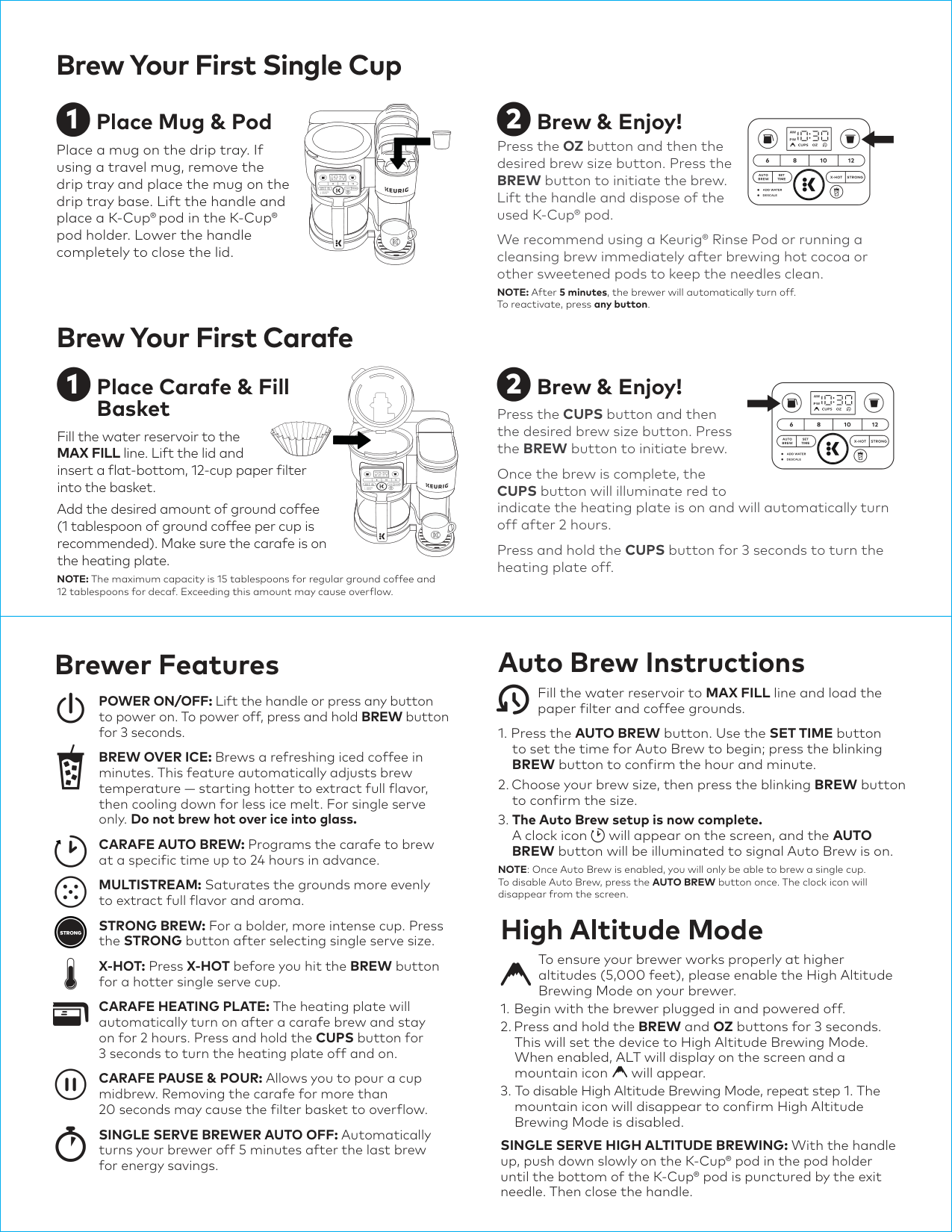
Brew Your First Carafe Brew Your First Single Cup High Altitude Mode To ensure your brewer works properly at higher altitudes (5,000 feet), please enable the High Altitude Brewing Mode on your brewer.

Caring For Your Brewer Brewer Exterior Keep your Keurig® brewer looking its best by cleaning the exterior from time to time. Just clean with a damp, soapy, lint-free, nonabrasive cloth. Never immerse the brewer in water or other liquids. Carafe & Carafe Lid The carafe and carafe lid should be cleaned after each brew. Rinse and clean with a damp, soapy, lint-free, nonabrasive cloth. Drip Tray The drip tray can hold up to 4 ounces of overflow and should be emptied and cleaned occasionally. To remove, slide it toward you, keeping it level to avoid spilling. Clean with a damp, soapy, lint-free, nonabrasive cloth. Heating Plate Once the heating plate has cooled completely, gently wipe with a clean, damp cloth. Never use rough, abrasive materials or cleansers to clean the heating plate. Water Reservoir & Reservoir Lid The water reservoir lid and water reservoir should be cleaned periodically with a damp, soapy, nonabrasive cloth. Rinse the reservoir thoroughly after cleaning. This will ensure that no cleaning solutions remain in the area, as they may contaminate the water supply. After rinsing, fill the reservoir with clean water and return it to the brewer. Do not dry the inside of the water reservoir with a cloth, as lint may remain. The water reservoir lid and water reservoir should not be put into the dishwasher. NOTE: If you are using a water filter inside the water reservoir, remove it before cleaning. The filter cartridge should be replaced regularly as needed per filter instructions. Filter Basket Remove the filter basket from the brewer. Remove and discard the paper filter and ground coffee. The filter basket and filter basket holder should be washed in warm, soapy water and rinsed thoroughly. Dry all parts after use. NOTE: Coffee grounds should be discarded and the filter basket should be rinsed clean after brewing or as part of the daily cleaning routine. Regular cleaning keeps your brewer running smoothly. Always be sure to turn off and unplug your brewer before cleaning. We recommend using a Keurig® Rinse Pod or running a cleansing brew immediately after brewing hot cocoa or other sweetened pods to keep the needles clean. CAUTION: Parts are not dishwasher safe.

Caring For Your Brewer (cont’d) K-Cup® Pod Holder To remove the K-Cup® pod holder from the brewer, lift the handle and grasp the top of the K-Cup® pod holder with one hand while pushing up on the bottom of the K-Cup® pod holder from underneath with the other until it releases. After cleaning, align the K-Cup® pod holder with the opening, using the two front ribs as a guide, and snap into place from the top. CAUTION: There are sharp needles that puncture the K-Cup® pod above the K-Cup® pod holder and in the bottom of the K-Cup® pod holder. To avoid risk of injury, do not put your fingers in the K-Cup® pod holder. NOTE: Always remove and dispose of the used K-Cup® pod after brewing or as part of the daily cleaning routine. Funnel The funnel can be removed from the K-Cup® pod holder by pulling on it until it pops off. To replace it, orient the snaps to the indent and just snap it back on to the K-Cup® pod holder. Exit Needle Remove the pod holder assembly and detach the funnel. Locate the exit needle on the inside bottom of the K-Cup® pod holder. Insert a straightened paper clip into the exit needle to loosen any coffee grounds. Entrance Needles Lift the brewer handle and locate the entrance needles on the underside of the lid. To clean the holes in the needles, hold the brewer handle in the upward position and with your other hand, carefully insert a straightened paper clip into all the holes. Gently move it around to loosen any coffee grounds. Lower the handle completely and run a cleansing brew two times. Do not insert a K-Cup® pod. TIP: Refer to support.keurig.com for video instructions on cleaning the entrance/ exit needles. Frequency Product Benefit Weekly Keurig® Rinse Pods A simple, fast, and convenient way to reduce flavor carryover between brews. Every 2 months Keurig® Water Filters Keep your water fresh and clean for a great-tasting cup of coffee every time. Every 3 months or when the Descale notification turns on Keurig® Descaling Solution Remove calcium deposits, or scale, that can build up inside a brewer over time; this can help extend the life of your brewer (when used regularly). If the brewer has been in storage or hasn’t been used in days, run a cleansing brew before brewing your beverage. Periodically hand-wash the water reservoir and lid, carafe and lid, filter basket lid, and filter basket with warm, soapy water and rinse clean. CAUTION: Parts are not dishwasher safe. NOTE: Do not dry the inside of the water reservoir with a cloth, as lint may remain. Keep your brewer running at peak performance by following the recommended maintenance schedule:
Troubleshooting Grounds in Your Coffee
Warranty
Limited One-Year Warranty
Keurig Green Mountain, Inc. (Keurig) warrants that your brewer will be free of defects in materials or workmanship under normal home use for one year from the date of purchase. It is recommended that you register your brewer on keurig.com/new so that your purchase information will be stored in our system. Keurig will, at its option, repair or replace a defective brewer without charge upon receipt of proof of the date of purchase. If a replacement brewer is necessary to service this warranty, the replacement brewer may be new or reconditioned. If a replacement brewer is sent, a new limited one-year warranty will be applied to the replacement brewer. This warranty only applies to brewers operated in the United States and Canada. This warranty gives you specific legal rights, and you may also have other rights that vary from state to state and, in the case of Canada, from province to province. Only the use of Keurig® K-Cup® brand pods and accessories will guarantee the proper functioning and lifetime of your Keurig® brewer. Any damage to or malfunction of your brewer resulting from the use of non-Keurig® pods and accessories may not be covered by this warranty or may result in a service fee if the damage or malfunction is determined to be caused by such use.What Is Not Covered By The Limited Warranty?
This Warranty Does Not Cover Consequential Or
Incidental Damages Such As Property Damage And
Does Not Cover Incidental Costs And Expenses
Resulting From Any Breach Of This Warranty, Even
IF FORESEEABLE. Some states or provinces do not allow the exclusion or limitation of incidental or consequential damages, so the above limitation or exclusion may not apply to you depending on the state or province of purchase. Nor does this warranty cover damages caused by use of non- Keurig® pods or accessories, services performed by anyone other than Keurig or its authorized service providers, use of parts other than genuine Keurig® parts, or external causes such as abuse, misuse, inappropriate power supply, or acts of God.Other Limitations
This Warranty Is Exclusive And Is In Lieu Of Any
Other Express Warranty, Whether Written Or Oral.
In Addition, Keurig Hereby Specifically Disclaims
All Other Warranties With Respect To Your
K-Duo® Brewer, Including Any Implied Warranty
Of Merchantability Or Fitness For Any Particular
PURPOSE. Some states or provinces do not allow disclaimers of such implied warranties or limitations on how long an implied warranty lasts, so the above limitation may not apply to you depending on the state or the province of purchase.How Do You Obtain Warranty Service?
Keurig® brewers are high-quality appliances and, with proper care, are intended to provide years of satisfying performance. However, should the need arise for warranty servicing, simply call Keurig Customer Service at our toll-free phone number, 1-866-901-BREW (2739). Please do not return your brewer for servicing without first speaking to Keurig Customer Service to obtain a Return Materials Authorization (RMA) number. Keurig® brewers returned without an RMA number will be returned to the sender without servicing. Helpful Hints Water quality varies greatly. If you notice an undesirable taste in your beverage (such as chlorine or mineral tastes), we recommend using bottled or filtered water. Do not use distilled water. You can also install a Keurig® Water Filter to help remove water impurities and improve beverage taste. Carafe Brewing1-866-901-Brew (2739).
Click or Call!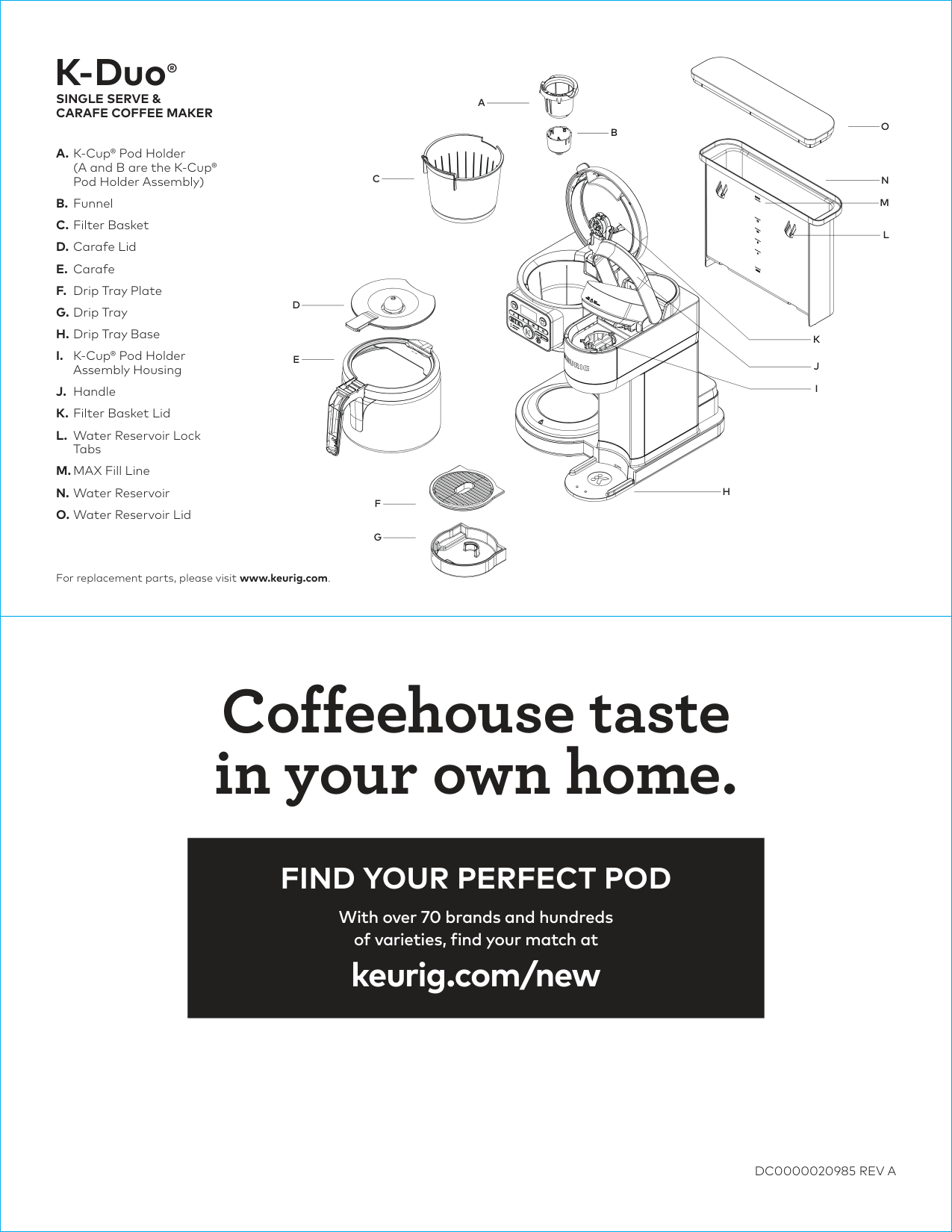
Coffeehouse taste in your own home.
Find Your Perfect Pod
With over 70 brands and hundreds of varieties, find your match at keurig.com/new
Dc0000020985 Rev A
K-Duo®Single Serve &
Carafe Coffee Maker
A. K-Cup® Pod Holder(A and B are the K-Cup® Pod Holder Assembly) B. Funnel C. Filter Basket D. Carafe Lid E. Carafe F. Drip Tray Plate G. Drip Tray H. Drip Tray Base I. K-Cup® Pod Holder Assembly Housing J. Handle K. Filter Basket Lid L. Water Reservoir Lock Tabs M. MAX Fill Line N. Water Reservoir O. Water Reservoir Lid For replacement parts, please visit www.keurig.com.