
Ask AI
— answers from the official manualAnswers from the official manual.
Common questions
Common Questions
10 totalWhat water pressure is required for proper dishwasher operation?
Water supply pressure must be between 20 psi and 80 psi (140–550 kPa). If the water supply pressure exceeds 80 psi, a pressure reducing valve must be installed to prevent premature failure of the inlet valve. (Page 15)
What water temperature should I use for the dishwasher?
You should connect the dishwasher to a hot water supply with a temperature range between 120°F (49°C) and 149°F (65°C). This temperature range provides the best washing results and shortest cycle time, and the temperature should not exceed 149°F (65°C) to prevent damage to dishes. (Page 14)
What does the OE error code mean and how do I fix it?
The OE error code indicates a drainage problem. Possible causes include a clogged, kinked, or pinched drain hose; the drain hose being connected to the disposal without removing the knockout plug; or a clogged waste tee or disposal. To fix it, feed the drain hose through the hole under the sink and gradually slide the dishwasher into the cabinet while pulling on the hose to take up slack, or remove the knockout plug from the disposal. (Page 24)
How do I clean the dishwasher filters?
Remove the lower rack and turn the inner filter counter-clockwise to remove the assembled inner filter and stainless steel filter. Clean the filters with a soft brush under running water, check the sump opening for foreign materials, then reassemble and reinstall the filters by positioning the spray arm and turning the inner filter clockwise until it clicks into place. It is recommended to clean filters after each load for best wash performance. (Page 40)
What should I do if the dishwasher won't start?
To start the dishwasher, you can either press the START button and close the door within four seconds, or close the door first and then press the START button. If the door is not closed within four seconds after pressing START, an audible tone is heard and the cycle does not start. If the dishwasher still won't start, check that all packaging materials have been removed and that the dishwasher is level. (Page 25-26)
How do I level the dishwasher properly?
To check leveling, remove the lower rack and pour 169 oz (5 L) of water into the bottom of the tub—the water level should be near the center of both tub lower indentations at the front. Adjust the front leveling feet using a flat-blade screwdriver (turn clockwise to raise, counterclockwise to lower) and the rear leveling foot using a Phillips screwdriver at the center screw at the base. Proper leveling is critical to prevent leakage, door closure problems, and noise. (Page 21-22)
Full Manual
56 pages
Owner’S Manual
Dishwasher
Warranty.English
Sdn*Hs72*
www.lg.com Copyright © 2024 LG Electronics. All Rights Reserved Read this owner’s manual thoroughly before operating the appliance and keep it handy for reference at all times. This abridged owner's manual addresses user safety, precautions, and installation information. To view the complete owner's manual, you may:
Table Of Contents
2 3Important Safety
Instructions
3Read All Instructions Before Use
3Warning Statements
6Caution Statements
8Product Overview
8 Product Features11 Installation
11 Before Installing 13 Preparing Cabinet Opening 14 Preparing Water and Electrical Connections 15 Preparing Dishwasher 16 Sliding Dishwasher into Cabinet Opening 17 Connecting Water Supply Line and Power 19 Connecting the Drain Hose 21 Leveling Dishwasher 22 Securing Dishwasher in Cabinet Opening 23 Final Installation Check25 Operation
25 Before Using 26 Control Panel 27 Wash Cycles 28 Options and Extra Functions 30 Loading the Dishwasher 30 Loading the Silverware Basket 31 Loading the Lower Rack 32 Loading the Upper Rack 32 Loading the Cutlery Rack 33 Adding Cleaning Products35 Smart Functions
35 LG ThinQ Application39 Maintenance
39 Cleaning and Care44 Troubleshooting
44 Before Calling for Service47 Limited Warranty
47Usa
51Canada
3
Important Safety Instructions
English
Important Safety Instructions
Read All Instructions Before Use
Safety Messages Your safety and the safety of others are very important. We have provided many important safety messages in this manual and on your appliance. Always read and follow all safety messages. All safety messages will tell you what the potential hazard is, tell you how to reduce the chance of injury, and tell you what may happen if the instructions are not followed.Warning Statements
Warning
Warning
You may be killed or seriously injured if you do not follow instructions.Caution
You may be injured or cause damage to the product if you do not follow instructions.
4
Important Safety Instructions
5
Important Safety Instructions
English
6
Important Safety Instructions
Warning
Improper connection of the equipment-grounding conductor can result in a risk of electric shock. Check with a qualified electrician or service representative if you are in doubt whether the appliance is properly grounded. Do not modify the plug provided with the appliance, if it will not fit the outlet, have a proper outlet installed by a qualified electrician. Tip Over HazardCaution Statements
Caution
7
Important Safety Instructions
English
Save These Instructions
Operation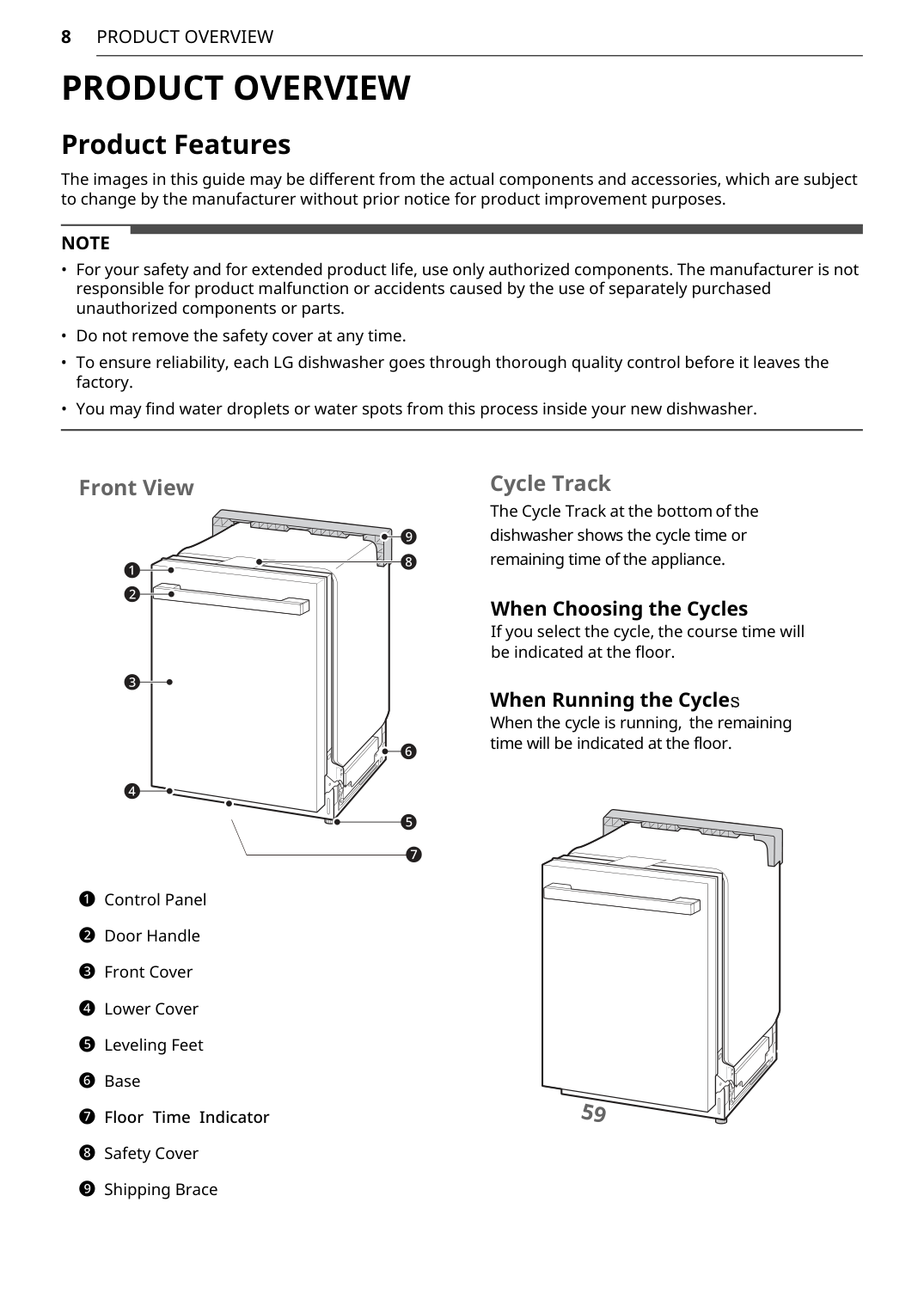
8
Product Overview
Product Overview
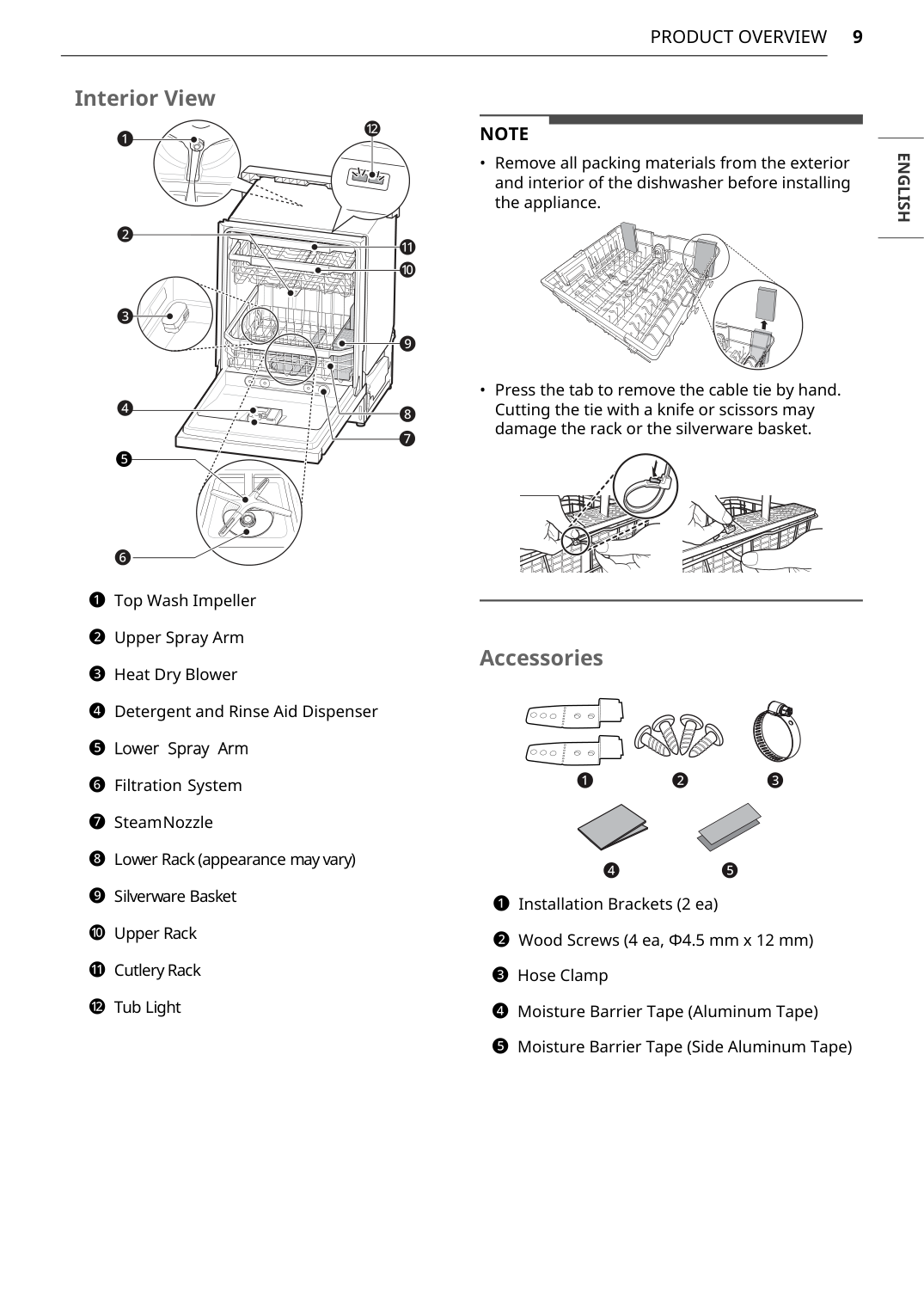
Product Features The images in this guide may be different from the actual components and accessories, which are subject to change by the manufacturer without prior notice for product improvement purposes.Note
9
Product Overview
English
Note
10
Product Overview
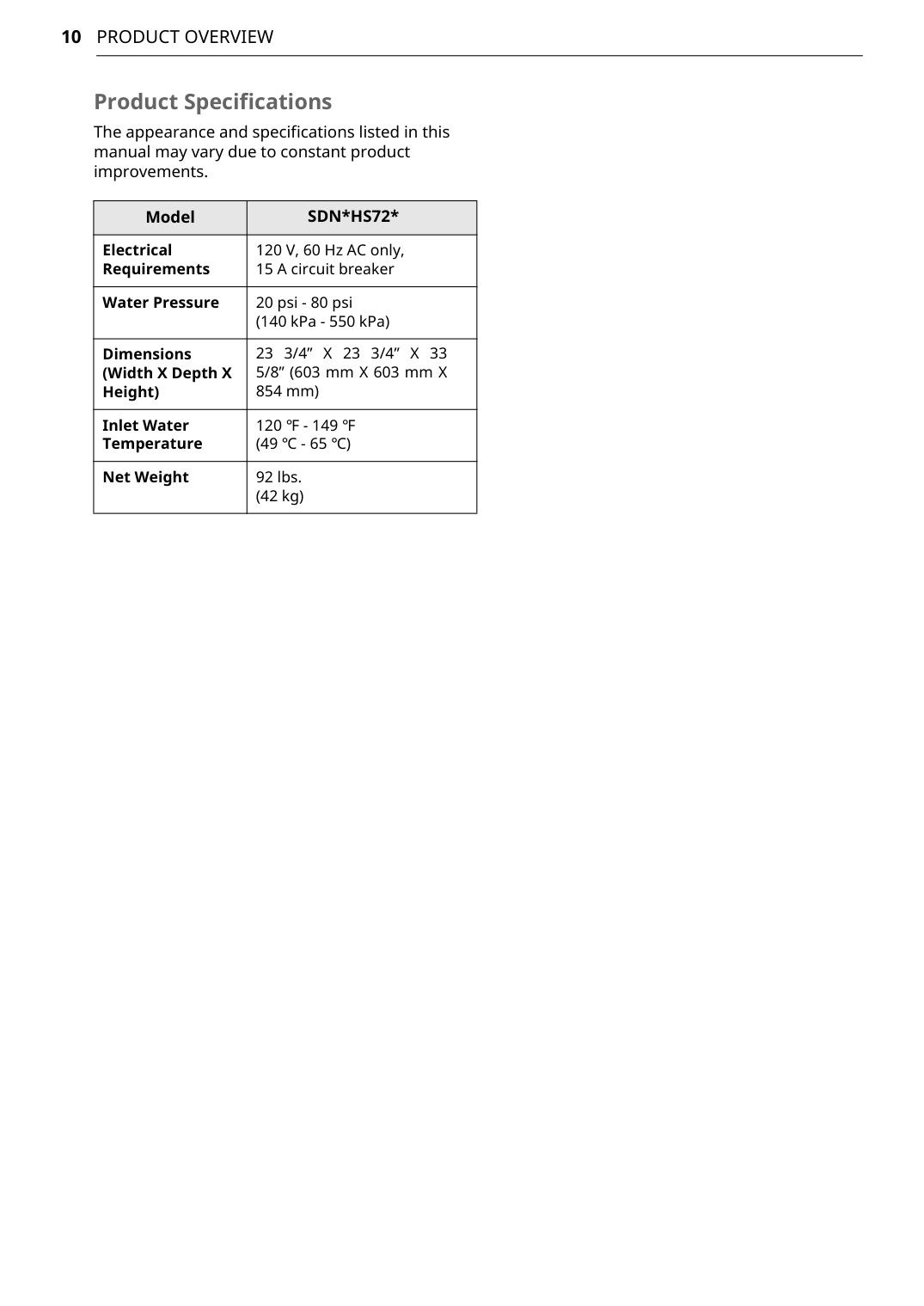
Product Specifications The appearance and specifications listed in this manual may vary due to constant product improvements. ModelSdn*Hs72*
Electrical Requirements 120 V, 60 Hz AC only, 15 A circuit breaker Water Pressure 20 psi - 80 psi (140 kPa - 550 kPa) Dimensions (Width X Depth X Height)23 3/4” X 23 3/4” X 33
5/8” (603 mm X 603 mm X 854 mm) Inlet Water Temperature 120 ℉ - 149 ℉ (49 ℃ - 65 ℃) Net Weight 92 lbs. (42 kg)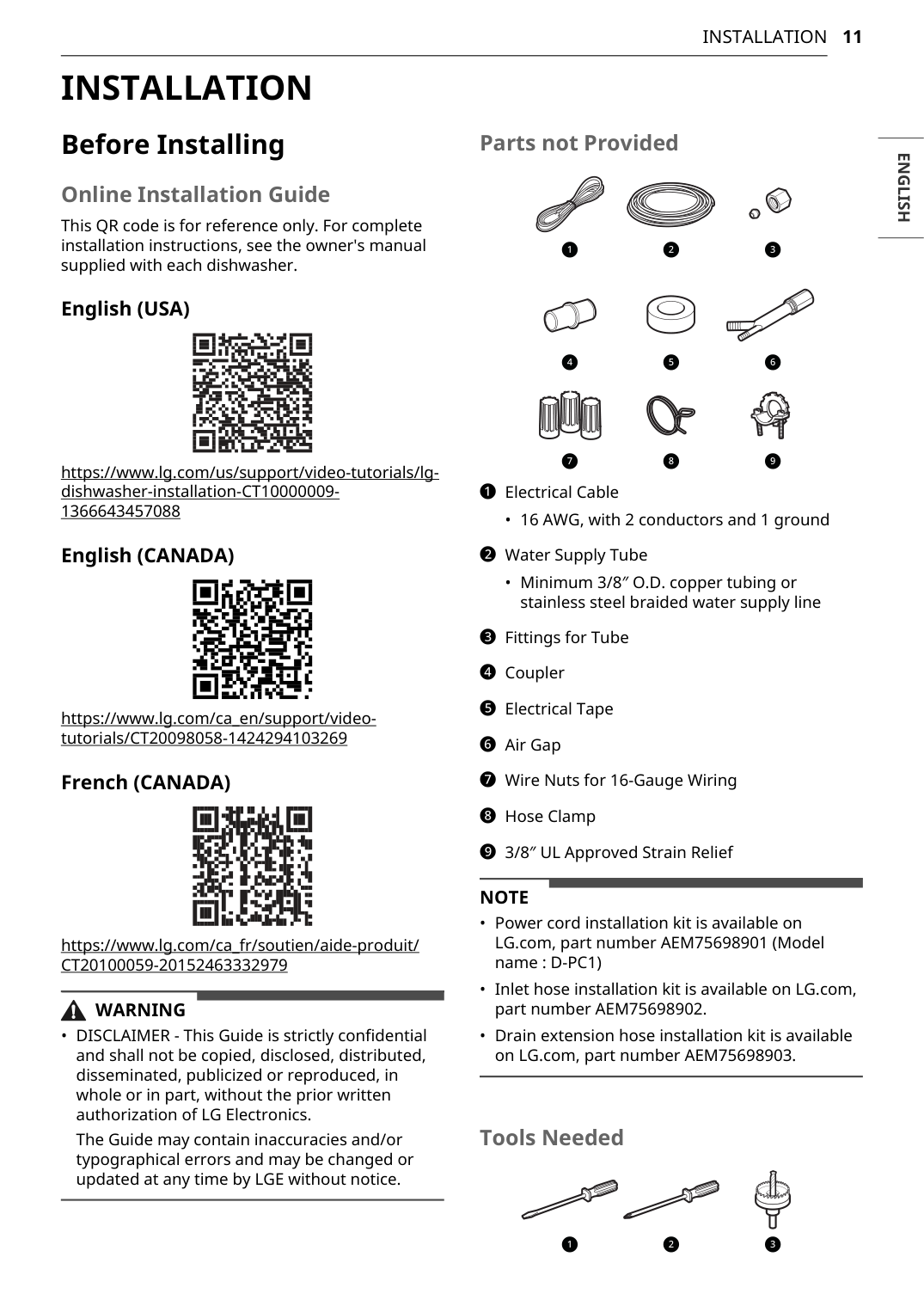
11
Installation
English
Installation
Before Installing Online Installation Guide This QR code is for reference only. For complete installation instructions, see the owner's manual supplied with each dishwasher. English (USA) https://www.lg.com/us/support/video-tutorials/lg- dishwasher-installation-CT10000009- 1366643457088 English (CANADA) https://www.lg.com/ca_en/support/video- tutorials/CT20098058-1424294103269 French (CANADA) https://www.lg.com/ca_fr/soutien/aide-produit/Ct20100059-20152463332979
Warning
Note
12
Installation
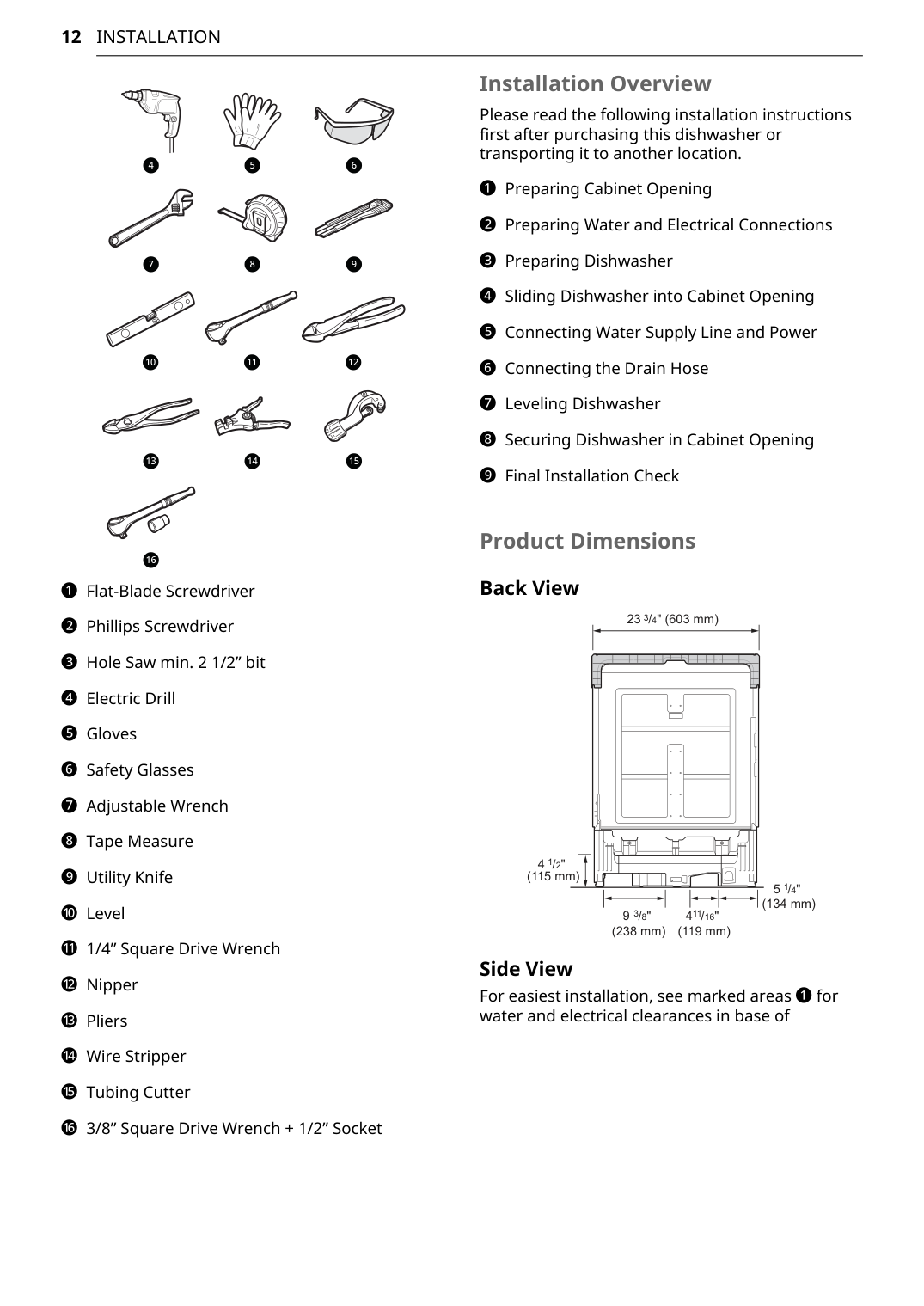
a Flat-Blade Screwdriver b Phillips Screwdriver c Hole Saw min. 2 1/2” bit d Electric Drill e Gloves f Safety Glasses g Adjustable Wrench h Tape Measure i Utility Knife j Level k 1/4” Square Drive Wrench l Nipper m Pliers n Wire Stripper o Tubing Cutter p 3/8” Square Drive Wrench + 1/2” Socket Installation Overview Please read the following installation instructions first after purchasing this dishwasher or transporting it to another location. a Preparing Cabinet Opening b Preparing Water and Electrical Connections c Preparing Dishwasher d Sliding Dishwasher into Cabinet Opening e Connecting Water Supply Line and Power f Connecting the Drain Hose g Leveling Dishwasher h Securing Dishwasher in Cabinet Opening i Final Installation Check Product Dimensions Back View Side View For easiest installation, see marked areas a for water and electrical clearances in base of d e f g h i k l j m n o p 23 /4" (603 mm) 3 9 /8" (238 mm) 3 4 /16" (119 mm) 5 /4" (134 mm) 11 1 4 /2" (115 mm) 1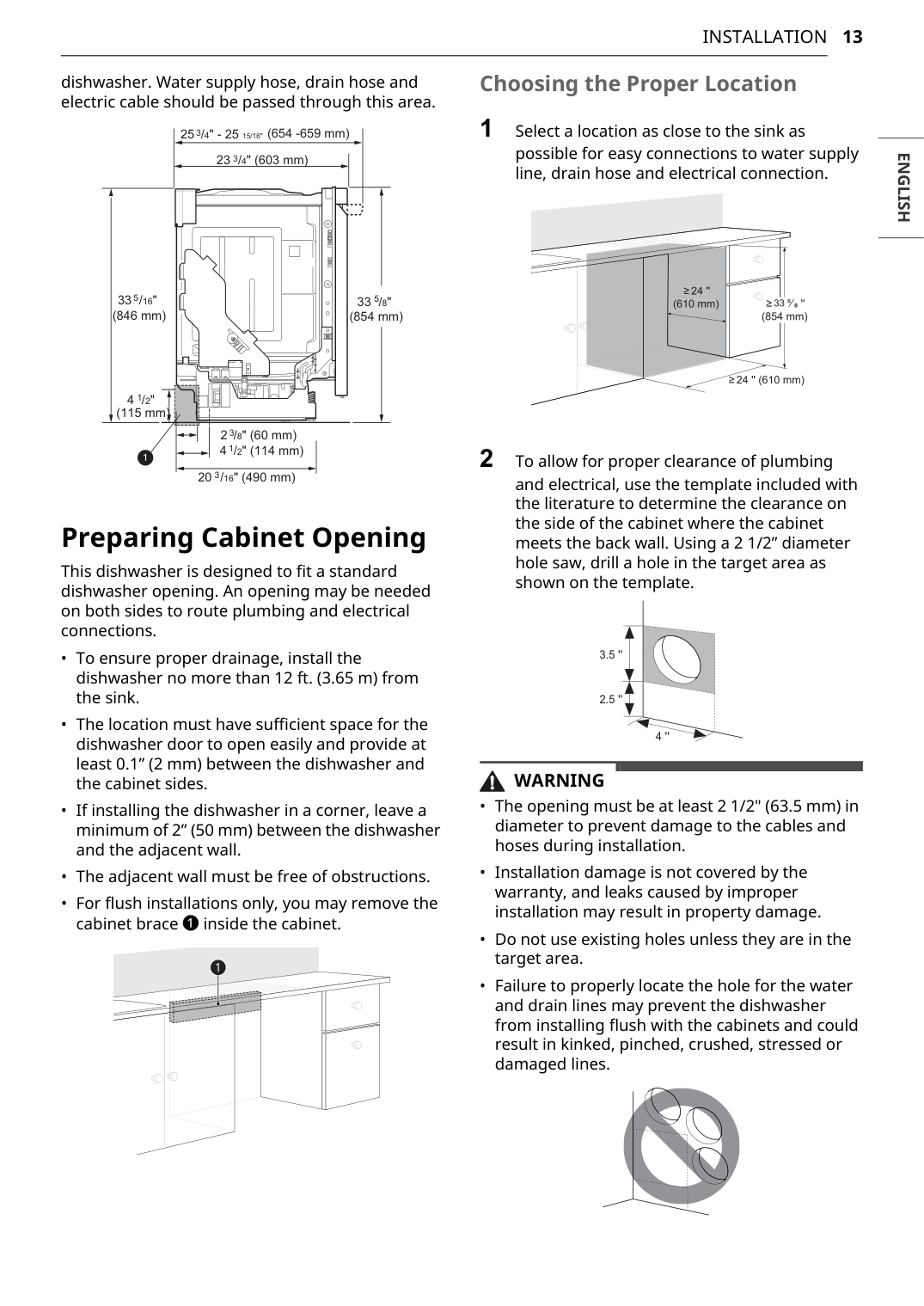
13
Installation
English
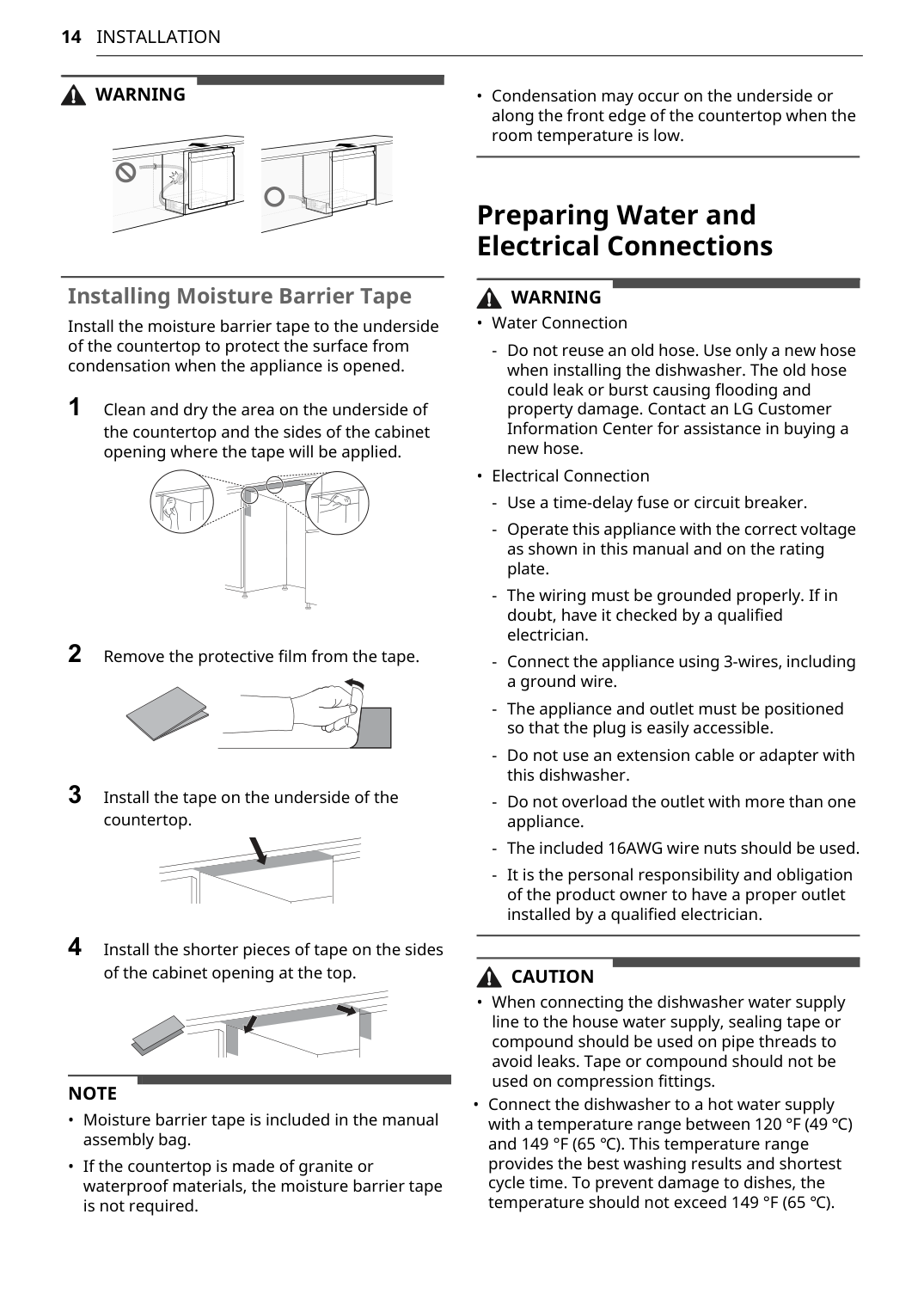
dishwasher. Water supply hose, drain hose and electric cable should be passed through this area. Preparing Cabinet Opening This dishwasher is designed to fit a standard dishwasher opening. An opening may be needed on both sides to route plumbing and electrical connections.Warning
14
Installation
Warning
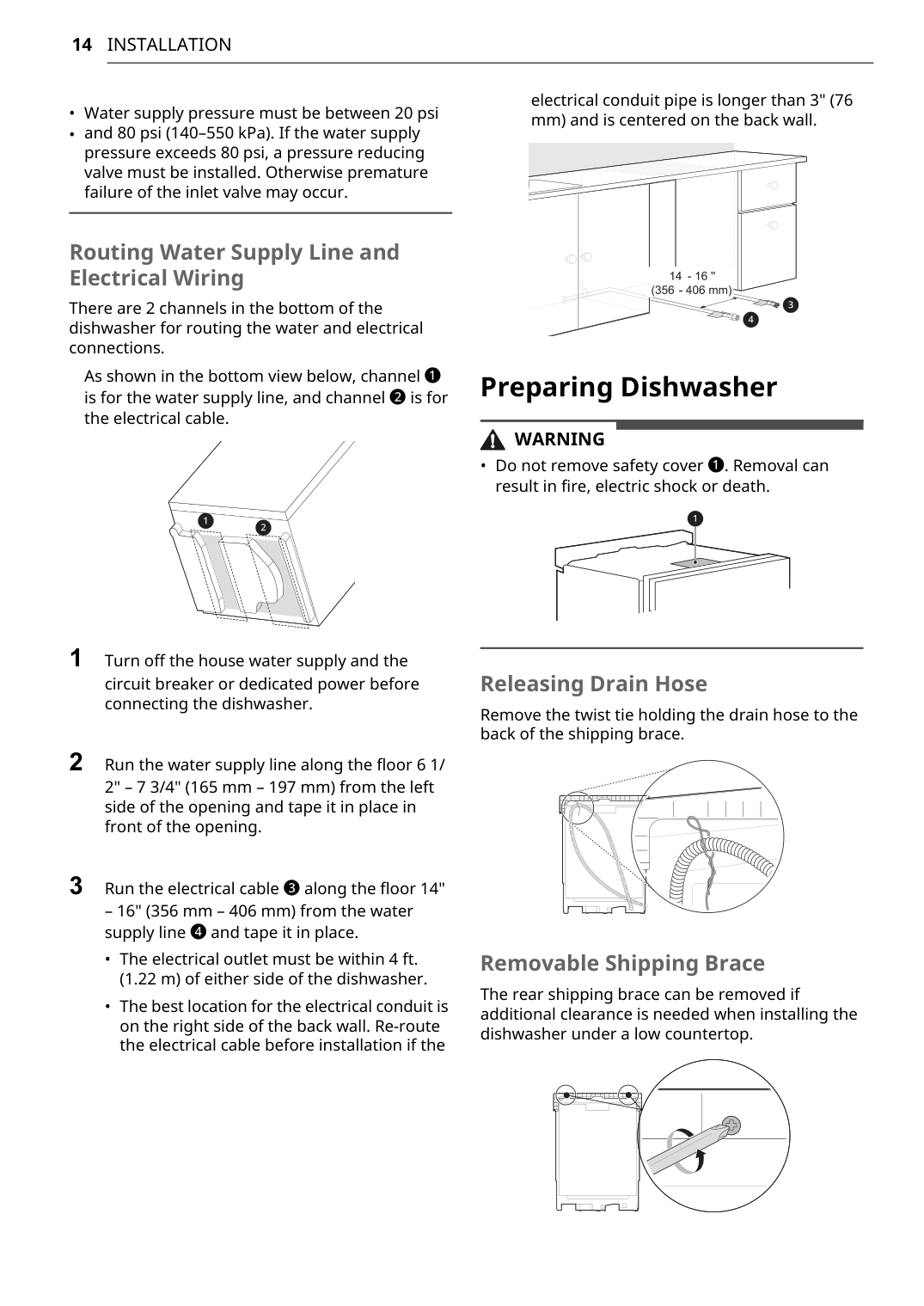
Installing Moisture Barrier Tape Install the moisture barrier tape to the underside of the countertop to protect the surface from condensation when the appliance is opened. 1 Clean and dry the area on the underside of the countertop and the sides of the cabinet opening where the tape will be applied. 2 Remove the protective film from the tape. 3 Install the tape on the underside of the countertop. 4 Install the shorter pieces of tape on the sides of the cabinet opening at the top.Note
Warning
Caution
14
Installation
Warning
15
Installation
English
Removing Lower CoverCaution
Note
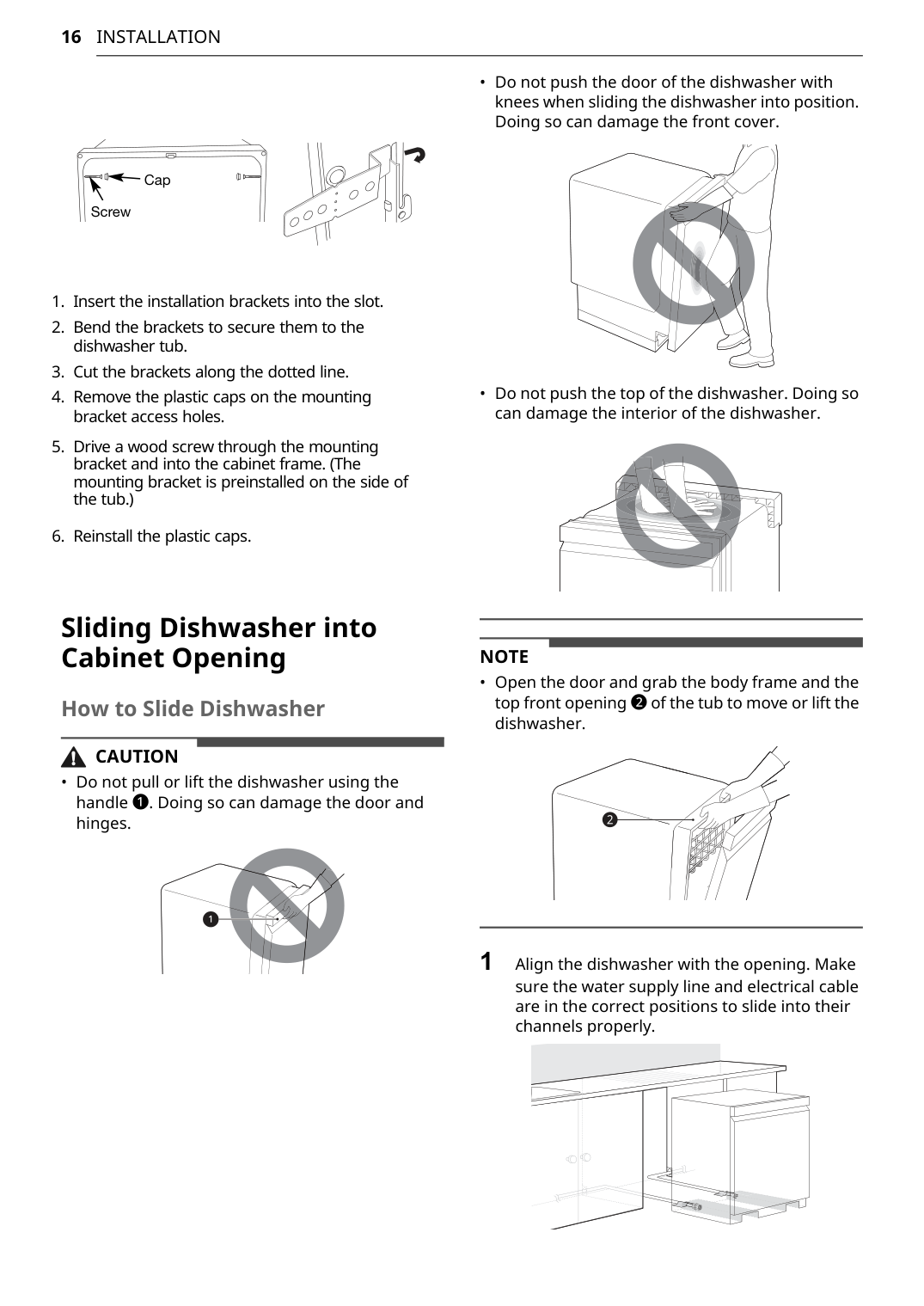
16
Installation
Sliding Dishwasher into Cabinet Opening How to Slide DishwasherCaution
Note
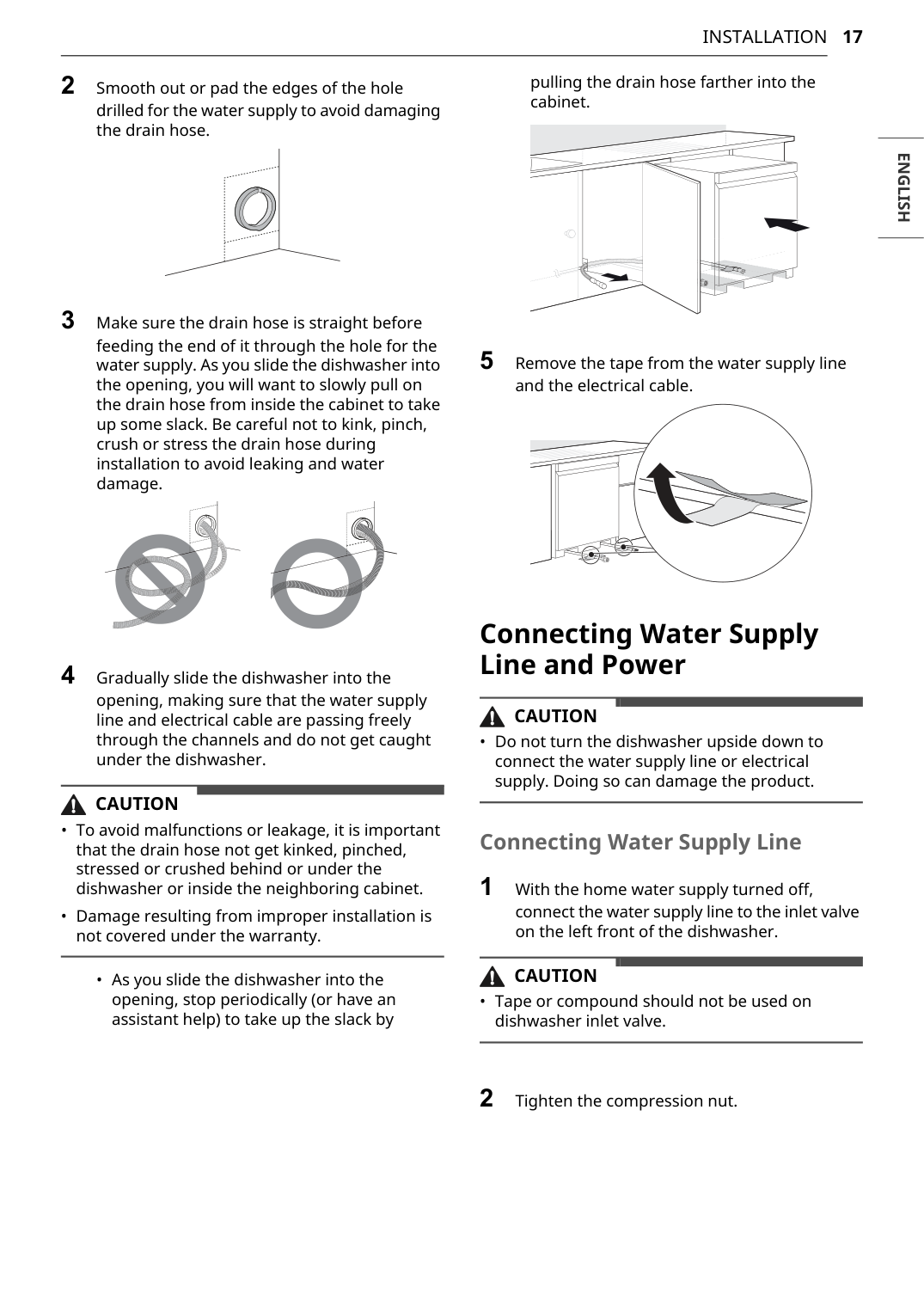
17
Installation
English
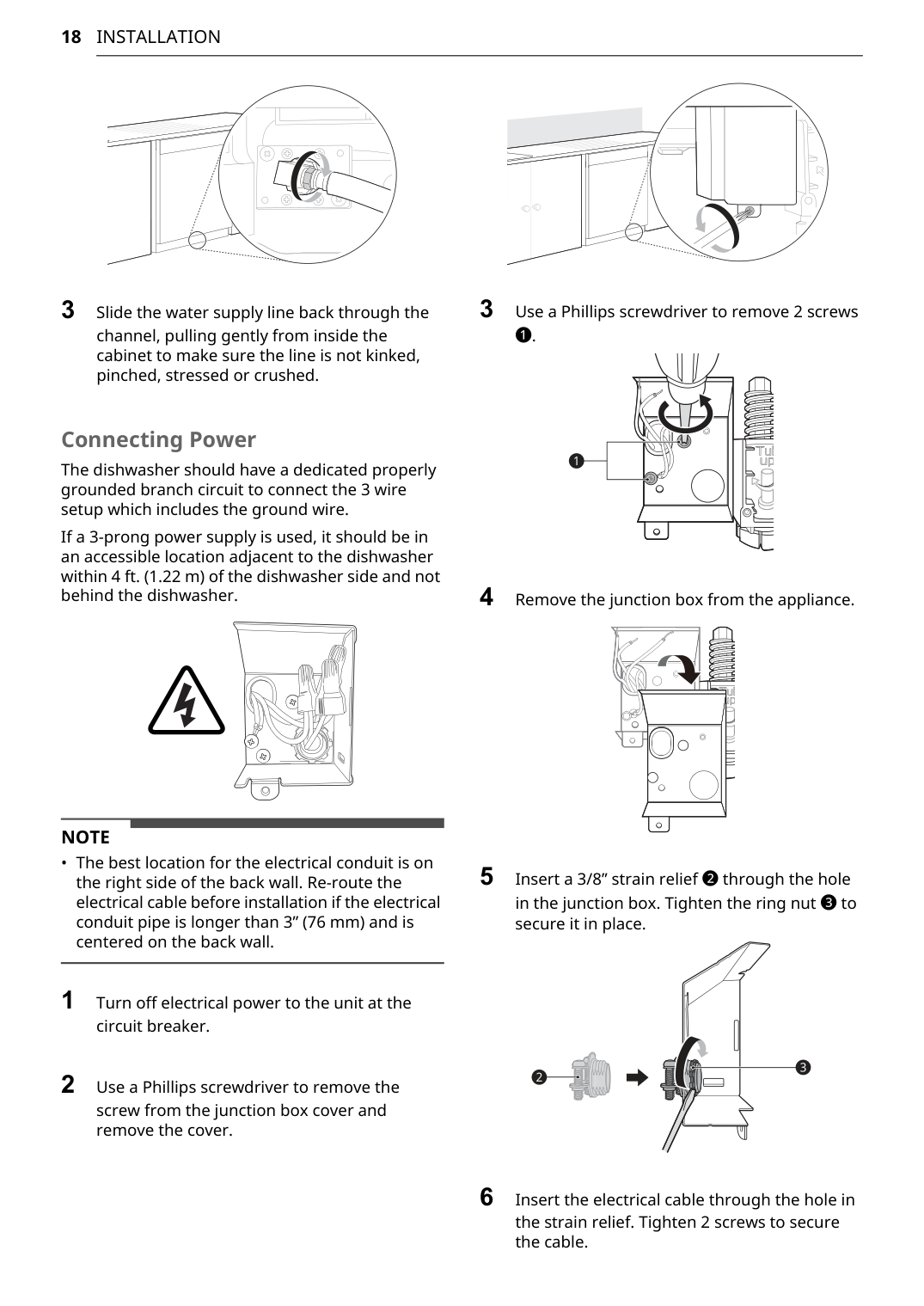
2 Smooth out or pad the edges of the hole drilled for the water supply to avoid damaging the drain hose. 3 Make sure the drain hose is straight before feeding the end of it through the hole for the water supply. As you slide the dishwasher into the opening, you will want to slowly pull on the drain hose from inside the cabinet to take up some slack. Be careful not to kink, pinch, crush or stress the drain hose during installation to avoid leaking and water damage. 4 Gradually slide the dishwasher into the opening, making sure that the water supply line and electrical cable are passing freely through the channels and do not get caught under the dishwasher.Caution
Caution
Caution
18
Installation
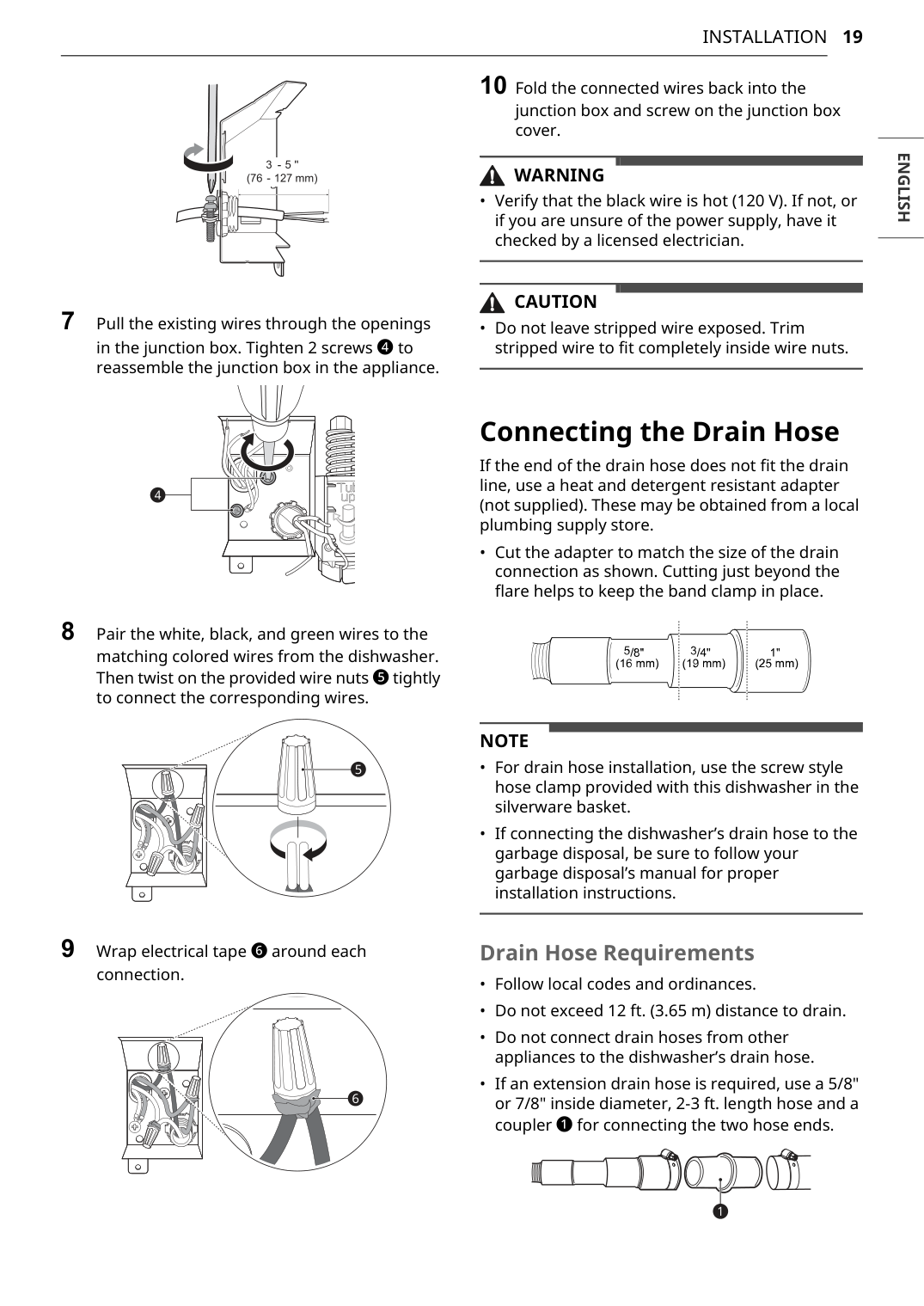
3 Slide the water supply line back through the channel, pulling gently from inside the cabinet to make sure the line is not kinked, pinched, stressed or crushed. Connecting Power The dishwasher should have a dedicated properly grounded branch circuit to connect the 3 wire setup which includes the ground wire. If a 3-prong power supply is used, it should be in an accessible location adjacent to the dishwasher within 4 ft. (1.22 m) of the dishwasher side and not behind the dishwasher.Note
19
Installation
English
7 Pull the existing wires through the openings in the junction box. Tighten 2 screws d to reassemble the junction box in the appliance. 8 Pair the white, black, and green wires to the matching colored wires from the dishwasher. Then twist on the provided wire nuts e tightly to connect the corresponding wires. 9 Wrap electrical tape f around each connection. 10 Fold the connected wires back into the junction box and screw on the junction box cover.Warning
Caution
Note
20
Installation
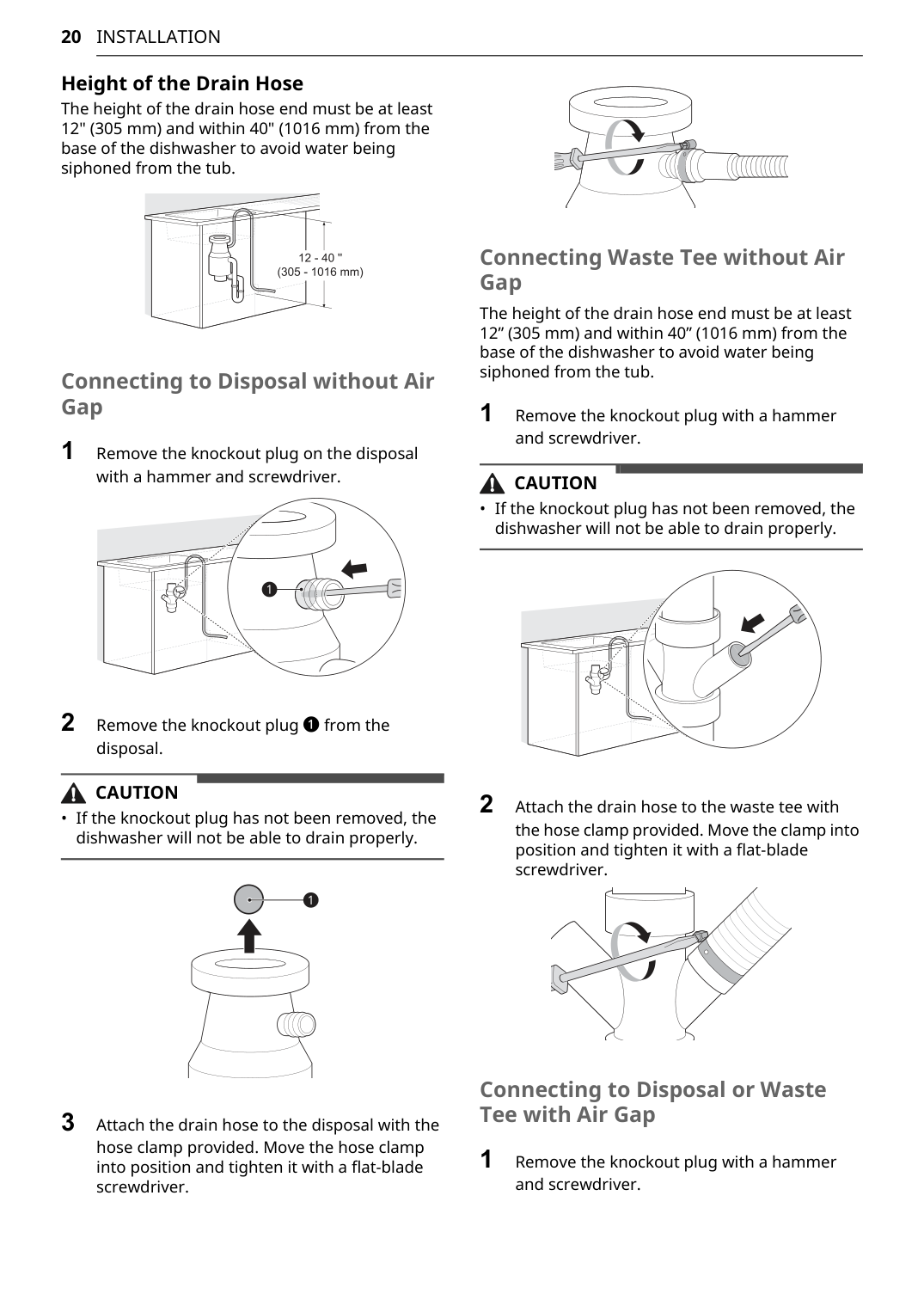
Height of the Drain Hose The height of the drain hose end must be at least 12" (305 mm) and within 40" (1016 mm) from the base of the dishwasher to avoid water being siphoned from the tub. Connecting to Disposal without Air Gap 1 Remove the knockout plug on the disposal with a hammer and screwdriver. 2 Remove the knockout plug a from the disposal.Caution
Caution
21
Installation
English
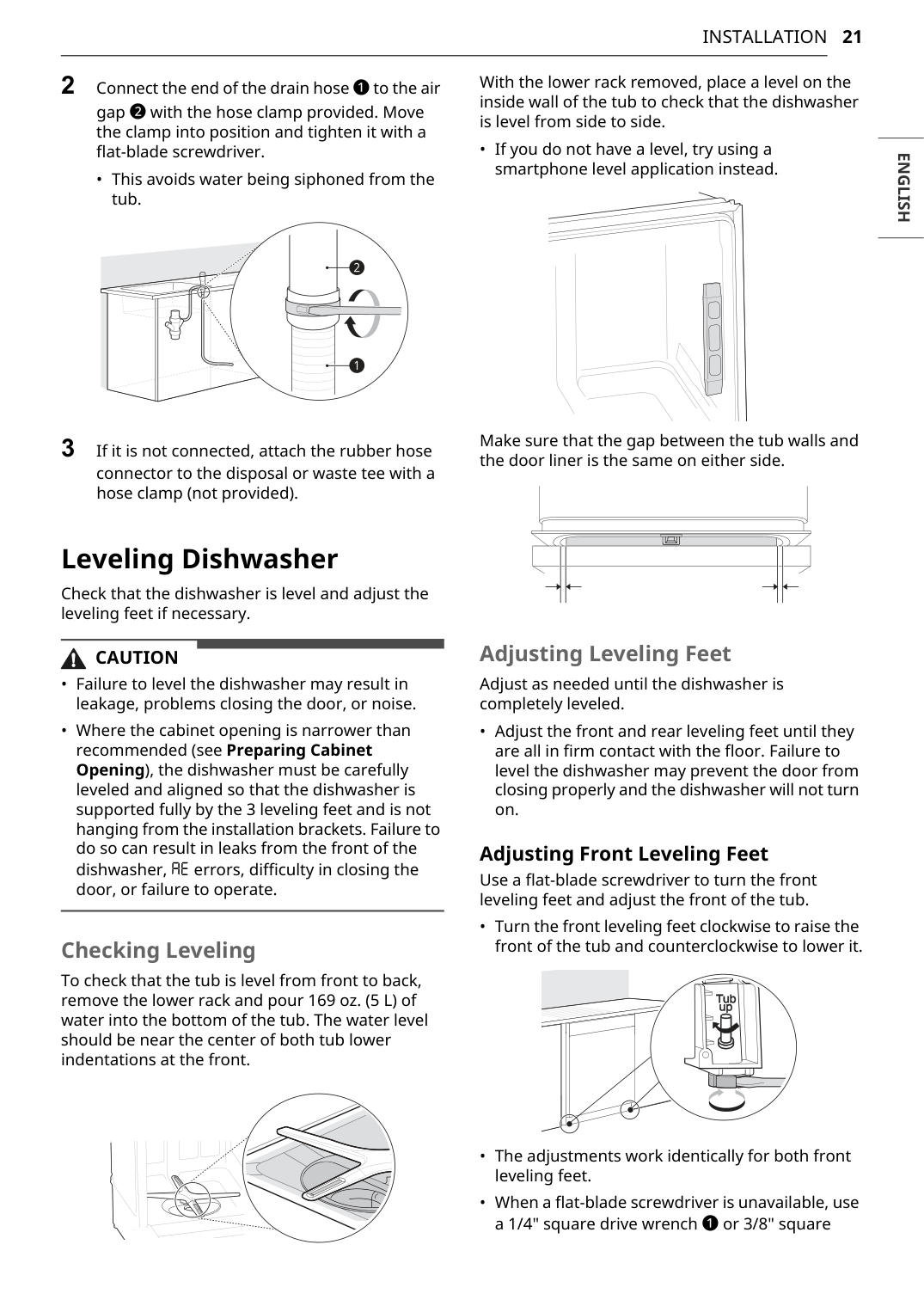
2 Connect the end of the drain hose a to the air gap b with the hose clamp provided. Move the clamp into position and tighten it with a flat-blade screwdriver.Caution
22
Installation
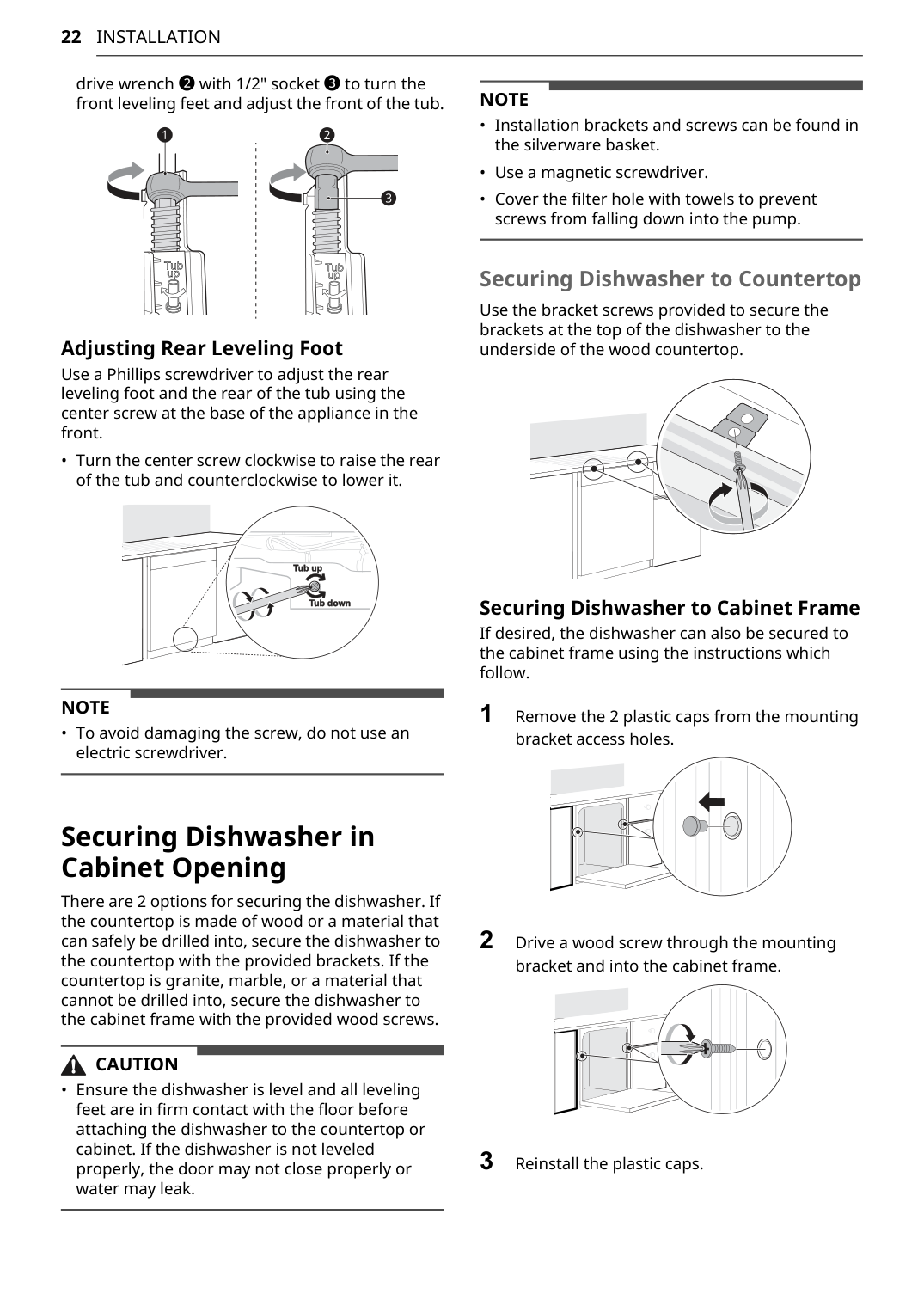
drive wrench b with 1/2" socket c to turn the front leveling feet and adjust the front of the tub. Adjusting Rear Leveling Foot Use a Phillips screwdriver to adjust the rear leveling foot and the rear of the tub using the center screw at the base of the appliance in the front.Note
Caution
Note
23
Installation
English
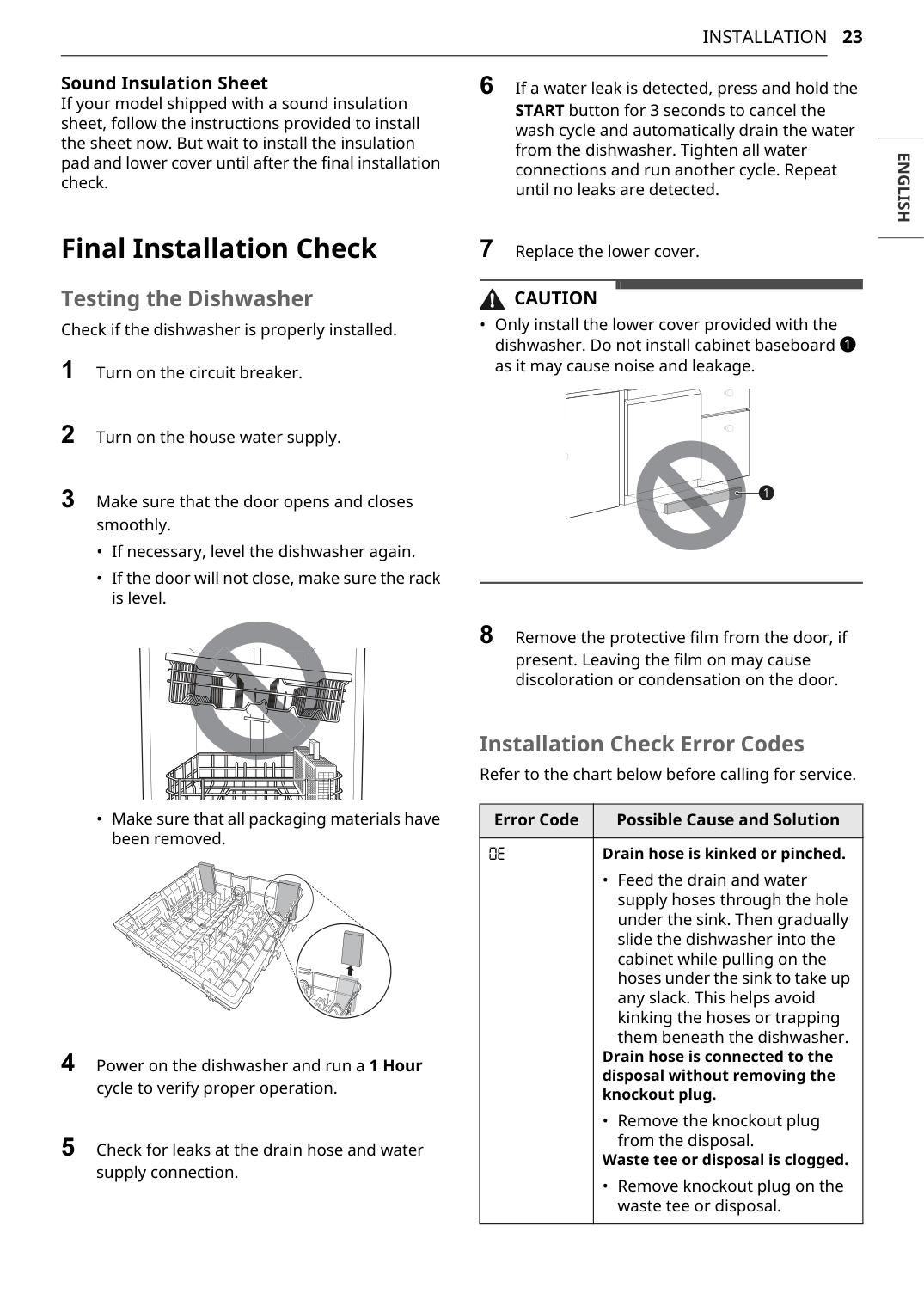
Sound Insulation Sheet If your model shipped with a sound insulation sheet, follow the instructions provided to install the sheet now. But wait to install the insulation pad and lower cover until after the final installation check. Final Installation Check Testing the Dishwasher Check if the dishwasher is properly installed. 1 Turn on the circuit breaker. 2 Turn on the house water supply. 3 Make sure that the door opens and closes smoothly.Caution
Oe
Drain hose is kinked or pinched.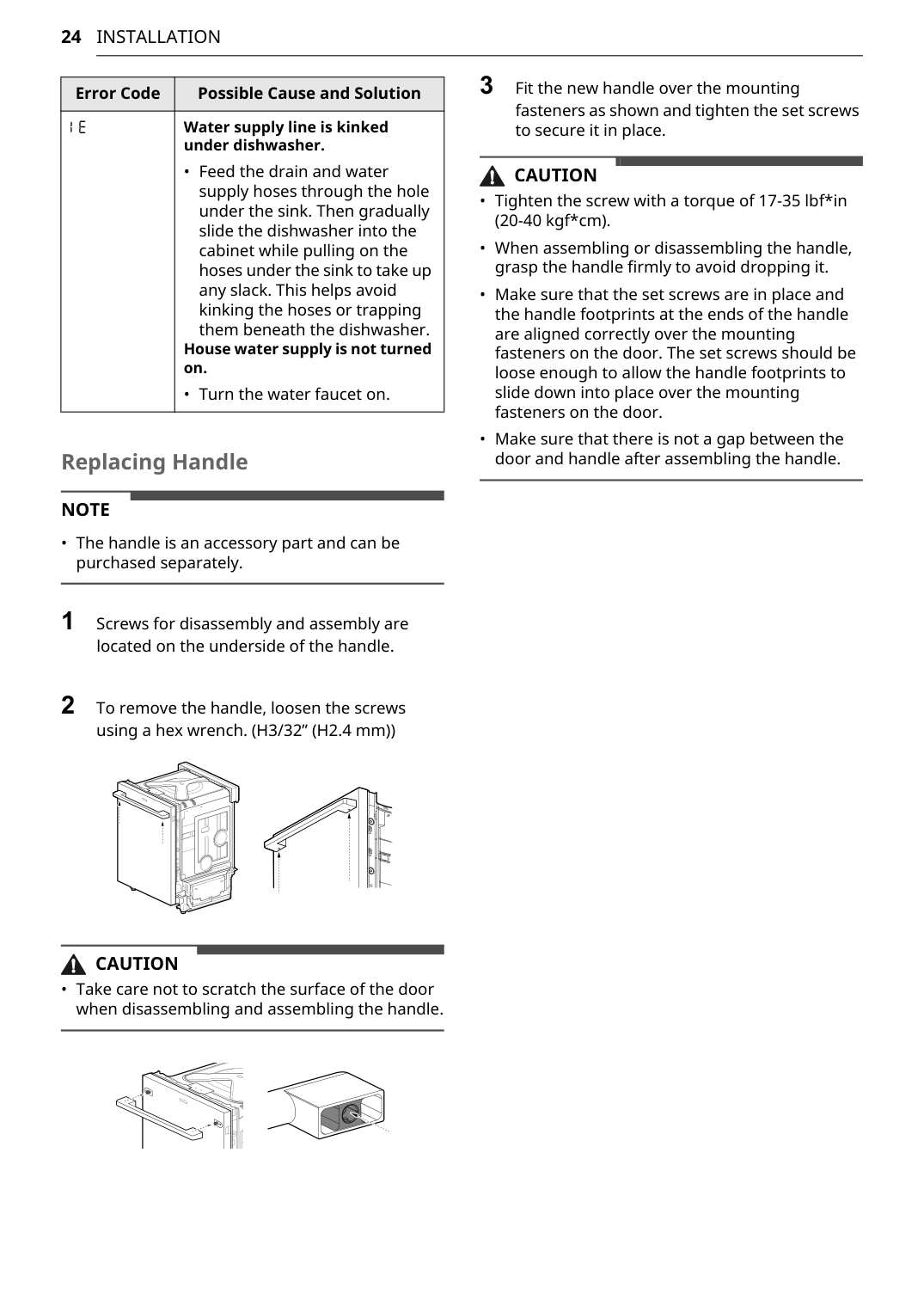
24
Installation
Replacing HandleNote
Caution
Caution
Ie
Water supply line is kinked under dishwasher.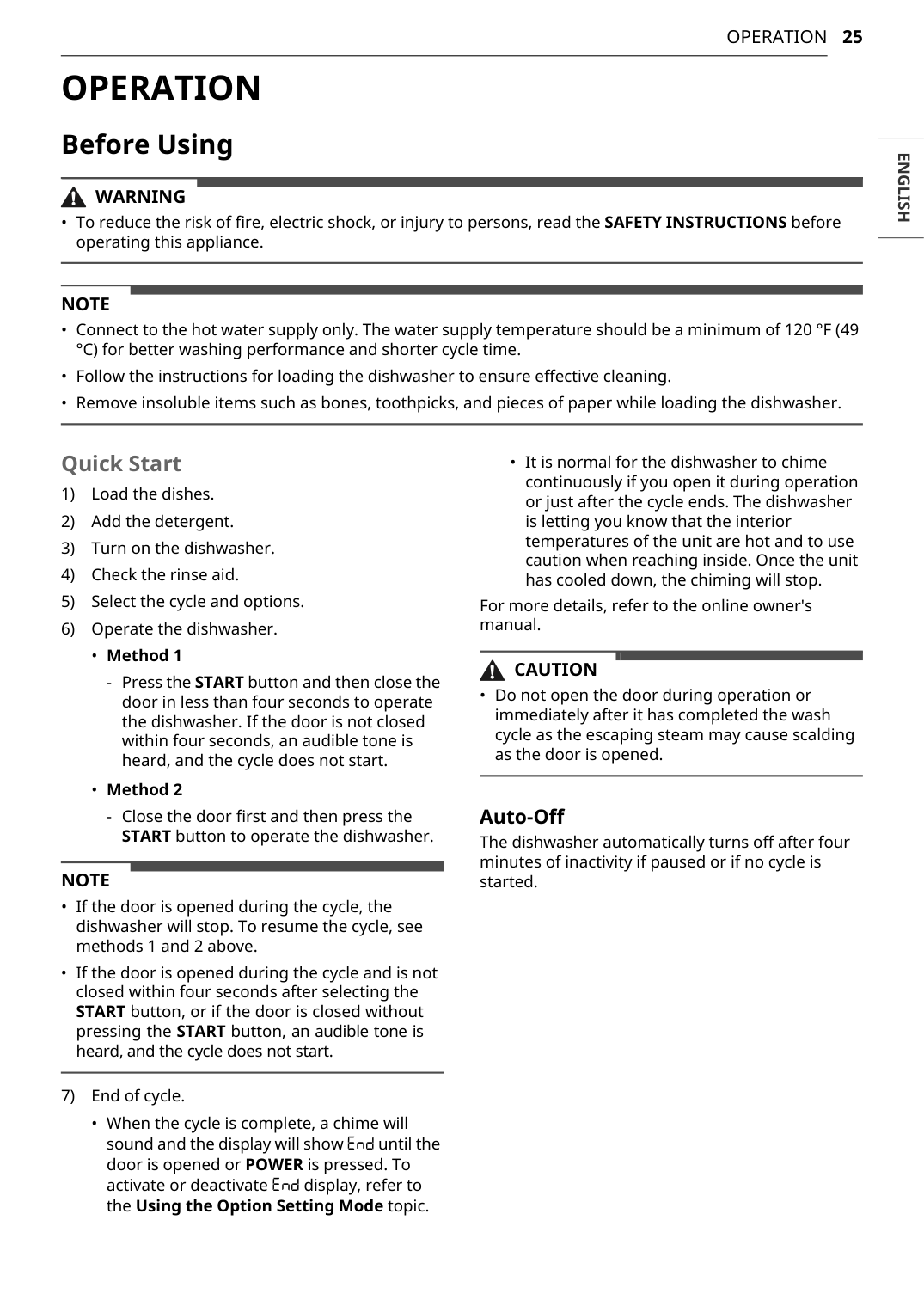
25
Operation
English
Operation
Before UsingWarning
Note
Note
Caution
26
Operation
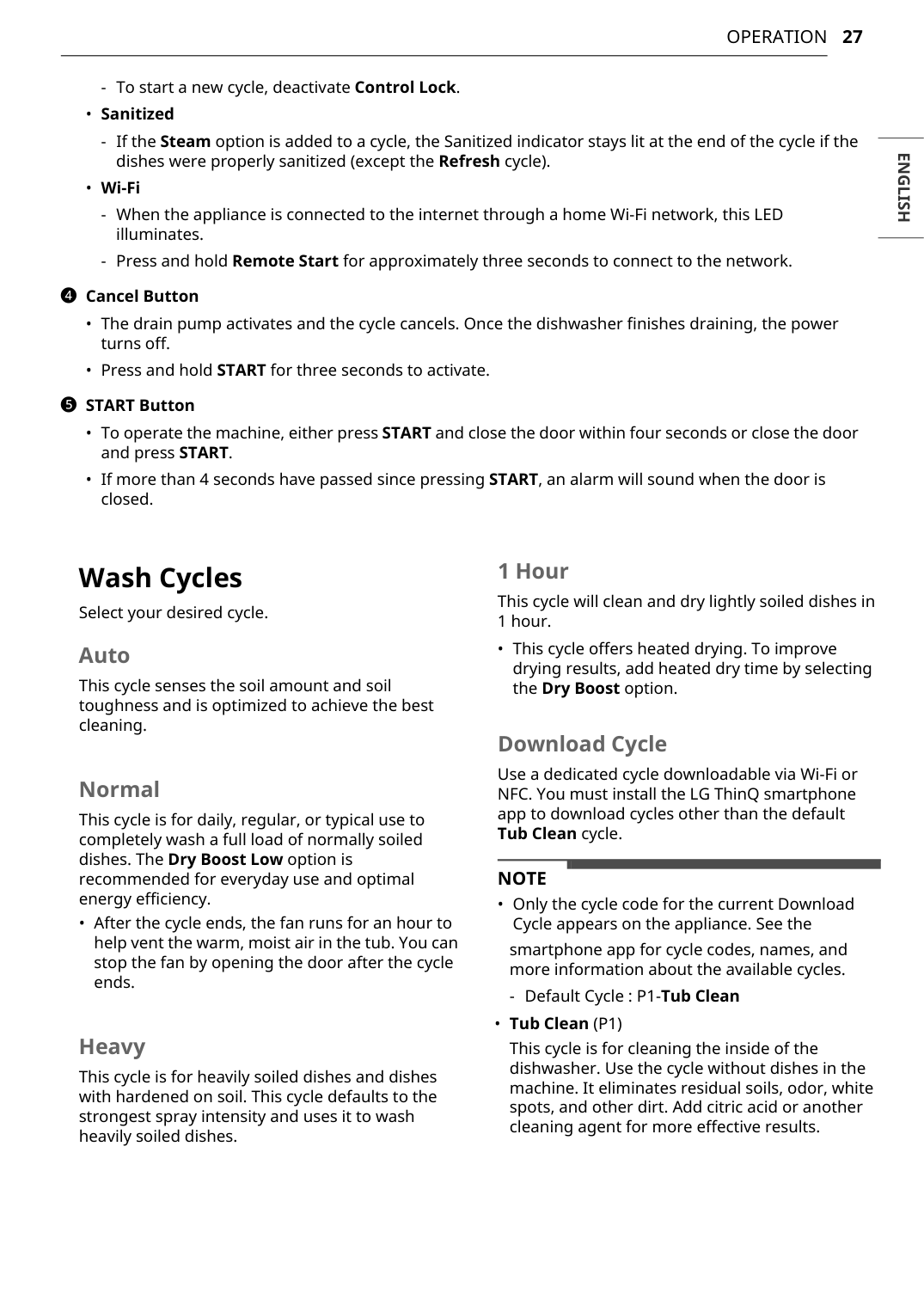
Control Panel Control Panel Features a POWER On/Off ButtonNote
27
Operation
English
Note
28
Operation
Note
29
Operation
English
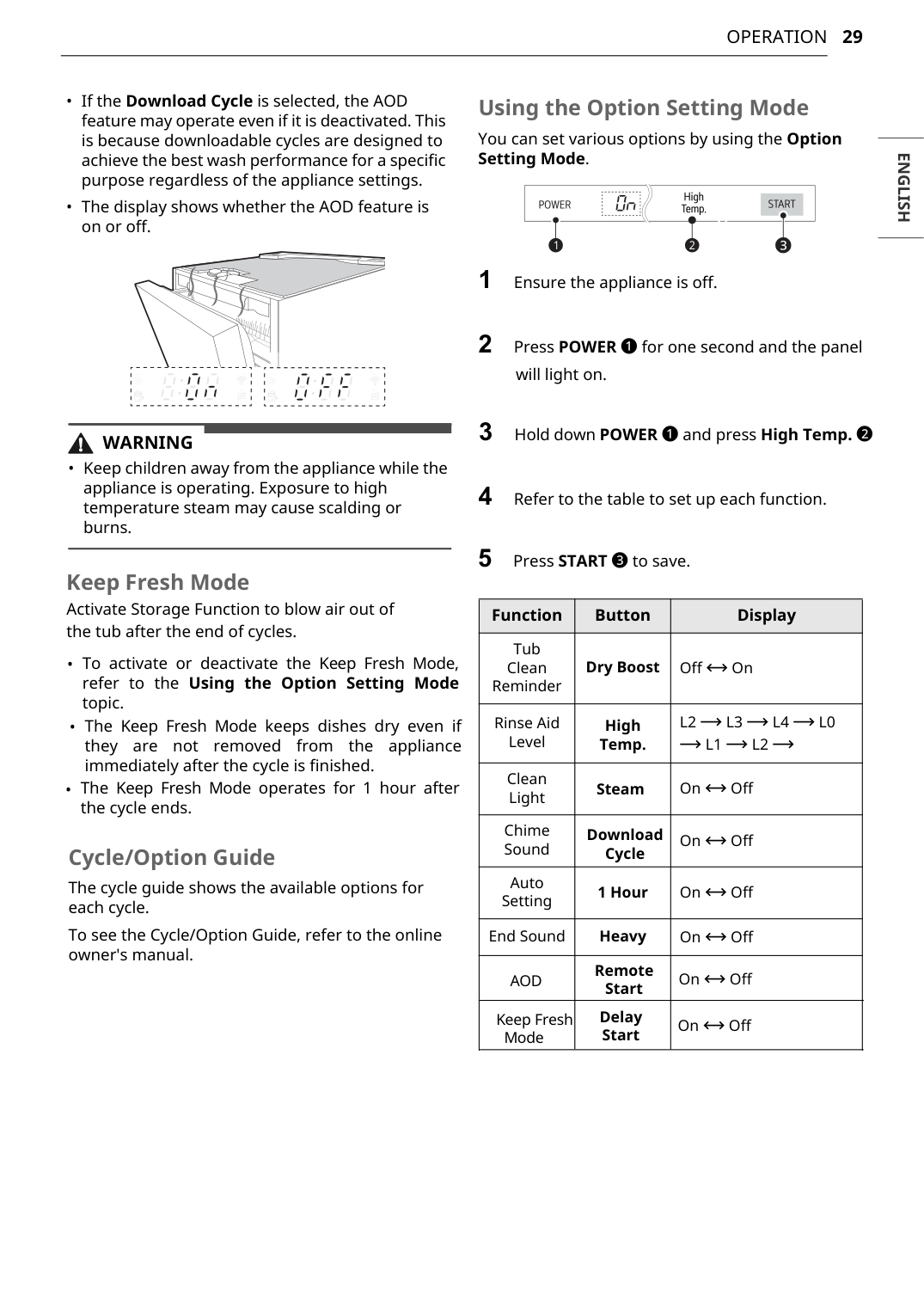
Cycle/Option Guide The cycle guide shows the available options for each cycle. To see the Cycle/Option Guide, refer to the online owner's manual. Using the Option Setting Mode You can set various options by using the Option Setting Mode. 1 Ensure the appliance is off. 2 Press POWER a for one second and the panel will light on. 4 Refer to the table to set up each function. 5 Press START c to save. Function Button Display Tub Clean Reminder Off & On Rinse Aid Level Dry BoostL2 ~ L3 ~ L4 ~ L0
~ L1 ~ L2 ~
Clean Light High Temp. On & Off Chime Sound Download Cycle On & Off Auto Setting 1 Hour On & Off End Sound Heavy On & OffWarning
Aod
Remote Start On & Off Keep Fresh Mode Delay Start On & Off Keep Fresh Mode Activate Storage Function to blow air out of the tub after the end of cycles.
30
Operation
Loading the Dishwasher For effective washing performance, always follow these instructions.Caution
Note
L4.

31
Operation
English
Loading Silverware into the Basket Loading 10 Place Settings Silverware Loading Tips:Warning
Warning

32
Operation
Loading the Cutlery Rack The cutlery rack is best suited for flatware. The separators on the cutlery racks help keep flatware separated to avoid damage and improve cleaning.Note
Caution
Warning
Caution

33
Operation
English
Adding Rinse Aid to the Dispenser The Rinse Aid Refill LED appears in the display when more rinse aid is needed. The use of rinse aid is recommended to prevent water spots on dishes and to enhance drying performance. For more details, refer to the online owner's manual. Rinse Aid Dispenser Adjustment The dispenser has five adjustment levels. The dishwasher is programmed at the factory for a rinse aid dispenser level of 2. This can be checked and adjusted from the control panel.Note

35
Smart Functions
English
Smart Functions
LG ThinQ Application The LG ThinQ application allows you to communicate with the appliance using a smartphone. LG ThinQ Application FeaturesNote
Note

36
Smart Functions
Note
Note

37
Smart Functions
English
2 Press the POWER button. 3 Make sure that the Wi-Fi is connected. 4 Press the Remote Start button and close the dishwasher door to enable the Remote Start function. 5 Start a cycle from the LG ThinQ application on your smartphone.Note

38
Smart Functions
IC Radiation Exposure Statement This equipment complies with IC radiation exposure limits set forth for an uncontrolled environment. This equipment should be installed and operated with a minimum distance of 20 cm (7.8 inches) between the antenna and your body.Note
• The Manufacturer Is Not Responsible For
Any Radio Or Tv Interference Caused By
Unauthorized Modifications To This
Equipment. Such Modifications Could
Void The User’S Authority To Operate The
Equipment.
Open Source Software Notice Information To obtain the source code that is contained in this product, under GPL, LGPL, MPL, and other open source licenses that have the obligation to disclose source code, and to access all referred license terms, copyright notices and other relevant documents, please visit https:// opensource.lge.com. LG Electronics will also provide open source code to you on CD-ROM for a charge covering the cost of performing such distribution (such as the cost of media, shipping, and handling) upon email request to [email protected]. This offer is valid to anyone in receipt of this information for a period of three years after our last shipment of this product.
39
Maintenance
English
Maintenance
To maintain performance and prevent trouble, it is important to check the outside and inside of the dishwasher, including filters and spray arms, at regular intervals.Warning
Caution
Note

40
Maintenance
Clogged Drain Air Gap or In-Sink Disposal Check the drain air gap or in-sink disposal if the dishwasher is not draining well.Note
Warning
Caution
Note

41
Maintenance
English
4 To replace the assembled filters, position the spray arm so the wider vee is toward the front. Fit the filters back into the filter holder and secure them by turning the inner filter clockwise until it clicks into place.Note
Caution

42
Maintenance
2 When cleaning is necessary, remove the upper spray arm by turning the nut on the bottom of the spray arm 1/8 turn counter- clockwise and pulling down. 3 Remove food particles by rinsing or shaking the spray arm. 4 If any food residue blocks the spray arm holes, remove it with a pin or any sharp tool. 5 After removing the food residue, clean the spray arms under running water. 6 After cleaning the upper spray arm, press it up into place. Turn the nut 1/8 turn clockwise to make sure that the nut locks back into place. 7 After assembly, make sure that the spray arms rotate freely. Seasonal Maintenance and Storage
44
Troubleshooting
Troubleshooting
The washer is equipped with an automatic error-monitoring system to detect and diagnose problems at an early stage. If the washer does not function properly or does not function at all, check the following before you call for service. Before Calling for Service For more troubleshooting, refer to the online owner's manual. User Support Videos For further assistance, there are videos and tutorials available through the LG.com website. 1 On the www.lg.com home page, click on the Support menu tab to bring up the menu selections. Select Video Tutorials. 2 Select a product category and then pick a topic or search a keyword.Note
Ie
Water inlet problem.Oe
Drainage Problem.
45
Troubleshooting
English
bE Oversudsing caused by improper detergent, such as liquid dish soap.Ae
Water leakageFe
Excessive Water supplied.He
Heater circuit failure.Le
Wash motor errorF31
Heat air dry fan motor errorNe
Vario motor errorP7
The Download Cycle is selected.Cl
Control Lock is activated.
46
Troubleshooting
Wi-Fi Problem Possible Cause & Solution Trouble connecting appliance and smartphone to Wi-Fi network The password for the Wi-Fi network was entered incorrectly.
47
Limited Warranty
English
Limited Warranty
Usa
Terms And Conditions
ARBITRATION NOTICE: THIS LIMITED WARRANTY CONTAINS AN ARBITRATION PROVISION THAT REQUIRES YOU AND LG ELECTRONICS (“LG”) TO RESOLVE DISPUTES BY BINDING ARBITRATION INSTEAD OF IN COURT, UNLESS YOU CHOOSE TO OPT OUT. IN ARBITRATION, CLASS ACTIONS AND JURY TRIALS ARE NOT PERMITTED. PLEASE SEE THE SECTION TITLED “PROCEDURE FOR RESOLVINGDisputes” Below.
Should your LG Dishwasher (“Product”) fail due to a defect in materials or workmanship under normal and proper use, during the warranty period set forth below, LG will, at its option, repair or replace the Product. This limited warranty is valid only to the original retail purchaser of the Product (“You”) and applies only when purchased lawfully and used within the United States including U.S. Territories. † Main control board is located on the bottom right of the dishwasher when viewed from the front.Except To The Extent Prohibited By Applicable Law, Any Implied Warranty Of
MERCHANTABILITY OR FITNESS FOR A PARTICULAR PURPOSE ON THE PRODUCT IS LIMITED INDuration To The Duration Of The Above Limited Warranty. Under No Circumstances
SHALL LG OR ITS U.S. DISTRIBUTORS/DEALERS BE LIABLE FOR ANY INDIRECT, INCIDENTAL, CONSEQUENTIAL, SPECIAL, OR PUNITIVE DAMAGES, INCLUDING, WITHOUT LIMITATION, LOST GOODWILL, LOST REVENUES OR PROFITS, WORK STOPPAGE, IMPAIRMENT OF OTHER GOODS, COST OF REMOVAL AND REINSTALLATION OF THE PRODUCT, LOSS OF USE, OR ANY OTHER DAMAGES WHETHER BASED IN CONTRACT, TORT, OR OTHERWISE. LG’S TOTAL LIABILITY, IF ANY, SHALL NOT EXCEED THEPurchase Price Paid By You For The Product.
SOME STATES DO NOT ALLOW THE EXCLUSION OR LIMITATION OF INCIDENTAL OR CONSEQUENTIALDamages Or Limitations On How Long An Implied Warranty Lasts, So The Above
Exclusions Or Limitations May Not Apply To You. This Limited Warranty Gives You
SPECIFIC LEGAL RIGHTS AND YOU MAY ALSO HAVE OTHER RIGHTS THAT VARY FROM STATE TO STATE. Warranty Period Scope of WarrantyHow Service Is Handled
One (1) year from date of original retail purchase Labor / Parts LG will also provide, free of charge, all labor and on-site service to replace the defective part. Two (2) years from date of original retail purchase Main control board†/ Racks / Stainless Steel Door Liner / Tub Main control board, dishwasher racks, stainless steel door liner, tub. Customer will be responsible for any labor or in- home service to replace defective parts. Ten (10) years from date of original retail purchase Direct Drive Motor Direct Drive motor. Customer will be responsible for any labor or in-home service to replace defective parts.
48
Limited Warranty
This Limited Warranty Does Not Cover:
To Obtain Warranty Service And Additional Information
Call 1-800-243-0000 and select the appropriate option from the menu. Or visit our website at http://www.lg.com. Or by mail: LG Electronics Customer Service P.O. Box 240007 Huntsville, AL 35813 ATTN: CICProcedure For Resolving Disputes:
ALL DISPUTES BETWEEN YOU AND LG ARISING OUT OF OR RELATING IN ANY WAY TO THIS LIMITED WARRANTY OR THE PRODUCT SHALL BE RESOLVED EXCLUSIVELY THROUGH BINDING ARBITRATION, AND NOT IN A COURT OF GENERAL JURISDICTION. BINDING ARBITRATION MEANS THAT YOU AND LG ARE EACH WAIVING THE RIGHT TO A JURY TRIAL AND TO BRING OR PARTICIPATE IN A CLASS ACTION. Definitions. For the purposes of this section, references to “LG” mean LG Electronics U.S.A., Inc., its parents, subsidiaries and affiliates, and each of their officers, directors, employees, agents, beneficiaries,
49
Limited Warranty
English
predecessors in interest, successors, assigns and suppliers; references to “dispute” or “claim” shall include any dispute, claim or controversy of any kind whatsoever (whether based in contract, tort, statute, regulation, ordinance, fraud, misrepresentation or any other legal or equitable theory) arising out of or relating in any way to the sale, condition or performance of the product or this Limited Warranty. Notice of Dispute. In the event you intend to commence an arbitration proceeding, you must first notify LG in writing at least 30 days in advance of initiating the arbitration by sending a letter to LG at LG Electronics, USA, Inc. Attn: Legal Department- Arbitration 111 Sylvan Avenue, Englewood Cliffs, NJ 07632. You and LG agree to engage in good faith discussions in an attempt to amicably resolve your claim. The notice must provide your name, address, and telephone number; identify the product that is the subject of the claim; and describe the nature of the claim and the relief being sought. If you and LG are unable to resolve the dispute within 30 days, either party may proceed to file a claim for arbitration. Agreement to Binding Arbitration and Class Action Waiver. Upon failure to resolve the dispute during the 30 day period after sending written notice to LG, you and LG agree to resolve any claims between us only by binding arbitration on an individual basis, unless you opt out as provided below. Any dispute between you and LG shall not be combined or consolidated with a dispute involving any other person’s or entity’s product or claim. More specifically, without limitation of the foregoing, any dispute between you and LG shall not under any circumstances proceed as part of a class or representative action. Instead of arbitration, either party may bring an individual action in small claims court, but that small claims court action may not be brought on a class or representative basis. Arbitration Rules and Procedures. To begin arbitration of a claim, either you or LG must make a written demand for arbitration. The arbitration will be administered by the American Arbitration Association (“AAA”) and will be conducted before a single arbitrator under the AAA’s Consumer Arbitration Rules that are in effect at the time the arbitration is initiated (referred to as the “AAA Rules”) and under the procedures set forth in this section. The AAA Rules are available online at www.adr.org/consumer. Send a copy of your written demand for arbitration, as well as a copy of this provision, to the AAA in the manner described in the AAA Rules. You must also send a copy of your written demand to LG at LG Electronics, USA, Inc. Attn: Legal Department- Arbitration 111 Sylvan Avenue, Englewood Cliffs, NJ 07632. If there is a conflict between the AAA Rules and the rules set forth in this section, the rules set forth in this section will govern. This arbitration provision is governed by the Federal Arbitration Act. Judgment may be entered on the arbitrator’s award in any court of competent jurisdiction. All issues are for the arbitrator to decide, except that issues relating to the scope and enforceability of the arbitration provision and to the arbitrability of the dispute are for the court to decide. The arbitrator is bound by the terms of this provision. Governing Law. The law of the state of your residence shall govern this Limited Warranty and any disputes between us except to the extent that such law is preempted by or inconsistent with applicable federal law. Fees/Costs. You do not need to pay any fee to begin an arbitration. Upon receipt of your written demand for arbitration, LG will promptly pay all arbitration filing fees to the AAA unless you seek more than $25,000 in damages, in which case the payment of these fees will be governed by the AAA Rules. Except as otherwise provided for herein, LG will pay all AAA filing, administration and arbitrator fees for any arbitration initiated in accordance with the AAA Rules and this arbitration provision. If you prevail in the arbitration, LG will pay your attorneys’ fees and expenses as long as they are reasonable, by considering factors including, but not limited to, the purchase amount and claim amount. Notwithstanding the foregoing, if applicable law allows for an award of reasonable attorneys’ fees and expenses, an arbitrator can award them to the same extent that a court would. If the arbitrator finds either the substance of your claim or the relief sought in the demand is frivolous or brought for an improper purpose (as measured by the standards set forth in Federal Rule of Civil Procedure 11(b)), then the payment of all arbitration fees will be governed by the AAA Rules. In such a situation, you agree to reimburse LG for all monies previously disbursed by it that are otherwise your obligation to pay under the AAA Rules. Except as otherwise provided for, LG waives any rights it may have to seek attorneys’ fees and expenses from you if LG prevails in the arbitration. Hearings and Location. If your claim is for $25,000 or less, you may choose to have the arbitration conducted solely on the basis of (1) documents submitted to the arbitrator, (2) through a telephonic hearing, or (3) by an in-person hearing as established by the AAA Rules. If your claim exceeds $25,000, the right to a hearing will be determined by the AAA Rules. Any in-person arbitration hearings will be held at a location within the federal judicial district in which you reside unless we both agree to another location or we agree to a telephonic arbitration.
50
Limited Warranty
Opt Out. You may opt out of this dispute resolution procedure. If you opt out, neither you nor LG can require the other to participate in an arbitration proceeding. To opt out, you must send notice to LG no later than 30 calendar days from the date of the first consumer purchaser’s purchase of the product by either: (i) sending an e-mail to [email protected], with the subject line: “Arbitration Opt Out” or (ii) calling 1- 800-980-2973. You must include in the opt out e-mail or provide by telephone: (a) your name and address; (b) the date on which the product was purchased; (c) the product model name or model number; and (d) the serial number (the serial number can be found (i) on the product; or (ii) online by accessing https:// www.lg.com/us/support/repair-service/schedule-repair-continued and clicking on “Find My Model & Serial Number”). You may only opt out of the dispute resolution procedure in the manner described above (that is, by e-mail or telephone); no other form of notice will be effective to opt out of this dispute resolution procedure. Opting out of this dispute resolution procedure will not affect the coverage of the Limited Warranty in any way, and you will continue to enjoy the full benefits of the Limited Warranty. If you keep this product and do not opt out, then you accept all terms and conditions of the arbitration provision described above.
51
Limited Warranty
English
Canada
Terms And Conditions
ARBITRATION NOTICE: THIS LIMITED WARRANTY CONTAINS AN ARBITRATION PROVISION THAT REQUIRES YOU AND LG TO RESOLVE DISPUTES BY BINDING ARBITRATION INSTEAD OF IN COURT,Unless The Laws Of Your Province Or Territory Do Not Permit That, Or, In Other
JURISDICTIONS, IF YOU CHOOSE TO OPT OUT. FOR FURTHER CLARITY, THIS ARBITRATION PROVISION IS NOT APPLICABLE TO CUSTOMERS RESIDING IN ONTARIO. IN ARBITRATION, CLASS ACTIONS AND JURY TRIALS ARE NOT PERMITTED. PLEASE SEE THE SECTION TITLED “PROCEDURE FOR RESOLVINGDisputes” Below.
Should your LG Dishwasher ("Product") fail due to a defect in materials or workmanship under normal and proper use, during the warranty period set forth below, LG Electronics Canada, Inc. ("LGECI") will, at its option, repair, replace or pro rate the Product upon receipt of proof of the original retail purchase. This limited warranty is valid only to the original retail purchaser of the Product and applies only to a Product distributed, purchased from an authorized retailer and used within Canada, as determined at the sole discretion of LGECI. † Main control board is located on the right bottom of the Dishwasher when viewed from the front.Manufacturer Or Distributor Of The Product, Be Liable For Any Incidental,
CONSEQUENTIAL, SPECIAL, DIRECT, INDIRECT, PUNITIVE OR EXEMPLARY DAMAGES, INCLUDING, WITHOUT LIMITATION, LOSS OF GOODWILL, LOST PROFITS, LOSS OF ANTICIPATED PROFITS, LOST REVENUE, LOSS OF USE, OR ANY OTHER DAMAGE, WHETHER ARISING DIRECTLY OR INDIRECTLY FROM ANY CONTRACTUAL BREACH, FUNDAMENTAL BREACH, TORT OR OTHERWISE, OR FROM ANY ACTS OR OMISSIONS. LGECI’S TOTAL LIABILITY, IF ANY, SHALL NOT EXCEED THE PURCHASE PRICE PAID BY YOUFor The Product.
This Limited Warranty gives you specific legal rights. You may also have other rights that vary from province to province depending on applicable provincial laws. Any term of this Limited Warranty that WARRANTY PERIOD: (Note: If the original date of purchase can not be verified, the warranty will begin sixty (60) days from the date of manufacture.) Dishwasher Extended Component Warranty (Parts Only) (Consumer will be charged for Labor after One (1) year from the date of purchase.) One (1) year from the date of original retail purchase Two (2) years from the date of original retail purchase Ten (10) years from the date of original retail purchase Labor / Parts (internal/functional parts only) Main control board†, Rack, Stainless Steel Door Liner, Tub DD Motor
52
Limited Warranty
negates or varies any implied condition or warranty under provincial law is severable where it conflicts with such provincial law without affecting the remainder of this warranty’s terms.This Limited Warranty Does Not Cover:

53
Limited Warranty
English
Call 1-888-542-2623 (8 am - 9 pm EST, 365 days) and select the appropriate option from the menu, or visit our website at http://www.lg.com.Procedure For Resolving Disputes:
EXCEPT WHERE PROHIBITED BY LAW, ALL DISPUTES BETWEEN YOU AND LG ARISING OUT OF OR RELATING IN ANY WAY TO THIS LIMITED WARRANTY OR THE PRODUCT SHALL BE RESOLVED EXCLUSIVELY THROUGH BINDING ARBITRATION, AND NOT IN A COURT OF GENERAL JURISDICTION. EXCEPT WHERE PROHIBITED AT LAW, YOU AND LG BOTH IRREVOCABLY AGREE TO WAIVE THE RIGHT TO A JURY TRIAL AND TO BRING OR PARTICIPATE IN A CLASS ACTION. FOR CLARITY, THIS PROVISION DOES NOT APPLY TO CONSUMERSResiding In Ontario.
Definitions. For the purposes of this section, references to “LG” mean LG Electronics Canada, Inc., its parents, subsidiaries and affiliates, and each of their officers, directors, employees, agents, beneficiaries, predecessors in interest, successors, assigns and suppliers; references to “dispute” or “claim” shall include any dispute, claim or controversy of any kind whatsoever (whether based in contract, tort, statute, regulation, ordinance, fraud, misrepresentation or any other legal or equitable theory) arising out of or relating in any way to the sale, condition or performance of the product or this Limited Warranty. Notice of Dispute. In the event you intend to commence an arbitration proceeding, you must first notify LG in writing at least 30 days in advance of initiating the arbitration by sending a letter to LGECI Legal Team at 20 Norelco Drive, North York, Ontario, Canada M9L 2X6 (the “Notice of Dispute”). You and LG agree to engage in good faith discussions in an attempt to amicably resolve your claim. The notice must provide your name, address, and telephone number; identify the product that is the subject of the claim; and describe the nature of the claim and the relief being sought. If you and LG are unable to resolve the dispute within 30 days of LG’s receipt of the Notice of Dispute, the dispute shall be resolved by binding arbitration in accordance with the procedure set out herein. You and LG both agree that, during the arbitration proceeding, the terms (including any amount) of any settlement offer made by either you or LG will not be disclosed to the arbitrator until the arbitrator determines the dispute. Agreement to Binding Arbitration and Class Action Waiver. Upon failure to resolve the dispute during the 30 day period after LG’s receipt of the Notice of Dispute, you and LG agree to resolve any claims between you and LG only by binding arbitration on an individual basis, unless you opt out as provided below, or you reside in a jurisdiction that prevents full application of this clause in the circumstances of the claims at issue (in which case if you are a consumer, this clause will only apply if you expressly agree to the arbitration). To the extent permitted by applicable law, any dispute between you and LG shall not be combined or consolidated with a dispute involving any other person’s or entity’s product or claim. More specifically, without limitation of the foregoing, except to the extent such a prohibition is not permitted at law, any dispute between you and LG shall not under any circumstances proceed as part of a class or representative action. Instead of arbitration, either party may bring an individual action in small claims court, but that small claims court action may not be brought on a class or representative basis except to the extent this prohibition is not permitted at law in your province or territory of jurisdiction as it relates to the claims at issue between you and LG. This does not apply to consumers in Ontario. In accordance with provincial legislation, the consumer and LG may agree to resolve the dispute using any procedure available, including commencing the action in the Superior Court of Justice. Arbitration Rules and Procedures. To begin arbitration of a claim, either you or LG must make a written demand for arbitration. The arbitration will be private and confidential, and conducted on a simplified and expedited basis before a single arbitrator chosen by the parties under the provincial or territorial commercial arbitration law and rules of the province or territory of your residence. You must also send a copy of your written demand to LG at LG Electronics, Canada, Inc., Attn: Legal Department- Arbitration, 20 Norelco Drive, North York, Ontario M9L 2X6. This arbitration provision is governed by your applicable provincial or territorial commercial arbitration legislation. For consumers in Ontario, the applicable arbitration legislation only applies if consumers agree to submit the dispute to arbitration. Judgment may be entered on the arbitrator’s award in any court of competent jurisdiction. All issues are for the arbitrator to decide, except that, issues relating to the scope and enforceability of the arbitration provision and to the arbitrability of the dispute are for the court to decide. The arbitrator is bound by the terms of this provision. Governing Law. The law of the province or territory of your purchase shall govern this Limited Warranty and any disputes between you and LG except to the extent that such law is preempted by or inconsistent with applicable federal or provincial/territorial law. Should arbitration not be permitted for any claim,
54
Limited Warranty
action, dispute or controversy between you and LG, you and LG attorn to the exclusive jurisdiction of the courts of the province or territory of your purchase for the resolution of the claim, action, dispute or controversy between you and LG. Fees/Costs. You do not need to pay any fee to begin an arbitration. Upon receipt of your written demand for arbitration, LG will promptly pay all arbitration filing fees unless you seek more than $25,000 in damages, in which case the payment of these fees will be governed by the applicable arbitration rules. Except as otherwise provided for herein, LG will pay all filing, administration and arbitrator fees for any arbitration initiated in accordance with the applicable arbitration rules and this arbitration provision. If you prevail in the arbitration, LG will pay your attorneys’ fees and expenses as long as they are reasonable, by considering factors including, but not limited to, the purchase amount and claim amount. Notwithstanding the foregoing, if applicable law allows for an award of reasonable attorneys’ fees and expenses, an arbitrator can award them to the same extent that a court would. If the arbitrator finds either the substance of your claim or the relief sought in the demand is frivolous or brought for an improper purpose (as measured by the applicable laws), then the payment of all arbitration fees will be governed by the applicable arbitration rules. In such a situation, you agree to reimburse LG for all monies previously disbursed by it that are otherwise your obligation to pay under the applicable arbitration rules. Except as otherwise provided for, LG waives any rights it may have to seek attorneys’ fees and expenses from you if LG prevails in the arbitration. Hearings and Location. If your claim is for $25,000 or less, you may choose to have the arbitration conducted solely (1) on the basis of documents submitted to the arbitrator, (2) through a telephonic hearing, or (3) by an in-person hearing as established by the applicable arbitration rules. If your claim exceeds $25,000, the right to a hearing will be determined by the applicable arbitration rules. Any in- person arbitration hearings will be held at the nearest, most mutually-convenient arbitration location available within the province or territory in which you reside unless you and LG both agree to another location or agree to a telephonic arbitration. Severability and Waiver. If any portion of this Limited Warranty (including these arbitration procedures) is unenforceable, the remaining provisions will continue in full force and effect to the maximum extent permitted by applicable law. Should LG fail to enforce strict performance of any provision of this Limited Warranty (including these arbitration procedures), it does not mean that LG intends to waive or has waived any provision or part of this Limited Warranty. Opt Out. The arbitration provision requires you and LG to resolve disputes by binding arbitration instead of court, unless the laws of your province or territory do not permit that, or, in other jurisdictions, if you choose to opt out. The arbitration provision does not apply to consumers in Ontario. For individuals that fall within the binding arbitration provisions, you may opt out of this dispute resolution procedure. If you opt out, neither you nor LG can require the other to participate in an arbitration proceeding. To opt out, you must send notice to LG no later than 30 calendar days from the date of the first consumer purchaser’s purchase of the product by either (i) sending an e-mail to [email protected], with the subject line: “Arbitration Opt Out;” or (ii) calling 1- 800-980-2973. You must include in the opt out e-mail or provide by telephone: (a) your name and address; (b) the date on which the product was purchased; (c) the product model name or model number; and (d) the serial number (the serial number can be found (i) on the product; or (ii) online by accessing https://www.lg.com/ca_en/findmodel_serial/). In the event that you “Opt Out”, the law of the province or territory of your residence shall govern this Limited Warranty and any disputes between you and LG except to the extent that such law is preempted by or inconsistent with applicable federal or provincial/territorial law. Should arbitration not be permitted for any claim, action, dispute or controversy between you and LG, you and LG agree to attorn to the exclusive jurisdiction of the courts of the province or territory of your residence for the resolution of the claim, action, dispute or controversy between you and LG. You may only opt out of the dispute resolution procedure in the manner described above (that is, by e-mail or telephone); no other form of notice will be effective to opt out of this dispute resolution procedure. Opting out of this dispute resolution procedure will not affect the coverage of the Limited Warranty in any way, and you will continue to enjoy the full benefits of the Limited Warranty. If you keep this product and do not opt out, then you accept all terms and conditions of the arbitration provision described above. Conflict of Terms. In the event of a conflict or inconsistency between the terms of this Limited Warranty and the End User License Agreement (“EULA”) in regards to dispute resolution, the terms of this Limited Warranty shall control and govern the rights and obligations of the parties and shall take precedence over the EULA.
55
Limited Warranty
English
Warranty Exceptions Poor wash results caused by debris remaining in the filter. Clean the filter regularly. Poor wash results caused by improper loading or over stacking: wash arm won't rotate or soap dispenser is held closed. Make certain that no dishes or utensils are in the path of the spray arms. Do not place one dish on top of another. Poor drying results caused by lack of rinse aid. Use rinse aid or combination detergent. Water is not supplied because the water tap is not turned on. IE error Check and turn on the water tap. Water is not supplied because the inlet hose is kinked. IE error Reinstall the inlet hose. Not draining because drain hose is kinked. OE error Reinstall the drain hose. The knockout plug in the garbage disposal is not removed. OE error Remove the plug on the disposal. The disposal or air gap is blocked by debris. OE error Clean the disposal or the air gap. Inlet valve and drain hose connection problem caused by improper installation. External leakage Reinstall the hose. Door movement or closing compromised by incorrect leveling. Adjust the lower front leveling feet to the required height. No power due to loose connection of power supply line or electrical outlet problem. Reconnect the power supply line or repair the electrical outlet.
56
Limited Warranty
Pick-up, electrical wiring, plumbing. Installation You will be charged for the installation.
LG Customer Information Center Register your product Online! www.lg.com For inquiries or comments, visit www.lg.com or call: