
Miller ProHeat 35 Industrial Heater
Ask AI
— answers from the official manualAnswers from the official manual.
Common questions
Common Questions
19 totalWhat is the Miller ProHeat 35 and what is its primary function?
The ProHeat 35 is an Induction Heating Power Source designed to function as either an air-cooled or liquid-cooled system, providing up to 35 kW of output power for heating applications. It can operate with single or dual output extension cables and features intelligent automatic adjustment of power levels based on internal system parameters and operating temperatures. (Page 26)
What are the electrical specifications and input requirements for the ProHeat 35?
The ProHeat 35 has rated output of 35 kW at 100% duty cycle with single or dual output options (350A RMS at 700V or 700A RMS at 700V). It operates at 50 or 60 Hz three-phase input with voltage options of 400V, 460V, or 575V, requiring input current of 60A, 50A, or 40A respectively. The unit weighs 227 lb and has dimensions of 36-3/4 in. length x 21-1/2 in. width x 29 in. height. (Page 18)
How do I set up and connect the ProHeat 35 power source?
For 460/575V models, connect three-phase input power conductors (L1, L2, L3) to the line terminals after routing through strain relief, and connect the green/yellow grounding conductor to the machine grounding terminal first. For 400/460V IEC and CE models, follow the same procedure with appropriate voltage selection. Always ensure the disconnect device is in the OFF position and use proper over-current protection based on input voltage requirements. (Pages 21-22)
What are the temperature-based control modes available on the ProHeat 35?
The ProHeat 35 offers four temperature-based control processes: Preheat (heating to desired temperature and holding for specific period), Bake-Out (includes cooling rate), PWHT (Post-Weld Heat Treat), and Custom Program. All temperature-based control requires thermocouple inputs, with TC1 required as minimum and TC2-TC4 available for controlling or monitoring. (Pages 28-29)
How do I troubleshoot fault and limit conditions on the ProHeat 35?
The ProHeat 35 displays fault and limit conditions on the LCD screen. Fault conditions are indicated by the Fault LED lighting and limit conditions by the Limit LED. Both types of conditions display specific codes on the 4 x 40 LCD display that help identify the issue. The manual includes detailed fault condition codes and limit condition codes in Section 9 for diagnosis. (Page 48-51)
How do I safely remove the Proheat 35 from its location?
Use a lifting eye or lifting forks to move the unit. Ensure the lifting forks extend beyond the opposite side of the unit when using them. (Page 16)
Show 13 more questions
How do I connect the output extension cables to Proheat 35?
How do I handle thermocouples during setup?
What is the procedure for using remote control with Proheat 35?
What precautions should be taken when working with Proheat 35?
How do I check for voltage on capacitors after removal of input power?
How do I set up thermocouples for preheating and stress relief?
How do I set the operating parameters for Proheat 35?
What is the proper procedure for attaching thermocouples to the workpiece?
Can I use the ProHeat 35 with both air-cooled and liquid-cooled systems?
What routine maintenance is required for the ProHeat 35?
How do I reset the ProHeat 35 to factory default settings?
What safety precautions must I follow when operating the ProHeat 35?
What are the electrical specifications for connecting Proheat 35 to input power?
Full Manual
72 pages

|Visit our website at www.MillerWelds.com| |---|


OM-222 166H 2006−12
Processes
Induction Heating
Description


Induction Heating Power Source
ProHeat 35
File: Induction Heating
From Miller to You
Thank you and congratulations on choosing Miller. Now you can get the job done and get it done right. We know you don’t have time to do it any other way.
That’s why when Niels Miller first started building arc welders in 1929, he made sure his products offered long-lasting value and superior quality. Like you, his customers couldn’t afford anything less. Miller products had to be more than the best they could be. They had to be the best you could buy.
Today, the people that build and sell Miller products continue the tradition. They’re just as committed to providing equipment and service that meets the high standards of quality and value established in 1929. This Owner’s Manual is designed to help you get the most out of your Miller products. Please take time to read the Safety precautions. They will help you protect yourself against potential hazards on the worksite.
We’ve made installation and operation quick and easy. With Miller you can count on years of reliable service with proper maintenance. And if for some reason the unit needs repair, there’s a Troubleshooting section that will help you figure out what the problem is. The parts list will then help you to decide the exact part you may need to fix the problem. Warranty and service information for your particular model are also provided.
| | |---| | |
Miller is the first welding equipment manufacturer in the U.S.A. to be registered to the ISO 9001:2000 Quality System Standard.

Miller Electric manufactures a full line of welders and welding related equipment. For information on other quality Miller products, contact your local Miller distributor to receive the latest full line catalog or individual specification sheets. To locate your nearest distributor or service agency call 1-800-4-A-Miller, or visit us at www.MillerWelds.com on the web.
Mil_Thank 4/05
|
Working as hard as you do − every power source from Miller is backed by the most hassle-free warranty in the business.

| |---|
############### SECTION 1 − SAFETY PRECAUTIONS − READ BEFORE USING 1. . . . . . . . . . . . . . . . . . . . . . . . . . . . . . . . . .
############### SECTION 2 − CONSIGNES DE SÉCURITÉ − LIRE AVANT UTILISATION 4. . . . . . . . . . . . . . . . . . . . . . . . . . . .
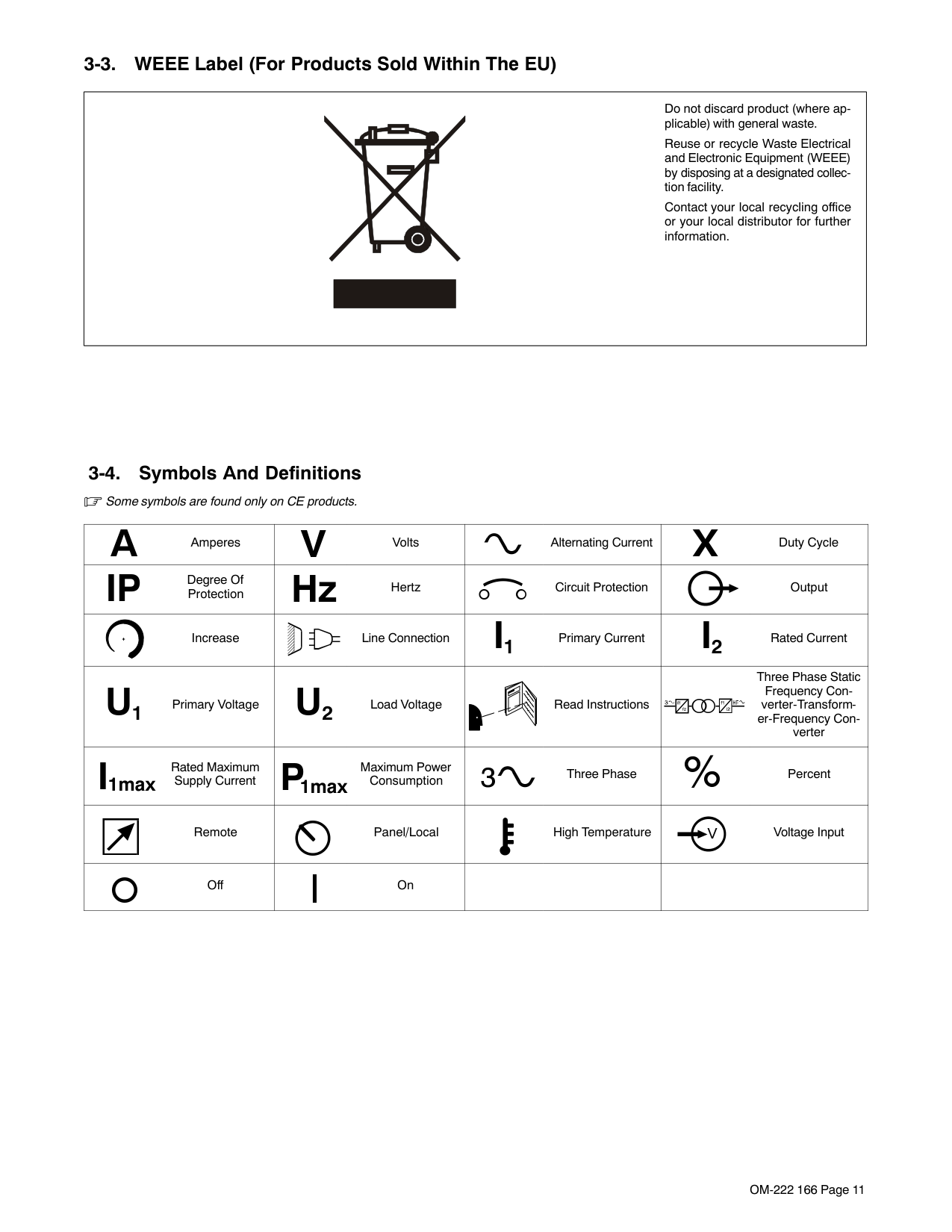
############### SECTION 3 − DEFINITIONS 7. . . . . . . . . . . . . . . . . . . . . . . . . . . . . . . . . . . . . . . . . . . . . . . . . . . . . . . . . . . . . . . . . . .
############### SECTION 4 − INSTALLATION 10. . . . . . . . . . . . . . . . . . . . . . . . . . . . . . . . . . . . . . . . . . . . . . . . . . . . . . . . . . . . . . . . . .
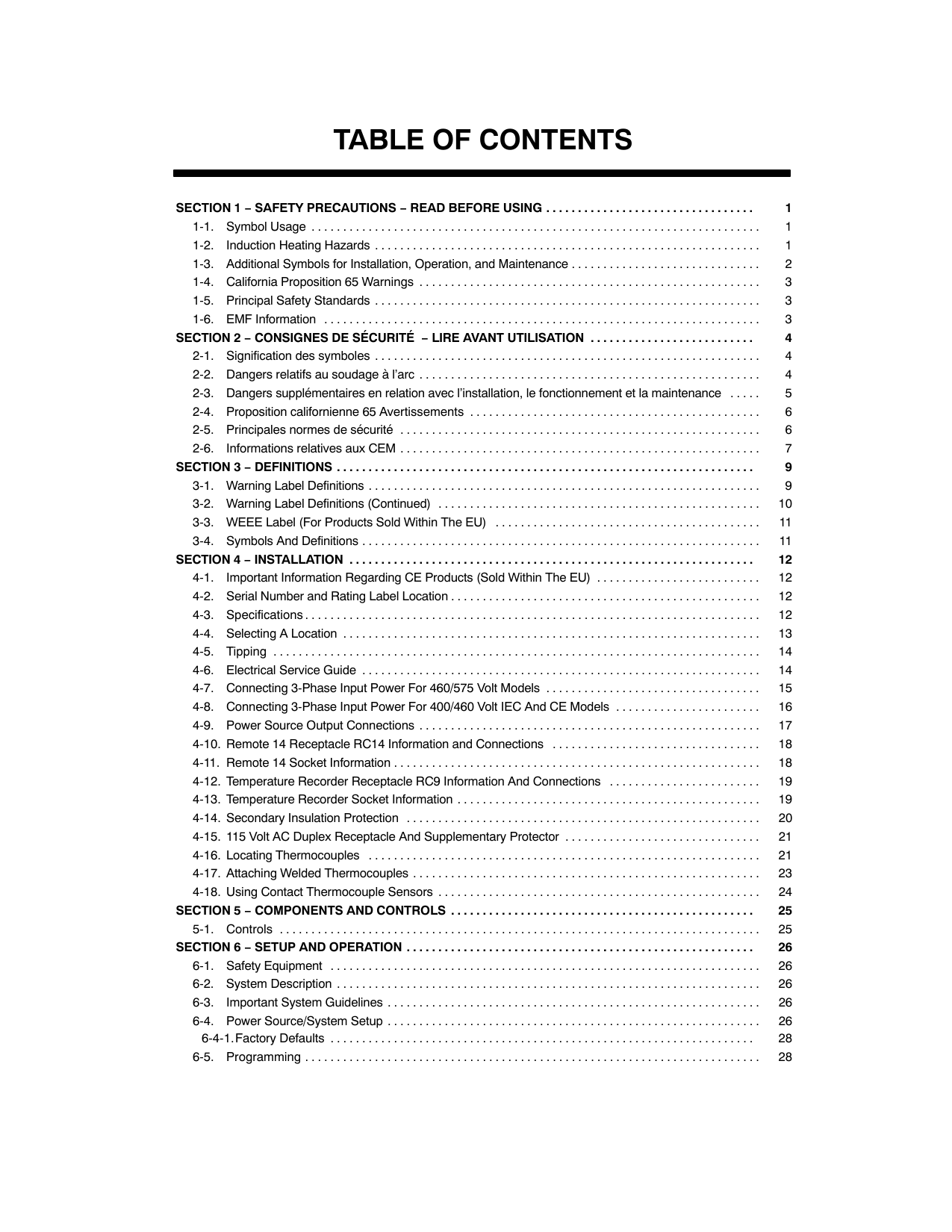
############### SECTION 5 − COMPONENTS AND CONTROLS 23. . . . . . . . . . . . . . . . . . . . . . . . . . . . . . . . . . . . . . . . . . . . . . . . . .
SECTION 6 − SETUP AND OPERATION 24. . . . . . . . . . . . . . . . . . . . . . . . . . . . . . . . . . . . . . . . . . . . . . . . . . . . . . . .
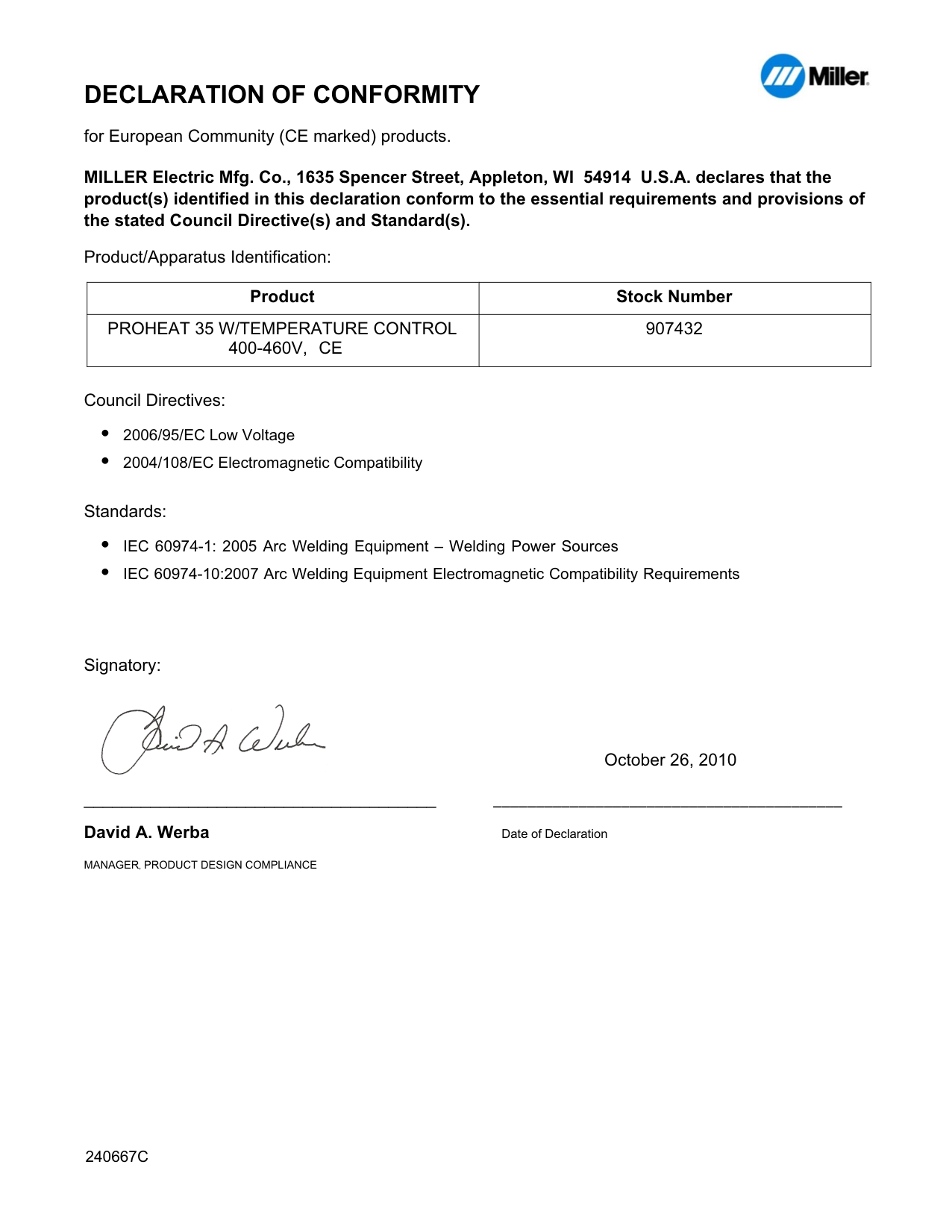
Declaration of Conformity for European Community (CE) Products
|NOTE
|This information is provided for units with CE certification (see rating label on unit).| |---|---|
####### Manufacturer: European Contact:
Miller Electric Mg. Co. Mr. Danilo Fedolfi, 1635 W. Spencer St. Managing Director Appleton, WI 54914 USA ITW Welding Products Italy S.r.l. Phone: (920) 734-9821 Via Privata Iseo 6/E
20098 San Giuliano Milanese, Italy Phone: 39(02)98290-1 Fax: 39(02)98290203
European Contact Signature:

Declares that this product: ProHeat 35
conforms to the following Directives and Standards:
Directives Low Voltage Directive: 73/23/EEC Electromagnetic compatibility Directives: 89/336/EEC, 92/31/EEC Machinery Directives: 98/37EEC, 91/368/EEC, 92/31/EEC, 133/04, 93/68/EEC
Standards Degrees of Protection Provided By Enclosures (IP Code): IEC 60529 Ed. 2.1 Insulation Coordination For Equipment Within Low-Voltage Systems: Part 1: Principles, Requirements And Tests. IEC 60664-1 Ed. 1.1
The product technical file is maintained by the responsible Business Unit(s) located at the manufacturing facility.
dec_stat_6/05
| | |---|
#### SECTION 1 − SAFETY PRECAUTIONS − READ BEFORE USING

Warning: Protect yourself and others from injury — read and follow these precautions.
|1-1. Symbol Usage| |---|
safety_ihom 5/05
Means Warning! Watch Out! There are possible hazards with this procedure! The possible hazards are shown in the adjoining symbols.
Marks a special safety message. Means “Note”; not safety related.
| | | | |---|---|---|
This group of symbols means Warning! Watch Out! possible ELECTRIC SHOCK, MOVING PARTS, and HOT PARTS hazards. Consult symbols and related instructions below for necessary actions to avoid the hazards.
|1-2. Induction Heating Hazards| |---|
The symbols shown below are used throughout this manual to call attention to and identify possible hazards. When you see the symbol, watch out, and follow the related instructions to avoid the hazard. The safety information given below is only a summary of the more complete safety information found in the Safety Standards listed in Section 1-5. Read and follow all Safety Standards.
Only qualified persons should install, operate, maintain, and repair this unit.
During operation, keep everybody, especially children, away.
######### ELECTRIC SHOCK can kill.
Touching live electrical parts can cause fatal shocks or severe burns. The power circuit and output bus bars or connections are electrically live whenever the output is on. The input power circuit and machine
internal circuits are also live when power is on. Incorrectly installed or improperly grounded equipment is a hazard.
Do not touch live electrical parts. Enclose any connecting bus bars and coolant fittings to prevent unintentional contact. Wear dry, hole-free insulating gloves and body protection.
Insulate yourself from work and ground using dry insulating mats or covers big enough to prevent any physical contact with the work or ground.
Additional safety precautions are required when any of the following electrically hazardous conditions are present: in damp locations or while wearing wet clothing; on metal structures such as floors, gratings, or scaffolds; when in cramped positions such as sitting, kneeling, or lying; or when there is a high risk of unavoidable or accidental contact with the workpiece or ground. For these conditions, see ANSI Z49.1 listed in Safety Standards. And, do not work alone!
Disconnect input power before installing or servicing this equipment. Lockout/tagout input power according to OSHA 29 CFR 1910.147 (see Safety Standards).
Use only nonconductive coolant hoses with a minimum length of 18 inches (457 mm) to provide isolation.
Properly install and ground this equipment according to its Owner’s Manual and national, state, and local codes.
Always verify the supply ground − check and be sure that input power cord ground wire is properly connected to ground terminal in disconnect box or that cord plug is connected to a properly grounded receptacle outlet.
When making input connections, attach proper grounding conductor first − double-check connections.
Frequently inspect input power cord for damage or bare wiring − replace cord immediately if damaged − bare wiring can kill.
Turn off all equipment when not in use. Do not use worn, damaged, undersized, or poorly spliced cables. Do not drape cables over your body. Do not touch power circuit if you are in contact with the work, ground, or another power circuit from a different machine. Use only well-maintained equipment. Repair or replace damaged parts at once. Maintain unit according to manual. Wear a safety harness if working above floor level. Keep all panels and covers securely in place.
######### SIGNIFICANT DC VOLTAGE exists in inverter-type power sources after removal of input power.
Turn Off inverter, disconnect input power, and discharge input capacitors according to instructions in Maintenance Section before touching any internal parts.
| | |---|
############ FUMES AND GASES can be hazardous.
Induction Heating of certain materials, adhesives, and fluxes can produce fumes and gases. Breathing these fumes and gases can be hazardous to your health.
Keep your head out of the fumes. Do not breathe the fumes. If inside, ventilate the area and/or use local forced ventilation to remove fumes and gases. If ventilation is poor, wear an approved air-supplied respirator.
Read and understand the Material Safety Data Sheets (MSDSs) and the manufacturer’s instruction for adhesives, fluxes, metals, consumables, coatings, cleaners, and degreasers.
Work in a confined space only if it is well ventilated, or while wearing an air-supplied respirator. Always have a trained watchperson nearby. Fumes and gases from heating can displace air and lower the oxygen level causing injury or death. Be sure the breathing air is safe.
Do not heat in locations near degreasing, cleaning, or spraying operations. The heat can react with vapors to form highly toxic and irritating gases.
Do not overheat coated metals, such as galvanized, lead, or cadmium plated steel, unless the coating is removed from the heated area, the area is well ventilated, and while wearing an airsupplied respirator. The coatings and any metals containing these elements can give off toxic fumes if overheated. See coating MSDS for temperature information.
######### FIRE OR EXPLOSION hazard.
############ INDUCTION HEATING can cause burns.
Do not overheat parts and adhesive. Watch for fire; keep extinguisher nearby. Keep flammables away from work area.
Hot parts and equipment can injure. Do not touch or handle induction head/coil during operation. Do not touch hot parts bare-handed.
Do not locate unit on, over, or near combustible surfaces. Do not install unit near flammables. Do not operate unit in explosive atmosphere.
Allow cooling period before handling parts or equipment. Keep metal jewelry and other metal personal items away from head/coil during operation.
|1-3. Additional Symbols for Installation, Operation, and Maintenance| |---|
######### FALLING UNIT can cause injury.
Use handle and have person of adequate physical strength lift unit. Move unit with hand cart or similar device. For units without a handle, use equipment of adequate capacity to lift unit.
When using lift forks to move unit, be sure forks are long enough to extend beyond opposite side of unit.
############### FLYING METAL OR ADHESIVE can injure eyes.
Wear approved safety glasses with side shields or wear face shield.
######### MOVING PARTS can cause injury.
Keep away from moving parts such as fans. Keep all doors, panels, covers, and guards closed and securely in place.
############## MAGNETIC FIELDS can affect pacemakers.
Pacemaker wearers keep away. Wearers should consult their doctor before going near induction heating operations.
######### OVERUSE can cause OVERHEATING
Allow cooling period. Reduce output or reduce duty cycle before starting to heat again. Follow rated duty cycle.
########### STATIC (ESD) can damage PC boards.
Put on grounded wrist strap BEFORE handling boards or parts. Use proper static-proof bags and boxes to store, move, or ship PC boards.
############# H.F. RADIATION can cause interference.
High-frequency (H.F.) can interfere with radio navigation, safety services, computers, and communications equipment.
Have only qualified person familiar with electronic equipment perform this installation.
The user is responsible for having a qualified electrician promptly correct any interference problem resulting from the installation.
If notified by the FCC about interference, stop using the equipment at once.
Have the installation regularly checked and maintained. Keep high-frequency source doors and panels tightly shut.
######### READ INSTRUCTIONS.
Read Owner’s Manual before using or servicing unit. Use only genuine Miller/Hobart replacement parts.
|1-4. California Proposition 65 Warnings| |---|
Welding or cutting equipment produces fumes or gases which contain chemicals known to the State of California to cause birth defects and, in some cases, cancer. (California Health & Safety Code Section 25249.5 et seq.)
Battery posts, terminals and related accessories contain lead and lead compounds, chemicals known to the State of California to cause cancer and birth defects or other reproductive harm. Wash hands after handling.
For Gasoline Engines:
Engine exhaust contains chemicals known to the State of California to cause cancer, birth defects, or other reproductive harm.
For Diesel Engines:
Diesel engine exhaust and some of its constituents are known to the State of California to cause cancer, birth defects, and other reproductive harm.
|1-5. Principal Safety Standards| |---|
Safety in Welding, Cutting, and Allied Processes, ANSI Standard Z49.1, from Global Engineering Documents (phone: 1-877-413-5184, website: www.global.ihs.com).
Safety and Health Standards, OSHA 29 CFR 1910, from Superintendent of Documents, U.S. Government Printing Office, Washington, D.C. 20402.
National Electrical Code, NFPA Standard 70, from National Fire Protection Association, Batterymarch Park, Quincy, MA 02269.
Canadian Electrical Code Part 1, CSA Standard C22.1, from Canadian Standards Association, Standards Sales, 178 Rexdale Boulevard,Rexdale, Ontario, Canada M9W 1R3.
Practice For Occupational And Educational Eye And Face Protection, ANSI Standard Z87.1, from American National Standards Institute, 11 West 42nd Street, New York, NY 10036−8002 (phone: 212−642−4900, website: www.ansi.org).
|1-6. EMF Information| |---|
Considerations About Induction Heating And The Effects Of Low Frequency Electric And Magnetic Fields
The following is a quotation from the General Conclusions Section of the U.S. Congress, Office of Technology Assessment, Biological Effects of Power Frequency Electric & Magnetic Fields − Background Paper, OTABP-E-53 (Washington, DC: U.S. Government Printing Office, May 1989): “. . . there is now a very large volume of scientific findings based on experiments at the cellular level and from studies with animals and people which clearly establish that low frequency magnetic fields can interact with, and produce changes in, biological systems. While most of this work is of very high quality, the results are complex. Current scientific understanding does not yet allow us to interpret the evidence in a single coherent framework. Even more frustrating, it does not yet allow
us to draw definite conclusions about questions of possible risk or to offer clear science-based advice on strategies to minimize or avoid potential risks.”
To reduce magnetic fields in the workplace, use the following procedures:
############### About Pacemakers:
Pacemaker wearers consult your doctor before welding or going near welding or induction heating operations. If cleared by your doctor, then following the above procedures is recommended.
#### SECTION 2 − CONSIGNES DE SÉCURITÉ − LIRE AVANT UTILISATION
Avertissement : se protéger et protéger les autres contre le risque de blessure — lire et respecter ces consignes.
|2-1. Symboles utilisés| |---|
safety_ihom 5/05
Symbole graphique d’avertissement ! Attention ! Cette procédure comporte des risques possibles ! Les dangers éventuels sont représentés par les symboles graphiques joints.
############### Indique un message de sécurité particulier
Signifie NOTE ; n’est pas relatif à la sécurité.
| | | | |---|---|---|
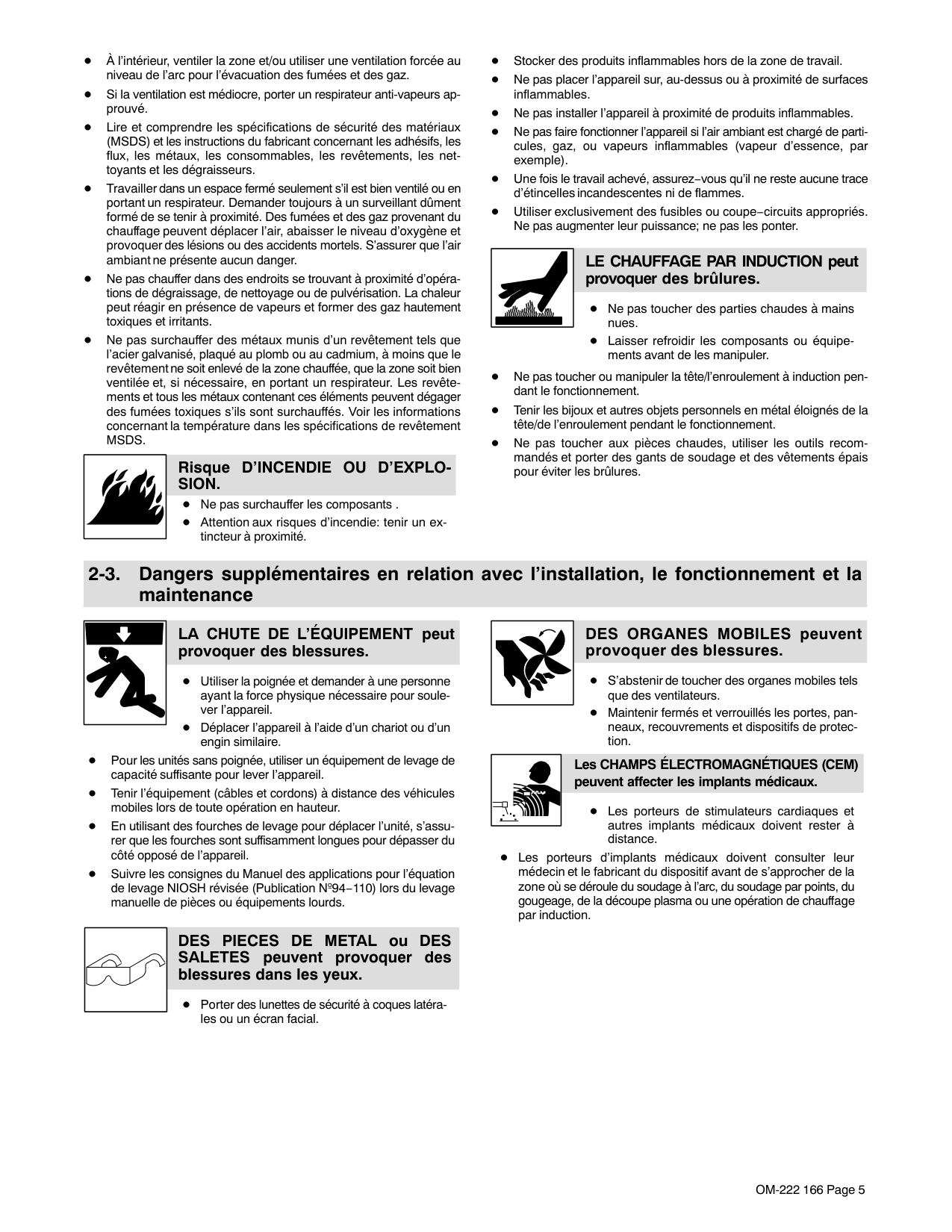
Ce groupe de symboles signifie Avertissement ! Attention ! Risques d’ÉLECTROCUTION, ORGANES MOBILES et PARTIES CHAUDES. Consulter les symboles et les instructions afférentes ci-dessous concernant les mesures à prendre pour supprimer les dangers.
|2-2. Risques de chauffage par induction| |---|
Les symboles représentés ci-dessous sont utilisés dans ce manuel pour attirer l’attention et identifier les dangers possibles. En présence de l’un de ces symboles, prendre garde et suivre les instructions afférentes pour éviter tout risque. Les instructions en matière de sécurité indiquées ci-dessous ne constituent qu’un sommaire des instructions de sécurité plus complètes fournies dans les normes de sécurité énumérées dans la Section 2-5. Lire et observer toutes les normes de sécurité.
Seul un personnel qualifié est autorisé à installer, faire fonctionner, entretenir et réparer cet appareil.
Pendant le fonctionnement, maintenir à distance toutes les personnes, notamment les enfants de l’appareil.
UNE DÉCHARGE ÉLECTRIQUE peut entraîner la mort.
Le contact de composants électriques peut provoquer des accidents mortels ou des brûlures graves. Le circuit électrique et les barres collectrices ou les connexions de sortie sont sous tension lorsque
l’appareil fonctionne. Le circuit d’alimentation et les circuits internes de la machine sont également sous tension lorsque l’alimentation est sur marche. Des équipements installés ou reliés à la borne de terre de manière incorrecte sont dangereux.
Ne pas toucher aux pièces électriques sous tension. Protéger toutes les barres collectrices et les raccords de refroidissement pour éviter de les toucher par inadvertance. Porter des gants isolants et des vêtements de protection secs et sans trous.
S’isoler de la pièce à couper et du sol en utilisant des housses ou des tapis assez grands afin d’éviter tout contact physique avec la pièce à couper ou le sol.
D’autres consignes de sécurité sont nécessaires dans les conditions suivantes : risques électriques dans un environnement humide ou si l’on porte des vêtements mouillés ; sur des structures métalliques telles que sols, grilles ou échafaudages ; en position coincée comme assise, à genoux ou couchée ; ou s’il y a un risque élevé de contact inévitable ou accidentel avec la pièce à souder ou le sol. Dans ces conditions, voir ANSI Z49.1 énuméré dans les normes de sécurité. En outre, ne pas travailler seul !
Couper l’alimentation d’entrée avant d’installer l’appareil ou d’effectuer l’entretien. Verrouiller ou étiqueter la sortie d’alimentation selon la norme OSHA 29 CFR 1910.147(se reporter aux Principales normes de sécurité).
N’utiliser que des tuyaux de refroidissement non conducteurs ayant une longueur minimale de 457 mm pour garantir l’isolation.
Installer le poste correctement et le mettre à la terre convenablement selon les consignes du manuel de l’opérateur et les normes nationales, provinciales et locales.
Toujours vérifier la terre du cordon d’alimentation. Vérifier et s’assurer que le fil de terre du cordon d’alimentation est bien raccordé à la borne de terre du sectionneur ou que la fiche du cordon est raccordée à une prise correctement mise à la terre.
En effectuant les raccordements d’entrée, fixer d’abord le conducteur de mise à la terre approprié et revérifier les connexions.
Vérifier fréquemment le cordon d’alimentation afin de s’assurer qu’il n’est pas altéré ou à nu, le remplacer immédiatement s’il l’est. Un fil à nu peut entraîner la mort.
L’équipement doit être hors tension lorsqu’il n’est pas utilisé. Ne pas utiliser des câbles usés, endommagés, de grosseur insuffisante ou mal épissés. Ne pas enrouler les câbles autour du corps. Ne pas toucher le circuit électrique si l’on est en contact avec la pièce, la terre ou le circuit électrique d’une autre machine.
N’utiliser qu’un matériel en bon état. Réparer ou remplacer sur-lechamp les pièces endommagées. Entretenir l’appareil conformément à ce manuel.
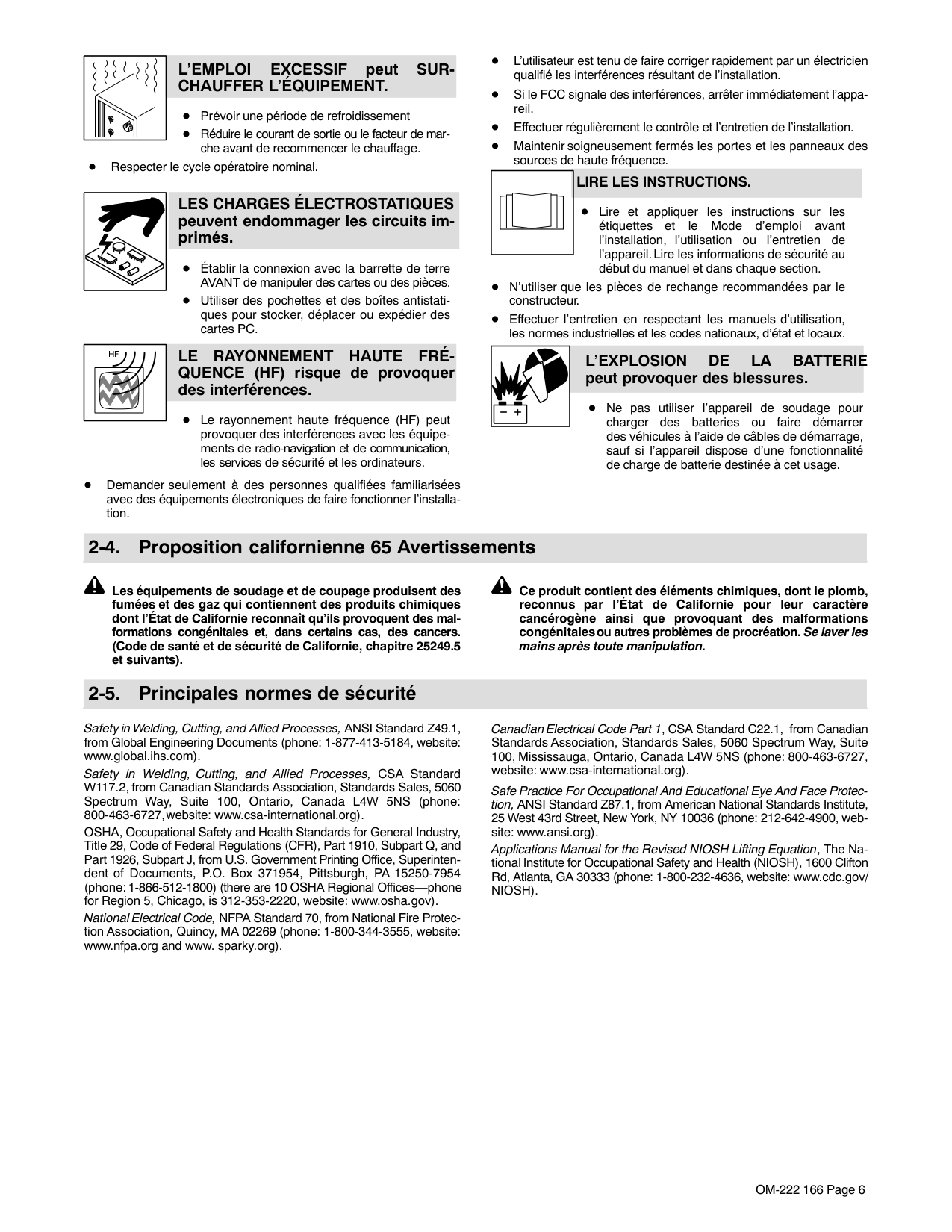
Porter un harnais de sécurité si l’on doit travailler au-dessus du sol. S’assurer que tous les panneaux et couvercles sont correctement en place.
######### Il reste une TENSION DC NON NÉGLIGEABLE dans les sources de soudage onduleur quand on a coupé l’alimentation.
Avant de toucher des organes internes, couper l’onduleur, débrancher l’alimentation et décharger les condensateurs d’alimentation conformément aux instructions indiquées dans la partie maintenance.
| |LES FUMÉES ET LES GAZ peuvent être dangereux.| |---|---| | |Le chauffage à induction de certains matériaux, adhésifs et flux génère des fumées et des gaz. Leur inhalation peut être dangereuse pour votre santé.|
Ne pas mettre sa tête au-dessus des vapeurs. Ne pas respirer ces vapeurs. À l’intérieur, ventiler la zone et/ou utiliser une ventilation forcée au niveau de l’arc pour l’évacuation des fumées et des gaz. Si la ventilation est médiocre, porter un respirateur anti-vapeurs approuvé.
Lire et comprendre les spécifications de sécurité des matériaux (MSDS) et les instructions du fabricant concernant les adhésifs, les flux, les métaux, les consommables, les revêtements, les nettoyants et les dégraisseurs.
Travailler dans un espace fermé seulement s’il est bien ventilé ou en portant un respirateur. Demander toujours à un surveillant dûment formé de se tenir à proximité. Des fumées et des gaz provenant du chauffage peuvent déplacer l’air, abaisser le niveau d’oxygène et provoquer des lésions ou des accidents mortels. S’assurer que l’air ambiant ne présente aucun danger.
Ne pas chauffer dans des endroits se trouvant à proximité d’opérations de dégraissage, de nettoyage ou de pulvérisation. La chaleur peut réagir en présence de vapeurs et former des gaz hautement toxiques et irritants.
Ne pas surchauffer des métaux munis d’un revêtement tels que l’acier galvanisé, plaqué au plomb ou au cadmium, à moins que le revêtement ne soit enlevé de la zone chauffée, que la zone soit bien ventilée et, si nécessaire, en portant un respirateur. Les revêtements et tous les métaux contenant ces éléments peuvent dégager des fumées toxiques s’ils sont surchauffés. Voir les informations concernant la température dans les spécifications de revêtement MSDS.
############### Risque D’INCENDIE OU D’EXPLOSION.
LE CHAUFFAGE PAR INDUCTION peut provoquer des brûlures.
Ne pas surchauffer les composants ni les adhésifs. Attention aux risques d’incendie: tenir un extincteur à proximité.
Des pièces ou de l’équipement chaud peuvent provoquer des blessures.
Ne pas toucher ou manipuler la tête/l’enroulement à induction pendant le fonctionnement. Ne pas toucher des parties chaudes à mains nues. Laisser refroidir les composants ou équipements avant de les manipuler. Tenir les bijoux et autres objets personnels en métal éloignés de la tête/de l’enroulement pendant le fonctionnement.
Stocker des produits inflammables hors de la zone de travail. Ne pas placer l’appareil sur, au-dessus ou à proximité de surfaces inflammables. Ne pas installer l’appareil à proximité de produits inflammables. Ne pas faire fonctionner l’appareil en atmosphère explosive.
|2-3. Dangers supplémentaires en relation avec l’installation, le fonctionnement et la maintenance| |---|
############### LA CHUTE DE L’APPAREIL peut blesser.
Utiliser la poignée et demander à une personne ayant la force physique nécessaire pour soulever l’appareil.

Déplacer l’appareil à l’aide d’un chariot ou d’un engin similaire.
Pour les appareils sans poignée utiliser un équipement d’une capacité appropriée pour soulever l’appareil.
En utilisant des fourches de levage pour déplacer l’unité, s’assurer que les fourches sont suffisamment longues pour dépasser du côté opposé de l’appareil.
LA PROJECTION DE PIÈCES DE METAL ou DE COLLE peut provoquer des blessures aux yeux.
Porter des lunettes de sécurité à coques latérales ou un écran facial.
DES ORGANES MOBILES peuvent provoquer des blessures.
S’abstenir de toucher des organes mobiles tels que des ventilateurs. Maintenir fermés et verrouillés les portes, panneaux, recouvrements et dispositifs de protection.
LES CHAMPS MAGNÉTIQUES peuvent affecter les stimulateurs cardiaques.
Porteurs de stimulateur cardiaque, rester à distance.
Les porteurs d’un stimulateur cardiaque doivent d’abord consulter leur médecin avant de s’approcher des opérations de chauffage à induction.
L’EMPLOI EXCESSIF peut SURCHAUFFER L’ÉQUIPEMENT.
Prévoir une période de refroidissement Réduire le courant de sortie ou le facteur de marche avant de recommencer le chauffage. Respecter le cycle opératoire nominal.
LES CHARGES ÉLECTROSTATIQUES peuvent endommager les circuits imprimés.
Établir la connexion avec la barrette de terre AVANT de manipuler des cartes ou des pièces.
Utiliser des pochettes et des boîtes antistatiques pour stocker, déplacer ou expédier des cartes PC.
LE RAYONNEMENT HAUTE FRÉQUENCE (HF) risque de provoquer des interférences.
Le rayonnement haute fréquence (HF) peut provoquer des interférences avec les équipements de radio-navigation et de communication, les services de sécurité et les ordinateurs.
Demander seulement à des personnes qualifiées familiarisées avec des équipements électroniques de faire fonctionner l’installation.
L’utilisateur est tenu de faire corriger rapidement par un électricien qualifié les interférences résultant de l’installation. Si le FCC signale des interférences, arrêter immédiatement l’appareil. Effectuer régulièrement le contrôle et l’entretien de l’installation. Maintenir soigneusement fermés les portes et les panneaux des sources de haute fréquence.
############### LIRE LES INSTRUCTIONS.
Lire le manuel d’utilisation avant d’utiliser ou d’intervenir sur l’appareil. Utiliser uniquement des pièces de rechange Miller/Hobart.

|2-4. Proposition californienne 65 Avertissements| |---|
Les équipements de soudage et de coupage produisent des fumées et des gaz qui contiennent des produits chimiques dont l’État de Californie reconnaît qu’ils provoquent des malformations congénitales et, dans certains cas, des cancers. (Code de santé et de sécurité de Californie, chapitre 25249.5 et suivants).
Les batteries, les bornes et autres accessoires contiennent du plomb et des composés à base de plomb, produits chimiques dont l’État de Californie reconnaît qu’ils provoquent des cancers et des malformations congénitales ou autres problèmes de procréation. Se laver les mains après manipulation.
Pour les moteurs à essence :
Les gaz d’échappement des moteurs contiennent des produits chimiques dont l’État de Californie reconnaît qu’ils provoquent des cancers et des malformations congénitales ou autres problèmes de procréation.
Pour les moteurs diesel :
Les gaz d’échappement des moteurs diesel et certains de leurs composants sont reconnus par l’État de Californie comme provoquant des cancers et des malformations congénitales ou autres problèmes de procréation.
|2-5. Principales normes de sécurité| |---|
Safety in Welding, Cutting, and Allied Processes, ANSI Standard Z49.1, de Global Engineering Documents (téléphone : 1-877-413-5184, site Internet : www.global.ihs.com).
Normes de sécurité et de santé, OSHA 29 CFR 1910, from Superintendent of Documents, U.S. Government Printing Office, Washington, D.C. 20402.
Code électrique national, NFPA Standard 70, from National Fire Protection Association, Batterymarch Park, Quincy, MA 02269.
Code électrique du Canada, partie 1, CSA Standard C22.1, from Canadian Standards Association, Standards Sales, 178 Rexdale Boulevard,Rexdale, Ontario, Canada M9W 1R3.
Practice For Occupational And Educational Eye And Face Protection, ANSI Standard Z87.1, de American National Standards Institute, 11 West 42nd Street, New York, NY 10036-8002 (téléphone : 212-642-4900, site Internet : www.ansi.org).
|2-6. Information EMF| |---|
Considérations relatives au chauffage à induction et aux effets des champs électriques et magnétiques basse fréquence.
Le texte suivant est extrait des conclusions générales Département du Congrès U.S., Office of Technology Assessment, Effets biologiques des champs magnétiques et électriques basse fréquence − Background Paper, OTA-BP-E-53 (Washington, DC: U.S. Government Printing Office, May 1989): “. . . on dispose maintenant d’importantes découvertes scientifiques reposant sur des expériences effectuées dans le domaine cellulaire et des études réalisées sur des animaux et des personnes qui démontrent clairement que des champs magnétiques basse fréquence peuvent avoir une interaction et produire des changements dans les systèmes biologiques. Alors que la plus grande partie de cet ouvrage est d’une très grande qualité, les résultats sont complexes. La compréhension scientifique courante ne nous permet pas encore d’interpréter la preuve fournie dans un seul ouvrage cohérent. Il est encore plus frustrant de ne pas
pouvoir tirer des conclusions définitives en ce qui concerne les problèmes de risque possible ou de proposer des recommandations scientifiques claires pour des stratégies à suivre en vue de minimiser ou de prévenir des risques potentiels.”
Pour réduire les champs magnétiques sur le poste de travail, appliquer les procédures suivantes :
############### En ce qui concerne les stimulateurs cardiaques
Les porteurs de stimulateur cardiaque doivent consulter leur médecin avant de souder, d’approcher des opérations de soudage ou de chauffage par induction. Si le médecin approuve, il est recommandé de suivre les procédures précédentes.
#### SECTION 3 − DEFINITIONS
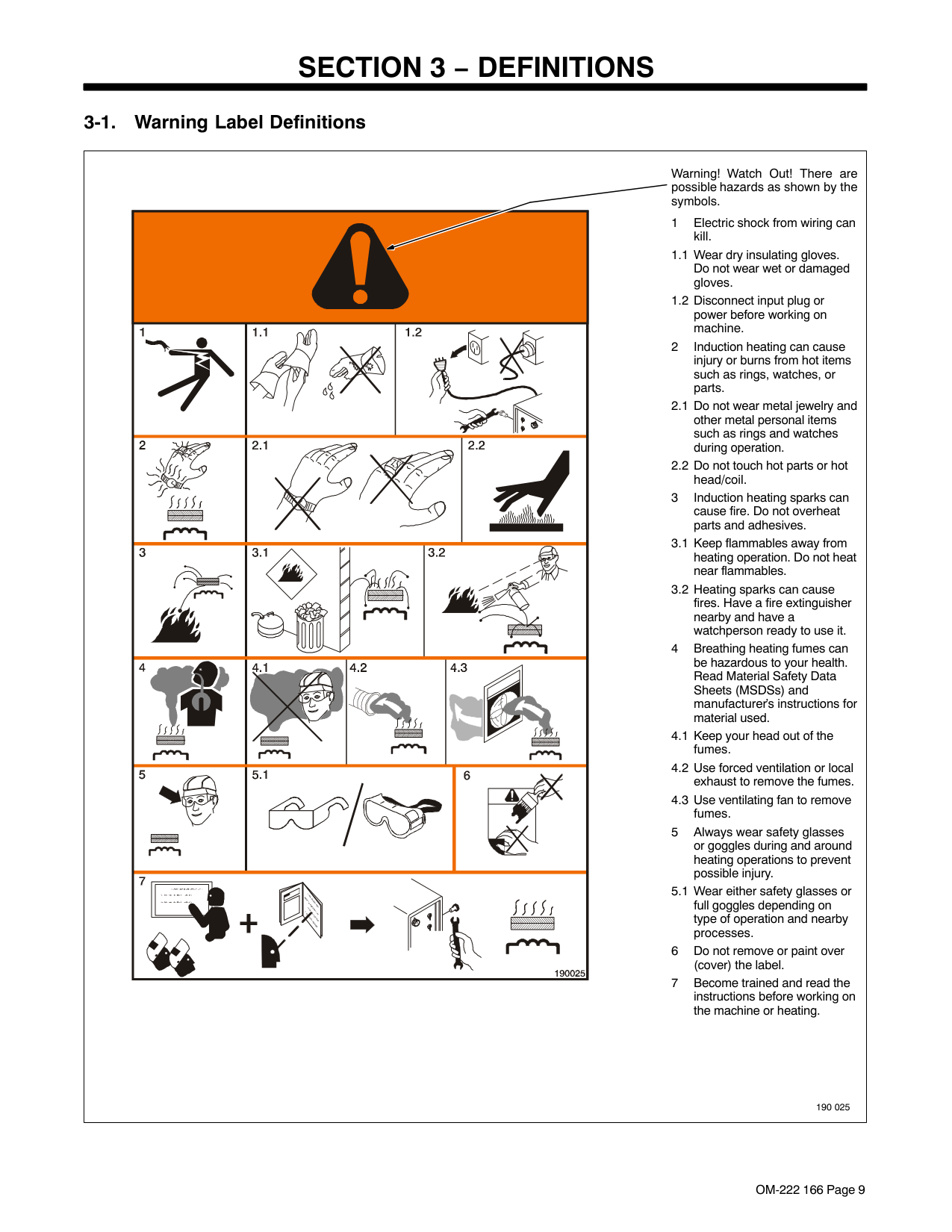
|| | | |||| |---|---|---|---|---|---| | ||||| | | | | | | | | | || | | | | | | | | | | |
Warning! Watch Out! There are possible hazards as shown by the symbols.
1 Electric shock from wiring can kill.
1.1 Wear dry insulating gloves. Do not wear wet or damaged gloves.
1.2 Disconnect input plug or power before working on machine.
2 Induction heating can cause injury or burns from hot items such as rings, watches, or parts.
2.1 Do not wear metal jewelry and other metal personal items such as rings and watches during operation.
2.2 Do not touch hot parts or hot head/coil.
3 Induction heating sparks can cause fire. Do not overheat parts and adhesives.
3.1 Keep flammables away from heating operation. Do not heat near flammables.
3.2 Heating sparks can cause fires. Have a fire extinguisher nearby and have a watchperson ready to use it.
4 Breathing heating fumes can be hazardous to your health. Read Material Safety Data Sheets (MSDSs) and manufacturer’s instructions for material used.
4.1 Keep your head out of the fumes.
4.2 Use forced ventilation or local exhaust to remove the fumes.
4.3 Use ventilating fan to remove fumes.
5 Always wear safety glasses or goggles during and around heating operations to prevent possible injury.
5.1 Wear either safety glasses or full goggles depending on type of operation and nearby processes.
6 Do not remove or paint over (cover) the label.
7 Become trained and read the instructions before working on the machine or heating.
190 025| |---|
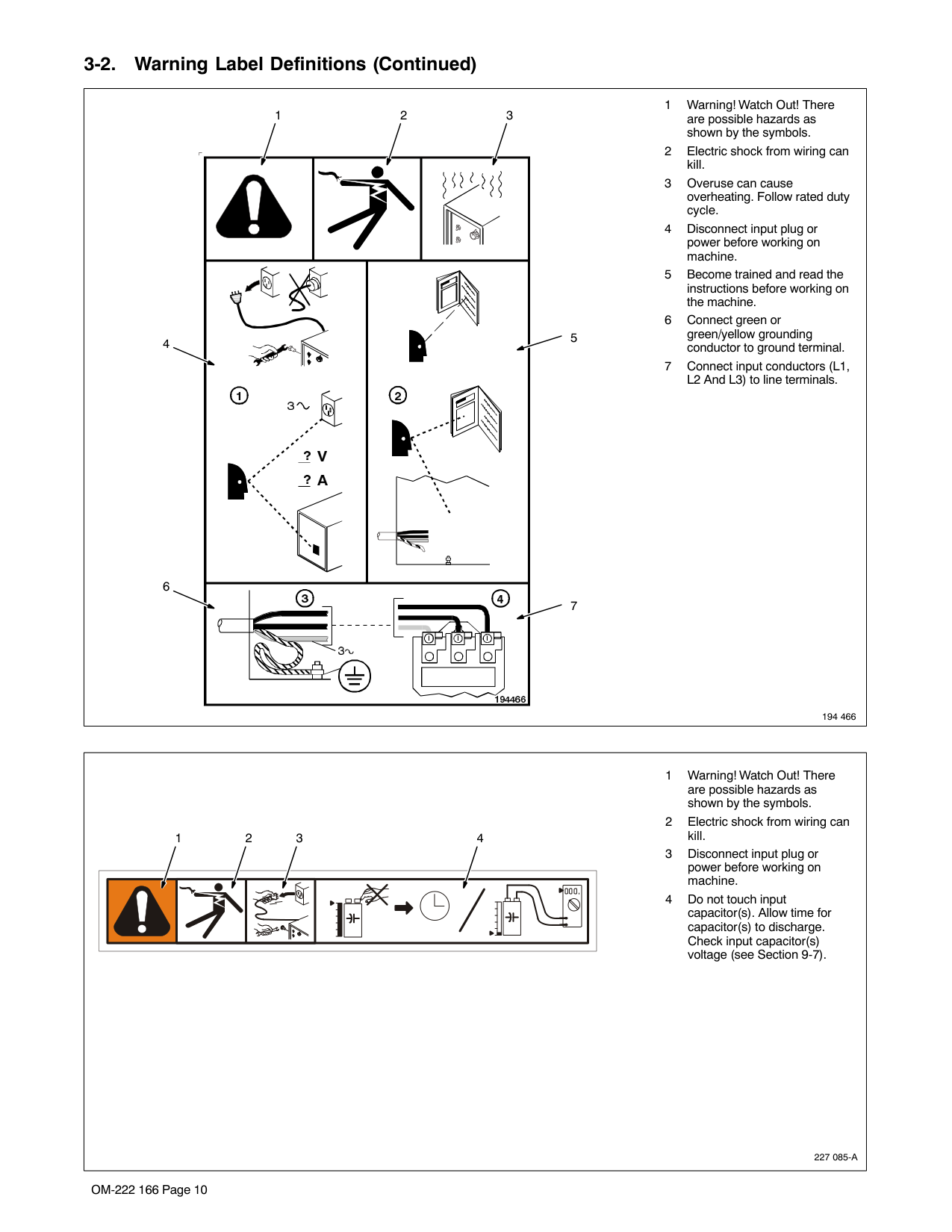
###### 3-1. Warning Label Definitions (Continued)
|1 Warning! Watch Out! There are possible hazards as shown by the symbols.
2 Electric shock from wiring can kill.
3 Overuse can cause overheating. Follow rated duty cycle.
4 Disconnect input plug or power before working on machine.
5 Become trained and read the instructions before working on the machine.
6 Connect green or green/yellow grounding conductor to ground terminal.
7 Connect input conductors (L1, L2 And L3) to line terminals.
194 466
| | | | | |---|---|---|---| |


|


|
|
|


12
4 5
3
6
7| |---|
|227 085-A
123 4 1 Warning! Watch Out! There are possible hazards as shown by the symbols.
2 Electric shock from wiring can kill.
3 Disconnect input plug or power before working on machine.
4 Do not touch input capacitor(s). Allow time for capacitor(s) to discharge. Check input capacitor(s) voltage (see Section 9-7).
| |---|
|226 534-B
For label location see Section 4-2.
| |---|
|Some symbols are found only on CE products.Note| |---|
|A Amperes
|V Volts
|Alternating Current|X Duty Cycle
| |---|---|---|---| |IP
Degree Of Protection
|Hz Hertz
|Circuit Protection
|Output| |Increase|Line Connection
|I1 Primary Current
|I2 Rated Current
| |U1 Primary Voltage
|U2 Load Voltage
|Read Instructions
|Three Phase Static Frequency Converter-Transformer-Frequency Converter
| |I1max
Rated Maximum Supply Current
|P1max
Maximum Power Consumption|Three Phase|Percent| |Remote|Panel/Local
|High Temperature
|Voltage Input| |Off
|On| | |
#### SECTION 4 − INSTALLATION
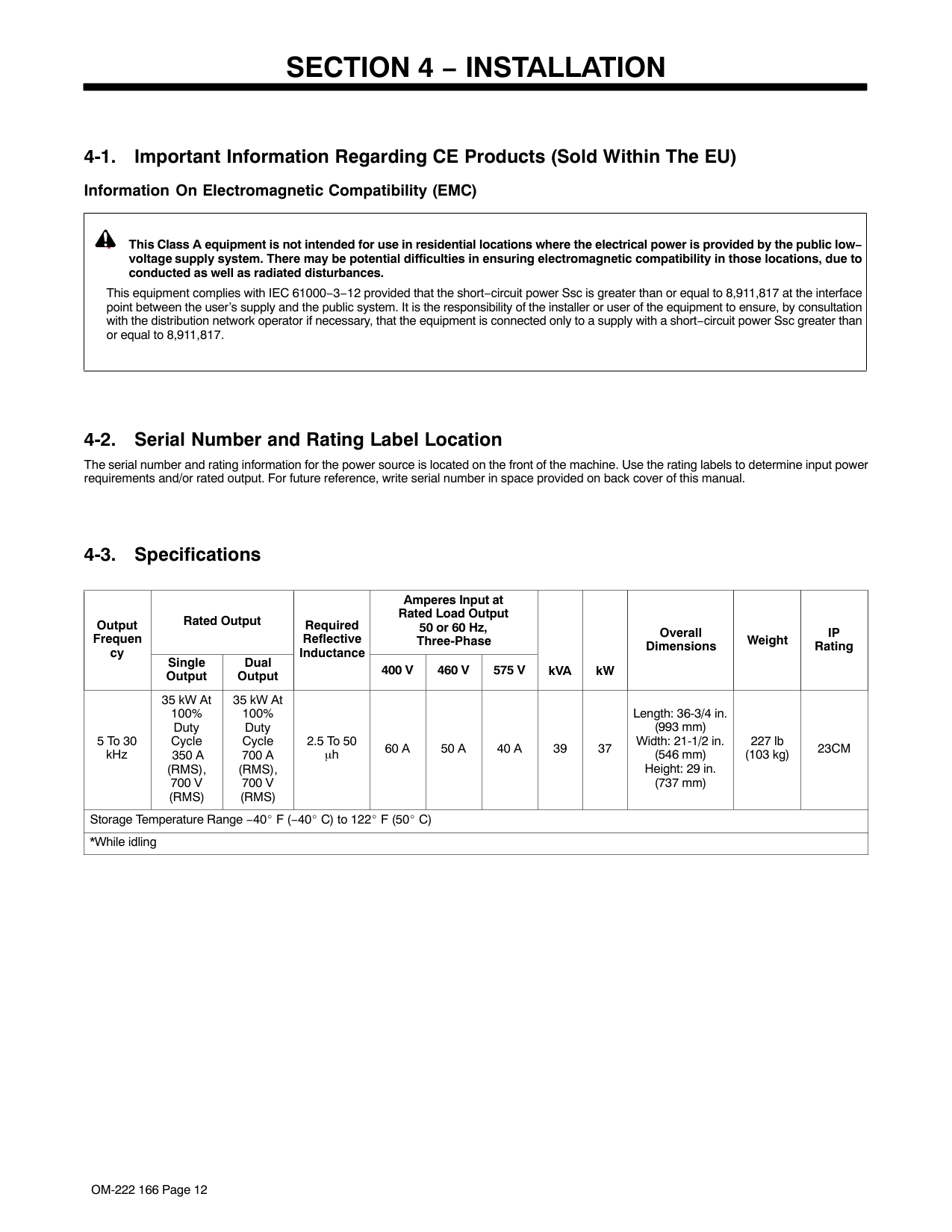
|Output Frequency
|Rated Output|Rated Output|Required Reflective InductanceInductance
|Amperes Input at Rated Load Output 50 or 60 Hz, Three-Phase|Amperes Input at Rated Load Output 50 or 60 Hz, Three-Phase|Amperes Input at Rated Load Output 50 or 60 Hz, Three-Phase|kVA
|kW|Overall Dimensions
|Weight
| |---|---|---|---|---|---|---|---|---|---|---| |Output Frequency
|Single Output|Dual Output
|Required Reflective InductanceInductance
|400 V|460 V|575 V|kVA
|kW|Overall Dimensions
|Weight
| |5 To 30 kHz|35 kW At 100% Duty Cycle 350 A (RMS), 700 V (RMS)|35 kW At 100% Duty Cycle 700 A (RMS), 700 V (RMS)|2.5 To 50 μh|60 A|50 A|40 A|39|37|Length: 36-3/4 in (993 mm) Width: 21-1/2 in (546 mm) Height: 29 in (737 mm)|227 lb (103 kg)| |*While idling|*While idling|*While idling|*While idling|*While idling|*While idling|*While idling|*While idling|*While idling|*While idling|*While idling|
#### WARNING
######### HIGH-FREQUENCY RADIATION can interfere with radio navigation, safety services, computers, and communications equipment.
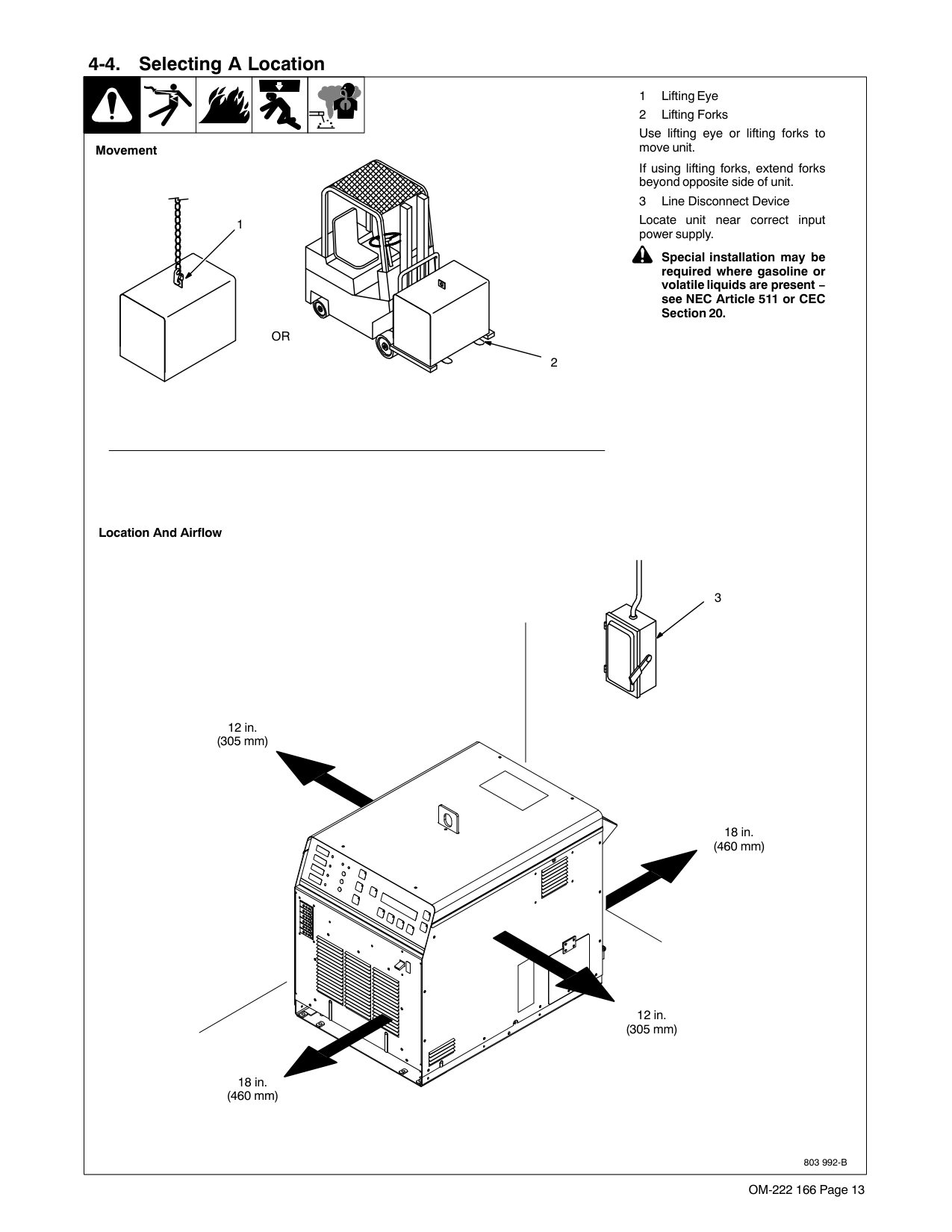
###### 4-2. Selecting A Location
Movement
1
OR
2
Location And Airflow
6
3
18 in (460 mm)
4

5
18 in (460 mm)
Use lifting eye or lifting forks to move unit.
If using lifting forks, extend forks beyond opposite side of unit.
Use rating label to determine input power needs. Label located under front access door.
Use rating label to determine input power needs.
Locate unit near correct input power supply.
Special installation may be required where gasoline or volatile liquids are present − see NEC Article 511 or CEC Section 20.
803 992-B
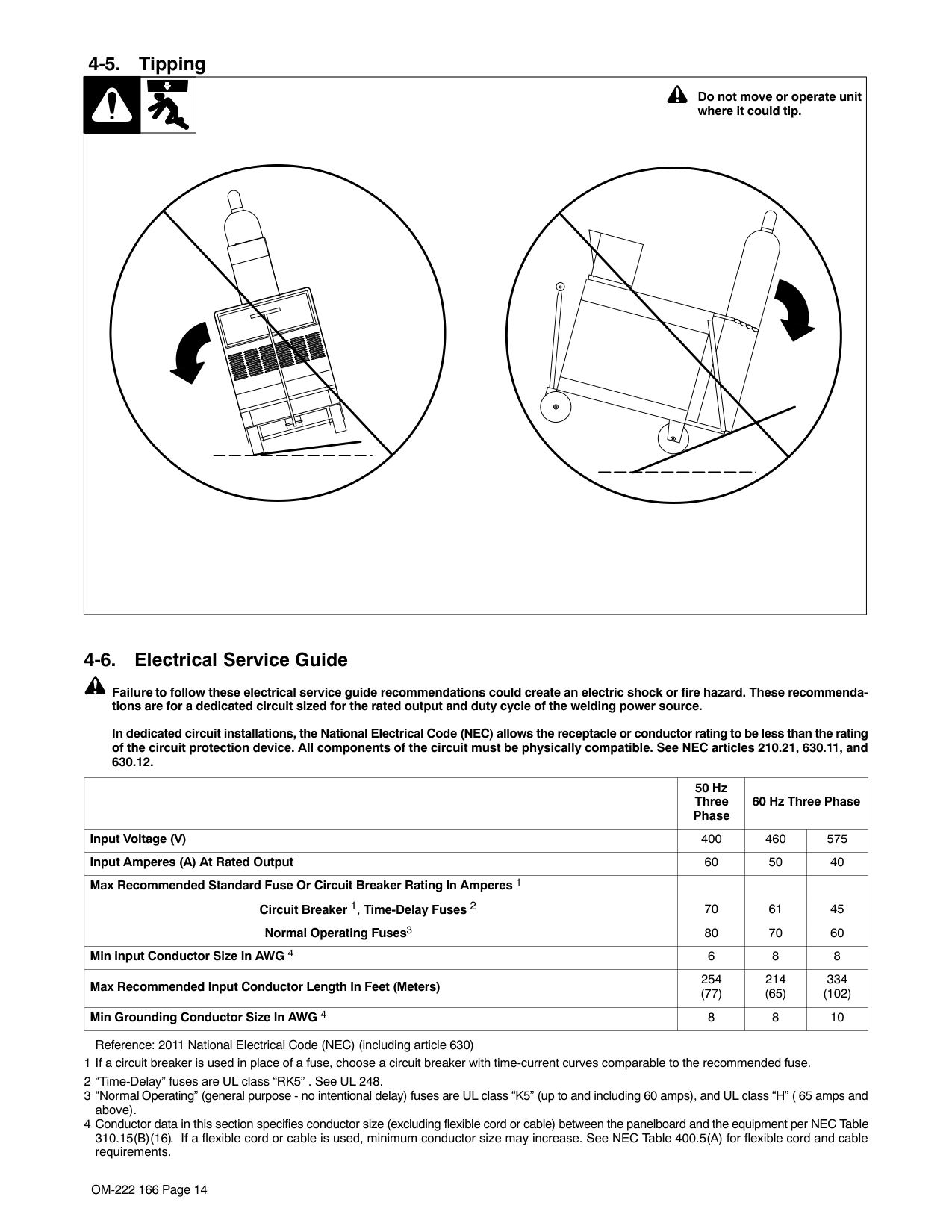
###### 4-3. Tipping
Be careful when placing or moving unit over uneven surfaces.
###### 4-4. Electrical Service Guide
| |50 Hz Three Phase|60 Hz Three Phase|60 Hz Three Phase| |---|---|---|---| |Input Voltage|400|460|575| |Input Amperes At Rated Output|60|50|40| |Max Recommended Standard Fuse Or Circuit Breaker Rating In Amperes 1 Circuit Breaker 1, Time-Delay 2 Normal Operating 3|70 80
|61 70|45 60
| |Min Input Conductor Size In AWG 4|6|8|8| |Max Recommended Input Conductor Length In Feet (Meters)|254 (77)|214 (65)|334 (102)| |Min Grounding Conductor Size In AWG 4|8|8|10|
Reference: 2005 National Electrical Code (NEC) (including article 630)
############### Caution: Failure to follow these fuse and circuit breaker recommendations could create an electric shock or fire hazard. These recommendations are for a dedicated branch circuit that applies to the rated output and duty cycle of the welding power source.
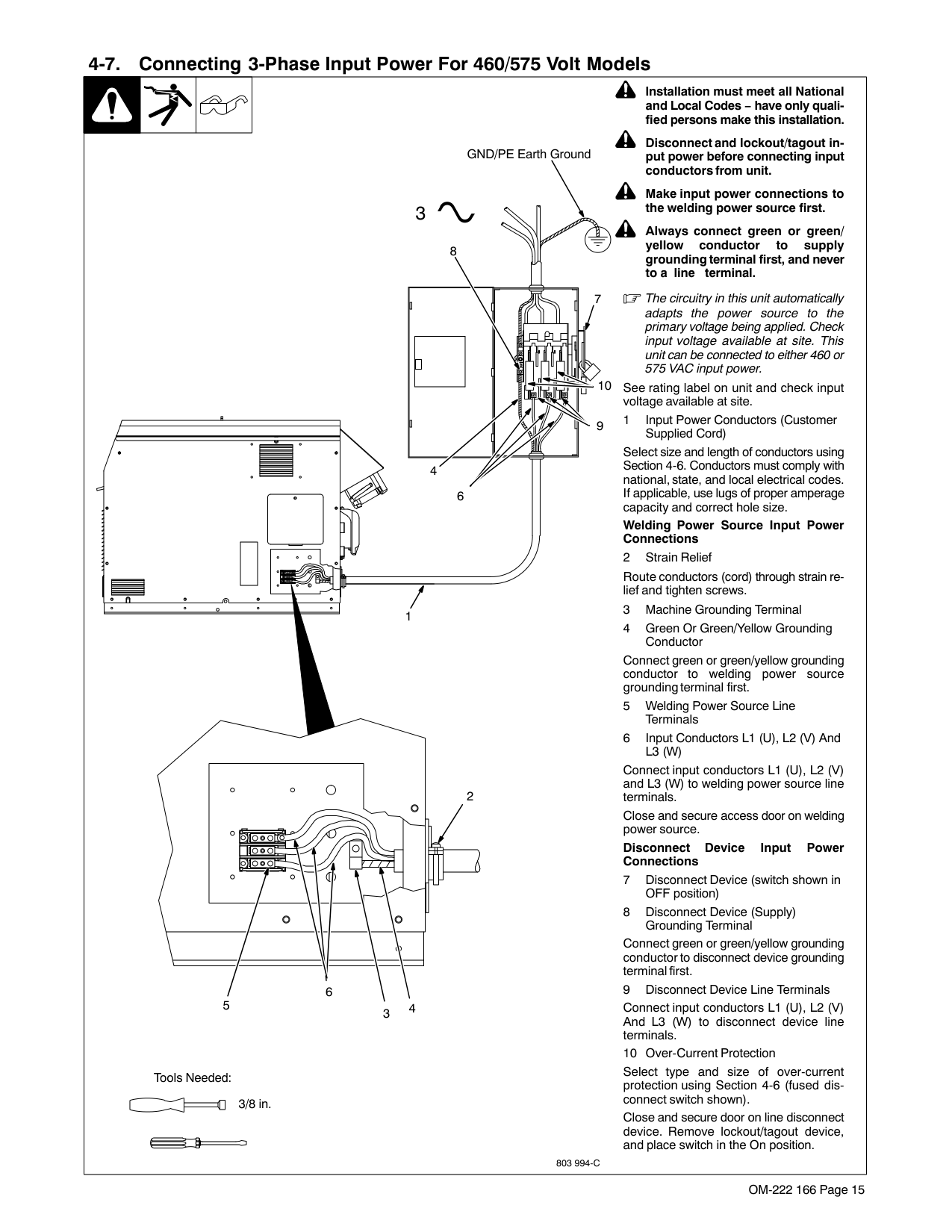
###### 4-5. Connecting 3-Phase Input Power For 460/575 Volt Models
Installation must meet all National and Local Codes − have only qualified persons make this installation.
Disconnect and lockout/tagout input power before connecting input conductors from unit.
GND/PE Earth Ground
Make input power connections to the welding power source first.
3
Always connect green or green/ yellow conductor to supply grounding terminal first, and never to a line terminal.
8
The circuitry in this unit automatically adapts the power source to the primary voltage being applied. Check input voltage available at site. This unit can be connected to either 460 or 575 VAC input power.
| | | |---|---| | | |
7
See rating label on unit and check input voltage available at site.
10
Select size and length of conductors using Section 4-4. Conductors must comply with national, state, and local electrical codes. If applicable, use lugs of proper amperage capacity and correct hole size.
Welding Power Source Input Power Connections
Route conductors (cord) through strain relief and tighten screws.
Connect green or green/yellow grounding conductor to welding power source grounding terminal first.
Connect input conductors L1 (U), L2 (V) and L3 (W) to welding power source line terminals.
Close and secure access door on welding power source.
Disconnect Device Input Power Connections
Connect green or green/yellow grounding conductor to disconnect device grounding terminal first.
Connect input conductors L1 (U), L2 (V) And L3 (W) to disconnect device line terminals.
9
4
6
1
2
| | | | |---|---|---| | | | | | | | |
6 5
43
Tools Needed:
Select type and size of over-current protection using Section 4-4 (fused disconnect switch shown).
3/8 in
Close and secure door on line disconnect device. Remove lockout/tagout device, and place switch in the On position.
803 994-C
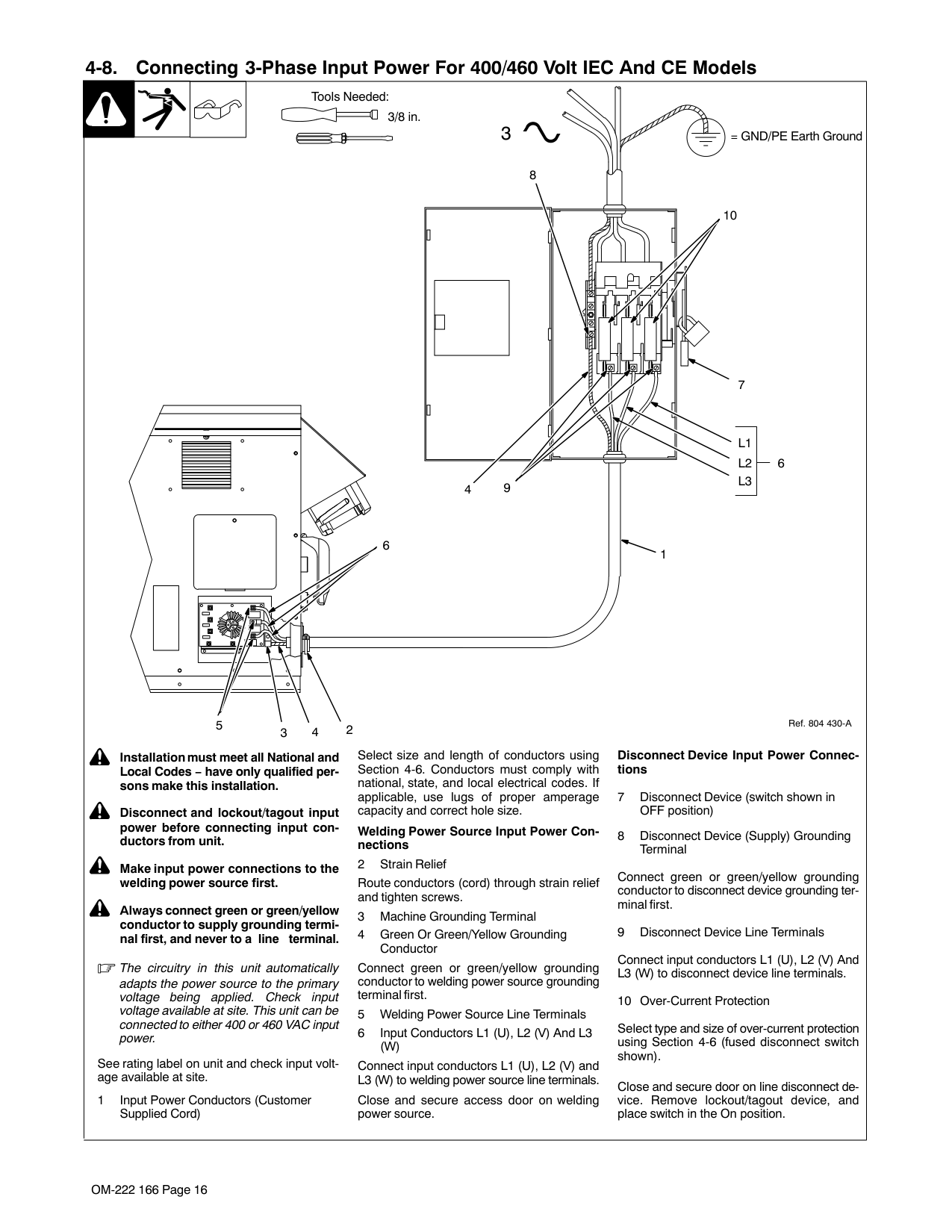
###### 4-6. Connecting 3-Phase Input Power For 400/460 Volt Models
Tools Needed:
3/8 in
= GND/PE Earth Ground3
8
10
| | | | |---|---|---| | | | |
6
7
|L1 L2 L3| | |---|---| |L1 L2 L3| |
6 9
4
1
5
4 23
Select size and length of conductors using Section 4-4. Conductors must comply with national, state, and local electrical codes. If applicable, use lugs of proper amperage capacity and correct hole size.
Installation must meet all National and Local Codes − have only qualified persons make this installation.
Disconnect and lockout/tagout input power before connecting input conductors from unit.
Welding Power Source Input Power Connections
Route conductors (cord) through strain relief and tighten screws.
Connect green or green/yellow grounding conductor to welding power source grounding terminal first.
Make input power connections to the welding power source first.
Always connect green or green/yellow conductor to supply grounding terminal first, and never to a line terminal.
The circuitry in this unit automatically adapts the power source to the primary voltage being applied. Check input voltage available at site. This unit can be connected to either 400 or 460 VAC input power.
See rating label on unit and check input voltage available at site.
Connect input conductors L1 (U), L2 (V) and L3 (W) to welding power source line terminals.
Close and secure access door on welding power source.
1 Input Power Conductors (Customer Supplied Cord)
Ref. 804 430-A

Disconnect Device Input Power Connections
Connect green or green/yellow grounding conductor to disconnect device grounding terminal first.
Connect input conductors L1 (U), L2 (V) And L3 (W) to disconnect device line terminals.
Select type and size of over-current protection using Section 4-4 (fused disconnect switch shown).
Close and secure door on line disconnect device. Remove lockout/tagout device, and place switch in the On position.
###### 4-7. Power Source Output Connections
| | |12
| |---|---|---| |Ref. 803 993-C / Ref. 804 217-A
1 Output Connector 1
2 Output Connector 2
3 Protective Plug
4 Air-Cooled Extension Cable
5 Liquid-Cooled Extension Cable
The power source is capable of single or dual output. When connected for single power output, up to 35 kW is available at the single output connection. When connected for dual power, output power is divided between the two output
connections. Single Air-Cooled Output Connection
Connect air-cooled output extension cable to Output Connector 1 or Output Connector 2. Connect Protective Plug to remaining Output Connector.
Single Liquid-Cooled Output Connection Connect liquid-cooled output extension cable to Output Connector 1 or Output Connector 2. Connect Protective Plug to remaining Output Connector.
Dual Air-Cooled Output Connection
Connect air-cooled output extension cables to Output Connector 1 and Output Connector 2.
Dual Liquid-Cooled Output Connection Connect liquid-cooled output extension cables to Output Connector 1 and Output Connector 2.
Extension cables must be the same length: 25 ft (7.6 m) or 50 ft (15.2 m).
|1| |---|
|2| |---|
Single Air-Cooled Output Connection
Dual Air-Cooled Output Connection
Dual Liquid-Cooled Output Connection
3
4
44
55
|1| |---|
|2| |---|
|1| |---|
|2| |---|
Single Liquid-Cooled Output Connection
|1| |---|
|2| |---|
3
5
|1| |---|
|2| |---| |Ref. 803 993-C / Ref. 804 217-A
1 Output Connector 1
2 Output Connector 2
3 Protective Plug
4 Air-Cooled Extension Cable
5 Liquid-Cooled Extension Cable
The power source is capable of single or dual output. When connected for single power output, up to 35 kW is available at the single output connection. When connected for dual power, output power is divided between the two output
connections. Single Air-Cooled Output Connection
Connect air-cooled output extension cable to Output Connector 1 or Output Connector 2. Connect Protective Plug to remaining Output Connector.
Single Liquid-Cooled Output Connection Connect liquid-cooled output extension cable to Output Connector 1 or Output Connector 2. Connect Protective Plug to remaining Output Connector.
Dual Air-Cooled Output Connection
Connect air-cooled output extension cables to Output Connector 1 and Output Connector 2.
Dual Liquid-Cooled Output Connection Connect liquid-cooled output extension cables to Output Connector 1 and Output Connector 2.
Extension cables must be the same length: 25 ft (7.6 m) or 50 ft (15.2 m).
|1| |---|
|2| |---|
Single Air-Cooled Output Connection
Dual Air-Cooled Output Connection
Dual Liquid-Cooled Output Connection
3
4
44
55
|1| |---|
|2| |---|
|1| |---|
|2| |---|
Single Liquid-Cooled Output Connection
|1| |---|
|2| |---|
3
5
|1| |---|
|2| |---| |Ref. 803 993-C / Ref. 804 217-A
1 Output Connector 1
2 Output Connector 2
3 Protective Plug
4 Air-Cooled Extension Cable
5 Liquid-Cooled Extension Cable
The power source is capable of single or dual output. When connected for single power output, up to 35 kW is available at the single output connection. When connected for dual power, output power is divided between the two output
connections. Single Air-Cooled Output Connection
Connect air-cooled output extension cable to Output Connector 1 or Output Connector 2. Connect Protective Plug to remaining Output Connector.
Single Liquid-Cooled Output Connection Connect liquid-cooled output extension cable to Output Connector 1 or Output Connector 2. Connect Protective Plug to remaining Output Connector.
Dual Air-Cooled Output Connection
Connect air-cooled output extension cables to Output Connector 1 and Output Connector 2.
Dual Liquid-Cooled Output Connection Connect liquid-cooled output extension cables to Output Connector 1 and Output Connector 2.
Extension cables must be the same length: 25 ft (7.6 m) or 50 ft (15.2 m).
|1| |---|
|2| |---|
Single Air-Cooled Output Connection
Dual Air-Cooled Output Connection
Dual Liquid-Cooled Output Connection
3
4
44
55
|1| |---|
|2| |---|
|1| |---|
|2| |---|
Single Liquid-Cooled Output Connection
|1| |---|
|2| |---|
3
5
|1| |---|
|2|
|---| |
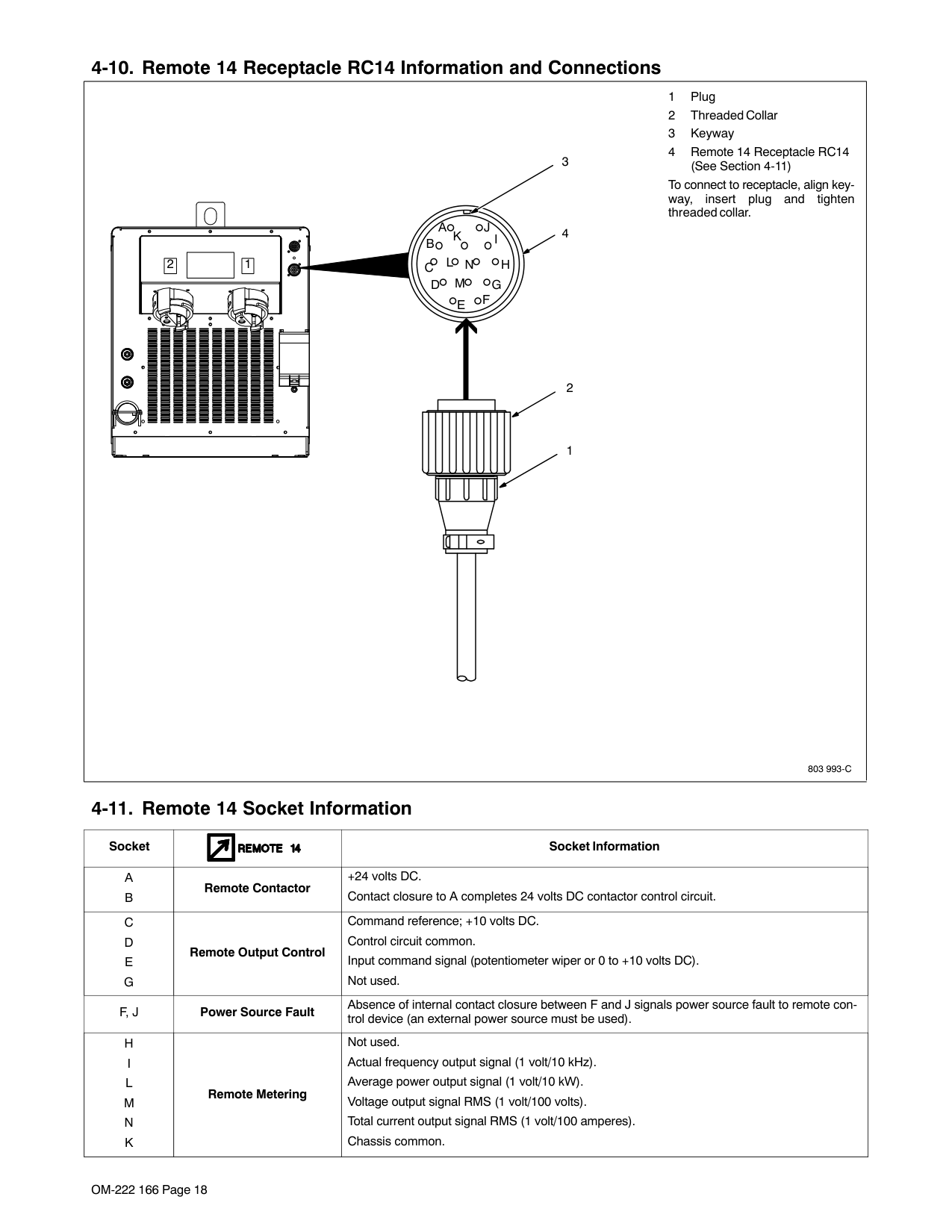
|803 993-C
1 Plug
2 Threaded Collar
3 Keyway
4 Remote 14 Receptacle RC14 (See Section 4-9)
To connect to receptacle, align keyway, insert plug and tighten threaded collar.
AJ
B
K I
C L NH
D M G E F
3
4
2
1
|1| |---|
|2| |---| | |---|
|Socket| |Socket Information| |---|---|---| |A
B
|Remote ContactorRemote Contactor
|+24 volts dc. Contact closure to A completes 24 volts dc contactor control circuit.
| |C
D
E G
|Remote Output ControlRemote Output Control|Command reference; +10 volts dc. Control circuit common. Input command signal (potentiometer wiper or 0 to +10 volts dc). Not used.
| |F, J|Power Source Limit|Absence of internal contact closure between F and J signals power source error to remote control device.| |H
I L
M
N K
|Remote MeteringRemote Metering|Not used. Actual frequency output signal (1 volt/10 kHz). Average power output signal (1 volt/10 kW). Voltage output signal RMS (1 volt/100 volts). Total current output signal RMS (1 volt/100 amperes). Ch iChassis common.
|
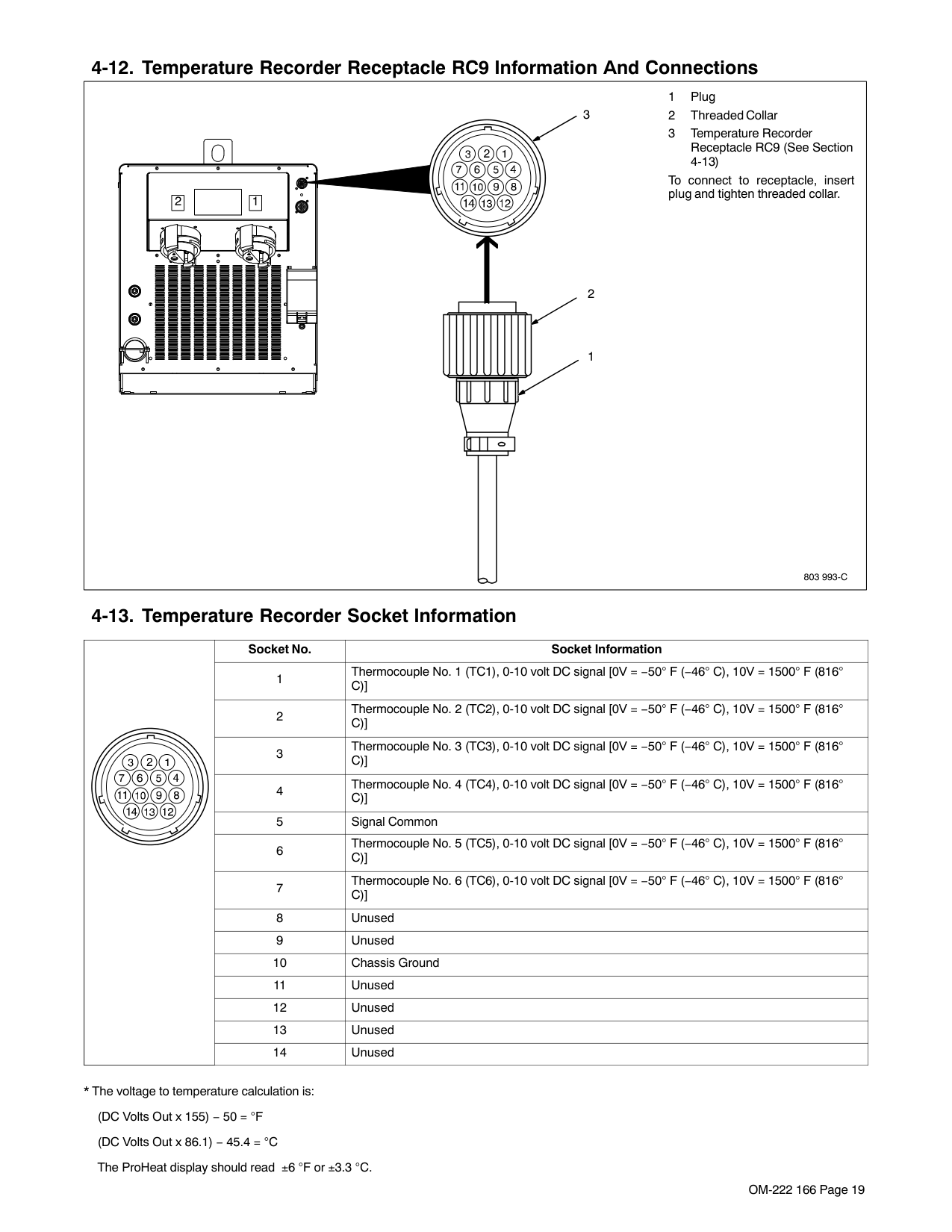
|803 993-C
1 Plug
2 Threaded Collar
3 Temperature Recorder Receptacle RC9 (See Section 4-11)
To connect to receptacle, insert plug and tighten threaded collar.
3
2
1
|1| |---|
|2| |---| | |---|
| |Socket No.|Socket Information| |---|---|---| | |1|Thermocouple No. 1 (TC1), 0-10 volt dc signal [0V = −50° F (−46° C), 10V = 1500° F (816° C)]| | |2|Thermocouple No. 2 (TC2), 0-10 volt dc signal [0V = −50° F (−46° C), 10V = 1500° F (816° C)]| | |3|Thermocouple No. 3 (TC3), 0-10 volt dc signal [0V = −50° F (−46° C), 10V = 1500° F (816° C)]|

| |4|Thermocouple No. 4 (TC4), 0-10 volt dc signal [0V = −50° F (−46° C), 10V = 1500° F (816° C)]| | |5|Signal Common| | |6|Thermocouple No. 5 (TC5), 0-10 volt dc signal [0V = −50° F (−46° C), 10V = 1500° F (816° C)]| | |7|Thermocouple No. 6 (TC6), 0-10 volt dc signal [0V = −50° F (−46° C), 10V = 1500° F (816° C)]| | |8|Unused| | |9|Unused| | |10|Chassis Ground| | |11|Unused| | |12|Unused| | |13|Unused| | |14|Unused|
###### 4-12. Secondary Insulation Protection
| | | |Secondary insulation protection circuitry automatically shuts down the power source output if a potentially hazardous condition| |---|---|---|---| |803 994-B / Ref. 801 826-C / Ref. 801 828-C
exists at the heating device connected to the power source (e.g. insulation has broken down on a heating blanket causing the conductor to come into contact with the workpiece or a heating coil touches the workpiece causing a short in the output circuit).
The supplied ground lead(s) must be connected between the workpiece and power source to provide proper secondary insulation protection from a short in the output circuit.
For single output, only one ground lead is required. For dual output , use both ground leads.
1 Receptacles
2 Plug
To connect plug, align key with keyway, insert end into receptacle, and rotate plug until tight.
3 Handle
4 Magnet
The secondary isolation magnet must be in contact with bare metal (free from rust, paint, grease, etc.).
5 Workpiece
Use handle to place magnet on the workpiece.
3
4
5
1
2
|803 994-B / Ref. 801 826-C / Ref. 801 828-C
exists at the heating device connected to the power source (e.g. insulation has broken down on a heating blanket causing the conductor to come into contact with the workpiece or a heating coil touches the workpiece causing a short in the output circuit).
The supplied ground lead(s) must be connected between the workpiece and power source to provide proper secondary insulation protection from a short in the output circuit.
For single output, only one ground lead is required. For dual output , use both ground leads.
1 Receptacles
2 Plug
To connect plug, align key with keyway, insert end into receptacle, and rotate plug until tight.
3 Handle
4 Magnet
The secondary isolation magnet must be in contact with bare metal (free from rust, paint, grease, etc.).
5 Workpiece
Use handle to place magnet on the workpiece.
3
4
5
1
2
|803 994-B / Ref. 801 826-C / Ref. 801 828-C
exists at the heating device connected to the power source (e.g. insulation has broken down on a heating blanket causing the conductor to come into contact with the workpiece or a heating coil touches the workpiece causing a short in the output circuit).
The supplied ground lead(s) must be connected between the workpiece and power source to provide proper secondary insulation protection from a short in the output circuit.
For single output, only one ground lead is required. For dual output , use both ground leads.
1 Receptacles
2 Plug
To connect plug, align key with keyway, insert end into receptacle, and rotate plug until tight.
3 Handle
4 Magnet
The secondary isolation magnet must be in contact with bare metal (free from rust, paint, grease, etc.).
5 Workpiece
Use handle to place magnet on the workpiece.
3
4
5
1
2
|803 994-B / Ref. 801 826-C / Ref. 801 828-C
exists at the heating device connected to the power source (e.g. insulation has broken down on a heating blanket causing the conductor to come into contact with the workpiece or a heating coil touches the workpiece causing a short in the output circuit).
The supplied ground lead(s) must be connected between the workpiece and power source to provide proper secondary insulation protection from a short in the output circuit.
For single output, only one ground lead is required. For dual output , use both ground leads.
1 Receptacles
2 Plug
To connect plug, align key with keyway, insert end into receptacle, and rotate plug until tight.
3 Handle
4 Magnet
The secondary isolation magnet must be in contact with bare metal (free from rust, paint, grease, etc.).
5 Workpiece
Use handle to place magnet on the workpiece.
3
4
5
1
2
|
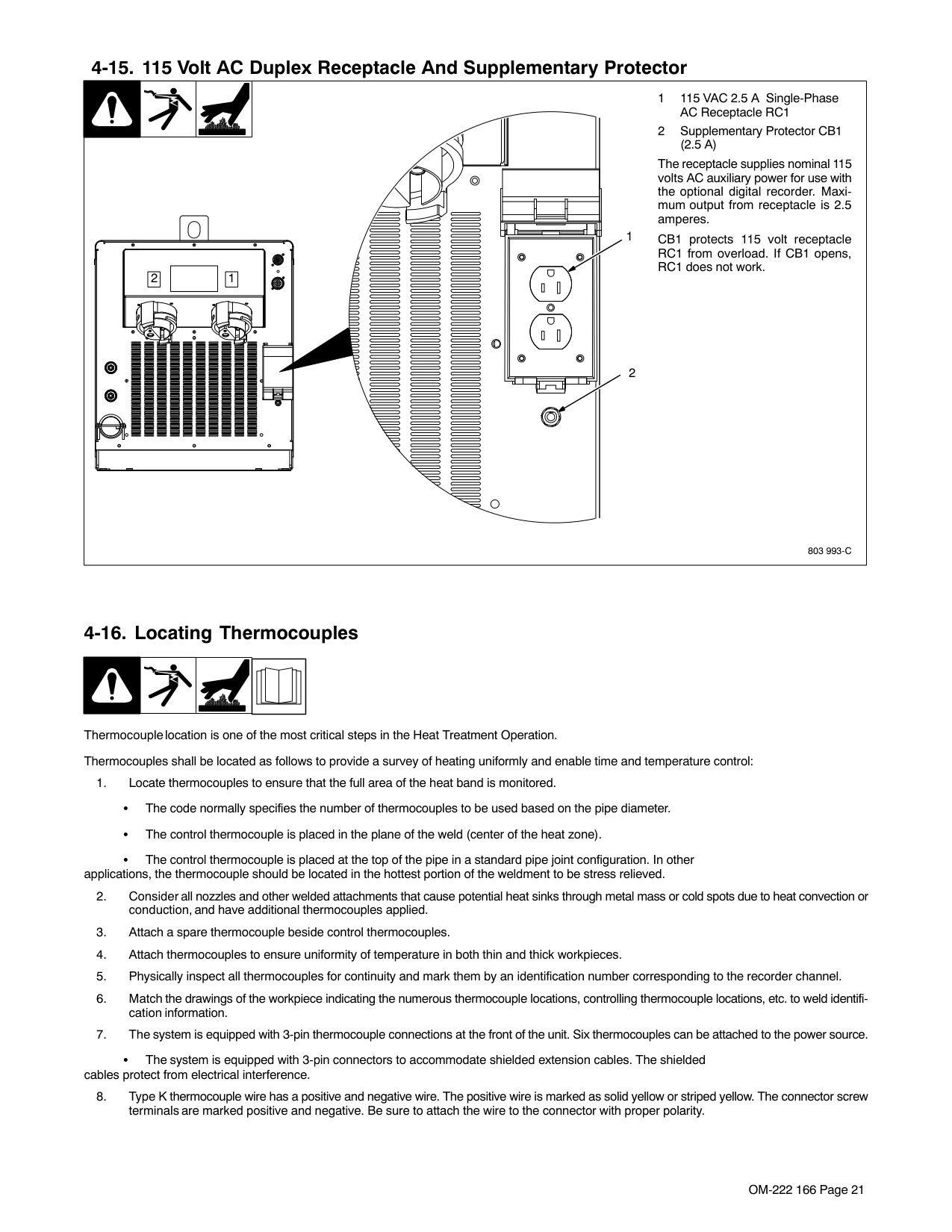
| | | |1 115 VAC 2.5 A Single-Phase AC Receptacle RC1
2 Supplementary Protector CB1
| |---|---|---|---| |803 993-C
(2.5 A)
The receptacle supplies nominal 115 volts ac auxiliary power for use with the optional digital recorder. Maximum output from receptacle is 2.5 amperes.
CB1 protects 115 volt receptacle RC1 from overload. If CB1 opens, RC1 does not work.
1
2
|1| |---|
|2| |---| |803 993-C
(2.5 A)
The receptacle supplies nominal 115 volts ac auxiliary power for use with the optional digital recorder. Maximum output from receptacle is 2.5 amperes.
CB1 protects 115 volt receptacle RC1 from overload. If CB1 opens, RC1 does not work.
1
2
|1| |---|
|2| |---| |803 993-C
(2.5 A)
The receptacle supplies nominal 115 volts ac auxiliary power for use with the optional digital recorder. Maximum output from receptacle is 2.5 amperes.
CB1 protects 115 volt receptacle RC1 from overload. If CB1 opens, RC1 does not work.
1
2
|1| |---|
|2| |---| |803 993-C
(2.5 A)
The receptacle supplies nominal 115 volts ac auxiliary power for use with the optional digital recorder. Maximum output from receptacle is 2.5 amperes.
CB1 protects 115 volt receptacle RC1 from overload. If CB1 opens, RC1 does not work.
1
2
|1| |---|
|2|
|---| |
Thermocouple location is one of the most critical steps in the Heat Treatment Operation. Thermocouples shall be located as follows to provide a survey of heating uniformly and enable time and temperature control:
The control thermocouple is placed at the top of the pipe in a standard pipe joint configuration. In other applications, the thermocouple should be located in the hottest portion of the weldment to be stress relieved.
The system is equipped with 3-pin connectors to accommodate shielded extension cables. The shielded cables protect from electrical interference.
Type K thermocouple wire (two wire) is attached directly to the workpiece using a Thermocouple Attachment Unit (see next section for information on attaching thermocouples).
The other end is fitted with a 2-pin type K connector.
|804 320-A
1
For temperature control mode, the power source must have (as a minimum) one thermocouple connected to receptacle TC1. If multiple thermocouples are desired, either use individual thermocouple plugs or the thermocouple extension cable.
To connect thermocouples to the power source, proceed as follows:
Do NOT weld thermocouples to workpiece while thermocouple cable is connected to the power source.
Turn Off power source.
1 Power Source
2 Thermocouple Receptacles
3 Individual Thermocouple Extension Cable
4 Multiple Thermocouple Extension Cable
Align plug pin(s) with receptacle socket(s) and push plug into receptacle.
2
3
4| |---|
###### 4-15. Attaching Welded Thermocouples
|NOTE|Do NOT weld thermocouples while connected to power source.| |---|---|
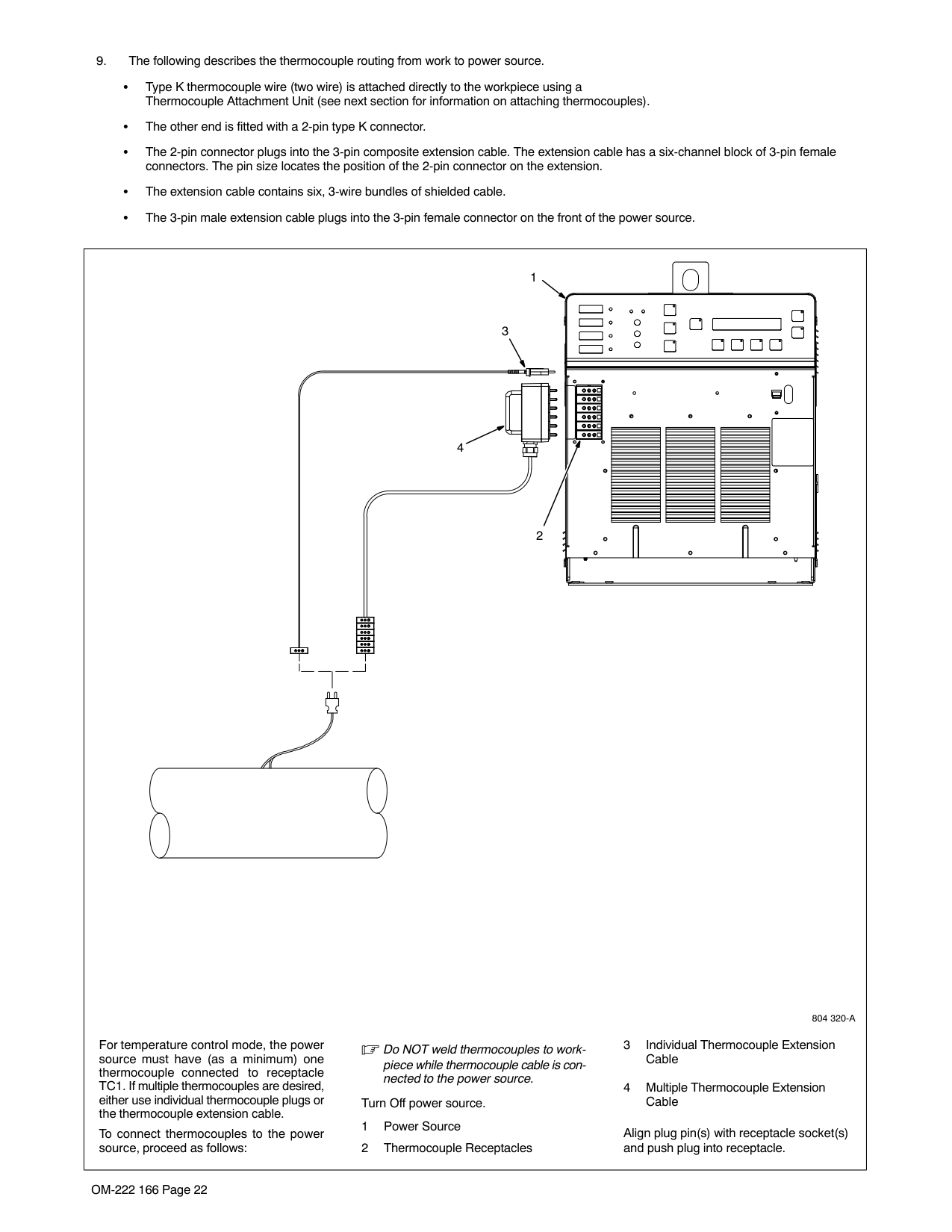
|804 322-A
Thermocouple Wires
Strap Or Tape| |---|
###### 4-16. Using Contact Thermocouples
The welded thermocouples discussed previously can be used for preheating or stress relieving. As an alternative, in preheating applications, a contact temperature sensor* can be used. This eliminates the need to weld thermocouples and the sensor can be moved during the preheat process to check temperatures at other locations on the joint.
Note: Removing the contact probe will display a short duration of heat drop on the temperature recorder, if used.
The contact temperature sensor can be plugged into the thermocouple extension cable or a Type K 25 ft. armored extension cable* can be used. One of these extensions is required for each sensor.
In preheating applications, the thermocouple must be placed under the induction coil. Temperatures at the weld joint can be checked with temperature sensitive crayons to verify the preheat temperature.
Welded thermocouples are normally used in stress relieving applications due to their accuracy.
*See product literature for item part number.
###### 4-17. Placing Temperature Probe
| | | |1 Blanket
2 Temperature Probe Place temperature probe between
| |---|---|---|---| |804 321-A
blanket and metal material. The probe must be in contact with the material being heated. The tip of the probe should be positioned in the approximate center of the blanket anywhere along the blanket length.
1
2|804 321-A
blanket and metal material. The probe must be in contact with the material being heated. The tip of the probe should be positioned in the approximate center of the blanket anywhere along the blanket length.
1
2|804 321-A
blanket and metal material. The probe must be in contact with the material being heated. The tip of the probe should be positioned in the approximate center of the blanket anywhere along the blanket length.
1
2|804 321-A
blanket and metal material. The probe must be in contact with the material being heated. The tip of the probe should be positioned in the approximate center of the blanket anywhere along the blanket length.
1
2|
#### SECTION 5 − COMPONENTS AND CONTROLS
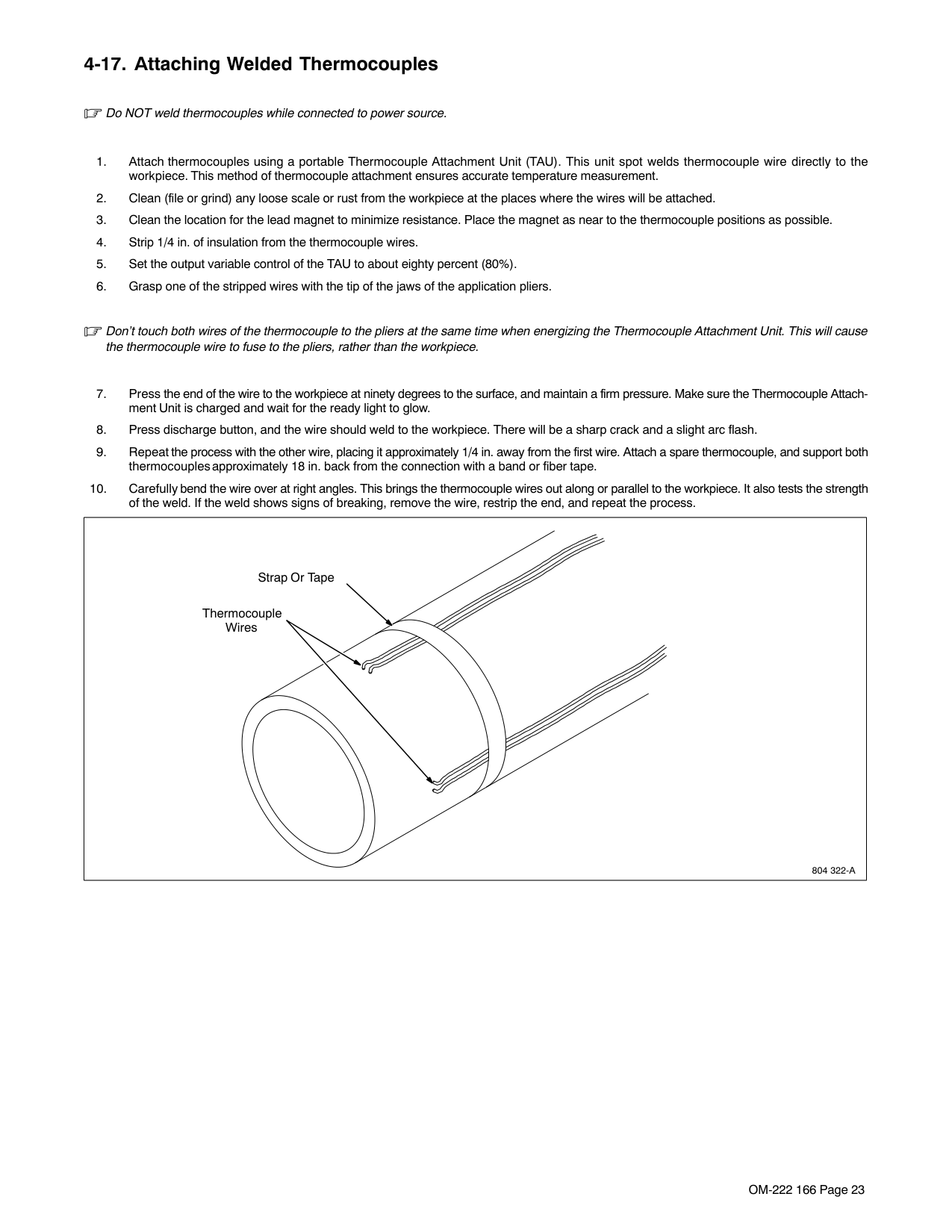
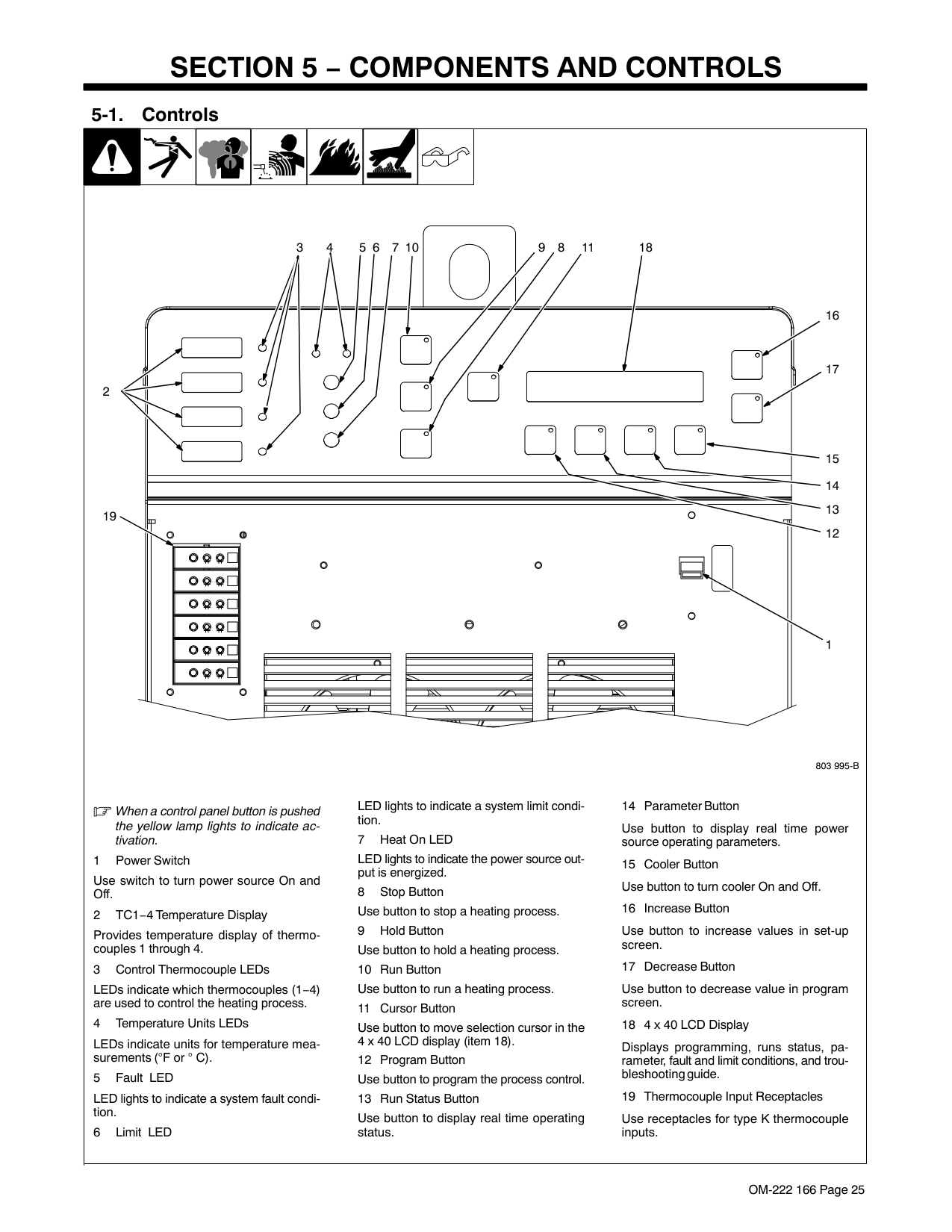
|When a control panel button is pushed the yellow lamp lights to indicate activation.
1 Power Switch
Use switch to turn power source On and Off.
2 TC1−4 Temperature Display
Provides temperature display of thermocouples 1 through 4.
3 Control Thermocouple LED’s
LED’s indicate which thermocouples (1−4) are used to control the heating process.
4 Temperature Units LED’s
LED’s indicate units for temperature measurements ( F or ° C).
5 Fault LED
LED lights to indicate a system fault condition.
6 Limit LED
LED lights to indicate a system limit condition.
7 Heat On LED
LED lights to indicate the power source output is energized.
8 Stop Button Use button to stop a heating process.
9 Hold Button Use button to hold a heating process.
10 Run Button Use button to run a heating process.
11 Cursor Button
Use button to move selection cursor in the 4 x 40 LCD display (item 18).
12 Program Button Use button to program the process control.
13 Run Status Button
Use button to display real time operating status.
14 Parameter Button
Use button to display real time power source operating parameters.
15 Cooler Button Use button to turn cooler On and Off.
16 Increase Button
Use button to increase values in set-up screen.
17 Decrease Button
Use button to decrease value in program screen.
18 4 x 40 LCD Display
Displays programming, runs status, parameter, fault and limit conditions, and troubleshooting guide.
19 Thermocouple Input Receptacles
Use receptacles for type K thermocouple inputs.
803 995-B
1
15 14 13 12
17
16
1811891076543
2
19
| |---|
#### SECTION 6 − SETUP AND OPERATION
###### 6-1. Safety Equipment
Wear the following during operation:
12
DO NOT wear rings or watches during operation.
sb3.1* 1/94
###### 6-2. System Description
The ProHeat 35 Induction Heating Power Source is designed to function either as an air-cooled system or a liquidcooled system. Depending on the system type (either air-cooled or liquid-cooled), the power source is automatically configured to operate and provide an output appropriate for the type of connected heating device.
A special identifier, embedded within the extension cable connector, provides the means for the power source to configure itself by recognizing the type of extension cable(s) attached to its output connectors.
Designed to provide a single level of output (up to 35 kW), the ProHeat 35 power source has two panel mounted connectors that are connected in parallel to the power source output. This design allows the system to operate with either a single output extension cable or two output extension cables.
If a single output extension cable is used, a protective plug (provided with the system) MUST be placed on the unused output connector or the system will not operate. If two output extension cables are used, they both MUST be of the same type (either both air-cooled or both liquid-cooled) or the system will not operate (in this case, the protective plug is not used). When two extension cables and heating devices are utilized on the system, the extension cable lengths and heating devices MUST be identical (see Section 4-7).
The ProHeat 35 is intelligent to the point that it will automatically adjust output power levels if internal system operating parameters or internal temperatures reach or exceed specific set limits (see Section 9).
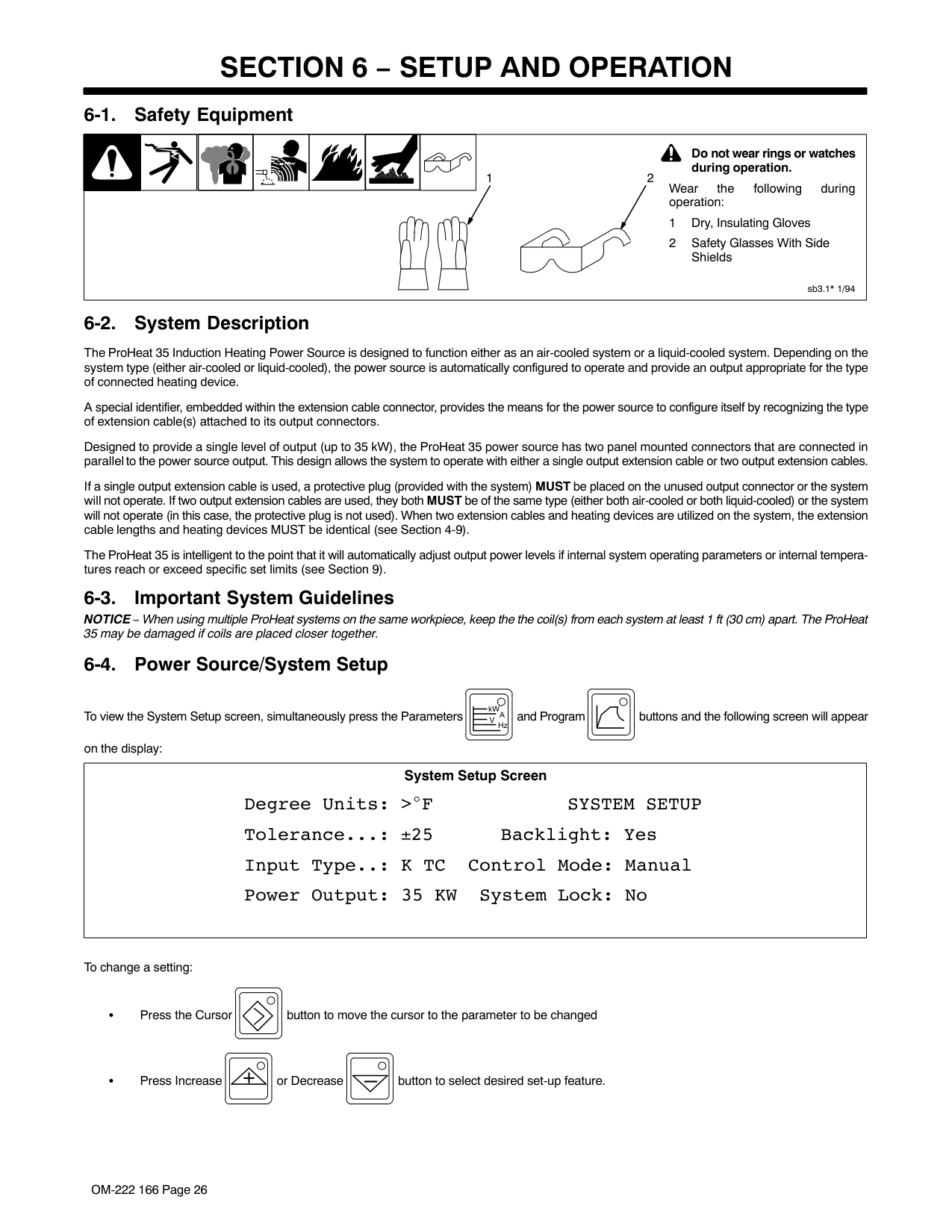
###### 6-3. Power Source/System Setup
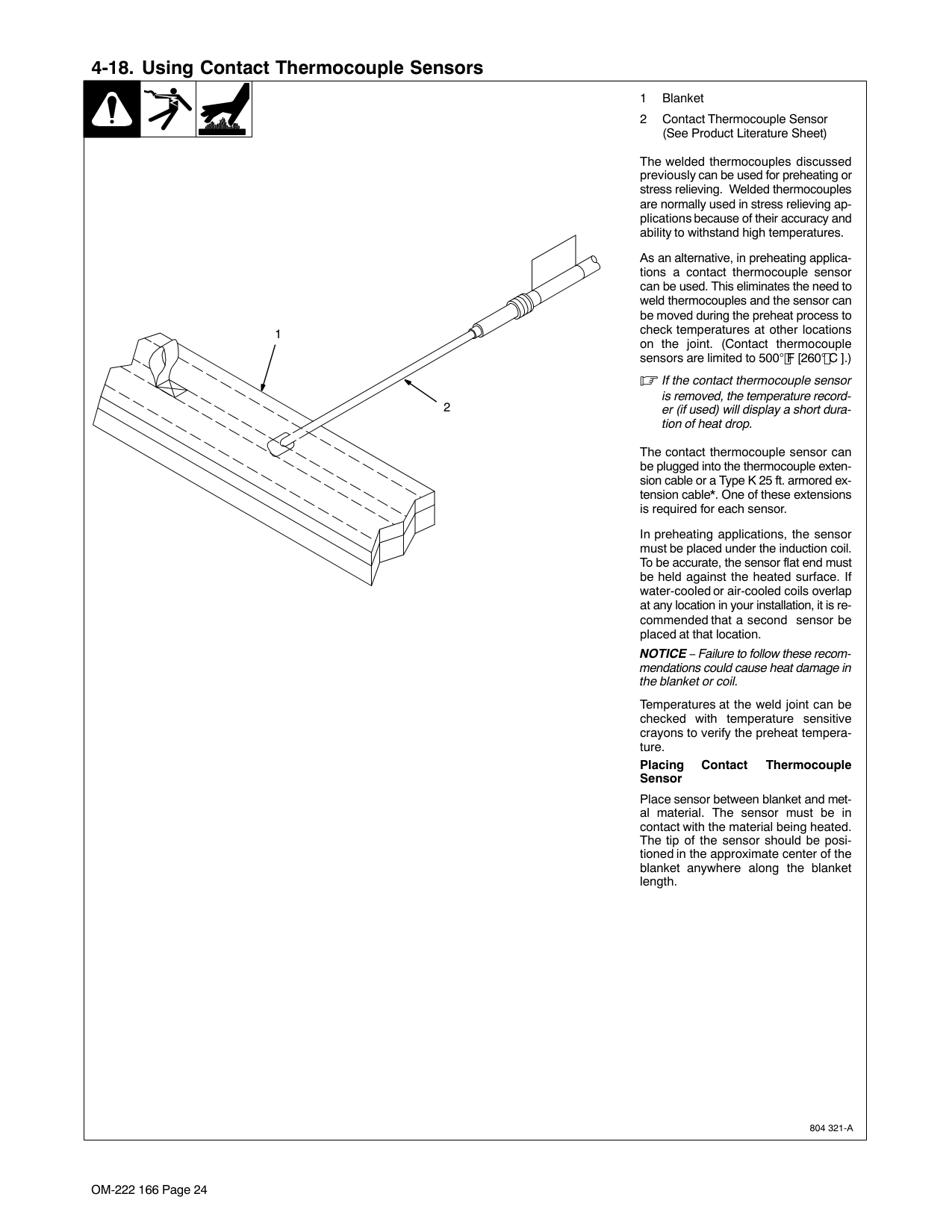
kW and Program buttons and the following screen will appear on the display:
To view the System Setup screen, simultaneously press the Parameters
A
V
Hz
|Degree Units: > F SYSTEM SETUP Tolerance...: ±25 Backlight: Yes Input Type..: K TC Control Mode: Manual Power Output: 35 KW System Lock: No
System Setup Screen| |---|
To change a setting:
Press the Cursor button to move the cursor to the parameter to be changed
Press Increase or Decrease button to select desired set-up feature.
Possible selections: Degree Units: °F / °C Tolerance: ±5 to 99 in °F (±3 to 55 in °C) Backlight: Yes / No Input Type: K TC Control Mode: Temp / Time / Manual Power Output: 1 to 35 System Lock: Yes / No
Degree Units − press the Increase or Decrease buttons to select temperature units. Selection will
drive the °F / °C indicator LED’s. The factory default is °F. Changing from °F to °C will convert stored program values: ramp temperature, soak temperature, ramp rate, and temperature tolerance.
Tolerance − press the Increase or Decrease button to select the desired temperature tolerance.
The factory default is ±25 °F.
Backlight − press the Increase or Decrease button to turn LCD display backlight On or Off.
The factory default is On.
Input Type − press the Increase or Decrease button to select the desired temperature input device. The factory default and only selection is K TC.
Control Mode − press the Increase or Decrease button to select the desired method of system
control, either Temperature or Manual. For more details about methods of control, see Section
Power Output − press the Increase or Decrease button to adjust the maximum power source output. The factory default is 35 kW.
System Lock − press the Increase or Decrease button to lock or unlock the operator interface to
prevent tampering with any programs. Yes indicates the system is locked, and No indicates the system is unlocked.
The factory default is No (unlocked).
|NOTE|All parameters in System Setup are considered global, and any changes to the system set-up parameters will apply to all programs.| |---|---| | | |
To reset the system back to factory default settings, turn off the power source, and wait until the display goes blank.
Turn on the power source. When the display lights, press and hold the Increase and Decrease
buttons. A message will display Press Program to reset factory defaults. Release the Increase and De-
crease buttons, and press the Program button.
###### 6-4. Programming
Programming allows the operator to setup a program for a particular heating process. The selections available are either Temperature control or Manual control.
###### 6-4-1. Temperature-Based Control
Temperature-based control operates the system and controls the heating process based on temperature feedback from thermocouple inputs. Thermocouples must be used for this mode of operation or the system will not operate. Within the temperature-based mode there are four different processes available as follows: Preheat, Bakeout, PWHT (Post-Weld Heat Treat), and Custom Program.
Press the Program button to access the programming mode. Use the cursor button to move the cursor to the desired temperature-based process, then press the Program button again to select the process.
######### 6-4-1-1. Preheat
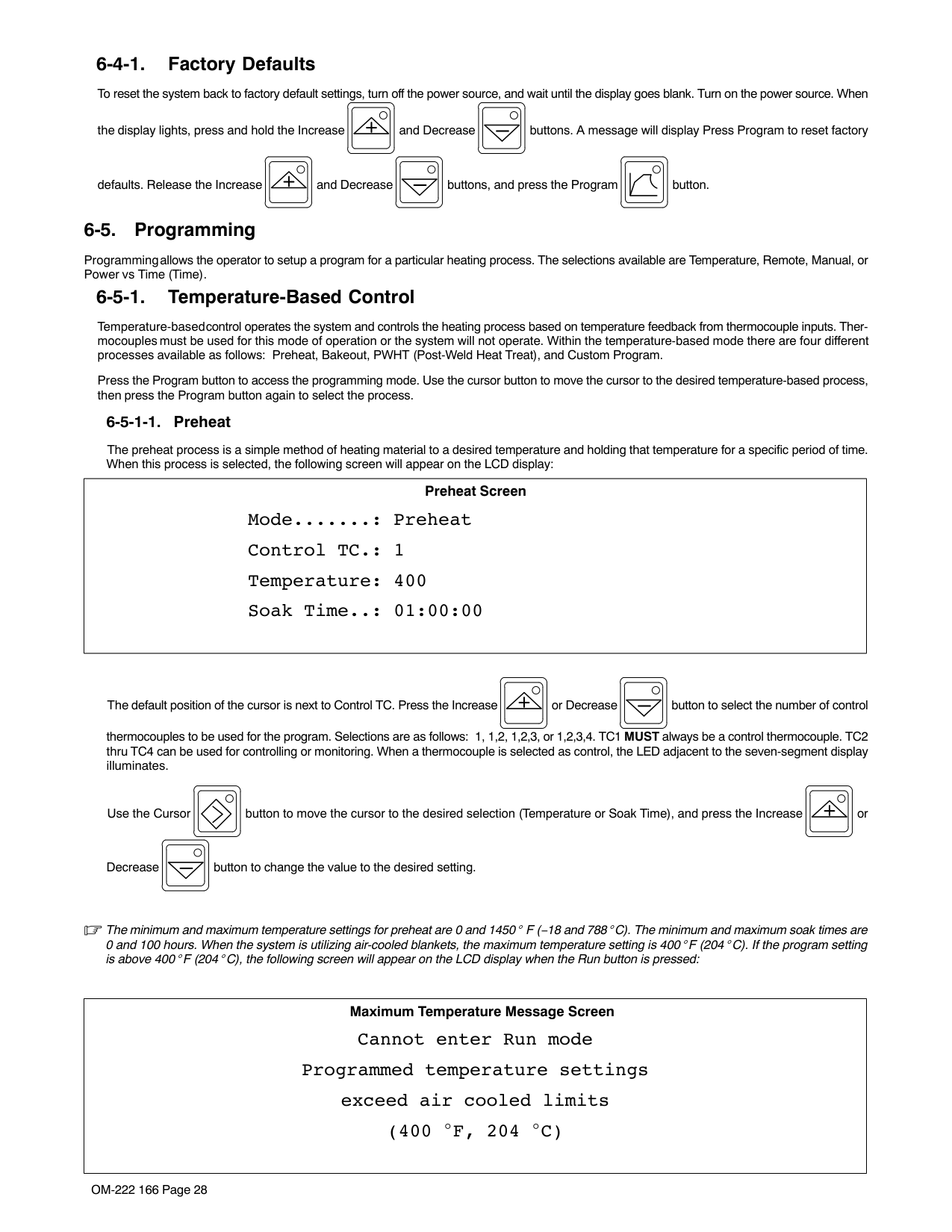
The preheat process is a simple method of heating material to a desired temperature and holding that temperature for a specific period of time. When this process is selected, the following screen will appear on the LCD display:
|Mode.......: Preheat Control TC.: 1 Temperature: 400 Soak Time..: 01:00:00
Preheat Screen| |---|
The default position of the cursor is next to Control TC. Press the Increase or Decrease button to select the number of control thermocouples to be used for the program. Selections are as follows: 1, 1,2, 1,2,3, or 1,2,3,4. TC1 MUST always be a control thermocouple. TC2 thru TC4 can be used for controlling or monitoring. When a thermocouple is selected as control, the LED adjacent to the seven-segment display illuminates.
Use the Cursor button to move the cursor to the desired selection (Temperature or Soak Time), and press
the Increase or Decrease button to change the value to the desired setting.
|NOTE|The minimum and maximum temperature settings for preheat are 0 and 1000 F (−18 and 538 C). The minimum and maximum soak times are 0 and 1000 hours.| |---|---| |When the system is utilizing air-cooled blankets, the maximum temperature setting is 400 F (204 C). If the program setting is above 400 F (204 C), the following screen will appear on the LCD display when the Run button is pressed:|When the system is utilizing air-cooled blankets, the maximum temperature setting is 400 F (204 C). If the program setting is above 400 F (204 C), the following screen will appear on the LCD display when the Run button is pressed:|
|Maximum Temperature Message Screen
Cannot enter Run mode Programmed temperature settings exceed air cooled limits (400 F, 204 C)| |---|
######### 6-4-1-2. Bake-Out
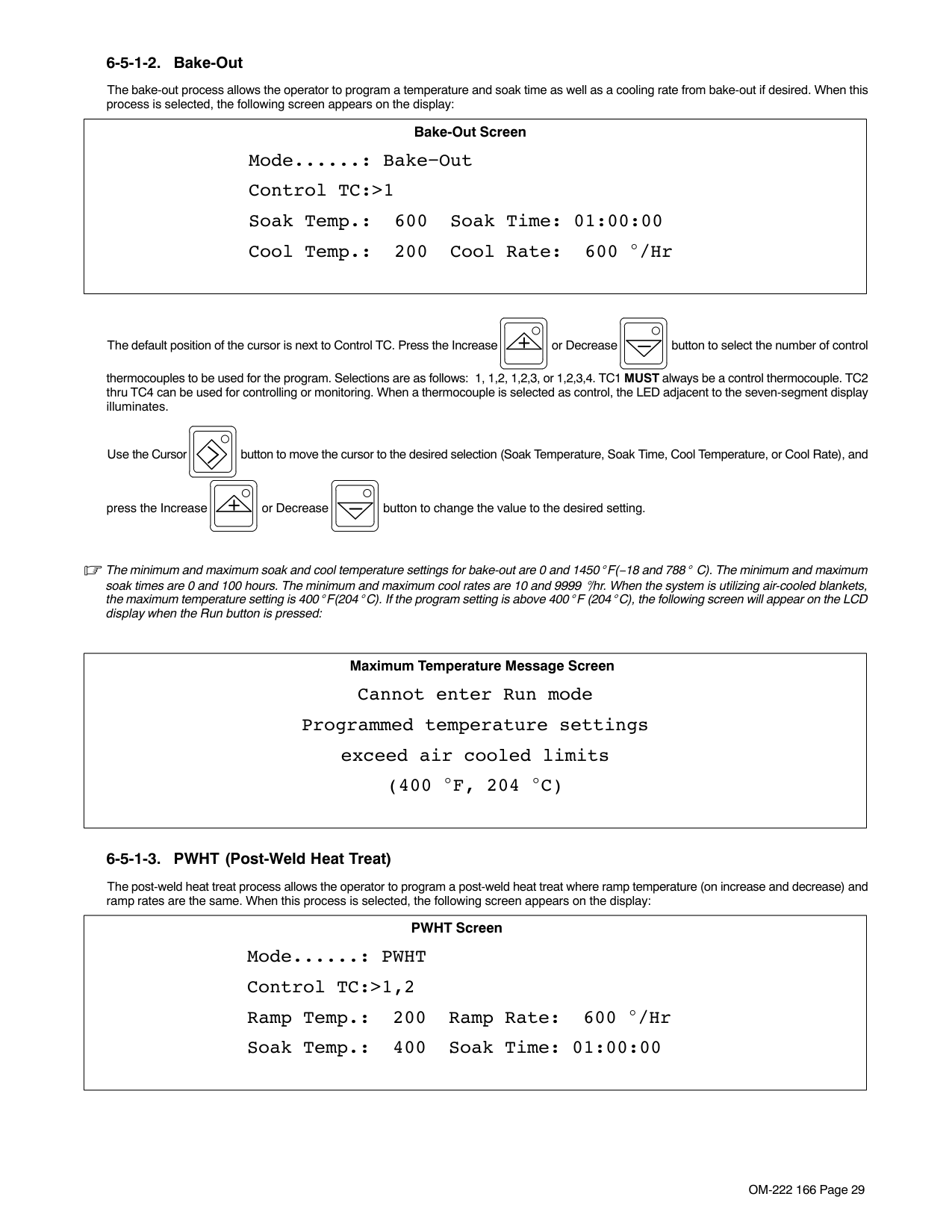
The bake-out process allows the operator to program a temperature and soak time as well as a cooling rate from bake-out if desired. When this process is selected, the following screen appears on the display:
|Mode......: Bake−Out Control TC:>1 Soak Temp.: 600 Soak Time: 01:00:00 Cool Temp.: 200 Cool Rate: 600 /Hr
Bake-Out Screen| |---|
The default position of the cursor is next to Control TC. Press the Increase or Decrease button to select the number of control thermocouples to be used for the program. Selections are as follows: 1, 1,2, 1,2,3, or 1,2,3,4. TC1 MUST always be a control thermocouple. TC2 thru TC4 can be used for controlling or monitoring. When a thermocouple is selected as control, the LED adjacent to the seven-segment display illuminates.
Use the Cursor button to move the cursor to the desired selection (Soak Temperature, Soak Time, Cool
Temperature, or Cool Rate), and press the Increase or Decrease button to change the value to the desired setting.
|NOTE|The minimum and maximum soak temperature settings for bake-out are 0 and 1000 F(−18 and 538 C). The minimum and maximum soak times are 0 and 1000| |---|---| |hours. The minimum and maximum cool rates are 10 and 9999 /hr. When the system is utilizing air-cooled blankets, the maximum temperature setting is 400 F(204 C). If the program setting is above 400 F (204 C), the following screen will appear on the LCD display when the Run button is pressed:|hours. The minimum and maximum cool rates are 10 and 9999 /hr. When the system is utilizing air-cooled blankets, the maximum temperature setting is 400 F(204 C). If the program setting is above 400 F (204 C), the following screen will appear on the LCD display when the Run button is pressed:|
|Maximum Temperature Message Screen
Cannot enter Run mode Programmed temperature settings exceed air cooled limits (400 F, 204 C)| |---|
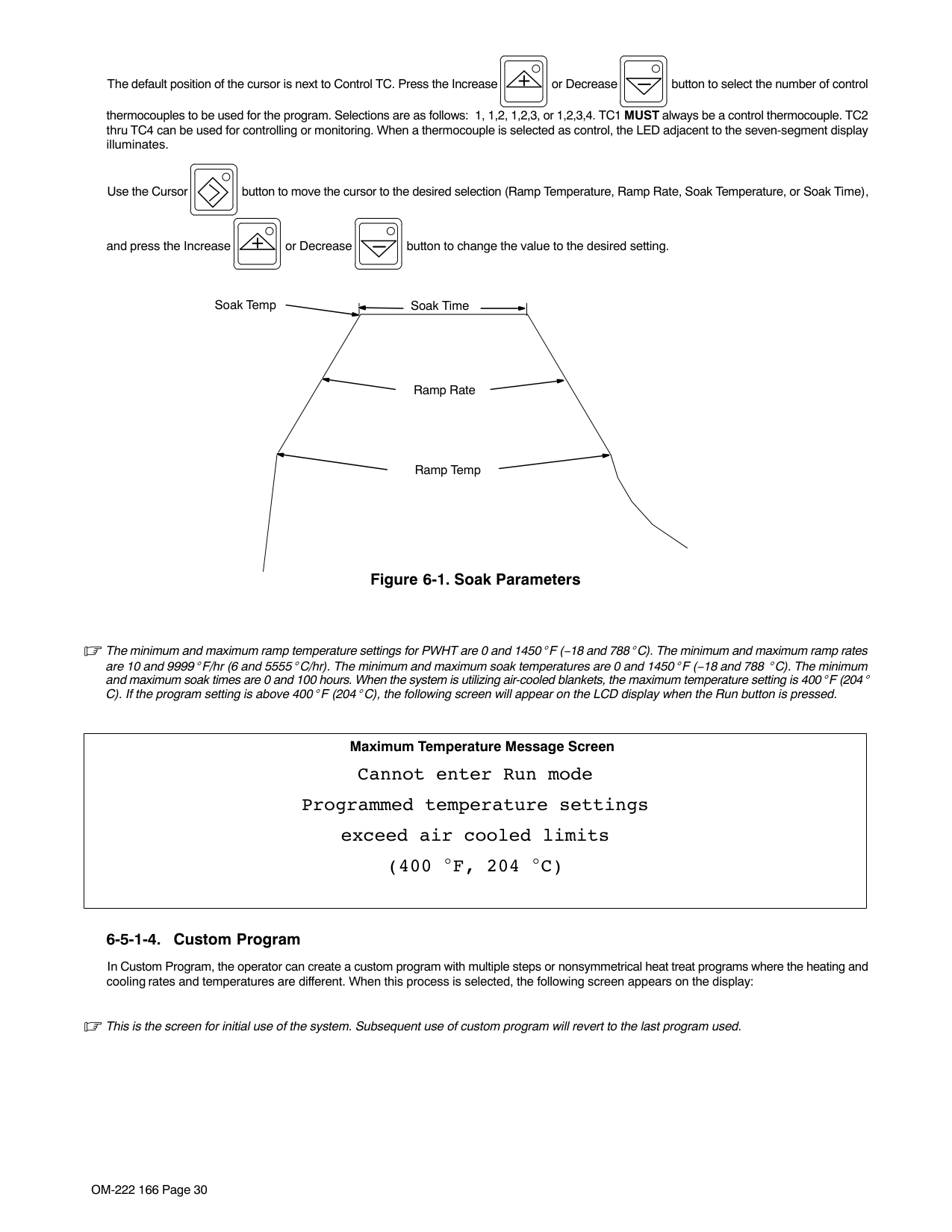
######### 6-4-1-3. PWHT (Post-Weld Heat Treat)
The post-weld heat treat process allows the operator to program a post-weld heat treat where ramp temperature (on increase and decrease) and ramp rates are the same. When this process is selected, the following screen appears on the display:
|Mode......: PWHT Control TC:>1,2 Ramp Temp.: 200 Ramp Rate: 600 /Hr Soak Temp.: 400 Soak Time: 01:00:00
PWHT Screen| |---|

The default position of the cursor is next to Control TC. Press the Increase or Decrease button to select the number of control thermocouples to be used for the program. Selections are as follows: 1, 1,2, 1,2,3, or 1,2,3,4. TC1 MUST always be a control thermocouple. TC2 thru TC4 can be used for controlling or monitoring. When a thermocouple is selected as control, the LED adjacent to the seven-segment display illuminates.
Use the Cursor button to move the cursor to the desired selection (Ramp Temperature, Ramp Rate, Soak
Temperature, or Soak Time), and press the Increase or Decrease button to change the value to the desired setting.
Soak Temp Soak Time
Ramp Rate
Ramp Temp
Figure 6-1. Soak Parameters
|NOTE|The minimum and maximum ramp temperature settings for PWHT are 0 and 1450 F (−18 and 788 C). The minimum and maximum ramp rates are 10 and| |---|---| |9999 F/hr (6 and 5555 C/hr). The minimum and maximum soak temperatures are 0 and 1450 F (−18 and 788 C). The minimum and maximum soak times are 0 and 100 hours. When the system is utilizing air-cooled blankets, the maximum temperature setting is 400 F (204 C). If the program setting is above 400 F (204 C), the following screen will appear on the LCD display when the Run button is pressed.|9999 F/hr (6 and 5555 C/hr). The minimum and maximum soak temperatures are 0 and 1450 F (−18 and 788 C). The minimum and maximum soak times are 0 and 100 hours. When the system is utilizing air-cooled blankets, the maximum temperature setting is 400 F (204 C). If the program setting is above 400 F (204 C), the following screen will appear on the LCD display when the Run button is pressed.|
|Maximum Temperature Message Screen
Cannot enter Run mode Programmed temperature settings exceed air cooled limits (400 F, 204 C)| |---|
######### 6-4-1-4. Custom Program
In Custom Program, the operator can create a custom program with multiple steps or nonsymmetrical heat treat programs where the heating and cooling rates and temperatures are different. When this process is selected, the following screen appears on the display:
|NOTE|This is the screen for initial use of the system. Subsequent use of custom program will revert to the last program used.| |---|---| | | |
|Mode.......: Custom Program Segment....: 1 Type.......: End Control TC.: 1
Custom Program Screen| |---|
The default position of the cursor is next to Segment. Press the Increase or Decrease button to increase or decrease the segment number, unless the segment type is End. In this case, the segment number will advance to segment 1.
Use the Cursor button to move the cursor to the desired selection (Type or Control TC), and press the
Increase or Decrease button to change the value to the desired setting. When the cursor is moved
to the Type selection, pressing the Increase or Decrease button changes the segment type to Step, Ramp, Soak, or End. The functions of each segment type are as follows:
Step increases the temperature in the part at full-programmed power. A maximum temperature of 1450° F (788° C) can be programmed.
Ramp increases or decreases the temperature in the part at a controlled rate in degrees per hour. A maximum temperature of 1450° F (788° C) and a maximum rate of 9999° F/hr (5555° C/hr) can be programmed.
Soak will hold the temperature for a programmed time. A maximum hold (soak) time of 99:59 (hours:minutes) can be programmed.
End is programmed to indicate the completion of the cycle and termination of output power. Step Function When type is set to Step, the following screen appears on the display:
|Mode.......: Custom Program Segment....: 1 Type.......:>Step Temperature: 600
Custom Program Screen| |---|
Use the Cursor button to move the cursor to the Temperature position and the initial temperature can be
adjusted using the Increase or Decrease button.
Pressing the Cursor button again automatically advances the program to the next segment number.
Ramp Function When type is set to Ramp, the following screen appears on the display:
|Mode.......: Custom Program Segment....: 1 Type.......: Ramp Temperature: 600 Ramp Rate: 600 /Hr
Custom Program Screen| |---|
Use the Cursor button to move the cursor to the Temperature or Ramp Rate position and use the Increase
or Decrease button to set the desired value.
When the cursor is in the Ramp Rate position, pressing the Cursor button again automatically advances the program to the next segment number.
Soak Function When type is set to Soak, the following screen appears on the display:
|Mode.......: Custom Program Segment....: 1 Type.......:>Soak Soak Time..: 00:01:00
Custom Program Screen| |---|
Use the Cursor button to move the cursor to the Soak Time position and use the Increase or De-
crease button to set the desired value.
When the cursor is in the Soak Time position, pressing the Cursor button again automatically advances the program to the next segment number. End Function When type is set to End, the following screen appears on the display:
|Mode.......: Custom Program Segment....:> 2 Type.......: End Control TC.: 1
Custom Program Screen| |---|
The only changeable parameter in the End segment is selecting the number of thermocouples. Use the Cursor
button to move the cursor to the Control TC position. Press the Increase or Decrease but-
ton to select the number of control thermocouples to be used for the program. Selections are as follows: 1, 1,2, 1,2,3, or 1,2,3,4. TC1 MUST always be a control thermocouple. TC2 thru TC4 can be used for controlling or monitoring. When a thermocouple is selected as control, the LED adjacent to the seven-segment display illuminates.
A custom program can contain up to 10 segments. To view Program parameters, position the cursor at segment
and use the Increase or Decrease button to advance through the segment numbers until the End segment. When a segment number is changed, appropriate segment parameter information appears on the display.
######### Typical 5-Segment Custom Program
|Mode.......: Custom Program Segment....: 1 Type.......:>Step Temperature: 600
Custom Program Screen| |---|
Temperature increases to 600 degrees at full-programmed power.
|Mode.......: Custom Program Segment....: 2 Type.......: Ramp Temperature:>1250 Ramp Rate: 600 /Hr
Custom Program Screen| |---|
Controlled heating to 1250 degrees F at a ramp of 600 degrees per hour.
|Mode.......: Custom Program Segment....: 3 Type.......: Soak Soak Time..:>01:00:00
Custom Program Screen| |---|
Soak at 1250 degrees F for a period of 1:00.
|Mode.......: Custom Program Segment....: 4 Type.......:>Ramp Temperature: 600 Ramp Rate: 600 /Hr
Custom Program Screen| |---|
Controlled cooling to 600 degrees F at a rate of 600 degrees per hour.
|Mode.......: Custom Program Segment....: 5 Type.......: End Control TC.: 1
Custom Program Screen| |---|
End segment ends the heat treat cycle. Controller is programmed to control the process using four thermocouples.
###### 6-4-2. Manual Control
Manual control allows programming of a specific power level for a specific period of time. When this process is selected, the following screen appears on the display:
|Mode....: Manual Power..: 0.0 KW Command.: 0.0 KW Current: 0 A Run Time: 00:03:00 Voltage: 0 V
Frequency: 4.5 KHz
Manual Program Screen| |---|
The only programmable selections are Command power and Run Time. Command can be adjusted to deliver up to 35 KW (based on maximum power selected in the set-up screen) for a period of up to 99 hours, 59 minutes, 59 seconds.
Power source operating power, current, voltage, and frequency are shown on the right-hand side of the display. To reset the system back to factory default settings, turn off the power source, and wait until the display goes blank.
Turn on the power source. When the display lights, press and hold the Increase and Decrease
buttons. A message will display Press Program to reset factory defaults. Release the Increase and De-
crease buttons, and press the Program button.
###### 6-5. Run Status
Run status allows the operator to check status of a program during in-process heating. Depending on the control mode (Temperature or Manual) and the temperature based mode (Preheat, Bake-Out, PWHT, or Custom), different style screens appear on the display. Run status is for monitoring purposes only and has no selectable or changeable parameters.
###### 6-5-1. Temperature Based Control
######### 6-5-1-1. Preheat, Bake-Out And PWHT Run Status Screen
|Mode.......: Preheat TC5: 77 Target Temp: −−−− TC6: 77 Countdown..: −−:−−:−− Status.....: Stopped
Run Status Screen| |---|
Mode displays the programming mode (Preheat, Bake-Out, PWHT, or Custom Program). During active operation, Target Temp shows the target temperature based on the specific program, Countdown shows the time remaining in a soak segment, and Status shows the program segment type (step, soak, ramp, hold, or stopped). TC5 and TC6 display the temperature of thermocouples 5 and 6. This screen is for monitoring purposes only.

######### 6-5-1-2. Custom Program
|Mode.......: Custom Program TC5: 77 Target Temp: −−−− TC6: 77 Countdown..: −−:−−:−− Segment: 1 Status.....: Stopped
Run Status Screen| |---|
During active operation, Target Temp shows the target temperature based on the active segment, Countdown shows the time remaining in a soak segment, and Status shows the program segment type (step, soak, ramp, hold, or stopped) of the active segment and the active segment number. TC5 and TC6 display the temperature of thermocouples 5 and 6. This screen is for monitoring purposes only.
###### 6-5-2. Manual Control
|Mode.....: Manual TC5: 77 Power....: 0.0 KW TC6: 77 Countdown: −−:−−:−− Status...: Stopped
Run Status Screen| |---|
During active operation, Power shows the actual power delivered from the power source, Countdown shows the time remaining in the heating cycle, and Status indicates if the system is running or stopped. TC5 and TC6 display the temperature of thermocouples 5 and 6. This screen is for monitoring purposes only.
|NOTE|No changes can be made to the run status screen, and the Cursor, Increase and Decrease buttons are not functional.| |---|---| | | |
###### 6-6. Parameters
During active operation, the Parameters screen allows the operator to monitor the power source output operating parameters. These parameters include output power, output amperage, output voltage, and output frequency. In addition, temperatures of thermocouples TC5 and TC6 are also displayed. The Parameters screen is for monitoring purposes only and has no selectable or changeable parameters.
|Power....: 0.0 KW TC5: 77 Current..: 0 A TC6: 77 Voltage..: 0 V Frequency: 4.5 KHz
Parameters Screen| |---|
###### 6-7. Cooler
The Cooler button is used to turn the cooler On or Off on systems using liquid-cooled output cables. Systems using liquid-cooled output cables will not deliver output unless the cooler is On. If the cooler is not started prior to
initiating a heating cycle, the system will automatically start the cooler when the Run button is pressed. Press-
ing the Stop button does not shut off the cooler. The cooler must be shut off separately by pressing the Cooler
button.
When power source output is energized, the cooler cannot be turned off. If the Cooler button is pressed while output is energized, the following screen will appear on the display:

|Cooler cannot be turned off while output is on
Cooler Message Screen| |---|
|NOTE|The Cooler button is inactive when no cooler is detected and no liquid-cooled output cable is attached.| |---|---| | | |
###### 6-8. Real-Time Operation
Each time the unit is first turned On it initiates a system check routine that includes verification of communication between circuit boards and checking for output isolation faults. During this check routine, all displays and LED’s illuminate and the following screen appears on the display:
|ProHeat Firmware Revision X.XX Copyright (c) 2005 Miller Electric Mfg. Co.
Power Up Message Screen| |---|
X.XX indicates the firmware revision number installed in the unit. If an error is detected during the check routine, the system fault LED illuminates and an error message screen appears on the display (see Section 9-5). When the check routine is completed successfully, the operator interface defaults to the following:
The Stop button indicator LED illuminates to indicate no heating cycle is in process.
The temperature displays indicate actual temperature from the TC’s (thermocouples). If no thermocouples are connected, the displays indicate OPEN.
Control LED’s illuminate to indicate the number of control TC’s in the last program. The appropriate degree units (°F or °C) light illuminates.
The display defaults to the Run Status screen from the last program used and the Run Status button indicator LED illuminates.
If no fault or limit conditions are present, system status lights are not illuminated.
Once set up is complete for the desired program procedure (see Section 6-3), pressing the Run button will
initiate a heating cycle. When a program run is initiated, the Run button yellow indicator LED illuminates and the Heat On blue indicator LED illuminates to indicate output is present to the coil. The cycle will continue until the end of the program is reached or the Stop button is pressed.
The system has a hold function that will maintain a temperature or hold the soak time of any active temperature
button will only activate the hold function while in the run mode. If the system is not in the run mode, the following screen will appear on the display:
controlled program. Pressing the Hold
| | |---|

| |
|Must be running to enter Hold mode
Hold Message Screen| |---|
In addition, when running in Manual operating mode, the Hold
button is not functional. If the system is running
| | |---| | |
in Manual operating mode, pressing the Hold
button will cause the following screen to appear on the display:
| | |---| | |
|Hold mode not available when temperature control is not active
Hold Message Screen| |---|
Pressing the Hold
button will activate the hold function while running a temperature controlled program. While
| | |---| | |
in the hold mode, the parameters for the program in process can be modified. The cycle will continue after pressing the Run button. A change of program parameters during the hold will not change the original program. The original program parameters are maintained for the next heating cycle.
To make changes to a program while in run mode, press the Hold

button and the yellow indicator LED will
| | |---| | |
illuminate, and the Run button yellow indicator LED will turn off. When in hold, the system will maintain the actual temperature of the hottest thermocouple while the program is being changed.
Press the Program button and the yellow indicator LED will illuminate. The display will change to show the current mode of operation or the current segment of a Custom Program.
Use the Cursor button to move the cursor to the parameter that will be changed.
Press the Increase or Decrease button to make desired changes.
Press the Run button to resume program operation and the yellow indicator LED will illuminate, and
the Hold
button yellow indicator LED will turn off.
| | |---| | |
Any program parameter (temperatures, rates, times, or number of TC’s) can be changed while in hold. In a custom based program, any segment number can be changed; however, if the operation of a segment has already been completed in a program, the change to that segment will not affect the program function.
Press the Stop button to end the program.
###### 6-9. System Operating Characteristics
The power source delivers a high-frequency alternating current output that energizes the coil creating the magnetic field used to heat the workpiece. The power source output characteristics are a function of the configuration, type and number of coils used as shown in the following table:
######### Table 6-1. Power Source Output Characteristics
|Output Type|Maximum Amperage|Maximum Voltage|Frequency Range| |---|---|---|---| |Air Cooled Single and Dual
|250 A per output for 15 minutes. After 15 minutes, power steps down to limit current to 150 amperes per output for continuous operation.|700 V|5 − 25.7 kHz| |Air Cooled Single and Dual
|See Note 1|700 V|25.7 − 30 kHz|

|Single Liquid CooledSingle Liquid Cooled
|350 A|700 V|5 − 20 kHz| |Single Liquid CooledSingle Liquid Cooled
|See Note 2|700 V|20 − 30 kHz| |Dual Liquid CooledDual Liquid Cooled
|350 A per output/700 A total|700 V|5 − 20 kHz| |Dual Liquid CooledDual Liquid Cooled
|See Note 2|700 V|20 − 30 kHz|
|Note 1: In the frequency range of 25.7 to 30 KHz, the maximum output amperage decreases linearly from 250 down to 175 amperes per output. Regardless of frequency, after 15 minutes the maximum output is reduced to 150 amperes per output.
Max Amperage Per Output
Frequency (KHz)
5 25.7 30
0
50
100
150
200
250
300
Air Cooled Output| |---|
|Note 2: In the frequency range of 20 to 30 KHz, the maximum output decreases linearly from 350 down to 175 amperes per output.
Max Amperage Per Output
Frequency (KHz)
52030
0
50
100
150
200
250
300
350
400
Liquid Cooled Output| |---|
#### SECTION 7 − MAINTENANCE
|Disconnect power before maintaining.
Maintain more often during severe conditions.| |---| |3 Months
| |Clean Output Connector Contacts
Clean Ground Sense Lead Receptacles
Replace Damaged Or
Unreadable Labels
1
||2| |---| | |---|
1
||2| |---| | |---| | |Repair Or Replace Cracked Cables And Cords| |Clean Operator Interface Overlay
Check Integrity Of Protective Plug, Replace If Necessary
||1| |---|
|2| |---| | |---| | | | |6 Months
|

|Blow Out Or Vacuum Inside Of Wind Tunnel|
Do not remove case when blowing out inside of unit.
To blow out unit, direct airflow through front louvers, side louvers, and back slots as shown.
Lower Left Side Louvers
803 992-B
#### SECTION 8 − SAFETY PRECAUTIONS FOR SERVICING
Warning: Protect yourself and others from injury — read and follow these precautions.
|8-1. Symbol Usage| |---|
tm safety_ihtm 3/06
Means Warning! Watch Out! There are possible hazards with this procedure! The possible hazards are shown in the adjoining symbols.
############### Marks a special safety message.
Means “Note”; not safety related.
| | | | |---|---|---|
This group of symbols means Warning! Watch Out! possible ELECTRIC SHOCK, MOVING PARTS, and HOT PARTS hazards. Consult symbols and related instructions below for necessary actions to avoid the hazards.
|8-2. Servicing Hazards| |---|
The symbols shown below are used throughout this manual to call attention to and identify possible hazards. When you see the symbol, watch out, and follow the related instructions to avoid the hazard.

Only qualified persons should service, test, maintain, and repair this unit.
During servicing, keep everybody, especially children, away.
| | |---|
######### ELECTRIC SHOCK can kill.
Do not touch live electrical parts.
Turn Off induction heating power source and disconnect and lockout input power using line
disconnect switch, circuit breakers, or by removing plug from receptacle, or stop engine before servicing unless the procedure specifically requires an energized unit.
Insulate yourself from ground by standing or working on dry insulating mats big enough to prevent contact with the ground.
Do not leave live unit unattended. If this procedure requires an energized unit, have only personnel familiar with and following standard safety practices do the job. When testing a live unit, use the one-hand method. Do not put both hands inside unit. Keep one hand free. Disconnect input power conductors from deenergized supply line BEFORE moving an induction heating power source.
######### SIGNIFICANT DC VOLTAGE exists after removal of input power on inverters.
Turn Off inverter, disconnect input power, and discharge input capacitors according to instructions in Troubleshooting Section before touching any parts.
########### STATIC (ESD) can damage PC boards.
Put on grounded wrist strap BEFORE handling boards or parts. Use proper static-proof bags and boxes to store, move, or ship PC boards.
######### FIRE OR EXPLOSION hazard.
Do not place unit on, over, or near combustible surfaces. Do not service unit near flammables.
############# FLYING METAL or DIRT can injure eyes.
Wear safety glasses with side shields or face shield during servicing. Be careful not to short metal tools, parts, or wires together during testing and servicing.
######### HOT PARTS can cause severe burns.
Do not touch hot parts bare handed. Do not touch or handle induction head/coil during operation. Keep metal jewelry and other metal personal items away from head/coil during operation. Allow cooling period before working on equipment.

To handle hot parts, use proper tools and/or wear heavy, insulated welding gloves and clothing to prevent burns.
|| |---|
######### EXPLODING PARTS can cause injury.
Failed parts can explode or cause other parts to explode when power is applied to inverters. Always wear a face shield and long sleeves when servicing inverters.
######### SHOCK HAZARD from testing.
Turn Off induction heating power source before making or changing meter lead connections.
Use at least one meter lead that has a selfretaining spring clip such as an alligator clip. Read instructions for test equipment.
| | |---|
######### FALLING UNIT can cause injury.
Use lifting eye to lift unit only, NOT running gear, gas cylinders, or any other accessories. Use equipment of adequate capacity to lift and support unit.
If using lift forks to move unit, be sure forks are long enough to extend beyond opposite side of unit.
######### MOVING PARTS can cause injury.
Keep away from moving parts such as fans.
Have only qualified persons remove doors, panels, covers, or guards for maintenance as necessary.
Keep hands, hair, loose clothing, and tools away from moving parts.
Reinstall doors, panels, covers, or guards when maintenance is finished and before reconnecting input power.
############## MAGNETIC FIELDS can affect pacemakers.
Pacemaker wearers keep away from servicing areas until consulting your doctor.
########### OVERUSE can cause OVERHEATING.

Allow cooling period; follow rated duty cycle. Reduce current or reduce duty cycle before using induction heating equipment again. Do not block or filter airflow to unit.
############# H.F. RADIATION can cause interference.
High-frequency (H.F.) can interfere with radio navigation, safety services, computers, and communications equipment.
Have only qualified persons familiar with electronic equipment install, test, and service H.F. producing units.
The user is responsible for having a qualified electrician promptly correct any interference problem resulting from the installation.
If notified by the FCC about interference, stop using the equipment at once.
Have the installation regularly checked and maintained.
Keep high-frequency source doors and panels tightly shut, keep spark gaps at correct setting, and use grounding and shielding to minimize the possibility of interference.
######### READ INSTRUCTIONS.
Use Testing Booklet (Part No. 150 853) when servicing this unit. Consult the Owner’s Manual for induction heating safety precautions. Use only genuine replacement parts from the manufacturer.
|8-3. California Proposition 65 Warnings| |---|
Welding or cutting equipment produces fumes or gases which contain chemicals known to the State of California to cause birth defects and, in some cases, cancer. (California Health & Safety Code Section 25249.5 et seq.)
Battery posts, terminals and related accessories contain lead and lead compounds, chemicals known to the State of California to cause cancer and birth defects or other reproductive harm. Wash hands after handling.
For Gasoline Engines:
Engine exhaust contains chemicals known to the State of California to cause cancer, birth defects, or other reproductive harm.
For Diesel Engines:
Diesel engine exhaust and some of its constituents are known to the State of California to cause cancer, birth defects, and other reproductive harm.
|8-4. EMF Information| |---|

Considerations About Induction Heating And The Effects Of Low Frequency Electric And Magnetic Fields
Induction heating current, as it flows through induction heating cables, will cause electromagnetic fields. There has been and still is some concern about such fields. However, after examining more than 500 studies spanning 17 years of research, a special blue ribbon committee of the National Research Council concluded that: “The body of evidence, in the committee’s judgment, has not demonstrated that exposure to power-frequency electric and magnetic fields is a humanhealth hazard.” However, studies are still going forth and evidence continues to be examined. Until the final conclusions of the research are reached, you may wish to minimize your exposure to electromagnetic fields when using induction heating equipment.
To reduce magnetic fields in the workplace, use the following procedures:
############### About Pacemakers:
Pacemaker wearers consult your doctor before using induction heating equipment or going near induction heating operations. If cleared by your doctor, then following the above procedures is recommended.
#### SECTION 9 − DIAGNOSTICS & TROUBLESHOOTING
The ProHeat 35 power source has on-board capabilities to aid in troubleshooting problems should any conditions occur during operation. This troubleshooting capability consists of the Fault LED, Limit LED, and message screens that appear on the front panel LCD display.
###### 9-1. Operator Interface Indicators
|1 Fault LED
LED lights to indicate a system fault condition.
2 Limit LED
LED lights to indicate a system limit condition.
3 4 x 40 LCD Display
Displays programming, run status, parameters, fault and limit conditions, and troubleshooting guide.
803 995-B
321| |---|
###### 9-2. Limit Conditions
A limit condition indicates that the system has encountered an open thermocouple or is outside the range of its optimum operating conditions or parameters. Should a limit condition occur during operation, the yellow Limit LED will flash to indicate a problem. If the active screen on the LCD display is Run Status or Parameters, a message describing
the particular limit condition will appear on the display. If the active screen is Program, press the Run Status button to display the limit condition.
In a limit condition, the power source will continue to deliver output power and protect itself from damage by reducing the output power. This situation allows the operator time to determine the best action to correct the problem as described by the limit message on the LCD display.
If a limit condition occurs, there are two selectable options: Acknowledge the limit and continue operation. Terminate operation to correct the problem causing the limit.
Pressing the Decrease button will acknowledge the limit and continue operation with the existing set up. In the acknowledge state, the yellow Limit LED will stop flashing and remain on continuously. The LCD display will revert to an active screen once the Program button, Run Status button, or Parameters
kW button is

A
V
Hz
pressed. If a new limit condition should occur after the first is acknowledged, the yellow Limit LED will start flashing to indicate a
new problem. To display the limit condition, press the Run Status button and the LCD display will show a message describing the new and previous limit messages. To obtain additional information regarding the limit condition and suggested solutions to resolve the limit, press the Increase button, and the LCD display will indicate possible solutions based on the type of limit condition. If the operator determines that the best course of action is to terminate operation and make suggested changes to the
setup to eliminate the limit condition, press the Stop button. After changes are made to the setup, press the
Run button to restart the process.
###### 9-3. Limit Condition Codes
|Limit Condition|Additional Information| |---|---| |L01: Thermocouple #1 Open|Check for open temperature sensor and repair Change to back-up temperature sensor| |L02: Themocouple #2 Open|Check for open temperature sensor and repair Change to back-up temperature sensor| |L03: Thermocouple #3 Open|Check for open temperature sensor and repair Change to back-up temperature sensor| |L04: Thermocouple #4 Open|Check for open temperature sensor and repair Change to back-up temperature sensor| |L05: Thermocouple #5 Open|Check for open temperature sensor and repair Change to back-up temperature sensor| |L06: Thermocouple #6 Open|Check for open temperature sensor and repair Change to back-up temperature sensor|
|Limit Condition|Additional Information| |---|---| |L07: Output Voltage Limit|Tighten blanket against pipe surface| |L08: Output Voltage Limit|Increase number of turns Increase coil space Shorten extension cable Increase insulation width| |L09: Output Current Limit|Tighten blanket against pipe surface| |L10: Output Current Limit|Increase number of turns Decrease coil space Tighten cable on insulation| |L11: Coolant Overtemp Limit|Check coolant flow and level Clean coolant filters and heat exchanger Increase number of turns Verify appropriate insulation thickness| |L12: Power Source Overtemp Limit|Check for blocked vents Clean wind tunnel heat sinks| |L13:Cable Connection|Check for loose/open output connection Verify all output cables are same type Verify receptacle plug connected|
###### 9-4. Fault Conditions
A fault condition occurs if the system encounters an isolation fault, encounters operating conditions outside operational limits, or if there is a serious problem with the system. Should a fault condition occur, the output is immediately

turned off, the red Fault LED flashes and the Stop button LED flashes. If the active screen on the LCD display is Run Status or Parameters, a message describing the particular fault condition will appear on the display. If the active screen is Program, press the Run Status button to display the fault condition.
Pressing the Decrease button will acknowledge the fault and the red Fault LED will stop flashing and remain on
continuously. However, the Stop button LED will continue to flash indicating that the process has stopped.
To obtain additional information regarding the fault condition and suggested solutions to resolve the fault, press the Increase button, and the LCD display will indicate possible solutions based on the type of fault condition. In most cases, a fault condition will indicate that service is required.
###### 9-5. Fault Condition Codes
|Fault Condition|Additional Information| |---|---| |F51: Thermocouple #1 Internal Fault|Service required| |F52: Themocouple #2 Internal Fault|Service required| |F53: Thermocouple #3 Internal Fault|Service required| |F54: Thermocouple #4 Internal Fault|Service required| |F55: Thermocouple #5 Internal Fault|Service required| |F56: Thermocouple #6 Internal Fault|Service required| |F57: CJT Sensor Internal Fault|Service required| |F58: Output Voltage Fault|Service required|
|Fault Condition|Additional Information| |---|---| |F59: Output Current Fault|Service required| |F60: Temperature Sensor Fault|Check control TC connections Check control TC extension cable| |F61: Coolant Flow Fault|Check for coolant leak Clean for coolant blockage Check coolant filter and level Check coolant connections| |F62: Isolation Fault|Check for exposed conductor Clean for moisture on cables| |F63:Line Voltage Fault|Check line voltage| |F64: Power Source Overtemp Fault|Verify power source vents and wind tunnel are unobstructed| |F65: Current Source Fault|Service required| |F66: Under Frequency Fault|Check for loose or open connections in output cable
Decrease number of turns Decrease coil space| |F67: Over Frequency Fault|Verify heating cable properly wrapped Verify material being heated is magnetic| |F68: Cable Connection Fault|Check for loose/open output connection Verify all output cables are same type Verify receptacle plug connected| |F69: Coolant Overtemp Fault|Check coolant flow and level Clean coolant filters and heat exchanger Increase number of turns Verify appropriate insulation thickness| |F70: Internal Communication Fault|Service required| |F71: Internal Thermistor Fault|Service required| |F72: Coolant Thermistor Fault|Service required| |F73: Decoupled/Open Coil|Service required| |F74: Isolation Fault Self-Test Error|Service required| |F75: Internal Power Supply Fault|Service required|

|F76: Current Source Control Fault|Service required| |F77: Power Source Internal Comm Fault|Service required| |F78:Output Current Sense Fault|Check for loose/open output connection|
###### 9-6. System Diagnostic Screens
Additional system diagnostics are available and accessible through the operator interface. Detail operational
parameters can be accessed by pressing and holding the Run Status button and pressing the Parameters
kW button.
A
V
Hz
When this feature is initially activated, the following screen appears on the LCD display:
|RemCmd: 1023 Off Cable1: LQD DIAG1 OutI1: 0 A Cable2: LQD OutI2: 0 A ClntFR: 0.75 GPM
IsrcFb: 0 A ClrSts: Flowing
System Diagnostic Screen| |---|
RemCmd − This is the value of the remote command and the status of the remote contactor.
|NOTE
|Remote controls can be used to enable/disable output. They do not affect output power level.| |---|---| | | |
Out I1 − This is the value of the output current on output 1. Out I2 − This is the value of the output current on output 2. Isrc FB − This is the value of the amperage in the current source inverter.
ClntFR − This is the coolant flow rate (in GPM) from the cooler on a liquid-cooled system. ClrSts − This is the status of the cooler. Possible labels:
Off Flowing

The second diagnostic screen is available by again pressing and holding the Run Status button and pressing
kW button.
the Parameters
A
V
Hz
|VLnA−B: 460V Therm1: 75 DIAG2
VLnB−C: 460V Therm2: 75 Therm5: OPEN
VLnC−A: 460V Therm3: 75 ClrTmp: 77 VBus: 650V Therm4: OPEN RmtFlw: Off
System Diagnostic Screen| |---|
VLnA-B − This is the phase to phase line voltage between phases A and B. VLnB-C − This is the phase to phase line voltage between phases B and C. VLnC-A − This is the phase to phase line voltage between phases C and A. VBus − This is the DC bus voltage. Therm1 − This is the temperature of the current source primary heatsink. Therm2 − This is the temperature of the bridge heatsink. Therm3 − This the the temperature of the current source secondary heatsink. Therm4 − Open (not used). Therm5 − Open (not used). ClrTmp − This is the temperature of the coolant on a liquid-cooled system.
OPEN − no cooler is detected.
RmtFlw − This is the status of the relay contacts for remote coolant flow on a liquid-cooled system. OFF ON
|NOTE
|RmtFlw feature is unsupported on the current platform.| |---|---|
###### 9-7. Removing Wrapper and Measuring Input Capacitor Voltage
Turn Off welding power source, and disconnect input power.
900 Volts dc can be present on the capacitor bus and significant DC voltage can remain on capacitors after unit is Off. Always check the voltage on inverter assembly as shown to be sure the input capacitors have discharged before working on unit.
Significant DC voltage can remain on capacitors after unit is Off. Always check the voltage as shown to be sure the input capacitors have discharged before working on unit.
Tools Needed:
5/16, 3/8 in
Remove right side panel and disconnect fan motor FM3.

Measure the dc voltage across the + bus terminal and − bus terminal on PC4 as shown until voltage drops to near 0 (zero) volts.
If the capacitor voltage does not drop to near zero after several minutes, use a bleeder resistor of between 200 and 500 ohms, at least 10 watts, and #16 AWG 600 volts ac insulation rated wire to discharge the capacitor(s).
| | |---| | | | | | |
| | |---| | |
| | |---| | |
| | |---| | |
| | |---| | | | |
| | |---| | |

| | | | |---|---|---|
| | | | |---|---|---|
An example of a typical bleeder resistor is shown on this page.
1
Proceed with job inside unit. Reconnect FM3 and reinstall right side panel when finished.
| | |---| | |
| | | | | | |---|---|---|---|---|
| | | | | | |---|---|---|---|---|
+ lead to right bus terminal, − lead to left bus terminal
3
Typical Bleeder Resistor
200 to 500 ohm, 10 watt wire wound resistor
| | | | |---|---|---| | | | | | | | |

| | | |
2
#16 AWG 600 Volts AC Insulation Rating
804 519-B
|Notes| |---|
| |MATERIAL THICKNESS REFERENCE CHART| |---|---| | | | | |24 Gauge (.025 in)| | |22 Gauge (.031 in)| | |20 Gauge (.037 in) 18 Gauge (.050 in)| | |16 Gauge (.063 in)| | |14 Gauge (.078 in)| | |1/8 in (.125 in)| | | | | |3/16 in (.188 in)| | |1/4 in (.25 in)| | | | | |5/16 in (.313 in)| | | | | |3/8 in (.375 in)| | | | | | | | |1/2 in (.5 in)| | | |
#### SECTION 10 − ELECTRICAL DIAGRAM
| | | |---|---| | | | | | |

| | | | |---|---|---| | | | | | | | | | | | |
| | | | |---|---|---| | | | |
| | | | |---|---|---| | | | | | | | |
| | | | |---|---|---| | | | |
Figure 10-1. Circuit Diagram
################# 218 057-G
#### SECTION 11 − PARTS LIST
3 5
Hardware is common and not available unless listed.
4
12
See Figure 11-3

13
14
15
10
9
1
7
11
6
8
See Figure 11-2
11
2
804 218-D
Figure 11-1. Wrappers
Item No.
Dia. Mkgs.
Part No.
QuantityDescription
######### Figure 11-1. Wrappers

+When ordering a component originally displaying a precautionary label, the label should also be ordered.
######### *Recommended Spare Parts. To maintain the factory original performance of your equipment, use only Manufacturer’s Suggested Replacement Parts. Model and serial number required when ordering parts from your local distributor.
Hardware is common and not available unless listed.
2
3
1
11
8
12
9 10
5

4
13
6
7
804 219-A
Figure 11-2. Front Panel
Item No.
Dia. Mkgs.
Part No.
QuantityDescription
######### Figure 11-2. Front Panel
######### *Recommended Spare Parts. To maintain the factory original performance of your equipment, use only Manufacturer’s Suggested Replacement Parts. Model and serial number required when ordering parts from your local distributor.
Hardware is common and not available unless listed.

6
11
7
2
4
Figure 11-3. Rear Panel
14
1
3
8
804 220-A
Item No.
Dia. Mkgs.
Part No.
QuantityDescription
######### Figure 11-3. Rear Panel

+When ordering a component originally displaying a precautionary label, the label should also be ordered.
14
not available unless listed.
1
4
14
12
3
6 5
2
10
13 7

3
6
9
16
15
8
Figure 11-4. Base w/Components 804 221-D
Item No.
Dia. Mkgs.
Part No.
QuantityDescription
######### Figure 11-4. Base w/Components

not available unless listed.
9
11
10
3
13
7
12
8
5
6 14
15
4
2
See Figure 11-6
1
Figure 11-5. Top Windtunnel 804 222-A
Item No.
Dia. Mkgs.

Part No.
QuantityDescription
######### Figure 11-5. Top Windtunnel
######### *Recommended Spare Parts. To maintain the factory original performance of your equipment, use only Manufacturer’s Suggested Replacement Parts. Model and serial number required when ordering parts from your local distributor.
2
1
4
3
804 223-A
Figure 11-6. Capacitor Assembly
Item No.
Dia. Mkgs.

Part No.
QuantityDescription
######### Figure 11-6. Capacitor Assembly
*Recommended Spare Parts.
Torque screws to 50 in lbs (5.6 N⋅m ). To maintain the factory original performance of your equipment, use only Manufacturer’s Suggested Replacement Parts. Model and serial number required when ordering parts from your local distributor.
2
19
7 5
4
8
18
16
17
14
9 11
3 10
13

15
12
804 224-E
######### Figure 11-7. Right Windtunnel
Item No.
Dia. Mkgs.
Part No.
QuantityDescription
######### Figure 11-7. Right Windtunnel
######### Figure 11-7. Right Windtunnel (Continued)

411 115 093 HOUSING PLUG+SKTS, (SERVICE KIT) 3. . . . . . . . . . . . . . . . . . . . . . . . . . . . . . . . . . PLG47 115 091 HOUSING PLUG+SKTS, (SERVICE KIT) 1. . . . . . . . . . . . . . . . . . . . . . . . . . . . . . . . . . . . . . . . PLG45,61 131 204 HOUSING PLUG+SKTS, (SERVICE KIT) 2. . . . . . . . . . . . . . . . . . . . . . . . . . . . . . . . . . . .
121, 132, 141, 142 131 054 HOUSING RCPT+SKTS, (SERVICE KIT) 6. . . . . . . . . . . . . . . . . . . . . . . . . . . . . . .
*Recommended Spare Parts. To maintain the factory original performance of your equipment, use only Manufacturer’s Suggested Replacement Parts. Model and serial number required when ordering parts from your local distributor.
7
5
4
14
21
8
17 16
19
9 11
10
20
15

15 13
12
804 431-E
######### Figure 11-8. Right Windtunnel (400 V Model Only)
Item No.
Dia. Mkgs.
Part No.
QuantityDescription
######### Figure 11-8. Right Windtunnel (400 V Model Only)
######### Figure 11-8. Right Windtunnel (400 V Model Only) (Continued)

411 115 093 HOUSING PLUG+SKTS, (SERVICE KIT) 3. . . . . . . . . . . . . . . . . . . . . . . . . . . . . . . . . . PLG47 115 091 HOUSING PLUG+SKTS, (SERVICE KIT) 1. . . . . . . . . . . . . . . . . . . . . . . . . . . . . . . . . . . . . . . . PLG45,61 131 204 HOUSING PLUG+SKTS, (SERVICE KIT) 2. . . . . . . . . . . . . . . . . . . . . . . . . . . . . . . . . . . .
121, 132, 141, 142 131 054 HOUSING RCPT+SKTS, (SERVICE KIT) 6. . . . . . . . . . . . . . . . . . . . . . . . . . . . . . .
*Recommended Spare Parts. To maintain the factory original performance of your equipment, use only Manufacturer’s Suggested Replacement Parts. Model and serial number required when ordering parts from your local distributor.
12
not available unless listed.
1
10
8
6
13
7
14
15
3
5
4

11
9
2
804 225-A
Figure 11-9. Left Windtunnel
Item No.
Dia. Mkgs.
Part No.
QuantityDescription
######### Figure 11-9. Left Windtunnel

Figure 11-9. Left Windtunnel (Continued) PLG16,. . . . . . .
121,122 131 054 HOUSING RCPT+SKTS,(SERVICE KIT) 3. . . . . . . . . . . . . . . . . . . . . . . . . . . . . . . . PLG19,. . . . . . .
120 115 094 HOUSING PLUG+SKTS,(SERVICE KIT) 2. . . . . . . . . . . . . . . . . . . . . . . . . . . . . . . . . . . PLG15,. . . . . . .
PLG77,. . . . . . .
PLG17 115 091 HOUSING PLUG+SKTS,(SERVICE KIT) 1. . . . . . . . . . . . . . . . . . . . . . . . . . . . . . . . . . . . . . . . . PLG18,. . . . . . .
116 131 056 HOUSING RCPT+SKTS,(SERVICE KIT) 2. . . . . . . . . . . . . . . . . . . . . . . . . . . . . . . . . . PLG13,. . . . . . .
113 162 382 HOUSING PLUG+SKTS,(SERVICE KIT) 2. . . . . . . . . . . . . . . . . . . . . . . . . . . . . . . . . . PLG14 130 203 HOUSING PLUG+SKTS,(SERVICE KIT) 1. . . . . . . . . . . . . . . . . . . . . . . . . . . . . . . . . . . . . . . .
*Recommended Spare Parts. To maintain the factory original performance of your equipment, use only Manufacturer’s Suggested Replacement Parts. Model and serial number required when ordering parts from your local distributor.
not available unless listed.
5
1
2
6
7
8 1
9

804 300-A
Figure 11-10. Hermaphroditic Blank Plug Assy
Item No.
Dia. Mkgs.
Part No.
QuantityDescription
######### Figure 11-10. Hermaphroditic Blank Plug Assy
|Warranty Questions?
Call 1-800-4-A-MILLER for your local Miller distributor.


Your distributor also gives you ...
Service You always get the fast, reliable response you need. Most replacement parts can be in your hands in 24 hours.
Support Need fast answers to the tough welding questions? Contact your distributor. The expertise of the distributor and Miller is there to help you, every step of the way.| |---|
Effective January 1, 2006 (Equipment with a serial number preface of “LG” or newer)
This limited warranty supersedes all previous Miller warranties and is exclusive with no other guarantees or warranties expressed or implied.

LIMITED WARRANTY − Subject to the terms and conditions below, Miller Electric Mfg. Co., Appleton, Wisconsin, warrants to its original retail purchaser that new Miller equipment sold after the effective date of this limited warranty is free of defects in material and workmanship at the time it is shipped by Miller. THIS WARRANTY IS EXPRESSLY IN LIEU OF ALL OTHER WARRANTIES, EXPRESS OR IMPLIED, INCLUDING THE WARRANTIES OF MERCHANTABILITY AND FITNESS.
Within the warranty periods listed below, Miller will repair or replace any warranted parts or components that fail due to such defects in material or workmanship. Miller must be notified in writing within thirty (30) days of such defect or failure, at which time Miller will provide instructions on the warranty claim procedures to be followed.
Miller’s True Blue® Limited Warranty shall not apply to:
Miller shall honor warranty claims on warranted equipment listed below in the event of such a failure within the warranty time periods. All warranty time periods start on the date that the equipment was delivered to the original retail purchaser, or one year after the equipment is sent to a North American distributor or eighteen months after the equipment is sent to an International distributor.

MILLER PRODUCTS ARE INTENDED FOR PURCHASE AND USE BY COMMERCIAL/INDUSTRIAL USERS AND PERSONS TRAINED AND EXPERIENCED IN THE USE AND MAINTENANCE OF WELDING EQUIPMENT.
In the event of a warranty claim covered by this warranty, the exclusive remedies shall be, at Miller’s option: (1) repair; or (2) replacement; or, where authorized in writing by Miller in appropriate cases, (3) the reasonable cost of repair or replacement at an authorized Miller service station; or (4) payment of or credit for the purchase price (less reasonable depreciation based upon actual use) upon return of the goods at customer’s risk and expense. Miller’s option of repair or replacement will be F.O.B., Factory at Appleton, Wisconsin, or F.O.B. at a Miller authorized service facility as determined by Miller. Therefore no compensation or reimbursement for transportation costs of any kind will be allowed.
TO THE EXTENT PERMITTED BY LAW, THE REMEDIES PROVIDED HEREIN ARE THE SOLE AND EXCLUSIVE REMEDIES. IN NO EVENT SHALL MILLER BE LIABLE FOR DIRECT, INDIRECT, SPECIAL, INCIDENTAL OR CONSEQUENTIAL DAMAGES (INCLUDING LOSS OF PROFIT), WHETHER BASED ON CONTRACT, TORT OR ANY OTHER LEGAL THEORY.
ANY EXPRESS WARRANTY NOT PROVIDED HEREIN AND ANY IMPLIED WARRANTY, GUARANTY OR REPRESENTATION AS TO PERFORMANCE, AND ANY REMEDY FOR BREACH OF CONTRACT TORT OR ANY OTHER LEGAL THEORY WHICH, BUT FOR THIS PROVISION, MIGHT ARISE BY IMPLICATION, OPERATION OF LAW, CUSTOM OF TRADE OR COURSE OF DEALING, INCLUDING ANY IMPLIED WARRANTY OF MERCHANTABILITY OR FITNESS FOR PARTICULAR PURPOSE, WITH RESPECT TO ANY AND ALL EQUIPMENT FURNISHED BY MILLER IS EXCLUDED AND DISCLAIMED BY MILLER.
Some states in the U.S.A. do not allow limitations of how long an implied warranty lasts, or the exclusion of incidental, indirect, special or consequential damages, so the above limitation or exclusion may not apply to you. This warranty provides specific legal rights, and other rights may be available, but may vary from state to state.
In Canada, legislation in some provinces provides for certain additional warranties or remedies other than as stated herein, and to the extent that they may not be waived, the limitations and exclusions set out above may not apply. This Limited Warranty provides specific legal rights, and other rights may be available, but may vary from province to province.
miller_warr 2006−01
Owner’s Record
Please complete and retain with your personal records.
########## Model Name Serial/Style Number
Purchase Date (Date which equipment was delivered to original customer.)
Distributor
Address
City
State Zip
For Service
##### Contact a DISTRIBUTOR or SERVICE AGENCY near you.
Always provide Model Name and Serial/Style Number.
Contact your Distributor for:
Welding Supplies and Consumables Options and Accessories Personal Safety Equipment Service and Repair Replacement Parts Training (Schools, Videos, Books) Technical Manuals (Servicing Information and Parts) Circuit Diagrams Welding Process Handbooks
To locate a Distributor or Service Agency visit www.millerwelds.com or call 1-800-4-A-Miller
Contact the Delivering Carrier to:
File a claim for loss or damage during shipment.
For assistance in filing or settling claims, contact your distributor and/or equipment manufacturer’s Transportation Department.
PRINTED IN USA © 2006 Miller Electric Mfg. Co.2006−01
|Miller Electric Mfg. Co. An Illinois Tool Works Company 1635 West Spencer Street Appleton, WI 54914 USA
International Headquarters−USA USA Phone: 920-735-4505 Auto-Attended USA & Canada FAX: 920-735-4134 International FAX: 920-735-4125
European Headquarters − United Kingdom Phone: 44 (0) 1204-593493 FAX: 44 (0) 1204-598066
www.MillerWelds.com

| |---|