
Ask AI
— answers from the official manualAnswers from the official manual.
Common questions
Common Questions
29 totalWhy is 'Cool On' or 'Heat On' flashing on my display?
The flashing 'Cool On' or 'Heat On' message means the built-in compressor protection feature is engaged. This feature forces the compressor to wait a few minutes before restarting to prevent damage from restarting too soon after shutdown. Wait 5 minutes for the system to restart safely, and the message will stop flashing when the safe wait time has elapsed. (Page 15, 19)
How do I set the time and day on the TH6110D thermostat?
Press the SET CLOCK/DAY/SCHEDULE button, then press the up or down arrow to set the clock time. Next, press the SET DAY button and use the arrows to select the current day of the week, then press DONE to save and exit. Note that if the display flashes 'Set Clock,' the thermostat will follow your weekday 'Wake' settings until the time and day are properly set. (Page 6)
What is the minimum temperature separation required when using Auto Changeover mode?
When using Auto Changeover (Auto system setting), the heat and cool temperature settings must be at least 3 degrees apart. The thermostat will automatically adjust settings to maintain this 3-degree separation, which is called the 'deadband.' This 3-degree separation is fixed and cannot be changed. (Page 14)
How do I permanently override the program schedule to hold a single temperature?
Press the HOLD button to permanently override all programmed temperature settings. The 'Hold' feature turns off the program schedule and allows you to manually adjust the thermostat as needed, maintaining whatever temperature you set 24 hours a day. To cancel the Hold setting and resume the programmed schedule, press RUN SCHEDULE. (Page 13)
What should I do if my heating or cooling system does not respond?
First, make sure the SYSTEM button is set to Heat or Cool and that the temperature is set above or below the current inside temperature accordingly. Also check that the circuit breaker is not tripped, the power switch at the heating and cooling system is on, and the furnace door is closed securely. After checking these items, wait 5 minutes for the system to respond. (Page 19)
What does 'In Recovery' mean on the thermostat display?
The 'In Recovery' message indicates that the Adaptive Intelligent Recovery (AIR) feature is active. This feature allows the thermostat to learn how long your furnace or air conditioner takes to reach the desired temperature, and turns on heating or cooling early enough to reach your scheduled temperature exactly at your scheduled time. For example, if your Wake period is set to 6 am at 70°, the heat will turn on before 6 am so the temperature reaches 70° by the time you wake up. (Page 16)
Show 23 more questions
What is the warranty period for the TH6110D thermostat?
Why is the display on my TH6110D thermostat blank?
What does it mean when 'Cool On' or 'Heat On' is flashing on the display?
How often should I replace the batteries, and what type do I need?
Why is my display completely blank?
What is the 'Hold' feature and how do I use it?
What temperature range can I set for heating and cooling?
How do I set the time and day on the thermostat?
Is it safe to run the cooling system in cold weather?
What is the warranty on the TH6110D thermostat?
How do I restore the Energy Star default program settings on the TH6110D?
How often should I replace the batteries in my TH6110D thermostat?
How do I restore the factory/EnergyStar default program settings?
What is Adaptive Intelligent Recovery and how does it work?
How do I set the time and day on my thermostat?
What should I do if the display shows 'Cool On' or 'Heat On' flashing?
How often should I replace the batteries in my thermostat?
How do I temporarily override the program schedule?
What is the difference between temporary and permanent temperature overrides?
Why won't my heating or cooling system respond?
What temperature ranges are acceptable for heating and cooling?
Can I operate the cooling system when it's cold outside?
What is the Auto Changeover feature and how do I use it?
Full Manual
26 pages
Operating Manual
Th6110D/Th6220D
Programmable Thermostat
® U.S. Registered Trademark. Patents pending. Copyright © 2005 Honeywell International Inc. All rights reserved. Read and save these instructions Quick Reference Card Grasp and pull to see basic operating instructions at a glance. Need Help? For assistance with this product please visit www.honeywell.com/yourhome or call Honeywell Customer Care toll-free at 1-800-468-1502 Battery Holder Press down and pull to remove batteries. Batteries should be replaced once a year (see page 17). CAUTION: EQUIPMENT DAMAGE HAZARD. To prevent possible compressor damage, do not operate cooling system when outdoor temperature is below 50°F (10°C).
FocusPRO™TH6110D/TH6220D Programmable Thermostat 1 AAbboouutt yyoouurr nneew w tthheerrm moosstaat Thermostat features ........................2 Programming at a glance ................3 Quick reference to controls............4 Quick reference to display..............5 PPrrooggraam mm miing & Oppeerraattiionn Set time and day..............................6 Select fan setting (auto/on) ............7 Select system setting (heat/cool)......8 Using program schedules................9 Program schedule overrides ........12 Auto-changeover (heat/cool) ........14 Compressor protection ................15 Adaptive Intelligent Recovery™....16 AApppenndiicceess Battery installation ........................17 In case of difficulty ......................18 Customer assistance......................20 Accessories/replacement parts ....20 Limited warranty ..........................21 Table of contents This thermostat is ready to go! Your new thermostat is pre- programmed and ready to go. See page 3 to check settings.
Caution: Equipment Damage
HAZARD. To prevent possible compressor damage, do not operate cooling system when outdoor temperature is below 50°F (10°C).
Operating Manual 2 About your new thermostat Congratulations on the purchase of your new Honeywell thermostat. It has been designed to give you many years of reliable service and easy-to-use, push-button climate control. Features • Separately programmable weekday/weekend schedules. • One-touch temp control overrides program schedule at any time. • EnergyStar® compliant to greatly reduce your heating/cooling expenses. • Large, clear, backlit display is easy to read — even in the dark. • Displays both room temperature and temperature setting. • Removable battery holder for fast, easy replacement. • Built-in compressor protection.
FocusPRO™TH6110D/TH6220D Programmable Thermostat 3 This thermostat is ready to go! Your new thermostat is pre-programmed and ready to go.All you have to do is set the time and day.Then check the settings below and change if needed: 1 Seett ttiim mee aanndd ddaayy ((rreeqquiirreedd foorr pprrooppeerr ooppeerraatiioonn))................................See page 6 2 SSeelleecctt ffaann sseettttiinngg ((Auuttoo//OOnn)): Preset to Auto ......................To change, see page 7 3 Seelleecctt ssyyssttem m sseetttinngg ((HHeaatt/CCoooll)):: Preset to Heat..............To change, see page 8 4 Prrooggrraam m sscchheedduulleess:: Preset to energy-saving levels while you’re at work or asleep (assumes you wake at 6 am, leave at 8 am, return at 6 pm and go to bed at 10 pm) ..............................................To change, see pages 9-11 ONE-TOUCH TEMP CONTROL: You can override the program schedule at any time, and manually adjust the temperature (see pages 12-13).
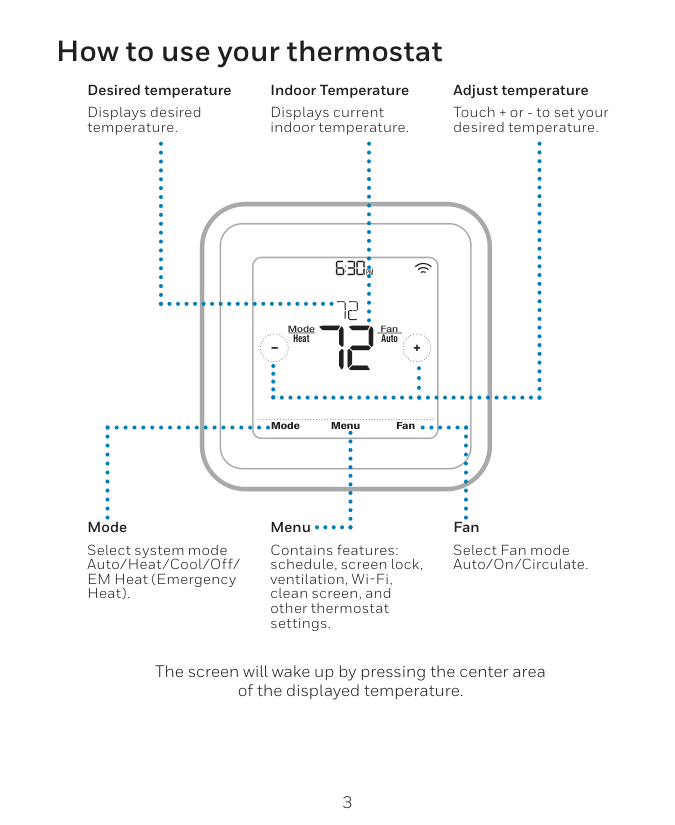
Operating Manual 4 Quick reference to controls Digital display (see page 5) Battery holder (see page 17) Temperature buttons Press to adjust temperature settings (see page 11-13) Hold button Press to override programmed temperature control (see page 13) Function buttons Press to select the function displayed just above each button. (Functions change depending on the task.)
Inside Heat Setting In Recovery 75 6:30
Am 75
Wake Wed Auxiliary Heat On Fan Auto System Heat Set Clock/Day/ Schedule ° ° Replace Battery FocusPRO™TH6110D/TH6220D Programmable Thermostat 5 Quick reference to display screen Current inside temperature Low battery warning (see page 17) Current time/day (see page 6) Current program period Wake/Leave/Return/Sleep (see pages 9-11) In Recovery (see page 16) Temperature setting (see pages 11-13) System status Heat On/Cool On (If flashing, see page 15) Auxiliary heat (Only for heat pumps with auxiliary heat) Function buttons Press the button beneath each function to view or change settings (functions change depending on the task) System setting Heat/Cool/Auto/Off/Em Heat (see page 8) Fan setting Auto/On (see page 7) Set Clock/Day/Schedule (see pages 6 & 11)
Operating Manual 6 Set the time and day 1 Press the SSEETT CCLLOOCCKK//DDAYY//SSCCHHEEDDUULLEE button, then press or to set the clock time. 2 Press the SSEETT DDAAYY button, then press or to select the day of the week. 3 Press DDOONNEE to save & exit. Note: If the SSEETT CCLLOOCCKK//DDAAYY//SSCCHHEEDDUULLEE option is not displayed, press DOONNEE or
Rruunn Sscchheedduullee.
Note: If the display flashes Set Clock, the thermostat will follow your settings for the weekday “Wake” time period until you reset the time and day. Press SSEETT CLLOOCCKK//DDAAYY//SSCCHHEEDDUULLEE, then adjust time 4:30Pm
Fan Auto System Heat Set Clock/Day/ Schedule Press SSEETT DAAYY, then select current day Wed Done Set Day Set Schedule
FocusPRO™TH6110D/TH6220D Programmable Thermostat 7 Select the fan setting Fan Auto System Heat Set Clock/Day/ Schedule Press the FFAANN button to select Auto or On. In “Auto” mode (the most commonly used setting), the fan runs only when the heating or cooling system is on. If set to “On,” the fan runs continuously. Use this setting for improved air circulation, or for more efficient air cleaning. Fan On System Heat Set Clock/Day/ Schedule

Operating Manual 8 Select the system setting Fan Auto System Heat Set Clock/Day/ Schedule Fan Auto System Cool Set Clock/Day/ Schedule Note: The Auto and Em Heat system settings may not appear, depending on how your thermostat was installed. Press the SSYYSSTTEEMM button to select: • HHeeaatt:: Thermostat controls only the heating system. • CCooooll:: Thermostat controls only the cooling system. • OOffff:: Heating and cooling systems are off. • AAuuttoo:: Thermostat automatically selects heating or cooling depending on the indoor temperature. • EEm m HHeeaatt (only for heat pumps with auxiliary heat):Thermostat controls Emergency and Auxiliary Heat. Compressor is locked out.

FocusPRO™TH6110D/TH6220D Programmable Thermostat 9
Wake
6:00 am 70°Leave
8:00 am 62°Return
6:00 pm 70°Sleep
10:00 pm 62° Set to the time you awaken and the temperature you want during the morning, until you leave for the day. Set to the time you leave home and the temperature you want while you are away (usually an energy-saving level). Set to the time you return home and the temperature you want during the evening, until bedtime. Set to the time you go to bed and the temperature you want overnight (usually an energy-saving level). Save money by setting program schedules It’s easy to program your system for maximum energy savings.You can program four time periods each day,with different settings for weekdays and weekends.
Operating Manual 10 EnergyStar® settings for maximum cost savings This thermostat is pre-set to use EnergyStar® program settings.We recommend these settings,since they can reduce your heating/cooling expenses by as much as 33%.(See next page to adjust times and temperatures of each time period.) 70° 75° 70° 75° 62° 83° 62° 83° 70° 75° 70° 75° 62° 78° 62° 78° Heat (Mon-Fri) Cool (Mon-Fri) Heat (Sat-Sun) Cool (Sat-Sun) Wake (6:00 am) Leave (8:00 am) Return (6:00 pm) Sleep (10:00 pm) [Or cancel period] [Or cancel period] [Or cancel period] [Or cancel period]

FocusPRO™TH6110D/TH6220D Programmable Thermostat 11 To adjust program schedules Fan Auto System Cool Set Clock/Day/ Schedule 1 Press SSEETT CCLLOOCCKK//DDAYY//SSCCHHEEDDUULEE,then SSEETT SSCCHHEEDDUULLEE. 2 Press or to set your weekday Wake time (Mon-Fri), then press NNEEXXTT. 3 Press or to set the temperature for this time period, then press NNEEXXTT. 4 Set time and temperature for the next time period (Leave). Repeat steps 2 and 3 for each weekday time period. 5 Press NNEXXTT to set weekend time periods (Sat-Sun),then press DDOONNEE to save & exit. Note: Make sure the thermostat is set to the system you want to program (Heat or Cool). Note: You can press CCAANNCCEELL PPEERRIIOODD to eliminate unwanted time periods (except Wake). Done Set Day Set Schedule Heat Setting Set Schedule 8:00
Am 62
Leave Mon Tue Wed Thu Fri Done CancelPeriod Next °
Operating Manual 12 Program schedule override (temporary) Press or to immediately adjust the temperature.This will temporarily override the temperature setting for the current time period. The new temperature will be maintained only until the next programmed time period begins (see page 10). For example, if you want to turn up the heat early in the morning, it will automatically be lowered later, when you leave for the day. To cancel the temporary setting at any time, press RRUUNN SSCCHHEEDDUULLEE. Press to cancel temporary setting and resume program schedule Press to temporarily adjust temperature Inside Heat Setting 69 6:30
Am 75
Fan Auto System Heat Run Schedule ° ° Temporary Note: Make sure the thermostat is set to the system you want to control (heat, cool or auto).
FocusPRO™TH6110D/TH6220D Programmable Thermostat 13 Program schedule override (permanent) Press HHOOLLDD to permanently adjust the temperature.This will override the temperature settings for all time periods. The “Hold” feature turns off the program schedule and allows you to adjust the thermostat manually, as needed. Whatever temperature you set will be maintained 24 hours a day, until you manually change it, or press RRUNN SSCCHHEEDDUULLEE to cancel “Hold” and resume the programmed schedule. Press to cancel “Hold” setting and resume program schedule Press to permanently adjust temperature Inside Heat Setting 69 6:30
Am 75
Fan Auto System Run Schedule ° ° Hold Heat Note: Make sure the thermostat is set to the system you want to control (heat, cool or auto).
Operating Manual 14 Auto Changeover (heat/cool) Fan Auto System Auto Set Clock/Day/ Schedule Auto Changeover is a feature used in climates where both air conditioning and heating are used on the same day.When the system is set to Auto, the thermostat auto- matically selects heating or cooling depending on the indoor temperature. Heat and cool settings must be at least 3 degrees apart.The thermostat will automatically adjust settings to maintain this 3-degree separation (called “deadband”). The 3-degree separation between heating and cooling set temperatures is fixed, and cannot be changed. Press until screen displays “Auto” Note: The Auto system setting may not appear, depending on how your thermostat was installed.

FocusPRO™TH6110D/TH6220D Programmable Thermostat 15 Built-in compressor protection Inside Cool Setting 6:30
Am 75
Cool On Fan Auto System Cool Set Clock/Day/ Schedule ° ° This feature helps prevent damage to the compressor in your air conditioning or heat pump system. Damage can occur if the compressor is re- started too soon after shutdown.This feature forces the compressor to wait for a few minutes before restarting. During the wait time, the display will flash the message Cool On (or Heat On if you have a heat pump).When the safe wait time has elapsed, the message stops flashing and the compressor turns on. Message flashes until safe restart time has elapsed 75
Operating Manual 16 Adaptive Intelligent Recovery™(AIR) Adaptive Intelligent Recovery eliminates guesswork when setting your schedule. It allows the thermostat to “learn”how long your furnace and air conditioner take to reach the temperature you want. Just set your program schedule to the time you want the house to reach your desired temperature.The thermostat then turns on the heating or cooling at just the right time to reach your scheduled temperature at your scheduled time. For example: Set the Wake time to 6 am, and the temperature to 70°.The heat will come on before 6 am, so the temperature is 70° by the time you wake at 6. Note: When Adaptive Intelligent Recovery is in effect, the thermostat will display “In Recovery”.

FocusPRO™TH6110D/TH6220D Programmable Thermostat 17 Battery replacement Batteries are optional (to provide backup power) if your thermostat was wired to run on AC power when installed. Install fresh batteries immediately when the RREEPPLLAACCEE BBAATTTTEERRYY warning begins flashing.The warning flashes about two months before the batteries are depleted. Even if the warning does not appear,you should replace batteries once a year,or before leaving home for more than a month. If batteries are inserted within two minutes, the time and day will not have to be reset.All other settings are permanently stored in memory,and do not require battery power. Press and pull to remove Insert fresh AA alkaline batteries, then reinstall battery holder Replace Battery

Operating Manual 18 In case of difficulty If you have difficulty with your thermostat, please try the suggestions below. Most problems can be corrected quickly and easily. Display is blank • Check circuit breaker and reset if necessary. • Make sure power switch at heating & cooling system is on. • Make sure furnace door is closed securely. • If thermostat is battery powered, make sure fresh AA alkaline batteries are correctly installed (see page 17). Temperature settings do not change Make sure heating and cooling temperatures are set to acceptable ranges: • Heat: 40° to 90°F (4.5° to 32°C). • Cool: 50° to 99°F (10° to 37°C). To restore Energy Star® default settings Follow these steps to restore Energy Star default settings (see page 10): 1 Press SSEETT CCLLOOCCKK//DDAAYY//SSCCHHEEDDUULLEE. 2 Press SSEETT SSCCHHEEDDUULLEE. 3 Press DDOONNEE and NNEEXXTT at the same time for 4 seconds.

FocusPRO™TH6110D/TH6220D Programmable Thermostat 19 Heating or cooling system does not respond • Press SSYYSSTTEEMM button to set system to Heat. Make sure the temperature is set higher than the Inside temperature. • Press SSYYSSTTEEMM button to set system to Cool. Make sure the temperature is set lower than the Inside temperature. • Check circuit breaker and reset if necessary. • Make sure power switch at heating & cooling system is on. • Make sure furnace door is closed securely. • Wait 5 minutes for the system to respond. In case of difficulty “Cool On” or “Heat On” is flashing • Compressor protection feature is engaged. Wait 5 minutes for the system to restart safely, without damage to the compressor (see page 15).

Operating Manual 20 Customer assistance xxxxxxx xxxxxxx Model number Date code For assistance with this product, please visit w ww ww w..hhoonneeyyw weellll..ccoom m//yyoouurrhhoom mee. Or call Honeywell Customer Care toll-free at 11--88000-44688-115022. To save time, please remove the battery holder and note your model number and date code before calling. Accessories/replacement parts To order, please call Honeywell Customer Care toll-free at 11-88000-4468--115022. Battery holder......................Part No. 50007072-001 Cover plate assembly ........Part No. 50002883-001 (Use to cover marks left by old thermostats.)

FocusPRO™TH6110D/TH6220D Programmable Thermostat 21 Honeywell warrants this product, excluding battery, to be free from defects in the workmanship or materials, under normal use and service, for a period of five (5) years from the date of purchase by the consumer. If at any time during the warranty period the product is determined to be defective or malfunctions, Honeywell shall repair or replace it (at Honeywell's option). If the product is defective, (i) return it, with a bill of sale or other dated proof of purchase, to the place from which you purchased it; or (ii) call Honeywell Customer Care at 1-800-468-1502. Customer Care will make the determination whether the product should be returned to the following address: Honeywell Return Goods, Dock 4 MN10-3860, 1885 Douglas Dr. N., Golden Valley, MN 55422, or whether a replacement product can be sent to you. Limited 5-year warranty

Operating Manual 22 This warranty does not cover removal or reinstallation costs.This warranty shall not apply if it is shown by Honeywell that the defect or malfunction was caused by damage which occurred while the product was in the possession of a consumer. Honeywell's sole responsibility shall be to repair or replace the product within the terms stated above. HONEYWELL SHALL NOT BE LIABLE FOR ANY
Loss Or Damage Of Any Kind, Including Any Incidental Or
Consequential Damages Resulting, Directly Or Indirectly, From Any
Breach Of Any Warranty, Express Or Implied, Or Any Other Failure Of
THIS PRODUCT. Some states do not allow the exclusion or limitation of incidental or consequential damages, so this limitation may not apply to you. Limited 5-year warranty
FocusPRO™TH6110D/TH6220D Programmable Thermostat 23
This Warranty Is The Only Express Warranty Honeywell Makes On
This Product.The Duration Of Any Implied Warranties, Including
The Warranties Of Merchantability And Fitness For A Particular
Purpose,Is Hereby Limited To The Five-Year Duration Of This Warranty.
Some states do not allow limitations on how long an implied warranty lasts, so the above limitation may not apply to you. This warranty gives you specific legal rights, and you may have other rights which vary from state to state. If you have any questions concerning this warranty, please write Honeywell Customer Relations, 1985 Douglas Dr, Golden Valley, MN 55422 or call 1-800-468-
Honeywell International Inc. 1985 Douglas Drive North Golden Valley, MN 55422 Honeywell Limited-Honeywell Limitée 35 Dynamic Drive Scarborough, Ontario M1V 4Z9 Automation and Control Solutions ® U.S. Registered Trademark. Patents pending. Copyright © 2005 Honeywell International Inc. All rights reserved. Printed in U.S. Document number 69-1715. Date 01-2005. www.honeywell.com/yourhome