Innova 3100 OBD2 Code Reader manual
Automotive Diagnostic Tools · 26 Q&As

Innova 3100 OBD2 Code Reader

Ask AI

— answers from the official manual

AI-powered answers from the official manual. Verify critical info.

Common questions

Common Questions

26 total
1

What vehicles are compatible with the Innova 3100 OBD2 Code Reader?

The Innova 3100 is designed to work on all OBD2 compliant vehicles, which includes all 1996 and newer cars and light trucks sold in the United States. This covers all domestic, Asian, and European vehicles. Some 1994 and 1995 vehicles may also be compatible if their Vehicle Emissions Control Information (VECI) label states 'OBD II Certified.' The tool is also compatible with all OBD2 protocols, including CAN (Controller Area Network). (Page 6)

2

How do I connect the Code Reader to my vehicle and retrieve diagnostic trouble codes?

Turn the ignition off, locate the 16-pin Data Link Connector (DLC) under the dashboard, and connect the Code Reader cable — the connector is keyed and only fits one way. Once connected, turn the ignition ON (do not start the engine), and the Code Reader will automatically turn on, display 'rEAd,' and retrieve any stored codes within 10–60 seconds. If more than one code is present, press the SCROLL button to view additional codes. (Page 17)

3

What does the red LED indicator mean on the Code Reader?

A red LED indicates there is a problem with one or more of the vehicle's systems, and that Diagnostic Trouble Codes (DTCs) are present in the vehicle's computer memory. In this condition, the Malfunction Indicator Lamp (Check Engine light) on the vehicle's dashboard will be lit steady. A vehicle displaying a red LED is not ready for an Emissions Test (Smog Check) and should be inspected or repaired before driving further. (Page 19)

4

What does the yellow LED indicator mean on the Code Reader?

A yellow LED indicates one of two conditions: either a 'Pending' Diagnostic Trouble Code is present, or some of the vehicle's emission monitors have not yet run their diagnostic self-testing. A pending code is confirmed by a numeric code and the word 'PENDING' on the LCD display, while unrun monitors are shown as flashing Monitor icons on the display. Whether the vehicle can pass an emissions test under a yellow LED depends on local regulations. (Page 19)

5

How do I erase Diagnostic Trouble Codes (DTCs) from my vehicle's computer?

After completing the code retrieval procedure, press and release the ERASE button — the display will show 'SurE' to confirm. Press ERASE again to proceed, and the display will show 'donE' before automatically re-linking to confirm codes have been cleared. Note that erasing DTCs also clears Freeze Frame data and resets all Monitor statuses to 'not run,' requiring an OBD2 Drive Cycle to restore them. If you plan to take the vehicle to a service center, do not erase codes beforehand. (Page 20–21)

6

Is it safe to connect or disconnect the Code Reader while the ignition is on?

No — connecting or disconnecting the Code Reader when the ignition is ON can damage both the test equipment and the vehicle's electronic components. Always turn the ignition OFF before connecting or disconnecting the Code Reader from the vehicle's Data Link Connector (DLC). (Page 6)

Show 20 more questions

Full Manual

102 pages
Page 1

Owner’S

Manual

The Easiest And Best Way To Troubleshoot 1996 and Newer OBD II Vehicles!

Page 2

Table of Contents Title Page No.

Introduction

Congratulations! . . . . . . . . . . . . . . . . . . . . . . . . . . . . . . . . . . . . . 1 What is OBD? . . . . . . . . . . . . . . . . . . . . . . . . . . . . . . . . . . . . . . . 2 YOU CAN DO IT! . . . . . . . . . . . . . . . . . . . . . . . . . . . . . . . . . . . . . . . . . 3

Safety Precautions

Safety First! . . . . . . . . . . . . . . . . . . . . . . . . . . . . . . . . . . . . . . . . 4

About The Code Reader

Vehicles Covered . . . . . . . . . . . . . . . . . . . . . . . . . . . . . . . . . . . . 6 Battery Replacement . . . . . . . . . . . . . . . . . . . . . . . . . . . . . . . . . 7 Controls and Indicators . . . . . . . . . . . . . . . . . . . . . . . . . . . . . . . 8 Display Functions . . . . . . . . . . . . . . . . . . . . . . . . . . . . . . . . . . . . 9

Preparation For Testing

Before You Begin . . . . . . . . . . . . . . . . . . . . . . . . . . . . . . . . . . . . 12 Vehicle Service Manuals . . . . . . . . . . . . . . . . . . . . . . . . . . . . . . 13 Preliminary Vehicle Diagnosis Worksheet . . . . . . . . . . . . . . . . . 14

Using The Code Reader

Code Retrieval Procedure . . . . . . . . . . . . . . . . . . . . . . . . . . . . . 17 Erasing Diagnostic Trouble Codes (DTCs) . . . . . . . . . . . . . . . . 20 I/M Readiness Testing . . . . . . . . . . . . . . . . . . . . . . . . . . . . . . . . 21 What’s Next? (road trip readiness, emissions test . . . . . . . . . . . 27 readiness, inspecting a used vehicle)

Learning More

Computer Engine Controls . . . . . . . . . . . . . . . . . . . . . . . . . . . . . 29 Diagnostic Trouble Codes (DTCs) . . . . . . . . . . . . . . . . . . . . . . . 35 OBD 2 Monitors . . . . . . . . . . . . . . . . . . . . . . . . . . . . . . . . . . . . . 38

Dtc Definitions

Diagnostic Trouble Code Definitions . . . . . . . . . . . . . . . . . . . . . 45 Generic DTC Definitions . . . . . . . . . . . . . . . . . . . . . . . . . . . . . . . 46 Manufacturer Specific Codes - Chrysler . . . . . . . . . . . . . . . . . . . 67 Manufacturer Specific Codes - Ford . . . . . . . . . . . . . . . . . . . . . . 70 Manufacturer Specific Codes - General Motors . . . . . . . . . . . . . 83 Manufacturer Specific Codes - Honda . . . . . . . . . . . . . . . . . . . . 93 Manufacturer Specific Codes - Toyota . . . . . . . . . . . . . . . . . . . . 95

Glossary

Introduction . . . . . . . . . . . . . . . . . . . . . . . . . . . . . . . . . . . . . . . . . 97 Glossary of Terms and Abbreviations . . . . . . . . . . . . . . . . . . . . 97

Warranty And Servicing

Limited One Year Warranty . . . . . . . . . . . . . . . . . . . . . . . . . . . . 99 Service Procedures . . . . . . . . . . . . . . . . . . . . . . . . . . . . . . . . . . 99 i

Obd2

Page 3

Introduction

Congratulations!

Obd 2

1

Congratulations!

on your choice of OBD 2 Code Reader. This powerful tool will help you take charge of your vehicle’s maintenance and servicing needs. Today’s vehicles use Computer Control Systems to ensure peak per-formance and fuel efficiency while reducing pollutants in the vehicle’s emissions. These systems also have the ability to perform self-testing and diagnostics on various vehicle systems and components, and provide valuable information to aid in servicing and repair. However, these sophisticated systems often required expensive tools and test equipment in order to retrieve this information. Until now, consumers had to rely on professional service technicians to maintain their vehicles in top condition. OBD 2 Code Reader brings the power of the technician into your hands in a cost-effective, easy-to-use package. Whether you are a “put the key in and go” consumer, hobby mechanic or skilled DIYer, Code Reader offers the features and functions you need to take control of your vehicle’s testing, servicing and maintenance needs. OBD 2 Code Reader helps you . . . . ■Save time and money by locating and identifying problems before servicing your vehicle ■Access the same information your mechanic has - for less ■Prevent future costly repairs and maintain engine per- formance with routine inspections ■See if you’re ready for an emissions test (smog check) ■Check your vehicle for road trip readiness ■Turn off the “CHECK ENGINE” light ■Inspect a used vehicle before buying or selling . . . . and more!

Page 4

Introduction

What Is Obd?

2

Obd 2

What Is Obd?

OBD 2 Code Reader is designed to work on all OBD 2 compliant vehicles. All 1996 and newer vehicles (cars, light trucks and SUVs) sold in the United States are OBD 2 compliant. One of the most exciting improvements in the automobile industry was the addition of on- board diagnostics (OBD) on vehicles, or in more basic terms, the computer that activates the vehicle’s “CHECK ENGINE” light. OBD1 was designed to monitor manufacturer-specific systems on vehicles built from 1981 to 1995. Then came the development of OBD 2, which is on all 1996 and newer vehicles sold in the U.S. Like its predecessor, OBD 2 was adopted as part of a government mandate to lower vehicle emissions. But what makes OBD 2 unique is its universal application for all late model cars and trucks - domestic and import. This sophisticated program in the vehicle’s main computer system is designed to detect failures in a range of systems, and can be accessed through a universal OBD 2 port, which is usually found under the dashboard. For all OBD systems, if a problem is found, the computer turns on the “CHECK ENGINE” light to warn the driver, and sets a Diagnostic Trouble Code (DTC) to identify where the problem occurred. A special diagnostic tool, such as OBD 2 Code Reader, is required to retrieve these codes, which consumers and professionals use as a starting point for repairs. To learn more about vehicle Computer Control Systems and OBD 2, see COMPUTER ENGINE CONTROLS on page 29.

Page 5

You Can Do It!

Easy To Use - Easy To View - Easy To Define

Obd 2

3 Easy To Use . . . . ■ Connect Code Reader to the vehicle’s test connector. ■ Turn the ignition key "On.” ■ DO NOT start the engine. ■ Code Reader turns “On” and LINKs automatically. Easy To View . . . . ■ Code Reader retrieves stored codes and displays I/M Readiness status. ■ Codes are displayed on Code Reader’s LCD display screen; I/M Readiness status is displayed by LED indicators. Easy To Define . . . . ■ Locate fault code(s) in the Fault Code Definition list. ieving Definition emperature Below Threshold (Ba mission Control System Malfunction e Emission Control System Incorrect Purge Flow ative Emission Control System Leak Detected ll leak) vaporative Emission Control System Purge Control Valve Circuit Malfunction 44 Evaporative Emission Control System Purge Control Valve Circuit Open

P0445

Evaporative Emission Control System Purge Control Valve Circuit Shorted

P0446

Evaporative Emission Control System Vent Control Circuit Malfunction

P0447

Evaporative Emission Control System Vent Control Circuit Open

P0448

Evaporative Emission Control System Vent Co Circuit Shorted

P0449

Evaporative Emission Control System V Solenoid Circuit Malfunction

P0450

Evaporative Emission Control Sys Malfunction 1 Evaporative Emission Cont Range/Performance porative Emission nput ive Em

Page 6

Safety Precautions

Safety First!

4

Obd 2

Safety First!

This manual describes common test procedures used by experienced service technicians. Many test procedures require precautions to avoid accidents that can result in personal injury, and/or damage to your vehicle or test equipment. Always read your vehicle's service manual and follow its safety precautions before and during any test or service procedure. ALWAYS observe the following general safety precautions: When an engine is running, it produces carbon monoxide, a toxic and poisonous gas. To prevent serious injury or death from carbon monoxide poisoning, operate the vehicle ONLY in a well- ventilated area. To protect your eyes from propelled objects as well as hot or caustic liquids, always wear approved safety eye protection. When an engine is running, many parts (such as the coolant fan, pulleys, fan belt etc.) turn at high speed. To avoid serious injury, always be aware of moving parts. Keep a safe distance from these parts as well as other potentially moving objects. Engine parts become very hot when the engine is running. To prevent severe burns, avoid contact with hot engine parts. Before starting an engine for testing or trouble- shooting, make sure the parking brake is engaged. Put the transmission in park (for automatic transmission) or neutral (for manual transmission). Block the drive wheels with suitable blocks. Connecting or disconnecting test equipment when the ignition is ON can damage test equipment and the vehicle's electronic components. Turn the ignition OFF before connecting Code Reader to or disconnecting Code Reader from the vehicle’s Data Link Connector

(Dlc).

To avoid personal injury, instrument damage and/or damage to your vehicle; do not use Code Reader before reading this manual.

N

L

D

R

P

Page 7

Safety Precautions

Safety First!

Obd 2

5 To prevent damage to the on-board computer when taking vehicle electrical measurements, always use a digital multimeter with at least 10 megOhms of impedance. The vehicle's battery produces highly flammable hydrogen gas. To prevent an explosion, keep all sparks, heated items and open flames away from the battery. Don't wear loose clothing or jewelry when working on an engine. Loose clothing can become caught in the fan, pulleys, belts, etc. Jewelry is highly conductive, and can cause a severe burn if it makes contact between a power source and ground.

Page 8

About Code Reader

Vehicles Covered

6

Obd 2

Vehicles Covered

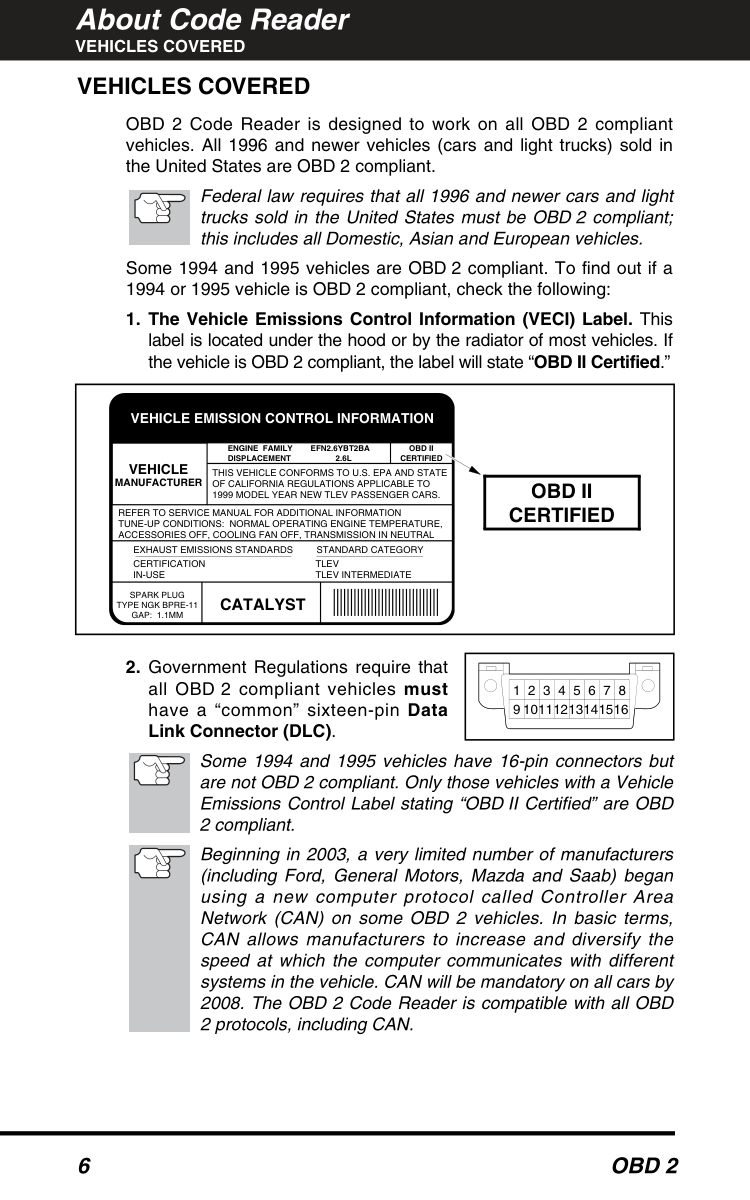
OBD 2 Code Reader is designed to work on all OBD 2 compliant vehicles. All 1996 and newer vehicles (cars and light trucks) sold in the United States are OBD 2 compliant. Federal law requires that all 1996 and newer cars and light trucks sold in the United States must be OBD 2 compliant; this includes all Domestic, Asian and European vehicles. Some 1994 and 1995 vehicles are OBD 2 compliant. To find out if a 1994 or 1995 vehicle is OBD 2 compliant, check the following:
  • The Vehicle Emissions Control Information (VECI) Label. This
  • label is located under the hood or by the radiator of most vehicles. If the vehicle is OBD 2 compliant, the label will state “OBD II Certified.”
  • Government Regulations require that
  • all OBD 2 compliant vehicles must have a “common” sixteen-pin Data Link Connector (DLC). Some 1994 and 1995 vehicles have 16-pin connectors but are not OBD 2 compliant. Only those vehicles with a Vehicle Emissions Control Label stating “OBD II Certified” are OBD 2 compliant. Beginning in 2003, a very limited number of manufacturers (including Ford, General Motors, Mazda and Saab) began using a new computer protocol called Controller Area Network (CAN) on some OBD 2 vehicles. In basic terms, CAN allows manufacturers to increase and diversify the speed at which the computer communicates with different systems in the vehicle. CAN will be mandatory on all cars by
  • The OBD 2 Code Reader is compatible with all OBD
  • 2 protocols, including CAN.

    Vehicle Emission Control Information

    Vehicle

    Manufacturer

    Obd Ii

    Certified

    Engine Family Efn2.6Ybt2Ba

    Displacement 2.6L

    This Vehicle Conforms To U.S. Epa And State

    Of California Regulations Applicable To

    1999 Model Year New Tlev Passenger Cars.

    Refer To Service Manual For Additional Information

    Tune-Up Conditions: Normal Operating Engine Temperature,

    Accessories Off, Cooling Fan Off, Transmission In Neutral

    Spark Plug

    Type Ngk Bpre-11

    Gap: 1.1Mm

    Catalyst

    Exhaust Emissions Standards Standard Category

    Certification

    In-Use

    Tlev

    Tlev Intermediate

    Obd Ii

    Certified

    1 2 3 4 5 6 7 8 9 10111213141516

    Page 9

    About Code Reader

    Battery Replacement

    Obd 2

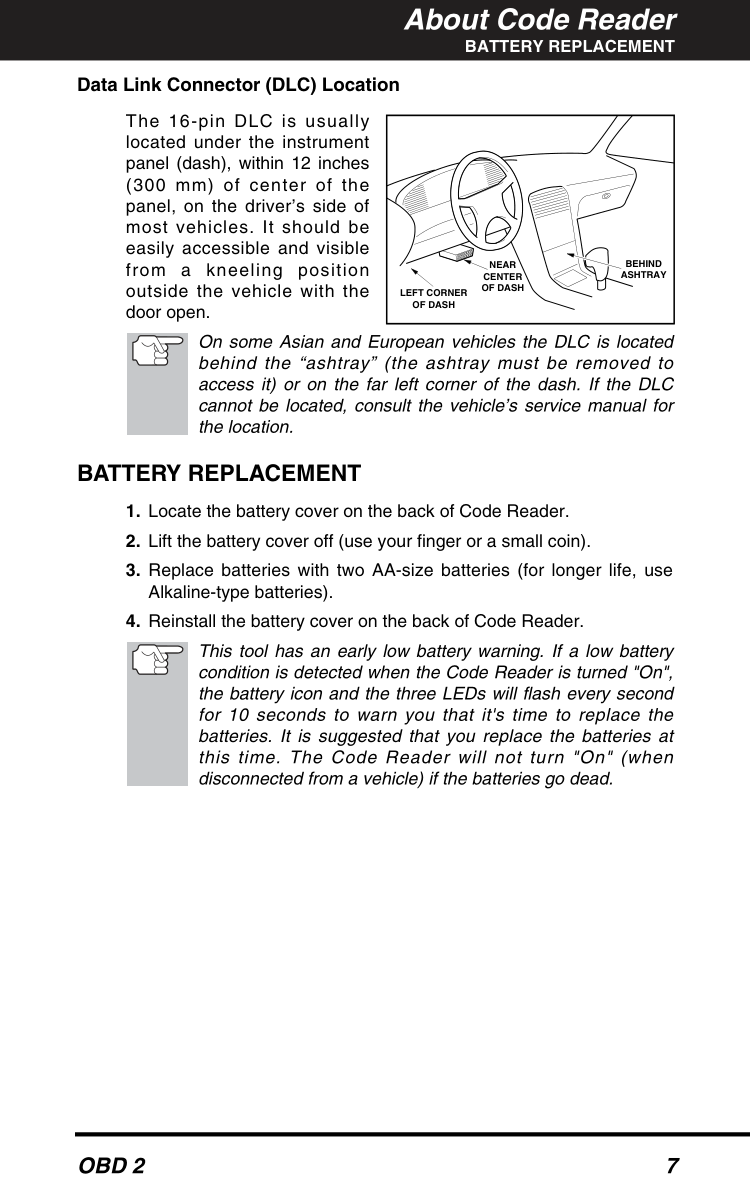
    7 Data Link Connector (DLC) Location The 16-pin DLC is usually located under the instrument panel (dash), within 12 inches (300 mm) of center of the panel, on the driver’s side of most vehicles. It should be easily accessible and visible from a kneeling position outside the vehicle with the door open. On some Asian and European vehicles the DLC is located behind the “ashtray” (the ashtray must be removed to access it) or on the far left corner of the dash. If the DLC cannot be located, consult the vehicle’s service manual for the location.

    Battery Replacement

  • Locate the battery cover on the back of Code Reader.
  • Lift the battery cover off (use your finger or a small coin).
  • Replace batteries with two AA-size batteries (for longer life, use
  • Alkaline-type batteries).
  • Reinstall the battery cover on the back of Code Reader.
  • This tool has an early low battery warning. If a low battery condition is detected when the Code Reader is turned "On", the battery icon and the three LEDs will flash every second for 10 seconds to warn you that it's time to replace the batteries. It is suggested that you replace the batteries at this time. The Code Reader will not turn "On" (when disconnected from a vehicle) if the batteries go dead.

    Near

    Center

    Of Dash

    Behind

    Ashtray

    Left Corner

    Of Dash

    Page 10

    About Code Reader

    Controls And Indicators

    8

    Obd 2

    Controls And Indicators

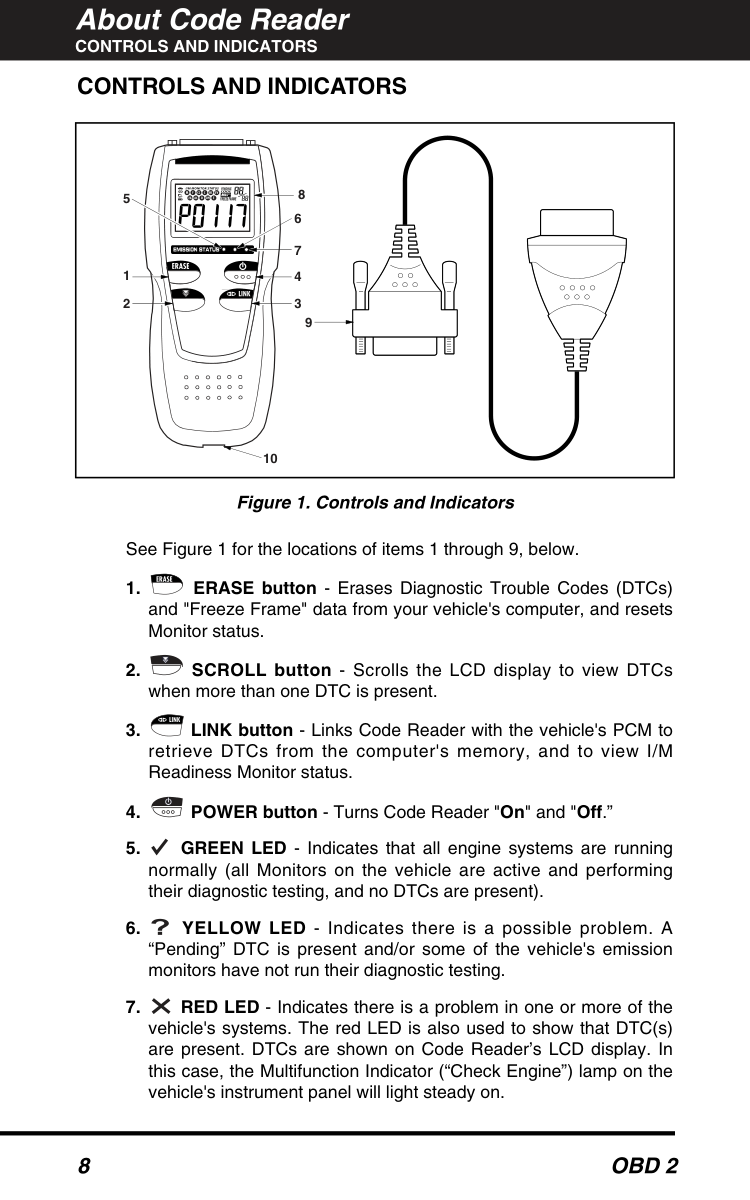
    See Figure 1 for the locations of items 1 through 9, below.
  • ERASE button - Erases Diagnostic Trouble Codes (DTCs)
  • and "Freeze Frame" data from your vehicle's computer, and resets Monitor status.
  • SCROLL button - Scrolls the LCD display to view DTCs
  • when more than one DTC is present.
  • LINK button - Links Code Reader with the vehicle's PCM to
  • retrieve DTCs from the computer's memory, and to view I/M Readiness Monitor status.
  • POWER button - Turns Code Reader "On" and "Off.”
  • GREEN LED - Indicates that all engine systems are running
  • normally (all Monitors on the vehicle are active and performing their diagnostic testing, and no DTCs are present).
  • YELLOW LED - Indicates there is a possible problem. A
  • “Pending” DTC is present and/or some of the vehicle's emission monitors have not run their diagnostic testing.
  • RED LED - Indicates there is a problem in one or more of the
  • vehicle's systems. The red LED is also used to show that DTC(s) are present. DTCs are shown on Code Reader’s LCD display. In this case, the Multifunction Indicator (“Check Engine”) lamp on the vehicle's instrument panel will light steady on. 1 5 2 9 10 4 7 6 8 3 Figure 1. Controls and Indicators

    Page 11

    About Code Reader

    Display Functions

    Obd 2

    9
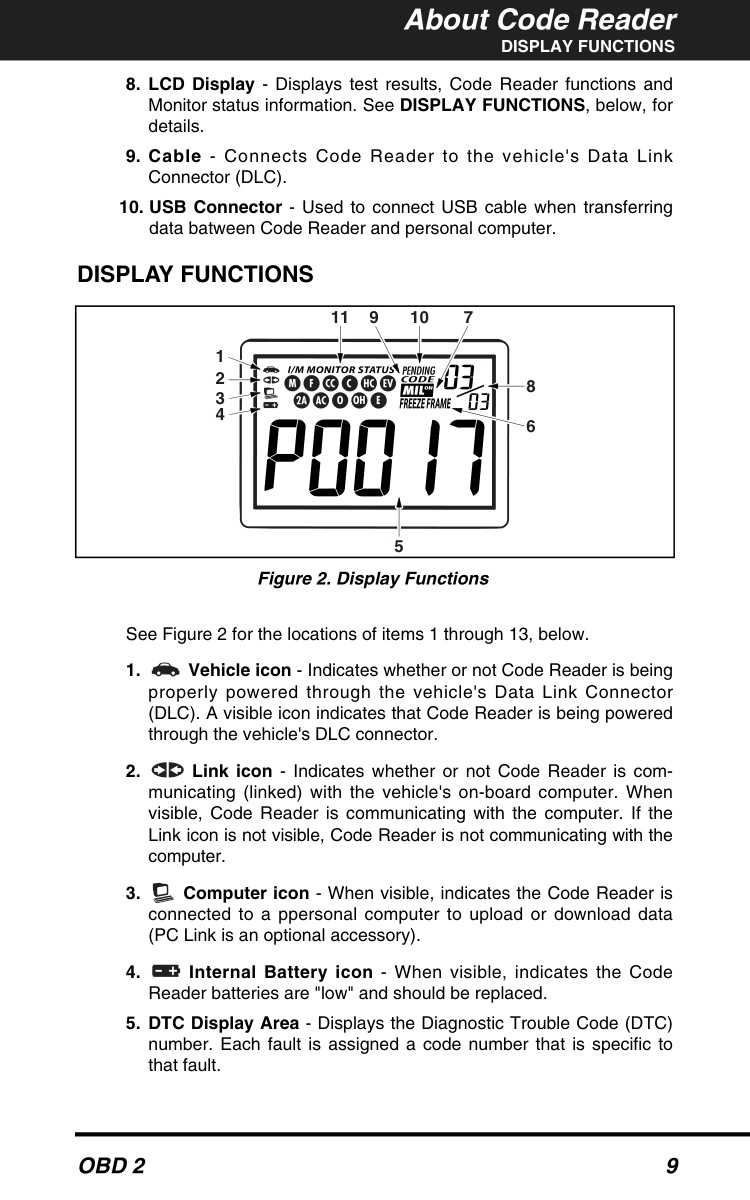
  • LCD Display - Displays test results, Code Reader functions and
  • Monitor status information. See DISPLAY FUNCTIONS, below, for details.
  • Cable - Connects Code Reader to the vehicle's Data Link
  • Connector (DLC).
  • USB Connector - Used to connect USB cable when transferring
  • data batween Code Reader and personal computer.

    Display Functions

    See Figure 2 for the locations of items 1 through 13, below.
  • Vehicle icon - Indicates whether or not Code Reader is being
  • properly powered through the vehicle's Data Link Connector (DLC). A visible icon indicates that Code Reader is being powered through the vehicle's DLC connector.
  • Link icon - Indicates whether or not Code Reader is com-
  • municating (linked) with the vehicle's on-board computer. When visible, Code Reader is communicating with the computer. If the Link icon is not visible, Code Reader is not communicating with the computer.
  • Computer icon - When visible, indicates the Code Reader is
  • connected to a ppersonal computer to upload or download data (PC Link is an optional accessory).
  • Internal Battery icon - When visible, indicates the Code
  • Reader batteries are "low" and should be replaced.
  • DTC Display Area - Displays the Diagnostic Trouble Code (DTC)
  • number. Each fault is assigned a code number that is specific to that fault. 1 2 3 4 5 6 8 7 9 10 11 Figure 2. Display Functions

    Page 12

    About Code Reader

    Display Functions

    10

    Obd 2

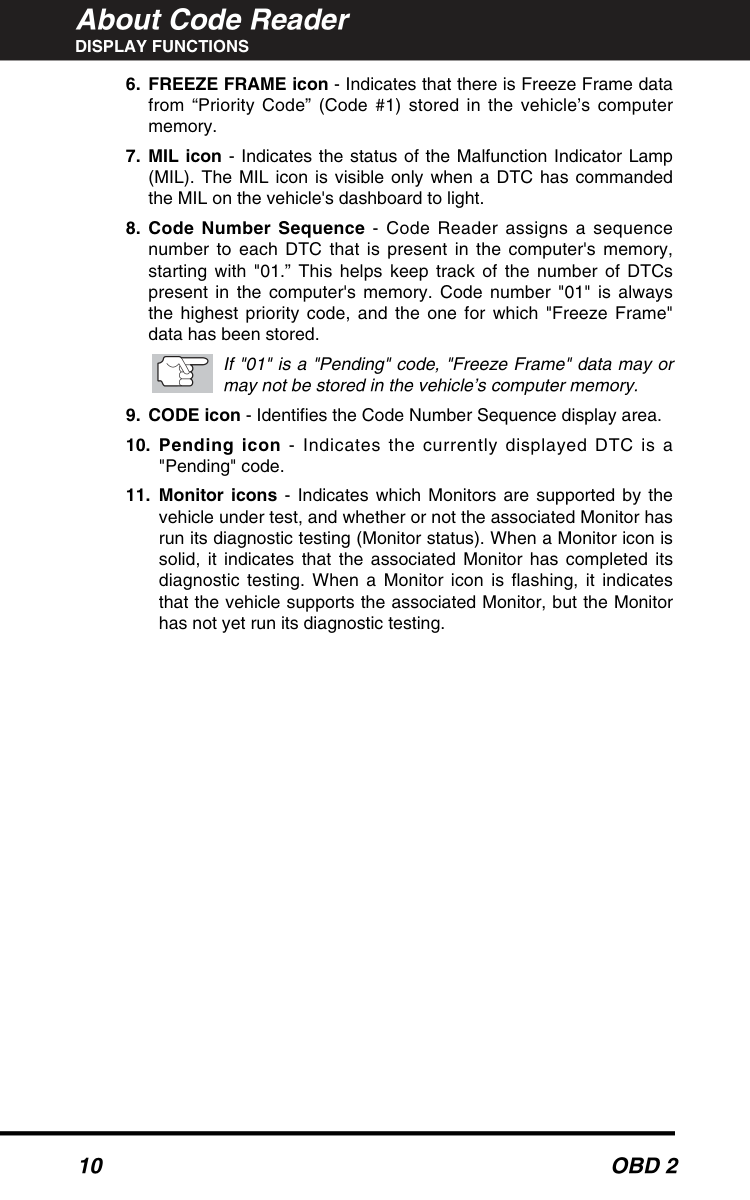
  • FREEZE FRAME icon - Indicates that there is Freeze Frame data
  • from “Priority Code” (Code #1) stored in the vehicle’s computer memory.
  • MIL icon - Indicates the status of the Malfunction Indicator Lamp
  • (MIL). The MIL icon is visible only when a DTC has commanded the MIL on the vehicle's dashboard to light.
  • Code Number Sequence - Code Reader assigns a sequence
  • number to each DTC that is present in the computer's memory, starting with "01.” This helps keep track of the number of DTCs present in the computer's memory. Code number "01" is always the highest priority code, and the one for which "Freeze Frame" data has been stored. If "01" is a "Pending" code, "Freeze Frame" data may or may not be stored in the vehicle’s computer memory.
  • CODE icon - Identifies the Code Number Sequence display area.
  • Pending icon - Indicates the currently displayed DTC is a
  • "Pending" code.
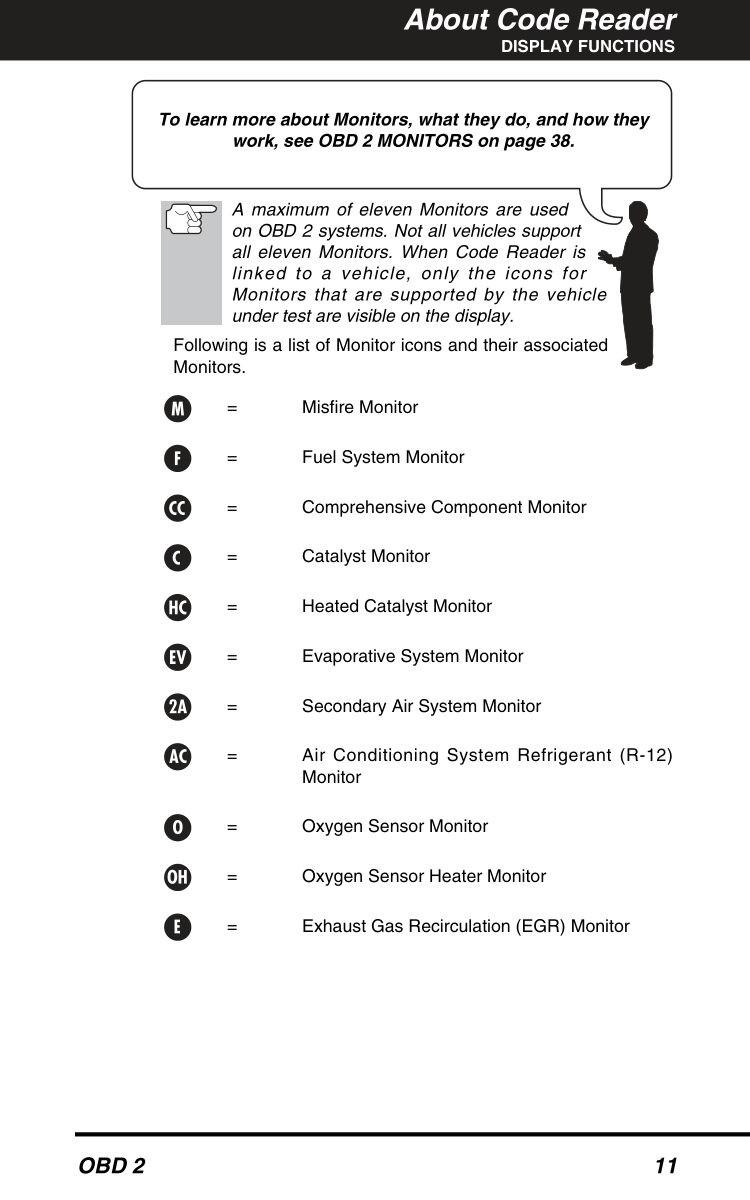
  • Monitor icons - Indicates which Monitors are supported by the
  • vehicle under test, and whether or not the associated Monitor has run its diagnostic testing (Monitor status). When a Monitor icon is solid, it indicates that the associated Monitor has completed its diagnostic testing. When a Monitor icon is flashing, it indicates that the vehicle supports the associated Monitor, but the Monitor has not yet run its diagnostic testing.

    Page 13

    About Code Reader

    Display Functions

    Obd 2

    11 A maximum of eleven Monitors are used on OBD 2 systems. Not all vehicles support all eleven Monitors. When Code Reader is linked to a vehicle, only the icons for Monitors that are supported by the vehicle under test are visible on the display. Following is a list of Monitor icons and their associated Monitors. = Misfire Monitor = Fuel System Monitor = Comprehensive Component Monitor = Catalyst Monitor = Heated Catalyst Monitor = Evaporative System Monitor = Secondary Air System Monitor = Air Conditioning System Refrigerant (R-12) Monitor = Oxygen Sensor Monitor = Oxygen Sensor Heater Monitor = Exhaust Gas Recirculation (EGR) Monitor To learn more about Monitors, what they do, and how they work, see OBD 2 MONITORS on page 38.
    Page 14

    Preparation for Testing

    Before You Begin

    12

    Obd 2

    Before You Begin

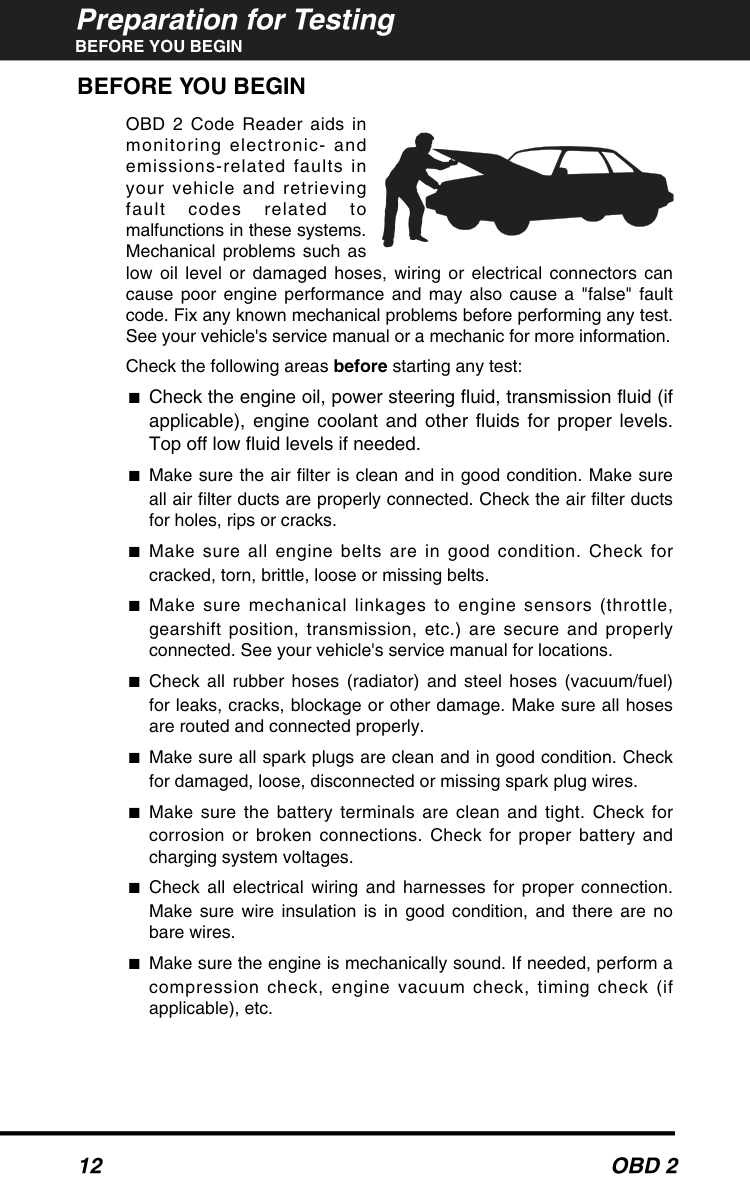
    OBD 2 Code Reader aids in monitoring electronic- and emissions-related faults in your vehicle and retrieving fault codes related to malfunctions in these systems. Mechanical problems such as low oil level or damaged hoses, wiring or electrical connectors can cause poor engine performance and may also cause a "false" fault code. Fix any known mechanical problems before performing any test. See your vehicle's service manual or a mechanic for more information. Check the following areas before starting any test: ■Check the engine oil, power steering fluid, transmission fluid (if applicable), engine coolant and other fluids for proper levels. Top off low fluid levels if needed. ■Make sure the air filter is clean and in good condition. Make sure all air filter ducts are properly connected. Check the air filter ducts for holes, rips or cracks. ■Make sure all engine belts are in good condition. Check for cracked, torn, brittle, loose or missing belts. ■Make sure mechanical linkages to engine sensors (throttle, gearshift position, transmission, etc.) are secure and properly connected. See your vehicle's service manual for locations. ■Check all rubber hoses (radiator) and steel hoses (vacuum/fuel) for leaks, cracks, blockage or other damage. Make sure all hoses are routed and connected properly. ■Make sure all spark plugs are clean and in good condition. Check for damaged, loose, disconnected or missing spark plug wires. ■Make sure the battery terminals are clean and tight. Check for corrosion or broken connections. Check for proper battery and charging system voltages. ■Check all electrical wiring and harnesses for proper connection. Make sure wire insulation is in good condition, and there are no bare wires. ■Make sure the engine is mechanically sound. If needed, perform a compression check, engine vacuum check, timing check (if applicable), etc.

    Page 15

    Preparation for Testing

    Vehicle Service Manuals

    Obd 2

    13

    Vehicle Service Manuals

    Always refer to the manufacturer's service manual for your vehicle before performing any test or repair procedures. Contact your local car dealership, auto parts store or bookstore for availability of these manuals. The following companies publish valuable repair manuals: ■Haynes Publications 861 Lawrence Drive Newbury Park, California 91320 Phone: 800-442-9637 ■Mitchell International 14145 Danielson Street Poway, California 92064 Phone: 888-724-6742 ■Motor Publications 5600 Crooks Road, Suite 200 Troy, Michigan 48098 Phone: 800-426-6867
    Factory Sources

    Ford, GM, Chrysler, Honda, Isuzu, Hyundai and Subaru Service Manuals ■Helm Inc. 14310 Hamilton Avenue Highland Park, Michigan 48203 Phone: 800-782-4356

    Page 16

    Preparation for Testing

    Preliminary Vehicle Diagnosis Worksheet

    14

    Obd 2

    Preliminary Vehicle Diagnosis Worksheet

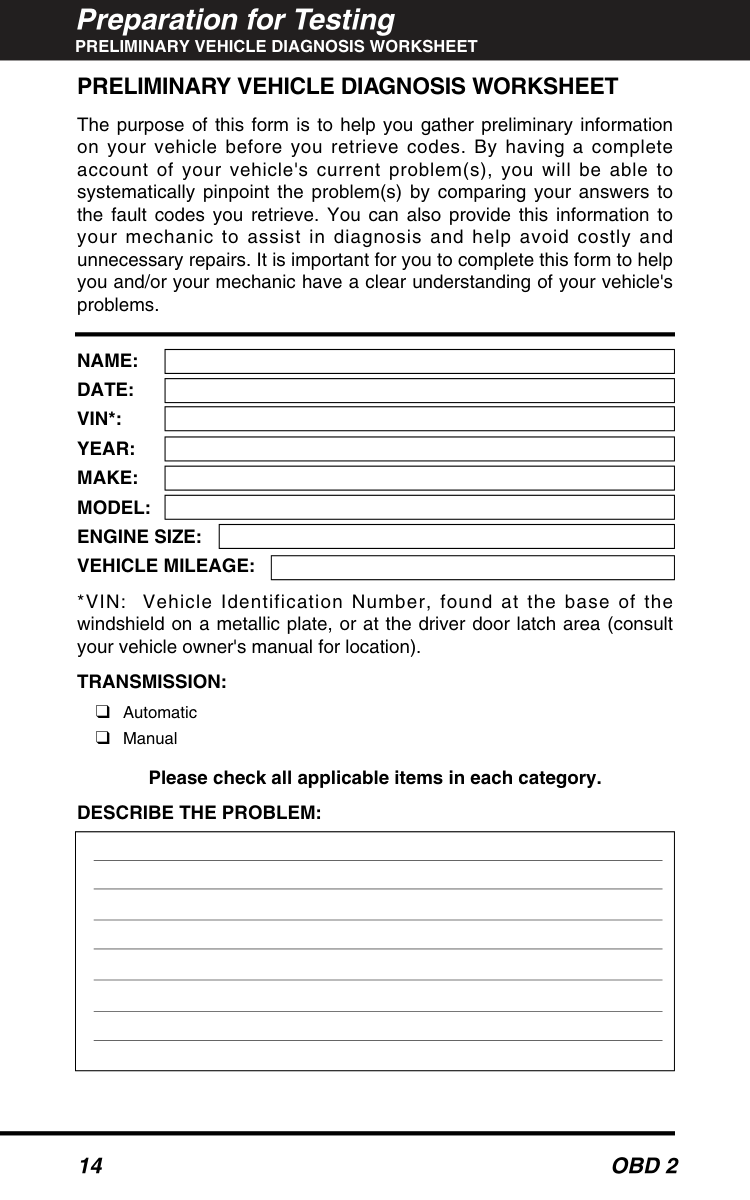
    The purpose of this form is to help you gather preliminary information on your vehicle before you retrieve codes. By having a complete account of your vehicle's current problem(s), you will be able to systematically pinpoint the problem(s) by comparing your answers to the fault codes you retrieve. You can also provide this information to your mechanic to assist in diagnosis and help avoid costly and unnecessary repairs. It is important for you to complete this form to help you and/or your mechanic have a clear understanding of your vehicle's problems.

    Name:

    Date:

    Vin*:

    Year:

    Make:

    Model:

    Engine Size:

    Vehicle Mileage:

    *VIN: Vehicle Identification Number, found at the base of the windshield on a metallic plate, or at the driver door latch area (consult your vehicle owner's manual for location).

    Transmission:

    ❑Automatic ❑Manual Please check all applicable items in each category.

    Describe The Problem:

    Page 17

    Preparation for Testing

    Preliminary Vehicle Diagnosis Worksheet

    Obd 2

    15

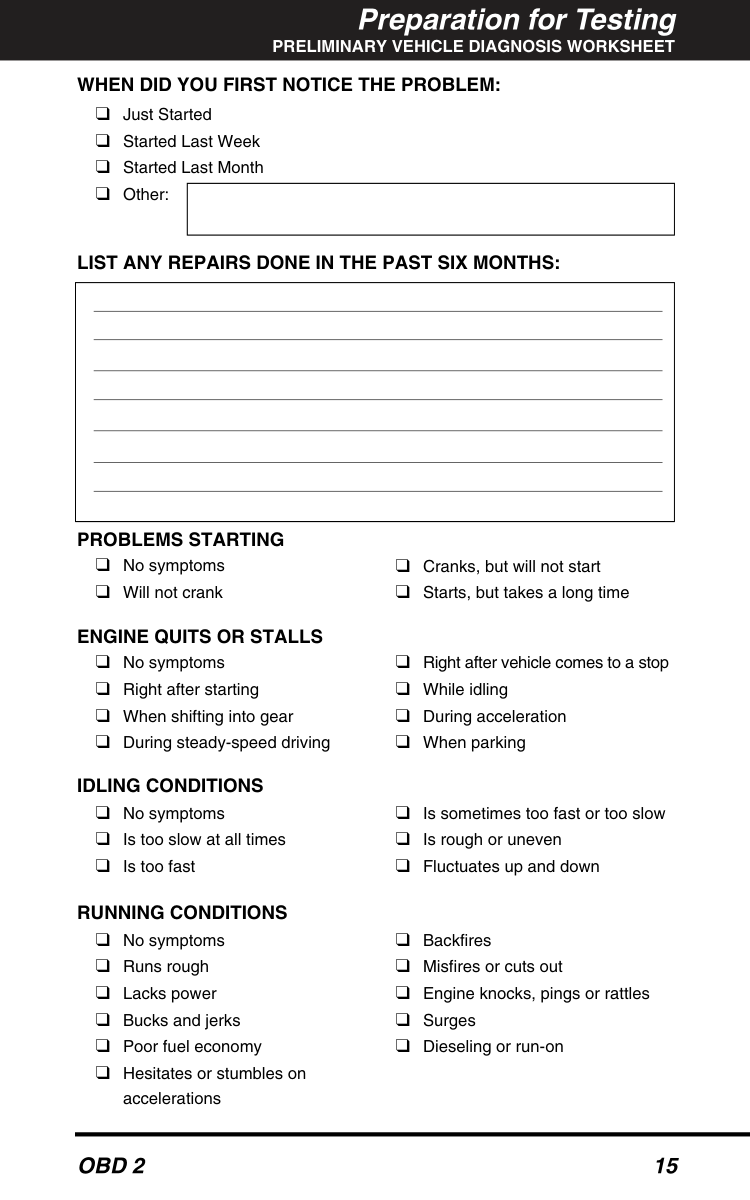
    When Did You First Notice The Problem:

    ❑Just Started ❑Started Last Week ❑Started Last Month ❑Other:

    List Any Repairs Done In The Past Six Months:

    Problems Starting

    Engine Quits Or Stalls

    Idling Conditions

    Running Conditions

    ❑No symptoms ❑Will not crank ❑Cranks, but will not start ❑Starts, but takes a long time ❑No symptoms ❑Right after starting ❑When shifting into gear ❑During steady-speed driving ❑Right after vehicle comes to a stop ❑While idling ❑During acceleration ❑When parking ❑No symptoms ❑Is too slow at all times ❑Is too fast ❑Is sometimes too fast or too slow ❑Is rough or uneven ❑Fluctuates up and down ❑No symptoms ❑Runs rough ❑Lacks power ❑Bucks and jerks ❑Poor fuel economy ❑Hesitates or stumbles on accelerations ❑Backfires ❑Misfires or cuts out ❑Engine knocks, pings or rattles ❑Surges ❑Dieseling or run-on

    Page 18

    Preparation for Testing

    Preliminary Vehicle Diagnosis Worksheet

    16

    Obd 2

    AUTOMATIC TRANSMISSION PROBLEMS (if applicable)

    Problem Occurs

    ❑Morning ❑Afternoon ❑ Anytime

    Engine Temperature When Problem Occurs

    ❑Cold ❑Warm ❑ Hot

    Driving Conditions When Problem Occurs

    Driving Habits

    Gasoline Used

    Weather Conditions When Problem Occurs

    Check Engine Light / Dash Warning Light

    ❑Sometimes ON ❑Always ON ❑ Never ON

    Peculiar Smells

    Strange Noises

    ❑Short - less than 2 miles ❑2 - 10 miles ❑Long - more than 10 miles ❑Stop and go ❑While turning ❑While braking ❑At gear engagement ❑With A/C operating ❑With headlights on ❑During acceleration ❑Mostly driving downhill ❑Mostly driving uphill ❑Mostly driving level ❑Mostly driving curvy roads ❑Mostly driving rough roads ❑Mostly city driving ❑Highway ❑Park vehicle inside ❑Park vehicle outside ❑Drive less than 10 miles per day ❑Drive 10 to 50 miles per day ❑Drive more than 50 miles per day ❑87 Octane ❑89 Octane ❑91 Octane ❑More than 91 Octane

    ❑32 - 55° F (0 - 13° C)

    ❑Below freezing (32° F / 0° C) ❑Above 55° F (13° C) ❑"Hot" ❑Sulfur ("rotten egg") ❑Burning rubber ❑Gasoline ❑Burning oil ❑Electrical ❑Rattle ❑Knock ❑Squeak ❑Other ❑No symptoms ❑Shifts too early or too late ❑Changes gear incorrectly ❑Vehicle does not move when in gear ❑Jerks or bucks

    Page 19

    Using Code Reader

    Code Retrieval Procedure

    Obd 2

    17

    Code Retrieval Procedure

    Never replace a part based only on the DTC definition. Each DTC has a set of testing procedures, instructions and flow charts that must be followed to confirm the location of the problem. This information is found in the vehicle's service manual. Always refer to the vehicle's service manual for detailed testing instructions. Check your vehicle thoroughly before performing any test. See Preparation for Testing on page 12 for details. ALWAYS observe safety precautions whenever working on a vehicle. See Safety Precautions on page 4 for more information.
  • Turn the ignition off.
  • Locate the vehicle's 16-pin Data Link
  • Connector (DLC). See page 7 for connector location. Some DLCs have a plastic cover that must be removed before connecting the Code Reader cable connector.
  • Turn the Code Reader off and connect the
  • Code Reader cable connector to the vehicle's DLC. The cable connector is keyed and will only fit one way. ■If you have problems connecting the cable connector to the DLC, rotate the connector 180° and try again. If you still have problems, check the DLC on the vehicle and on the Code Reader. Refer to your vehicle's service manual to properly check the vehicle's DLC. ■After the Code Reader's cable is successfully connected to the vehicle’s DLC, the Code Reader automatically turns “On” and establishes com- munication with the vehicle’s computer. The word “rEAd” will show on the LCD display. Proceed to step 4. Retrieving and using Diagnostic Trouble Codes (DTCs) for troubleshooting vehicle operation is only one part of an overall diagnostic strategy.

    Page 20

    Using Code Reader

    Code Retrieval Procedure

    18

    Obd 2

    ■If the Code Reader does not turn on automatically when connected to the vehicle, it indicates that there is no power at the vehicle's DLC. Check your fuse panel and replace any burned-out fuses. If replacing the fuse(s) does not correct the problem, consult your vehicle's repair manual to locate the proper computer (PCM) fuse/circuit. Perform any necessary repairs before continuing.
  • Turn the ignition on. DO NOT start the
  • engine. If the ignition key is not turned "ON" within 10 seconds after the Code Reader is connected to a vehicle, an “Error” mes- sage will show on the Code Reader's LCD display. At times, an error message may display after you turn the ignition key on. If this happens, wait for the Code Reader to automatically re-link to the vehicle's computer. ■After 10-60 seconds, the Code Reader will retrieve and display any diagnostic information (trouble codes, Monitor status) stored in the vehicle's computer memory. ■If the Code Reader does not retrieve vehicle diagnostic information and keeps cycling between "rEAd" and “Error” on the LCD display, it indicates that the Code Reader is unable to communicate with vehicle's computer. Do the following:
  • Turn the ignition key off, wait 10 seconds and turn the key
  • back on to reset the computer.
  • Make sure your vehicle is OBD 2 compliant. See VEHICLES
  • COVERED on page 6 for vehicle compliance verification information. If the Code Reader is interrupted or disconnected during code retrieval procedure, the screen will display "Error".
  • Read and interpret the Diagnostic Trouble Codes using the LCD
  • display and the green, yellow and red LEDs. The green, yellow and red LEDs are used (with the LCD display) as visual aids to make it easier for the user to determine engine system conditions.

    Page 21

    Using Code Reader

    Code Retrieval Procedure

    Obd 2

    19 ■Green LED - Indicates that all engine systems are "OK" and running normally. All monitors on the vehicle are active and are performing their diagnostic testing, and no trouble codes are present. A zero will show on Code Reader’s LCD display for further confirmation. ■Yellow LED - Indicates one of the following conditions: PENDING CODE PRESENT - If the yellow LED is lit, it may indicate the existence of a pending code. Check Code Reader’s LCD display for confirmation. A pending code is confirmed by the presence of a numeric code and the word PENDING on Code Reader’s LCD display. If no pending code is shown, the yellow LED indicates Monitor Status (see the following). See DIAGNOSTIC TROUBLE CODES (DTCs) on page 35 for more information about pending codes. MONITOR STATUS - If Code Reader’s LCD display shows a zero (indicating there are no DTCs present in the vehicle's computer), but the yellow LED is lit, it indicates a "Monitor Has Not Run" status. This means that some of the Monitors on the vehicle have not yet finished their diagnostic self-testing. This condition is confirmed by one or more blinking Monitor icons on the LCD display. A blinking Monitor icon means the Monitor has not yet run and finished its diagnostic self-testing. All Monitor icons that are solid have completed their diagnostic self-testing. For more information on Monitors, see “OBD 2 Monitors” on page 38. ■Red LED - Indicates there is a problem with one or more of the vehicle's systems. The red LED is also used to show that DTC(s) are present (displayed on Code Reader’s LCD display). In this case, the Multifunction Indicator (Check Engine) lamp on the vehicle's instrument panel will light steady on. Code Reader will automatically re-link to the vehicle's computer every 15 seconds to refresh the data being retrieved. When data is being refreshed, a single beep will sound, and "rEAd" will be shown on the LCD display for 5-6 seconds. Code Reader will then beep twice and return to displaying codes. This action repeats as long as Code Reader is in communication with the vehicle's computer. Code Reader will display a code only if codes are present in the vehicle's computer memory. If no codes are present, a "0" will be displayed. Code Reader is capable of retrieving and storing up to 32 codes in memory, for immediate or later viewing.

    Page 22

    Using Code Reader ERASING DIAGNOSTIC TROUBLE CODES (DTCs) 20
    Obd 2

  • If more than one code is present, press and release the SCROLL
  • button, as necessary, to display additional codes. ■Whenever the SCROLL function is used to view additional codes, Code Reader's communication link with the vehicle's computer disconnects. To re-establish communication, press the LINK button again. Freeze Frame data is always associated with the “Priority Code” (identified as Code #1 in the Code Reader’s display). If the FREEZE FRAME icon is lit when the “Priority Code” (Code #1) is displayed on the Code Reader’s screen, it indicates that there is Freeze Frame data associated with this code, and the vehicle’s computer has saved it in its memory.
  • To prolong battery life, Code Reader automatically turns "Off"
  • approximately one minute after it is disconnected from the vehicle. Retrieved codes remain in Code Reader's memory, and may be viewed at any time by turning the unit "On.” If Code Reader's batteries are removed, or if Code Reader is re-linked to a vehicle to retrieve codes, any codes currently in its memory are automatically cleared. Refer to page 45 for Diagnostic Trouble Code definitions. Match the retrieved DTC(s) with those listed. Read the associated definition(s), and see the vehicle's service manual for further evaluation. ERASING DIAGNOSTIC TROUBLE CODES (DTCs) When Code Reader’s ERASE function is used to erase the DTCs from the vehicle's on-board computer, "Freeze Frame" data and manufacturer-specific enhanced data are also erased. If you plan to take the vehicle to a Service Center for repair, DO NOT erase the codes from the vehicle's computer. If the codes are erased, valuable information that might help the technician troubleshoot the problem will also be erased. Erase DTCs from the computer's memory as follows: When DTCs are erased from the vehicle's computer memory, the I/M Readiness Monitor Status program resets status of all the Monitors to a not run "flashing" condition. To set all of the Monitors to a DONE status, an OBD 2 Drive Cycle must be performed. Refer to your vehicle's service manual for information on how to perform an OBD 2 Drive Cycle for the vehicle under test.

    Page 23

    Using Code Reader

    I/M Readiness Testing

    Obd 2

    21
  • Perform the Code Retrieval Procedure
  • as described on page 17.
  • Wait until the codes are displayed on
  • the Code Reader's LCD and then proceed to step 3.
  • Press and release Code Reader 's
  • Erase

    button. The LCD display will indicate "SurE" for your confirmation. ■If you change your mind and do not wish to erase the codes, press the

    Link

    button to return to the code retrieval function. ■If you wish to continue, press and release the ERASE button again. ■The LCD will display "donE" for a few seconds, and then will auto- matically enter the re-link (read) mode to confirm that all retrievable information including DTCs, have been successfully erased/cleared from the computer memory. ■If the erase was successful, the LCD display will show zero (0) codes, and some of the Monitors icons will be flashing to indicate that the Monitors have been re-set. Erasing DTCs does not fix the problem(s) that caused the code(s) to be set. If proper repairs to correct the problem that caused the code(s) to be set are not made, the code(s) will appear again (and the check engine light will illuminate) as soon as the vehicle is driven long enough for its Monitors to complete their testing.
    I/M Readiness Testing

    I/M is an Inspection and Maintenance program legislated by the Government to meet federal clean-air standards. The program requires that a vehicle be taken periodically to an Emissions Station for an "Emissions Test" or "Smog Check,” where the emissions-related components and systems are inspected and tested for proper operation. Emissions Tests are generally performed once a year, or once every two years.

    Page 24

    Using Code Reader

    I/M Readiness Testing

    22

    Obd 2

    On OBD 2 systems, the I/M program is enhanced by requiring vehicles to meet stricter test standards. One of the tests instituted by the Federal Government is called I/M 240. On I/M 240, the vehicle under test is driven under different speeds and load conditions on a dynamometer for 240 seconds, while the vehicle's emissions are measured. Emissions tests vary depending on the geographic or regional area in which the vehicle is registered. If the vehicle is registered in a highly urbanized area, the I/M 240 is probably the type of test required. If the vehicle is registered in a rural area, the stricter “dynamometer type” test may not be required. I/M Readiness Monitors I/M Readiness shows whether the various emissions-related systems on the vehicle are operating properly and are ready for Inspection and Maintenance testing. State and Federal Governments enacted Regulations, Procedures and Emission Standards to ensure that all emissions-related components and systems are continuously or periodically monitored, tested and diagnosed whenever the vehicle is in operation. It also requires vehicle manufacturers to automatically detect and report any problems or faults that may increase the vehicle's emissions to an unacceptable level. The vehicle's emissions control system consists of several components or sub-systems (Oxygen Sensor, Catalytic Converter, EGR, Fuel System, etc.) that aid in reducing vehicle emissions. To have an efficient Vehicle Emission Control System, all the emissions-related components and systems must work correctly whenever the vehicle is in operation. To comply with State and Federal Government regulations, vehicle manufacturers designed a series of special computer programs called "Monitors" that are programmed into the vehicle's computer. Each of these Monitors is specifically designed to run tests and diagnostics on a specific emissions-related component or system (Oxygen Sensor, Catalytic Converter, EGR Valve, Fuel System, etc.) to ensure their proper operation. Currently, there are a maximum of eleven Monitors available for use.

    Page 25

    Using Code Reader

    I/M Readiness Testing

    Obd 2

    23 Each Monitor has a specific function to test and diagnose only its designated emissions- related component or system. The names of the Monitors (Oxygen Sensor Monitor, Catalyst Monitor, EGR Monitor, Misfire Monitor, etc.) describe which component or system each Monitor is designed to test and diagnose. Emissions Inspection and Maintenance (I/M) Readiness Monitor Status Information I/M Readiness Monitor Status shows which of the vehicle's Monitors have run and completed their diagnosis and testing, and which ones have not yet run and completed testing and diagnosis of their designated sections of the vehicle's emissions system. ■If a Monitor was able to meet all the conditions required to enable it to perform the self-diagnosis and testing of its assigned engine system, it means the monitor "HAS RUN.” ■If a Monitor has not yet met all the conditions required for it to perform the self-diagnosis and testing of its assigned engine system; it means the Monitor "HAS NOT RUN.” The Monitor Run/Not Run status does not show whether or not a problem exists in a system. Monitor status only indicates whether a particular Monitor has or has not run and performed the self-diagnosis and testing of its associated system. Performing I/M Readiness Quick Check When a vehicle first comes from the factory, all Monitors indicate a DONE status. This indicates that all Monitors have run and completed their diagnostic testing. The DONE status remains in the computer's memory, unless the Diagnostic Trouble Codes are erased or the vehicle's computer memory is cleared. Code Reader allows you to retrieve Monitor/System Status Information to help you determine if the vehicle is ready for an Emissions Test (Smog Check). In addition to retrieving Diagnostic Trouble Codes, Code Reader also retrieves Monitor Run/Not Run To learn more about Emissions Inspection and Maintenance (I/M) Readiness Monitors, see OBD 2 MONITORS on page 38.

    Page 26

    Using Code Reader

    I/M Readiness Testing

    24

    Obd 2

    status. This information is very important since different areas of the state/country have different emissions laws and regulations concerning Monitor Run/Not Run status. Before an Emissions Test (Smog Check) can be performed, your vehicle must meet certain rules, requirements and procedures legislated by the Federal and state (country) governments where you live.
  • In most areas, one of the requirements that must be met before a
  • vehicle is allowed to be Emissions Tested (Smog Checked) is that the vehicle does not have any Diagnostic Trouble Codes present (with the exception of PENDING Diagnostic Trouble Codes).
  • In addition to the requirement that no Diagnostic Trouble Codes be
  • present, some areas also require that all the Monitors that a particular vehicle supports indicate a "Has Run" status condition before an Emissions Check may be performed.
  • Other areas may only require that some (but not all) Monitors
  • indicate a "Has Run" status before an Emissions Test (Smog Check) may be performed. Monitors with a "Has Run" status indicate that all the required conditions they needed to perform diagnosis and testing of their assigned engine area (system) have been met, and all diagnostic testing has completed successfully. Monitors with a "Has Not Run" status have not yet met the conditions they need to perform diagnosis and testing of their assigned engine area (system), and have not been able to perform diagnostic testing on that system. The green, yellow and red LEDs provide a quick way to help you determine if a vehicle is ready for an Emissions Test (Smog Check). Follow the instructions below to perform the Quick Check. Perform the Code Retrieval Procedure as described on page 17, then interpret the LED indications as follows: Interpreting I/M Readiness Test Results
  • GREEN LED - Indicates that all engine
  • systems are "OK" and operating normally (all Monitors supported by the vehicle have run and performed their self-diagnostic testing). The vehicle is ready for an Emissions Test (Smog Check), and there is a good possibility that it can be certified.

    Page 27

    Using Code Reader

    I/M Readiness Testing

    Obd 2

    25
  • YELLOW LED - Determine from the Code Retrieval Procedure
  • (page 17) which of the two possible conditions is causing the yellow LED to light. ■If a "PENDING" Diagnostic Trouble Code is causing the yellow LED to light, it is possible that the vehicle will be allowed to be tested for emissions and certified. Currently, most areas (states / countries) will allow an Emissions Test (Smog Check) to be performed if the only code in the vehicle's computer is a "PENDING" Diagnostic Trouble Code. ■If no running Monitors are causing the yellow LED to light, then the issue of the vehicle being ready for an Emissions Test (Smog Check) depends on the emissions regulations and laws of your local area.
  • Some areas require that all Monitors indicate a "Has Run"
  • status before they allow an Emissions Test (Smog Check) to be performed. Other areas only require that some, but not all, Monitors have run their self-diagnostic testing before an Emissions Test (Smog Check) may be performed. From the code retrieval procedure, determine the status of each Monitor (a solid Monitor icon shows Monitor "Has Run" status, a flashing Monitor icon indicates "Has Not Run" status). Take this information to an emissions professional to determine (based on your test results) if your vehicle is ready for an Emissions Test (Smog Check).
  • RED LED - Indicates there is a problem with one or more of the
  • vehicle's systems. A vehicle displaying a red LED is definitely not ready for an Emissions Test (Smog Check). The red LED is also an indication that there are Diagnostic Trouble Code(s) present (displayed on the Code Reader's screen). The Multifunction Indicator (Check Engine) Lamp on the vehicle's instrument panel will light steady on. The problem that is causing the red LED to light must be repaired before an Emissions Test (Smog Check) can be performed. It is also suggested that the vehicle be inspected/repaired before driving the vehicle further. If the Red LED was obtained, there is a definite problem present in the system(s). In these cases, you have the following options.

    Page 28

    Using Code Reader

    I/M Readiness Testing

    26

    Obd 2

    ■Repair the vehicle yourself. If you are going to perform the repairs yourself, proceed by reading the vehicle service manual and following all its procedures and recommendations. ■Take the vehicle to a professional to have it serviced. The problem(s) causing the red LED to light must be repaired before the vehicle is ready for an Emissions Test (Smog Check). Using the I/M Readiness Monitor Status to Confirm a Repair The I/M Readiness Monitor Status function can be used (after repair of a fault has been performed) to confirm that the repair has been performed correctly, and/or to check for Monitor Run Status. Use the following procedure to determine I/M Readiness Monitor Status:
  • Using retrieved Diagnostic Trouble Codes (DTCs) and code
  • definitions as a guide, and following manufacturer's repair procedures, repair the fault or faults as instructed.
  • After the fault or faults have been repaired, connect Code Reader
  • to the vehicle's DLC and erase the code or codes from the vehicle's computer memory. ■See page 20 for procedures to erase DTCs from the vehicle's on-board computer. ■Write the codes down on a piece of paper for reference before erasing.
  • After the erase procedure is performed, most of the Monitor icons
  • on the Code Reader's LCD display will be flashing. Leave Code Reader connected to the vehicle, and perform a Trip Drive Cycle for each "flashing" Monitor: Misfire, Fuel and Comprehensive Component Monitors run continuously and their icons will always be on solid, even after the erase function is performed. ■Each DTC is associated with a specific Monitor. Consult the vehicle's service manual to identify the Monitor (or Monitors) associated with the faults that were repaired. Follow the manufacturer's procedures to perform a Trip Drive Cycle for the appropriate Monitors. ■While observing the Monitor icons on Code Reader's LCD display, perform a Trip Drive Cycle for the appropriate Monitor or Monitors. If the vehicle needs to be driven in order to perform a Trip Drive Cycle, ALWAYS have a second person help you. One person should drive the vehicle while the other person observes the Monitor icons on Code Reader for Monitor RUN status. Trying to drive and observe Code Reader at the same time is dangerous, and could cause a serious traffic accident.

    Page 29

    Using Code Reader

    What’S Next?

    Obd 2

    27
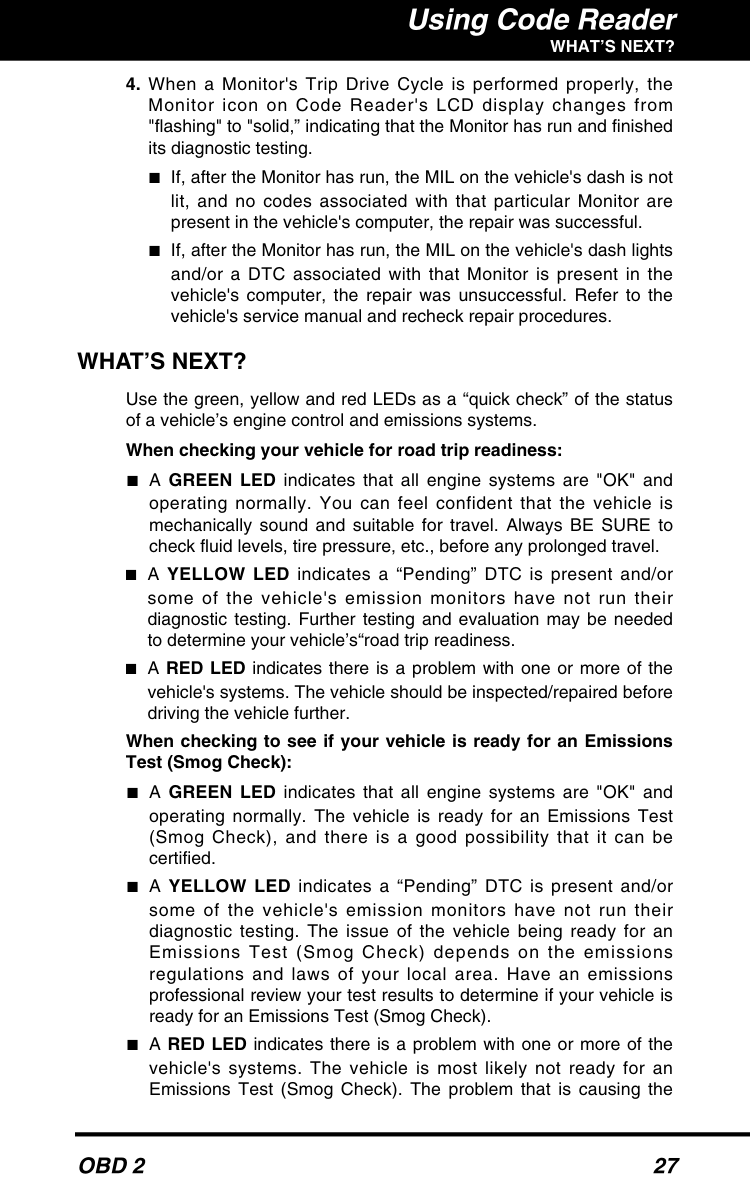
  • When a Monitor's Trip Drive Cycle is performed properly, the
  • Monitor icon on Code Reader's LCD display changes from "flashing" to "solid,” indicating that the Monitor has run and finished its diagnostic testing. ■If, after the Monitor has run, the MIL on the vehicle's dash is not lit, and no codes associated with that particular Monitor are present in the vehicle's computer, the repair was successful. ■If, after the Monitor has run, the MIL on the vehicle's dash lights and/or a DTC associated with that Monitor is present in the vehicle's computer, the repair was unsuccessful. Refer to the vehicle's service manual and recheck repair procedures.

    What’S Next?

    Use the green, yellow and red LEDs as a “quick check” of the status of a vehicle’s engine control and emissions systems. When checking your vehicle for road trip readiness: ■A GREEN LED indicates that all engine systems are "OK" and operating normally. You can feel confident that the vehicle is mechanically sound and suitable for travel. Always BE SURE to check fluid levels, tire pressure, etc., before any prolonged travel. ■A YELLOW LED indicates a “Pending” DTC is present and/or some of the vehicle's emission monitors have not run their diagnostic testing. Further testing and evaluation may be needed to determine your vehicle’s“road trip readiness. ■A RED LED indicates there is a problem with one or more of the vehicle's systems. The vehicle should be inspected/repaired before driving the vehicle further. When checking to see if your vehicle is ready for an Emissions Test (Smog Check): ■A GREEN LED indicates that all engine systems are "OK" and operating normally. The vehicle is ready for an Emissions Test (Smog Check), and there is a good possibility that it can be certified. ■A YELLOW LED indicates a “Pending” DTC is present and/or some of the vehicle's emission monitors have not run their diagnostic testing. The issue of the vehicle being ready for an Emissions Test (Smog Check) depends on the emissions regulations and laws of your local area. Have an emissions professional review your test results to determine if your vehicle is ready for an Emissions Test (Smog Check). ■A RED LED indicates there is a problem with one or more of the vehicle's systems. The vehicle is most likely not ready for an Emissions Test (Smog Check). The problem that is causing the

    Page 30

    Using Code Reader

    What’S Next?

    28

    Obd 2

    red LED to light must be repaired before an Emissions Test (Smog Check) can be performed. It is also suggested that the vehicle be inspected/repaired before driving the vehicle further. When inspecting a used vehicle before buying or selling: ■A GREEN LED indicates that all emissions-related systems are "OK" and operating normally. You can feel confident that these vehicle systems are mechanically sound. Always BE SURE to check other vehicle systems NOT covered by Code Reader (transmission, brakes, etc.) as well as the vehicle’s service record before buying or selling a vehicle. ■A YELLOW LED indicates a “Pending” DTC is present and/or some of the vehicle's emission monitors have not run their diagnostic testing. Further testing and evaluation may be needed to determine the vehicle’s actual condition. ■A RED LED indicates there is a problem with one or more of the vehicle's systems. It is recommended that you take the vehicle qualified service technician for further diagnosis. If no codes were retrieved and/or the green lights, and all your vehicle’s Monitors show a “Has Run” status, you’re “good to go.” You can feel confident that: ■The systems and components monitored by your vehicle’s on- board computer are in good working order and running properly. ■Your vehicle should pass an Emissions Test (Smog Check) without problem. If codes were retrieved and/or the yellow or red LEDs light, you can choose to: ■Fix the problem yourself: If you choose to fix the problem yourself, read and follow all of the vehicle service manual’s recommendations and procedures. ■Take your vehicle to an Automotive Service Center for repair: Take your vehicle, a copy of the completed Preliminary Vehicle Diagnosis Worksheet (see page 14) and codes retrieved to your technician for evaluation. This will show your technician that you are an informed motorist and will also assist him in pinpointing the location of the problem as a starting point for needed repairs. If the red LED lights after retrieving codes or performing an I/M Readiness inspection, it is suggested that the vehicle be inspected/repaired before driving the vehicle further.

    Page 31

    Obd 2

    29 Learning More

    Computer Engine Controls

    Computer Engine Controls

    The Introduction of Electronic Engine Controls As a result of increased air pollution (smog) in large cities, such as Los Angeles, the California Air Resources Board (CARB) and the Environmental Protection Agency (EPA) set new regulations and air pollution standards to deal with the problem. To further complicate matters, the energy crisis of the early 1970s caused a sharp increase in fuel prices over a short period. As a result, vehicle manufacturers were not only required to comply with the new emissions standards, they also had to make their vehicles more fuel- efficient. Most vehicles were required to meet a miles-per-gallon (MPG) standard set by the U.S. Federal Government. Precise fuel delivery and spark timing are needed to reduce vehicle emissions. Mechanical engine controls in use at the time (such as ignition points, mechanical spark advance and the carburetor) responded too slowly to driving conditions to properly control fuel delivery and spark timing. This made it difficult for vehicle manufacturers to meet the new standards. A new Engine Control System had to be designed and integrated with the engine controls to meet the stricter standards. The new system had to: ■Respond instantly to supply the proper mixture of air and fuel for any driving condition (idle, cruising, low-speed driving, high-speed driving, etc.). ■Calculate instantly the best time to "ignite" the air/fuel mixture for maximum engine efficiency. ■Perform both these tasks without affecting vehicle performance or fuel economy. Vehicle Computer Control Systems can perform millions of calculations each second. This makes them an ideal substitute for the slower mechanical engine controls. By switching from mechanical to electronic engine controls, vehicle manufacturers are able to control fuel delivery and spark timing more precisely. Some newer Computer Control Systems also provide control over other vehicle functions, such as transmission, brakes, charging, body, and suspension systems. Electronic Computer Control Systems make it possible for vehicle manufacturers to comply with the tougher emissions and fuel efficiency standards mandated by State and Federal Governments.

    Page 32

    30

    Obd 2

    Learning More

    Computer Engine Controls

    The Basic Engine Computer Control System The on-board computer is the heart of the Computer Control System. The computer contains several programs with preset reference values for air/fuel ratio, spark or ignition timing, injector pulse width, engine speed, etc. Separate values are provided for various driving conditions, such as idle, low speed driving, high-speed driving, low load, or high load. The preset reference values represent the ideal air/fuel mixture, spark timing, transmission gear selection, etc., for any driving condition. These values are programmed by the vehicle manufacturer, and are specific to each vehicle model. Most on-board computers are located inside the vehicle behind the dashboard, under the passenger's or driver's seat, or behind the right kick panel. However, some manufacturers may still position it in the engine compartment. Vehicle sensors, switches, and actuators are located throughout the engine, and are connected by electrical wiring to the on-board computer. These devices include oxygen sensors, coolant temperature sensors, throttle position sensors, fuel injectors, etc. Sensors and switches are input devices. They provide signals representing current engine operating conditions to the computer. Actuators are output devices. They perform actions in response to commands received from the computer. The on-board computer receives information inputs from sensors and switches located throughout the engine. These devices monitor critical engine conditions such as coolant temperature, engine speed, engine load, throttle position, air/fuel ratio etc. The Computer Control System consists of an on-board computer and several related control devices (sensors, switches, and actuators).

    Output Devices

    Fuel Injectors Idle Air Control EGR Valve Ignition Module On-Board Computer

    Input Devices

    Coolant Temperature Sensor Throttle Position Sensor Fuel Injectors

    Input Devices

    Oxygen Sensors

    Typical Computer

    Control System

    Page 33

    Obd 2

    31 Learning More

    Computer Engine Controls

    The computer compares the values received from these sensors with its preset reference values, and makes corrective actions as needed so that the sensor values always match the preset reference values for the current driving condition. The computer makes adjustments by commanding other devices such as the fuel injectors, idle air control, EGR valve or Ignition Module to perform these actions. Vehicle operating conditions are constantly changing. The computer continuously makes adjustments or corrections (especially to the air/fuel mixture and spark timing) to keep all the engine systems operating within the preset reference values. On-Board Diagnostics - First Generation (OBD 1) Beginning in 1988, California's Air Resources Board (CARB), and later the Environmental Protection Agency (EPA) required vehicle manufacturers to include a self- diagnostic program in their on-board computers. The program would be capable of identifying emissions-related faults in a system. The first generation of Onboard Diagnostics came to be known as OBD 1. OBD 1 is a set of self-testing and diagnostic instructions programmed into the vehicle's on-board computer. The programs are specifically designed to detect failures in the sensors, actuators, switches and wiring of the various vehicle emissions-related systems. If the computer detects a failure in any of these components or systems, it lights an indicator on the dashboard to alert the driver. The indicator lights only when an emissions-related problem is detected. The computer also assigns a numeric code for each specific problem that it detects, and stores these codes in its memory for later retrieval. These codes can be retrieved from the computer's memory with the use of a "Code Reader" or a "Scan Tool.” With the exception of some 1994 and 1995 vehicles, most vehicles from 1982 to 1995 are equipped with OBD 1 systems.

    Page 34

    32

    Obd 2

    Learning More

    Computer Engine Controls

    On-Board Diagnostics - Second Generation (OBD 2) In addition to performing all the functions of the OBD 1 System, the OBD 2 System has been enhanced with new Diagnostic Programs. These programs closely monitor the functions of various emissions-related components and systems (as well as other systems) and make this information readily available (with the proper equipment) to the technician for evaluation. The California Air Resources Board (CARB) conducted studies on OBD 1 equipped vehicles. The information that was gathered from these studies showed the following: ■A large number of vehicles had deteriorating or degraded emissions-related components. These components were causing an increase in emissions. ■Because OBD 1 systems only detect failed components, the degraded components were not setting codes. ■Some emissions problems related to degraded components only occur when the vehicle is being driven under a load. The emission checks being conducted at the time were not performed under simulated driving conditions. As a result, a significant number of vehicles with degraded components were passing Emissions Tests. ■Codes, code definitions, diagnostic connectors, communication protocols and emissions terminology were different for each manufacturer. This caused confusion for the technicians working on different make and model vehicles. To address the problems made evident by this study, CARB and the EPA passed new laws and standardization requirements. These laws required that vehicle manufacturers to equip their new vehicles with devices capable of meeting all of the new emissions standards and regulations. It was also decided that an enhanced on-board diagnostic system, capable of addressing all of these problems, was needed. This new system is known as "On-Board Diagnostics Generation Two (OBD 2).” The primary objective of the OBD 2 system is to comply with the latest regulations and emissions standards established by CARB and the EPA. The OBD 2 System is an enhancement of the OBD 1 System.

    Page 35

    Obd 2

    33 Learning More

    Computer Engine Controls

    The Main Objectives of the OBD 2 System are: ■To detect degraded and/or failed emissions-related components or systems that could cause tailpipe emissions to exceed by 1.5 times the Federal Test Procedure (FTP) standard. ■To expand emissions-related system monitoring. This includes a set of computer run diagnostics called Monitors. Monitors perform diagnostics and testing to verify that all emissions-related components and/or systems are operating correctly and within the manufacturer's specifications. ■To use a standardized Diagnostic Link Connector (DLC) in all vehicles. (Before OBD 2, DLCs were of different shapes and sizes.) ■To standardize the code numbers, code definitions and language used to describe faults. (Before OBD 2, each vehicle manufacturer used their own code numbers, code definitions and language to describe the same faults.) ■To expand the operation of the Malfunction Indicator Lamp (MIL). ■To standardize communication procedures and protocols between the diagnostic equipment (Scan Tools, Code Readers etc.) and the vehicle's on-board computer. OBD 2 Terminology The following terms and their definitions are related to OBD 2 systems. Read and reference this list as needed to aid in the understanding of OBD 2 systems. ■Powertrain Control Module (PCM) - The PCM is the OBD 2 accepted term for the vehicle's "on-board computer.” In addition to controlling the engine management and emissions systems, the PCM also participates in controlling the powertrain (transmission) operation. Most PCMs also have the ability to communicate with other computers on the vehicle (ABS, ride control, body etc.). ■Monitor - Monitors are "diagnostic routines" programmed into the PCM. The PCM utilizes these programs to run diagnostic tests, and to monitor operation of the vehicle's emissions-related components or systems to ensure they are operating correctly and within the vehicle's manufacturer specifications. Currently, up to eleven Monitors are used in OBD 2 systems. Additional Monitors will be added as the OBD 2 system is further developed. Not all vehicles support all eleven Monitors.

    Page 36

    34

    Obd 2

    Learning More

    Computer Engine Controls

    ■Enabling Criteria - Each Monitor is designed to test and monitor the operation of a specific part of the vehicle's emissions system (EGR system, oxygen sensor, catalytic converter, etc.). A specific set of "conditions" or "driving procedures" must be met before the computer can command a Monitor to run tests on its related system. These "conditions" are known as "Enabling Criteria.” The requirements and procedures vary for each Monitor. Some Monitors only require the ignition key to be turned "On" for them to run and complete their diagnostic testing. Others may require a set of complex procedures, such as, starting the vehicle when cold, bringing it to operating temperature, and driving the vehicle under specific conditions before the Monitor can run and complete its diagnostic testing. ■Monitor Has/Has Not Run - The terms "Monitor has run" or "Monitor has not run" are used throughout this manual. "Monitor has run,” means the PCM has commanded a particular Monitor to perform the required diagnostic testing on a system to ensure the system is operating correctly (within factory specifications). The term "Monitor has not run" means the PCM has not yet commanded a particular Monitor to perform diagnostic testing on its associated part of the emissions system. ■Trip - A Trip for a particular Monitor requires that the vehicle is driven in such a way that all the "Enabling Criteria" for the Monitor to run and complete its diagnostic testing are met. The "Trip Drive Cycle" for a particular Monitor begins when the ignition key is turned "On.” It is successfully completed when all the "Enabling Criteria" for the Monitor to run and complete its diagnostic testing are met by the time the ignition key is turned "Off.” Since each of the eleven monitors is designed to run diagnostics and testing on a different part of the engine or emissions system, the "Trip Drive Cycle" needed for each individual Monitor to run and complete varies. ■OBD 2 Drive Cycle - An OBD 2 Drive Cycle is an extended set of driving procedures that takes into consideration the various types of driving conditions encountered in real life. These conditions may include starting the vehicle when it is cold, driving the vehicle at a steady speed (cruising), accelerating, etc. An OBD 2 Drive Cycle begins when the ignition key is turned "On" (when cold) and ends when the vehicle has been driven in such a way as to have all the "Enabling Criteria" met for all its applicable Monitors. Only those trips that provide the Enabling Criteria for all Monitors applicable to the vehicle to run and complete their individual diagnostic tests qualify as an OBD 2 Drive Cycle. OBD 2 Drive Cycle requirements vary from one model of vehicle to another. Vehicle manufacturers set these procedures. Consult your vehicle's service manual for OBD 2 Drive Cycle procedures.

    Page 37

    Obd 2

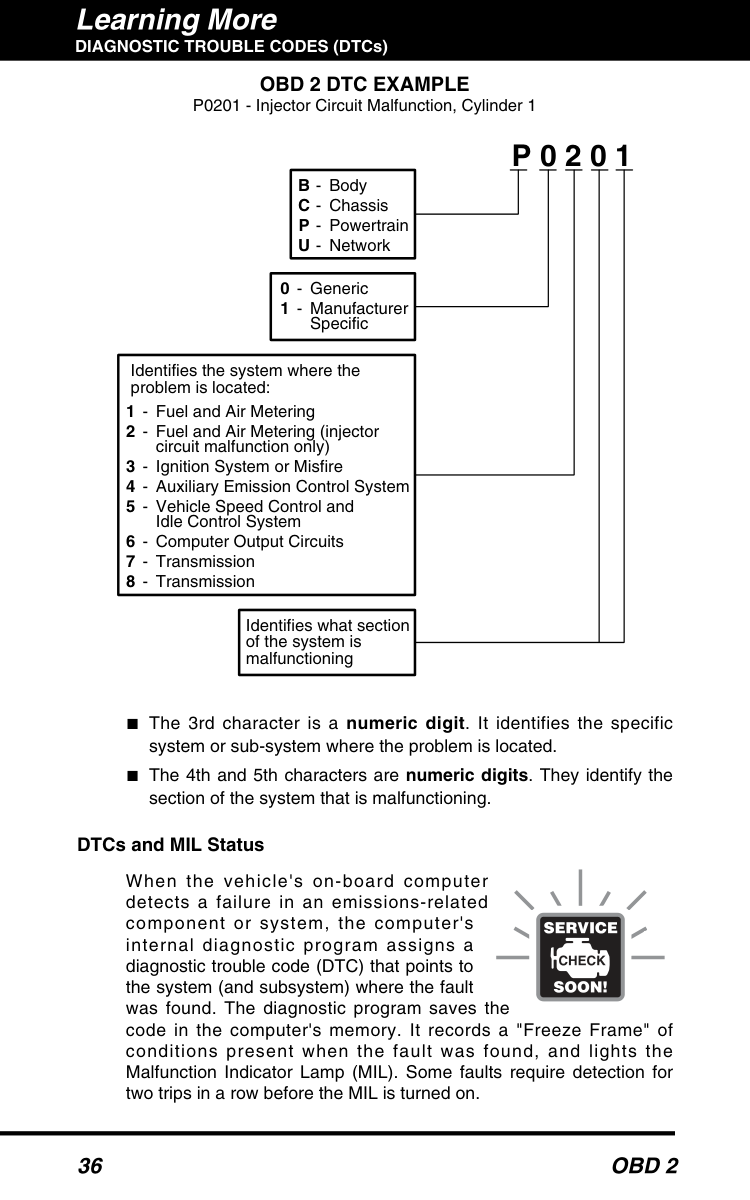
    35 Learning More DIAGNOSTIC TROUBLE CODES (DTCs) Do not confuse a "Trip" Drive Cycle with an OBD 2 Drive Cycle. A Trip Drive Cycle provides the "Enabling Criteria" for one specific Monitor to run and complete its diagnostic testing. An OBD 2 Drive Cycle must meet the "Enabling Criteria" for all Monitors on a particular vehicle to run and complete their diagnostic testing. ■Warm-up Cycle - Vehicle operation after an engine off period where engine temperature rises at least 40°F (22°C) from its temperature before starting, and reaches at least 160°F (70°C). The PCM uses warm-up cycles as a counter to automatically erase a specific code and related data from its memory. When no faults related to the original problem are detected within a specified number of warm-up cycles, the code is erased automatically. DIAGNOSTIC TROUBLE CODES (DTCs) Diagnostic Trouble Codes (DTCs) are meant to guide you to the proper service procedure in the vehicle's service manual. DO NOT replace parts based only on DTCs without first consulting the vehicle's service manual for proper testing procedures for that particular system, circuit or component. DTCs are alphanumeric codes that are used to identify a problem that is present in any of the systems that are monitored by the on-board computer (PCM). Each trouble code has an assigned message that identifies the circuit, component or system area where the problem was found. OBD 2 diagnostic trouble codes are made up of five characters: ■The 1st character is a letter. It identifies the "main system" where the fault occurred (Body, Chassis, Powertrain, or Network). ■The 2nd character is a numeric digit. It identifies the "type" of code (Generic or Manufacturer-Specific). Generic DTCs are codes that are used by all vehicle manufacturers. The standards for generic DTCs, as well as their definitions, are set by the Society of Automotive Engineers (SAE). Manufacturer-Specific DTCs are codes that are controlled by the vehicle manufacturer. The Federal Government does not require manufacturer-specific codes in order to comply with the new OBD 2 emissions standards. However, manufacturers are free to expand beyond the required codes to make their systems easier to diagnose. Diagnostic Trouble Codes (DTCs) are codes that identify a specific problem area.

    Page 38

    36

    Obd 2

    Learning More DIAGNOSTIC TROUBLE CODES (DTCs) ■The 3rd character is a numeric digit. It identifies the specific system or sub-system where the problem is located. ■The 4th and 5th characters are numeric digits. They identify the section of the system that is malfunctioning. DTCs and MIL Status When the vehicle's on-board computer detects a failure in an emissions-related component or system, the computer's internal diagnostic program assigns a diagnostic trouble code (DTC) that points to the system (and subsystem) where the fault was found. The diagnostic program saves the code in the computer's memory. It records a "Freeze Frame" of conditions present when the fault was found, and lights the Malfunction Indicator Lamp (MIL). Some faults require detection for two trips in a row before the MIL is turned on.

    P 0 2 0 1

    B

    C

    P

    U

  • -
  • -
  • Body Chassis Powertrain Network
  • -
  • Generic Manufacturer Specific 0 1 Identifies what section of the system is malfunctioning Identifies the system where the problem is located: 1 2

    3 4 5

    6 7 8

  • -
  • -
  • -
  • -
  • Fuel and Air Metering Fuel and Air Metering (injector circuit malfunction only) Ignition System or Misfire Auxiliary Emission Control System Vehicle Speed Control and Idle Control System Computer Output Circuits Transmission Transmission

    Obd 2 Dtc Example

    P0201 - Injector Circuit Malfunction, Cylinder 1

    Page 39

    Obd 2

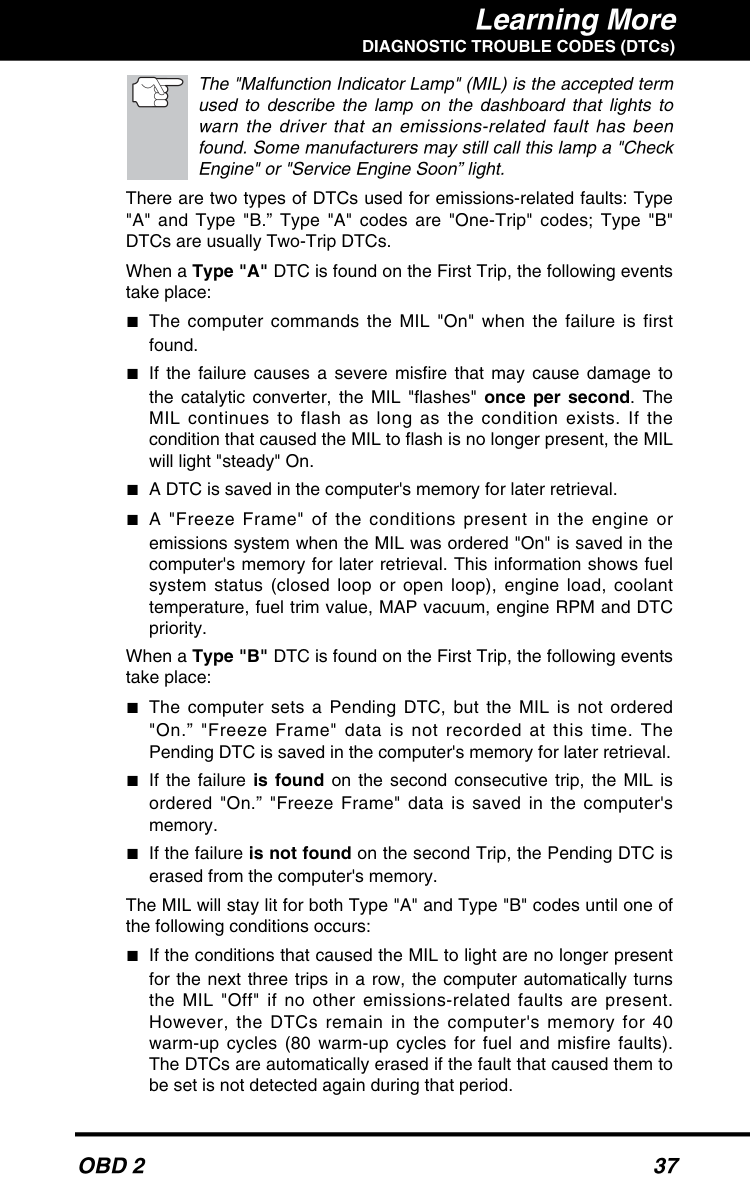
    37 Learning More DIAGNOSTIC TROUBLE CODES (DTCs) The "Malfunction Indicator Lamp" (MIL) is the accepted term used to describe the lamp on the dashboard that lights to warn the driver that an emissions-related fault has been found. Some manufacturers may still call this lamp a "Check Engine" or "Service Engine Soon” light. There are two types of DTCs used for emissions-related faults: Type "A" and Type "B.” Type "A" codes are "One-Trip" codes; Type "B" DTCs are usually Two-Trip DTCs. When a Type "A" DTC is found on the First Trip, the following events take place: ■The computer commands the MIL "On" when the failure is first found. ■If the failure causes a severe misfire that may cause damage to the catalytic converter, the MIL "flashes" once per second. The MIL continues to flash as long as the condition exists. If the condition that caused the MIL to flash is no longer present, the MIL will light "steady" On. ■A DTC is saved in the computer's memory for later retrieval. ■A "Freeze Frame" of the conditions present in the engine or emissions system when the MIL was ordered "On" is saved in the computer's memory for later retrieval. This information shows fuel system status (closed loop or open loop), engine load, coolant temperature, fuel trim value, MAP vacuum, engine RPM and DTC priority. When a Type "B" DTC is found on the First Trip, the following events take place: ■The computer sets a Pending DTC, but the MIL is not ordered "On.” "Freeze Frame" data is not recorded at this time. The Pending DTC is saved in the computer's memory for later retrieval. ■If the failure is found on the second consecutive trip, the MIL is ordered "On.” "Freeze Frame" data is saved in the computer's memory. ■If the failure is not found on the second Trip, the Pending DTC is erased from the computer's memory. The MIL will stay lit for both Type "A" and Type "B" codes until one of the following conditions occurs: ■If the conditions that caused the MIL to light are no longer present for the next three trips in a row, the computer automatically turns the MIL "Off" if no other emissions-related faults are present. However, the DTCs remain in the computer's memory for 40 warm-up cycles (80 warm-up cycles for fuel and misfire faults). The DTCs are automatically erased if the fault that caused them to be set is not detected again during that period.

    Page 40

    38

    Obd 2

    Learning More

    Obd 2 Monitors

    ■Misfire and fuel system faults require three trips with "similar conditions" before the MIL is turned "Off.” These are trips where the engine load, RPM and temperature are similar to the conditions present when the fault was first found. After the MIL has been turned off, DTCs, Freeze Frame data, and manufacturer-specific enhanced data stay in the computer's memory. This data can only be retrieved by using equipment such as a Scan Tool. ■Erasing the DTCs from the computer's memory can also turn off the MIL. See ERASING DIAGNOSTIC TROUBLE CODES (DTCs) on page 20, before erasing codes from the computer's memory. If a Code Reader or Scan Tool is used to erase the codes, Freeze Frame data as well as other manufacturer-specific enhanced data will also be erased.

    Obd 2 Monitors

    To ensure the correct operation of the various emissions-related components and systems, a diagnostic program was developed and installed in the vehicle's on-board computer. The program has several procedures and diagnostic strategies. Each procedure or diagnostic strategy is made to monitor the operation of, and run diagnostic tests on, a specific emissions-related component or system. These tests ensure the system is running correctly and is within the manufacturer's specifications. On OBD 2 systems, these procedures and diagnostic strategies are called "Monitors.” Currently, a maximum of eleven Monitors are used in OBD 2 systems. Additional monitors may be added as a result of Government regulations as the OBD 2 system grows and matures. Not all vehicles use all eleven Monitors. Monitor operation is either "Continuous" or "Non-Continuous,” depending on the specific monitor. Continuous Monitors Three of these Monitors are designed to constantly monitor their associated components and/or systems for proper operation. Continuous Monitors run constantly when the engine is running. The Continuous Monitors are:
  • Comprehensive Component Monitor (CCM)
  • Misfire Monitor
  • Fuel System Monitor
  • Non-Continuous Monitors The other eight Monitors are "non-continuous" Monitors. "Non- continuous" Monitors perform and complete their testing once per trip. The "non-continuous" Monitors are:

    Page 41

    Obd 2

    39 Learning More

    Obd 2 Monitors

  • Oxygen Sensor Monitor
  • Oxygen Sensor Heater Monitor
  • Catalyst Monitor
  • Heated Catalyst Monitor
  • EGR System Monitor
  • EVAP System Monitor
  • Secondary Air System Monitor
  • Air Conditioning (A/C) Monitor
  • The following provides a brief explanation of the function of each Monitor: ■Comprehensive Component Monitor (CCM) - This Monitor continuously checks all inputs and outputs from sensors, actuators, switches and other devices that provide a signal to the computer. The Monitor checks for shorts, opens, out of range value, functionality and “rationality.” Rationality: Each input signal is compared against all other inputs and against information in the computer's memory to see if it makes sense under the current operating conditions. Example: The signal from the throttle position sensor indicates the vehicle is in a wide- open throttle condition, but the vehicle is really at idle, and the idle condition is confirmed by the signals from all other sensors. Based on the input data, the computer determines that the signal from the throttle position sensor is not rational (does not make sense when compared to the other inputs). In this case, the signal would fail the rationality test. The CCM may be either a "One-Trip" or a "Two-Trip" Monitor, depending on the component. ■Fuel System Monitor - This Monitor uses a Fuel System Correction program, called Fuel Trim, inside the on-board computer. Fuel Trim is a set of positive and negative values that represent adding or subtracting fuel from the engine. This program is used to correct for a lean (too much air/not enough fuel) or rich (too much fuel/not enough air) air-fuel mixture. The program is designed to add or subtract fuel, as needed, up to a certain percent. If the correction needed is too large and exceeds the time and percent allowed by the program, a fault is indicated by the computer. The Fuel System Monitor may be a "One-Trip" or "Two-Trip" Monitor, depending on the severity of the problem.

    Page 42

    40

    Obd 2

    Learning More

    Obd 2 Monitors

    ■Misfire Monitor - This Monitor continuously checks for engine misfires. A misfire occurs when the air-fuel mixture in the cylinder does not ignite. The misfire Monitor uses changes in crankshaft speed to sense an engine misfire. When a cylinder misfires, it no longer contributes to the speed of the engine, and engine speed decreases each time the affected cylinder(s) misfire. The misfire Monitor is designed to sense engine speed fluctuations and determine from which cylinder(s) the misfire is coming, as well as how bad the misfire is. There are three types of engine misfires, Types 1, 2, and 3.
  • Type 1 and Type 3 misfires are two-trip monitor faults. If a fault
  • is sensed on the first trip, the computer temporarily saves the fault in its memory as a Pending Code. The MIL is not commanded on at this time. If the fault is found again on the second trip, under similar conditions of engine speed, load and temperature, the computer commands the MIL "On,” and the code is saved in its long term memory.
  • Type 2 misfires are the most severe type of misfire. When a Type
  • 2 misfire is sensed on the first trip, the computer commands the MIL to light when the misfire is sensed. If the computer determines that a Type 2 misfire is severe , and may cause catalytic converter damage, it commands the MIL to "flash" once per second as soon as the misfire is sensed. When the misfire is no longer present, the MIL reverts to steady "On" condition. ■Catalyst Monitor - The catalytic converter is a device that is installed downstream of the exhaust manifold. It helps to oxidize (burn) the unburned fuel (hydrocarbons) and partially burned fuel (carbon monoxide) left over from the combustion process. To accomplish this, heat and catalyst materials inside the converter react with the exhaust gases to burn the remaining fuel. Some materials inside the catalytic converter also have the ability to store oxygen, and release it as needed to oxidize hydrocarbons and carbon monoxide. In the process, it reduces vehicle emissions by converting the polluting gases into carbon dioxide and water. The computer checks the efficiency of the catalytic converter by monitoring the oxygen sensors used by the system. One sensor is located before (upstream of) the converter; the other is located after (downstream of) the converter. If the catalytic converter loses its ability to store oxygen, the downstream sensor signal voltage becomes almost the same as the upstream sensor signal. In this case, the monitor fails the test. The Catalyst Monitor is a "Two-Trip" Monitor. If a fault is found on the first trip, the computer temporarily saves the fault in its memory as a Pending Code. The computer does not command the MIL on at this time. If the fault is sensed again on the second trip, the computer commands the MIL "On" and saves the code in its long- term memory.

    Page 43

    Obd 2

    41 Learning More

    Obd 2 Monitors

    ■Heated Catalyst Monitor - Operation of the "heated" catalytic converter is similar to the catalytic converter. The main difference is that a heater is added to bring the catalytic converter to its operating temperature more quickly. This helps reduce emissions by reducing the converter's down time when the engine is cold. The Heated Catalyst Monitor performs the same diagnostic tests as the catalyst Monitor, and also tests the catalytic converter's heater for proper operation. This Monitor is also a "Two-Trip" Monitor. ■Exhaust Gas Recirculation (EGR) Monitor - The Exhaust Gas Recirculation (EGR) system helps reduce the formation of Oxides of Nitrogen during combustion. Temperatures above 2500°F cause nitrogen and oxygen to combine and form Oxides of Nitrogen in the combustion chamber. To reduce the formation of Oxides of Nitrogen, combustion temperatures must be kept below 2500°F. The EGR system recirculates small amounts of exhaust gas back into the intake manifold, where it is mixed with the incoming air/fuel mixture. This reduces combustion temperatures by up to 500°F. The computer determines when, for how long, and how much exhaust gas is recirculated back to the intake manifold. The EGR Monitor performs EGR system function tests at preset times during vehicle operation. The EGR Monitor is a "Two-Trip" Monitor. If a fault is found on the first trip, the computer temporarily saves the fault in its memory as a Pending Code. The computer does not command the MIL on at this time. If the fault is sensed again on the second trip, the computer commands the MIL "On,” and saves the code in its long- term memory. ■Evaporative System (EVAP) Monitor - OBD 2 vehicles are equipped with a fuel Evaporative system (EVAP) that helps prevent fuel vapors from evaporating into the air. The EVAP system carries fumes from the fuel tank to the engine where they are burned during combustion. The EVAP system may consist of a charcoal canister, fuel tank cap, purge solenoid, vent solenoid, flow monitor, leak detector and connecting tubes, lines and hoses. Fumes are carried from the fuel tank to the charcoal canister by hoses or tubes. The fumes are stored in the charcoal canister. The computer controls the flow of fuel vapors from the charcoal canister to the engine via a purge solenoid. The computer energizes or de- energizes the purge solenoid (depending on solenoid design). The purge solenoid opens a valve to allow engine vacuum to draw the fuel vapors from the canister into the engine where the vapors are burned. The EVAP Monitor checks for proper fuel vapor flow to the engine, and pressurizes the system to test for leaks. The computer runs this Monitor once per trip. The EVAP Monitor is a "Two-Trip" Monitor. If a fault is found on the first trip, the computer temporarily saves the fault in its memory as a Pending Code. The computer does not command the MIL on at this time. If the fault is sensed again on the second trip, the PCM com- mands the MIL "On,” and saves the code in its long-term memory.
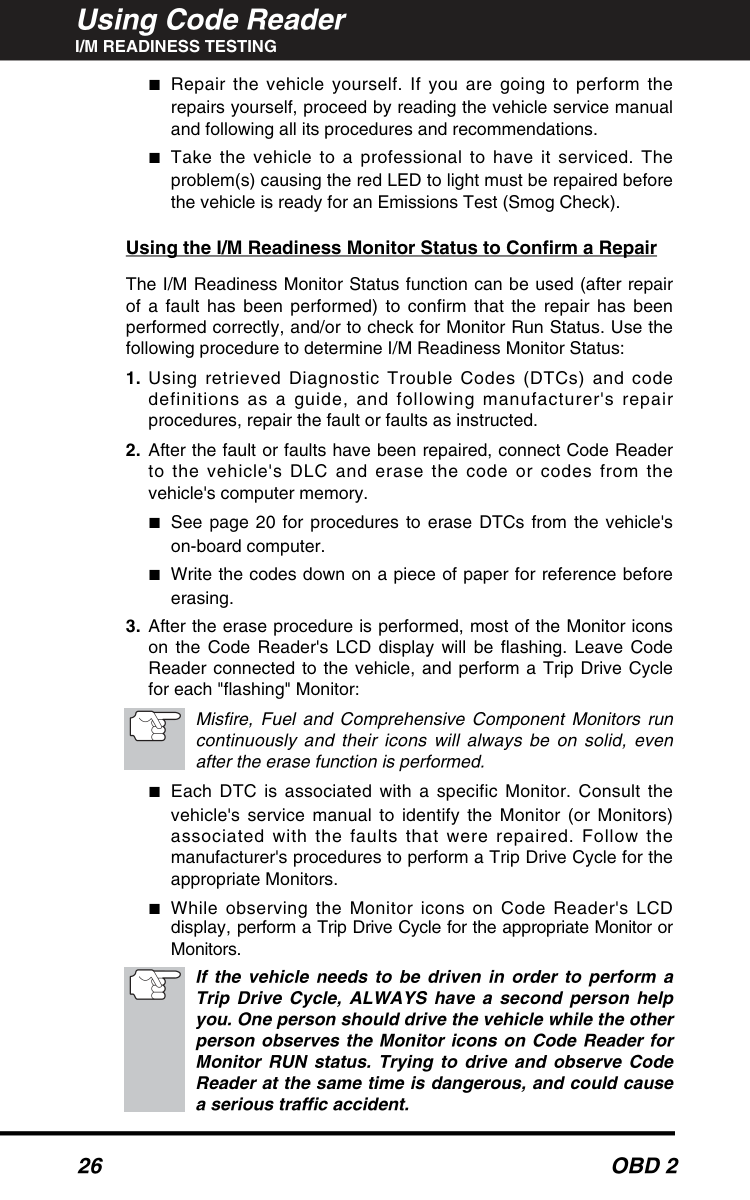
    Page 44

    42

    Obd 2

    Learning More

    Obd 2 Monitors

    ■Air Conditioning (A/C) Monitor - The A/C Monitor senses leaks in air conditioning systems that utilize R-12 refrigerant. Vehicle manufacturers have been given two options:
  • Use R-12 refrigerant in their A/C systems, and integrate an A/C
  • Monitor in the OBD 2 systems of these vehicles to detect for refrigerant leaks; or
  • Use R-134 refrigerant instead of R12. The A/C Monitor is not
  • required on these vehicles. To date, all vehicle manufacturers have opted to use R-134 in their A/C systems. As a result, this Monitor has not yet been implemented. ■Oxygen Sensor Heater Monitor - The Oxygen Sensor Heater Monitor tests the operation of the oxygen sensor's heater. There are two modes of operation on a computer-controlled vehicle: "open-loop" and "closed-loop.” The vehicle operates in open-loop when the engine is cold, before it reaches normal operating temperature. The vehicle also goes to open-loop mode at other times, such as heavy load and full throttle conditions. When the vehicle is running in open-loop, the oxygen sensor signal is ignored by the computer for air/fuel mixture corrections. Engine efficiency during open-loop operation is very low, and results in the production of more vehicle emissions. Closed-loop operation is the best condition for both vehicle emissions and vehicle operation. When the vehicle is operating in closed-loop, the computer uses the oxygen sensor signal for air/fuel mixture corrections. In order for the computer to enter closed-loop operation, the oxygen sensor must reach a temperature of at least 600°F. The oxygen sensor heater helps the oxygen sensor reach and maintain its minimum operating temperature (600° F) more quickly, to bring the vehicle into closed-loop operation as soon as possible. The Oxygen Sensor Heater Monitor is a "Two-Trip" Monitor. If a fault is found on the first trip, the computer temporarily saves the fault in its memory as a Pending Code. The computer does not command the MIL on at this time. If the fault is sensed again on the second trip, the computer commands the MIL "On,” and saves the code in its long-term memory. ■Oxygen Sensor Monitor - The Oxygen Sensor monitors how much oxygen is in the vehicle's exhaust. It generates a varying voltage of up to one volt, based on how much oxygen is in the exhaust gas, and sends the signal to the computer. The computer uses this signal to make corrections to the air/fuel mixture. If the exhaust gas has a large amount of oxygen (a lean air/fuel mixture), the oxygen sensor generates a "low" voltage signal. If the exhaust gas has very little oxygen (a rich mixture condition), the oxygen sensor generates a "high" voltage signal. A 450mV signal indicates the most efficient, and least polluting, air/fuel ratio of 14.7 parts of air to one part of fuel.

    Page 45

    Obd 2

    43 Learning More

    Obd 2 Monitors

    The oxygen sensor must reach a temperature of at least 600- 650°F, and the engine must reach normal operating temperature, for the computer to enter into closed-loop operation. The oxygen sensor only functions when the computer is in closed-loop. A properly operating oxygen sensor reacts quickly to any change in oxygen content in the exhaust stream. A faulty oxygen sensor reacts slowly, or its voltage signal is weak or missing. The oxygen sensor is a "Two-Trip" monitor. If a fault is found on the first trip, the computer temporarily saves the fault in its memory as a Pending Code. The computer does not command the MIL on at this time. If the fault is sensed again on the second trip, the computer commands the MIL "On,” and saves the code in its long- term memory. ■Secondary Air System Monitor - When a cold engine is first started, it runs in open-loop mode. During open-loop operation, the engine usually runs rich. A vehicle running rich wastes fuel and creates increased emissions, such as carbon monoxide and some hydrocarbons. A Secondary Air System injects air into the exhaust stream to aid catalytic converter operation:
  • It supplies the catalytic converter with the oxygen it needs to
  • oxidize the carbon monoxide and hydrocarbons left over from the combustion process during engine warm-up.
  • The extra oxygen injected into the exhaust stream also helps
  • the catalytic converter reach operating temperature more quickly during warm-up periods. The catalytic converter must heat to operating temperature to work properly. The Secondary Air System Monitor checks for component integrity and system operation, and tests for faults in the system. The computer runs this Monitor once per trip. The Secondary Air System Monitor is a "Two-Trip" monitor. If a fault is found on the first trip, the computer temporarily saves this fault in its memory as a Pending Code. The computer does not command the MIL on at this time. If the fault is sensed again on the second trip, the computer commands the MIL "On,” and saves the code in its long-term memory.

    Page 46

    44

    Obd 2

    Learning More

    Obd 2 Monitors

    OBD 2 Reference Table The table below lists current OBD 2 Monitors, and indicates the following for each Monitor: A Monitor Type (how often does the Monitor run; Continuous or Once per trip) B Number of trips needed, with a fault present, to set a pending DTC C Number of consecutive trips needed, with a fault present, to command the MIL “On” and store a DTC D Number of trips needed, with no faults present, to erase a Pending

    Dtc

    E Number and type of trips or drive cycles needed, with no faults present, to turn off the MIL F Number of warm-up periods needed to erase the DTC from the computer’s memory after the MIL is turned off Name of Monitor

    A

    B

    C

    D

    E

    F

    Comprehensive Continuous 1 2 1 3 40 Component Monitor Misfire Monitor Continuous 1 2 1 3 - similar 80 (Type 1 and 3) conditions Misfire Monitor Continuous 1 3 - similar 80 (Type 2) conditions Fuel System Continuous 1 1 or 2 1 3 - similar 80 Monitor conditions Catalytic Converter Once per 1 2 1 3 trips 40 Monitor trip Oxygen Sensor Once per 1 2 1 3 trips 40 Monitor trip Oxygen Sensor Once per 1 2 1 3 trips 40 Heater Monitor trip Exhaust Gas Once per 1 2 1 3 trips 40 Recirculation (EGR) trip Monitor Evaporative Once per 1 2 1 3 trips 40 Emissions Controls trip Monitor Secondary Air Once per 1 2 1 3 trips 40 System (AIR) trip Monitor

    Page 47

    DTC Definitions

    Diagnostic Trouble Code Definitions

    Obd 2

    45

    Diagnostic Trouble Code Definitions

    This section provides the most complete lists of DTC definitions available at the time of publication. OBD 2 is an evolving system; new codes and definitions are added as the system grows. ALWAYS check your vehicle's service manual for code definitions that are not listed here.This section contains both "Generic" and "Manufacturer Specific" DTC definitions: • OBD 2 Powertrain "Generic" DTC Definitions apply to all makes and models of import and domestic vehicles that are "OBD 2 COMPLIANT.” These DTCs always start with "P0.” • OBD 2 Powertrain "Manufacturer Specific" DTC Definitions apply only to vehicles made by a specific manufacturer. These DTCs always start with "P1.” Some codes may have more than one definition. BE SURE to use the correct definition for your vehicle make, model and year. This manual provides "Manufacturer Specific" DTC definitions for CHRYSLER, FORD, GENERAL MOTORS, HONDA and TOYOTA only. For DTC definitions that are not in these lists, and/or for Body, Chassis and Network DTC definitions, reference your vehicle's service manual.

    Page 48

    DTC Definitions

    Generic (P0010 - P0057)

    46

    Obd 2

    Generic Dtc Definitions

    Code Definition

    P0010

    "A" Camshaft Position - Actuator Circuit (Bank 1)

    P0011

    "A" Camshaft Position - Timing Over-Advanced or System Performance (Bank 1)

    P0012

    "A" Camshaft Position - Timing Over-Retarded (Bank 1)

    P0013

    "B" Camshaft Position - Actuator Circuit (Bank 1)

    P0014

    "B" Camshaft Position - Timing Over-Advanced or System Performance (Bank 1)

    P0015

    "B" Camshaft Position - Timing Over-Retarded (Bank 1)

    P0020

    "A" Camshaft Position - Actuator Circuit (Bank 2)

    P0021

    "A" Camshaft Position - Timing Over-Advanced or System Performance (Bank 2)

    P0022

    "A" Camshaft Position - Timing Over-Retarded (Bank 2)

    P0023

    "B" Camshaft Position - Actuator Circuit (Bank 2)

    P0024

    "B" Camshaft Position - Timing Over-Advanced or System Performance (Bank 2)

    P0025

    "B" Camshaft Position - Timing Over-Retarded (Bank 2)

    P0030

    HO2S Heater Control Circuit (Bank 1 Sensor 1)

    P0031

    HO2S Heater Control Circuit Low (Bank 1 Sensor 1)

    P0032

    HO2S Heater Control Circuit High (Bank 1 Sensor 1)

    P0033

    Turbo Charger Bypass Valve Control Circuit

    P0034

    Turbo Charger Bypass Valve Control Circuit Low

    P0035

    Turbo Charger Bypass Valve Control Circuit High

    P0036

    HO2S Heater Control Circuit (Bank 1 Sensor 2)

    P0037

    HO2S Heater Control Circuit Low (Bank 1 Sensor 2)

    P0038

    HO2S Heater Control Circuit High (Bank 1 Sensor 2)

    P0042

    HO2S Heater Control Circuit (Bank 1 Sensor 3)

    P0043

    HO2S Heater Control Circuit Low (Bank 1 Sensor 3)

    P0044

    HO2S Heater Control Circuit High (Bank 1 Sensor 3)

    P0050

    HO2S Heater Control Circuit (Bank 2 Sensor 1)

    P0051

    HO2S Heater Control Circuit Low (Bank 2 Sensor 1)

    P0052

    HO2S Heater Control Circuit High (Bank 2 Sensor 1)

    P0056

    HO2S Heater Control Circuit (Bank 2 Sensor 2)

    P0057

    HO2S Heater Control Circuit Low (Bank 2 Sensor 2)

    Page 49

    DTC Definitions

    Generic (P0058 - P0106)

    Obd 2

    47 Code Definition

    P0058

    HO2S Heater Control Circuit High (Bank 2 Sensor 2)

    P0062

    HO2S Heater Control Circuit (Bank 2 Sensor 3)

    P0063

    HO2S Heater Control Circuit Low (Bank 2 Sensor 3)

    P0064

    HO2S Heater Control Circuit High (Bank 2 Sensor 3)

    P0065

    Air Assisted Injector Control Range/Performance

    P0066

    Air Assisted Injector Control Circuit or Circuit Low

    P0067

    Air Assisted Injector Control Circuit High

    P0070

    Ambient Air Temperature Sensor Circuit

    P0071

    Ambient Air Temperature Sensor Range/Performance

    P0072

    Ambient Air Temperature Sensor Circuit Low Input

    P0073

    Ambient Air Temperature Sensor Circuit High Input

    P0074

    Ambient Air Temperature Sensor Circuit Intermittent

    P0075

    Intake Valve Control Solenoid Circuit (Bank 1)

    P0076

    Intake Valve Control Solenoid Circuit Low (Bank 1)

    P0077

    Intake Valve Control Solenoid Circuit High (Bank 1)

    P0078

    Exhaust Valve Control Solenoid Circuit (Bank 1)

    P0079

    Exhaust Valve Control Solenoid Circuit Low (Bank 1)

    P0080

    Exhaust Valve Control Solenoid Circuit High (Bank 1)

    P0081

    Intake Valve Control Solenoid Circuit (Bank 2)

    P0082

    Intake Valve Control Solenoid Circuit Low (Bank 2)

    P0083

    Intake Valve Control Solenoid Circuit High (Bank 2)

    P0084

    Exhaust Valve Control Solenoid Circuit (Bank 2)

    P0085

    Exhaust Valve Control Solenoid Circuit Low (Bank 2)

    P0086

    Exhaust Valve Control Solenoid Circuit High (Bank 2)

    P0100

    Mass or Volume Air Flow Circuit Malfunction

    P0101

    Mass or Volume Circuit Range Performance Problem

    P0102

    Mass or Volume Circuit Low Input

    P0103

    Mass or Volume Circuit High Input

    P0104

    Mass or Volume Circuit Intermittent

    P0105

    Manifold Absolute Pressure/Barometric Pressure Circuit Malfunction

    P0106

    Manifold Absolute Pressure/Barometric Pressure Circuit Range/Performance Problem

    Page 50

    DTC Definitions

    Generic (P0107 - P0136)

    48

    Obd 2

    Code Definition

    P0107

    Manifold Absolute Pressure/Barometric Pressure Circuit Low Input

    P0108

    Manifold Absolute Pressure/Barometric Pressure Circuit High Input

    P0109

    Manifold Absolute Pressure/Barometric Pressure Circuit Intermittent

    P0110

    Intake Air Temperature Circuit Malfunction

    P0111

    Intake Air Temperature Circuit Range/Performance Problem

    P0112

    Intake Air Temperature Circuit Low Input

    P0113

    Intake Air Temperature Circuit High Input

    P0114

    Intake Air Temperature Circuit Intermittent

    P0115

    Engine Coolant Temperature Circuit Malfunction

    P0116

    Engine Coolant Temperature Circuit Range/Performance Problem

    P0117

    Engine Coolant Temperature Circuit Low Input

    P0118

    Engine Coolant Temperature Circuit High Input

    P0119

    Engine Coolant Temperature Circuit Intermittent

    P0120

    Throttle/Pedal Position Sensor/Switch A Circuit Malfunction

    P0121

    Throttle/Pedal Position Sensor/Switch A Circuit Range/ Performance Problem

    P0122

    Throttle/Pedal Position Sensor/Switch A Circuit Low Input

    P0123

    Throttle/Pedal Position Sensor/Switch A Circuit High Input

    P0124

    Throttle/Pedal Position Sensor/Switch A Circuit Intermittent

    P0125

    Insufficient Coolant Temperature for Closed Loop Fuel Control

    P0126

    Insufficient Coolant Temperature for Stable Operation

    P0127

    Intake Air Temperature Too High

    P0128

    Coolant Thermostat (Coolant Temperature Below Thermostat Regulating Temperature)

    P0130

    O2 Sensor Circuit Malfunction (Bank 1 Sensor 1)

    P0131

    O2 Sensor Circuit Low Voltage (Bank 1 Sensor 1)

    P0132

    O2 Sensor Circuit High Voltage (Bank 1 Sensor 1)

    P0133

    O2 Sensor Circuit Slow Response (Bank 1 Sensor 1)

    P0134

    O2 Sensor Circuit No Activity Detected (Bank 1 Sensor 1)

    P0135

    O2 Sensor Heater Circuit Malfunction (Bank 1 Sensor 1)

    P0136

    O2 Sensor Circuit Malfunction (Bank 1 Sensor 2)

    Page 51

    DTC Definitions

    Generic (P0137 - P0170)

    Obd 2

    49 Code Definition

    P0137

    O2 Sensor Circuit Low Voltage (Bank 1 Sensor 2)

    P0138

    O2 Sensor Circuit High Voltage (Bank 1 Sensor 2)

    P0139

    O2 Sensor Circuit Slow Response (Bank 1 Sensor 2)

    P0140

    O2 Sensor Circuit No Activity Detected (Bank 1 Sensor 2)

    P0141

    O2 Sensor Heater Circuit Malfunction (Bank 1 Sensor 2)

    P0142

    O2 Sensor Circuit Malfunction (Bank 1 Sensor 3)

    P0143

    O2 Sensor Circuit Low Voltage (Bank 1 Sensor 3)

    P0144

    O2 Sensor Circuit High Voltage (Bank 1 Sensor 3)

    P0145

    O2 Sensor Circuit Slow Response (Bank 1 Sensor 3)

    P0146

    O2 Sensor Circuit No Activity Detected (Bank 1 Sensor 3)

    P0147

    O2 Sensor Heater Circuit Malfunction (Bank 1 Sensor 3)

    P0148

    Fuel Delivery Error

    P0149

    Fuel Timing Error

    P0150

    O2 Sensor Circuit Malfunction (Bank 2 Sensor 1)

    P0151

    O2 Sensor Circuit Low Voltage (Bank 2 Sensor 1)

    P0152

    O2 Sensor Circuit High Voltage (Bank 2 Sensor 1)

    P0153

    O2 Sensor Circuit Slow Response (Bank 2 Sensor 1)

    P0154

    O2 Sensor Circuit No Activity Detected (Bank 2 Sensor 1)

    P0155

    O2 Sensor Heater Circuit Malfunction (Bank 2 Sensor 1)

    P0156

    O2 Sensor Circuit Malfunction (Bank 2 Sensor 2)

    P0157

    O2 Sensor Circuit Low Voltage (Bank 2 Sensor 2)

    P0158

    O2 Sensor Circuit High Voltage (Bank 2 Sensor 2)

    P0159

    O2 Sensor Circuit Slow Response (Bank 2 Sensor 2)

    P0160

    O2 Sensor Circuit No Activity Detected (Bank 2 Sensor 2)

    P0161

    O2 Sensor Heater Circuit Malfunction (Bank 2 Sensor 2)

    P0162

    O2 Sensor Circuit Malfunction (Bank 2 Sensor 3)

    P0163

    O2 Sensor Circuit Low Voltage (Bank 2 Sensor 3)

    P0164

    O2 Sensor Circuit High Voltage (Bank 2 Sensor 3)

    P0165

    O2 Sensor Circuit Slow Response (Bank 2 Sensor 3)

    P0166

    O2 Sensor Circuit No Activity Detected (Bank 2 Sensor 3)

    P0167

    O2 Sensor Heater Circuit Malfunction (Bank 2 Sensor 3)

    P0168

    Fuel Temperature Too High

    P0169

    Incorrect Fuel Composition

    P0170

    Fuel Trim Malfunction (Bank 1)

    Page 52

    DTC Definitions

    Generic (P0171 - P0204)

    50

    Obd 2

    Code Definition

    P0171

    System too Lean (Bank 1)

    P0172

    System too Rich (Bank 1)

    P0173

    Fuel Trim Malfunction (Bank 2)

    P0174

    System too Lean (Bank 2)

    P0175

    System too Rich (Bank 2)

    P0176

    Fuel Composition Sensor Circuit Malfunction

    P0177

    Fuel Composition Sensor Circuit Range/Performance

    P0178

    Fuel Composition Sensor Circuit Low Input

    P0179

    Fuel Composition Sensor Circuit High Input

    P0180

    Fuel Temperature Sensor A Circuit Malfunction

    P0181

    Fuel Temperature Sensor A Circuit Range/Performance

    P0182

    Fuel Temperature Sensor A Circuit Low Input

    P0183

    Fuel Temperature Sensor A Circuit High Input

    P0184

    Fuel Temperature Sensor A Circuit Intermittent

    P0185

    Fuel Temperature Sensor B Circuit Malfunction

    P0186

    Fuel Temperature Sensor B Circuit Range/Performance

    P0187

    Fuel Temperature Sensor B Circuit Low Input

    P0188

    Fuel Temperature Sensor B Circuit High Input

    P0189

    Fuel Temperature Sensor B Circuit Intermittent

    P0190

    Fuel Rail Pressure Sensor Circuit Malfunction

    P0191

    Fuel Rail Pressure Sensor Circuit Range/Performance

    P0192

    Fuel Rail Pressure Sensor Circuit Low Input

    P0193

    Fuel Rail Pressure Sensor Circuit High Input

    P0194

    Fuel Rail Pressure Sensor Circuit Intermittent

    P0195

    Engine Oil Temperature Sensor Malfunction

    P0196

    Engine Oil Temperature Sensor Range/Performance

    P0197

    Engine Oil Temperature Sensor Low

    P0198

    Engine Oil Temperature Sensor High

    P0199

    Engine Oil Temperature Sensor Intermittent

    P0200

    Injector Circuit Malfunction

    P0201

    Injector Circuit Malfunction - Cylinder 1

    P0202

    Injector Circuit Malfunction - Cylinder 2

    P0203

    Injector Circuit Malfunction - Cylinder 3

    P0204

    Injector Circuit Malfunction - Cylinder 4

    Page 53

    DTC Definitions

    Generic (P0205 - P0236)

    Obd 2

    51 Code Definition

    P0205

    Injector Circuit Malfunction - Cylinder 5

    P0206

    Injector Circuit Malfunction - Cylinder 6

    P0207

    Injector Circuit Malfunction - Cylinder 7

    P0208

    Injector Circuit Malfunction - Cylinder 8

    P0209

    Injector Circuit Malfunction - Cylinder 9

    P0210

    Injector Circuit Malfunction - Cylinder 10

    P0211

    Injector Circuit Malfunction - Cylinder 11

    P0212

    Injector Circuit Malfunction - Cylinder 12

    P0213

    Cold Start Injector 1 Malfunction

    P0214

    Cold Start Injector 2 Malfunction

    P0215

    Engine Shutoff Solenoid Malfunction

    P0216

    Injection Timing Control Circuit Malfunction

    P0217

    Engine Overtemp Condition

    P0218

    Transmission Over Temperature Condition

    P0219

    Engine Overspeed Condition

    P0220

    Throttle/Pedal Position Sensor/Switch B Circuit Malfunction

    P0221

    Throttle/Pedal Position Sensor/Switch B Circuit Range/ Performance Problem

    P0222

    Throttle/Pedal Position Sensor/Switch B Circuit Low Input

    P0223

    Throttle/Pedal Position Sensor/Switch B Circuit High Input

    P0224

    Throttle/Pedal Position Sensor/Switch B Circuit Intermittent

    P0225

    Throttle/Pedal Position Sensor/Switch C Circuit Malfunction

    P0226

    Throttle/Pedal Position Sensor/Switch C Circuit Range/ Performance Problem

    P0227

    Throttle/Pedal Position Sensor/Switch C Circuit Low Input

    P0228

    Throttle/Pedal Position Sensor/Switch C Circuit High Input

    P0229

    Throttle/Pedal Position Sensor/Switch C Circuit Intermittent

    P0230

    Fuel Pump Primary Circuit Malfunction

    P0231

    Fuel Pump Secondary Circuit Low

    P0232

    Fuel Pump Secondary Circuit High

    P0233

    Fuel Pump Secondary Circuit Intermittent

    P0234

    Engine Overboost Condition

    P0235

    Turbocharger Boost Sensor A Circuit Malfunction

    P0236

    Turbocharger Boost Sensor A Circuit Range/Performance

    Page 54

    DTC Definitions

    Generic (P0237 - P0270)

    52

    Obd 2

    Code Definition

    P0237

    Turbocharger Boost Sensor A Circuit Low

    P0238

    Turbocharger Boost Sensor A Circuit High

    P0239

    Turbocharger Boost Sensor B Circuit Malfunction

    P0240

    Turbocharger Boost Sensor B Circuit Range/Performance

    P0241

    Turbocharger Boost Sensor B Circuit Low

    P0242

    Turbocharger Boost Sensor B Circuit High

    P0243

    Turbocharger Wastegate Solenoid A Malfunction

    P0244

    Turbocharger Wastegate Solenoid A Range/Performance

    P0245

    Turbocharger Wastegate Solenoid A Low

    P0246

    Turbocharger Wastegate Solenoid A High

    P0247

    Turbocharger Wastegate Solenoid B Malfunction

    P0248

    Turbocharger Wastegate Solenoid B Range/Performance

    P0249

    Turbocharger Wastegate Solenoid B Low

    P0250

    Turbocharger Wastegate Solenoid B High

    P0251

    Injection Pump A Rotor/Cam Malfunction

    P0252

    Injection Pump A Rotor/Cam Range/Performance

    P0253

    Injection Pump A Rotor/Cam Low

    P0254

    Injection Pump A Rotor/Cam High

    P0255

    Injection Pump A Rotor/Cam Intermitted

    P0256

    Injection Pump B Rotor/Cam Malfunction

    P0257

    Injection Pump B Rotor/Cam Range/Performance

    P0258

    Injection Pump B Rotor/Cam Low

    P0259

    Injection Pump B Rotor/Cam High

    P0260

    Injection Pump B Rotor/Cam Intermitted

    P0261

    Cylinder 1 Injector Circuit Low

    P0262

    Cylinder 1 Injector Circuit High

    P0263

    Cylinder 1 Contribution/Balance Fault

    P0264

    Cylinder 2 Injector Circuit Low

    P0265

    Cylinder 2 Injector Circuit High

    P0266

    Cylinder 2 Contribution/Balance Fault

    P0267

    Cylinder 3 Injector Circuit Low

    P0268

    Cylinder 3 Injector Circuit High

    P0269

    Cylinder 3 Contribution/Balance Fault

    P0270

    Cylinder 4 Injector Circuit Low

    Page 55

    DTC Definitions

    Generic (P0271 - P0306)

    Obd 2

    53 Code Definition

    P0271

    Cylinder 4 Injector Circuit High

    P0272

    Cylinder 4 Contribution/Balance Fault

    P0273

    Cylinder 5 Injector Circuit Low

    P0274

    Cylinder 5 Injector Circuit High

    P0275

    Cylinder 5 Contribution/Balance Fault

    P0276

    Cylinder 6 Injector Circuit Low

    P0277

    Cylinder 6 Injector Circuit High

    P0278

    Cylinder 6 Contribution/Balance Fault

    P0279

    Cylinder 7 Injector Circuit Low

    P0280

    Cylinder 7 Injector Circuit High

    P0281

    Cylinder 7 Contribution/Balance Fault

    P0282

    Cylinder 8 Injector Circuit Low

    P0283

    Cylinder 8 Injector Circuit High

    P0284

    Cylinder 8 Contribution/Balance Fault

    P0285

    Cylinder 9 Injector Circuit Low

    P0286

    Cylinder 9 Injector Circuit High

    P0287

    Cylinder 9 Contribution/Balance Fault

    P0288

    Cylinder 10 Injector Circuit Low

    P0289

    Cylinder 10 Injector Circuit High

    P0290

    Cylinder 10 Contribution/Balance Fault

    P0291

    Cylinder 11 Injector Circuit Low

    P0292

    Cylinder 11 Injector Circuit High

    P0293

    Cylinder 11 Contribution/Balance Fault

    P0294

    Cylinder 12 Injector Circuit Low

    P0295

    Cylinder 12 Injector Circuit High

    P0296

    Cylinder 12 Contribution/Balance Fault

    P0298

    Engine Oil Over Temperature

    P0300

    Random/Multiple Cylinder Misfire Detected

    P0301

    Cylinder 1 Misfire Detected

    P0302

    Cylinder 2 Misfire Detected

    P0303

    Cylinder 3 Misfire Detected

    P0304

    Cylinder 4 Misfire Detected

    P0305

    Cylinder 5 Misfire Detected

    P0306

    Cylinder 6 Misfire Detected

    Page 56

    DTC Definitions

    Generic (P0307 - P0344)

    54

    Obd 2

    Code Definition

    P0307

    Cylinder 7 Misfire Detected

    P0308

    Cylinder 8 Misfire Detected

    P0309

    Cylinder 9 Misfire Detected

    P0310

    Cylinder 10 Misfire Detected

    P0311

    Cylinder 11 Misfire Detected

    P0312

    Cylinder 12 Misfire Detected

    P0313

    Misfire Detected with Low Fuel

    P0314

    Single Cylinder Misfire (Cylinder not specified)

    P0320

    Ignition/Distributor Engine Speed Input Circuit Malfunction

    P0321

    Ignition/Distributor Engine Speed Input Circuit Range/ Performance

    P0322

    Ignition/Distributor Engine Speed Input Circuit No Signal

    P0323

    Ignition/Distributor Engine Speed Input Circuit Intermittent

    P0324

    Knock Control System Error

    P0325

    Knock Sensor 1 Circuit Malfunction (Bank 1 or Single Sensor)

    P0326

    Knock Sensor 1 Circuit Range/Performance (Bank 1 or Single Sensor)

    P0327

    Knock Sensor 1 Circuit Low Input (Bank 1 or Single Sensor)

    P0328

    Knock Sensor 1 Circuit High Input (Bank 1 or Single Sensor)

    P0329

    Knock Sensor 1 Circuit Intermittent (Bank 1 or Single Sensor)

    P0330

    Knock Sensor 2 Circuit Malfunction (Bank 2)

    P0331

    Knock Sensor 2 Circuit Range/Performance (Bank 2)

    P0332

    Knock Sensor 2 Circuit Low Input (Bank 2)

    P0333

    Knock Sensor 2 Circuit High Input (Bank 2)

    P0334

    Knock Sensor 2 Circuit Intermittent (Bank 2)

    P0335

    Crankshaft Position Sensor A Circuit Malfunction

    P0336

    Crankshaft Position Sensor A Circuit Range/Performance

    P0337

    Crankshaft Position Sensor A Circuit Low Input

    P0338

    Crankshaft Position Sensor A Circuit High Input

    P0339

    Crankshaft Position Sensor A Circuit Intermittent

    P0340

    Camshaft Position Sensor Circuit Malfunction

    P0341

    Camshaft Position Sensor Circuit Range/Performance

    P0342

    Camshaft Position Sensor Circuit Low Input

    P0343

    Camshaft Position Sensor Circuit High Input

    P0344

    Camshaft Position Sensor Circuit Intermittent

    Page 57

    DTC Definitions

    Generic (P0345 - P0377)

    Obd 2

    55 Code Definition

    P0345

    Camshaft Position Sensor "A" Circuit (Bank 2)

    P0346

    Camshaft Position Sensor "A" Circuit Range/Performance (Bank 2)

    P0347

    Camshaft Position Sensor "A" Circuit Low Input (Bank 2)

    P0348

    Camshaft Position Sensor "A" Circuit High Input (Bank 2)

    P0349

    Camshaft Position Sensor "A" Circuit Intermittent (Bank 2)

    P0350

    Ignition Coil Primary/Secondary Circuit Malfunction

    P0351

    Ignition Coil A Primary/Secondary Circuit Malfunction

    P0352

    Ignition Coil B Primary/Secondary Circuit Malfunction

    P0353

    Ignition Coil C Primary/Secondary Circuit Malfunction

    P0354

    Ignition Coil D Primary/Secondary Circuit Malfunction

    P0355

    Ignition Coil E Primary/Secondary Circuit Malfunction

    P0356

    Ignition Coil F Primary/Secondary Circuit Malfunction

    P0357

    Ignition Coil G Primary/Secondary Circuit Malfunction

    P0358

    Ignition Coil H Primary/Secondary Circuit Malfunction

    P0359

    Ignition Coil I Primary/Secondary Circuit Malfunction

    P0360

    Ignition Coil J Primary/Secondary Circuit Malfunction

    P0361

    Ignition Coil K Primary/Secondary Circuit Malfunction

    P0362

    Ignition Coil L Primary/Secondary Circuit Malfunction

    P0365

    Camshaft Position Sensor "B" Circuit (Bank 1)

    P0366

    Camshaft Position Sensor "B" Circuit Range/Performance (Bank 1)

    P0367

    Camshaft Position Sensor "B" Circuit Low Input (Bank 1)

    P0368

    Camshaft Position Sensor "B" Circuit High Input (Bank 1)

    P0369

    Camshaft Position Sensor "B" Circuit Intermittent (Bank 1)

    P0370

    Timing Reference High Resolution Signal A Malfunction

    P0371

    Timing Reference High Resolution Signal A Too Many Pulses

    P0372

    Timing Reference High Resolution Signal A Too Few Pulses

    P0373

    Timing Reference High Resolution Signal A Intermittent/ Erratic Pulses

    P0374

    Timing Reference High Resolution Signal A No Pulses

    P0375

    Timing Reference High Resolution Signal B Malfunction

    P0376

    Timing Reference High Resolution Signal B Too Many Pulses

    P0377

    Timing Reference High Resolution Signal B Too Few Pulses

    Page 58

    DTC Definitions

    Generic (P0378 - P0415)

    Code Definition

    P0378

    Timing Reference High Resolution Signal B Intermittent/Erratic Pulses

    P0379

    Timing Reference High Resolution Signal B No Pulses

    P0380

    Glow Plug/Heater Circuit Malfunction

    P0381

    Glow Plug/Heater Indicator Circuit Malfunction

    P0382

    Glow Plug/Heater Circuit "B" Malfunction

    P0385

    Crankshaft Position Sensor B Circuit Malfunction

    P0386

    Crankshaft Position Sensor B Circuit Range/Performance

    P0387

    Crankshaft Position Sensor B Circuit Low Input

    P0388

    Crankshaft Position Sensor B Circuit High Input

    P0389

    Crankshaft Position Sensor B Circuit Intermittent

    P0390

    Camshaft Position Sensor "B" Circuit (Bank 2)

    P0391

    Camshaft Position Sensor "B" Circuit Range/Performance (Bank 2)

    P0392

    Camshaft Position Sensor "B" Circuit Low Input (Bank 2)

    P0393

    Camshaft Position Sensor "B" Circuit High Input (Bank 2)

    P0394

    Camshaft Position Sensor "B" Circuit Intermittent (Bank 2)

    P0400

    Exhaust Gas Recirculation Flow Malfunction

    P0401

    Exhaust Gas Recirculation Flow Insufficient Detected

    P0402

    Exhaust Gas Recirculation Flow Excessive Detected

    P0403

    Exhaust Gas Recirculation Circuit Malfunction

    P0404

    Exhaust Gas Recirculation Circuit Range/Performance

    P0405

    Exhaust Gas Recirculation Sensor A Circuit Low

    P0406

    Exhaust Gas Recirculation Sensor A Circuit High

    P0407

    Exhaust Gas Recirculation Sensor B Circuit Low

    P0408

    Exhaust Gas Recirculation Sensor B Circuit High

    P0409

    Exhaust Gas Recirculation Sensor "A" Circuit

    P0410

    Secondary Air Injection System Malfunction

    P0411

    Secondary Air Injection System Incorrect Flow Detected

    P0412

    Secondary Air Injection System Switching Valve A Circuit Malfunction

    P0413

    Secondary Air Injection System Switching Valve A Circuit Open

    P0414

    Secondary Air Injection System Switching Valve A Circuit Shorted

    P0415

    Secondary Air Injection System Switching Valve B Circuit Malfunction 56

    Obd 2

    Page 59

    DTC Definitions

    Generic (P0416 - P0445)

    Obd 2

    57 Code Definition

    P0416

    Secondary Air Injection System Switching Valve B Circuit Open

    P0417

    Secondary Air Injection System Switching Valve B Circuit Shorted

    P0418

    Secondary Air Injection System Relay "A" Circuit Malfunction

    P0419

    Secondary Air Injection System Relay "B" Circuit Malfunction

    P0420

    Catalyst System Efficiency Below Threshold (Bank 1)

    P0421

    Warm Up Catalyst Efficiency Below Threshold (Bank 1)

    P0422

    Main Catalyst Efficiency Below Threshold (Bank 1)

    P0423

    Heated Catalyst Efficiency Below Threshold (Bank 1)

    P0424

    Heated Catalyst Temperature Below Threshold (Bank 1)

    P0425

    Catalyst Temperature Sensor (Bank 1)

    P0426

    Catalyst Temperature Sensor Range/Performance (Bank 1)

    P0427

    Catalyst Temperature Sensor Low Input (Bank 1)

    P0428

    Catalyst Temperature Sensor High Input (Bank 1)

    P0429

    Catalyst Heater Control Circuit (Bank 1)

    P0430

    Catalyst System Efficiency Below Threshold (Bank 2)

    P0431

    Warm Up Catalyst Efficiency Below Threshold (Bank 2)

    P0432

    Main Catalyst Efficiency Below Threshold (Bank 2)

    P0433

    Heated Catalyst Efficiency Below Threshold (Bank 2)

    P0434

    Heated Catalyst Temperature Below Threshold (Bank 2)

    P0435

    Catalyst Temperature Sensor (Bank 2)

    P0436

    Catalyst Temperature Sensor Range/Performance (Bank 2)

    P0437

    Catalyst Temperature Sensor Low Input (Bank 2)

    P0438

    Catalyst Temperature Sensor High Input (Bank 2)

    P0439

    Catalyst Heater Control Circuit (Bank 2)

    P0440

    Evaporative Emission Control System Malfunction

    P0441

    Evaporative Emission Control System Incorrect Purge Flow

    P0442

    Evaporative Emission Control System Leak Detected (small leak)

    P0443

    Evaporative Emission Control System Purge Control Valve Circuit Malfunction

    P0444

    Evaporative Emission Control System Purge Control Valve Circuit Open

    P0445

    Evaporative Emission Control System Purge Control Valve Circuit Shorted

    Page 60

    DTC Definitions

    Generic (P0446 - P0473)

    58

    Obd 2

    Code Definition

    P0446

    Evaporative Emission Control System Vent Control Circuit Malfunction

    P0447

    Evaporative Emission Control System Vent Control Open

    P0448

    Evaporative Emission Control System Vent Control Circuit Shorted

    P0449

    Evaporative Emission Control System Vent Valve/Solenoid Circuit Malfunction

    P0450

    Evaporative Emission Control System Pressure Sensor Malfunction

    P0451

    Evaporative Emission Control System Pressure Sensor Range/ Performance

    P0452

    Evaporative Emission Control System Pressure Sensor Low Input

    P0453

    Evaporative Emission Control System Pressure Sensor High Input

    P0454

    Evaporative Emission Control System Pressure Sensor Intermittent

    P0455

    Evaporative Emission Control System Leak Detected (gross leak)

    P0456

    Evaporative Emission Control System Leak Detected (very small leak)

    P0457

    Evaporative Emission Control System Leak Detected (fuel cap loose/off)

    P0460

    Fuel Level Sensor Circuit Malfunction

    P0461

    Fuel Level Sensor Circuit Range/Performance

    P0462

    Fuel Level Sensor Circuit Low Input

    P0463

    Fuel Level Sensor Circuit High Input

    P0464

    Fuel Level Sensor Circuit Intermittent

    P0465

    Purge Flow Sensor Circuit Malfunction

    P0466

    Purge Flow Sensor Circuit Range/Performance

    P0467

    Purge Flow Sensor Circuit Low Input

    P0468

    Purge Flow Sensor Circuit High Input

    P0469

    Purge Flow Sensor Circuit Intermittent

    P0470

    Exhaust Pressure Sensor Malfunction

    P0471

    Exhaust Pressure Sensor Range/Performance

    P0472

    Exhaust Pressure Sensor Low

    P0473

    Exhaust Pressure Sensor High

    Page 61

    DTC Definitions

    Generic (P0474 - P0517)

    Obd 2

    59 Code Definition

    P0474

    Exhaust Pressure Sensor Intermittent

    P0475

    Exhaust Pressure Control Valve Malfunction

    P0476

    Exhaust Pressure Control Valve Range/Performance

    P0477

    Exhaust Pressure Control Valve Low

    P0478

    Exhaust Pressure Control Valve High

    P0479

    Exhaust Pressure Control Valve Intermittent

    P0480

    Cooling Fan 1 Control Circuit Malfunction

    P0481

    Cooling Fan 2 Control Circuit Malfunction

    P0482

    Cooling Fan 3 Control Circuit Malfunction

    P0483

    Cooling Fan Rationality Check Malfunction

    P0484

    Cooling Fan Circuit Over Current

    P0485

    Cooling Fan Power/Ground Circuit Malfunction

    P0486

    Exhaust Gas Recirculation Sensor "B" Circuit

    P0487

    Exhaust Gas Recirculation Throttle Position Control Circuit

    P0488

    Exhaust Gas Recirculation Throttle Position Control Range/ Performance

    P0491

    Secondary Air Injection System (Bank 1)

    P0492

    Secondary Air Injection System (Bank 2)

    P0500

    Vehicle Speed Sensor Malfunction

    P0501

    Vehicle Speed Sensor Range/Performance

    P0502

    Vehicle Speed Sensor Circuit Low Input

    P0503

    Vehicle Speed Sensor Intermittent/Erratic/High

    P0505

    Idle Control System Malfunction

    P0506

    Idle Control System RPM Lower Than Expected

    P0507

    Idle Control System RPM Higher Than Expected

    P0508

    Idle Control System Circuit Low

    P0509

    Idle Control System Circuit High

    P0510

    Closed Throttle Position Switch Malfunction

    P0512

    Starter Request Circuit

    P0513

    Incorrect Immobilizer Key ("Immobilizer" pending SAE J1930 approval)

    P0515

    Battery Temperature Sensor Circuit

    P0516

    Battery Temperature Sensor Circuit Low

    P0517

    Battery Temperature Sensor Circuit High

    Page 62

    DTC Definitions

    Generic (P0520 - P0569)

    60

    Obd 2

    Code Definition

    P0520

    Engine Oil Pressure/Switch Circuit Malfunction

    P0521

    Engine Oil Pressure/Switch Range/Performance

    P0522

    Engine Oil Pressure/Switch Low Voltage

    P0523

    Engine Oil Pressure/Switch High Voltage

    P0524

    Engine Oil Pressure Too Low

    P0530

    A/C Refrigerant Pressure Sensor Circuit Malfunction

    P0531

    A/C Refrigerant Pressure Sensor Circuit Range/Performance

    P0532

    A/C Refrigerant Pressure Sensor Circuit Low Input

    P0533

    A/C Refrigerant Pressure Sensor Circuit High Input

    P0534

    Air Conditioner Refrigerant Charge Loss

    P0540

    Intake Air Heater Circuit

    P0541

    Intake Air Heater Circuit Low

    P0542

    Intake Air Heater Circuit High

    P0544

    Exhaust Gas Temperature Sensor Circuit (Bank 1)

    P0545

    Exhaust Gas Temperature Sensor Circuit Low (Bank 1)

    P0546

    Exhaust Gas Temperature Sensor Circuit High (Bank 1)

    P0547

    Exhaust Gas Temperature Sensor Circuit (Bank 2)

    P0548

    Exhaust Gas Temperature Sensor Circuit Low (Bank 2)

    P0549

    Exhaust Gas Temperature Sensor Circuit High (Bank 2)

    P0550

    Power Steering Pressure Sensor Circuit Malfunction

    P0551

    Power Steering Pressure Sensor Circuit Range/Performance

    P0552

    Power Steering Pressure Sensor Circuit Low Input

    P0553

    Power Steering Pressure Sensor Circuit High Input

    P0554

    Power Steering Pressure Sensor Circuit Intermittent

    P0560

    System Voltage Malfunction

    P0561

    System Voltage Unstable

    P0562

    System Voltage Low

    P0563

    System Voltage High

    P0564

    Cruise Control Multi-Function Input Signal

    P0565

    Cruise Control On Signal Malfunction

    P0566

    Cruise Control Off Signal Malfunction

    P0567

    Cruise Control Resume Signal Malfunction

    P0568

    Cruise Control Set Signal Malfunction

    P0569

    Cruise Control Coast Signal Malfunction

    Page 63

    DTC Definitions

    Generic (P0570 - P0635)

    Obd 2

    61 Code Definition

    P0570

    Cruise Control Accel Signal Malfunction

    P0571

    Cruise Control/Brake Switch A Circuit Malfunction

    P0572

    Cruise Control/Brake Switch A Circuit Low

    P0573

    Cruise Control/Brake Switch A Circuit High

    P0574

    Cruise Control System - Vehicle Speed Too High

    P0575

    Cruise Control Input Circuit

    P0576

    Cruise Control Input Circuit Low

    P0577

    Cruise Control Input Circuit High

    P0578-

    Reserved for Cruise Control Codes

    P0580

    P0600

    Serial Communication Link Malfunction

    P0601

    Internal Control Module Memory Check Sum Error

    P0602

    Control Module Programming Error

    P0603

    Internal Control Module Keep Alive Memory (KAM) Error

    P0604

    Internal Control Module Random Access Memory (RAM) Error

    P0605

    Internal Control Module Read Only Memory (ROM) Error

    P0606

    PCM Processor Fault

    P0607

    Control Module Performance

    P0608

    Control Module VSS Output "A" Malfunction

    P0609

    Control Module VSS Output "B" Malfunction

    P0610

    Control Module Vehicle Options Error

    P0615

    Starter Relay Circuit

    P0616

    Starter Relay Circuit Low

    P0617

    Starter Relay Circuit High

    P0618

    Alternative Fuel Control Module KAM Error

    P0619

    Alternative Fuel Control Module RAM/ROM Error

    P0620

    Generator Control Circuit Malfunction

    P0621

    Generator Lamp "L" Control Circuit Malfunction

    P0622

    Generator Field "F" Control Circuit Malfunction

    P0623

    Generator Lamp Control Circuit

    P0624

    Fuel Cap Lamp Control Circuit

    P0630

    VIN Not Programmed or Mismatch - ECM/PCM

    P0631

    VIN Not Programmed or Mismatch - TCM

    P0635

    Power Steering Control Circuit

    Page 64

    DTC Definitions

    Generic (P0636 - P0711)

    62

    Obd 2

    Code Definition

    P0636

    Power Steering Control Circuit Low

    P0637

    Power Steering Control Circuit High

    P0638

    Throttle Actuator Control Range/Performance (Bank 1)

    P0639

    Throttle Actuator Control Range/Performance (Bank 2)

    P0640

    Intake Air Heater Control Circuit

    P0645

    A/C Clutch Relay Control Circuit

    P0646

    A/C Clutch Relay Control Circuit Low

    P0647

    A/C Clutch Relay Control Circuit High

    P0648

    Immobilizer Lamp Control Circuit ("Immobilizer" pending SAE J1930 approval)

    P0649

    Speed Control Lamp Control Circuit

    P0650

    Malfunction Indicator Lamp (MIL) Control Circuit Malfunction

    P0654

    Engine RPM Output Circuit Malfunction

    P0655

    Engine Hot Lamp Output Control Circuit Malfunction

    P0656

    Fuel Level Output Circuit Malfunction

    P0660

    Intake Manifold Tuning Valve Control Circuit (Bank 1)

    P0661

    Intake Manifold Tuning Valve Control Circuit Low (Bank 1)

    P0662

    Intake Manifold Tuning Valve Control Circuit High (Bank 1)

    P0663

    Intake Manifold Tuning Valve Control Circuit (Bank 2)

    P0664

    Intake Manifold Tuning Valve Control Circuit Low (Bank 2)

    P0665

    Intake Manifold Tuning Valve Control Circuit High (Bank 2)

    P0700

    Transmission Control System Malfunction

    P0701

    Transmission Control System Range/Performance

    P0702

    Transmission Control System Electrical

    P0703

    Torque Converter/Brake Switch B Circuit Malfunction

    P0704

    Clutch Switch Input Circuit Malfunction

    P0705

    Transmission Range Sensor Circuit Malfunction (PRNDL Input)

    P0706

    Transmission Range Sensor Circuit Range/Performance

    P0707

    Transmission Range Sensor Circuit Low Input

    P0708

    Transmission Range Sensor Circuit High Input

    P0709

    Transmission Range Sensor Circuit Intermittent

    P0710

    Transmission Fluid Temperature Sensor Circuit Malfunction

    P0711

    Transmission Fluid Temperature Sensor Circuit Range/ Performance

    Page 65

    DTC Definitions

    Generic (P0712 - P0746)

    Obd 2

    63 Code Definition

    P0712

    Transmission Fluid Temperature Sensor Circuit Low Input

    P0713

    Transmission Fluid Temperature Sensor Circuit High Input

    P0714

    Transmission Fluid Temperature Sensor Circuit Intermittent

    P0715

    Input/Turbine Speed Sensor Circuit Malfunction

    P0716

    Input/Turbine Speed Sensor Circuit Range/Performance

    P0717

    Input/Turbine Speed Sensor Circuit No Signal

    P0718

    Input/Turbine Speed Sensor Circuit Intermittent

    P0719

    Torque Converter/Brake Switch B Circuit Low

    P0720

    Output Speed Sensor Circuit Malfunction

    P0721

    Output Speed Sensor Circuit Range/Performance

    P0722

    Output Speed Sensor Circuit No Signal

    P0723

    Output Speed Sensor Circuit Intermittent

    P0724

    Torque Converter/Brake Switch B Circuit High

    P0725

    Engine Speed Input Circuit Malfunction

    P0726

    Engine Speed Input Circuit Range/Performance

    P0727

    Engine Speed Input Circuit No Signal

    P0728

    Engine Speed Input Circuit Intermittent

    P0730

    Incorrect Gear Ratio

    P0731

    Gear 1 Incorrect Ratio

    P0732

    Gear 2 Incorrect Ratio

    P0733

    Gear 3 Incorrect Ratio

    P0734

    Gear 4 Incorrect Ratio

    P0735

    Gear 5 Incorrect Ratio

    P0736

    Reverse Incorrect Ratio

    P0737

    TCM Engine Speed Output Circuit

    P0738

    TCM Engine Speed Output Circuit Low

    P0739

    TCM Engine Speed Output Circuit High

    P0740

    Torque Converter Clutch Circuit Malfunction

    P0741

    Torque Converter Clutch Circuit Performance or Stuck Off

    P0742

    Torque Converter Clutch Circuit Stuck On

    P0743

    Torque Converter Clutch Circuit Electrical

    P0744

    Torque Converter Clutch Circuit Intermittent

    P0745

    Pressure Control Solenoid Malfunction

    P0746

    Pressure Control Solenoid Performance or Stuck Off

    Page 66

    DTC Definitions

    Generic (P0747 - P0780)

    64

    Obd 2

    Code Definition

    P0747

    Pressure Control Solenoid Stuck On

    P0748

    Pressure Control Solenoid Electrical

    P0749

    Pressure Control Solenoid Intermittent

    P0750

    Shift Solenoid A Malfunction

    P0751

    Shift Solenoid A Performance or Stuck Off

    P0752

    Shift Solenoid A Stuck On

    P0753

    Shift Solenoid A Electrical

    P0754

    Shift Solenoid A Intermittent

    P0755

    Shift Solenoid B Malfunction

    P0756

    Shift Solenoid B Performance or Stuck Off

    P0757

    Shift Solenoid B Stuck On

    P0758

    Shift Solenoid B Electrical

    P0759

    Shift Solenoid B Intermittent

    P0760

    Shift Solenoid C Malfunction

    P0761

    Shift Solenoid C Performance or Stuck Off

    P0762

    Shift Solenoid C Stuck On

    P0763

    Shift Solenoid C Electrical

    P0764

    Shift Solenoid C Intermittent

    P0765

    Shift Solenoid D Malfunction

    P0766

    Shift Solenoid D Performance or Stuck Off

    P0767

    Shift Solenoid D Stuck On

    P0768

    Shift Solenoid D Electrical

    P0769

    Shift Solenoid D Intermittent

    P0770

    Shift Solenoid E Malfunction

    P0771

    Shift Solenoid E Performance or Stuck Off

    P0772

    Shift Solenoid E Stuck On

    P0773

    Shift Solenoid E Electrical

    P0774

    Shift Solenoid E Intermittent

    P0775

    Pressure Control Solenoid "B"

    P0776

    Pressure Control Solenoid "B" Performance or Stuck Off

    P0777

    Pressure Control Solenoid "B" Stuck On

    P0778

    Pressure Control Solenoid "B" Electrical

    P0779

    Pressure Control Solenoid "B" Intermittent

    P0780

    Shift Malfunction

    Page 67

    DTC Definitions

    Generic (P0781 - P0816)

    Obd 2

    65 Code Definition

    P0781

    1-2 Shift Malfunction

    P0782

    2-3 Shift Malfunction

    P0783

    3-4 Shift Malfunction

    P0784

    4-5 Shift Malfunction

    P0785

    Shift/Timing Solenoid Malfunction

    P0786

    Shift/Timing Solenoid Range/Performance

    P0787

    Shift/Timing Solenoid Low

    P0788

    Shift/Timing Solenoid High

    P0789

    Shift/Timing Solenoid Intermittent

    P0790

    Normal/Performance Switch Circuit Malfunction

    P0791

    Intermediate Shaft Speed Sensor Circuit

    P0792

    Intermediate Shaft Speed Sensor Circuit Range/Performance

    P0793

    Intermediate Shaft Speed Sensor Circuit No Signal

    P0794

    Intermediate Shaft Speed Sensor Circuit Intermittent

    P0795

    Pressure Control Solenoid "C"

    P0796

    Pressure Control Solenoid "C" Performance or Stuck Off

    P0797

    Pressure Control Solenoid "C" Stuck On

    P0798

    Pressure Control Solenoid "C" Electrical

    P0799

    Pressure Control Solenoid "C" Intermittent

    P0801

    Reverse Inhibit Control Circuit Malfunction

    P0803

    1-4 Upshift (Skip Shift) Solenoid Control Circuit Malfunction

    P0804

    1-4 Upshift (Skip Shift) Lamp Control Circuit Malfunction

    P0805

    Clutch Position Sensor Circuit

    P0806

    Clutch Position Sensor Circuit Range/Performance

    P0807

    Clutch Position Sensor Circuit Low

    P0808

    Clutch Position Sensor Circuit High

    P0809

    Clutch Position Sensor Circuit Intermittent

    P0810

    Clutch Position Control Error

    P0811

    Excessive Clutch Slippage

    P0812

    Reverse Input Circuit

    P0813

    Reverse Output Circuit

    P0814

    Transmission Range Display Circuit

    P0815

    Upshift Switch Circuit

    P0816

    Downshift Switch Circuit

    Page 68

    DTC Definitions

    Generic (P0817 - P0849)

    66

    Obd 2

    Code Definition

    P0817

    Starter Disable Circuit

    P0818

    Driveline Disconnect Switch Input Circuit

    P0820

    Gear Lever X-Y Position Sensor Circuit

    P0821

    Gear Lever X Position Circuit

    P0822

    Gear Lever Y Position Circuit

    P0823

    Gear Lever X Position Circuit Intermittent

    P0824

    Gear Lever Y Position Circuit Intermittent

    P0825

    Gear Lever Push-Pull Switch (Shift Anticipate)

    P0830

    Clutch Pedal Switch "A" Circuit

    P0831

    Clutch Pedal Switch "A" Circuit Low

    P0832

    Clutch Pedal Switch "A" Circuit High

    P0833

    Clutch Pedal Switch "B" Circuit

    P0834

    Clutch Pedal Switch "B" Circuit Low

    P0835

    Clutch Pedal Switch "B" Circuit High

    P0836

    Four Wheel Drive (4WD) Switch Circuit

    P0837

    Four Wheel Drive (4WD) Switch Circuit Range/Performance

    P0838

    Four Wheel Drive (4WD) Switch Circuit Low

    P0839

    Four Wheel Drive (4WD) Switch Circuit High

    P0840

    Transmission Fluid Pressure Sensor/Switch "A" Circuit

    P0841

    Transmission Fluid Pressure Sensor/Switch "A" Circuit Range/ Performance

    P0842

    Transmission Fluid Pressure Sensor/Switch "A" Circuit Low

    P0843

    Transmission Fluid Pressure Sensor/Switch "A" Circuit High

    P0844

    Transmission Fluid Pressure Sensor/Switch "A" Circuit Intermittent

    P0845

    Transmission Fluid Pressure Sensor/Switch "B" Circuit

    P0846

    Transmission Fluid Pressure Sensor/Switch "B" Circuit Range/ Performance

    P0847

    Transmission Fluid Pressure Sensor/Switch "B" Circuit Low

    P0848

    Transmission Fluid Pressure Sensor/Switch "B" Circuit High

    P0849

    Transmission Fluid Pressure Sensor/Switch "B" Circuit Intermittent

    Page 69

    DTC Definitions

    Chrysler (P1103 - P1389)

    Obd 2

    67

    Manufacturer Specific Codes - Chrysler

    Code Definition

    P1103

    Turbocharger Waste Gate Actuator Malfunction

    P1104

    Turbocharger Waste Gate Solenoid Malfunction

    P1105

    Fuel Pressure Solenoid Malfunction

    P1195

    Slow Switching O2 Sensor Bank One Sensor One During catalyst monitoring

    P1196

    Slow Switching O2 Sensor Bank two Sensor one During catalyst monitoring

    P1197

    Slow Switching O2 Sensor Bank One Sensor two During catalyst monitoring

    P1198

    Radiator Temperature Sensor Input voltage too high

    P1199

    Radiator Temperature Sensor Input voltage too low

    P1281

    Engine is cold too long

    P1282

    Fuel Pump Relay control circuit

    P1283

    Idle select signal invalid

    P1284

    Fuel Injection pump battery voltage sensor out of range

    P1285

    Fuel Injection pump controller always on

    P1286

    Accelerator Position Sensor (APPS) supply voltage too high

    P1287

    Fuel Injection pump Controller Supply voltage low

    P1288

    Intake manifold short runner tuning valve solenoid circuit

    P1289

    Manifold tune valve solenoid circuit

    P1290

    CNG Fuel system pressure too high

    P1291

    No Temp rise seen from intake heaters

    P1292

    CNG Pressure sensor voltage too high

    P1293

    CNG Pressure sensor voltage too low

    P1294

    Target idle not reached

    P1295

    No 5 volts to TP sensor

    P1296

    No 5 volts to MAP sensor

    P1297

    No change in MAP sensor from start to run

    P1298

    lean operation at wide open throttle

    P1299

    Vacuum Leak detected (IAC fully seated)

    P1300

    Ignition timing adjustment circuit failure

    P1388

    Auto shutdown relay control circuit

    P1389

    No ASD relay output voltage at PCM

    Page 70

    DTC Definitions

    Chrysler (P1390 - P1596)

    68

    Obd 2

    Code Definition

    P1390

    Timing belt skipped one tooth or more

    P1391

    Intermittent loss of CMP or CKP

    P1398

    Mis-Fire Adaptive Numerator at Limit (PCM is unable to learn the crank sensors signal for use in preparation for misfire diagnostics

    P1399

    Wait to start lamp circuit

    P1403

    No 5 volt feed to EGR

    P1475

    Auxiliary 5 volt supply is too high

    P1476

    Too little secondary air

    P1477

    Too much secondary air

    P1478

    Battery Temp Sensor Volts out of limit

    P1479

    Transmission Fan Relay Circuit

    P1480

    PCV Solenoid Circuit

    P1481

    EATX (Electronic Automatic Transaxle) RPM pulse generator performance

    P1482

    Catalyst Temperature Sensor Circuit shorted low

    P1483

    Catalyst Temperature Sensor Circuit shorted high

    P1484

    Catalytic Converter overheat detected

    P1485

    Air injection solenoid circuit

    P1486

    EVAP Leak Monitor found a pinched hose

    P1487

    Hi Speed Fan #2 Circuit

    P1488

    Auxiliary 5 volt supply output is too low

    P1489

    High speed fan control relay circuit

    P1490

    Low speed fan control relay circuit

    P1491

    Radiator fan relay control circuit

    P1492

    Ambient/ Battery Temp sensor input voltage too high

    P1493

    Ambient/ Battery Temp sensor input voltage too low

    P1494

    Leak detection pump pressure switch or mechanical fault

    P1495

    Leak detection pump solenoid circuit

    P1496

    5 volt supply, output too low

    P1498

    High speed radiator fan ground control relay circuit

    P1500

    General alternator 'FR' Terminal circuit fault

    P1594

    Charging system voltage too high

    P1595

    Speed control solenoid circuits

    P1596

    Speed control switch always high

    Page 71

    DTC Definitions

    Chrysler (P1597 - P1899)

    Obd 2

    69 Code Definition

    P1597

    Speed control switch always low

    P1598

    A/C pressure sensor input voltage too high

    P1599

    A/C pressure sensor input voltage too low

    P1680

    Clutch released switch circuit

    P1681

    No I/P Cluster CCD/ J1850 messages received

    P1682

    Charging system voltage too low

    P1683

    Speed control servo power control circuit

    P1684

    The battery has been disconnected within the last 50 starts

    P1685

    The SKIM (Smart Key Immobilizer Module) has received an invalid key

    P1686

    No SKIM (Smart Key Immobilizer Module) bus message received

    P1687

    No Mechanical Instrument cluster bus message

    P1688

    Internal Fuel injection pump controller failure

    P1689

    No communication between the ECM and injection pump module

    P1690

    Fuel injection pump CKP sensor does not agree with the ECM CKP sensor

    P1691

    Fuel injection pump controller calibration error

    P1692

    Fault in companion Engine control module

    P1693

    A companion DTC was set in both the ECM and PCM

    P1694

    No CCD message from PCM- Aisin transmission

    P1695

    No CCD message from body control module

    P1696

    PCM failure EEPROM write denied

    P1697

    PCM Failure SRI (Service Reminder Indicator) mileage not stored

    P1698

    No CCD message from TCM

    P1719

    Skip shift solenoid circuit

    P1740

    TCC solenoid or overdrive solenoid performance

    P1756

    Governor pressure not equal to target at 15-20 psi

    P1757

    Governor pressure is above 3 PSI when 0 PSI is requested

    P1762

    Governor pressure sensor offset improper voltage

    P1763

    Governor pressure sensor voltage to high

    P1764

    Governor pressure sensor voltage to low

    P1765

    Transmission 12 volt supply relay control circuit

    P1899

    Park/ Neutral switch stuck in park or gear

    Page 72

    DTC Definitions

    Ford (P1000 - P1133)

    70

    Obd 2

    Manufacturer Specific Codes - Ford

    Code Definition

    P1000

    OBD Systems Readiness Test Not Complete

    P1001

    KOER Not Able to Complete, KOER Aborted

    P1100

    Mass Air Flow Sensor Circuit Intermittent

    P1101

    Mass Air Flow Sensor Out Of Self Test Range

    P1105

    Dual Alternator Upper Fault

    P1106

    Dual Alternator Lower Fault

    P1107

    Dual Alternator Lower Circuit

    P1108

    Dual Alternator Lower Circuit

    P1109

    Intake Air Temperature B Circuit Intermittent

    P1111

    System Pass

    P1112

    Intake Air Temperature Circuit Intermittent

    P1114

    Intake Air Temperature B Circuit Low Input (Super/Turbo Charged engines)

    P1115

    Intake Air Temperature B Circuit High Input (Super/Turbo Charged engines)

    P1116

    Engine Coolant Temperature Sensor Out Of Self Test Range

    P1117

    Engine Coolant Temperature Sensor Circuit Intermittent

    P1118

    Manifold Air Temperature Circuit Low Input

    P1119

    Manifold Air Temperature Circuit High Input

    P1120

    Throttle Position Sensor A Out Of Range Low (Ratch too low)

    P1121

    Throttle Position Sensor A Inconsistent With Mass Air Flow Sensor

    P1122

    Pedal Position Sensor A Circuit Low Input

    P1123

    Pedal Position Sensor A Circuit High Input

    P1124

    Throttle Position Sensor A Out Of Self Test Range

    P1125

    Throttle Position Sensor A Intermittent

    P1127

    Exhaust Not Warm, Downstream O2 Sensor Not Tested

    P1128

    Upstream HO2S Sensors Swapped

    P1129

    Downstream HO2S Sensors Swapped

    P1130

    Lack Of HO2S11 Switches - Fuel Trim At Limit

    P1131

    Lack Of HO2S11 Switches - Sensor Indicates Lean

    P1132

    Lack Of HO2S11 Switches - Sensor Indicates Rich

    P1133

    Bank 1 Fuel Control Shifted Lean (FAOSC)

    Page 73

    DTC Definitions

    Ford (P1134 - P1187)

    Obd 2

    71 Code Definition

    P1134

    Bank 1 Fuel Control Shifted Rich (FAOSC)

    P1135

    Pedal Position Sensor A Circuit Intermittent

    P1137

    Lack of HO2S12 Switches - Sensor Indicates Lean

    P1138

    Lack of HO2S12 Switches - Sensor Indicates Rich

    P1139

    Water in Fuel Indicator Circuit

    P1140

    Water in Fuel Condition

    P1141

    Fuel Restriction Indicator Circuit

    P1142

    Fuel Restriction Condition

    P1150

    Lack of HO2S21 Switches - Fuel Trim At Limit

    P1151

    Lack of HO2S21 Switches - Sensor Indicates Lean

    P1152

    Lack of HO2S21 Switches - Sensor Indicates Rich

    P1153

    Bank 2 Fuel Control Shifted Lean (FAOSC)

    P1154

    Bank 2 Fuel Control Shifted Rich (FAOSC)

    P1155

    Alternative Fuel Control Module Has Activated the MIL

    P1157

    Lack of HO2S22 Switches - Sensor Indicates Lean

    P1158

    Lack of HO2S22 Switches - Sensor Indicates Rich

    P1168

    Fuel Rail Pressure Sensor In Range But Low

    P1169

    Fuel Rail Pressure Sensor In Range But High

    P1170

    Engine Shut Off Solenoid

    P1171

    Rotor Sensor

    P1172

    Rotor Control

    P1173

    Rotor Calibration

    P1174

    Cam Sensor

    P1175

    Cam Control

    P1176

    Cam Calibration

    P1177

    Synchronization

    P1178

    Boltup Limits

    P1180

    Fuel Delivery System - Low

    P1181

    Fuel Delivery System - High

    P1183

    Engine Oil Temperature Sensor Circuit

    P1184

    Engine Oil Temperature Sensor Out Of Self Test Range

    P1185

    Fuel Pump Temperature Sensor High

    P1186

    Fuel Pump Temperature Sensor Low

    P1187

    Variant Selection

    Page 74

    DTC Definitions

    Ford (P1188 - P1232)

    72

    Obd 2

    Code Definition

    P1188

    Calibration Memory

    P1189

    Pump Speed Signal

    P1190

    Calibration Resistor Out Of Range

    P1191

    Key Line Voltage

    P1192

    V External

    P1193

    EGR Driver Over Current

    P1194

    ECM/PCM A/D Converter

    P1195

    SCP HBCC Chip Failed to Initialize

    P1196

    Key Off Voltage High

    P1197

    Key Off Voltage Low

    P1198

    Pump Rotor Control Underfueling

    P1209

    Injector Control Pressure Peak Delta Test Fault

    P1210

    Injector Control Pressure Above Expected Level

    P1211

    Injector Control Pressure Above/Below Desired

    P1212

    Injector Control Pressure Not At Expected Level

    P1214

    Pedal Position Sensor B Circuit Intermittent

    P1215

    Pedal Position Sensor C Circuit Low Input

    P1216

    Pedal Position Sensor C Circuit High Input

    P1217

    Pedal Position Sensor C Circuit Intermittent

    P1218

    CID High

    P1219

    CID Low

    P1220

    Series Throttle Control System

    P1221

    Traction Control System

    P1222

    Pedal Position Sensor B Circuit Low Input

    P1222

    Traction Control Output Circuit

    P1223

    Pedal Position Sensor B Circuit High Input

    P1224

    Throttle Position Sensor B Out Of Self Test Range

    P1227

    Wastegate Failed Closed (Over pressure)

    P1228

    Wastegate Failed Open (Under pressure)

    P1229

    Charge Air Cooler Pump Driver

    P1230

    Fuel Pump Low Speed Malfunction (VLCM)

    P1231

    Fuel Pump Secondary Circuit Low, High Speed (VLCM)

    P1232

    Fuel Pump Speed Primary Circuit (Two speed fuel pump)

    Page 75

    DTC Definitions

    Ford (P1233 - P1271)

    Obd 2

    73 Code Definition

    P1233

    Fuel Pump Driver Module Disabled or Off Line (Fuel Pump Driver Module)

    P1234

    Fuel Pump Driver Module Disabled or Off Line (Fuel Pump Driver Module)

    P1235

    Fuel Pump Control Out Of Range (Fuel Pump Driver Module/

    Vlcm)

    P1236

    Fuel Pump Control Out Of Range (Fuel Pump Driver Module)

    P1237

    Fuel Pump Secondary Circuit (Fuel Pump Driver Module)

    P1238

    Fuel Pump Secondary Circuit (Fuel Pump Driver Module)

    P1239

    Speed Fuel Pump Positive Feed

    P1243

    Second Fuel Pump Fault or Ground Fault

    P1244

    Alternator Load High Input

    P1245

    Alternator Load Low Input

    P1246

    Alternator Load Input

    P1247

    Turbo Boost Pressure Low

    P1248

    Turbo Boost Pressure Not Detected

    P1249

    Wastegate Control Valve Performance

    P1252

    Pedal Correlation PDS1 and LPDS High

    P1253

    Pedal Correlation PDS1 and LPDS Low

    P1254

    Pedal Correlation PDS2 and LPDS High

    P1255

    Pedal Correlation PDS2 and LPDS Low

    P1256

    Pedal Correlation PDS1 and HPDS

    P1257

    Pedal Correlation PDS2 and HPDS

    P1258

    Pedal Correlation PDS1 and PDS2

    P1260

    Theft Detected, Vehicle Immobilized

    P1261

    Cylinder #1 High To Low Side Short

    P1262

    Cylinder #2 High To Low Side Short

    P1263

    Cylinder #3 High To Low Side Short

    P1264

    Cylinder #4 High To Low Side Short

    P1265

    Cylinder #5 High To Low Side Short

    P1266

    Cylinder #6 High To Low Side Short

    P1267

    Cylinder #7 High To Low Side Short

    P1268

    Cylinder #8 High To Low Side Short

    P1270

    Engine RPM or Vehicle Speed Limiter Reached

    P1271

    Cylinder #1 High To Low Side Open

    Page 76

    DTC Definitions

    Ford (P1272 - P1306)

    74

    Obd 2

    Code Definition

    P1272

    Cylinder #2 High To Low Side Open

    P1273

    Cylinder #3 High To Low Side Open

    P1274

    Cylinder #4 High To Low Side Open

    P1275

    Cylinder #5 High To Low Side Open

    P1276

    Cylinder #6 High To Low Side Open

    P1277

    Cylinder #7 High To Low Side Open

    P1278

    Cylinder #8 High To Low Side Open

    P1280

    Injector Control Pressure Out Of Range Low

    P1281

    Injector Control Pressure Out Of Range High

    P1282

    Excessive Injector Control Pressure

    P1283

    Injector Pressure Regulator Circuit

    P1284

    Aborted KOER - Injector Control Pressure Failure

    P1285

    Cylinder Head Overtemperature Condition

    P1286

    Fuel Pulsewidth In Range But Lower Than Expected

    P1287

    Fuel Pulsewidth In Range But Higher Than Expected

    P1288

    Cylinder Head Temperature Sensor Out Of Self Test Range

    P1289

    Cylinder Head Temperature Sensor Circuit High Input

    P1290

    Cylinder Head Temperature Sensor Circuit Low Input

    P1291

    Injector High Side Short To GND Or VBATT - Bank 1

    P1292

    Injector High Side Short To GND Or VBATT - Bank 2

    P1293

    Injector High Side Open - Bank 1

    P1294

    Injector High Side Open - Bank 2

    P1295

    Injector Multiple Faults - Bank 1

    P1296

    Injector Multiple Faults - Bank 2

    P1297

    Injector High Side Switches Shorted Together

    P1298

    Injector Driver Module Failure

    P1299

    Cylinder Head Overtemperature Protection Active

    P1300

    Boost Calibration Fault

    P1301

    Boost Calibration High

    P1302

    Boost Calibration Low

    P1303

    Exhaust Gas Recirculation Calibration Fault

    P1304

    Exhaust Gas Recirculation Calibration High

    P1305

    Exhaust Gas Recirculation Calibration Low

    P1306

    Kickdown Relay Pull-in Circuit

    Page 77

    DTC Definitions

    Ford (P1307 - P1400)

    Obd 2

    75 Code Definition

    P1307

    Kickdown Relay Hold Circuit

    P1309

    Misfire Monitor AICE Chip Fault, Misfire Monitor Disabled

    P1310

    Ionization Misfire Detection Module Fault

    P1311

    Ionization Misfire Detection Module Communication Fault

    P1316

    IDM Codes Detected

    P1340

    Camshaft Position Sensor B Circuit

    P1351

    Ignition Diagnostic Monitor Input Circuit

    P1352

    Ignition Coil A Primary Circuit

    P1353

    Ignition Coil B Primary Circuit

    P1354

    Ignition Coil C Primary Circuit

    P1355

    Ignition Coil D Primary Circuit

    P1356

    Ignition Diagnostic Monitor Indicates Engine Not Turning

    P1357

    Ignition Diagnostic Monitor Pulsewidth Not Defined

    P1358

    Ignition Diagnostic Monitor Signal Out Of Self Test Range (no CPU OK)

    P1359

    Spark Output Circuit

    P1360

    Ignition Coil A Secondary Circuit

    P1361

    Ignition Coil B Secondary Circuit

    P1362

    Ignition Coil C Secondary Circuit

    P1363

    Ignition Coil D Secondary Circuit

    P1364

    Ignition Coil Primary Circuit

    P1365

    Ignition Coil Secondary Circuit

    P1366

    Ignition Spare

    P1367

    Ignition Spare

    P1368

    Ignition Spare

    P1369

    Engine Temperature Light Circuit

    P1380

    Camshaft Position Actuator Circuit (Bank 1)

    P1381

    Camshaft Position Timing Over Advanced (Bank 1)

    P1383

    Camshaft Position Timing Over Retarded (Bank 1)

    P1385

    Camshaft Position Actuator Circuit (Bank 2)

    P1386

    Camshaft Position Timing Over Advanced (Bank 2)

    P1388

    Camshaft Position Timing Over Retarded (Bank 2)

    P1390

    Octane Adjust Service Pin In Use/Circuit Open

    P1400

    Differential Pressure Feedback EGR Circuit Low Input

    Page 78

    DTC Definitions

    Ford (P1401 - P1469)

    76

    Obd 2

    Code Definition

    P1401

    Differential Pressure Feedback EGR Circuit High Input

    P1402

    Exhaust Gas Recirculation Metering Orifice Restricted

    P1403

    Differential Pressure Feedback Sensor Hoses Reversed

    P1404

    EGR Temperature Sensor Circuit

    P1405

    Differential Pressure Feedback Sensor Upstream Hose Off Or Plugged

    P1406

    Differential Pressure Feedback Sensor Downstream Hose Off Or Plugged

    P1407

    Exhaust Gas Recirculation No Flow Detected

    P1408

    Exhaust Gas Recirculation Flow Out Of Self Test Range

    P1409

    EGR Vacuum Regulator Solenoid Circuit

    P1410

    Auxiliary Air Cleaner Inlet Control Circuit

    P1411

    Secondary Air Injection Incorrect Downstream Flow Detected

    P1413

    Secondary Air Injection Monitor Circuit Low Input

    P1414

    Secondary Air Injection Monitor Circuit High Input

    P1431

    Misfire Monitor Disabled, Unable to Learn Trigger Wheel Profile

    P1442

    Evaporative Emission Control System Control Leak Detected

    P1443

    Evaporative Emission Control System Control Valve

    P1444

    Purge Flow Sensor Circuit Low Input

    P1445

    Purge Flow Sensor Circuit High Input

    P1450

    Unable to Bleed Up Fuel Tank Vacuum

    P1451

    Evaporative Emission Control System Vent Control Circuit

    P1452

    Unable to Bleed Up Fuel Tank Vacuum

    P1455

    Evaporative Emission Control System Control Leak Detected (gross leak/no flow)

    P1457

    Unable to Pull Fuel Tank Vacuum

    P1460

    Wide Open Throttle A/C Cutout Circuit

    P1461

    A/C Pressure Sensor Circuit High Input

    P1462

    A/C Pressure Sensor Circuit Low Input

    P1463

    A/C Pressure Sensor Insufficient Pressure Change

    P1464

    A/C Demand Out Of Self Test Range

    P1465

    A/C Relay Circuit

    P1466

    A/C Refrigerant Temperature Sensor Circuit

    P1469

    Rapid A/C Cycling

    Page 79

    DTC Definitions

    Ford (P1473 - P1566)

    Obd 2

    77 Code Definition

    P1473

    Fan Circuit Open (VLCM)

    P1474

    Fan Control Primary Circuit

    P1479

    High Fan Control Primary Circuit

    P1480

    Fan Secondary Low With Low Fan On

    P1481

    Fan Secondary Low With High Fan On

    P1482

    Scp

    P1483

    Brake Pedal Input Short To Battery

    P1484

    Fan Driver Circuit Open To Power Ground (VLCM)

    P1485

    Brake Pedal Input Short To Battery

    P1500

    Vehicle Speed Sensor

    P1501

    Vehicle Speed Sensor Out Of Self Test Range

    P1502

    Vehicle Speed Sensor Intermittent

    P1504

    Idle Air Control Circuit

    P1505

    Idle Air Control System At Adaptive Clip

    P1506

    Idle Air Control Overspeed Error

    P1507

    Idle Air Control Underspeed Error

    P1512

    Intake Manifold Runner Control Stuck Closed (Bank 1)

    P1513

    Intake Manifold Runner Control Stuck Closed (Bank 2)

    P1516

    Intake Manifold Runner Control Input Error (Bank 1)

    P1517

    Intake Manifold Runner Control Input Error (Bank 2)

    P1518

    Intake Manifold Runner Control Stuck Open (Bank 1)

    P1519

    Intake Manifold Runner Control Stuck Closed (Bank 2)

    P1520

    Intake Manifold Runner Control Circuit

    P1530

    A/C Clutch Circuit Open (VLCM)

    P1532

    Intake Manifold Communication Control Circuit (Bank 2)

    P1533

    Air Assisted Injector Circuit

    P1534

    Restraint Deployment Indicator Circuit

    P1537

    Intake Manifold Runner Control Stuck Open (Bank 1)

    P1538

    Intake Manifold Runner Control Stuck Open (Bank 2)

    P1539

    A/C Clutch Circuit Overcurrent/Short (VLCM)

    P1549

    Intake Manifold Communication Control Circuit (Bank 1)

    P1550

    Power Steering Pressure Sensor Out Of Self Test Range

    P1565

    Speed Control Command Switch Out Of Range High

    P1566

    Speed Control Command Switch Out Of Range Low

    Page 80

    DTC Definitions

    Ford (P1567 - P1625)

    78

    Obd 2

    Code Definition

    P1567

    Speed Control Output Circuit

    P1568

    Speed Control Unable To Hold Speed

    P1572

    Brake Pedal Switch Circuit

    P1573

    Throttle Position Not Available

    P1574

    Throttle Position Sensor Outputs Disagree

    P1575

    Pedal Position Out Of Self Test Range

    P1576

    Pedal Position Not Available

    P1577

    Pedal Position Sensor Outputs Disagree

    P1578

    ETC Power Less Than Demand

    P1579

    ETC In Power Limiting Mode

    P1580

    Electronic Throttle Monitor PCM Override

    P1581

    Electronic Throttle Monitor Malfunction

    P1582

    Electronic Throttle Monitor Data Available

    P1583

    Electronic Throttle Monitor Cruise Disablement

    P1584

    Throttle Control Detected ETB Malfunction

    P1585

    Throttle Control Malfunction

    P1586

    Electronic Throttle To PCM Communication Error

    P1587

    Throttle Control Modulated Command Malfunction

    P1588

    Throttle Control Detected Loss Of Return Spring

    P1589

    Throttle Control Unable To Control To Desired Throttle Angle

    P1605

    Keep Alive Memory Test Failure

    P1610

    SBDS Interactive Codes

    P1611

    SBDS Interactive Codes

    P1612

    SBDS Interactive Codes

    P1613

    SBDS Interactive Codes

    P1614

    SBDS Interactive Codes

    P1615

    SBDS Interactive Codes

    P1616

    SBDS Interactive Codes

    P1617

    SBDS Interactive Codes

    P1618

    SBDS Interactive Codes

    P1618

    SBDS Interactive Codes

    P1619

    SBDS Interactive Codes

    P1620

    SBDS Interactive Codes

    P1625

    Fan Driver Circuit Open to Power B+ (VLCM)

    Page 81

    DTC Definitions

    Ford (P1626 - P1716)

    Obd 2

    79 Code Definition

    P1626

    A/C Circuit Open to Power B+ (VLCM)

    P1633

    Keep Alive Power Voltage Too Low

    P1635

    Tire/Axle Out of Acceptable Range

    P1636

    Inductive Signature Chip Communication Error

    P1639

    Vehicle ID Block Corrupted, Not Programmed

    P1640

    Powertrain DTCs Available In Another Control Module (Ref.

    Pid 0946)

    P1641

    Fuel Pump Primary Circuit

    P1642

    CAN Link Circuit

    P1642

    Fuel Pump Monitor Circuit Low Input [DTC will be deleted on next version]

    P1643

    CAN Link ECM/TCM Circuit/Network

    P1643

    Fuel Pump Monitor Circuit Low Input[DTC will be deleted on next version]

    P1644

    Fuel Pump Speed Control Circuit

    P1650

    Power Steering Pressure Switch Out Of Self Test Range

    P1651

    Power Steering Pressure Switch Input

    P1656

    CAN Link PCM/PCM Circuit Network

    P1657

    CAN Link Chip Malfunction

    P1700

    Transmission Indeterminate Failure (Failed to Neutral)

    P1701

    Reverse Engagement Error

    P1702

    Transmission Range Sensor Circuit Intermittent

    P1703

    Brake Switch Out Of Self Test Range

    P1704

    Transmission Range Circuit Not Indicating Park/Neutral During Self Test

    P1705

    Transmission Range Circuit Not Indicating Park/Neutral During Self Test

    P1709

    Park Neutral Position Switch Out Of Self Test Range

    P1711

    Transmission Fluid Temperature Sensor Out Of Self Test Range

    P1712

    Transmission Torque Reduction Request Signal

    P1713

    Transmission Fluid Temperature Sensor In Range Failure (<50 deg F)

    P1714

    Shift Solenoid A Inductive Signature

    P1715

    Shift Solenoid B Inductive Signature

    P1716

    Shift Solenoid C Inductive Signature

    Page 82

    DTC Definitions

    Ford (P1717 - P1785)

    80

    Obd 2

    Code Definition

    P1717

    Shift Solenoid D Inductive Signature

    P1718

    Transmission Fluid Temperature Sensor In Range Failure (>250 deg F)

    P1727

    Coast Clutch Solenoid Inductive Signature

    P1728

    Transmission Slip

    P1729

    4x4L Switch

    P1731

    1-2 Shift Malfunction

    P1732

    2-3 Shift Malfunction

    P1733

    3-4 Shift Malfunction

    P1740

    Torque Converter Clutch Solenoid Inductive Signature

    P1741

    Torque Converter Clutch Solenoid Control Error

    P1742

    Torque Converter Clutch Solenoid Circuit Failed On

    P1743

    Torque Converter Clutch Solenoid Circuit Failed On

    P1744

    Torque Converter Clutch Solenoid Circuit Performance

    P1746

    Pressure Control Solenoid A Open Circuit

    P1747

    Pressure Control Solenoid A Short Circuit

    P1749

    Pressure Control Solenoid A Failed Low

    P1751

    Shift Solenoid A Performance

    P1754

    Coast Clutch Solenoid Circuit

    P1756

    Shift Solenoid B Performance

    P1760

    Pressure Control Solenoid A Short Circuit Intermittent

    P1761

    Shift Solenoid C Performance

    P1762

    Overdrive Band Failed Off

    P1766

    Shift Solenoid D Performance

    P1767

    Torque Converter Clutch Circuit

    P1768

    Performance/Normal/Winter Mode Input

    P1770

    Clutch Solenoid Circuit

    P1780

    Transmission Control Switch (O/D Cancel) Circuit Out Of Self Test Range

    P1781

    4X4L Circuit Out Of Self Test Range

    P1782

    Performance/Economy Switch Circuit Out Of Self Test Range

    P1783

    Transmission Overtemperature Condition

    P1784

    Transmission Mechanical Failure - First and Reverse

    P1785

    Transmission Mechanical Failure - First and Second

    Page 83

    DTC Definitions

    Ford (P1786 - P1882)

    Obd 2

    81 Code Definition

    P1786

    3-2 Downshift Error

    P1787

    2-1 Downshift Error

    P1788

    Pressure Control Solenoid B Open Circuit

    P1789

    Pressure Control Solenoid B Short Circuit

    P1795

    Inconsistent CAN Level

    P1804

    4-Wheel Drive High Indicator Circuit Open or Shorted To Ground

    P1806

    4-Wheel Drive High Indicator Short To Battery

    P1808

    4-Wheel Drive Low Indicator Circuit Open or Short To Ground

    P1810

    4-Wheel Drive Low Indicator Short To Battery

    P1812

    4-Wheel Drive Mode Select Switch Circuit Open

    P1815

    4-Wheel Drive Mode Select Switch Circuit Short To Ground

    P1819

    Neutral Safety Switch Input Short To Ground

    P1820

    Transfer Case LO To HI Shift Relay Circuit Open Or Short To Ground

    P1822

    Transfer Case LO To HI Shift Relay Coil Short To Battery

    P1824

    4-Wheel Drive Electric Clutch Relay Open Or Short To Ground

    P1826

    4-Wheel Drive Electric Clutch Relay Short To Battery

    P1828

    Transfer Case HI To LO Shift Relay Coil Circuit Open Or Short To Ground

    P1830

    Transfer Case HI To LO Shift Relay Coil Circuit Short To Battery

    P1832

    Transfer Case 4-Wheel Drive Solenoid Circuit Open or Short To Ground

    P1834

    Transfer Case 4-Wheel Drive Solenoid Circuit Short To Battery

    P1838

    No Shift Motor Movement Detected

    P1846

    Transfer Case Contact Plate ‘A’ Circuit Open

    P1850

    Transfer Case Contact Plate ‘B’ Circuit Open

    P1854

    Transfer Case Contact Plate ‘C’ Circuit Open

    P1858

    Transfer Case Contact Plate ‘D’ Circuit Open

    P1866

    Transfer Case Cannot Be Shifted

    P1867

    Transfer Case Contact Plate General Circuit Failure

    P1876

    Transfer Case 2-Wheel Drive Solenoid Circuit Open Or Short To Ground

    P1877

    Transfer Case 2-Wheel Drive Solenoid Circuit Short To Battery

    P1881

    Engine Coolant Level Switch Circuit

    P1882

    Engine Coolant Level Switch Circuit Short To Ground

    Page 84

    DTC Definitions

    Ford (P1883 - P1901)

    82

    Obd 2

    Code Definition

    P1883

    Engine Coolant Level Switch Circuit

    P1884

    Engine Coolant Level Lamp Circuit Short To Ground

    P1891

    Transfer Case Contact Plate Ground Return Open Circuit

    P1900

    Output Shaft Speed Sensor Circuit Intermittent

    P1901

    Turbine Shaft Speed Sensor Circuit Intermittent

    Page 85

    DTC Definitions

    General Motors (P1031 - P1188)

    Obd 2

    83

    Manufacturer Specific Codes - General

    Motors

    Code Definition

    P1031

    H02 Sensor Heater Control Circuit Problem

    P1106

    MAP Sensor Circuit Intermittent High or Low Voltage

    P1107

    MAP Sensor Circuit Intermittent Voltage Low

    P1108

    BARO to MAP Signal Circuit Comparison Too High

    P1111

    IAT Sensor Circuit Intermittent Voltage High

    P1112

    IAT Sensor Circuit Intermittent Voltage Low (except Catera)

    P1112

    Intake Plenum Switchover Valve Control (Catera)

    P1113

    Intake Resonance Switchover Valve Control

    P1114

    ECT Sensor Circuit Intermittent Voltage Low

    P1115

    ECT Sensor Circuit Intermittent Voltage High

    P1120

    Throttle Positioning Sensor 1 Circuit

    P1121

    Throttle Positioning Sensor 1,2 Circuit Performance/ Fuel Injector Secondary System Circuit Low

    P1122

    TPS Circuit Intermittent Voltage Low

    P1125

    APP System

    P1133

    HO2S/O2S Insufficient Switching Sensor 1 Or Bank 1 Sensor 1

    P1134

    HO2S Transition Time Ratio Bank 1 Sensor 1

    P1137

    HO2 Sensor Low Voltage During Power Enrichment

    P1138

    HO2 Sensor High Voltage During Decel Fuel Cutoff

    P1139

    HO2S Insufficient Switching Bank 1 Sensor 2

    P1140

    HO2S Transition Time Ratio Bank 1 Sensor 2

    P1141

    HO2 Sensor Heater Control Circuit (Bank 1 Sensor 2)

    P1153

    HO2S Insufficient Switching Bank 2 Sensor 1

    P1154

    HO2S Transition Time Ratio Bank 2 Sensor 1

    P1158

    HO2 Sensor Shift Rich (Bank 2 Sensor 2)/ Engine Metal Over-Temperature Protection

    P1161

    HO2 Sensor Heater Control Circuit (Bank 2 Sensor 2)

    P1171

    Fuel System Lean During Acceleration

    P1187

    Engine Oil Temperature Sensor Circuit Voltage Low (except 1997 Corvette)

    P1187

    Engine Oil Pressure Sensor Circuit Voltage Low (1997 Corvette)

    P1188

    Engine Oil Temperature Sensor Circuit Voltage High (except 1997 Corvette)

    Page 86

    DTC Definitions

    General Motors (P1188 - P1320)

    84

    Obd 2

    Code Definition

    P1188

    Engine Oil Pressure Sensor Circuit Voltage High (1997 Corvette)

    P1189

    Engine Oil Pressure Switch Circuit

    P1200

    Injector Control Circuit

    P1214

    Injection Pump Timing Offset

    P1215

    Generator Driver Circuit

    P1216

    Fuel Solenoid Response Time Too Short

    P1217

    Fuel Solenoid Response Time Too Long

    P1218

    Injection Pump Calibration Circuit

    P1220

    Throttle Position (TP) Sensor 2 Circuit Fault

    P1221

    TP Sensor 1, 2 Performance

    P1222

    Injector Control Circuit Intermittent

    P1250

    Early Fuel Evaporative (EFE) Heater Circuit

    P1257

    Boost Control Condition/Supercharge System Overboost

    P1260

    Fuel Pump Speed Relay Control Circuit

    P1271

    Accelerator Pedal Position Sensor 1-2 Correlation

    P1272

    Accelerator Pedal Position Sensor 2-3 Correlation

    P1273

    Accelerator Pedal Position Sensor 1-3 Correlation

    P1275

    Boost Control Condition (except 1997-98 Corvette)

    P1275

    Accelerator Pedal Positioning (APP) Sensor 1 Circuit (1997-98 Corvette)

    P1276

    Accelerator Pedal Positioning (APP) Sensor 1 Circuit Performance

    P1280

    Accelerator Pedal Positioning (APP) Sensor 2 Circuit

    P1281

    Accelerator Pedal Positioning (APP) Sensor 2 Circuit Performance

    P1285

    Accelerator Pedal Positioning (APP) Sensor 2 Circuit

    P1286

    Accelerator Pedal Positioning (APP) Sensor 2 Circuit Performance

    P1300

    Ignition Coil 1 Primary Feedback Circuit

    P1305

    Ignition Coil 2 Primary Feedback Circuit

    P1310

    Ignition Coil 3 Primary Feedback Circuit

    P1315

    Ignition Coil 4 Primary Feedback Circuit

    P1320

    ICM 4X Reference Circuit Too Many Pulses (except 1996-98

    4.0L)

    P1320

    ICM 4X Reference Circuit Intermittent No Pulses (1996-98

    4.0L)

    Page 87

    DTC Definitions

    General Motors (P1323 - P1406)

    Obd 2

    85 Code Definition

    P1323

    ICM 24X Reference Circuit Low Frequency

    P1335

    Crankshaft Positioning Sensing Circuit

    P1336

    CKP System Variation Not Learned

    P1345

    Camshaft To Crankshaft Position Correlation Fault

    P1346

    CKP Sensor System Variation Not Learned/ Intake Camshaft Position Performance

    P1349

    Intake Camshaft Position System

    P1350

    Ignition Control System

    P1351

    Ignition Control Circuit Voltage High (except 1998 3.1L)

    P1351

    Ignition Control Circuit Open (1998 3.1L)

    P1352

    Bypass Circuit Open Or Voltage High

    P1359

    Ignition Coil Group 1 Control Circuit

    P1360

    Ignition Coil group 2 Control Circuit

    P1361

    IC Circuit Not Toggling

    P1361

    Ignition Control Circuit Voltage Low (Distributor Ignition)

    P1362

    Bypass Circuit Shorted Or Voltage Low

    P1370

    ICM 4X Reference Too Many Pulses

    P1371

    ICM 4X Reference Too Few Pulses (except Caprice, Fleetwood, Impala SS & Roadmaster)

    P1371

    Distributor Ignition Low Resolution Circuit (Caprice, Fleetwood, Impala SS & Roadmaster)

    P1372

    CKP Sensor A-B Correlation

    P1374

    3X Reference Circuit

    P1375

    ICM 24X Reference Voltage Too High

    P1376

    Ignition Ground Circuit

    P1377

    ICM Cam Pulse To 4X Reference Pulse Comparison

    P1380

    ABS/EBCM/EB(T)CM DTC Detected/Rough Road Data Unusable

    P1381

    Misfire Detected No EBCM/EB(T)CM/PCM Serial Data

    P1401

    Exhaust Gas Recirculation (EGR) flow test fault

    P1403

    EGR Error

    P1404

    EGR Valve Closed Pintle Position

    P1404

    EGR Valve Stuck Open Or Circuit Performance

    P1405

    EGR Error

    P1406

    EGR Valve Pintle Position Circuit

    Page 88

    DTC Definitions

    General Motors (P1408 - P1527)

    86

    Obd 2

    Code Definition

    P1408

    MAP Sensor Circuit

    P1410

    Fuel Tank Pressure System

    P1415

    AIR System Bank 1

    P1416

    AIR System Bank 2

    P1431

    Fuel Level Sensor 2 Circuit Performance

    P1432

    Fuel Level Sensor 2 Circuit Voltage Low

    P1433

    Fuel Level Sensor 2 Circuit Voltage High

    P1441

    EVAP System Flow During Non-Purge

    P1442

    EVAP Vacuum Switch Circuit

    P1450

    BARO Sensor Circuit

    P1451

    BARO Sensor Circuit

    P1460

    Cooling Fan Circuit (except Catera)

    P1460

    Misfire Detected With Low Fuel (Catera)

    P1483

    Engine Cooling System Performance

    P1500

    Starter Signal Circuit

    P1501

    Theft Deterrent System

    P1502

    Theft Deterrent System No Password Received

    P1503

    Theft Deterrent System Password Improper

    P1508

    Idle Air Control (IAC) System Low RPM

    P1509

    IAC System High RPM

    P1510

    Back-Up Power Supply

    P1511

    Throttle Control System- Backup System Performance

    P1514

    TAC System MAF Performance

    P1515

    Command vs Actual Throttle Position Performance (PCM)

    P1516

    Command vs Actual Throttle Position Performance (TAC Module)

    P1517

    TAC Module Processor

    P1518

    PCM To TAC Module Serial Data Circuit

    P1519

    Throttle Actuator Control Module

    P1520

    Park/Neutral Position Switch Circuit, Gear Indicator System

    P1523

    Throttle Closed Position Performance

    P1524

    TPS Learned Closed Throttle Angle Degrees Out Of Range

    P1526

    TPS Learn Not Completed

    P1527

    Trans Range/Pressure Switch Comparison

    Page 89

    DTC Definitions

    General Motors (P1530 - P1571)

    Obd 2

    87 Code Definition

    P1530

    Ignition Timing Adjustment Switch Circuit

    P1530

    A/C Refrigerant Pressure Sensor Error

    P1531

    Low Air Conditioning Refrigerant Charge

    P1532

    A/C Evaporator Temperature Circuit Voltage Low

    P1533

    A/C Low Side Temperature Sensor Circuit

    P1535

    A/C/ High Side Temperature Sensor Circuit

    P1536

    A/C System ECT Overtemperature

    P1537

    A/C Request Circuit Voltage Low

    P1538

    A/C Request Circuit Voltage High

    P1539

    A/C High Pressure Switch Circuit Voltage High

    P1540

    A/C System High Pressure

    P1542

    A/C System High Pressure/High Temperature

    P1543

    A/C System Performance

    P1545

    A/C Clutch Relay Control Circuit

    P1546

    A/C Clutch Relay Control Circuit Voltage Low (except 1996-98 Camaro/Firebird & 1997-98 Corvette)

    P1546

    A/C Clutch Status Circuit Voltage Low (1996-98 Camaro/ Firebird & 1997-98 Corvette)

    P1550

    Stepper Motor Speed Control

    P1554

    Speed Control Status Circuit

    P1555

    Electronic Variable Orifice Fault (Saturn)

    P1558

    Speed Control (SPS Low)

    P1560

    Speed Control System/Transaxle Not In Drive

    P1561

    Speed Control Vent Solenoid

    P1562

    Speed Control Vacuum Solenoid

    P1564

    Speed Control System/Vehicle Acceleration Too High (except Catera)

    P1564

    ECM Battery Voltage Loss (Catera)

    P1565

    Speed Control Servo Position Sensor

    P1566

    Speed Control System/Engine RPM Too High

    P1567

    Speed Control Switches/ABCS Active

    P1568

    Speed Control (SPS High)

    P1570

    Speed Control System/Traction Control Active

    P1571

    TCS Desired Torque Circuit (except 4.0L, 4.6L & 1997-98 5.7L Corvette)

    Page 90

    DTC Definitions

    General Motors (P1571 - P1610)

    88

    Obd 2

    Code Definition

    P1571

    Traction Control System PWM Circuit No Frequency (4.0L & 4.6L)

    P1571

    ASR Desired Torque (1997-98 5.7L Corvette)

    P1572

    Traction Control System Active Circuit Voltage Low Too Long

    P1573

    PCM/EBTCM Serial Data Circuit

    P1573

    Engine Hot Lamp Control Circuit

    P1574

    EBTCM System/Stop Lamp Circuit Voltage High (except 1997-98 Corvette)

    P1574

    Stop Lamp Control Circuit (1997-98 Corvette)

    P1575

    Extended Travel Brake Switch Circuit Voltage High

    P1576

    Brake Booster Vacuum Sensor Circuit Voltage High

    P1577

    Brake Booster Vacuum Sensor Circuit Voltage Low

    P1578

    Brake Booster Vacuum Sensor Circuit Low Vacuum

    P1579

    Park/Neutral To Drive/Reverse At High Throttle Angle

    P1580

    Cruise Control Module Move Circuit, Low Voltage

    P1581

    Cruise Control Module Move Circuit, High Voltage

    P1582

    Cruise Control Module Direction Circuit, Low Voltage

    P1583

    Cruise Control Module Direction Circuit, High Voltage

    P1584

    Cruise Control Disabled

    P1585

    Cruise Control Inhibit Output Circuit

    P1586

    Cruise Control Brake Switch 2 Circuit

    P1599

    Engine Stall Or Near Stall Detected

    P1600

    PCM Battery

    P1600

    Serial Communication Between PCM & TCM

    P1601

    Loss of Serial Communication (Except Catera)

    P1601

    ECM Overtemperature

    P1602

    Loss Of EBC/EBTCM Serial Data (Except Catera)

    P1602

    KS Module Circuit (Catera)

    P1603

    Loss Of SDM Serial Data

    P1604

    Loss of IPC Serial Data

    P1605

    Loss of HVAC Serial Data

    P1607

    Engine Oil Level Switch Circuit

    P1610

    Loss Of PZM Serial Data (1996-97 Except 1997 Cutlass & Malibu)

    P1610

    Failure With Body Function Controller (1997 Cutlass & Malibu)

    Page 91

    DTC Definitions

    General Motors (P1610 - P1642)

    Obd 2

    89 Code Definition

    P1610

    Standard Body Module Series Data CKT (1998)

    P1611

    Loss Of CVRTD Serial Data

    P1617

    Engine Oil Level Switch Circuit

    P1619

    Engine Oil Lite Monitor Reset Circuit

    P1620

    Low Engine Coolant Level (Saturn)

    P1621

    PCM Memory Performance (Except 1998 5.7L)

    P1621

    VCM EEPROM Performance (1998 5.7L)

    P1623

    PCM Prom Error/ Transaxle Temperature Pull-Up Resistor Fault (Saturn Z body)

    P1624

    Customer Snapshot Data Available (Saturn)

    P1625

    TCM Flash Checksum Fault (Saturn)

    P1626

    Theft Deterrent System Fuel Enable Circuit

    P1627

    A/D Performance

    P1628

    PCM Engine Control Temp Pull-Up Resistor

    P1629

    Theft Deterrent System Fuel Enable Circuit Improper Signal Detected During Engine Cranking (Except 1997-98 2.2L, 2.4L,

    3.1L & 3.8L)

    P1629

    Theft Deterrent Crank Signal Malfunction (1997-98 2.2L,

    2.4L, 3.1L & 3.8L)

    P1630

    Theft Deterrent System/PCM/VCM in Learn Mode

    P1631

    Theft Deterrent System Password Improper

    P1632

    Theft Deterrent System Fuel Disabled

    P1633

    Ignition Supplemental Power Circuit Voltage Low

    P1634

    Ignition 1 Power Circuit Voltage Low

    P1635

    5 Volt Reference (A Or 1) Circuit

    P1637

    Alternator L Terminal Circuit

    P1638

    Alternator F Terminal Circuit

    P1639

    5 Volt Reference (B Or 2) Circuit

    P1640

    Driver 1 Input Voltage High

    P1641

    MIL Control Circuit (Except 5.7L VINs P & 5 & 1998 3.1L & 3.8L)

    P1641

    Fan Control Relay 1 Control Circuit (5.7L VINs P & 5)

    P1641

    A/C Relay Control Circuit (1998 3.1L & 3.8L)

    P1642

    Vehicle Speed Output Circuit (Except 3.4L, 5.7L VINs P & 5 &

    1998 3.8L)

    P1642

    Fan Control Relay 2 & 3 Control Circuit (5.7L VINs P & 5)

    Page 92

    DTC Definitions

    General Motors (P1642 - P1663)

    90

    Obd 2

    Code Definition

    P1642

    AIR Control Circuit (3.4L)

    P1642

    Change Oil Lamp Control Circuit (1998 3.1L Lumina & Monte Carlo)

    P1643

    Fuel Pump PWM Control Circuit (Except 5.7L VINs P & 5)

    P1643

    Engine RPM Output Circuit (5.7L VINs P & 5)

    P1644

    Delivered Torque Output Circuit

    P1645

    Boost Control Solenoid Circuit (Except 4.0L & 4.6L)

    P1645

    EVAP Solenoid Output Circuit (4.0L & 4.6L)

    P1646

    Boost Control Solenoid Control Circuit (Except 4.0L & 4.6L)

    P1646

    EVAP Vent Valve Output Circuit (4.0L & 4.6L)

    P1650

    Driver 2 Input Voltage High

    P1651

    Fan On Relay Control Circuit/Output Driver Module (Quad Driver) 'B' Quickset Fault (Saturn)

    P1651

    Fan 1 Relay Control Circuit

    P1652

    Fan 2 Relay Control Circuit (Except Cadillac & Corvette)

    P1652

    VSS Output Circuit (1996 Corvette)

    P1652

    Powertrain Induced Chassis Pitch Output Circuit (1997- 98 Corvette)

    P1652

    Lift/Drive Output Circuit (Cadillac)

    P1653

    TCS Delivered Torque Control Circuit (Except Caprice, Roadmaster & 1998 3.8L)

    P1653

    Oil Level Lamp Control Circuit (Caprice, Fleetwood & Roadmaster)

    P1653

    Fuel Level Output Control Circuit (1998 3.8L)

    P1654

    A/C Relay Control Circuit (Except 4.0L & 4.6L)

    P1654

    Cruise Disable Output Circuit (4.0L & 4.6L)

    P1655

    EVAP Purge Solenoid Control Circuit

    P1656

    Wastegate Solenoid Control Circuit

    P1657

    Skip Shift 1-4 Upshift

    P1660

    Cooling Fan Control Circuits

    P1661

    MIL Control Circuit

    P1662

    Speed Control Inhibit Control Circuit

    P1663

    Alternator Lamp Control Circuit (Except Caprice, Fleetwood & Roadmaster)

    P1663

    Change Oil Lamp Control Circuit (Caprice, Fleetwood & Roadmaster)

    Page 93

    DTC Definitions

    General Motors (P1664 - P1825)

    Obd 2

    91 Code Definition

    P1664

    Skip Shift 1-4 Upshift Lamp Control Circuit

    P1665

    DBCM/DBTCM Serial Data Circuit (1996-97)

    P1665

    EVAP Vent Valve Solenoid Control Circuit (1998)

    P1667

    Reverse Inhibitor Solenoid Control Circuit (1996-97)

    P1667

    Fuel Pump Speed Control Circuit (1998)

    P1670

    QDM 4 Circuit

    P1671

    MIL Control Circuit

    P1671

    Oil Change Lamp Control Circuit

    P1672

    Low Engine Oil Level Lamp Circuit

    P1673

    Engine Hot Lamp Control Circuit

    P1674

    Tachometer Control Circuit

    P1675

    EVAP Vent Solenoid Control Circuit

    P1676

    EVAP Canister Purge Solenoid Control CKT

    P1689

    TCS Delivered Torque Control Circuit

    P1700

    MIL Requested By TCM

    P1701

    MIL Request Circuit

    P1740

    Torque Management Request Circuits, Transmission & Traction Control (Except Catera)

    P1740

    Torque Control/Management Request Circuits (Catera)

    P1760

    Transmission Control Module Supply Voltage Interrupted

    P1780

    Park Neutral Position Switch Circuit

    P1781

    Engine Torque Signal Circuit

    P1792

    ECM To Transmission Control Module Engine Coolant Signal

    P1800

    ECM To Transmission Control Module Engine Coolant Signal

    P1810

    ATF Pressure Manual Valve Position Switch Malfunction

    P1811

    Long Shift & Max Adapt

    P1812

    TOT Condition

    P1814

    Torque Converter Overstress

    P1819

    Internal Mode Switch - No Start

    P1820

    Internal Mode Switch Circuit 'A' Low

    P1822

    Internal Mode Switch Circuit 'B' Low

    P1823

    Internal Mode Switch Circuit 'P' Low

    P1825

    Internal Mode Switch - Invalid Range

    Page 94

    DTC Definitions

    General Motors (P1826 - P1895)

    92

    Obd 2

    Code Definition

    P1826

    Internal Mode Switch - Invalid Range

    P1835

    Kickdown Switch Circuit

    P1842

    1-2 Shift Solenoid Circuit Low Input

    P1843

    1-2 Shift Solenoid Circuit High Input

    P1845

    2-3 Shift Solenoid Circuit Low Input

    P1847

    2-3 Shift Solenoid Circuit High Input

    P1850

    Brake Band Apply Solenoid

    P1860

    TCC PWM Solenoid Circuit

    P1864

    TCC Enable Solenoid Circuit

    P1868

    Transmission Fluid Life

    P1870

    Trans Component Slipping

    P1875

    4WD Low Switch Circuit Electrical

    P1886

    Transaxle Shift, Timing Solenoid Performance

    P1887

    TCC Release Switch Malfunction

    P1890

    Throttle Position Signal Input

    P1895

    Engine Torque Delivered Circuit

    Page 95

    DTC Definitions

    Honda (P1106- P1382)

    Obd 2

    93

    Manufacturer Specific Codes - Honda

    Code Definition

    P1106

    BARO Circuit Range/Performance

    P1107

    BARO Circuit Low Input

    P1108

    BARO Circuit High Input

    P1121

    Throttle Position Lower Than Expected

    P1122

    Throttle Position Higher Than Expected

    P1128

    MAP Lower Than Expected

    P1129

    MAP Higher Than Expected

    P1149

    Primary HO2S (Sensor 1) Circuit Range/Performance Problem

    P1162

    Primary HO2S (No. 1) Circuit Malfunction

    P1163

    Primary HO2S (No. 1) Circuit Slow Response

    P1164

    Primary HO2S (No. 1) Circuit Range/Performance

    P1165

    Primary HO2S (No. 1) Circuit Range/Performance

    P1166

    Primary HO2S (No. 1) Heater System Electrical

    P1167

    Primary HO2S (No. 1) Heater System

    P1168

    Primary HO2S (No. 1) LABEL Low Input

    P1169

    Primary HO2S (No. 1) LABEL High Input

    P1253

    VTEC System Malfunction

    P1257

    VTEC System Malfunction

    P1258

    VTEC System Malfunction

    P1259

    VTEC System Malfunction

    P1297

    Electrical Load Detector Circuit Low Input

    P1298

    Electrical Load Detector Circuit High Input

    P1300

    Multiple Cylinder Misfire Detected

    P1336

    CSF Sensor Intermittent Interruption

    P1337

    CSF Sensor No Signal

    P1359

    CKP/TDC Sensor Connector Disconnection

    P1361

    TDC Sensor Intermittent Interruption

    P1362

    TDC Sensor No Signal

    P1366

    TDC Sensor No. 2 Intermittent Interruption

    P1367

    TDC Sensor No. 2 Signal

    P1381

    Cylinder Position Sensor Intermittent Interruption

    P1382

    Cylinder Position Sensor No Signal

    Page 96

    DTC Definitions

    Honda (P1456 - P1687)

    94

    Obd 2

    Code Definition

    P1456

    EVAP Emission Control System Leak Detected (Fuel Tank System)

    P1457

    EVAP Emission Control System Leak Detected (Control Canister System)

    P1459

    EVAP Emission Purge Flow Switch Malfunction

    P1491

    EGR valve Lift Insufficient Detected

    P1498

    EGR Valve Lift Sensor High Voltage

    P1508

    IAC Valve Circuit Failure

    P1509

    IAC Valve Circuit Failure

    P1519

    Idle Air Control Valve Circuit Failure

    P1607

    EGM/PGM Internal Circuit Failure A

    P1655

    SEA/SEFA/TMA/TMB Signal Line Failure

    P1660

    A/T FI Signal A Circuit Failure

    P1681

    A/T FI Signal A Low Input

    P1682

    A/T FI Signal A High Input

    P1686

    A/T FI Signal B Low Input

    P1687

    A/T FI Signal B Low Input

    Page 97

    DTC Definitions

    Toyota (P1100- P1346)

    Obd 2

    95

    Manufacturer Specific Codes - Toyota

    Code Definition

    P1100

    BARO Sensor Circuit malfunction

    P1120

    Accelerator Pedal Position Sensor Circuit Malfunction

    P1121

    Accelerator Pedal Position Sensor Range/Performance Problem

    P1125

    Throttle Control Motor Circuit Malfunction

    P1126

    Magnetic Clutch Circuit Malfunction

    P1127

    ETCS Actuator Power Source Circuit Malfunction

    P1128

    Throttle Control Motor Lock Malfunction

    P1129

    Electric Throttle Control System Malfunction

    P1130

    Air-Fuel Sensor Circuit Range/Performance

    P1133

    Air-Fuel Sensor Circuit Response Malfunction

    P1135

    Air-Fuel Sensor Heater Circuit Response Malfunction

    P1150

    A/F Sensor Circuit Range/Performance Malfunction

    P1153

    A./F Sensor Circuit Response Malfunction

    P1155

    A/F Sensor Heater Circuit Malfunction

    P1200

    Fuel Pump Relay Circuit Malfunction

    P1300

    Igniter Circuit Malfunction No. 1

    P1305

    Igniter Circuit Malfunction No. 2 (1998-2000 Land Cruiser, 2000 Celica & Tundra)

    P1310

    Igniter Circuit Malfunction No. 2 (Except 1998-2000 Land Cruiser, 2000 Celica & Tundra)

    P1310

    Igniter Circuit Malfunction No. 3 (1998-2000 Land Cruiser, 2000 Celica & Tundra)

    P1315

    Igniter Circuit Malfunction No. 4 (1998-2000 Land Cruiser, 2000 Celica & Tundra)

    P1320

    Igniter Circuit Malfunction No. 5 (1998-2000 Land Cruiser & 2000 Tundra)

    P1325

    Igniter Circuit Malfunction No. 6 (1998-2000 Land Cruiser & 2000 Tundra)

    P1330

    Igniter Circuit Malfunction No. 7 (1998-2000 Land Cruiser & 2000 Tundra)

    P1335

    No CKP Sensor Signal Engine Running

    P1340

    Igniter Circuit Malfunction No. 8 (1998-2000 Land Cruiser & 2000 Tundra)

    P1346

    VVT Sensor /Camshaft Position Sensor Circuit Range/ Performance Problem (Bank 1)

    Page 98

    DTC Definitions

    Toyota (P1349 - P1780)

    96

    Obd 2

    Code Definition

    P1349

    VVT System Malfunction

    P1400

    Sub-Throttle Position Sensor Malfunction

    P1401

    Sub-Throttle Position Sensor Range/Performance Problem

    P1405

    Turbo Pressure Sensor Circuit Malfunction

    P1406

    Turbo Pressure Sensor Range/Performance Problem

    P1410

    Egr

    Valve Position Sensor Circuit Malfunction

    P1411

    EGR Valve Position Sensor Circuit Ranger/Performance

    P1500

    Starter Signal Circuit Malfunction

    P1510

    Boost Pressure Control Circuit Malfunction

    P1511

    Boost Pressure Low Malfunction

    P1512

    Boost Pressure High Malfunction

    P1520

    Stop Lamp Switch Signal Malfunction

    P1565

    Cruise Control Main Switch Circuit Malfunction

    P1600

    ECM BATT Malfunction

    P1605

    Knock Control CPU Malfunction

    P1630

    Traction Control System Malfunction

    P1633

    ECM Malfunction ECTS Circuit

    P1645

    Body ECU Malfunction

    P1652

    IACV Control Circuit Malfunction

    P1656

    OCV Circuit Malfunction

    P1658

    Waste Gate Valve Control Circuit Malfunction

    P1661

    EGR Circuit Malfunction

    P1662

    EGR By-Pass Valve Control Circuit Malfunction

    P1690

    OCV Circuit Malfunction

    P1692

    OCV Open Malfunction

    P1693

    OCV Closed Malfunction

    P1780

    PNP Switch Malfunction

    Page 99

    Glossary

    Glossary Of Terms And Abbreviations

    Obd 2

    97

    Introduction

    This Glossary contains definitions for abbreviations and terms you may find in this manual or in your vehicle service manual.

    Glossary Of Terms And Abbreviations

    CARB – California Air Resources Board CCM – Central Control Module Computer Control System – An electronic control system, consisting of an on-board computer and related sensors, switches and actuators, used to ensure peak performance and fuel efficiency while reducing pollutants in the vehicle’s emissions. DIY – Do-It-Yourself DLC – Data Link Connector Drive Cycle – An extended set of driving procedures that takes into consideration the various types of driving conditions encountered in real life. Driving Condition – A specific environmental or operation condition under which a vehicle is operated; such as starting the vehicle when cold, driving at steady speed (cruising), accelerating, etc. DTC(s) – Diagnostic Trouble Code(s) EGR – Exhaust Gas Recirculation EPA – Environmental Protection Agency EVAP – Evaporative Emissions System Fault Code – See DTCs Freeze Frame – A digital representation of engine and/or emissions system conditions present when a fault code was recorded. FTP – Fuel Tank Pressure Generic Code – A DTC that applies to all OBD 2 compliant vehicles. I/M Readiness – An indication of whether or not a vehicle’s emissions-related system are operating properly and are ready for Inspection and Maintenance testing. I/M Test / Emissions Test / Smog Check – A functional test of a vehicle to determine if tailpipe emissions are within Federal/State/Local requirements. LCD – Liquid Crystal Display LED – Light Emitting Diode

    Page 100

    Glossary

    Glossary Of Terms And Abbreviations

    98

    Obd 2

    Manufacturer Specific Code – A DTC that applies only to OBD 2 compliant vehicles made by a specific manufacturer. MIL – Malfunction Indicator Lamp (also referred to as “Check Engine” light OBD 1 – On-Board Diagnostics Version 1 (also referred to as

    “Obd I”)

    OBD 2 – On-Board Diagnostics Version 2 (also referred to as

    “Obd Ii”)

    On-Board Computer – The central processing unit in the vehicle’s computer control system. PCM – Powertrain Control Module Pending Code – A code recorded on the “first trip” for a “two-trip” code. If the fault that caused the code to be set is not detected on the second trip, the code is automatically erased. Trip Drive Cycle – Vehicle operation that provides the necessary driving condition to enable a vehicle Monitor to run and complete its diagnostic testing. VECI – Vehicle Emission Control Information Decal

    Page 101

    Warranty and Servicing

    Obd 2

    99

    Limited One Year Warranty

    The Manufacturer warrants to the original purchaser that this unit is free of defects in materials and workmanship under normal use and maintenance for a period of one (1) year from the date of original purchase. If the unit fails within the one (1) year period, it will be repaired or replaced, at the Manufacturer’s option, at no charge, when returned prepaid to the Service Center with Proof of Purchase. The sales receipt may be used for this purpose. Installation labor is not covered under this warranty. All replacement parts, whether new or remanufactured, assume as their warranty period only the remaining time of this warranty. This warranty does not apply to damage caused by improper use, accident, abuse, improper voltage, service, fire, flood, lightning, or other acts of God, or if the product was altered or repaired by anyone other than the Manufacturer’s Service Center. The Manufacturer, under no circumstances shall be liable for any consequential damages for breach of any written warranty of this unit. This warranty gives you specific legal rights, and you may also have rights, which vary from state to state. This manual is copyrighted with all rights reserved. No portion of this document may be copied or reproduced by any means without the express written permission of the Manufacturer. THIS WARRANTY IS NOT TRANSFERABLE. For service, send via U.P.S. (if possible) prepaid to Manufacturer. Allow 3-4 weeks for service/repair.

    Service Procedures

    If you have any questions, require technical support or information on UPDATES and OPTIONAL ACCESSORIES, please contact your local store, distributor or the Service Center. USA & Canada: (800) 544-4124 (6:00 AM-6:00 PM, 7 days a week PST) All others: (714) 241-6802 (6:00 AM-6:00 PM, 7 days a week

    Pst)

    FAX: (714) 432-3979 (24 hr.) Web: www.innova.com

    Page 102

    Innova Electronics Corp. Instruction MRP #93-0068 Rev. B

    Product Design & Copyright

    © 2012 ® 17352 Von Karman Ave. Irvine, CA 92614 www.innova.com

    More from Innova