
Ask AI
— answers from the official manualAnswers from the official manual.
Common questions
Common Questions
43 totalWill I lose my thermostat settings if the batteries die or power goes out?
No, all settings are permanently stored in memory and do not require battery power. Batteries provide backup power to the display during power interruptions, but your programmed settings will not be lost. (Page 10)
My heating or cooling system is not responding — what should I do?
First, press the SYSTEM button to set the correct mode and verify the temperature is set higher than the indoor temperature for heat, or lower for cool. Also check that the circuit breaker is not tripped, the power switch is on, and the furnace door is securely closed. If none of these resolve the issue, wait 5 minutes for the system to respond. (Page 12)
What warranty coverage does the Honeywell TH5110D come with?
The TH5110D is covered by a 5-year limited warranty against defects in workmanship or materials under normal use, starting from the date of purchase. The warranty excludes the battery and does not cover removal or reinstallation costs. If the product is defective, you can return it to the place of purchase or call Honeywell Customer Care toll-free at 1-800-468-1502. (Page 14)
Will my thermostat settings be lost if the batteries die or there is a power outage?
No, all settings are permanently stored in memory and do not require battery power to be maintained. Batteries provide backup power only to the display during power interruptions, not to retain programmed settings. (Page 10)
Why is my heating or cooling system not responding to the thermostat?
First, confirm the SYSTEM button is set to the correct mode (Heat or Cool) and that the set temperature is higher than room temperature for heating, or lower for cooling. Also check that the circuit breaker is not tripped, the power switch at the system is on, and the furnace door is securely closed — then wait up to 5 minutes for the system to respond. (Page 12)
What is the safe outdoor temperature range for running the cooling system?
You should not operate the cooling system when the outdoor temperature is below 50°F (10°C). Running the cooling system below this temperature risks possible compressor damage. (Page 3)
Show 37 more questions
What temperature ranges can I set for heating and cooling on the TH5110D?
Will my thermostat settings be lost if the batteries die or power goes out?
What temperature range can I set for heating and cooling?
Is it safe to run the air conditioning when it is cold outside?
What is the warranty on the Honeywell TH5110D thermostat?
What should I do if my heating or cooling system is not responding to the thermostat?
How often should I replace the batteries in my TH5110D thermostat?
What type of batteries does the TH5110D use?
What is the safe outdoor temperature for running the cooling system?
What type and size of batteries does the TH5110D Thermostat require?
Will I lose my thermostat settings when I replace the batteries?
How often should I replace the batteries even if the Replace Battery indicator is not showing?
What should I check if the display on my thermostat is blank?
What is the Auto Changeover feature and how do I use it?
What does it mean when 'Cool On' or 'Heat On' is flashing in the display?
What type of batteries does the TH5110D use and how often should I replace them?
What are the temperature setting ranges for heating and cooling?
What is the difference between the Auto and On fan settings?
What does it mean when 'Cool On' or 'Heat On' is flashing on the display?
Why is my thermostat display blank?
What is the temperature setting range for heating and cooling on the TH5110D?
What is the Auto Changeover feature and how does it work?
What warranty does the Honeywell TH5110D come with, and what does it cover?
How does the Auto Changeover feature work on the TH5110D?
Why is my thermostat display completely blank?
What is the acceptable temperature range I can set for heating and cooling?
How does the Auto Changeover feature work?
What should I do if the heating or cooling system does not respond?
What is the difference between the Fan 'Auto' and Fan 'On' settings?
What warranty does the TH5110D thermostat come with, and what does it cover?
What is the built-in compressor protection feature and how does it work?
How do I contact Honeywell for customer assistance or warranty service?
What should I do if the display is blank?
What is the important caution about operating the cooling system?
What should I do if the heating system does not turn on?
What happens to my thermostat settings when I replace the batteries?
How do I change the temperature setting on the TH5110D?
Full Manual
26 pages
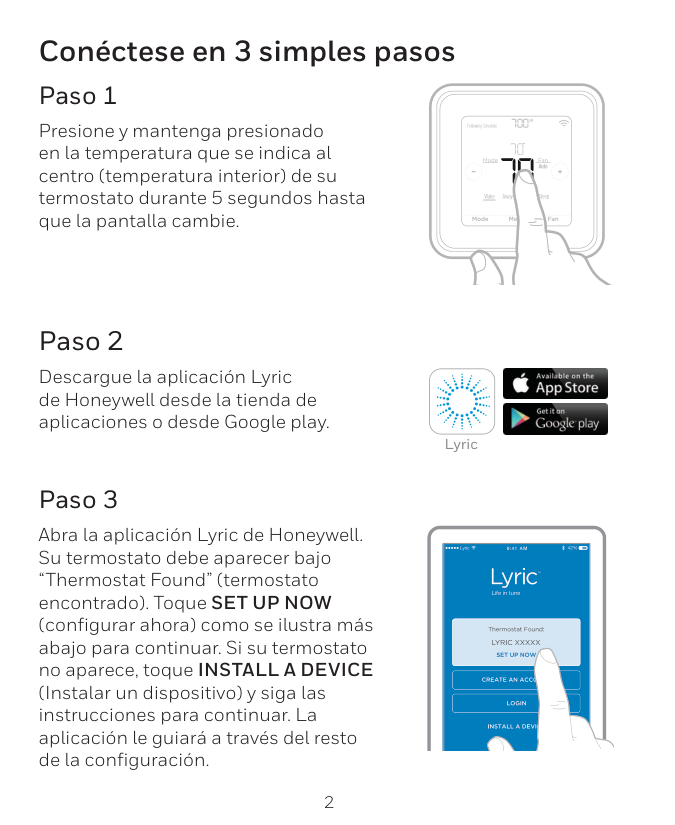
Operating Instructions
Patents Pending ® U.S. Registered Trademark © 2004 Honeywell International Inc. All Rights Reserved 69-1713 Operating InstructionsTh5110D
Non-programmable Thermostat The TH5110D Thermostat provides electronic control of 24 Vac single- stage heating and cooling systems or 750 mV heating systems. For assistance with your Honeywell product please visit www.honeywell.com/yourhome or call Honeywell Customer Care toll free at 1-800-468-1502. Read and Save these Instructions
2 69-1713 Contents Features........................................................................3 Get to Know Your Thermostat ......................................4 Thermostat...............................................................4 Display .....................................................................5 Operate Your Thermostat .............................................6 Set System Setting ..................................................6 Set Fan Setting ........................................................7 Change Temperature Setting...................................8 Replace Batteries .........................................................9 Review Battery Tips......................................................13 Built-in Compressor Protection.....................................14 Auto Changeover..........................................................15 Replacement Part.........................................................19 Troubleshooting Tips ....................................................20 Customer Assistance....................................................23 Limited Five-Year Warranty ..........................................24

69-1713 3 Features • Large, Clear, Backlit Display: Easy-to-see and read—even in the dark. • Precise Comfort Control: ±1ºF of your set temperature. • Simplified Operation: Soft-key controls. Simultaneously displays both room temperature and temperature setting. • Easy Change Battery Holder. • Built-in Compressor Protection: Minimum-off timer protects compressor from restarting too early after a shutdown.

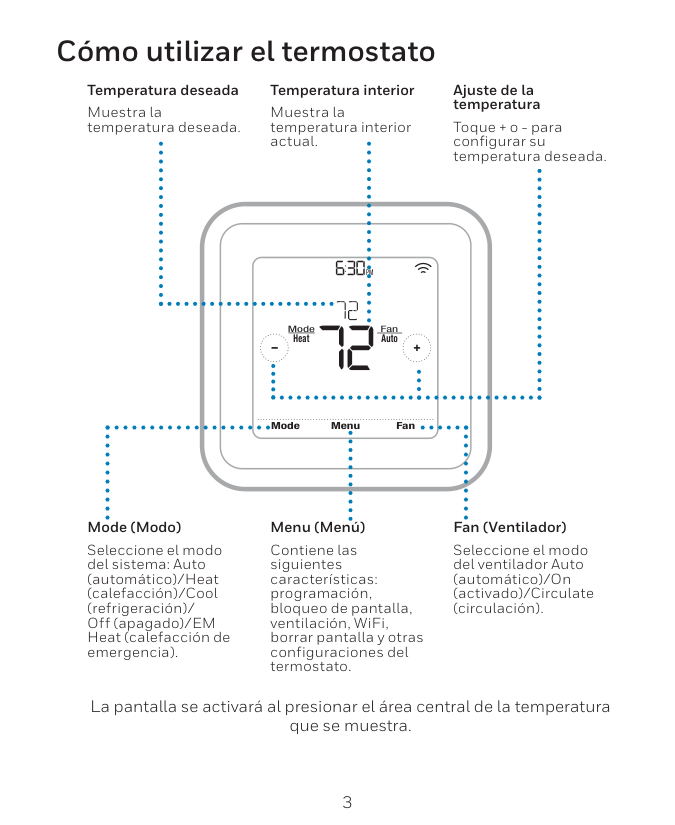
4 69-1713 Get to Know Your Thermostat Thermostat CoolOn Setting Cool Inside Fan Auto Cool System
Digital Display
Fan Button
System Button
Temperature
Setting Button
Temperature
Setting Button
Battery
Holder
Battery Holder Latch
M22084
Press To Release
Battery Holder
Raises
Temperature
Setting
Two Aaa
Alkaline
Batteries
Lowers
Temperature
Setting
Selects Heat, Off, Cool Or Auto
Selects Auto Or On
P R E S S

69-1713 5 Get to Know Your Thermostat (Cont) Display Replace Battery Heat Cool On On Inside Setting Cool Heat Heat Cool AutoOff System Fan On Auto
Inside
Temperature
Temperature
Setting
Indicates
Thermostat Is
"Calling" For
Heat Or Cool
Current
System Setting
M22083
Current
Fan Setting
Indicates Batteries Are
Low And Must Be Replaced

6 69-1713 Operate Your Thermostat Set System Setting Press the System button to select Heat, Off, Cool or Auto: Heat—Thermostat controls the heating system. Off—Both the heating and cooling systems are off. Cool—Thermostat controls the cooling system. Auto—Thermostat automatically changes between heating and cooling operation, depending on indoor temperature. See Auto Changeover section.
Caution
Equipment Damage Hazard. Air conditioning compressor damage possible. Do not operate cooling system when outdoor temperature is below 50°F (10°C).M22107
Press The
System Button
To Select Heat,
Off, Cool Or Auto.
Replace Batt Service Needed Fan Auto Cool System
69-1713 7 Operate Your Thermostat (Cont) Set Fan Setting Press the Fan button to select Auto or On: Auto—Normal setting for most homes. The fan runs only when the heating or cooling system is on. On—The fan runs continuously. Use this setting for improved air circulation or for more efficient air cleaning.
M22108
Press The
Fan Button
To Select
Auto Or On.
Replace Batt CoolOn Service Needed Setting Cool Inside Fan Auto Cool System
8 69-1713 Operate Your Thermostat (Cont) Change Temperature Setting Press the Up or Down button to select the desired temperature setting. The first press of the Up or Down button turns on the backlight. The second press of the Up or Down button changes the temperature setting.
Press This Button To
Raise The Temperature
Setting
Temperature Setting
M22109
Temperature Setting Range:
Heat: 40°To 90°F (4.5°T0 32°C)
Cool: 50°To 99°F (10°T0 37°C)
Press This Button To
Lower The
Temperature
Setting
Replace Batt CoolOn Service Needed Inside Fan Auto Cool System
69-1713 9 Replace Batteries AA alkaline batteries.
Replace Battery Indicator
M22110
10 69-1713 Replace Batteries (Cont)
Battery Holder
Latch
Battery Holder
M22111
69-1713 11 Replace Batteries (Cont)
M22017
Battery
Holder
Push
Batteries
Out
Through
This Hole
Battery
Direction
12 69-1713 Replace Batteries (Cont)
Battery Holder
Latch
Battery Holder
M22111

69-1713 13 Review Battery Tips
Note:
Replacing the batteries once a year also helps prevent battery leakage that can damage the thermostat.
14 69-1713 Built-in Compressor Protection The TH5110D Thermostat has built-in compressor protection (minimum-off timer) that prevents the compressor from restarting too early after a shutdown. The minimum-off timer is activated after the compressor turns off. If there is a call during the minimum-off timer, the thermostat flashes “Cool On” or “Heat On” a in the display. When the minimum-off timer expires, “Cool On” or “Heat On”a appears solidly in the display and the compressor and the fan turn on. _________ a Heat Pumps only.

69-1713 15 Auto Changeover Auto Changeover is a feature used in climates where both air conditioning and heating are used on the same day. The Auto setting appears only if the thermostat is set up for Auto Changeover by your heating and air conditioning dealer. In some installations, Auto may be the only system selection. The following pages in this Auto Changeover section provide an example of how to change both the cool and heat temperature settings when the system is set to Auto. When you are adjusting the temperature setting, if “!Cool” or “"Heat” appear in the display, the temperature setting of the opposite mode is also being adjusted. The thermostat automatically keeps the cool and heat temperature settings three degrees apart (called deadband). This three-degree deadband is not adjustable.

16 69-1713 Auto Changeover (Cont)
M22113
Press The
System Button
To Change
System Setting
To Auto.
Replace Batt CoolOn Service Needed Fan Auto Cool System
69-1713 17 Auto Changeover (Cont)
Press This Button To
Raise The Temperature
Setting
Temperature Setting
M22114
Press This Button To
Lower The Temperature
Setting
Replace Batt Service Needed Fan Auto Heat/Cool SelectSelect Heat/
Cool Button

18 69-1713 Auto Changeover (Cont)
Press This Button
To Raise The
Temperature
Setting
Temperature
Setting
M22116
Press This Button
To Lower The
Temperature
Setting
Service Needed Setting Heat Inside Fan Auto Heat/Cool Select
69-1713 19 Replacement Part
M22018

20 69-1713 Troubleshooting Tips If . . . Then . . . Display is blank. • Check circuit breaker to be sure it is not tripped. • Check power switch at heating and/or cooling system to be sure it is on. • Check furnace door to be sure it is closed securely. • If you use batteries, check that fresh AAA alkaline batteries are installed as marked on the battery holder. Temperature settings do not change. Check that the temperature settings are: • Heating 40°F to 90°F (4.5°C to 32°C). • Cooling 50°F to 99° F (10°C to 37°C). Heating system does not turn on. • Set the system to Heat by pressing the System button. • Check that the heat temperature setting is set above the room temperature and “Heat On” shows solidly in the display. • Check the circuit breaker to be sure it is not tripped. • Check power switch at the heating and/ or cooling system to be sure it is on. • Check the furnace door to be sure it is closed securely. • Wait five minutes for the heating system to respond. • If all of this was checked, contact your local heating and cooling contractor.

69-1713 21 Cooling system does not turn on. • Set the system to Cool by pressing the System button. • Check the cool temperature setting to be sure it is set below room temperature and “Cool On” shows solidly in the display. • Check the circuit breaker to be sure it is not tripped. • Check the power switch at the heating and/or cooling system to be sure it is on. • Check the furnace door to be sure it is closed securely. • Wait five minutes for the cooling system to respond. • If all of this was checked, contact your local heating and cooling contractor. “Heat On” is not shown in the display. Set System setting to Heat and set the temperature setting above the room temperature. If “Heat On” is shown solidly in the display, but the heating system does not turn on, see “Heating system does not turn on” in Troubleshooting Tips. Troubleshooting Tips (Cont) If . . . Then . . .

22 69-1713 “Cool On” is not shown in the display. Set System setting to Cool and set the temperature setting below the room temperature. If “Cool On” is shown solidly in the display, but the cooling system does not turn on, see “Cooling system does not turn on” in Troubleshooting Tips. “Heat On” is flashing in the display (heat pumps only). Compressor minimum-off timer is active. Wait up to five minutes for the heating system to turn on. “Cool On” is flashing in the display. Compressor minimum-off timer is active. Wait up to five minutes for the cooling system to turn on. Troubleshooting Tips (Cont) If . . . Then . . .

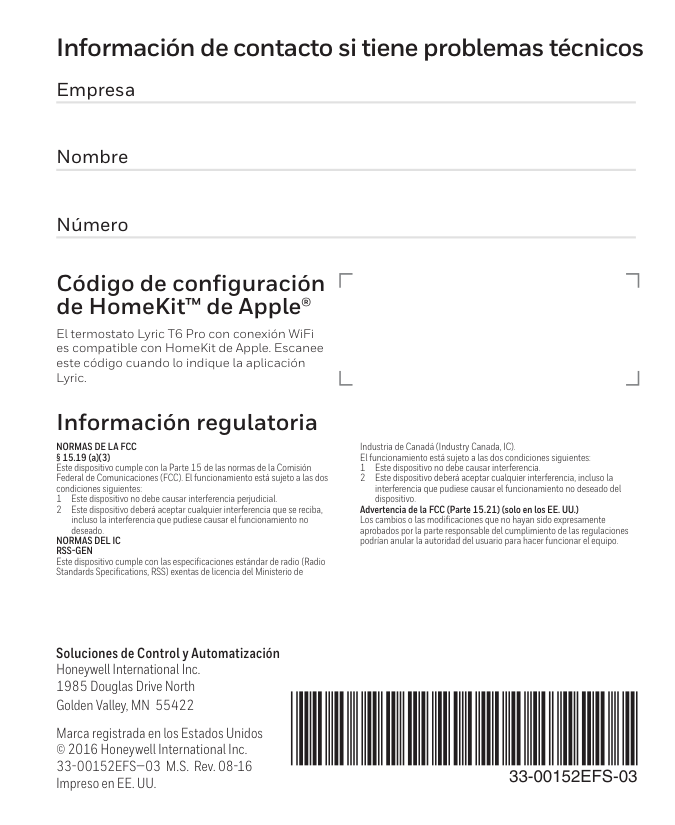
69-1713 23 Customer Assistance For assistance with your Honeywell product, please visit www.honeywell.com/yourhome or call Honeywell Customer Care toll free at 1-800-468-1502. Before calling, please have the thermostat model number and date code available.
M22047
xxxxxxxx xxxxxxThermostat
Battery Holder
Model Number
Date Code

24 69-1713 Limited Five-Year Warranty Honeywell warrants this product, excluding battery, to be free from defects in the workmanship or materials, under normal use and service, for a period of five (5) years from the date of purchase by the consumer. If, at any time during the warranty period, the product is defective or malfunctions, Honeywell shall repair or replace it (at Honeywell’s option) within a reasonable period of time. If the product is defective, (i) return it, with a bill of sale or other dated proof of purchase, to the retailer from which you purchased it, or (ii) package it carefully, along with proof of purchase (including date of purchase) and a short description of the malfunction, and mail it, postage prepaid, to the following address: Honeywell Return Goods Dock 4 MN10-3860 1885 Douglas Dr N Golden Valley, MN 55422 This warranty does not cover removal or reinstallation costs. This warranty shall not apply if it is shown by Honeywell that the defect or malfunction was caused by damage which occurred while the product was in the possession of a consumer. Honeywell’s sole responsibility shall be to repair or replace the product within the terms stated above. HONEYWELL SHALL NOT BE LIABLE
For Any Loss Or Damage Of Any Kind, Including Any
Incidental Or Consequential Damages Resulting,
Directly Or Indirectly, From Any Breach Of Any
Warranty, Express Or Implied, Or Any Other Failure Of
THIS PRODUCT. Some states do not allow the exclusion or limitation of incidental or consequential damages, so this limitation may not apply to you.
69-1713 25 Limited Five-Year Warranty (Cont)
This Warranty Is The Only Express Warranty Honeywell
Makes On This Product. The Duration Of Any Implied
Warranties, Including The Warranties Of
Merchantability And Fitness For A Particular Purpose, Is
Hereby Limited To The Five-Year Duration Of This
WARRANTY. Some states do not allow limitations on how long an implied warranty lasts, so the above limitation may not apply to you. This warranty gives you specific legal rights, and you may have other rights which vary from state to state. If you have any questions concerning this warranty, please write Honeywell Customer Relations, 1985 Douglas Dr, Golden Valley, MN 55422 or call 1-800-468-